Introduction
What is OpenSVC
OpenSVC is an open-source software product and the name of the company developing and supporting it. In production since 2009, OpenSVC consists of:
- Agent: A supervisor, clusterware, container orchestrator, and configuration manager (Apache 2.0 licensed since v3).
- Collector: Optionally, aggregates agent data and manages configuration, infrastructure, and resources (Apache 2.0 licensed).
Why OpenSVC
- Service Mobility: Ensures high availability and scalability.
- Configuration Management: Handles thousands of servers and clusters with minimal dependencies.
- Inventorying: Tracks assets, storage, networks, and services.
- Orchestration: RESTful API, self-service portal, provisioning, fine-grained delegation.
- Auditing: Monitors performance, alerts, and audits infrastructure and services.
- Productivity Boost: Reduces infrastructure maintenance and allows for task delegation.
Requirements
OpenSVC runs on Linux servers.
| Subsystem | Agent | Collector |
|---|---|---|
| Service mobility, clustering, container orchestration | O | |
| Configuration management | O | O |
| Inventoring | O | O |
| Orchestration and interoperability | O | O |
| Continuous infrastructure, systems, and services auditing | O | O |
Install
Branch
We feed packages in 3 different branches:
-
devis unstable.Every candidate Pull Request causes a new package to be spawned here for OpenSVC QA purposes.
-
uatis for testing.OpenSVC will push there pre-release packages and packages that contain a candidate fixes for known issues that client are encouraged to validate.
-
prodis stable.It is the default and recommended branch.
Execute one of the following variable settings in a shell, and the code block corresponding to the operating system.
BRANCH=dev
BRANCH=uat
BRANCH=prod
Debian, Ubuntu
# Set ID (ubuntu, debian) and VERSION_CODENAME (bookworm, bullseye, noble)
source /etc/os-release
BRANCH=${BRANCH:-prod}
DISTRIB=${VERSION_CODENAME:-noble}
# Import opensvc gpg signing keys
# -------------------------------
curl -s -o- https://packages.opensvc.com/gpg.public.key.asc | \
sudo gpg --dearmor --output /etc/apt/trusted.gpg.d/opensvc-package-pub.gpg --yes
#
# Add the opensvc repository to apt sources
# -----------------------------------------
cat - <<EOF | sudo tee /etc/apt/sources.list.d/opensvc.list
deb https://packages.opensvc.com/apt/$ID $BRANCH-opensvc-v3-$DISTRIB main
deb-src https://packages.opensvc.com/apt/$ID $BRANCH-opensvc-v3-$DISTRIB main
EOF
#
# Install the opensvc server
# --------------------------
sudo apt update
sudo apt install opensvc-server
#
# Enable the systemd unit and start the server
# --------------------------------------------
sudo systemctl enable --now opensvc-server
Red Hat Enterprise Linux 7
# Set ID (rhel) and VERSION_ID (7.2, ...)
source /etc/os-release
BRANCH=${BRANCH:-prod}
DISTRIB=${ID}${VERSION_ID%.*}
#
# Add the opensvc repository to yum sources
# -----------------------------------------
cat << EOF >/etc/yum.repos.d/opensvc.repo
[opensvc]
name=OpenSVC Packages RHEL \$releasever - \$basearch
baseurl=https://packages.opensvc.com/rpm/$BRANCH-opensvc-v3-$DISTRIB/\$basearch/
enabled=1
gpgcheck=0
EOF
#
# Install the opensvc server
# --------------------------
sudo yum makecache
sudo yum install opensvc-server
#
# Enable the systemd unit and start the server
# --------------------------------------------
sudo systemctl enable --now opensvc-server
Red Hat Enterprise Linux 8+
# Set ID (rhel) and VERSION_ID (8.10, ...)
source /etc/os-release
BRANCH=${BRANCH:-prod}
DISTRIB=${ID}${VERSION_ID%.*}
#
# Add the opensvc repository to yum sources
# -----------------------------------------
cat << EOF >/etc/yum.repos.d/opensvc.repo
[opensvc]
name=OpenSVC Packages RHEL \$releasever - \$basearch
baseurl=https://packages.opensvc.com/rpm/$BRANCH-opensvc-v3-$DISTRIB/\$basearch/
enabled=1
gpgcheck=1
gpgkey=https://packages.opensvc.com/gpg.public.key.asc
EOF
#
# Install the opensvc server
# --------------------------
sudo dnf makecache
sudo dnf install opensvc-server
#
# Enable the systemd unit and start the server
# --------------------------------------------
sudo systemctl enable --now opensvc-server
SuSE Linux Enterprise Server
# Set ID (rhel) and VERSION_ID (8.10, ...)
source /etc/os-release
BRANCH=${BRANCH:-prod}
DISTRIB=${ID}${VERSION_ID%.*}
#
# Add the opensvc repository to zypper sources
# -----------------------------------------
cat << EOF >/etc/zypp/repos.d/opensvc.repo
[opensvc]
name=OpenSVC Packages SLES \$releasever - \$basearch
baseurl=https://packages.opensvc.com/rpm/$BRANCH-opensvc-v3-$DISTRIB/\$basearch/
enabled=1
autorefresh=1
gpgcheck=1
gpgkey=https://packages.opensvc.com/gpg.public.key.asc
EOF
#
# Install the opensvc server
# --------------------------
sudo zypper --gpg-auto-import-keys --non-interactive refresh
sudo zypper install opensvc-server
#
# Enable the systemd unit and start the server
# --------------------------------------------
sudo systemctl enable --now opensvc-server
➡️ See Also
Your First Service
This page takes about five minutes and needs nothing but the agent installed on one machine. No shared storage, no second node, no cluster. At the end you will have created a service, started it, proven it is serving, and stopped it.
We will wrap a plain HTTP server, because it is the shortest thing whose running you can prove rather than take on trust.
Create it
An object is created from the command line, resource by resource. Here is a
single app resource, told how to start:
om hello create \
--kw app#1.type=simple \
--kw 'app#1.start=/usr/bin/python3 -m http.server 8099'
Nothing was started, and nothing outside /etc/opensvc was touched. The
command only wrote a configuration, which you can read back:
om hello config show
[DEFAULT]
id = 0e745444-6724-48f9-8167-e865b4f9ec94
[app#1]
type = simple
start = /usr/bin/python3 -m http.server 8099
[app#1] is a resource. app is its driver group, 1 its index, and
type = simple picks the driver that supervises a long-running process.
Start it
om hello instance start
INF hello: >>> do start [om hello instance start] (origin user, sid 7b9772c8)
INF hello: app#1: run: om exec --pg /opensvc.slice/... -- /usr/bin/python3 -m http.server 8099
INF hello: <<< done start in 98.079925ms, instance status is now up
The agent tells you what it ran and what the instance status became.
Prove it
curl -o /dev/null -w "%{http_code}\n" http://localhost:8099/
200
Look at it
om hello instance status
hello
└ instances
└ node1 up no-monitor
└ resources
└ app#1 ...../.. up simple
The instance is up because its only resource is up. Had the resource
failed, both lines would say so. This is the command you will reach for most
often.
Stop it
om hello instance stop
INF hello: app#1: send termination signal to process 2615892
INF hello: app#1: process 2615892 is now terminated
INF hello: <<< done stop in 86.862589ms, instance status is now down
The port is closed and the status agrees:
curl --max-time 3 http://localhost:8099/
om hello instance status
curl: (7) Failed to connect to localhost port 8099: Connection refused
hello
└ instances
└ node1 down no-monitor
└ resources
└ app#1 ...../.. down simple
Clean up
om hello delete
OBJECT ORCHESTRATION_ID STATUS
hello 068b4fb0-ba3f-4d62-81e7-92ed88039239 accepted
The configuration is gone, and with it the object.
Two ways to start
You used om hello instance start, which starts the instance on this node,
now, and prints each step as it happens.
Its cluster counterpart is om hello start, which does not act directly. It
asks the cluster to reach the started state, and answers with an
orchestration id:
OBJECT ORCHESTRATION_ID STATUS
hello 45c9de82-ed12-48df-bdb2-21a251fb039d accepted
The daemon then picks a node and starts the instance there, which is what you
want once the object runs on more than one node. Watch it happen with om mon.
Note that the matching om hello stop also freezes the instance, so the daemon
does not immediately start it again.
What you just did
You described a process in a configuration file, and the agent started it, tracked its state, and stopped it. Everything else the agent does is this same loop with more interesting resources: an ip that moves between nodes, a filesystem mounted from a shared disk, a container, a database volume.
Where to go next:
- Naming to place objects in namespaces before you have many of them.
- Create, Deploy for the other ways to create an object, including from a manifest.
- Cluster Configuration to add a second node, which is where failover starts to matter.
Agent Configuration
Concepts
The agent uses ini configuration files.
Considering a configuration like:
[env]
bar = 1
bar@n2 = 2
envis a sectionbaris an optionenv.baris a keyword.env.bar=1is a keyword operation.1is theenv.barkeyword value.@n2is a node scope for the keywordenv.bar
Policies
-
If a keyword appears in both
node.confandcluster.conf, the value from node.conf takes precedence. -
Sections only accept recognized keywords, with the exception of the
[env]and[labels]sections, which are open. -
More specific scoped values override less specific ones.
With the above section in a
svc1object configuration:# on n1: $ om svc1 config eval --kw env.bar 1 # on n2: $ om svc1 config eval --kw env.bar 2
Syntax validation
A syntax check is performed before finalizing any modifications made with either the set or edit commands.
om cluster config edit
om cluster config set --kw hb#test.type=unsupported
A direct modification to the configuration file is not validated and may disrupt the cluster. In such cases, you can perform a post-hoc validation using:
# verify the syntax of cluster.conf
om cluster config validate
# verify the syntax of node.conf
om node config validate
# verify the syntax of a svc configuration
om svc1 config validate
Node Configuration
Set the Node Environment
Set a default environment for all cluster nodes:
sudo om cluster config update --set node.env=PRD
Optionally set an override in the node configuration:
sudo om node config update --set node.env=DEV
node.env marks a node production or not, which the
agent then enforces two ways:
- Only production services may start on a production node.
- Only production nodes may push data to a production node.
Supported node.env values:
| Env | Behaves As | Description |
|---|---|---|
| PRD | PRD | Production |
| PPRD | PRD | Pre Production |
| REC | not PRD | Prod-like testing |
| INT | not PRD | Integration |
| DEV | not PRD | Development |
| TST | not PRD | Testing (Default) |
| TMP | not PRD | Temporary |
| DRP | not PRD | Disaster recovery |
| FOR | not PRD | Training |
| PRA | not PRD | Disaster recovery |
| PRJ | not PRD | Project |
| STG | not PRD | Staging |
Set Node Jobs Schedules
The agent executes periodic tasks.
Display the scheduler configuration and states:
$ sudo om node schedule list
NODE ACTION LAST_RUN_AT NEXT_RUN_AT SCHEDULE
eggplant pushasset 2025-01-20T01:31:17+01:00 0001-01-01T00:00:00Z ~00:00-06:00
eggplant checks 2025-01-20T16:40:20+01:00 0001-01-01T00:00:00Z @10m
eggplant compliance_auto 2025-01-20T05:34:49+01:00 0001-01-01T00:00:00Z 02:00-06:00
eggplant pushdisks 2025-01-20T02:42:29+01:00 0001-01-01T00:00:00Z ~00:00-06:00
eggplant pushpkg 2025-01-20T00:16:38+01:00 0001-01-01T00:00:00Z ~00:00-06:00
eggplant pushpatch 2025-01-20T01:50:37+01:00 0001-01-01T00:00:00Z ~00:00-06:00
eggplant sysreport 2025-01-20T00:58:22+01:00 0001-01-01T00:00:00Z ~00:00-06:00
eggplant dequeue_actions 2023-08-03T14:05:50+02:00 0001-01-01T00:00:00Z
eggplant pushhcs 2025-01-15T18:00:59+01:00 0001-01-01T00:00:00Z @1d
eggplant pushbrocade 0001-01-01T00:00:00Z 0001-01-01T00:00:00Z
Schedule configuration:
# Set a job schedule
om node config update --set "brocade.schedule=02:00-04:00@120 sat,sun"
# Disable a job schedule
om node config update --set "brocade.schedule=@0"
➡️ See Also
Register on a Collector
Set a Collector Url
By default, the agent does not communicate with a collector.
To enable communications with a collector, the node.dbopensvc node configuration parameter must be set. The simplest expression is:
om cluster config update --set node.dbopensvc=collector.opensvc.com
Here the protocol and path are omitted. In this case, the https protocol is selected, and the path set to a value matching the standard collector integration.
Advanced Url Formats
The following expressions are also supported:
om cluster config update --set node.dbopensvc=https://collector.opensvc.com
om cluster config update --set node.dbopensvc=https://collector.opensvc.com/feed/default/call/xmlrpc
The compliance framework uses a separate xmlrpc entrypoint. The node.dbcompliance can be set to override the default, which is deduced from the node.dbopensvc value.
om cluster config update --set node.dbcompliance=https://collector.opensvc.com/init/compliance/call/xmlrpc
Register the Node
The collector requires the nodes to provide an authentication token (shared secret) with each request. The token is forged by the collector and stored on the node in /etc/opensvc/node.conf. The token initialization is handled by the command:
om node register --user my.self@my.com [--app MYAPP]
If --app is not specified the collector automatically chooses one the user is responsible of.
A successful register is followed by a node discovery, so the collector has detailed information about the node and can serve contextualized compliance rulesets up front. The discovery is also scheduled daily, and can be manually replayed with:
om node push asset
om node push pkg
om node push patch
om node checks
To disable collector communications, use:
om cluster config update --unset node.dbopensvc
om cluster config update --unset node.dbcompliance
Or if the settings were added to node.conf
om node config update --unset node.dbopensvc
om node config update --unset node.dbcompliance
Extra System Configurations
Linux LVM2
OpenSVC controls volume group activation and deactivation. Old Linux distributions activate all visible volume groups at boot, some even re-activate them upon de-activation events. These mechanisms can be disabled using the following setup. It also provides another protection against unwanted volume group activation from a secondary cluster node.
This setup tells LVM2 commands to activate only the objects tagged with the hostname. Opensvc makes sure the tags are set on start and unset on stop. Opensvc also purges all tags before adding the one it needs to activate a volume group, so opensvc can satisfy a start request on a service uncleanly shut down.
/etc/lvm/lvm.conf
Add the following root-level configuration node:
tags {
hosttags = 1
local {}
}
And add the local tag to all local volume groups. For example:
sudo vgchange --addtag local rootvg
Finally you need to rebuild the initrd/initramfs to prevent shared vg activation at boot.
/etc/lvm/lvm_$HOSTNAME.conf
echo activation { volume_list = [\"@local\", \"@$HOSTNAME\"] } >/etc/lvm/lvm_$HOSTNAME.conf
Cluster Configuration
Upon agent installation, the node is considered part of its own 1-node cluster.
In /etc/opensvc/cluster.conf:
cluster.secretis initialized to a random value.cluster.nameis initialized to a random value.
Bootstrap a new cluster
If the node joins an existing cluster, skip this section.
Add Heartbeats
If the cluster seed node has no heartbeat setup, a unicast heartbeat with default settings will be automatically added on first join.
This default heartbeat requires every nodename to be resolved to an ip address reachable on 1215/tcp.
If these requirements are not met, you can setup one or more custom heartbeats on the seed node before joins.
For example, a custom heartbeat configuration would be:
om cluster config update --set hb#2.type=unicast --set hb#2.port=10002
The heartbeats status is summarized in the top section of the monitoring command output:
om mon
And the detailed status is shown by:
om daemon hb status
➡️ See Also
Add Stonith methods
Stonith is optional. Skip to the next section if not concerned.
On a new cluster, the stonith configuration can be applied on the first node. The joining nodes will fetch this configuration from this joined node.
For example, a dummy stonith configuration would be
om cluster config update --set stonith#node2.command=/bin/true
This configuration will execute /bin/true on the node taking over a service which was previously running on the now stalled node2.
Good, isolated fencing packages are freely available. For one, https://github.com/ClusterLabs/fence-agents
Join a Cluster
The joining node can choose to join any of the cluster node already joined.
On the joined node node1, generate a join token:
$ sudo om daemon auth --role join
On the joining node node2:
sudo om cluster join --token <token> --node node1
- If the node was frozen before the join, it is left frozen after the join.
- If the node was not frozen before the join, the join process freezes it. If the join is successful, the node is thawed. If not, the node is left frozen.
Leave a Cluster
sudo om cluster leave
➡️ See Also
Cluster Storage Pools
Services can use volume resources to:
-
Abstract the disks and filesystems layout, which are hosting specificities, from the service deployment. A development cluster can for example define pools on a ceph cluster, while a production cluster can define pools on fc arrays.
-
Enable service redeployment while retaining the data.
In this case the translation from volumes to disks and filesystems is delegated to the storage pool drivers.
Pools are defined in the node configuration. Each pool is identified by its name (the section suffix). For example, a pool#tank section defines a pool named tank.
The default pool always exist, even if not defined in the node configuration. If not explicitly changed, the default pool driver is directory.
Volumes
-
A volume resource drives a volume object, automatically created upon service provisioning if not already existing.
-
The volume is hosted in the same namespace than its users.
-
If not explicitly set, the volume object name is
<consumer name>-vol-<volume resource index>. For example, asvc1service with avolume#1resource will create asvc1-vol-1volume object. -
A volume object can be referenced by multiple services in the same namespace.
-
On provision, a service adds itself as a child of the volume objects mapped via volume resources. Due to this parent/child relation, stopping a volume object is delayed until all its consumers are stopped.
-
On unprovision, a service removes itself from the children list of the volume objects mapped via volume resources.
-
A consumer service instance stop also stops its node-affine volume object instances if the consumer service is the only child of the volume service.
-
A consumer service instance start always tries to start its node-affine volume object instances.
Volume Resources Keywords
Access Modes
-
rooRead Only Once -
rwoRead Write Once (default) -
roxRead Only from multiple instances -
rwxRead Write from multiple instances
Access Mode to Volume Topology
-
..xaccess modes imply the volume is configured in a flex topology (active on all service nodes). -
..oaccess modes imply the volume is configured in a failover topology (active on only one service node).
Volume Resource Parameter Requirements
-
..x + shared=true format=falserequires a shared block storage (SAN array, a rados blockdev gateway, …) -
..x + shared=true format=truerequires either a shared block storage (SAN array, a rados blockdev gateway, …) plus a cluster filesystem (gfs2, ocfs, …), or a distributed cluster filesystem (CephFS, GlusterFS, NAS, …)
Pool Selector
A volume resource requires a size and capabilities from the pool, via its size, access, shared and format keywords.
If pool is not set explicitly to a pool name, the pool selector will return the available pool matching those criteria with the most free space.
Pool Drivers
Each pool is backed by a driver, which decides what a volume is made of: a directory, a logical volume, a zfs dataset, a lun on an array. The driver also decides which access modes the pool can serve, and so which volumes the selector may place on it.
The drivers, their capabilities and their keywords are listed in Pool Drivers.
Pool Commands
Pool list
# om pool ls
default
freenas
mpool
Pool Status
# om pool status
name type caps head vols size used free
|- default directory rox,rwx,roo,rwo /opt/opensvc/var/pool/directory 0 29.0g 3.57g 24.0g
|- freenas freenas roo,rwo,shared,blk,iscsi array://freenas/osvcdata 6 195g 9.37g 185g
`- mpool virtual roo,rox,rwo,rwx,shared templates/mpool 1 - - -
Examples
loop pool
Pool configuration
om cluster config update \
--set pool#loop.type=loop \
--set pool#loop.path=/bigfs \
--set pool#loop.mkfs_opt="-n ftype=1" \
--set pool#loop.fs_type=xfs
[pool#loop]
type = loop
path = /bigfs
mkfs_opt = -n ftype=1
fs_type = xfs
The volume resource in the service
[volume#1]
size = 100m
pool = loop
Resulting configuration of the volume object
[disk#1]
size = 104857600
type = loop
file = /bigfs/<fqdn>.img
[fs#1]
type = xfs
dev = {disk#1.exposed_devs[0]}
mnt = /srv/<fqdn>
mkfs_opt = -n ftype=1
zfs pool
Pool configuration
om cluster config update \
--set pool#tank.type=zpool \
--set pool#tank.name=tank \
--set pool#tank.mkfs_opt="-o mountpoint=legacy -o dedup=on -o compression=on"
[pool#tank]
type = zpool
name = tank
mkfs_opt = -o mountpoint=legacy -o dedup=on -o compression=on
The volume resource in the service
[volume#1]
size = 100m
pool = tank
Resulting configuration of the volume object
[fs#1]
type = zfs
dev = tank/<fqdn>
mnt = /srv/<fqdn>
mkfs_opt = -o mountpoint=legacy -o dedup=on -o compression=on
virtual pool, mirrored zpool over 2 SAN disks
Pools configuration
om cluster config update \
--set pool#freenas1.type=array \
--set pool#freenas1.array=freenas1 \
--set pool#freenas1.sparse=true \
--set pool#freenas1.diskgroup=cluster1 \
--set pool#freenas2.type=array \
--set pool#freenas2.array=freenas2 \
--set pool#freenas2.sparse=true \
--set pool#freenas2.diskgroup=cluster1 \
--set pool#mpool.type=virtual \
--set pool#mpool.template=templates/mpool \
--set pool#mpool.capabilities="rox rwx roo rwo shared"
[pool#freenas1]
type = array
array = freenas1
diskgroup = cluster1
sparse = true
[pool#freenas2]
type = array
array = freenas2
diskgroup = cluster1
sparse = true
[pool#mpool]
type = virtual
template = templates/mpool
capabilities = rox rwx roo rwo shared
The volume object template referenced by the vpool
[DEFAULT]
kind = vol
nodes = *
disable = true
[disk#1]
name = {namespace}-{svcname}
type = zpool
vdev = mirror {volume#1.exposed_devs[0]} {volume#2.exposed_devs[0]}
shared = true
[fs#1]
dev = {disk#1.name}
mnt = /srv/{namespace}/{svcname}
type = zfs
shared = true
[fs#2]
dev = {disk#1.name}/data
mnt = {fs#1.mnt}/data
type = zfs
shared = true
[fs#3]
dev = {disk#1.name}/log
mnt = {fs#1.mnt}/log
type = zfs
shared = true
[volume#1]
format = false
name = {svcname}-1
pool = freenas1
size = {env.size}
shared = true
[volume#2]
format = false
name = {svcname}-2
pool = freenas2
size = {env.size}
shared = true
virtual pool, mirrored lv over 2 SAN disks
Pools configuration
om cluster config update \
--set pool#freenas1.type=array \
--set pool#freenas1.array=freenas1 \
--set pool#freenas1.sparse=true \
--set pool#freenas1.diskgroup=cluster1 \
--set pool#freenas2.type=array \
--set pool#freenas2.array=freenas2 \
--set pool#freenas2.sparse=true \
--set pool#freenas2.diskgroup=cluster1 \
--set pool#mvg.type=virtual \
--set pool#mvg.template=templates/mvg \
--set pool#mvg.capabilities="rox rwx roo rwo shared"
[pool#freenas1]
type = array
array = freenas1
diskgroup = cluster1
sparse = true
[pool#freenas2]
type = array
array = freenas2
diskgroup = cluster1
sparse = true
[pool#mvg]
type = virtual
template = templates/mvg
capabilities = rox rwx roo rwo shared
The volume object template referenced by the vpool
[DEFAULT]
kind = vol
nodes = *
disable = true
[volume#1]
shared = true
size = {env.size}
name = {svcname}-1
pool = freenas
format = false
[volume#2]
shared = true
size = {env.size}
name = {svcname}-2
pool = freenas
format = false
[disk#1]
shared = true
type = vg
name = {namespace}-{svcname}
pvs = {volume#1.exposed_devs[0]} {volume#2.exposed_devs[0]}
[fs#1]
shared = true
mnt = /srv/{namespace}/{svcname}
dev = /dev/{disk#1.name}/root
type = ext4
size = 10m
create_options = -m 1
vg = {namespace}-{svcname}
[fs#2]
shared = true
mnt = {fs#1.mnt}/data
dev = /dev/{disk#1.name}/data
type = ext4
size = 60%FREE
create_options = -m 1
vg = {namespace}-{svcname}
[fs#3]
shared = true
mnt = {fs#1.mnt}/log
dev = /dev/{disk#1.name}/log
type = ext4
size = 40%FREE
create_options = -m 1
vg = {namespace}-{svcname}
virtual pool, mirrored md over 2 SAN disks
Pools configuration
om cluster config update \
--set pool#freenas1.type=array \
--set pool#freenas1.array=freenas1 \
--set pool#freenas1.sparse=true \
--set pool#freenas1.diskgroup=cluster1 \
--set pool#freenas2.type=array \
--set pool#freenas2.array=freenas2 \
--set pool#freenas2.sparse=true \
--set pool#freenas2.diskgroup=cluster1 \
--set pool#md.type=virtual \
--set pool#md.template=templates/md \
--set pool#md.capabilities="rox rwx roo rwo shared"
[pool#freenas1]
type = array
array = freenas1
diskgroup = cluster1
sparse = true
[pool#freenas2]
type = array
array = freenas2
diskgroup = cluster1
sparse = true
[pool#md]
type = virtual
template = templates/md
capabilities = rox rwx roo rwo shared
The volume object template referenced by the vpool
[DEFAULT]
kind = vol
disable = true
nodes = *
[disk#1]
shared = true
devs = {volume#1.exposed_devs[0]} {volume#2.exposed_devs[0]}
type = md
level = raid1
[disk#2]
shared = true
pvs = {disk#1.exposed_devs[0]}
type = vg
name = {namespace}-{svcname}
[fs#1]
vg = {namespace}-{svcname}
mnt = /srv/{namespace}/{svcname}
dev = /dev/{disk#1.name}/root
shared = true
type = ext4
size = 10m
[fs#2]
vg = {namespace}-{svcname}
mnt = {fs#1.mnt}/data
dev = /dev/{disk#1.name}/data
shared = true
type = ext4
size = 60%FREE
[fs#3]
vg = {namespace}-{svcname}
mnt = {fs#1.mnt}/log
dev = /dev/{disk#1.name}/log
shared = true
type = ext4
size = 40%FREE
[volume#2]
shared = true
size = {env.size}
name = {svcname}-2
pool = freenas
format = false
[volume#1]
shared = true
size = {env.size}
name = {svcname}-1
pool = freenas
format = false
drbd pool
Pool configuration
om cluster config update \
--set pool#drbdloop.type=drbd
om cluster config update \
--set pool#drbdvg.type=drbd \
--set pool#drbdvg.vg=centos
[pool#drbdloop]
type = drbd
[pool#drbdvg]
type = drbd
vg = centos
Example postgres service using a volume from a pool.
[DEFAULT]
nodes = *
orchestrate = ha
[volume#1]
shared = true
size = 200m
name = {name}
[container#1]
type = oci
image = postgres
volume_mounts = {name}/data:/var/lib/postgresql/data
secrets_environment = POSTGRES_PASSWORD=pg/password
rm = true
shared = true
Pool Drivers
Reference of the pool drivers, their capabilities and their keywords. To choose between them, see Cluster Storage Pools.
directory
Capabilities
rox, rwx, roo, rwo
Layout
A volume object from this type of pool contains:
- a fs.directory resource, with
path=<pool head>/<volume fqdn>.
Keywords
drbd
Capabilities
rox, rwx, shared, blk, roo, rwo
Layout
A volume object from this type of pool contains:
If a vg is defined in the pool configuration,
- a fs resource, with
dev=<drbd devpath> - a drbd resource, layered over a logical volume of the pool vg
- a lv resource
If a zpool is defined in the pool configuration,
- a fs resource, with
dev=<drbd devpath> - a drbd resource, layered over a zvol of the pool zpool
- a zvol resource
If the pool configuration has neither vg nor zpool set,
- a fs resource, with
dev=<drbd devpath> - a drbd resource, layered over a logical volume
- a lv resource
- a vg resource
- a loop resource, with image file hosted in the pool defined
pathor in<PATHVAR>/pool/<poolname>/
Keywords
freenas
Capabilities
roo, rwo, shared, blk, iscsi
Layout
A volume object from this type of pool contains:
- a disk.disk resource named, with
name=<volume fqdn>
If the consumer has format=true (default), the volume object also contains:
- a
fs.<pool fs_type>resource, withmnt=/srv/<volume fqdn>
Keywords
loop
Capabilities
rox, rwx, roo, rwo, blk
Layout
A volume object from this type of pool contains:
- a disk.loop resource, with
file=<pool head>/<volume fqdn>.img
If the consumer has format=true (default), the volume object also contains:
- a
fs.<pool fs_type>resource, withmnt=/srv/<volume fqdn>
Keywords
symmetrix
Capabilities
roo, rwo, shared, blk, fc
Layout
A volume object from this type of pool contains:
- a disk.disk resource named, with
name=<volume fqdn>
If the consumer has format=true (default), the volume object also contains:
- a
fs.<pool fs_type>resource, withmnt=/srv/<volume fqdn>
Keywords
vg
Capabilities
rox, rwx, roo, rwo, blk, snap
Layout
A volume object from this type of pool contains:
- a disk.lv resource, with
name=<volume fqdn>
If the consumer has format=true (default), the volume object also contains:
- a
fs.<pool fs_type>resource, withmnt=/srv/<volume fqdn>
Keywords
share
Capabilities
rox, rwx, roo, rwo, shared
Layout
A volume object from this type of pool contains:
- a fs.directory resource, with
path=<pool head>/<volume fqdn>.
Keywords
zpool
Capabilities
rox, rwx, roo, rwo, blk, snap
Layout
A volume object from this type of pool contains:
- a fs.zfs resource, with
name=<pool>/<volume fqdn>andmnt=/srv/<volume fqdn>.
Keywords
Virtual Pool Driver
A virtual pool allow administrators to create complex layouts based on volumes from other pools.
A typical use-case in a virtual pool allocating volumes mirrored over two other volumes allocated from arrays on two different sites.
A virtual pool volume is created from a template volume object the administrator can design at wish to meet its specific needs.
Capabilities
Capabilities are user defined.
Keywords
Cluster API
The Cluster API provides remote access to the OpenSVC cluster management and monitoring functionality. It is accessible through the agent listener on any running cluster node.
Access and Network Resolution
The Cluster API URL (server name) can be configured to resolve to various network endpoints to ensure high availability and redundancy.
Possible Resolutions:
-
Single Floating IP
A single virtual IP (VIP) address, typically managed by a failover service like
system/svc/vip. This is the most common and robust approach. -
Multiple Floating IP Addresses
A set of VIPs for complex network routing or multi-site setups.
-
All Cluster Node IPs
Every physical or virtual IP address of all nodes in the cluster.
-
Subset of Cluster Node IPs
A selection of node IP addresses, often used in large clusters or specific network segments.
Authentication Methods
The agent listener supports several industry-standard authentication methods to secure access to the API.
Basic Authentication
- Mechanism: The client provides the username and password in the request header of every API call and the password is compared to the
passwordkey of thesystem/usr/<username>object. - Authorization: The RBAC grants are read from the
system/usr/<username>grantkey. - User Object: The
system/usr/<username>object must exist on the cluster.
X.509 Certificate Authentication
- Mechanism: Authentication is based on a client-side X.509 certificate.
- Trust: The certificate must be signed by one of the Certificate Authorities listed in the cluster
cakeyword,system/sec/caby default, and carry the TLS client authentication extended key usage. A certificate signed by any other authority is refused, whatever itscn. - Username: The username is derived from the Common Name (
cn) field of the client certificate. A certificate with an emptycnis refused. - Authorization: The RBAC grants are read from the
system/usr/<username>grantkey. - User Object: The
system/usr/<username>object must exist on the cluster.
JSON Web Token (JWT)
- Mechanism: Authentication is based on a JWT passed as a bearer token.
- Username: The username is derived from the
subtoken claim. - Authorization: The RBAC grants are derived from the
grantclaim of a token the cluster issued itself, or from theentitlementsclaim of a token issued by an OIDC server. - User Object: The
system/usr/<username>object does not need to exist on the cluster if the tokens are issued and managed by an external OpenID Connect (OIDC) server. - Issuance: A token is obtained from the
POST /api/auth/tokenendpoint, which accepts only the requests authenticated by the unix socket (a localomcommand) or by Basic Authentication. A request authenticated by a token or by a certificate is refused with403 not allowed to create token. A remote client therefore presents its password once to obtain a token, and asks for a refresh token at the same time if it needs to renew without presenting the password again. - Availability: This method was added in OpenSVC v3 agents.
Managing API Users
Using an OpenID server
The OpenID server will need to be configured to provide tokens with an
entitlements claim, holding the grant expressions this cluster is to give the
user. The claim is not named grant: that is the claim of the tokens the
cluster issues itself.
[listener]
openid_issuer = https://auth.mycorp.com/realms/clusters
openid_client_id = om3
The daemon reads <openid_issuer>/.well-known/openid-configuration to discover
the provider, and fetches the signing keys from the jwks_uri it advertises. A
token is accepted only if:
- Its
audclaim contains theopenid_client_idvalue. - Its
issclaim equals theissuervalue advertised by the discovery document, which is not necessarily theopenid_issuerurl used to reach it. - Its signature verifies against a key of the
jwks_urikey set, named by the tokenkidheader.
➡️ See Also
Creating Local Users (system/usr/)
Skip this step if you plan to use only OIDC-issued tokens for a user. Local user objects define the user’s cluster grants for Basic and X.509 authentication.
# Create a cluster-wide administrator user
om system/usr/root create --kw grant=root
# Create user `usr1` with
# `admin` rights on namespace `ns1`
# `guest` (read-only) rights on namespace `ns2`
om system/usr/usr1 create --kw grant="admin:ns1 guest:ns2"
Generating X.509 Certificates for Users
This step is only necessary if you require X.509 authentication for the user.
The certificate is named after the object and signed by the cluster
certificate authority, which is what the api expects of it. The cn and ca
keywords hold those two and rarely need to be set.
# Generate Certificate:
om system/usr/root certificate create
om system/usr/usr1 certificate create
# Download Keys (for client use):
om system/usr/usr1 key decode --name certificate_chain
om system/usr/usr1 key decode --name certificate
om system/usr/usr1 key decode --name private_key
These commands will print the PEM-encoded keys to standard output.
Testing the API
The API manifest (documentation) is exposed by a demonstration agent for reference.
A practical test using a JWT:
# Generate a Temporary Token:
$ TOKEN=$(sudo om daemon auth token --subject usr1 --duration 10m)
# Call the `whoami` Endpoint:
$ curl -o- -k -s -H "Authorization: Bearer $TOKEN" https://localhost:1215/api/auth/whoami
Example Output:
{"auth":"jwt","grant":{"guest":["ns2"], "admin": ["ns1"]},"name":"usr1","namespace":"system","raw_grant":"admin:ns1 guest:ns2"}
Configuring the Listener TLS Certificate
The agent listener requires a TLS certificate to accept remote connections securely.
Upon initial agent installation and daemon startup:
- A self-signed Certificate Authority (CA) is automatically created as
system/sec/ca. - A listener certificate, signed by this internal CA, is automatically created as
system/sec/cert.
The following steps are only required if you need to re-sign the internal CA or switch to an external PKI.
Option 1: Using the Internal PKI
The initial configuration is done automatically upon agent installation and daemon startup, creating:
- The CA certificate at
system/sec/ca. - The listener certificate at
system/sec/cert.
- Import a valid certificate in
system/sec/ca:om system/sec/ca key change --name certificate --from ~/$CLUSTERNAME.pem om system/sec/ca key change --name certificate_chain --from ~/$CLUSTERNAME.chain om system/sec/ca key change --name private_key --from ~/$CLUSTERNAME.key - Recreate the listener certificate:
om system/sec/cert certificate create
Option 2: Using an External PKI
-
Adjust the Listener Certificate Subject:
Only the
cnis strictly required by OpenSVC, but the signing certificate authority will surely require more.om system/sec/cert config update --set cn=vip.$CLUSTERNAME.mycorp \ --set alt_names="node1.$CLUSTERNAME.mycorp node2.$CLUSTERNAME.mycorp" \ --set c=FR \ --set o=MyCorp \ --set ou=Support \ --set l=Paris \ --set st=IDF \ --set email=support@mycorp -
Create the Listener Certificate Request:
om system/sec/cert certificate signing-request -
Perform External Signing: (This is an external procedure to be done with your PKI tool using the generated csr.)
-
Load the Signed Certificate:
om system/sec/cert key change --name certificate_chain --from ~/$CLUSTERNAME_crt_chain.pemThe certificate is always first, then the CA certificate chain.
-
Configure Certificate Revocation List (Optional):
om cluster config update --set cluster.crl=http://crl.mycorp -
Restart the Daemons
om daemon restart --node="*"
➡️ See Also
- Access Control for roles and grant management.
Role-Based Access Control
A cluster reached over its API requires authentication, and every request is checked against the privileges of the authenticated user.
Privileges live in the grant keyword of a usr object, as a
whitespace-separated list of grant expressions. A grant is a role, optionally
scoped to namespaces:
[DEFAULT]
grant = guest:prod* admin:test*
That user is a guest in every namespace whose name starts with prod, and an
admin in those starting with test.
A role given without a scope applies cluster-wide:
[DEFAULT]
grant = operator
Namespace roles
These roles are the ones you scope to namespaces. Each inherits the previous.
guest
Read-only. List objects, read their configuration, status, schedule, resource info and logs.
operator
Inherits guest, and may change the state of what already exists: start,
stop, restart, freeze, unfreeze, shutdown, switch, giveback, abort, run,
clear, refresh status and resource info.
An operator runs services. An operator does not create, delete or provision them.
admin
Inherits operator, and may change what exists: create and delete objects,
edit their configuration, provision and unprovision their resources, purge
them, and manage the keys of cfg and sec objects.
Cluster roles
These roles are not namespace-scoped.
root
All privileges. A user granted root can read and change the system’s files
and run commands as the root system user, so it is the grant to give last and
audit first.
squatter
May create namespaces. The creator is automatically granted admin on the
namespace it creates.
prioritizer
May set object priority. Priority arbitrates between objects across namespace boundaries, which is why it is a cluster role rather than something an admin holds in its own namespace.
blacklistadmin
Reserved for clearing the client blacklist. The role is accepted in a grant, but no v3 endpoint requires it yet, so granting it currently confers nothing.
heartbeat
May use the relay handlers. A relay heartbeat authenticates on a foreign OpenSVC daemon with a user holding this role.
om daemon relay status
join, leave
May add a node to the cluster, or remove one from it, plus the reads a node performs while joining. These back the token minted for a joining node:
om daemon auth --role join
➡️ See Also
- Cluster API
- Cluster Configuration for the join procedure.
Cluster API Client
The ox program uses only the agent API and mirrors the om commandset, which makes it suitable for managing one or more clusters from a tiers linux box.
Configure remotes
The remotes configuration is stored in JSON format in the ~/.config/opensvc/contexts.json file.
A context names a cluster to talk to and a user to talk as. Clusters and users are defined once and referenced by name, so several contexts can share them.
Example:
{
"clusters": {
"dreamy-leopard": {
"server": "https://dreamy-leopard.example.com:1215",
"insecure": true
},
"bold-rat": {
"server": "https://bold-rat.example.com:1215"
}
},
"users": {
"john": {},
"mary": {}
},
"contexts": {
"john@dreamy-leopard": {
"cluster": "dreamy-leopard",
"user": "john"
},
"mary@bold-rat": {
"cluster": "bold-rat",
"user": "mary",
"namespace": "prod",
"access_token_duration": "1h",
"refresh_token_duration": "1d"
}
}
}
The file holds no password. Authentication is by JSON Web Token: ox context login exchanges a password for tokens once, and the tokens are cached outside this file.
The commands below write the same file, and create it if it does not exist yet:
$ ox context cluster add --name dreamy-leopard --server https://dreamy-leopard.example.com:1215 --insecure
$ ox context user add --name john
$ ox context add --name john@dreamy-leopard --cluster dreamy-leopard --user john
Context keys
| Key | Description |
|---|---|
cluster | The name of the cluster definition to connect to. Required. |
user | The name of the user definition to connect as. Required. |
namespace | Restrict the session to this namespace. The tokens are then granted for it alone. |
access_token_duration | How long an access token stays valid. The access token is the one sent with each request, so a short duration limits what a leaked one is worth. |
refresh_token_duration | How long the session can be renewed without typing the password again. When it expires, ox context login has to be run again. |
Durations are written as a number and a unit, for example 1h or 1d. The
units are d, h, m and s, and several can be combined, as in 1d12h.
Login
ox context login requests the tokens and caches them.
$ ox context login --context john@dreamy-leopard
Password for john@dreamy-leopard:
Login successful. Switch to this context with :
export OSVC_CONTEXT=john@dreamy-leopard
Called with no context, it offers a menu of the configured ones.
When the standard input is not a terminal, the password is read from it instead of being asked for. This is how a script logs in without putting the password on a command line, where the process table would show it to every user of the machine, or in an environment variable, which every child process inherits:
# from a password manager
$ pass show opensvc/john | ox context login --context john@dreamy-leopard
# from a file only this user can read
$ ox context login --context john@dreamy-leopard < ~/.config/opensvc/john.password
# from a variable already held by the shell, without a file
$ ox context login --context john@dreamy-leopard < <(printf %s "$password")
The password is the first line, and a trailing newline is not part of it.
The context cannot be picked from a menu in that case, since the menu is read on the terminal the password is no longer typed on: name it with --context or with the OSVC_CONTEXT environment variable.
ox context list shows the configured contexts and the state of their tokens:
$ ox context list
NAME AUTHENTICATED ACCESS_EXPIRE REFRESH_EXPIRE AUTHENTICATED_AT
john@dreamy-leopard false - - -
mary@bold-rat false - - -
ox context logout drops the cached tokens.
Terminal UI
At this point, executing ox with no argument launches the Terminal User Interface, and offers a context selector dialog.
The h keypress displays a help page.
Commandline UI
# Set a context
# -------------
$ export OSVC_CONTEXT=john@dreamy-leopard
# Manage like om
# --------------
$ ox cluster get --kw cluster.name
dreamy-leopard
$ ox node ls
NAME AGENT STATE
dreamy-leopard-node-1 3.0.0 idle
dreamy-leopard-node-2 3.0.0 idle
dreamy-leopard-node-3 3.0.0 idle
$ ox svc ls
OBJECT AVAIL OVERALL
svc2 down down
svc1 down down
Cluster Backend Networks
These networks are only required for services private ip auto-allocation. If configured, the cluster DNS exposes the allocated ip addresses as predictible names, and the cluster Ingress Gateways or portmapping can expose the services to clients outside the cluster.
OpenSVC relies on CNI for this subsystem. Any CNI plugin can be used but some plugins can have dependencies like etcd or consul, which OpenSVC does not require for himself. The bridge plugin, having no such dependencies, is simpler to setup.
Install CNI
From package
Some distributions ship CNI packages.
On Red Hat or CentOS 7, for example, CNI is served by the EPEL repositories:
# to activate epel repositories:
# yum install -y epel-release
yum install -y containernetworking-cni
Then tell OpenSVC where to find the CNI plugins and network configurations:
om cluster config update --set cni.plugins=/usr/libexec/cni \
--set cni.config=/var/lib/opensvc/cni/net.d
From upstream
cd /tmp
wget https://github.com/containernetworking/cni/releases/download/v0.6.0/cni-amd64-v0.6.0.tgz
wget https://github.com/containernetworking/plugins/releases/download/v0.6.0/cni-plugins-amd64-v0.6.0.tgz
sudo mkdir -p /opt/cni/bin
cd /opt/cni/bin
sudo tar xvf /tmp/cni-amd64-v0.6.0.tgz
sudo tar xvf /tmp/cni-plugins-amd64-v0.6.0.tgz
sudo mkdir -p /opt/cni/net.d
Here the plugins and network configurations directories are aligned with the OpenSVC defaults.
Configure networks
Networks are declared in the OpenSVC node or cluster configuration.
The agent create the CNI configuration files as needed.
Local Bridge
A local bridge network is always present and named default.
To create another network of this type, named local1, available on every cluster node:
$ om cluster config update --set network#local1.type=bridge \
--set network#local1.network=10.10.10.0/24
To create another network of this type, named local1, available on the current cluster node only:
$ om node config update --set network#local1.type=bridge \
--set network#local1.network=10.10.10.0/24
Routed Bridge
This network type split the subnet into per-node segments. Trafic is routed from node-to-node via static routes to each segment, and ipip tunnels are created if necessary.
The simple bridge CNI plugin is used for IPAM and plumbing in network namespaces, and OpenSVC is responsible for node-to-node routing and tunneling.
To create a network of this type, named backend1, spanned on every cluster node:
$ om cluster config update --set network#backend1.type=routed_bridge \
--set network#backend1.network=10.11.0.0/16 \
--set network#backend1.ips_per_node=1024
In this example, the network is split like:
- node 1 : 10.11.0.0/22
- node 2 : 10.11.4.0/22
- node 3 : 10.11.8.0/22
- …
Tunnel endpoints addresses are guessed using a lookup of the nodenames. Different addresses can be setup if necessary, using:
$ om cluster config update --set network#backend1.addr@node1=1.2.3.4 \
--set network#backend1.addr@node2=1.2.3.5 \
--set network#backend1.addr@node3=1.2.4.4
Some hosting providers, like OVH, don’t support static network routes from node to node, even if they have an ip address in a common subnet. For this situation, you can force OpenSVC to always use tunnels for this backend network:
$ om cluster config update --set network#backend1.tunnel=always
The default tunnel mode is ipip if the network is ipv4, or ip6ip6 if the network is ipv6. The tunnel_mode keyword of the routed_bridge driver also accepts gre. The GRE tunnels can transport both ipv4 and ipv6 and may work in some hosting situations where ipip does not work (OVH).
Use in service configurations
Here is a typical ip resource configuration, using the “weave” CNI network configured above.
[ip#0]
type = cni
network = backend1
netns = container#0
expose = 80/tcp
The container pointed by netns can be a docker or lxc container. netns can also be left empty, causing the weave ip address to be assigned to the service cgroup.
The expose keyword is optional. If set, a SRV record is served by the cluster DNS (in this example _http._tcp.<svcname>.<namespace>.svc.<clustername>). If expose is set to portmapping expression, for example 80:8001/tcp, the portmap CNI plugin is will configure the portmapping and expose the 80/tcp backend server on the 8001 port of the node public ip addresses.
Useful commands
# om net ls
NAME TYPE NETWORK SIZE USED FREE
backend1 routed_bridge fdfe::/112 65536 0 65536
backend2 routed_bridge fdff::/112 65536 0 65536
backend3 routed_bridge 10.100.0.0/22 1024 2 1022
lo lo 127.0.0.1/32 1 0 1
default bridge 10.22.0.0/16 65536 0 65536
List the IP addresses allocated in networks associated with their respective requester object and resource:
# om net ip ls
OBJECT NODE RID IP NET_NAME NET_TYPE
testigw/svc/haproxy dev2n1 ip#1 10.100.0.2 backend3 routed_bridge
testigw/svc/haproxy dev2n2 ip#1 10.100.1.2 backend3 routed_bridge
...
Cluster Domain Name Server
The OpenSVC agent daemon can act as a remote backend for PowerDNS, serving dynamic records for services deployed within the cluster. This functionality is particularly useful when services are assigned IP addresses on private backends with internal IPAM.
If enabled, the agent configures the container’s resolver (nameserver and search) to use the internal name server when starting a container.
This feature is not enabled by default.
Records
- A record:
<hostname>.<svcname>.<namespace>.svc.<clustername>for each resource that includesipaddrandhostnamein theinfomap in its states. - Round-Robin A Record:
<svcname>.<namespace>.svc.<clustername>where each resource that includesipaddrin theinfomap in its states is included in the round-robin. - Round-Robin SRV Record:
_<service>._<protocol>.<svcname>.<namespace>.svc.<clustername>where each resource with anexposekeyword matching<port>/<service>is included in the round-robin.
Note:
A service created without a specific namespace defaults to the root namespace.
Implementation
- A farmed (flex) service.
- Each instance runs an authoritative PowerDNS server, a PowerDNS recursor and a recursor cache janitoring daemon.
- Each component runs as a privileged docker instance to have r/w access to shared unix domain sockets.
- The DNS server and recursor share the node network namespace.
- The PowerDNS server uses the dns thread of the OpenSVC daemon as a remote backend. Communications go through the
/var/lib/opensvc/dns/pdns.sockunix domain socket.
Docker images
- ghcr.io/opensvc/pdns_server
- ghcr.io/opensvc/pdns_recursor
- ghcr.io/opensvc/pdns_janitor
Configure
Preliminary steps
- Make sure the cluster configuration :kw:
cluster.nameis set to a meaningful, unique site-wide, value. It can be a fqdn likecluster1.my.org, or just a basename likecluster1. - Choose at least 2 cluster nodes that will act as DNS backends.
- Choose a free port for the DNS to listen on (default is
5300). - Identify the ip addresses you want the DNS to listen on (public or private). In the following examples,
192.168.100.11and192.168.100.14. - Make sure these ip addresses are resolved to the node name as declared in the :kw:
cluster.nodeskeyword (edit /etc/hosts if necessary). - OpenSVC agent installed, minimum version 2.1-1651
- Make sure docker or podman is installed and running on selected dns nodes.
- Make sure CNI is installed
- Make sure you have access to pull from docker.io on selected dns nodes (you can pre-pull or save/load the images if not).
Declare DNS backends
om cluster config update --set cluster.dns+=192.168.100.11 --set cluster.dns+=192.168.100.14
Deploy the DNS service
om system/cfg/dns create
om system/cfg/dns key add --name server --from https://raw.githubusercontent.com/opensvc/opensvc_templates/main/dns/pdns.conf.template
om system/cfg/dns key add --name recursor --from https://raw.githubusercontent.com/opensvc/opensvc_templates/main/dns/recursor.conf.template
om system/cfg/dns key add --name configure --from https://raw.githubusercontent.com/opensvc/opensvc_templates/main/dns/configure
om system/svc/dns deploy --config https://raw.githubusercontent.com/opensvc/opensvc_templates/main/dns/dns.conf
Note:
Make sure allow-from in the recursor key of system/cfg/dns contains all the cluster backend networks allowed to request the DNS (the default is 127.0.0.1/32,10.0.0.0/8,fd00::/112,::1).
Configure the nodes resolver
On every node, execute:
# create the resolved configlet directory if it doesn't exist yet
$ mkdir -p /etc/systemd/resolved.conf.d
# install a configlet routing all requests to the cluster domain to the cluster nameservers
$ cat - <<EOF >/etc/systemd/resolved.conf.d/opensvc.conf
[Resolve]
Domains=$(om cluster config get --kw cluster.name)
DNS=$(om cluster config get --kw cluster.dns)
EOF
# activate the new configuration
$ systemctl restart systemd-resolved.service
Verify
Verify the backend
Dump the records served by opensvc to the PowerDNS server
om daemon dns dump
Test the unix socket served by opensvc for the PowerDNS server
echo '{"method": "list", "parameters": {"zonename": "cluster1."}}' | sudo socat - unix://var/lib/opensvc/dns/pdns.sock | jq
Verify the DNS server
Dump the zone contents asking the PowerDNS server
dig +noall +answer cluster1. AXFR @192.168.100.11 -p 5300
Verify the DNS recursor
dig +short cluster1. SOA @192.168.100.11
Administration
Add forwarding for the reverse zones
Either switch to --forward-zones-file or add new elements to forward-zones in the recursor key of system/cfg/dns.
Ingress Gateway
Services configured to obtain an IP address from a backend network are not naturally accessible to clients outside the cluster.
To expose them, the user or a cluster administrator can deploy an ingress gateway configured with a public IP address.
HAProxy is our recommended program to route layer 4 and layer 7 communications from the frontend to the backend servers.
Behaviour
The backend composition is kept up to date by HAProxy the resolvers mechanism.
To declare the cluster dns in the HAProxy configuration:
resolvers clusterdns
parse-resolv-conf
accepted_payload_size 8192
As the HAProxy server runs in a container resource started by OpenSVC, the /etc/resolv.conf file contains the cluster nameservers IP address.
The parse-resolv-conf tells HAProxy to read the nameservers from there.
This resolvers configuration can be referenced in every backend definition like:
backend svc1
option httpchk GET /health
server-template svc1_ 1 svc1.ns1.svc.${CLUSTERNAME}:8080 resolvers clusterdns check init-addr none
Configurations
- Intra-Cluster Load-Balancing: Run only one HAproxy on the cluster, in a failover topology svc.
- Extra-Cluster Load-Balancing: Every node runs a HAProxy exposing the same servers. The upstream load-balancer picks one.
Intra-Cluster Load-Balancing Configuration
Listen on port 443, with a self-signed certificate.
Deploy a haproxy service using the basic example from the igw_haproxy template page on github.
# Create a self signed key and certificate
sudo om testigw/sec/haproxy create
sudo om testigw/sec/haproxy certificate create
# Create a haproxy configuration as a cfg key
sudo om testigw/cfg/haproxy create
sudo om testigw/cfg/haproxy key add --name haproxy.cfg --from https://raw.githubusercontent.com/opensvc/opensvc_templates/main/igw_haproxy/basic-cfg-haproxy.cfg
# Deploy the Ingress Gateway svc
# * change the network to a cluster spaning network if you have one setup
# * make sure requests from this network are allowed by the nameservers
sudo om testigw/svc/haproxy deploy --config https://raw.githubusercontent.com/opensvc/opensvc_templates/main/igw_haproxy/basic-svc.conf --kw ip#1.network=default
A ip#1 failover-capable public IP address should be added and started for this service to be useful to extra-cluster clients, but it can be tested from a cluster node already.
# Store the haproxy IP address allocated on start
eval IP=$(sudo om testigw/svc/haproxy resource ls -o json --rid ip --node $HOSTNAME| jq .items[].data.status.info.ipaddr)
# Test, faking a DNS resolution of svc1.opensvc.com to the haproxy ip address
curl -o- -k --resolve svc1.opensvc.com:443:$IP https://svc1.opensvc.com
# Deploy a test webserver to populate the svc1.opensvc.com backend:
# * change the network to a cluster spaning network if you have one setup
# * make sure requests from this network are allowed by the nameservers
sudo om testigw/svc/svc1 deploy --config https://raw.githubusercontent.com/opensvc/opensvc_templates/main/igw_haproxy/nginx.conf --kw ip#1.network=default --wait
# Retest until available
curl -o- -k --resolve svc1.opensvc.com:443:$IP https://svc1.opensvc.com
Automated Certificate Management Environment
The igw_haproxy template page on github also documents the deployment of a HAProxy cluster ingress gateway service implementing ACME.
Cluster Relay
A relay is typically installed on a third site to provide two services to clusters:
- Act as a key-value store for relay-type heartbeats to exchange their encrypted datasets using different network paths.
- Act as a voter in quorum votations.
Compatibility
A relay is a simple standalone OpenSVC server.
- A v2 server can serve as a relay for v2 clusters
- A v3 server can serve as a relay for v3 clusters.
- A v2 server can not serve as relay for v3 clusters
- A v3 server can not serve as relay for v2 clusters
Changes:
- The v2 server relay API handlers require the cluster nodes communicate with the relay node secret, granting
rootprivilege. - The v3 server relay API handlers require the cluster nodes communicate with a user account with the
heartbeatprivilege. - The v3 server relay API handlers store the cluster nodes datasets in per-user namespaces, so a single relay can serve multiple client populations.
Configure a v3 relay server
Install the opensvc-server package, then create the user account the clusters will use:
om system/usr/relay create --kw grant=heartbeat
Set a password for the user. Example with a random generated password:
om system/usr/relay key add --name=password --from /dev/urandom
om system/usr/relay key decode --name=password
➡️ See Also
Cluster Quorum
When a peer is flagged as stale by all heartbeats, the daemon assumes the cluster is in a split-brain situation, as it cannot determine whether the stale peer has failed or is isolated.
OpenSVC minimizes the likelihood of a split-brain scenario by leveraging multiple independent heartbeats.
Enabling Quorum Enforcement
Users who prefer to have a cluster segment shut down in such situations can enable quorum by setting cluster.quorum to true:
om cluster config update --set cluster.quorum=true
By default, the system allows split nodes to take over services, which may result in services running on multiple isolated segments. To revert to the default behavior, use:
om cluster config update --unset cluster.quorum
To check the current quorum configuration:
om cluster config get --kw cluster.quorum
Quorum Behavior
If the cluster is configured for quorum and a split-brain situation occurs, a node will shut down if the number of reachable nodes (including itself) plus arbitrators is less than half of the total cluster and arbitrator nodes.
Frozen nodes do no evaluate quorum. They will not shut down on split-brain.
Frozen nodes still vote for peer nodes quorum evaluation.
Example Arbitrator Requirements
To survive an interconnect outage:
- In a 2-node cluster, a single node requires 1 arbitrator vote to survive the split.
- In a 3-node cluster, a single node requires 2 arbitrator votes.
- In a 4-node cluster, a single node requires 3 arbitrator votes.
- In a 5-node cluster, a single node requires 3 arbitrator votes.
To survive an interconnect outage, plus all peers outage in the same availability zone:
- In a 2-node cluster, a single node requires 1 arbitrator vote to survive the split.
- In a 3-node cluster, a single node requires 2 arbitrator votes.
- In a 4-node cluster, a single node requires 3 arbitrator votes.
- In a 5-node cluster, a single node requires 4 arbitrator votes.
Configuring Arbitrators
Any OpenSVC agent can act as an arbitrator, and multiple arbitrators can be configured. For example, to configure an arbitrator:
Use an https server as an arbitrator
[arbitrator#a1]
uri = https://dev2n1:1215/metrics
#insecure = true
Use a tcp server as an arbitrator
[arbitrator#a2]
uri = dev2n2:22
Testing Arbitrators
Alive test of an arbitrator:
$ om node ping --node a1
The om mon output show all arbitrator alive state from the point of view of every node.
$ om mon
...
Arbitrators n1 n2
a1 warn | X X
a2 warn | X X
a3 | O O
...
Best Practices
- Configure
<number of nodes>minus 1 arbitrators - Host all arbitrators on the same 3rd site
- Use one of the arbitrators as a relay for the relay heartbeat driver
- Disable quorum or freeze all nodes when doing a relayout of the cluster
➡️ See Also
Upgrade
The agent supports upgrading with zero service down-time.
Upgrading does not require a node reboot.
Debian, Ubuntu
sudo apt update
sudo apt install --only-upgrade opensvc-server opensvc-client
Red Hat Enterprise Linux 7
sudo yum makecache
sudo yum upgrade opensvc-server opensvc-client
Red Hat Enterprise Linux 8+
sudo dnf makecache
sudo dnf upgrade opensvc-server opensvc-client
SuSE Linux Enterprise Server
sudo zypper refresh
sudo zypper update opensvc-server opensvc-client
Deploy Apps
Applications are composed of one or more objects (services, configs, secrets, volumes, service accounts). These objects can be deployed and operated individually or as a group.
This chapter covers the life of an object’s configuration, from the name you give it to the day you remove it:
- Naming — the
<namespace>/<kind>/<name>path, and what each kind is for. - Create, Deploy — the ways to bring an object into existence: from scratch, from another object, or from a manifest.
- Provisioning — creating what the configuration describes: disks, filesystems, addresses, images.
- Update — changing a configuration safely, rather than editing the file behind the agent’s back.
- Purge, Delete — removing the configuration, with or without the resources it provisioned.
If you have not created an object yet, Your First Service walks through one end to end in a few minutes.
Naming
A fully qualified object name is formatted as <namespace>/<kind>/<name>.
Namespace
Namespaces allow users to create objects with the same name in different naming spaces.
Namespace names must conform to RFC952:
- only alphanum characters or dash
- start with an alpha
- end with an alphanum
Kind
svcA service, with a mix of ip, app, container, volume, disk, fs and task resources.volA data volume from a pool, with a mix of volume, disk and fs resources.cfgA configuration map, storing unencrypted key/value pairs for use by other kinded objects.secA secret, storing encrypted key/value pairs for use by other kinded objects.ccfgThe special kind for the cluster configuration object.
Name
Names must conform to RFC952, with a tolerance for dots.
A name must be unique in its namespace and kind.
Create, Deploy
The following actions only modify files in /etc/opensvc. No operating system configuration file is modified, so they are safe to experiment with.
The agent support object creation via two commands:
-
createThe object is created but not provisioned nor started. -
deployThe object is created, provisioned and started.
Both actions support the same arguments. The following examples use only create commands.
From Scratch, non Interactive
Create a new object with minimal configuration. No resources are described.
om <path> create
Resources and default keywords can be set right from the create command, using --kw <keyword>=<value> options
om <path> create \
--kw container#0.type=oci \
--kw orchestrate=ha \
--kw nodes={clusternodes}
Scripts should describe the object as completely as possible in this single command. The keywords given to create are part of the first and only commit, so the object is never announced to the cluster in a half-configured state. Creating a bare object then completing it with a series of config update commands publishes every intermediate state to the peers, and the orchestrator acts on them as soon as orchestrate is set.
From Another Object
om <dst path> create --config=<src path>
From Manifest
The manifest must be ini formatted, like the output of om <path> config show.
om <path> create --config=<manifest uri>
This method can also be used to clone objects
om <dst path> create --config=<src path>
or
om <src path> config show | om <dst path> create --config=-
➡️ See Also
Provisioning
Creating an object writes a configuration. It does not create anything the configuration describes. Provisioning is the step that does: allocate the disks, create the volume group and its logical volumes, format the filesystems, plumb the ip address, pull the container image.
The reverse, unprovisioning, destroys them again. That distinction matters: deleting an object removes its configuration, unprovisioning destroys its data.
Provisioners
A resource driver may implement a provisioner, and most of the drivers that
represent something allocatable do: the disk, fs, ip, volume,
container, share and app families.
A provisioner often needs keywords the resource does not need in order to run, such as a size or a pool. Those are listed with the driver in the keyword reference.
A provisioner may also write back into the configuration. Most ip provisioners
set the resource’s ipname once they know the address they obtained.
Provisioning an object
om myapp provision
This is orchestrated. The daemon provisions the placement leader first and
leaves the instance up, so that later provisioners can rely on what the
earlier ones produced: a disk must stay attached for a filesystem provisioner
to format it. Once the leader is provisioned, the other instances are
provisioned in parallel and rolled back, leaving the object in its optimal
state.
om myapp deploy does the same in one step, creating the object and
provisioning it.
To act on the local instance only, without involving the daemon:
om myapp instance provision --leader
The provisioners run in the resource start order.
--leader matters here. Driving this by hand, you are telling the agent which
node provisions the resources that only one node may provision. Without
it, the local instance is treated as a follower: its own resources are
provisioned and the shared ones are silently skipped. Pass --leader on the
node that should own them, and omit it on the others.
The orchestrated om myapp provision above works this out for you, which is
the reason to prefer it whenever the daemon is available.
Shared resources
A SAN disk visible from several nodes, or the filesystem on it, must be provisioned once, not once per node. Flag those resources:
[disk#1]
type = vg
name = datavg
shared = true
The provisioned state of a shared resource is synchronized across the object’s nodes. The state of a non-shared resource is node-affine, and each node provisions its own.
Which node provisions them is the leader question above: the orchestrator
picks the placement leader, and a manual provision needs --leader to say so.
Resources you provisioned yourself
Resources that already existed when the object was created are reported as not
provisioned, which om mon marks with a P.
Successfully starting such a resource marks it provisioned: if it starts, it is sane to consider it provisioned. When starting it is not possible or not wanted, flag it without touching the system:
om myapp instance provision --state-only --rid disk#1
This only sets the flag. Nothing is formatted, allocated or created. The flag matters because unprovision skips resources that were never provisioned, so an unflagged resource survives an unprovision that should have destroyed it.
Unprovisioning
om myapp unprovision
This destroys the resources, and it is the dangerous half of the pair. Shared resources are unprovisioned once, by the leader, in reverse order.
➡️ See Also
Update
Configuration files are stored in /etc/opensvc/.
-
/etc/opensvc/<name>.confRoot objects configuration file:
-
/etc/opensvc/namespaces/<namespace>/<kind>/<name>.confNamespaced objects configuration file:
Do not edit these files directly. Use one of the following method instead.
Interactive
om <path> config edit
The configuration file syntax is checked upon editor exit. The new configuration is installed if the syntax is found correct, or saved in a temporary location if not. Two options are then possible:
-
Discard the erroneous configuration:
om <path> config edit --discard -
Re-edit the erroneous configuration:
om <path> config edit --recover
Non-Interactive Resource Addition
om <path> config update --set fs#2.type=ext4 --set fs#2.mnt=/srv/{fqdn}
The resource identifier (rid) must not be specified. The resource type must be specified (rtype). A free rid will be allocated.
Non-Interactive Resource Modification
om <path> config update --set fs#2.type=ext4 --set fs#2.mnt=/srv/{fqdn}
The resource identifier must be specified.
Non-Interactive Resource Deletion
om <path> config update --delete fs#2
This command does not stop the resource before removing its definition. If desired, this can be done with
om <path> stop --rid fs#2
Batching
om <path> config update applies all its --delete, --unset and --set arguments as a single transaction: the batch is staged, validated, and committed once.
Scripts should prefer one command carrying many changes:
om <path> config update \
--set app#1.type=forking \
--set app#1.start=/srv/app/bin/start \
--set app#1.check=/srv/app/bin/check
Splitting this into one command per keyword commits three times. Each commit rewrites the configuration file, and every node in the object scope then fetches the whole file. Worse, each intermediate state is a state the peers and the orchestrator see and act upon, including the states where the resource definition is still incomplete.
Scripts driving the daemon API have the same choice: the PATCH /api/object/path/{namespace}/{kind}/{name}/config handler accepts repeated set, unset and delete parameters, and commits them as one transaction.
Purge, Delete
Purge
om <path> purge
This command asks the cluster to orchestrate a stop, unprovision and delete. Non-leader instances are sequenced first.
Purging a service does not purge its referenced volumes.
Purging a volume actually removes all volume data.
Delete
om <path> delete
This command does not stop nor unprovision the object, so it can leave unreferenced mounts, containers and processes on the nodes.
This command should be used by administrators only.
Operate Apps
Usual operator actions covered in this chapter are:
- Assess the state of the cluster and its hosted applications, troubleshoot warnings, post-mortem analysis.
- Start, stop, relocate one service or a selection of services to fix warning causes, prepare hardware or operating system maintenance
The chapter follows that order:
- Assess — reading cluster and service state, and the
markers
om monuses to pack it densely. - Resource Info — the key-values each resource publishes about what it is made of.
- Select — naming the objects you want to act on, from one path to an expression matching many.
- Action — running the action, and what to do when it fails.
Services Status
Cluster Overview (om mon)
The om mon command provides a real-time, human-readable overview of the cluster and service states.
Human Readable
om monitor
Requirements:
- The agent daemon must be up and running.
- The displayed information is near synchronous.
Status and Alert Markers
Markers are used to optimize information density.
| Heartbeat Markers | On hb.tx Target | On hb.rx Source |
|---|---|---|
O | Data has been sent in time | Data has been received in time |
X | Data has not been sent in time | Data has not been received in time |
/ | Not applicable | Not applicable |
| General Markers | On Service Instance | On Service | On Node Status |
|---|---|---|---|
O | up | ||
o | standby up instance | ||
X | down instance or heartbeat failure | ||
x | standby down instance | ||
/ | Not applicable, undefined | ||
^ | Placement leader | Placement alert | |
! | Warning | Warning raised by any instance | |
!! | Not fully available instance | ||
* | Frozen instance | Frozen node | |
P | Not fully provisioned instance |
Machine Readable
Use the --output option for structured data output.
om cluster status --output json
Watch
Continuously refresh the status display.
om monitor --watch
Interactive (ox tui)
om monitor prints and returns, or redraws with --watch. To move around the
cluster instead of reading it, the ox client carries a terminal interface:
ox tui
It shows the same data, and lets you select an object or an instance and act on it without leaving the view, which suits watching a service move between nodes while you drive it.
ox is the client command. It talks to the API rather than the local node, so
the same session can watch a remote cluster:
ox tui --server https://mycluster.example.com:1215
Contexts
On an admin station watching several clusters, passing the server on every
command gets old, and says nothing about who you are. A context bundles an
endpoint, a user and an optional default namespace under a name, in
~/.config/opensvc/contexts.
Declare the cluster, the user, and the context tying them together:
ox context cluster add --name prod --server https://prod.example.com:1215
ox context user add --name alice --username alice --client-certificate ~/.opensvc/alice.crt --client-key ~/.opensvc/alice.key
ox context add --name prod --cluster prod --user alice --namespace myapp
Then select it with OSVC_CONTEXT, and every ox command follows:
$ export OSVC_CONTEXT=prod
$ ox tui
$ ox '**' ls
Switching clusters is switching the variable, so two terminals can watch two clusters at once without either forgetting who it is.
ox context list # the configured contexts, and whether each is authenticated
ox context show # the resolved endpoint, user and namespace
ox context login # request and cache tokens
ox context logout # drop them
Requirements:
oxis packaged inopensvc-client.- The daemon must be reachable, and your user needs at least the
guestgrant on what you want to see. See Access Control.
Resource Info
Each resource of an instance publishes a set of key-values describing what it is made of: the device a disk resource activates, the mount point a fs resource uses, the command an app resource runs. Together they form a per-resource inventory, refreshed on a schedule and centralized on the collector.
This is deliberately not the resource status. Status answers “is it up right now?”, changes constantly, and is evaluated every 10 minutes by default. Resource info answers “what is it made of?”, changes rarely, and is refreshed hourly. Keeping the two apart lets each have the schedule it needs.
Read
om myapp instance info
OBJECT NODE RID KEY VALUE
myapp dev2n1 disk#1 driver disk.vg
myapp dev2n1 disk#1 name datavg
myapp dev2n1 app#1 driver app.simple
myapp dev2n1 app#1 start /opt/myapp/bin/start
This reports from a cache. It does not run anything on the resources, so it is cheap and safe to call as often as needed.
Every resource contributes a common set of keys, driver, standby,
optional, disable, monitor, shared, encap, and the restart policy
when it has one. Each driver adds its own on top.
The command is also available on every resource group, so a group name narrows the report, and a trailing pattern narrows it further:
om myapp disk info # only the disk resources
om myapp disk info 1 # only disk#1
om myapp resource info # same as instance info
Refresh
om myapp instance info --refresh
This walks the resources, asks each one for its key-values, and rewrites the
cache. It is what the scheduler runs hourly, driven by the info_schedule
keyword:
[DEFAULT]
info_schedule = @60m
Refreshing a subset merges into the cache rather than replacing it, so
om myapp disk info --refresh 1 leaves the key-values of the other resources
alone. A full refresh rewrites everything, and drops the resources the
configuration no longer declares.
Centralization
The refresh does not talk to the collector. It only writes the local cache and signals the cluster.
One node, the collector speaker, subscribes to that signal, fetches the key-values from whichever node refreshed them, and reports them to the collector on its own throttled schedule. A cluster therefore feeds the collector through a single node, and a burst of refreshes across many instances is coalesced instead of turning into a burst of collector requests.
The practical consequences:
- The reporting is deferred. A refresh shows up on the collector within minutes, not instantly.
- An instance whose node is unreachable when the speaker tries to fetch it is retried later, not lost.
- Nothing is reported for an instance that never refreshed successfully.
Plug your own key-values
An app resource can feed arbitrary key-values into this subsystem with the
info keyword, which makes the inventory extensible with data the agent has
no way to know about: an application version, a schema revision, a licence
expiry, a tenant name.
Point it at a command printing one key:value per line:
[app#1]
type = simple
start = /opt/myapp/bin/start
info = /opt/myapp/bin/inventory
With /opt/myapp/bin/inventory printing:
version:4.2.1
schema:19
tenant:acme
Those three keys are then reported next to the standard ones, and land on the collector like the rest.
Set info = true instead to call the resource script with the info
argument, which keeps a single executable for the start, stop, check and info
entry points:
[app#1]
type = simple
script = /opt/myapp/bin/app.sh
start = true
info = true
Writing an info command
- Lines that are not exactly
key:valueare silently dropped. A value containing a:, like a url or a timestamp, has more than one separator and is dropped with them. Encode it, or split it across keys.- The command must exit 0. A failure aborts the refresh of the whole instance, which then reports no key-value at all, not even for the other resources.
- Keep it fast and side-effect free. It runs on a schedule, and is bounded by
info_timeout.
Select Objects
Commands use the om <selector> <action> syntax to operate on a selection of objects.
The om <selector> ls command can test a selector before submitting a dangerous action.
Note the selector expression may need to be quoted for the shell not to interpret the
!and*characters.
All Objects
List all cluster objects (services, volumes, etc.).
om '**' ls
All Services
List all service objects.
om '*' ls
om '*/svc/*' ls
Single Object
List a specific object.
om <path> ls
om ns1/svc/web1 ls
List of objects
With a /tmp/svc.list containing:
# Ignored object paths
; svc1
;svc2
# Ignored empty lines
# Honored object paths
# Leading and trailing whitespaces are trimmed
svc3
svc4
An action can be executed using:
cat /tmp/svc.list | om - ls
or
om - ls </tmp/svc.list
The template output renderer of many om command can produce lists of object paths matching criteria.
# Start all objects in avail=down state
om svc ls -o 'template={{ range . }}{{ if ne .data.avail "up" }}{{println .meta.object}}{{ end }}{{ end }}' | om - start
# Freeze all objects not frozen
om svc ls -o 'template={{ range . }}{{ if ne .data.frozen "frozen" }}{{println .meta.object}}{{ end }}{{ end }}' | om - freeze
Unions
List multiple specific objects.
om <path1>,<path2> ls
om ns1/svc/web1,ns1/vol/web1 ls
Intersections
List objects matching multiple criteria.
om 'ns1/*/web1+*/svc/*' ls
is equivallent to
om ns1/svc/web1 ls
Mixing Unions and Intersections
The unioned expressions are evaluated from comma to comma, intersections are evaluated in the context of the current union.
For example,
om 'ns1/svc/*+ns1/*/web1,ns2/svc/web2'
is parsed as:
(ns1/svc/* intersected with ns1/*/web1) unioned with (ns2/svc/web2)
and evaluates as:
ns1/svc/web1
ns2/svc/web1
Negation
The negation marker is !. This symbol needs quoting for the shell not to interpret it.
Example:
# All object of namespace `ns1` except those named `web1`:
om 'ns1/**+!**/web1' ls
Services by State
Filter services based on their overall status.
- List all services in the
downstate:om '*' ls --status down - List all services in
upandwarnstates:om '*' ls --status up,warn
Service Selector Expressions
Use powerful expressions to filter objects based on configuration parameters.
om <expr> ls
Where <expr> is a pattern or condition, either a <path glob pattern> or
[!]<param><op><value>.
Parameter (<param>) | Description |
|---|---|
<rid>.<key> | A key within a specific resource ID in the service config. |
<group>.<key> | A key within a driver group (e.g., disk, fs, app). |
<key> | A key in the service configuration file header. |
Operator (<op>) | Description |
|---|---|
< > <= >= = | Standard comparison operators. |
: | Existence test operator (value is empty). |
~ | Regular expression operator. |
| Separators / Modifiers | Description |
|---|---|
! | Negation operator. |
+ | AND expression separator. |
, | OR expression separator. |
Note: Matching is case-sensitive, except for boolean values.
Examples
- Services with name ending with
dnsOR starting withha, AND which have anappresource with atimeoutgreater than 1:om '*dns,web*' config get -o 'template={{range .}}{{if and (hasPrefix .keyword "app#") (hasSuffix .keyword ".timeout") (ge .value 1)}}{{end}}' - Services with at least one
ipresource AND onetaskresource:om 'ip:+task:' ls # ha1, ha2, ha3, registry - Services with at least one monitored resource AND with
monitor_schedulenot set:om '!monitor_schedule+.monitor=true' ls # ha1, ha4
Action
Base Actions
Start
Local Start (Bypasses Orchestrator)
Start the service instance on the local node directly.
om <path> instance start
Resource Start Order:
ip,disk,fs,share,container,app.
Orchestrated Start
Instruct the orchestrator to start the service on the node(s) selected by the placement policy.
om <path> start [--wait] [--time <duration expr>] [--watch]
- By default, the command returns upon daemon acknowledgment.
--waitholds the command until the action completes.--timesets a maximum wait duration.
Stop
Local Stop (Bypasses Orchestrator)
Stop the service instance on the local node directly.
om <path> instance stop
Resource Stop Order:
app,container,share,fs,disk,ip.
Orchestrated Stop and Freeze
Instruct the orchestrator to stop the service wherever it runs and freeze it to prevent automatic restarts.
om <path> stop [--wait] [--time <duration expr>] [--watch]
Relocation
Switch
Stop the service on its current node(s) and start it on the specified target node. All instances are thawed afterward.
om <path> switch --node <nodename> [--wait] [--time <duration expr>] [--watch] [--live]
The
container.kvmsupports live migration. Live migration requires the VM storage to be read-write from all nodes during the switch. SAN disks and drbd pass-through, NFS, Ceph, ClusterFS can satisfy this requirement.
Takeover
Stop the service instances on peer nodes and start it on the local node. All instances are thawed afterward.
om <path> takeover [--wait] [--time <duration expr>] [--watch]
Giveback
Thaw all nodes/instances, stop the service on non-leader nodes, and let the orchestrator start instances on the designated leaders. All instances are thawed afterward.
om <path> giveback [--wait] [--time <duration expr>] [--watch]
Handling Failures
If an action fails, the orchestrator is blocked, and the failure is reported in om mon and om <path> instance status.
- Clear Failure: Allows the daemon to retry the execution plan.
om <path> clear - Abort Action: Aborts the currently blocked orchestrated action.
om <path> abort
Data Replication
The disk, fs and sync resources support data replication.
Replicate All
Run resource replication to all configured targets (e.g., production (prd) or disaster recovery (drp)).
om <path> instance update
This command can run on a schedule.
Replicate to peer Nodes
Run resource replication to secondary cluster nodes. No-op if run from a node not running the service.
om <path> instance update --target nodes
Replicate to DRP Nodes
Trigger file synchronization to disaster recovery nodes. No-op if run from a node not running the service.
om <path> instance update --target drp
Run
Execute tasks defined within the service configuration.
om <path> instance run [--rid ...]
This command can run on a schedule.
Resource Filtering
Filter actions to be executed only on specific resources using --rid, --tags, or --subsets.
| Option | Syntax | Description |
|---|---|---|
--rid (ID List) | om <path> --rid <rid>[,<rid>,...] <action> | Execute action on resources specified by resource IDs. |
--rid (Group List) | om <path> --rid <drvgrp>[,<drvgrp>,...] <action> | Execute action on resources belonging to specified driver groups (ip, disk, fs, share, container, app, sync, task). |
--tag (OR) | om <path> --tag tag1,tag2 <action> | Execute action on resources tagged with either tag1 or tag2. |
--tag (AND/OR) | om <path> --tag tag1+tag2,tag3 <action> | Execute action on resources tagged with both tag1 and tag2, OR with tag3. |
--subset | om <path> --subset s1,s2 <action> | Execute action on resources belonging to subset s1 or s2. |
Logging
All action logs are multiplexed to multiple destinations:
- Stdout/Stderr
- Journald or Syslog
- Collector Database (Optional, via asynchronous XML-RPC calls)
Examples
Starting a Service (Local)
Shows the ordered execution of resource start-up.
# om svc0 instance start
10:51:50.590 INF svc0: >>> do start [om svc0 instance start] (origin user, sid ae60fdd4-6629-40eb-a993-4f1380d66516)
10:51:52.061 INF svc0: fs#1: install flag file /dev/shm/opensvc/svc/svc0/fs#1.flag
10:51:52.062 INF svc0: app#0: applied pg /opensvc.slice/opensvc-svc.svc0.slice
10:51:52.063 INF svc0: app#0: applied pg /opensvc.slice/opensvc-svc.svc0.slice/opensvc-svc.svc0-app.0.slice
10:51:52.090 INF svc0: app#0: run: /usr/bin/om exec --pg /opensvc.slice/opensvc-svc.svc0.slice/opensvc-svc.svc0-app.0.slice -- touch test -f /tmp/svc0.root.svc.reliable-leopard
10:51:52.194 INF svc0: <<< done start [om svc0 instance start] in 1.603582081s, instance status is now up
Stopping a Service (Local)
Shows the ordered execution of resource shut-down.
# om svc0 instance stop
10:51:55.282 INF svc0: >>> do stop [om svc0 instance stop] (origin user, sid 807b55a5-8a5e-4a38-920c-94b6956da6a7)
10:51:55.380 INF svc0: app#0: run: /usr/bin/om exec --pg /opensvc.slice/opensvc-svc.svc0.slice/opensvc-svc.svc0-app.0.slice -- rm -f /tmp/svc0.root.svc.reliable-leopard
10:51:55.461 INF svc0: fs#1: uninstall flag file /dev/shm/opensvc/svc/svc0/fs#1.flag
10:51:55.494 INF svc0: <<< done stop [om svc0 instance stop] in 211.596639ms, instance status is now down
Design Apps
Applications are composed of one or more objects (services, configs, secrets, volumes, service accounts).
The first design decision is the application split into different services. The main reasons for splitting are:
- Different lifecycle (volume vs svc)
- Different topologies (failover, flex)
- Security
Topologies
The topology keyword decides how many nodes may run the object at once, and
is the choice that shapes everything else.
A failover object runs on one node at a time. The other nodes hold a standby
instance, ready to take over. A floating ip follows the active instance, so
clients keep reaching the service at the same address wherever it runs.
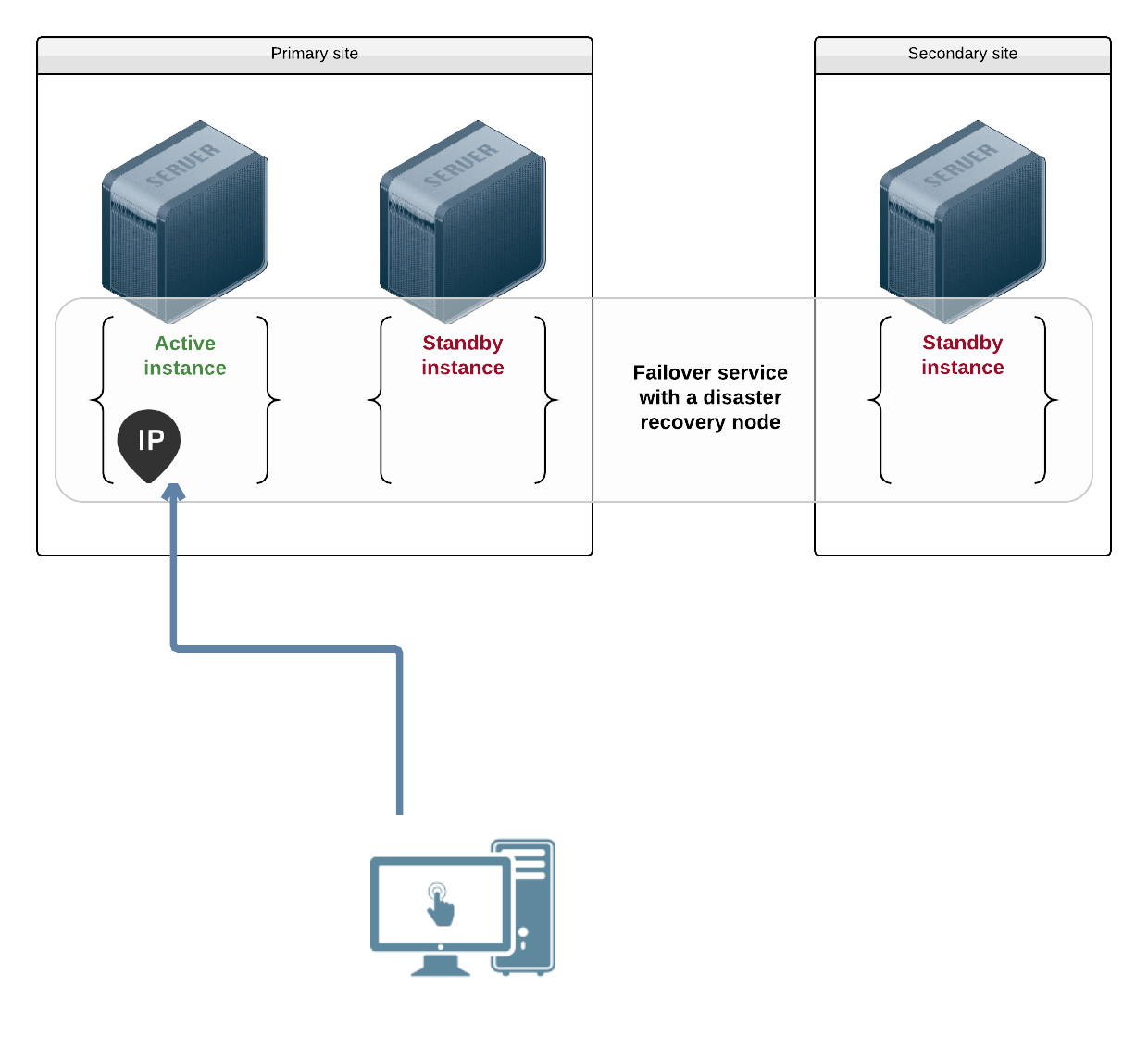
A flex object runs on several nodes at once, flex_target of them, within
the [flex_min, flex_max] range. Every instance is active and carries its own
ip, so a load balancer in front of them spreads the clients.
Pick failover for something only one node may own at a time, like a database
writing to a shared disk. Pick flex for something that scales by running more
copies, like a stateless web front end.
Configuration and secrets are objects too, installed into a service’s storage before it starts. See Configs and Secrets.
When the split is decided, each object must be named.
Each object configuration can be designed on a development cluster or namespace. These configurations can be tracked alongside the application code base.
Finally, the configurations can be deployed on test, up to production clusters or namespaces. Usually, these deployments are handled by a CI/CD pipeline.
Namespaces
Namespaces allow users to create objects with the same name in different naming spaces.
The <namespace>/<kind>/<name> notation is called a path.
The object selector (--service option for svcmgr and svcmon, first argument for om) accepts the path notation.
Namespaced objects have their config stored in /etc/opensvc/namespaces/<namespace>/<kind>/.
This feature is available since version 1.9-2748.
Operations with namespaces
The object path
The namespace is part of the path, so naming the object names its namespace. This is the way to create an object in a namespace, and it works for every command:
om test/svc/svc1 create
om test/svc/svc1 start
om 'test/**' ls
OSVC_NAMESPACE environment variable
OSVC_NAMESPACE narrows which objects a command sees, so a selector that would
match the whole cluster is confined to one namespace:
$ export OSVC_NAMESPACE=test
$ om '**' ls
test/svc/svc1
test/svc/svc2
$ unset OSVC_NAMESPACE
$ om '**' ls
svc0
test/svc/svc1
test/svc/svc2
It selects among the objects that exist. It does not decide where a new one is
created: with OSVC_NAMESPACE=test exported, om svc1 create still creates
svc1 in the root namespace, because the path it was given says root. Name the
namespace in the path instead.
Cloning into a namespace
When creating an object from another one, --namespace overrides the
destination namespace, which saves rewriting the path:
om svc2 create --config=svc1 --namespace=test
This creates test/svc/svc2 from the configuration of svc1.
A configuration that refers to other objects survives the clone only if those references are relative. See Relative object paths.
References
A {namespace} reference is available in service configuration.
Cgroups
Services in an explicit namespace have the namespace name inserted in their cgroup path:
opensvc.slice/<namespace>.slice/<name>.slice
The “root” pseudo namespace
Services created before namespace support, and services created without an explicit namespace, are assigned to a pseudo namespace named root. Their configs are stored in /etc/opensvc/.
The root pseudo namespace name is used in cluster DNS names (<name>.root.svc.<clustername>) and DNS search paths, but is not embedded in Docker container names or cgroup paths.
The {namespace} reference evaluates to root.
Select objects in the root namespace
$ om 'root/**' ls
$ OSVC_NAMESPACE=root om '**' ls
Create objects in the root namespace
$ unset OSVC_NAMESPACE
$ om svc1 create
Relative object paths
An object referring to another one can name it with a path relative to its own
namespace, by replacing the namespace with a .:
[DEFAULT]
parents = ./svc/db
[fs#1]
install = /etc/app.conf from ./cfg/app key app.conf
./svc/db reads as “the db service, in whatever namespace I am in”. For
test/svc/app it resolves to test/svc/db, and for prod/svc/app to
prod/svc/db, with no change to the configuration.
That is the point of the notation: a set of objects designed together can be
cloned from a development namespace to a production one, and keeps referring to
its own members rather than reaching back into the namespace it came from. A
fully qualified test/svc/db would follow the clone and still point at test.
Node configuration is not namespaced, so the same notation in node.conf
resolves in the system namespace: ./sec/relays is system/sec/relays.
Relations
Children and parents relations use object paths or object names.
- If a name is declared in the parents, slaves, or children lists, the related objects are searched in the same namespace.
svc2and./svc/svc2are the same relation, the second stating it explicitly. - A relation to an object in another namespace must be declared using its path instead of its name.
- Relations to objects in the root pseudo namespace must be defined as
root/<kind>/<name>to avoid ambiguity.
Configs and Secrets
An application needs configuration files, certificates and credentials. Baking them into the image ties the image to one environment. Leaving them on the nodes means every node has to be prepared identically, by something that is not the agent.
OpenSVC stores them in objects of their own, cfg for configuration and sec
for secrets, and installs them as files into a service’s storage when it
starts. sec keys are encrypted at rest with the cluster secret.
Put the data in a datastore
om myapp/cfg/app create
om myapp/cfg/app key add --name app.conf --from /tmp/app.conf
om myapp/cfg/app key list
Secrets work the same way, with om myapp/sec/creds.
Install it where the application will look
The install keyword tells a resource to lay keys down inside the storage it
manages, as files:
[fs#1]
type = directory
path = /var/tmp/myapp
install = /etc/app.conf from ./cfg/app key app.conf
[app#1]
type = simple
start = /opt/myapp/bin/start
Starting the instance shows the order this happens in:
INF myapp: fs#1: create directory /var/tmp/myapp
INF myapp: fs#1: create directory /var/tmp/myapp/etc to host key app.conf
INF myapp: fs#1: install key app.conf from myapp/cfg/app to /var/tmp/myapp/etc/app.conf with owner : perm -rw-r--r--
INF myapp: app#1: run: /opt/myapp/bin/start
The file is in place before the application is launched. That is the point: the resource holding the storage prepares the dataset, and only then do the resources that consume it start.
./cfg/app is a relative object path,
so the same configuration works in whatever namespace it is cloned to.
Which resources can install
Any resource that manages a directory the agent can write into, in other words
any driver exposing a head, accepts install:
volumefs(fs.directory, the host filesystem drivers,fs.zfs)
Resources start in driver group order, and both of those groups start before
container and app. So a volume or filesystem is always able to stage data
for the containers and applications that follow it, and never the other way
round.
Sharing across namespaces
A datastore serves its own namespace and no other. An object elsewhere naming it is refused, and the whole start is rolled back:
ERR consumer: fs#1: start: unauthorized install /etc/pw from prod/sec/shared key pw
INF consumer: rollback
The share keyword on the datastore names the namespaces allowed to decode its
keys:
[DEFAULT]
share = prod staging
The same install then succeeds:
INF consumer: fs#1: install key pw from prod/sec/shared to .../etc/pw with owner : perm -rw-------
This is what keeps one certificate, licence or database password in one place instead of copied into every namespace that needs it. The copies are the problem: they drift, and rotating the original leaves them behind.
* shares with every namespace. The default is the datastore’s own namespace,
so sharing is always a deliberate act.
Note: sharing lets another namespace decode the keys. Who may read the datastore object at all is a separate question, answered by Access Control.
Beyond plain files
The install keyword takes more than a source and a destination:
install = /etc/app.conf from ./cfg/app key app.conf mode 0600 user app group app signal HUP:container#1
mode,user,groupset the installed file’s permissions and ownership. Without them aseckey installs0600and acfgkey0644, so a secret is not left world-readable by omission.signalsends a signal to another resource’s processes when the content changes, so a running daemon reloads its configuration instead of being restarted.templatetreats the key as a Go template, evaluated against the[env]section, so one key serves several objects that differ only by a value.sourceseeds the key from a URI or a local file during provisioning, if it does not exist yet.requiredstops the install if that item fails, rather than continuing.
A trailing / on the destination, or omitting from, makes it a directory
rather than a file. A globbing pattern in key installs every matching key.
The full syntax is in the install keyword reference.
➡️ See Also
- Namespaces for the relative path notation.
- Provisioning for when
sourceseeding runs.
Resource Capping
A misbehaving application should not be able to take a node down with it. The
agent puts every object it starts in its own cgroup, and the pg_* keywords
turn that into a limit.
The slice an object runs in
Starting an instance builds a hierarchy under opensvc.slice, one level per
scope:
opensvc.slice
└ opensvc-ns.<namespace>.slice
└ opensvc-ns.<namespace>-svc.<name>.slice
└ opensvc-ns.<namespace>-svc.<name>-app.1.slice
A resource’s processes live in its own leaf, inside its object, inside its namespace. That nesting is what makes a limit set at any level apply to everything below it.
Capping an object
[DEFAULT]
pg_cpus = 0
pg_mem_limit = 256m
Starting the instance logs what it applied:
INF myapp: applied pg /opensvc.slice/...-svc.myapp.slice: cpus=0 mem_limit=256m
INF myapp: app#1: run: om exec --pg /opensvc.slice/...-svc.myapp-app.1.slice -- ...
And the kernel agrees:
$ cat /sys/fs/cgroup/opensvc.slice/.../opensvc-svc.myapp.slice/memory.max
268435456
$ cat /sys/fs/cgroup/opensvc.slice/.../opensvc-svc.myapp.slice/cpuset.cpus
0
The keywords are the usual cgroup controls:
| Keyword | Caps |
|---|---|
pg_cpus | the cpus the object may run on, as a list or range: 0,1,2 or 0-2 |
pg_mems | the memory nodes it may allocate from, same syntax |
pg_cpu_shares | its share of cpu when the node is cpu-bound, relative to other objects |
pg_cpu_quota | its cpu time whether or not the node is busy: 50%, 50%@all, 10%@2 |
pg_cpu_cores | a guaranteed cpu time reservation, in ms per period |
pg_mem_limit | resident memory, in bytes. Exceeding it wakes the OOM killer |
pg_vmem_limit | memory plus swap |
pg_mem_oom_control | 0 lets the OOM killer run, 1 freezes the group instead |
pg_mem_swappiness | how readily its pages are swapped |
pg_blkio_weight | its share of block io, between 10 and 1000 |
pg_cpu_shares and pg_cpu_quota are the pair worth telling apart: shares only
arbitrate a contended cpu, whereas a quota caps the group on an idle node too.
Capping a resource
The same keywords set on a resource cap that resource alone, which is how a sidecar is kept from starving the process it assists:
[app#1]
type = simple
start = /opt/myapp/bin/server
[app#2]
type = simple
start = /opt/myapp/bin/indexer
pg_cpu_shares = 128
Capping a namespace
An nscfg object holds the defaults of its namespace, the pg_* keywords among
them:
om test/nscfg/namespace create --kw pg_mem_limit=4g
Every object in test is then capped by it, no matter who created it, which is
how a namespace is handed to a team without handing them the node.
Turning it off
[DEFAULT]
create_pg = false
Grouping is on by default. Turning it off leaves the processes ungrouped and uncapped, and is worth doing only where the cgroup itself causes the problem.
➡️ See Also
References
A reference is a marker in the value of a configuration keyword, replaced during evaluation.
A reference is formatted as {<expression>}.
References can be used to:
-
Abstract changing parts of a configuration, so this configuration can be used as a template Example: The object name, object id, the devices that hosts the data
-
Factorize information, so changing it is easier and safer Example: A project name used to format the name of different resources (volume group, filesystem path, …)
-
Contextualize part of a configuration with information known to the agent Example: The cluster nodes, cluster dns ip addresses, …
Intra-Configuration References
The reference format is {[<section>.]<option>}, where
<section>is a configuration file section name<option>is the option name in the pointed section.
If <section> is omitted, the referencing keyword’s section is implicitly used if the reference can be found locally, or the DEFAULT section is implicitly used.
Intra-Section References
These references can be used inside a configuration section, and their evaluated value depends on the section.
| Reference | Description | Node Configuration File | Service Configuration File |
|---|---|---|---|
{rid} | The name of the section the reference is under | No | Yes |
{rindex} | The part after the dash of the name of the section the reference is under | No | Yes |
{<keyword>} | Reference to another keyword’s value inside the same section | Yes | Yes |
Hard Coded References
| Reference | Description | Node Configuration File | Service Configuration File |
|---|---|---|---|
{nodename} | The running node fqdn | Yes | Yes |
{short_nodename} | The running node base name (without domain) | Yes | Yes |
{#nodes} | Number of nodes | No | Yes |
{namespace} | The name of the hosting namespace | No | Yes |
{kind} | The object kind, ie “svc”, “vol”, “sec”, “cfg”, “ccfg” | No | Yes |
{name} | The object name | No | Yes |
{path} | The object path, ie <namespace>/<kind>/<name> | No | Yes |
{short_name} | The object base name (name with domain suffix stripped) | No | Yes |
{fqdn} | The object fully qualified name, as registered in the cluster DNS, ie <name>.<namespace>.<kind>.<clustername> | No | Yes |
{scaler_name} | The scaler name (because {name} resolves to the slice name) | No | Yes |
{scaler_short_name} | The scaler base name (name with domain suffix stripped) | No | Yes |
{id} | The object id | No | Yes |
{safe://<id>} | Substitute the reference with the content of the safe file identified by <id>. Usually passwords or private keys. The content is cached locally so the collector dependency is loose. | Yes | Yes |
{clustername} | The cluster.name node keyword value | Yes | Yes |
{clusterid} | The cluster.id node keyword value | Yes | Yes |
{clusternodes} | The cluster.nodes node keyword value | Yes | Yes |
{clusterdrpnodes} | The cluster.drpnodes node keyword value | Yes | Yes |
{dns} | The cluster.dns node keyword value (ip adressses) | Yes | Yes |
{dnsnodes} | The cluster.dns node keyword value (resolved names) | Yes | Yes |
{dnsuxsock} | The path to the dns thread unix socket | Yes | Yes |
{dnsuxsockd} | The path to the directory hosting the dns thread unix socket | Yes | Yes |
{collector_api} | The uri of the collector Rest API | Yes | Yes |
{nodemgr} | The om node command, ie /usr/bin/om node | Yes | Yes |
{svcmgr} | The om svc command, ie /usr/bin/om svc | Yes | Yes |
{etc} | The agent etc/ directory path: /etc/opensvc/ for agents installed through the packages, /opt/opensvc/etc/ for an agent installed via git pull in /opt | Yes | Yes |
{var} | The agent var/ directory path /var/lib/opensvc/ for agents installed through the packages, /opt/opensvc/var/ for an agent installed via git pull in /opt | Yes | Yes |
{initd} | The object init directory path. ex: /etc/opensvc/etc/<name>.d | Yes | Yes |
{private_var} | The object private directory under {var} | Yes | Yes |
{<rid>.exposed_devs} | The whitespace-separated list of devpaths exposed by <rid> | No | Yes |
{<rid>.exposed_devs[<n>]} | The <n>-th element of the list of devpaths exposed by <rid> | No | Yes |
{<rid>.exposed_devs[#]} | The length of the list of devpaths exposed by <rid> | No | Yes |
Deprecated references:
| Reference | Description | Node Configuration File | Service Configuration File |
|---|---|---|---|
{svcname} | Deprecated by {name} | No | Yes |
{svcpath} | Deprecated by {path} | No | Yes |
{short_svcname} | Deprecated by {short_name} | No | Yes |
References and env Section
The env section can be used to store arbitrary factorized information to make available as references in other parts of the configuration.
Example:
[disk#0]
name = {id}
pvs = {env.devs}
[env]
devs = /dev/vdb
These values can be overridden when creating a new object from this configuration file or template.
om <path> create --config <template> --env devs=/dev/vdc
Scoping
One configuration is shared by every node running the object. Scoping is how a keyword takes a different value depending on which node reads it, so the nodes stay described by a single file.
Syntax
A scoped keyword is written as:
<keyword>@<scope> = <value>
Supported Scopes
The value applies:
<nodename>: on that node alone.nodes: on all the object’s nodes.drpnodes: on all its disaster recovery nodes.encapnodes: on all its encapsulated nodes.
Examples
Use a Different FS Type on DRP Nodes
[DEFAULT]
nodes = n1 n2
drpnode = n3
[fs#1]
type = ext4
type@drpnodes = xfs
Use a Different Nodes List at Encapsulated Level
[DEFAULT]
nodes = n1 n2
encapnodes = vm1
nodes@encapnodes = vm1
Disable a Resource on a Node
[DEFAULT]
nodes = n1 n2
drpnodes = n3
[ip#backup]
disable@n3 = true
Precedence
The most specific definition wins. A node reading a keyword takes the first of these that it finds:
<keyword>@<its own nodename><keyword>@nodes, if it is one of the object’s nodes<keyword>@drpnodes, if it is one of its DRP nodes<keyword>@encapnodes, if it is one of its encapsulated nodes<keyword>, unscoped
Where two definitions have the same rank, the last one wins.
Examples
[DEFAULT]
drpnodes = n3
[share#1]
disable = true
disable@drpnodes = false
This resource is enabled on n3 because the generic disable is overridden by the more specific disable@drpnodes scoped definition.
[DEFAULT]
drpnodes = n3
[share#1]
disable = true
disable@drpnodes = false
disable@n3 = true
This resource is disabled on n3 because the generic disable and disable@drpnodes are overridden by the more specific disable@n3 scoped definition.
[DEFAULT]
drpnodes = n3
[share#1]
disable@n3 = true
disable@n3 = false
This resource is enabled on n3. Both definitions have the same rank, so
the last one wins, and the last one is false.
Outputs
The om query commands display the data using a human-readable renderer by default. The -o command flag can be used to select another renderer.
$ om svc resource list
OBJECT NODE RID TYPE STATUS IS_MONITORED IS_DISABLED IS_STANDBY RESTART RESTART_REMAINING
stonith8 dev2n2 fs#1 fs.flag down false false false 0 0
testsched dev2n2 fs#1 fs.flag down true false false 0 0
testsched dev2n2 task#1 task.host n/a false false false 0 0
...
Custom tables
Custom column selection, with header
$ om svc resource ls -o tab=OBJ:.meta.object,NODE:.meta.node,RID:.meta.rid,STATUS:.data.status.status
OBJ NODE RID STATUS
cva1 dev2n2 fs#1 down
cva1 dev2n2 sync#1 n/a
testflex dev2n2 fs#1 down
stonith236 dev2n2 fs#1 down
...
Add a column to the default table
A + prefix extends the command’s own columns instead of replacing them,
which saves respelling a table just to see one more field.
$ om svc resource ls -o +PROV:data.status.provisioned.state
OBJECT NODE RID ... RESTART_REMAINING PROV
cva1 dev2n1 sync#1 ... true
cva1 dev2n1 fs#1 ... true
...
Single column selection, without header
$ om svc resource ls -o tab=.meta.rid
fs#1
sync#1
fs#1
fs#1
...
Machine-readable
$ om svc resource ls -o json
{
"items": [
{
"data": {
"config": {
"is_disabled": false,
"is_monitored": false,
"is_standby": false,
"restart": 0,
"restart_delay": 500000000
...
$ om svc resource ls -o yaml
items:
- data:
config:
is_disabled: false
is_monitored: false
is_standby: false
restart: 0
restart_delay: 500000000
monitor:
restart:
Add -o jsonline for the same json unindented on a single line, which suits
line-oriented tooling.
Flat key-value
The flat renderer prints the same data as json, one leaf per line, as the
jsonpath of the value and the value. It is the format to reach for when
grepping for a field, or when you want the path to pass to -o tab=.
$ om svc resource ls -o flat
items[0].data.config.is_disabled = false
items[0].data.config.is_monitored = false
items[0].data.config.is_standby = false
items[0].data.config.restart_delay = 500000000
items[0].data.status.label = "flag /dev/shm/opensvc/test/svc/svc1/fs#0.flag"
items[0].data.status.provisioned.mtime = "2026-06-04T22:20:43.238087911+02:00"
items[0].data.status.provisioned.state = "true"
items[0].data.status.status = "down"
items[0].data.status.type = "fs.flag"
items[0].kind = "ResourceItem"
items[0].meta.node = "dev2n1"
...
Template
This output uses the golang template syntax, with the following extra functions:
| Function | Result |
|---|---|
drvName "ip.host" | "host" |
drvGroup "ip.host" | "ip" |
resName "container#db" | "db" |
resGroup "container#db" | "container" |
objKind "svc1" | "svc" |
objName "svc1" | "svc1" |
objNamespace "svc1" | "root" |
hasPrefix "foo" "f" | true |
hasSuffix "foo" "o" | true |
contains [a b] a | true |
reMatch "f.*" "foo" | true |
fnMatch "f*" "foo" | true |
Example:
$ om svc resource ls -o template='{{range .}}{{if eq (resName .meta.rid) "hdoc"}}{{printf "%s@%s\n" .meta.object .meta.node}}{{end}}{{end}}'
test/svc/hdoc@dev2n2
test/svc/hdoc@dev2n3
test/svc/hdoc@dev2n1
Internals
This chapter is for when you want to know why the agent did something, not how to ask it to do something.
- Installed Files — where the agent puts binaries, configurations, state and logs.
- Daemon — the long-running process behind every
cluster-wide behaviour:
- Events — the bus the daemon publishes to, and
which
om node eventslets you watch. - Heartbeats — how nodes decide their peers are alive.
- Lifecycle — startup, shutdown, and what survives a daemon restart.
- Quorum — what happens when the cluster splits.
- Scheduler — the jobs the agent runs on its own, and how to reschedule them.
- Events — the bus the daemon publishes to, and
which
Installed Items
Directories
-
/etc/opensvcThe cluster, node and objects configuration files.
-
/var/lib/opensvcThe state files. Deleting or creating files in this directory can have undesired side-effects.
-
/var/tmp/opensvcTemporary files. Deleting or creating files in this directory can have undesired side-effects.
Executable files
-
/usr/bin/omThis executable, installed by the
opensvc-serverpackage, implements:- The Cluster Resource Manager
- The Cluster Monitor and API daemon
- The local management commandline interface
-
/usr/bin/oxThis executable, installed by the
opensvc-clientpackage, implements:- The remote management commandline interface
Configuration files
The agent configuration is the result of the merge of two ini configuration files:
-
/etc/opensvc/cluster.confThis file is replicated on all cluster nodes.
-
/etc/opensvc/node.confThis file is not replicated.
Daemon
This chapter explores the role and policies of daemon subsystems, providing a detailed look at their function within the system architecture. You’ll also learn best practices for daemon administration, including configuration, monitoring, and troubleshooting.
Events
- The daemon runs an event bus.
- The daemon subsystems can publish events and subscribe to events.
- Some events are relayed to peer nodes via the heartbeat links.
- Events are exposed as a SEE feed via the daemon API.
🛈 The cluster dataset is maintained by assembling received events.
🛈 The webapp, terminal user interface and monitor in watch mode all use events to render live data.
Commands
om node events [--filter <expression>]
ox node events [--filter <expression>]
Print the node event stream
Filtering
Receive only events matching the filtering expression formatted as:
<element>[,...]
where:
<element> is one of:
<kind> keep events of this kind
<key>=<value> discard events of matching kinds not thus labeled
<jsonpath><op><value> discard events of matching kinds that don't pass
this data assertion
where:
<jsonpath> starts with a dot and is relative to .data
<op> can be
= or !=
> or <
>= or <=
Event Kinds
Cluster
ClusterConfigUpdated, ClusterStatusUpdated
JoinError, JoinIgnored, JoinRequest, JoinSuccess
LeaveError, LeaveIgnored, LeaveRequest, LeaveSuccess
ArbitratorError, ForgetPeer
Config File Updates
ConfigFileRemoved, ConfigFileUpdated, RemoteFileConfig
Daemon
DaemonCollectorUpdated, DaemonCtl, DaemonDataUpdated
DaemonDnsUpdated, DaemonHeartbeatUpdated, DaemonListenerUpdated
DaemonRunnerImonUpdated, DaemonSchedulerUpdated, DaemonStatusUpdated
WatchDog
DNS
ZoneRecordDeleted, ZoneRecordUpdated
Execs
Exec, ExecFailed, ExecSuccess
Heartbeat
HeartbeatMessageTypeUpdated, HeartbeatAlive, HeartbeatStale
HeartbeatRotateRequest, HeartbeatRotateSuccess, HeartbeatRotateError, HeartbeatSecretUpdated
Instance
InstanceConfigDeleted, InstanceConfigManagerDone, InstanceConfigUpdated
InstanceFrozenFileRemoved, InstanceFrozenFileUpdated
InstanceMonitorAction, InstanceMonitorDeleted, InstanceMonitorUpdated
InstanceStatusDeleted, InstanceStatusPost, InstanceStatusUpdated
ProgressInstanceMonitor, SetInstanceMonitorRefused
RunFileUpdated, RunFileRemoved
SetInstanceMonitor
Node
NodeAlive, NodeStale
NodeConfigUpdated, NodeDataUpdated, NodeFrozen
NodeFrozenFileRemoved, NodeFrozenFileUpdated
NodeMonitorDeleted, NodeMonitorUpdated
NodeOsPathsUpdated
NodePoolStatusUpdated, NodePoolStatusDeleted
NodeRejoin, NodeSplitAction
NodeStatsUpdated
NodeStatusUpdated
NodeStatusArbitratorsUpdated, NodeStatusGenUpdates, NodeStatusLabelsUpdated
SetNodeMonitor
Object
ObjectOrchestrationAccepted, ObjectOrchestrationEnd, ObjectOrchestrationRefused
ObjectStatusDeleted, ObjectStatusDone, ObjectStatusUpdated
Event Subscription
ClientSubscribed, ClientUnsubscribed, SubscriptionError, SubscriptionQueueThreshold
Misc
Log
Example filters
path=svc1,node=n1
InstanceStatusUpdated
InstanceStatusUpdated,ObjectOrchestrationEnd
InstanceStatusUpdated,path=svc1,ObjectOrchestrationEnd
InstanceStatusUpdated,path=svc1,node=n1
InstanceStatusUpdated,path=svc1,node=n1,.instance_status.frozen_at="0001-01-01T00:00:00Z"
InstanceStatusUpdated,path=svc1,node=n1,.instance_status.frozen_at>"0001-01-01T00:00:00Z"
InstanceStatusUpdated,path=svc1,node=n1,.instance_status.avail="up"
InstanceStatusUpdated,path=svc1,node=n1,.instance_status.resources."fs#1".avail="up"
Templating
The template syntax follows the go template standard, with a few custom extra functions.
Custom Functions
-
hasNodeLabel(labels []pubsub.Label, expected ...string) bool -
hasPathLabel(labels []pubsub.Label, expected ...string) bool -
hasInstanceLabel(labels []pubsub.Label, expected ...string) bool -
passSet(s string, b bool)Add s to passed if b else remove s from passed. Return true when passed items has been changed.
-
passCount() intReturn count of passed items.
-
setSuccess(b bool)Set success to b. When b is true and ‘om node –wait’ exit with 0 exit code.
-
toInst(p path, node string) stringReturn instance id from path and nodeaaa.
-
stringsContains(s string, substr string) boolAlias of strings.Contains.
-
stringsHasPrefix(s string, prefix string) boolAlias of strings.HasPrefix.
-
stringsHasSuffix(s string, suffix string) boolAlias of strings.HasSuffix.
Useful templates
Simple event formatting:
--filter InstanceMonitorUpdated --template \
'{{printf "instance %s@%s monitor state is %s\n" .data.path .data.node .data.instance_monitor.state}}'
Label filtering:
-
By node:
--filter InstanceMonitorUpdated,path=foo --template \ '{{if hasNodeLabel .data.labels "dev1n1" "dev1n2" -}} {{printf "instance %s@%s monitor state is %s\n" .data.path .data.node .data.instance_monitor.state}}{{end}}' -
By path:
--filter InstanceMonitorUpdated,node=dev1n1 --template \ '{{if hasPathLabel .data.labels "foo001" "foo002" -}} {{printf "instance %s@%s monitor state is %s\n" .data.path .data.node .data.instance_monitor.state}}{{end}}' -
By instance:
--filter InstanceMonitorUpdated --template \ '{{if hasInstanceLabel .data.labels "foo001@dev1n1" "foo002@dev1n2" -}} {{printf "instance %s@%s monitor state is %s\n" .data.path .data.node .data.instance_monitor.state}}{{end}}'
Wait templates:
-
Object is avail up and provisioned true:
--wait --filter ObjectStatusUpdated,path=foo --template \ '{{if setSuccess (and (eq .data.instance_status.avail "up") (eq .data.instance_status.provisioned "true"))}}{{end}}' -
Instance is avail up and provisioned true:
--wait --filter InstanceStatusUpdated,path=foo,node=dev1n1 --template \ '{{if setSuccess (and (eq .data.instance_status.avail "up") (eq .data.instance_status.provisioned "true"))}}{{end}}' -
Node is frozen:
--wait --filter NodeStatusUpdated,node=dev1n1 --template \ '{{if setSuccess (eq .data.instance_status.frozen_at "0001-01-01T00:00:00Z")}}{{end}}' -
All cluster nodes are frozen:
--wait --filter ClusterStatusUpdated --template \ '{{if setSuccess .data.cluster_status.is_frozen}}{{end}}' -
All cluster nodes are unfrozen:
--wait --filter ClusterStatusUpdated --template \ '{{if setSuccess (not .data.cluster_status.is_frozen)}}{{end}}' -
Object avail is up on 3 objects:
--wait --filter ObjectStatusUpdated --template \ '{{if passSet (toInst .data.path .data.node) (eq .data.object_status.avail "up") -}} {{with setSuccess (eq passCount 3)}}{{end}}{{end}}' -
Object avail is up on 3 objects that starts with “foo”:
--wait --filter ObjectStatusUpdated --template \ '{{if eq (slice .data.path 0 3) "foo" -}} {{if passSet .data.path (eq .data.object_status.avail "up") -}} {{with setSuccess (eq passCount 3)}}{{end}}{{end}}{{end}}'
Heartbeats
Heartbeats serve the following purposes:
- Exchange data between cluster nodes.
- Detect stale nodes.
- Execute the quorum race when a peer becomes stale.
OpenSVC supports multiple parallel running heartbeats. Exercising different code paths and infrastructure data paths (network and storage switches and site interconnects) helps limit split-brain situations.
Configuration
Heartbeats are declared in /etc/opensvc/cluster.conf, each in a dedicated section named [hb#<n>]. A heartbeat definition should work on all nodes, using scoped keywords if necessary, as the definitions are served by the joined node to the joining nodes.
Reconfiguration
Any command that changes the timestamp of the following configuration files triggers a reconfiguration of heartbeats:
/etc/opensvc/node.conf/etc/opensvc/cluster.conf
Actions Taken During Reconfiguration:
- Any updated parameters are applied to the heartbeats.
- Heartbeats removed from the configuration are stopped.
- Heartbeats newly defined in the configuration are started.
Set a Heartbeat Timeout
To set a timeout for the hb#1 heartbeat, use this command:
om cluster config update --set hb#1.timeout=20
Drop a Heartbeat
To delete the hb#1 heartbeat from the configuration:
om cluster config update --delete hb#1
Monitoring
Each heartbeat runs two threads: tx and rx.
The om mon command display the heartbeats status, statistics, and each peer state.
Threads n1 n2 n3
...
hb |
hb#1.rx running unicast | / O O
hb#1.tx running unicast | / O O
hb#2.rx running relay | / O O
hb#2.tx running relay | / O O
...
For the per-peer detail behind those markers, including which address or device each heartbeat uses and when it last changed state:
om daemon hb status
RUNNING BEATING ID NODE PEER TYPE DESC CHANGED_AT
O O hb#1.rx dev2n1 dev2n2 unicast 10.29.1.11:9994 ← 10.29.1.12 2026-08-28T21:23:43
O O hb#1.tx dev2n1 dev2n2 unicast → 10.29.1.12:9994 2026-08-28T21:23:43
O O hb#12.rx dev2n1 dev2n2 multicast 224.3.29.71:9996 ← * 2026-08-28T21:23:43
O O hb#4.rx dev2n1 dev2n2 disk ← /dev/dm-21[9] 2026-08-28T21:23:47
RUNNING is whether the thread is alive, BEATING whether data is actually
flowing. A heartbeat can run and not beat, which is what you see when the peer
is gone or the path between them is broken.
Every node’s view is reported, not just the local one, so a heartbeat beating in one direction only is visible from either end.
The agent daemon automatically restarts heartbeat threads if they exit unexpectedly.
Heartbeat Thread Pair
Tx (Transmit)
The Tx thread handles the transmission of the node data:
- Regularly transmit data or send it as soon as changes occur.
- Data is encrypted.
Rx (Receive)
The Rx thread manages data reception and integration into cluster data:
- Regularly read data from disk or receive it in response to transmissions (unicast/multicast).
- Update peer data in the cluster.
- Timeout if no heartbeat is received within the configured
<hb#n>.timeout. The default timeout is 15 seconds.
The configured timeout is a floor rather than the last word. A timeout shorter than the beats it has to cover would declare a peer stale that is merely one beat late, so the unicast, disk and relay drivers raise it when it is too short for their interval:
| Driver | Minimum timeout | Missed beats tolerated |
|---|---|---|
hb.unicast, hb.disk | interval * 2 + 1s | 1 |
hb.relay | interval * 4 + 1s | 3 |
The relay is the one reached over a network the cluster does not own, and the one whose beats are paced to the interval rather than sent on every change, so it is given the wider margin. The adjustment, when it happens, is logged as the heartbeat is configured:
daemon: hb: relay: hb#2: configure: reajust timeout: 15s => 4m1s (<interval>*4+1s)
Actions Performed by Rx:
- On receive data:
- Merge updated peer data to maintain accurate cluster data.
- Publish the received events on the local event bus.
- On receive timeout:
- Publish a
HbStaleevent - Purge stale peer data if:
- No Maintenance Advertised: Immediately purge stale peer data.
- Maintenance Advertised: Wait for the
node.maintenance grace_periodbefore purging.
- Publish a
hb.unicast
The hb.unicast driver sends and receives using TCP unicast packets.
Basic Configuration
[hb#1]
type = unicast
Behavior with Basic Configuration
- The Rx thread listens on
0.0.0.0:10000 - The Tx thread sends to
<nodename>:10000
Advanced Configuration
A more precise definition allows specifying network interfaces, addresses, and ports for each node:
[hb#1]
type = unicast
intf@node1 = eth0
intf@node2 = eth2
addr@node1 = 1.2.3.4
addr@node2 = 1.2.3.5
port@node1 = 10001
port@node2 = 10002
timeout = 15s
Note the driver accepts to use the same port for every node:
port = 10001
Proper configuration of the hb.unicast driver ensures reliable communication between cluster nodes by leveraging TCP unicast.
hb.multicast
The hb.multicast driver sends and receives using UDP multicast packets.
Basic Configuration
[hb#2]
type = multicast
Behavior with Basic Configuration
- The Rx thread listens on all interfaces on port
10000 - The Tx thread sends to
224.3.29.71:10000
Advanced Configuration
A more precise definition allows specifying network interfaces, addresses, and ports for each node:
[hb#2]
type = multicast
intf@node1 = eth0
intf@node2 = eth2
addr = 224.3.29.71
port = 10001
timeout = 15
The addr and port keywords are not scopable.
hb.disk
This driver reads and writes on a dedicated disk, using O_DIRECT|O_SYNC|O_DSYNC open flags on a block device on Linux.
Configuration
[hb#2]
type = disk
dev = /dev/mapper/3123412312412414214
timeout = 15
Behavior
- The Rx thread loops over peer nodes and for each reads its heartbeat data at its reserved slot device offset
- The Tx thread writes to its reserved slot offset on the device
On-disk format
When the tx and rx threads are started or reconfigured, they parse a metadata segment at the head of the device and prepare a <nodename>:<slot index> hash.
The metadata zone maximum size is 4MB.
A node metadata slot size is 4k, and contains the cluster node name.
Limits:
- 1000 nodes (metadata zone size/slot meta data size)
- nodenames are limited to 4k characters (slot meta data size)
- A
<n>-nodes cluster requires a(<n>+1)*4MBdevice - The heartbeat data (which is gziped) must not exceed 4MB (slot size). A 10 services cluster usually produces ~3k messages.
If the local nodename is not found in any slot, the thread allocates one.
hb.relay
This driver implements a heartbeat mechanism by reading and writing on the memory of a dedicated OpenSVC agent relay host.
Purpose
The hb.relay heartbeat is designed to prevent split-brain scenarios in a cluster by establishing a neutral, off-site communication check.
- A relay should ideally be located in a third site that hosts no other node of the cluster.
- This setup allows the cluster to make a correct quorum decision when the sites hosting the cluster nodes become disconnected from each other, but can still independently reach the relay’s site.
- The same relay host can be shared and used as a heartbeat mechanism by multiple different clusters.
Configuration
The heartbeat is defined in the cluster configuration file (cluster.conf) within a [hb#N] section.
| Parameter | Type | Description |
|---|---|---|
type | String | Must be set to relay. |
relay | String | The hostname or IP address of the remote OpenSVC relay agent. |
timeout | Duration | The delay after which a peer that has not been read is declared stale. Raised when it is short for the interval, see below. Defaults to 9s. |
interval | Duration | The delay between two posts to the relay, and between two reads of a peer. Defaults to 4s. |
username | String | The username for authentication with the relay host. |
password | String | A datastore key reference to a password used to authenticate with the relay API. (e.g., from system/sec/relay key password). |
insecure | Boolean | Accept the relay certificate without verifying it. |
Example
[hb#2]
type = relay
relay = relay3.opensvc.com
timeout = 15
username = relay
password = from system/sec/relay key password
Authentication Note
The OpenSVC v3 relay configuration no longer supports the secret keyword. Authentication credentials must be specified exclusively using the username and password keywords.
Requirements
- Reachability: The relay listener (typically at
<address>:<port>) must be reachable from all cluster nodes during normal operations. - Version Compatibility: OpenSVC v3 clusters must use an OpenSVC v3 relay agent.
- Arbitration: The relay host can also be configured and used as a cluster arbitrator.
Key Operations
The driver utilizes two primary threads for communication:
- The Transmission Thread (TX):
- This thread is responsible for sending the local cluster node’s heartbeat data to the remote relay agent, updating its status in the relay’s memory.
- The Reception Thread (RX):
- This thread constantly loops over all peer nodes in the cluster and for each one, requests its current heartbeat data from the relay agent. This data retrieval determines the peer’s reachability.
Pacing
The relay is a mailbox, not a bus. It holds one message per node, overwritten by each post, and each peer reads it on its own schedule. Two consequences:
- The transmitter posts once per
interval, carrying the freshest data it has at that moment. Posting on every local change would overwrite mail no peer has read yet, at a cost the relay pays again for every cluster using it. - A change reaches a peer within two intervals at worst: up to one waiting for the local post, up to one more waiting for the peer to read it. A change that follows a quiet interval is posted at once, so a node that just started does not stay invisible for a whole interval.
The cluster data does not drift apart in the meantime. Every heartbeat message carries all the changes the least advanced peer has not acknowledged yet, so a message that supersedes another loses nothing, and a peer that finds a gap in the sequence asks for a full resynchronization.
Timeouts and retries
The receiver marks a peer alive when it reads a message the relay timestamped since
its last read. So a peer is seen alive once per interval at best, and a post that
fails costs a whole beat.
-
A failed post is retried a quarter of an interval later, or after the delay the relay asked for in a
Retry-Afterheader, whichever is longer. A transient refusal is repaired before the beat it would have cost. -
timeoutis raised tointerval * 4 + 1swhen it is configured shorter, so three missed beats are tolerated and the fourth declares the peer stale. A relay is reached over a network the cluster does not own, where one lost post is not news. The adjustment is logged when the heartbeat is configured:daemon: hb: relay: hb#2: configure: reajust timeout: 15s => 4m1s (<interval>*4+1s)
With the default interval of 4s, the effective timeout is 17s and a peer is
declared stale after three missed beats. With interval = 60s, it is 4m1s.
Rate Limiting on the Relay
A relay is an ordinary OpenSVC listener, and its rate limiter applies to the relay API like to any other: it counts the requests of a client address, so all the nodes of a cluster reaching it through one NAT share a bucket, as do several clusters behind one address.
A refused request is answered 429 Too Many Requests with a Retry-After header,
and the heartbeat waits at least that long before posting again. A relay serving
many clusters is worth watching through the listener metrics of the relay host:
om node metrics --node <relay> | grep rate_limiter
opensvc_listener_rate_limiter_denied_total 0
That is the count of every refusal the listener made. The breakdown by route, and
the requests themselves, are on the relay host at /metrics/api, which is scraped
apart from /metrics.
Agent Daemon Lifecycle
Enable
sudo systemctl enable --now opensvc-server
🛈 Newly installed daemons are not enabled by default.
Boot
om daemon start
- Executed on server boot.
- After reaching the multi-user target.
Side Effects:
- HA services in down state start a local instance.
- Standby resources of all services are started.
🛈 Administrators can prevent these side effects on boot setting the osvc.freeze option in the kernel boot command line.
Shutdown
om daemon shutdown
- Executed on server shutdown.
- The daemon drains all service instances running on the node.
- The peer nodes are free to takeover a HA service as soon as its local instance is drained.
Stop
om daemon stop
- Announces a maintenance period.
- The service instances running on the node are not stopped.
- Peer nodes wait for
node.maintenance_grace_periodbefore taking over, expecting the daemon to restart.
🛈 The mainteance period ends as soon as the daemon restarts.
Restart
om daemon restart
A restart is a simple stop-start sequence:
- Maintenance period is announced
- Peer nodes wait for the daemon to restart without taking over.
Run
om daemon run
- Runs a daemon in foreground
- Logs are printed on the console
- Stacks are printed on the console
🛈 Useful for debugging.
Watchdog
- The daemon sends a periodic probe to systemd.
- If the daemon hangs, the probe flow stops, and systemd kill-restart the daemon.
🛈 The daemon event bus hangs are detected internally and cause the watchdog probe flow to stop.
Quorum
When every heartbeat to a peer goes stale, a node cannot tell whether that peer died or is merely isolated from it. Both look identical from where it stands, and the two call for opposite reactions: take the services over, or leave them alone because the peer is still running them.
Quorum is the tie-breaker. Arbitrators, sitting outside the cluster interconnect, are asked who they can still see, and a node that finds itself in the smaller half stops rather than risk running a service its peer is also running.
Enabling quorum, sizing the arbitrators and testing them is covered in Cluster Quorum. The two examples below work through the arithmetic on real cluster shapes:
Example: odd-nodes cluster
+-------------------------------------------+
| site3 |
| |
| +-------------+ +-------------+ |
| | | | | |
| | arbitrator1 | | arbitrator2 | |
| | | | | |
| +-------------+ +-------------+ |
| |
+-------------------------------------------+
+-------------------------------------------+ +------------------------------+
| site1 | | site2 |
| | | |
| +--------------------------------------|-----|-----------------------+ |
| | cluster | | | |
| | | | | |
| | +-----------+ +-----------+ | | +-----------+ | |
| | | | | | | | | | | |
| | | node1 | | node2 | | | | node3 | | |
| | | | | | | | | | | |
| | +-----------+ +-----------+ | | +-----------+ | |
| | | | | |
| +--------------------------------------|-----|-----------------------+ |
| | | |
+-------------------------------------------+ +------------------------------+
- Total: 5 votes
- Majority: 3 votes
Site1 Isolated
node1 standpoint:
- live nodes: 2 (node1, node2)
- arbitrators votes: 0
- votes: 2
=> node does not have quorum, commits suicide
node2 standpoint
- live nodes: 2 (node1, node2)
- arbitrators votes: 0
- votes: 2
=> node does not have quorum, commits suicide
node3 standpoint
- live nodes: 1 (node3)
- arbitrators votes: 2
- votes: 3
=> node has quorum, does not commit suicide
Site2 Isolated
node1 standpoint
- live nodes: 2 (node1, node2)
- arbitrators votes: 2
- votes: 4
=> node has quorum, does not commit suicide
node2 standpoint
- live nodes: 2 (node1, node2)
- arbitrators votes: 2
- votes: 4
=> node has quorum, does not commit suicide
node3 standpoint
- live nodes: 1 (node3)
- arbitrators votes: 0
- votes: 1
=> node does not have quorum, commits suicide
Node2 Dies
node1 standpoint
- live nodes: 2 (node1, node3)
- arbitrators votes: 2
- votes: 4
=> node has quorum, does not commit suicide
node3 standpoint
- live nodes: 2 (node1, node3)
- arbitrators votes: 2
- votes: 4
=> node has quorum, does not commit suicide
Node2 and Node3 Die
node1 standpoint
- live nodes: 1 (node1)
- arbitrators votes: 2
- votes: 3
=> node has quorum, does not commit suicide
Example: even-nodes cluster
+-------------------------------------------+
| site3 |
| |
| +-------------+ |
| | | |
| | arbitrator1 | |
| | | |
| +-------------+ |
| |
+-------------------------------------------+
+--------------------------+ +------------------------------+
| site1 | | site2 |
| | | |
| +---------------------|-----|-----------------------+ |
| | cluster | | | |
| | | | | |
| | +-----------+ | | +-----------+ | |
| | | | | | | | | |
| | | node1 | | | | node2 | | |
| | | | | | | | | |
| | +-----------+ | | +-----------+ | |
| | | | | |
| +---------------------|-----|-----------------------+ |
| | | |
+--------------------------+ +------------------------------+
- Total: 3 votes
- Majority: 2 votes
Site1 Isolated
node1 standpoint
- live nodes: 1 (node1)
- arbitrators votes: 0
- votes: 1
=> node does not have quorum, commits suicide
node2 standpoint
- live nodes: 1 (node2)
- arbitrators votes: 1
- votes: 2
=> node has quorum, does not commit suicide
Node1 dies
node2 standpoint
- live nodes: 1 (node2)
- arbitrators votes: 1
- votes: 2
=> node has quorum, does not commit suicide
Scheduler
The OpenSVC agent includes a scheduler that manages jobs for both the node and each individual service.
Basic Schedule Definition
The schedule constraints are defined by allowed time ranges and minimum execution interval. An example schedule definition is 00:00-02:00@121m. In this example:
- Time Range: From midnight to 2:00 AM.
- Interval: 121 minutes.
Multiple schedule definitions can be specified using the syntax:
["00:00-02:00@121", "12:00-14:00@121"]
Execution is permitted if any one of the defined constraints is satisfied.
Policies
If an allowed time range is longer than the interval, multiple executions happen in the time range.
If not specified, the default interval is the duration of the time range, so there is only one execution of the job during the time range.
If not specified, the default time range is unrestricted. In this case a period must be specified.
If the definition begins with a ~, the execution is delayed randomly in the allowed time range. The probability of execution increases linearly as time progresses within the allowed time range. For instance:
- At the beginning of the time range (
00:00in00:00-02:00), the probability might be around 10%. - Near the end of the time range (
01:50), the probability reaches 100%.
This behavior ensures that the execution of job reporting information to the collector is spread across all nodes throughout the entire time range, leveling the load on the central collector. This approach prevents sudden spikes in load.
Node Scheduler
$ om node schedule list -o +KEY:data.key
NODE ACTION LAST_RUN_AT NEXT_RUN_AT SCHEDULE KEY
n1 pushasset 2025-01-27T05:57:06+01:00 0001-01-01T00:00:00Z ~00:00-06:00 asset.schedule
n1 checks 2025-01-27T01:54:15+01:00 0001-01-01T00:00:00Z ~00:00-06:00 checks.schedule
n1 compliance_auto 2025-01-27T02:00:00+01:00 0001-01-01T00:00:00Z 02:00-06:00 compliance.schedule
n1 pushdisks 2025-01-27T04:56:30+01:00 0001-01-01T00:00:00Z ~00:00-06:00 disks.schedule
n1 pushpkg 2025-01-27T18:59:54+01:00 0001-01-01T00:00:00Z @1m packages.schedule
n1 pushpatch 2025-01-27T04:58:22+01:00 0001-01-01T00:00:00Z ~00:00-06:00 patches.schedule
n1 sysreport 0001-01-01T00:00:00Z 0001-01-01T00:00:00Z ~00:00-06:00 sysreport.schedule
n1 dequeue_actions 0001-01-01T00:00:00Z 0001-01-01T00:00:00Z dequeue_actions.schedule
n2 pushasset 2025-01-29T00:35:49+01:00 0001-01-01T00:00:00Z ~00:00-06:00 asset.schedule
n2 checks 2025-01-29T00:10:39+01:00 0001-01-01T00:00:00Z ~00:00-06:00 checks.schedule
n2 compliance_auto 2025-01-29T02:00:00+01:00 0001-01-01T00:00:00Z 02:00-06:00 compliance.schedule
n2 pushdisks 2025-01-29T05:14:15+01:00 0001-01-01T00:00:00Z ~00:00-06:00 disks.schedule
n2 pushpkg 2025-01-29T05:33:22+01:00 0001-01-01T00:00:00Z ~00:00-06:00 packages.schedule
n2 pushpatch 2025-01-29T00:42:55+01:00 0001-01-01T00:00:00Z ~00:00-06:00 patches.schedule
n2 sysreport 2025-01-29T03:08:18+01:00 0001-01-01T00:00:00Z ~00:00-06:00 sysreport.schedule
n2 dequeue_actions 0001-01-01T00:00:00Z 0001-01-01T00:00:00Z dequeue_actions.schedule
n3 pushasset 2025-01-29T04:50:18+01:00 0001-01-01T00:00:00Z ~00:00-06:00 asset.schedule
n3 checks 2025-01-29T05:17:24+01:00 0001-01-01T00:00:00Z ~00:00-06:00 checks.schedule
n3 compliance_auto 2025-01-29T02:00:00+01:00 0001-01-01T00:00:00Z 02:00-06:00 compliance.schedule
n3 pushdisks 2025-01-29T05:10:43+01:00 0001-01-01T00:00:00Z ~00:00-06:00 disks.schedule
n3 pushpkg 2025-01-29T03:07:57+01:00 0001-01-01T00:00:00Z ~00:00-06:00 packages.schedule
n3 pushpatch 2025-01-29T05:36:14+01:00 0001-01-01T00:00:00Z ~00:00-06:00 patches.schedule
n3 sysreport 2025-01-29T00:34:02+01:00 0001-01-01T00:00:00Z ~00:00-06:00 sysreport.schedule
n3 dequeue_actions 0001-01-01T00:00:00Z 0001-01-01T00:00:00Z dequeue_actions.schedule
The scheduled jobs can be configured in /etc/opensvc/node.conf with a configlet like:
[<section>]
<parameter> = <definition>
The KEY column in the above command output is formatted as:
<section>.<parameter>
And the current definition, explicit or implicit, is visible in the SCHEDULE column. Empty means never scheduled.
The om node command action executed when the job fires is displayed in the ACTION column.
The node supports the following jobs:
- Node inventoring tasks :
pushassetpushpatchpushpkgpushdisks - Node performance metrics inventoring :
pushstats - Node performance metrics collection :
collect_stats - Node file content tracking task :
sysreport - Node configuration audit and/or remediation task :
compliance_auto - Health checking task :
checks - Scheduled node reboot task :
auto_reboot - Scheduled root password rotation task :
auto_rotate_root_pw - Execution of node actions queued by the collector :
dequeue_actions - SAN switches inventoring tasks :
pushbrocade - Storage arrays inventoring tasks :
pushcenterapushdcspushemcvnxpushevapushfreenaspushhdspushhp3parpushibmdspushibmsvcpushnecismpushnetapppushsympushvioserver - Backup servers saves index inventoring tasks :
pushnsr
Service Scheduler
$ om tflex schedule list
OBJECT NODE ACTION KEY LAST_RUN_AT NEXT_RUN_AT SCHEDULE
tflex dev2n1 status status_schedule 2025-01-30T11:54:55+01:00 2025-01-30T12:04:55+01:00 @10m
tflex dev2n1 compliance_auto comp_schedule 2025-01-27T00:09:18+01:00 0001-01-01T00:00:00Z ~00:00-06:00
tflex dev2n1 run task#1.schedule 2025-01-28T16:27:16+01:00 2025-01-30T16:27:16+01:00 @2d
tflex dev2n1 run task#2.schedule 2025-01-29T16:27:08+01:00 2025-01-30T16:27:08+01:00 @1d
tflex dev2n1 run task#3.schedule 2025-01-29T16:27:08+01:00 2025-01-30T16:27:08+01:00 @1d
tflex dev2n1 info info_schedule 2025-01-27T18:56:47+01:00 0001-01-01T00:00:00Z @60m
The scheduled jobs can be configured in the service configurations with a configlet like:
[<section>]
<parameter> = <definition>
The KEY column in the above command output is formatted as:
<section>.<parameter>
And the current definition, explicit or implicit, is visible in the SCHEDULE column. Empty means never scheduled.
The om <path> command action executed when the job fires is displayed in the ACTION column.
The supported jobs are:
- Service configuration audit and/or remediation :
compliance_auto - Service resources key-values inventoring :
info - Service resources monitoring :
resource_monitor - Service status evaluation :
status - Service tasks execution :
run - Service data sync :
sync_update
The info job only refreshes a cache local to the instance. Reporting the
key-values to the collector is the collector speaker’s job, done on its own
schedule, so this job does not talk to the collector itself.
Advanced Schedule Definition
[!] <timeranges> [<days> [<weeks> [<months>]]]
!
desc: exclusion pattern. ommiting the ! implies an inclusion
<timeranges> := <timerange>[,<timerange>]
<timerange> := <begin>:<end>@<interval>
<begin> <end> := <hour>:<minute>
<interval>
type: integer
unit: minutes
<days> := <day>[-<day>][,<day>[-<day>]]
<day> := <day_of_week>[:<day_of_month>]
<day_of_week>
* iso week day format
type: integer between 0 and 6
* literal format
type: string in ("mon", "tue", "wed", "thu", "fri", "sat",
"sun", "monday", "tuesday", "wednesday", "thursday",
"friday", "saturday", "sunday")
<day_of_month> := <literal> | +<nth> | -<nth> | <nth>
<nth>
type: integer
<literal>
type: string in ("first", "1st", "second", "2nd", "third",
"3rd", "fourth", "4th", "fifth", "5th", "last")
<weeks> := <week>[-<week>][,<week>[-<week>]]
<week>
type: integer between 1 and 53
<months> := <monthrange>[,<monthrange>]
<monthrange> := <month>[-<month>] | <month_filter>
<month>
* numeric month format
type: integer between 1 and 12
* literal format
type: string in ("jan", "feb", "mar", "apr", "may", "jun",
"jul", "aug", "sep", "oct", "nov", "dec", "january",
"february", "march", "april", "may", "june", "july",
"august", "september", "october", "november",
"december")
<month_filter> := %<modulo>[+<shift>]
<modulo>
type: integer
<shift>
type: integer
Examples
-
Never schedule
Either
@0 -
Always schedule
* -
Schedule every 60 minutes
@60 -
Schedule at first occasion after 9am
09:00 -
Schedule every hour between midnight and 6am, every day
00:00-06:00@60 -
Schedule once between midnight and 2am, every day
00:00-02:00 -
Schedule once between midnight and 2am every last day of month
00:00-02:00@121 *:lastor00:00-02:00@121 *:-1 -
Schedule once between midnight and 2am every last friday of month
00:00-02:00@121 fri:lastor00:00-02:00@121 fri:-1 -
Schedule once between midnight and 2am every week day
00:00-02:00@121 mon-fri -
Schedule once between midnight and 2am every week day from january to february
00:00-02:00@121 mon-fri * jan-feb -
Schedule once between midnight and 2am every odd day (1, 3, 5)
00:00-02:00@121 *:%2+1 -
Schedule once between midnight and 2am every monday of even weeks
00:00-02:00@121 mon %2
Rosetta Stone
If you are coming from another clusterware or orchestrator, these tables map the command you know to its OpenSVC equivalent.
Clusterwares
| OpenSVC | Veritas Cluster Server (VCS) | PowerHA (HACMP) |
|---|---|---|
om daemon start | hastart | clstart |
om daemon stop | hastop | clstop |
om mon | hastatus | clstat |
om daemon join | hasys -add | |
om daemon leave | hasys -delete | |
om node freeze | hasys -freeze | |
om node unfreeze | hasys -unfreeze | |
om <path> create | hagrp -add | |
om <path> delete | hagrp -delete | |
om '*' ls | hagrp -list | cllsgrp |
om <path> start | hagrp -online <group> | clRGmove -g <RG> -n <node> -u |
om <path> stop | hagrp -offline <group> | clRGmove -g <RG> -n <node> -d |
om <path> switch --to <node> | hagrp -switch <group> <sys> | clRGmove -s <RG> -n <node> -m |
om <path> freeze | hagrp -freeze <group> | |
om <path> unfreeze | hagrp -unfreeze <group> | |
om <path> start --rid <rid> | hares -online <res> | |
om <path> stop --rid <rid> | hares -offline <res> |
Orchestrators
Creating objects
| OpenSVC | Kubernetes |
|---|---|
om <path> create --config ./manifest.conf | kubectl create -f ./my-manifest.yaml |
cat <cf> | om <path> create --config=- | cat <cf> | kubectl create -f - |
om ns1/sec/mysec key add --name grp --from /etc/group | kubectl create -f secret.yml |
Viewing and finding
| OpenSVC | Kubernetes |
|---|---|
om '*' ls | kubectl get serviceskubectl get pods |
om container.type=docker ls | kubectl get pods -o jsonpath=... |
om <path> config show | kubectl describe svc <svc> |
om <path> instance status | kubectl describe pod <pod> |
Updating
| OpenSVC | Kubernetes |
|---|---|
om <path> config update --set ip#0.expose=80:8080/tcp | kubectl expose rc nginx --port=80 --target-port=8000 |
om <path> config update --set env.icon_url=http://goo.gl/XXBTWq | kubectl annotate pods my-pod icon-url=http://goo.gl/XXBTWq |
om <path> config edit | kubectl edit svc/docker-registry |
Deleting
| OpenSVC | Kubernetes |
|---|---|
om foo,baz purge | kubectl delete pod,service baz foo --all |
om env.name=myLabel instance delete | kubectl delete pods,services -l name=myLabel |
Interacting with resources
| OpenSVC | Kubernetes |
|---|---|
om <path> logs | kubectl logs my-pod |
om <path> logs -f | kubectl logs -f my-pod |
om <path> container logs | kubectl logs my-pod -c my-container |
om <path> container enter --rid container#1 | kubectl exec -it my-pod -- shkubectl attach my-pod -i |
Interacting with nodes and cluster
| OpenSVC | Kubernetes |
|---|---|
om node freezeom node freeze --node my-node | kubectl cordon my-node |
om '**' instance stop --node my-node | kubectl drain my-node |
om node unfreeze --node my-node | kubectl uncordon my-node |
om cluster status --output json | kubectl cluster-info dump |
om node config update --set env.dedicated=special_userplus a node selector in nodes | kubectl taint nodes foo dedicated=special-user:NoSchedule |
Release Notes
Per-release notes and downloadable artifacts are published with each agent release:
For the cumulative list of changes, breaking or not, see the Changelog.
Changelog
The agent changelog lives with the code, so it is never out of step with the release you are running:
It covers the v2 to v3 migration prerequisites, the breaking changes to commands, keywords and drivers, and the v3 enhancements.
If you are upgrading from v2.1, read the migration prerequisites before installing v3: some of them have to be applied while still running v2.1.
KVM High Availability Clustering Using DRBD and OpenSVC on Ubuntu 24.04
Introduction
This document provides a step-by-step guide for deploying a high-availability (HA) KVM cluster using DRBD 9 from Linbit and OpenSVC on Ubuntu 24.04. DRBD provides network-based block replication, effectively acting as shared storage comparable to RAID1 over TCP/IP.
This setup enables:
- Automatic failover of KVM virtual machines when a node becomes unavailable
- Live migration of virtual machines with zero downtime
Prerequisites
This guide uses the following environment:
- Two Ubuntu 24.04 servers:
n1andn2 - Same network segment:
10.30.0.0/24 - IP addressing:
n1→10.30.0.11n2→10.30.0.12kvm1→10.30.0.20- Gateway →
10.30.0.1
- CPU virtualization extensions enabled (
VT-xfor Intel,AMD-Vfor AMD) - Sudo or root access
- Sufficient disk space available on both nodes
Installation
DRBD
DRBD software is a product from Linbit company. It is shipped by default on Ubuntu distributions as version 8.x. The current guide requires DRBD version 9.x minimum.
Linbit exposes a drbd public ppa repository, where DRBD release candidates are regularly pushed. We will use this repository to install DRBD version 9.
Add Linbit DRBD9 PPA
Let’s add Linbit DRBD9 public ppa to our distributions, and install DRBD.
sudo add-apt-repository ppa:linbit/linbit-drbd9-stack
sudo apt update
sudo apt -y install drbd-dkms drbd-utils
modinfo drbd | grep ^version
⚠️ Warning: The Linbit public PPA is not recommended for production. For production-grade repositories and support, contact Linbit directly.
Verify DRBD version
opensvc@n1:~$ modinfo drbd | grep ^version
version: 9.2.15
Ensure DRBD systemd unit is disabled
DRBD systemd unit must remain disabled on cluster nodes.
⚠️ Warning: OpenSVC must be the only component responsible of DRBD resources management.
opensvc@n1:~$ systemctl status drbd
○ drbd.service - DRBD -- please disable. Instead, use the per resource drbd@.target template unit.
Loaded: loaded (/usr/lib/systemd/system/drbd.service; disabled; preset: disabled)
Active: inactive (dead)
Docs: man:drbd.service(7)
System Upgrade
Ensure your operating system is up to date
sudo apt update
sudo apt -y dist-upgrade
sudo reboot
Time Synchronization (NTP)
Ensure all nodes have NTP enabled. Ubuntu defaults are usually sufficient.
opensvc@n1:~$ sudo timedatectl status
Local time: Fri 2025-10-31 11:52:34 CET
Universal time: Fri 2025-10-31 10:52:34 UTC
RTC time: Fri 2025-10-31 10:52:34
Time zone: Europe/Paris (CET, +0100)
System clock synchronized: yes
NTP service: active
RTC in local TZ: no
Check server name resolution
It is very important that both nodes are correctly configured from a name service resolution point of view
Check that:
n1can resolve n2 to ip addrn2can resolve n1 to ip addr- both nodes can resolve
kvm1to ip addr
KVM Installation
Verify CPU Virtualization Support
Check that your processors support hardware virtualisation extensions
You must see either vmx or svm from the egrep --color "(vmx|svm)" /proc/cpuinfo command
Install Hypervisor Components
You need to install the following packages to run KVM virtual machines
sudo apt install -y qemu-kvm virtinst virt-manager libguestfs-tools bridge-utils
Once done, ensure that libvirtd systemd unit is enabled and started
sudo systemctl enable --now libvirtd.service
Local Storage Setup
DRBD requires a block device. For this guide, we use an LVM volume group on /dev/vdb.
opensvc@n1:~$ sudo pvcreate -f /dev/vdb
opensvc@n1:~$ sudo vgcreate data /dev/vdb
opensvc@n1:~$ sudo vgs
VG #PV #LV #SN Attr VSize VFree
data 1 0 0 wz--n- <5.00g <5.00g
root 1 1 0 wz--n- <26.95g 0
Setup firewall
If your network enforces filtering, ensure the following flows are allowed:
n1 <=> 22/tcp <=> n2ssh communication between nodesn1 <=> 1215/tcp <=> n2api communication between nodesn1 <=> 10000/tcp <=> n2unicast heartbeat communication between nodesn1 <=> 7289/tcp <=> n2DRBD communication between nodes for first DRBD resourcen1, n2 <=> icmp <=> 10.30.0.0/24OpenSVC has security checks, one of them uses icmp ping
⚠️ Warning: Each DRBD resource need a dedicated TCP port to communicate with peer node. If you plan to deploy 10 different DRBD resources, then you have to open ports starting from 7289 to 7289+9=7298
Network Bridge Setup
As we prepare a KVM virtual machine deployment, it will require a direct network connection to our subnet 10.30.0.0/24.
A network bridge has to be configured on both cluster nodes.
The netplan configuration is described below
opensvc@n1:~$ sudo cat /etc/netplan/br-prd.yaml
network:
version: 2
renderer: networkd
ethernets:
enp1s0:
match:
macaddress: "22:23:24:1e:00:11"
set-name: enp1s0
dhcp4: no
dhcp6: no
bridges:
br-prd:
interfaces:
- enp1s0
parameters:
stp: false
forward-delay: 0
accept-ra: no
addresses:
- 10.30.0.11/24
nameservers:
search:
- demo.com
addresses:
- 8.8.8.8
- 8.8.4.4
routes:
- to: 0.0.0.0/0
via: 10.30.0.1
metric: 100
Adjust the bridge configuration to your environment, and then apply it
sudo netplan generate --debug
sudo netplan apply --debug
OpenSVC
Installation
The OpenSVC server installation is described here
Import opensvc gpg signing keys
curl -s -o- https://packages.opensvc.com/gpg.public.key.asc | \
sudo gpg --dearmor --output /etc/apt/trusted.gpg.d/opensvc-package-pub.gpg --yes
Add the opensvc repository to apt sources
cat - <<EOF | sudo tee /etc/apt/sources.list.d/opensvc.list
deb https://packages.opensvc.com/apt/ubuntu uat-opensvc-v3-noble main
deb-src https://packages.opensvc.com/apt/ubuntu uat-opensvc-v3-noble main
EOF
Install the opensvc server
sudo apt update
sudo apt -y install opensvc-server
🛈 Info: Although not mandatory, the package
opensvc-clientshould also be installed. It installs theoxcommand, which is a fancy text user interface tool to manage OpenSVC clusters
Once the installation is done, ensure systemd unit opensvc-server is enabled and started
sudo systemctl enable --now opensvc-server.service
Finally, check that OpenSVC is running fine on both nodes
opensvc@n1:~$ sudo om mon
Threads n1
daemon | O
collector | /
hb |
hb#1.rx running unicast | /
hb#1.tx running unicast | /
listener | 1215
scheduler running |
Nodes n1
score | 97
load15m | 0.0
mem | 20%2.83g<98%
swap | 0%3.56g<90%
state |
Objects matching * n1
Set a custom cluster name (optional)
It is a best practise to set a custom cluster name, especially if you plan to deploy multiple different clusters
On node n1:
opensvc@n1:~$ sudo om cluster config update --set cluster.name=drbd4kvm
committed
opensvc@n1:~$ sudo om cluster config get --kw cluster.name
drbd4kvm
Join cluster nodes
We join both nodes from our laptop:
On laptop, ask for a join token, and store it into a variable:
token=$(ssh opensvc@n1 sudo om daemon auth --role join)
and then ask n2 to join n1 using token from variable:
ssh opensvc@$n2 "sudo om cluster join --node $n1 --token $token"
The log should looks like below
john@laptop:~$ token=$(ssh opensvc@n1 sudo om daemon auth --role join)
john@laptop:~$ ssh opensvc@n2 "sudo om cluster join --node n1 --token $token"
Fetch cluster config from n1
Add localhost node to the remote cluster configuration on n1
Daemon join
Cluster nodes updated
Fetch cluster from n1
Fetch system/sec/ca from n1
Fetch system/sec/cert from n1
Fetch system/sec/hb from n1
Draining node
Stop daemon
Dump all configs
Save configs to /var/lib/opensvc/backup/.pre-daemon-join-2025-11-04T10:40:51.json
Install fetched config system/sec/cert
Install fetched config system/sec/hb
Install fetched config cluster
Install fetched config system/sec/ca
Start daemon
Joined
And the om mon command executed on one of the cluster nodes should looks like:
root@n1:~# om mon
Daemon n1 n2
uptime | 3m23 3m24
state | dns dns
hb queue | 0 0
hb rx | O O
hb tx | O O
Nodes n1 n2
uptime | - -
score | 95 95
load15m | 0.2 0.2
mem | 30%2.83g<98% 27%2.83g<98%
swap | 1%3.56g<90% 1%3.56g<90%
state |
Objects ~ * n1 n2
🛈 Info: We can see that a unicast heartbeat
hb rxandhb txhas been autoconfigured. By default, it exchanges information on TCP port 10000.
Heartbeats details can be seen using om daemon hb status command.
root@n1:~# om daemon hb status
RUNNING BEATING ID NODE PEER TYPE DESC CHANGED_AT
O O hb#1.rx n1 n2 unicast :10000 ← n2 2025-11-28T09:35:08.603796279+01:00
O O hb#1.tx n1 n2 unicast → n2:10000 2025-11-28T09:35:08.444365461+01:00
O O hb#1.rx n2 n1 unicast :10000 ← n1 2025-11-28T09:35:11.706616707+01:00
O O hb#1.tx n2 n1 unicast → n1:10000 2025-11-28T09:35:11.463338726+01:00
⚠️ Warning: The default heartbeat configuration is ++minimal++. For a real production deployment, it is highly recommended to add other heartbeats kinds (relay, disk, multicast, unicast), and enable quorum arbitration.
Configure SSH trust
Enable automatic SSH trust between nodes (used for internal safety mechanisms).
This configuration is automated using the command below.
om cluster ssh trust
The configuration creates an opensvc dedicated ssh key pair on each node, and trust the public keys on all cluster nodes
root@n1:~# ls -l ~/.ssh/opensvc*
-rw------- 1 root root 452 Nov 4 11:06 /root/.ssh/opensvc
-rw-r--r-- 1 root root 133 Nov 4 11:06 /root/.ssh/opensvc.pub
root@n1:~# cat ~/.ssh/authorized_keys
ssh-ed25519 AAAAC3NzaC1lZDI1NTE5AAAAIMgCrZCehGhMPJK5j1ImjfzEKCaoSTiUBweLHteT8Hxd opensvc@n1 sshkey=opensvc 2025-11-04T11:06:31+01:00
ssh-ed25519 AAAAC3NzaC1lZDI1NTE5AAAAIKRBR+niCfqJPDINuIeZjQo17FhYK0FpQMutb3474p48 opensvc@n2 sshkey=opensvc 2025-11-04T11:06:31+01:00
Test:
root@n1:~# ssh -i /root/.ssh/opensvc n2 hostname
Configure DRBD storage pool
To make smooth DRBD configuration, we declare a DRBD storage pool in the cluster. The pool will be backed by the LVM volume group named data, which was created previously.
root@n1:~# om cluster config update --set pool#drbdvm.type=drbd --set pool#drbdvm.vg=data
committed
root@n1:~# om cluster config show --section pool#drbdvm
[pool#drbdvm]
type = drbd
vg = data
Once done, we can query the cluster about free space in the pool
root@n1:~# om pool list --name drbdvm
NAME TYPE CAPABILITIES HEAD VOLUME_COUNT BIN_SIZE BIN_USED BIN_FREE
drbdvm drbd rox,rwx,roo,rwo,snap,blk,shared data 0 10g 0 10g
By default the pool is cluster wide, so the reported space is aggregated accross nodes. To see local space, we have to specify the target node
root@n1:~# om pool list --name drbdvm --node n1
NODE NAME TYPE CAPABILITIES HEAD VOLUME_COUNT BIN_SIZE BIN_USED BIN_FREE
n1 drbdvm drbd rox,rwx,roo,rwo,snap,blk,shared data 0 5g 0 5g
Configure OpenSVC service
We first deal with the DRBD storage part, and then with VM provisioning
Create service: storage part
First we create a service named kvm1 in the demo namespace, with automated orchestration, and accross all cluster nodes
root@n1:~# om demo/svc/kvm1 create --kw nodes={clusternodes} --kw orchestrate=ha
Then we add storage resources to the service
om demo/svc/kvm1 config update --set volume#data.name={name} --set volume#data.shared=true --set volume#data.size=4G --set volume#data.format=false --set volume#data.pool=drbdvm
We have the following config at the moment
root@n1:~# om demo/svc/kvm1 config show
[DEFAULT]
nodes = {clusternodes}
orchestrate = ha
id = a6867a1e-e8b3-46eb-919f-78d4c60ca9c9
[volume#data]
name = {name}
shared = true
size = 4G
format = false
pool = drbdvm
🛈 Info: The volume#data config snippet will request a storage device to the cluster, which will provision it into the drbd pool because of the
shared=trueparameter. In case you have many pools in the cluster config, it is possible to add thepool=drbdkvmparameter to force the target pool used for volume creation.
Now provision the storage part
root@n1:~# om demo/svc/kvm1 provision --wait
OBJECT ORCHESTRATION_ID ERROR
demo/svc/kvm1 e332c71f-1f6b-4aed-b7fe-345db3fb00a9 -
During the DRBD device initial synchronisation, we see the transitional states below:
root@n1:~# drbdadm status
kvm1.demo.vol.drbd4kvm role:Primary
disk:UpToDate open:no
n2 role:Secondary
replication:SyncSource peer-disk:Inconsistent done:30.84
root@n1:~# om demo/svc/kvm1 instance status -r
demo/svc/kvm1 up warn
└ instances
├ n2 down idle
└ n1 up warn idle started
└ resources
└ volume#data ........ up kvm1
warn: Volume demo/vol/kvm1 has warnings
Once the synchronisation is finished, the states looks like:
root@n1:~# drbdadm status
kvm1.demo.vol.drbd4kvm role:Primary
disk:UpToDate open:no
n2 role:Secondary
peer-disk:UpToDate
root@n1:~# om demo/svc/kvm1 instance status -r
demo/svc/kvm1 up
└ instances
├ n2 down idle
└ n1 up idle started
└ resources
└ volume#data ........ up kvm1
The DRBD volume creation is fully automated. The DRBD configuration is located in /etc/drbd.d/kvm1.demo.vol.drbd4kvm.res
root@n1:~# cat /etc/drbd.d/kvm1.demo.vol.drbd4kvm.res
resource kvm1.demo.vol.drbd4kvm {
on n1 {
device /dev/drbd0;
disk /dev/data/kvm1.demo.vol.drbd4kvm;
meta-disk internal;
address ipv4 10.30.0.11:7289;
node-id 0;
}
on n2 {
device /dev/drbd0;
disk /dev/data/kvm1.demo.vol.drbd4kvm;
meta-disk internal;
address ipv4 10.30.0.12:7289;
node-id 1;
}
connection-mesh {
hosts n1 n2;
}
}
The command below displays the devices involved in the service. We can see that the resulting exposed DRBD device is /dev/drbd0
root@n1:~# om demo/svc/kvm1 instance device list
OBJECT RESOURCE DRIVER_GROUP DRIVER_NAME ROLE DEVICE
demo/svc/kvm1 volume#data volume exposed /dev/drbd0
demo/svc/kvm1 volume#data volume sub /dev/data/kvm1.demo.vol.drbd4kvm
demo/svc/kvm1 volume#data volume base /dev/data/kvm1.demo.vol.drbd4kvm
Create service: vm part
Now that the DRBD block device is ready, we can focus on VM deployment. 4 steps are needed:
- Download a qcow2 image and customize it
- Dump image content into DRBD device
- Create the kvm guest
- Declare the kvm resource in OpenSVC service
Download a qcow2 image and customize it
We start by downloading a VM image, Ubuntu 25.10 (Questing Quokka) for the demo. We store it in /var/lib/libvirt/images/questing.kvm1.img.
curl -L -o /var/lib/libvirt/images/questing.kvm1.img https://cloud-images.ubuntu.com/questing/current/questing-server-cloudimg-amd64.img
For customization purposes, the virt_customize command brings the following features
- set root password to
drbdrocks - set hostname to
kvm1 - copy file
enp1s0.yamlinto image file at/etc/netplan/enp1s0.yaml
First create the file enp1s0.yaml to configure network at boot
cat >| enp1s0.yaml <<EOF
network:
version: 2
renderer: networkd
ethernets:
enp1s0:
dhcp4: no
dhcp6: no
addresses:
- 10.30.0.95/24
routes:
- to: 0.0.0.0/0
via: 10.30.0.1
metric: 100
EOF
Then actually customize the image file
root@n1:~# virt-customize -a /var/lib/libvirt/images/questing.kvm1.img \
--root-password password:drbdrocks \
--hostname kvm1 \
--copy-in enp1s0.yaml:/etc/netplan
🛈 Info: Try with
--no-networkif virt-customize fails.
Dump image content into DRBD device
Let’s convert the qcow2 image to raw format, and write it into the DRBD device
IMAGE_LOC=/var/lib/libvirt/images/questing.kvm1.img
DRBD_DEV=/dev/drbd0
qemu-img convert -f qcow2 -O raw $IMAGE_LOC $DRBD_DEV
Create the KVM guest
Initiate the virt-install command to instantiate and boot the vm
OS_VARIANT=ubuntu25.10
VM_BRIDGE=br-prd
virt-install \
--name kvm1 \
--ram 2048 \
--vcpus 2 \
--cpu=host \
--disk path=$DRBD_DEV \
--os-variant $OS_VARIANT \
--network bridge:$VM_BRIDGE,model=virtio \
--graphics none \
--audio none \
--console pty,target_type=serial \
--boot hd \
--noautoconsole \
--import
🛈 Info: The OS_VARIANT value can be identified using command
virt-install --osinfo list. The VM_BRIDGE value corresponds to the bridge that we created earlier in the demo.
The virtual machine boots in the background. The console is available using command virsh console kvm1, and can be exited with control+]. If you have an X server available, it is possible to use the graphical interface using the command virt-manager.
After a few seconds, the virtual machine is available
root@n1:~# ping -c3 kvm1
PING kvm1 (10.30.0.20) 56(84) bytes of data.
64 bytes from kvm1 (10.30.0.20): icmp_seq=1 ttl=64 time=0.255 ms
64 bytes from kvm1 (10.30.0.20): icmp_seq=2 ttl=64 time=0.794 ms
64 bytes from kvm1 (10.30.0.20): icmp_seq=3 ttl=64 time=0.545 ms
--- kvm1 ping statistics ---
3 packets transmitted, 3 received, 0% packet loss, time 2021ms
rtt min/avg/max/mdev = 0.255/0.531/0.794/0.220 ms
Declare the kvm resource in OpenSVC service
Once the virtual machine is operational, we have to add it to the OpenSVC service configuration, as a new resource:
root@n1:~# om demo/svc/kvm1 config update --set container#1.type=kvm --set container#1.name=kvm1
committed
root@n1:~# om demo/svc/kvm1 instance status -r
demo/svc/kvm1 up
└ instances
├ n2 down mix-provisioned idle
└ n1 up idle started
└ resources
├ volume#data ........ up kvm1
└ container#1 ........ up kvm kvm1
⚠️ Warning: As the VM provisioning was done manually on
n1, themix-provisionedstate appear on then2instance. We have to informn2OpenSVC agent that the virtual machine resource is actually provisioned.
root@n1:~# om demo/svc/kvm1 instance provision --state-only --node n2
OBJECT NODE SID
demo/svc/kvm1 n2 d24fb390-8d62-4fa8-80cb-77da3980778c
root@n1:~# om demo/svc/kvm1 print status -r
demo/svc/kvm1 up
└ instances
├ n2 down idle
└ n1 up idle started
└ resources
├ volume#data ........ up kvm1
└ container#1 ........ up kvm kvm1
The service state is now normal on both nodes.
Tests
Test OpenSVC service
It is now possible to test service failover between nodes. Two methods are possible:
- VM switch with downtime
- VM switch with kvm live migration (no downtime)
VM switch with downtime
The switch action can be submitted with the command om demo/svc/kvm1 switch
The following steps are orchestrated:
- n1: stop the VM
- n1: bring down drbd device (secondary)
- n2: bring up drbd device (primary)
- n2: start the vm
root@n1:~# om demo/svc/kvm1 instance ls
OBJECT NODE AVAIL
demo/svc/kvm1 n1 up
demo/svc/kvm1 n2 down
root@n1:~# om demo/svc/kvm1 switch --wait
OBJECT ORCHESTRATION_ID ERROR
demo/svc/kvm1 983c32b5-96c4-4930-8eb2-670c5fae0cc8 -
root@n1:~# om demo/svc/kvm1 instance ls
OBJECT NODE AVAIL
demo/svc/kvm1 n1 down
demo/svc/kvm1 n2 up
🛈 Info: This process can take several seconds or even minutes depending on kvm domain use.
VM switch with kvm live migration (no downtime)
The switch action can be submitted with the command om demo/svc/kvm1 switch --live
The following steps are orchestrated:
- n1: enable drbd dual primary
- n1: launch virsh migrate –live –persistent
- n1: disable drbd dual primary
root@n1:~# om demo/svc/kvm1 instance ls
OBJECT NODE AVAIL
demo/svc/kvm1 n1 up
demo/svc/kvm1 n2 down
root@n1:~# om demo/svc/kvm1 switch --live --wait
OBJECT ORCHESTRATION_ID ERROR
demo/svc/kvm1 c898ddc6-f827-48b5-8686-21ddf500e56e -
root@n1:~# om demo/svc/kvm1 instance ls
OBJECT NODE AVAIL
demo/svc/kvm1 n1 down
demo/svc/kvm1 n2 up
🛈 Info: This process is transparent, without any network disruption.
Get Support
Introduction
OpenSVC provides commercial support for its product catalog. Active support contract owners are able to open service requests. Contact sales@opensvc.com for a quotation.
This section describes the guidelines for being assisted by our support team.
Support Open Hours
Depending on your support subscription, you can call us according to the table below:
-
Standard Service Level
Open Monday to Friday, 9am to 6pm (Europe/Paris timezone)
-
Premium Serve Level
Open 24x7
Premium Support
Nodes under a Premium support contract must be tagged in the associated collector to ensure proper node identification and billing.
Tag the node for premium support:
om node collector tag attach --name PREMIUM_SUPPORT
Untag the node for premium support:
om node collector tag detach --name PREMIUM_SUPPORT
Verify the current support classification:
om node collector tag show
Note: Services running on a Premium supported node are implicitly included in the Premium support scope and billing.
Please get in touch with us for any questions you may have.
Support Channels
To open a service request, you can use one of the four following methods:
Mattermost
OpenSVC Mattermost channels are available at https://meet.opensvc.com.
Please request your access via support@opensvc.com if no invitation has been received in your mailbox.
Tickets
The support website is available at https://www.opensvc.com.
First, you must register for an account on the web portal:
- Open a browser to https://www.opensvc.com.
- Click on the Sign In link.
- Click on the Register link.
- Fill in the requested information and submit.
- Contact support@opensvc.com to link your new account to your company support contract.
Once your account is active and linked to a support contract, you can open a service request:
- Open a browser to https://www.opensvc.com.
- Login with your email address and password.
- Click on the Support icon, then Create Ticket.
- Fill in the requested information and click Submit.
- You can then modify or view the ticket to complete it with a problem description, error messages, context, and any other information you want to provide.
Send your request to support@opensvc.com.
Phone
Premium support enabled accounts are presented with a Call Me Back button in the web portal support section.
- Open a browser to https://www.opensvc.com.
- Login with your email address and password.
- Click on the Support icon, and then the red Call Me Back button.
- Fill in the form with your international phone number and submit.
- Wait for a support representative to call you back.
⚠️ Warning: Please consider using the callback service only for urgent purposes requiring immediate answers.
Support Data Collection
To ease resolution, you will be asked to provide information, configuration, and log files related to the encountered issue.
Issue Description
- What is the ticket purpose? (Unexpected behavior, error message, technical question, etc.)
- What is the context? (Any known cause or event related)
- When did the problem start?
- What is the impact on service?
Node & Cluster Configuration
/etc/opensvc/node.conf/etc/opensvc/cluster.conf
Logs
All logs are centralized by systemd-journald. By default, the journal is often configured to be volatile (stored in memory and lost after reboot).
Configure
To ensure that pre-crash logs are preserved, you should configure journald to use persistent storage:
# create the directory that will host the persistant logs
mkdir -p /var/log/journal
# set permissions on the directory
systemd-tmpfiles --create --prefix /var/log/journal
# restart the journaling daemon to apply the policy change
systemctl restart systemd-journald
Query
To query logs, you can use the journalctl command. You can filter logs by metadata. Below are some key metadata fields to consider:
| Keyword | Description |
|---|---|
_COMM | The process short name (e.g. om) |
PKG | The daemon subsystem used (e.g daemon/imon, daemon/scheduler) |
OBJ_PATH | The path of the object related to the log message (e.g. test/svc/svc1) |
OBJ_NAMESPACE | The namespace of the object related to the log message (e.g. test) |
OBJ_KIND | The path of the object related to the log message (e.g. svc) |
OBJ_NAME | The path of the object related to the log message (e.g. svc1) |
SID | The session ID related to the log message |
ORCHESTRATION_ID | The orchestration ID of a service operation |
To filter by one of these fields, use the following syntax :
# Show logs with high-precision ISO timestamps (includes milliseconds+), in UTC
journalctl -o short-iso-precise --utc _COMM=om
# Narrow to a precise time window (millisecond precision)
journalctl --utc --since "2026-04-08 14:12:33.250" --until "2026-04-08 14:13:10.900" _COMM=om
# Combine metadata filters with precise time output
journalctl -o short-iso-precise --utc PKG=daemon/imon OBJ_PATH=test/svc/svc1
# Show logs with UNIX timestamps (seconds since epoch), in UTC
journalctl -o short-unix --utc _COMM=om
All information can be sent through email at support@opensvc.com or uploaded using our Support File Exchange.
Note: To save time in data collection, consider using the SOS Report Data Collection Tool.
SOS Report Data Collection Tool
Sos (formerly known as sosreport) is an extensible, portable support data collection tool primarily aimed at Linux distributions and other UNIX-like operating systems.
It is available on major distributions (RHEL, Ubuntu, Debian, Fedora, etc.) and supports OpenSVC environments (sos version >= 4.2).
Check for opensvc plugin existence:
sudo sos report --list-plugins | grep opensvc
Expected output:
opensvc OpenSVC cluster and services (config and state collection)
Launch data collection on BOTH OpenSVC cluster nodes:
sudo sos report --enable-plugins opensvc --all-logs
See the Sos website for more details.
Support File Exchange
In case you need to share files with the support team, you can use either an email attachment or the secure file exchange web portal.
- Open a browser to https://sfx.opensvc.com.
- At the top right, there is a Login field and button; enter
supportand click the Login button. - Attach as many files as needed and submit for upload.
- Once done, inform the support team that your upload is finished.
Note: If allowed by your network security policy, you can use the
om <svcname> supportcommand to automatically:
- Build a
tar.gzwith all required<svcname>logs.- Upload it to https://sfx.opensvc.com.
Note: You can also directly upload any file using the
curlcommand. In the example below, we use an internal web proxy namedmy.preferred.proxy, and the file to be sent is namedFILE_TO_UPLOAD.TAR.GZ.
export https_proxy=http://my.preferred.proxy:8080/
curl -k -F 'file=@FILE_TO_UPLOAD.TAR.GZ;type=application/octet-stream' https://user:support@sfx.opensvc.com/+upload -X POST
In this chapter we propose two NFS HA integration strategies:
-
One using only hosted resources, focused on high performance and robustness. Best used as a central storage backend for many clients.
-
One using containers, cluster backend network and data volumes, focused on resource isolation and automated deployment. Best used as edge storage server, deployed and managed by the end users.
NFS4 High Availability Setup - Traditional Integration
This howto describes a NFS4-only HA service setup using the least possible virtualization layers (no persistent volume, no cluster backend network IP address, no ingress gateway, no container), to maximize efficiency and robustness.
It has been tested on Red Hat Enterprise Linux 8.7 nodes.
Prerequisites
~ A couple of nodes:
node1 5.196.34.132
node2 5.196.34.133
~ A failover IP address for the NFS4 server:
nfsv4.opensvc.com 5.196.34.141
~ A Shared storage (SAN disk, DRBD, …):
/dev/mapper/36001405102633e566cd41bebac415158
Setup the OpenSVC Cluster
Now om mon should report:
Daemon node1 node2
uptime | 11m 5m
state |
hb queue | 0 0
hb rx | O O
hb tx | O O
Nodes node1 node2
uptime | 11d 11d
score | 62 67
load15m | 0.2 0.4
mem | 66%3.82g<90% 30%3.82g<90%
swap | - -
state |
Objects ~ * node1 node2
Disable NFS4-Related systemd Unit Files
So they can be managed by OpenSVC.
On both nodes:
systemctl mask --now rpc-statd.service \
rpc-gssd.service \
rpcbind.service \
rpcbind.socket \
nfs-server.service \
nfs-mountd.service \
nfs-idmapd.service \
nfsdcld.service
Deploy the Service
Deploy the OpenSVC service named nfsv4 in the test namespace, storing configurations and data in the /dev/mapper/36001405102633e566cd41bebac415158 SAN disk formatted with an ext4 filesystem, reachable with the public DNS name nfsv4.opensvc.com configured on the network interface eth0.
On node1:
om test/svc/nfsv4 deploy \
--config https://raw.githubusercontent.com/opensvc/opensvc_templates/main/nfs/nfsv4.conf \
--env dev=/dev/mapper/36001405102633e566cd41bebac415158 \
--env nfshost=5.196.34.141 \
--env nic=eth0
This command creates and provisions the system resources needed by the service on both nodes
root@node1:~# om system/svc/nfsv4 instance status -r
test/svc/nfsv4 up
└ instances
├ node2 down idle
└ node1 up idle started
└ resources
├ ip#1 ...../.. up host 5.196.34.141/27 eth0
├ fs#1 ........ up ext4 /dev/mapper/36001405102633e566cd41bebac415158@/srv/nfsv4.test.svc.cluster1
├ fs#2 ........ up rpc_pipefs @/var/lib/nfs/rpc_pipefs
├ fs#3 ........ up bind /srv/nfsv4.test.svc.cluster1/etc/nfs.conf@/etc/nfs.conf
├ fs#4 ........ up bind /srv/nfsv4.test.svc.cluster1/etc/exports@/etc/exports
├ app#1 ...../.. up simple nfsdcld
├ app#2 ...../.. up simple rpc.idmapd
├ app#3 ...../.. up forking nfsd
└ app#4 ...../.. up simple rpc.mountd
Test
Connect Clients
You should be able to mount the NFS root share from any client:
[root@client ~]# mount -v -t nfs4 -o proto=tcp,port=2049 nfsv4.opensvc.com:/ /mnt
mount.nfs4: timeout set for Thu Mar 2 17:11:37 2023
mount.nfs4: trying text-based options 'proto=tcp,port=2049,vers=4.2,addr=5.196.34.141,clientaddr=37.59.71.10'
[root@client ~]# df -h /mnt
Filesystem Size Used Avail Use% Mounted on
nfsv4.opensvc.com:/ 4860M 0 4560M 0% /mnt
Test the Switch
This step only serves to ensure that the IP, and filesystem fail over back and forth between nodes before continuing with the NFS4 layer setup.
Initial Situation
The green O symbol means that the service instance is currently running on node1.
On node1 or node2:
[root@node1 ~]# om test/svc/nfsv4 mon
test/svc/nfsv4 node1 node2
test/svc/nfsv4 up ha 1/1 | O^ X
Move Service to node2
The switch action will relocate the service to the other node. The ^ symbol highlights the service preferred node.
On node1 or node2:
[root@node1 ~]# om test/svc/nfsv4 switch
After a few seconds, the service should end up like this:
[root@node1 ~]# om test/svc/nfsv4 mon
test/svc/nfsv4 node1 node2
test/svc/nfsv4 up^ ha 1/1 | X^ O
Move Service Back to node1
You can use either the switch action or giveback to move the service to its preferred node.
On node1 or node2:
[root@node1 ~]# om test/svc/nfsv4 giveback
[root@node1 ~]# om test/svc/nfsv4 mon
test/svc/nfsv4 node1 node2
test/svc/nfsv4 up ha 1/1 | O^ X
Test the Failover
Start NFS client activity (fio runs, for example), then reboot the node hosting the active service instance.
Warning: This howto uses the default NFS4 security and tuning configurations. You may now tune the NFS4 configuration to match your specific requirements.
NFS4 High Availability Setup - Container Integration
This howto describes a NFS4-only HA service setup using modern OpenSVC features.
It has been tested on Red Hat Enterprise Linux 8.7 nodes.
Prerequisites
| Prerequisite | Example |
|---|---|
| 2 nodes | node1 5.196.34.132 / node2 5.196.34.133 |
| A failover IP address for the NFS4 server | nfsv4.opensvc.com 5.196.34.141 |
| Shared storage (SAN, iSCSI, …) or DRBD | |
| OpenSVC agent 2.1+ installed |
Setup LVM2
Configure an LVM2 volume group to host an LVM2 logical volume, used as the DRBD backing device.
dnf -y install lvm2
pvcreate /dev/vdb
vgcreate datavg /dev/vdb
Setup DRBD
Kernel Module & Utils
Linbit DRBD kernel modules for RHEL are available on ElRepo.
dnf -y install https://www.elrepo.org/elrepo-release-8.el8.elrepo.noarch.rpm
rpm --import https://www.elrepo.org/RPM-GPG-KEY-elrepo.org
sed -i 's/^mirrorlist/#mirrorlist/' /etc/yum.repos.d/elrepo.repo
dnf -y install kmod-drbd90 drbd90-utils
You can verify that DRBD is ready with the command below:
[root@node1 ~]# modinfo drbd | grep ^version
version: 9.1.13
Setup Podman
Install and configure Podman for container management on Red Hat systems.
dnf -y install podman
podman network create loopback
curl -o /etc/cni/net.d/loopback.conflist https://raw.githubusercontent.com/opensvc/opensvc_templates/main/nfs/loopback.conflist
mkdir -p /etc/containers/containers.conf.d
echo -e '[network]\ndefault_network = "loopback"' > /etc/containers/containers.conf.d/opensvc.loopback.conf
Note: By default, CNI connects a container on the
podmannetwork and assigns an IP address in the10.88.0.0/16range. Since network configuration is managed by the OpenSVC agent, we configure Podman to connect containers on a basic private network namespace with only a loopback IP address.
Setup OpenSVC
Install OpenSVC
On both nodes:
dnf -y install python3 python3-cryptography
curl -o opensvc-2.1-latest.rpm https://repo.opensvc.com/rpms/2.1/current
dnf -y install ./opensvc-2.1-latest.rpm
Join Cluster Nodes
On node1:
[root@node1 ~]# om cluster set --kw hb#1.type=unicast
[root@node1 ~]# om cluster set --kw cluster.name=cluster1
[root@node1 ~]# om cluster get --kw cluster.secret
b26a1e28b84a11edab28525400d67af6
On node2:
[root@node2 ~]# om daemon join --node node1 --secret b26a1e28b84a11edab28525400d67af6
@ n:node2
local node is already frozen
join node node1
W local node is left frozen as it was already before join
On node1 — unfreeze nodes and set up root SSH trust:
om node thaw
om node update ssh authorized keys --node='*'
Note: Ensure that you can SSH as root from one node to another without being prompted for a password.
You should now have a configured cluster:
[root@node1 ~]# om mon
Threads node1 node2
daemon running |
hb#1.rx running [::]:10000 | / O
hb#1.tx running | / O
listener running :1214
monitor running
scheduler running
Nodes node1 node2
score | 69 69
load 15m | 0.0 0.0
mem | 12/98%:1.77g 11/98%:1.77g
swap | - -
state |
Setup Storage Pool
We configure a cluster storage pool for automated volume object provisioning. It is a DRBD pool backed by an LVM2 volume group. More setups relying on other technologies are also supported.
On node1:
om cluster set --kw pool#drbd.type=drbd --kw pool#drbd.vg=datavg --kw pool#drbd.status_schedule=@1
om pool status
[root@node1 ~]# om pool status
name type caps head vols size used free
|- default directory rox,rwx,roo,rwo,blk /var/lib/opensvc/pool/directory 0 9.89g 3.34g 6.55g
`- shm shm rox,rwx,roo,rwo,blk /dev/shm 0 906m 84.0k 906m
[root@node1 ~]# om cluster set --kw pool#drbd.type=drbd --kw pool#drbd.vg=datavg --kw pool#drbd.status_schedule=@1
[root@node1 ~]# om pool status
name type caps head vols size used free
|- default directory rox,rwx,roo,rwo,blk /var/lib/opensvc/pool/directory 0 9.89g 3.34g 6.55g
|- drbd drbd rox,rwx,roo,rwo,snap,blk,shared datavg 1 100.0g 0m 100.0g
`- shm shm rox,rwx,roo,rwo,blk /dev/shm 0 906m 84.0k 906m
Setup Network Configuration
Configure OpenSVC to share the CNI configuration path with Podman.
om cluster set --kw cni.config="/etc/cni/net.d"
Deploy the Service
Install Config Map
We create a config map object test/cfg/nfsv4 to store an exports key containing the /etc/exports file and a nfskey containing the /etc/nfs.conf file. The config map is replicated across cluster nodes and injected into the NFS container.
om test/cfg/nfsv4 create
curl -o - \
https://raw.githubusercontent.com/opensvc/opensvc_templates/main/nfs/etc.exports.conf | \
sed -e 's@ROOTFS@@' | \
om test/cfg/nfsv4 add --key exports --from=-
om test/cfg/nfsv4 add --key nfs --from https://raw.githubusercontent.com/opensvc/opensvc_templates/main/nfs/etc.nfs.conf
Note: The
exportskey can be modified with the commandom test/cfg/nfsv4 edit --key exports. The container is immediately updated with the new content. Depending on the application, it may be necessary to send signals or restart some processes to apply the change.
Deploy with NFS Container Disabled
Create the OpenSVC service using the name nfsv4, in the test namespace, using a 5G volume provisioned in the drbd pool, backed by the datavg LVM2 volume group, reachable using the public DNS name nfsv4.opensvc.com configured on interface eth0 with default gateway 5.196.34.158.
On node1:
om test/svc/nfsv4 deploy \
--config https://raw.githubusercontent.com/opensvc/opensvc_templates/main/nfs/nfsv4-container-disabled.conf \
--env size=5G \
--env fqdn=nfsv4.opensvc.com \
--env gateway=5.196.34.158 \
--env nic=eth0
Note: The config used in this command has the NFS container resource disabled. Using that trick, we can configure NFS later and test core (IP, disk, filesystem) failovers early.
This is convenient for learning purposes, but in other situations you may want to use
--config https://raw.githubusercontent.com/opensvc/opensvc_templates/main/nfs/nfsv4-container.conffor a one-step deployment.
This command creates and configures the system resources needed by the service on both nodes:
- OpenSVC volume object
test/vol/nfsv4.test.svc.cluster1:- 5GB logical volume in the
datavgvolume group - DRBD resources on both nodes (creation and synchronisation)
- ext4 filesystem
- 5GB logical volume in the
- OpenSVC service object
test/svc/nfsv4
After a few minutes (DRBD synchronisation time), you should end up in this situation:
Service Object test/svc/nfsv4 Status
[root@node1 ~]# om test/svc/nfsv4 print status -r
test/svc/nfsv4 up
`- instances
|- node2 down idle
`- node1 up idle, started
|- ip#1 ........ up netns macvlan nfsv4.opensvc.com/27 eth0@container#0
|- volume#cfg ........ up nfsv4-cfg
|- volume#data ........ up nfsv4-data
|- container#0 ...../.. up podman ghcr.io/opensvc/pause
|- container#debug ...O./.. up podman docker.io/opensvc/container_toolbox:latest
|- container#nfs ..D../.. n/a podman docker.io/erichough/nfs-server
|- sync#i0 ..DO./.. n/a rsync svc config to nodes
`- task#export ...O./.. n/a task.host
Volume Object test/vol/nfsv4-data Status
[root@node1 ~]# om test/vol/nfsv4-data print status -r
test/vol/nfsv4-data up
|- instances
| |- node2 stdby up idle
| `- node1 up idle, started
| |- disk#1 ......S. stdby up lv datavg/nfsv4-data.test.vol.cluster1
| |- disk#2 ......S. stdby up drbd nfsv4-data.test.vol.cluster1
| | info: Primary
| |- fs#1 ........ up xfs /dev/drbd0@/srv/nfsv4-data.test.vol.cluster1
| `- sync#i0 ..DO./.. n/a rsync svc config to nodes
`- children
`- test/svc/nfsv4 up
Note: The agent automatically manages the dependency between the volume object and the service that uses it.
Test the Core Failover
This step only serves to ensure that the IP, DRBD, and filesystem fail over back and forth between nodes before continuing with the NFS4 layer setup.
Initial Situation
The green O means that the service is currently running on node1.
On node1 or node2:
[root@node1 ~]# om test/svc/nfsv4 mon
test/svc/nfsv4 node1 node2
test/svc/nfsv4 up ha 1/1 | O^ S
Move Service to node2
The switch action will relocate the service to the other node. The ^ means that the service is not running on its preferred node.
On node1 or node2:
[root@node1 ~]# om test/svc/nfsv4 switch
@ n:node1 o:test/svc/nfsv4 sc:n
test/svc/nfsv4 defer target state set to placed@node2
[root@node1 ~]# om test/svc/nfsv4 mon
test/svc/nfsv4 node1 node2
test/svc/nfsv4 up^ ha 1/1 | S^ O
Move Service Back to node1
You can use either the switch action or giveback to move the service to its preferred node.
On node1 or node2:
[root@node1 ~]# om test/svc/nfsv4 giveback
@ n:node1 o:test/svc/nfsv4 sc:n
test/svc/nfsv4 defer target state set to placed
[root@node1 ~]# om test/svc/nfsv4 mon
test/svc/nfsv4 node1 node2
test/svc/nfsv4 up ha 1/1 | O^ S
Enable NFS4
We only need to start the NFS container to open the service to NFS clients.
Enable & Start NFS Container Resource
On node1:
[root@node1 ~]# om test/svc/nfsv4 enable --rid container#nfs
@ n:node1 o:test/svc/nfsv4 sc:n
remove container#nfs.disable
[root@node1 ~]# om test/svc/nfsv4 start --rid container#nfs
@ n:node1 o:test/svc/nfsv4 sc:n
add rid volume#cfg, volume#data to satisfy dependencies
@ n:node1 o:test/vol/nfsv4-cfg r:fs#1 sc:n
shmfs@/srv/nfsv4-cfg.test.vol.cluster1 is already mounted
@ n:node1 o:test/vol/nfsv4-data r:disk#1 sc:n
lv datavg/nfsv4-data.test.vol.cluster1 is already up
@ n:node1 o:test/vol/nfsv4-data r:disk#2 sc:n
drbd resource nfsv4-data.test.vol.cluster1 is already connected
drbd resource nfsv4-data.test.vol.cluster1 is already Primary
@ n:node1 o:test/vol/nfsv4-data r:fs#1 sc:n
xfs /dev/drbd0@/srv/nfsv4-data.test.vol.cluster1 is already mounted
@ n:node1 o:test/svc/nfsv4 r:container#nfs sc:n
push start timeout to 05s (cached) + 02m (pull)
...
wait for up status
wait for container operational
[root@node1 ~]# om test/svc/nfsv4 print status -r
test/svc/nfsv4 up
`- instances
|- node2 down idle
`- node1 up idle, started
|- ip#1 ........ up netns macvlan nfsv4.opensvc.com/27 eth0@container#0
|- volume#cfg ........ up nfsv4-cfg
|- volume#data ........ up nfsv4-data
|- container#0 ...../.. up podman ghcr.io/opensvc/pause
|- container#debug ...O./.. up podman docker.io/opensvc/container_toolbox:latest
|- container#nfs ...../.. up podman docker.io/erichough/nfs-server
|- sync#i0 ..DO./.. n/a rsync svc config to nodes
`- task#export ...O./.. n/a task.host
Test
Connect Clients
You should be able to mount the NFS root share from any client:
[root@client ~]# mount -v -t nfs4 -o proto=tcp,port=2049 nfsv4.opensvc.com:/ /mnt
mount.nfs4: timeout set for Thu Mar 2 17:11:37 2023
mount.nfs4: trying text-based options 'proto=tcp,port=2049,vers=4.2,addr=5.196.34.141,clientaddr=37.59.71.10'
[root@client ~]# df -h /mnt
Filesystem Size Used Avail Use% Mounted on
nfsv4.opensvc.com:/ 4860M 0 4560M 0% /mnt
Test the Failover
Start NFS client activity (fio runs, for example), then reboot the node hosting the active service instance.
Warning: OpenSVC is not responsible for the NFS4 container image
erichough/nfs-server. It may need adaptations to fit your requirements. You can also replace it with another image.
Admin Tasks
Modify Exports
You may want to change the NFS exports list using the two-step procedure below:
om test/cfg/nfsv4 edit --key exports
om test/svc/nfsv4 run --rid task#export
Note: The agent automatically pushes the new exports file into the container once it is saved to disk. The
task#exportresource execution proceeds with the new NFS shares export.
Grace and lease time
In an HA cluster, the Lease Time (how long a client holds a lock) and Grace Time (the post-restart period where only lock recoveries are allowed) default to 90 seconds. This causes a significant “freeze” during a container failover, as the new NFS server blocks new I/O until the grace period expires. Reducing these values is critical for achieving fast, seamless transitions between nodes.
You can change these values in the nfs key of the test/cfg/nfsv4 config map.
om test/cfg/nfsv4 edit --key nfs
Note: The
nfskey content is injected into the container as the/etc/nfs.conffile. You need to restart the container for the new configuration to be applied. You can check the current values with the commanddocker exec -it test..nfsv4.container.nfs cat /proc/fs/nfsd/nfsv4gracetimeanddocker exec -it test..nfsv4.container.nfs cat /proc/fs/nfsd/nfsv4leasetime.
Warning: The grace period need to be superior or equal to the lease time and both must be > 10 at least. Setting a grace period too low may cause lock recovery issues during failover.
Network Troubleshooting
If you experience any network issues, you can troubleshoot by entering the container network namespace using container#debug. It includes all network tools (netstat, ip, …).
om test/svc/nfsv4 enter --rid container#debug
Contribute
OpenSVC projects, including this documentation, are hosted on GitHub.
Install Git
sudo apt-get install git
git config --global user.name "First Last Name"
git config --global user.email "first.lastname@domain.com"
Clone the agent and book projects
cd /tmp
git clone https://github.com/opensvc/book.opensvc.com.git
git clone https://github.com/opensvc/om3.git
Build the agent
(cd om3 && make om)
The binary lands in om3/bin/om.
Install mdbook
From https://github.com/rust-lang/mdBook/releases
Make autogenerated documentation
(cd book.opensvc.com && OM=../om3/bin/om make)
Contribute to the documentation
(cd book.opensvc.com && mdbook serve --open)
Modify the documentation source files (.md located in the src directory and referenced in src/SUMMARY.md)
Command Line Output Coloring
When producing command line output, it is expected to follow the steps below to preserve colors, so as to provide a better experience for future readers:
Install aha
The Ansi HTML Adapter, from https://github.com/theZiz/aha, turns the escape sequences the agent emits into html.
generate raw html code from cli:
$ om <path> instance device list --color=yes | aha -n
Edit the .md document and copy/paste the previous output enclosed between <pre> and </pre>:
<pre>
<span style="font-weight: bold">centos71.opensvc.com </span> <span style="font-weight: bold">Type </span> <span style="font-weight: bold">Size</span> <span style="font-weight: bold">Pct of Parent</span>
`- <span style="color: #aa5500">vda </span> linear 15g -
|- <span style="color: #aa5500">vda1 </span> linear 500m 3%
`- <span style="color: #aa5500">vda2 </span> linear 14g 96%
|- <span style="color: #aa5500">centos_centos71-swap </span> linear 1g 10%
`- <span style="color: #aa5500">centos_centos71-root </span> linear 13g 89%
|- <span style="color: #aa5500">loop2 </span> linear 50m 0%
| |- <span style="color: #aa5500">testsvc1-lv1 </span> linear 20m 40%
| `- <span style="color: #aa5500">testsvc1-lv2 </span> linear 20m 40%
|- <span style="color: #aa5500">loop1 </span> linear 100m 0%
| |- <span style="color: #aa5500">testsvc3-lv2 </span> linear 20m 20%
| |- <span style="color: #aa5500">testsvc3-lv1-real </span> linear 52m 52%
| | |- <span style="color: #aa5500">testsvc3-lv1 </span> linear 52m 100%
| | `- <span style="color: #aa5500">testsvc3-osvc_sync_lv1 </span> linear 52m 100%
| `- <span style="color: #aa5500">testsvc3-osvc_sync_lv1-cow </span> linear 8m 8%
| `- <span style="color: #aa5500">testsvc3-osvc_sync_lv1 </span> linear 52m 650%
`- <span style="color: #aa5500">loop0 </span> linear 100m 0%
|- <span style="color: #aa5500">testsvc2-lv1 </span> linear 52m 52%
`- <span style="color: #aa5500">testsvc2-lv2 </span> linear 20m 20%
</pre>
The result looks like:
centos71.opensvc.com Type Size Pct of Parent `- vda linear 15g - |- vda1 linear 500m 3% `- vda2 linear 14g 96% |- centos_centos71-swap linear 1g 10% `- centos_centos71-root linear 13g 89% |- loop2 linear 50m 0% | |- testsvc1-lv1 linear 20m 40% | `- testsvc1-lv2 linear 20m 40% |- loop1 linear 100m 0% | |- testsvc3-lv2 linear 20m 20% | |- testsvc3-lv1-real linear 52m 52% | | |- testsvc3-lv1 linear 52m 100% | | `- testsvc3-osvc_sync_lv1 linear 52m 100% | `- testsvc3-osvc_sync_lv1-cow linear 8m 8% | `- testsvc3-osvc_sync_lv1 linear 52m 650% `- loop0 linear 100m 0% |- testsvc2-lv1 linear 52m 52% `- testsvc2-lv2 linear 20m 20%
Decorating words
Awesome font icons can be inlined in the documentation. To make it easier and to enforce a common set of icon and color, include fragments are available in the src/inc/ directory.
| Syntax | Rendering |
|---|---|
| {{#include ../inc/action}} action | action |
| {{#include ../inc/repo}} repo | repo |
| {{#include ../inc/registry}} registry | registry |
| {{#include ../inc/node}} node | node |
| {{#include ../inc/svc}} svc | svc |
| {{#include ../inc/res}} res | res |
| {{#include ../inc/tag}} tag | tag |
| {{#include ../inc/svcenv}} svcenv | svcenv |
| {{#include ../inc/env}} env | env |
| {{#include ../inc/pkg}} pkg | pkg |
| {{#include ../inc/net}} net | net |
| {{#include ../inc/check}} check | check |
| {{#include ../inc/form}} form | form |
| {{#include ../inc/report}} report | report |
| {{#include ../inc/metric}} metric | metric |
| {{#include ../inc/chart}} chart | chart |
| {{#include ../inc/group}} group | group |
| {{#include ../inc/priv}} priv | priv |
| {{#include ../inc/user}} user | user |
| {{#include ../inc/dns-domain}} example.com | example.com |
| {{#include ../inc/dns-record}} example.com. IN A 12.13.14.15 | example.com. IN A 12.13.14.15 |
| {{#include ../inc/fset}} filterset | filterset |
| {{#include ../inc/disk}} disk | disk |
| {{#include ../inc/array}} array | array |
| {{#include ../inc/diskgroup}} diskgroup | diskgroup |
| {{#include ../inc/rule}} rule | rule |
| {{#include ../inc/ruleset}} ruleset | ruleset |
| {{#include ../inc/modset}} moduleset | moduleset |
| {{#include ../inc/mod}} module | module |
| {{#include ../inc/app}} app | application |
| {{#include ../inc/close}} close | close |
| {{#include ../inc/fullscreen}} fullscreen | fullscreen |
| {{#include ../inc/shrink}} shrink | shrink |
| {{#include ../inc/link}} link | link |
| {{#include ../inc/kw}} keyword | keyword |
| {{#include ../inc/cmd}} command | command |
node
- DEFAULT
- DEFAULT.drbd
- arbitrator
- arbitrator.drbd
- array.centera
- array.dorado
- array.drbd
- array.emcvnx
- array.eva
- array.freenas
- array.hds
- array.hoc
- array.hp3par
- array.ibmds
- array.ibmsvc
- array.netapp
- array.nexenta
- array.pure
- array.symmetrix
- array.truenas
- array.vioserver
- array.xtremio
- asset
- asset.drbd
- backup.drbd
- checks
- checks.drbd
- cluster
- cluster.drbd
- cni
- cni.drbd
- compliance
- compliance.drbd
- console
- console.drbd
- disks
- disks.drbd
- hb.disk
- hb.drbd
- hb.multicast
- hb.relay
- hb.unicast
- hook
- hook.drbd
- listener
- listener.drbd
- network.bridge
- network.drbd
- network.lo
- network.routed_bridge
- node
- node.drbd
- packages
- packages.drbd
- pool.directory
- pool.dorado
- pool.drbd
- pool.freenas
- pool.hoc
- pool.loop
- pool.pure
- pool.rados
- pool.share
- pool.shm
- pool.symmetrix
- pool.truenas
- pool.vg
- pool.virtual
- pool.zpool
- stonith.drbd
- switch.brocade
- switch.drbd
- syslog
- syslog.drbd
- sysreport
- sysreport.drbd
Driver arbitrator
Minimal configlet:
[arbitrator]
uri = http://www.opensvc.com
Minimal setup command:
om node set --kw="uri=http://www.opensvc.com"
Supported keywords:
- comment
- insecure
- uri
- weight
Keyword comment
required: false
scopable: false
Description:
A free form text describing the role of the object, of the node, or of the section it is set in.
The keyword is accepted in any section, so the DEFAULT section can document a configuration as a whole, and a resource, pool, heartbeat, array or network section can document itself.
The agent does not interpret the value.
Keyword insecure
required: false
scopable: false
default: false
convert: bool
Description:
Set to true to disable the arbitrator SSL certificate verification on the
https uri.
This should only be enabled for testing.
Keyword uri
required: true
scopable: false
aliases: name
Example:
uri=http://www.opensvc.com
Description:
The arbitrator uri used by cluster node to ask for a vote when the cluster is split.
When the uri scheme is http or https, the vote checker is based on a GET request, else it is based on a TCP connect.
For backward compatibility, when the port is not specified in a TCP connect uri, the 1214 port is implied.
Arbitrators are tried in sequence, each reachable arbitrator gives a vote.
In case of a real split, all arbitrators are expected to be unreachable from the lost segment. At least one of them is expected to be reachable from the surviving segment.
Arbitrators of a cluster must thus be located close enough to each other, so a subset of arbitrators can’t be reachable from a split cluster segment, while another subset of arbitrators is reachable from the other split cluster segment.
But not close enough so they can all fail together. Usually, this can be interpreted as: same site, not same rack and power lines.
Arbitrators are verified every 60s to alert admins of the arbitrator failures.
Keyword weight
required: false
scopable: false
default: 1
convert: int
Description:
During a quorum vote, this reachable arbitrator contributes
Driver array.centera
Minimal configlet:
[array#1]
type = centera
java_bin = /opt/java/bin/java
jcass_dir = /opt/centera/LIB
password = from system/sec/array1 key password
server = centera1
username = root
Minimal setup command:
om node set \
--kw="type=centera" \
--kw="java_bin=/opt/java/bin/java" \
--kw="jcass_dir=/opt/centera/LIB" \
--kw="password=from system/sec/array1 key password" \
--kw="server=centera1" \
--kw="username=root"
Supported keywords:
- java_bin
- jcass_dir
- password
- server
- username
Keyword java_bin
required: true
scopable: false
Example:
java_bin=/opt/java/bin/java
Description:
The path to the java executable to use to run the Centera management program.
Keyword jcass_dir
required: true
scopable: false
Example:
jcass_dir=/opt/centera/LIB
Description:
The path of the directory hosting the JCASScript.jar.
Keyword password
required: true
scopable: false
Example:
password=from system/sec/array1 key password
Description:
The password to use to log in, expressed as a datastore reference.
Value format:
- New format:
from <namespace>/<kind>/<name> key <key name> - Legacy format:
<namespace>/<kind>/<name>(uses default key “password”)
Array passwords are usually stored in sec datastores like system/sec/<array name>.
Keyword server
required: true
scopable: false
Example:
server=centera1
Description:
The storage server to connect.
Keyword username
required: true
scopable: false
Example:
username=root
Description:
The username to use to log in.
Driver array.dorado
Minimal configlet:
[array#1]
type = dorado
api = https://array.opensvc.com/api/v1.0
password = from system/sec/array1 key password
username = root
Minimal setup command:
om node set \
--kw="type=dorado" \
--kw="api=https://array.opensvc.com/api/v1.0" \
--kw="password=from system/sec/array1 key password" \
--kw="username=root"
Supported keywords:
- api
- name
- password
- timeout
- username
Keyword api
required: true
scopable: false
Example:
api=https://array.opensvc.com/api/v1.0
Description:
The array rest api url.
Keyword name
required: false
scopable: false
Example:
name=a09
Description:
The name of the array. If not provided, fallback to the section name suffix.
Keyword password
required: true
scopable: false
Example:
password=from system/sec/array1 key password
Description:
The password to use to log in, expressed as a datastore reference.
Value format:
- New format:
from <namespace>/<kind>/<name> key <key name> - Legacy format:
<namespace>/<kind>/<name>(uses default key “password”)
Array passwords are usually stored in sec datastores like system/sec/<array name>.
Keyword timeout
required: false
scopable: false
default: 120s
convert: duration
Example:
timeout=10s
Description:
The api request timeout.
Keyword username
required: true
scopable: false
Example:
username=root
Description:
The username to use to log in.
Driver array.emcvnx
Minimal configlet:
[array#1]
type = emcvnx
spa = array1-a
spb = array1-b
Minimal setup command:
om node set \
--kw="type=emcvnx" \
--kw="spa=array1-a" \
--kw="spb=array1-b"
Supported keywords:
- method
- password
- scope
- spa
- spb
- username
Keyword method
required: false
scopable: false
candidates: secfile, credentials
default: secfile
Example:
method=secfile
Description:
The authentication method to use.
Keyword password
required: false
scopable: false
Example:
password=system/sec/array1
Description:
The password to use to log in, expressed as a datastore reference.
Value format:
- New format:
from <namespace>/<kind>/<name> key <key name> - Legacy format:
<namespace>/<kind>/<name>(uses default key “password”)
Array passwords are usually stored in sec datastores like system/sec/<array name>.
Keyword scope
required: false
scopable: false
default: 0
Example:
scope=1
Description:
The VNC scope to work in.
Keyword spa
required: true
scopable: false
Example:
spa=array1-a
Description:
The name of the Service Processor A.
Keyword spb
required: true
scopable: false
Example:
spb=array1-b
Description:
The name of the Service Processor B.
Keyword username
required: false
scopable: false
Example:
username=root
Description:
The username to use to log in, if configured.
Driver array.eva
Minimal configlet:
[array#1]
type = eva
manager = evamanager.mycorp
password = from system/sec/array1 key password
username = root
Minimal setup command:
om node set \
--kw="type=eva" \
--kw="manager=evamanager.mycorp" \
--kw="password=from system/sec/array1 key password" \
--kw="username=root"
Supported keywords:
- bin
- manager
- password
- username
Keyword bin
required: false
scopable: false
Example:
bin=/opt/sssu/bin/sssu
Description:
The EVA manager executable to use.
Keyword manager
required: true
scopable: false
Example:
manager=evamanager.mycorp
Description:
The EVA manager to connect.
Keyword password
required: true
scopable: false
Example:
password=from system/sec/array1 key password
Description:
The password to use to log in, expressed as a datastore reference.
Value format:
- New format:
from <namespace>/<kind>/<name> key <key name> - Legacy format:
<namespace>/<kind>/<name>(uses default key “password”)
Array passwords are usually stored in sec datastores like system/sec/<array name>.
Keyword username
required: true
scopable: false
Example:
username=root
Description:
The username to use to log in.
Driver array.freenas
Minimal configlet:
[array#1]
type = freenas
api = https://array.opensvc.com/api/v1.0
password = from system/sec/array1 key password
username = root
Minimal setup command:
om node set \
--kw="type=freenas" \
--kw="api=https://array.opensvc.com/api/v1.0" \
--kw="password=from system/sec/array1 key password" \
--kw="username=root"
Supported keywords:
- api
- comment
- insecure
- password
- schedule
- timeout
- type
- username
Keyword api
required: true
scopable: false
Example:
api=https://array.opensvc.com/api/v1.0
Description:
The array rest api url.
Keyword comment
required: false
scopable: false
Description:
A free form text describing the role of the object, of the node, or of the section it is set in.
The keyword is accepted in any section, so the DEFAULT section can document a configuration as a whole, and a resource, pool, heartbeat, array or network section can document itself.
The agent does not interpret the value.
Keyword insecure
required: false
scopable: false
default: false
convert: bool
Example:
insecure=true
Description:
Disable secure socket verification.
Keyword password
required: true
scopable: false
Example:
password=from system/sec/array1 key password
Description:
The password to use to log in, expressed as a datastore reference.
Value format:
- New format:
from <namespace>/<kind>/<name> key <key name> - Legacy format:
<namespace>/<kind>/<name>(uses default key “password”)
Array passwords are usually stored in sec datastores like system/sec/<array name>.
Keyword schedule
required: false
scopable: false
Description:
Schedule parameter for the pusharray node action.
See usr/share/doc/schedule for the schedule syntax.
Keyword timeout
required: false
scopable: false
default: 120s
convert: duration
Example:
timeout=10s
Description:
The api request timeout.
Keyword type
required: true
scopable: false
candidates: freenas, hds, eva, nexenta, vioserver, centera, symmetrix, emcvnx, netapp, hp3par, ibmds, ibmsvc, xtremio, dorado, hoc, truenas
Description:
The storage array driver name.
Keyword username
required: true
scopable: false
Example:
username=root
Description:
The username to use to log in.
Driver array.hds
Minimal configlet:
[array#1]
type = hds
password = from system/sec/array1 key password
url = https://hdsmanager/
username = root
Minimal setup command:
om node set \
--kw="type=hds" \
--kw="password=from system/sec/array1 key password" \
--kw="url=https://hdsmanager/" \
--kw="username=root"
Supported keywords:
- bin
- jre_path
- name
- password
- url
- username
Keyword bin
required: false
scopable: false
Example:
bin=/opt/hds/bin/HiCommandCLI
Description:
The HDS manager executable to use.
Keyword jre_path
required: false
scopable: false
Example:
jre_path=/opt/java
Description:
The path hosting the java installation to use to execute the HiCommandCLI.
Keyword name
required: false
scopable: false
Example:
name=HUSVM.1234
Description:
The name of the array. If not provided, fallback to the section name suffix.
Keyword password
required: true
scopable: false
Example:
password=from system/sec/array1 key password
Description:
The password to use to log in, expressed as a datastore reference.
Value format:
- New format:
from <namespace>/<kind>/<name> key <key name> - Legacy format:
<namespace>/<kind>/<name>(uses default key “password”)
Array passwords are usually stored in sec datastores like system/sec/<array name>.
Keyword url
required: true
scopable: false
Example:
url=https://hdsmanager/
Description:
The url passed to HiCommandCli, pointing the manager in charge of the array.
Keyword username
required: true
scopable: false
Example:
username=root
Description:
The username to use to log in.
Driver array.hoc
Minimal configlet:
[array#1]
type = hoc
api = https://array.opensvc.com/api/v1.0
model = VSP G350
password = from system/sec/array1 key password
username = root
Minimal setup command:
om node set \
--kw="type=hoc" \
--kw="api=https://array.opensvc.com/api/v1.0" \
--kw="model=VSP G350" \
--kw="password=from system/sec/array1 key password" \
--kw="username=root"
Supported keywords:
- api
- comment
- delay
- http_proxy
- https_proxy
- insecure
- model
- name
- password
- retry
- schedule
- timeout
- type
- username
- wwid_prefix
Keyword api
required: true
scopable: false
Example:
api=https://array.opensvc.com/api/v1.0
Description:
The array rest api url.
Keyword comment
required: false
scopable: false
Description:
A free form text describing the role of the object, of the node, or of the section it is set in.
The keyword is accepted in any section, so the DEFAULT section can document a configuration as a whole, and a resource, pool, heartbeat, array or network section can document itself.
The agent does not interpret the value.
Keyword delay
required: false
scopable: false
default: 10s
convert: duration
Description:
The delay between request attempts on retryable errors.
Keyword http_proxy
required: false
scopable: false
Example:
http_proxy=http://proxy.mycorp:3158
Description:
The proxy server to use for http requests to the api.
Keyword https_proxy
required: false
scopable: false
Example:
https_proxy=https://proxy.mycorp:3158
Description:
The proxy server to use for https requests to the api.
Keyword insecure
required: false
scopable: false
default: false
convert: bool
Example:
insecure=true
Description:
Disable secure socket verification.
Keyword model
required: true
scopable: false
candidates: VSP G370, VSP G700, VSP G900, VSP F370, VSP F700, VSP F900, VSP G350, VSP F350, VSP G800, VSP F800, VSP G400, VSP G600, VSP F400, VSP F600, VSP G200, VSP G1000, VSP G1500, VSP F1500, Virtual Storage Platform, HUS VM
Example:
model=VSP G350
Description:
The array model.
Keyword name
required: false
scopable: false
Example:
name=a09
Description:
The name of the array. If not provided, fallback to the section name suffix.
Keyword password
required: true
scopable: false
Example:
password=from system/sec/array1 key password
Description:
The password to use to log in, expressed as a datastore reference.
Value format:
- New format:
from <namespace>/<kind>/<name> key <key name> - Legacy format:
<namespace>/<kind>/<name>(uses default key “password”)
Array passwords are usually stored in sec datastores like system/sec/<array name>.
Keyword retry
required: false
scopable: false
default: 30
convert: int
Description:
The number of request attempts on retryable errors.
Keyword schedule
required: false
scopable: false
Description:
Schedule parameter for the pusharray node action.
See usr/share/doc/schedule for the schedule syntax.
Keyword timeout
required: false
scopable: false
default: 120s
convert: duration
Example:
timeout=10s
Description:
The api request timeout.
Keyword type
required: true
scopable: false
candidates: freenas, hds, eva, nexenta, vioserver, centera, symmetrix, emcvnx, netapp, hp3par, ibmds, ibmsvc, xtremio, dorado, hoc, truenas
Description:
The storage array driver name.
Keyword username
required: true
scopable: false
Example:
username=root
Description:
The username to use to log in.
Keyword wwid_prefix
required: false
scopable: false
Description:
Hitachi APIs do not report the disks NAA wwids, but it can be forged from a array-specifix prefix concatenated with the LDev id. This keyword allow the cluster admin to define this prefix. Do not include the NAA Type digit prefix (define 62400000ec12ac73541d instead of 362400000ec12ac73541d).
Driver array.hp3par
Minimal configlet:
[array#1]
type = hp3par
Minimal setup command:
om node set --kw="type=hp3par"
Supported keywords:
- cli
- key
- manager
- method
- pwf
- username
Keyword cli
required: false
scopable: false
default: 3parcli
Example:
cli=/path/to/pwf
Description:
The path of the executable hp3par CLI.
Keyword key
required: false
scopable: false
Example:
key=/path/to/key
Description:
The path to the private key to use to log in.
Keyword manager
required: false
scopable: false
Default:
The name of the array
Example:
manager=mymanager.mycorp
Description:
The array manager host name.
Keyword method
required: false
scopable: false
candidates: proxy, cli, ssh
default: ssh
Example:
method=ssh
Description:
The connection method to use.
Keyword pwf
required: false
scopable: false
Example:
pwf=/path/to/pwf
Description:
The path to the 3par password file to use to log in.
Keyword username
required: false
scopable: false
Example:
username=root
Description:
The username to use to log in, if configured.
Driver array.ibmds
Minimal configlet:
[array#1]
type = ibmds
hmc1 = hmc1.mycorp
hmc2 = hmc2.mycorp
username = root
Minimal setup command:
om node set \
--kw="type=ibmds" \
--kw="hmc1=hmc1.mycorp" \
--kw="hmc2=hmc2.mycorp" \
--kw="username=root"
Supported keywords:
- hmc1
- hmc2
- username
Keyword hmc1
required: true
scopable: false
Example:
hmc1=hmc1.mycorp
Description:
The host name of the primary HMC.
Keyword hmc2
required: true
scopable: false
Example:
hmc2=hmc2.mycorp
Description:
The host name of the secondary HMC.
Keyword username
required: true
scopable: false
Example:
username=root
Description:
The username to use to log in.
Driver array.ibmsvc
Minimal configlet:
[array#1]
type = ibmsvc
key = /path/to/key
username = root
Minimal setup command:
om node set \
--kw="type=ibmsvc" \
--kw="key=/path/to/key" \
--kw="username=root"
Supported keywords:
- key
- username
Keyword key
required: true
scopable: false
Example:
key=/path/to/key
Description:
The path to the private key to use to log in.
Keyword username
required: true
scopable: false
Example:
username=root
Description:
The username to use to log in.
Driver array.netapp
Minimal configlet:
[array#1]
type = netapp
key = /path/to/key
server = centera1
username = root
Minimal setup command:
om node set \
--kw="type=netapp" \
--kw="key=/path/to/key" \
--kw="server=centera1" \
--kw="username=root"
Supported keywords:
- key
- server
- username
Keyword key
required: true
scopable: false
Example:
key=/path/to/key
Description:
The path to the private key to use to log in.
Keyword server
required: true
scopable: false
Example:
server=centera1
Description:
The storage server to connect.
Keyword username
required: true
scopable: false
Example:
username=root
Description:
The username to use to log in.
Driver array.nexenta
Minimal configlet:
[array#1]
type = nexenta
password = from system/sec/array1 key password
username = root
Minimal setup command:
om node set \
--kw="type=nexenta" \
--kw="password=from system/sec/array1 key password" \
--kw="username=root"
Supported keywords:
- password
- port
- username
Keyword password
required: true
scopable: false
Example:
password=from system/sec/array1 key password
Description:
The password to use to log in, expressed as a datastore reference.
Value format:
- New format:
from <namespace>/<kind>/<name> key <key name> - Legacy format:
<namespace>/<kind>/<name>(uses default key “password”)
Array passwords are usually stored in sec datastores like system/sec/<array name>.
Keyword port
required: false
scopable: false
default: 2000
convert: int
Example:
port=2000
Description:
The nexenta administration listener port.
Keyword username
required: true
scopable: false
Example:
username=root
Description:
The username to use to log in.
Driver array.pure
Minimal configlet:
[array#1]
type = pure
api = https://array.opensvc.com/api/v1.0
client_id = bd2c75d0-f0d5-11ee-a362-8b0f2d1b83d7
issuer = opensvc
key_id = df80ae3a-f0d5-11ee-94c9-b7c8d2f57c4f
secret = system/sec/array1
username = opensvc
Minimal setup command:
om node set \
--kw="type=pure" \
--kw="api=https://array.opensvc.com/api/v1.0" \
--kw="client_id=bd2c75d0-f0d5-11ee-a362-8b0f2d1b83d7" \
--kw="issuer=opensvc" \
--kw="key_id=df80ae3a-f0d5-11ee-94c9-b7c8d2f57c4f" \
--kw="secret=system/sec/array1" \
--kw="username=opensvc"
Supported keywords:
- api
- client_id
- comment
- insecure
- issuer
- key_id
- schedule
- secret
- type
- username
Keyword api
required: true
scopable: false
Example:
api=https://array.opensvc.com/api/v1.0
Description:
The array rest api url.
Keyword client_id
required: true
scopable: false
Example:
client_id=bd2c75d0-f0d5-11ee-a362-8b0f2d1b83d7
Description:
The client id to use as the aud key in the payload of the login jwt.
Keyword comment
required: false
scopable: false
Description:
A free form text describing the role of the object, of the node, or of the section it is set in.
The keyword is accepted in any section, so the DEFAULT section can document a configuration as a whole, and a resource, pool, heartbeat, array or network section can document itself.
The agent does not interpret the value.
Keyword insecure
required: false
scopable: false
default: false
convert: bool
Example:
insecure=true
Description:
Disable secure socket verification.
Keyword issuer
required: true
scopable: false
Example:
issuer=opensvc
Description:
The issuer to use as the iss key in the payload of the login jwt token.
Keyword key_id
required: true
scopable: false
Example:
key_id=df80ae3a-f0d5-11ee-94c9-b7c8d2f57c4f
Description:
The key id to use as the kid key in the header of the login jwt.
Keyword schedule
required: false
scopable: false
Description:
Schedule parameter for the pusharray node action.
See usr/share/doc/schedule for the schedule syntax.
Keyword secret
required: true
scopable: false
Example:
secret=system/sec/array1
Description:
The secret to use to store the information required to create the login jwt, expressed as a system namespace and must have the following keys: private_key.
Keyword type
required: true
scopable: false
candidates: freenas, hds, eva, nexenta, vioserver, centera, symmetrix, emcvnx, netapp, hp3par, ibmds, ibmsvc, xtremio, dorado, hoc, truenas
Description:
The storage array driver name.
Keyword username
required: true
scopable: false
Example:
username=opensvc
Description:
The username to use as the sub key in the payload of the login jwt.
Driver array.symmetrix
Minimal configlet:
[array#1]
type = symmetrix
Minimal setup command:
om node set --kw="type=symmetrix"
Supported keywords:
- comment
- name
- password
- schedule
- symcli_connect
- symcli_path
- type
- username
Keyword comment
required: false
scopable: false
Description:
A free form text describing the role of the object, of the node, or of the section it is set in.
The keyword is accepted in any section, so the DEFAULT section can document a configuration as a whole, and a resource, pool, heartbeat, array or network section can document itself.
The agent does not interpret the value.
Keyword name
required: false
scopable: false
Example:
name=00012345
Description:
The name of the array. If not provided, fallback to the section name suffix.
Keyword password
required: false
scopable: false
Example:
password=system/sec/array1
Description:
The password to use to log in, expressed as a datastore reference.
Value format:
- New format:
from <namespace>/<kind>/<name> key <key name> - Legacy format:
<namespace>/<kind>/<name>(uses default key “password”)
Array passwords are usually stored in sec datastores like system/sec/<array name>.
Keyword schedule
required: false
scopable: false
Description:
Schedule parameter for the pusharray node action.
See usr/share/doc/schedule for the schedule syntax.
Keyword symcli_connect
required: false
scopable: false
Example:
symcli_connect=MY_SYMAPI_SERVER
Description:
Set the SYMCLI_CONNECT environment variable to this value.
If not set, the SCSI communication channels are used.
The value set must be declared in the /var/symapi/config/netcnfg file.
Keyword symcli_path
required: false
scopable: false
default: /usr/symcli
Example:
symcli_path=/opt/symcli
Description:
Force use of a symcli programs installation, pointing the path of its head directory.
For the case multiple symcli versions are installed and the default selector does not select the version preferred for the array.
Keyword type
required: true
scopable: false
candidates: freenas, hds, eva, nexenta, vioserver, centera, symmetrix, emcvnx, netapp, hp3par, ibmds, ibmsvc, xtremio, dorado, hoc, truenas
Description:
The storage array driver name.
Keyword username
required: false
scopable: false
Example:
username=root
Description:
The username to use to log in, if configured.
Driver array.truenas
Minimal configlet:
[array#1]
type = truenas
api = https://array.opensvc.com/api/v1.0
password = from system/sec/array1 key password
username = root
Minimal setup command:
om node set \
--kw="type=truenas" \
--kw="api=https://array.opensvc.com/api/v1.0" \
--kw="password=from system/sec/array1 key password" \
--kw="username=root"
Supported keywords:
- api
- comment
- insecure
- password
- schedule
- timeout
- type
- username
Keyword api
required: true
scopable: false
Example:
api=https://array.opensvc.com/api/v1.0
Description:
The array rest api url.
Keyword comment
required: false
scopable: false
Description:
A free form text describing the role of the object, of the node, or of the section it is set in.
The keyword is accepted in any section, so the DEFAULT section can document a configuration as a whole, and a resource, pool, heartbeat, array or network section can document itself.
The agent does not interpret the value.
Keyword insecure
required: false
scopable: false
default: false
convert: bool
Example:
insecure=true
Description:
Disable secure socket verification.
Keyword password
required: true
scopable: false
Example:
password=from system/sec/array1 key password
Description:
The password to use to log in, expressed as a datastore reference.
Value format:
- New format:
from <namespace>/<kind>/<name> key <key name> - Legacy format:
<namespace>/<kind>/<name>(uses default key “password”)
Array passwords are usually stored in sec datastores like system/sec/<array name>.
Keyword schedule
required: false
scopable: false
Description:
Schedule parameter for the pusharray node action.
See usr/share/doc/schedule for the schedule syntax.
Keyword timeout
required: false
scopable: false
default: 120s
convert: duration
Example:
timeout=10s
Description:
The api request timeout.
Keyword type
required: true
scopable: false
candidates: freenas, hds, eva, nexenta, vioserver, centera, symmetrix, emcvnx, netapp, hp3par, ibmds, ibmsvc, xtremio, dorado, hoc, truenas
Description:
The storage array driver name.
Keyword username
required: true
scopable: false
Example:
username=root
Description:
The username to use to log in.
Driver array.vioserver
Minimal configlet:
[array#1]
type = vioserver
key = /path/to/key
username = root
Minimal setup command:
om node set \
--kw="type=vioserver" \
--kw="key=/path/to/key" \
--kw="username=root"
Supported keywords:
- key
- username
Keyword key
required: true
scopable: false
Example:
key=/path/to/key
Description:
The path to the private key to use to log in.
Keyword username
required: true
scopable: false
Example:
username=root
Description:
The username to use to log in.
Driver array.xtremio
Minimal configlet:
[array#1]
type = xtremio
api = https://array.opensvc.com/api/v1.0
password = from system/sec/array1 key password
username = root
Minimal setup command:
om node set \
--kw="type=xtremio" \
--kw="api=https://array.opensvc.com/api/v1.0" \
--kw="password=from system/sec/array1 key password" \
--kw="username=root"
Supported keywords:
- api
- name
- password
- username
Keyword api
required: true
scopable: false
Example:
api=https://array.opensvc.com/api/v1.0
Description:
The array rest api url.
Keyword name
required: false
scopable: false
Example:
name=array1
Description:
The name of the array. If not provided, fallback to the section name suffix.
Keyword password
required: true
scopable: false
Example:
password=from system/sec/array1 key password
Description:
The password to use to log in, expressed as a datastore reference.
Value format:
- New format:
from <namespace>/<kind>/<name> key <key name> - Legacy format:
<namespace>/<kind>/<name>(uses default key “password”)
Array passwords are usually stored in sec datastores like system/sec/<array name>.
Keyword username
required: true
scopable: false
Example:
username=root
Description:
The username to use to log in.
Driver asset
Supported keywords:
- comment
- schedule
Keyword comment
required: false
scopable: false
Description:
A free form text describing the role of the object, of the node, or of the section it is set in.
The keyword is accepted in any section, so the DEFAULT section can document a configuration as a whole, and a resource, pool, heartbeat, array or network section can document itself.
The agent does not interpret the value.
Keyword schedule
required: false
scopable: false
default: ~00:00-06:00
Description:
Schedule parameter for the om node push asset action.
See usr/share/doc/schedule for the schedule syntax.
Driver checks
Supported keywords:
- comment
- schedule
Keyword comment
required: false
scopable: false
Description:
A free form text describing the role of the object, of the node, or of the section it is set in.
The keyword is accepted in any section, so the DEFAULT section can document a configuration as a whole, and a resource, pool, heartbeat, array or network section can document itself.
The agent does not interpret the value.
Keyword schedule
required: false
scopable: false
default: ~00:00-06:00
Description:
Schedule parameter for the pushchecks node action.
See usr/share/doc/schedule for the schedule syntax.
Driver cluster
Supported keywords:
- ca
- cert
- comment
- dns
- drpnodes
- envs
- id
- name
- nodes
- quorum
- secret
Keyword ca
required: false
scopable: false
convert: list
Default:
system/sec/ca
Description:
A whitespace-separated list of sec paths.
The listener accepts a x509 client certificate if it is trusted by any
CA certificate found in these sec objects.
Keyword cert
required: false
scopable: false
Default:
system/sec/cert
Description:
The path of the secret hosting the certificate that the listener use for its TLS socket.
Keyword comment
required: false
scopable: false
Description:
A free form text describing the role of the object, of the node, or of the section it is set in.
The keyword is accepted in any section, so the DEFAULT section can document a configuration as a whole, and a resource, pool, heartbeat, array or network section can document itself.
The agent does not interpret the value.
Keyword dns
required: false
scopable: true
convert: list
Description:
The list of nodes to set as nameserver in the resolv.conf of the containers the CRM starts.
If set, the search will also be set to:
1/ <name>.<namespace>.svc.<clustername>
2/ <namespace>.svc.<clustername>
3/ <clustername>.
Keyword drpnodes
required: false
scopable: false
convert: list
Description:
This list is fetched from the join command payload received from the joined node.
The service configuration {clusterdrpnodes} is resolved to this keyword
value.
Keyword envs
required: false
scopable: false
default: CERT DEV DRP FOR INT PRA PRD PRJ PPRD QUAL REC STG TMP TST UAT
convert: list
Description:
The list of environment codes the cluster uses, offered as the choice for the
env keyword of the node and of the objects.
The agent does not restrict env to this list. It is a site convention, which
the user interfaces read from the cluster configuration.
Keyword id
required: false
scopable: true
Default:
An autogenerated random UUID.
Description:
This unique identifier is auto-generated on install and should never be change by the cluster administrators.
It is changed when the node joins a cluster, so the remote cluster id replaces the joiners’ cluster id.
Keyword name
required: false
scopable: false
Default:
A random generated clustername. Description:
The cluster name is used,
- as the zone name in the cluster dns records
- in the {fqdn} configuration reference
- in the AES secret encryption metadata
The cluster name should be unique site-wide. Missing cluster name will be automatically created with random value during daemon startup.
It is always lowercased, so better to set it to a lowercase value to avoid confusion.
The cluster name is provided to joining nodes, so they can replace their own.
Keyword nodes
required: false
scopable: false
convert: list
Description:
This list of node names contains only the local node name on install.
When the node joins a cluster, the joined node provides the new list, with the new node added. The joiner then replace its nodes list with the one received.
When a node receives a join request, it adds the new node to its cluster nodes list, then provide the new list to the joiner.
Keyword quorum
required: false
scopable: false
default: false
convert: bool
Description:
If true, when the cluster is split a vote happens on each cluster node.
Each reachable node and each reachable arbitrator give their vote. If the
votes is less than half the total number of nodes plus arbitrators, the
node trigger a node fencing method defined by node.split_action (crash,
reboot or disabled).
Keyword secret
required: false
scopable: true
secret: true
Default:
A random string autogenerated on first use
Description:
The cluster shared secret used to encrypt and decrypt heartbeat payloads and
sec values, with AES256
This secret is auto-generated on install, then merged from the joined nodes when joining a cluster.
The cluster secret should be unique site-wide, and be set before starting to
add sec keys: changing it later leaves the values encrypted with the previous
one unreadable.
Driver cni
Supported keywords:
- comment
- config
- plugins
Keyword comment
required: false
scopable: false
Description:
A free form text describing the role of the object, of the node, or of the section it is set in.
The keyword is accepted in any section, so the DEFAULT section can document a configuration as a whole, and a resource, pool, heartbeat, array or network section can document itself.
The agent does not interpret the value.
Keyword config
required: false
scopable: false
default: /var/lib/opensvc/cni/net.d
Example:
config=/var/lib/opensvc/cni/net.d
Description:
The directory hosting the CNI network configuration files.
Keyword plugins
required: false
scopable: false
default: /usr/lib/cni
Example:
plugins=/var/lib/opensvc/cni/bin
Description:
The directory hosting the CNI plugins.
Driver compliance
Supported keywords:
- auto_update
- comment
- schedule
Keyword auto_update
required: false
scopable: false
default: false
convert: bool
Description:
If set to true, execute om node updatecomp upon every scheduler-executed
om node compliance check.
These updates keep the compliance modules in sync with the reference repository.
Warning: the module repository security is critical. Attackers could insert malicious code in served modules.
Keyword comment
required: false
scopable: false
Description:
A free form text describing the role of the object, of the node, or of the section it is set in.
The keyword is accepted in any section, so the DEFAULT section can document a configuration as a whole, and a resource, pool, heartbeat, array or network section can document itself.
The agent does not interpret the value.
Keyword schedule
required: false
scopable: false
default: 02:00-06:00
Description:
Schedule parameter for the compliance auto node action, which check all
attached modules and fix only those flagged autofix.
See usr/share/doc/schedule for the schedule syntax.
Driver console
Supported keywords:
- comment
- insecure
- max_greet_timeout
- max_seats
- server
Keyword comment
required: false
scopable: false
Description:
A free form text describing the role of the object, of the node, or of the section it is set in.
The keyword is accepted in any section, so the DEFAULT section can document a configuration as a whole, and a resource, pool, heartbeat, array or network section can document itself.
The agent does not interpret the value.
Keyword insecure
required: false
scopable: false
convert: bool
Description:
If set, don’t verify the console server certificate.
Keyword max_greet_timeout
required: false
scopable: false
default: 20s
convert: duration
Description:
This keyword sets the absolute upper limit (maximum duration) that an API user can request via the greet_timeout query parameter when calling the handler to start a service instance resource console.
The console handler accepts a greet_timeout query parameter, which specifies how long the service instance should wait for the first client connection to the generated console URL.
The max_greet_timeout acts as a security safeguard, preventing API users from setting excessively long greet_timeout values.
If max_greet_timeout is set to 30s, any user request for greet_timeout=60s will be refused.
Recommendation:
-
Keep Short: The effective timeout should generally be kept to a few seconds (e.g., 5s to 10s). A shorter timeout minimizes the risk that a malicious actor could successfully guess the console URL through a brute-force attack before the link expires.
-
Manual Testing: Users may occasionally need to set a slightly higher
greet_timeout(e.g., 60s) for manual testing or debugging purposes, but this value will always be constrained by themax_greet_timeoutdefined here.
Keyword max_seats
required: false
scopable: false
default: 1
convert: int
Description:
This keyword sets the absolute upper limit that an API user can request via the seats query parameter when calling the handler to start a service instance resource console.
Keyword server
required: false
scopable: false
Description:
The tty-proxy console server address. A TLS capable server is expected, so the value should be a TLS terminator reverse proxy.
Driver dequeue_actions
Supported keywords:
- max_peers
- schedule
Keyword max_peers
required: false
scopable: false
convert: int
Example:
max_peers=8
Description:
Keyword schedule
required: false
scopable: false
Description:
Schedule parameter for the dequeue actions node action.
See usr/share/doc/schedule for the schedule syntax.
Driver disks
Supported keywords:
- comment
- schedule
Keyword comment
required: false
scopable: false
Description:
A free form text describing the role of the object, of the node, or of the section it is set in.
The keyword is accepted in any section, so the DEFAULT section can document a configuration as a whole, and a resource, pool, heartbeat, array or network section can document itself.
The agent does not interpret the value.
Keyword schedule
required: false
scopable: false
default: ~00:00-06:00
Description:
Schedule parameter for the pushdisks node action.
See usr/share/doc/schedule for the schedule syntax.
Driver hb.disk
Minimal configlet:
[hb#1]
type = disk
dev = /dev/mapper/36589cfc000000e03957c51dabab8373a
Minimal setup command:
om node set \
--kw="type=disk" \
--kw="dev=/dev/mapper/36589cfc000000e03957c51dabab8373a"
Supported keywords:
- comment
- dev
- interval
- max_slots
- timeout
- type
Keyword comment
required: false
scopable: false
Description:
A free form text describing the role of the object, of the node, or of the section it is set in.
The keyword is accepted in any section, so the DEFAULT section can document a configuration as a whole, and a resource, pool, heartbeat, array or network section can document itself.
The agent does not interpret the value.
Keyword dev
required: true
scopable: true
Example:
dev=/dev/mapper/36589cfc000000e03957c51dabab8373a
Description:
The device to write the heartbeats to and read from.
It must be,
- Dedicated to the daemon use.
- Sized 1MB for metadata + 1MB/node.
Keyword interval
required: false
scopable: true
default: 5s
convert: duration
Description:
The maximum interval between 2 heartbeat payload sends.
The actual interval is not fixed, because the daemon tries to send the message as soon as it has something to notify. A minimum interval protects the node from saturating the network and cpu with the daemon synchronization workload.
Keyword max_slots
required: false
scopable: false
default: 1024
convert: int
Example:
max_slots=1024
Description:
The maximum number of slots that can be written to the HB disk device.
It should be set to at least twice the number of cluster nodes using the HB disk device.
Do not modify this value after first activation. Do not modify default value if the hb disk is used by multiple clusters.
Keyword timeout
required: false
scopable: true
default: 15s
convert: duration
Description:
The delay since the last received heartbeat from a node before considering this node is gone.
Keyword type
required: true
scopable: false
candidates: unicast, multicast, disk, relay
Description:
The heartbeat driver name.
Driver hb.multicast
Minimal configlet:
[hb#1]
type = multicast
Minimal setup command:
om node set --kw="type=multicast"
Supported keywords:
- addr
- comment
- interval
- intf
- port
- timeout
- type
Keyword addr
required: false
scopable: true
default: 224.3.29.71
Description:
The multicast address to send to and listen on.
Keyword comment
required: false
scopable: false
Description:
A free form text describing the role of the object, of the node, or of the section it is set in.
The keyword is accepted in any section, so the DEFAULT section can document a configuration as a whole, and a resource, pool, heartbeat, array or network section can document itself.
The agent does not interpret the value.
Keyword interval
required: false
scopable: true
default: 5s
convert: duration
Description:
The maximum interval between 2 heartbeat payload sends.
The actual interval is not fixed, because the daemon tries to send the message as soon as it has something to notify. A minimum interval protects the node from saturating the network and cpu with the daemon synchronization workload.
Keyword intf
required: false
scopable: true
Default:
The natural interface for <addr>
Example:
intf=eth0
Description:
The interface to bind.
Keyword port
required: false
scopable: true
default: 10000
convert: int
Description:
The port for each node to send to or listen on.
Keyword timeout
required: false
scopable: true
default: 15s
convert: duration
Description:
The delay since the last received heartbeat from a node before considering this node is gone.
Keyword type
required: true
scopable: false
candidates: unicast, multicast, disk, relay
Description:
The heartbeat driver name.
Driver hb.relay
Minimal configlet:
[hb#1]
type = relay
relay = https://relay.acme.com:1215
Minimal setup command:
om node set \
--kw="type=relay" \
--kw="relay=https://relay.acme.com:1215"
Supported keywords:
- comment
- insecure
- interval
- password
- relay
- timeout
- type
- username
Keyword comment
required: false
scopable: false
Description:
A free form text describing the role of the object, of the node, or of the section it is set in.
The keyword is accepted in any section, so the DEFAULT section can document a configuration as a whole, and a resource, pool, heartbeat, array or network section can document itself.
The agent does not interpret the value.
Keyword insecure
required: false
scopable: false
default: false
convert: bool
Description:
Set to true to disable the relay SSL certificate verification.
This should only be enabled for testing.
Keyword interval
required: false
scopable: true
default: 5s
convert: duration
Description:
The maximum interval between 2 heartbeat payload sends.
The actual interval is not fixed, because the daemon tries to send the message as soon as it has something to notify. A minimum interval protects the node from saturating the network and cpu with the daemon synchronization workload.
Keyword password
required: false
scopable: false
default: system/sec/relay
Example:
password=from system/sec/relays key relay.acme.com/user1/password
Description:
A datastore key reference to a password used to authenticate with the relay API.
Value format:
- New format:
from <obj_path|obj_relpath> key <key name> - Legacy format:
<obj_path|obj_relpath>(uses default key “password”)
Where <obj_relpath> is the ./sec/<name> notation. Node configuration is not
namespaced, so it resolves in the system namespace: ./sec/relays is
system/sec/relays.
Keyword relay
required: true
scopable: false
Example:
relay=https://relay.acme.com:1215
Description:
The relay server uri.
If not specified, the port value is 1215, i.e. the default opensvc listener port.
Keyword timeout
required: false
scopable: true
default: 15s
convert: duration
Description:
The delay since the last received heartbeat from a node before considering this node is gone.
Keyword type
required: true
scopable: false
candidates: unicast, multicast, disk, relay
Description:
The heartbeat driver name.
Keyword username
required: false
scopable: false
default: relay
Description:
The username for login the relay api.
Driver hb.unicast
Minimal configlet:
[hb#1]
type = unicast
Minimal setup command:
om node set --kw="type=unicast"
Supported keywords:
- addr
- comment
- interval
- intf
- nodes
- port
- timeout
- type
Keyword addr
required: false
scopable: true
Default:
0.0.0.0 for listening and to the resolved nodename for sending.
Example:
addr=1.2.3.4
Description:
Use the scoping syntax to assign non-default ip addresses nodes.
Warning: Using the unscoped syntax would assign the same address to all nodes and the heartbeat would go down.
Keyword comment
required: false
scopable: false
Description:
A free form text describing the role of the object, of the node, or of the section it is set in.
The keyword is accepted in any section, so the DEFAULT section can document a configuration as a whole, and a resource, pool, heartbeat, array or network section can document itself.
The agent does not interpret the value.
Keyword interval
required: false
scopable: true
default: 5s
convert: duration
Description:
The maximum interval between 2 heartbeat payload sends.
The actual interval is not fixed, because the daemon tries to send the message as soon as it has something to notify. A minimum interval protects the node from saturating the network and cpu with the daemon synchronization workload.
Keyword intf
required: false
scopable: true
Default:
The natural interface for <addr>
Example:
intf=eth0
Description:
The interface to bind.
Keyword nodes
required: false
scopable: true
convert: list
Default:
All nodes.
Description:
The nodes participating to the heartbeat.
This keyword can be used to setup a partial redundancy like:
n1 n2 n3 n4
hb#1 O O O O
hb#2 O O
hb#1 O O
Which can be relevant if n[12] are in the same bladecenter b1, and n[34] are in the same bladecenter b2. The bladecenter having an internal network completely hardware independent of the network used to go outside of the bladecenters.
Keyword port
required: false
scopable: true
default: 10000
convert: int
Description:
The port for each node to send to or listen on.
Keyword timeout
required: false
scopable: true
default: 15s
convert: duration
Description:
The delay since the last received heartbeat from a node before considering this node is gone.
Keyword type
required: true
scopable: false
candidates: unicast, multicast, disk, relay
Description:
The heartbeat driver name.
Driver hook
Supported keywords:
- command
- comment
- events
Keyword command
required: false
scopable: false
convert: shlex
Description:
The command to execute on selected events.
The program is fed the json-formatted event data through stdin.
Keyword comment
required: false
scopable: false
Description:
A free form text describing the role of the object, of the node, or of the section it is set in.
The keyword is accepted in any section, so the DEFAULT section can document a configuration as a whole, and a resource, pool, heartbeat, array or network section can document itself.
The agent does not interpret the value.
Keyword events
required: false
scopable: false
convert: list
Description:
The list of events to execute the hook command on.
The special value all is also supported.
Driver listener
Supported keywords:
- addr
- comment
- crl
- dns_sock_gid
- dns_sock_uid
- openid_client_id
- openid_issuer
- port
- rate_limiter_burst
- rate_limiter_expires
- rate_limiter_rate
Keyword addr
required: false
scopable: true
aliases: tls_addr
Example:
addr=1.2.3.4
Description:
The ip addr the daemon tls listener must listen on.
Keyword comment
required: false
scopable: false
Description:
A free form text describing the role of the object, of the node, or of the section it is set in.
The keyword is accepted in any section, so the DEFAULT section can document a configuration as a whole, and a resource, pool, heartbeat, array or network section can document itself.
The agent does not interpret the value.
Keyword crl
required: false
scopable: false
default: /var/lib/opensvc/certs/ca_crl
Example:
crl=https://crl.opensvc.com
Description:
The URL serving the certificate revocation list.
The default points to the path of the cluster CA CRL in {var}/certs/ca_crl.
Keyword dns_sock_gid
required: false
scopable: false
default: 953
Description:
The gid owning the unix socket serving the remote backend to the pdns authoritative server.
Keyword dns_sock_uid
required: false
scopable: false
default: 953
Description:
The uid owning the unix socket serving the remote backend to the pdns authoritative server.
Keyword openid_client_id
required: false
scopable: false
default: om3
Description:
The openid client id used by om3-webapp.
Keyword openid_issuer
required: false
scopable: false
aliases: openid_authority
Example:
openid_issuer=https://keycloak.opensvc.com/auth/realms/clusters
Description:
The base URL of the identity issuer aka provider. It is used to detect the metadata location: openid_issuer/.well-known/openid-configuration.
If set, the http listener will try to validate the Bearer token provided in the requests headers.
If the token is valid,
-
the user name is fetched from the
preferred_usernameclaim (fallback onname) -
the user grant list is obtained by joining the multiple
entitlementsclaims.
The keyword was named openid_authority, and that name is still accepted.
It replaced openid_well_known, which is not accepted anymore.
openid_well_known was the metadata endpoint itself, where openid_issuer is
the base URL that endpoint is derived from.
Keyword port
required: false
scopable: true
aliases: tls_port
default: 1215
convert: int
Description:
The port the daemon tls listener must listen on.
In pull action mode, the collector post request to notify
there are actions to unqueue. The opensvc daemon executes the
dequeue actions node action upon receive.
The listener.port value is sent to the collector on om node push asset.
Keyword rate_limiter_burst
required: false
scopable: true
default: 100
convert: int
Description:
The maximum number of inet listener requests to pass at the same moment. It additionally allows a number of requests to pass when rate limit is reached.
Keyword rate_limiter_expires
required: false
scopable: true
default: 60s
convert: duration
Description:
The duration after that a inet listener rate limiter is cleaned up.
Keyword rate_limiter_rate
required: false
scopable: true
default: 20
convert: int
Description:
The rate of inet listener requests allowed to pass per seconds.
Driver network.bridge
Minimal configlet:
[network#1]
type = bridge
Minimal setup command:
om node set --kw="type=bridge"
Supported keywords:
- comment
- dev
- mask_per_node
- network
- public
- type
Keyword comment
required: false
scopable: false
Description:
A free form text describing the role of the object, of the node, or of the section it is set in.
The keyword is accepted in any section, so the DEFAULT section can document a configuration as a whole, and a resource, pool, heartbeat, array or network section can document itself.
The agent does not interpret the value.
Keyword dev
required: false
scopable: false
Description:
The network bridge device name. If not set the name will be obr_<network name>. Use this keyword if you need the network to use an already existing bridge.
Keyword mask_per_node
required: false
scopable: false
default: 0
convert: int
Description:
The prefix length of the subnets distributed to each node. For example if the network is a x.x.x.x/16 you can distribute
- x.x.x.x/17 subnets to 2 nodes
- x.x.x.x/18 to 4 nodes
- etc…
If both mask_per_node and ips_per_node are set, ips_per_node is ignored.
If only ips_per_node is set, it is honored for backward compatibility.
The ips_per_node keyword is deprecated because its value is hard to manage for large ipv6 subnets (e.g a x.x.x.x/48 subnet has 281474976710656 ips).
Keyword network
required: false
scopable: true
Description:
The cluster backend network.
The routed_bridge driver fragments this network into subnets with a prefix length given bymask_per_nodes.
Keyword public
required: false
scopable: false
convert: bool
Description:
Set to true if the network ip range is public and we must not configure masquerading rules.
Keyword type
required: false
scopable: false
candidates: bridge, routed_bridge
default: bridge
Description:
The type of network.
Driver network.lo
Minimal configlet:
[network#1]
type = lo
Minimal setup command:
om node set --kw="type=lo"
Supported keywords:
- comment
- mask_per_node
- type
Keyword comment
required: false
scopable: false
Description:
A free form text describing the role of the object, of the node, or of the section it is set in.
The keyword is accepted in any section, so the DEFAULT section can document a configuration as a whole, and a resource, pool, heartbeat, array or network section can document itself.
The agent does not interpret the value.
Keyword mask_per_node
required: false
scopable: false
default: 0
convert: int
Description:
The prefix length of the subnets distributed to each node. For example if the network is a x.x.x.x/16 you can distribute
- x.x.x.x/17 subnets to 2 nodes
- x.x.x.x/18 to 4 nodes
- etc…
If both mask_per_node and ips_per_node are set, ips_per_node is ignored.
If only ips_per_node is set, it is honored for backward compatibility.
The ips_per_node keyword is deprecated because its value is hard to manage for large ipv6 subnets (e.g a x.x.x.x/48 subnet has 281474976710656 ips).
Keyword type
required: false
scopable: false
candidates: bridge, routed_bridge
default: bridge
Description:
The type of network.
Driver network.routed_bridge
Minimal configlet:
[network#1]
type = routed_bridge
Minimal setup command:
om node set --kw="type=routed_bridge"
Supported keywords:
- addr
- comment
- dev
- gateway
- ips_per_node
- mask_per_node
- network
- public
- subnet
- tables
- tunnel
- tunnel_mode
- type
Keyword addr
required: false
scopable: true
Default:
Detect using a name resolution of <nodename>.
Beware, if the nodename resolves to 127.0.1.1 or 127.0.0.1 the ipip
tunnel can not work.
Description:
The ip address used as local endpoint for the ipip tunnel configured by the
network setup command to access the backend subnet of peer nodes not
reachable on the same subnet.
Keyword comment
required: false
scopable: false
Description:
A free form text describing the role of the object, of the node, or of the section it is set in.
The keyword is accepted in any section, so the DEFAULT section can document a configuration as a whole, and a resource, pool, heartbeat, array or network section can document itself.
The agent does not interpret the value.
Keyword dev
required: false
scopable: false
Description:
The network bridge device name. If not set the name will be obr_<network name>. Use this keyword if you need the network to use an already existing bridge.
Keyword gateway
required: false
scopable: true
Description:
The gateway to use to reach the network segment of the node specified as scope.
Keyword ips_per_node
required: false
scopable: false
deprecated: since 3.0.0, replaced by mask_per_node
default: 1024
convert: int
Description:
The number of ips each node must be able to allocate in the network. This number is translated into the prefix length of the subnets distributed to each node. For example if the network is a x.x.x.x/16 you can distribute
- x.x.x.x/17 subnets to 2 nodes
- x.x.x.x/18 to 4 nodes
- etc…
If both mask_per_node and ips_per_node are set, ips_per_node is ignored.
If only ips_per_node is set, it is honored for backward compatibility.
The ips_per_node keyword is deprecated because its value is hard to manage for large ipv6 subnets (e.g a x.x.x.x/48 subnet has 281474976710656 ips).
Keyword mask_per_node
required: false
scopable: false
default: 0
convert: int
Description:
The prefix length of the subnets distributed to each node. For example if the network is a x.x.x.x/16 you can distribute
- x.x.x.x/17 subnets to 2 nodes
- x.x.x.x/18 to 4 nodes
- etc…
If both mask_per_node and ips_per_node are set, ips_per_node is ignored.
If only ips_per_node is set, it is honored for backward compatibility.
The ips_per_node keyword is deprecated because its value is hard to manage for large ipv6 subnets (e.g a x.x.x.x/48 subnet has 281474976710656 ips).
Keyword network
required: false
scopable: false
Description:
The cluster backend network.
The routed_bridge driver fragments this network into subnets with a prefix length given bymask_per_nodes.
Keyword public
required: false
scopable: false
convert: bool
Description:
Set to true if the network ip range is public and we must not configure masquerading rules.
Keyword subnet
required: false
scopable: true
Description:
The cidr subnet handled by this node.
This parameter must be scoped for each node.
Usually, the subnets are allocated automatically upon initial network setup, each node being attributed a subnet based on its index in the cluster.nodes list.
Keyword tables
required: false
scopable: false
default: main
convert: list
Example:
tables=main custom1 custom2
Description:
The list of routing tables to add the backend network routes to.
The list of available tables is in /etc/iproute2/rt_tables.
Keyword tunnel
required: false
scopable: false
candidates: auto, always, never
default: auto
Description:
Create and route traffic through tunnels to peer nodes policy.
-
autoTunnel if the peer is not in the same subnet
-
alwaysTunnel even if the peer seems to be in the same subnet. Some hosting providers require this as traffic goes through routers even between adjacent nodes.
Keyword tunnel_mode
required: false
scopable: false
candidates: gre, ipip, ip6ip6
default: ipip
Description:
The ip tunnel mode. gre can tunnel mcast ip and ipv6 at the price of a 24B header, ipip can only tunnel ipv4 but with a 20B header. Note, some OVH servers combinations don’t support ipip but work with gre.
Keyword type
required: false
scopable: false
candidates: bridge, routed_bridge
default: bridge
Description:
The type of network.
Driver node
Supported keywords:
- allowed_networks
- asset_env
- bios_version
- branch
- collector
- collector_feeder
- collector_ping_interval
- collector_server
- collector_status_delay
- collector_timeout
- comment
- connect_to
- cpu_dies
- cpu_freq
- cpu_model
- cpu_threads
- dbcompliance
- dbinsecure
- dblog
- dbopensvc
- enclosure
- env
- loc_addr
- loc_building
- loc_city
- loc_country
- loc_floor
- loc_rack
- loc_room
- loc_zip
- maintenance_grace_period
- manufacturer
- max_key_size
- max_parallel
- mem_banks
- mem_bytes
- mem_slots
- min_avail_mem_pct
- min_avail_swap_pct
- model
- oci
- os_arch
- os_kernel
- os_release
- os_vendor
- prkey
- ready_period
- rejoin_grace_period
- repo
- repocomp
- repopkg
- ruser
- sec_zone
- secure_fetch
- serial
- sp_version
- split_action
- sshkey
- team_integ
- team_support
- tz
- uuid
Keyword allowed_networks
required: false
scopable: false
default: 10.0.0.0/8 172.16.0.0/24 192.168.0.0/16
convert: list
Description:
The list of cidr blocks the agents allows creation of backend network into.
Should be restricted to match your site constraints.
Keyword asset_env
required: false
scopable: false
Example:
asset_env=Production
Description:
An asset information to push to the collector on om node push asset, overriding the currently stored value.
Keyword bios_version
required: false
scopable: false
Example:
bios_version=1.025
Description:
Override for the corresponding om node push asset discovery probe.
Keyword branch
required: false
scopable: false
Example:
branch=1.9
Description:
Set the targeted opensvc agent branch.
The downloaded upgrades will honor that branch.
If not set, the repopkg imposes the target branch via the current link.
It is recommended to set branch when repopkg points to a repository
you are not responsible for.
Keyword collector
required: false
scopable: false
Example:
collector=https://collector.opensvc.com
Description:
The system enables OpenSVC Collector 3 calls conditional upon the detection of the Collector 3 environment. If collector_feeder or collector_server are not explicitly defined, they are derived from this value.
Keyword collector_feeder
required: false
scopable: false
Default:
node.collector/feeder if node.collector is defined.
Example:
collector_feeder=https://collector.opensvc.com/feeder
Description:
OpenSVC enables Collector v3 feeder calls upon detection of a collector v3 instance.
Keyword collector_ping_interval
required: false
scopable: false
aliases: db_min_ping_interval
default: 60s
convert: duration
Example:
collector_ping_interval=120s
Description:
Set the minimum interval between 2 push alive status to collector. It is called when there are no daemon status changes, but we want to send alive status to collector. Minimum value: 60s
Keyword collector_server
required: false
scopable: false
Default:
node.collector/server if node.collector is defined.
Example:
collector_server=https://collector.opensvc.com/server
Description:
OpenSVC enables Collector v3 server calls upon detection of a collector v3 instance.
Keyword collector_status_delay
required: false
scopable: false
aliases: db_min_update_interval
default: 10s
convert: duration
Example:
collector_status_delay=30s
Description:
Set the minimum delay before next push daemon status changes to collector. Minimum value: 10s
Keyword collector_timeout
required: false
scopable: false
default: 5s
convert: duration
Description:
The maximum time to wait for a collector v3 call. Maximum allowed value 20.
Keyword comment
required: false
scopable: false
Description:
A free form text describing the role of the object, of the node, or of the section it is set in.
The keyword is accepted in any section, so the DEFAULT section can document a configuration as a whole, and a resource, pool, heartbeat, array or network section can document itself.
The agent does not interpret the value.
Keyword connect_to
required: false
scopable: false
Example:
connect_to=1.2.3.4
Description:
An asset information pushed to the collector on om node push asset.
If not set, the collector picks one of the node ip addresses inventoried by that same action.
On GCE instances, defaults to the instance ip address.
Keyword cpu_dies
required: false
scopable: false
convert: int
Example:
cpu_dies=1
Description:
Override for the corresponding om node push asset discovery probe.
Keyword cpu_freq
required: false
scopable: false
Example:
cpu_freq=3.2 Ghz
Description:
Override for the corresponding om node push asset discovery probe.
Keyword cpu_model
required: false
scopable: false
Example:
cpu_model=Alpha EV5
Description:
Override for the corresponding om node push asset discovery probe.
Keyword cpu_threads
required: false
scopable: false
convert: int
Example:
cpu_threads=4
Description:
Override for the corresponding om node push asset discovery probe.
Keyword dbcompliance
required: false
scopable: false
Default:
Same protocol, server and port as dbopensvc, but with a different path.
Example:
dbcompliance=https://collector.opensvc.com
Description:
Set the uri of the collector’s main rpc server.
The path part of the uri can be left unspecified.
Keyword dbinsecure
required: false
scopable: false
convert: bool
Description:
Set to true to disable the collector x509 certificate verification.
This should only be used for testing.
Keyword dblog
required: false
scopable: false
default: true
convert: bool
Description:
If true and dbopensvc is set, the objects action logs are reported to the
collector.
Set to false to disable log reporting to the collector, even if dbopensvc
is set.
Keyword dbopensvc
required: false
scopable: false
Example:
dbopensvc=https://collector.opensvc.com
Description:
Set the uri of the collector’s feed rpc server.
The path part of the uri can be left unspecified.
If dbopensvc is not set, the agent does not try to communicate with a
collector.
Keyword enclosure
required: false
scopable: false
Example:
enclosure=1
Description:
Override for the corresponding om node push asset discovery probe.
Keyword env
required: false
scopable: false
default: TST
Description:
A code like PRD, DEV, etc… the agent can use to enforce data protection policies:
- A non-PRD object instance can not be started on a PRD node
- A PRD object instance can be started on a non-PRD node (typically in a DRP situation)
Keyword loc_addr
required: false
scopable: false
Example:
loc_addr=7 rue blanche
Description:
An asset information to push to the collector on om node push asset, overriding the currently stored value.
Keyword loc_building
required: false
scopable: false
Example:
loc_building=Crystal
Description:
An asset information to push to the collector on om node push asset, overriding the currently stored value.
Keyword loc_city
required: false
scopable: false
Example:
loc_city=Paris
Description:
An asset information to push to the collector on om node push asset, overriding the currently stored value.
Keyword loc_country
required: false
scopable: false
Example:
loc_country=fr
Description:
An asset information to push to the collector on om node push asset, overriding the currently stored value.
Keyword loc_floor
required: false
scopable: false
Example:
loc_floor=21
Description:
An asset information to push to the collector on om node push asset, overriding the currently stored value.
Keyword loc_rack
required: false
scopable: false
Example:
loc_rack=R42
Description:
An asset information to push to the collector on om node push asset, overriding the currently stored value.
Keyword loc_room
required: false
scopable: false
Example:
loc_room=102
Description:
An asset information to push to the collector on om node push asset, overriding the currently stored value.
Keyword loc_zip
required: false
scopable: false
Example:
loc_zip=75017
Description:
An asset information to push to the collector on om node push asset, overriding the currently stored value.
Keyword maintenance_grace_period
required: false
scopable: false
default: 60
convert: duration
Description:
A duration expression, like 1m30s, defining how long the daemon keeps
remote node data while it is known to be in maintenance.
The maintenance state is announced to peers at the beginning of a daemon stop and daemon restart, but not on daemon shutdown.
As long as the remote node data is kept, the local daemon won’t takeover the instances running on the node in maintenance.
This parameter should be adjusted to span the daemon restart time.
Keyword manufacturer
required: false
scopable: false
Example:
manufacturer=Digital
Description:
Override for the corresponding om node push asset discovery probe.
Keyword max_key_size
required: false
scopable: false
default: 1mb
convert: size
Description:
The maximum size of a value stored in a cfg or sec datastore key.
Adding or changing a key with a larger value is refused.
Keyword max_parallel
required: false
scopable: false
default: 10
convert: int
Description:
Allow a maximum of max_parallel CRM commands to run simultaneously.
Applies to both:
om <selector> <action>commands.- commands executed by the daemon for orchestrations
Keyword mem_banks
required: false
scopable: false
convert: int
Example:
mem_banks=4
Description:
Override for the corresponding om node push asset discovery probe.
Keyword mem_bytes
required: false
scopable: false
convert: size
Example:
mem_bytes=256mb
Description:
Override for the corresponding om node push asset discovery probe.
Keyword mem_slots
required: false
scopable: false
convert: int
Example:
mem_slots=4
Description:
Override for the corresponding om node push asset discovery probe.
Keyword min_avail_mem_pct
required: false
scopable: false
aliases: min_avail_mem
default: 2
convert: int
Description:
The minimum required available memory to allow orchestration.
Keyword min_avail_swap_pct
required: false
scopable: false
aliases: min_avail_swap
default: 10
convert: int
Description:
The minimum required available swap to allow orchestration.
Keyword model
required: false
scopable: false
Example:
model=ds20e
Description:
Override for the corresponding om node push asset discovery probe.
Keyword oci
required: false
scopable: false
Description:
The default micro-container driver.
If not set, prefer podman if installed, else fallback to docker.
Keyword os_arch
required: false
scopable: false
Example:
os_arch=5.1234
Description:
Override for the corresponding om node push asset discovery probe.
Keyword os_kernel
required: false
scopable: false
Example:
os_kernel=5.1234
Description:
Override for the corresponding om node push asset discovery probe.
Keyword os_release
required: false
scopable: false
Example:
os_release=5
Description:
Override for the corresponding om node push asset discovery probe.
Keyword os_vendor
required: false
scopable: false
Example:
os_vendor=Digital
Description:
Override for the corresponding om node push asset discovery probe.
Keyword prkey
required: false
scopable: false
Default:
Autogenerated on first use.
Description:
The scsi3 persistent reservation key used by the pr resources.
Keyword ready_period
required: false
scopable: false
default: 5s
convert: duration
Description:
A duration expression, like 10s, defining how long the daemon waits before
starting a service instance in ready state.
A peer node can preempt the start during this period.
Usually set to allow at least a couple of heartbeats to be received.
Keyword rejoin_grace_period
required: false
scopable: false
default: 90s
convert: duration
Description:
A duration expression, like 1m30s, defining how long a starting daemon waits
in rejoin state.
The daemon normally exits the rejoin state when it has received a heartbeat
from all its peer nodes.
During this phase, the orchestration is not allowed, to give a chance to place the services optimally when multiple daemon were restarted at the same time.
But if a peer stays down, the other daemons have to stop waiting at some point to let the service start, even if not on their natural placement leader.
This should be adjusted to:
2s + <longest reboot duration>
The worse case of multiple nodes reboot is when the longest reboot node is rebooted near the end of the reboot of the second longest rebooting node.
|==========>
n1 reboot
|--------------------|
n1 rejoin_grace_period
|================>
n1 in rejoin state
|=====================
n1 in idle state
|==================>
n2 reboot
|--------------------|
n2 rejoin_grace_period
|=====================
n2 in idle state
As a consequence, to minimize the rejoin_grace_period, prefer fast boot
nodes.
Keyword repo
required: false
scopable: false
Example:
repo=http://opensvc.repo.corp
Description:
Set the uri of the opensvc agent package repository and compliance modules gzipped tarball repository.
This parameter is used by the om node updatepkg and om node updatecomp
commands.
Expected repository structure:
ROOT
+- compliance
|+- compliance-100.tar.gz
|+- compliance-101.tar.gz
|- current -> compliance-101.tar.gz +- packages +- deb +- depot +- pkg +- sunos-pkg +- rpms |+- current -> 2.0/current |+- 1.9 | +- current -> opensvc-1.9-50.rpm | +- opensvc-1.9-49.rpm | - opensvc-1.9-50.rpm
|+- 2.0
| +- current -> opensvc-2.0-90.rpm
| - opensvc-2.0-90.rpm - tbz
Keyword repocomp
required: false
scopable: false
Example:
repocomp=http://compliance.repo.corp
Description:
Set the uri of the opensvc compliance modules repository.
A gzipped tarball is expected to be found there by the om node updatecomp
command.
Expected repository structure:
ROOT
+- compliance-100.tar.gz
+- compliance-101.tar.gz
`- current -> compliance-101.tar.gz
Keyword repopkg
required: false
scopable: false
Example:
repopkg=http://repo.opensvc.com
Description:
Set the uri of the opensvc agent package repository.
This parameter is used by the om node updatepkg command.
Expected repository structure:
ROOT
+- deb
+- depot
+- pkg
+- sunos-pkg
+- rpms
|+- current -> 2.0/current
|+- 1.9
| +- current -> opensvc-1.9-50.rpm
| +- opensvc-1.9-49.rpm
| - opensvc-1.9-50.rpm |+- 2.0 | +- current -> opensvc-2.0-90.rpm | - opensvc-2.0-90.rpm
`- tbz
Keyword ruser
required: false
scopable: false
default: root
Example:
ruser=root opensvc@node1
Description:
Set the remote user to use to login to a remote node with ssh and rsync.
The remote user must have the privileges to run as root the following commands on the remote node:
- om
- rsync
The default ruser is root for all nodes.
ruser accepts a list of user[@node].
If @node is omitted, user is considered the new default user.
Keyword sec_zone
required: false
scopable: false
Example:
sec_zone=dmz1
Description:
An asset information to push to the collector on om node push asset, overriding the currently stored value.
Keyword secure_fetch
required: false
scopable: false
default: true
convert: bool
Description:
If set to false, disable ssl authentication checks on all uri fetches.
Keyword serial
required: false
scopable: false
Example:
serial=abcdef0123456
Description:
Override for the corresponding om node push asset discovery probe.
Keyword sp_version
required: false
scopable: false
Example:
sp_version=1.026
Description:
Override for the corresponding om node push asset discovery probe.
Keyword split_action
required: false
scopable: true
candidates: crash, reboot, disabled
default: crash
Description:
The node suicide method to use when a cluster split occurs and the node does not have the quorum.
This opting-out is meant to avoid double-start situations when the cluster is split.
Possible values are:
-
crashDefault.
-
rebootMay be preferred when the node power-on is not easy. No remote access via IPMI or equivalent for example.
-
disabledMay be used for test or training only (it does nothing).
Keyword sshkey
required: false
scopable: false
default: opensvc
Description:
The basename of the ssh public key served by the GET /node/name/:nodename/ssh/key.
For example, the opensvc default value serves ~/.ssh/opensvc.pub.
Keyword team_integ
required: false
scopable: false
Example:
team_integ=TINT
Description:
An asset information to push to the collector on om node push asset, overriding the currently stored value.
Keyword team_support
required: false
scopable: false
Example:
team_support=TSUP
Description:
An asset information to push to the collector on om node push asset, overriding the currently stored value.
Keyword tz
required: false
scopable: false
Example:
tz=+0200
Description:
Override for the corresponding om node push asset discovery probe.
Keyword uuid
required: false
scopable: false
secret: true
Description:
The authentication token provided by the collector on om node register.
Driver packages
Supported keywords:
- comment
- schedule
Keyword comment
required: false
scopable: false
Description:
A free form text describing the role of the object, of the node, or of the section it is set in.
The keyword is accepted in any section, so the DEFAULT section can document a configuration as a whole, and a resource, pool, heartbeat, array or network section can document itself.
The agent does not interpret the value.
Keyword schedule
required: false
scopable: false
default: ~00:00-06:00
Description:
Schedule parameter for the pushpkg node action.
See usr/share/doc/schedule for the schedule syntax.
Driver patches
Supported keywords:
- max_peers
- schedule
Keyword max_peers
required: false
scopable: false
convert: int
Example:
max_peers=8
Description:
Keyword schedule
required: false
scopable: false
default: ~00:00-06:00
Description:
Schedule parameter for the pushpatch node action.
See usr/share/doc/schedule for the schedule syntax.
Driver pool.directory
Minimal configlet:
[pool#1]
type = directory
Minimal setup command:
om node set --kw="type=directory"
Supported keywords:
- comment
- mkblk_opt
- mkfs_opt
- mnt_opt
- path
- status_schedule
- type
Keyword comment
required: false
scopable: false
Description:
A free form text describing the role of the object, of the node, or of the section it is set in.
The keyword is accepted in any section, so the DEFAULT section can document a configuration as a whole, and a resource, pool, heartbeat, array or network section can document itself.
The agent does not interpret the value.
Keyword mkblk_opt
required: false
scopable: false
Example:
mkblk_opt=-b 16k
Description:
The zvol, lv, and other block device creation command options to use to prepare the pool volumes devices.
Keyword mkfs_opt
required: false
scopable: false
Example:
mkfs_opt=-O largefile
Description:
The mkfs command options to use to format the pool devices.
Keyword mnt_opt
required: false
scopable: true
Description:
The mount options of the fs created over the pool devices.
Keyword path
required: false
scopable: false
default: {var}/pool/directory
Description:
The fullpath of the directory hosting the pool volumes directories or loop files.
Keyword status_schedule
required: false
scopable: false
Description:
The value to set to the status_schedule keyword of the vol objects
allocated from the pool.
See usr/share/doc/schedule for the schedule syntax.
Keyword type
required: false
scopable: false
candidates: directory, loop, vg, zpool, freenas, share, shm, symmetrix, truenas, virtual, dorado, hoc, drbd, pure, rados
default: directory
Description:
The pool type.
Driver pool.dorado
Minimal configlet:
[pool#1]
type = dorado
array =
diskgroup =
Minimal setup command:
om node set \
--kw="type=dorado" \
--kw="array=" \
--kw="diskgroup="
Supported keywords:
- array
- compression
- dedup
- diskgroup
- fs_type
- hypermetrodomain
Keyword array
required: true
scopable: true
Description:
The name of the array, known as array#<name> in the node or cluster
configuration.
Keyword compression
required: false
scopable: false
default: false
convert: bool
Description:
Activate compression on created luns.
Keyword dedup
required: false
scopable: false
default: false
convert: bool
Description:
Activate data deduplcation on created luns.
Keyword diskgroup
required: true
scopable: false
Description:
The name of the array disk group to allocate volumes from.
Keyword fs_type
required: false
scopable: false
default: xfs
Description:
The filesystem to format the pool devices with.
Keyword hypermetrodomain
required: false
scopable: false
Example:
hypermetrodomain=HyperMetroDomain_000
Description:
Create LUN as HyperMetro replicated pairs, using this domain.
Driver pool.drbd
Minimal configlet:
[pool#1]
type = drbd
Minimal setup command:
om node set --kw="type=drbd"
Supported keywords:
- addr
- comment
- fs_type
- max_peers
- mkblk_opt
- mkfs_opt
- mnt_opt
- path
- status_schedule
- template
- type
- vg
- zpool
Keyword addr
required: false
scopable: true
Default:
The ipaddr resolved for the nodename.
Example:
addr=1.2.3.4
Description:
The addr to use to connect a peer. Use scoping to define each non-default address.
Keyword comment
required: false
scopable: false
Description:
A free form text describing the role of the object, of the node, or of the section it is set in.
The keyword is accepted in any section, so the DEFAULT section can document a configuration as a whole, and a resource, pool, heartbeat, array or network section can document itself.
The agent does not interpret the value.
Keyword fs_type
required: false
scopable: false
default: xfs
Description:
The filesystem to format the pool devices with.
Keyword max_peers
required: false
scopable: false
convert: int
Default:
(nodes_count*2)-1
Example:
max_peers=8
Description:
The integer value to use in create-md --max-peers <n>.
The driver ensures the value is not lesser than the number of instances.
Keyword mkblk_opt
required: false
scopable: false
Example:
mkblk_opt=-b 16k
Description:
The zvol, lv, and other block device creation command options to use to prepare the pool volumes devices.
Keyword mkfs_opt
required: false
scopable: false
Example:
mkfs_opt=-O largefile
Description:
The mkfs command options to use to format the pool devices.
Keyword mnt_opt
required: false
scopable: true
Description:
The mount options of the fs created over the pool devices.
Keyword path
required: false
scopable: false
Description:
The fullpath of the directory hosting the pool volumes loop files.
Keyword status_schedule
required: false
scopable: false
Description:
The value to set to the status_schedule keyword of the vol objects
allocated from the pool.
See usr/share/doc/schedule for the schedule syntax.
Keyword template
required: false
scopable: false
Example:
template=live-migration
Description:
The value of the template keyword to set in the drbd resource of the created volumes
Keyword type
required: false
scopable: false
candidates: directory, loop, vg, zpool, freenas, share, shm, symmetrix, truenas, virtual, dorado, hoc, drbd, pure, rados
default: directory
Description:
The pool type.
Keyword vg
required: false
scopable: false
Description:
The name of the volume group to allocate the pool volumes logical volumes into.
Keyword zpool
required: false
scopable: false
Description:
The name of the zpool to allocate the pool volumes zvol into.
Driver pool.freenas
Minimal configlet:
[pool#1]
type = freenas
array =
diskgroup =
Minimal setup command:
om node set \
--kw="type=freenas" \
--kw="array=" \
--kw="diskgroup="
Supported keywords:
- array
- blocksize
- comment
- compression
- dedup
- diskgroup
- fs_type
- insecure_tpc
- mkblk_opt
- mkfs_opt
- mnt_opt
- sparse
- status_schedule
- type
Keyword array
required: true
scopable: true
Description:
The name of the array, known as array#<name> in the node or cluster
configuration.
Keyword blocksize
required: false
scopable: false
default: 512
convert: size
Description:
The block size of the zvol created for a volume of this pool.
Keyword comment
required: false
scopable: false
Description:
A free form text describing the role of the object, of the node, or of the section it is set in.
The keyword is accepted in any section, so the DEFAULT section can document a configuration as a whole, and a resource, pool, heartbeat, array or network section can document itself.
The agent does not interpret the value.
Keyword compression
required: false
scopable: false
candidates: inherit, none, lz4, gzip-1, gzip-2, gzip-3, gzip-4, gzip-5, gzip-6, gzip-7, gzip-8, gzip-9, zle, lzjb
default: inherit
Description:
Compression level.
Keyword dedup
required: false
scopable: false
default: off
Description:
Activate data deduplication on created dataset and zvol. Example values: on, off, verify
Keyword diskgroup
required: true
scopable: false
Description:
The name of the array disk group to allocate volumes from.
Keyword fs_type
required: false
scopable: false
default: xfs
Description:
The filesystem to format the pool devices with.
Keyword insecure_tpc
required: false
scopable: false
default: false
convert: bool
Description:
Allow initiators to xcopy without authenticating to foreign targets.
Keyword mkblk_opt
required: false
scopable: false
Example:
mkblk_opt=-b 16k
Description:
The zvol, lv, and other block device creation command options to use to prepare the pool volumes devices.
Keyword mkfs_opt
required: false
scopable: false
Example:
mkfs_opt=-O largefile
Description:
The mkfs command options to use to format the pool devices.
Keyword mnt_opt
required: false
scopable: true
Description:
The mount options of the fs created over the pool devices.
Keyword sparse
required: false
scopable: false
default: false
convert: bool
Description:
Create zvol in sparse mode.
Keyword status_schedule
required: false
scopable: false
Description:
The value to set to the status_schedule keyword of the vol objects
allocated from the pool.
See usr/share/doc/schedule for the schedule syntax.
Keyword type
required: false
scopable: false
candidates: directory, loop, vg, zpool, freenas, share, shm, symmetrix, truenas, virtual, dorado, hoc, drbd, pure, rados
default: directory
Description:
The pool type.
Driver pool.hoc
Minimal configlet:
[pool#1]
type = hoc
array =
diskgroup =
Minimal setup command:
om node set \
--kw="type=hoc" \
--kw="array=" \
--kw="diskgroup="
Supported keywords:
- array
- comment
- compression
- dedup
- diskgroup
- fs_type
- label_prefix
- mkblk_opt
- mkfs_opt
- mnt_opt
- pool_id
- status_schedule
- type
- volume_id_range_from
- volume_id_range_to
- vsm_id
Keyword array
required: true
scopable: true
Description:
The name of the array, known as array#<name> in the node or cluster
configuration.
Keyword comment
required: false
scopable: false
Description:
A free form text describing the role of the object, of the node, or of the section it is set in.
The keyword is accepted in any section, so the DEFAULT section can document a configuration as a whole, and a resource, pool, heartbeat, array or network section can document itself.
The agent does not interpret the value.
Keyword compression
required: false
scopable: false
default: false
convert: bool
Description:
Activate compression on created luns.
Keyword dedup
required: false
scopable: false
default: false
convert: bool
Description:
Activate data deduplcation on created luns.
Keyword diskgroup
required: true
scopable: false
Description:
The name of the array disk group to allocate volumes from.
Keyword fs_type
required: false
scopable: false
default: xfs
Description:
The filesystem to format the pool devices with.
Keyword label_prefix
required: false
scopable: false
Description:
The prefix to add to the label assigned to the created disks.
Keyword mkblk_opt
required: false
scopable: false
Example:
mkblk_opt=-b 16k
Description:
The zvol, lv, and other block device creation command options to use to prepare the pool volumes devices.
Keyword mkfs_opt
required: false
scopable: false
Example:
mkfs_opt=-O largefile
Description:
The mkfs command options to use to format the pool devices.
Keyword mnt_opt
required: false
scopable: true
Description:
The mount options of the fs created over the pool devices.
Keyword pool_id
required: false
scopable: false
Description:
The Hitachi Ops Center storage machine pool name. Volumes are created in this storage pool.
Keyword status_schedule
required: false
scopable: false
Description:
The value to set to the status_schedule keyword of the vol objects
allocated from the pool.
See usr/share/doc/schedule for the schedule syntax.
Keyword type
required: false
scopable: false
candidates: directory, loop, vg, zpool, freenas, share, shm, symmetrix, truenas, virtual, dorado, hoc, drbd, pure, rados
default: directory
Description:
The pool type.
Keyword volume_id_range_from
required: false
scopable: false
Description:
The start of the range of ldev ids to allocate from.
Keyword volume_id_range_to
required: false
scopable: false
Description:
The end of the range of ldev ids to allocate from.
Keyword vsm_id
required: false
scopable: false
Description:
The name of the virtual storage machine id to allocate volume into.
Driver pool.loop
Minimal configlet:
[pool#1]
type = loop
Minimal setup command:
om node set --kw="type=loop"
Supported keywords:
- comment
- fs_type
- mkblk_opt
- mkfs_opt
- mnt_opt
- path
- status_schedule
- type
Keyword comment
required: false
scopable: false
Description:
A free form text describing the role of the object, of the node, or of the section it is set in.
The keyword is accepted in any section, so the DEFAULT section can document a configuration as a whole, and a resource, pool, heartbeat, array or network section can document itself.
The agent does not interpret the value.
Keyword fs_type
required: false
scopable: false
default: xfs
Description:
The filesystem to format the pool devices with.
Keyword mkblk_opt
required: false
scopable: false
Example:
mkblk_opt=-b 16k
Description:
The zvol, lv, and other block device creation command options to use to prepare the pool volumes devices.
Keyword mkfs_opt
required: false
scopable: false
Example:
mkfs_opt=-O largefile
Description:
The mkfs command options to use to format the pool devices.
Keyword mnt_opt
required: false
scopable: true
Description:
The mount options of the fs created over the pool devices.
Keyword path
required: false
scopable: false
default: {var}/pool/loop
Description:
The path to create the pool loop files in.
Keyword status_schedule
required: false
scopable: false
Description:
The value to set to the status_schedule keyword of the vol objects
allocated from the pool.
See usr/share/doc/schedule for the schedule syntax.
Keyword type
required: false
scopable: false
candidates: directory, loop, vg, zpool, freenas, share, shm, symmetrix, truenas, virtual, dorado, hoc, drbd, pure, rados
default: directory
Description:
The pool type.
Driver pool.pure
Minimal configlet:
[pool#1]
type = pure
array =
diskgroup =
Minimal setup command:
om node set \
--kw="type=pure" \
--kw="array=" \
--kw="diskgroup="
Supported keywords:
- array
- comment
- delete_now
- diskgroup
- fs_type
- label_prefix
- mkblk_opt
- mkfs_opt
- mnt_opt
- pod
- status_schedule
- type
- volumegroup
Keyword array
required: true
scopable: true
Description:
The name of the array, known as array#<name> in the node or cluster
configuration.
Keyword comment
required: false
scopable: false
Description:
A free form text describing the role of the object, of the node, or of the section it is set in.
The keyword is accepted in any section, so the DEFAULT section can document a configuration as a whole, and a resource, pool, heartbeat, array or network section can document itself.
The agent does not interpret the value.
Keyword delete_now
required: false
scopable: false
default: true
convert: bool
Description:
If set to false the pure volumes are not immediately deleted on unprovision, so a following provision action could fail.
Keyword diskgroup
required: true
scopable: false
Description:
The name of the array disk group to allocate volumes from.
Keyword fs_type
required: false
scopable: false
default: xfs
Description:
The filesystem to format the pool devices with.
Keyword label_prefix
required: false
scopable: false
Description:
The prefix to add to the label assigned to the created disks.
Keyword mkblk_opt
required: false
scopable: false
Example:
mkblk_opt=-b 16k
Description:
The zvol, lv, and other block device creation command options to use to prepare the pool volumes devices.
Keyword mkfs_opt
required: false
scopable: false
Example:
mkfs_opt=-O largefile
Description:
The mkfs command options to use to format the pool devices.
Keyword mnt_opt
required: false
scopable: true
Description:
The mount options of the fs created over the pool devices.
Keyword pod
required: false
scopable: false
Description:
The pod to create volume into.
Keyword status_schedule
required: false
scopable: false
Description:
The value to set to the status_schedule keyword of the vol objects
allocated from the pool.
See usr/share/doc/schedule for the schedule syntax.
Keyword type
required: false
scopable: false
candidates: directory, loop, vg, zpool, freenas, share, shm, symmetrix, truenas, virtual, dorado, hoc, drbd, pure, rados
default: directory
Description:
The pool type.
Keyword volumegroup
required: false
scopable: false
Description:
The volumegroup to create volume disks into.
Driver pool.rados
Minimal configlet:
[pool#1]
type = rados
rbd_pool =
Minimal setup command:
om node set \
--kw="type=rados" \
--kw="rbd_pool="
Supported keywords:
- comment
- fs_type
- mkblk_opt
- mkfs_opt
- mnt_opt
- rbd_namespace
- rbd_pool
- status_schedule
- type
Keyword comment
required: false
scopable: false
Description:
A free form text describing the role of the object, of the node, or of the section it is set in.
The keyword is accepted in any section, so the DEFAULT section can document a configuration as a whole, and a resource, pool, heartbeat, array or network section can document itself.
The agent does not interpret the value.
Keyword fs_type
required: false
scopable: false
default: xfs
Description:
The filesystem to format the pool devices with.
Keyword mkblk_opt
required: false
scopable: false
Example:
mkblk_opt=-b 16k
Description:
The zvol, lv, and other block device creation command options to use to prepare the pool volumes devices.
Keyword mkfs_opt
required: false
scopable: false
Example:
mkfs_opt=-O largefile
Description:
The mkfs command options to use to format the pool devices.
Keyword mnt_opt
required: false
scopable: true
Description:
The mount options of the fs created over the pool devices.
Keyword rbd_namespace
required: false
scopable: false
Description:
The ceph pool namespace where to create images.
Keyword rbd_pool
required: true
scopable: false
Description:
The ceph pool where to create images.
Keyword status_schedule
required: false
scopable: false
Description:
The value to set to the status_schedule keyword of the vol objects
allocated from the pool.
See usr/share/doc/schedule for the schedule syntax.
Keyword type
required: false
scopable: false
candidates: directory, loop, vg, zpool, freenas, share, shm, symmetrix, truenas, virtual, dorado, hoc, drbd, pure, rados
default: directory
Description:
The pool type.
Driver pool.share
Minimal configlet:
[pool#1]
type = share
Minimal setup command:
om node set --kw="type=share"
Supported keywords:
- path
Keyword path
required: false
scopable: false
default: {var}/pool/share
Description:
The fullpath of the shared directory hosting the pool volumes directories or loop files.
Driver pool.shm
Minimal configlet:
[pool#1]
type = shm
Minimal setup command:
om node set --kw="type=shm"
Supported keywords:
- comment
- mkblk_opt
- mkfs_opt
- mnt_opt
- status_schedule
- type
Keyword comment
required: false
scopable: false
Description:
A free form text describing the role of the object, of the node, or of the section it is set in.
The keyword is accepted in any section, so the DEFAULT section can document a configuration as a whole, and a resource, pool, heartbeat, array or network section can document itself.
The agent does not interpret the value.
Keyword mkblk_opt
required: false
scopable: false
Example:
mkblk_opt=-b 16k
Description:
The zvol, lv, and other block device creation command options to use to prepare the pool volumes devices.
Keyword mkfs_opt
required: false
scopable: false
Example:
mkfs_opt=-O largefile
Description:
The mkfs command options to use to format the pool devices.
Keyword mnt_opt
required: false
scopable: true
Description:
The mount options of the fs created over the pool devices.
Keyword status_schedule
required: false
scopable: false
Description:
The value to set to the status_schedule keyword of the vol objects
allocated from the pool.
See usr/share/doc/schedule for the schedule syntax.
Keyword type
required: false
scopable: false
candidates: directory, loop, vg, zpool, freenas, share, shm, symmetrix, truenas, virtual, dorado, hoc, drbd, pure, rados
default: directory
Description:
The pool type.
Driver pool.symmetrix
Minimal configlet:
[pool#1]
type = symmetrix
array =
srp =
Minimal setup command:
om node set \
--kw="type=symmetrix" \
--kw="array=" \
--kw="srp="
Supported keywords:
- array
- comment
- fs_type
- mkblk_opt
- mkfs_opt
- mnt_opt
- rdfg
- slo
- srdf
- srp
- status_schedule
- type
Keyword array
required: true
scopable: true
Description:
The name of the array, known as array#<name> in the node or cluster
configuration.
Keyword comment
required: false
scopable: false
Description:
A free form text describing the role of the object, of the node, or of the section it is set in.
The keyword is accepted in any section, so the DEFAULT section can document a configuration as a whole, and a resource, pool, heartbeat, array or network section can document itself.
The agent does not interpret the value.
Keyword fs_type
required: false
scopable: false
default: xfs
Description:
The filesystem to format the pool devices with.
Keyword mkblk_opt
required: false
scopable: false
Example:
mkblk_opt=-b 16k
Description:
The zvol, lv, and other block device creation command options to use to prepare the pool volumes devices.
Keyword mkfs_opt
required: false
scopable: false
Example:
mkfs_opt=-O largefile
Description:
The mkfs command options to use to format the pool devices.
Keyword mnt_opt
required: false
scopable: true
Description:
The mount options of the fs created over the pool devices.
Keyword rdfg
required: false
scopable: false
Description:
Replication Group to use for SRDF.
Keyword slo
required: false
scopable: false
Description:
The name of the Service Level Agreement of the selected Storage Group.
Keyword srdf
required: false
scopable: false
default: false
convert: bool
Description:
Use SRDF replication.
Keyword srp
required: true
scopable: false
Description:
The name of the array resource pool to allocate volumes from.
Keyword status_schedule
required: false
scopable: false
Description:
The value to set to the status_schedule keyword of the vol objects
allocated from the pool.
See usr/share/doc/schedule for the schedule syntax.
Keyword type
required: false
scopable: false
candidates: directory, loop, vg, zpool, freenas, share, shm, symmetrix, truenas, virtual, dorado, hoc, drbd, pure, rados
default: directory
Description:
The pool type.
Driver pool.truenas
Minimal configlet:
[pool#1]
type = truenas
array =
diskgroup =
Minimal setup command:
om node set \
--kw="type=truenas" \
--kw="array=" \
--kw="diskgroup="
Supported keywords:
- array
- blocksize
- comment
- compression
- dedup
- diskgroup
- fs_type
- insecure_tpc
- mkblk_opt
- mkfs_opt
- mnt_opt
- sparse
- status_schedule
- type
Keyword array
required: true
scopable: true
Description:
The name of the array, known as array#<name> in the node or cluster
configuration.
Keyword blocksize
required: false
scopable: false
default: 512
convert: size
Description:
The block size of the zvol created for a volume of this pool.
Keyword comment
required: false
scopable: false
Description:
A free form text describing the role of the object, of the node, or of the section it is set in.
The keyword is accepted in any section, so the DEFAULT section can document a configuration as a whole, and a resource, pool, heartbeat, array or network section can document itself.
The agent does not interpret the value.
Keyword compression
required: false
scopable: false
candidates: inherit, none, lz4, gzip-1, gzip-2, gzip-3, gzip-4, gzip-5, gzip-6, gzip-7, gzip-8, gzip-9, zle, lzjb
default: inherit
Description:
Compression level.
Keyword dedup
required: false
scopable: false
default: off
Description:
Activate data deduplication on created dataset and zvol. Example values: on, off, verify
Keyword diskgroup
required: true
scopable: false
Description:
The name of the array disk group to allocate volumes from.
Keyword fs_type
required: false
scopable: false
default: xfs
Description:
The filesystem to format the pool devices with.
Keyword insecure_tpc
required: false
scopable: false
default: false
convert: bool
Description:
Allow initiators to xcopy without authenticating to foreign targets.
Keyword mkblk_opt
required: false
scopable: false
Example:
mkblk_opt=-b 16k
Description:
The zvol, lv, and other block device creation command options to use to prepare the pool volumes devices.
Keyword mkfs_opt
required: false
scopable: false
Example:
mkfs_opt=-O largefile
Description:
The mkfs command options to use to format the pool devices.
Keyword mnt_opt
required: false
scopable: true
Description:
The mount options of the fs created over the pool devices.
Keyword sparse
required: false
scopable: false
default: false
convert: bool
Description:
Create zvol in sparse mode.
Keyword status_schedule
required: false
scopable: false
Description:
The value to set to the status_schedule keyword of the vol objects
allocated from the pool.
See usr/share/doc/schedule for the schedule syntax.
Keyword type
required: false
scopable: false
candidates: directory, loop, vg, zpool, freenas, share, shm, symmetrix, truenas, virtual, dorado, hoc, drbd, pure, rados
default: directory
Description:
The pool type.
Driver pool.vg
Minimal configlet:
[pool#1]
type = vg
name =
Minimal setup command:
om node set \
--kw="type=vg" \
--kw="name="
Supported keywords:
- comment
- fs_type
- mkblk_opt
- mkfs_opt
- mnt_opt
- name
- status_schedule
- type
Keyword comment
required: false
scopable: false
Description:
A free form text describing the role of the object, of the node, or of the section it is set in.
The keyword is accepted in any section, so the DEFAULT section can document a configuration as a whole, and a resource, pool, heartbeat, array or network section can document itself.
The agent does not interpret the value.
Keyword fs_type
required: false
scopable: false
default: xfs
Description:
The filesystem to format the pool devices with.
Keyword mkblk_opt
required: false
scopable: false
Example:
mkblk_opt=-b 16k
Description:
The zvol, lv, and other block device creation command options to use to prepare the pool volumes devices.
Keyword mkfs_opt
required: false
scopable: false
Example:
mkfs_opt=-O largefile
Description:
The mkfs command options to use to format the pool devices.
Keyword mnt_opt
required: false
scopable: true
Description:
The mount options of the fs created over the pool devices.
Keyword name
required: true
scopable: false
Description:
The name of the volume group to allocate the pool volumes logical volumes into.
Keyword status_schedule
required: false
scopable: false
Description:
The value to set to the status_schedule keyword of the vol objects
allocated from the pool.
See usr/share/doc/schedule for the schedule syntax.
Keyword type
required: false
scopable: false
candidates: directory, loop, vg, zpool, freenas, share, shm, symmetrix, truenas, virtual, dorado, hoc, drbd, pure, rados
default: directory
Description:
The pool type.
Driver pool.virtual
Minimal configlet:
[pool#1]
type = virtual
template = templates/vol/mpool-over-loop
Minimal setup command:
om node set \
--kw="type=virtual" \
--kw="template=templates/vol/mpool-over-loop"
Supported keywords:
- capabilities
- comment
- mkblk_opt
- mkfs_opt
- mnt_opt
- optional_volume_env
- status_schedule
- template
- type
- volume_env
Keyword capabilities
required: false
scopable: false
default: file roo rwo rox rwx
convert: list
Description:
The capabilities exposed by the virtual pool.
Supported capabilities:
-
blkThe pool can satisfy theformat=falserequirement. -
fileThe pool can satisfy theformat=truerequirement. -
moveThe pool volumes can host data for resources proposing live migration (e.g. container.kvm). -
rooRead-Only from One node. The pool can satisfy theaccess=roorequirement. -
roxRead-Only from Many nodes. The pool can satisfy theaccess=roxrequirement. -
rwoRead-Write from One node. The pool can satisfy theaccess=rworequirement. -
rwxRead-Write from Many nodes. The pool can satisfy theaccess=rwxrequirement. -
sharedThe same technical object is used on all nodes. -
snapThe volume can be snapshotted. -
volatileThe pool can satisfy thevolatile=truerequirement.
Keyword comment
required: false
scopable: false
Description:
A free form text describing the role of the object, of the node, or of the section it is set in.
The keyword is accepted in any section, so the DEFAULT section can document a configuration as a whole, and a resource, pool, heartbeat, array or network section can document itself.
The agent does not interpret the value.
Keyword mkblk_opt
required: false
scopable: false
Example:
mkblk_opt=-b 16k
Description:
The zvol, lv, and other block device creation command options to use to prepare the pool volumes devices.
Keyword mkfs_opt
required: false
scopable: false
Example:
mkfs_opt=-O largefile
Description:
The mkfs command options to use to format the pool devices.
Keyword mnt_opt
required: false
scopable: true
Description:
The mount options of the fs created over the pool devices.
Keyword optional_volume_env
required: false
scopable: false
convert: list
Example:
optional_volume_env=container#1.name:container_name env.foo:foo
Description:
The list of the vol consumer service config keywords which values are mapped
as env keys in the allocated volume service.
If the keyword is not set at the source, the default value in the template env section applies.
Keyword status_schedule
required: false
scopable: false
Description:
The value to set to the status_schedule keyword of the vol objects
allocated from the pool.
See usr/share/doc/schedule for the schedule syntax.
Keyword template
required: true
scopable: false
Example:
template=templates/vol/mpool-over-loop
Description:
The path of a vol to use as a template for new volumes.
Keyword type
required: false
scopable: false
candidates: directory, loop, vg, zpool, freenas, share, shm, symmetrix, truenas, virtual, dorado, hoc, drbd, pure, rados
default: directory
Description:
The pool type.
Keyword volume_env
required: false
scopable: false
convert: list
Example:
volume_env=container#1.name:container_name env.foo:foo
Description:
The list of the vol consumer service config keywords which values are mapped
as env keys in the allocated volume service.
If the keyword is not set at the source, an error is raised.
Driver pool.zpool
Minimal configlet:
[pool#1]
type = zpool
name =
Minimal setup command:
om node set \
--kw="type=zpool" \
--kw="name="
Supported keywords:
- comment
- mkblk_opt
- mkfs_opt
- mnt_opt
- name
- status_schedule
- type
Keyword comment
required: false
scopable: false
Description:
A free form text describing the role of the object, of the node, or of the section it is set in.
The keyword is accepted in any section, so the DEFAULT section can document a configuration as a whole, and a resource, pool, heartbeat, array or network section can document itself.
The agent does not interpret the value.
Keyword mkblk_opt
required: false
scopable: false
Example:
mkblk_opt=-b 16k
Description:
The zvol, lv, and other block device creation command options to use to prepare the pool volumes devices.
Keyword mkfs_opt
required: false
scopable: false
Example:
mkfs_opt=-O largefile
Description:
The mkfs command options to use to format the pool devices.
Keyword mnt_opt
required: false
scopable: true
Description:
The mount options of the fs created over the pool devices.
Keyword name
required: true
scopable: false
Description:
The name of the zpool to allocate the pool volumes zvol or datasets into.
Keyword status_schedule
required: false
scopable: false
Description:
The value to set to the status_schedule keyword of the vol objects
allocated from the pool.
See usr/share/doc/schedule for the schedule syntax.
Keyword type
required: false
scopable: false
candidates: directory, loop, vg, zpool, freenas, share, shm, symmetrix, truenas, virtual, dorado, hoc, drbd, pure, rados
default: directory
Description:
The pool type.
Driver switch.brocade
Minimal configlet:
[switch#1]
type = brocade
username = admin
Minimal setup command:
om node set \
--kw="type=brocade" \
--kw="username=admin"
Supported keywords:
- key
- method
- name
- password
- username
Keyword key
required: false
scopable: false
Example:
key=/path/to/key
Description:
The path to the private key to use to log in the switch.
Keyword method
required: false
scopable: false
candidates: telnet, ssh
default: ssh
Example:
method=ssh
Description:
The method to use to connect to the switch.
-
sshUsekeyto provide a ssh key, or use thesshpassprogram. -
telnetSetusernameandpasswordwith this method.
Keyword name
required: false
scopable: false
Example:
name=sansw1.my.corp
Description:
The name connect to the switch (dns name or ip address).
If not set, fallback to the section name suffix.
Keyword password
required: false
scopable: false
Example:
password=mysec/password
Description:
The password to use to log in, expressed as a sec name (not path).
The secret must be in the system namespace and must have a password key.
Either username or key must be specified.
Keyword username
required: true
scopable: false
Example:
username=admin
Description:
The username to use to log in the switch.
Driver syslog
Supported keywords:
- comment
- facility
- host
- level
- port
Keyword comment
required: false
scopable: false
Description:
A free form text describing the role of the object, of the node, or of the section it is set in.
The keyword is accepted in any section, so the DEFAULT section can document a configuration as a whole, and a resource, pool, heartbeat, array or network section can document itself.
The agent does not interpret the value.
Keyword facility
required: false
scopable: false
default: daemon
Description:
The syslog facility to log to.
Keyword host
required: false
scopable: false
Default:
localhost if port is set.
Description:
The syslog server host to send logs to.
If neither host nor port are specified and if /dev/log exists, the
messages are posted to /dev/log.
Keyword level
required: false
scopable: false
candidates: critical, error, warning, info, debug
default: info
Description:
The minimum message criticity to feed to syslog.
Setting to critical actually disables the syslog logging, as the
agent does not emit messages at this level.
Keyword port
required: false
scopable: false
default: 514
Description:
The syslog server port to send logs to.
If neither host nor port are specified and if /dev/log exists, the
messages are posted to /dev/log.
Driver sysreport
Supported keywords:
- comment
- schedule
Keyword comment
required: false
scopable: false
Description:
A free form text describing the role of the object, of the node, or of the section it is set in.
The keyword is accepted in any section, so the DEFAULT section can document a configuration as a whole, and a resource, pool, heartbeat, array or network section can document itself.
The agent does not interpret the value.
Keyword schedule
required: false
scopable: false
default: ~00:00-06:00
Description:
Schedule parameter for the sysreport node action, which collects into an
archive all files and command outputs defined in /etc/opensvc/sysreport and
sends that archive to the collector.
The collector stores the unpacked files in a per-node git repository.
See usr/share/doc/schedule for the schedule syntax.
cluster
- DEFAULT
- DEFAULT.drbd
- arbitrator
- arbitrator.drbd
- array.centera
- array.dorado
- array.drbd
- array.emcvnx
- array.eva
- array.freenas
- array.hds
- array.hoc
- array.hp3par
- array.ibmds
- array.ibmsvc
- array.netapp
- array.nexenta
- array.pure
- array.symmetrix
- array.truenas
- array.vioserver
- array.xtremio
- asset
- asset.drbd
- checks
- checks.drbd
- cluster
- cluster.drbd
- cni
- cni.drbd
- compliance
- compliance.drbd
- console
- console.drbd
- disks
- disks.drbd
- hb.disk
- hb.drbd
- hb.multicast
- hb.relay
- hb.unicast
- hook
- hook.drbd
- listener
- listener.drbd
- network.bridge
- network.drbd
- network.lo
- network.routed_bridge
- node
- node.drbd
- packages
- packages.drbd
- pool.directory
- pool.dorado
- pool.drbd
- pool.freenas
- pool.hoc
- pool.loop
- pool.pure
- pool.rados
- pool.share
- pool.shm
- pool.symmetrix
- pool.truenas
- pool.vg
- pool.virtual
- pool.zpool
- stonith.drbd
- switch.brocade
- switch.drbd
- syslog
- syslog.drbd
- sysreport
- sysreport.drbd
Section DEFAULT
Supported keywords:
- comment
- id
Keyword comment
required: false
scopable: false
Description:
A free form text describing the role of the object, of the node, or of the section it is set in.
The keyword is accepted in any section, so the DEFAULT section can document a configuration as a whole, and a resource, pool, heartbeat, array or network section can document itself.
The agent does not interpret the value.
Keyword id
required: false
scopable: false
Default:
A autogenerated random uuid
Description:
A RFC 4122 random uuid generated by the agent.
Driver arbitrator
Minimal configlet:
[arbitrator]
uri = http://www.opensvc.com
Minimal setup command:
om test/ccfg/foo set --kw="uri=http://www.opensvc.com"
Supported keywords:
- comment
- insecure
- uri
- weight
Keyword comment
required: false
scopable: false
Description:
A free form text describing the role of the object, of the node, or of the section it is set in.
The keyword is accepted in any section, so the DEFAULT section can document a configuration as a whole, and a resource, pool, heartbeat, array or network section can document itself.
The agent does not interpret the value.
Keyword insecure
required: false
scopable: false
default: false
convert: bool
Description:
Set to true to disable the arbitrator SSL certificate verification on the
https uri.
This should only be enabled for testing.
Keyword uri
required: true
scopable: false
aliases: name
Example:
uri=http://www.opensvc.com
Description:
The arbitrator uri used by cluster node to ask for a vote when the cluster is split.
When the uri scheme is http or https, the vote checker is based on a GET request, else it is based on a TCP connect.
For backward compatibility, when the port is not specified in a TCP connect uri, the 1214 port is implied.
Arbitrators are tried in sequence, each reachable arbitrator gives a vote.
In case of a real split, all arbitrators are expected to be unreachable from the lost segment. At least one of them is expected to be reachable from the surviving segment.
Arbitrators of a cluster must thus be located close enough to each other, so a subset of arbitrators can’t be reachable from a split cluster segment, while another subset of arbitrators is reachable from the other split cluster segment.
But not close enough so they can all fail together. Usually, this can be interpreted as: same site, not same rack and power lines.
Arbitrators are verified every 60s to alert admins of the arbitrator failures.
Keyword weight
required: false
scopable: false
default: 1
convert: int
Description:
During a quorum vote, this reachable arbitrator contributes
Driver array.centera
Minimal configlet:
[array#1]
type = centera
java_bin = /opt/java/bin/java
jcass_dir = /opt/centera/LIB
password = from system/sec/array1 key password
server = centera1
username = root
Minimal setup command:
om test/ccfg/foo set \
--kw="type=centera" \
--kw="java_bin=/opt/java/bin/java" \
--kw="jcass_dir=/opt/centera/LIB" \
--kw="password=from system/sec/array1 key password" \
--kw="server=centera1" \
--kw="username=root"
Supported keywords:
- java_bin
- jcass_dir
- password
- server
- username
Keyword java_bin
required: true
scopable: false
Example:
java_bin=/opt/java/bin/java
Description:
The path to the java executable to use to run the Centera management program.
Keyword jcass_dir
required: true
scopable: false
Example:
jcass_dir=/opt/centera/LIB
Description:
The path of the directory hosting the JCASScript.jar.
Keyword password
required: true
scopable: false
Example:
password=from system/sec/array1 key password
Description:
The password to use to log in, expressed as a datastore reference.
Value format:
- New format:
from <namespace>/<kind>/<name> key <key name> - Legacy format:
<namespace>/<kind>/<name>(uses default key “password”)
Array passwords are usually stored in sec datastores like system/sec/<array name>.
Keyword server
required: true
scopable: false
Example:
server=centera1
Description:
The storage server to connect.
Keyword username
required: true
scopable: false
Example:
username=root
Description:
The username to use to log in.
Driver array.dorado
Minimal configlet:
[array#1]
type = dorado
api = https://array.opensvc.com/api/v1.0
password = from system/sec/array1 key password
username = root
Minimal setup command:
om test/ccfg/foo set \
--kw="type=dorado" \
--kw="api=https://array.opensvc.com/api/v1.0" \
--kw="password=from system/sec/array1 key password" \
--kw="username=root"
Supported keywords:
- api
- name
- password
- timeout
- username
Keyword api
required: true
scopable: false
Example:
api=https://array.opensvc.com/api/v1.0
Description:
The array rest api url.
Keyword name
required: false
scopable: false
Example:
name=a09
Description:
The name of the array. If not provided, fallback to the section name suffix.
Keyword password
required: true
scopable: false
Example:
password=from system/sec/array1 key password
Description:
The password to use to log in, expressed as a datastore reference.
Value format:
- New format:
from <namespace>/<kind>/<name> key <key name> - Legacy format:
<namespace>/<kind>/<name>(uses default key “password”)
Array passwords are usually stored in sec datastores like system/sec/<array name>.
Keyword timeout
required: false
scopable: false
default: 120s
convert: duration
Example:
timeout=10s
Description:
The api request timeout.
Keyword username
required: true
scopable: false
Example:
username=root
Description:
The username to use to log in.
Driver array.emcvnx
Minimal configlet:
[array#1]
type = emcvnx
spa = array1-a
spb = array1-b
Minimal setup command:
om test/ccfg/foo set \
--kw="type=emcvnx" \
--kw="spa=array1-a" \
--kw="spb=array1-b"
Supported keywords:
- method
- password
- scope
- spa
- spb
- username
Keyword method
required: false
scopable: false
candidates: secfile, credentials
default: secfile
Example:
method=secfile
Description:
The authentication method to use.
Keyword password
required: false
scopable: false
Example:
password=system/sec/array1
Description:
The password to use to log in, expressed as a datastore reference.
Value format:
- New format:
from <namespace>/<kind>/<name> key <key name> - Legacy format:
<namespace>/<kind>/<name>(uses default key “password”)
Array passwords are usually stored in sec datastores like system/sec/<array name>.
Keyword scope
required: false
scopable: false
default: 0
Example:
scope=1
Description:
The VNC scope to work in.
Keyword spa
required: true
scopable: false
Example:
spa=array1-a
Description:
The name of the Service Processor A.
Keyword spb
required: true
scopable: false
Example:
spb=array1-b
Description:
The name of the Service Processor B.
Keyword username
required: false
scopable: false
Example:
username=root
Description:
The username to use to log in, if configured.
Driver array.eva
Minimal configlet:
[array#1]
type = eva
manager = evamanager.mycorp
password = from system/sec/array1 key password
username = root
Minimal setup command:
om test/ccfg/foo set \
--kw="type=eva" \
--kw="manager=evamanager.mycorp" \
--kw="password=from system/sec/array1 key password" \
--kw="username=root"
Supported keywords:
- bin
- manager
- password
- username
Keyword bin
required: false
scopable: false
Example:
bin=/opt/sssu/bin/sssu
Description:
The EVA manager executable to use.
Keyword manager
required: true
scopable: false
Example:
manager=evamanager.mycorp
Description:
The EVA manager to connect.
Keyword password
required: true
scopable: false
Example:
password=from system/sec/array1 key password
Description:
The password to use to log in, expressed as a datastore reference.
Value format:
- New format:
from <namespace>/<kind>/<name> key <key name> - Legacy format:
<namespace>/<kind>/<name>(uses default key “password”)
Array passwords are usually stored in sec datastores like system/sec/<array name>.
Keyword username
required: true
scopable: false
Example:
username=root
Description:
The username to use to log in.
Driver array.freenas
Minimal configlet:
[array#1]
type = freenas
api = https://array.opensvc.com/api/v1.0
password = from system/sec/array1 key password
username = root
Minimal setup command:
om test/ccfg/foo set \
--kw="type=freenas" \
--kw="api=https://array.opensvc.com/api/v1.0" \
--kw="password=from system/sec/array1 key password" \
--kw="username=root"
Supported keywords:
- api
- comment
- insecure
- password
- schedule
- timeout
- type
- username
Keyword api
required: true
scopable: false
Example:
api=https://array.opensvc.com/api/v1.0
Description:
The array rest api url.
Keyword comment
required: false
scopable: false
Description:
A free form text describing the role of the object, of the node, or of the section it is set in.
The keyword is accepted in any section, so the DEFAULT section can document a configuration as a whole, and a resource, pool, heartbeat, array or network section can document itself.
The agent does not interpret the value.
Keyword insecure
required: false
scopable: false
default: false
convert: bool
Example:
insecure=true
Description:
Disable secure socket verification.
Keyword password
required: true
scopable: false
Example:
password=from system/sec/array1 key password
Description:
The password to use to log in, expressed as a datastore reference.
Value format:
- New format:
from <namespace>/<kind>/<name> key <key name> - Legacy format:
<namespace>/<kind>/<name>(uses default key “password”)
Array passwords are usually stored in sec datastores like system/sec/<array name>.
Keyword schedule
required: false
scopable: false
Description:
Schedule parameter for the pusharray node action.
See usr/share/doc/schedule for the schedule syntax.
Keyword timeout
required: false
scopable: false
default: 120s
convert: duration
Example:
timeout=10s
Description:
The api request timeout.
Keyword type
required: true
scopable: false
candidates: freenas, hds, eva, nexenta, vioserver, centera, symmetrix, emcvnx, netapp, hp3par, ibmds, ibmsvc, xtremio, dorado, hoc, truenas
Description:
The storage array driver name.
Keyword username
required: true
scopable: false
Example:
username=root
Description:
The username to use to log in.
Driver array.hds
Minimal configlet:
[array#1]
type = hds
password = from system/sec/array1 key password
url = https://hdsmanager/
username = root
Minimal setup command:
om test/ccfg/foo set \
--kw="type=hds" \
--kw="password=from system/sec/array1 key password" \
--kw="url=https://hdsmanager/" \
--kw="username=root"
Supported keywords:
- bin
- jre_path
- name
- password
- url
- username
Keyword bin
required: false
scopable: false
Example:
bin=/opt/hds/bin/HiCommandCLI
Description:
The HDS manager executable to use.
Keyword jre_path
required: false
scopable: false
Example:
jre_path=/opt/java
Description:
The path hosting the java installation to use to execute the HiCommandCLI.
Keyword name
required: false
scopable: false
Example:
name=HUSVM.1234
Description:
The name of the array. If not provided, fallback to the section name suffix.
Keyword password
required: true
scopable: false
Example:
password=from system/sec/array1 key password
Description:
The password to use to log in, expressed as a datastore reference.
Value format:
- New format:
from <namespace>/<kind>/<name> key <key name> - Legacy format:
<namespace>/<kind>/<name>(uses default key “password”)
Array passwords are usually stored in sec datastores like system/sec/<array name>.
Keyword url
required: true
scopable: false
Example:
url=https://hdsmanager/
Description:
The url passed to HiCommandCli, pointing the manager in charge of the array.
Keyword username
required: true
scopable: false
Example:
username=root
Description:
The username to use to log in.
Driver array.hoc
Minimal configlet:
[array#1]
type = hoc
api = https://array.opensvc.com/api/v1.0
model = VSP G350
password = from system/sec/array1 key password
username = root
Minimal setup command:
om test/ccfg/foo set \
--kw="type=hoc" \
--kw="api=https://array.opensvc.com/api/v1.0" \
--kw="model=VSP G350" \
--kw="password=from system/sec/array1 key password" \
--kw="username=root"
Supported keywords:
- api
- comment
- delay
- http_proxy
- https_proxy
- insecure
- model
- name
- password
- retry
- schedule
- timeout
- type
- username
- wwid_prefix
Keyword api
required: true
scopable: false
Example:
api=https://array.opensvc.com/api/v1.0
Description:
The array rest api url.
Keyword comment
required: false
scopable: false
Description:
A free form text describing the role of the object, of the node, or of the section it is set in.
The keyword is accepted in any section, so the DEFAULT section can document a configuration as a whole, and a resource, pool, heartbeat, array or network section can document itself.
The agent does not interpret the value.
Keyword delay
required: false
scopable: false
default: 10s
convert: duration
Description:
The delay between request attempts on retryable errors.
Keyword http_proxy
required: false
scopable: false
Example:
http_proxy=http://proxy.mycorp:3158
Description:
The proxy server to use for http requests to the api.
Keyword https_proxy
required: false
scopable: false
Example:
https_proxy=https://proxy.mycorp:3158
Description:
The proxy server to use for https requests to the api.
Keyword insecure
required: false
scopable: false
default: false
convert: bool
Example:
insecure=true
Description:
Disable secure socket verification.
Keyword model
required: true
scopable: false
candidates: VSP G370, VSP G700, VSP G900, VSP F370, VSP F700, VSP F900, VSP G350, VSP F350, VSP G800, VSP F800, VSP G400, VSP G600, VSP F400, VSP F600, VSP G200, VSP G1000, VSP G1500, VSP F1500, Virtual Storage Platform, HUS VM
Example:
model=VSP G350
Description:
The array model.
Keyword name
required: false
scopable: false
Example:
name=a09
Description:
The name of the array. If not provided, fallback to the section name suffix.
Keyword password
required: true
scopable: false
Example:
password=from system/sec/array1 key password
Description:
The password to use to log in, expressed as a datastore reference.
Value format:
- New format:
from <namespace>/<kind>/<name> key <key name> - Legacy format:
<namespace>/<kind>/<name>(uses default key “password”)
Array passwords are usually stored in sec datastores like system/sec/<array name>.
Keyword retry
required: false
scopable: false
default: 30
convert: int
Description:
The number of request attempts on retryable errors.
Keyword schedule
required: false
scopable: false
Description:
Schedule parameter for the pusharray node action.
See usr/share/doc/schedule for the schedule syntax.
Keyword timeout
required: false
scopable: false
default: 120s
convert: duration
Example:
timeout=10s
Description:
The api request timeout.
Keyword type
required: true
scopable: false
candidates: freenas, hds, eva, nexenta, vioserver, centera, symmetrix, emcvnx, netapp, hp3par, ibmds, ibmsvc, xtremio, dorado, hoc, truenas
Description:
The storage array driver name.
Keyword username
required: true
scopable: false
Example:
username=root
Description:
The username to use to log in.
Keyword wwid_prefix
required: false
scopable: false
Description:
Hitachi APIs do not report the disks NAA wwids, but it can be forged from a array-specifix prefix concatenated with the LDev id. This keyword allow the cluster admin to define this prefix. Do not include the NAA Type digit prefix (define 62400000ec12ac73541d instead of 362400000ec12ac73541d).
Driver array.hp3par
Minimal configlet:
[array#1]
type = hp3par
Minimal setup command:
om test/ccfg/foo set --kw="type=hp3par"
Supported keywords:
- cli
- key
- manager
- method
- pwf
- username
Keyword cli
required: false
scopable: false
default: 3parcli
Example:
cli=/path/to/pwf
Description:
The path of the executable hp3par CLI.
Keyword key
required: false
scopable: false
Example:
key=/path/to/key
Description:
The path to the private key to use to log in.
Keyword manager
required: false
scopable: false
Default:
The name of the array
Example:
manager=mymanager.mycorp
Description:
The array manager host name.
Keyword method
required: false
scopable: false
candidates: proxy, cli, ssh
default: ssh
Example:
method=ssh
Description:
The connection method to use.
Keyword pwf
required: false
scopable: false
Example:
pwf=/path/to/pwf
Description:
The path to the 3par password file to use to log in.
Keyword username
required: false
scopable: false
Example:
username=root
Description:
The username to use to log in, if configured.
Driver array.ibmds
Minimal configlet:
[array#1]
type = ibmds
hmc1 = hmc1.mycorp
hmc2 = hmc2.mycorp
username = root
Minimal setup command:
om test/ccfg/foo set \
--kw="type=ibmds" \
--kw="hmc1=hmc1.mycorp" \
--kw="hmc2=hmc2.mycorp" \
--kw="username=root"
Supported keywords:
- hmc1
- hmc2
- username
Keyword hmc1
required: true
scopable: false
Example:
hmc1=hmc1.mycorp
Description:
The host name of the primary HMC.
Keyword hmc2
required: true
scopable: false
Example:
hmc2=hmc2.mycorp
Description:
The host name of the secondary HMC.
Keyword username
required: true
scopable: false
Example:
username=root
Description:
The username to use to log in.
Driver array.ibmsvc
Minimal configlet:
[array#1]
type = ibmsvc
key = /path/to/key
username = root
Minimal setup command:
om test/ccfg/foo set \
--kw="type=ibmsvc" \
--kw="key=/path/to/key" \
--kw="username=root"
Supported keywords:
- key
- username
Keyword key
required: true
scopable: false
Example:
key=/path/to/key
Description:
The path to the private key to use to log in.
Keyword username
required: true
scopable: false
Example:
username=root
Description:
The username to use to log in.
Driver array.netapp
Minimal configlet:
[array#1]
type = netapp
key = /path/to/key
server = centera1
username = root
Minimal setup command:
om test/ccfg/foo set \
--kw="type=netapp" \
--kw="key=/path/to/key" \
--kw="server=centera1" \
--kw="username=root"
Supported keywords:
- key
- server
- username
Keyword key
required: true
scopable: false
Example:
key=/path/to/key
Description:
The path to the private key to use to log in.
Keyword server
required: true
scopable: false
Example:
server=centera1
Description:
The storage server to connect.
Keyword username
required: true
scopable: false
Example:
username=root
Description:
The username to use to log in.
Driver array.nexenta
Minimal configlet:
[array#1]
type = nexenta
password = from system/sec/array1 key password
username = root
Minimal setup command:
om test/ccfg/foo set \
--kw="type=nexenta" \
--kw="password=from system/sec/array1 key password" \
--kw="username=root"
Supported keywords:
- password
- port
- username
Keyword password
required: true
scopable: false
Example:
password=from system/sec/array1 key password
Description:
The password to use to log in, expressed as a datastore reference.
Value format:
- New format:
from <namespace>/<kind>/<name> key <key name> - Legacy format:
<namespace>/<kind>/<name>(uses default key “password”)
Array passwords are usually stored in sec datastores like system/sec/<array name>.
Keyword port
required: false
scopable: false
default: 2000
convert: int
Example:
port=2000
Description:
The nexenta administration listener port.
Keyword username
required: true
scopable: false
Example:
username=root
Description:
The username to use to log in.
Driver array.pure
Minimal configlet:
[array#1]
type = pure
api = https://array.opensvc.com/api/v1.0
client_id = bd2c75d0-f0d5-11ee-a362-8b0f2d1b83d7
issuer = opensvc
key_id = df80ae3a-f0d5-11ee-94c9-b7c8d2f57c4f
secret = system/sec/array1
username = opensvc
Minimal setup command:
om test/ccfg/foo set \
--kw="type=pure" \
--kw="api=https://array.opensvc.com/api/v1.0" \
--kw="client_id=bd2c75d0-f0d5-11ee-a362-8b0f2d1b83d7" \
--kw="issuer=opensvc" \
--kw="key_id=df80ae3a-f0d5-11ee-94c9-b7c8d2f57c4f" \
--kw="secret=system/sec/array1" \
--kw="username=opensvc"
Supported keywords:
- api
- client_id
- comment
- insecure
- issuer
- key_id
- schedule
- secret
- type
- username
Keyword api
required: true
scopable: false
Example:
api=https://array.opensvc.com/api/v1.0
Description:
The array rest api url.
Keyword client_id
required: true
scopable: false
Example:
client_id=bd2c75d0-f0d5-11ee-a362-8b0f2d1b83d7
Description:
The client id to use as the aud key in the payload of the login jwt.
Keyword comment
required: false
scopable: false
Description:
A free form text describing the role of the object, of the node, or of the section it is set in.
The keyword is accepted in any section, so the DEFAULT section can document a configuration as a whole, and a resource, pool, heartbeat, array or network section can document itself.
The agent does not interpret the value.
Keyword insecure
required: false
scopable: false
default: false
convert: bool
Example:
insecure=true
Description:
Disable secure socket verification.
Keyword issuer
required: true
scopable: false
Example:
issuer=opensvc
Description:
The issuer to use as the iss key in the payload of the login jwt token.
Keyword key_id
required: true
scopable: false
Example:
key_id=df80ae3a-f0d5-11ee-94c9-b7c8d2f57c4f
Description:
The key id to use as the kid key in the header of the login jwt.
Keyword schedule
required: false
scopable: false
Description:
Schedule parameter for the pusharray node action.
See usr/share/doc/schedule for the schedule syntax.
Keyword secret
required: true
scopable: false
Example:
secret=system/sec/array1
Description:
The secret to use to store the information required to create the login jwt, expressed as a system namespace and must have the following keys: private_key.
Keyword type
required: true
scopable: false
candidates: freenas, hds, eva, nexenta, vioserver, centera, symmetrix, emcvnx, netapp, hp3par, ibmds, ibmsvc, xtremio, dorado, hoc, truenas
Description:
The storage array driver name.
Keyword username
required: true
scopable: false
Example:
username=opensvc
Description:
The username to use as the sub key in the payload of the login jwt.
Driver array.symmetrix
Minimal configlet:
[array#1]
type = symmetrix
Minimal setup command:
om test/ccfg/foo set --kw="type=symmetrix"
Supported keywords:
- comment
- name
- password
- schedule
- symcli_connect
- symcli_path
- type
- username
Keyword comment
required: false
scopable: false
Description:
A free form text describing the role of the object, of the node, or of the section it is set in.
The keyword is accepted in any section, so the DEFAULT section can document a configuration as a whole, and a resource, pool, heartbeat, array or network section can document itself.
The agent does not interpret the value.
Keyword name
required: false
scopable: false
Example:
name=00012345
Description:
The name of the array. If not provided, fallback to the section name suffix.
Keyword password
required: false
scopable: false
Example:
password=system/sec/array1
Description:
The password to use to log in, expressed as a datastore reference.
Value format:
- New format:
from <namespace>/<kind>/<name> key <key name> - Legacy format:
<namespace>/<kind>/<name>(uses default key “password”)
Array passwords are usually stored in sec datastores like system/sec/<array name>.
Keyword schedule
required: false
scopable: false
Description:
Schedule parameter for the pusharray node action.
See usr/share/doc/schedule for the schedule syntax.
Keyword symcli_connect
required: false
scopable: false
Example:
symcli_connect=MY_SYMAPI_SERVER
Description:
Set the SYMCLI_CONNECT environment variable to this value.
If not set, the SCSI communication channels are used.
The value set must be declared in the /var/symapi/config/netcnfg file.
Keyword symcli_path
required: false
scopable: false
default: /usr/symcli
Example:
symcli_path=/opt/symcli
Description:
Force use of a symcli programs installation, pointing the path of its head directory.
For the case multiple symcli versions are installed and the default selector does not select the version preferred for the array.
Keyword type
required: true
scopable: false
candidates: freenas, hds, eva, nexenta, vioserver, centera, symmetrix, emcvnx, netapp, hp3par, ibmds, ibmsvc, xtremio, dorado, hoc, truenas
Description:
The storage array driver name.
Keyword username
required: false
scopable: false
Example:
username=root
Description:
The username to use to log in, if configured.
Driver array.truenas
Minimal configlet:
[array#1]
type = truenas
api = https://array.opensvc.com/api/v1.0
password = from system/sec/array1 key password
username = root
Minimal setup command:
om test/ccfg/foo set \
--kw="type=truenas" \
--kw="api=https://array.opensvc.com/api/v1.0" \
--kw="password=from system/sec/array1 key password" \
--kw="username=root"
Supported keywords:
- api
- comment
- insecure
- password
- schedule
- timeout
- type
- username
Keyword api
required: true
scopable: false
Example:
api=https://array.opensvc.com/api/v1.0
Description:
The array rest api url.
Keyword comment
required: false
scopable: false
Description:
A free form text describing the role of the object, of the node, or of the section it is set in.
The keyword is accepted in any section, so the DEFAULT section can document a configuration as a whole, and a resource, pool, heartbeat, array or network section can document itself.
The agent does not interpret the value.
Keyword insecure
required: false
scopable: false
default: false
convert: bool
Example:
insecure=true
Description:
Disable secure socket verification.
Keyword password
required: true
scopable: false
Example:
password=from system/sec/array1 key password
Description:
The password to use to log in, expressed as a datastore reference.
Value format:
- New format:
from <namespace>/<kind>/<name> key <key name> - Legacy format:
<namespace>/<kind>/<name>(uses default key “password”)
Array passwords are usually stored in sec datastores like system/sec/<array name>.
Keyword schedule
required: false
scopable: false
Description:
Schedule parameter for the pusharray node action.
See usr/share/doc/schedule for the schedule syntax.
Keyword timeout
required: false
scopable: false
default: 120s
convert: duration
Example:
timeout=10s
Description:
The api request timeout.
Keyword type
required: true
scopable: false
candidates: freenas, hds, eva, nexenta, vioserver, centera, symmetrix, emcvnx, netapp, hp3par, ibmds, ibmsvc, xtremio, dorado, hoc, truenas
Description:
The storage array driver name.
Keyword username
required: true
scopable: false
Example:
username=root
Description:
The username to use to log in.
Driver array.vioserver
Minimal configlet:
[array#1]
type = vioserver
key = /path/to/key
username = root
Minimal setup command:
om test/ccfg/foo set \
--kw="type=vioserver" \
--kw="key=/path/to/key" \
--kw="username=root"
Supported keywords:
- key
- username
Keyword key
required: true
scopable: false
Example:
key=/path/to/key
Description:
The path to the private key to use to log in.
Keyword username
required: true
scopable: false
Example:
username=root
Description:
The username to use to log in.
Driver array.xtremio
Minimal configlet:
[array#1]
type = xtremio
api = https://array.opensvc.com/api/v1.0
password = from system/sec/array1 key password
username = root
Minimal setup command:
om test/ccfg/foo set \
--kw="type=xtremio" \
--kw="api=https://array.opensvc.com/api/v1.0" \
--kw="password=from system/sec/array1 key password" \
--kw="username=root"
Supported keywords:
- api
- name
- password
- username
Keyword api
required: true
scopable: false
Example:
api=https://array.opensvc.com/api/v1.0
Description:
The array rest api url.
Keyword name
required: false
scopable: false
Example:
name=array1
Description:
The name of the array. If not provided, fallback to the section name suffix.
Keyword password
required: true
scopable: false
Example:
password=from system/sec/array1 key password
Description:
The password to use to log in, expressed as a datastore reference.
Value format:
- New format:
from <namespace>/<kind>/<name> key <key name> - Legacy format:
<namespace>/<kind>/<name>(uses default key “password”)
Array passwords are usually stored in sec datastores like system/sec/<array name>.
Keyword username
required: true
scopable: false
Example:
username=root
Description:
The username to use to log in.
Driver asset
Supported keywords:
- comment
- schedule
Keyword comment
required: false
scopable: false
Description:
A free form text describing the role of the object, of the node, or of the section it is set in.
The keyword is accepted in any section, so the DEFAULT section can document a configuration as a whole, and a resource, pool, heartbeat, array or network section can document itself.
The agent does not interpret the value.
Keyword schedule
required: false
scopable: false
default: ~00:00-06:00
Description:
Schedule parameter for the om node push asset action.
See usr/share/doc/schedule for the schedule syntax.
Driver checks
Supported keywords:
- comment
- schedule
Keyword comment
required: false
scopable: false
Description:
A free form text describing the role of the object, of the node, or of the section it is set in.
The keyword is accepted in any section, so the DEFAULT section can document a configuration as a whole, and a resource, pool, heartbeat, array or network section can document itself.
The agent does not interpret the value.
Keyword schedule
required: false
scopable: false
default: ~00:00-06:00
Description:
Schedule parameter for the pushchecks node action.
See usr/share/doc/schedule for the schedule syntax.
Driver cluster
Supported keywords:
- ca
- cert
- comment
- dns
- drpnodes
- envs
- id
- name
- nodes
- quorum
- secret
Keyword ca
required: false
scopable: false
convert: list
Default:
system/sec/ca
Description:
A whitespace-separated list of sec paths.
The listener accepts a x509 client certificate if it is trusted by any
CA certificate found in these sec objects.
Keyword cert
required: false
scopable: false
Default:
system/sec/cert
Description:
The path of the secret hosting the certificate that the listener use for its TLS socket.
Keyword comment
required: false
scopable: false
Description:
A free form text describing the role of the object, of the node, or of the section it is set in.
The keyword is accepted in any section, so the DEFAULT section can document a configuration as a whole, and a resource, pool, heartbeat, array or network section can document itself.
The agent does not interpret the value.
Keyword dns
required: false
scopable: true
convert: list
Description:
The list of nodes to set as nameserver in the resolv.conf of the containers the CRM starts.
If set, the search will also be set to:
1/ <name>.<namespace>.svc.<clustername>
2/ <namespace>.svc.<clustername>
3/ <clustername>.
Keyword drpnodes
required: false
scopable: false
convert: list
Description:
This list is fetched from the join command payload received from the joined node.
The service configuration {clusterdrpnodes} is resolved to this keyword
value.
Keyword envs
required: false
scopable: false
default: CERT DEV DRP FOR INT PRA PRD PRJ PPRD QUAL REC STG TMP TST UAT
convert: list
Description:
The list of environment codes the cluster uses, offered as the choice for the
env keyword of the node and of the objects.
The agent does not restrict env to this list. It is a site convention, which
the user interfaces read from the cluster configuration.
Keyword id
required: false
scopable: true
Default:
An autogenerated random UUID.
Description:
This unique identifier is auto-generated on install and should never be change by the cluster administrators.
It is changed when the node joins a cluster, so the remote cluster id replaces the joiners’ cluster id.
Keyword name
required: false
scopable: false
Default:
A random generated clustername. Description:
The cluster name is used,
- as the zone name in the cluster dns records
- in the {fqdn} configuration reference
- in the AES secret encryption metadata
The cluster name should be unique site-wide. Missing cluster name will be automatically created with random value during daemon startup.
It is always lowercased, so better to set it to a lowercase value to avoid confusion.
The cluster name is provided to joining nodes, so they can replace their own.
Keyword nodes
required: false
scopable: false
convert: list
Description:
This list of node names contains only the local node name on install.
When the node joins a cluster, the joined node provides the new list, with the new node added. The joiner then replace its nodes list with the one received.
When a node receives a join request, it adds the new node to its cluster nodes list, then provide the new list to the joiner.
Keyword quorum
required: false
scopable: false
default: false
convert: bool
Description:
If true, when the cluster is split a vote happens on each cluster node.
Each reachable node and each reachable arbitrator give their vote. If the
votes is less than half the total number of nodes plus arbitrators, the
node trigger a node fencing method defined by node.split_action (crash,
reboot or disabled).
Keyword secret
required: false
scopable: true
secret: true
Default:
A random string autogenerated on first use
Description:
The cluster shared secret used to encrypt and decrypt heartbeat payloads and
sec values, with AES256
This secret is auto-generated on install, then merged from the joined nodes when joining a cluster.
The cluster secret should be unique site-wide, and be set before starting to
add sec keys: changing it later leaves the values encrypted with the previous
one unreadable.
Driver cni
Supported keywords:
- comment
- config
- plugins
Keyword comment
required: false
scopable: false
Description:
A free form text describing the role of the object, of the node, or of the section it is set in.
The keyword is accepted in any section, so the DEFAULT section can document a configuration as a whole, and a resource, pool, heartbeat, array or network section can document itself.
The agent does not interpret the value.
Keyword config
required: false
scopable: false
default: /var/lib/opensvc/cni/net.d
Example:
config=/var/lib/opensvc/cni/net.d
Description:
The directory hosting the CNI network configuration files.
Keyword plugins
required: false
scopable: false
default: /usr/lib/cni
Example:
plugins=/var/lib/opensvc/cni/bin
Description:
The directory hosting the CNI plugins.
Driver compliance
Supported keywords:
- auto_update
- comment
- schedule
Keyword auto_update
required: false
scopable: false
default: false
convert: bool
Description:
If set to true, execute om node updatecomp upon every scheduler-executed
om node compliance check.
These updates keep the compliance modules in sync with the reference repository.
Warning: the module repository security is critical. Attackers could insert malicious code in served modules.
Keyword comment
required: false
scopable: false
Description:
A free form text describing the role of the object, of the node, or of the section it is set in.
The keyword is accepted in any section, so the DEFAULT section can document a configuration as a whole, and a resource, pool, heartbeat, array or network section can document itself.
The agent does not interpret the value.
Keyword schedule
required: false
scopable: false
default: 02:00-06:00
Description:
Schedule parameter for the compliance auto node action, which check all
attached modules and fix only those flagged autofix.
See usr/share/doc/schedule for the schedule syntax.
Driver console
Supported keywords:
- comment
- insecure
- max_greet_timeout
- max_seats
- server
Keyword comment
required: false
scopable: false
Description:
A free form text describing the role of the object, of the node, or of the section it is set in.
The keyword is accepted in any section, so the DEFAULT section can document a configuration as a whole, and a resource, pool, heartbeat, array or network section can document itself.
The agent does not interpret the value.
Keyword insecure
required: false
scopable: false
convert: bool
Description:
If set, don’t verify the console server certificate.
Keyword max_greet_timeout
required: false
scopable: false
default: 20s
convert: duration
Description:
This keyword sets the absolute upper limit (maximum duration) that an API user can request via the greet_timeout query parameter when calling the handler to start a service instance resource console.
The console handler accepts a greet_timeout query parameter, which specifies how long the service instance should wait for the first client connection to the generated console URL.
The max_greet_timeout acts as a security safeguard, preventing API users from setting excessively long greet_timeout values.
If max_greet_timeout is set to 30s, any user request for greet_timeout=60s will be refused.
Recommendation:
-
Keep Short: The effective timeout should generally be kept to a few seconds (e.g., 5s to 10s). A shorter timeout minimizes the risk that a malicious actor could successfully guess the console URL through a brute-force attack before the link expires.
-
Manual Testing: Users may occasionally need to set a slightly higher
greet_timeout(e.g., 60s) for manual testing or debugging purposes, but this value will always be constrained by themax_greet_timeoutdefined here.
Keyword max_seats
required: false
scopable: false
default: 1
convert: int
Description:
This keyword sets the absolute upper limit that an API user can request via the seats query parameter when calling the handler to start a service instance resource console.
Keyword server
required: false
scopable: false
Description:
The tty-proxy console server address. A TLS capable server is expected, so the value should be a TLS terminator reverse proxy.
Driver dequeue_actions
Supported keywords:
- max_peers
- schedule
Keyword max_peers
required: false
scopable: false
convert: int
Example:
max_peers=8
Description:
Keyword schedule
required: false
scopable: false
Description:
Schedule parameter for the dequeue actions node action.
See usr/share/doc/schedule for the schedule syntax.
Driver disks
Supported keywords:
- comment
- schedule
Keyword comment
required: false
scopable: false
Description:
A free form text describing the role of the object, of the node, or of the section it is set in.
The keyword is accepted in any section, so the DEFAULT section can document a configuration as a whole, and a resource, pool, heartbeat, array or network section can document itself.
The agent does not interpret the value.
Keyword schedule
required: false
scopable: false
default: ~00:00-06:00
Description:
Schedule parameter for the pushdisks node action.
See usr/share/doc/schedule for the schedule syntax.
Driver hb.disk
Minimal configlet:
[hb#1]
type = disk
dev = /dev/mapper/36589cfc000000e03957c51dabab8373a
Minimal setup command:
om test/ccfg/foo set \
--kw="type=disk" \
--kw="dev=/dev/mapper/36589cfc000000e03957c51dabab8373a"
Supported keywords:
- comment
- dev
- interval
- max_slots
- timeout
- type
Keyword comment
required: false
scopable: false
Description:
A free form text describing the role of the object, of the node, or of the section it is set in.
The keyword is accepted in any section, so the DEFAULT section can document a configuration as a whole, and a resource, pool, heartbeat, array or network section can document itself.
The agent does not interpret the value.
Keyword dev
required: true
scopable: true
Example:
dev=/dev/mapper/36589cfc000000e03957c51dabab8373a
Description:
The device to write the heartbeats to and read from.
It must be,
- Dedicated to the daemon use.
- Sized 1MB for metadata + 1MB/node.
Keyword interval
required: false
scopable: true
default: 5s
convert: duration
Description:
The maximum interval between 2 heartbeat payload sends.
The actual interval is not fixed, because the daemon tries to send the message as soon as it has something to notify. A minimum interval protects the node from saturating the network and cpu with the daemon synchronization workload.
Keyword max_slots
required: false
scopable: false
default: 1024
convert: int
Example:
max_slots=1024
Description:
The maximum number of slots that can be written to the HB disk device.
It should be set to at least twice the number of cluster nodes using the HB disk device.
Do not modify this value after first activation. Do not modify default value if the hb disk is used by multiple clusters.
Keyword timeout
required: false
scopable: true
default: 15s
convert: duration
Description:
The delay since the last received heartbeat from a node before considering this node is gone.
Keyword type
required: true
scopable: false
candidates: unicast, multicast, disk, relay
Description:
The heartbeat driver name.
Driver hb.multicast
Minimal configlet:
[hb#1]
type = multicast
Minimal setup command:
om test/ccfg/foo set --kw="type=multicast"
Supported keywords:
- addr
- comment
- interval
- intf
- port
- timeout
- type
Keyword addr
required: false
scopable: true
default: 224.3.29.71
Description:
The multicast address to send to and listen on.
Keyword comment
required: false
scopable: false
Description:
A free form text describing the role of the object, of the node, or of the section it is set in.
The keyword is accepted in any section, so the DEFAULT section can document a configuration as a whole, and a resource, pool, heartbeat, array or network section can document itself.
The agent does not interpret the value.
Keyword interval
required: false
scopable: true
default: 5s
convert: duration
Description:
The maximum interval between 2 heartbeat payload sends.
The actual interval is not fixed, because the daemon tries to send the message as soon as it has something to notify. A minimum interval protects the node from saturating the network and cpu with the daemon synchronization workload.
Keyword intf
required: false
scopable: true
Default:
The natural interface for <addr>
Example:
intf=eth0
Description:
The interface to bind.
Keyword port
required: false
scopable: true
default: 10000
convert: int
Description:
The port for each node to send to or listen on.
Keyword timeout
required: false
scopable: true
default: 15s
convert: duration
Description:
The delay since the last received heartbeat from a node before considering this node is gone.
Keyword type
required: true
scopable: false
candidates: unicast, multicast, disk, relay
Description:
The heartbeat driver name.
Driver hb.relay
Minimal configlet:
[hb#1]
type = relay
relay = https://relay.acme.com:1215
Minimal setup command:
om test/ccfg/foo set \
--kw="type=relay" \
--kw="relay=https://relay.acme.com:1215"
Supported keywords:
- comment
- insecure
- interval
- password
- relay
- timeout
- type
- username
Keyword comment
required: false
scopable: false
Description:
A free form text describing the role of the object, of the node, or of the section it is set in.
The keyword is accepted in any section, so the DEFAULT section can document a configuration as a whole, and a resource, pool, heartbeat, array or network section can document itself.
The agent does not interpret the value.
Keyword insecure
required: false
scopable: false
default: false
convert: bool
Description:
Set to true to disable the relay SSL certificate verification.
This should only be enabled for testing.
Keyword interval
required: false
scopable: true
default: 5s
convert: duration
Description:
The maximum interval between 2 heartbeat payload sends.
The actual interval is not fixed, because the daemon tries to send the message as soon as it has something to notify. A minimum interval protects the node from saturating the network and cpu with the daemon synchronization workload.
Keyword password
required: false
scopable: false
default: system/sec/relay
Example:
password=from system/sec/relays key relay.acme.com/user1/password
Description:
A datastore key reference to a password used to authenticate with the relay API.
Value format:
- New format:
from <obj_path|obj_relpath> key <key name> - Legacy format:
<obj_path|obj_relpath>(uses default key “password”)
Where <obj_relpath> is the ./sec/<name> notation. Node configuration is not
namespaced, so it resolves in the system namespace: ./sec/relays is
system/sec/relays.
Keyword relay
required: true
scopable: false
Example:
relay=https://relay.acme.com:1215
Description:
The relay server uri.
If not specified, the port value is 1215, i.e. the default opensvc listener port.
Keyword timeout
required: false
scopable: true
default: 15s
convert: duration
Description:
The delay since the last received heartbeat from a node before considering this node is gone.
Keyword type
required: true
scopable: false
candidates: unicast, multicast, disk, relay
Description:
The heartbeat driver name.
Keyword username
required: false
scopable: false
default: relay
Description:
The username for login the relay api.
Driver hb.unicast
Minimal configlet:
[hb#1]
type = unicast
Minimal setup command:
om test/ccfg/foo set --kw="type=unicast"
Supported keywords:
- addr
- comment
- interval
- intf
- nodes
- port
- timeout
- type
Keyword addr
required: false
scopable: true
Default:
0.0.0.0 for listening and to the resolved nodename for sending.
Example:
addr=1.2.3.4
Description:
Use the scoping syntax to assign non-default ip addresses nodes.
Warning: Using the unscoped syntax would assign the same address to all nodes and the heartbeat would go down.
Keyword comment
required: false
scopable: false
Description:
A free form text describing the role of the object, of the node, or of the section it is set in.
The keyword is accepted in any section, so the DEFAULT section can document a configuration as a whole, and a resource, pool, heartbeat, array or network section can document itself.
The agent does not interpret the value.
Keyword interval
required: false
scopable: true
default: 5s
convert: duration
Description:
The maximum interval between 2 heartbeat payload sends.
The actual interval is not fixed, because the daemon tries to send the message as soon as it has something to notify. A minimum interval protects the node from saturating the network and cpu with the daemon synchronization workload.
Keyword intf
required: false
scopable: true
Default:
The natural interface for <addr>
Example:
intf=eth0
Description:
The interface to bind.
Keyword nodes
required: false
scopable: true
convert: list
Default:
All nodes.
Description:
The nodes participating to the heartbeat.
This keyword can be used to setup a partial redundancy like:
n1 n2 n3 n4
hb#1 O O O O
hb#2 O O
hb#1 O O
Which can be relevant if n[12] are in the same bladecenter b1, and n[34] are in the same bladecenter b2. The bladecenter having an internal network completely hardware independent of the network used to go outside of the bladecenters.
Keyword port
required: false
scopable: true
default: 10000
convert: int
Description:
The port for each node to send to or listen on.
Keyword timeout
required: false
scopable: true
default: 15s
convert: duration
Description:
The delay since the last received heartbeat from a node before considering this node is gone.
Keyword type
required: true
scopable: false
candidates: unicast, multicast, disk, relay
Description:
The heartbeat driver name.
Driver hook
Supported keywords:
- command
- comment
- events
Keyword command
required: false
scopable: false
convert: shlex
Description:
The command to execute on selected events.
The program is fed the json-formatted event data through stdin.
Keyword comment
required: false
scopable: false
Description:
A free form text describing the role of the object, of the node, or of the section it is set in.
The keyword is accepted in any section, so the DEFAULT section can document a configuration as a whole, and a resource, pool, heartbeat, array or network section can document itself.
The agent does not interpret the value.
Keyword events
required: false
scopable: false
convert: list
Description:
The list of events to execute the hook command on.
The special value all is also supported.
Driver listener
Supported keywords:
- addr
- comment
- crl
- dns_sock_gid
- dns_sock_uid
- openid_client_id
- openid_issuer
- port
- rate_limiter_burst
- rate_limiter_expires
- rate_limiter_rate
Keyword addr
required: false
scopable: true
aliases: tls_addr
Example:
addr=1.2.3.4
Description:
The ip addr the daemon tls listener must listen on.
Keyword comment
required: false
scopable: false
Description:
A free form text describing the role of the object, of the node, or of the section it is set in.
The keyword is accepted in any section, so the DEFAULT section can document a configuration as a whole, and a resource, pool, heartbeat, array or network section can document itself.
The agent does not interpret the value.
Keyword crl
required: false
scopable: false
default: /var/lib/opensvc/certs/ca_crl
Example:
crl=https://crl.opensvc.com
Description:
The URL serving the certificate revocation list.
The default points to the path of the cluster CA CRL in {var}/certs/ca_crl.
Keyword dns_sock_gid
required: false
scopable: false
default: 953
Description:
The gid owning the unix socket serving the remote backend to the pdns authoritative server.
Keyword dns_sock_uid
required: false
scopable: false
default: 953
Description:
The uid owning the unix socket serving the remote backend to the pdns authoritative server.
Keyword openid_client_id
required: false
scopable: false
default: om3
Description:
The openid client id used by om3-webapp.
Keyword openid_issuer
required: false
scopable: false
aliases: openid_authority
Example:
openid_issuer=https://keycloak.opensvc.com/auth/realms/clusters
Description:
The base URL of the identity issuer aka provider. It is used to detect the metadata location: openid_issuer/.well-known/openid-configuration.
If set, the http listener will try to validate the Bearer token provided in the requests headers.
If the token is valid,
-
the user name is fetched from the
preferred_usernameclaim (fallback onname) -
the user grant list is obtained by joining the multiple
entitlementsclaims.
The keyword was named openid_authority, and that name is still accepted.
It replaced openid_well_known, which is not accepted anymore.
openid_well_known was the metadata endpoint itself, where openid_issuer is
the base URL that endpoint is derived from.
Keyword port
required: false
scopable: true
aliases: tls_port
default: 1215
convert: int
Description:
The port the daemon tls listener must listen on.
In pull action mode, the collector post request to notify
there are actions to unqueue. The opensvc daemon executes the
dequeue actions node action upon receive.
The listener.port value is sent to the collector on om node push asset.
Keyword rate_limiter_burst
required: false
scopable: true
default: 100
convert: int
Description:
The maximum number of inet listener requests to pass at the same moment. It additionally allows a number of requests to pass when rate limit is reached.
Keyword rate_limiter_expires
required: false
scopable: true
default: 60s
convert: duration
Description:
The duration after that a inet listener rate limiter is cleaned up.
Keyword rate_limiter_rate
required: false
scopable: true
default: 20
convert: int
Description:
The rate of inet listener requests allowed to pass per seconds.
Driver network.bridge
Minimal configlet:
[network#1]
type = bridge
Minimal setup command:
om test/ccfg/foo set --kw="type=bridge"
Supported keywords:
- comment
- dev
- mask_per_node
- network
- public
- type
Keyword comment
required: false
scopable: false
Description:
A free form text describing the role of the object, of the node, or of the section it is set in.
The keyword is accepted in any section, so the DEFAULT section can document a configuration as a whole, and a resource, pool, heartbeat, array or network section can document itself.
The agent does not interpret the value.
Keyword dev
required: false
scopable: false
Description:
The network bridge device name. If not set the name will be obr_<network name>. Use this keyword if you need the network to use an already existing bridge.
Keyword mask_per_node
required: false
scopable: false
default: 0
convert: int
Description:
The prefix length of the subnets distributed to each node. For example if the network is a x.x.x.x/16 you can distribute
- x.x.x.x/17 subnets to 2 nodes
- x.x.x.x/18 to 4 nodes
- etc…
If both mask_per_node and ips_per_node are set, ips_per_node is ignored.
If only ips_per_node is set, it is honored for backward compatibility.
The ips_per_node keyword is deprecated because its value is hard to manage for large ipv6 subnets (e.g a x.x.x.x/48 subnet has 281474976710656 ips).
Keyword network
required: false
scopable: true
Description:
The cluster backend network.
The routed_bridge driver fragments this network into subnets with a prefix length given bymask_per_nodes.
Keyword public
required: false
scopable: false
convert: bool
Description:
Set to true if the network ip range is public and we must not configure masquerading rules.
Keyword type
required: false
scopable: false
candidates: bridge, routed_bridge
default: bridge
Description:
The type of network.
Driver network.lo
Minimal configlet:
[network#1]
type = lo
Minimal setup command:
om test/ccfg/foo set --kw="type=lo"
Supported keywords:
- comment
- mask_per_node
- type
Keyword comment
required: false
scopable: false
Description:
A free form text describing the role of the object, of the node, or of the section it is set in.
The keyword is accepted in any section, so the DEFAULT section can document a configuration as a whole, and a resource, pool, heartbeat, array or network section can document itself.
The agent does not interpret the value.
Keyword mask_per_node
required: false
scopable: false
default: 0
convert: int
Description:
The prefix length of the subnets distributed to each node. For example if the network is a x.x.x.x/16 you can distribute
- x.x.x.x/17 subnets to 2 nodes
- x.x.x.x/18 to 4 nodes
- etc…
If both mask_per_node and ips_per_node are set, ips_per_node is ignored.
If only ips_per_node is set, it is honored for backward compatibility.
The ips_per_node keyword is deprecated because its value is hard to manage for large ipv6 subnets (e.g a x.x.x.x/48 subnet has 281474976710656 ips).
Keyword type
required: false
scopable: false
candidates: bridge, routed_bridge
default: bridge
Description:
The type of network.
Driver network.routed_bridge
Minimal configlet:
[network#1]
type = routed_bridge
Minimal setup command:
om test/ccfg/foo set --kw="type=routed_bridge"
Supported keywords:
- addr
- comment
- dev
- gateway
- ips_per_node
- mask_per_node
- network
- public
- subnet
- tables
- tunnel
- tunnel_mode
- type
Keyword addr
required: false
scopable: true
Default:
Detect using a name resolution of <nodename>.
Beware, if the nodename resolves to 127.0.1.1 or 127.0.0.1 the ipip
tunnel can not work.
Description:
The ip address used as local endpoint for the ipip tunnel configured by the
network setup command to access the backend subnet of peer nodes not
reachable on the same subnet.
Keyword comment
required: false
scopable: false
Description:
A free form text describing the role of the object, of the node, or of the section it is set in.
The keyword is accepted in any section, so the DEFAULT section can document a configuration as a whole, and a resource, pool, heartbeat, array or network section can document itself.
The agent does not interpret the value.
Keyword dev
required: false
scopable: false
Description:
The network bridge device name. If not set the name will be obr_<network name>. Use this keyword if you need the network to use an already existing bridge.
Keyword gateway
required: false
scopable: true
Description:
The gateway to use to reach the network segment of the node specified as scope.
Keyword ips_per_node
required: false
scopable: false
deprecated: since 3.0.0, replaced by mask_per_node
default: 1024
convert: int
Description:
The number of ips each node must be able to allocate in the network. This number is translated into the prefix length of the subnets distributed to each node. For example if the network is a x.x.x.x/16 you can distribute
- x.x.x.x/17 subnets to 2 nodes
- x.x.x.x/18 to 4 nodes
- etc…
If both mask_per_node and ips_per_node are set, ips_per_node is ignored.
If only ips_per_node is set, it is honored for backward compatibility.
The ips_per_node keyword is deprecated because its value is hard to manage for large ipv6 subnets (e.g a x.x.x.x/48 subnet has 281474976710656 ips).
Keyword mask_per_node
required: false
scopable: false
default: 0
convert: int
Description:
The prefix length of the subnets distributed to each node. For example if the network is a x.x.x.x/16 you can distribute
- x.x.x.x/17 subnets to 2 nodes
- x.x.x.x/18 to 4 nodes
- etc…
If both mask_per_node and ips_per_node are set, ips_per_node is ignored.
If only ips_per_node is set, it is honored for backward compatibility.
The ips_per_node keyword is deprecated because its value is hard to manage for large ipv6 subnets (e.g a x.x.x.x/48 subnet has 281474976710656 ips).
Keyword network
required: false
scopable: false
Description:
The cluster backend network.
The routed_bridge driver fragments this network into subnets with a prefix length given bymask_per_nodes.
Keyword public
required: false
scopable: false
convert: bool
Description:
Set to true if the network ip range is public and we must not configure masquerading rules.
Keyword subnet
required: false
scopable: true
Description:
The cidr subnet handled by this node.
This parameter must be scoped for each node.
Usually, the subnets are allocated automatically upon initial network setup, each node being attributed a subnet based on its index in the cluster.nodes list.
Keyword tables
required: false
scopable: false
default: main
convert: list
Example:
tables=main custom1 custom2
Description:
The list of routing tables to add the backend network routes to.
The list of available tables is in /etc/iproute2/rt_tables.
Keyword tunnel
required: false
scopable: false
candidates: auto, always, never
default: auto
Description:
Create and route traffic through tunnels to peer nodes policy.
-
autoTunnel if the peer is not in the same subnet
-
alwaysTunnel even if the peer seems to be in the same subnet. Some hosting providers require this as traffic goes through routers even between adjacent nodes.
Keyword tunnel_mode
required: false
scopable: false
candidates: gre, ipip, ip6ip6
default: ipip
Description:
The ip tunnel mode. gre can tunnel mcast ip and ipv6 at the price of a 24B header, ipip can only tunnel ipv4 but with a 20B header. Note, some OVH servers combinations don’t support ipip but work with gre.
Keyword type
required: false
scopable: false
candidates: bridge, routed_bridge
default: bridge
Description:
The type of network.
Driver node
Supported keywords:
- allowed_networks
- asset_env
- branch
- collector
- collector_feeder
- collector_ping_interval
- collector_server
- collector_status_delay
- collector_timeout
- comment
- dbcompliance
- dbinsecure
- dblog
- dbopensvc
- env
- loc_addr
- loc_building
- loc_city
- loc_country
- loc_floor
- loc_rack
- loc_room
- loc_zip
- maintenance_grace_period
- max_key_size
- max_parallel
- min_avail_mem_pct
- min_avail_swap_pct
- ready_period
- rejoin_grace_period
- repo
- repocomp
- repopkg
- ruser
- sec_zone
- secure_fetch
- split_action
- sshkey
- team_integ
- team_support
Keyword allowed_networks
required: false
scopable: false
default: 10.0.0.0/8 172.16.0.0/24 192.168.0.0/16
convert: list
Description:
The list of cidr blocks the agents allows creation of backend network into.
Should be restricted to match your site constraints.
Keyword asset_env
required: false
scopable: false
Example:
asset_env=Production
Description:
An asset information to push to the collector on om node push asset, overriding the currently stored value.
Keyword branch
required: false
scopable: false
Example:
branch=1.9
Description:
Set the targeted opensvc agent branch.
The downloaded upgrades will honor that branch.
If not set, the repopkg imposes the target branch via the current link.
It is recommended to set branch when repopkg points to a repository
you are not responsible for.
Keyword collector
required: false
scopable: false
Example:
collector=https://collector.opensvc.com
Description:
The system enables OpenSVC Collector 3 calls conditional upon the detection of the Collector 3 environment. If collector_feeder or collector_server are not explicitly defined, they are derived from this value.
Keyword collector_feeder
required: false
scopable: false
Default:
node.collector/feeder if node.collector is defined.
Example:
collector_feeder=https://collector.opensvc.com/feeder
Description:
OpenSVC enables Collector v3 feeder calls upon detection of a collector v3 instance.
Keyword collector_ping_interval
required: false
scopable: false
aliases: db_min_ping_interval
default: 60s
convert: duration
Example:
collector_ping_interval=120s
Description:
Set the minimum interval between 2 push alive status to collector. It is called when there are no daemon status changes, but we want to send alive status to collector. Minimum value: 60s
Keyword collector_server
required: false
scopable: false
Default:
node.collector/server if node.collector is defined.
Example:
collector_server=https://collector.opensvc.com/server
Description:
OpenSVC enables Collector v3 server calls upon detection of a collector v3 instance.
Keyword collector_status_delay
required: false
scopable: false
aliases: db_min_update_interval
default: 10s
convert: duration
Example:
collector_status_delay=30s
Description:
Set the minimum delay before next push daemon status changes to collector. Minimum value: 10s
Keyword collector_timeout
required: false
scopable: false
default: 5s
convert: duration
Description:
The maximum time to wait for a collector v3 call. Maximum allowed value 20.
Keyword comment
required: false
scopable: false
Description:
A free form text describing the role of the object, of the node, or of the section it is set in.
The keyword is accepted in any section, so the DEFAULT section can document a configuration as a whole, and a resource, pool, heartbeat, array or network section can document itself.
The agent does not interpret the value.
Keyword dbcompliance
required: false
scopable: false
Default:
Same protocol, server and port as dbopensvc, but with a different path.
Example:
dbcompliance=https://collector.opensvc.com
Description:
Set the uri of the collector’s main rpc server.
The path part of the uri can be left unspecified.
Keyword dbinsecure
required: false
scopable: false
convert: bool
Description:
Set to true to disable the collector x509 certificate verification.
This should only be used for testing.
Keyword dblog
required: false
scopable: false
default: true
convert: bool
Description:
If true and dbopensvc is set, the objects action logs are reported to the
collector.
Set to false to disable log reporting to the collector, even if dbopensvc
is set.
Keyword dbopensvc
required: false
scopable: false
Example:
dbopensvc=https://collector.opensvc.com
Description:
Set the uri of the collector’s feed rpc server.
The path part of the uri can be left unspecified.
If dbopensvc is not set, the agent does not try to communicate with a
collector.
Keyword env
required: false
scopable: false
default: TST
Description:
A code like PRD, DEV, etc… the agent can use to enforce data protection policies:
- A non-PRD object instance can not be started on a PRD node
- A PRD object instance can be started on a non-PRD node (typically in a DRP situation)
Keyword loc_addr
required: false
scopable: false
Example:
loc_addr=7 rue blanche
Description:
An asset information to push to the collector on om node push asset, overriding the currently stored value.
Keyword loc_building
required: false
scopable: false
Example:
loc_building=Crystal
Description:
An asset information to push to the collector on om node push asset, overriding the currently stored value.
Keyword loc_city
required: false
scopable: false
Example:
loc_city=Paris
Description:
An asset information to push to the collector on om node push asset, overriding the currently stored value.
Keyword loc_country
required: false
scopable: false
Example:
loc_country=fr
Description:
An asset information to push to the collector on om node push asset, overriding the currently stored value.
Keyword loc_floor
required: false
scopable: false
Example:
loc_floor=21
Description:
An asset information to push to the collector on om node push asset, overriding the currently stored value.
Keyword loc_rack
required: false
scopable: false
Example:
loc_rack=R42
Description:
An asset information to push to the collector on om node push asset, overriding the currently stored value.
Keyword loc_room
required: false
scopable: false
Example:
loc_room=102
Description:
An asset information to push to the collector on om node push asset, overriding the currently stored value.
Keyword loc_zip
required: false
scopable: false
Example:
loc_zip=75017
Description:
An asset information to push to the collector on om node push asset, overriding the currently stored value.
Keyword maintenance_grace_period
required: false
scopable: false
default: 60
convert: duration
Description:
A duration expression, like 1m30s, defining how long the daemon keeps
remote node data while it is known to be in maintenance.
The maintenance state is announced to peers at the beginning of a daemon stop and daemon restart, but not on daemon shutdown.
As long as the remote node data is kept, the local daemon won’t takeover the instances running on the node in maintenance.
This parameter should be adjusted to span the daemon restart time.
Keyword max_key_size
required: false
scopable: false
default: 1mb
convert: size
Description:
The maximum size of a value stored in a cfg or sec datastore key.
Adding or changing a key with a larger value is refused.
Keyword max_parallel
required: false
scopable: false
default: 10
convert: int
Description:
Allow a maximum of max_parallel CRM commands to run simultaneously.
Applies to both:
om <selector> <action>commands.- commands executed by the daemon for orchestrations
Keyword min_avail_mem_pct
required: false
scopable: false
aliases: min_avail_mem
default: 2
convert: int
Description:
The minimum required available memory to allow orchestration.
Keyword min_avail_swap_pct
required: false
scopable: false
aliases: min_avail_swap
default: 10
convert: int
Description:
The minimum required available swap to allow orchestration.
Keyword ready_period
required: false
scopable: false
default: 5s
convert: duration
Description:
A duration expression, like 10s, defining how long the daemon waits before
starting a service instance in ready state.
A peer node can preempt the start during this period.
Usually set to allow at least a couple of heartbeats to be received.
Keyword rejoin_grace_period
required: false
scopable: false
default: 90s
convert: duration
Description:
A duration expression, like 1m30s, defining how long a starting daemon waits
in rejoin state.
The daemon normally exits the rejoin state when it has received a heartbeat
from all its peer nodes.
During this phase, the orchestration is not allowed, to give a chance to place the services optimally when multiple daemon were restarted at the same time.
But if a peer stays down, the other daemons have to stop waiting at some point to let the service start, even if not on their natural placement leader.
This should be adjusted to:
2s + <longest reboot duration>
The worse case of multiple nodes reboot is when the longest reboot node is rebooted near the end of the reboot of the second longest rebooting node.
|==========>
n1 reboot
|--------------------|
n1 rejoin_grace_period
|================>
n1 in rejoin state
|=====================
n1 in idle state
|==================>
n2 reboot
|--------------------|
n2 rejoin_grace_period
|=====================
n2 in idle state
As a consequence, to minimize the rejoin_grace_period, prefer fast boot
nodes.
Keyword repo
required: false
scopable: false
Example:
repo=http://opensvc.repo.corp
Description:
Set the uri of the opensvc agent package repository and compliance modules gzipped tarball repository.
This parameter is used by the om node updatepkg and om node updatecomp
commands.
Expected repository structure:
ROOT
+- compliance
|+- compliance-100.tar.gz
|+- compliance-101.tar.gz
|- current -> compliance-101.tar.gz +- packages +- deb +- depot +- pkg +- sunos-pkg +- rpms |+- current -> 2.0/current |+- 1.9 | +- current -> opensvc-1.9-50.rpm | +- opensvc-1.9-49.rpm | - opensvc-1.9-50.rpm
|+- 2.0
| +- current -> opensvc-2.0-90.rpm
| - opensvc-2.0-90.rpm - tbz
Keyword repocomp
required: false
scopable: false
Example:
repocomp=http://compliance.repo.corp
Description:
Set the uri of the opensvc compliance modules repository.
A gzipped tarball is expected to be found there by the om node updatecomp
command.
Expected repository structure:
ROOT
+- compliance-100.tar.gz
+- compliance-101.tar.gz
`- current -> compliance-101.tar.gz
Keyword repopkg
required: false
scopable: false
Example:
repopkg=http://repo.opensvc.com
Description:
Set the uri of the opensvc agent package repository.
This parameter is used by the om node updatepkg command.
Expected repository structure:
ROOT
+- deb
+- depot
+- pkg
+- sunos-pkg
+- rpms
|+- current -> 2.0/current
|+- 1.9
| +- current -> opensvc-1.9-50.rpm
| +- opensvc-1.9-49.rpm
| - opensvc-1.9-50.rpm |+- 2.0 | +- current -> opensvc-2.0-90.rpm | - opensvc-2.0-90.rpm
`- tbz
Keyword ruser
required: false
scopable: false
default: root
Example:
ruser=root opensvc@node1
Description:
Set the remote user to use to login to a remote node with ssh and rsync.
The remote user must have the privileges to run as root the following commands on the remote node:
- om
- rsync
The default ruser is root for all nodes.
ruser accepts a list of user[@node].
If @node is omitted, user is considered the new default user.
Keyword sec_zone
required: false
scopable: false
Example:
sec_zone=dmz1
Description:
An asset information to push to the collector on om node push asset, overriding the currently stored value.
Keyword secure_fetch
required: false
scopable: false
default: true
convert: bool
Description:
If set to false, disable ssl authentication checks on all uri fetches.
Keyword split_action
required: false
scopable: true
candidates: crash, reboot, disabled
default: crash
Description:
The node suicide method to use when a cluster split occurs and the node does not have the quorum.
This opting-out is meant to avoid double-start situations when the cluster is split.
Possible values are:
-
crashDefault.
-
rebootMay be preferred when the node power-on is not easy. No remote access via IPMI or equivalent for example.
-
disabledMay be used for test or training only (it does nothing).
Keyword sshkey
required: false
scopable: false
default: opensvc
Description:
The basename of the ssh public key served by the GET /node/name/:nodename/ssh/key.
For example, the opensvc default value serves ~/.ssh/opensvc.pub.
Keyword team_integ
required: false
scopable: false
Example:
team_integ=TINT
Description:
An asset information to push to the collector on om node push asset, overriding the currently stored value.
Keyword team_support
required: false
scopable: false
Example:
team_support=TSUP
Description:
An asset information to push to the collector on om node push asset, overriding the currently stored value.
Driver packages
Supported keywords:
- comment
- schedule
Keyword comment
required: false
scopable: false
Description:
A free form text describing the role of the object, of the node, or of the section it is set in.
The keyword is accepted in any section, so the DEFAULT section can document a configuration as a whole, and a resource, pool, heartbeat, array or network section can document itself.
The agent does not interpret the value.
Keyword schedule
required: false
scopable: false
default: ~00:00-06:00
Description:
Schedule parameter for the pushpkg node action.
See usr/share/doc/schedule for the schedule syntax.
Driver patches
Supported keywords:
- max_peers
- schedule
Keyword max_peers
required: false
scopable: false
convert: int
Example:
max_peers=8
Description:
Keyword schedule
required: false
scopable: false
default: ~00:00-06:00
Description:
Schedule parameter for the pushpatch node action.
See usr/share/doc/schedule for the schedule syntax.
Driver pool.directory
Minimal configlet:
[pool#1]
type = directory
Minimal setup command:
om test/ccfg/foo set --kw="type=directory"
Supported keywords:
- comment
- mkblk_opt
- mkfs_opt
- mnt_opt
- path
- status_schedule
- type
Keyword comment
required: false
scopable: false
Description:
A free form text describing the role of the object, of the node, or of the section it is set in.
The keyword is accepted in any section, so the DEFAULT section can document a configuration as a whole, and a resource, pool, heartbeat, array or network section can document itself.
The agent does not interpret the value.
Keyword mkblk_opt
required: false
scopable: false
Example:
mkblk_opt=-b 16k
Description:
The zvol, lv, and other block device creation command options to use to prepare the pool volumes devices.
Keyword mkfs_opt
required: false
scopable: false
Example:
mkfs_opt=-O largefile
Description:
The mkfs command options to use to format the pool devices.
Keyword mnt_opt
required: false
scopable: true
Description:
The mount options of the fs created over the pool devices.
Keyword path
required: false
scopable: false
default: {var}/pool/directory
Description:
The fullpath of the directory hosting the pool volumes directories or loop files.
Keyword status_schedule
required: false
scopable: false
Description:
The value to set to the status_schedule keyword of the vol objects
allocated from the pool.
See usr/share/doc/schedule for the schedule syntax.
Keyword type
required: false
scopable: false
candidates: directory, loop, vg, zpool, freenas, share, shm, symmetrix, truenas, virtual, dorado, hoc, drbd, pure, rados
default: directory
Description:
The pool type.
Driver pool.dorado
Minimal configlet:
[pool#1]
type = dorado
array =
diskgroup =
Minimal setup command:
om test/ccfg/foo set \
--kw="type=dorado" \
--kw="array=" \
--kw="diskgroup="
Supported keywords:
- array
- compression
- dedup
- diskgroup
- fs_type
- hypermetrodomain
Keyword array
required: true
scopable: true
Description:
The name of the array, known as array#<name> in the node or cluster
configuration.
Keyword compression
required: false
scopable: false
default: false
convert: bool
Description:
Activate compression on created luns.
Keyword dedup
required: false
scopable: false
default: false
convert: bool
Description:
Activate data deduplcation on created luns.
Keyword diskgroup
required: true
scopable: false
Description:
The name of the array disk group to allocate volumes from.
Keyword fs_type
required: false
scopable: false
default: xfs
Description:
The filesystem to format the pool devices with.
Keyword hypermetrodomain
required: false
scopable: false
Example:
hypermetrodomain=HyperMetroDomain_000
Description:
Create LUN as HyperMetro replicated pairs, using this domain.
Driver pool.drbd
Minimal configlet:
[pool#1]
type = drbd
Minimal setup command:
om test/ccfg/foo set --kw="type=drbd"
Supported keywords:
- addr
- comment
- fs_type
- max_peers
- mkblk_opt
- mkfs_opt
- mnt_opt
- path
- status_schedule
- template
- type
- vg
- zpool
Keyword addr
required: false
scopable: true
Default:
The ipaddr resolved for the nodename.
Example:
addr=1.2.3.4
Description:
The addr to use to connect a peer. Use scoping to define each non-default address.
Keyword comment
required: false
scopable: false
Description:
A free form text describing the role of the object, of the node, or of the section it is set in.
The keyword is accepted in any section, so the DEFAULT section can document a configuration as a whole, and a resource, pool, heartbeat, array or network section can document itself.
The agent does not interpret the value.
Keyword fs_type
required: false
scopable: false
default: xfs
Description:
The filesystem to format the pool devices with.
Keyword max_peers
required: false
scopable: false
convert: int
Default:
(nodes_count*2)-1
Example:
max_peers=8
Description:
The integer value to use in create-md --max-peers <n>.
The driver ensures the value is not lesser than the number of instances.
Keyword mkblk_opt
required: false
scopable: false
Example:
mkblk_opt=-b 16k
Description:
The zvol, lv, and other block device creation command options to use to prepare the pool volumes devices.
Keyword mkfs_opt
required: false
scopable: false
Example:
mkfs_opt=-O largefile
Description:
The mkfs command options to use to format the pool devices.
Keyword mnt_opt
required: false
scopable: true
Description:
The mount options of the fs created over the pool devices.
Keyword path
required: false
scopable: false
Description:
The fullpath of the directory hosting the pool volumes loop files.
Keyword status_schedule
required: false
scopable: false
Description:
The value to set to the status_schedule keyword of the vol objects
allocated from the pool.
See usr/share/doc/schedule for the schedule syntax.
Keyword template
required: false
scopable: false
Example:
template=live-migration
Description:
The value of the template keyword to set in the drbd resource of the created volumes
Keyword type
required: false
scopable: false
candidates: directory, loop, vg, zpool, freenas, share, shm, symmetrix, truenas, virtual, dorado, hoc, drbd, pure, rados
default: directory
Description:
The pool type.
Keyword vg
required: false
scopable: false
Description:
The name of the volume group to allocate the pool volumes logical volumes into.
Keyword zpool
required: false
scopable: false
Description:
The name of the zpool to allocate the pool volumes zvol into.
Driver pool.freenas
Minimal configlet:
[pool#1]
type = freenas
array =
diskgroup =
Minimal setup command:
om test/ccfg/foo set \
--kw="type=freenas" \
--kw="array=" \
--kw="diskgroup="
Supported keywords:
- array
- blocksize
- comment
- compression
- dedup
- diskgroup
- fs_type
- insecure_tpc
- mkblk_opt
- mkfs_opt
- mnt_opt
- sparse
- status_schedule
- type
Keyword array
required: true
scopable: true
Description:
The name of the array, known as array#<name> in the node or cluster
configuration.
Keyword blocksize
required: false
scopable: false
default: 512
convert: size
Description:
The block size of the zvol created for a volume of this pool.
Keyword comment
required: false
scopable: false
Description:
A free form text describing the role of the object, of the node, or of the section it is set in.
The keyword is accepted in any section, so the DEFAULT section can document a configuration as a whole, and a resource, pool, heartbeat, array or network section can document itself.
The agent does not interpret the value.
Keyword compression
required: false
scopable: false
candidates: inherit, none, lz4, gzip-1, gzip-2, gzip-3, gzip-4, gzip-5, gzip-6, gzip-7, gzip-8, gzip-9, zle, lzjb
default: inherit
Description:
Compression level.
Keyword dedup
required: false
scopable: false
default: off
Description:
Activate data deduplication on created dataset and zvol. Example values: on, off, verify
Keyword diskgroup
required: true
scopable: false
Description:
The name of the array disk group to allocate volumes from.
Keyword fs_type
required: false
scopable: false
default: xfs
Description:
The filesystem to format the pool devices with.
Keyword insecure_tpc
required: false
scopable: false
default: false
convert: bool
Description:
Allow initiators to xcopy without authenticating to foreign targets.
Keyword mkblk_opt
required: false
scopable: false
Example:
mkblk_opt=-b 16k
Description:
The zvol, lv, and other block device creation command options to use to prepare the pool volumes devices.
Keyword mkfs_opt
required: false
scopable: false
Example:
mkfs_opt=-O largefile
Description:
The mkfs command options to use to format the pool devices.
Keyword mnt_opt
required: false
scopable: true
Description:
The mount options of the fs created over the pool devices.
Keyword sparse
required: false
scopable: false
default: false
convert: bool
Description:
Create zvol in sparse mode.
Keyword status_schedule
required: false
scopable: false
Description:
The value to set to the status_schedule keyword of the vol objects
allocated from the pool.
See usr/share/doc/schedule for the schedule syntax.
Keyword type
required: false
scopable: false
candidates: directory, loop, vg, zpool, freenas, share, shm, symmetrix, truenas, virtual, dorado, hoc, drbd, pure, rados
default: directory
Description:
The pool type.
Driver pool.hoc
Minimal configlet:
[pool#1]
type = hoc
array =
diskgroup =
Minimal setup command:
om test/ccfg/foo set \
--kw="type=hoc" \
--kw="array=" \
--kw="diskgroup="
Supported keywords:
- array
- comment
- compression
- dedup
- diskgroup
- fs_type
- label_prefix
- mkblk_opt
- mkfs_opt
- mnt_opt
- pool_id
- status_schedule
- type
- volume_id_range_from
- volume_id_range_to
- vsm_id
Keyword array
required: true
scopable: true
Description:
The name of the array, known as array#<name> in the node or cluster
configuration.
Keyword comment
required: false
scopable: false
Description:
A free form text describing the role of the object, of the node, or of the section it is set in.
The keyword is accepted in any section, so the DEFAULT section can document a configuration as a whole, and a resource, pool, heartbeat, array or network section can document itself.
The agent does not interpret the value.
Keyword compression
required: false
scopable: false
default: false
convert: bool
Description:
Activate compression on created luns.
Keyword dedup
required: false
scopable: false
default: false
convert: bool
Description:
Activate data deduplcation on created luns.
Keyword diskgroup
required: true
scopable: false
Description:
The name of the array disk group to allocate volumes from.
Keyword fs_type
required: false
scopable: false
default: xfs
Description:
The filesystem to format the pool devices with.
Keyword label_prefix
required: false
scopable: false
Description:
The prefix to add to the label assigned to the created disks.
Keyword mkblk_opt
required: false
scopable: false
Example:
mkblk_opt=-b 16k
Description:
The zvol, lv, and other block device creation command options to use to prepare the pool volumes devices.
Keyword mkfs_opt
required: false
scopable: false
Example:
mkfs_opt=-O largefile
Description:
The mkfs command options to use to format the pool devices.
Keyword mnt_opt
required: false
scopable: true
Description:
The mount options of the fs created over the pool devices.
Keyword pool_id
required: false
scopable: false
Description:
The Hitachi Ops Center storage machine pool name. Volumes are created in this storage pool.
Keyword status_schedule
required: false
scopable: false
Description:
The value to set to the status_schedule keyword of the vol objects
allocated from the pool.
See usr/share/doc/schedule for the schedule syntax.
Keyword type
required: false
scopable: false
candidates: directory, loop, vg, zpool, freenas, share, shm, symmetrix, truenas, virtual, dorado, hoc, drbd, pure, rados
default: directory
Description:
The pool type.
Keyword volume_id_range_from
required: false
scopable: false
Description:
The start of the range of ldev ids to allocate from.
Keyword volume_id_range_to
required: false
scopable: false
Description:
The end of the range of ldev ids to allocate from.
Keyword vsm_id
required: false
scopable: false
Description:
The name of the virtual storage machine id to allocate volume into.
Driver pool.loop
Minimal configlet:
[pool#1]
type = loop
Minimal setup command:
om test/ccfg/foo set --kw="type=loop"
Supported keywords:
- comment
- fs_type
- mkblk_opt
- mkfs_opt
- mnt_opt
- path
- status_schedule
- type
Keyword comment
required: false
scopable: false
Description:
A free form text describing the role of the object, of the node, or of the section it is set in.
The keyword is accepted in any section, so the DEFAULT section can document a configuration as a whole, and a resource, pool, heartbeat, array or network section can document itself.
The agent does not interpret the value.
Keyword fs_type
required: false
scopable: false
default: xfs
Description:
The filesystem to format the pool devices with.
Keyword mkblk_opt
required: false
scopable: false
Example:
mkblk_opt=-b 16k
Description:
The zvol, lv, and other block device creation command options to use to prepare the pool volumes devices.
Keyword mkfs_opt
required: false
scopable: false
Example:
mkfs_opt=-O largefile
Description:
The mkfs command options to use to format the pool devices.
Keyword mnt_opt
required: false
scopable: true
Description:
The mount options of the fs created over the pool devices.
Keyword path
required: false
scopable: false
default: {var}/pool/loop
Description:
The path to create the pool loop files in.
Keyword status_schedule
required: false
scopable: false
Description:
The value to set to the status_schedule keyword of the vol objects
allocated from the pool.
See usr/share/doc/schedule for the schedule syntax.
Keyword type
required: false
scopable: false
candidates: directory, loop, vg, zpool, freenas, share, shm, symmetrix, truenas, virtual, dorado, hoc, drbd, pure, rados
default: directory
Description:
The pool type.
Driver pool.pure
Minimal configlet:
[pool#1]
type = pure
array =
diskgroup =
Minimal setup command:
om test/ccfg/foo set \
--kw="type=pure" \
--kw="array=" \
--kw="diskgroup="
Supported keywords:
- array
- comment
- delete_now
- diskgroup
- fs_type
- label_prefix
- mkblk_opt
- mkfs_opt
- mnt_opt
- pod
- status_schedule
- type
- volumegroup
Keyword array
required: true
scopable: true
Description:
The name of the array, known as array#<name> in the node or cluster
configuration.
Keyword comment
required: false
scopable: false
Description:
A free form text describing the role of the object, of the node, or of the section it is set in.
The keyword is accepted in any section, so the DEFAULT section can document a configuration as a whole, and a resource, pool, heartbeat, array or network section can document itself.
The agent does not interpret the value.
Keyword delete_now
required: false
scopable: false
default: true
convert: bool
Description:
If set to false the pure volumes are not immediately deleted on unprovision, so a following provision action could fail.
Keyword diskgroup
required: true
scopable: false
Description:
The name of the array disk group to allocate volumes from.
Keyword fs_type
required: false
scopable: false
default: xfs
Description:
The filesystem to format the pool devices with.
Keyword label_prefix
required: false
scopable: false
Description:
The prefix to add to the label assigned to the created disks.
Keyword mkblk_opt
required: false
scopable: false
Example:
mkblk_opt=-b 16k
Description:
The zvol, lv, and other block device creation command options to use to prepare the pool volumes devices.
Keyword mkfs_opt
required: false
scopable: false
Example:
mkfs_opt=-O largefile
Description:
The mkfs command options to use to format the pool devices.
Keyword mnt_opt
required: false
scopable: true
Description:
The mount options of the fs created over the pool devices.
Keyword pod
required: false
scopable: false
Description:
The pod to create volume into.
Keyword status_schedule
required: false
scopable: false
Description:
The value to set to the status_schedule keyword of the vol objects
allocated from the pool.
See usr/share/doc/schedule for the schedule syntax.
Keyword type
required: false
scopable: false
candidates: directory, loop, vg, zpool, freenas, share, shm, symmetrix, truenas, virtual, dorado, hoc, drbd, pure, rados
default: directory
Description:
The pool type.
Keyword volumegroup
required: false
scopable: false
Description:
The volumegroup to create volume disks into.
Driver pool.rados
Minimal configlet:
[pool#1]
type = rados
rbd_pool =
Minimal setup command:
om test/ccfg/foo set \
--kw="type=rados" \
--kw="rbd_pool="
Supported keywords:
- comment
- fs_type
- mkblk_opt
- mkfs_opt
- mnt_opt
- rbd_namespace
- rbd_pool
- status_schedule
- type
Keyword comment
required: false
scopable: false
Description:
A free form text describing the role of the object, of the node, or of the section it is set in.
The keyword is accepted in any section, so the DEFAULT section can document a configuration as a whole, and a resource, pool, heartbeat, array or network section can document itself.
The agent does not interpret the value.
Keyword fs_type
required: false
scopable: false
default: xfs
Description:
The filesystem to format the pool devices with.
Keyword mkblk_opt
required: false
scopable: false
Example:
mkblk_opt=-b 16k
Description:
The zvol, lv, and other block device creation command options to use to prepare the pool volumes devices.
Keyword mkfs_opt
required: false
scopable: false
Example:
mkfs_opt=-O largefile
Description:
The mkfs command options to use to format the pool devices.
Keyword mnt_opt
required: false
scopable: true
Description:
The mount options of the fs created over the pool devices.
Keyword rbd_namespace
required: false
scopable: false
Description:
The ceph pool namespace where to create images.
Keyword rbd_pool
required: true
scopable: false
Description:
The ceph pool where to create images.
Keyword status_schedule
required: false
scopable: false
Description:
The value to set to the status_schedule keyword of the vol objects
allocated from the pool.
See usr/share/doc/schedule for the schedule syntax.
Keyword type
required: false
scopable: false
candidates: directory, loop, vg, zpool, freenas, share, shm, symmetrix, truenas, virtual, dorado, hoc, drbd, pure, rados
default: directory
Description:
The pool type.
Driver pool.share
Minimal configlet:
[pool#1]
type = share
Minimal setup command:
om test/ccfg/foo set --kw="type=share"
Supported keywords:
- path
Keyword path
required: false
scopable: false
default: {var}/pool/share
Description:
The fullpath of the shared directory hosting the pool volumes directories or loop files.
Driver pool.shm
Minimal configlet:
[pool#1]
type = shm
Minimal setup command:
om test/ccfg/foo set --kw="type=shm"
Supported keywords:
- comment
- mkblk_opt
- mkfs_opt
- mnt_opt
- status_schedule
- type
Keyword comment
required: false
scopable: false
Description:
A free form text describing the role of the object, of the node, or of the section it is set in.
The keyword is accepted in any section, so the DEFAULT section can document a configuration as a whole, and a resource, pool, heartbeat, array or network section can document itself.
The agent does not interpret the value.
Keyword mkblk_opt
required: false
scopable: false
Example:
mkblk_opt=-b 16k
Description:
The zvol, lv, and other block device creation command options to use to prepare the pool volumes devices.
Keyword mkfs_opt
required: false
scopable: false
Example:
mkfs_opt=-O largefile
Description:
The mkfs command options to use to format the pool devices.
Keyword mnt_opt
required: false
scopable: true
Description:
The mount options of the fs created over the pool devices.
Keyword status_schedule
required: false
scopable: false
Description:
The value to set to the status_schedule keyword of the vol objects
allocated from the pool.
See usr/share/doc/schedule for the schedule syntax.
Keyword type
required: false
scopable: false
candidates: directory, loop, vg, zpool, freenas, share, shm, symmetrix, truenas, virtual, dorado, hoc, drbd, pure, rados
default: directory
Description:
The pool type.
Driver pool.symmetrix
Minimal configlet:
[pool#1]
type = symmetrix
array =
srp =
Minimal setup command:
om test/ccfg/foo set \
--kw="type=symmetrix" \
--kw="array=" \
--kw="srp="
Supported keywords:
- array
- comment
- fs_type
- mkblk_opt
- mkfs_opt
- mnt_opt
- rdfg
- slo
- srdf
- srp
- status_schedule
- type
Keyword array
required: true
scopable: true
Description:
The name of the array, known as array#<name> in the node or cluster
configuration.
Keyword comment
required: false
scopable: false
Description:
A free form text describing the role of the object, of the node, or of the section it is set in.
The keyword is accepted in any section, so the DEFAULT section can document a configuration as a whole, and a resource, pool, heartbeat, array or network section can document itself.
The agent does not interpret the value.
Keyword fs_type
required: false
scopable: false
default: xfs
Description:
The filesystem to format the pool devices with.
Keyword mkblk_opt
required: false
scopable: false
Example:
mkblk_opt=-b 16k
Description:
The zvol, lv, and other block device creation command options to use to prepare the pool volumes devices.
Keyword mkfs_opt
required: false
scopable: false
Example:
mkfs_opt=-O largefile
Description:
The mkfs command options to use to format the pool devices.
Keyword mnt_opt
required: false
scopable: true
Description:
The mount options of the fs created over the pool devices.
Keyword rdfg
required: false
scopable: false
Description:
Replication Group to use for SRDF.
Keyword slo
required: false
scopable: false
Description:
The name of the Service Level Agreement of the selected Storage Group.
Keyword srdf
required: false
scopable: false
default: false
convert: bool
Description:
Use SRDF replication.
Keyword srp
required: true
scopable: false
Description:
The name of the array resource pool to allocate volumes from.
Keyword status_schedule
required: false
scopable: false
Description:
The value to set to the status_schedule keyword of the vol objects
allocated from the pool.
See usr/share/doc/schedule for the schedule syntax.
Keyword type
required: false
scopable: false
candidates: directory, loop, vg, zpool, freenas, share, shm, symmetrix, truenas, virtual, dorado, hoc, drbd, pure, rados
default: directory
Description:
The pool type.
Driver pool.truenas
Minimal configlet:
[pool#1]
type = truenas
array =
diskgroup =
Minimal setup command:
om test/ccfg/foo set \
--kw="type=truenas" \
--kw="array=" \
--kw="diskgroup="
Supported keywords:
- array
- blocksize
- comment
- compression
- dedup
- diskgroup
- fs_type
- insecure_tpc
- mkblk_opt
- mkfs_opt
- mnt_opt
- sparse
- status_schedule
- type
Keyword array
required: true
scopable: true
Description:
The name of the array, known as array#<name> in the node or cluster
configuration.
Keyword blocksize
required: false
scopable: false
default: 512
convert: size
Description:
The block size of the zvol created for a volume of this pool.
Keyword comment
required: false
scopable: false
Description:
A free form text describing the role of the object, of the node, or of the section it is set in.
The keyword is accepted in any section, so the DEFAULT section can document a configuration as a whole, and a resource, pool, heartbeat, array or network section can document itself.
The agent does not interpret the value.
Keyword compression
required: false
scopable: false
candidates: inherit, none, lz4, gzip-1, gzip-2, gzip-3, gzip-4, gzip-5, gzip-6, gzip-7, gzip-8, gzip-9, zle, lzjb
default: inherit
Description:
Compression level.
Keyword dedup
required: false
scopable: false
default: off
Description:
Activate data deduplication on created dataset and zvol. Example values: on, off, verify
Keyword diskgroup
required: true
scopable: false
Description:
The name of the array disk group to allocate volumes from.
Keyword fs_type
required: false
scopable: false
default: xfs
Description:
The filesystem to format the pool devices with.
Keyword insecure_tpc
required: false
scopable: false
default: false
convert: bool
Description:
Allow initiators to xcopy without authenticating to foreign targets.
Keyword mkblk_opt
required: false
scopable: false
Example:
mkblk_opt=-b 16k
Description:
The zvol, lv, and other block device creation command options to use to prepare the pool volumes devices.
Keyword mkfs_opt
required: false
scopable: false
Example:
mkfs_opt=-O largefile
Description:
The mkfs command options to use to format the pool devices.
Keyword mnt_opt
required: false
scopable: true
Description:
The mount options of the fs created over the pool devices.
Keyword sparse
required: false
scopable: false
default: false
convert: bool
Description:
Create zvol in sparse mode.
Keyword status_schedule
required: false
scopable: false
Description:
The value to set to the status_schedule keyword of the vol objects
allocated from the pool.
See usr/share/doc/schedule for the schedule syntax.
Keyword type
required: false
scopable: false
candidates: directory, loop, vg, zpool, freenas, share, shm, symmetrix, truenas, virtual, dorado, hoc, drbd, pure, rados
default: directory
Description:
The pool type.
Driver pool.vg
Minimal configlet:
[pool#1]
type = vg
name =
Minimal setup command:
om test/ccfg/foo set \
--kw="type=vg" \
--kw="name="
Supported keywords:
- comment
- fs_type
- mkblk_opt
- mkfs_opt
- mnt_opt
- name
- status_schedule
- type
Keyword comment
required: false
scopable: false
Description:
A free form text describing the role of the object, of the node, or of the section it is set in.
The keyword is accepted in any section, so the DEFAULT section can document a configuration as a whole, and a resource, pool, heartbeat, array or network section can document itself.
The agent does not interpret the value.
Keyword fs_type
required: false
scopable: false
default: xfs
Description:
The filesystem to format the pool devices with.
Keyword mkblk_opt
required: false
scopable: false
Example:
mkblk_opt=-b 16k
Description:
The zvol, lv, and other block device creation command options to use to prepare the pool volumes devices.
Keyword mkfs_opt
required: false
scopable: false
Example:
mkfs_opt=-O largefile
Description:
The mkfs command options to use to format the pool devices.
Keyword mnt_opt
required: false
scopable: true
Description:
The mount options of the fs created over the pool devices.
Keyword name
required: true
scopable: false
Description:
The name of the volume group to allocate the pool volumes logical volumes into.
Keyword status_schedule
required: false
scopable: false
Description:
The value to set to the status_schedule keyword of the vol objects
allocated from the pool.
See usr/share/doc/schedule for the schedule syntax.
Keyword type
required: false
scopable: false
candidates: directory, loop, vg, zpool, freenas, share, shm, symmetrix, truenas, virtual, dorado, hoc, drbd, pure, rados
default: directory
Description:
The pool type.
Driver pool.virtual
Minimal configlet:
[pool#1]
type = virtual
template = templates/vol/mpool-over-loop
Minimal setup command:
om test/ccfg/foo set \
--kw="type=virtual" \
--kw="template=templates/vol/mpool-over-loop"
Supported keywords:
- capabilities
- comment
- mkblk_opt
- mkfs_opt
- mnt_opt
- optional_volume_env
- status_schedule
- template
- type
- volume_env
Keyword capabilities
required: false
scopable: false
default: file roo rwo rox rwx
convert: list
Description:
The capabilities exposed by the virtual pool.
Supported capabilities:
-
blkThe pool can satisfy theformat=falserequirement. -
fileThe pool can satisfy theformat=truerequirement. -
moveThe pool volumes can host data for resources proposing live migration (e.g. container.kvm). -
rooRead-Only from One node. The pool can satisfy theaccess=roorequirement. -
roxRead-Only from Many nodes. The pool can satisfy theaccess=roxrequirement. -
rwoRead-Write from One node. The pool can satisfy theaccess=rworequirement. -
rwxRead-Write from Many nodes. The pool can satisfy theaccess=rwxrequirement. -
sharedThe same technical object is used on all nodes. -
snapThe volume can be snapshotted. -
volatileThe pool can satisfy thevolatile=truerequirement.
Keyword comment
required: false
scopable: false
Description:
A free form text describing the role of the object, of the node, or of the section it is set in.
The keyword is accepted in any section, so the DEFAULT section can document a configuration as a whole, and a resource, pool, heartbeat, array or network section can document itself.
The agent does not interpret the value.
Keyword mkblk_opt
required: false
scopable: false
Example:
mkblk_opt=-b 16k
Description:
The zvol, lv, and other block device creation command options to use to prepare the pool volumes devices.
Keyword mkfs_opt
required: false
scopable: false
Example:
mkfs_opt=-O largefile
Description:
The mkfs command options to use to format the pool devices.
Keyword mnt_opt
required: false
scopable: true
Description:
The mount options of the fs created over the pool devices.
Keyword optional_volume_env
required: false
scopable: false
convert: list
Example:
optional_volume_env=container#1.name:container_name env.foo:foo
Description:
The list of the vol consumer service config keywords which values are mapped
as env keys in the allocated volume service.
If the keyword is not set at the source, the default value in the template env section applies.
Keyword status_schedule
required: false
scopable: false
Description:
The value to set to the status_schedule keyword of the vol objects
allocated from the pool.
See usr/share/doc/schedule for the schedule syntax.
Keyword template
required: true
scopable: false
Example:
template=templates/vol/mpool-over-loop
Description:
The path of a vol to use as a template for new volumes.
Keyword type
required: false
scopable: false
candidates: directory, loop, vg, zpool, freenas, share, shm, symmetrix, truenas, virtual, dorado, hoc, drbd, pure, rados
default: directory
Description:
The pool type.
Keyword volume_env
required: false
scopable: false
convert: list
Example:
volume_env=container#1.name:container_name env.foo:foo
Description:
The list of the vol consumer service config keywords which values are mapped
as env keys in the allocated volume service.
If the keyword is not set at the source, an error is raised.
Driver pool.zpool
Minimal configlet:
[pool#1]
type = zpool
name =
Minimal setup command:
om test/ccfg/foo set \
--kw="type=zpool" \
--kw="name="
Supported keywords:
- comment
- mkblk_opt
- mkfs_opt
- mnt_opt
- name
- status_schedule
- type
Keyword comment
required: false
scopable: false
Description:
A free form text describing the role of the object, of the node, or of the section it is set in.
The keyword is accepted in any section, so the DEFAULT section can document a configuration as a whole, and a resource, pool, heartbeat, array or network section can document itself.
The agent does not interpret the value.
Keyword mkblk_opt
required: false
scopable: false
Example:
mkblk_opt=-b 16k
Description:
The zvol, lv, and other block device creation command options to use to prepare the pool volumes devices.
Keyword mkfs_opt
required: false
scopable: false
Example:
mkfs_opt=-O largefile
Description:
The mkfs command options to use to format the pool devices.
Keyword mnt_opt
required: false
scopable: true
Description:
The mount options of the fs created over the pool devices.
Keyword name
required: true
scopable: false
Description:
The name of the zpool to allocate the pool volumes zvol or datasets into.
Keyword status_schedule
required: false
scopable: false
Description:
The value to set to the status_schedule keyword of the vol objects
allocated from the pool.
See usr/share/doc/schedule for the schedule syntax.
Keyword type
required: false
scopable: false
candidates: directory, loop, vg, zpool, freenas, share, shm, symmetrix, truenas, virtual, dorado, hoc, drbd, pure, rados
default: directory
Description:
The pool type.
Driver switch.brocade
Minimal configlet:
[switch#1]
type = brocade
username = admin
Minimal setup command:
om test/ccfg/foo set \
--kw="type=brocade" \
--kw="username=admin"
Supported keywords:
- key
- method
- name
- password
- username
Keyword key
required: false
scopable: false
Example:
key=/path/to/key
Description:
The path to the private key to use to log in the switch.
Keyword method
required: false
scopable: false
candidates: telnet, ssh
default: ssh
Example:
method=ssh
Description:
The method to use to connect to the switch.
-
sshUsekeyto provide a ssh key, or use thesshpassprogram. -
telnetSetusernameandpasswordwith this method.
Keyword name
required: false
scopable: false
Example:
name=sansw1.my.corp
Description:
The name connect to the switch (dns name or ip address).
If not set, fallback to the section name suffix.
Keyword password
required: false
scopable: false
Example:
password=mysec/password
Description:
The password to use to log in, expressed as a sec name (not path).
The secret must be in the system namespace and must have a password key.
Either username or key must be specified.
Keyword username
required: true
scopable: false
Example:
username=admin
Description:
The username to use to log in the switch.
Driver syslog
Supported keywords:
- comment
- facility
- host
- level
- port
Keyword comment
required: false
scopable: false
Description:
A free form text describing the role of the object, of the node, or of the section it is set in.
The keyword is accepted in any section, so the DEFAULT section can document a configuration as a whole, and a resource, pool, heartbeat, array or network section can document itself.
The agent does not interpret the value.
Keyword facility
required: false
scopable: false
default: daemon
Description:
The syslog facility to log to.
Keyword host
required: false
scopable: false
Default:
localhost if port is set.
Description:
The syslog server host to send logs to.
If neither host nor port are specified and if /dev/log exists, the
messages are posted to /dev/log.
Keyword level
required: false
scopable: false
candidates: critical, error, warning, info, debug
default: info
Description:
The minimum message criticity to feed to syslog.
Setting to critical actually disables the syslog logging, as the
agent does not emit messages at this level.
Keyword port
required: false
scopable: false
default: 514
Description:
The syslog server port to send logs to.
If neither host nor port are specified and if /dev/log exists, the
messages are posted to /dev/log.
Driver sysreport
Supported keywords:
- comment
- schedule
Keyword comment
required: false
scopable: false
Description:
A free form text describing the role of the object, of the node, or of the section it is set in.
The keyword is accepted in any section, so the DEFAULT section can document a configuration as a whole, and a resource, pool, heartbeat, array or network section can document itself.
The agent does not interpret the value.
Keyword schedule
required: false
scopable: false
default: ~00:00-06:00
Description:
Schedule parameter for the sysreport node action, which collects into an
archive all files and command outputs defined in /etc/opensvc/sysreport and
sends that archive to the collector.
The collector stores the unpacked files in a per-node git repository.
See usr/share/doc/schedule for the schedule syntax.
svc
- DEFAULT
- app.forking
- app.simple
- container.docker
- container.kvm
- container.lxc
- container.oci
- container.podman
- container.vbox
- disk.crypt
- disk.disk
- disk.drbd
- disk.hp3par
- disk.loop
- disk.lv
- disk.lvm
- disk.md
- disk.rados
- disk.raw
- disk.vg
- disk.xp8
- disk.zpool
- disk.zvol
- fs.9pfs
- fs.afs
- fs.bfs
- fs.bind
- fs.btrfs
- fs.cephfs
- fs.cifs
- fs.directory
- fs.ext2
- fs.ext3
- fs.ext4
- fs.f2fs
- fs.flag
- fs.gfs
- fs.gfs2
- fs.glusterfs
- fs.gpfs
- fs.hfs
- fs.hfsplus
- fs.hpfs
- fs.jffs
- fs.jffs2
- fs.jfs
- fs.jfs2
- fs.lofs
- fs.logfs
- fs.minix
- fs.msdos
- fs.ncpfs
- fs.nfs
- fs.nfs4
- fs.nilfs
- fs.none
- fs.ntfs
- fs.ocfs
- fs.ocfs2
- fs.qnx4
- fs.reiserfs
- fs.reiserfs4
- fs.rpc_pipefs
- fs.sgcp_nfs
- fs.smbfs
- fs.tmpfs
- fs.tux3
- fs.ufs
- fs.ufs2
- fs.umsdos
- fs.vfat
- fs.vxfs
- fs.xfs
- fs.xia
- fs.zfs
- ip.cni
- ip.docker
- ip.host
- ip.netns
- ip.route
- ip.sgcp_dnsalias
- share.nfs
- subset
- sync.rsync
- sync.symsnapvx
- sync.symsrdfs
- sync.zfs
- sync.zfssnap
- task.docker
- task.host
- task.oci
- task.podman
- volume
Section DEFAULT
Supported keywords:
- app
- children
- comment
- comp_schedule
- create_pg
- disable
- drpnodes
- encapnodes
- env
- flex_max
- flex_min
- flex_primary
- flex_target
- hard_affinity
- hard_anti_affinity
- id
- info_schedule
- monitor_action
- monitor_schedule
- nodes
- orchestrate
- parents
- pg_blkio_weight
- pg_cpu_quota
- pg_cpu_shares
- pg_cpus
- pg_mem_limit
- pg_mem_oom_control
- pg_mem_swappiness
- pg_mems
- pg_vmem_limit
- placement
- pre_monitor_action
- priority
- provision
- provision_timeout
- rollback
- run_schedule
- shared
- soft_affinity
- soft_anti_affinity
- start_timeout
- stat_timeout
- status_schedule
- status_timeout
- stonith
- stop_timeout
- sync_schedule
- sync_timeout
- timeout
- topology
- type
- unprovision
- unprovision_timeout
Keyword app
required: false
scopable: false
default: default
Description:
A user-defined code linking to:
- who is responsible for this service.
- who is billable.
This code thus provides a most useful object grouping and filtering key.
Short and simple codes, like ERP, are easier to work with.
Keyword children
required: false
scopable: false
convert: listlowercase
Description:
The list of services or instances expressed as <path>[@<nodename>] that must
be down or stdby up to allow this service to be stopped by the daemon.
The list is whitespace-separated.
Children are looked up in the same namespace first, so for a test/svc/svc1,
the svc2 relation is interpreted as test/svc/svc2.
The ./svc/svc2 notation states that explicitly. It resolves in the namespace
of the object declaring it, so a set of objects cloned into another namespace
keeps referring to its own members.
To declare a relation to svc2 in the root namespace, use the fully
qualified path notation root/svc/svc2.
Keyword comment
required: false
scopable: false
Description:
A free form text describing the role of the object, of the node, or of the section it is set in.
The keyword is accepted in any section, so the DEFAULT section can document a configuration as a whole, and a resource, pool, heartbeat, array or network section can document itself.
The agent does not interpret the value.
Keyword comp_schedule
required: false
scopable: true
default: ~00:00-06:00
Description:
The instance compliance run schedule.
See usr/share/doc/schedule for the schedule syntax.
Keyword create_pg
required: false
scopable: true
default: true
convert: bool
Description:
Use process grouping when possible.
If turned on, the agent will create a container group for:
- the object
- each resource group (ie, the subset:drivergroup tuple)
- each resource
A container group allows capping the memory, swap and cpu usage.
These cappings can be defined using the pg_* keywords in the
DEFAULT, the subset or the resource section.
Keyword disable
required: false
scopable: true
convert: bool
Description:
Disables the object instance:
- Instance and all resource statuses become
n/a. - Instance actions (e.g. start, stop, …) are silently ignored.
- Resources stay disabled regardless of
DEFAULT.disable=false. disable=falseon a resource does not overrideDEFAULT.disable=true.
Keyword drpnodes
required: false
scopable: true
convert: peers
Example:
drpnodes=n1 n2
Description:
A node selector expression specifying the list of cluster nodes hosting
object instances when all primary nodes are unavailable, like in a
DRP situation.
If not specified or left empty, the node evaluating the keyword is assumed to be the only instance hosting node.
Labels can be used to define a list of nodes by an arbitrary property.
For example cn=fr cn=kr would be evaluated as n1 n2 n3 if n1 and
n2 have the cn=fr label and n3 has the cn=kr label.
The glob syntax can be used in the node selector expression. For
example n1 n[23] n4* would be expanded to n1 n2 n3 n4 in a
n1 n2 n3 n4 n5 cluster.
The drpnodes can be data synchronization targets for sync resources.
Keyword encapnodes
required: false
scopable: false
convert: list
Example:
encapnodes=n1 n2
Description:
A node selector expression specifying the list of cluster nodes hosting object encapsulated instances.
An object with container resources can have resources managed by OpensSVC agents deployed in these containers. These encapsulated agents form an encapsulated cluster, usually a single node cluster for a failover service.
For example a test/svc/s1 failover service, with a container#0 resource
managing a e1 lxc host, can define encapnodes = e1.
A app#1 resource with encap = true is then managed by the OpenSVC
agent in e1.
Keyword env
required: false
scopable: false
aliases: service_type
Default:
The same as the node env.
Description:
A code like PRD, DEV, etc… the agent can use to enforce data protection policies:
- A non-PRD object instance can not be started on a PRD node
- A PRD object instance can be started on a non-PRD node (typically in a DRP situation)
The default value is read from the node env keyword.
Keyword flex_max
required: false
scopable: false
aliases: flex_max_nodes
depends: topology=flex
default: {#nodes}
convert: int
Default:
The number of elements in nodes.
Description:
The maximum number of up instances of this object in the cluster. Above this number the aggregated object status is degraded to warn.
The 0 value is interpreted as unlimited.
Keyword flex_min
required: false
scopable: false
aliases: flex_min_nodes
depends: topology=flex
default: 1
convert: int
Description:
The minimum number of up instances of this object in the cluster. Below this number the aggregated object status is degraded to warn.
Keyword flex_primary
required: false
scopable: true
depends: topology=flex
convert: listlowercase
Default:
The first node of nodes.
Description:
The node in charge of syncing the other nodes in a flex object.
Keyword flex_target
required: false
scopable: false
depends: topology=flex
default: {flex_min}
convert: int
Default:
The value of flex_min.
Description:
The optimal number of up instances of the object in the cluster.
The value must be between flex_min and flex_max.
If orchestrate=ha, the daemon is free to take action to reach the
flex_target.
Keyword hard_affinity
required: false
scopable: false
aliases: affinity
convert: listlowercase
Example:
hard_affinity=svc1 svc2
Description:
A whitespace separated list of object paths.
These objects must be started on the local node to allow the local monitor to start an instance of the service.
Keyword hard_anti_affinity
required: false
scopable: false
aliases: anti_affinity
convert: listlowercase
Example:
hard_anti_affinity=svc1 svc2
Description:
A whitespace separated list of object paths.
These object must not be started on the local node to allow the local monitor to start an instance of the object.
Keyword id
required: false
scopable: false
Default:
A random generated UUID.
Description:
A rfc4122 random uuid generated by the agent.
Keyword info_schedule
required: false
scopable: true
aliases: resinfo_schedule
default: @60m
Description:
The instance resource info refresh schedule.
See usr/share/doc/schedule for the schedule syntax.
Keyword monitor_action
required: false
scopable: true
candidates: crash, freezestop, none, reboot, switch
default: none
convert: list
Example:
monitor_action=reboot
Description:
The action to trigger when a monitored resource is no longer in the “up” or “standby up” state, and all restart attempts for the resource have failed.
The reboot and crash monitor actions do not attempt to cleanly stop any
processes. On Linux, they utilize system-level sysrq triggers.
This behavior is designed to ensure that the host stops writing to shared disks as quickly as possible, minimizing the risk of data corruption. This is critical because a failover node is likely preparing to write to the same shared disks.
You can append a fallback monitor action to this keyword. A common example
is freezestop reboot. In this case, the reboot action will be executed
if the stop fails or times out.
Other monitor_actions values:
none: Is the No Operation monitor action (the default value).freezestop: freeze and subsequently stop the monitored instance.switch: try monitored instance stop to allow any other cluster nodes to takeover the instance.
Keyword monitor_schedule
required: false
scopable: true
default: @1m
Description:
The instance monitored resources status evaluation schedule.
See usr/share/doc/schedule for the schedule syntax.
Keyword nodes
required: false
scopable: true
convert: nodes
Default:
The lowercased hostname of the evaluating node.
Example:
nodes=n1 n*
Description:
A node selector expression specifying the list of cluster nodes hosting object instances.
If not specified or left empty, the node evaluating the keyword is assumed to be the only instance hosting node.
Labels can be used to define a list of nodes by an arbitrary property.
For example cn=fr cn=kr would be evaluated as n1 n2 n3 if n1 and
n2 have the cn=fr label and n3 has the cn=kr label.
The glob syntax can be used in the node selector expression. For
example n1 n[23] n4* would be expanded to n1 n2 n3 n4 in a
n1 n2 n3 n4 n5 cluster.
Keyword orchestrate
required: false
scopable: false
candidates: no, ha, start
default: no
Description:
Orchestrate defines how the daemon will manage the service.
-
noThe daemon does not try to keep the serviceup. On boot, the service won’t be started.The daemon does not try to reach the
flex_targetnumber ofupinstances for flex services. -
startServices withtopology=failoverwon’t failover automatically only if the target instance is the natural placement leader. Which means the service is started when its primary node reboots, if it does not run elsewhere already.The daemon does not try to reach the
flex_targetnumber ofupinstances for flex services. -
haServices withtopology=failoverfailover automatically.The daemon tries to reach the
flex_targetnumber ofupinstances for flex services.
The resource restart policy is not affected by the orchestrate value.
Keyword parents
required: false
scopable: false
convert: listlowercase
Description:
The list of services or instances expressed as <path>[@<nodename>] that must
be up to allow this service to be started by the daemon.
The list is whitespace-separated.
Parents are looked up in the same namespace first, so for a test/svc/svc1,
the svc2 relation is interpreted as test/svc/svc2.
The ./svc/svc2 notation states that explicitly. It resolves in the namespace
of the object declaring it, so a set of objects cloned into another namespace
keeps referring to its own members.
To declare a relation to svc2 in the root namespace, use the fully
qualified path notation root/svc/svc2.
Keyword pg_blkio_weight
required: false
scopable: true
Example:
pg_blkio_weight=50
Description:
Block IO relative weight. Value: between 10 and 1000.
The kernel default is 1000.
Keyword pg_cpu_quota
required: false
scopable: true
Example:
pg_cpu_quota=50%@all
Description:
The percentage of cpu time the processes of the group may use.
Accepted expressions:
-
50%Half of one cpu. -
50%@allHalf of every cpu the node has. -
10%@2A tenth of two cpus. -
1000A raw quota, in microseconds per period.
Unlike pg_cpu_shares, which only arbitrates when the node is cpu-bound, a
quota caps the group whether or not the node is busy.
Keyword pg_cpu_shares
required: false
scopable: true
convert: size
Example:
pg_cpu_shares=512
Description:
The kernel default value is used, which usually is 1024 shares.
In a cpu-bound situation, this setting ensures the service does not use more than its share of cpu resource. The actual percentile depends on shares allowed to other services.
Keyword pg_cpus
required: false
scopable: true
depends: create_pg=true
Example:
pg_cpus=0-2
Description:
Allow service process to bind only the specified cpus.
Cpus are specified as list or range : 0,1,2 or 0-2.
Keyword pg_mem_limit
required: false
scopable: true
convert: size
Example:
pg_mem_limit=512m
Description:
Ensures the service does not use more than specified memory (in bytes).
The Out-Of-Memory killer is triggered in case of tresspassing.
Keyword pg_mem_oom_control
required: false
scopable: true
Example:
pg_mem_oom_control=1
Description:
A flag (0 or 1) that enables or disables the Out of Memory killer for the processes of the group.
- If enabled (0), tasks that attempt to consume more memory than they are allowed are immediately killed by the OOM killer.
- If disabled (1), tasks are allowed to continue to try allocating memory, stressing the system.
The OOM killer is enabled by default in every cgroup using the memory controller.
Keyword pg_mem_swappiness
required: false
scopable: true
Example:
pg_mem_swappiness=40
Description:
Set a swappiness percentile value for the process group.
Keyword pg_mems
required: false
scopable: true
Example:
pg_mems=0-2
Description:
Allow service process to bind only the specified memory nodes.
Memory nodes are specified as list or range : 0,1,2 or 0-2.
Keyword pg_vmem_limit
required: false
scopable: true
convert: size
Example:
pg_vmem_limit=1g
Description:
Ensures the service does not use more than specified memory+swap (in bytes).
The Out-Of-Memory killer is triggered in case of tresspassing.
The specified value must be greater than pg_mem_limit.
Keyword placement
required: false
scopable: false
candidates: score, , none, nodes order, last start, load avg, shift, spread
default: nodes order
Description:
Set a service instances placement policy:
-
noneNo placement policy. a policy for dummy, observe-only, services.
-
nodes orderThe left-most available node is allowed to start a service instance when necessary.
-
last startThe preferred instances is the one started last.
-
load avgThe least loaded node takes precedences.
-
shiftShift the nodes order ranking by the service prefix converter to an integer.
-
spreadA spread policy tends to perfect leveling with many services.
-
scoreThe highest scoring node takes precedence (the score is a composite indice of load, mem and swap).
Keyword pre_monitor_action
required: false
scopable: true
Example:
pre_monitor_action=/bin/true
Description:
A callout to execute before the monitor_action.
For example, if monitor_action = freezestop, a pre_monitor_action script
may decide to crash the server if it detects a situation were freezestop can
not succeed (for example, a fs can not be umounted due to an unresponsive
storage array).
Keyword priority
required: false
scopable: false
default: 50
convert: int
Description:
When the daemon has so many actions to submit in parallel that the
node.max_parallel limit is reached, this priority is used to determine
which service are served first.
The priority is an just an number used as a sort key. The smaller the
number, the higher the priority.
The priority setting is dropped from a service configuration injected via the api by a user not having the prioritizer grant.
Keyword provision
required: false
scopable: true
default: true
convert: bool
Description:
Set in the default section, provision=false cancels the instance provision action before looping over the resources.
In this case, the action returns an error.
This acts like a glass the user has to break to access the provision button.
Keyword provision_timeout
required: false
scopable: true
convert: duration
Example:
provision_timeout=1m30s
Description:
Wait for <duration> before declaring the action a failure.
Takes precedence over timeout.
Keyword rollback
required: false
scopable: true
default: true
convert: bool
Description:
If set to false, the default rollback on start action error behaviour is
disabled, leaving the instance in its half-started state (avail warn).
The daemon then refuses to failover a service if any instance is in warn
availabity state. It is highly recommended to not use rollback=false if
orchestrate=ha.
Keyword run_schedule
required: false
scopable: true
Description:
The instance tasks run action default schedule.
See usr/share/doc/schedule for the schedule syntax.
Keyword shared
required: false
scopable: true
default: true
convert: bool
Description:
If true, the resource will be considered shared during provision and
unprovision actions.
A shared resource driver can implement a different behaviour depending on weither it is run from the leader instance, or not:
-
When
--leaderis set, the driver creates and configures the system objects. For example the disk.disk driver allocates a SAN disk and discover its block devices. -
When
--leaderis not set, the driver does not redo the actions already done by the leader, but may do some. For example, the disk.disk driver skips the SAN disk allocation, but discovers the block devices.
The daemon takes care of setting the --leader flags on the commands
it submits during deploy, purge, provision and unprovision
orchestrations.
Warning: If admins want to submit
--localprovision or unprovision commands themselves, they have to set the--leaderflag correctly.
Flex objects usually don’t use shared resources. But if they do, only
the flex primary gets --leader commands.
Keyword soft_affinity
required: false
scopable: false
convert: listlowercase
Example:
soft_affinity=svc1 svc2
Description:
A whitespace separated list of services that must be started on the node to allow the monitor to start this service.
If the local node is the only candidate ignore this constraint and allow start.
Keyword soft_anti_affinity
required: false
scopable: false
convert: listlowercase
Example:
soft_anti_affinity=svc1 svc2
Description:
A whitespace separated list of services that must not be started on the node to allow the monitor to start this service.
If the local node is the only candidate ignore this constraint and allow start.
Keyword start_timeout
required: false
scopable: true
convert: duration
Example:
start_timeout=1m30s
Description:
Wait for <duration> before declaring the action a failure.
Takes precedence over timeout.
Keyword stat_timeout
required: false
scopable: true
convert: duration
Description:
The fs resources status evaluation includes a stat syscall test. This keyword defines the maximum wait time for those stat calls to respond.
When expired, the resource status is degraded is to warn, which can trigger a monitor action (reboot or crash the node) if the resource is monitored.
Keyword status_schedule
required: false
scopable: true
default: @10m
Description:
The instance status evaluation schedule.
See usr/share/doc/schedule for the schedule syntax.
Keyword status_timeout
required: false
scopable: true
default: 1m
convert: duration
Example:
status_timeout=10s
Description:
The maximum duration of the instance status evaluation.
For example, the total start action duration is constrained by different timeouts:
-
the
start_timeoutLimiting the start action duration. -
the
stop_timeoutLimiting the start rollback duration triggered by start errors. -
the
status_timeoutLimiting the post-start instance status evaluation duration.
Keyword stonith
required: false
scopable: false
depends: topology=failover
default: false
convert: bool
Description:
Enable the stonith callout for this object.
Shoot The Other Node In The Head, aka fence, using a callout.
The callout is triggered after a quorum vote won, when the surviving node is about to start a local instance of a service that was known to be started on a unreachable peer node.
The callout is meant to prevent the peer from writing to shared disks, remote databases, and from responding to clients.
The callout itself is the command keyword of the peer stonith#<nodename>
section of the node configuration.
Keyword stop_timeout
required: false
scopable: true
convert: duration
Example:
stop_timeout=1m30s
Description:
Wait for <duration> before declaring the action a failure.
Takes precedence over timeout.
Keyword sync_schedule
required: false
scopable: true
default: 04:00-06:00
Description:
The instance sync default schedule.
See usr/share/doc/schedule for the schedule syntax.
Keyword sync_timeout
required: false
scopable: true
convert: duration
Example:
sync_timeout=1m30s
Description:
Wait for <duration> before declaring the action a failure.
Takes precedence over timeout.
Keyword timeout
required: false
scopable: true
default: 1h
convert: duration
Example:
timeout=2h
Description:
Wait for <duration> before declaring a state-changing action a failure.
A per-action <action>_timeout can override this value.
Keyword topology
required: false
scopable: false
aliases: cluster_type
candidates: failover, flex
default: failover
Description:
-
failoverThe service is allowed to be up on one node at a time.
-
flexThe service can be up on
flex_targetnodes, whereflex_targetmust be in the[flex_min, flex_max]range.
Keyword type
required: false
scopable: false
Description:
The resource driver name.
Keyword unprovision
required: false
scopable: true
default: true
convert: bool
Description:
Set in the default section, unprovision=false cancels the instance provision action before looping over the resources.
In this case, the action returns an error.
This acts like a glass the user has to break to access the unprovision button.
Keyword unprovision_timeout
required: false
scopable: true
convert: duration
Example:
unprovision_timeout=1m30s
Description:
Wait for <duration> before declaring the action a failure.
Takes precedence over timeout.
Driver app.forking
Minimal configlet:
[app#1]
type = forking
check = /usr/bin/test -f /tmp/{fqdn}.{rindex}
start = /usr/bin/touch /tmp/{fqdn}.{rindex}
stop = /usr/bin/rm -f /tmp/{fqdn}.{rindex}
Minimal setup command:
om test/svc/foo set \
--kw="type=forking" \
--kw="check=/usr/bin/test -f /tmp/{fqdn}.{rindex}" \
--kw="start=/usr/bin/touch /tmp/{fqdn}.{rindex}" \
--kw="stop=/usr/bin/rm -f /tmp/{fqdn}.{rindex}"
Supported keywords:
- blocking_post_provision
- blocking_post_start
- blocking_post_stop
- blocking_post_unprovision
- blocking_pre_provision
- blocking_pre_start
- blocking_pre_stop
- blocking_pre_unprovision
- check
- check_timeout
- comment
- configs_environment
- cwd
- desc
- disable
- encap
- environment
- group
- info
- info_timeout
- limit_as
- limit_core
- limit_cpu
- limit_data
- limit_fsize
- limit_memlock
- limit_nofile
- limit_nproc
- limit_rss
- limit_stack
- limit_vmem
- monitor
- netns
- optional
- pg_blkio_weight
- pg_cpu_quota
- pg_cpu_shares
- pg_cpus
- pg_mem_limit
- pg_mem_oom_control
- pg_mem_swappiness
- pg_mems
- pg_vmem_limit
- post_provision
- post_start
- post_stop
- post_unprovision
- pre_provision
- pre_start
- pre_stop
- pre_unprovision
- provision
- provision_requires
- restart
- restart_delay
- retcodes
- script
- secrets_environment
- shared
- standby
- start
- start_requires
- start_timeout
- stat_timeout
- status_log
- stop
- stop_requires
- stop_timeout
- subset
- tags
- timeout
- type
- umask
- unprovision
- unprovision_requires
- user
Keyword blocking_post_provision
required: false
scopable: true
Description:
A command or script to execute after the resource provision action.
Errors interrupt the action.
This trigger is only executed on leaders.
Keyword blocking_post_start
required: false
scopable: true
Description:
A command or script to execute after the resource start action.
Errors interrupt the action.
Keyword blocking_post_stop
required: false
scopable: true
Description:
A command or script to execute after the resource stop action.
Errors interrupt the action.
Keyword blocking_post_unprovision
required: false
scopable: true
Description:
A command or script to execute after the resource unprovision action.
Errors interrupt the action.
This trigger is only executed on leaders.
Keyword blocking_pre_provision
required: false
scopable: true
Description:
A command or script to execute before the resource provision action.
Errors interrupt the action.
Keyword blocking_pre_start
required: false
scopable: true
Description:
A command or script to execute before the resource start action.
Errors interrupt the action.
Keyword blocking_pre_stop
required: false
scopable: true
Description:
A command or script to execute before the resource stop action.
Errors interrupt the action.
Keyword blocking_pre_unprovision
required: false
scopable: true
Description:
A command or script to execute before the resource unprovision action.
Errors interrupt the action.
Keyword check
required: false
scopable: true
Example:
check=/usr/bin/test -f /tmp/{fqdn}.{rindex}
Description:
-
trueExecute the
scriptcommand withstatusargument onstatusaction. -
falseDo nothing on
statusaction. -
<shlex expression>Execute this command on
statusaction.
Keyword check_timeout
required: false
scopable: true
convert: duration
Example:
check_timeout=180
Description:
Wait for <duration> before declaring the app launcher status action a
failure.
Takes precedence over timeout.
If neither timeout nor check_timeout is set, the agent waits indefinitely
for the app launcher to return.
A timeout can be coupled with optional=true to not abort a service instance
status when an app launcher did not return.
Keyword comment
required: false
scopable: false
Description:
A free form text describing the role of the object, of the node, or of the section it is set in.
The keyword is accepted in any section, so the DEFAULT section can document a configuration as a whole, and a resource, pool, heartbeat, array or network section can document itself.
The agent does not interpret the value.
Keyword configs_environment
required: false
scopable: true
convert: shlex
Example:
configs_environment=PORT=http/port webapp/app1* {name}/* {name}-debug/settings
Description:
A whitespace-separated list of <var>=<cfg name>/<key path> or
<cfg name>/<key matcher>.
If the cfg or config key doesn’t exist then start and stop actions on
the resource will fail with a non 0 exit code.
A shell expression splitter is applied, so double quotes can be around
<cfg name>/<key path> only or whole <var>=<cfg name>/<key path>.
Example with,
-
<ns>/cfg/nginxa config having auserkey with valueuser1. -
<ns>/cfg/cfg1a config having akey1key with valueval1.
configs_environment = NGINX_USER=nginx/user cfg1/* creates the following
variables in the process execution environment:
NGINX_USER=user1
key1=val1
Keyword cwd
required: false
scopable: true
Description:
Change the working directory to the specified location instead of the default
<pathtmp>.
Keyword desc
required: false
scopable: true
Example:
desc=rpc.idmapd
Description:
A custom resource label. This is useful to keep rid simple like app#1 but still have the label to help describe the role of the resource.
Keyword disable
required: false
scopable: true
convert: bool
Description:
A disabled resource will be ignored on start, stop, provision and
unprovision actions.
A disabled resource status is n/a.
If set in the DEFAULT section of an object, the object is disabled and
ignores start, stop, shutdown, provision and unprovision actions.
These actions immediately return success.
om <path> disable sets DEFAULT.disable=true.
om <path> enable sets DEFAULT.disable=false.
Note: The
enableanddisableactions preserve the individual resourcedisablestate.
Keyword encap
required: false
scopable: false
convert: bool
Description:
Set to true to ignore this resource in the nodes context and consider it in the encapnodes context. The resource is thus handled by agents deployed in the service containers.
Keyword environment
required: false
scopable: true
convert: shlex
Example:
environment=CRT=cert1/server.crt PEM=cert1/server.pem
Description:
A whitespace-separated list of <var>=<value>.
A shell expression splitter is applied, so double quotes can be around
<value> only or whole <var>=<value>.
Keyword group
required: false
scopable: true
Description:
If the binary is owned by the root user, run it as the specified group
instead of root.
Keyword info
required: false
scopable: true
default: false
Description:
Plug a key-value source into the instance resource info.
-
trueExecute the
scriptcommand with theinfoargument oninstance info --refresh. -
falseDo nothing on
instance info --refresh. -
<shlex expression>Execute this command on
instance info --refresh.
Stdout lines must contain only one key:value.
Invalid lines are dropped. A line whose value contains a :, like a url or a
timestamp, has more than one separator and is dropped too.
The command must exit 0: a failure aborts the refresh of the whole instance, which then reports no key-value at all.
Keyword info_timeout
required: false
scopable: true
convert: duration
Example:
info_timeout=180
Description:
Wait for <duration> before declaring the app launcher info action a
failure.
Takes precedence over timeout.
If neither timeout nor info_timeout is set, the agent waits indefinitely
for the app launcher to return.
A timeout can be coupled with optional=true to not abort a service instance
info when an app launcher did not return.
Keyword limit_as
required: false
scopable: true
convert: size
Description:
The limit on the total virtual memory that can be in use by a process (unit bytes) (same as limit_vmem).
When both limit_vmem and limit_as is used, the max value is chosen.
Keyword limit_core
required: false
scopable: true
convert: size
Description:
The limit on the largest core dump size that can be produced (unit byte).
Keyword limit_cpu
required: false
scopable: true
convert: duration
Example:
limit_cpu=30s
Description:
The limit on CPU time (duration).
Keyword limit_data
required: false
scopable: true
convert: size
Description:
The limit on the data segment size of a process (unit byte).
Keyword limit_fsize
required: false
scopable: true
convert: size
Description:
The limit on the largest file that can be created (unit byte).
Keyword limit_memlock
required: false
scopable: true
convert: size
Description:
The limit on how much memory a process can lock with mlock(2) (unit byte, no solaris support).
Keyword limit_nofile
required: false
scopable: true
convert: size
Description:
The limit on the number files a process can have open at once.
Keyword limit_nproc
required: false
scopable: true
convert: size
Description:
The limit on the number of processes this user can have at one time, no solaris support.
Keyword limit_rss
required: false
scopable: true
convert: size
Description:
The limit on the total physical memory that can be in use by a process (unit byte, no solaris support).
Keyword limit_stack
required: false
scopable: true
convert: size
Description:
The limit on the stack size of a process (unit bytes).
Keyword limit_vmem
required: false
scopable: true
convert: size
Description:
The limit on the total virtual memory that can be in use by a process (unit bytes).
Keyword monitor
required: false
scopable: true
convert: bool
Description:
A resource with monitor=true will trigger the monitor_action
(crash or reboot the node, freezestop or switch the service) if:
-
The resource is
down. -
The instance has
local_expect=startedin its daemon monitor data, which means the daemon considers this instance is and should remain started. -
All restart tentatives failed.
Keyword netns
required: false
scopable: true
Example:
netns=ip#0
Description:
Start the application process in a netns another resource is known to use.
For example a service with a cni-type ip#0 resource that doesn’t set a netns value will create a private netns named after the object id.
A app#0 resource can use this netns by setting app#0.netns=ip#0.
The starter program is executed via ip netns exec.
Keyword optional
required: false
scopable: true
convert: bool
Description:
Action errors on optional resources are logged but do not interrupt the action sequence.
The status of optional resources is not included in the instance availability status but is considered in the overall status.
The status of task and sync resources is always included in the overall status, regardless of whether they are marked as optional.
Resources tagged as noaction are considered optional by default.
Dump filesystems are a typical use case for optional=true.
Keyword pg_blkio_weight
required: false
scopable: true
Example:
pg_blkio_weight=50
Description:
Block IO relative weight. Value: between 10 and 1000.
The kernel default is 1000.
Keyword pg_cpu_quota
required: false
scopable: true
Example:
pg_cpu_quota=50%@all
Description:
The percentage of cpu time the processes of the group may use.
Accepted expressions:
-
50%Half of one cpu. -
50%@allHalf of every cpu the node has. -
10%@2A tenth of two cpus. -
1000A raw quota, in microseconds per period.
Unlike pg_cpu_shares, which only arbitrates when the node is cpu-bound, a
quota caps the group whether or not the node is busy.
Keyword pg_cpu_shares
required: false
scopable: true
convert: size
Example:
pg_cpu_shares=512
Description:
The kernel default value is used, which usually is 1024 shares.
In a cpu-bound situation, this setting ensures the service does not use more than its share of cpu resource. The actual percentile depends on shares allowed to other services.
Keyword pg_cpus
required: false
scopable: true
depends: create_pg=true
Example:
pg_cpus=0-2
Description:
Allow service process to bind only the specified cpus.
Cpus are specified as list or range : 0,1,2 or 0-2.
Keyword pg_mem_limit
required: false
scopable: true
convert: size
Example:
pg_mem_limit=512m
Description:
Ensures the service does not use more than specified memory (in bytes).
The Out-Of-Memory killer is triggered in case of tresspassing.
Keyword pg_mem_oom_control
required: false
scopable: true
Example:
pg_mem_oom_control=1
Description:
A flag (0 or 1) that enables or disables the Out of Memory killer for the processes of the group.
- If enabled (0), tasks that attempt to consume more memory than they are allowed are immediately killed by the OOM killer.
- If disabled (1), tasks are allowed to continue to try allocating memory, stressing the system.
The OOM killer is enabled by default in every cgroup using the memory controller.
Keyword pg_mem_swappiness
required: false
scopable: true
Example:
pg_mem_swappiness=40
Description:
Set a swappiness percentile value for the process group.
Keyword pg_mems
required: false
scopable: true
Example:
pg_mems=0-2
Description:
Allow service process to bind only the specified memory nodes.
Memory nodes are specified as list or range : 0,1,2 or 0-2.
Keyword pg_vmem_limit
required: false
scopable: true
convert: size
Example:
pg_vmem_limit=1g
Description:
Ensures the service does not use more than specified memory+swap (in bytes).
The Out-Of-Memory killer is triggered in case of tresspassing.
The specified value must be greater than pg_mem_limit.
Keyword post_provision
required: false
scopable: true
Description:
A command or script to execute after the resource provision action.
Errors do not interrupt the action.
This trigger is only executed on leaders.
Keyword post_start
required: false
scopable: true
Description:
A command or script to execute after the resource start action.
Errors do not interrupt the action.
Keyword post_stop
required: false
scopable: true
Description:
A command or script to execute after the resource stop action.
Errors do not interrupt the action.
Keyword post_unprovision
required: false
scopable: true
Description:
A command or script to execute after the resource unprovision action.
Errors do not interrupt the action.
This trigger is only executed on leaders.
Keyword pre_provision
required: false
scopable: true
Description:
A command or script to execute before the resource provision action.
Errors do not interrupt the action.
Keyword pre_start
required: false
scopable: true
Description:
A command or script to execute before the resource start action.
Errors do not interrupt the action.
Keyword pre_stop
required: false
scopable: true
Description:
A command or script to execute before the resource stop action.
Errors do not interrupt the action.
Keyword pre_unprovision
required: false
scopable: true
Description:
A command or script to execute before the resource unprovision action.
Errors do not interrupt the action.
Keyword provision
required: false
scopable: false
default: true
convert: bool
Description:
Set to false to ignore the provision and unprovision actions on the
resource.
Warning:
provisionandunprovisionuse data-destructive operations like formatting.
It is recommended to set provision=false on long-lived critical objects,
to force administrators to remove this setting when they really want to
destroy data.
Keyword provision_requires
required: false
scopable: false
Example:
provision_requires=ip#0 fs#0(down,stdby down)
Description:
A whitespace-separated list of conditions to meet to accept a ‘provision’ action.
A condition is expressed as <rid>(<state>,...).
If states are omitted, up,stdby up is used as the default expected states.
Keyword restart
required: false
scopable: true
default: 0
convert: int
Description:
The daemon will try to restart a resource if:
-
The resource is
down,stdby downorwarn. -
The instance has
local_expect=startedin its daemon monitor data, which means the daemon considers this instance is and should remain started. -
The node is not frozen
-
The instance is not frozen
In this case, the daemon try restart=<n> times before falling back to the
monitor action.
The restart_delay keyword sets the interval after a failed restart before
the next tentative.
Resources with standby=true have restart forced to a minimum of 2, to
increase chances of a restart success.
Keyword restart_delay
required: false
scopable: true
default: 500ms
convert: duration
Description:
The minimum delay between two restart tentatives on the resource.
Keyword retcodes
required: false
scopable: true
default: 0:up 1:down
Example:
retcodes=0:up 1:down 3:warn 4: n/a 5:undef
Description:
The whitespace-separated list of <retcode>:<status name>.
All undefined retcodes are mapped to the warn status.
Valid <status names> are:
updownwarnn/aundef
Keyword script
required: false
scopable: true
Description:
Full path to the app launcher script.
This script must accept as argument 0 the action word:
startfor startstopfor stopstatusfor status checkinfofor resource info
Keyword secrets_environment
required: false
scopable: true
convert: shlex
Example:
secrets_environment=CRT=cert1/server.pem sec1/*
Description:
A whitespace-separated list of <var>=<sec name>/<key path> or
<sec name>/<key matcher>.
If the sec or secret key doesn’t exist then start and stop actions on
the resource will fail with a non 0 exit code.
A shell expression splitter is applied, so double quotes can be around
<sec name>/<key path> only or whole <var>=<sec name>/<key path>.
Example with,
-
<ns>/sec/cert1a secret having aserver.pemkey with valuemycrt. -
<ns>/sec/sec1a secret having akey1key with valueval1.
secrets_environment = CRT=cert1/server.pem sec1/* creates the following
variables in the process execution environment:
CRT=mycrt
key1=val1
Keyword shared
required: false
scopable: true
convert: bool
Description:
If true, the resource will be considered shared during provision and
unprovision actions.
A shared resource driver can implement a different behaviour depending on weither it is run from the leader instance, or not:
-
When
--leaderis set, the driver creates and configures the system objects. For example the disk.disk driver allocates a SAN disk and discover its block devices. -
When
--leaderis not set, the driver does not redo the actions already done by the leader, but may do some. For example, the disk.disk driver skips the SAN disk allocation, but discovers the block devices.
The daemon takes care of setting the --leader flags on the commands
it submits during deploy, purge, provision and unprovision
orchestrations.
Warning: If admins want to submit
--localprovision or unprovision commands themselves, they have to set the--leaderflag correctly.
Flex objects usually don’t use shared resources. But if they do, only
the flex primary gets --leader commands.
Warning: All resources depending on a shared resource must also be flagged as shared.
Keyword standby
required: false
scopable: true
convert: bool
Description:
If true, always start the resource, even on non-started instances.
The daemon is responsible for starting standby resources.
A resource can be set standby on a subset of nodes using keyword scoping.
A typical use-case is a synchronized filesystem on non-shared disks. The remote filesystem must be mounted to not overflow the underlying filesystem.
Warning: In most situation, don’t set shared resources standby, a non-clustered fs on shared disks for example.
Keyword start
required: false
scopable: true
Example:
start=/usr/bin/touch /tmp/{fqdn}.{rindex}
Description:
-
trueExecute the
scriptcommand withstartargument onstartaction. -
falseDo nothing on
startaction. -
<shlex expression>Execute this command on
startaction.
Keyword start_requires
required: false
scopable: false
Example:
start_requires=ip#0 fs#0(down,stdby down)
Description:
A whitespace-separated list of conditions to meet to accept a ‘start’ action.
A condition is expressed as <rid>(<state>,...).
If states are omitted, up,stdby up is used as the default expected states.
Keyword start_timeout
required: false
scopable: true
convert: duration
Example:
start_timeout=180
Description:
Wait for <duration> before declaring the app launcher start action a failure.
Takes precedence over timeout.
If neither timeout nor start_timeout is set, the agent waits indefinitely
for the app launcher to return.
A timeout can be coupled with optional=true to not abort a service instance
start when an app launcher did not return.
Keyword stat_timeout
required: false
scopable: true
convert: duration
Description:
The fs resources status evaluation includes a stat syscall test. This keyword defines the maximum wait time for those stat calls to respond.
When expired, the resource status is degraded is to warn, which can trigger a monitor action (reboot or crash the node) if the resource is monitored.
Keyword status_log
required: false
scopable: true
default: false
convert: bool
Description:
If true, redirect the checker script:
-
stdout to the resource status info-log.
-
stderr to the resource status warn-log.
Keyword stop
required: false
scopable: true
Example:
stop=/usr/bin/rm -f /tmp/{fqdn}.{rindex}
Description:
-
trueExecute the
scriptcommand withstopargument onstopaction. -
falseDo nothing on
stopaction. -
<shlex expression>Execute this command on
stopaction.
Keyword stop_requires
required: false
scopable: false
Example:
stop_requires=ip#0 fs#0(down,stdby down)
Description:
A whitespace-separated list of conditions to meet to accept a ‘stop’ action.
A condition is expressed as <rid>(<state>,...).
If states are omitted, up,stdby up is used as the default expected states.
Keyword stop_timeout
required: false
scopable: true
convert: duration
Example:
stop_timeout=180
Description:
Wait for <duration> before declaring the app launcher stop action a
failure.
Takes precedence over timeout.
If neither timeout nor stop_timeout is set, the agent waits indefinitely
for the app launcher to return.
A timeout can be coupled with optional=true to not abort a service instance
stop when an app launcher did not return.
Keyword subset
required: false
scopable: true
Description:
The name of the subset this resource is assigned to.
Resources of a same driver group and a same subset are ordered and acted upon
together, and are configured as a whole in a [subset#<group>:<name>] section,
or in a less precise [subset#<name>] one.
That section accepts parallel, to act on the members concurrently rather than
one after the other, and the pg_* keywords, to place the members in their own
process group.
Keyword tags
required: false
scopable: true
convert: set
Description:
A whitespace-separated list of tags.
Tags can be used for resource selection by tag.
Some tags can influence the driver behaviour:
-
noactionSkip any state changing action on the resource and imply
optional=true. -
nostatusForce the status
n/a.
Keyword timeout
required: false
scopable: true
convert: duration
Example:
timeout=180
Description:
Wait for <duration> before declaring the app launcher action a failure.
Can be overridden by <action>_timeout.
If no timeout is set, the agent waits indefinitely for the app launcher to return.
A timeout can be coupled with optional=true to not abort a service instance
action when an app launcher did not return.
Keyword type
required: false
scopable: false
Description:
The resource driver name.
Keyword umask
required: false
scopable: true
convert: umask
Example:
umask=022
Description:
The umask to set for the application process.
Keyword unprovision
required: false
scopable: false
default: true
convert: bool
Description:
Set to false to ignore the unprovision action on the resource.
Warning:
unprovisionuse data-destructive operations like formatting.
It is recommended to set provision=false on long-lived critical objects,
to force administrators to remove this setting when they really want to
destroy data.
Keyword unprovision_requires
required: false
scopable: false
Example:
unprovision_requires=ip#0 fs#0(down,stdby down)
Description:
A whitespace-separated list of conditions to meet to accept a ‘unprovision’ action.
A condition is expressed as <rid>(<state>,...).
If states are omitted, up,stdby up is used as the default expected states.
Keyword user
required: false
scopable: true
Description:
If the binary is owned by the root user, run it as the specified user
instead of root.
Driver app.simple
Minimal configlet:
[app#1]
type = simple
start = /usr/bin/sleep 600
Minimal setup command:
om test/svc/foo set \
--kw="type=simple" \
--kw="start=/usr/bin/sleep 600"
Supported keywords:
- blocking_post_provision
- blocking_post_start
- blocking_post_stop
- blocking_post_unprovision
- blocking_pre_provision
- blocking_pre_start
- blocking_pre_stop
- blocking_pre_unprovision
- check
- check_timeout
- comment
- configs_environment
- cwd
- desc
- disable
- encap
- environment
- group
- info
- info_timeout
- limit_as
- limit_core
- limit_cpu
- limit_data
- limit_fsize
- limit_memlock
- limit_nofile
- limit_nproc
- limit_rss
- limit_stack
- limit_vmem
- monitor
- netns
- optional
- pg_blkio_weight
- pg_cpu_quota
- pg_cpu_shares
- pg_cpus
- pg_mem_limit
- pg_mem_oom_control
- pg_mem_swappiness
- pg_mems
- pg_vmem_limit
- post_provision
- post_start
- post_stop
- post_unprovision
- pre_provision
- pre_start
- pre_stop
- pre_unprovision
- provision
- provision_requires
- restart
- restart_delay
- retcodes
- script
- secrets_environment
- shared
- standby
- start
- start_requires
- stat_timeout
- status_log
- stop
- stop_requires
- stop_timeout
- subset
- tags
- timeout
- type
- umask
- unprovision
- unprovision_requires
- user
Keyword blocking_post_provision
required: false
scopable: true
Description:
A command or script to execute after the resource provision action.
Errors interrupt the action.
This trigger is only executed on leaders.
Keyword blocking_post_start
required: false
scopable: true
Description:
A command or script to execute after the resource start action.
Errors interrupt the action.
Keyword blocking_post_stop
required: false
scopable: true
Description:
A command or script to execute after the resource stop action.
Errors interrupt the action.
Keyword blocking_post_unprovision
required: false
scopable: true
Description:
A command or script to execute after the resource unprovision action.
Errors interrupt the action.
This trigger is only executed on leaders.
Keyword blocking_pre_provision
required: false
scopable: true
Description:
A command or script to execute before the resource provision action.
Errors interrupt the action.
Keyword blocking_pre_start
required: false
scopable: true
Description:
A command or script to execute before the resource start action.
Errors interrupt the action.
Keyword blocking_pre_stop
required: false
scopable: true
Description:
A command or script to execute before the resource stop action.
Errors interrupt the action.
Keyword blocking_pre_unprovision
required: false
scopable: true
Description:
A command or script to execute before the resource unprovision action.
Errors interrupt the action.
Keyword check
required: false
scopable: true
Example:
check=/usr/local/bin/check
Description:
-
trueExecute the
scriptcommand withstatusargument onstatusaction. -
falseDo nothing on
statusaction. -
<shlex expression>Execute this command on
statusaction.
If not set, the driver will lookup the process it started.
Keyword check_timeout
required: false
scopable: true
convert: duration
Example:
check_timeout=180
Description:
Wait for <duration> before declaring the app launcher status action a
failure.
Takes precedence over timeout.
If neither timeout nor check_timeout is set, the agent waits indefinitely
for the app launcher to return.
A timeout can be coupled with optional=true to not abort a service instance
status when an app launcher did not return.
Keyword comment
required: false
scopable: false
Description:
A free form text describing the role of the object, of the node, or of the section it is set in.
The keyword is accepted in any section, so the DEFAULT section can document a configuration as a whole, and a resource, pool, heartbeat, array or network section can document itself.
The agent does not interpret the value.
Keyword configs_environment
required: false
scopable: true
convert: shlex
Example:
configs_environment=PORT=http/port webapp/app1* {name}/* {name}-debug/settings
Description:
A whitespace-separated list of <var>=<cfg name>/<key path> or
<cfg name>/<key matcher>.
If the cfg or config key doesn’t exist then start and stop actions on
the resource will fail with a non 0 exit code.
A shell expression splitter is applied, so double quotes can be around
<cfg name>/<key path> only or whole <var>=<cfg name>/<key path>.
Example with,
-
<ns>/cfg/nginxa config having auserkey with valueuser1. -
<ns>/cfg/cfg1a config having akey1key with valueval1.
configs_environment = NGINX_USER=nginx/user cfg1/* creates the following
variables in the process execution environment:
NGINX_USER=user1
key1=val1
Keyword cwd
required: false
scopable: true
Description:
Change the working directory to the specified location instead of the default
<pathtmp>.
Keyword desc
required: false
scopable: true
Example:
desc=rpc.idmapd
Description:
A custom resource label. This is useful to keep rid simple like app#1 but still have the label to help describe the role of the resource.
Keyword disable
required: false
scopable: true
convert: bool
Description:
A disabled resource will be ignored on start, stop, provision and
unprovision actions.
A disabled resource status is n/a.
If set in the DEFAULT section of an object, the object is disabled and
ignores start, stop, shutdown, provision and unprovision actions.
These actions immediately return success.
om <path> disable sets DEFAULT.disable=true.
om <path> enable sets DEFAULT.disable=false.
Note: The
enableanddisableactions preserve the individual resourcedisablestate.
Keyword encap
required: false
scopable: false
convert: bool
Description:
Set to true to ignore this resource in the nodes context and consider it in the encapnodes context. The resource is thus handled by agents deployed in the service containers.
Keyword environment
required: false
scopable: true
convert: shlex
Example:
environment=CRT=cert1/server.crt PEM=cert1/server.pem
Description:
A whitespace-separated list of <var>=<value>.
A shell expression splitter is applied, so double quotes can be around
<value> only or whole <var>=<value>.
Keyword group
required: false
scopable: true
Description:
If the binary is owned by the root user, run it as the specified group
instead of root.
Keyword info
required: false
scopable: true
default: false
Description:
Plug a key-value source into the instance resource info.
-
trueExecute the
scriptcommand with theinfoargument oninstance info --refresh. -
falseDo nothing on
instance info --refresh. -
<shlex expression>Execute this command on
instance info --refresh.
Stdout lines must contain only one key:value.
Invalid lines are dropped. A line whose value contains a :, like a url or a
timestamp, has more than one separator and is dropped too.
The command must exit 0: a failure aborts the refresh of the whole instance, which then reports no key-value at all.
Keyword info_timeout
required: false
scopable: true
convert: duration
Example:
info_timeout=180
Description:
Wait for <duration> before declaring the app launcher info action a
failure.
Takes precedence over timeout.
If neither timeout nor info_timeout is set, the agent waits indefinitely
for the app launcher to return.
A timeout can be coupled with optional=true to not abort a service instance
info when an app launcher did not return.
Keyword limit_as
required: false
scopable: true
convert: size
Description:
The limit on the total virtual memory that can be in use by a process (unit bytes) (same as limit_vmem).
When both limit_vmem and limit_as is used, the max value is chosen.
Keyword limit_core
required: false
scopable: true
convert: size
Description:
The limit on the largest core dump size that can be produced (unit byte).
Keyword limit_cpu
required: false
scopable: true
convert: duration
Example:
limit_cpu=30s
Description:
The limit on CPU time (duration).
Keyword limit_data
required: false
scopable: true
convert: size
Description:
The limit on the data segment size of a process (unit byte).
Keyword limit_fsize
required: false
scopable: true
convert: size
Description:
The limit on the largest file that can be created (unit byte).
Keyword limit_memlock
required: false
scopable: true
convert: size
Description:
The limit on how much memory a process can lock with mlock(2) (unit byte, no solaris support).
Keyword limit_nofile
required: false
scopable: true
convert: size
Description:
The limit on the number files a process can have open at once.
Keyword limit_nproc
required: false
scopable: true
convert: size
Description:
The limit on the number of processes this user can have at one time, no solaris support.
Keyword limit_rss
required: false
scopable: true
convert: size
Description:
The limit on the total physical memory that can be in use by a process (unit byte, no solaris support).
Keyword limit_stack
required: false
scopable: true
convert: size
Description:
The limit on the stack size of a process (unit bytes).
Keyword limit_vmem
required: false
scopable: true
convert: size
Description:
The limit on the total virtual memory that can be in use by a process (unit bytes).
Keyword monitor
required: false
scopable: true
convert: bool
Description:
A resource with monitor=true will trigger the monitor_action
(crash or reboot the node, freezestop or switch the service) if:
-
The resource is
down. -
The instance has
local_expect=startedin its daemon monitor data, which means the daemon considers this instance is and should remain started. -
All restart tentatives failed.
Keyword netns
required: false
scopable: true
Example:
netns=ip#0
Description:
Start the application process in a netns another resource is known to use.
For example a service with a cni-type ip#0 resource that doesn’t set a netns value will create a private netns named after the object id.
A app#0 resource can use this netns by setting app#0.netns=ip#0.
The starter program is executed via ip netns exec.
Keyword optional
required: false
scopable: true
convert: bool
Description:
Action errors on optional resources are logged but do not interrupt the action sequence.
The status of optional resources is not included in the instance availability status but is considered in the overall status.
The status of task and sync resources is always included in the overall status, regardless of whether they are marked as optional.
Resources tagged as noaction are considered optional by default.
Dump filesystems are a typical use case for optional=true.
Keyword pg_blkio_weight
required: false
scopable: true
Example:
pg_blkio_weight=50
Description:
Block IO relative weight. Value: between 10 and 1000.
The kernel default is 1000.
Keyword pg_cpu_quota
required: false
scopable: true
Example:
pg_cpu_quota=50%@all
Description:
The percentage of cpu time the processes of the group may use.
Accepted expressions:
-
50%Half of one cpu. -
50%@allHalf of every cpu the node has. -
10%@2A tenth of two cpus. -
1000A raw quota, in microseconds per period.
Unlike pg_cpu_shares, which only arbitrates when the node is cpu-bound, a
quota caps the group whether or not the node is busy.
Keyword pg_cpu_shares
required: false
scopable: true
convert: size
Example:
pg_cpu_shares=512
Description:
The kernel default value is used, which usually is 1024 shares.
In a cpu-bound situation, this setting ensures the service does not use more than its share of cpu resource. The actual percentile depends on shares allowed to other services.
Keyword pg_cpus
required: false
scopable: true
depends: create_pg=true
Example:
pg_cpus=0-2
Description:
Allow service process to bind only the specified cpus.
Cpus are specified as list or range : 0,1,2 or 0-2.
Keyword pg_mem_limit
required: false
scopable: true
convert: size
Example:
pg_mem_limit=512m
Description:
Ensures the service does not use more than specified memory (in bytes).
The Out-Of-Memory killer is triggered in case of tresspassing.
Keyword pg_mem_oom_control
required: false
scopable: true
Example:
pg_mem_oom_control=1
Description:
A flag (0 or 1) that enables or disables the Out of Memory killer for the processes of the group.
- If enabled (0), tasks that attempt to consume more memory than they are allowed are immediately killed by the OOM killer.
- If disabled (1), tasks are allowed to continue to try allocating memory, stressing the system.
The OOM killer is enabled by default in every cgroup using the memory controller.
Keyword pg_mem_swappiness
required: false
scopable: true
Example:
pg_mem_swappiness=40
Description:
Set a swappiness percentile value for the process group.
Keyword pg_mems
required: false
scopable: true
Example:
pg_mems=0-2
Description:
Allow service process to bind only the specified memory nodes.
Memory nodes are specified as list or range : 0,1,2 or 0-2.
Keyword pg_vmem_limit
required: false
scopable: true
convert: size
Example:
pg_vmem_limit=1g
Description:
Ensures the service does not use more than specified memory+swap (in bytes).
The Out-Of-Memory killer is triggered in case of tresspassing.
The specified value must be greater than pg_mem_limit.
Keyword post_provision
required: false
scopable: true
Description:
A command or script to execute after the resource provision action.
Errors do not interrupt the action.
This trigger is only executed on leaders.
Keyword post_start
required: false
scopable: true
Description:
A command or script to execute after the resource start action.
Errors do not interrupt the action.
Keyword post_stop
required: false
scopable: true
Description:
A command or script to execute after the resource stop action.
Errors do not interrupt the action.
Keyword post_unprovision
required: false
scopable: true
Description:
A command or script to execute after the resource unprovision action.
Errors do not interrupt the action.
This trigger is only executed on leaders.
Keyword pre_provision
required: false
scopable: true
Description:
A command or script to execute before the resource provision action.
Errors do not interrupt the action.
Keyword pre_start
required: false
scopable: true
Description:
A command or script to execute before the resource start action.
Errors do not interrupt the action.
Keyword pre_stop
required: false
scopable: true
Description:
A command or script to execute before the resource stop action.
Errors do not interrupt the action.
Keyword pre_unprovision
required: false
scopable: true
Description:
A command or script to execute before the resource unprovision action.
Errors do not interrupt the action.
Keyword provision
required: false
scopable: false
default: true
convert: bool
Description:
Set to false to ignore the provision and unprovision actions on the
resource.
Warning:
provisionandunprovisionuse data-destructive operations like formatting.
It is recommended to set provision=false on long-lived critical objects,
to force administrators to remove this setting when they really want to
destroy data.
Keyword provision_requires
required: false
scopable: false
Example:
provision_requires=ip#0 fs#0(down,stdby down)
Description:
A whitespace-separated list of conditions to meet to accept a ‘provision’ action.
A condition is expressed as <rid>(<state>,...).
If states are omitted, up,stdby up is used as the default expected states.
Keyword restart
required: false
scopable: true
default: 0
convert: int
Description:
The daemon will try to restart a resource if:
-
The resource is
down,stdby downorwarn. -
The instance has
local_expect=startedin its daemon monitor data, which means the daemon considers this instance is and should remain started. -
The node is not frozen
-
The instance is not frozen
In this case, the daemon try restart=<n> times before falling back to the
monitor action.
The restart_delay keyword sets the interval after a failed restart before
the next tentative.
Resources with standby=true have restart forced to a minimum of 2, to
increase chances of a restart success.
Keyword restart_delay
required: false
scopable: true
default: 500ms
convert: duration
Description:
The minimum delay between two restart tentatives on the resource.
Keyword retcodes
required: false
scopable: true
default: 0:up 1:down
Example:
retcodes=0:up 1:down 3:warn 4: n/a 5:undef
Description:
The whitespace-separated list of <retcode>:<status name>.
All undefined retcodes are mapped to the warn status.
Valid <status names> are:
updownwarnn/aundef
Keyword script
required: false
scopable: true
Description:
Full path to the app launcher script.
This script must accept as argument 0 the action word:
startfor startstopfor stopstatusfor status checkinfofor resource info
Keyword secrets_environment
required: false
scopable: true
convert: shlex
Example:
secrets_environment=CRT=cert1/server.pem sec1/*
Description:
A whitespace-separated list of <var>=<sec name>/<key path> or
<sec name>/<key matcher>.
If the sec or secret key doesn’t exist then start and stop actions on
the resource will fail with a non 0 exit code.
A shell expression splitter is applied, so double quotes can be around
<sec name>/<key path> only or whole <var>=<sec name>/<key path>.
Example with,
-
<ns>/sec/cert1a secret having aserver.pemkey with valuemycrt. -
<ns>/sec/sec1a secret having akey1key with valueval1.
secrets_environment = CRT=cert1/server.pem sec1/* creates the following
variables in the process execution environment:
CRT=mycrt
key1=val1
Keyword shared
required: false
scopable: true
convert: bool
Description:
If true, the resource will be considered shared during provision and
unprovision actions.
A shared resource driver can implement a different behaviour depending on weither it is run from the leader instance, or not:
-
When
--leaderis set, the driver creates and configures the system objects. For example the disk.disk driver allocates a SAN disk and discover its block devices. -
When
--leaderis not set, the driver does not redo the actions already done by the leader, but may do some. For example, the disk.disk driver skips the SAN disk allocation, but discovers the block devices.
The daemon takes care of setting the --leader flags on the commands
it submits during deploy, purge, provision and unprovision
orchestrations.
Warning: If admins want to submit
--localprovision or unprovision commands themselves, they have to set the--leaderflag correctly.
Flex objects usually don’t use shared resources. But if they do, only
the flex primary gets --leader commands.
Warning: All resources depending on a shared resource must also be flagged as shared.
Keyword standby
required: false
scopable: true
convert: bool
Description:
If true, always start the resource, even on non-started instances.
The daemon is responsible for starting standby resources.
A resource can be set standby on a subset of nodes using keyword scoping.
A typical use-case is a synchronized filesystem on non-shared disks. The remote filesystem must be mounted to not overflow the underlying filesystem.
Warning: In most situation, don’t set shared resources standby, a non-clustered fs on shared disks for example.
Keyword start
required: false
scopable: true
Example:
start=/usr/bin/sleep 600
Description:
-
trueExecute the
scriptcommand withstartargument onstartaction. -
falseDo nothing on
startaction. -
<shlex expression>Execute this command on
startaction.
Keyword start_requires
required: false
scopable: false
Example:
start_requires=ip#0 fs#0(down,stdby down)
Description:
A whitespace-separated list of conditions to meet to accept a ‘start’ action.
A condition is expressed as <rid>(<state>,...).
If states are omitted, up,stdby up is used as the default expected states.
Keyword stat_timeout
required: false
scopable: true
convert: duration
Description:
The fs resources status evaluation includes a stat syscall test. This keyword defines the maximum wait time for those stat calls to respond.
When expired, the resource status is degraded is to warn, which can trigger a monitor action (reboot or crash the node) if the resource is monitored.
Keyword status_log
required: false
scopable: true
default: false
convert: bool
Description:
If true, redirect the checker script:
-
stdout to the resource status info-log.
-
stderr to the resource status warn-log.
Keyword stop
required: false
scopable: true
Example:
stop=/usr/local/bin/stop
Description:
-
trueExecute the
scriptcommand withstopargument onstopaction. -
falseDo nothing on
stopaction. -
<shlex expression>Execute this command on
stopaction.
If not set, the driver will lookup and kill the process it started.
Keyword stop_requires
required: false
scopable: false
Example:
stop_requires=ip#0 fs#0(down,stdby down)
Description:
A whitespace-separated list of conditions to meet to accept a ‘stop’ action.
A condition is expressed as <rid>(<state>,...).
If states are omitted, up,stdby up is used as the default expected states.
Keyword stop_timeout
required: false
scopable: true
convert: duration
Example:
stop_timeout=180
Description:
Wait for <duration> before declaring the app launcher stop action a
failure.
Takes precedence over timeout.
If neither timeout nor stop_timeout is set, the agent waits indefinitely
for the app launcher to return.
A timeout can be coupled with optional=true to not abort a service instance
stop when an app launcher did not return.
Keyword subset
required: false
scopable: true
Description:
The name of the subset this resource is assigned to.
Resources of a same driver group and a same subset are ordered and acted upon
together, and are configured as a whole in a [subset#<group>:<name>] section,
or in a less precise [subset#<name>] one.
That section accepts parallel, to act on the members concurrently rather than
one after the other, and the pg_* keywords, to place the members in their own
process group.
Keyword tags
required: false
scopable: true
convert: set
Description:
A whitespace-separated list of tags.
Tags can be used for resource selection by tag.
Some tags can influence the driver behaviour:
-
noactionSkip any state changing action on the resource and imply
optional=true. -
nostatusForce the status
n/a.
Keyword timeout
required: false
scopable: true
convert: duration
Example:
timeout=180
Description:
Wait for <duration> before declaring the app launcher action a failure.
Can be overridden by <action>_timeout.
If no timeout is set, the agent waits indefinitely for the app launcher to return.
A timeout can be coupled with optional=true to not abort a service instance
action when an app launcher did not return.
Keyword type
required: false
scopable: false
Description:
The resource driver name.
Keyword umask
required: false
scopable: true
convert: umask
Example:
umask=022
Description:
The umask to set for the application process.
Keyword unprovision
required: false
scopable: false
default: true
convert: bool
Description:
Set to false to ignore the unprovision action on the resource.
Warning:
unprovisionuse data-destructive operations like formatting.
It is recommended to set provision=false on long-lived critical objects,
to force administrators to remove this setting when they really want to
destroy data.
Keyword unprovision_requires
required: false
scopable: false
Example:
unprovision_requires=ip#0 fs#0(down,stdby down)
Description:
A whitespace-separated list of conditions to meet to accept a ‘unprovision’ action.
A condition is expressed as <rid>(<state>,...).
If states are omitted, up,stdby up is used as the default expected states.
Keyword user
required: false
scopable: true
Description:
If the binary is owned by the root user, run it as the specified user
instead of root.
Driver container.docker
Minimal configlet:
[container#1]
type = docker
Minimal setup command:
om test/svc/foo set --kw="type=docker"
Supported keywords:
- blocking_post_provision
- blocking_post_start
- blocking_post_stop
- blocking_post_unprovision
- blocking_pre_provision
- blocking_pre_start
- blocking_pre_stop
- blocking_pre_unprovision
- command
- comment
- configs_environment
- cwd
- detach
- devices
- disable
- dns_search
- encap
- entrypoint
- environment
- guest_os
- hostname
- image
- image_pull_policy
- init
- interactive
- ipcns
- log_outputs
- monitor
- name
- netns
- no_preempt_abort
- optional
- osvc_root_path
- pg_blkio_weight
- pg_cpu_quota
- pg_cpu_shares
- pg_cpus
- pg_mem_limit
- pg_mem_oom_control
- pg_mem_swappiness
- pg_mems
- pg_vmem_limit
- pidns
- post_provision
- post_start
- post_stop
- post_unprovision
- pre_provision
- pre_start
- pre_stop
- pre_unprovision
- privileged
- prkey
- provision
- provision_requires
- pull_timeout
- read_only
- registry_creds
- restart
- restart_delay
- rm
- run_args
- scsireserv
- secrets_environment
- shared
- standby
- start_requires
- start_timeout
- stat_timeout
- stop_requires
- stop_timeout
- subset
- sysctl
- tags
- tty
- type
- unprovision
- unprovision_requires
- user
- userns
- utsns
- volume_mounts
Keyword blocking_post_provision
required: false
scopable: true
Description:
A command or script to execute after the resource provision action.
Errors interrupt the action.
This trigger is only executed on leaders.
Keyword blocking_post_start
required: false
scopable: true
Description:
A command or script to execute after the resource start action.
Errors interrupt the action.
Keyword blocking_post_stop
required: false
scopable: true
Description:
A command or script to execute after the resource stop action.
Errors interrupt the action.
Keyword blocking_post_unprovision
required: false
scopable: true
Description:
A command or script to execute after the resource unprovision action.
Errors interrupt the action.
This trigger is only executed on leaders.
Keyword blocking_pre_provision
required: false
scopable: true
Description:
A command or script to execute before the resource provision action.
Errors interrupt the action.
Keyword blocking_pre_start
required: false
scopable: true
Description:
A command or script to execute before the resource start action.
Errors interrupt the action.
Keyword blocking_pre_stop
required: false
scopable: true
Description:
A command or script to execute before the resource stop action.
Errors interrupt the action.
Keyword blocking_pre_unprovision
required: false
scopable: true
Description:
A command or script to execute before the resource unprovision action.
Errors interrupt the action.
Keyword command
required: false
scopable: true
aliases: run_command
convert: shlex
Example:
command=/opt/tomcat/bin/catalina.sh
Description:
The command to execute in the docker container on run.
Keyword comment
required: false
scopable: false
Description:
A free form text describing the role of the object, of the node, or of the section it is set in.
The keyword is accepted in any section, so the DEFAULT section can document a configuration as a whole, and a resource, pool, heartbeat, array or network section can document itself.
The agent does not interpret the value.
Keyword configs_environment
required: false
scopable: true
convert: shlex
Example:
configs_environment=PORT=http/port webapp/app1* {name}/* {name}-debug/settings
Description:
A whitespace-separated list of <var>=<cfg name>/<key path> or
<cfg name>/<key matcher>.
If the cfg or config key doesn’t exist then start and stop actions on
the resource will fail with a non 0 exit code.
A shell expression splitter is applied, so double quotes can be around
<cfg name>/<key path> only or whole <var>=<cfg name>/<key path>.
Example with,
-
<ns>/cfg/nginxa config having auserkey with valueuser1. -
<ns>/cfg/cfg1a config having akey1key with valueval1.
configs_environment = NGINX_USER=nginx/user cfg1/* creates the following
variables in the container command execution environment:
NGINX_USER=user1
key1=val1
Keyword cwd
required: false
scopable: true
Example:
cwd=/opt/foo
Description:
The current working directory set for the executed command.
Keyword detach
required: false
scopable: true
default: true
convert: bool
Description:
Run container in background.
Set to false only for init containers, alongside start_timeout and the nostatus tag.
Keyword devices
required: false
scopable: true
convert: shlex
Example:
devices=myvol1:/dev/xvda myvol2:/dev/xvdb
Description:
The whitespace-separated list of <host devpath>:<containerized devpath>
exposing host devices as container devices.
Keyword disable
required: false
scopable: true
convert: bool
Description:
A disabled resource will be ignored on start, stop, provision and
unprovision actions.
A disabled resource status is n/a.
If set in the DEFAULT section of an object, the object is disabled and
ignores start, stop, shutdown, provision and unprovision actions.
These actions immediately return success.
om <path> disable sets DEFAULT.disable=true.
om <path> enable sets DEFAULT.disable=false.
Note: The
enableanddisableactions preserve the individual resourcedisablestate.
Keyword dns_search
required: false
scopable: true
convert: list
Example:
dns_search=opensvc.com
Description:
The whitespace-separated list of DNS domains to search for shortname lookups.
If empty or not set, the list is the domain of the object and each of the
parents of that domain: <namespace>.<kind>.<clustername> <kind>.<clustername> <clustername>. A shortname is therefore looked up in
the namespace of the object first, then in its kind, then in the cluster.
The fqdn of the object is not in that list. The hostname of a container is
published in the cluster zone as <hostname>.<objectfqdn>, so reaching a
container of the same object by its hostname alone takes naming that fqdn
here. Containers of an instance are expected to share a netns, which is the
layout the ip drivers are written for, and to reach each other over
127.0.0.1, which needs no name at all.
Keyword encap
required: false
scopable: false
convert: bool
Description:
Set to true to ignore this resource in the nodes context and consider it in the encapnodes context. The resource is thus handled by agents deployed in the service containers.
Keyword entrypoint
required: false
scopable: true
convert: shlex
Example:
entrypoint=/bin/sh
Description:
The script or binary executed in the container.
The entrypoint args must be set in command.
Keyword environment
required: false
scopable: true
convert: shlex
Example:
environment=KEY=cert1/server.key PASSWORD=db/password
Description:
A whitespace-separated list of <var>=<value>.
A shell expression splitter is applied, so double quotes can be around
<value> only or whole <var>=<value>.
Keyword guest_os
required: false
scopable: true
aliases: guestos
candidates: unix, windows
default: unix
Example:
guest_os=unix
Description:
The name of the operating system in the virtual machine.
Keyword hostname
required: false
scopable: true
Example:
hostname=nginx1
Description:
Set the container hostname. If not set, a unique id is used.
Keyword image
required: false
scopable: true
aliases: run_image
default: ghcr.io/opensvc/pause
Description:
The docker image pull, and run the container with.
Keyword image_pull_policy
required: false
scopable: true
candidates: once, always
Example:
image_pull_policy=once
Description:
The docker image pull policy.
-
alwaysPull upon each container start.
-
oncePull if not already pulled (default).
Keyword init
required: false
scopable: true
default: true
convert: bool
Description:
Run an init inside the container that forwards signals and reaps processes.
Keyword interactive
required: false
scopable: true
convert: bool
Description:
Keep stdin open even if not attached.
To use if the container entrypoint is a shell.
Keyword ipcns
required: false
scopable: true
Example:
ipcns=container#0
Description:
-
empty
The docker daemon’s default value is used.
-
none
Do not mount /dev/shm.
-
privateCreate a ipcns other containers can not share.
-
shareableCreate a ipcns other containers can share.
-
container#<i>Share the
container#<i>ipcns.
Keyword log_outputs
required: false
scopable: true
default: false
convert: bool
Description:
Log the container run commands stdout and stderr
Set to true to enable logging of container run commands.
Keyword monitor
required: false
scopable: true
convert: bool
Description:
A resource with monitor=true will trigger the monitor_action
(crash or reboot the node, freezestop or switch the service) if:
-
The resource is
down. -
The instance has
local_expect=startedin its daemon monitor data, which means the daemon considers this instance is and should remain started. -
All restart tentatives failed.
Keyword name
required: false
scopable: true
Default:
Autogenerated using a <namespace>..<object name>.container.<resource index>
template.
Example:
name=osvcprd..rundeck.container.db
Description:
The name to assign to the container on docker run.
If not set, a <namespace>..<name>.container.<rid idx> name is automatically
assigned.
Keyword netns
required: false
scopable: true
aliases: net
Example:
netns=container#0
Description:
-
empty or
noneThe container has a private netns other
container,ip.netnsorip.cniresources can share. -
<rid>The id of the resource that has the network namespace this container joins.
For example, a container with
netns=container#0will share thecontainer#0netns. -
hostShare the host network namespace.
Keyword no_preempt_abort
required: false
scopable: true
convert: bool
Description:
If true, the agent will preempt the scsi3 persistent reservation with a preempt
command instead of a preempt and and abort.
Some scsi target implementations do not support preempt and and abort (esx).
Keyword optional
required: false
scopable: true
convert: bool
Description:
Action errors on optional resources are logged but do not interrupt the action sequence.
The status of optional resources is not included in the instance availability status but is considered in the overall status.
The status of task and sync resources is always included in the overall status, regardless of whether they are marked as optional.
Resources tagged as noaction are considered optional by default.
Dump filesystems are a typical use case for optional=true.
Keyword osvc_root_path
required: false
scopable: true
Example:
osvc_root_path=/opt/opensvc
Description:
If the OpenSVC agent is installed via package in the container, this keyword must not be set.
Else the value can be set to the fullpath hosting the agent installed from sources.
Keyword pg_blkio_weight
required: false
scopable: true
Example:
pg_blkio_weight=50
Description:
Block IO relative weight. Value: between 10 and 1000.
The kernel default is 1000.
Keyword pg_cpu_quota
required: false
scopable: true
Example:
pg_cpu_quota=50%@all
Description:
The percentage of cpu time the processes of the group may use.
Accepted expressions:
-
50%Half of one cpu. -
50%@allHalf of every cpu the node has. -
10%@2A tenth of two cpus. -
1000A raw quota, in microseconds per period.
Unlike pg_cpu_shares, which only arbitrates when the node is cpu-bound, a
quota caps the group whether or not the node is busy.
Keyword pg_cpu_shares
required: false
scopable: true
convert: size
Example:
pg_cpu_shares=512
Description:
The kernel default value is used, which usually is 1024 shares.
In a cpu-bound situation, this setting ensures the service does not use more than its share of cpu resource. The actual percentile depends on shares allowed to other services.
Keyword pg_cpus
required: false
scopable: true
depends: create_pg=true
Example:
pg_cpus=0-2
Description:
Allow service process to bind only the specified cpus.
Cpus are specified as list or range : 0,1,2 or 0-2.
Keyword pg_mem_limit
required: false
scopable: true
convert: size
Example:
pg_mem_limit=512m
Description:
Ensures the service does not use more than specified memory (in bytes).
The Out-Of-Memory killer is triggered in case of tresspassing.
Keyword pg_mem_oom_control
required: false
scopable: true
Example:
pg_mem_oom_control=1
Description:
A flag (0 or 1) that enables or disables the Out of Memory killer for the processes of the group.
- If enabled (0), tasks that attempt to consume more memory than they are allowed are immediately killed by the OOM killer.
- If disabled (1), tasks are allowed to continue to try allocating memory, stressing the system.
The OOM killer is enabled by default in every cgroup using the memory controller.
Keyword pg_mem_swappiness
required: false
scopable: true
Example:
pg_mem_swappiness=40
Description:
Set a swappiness percentile value for the process group.
Keyword pg_mems
required: false
scopable: true
Example:
pg_mems=0-2
Description:
Allow service process to bind only the specified memory nodes.
Memory nodes are specified as list or range : 0,1,2 or 0-2.
Keyword pg_vmem_limit
required: false
scopable: true
convert: size
Example:
pg_vmem_limit=1g
Description:
Ensures the service does not use more than specified memory+swap (in bytes).
The Out-Of-Memory killer is triggered in case of tresspassing.
The specified value must be greater than pg_mem_limit.
Keyword pidns
required: false
scopable: true
Example:
pidns=container#0
Description:
-
empty
The container has a private pidns other containers can share. Usually a pidns sharer will run a
pauseimage to reap zombies. -
container#<i>Share
container#<i>pidns. -
hostShare the host’s pidns.
Keyword post_provision
required: false
scopable: true
Description:
A command or script to execute after the resource provision action.
Errors do not interrupt the action.
This trigger is only executed on leaders.
Keyword post_start
required: false
scopable: true
Description:
A command or script to execute after the resource start action.
Errors do not interrupt the action.
Keyword post_stop
required: false
scopable: true
Description:
A command or script to execute after the resource stop action.
Errors do not interrupt the action.
Keyword post_unprovision
required: false
scopable: true
Description:
A command or script to execute after the resource unprovision action.
Errors do not interrupt the action.
This trigger is only executed on leaders.
Keyword pre_provision
required: false
scopable: true
Description:
A command or script to execute before the resource provision action.
Errors do not interrupt the action.
Keyword pre_start
required: false
scopable: true
Description:
A command or script to execute before the resource start action.
Errors do not interrupt the action.
Keyword pre_stop
required: false
scopable: true
Description:
A command or script to execute before the resource stop action.
Errors do not interrupt the action.
Keyword pre_unprovision
required: false
scopable: true
Description:
A command or script to execute before the resource unprovision action.
Errors do not interrupt the action.
Keyword privileged
required: false
scopable: true
convert: bool
Description:
Give extended privileges to the container.
Keyword prkey
required: false
scopable: true
default: {node.node.prkey}
Description:
A specific scsi3 persistent reservation key for the resource.
It overrides the object-level prkey and the node-level prkey.
Keyword provision
required: false
scopable: false
default: true
convert: bool
Description:
Set to false to ignore the provision and unprovision actions on the
resource.
Warning:
provisionandunprovisionuse data-destructive operations like formatting.
It is recommended to set provision=false on long-lived critical objects,
to force administrators to remove this setting when they really want to
destroy data.
Keyword provision_requires
required: false
scopable: false
Example:
provision_requires=ip#0 fs#0(down,stdby down)
Description:
A whitespace-separated list of conditions to meet to accept a ‘provision’ action.
A condition is expressed as <rid>(<state>,...).
If states are omitted, up,stdby up is used as the default expected states.
Keyword pull_timeout
required: false
scopable: true
default: 2m
convert: duration
Example:
pull_timeout=2m
Description:
Wait for <duration> before declaring the container action a failure.
Keyword read_only
required: false
scopable: true
convert: tristate
Description:
Mount the container’s root filesystem as read only.
Keyword registry_creds
required: false
scopable: true
Example:
registry_creds=creds-registry-opensvc-com
Description:
The name of a secret in the same namespace having a config.json key which
value is used to login to the container image registry.
If not specified, the node-level registry credential store is used.
Keyword restart
required: false
scopable: true
default: 0
convert: int
Description:
The daemon will try to restart a resource if:
-
The resource is
down,stdby downorwarn. -
The instance has
local_expect=startedin its daemon monitor data, which means the daemon considers this instance is and should remain started. -
The node is not frozen
-
The instance is not frozen
In this case, the daemon try restart=<n> times before falling back to the
monitor action.
The restart_delay keyword sets the interval after a failed restart before
the next tentative.
Resources with standby=true have restart forced to a minimum of 2, to
increase chances of a restart success.
Keyword restart_delay
required: false
scopable: true
default: 500ms
convert: duration
Description:
The minimum delay between two restart tentatives on the resource.
Keyword rm
required: false
scopable: true
convert: bool
Example:
rm=false
Description:
If rm=true, the container instance is removed when the resource is stopped. If detach=false, the driver automatically behaves as if rm=true.
Keyword run_args
required: false
scopable: true
convert: shlex
Example:
run_args=-v /opt/docker.opensvc.com/vol1:/vol1:rw -p 37.59.71.25:8080:8080
Description:
Extra arguments to pass to the docker run command, like volume and port mappings.
Keyword scsireserv
required: false
scopable: false
convert: bool
Description:
If true, try to acquire a type-5 (write exclusive, registrant only) scsi3
persistent reservation on every path to every disk used by this resource.
Existing reservations are preempted to not block service failover.
If the start was not legitimate the data are still protected from being
written concurrently from all nodes.
Keyword secrets_environment
required: false
scopable: true
convert: shlex
Example:
secrets_environment=CRT=cert1/server.pem sec1/*
Description:
A whitespace-separated list of <var>=<sec name>/<key path> or
<sec name>/<key matcher>.
If the sec or secret key doesn’t exist then start and stop actions on
the resource will fail with a non 0 exit code.
A shell expression splitter is applied, so double quotes can be around
<sec name>/<key path> only or whole <var>=<sec name>/<key path>.
Example with,
-
<ns>/sec/cert1a secret having aserver.pemkey with valuemycrt. -
<ns>/sec/sec1a secret having akey1key with valueval1.
secrets_environment = CRT=cert1/server.pem sec1/* creates the following
variables in the container command execution environment:
CRT=mycrt
key1=val1
Keyword shared
required: false
scopable: true
convert: bool
Description:
If true, the resource will be considered shared during provision and
unprovision actions.
A shared resource driver can implement a different behaviour depending on weither it is run from the leader instance, or not:
-
When
--leaderis set, the driver creates and configures the system objects. For example the disk.disk driver allocates a SAN disk and discover its block devices. -
When
--leaderis not set, the driver does not redo the actions already done by the leader, but may do some. For example, the disk.disk driver skips the SAN disk allocation, but discovers the block devices.
The daemon takes care of setting the --leader flags on the commands
it submits during deploy, purge, provision and unprovision
orchestrations.
Warning: If admins want to submit
--localprovision or unprovision commands themselves, they have to set the--leaderflag correctly.
Flex objects usually don’t use shared resources. But if they do, only
the flex primary gets --leader commands.
Warning: All resources depending on a shared resource must also be flagged as shared.
Keyword standby
required: false
scopable: true
convert: bool
Description:
If true, always start the resource, even on non-started instances.
The daemon is responsible for starting standby resources.
A resource can be set standby on a subset of nodes using keyword scoping.
A typical use-case is a synchronized filesystem on non-shared disks. The remote filesystem must be mounted to not overflow the underlying filesystem.
Warning: In most situation, don’t set shared resources standby, a non-clustered fs on shared disks for example.
Keyword start_requires
required: false
scopable: false
Example:
start_requires=ip#0 fs#0(down,stdby down)
Description:
A whitespace-separated list of conditions to meet to accept a ‘start’ action.
A condition is expressed as <rid>(<state>,...).
If states are omitted, up,stdby up is used as the default expected states.
Keyword start_timeout
required: false
scopable: true
default: 5s
convert: duration
Example:
start_timeout=1m5s
Description:
Wait for <duration> before declaring the container action a failure.
Keyword stat_timeout
required: false
scopable: true
convert: duration
Description:
The fs resources status evaluation includes a stat syscall test. This keyword defines the maximum wait time for those stat calls to respond.
When expired, the resource status is degraded is to warn, which can trigger a monitor action (reboot or crash the node) if the resource is monitored.
Keyword stop_requires
required: false
scopable: false
Example:
stop_requires=ip#0 fs#0(down,stdby down)
Description:
A whitespace-separated list of conditions to meet to accept a ‘stop’ action.
A condition is expressed as <rid>(<state>,...).
If states are omitted, up,stdby up is used as the default expected states.
Keyword stop_timeout
required: false
scopable: true
default: 10s
convert: duration
Example:
stop_timeout=2m
Description:
Wait for <duration> before declaring the container action a failure.
Keyword subset
required: false
scopable: true
Description:
The name of the subset this resource is assigned to.
Resources of a same driver group and a same subset are ordered and acted upon
together, and are configured as a whole in a [subset#<group>:<name>] section,
or in a less precise [subset#<name>] one.
That section accepts parallel, to act on the members concurrently rather than
one after the other, and the pg_* keywords, to place the members in their own
process group.
Keyword sysctl
required: false
scopable: true
convert: shlex
Example:
sysctl=kernel.shm_rmid_forced=1 net.ipv4.tcp_syncookies=1
Description:
Set namespaced kernel tunables exposed via sysctl.
Keyword tags
required: false
scopable: true
convert: set
Description:
A whitespace-separated list of tags.
Tags can be used for resource selection by tag.
Some tags can influence the driver behaviour:
-
noactionSkip any state changing action on the resource and imply
optional=true. -
nostatusForce the status
n/a.
Keyword tty
required: false
scopable: true
convert: bool
Description:
Allocate a pseudo-tty.
Keyword type
required: false
scopable: false
Description:
The resource driver name.
Keyword unprovision
required: false
scopable: false
default: true
convert: bool
Description:
Set to false to ignore the unprovision action on the resource.
Warning:
unprovisionuse data-destructive operations like formatting.
It is recommended to set provision=false on long-lived critical objects,
to force administrators to remove this setting when they really want to
destroy data.
Keyword unprovision_requires
required: false
scopable: false
Example:
unprovision_requires=ip#0 fs#0(down,stdby down)
Description:
A whitespace-separated list of conditions to meet to accept a ‘unprovision’ action.
A condition is expressed as <rid>(<state>,...).
If states are omitted, up,stdby up is used as the default expected states.
Keyword user
required: false
scopable: true
Example:
user=guest
Description:
The user that will run the command inside the container.
Also support the <user>:<group> syntax.
Keyword userns
required: false
scopable: true
Example:
userns=container#0
Description:
If not set, the container will have a private userns other containers can share.
A container with userns=host will share the host’s userns.
Keyword utsns
required: false
scopable: true
candidates: , host
Example:
utsns=container#0
Description:
-
empty
The container has a private utsns.
-
hostThe container shares the host’s hostname.
Keyword volume_mounts
required: false
scopable: true
convert: shlex
Example:
volume_mounts=myvol1:/vol1 myvol2:/vol2:rw /localdir:/data:ro
Description:
The whitespace-separated list of <volume name|local dir>:<containerized mount path>:<mount options>.
When the source is a local dir, the default <mount option> is rw.
When the source is a volume name, the default <mount option> is taken from volume access.
Driver container.kvm
Minimal configlet:
[container#1]
type = kvm
name =
Minimal setup command:
om test/svc/foo set \
--kw="type=kvm" \
--kw="name="
Supported keywords:
- blocking_post_provision
- blocking_post_start
- blocking_post_stop
- blocking_post_unprovision
- blocking_pre_provision
- blocking_pre_start
- blocking_pre_stop
- blocking_pre_unprovision
- comment
- disable
- encap
- guest_os
- hostname
- monitor
- name
- no_preempt_abort
- optional
- osvc_root_path
- pg_blkio_weight
- pg_cpu_quota
- pg_cpu_shares
- pg_cpus
- pg_mem_limit
- pg_mem_oom_control
- pg_mem_swappiness
- pg_mems
- pg_vmem_limit
- post_provision
- post_start
- post_stop
- post_unprovision
- pre_provision
- pre_start
- pre_stop
- pre_unprovision
- prkey
- promote_rw
- provision
- provision_requires
- qga
- qga_operational_delay
- rcmd
- restart
- restart_delay
- scsireserv
- shared
- standby
- start_requires
- start_timeout
- stat_timeout
- stop_requires
- stop_timeout
- subset
- tags
- type
- unprovision
- unprovision_requires
- virtinst
Keyword blocking_post_provision
required: false
scopable: true
Description:
A command or script to execute after the resource provision action.
Errors interrupt the action.
This trigger is only executed on leaders.
Keyword blocking_post_start
required: false
scopable: true
Description:
A command or script to execute after the resource start action.
Errors interrupt the action.
Keyword blocking_post_stop
required: false
scopable: true
Description:
A command or script to execute after the resource stop action.
Errors interrupt the action.
Keyword blocking_post_unprovision
required: false
scopable: true
Description:
A command or script to execute after the resource unprovision action.
Errors interrupt the action.
This trigger is only executed on leaders.
Keyword blocking_pre_provision
required: false
scopable: true
Description:
A command or script to execute before the resource provision action.
Errors interrupt the action.
Keyword blocking_pre_start
required: false
scopable: true
Description:
A command or script to execute before the resource start action.
Errors interrupt the action.
Keyword blocking_pre_stop
required: false
scopable: true
Description:
A command or script to execute before the resource stop action.
Errors interrupt the action.
Keyword blocking_pre_unprovision
required: false
scopable: true
Description:
A command or script to execute before the resource unprovision action.
Errors interrupt the action.
Keyword comment
required: false
scopable: false
Description:
A free form text describing the role of the object, of the node, or of the section it is set in.
The keyword is accepted in any section, so the DEFAULT section can document a configuration as a whole, and a resource, pool, heartbeat, array or network section can document itself.
The agent does not interpret the value.
Keyword disable
required: false
scopable: true
convert: bool
Description:
A disabled resource will be ignored on start, stop, provision and
unprovision actions.
A disabled resource status is n/a.
If set in the DEFAULT section of an object, the object is disabled and
ignores start, stop, shutdown, provision and unprovision actions.
These actions immediately return success.
om <path> disable sets DEFAULT.disable=true.
om <path> enable sets DEFAULT.disable=false.
Note: The
enableanddisableactions preserve the individual resourcedisablestate.
Keyword encap
required: false
scopable: false
convert: bool
Description:
Set to true to ignore this resource in the nodes context and consider it in the encapnodes context. The resource is thus handled by agents deployed in the service containers.
Keyword guest_os
required: false
scopable: true
aliases: guestos
candidates: unix, windows
default: unix
Example:
guest_os=unix
Description:
The name of the operating system in the virtual machine.
Keyword hostname
required: false
scopable: true
Example:
hostname=nginx1
Description:
Set the container hostname. If not set, the container name is used.
Keyword monitor
required: false
scopable: true
convert: bool
Description:
A resource with monitor=true will trigger the monitor_action
(crash or reboot the node, freezestop or switch the service) if:
-
The resource is
down. -
The instance has
local_expect=startedin its daemon monitor data, which means the daemon considers this instance is and should remain started. -
All restart tentatives failed.
Keyword name
required: true
scopable: true
Description:
The name to assign to the container.
Keyword no_preempt_abort
required: false
scopable: true
convert: bool
Description:
If true, the agent will preempt the scsi3 persistent reservation with a preempt
command instead of a preempt and and abort.
Some scsi target implementations do not support preempt and and abort (esx).
Keyword optional
required: false
scopable: true
convert: bool
Description:
Action errors on optional resources are logged but do not interrupt the action sequence.
The status of optional resources is not included in the instance availability status but is considered in the overall status.
The status of task and sync resources is always included in the overall status, regardless of whether they are marked as optional.
Resources tagged as noaction are considered optional by default.
Dump filesystems are a typical use case for optional=true.
Keyword osvc_root_path
required: false
scopable: true
Example:
osvc_root_path=/opt/opensvc
Description:
If the OpenSVC agent is installed via package in the container, this keyword must not be set.
Else the value can be set to the fullpath hosting the agent installed from sources.
Keyword pg_blkio_weight
required: false
scopable: true
Example:
pg_blkio_weight=50
Description:
Block IO relative weight. Value: between 10 and 1000.
The kernel default is 1000.
Keyword pg_cpu_quota
required: false
scopable: true
Example:
pg_cpu_quota=50%@all
Description:
The percentage of cpu time the processes of the group may use.
Accepted expressions:
-
50%Half of one cpu. -
50%@allHalf of every cpu the node has. -
10%@2A tenth of two cpus. -
1000A raw quota, in microseconds per period.
Unlike pg_cpu_shares, which only arbitrates when the node is cpu-bound, a
quota caps the group whether or not the node is busy.
Keyword pg_cpu_shares
required: false
scopable: true
convert: size
Example:
pg_cpu_shares=512
Description:
The kernel default value is used, which usually is 1024 shares.
In a cpu-bound situation, this setting ensures the service does not use more than its share of cpu resource. The actual percentile depends on shares allowed to other services.
Keyword pg_cpus
required: false
scopable: true
depends: create_pg=true
Example:
pg_cpus=0-2
Description:
Allow service process to bind only the specified cpus.
Cpus are specified as list or range : 0,1,2 or 0-2.
Keyword pg_mem_limit
required: false
scopable: true
convert: size
Example:
pg_mem_limit=512m
Description:
Ensures the service does not use more than specified memory (in bytes).
The Out-Of-Memory killer is triggered in case of tresspassing.
Keyword pg_mem_oom_control
required: false
scopable: true
Example:
pg_mem_oom_control=1
Description:
A flag (0 or 1) that enables or disables the Out of Memory killer for the processes of the group.
- If enabled (0), tasks that attempt to consume more memory than they are allowed are immediately killed by the OOM killer.
- If disabled (1), tasks are allowed to continue to try allocating memory, stressing the system.
The OOM killer is enabled by default in every cgroup using the memory controller.
Keyword pg_mem_swappiness
required: false
scopable: true
Example:
pg_mem_swappiness=40
Description:
Set a swappiness percentile value for the process group.
Keyword pg_mems
required: false
scopable: true
Example:
pg_mems=0-2
Description:
Allow service process to bind only the specified memory nodes.
Memory nodes are specified as list or range : 0,1,2 or 0-2.
Keyword pg_vmem_limit
required: false
scopable: true
convert: size
Example:
pg_vmem_limit=1g
Description:
Ensures the service does not use more than specified memory+swap (in bytes).
The Out-Of-Memory killer is triggered in case of tresspassing.
The specified value must be greater than pg_mem_limit.
Keyword post_provision
required: false
scopable: true
Description:
A command or script to execute after the resource provision action.
Errors do not interrupt the action.
This trigger is only executed on leaders.
Keyword post_start
required: false
scopable: true
Description:
A command or script to execute after the resource start action.
Errors do not interrupt the action.
Keyword post_stop
required: false
scopable: true
Description:
A command or script to execute after the resource stop action.
Errors do not interrupt the action.
Keyword post_unprovision
required: false
scopable: true
Description:
A command or script to execute after the resource unprovision action.
Errors do not interrupt the action.
This trigger is only executed on leaders.
Keyword pre_provision
required: false
scopable: true
Description:
A command or script to execute before the resource provision action.
Errors do not interrupt the action.
Keyword pre_start
required: false
scopable: true
Description:
A command or script to execute before the resource start action.
Errors do not interrupt the action.
Keyword pre_stop
required: false
scopable: true
Description:
A command or script to execute before the resource stop action.
Errors do not interrupt the action.
Keyword pre_unprovision
required: false
scopable: true
Description:
A command or script to execute before the resource unprovision action.
Errors do not interrupt the action.
Keyword prkey
required: false
scopable: true
default: {node.node.prkey}
Description:
A specific scsi3 persistent reservation key for the resource.
It overrides the object-level prkey and the node-level prkey.
Keyword promote_rw
required: false
scopable: true
convert: bool
Description:
If true, OpenSVC will try to promote the base devices to read-write on
start actions.
Keyword provision
required: false
scopable: false
default: true
convert: bool
Description:
Set to false to ignore the provision and unprovision actions on the
resource.
Warning:
provisionandunprovisionuse data-destructive operations like formatting.
It is recommended to set provision=false on long-lived critical objects,
to force administrators to remove this setting when they really want to
destroy data.
Keyword provision_requires
required: false
scopable: false
Example:
provision_requires=ip#0 fs#0(down,stdby down)
Description:
A whitespace-separated list of conditions to meet to accept a ‘provision’ action.
A condition is expressed as <rid>(<state>,...).
If states are omitted, up,stdby up is used as the default expected states.
Keyword qga
required: false
scopable: true
convert: bool
Description:
Use vsock or vserial to communicate with the container via the qemu guest agent.
This option requires qemu guest agent to be installed in the container.
Keyword qga_operational_delay
required: false
scopable: true
default: 10s
convert: duration
Description:
Wait after we successfully tested a pwd in the container, so the os is sufficiently started to accept a encap start.
Keyword rcmd
required: false
scopable: true
default: /usr/bin/ssh -o StrictHostKeyChecking=accept-new -o ForwardX11=no
convert: shlex
Example:
rcmd=lxc-attach -e -n osvtavnprov01 --
Description:
The command to wrap another command to execute it in the container.
Keyword restart
required: false
scopable: true
default: 0
convert: int
Description:
The daemon will try to restart a resource if:
-
The resource is
down,stdby downorwarn. -
The instance has
local_expect=startedin its daemon monitor data, which means the daemon considers this instance is and should remain started. -
The node is not frozen
-
The instance is not frozen
In this case, the daemon try restart=<n> times before falling back to the
monitor action.
The restart_delay keyword sets the interval after a failed restart before
the next tentative.
Resources with standby=true have restart forced to a minimum of 2, to
increase chances of a restart success.
Keyword restart_delay
required: false
scopable: true
default: 500ms
convert: duration
Description:
The minimum delay between two restart tentatives on the resource.
Keyword scsireserv
required: false
scopable: false
convert: bool
Description:
If true, try to acquire a type-5 (write exclusive, registrant only) scsi3
persistent reservation on every path to every disk used by this resource.
Existing reservations are preempted to not block service failover.
If the start was not legitimate the data are still protected from being
written concurrently from all nodes.
Keyword shared
required: false
scopable: true
convert: bool
Description:
If true, the resource will be considered shared during provision and
unprovision actions.
A shared resource driver can implement a different behaviour depending on weither it is run from the leader instance, or not:
-
When
--leaderis set, the driver creates and configures the system objects. For example the disk.disk driver allocates a SAN disk and discover its block devices. -
When
--leaderis not set, the driver does not redo the actions already done by the leader, but may do some. For example, the disk.disk driver skips the SAN disk allocation, but discovers the block devices.
The daemon takes care of setting the --leader flags on the commands
it submits during deploy, purge, provision and unprovision
orchestrations.
Warning: If admins want to submit
--localprovision or unprovision commands themselves, they have to set the--leaderflag correctly.
Flex objects usually don’t use shared resources. But if they do, only
the flex primary gets --leader commands.
Warning: All resources depending on a shared resource must also be flagged as shared.
Keyword standby
required: false
scopable: true
convert: bool
Description:
If true, always start the resource, even on non-started instances.
The daemon is responsible for starting standby resources.
A resource can be set standby on a subset of nodes using keyword scoping.
A typical use-case is a synchronized filesystem on non-shared disks. The remote filesystem must be mounted to not overflow the underlying filesystem.
Warning: In most situation, don’t set shared resources standby, a non-clustered fs on shared disks for example.
Keyword start_requires
required: false
scopable: false
Example:
start_requires=ip#0 fs#0(down,stdby down)
Description:
A whitespace-separated list of conditions to meet to accept a ‘start’ action.
A condition is expressed as <rid>(<state>,...).
If states are omitted, up,stdby up is used as the default expected states.
Keyword start_timeout
required: false
scopable: true
default: 4m
convert: duration
Example:
start_timeout=1m5s
Description:
Wait for <duration> before declaring the container action a failure.
Keyword stat_timeout
required: false
scopable: true
convert: duration
Description:
The fs resources status evaluation includes a stat syscall test. This keyword defines the maximum wait time for those stat calls to respond.
When expired, the resource status is degraded is to warn, which can trigger a monitor action (reboot or crash the node) if the resource is monitored.
Keyword stop_requires
required: false
scopable: false
Example:
stop_requires=ip#0 fs#0(down,stdby down)
Description:
A whitespace-separated list of conditions to meet to accept a ‘stop’ action.
A condition is expressed as <rid>(<state>,...).
If states are omitted, up,stdby up is used as the default expected states.
Keyword stop_timeout
required: false
scopable: true
default: 2m
convert: duration
Example:
stop_timeout=2m30s
Description:
Wait for <duration> before declaring the container action a failure.
Keyword subset
required: false
scopable: true
Description:
The name of the subset this resource is assigned to.
Resources of a same driver group and a same subset are ordered and acted upon
together, and are configured as a whole in a [subset#<group>:<name>] section,
or in a less precise [subset#<name>] one.
That section accepts parallel, to act on the members concurrently rather than
one after the other, and the pg_* keywords, to place the members in their own
process group.
Keyword tags
required: false
scopable: true
convert: set
Description:
A whitespace-separated list of tags.
Tags can be used for resource selection by tag.
Some tags can influence the driver behaviour:
-
noactionSkip any state changing action on the resource and imply
optional=true. -
nostatusForce the status
n/a.
Keyword type
required: false
scopable: false
Description:
The resource driver name.
Keyword unprovision
required: false
scopable: false
default: true
convert: bool
Description:
Set to false to ignore the unprovision action on the resource.
Warning:
unprovisionuse data-destructive operations like formatting.
It is recommended to set provision=false on long-lived critical objects,
to force administrators to remove this setting when they really want to
destroy data.
Keyword unprovision_requires
required: false
scopable: false
Example:
unprovision_requires=ip#0 fs#0(down,stdby down)
Description:
A whitespace-separated list of conditions to meet to accept a ‘unprovision’ action.
A condition is expressed as <rid>(<state>,...).
If states are omitted, up,stdby up is used as the default expected states.
Keyword virtinst
required: false
scopable: false
convert: shlex
Example:
virtinst=virt-install --name {fqdn} --memory 2048 --vcpus 2 --disk size=8 --cdrom /path/to/rhel9.iso --os-variant rhel9
Description:
The command to use to create the container. Usually a virt-install command or a custom script.
Driver container.lxc
Minimal configlet:
[container#1]
type = lxc
name =
Minimal setup command:
om test/svc/foo set \
--kw="type=lxc" \
--kw="name="
Supported keywords:
- blocking_post_provision
- blocking_post_start
- blocking_post_stop
- blocking_post_unprovision
- blocking_pre_provision
- blocking_pre_start
- blocking_pre_stop
- blocking_pre_unprovision
- cf
- comment
- create_configs_environment
- create_environment
- create_secrets_environment
- data_dir
- disable
- encap
- guest_os
- hostname
- monitor
- name
- no_preempt_abort
- optional
- osvc_root_path
- pg_blkio_weight
- pg_cpu_quota
- pg_cpu_shares
- pg_cpus
- pg_mem_limit
- pg_mem_oom_control
- pg_mem_swappiness
- pg_mems
- pg_vmem_limit
- post_provision
- post_start
- post_stop
- post_unprovision
- pre_provision
- pre_start
- pre_stop
- pre_unprovision
- prkey
- promote_rw
- provision
- provision_requires
- rcmd
- restart
- restart_delay
- rootfs
- scsireserv
- shared
- standby
- start_requires
- start_timeout
- stat_timeout
- stop_requires
- stop_timeout
- subset
- tags
- template
- template_options
- type
- unprovision
- unprovision_requires
Keyword blocking_post_provision
required: false
scopable: true
Description:
A command or script to execute after the resource provision action.
Errors interrupt the action.
This trigger is only executed on leaders.
Keyword blocking_post_start
required: false
scopable: true
Description:
A command or script to execute after the resource start action.
Errors interrupt the action.
Keyword blocking_post_stop
required: false
scopable: true
Description:
A command or script to execute after the resource stop action.
Errors interrupt the action.
Keyword blocking_post_unprovision
required: false
scopable: true
Description:
A command or script to execute after the resource unprovision action.
Errors interrupt the action.
This trigger is only executed on leaders.
Keyword blocking_pre_provision
required: false
scopable: true
Description:
A command or script to execute before the resource provision action.
Errors interrupt the action.
Keyword blocking_pre_start
required: false
scopable: true
Description:
A command or script to execute before the resource start action.
Errors interrupt the action.
Keyword blocking_pre_stop
required: false
scopable: true
Description:
A command or script to execute before the resource stop action.
Errors interrupt the action.
Keyword blocking_pre_unprovision
required: false
scopable: true
Description:
A command or script to execute before the resource unprovision action.
Errors interrupt the action.
Keyword cf
required: false
scopable: false
Example:
cf=/srv/svc1/config
Description:
Defines a lxc configuration file in a non-standard location.
Keyword comment
required: false
scopable: false
Description:
A free form text describing the role of the object, of the node, or of the section it is set in.
The keyword is accepted in any section, so the DEFAULT section can document a configuration as a whole, and a resource, pool, heartbeat, array or network section can document itself.
The agent does not interpret the value.
Keyword create_configs_environment
required: false
scopable: true
convert: shlex
Example:
create_configs_environment=CRT=cert1/server.crt PEM=cert1/server.pem
Description:
Set variables in the lxc-create execution environment.
A whitespace separated list of <var>=<cfg name>/<key path>.
A shell expression splitter is applied, so double quotes can be around
<cfg name>/<key path> only or whole <var>=<cfg name>/<key path>.
Keyword create_environment
required: false
scopable: true
convert: shlex
Example:
create_environment=FOO=bar BAR=baz
Description:
Set variables in the lxc-create execution environment.
A whitespace separated list of <var>=<value>.
A shell expression splitter is applied, so double quotes can be around
<value> only or whole <var>=<value>.
Keyword create_secrets_environment
required: false
scopable: true
convert: shlex
Example:
create_secrets_environment=CRT=cert1/server.crt PEM=cert1/server.pem
Description:
Set variables in the lxc-create execution environment.
A whitespace separated list of <var>=<sec name>/<key path>.
A shell expression splitter is applied, so double quotes can be around
<sec name>/<key path> only or whole <var>=<sec name>/<key path>.
Keyword data_dir
required: false
scopable: true
aliases: container_data_dir
Example:
data_dir=/srv/svc1/data/containers
Description:
If this keyword is set, the service configures a resource-private container data store.
This setup is required for stateful service relocalization.
Keyword disable
required: false
scopable: true
convert: bool
Description:
A disabled resource will be ignored on start, stop, provision and
unprovision actions.
A disabled resource status is n/a.
If set in the DEFAULT section of an object, the object is disabled and
ignores start, stop, shutdown, provision and unprovision actions.
These actions immediately return success.
om <path> disable sets DEFAULT.disable=true.
om <path> enable sets DEFAULT.disable=false.
Note: The
enableanddisableactions preserve the individual resourcedisablestate.
Keyword encap
required: false
scopable: false
convert: bool
Description:
Set to true to ignore this resource in the nodes context and consider it in the encapnodes context. The resource is thus handled by agents deployed in the service containers.
Keyword guest_os
required: false
scopable: true
aliases: guestos
candidates: unix, windows
default: unix
Example:
guest_os=unix
Description:
The name of the operating system in the virtual machine.
Keyword hostname
required: false
scopable: true
Example:
hostname=nginx1
Description:
Set the container hostname. If not set, the container name is used.
Keyword monitor
required: false
scopable: true
convert: bool
Description:
A resource with monitor=true will trigger the monitor_action
(crash or reboot the node, freezestop or switch the service) if:
-
The resource is
down. -
The instance has
local_expect=startedin its daemon monitor data, which means the daemon considers this instance is and should remain started. -
All restart tentatives failed.
Keyword name
required: true
scopable: true
Description:
The name to assign to the container.
Keyword no_preempt_abort
required: false
scopable: true
convert: bool
Description:
If true, the agent will preempt the scsi3 persistent reservation with a preempt
command instead of a preempt and and abort.
Some scsi target implementations do not support preempt and and abort (esx).
Keyword optional
required: false
scopable: true
convert: bool
Description:
Action errors on optional resources are logged but do not interrupt the action sequence.
The status of optional resources is not included in the instance availability status but is considered in the overall status.
The status of task and sync resources is always included in the overall status, regardless of whether they are marked as optional.
Resources tagged as noaction are considered optional by default.
Dump filesystems are a typical use case for optional=true.
Keyword osvc_root_path
required: false
scopable: true
Example:
osvc_root_path=/opt/opensvc
Description:
If the OpenSVC agent is installed via package in the container, this keyword must not be set.
Else the value can be set to the fullpath hosting the agent installed from sources.
Keyword pg_blkio_weight
required: false
scopable: true
Example:
pg_blkio_weight=50
Description:
Block IO relative weight. Value: between 10 and 1000.
The kernel default is 1000.
Keyword pg_cpu_quota
required: false
scopable: true
Example:
pg_cpu_quota=50%@all
Description:
The percentage of cpu time the processes of the group may use.
Accepted expressions:
-
50%Half of one cpu. -
50%@allHalf of every cpu the node has. -
10%@2A tenth of two cpus. -
1000A raw quota, in microseconds per period.
Unlike pg_cpu_shares, which only arbitrates when the node is cpu-bound, a
quota caps the group whether or not the node is busy.
Keyword pg_cpu_shares
required: false
scopable: true
convert: size
Example:
pg_cpu_shares=512
Description:
The kernel default value is used, which usually is 1024 shares.
In a cpu-bound situation, this setting ensures the service does not use more than its share of cpu resource. The actual percentile depends on shares allowed to other services.
Keyword pg_cpus
required: false
scopable: true
depends: create_pg=true
Example:
pg_cpus=0-2
Description:
Allow service process to bind only the specified cpus.
Cpus are specified as list or range : 0,1,2 or 0-2.
Keyword pg_mem_limit
required: false
scopable: true
convert: size
Example:
pg_mem_limit=512m
Description:
Ensures the service does not use more than specified memory (in bytes).
The Out-Of-Memory killer is triggered in case of tresspassing.
Keyword pg_mem_oom_control
required: false
scopable: true
Example:
pg_mem_oom_control=1
Description:
A flag (0 or 1) that enables or disables the Out of Memory killer for the processes of the group.
- If enabled (0), tasks that attempt to consume more memory than they are allowed are immediately killed by the OOM killer.
- If disabled (1), tasks are allowed to continue to try allocating memory, stressing the system.
The OOM killer is enabled by default in every cgroup using the memory controller.
Keyword pg_mem_swappiness
required: false
scopable: true
Example:
pg_mem_swappiness=40
Description:
Set a swappiness percentile value for the process group.
Keyword pg_mems
required: false
scopable: true
Example:
pg_mems=0-2
Description:
Allow service process to bind only the specified memory nodes.
Memory nodes are specified as list or range : 0,1,2 or 0-2.
Keyword pg_vmem_limit
required: false
scopable: true
convert: size
Example:
pg_vmem_limit=1g
Description:
Ensures the service does not use more than specified memory+swap (in bytes).
The Out-Of-Memory killer is triggered in case of tresspassing.
The specified value must be greater than pg_mem_limit.
Keyword post_provision
required: false
scopable: true
Description:
A command or script to execute after the resource provision action.
Errors do not interrupt the action.
This trigger is only executed on leaders.
Keyword post_start
required: false
scopable: true
Description:
A command or script to execute after the resource start action.
Errors do not interrupt the action.
Keyword post_stop
required: false
scopable: true
Description:
A command or script to execute after the resource stop action.
Errors do not interrupt the action.
Keyword post_unprovision
required: false
scopable: true
Description:
A command or script to execute after the resource unprovision action.
Errors do not interrupt the action.
This trigger is only executed on leaders.
Keyword pre_provision
required: false
scopable: true
Description:
A command or script to execute before the resource provision action.
Errors do not interrupt the action.
Keyword pre_start
required: false
scopable: true
Description:
A command or script to execute before the resource start action.
Errors do not interrupt the action.
Keyword pre_stop
required: false
scopable: true
Description:
A command or script to execute before the resource stop action.
Errors do not interrupt the action.
Keyword pre_unprovision
required: false
scopable: true
Description:
A command or script to execute before the resource unprovision action.
Errors do not interrupt the action.
Keyword prkey
required: false
scopable: true
default: {node.node.prkey}
Description:
A specific scsi3 persistent reservation key for the resource.
It overrides the object-level prkey and the node-level prkey.
Keyword promote_rw
required: false
scopable: true
convert: bool
Description:
If true, OpenSVC will try to promote the base devices to read-write on
start actions.
Keyword provision
required: false
scopable: false
default: true
convert: bool
Description:
Set to false to ignore the provision and unprovision actions on the
resource.
Warning:
provisionandunprovisionuse data-destructive operations like formatting.
It is recommended to set provision=false on long-lived critical objects,
to force administrators to remove this setting when they really want to
destroy data.
Keyword provision_requires
required: false
scopable: false
Example:
provision_requires=ip#0 fs#0(down,stdby down)
Description:
A whitespace-separated list of conditions to meet to accept a ‘provision’ action.
A condition is expressed as <rid>(<state>,...).
If states are omitted, up,stdby up is used as the default expected states.
Keyword rcmd
required: false
scopable: true
convert: shlex
Example:
rcmd=lxc-attach -e -n osvtavnprov01 --
Description:
The command to wrap another command to execute it in the container.
Keyword restart
required: false
scopable: true
default: 0
convert: int
Description:
The daemon will try to restart a resource if:
-
The resource is
down,stdby downorwarn. -
The instance has
local_expect=startedin its daemon monitor data, which means the daemon considers this instance is and should remain started. -
The node is not frozen
-
The instance is not frozen
In this case, the daemon try restart=<n> times before falling back to the
monitor action.
The restart_delay keyword sets the interval after a failed restart before
the next tentative.
Resources with standby=true have restart forced to a minimum of 2, to
increase chances of a restart success.
Keyword restart_delay
required: false
scopable: true
default: 500ms
convert: duration
Description:
The minimum delay between two restart tentatives on the resource.
Keyword rootfs
required: false
scopable: false
Example:
rootfs=/srv/svc1/data/containers
Description:
Sets the root fs directory of the container.
Keyword scsireserv
required: false
scopable: false
convert: bool
Description:
If true, try to acquire a type-5 (write exclusive, registrant only) scsi3
persistent reservation on every path to every disk used by this resource.
Existing reservations are preempted to not block service failover.
If the start was not legitimate the data are still protected from being
written concurrently from all nodes.
Keyword shared
required: false
scopable: true
convert: bool
Description:
If true, the resource will be considered shared during provision and
unprovision actions.
A shared resource driver can implement a different behaviour depending on weither it is run from the leader instance, or not:
-
When
--leaderis set, the driver creates and configures the system objects. For example the disk.disk driver allocates a SAN disk and discover its block devices. -
When
--leaderis not set, the driver does not redo the actions already done by the leader, but may do some. For example, the disk.disk driver skips the SAN disk allocation, but discovers the block devices.
The daemon takes care of setting the --leader flags on the commands
it submits during deploy, purge, provision and unprovision
orchestrations.
Warning: If admins want to submit
--localprovision or unprovision commands themselves, they have to set the--leaderflag correctly.
Flex objects usually don’t use shared resources. But if they do, only
the flex primary gets --leader commands.
Warning: All resources depending on a shared resource must also be flagged as shared.
Keyword standby
required: false
scopable: true
convert: bool
Description:
If true, always start the resource, even on non-started instances.
The daemon is responsible for starting standby resources.
A resource can be set standby on a subset of nodes using keyword scoping.
A typical use-case is a synchronized filesystem on non-shared disks. The remote filesystem must be mounted to not overflow the underlying filesystem.
Warning: In most situation, don’t set shared resources standby, a non-clustered fs on shared disks for example.
Keyword start_requires
required: false
scopable: false
Example:
start_requires=ip#0 fs#0(down,stdby down)
Description:
A whitespace-separated list of conditions to meet to accept a ‘start’ action.
A condition is expressed as <rid>(<state>,...).
If states are omitted, up,stdby up is used as the default expected states.
Keyword start_timeout
required: false
scopable: true
default: 4m
convert: duration
Example:
start_timeout=1m5s
Description:
Wait for <duration> before declaring the container action a failure.
Keyword stat_timeout
required: false
scopable: true
convert: duration
Description:
The fs resources status evaluation includes a stat syscall test. This keyword defines the maximum wait time for those stat calls to respond.
When expired, the resource status is degraded is to warn, which can trigger a monitor action (reboot or crash the node) if the resource is monitored.
Keyword stop_requires
required: false
scopable: false
Example:
stop_requires=ip#0 fs#0(down,stdby down)
Description:
A whitespace-separated list of conditions to meet to accept a ‘stop’ action.
A condition is expressed as <rid>(<state>,...).
If states are omitted, up,stdby up is used as the default expected states.
Keyword stop_timeout
required: false
scopable: true
default: 2m
convert: duration
Example:
stop_timeout=2m30s
Description:
Wait for <duration> before declaring the container action a failure.
Keyword subset
required: false
scopable: true
Description:
The name of the subset this resource is assigned to.
Resources of a same driver group and a same subset are ordered and acted upon
together, and are configured as a whole in a [subset#<group>:<name>] section,
or in a less precise [subset#<name>] one.
That section accepts parallel, to act on the members concurrently rather than
one after the other, and the pg_* keywords, to place the members in their own
process group.
Keyword tags
required: false
scopable: true
convert: set
Description:
A whitespace-separated list of tags.
Tags can be used for resource selection by tag.
Some tags can influence the driver behaviour:
-
noactionSkip any state changing action on the resource and imply
optional=true. -
nostatusForce the status
n/a.
Keyword template
required: false
scopable: false
Example:
template=ubuntu
Description:
Sets the url of the template unpacked into the container root fs or the name
of the template passed to lxc-create.
Keyword template_options
required: false
scopable: false
convert: shlex
Example:
template_options=--release focal
Description:
The arguments to pass through lxc-create to the per-template script.
Keyword type
required: false
scopable: false
Description:
The resource driver name.
Keyword unprovision
required: false
scopable: false
default: true
convert: bool
Description:
Set to false to ignore the unprovision action on the resource.
Warning:
unprovisionuse data-destructive operations like formatting.
It is recommended to set provision=false on long-lived critical objects,
to force administrators to remove this setting when they really want to
destroy data.
Keyword unprovision_requires
required: false
scopable: false
Example:
unprovision_requires=ip#0 fs#0(down,stdby down)
Description:
A whitespace-separated list of conditions to meet to accept a ‘unprovision’ action.
A condition is expressed as <rid>(<state>,...).
If states are omitted, up,stdby up is used as the default expected states.
Driver container.oci
Minimal configlet:
[container#1]
type = oci
Minimal setup command:
om test/svc/foo set --kw="type=oci"
Supported keywords:
- blocking_post_provision
- blocking_post_start
- blocking_post_stop
- blocking_post_unprovision
- blocking_pre_provision
- blocking_pre_start
- blocking_pre_stop
- blocking_pre_unprovision
- command
- comment
- configs_environment
- cwd
- detach
- devices
- disable
- dns_search
- encap
- entrypoint
- environment
- guest_os
- hostname
- image
- image_pull_policy
- init
- interactive
- ipcns
- log_outputs
- monitor
- name
- netns
- no_preempt_abort
- optional
- osvc_root_path
- pg_blkio_weight
- pg_cpu_quota
- pg_cpu_shares
- pg_cpus
- pg_mem_limit
- pg_mem_oom_control
- pg_mem_swappiness
- pg_mems
- pg_vmem_limit
- pidns
- post_provision
- post_start
- post_stop
- post_unprovision
- pre_provision
- pre_start
- pre_stop
- pre_unprovision
- privileged
- prkey
- provision
- provision_requires
- pull_timeout
- read_only
- registry_creds
- restart
- restart_delay
- rm
- run_args
- scsireserv
- secrets_environment
- shared
- standby
- start_requires
- start_timeout
- stat_timeout
- stop_requires
- stop_timeout
- subset
- sysctl
- tags
- tty
- type
- unprovision
- unprovision_requires
- user
- userns
- utsns
- volume_mounts
Keyword blocking_post_provision
required: false
scopable: true
Description:
A command or script to execute after the resource provision action.
Errors interrupt the action.
This trigger is only executed on leaders.
Keyword blocking_post_start
required: false
scopable: true
Description:
A command or script to execute after the resource start action.
Errors interrupt the action.
Keyword blocking_post_stop
required: false
scopable: true
Description:
A command or script to execute after the resource stop action.
Errors interrupt the action.
Keyword blocking_post_unprovision
required: false
scopable: true
Description:
A command or script to execute after the resource unprovision action.
Errors interrupt the action.
This trigger is only executed on leaders.
Keyword blocking_pre_provision
required: false
scopable: true
Description:
A command or script to execute before the resource provision action.
Errors interrupt the action.
Keyword blocking_pre_start
required: false
scopable: true
Description:
A command or script to execute before the resource start action.
Errors interrupt the action.
Keyword blocking_pre_stop
required: false
scopable: true
Description:
A command or script to execute before the resource stop action.
Errors interrupt the action.
Keyword blocking_pre_unprovision
required: false
scopable: true
Description:
A command or script to execute before the resource unprovision action.
Errors interrupt the action.
Keyword command
required: false
scopable: true
aliases: run_command
convert: shlex
Example:
command=/opt/tomcat/bin/catalina.sh
Description:
The command to execute in the docker container on run.
Keyword comment
required: false
scopable: false
Description:
A free form text describing the role of the object, of the node, or of the section it is set in.
The keyword is accepted in any section, so the DEFAULT section can document a configuration as a whole, and a resource, pool, heartbeat, array or network section can document itself.
The agent does not interpret the value.
Keyword configs_environment
required: false
scopable: true
convert: shlex
Example:
configs_environment=PORT=http/port webapp/app1* {name}/* {name}-debug/settings
Description:
A whitespace-separated list of <var>=<cfg name>/<key path> or
<cfg name>/<key matcher>.
If the cfg or config key doesn’t exist then start and stop actions on
the resource will fail with a non 0 exit code.
A shell expression splitter is applied, so double quotes can be around
<cfg name>/<key path> only or whole <var>=<cfg name>/<key path>.
Example with,
-
<ns>/cfg/nginxa config having auserkey with valueuser1. -
<ns>/cfg/cfg1a config having akey1key with valueval1.
configs_environment = NGINX_USER=nginx/user cfg1/* creates the following
variables in the container command execution environment:
NGINX_USER=user1
key1=val1
Keyword cwd
required: false
scopable: true
Example:
cwd=/opt/foo
Description:
The current working directory set for the executed command.
Keyword detach
required: false
scopable: true
default: true
convert: bool
Description:
Run container in background.
Set to false only for init containers, alongside start_timeout and the nostatus tag.
Keyword devices
required: false
scopable: true
convert: shlex
Example:
devices=myvol1:/dev/xvda myvol2:/dev/xvdb
Description:
The whitespace-separated list of <host devpath>:<containerized devpath>
exposing host devices as container devices.
Keyword disable
required: false
scopable: true
convert: bool
Description:
A disabled resource will be ignored on start, stop, provision and
unprovision actions.
A disabled resource status is n/a.
If set in the DEFAULT section of an object, the object is disabled and
ignores start, stop, shutdown, provision and unprovision actions.
These actions immediately return success.
om <path> disable sets DEFAULT.disable=true.
om <path> enable sets DEFAULT.disable=false.
Note: The
enableanddisableactions preserve the individual resourcedisablestate.
Keyword dns_search
required: false
scopable: true
convert: list
Example:
dns_search=opensvc.com
Description:
The whitespace-separated list of DNS domains to search for shortname lookups.
If empty or not set, the list is the domain of the object and each of the
parents of that domain: <namespace>.<kind>.<clustername> <kind>.<clustername> <clustername>. A shortname is therefore looked up in
the namespace of the object first, then in its kind, then in the cluster.
The fqdn of the object is not in that list. The hostname of a container is
published in the cluster zone as <hostname>.<objectfqdn>, so reaching a
container of the same object by its hostname alone takes naming that fqdn
here. Containers of an instance are expected to share a netns, which is the
layout the ip drivers are written for, and to reach each other over
127.0.0.1, which needs no name at all.
Keyword encap
required: false
scopable: false
convert: bool
Description:
Set to true to ignore this resource in the nodes context and consider it in the encapnodes context. The resource is thus handled by agents deployed in the service containers.
Keyword entrypoint
required: false
scopable: true
convert: shlex
Example:
entrypoint=/bin/sh
Description:
The script or binary executed in the container.
The entrypoint args must be set in command.
Keyword environment
required: false
scopable: true
convert: shlex
Example:
environment=KEY=cert1/server.key PASSWORD=db/password
Description:
A whitespace-separated list of <var>=<value>.
A shell expression splitter is applied, so double quotes can be around
<value> only or whole <var>=<value>.
Keyword guest_os
required: false
scopable: true
aliases: guestos
candidates: unix, windows
default: unix
Example:
guest_os=unix
Description:
The name of the operating system in the virtual machine.
Keyword hostname
required: false
scopable: true
Example:
hostname=nginx1
Description:
Set the container hostname. If not set, a unique id is used.
Keyword image
required: false
scopable: true
aliases: run_image
default: ghcr.io/opensvc/pause
Description:
The docker image pull, and run the container with.
Keyword image_pull_policy
required: false
scopable: true
candidates: once, always
Example:
image_pull_policy=once
Description:
The docker image pull policy.
-
alwaysPull upon each container start.
-
oncePull if not already pulled (default).
Keyword init
required: false
scopable: true
default: true
convert: bool
Description:
Run an init inside the container that forwards signals and reaps processes.
Keyword interactive
required: false
scopable: true
convert: bool
Description:
Keep stdin open even if not attached.
To use if the container entrypoint is a shell.
Keyword ipcns
required: false
scopable: true
Example:
ipcns=container#0
Description:
-
empty
The docker daemon’s default value is used.
-
none
Do not mount /dev/shm.
-
privateCreate a ipcns other containers can not share.
-
shareableCreate a ipcns other containers can share.
-
container#<i>Share the
container#<i>ipcns.
Keyword log_outputs
required: false
scopable: true
default: false
convert: bool
Description:
Log the container run commands stdout and stderr
Set to true to enable logging of container run commands.
Keyword monitor
required: false
scopable: true
convert: bool
Description:
A resource with monitor=true will trigger the monitor_action
(crash or reboot the node, freezestop or switch the service) if:
-
The resource is
down. -
The instance has
local_expect=startedin its daemon monitor data, which means the daemon considers this instance is and should remain started. -
All restart tentatives failed.
Keyword name
required: false
scopable: true
Default:
Autogenerated using a <namespace>..<object name>.container.<resource index>
template.
Example:
name=osvcprd..rundeck.container.db
Description:
The name to assign to the container on docker run.
If not set, a <namespace>..<name>.container.<rid idx> name is automatically
assigned.
Keyword netns
required: false
scopable: true
aliases: net
Example:
netns=container#0
Description:
-
empty or
noneThe container has a private netns other
container,ip.netnsorip.cniresources can share. -
<rid>The id of the resource that has the network namespace this container joins.
For example, a container with
netns=container#0will share thecontainer#0netns. -
hostShare the host network namespace.
Keyword no_preempt_abort
required: false
scopable: true
convert: bool
Description:
If true, the agent will preempt the scsi3 persistent reservation with a preempt
command instead of a preempt and and abort.
Some scsi target implementations do not support preempt and and abort (esx).
Keyword optional
required: false
scopable: true
convert: bool
Description:
Action errors on optional resources are logged but do not interrupt the action sequence.
The status of optional resources is not included in the instance availability status but is considered in the overall status.
The status of task and sync resources is always included in the overall status, regardless of whether they are marked as optional.
Resources tagged as noaction are considered optional by default.
Dump filesystems are a typical use case for optional=true.
Keyword osvc_root_path
required: false
scopable: true
Example:
osvc_root_path=/opt/opensvc
Description:
If the OpenSVC agent is installed via package in the container, this keyword must not be set.
Else the value can be set to the fullpath hosting the agent installed from sources.
Keyword pg_blkio_weight
required: false
scopable: true
Example:
pg_blkio_weight=50
Description:
Block IO relative weight. Value: between 10 and 1000.
The kernel default is 1000.
Keyword pg_cpu_quota
required: false
scopable: true
Example:
pg_cpu_quota=50%@all
Description:
The percentage of cpu time the processes of the group may use.
Accepted expressions:
-
50%Half of one cpu. -
50%@allHalf of every cpu the node has. -
10%@2A tenth of two cpus. -
1000A raw quota, in microseconds per period.
Unlike pg_cpu_shares, which only arbitrates when the node is cpu-bound, a
quota caps the group whether or not the node is busy.
Keyword pg_cpu_shares
required: false
scopable: true
convert: size
Example:
pg_cpu_shares=512
Description:
The kernel default value is used, which usually is 1024 shares.
In a cpu-bound situation, this setting ensures the service does not use more than its share of cpu resource. The actual percentile depends on shares allowed to other services.
Keyword pg_cpus
required: false
scopable: true
depends: create_pg=true
Example:
pg_cpus=0-2
Description:
Allow service process to bind only the specified cpus.
Cpus are specified as list or range : 0,1,2 or 0-2.
Keyword pg_mem_limit
required: false
scopable: true
convert: size
Example:
pg_mem_limit=512m
Description:
Ensures the service does not use more than specified memory (in bytes).
The Out-Of-Memory killer is triggered in case of tresspassing.
Keyword pg_mem_oom_control
required: false
scopable: true
Example:
pg_mem_oom_control=1
Description:
A flag (0 or 1) that enables or disables the Out of Memory killer for the processes of the group.
- If enabled (0), tasks that attempt to consume more memory than they are allowed are immediately killed by the OOM killer.
- If disabled (1), tasks are allowed to continue to try allocating memory, stressing the system.
The OOM killer is enabled by default in every cgroup using the memory controller.
Keyword pg_mem_swappiness
required: false
scopable: true
Example:
pg_mem_swappiness=40
Description:
Set a swappiness percentile value for the process group.
Keyword pg_mems
required: false
scopable: true
Example:
pg_mems=0-2
Description:
Allow service process to bind only the specified memory nodes.
Memory nodes are specified as list or range : 0,1,2 or 0-2.
Keyword pg_vmem_limit
required: false
scopable: true
convert: size
Example:
pg_vmem_limit=1g
Description:
Ensures the service does not use more than specified memory+swap (in bytes).
The Out-Of-Memory killer is triggered in case of tresspassing.
The specified value must be greater than pg_mem_limit.
Keyword pidns
required: false
scopable: true
Example:
pidns=container#0
Description:
-
empty
The container has a private pidns other containers can share. Usually a pidns sharer will run a
pauseimage to reap zombies. -
container#<i>Share
container#<i>pidns. -
hostShare the host’s pidns.
Keyword post_provision
required: false
scopable: true
Description:
A command or script to execute after the resource provision action.
Errors do not interrupt the action.
This trigger is only executed on leaders.
Keyword post_start
required: false
scopable: true
Description:
A command or script to execute after the resource start action.
Errors do not interrupt the action.
Keyword post_stop
required: false
scopable: true
Description:
A command or script to execute after the resource stop action.
Errors do not interrupt the action.
Keyword post_unprovision
required: false
scopable: true
Description:
A command or script to execute after the resource unprovision action.
Errors do not interrupt the action.
This trigger is only executed on leaders.
Keyword pre_provision
required: false
scopable: true
Description:
A command or script to execute before the resource provision action.
Errors do not interrupt the action.
Keyword pre_start
required: false
scopable: true
Description:
A command or script to execute before the resource start action.
Errors do not interrupt the action.
Keyword pre_stop
required: false
scopable: true
Description:
A command or script to execute before the resource stop action.
Errors do not interrupt the action.
Keyword pre_unprovision
required: false
scopable: true
Description:
A command or script to execute before the resource unprovision action.
Errors do not interrupt the action.
Keyword privileged
required: false
scopable: true
convert: bool
Description:
Give extended privileges to the container.
Keyword prkey
required: false
scopable: true
default: {node.node.prkey}
Description:
A specific scsi3 persistent reservation key for the resource.
It overrides the object-level prkey and the node-level prkey.
Keyword provision
required: false
scopable: false
default: true
convert: bool
Description:
Set to false to ignore the provision and unprovision actions on the
resource.
Warning:
provisionandunprovisionuse data-destructive operations like formatting.
It is recommended to set provision=false on long-lived critical objects,
to force administrators to remove this setting when they really want to
destroy data.
Keyword provision_requires
required: false
scopable: false
Example:
provision_requires=ip#0 fs#0(down,stdby down)
Description:
A whitespace-separated list of conditions to meet to accept a ‘provision’ action.
A condition is expressed as <rid>(<state>,...).
If states are omitted, up,stdby up is used as the default expected states.
Keyword pull_timeout
required: false
scopable: true
default: 2m
convert: duration
Example:
pull_timeout=2m
Description:
Wait for <duration> before declaring the container action a failure.
Keyword read_only
required: false
scopable: true
convert: tristate
Description:
Mount the container’s root filesystem as read only.
Keyword registry_creds
required: false
scopable: true
Example:
registry_creds=creds-registry-opensvc-com
Description:
The name of a secret in the same namespace having a config.json key which
value is used to login to the container image registry.
If not specified, the node-level registry credential store is used.
Keyword restart
required: false
scopable: true
default: 0
convert: int
Description:
The daemon will try to restart a resource if:
-
The resource is
down,stdby downorwarn. -
The instance has
local_expect=startedin its daemon monitor data, which means the daemon considers this instance is and should remain started. -
The node is not frozen
-
The instance is not frozen
In this case, the daemon try restart=<n> times before falling back to the
monitor action.
The restart_delay keyword sets the interval after a failed restart before
the next tentative.
Resources with standby=true have restart forced to a minimum of 2, to
increase chances of a restart success.
Keyword restart_delay
required: false
scopable: true
default: 500ms
convert: duration
Description:
The minimum delay between two restart tentatives on the resource.
Keyword rm
required: false
scopable: true
convert: bool
Example:
rm=false
Description:
If rm=true, the container instance is removed when the resource is stopped. If detach=false, the driver automatically behaves as if rm=true.
Keyword run_args
required: false
scopable: true
convert: shlex
Example:
run_args=-v /opt/docker.opensvc.com/vol1:/vol1:rw -p 37.59.71.25:8080:8080
Description:
Extra arguments to pass to the docker run command, like volume and port mappings.
Keyword scsireserv
required: false
scopable: false
convert: bool
Description:
If true, try to acquire a type-5 (write exclusive, registrant only) scsi3
persistent reservation on every path to every disk used by this resource.
Existing reservations are preempted to not block service failover.
If the start was not legitimate the data are still protected from being
written concurrently from all nodes.
Keyword secrets_environment
required: false
scopable: true
convert: shlex
Example:
secrets_environment=CRT=cert1/server.pem sec1/*
Description:
A whitespace-separated list of <var>=<sec name>/<key path> or
<sec name>/<key matcher>.
If the sec or secret key doesn’t exist then start and stop actions on
the resource will fail with a non 0 exit code.
A shell expression splitter is applied, so double quotes can be around
<sec name>/<key path> only or whole <var>=<sec name>/<key path>.
Example with,
-
<ns>/sec/cert1a secret having aserver.pemkey with valuemycrt. -
<ns>/sec/sec1a secret having akey1key with valueval1.
secrets_environment = CRT=cert1/server.pem sec1/* creates the following
variables in the container command execution environment:
CRT=mycrt
key1=val1
Keyword shared
required: false
scopable: true
convert: bool
Description:
If true, the resource will be considered shared during provision and
unprovision actions.
A shared resource driver can implement a different behaviour depending on weither it is run from the leader instance, or not:
-
When
--leaderis set, the driver creates and configures the system objects. For example the disk.disk driver allocates a SAN disk and discover its block devices. -
When
--leaderis not set, the driver does not redo the actions already done by the leader, but may do some. For example, the disk.disk driver skips the SAN disk allocation, but discovers the block devices.
The daemon takes care of setting the --leader flags on the commands
it submits during deploy, purge, provision and unprovision
orchestrations.
Warning: If admins want to submit
--localprovision or unprovision commands themselves, they have to set the--leaderflag correctly.
Flex objects usually don’t use shared resources. But if they do, only
the flex primary gets --leader commands.
Warning: All resources depending on a shared resource must also be flagged as shared.
Keyword standby
required: false
scopable: true
convert: bool
Description:
If true, always start the resource, even on non-started instances.
The daemon is responsible for starting standby resources.
A resource can be set standby on a subset of nodes using keyword scoping.
A typical use-case is a synchronized filesystem on non-shared disks. The remote filesystem must be mounted to not overflow the underlying filesystem.
Warning: In most situation, don’t set shared resources standby, a non-clustered fs on shared disks for example.
Keyword start_requires
required: false
scopable: false
Example:
start_requires=ip#0 fs#0(down,stdby down)
Description:
A whitespace-separated list of conditions to meet to accept a ‘start’ action.
A condition is expressed as <rid>(<state>,...).
If states are omitted, up,stdby up is used as the default expected states.
Keyword start_timeout
required: false
scopable: true
default: 5s
convert: duration
Example:
start_timeout=1m5s
Description:
Wait for <duration> before declaring the container action a failure.
Keyword stat_timeout
required: false
scopable: true
convert: duration
Description:
The fs resources status evaluation includes a stat syscall test. This keyword defines the maximum wait time for those stat calls to respond.
When expired, the resource status is degraded is to warn, which can trigger a monitor action (reboot or crash the node) if the resource is monitored.
Keyword stop_requires
required: false
scopable: false
Example:
stop_requires=ip#0 fs#0(down,stdby down)
Description:
A whitespace-separated list of conditions to meet to accept a ‘stop’ action.
A condition is expressed as <rid>(<state>,...).
If states are omitted, up,stdby up is used as the default expected states.
Keyword stop_timeout
required: false
scopable: true
default: 10s
convert: duration
Example:
stop_timeout=2m
Description:
Wait for <duration> before declaring the container action a failure.
Keyword subset
required: false
scopable: true
Description:
The name of the subset this resource is assigned to.
Resources of a same driver group and a same subset are ordered and acted upon
together, and are configured as a whole in a [subset#<group>:<name>] section,
or in a less precise [subset#<name>] one.
That section accepts parallel, to act on the members concurrently rather than
one after the other, and the pg_* keywords, to place the members in their own
process group.
Keyword sysctl
required: false
scopable: true
convert: shlex
Example:
sysctl=kernel.shm_rmid_forced=1 net.ipv4.tcp_syncookies=1
Description:
Set namespaced kernel tunables exposed via sysctl.
Keyword tags
required: false
scopable: true
convert: set
Description:
A whitespace-separated list of tags.
Tags can be used for resource selection by tag.
Some tags can influence the driver behaviour:
-
noactionSkip any state changing action on the resource and imply
optional=true. -
nostatusForce the status
n/a.
Keyword tty
required: false
scopable: true
convert: bool
Description:
Allocate a pseudo-tty.
Keyword type
required: false
scopable: false
Description:
The resource driver name.
Keyword unprovision
required: false
scopable: false
default: true
convert: bool
Description:
Set to false to ignore the unprovision action on the resource.
Warning:
unprovisionuse data-destructive operations like formatting.
It is recommended to set provision=false on long-lived critical objects,
to force administrators to remove this setting when they really want to
destroy data.
Keyword unprovision_requires
required: false
scopable: false
Example:
unprovision_requires=ip#0 fs#0(down,stdby down)
Description:
A whitespace-separated list of conditions to meet to accept a ‘unprovision’ action.
A condition is expressed as <rid>(<state>,...).
If states are omitted, up,stdby up is used as the default expected states.
Keyword user
required: false
scopable: true
Example:
user=guest
Description:
The user that will run the command inside the container.
Also support the <user>:<group> syntax.
Keyword userns
required: false
scopable: true
Example:
userns=container#0
Description:
Defines the podman container run –userns value.
the ‘container#…’ values are converted to container:id
Keyword utsns
required: false
scopable: true
candidates: , host
Example:
utsns=container#0
Description:
-
empty
The container has a private utsns.
-
hostThe container shares the host’s hostname.
Keyword volume_mounts
required: false
scopable: true
convert: shlex
Example:
volume_mounts=myvol1:/vol1 myvol2:/vol2:rw /localdir:/data:ro
Description:
The whitespace-separated list of <volume name|local dir>:<containerized mount path>:<mount options>.
When the source is a local dir, the default <mount option> is rw.
When the source is a volume name, the default <mount option> is taken from volume access.
Driver container.podman
Minimal configlet:
[container#1]
type = podman
Minimal setup command:
om test/svc/foo set --kw="type=podman"
Supported keywords:
- blocking_post_provision
- blocking_post_start
- blocking_post_stop
- blocking_post_unprovision
- blocking_pre_provision
- blocking_pre_start
- blocking_pre_stop
- blocking_pre_unprovision
- command
- comment
- configs_environment
- cwd
- detach
- devices
- disable
- dns_search
- encap
- entrypoint
- environment
- guest_os
- hostname
- image
- image_pull_policy
- init
- interactive
- ipcns
- log_outputs
- monitor
- name
- netns
- no_preempt_abort
- optional
- osvc_root_path
- pg_blkio_weight
- pg_cpu_quota
- pg_cpu_shares
- pg_cpus
- pg_mem_limit
- pg_mem_oom_control
- pg_mem_swappiness
- pg_mems
- pg_vmem_limit
- pidns
- post_provision
- post_start
- post_stop
- post_unprovision
- pre_provision
- pre_start
- pre_stop
- pre_unprovision
- privileged
- prkey
- provision
- provision_requires
- pull_timeout
- read_only
- registry_creds
- restart
- restart_delay
- rm
- run_args
- scsireserv
- secrets_environment
- shared
- standby
- start_requires
- start_timeout
- stat_timeout
- stop_requires
- stop_timeout
- subset
- sysctl
- tags
- tty
- type
- unprovision
- unprovision_requires
- user
- userns
- utsns
- volume_mounts
Keyword blocking_post_provision
required: false
scopable: true
Description:
A command or script to execute after the resource provision action.
Errors interrupt the action.
This trigger is only executed on leaders.
Keyword blocking_post_start
required: false
scopable: true
Description:
A command or script to execute after the resource start action.
Errors interrupt the action.
Keyword blocking_post_stop
required: false
scopable: true
Description:
A command or script to execute after the resource stop action.
Errors interrupt the action.
Keyword blocking_post_unprovision
required: false
scopable: true
Description:
A command or script to execute after the resource unprovision action.
Errors interrupt the action.
This trigger is only executed on leaders.
Keyword blocking_pre_provision
required: false
scopable: true
Description:
A command or script to execute before the resource provision action.
Errors interrupt the action.
Keyword blocking_pre_start
required: false
scopable: true
Description:
A command or script to execute before the resource start action.
Errors interrupt the action.
Keyword blocking_pre_stop
required: false
scopable: true
Description:
A command or script to execute before the resource stop action.
Errors interrupt the action.
Keyword blocking_pre_unprovision
required: false
scopable: true
Description:
A command or script to execute before the resource unprovision action.
Errors interrupt the action.
Keyword command
required: false
scopable: true
aliases: run_command
convert: shlex
Example:
command=/opt/tomcat/bin/catalina.sh
Description:
The command to execute in the docker container on run.
Keyword comment
required: false
scopable: false
Description:
A free form text describing the role of the object, of the node, or of the section it is set in.
The keyword is accepted in any section, so the DEFAULT section can document a configuration as a whole, and a resource, pool, heartbeat, array or network section can document itself.
The agent does not interpret the value.
Keyword configs_environment
required: false
scopable: true
convert: shlex
Example:
configs_environment=PORT=http/port webapp/app1* {name}/* {name}-debug/settings
Description:
A whitespace-separated list of <var>=<cfg name>/<key path> or
<cfg name>/<key matcher>.
If the cfg or config key doesn’t exist then start and stop actions on
the resource will fail with a non 0 exit code.
A shell expression splitter is applied, so double quotes can be around
<cfg name>/<key path> only or whole <var>=<cfg name>/<key path>.
Example with,
-
<ns>/cfg/nginxa config having auserkey with valueuser1. -
<ns>/cfg/cfg1a config having akey1key with valueval1.
configs_environment = NGINX_USER=nginx/user cfg1/* creates the following
variables in the container command execution environment:
NGINX_USER=user1
key1=val1
Keyword cwd
required: false
scopable: true
Example:
cwd=/opt/foo
Description:
The current working directory set for the executed command.
Keyword detach
required: false
scopable: true
default: true
convert: bool
Description:
Run container in background.
Set to false only for init containers, alongside start_timeout and the nostatus tag.
Keyword devices
required: false
scopable: true
convert: shlex
Example:
devices=myvol1:/dev/xvda myvol2:/dev/xvdb
Description:
The whitespace-separated list of <host devpath>:<containerized devpath>
exposing host devices as container devices.
Keyword disable
required: false
scopable: true
convert: bool
Description:
A disabled resource will be ignored on start, stop, provision and
unprovision actions.
A disabled resource status is n/a.
If set in the DEFAULT section of an object, the object is disabled and
ignores start, stop, shutdown, provision and unprovision actions.
These actions immediately return success.
om <path> disable sets DEFAULT.disable=true.
om <path> enable sets DEFAULT.disable=false.
Note: The
enableanddisableactions preserve the individual resourcedisablestate.
Keyword dns_search
required: false
scopable: true
convert: list
Example:
dns_search=opensvc.com
Description:
The whitespace-separated list of DNS domains to search for shortname lookups.
If empty or not set, the list is the domain of the object and each of the
parents of that domain: <namespace>.<kind>.<clustername> <kind>.<clustername> <clustername>. A shortname is therefore looked up in
the namespace of the object first, then in its kind, then in the cluster.
The fqdn of the object is not in that list. The hostname of a container is
published in the cluster zone as <hostname>.<objectfqdn>, so reaching a
container of the same object by its hostname alone takes naming that fqdn
here. Containers of an instance are expected to share a netns, which is the
layout the ip drivers are written for, and to reach each other over
127.0.0.1, which needs no name at all.
Keyword encap
required: false
scopable: false
convert: bool
Description:
Set to true to ignore this resource in the nodes context and consider it in the encapnodes context. The resource is thus handled by agents deployed in the service containers.
Keyword entrypoint
required: false
scopable: true
convert: shlex
Example:
entrypoint=/bin/sh
Description:
The script or binary executed in the container.
The entrypoint args must be set in command.
Keyword environment
required: false
scopable: true
convert: shlex
Example:
environment=KEY=cert1/server.key PASSWORD=db/password
Description:
A whitespace-separated list of <var>=<value>.
A shell expression splitter is applied, so double quotes can be around
<value> only or whole <var>=<value>.
Keyword guest_os
required: false
scopable: true
aliases: guestos
candidates: unix, windows
default: unix
Example:
guest_os=unix
Description:
The name of the operating system in the virtual machine.
Keyword hostname
required: false
scopable: true
Example:
hostname=nginx1
Description:
Set the container hostname. If not set, a unique id is used.
Keyword image
required: false
scopable: true
aliases: run_image
default: ghcr.io/opensvc/pause
Description:
The docker image pull, and run the container with.
Keyword image_pull_policy
required: false
scopable: true
candidates: once, always
Example:
image_pull_policy=once
Description:
The docker image pull policy.
-
alwaysPull upon each container start.
-
oncePull if not already pulled (default).
Keyword init
required: false
scopable: true
default: true
convert: bool
Description:
Run an init inside the container that forwards signals and reaps processes.
Keyword interactive
required: false
scopable: true
convert: bool
Description:
Keep stdin open even if not attached.
To use if the container entrypoint is a shell.
Keyword ipcns
required: false
scopable: true
Example:
ipcns=container#0
Description:
-
empty
The docker daemon’s default value is used.
-
none
Do not mount /dev/shm.
-
privateCreate a ipcns other containers can not share.
-
shareableCreate a ipcns other containers can share.
-
container#<i>Share the
container#<i>ipcns.
Keyword log_outputs
required: false
scopable: true
default: false
convert: bool
Description:
Log the container run commands stdout and stderr
Set to true to enable logging of container run commands.
Keyword monitor
required: false
scopable: true
convert: bool
Description:
A resource with monitor=true will trigger the monitor_action
(crash or reboot the node, freezestop or switch the service) if:
-
The resource is
down. -
The instance has
local_expect=startedin its daemon monitor data, which means the daemon considers this instance is and should remain started. -
All restart tentatives failed.
Keyword name
required: false
scopable: true
Default:
Autogenerated using a <namespace>..<object name>.container.<resource index>
template.
Example:
name=osvcprd..rundeck.container.db
Description:
The name to assign to the container on docker run.
If not set, a <namespace>..<name>.container.<rid idx> name is automatically
assigned.
Keyword netns
required: false
scopable: true
aliases: net
Example:
netns=container#0
Description:
-
empty or
noneThe container has a private netns other
container,ip.netnsorip.cniresources can share. -
<rid>The id of the resource that has the network namespace this container joins.
For example, a container with
netns=container#0will share thecontainer#0netns. -
hostShare the host network namespace.
Keyword no_preempt_abort
required: false
scopable: true
convert: bool
Description:
If true, the agent will preempt the scsi3 persistent reservation with a preempt
command instead of a preempt and and abort.
Some scsi target implementations do not support preempt and and abort (esx).
Keyword optional
required: false
scopable: true
convert: bool
Description:
Action errors on optional resources are logged but do not interrupt the action sequence.
The status of optional resources is not included in the instance availability status but is considered in the overall status.
The status of task and sync resources is always included in the overall status, regardless of whether they are marked as optional.
Resources tagged as noaction are considered optional by default.
Dump filesystems are a typical use case for optional=true.
Keyword osvc_root_path
required: false
scopable: true
Example:
osvc_root_path=/opt/opensvc
Description:
If the OpenSVC agent is installed via package in the container, this keyword must not be set.
Else the value can be set to the fullpath hosting the agent installed from sources.
Keyword pg_blkio_weight
required: false
scopable: true
Example:
pg_blkio_weight=50
Description:
Block IO relative weight. Value: between 10 and 1000.
The kernel default is 1000.
Keyword pg_cpu_quota
required: false
scopable: true
Example:
pg_cpu_quota=50%@all
Description:
The percentage of cpu time the processes of the group may use.
Accepted expressions:
-
50%Half of one cpu. -
50%@allHalf of every cpu the node has. -
10%@2A tenth of two cpus. -
1000A raw quota, in microseconds per period.
Unlike pg_cpu_shares, which only arbitrates when the node is cpu-bound, a
quota caps the group whether or not the node is busy.
Keyword pg_cpu_shares
required: false
scopable: true
convert: size
Example:
pg_cpu_shares=512
Description:
The kernel default value is used, which usually is 1024 shares.
In a cpu-bound situation, this setting ensures the service does not use more than its share of cpu resource. The actual percentile depends on shares allowed to other services.
Keyword pg_cpus
required: false
scopable: true
depends: create_pg=true
Example:
pg_cpus=0-2
Description:
Allow service process to bind only the specified cpus.
Cpus are specified as list or range : 0,1,2 or 0-2.
Keyword pg_mem_limit
required: false
scopable: true
convert: size
Example:
pg_mem_limit=512m
Description:
Ensures the service does not use more than specified memory (in bytes).
The Out-Of-Memory killer is triggered in case of tresspassing.
Keyword pg_mem_oom_control
required: false
scopable: true
Example:
pg_mem_oom_control=1
Description:
A flag (0 or 1) that enables or disables the Out of Memory killer for the processes of the group.
- If enabled (0), tasks that attempt to consume more memory than they are allowed are immediately killed by the OOM killer.
- If disabled (1), tasks are allowed to continue to try allocating memory, stressing the system.
The OOM killer is enabled by default in every cgroup using the memory controller.
Keyword pg_mem_swappiness
required: false
scopable: true
Example:
pg_mem_swappiness=40
Description:
Set a swappiness percentile value for the process group.
Keyword pg_mems
required: false
scopable: true
Example:
pg_mems=0-2
Description:
Allow service process to bind only the specified memory nodes.
Memory nodes are specified as list or range : 0,1,2 or 0-2.
Keyword pg_vmem_limit
required: false
scopable: true
convert: size
Example:
pg_vmem_limit=1g
Description:
Ensures the service does not use more than specified memory+swap (in bytes).
The Out-Of-Memory killer is triggered in case of tresspassing.
The specified value must be greater than pg_mem_limit.
Keyword pidns
required: false
scopable: true
Example:
pidns=container#0
Description:
-
empty
The container has a private pidns other containers can share. Usually a pidns sharer will run a
pauseimage to reap zombies. -
container#<i>Share
container#<i>pidns. -
hostShare the host’s pidns.
Keyword post_provision
required: false
scopable: true
Description:
A command or script to execute after the resource provision action.
Errors do not interrupt the action.
This trigger is only executed on leaders.
Keyword post_start
required: false
scopable: true
Description:
A command or script to execute after the resource start action.
Errors do not interrupt the action.
Keyword post_stop
required: false
scopable: true
Description:
A command or script to execute after the resource stop action.
Errors do not interrupt the action.
Keyword post_unprovision
required: false
scopable: true
Description:
A command or script to execute after the resource unprovision action.
Errors do not interrupt the action.
This trigger is only executed on leaders.
Keyword pre_provision
required: false
scopable: true
Description:
A command or script to execute before the resource provision action.
Errors do not interrupt the action.
Keyword pre_start
required: false
scopable: true
Description:
A command or script to execute before the resource start action.
Errors do not interrupt the action.
Keyword pre_stop
required: false
scopable: true
Description:
A command or script to execute before the resource stop action.
Errors do not interrupt the action.
Keyword pre_unprovision
required: false
scopable: true
Description:
A command or script to execute before the resource unprovision action.
Errors do not interrupt the action.
Keyword privileged
required: false
scopable: true
convert: bool
Description:
Give extended privileges to the container.
Keyword prkey
required: false
scopable: true
default: {node.node.prkey}
Description:
A specific scsi3 persistent reservation key for the resource.
It overrides the object-level prkey and the node-level prkey.
Keyword provision
required: false
scopable: false
default: true
convert: bool
Description:
Set to false to ignore the provision and unprovision actions on the
resource.
Warning:
provisionandunprovisionuse data-destructive operations like formatting.
It is recommended to set provision=false on long-lived critical objects,
to force administrators to remove this setting when they really want to
destroy data.
Keyword provision_requires
required: false
scopable: false
Example:
provision_requires=ip#0 fs#0(down,stdby down)
Description:
A whitespace-separated list of conditions to meet to accept a ‘provision’ action.
A condition is expressed as <rid>(<state>,...).
If states are omitted, up,stdby up is used as the default expected states.
Keyword pull_timeout
required: false
scopable: true
default: 2m
convert: duration
Example:
pull_timeout=2m
Description:
Wait for <duration> before declaring the container action a failure.
Keyword read_only
required: false
scopable: true
convert: tristate
Description:
Mount the container’s root filesystem as read only.
Keyword registry_creds
required: false
scopable: true
Example:
registry_creds=creds-registry-opensvc-com
Description:
The name of a secret in the same namespace having a config.json key which
value is used to login to the container image registry.
If not specified, the node-level registry credential store is used.
Keyword restart
required: false
scopable: true
default: 0
convert: int
Description:
The daemon will try to restart a resource if:
-
The resource is
down,stdby downorwarn. -
The instance has
local_expect=startedin its daemon monitor data, which means the daemon considers this instance is and should remain started. -
The node is not frozen
-
The instance is not frozen
In this case, the daemon try restart=<n> times before falling back to the
monitor action.
The restart_delay keyword sets the interval after a failed restart before
the next tentative.
Resources with standby=true have restart forced to a minimum of 2, to
increase chances of a restart success.
Keyword restart_delay
required: false
scopable: true
default: 500ms
convert: duration
Description:
The minimum delay between two restart tentatives on the resource.
Keyword rm
required: false
scopable: true
convert: bool
Example:
rm=false
Description:
If rm=true, the container instance is removed when the resource is stopped. If detach=false, the driver automatically behaves as if rm=true.
Keyword run_args
required: false
scopable: true
convert: shlex
Example:
run_args=-v /opt/docker.opensvc.com/vol1:/vol1:rw -p 37.59.71.25:8080:8080
Description:
Extra arguments to pass to the docker run command, like volume and port mappings.
Keyword scsireserv
required: false
scopable: false
convert: bool
Description:
If true, try to acquire a type-5 (write exclusive, registrant only) scsi3
persistent reservation on every path to every disk used by this resource.
Existing reservations are preempted to not block service failover.
If the start was not legitimate the data are still protected from being
written concurrently from all nodes.
Keyword secrets_environment
required: false
scopable: true
convert: shlex
Example:
secrets_environment=CRT=cert1/server.pem sec1/*
Description:
A whitespace-separated list of <var>=<sec name>/<key path> or
<sec name>/<key matcher>.
If the sec or secret key doesn’t exist then start and stop actions on
the resource will fail with a non 0 exit code.
A shell expression splitter is applied, so double quotes can be around
<sec name>/<key path> only or whole <var>=<sec name>/<key path>.
Example with,
-
<ns>/sec/cert1a secret having aserver.pemkey with valuemycrt. -
<ns>/sec/sec1a secret having akey1key with valueval1.
secrets_environment = CRT=cert1/server.pem sec1/* creates the following
variables in the container command execution environment:
CRT=mycrt
key1=val1
Keyword shared
required: false
scopable: true
convert: bool
Description:
If true, the resource will be considered shared during provision and
unprovision actions.
A shared resource driver can implement a different behaviour depending on weither it is run from the leader instance, or not:
-
When
--leaderis set, the driver creates and configures the system objects. For example the disk.disk driver allocates a SAN disk and discover its block devices. -
When
--leaderis not set, the driver does not redo the actions already done by the leader, but may do some. For example, the disk.disk driver skips the SAN disk allocation, but discovers the block devices.
The daemon takes care of setting the --leader flags on the commands
it submits during deploy, purge, provision and unprovision
orchestrations.
Warning: If admins want to submit
--localprovision or unprovision commands themselves, they have to set the--leaderflag correctly.
Flex objects usually don’t use shared resources. But if they do, only
the flex primary gets --leader commands.
Warning: All resources depending on a shared resource must also be flagged as shared.
Keyword standby
required: false
scopable: true
convert: bool
Description:
If true, always start the resource, even on non-started instances.
The daemon is responsible for starting standby resources.
A resource can be set standby on a subset of nodes using keyword scoping.
A typical use-case is a synchronized filesystem on non-shared disks. The remote filesystem must be mounted to not overflow the underlying filesystem.
Warning: In most situation, don’t set shared resources standby, a non-clustered fs on shared disks for example.
Keyword start_requires
required: false
scopable: false
Example:
start_requires=ip#0 fs#0(down,stdby down)
Description:
A whitespace-separated list of conditions to meet to accept a ‘start’ action.
A condition is expressed as <rid>(<state>,...).
If states are omitted, up,stdby up is used as the default expected states.
Keyword start_timeout
required: false
scopable: true
default: 5s
convert: duration
Example:
start_timeout=1m5s
Description:
Wait for <duration> before declaring the container action a failure.
Keyword stat_timeout
required: false
scopable: true
convert: duration
Description:
The fs resources status evaluation includes a stat syscall test. This keyword defines the maximum wait time for those stat calls to respond.
When expired, the resource status is degraded is to warn, which can trigger a monitor action (reboot or crash the node) if the resource is monitored.
Keyword stop_requires
required: false
scopable: false
Example:
stop_requires=ip#0 fs#0(down,stdby down)
Description:
A whitespace-separated list of conditions to meet to accept a ‘stop’ action.
A condition is expressed as <rid>(<state>,...).
If states are omitted, up,stdby up is used as the default expected states.
Keyword stop_timeout
required: false
scopable: true
default: 10s
convert: duration
Example:
stop_timeout=2m
Description:
Wait for <duration> before declaring the container action a failure.
Keyword subset
required: false
scopable: true
Description:
The name of the subset this resource is assigned to.
Resources of a same driver group and a same subset are ordered and acted upon
together, and are configured as a whole in a [subset#<group>:<name>] section,
or in a less precise [subset#<name>] one.
That section accepts parallel, to act on the members concurrently rather than
one after the other, and the pg_* keywords, to place the members in their own
process group.
Keyword sysctl
required: false
scopable: true
convert: shlex
Example:
sysctl=kernel.shm_rmid_forced=1 net.ipv4.tcp_syncookies=1
Description:
Set namespaced kernel tunables exposed via sysctl.
Keyword tags
required: false
scopable: true
convert: set
Description:
A whitespace-separated list of tags.
Tags can be used for resource selection by tag.
Some tags can influence the driver behaviour:
-
noactionSkip any state changing action on the resource and imply
optional=true. -
nostatusForce the status
n/a.
Keyword tty
required: false
scopable: true
convert: bool
Description:
Allocate a pseudo-tty.
Keyword type
required: false
scopable: false
Description:
The resource driver name.
Keyword unprovision
required: false
scopable: false
default: true
convert: bool
Description:
Set to false to ignore the unprovision action on the resource.
Warning:
unprovisionuse data-destructive operations like formatting.
It is recommended to set provision=false on long-lived critical objects,
to force administrators to remove this setting when they really want to
destroy data.
Keyword unprovision_requires
required: false
scopable: false
Example:
unprovision_requires=ip#0 fs#0(down,stdby down)
Description:
A whitespace-separated list of conditions to meet to accept a ‘unprovision’ action.
A condition is expressed as <rid>(<state>,...).
If states are omitted, up,stdby up is used as the default expected states.
Keyword user
required: false
scopable: true
Example:
user=guest
Description:
The user that will run the command inside the container.
Also support the <user>:<group> syntax.
Keyword userns
required: false
scopable: true
Example:
userns=container#0
Description:
Defines the podman container run –userns value.
the ‘container#…’ values are converted to container:id
Keyword utsns
required: false
scopable: true
candidates: , host
Example:
utsns=container#0
Description:
-
empty
The container has a private utsns.
-
hostThe container shares the host’s hostname.
Keyword volume_mounts
required: false
scopable: true
convert: shlex
Example:
volume_mounts=myvol1:/vol1 myvol2:/vol2:rw /localdir:/data:ro
Description:
The whitespace-separated list of <volume name|local dir>:<containerized mount path>:<mount options>.
When the source is a local dir, the default <mount option> is rw.
When the source is a volume name, the default <mount option> is taken from volume access.
Driver container.vbox
Minimal configlet:
[container#1]
type = vbox
name =
Minimal setup command:
om test/svc/foo set \
--kw="type=vbox" \
--kw="name="
Supported keywords:
- blocking_post_provision
- blocking_post_start
- blocking_post_stop
- blocking_post_unprovision
- blocking_pre_provision
- blocking_pre_start
- blocking_pre_stop
- blocking_pre_unprovision
- comment
- disable
- encap
- guest_os
- headless
- hostname
- monitor
- name
- no_preempt_abort
- optional
- osvc_root_path
- pg_blkio_weight
- pg_cpu_quota
- pg_cpu_shares
- pg_cpus
- pg_mem_limit
- pg_mem_oom_control
- pg_mem_swappiness
- pg_mems
- pg_vmem_limit
- post_provision
- post_start
- post_stop
- post_unprovision
- pre_provision
- pre_start
- pre_stop
- pre_unprovision
- prkey
- promote_rw
- provision
- provision_requires
- rcmd
- restart
- restart_delay
- scsireserv
- shared
- standby
- start_requires
- start_timeout
- stat_timeout
- stop_requires
- stop_timeout
- subset
- tags
- type
- unprovision
- unprovision_requires
Keyword blocking_post_provision
required: false
scopable: true
Description:
A command or script to execute after the resource provision action.
Errors interrupt the action.
This trigger is only executed on leaders.
Keyword blocking_post_start
required: false
scopable: true
Description:
A command or script to execute after the resource start action.
Errors interrupt the action.
Keyword blocking_post_stop
required: false
scopable: true
Description:
A command or script to execute after the resource stop action.
Errors interrupt the action.
Keyword blocking_post_unprovision
required: false
scopable: true
Description:
A command or script to execute after the resource unprovision action.
Errors interrupt the action.
This trigger is only executed on leaders.
Keyword blocking_pre_provision
required: false
scopable: true
Description:
A command or script to execute before the resource provision action.
Errors interrupt the action.
Keyword blocking_pre_start
required: false
scopable: true
Description:
A command or script to execute before the resource start action.
Errors interrupt the action.
Keyword blocking_pre_stop
required: false
scopable: true
Description:
A command or script to execute before the resource stop action.
Errors interrupt the action.
Keyword blocking_pre_unprovision
required: false
scopable: true
Description:
A command or script to execute before the resource unprovision action.
Errors interrupt the action.
Keyword comment
required: false
scopable: false
Description:
A free form text describing the role of the object, of the node, or of the section it is set in.
The keyword is accepted in any section, so the DEFAULT section can document a configuration as a whole, and a resource, pool, heartbeat, array or network section can document itself.
The agent does not interpret the value.
Keyword disable
required: false
scopable: true
convert: bool
Description:
A disabled resource will be ignored on start, stop, provision and
unprovision actions.
A disabled resource status is n/a.
If set in the DEFAULT section of an object, the object is disabled and
ignores start, stop, shutdown, provision and unprovision actions.
These actions immediately return success.
om <path> disable sets DEFAULT.disable=true.
om <path> enable sets DEFAULT.disable=false.
Note: The
enableanddisableactions preserve the individual resourcedisablestate.
Keyword encap
required: false
scopable: false
convert: bool
Description:
Set to true to ignore this resource in the nodes context and consider it in the encapnodes context. The resource is thus handled by agents deployed in the service containers.
Keyword guest_os
required: false
scopable: true
aliases: guestos
candidates: unix, windows
default: unix
Example:
guest_os=unix
Description:
The name of the operating system in the virtual machine.
Keyword headless
required: false
scopable: false
deprecated: since 3.0
default: false
convert: bool
Description:
Using –type Headless in the ‘VBoxManage startvm’ command
Keyword hostname
required: false
scopable: true
Example:
hostname=nginx1
Description:
Set the container hostname. If not set, the container name is used.
Keyword monitor
required: false
scopable: true
convert: bool
Description:
A resource with monitor=true will trigger the monitor_action
(crash or reboot the node, freezestop or switch the service) if:
-
The resource is
down. -
The instance has
local_expect=startedin its daemon monitor data, which means the daemon considers this instance is and should remain started. -
All restart tentatives failed.
Keyword name
required: true
scopable: true
Description:
The name to assign to the container.
Keyword no_preempt_abort
required: false
scopable: true
convert: bool
Description:
If true, the agent will preempt the scsi3 persistent reservation with a preempt
command instead of a preempt and and abort.
Some scsi target implementations do not support preempt and and abort (esx).
Keyword optional
required: false
scopable: true
convert: bool
Description:
Action errors on optional resources are logged but do not interrupt the action sequence.
The status of optional resources is not included in the instance availability status but is considered in the overall status.
The status of task and sync resources is always included in the overall status, regardless of whether they are marked as optional.
Resources tagged as noaction are considered optional by default.
Dump filesystems are a typical use case for optional=true.
Keyword osvc_root_path
required: false
scopable: true
Example:
osvc_root_path=/opt/opensvc
Description:
If the OpenSVC agent is installed via package in the container, this keyword must not be set.
Else the value can be set to the fullpath hosting the agent installed from sources.
Keyword pg_blkio_weight
required: false
scopable: true
Example:
pg_blkio_weight=50
Description:
Block IO relative weight. Value: between 10 and 1000.
The kernel default is 1000.
Keyword pg_cpu_quota
required: false
scopable: true
Example:
pg_cpu_quota=50%@all
Description:
The percentage of cpu time the processes of the group may use.
Accepted expressions:
-
50%Half of one cpu. -
50%@allHalf of every cpu the node has. -
10%@2A tenth of two cpus. -
1000A raw quota, in microseconds per period.
Unlike pg_cpu_shares, which only arbitrates when the node is cpu-bound, a
quota caps the group whether or not the node is busy.
Keyword pg_cpu_shares
required: false
scopable: true
convert: size
Example:
pg_cpu_shares=512
Description:
The kernel default value is used, which usually is 1024 shares.
In a cpu-bound situation, this setting ensures the service does not use more than its share of cpu resource. The actual percentile depends on shares allowed to other services.
Keyword pg_cpus
required: false
scopable: true
depends: create_pg=true
Example:
pg_cpus=0-2
Description:
Allow service process to bind only the specified cpus.
Cpus are specified as list or range : 0,1,2 or 0-2.
Keyword pg_mem_limit
required: false
scopable: true
convert: size
Example:
pg_mem_limit=512m
Description:
Ensures the service does not use more than specified memory (in bytes).
The Out-Of-Memory killer is triggered in case of tresspassing.
Keyword pg_mem_oom_control
required: false
scopable: true
Example:
pg_mem_oom_control=1
Description:
A flag (0 or 1) that enables or disables the Out of Memory killer for the processes of the group.
- If enabled (0), tasks that attempt to consume more memory than they are allowed are immediately killed by the OOM killer.
- If disabled (1), tasks are allowed to continue to try allocating memory, stressing the system.
The OOM killer is enabled by default in every cgroup using the memory controller.
Keyword pg_mem_swappiness
required: false
scopable: true
Example:
pg_mem_swappiness=40
Description:
Set a swappiness percentile value for the process group.
Keyword pg_mems
required: false
scopable: true
Example:
pg_mems=0-2
Description:
Allow service process to bind only the specified memory nodes.
Memory nodes are specified as list or range : 0,1,2 or 0-2.
Keyword pg_vmem_limit
required: false
scopable: true
convert: size
Example:
pg_vmem_limit=1g
Description:
Ensures the service does not use more than specified memory+swap (in bytes).
The Out-Of-Memory killer is triggered in case of tresspassing.
The specified value must be greater than pg_mem_limit.
Keyword post_provision
required: false
scopable: true
Description:
A command or script to execute after the resource provision action.
Errors do not interrupt the action.
This trigger is only executed on leaders.
Keyword post_start
required: false
scopable: true
Description:
A command or script to execute after the resource start action.
Errors do not interrupt the action.
Keyword post_stop
required: false
scopable: true
Description:
A command or script to execute after the resource stop action.
Errors do not interrupt the action.
Keyword post_unprovision
required: false
scopable: true
Description:
A command or script to execute after the resource unprovision action.
Errors do not interrupt the action.
This trigger is only executed on leaders.
Keyword pre_provision
required: false
scopable: true
Description:
A command or script to execute before the resource provision action.
Errors do not interrupt the action.
Keyword pre_start
required: false
scopable: true
Description:
A command or script to execute before the resource start action.
Errors do not interrupt the action.
Keyword pre_stop
required: false
scopable: true
Description:
A command or script to execute before the resource stop action.
Errors do not interrupt the action.
Keyword pre_unprovision
required: false
scopable: true
Description:
A command or script to execute before the resource unprovision action.
Errors do not interrupt the action.
Keyword prkey
required: false
scopable: true
default: {node.node.prkey}
Description:
A specific scsi3 persistent reservation key for the resource.
It overrides the object-level prkey and the node-level prkey.
Keyword promote_rw
required: false
scopable: true
convert: bool
Description:
If true, OpenSVC will try to promote the base devices to read-write on
start actions.
Keyword provision
required: false
scopable: false
default: true
convert: bool
Description:
Set to false to ignore the provision and unprovision actions on the
resource.
Warning:
provisionandunprovisionuse data-destructive operations like formatting.
It is recommended to set provision=false on long-lived critical objects,
to force administrators to remove this setting when they really want to
destroy data.
Keyword provision_requires
required: false
scopable: false
Example:
provision_requires=ip#0 fs#0(down,stdby down)
Description:
A whitespace-separated list of conditions to meet to accept a ‘provision’ action.
A condition is expressed as <rid>(<state>,...).
If states are omitted, up,stdby up is used as the default expected states.
Keyword rcmd
required: false
scopable: true
default: /usr/bin/ssh -o StrictHostKeyChecking=accept-new -o ForwardX11=no
convert: shlex
Example:
rcmd=lxc-attach -e -n osvtavnprov01 --
Description:
The command to wrap another command to execute it in the container.
Keyword restart
required: false
scopable: true
default: 0
convert: int
Description:
The daemon will try to restart a resource if:
-
The resource is
down,stdby downorwarn. -
The instance has
local_expect=startedin its daemon monitor data, which means the daemon considers this instance is and should remain started. -
The node is not frozen
-
The instance is not frozen
In this case, the daemon try restart=<n> times before falling back to the
monitor action.
The restart_delay keyword sets the interval after a failed restart before
the next tentative.
Resources with standby=true have restart forced to a minimum of 2, to
increase chances of a restart success.
Keyword restart_delay
required: false
scopable: true
default: 500ms
convert: duration
Description:
The minimum delay between two restart tentatives on the resource.
Keyword scsireserv
required: false
scopable: false
convert: bool
Description:
If true, try to acquire a type-5 (write exclusive, registrant only) scsi3
persistent reservation on every path to every disk used by this resource.
Existing reservations are preempted to not block service failover.
If the start was not legitimate the data are still protected from being
written concurrently from all nodes.
Keyword shared
required: false
scopable: true
convert: bool
Description:
If true, the resource will be considered shared during provision and
unprovision actions.
A shared resource driver can implement a different behaviour depending on weither it is run from the leader instance, or not:
-
When
--leaderis set, the driver creates and configures the system objects. For example the disk.disk driver allocates a SAN disk and discover its block devices. -
When
--leaderis not set, the driver does not redo the actions already done by the leader, but may do some. For example, the disk.disk driver skips the SAN disk allocation, but discovers the block devices.
The daemon takes care of setting the --leader flags on the commands
it submits during deploy, purge, provision and unprovision
orchestrations.
Warning: If admins want to submit
--localprovision or unprovision commands themselves, they have to set the--leaderflag correctly.
Flex objects usually don’t use shared resources. But if they do, only
the flex primary gets --leader commands.
Warning: All resources depending on a shared resource must also be flagged as shared.
Keyword standby
required: false
scopable: true
convert: bool
Description:
If true, always start the resource, even on non-started instances.
The daemon is responsible for starting standby resources.
A resource can be set standby on a subset of nodes using keyword scoping.
A typical use-case is a synchronized filesystem on non-shared disks. The remote filesystem must be mounted to not overflow the underlying filesystem.
Warning: In most situation, don’t set shared resources standby, a non-clustered fs on shared disks for example.
Keyword start_requires
required: false
scopable: false
Example:
start_requires=ip#0 fs#0(down,stdby down)
Description:
A whitespace-separated list of conditions to meet to accept a ‘start’ action.
A condition is expressed as <rid>(<state>,...).
If states are omitted, up,stdby up is used as the default expected states.
Keyword start_timeout
required: false
scopable: true
default: 4m
convert: duration
Example:
start_timeout=1m5s
Description:
Wait for <duration> before declaring the container action a failure.
Keyword stat_timeout
required: false
scopable: true
convert: duration
Description:
The fs resources status evaluation includes a stat syscall test. This keyword defines the maximum wait time for those stat calls to respond.
When expired, the resource status is degraded is to warn, which can trigger a monitor action (reboot or crash the node) if the resource is monitored.
Keyword stop_requires
required: false
scopable: false
Example:
stop_requires=ip#0 fs#0(down,stdby down)
Description:
A whitespace-separated list of conditions to meet to accept a ‘stop’ action.
A condition is expressed as <rid>(<state>,...).
If states are omitted, up,stdby up is used as the default expected states.
Keyword stop_timeout
required: false
scopable: true
default: 2m
convert: duration
Example:
stop_timeout=2m30s
Description:
Wait for <duration> before declaring the container action a failure.
Keyword subset
required: false
scopable: true
Description:
The name of the subset this resource is assigned to.
Resources of a same driver group and a same subset are ordered and acted upon
together, and are configured as a whole in a [subset#<group>:<name>] section,
or in a less precise [subset#<name>] one.
That section accepts parallel, to act on the members concurrently rather than
one after the other, and the pg_* keywords, to place the members in their own
process group.
Keyword tags
required: false
scopable: true
convert: set
Description:
A whitespace-separated list of tags.
Tags can be used for resource selection by tag.
Some tags can influence the driver behaviour:
-
noactionSkip any state changing action on the resource and imply
optional=true. -
nostatusForce the status
n/a.
Keyword type
required: false
scopable: false
Description:
The resource driver name.
Keyword unprovision
required: false
scopable: false
default: true
convert: bool
Description:
Set to false to ignore the unprovision action on the resource.
Warning:
unprovisionuse data-destructive operations like formatting.
It is recommended to set provision=false on long-lived critical objects,
to force administrators to remove this setting when they really want to
destroy data.
Keyword unprovision_requires
required: false
scopable: false
Example:
unprovision_requires=ip#0 fs#0(down,stdby down)
Description:
A whitespace-separated list of conditions to meet to accept a ‘unprovision’ action.
A condition is expressed as <rid>(<state>,...).
If states are omitted, up,stdby up is used as the default expected states.
Driver disk.crypt
Minimal configlet:
[disk#1]
type = crypt
dev = /dev/{fqdn}/lv1
Minimal setup command:
om test/svc/foo set \
--kw="type=crypt" \
--kw="dev=/dev/{fqdn}/lv1"
Supported keywords:
- blocking_post_provision
- blocking_post_start
- blocking_post_stop
- blocking_post_unprovision
- blocking_pre_provision
- blocking_pre_start
- blocking_pre_stop
- blocking_pre_unprovision
- comment
- dev
- disable
- encap
- label
- manage_passphrase
- monitor
- name
- no_preempt_abort
- optional
- pg_blkio_weight
- pg_cpu_quota
- pg_cpu_shares
- pg_cpus
- pg_mem_limit
- pg_mem_oom_control
- pg_mem_swappiness
- pg_mems
- pg_vmem_limit
- post_provision
- post_start
- post_stop
- post_unprovision
- pre_provision
- pre_start
- pre_stop
- pre_unprovision
- prkey
- promote_rw
- provision
- provision_requires
- restart
- restart_delay
- scsireserv
- secret
- shared
- standby
- start_requires
- stat_timeout
- stop_requires
- subset
- tags
- type
- unprovision
- unprovision_requires
Keyword blocking_post_provision
required: false
scopable: true
Description:
A command or script to execute after the resource provision action.
Errors interrupt the action.
This trigger is only executed on leaders.
Keyword blocking_post_start
required: false
scopable: true
Description:
A command or script to execute after the resource start action.
Errors interrupt the action.
Keyword blocking_post_stop
required: false
scopable: true
Description:
A command or script to execute after the resource stop action.
Errors interrupt the action.
Keyword blocking_post_unprovision
required: false
scopable: true
Description:
A command or script to execute after the resource unprovision action.
Errors interrupt the action.
This trigger is only executed on leaders.
Keyword blocking_pre_provision
required: false
scopable: true
Description:
A command or script to execute before the resource provision action.
Errors interrupt the action.
Keyword blocking_pre_start
required: false
scopable: true
Description:
A command or script to execute before the resource start action.
Errors interrupt the action.
Keyword blocking_pre_stop
required: false
scopable: true
Description:
A command or script to execute before the resource stop action.
Errors interrupt the action.
Keyword blocking_pre_unprovision
required: false
scopable: true
Description:
A command or script to execute before the resource unprovision action.
Errors interrupt the action.
Keyword comment
required: false
scopable: false
Description:
A free form text describing the role of the object, of the node, or of the section it is set in.
The keyword is accepted in any section, so the DEFAULT section can document a configuration as a whole, and a resource, pool, heartbeat, array or network section can document itself.
The agent does not interpret the value.
Keyword dev
required: true
scopable: true
Example:
dev=/dev/{fqdn}/lv1
Description:
The fullpath of the underlying block device.
Keyword disable
required: false
scopable: true
convert: bool
Description:
A disabled resource will be ignored on start, stop, provision and
unprovision actions.
A disabled resource status is n/a.
If set in the DEFAULT section of an object, the object is disabled and
ignores start, stop, shutdown, provision and unprovision actions.
These actions immediately return success.
om <path> disable sets DEFAULT.disable=true.
om <path> enable sets DEFAULT.disable=false.
Note: The
enableanddisableactions preserve the individual resourcedisablestate.
Keyword encap
required: false
scopable: false
convert: bool
Description:
Set to true to ignore this resource in the nodes context and consider it in the encapnodes context. The resource is thus handled by agents deployed in the service containers.
Keyword label
required: false
scopable: true
default: {fqdn}
Description:
The label to set in the cryptsetup metadata written on dev.
A label helps admin understand the role of a device.
Keyword manage_passphrase
required: false
scopable: true
default: true
convert: bool
Description:
By default, on provision the driver allocates a new random passphrase (256
printable chars), and forgets it on unprovision.
If set to false, require a passphrase to be already present in the sec
object to provision, and don’t remove it on unprovision.
Keyword monitor
required: false
scopable: true
convert: bool
Description:
A resource with monitor=true will trigger the monitor_action
(crash or reboot the node, freezestop or switch the service) if:
-
The resource is
down. -
The instance has
local_expect=startedin its daemon monitor data, which means the daemon considers this instance is and should remain started. -
All restart tentatives failed.
Keyword name
required: false
scopable: true
Default:
The basename of the underlying device, suffixed with -crypt.
Example:
name={fqdn}-crypt
Description:
The basename of the exposed device.
Keyword no_preempt_abort
required: false
scopable: true
convert: bool
Description:
If true, the agent will preempt the scsi3 persistent reservation with a preempt
command instead of a preempt and and abort.
Some scsi target implementations do not support preempt and and abort (esx).
Keyword optional
required: false
scopable: true
convert: bool
Description:
Action errors on optional resources are logged but do not interrupt the action sequence.
The status of optional resources is not included in the instance availability status but is considered in the overall status.
The status of task and sync resources is always included in the overall status, regardless of whether they are marked as optional.
Resources tagged as noaction are considered optional by default.
Dump filesystems are a typical use case for optional=true.
Keyword pg_blkio_weight
required: false
scopable: true
Example:
pg_blkio_weight=50
Description:
Block IO relative weight. Value: between 10 and 1000.
The kernel default is 1000.
Keyword pg_cpu_quota
required: false
scopable: true
Example:
pg_cpu_quota=50%@all
Description:
The percentage of cpu time the processes of the group may use.
Accepted expressions:
-
50%Half of one cpu. -
50%@allHalf of every cpu the node has. -
10%@2A tenth of two cpus. -
1000A raw quota, in microseconds per period.
Unlike pg_cpu_shares, which only arbitrates when the node is cpu-bound, a
quota caps the group whether or not the node is busy.
Keyword pg_cpu_shares
required: false
scopable: true
convert: size
Example:
pg_cpu_shares=512
Description:
The kernel default value is used, which usually is 1024 shares.
In a cpu-bound situation, this setting ensures the service does not use more than its share of cpu resource. The actual percentile depends on shares allowed to other services.
Keyword pg_cpus
required: false
scopable: true
depends: create_pg=true
Example:
pg_cpus=0-2
Description:
Allow service process to bind only the specified cpus.
Cpus are specified as list or range : 0,1,2 or 0-2.
Keyword pg_mem_limit
required: false
scopable: true
convert: size
Example:
pg_mem_limit=512m
Description:
Ensures the service does not use more than specified memory (in bytes).
The Out-Of-Memory killer is triggered in case of tresspassing.
Keyword pg_mem_oom_control
required: false
scopable: true
Example:
pg_mem_oom_control=1
Description:
A flag (0 or 1) that enables or disables the Out of Memory killer for the processes of the group.
- If enabled (0), tasks that attempt to consume more memory than they are allowed are immediately killed by the OOM killer.
- If disabled (1), tasks are allowed to continue to try allocating memory, stressing the system.
The OOM killer is enabled by default in every cgroup using the memory controller.
Keyword pg_mem_swappiness
required: false
scopable: true
Example:
pg_mem_swappiness=40
Description:
Set a swappiness percentile value for the process group.
Keyword pg_mems
required: false
scopable: true
Example:
pg_mems=0-2
Description:
Allow service process to bind only the specified memory nodes.
Memory nodes are specified as list or range : 0,1,2 or 0-2.
Keyword pg_vmem_limit
required: false
scopable: true
convert: size
Example:
pg_vmem_limit=1g
Description:
Ensures the service does not use more than specified memory+swap (in bytes).
The Out-Of-Memory killer is triggered in case of tresspassing.
The specified value must be greater than pg_mem_limit.
Keyword post_provision
required: false
scopable: true
Description:
A command or script to execute after the resource provision action.
Errors do not interrupt the action.
This trigger is only executed on leaders.
Keyword post_start
required: false
scopable: true
Description:
A command or script to execute after the resource start action.
Errors do not interrupt the action.
Keyword post_stop
required: false
scopable: true
Description:
A command or script to execute after the resource stop action.
Errors do not interrupt the action.
Keyword post_unprovision
required: false
scopable: true
Description:
A command or script to execute after the resource unprovision action.
Errors do not interrupt the action.
This trigger is only executed on leaders.
Keyword pre_provision
required: false
scopable: true
Description:
A command or script to execute before the resource provision action.
Errors do not interrupt the action.
Keyword pre_start
required: false
scopable: true
Description:
A command or script to execute before the resource start action.
Errors do not interrupt the action.
Keyword pre_stop
required: false
scopable: true
Description:
A command or script to execute before the resource stop action.
Errors do not interrupt the action.
Keyword pre_unprovision
required: false
scopable: true
Description:
A command or script to execute before the resource unprovision action.
Errors do not interrupt the action.
Keyword prkey
required: false
scopable: true
default: {node.node.prkey}
Description:
A specific scsi3 persistent reservation key for the resource.
It overrides the object-level prkey and the node-level prkey.
Keyword promote_rw
required: false
scopable: false
convert: bool
Description:
If true, OpenSVC will try to promote the exposed devices to read-write on
start actions.
Keyword provision
required: false
scopable: false
default: true
convert: bool
Description:
Set to false to ignore the provision and unprovision actions on the
resource.
Warning:
provisionandunprovisionuse data-destructive operations like formatting.
It is recommended to set provision=false on long-lived critical objects,
to force administrators to remove this setting when they really want to
destroy data.
Keyword provision_requires
required: false
scopable: false
Example:
provision_requires=ip#0 fs#0(down,stdby down)
Description:
A whitespace-separated list of conditions to meet to accept a ‘provision’ action.
A condition is expressed as <rid>(<state>,...).
If states are omitted, up,stdby up is used as the default expected states.
Keyword restart
required: false
scopable: true
default: 0
convert: int
Description:
The daemon will try to restart a resource if:
-
The resource is
down,stdby downorwarn. -
The instance has
local_expect=startedin its daemon monitor data, which means the daemon considers this instance is and should remain started. -
The node is not frozen
-
The instance is not frozen
In this case, the daemon try restart=<n> times before falling back to the
monitor action.
The restart_delay keyword sets the interval after a failed restart before
the next tentative.
Resources with standby=true have restart forced to a minimum of 2, to
increase chances of a restart success.
Keyword restart_delay
required: false
scopable: true
default: 500ms
convert: duration
Description:
The minimum delay between two restart tentatives on the resource.
Keyword scsireserv
required: false
scopable: false
convert: bool
Description:
If true, try to acquire a type-5 (write exclusive, registrant only) scsi3
persistent reservation on every path to every disk used by this resource.
Existing reservations are preempted to not block service failover.
If the start was not legitimate the data are still protected from being
written concurrently from all nodes.
Keyword secret
required: false
scopable: true
default: {name}
Description:
The name of the sec object hosting the crypt secrets.
The sec object must be in the same namespace than the object defining the
disk.crypt resource.
Keyword shared
required: false
scopable: true
convert: bool
Description:
If true, the resource will be considered shared during provision and
unprovision actions.
A shared resource driver can implement a different behaviour depending on weither it is run from the leader instance, or not:
-
When
--leaderis set, the driver creates and configures the system objects. For example the disk.disk driver allocates a SAN disk and discover its block devices. -
When
--leaderis not set, the driver does not redo the actions already done by the leader, but may do some. For example, the disk.disk driver skips the SAN disk allocation, but discovers the block devices.
The daemon takes care of setting the --leader flags on the commands
it submits during deploy, purge, provision and unprovision
orchestrations.
Warning: If admins want to submit
--localprovision or unprovision commands themselves, they have to set the--leaderflag correctly.
Flex objects usually don’t use shared resources. But if they do, only
the flex primary gets --leader commands.
Warning: All resources depending on a shared resource must also be flagged as shared.
Keyword standby
required: false
scopable: true
convert: bool
Description:
If true, always start the resource, even on non-started instances.
The daemon is responsible for starting standby resources.
A resource can be set standby on a subset of nodes using keyword scoping.
A typical use-case is a synchronized filesystem on non-shared disks. The remote filesystem must be mounted to not overflow the underlying filesystem.
Warning: In most situation, don’t set shared resources standby, a non-clustered fs on shared disks for example.
Keyword start_requires
required: false
scopable: false
Example:
start_requires=ip#0 fs#0(down,stdby down)
Description:
A whitespace-separated list of conditions to meet to accept a ‘start’ action.
A condition is expressed as <rid>(<state>,...).
If states are omitted, up,stdby up is used as the default expected states.
Keyword stat_timeout
required: false
scopable: true
convert: duration
Description:
The fs resources status evaluation includes a stat syscall test. This keyword defines the maximum wait time for those stat calls to respond.
When expired, the resource status is degraded is to warn, which can trigger a monitor action (reboot or crash the node) if the resource is monitored.
Keyword stop_requires
required: false
scopable: false
Example:
stop_requires=ip#0 fs#0(down,stdby down)
Description:
A whitespace-separated list of conditions to meet to accept a ‘stop’ action.
A condition is expressed as <rid>(<state>,...).
If states are omitted, up,stdby up is used as the default expected states.
Keyword subset
required: false
scopable: true
Description:
The name of the subset this resource is assigned to.
Resources of a same driver group and a same subset are ordered and acted upon
together, and are configured as a whole in a [subset#<group>:<name>] section,
or in a less precise [subset#<name>] one.
That section accepts parallel, to act on the members concurrently rather than
one after the other, and the pg_* keywords, to place the members in their own
process group.
Keyword tags
required: false
scopable: true
convert: set
Description:
A whitespace-separated list of tags.
Tags can be used for resource selection by tag.
Some tags can influence the driver behaviour:
-
noactionSkip any state changing action on the resource and imply
optional=true. -
nostatusForce the status
n/a.
Keyword type
required: false
scopable: false
Description:
The resource driver name.
Keyword unprovision
required: false
scopable: false
default: true
convert: bool
Description:
Set to false to ignore the unprovision action on the resource.
Warning:
unprovisionuse data-destructive operations like formatting.
It is recommended to set provision=false on long-lived critical objects,
to force administrators to remove this setting when they really want to
destroy data.
Keyword unprovision_requires
required: false
scopable: false
Example:
unprovision_requires=ip#0 fs#0(down,stdby down)
Description:
A whitespace-separated list of conditions to meet to accept a ‘unprovision’ action.
A condition is expressed as <rid>(<state>,...).
If states are omitted, up,stdby up is used as the default expected states.
Driver disk.disk
Minimal configlet:
[disk#1]
type = disk
Minimal setup command:
om test/svc/foo set --kw="type=disk"
Supported keywords:
- array
- blocking_post_provision
- blocking_post_start
- blocking_post_stop
- blocking_post_unprovision
- blocking_pre_provision
- blocking_pre_start
- blocking_pre_stop
- blocking_pre_unprovision
- comment
- disable
- disk_id
- diskgroup
- encap
- monitor
- name
- no_preempt_abort
- optional
- pg_blkio_weight
- pg_cpu_quota
- pg_cpu_shares
- pg_cpus
- pg_mem_limit
- pg_mem_oom_control
- pg_mem_swappiness
- pg_mems
- pg_vmem_limit
- pool
- post_provision
- post_start
- post_stop
- post_unprovision
- pre_provision
- pre_start
- pre_stop
- pre_unprovision
- prkey
- promote_rw
- provision
- provision_requires
- restart
- restart_delay
- scsireserv
- shared
- size
- slo
- standby
- start_requires
- stat_timeout
- stop_requires
- subset
- tags
- type
- unprovision
- unprovision_requires
Keyword array
required: false
scopable: true
Example:
array=xtremio-prod1
Description:
The array to provision the disk from.
Keyword blocking_post_provision
required: false
scopable: true
Description:
A command or script to execute after the resource provision action.
Errors interrupt the action.
This trigger is only executed on leaders.
Keyword blocking_post_start
required: false
scopable: true
Description:
A command or script to execute after the resource start action.
Errors interrupt the action.
Keyword blocking_post_stop
required: false
scopable: true
Description:
A command or script to execute after the resource stop action.
Errors interrupt the action.
Keyword blocking_post_unprovision
required: false
scopable: true
Description:
A command or script to execute after the resource unprovision action.
Errors interrupt the action.
This trigger is only executed on leaders.
Keyword blocking_pre_provision
required: false
scopable: true
Description:
A command or script to execute before the resource provision action.
Errors interrupt the action.
Keyword blocking_pre_start
required: false
scopable: true
Description:
A command or script to execute before the resource start action.
Errors interrupt the action.
Keyword blocking_pre_stop
required: false
scopable: true
Description:
A command or script to execute before the resource stop action.
Errors interrupt the action.
Keyword blocking_pre_unprovision
required: false
scopable: true
Description:
A command or script to execute before the resource unprovision action.
Errors interrupt the action.
Keyword comment
required: false
scopable: false
Description:
A free form text describing the role of the object, of the node, or of the section it is set in.
The keyword is accepted in any section, so the DEFAULT section can document a configuration as a whole, and a resource, pool, heartbeat, array or network section can document itself.
The agent does not interpret the value.
Keyword disable
required: false
scopable: true
convert: bool
Description:
A disabled resource will be ignored on start, stop, provision and
unprovision actions.
A disabled resource status is n/a.
If set in the DEFAULT section of an object, the object is disabled and
ignores start, stop, shutdown, provision and unprovision actions.
These actions immediately return success.
om <path> disable sets DEFAULT.disable=true.
om <path> enable sets DEFAULT.disable=false.
Note: The
enableanddisableactions preserve the individual resourcedisablestate.
Keyword disk_id
required: false
scopable: true
Example:
disk_id=6589cfc00000097484f0728d8b2118a6
Description:
The wwn of the disk.
Keyword diskgroup
required: false
scopable: true
Example:
diskgroup=default
Description:
The array disk group to provision the disk from.
Keyword encap
required: false
scopable: false
convert: bool
Description:
Set to true to ignore this resource in the nodes context and consider it in the encapnodes context. The resource is thus handled by agents deployed in the service containers.
Keyword monitor
required: false
scopable: true
convert: bool
Description:
A resource with monitor=true will trigger the monitor_action
(crash or reboot the node, freezestop or switch the service) if:
-
The resource is
down. -
The instance has
local_expect=startedin its daemon monitor data, which means the daemon considers this instance is and should remain started. -
All restart tentatives failed.
Keyword name
required: false
scopable: true
Example:
name=myfcdisk1
Description:
The name of the disk.
Keyword no_preempt_abort
required: false
scopable: true
convert: bool
Description:
If true, the agent will preempt the scsi3 persistent reservation with a preempt
command instead of a preempt and and abort.
Some scsi target implementations do not support preempt and and abort (esx).
Keyword optional
required: false
scopable: true
convert: bool
Description:
Action errors on optional resources are logged but do not interrupt the action sequence.
The status of optional resources is not included in the instance availability status but is considered in the overall status.
The status of task and sync resources is always included in the overall status, regardless of whether they are marked as optional.
Resources tagged as noaction are considered optional by default.
Dump filesystems are a typical use case for optional=true.
Keyword pg_blkio_weight
required: false
scopable: true
Example:
pg_blkio_weight=50
Description:
Block IO relative weight. Value: between 10 and 1000.
The kernel default is 1000.
Keyword pg_cpu_quota
required: false
scopable: true
Example:
pg_cpu_quota=50%@all
Description:
The percentage of cpu time the processes of the group may use.
Accepted expressions:
-
50%Half of one cpu. -
50%@allHalf of every cpu the node has. -
10%@2A tenth of two cpus. -
1000A raw quota, in microseconds per period.
Unlike pg_cpu_shares, which only arbitrates when the node is cpu-bound, a
quota caps the group whether or not the node is busy.
Keyword pg_cpu_shares
required: false
scopable: true
convert: size
Example:
pg_cpu_shares=512
Description:
The kernel default value is used, which usually is 1024 shares.
In a cpu-bound situation, this setting ensures the service does not use more than its share of cpu resource. The actual percentile depends on shares allowed to other services.
Keyword pg_cpus
required: false
scopable: true
depends: create_pg=true
Example:
pg_cpus=0-2
Description:
Allow service process to bind only the specified cpus.
Cpus are specified as list or range : 0,1,2 or 0-2.
Keyword pg_mem_limit
required: false
scopable: true
convert: size
Example:
pg_mem_limit=512m
Description:
Ensures the service does not use more than specified memory (in bytes).
The Out-Of-Memory killer is triggered in case of tresspassing.
Keyword pg_mem_oom_control
required: false
scopable: true
Example:
pg_mem_oom_control=1
Description:
A flag (0 or 1) that enables or disables the Out of Memory killer for the processes of the group.
- If enabled (0), tasks that attempt to consume more memory than they are allowed are immediately killed by the OOM killer.
- If disabled (1), tasks are allowed to continue to try allocating memory, stressing the system.
The OOM killer is enabled by default in every cgroup using the memory controller.
Keyword pg_mem_swappiness
required: false
scopable: true
Example:
pg_mem_swappiness=40
Description:
Set a swappiness percentile value for the process group.
Keyword pg_mems
required: false
scopable: true
Example:
pg_mems=0-2
Description:
Allow service process to bind only the specified memory nodes.
Memory nodes are specified as list or range : 0,1,2 or 0-2.
Keyword pg_vmem_limit
required: false
scopable: true
convert: size
Example:
pg_vmem_limit=1g
Description:
Ensures the service does not use more than specified memory+swap (in bytes).
The Out-Of-Memory killer is triggered in case of tresspassing.
The specified value must be greater than pg_mem_limit.
Keyword pool
required: false
scopable: true
Example:
pool=fcpool1
Description:
The name of the pool this volume was allocated from.
Keyword post_provision
required: false
scopable: true
Description:
A command or script to execute after the resource provision action.
Errors do not interrupt the action.
This trigger is only executed on leaders.
Keyword post_start
required: false
scopable: true
Description:
A command or script to execute after the resource start action.
Errors do not interrupt the action.
Keyword post_stop
required: false
scopable: true
Description:
A command or script to execute after the resource stop action.
Errors do not interrupt the action.
Keyword post_unprovision
required: false
scopable: true
Description:
A command or script to execute after the resource unprovision action.
Errors do not interrupt the action.
This trigger is only executed on leaders.
Keyword pre_provision
required: false
scopable: true
Description:
A command or script to execute before the resource provision action.
Errors do not interrupt the action.
Keyword pre_start
required: false
scopable: true
Description:
A command or script to execute before the resource start action.
Errors do not interrupt the action.
Keyword pre_stop
required: false
scopable: true
Description:
A command or script to execute before the resource stop action.
Errors do not interrupt the action.
Keyword pre_unprovision
required: false
scopable: true
Description:
A command or script to execute before the resource unprovision action.
Errors do not interrupt the action.
Keyword prkey
required: false
scopable: true
default: {node.node.prkey}
Description:
A specific scsi3 persistent reservation key for the resource.
It overrides the object-level prkey and the node-level prkey.
Keyword promote_rw
required: false
scopable: false
convert: bool
Description:
If true, OpenSVC will try to promote the exposed devices to read-write on
start actions.
Keyword provision
required: false
scopable: false
default: true
convert: bool
Description:
Set to false to ignore the provision and unprovision actions on the
resource.
Warning:
provisionandunprovisionuse data-destructive operations like formatting.
It is recommended to set provision=false on long-lived critical objects,
to force administrators to remove this setting when they really want to
destroy data.
Keyword provision_requires
required: false
scopable: false
Example:
provision_requires=ip#0 fs#0(down,stdby down)
Description:
A whitespace-separated list of conditions to meet to accept a ‘provision’ action.
A condition is expressed as <rid>(<state>,...).
If states are omitted, up,stdby up is used as the default expected states.
Keyword restart
required: false
scopable: true
default: 0
convert: int
Description:
The daemon will try to restart a resource if:
-
The resource is
down,stdby downorwarn. -
The instance has
local_expect=startedin its daemon monitor data, which means the daemon considers this instance is and should remain started. -
The node is not frozen
-
The instance is not frozen
In this case, the daemon try restart=<n> times before falling back to the
monitor action.
The restart_delay keyword sets the interval after a failed restart before
the next tentative.
Resources with standby=true have restart forced to a minimum of 2, to
increase chances of a restart success.
Keyword restart_delay
required: false
scopable: true
default: 500ms
convert: duration
Description:
The minimum delay between two restart tentatives on the resource.
Keyword scsireserv
required: false
scopable: false
convert: bool
Description:
If true, try to acquire a type-5 (write exclusive, registrant only) scsi3
persistent reservation on every path to every disk used by this resource.
Existing reservations are preempted to not block service failover.
If the start was not legitimate the data are still protected from being
written concurrently from all nodes.
Keyword shared
required: false
scopable: true
convert: bool
Description:
If true, the resource will be considered shared during provision and
unprovision actions.
A shared resource driver can implement a different behaviour depending on weither it is run from the leader instance, or not:
-
When
--leaderis set, the driver creates and configures the system objects. For example the disk.disk driver allocates a SAN disk and discover its block devices. -
When
--leaderis not set, the driver does not redo the actions already done by the leader, but may do some. For example, the disk.disk driver skips the SAN disk allocation, but discovers the block devices.
The daemon takes care of setting the --leader flags on the commands
it submits during deploy, purge, provision and unprovision
orchestrations.
Warning: If admins want to submit
--localprovision or unprovision commands themselves, they have to set the--leaderflag correctly.
Flex objects usually don’t use shared resources. But if they do, only
the flex primary gets --leader commands.
Warning: All resources depending on a shared resource must also be flagged as shared.
Keyword size
required: false
scopable: true
convert: size
Example:
size=20g
Description:
A size expression for the disk allocation.
Keyword slo
required: false
scopable: true
Example:
slo=Optimized
Description:
The provisioned disk service level objective.
This keyword is honored on arrays supporting this notion (ex: EMC VMAX).
Keyword standby
required: false
scopable: true
convert: bool
Description:
If true, always start the resource, even on non-started instances.
The daemon is responsible for starting standby resources.
A resource can be set standby on a subset of nodes using keyword scoping.
A typical use-case is a synchronized filesystem on non-shared disks. The remote filesystem must be mounted to not overflow the underlying filesystem.
Warning: In most situation, don’t set shared resources standby, a non-clustered fs on shared disks for example.
Keyword start_requires
required: false
scopable: false
Example:
start_requires=ip#0 fs#0(down,stdby down)
Description:
A whitespace-separated list of conditions to meet to accept a ‘start’ action.
A condition is expressed as <rid>(<state>,...).
If states are omitted, up,stdby up is used as the default expected states.
Keyword stat_timeout
required: false
scopable: true
convert: duration
Description:
The fs resources status evaluation includes a stat syscall test. This keyword defines the maximum wait time for those stat calls to respond.
When expired, the resource status is degraded is to warn, which can trigger a monitor action (reboot or crash the node) if the resource is monitored.
Keyword stop_requires
required: false
scopable: false
Example:
stop_requires=ip#0 fs#0(down,stdby down)
Description:
A whitespace-separated list of conditions to meet to accept a ‘stop’ action.
A condition is expressed as <rid>(<state>,...).
If states are omitted, up,stdby up is used as the default expected states.
Keyword subset
required: false
scopable: true
Description:
The name of the subset this resource is assigned to.
Resources of a same driver group and a same subset are ordered and acted upon
together, and are configured as a whole in a [subset#<group>:<name>] section,
or in a less precise [subset#<name>] one.
That section accepts parallel, to act on the members concurrently rather than
one after the other, and the pg_* keywords, to place the members in their own
process group.
Keyword tags
required: false
scopable: true
convert: set
Description:
A whitespace-separated list of tags.
Tags can be used for resource selection by tag.
Some tags can influence the driver behaviour:
-
noactionSkip any state changing action on the resource and imply
optional=true. -
nostatusForce the status
n/a.
Keyword type
required: false
scopable: false
Description:
The resource driver name.
Keyword unprovision
required: false
scopable: false
default: true
convert: bool
Description:
Set to false to ignore the unprovision action on the resource.
Warning:
unprovisionuse data-destructive operations like formatting.
It is recommended to set provision=false on long-lived critical objects,
to force administrators to remove this setting when they really want to
destroy data.
Keyword unprovision_requires
required: false
scopable: false
Example:
unprovision_requires=ip#0 fs#0(down,stdby down)
Description:
A whitespace-separated list of conditions to meet to accept a ‘unprovision’ action.
A condition is expressed as <rid>(<state>,...).
If states are omitted, up,stdby up is used as the default expected states.
Driver disk.drbd
Minimal configlet:
[disk#1]
type = drbd
Minimal setup command:
om test/svc/foo set --kw="type=drbd"
Supported keywords:
- addr
- blocking_post_provision
- blocking_post_start
- blocking_post_stop
- blocking_post_unprovision
- blocking_pre_provision
- blocking_pre_start
- blocking_pre_stop
- blocking_pre_unprovision
- comment
- disable
- disk
- encap
- max_peers
- monitor
- network
- no_preempt_abort
- optional
- pg_blkio_weight
- pg_cpu_quota
- pg_cpu_shares
- pg_cpus
- pg_mem_limit
- pg_mem_oom_control
- pg_mem_swappiness
- pg_mems
- pg_vmem_limit
- port
- post_provision
- post_start
- post_stop
- post_unprovision
- pre_provision
- pre_start
- pre_stop
- pre_unprovision
- prkey
- promote_rw
- provision
- provision_requires
- res
- restart
- restart_delay
- scsireserv
- shared
- standby
- start_requires
- stat_timeout
- stop_requires
- subset
- tags
- template
- type
- unprovision
- unprovision_requires
Keyword addr
required: false
scopable: true
Default:
The ipaddr resolved for the nodename.
Example:
addr=1.2.3.4
Description:
The addr to use to connect a peer. Use scoping to define each non-default address.
Keyword blocking_post_provision
required: false
scopable: true
Description:
A command or script to execute after the resource provision action.
Errors interrupt the action.
This trigger is only executed on leaders.
Keyword blocking_post_start
required: false
scopable: true
Description:
A command or script to execute after the resource start action.
Errors interrupt the action.
Keyword blocking_post_stop
required: false
scopable: true
Description:
A command or script to execute after the resource stop action.
Errors interrupt the action.
Keyword blocking_post_unprovision
required: false
scopable: true
Description:
A command or script to execute after the resource unprovision action.
Errors interrupt the action.
This trigger is only executed on leaders.
Keyword blocking_pre_provision
required: false
scopable: true
Description:
A command or script to execute before the resource provision action.
Errors interrupt the action.
Keyword blocking_pre_start
required: false
scopable: true
Description:
A command or script to execute before the resource start action.
Errors interrupt the action.
Keyword blocking_pre_stop
required: false
scopable: true
Description:
A command or script to execute before the resource stop action.
Errors interrupt the action.
Keyword blocking_pre_unprovision
required: false
scopable: true
Description:
A command or script to execute before the resource unprovision action.
Errors interrupt the action.
Keyword comment
required: false
scopable: false
Description:
A free form text describing the role of the object, of the node, or of the section it is set in.
The keyword is accepted in any section, so the DEFAULT section can document a configuration as a whole, and a resource, pool, heartbeat, array or network section can document itself.
The agent does not interpret the value.
Keyword disable
required: false
scopable: true
convert: bool
Description:
A disabled resource will be ignored on start, stop, provision and
unprovision actions.
A disabled resource status is n/a.
If set in the DEFAULT section of an object, the object is disabled and
ignores start, stop, shutdown, provision and unprovision actions.
These actions immediately return success.
om <path> disable sets DEFAULT.disable=true.
om <path> enable sets DEFAULT.disable=false.
Note: The
enableanddisableactions preserve the individual resourcedisablestate.
Keyword disk
required: false
scopable: true
Example:
disk=/dev/vg1/lv1
Description:
The path of the device to provision the drbd on.
Keyword encap
required: false
scopable: false
convert: bool
Description:
Set to true to ignore this resource in the nodes context and consider it in the encapnodes context. The resource is thus handled by agents deployed in the service containers.
Keyword max_peers
required: false
scopable: false
convert: int
Default:
(nodes_count*2)-1
Example:
max_peers=8
Description:
The integer value to use in create-md --max-peers <n>.
The driver ensures the value is not lesser than the number of instances.
Keyword monitor
required: false
scopable: true
convert: bool
Description:
A resource with monitor=true will trigger the monitor_action
(crash or reboot the node, freezestop or switch the service) if:
-
The resource is
down. -
The instance has
local_expect=startedin its daemon monitor data, which means the daemon considers this instance is and should remain started. -
All restart tentatives failed.
Keyword network
required: false
scopable: false
Example:
network=benet1
Description:
The name of the backend network to use for drbd traffic.
Set this keyword if some node names are resolved to NATed addresses.
Keyword no_preempt_abort
required: false
scopable: true
convert: bool
Description:
If true, the agent will preempt the scsi3 persistent reservation with a preempt
command instead of a preempt and and abort.
Some scsi target implementations do not support preempt and and abort (esx).
Keyword optional
required: false
scopable: true
convert: bool
Description:
Action errors on optional resources are logged but do not interrupt the action sequence.
The status of optional resources is not included in the instance availability status but is considered in the overall status.
The status of task and sync resources is always included in the overall status, regardless of whether they are marked as optional.
Resources tagged as noaction are considered optional by default.
Dump filesystems are a typical use case for optional=true.
Keyword pg_blkio_weight
required: false
scopable: true
Example:
pg_blkio_weight=50
Description:
Block IO relative weight. Value: between 10 and 1000.
The kernel default is 1000.
Keyword pg_cpu_quota
required: false
scopable: true
Example:
pg_cpu_quota=50%@all
Description:
The percentage of cpu time the processes of the group may use.
Accepted expressions:
-
50%Half of one cpu. -
50%@allHalf of every cpu the node has. -
10%@2A tenth of two cpus. -
1000A raw quota, in microseconds per period.
Unlike pg_cpu_shares, which only arbitrates when the node is cpu-bound, a
quota caps the group whether or not the node is busy.
Keyword pg_cpu_shares
required: false
scopable: true
convert: size
Example:
pg_cpu_shares=512
Description:
The kernel default value is used, which usually is 1024 shares.
In a cpu-bound situation, this setting ensures the service does not use more than its share of cpu resource. The actual percentile depends on shares allowed to other services.
Keyword pg_cpus
required: false
scopable: true
depends: create_pg=true
Example:
pg_cpus=0-2
Description:
Allow service process to bind only the specified cpus.
Cpus are specified as list or range : 0,1,2 or 0-2.
Keyword pg_mem_limit
required: false
scopable: true
convert: size
Example:
pg_mem_limit=512m
Description:
Ensures the service does not use more than specified memory (in bytes).
The Out-Of-Memory killer is triggered in case of tresspassing.
Keyword pg_mem_oom_control
required: false
scopable: true
Example:
pg_mem_oom_control=1
Description:
A flag (0 or 1) that enables or disables the Out of Memory killer for the processes of the group.
- If enabled (0), tasks that attempt to consume more memory than they are allowed are immediately killed by the OOM killer.
- If disabled (1), tasks are allowed to continue to try allocating memory, stressing the system.
The OOM killer is enabled by default in every cgroup using the memory controller.
Keyword pg_mem_swappiness
required: false
scopable: true
Example:
pg_mem_swappiness=40
Description:
Set a swappiness percentile value for the process group.
Keyword pg_mems
required: false
scopable: true
Example:
pg_mems=0-2
Description:
Allow service process to bind only the specified memory nodes.
Memory nodes are specified as list or range : 0,1,2 or 0-2.
Keyword pg_vmem_limit
required: false
scopable: true
convert: size
Example:
pg_vmem_limit=1g
Description:
Ensures the service does not use more than specified memory+swap (in bytes).
The Out-Of-Memory killer is triggered in case of tresspassing.
The specified value must be greater than pg_mem_limit.
Keyword port
required: false
scopable: true
convert: int
Example:
port=1234
Description:
The port to use to connect a peer.
Auto-allocated on provision if not already defined.
Keyword post_provision
required: false
scopable: true
Description:
A command or script to execute after the resource provision action.
Errors do not interrupt the action.
This trigger is only executed on leaders.
Keyword post_start
required: false
scopable: true
Description:
A command or script to execute after the resource start action.
Errors do not interrupt the action.
Keyword post_stop
required: false
scopable: true
Description:
A command or script to execute after the resource stop action.
Errors do not interrupt the action.
Keyword post_unprovision
required: false
scopable: true
Description:
A command or script to execute after the resource unprovision action.
Errors do not interrupt the action.
This trigger is only executed on leaders.
Keyword pre_provision
required: false
scopable: true
Description:
A command or script to execute before the resource provision action.
Errors do not interrupt the action.
Keyword pre_start
required: false
scopable: true
Description:
A command or script to execute before the resource start action.
Errors do not interrupt the action.
Keyword pre_stop
required: false
scopable: true
Description:
A command or script to execute before the resource stop action.
Errors do not interrupt the action.
Keyword pre_unprovision
required: false
scopable: true
Description:
A command or script to execute before the resource unprovision action.
Errors do not interrupt the action.
Keyword prkey
required: false
scopable: true
default: {node.node.prkey}
Description:
A specific scsi3 persistent reservation key for the resource.
It overrides the object-level prkey and the node-level prkey.
Keyword promote_rw
required: false
scopable: false
convert: bool
Description:
If true, OpenSVC will try to promote the exposed devices to read-write on
start actions.
Keyword provision
required: false
scopable: false
default: true
convert: bool
Description:
Set to false to ignore the provision and unprovision actions on the
resource.
Warning:
provisionandunprovisionuse data-destructive operations like formatting.
It is recommended to set provision=false on long-lived critical objects,
to force administrators to remove this setting when they really want to
destroy data.
Keyword provision_requires
required: false
scopable: false
Example:
provision_requires=ip#0 fs#0(down,stdby down)
Description:
A whitespace-separated list of conditions to meet to accept a ‘provision’ action.
A condition is expressed as <rid>(<state>,...).
If states are omitted, up,stdby up is used as the default expected states.
Keyword res
required: false
scopable: false
Example:
res=r1
Description:
The name of the drbd resource associated with this service resource.
OpenSVC expects the resource configuration file to reside in
/etc/drbd.d/<res>.res and takes care of its replication on peer
nodes.
Keyword restart
required: false
scopable: true
default: 0
convert: int
Description:
The daemon will try to restart a resource if:
-
The resource is
down,stdby downorwarn. -
The instance has
local_expect=startedin its daemon monitor data, which means the daemon considers this instance is and should remain started. -
The node is not frozen
-
The instance is not frozen
In this case, the daemon try restart=<n> times before falling back to the
monitor action.
The restart_delay keyword sets the interval after a failed restart before
the next tentative.
Resources with standby=true have restart forced to a minimum of 2, to
increase chances of a restart success.
Keyword restart_delay
required: false
scopable: true
default: 500ms
convert: duration
Description:
The minimum delay between two restart tentatives on the resource.
Keyword scsireserv
required: false
scopable: false
convert: bool
Description:
If true, try to acquire a type-5 (write exclusive, registrant only) scsi3
persistent reservation on every path to every disk used by this resource.
Existing reservations are preempted to not block service failover.
If the start was not legitimate the data are still protected from being
written concurrently from all nodes.
Keyword shared
required: false
scopable: true
convert: bool
Description:
If true, the resource will be considered shared during provision and
unprovision actions.
A shared resource driver can implement a different behaviour depending on weither it is run from the leader instance, or not:
-
When
--leaderis set, the driver creates and configures the system objects. For example the disk.disk driver allocates a SAN disk and discover its block devices. -
When
--leaderis not set, the driver does not redo the actions already done by the leader, but may do some. For example, the disk.disk driver skips the SAN disk allocation, but discovers the block devices.
The daemon takes care of setting the --leader flags on the commands
it submits during deploy, purge, provision and unprovision
orchestrations.
Warning: If admins want to submit
--localprovision or unprovision commands themselves, they have to set the--leaderflag correctly.
Flex objects usually don’t use shared resources. But if they do, only
the flex primary gets --leader commands.
Warning: All resources depending on a shared resource must also be flagged as shared.
Keyword standby
required: false
scopable: true
convert: bool
Description:
If true, always start the resource, even on non-started instances.
The daemon is responsible for starting standby resources.
A resource can be set standby on a subset of nodes using keyword scoping.
A typical use-case is a synchronized filesystem on non-shared disks. The remote filesystem must be mounted to not overflow the underlying filesystem.
Warning: In most situation, don’t set shared resources standby, a non-clustered fs on shared disks for example.
Keyword start_requires
required: false
scopable: false
Example:
start_requires=ip#0 fs#0(down,stdby down)
Description:
A whitespace-separated list of conditions to meet to accept a ‘start’ action.
A condition is expressed as <rid>(<state>,...).
If states are omitted, up,stdby up is used as the default expected states.
Keyword stat_timeout
required: false
scopable: true
convert: duration
Description:
The fs resources status evaluation includes a stat syscall test. This keyword defines the maximum wait time for those stat calls to respond.
When expired, the resource status is degraded is to warn, which can trigger a monitor action (reboot or crash the node) if the resource is monitored.
Keyword stop_requires
required: false
scopable: false
Example:
stop_requires=ip#0 fs#0(down,stdby down)
Description:
A whitespace-separated list of conditions to meet to accept a ‘stop’ action.
A condition is expressed as <rid>(<state>,...).
If states are omitted, up,stdby up is used as the default expected states.
Keyword subset
required: false
scopable: true
Description:
The name of the subset this resource is assigned to.
Resources of a same driver group and a same subset are ordered and acted upon
together, and are configured as a whole in a [subset#<group>:<name>] section,
or in a less precise [subset#<name>] one.
That section accepts parallel, to act on the members concurrently rather than
one after the other, and the pg_* keywords, to place the members in their own
process group.
Keyword tags
required: false
scopable: true
convert: set
Description:
A whitespace-separated list of tags.
Tags can be used for resource selection by tag.
Some tags can influence the driver behaviour:
-
noactionSkip any state changing action on the resource and imply
optional=true. -
nostatusForce the status
n/a.
Keyword template
required: false
scopable: false
Example:
template=default
Description:
A template key name from config object system/cfg/drbd to define alternate
drbd resource configuration template used during resource provisioning.
When defined: Provision will create resource config file from the template retrieved from `om system/cfg/drbd key decode –name .
When undefined, the default template is used. The default drbd 9 template: resource {{.Name}} { {{range $node := .Nodes}} on {{$node.Name}} { device {{$node.Device}}; disk {{$node.Disk}}; meta-disk internal; address {{$node.Addr}}; node-id {{$node.NodeId}}; } {{end}} connection-mesh { hosts{{range $node := .Nodes}} {{$node.Name}}{{end}}; } }
Keyword type
required: false
scopable: false
Description:
The resource driver name.
Keyword unprovision
required: false
scopable: false
default: true
convert: bool
Description:
Set to false to ignore the unprovision action on the resource.
Warning:
unprovisionuse data-destructive operations like formatting.
It is recommended to set provision=false on long-lived critical objects,
to force administrators to remove this setting when they really want to
destroy data.
Keyword unprovision_requires
required: false
scopable: false
Example:
unprovision_requires=ip#0 fs#0(down,stdby down)
Description:
A whitespace-separated list of conditions to meet to accept a ‘unprovision’ action.
A condition is expressed as <rid>(<state>,...).
If states are omitted, up,stdby up is used as the default expected states.
Driver disk.loop
Minimal configlet:
[disk#1]
type = loop
file = /srv/{fqdn}-loop-{rindex}
Minimal setup command:
om test/svc/foo set \
--kw="type=loop" \
--kw="file=/srv/{fqdn}-loop-{rindex}"
Supported keywords:
- blocking_post_provision
- blocking_post_start
- blocking_post_stop
- blocking_post_unprovision
- blocking_pre_provision
- blocking_pre_start
- blocking_pre_stop
- blocking_pre_unprovision
- comment
- disable
- encap
- file
- monitor
- no_preempt_abort
- optional
- pg_blkio_weight
- pg_cpu_quota
- pg_cpu_shares
- pg_cpus
- pg_mem_limit
- pg_mem_oom_control
- pg_mem_swappiness
- pg_mems
- pg_vmem_limit
- post_provision
- post_start
- post_stop
- post_unprovision
- pre_provision
- pre_start
- pre_stop
- pre_unprovision
- prkey
- promote_rw
- provision
- provision_requires
- restart
- restart_delay
- scsireserv
- shared
- size
- standby
- start_requires
- stat_timeout
- stop_requires
- subset
- tags
- type
- unprovision
- unprovision_requires
Keyword blocking_post_provision
required: false
scopable: true
Description:
A command or script to execute after the resource provision action.
Errors interrupt the action.
This trigger is only executed on leaders.
Keyword blocking_post_start
required: false
scopable: true
Description:
A command or script to execute after the resource start action.
Errors interrupt the action.
Keyword blocking_post_stop
required: false
scopable: true
Description:
A command or script to execute after the resource stop action.
Errors interrupt the action.
Keyword blocking_post_unprovision
required: false
scopable: true
Description:
A command or script to execute after the resource unprovision action.
Errors interrupt the action.
This trigger is only executed on leaders.
Keyword blocking_pre_provision
required: false
scopable: true
Description:
A command or script to execute before the resource provision action.
Errors interrupt the action.
Keyword blocking_pre_start
required: false
scopable: true
Description:
A command or script to execute before the resource start action.
Errors interrupt the action.
Keyword blocking_pre_stop
required: false
scopable: true
Description:
A command or script to execute before the resource stop action.
Errors interrupt the action.
Keyword blocking_pre_unprovision
required: false
scopable: true
Description:
A command or script to execute before the resource unprovision action.
Errors interrupt the action.
Keyword comment
required: false
scopable: false
Description:
A free form text describing the role of the object, of the node, or of the section it is set in.
The keyword is accepted in any section, so the DEFAULT section can document a configuration as a whole, and a resource, pool, heartbeat, array or network section can document itself.
The agent does not interpret the value.
Keyword disable
required: false
scopable: true
convert: bool
Description:
A disabled resource will be ignored on start, stop, provision and
unprovision actions.
A disabled resource status is n/a.
If set in the DEFAULT section of an object, the object is disabled and
ignores start, stop, shutdown, provision and unprovision actions.
These actions immediately return success.
om <path> disable sets DEFAULT.disable=true.
om <path> enable sets DEFAULT.disable=false.
Note: The
enableanddisableactions preserve the individual resourcedisablestate.
Keyword encap
required: false
scopable: false
convert: bool
Description:
Set to true to ignore this resource in the nodes context and consider it in the encapnodes context. The resource is thus handled by agents deployed in the service containers.
Keyword file
required: true
scopable: true
Example:
file=/srv/{fqdn}-loop-{rindex}
Description:
The loopback device backing file full path.
Keyword monitor
required: false
scopable: true
convert: bool
Description:
A resource with monitor=true will trigger the monitor_action
(crash or reboot the node, freezestop or switch the service) if:
-
The resource is
down. -
The instance has
local_expect=startedin its daemon monitor data, which means the daemon considers this instance is and should remain started. -
All restart tentatives failed.
Keyword no_preempt_abort
required: false
scopable: true
convert: bool
Description:
If true, the agent will preempt the scsi3 persistent reservation with a preempt
command instead of a preempt and and abort.
Some scsi target implementations do not support preempt and and abort (esx).
Keyword optional
required: false
scopable: true
convert: bool
Description:
Action errors on optional resources are logged but do not interrupt the action sequence.
The status of optional resources is not included in the instance availability status but is considered in the overall status.
The status of task and sync resources is always included in the overall status, regardless of whether they are marked as optional.
Resources tagged as noaction are considered optional by default.
Dump filesystems are a typical use case for optional=true.
Keyword pg_blkio_weight
required: false
scopable: true
Example:
pg_blkio_weight=50
Description:
Block IO relative weight. Value: between 10 and 1000.
The kernel default is 1000.
Keyword pg_cpu_quota
required: false
scopable: true
Example:
pg_cpu_quota=50%@all
Description:
The percentage of cpu time the processes of the group may use.
Accepted expressions:
-
50%Half of one cpu. -
50%@allHalf of every cpu the node has. -
10%@2A tenth of two cpus. -
1000A raw quota, in microseconds per period.
Unlike pg_cpu_shares, which only arbitrates when the node is cpu-bound, a
quota caps the group whether or not the node is busy.
Keyword pg_cpu_shares
required: false
scopable: true
convert: size
Example:
pg_cpu_shares=512
Description:
The kernel default value is used, which usually is 1024 shares.
In a cpu-bound situation, this setting ensures the service does not use more than its share of cpu resource. The actual percentile depends on shares allowed to other services.
Keyword pg_cpus
required: false
scopable: true
depends: create_pg=true
Example:
pg_cpus=0-2
Description:
Allow service process to bind only the specified cpus.
Cpus are specified as list or range : 0,1,2 or 0-2.
Keyword pg_mem_limit
required: false
scopable: true
convert: size
Example:
pg_mem_limit=512m
Description:
Ensures the service does not use more than specified memory (in bytes).
The Out-Of-Memory killer is triggered in case of tresspassing.
Keyword pg_mem_oom_control
required: false
scopable: true
Example:
pg_mem_oom_control=1
Description:
A flag (0 or 1) that enables or disables the Out of Memory killer for the processes of the group.
- If enabled (0), tasks that attempt to consume more memory than they are allowed are immediately killed by the OOM killer.
- If disabled (1), tasks are allowed to continue to try allocating memory, stressing the system.
The OOM killer is enabled by default in every cgroup using the memory controller.
Keyword pg_mem_swappiness
required: false
scopable: true
Example:
pg_mem_swappiness=40
Description:
Set a swappiness percentile value for the process group.
Keyword pg_mems
required: false
scopable: true
Example:
pg_mems=0-2
Description:
Allow service process to bind only the specified memory nodes.
Memory nodes are specified as list or range : 0,1,2 or 0-2.
Keyword pg_vmem_limit
required: false
scopable: true
convert: size
Example:
pg_vmem_limit=1g
Description:
Ensures the service does not use more than specified memory+swap (in bytes).
The Out-Of-Memory killer is triggered in case of tresspassing.
The specified value must be greater than pg_mem_limit.
Keyword post_provision
required: false
scopable: true
Description:
A command or script to execute after the resource provision action.
Errors do not interrupt the action.
This trigger is only executed on leaders.
Keyword post_start
required: false
scopable: true
Description:
A command or script to execute after the resource start action.
Errors do not interrupt the action.
Keyword post_stop
required: false
scopable: true
Description:
A command or script to execute after the resource stop action.
Errors do not interrupt the action.
Keyword post_unprovision
required: false
scopable: true
Description:
A command or script to execute after the resource unprovision action.
Errors do not interrupt the action.
This trigger is only executed on leaders.
Keyword pre_provision
required: false
scopable: true
Description:
A command or script to execute before the resource provision action.
Errors do not interrupt the action.
Keyword pre_start
required: false
scopable: true
Description:
A command or script to execute before the resource start action.
Errors do not interrupt the action.
Keyword pre_stop
required: false
scopable: true
Description:
A command or script to execute before the resource stop action.
Errors do not interrupt the action.
Keyword pre_unprovision
required: false
scopable: true
Description:
A command or script to execute before the resource unprovision action.
Errors do not interrupt the action.
Keyword prkey
required: false
scopable: true
default: {node.node.prkey}
Description:
A specific scsi3 persistent reservation key for the resource.
It overrides the object-level prkey and the node-level prkey.
Keyword promote_rw
required: false
scopable: false
convert: bool
Description:
If true, OpenSVC will try to promote the exposed devices to read-write on
start actions.
Keyword provision
required: false
scopable: false
default: true
convert: bool
Description:
Set to false to ignore the provision and unprovision actions on the
resource.
Warning:
provisionandunprovisionuse data-destructive operations like formatting.
It is recommended to set provision=false on long-lived critical objects,
to force administrators to remove this setting when they really want to
destroy data.
Keyword provision_requires
required: false
scopable: false
Example:
provision_requires=ip#0 fs#0(down,stdby down)
Description:
A whitespace-separated list of conditions to meet to accept a ‘provision’ action.
A condition is expressed as <rid>(<state>,...).
If states are omitted, up,stdby up is used as the default expected states.
Keyword restart
required: false
scopable: true
default: 0
convert: int
Description:
The daemon will try to restart a resource if:
-
The resource is
down,stdby downorwarn. -
The instance has
local_expect=startedin its daemon monitor data, which means the daemon considers this instance is and should remain started. -
The node is not frozen
-
The instance is not frozen
In this case, the daemon try restart=<n> times before falling back to the
monitor action.
The restart_delay keyword sets the interval after a failed restart before
the next tentative.
Resources with standby=true have restart forced to a minimum of 2, to
increase chances of a restart success.
Keyword restart_delay
required: false
scopable: true
default: 500ms
convert: duration
Description:
The minimum delay between two restart tentatives on the resource.
Keyword scsireserv
required: false
scopable: false
convert: bool
Description:
If true, try to acquire a type-5 (write exclusive, registrant only) scsi3
persistent reservation on every path to every disk used by this resource.
Existing reservations are preempted to not block service failover.
If the start was not legitimate the data are still protected from being
written concurrently from all nodes.
Keyword shared
required: false
scopable: true
convert: bool
Description:
If true, the resource will be considered shared during provision and
unprovision actions.
A shared resource driver can implement a different behaviour depending on weither it is run from the leader instance, or not:
-
When
--leaderis set, the driver creates and configures the system objects. For example the disk.disk driver allocates a SAN disk and discover its block devices. -
When
--leaderis not set, the driver does not redo the actions already done by the leader, but may do some. For example, the disk.disk driver skips the SAN disk allocation, but discovers the block devices.
The daemon takes care of setting the --leader flags on the commands
it submits during deploy, purge, provision and unprovision
orchestrations.
Warning: If admins want to submit
--localprovision or unprovision commands themselves, they have to set the--leaderflag correctly.
Flex objects usually don’t use shared resources. But if they do, only
the flex primary gets --leader commands.
Warning: All resources depending on a shared resource must also be flagged as shared.
Keyword size
required: false
scopable: true
Example:
size=100m
Description:
The size of the loop file to provision.
Keyword standby
required: false
scopable: true
convert: bool
Description:
If true, always start the resource, even on non-started instances.
The daemon is responsible for starting standby resources.
A resource can be set standby on a subset of nodes using keyword scoping.
A typical use-case is a synchronized filesystem on non-shared disks. The remote filesystem must be mounted to not overflow the underlying filesystem.
Warning: In most situation, don’t set shared resources standby, a non-clustered fs on shared disks for example.
Keyword start_requires
required: false
scopable: false
Example:
start_requires=ip#0 fs#0(down,stdby down)
Description:
A whitespace-separated list of conditions to meet to accept a ‘start’ action.
A condition is expressed as <rid>(<state>,...).
If states are omitted, up,stdby up is used as the default expected states.
Keyword stat_timeout
required: false
scopable: true
convert: duration
Description:
The fs resources status evaluation includes a stat syscall test. This keyword defines the maximum wait time for those stat calls to respond.
When expired, the resource status is degraded is to warn, which can trigger a monitor action (reboot or crash the node) if the resource is monitored.
Keyword stop_requires
required: false
scopable: false
Example:
stop_requires=ip#0 fs#0(down,stdby down)
Description:
A whitespace-separated list of conditions to meet to accept a ‘stop’ action.
A condition is expressed as <rid>(<state>,...).
If states are omitted, up,stdby up is used as the default expected states.
Keyword subset
required: false
scopable: true
Description:
The name of the subset this resource is assigned to.
Resources of a same driver group and a same subset are ordered and acted upon
together, and are configured as a whole in a [subset#<group>:<name>] section,
or in a less precise [subset#<name>] one.
That section accepts parallel, to act on the members concurrently rather than
one after the other, and the pg_* keywords, to place the members in their own
process group.
Keyword tags
required: false
scopable: true
convert: set
Description:
A whitespace-separated list of tags.
Tags can be used for resource selection by tag.
Some tags can influence the driver behaviour:
-
noactionSkip any state changing action on the resource and imply
optional=true. -
nostatusForce the status
n/a.
Keyword type
required: false
scopable: false
Description:
The resource driver name.
Keyword unprovision
required: false
scopable: false
default: true
convert: bool
Description:
Set to false to ignore the unprovision action on the resource.
Warning:
unprovisionuse data-destructive operations like formatting.
It is recommended to set provision=false on long-lived critical objects,
to force administrators to remove this setting when they really want to
destroy data.
Keyword unprovision_requires
required: false
scopable: false
Example:
unprovision_requires=ip#0 fs#0(down,stdby down)
Description:
A whitespace-separated list of conditions to meet to accept a ‘unprovision’ action.
A condition is expressed as <rid>(<state>,...).
If states are omitted, up,stdby up is used as the default expected states.
Driver disk.lv
Minimal configlet:
[disk#1]
type = lv
name = lv1
vg = vg1
Minimal setup command:
om test/svc/foo set \
--kw="type=lv" \
--kw="name=lv1" \
--kw="vg=vg1"
Supported keywords:
- blocking_post_provision
- blocking_post_start
- blocking_post_stop
- blocking_post_unprovision
- blocking_pre_provision
- blocking_pre_start
- blocking_pre_stop
- blocking_pre_unprovision
- comment
- create_options
- disable
- encap
- monitor
- name
- no_preempt_abort
- optional
- pg_blkio_weight
- pg_cpu_quota
- pg_cpu_shares
- pg_cpus
- pg_mem_limit
- pg_mem_oom_control
- pg_mem_swappiness
- pg_mems
- pg_vmem_limit
- post_provision
- post_start
- post_stop
- post_unprovision
- pre_provision
- pre_start
- pre_stop
- pre_unprovision
- prkey
- promote_rw
- provision
- provision_requires
- restart
- restart_delay
- scsireserv
- shared
- size
- standby
- start_requires
- stat_timeout
- stop_requires
- subset
- tags
- type
- unprovision
- unprovision_requires
- vg
Keyword blocking_post_provision
required: false
scopable: true
Description:
A command or script to execute after the resource provision action.
Errors interrupt the action.
This trigger is only executed on leaders.
Keyword blocking_post_start
required: false
scopable: true
Description:
A command or script to execute after the resource start action.
Errors interrupt the action.
Keyword blocking_post_stop
required: false
scopable: true
Description:
A command or script to execute after the resource stop action.
Errors interrupt the action.
Keyword blocking_post_unprovision
required: false
scopable: true
Description:
A command or script to execute after the resource unprovision action.
Errors interrupt the action.
This trigger is only executed on leaders.
Keyword blocking_pre_provision
required: false
scopable: true
Description:
A command or script to execute before the resource provision action.
Errors interrupt the action.
Keyword blocking_pre_start
required: false
scopable: true
Description:
A command or script to execute before the resource start action.
Errors interrupt the action.
Keyword blocking_pre_stop
required: false
scopable: true
Description:
A command or script to execute before the resource stop action.
Errors interrupt the action.
Keyword blocking_pre_unprovision
required: false
scopable: true
Description:
A command or script to execute before the resource unprovision action.
Errors interrupt the action.
Keyword comment
required: false
scopable: false
Description:
A free form text describing the role of the object, of the node, or of the section it is set in.
The keyword is accepted in any section, so the DEFAULT section can document a configuration as a whole, and a resource, pool, heartbeat, array or network section can document itself.
The agent does not interpret the value.
Keyword create_options
required: false
scopable: true
convert: shlex
Example:
create_options=--contiguous y
Description:
Additional options to pass to the logical volume create command (lvcreate or
vxassist, depending on the driver).
The size and name are managed natively.
Keyword disable
required: false
scopable: true
convert: bool
Description:
A disabled resource will be ignored on start, stop, provision and
unprovision actions.
A disabled resource status is n/a.
If set in the DEFAULT section of an object, the object is disabled and
ignores start, stop, shutdown, provision and unprovision actions.
These actions immediately return success.
om <path> disable sets DEFAULT.disable=true.
om <path> enable sets DEFAULT.disable=false.
Note: The
enableanddisableactions preserve the individual resourcedisablestate.
Keyword encap
required: false
scopable: false
convert: bool
Description:
Set to true to ignore this resource in the nodes context and consider it in the encapnodes context. The resource is thus handled by agents deployed in the service containers.
Keyword monitor
required: false
scopable: true
convert: bool
Description:
A resource with monitor=true will trigger the monitor_action
(crash or reboot the node, freezestop or switch the service) if:
-
The resource is
down. -
The instance has
local_expect=startedin its daemon monitor data, which means the daemon considers this instance is and should remain started. -
All restart tentatives failed.
Keyword name
required: true
scopable: true
Example:
name=lv1
Description:
The name of the logical volume.
Keyword no_preempt_abort
required: false
scopable: true
convert: bool
Description:
If true, the agent will preempt the scsi3 persistent reservation with a preempt
command instead of a preempt and and abort.
Some scsi target implementations do not support preempt and and abort (esx).
Keyword optional
required: false
scopable: true
convert: bool
Description:
Action errors on optional resources are logged but do not interrupt the action sequence.
The status of optional resources is not included in the instance availability status but is considered in the overall status.
The status of task and sync resources is always included in the overall status, regardless of whether they are marked as optional.
Resources tagged as noaction are considered optional by default.
Dump filesystems are a typical use case for optional=true.
Keyword pg_blkio_weight
required: false
scopable: true
Example:
pg_blkio_weight=50
Description:
Block IO relative weight. Value: between 10 and 1000.
The kernel default is 1000.
Keyword pg_cpu_quota
required: false
scopable: true
Example:
pg_cpu_quota=50%@all
Description:
The percentage of cpu time the processes of the group may use.
Accepted expressions:
-
50%Half of one cpu. -
50%@allHalf of every cpu the node has. -
10%@2A tenth of two cpus. -
1000A raw quota, in microseconds per period.
Unlike pg_cpu_shares, which only arbitrates when the node is cpu-bound, a
quota caps the group whether or not the node is busy.
Keyword pg_cpu_shares
required: false
scopable: true
convert: size
Example:
pg_cpu_shares=512
Description:
The kernel default value is used, which usually is 1024 shares.
In a cpu-bound situation, this setting ensures the service does not use more than its share of cpu resource. The actual percentile depends on shares allowed to other services.
Keyword pg_cpus
required: false
scopable: true
depends: create_pg=true
Example:
pg_cpus=0-2
Description:
Allow service process to bind only the specified cpus.
Cpus are specified as list or range : 0,1,2 or 0-2.
Keyword pg_mem_limit
required: false
scopable: true
convert: size
Example:
pg_mem_limit=512m
Description:
Ensures the service does not use more than specified memory (in bytes).
The Out-Of-Memory killer is triggered in case of tresspassing.
Keyword pg_mem_oom_control
required: false
scopable: true
Example:
pg_mem_oom_control=1
Description:
A flag (0 or 1) that enables or disables the Out of Memory killer for the processes of the group.
- If enabled (0), tasks that attempt to consume more memory than they are allowed are immediately killed by the OOM killer.
- If disabled (1), tasks are allowed to continue to try allocating memory, stressing the system.
The OOM killer is enabled by default in every cgroup using the memory controller.
Keyword pg_mem_swappiness
required: false
scopable: true
Example:
pg_mem_swappiness=40
Description:
Set a swappiness percentile value for the process group.
Keyword pg_mems
required: false
scopable: true
Example:
pg_mems=0-2
Description:
Allow service process to bind only the specified memory nodes.
Memory nodes are specified as list or range : 0,1,2 or 0-2.
Keyword pg_vmem_limit
required: false
scopable: true
convert: size
Example:
pg_vmem_limit=1g
Description:
Ensures the service does not use more than specified memory+swap (in bytes).
The Out-Of-Memory killer is triggered in case of tresspassing.
The specified value must be greater than pg_mem_limit.
Keyword post_provision
required: false
scopable: true
Description:
A command or script to execute after the resource provision action.
Errors do not interrupt the action.
This trigger is only executed on leaders.
Keyword post_start
required: false
scopable: true
Description:
A command or script to execute after the resource start action.
Errors do not interrupt the action.
Keyword post_stop
required: false
scopable: true
Description:
A command or script to execute after the resource stop action.
Errors do not interrupt the action.
Keyword post_unprovision
required: false
scopable: true
Description:
A command or script to execute after the resource unprovision action.
Errors do not interrupt the action.
This trigger is only executed on leaders.
Keyword pre_provision
required: false
scopable: true
Description:
A command or script to execute before the resource provision action.
Errors do not interrupt the action.
Keyword pre_start
required: false
scopable: true
Description:
A command or script to execute before the resource start action.
Errors do not interrupt the action.
Keyword pre_stop
required: false
scopable: true
Description:
A command or script to execute before the resource stop action.
Errors do not interrupt the action.
Keyword pre_unprovision
required: false
scopable: true
Description:
A command or script to execute before the resource unprovision action.
Errors do not interrupt the action.
Keyword prkey
required: false
scopable: true
default: {node.node.prkey}
Description:
A specific scsi3 persistent reservation key for the resource.
It overrides the object-level prkey and the node-level prkey.
Keyword promote_rw
required: false
scopable: false
convert: bool
Description:
If true, OpenSVC will try to promote the exposed devices to read-write on
start actions.
Keyword provision
required: false
scopable: false
default: true
convert: bool
Description:
Set to false to ignore the provision and unprovision actions on the
resource.
Warning:
provisionandunprovisionuse data-destructive operations like formatting.
It is recommended to set provision=false on long-lived critical objects,
to force administrators to remove this setting when they really want to
destroy data.
Keyword provision_requires
required: false
scopable: false
Example:
provision_requires=ip#0 fs#0(down,stdby down)
Description:
A whitespace-separated list of conditions to meet to accept a ‘provision’ action.
A condition is expressed as <rid>(<state>,...).
If states are omitted, up,stdby up is used as the default expected states.
Keyword restart
required: false
scopable: true
default: 0
convert: int
Description:
The daemon will try to restart a resource if:
-
The resource is
down,stdby downorwarn. -
The instance has
local_expect=startedin its daemon monitor data, which means the daemon considers this instance is and should remain started. -
The node is not frozen
-
The instance is not frozen
In this case, the daemon try restart=<n> times before falling back to the
monitor action.
The restart_delay keyword sets the interval after a failed restart before
the next tentative.
Resources with standby=true have restart forced to a minimum of 2, to
increase chances of a restart success.
Keyword restart_delay
required: false
scopable: true
default: 500ms
convert: duration
Description:
The minimum delay between two restart tentatives on the resource.
Keyword scsireserv
required: false
scopable: false
convert: bool
Description:
If true, try to acquire a type-5 (write exclusive, registrant only) scsi3
persistent reservation on every path to every disk used by this resource.
Existing reservations are preempted to not block service failover.
If the start was not legitimate the data are still protected from being
written concurrently from all nodes.
Keyword shared
required: false
scopable: true
convert: bool
Description:
If true, the resource will be considered shared during provision and
unprovision actions.
A shared resource driver can implement a different behaviour depending on weither it is run from the leader instance, or not:
-
When
--leaderis set, the driver creates and configures the system objects. For example the disk.disk driver allocates a SAN disk and discover its block devices. -
When
--leaderis not set, the driver does not redo the actions already done by the leader, but may do some. For example, the disk.disk driver skips the SAN disk allocation, but discovers the block devices.
The daemon takes care of setting the --leader flags on the commands
it submits during deploy, purge, provision and unprovision
orchestrations.
Warning: If admins want to submit
--localprovision or unprovision commands themselves, they have to set the--leaderflag correctly.
Flex objects usually don’t use shared resources. But if they do, only
the flex primary gets --leader commands.
Warning: All resources depending on a shared resource must also be flagged as shared.
Keyword size
required: false
scopable: true
Example:
size=10m
Description:
The size of the logical volume to provision. A size expression or
<n>%{FREE|PVS|VG}.
Keyword standby
required: false
scopable: true
convert: bool
Description:
If true, always start the resource, even on non-started instances.
The daemon is responsible for starting standby resources.
A resource can be set standby on a subset of nodes using keyword scoping.
A typical use-case is a synchronized filesystem on non-shared disks. The remote filesystem must be mounted to not overflow the underlying filesystem.
Warning: In most situation, don’t set shared resources standby, a non-clustered fs on shared disks for example.
Keyword start_requires
required: false
scopable: false
Example:
start_requires=ip#0 fs#0(down,stdby down)
Description:
A whitespace-separated list of conditions to meet to accept a ‘start’ action.
A condition is expressed as <rid>(<state>,...).
If states are omitted, up,stdby up is used as the default expected states.
Keyword stat_timeout
required: false
scopable: true
convert: duration
Description:
The fs resources status evaluation includes a stat syscall test. This keyword defines the maximum wait time for those stat calls to respond.
When expired, the resource status is degraded is to warn, which can trigger a monitor action (reboot or crash the node) if the resource is monitored.
Keyword stop_requires
required: false
scopable: false
Example:
stop_requires=ip#0 fs#0(down,stdby down)
Description:
A whitespace-separated list of conditions to meet to accept a ‘stop’ action.
A condition is expressed as <rid>(<state>,...).
If states are omitted, up,stdby up is used as the default expected states.
Keyword subset
required: false
scopable: true
Description:
The name of the subset this resource is assigned to.
Resources of a same driver group and a same subset are ordered and acted upon
together, and are configured as a whole in a [subset#<group>:<name>] section,
or in a less precise [subset#<name>] one.
That section accepts parallel, to act on the members concurrently rather than
one after the other, and the pg_* keywords, to place the members in their own
process group.
Keyword tags
required: false
scopable: true
convert: set
Description:
A whitespace-separated list of tags.
Tags can be used for resource selection by tag.
Some tags can influence the driver behaviour:
-
noactionSkip any state changing action on the resource and imply
optional=true. -
nostatusForce the status
n/a.
Keyword type
required: false
scopable: false
Description:
The resource driver name.
Keyword unprovision
required: false
scopable: false
default: true
convert: bool
Description:
Set to false to ignore the unprovision action on the resource.
Warning:
unprovisionuse data-destructive operations like formatting.
It is recommended to set provision=false on long-lived critical objects,
to force administrators to remove this setting when they really want to
destroy data.
Keyword unprovision_requires
required: false
scopable: false
Example:
unprovision_requires=ip#0 fs#0(down,stdby down)
Description:
A whitespace-separated list of conditions to meet to accept a ‘unprovision’ action.
A condition is expressed as <rid>(<state>,...).
If states are omitted, up,stdby up is used as the default expected states.
Keyword vg
required: true
scopable: true
Example:
vg=vg1
Description:
The name of the volume group hosting the logical volume.
Driver disk.lvm
Minimal configlet:
[disk#1]
type = lvm
name = vg1
Minimal setup command:
om test/svc/foo set \
--kw="type=lvm" \
--kw="name=vg1"
Supported keywords:
- blocking_post_provision
- blocking_post_start
- blocking_post_stop
- blocking_post_unprovision
- blocking_pre_provision
- blocking_pre_start
- blocking_pre_stop
- blocking_pre_unprovision
- comment
- disable
- encap
- monitor
- name
- no_preempt_abort
- optional
- options
- pg_blkio_weight
- pg_cpu_quota
- pg_cpu_shares
- pg_cpus
- pg_mem_limit
- pg_mem_oom_control
- pg_mem_swappiness
- pg_mems
- pg_vmem_limit
- post_provision
- post_start
- post_stop
- post_unprovision
- pre_provision
- pre_start
- pre_stop
- pre_unprovision
- prkey
- promote_rw
- provision
- provision_requires
- pvs
- restart
- restart_delay
- scsireserv
- shared
- standby
- start_requires
- stat_timeout
- stop_requires
- subset
- tags
- type
- unprovision
- unprovision_requires
Keyword blocking_post_provision
required: false
scopable: true
Description:
A command or script to execute after the resource provision action.
Errors interrupt the action.
This trigger is only executed on leaders.
Keyword blocking_post_start
required: false
scopable: true
Description:
A command or script to execute after the resource start action.
Errors interrupt the action.
Keyword blocking_post_stop
required: false
scopable: true
Description:
A command or script to execute after the resource stop action.
Errors interrupt the action.
Keyword blocking_post_unprovision
required: false
scopable: true
Description:
A command or script to execute after the resource unprovision action.
Errors interrupt the action.
This trigger is only executed on leaders.
Keyword blocking_pre_provision
required: false
scopable: true
Description:
A command or script to execute before the resource provision action.
Errors interrupt the action.
Keyword blocking_pre_start
required: false
scopable: true
Description:
A command or script to execute before the resource start action.
Errors interrupt the action.
Keyword blocking_pre_stop
required: false
scopable: true
Description:
A command or script to execute before the resource stop action.
Errors interrupt the action.
Keyword blocking_pre_unprovision
required: false
scopable: true
Description:
A command or script to execute before the resource unprovision action.
Errors interrupt the action.
Keyword comment
required: false
scopable: false
Description:
A free form text describing the role of the object, of the node, or of the section it is set in.
The keyword is accepted in any section, so the DEFAULT section can document a configuration as a whole, and a resource, pool, heartbeat, array or network section can document itself.
The agent does not interpret the value.
Keyword disable
required: false
scopable: true
convert: bool
Description:
A disabled resource will be ignored on start, stop, provision and
unprovision actions.
A disabled resource status is n/a.
If set in the DEFAULT section of an object, the object is disabled and
ignores start, stop, shutdown, provision and unprovision actions.
These actions immediately return success.
om <path> disable sets DEFAULT.disable=true.
om <path> enable sets DEFAULT.disable=false.
Note: The
enableanddisableactions preserve the individual resourcedisablestate.
Keyword encap
required: false
scopable: false
convert: bool
Description:
Set to true to ignore this resource in the nodes context and consider it in the encapnodes context. The resource is thus handled by agents deployed in the service containers.
Keyword monitor
required: false
scopable: true
convert: bool
Description:
A resource with monitor=true will trigger the monitor_action
(crash or reboot the node, freezestop or switch the service) if:
-
The resource is
down. -
The instance has
local_expect=startedin its daemon monitor data, which means the daemon considers this instance is and should remain started. -
All restart tentatives failed.
Keyword name
required: true
scopable: true
aliases: vgname
Example:
name=vg1
Description:
The name of the logical volume group.
Keyword no_preempt_abort
required: false
scopable: true
convert: bool
Description:
If true, the agent will preempt the scsi3 persistent reservation with a preempt
command instead of a preempt and and abort.
Some scsi target implementations do not support preempt and and abort (esx).
Keyword optional
required: false
scopable: true
convert: bool
Description:
Action errors on optional resources are logged but do not interrupt the action sequence.
The status of optional resources is not included in the instance availability status but is considered in the overall status.
The status of task and sync resources is always included in the overall status, regardless of whether they are marked as optional.
Resources tagged as noaction are considered optional by default.
Dump filesystems are a typical use case for optional=true.
Keyword options
required: false
scopable: true
convert: shlex
Example:
options=--zero=y
Description:
The vgcreate options to use upon vg provisioning.
Keyword pg_blkio_weight
required: false
scopable: true
Example:
pg_blkio_weight=50
Description:
Block IO relative weight. Value: between 10 and 1000.
The kernel default is 1000.
Keyword pg_cpu_quota
required: false
scopable: true
Example:
pg_cpu_quota=50%@all
Description:
The percentage of cpu time the processes of the group may use.
Accepted expressions:
-
50%Half of one cpu. -
50%@allHalf of every cpu the node has. -
10%@2A tenth of two cpus. -
1000A raw quota, in microseconds per period.
Unlike pg_cpu_shares, which only arbitrates when the node is cpu-bound, a
quota caps the group whether or not the node is busy.
Keyword pg_cpu_shares
required: false
scopable: true
convert: size
Example:
pg_cpu_shares=512
Description:
The kernel default value is used, which usually is 1024 shares.
In a cpu-bound situation, this setting ensures the service does not use more than its share of cpu resource. The actual percentile depends on shares allowed to other services.
Keyword pg_cpus
required: false
scopable: true
depends: create_pg=true
Example:
pg_cpus=0-2
Description:
Allow service process to bind only the specified cpus.
Cpus are specified as list or range : 0,1,2 or 0-2.
Keyword pg_mem_limit
required: false
scopable: true
convert: size
Example:
pg_mem_limit=512m
Description:
Ensures the service does not use more than specified memory (in bytes).
The Out-Of-Memory killer is triggered in case of tresspassing.
Keyword pg_mem_oom_control
required: false
scopable: true
Example:
pg_mem_oom_control=1
Description:
A flag (0 or 1) that enables or disables the Out of Memory killer for the processes of the group.
- If enabled (0), tasks that attempt to consume more memory than they are allowed are immediately killed by the OOM killer.
- If disabled (1), tasks are allowed to continue to try allocating memory, stressing the system.
The OOM killer is enabled by default in every cgroup using the memory controller.
Keyword pg_mem_swappiness
required: false
scopable: true
Example:
pg_mem_swappiness=40
Description:
Set a swappiness percentile value for the process group.
Keyword pg_mems
required: false
scopable: true
Example:
pg_mems=0-2
Description:
Allow service process to bind only the specified memory nodes.
Memory nodes are specified as list or range : 0,1,2 or 0-2.
Keyword pg_vmem_limit
required: false
scopable: true
convert: size
Example:
pg_vmem_limit=1g
Description:
Ensures the service does not use more than specified memory+swap (in bytes).
The Out-Of-Memory killer is triggered in case of tresspassing.
The specified value must be greater than pg_mem_limit.
Keyword post_provision
required: false
scopable: true
Description:
A command or script to execute after the resource provision action.
Errors do not interrupt the action.
This trigger is only executed on leaders.
Keyword post_start
required: false
scopable: true
Description:
A command or script to execute after the resource start action.
Errors do not interrupt the action.
Keyword post_stop
required: false
scopable: true
Description:
A command or script to execute after the resource stop action.
Errors do not interrupt the action.
Keyword post_unprovision
required: false
scopable: true
Description:
A command or script to execute after the resource unprovision action.
Errors do not interrupt the action.
This trigger is only executed on leaders.
Keyword pre_provision
required: false
scopable: true
Description:
A command or script to execute before the resource provision action.
Errors do not interrupt the action.
Keyword pre_start
required: false
scopable: true
Description:
A command or script to execute before the resource start action.
Errors do not interrupt the action.
Keyword pre_stop
required: false
scopable: true
Description:
A command or script to execute before the resource stop action.
Errors do not interrupt the action.
Keyword pre_unprovision
required: false
scopable: true
Description:
A command or script to execute before the resource unprovision action.
Errors do not interrupt the action.
Keyword prkey
required: false
scopable: true
default: {node.node.prkey}
Description:
A specific scsi3 persistent reservation key for the resource.
It overrides the object-level prkey and the node-level prkey.
Keyword promote_rw
required: false
scopable: false
convert: bool
Description:
If true, OpenSVC will try to promote the exposed devices to read-write on
start actions.
Keyword provision
required: false
scopable: false
default: true
convert: bool
Description:
Set to false to ignore the provision and unprovision actions on the
resource.
Warning:
provisionandunprovisionuse data-destructive operations like formatting.
It is recommended to set provision=false on long-lived critical objects,
to force administrators to remove this setting when they really want to
destroy data.
Keyword provision_requires
required: false
scopable: false
Example:
provision_requires=ip#0 fs#0(down,stdby down)
Description:
A whitespace-separated list of conditions to meet to accept a ‘provision’ action.
A condition is expressed as <rid>(<state>,...).
If states are omitted, up,stdby up is used as the default expected states.
Keyword pvs
required: false
scopable: true
convert: list
Example:
pvs=/dev/mapper/23 /dev/mapper/24
Description:
The list of paths to the physical volumes of the volume group.
Keyword restart
required: false
scopable: true
default: 0
convert: int
Description:
The daemon will try to restart a resource if:
-
The resource is
down,stdby downorwarn. -
The instance has
local_expect=startedin its daemon monitor data, which means the daemon considers this instance is and should remain started. -
The node is not frozen
-
The instance is not frozen
In this case, the daemon try restart=<n> times before falling back to the
monitor action.
The restart_delay keyword sets the interval after a failed restart before
the next tentative.
Resources with standby=true have restart forced to a minimum of 2, to
increase chances of a restart success.
Keyword restart_delay
required: false
scopable: true
default: 500ms
convert: duration
Description:
The minimum delay between two restart tentatives on the resource.
Keyword scsireserv
required: false
scopable: false
convert: bool
Description:
If true, try to acquire a type-5 (write exclusive, registrant only) scsi3
persistent reservation on every path to every disk used by this resource.
Existing reservations are preempted to not block service failover.
If the start was not legitimate the data are still protected from being
written concurrently from all nodes.
Keyword shared
required: false
scopable: true
convert: bool
Description:
If true, the resource will be considered shared during provision and
unprovision actions.
A shared resource driver can implement a different behaviour depending on weither it is run from the leader instance, or not:
-
When
--leaderis set, the driver creates and configures the system objects. For example the disk.disk driver allocates a SAN disk and discover its block devices. -
When
--leaderis not set, the driver does not redo the actions already done by the leader, but may do some. For example, the disk.disk driver skips the SAN disk allocation, but discovers the block devices.
The daemon takes care of setting the --leader flags on the commands
it submits during deploy, purge, provision and unprovision
orchestrations.
Warning: If admins want to submit
--localprovision or unprovision commands themselves, they have to set the--leaderflag correctly.
Flex objects usually don’t use shared resources. But if they do, only
the flex primary gets --leader commands.
Warning: All resources depending on a shared resource must also be flagged as shared.
Keyword standby
required: false
scopable: true
convert: bool
Description:
If true, always start the resource, even on non-started instances.
The daemon is responsible for starting standby resources.
A resource can be set standby on a subset of nodes using keyword scoping.
A typical use-case is a synchronized filesystem on non-shared disks. The remote filesystem must be mounted to not overflow the underlying filesystem.
Warning: In most situation, don’t set shared resources standby, a non-clustered fs on shared disks for example.
Keyword start_requires
required: false
scopable: false
Example:
start_requires=ip#0 fs#0(down,stdby down)
Description:
A whitespace-separated list of conditions to meet to accept a ‘start’ action.
A condition is expressed as <rid>(<state>,...).
If states are omitted, up,stdby up is used as the default expected states.
Keyword stat_timeout
required: false
scopable: true
convert: duration
Description:
The fs resources status evaluation includes a stat syscall test. This keyword defines the maximum wait time for those stat calls to respond.
When expired, the resource status is degraded is to warn, which can trigger a monitor action (reboot or crash the node) if the resource is monitored.
Keyword stop_requires
required: false
scopable: false
Example:
stop_requires=ip#0 fs#0(down,stdby down)
Description:
A whitespace-separated list of conditions to meet to accept a ‘stop’ action.
A condition is expressed as <rid>(<state>,...).
If states are omitted, up,stdby up is used as the default expected states.
Keyword subset
required: false
scopable: true
Description:
The name of the subset this resource is assigned to.
Resources of a same driver group and a same subset are ordered and acted upon
together, and are configured as a whole in a [subset#<group>:<name>] section,
or in a less precise [subset#<name>] one.
That section accepts parallel, to act on the members concurrently rather than
one after the other, and the pg_* keywords, to place the members in their own
process group.
Keyword tags
required: false
scopable: true
convert: set
Description:
A whitespace-separated list of tags.
Tags can be used for resource selection by tag.
Some tags can influence the driver behaviour:
-
noactionSkip any state changing action on the resource and imply
optional=true. -
nostatusForce the status
n/a.
Keyword type
required: false
scopable: false
Description:
The resource driver name.
Keyword unprovision
required: false
scopable: false
default: true
convert: bool
Description:
Set to false to ignore the unprovision action on the resource.
Warning:
unprovisionuse data-destructive operations like formatting.
It is recommended to set provision=false on long-lived critical objects,
to force administrators to remove this setting when they really want to
destroy data.
Keyword unprovision_requires
required: false
scopable: false
Example:
unprovision_requires=ip#0 fs#0(down,stdby down)
Description:
A whitespace-separated list of conditions to meet to accept a ‘unprovision’ action.
A condition is expressed as <rid>(<state>,...).
If states are omitted, up,stdby up is used as the default expected states.
Driver disk.md
Minimal configlet:
[disk#1]
type = md
Minimal setup command:
om test/svc/foo set --kw="type=md"
Supported keywords:
- bitmap
- blocking_post_provision
- blocking_post_start
- blocking_post_stop
- blocking_post_unprovision
- blocking_pre_provision
- blocking_pre_start
- blocking_pre_stop
- blocking_pre_unprovision
- chunk
- comment
- devs
- disable
- encap
- level
- monitor
- name
- no_preempt_abort
- optional
- pg_blkio_weight
- pg_cpu_quota
- pg_cpu_shares
- pg_cpus
- pg_mem_limit
- pg_mem_oom_control
- pg_mem_swappiness
- pg_mems
- pg_vmem_limit
- post_provision
- post_start
- post_stop
- post_unprovision
- pre_provision
- pre_start
- pre_stop
- pre_unprovision
- prkey
- promote_rw
- provision
- provision_requires
- restart
- restart_delay
- scsireserv
- shared
- spares
- standby
- start_requires
- stat_timeout
- stop_requires
- subset
- tags
- type
- unprovision
- unprovision_requires
- uuid
Keyword bitmap
required: false
scopable: true
Example:
bitmap=internal
Description:
‘none’ disables the write-intent bitmap, ‘internal’ writes the bitmap on the md legs, a file path may write the bitmap to a file (deprecated upstream).
Keyword blocking_post_provision
required: false
scopable: true
Description:
A command or script to execute after the resource provision action.
Errors interrupt the action.
This trigger is only executed on leaders.
Keyword blocking_post_start
required: false
scopable: true
Description:
A command or script to execute after the resource start action.
Errors interrupt the action.
Keyword blocking_post_stop
required: false
scopable: true
Description:
A command or script to execute after the resource stop action.
Errors interrupt the action.
Keyword blocking_post_unprovision
required: false
scopable: true
Description:
A command or script to execute after the resource unprovision action.
Errors interrupt the action.
This trigger is only executed on leaders.
Keyword blocking_pre_provision
required: false
scopable: true
Description:
A command or script to execute before the resource provision action.
Errors interrupt the action.
Keyword blocking_pre_start
required: false
scopable: true
Description:
A command or script to execute before the resource start action.
Errors interrupt the action.
Keyword blocking_pre_stop
required: false
scopable: true
Description:
A command or script to execute before the resource stop action.
Errors interrupt the action.
Keyword blocking_pre_unprovision
required: false
scopable: true
Description:
A command or script to execute before the resource unprovision action.
Errors interrupt the action.
Keyword chunk
required: false
scopable: true
convert: size
Example:
chunk=128k
Description:
The md chunk size to use with the mdadm create command.
The value is adjusted to the first greater or equal multiple of 4.
Keyword comment
required: false
scopable: false
Description:
A free form text describing the role of the object, of the node, or of the section it is set in.
The keyword is accepted in any section, so the DEFAULT section can document a configuration as a whole, and a resource, pool, heartbeat, array or network section can document itself.
The agent does not interpret the value.
Keyword devs
required: false
scopable: true
convert: list
Example:
devs=/dev/mapper/23 /dev/mapper/24
Description:
The md member devices to use with the mdadm create command.
Keyword disable
required: false
scopable: true
convert: bool
Description:
A disabled resource will be ignored on start, stop, provision and
unprovision actions.
A disabled resource status is n/a.
If set in the DEFAULT section of an object, the object is disabled and
ignores start, stop, shutdown, provision and unprovision actions.
These actions immediately return success.
om <path> disable sets DEFAULT.disable=true.
om <path> enable sets DEFAULT.disable=false.
Note: The
enableanddisableactions preserve the individual resourcedisablestate.
Keyword encap
required: false
scopable: false
convert: bool
Description:
Set to true to ignore this resource in the nodes context and consider it in the encapnodes context. The resource is thus handled by agents deployed in the service containers.
Keyword level
required: false
scopable: true
Example:
level=raid1
Description:
The md raid level to use with the mdadm create command.
See man mdadm for the list of supported values.
Keyword monitor
required: false
scopable: true
convert: bool
Description:
A resource with monitor=true will trigger the monitor_action
(crash or reboot the node, freezestop or switch the service) if:
-
The resource is
down. -
The instance has
local_expect=startedin its daemon monitor data, which means the daemon considers this instance is and should remain started. -
All restart tentatives failed.
Keyword name
required: false
scopable: true
Default:
The default value depends of the object namespacing and tries to be as short as possible:
<namespace>.<basename>.disk.<rindex>if the object is namespaced.<basename>.disk.<rindex>if the object is not namespaced.
Example:
name=prettyname
Description:
The name of the md device. This name must have 32 characters max. Beware not to set a name already in use by another md resource.
Keyword no_preempt_abort
required: false
scopable: true
convert: bool
Description:
If true, the agent will preempt the scsi3 persistent reservation with a preempt
command instead of a preempt and and abort.
Some scsi target implementations do not support preempt and and abort (esx).
Keyword optional
required: false
scopable: true
convert: bool
Description:
Action errors on optional resources are logged but do not interrupt the action sequence.
The status of optional resources is not included in the instance availability status but is considered in the overall status.
The status of task and sync resources is always included in the overall status, regardless of whether they are marked as optional.
Resources tagged as noaction are considered optional by default.
Dump filesystems are a typical use case for optional=true.
Keyword pg_blkio_weight
required: false
scopable: true
Example:
pg_blkio_weight=50
Description:
Block IO relative weight. Value: between 10 and 1000.
The kernel default is 1000.
Keyword pg_cpu_quota
required: false
scopable: true
Example:
pg_cpu_quota=50%@all
Description:
The percentage of cpu time the processes of the group may use.
Accepted expressions:
-
50%Half of one cpu. -
50%@allHalf of every cpu the node has. -
10%@2A tenth of two cpus. -
1000A raw quota, in microseconds per period.
Unlike pg_cpu_shares, which only arbitrates when the node is cpu-bound, a
quota caps the group whether or not the node is busy.
Keyword pg_cpu_shares
required: false
scopable: true
convert: size
Example:
pg_cpu_shares=512
Description:
The kernel default value is used, which usually is 1024 shares.
In a cpu-bound situation, this setting ensures the service does not use more than its share of cpu resource. The actual percentile depends on shares allowed to other services.
Keyword pg_cpus
required: false
scopable: true
depends: create_pg=true
Example:
pg_cpus=0-2
Description:
Allow service process to bind only the specified cpus.
Cpus are specified as list or range : 0,1,2 or 0-2.
Keyword pg_mem_limit
required: false
scopable: true
convert: size
Example:
pg_mem_limit=512m
Description:
Ensures the service does not use more than specified memory (in bytes).
The Out-Of-Memory killer is triggered in case of tresspassing.
Keyword pg_mem_oom_control
required: false
scopable: true
Example:
pg_mem_oom_control=1
Description:
A flag (0 or 1) that enables or disables the Out of Memory killer for the processes of the group.
- If enabled (0), tasks that attempt to consume more memory than they are allowed are immediately killed by the OOM killer.
- If disabled (1), tasks are allowed to continue to try allocating memory, stressing the system.
The OOM killer is enabled by default in every cgroup using the memory controller.
Keyword pg_mem_swappiness
required: false
scopable: true
Example:
pg_mem_swappiness=40
Description:
Set a swappiness percentile value for the process group.
Keyword pg_mems
required: false
scopable: true
Example:
pg_mems=0-2
Description:
Allow service process to bind only the specified memory nodes.
Memory nodes are specified as list or range : 0,1,2 or 0-2.
Keyword pg_vmem_limit
required: false
scopable: true
convert: size
Example:
pg_vmem_limit=1g
Description:
Ensures the service does not use more than specified memory+swap (in bytes).
The Out-Of-Memory killer is triggered in case of tresspassing.
The specified value must be greater than pg_mem_limit.
Keyword post_provision
required: false
scopable: true
Description:
A command or script to execute after the resource provision action.
Errors do not interrupt the action.
This trigger is only executed on leaders.
Keyword post_start
required: false
scopable: true
Description:
A command or script to execute after the resource start action.
Errors do not interrupt the action.
Keyword post_stop
required: false
scopable: true
Description:
A command or script to execute after the resource stop action.
Errors do not interrupt the action.
Keyword post_unprovision
required: false
scopable: true
Description:
A command or script to execute after the resource unprovision action.
Errors do not interrupt the action.
This trigger is only executed on leaders.
Keyword pre_provision
required: false
scopable: true
Description:
A command or script to execute before the resource provision action.
Errors do not interrupt the action.
Keyword pre_start
required: false
scopable: true
Description:
A command or script to execute before the resource start action.
Errors do not interrupt the action.
Keyword pre_stop
required: false
scopable: true
Description:
A command or script to execute before the resource stop action.
Errors do not interrupt the action.
Keyword pre_unprovision
required: false
scopable: true
Description:
A command or script to execute before the resource unprovision action.
Errors do not interrupt the action.
Keyword prkey
required: false
scopable: true
default: {node.node.prkey}
Description:
A specific scsi3 persistent reservation key for the resource.
It overrides the object-level prkey and the node-level prkey.
Keyword promote_rw
required: false
scopable: false
convert: bool
Description:
If true, OpenSVC will try to promote the exposed devices to read-write on
start actions.
Keyword provision
required: false
scopable: false
default: true
convert: bool
Description:
Set to false to ignore the provision and unprovision actions on the
resource.
Warning:
provisionandunprovisionuse data-destructive operations like formatting.
It is recommended to set provision=false on long-lived critical objects,
to force administrators to remove this setting when they really want to
destroy data.
Keyword provision_requires
required: false
scopable: false
Example:
provision_requires=ip#0 fs#0(down,stdby down)
Description:
A whitespace-separated list of conditions to meet to accept a ‘provision’ action.
A condition is expressed as <rid>(<state>,...).
If states are omitted, up,stdby up is used as the default expected states.
Keyword restart
required: false
scopable: true
default: 0
convert: int
Description:
The daemon will try to restart a resource if:
-
The resource is
down,stdby downorwarn. -
The instance has
local_expect=startedin its daemon monitor data, which means the daemon considers this instance is and should remain started. -
The node is not frozen
-
The instance is not frozen
In this case, the daemon try restart=<n> times before falling back to the
monitor action.
The restart_delay keyword sets the interval after a failed restart before
the next tentative.
Resources with standby=true have restart forced to a minimum of 2, to
increase chances of a restart success.
Keyword restart_delay
required: false
scopable: true
default: 500ms
convert: duration
Description:
The minimum delay between two restart tentatives on the resource.
Keyword scsireserv
required: false
scopable: false
convert: bool
Description:
If true, try to acquire a type-5 (write exclusive, registrant only) scsi3
persistent reservation on every path to every disk used by this resource.
Existing reservations are preempted to not block service failover.
If the start was not legitimate the data are still protected from being
written concurrently from all nodes.
Keyword shared
required: false
scopable: true
convert: bool
Description:
If true, the resource will be considered shared during provision and
unprovision actions.
A shared resource driver can implement a different behaviour depending on weither it is run from the leader instance, or not:
-
When
--leaderis set, the driver creates and configures the system objects. For example the disk.disk driver allocates a SAN disk and discover its block devices. -
When
--leaderis not set, the driver does not redo the actions already done by the leader, but may do some. For example, the disk.disk driver skips the SAN disk allocation, but discovers the block devices.
The daemon takes care of setting the --leader flags on the commands
it submits during deploy, purge, provision and unprovision
orchestrations.
Warning: If admins want to submit
--localprovision or unprovision commands themselves, they have to set the--leaderflag correctly.
Flex objects usually don’t use shared resources. But if they do, only
the flex primary gets --leader commands.
Warning: All resources depending on a shared resource must also be flagged as shared.
Keyword spares
required: false
scopable: true
default: 0
convert: int
Example:
spares=1
Description:
The md number of spare devices to use with the mdadm create command.
Keyword standby
required: false
scopable: true
convert: bool
Description:
If true, always start the resource, even on non-started instances.
The daemon is responsible for starting standby resources.
A resource can be set standby on a subset of nodes using keyword scoping.
A typical use-case is a synchronized filesystem on non-shared disks. The remote filesystem must be mounted to not overflow the underlying filesystem.
Warning: In most situation, don’t set shared resources standby, a non-clustered fs on shared disks for example.
Keyword start_requires
required: false
scopable: false
Example:
start_requires=ip#0 fs#0(down,stdby down)
Description:
A whitespace-separated list of conditions to meet to accept a ‘start’ action.
A condition is expressed as <rid>(<state>,...).
If states are omitted, up,stdby up is used as the default expected states.
Keyword stat_timeout
required: false
scopable: true
convert: duration
Description:
The fs resources status evaluation includes a stat syscall test. This keyword defines the maximum wait time for those stat calls to respond.
When expired, the resource status is degraded is to warn, which can trigger a monitor action (reboot or crash the node) if the resource is monitored.
Keyword stop_requires
required: false
scopable: false
Example:
stop_requires=ip#0 fs#0(down,stdby down)
Description:
A whitespace-separated list of conditions to meet to accept a ‘stop’ action.
A condition is expressed as <rid>(<state>,...).
If states are omitted, up,stdby up is used as the default expected states.
Keyword subset
required: false
scopable: true
Description:
The name of the subset this resource is assigned to.
Resources of a same driver group and a same subset are ordered and acted upon
together, and are configured as a whole in a [subset#<group>:<name>] section,
or in a less precise [subset#<name>] one.
That section accepts parallel, to act on the members concurrently rather than
one after the other, and the pg_* keywords, to place the members in their own
process group.
Keyword tags
required: false
scopable: true
convert: set
Description:
A whitespace-separated list of tags.
Tags can be used for resource selection by tag.
Some tags can influence the driver behaviour:
-
noactionSkip any state changing action on the resource and imply
optional=true. -
nostatusForce the status
n/a.
Keyword type
required: false
scopable: false
Description:
The resource driver name.
Keyword unprovision
required: false
scopable: false
default: true
convert: bool
Description:
Set to false to ignore the unprovision action on the resource.
Warning:
unprovisionuse data-destructive operations like formatting.
It is recommended to set provision=false on long-lived critical objects,
to force administrators to remove this setting when they really want to
destroy data.
Keyword unprovision_requires
required: false
scopable: false
Example:
unprovision_requires=ip#0 fs#0(down,stdby down)
Description:
A whitespace-separated list of conditions to meet to accept a ‘unprovision’ action.
A condition is expressed as <rid>(<state>,...).
If states are omitted, up,stdby up is used as the default expected states.
Keyword uuid
required: false
scopable: true
Example:
uuid=dev1
Description:
The md uuid to use with the mdadm assemble command.
Driver disk.rados
Minimal configlet:
[disk#1]
type = rados
name = pool1/cluster1/svc1
Minimal setup command:
om test/svc/foo set \
--kw="type=rados" \
--kw="name=pool1/cluster1/svc1"
Supported keywords:
- access
- blocking_post_provision
- blocking_post_start
- blocking_post_stop
- blocking_post_unprovision
- blocking_pre_provision
- blocking_pre_start
- blocking_pre_stop
- blocking_pre_unprovision
- comment
- config
- disable
- encap
- group
- keyring
- monitor
- name
- no_preempt_abort
- optional
- pg_blkio_weight
- pg_cpu_quota
- pg_cpu_shares
- pg_cpus
- pg_mem_limit
- pg_mem_oom_control
- pg_mem_swappiness
- pg_mems
- pg_vmem_limit
- post_provision
- post_start
- post_stop
- post_unprovision
- pre_provision
- pre_start
- pre_stop
- pre_unprovision
- prkey
- promote_rw
- provision
- provision_requires
- restart
- restart_delay
- scsireserv
- shared
- size
- standby
- start_requires
- stat_timeout
- stop_requires
- subset
- tags
- type
- unprovision
- unprovision_requires
Keyword access
required: false
scopable: true
candidates: rwo, roo, rwx, rox
default: rwo
Description:
The access mode of the disk.
rwois Read Write Onceroois Read Only Oncerwxis Read Write Manyroxis Read Only Many
Setting rwx or rox will activate acquire shared locks.
Keyword blocking_post_provision
required: false
scopable: true
Description:
A command or script to execute after the resource provision action.
Errors interrupt the action.
This trigger is only executed on leaders.
Keyword blocking_post_start
required: false
scopable: true
Description:
A command or script to execute after the resource start action.
Errors interrupt the action.
Keyword blocking_post_stop
required: false
scopable: true
Description:
A command or script to execute after the resource stop action.
Errors interrupt the action.
Keyword blocking_post_unprovision
required: false
scopable: true
Description:
A command or script to execute after the resource unprovision action.
Errors interrupt the action.
This trigger is only executed on leaders.
Keyword blocking_pre_provision
required: false
scopable: true
Description:
A command or script to execute before the resource provision action.
Errors interrupt the action.
Keyword blocking_pre_start
required: false
scopable: true
Description:
A command or script to execute before the resource start action.
Errors interrupt the action.
Keyword blocking_pre_stop
required: false
scopable: true
Description:
A command or script to execute before the resource stop action.
Errors interrupt the action.
Keyword blocking_pre_unprovision
required: false
scopable: true
Description:
A command or script to execute before the resource unprovision action.
Errors interrupt the action.
Keyword comment
required: false
scopable: false
Description:
A free form text describing the role of the object, of the node, or of the section it is set in.
The keyword is accepted in any section, so the DEFAULT section can document a configuration as a whole, and a resource, pool, heartbeat, array or network section can document itself.
The agent does not interpret the value.
Keyword config
required: false
scopable: true
Example:
config=from ./cfg/ceph key ceph.conf
Description:
This keyword specifies the datastore and key where the ceph.conf content is securely stored.
The content is automatically exposed on all nodes as a temporary file at /run/opensvc/
If not set, the rbd command will fall back to /etc/ceph/ceph.conf.
Value format: from <datastore path> key <key name> (the path supports relative notation, e.g., ./cfg/ceph).
Keyword disable
required: false
scopable: true
convert: bool
Description:
A disabled resource will be ignored on start, stop, provision and
unprovision actions.
A disabled resource status is n/a.
If set in the DEFAULT section of an object, the object is disabled and
ignores start, stop, shutdown, provision and unprovision actions.
These actions immediately return success.
om <path> disable sets DEFAULT.disable=true.
om <path> enable sets DEFAULT.disable=false.
Note: The
enableanddisableactions preserve the individual resourcedisablestate.
Keyword encap
required: false
scopable: false
convert: bool
Description:
Set to true to ignore this resource in the nodes context and consider it in the encapnodes context. The resource is thus handled by agents deployed in the service containers.
Keyword group
required: false
scopable: true
Example:
group=mygroup
Description:
This keyword specifies the RBD group name for the image.
On provision, the group will be created if it doesn’t exist, and the image will be added to the group if it’s not already a member.
On status, a warning will be logged if the group doesn’t exist or the image is not in the group.
On unprovision, the image will be removed from the group, and the group will be removed if it becomes empty.
Value format: a simple group name string.
Keyword keyring
required: false
scopable: true
Example:
keyring=from ./sec/ceph key eu1.keyring
Description:
This keyword specifies the datastore and key where the keyring content is securely stored.
The content is automatically exposed on all nodes as a temporary file at /run/opensvc/
Value format: from <datastore path> key <key name> (the path supports relative notation, e.g., ./sec/ceph).
Keyword monitor
required: false
scopable: true
convert: bool
Description:
A resource with monitor=true will trigger the monitor_action
(crash or reboot the node, freezestop or switch the service) if:
-
The resource is
down. -
The instance has
local_expect=startedin its daemon monitor data, which means the daemon considers this instance is and should remain started. -
All restart tentatives failed.
Keyword name
required: true
scopable: true
Example:
name=pool1/cluster1/svc1
Description:
The image specifier in the storage system.
Keyword no_preempt_abort
required: false
scopable: true
convert: bool
Description:
If true, the agent will preempt the scsi3 persistent reservation with a preempt
command instead of a preempt and and abort.
Some scsi target implementations do not support preempt and and abort (esx).
Keyword optional
required: false
scopable: true
convert: bool
Description:
Action errors on optional resources are logged but do not interrupt the action sequence.
The status of optional resources is not included in the instance availability status but is considered in the overall status.
The status of task and sync resources is always included in the overall status, regardless of whether they are marked as optional.
Resources tagged as noaction are considered optional by default.
Dump filesystems are a typical use case for optional=true.
Keyword pg_blkio_weight
required: false
scopable: true
Example:
pg_blkio_weight=50
Description:
Block IO relative weight. Value: between 10 and 1000.
The kernel default is 1000.
Keyword pg_cpu_quota
required: false
scopable: true
Example:
pg_cpu_quota=50%@all
Description:
The percentage of cpu time the processes of the group may use.
Accepted expressions:
-
50%Half of one cpu. -
50%@allHalf of every cpu the node has. -
10%@2A tenth of two cpus. -
1000A raw quota, in microseconds per period.
Unlike pg_cpu_shares, which only arbitrates when the node is cpu-bound, a
quota caps the group whether or not the node is busy.
Keyword pg_cpu_shares
required: false
scopable: true
convert: size
Example:
pg_cpu_shares=512
Description:
The kernel default value is used, which usually is 1024 shares.
In a cpu-bound situation, this setting ensures the service does not use more than its share of cpu resource. The actual percentile depends on shares allowed to other services.
Keyword pg_cpus
required: false
scopable: true
depends: create_pg=true
Example:
pg_cpus=0-2
Description:
Allow service process to bind only the specified cpus.
Cpus are specified as list or range : 0,1,2 or 0-2.
Keyword pg_mem_limit
required: false
scopable: true
convert: size
Example:
pg_mem_limit=512m
Description:
Ensures the service does not use more than specified memory (in bytes).
The Out-Of-Memory killer is triggered in case of tresspassing.
Keyword pg_mem_oom_control
required: false
scopable: true
Example:
pg_mem_oom_control=1
Description:
A flag (0 or 1) that enables or disables the Out of Memory killer for the processes of the group.
- If enabled (0), tasks that attempt to consume more memory than they are allowed are immediately killed by the OOM killer.
- If disabled (1), tasks are allowed to continue to try allocating memory, stressing the system.
The OOM killer is enabled by default in every cgroup using the memory controller.
Keyword pg_mem_swappiness
required: false
scopable: true
Example:
pg_mem_swappiness=40
Description:
Set a swappiness percentile value for the process group.
Keyword pg_mems
required: false
scopable: true
Example:
pg_mems=0-2
Description:
Allow service process to bind only the specified memory nodes.
Memory nodes are specified as list or range : 0,1,2 or 0-2.
Keyword pg_vmem_limit
required: false
scopable: true
convert: size
Example:
pg_vmem_limit=1g
Description:
Ensures the service does not use more than specified memory+swap (in bytes).
The Out-Of-Memory killer is triggered in case of tresspassing.
The specified value must be greater than pg_mem_limit.
Keyword post_provision
required: false
scopable: true
Description:
A command or script to execute after the resource provision action.
Errors do not interrupt the action.
This trigger is only executed on leaders.
Keyword post_start
required: false
scopable: true
Description:
A command or script to execute after the resource start action.
Errors do not interrupt the action.
Keyword post_stop
required: false
scopable: true
Description:
A command or script to execute after the resource stop action.
Errors do not interrupt the action.
Keyword post_unprovision
required: false
scopable: true
Description:
A command or script to execute after the resource unprovision action.
Errors do not interrupt the action.
This trigger is only executed on leaders.
Keyword pre_provision
required: false
scopable: true
Description:
A command or script to execute before the resource provision action.
Errors do not interrupt the action.
Keyword pre_start
required: false
scopable: true
Description:
A command or script to execute before the resource start action.
Errors do not interrupt the action.
Keyword pre_stop
required: false
scopable: true
Description:
A command or script to execute before the resource stop action.
Errors do not interrupt the action.
Keyword pre_unprovision
required: false
scopable: true
Description:
A command or script to execute before the resource unprovision action.
Errors do not interrupt the action.
Keyword prkey
required: false
scopable: true
default: {node.node.prkey}
Description:
A specific scsi3 persistent reservation key for the resource.
It overrides the object-level prkey and the node-level prkey.
Keyword promote_rw
required: false
scopable: false
convert: bool
Description:
If true, OpenSVC will try to promote the exposed devices to read-write on
start actions.
Keyword provision
required: false
scopable: false
default: true
convert: bool
Description:
Set to false to ignore the provision and unprovision actions on the
resource.
Warning:
provisionandunprovisionuse data-destructive operations like formatting.
It is recommended to set provision=false on long-lived critical objects,
to force administrators to remove this setting when they really want to
destroy data.
Keyword provision_requires
required: false
scopable: false
Example:
provision_requires=ip#0 fs#0(down,stdby down)
Description:
A whitespace-separated list of conditions to meet to accept a ‘provision’ action.
A condition is expressed as <rid>(<state>,...).
If states are omitted, up,stdby up is used as the default expected states.
Keyword restart
required: false
scopable: true
default: 0
convert: int
Description:
The daemon will try to restart a resource if:
-
The resource is
down,stdby downorwarn. -
The instance has
local_expect=startedin its daemon monitor data, which means the daemon considers this instance is and should remain started. -
The node is not frozen
-
The instance is not frozen
In this case, the daemon try restart=<n> times before falling back to the
monitor action.
The restart_delay keyword sets the interval after a failed restart before
the next tentative.
Resources with standby=true have restart forced to a minimum of 2, to
increase chances of a restart success.
Keyword restart_delay
required: false
scopable: true
default: 500ms
convert: duration
Description:
The minimum delay between two restart tentatives on the resource.
Keyword scsireserv
required: false
scopable: false
convert: bool
Description:
If true, try to acquire a type-5 (write exclusive, registrant only) scsi3
persistent reservation on every path to every disk used by this resource.
Existing reservations are preempted to not block service failover.
If the start was not legitimate the data are still protected from being
written concurrently from all nodes.
Keyword shared
required: false
scopable: true
convert: bool
Description:
If true, the resource will be considered shared during provision and
unprovision actions.
A shared resource driver can implement a different behaviour depending on weither it is run from the leader instance, or not:
-
When
--leaderis set, the driver creates and configures the system objects. For example the disk.disk driver allocates a SAN disk and discover its block devices. -
When
--leaderis not set, the driver does not redo the actions already done by the leader, but may do some. For example, the disk.disk driver skips the SAN disk allocation, but discovers the block devices.
The daemon takes care of setting the --leader flags on the commands
it submits during deploy, purge, provision and unprovision
orchestrations.
Warning: If admins want to submit
--localprovision or unprovision commands themselves, they have to set the--leaderflag correctly.
Flex objects usually don’t use shared resources. But if they do, only
the flex primary gets --leader commands.
Warning: All resources depending on a shared resource must also be flagged as shared.
Keyword size
required: false
scopable: true
Example:
size=100m
Description:
The size of the image.
Keyword standby
required: false
scopable: true
convert: bool
Description:
If true, always start the resource, even on non-started instances.
The daemon is responsible for starting standby resources.
A resource can be set standby on a subset of nodes using keyword scoping.
A typical use-case is a synchronized filesystem on non-shared disks. The remote filesystem must be mounted to not overflow the underlying filesystem.
Warning: In most situation, don’t set shared resources standby, a non-clustered fs on shared disks for example.
Keyword start_requires
required: false
scopable: false
Example:
start_requires=ip#0 fs#0(down,stdby down)
Description:
A whitespace-separated list of conditions to meet to accept a ‘start’ action.
A condition is expressed as <rid>(<state>,...).
If states are omitted, up,stdby up is used as the default expected states.
Keyword stat_timeout
required: false
scopable: true
convert: duration
Description:
The fs resources status evaluation includes a stat syscall test. This keyword defines the maximum wait time for those stat calls to respond.
When expired, the resource status is degraded is to warn, which can trigger a monitor action (reboot or crash the node) if the resource is monitored.
Keyword stop_requires
required: false
scopable: false
Example:
stop_requires=ip#0 fs#0(down,stdby down)
Description:
A whitespace-separated list of conditions to meet to accept a ‘stop’ action.
A condition is expressed as <rid>(<state>,...).
If states are omitted, up,stdby up is used as the default expected states.
Keyword subset
required: false
scopable: true
Description:
The name of the subset this resource is assigned to.
Resources of a same driver group and a same subset are ordered and acted upon
together, and are configured as a whole in a [subset#<group>:<name>] section,
or in a less precise [subset#<name>] one.
That section accepts parallel, to act on the members concurrently rather than
one after the other, and the pg_* keywords, to place the members in their own
process group.
Keyword tags
required: false
scopable: true
convert: set
Description:
A whitespace-separated list of tags.
Tags can be used for resource selection by tag.
Some tags can influence the driver behaviour:
-
noactionSkip any state changing action on the resource and imply
optional=true. -
nostatusForce the status
n/a.
Keyword type
required: false
scopable: false
Description:
The resource driver name.
Keyword unprovision
required: false
scopable: false
default: true
convert: bool
Description:
Set to false to ignore the unprovision action on the resource.
Warning:
unprovisionuse data-destructive operations like formatting.
It is recommended to set provision=false on long-lived critical objects,
to force administrators to remove this setting when they really want to
destroy data.
Keyword unprovision_requires
required: false
scopable: false
Example:
unprovision_requires=ip#0 fs#0(down,stdby down)
Description:
A whitespace-separated list of conditions to meet to accept a ‘unprovision’ action.
A condition is expressed as <rid>(<state>,...).
If states are omitted, up,stdby up is used as the default expected states.
Driver disk.raw
Minimal configlet:
[disk#1]
type = raw
devs = /dev/mapper/svc.d0:/dev/oracle/redo001 /dev/mapper/svc.d1
Minimal setup command:
om test/svc/foo set \
--kw="type=raw" \
--kw="devs=/dev/mapper/svc.d0:/dev/oracle/redo001 /dev/mapper/svc.d1"
Supported keywords:
- blocking_post_provision
- blocking_post_start
- blocking_post_stop
- blocking_post_unprovision
- blocking_pre_provision
- blocking_pre_start
- blocking_pre_stop
- blocking_pre_unprovision
- comment
- create_char_devices
- devs
- disable
- encap
- group
- monitor
- no_preempt_abort
- optional
- perm
- pg_blkio_weight
- pg_cpu_quota
- pg_cpu_shares
- pg_cpus
- pg_mem_limit
- pg_mem_oom_control
- pg_mem_swappiness
- pg_mems
- pg_vmem_limit
- post_provision
- post_start
- post_stop
- post_unprovision
- pre_provision
- pre_start
- pre_stop
- pre_unprovision
- prkey
- promote_rw
- provision
- provision_requires
- restart
- restart_delay
- scsireserv
- shared
- standby
- start_requires
- stat_timeout
- stop_requires
- subset
- tags
- type
- unprovision
- unprovision_requires
- user
- zone
Keyword blocking_post_provision
required: false
scopable: true
Description:
A command or script to execute after the resource provision action.
Errors interrupt the action.
This trigger is only executed on leaders.
Keyword blocking_post_start
required: false
scopable: true
Description:
A command or script to execute after the resource start action.
Errors interrupt the action.
Keyword blocking_post_stop
required: false
scopable: true
Description:
A command or script to execute after the resource stop action.
Errors interrupt the action.
Keyword blocking_post_unprovision
required: false
scopable: true
Description:
A command or script to execute after the resource unprovision action.
Errors interrupt the action.
This trigger is only executed on leaders.
Keyword blocking_pre_provision
required: false
scopable: true
Description:
A command or script to execute before the resource provision action.
Errors interrupt the action.
Keyword blocking_pre_start
required: false
scopable: true
Description:
A command or script to execute before the resource start action.
Errors interrupt the action.
Keyword blocking_pre_stop
required: false
scopable: true
Description:
A command or script to execute before the resource stop action.
Errors interrupt the action.
Keyword blocking_pre_unprovision
required: false
scopable: true
Description:
A command or script to execute before the resource unprovision action.
Errors interrupt the action.
Keyword comment
required: false
scopable: false
Description:
A free form text describing the role of the object, of the node, or of the section it is set in.
The keyword is accepted in any section, so the DEFAULT section can document a configuration as a whole, and a resource, pool, heartbeat, array or network section can document itself.
The agent does not interpret the value.
Keyword create_char_devices
required: false
scopable: true
default: true
convert: bool
Example:
create_char_devices=false
Description:
On Linux, char devices are not automatically created when devices are discovered.
If set to true (the default), the raw resource driver will create and
delete them using the raw kernel driver.
Keyword devs
required: true
scopable: true
convert: list
Example:
devs=/dev/mapper/svc.d0:/dev/oracle/redo001 /dev/mapper/svc.d1
Description:
A whitespace-separated list of device paths or <src>[:<dst>] device paths
mappings.
Keyword disable
required: false
scopable: true
convert: bool
Description:
A disabled resource will be ignored on start, stop, provision and
unprovision actions.
A disabled resource status is n/a.
If set in the DEFAULT section of an object, the object is disabled and
ignores start, stop, shutdown, provision and unprovision actions.
These actions immediately return success.
om <path> disable sets DEFAULT.disable=true.
om <path> enable sets DEFAULT.disable=false.
Note: The
enableanddisableactions preserve the individual resourcedisablestate.
Keyword encap
required: false
scopable: false
convert: bool
Description:
Set to true to ignore this resource in the nodes context and consider it in the encapnodes context. The resource is thus handled by agents deployed in the service containers.
Keyword group
required: false
scopable: true
convert: group
Example:
group=sys
Description:
The group that should own the device. Either in numeric or symbolic form.
Keyword monitor
required: false
scopable: true
convert: bool
Description:
A resource with monitor=true will trigger the monitor_action
(crash or reboot the node, freezestop or switch the service) if:
-
The resource is
down. -
The instance has
local_expect=startedin its daemon monitor data, which means the daemon considers this instance is and should remain started. -
All restart tentatives failed.
Keyword no_preempt_abort
required: false
scopable: true
convert: bool
Description:
If true, the agent will preempt the scsi3 persistent reservation with a preempt
command instead of a preempt and and abort.
Some scsi target implementations do not support preempt and and abort (esx).
Keyword optional
required: false
scopable: true
convert: bool
Description:
Action errors on optional resources are logged but do not interrupt the action sequence.
The status of optional resources is not included in the instance availability status but is considered in the overall status.
The status of task and sync resources is always included in the overall status, regardless of whether they are marked as optional.
Resources tagged as noaction are considered optional by default.
Dump filesystems are a typical use case for optional=true.
Keyword perm
required: false
scopable: true
convert: filemode
Example:
perm=600
Description:
The permissions the device should have. A string representing the octal permissions.
Keyword pg_blkio_weight
required: false
scopable: true
Example:
pg_blkio_weight=50
Description:
Block IO relative weight. Value: between 10 and 1000.
The kernel default is 1000.
Keyword pg_cpu_quota
required: false
scopable: true
Example:
pg_cpu_quota=50%@all
Description:
The percentage of cpu time the processes of the group may use.
Accepted expressions:
-
50%Half of one cpu. -
50%@allHalf of every cpu the node has. -
10%@2A tenth of two cpus. -
1000A raw quota, in microseconds per period.
Unlike pg_cpu_shares, which only arbitrates when the node is cpu-bound, a
quota caps the group whether or not the node is busy.
Keyword pg_cpu_shares
required: false
scopable: true
convert: size
Example:
pg_cpu_shares=512
Description:
The kernel default value is used, which usually is 1024 shares.
In a cpu-bound situation, this setting ensures the service does not use more than its share of cpu resource. The actual percentile depends on shares allowed to other services.
Keyword pg_cpus
required: false
scopable: true
depends: create_pg=true
Example:
pg_cpus=0-2
Description:
Allow service process to bind only the specified cpus.
Cpus are specified as list or range : 0,1,2 or 0-2.
Keyword pg_mem_limit
required: false
scopable: true
convert: size
Example:
pg_mem_limit=512m
Description:
Ensures the service does not use more than specified memory (in bytes).
The Out-Of-Memory killer is triggered in case of tresspassing.
Keyword pg_mem_oom_control
required: false
scopable: true
Example:
pg_mem_oom_control=1
Description:
A flag (0 or 1) that enables or disables the Out of Memory killer for the processes of the group.
- If enabled (0), tasks that attempt to consume more memory than they are allowed are immediately killed by the OOM killer.
- If disabled (1), tasks are allowed to continue to try allocating memory, stressing the system.
The OOM killer is enabled by default in every cgroup using the memory controller.
Keyword pg_mem_swappiness
required: false
scopable: true
Example:
pg_mem_swappiness=40
Description:
Set a swappiness percentile value for the process group.
Keyword pg_mems
required: false
scopable: true
Example:
pg_mems=0-2
Description:
Allow service process to bind only the specified memory nodes.
Memory nodes are specified as list or range : 0,1,2 or 0-2.
Keyword pg_vmem_limit
required: false
scopable: true
convert: size
Example:
pg_vmem_limit=1g
Description:
Ensures the service does not use more than specified memory+swap (in bytes).
The Out-Of-Memory killer is triggered in case of tresspassing.
The specified value must be greater than pg_mem_limit.
Keyword post_provision
required: false
scopable: true
Description:
A command or script to execute after the resource provision action.
Errors do not interrupt the action.
This trigger is only executed on leaders.
Keyword post_start
required: false
scopable: true
Description:
A command or script to execute after the resource start action.
Errors do not interrupt the action.
Keyword post_stop
required: false
scopable: true
Description:
A command or script to execute after the resource stop action.
Errors do not interrupt the action.
Keyword post_unprovision
required: false
scopable: true
Description:
A command or script to execute after the resource unprovision action.
Errors do not interrupt the action.
This trigger is only executed on leaders.
Keyword pre_provision
required: false
scopable: true
Description:
A command or script to execute before the resource provision action.
Errors do not interrupt the action.
Keyword pre_start
required: false
scopable: true
Description:
A command or script to execute before the resource start action.
Errors do not interrupt the action.
Keyword pre_stop
required: false
scopable: true
Description:
A command or script to execute before the resource stop action.
Errors do not interrupt the action.
Keyword pre_unprovision
required: false
scopable: true
Description:
A command or script to execute before the resource unprovision action.
Errors do not interrupt the action.
Keyword prkey
required: false
scopable: true
default: {node.node.prkey}
Description:
A specific scsi3 persistent reservation key for the resource.
It overrides the object-level prkey and the node-level prkey.
Keyword promote_rw
required: false
scopable: false
convert: bool
Description:
If true, OpenSVC will try to promote the exposed devices to read-write on
start actions.
Keyword provision
required: false
scopable: false
default: true
convert: bool
Description:
Set to false to ignore the provision and unprovision actions on the
resource.
Warning:
provisionandunprovisionuse data-destructive operations like formatting.
It is recommended to set provision=false on long-lived critical objects,
to force administrators to remove this setting when they really want to
destroy data.
Keyword provision_requires
required: false
scopable: false
Example:
provision_requires=ip#0 fs#0(down,stdby down)
Description:
A whitespace-separated list of conditions to meet to accept a ‘provision’ action.
A condition is expressed as <rid>(<state>,...).
If states are omitted, up,stdby up is used as the default expected states.
Keyword restart
required: false
scopable: true
default: 0
convert: int
Description:
The daemon will try to restart a resource if:
-
The resource is
down,stdby downorwarn. -
The instance has
local_expect=startedin its daemon monitor data, which means the daemon considers this instance is and should remain started. -
The node is not frozen
-
The instance is not frozen
In this case, the daemon try restart=<n> times before falling back to the
monitor action.
The restart_delay keyword sets the interval after a failed restart before
the next tentative.
Resources with standby=true have restart forced to a minimum of 2, to
increase chances of a restart success.
Keyword restart_delay
required: false
scopable: true
default: 500ms
convert: duration
Description:
The minimum delay between two restart tentatives on the resource.
Keyword scsireserv
required: false
scopable: false
convert: bool
Description:
If true, try to acquire a type-5 (write exclusive, registrant only) scsi3
persistent reservation on every path to every disk used by this resource.
Existing reservations are preempted to not block service failover.
If the start was not legitimate the data are still protected from being
written concurrently from all nodes.
Keyword shared
required: false
scopable: true
convert: bool
Description:
If true, the resource will be considered shared during provision and
unprovision actions.
A shared resource driver can implement a different behaviour depending on weither it is run from the leader instance, or not:
-
When
--leaderis set, the driver creates and configures the system objects. For example the disk.disk driver allocates a SAN disk and discover its block devices. -
When
--leaderis not set, the driver does not redo the actions already done by the leader, but may do some. For example, the disk.disk driver skips the SAN disk allocation, but discovers the block devices.
The daemon takes care of setting the --leader flags on the commands
it submits during deploy, purge, provision and unprovision
orchestrations.
Warning: If admins want to submit
--localprovision or unprovision commands themselves, they have to set the--leaderflag correctly.
Flex objects usually don’t use shared resources. But if they do, only
the flex primary gets --leader commands.
Warning: All resources depending on a shared resource must also be flagged as shared.
Keyword standby
required: false
scopable: true
convert: bool
Description:
If true, always start the resource, even on non-started instances.
The daemon is responsible for starting standby resources.
A resource can be set standby on a subset of nodes using keyword scoping.
A typical use-case is a synchronized filesystem on non-shared disks. The remote filesystem must be mounted to not overflow the underlying filesystem.
Warning: In most situation, don’t set shared resources standby, a non-clustered fs on shared disks for example.
Keyword start_requires
required: false
scopable: false
Example:
start_requires=ip#0 fs#0(down,stdby down)
Description:
A whitespace-separated list of conditions to meet to accept a ‘start’ action.
A condition is expressed as <rid>(<state>,...).
If states are omitted, up,stdby up is used as the default expected states.
Keyword stat_timeout
required: false
scopable: true
convert: duration
Description:
The fs resources status evaluation includes a stat syscall test. This keyword defines the maximum wait time for those stat calls to respond.
When expired, the resource status is degraded is to warn, which can trigger a monitor action (reboot or crash the node) if the resource is monitored.
Keyword stop_requires
required: false
scopable: false
Example:
stop_requires=ip#0 fs#0(down,stdby down)
Description:
A whitespace-separated list of conditions to meet to accept a ‘stop’ action.
A condition is expressed as <rid>(<state>,...).
If states are omitted, up,stdby up is used as the default expected states.
Keyword subset
required: false
scopable: true
Description:
The name of the subset this resource is assigned to.
Resources of a same driver group and a same subset are ordered and acted upon
together, and are configured as a whole in a [subset#<group>:<name>] section,
or in a less precise [subset#<name>] one.
That section accepts parallel, to act on the members concurrently rather than
one after the other, and the pg_* keywords, to place the members in their own
process group.
Keyword tags
required: false
scopable: true
convert: set
Description:
A whitespace-separated list of tags.
Tags can be used for resource selection by tag.
Some tags can influence the driver behaviour:
-
noactionSkip any state changing action on the resource and imply
optional=true. -
nostatusForce the status
n/a.
Keyword type
required: false
scopable: false
Description:
The resource driver name.
Keyword unprovision
required: false
scopable: false
default: true
convert: bool
Description:
Set to false to ignore the unprovision action on the resource.
Warning:
unprovisionuse data-destructive operations like formatting.
It is recommended to set provision=false on long-lived critical objects,
to force administrators to remove this setting when they really want to
destroy data.
Keyword unprovision_requires
required: false
scopable: false
Example:
unprovision_requires=ip#0 fs#0(down,stdby down)
Description:
A whitespace-separated list of conditions to meet to accept a ‘unprovision’ action.
A condition is expressed as <rid>(<state>,...).
If states are omitted, up,stdby up is used as the default expected states.
Keyword user
required: false
scopable: true
convert: user
Example:
user=root
Description:
The user that should own the device. Either in numeric or symbolic form.
Keyword zone
required: false
scopable: true
Example:
zone=zone1
Description:
The zone name the raw resource is linked to.
If set, the raw files are configured from the global reparented to the zonepath.
Driver disk.vg
Minimal configlet:
[disk#1]
type = vg
name = vg1
Minimal setup command:
om test/svc/foo set \
--kw="type=vg" \
--kw="name=vg1"
Supported keywords:
- blocking_post_provision
- blocking_post_start
- blocking_post_stop
- blocking_post_unprovision
- blocking_pre_provision
- blocking_pre_start
- blocking_pre_stop
- blocking_pre_unprovision
- comment
- disable
- encap
- monitor
- name
- no_preempt_abort
- optional
- options
- pg_blkio_weight
- pg_cpu_quota
- pg_cpu_shares
- pg_cpus
- pg_mem_limit
- pg_mem_oom_control
- pg_mem_swappiness
- pg_mems
- pg_vmem_limit
- post_provision
- post_start
- post_stop
- post_unprovision
- pre_provision
- pre_start
- pre_stop
- pre_unprovision
- prkey
- promote_rw
- provision
- provision_requires
- pvs
- restart
- restart_delay
- scsireserv
- shared
- standby
- start_requires
- stat_timeout
- stop_requires
- subset
- tags
- type
- unprovision
- unprovision_requires
Keyword blocking_post_provision
required: false
scopable: true
Description:
A command or script to execute after the resource provision action.
Errors interrupt the action.
This trigger is only executed on leaders.
Keyword blocking_post_start
required: false
scopable: true
Description:
A command or script to execute after the resource start action.
Errors interrupt the action.
Keyword blocking_post_stop
required: false
scopable: true
Description:
A command or script to execute after the resource stop action.
Errors interrupt the action.
Keyword blocking_post_unprovision
required: false
scopable: true
Description:
A command or script to execute after the resource unprovision action.
Errors interrupt the action.
This trigger is only executed on leaders.
Keyword blocking_pre_provision
required: false
scopable: true
Description:
A command or script to execute before the resource provision action.
Errors interrupt the action.
Keyword blocking_pre_start
required: false
scopable: true
Description:
A command or script to execute before the resource start action.
Errors interrupt the action.
Keyword blocking_pre_stop
required: false
scopable: true
Description:
A command or script to execute before the resource stop action.
Errors interrupt the action.
Keyword blocking_pre_unprovision
required: false
scopable: true
Description:
A command or script to execute before the resource unprovision action.
Errors interrupt the action.
Keyword comment
required: false
scopable: false
Description:
A free form text describing the role of the object, of the node, or of the section it is set in.
The keyword is accepted in any section, so the DEFAULT section can document a configuration as a whole, and a resource, pool, heartbeat, array or network section can document itself.
The agent does not interpret the value.
Keyword disable
required: false
scopable: true
convert: bool
Description:
A disabled resource will be ignored on start, stop, provision and
unprovision actions.
A disabled resource status is n/a.
If set in the DEFAULT section of an object, the object is disabled and
ignores start, stop, shutdown, provision and unprovision actions.
These actions immediately return success.
om <path> disable sets DEFAULT.disable=true.
om <path> enable sets DEFAULT.disable=false.
Note: The
enableanddisableactions preserve the individual resourcedisablestate.
Keyword encap
required: false
scopable: false
convert: bool
Description:
Set to true to ignore this resource in the nodes context and consider it in the encapnodes context. The resource is thus handled by agents deployed in the service containers.
Keyword monitor
required: false
scopable: true
convert: bool
Description:
A resource with monitor=true will trigger the monitor_action
(crash or reboot the node, freezestop or switch the service) if:
-
The resource is
down. -
The instance has
local_expect=startedin its daemon monitor data, which means the daemon considers this instance is and should remain started. -
All restart tentatives failed.
Keyword name
required: true
scopable: true
aliases: vgname
Example:
name=vg1
Description:
The name of the logical volume group.
Keyword no_preempt_abort
required: false
scopable: true
convert: bool
Description:
If true, the agent will preempt the scsi3 persistent reservation with a preempt
command instead of a preempt and and abort.
Some scsi target implementations do not support preempt and and abort (esx).
Keyword optional
required: false
scopable: true
convert: bool
Description:
Action errors on optional resources are logged but do not interrupt the action sequence.
The status of optional resources is not included in the instance availability status but is considered in the overall status.
The status of task and sync resources is always included in the overall status, regardless of whether they are marked as optional.
Resources tagged as noaction are considered optional by default.
Dump filesystems are a typical use case for optional=true.
Keyword options
required: false
scopable: true
convert: shlex
Example:
options=--zero=y
Description:
The vgcreate options to use upon vg provisioning.
Keyword pg_blkio_weight
required: false
scopable: true
Example:
pg_blkio_weight=50
Description:
Block IO relative weight. Value: between 10 and 1000.
The kernel default is 1000.
Keyword pg_cpu_quota
required: false
scopable: true
Example:
pg_cpu_quota=50%@all
Description:
The percentage of cpu time the processes of the group may use.
Accepted expressions:
-
50%Half of one cpu. -
50%@allHalf of every cpu the node has. -
10%@2A tenth of two cpus. -
1000A raw quota, in microseconds per period.
Unlike pg_cpu_shares, which only arbitrates when the node is cpu-bound, a
quota caps the group whether or not the node is busy.
Keyword pg_cpu_shares
required: false
scopable: true
convert: size
Example:
pg_cpu_shares=512
Description:
The kernel default value is used, which usually is 1024 shares.
In a cpu-bound situation, this setting ensures the service does not use more than its share of cpu resource. The actual percentile depends on shares allowed to other services.
Keyword pg_cpus
required: false
scopable: true
depends: create_pg=true
Example:
pg_cpus=0-2
Description:
Allow service process to bind only the specified cpus.
Cpus are specified as list or range : 0,1,2 or 0-2.
Keyword pg_mem_limit
required: false
scopable: true
convert: size
Example:
pg_mem_limit=512m
Description:
Ensures the service does not use more than specified memory (in bytes).
The Out-Of-Memory killer is triggered in case of tresspassing.
Keyword pg_mem_oom_control
required: false
scopable: true
Example:
pg_mem_oom_control=1
Description:
A flag (0 or 1) that enables or disables the Out of Memory killer for the processes of the group.
- If enabled (0), tasks that attempt to consume more memory than they are allowed are immediately killed by the OOM killer.
- If disabled (1), tasks are allowed to continue to try allocating memory, stressing the system.
The OOM killer is enabled by default in every cgroup using the memory controller.
Keyword pg_mem_swappiness
required: false
scopable: true
Example:
pg_mem_swappiness=40
Description:
Set a swappiness percentile value for the process group.
Keyword pg_mems
required: false
scopable: true
Example:
pg_mems=0-2
Description:
Allow service process to bind only the specified memory nodes.
Memory nodes are specified as list or range : 0,1,2 or 0-2.
Keyword pg_vmem_limit
required: false
scopable: true
convert: size
Example:
pg_vmem_limit=1g
Description:
Ensures the service does not use more than specified memory+swap (in bytes).
The Out-Of-Memory killer is triggered in case of tresspassing.
The specified value must be greater than pg_mem_limit.
Keyword post_provision
required: false
scopable: true
Description:
A command or script to execute after the resource provision action.
Errors do not interrupt the action.
This trigger is only executed on leaders.
Keyword post_start
required: false
scopable: true
Description:
A command or script to execute after the resource start action.
Errors do not interrupt the action.
Keyword post_stop
required: false
scopable: true
Description:
A command or script to execute after the resource stop action.
Errors do not interrupt the action.
Keyword post_unprovision
required: false
scopable: true
Description:
A command or script to execute after the resource unprovision action.
Errors do not interrupt the action.
This trigger is only executed on leaders.
Keyword pre_provision
required: false
scopable: true
Description:
A command or script to execute before the resource provision action.
Errors do not interrupt the action.
Keyword pre_start
required: false
scopable: true
Description:
A command or script to execute before the resource start action.
Errors do not interrupt the action.
Keyword pre_stop
required: false
scopable: true
Description:
A command or script to execute before the resource stop action.
Errors do not interrupt the action.
Keyword pre_unprovision
required: false
scopable: true
Description:
A command or script to execute before the resource unprovision action.
Errors do not interrupt the action.
Keyword prkey
required: false
scopable: true
default: {node.node.prkey}
Description:
A specific scsi3 persistent reservation key for the resource.
It overrides the object-level prkey and the node-level prkey.
Keyword promote_rw
required: false
scopable: false
convert: bool
Description:
If true, OpenSVC will try to promote the exposed devices to read-write on
start actions.
Keyword provision
required: false
scopable: false
default: true
convert: bool
Description:
Set to false to ignore the provision and unprovision actions on the
resource.
Warning:
provisionandunprovisionuse data-destructive operations like formatting.
It is recommended to set provision=false on long-lived critical objects,
to force administrators to remove this setting when they really want to
destroy data.
Keyword provision_requires
required: false
scopable: false
Example:
provision_requires=ip#0 fs#0(down,stdby down)
Description:
A whitespace-separated list of conditions to meet to accept a ‘provision’ action.
A condition is expressed as <rid>(<state>,...).
If states are omitted, up,stdby up is used as the default expected states.
Keyword pvs
required: false
scopable: true
convert: list
Example:
pvs=/dev/mapper/23 /dev/mapper/24
Description:
The list of paths to the physical volumes of the volume group.
Keyword restart
required: false
scopable: true
default: 0
convert: int
Description:
The daemon will try to restart a resource if:
-
The resource is
down,stdby downorwarn. -
The instance has
local_expect=startedin its daemon monitor data, which means the daemon considers this instance is and should remain started. -
The node is not frozen
-
The instance is not frozen
In this case, the daemon try restart=<n> times before falling back to the
monitor action.
The restart_delay keyword sets the interval after a failed restart before
the next tentative.
Resources with standby=true have restart forced to a minimum of 2, to
increase chances of a restart success.
Keyword restart_delay
required: false
scopable: true
default: 500ms
convert: duration
Description:
The minimum delay between two restart tentatives on the resource.
Keyword scsireserv
required: false
scopable: false
convert: bool
Description:
If true, try to acquire a type-5 (write exclusive, registrant only) scsi3
persistent reservation on every path to every disk used by this resource.
Existing reservations are preempted to not block service failover.
If the start was not legitimate the data are still protected from being
written concurrently from all nodes.
Keyword shared
required: false
scopable: true
convert: bool
Description:
If true, the resource will be considered shared during provision and
unprovision actions.
A shared resource driver can implement a different behaviour depending on weither it is run from the leader instance, or not:
-
When
--leaderis set, the driver creates and configures the system objects. For example the disk.disk driver allocates a SAN disk and discover its block devices. -
When
--leaderis not set, the driver does not redo the actions already done by the leader, but may do some. For example, the disk.disk driver skips the SAN disk allocation, but discovers the block devices.
The daemon takes care of setting the --leader flags on the commands
it submits during deploy, purge, provision and unprovision
orchestrations.
Warning: If admins want to submit
--localprovision or unprovision commands themselves, they have to set the--leaderflag correctly.
Flex objects usually don’t use shared resources. But if they do, only
the flex primary gets --leader commands.
Warning: All resources depending on a shared resource must also be flagged as shared.
Keyword standby
required: false
scopable: true
convert: bool
Description:
If true, always start the resource, even on non-started instances.
The daemon is responsible for starting standby resources.
A resource can be set standby on a subset of nodes using keyword scoping.
A typical use-case is a synchronized filesystem on non-shared disks. The remote filesystem must be mounted to not overflow the underlying filesystem.
Warning: In most situation, don’t set shared resources standby, a non-clustered fs on shared disks for example.
Keyword start_requires
required: false
scopable: false
Example:
start_requires=ip#0 fs#0(down,stdby down)
Description:
A whitespace-separated list of conditions to meet to accept a ‘start’ action.
A condition is expressed as <rid>(<state>,...).
If states are omitted, up,stdby up is used as the default expected states.
Keyword stat_timeout
required: false
scopable: true
convert: duration
Description:
The fs resources status evaluation includes a stat syscall test. This keyword defines the maximum wait time for those stat calls to respond.
When expired, the resource status is degraded is to warn, which can trigger a monitor action (reboot or crash the node) if the resource is monitored.
Keyword stop_requires
required: false
scopable: false
Example:
stop_requires=ip#0 fs#0(down,stdby down)
Description:
A whitespace-separated list of conditions to meet to accept a ‘stop’ action.
A condition is expressed as <rid>(<state>,...).
If states are omitted, up,stdby up is used as the default expected states.
Keyword subset
required: false
scopable: true
Description:
The name of the subset this resource is assigned to.
Resources of a same driver group and a same subset are ordered and acted upon
together, and are configured as a whole in a [subset#<group>:<name>] section,
or in a less precise [subset#<name>] one.
That section accepts parallel, to act on the members concurrently rather than
one after the other, and the pg_* keywords, to place the members in their own
process group.
Keyword tags
required: false
scopable: true
convert: set
Description:
A whitespace-separated list of tags.
Tags can be used for resource selection by tag.
Some tags can influence the driver behaviour:
-
noactionSkip any state changing action on the resource and imply
optional=true. -
nostatusForce the status
n/a.
Keyword type
required: false
scopable: false
Description:
The resource driver name.
Keyword unprovision
required: false
scopable: false
default: true
convert: bool
Description:
Set to false to ignore the unprovision action on the resource.
Warning:
unprovisionuse data-destructive operations like formatting.
It is recommended to set provision=false on long-lived critical objects,
to force administrators to remove this setting when they really want to
destroy data.
Keyword unprovision_requires
required: false
scopable: false
Example:
unprovision_requires=ip#0 fs#0(down,stdby down)
Description:
A whitespace-separated list of conditions to meet to accept a ‘unprovision’ action.
A condition is expressed as <rid>(<state>,...).
If states are omitted, up,stdby up is used as the default expected states.
Driver disk.xp8
Minimal configlet:
[disk#1]
type = xp8
group = orasvc1
instance = 0
Minimal setup command:
om test/svc/foo set \
--kw="type=xp8" \
--kw="group=orasvc1" \
--kw="instance=0"
Supported keywords:
- blocking_post_provision
- blocking_post_start
- blocking_post_stop
- blocking_post_unprovision
- blocking_pre_provision
- blocking_pre_start
- blocking_pre_stop
- blocking_pre_unprovision
- comment
- disable
- encap
- group
- instance
- monitor
- optional
- pg_blkio_weight
- pg_cpu_quota
- pg_cpu_shares
- pg_cpus
- pg_mem_limit
- pg_mem_oom_control
- pg_mem_swappiness
- pg_mems
- pg_vmem_limit
- post_provision
- post_start
- post_stop
- post_unprovision
- pre_provision
- pre_start
- pre_stop
- pre_unprovision
- provision
- provision_requires
- restart
- restart_delay
- shared
- split_start
- standby
- start_requires
- start_timeout
- stat_timeout
- stop_requires
- subset
- tags
- timeout
- type
- unprovision
- unprovision_requires
Keyword blocking_post_provision
required: false
scopable: true
Description:
A command or script to execute after the resource provision action.
Errors interrupt the action.
This trigger is only executed on leaders.
Keyword blocking_post_start
required: false
scopable: true
Description:
A command or script to execute after the resource start action.
Errors interrupt the action.
Keyword blocking_post_stop
required: false
scopable: true
Description:
A command or script to execute after the resource stop action.
Errors interrupt the action.
Keyword blocking_post_unprovision
required: false
scopable: true
Description:
A command or script to execute after the resource unprovision action.
Errors interrupt the action.
This trigger is only executed on leaders.
Keyword blocking_pre_provision
required: false
scopable: true
Description:
A command or script to execute before the resource provision action.
Errors interrupt the action.
Keyword blocking_pre_start
required: false
scopable: true
Description:
A command or script to execute before the resource start action.
Errors interrupt the action.
Keyword blocking_pre_stop
required: false
scopable: true
Description:
A command or script to execute before the resource stop action.
Errors interrupt the action.
Keyword blocking_pre_unprovision
required: false
scopable: true
Description:
A command or script to execute before the resource unprovision action.
Errors interrupt the action.
Keyword comment
required: false
scopable: false
Description:
A free form text describing the role of the object, of the node, or of the section it is set in.
The keyword is accepted in any section, so the DEFAULT section can document a configuration as a whole, and a resource, pool, heartbeat, array or network section can document itself.
The agent does not interpret the value.
Keyword disable
required: false
scopable: true
convert: bool
Description:
A disabled resource will be ignored on start, stop, provision and
unprovision actions.
A disabled resource status is n/a.
If set in the DEFAULT section of an object, the object is disabled and
ignores start, stop, shutdown, provision and unprovision actions.
These actions immediately return success.
om <path> disable sets DEFAULT.disable=true.
om <path> enable sets DEFAULT.disable=false.
Note: The
enableanddisableactions preserve the individual resourcedisablestate.
Keyword encap
required: false
scopable: false
convert: bool
Description:
Set to true to ignore this resource in the nodes context and consider it in the encapnodes context. The resource is thus handled by agents deployed in the service containers.
Keyword group
required: true
scopable: true
Example:
group=orasvc1
Description:
The pair volume group name as defined in horcm.conf (used with -g flags in commands).
Keyword instance
required: true
scopable: true
convert: int
Example:
instance=0
Description:
The local HORCM instance number (used with -I flags).
Keyword monitor
required: false
scopable: true
convert: bool
Description:
A resource with monitor=true will trigger the monitor_action
(crash or reboot the node, freezestop or switch the service) if:
-
The resource is
down. -
The instance has
local_expect=startedin its daemon monitor data, which means the daemon considers this instance is and should remain started. -
All restart tentatives failed.
Keyword optional
required: false
scopable: true
convert: bool
Description:
Action errors on optional resources are logged but do not interrupt the action sequence.
The status of optional resources is not included in the instance availability status but is considered in the overall status.
The status of task and sync resources is always included in the overall status, regardless of whether they are marked as optional.
Resources tagged as noaction are considered optional by default.
Dump filesystems are a typical use case for optional=true.
Keyword pg_blkio_weight
required: false
scopable: true
Example:
pg_blkio_weight=50
Description:
Block IO relative weight. Value: between 10 and 1000.
The kernel default is 1000.
Keyword pg_cpu_quota
required: false
scopable: true
Example:
pg_cpu_quota=50%@all
Description:
The percentage of cpu time the processes of the group may use.
Accepted expressions:
-
50%Half of one cpu. -
50%@allHalf of every cpu the node has. -
10%@2A tenth of two cpus. -
1000A raw quota, in microseconds per period.
Unlike pg_cpu_shares, which only arbitrates when the node is cpu-bound, a
quota caps the group whether or not the node is busy.
Keyword pg_cpu_shares
required: false
scopable: true
convert: size
Example:
pg_cpu_shares=512
Description:
The kernel default value is used, which usually is 1024 shares.
In a cpu-bound situation, this setting ensures the service does not use more than its share of cpu resource. The actual percentile depends on shares allowed to other services.
Keyword pg_cpus
required: false
scopable: true
depends: create_pg=true
Example:
pg_cpus=0-2
Description:
Allow service process to bind only the specified cpus.
Cpus are specified as list or range : 0,1,2 or 0-2.
Keyword pg_mem_limit
required: false
scopable: true
convert: size
Example:
pg_mem_limit=512m
Description:
Ensures the service does not use more than specified memory (in bytes).
The Out-Of-Memory killer is triggered in case of tresspassing.
Keyword pg_mem_oom_control
required: false
scopable: true
Example:
pg_mem_oom_control=1
Description:
A flag (0 or 1) that enables or disables the Out of Memory killer for the processes of the group.
- If enabled (0), tasks that attempt to consume more memory than they are allowed are immediately killed by the OOM killer.
- If disabled (1), tasks are allowed to continue to try allocating memory, stressing the system.
The OOM killer is enabled by default in every cgroup using the memory controller.
Keyword pg_mem_swappiness
required: false
scopable: true
Example:
pg_mem_swappiness=40
Description:
Set a swappiness percentile value for the process group.
Keyword pg_mems
required: false
scopable: true
Example:
pg_mems=0-2
Description:
Allow service process to bind only the specified memory nodes.
Memory nodes are specified as list or range : 0,1,2 or 0-2.
Keyword pg_vmem_limit
required: false
scopable: true
convert: size
Example:
pg_vmem_limit=1g
Description:
Ensures the service does not use more than specified memory+swap (in bytes).
The Out-Of-Memory killer is triggered in case of tresspassing.
The specified value must be greater than pg_mem_limit.
Keyword post_provision
required: false
scopable: true
Description:
A command or script to execute after the resource provision action.
Errors do not interrupt the action.
This trigger is only executed on leaders.
Keyword post_start
required: false
scopable: true
Description:
A command or script to execute after the resource start action.
Errors do not interrupt the action.
Keyword post_stop
required: false
scopable: true
Description:
A command or script to execute after the resource stop action.
Errors do not interrupt the action.
Keyword post_unprovision
required: false
scopable: true
Description:
A command or script to execute after the resource unprovision action.
Errors do not interrupt the action.
This trigger is only executed on leaders.
Keyword pre_provision
required: false
scopable: true
Description:
A command or script to execute before the resource provision action.
Errors do not interrupt the action.
Keyword pre_start
required: false
scopable: true
Description:
A command or script to execute before the resource start action.
Errors do not interrupt the action.
Keyword pre_stop
required: false
scopable: true
Description:
A command or script to execute before the resource stop action.
Errors do not interrupt the action.
Keyword pre_unprovision
required: false
scopable: true
Description:
A command or script to execute before the resource unprovision action.
Errors do not interrupt the action.
Keyword provision
required: false
scopable: false
default: true
convert: bool
Description:
Set to false to ignore the provision and unprovision actions on the
resource.
Warning:
provisionandunprovisionuse data-destructive operations like formatting.
It is recommended to set provision=false on long-lived critical objects,
to force administrators to remove this setting when they really want to
destroy data.
Keyword provision_requires
required: false
scopable: false
Example:
provision_requires=ip#0 fs#0(down,stdby down)
Description:
A whitespace-separated list of conditions to meet to accept a ‘provision’ action.
A condition is expressed as <rid>(<state>,...).
If states are omitted, up,stdby up is used as the default expected states.
Keyword restart
required: false
scopable: true
default: 0
convert: int
Description:
The daemon will try to restart a resource if:
-
The resource is
down,stdby downorwarn. -
The instance has
local_expect=startedin its daemon monitor data, which means the daemon considers this instance is and should remain started. -
The node is not frozen
-
The instance is not frozen
In this case, the daemon try restart=<n> times before falling back to the
monitor action.
The restart_delay keyword sets the interval after a failed restart before
the next tentative.
Resources with standby=true have restart forced to a minimum of 2, to
increase chances of a restart success.
Keyword restart_delay
required: false
scopable: true
default: 500ms
convert: duration
Description:
The minimum delay between two restart tentatives on the resource.
Keyword shared
required: false
scopable: true
convert: bool
Description:
If true, the resource will be considered shared during provision and
unprovision actions.
A shared resource driver can implement a different behaviour depending on weither it is run from the leader instance, or not:
-
When
--leaderis set, the driver creates and configures the system objects. For example the disk.disk driver allocates a SAN disk and discover its block devices. -
When
--leaderis not set, the driver does not redo the actions already done by the leader, but may do some. For example, the disk.disk driver skips the SAN disk allocation, but discovers the block devices.
The daemon takes care of setting the --leader flags on the commands
it submits during deploy, purge, provision and unprovision
orchestrations.
Warning: If admins want to submit
--localprovision or unprovision commands themselves, they have to set the--leaderflag correctly.
Flex objects usually don’t use shared resources. But if they do, only
the flex primary gets --leader commands.
Warning: All resources depending on a shared resource must also be flagged as shared.
Keyword split_start
required: false
scopable: true
default: false
convert: bool
Description:
Controls whether the start action is allowed on a split S-VOL (in states like SSUS, SSUE, or SSWS).
-
false(default):The start action fails on a split S-VOL to prevent accidental divergence between pair legs. This is the recommended setting for normal operations.
-
trueThe start action succeeds on a split S-VOL, allowing the administrator to manually decide which diverging dataset should survive during resynchronization.
Use case: Only enable this during disaster recovery or when intentional divergence is required.
Note: Leaving split_start=false ensures data consistency by default. Switch to true only when necessary and with caution.
Keyword standby
required: false
scopable: true
convert: bool
Description:
If true, always start the resource, even on non-started instances.
The daemon is responsible for starting standby resources.
A resource can be set standby on a subset of nodes using keyword scoping.
A typical use-case is a synchronized filesystem on non-shared disks. The remote filesystem must be mounted to not overflow the underlying filesystem.
Warning: In most situation, don’t set shared resources standby, a non-clustered fs on shared disks for example.
Keyword start_requires
required: false
scopable: false
Example:
start_requires=ip#0 fs#0(down,stdby down)
Description:
A whitespace-separated list of conditions to meet to accept a ‘start’ action.
A condition is expressed as <rid>(<state>,...).
If states are omitted, up,stdby up is used as the default expected states.
Keyword start_timeout
required: false
scopable: true
default: 5m
convert: duration
Description:
start_timeout is the maximum duration to wait for a pair takeover operation to complete.
Keyword stat_timeout
required: false
scopable: true
convert: duration
Description:
The fs resources status evaluation includes a stat syscall test. This keyword defines the maximum wait time for those stat calls to respond.
When expired, the resource status is degraded is to warn, which can trigger a monitor action (reboot or crash the node) if the resource is monitored.
Keyword stop_requires
required: false
scopable: false
Example:
stop_requires=ip#0 fs#0(down,stdby down)
Description:
A whitespace-separated list of conditions to meet to accept a ‘stop’ action.
A condition is expressed as <rid>(<state>,...).
If states are omitted, up,stdby up is used as the default expected states.
Keyword subset
required: false
scopable: true
Description:
The name of the subset this resource is assigned to.
Resources of a same driver group and a same subset are ordered and acted upon
together, and are configured as a whole in a [subset#<group>:<name>] section,
or in a less precise [subset#<name>] one.
That section accepts parallel, to act on the members concurrently rather than
one after the other, and the pg_* keywords, to place the members in their own
process group.
Keyword tags
required: false
scopable: true
convert: set
Description:
A whitespace-separated list of tags.
Tags can be used for resource selection by tag.
Some tags can influence the driver behaviour:
-
noactionSkip any state changing action on the resource and imply
optional=true. -
nostatusForce the status
n/a.
Keyword timeout
required: false
scopable: true
default: 10s
convert: duration
Description:
timeout is the maximum duration to wait for a pair query operation to complete.
Keyword type
required: false
scopable: false
Description:
The resource driver name.
Keyword unprovision
required: false
scopable: false
default: true
convert: bool
Description:
Set to false to ignore the unprovision action on the resource.
Warning:
unprovisionuse data-destructive operations like formatting.
It is recommended to set provision=false on long-lived critical objects,
to force administrators to remove this setting when they really want to
destroy data.
Keyword unprovision_requires
required: false
scopable: false
Example:
unprovision_requires=ip#0 fs#0(down,stdby down)
Description:
A whitespace-separated list of conditions to meet to accept a ‘unprovision’ action.
A condition is expressed as <rid>(<state>,...).
If states are omitted, up,stdby up is used as the default expected states.
Driver disk.zpool
Minimal configlet:
[disk#1]
type = zpool
name = tank
Minimal setup command:
om test/svc/foo set \
--kw="type=zpool" \
--kw="name=tank"
Supported keywords:
- blocking_post_provision
- blocking_post_start
- blocking_post_stop
- blocking_post_unprovision
- blocking_pre_provision
- blocking_pre_start
- blocking_pre_stop
- blocking_pre_unprovision
- comment
- create_options
- disable
- encap
- monitor
- multihost
- name
- no_preempt_abort
- optional
- pg_blkio_weight
- pg_cpu_quota
- pg_cpu_shares
- pg_cpus
- pg_mem_limit
- pg_mem_oom_control
- pg_mem_swappiness
- pg_mems
- pg_vmem_limit
- post_provision
- post_start
- post_stop
- post_unprovision
- pre_provision
- pre_start
- pre_stop
- pre_unprovision
- prkey
- promote_rw
- provision
- provision_requires
- restart
- restart_delay
- scsireserv
- shared
- standby
- start_requires
- stat_timeout
- stop_requires
- subset
- tags
- type
- unprovision
- unprovision_requires
- vdev
- zone
Keyword blocking_post_provision
required: false
scopable: true
Description:
A command or script to execute after the resource provision action.
Errors interrupt the action.
This trigger is only executed on leaders.
Keyword blocking_post_start
required: false
scopable: true
Description:
A command or script to execute after the resource start action.
Errors interrupt the action.
Keyword blocking_post_stop
required: false
scopable: true
Description:
A command or script to execute after the resource stop action.
Errors interrupt the action.
Keyword blocking_post_unprovision
required: false
scopable: true
Description:
A command or script to execute after the resource unprovision action.
Errors interrupt the action.
This trigger is only executed on leaders.
Keyword blocking_pre_provision
required: false
scopable: true
Description:
A command or script to execute before the resource provision action.
Errors interrupt the action.
Keyword blocking_pre_start
required: false
scopable: true
Description:
A command or script to execute before the resource start action.
Errors interrupt the action.
Keyword blocking_pre_stop
required: false
scopable: true
Description:
A command or script to execute before the resource stop action.
Errors interrupt the action.
Keyword blocking_pre_unprovision
required: false
scopable: true
Description:
A command or script to execute before the resource unprovision action.
Errors interrupt the action.
Keyword comment
required: false
scopable: false
Description:
A free form text describing the role of the object, of the node, or of the section it is set in.
The keyword is accepted in any section, so the DEFAULT section can document a configuration as a whole, and a resource, pool, heartbeat, array or network section can document itself.
The agent does not interpret the value.
Keyword create_options
required: false
scopable: true
convert: shlex
Example:
create_options=-O dedup=on
Description:
The zone name the zpool refers to. If set, the zpool is activated in the zone context.
Keyword disable
required: false
scopable: true
convert: bool
Description:
A disabled resource will be ignored on start, stop, provision and
unprovision actions.
A disabled resource status is n/a.
If set in the DEFAULT section of an object, the object is disabled and
ignores start, stop, shutdown, provision and unprovision actions.
These actions immediately return success.
om <path> disable sets DEFAULT.disable=true.
om <path> enable sets DEFAULT.disable=false.
Note: The
enableanddisableactions preserve the individual resourcedisablestate.
Keyword encap
required: false
scopable: false
convert: bool
Description:
Set to true to ignore this resource in the nodes context and consider it in the encapnodes context. The resource is thus handled by agents deployed in the service containers.
Keyword monitor
required: false
scopable: true
convert: bool
Description:
A resource with monitor=true will trigger the monitor_action
(crash or reboot the node, freezestop or switch the service) if:
-
The resource is
down. -
The instance has
local_expect=startedin its daemon monitor data, which means the daemon considers this instance is and should remain started. -
All restart tentatives failed.
Keyword multihost
required: false
scopable: true
convert: tristate
Example:
multihost=yes
Description:
If true, set the zfs property multihost=on on start if not already set.
This requires all nodes to be booted with a /etc/hostid installed,
preferably generated by the zgenhostid command.
If false, set the zfs property multihost=off.
If left empty, the current multihost property is left unchanged.
Keyword name
required: true
scopable: true
aliases: poolname
Example:
name=tank
Description:
The name of the zfs pool.
Keyword no_preempt_abort
required: false
scopable: true
convert: bool
Description:
If true, the agent will preempt the scsi3 persistent reservation with a preempt
command instead of a preempt and and abort.
Some scsi target implementations do not support preempt and and abort (esx).
Keyword optional
required: false
scopable: true
convert: bool
Description:
Action errors on optional resources are logged but do not interrupt the action sequence.
The status of optional resources is not included in the instance availability status but is considered in the overall status.
The status of task and sync resources is always included in the overall status, regardless of whether they are marked as optional.
Resources tagged as noaction are considered optional by default.
Dump filesystems are a typical use case for optional=true.
Keyword pg_blkio_weight
required: false
scopable: true
Example:
pg_blkio_weight=50
Description:
Block IO relative weight. Value: between 10 and 1000.
The kernel default is 1000.
Keyword pg_cpu_quota
required: false
scopable: true
Example:
pg_cpu_quota=50%@all
Description:
The percentage of cpu time the processes of the group may use.
Accepted expressions:
-
50%Half of one cpu. -
50%@allHalf of every cpu the node has. -
10%@2A tenth of two cpus. -
1000A raw quota, in microseconds per period.
Unlike pg_cpu_shares, which only arbitrates when the node is cpu-bound, a
quota caps the group whether or not the node is busy.
Keyword pg_cpu_shares
required: false
scopable: true
convert: size
Example:
pg_cpu_shares=512
Description:
The kernel default value is used, which usually is 1024 shares.
In a cpu-bound situation, this setting ensures the service does not use more than its share of cpu resource. The actual percentile depends on shares allowed to other services.
Keyword pg_cpus
required: false
scopable: true
depends: create_pg=true
Example:
pg_cpus=0-2
Description:
Allow service process to bind only the specified cpus.
Cpus are specified as list or range : 0,1,2 or 0-2.
Keyword pg_mem_limit
required: false
scopable: true
convert: size
Example:
pg_mem_limit=512m
Description:
Ensures the service does not use more than specified memory (in bytes).
The Out-Of-Memory killer is triggered in case of tresspassing.
Keyword pg_mem_oom_control
required: false
scopable: true
Example:
pg_mem_oom_control=1
Description:
A flag (0 or 1) that enables or disables the Out of Memory killer for the processes of the group.
- If enabled (0), tasks that attempt to consume more memory than they are allowed are immediately killed by the OOM killer.
- If disabled (1), tasks are allowed to continue to try allocating memory, stressing the system.
The OOM killer is enabled by default in every cgroup using the memory controller.
Keyword pg_mem_swappiness
required: false
scopable: true
Example:
pg_mem_swappiness=40
Description:
Set a swappiness percentile value for the process group.
Keyword pg_mems
required: false
scopable: true
Example:
pg_mems=0-2
Description:
Allow service process to bind only the specified memory nodes.
Memory nodes are specified as list or range : 0,1,2 or 0-2.
Keyword pg_vmem_limit
required: false
scopable: true
convert: size
Example:
pg_vmem_limit=1g
Description:
Ensures the service does not use more than specified memory+swap (in bytes).
The Out-Of-Memory killer is triggered in case of tresspassing.
The specified value must be greater than pg_mem_limit.
Keyword post_provision
required: false
scopable: true
Description:
A command or script to execute after the resource provision action.
Errors do not interrupt the action.
This trigger is only executed on leaders.
Keyword post_start
required: false
scopable: true
Description:
A command or script to execute after the resource start action.
Errors do not interrupt the action.
Keyword post_stop
required: false
scopable: true
Description:
A command or script to execute after the resource stop action.
Errors do not interrupt the action.
Keyword post_unprovision
required: false
scopable: true
Description:
A command or script to execute after the resource unprovision action.
Errors do not interrupt the action.
This trigger is only executed on leaders.
Keyword pre_provision
required: false
scopable: true
Description:
A command or script to execute before the resource provision action.
Errors do not interrupt the action.
Keyword pre_start
required: false
scopable: true
Description:
A command or script to execute before the resource start action.
Errors do not interrupt the action.
Keyword pre_stop
required: false
scopable: true
Description:
A command or script to execute before the resource stop action.
Errors do not interrupt the action.
Keyword pre_unprovision
required: false
scopable: true
Description:
A command or script to execute before the resource unprovision action.
Errors do not interrupt the action.
Keyword prkey
required: false
scopable: true
default: {node.node.prkey}
Description:
A specific scsi3 persistent reservation key for the resource.
It overrides the object-level prkey and the node-level prkey.
Keyword promote_rw
required: false
scopable: false
convert: bool
Description:
If true, OpenSVC will try to promote the exposed devices to read-write on
start actions.
Keyword provision
required: false
scopable: false
default: true
convert: bool
Description:
Set to false to ignore the provision and unprovision actions on the
resource.
Warning:
provisionandunprovisionuse data-destructive operations like formatting.
It is recommended to set provision=false on long-lived critical objects,
to force administrators to remove this setting when they really want to
destroy data.
Keyword provision_requires
required: false
scopable: false
Example:
provision_requires=ip#0 fs#0(down,stdby down)
Description:
A whitespace-separated list of conditions to meet to accept a ‘provision’ action.
A condition is expressed as <rid>(<state>,...).
If states are omitted, up,stdby up is used as the default expected states.
Keyword restart
required: false
scopable: true
default: 0
convert: int
Description:
The daemon will try to restart a resource if:
-
The resource is
down,stdby downorwarn. -
The instance has
local_expect=startedin its daemon monitor data, which means the daemon considers this instance is and should remain started. -
The node is not frozen
-
The instance is not frozen
In this case, the daemon try restart=<n> times before falling back to the
monitor action.
The restart_delay keyword sets the interval after a failed restart before
the next tentative.
Resources with standby=true have restart forced to a minimum of 2, to
increase chances of a restart success.
Keyword restart_delay
required: false
scopable: true
default: 500ms
convert: duration
Description:
The minimum delay between two restart tentatives on the resource.
Keyword scsireserv
required: false
scopable: false
convert: bool
Description:
If true, try to acquire a type-5 (write exclusive, registrant only) scsi3
persistent reservation on every path to every disk used by this resource.
Existing reservations are preempted to not block service failover.
If the start was not legitimate the data are still protected from being
written concurrently from all nodes.
Keyword shared
required: false
scopable: true
convert: bool
Description:
If true, the resource will be considered shared during provision and
unprovision actions.
A shared resource driver can implement a different behaviour depending on weither it is run from the leader instance, or not:
-
When
--leaderis set, the driver creates and configures the system objects. For example the disk.disk driver allocates a SAN disk and discover its block devices. -
When
--leaderis not set, the driver does not redo the actions already done by the leader, but may do some. For example, the disk.disk driver skips the SAN disk allocation, but discovers the block devices.
The daemon takes care of setting the --leader flags on the commands
it submits during deploy, purge, provision and unprovision
orchestrations.
Warning: If admins want to submit
--localprovision or unprovision commands themselves, they have to set the--leaderflag correctly.
Flex objects usually don’t use shared resources. But if they do, only
the flex primary gets --leader commands.
Warning: All resources depending on a shared resource must also be flagged as shared.
Keyword standby
required: false
scopable: true
convert: bool
Description:
If true, always start the resource, even on non-started instances.
The daemon is responsible for starting standby resources.
A resource can be set standby on a subset of nodes using keyword scoping.
A typical use-case is a synchronized filesystem on non-shared disks. The remote filesystem must be mounted to not overflow the underlying filesystem.
Warning: In most situation, don’t set shared resources standby, a non-clustered fs on shared disks for example.
Keyword start_requires
required: false
scopable: false
Example:
start_requires=ip#0 fs#0(down,stdby down)
Description:
A whitespace-separated list of conditions to meet to accept a ‘start’ action.
A condition is expressed as <rid>(<state>,...).
If states are omitted, up,stdby up is used as the default expected states.
Keyword stat_timeout
required: false
scopable: true
convert: duration
Description:
The fs resources status evaluation includes a stat syscall test. This keyword defines the maximum wait time for those stat calls to respond.
When expired, the resource status is degraded is to warn, which can trigger a monitor action (reboot or crash the node) if the resource is monitored.
Keyword stop_requires
required: false
scopable: false
Example:
stop_requires=ip#0 fs#0(down,stdby down)
Description:
A whitespace-separated list of conditions to meet to accept a ‘stop’ action.
A condition is expressed as <rid>(<state>,...).
If states are omitted, up,stdby up is used as the default expected states.
Keyword subset
required: false
scopable: true
Description:
The name of the subset this resource is assigned to.
Resources of a same driver group and a same subset are ordered and acted upon
together, and are configured as a whole in a [subset#<group>:<name>] section,
or in a less precise [subset#<name>] one.
That section accepts parallel, to act on the members concurrently rather than
one after the other, and the pg_* keywords, to place the members in their own
process group.
Keyword tags
required: false
scopable: true
convert: set
Description:
A whitespace-separated list of tags.
Tags can be used for resource selection by tag.
Some tags can influence the driver behaviour:
-
noactionSkip any state changing action on the resource and imply
optional=true. -
nostatusForce the status
n/a.
Keyword type
required: false
scopable: false
Description:
The resource driver name.
Keyword unprovision
required: false
scopable: false
default: true
convert: bool
Description:
Set to false to ignore the unprovision action on the resource.
Warning:
unprovisionuse data-destructive operations like formatting.
It is recommended to set provision=false on long-lived critical objects,
to force administrators to remove this setting when they really want to
destroy data.
Keyword unprovision_requires
required: false
scopable: false
Example:
unprovision_requires=ip#0 fs#0(down,stdby down)
Description:
A whitespace-separated list of conditions to meet to accept a ‘unprovision’ action.
A condition is expressed as <rid>(<state>,...).
If states are omitted, up,stdby up is used as the default expected states.
Keyword vdev
required: false
scopable: true
convert: list
Example:
vdev=/dev/mapper/23 /dev/mapper/24
Description:
The vdev list, including optional parity keywords, as would be passed to zpool create.
Keyword zone
required: false
scopable: true
Description:
The zone name the zpool refers to. If set, the zpool is activated in the zone context.
Driver disk.zvol
Minimal configlet:
[disk#1]
type = zvol
name = tank/zvol1
Minimal setup command:
om test/svc/foo set \
--kw="type=zvol" \
--kw="name=tank/zvol1"
Supported keywords:
- blocking_post_provision
- blocking_post_start
- blocking_post_stop
- blocking_post_unprovision
- blocking_pre_provision
- blocking_pre_start
- blocking_pre_stop
- blocking_pre_unprovision
- blocksize
- comment
- create_options
- disable
- encap
- monitor
- name
- no_preempt_abort
- optional
- pg_blkio_weight
- pg_cpu_quota
- pg_cpu_shares
- pg_cpus
- pg_mem_limit
- pg_mem_oom_control
- pg_mem_swappiness
- pg_mems
- pg_vmem_limit
- post_provision
- post_start
- post_stop
- post_unprovision
- pre_provision
- pre_start
- pre_stop
- pre_unprovision
- prkey
- promote_rw
- provision
- provision_requires
- restart
- restart_delay
- scsireserv
- shared
- size
- standby
- start_requires
- stat_timeout
- stop_requires
- subset
- tags
- type
- unprovision
- unprovision_requires
Keyword blocking_post_provision
required: false
scopable: true
Description:
A command or script to execute after the resource provision action.
Errors interrupt the action.
This trigger is only executed on leaders.
Keyword blocking_post_start
required: false
scopable: true
Description:
A command or script to execute after the resource start action.
Errors interrupt the action.
Keyword blocking_post_stop
required: false
scopable: true
Description:
A command or script to execute after the resource stop action.
Errors interrupt the action.
Keyword blocking_post_unprovision
required: false
scopable: true
Description:
A command or script to execute after the resource unprovision action.
Errors interrupt the action.
This trigger is only executed on leaders.
Keyword blocking_pre_provision
required: false
scopable: true
Description:
A command or script to execute before the resource provision action.
Errors interrupt the action.
Keyword blocking_pre_start
required: false
scopable: true
Description:
A command or script to execute before the resource start action.
Errors interrupt the action.
Keyword blocking_pre_stop
required: false
scopable: true
Description:
A command or script to execute before the resource stop action.
Errors interrupt the action.
Keyword blocking_pre_unprovision
required: false
scopable: true
Description:
A command or script to execute before the resource unprovision action.
Errors interrupt the action.
Keyword blocksize
required: false
scopable: true
convert: size
Example:
blocksize=256k
Description:
The blocksize of the zfs volume to create.
Keyword comment
required: false
scopable: false
Description:
A free form text describing the role of the object, of the node, or of the section it is set in.
The keyword is accepted in any section, so the DEFAULT section can document a configuration as a whole, and a resource, pool, heartbeat, array or network section can document itself.
The agent does not interpret the value.
Keyword create_options
required: false
scopable: true
convert: shlex
Example:
create_options=-o dedup=on
Description:
The zfs create -V <name> extra options.
Keyword disable
required: false
scopable: true
convert: bool
Description:
A disabled resource will be ignored on start, stop, provision and
unprovision actions.
A disabled resource status is n/a.
If set in the DEFAULT section of an object, the object is disabled and
ignores start, stop, shutdown, provision and unprovision actions.
These actions immediately return success.
om <path> disable sets DEFAULT.disable=true.
om <path> enable sets DEFAULT.disable=false.
Note: The
enableanddisableactions preserve the individual resourcedisablestate.
Keyword encap
required: false
scopable: false
convert: bool
Description:
Set to true to ignore this resource in the nodes context and consider it in the encapnodes context. The resource is thus handled by agents deployed in the service containers.
Keyword monitor
required: false
scopable: true
convert: bool
Description:
A resource with monitor=true will trigger the monitor_action
(crash or reboot the node, freezestop or switch the service) if:
-
The resource is
down. -
The instance has
local_expect=startedin its daemon monitor data, which means the daemon considers this instance is and should remain started. -
All restart tentatives failed.
Keyword name
required: true
scopable: true
Example:
name=tank/zvol1
Description:
The full name of the zfs volume in the <pool>/<name> form.
Keyword no_preempt_abort
required: false
scopable: true
convert: bool
Description:
If true, the agent will preempt the scsi3 persistent reservation with a preempt
command instead of a preempt and and abort.
Some scsi target implementations do not support preempt and and abort (esx).
Keyword optional
required: false
scopable: true
convert: bool
Description:
Action errors on optional resources are logged but do not interrupt the action sequence.
The status of optional resources is not included in the instance availability status but is considered in the overall status.
The status of task and sync resources is always included in the overall status, regardless of whether they are marked as optional.
Resources tagged as noaction are considered optional by default.
Dump filesystems are a typical use case for optional=true.
Keyword pg_blkio_weight
required: false
scopable: true
Example:
pg_blkio_weight=50
Description:
Block IO relative weight. Value: between 10 and 1000.
The kernel default is 1000.
Keyword pg_cpu_quota
required: false
scopable: true
Example:
pg_cpu_quota=50%@all
Description:
The percentage of cpu time the processes of the group may use.
Accepted expressions:
-
50%Half of one cpu. -
50%@allHalf of every cpu the node has. -
10%@2A tenth of two cpus. -
1000A raw quota, in microseconds per period.
Unlike pg_cpu_shares, which only arbitrates when the node is cpu-bound, a
quota caps the group whether or not the node is busy.
Keyword pg_cpu_shares
required: false
scopable: true
convert: size
Example:
pg_cpu_shares=512
Description:
The kernel default value is used, which usually is 1024 shares.
In a cpu-bound situation, this setting ensures the service does not use more than its share of cpu resource. The actual percentile depends on shares allowed to other services.
Keyword pg_cpus
required: false
scopable: true
depends: create_pg=true
Example:
pg_cpus=0-2
Description:
Allow service process to bind only the specified cpus.
Cpus are specified as list or range : 0,1,2 or 0-2.
Keyword pg_mem_limit
required: false
scopable: true
convert: size
Example:
pg_mem_limit=512m
Description:
Ensures the service does not use more than specified memory (in bytes).
The Out-Of-Memory killer is triggered in case of tresspassing.
Keyword pg_mem_oom_control
required: false
scopable: true
Example:
pg_mem_oom_control=1
Description:
A flag (0 or 1) that enables or disables the Out of Memory killer for the processes of the group.
- If enabled (0), tasks that attempt to consume more memory than they are allowed are immediately killed by the OOM killer.
- If disabled (1), tasks are allowed to continue to try allocating memory, stressing the system.
The OOM killer is enabled by default in every cgroup using the memory controller.
Keyword pg_mem_swappiness
required: false
scopable: true
Example:
pg_mem_swappiness=40
Description:
Set a swappiness percentile value for the process group.
Keyword pg_mems
required: false
scopable: true
Example:
pg_mems=0-2
Description:
Allow service process to bind only the specified memory nodes.
Memory nodes are specified as list or range : 0,1,2 or 0-2.
Keyword pg_vmem_limit
required: false
scopable: true
convert: size
Example:
pg_vmem_limit=1g
Description:
Ensures the service does not use more than specified memory+swap (in bytes).
The Out-Of-Memory killer is triggered in case of tresspassing.
The specified value must be greater than pg_mem_limit.
Keyword post_provision
required: false
scopable: true
Description:
A command or script to execute after the resource provision action.
Errors do not interrupt the action.
This trigger is only executed on leaders.
Keyword post_start
required: false
scopable: true
Description:
A command or script to execute after the resource start action.
Errors do not interrupt the action.
Keyword post_stop
required: false
scopable: true
Description:
A command or script to execute after the resource stop action.
Errors do not interrupt the action.
Keyword post_unprovision
required: false
scopable: true
Description:
A command or script to execute after the resource unprovision action.
Errors do not interrupt the action.
This trigger is only executed on leaders.
Keyword pre_provision
required: false
scopable: true
Description:
A command or script to execute before the resource provision action.
Errors do not interrupt the action.
Keyword pre_start
required: false
scopable: true
Description:
A command or script to execute before the resource start action.
Errors do not interrupt the action.
Keyword pre_stop
required: false
scopable: true
Description:
A command or script to execute before the resource stop action.
Errors do not interrupt the action.
Keyword pre_unprovision
required: false
scopable: true
Description:
A command or script to execute before the resource unprovision action.
Errors do not interrupt the action.
Keyword prkey
required: false
scopable: true
default: {node.node.prkey}
Description:
A specific scsi3 persistent reservation key for the resource.
It overrides the object-level prkey and the node-level prkey.
Keyword promote_rw
required: false
scopable: false
convert: bool
Description:
If true, OpenSVC will try to promote the exposed devices to read-write on
start actions.
Keyword provision
required: false
scopable: false
default: true
convert: bool
Description:
Set to false to ignore the provision and unprovision actions on the
resource.
Warning:
provisionandunprovisionuse data-destructive operations like formatting.
It is recommended to set provision=false on long-lived critical objects,
to force administrators to remove this setting when they really want to
destroy data.
Keyword provision_requires
required: false
scopable: false
Example:
provision_requires=ip#0 fs#0(down,stdby down)
Description:
A whitespace-separated list of conditions to meet to accept a ‘provision’ action.
A condition is expressed as <rid>(<state>,...).
If states are omitted, up,stdby up is used as the default expected states.
Keyword restart
required: false
scopable: true
default: 0
convert: int
Description:
The daemon will try to restart a resource if:
-
The resource is
down,stdby downorwarn. -
The instance has
local_expect=startedin its daemon monitor data, which means the daemon considers this instance is and should remain started. -
The node is not frozen
-
The instance is not frozen
In this case, the daemon try restart=<n> times before falling back to the
monitor action.
The restart_delay keyword sets the interval after a failed restart before
the next tentative.
Resources with standby=true have restart forced to a minimum of 2, to
increase chances of a restart success.
Keyword restart_delay
required: false
scopable: true
default: 500ms
convert: duration
Description:
The minimum delay between two restart tentatives on the resource.
Keyword scsireserv
required: false
scopable: false
convert: bool
Description:
If true, try to acquire a type-5 (write exclusive, registrant only) scsi3
persistent reservation on every path to every disk used by this resource.
Existing reservations are preempted to not block service failover.
If the start was not legitimate the data are still protected from being
written concurrently from all nodes.
Keyword shared
required: false
scopable: true
convert: bool
Description:
If true, the resource will be considered shared during provision and
unprovision actions.
A shared resource driver can implement a different behaviour depending on weither it is run from the leader instance, or not:
-
When
--leaderis set, the driver creates and configures the system objects. For example the disk.disk driver allocates a SAN disk and discover its block devices. -
When
--leaderis not set, the driver does not redo the actions already done by the leader, but may do some. For example, the disk.disk driver skips the SAN disk allocation, but discovers the block devices.
The daemon takes care of setting the --leader flags on the commands
it submits during deploy, purge, provision and unprovision
orchestrations.
Warning: If admins want to submit
--localprovision or unprovision commands themselves, they have to set the--leaderflag correctly.
Flex objects usually don’t use shared resources. But if they do, only
the flex primary gets --leader commands.
Warning: All resources depending on a shared resource must also be flagged as shared.
Keyword size
required: false
scopable: true
convert: size
Example:
size=10m
Description:
The size of the zfs volume to create.
Keyword standby
required: false
scopable: true
convert: bool
Description:
If true, always start the resource, even on non-started instances.
The daemon is responsible for starting standby resources.
A resource can be set standby on a subset of nodes using keyword scoping.
A typical use-case is a synchronized filesystem on non-shared disks. The remote filesystem must be mounted to not overflow the underlying filesystem.
Warning: In most situation, don’t set shared resources standby, a non-clustered fs on shared disks for example.
Keyword start_requires
required: false
scopable: false
Example:
start_requires=ip#0 fs#0(down,stdby down)
Description:
A whitespace-separated list of conditions to meet to accept a ‘start’ action.
A condition is expressed as <rid>(<state>,...).
If states are omitted, up,stdby up is used as the default expected states.
Keyword stat_timeout
required: false
scopable: true
convert: duration
Description:
The fs resources status evaluation includes a stat syscall test. This keyword defines the maximum wait time for those stat calls to respond.
When expired, the resource status is degraded is to warn, which can trigger a monitor action (reboot or crash the node) if the resource is monitored.
Keyword stop_requires
required: false
scopable: false
Example:
stop_requires=ip#0 fs#0(down,stdby down)
Description:
A whitespace-separated list of conditions to meet to accept a ‘stop’ action.
A condition is expressed as <rid>(<state>,...).
If states are omitted, up,stdby up is used as the default expected states.
Keyword subset
required: false
scopable: true
Description:
The name of the subset this resource is assigned to.
Resources of a same driver group and a same subset are ordered and acted upon
together, and are configured as a whole in a [subset#<group>:<name>] section,
or in a less precise [subset#<name>] one.
That section accepts parallel, to act on the members concurrently rather than
one after the other, and the pg_* keywords, to place the members in their own
process group.
Keyword tags
required: false
scopable: true
convert: set
Description:
A whitespace-separated list of tags.
Tags can be used for resource selection by tag.
Some tags can influence the driver behaviour:
-
noactionSkip any state changing action on the resource and imply
optional=true. -
nostatusForce the status
n/a.
Keyword type
required: false
scopable: false
Description:
The resource driver name.
Keyword unprovision
required: false
scopable: false
default: true
convert: bool
Description:
Set to false to ignore the unprovision action on the resource.
Warning:
unprovisionuse data-destructive operations like formatting.
It is recommended to set provision=false on long-lived critical objects,
to force administrators to remove this setting when they really want to
destroy data.
Keyword unprovision_requires
required: false
scopable: false
Example:
unprovision_requires=ip#0 fs#0(down,stdby down)
Description:
A whitespace-separated list of conditions to meet to accept a ‘unprovision’ action.
A condition is expressed as <rid>(<state>,...).
If states are omitted, up,stdby up is used as the default expected states.
Driver fs.9pfs
Minimal configlet:
[fs#1]
type = 9pfs
mnt = /srv/{fqdn}
Minimal setup command:
om test/svc/foo set \
--kw="type=9pfs" \
--kw="mnt=/srv/{fqdn}"
Supported keywords:
- blocking_post_provision
- blocking_post_start
- blocking_post_stop
- blocking_post_unprovision
- blocking_pre_provision
- blocking_pre_start
- blocking_pre_stop
- blocking_pre_unprovision
- check_read
- comment
- configs
- dev
- directories
- dirperm
- disable
- encap
- group
- install
- mkfs_opt
- mnt
- mnt_opt
- monitor
- no_preempt_abort
- optional
- perm
- pg_blkio_weight
- pg_cpu_quota
- pg_cpu_shares
- pg_cpus
- pg_mem_limit
- pg_mem_oom_control
- pg_mem_swappiness
- pg_mems
- pg_vmem_limit
- post_provision
- post_start
- post_stop
- post_unprovision
- pre_provision
- pre_start
- pre_stop
- pre_unprovision
- prkey
- promote_rw
- provision
- provision_requires
- restart
- restart_delay
- scsireserv
- secrets
- shared
- signal
- standby
- start_requires
- stat_timeout
- stop_requires
- subset
- tags
- type
- unprovision
- unprovision_requires
- user
- zone
Keyword blocking_post_provision
required: false
scopable: true
Description:
A command or script to execute after the resource provision action.
Errors interrupt the action.
This trigger is only executed on leaders.
Keyword blocking_post_start
required: false
scopable: true
Description:
A command or script to execute after the resource start action.
Errors interrupt the action.
Keyword blocking_post_stop
required: false
scopable: true
Description:
A command or script to execute after the resource stop action.
Errors interrupt the action.
Keyword blocking_post_unprovision
required: false
scopable: true
Description:
A command or script to execute after the resource unprovision action.
Errors interrupt the action.
This trigger is only executed on leaders.
Keyword blocking_pre_provision
required: false
scopable: true
Description:
A command or script to execute before the resource provision action.
Errors interrupt the action.
Keyword blocking_pre_start
required: false
scopable: true
Description:
A command or script to execute before the resource start action.
Errors interrupt the action.
Keyword blocking_pre_stop
required: false
scopable: true
Description:
A command or script to execute before the resource stop action.
Errors interrupt the action.
Keyword blocking_pre_unprovision
required: false
scopable: true
Description:
A command or script to execute before the resource unprovision action.
Errors interrupt the action.
Keyword check_read
required: false
scopable: true
default: false
convert: bool
Description:
Activate file system read check during status evaluation when the file system is mounted but file system write check is disabled.
This can help detection of nfs stale file systems. It is ignored when mnt_opt contains ‘nointr’. The file system read check is: ‘timeout {stat_timeout} stat -f {mnt}’ The file system write check is disabled when fs_type is a network file system or when mnt_opt contains ‘ro’.
Keyword comment
required: false
scopable: false
Description:
A free form text describing the role of the object, of the node, or of the section it is set in.
The keyword is accepted in any section, so the DEFAULT section can document a configuration as a whole, and a resource, pool, heartbeat, array or network section can document itself.
The agent does not interpret the value.
Keyword configs
required: false
scopable: true
convert: shlex
Example:
configs=conf/mycnf:/etc/mysql/my.cnf:ro conf/sysctl:/etc/sysctl.d/01-db.conf
Description:
The whitespace-separated list of
<config name>/<key>:<volume relative path>:<options>.
Keyword dev
required: false
scopable: true
default: none
Example:
dev=/dev/disk/by-id/nvme-eui.002538ba11b75ec8
Description:
The block device file or filesystem image file hosting the filesystem to mount.
A different device can be set up on different nodes using the dev@<nodename>
scoping syntax.
Keyword directories
required: false
scopable: true
convert: list
Example:
directories=a/b/c d /e
Description:
The whitespace-separated list of directories to create in the vol head.
Keyword dirperm
required: false
scopable: true
convert: filemode
Default:
The value of perm with the execute bit added to each class (user,
group, other) that has the read bit set. For example, perm = 0640
implies dirperm = 0750: user gets x because user has r, group
gets x because group has r, other gets neither because other has
no r.
If perm is also not set,
- the permission of the head directory of the receiver is unchecked
- the permission of other directories defaults to 0755
- the permission of files from sec objects defaults to 0600
- the permission of other files defaults to 0644
Example:
dirperm=750
Description:
The permissions to apply to installed directories, in octal notation.
Keyword disable
required: false
scopable: true
convert: bool
Description:
A disabled resource will be ignored on start, stop, provision and
unprovision actions.
A disabled resource status is n/a.
If set in the DEFAULT section of an object, the object is disabled and
ignores start, stop, shutdown, provision and unprovision actions.
These actions immediately return success.
om <path> disable sets DEFAULT.disable=true.
om <path> enable sets DEFAULT.disable=false.
Note: The
enableanddisableactions preserve the individual resourcedisablestate.
Keyword encap
required: false
scopable: false
convert: bool
Description:
Set to true to ignore this resource in the nodes context and consider it in the encapnodes context. The resource is thus handled by agents deployed in the service containers.
Keyword group
required: false
scopable: true
Example:
group=1001
Description:
The group name or id that will own the volume root and installed files and directories.
Keyword install
required: false
scopable: true
convert: shlex
Example:
install=
/etc/ mode 0750 user 1000 group 1000
/etc/ssl/ mode 0700 user 1000 group 1000
/etc/ from test/cfg/haproxy key haproxy.cfg mode 0640 user 1000 group 1000 signal HUP:container#haproxy
/etc/ssl/front.pem from ./sec/d key fullpem mode 0640 user 1000 group 1001 required
/etc/ssl/front.chain from ./sec/d key certificate_chain required
/etc/profile.d/ from ./sec/d key etc/profile.d/*
/init/nfs from ./cfg/{name} key init/nfs mode 0755 source https://raw.githubusercontent.com/opensvc/opensvc_templates/refs/heads/main/nfs/script
/init/backup from ./cfg/{name} key init/backup mode 0755 source /tmp/scripts/backup.sh
/init/config.sh from ./cfg/{name} key init/config.sh mode 0755 source https://example.com/templates/config.sh template
/data/
Description:
A list of files and directories to install in the volume from cfg and sec keys.
<path> from <obj_path|obj_relpath> [key <key>] [mode <mode>] [user <user>] [group <group>] [signal <sig>:<rid>] [source <uri>] [template] [required]
<path> [mode <mode>] [user <user>] [group <group>] [signal <sig>:<rid>]
Where:
-
<path>(e.g./init/installed,/init/)- must start with a
/. - is relative to the target resource head.
- is considered a directory if it ends with a
/or iffrom <obj_path|obj_relpath>is omitted. - content is copied from the value of the key referenced by
from <obj_path|obj_relpath>. - if
key <key>is not specified, the key name defaults to the<path>with the leading/stripped. e.g.fs#1.install = /a/b from ./sec/sec1will install<fs#1 head>/a/bfrom the./sec/sec1key nameda/b.
- must start with a
-
<obj_path>(e.g.ns1/sec/d)- is the absolute path of the datastore to install keys from. Note that if the datastore and the installing object namespaces are different, the datastore must explicitely share its keys with the installing object.
-
<obj_relpath>(e.g../sec/d)- is the path of the datastore to install keys from, relative to the installing object namespace.
-
key <key><key>is the key name or a globbing pattern from <obj_path|obj_relpath>.- if not specified, defaults to the
<path>with the leading/stripped. e.g.fs#1.install = /a/b from ./sec/sec1will install<fs#1 head>/a/bfrom the./sec/sec1key nameda/b.
-
<mode>,<user>,<group>default values are defined by themode,userandgroupresource keyword. -
<sig>:<rid>(e.g.HUP:container#haproxy)<sig>is the signal to send to the target resource<rid>processes when the file content is modified.
-
<uri>- is the source URI or local file path to seed the datastore key with during provision if the key doesn’t already exist.
- HTTP/HTTPS URIs (http://, https://) are fetched via HTTP GET.
- Local file paths are read directly from the filesystem.
-
required- stop installing items if this item install failed.
-
source <uri>- seed the datastore key with the content of
. - if
templateis also set, treat thecontent as a go template, and execute using the [env] section keys as the dataset. e.g. {{.foo}} is replaced by the evaluated value of env.foo.
- seed the datastore key with the content of
Keyword mkfs_opt
required: false
scopable: true
convert: shlex
Description:
Options to pass to the mkfs command called by the provision action.
Keyword mnt
required: true
scopable: true
Example:
mnt=/srv/{fqdn}
Description:
The mount point where to mount the filesystem.
Keyword mnt_opt
required: false
scopable: true
Description:
The mount options, as they would be defined in the fstab.
Keyword monitor
required: false
scopable: true
convert: bool
Description:
A resource with monitor=true will trigger the monitor_action
(crash or reboot the node, freezestop or switch the service) if:
-
The resource is
down. -
The instance has
local_expect=startedin its daemon monitor data, which means the daemon considers this instance is and should remain started. -
All restart tentatives failed.
Keyword no_preempt_abort
required: false
scopable: true
convert: bool
Description:
If true, the agent will preempt the scsi3 persistent reservation with a preempt
command instead of a preempt and and abort.
Some scsi target implementations do not support preempt and and abort (esx).
Keyword optional
required: false
scopable: true
convert: bool
Description:
Action errors on optional resources are logged but do not interrupt the action sequence.
The status of optional resources is not included in the instance availability status but is considered in the overall status.
The status of task and sync resources is always included in the overall status, regardless of whether they are marked as optional.
Resources tagged as noaction are considered optional by default.
Dump filesystems are a typical use case for optional=true.
Keyword perm
required: false
scopable: true
convert: filemode
Default:
If perm is not set,
- the permission of files from sec objects defaults to 0600
- the permission of other files defaults to 0644
Example:
perm=660
Description:
The permissions to apply to installed files, in octal notation.
Also used to compute a default value for dirperm.
Keyword pg_blkio_weight
required: false
scopable: true
Example:
pg_blkio_weight=50
Description:
Block IO relative weight. Value: between 10 and 1000.
The kernel default is 1000.
Keyword pg_cpu_quota
required: false
scopable: true
Example:
pg_cpu_quota=50%@all
Description:
The percentage of cpu time the processes of the group may use.
Accepted expressions:
-
50%Half of one cpu. -
50%@allHalf of every cpu the node has. -
10%@2A tenth of two cpus. -
1000A raw quota, in microseconds per period.
Unlike pg_cpu_shares, which only arbitrates when the node is cpu-bound, a
quota caps the group whether or not the node is busy.
Keyword pg_cpu_shares
required: false
scopable: true
convert: size
Example:
pg_cpu_shares=512
Description:
The kernel default value is used, which usually is 1024 shares.
In a cpu-bound situation, this setting ensures the service does not use more than its share of cpu resource. The actual percentile depends on shares allowed to other services.
Keyword pg_cpus
required: false
scopable: true
depends: create_pg=true
Example:
pg_cpus=0-2
Description:
Allow service process to bind only the specified cpus.
Cpus are specified as list or range : 0,1,2 or 0-2.
Keyword pg_mem_limit
required: false
scopable: true
convert: size
Example:
pg_mem_limit=512m
Description:
Ensures the service does not use more than specified memory (in bytes).
The Out-Of-Memory killer is triggered in case of tresspassing.
Keyword pg_mem_oom_control
required: false
scopable: true
Example:
pg_mem_oom_control=1
Description:
A flag (0 or 1) that enables or disables the Out of Memory killer for the processes of the group.
- If enabled (0), tasks that attempt to consume more memory than they are allowed are immediately killed by the OOM killer.
- If disabled (1), tasks are allowed to continue to try allocating memory, stressing the system.
The OOM killer is enabled by default in every cgroup using the memory controller.
Keyword pg_mem_swappiness
required: false
scopable: true
Example:
pg_mem_swappiness=40
Description:
Set a swappiness percentile value for the process group.
Keyword pg_mems
required: false
scopable: true
Example:
pg_mems=0-2
Description:
Allow service process to bind only the specified memory nodes.
Memory nodes are specified as list or range : 0,1,2 or 0-2.
Keyword pg_vmem_limit
required: false
scopable: true
convert: size
Example:
pg_vmem_limit=1g
Description:
Ensures the service does not use more than specified memory+swap (in bytes).
The Out-Of-Memory killer is triggered in case of tresspassing.
The specified value must be greater than pg_mem_limit.
Keyword post_provision
required: false
scopable: true
Description:
A command or script to execute after the resource provision action.
Errors do not interrupt the action.
This trigger is only executed on leaders.
Keyword post_start
required: false
scopable: true
Description:
A command or script to execute after the resource start action.
Errors do not interrupt the action.
Keyword post_stop
required: false
scopable: true
Description:
A command or script to execute after the resource stop action.
Errors do not interrupt the action.
Keyword post_unprovision
required: false
scopable: true
Description:
A command or script to execute after the resource unprovision action.
Errors do not interrupt the action.
This trigger is only executed on leaders.
Keyword pre_provision
required: false
scopable: true
Description:
A command or script to execute before the resource provision action.
Errors do not interrupt the action.
Keyword pre_start
required: false
scopable: true
Description:
A command or script to execute before the resource start action.
Errors do not interrupt the action.
Keyword pre_stop
required: false
scopable: true
Description:
A command or script to execute before the resource stop action.
Errors do not interrupt the action.
Keyword pre_unprovision
required: false
scopable: true
Description:
A command or script to execute before the resource unprovision action.
Errors do not interrupt the action.
Keyword prkey
required: false
scopable: true
default: {node.node.prkey}
Description:
A specific scsi3 persistent reservation key for the resource.
It overrides the object-level prkey and the node-level prkey.
Keyword promote_rw
required: false
scopable: false
convert: bool
Description:
If true, OpenSVC will try to promote the base devices to read-write on
start actions.
Keyword provision
required: false
scopable: false
default: true
convert: bool
Description:
Set to false to ignore the provision and unprovision actions on the
resource.
Warning:
provisionandunprovisionuse data-destructive operations like formatting.
It is recommended to set provision=false on long-lived critical objects,
to force administrators to remove this setting when they really want to
destroy data.
Keyword provision_requires
required: false
scopable: false
Example:
provision_requires=ip#0 fs#0(down,stdby down)
Description:
A whitespace-separated list of conditions to meet to accept a ‘provision’ action.
A condition is expressed as <rid>(<state>,...).
If states are omitted, up,stdby up is used as the default expected states.
Keyword restart
required: false
scopable: true
default: 0
convert: int
Description:
The daemon will try to restart a resource if:
-
The resource is
down,stdby downorwarn. -
The instance has
local_expect=startedin its daemon monitor data, which means the daemon considers this instance is and should remain started. -
The node is not frozen
-
The instance is not frozen
In this case, the daemon try restart=<n> times before falling back to the
monitor action.
The restart_delay keyword sets the interval after a failed restart before
the next tentative.
Resources with standby=true have restart forced to a minimum of 2, to
increase chances of a restart success.
Keyword restart_delay
required: false
scopable: true
default: 500ms
convert: duration
Description:
The minimum delay between two restart tentatives on the resource.
Keyword scsireserv
required: false
scopable: false
convert: bool
Description:
If true, try to acquire a type-5 (write exclusive, registrant only) scsi3
persistent reservation on every path to every disk used by this resource.
Existing reservations are preempted to not block service failover.
If the start was not legitimate the data are still protected from being
written concurrently from all nodes.
Keyword secrets
required: false
scopable: true
convert: shlex
Example:
secrets=cert/pem:server.pem cert/key:server.key
Description:
The whitespace-separated list of
<secret name>/<key>:<volume relative path>:<options>.
Keyword shared
required: false
scopable: true
convert: bool
Description:
If true, the resource will be considered shared during provision and
unprovision actions.
A shared resource driver can implement a different behaviour depending on weither it is run from the leader instance, or not:
-
When
--leaderis set, the driver creates and configures the system objects. For example the disk.disk driver allocates a SAN disk and discover its block devices. -
When
--leaderis not set, the driver does not redo the actions already done by the leader, but may do some. For example, the disk.disk driver skips the SAN disk allocation, but discovers the block devices.
The daemon takes care of setting the --leader flags on the commands
it submits during deploy, purge, provision and unprovision
orchestrations.
Warning: If admins want to submit
--localprovision or unprovision commands themselves, they have to set the--leaderflag correctly.
Flex objects usually don’t use shared resources. But if they do, only
the flex primary gets --leader commands.
Warning: All resources depending on a shared resource must also be flagged as shared.
Keyword signal
required: false
scopable: true
Example:
signal=hup:container#1
Description:
A <signal>:<target> whitespace-separated list, where <signal> is a signal
name or number (ex. 1, hup or sighup), and target is the comma-separated
list of resource ids to send the signal to (ex: container#1,container#2).
If only the signal is specified, all candidate resources will be signaled.
This keyword is typically used to reload daemons on certificate or configuration files changes.
Keyword standby
required: false
scopable: true
convert: bool
Description:
If true, always start the resource, even on non-started instances.
The daemon is responsible for starting standby resources.
A resource can be set standby on a subset of nodes using keyword scoping.
A typical use-case is a synchronized filesystem on non-shared disks. The remote filesystem must be mounted to not overflow the underlying filesystem.
Warning: In most situation, don’t set shared resources standby, a non-clustered fs on shared disks for example.
Keyword start_requires
required: false
scopable: false
Example:
start_requires=ip#0 fs#0(down,stdby down)
Description:
A whitespace-separated list of conditions to meet to accept a ‘start’ action.
A condition is expressed as <rid>(<state>,...).
If states are omitted, up,stdby up is used as the default expected states.
Keyword stat_timeout
required: false
scopable: true
default: 5s
convert: duration
Description:
The fs resources status evaluation includes a stat syscall test. This keyword defines the maximum wait time for those stat calls to respond.
When expired, the resource status is degraded is to warn, which can trigger a monitor action (reboot or crash the node) if the resource is monitored.
Keyword stop_requires
required: false
scopable: false
Example:
stop_requires=ip#0 fs#0(down,stdby down)
Description:
A whitespace-separated list of conditions to meet to accept a ‘stop’ action.
A condition is expressed as <rid>(<state>,...).
If states are omitted, up,stdby up is used as the default expected states.
Keyword subset
required: false
scopable: true
Description:
The name of the subset this resource is assigned to.
Resources of a same driver group and a same subset are ordered and acted upon
together, and are configured as a whole in a [subset#<group>:<name>] section,
or in a less precise [subset#<name>] one.
That section accepts parallel, to act on the members concurrently rather than
one after the other, and the pg_* keywords, to place the members in their own
process group.
Keyword tags
required: false
scopable: true
convert: set
Description:
A whitespace-separated list of tags.
Tags can be used for resource selection by tag.
Some tags can influence the driver behaviour:
-
noactionSkip any state changing action on the resource and imply
optional=true. -
nostatusForce the status
n/a.
Keyword type
required: false
scopable: false
Description:
The resource driver name.
Keyword unprovision
required: false
scopable: false
default: true
convert: bool
Description:
Set to false to ignore the unprovision action on the resource.
Warning:
unprovisionuse data-destructive operations like formatting.
It is recommended to set provision=false on long-lived critical objects,
to force administrators to remove this setting when they really want to
destroy data.
Keyword unprovision_requires
required: false
scopable: false
Example:
unprovision_requires=ip#0 fs#0(down,stdby down)
Description:
A whitespace-separated list of conditions to meet to accept a ‘unprovision’ action.
A condition is expressed as <rid>(<state>,...).
If states are omitted, up,stdby up is used as the default expected states.
Keyword user
required: false
scopable: true
Example:
user=1001
Description:
The user name or id that will own the volume root and installed files and directories.
Keyword zone
required: false
scopable: true
Description:
The zone name the fs refers to.
If set, the fs mount point is reparented into the zonepath rootfs.
Driver fs.afs
Minimal configlet:
[fs#1]
type = afs
mnt = /srv/{fqdn}
Minimal setup command:
om test/svc/foo set \
--kw="type=afs" \
--kw="mnt=/srv/{fqdn}"
Supported keywords:
- blocking_post_provision
- blocking_post_start
- blocking_post_stop
- blocking_post_unprovision
- blocking_pre_provision
- blocking_pre_start
- blocking_pre_stop
- blocking_pre_unprovision
- check_read
- comment
- configs
- dev
- directories
- dirperm
- disable
- encap
- group
- install
- mkfs_opt
- mnt
- mnt_opt
- monitor
- no_preempt_abort
- optional
- perm
- pg_blkio_weight
- pg_cpu_quota
- pg_cpu_shares
- pg_cpus
- pg_mem_limit
- pg_mem_oom_control
- pg_mem_swappiness
- pg_mems
- pg_vmem_limit
- post_provision
- post_start
- post_stop
- post_unprovision
- pre_provision
- pre_start
- pre_stop
- pre_unprovision
- prkey
- promote_rw
- provision
- provision_requires
- restart
- restart_delay
- scsireserv
- secrets
- shared
- signal
- standby
- start_requires
- stat_timeout
- stop_requires
- subset
- tags
- type
- unprovision
- unprovision_requires
- user
- zone
Keyword blocking_post_provision
required: false
scopable: true
Description:
A command or script to execute after the resource provision action.
Errors interrupt the action.
This trigger is only executed on leaders.
Keyword blocking_post_start
required: false
scopable: true
Description:
A command or script to execute after the resource start action.
Errors interrupt the action.
Keyword blocking_post_stop
required: false
scopable: true
Description:
A command or script to execute after the resource stop action.
Errors interrupt the action.
Keyword blocking_post_unprovision
required: false
scopable: true
Description:
A command or script to execute after the resource unprovision action.
Errors interrupt the action.
This trigger is only executed on leaders.
Keyword blocking_pre_provision
required: false
scopable: true
Description:
A command or script to execute before the resource provision action.
Errors interrupt the action.
Keyword blocking_pre_start
required: false
scopable: true
Description:
A command or script to execute before the resource start action.
Errors interrupt the action.
Keyword blocking_pre_stop
required: false
scopable: true
Description:
A command or script to execute before the resource stop action.
Errors interrupt the action.
Keyword blocking_pre_unprovision
required: false
scopable: true
Description:
A command or script to execute before the resource unprovision action.
Errors interrupt the action.
Keyword check_read
required: false
scopable: true
default: false
convert: bool
Description:
Activate file system read check during status evaluation when the file system is mounted but file system write check is disabled.
This can help detection of nfs stale file systems. It is ignored when mnt_opt contains ‘nointr’. The file system read check is: ‘timeout {stat_timeout} stat -f {mnt}’ The file system write check is disabled when fs_type is a network file system or when mnt_opt contains ‘ro’.
Keyword comment
required: false
scopable: false
Description:
A free form text describing the role of the object, of the node, or of the section it is set in.
The keyword is accepted in any section, so the DEFAULT section can document a configuration as a whole, and a resource, pool, heartbeat, array or network section can document itself.
The agent does not interpret the value.
Keyword configs
required: false
scopable: true
convert: shlex
Example:
configs=conf/mycnf:/etc/mysql/my.cnf:ro conf/sysctl:/etc/sysctl.d/01-db.conf
Description:
The whitespace-separated list of
<config name>/<key>:<volume relative path>:<options>.
Keyword dev
required: false
scopable: true
default: none
Example:
dev=/dev/disk/by-id/nvme-eui.002538ba11b75ec8
Description:
The block device file or filesystem image file hosting the filesystem to mount.
A different device can be set up on different nodes using the dev@<nodename>
scoping syntax.
Keyword directories
required: false
scopable: true
convert: list
Example:
directories=a/b/c d /e
Description:
The whitespace-separated list of directories to create in the vol head.
Keyword dirperm
required: false
scopable: true
convert: filemode
Default:
The value of perm with the execute bit added to each class (user,
group, other) that has the read bit set. For example, perm = 0640
implies dirperm = 0750: user gets x because user has r, group
gets x because group has r, other gets neither because other has
no r.
If perm is also not set,
- the permission of the head directory of the receiver is unchecked
- the permission of other directories defaults to 0755
- the permission of files from sec objects defaults to 0600
- the permission of other files defaults to 0644
Example:
dirperm=750
Description:
The permissions to apply to installed directories, in octal notation.
Keyword disable
required: false
scopable: true
convert: bool
Description:
A disabled resource will be ignored on start, stop, provision and
unprovision actions.
A disabled resource status is n/a.
If set in the DEFAULT section of an object, the object is disabled and
ignores start, stop, shutdown, provision and unprovision actions.
These actions immediately return success.
om <path> disable sets DEFAULT.disable=true.
om <path> enable sets DEFAULT.disable=false.
Note: The
enableanddisableactions preserve the individual resourcedisablestate.
Keyword encap
required: false
scopable: false
convert: bool
Description:
Set to true to ignore this resource in the nodes context and consider it in the encapnodes context. The resource is thus handled by agents deployed in the service containers.
Keyword group
required: false
scopable: true
Example:
group=1001
Description:
The group name or id that will own the volume root and installed files and directories.
Keyword install
required: false
scopable: true
convert: shlex
Example:
install=
/etc/ mode 0750 user 1000 group 1000
/etc/ssl/ mode 0700 user 1000 group 1000
/etc/ from test/cfg/haproxy key haproxy.cfg mode 0640 user 1000 group 1000 signal HUP:container#haproxy
/etc/ssl/front.pem from ./sec/d key fullpem mode 0640 user 1000 group 1001 required
/etc/ssl/front.chain from ./sec/d key certificate_chain required
/etc/profile.d/ from ./sec/d key etc/profile.d/*
/init/nfs from ./cfg/{name} key init/nfs mode 0755 source https://raw.githubusercontent.com/opensvc/opensvc_templates/refs/heads/main/nfs/script
/init/backup from ./cfg/{name} key init/backup mode 0755 source /tmp/scripts/backup.sh
/init/config.sh from ./cfg/{name} key init/config.sh mode 0755 source https://example.com/templates/config.sh template
/data/
Description:
A list of files and directories to install in the volume from cfg and sec keys.
<path> from <obj_path|obj_relpath> [key <key>] [mode <mode>] [user <user>] [group <group>] [signal <sig>:<rid>] [source <uri>] [template] [required]
<path> [mode <mode>] [user <user>] [group <group>] [signal <sig>:<rid>]
Where:
-
<path>(e.g./init/installed,/init/)- must start with a
/. - is relative to the target resource head.
- is considered a directory if it ends with a
/or iffrom <obj_path|obj_relpath>is omitted. - content is copied from the value of the key referenced by
from <obj_path|obj_relpath>. - if
key <key>is not specified, the key name defaults to the<path>with the leading/stripped. e.g.fs#1.install = /a/b from ./sec/sec1will install<fs#1 head>/a/bfrom the./sec/sec1key nameda/b.
- must start with a
-
<obj_path>(e.g.ns1/sec/d)- is the absolute path of the datastore to install keys from. Note that if the datastore and the installing object namespaces are different, the datastore must explicitely share its keys with the installing object.
-
<obj_relpath>(e.g../sec/d)- is the path of the datastore to install keys from, relative to the installing object namespace.
-
key <key><key>is the key name or a globbing pattern from <obj_path|obj_relpath>.- if not specified, defaults to the
<path>with the leading/stripped. e.g.fs#1.install = /a/b from ./sec/sec1will install<fs#1 head>/a/bfrom the./sec/sec1key nameda/b.
-
<mode>,<user>,<group>default values are defined by themode,userandgroupresource keyword. -
<sig>:<rid>(e.g.HUP:container#haproxy)<sig>is the signal to send to the target resource<rid>processes when the file content is modified.
-
<uri>- is the source URI or local file path to seed the datastore key with during provision if the key doesn’t already exist.
- HTTP/HTTPS URIs (http://, https://) are fetched via HTTP GET.
- Local file paths are read directly from the filesystem.
-
required- stop installing items if this item install failed.
-
source <uri>- seed the datastore key with the content of
. - if
templateis also set, treat thecontent as a go template, and execute using the [env] section keys as the dataset. e.g. {{.foo}} is replaced by the evaluated value of env.foo.
- seed the datastore key with the content of
Keyword mkfs_opt
required: false
scopable: true
convert: shlex
Description:
Options to pass to the mkfs command called by the provision action.
Keyword mnt
required: true
scopable: true
Example:
mnt=/srv/{fqdn}
Description:
The mount point where to mount the filesystem.
Keyword mnt_opt
required: false
scopable: true
Description:
The mount options, as they would be defined in the fstab.
Keyword monitor
required: false
scopable: true
convert: bool
Description:
A resource with monitor=true will trigger the monitor_action
(crash or reboot the node, freezestop or switch the service) if:
-
The resource is
down. -
The instance has
local_expect=startedin its daemon monitor data, which means the daemon considers this instance is and should remain started. -
All restart tentatives failed.
Keyword no_preempt_abort
required: false
scopable: true
convert: bool
Description:
If true, the agent will preempt the scsi3 persistent reservation with a preempt
command instead of a preempt and and abort.
Some scsi target implementations do not support preempt and and abort (esx).
Keyword optional
required: false
scopable: true
convert: bool
Description:
Action errors on optional resources are logged but do not interrupt the action sequence.
The status of optional resources is not included in the instance availability status but is considered in the overall status.
The status of task and sync resources is always included in the overall status, regardless of whether they are marked as optional.
Resources tagged as noaction are considered optional by default.
Dump filesystems are a typical use case for optional=true.
Keyword perm
required: false
scopable: true
convert: filemode
Default:
If perm is not set,
- the permission of files from sec objects defaults to 0600
- the permission of other files defaults to 0644
Example:
perm=660
Description:
The permissions to apply to installed files, in octal notation.
Also used to compute a default value for dirperm.
Keyword pg_blkio_weight
required: false
scopable: true
Example:
pg_blkio_weight=50
Description:
Block IO relative weight. Value: between 10 and 1000.
The kernel default is 1000.
Keyword pg_cpu_quota
required: false
scopable: true
Example:
pg_cpu_quota=50%@all
Description:
The percentage of cpu time the processes of the group may use.
Accepted expressions:
-
50%Half of one cpu. -
50%@allHalf of every cpu the node has. -
10%@2A tenth of two cpus. -
1000A raw quota, in microseconds per period.
Unlike pg_cpu_shares, which only arbitrates when the node is cpu-bound, a
quota caps the group whether or not the node is busy.
Keyword pg_cpu_shares
required: false
scopable: true
convert: size
Example:
pg_cpu_shares=512
Description:
The kernel default value is used, which usually is 1024 shares.
In a cpu-bound situation, this setting ensures the service does not use more than its share of cpu resource. The actual percentile depends on shares allowed to other services.
Keyword pg_cpus
required: false
scopable: true
depends: create_pg=true
Example:
pg_cpus=0-2
Description:
Allow service process to bind only the specified cpus.
Cpus are specified as list or range : 0,1,2 or 0-2.
Keyword pg_mem_limit
required: false
scopable: true
convert: size
Example:
pg_mem_limit=512m
Description:
Ensures the service does not use more than specified memory (in bytes).
The Out-Of-Memory killer is triggered in case of tresspassing.
Keyword pg_mem_oom_control
required: false
scopable: true
Example:
pg_mem_oom_control=1
Description:
A flag (0 or 1) that enables or disables the Out of Memory killer for the processes of the group.
- If enabled (0), tasks that attempt to consume more memory than they are allowed are immediately killed by the OOM killer.
- If disabled (1), tasks are allowed to continue to try allocating memory, stressing the system.
The OOM killer is enabled by default in every cgroup using the memory controller.
Keyword pg_mem_swappiness
required: false
scopable: true
Example:
pg_mem_swappiness=40
Description:
Set a swappiness percentile value for the process group.
Keyword pg_mems
required: false
scopable: true
Example:
pg_mems=0-2
Description:
Allow service process to bind only the specified memory nodes.
Memory nodes are specified as list or range : 0,1,2 or 0-2.
Keyword pg_vmem_limit
required: false
scopable: true
convert: size
Example:
pg_vmem_limit=1g
Description:
Ensures the service does not use more than specified memory+swap (in bytes).
The Out-Of-Memory killer is triggered in case of tresspassing.
The specified value must be greater than pg_mem_limit.
Keyword post_provision
required: false
scopable: true
Description:
A command or script to execute after the resource provision action.
Errors do not interrupt the action.
This trigger is only executed on leaders.
Keyword post_start
required: false
scopable: true
Description:
A command or script to execute after the resource start action.
Errors do not interrupt the action.
Keyword post_stop
required: false
scopable: true
Description:
A command or script to execute after the resource stop action.
Errors do not interrupt the action.
Keyword post_unprovision
required: false
scopable: true
Description:
A command or script to execute after the resource unprovision action.
Errors do not interrupt the action.
This trigger is only executed on leaders.
Keyword pre_provision
required: false
scopable: true
Description:
A command or script to execute before the resource provision action.
Errors do not interrupt the action.
Keyword pre_start
required: false
scopable: true
Description:
A command or script to execute before the resource start action.
Errors do not interrupt the action.
Keyword pre_stop
required: false
scopable: true
Description:
A command or script to execute before the resource stop action.
Errors do not interrupt the action.
Keyword pre_unprovision
required: false
scopable: true
Description:
A command or script to execute before the resource unprovision action.
Errors do not interrupt the action.
Keyword prkey
required: false
scopable: true
default: {node.node.prkey}
Description:
A specific scsi3 persistent reservation key for the resource.
It overrides the object-level prkey and the node-level prkey.
Keyword promote_rw
required: false
scopable: false
convert: bool
Description:
If true, OpenSVC will try to promote the base devices to read-write on
start actions.
Keyword provision
required: false
scopable: false
default: true
convert: bool
Description:
Set to false to ignore the provision and unprovision actions on the
resource.
Warning:
provisionandunprovisionuse data-destructive operations like formatting.
It is recommended to set provision=false on long-lived critical objects,
to force administrators to remove this setting when they really want to
destroy data.
Keyword provision_requires
required: false
scopable: false
Example:
provision_requires=ip#0 fs#0(down,stdby down)
Description:
A whitespace-separated list of conditions to meet to accept a ‘provision’ action.
A condition is expressed as <rid>(<state>,...).
If states are omitted, up,stdby up is used as the default expected states.
Keyword restart
required: false
scopable: true
default: 0
convert: int
Description:
The daemon will try to restart a resource if:
-
The resource is
down,stdby downorwarn. -
The instance has
local_expect=startedin its daemon monitor data, which means the daemon considers this instance is and should remain started. -
The node is not frozen
-
The instance is not frozen
In this case, the daemon try restart=<n> times before falling back to the
monitor action.
The restart_delay keyword sets the interval after a failed restart before
the next tentative.
Resources with standby=true have restart forced to a minimum of 2, to
increase chances of a restart success.
Keyword restart_delay
required: false
scopable: true
default: 500ms
convert: duration
Description:
The minimum delay between two restart tentatives on the resource.
Keyword scsireserv
required: false
scopable: false
convert: bool
Description:
If true, try to acquire a type-5 (write exclusive, registrant only) scsi3
persistent reservation on every path to every disk used by this resource.
Existing reservations are preempted to not block service failover.
If the start was not legitimate the data are still protected from being
written concurrently from all nodes.
Keyword secrets
required: false
scopable: true
convert: shlex
Example:
secrets=cert/pem:server.pem cert/key:server.key
Description:
The whitespace-separated list of
<secret name>/<key>:<volume relative path>:<options>.
Keyword shared
required: false
scopable: true
convert: bool
Description:
If true, the resource will be considered shared during provision and
unprovision actions.
A shared resource driver can implement a different behaviour depending on weither it is run from the leader instance, or not:
-
When
--leaderis set, the driver creates and configures the system objects. For example the disk.disk driver allocates a SAN disk and discover its block devices. -
When
--leaderis not set, the driver does not redo the actions already done by the leader, but may do some. For example, the disk.disk driver skips the SAN disk allocation, but discovers the block devices.
The daemon takes care of setting the --leader flags on the commands
it submits during deploy, purge, provision and unprovision
orchestrations.
Warning: If admins want to submit
--localprovision or unprovision commands themselves, they have to set the--leaderflag correctly.
Flex objects usually don’t use shared resources. But if they do, only
the flex primary gets --leader commands.
Warning: All resources depending on a shared resource must also be flagged as shared.
Keyword signal
required: false
scopable: true
Example:
signal=hup:container#1
Description:
A <signal>:<target> whitespace-separated list, where <signal> is a signal
name or number (ex. 1, hup or sighup), and target is the comma-separated
list of resource ids to send the signal to (ex: container#1,container#2).
If only the signal is specified, all candidate resources will be signaled.
This keyword is typically used to reload daemons on certificate or configuration files changes.
Keyword standby
required: false
scopable: true
convert: bool
Description:
If true, always start the resource, even on non-started instances.
The daemon is responsible for starting standby resources.
A resource can be set standby on a subset of nodes using keyword scoping.
A typical use-case is a synchronized filesystem on non-shared disks. The remote filesystem must be mounted to not overflow the underlying filesystem.
Warning: In most situation, don’t set shared resources standby, a non-clustered fs on shared disks for example.
Keyword start_requires
required: false
scopable: false
Example:
start_requires=ip#0 fs#0(down,stdby down)
Description:
A whitespace-separated list of conditions to meet to accept a ‘start’ action.
A condition is expressed as <rid>(<state>,...).
If states are omitted, up,stdby up is used as the default expected states.
Keyword stat_timeout
required: false
scopable: true
default: 5s
convert: duration
Description:
The fs resources status evaluation includes a stat syscall test. This keyword defines the maximum wait time for those stat calls to respond.
When expired, the resource status is degraded is to warn, which can trigger a monitor action (reboot or crash the node) if the resource is monitored.
Keyword stop_requires
required: false
scopable: false
Example:
stop_requires=ip#0 fs#0(down,stdby down)
Description:
A whitespace-separated list of conditions to meet to accept a ‘stop’ action.
A condition is expressed as <rid>(<state>,...).
If states are omitted, up,stdby up is used as the default expected states.
Keyword subset
required: false
scopable: true
Description:
The name of the subset this resource is assigned to.
Resources of a same driver group and a same subset are ordered and acted upon
together, and are configured as a whole in a [subset#<group>:<name>] section,
or in a less precise [subset#<name>] one.
That section accepts parallel, to act on the members concurrently rather than
one after the other, and the pg_* keywords, to place the members in their own
process group.
Keyword tags
required: false
scopable: true
convert: set
Description:
A whitespace-separated list of tags.
Tags can be used for resource selection by tag.
Some tags can influence the driver behaviour:
-
noactionSkip any state changing action on the resource and imply
optional=true. -
nostatusForce the status
n/a.
Keyword type
required: false
scopable: false
Description:
The resource driver name.
Keyword unprovision
required: false
scopable: false
default: true
convert: bool
Description:
Set to false to ignore the unprovision action on the resource.
Warning:
unprovisionuse data-destructive operations like formatting.
It is recommended to set provision=false on long-lived critical objects,
to force administrators to remove this setting when they really want to
destroy data.
Keyword unprovision_requires
required: false
scopable: false
Example:
unprovision_requires=ip#0 fs#0(down,stdby down)
Description:
A whitespace-separated list of conditions to meet to accept a ‘unprovision’ action.
A condition is expressed as <rid>(<state>,...).
If states are omitted, up,stdby up is used as the default expected states.
Keyword user
required: false
scopable: true
Example:
user=1001
Description:
The user name or id that will own the volume root and installed files and directories.
Keyword zone
required: false
scopable: true
Description:
The zone name the fs refers to.
If set, the fs mount point is reparented into the zonepath rootfs.
Driver fs.bfs
Minimal configlet:
[fs#1]
type = bfs
mnt = /srv/{fqdn}
Minimal setup command:
om test/svc/foo set \
--kw="type=bfs" \
--kw="mnt=/srv/{fqdn}"
Supported keywords:
- blocking_post_provision
- blocking_post_start
- blocking_post_stop
- blocking_post_unprovision
- blocking_pre_provision
- blocking_pre_start
- blocking_pre_stop
- blocking_pre_unprovision
- check_read
- comment
- configs
- dev
- directories
- dirperm
- disable
- encap
- group
- install
- mkfs_opt
- mnt
- mnt_opt
- monitor
- no_preempt_abort
- optional
- perm
- pg_blkio_weight
- pg_cpu_quota
- pg_cpu_shares
- pg_cpus
- pg_mem_limit
- pg_mem_oom_control
- pg_mem_swappiness
- pg_mems
- pg_vmem_limit
- post_provision
- post_start
- post_stop
- post_unprovision
- pre_provision
- pre_start
- pre_stop
- pre_unprovision
- prkey
- promote_rw
- provision
- provision_requires
- restart
- restart_delay
- scsireserv
- secrets
- shared
- signal
- standby
- start_requires
- stat_timeout
- stop_requires
- subset
- tags
- type
- unprovision
- unprovision_requires
- user
- zone
Keyword blocking_post_provision
required: false
scopable: true
Description:
A command or script to execute after the resource provision action.
Errors interrupt the action.
This trigger is only executed on leaders.
Keyword blocking_post_start
required: false
scopable: true
Description:
A command or script to execute after the resource start action.
Errors interrupt the action.
Keyword blocking_post_stop
required: false
scopable: true
Description:
A command or script to execute after the resource stop action.
Errors interrupt the action.
Keyword blocking_post_unprovision
required: false
scopable: true
Description:
A command or script to execute after the resource unprovision action.
Errors interrupt the action.
This trigger is only executed on leaders.
Keyword blocking_pre_provision
required: false
scopable: true
Description:
A command or script to execute before the resource provision action.
Errors interrupt the action.
Keyword blocking_pre_start
required: false
scopable: true
Description:
A command or script to execute before the resource start action.
Errors interrupt the action.
Keyword blocking_pre_stop
required: false
scopable: true
Description:
A command or script to execute before the resource stop action.
Errors interrupt the action.
Keyword blocking_pre_unprovision
required: false
scopable: true
Description:
A command or script to execute before the resource unprovision action.
Errors interrupt the action.
Keyword check_read
required: false
scopable: true
default: false
convert: bool
Description:
Activate file system read check during status evaluation when the file system is mounted but file system write check is disabled.
This can help detection of nfs stale file systems. It is ignored when mnt_opt contains ‘nointr’. The file system read check is: ‘timeout {stat_timeout} stat -f {mnt}’ The file system write check is disabled when fs_type is a network file system or when mnt_opt contains ‘ro’.
Keyword comment
required: false
scopable: false
Description:
A free form text describing the role of the object, of the node, or of the section it is set in.
The keyword is accepted in any section, so the DEFAULT section can document a configuration as a whole, and a resource, pool, heartbeat, array or network section can document itself.
The agent does not interpret the value.
Keyword configs
required: false
scopable: true
convert: shlex
Example:
configs=conf/mycnf:/etc/mysql/my.cnf:ro conf/sysctl:/etc/sysctl.d/01-db.conf
Description:
The whitespace-separated list of
<config name>/<key>:<volume relative path>:<options>.
Keyword dev
required: false
scopable: true
default: none
Example:
dev=/dev/disk/by-id/nvme-eui.002538ba11b75ec8
Description:
The block device file or filesystem image file hosting the filesystem to mount.
A different device can be set up on different nodes using the dev@<nodename>
scoping syntax.
Keyword directories
required: false
scopable: true
convert: list
Example:
directories=a/b/c d /e
Description:
The whitespace-separated list of directories to create in the vol head.
Keyword dirperm
required: false
scopable: true
convert: filemode
Default:
The value of perm with the execute bit added to each class (user,
group, other) that has the read bit set. For example, perm = 0640
implies dirperm = 0750: user gets x because user has r, group
gets x because group has r, other gets neither because other has
no r.
If perm is also not set,
- the permission of the head directory of the receiver is unchecked
- the permission of other directories defaults to 0755
- the permission of files from sec objects defaults to 0600
- the permission of other files defaults to 0644
Example:
dirperm=750
Description:
The permissions to apply to installed directories, in octal notation.
Keyword disable
required: false
scopable: true
convert: bool
Description:
A disabled resource will be ignored on start, stop, provision and
unprovision actions.
A disabled resource status is n/a.
If set in the DEFAULT section of an object, the object is disabled and
ignores start, stop, shutdown, provision and unprovision actions.
These actions immediately return success.
om <path> disable sets DEFAULT.disable=true.
om <path> enable sets DEFAULT.disable=false.
Note: The
enableanddisableactions preserve the individual resourcedisablestate.
Keyword encap
required: false
scopable: false
convert: bool
Description:
Set to true to ignore this resource in the nodes context and consider it in the encapnodes context. The resource is thus handled by agents deployed in the service containers.
Keyword group
required: false
scopable: true
Example:
group=1001
Description:
The group name or id that will own the volume root and installed files and directories.
Keyword install
required: false
scopable: true
convert: shlex
Example:
install=
/etc/ mode 0750 user 1000 group 1000
/etc/ssl/ mode 0700 user 1000 group 1000
/etc/ from test/cfg/haproxy key haproxy.cfg mode 0640 user 1000 group 1000 signal HUP:container#haproxy
/etc/ssl/front.pem from ./sec/d key fullpem mode 0640 user 1000 group 1001 required
/etc/ssl/front.chain from ./sec/d key certificate_chain required
/etc/profile.d/ from ./sec/d key etc/profile.d/*
/init/nfs from ./cfg/{name} key init/nfs mode 0755 source https://raw.githubusercontent.com/opensvc/opensvc_templates/refs/heads/main/nfs/script
/init/backup from ./cfg/{name} key init/backup mode 0755 source /tmp/scripts/backup.sh
/init/config.sh from ./cfg/{name} key init/config.sh mode 0755 source https://example.com/templates/config.sh template
/data/
Description:
A list of files and directories to install in the volume from cfg and sec keys.
<path> from <obj_path|obj_relpath> [key <key>] [mode <mode>] [user <user>] [group <group>] [signal <sig>:<rid>] [source <uri>] [template] [required]
<path> [mode <mode>] [user <user>] [group <group>] [signal <sig>:<rid>]
Where:
-
<path>(e.g./init/installed,/init/)- must start with a
/. - is relative to the target resource head.
- is considered a directory if it ends with a
/or iffrom <obj_path|obj_relpath>is omitted. - content is copied from the value of the key referenced by
from <obj_path|obj_relpath>. - if
key <key>is not specified, the key name defaults to the<path>with the leading/stripped. e.g.fs#1.install = /a/b from ./sec/sec1will install<fs#1 head>/a/bfrom the./sec/sec1key nameda/b.
- must start with a
-
<obj_path>(e.g.ns1/sec/d)- is the absolute path of the datastore to install keys from. Note that if the datastore and the installing object namespaces are different, the datastore must explicitely share its keys with the installing object.
-
<obj_relpath>(e.g../sec/d)- is the path of the datastore to install keys from, relative to the installing object namespace.
-
key <key><key>is the key name or a globbing pattern from <obj_path|obj_relpath>.- if not specified, defaults to the
<path>with the leading/stripped. e.g.fs#1.install = /a/b from ./sec/sec1will install<fs#1 head>/a/bfrom the./sec/sec1key nameda/b.
-
<mode>,<user>,<group>default values are defined by themode,userandgroupresource keyword. -
<sig>:<rid>(e.g.HUP:container#haproxy)<sig>is the signal to send to the target resource<rid>processes when the file content is modified.
-
<uri>- is the source URI or local file path to seed the datastore key with during provision if the key doesn’t already exist.
- HTTP/HTTPS URIs (http://, https://) are fetched via HTTP GET.
- Local file paths are read directly from the filesystem.
-
required- stop installing items if this item install failed.
-
source <uri>- seed the datastore key with the content of
. - if
templateis also set, treat thecontent as a go template, and execute using the [env] section keys as the dataset. e.g. {{.foo}} is replaced by the evaluated value of env.foo.
- seed the datastore key with the content of
Keyword mkfs_opt
required: false
scopable: true
convert: shlex
Description:
Options to pass to the mkfs command called by the provision action.
Keyword mnt
required: true
scopable: true
Example:
mnt=/srv/{fqdn}
Description:
The mount point where to mount the filesystem.
Keyword mnt_opt
required: false
scopable: true
Description:
The mount options, as they would be defined in the fstab.
Keyword monitor
required: false
scopable: true
convert: bool
Description:
A resource with monitor=true will trigger the monitor_action
(crash or reboot the node, freezestop or switch the service) if:
-
The resource is
down. -
The instance has
local_expect=startedin its daemon monitor data, which means the daemon considers this instance is and should remain started. -
All restart tentatives failed.
Keyword no_preempt_abort
required: false
scopable: true
convert: bool
Description:
If true, the agent will preempt the scsi3 persistent reservation with a preempt
command instead of a preempt and and abort.
Some scsi target implementations do not support preempt and and abort (esx).
Keyword optional
required: false
scopable: true
convert: bool
Description:
Action errors on optional resources are logged but do not interrupt the action sequence.
The status of optional resources is not included in the instance availability status but is considered in the overall status.
The status of task and sync resources is always included in the overall status, regardless of whether they are marked as optional.
Resources tagged as noaction are considered optional by default.
Dump filesystems are a typical use case for optional=true.
Keyword perm
required: false
scopable: true
convert: filemode
Default:
If perm is not set,
- the permission of files from sec objects defaults to 0600
- the permission of other files defaults to 0644
Example:
perm=660
Description:
The permissions to apply to installed files, in octal notation.
Also used to compute a default value for dirperm.
Keyword pg_blkio_weight
required: false
scopable: true
Example:
pg_blkio_weight=50
Description:
Block IO relative weight. Value: between 10 and 1000.
The kernel default is 1000.
Keyword pg_cpu_quota
required: false
scopable: true
Example:
pg_cpu_quota=50%@all
Description:
The percentage of cpu time the processes of the group may use.
Accepted expressions:
-
50%Half of one cpu. -
50%@allHalf of every cpu the node has. -
10%@2A tenth of two cpus. -
1000A raw quota, in microseconds per period.
Unlike pg_cpu_shares, which only arbitrates when the node is cpu-bound, a
quota caps the group whether or not the node is busy.
Keyword pg_cpu_shares
required: false
scopable: true
convert: size
Example:
pg_cpu_shares=512
Description:
The kernel default value is used, which usually is 1024 shares.
In a cpu-bound situation, this setting ensures the service does not use more than its share of cpu resource. The actual percentile depends on shares allowed to other services.
Keyword pg_cpus
required: false
scopable: true
depends: create_pg=true
Example:
pg_cpus=0-2
Description:
Allow service process to bind only the specified cpus.
Cpus are specified as list or range : 0,1,2 or 0-2.
Keyword pg_mem_limit
required: false
scopable: true
convert: size
Example:
pg_mem_limit=512m
Description:
Ensures the service does not use more than specified memory (in bytes).
The Out-Of-Memory killer is triggered in case of tresspassing.
Keyword pg_mem_oom_control
required: false
scopable: true
Example:
pg_mem_oom_control=1
Description:
A flag (0 or 1) that enables or disables the Out of Memory killer for the processes of the group.
- If enabled (0), tasks that attempt to consume more memory than they are allowed are immediately killed by the OOM killer.
- If disabled (1), tasks are allowed to continue to try allocating memory, stressing the system.
The OOM killer is enabled by default in every cgroup using the memory controller.
Keyword pg_mem_swappiness
required: false
scopable: true
Example:
pg_mem_swappiness=40
Description:
Set a swappiness percentile value for the process group.
Keyword pg_mems
required: false
scopable: true
Example:
pg_mems=0-2
Description:
Allow service process to bind only the specified memory nodes.
Memory nodes are specified as list or range : 0,1,2 or 0-2.
Keyword pg_vmem_limit
required: false
scopable: true
convert: size
Example:
pg_vmem_limit=1g
Description:
Ensures the service does not use more than specified memory+swap (in bytes).
The Out-Of-Memory killer is triggered in case of tresspassing.
The specified value must be greater than pg_mem_limit.
Keyword post_provision
required: false
scopable: true
Description:
A command or script to execute after the resource provision action.
Errors do not interrupt the action.
This trigger is only executed on leaders.
Keyword post_start
required: false
scopable: true
Description:
A command or script to execute after the resource start action.
Errors do not interrupt the action.
Keyword post_stop
required: false
scopable: true
Description:
A command or script to execute after the resource stop action.
Errors do not interrupt the action.
Keyword post_unprovision
required: false
scopable: true
Description:
A command or script to execute after the resource unprovision action.
Errors do not interrupt the action.
This trigger is only executed on leaders.
Keyword pre_provision
required: false
scopable: true
Description:
A command or script to execute before the resource provision action.
Errors do not interrupt the action.
Keyword pre_start
required: false
scopable: true
Description:
A command or script to execute before the resource start action.
Errors do not interrupt the action.
Keyword pre_stop
required: false
scopable: true
Description:
A command or script to execute before the resource stop action.
Errors do not interrupt the action.
Keyword pre_unprovision
required: false
scopable: true
Description:
A command or script to execute before the resource unprovision action.
Errors do not interrupt the action.
Keyword prkey
required: false
scopable: true
default: {node.node.prkey}
Description:
A specific scsi3 persistent reservation key for the resource.
It overrides the object-level prkey and the node-level prkey.
Keyword promote_rw
required: false
scopable: false
convert: bool
Description:
If true, OpenSVC will try to promote the base devices to read-write on
start actions.
Keyword provision
required: false
scopable: false
default: true
convert: bool
Description:
Set to false to ignore the provision and unprovision actions on the
resource.
Warning:
provisionandunprovisionuse data-destructive operations like formatting.
It is recommended to set provision=false on long-lived critical objects,
to force administrators to remove this setting when they really want to
destroy data.
Keyword provision_requires
required: false
scopable: false
Example:
provision_requires=ip#0 fs#0(down,stdby down)
Description:
A whitespace-separated list of conditions to meet to accept a ‘provision’ action.
A condition is expressed as <rid>(<state>,...).
If states are omitted, up,stdby up is used as the default expected states.
Keyword restart
required: false
scopable: true
default: 0
convert: int
Description:
The daemon will try to restart a resource if:
-
The resource is
down,stdby downorwarn. -
The instance has
local_expect=startedin its daemon monitor data, which means the daemon considers this instance is and should remain started. -
The node is not frozen
-
The instance is not frozen
In this case, the daemon try restart=<n> times before falling back to the
monitor action.
The restart_delay keyword sets the interval after a failed restart before
the next tentative.
Resources with standby=true have restart forced to a minimum of 2, to
increase chances of a restart success.
Keyword restart_delay
required: false
scopable: true
default: 500ms
convert: duration
Description:
The minimum delay between two restart tentatives on the resource.
Keyword scsireserv
required: false
scopable: false
convert: bool
Description:
If true, try to acquire a type-5 (write exclusive, registrant only) scsi3
persistent reservation on every path to every disk used by this resource.
Existing reservations are preempted to not block service failover.
If the start was not legitimate the data are still protected from being
written concurrently from all nodes.
Keyword secrets
required: false
scopable: true
convert: shlex
Example:
secrets=cert/pem:server.pem cert/key:server.key
Description:
The whitespace-separated list of
<secret name>/<key>:<volume relative path>:<options>.
Keyword shared
required: false
scopable: true
convert: bool
Description:
If true, the resource will be considered shared during provision and
unprovision actions.
A shared resource driver can implement a different behaviour depending on weither it is run from the leader instance, or not:
-
When
--leaderis set, the driver creates and configures the system objects. For example the disk.disk driver allocates a SAN disk and discover its block devices. -
When
--leaderis not set, the driver does not redo the actions already done by the leader, but may do some. For example, the disk.disk driver skips the SAN disk allocation, but discovers the block devices.
The daemon takes care of setting the --leader flags on the commands
it submits during deploy, purge, provision and unprovision
orchestrations.
Warning: If admins want to submit
--localprovision or unprovision commands themselves, they have to set the--leaderflag correctly.
Flex objects usually don’t use shared resources. But if they do, only
the flex primary gets --leader commands.
Warning: All resources depending on a shared resource must also be flagged as shared.
Keyword signal
required: false
scopable: true
Example:
signal=hup:container#1
Description:
A <signal>:<target> whitespace-separated list, where <signal> is a signal
name or number (ex. 1, hup or sighup), and target is the comma-separated
list of resource ids to send the signal to (ex: container#1,container#2).
If only the signal is specified, all candidate resources will be signaled.
This keyword is typically used to reload daemons on certificate or configuration files changes.
Keyword standby
required: false
scopable: true
convert: bool
Description:
If true, always start the resource, even on non-started instances.
The daemon is responsible for starting standby resources.
A resource can be set standby on a subset of nodes using keyword scoping.
A typical use-case is a synchronized filesystem on non-shared disks. The remote filesystem must be mounted to not overflow the underlying filesystem.
Warning: In most situation, don’t set shared resources standby, a non-clustered fs on shared disks for example.
Keyword start_requires
required: false
scopable: false
Example:
start_requires=ip#0 fs#0(down,stdby down)
Description:
A whitespace-separated list of conditions to meet to accept a ‘start’ action.
A condition is expressed as <rid>(<state>,...).
If states are omitted, up,stdby up is used as the default expected states.
Keyword stat_timeout
required: false
scopable: true
default: 5s
convert: duration
Description:
The fs resources status evaluation includes a stat syscall test. This keyword defines the maximum wait time for those stat calls to respond.
When expired, the resource status is degraded is to warn, which can trigger a monitor action (reboot or crash the node) if the resource is monitored.
Keyword stop_requires
required: false
scopable: false
Example:
stop_requires=ip#0 fs#0(down,stdby down)
Description:
A whitespace-separated list of conditions to meet to accept a ‘stop’ action.
A condition is expressed as <rid>(<state>,...).
If states are omitted, up,stdby up is used as the default expected states.
Keyword subset
required: false
scopable: true
Description:
The name of the subset this resource is assigned to.
Resources of a same driver group and a same subset are ordered and acted upon
together, and are configured as a whole in a [subset#<group>:<name>] section,
or in a less precise [subset#<name>] one.
That section accepts parallel, to act on the members concurrently rather than
one after the other, and the pg_* keywords, to place the members in their own
process group.
Keyword tags
required: false
scopable: true
convert: set
Description:
A whitespace-separated list of tags.
Tags can be used for resource selection by tag.
Some tags can influence the driver behaviour:
-
noactionSkip any state changing action on the resource and imply
optional=true. -
nostatusForce the status
n/a.
Keyword type
required: false
scopable: false
Description:
The resource driver name.
Keyword unprovision
required: false
scopable: false
default: true
convert: bool
Description:
Set to false to ignore the unprovision action on the resource.
Warning:
unprovisionuse data-destructive operations like formatting.
It is recommended to set provision=false on long-lived critical objects,
to force administrators to remove this setting when they really want to
destroy data.
Keyword unprovision_requires
required: false
scopable: false
Example:
unprovision_requires=ip#0 fs#0(down,stdby down)
Description:
A whitespace-separated list of conditions to meet to accept a ‘unprovision’ action.
A condition is expressed as <rid>(<state>,...).
If states are omitted, up,stdby up is used as the default expected states.
Keyword user
required: false
scopable: true
Example:
user=1001
Description:
The user name or id that will own the volume root and installed files and directories.
Keyword zone
required: false
scopable: true
Description:
The zone name the fs refers to.
If set, the fs mount point is reparented into the zonepath rootfs.
Driver fs.bind
Minimal configlet:
[fs#1]
type = bind
mnt = /srv/{fqdn}
Minimal setup command:
om test/svc/foo set \
--kw="type=bind" \
--kw="mnt=/srv/{fqdn}"
Supported keywords:
- blocking_post_provision
- blocking_post_start
- blocking_post_stop
- blocking_post_unprovision
- blocking_pre_provision
- blocking_pre_start
- blocking_pre_stop
- blocking_pre_unprovision
- check_read
- comment
- configs
- dev
- directories
- dirperm
- disable
- encap
- group
- install
- mkfs_opt
- mnt
- mnt_opt
- monitor
- no_preempt_abort
- optional
- perm
- pg_blkio_weight
- pg_cpu_quota
- pg_cpu_shares
- pg_cpus
- pg_mem_limit
- pg_mem_oom_control
- pg_mem_swappiness
- pg_mems
- pg_vmem_limit
- post_provision
- post_start
- post_stop
- post_unprovision
- pre_provision
- pre_start
- pre_stop
- pre_unprovision
- prkey
- promote_rw
- provision
- provision_requires
- restart
- restart_delay
- scsireserv
- secrets
- shared
- signal
- standby
- start_requires
- stat_timeout
- stop_requires
- subset
- tags
- type
- unprovision
- unprovision_requires
- user
- zone
Keyword blocking_post_provision
required: false
scopable: true
Description:
A command or script to execute after the resource provision action.
Errors interrupt the action.
This trigger is only executed on leaders.
Keyword blocking_post_start
required: false
scopable: true
Description:
A command or script to execute after the resource start action.
Errors interrupt the action.
Keyword blocking_post_stop
required: false
scopable: true
Description:
A command or script to execute after the resource stop action.
Errors interrupt the action.
Keyword blocking_post_unprovision
required: false
scopable: true
Description:
A command or script to execute after the resource unprovision action.
Errors interrupt the action.
This trigger is only executed on leaders.
Keyword blocking_pre_provision
required: false
scopable: true
Description:
A command or script to execute before the resource provision action.
Errors interrupt the action.
Keyword blocking_pre_start
required: false
scopable: true
Description:
A command or script to execute before the resource start action.
Errors interrupt the action.
Keyword blocking_pre_stop
required: false
scopable: true
Description:
A command or script to execute before the resource stop action.
Errors interrupt the action.
Keyword blocking_pre_unprovision
required: false
scopable: true
Description:
A command or script to execute before the resource unprovision action.
Errors interrupt the action.
Keyword check_read
required: false
scopable: true
default: false
convert: bool
Description:
Activate file system read check during status evaluation when the file system is mounted but file system write check is disabled.
This can help detection of nfs stale file systems. It is ignored when mnt_opt contains ‘nointr’. The file system read check is: ‘timeout {stat_timeout} stat -f {mnt}’ The file system write check is disabled when fs_type is a network file system or when mnt_opt contains ‘ro’.
Keyword comment
required: false
scopable: false
Description:
A free form text describing the role of the object, of the node, or of the section it is set in.
The keyword is accepted in any section, so the DEFAULT section can document a configuration as a whole, and a resource, pool, heartbeat, array or network section can document itself.
The agent does not interpret the value.
Keyword configs
required: false
scopable: true
convert: shlex
Example:
configs=conf/mycnf:/etc/mysql/my.cnf:ro conf/sysctl:/etc/sysctl.d/01-db.conf
Description:
The whitespace-separated list of
<config name>/<key>:<volume relative path>:<options>.
Keyword dev
required: false
scopable: true
default: none
Example:
dev=/dev/disk/by-id/nvme-eui.002538ba11b75ec8
Description:
The block device file or filesystem image file hosting the filesystem to mount.
A different device can be set up on different nodes using the dev@<nodename>
scoping syntax.
Keyword directories
required: false
scopable: true
convert: list
Example:
directories=a/b/c d /e
Description:
The whitespace-separated list of directories to create in the vol head.
Keyword dirperm
required: false
scopable: true
convert: filemode
Default:
The value of perm with the execute bit added to each class (user,
group, other) that has the read bit set. For example, perm = 0640
implies dirperm = 0750: user gets x because user has r, group
gets x because group has r, other gets neither because other has
no r.
If perm is also not set,
- the permission of the head directory of the receiver is unchecked
- the permission of other directories defaults to 0755
- the permission of files from sec objects defaults to 0600
- the permission of other files defaults to 0644
Example:
dirperm=750
Description:
The permissions to apply to installed directories, in octal notation.
Keyword disable
required: false
scopable: true
convert: bool
Description:
A disabled resource will be ignored on start, stop, provision and
unprovision actions.
A disabled resource status is n/a.
If set in the DEFAULT section of an object, the object is disabled and
ignores start, stop, shutdown, provision and unprovision actions.
These actions immediately return success.
om <path> disable sets DEFAULT.disable=true.
om <path> enable sets DEFAULT.disable=false.
Note: The
enableanddisableactions preserve the individual resourcedisablestate.
Keyword encap
required: false
scopable: false
convert: bool
Description:
Set to true to ignore this resource in the nodes context and consider it in the encapnodes context. The resource is thus handled by agents deployed in the service containers.
Keyword group
required: false
scopable: true
Example:
group=1001
Description:
The group name or id that will own the volume root and installed files and directories.
Keyword install
required: false
scopable: true
convert: shlex
Example:
install=
/etc/ mode 0750 user 1000 group 1000
/etc/ssl/ mode 0700 user 1000 group 1000
/etc/ from test/cfg/haproxy key haproxy.cfg mode 0640 user 1000 group 1000 signal HUP:container#haproxy
/etc/ssl/front.pem from ./sec/d key fullpem mode 0640 user 1000 group 1001 required
/etc/ssl/front.chain from ./sec/d key certificate_chain required
/etc/profile.d/ from ./sec/d key etc/profile.d/*
/init/nfs from ./cfg/{name} key init/nfs mode 0755 source https://raw.githubusercontent.com/opensvc/opensvc_templates/refs/heads/main/nfs/script
/init/backup from ./cfg/{name} key init/backup mode 0755 source /tmp/scripts/backup.sh
/init/config.sh from ./cfg/{name} key init/config.sh mode 0755 source https://example.com/templates/config.sh template
/data/
Description:
A list of files and directories to install in the volume from cfg and sec keys.
<path> from <obj_path|obj_relpath> [key <key>] [mode <mode>] [user <user>] [group <group>] [signal <sig>:<rid>] [source <uri>] [template] [required]
<path> [mode <mode>] [user <user>] [group <group>] [signal <sig>:<rid>]
Where:
-
<path>(e.g./init/installed,/init/)- must start with a
/. - is relative to the target resource head.
- is considered a directory if it ends with a
/or iffrom <obj_path|obj_relpath>is omitted. - content is copied from the value of the key referenced by
from <obj_path|obj_relpath>. - if
key <key>is not specified, the key name defaults to the<path>with the leading/stripped. e.g.fs#1.install = /a/b from ./sec/sec1will install<fs#1 head>/a/bfrom the./sec/sec1key nameda/b.
- must start with a
-
<obj_path>(e.g.ns1/sec/d)- is the absolute path of the datastore to install keys from. Note that if the datastore and the installing object namespaces are different, the datastore must explicitely share its keys with the installing object.
-
<obj_relpath>(e.g../sec/d)- is the path of the datastore to install keys from, relative to the installing object namespace.
-
key <key><key>is the key name or a globbing pattern from <obj_path|obj_relpath>.- if not specified, defaults to the
<path>with the leading/stripped. e.g.fs#1.install = /a/b from ./sec/sec1will install<fs#1 head>/a/bfrom the./sec/sec1key nameda/b.
-
<mode>,<user>,<group>default values are defined by themode,userandgroupresource keyword. -
<sig>:<rid>(e.g.HUP:container#haproxy)<sig>is the signal to send to the target resource<rid>processes when the file content is modified.
-
<uri>- is the source URI or local file path to seed the datastore key with during provision if the key doesn’t already exist.
- HTTP/HTTPS URIs (http://, https://) are fetched via HTTP GET.
- Local file paths are read directly from the filesystem.
-
required- stop installing items if this item install failed.
-
source <uri>- seed the datastore key with the content of
. - if
templateis also set, treat thecontent as a go template, and execute using the [env] section keys as the dataset. e.g. {{.foo}} is replaced by the evaluated value of env.foo.
- seed the datastore key with the content of
Keyword mkfs_opt
required: false
scopable: true
convert: shlex
Description:
Options to pass to the mkfs command called by the provision action.
Keyword mnt
required: true
scopable: true
Example:
mnt=/srv/{fqdn}
Description:
The mount point where to mount the filesystem.
Keyword mnt_opt
required: false
scopable: true
Description:
The mount options, as they would be defined in the fstab.
Keyword monitor
required: false
scopable: true
convert: bool
Description:
A resource with monitor=true will trigger the monitor_action
(crash or reboot the node, freezestop or switch the service) if:
-
The resource is
down. -
The instance has
local_expect=startedin its daemon monitor data, which means the daemon considers this instance is and should remain started. -
All restart tentatives failed.
Keyword no_preempt_abort
required: false
scopable: true
convert: bool
Description:
If true, the agent will preempt the scsi3 persistent reservation with a preempt
command instead of a preempt and and abort.
Some scsi target implementations do not support preempt and and abort (esx).
Keyword optional
required: false
scopable: true
convert: bool
Description:
Action errors on optional resources are logged but do not interrupt the action sequence.
The status of optional resources is not included in the instance availability status but is considered in the overall status.
The status of task and sync resources is always included in the overall status, regardless of whether they are marked as optional.
Resources tagged as noaction are considered optional by default.
Dump filesystems are a typical use case for optional=true.
Keyword perm
required: false
scopable: true
convert: filemode
Default:
If perm is not set,
- the permission of files from sec objects defaults to 0600
- the permission of other files defaults to 0644
Example:
perm=660
Description:
The permissions to apply to installed files, in octal notation.
Also used to compute a default value for dirperm.
Keyword pg_blkio_weight
required: false
scopable: true
Example:
pg_blkio_weight=50
Description:
Block IO relative weight. Value: between 10 and 1000.
The kernel default is 1000.
Keyword pg_cpu_quota
required: false
scopable: true
Example:
pg_cpu_quota=50%@all
Description:
The percentage of cpu time the processes of the group may use.
Accepted expressions:
-
50%Half of one cpu. -
50%@allHalf of every cpu the node has. -
10%@2A tenth of two cpus. -
1000A raw quota, in microseconds per period.
Unlike pg_cpu_shares, which only arbitrates when the node is cpu-bound, a
quota caps the group whether or not the node is busy.
Keyword pg_cpu_shares
required: false
scopable: true
convert: size
Example:
pg_cpu_shares=512
Description:
The kernel default value is used, which usually is 1024 shares.
In a cpu-bound situation, this setting ensures the service does not use more than its share of cpu resource. The actual percentile depends on shares allowed to other services.
Keyword pg_cpus
required: false
scopable: true
depends: create_pg=true
Example:
pg_cpus=0-2
Description:
Allow service process to bind only the specified cpus.
Cpus are specified as list or range : 0,1,2 or 0-2.
Keyword pg_mem_limit
required: false
scopable: true
convert: size
Example:
pg_mem_limit=512m
Description:
Ensures the service does not use more than specified memory (in bytes).
The Out-Of-Memory killer is triggered in case of tresspassing.
Keyword pg_mem_oom_control
required: false
scopable: true
Example:
pg_mem_oom_control=1
Description:
A flag (0 or 1) that enables or disables the Out of Memory killer for the processes of the group.
- If enabled (0), tasks that attempt to consume more memory than they are allowed are immediately killed by the OOM killer.
- If disabled (1), tasks are allowed to continue to try allocating memory, stressing the system.
The OOM killer is enabled by default in every cgroup using the memory controller.
Keyword pg_mem_swappiness
required: false
scopable: true
Example:
pg_mem_swappiness=40
Description:
Set a swappiness percentile value for the process group.
Keyword pg_mems
required: false
scopable: true
Example:
pg_mems=0-2
Description:
Allow service process to bind only the specified memory nodes.
Memory nodes are specified as list or range : 0,1,2 or 0-2.
Keyword pg_vmem_limit
required: false
scopable: true
convert: size
Example:
pg_vmem_limit=1g
Description:
Ensures the service does not use more than specified memory+swap (in bytes).
The Out-Of-Memory killer is triggered in case of tresspassing.
The specified value must be greater than pg_mem_limit.
Keyword post_provision
required: false
scopable: true
Description:
A command or script to execute after the resource provision action.
Errors do not interrupt the action.
This trigger is only executed on leaders.
Keyword post_start
required: false
scopable: true
Description:
A command or script to execute after the resource start action.
Errors do not interrupt the action.
Keyword post_stop
required: false
scopable: true
Description:
A command or script to execute after the resource stop action.
Errors do not interrupt the action.
Keyword post_unprovision
required: false
scopable: true
Description:
A command or script to execute after the resource unprovision action.
Errors do not interrupt the action.
This trigger is only executed on leaders.
Keyword pre_provision
required: false
scopable: true
Description:
A command or script to execute before the resource provision action.
Errors do not interrupt the action.
Keyword pre_start
required: false
scopable: true
Description:
A command or script to execute before the resource start action.
Errors do not interrupt the action.
Keyword pre_stop
required: false
scopable: true
Description:
A command or script to execute before the resource stop action.
Errors do not interrupt the action.
Keyword pre_unprovision
required: false
scopable: true
Description:
A command or script to execute before the resource unprovision action.
Errors do not interrupt the action.
Keyword prkey
required: false
scopable: true
default: {node.node.prkey}
Description:
A specific scsi3 persistent reservation key for the resource.
It overrides the object-level prkey and the node-level prkey.
Keyword promote_rw
required: false
scopable: false
convert: bool
Description:
If true, OpenSVC will try to promote the base devices to read-write on
start actions.
Keyword provision
required: false
scopable: false
default: true
convert: bool
Description:
Set to false to ignore the provision and unprovision actions on the
resource.
Warning:
provisionandunprovisionuse data-destructive operations like formatting.
It is recommended to set provision=false on long-lived critical objects,
to force administrators to remove this setting when they really want to
destroy data.
Keyword provision_requires
required: false
scopable: false
Example:
provision_requires=ip#0 fs#0(down,stdby down)
Description:
A whitespace-separated list of conditions to meet to accept a ‘provision’ action.
A condition is expressed as <rid>(<state>,...).
If states are omitted, up,stdby up is used as the default expected states.
Keyword restart
required: false
scopable: true
default: 0
convert: int
Description:
The daemon will try to restart a resource if:
-
The resource is
down,stdby downorwarn. -
The instance has
local_expect=startedin its daemon monitor data, which means the daemon considers this instance is and should remain started. -
The node is not frozen
-
The instance is not frozen
In this case, the daemon try restart=<n> times before falling back to the
monitor action.
The restart_delay keyword sets the interval after a failed restart before
the next tentative.
Resources with standby=true have restart forced to a minimum of 2, to
increase chances of a restart success.
Keyword restart_delay
required: false
scopable: true
default: 500ms
convert: duration
Description:
The minimum delay between two restart tentatives on the resource.
Keyword scsireserv
required: false
scopable: false
convert: bool
Description:
If true, try to acquire a type-5 (write exclusive, registrant only) scsi3
persistent reservation on every path to every disk used by this resource.
Existing reservations are preempted to not block service failover.
If the start was not legitimate the data are still protected from being
written concurrently from all nodes.
Keyword secrets
required: false
scopable: true
convert: shlex
Example:
secrets=cert/pem:server.pem cert/key:server.key
Description:
The whitespace-separated list of
<secret name>/<key>:<volume relative path>:<options>.
Keyword shared
required: false
scopable: true
convert: bool
Description:
If true, the resource will be considered shared during provision and
unprovision actions.
A shared resource driver can implement a different behaviour depending on weither it is run from the leader instance, or not:
-
When
--leaderis set, the driver creates and configures the system objects. For example the disk.disk driver allocates a SAN disk and discover its block devices. -
When
--leaderis not set, the driver does not redo the actions already done by the leader, but may do some. For example, the disk.disk driver skips the SAN disk allocation, but discovers the block devices.
The daemon takes care of setting the --leader flags on the commands
it submits during deploy, purge, provision and unprovision
orchestrations.
Warning: If admins want to submit
--localprovision or unprovision commands themselves, they have to set the--leaderflag correctly.
Flex objects usually don’t use shared resources. But if they do, only
the flex primary gets --leader commands.
Warning: All resources depending on a shared resource must also be flagged as shared.
Keyword signal
required: false
scopable: true
Example:
signal=hup:container#1
Description:
A <signal>:<target> whitespace-separated list, where <signal> is a signal
name or number (ex. 1, hup or sighup), and target is the comma-separated
list of resource ids to send the signal to (ex: container#1,container#2).
If only the signal is specified, all candidate resources will be signaled.
This keyword is typically used to reload daemons on certificate or configuration files changes.
Keyword standby
required: false
scopable: true
convert: bool
Description:
If true, always start the resource, even on non-started instances.
The daemon is responsible for starting standby resources.
A resource can be set standby on a subset of nodes using keyword scoping.
A typical use-case is a synchronized filesystem on non-shared disks. The remote filesystem must be mounted to not overflow the underlying filesystem.
Warning: In most situation, don’t set shared resources standby, a non-clustered fs on shared disks for example.
Keyword start_requires
required: false
scopable: false
Example:
start_requires=ip#0 fs#0(down,stdby down)
Description:
A whitespace-separated list of conditions to meet to accept a ‘start’ action.
A condition is expressed as <rid>(<state>,...).
If states are omitted, up,stdby up is used as the default expected states.
Keyword stat_timeout
required: false
scopable: true
default: 5s
convert: duration
Description:
The fs resources status evaluation includes a stat syscall test. This keyword defines the maximum wait time for those stat calls to respond.
When expired, the resource status is degraded is to warn, which can trigger a monitor action (reboot or crash the node) if the resource is monitored.
Keyword stop_requires
required: false
scopable: false
Example:
stop_requires=ip#0 fs#0(down,stdby down)
Description:
A whitespace-separated list of conditions to meet to accept a ‘stop’ action.
A condition is expressed as <rid>(<state>,...).
If states are omitted, up,stdby up is used as the default expected states.
Keyword subset
required: false
scopable: true
Description:
The name of the subset this resource is assigned to.
Resources of a same driver group and a same subset are ordered and acted upon
together, and are configured as a whole in a [subset#<group>:<name>] section,
or in a less precise [subset#<name>] one.
That section accepts parallel, to act on the members concurrently rather than
one after the other, and the pg_* keywords, to place the members in their own
process group.
Keyword tags
required: false
scopable: true
convert: set
Description:
A whitespace-separated list of tags.
Tags can be used for resource selection by tag.
Some tags can influence the driver behaviour:
-
noactionSkip any state changing action on the resource and imply
optional=true. -
nostatusForce the status
n/a.
Keyword type
required: false
scopable: false
Description:
The resource driver name.
Keyword unprovision
required: false
scopable: false
default: true
convert: bool
Description:
Set to false to ignore the unprovision action on the resource.
Warning:
unprovisionuse data-destructive operations like formatting.
It is recommended to set provision=false on long-lived critical objects,
to force administrators to remove this setting when they really want to
destroy data.
Keyword unprovision_requires
required: false
scopable: false
Example:
unprovision_requires=ip#0 fs#0(down,stdby down)
Description:
A whitespace-separated list of conditions to meet to accept a ‘unprovision’ action.
A condition is expressed as <rid>(<state>,...).
If states are omitted, up,stdby up is used as the default expected states.
Keyword user
required: false
scopable: true
Example:
user=1001
Description:
The user name or id that will own the volume root and installed files and directories.
Keyword zone
required: false
scopable: true
Description:
The zone name the fs refers to.
If set, the fs mount point is reparented into the zonepath rootfs.
Driver fs.btrfs
Minimal configlet:
[fs#1]
type = btrfs
mnt = /srv/{fqdn}
Minimal setup command:
om test/svc/foo set \
--kw="type=btrfs" \
--kw="mnt=/srv/{fqdn}"
Supported keywords:
- blocking_post_provision
- blocking_post_start
- blocking_post_stop
- blocking_post_unprovision
- blocking_pre_provision
- blocking_pre_start
- blocking_pre_stop
- blocking_pre_unprovision
- check_read
- comment
- configs
- dev
- directories
- dirperm
- disable
- encap
- group
- install
- mkfs_opt
- mnt
- mnt_opt
- monitor
- no_preempt_abort
- optional
- perm
- pg_blkio_weight
- pg_cpu_quota
- pg_cpu_shares
- pg_cpus
- pg_mem_limit
- pg_mem_oom_control
- pg_mem_swappiness
- pg_mems
- pg_vmem_limit
- post_provision
- post_start
- post_stop
- post_unprovision
- pre_provision
- pre_start
- pre_stop
- pre_unprovision
- prkey
- promote_rw
- provision
- provision_requires
- restart
- restart_delay
- scsireserv
- secrets
- shared
- signal
- standby
- start_requires
- stat_timeout
- stop_requires
- subset
- tags
- type
- unprovision
- unprovision_requires
- user
- zone
Keyword blocking_post_provision
required: false
scopable: true
Description:
A command or script to execute after the resource provision action.
Errors interrupt the action.
This trigger is only executed on leaders.
Keyword blocking_post_start
required: false
scopable: true
Description:
A command or script to execute after the resource start action.
Errors interrupt the action.
Keyword blocking_post_stop
required: false
scopable: true
Description:
A command or script to execute after the resource stop action.
Errors interrupt the action.
Keyword blocking_post_unprovision
required: false
scopable: true
Description:
A command or script to execute after the resource unprovision action.
Errors interrupt the action.
This trigger is only executed on leaders.
Keyword blocking_pre_provision
required: false
scopable: true
Description:
A command or script to execute before the resource provision action.
Errors interrupt the action.
Keyword blocking_pre_start
required: false
scopable: true
Description:
A command or script to execute before the resource start action.
Errors interrupt the action.
Keyword blocking_pre_stop
required: false
scopable: true
Description:
A command or script to execute before the resource stop action.
Errors interrupt the action.
Keyword blocking_pre_unprovision
required: false
scopable: true
Description:
A command or script to execute before the resource unprovision action.
Errors interrupt the action.
Keyword check_read
required: false
scopable: true
default: false
convert: bool
Description:
Activate file system read check during status evaluation when the file system is mounted but file system write check is disabled.
This can help detection of nfs stale file systems. It is ignored when mnt_opt contains ‘nointr’. The file system read check is: ‘timeout {stat_timeout} stat -f {mnt}’ The file system write check is disabled when fs_type is a network file system or when mnt_opt contains ‘ro’.
Keyword comment
required: false
scopable: false
Description:
A free form text describing the role of the object, of the node, or of the section it is set in.
The keyword is accepted in any section, so the DEFAULT section can document a configuration as a whole, and a resource, pool, heartbeat, array or network section can document itself.
The agent does not interpret the value.
Keyword configs
required: false
scopable: true
convert: shlex
Example:
configs=conf/mycnf:/etc/mysql/my.cnf:ro conf/sysctl:/etc/sysctl.d/01-db.conf
Description:
The whitespace-separated list of
<config name>/<key>:<volume relative path>:<options>.
Keyword dev
required: false
scopable: true
default: none
Example:
dev=/dev/disk/by-id/nvme-eui.002538ba11b75ec8
Description:
The block device file or filesystem image file hosting the filesystem to mount.
A different device can be set up on different nodes using the dev@<nodename>
scoping syntax.
Keyword directories
required: false
scopable: true
convert: list
Example:
directories=a/b/c d /e
Description:
The whitespace-separated list of directories to create in the vol head.
Keyword dirperm
required: false
scopable: true
convert: filemode
Default:
The value of perm with the execute bit added to each class (user,
group, other) that has the read bit set. For example, perm = 0640
implies dirperm = 0750: user gets x because user has r, group
gets x because group has r, other gets neither because other has
no r.
If perm is also not set,
- the permission of the head directory of the receiver is unchecked
- the permission of other directories defaults to 0755
- the permission of files from sec objects defaults to 0600
- the permission of other files defaults to 0644
Example:
dirperm=750
Description:
The permissions to apply to installed directories, in octal notation.
Keyword disable
required: false
scopable: true
convert: bool
Description:
A disabled resource will be ignored on start, stop, provision and
unprovision actions.
A disabled resource status is n/a.
If set in the DEFAULT section of an object, the object is disabled and
ignores start, stop, shutdown, provision and unprovision actions.
These actions immediately return success.
om <path> disable sets DEFAULT.disable=true.
om <path> enable sets DEFAULT.disable=false.
Note: The
enableanddisableactions preserve the individual resourcedisablestate.
Keyword encap
required: false
scopable: false
convert: bool
Description:
Set to true to ignore this resource in the nodes context and consider it in the encapnodes context. The resource is thus handled by agents deployed in the service containers.
Keyword group
required: false
scopable: true
Example:
group=1001
Description:
The group name or id that will own the volume root and installed files and directories.
Keyword install
required: false
scopable: true
convert: shlex
Example:
install=
/etc/ mode 0750 user 1000 group 1000
/etc/ssl/ mode 0700 user 1000 group 1000
/etc/ from test/cfg/haproxy key haproxy.cfg mode 0640 user 1000 group 1000 signal HUP:container#haproxy
/etc/ssl/front.pem from ./sec/d key fullpem mode 0640 user 1000 group 1001 required
/etc/ssl/front.chain from ./sec/d key certificate_chain required
/etc/profile.d/ from ./sec/d key etc/profile.d/*
/init/nfs from ./cfg/{name} key init/nfs mode 0755 source https://raw.githubusercontent.com/opensvc/opensvc_templates/refs/heads/main/nfs/script
/init/backup from ./cfg/{name} key init/backup mode 0755 source /tmp/scripts/backup.sh
/init/config.sh from ./cfg/{name} key init/config.sh mode 0755 source https://example.com/templates/config.sh template
/data/
Description:
A list of files and directories to install in the volume from cfg and sec keys.
<path> from <obj_path|obj_relpath> [key <key>] [mode <mode>] [user <user>] [group <group>] [signal <sig>:<rid>] [source <uri>] [template] [required]
<path> [mode <mode>] [user <user>] [group <group>] [signal <sig>:<rid>]
Where:
-
<path>(e.g./init/installed,/init/)- must start with a
/. - is relative to the target resource head.
- is considered a directory if it ends with a
/or iffrom <obj_path|obj_relpath>is omitted. - content is copied from the value of the key referenced by
from <obj_path|obj_relpath>. - if
key <key>is not specified, the key name defaults to the<path>with the leading/stripped. e.g.fs#1.install = /a/b from ./sec/sec1will install<fs#1 head>/a/bfrom the./sec/sec1key nameda/b.
- must start with a
-
<obj_path>(e.g.ns1/sec/d)- is the absolute path of the datastore to install keys from. Note that if the datastore and the installing object namespaces are different, the datastore must explicitely share its keys with the installing object.
-
<obj_relpath>(e.g../sec/d)- is the path of the datastore to install keys from, relative to the installing object namespace.
-
key <key><key>is the key name or a globbing pattern from <obj_path|obj_relpath>.- if not specified, defaults to the
<path>with the leading/stripped. e.g.fs#1.install = /a/b from ./sec/sec1will install<fs#1 head>/a/bfrom the./sec/sec1key nameda/b.
-
<mode>,<user>,<group>default values are defined by themode,userandgroupresource keyword. -
<sig>:<rid>(e.g.HUP:container#haproxy)<sig>is the signal to send to the target resource<rid>processes when the file content is modified.
-
<uri>- is the source URI or local file path to seed the datastore key with during provision if the key doesn’t already exist.
- HTTP/HTTPS URIs (http://, https://) are fetched via HTTP GET.
- Local file paths are read directly from the filesystem.
-
required- stop installing items if this item install failed.
-
source <uri>- seed the datastore key with the content of
. - if
templateis also set, treat thecontent as a go template, and execute using the [env] section keys as the dataset. e.g. {{.foo}} is replaced by the evaluated value of env.foo.
- seed the datastore key with the content of
Keyword mkfs_opt
required: false
scopable: true
convert: shlex
Description:
Options to pass to the mkfs command called by the provision action.
Keyword mnt
required: true
scopable: true
Example:
mnt=/srv/{fqdn}
Description:
The mount point where to mount the filesystem.
Keyword mnt_opt
required: false
scopable: true
Description:
The mount options, as they would be defined in the fstab.
Keyword monitor
required: false
scopable: true
convert: bool
Description:
A resource with monitor=true will trigger the monitor_action
(crash or reboot the node, freezestop or switch the service) if:
-
The resource is
down. -
The instance has
local_expect=startedin its daemon monitor data, which means the daemon considers this instance is and should remain started. -
All restart tentatives failed.
Keyword no_preempt_abort
required: false
scopable: true
convert: bool
Description:
If true, the agent will preempt the scsi3 persistent reservation with a preempt
command instead of a preempt and and abort.
Some scsi target implementations do not support preempt and and abort (esx).
Keyword optional
required: false
scopable: true
convert: bool
Description:
Action errors on optional resources are logged but do not interrupt the action sequence.
The status of optional resources is not included in the instance availability status but is considered in the overall status.
The status of task and sync resources is always included in the overall status, regardless of whether they are marked as optional.
Resources tagged as noaction are considered optional by default.
Dump filesystems are a typical use case for optional=true.
Keyword perm
required: false
scopable: true
convert: filemode
Default:
If perm is not set,
- the permission of files from sec objects defaults to 0600
- the permission of other files defaults to 0644
Example:
perm=660
Description:
The permissions to apply to installed files, in octal notation.
Also used to compute a default value for dirperm.
Keyword pg_blkio_weight
required: false
scopable: true
Example:
pg_blkio_weight=50
Description:
Block IO relative weight. Value: between 10 and 1000.
The kernel default is 1000.
Keyword pg_cpu_quota
required: false
scopable: true
Example:
pg_cpu_quota=50%@all
Description:
The percentage of cpu time the processes of the group may use.
Accepted expressions:
-
50%Half of one cpu. -
50%@allHalf of every cpu the node has. -
10%@2A tenth of two cpus. -
1000A raw quota, in microseconds per period.
Unlike pg_cpu_shares, which only arbitrates when the node is cpu-bound, a
quota caps the group whether or not the node is busy.
Keyword pg_cpu_shares
required: false
scopable: true
convert: size
Example:
pg_cpu_shares=512
Description:
The kernel default value is used, which usually is 1024 shares.
In a cpu-bound situation, this setting ensures the service does not use more than its share of cpu resource. The actual percentile depends on shares allowed to other services.
Keyword pg_cpus
required: false
scopable: true
depends: create_pg=true
Example:
pg_cpus=0-2
Description:
Allow service process to bind only the specified cpus.
Cpus are specified as list or range : 0,1,2 or 0-2.
Keyword pg_mem_limit
required: false
scopable: true
convert: size
Example:
pg_mem_limit=512m
Description:
Ensures the service does not use more than specified memory (in bytes).
The Out-Of-Memory killer is triggered in case of tresspassing.
Keyword pg_mem_oom_control
required: false
scopable: true
Example:
pg_mem_oom_control=1
Description:
A flag (0 or 1) that enables or disables the Out of Memory killer for the processes of the group.
- If enabled (0), tasks that attempt to consume more memory than they are allowed are immediately killed by the OOM killer.
- If disabled (1), tasks are allowed to continue to try allocating memory, stressing the system.
The OOM killer is enabled by default in every cgroup using the memory controller.
Keyword pg_mem_swappiness
required: false
scopable: true
Example:
pg_mem_swappiness=40
Description:
Set a swappiness percentile value for the process group.
Keyword pg_mems
required: false
scopable: true
Example:
pg_mems=0-2
Description:
Allow service process to bind only the specified memory nodes.
Memory nodes are specified as list or range : 0,1,2 or 0-2.
Keyword pg_vmem_limit
required: false
scopable: true
convert: size
Example:
pg_vmem_limit=1g
Description:
Ensures the service does not use more than specified memory+swap (in bytes).
The Out-Of-Memory killer is triggered in case of tresspassing.
The specified value must be greater than pg_mem_limit.
Keyword post_provision
required: false
scopable: true
Description:
A command or script to execute after the resource provision action.
Errors do not interrupt the action.
This trigger is only executed on leaders.
Keyword post_start
required: false
scopable: true
Description:
A command or script to execute after the resource start action.
Errors do not interrupt the action.
Keyword post_stop
required: false
scopable: true
Description:
A command or script to execute after the resource stop action.
Errors do not interrupt the action.
Keyword post_unprovision
required: false
scopable: true
Description:
A command or script to execute after the resource unprovision action.
Errors do not interrupt the action.
This trigger is only executed on leaders.
Keyword pre_provision
required: false
scopable: true
Description:
A command or script to execute before the resource provision action.
Errors do not interrupt the action.
Keyword pre_start
required: false
scopable: true
Description:
A command or script to execute before the resource start action.
Errors do not interrupt the action.
Keyword pre_stop
required: false
scopable: true
Description:
A command or script to execute before the resource stop action.
Errors do not interrupt the action.
Keyword pre_unprovision
required: false
scopable: true
Description:
A command or script to execute before the resource unprovision action.
Errors do not interrupt the action.
Keyword prkey
required: false
scopable: true
default: {node.node.prkey}
Description:
A specific scsi3 persistent reservation key for the resource.
It overrides the object-level prkey and the node-level prkey.
Keyword promote_rw
required: false
scopable: false
convert: bool
Description:
If true, OpenSVC will try to promote the base devices to read-write on
start actions.
Keyword provision
required: false
scopable: false
default: true
convert: bool
Description:
Set to false to ignore the provision and unprovision actions on the
resource.
Warning:
provisionandunprovisionuse data-destructive operations like formatting.
It is recommended to set provision=false on long-lived critical objects,
to force administrators to remove this setting when they really want to
destroy data.
Keyword provision_requires
required: false
scopable: false
Example:
provision_requires=ip#0 fs#0(down,stdby down)
Description:
A whitespace-separated list of conditions to meet to accept a ‘provision’ action.
A condition is expressed as <rid>(<state>,...).
If states are omitted, up,stdby up is used as the default expected states.
Keyword restart
required: false
scopable: true
default: 0
convert: int
Description:
The daemon will try to restart a resource if:
-
The resource is
down,stdby downorwarn. -
The instance has
local_expect=startedin its daemon monitor data, which means the daemon considers this instance is and should remain started. -
The node is not frozen
-
The instance is not frozen
In this case, the daemon try restart=<n> times before falling back to the
monitor action.
The restart_delay keyword sets the interval after a failed restart before
the next tentative.
Resources with standby=true have restart forced to a minimum of 2, to
increase chances of a restart success.
Keyword restart_delay
required: false
scopable: true
default: 500ms
convert: duration
Description:
The minimum delay between two restart tentatives on the resource.
Keyword scsireserv
required: false
scopable: false
convert: bool
Description:
If true, try to acquire a type-5 (write exclusive, registrant only) scsi3
persistent reservation on every path to every disk used by this resource.
Existing reservations are preempted to not block service failover.
If the start was not legitimate the data are still protected from being
written concurrently from all nodes.
Keyword secrets
required: false
scopable: true
convert: shlex
Example:
secrets=cert/pem:server.pem cert/key:server.key
Description:
The whitespace-separated list of
<secret name>/<key>:<volume relative path>:<options>.
Keyword shared
required: false
scopable: true
convert: bool
Description:
If true, the resource will be considered shared during provision and
unprovision actions.
A shared resource driver can implement a different behaviour depending on weither it is run from the leader instance, or not:
-
When
--leaderis set, the driver creates and configures the system objects. For example the disk.disk driver allocates a SAN disk and discover its block devices. -
When
--leaderis not set, the driver does not redo the actions already done by the leader, but may do some. For example, the disk.disk driver skips the SAN disk allocation, but discovers the block devices.
The daemon takes care of setting the --leader flags on the commands
it submits during deploy, purge, provision and unprovision
orchestrations.
Warning: If admins want to submit
--localprovision or unprovision commands themselves, they have to set the--leaderflag correctly.
Flex objects usually don’t use shared resources. But if they do, only
the flex primary gets --leader commands.
Warning: All resources depending on a shared resource must also be flagged as shared.
Keyword signal
required: false
scopable: true
Example:
signal=hup:container#1
Description:
A <signal>:<target> whitespace-separated list, where <signal> is a signal
name or number (ex. 1, hup or sighup), and target is the comma-separated
list of resource ids to send the signal to (ex: container#1,container#2).
If only the signal is specified, all candidate resources will be signaled.
This keyword is typically used to reload daemons on certificate or configuration files changes.
Keyword standby
required: false
scopable: true
convert: bool
Description:
If true, always start the resource, even on non-started instances.
The daemon is responsible for starting standby resources.
A resource can be set standby on a subset of nodes using keyword scoping.
A typical use-case is a synchronized filesystem on non-shared disks. The remote filesystem must be mounted to not overflow the underlying filesystem.
Warning: In most situation, don’t set shared resources standby, a non-clustered fs on shared disks for example.
Keyword start_requires
required: false
scopable: false
Example:
start_requires=ip#0 fs#0(down,stdby down)
Description:
A whitespace-separated list of conditions to meet to accept a ‘start’ action.
A condition is expressed as <rid>(<state>,...).
If states are omitted, up,stdby up is used as the default expected states.
Keyword stat_timeout
required: false
scopable: true
default: 5s
convert: duration
Description:
The fs resources status evaluation includes a stat syscall test. This keyword defines the maximum wait time for those stat calls to respond.
When expired, the resource status is degraded is to warn, which can trigger a monitor action (reboot or crash the node) if the resource is monitored.
Keyword stop_requires
required: false
scopable: false
Example:
stop_requires=ip#0 fs#0(down,stdby down)
Description:
A whitespace-separated list of conditions to meet to accept a ‘stop’ action.
A condition is expressed as <rid>(<state>,...).
If states are omitted, up,stdby up is used as the default expected states.
Keyword subset
required: false
scopable: true
Description:
The name of the subset this resource is assigned to.
Resources of a same driver group and a same subset are ordered and acted upon
together, and are configured as a whole in a [subset#<group>:<name>] section,
or in a less precise [subset#<name>] one.
That section accepts parallel, to act on the members concurrently rather than
one after the other, and the pg_* keywords, to place the members in their own
process group.
Keyword tags
required: false
scopable: true
convert: set
Description:
A whitespace-separated list of tags.
Tags can be used for resource selection by tag.
Some tags can influence the driver behaviour:
-
noactionSkip any state changing action on the resource and imply
optional=true. -
nostatusForce the status
n/a.
Keyword type
required: false
scopable: false
Description:
The resource driver name.
Keyword unprovision
required: false
scopable: false
default: true
convert: bool
Description:
Set to false to ignore the unprovision action on the resource.
Warning:
unprovisionuse data-destructive operations like formatting.
It is recommended to set provision=false on long-lived critical objects,
to force administrators to remove this setting when they really want to
destroy data.
Keyword unprovision_requires
required: false
scopable: false
Example:
unprovision_requires=ip#0 fs#0(down,stdby down)
Description:
A whitespace-separated list of conditions to meet to accept a ‘unprovision’ action.
A condition is expressed as <rid>(<state>,...).
If states are omitted, up,stdby up is used as the default expected states.
Keyword user
required: false
scopable: true
Example:
user=1001
Description:
The user name or id that will own the volume root and installed files and directories.
Keyword zone
required: false
scopable: true
Description:
The zone name the fs refers to.
If set, the fs mount point is reparented into the zonepath rootfs.
Driver fs.cephfs
Minimal configlet:
[fs#1]
type = cephfs
mnt = /srv/{fqdn}
Minimal setup command:
om test/svc/foo set \
--kw="type=cephfs" \
--kw="mnt=/srv/{fqdn}"
Supported keywords:
- blocking_post_provision
- blocking_post_start
- blocking_post_stop
- blocking_post_unprovision
- blocking_pre_provision
- blocking_pre_start
- blocking_pre_stop
- blocking_pre_unprovision
- check_read
- comment
- configs
- dev
- directories
- dirperm
- disable
- encap
- group
- install
- mkfs_opt
- mnt
- mnt_opt
- monitor
- no_preempt_abort
- optional
- perm
- pg_blkio_weight
- pg_cpu_quota
- pg_cpu_shares
- pg_cpus
- pg_mem_limit
- pg_mem_oom_control
- pg_mem_swappiness
- pg_mems
- pg_vmem_limit
- post_provision
- post_start
- post_stop
- post_unprovision
- pre_provision
- pre_start
- pre_stop
- pre_unprovision
- prkey
- promote_rw
- provision
- provision_requires
- restart
- restart_delay
- scsireserv
- secrets
- shared
- signal
- standby
- start_requires
- stat_timeout
- stop_requires
- subset
- tags
- type
- unprovision
- unprovision_requires
- user
- zone
Keyword blocking_post_provision
required: false
scopable: true
Description:
A command or script to execute after the resource provision action.
Errors interrupt the action.
This trigger is only executed on leaders.
Keyword blocking_post_start
required: false
scopable: true
Description:
A command or script to execute after the resource start action.
Errors interrupt the action.
Keyword blocking_post_stop
required: false
scopable: true
Description:
A command or script to execute after the resource stop action.
Errors interrupt the action.
Keyword blocking_post_unprovision
required: false
scopable: true
Description:
A command or script to execute after the resource unprovision action.
Errors interrupt the action.
This trigger is only executed on leaders.
Keyword blocking_pre_provision
required: false
scopable: true
Description:
A command or script to execute before the resource provision action.
Errors interrupt the action.
Keyword blocking_pre_start
required: false
scopable: true
Description:
A command or script to execute before the resource start action.
Errors interrupt the action.
Keyword blocking_pre_stop
required: false
scopable: true
Description:
A command or script to execute before the resource stop action.
Errors interrupt the action.
Keyword blocking_pre_unprovision
required: false
scopable: true
Description:
A command or script to execute before the resource unprovision action.
Errors interrupt the action.
Keyword check_read
required: false
scopable: true
default: false
convert: bool
Description:
Activate file system read check during status evaluation when the file system is mounted but file system write check is disabled.
This can help detection of nfs stale file systems. It is ignored when mnt_opt contains ‘nointr’. The file system read check is: ‘timeout {stat_timeout} stat -f {mnt}’ The file system write check is disabled when fs_type is a network file system or when mnt_opt contains ‘ro’.
Keyword comment
required: false
scopable: false
Description:
A free form text describing the role of the object, of the node, or of the section it is set in.
The keyword is accepted in any section, so the DEFAULT section can document a configuration as a whole, and a resource, pool, heartbeat, array or network section can document itself.
The agent does not interpret the value.
Keyword configs
required: false
scopable: true
convert: shlex
Example:
configs=conf/mycnf:/etc/mysql/my.cnf:ro conf/sysctl:/etc/sysctl.d/01-db.conf
Description:
The whitespace-separated list of
<config name>/<key>:<volume relative path>:<options>.
Keyword dev
required: false
scopable: true
default: none
Example:
dev=/dev/disk/by-id/nvme-eui.002538ba11b75ec8
Description:
The block device file or filesystem image file hosting the filesystem to mount.
A different device can be set up on different nodes using the dev@<nodename>
scoping syntax.
Keyword directories
required: false
scopable: true
convert: list
Example:
directories=a/b/c d /e
Description:
The whitespace-separated list of directories to create in the vol head.
Keyword dirperm
required: false
scopable: true
convert: filemode
Default:
The value of perm with the execute bit added to each class (user,
group, other) that has the read bit set. For example, perm = 0640
implies dirperm = 0750: user gets x because user has r, group
gets x because group has r, other gets neither because other has
no r.
If perm is also not set,
- the permission of the head directory of the receiver is unchecked
- the permission of other directories defaults to 0755
- the permission of files from sec objects defaults to 0600
- the permission of other files defaults to 0644
Example:
dirperm=750
Description:
The permissions to apply to installed directories, in octal notation.
Keyword disable
required: false
scopable: true
convert: bool
Description:
A disabled resource will be ignored on start, stop, provision and
unprovision actions.
A disabled resource status is n/a.
If set in the DEFAULT section of an object, the object is disabled and
ignores start, stop, shutdown, provision and unprovision actions.
These actions immediately return success.
om <path> disable sets DEFAULT.disable=true.
om <path> enable sets DEFAULT.disable=false.
Note: The
enableanddisableactions preserve the individual resourcedisablestate.
Keyword encap
required: false
scopable: false
convert: bool
Description:
Set to true to ignore this resource in the nodes context and consider it in the encapnodes context. The resource is thus handled by agents deployed in the service containers.
Keyword group
required: false
scopable: true
Example:
group=1001
Description:
The group name or id that will own the volume root and installed files and directories.
Keyword install
required: false
scopable: true
convert: shlex
Example:
install=
/etc/ mode 0750 user 1000 group 1000
/etc/ssl/ mode 0700 user 1000 group 1000
/etc/ from test/cfg/haproxy key haproxy.cfg mode 0640 user 1000 group 1000 signal HUP:container#haproxy
/etc/ssl/front.pem from ./sec/d key fullpem mode 0640 user 1000 group 1001 required
/etc/ssl/front.chain from ./sec/d key certificate_chain required
/etc/profile.d/ from ./sec/d key etc/profile.d/*
/init/nfs from ./cfg/{name} key init/nfs mode 0755 source https://raw.githubusercontent.com/opensvc/opensvc_templates/refs/heads/main/nfs/script
/init/backup from ./cfg/{name} key init/backup mode 0755 source /tmp/scripts/backup.sh
/init/config.sh from ./cfg/{name} key init/config.sh mode 0755 source https://example.com/templates/config.sh template
/data/
Description:
A list of files and directories to install in the volume from cfg and sec keys.
<path> from <obj_path|obj_relpath> [key <key>] [mode <mode>] [user <user>] [group <group>] [signal <sig>:<rid>] [source <uri>] [template] [required]
<path> [mode <mode>] [user <user>] [group <group>] [signal <sig>:<rid>]
Where:
-
<path>(e.g./init/installed,/init/)- must start with a
/. - is relative to the target resource head.
- is considered a directory if it ends with a
/or iffrom <obj_path|obj_relpath>is omitted. - content is copied from the value of the key referenced by
from <obj_path|obj_relpath>. - if
key <key>is not specified, the key name defaults to the<path>with the leading/stripped. e.g.fs#1.install = /a/b from ./sec/sec1will install<fs#1 head>/a/bfrom the./sec/sec1key nameda/b.
- must start with a
-
<obj_path>(e.g.ns1/sec/d)- is the absolute path of the datastore to install keys from. Note that if the datastore and the installing object namespaces are different, the datastore must explicitely share its keys with the installing object.
-
<obj_relpath>(e.g../sec/d)- is the path of the datastore to install keys from, relative to the installing object namespace.
-
key <key><key>is the key name or a globbing pattern from <obj_path|obj_relpath>.- if not specified, defaults to the
<path>with the leading/stripped. e.g.fs#1.install = /a/b from ./sec/sec1will install<fs#1 head>/a/bfrom the./sec/sec1key nameda/b.
-
<mode>,<user>,<group>default values are defined by themode,userandgroupresource keyword. -
<sig>:<rid>(e.g.HUP:container#haproxy)<sig>is the signal to send to the target resource<rid>processes when the file content is modified.
-
<uri>- is the source URI or local file path to seed the datastore key with during provision if the key doesn’t already exist.
- HTTP/HTTPS URIs (http://, https://) are fetched via HTTP GET.
- Local file paths are read directly from the filesystem.
-
required- stop installing items if this item install failed.
-
source <uri>- seed the datastore key with the content of
. - if
templateis also set, treat thecontent as a go template, and execute using the [env] section keys as the dataset. e.g. {{.foo}} is replaced by the evaluated value of env.foo.
- seed the datastore key with the content of
Keyword mkfs_opt
required: false
scopable: true
convert: shlex
Description:
Options to pass to the mkfs command called by the provision action.
Keyword mnt
required: true
scopable: true
Example:
mnt=/srv/{fqdn}
Description:
The mount point where to mount the filesystem.
Keyword mnt_opt
required: false
scopable: true
Description:
The mount options, as they would be defined in the fstab.
Keyword monitor
required: false
scopable: true
convert: bool
Description:
A resource with monitor=true will trigger the monitor_action
(crash or reboot the node, freezestop or switch the service) if:
-
The resource is
down. -
The instance has
local_expect=startedin its daemon monitor data, which means the daemon considers this instance is and should remain started. -
All restart tentatives failed.
Keyword no_preempt_abort
required: false
scopable: true
convert: bool
Description:
If true, the agent will preempt the scsi3 persistent reservation with a preempt
command instead of a preempt and and abort.
Some scsi target implementations do not support preempt and and abort (esx).
Keyword optional
required: false
scopable: true
convert: bool
Description:
Action errors on optional resources are logged but do not interrupt the action sequence.
The status of optional resources is not included in the instance availability status but is considered in the overall status.
The status of task and sync resources is always included in the overall status, regardless of whether they are marked as optional.
Resources tagged as noaction are considered optional by default.
Dump filesystems are a typical use case for optional=true.
Keyword perm
required: false
scopable: true
convert: filemode
Default:
If perm is not set,
- the permission of files from sec objects defaults to 0600
- the permission of other files defaults to 0644
Example:
perm=660
Description:
The permissions to apply to installed files, in octal notation.
Also used to compute a default value for dirperm.
Keyword pg_blkio_weight
required: false
scopable: true
Example:
pg_blkio_weight=50
Description:
Block IO relative weight. Value: between 10 and 1000.
The kernel default is 1000.
Keyword pg_cpu_quota
required: false
scopable: true
Example:
pg_cpu_quota=50%@all
Description:
The percentage of cpu time the processes of the group may use.
Accepted expressions:
-
50%Half of one cpu. -
50%@allHalf of every cpu the node has. -
10%@2A tenth of two cpus. -
1000A raw quota, in microseconds per period.
Unlike pg_cpu_shares, which only arbitrates when the node is cpu-bound, a
quota caps the group whether or not the node is busy.
Keyword pg_cpu_shares
required: false
scopable: true
convert: size
Example:
pg_cpu_shares=512
Description:
The kernel default value is used, which usually is 1024 shares.
In a cpu-bound situation, this setting ensures the service does not use more than its share of cpu resource. The actual percentile depends on shares allowed to other services.
Keyword pg_cpus
required: false
scopable: true
depends: create_pg=true
Example:
pg_cpus=0-2
Description:
Allow service process to bind only the specified cpus.
Cpus are specified as list or range : 0,1,2 or 0-2.
Keyword pg_mem_limit
required: false
scopable: true
convert: size
Example:
pg_mem_limit=512m
Description:
Ensures the service does not use more than specified memory (in bytes).
The Out-Of-Memory killer is triggered in case of tresspassing.
Keyword pg_mem_oom_control
required: false
scopable: true
Example:
pg_mem_oom_control=1
Description:
A flag (0 or 1) that enables or disables the Out of Memory killer for the processes of the group.
- If enabled (0), tasks that attempt to consume more memory than they are allowed are immediately killed by the OOM killer.
- If disabled (1), tasks are allowed to continue to try allocating memory, stressing the system.
The OOM killer is enabled by default in every cgroup using the memory controller.
Keyword pg_mem_swappiness
required: false
scopable: true
Example:
pg_mem_swappiness=40
Description:
Set a swappiness percentile value for the process group.
Keyword pg_mems
required: false
scopable: true
Example:
pg_mems=0-2
Description:
Allow service process to bind only the specified memory nodes.
Memory nodes are specified as list or range : 0,1,2 or 0-2.
Keyword pg_vmem_limit
required: false
scopable: true
convert: size
Example:
pg_vmem_limit=1g
Description:
Ensures the service does not use more than specified memory+swap (in bytes).
The Out-Of-Memory killer is triggered in case of tresspassing.
The specified value must be greater than pg_mem_limit.
Keyword post_provision
required: false
scopable: true
Description:
A command or script to execute after the resource provision action.
Errors do not interrupt the action.
This trigger is only executed on leaders.
Keyword post_start
required: false
scopable: true
Description:
A command or script to execute after the resource start action.
Errors do not interrupt the action.
Keyword post_stop
required: false
scopable: true
Description:
A command or script to execute after the resource stop action.
Errors do not interrupt the action.
Keyword post_unprovision
required: false
scopable: true
Description:
A command or script to execute after the resource unprovision action.
Errors do not interrupt the action.
This trigger is only executed on leaders.
Keyword pre_provision
required: false
scopable: true
Description:
A command or script to execute before the resource provision action.
Errors do not interrupt the action.
Keyword pre_start
required: false
scopable: true
Description:
A command or script to execute before the resource start action.
Errors do not interrupt the action.
Keyword pre_stop
required: false
scopable: true
Description:
A command or script to execute before the resource stop action.
Errors do not interrupt the action.
Keyword pre_unprovision
required: false
scopable: true
Description:
A command or script to execute before the resource unprovision action.
Errors do not interrupt the action.
Keyword prkey
required: false
scopable: true
default: {node.node.prkey}
Description:
A specific scsi3 persistent reservation key for the resource.
It overrides the object-level prkey and the node-level prkey.
Keyword promote_rw
required: false
scopable: false
convert: bool
Description:
If true, OpenSVC will try to promote the base devices to read-write on
start actions.
Keyword provision
required: false
scopable: false
default: true
convert: bool
Description:
Set to false to ignore the provision and unprovision actions on the
resource.
Warning:
provisionandunprovisionuse data-destructive operations like formatting.
It is recommended to set provision=false on long-lived critical objects,
to force administrators to remove this setting when they really want to
destroy data.
Keyword provision_requires
required: false
scopable: false
Example:
provision_requires=ip#0 fs#0(down,stdby down)
Description:
A whitespace-separated list of conditions to meet to accept a ‘provision’ action.
A condition is expressed as <rid>(<state>,...).
If states are omitted, up,stdby up is used as the default expected states.
Keyword restart
required: false
scopable: true
default: 0
convert: int
Description:
The daemon will try to restart a resource if:
-
The resource is
down,stdby downorwarn. -
The instance has
local_expect=startedin its daemon monitor data, which means the daemon considers this instance is and should remain started. -
The node is not frozen
-
The instance is not frozen
In this case, the daemon try restart=<n> times before falling back to the
monitor action.
The restart_delay keyword sets the interval after a failed restart before
the next tentative.
Resources with standby=true have restart forced to a minimum of 2, to
increase chances of a restart success.
Keyword restart_delay
required: false
scopable: true
default: 500ms
convert: duration
Description:
The minimum delay between two restart tentatives on the resource.
Keyword scsireserv
required: false
scopable: false
convert: bool
Description:
If true, try to acquire a type-5 (write exclusive, registrant only) scsi3
persistent reservation on every path to every disk used by this resource.
Existing reservations are preempted to not block service failover.
If the start was not legitimate the data are still protected from being
written concurrently from all nodes.
Keyword secrets
required: false
scopable: true
convert: shlex
Example:
secrets=cert/pem:server.pem cert/key:server.key
Description:
The whitespace-separated list of
<secret name>/<key>:<volume relative path>:<options>.
Keyword shared
required: false
scopable: true
convert: bool
Description:
If true, the resource will be considered shared during provision and
unprovision actions.
A shared resource driver can implement a different behaviour depending on weither it is run from the leader instance, or not:
-
When
--leaderis set, the driver creates and configures the system objects. For example the disk.disk driver allocates a SAN disk and discover its block devices. -
When
--leaderis not set, the driver does not redo the actions already done by the leader, but may do some. For example, the disk.disk driver skips the SAN disk allocation, but discovers the block devices.
The daemon takes care of setting the --leader flags on the commands
it submits during deploy, purge, provision and unprovision
orchestrations.
Warning: If admins want to submit
--localprovision or unprovision commands themselves, they have to set the--leaderflag correctly.
Flex objects usually don’t use shared resources. But if they do, only
the flex primary gets --leader commands.
Warning: All resources depending on a shared resource must also be flagged as shared.
Keyword signal
required: false
scopable: true
Example:
signal=hup:container#1
Description:
A <signal>:<target> whitespace-separated list, where <signal> is a signal
name or number (ex. 1, hup or sighup), and target is the comma-separated
list of resource ids to send the signal to (ex: container#1,container#2).
If only the signal is specified, all candidate resources will be signaled.
This keyword is typically used to reload daemons on certificate or configuration files changes.
Keyword standby
required: false
scopable: true
convert: bool
Description:
If true, always start the resource, even on non-started instances.
The daemon is responsible for starting standby resources.
A resource can be set standby on a subset of nodes using keyword scoping.
A typical use-case is a synchronized filesystem on non-shared disks. The remote filesystem must be mounted to not overflow the underlying filesystem.
Warning: In most situation, don’t set shared resources standby, a non-clustered fs on shared disks for example.
Keyword start_requires
required: false
scopable: false
Example:
start_requires=ip#0 fs#0(down,stdby down)
Description:
A whitespace-separated list of conditions to meet to accept a ‘start’ action.
A condition is expressed as <rid>(<state>,...).
If states are omitted, up,stdby up is used as the default expected states.
Keyword stat_timeout
required: false
scopable: true
default: 5s
convert: duration
Description:
The fs resources status evaluation includes a stat syscall test. This keyword defines the maximum wait time for those stat calls to respond.
When expired, the resource status is degraded is to warn, which can trigger a monitor action (reboot or crash the node) if the resource is monitored.
Keyword stop_requires
required: false
scopable: false
Example:
stop_requires=ip#0 fs#0(down,stdby down)
Description:
A whitespace-separated list of conditions to meet to accept a ‘stop’ action.
A condition is expressed as <rid>(<state>,...).
If states are omitted, up,stdby up is used as the default expected states.
Keyword subset
required: false
scopable: true
Description:
The name of the subset this resource is assigned to.
Resources of a same driver group and a same subset are ordered and acted upon
together, and are configured as a whole in a [subset#<group>:<name>] section,
or in a less precise [subset#<name>] one.
That section accepts parallel, to act on the members concurrently rather than
one after the other, and the pg_* keywords, to place the members in their own
process group.
Keyword tags
required: false
scopable: true
convert: set
Description:
A whitespace-separated list of tags.
Tags can be used for resource selection by tag.
Some tags can influence the driver behaviour:
-
noactionSkip any state changing action on the resource and imply
optional=true. -
nostatusForce the status
n/a.
Keyword type
required: false
scopable: false
Description:
The resource driver name.
Keyword unprovision
required: false
scopable: false
default: true
convert: bool
Description:
Set to false to ignore the unprovision action on the resource.
Warning:
unprovisionuse data-destructive operations like formatting.
It is recommended to set provision=false on long-lived critical objects,
to force administrators to remove this setting when they really want to
destroy data.
Keyword unprovision_requires
required: false
scopable: false
Example:
unprovision_requires=ip#0 fs#0(down,stdby down)
Description:
A whitespace-separated list of conditions to meet to accept a ‘unprovision’ action.
A condition is expressed as <rid>(<state>,...).
If states are omitted, up,stdby up is used as the default expected states.
Keyword user
required: false
scopable: true
Example:
user=1001
Description:
The user name or id that will own the volume root and installed files and directories.
Keyword zone
required: false
scopable: true
Description:
The zone name the fs refers to.
If set, the fs mount point is reparented into the zonepath rootfs.
Driver fs.cifs
Minimal configlet:
[fs#1]
type = cifs
mnt = /srv/{fqdn}
Minimal setup command:
om test/svc/foo set \
--kw="type=cifs" \
--kw="mnt=/srv/{fqdn}"
Supported keywords:
- blocking_post_provision
- blocking_post_start
- blocking_post_stop
- blocking_post_unprovision
- blocking_pre_provision
- blocking_pre_start
- blocking_pre_stop
- blocking_pre_unprovision
- check_read
- comment
- configs
- dev
- directories
- dirperm
- disable
- encap
- group
- install
- mkfs_opt
- mnt
- mnt_opt
- monitor
- no_preempt_abort
- optional
- perm
- pg_blkio_weight
- pg_cpu_quota
- pg_cpu_shares
- pg_cpus
- pg_mem_limit
- pg_mem_oom_control
- pg_mem_swappiness
- pg_mems
- pg_vmem_limit
- post_provision
- post_start
- post_stop
- post_unprovision
- pre_provision
- pre_start
- pre_stop
- pre_unprovision
- prkey
- promote_rw
- provision
- provision_requires
- restart
- restart_delay
- scsireserv
- secrets
- shared
- signal
- standby
- start_requires
- stat_timeout
- stop_requires
- subset
- tags
- type
- unprovision
- unprovision_requires
- user
- zone
Keyword blocking_post_provision
required: false
scopable: true
Description:
A command or script to execute after the resource provision action.
Errors interrupt the action.
This trigger is only executed on leaders.
Keyword blocking_post_start
required: false
scopable: true
Description:
A command or script to execute after the resource start action.
Errors interrupt the action.
Keyword blocking_post_stop
required: false
scopable: true
Description:
A command or script to execute after the resource stop action.
Errors interrupt the action.
Keyword blocking_post_unprovision
required: false
scopable: true
Description:
A command or script to execute after the resource unprovision action.
Errors interrupt the action.
This trigger is only executed on leaders.
Keyword blocking_pre_provision
required: false
scopable: true
Description:
A command or script to execute before the resource provision action.
Errors interrupt the action.
Keyword blocking_pre_start
required: false
scopable: true
Description:
A command or script to execute before the resource start action.
Errors interrupt the action.
Keyword blocking_pre_stop
required: false
scopable: true
Description:
A command or script to execute before the resource stop action.
Errors interrupt the action.
Keyword blocking_pre_unprovision
required: false
scopable: true
Description:
A command or script to execute before the resource unprovision action.
Errors interrupt the action.
Keyword check_read
required: false
scopable: true
default: false
convert: bool
Description:
Activate file system read check during status evaluation when the file system is mounted but file system write check is disabled.
This can help detection of nfs stale file systems. It is ignored when mnt_opt contains ‘nointr’. The file system read check is: ‘timeout {stat_timeout} stat -f {mnt}’ The file system write check is disabled when fs_type is a network file system or when mnt_opt contains ‘ro’.
Keyword comment
required: false
scopable: false
Description:
A free form text describing the role of the object, of the node, or of the section it is set in.
The keyword is accepted in any section, so the DEFAULT section can document a configuration as a whole, and a resource, pool, heartbeat, array or network section can document itself.
The agent does not interpret the value.
Keyword configs
required: false
scopable: true
convert: shlex
Example:
configs=conf/mycnf:/etc/mysql/my.cnf:ro conf/sysctl:/etc/sysctl.d/01-db.conf
Description:
The whitespace-separated list of
<config name>/<key>:<volume relative path>:<options>.
Keyword dev
required: false
scopable: true
default: none
Example:
dev=/dev/disk/by-id/nvme-eui.002538ba11b75ec8
Description:
The block device file or filesystem image file hosting the filesystem to mount.
A different device can be set up on different nodes using the dev@<nodename>
scoping syntax.
Keyword directories
required: false
scopable: true
convert: list
Example:
directories=a/b/c d /e
Description:
The whitespace-separated list of directories to create in the vol head.
Keyword dirperm
required: false
scopable: true
convert: filemode
Default:
The value of perm with the execute bit added to each class (user,
group, other) that has the read bit set. For example, perm = 0640
implies dirperm = 0750: user gets x because user has r, group
gets x because group has r, other gets neither because other has
no r.
If perm is also not set,
- the permission of the head directory of the receiver is unchecked
- the permission of other directories defaults to 0755
- the permission of files from sec objects defaults to 0600
- the permission of other files defaults to 0644
Example:
dirperm=750
Description:
The permissions to apply to installed directories, in octal notation.
Keyword disable
required: false
scopable: true
convert: bool
Description:
A disabled resource will be ignored on start, stop, provision and
unprovision actions.
A disabled resource status is n/a.
If set in the DEFAULT section of an object, the object is disabled and
ignores start, stop, shutdown, provision and unprovision actions.
These actions immediately return success.
om <path> disable sets DEFAULT.disable=true.
om <path> enable sets DEFAULT.disable=false.
Note: The
enableanddisableactions preserve the individual resourcedisablestate.
Keyword encap
required: false
scopable: false
convert: bool
Description:
Set to true to ignore this resource in the nodes context and consider it in the encapnodes context. The resource is thus handled by agents deployed in the service containers.
Keyword group
required: false
scopable: true
Example:
group=1001
Description:
The group name or id that will own the volume root and installed files and directories.
Keyword install
required: false
scopable: true
convert: shlex
Example:
install=
/etc/ mode 0750 user 1000 group 1000
/etc/ssl/ mode 0700 user 1000 group 1000
/etc/ from test/cfg/haproxy key haproxy.cfg mode 0640 user 1000 group 1000 signal HUP:container#haproxy
/etc/ssl/front.pem from ./sec/d key fullpem mode 0640 user 1000 group 1001 required
/etc/ssl/front.chain from ./sec/d key certificate_chain required
/etc/profile.d/ from ./sec/d key etc/profile.d/*
/init/nfs from ./cfg/{name} key init/nfs mode 0755 source https://raw.githubusercontent.com/opensvc/opensvc_templates/refs/heads/main/nfs/script
/init/backup from ./cfg/{name} key init/backup mode 0755 source /tmp/scripts/backup.sh
/init/config.sh from ./cfg/{name} key init/config.sh mode 0755 source https://example.com/templates/config.sh template
/data/
Description:
A list of files and directories to install in the volume from cfg and sec keys.
<path> from <obj_path|obj_relpath> [key <key>] [mode <mode>] [user <user>] [group <group>] [signal <sig>:<rid>] [source <uri>] [template] [required]
<path> [mode <mode>] [user <user>] [group <group>] [signal <sig>:<rid>]
Where:
-
<path>(e.g./init/installed,/init/)- must start with a
/. - is relative to the target resource head.
- is considered a directory if it ends with a
/or iffrom <obj_path|obj_relpath>is omitted. - content is copied from the value of the key referenced by
from <obj_path|obj_relpath>. - if
key <key>is not specified, the key name defaults to the<path>with the leading/stripped. e.g.fs#1.install = /a/b from ./sec/sec1will install<fs#1 head>/a/bfrom the./sec/sec1key nameda/b.
- must start with a
-
<obj_path>(e.g.ns1/sec/d)- is the absolute path of the datastore to install keys from. Note that if the datastore and the installing object namespaces are different, the datastore must explicitely share its keys with the installing object.
-
<obj_relpath>(e.g../sec/d)- is the path of the datastore to install keys from, relative to the installing object namespace.
-
key <key><key>is the key name or a globbing pattern from <obj_path|obj_relpath>.- if not specified, defaults to the
<path>with the leading/stripped. e.g.fs#1.install = /a/b from ./sec/sec1will install<fs#1 head>/a/bfrom the./sec/sec1key nameda/b.
-
<mode>,<user>,<group>default values are defined by themode,userandgroupresource keyword. -
<sig>:<rid>(e.g.HUP:container#haproxy)<sig>is the signal to send to the target resource<rid>processes when the file content is modified.
-
<uri>- is the source URI or local file path to seed the datastore key with during provision if the key doesn’t already exist.
- HTTP/HTTPS URIs (http://, https://) are fetched via HTTP GET.
- Local file paths are read directly from the filesystem.
-
required- stop installing items if this item install failed.
-
source <uri>- seed the datastore key with the content of
. - if
templateis also set, treat thecontent as a go template, and execute using the [env] section keys as the dataset. e.g. {{.foo}} is replaced by the evaluated value of env.foo.
- seed the datastore key with the content of
Keyword mkfs_opt
required: false
scopable: true
convert: shlex
Description:
Options to pass to the mkfs command called by the provision action.
Keyword mnt
required: true
scopable: true
Example:
mnt=/srv/{fqdn}
Description:
The mount point where to mount the filesystem.
Keyword mnt_opt
required: false
scopable: true
Description:
The mount options, as they would be defined in the fstab.
Keyword monitor
required: false
scopable: true
convert: bool
Description:
A resource with monitor=true will trigger the monitor_action
(crash or reboot the node, freezestop or switch the service) if:
-
The resource is
down. -
The instance has
local_expect=startedin its daemon monitor data, which means the daemon considers this instance is and should remain started. -
All restart tentatives failed.
Keyword no_preempt_abort
required: false
scopable: true
convert: bool
Description:
If true, the agent will preempt the scsi3 persistent reservation with a preempt
command instead of a preempt and and abort.
Some scsi target implementations do not support preempt and and abort (esx).
Keyword optional
required: false
scopable: true
convert: bool
Description:
Action errors on optional resources are logged but do not interrupt the action sequence.
The status of optional resources is not included in the instance availability status but is considered in the overall status.
The status of task and sync resources is always included in the overall status, regardless of whether they are marked as optional.
Resources tagged as noaction are considered optional by default.
Dump filesystems are a typical use case for optional=true.
Keyword perm
required: false
scopable: true
convert: filemode
Default:
If perm is not set,
- the permission of files from sec objects defaults to 0600
- the permission of other files defaults to 0644
Example:
perm=660
Description:
The permissions to apply to installed files, in octal notation.
Also used to compute a default value for dirperm.
Keyword pg_blkio_weight
required: false
scopable: true
Example:
pg_blkio_weight=50
Description:
Block IO relative weight. Value: between 10 and 1000.
The kernel default is 1000.
Keyword pg_cpu_quota
required: false
scopable: true
Example:
pg_cpu_quota=50%@all
Description:
The percentage of cpu time the processes of the group may use.
Accepted expressions:
-
50%Half of one cpu. -
50%@allHalf of every cpu the node has. -
10%@2A tenth of two cpus. -
1000A raw quota, in microseconds per period.
Unlike pg_cpu_shares, which only arbitrates when the node is cpu-bound, a
quota caps the group whether or not the node is busy.
Keyword pg_cpu_shares
required: false
scopable: true
convert: size
Example:
pg_cpu_shares=512
Description:
The kernel default value is used, which usually is 1024 shares.
In a cpu-bound situation, this setting ensures the service does not use more than its share of cpu resource. The actual percentile depends on shares allowed to other services.
Keyword pg_cpus
required: false
scopable: true
depends: create_pg=true
Example:
pg_cpus=0-2
Description:
Allow service process to bind only the specified cpus.
Cpus are specified as list or range : 0,1,2 or 0-2.
Keyword pg_mem_limit
required: false
scopable: true
convert: size
Example:
pg_mem_limit=512m
Description:
Ensures the service does not use more than specified memory (in bytes).
The Out-Of-Memory killer is triggered in case of tresspassing.
Keyword pg_mem_oom_control
required: false
scopable: true
Example:
pg_mem_oom_control=1
Description:
A flag (0 or 1) that enables or disables the Out of Memory killer for the processes of the group.
- If enabled (0), tasks that attempt to consume more memory than they are allowed are immediately killed by the OOM killer.
- If disabled (1), tasks are allowed to continue to try allocating memory, stressing the system.
The OOM killer is enabled by default in every cgroup using the memory controller.
Keyword pg_mem_swappiness
required: false
scopable: true
Example:
pg_mem_swappiness=40
Description:
Set a swappiness percentile value for the process group.
Keyword pg_mems
required: false
scopable: true
Example:
pg_mems=0-2
Description:
Allow service process to bind only the specified memory nodes.
Memory nodes are specified as list or range : 0,1,2 or 0-2.
Keyword pg_vmem_limit
required: false
scopable: true
convert: size
Example:
pg_vmem_limit=1g
Description:
Ensures the service does not use more than specified memory+swap (in bytes).
The Out-Of-Memory killer is triggered in case of tresspassing.
The specified value must be greater than pg_mem_limit.
Keyword post_provision
required: false
scopable: true
Description:
A command or script to execute after the resource provision action.
Errors do not interrupt the action.
This trigger is only executed on leaders.
Keyword post_start
required: false
scopable: true
Description:
A command or script to execute after the resource start action.
Errors do not interrupt the action.
Keyword post_stop
required: false
scopable: true
Description:
A command or script to execute after the resource stop action.
Errors do not interrupt the action.
Keyword post_unprovision
required: false
scopable: true
Description:
A command or script to execute after the resource unprovision action.
Errors do not interrupt the action.
This trigger is only executed on leaders.
Keyword pre_provision
required: false
scopable: true
Description:
A command or script to execute before the resource provision action.
Errors do not interrupt the action.
Keyword pre_start
required: false
scopable: true
Description:
A command or script to execute before the resource start action.
Errors do not interrupt the action.
Keyword pre_stop
required: false
scopable: true
Description:
A command or script to execute before the resource stop action.
Errors do not interrupt the action.
Keyword pre_unprovision
required: false
scopable: true
Description:
A command or script to execute before the resource unprovision action.
Errors do not interrupt the action.
Keyword prkey
required: false
scopable: true
default: {node.node.prkey}
Description:
A specific scsi3 persistent reservation key for the resource.
It overrides the object-level prkey and the node-level prkey.
Keyword promote_rw
required: false
scopable: false
convert: bool
Description:
If true, OpenSVC will try to promote the base devices to read-write on
start actions.
Keyword provision
required: false
scopable: false
default: true
convert: bool
Description:
Set to false to ignore the provision and unprovision actions on the
resource.
Warning:
provisionandunprovisionuse data-destructive operations like formatting.
It is recommended to set provision=false on long-lived critical objects,
to force administrators to remove this setting when they really want to
destroy data.
Keyword provision_requires
required: false
scopable: false
Example:
provision_requires=ip#0 fs#0(down,stdby down)
Description:
A whitespace-separated list of conditions to meet to accept a ‘provision’ action.
A condition is expressed as <rid>(<state>,...).
If states are omitted, up,stdby up is used as the default expected states.
Keyword restart
required: false
scopable: true
default: 0
convert: int
Description:
The daemon will try to restart a resource if:
-
The resource is
down,stdby downorwarn. -
The instance has
local_expect=startedin its daemon monitor data, which means the daemon considers this instance is and should remain started. -
The node is not frozen
-
The instance is not frozen
In this case, the daemon try restart=<n> times before falling back to the
monitor action.
The restart_delay keyword sets the interval after a failed restart before
the next tentative.
Resources with standby=true have restart forced to a minimum of 2, to
increase chances of a restart success.
Keyword restart_delay
required: false
scopable: true
default: 500ms
convert: duration
Description:
The minimum delay between two restart tentatives on the resource.
Keyword scsireserv
required: false
scopable: false
convert: bool
Description:
If true, try to acquire a type-5 (write exclusive, registrant only) scsi3
persistent reservation on every path to every disk used by this resource.
Existing reservations are preempted to not block service failover.
If the start was not legitimate the data are still protected from being
written concurrently from all nodes.
Keyword secrets
required: false
scopable: true
convert: shlex
Example:
secrets=cert/pem:server.pem cert/key:server.key
Description:
The whitespace-separated list of
<secret name>/<key>:<volume relative path>:<options>.
Keyword shared
required: false
scopable: true
convert: bool
Description:
If true, the resource will be considered shared during provision and
unprovision actions.
A shared resource driver can implement a different behaviour depending on weither it is run from the leader instance, or not:
-
When
--leaderis set, the driver creates and configures the system objects. For example the disk.disk driver allocates a SAN disk and discover its block devices. -
When
--leaderis not set, the driver does not redo the actions already done by the leader, but may do some. For example, the disk.disk driver skips the SAN disk allocation, but discovers the block devices.
The daemon takes care of setting the --leader flags on the commands
it submits during deploy, purge, provision and unprovision
orchestrations.
Warning: If admins want to submit
--localprovision or unprovision commands themselves, they have to set the--leaderflag correctly.
Flex objects usually don’t use shared resources. But if they do, only
the flex primary gets --leader commands.
Warning: All resources depending on a shared resource must also be flagged as shared.
Keyword signal
required: false
scopable: true
Example:
signal=hup:container#1
Description:
A <signal>:<target> whitespace-separated list, where <signal> is a signal
name or number (ex. 1, hup or sighup), and target is the comma-separated
list of resource ids to send the signal to (ex: container#1,container#2).
If only the signal is specified, all candidate resources will be signaled.
This keyword is typically used to reload daemons on certificate or configuration files changes.
Keyword standby
required: false
scopable: true
convert: bool
Description:
If true, always start the resource, even on non-started instances.
The daemon is responsible for starting standby resources.
A resource can be set standby on a subset of nodes using keyword scoping.
A typical use-case is a synchronized filesystem on non-shared disks. The remote filesystem must be mounted to not overflow the underlying filesystem.
Warning: In most situation, don’t set shared resources standby, a non-clustered fs on shared disks for example.
Keyword start_requires
required: false
scopable: false
Example:
start_requires=ip#0 fs#0(down,stdby down)
Description:
A whitespace-separated list of conditions to meet to accept a ‘start’ action.
A condition is expressed as <rid>(<state>,...).
If states are omitted, up,stdby up is used as the default expected states.
Keyword stat_timeout
required: false
scopable: true
default: 5s
convert: duration
Description:
The fs resources status evaluation includes a stat syscall test. This keyword defines the maximum wait time for those stat calls to respond.
When expired, the resource status is degraded is to warn, which can trigger a monitor action (reboot or crash the node) if the resource is monitored.
Keyword stop_requires
required: false
scopable: false
Example:
stop_requires=ip#0 fs#0(down,stdby down)
Description:
A whitespace-separated list of conditions to meet to accept a ‘stop’ action.
A condition is expressed as <rid>(<state>,...).
If states are omitted, up,stdby up is used as the default expected states.
Keyword subset
required: false
scopable: true
Description:
The name of the subset this resource is assigned to.
Resources of a same driver group and a same subset are ordered and acted upon
together, and are configured as a whole in a [subset#<group>:<name>] section,
or in a less precise [subset#<name>] one.
That section accepts parallel, to act on the members concurrently rather than
one after the other, and the pg_* keywords, to place the members in their own
process group.
Keyword tags
required: false
scopable: true
convert: set
Description:
A whitespace-separated list of tags.
Tags can be used for resource selection by tag.
Some tags can influence the driver behaviour:
-
noactionSkip any state changing action on the resource and imply
optional=true. -
nostatusForce the status
n/a.
Keyword type
required: false
scopable: false
Description:
The resource driver name.
Keyword unprovision
required: false
scopable: false
default: true
convert: bool
Description:
Set to false to ignore the unprovision action on the resource.
Warning:
unprovisionuse data-destructive operations like formatting.
It is recommended to set provision=false on long-lived critical objects,
to force administrators to remove this setting when they really want to
destroy data.
Keyword unprovision_requires
required: false
scopable: false
Example:
unprovision_requires=ip#0 fs#0(down,stdby down)
Description:
A whitespace-separated list of conditions to meet to accept a ‘unprovision’ action.
A condition is expressed as <rid>(<state>,...).
If states are omitted, up,stdby up is used as the default expected states.
Keyword user
required: false
scopable: true
Example:
user=1001
Description:
The user name or id that will own the volume root and installed files and directories.
Keyword zone
required: false
scopable: true
Description:
The zone name the fs refers to.
If set, the fs mount point is reparented into the zonepath rootfs.
Driver fs.directory
Minimal configlet:
[fs#1]
type = directory
path =
Minimal setup command:
om test/svc/foo set \
--kw="type=directory" \
--kw="path="
Supported keywords:
- blocking_post_provision
- blocking_post_start
- blocking_post_stop
- blocking_post_unprovision
- blocking_pre_provision
- blocking_pre_start
- blocking_pre_stop
- blocking_pre_unprovision
- comment
- configs
- directories
- dirperm
- disable
- encap
- group
- install
- monitor
- optional
- path
- perm
- pg_blkio_weight
- pg_cpu_quota
- pg_cpu_shares
- pg_cpus
- pg_mem_limit
- pg_mem_oom_control
- pg_mem_swappiness
- pg_mems
- pg_vmem_limit
- post_provision
- post_start
- post_stop
- post_unprovision
- pre_provision
- pre_start
- pre_stop
- pre_unprovision
- provision
- provision_requires
- restart
- restart_delay
- secrets
- shared
- signal
- standby
- start_requires
- stat_timeout
- stop_requires
- subset
- tags
- type
- unprovision
- unprovision_requires
- user
Keyword blocking_post_provision
required: false
scopable: true
Description:
A command or script to execute after the resource provision action.
Errors interrupt the action.
This trigger is only executed on leaders.
Keyword blocking_post_start
required: false
scopable: true
Description:
A command or script to execute after the resource start action.
Errors interrupt the action.
Keyword blocking_post_stop
required: false
scopable: true
Description:
A command or script to execute after the resource stop action.
Errors interrupt the action.
Keyword blocking_post_unprovision
required: false
scopable: true
Description:
A command or script to execute after the resource unprovision action.
Errors interrupt the action.
This trigger is only executed on leaders.
Keyword blocking_pre_provision
required: false
scopable: true
Description:
A command or script to execute before the resource provision action.
Errors interrupt the action.
Keyword blocking_pre_start
required: false
scopable: true
Description:
A command or script to execute before the resource start action.
Errors interrupt the action.
Keyword blocking_pre_stop
required: false
scopable: true
Description:
A command or script to execute before the resource stop action.
Errors interrupt the action.
Keyword blocking_pre_unprovision
required: false
scopable: true
Description:
A command or script to execute before the resource unprovision action.
Errors interrupt the action.
Keyword comment
required: false
scopable: false
Description:
A free form text describing the role of the object, of the node, or of the section it is set in.
The keyword is accepted in any section, so the DEFAULT section can document a configuration as a whole, and a resource, pool, heartbeat, array or network section can document itself.
The agent does not interpret the value.
Keyword configs
required: false
scopable: true
convert: shlex
Example:
configs=conf/mycnf:/etc/mysql/my.cnf:ro conf/sysctl:/etc/sysctl.d/01-db.conf
Description:
The whitespace-separated list of
<config name>/<key>:<volume relative path>:<options>.
Keyword directories
required: false
scopable: true
convert: list
Example:
directories=a/b/c d /e
Description:
The whitespace-separated list of directories to create in the vol head.
Keyword dirperm
required: false
scopable: true
convert: filemode
Default:
The value of perm with the execute bit added to each class (user,
group, other) that has the read bit set. For example, perm = 0640
implies dirperm = 0750: user gets x because user has r, group
gets x because group has r, other gets neither because other has
no r.
If perm is also not set,
- the permission of the head directory of the receiver is unchecked
- the permission of other directories defaults to 0755
- the permission of files from sec objects defaults to 0600
- the permission of other files defaults to 0644
Example:
dirperm=750
Description:
The permissions to apply to installed directories, in octal notation.
Keyword disable
required: false
scopable: true
convert: bool
Description:
A disabled resource will be ignored on start, stop, provision and
unprovision actions.
A disabled resource status is n/a.
If set in the DEFAULT section of an object, the object is disabled and
ignores start, stop, shutdown, provision and unprovision actions.
These actions immediately return success.
om <path> disable sets DEFAULT.disable=true.
om <path> enable sets DEFAULT.disable=false.
Note: The
enableanddisableactions preserve the individual resourcedisablestate.
Keyword encap
required: false
scopable: false
convert: bool
Description:
Set to true to ignore this resource in the nodes context and consider it in the encapnodes context. The resource is thus handled by agents deployed in the service containers.
Keyword group
required: false
scopable: true
Example:
group=1001
Description:
The group name or id that will own the volume root and installed files and directories.
Keyword install
required: false
scopable: true
convert: shlex
Example:
install=
/etc/ mode 0750 user 1000 group 1000
/etc/ssl/ mode 0700 user 1000 group 1000
/etc/ from test/cfg/haproxy key haproxy.cfg mode 0640 user 1000 group 1000 signal HUP:container#haproxy
/etc/ssl/front.pem from ./sec/d key fullpem mode 0640 user 1000 group 1001 required
/etc/ssl/front.chain from ./sec/d key certificate_chain required
/etc/profile.d/ from ./sec/d key etc/profile.d/*
/init/nfs from ./cfg/{name} key init/nfs mode 0755 source https://raw.githubusercontent.com/opensvc/opensvc_templates/refs/heads/main/nfs/script
/init/backup from ./cfg/{name} key init/backup mode 0755 source /tmp/scripts/backup.sh
/init/config.sh from ./cfg/{name} key init/config.sh mode 0755 source https://example.com/templates/config.sh template
/data/
Description:
A list of files and directories to install in the volume from cfg and sec keys.
<path> from <obj_path|obj_relpath> [key <key>] [mode <mode>] [user <user>] [group <group>] [signal <sig>:<rid>] [source <uri>] [template] [required]
<path> [mode <mode>] [user <user>] [group <group>] [signal <sig>:<rid>]
Where:
-
<path>(e.g./init/installed,/init/)- must start with a
/. - is relative to the target resource head.
- is considered a directory if it ends with a
/or iffrom <obj_path|obj_relpath>is omitted. - content is copied from the value of the key referenced by
from <obj_path|obj_relpath>. - if
key <key>is not specified, the key name defaults to the<path>with the leading/stripped. e.g.fs#1.install = /a/b from ./sec/sec1will install<fs#1 head>/a/bfrom the./sec/sec1key nameda/b.
- must start with a
-
<obj_path>(e.g.ns1/sec/d)- is the absolute path of the datastore to install keys from. Note that if the datastore and the installing object namespaces are different, the datastore must explicitely share its keys with the installing object.
-
<obj_relpath>(e.g../sec/d)- is the path of the datastore to install keys from, relative to the installing object namespace.
-
key <key><key>is the key name or a globbing pattern from <obj_path|obj_relpath>.- if not specified, defaults to the
<path>with the leading/stripped. e.g.fs#1.install = /a/b from ./sec/sec1will install<fs#1 head>/a/bfrom the./sec/sec1key nameda/b.
-
<mode>,<user>,<group>default values are defined by themode,userandgroupresource keyword. -
<sig>:<rid>(e.g.HUP:container#haproxy)<sig>is the signal to send to the target resource<rid>processes when the file content is modified.
-
<uri>- is the source URI or local file path to seed the datastore key with during provision if the key doesn’t already exist.
- HTTP/HTTPS URIs (http://, https://) are fetched via HTTP GET.
- Local file paths are read directly from the filesystem.
-
required- stop installing items if this item install failed.
-
source <uri>- seed the datastore key with the content of
. - if
templateis also set, treat thecontent as a go template, and execute using the [env] section keys as the dataset. e.g. {{.foo}} is replaced by the evaluated value of env.foo.
- seed the datastore key with the content of
Keyword monitor
required: false
scopable: true
convert: bool
Description:
A resource with monitor=true will trigger the monitor_action
(crash or reboot the node, freezestop or switch the service) if:
-
The resource is
down. -
The instance has
local_expect=startedin its daemon monitor data, which means the daemon considers this instance is and should remain started. -
All restart tentatives failed.
Keyword optional
required: false
scopable: true
convert: bool
Description:
Action errors on optional resources are logged but do not interrupt the action sequence.
The status of optional resources is not included in the instance availability status but is considered in the overall status.
The status of task and sync resources is always included in the overall status, regardless of whether they are marked as optional.
Resources tagged as noaction are considered optional by default.
Dump filesystems are a typical use case for optional=true.
Keyword path
required: true
scopable: true
Description:
The fullpath of the directory to create.
Keyword perm
required: false
scopable: true
convert: filemode
Default:
If perm is not set,
- the permission of files from sec objects defaults to 0600
- the permission of other files defaults to 0644
Example:
perm=660
Description:
The permissions to apply to installed files, in octal notation.
Also used to compute a default value for dirperm.
Keyword pg_blkio_weight
required: false
scopable: true
Example:
pg_blkio_weight=50
Description:
Block IO relative weight. Value: between 10 and 1000.
The kernel default is 1000.
Keyword pg_cpu_quota
required: false
scopable: true
Example:
pg_cpu_quota=50%@all
Description:
The percentage of cpu time the processes of the group may use.
Accepted expressions:
-
50%Half of one cpu. -
50%@allHalf of every cpu the node has. -
10%@2A tenth of two cpus. -
1000A raw quota, in microseconds per period.
Unlike pg_cpu_shares, which only arbitrates when the node is cpu-bound, a
quota caps the group whether or not the node is busy.
Keyword pg_cpu_shares
required: false
scopable: true
convert: size
Example:
pg_cpu_shares=512
Description:
The kernel default value is used, which usually is 1024 shares.
In a cpu-bound situation, this setting ensures the service does not use more than its share of cpu resource. The actual percentile depends on shares allowed to other services.
Keyword pg_cpus
required: false
scopable: true
depends: create_pg=true
Example:
pg_cpus=0-2
Description:
Allow service process to bind only the specified cpus.
Cpus are specified as list or range : 0,1,2 or 0-2.
Keyword pg_mem_limit
required: false
scopable: true
convert: size
Example:
pg_mem_limit=512m
Description:
Ensures the service does not use more than specified memory (in bytes).
The Out-Of-Memory killer is triggered in case of tresspassing.
Keyword pg_mem_oom_control
required: false
scopable: true
Example:
pg_mem_oom_control=1
Description:
A flag (0 or 1) that enables or disables the Out of Memory killer for the processes of the group.
- If enabled (0), tasks that attempt to consume more memory than they are allowed are immediately killed by the OOM killer.
- If disabled (1), tasks are allowed to continue to try allocating memory, stressing the system.
The OOM killer is enabled by default in every cgroup using the memory controller.
Keyword pg_mem_swappiness
required: false
scopable: true
Example:
pg_mem_swappiness=40
Description:
Set a swappiness percentile value for the process group.
Keyword pg_mems
required: false
scopable: true
Example:
pg_mems=0-2
Description:
Allow service process to bind only the specified memory nodes.
Memory nodes are specified as list or range : 0,1,2 or 0-2.
Keyword pg_vmem_limit
required: false
scopable: true
convert: size
Example:
pg_vmem_limit=1g
Description:
Ensures the service does not use more than specified memory+swap (in bytes).
The Out-Of-Memory killer is triggered in case of tresspassing.
The specified value must be greater than pg_mem_limit.
Keyword post_provision
required: false
scopable: true
Description:
A command or script to execute after the resource provision action.
Errors do not interrupt the action.
This trigger is only executed on leaders.
Keyword post_start
required: false
scopable: true
Description:
A command or script to execute after the resource start action.
Errors do not interrupt the action.
Keyword post_stop
required: false
scopable: true
Description:
A command or script to execute after the resource stop action.
Errors do not interrupt the action.
Keyword post_unprovision
required: false
scopable: true
Description:
A command or script to execute after the resource unprovision action.
Errors do not interrupt the action.
This trigger is only executed on leaders.
Keyword pre_provision
required: false
scopable: true
Description:
A command or script to execute before the resource provision action.
Errors do not interrupt the action.
Keyword pre_start
required: false
scopable: true
Description:
A command or script to execute before the resource start action.
Errors do not interrupt the action.
Keyword pre_stop
required: false
scopable: true
Description:
A command or script to execute before the resource stop action.
Errors do not interrupt the action.
Keyword pre_unprovision
required: false
scopable: true
Description:
A command or script to execute before the resource unprovision action.
Errors do not interrupt the action.
Keyword provision
required: false
scopable: false
default: true
convert: bool
Description:
Set to false to ignore the provision and unprovision actions on the
resource.
Warning:
provisionandunprovisionuse data-destructive operations like formatting.
It is recommended to set provision=false on long-lived critical objects,
to force administrators to remove this setting when they really want to
destroy data.
Keyword provision_requires
required: false
scopable: false
Example:
provision_requires=ip#0 fs#0(down,stdby down)
Description:
A whitespace-separated list of conditions to meet to accept a ‘provision’ action.
A condition is expressed as <rid>(<state>,...).
If states are omitted, up,stdby up is used as the default expected states.
Keyword restart
required: false
scopable: true
default: 0
convert: int
Description:
The daemon will try to restart a resource if:
-
The resource is
down,stdby downorwarn. -
The instance has
local_expect=startedin its daemon monitor data, which means the daemon considers this instance is and should remain started. -
The node is not frozen
-
The instance is not frozen
In this case, the daemon try restart=<n> times before falling back to the
monitor action.
The restart_delay keyword sets the interval after a failed restart before
the next tentative.
Resources with standby=true have restart forced to a minimum of 2, to
increase chances of a restart success.
Keyword restart_delay
required: false
scopable: true
default: 500ms
convert: duration
Description:
The minimum delay between two restart tentatives on the resource.
Keyword secrets
required: false
scopable: true
convert: shlex
Example:
secrets=cert/pem:server.pem cert/key:server.key
Description:
The whitespace-separated list of
<secret name>/<key>:<volume relative path>:<options>.
Keyword shared
required: false
scopable: true
convert: bool
Description:
If true, the resource will be considered shared during provision and
unprovision actions.
A shared resource driver can implement a different behaviour depending on weither it is run from the leader instance, or not:
-
When
--leaderis set, the driver creates and configures the system objects. For example the disk.disk driver allocates a SAN disk and discover its block devices. -
When
--leaderis not set, the driver does not redo the actions already done by the leader, but may do some. For example, the disk.disk driver skips the SAN disk allocation, but discovers the block devices.
The daemon takes care of setting the --leader flags on the commands
it submits during deploy, purge, provision and unprovision
orchestrations.
Warning: If admins want to submit
--localprovision or unprovision commands themselves, they have to set the--leaderflag correctly.
Flex objects usually don’t use shared resources. But if they do, only
the flex primary gets --leader commands.
Warning: All resources depending on a shared resource must also be flagged as shared.
Keyword signal
required: false
scopable: true
Example:
signal=hup:container#1
Description:
A <signal>:<target> whitespace-separated list, where <signal> is a signal
name or number (ex. 1, hup or sighup), and target is the comma-separated
list of resource ids to send the signal to (ex: container#1,container#2).
If only the signal is specified, all candidate resources will be signaled.
This keyword is typically used to reload daemons on certificate or configuration files changes.
Keyword standby
required: false
scopable: true
convert: bool
Description:
If true, always start the resource, even on non-started instances.
The daemon is responsible for starting standby resources.
A resource can be set standby on a subset of nodes using keyword scoping.
A typical use-case is a synchronized filesystem on non-shared disks. The remote filesystem must be mounted to not overflow the underlying filesystem.
Warning: In most situation, don’t set shared resources standby, a non-clustered fs on shared disks for example.
Keyword start_requires
required: false
scopable: false
Example:
start_requires=ip#0 fs#0(down,stdby down)
Description:
A whitespace-separated list of conditions to meet to accept a ‘start’ action.
A condition is expressed as <rid>(<state>,...).
If states are omitted, up,stdby up is used as the default expected states.
Keyword stat_timeout
required: false
scopable: true
convert: duration
Description:
The fs resources status evaluation includes a stat syscall test. This keyword defines the maximum wait time for those stat calls to respond.
When expired, the resource status is degraded is to warn, which can trigger a monitor action (reboot or crash the node) if the resource is monitored.
Keyword stop_requires
required: false
scopable: false
Example:
stop_requires=ip#0 fs#0(down,stdby down)
Description:
A whitespace-separated list of conditions to meet to accept a ‘stop’ action.
A condition is expressed as <rid>(<state>,...).
If states are omitted, up,stdby up is used as the default expected states.
Keyword subset
required: false
scopable: true
Description:
The name of the subset this resource is assigned to.
Resources of a same driver group and a same subset are ordered and acted upon
together, and are configured as a whole in a [subset#<group>:<name>] section,
or in a less precise [subset#<name>] one.
That section accepts parallel, to act on the members concurrently rather than
one after the other, and the pg_* keywords, to place the members in their own
process group.
Keyword tags
required: false
scopable: true
convert: set
Description:
A whitespace-separated list of tags.
Tags can be used for resource selection by tag.
Some tags can influence the driver behaviour:
-
noactionSkip any state changing action on the resource and imply
optional=true. -
nostatusForce the status
n/a.
Keyword type
required: false
scopable: false
Description:
The resource driver name.
Keyword unprovision
required: false
scopable: false
default: true
convert: bool
Description:
Set to false to ignore the unprovision action on the resource.
Warning:
unprovisionuse data-destructive operations like formatting.
It is recommended to set provision=false on long-lived critical objects,
to force administrators to remove this setting when they really want to
destroy data.
Keyword unprovision_requires
required: false
scopable: false
Example:
unprovision_requires=ip#0 fs#0(down,stdby down)
Description:
A whitespace-separated list of conditions to meet to accept a ‘unprovision’ action.
A condition is expressed as <rid>(<state>,...).
If states are omitted, up,stdby up is used as the default expected states.
Keyword user
required: false
scopable: true
Example:
user=1001
Description:
The user name or id that will own the volume root and installed files and directories.
Driver fs.ext2
Minimal configlet:
[fs#1]
type = ext2
mnt = /srv/{fqdn}
Minimal setup command:
om test/svc/foo set \
--kw="type=ext2" \
--kw="mnt=/srv/{fqdn}"
Supported keywords:
- blocking_post_provision
- blocking_post_start
- blocking_post_stop
- blocking_post_unprovision
- blocking_pre_provision
- blocking_pre_start
- blocking_pre_stop
- blocking_pre_unprovision
- check_read
- comment
- configs
- dev
- directories
- dirperm
- disable
- encap
- group
- install
- mkfs_opt
- mnt
- mnt_opt
- monitor
- no_preempt_abort
- optional
- perm
- pg_blkio_weight
- pg_cpu_quota
- pg_cpu_shares
- pg_cpus
- pg_mem_limit
- pg_mem_oom_control
- pg_mem_swappiness
- pg_mems
- pg_vmem_limit
- post_provision
- post_start
- post_stop
- post_unprovision
- pre_provision
- pre_start
- pre_stop
- pre_unprovision
- prkey
- promote_rw
- provision
- provision_requires
- restart
- restart_delay
- scsireserv
- secrets
- shared
- signal
- standby
- start_requires
- stat_timeout
- stop_requires
- subset
- tags
- type
- unprovision
- unprovision_requires
- user
- zone
Keyword blocking_post_provision
required: false
scopable: true
Description:
A command or script to execute after the resource provision action.
Errors interrupt the action.
This trigger is only executed on leaders.
Keyword blocking_post_start
required: false
scopable: true
Description:
A command or script to execute after the resource start action.
Errors interrupt the action.
Keyword blocking_post_stop
required: false
scopable: true
Description:
A command or script to execute after the resource stop action.
Errors interrupt the action.
Keyword blocking_post_unprovision
required: false
scopable: true
Description:
A command or script to execute after the resource unprovision action.
Errors interrupt the action.
This trigger is only executed on leaders.
Keyword blocking_pre_provision
required: false
scopable: true
Description:
A command or script to execute before the resource provision action.
Errors interrupt the action.
Keyword blocking_pre_start
required: false
scopable: true
Description:
A command or script to execute before the resource start action.
Errors interrupt the action.
Keyword blocking_pre_stop
required: false
scopable: true
Description:
A command or script to execute before the resource stop action.
Errors interrupt the action.
Keyword blocking_pre_unprovision
required: false
scopable: true
Description:
A command or script to execute before the resource unprovision action.
Errors interrupt the action.
Keyword check_read
required: false
scopable: true
default: false
convert: bool
Description:
Activate file system read check during status evaluation when the file system is mounted but file system write check is disabled.
This can help detection of nfs stale file systems. It is ignored when mnt_opt contains ‘nointr’. The file system read check is: ‘timeout {stat_timeout} stat -f {mnt}’ The file system write check is disabled when fs_type is a network file system or when mnt_opt contains ‘ro’.
Keyword comment
required: false
scopable: false
Description:
A free form text describing the role of the object, of the node, or of the section it is set in.
The keyword is accepted in any section, so the DEFAULT section can document a configuration as a whole, and a resource, pool, heartbeat, array or network section can document itself.
The agent does not interpret the value.
Keyword configs
required: false
scopable: true
convert: shlex
Example:
configs=conf/mycnf:/etc/mysql/my.cnf:ro conf/sysctl:/etc/sysctl.d/01-db.conf
Description:
The whitespace-separated list of
<config name>/<key>:<volume relative path>:<options>.
Keyword dev
required: false
scopable: true
default: none
Example:
dev=/dev/disk/by-id/nvme-eui.002538ba11b75ec8
Description:
The block device file or filesystem image file hosting the filesystem to mount.
A different device can be set up on different nodes using the dev@<nodename>
scoping syntax.
Keyword directories
required: false
scopable: true
convert: list
Example:
directories=a/b/c d /e
Description:
The whitespace-separated list of directories to create in the vol head.
Keyword dirperm
required: false
scopable: true
convert: filemode
Default:
The value of perm with the execute bit added to each class (user,
group, other) that has the read bit set. For example, perm = 0640
implies dirperm = 0750: user gets x because user has r, group
gets x because group has r, other gets neither because other has
no r.
If perm is also not set,
- the permission of the head directory of the receiver is unchecked
- the permission of other directories defaults to 0755
- the permission of files from sec objects defaults to 0600
- the permission of other files defaults to 0644
Example:
dirperm=750
Description:
The permissions to apply to installed directories, in octal notation.
Keyword disable
required: false
scopable: true
convert: bool
Description:
A disabled resource will be ignored on start, stop, provision and
unprovision actions.
A disabled resource status is n/a.
If set in the DEFAULT section of an object, the object is disabled and
ignores start, stop, shutdown, provision and unprovision actions.
These actions immediately return success.
om <path> disable sets DEFAULT.disable=true.
om <path> enable sets DEFAULT.disable=false.
Note: The
enableanddisableactions preserve the individual resourcedisablestate.
Keyword encap
required: false
scopable: false
convert: bool
Description:
Set to true to ignore this resource in the nodes context and consider it in the encapnodes context. The resource is thus handled by agents deployed in the service containers.
Keyword group
required: false
scopable: true
Example:
group=1001
Description:
The group name or id that will own the volume root and installed files and directories.
Keyword install
required: false
scopable: true
convert: shlex
Example:
install=
/etc/ mode 0750 user 1000 group 1000
/etc/ssl/ mode 0700 user 1000 group 1000
/etc/ from test/cfg/haproxy key haproxy.cfg mode 0640 user 1000 group 1000 signal HUP:container#haproxy
/etc/ssl/front.pem from ./sec/d key fullpem mode 0640 user 1000 group 1001 required
/etc/ssl/front.chain from ./sec/d key certificate_chain required
/etc/profile.d/ from ./sec/d key etc/profile.d/*
/init/nfs from ./cfg/{name} key init/nfs mode 0755 source https://raw.githubusercontent.com/opensvc/opensvc_templates/refs/heads/main/nfs/script
/init/backup from ./cfg/{name} key init/backup mode 0755 source /tmp/scripts/backup.sh
/init/config.sh from ./cfg/{name} key init/config.sh mode 0755 source https://example.com/templates/config.sh template
/data/
Description:
A list of files and directories to install in the volume from cfg and sec keys.
<path> from <obj_path|obj_relpath> [key <key>] [mode <mode>] [user <user>] [group <group>] [signal <sig>:<rid>] [source <uri>] [template] [required]
<path> [mode <mode>] [user <user>] [group <group>] [signal <sig>:<rid>]
Where:
-
<path>(e.g./init/installed,/init/)- must start with a
/. - is relative to the target resource head.
- is considered a directory if it ends with a
/or iffrom <obj_path|obj_relpath>is omitted. - content is copied from the value of the key referenced by
from <obj_path|obj_relpath>. - if
key <key>is not specified, the key name defaults to the<path>with the leading/stripped. e.g.fs#1.install = /a/b from ./sec/sec1will install<fs#1 head>/a/bfrom the./sec/sec1key nameda/b.
- must start with a
-
<obj_path>(e.g.ns1/sec/d)- is the absolute path of the datastore to install keys from. Note that if the datastore and the installing object namespaces are different, the datastore must explicitely share its keys with the installing object.
-
<obj_relpath>(e.g../sec/d)- is the path of the datastore to install keys from, relative to the installing object namespace.
-
key <key><key>is the key name or a globbing pattern from <obj_path|obj_relpath>.- if not specified, defaults to the
<path>with the leading/stripped. e.g.fs#1.install = /a/b from ./sec/sec1will install<fs#1 head>/a/bfrom the./sec/sec1key nameda/b.
-
<mode>,<user>,<group>default values are defined by themode,userandgroupresource keyword. -
<sig>:<rid>(e.g.HUP:container#haproxy)<sig>is the signal to send to the target resource<rid>processes when the file content is modified.
-
<uri>- is the source URI or local file path to seed the datastore key with during provision if the key doesn’t already exist.
- HTTP/HTTPS URIs (http://, https://) are fetched via HTTP GET.
- Local file paths are read directly from the filesystem.
-
required- stop installing items if this item install failed.
-
source <uri>- seed the datastore key with the content of
. - if
templateis also set, treat thecontent as a go template, and execute using the [env] section keys as the dataset. e.g. {{.foo}} is replaced by the evaluated value of env.foo.
- seed the datastore key with the content of
Keyword mkfs_opt
required: false
scopable: true
convert: shlex
Description:
Options to pass to the mkfs command called by the provision action.
Keyword mnt
required: true
scopable: true
Example:
mnt=/srv/{fqdn}
Description:
The mount point where to mount the filesystem.
Keyword mnt_opt
required: false
scopable: true
Description:
The mount options, as they would be defined in the fstab.
Keyword monitor
required: false
scopable: true
convert: bool
Description:
A resource with monitor=true will trigger the monitor_action
(crash or reboot the node, freezestop or switch the service) if:
-
The resource is
down. -
The instance has
local_expect=startedin its daemon monitor data, which means the daemon considers this instance is and should remain started. -
All restart tentatives failed.
Keyword no_preempt_abort
required: false
scopable: true
convert: bool
Description:
If true, the agent will preempt the scsi3 persistent reservation with a preempt
command instead of a preempt and and abort.
Some scsi target implementations do not support preempt and and abort (esx).
Keyword optional
required: false
scopable: true
convert: bool
Description:
Action errors on optional resources are logged but do not interrupt the action sequence.
The status of optional resources is not included in the instance availability status but is considered in the overall status.
The status of task and sync resources is always included in the overall status, regardless of whether they are marked as optional.
Resources tagged as noaction are considered optional by default.
Dump filesystems are a typical use case for optional=true.
Keyword perm
required: false
scopable: true
convert: filemode
Default:
If perm is not set,
- the permission of files from sec objects defaults to 0600
- the permission of other files defaults to 0644
Example:
perm=660
Description:
The permissions to apply to installed files, in octal notation.
Also used to compute a default value for dirperm.
Keyword pg_blkio_weight
required: false
scopable: true
Example:
pg_blkio_weight=50
Description:
Block IO relative weight. Value: between 10 and 1000.
The kernel default is 1000.
Keyword pg_cpu_quota
required: false
scopable: true
Example:
pg_cpu_quota=50%@all
Description:
The percentage of cpu time the processes of the group may use.
Accepted expressions:
-
50%Half of one cpu. -
50%@allHalf of every cpu the node has. -
10%@2A tenth of two cpus. -
1000A raw quota, in microseconds per period.
Unlike pg_cpu_shares, which only arbitrates when the node is cpu-bound, a
quota caps the group whether or not the node is busy.
Keyword pg_cpu_shares
required: false
scopable: true
convert: size
Example:
pg_cpu_shares=512
Description:
The kernel default value is used, which usually is 1024 shares.
In a cpu-bound situation, this setting ensures the service does not use more than its share of cpu resource. The actual percentile depends on shares allowed to other services.
Keyword pg_cpus
required: false
scopable: true
depends: create_pg=true
Example:
pg_cpus=0-2
Description:
Allow service process to bind only the specified cpus.
Cpus are specified as list or range : 0,1,2 or 0-2.
Keyword pg_mem_limit
required: false
scopable: true
convert: size
Example:
pg_mem_limit=512m
Description:
Ensures the service does not use more than specified memory (in bytes).
The Out-Of-Memory killer is triggered in case of tresspassing.
Keyword pg_mem_oom_control
required: false
scopable: true
Example:
pg_mem_oom_control=1
Description:
A flag (0 or 1) that enables or disables the Out of Memory killer for the processes of the group.
- If enabled (0), tasks that attempt to consume more memory than they are allowed are immediately killed by the OOM killer.
- If disabled (1), tasks are allowed to continue to try allocating memory, stressing the system.
The OOM killer is enabled by default in every cgroup using the memory controller.
Keyword pg_mem_swappiness
required: false
scopable: true
Example:
pg_mem_swappiness=40
Description:
Set a swappiness percentile value for the process group.
Keyword pg_mems
required: false
scopable: true
Example:
pg_mems=0-2
Description:
Allow service process to bind only the specified memory nodes.
Memory nodes are specified as list or range : 0,1,2 or 0-2.
Keyword pg_vmem_limit
required: false
scopable: true
convert: size
Example:
pg_vmem_limit=1g
Description:
Ensures the service does not use more than specified memory+swap (in bytes).
The Out-Of-Memory killer is triggered in case of tresspassing.
The specified value must be greater than pg_mem_limit.
Keyword post_provision
required: false
scopable: true
Description:
A command or script to execute after the resource provision action.
Errors do not interrupt the action.
This trigger is only executed on leaders.
Keyword post_start
required: false
scopable: true
Description:
A command or script to execute after the resource start action.
Errors do not interrupt the action.
Keyword post_stop
required: false
scopable: true
Description:
A command or script to execute after the resource stop action.
Errors do not interrupt the action.
Keyword post_unprovision
required: false
scopable: true
Description:
A command or script to execute after the resource unprovision action.
Errors do not interrupt the action.
This trigger is only executed on leaders.
Keyword pre_provision
required: false
scopable: true
Description:
A command or script to execute before the resource provision action.
Errors do not interrupt the action.
Keyword pre_start
required: false
scopable: true
Description:
A command or script to execute before the resource start action.
Errors do not interrupt the action.
Keyword pre_stop
required: false
scopable: true
Description:
A command or script to execute before the resource stop action.
Errors do not interrupt the action.
Keyword pre_unprovision
required: false
scopable: true
Description:
A command or script to execute before the resource unprovision action.
Errors do not interrupt the action.
Keyword prkey
required: false
scopable: true
default: {node.node.prkey}
Description:
A specific scsi3 persistent reservation key for the resource.
It overrides the object-level prkey and the node-level prkey.
Keyword promote_rw
required: false
scopable: false
convert: bool
Description:
If true, OpenSVC will try to promote the base devices to read-write on
start actions.
Keyword provision
required: false
scopable: false
default: true
convert: bool
Description:
Set to false to ignore the provision and unprovision actions on the
resource.
Warning:
provisionandunprovisionuse data-destructive operations like formatting.
It is recommended to set provision=false on long-lived critical objects,
to force administrators to remove this setting when they really want to
destroy data.
Keyword provision_requires
required: false
scopable: false
Example:
provision_requires=ip#0 fs#0(down,stdby down)
Description:
A whitespace-separated list of conditions to meet to accept a ‘provision’ action.
A condition is expressed as <rid>(<state>,...).
If states are omitted, up,stdby up is used as the default expected states.
Keyword restart
required: false
scopable: true
default: 0
convert: int
Description:
The daemon will try to restart a resource if:
-
The resource is
down,stdby downorwarn. -
The instance has
local_expect=startedin its daemon monitor data, which means the daemon considers this instance is and should remain started. -
The node is not frozen
-
The instance is not frozen
In this case, the daemon try restart=<n> times before falling back to the
monitor action.
The restart_delay keyword sets the interval after a failed restart before
the next tentative.
Resources with standby=true have restart forced to a minimum of 2, to
increase chances of a restart success.
Keyword restart_delay
required: false
scopable: true
default: 500ms
convert: duration
Description:
The minimum delay between two restart tentatives on the resource.
Keyword scsireserv
required: false
scopable: false
convert: bool
Description:
If true, try to acquire a type-5 (write exclusive, registrant only) scsi3
persistent reservation on every path to every disk used by this resource.
Existing reservations are preempted to not block service failover.
If the start was not legitimate the data are still protected from being
written concurrently from all nodes.
Keyword secrets
required: false
scopable: true
convert: shlex
Example:
secrets=cert/pem:server.pem cert/key:server.key
Description:
The whitespace-separated list of
<secret name>/<key>:<volume relative path>:<options>.
Keyword shared
required: false
scopable: true
convert: bool
Description:
If true, the resource will be considered shared during provision and
unprovision actions.
A shared resource driver can implement a different behaviour depending on weither it is run from the leader instance, or not:
-
When
--leaderis set, the driver creates and configures the system objects. For example the disk.disk driver allocates a SAN disk and discover its block devices. -
When
--leaderis not set, the driver does not redo the actions already done by the leader, but may do some. For example, the disk.disk driver skips the SAN disk allocation, but discovers the block devices.
The daemon takes care of setting the --leader flags on the commands
it submits during deploy, purge, provision and unprovision
orchestrations.
Warning: If admins want to submit
--localprovision or unprovision commands themselves, they have to set the--leaderflag correctly.
Flex objects usually don’t use shared resources. But if they do, only
the flex primary gets --leader commands.
Warning: All resources depending on a shared resource must also be flagged as shared.
Keyword signal
required: false
scopable: true
Example:
signal=hup:container#1
Description:
A <signal>:<target> whitespace-separated list, where <signal> is a signal
name or number (ex. 1, hup or sighup), and target is the comma-separated
list of resource ids to send the signal to (ex: container#1,container#2).
If only the signal is specified, all candidate resources will be signaled.
This keyword is typically used to reload daemons on certificate or configuration files changes.
Keyword standby
required: false
scopable: true
convert: bool
Description:
If true, always start the resource, even on non-started instances.
The daemon is responsible for starting standby resources.
A resource can be set standby on a subset of nodes using keyword scoping.
A typical use-case is a synchronized filesystem on non-shared disks. The remote filesystem must be mounted to not overflow the underlying filesystem.
Warning: In most situation, don’t set shared resources standby, a non-clustered fs on shared disks for example.
Keyword start_requires
required: false
scopable: false
Example:
start_requires=ip#0 fs#0(down,stdby down)
Description:
A whitespace-separated list of conditions to meet to accept a ‘start’ action.
A condition is expressed as <rid>(<state>,...).
If states are omitted, up,stdby up is used as the default expected states.
Keyword stat_timeout
required: false
scopable: true
default: 5s
convert: duration
Description:
The fs resources status evaluation includes a stat syscall test. This keyword defines the maximum wait time for those stat calls to respond.
When expired, the resource status is degraded is to warn, which can trigger a monitor action (reboot or crash the node) if the resource is monitored.
Keyword stop_requires
required: false
scopable: false
Example:
stop_requires=ip#0 fs#0(down,stdby down)
Description:
A whitespace-separated list of conditions to meet to accept a ‘stop’ action.
A condition is expressed as <rid>(<state>,...).
If states are omitted, up,stdby up is used as the default expected states.
Keyword subset
required: false
scopable: true
Description:
The name of the subset this resource is assigned to.
Resources of a same driver group and a same subset are ordered and acted upon
together, and are configured as a whole in a [subset#<group>:<name>] section,
or in a less precise [subset#<name>] one.
That section accepts parallel, to act on the members concurrently rather than
one after the other, and the pg_* keywords, to place the members in their own
process group.
Keyword tags
required: false
scopable: true
convert: set
Description:
A whitespace-separated list of tags.
Tags can be used for resource selection by tag.
Some tags can influence the driver behaviour:
-
noactionSkip any state changing action on the resource and imply
optional=true. -
nostatusForce the status
n/a.
Keyword type
required: false
scopable: false
Description:
The resource driver name.
Keyword unprovision
required: false
scopable: false
default: true
convert: bool
Description:
Set to false to ignore the unprovision action on the resource.
Warning:
unprovisionuse data-destructive operations like formatting.
It is recommended to set provision=false on long-lived critical objects,
to force administrators to remove this setting when they really want to
destroy data.
Keyword unprovision_requires
required: false
scopable: false
Example:
unprovision_requires=ip#0 fs#0(down,stdby down)
Description:
A whitespace-separated list of conditions to meet to accept a ‘unprovision’ action.
A condition is expressed as <rid>(<state>,...).
If states are omitted, up,stdby up is used as the default expected states.
Keyword user
required: false
scopable: true
Example:
user=1001
Description:
The user name or id that will own the volume root and installed files and directories.
Keyword zone
required: false
scopable: true
Description:
The zone name the fs refers to.
If set, the fs mount point is reparented into the zonepath rootfs.
Driver fs.ext3
Minimal configlet:
[fs#1]
type = ext3
mnt = /srv/{fqdn}
Minimal setup command:
om test/svc/foo set \
--kw="type=ext3" \
--kw="mnt=/srv/{fqdn}"
Supported keywords:
- blocking_post_provision
- blocking_post_start
- blocking_post_stop
- blocking_post_unprovision
- blocking_pre_provision
- blocking_pre_start
- blocking_pre_stop
- blocking_pre_unprovision
- check_read
- comment
- configs
- dev
- directories
- dirperm
- disable
- encap
- group
- install
- mkfs_opt
- mnt
- mnt_opt
- monitor
- no_preempt_abort
- optional
- perm
- pg_blkio_weight
- pg_cpu_quota
- pg_cpu_shares
- pg_cpus
- pg_mem_limit
- pg_mem_oom_control
- pg_mem_swappiness
- pg_mems
- pg_vmem_limit
- post_provision
- post_start
- post_stop
- post_unprovision
- pre_provision
- pre_start
- pre_stop
- pre_unprovision
- prkey
- promote_rw
- provision
- provision_requires
- restart
- restart_delay
- scsireserv
- secrets
- shared
- signal
- standby
- start_requires
- stat_timeout
- stop_requires
- subset
- tags
- type
- unprovision
- unprovision_requires
- user
- zone
Keyword blocking_post_provision
required: false
scopable: true
Description:
A command or script to execute after the resource provision action.
Errors interrupt the action.
This trigger is only executed on leaders.
Keyword blocking_post_start
required: false
scopable: true
Description:
A command or script to execute after the resource start action.
Errors interrupt the action.
Keyword blocking_post_stop
required: false
scopable: true
Description:
A command or script to execute after the resource stop action.
Errors interrupt the action.
Keyword blocking_post_unprovision
required: false
scopable: true
Description:
A command or script to execute after the resource unprovision action.
Errors interrupt the action.
This trigger is only executed on leaders.
Keyword blocking_pre_provision
required: false
scopable: true
Description:
A command or script to execute before the resource provision action.
Errors interrupt the action.
Keyword blocking_pre_start
required: false
scopable: true
Description:
A command or script to execute before the resource start action.
Errors interrupt the action.
Keyword blocking_pre_stop
required: false
scopable: true
Description:
A command or script to execute before the resource stop action.
Errors interrupt the action.
Keyword blocking_pre_unprovision
required: false
scopable: true
Description:
A command or script to execute before the resource unprovision action.
Errors interrupt the action.
Keyword check_read
required: false
scopable: true
default: false
convert: bool
Description:
Activate file system read check during status evaluation when the file system is mounted but file system write check is disabled.
This can help detection of nfs stale file systems. It is ignored when mnt_opt contains ‘nointr’. The file system read check is: ‘timeout {stat_timeout} stat -f {mnt}’ The file system write check is disabled when fs_type is a network file system or when mnt_opt contains ‘ro’.
Keyword comment
required: false
scopable: false
Description:
A free form text describing the role of the object, of the node, or of the section it is set in.
The keyword is accepted in any section, so the DEFAULT section can document a configuration as a whole, and a resource, pool, heartbeat, array or network section can document itself.
The agent does not interpret the value.
Keyword configs
required: false
scopable: true
convert: shlex
Example:
configs=conf/mycnf:/etc/mysql/my.cnf:ro conf/sysctl:/etc/sysctl.d/01-db.conf
Description:
The whitespace-separated list of
<config name>/<key>:<volume relative path>:<options>.
Keyword dev
required: false
scopable: true
default: none
Example:
dev=/dev/disk/by-id/nvme-eui.002538ba11b75ec8
Description:
The block device file or filesystem image file hosting the filesystem to mount.
A different device can be set up on different nodes using the dev@<nodename>
scoping syntax.
Keyword directories
required: false
scopable: true
convert: list
Example:
directories=a/b/c d /e
Description:
The whitespace-separated list of directories to create in the vol head.
Keyword dirperm
required: false
scopable: true
convert: filemode
Default:
The value of perm with the execute bit added to each class (user,
group, other) that has the read bit set. For example, perm = 0640
implies dirperm = 0750: user gets x because user has r, group
gets x because group has r, other gets neither because other has
no r.
If perm is also not set,
- the permission of the head directory of the receiver is unchecked
- the permission of other directories defaults to 0755
- the permission of files from sec objects defaults to 0600
- the permission of other files defaults to 0644
Example:
dirperm=750
Description:
The permissions to apply to installed directories, in octal notation.
Keyword disable
required: false
scopable: true
convert: bool
Description:
A disabled resource will be ignored on start, stop, provision and
unprovision actions.
A disabled resource status is n/a.
If set in the DEFAULT section of an object, the object is disabled and
ignores start, stop, shutdown, provision and unprovision actions.
These actions immediately return success.
om <path> disable sets DEFAULT.disable=true.
om <path> enable sets DEFAULT.disable=false.
Note: The
enableanddisableactions preserve the individual resourcedisablestate.
Keyword encap
required: false
scopable: false
convert: bool
Description:
Set to true to ignore this resource in the nodes context and consider it in the encapnodes context. The resource is thus handled by agents deployed in the service containers.
Keyword group
required: false
scopable: true
Example:
group=1001
Description:
The group name or id that will own the volume root and installed files and directories.
Keyword install
required: false
scopable: true
convert: shlex
Example:
install=
/etc/ mode 0750 user 1000 group 1000
/etc/ssl/ mode 0700 user 1000 group 1000
/etc/ from test/cfg/haproxy key haproxy.cfg mode 0640 user 1000 group 1000 signal HUP:container#haproxy
/etc/ssl/front.pem from ./sec/d key fullpem mode 0640 user 1000 group 1001 required
/etc/ssl/front.chain from ./sec/d key certificate_chain required
/etc/profile.d/ from ./sec/d key etc/profile.d/*
/init/nfs from ./cfg/{name} key init/nfs mode 0755 source https://raw.githubusercontent.com/opensvc/opensvc_templates/refs/heads/main/nfs/script
/init/backup from ./cfg/{name} key init/backup mode 0755 source /tmp/scripts/backup.sh
/init/config.sh from ./cfg/{name} key init/config.sh mode 0755 source https://example.com/templates/config.sh template
/data/
Description:
A list of files and directories to install in the volume from cfg and sec keys.
<path> from <obj_path|obj_relpath> [key <key>] [mode <mode>] [user <user>] [group <group>] [signal <sig>:<rid>] [source <uri>] [template] [required]
<path> [mode <mode>] [user <user>] [group <group>] [signal <sig>:<rid>]
Where:
-
<path>(e.g./init/installed,/init/)- must start with a
/. - is relative to the target resource head.
- is considered a directory if it ends with a
/or iffrom <obj_path|obj_relpath>is omitted. - content is copied from the value of the key referenced by
from <obj_path|obj_relpath>. - if
key <key>is not specified, the key name defaults to the<path>with the leading/stripped. e.g.fs#1.install = /a/b from ./sec/sec1will install<fs#1 head>/a/bfrom the./sec/sec1key nameda/b.
- must start with a
-
<obj_path>(e.g.ns1/sec/d)- is the absolute path of the datastore to install keys from. Note that if the datastore and the installing object namespaces are different, the datastore must explicitely share its keys with the installing object.
-
<obj_relpath>(e.g../sec/d)- is the path of the datastore to install keys from, relative to the installing object namespace.
-
key <key><key>is the key name or a globbing pattern from <obj_path|obj_relpath>.- if not specified, defaults to the
<path>with the leading/stripped. e.g.fs#1.install = /a/b from ./sec/sec1will install<fs#1 head>/a/bfrom the./sec/sec1key nameda/b.
-
<mode>,<user>,<group>default values are defined by themode,userandgroupresource keyword. -
<sig>:<rid>(e.g.HUP:container#haproxy)<sig>is the signal to send to the target resource<rid>processes when the file content is modified.
-
<uri>- is the source URI or local file path to seed the datastore key with during provision if the key doesn’t already exist.
- HTTP/HTTPS URIs (http://, https://) are fetched via HTTP GET.
- Local file paths are read directly from the filesystem.
-
required- stop installing items if this item install failed.
-
source <uri>- seed the datastore key with the content of
. - if
templateis also set, treat thecontent as a go template, and execute using the [env] section keys as the dataset. e.g. {{.foo}} is replaced by the evaluated value of env.foo.
- seed the datastore key with the content of
Keyword mkfs_opt
required: false
scopable: true
convert: shlex
Description:
Options to pass to the mkfs command called by the provision action.
Keyword mnt
required: true
scopable: true
Example:
mnt=/srv/{fqdn}
Description:
The mount point where to mount the filesystem.
Keyword mnt_opt
required: false
scopable: true
Description:
The mount options, as they would be defined in the fstab.
Keyword monitor
required: false
scopable: true
convert: bool
Description:
A resource with monitor=true will trigger the monitor_action
(crash or reboot the node, freezestop or switch the service) if:
-
The resource is
down. -
The instance has
local_expect=startedin its daemon monitor data, which means the daemon considers this instance is and should remain started. -
All restart tentatives failed.
Keyword no_preempt_abort
required: false
scopable: true
convert: bool
Description:
If true, the agent will preempt the scsi3 persistent reservation with a preempt
command instead of a preempt and and abort.
Some scsi target implementations do not support preempt and and abort (esx).
Keyword optional
required: false
scopable: true
convert: bool
Description:
Action errors on optional resources are logged but do not interrupt the action sequence.
The status of optional resources is not included in the instance availability status but is considered in the overall status.
The status of task and sync resources is always included in the overall status, regardless of whether they are marked as optional.
Resources tagged as noaction are considered optional by default.
Dump filesystems are a typical use case for optional=true.
Keyword perm
required: false
scopable: true
convert: filemode
Default:
If perm is not set,
- the permission of files from sec objects defaults to 0600
- the permission of other files defaults to 0644
Example:
perm=660
Description:
The permissions to apply to installed files, in octal notation.
Also used to compute a default value for dirperm.
Keyword pg_blkio_weight
required: false
scopable: true
Example:
pg_blkio_weight=50
Description:
Block IO relative weight. Value: between 10 and 1000.
The kernel default is 1000.
Keyword pg_cpu_quota
required: false
scopable: true
Example:
pg_cpu_quota=50%@all
Description:
The percentage of cpu time the processes of the group may use.
Accepted expressions:
-
50%Half of one cpu. -
50%@allHalf of every cpu the node has. -
10%@2A tenth of two cpus. -
1000A raw quota, in microseconds per period.
Unlike pg_cpu_shares, which only arbitrates when the node is cpu-bound, a
quota caps the group whether or not the node is busy.
Keyword pg_cpu_shares
required: false
scopable: true
convert: size
Example:
pg_cpu_shares=512
Description:
The kernel default value is used, which usually is 1024 shares.
In a cpu-bound situation, this setting ensures the service does not use more than its share of cpu resource. The actual percentile depends on shares allowed to other services.
Keyword pg_cpus
required: false
scopable: true
depends: create_pg=true
Example:
pg_cpus=0-2
Description:
Allow service process to bind only the specified cpus.
Cpus are specified as list or range : 0,1,2 or 0-2.
Keyword pg_mem_limit
required: false
scopable: true
convert: size
Example:
pg_mem_limit=512m
Description:
Ensures the service does not use more than specified memory (in bytes).
The Out-Of-Memory killer is triggered in case of tresspassing.
Keyword pg_mem_oom_control
required: false
scopable: true
Example:
pg_mem_oom_control=1
Description:
A flag (0 or 1) that enables or disables the Out of Memory killer for the processes of the group.
- If enabled (0), tasks that attempt to consume more memory than they are allowed are immediately killed by the OOM killer.
- If disabled (1), tasks are allowed to continue to try allocating memory, stressing the system.
The OOM killer is enabled by default in every cgroup using the memory controller.
Keyword pg_mem_swappiness
required: false
scopable: true
Example:
pg_mem_swappiness=40
Description:
Set a swappiness percentile value for the process group.
Keyword pg_mems
required: false
scopable: true
Example:
pg_mems=0-2
Description:
Allow service process to bind only the specified memory nodes.
Memory nodes are specified as list or range : 0,1,2 or 0-2.
Keyword pg_vmem_limit
required: false
scopable: true
convert: size
Example:
pg_vmem_limit=1g
Description:
Ensures the service does not use more than specified memory+swap (in bytes).
The Out-Of-Memory killer is triggered in case of tresspassing.
The specified value must be greater than pg_mem_limit.
Keyword post_provision
required: false
scopable: true
Description:
A command or script to execute after the resource provision action.
Errors do not interrupt the action.
This trigger is only executed on leaders.
Keyword post_start
required: false
scopable: true
Description:
A command or script to execute after the resource start action.
Errors do not interrupt the action.
Keyword post_stop
required: false
scopable: true
Description:
A command or script to execute after the resource stop action.
Errors do not interrupt the action.
Keyword post_unprovision
required: false
scopable: true
Description:
A command or script to execute after the resource unprovision action.
Errors do not interrupt the action.
This trigger is only executed on leaders.
Keyword pre_provision
required: false
scopable: true
Description:
A command or script to execute before the resource provision action.
Errors do not interrupt the action.
Keyword pre_start
required: false
scopable: true
Description:
A command or script to execute before the resource start action.
Errors do not interrupt the action.
Keyword pre_stop
required: false
scopable: true
Description:
A command or script to execute before the resource stop action.
Errors do not interrupt the action.
Keyword pre_unprovision
required: false
scopable: true
Description:
A command or script to execute before the resource unprovision action.
Errors do not interrupt the action.
Keyword prkey
required: false
scopable: true
default: {node.node.prkey}
Description:
A specific scsi3 persistent reservation key for the resource.
It overrides the object-level prkey and the node-level prkey.
Keyword promote_rw
required: false
scopable: false
convert: bool
Description:
If true, OpenSVC will try to promote the base devices to read-write on
start actions.
Keyword provision
required: false
scopable: false
default: true
convert: bool
Description:
Set to false to ignore the provision and unprovision actions on the
resource.
Warning:
provisionandunprovisionuse data-destructive operations like formatting.
It is recommended to set provision=false on long-lived critical objects,
to force administrators to remove this setting when they really want to
destroy data.
Keyword provision_requires
required: false
scopable: false
Example:
provision_requires=ip#0 fs#0(down,stdby down)
Description:
A whitespace-separated list of conditions to meet to accept a ‘provision’ action.
A condition is expressed as <rid>(<state>,...).
If states are omitted, up,stdby up is used as the default expected states.
Keyword restart
required: false
scopable: true
default: 0
convert: int
Description:
The daemon will try to restart a resource if:
-
The resource is
down,stdby downorwarn. -
The instance has
local_expect=startedin its daemon monitor data, which means the daemon considers this instance is and should remain started. -
The node is not frozen
-
The instance is not frozen
In this case, the daemon try restart=<n> times before falling back to the
monitor action.
The restart_delay keyword sets the interval after a failed restart before
the next tentative.
Resources with standby=true have restart forced to a minimum of 2, to
increase chances of a restart success.
Keyword restart_delay
required: false
scopable: true
default: 500ms
convert: duration
Description:
The minimum delay between two restart tentatives on the resource.
Keyword scsireserv
required: false
scopable: false
convert: bool
Description:
If true, try to acquire a type-5 (write exclusive, registrant only) scsi3
persistent reservation on every path to every disk used by this resource.
Existing reservations are preempted to not block service failover.
If the start was not legitimate the data are still protected from being
written concurrently from all nodes.
Keyword secrets
required: false
scopable: true
convert: shlex
Example:
secrets=cert/pem:server.pem cert/key:server.key
Description:
The whitespace-separated list of
<secret name>/<key>:<volume relative path>:<options>.
Keyword shared
required: false
scopable: true
convert: bool
Description:
If true, the resource will be considered shared during provision and
unprovision actions.
A shared resource driver can implement a different behaviour depending on weither it is run from the leader instance, or not:
-
When
--leaderis set, the driver creates and configures the system objects. For example the disk.disk driver allocates a SAN disk and discover its block devices. -
When
--leaderis not set, the driver does not redo the actions already done by the leader, but may do some. For example, the disk.disk driver skips the SAN disk allocation, but discovers the block devices.
The daemon takes care of setting the --leader flags on the commands
it submits during deploy, purge, provision and unprovision
orchestrations.
Warning: If admins want to submit
--localprovision or unprovision commands themselves, they have to set the--leaderflag correctly.
Flex objects usually don’t use shared resources. But if they do, only
the flex primary gets --leader commands.
Warning: All resources depending on a shared resource must also be flagged as shared.
Keyword signal
required: false
scopable: true
Example:
signal=hup:container#1
Description:
A <signal>:<target> whitespace-separated list, where <signal> is a signal
name or number (ex. 1, hup or sighup), and target is the comma-separated
list of resource ids to send the signal to (ex: container#1,container#2).
If only the signal is specified, all candidate resources will be signaled.
This keyword is typically used to reload daemons on certificate or configuration files changes.
Keyword standby
required: false
scopable: true
convert: bool
Description:
If true, always start the resource, even on non-started instances.
The daemon is responsible for starting standby resources.
A resource can be set standby on a subset of nodes using keyword scoping.
A typical use-case is a synchronized filesystem on non-shared disks. The remote filesystem must be mounted to not overflow the underlying filesystem.
Warning: In most situation, don’t set shared resources standby, a non-clustered fs on shared disks for example.
Keyword start_requires
required: false
scopable: false
Example:
start_requires=ip#0 fs#0(down,stdby down)
Description:
A whitespace-separated list of conditions to meet to accept a ‘start’ action.
A condition is expressed as <rid>(<state>,...).
If states are omitted, up,stdby up is used as the default expected states.
Keyword stat_timeout
required: false
scopable: true
default: 5s
convert: duration
Description:
The fs resources status evaluation includes a stat syscall test. This keyword defines the maximum wait time for those stat calls to respond.
When expired, the resource status is degraded is to warn, which can trigger a monitor action (reboot or crash the node) if the resource is monitored.
Keyword stop_requires
required: false
scopable: false
Example:
stop_requires=ip#0 fs#0(down,stdby down)
Description:
A whitespace-separated list of conditions to meet to accept a ‘stop’ action.
A condition is expressed as <rid>(<state>,...).
If states are omitted, up,stdby up is used as the default expected states.
Keyword subset
required: false
scopable: true
Description:
The name of the subset this resource is assigned to.
Resources of a same driver group and a same subset are ordered and acted upon
together, and are configured as a whole in a [subset#<group>:<name>] section,
or in a less precise [subset#<name>] one.
That section accepts parallel, to act on the members concurrently rather than
one after the other, and the pg_* keywords, to place the members in their own
process group.
Keyword tags
required: false
scopable: true
convert: set
Description:
A whitespace-separated list of tags.
Tags can be used for resource selection by tag.
Some tags can influence the driver behaviour:
-
noactionSkip any state changing action on the resource and imply
optional=true. -
nostatusForce the status
n/a.
Keyword type
required: false
scopable: false
Description:
The resource driver name.
Keyword unprovision
required: false
scopable: false
default: true
convert: bool
Description:
Set to false to ignore the unprovision action on the resource.
Warning:
unprovisionuse data-destructive operations like formatting.
It is recommended to set provision=false on long-lived critical objects,
to force administrators to remove this setting when they really want to
destroy data.
Keyword unprovision_requires
required: false
scopable: false
Example:
unprovision_requires=ip#0 fs#0(down,stdby down)
Description:
A whitespace-separated list of conditions to meet to accept a ‘unprovision’ action.
A condition is expressed as <rid>(<state>,...).
If states are omitted, up,stdby up is used as the default expected states.
Keyword user
required: false
scopable: true
Example:
user=1001
Description:
The user name or id that will own the volume root and installed files and directories.
Keyword zone
required: false
scopable: true
Description:
The zone name the fs refers to.
If set, the fs mount point is reparented into the zonepath rootfs.
Driver fs.ext4
Minimal configlet:
[fs#1]
type = ext4
mnt = /srv/{fqdn}
Minimal setup command:
om test/svc/foo set \
--kw="type=ext4" \
--kw="mnt=/srv/{fqdn}"
Supported keywords:
- blocking_post_provision
- blocking_post_start
- blocking_post_stop
- blocking_post_unprovision
- blocking_pre_provision
- blocking_pre_start
- blocking_pre_stop
- blocking_pre_unprovision
- check_read
- comment
- configs
- dev
- directories
- dirperm
- disable
- encap
- group
- install
- mkfs_opt
- mnt
- mnt_opt
- monitor
- no_preempt_abort
- optional
- perm
- pg_blkio_weight
- pg_cpu_quota
- pg_cpu_shares
- pg_cpus
- pg_mem_limit
- pg_mem_oom_control
- pg_mem_swappiness
- pg_mems
- pg_vmem_limit
- post_provision
- post_start
- post_stop
- post_unprovision
- pre_provision
- pre_start
- pre_stop
- pre_unprovision
- prkey
- promote_rw
- provision
- provision_requires
- restart
- restart_delay
- scsireserv
- secrets
- shared
- signal
- standby
- start_requires
- stat_timeout
- stop_requires
- subset
- tags
- type
- unprovision
- unprovision_requires
- user
- zone
Keyword blocking_post_provision
required: false
scopable: true
Description:
A command or script to execute after the resource provision action.
Errors interrupt the action.
This trigger is only executed on leaders.
Keyword blocking_post_start
required: false
scopable: true
Description:
A command or script to execute after the resource start action.
Errors interrupt the action.
Keyword blocking_post_stop
required: false
scopable: true
Description:
A command or script to execute after the resource stop action.
Errors interrupt the action.
Keyword blocking_post_unprovision
required: false
scopable: true
Description:
A command or script to execute after the resource unprovision action.
Errors interrupt the action.
This trigger is only executed on leaders.
Keyword blocking_pre_provision
required: false
scopable: true
Description:
A command or script to execute before the resource provision action.
Errors interrupt the action.
Keyword blocking_pre_start
required: false
scopable: true
Description:
A command or script to execute before the resource start action.
Errors interrupt the action.
Keyword blocking_pre_stop
required: false
scopable: true
Description:
A command or script to execute before the resource stop action.
Errors interrupt the action.
Keyword blocking_pre_unprovision
required: false
scopable: true
Description:
A command or script to execute before the resource unprovision action.
Errors interrupt the action.
Keyword check_read
required: false
scopable: true
default: false
convert: bool
Description:
Activate file system read check during status evaluation when the file system is mounted but file system write check is disabled.
This can help detection of nfs stale file systems. It is ignored when mnt_opt contains ‘nointr’. The file system read check is: ‘timeout {stat_timeout} stat -f {mnt}’ The file system write check is disabled when fs_type is a network file system or when mnt_opt contains ‘ro’.
Keyword comment
required: false
scopable: false
Description:
A free form text describing the role of the object, of the node, or of the section it is set in.
The keyword is accepted in any section, so the DEFAULT section can document a configuration as a whole, and a resource, pool, heartbeat, array or network section can document itself.
The agent does not interpret the value.
Keyword configs
required: false
scopable: true
convert: shlex
Example:
configs=conf/mycnf:/etc/mysql/my.cnf:ro conf/sysctl:/etc/sysctl.d/01-db.conf
Description:
The whitespace-separated list of
<config name>/<key>:<volume relative path>:<options>.
Keyword dev
required: false
scopable: true
default: none
Example:
dev=/dev/disk/by-id/nvme-eui.002538ba11b75ec8
Description:
The block device file or filesystem image file hosting the filesystem to mount.
A different device can be set up on different nodes using the dev@<nodename>
scoping syntax.
Keyword directories
required: false
scopable: true
convert: list
Example:
directories=a/b/c d /e
Description:
The whitespace-separated list of directories to create in the vol head.
Keyword dirperm
required: false
scopable: true
convert: filemode
Default:
The value of perm with the execute bit added to each class (user,
group, other) that has the read bit set. For example, perm = 0640
implies dirperm = 0750: user gets x because user has r, group
gets x because group has r, other gets neither because other has
no r.
If perm is also not set,
- the permission of the head directory of the receiver is unchecked
- the permission of other directories defaults to 0755
- the permission of files from sec objects defaults to 0600
- the permission of other files defaults to 0644
Example:
dirperm=750
Description:
The permissions to apply to installed directories, in octal notation.
Keyword disable
required: false
scopable: true
convert: bool
Description:
A disabled resource will be ignored on start, stop, provision and
unprovision actions.
A disabled resource status is n/a.
If set in the DEFAULT section of an object, the object is disabled and
ignores start, stop, shutdown, provision and unprovision actions.
These actions immediately return success.
om <path> disable sets DEFAULT.disable=true.
om <path> enable sets DEFAULT.disable=false.
Note: The
enableanddisableactions preserve the individual resourcedisablestate.
Keyword encap
required: false
scopable: false
convert: bool
Description:
Set to true to ignore this resource in the nodes context and consider it in the encapnodes context. The resource is thus handled by agents deployed in the service containers.
Keyword group
required: false
scopable: true
Example:
group=1001
Description:
The group name or id that will own the volume root and installed files and directories.
Keyword install
required: false
scopable: true
convert: shlex
Example:
install=
/etc/ mode 0750 user 1000 group 1000
/etc/ssl/ mode 0700 user 1000 group 1000
/etc/ from test/cfg/haproxy key haproxy.cfg mode 0640 user 1000 group 1000 signal HUP:container#haproxy
/etc/ssl/front.pem from ./sec/d key fullpem mode 0640 user 1000 group 1001 required
/etc/ssl/front.chain from ./sec/d key certificate_chain required
/etc/profile.d/ from ./sec/d key etc/profile.d/*
/init/nfs from ./cfg/{name} key init/nfs mode 0755 source https://raw.githubusercontent.com/opensvc/opensvc_templates/refs/heads/main/nfs/script
/init/backup from ./cfg/{name} key init/backup mode 0755 source /tmp/scripts/backup.sh
/init/config.sh from ./cfg/{name} key init/config.sh mode 0755 source https://example.com/templates/config.sh template
/data/
Description:
A list of files and directories to install in the volume from cfg and sec keys.
<path> from <obj_path|obj_relpath> [key <key>] [mode <mode>] [user <user>] [group <group>] [signal <sig>:<rid>] [source <uri>] [template] [required]
<path> [mode <mode>] [user <user>] [group <group>] [signal <sig>:<rid>]
Where:
-
<path>(e.g./init/installed,/init/)- must start with a
/. - is relative to the target resource head.
- is considered a directory if it ends with a
/or iffrom <obj_path|obj_relpath>is omitted. - content is copied from the value of the key referenced by
from <obj_path|obj_relpath>. - if
key <key>is not specified, the key name defaults to the<path>with the leading/stripped. e.g.fs#1.install = /a/b from ./sec/sec1will install<fs#1 head>/a/bfrom the./sec/sec1key nameda/b.
- must start with a
-
<obj_path>(e.g.ns1/sec/d)- is the absolute path of the datastore to install keys from. Note that if the datastore and the installing object namespaces are different, the datastore must explicitely share its keys with the installing object.
-
<obj_relpath>(e.g../sec/d)- is the path of the datastore to install keys from, relative to the installing object namespace.
-
key <key><key>is the key name or a globbing pattern from <obj_path|obj_relpath>.- if not specified, defaults to the
<path>with the leading/stripped. e.g.fs#1.install = /a/b from ./sec/sec1will install<fs#1 head>/a/bfrom the./sec/sec1key nameda/b.
-
<mode>,<user>,<group>default values are defined by themode,userandgroupresource keyword. -
<sig>:<rid>(e.g.HUP:container#haproxy)<sig>is the signal to send to the target resource<rid>processes when the file content is modified.
-
<uri>- is the source URI or local file path to seed the datastore key with during provision if the key doesn’t already exist.
- HTTP/HTTPS URIs (http://, https://) are fetched via HTTP GET.
- Local file paths are read directly from the filesystem.
-
required- stop installing items if this item install failed.
-
source <uri>- seed the datastore key with the content of
. - if
templateis also set, treat thecontent as a go template, and execute using the [env] section keys as the dataset. e.g. {{.foo}} is replaced by the evaluated value of env.foo.
- seed the datastore key with the content of
Keyword mkfs_opt
required: false
scopable: true
convert: shlex
Description:
Options to pass to the mkfs command called by the provision action.
Keyword mnt
required: true
scopable: true
Example:
mnt=/srv/{fqdn}
Description:
The mount point where to mount the filesystem.
Keyword mnt_opt
required: false
scopable: true
Description:
The mount options, as they would be defined in the fstab.
Keyword monitor
required: false
scopable: true
convert: bool
Description:
A resource with monitor=true will trigger the monitor_action
(crash or reboot the node, freezestop or switch the service) if:
-
The resource is
down. -
The instance has
local_expect=startedin its daemon monitor data, which means the daemon considers this instance is and should remain started. -
All restart tentatives failed.
Keyword no_preempt_abort
required: false
scopable: true
convert: bool
Description:
If true, the agent will preempt the scsi3 persistent reservation with a preempt
command instead of a preempt and and abort.
Some scsi target implementations do not support preempt and and abort (esx).
Keyword optional
required: false
scopable: true
convert: bool
Description:
Action errors on optional resources are logged but do not interrupt the action sequence.
The status of optional resources is not included in the instance availability status but is considered in the overall status.
The status of task and sync resources is always included in the overall status, regardless of whether they are marked as optional.
Resources tagged as noaction are considered optional by default.
Dump filesystems are a typical use case for optional=true.
Keyword perm
required: false
scopable: true
convert: filemode
Default:
If perm is not set,
- the permission of files from sec objects defaults to 0600
- the permission of other files defaults to 0644
Example:
perm=660
Description:
The permissions to apply to installed files, in octal notation.
Also used to compute a default value for dirperm.
Keyword pg_blkio_weight
required: false
scopable: true
Example:
pg_blkio_weight=50
Description:
Block IO relative weight. Value: between 10 and 1000.
The kernel default is 1000.
Keyword pg_cpu_quota
required: false
scopable: true
Example:
pg_cpu_quota=50%@all
Description:
The percentage of cpu time the processes of the group may use.
Accepted expressions:
-
50%Half of one cpu. -
50%@allHalf of every cpu the node has. -
10%@2A tenth of two cpus. -
1000A raw quota, in microseconds per period.
Unlike pg_cpu_shares, which only arbitrates when the node is cpu-bound, a
quota caps the group whether or not the node is busy.
Keyword pg_cpu_shares
required: false
scopable: true
convert: size
Example:
pg_cpu_shares=512
Description:
The kernel default value is used, which usually is 1024 shares.
In a cpu-bound situation, this setting ensures the service does not use more than its share of cpu resource. The actual percentile depends on shares allowed to other services.
Keyword pg_cpus
required: false
scopable: true
depends: create_pg=true
Example:
pg_cpus=0-2
Description:
Allow service process to bind only the specified cpus.
Cpus are specified as list or range : 0,1,2 or 0-2.
Keyword pg_mem_limit
required: false
scopable: true
convert: size
Example:
pg_mem_limit=512m
Description:
Ensures the service does not use more than specified memory (in bytes).
The Out-Of-Memory killer is triggered in case of tresspassing.
Keyword pg_mem_oom_control
required: false
scopable: true
Example:
pg_mem_oom_control=1
Description:
A flag (0 or 1) that enables or disables the Out of Memory killer for the processes of the group.
- If enabled (0), tasks that attempt to consume more memory than they are allowed are immediately killed by the OOM killer.
- If disabled (1), tasks are allowed to continue to try allocating memory, stressing the system.
The OOM killer is enabled by default in every cgroup using the memory controller.
Keyword pg_mem_swappiness
required: false
scopable: true
Example:
pg_mem_swappiness=40
Description:
Set a swappiness percentile value for the process group.
Keyword pg_mems
required: false
scopable: true
Example:
pg_mems=0-2
Description:
Allow service process to bind only the specified memory nodes.
Memory nodes are specified as list or range : 0,1,2 or 0-2.
Keyword pg_vmem_limit
required: false
scopable: true
convert: size
Example:
pg_vmem_limit=1g
Description:
Ensures the service does not use more than specified memory+swap (in bytes).
The Out-Of-Memory killer is triggered in case of tresspassing.
The specified value must be greater than pg_mem_limit.
Keyword post_provision
required: false
scopable: true
Description:
A command or script to execute after the resource provision action.
Errors do not interrupt the action.
This trigger is only executed on leaders.
Keyword post_start
required: false
scopable: true
Description:
A command or script to execute after the resource start action.
Errors do not interrupt the action.
Keyword post_stop
required: false
scopable: true
Description:
A command or script to execute after the resource stop action.
Errors do not interrupt the action.
Keyword post_unprovision
required: false
scopable: true
Description:
A command or script to execute after the resource unprovision action.
Errors do not interrupt the action.
This trigger is only executed on leaders.
Keyword pre_provision
required: false
scopable: true
Description:
A command or script to execute before the resource provision action.
Errors do not interrupt the action.
Keyword pre_start
required: false
scopable: true
Description:
A command or script to execute before the resource start action.
Errors do not interrupt the action.
Keyword pre_stop
required: false
scopable: true
Description:
A command or script to execute before the resource stop action.
Errors do not interrupt the action.
Keyword pre_unprovision
required: false
scopable: true
Description:
A command or script to execute before the resource unprovision action.
Errors do not interrupt the action.
Keyword prkey
required: false
scopable: true
default: {node.node.prkey}
Description:
A specific scsi3 persistent reservation key for the resource.
It overrides the object-level prkey and the node-level prkey.
Keyword promote_rw
required: false
scopable: false
convert: bool
Description:
If true, OpenSVC will try to promote the base devices to read-write on
start actions.
Keyword provision
required: false
scopable: false
default: true
convert: bool
Description:
Set to false to ignore the provision and unprovision actions on the
resource.
Warning:
provisionandunprovisionuse data-destructive operations like formatting.
It is recommended to set provision=false on long-lived critical objects,
to force administrators to remove this setting when they really want to
destroy data.
Keyword provision_requires
required: false
scopable: false
Example:
provision_requires=ip#0 fs#0(down,stdby down)
Description:
A whitespace-separated list of conditions to meet to accept a ‘provision’ action.
A condition is expressed as <rid>(<state>,...).
If states are omitted, up,stdby up is used as the default expected states.
Keyword restart
required: false
scopable: true
default: 0
convert: int
Description:
The daemon will try to restart a resource if:
-
The resource is
down,stdby downorwarn. -
The instance has
local_expect=startedin its daemon monitor data, which means the daemon considers this instance is and should remain started. -
The node is not frozen
-
The instance is not frozen
In this case, the daemon try restart=<n> times before falling back to the
monitor action.
The restart_delay keyword sets the interval after a failed restart before
the next tentative.
Resources with standby=true have restart forced to a minimum of 2, to
increase chances of a restart success.
Keyword restart_delay
required: false
scopable: true
default: 500ms
convert: duration
Description:
The minimum delay between two restart tentatives on the resource.
Keyword scsireserv
required: false
scopable: false
convert: bool
Description:
If true, try to acquire a type-5 (write exclusive, registrant only) scsi3
persistent reservation on every path to every disk used by this resource.
Existing reservations are preempted to not block service failover.
If the start was not legitimate the data are still protected from being
written concurrently from all nodes.
Keyword secrets
required: false
scopable: true
convert: shlex
Example:
secrets=cert/pem:server.pem cert/key:server.key
Description:
The whitespace-separated list of
<secret name>/<key>:<volume relative path>:<options>.
Keyword shared
required: false
scopable: true
convert: bool
Description:
If true, the resource will be considered shared during provision and
unprovision actions.
A shared resource driver can implement a different behaviour depending on weither it is run from the leader instance, or not:
-
When
--leaderis set, the driver creates and configures the system objects. For example the disk.disk driver allocates a SAN disk and discover its block devices. -
When
--leaderis not set, the driver does not redo the actions already done by the leader, but may do some. For example, the disk.disk driver skips the SAN disk allocation, but discovers the block devices.
The daemon takes care of setting the --leader flags on the commands
it submits during deploy, purge, provision and unprovision
orchestrations.
Warning: If admins want to submit
--localprovision or unprovision commands themselves, they have to set the--leaderflag correctly.
Flex objects usually don’t use shared resources. But if they do, only
the flex primary gets --leader commands.
Warning: All resources depending on a shared resource must also be flagged as shared.
Keyword signal
required: false
scopable: true
Example:
signal=hup:container#1
Description:
A <signal>:<target> whitespace-separated list, where <signal> is a signal
name or number (ex. 1, hup or sighup), and target is the comma-separated
list of resource ids to send the signal to (ex: container#1,container#2).
If only the signal is specified, all candidate resources will be signaled.
This keyword is typically used to reload daemons on certificate or configuration files changes.
Keyword standby
required: false
scopable: true
convert: bool
Description:
If true, always start the resource, even on non-started instances.
The daemon is responsible for starting standby resources.
A resource can be set standby on a subset of nodes using keyword scoping.
A typical use-case is a synchronized filesystem on non-shared disks. The remote filesystem must be mounted to not overflow the underlying filesystem.
Warning: In most situation, don’t set shared resources standby, a non-clustered fs on shared disks for example.
Keyword start_requires
required: false
scopable: false
Example:
start_requires=ip#0 fs#0(down,stdby down)
Description:
A whitespace-separated list of conditions to meet to accept a ‘start’ action.
A condition is expressed as <rid>(<state>,...).
If states are omitted, up,stdby up is used as the default expected states.
Keyword stat_timeout
required: false
scopable: true
default: 5s
convert: duration
Description:
The fs resources status evaluation includes a stat syscall test. This keyword defines the maximum wait time for those stat calls to respond.
When expired, the resource status is degraded is to warn, which can trigger a monitor action (reboot or crash the node) if the resource is monitored.
Keyword stop_requires
required: false
scopable: false
Example:
stop_requires=ip#0 fs#0(down,stdby down)
Description:
A whitespace-separated list of conditions to meet to accept a ‘stop’ action.
A condition is expressed as <rid>(<state>,...).
If states are omitted, up,stdby up is used as the default expected states.
Keyword subset
required: false
scopable: true
Description:
The name of the subset this resource is assigned to.
Resources of a same driver group and a same subset are ordered and acted upon
together, and are configured as a whole in a [subset#<group>:<name>] section,
or in a less precise [subset#<name>] one.
That section accepts parallel, to act on the members concurrently rather than
one after the other, and the pg_* keywords, to place the members in their own
process group.
Keyword tags
required: false
scopable: true
convert: set
Description:
A whitespace-separated list of tags.
Tags can be used for resource selection by tag.
Some tags can influence the driver behaviour:
-
noactionSkip any state changing action on the resource and imply
optional=true. -
nostatusForce the status
n/a.
Keyword type
required: false
scopable: false
Description:
The resource driver name.
Keyword unprovision
required: false
scopable: false
default: true
convert: bool
Description:
Set to false to ignore the unprovision action on the resource.
Warning:
unprovisionuse data-destructive operations like formatting.
It is recommended to set provision=false on long-lived critical objects,
to force administrators to remove this setting when they really want to
destroy data.
Keyword unprovision_requires
required: false
scopable: false
Example:
unprovision_requires=ip#0 fs#0(down,stdby down)
Description:
A whitespace-separated list of conditions to meet to accept a ‘unprovision’ action.
A condition is expressed as <rid>(<state>,...).
If states are omitted, up,stdby up is used as the default expected states.
Keyword user
required: false
scopable: true
Example:
user=1001
Description:
The user name or id that will own the volume root and installed files and directories.
Keyword zone
required: false
scopable: true
Description:
The zone name the fs refers to.
If set, the fs mount point is reparented into the zonepath rootfs.
Driver fs.f2fs
Minimal configlet:
[fs#1]
type = f2fs
mnt = /srv/{fqdn}
Minimal setup command:
om test/svc/foo set \
--kw="type=f2fs" \
--kw="mnt=/srv/{fqdn}"
Supported keywords:
- blocking_post_provision
- blocking_post_start
- blocking_post_stop
- blocking_post_unprovision
- blocking_pre_provision
- blocking_pre_start
- blocking_pre_stop
- blocking_pre_unprovision
- check_read
- comment
- configs
- dev
- directories
- dirperm
- disable
- encap
- group
- install
- mkfs_opt
- mnt
- mnt_opt
- monitor
- no_preempt_abort
- optional
- perm
- pg_blkio_weight
- pg_cpu_quota
- pg_cpu_shares
- pg_cpus
- pg_mem_limit
- pg_mem_oom_control
- pg_mem_swappiness
- pg_mems
- pg_vmem_limit
- post_provision
- post_start
- post_stop
- post_unprovision
- pre_provision
- pre_start
- pre_stop
- pre_unprovision
- prkey
- promote_rw
- provision
- provision_requires
- restart
- restart_delay
- scsireserv
- secrets
- shared
- signal
- standby
- start_requires
- stat_timeout
- stop_requires
- subset
- tags
- type
- unprovision
- unprovision_requires
- user
- zone
Keyword blocking_post_provision
required: false
scopable: true
Description:
A command or script to execute after the resource provision action.
Errors interrupt the action.
This trigger is only executed on leaders.
Keyword blocking_post_start
required: false
scopable: true
Description:
A command or script to execute after the resource start action.
Errors interrupt the action.
Keyword blocking_post_stop
required: false
scopable: true
Description:
A command or script to execute after the resource stop action.
Errors interrupt the action.
Keyword blocking_post_unprovision
required: false
scopable: true
Description:
A command or script to execute after the resource unprovision action.
Errors interrupt the action.
This trigger is only executed on leaders.
Keyword blocking_pre_provision
required: false
scopable: true
Description:
A command or script to execute before the resource provision action.
Errors interrupt the action.
Keyword blocking_pre_start
required: false
scopable: true
Description:
A command or script to execute before the resource start action.
Errors interrupt the action.
Keyword blocking_pre_stop
required: false
scopable: true
Description:
A command or script to execute before the resource stop action.
Errors interrupt the action.
Keyword blocking_pre_unprovision
required: false
scopable: true
Description:
A command or script to execute before the resource unprovision action.
Errors interrupt the action.
Keyword check_read
required: false
scopable: true
default: false
convert: bool
Description:
Activate file system read check during status evaluation when the file system is mounted but file system write check is disabled.
This can help detection of nfs stale file systems. It is ignored when mnt_opt contains ‘nointr’. The file system read check is: ‘timeout {stat_timeout} stat -f {mnt}’ The file system write check is disabled when fs_type is a network file system or when mnt_opt contains ‘ro’.
Keyword comment
required: false
scopable: false
Description:
A free form text describing the role of the object, of the node, or of the section it is set in.
The keyword is accepted in any section, so the DEFAULT section can document a configuration as a whole, and a resource, pool, heartbeat, array or network section can document itself.
The agent does not interpret the value.
Keyword configs
required: false
scopable: true
convert: shlex
Example:
configs=conf/mycnf:/etc/mysql/my.cnf:ro conf/sysctl:/etc/sysctl.d/01-db.conf
Description:
The whitespace-separated list of
<config name>/<key>:<volume relative path>:<options>.
Keyword dev
required: false
scopable: true
default: none
Example:
dev=/dev/disk/by-id/nvme-eui.002538ba11b75ec8
Description:
The block device file or filesystem image file hosting the filesystem to mount.
A different device can be set up on different nodes using the dev@<nodename>
scoping syntax.
Keyword directories
required: false
scopable: true
convert: list
Example:
directories=a/b/c d /e
Description:
The whitespace-separated list of directories to create in the vol head.
Keyword dirperm
required: false
scopable: true
convert: filemode
Default:
The value of perm with the execute bit added to each class (user,
group, other) that has the read bit set. For example, perm = 0640
implies dirperm = 0750: user gets x because user has r, group
gets x because group has r, other gets neither because other has
no r.
If perm is also not set,
- the permission of the head directory of the receiver is unchecked
- the permission of other directories defaults to 0755
- the permission of files from sec objects defaults to 0600
- the permission of other files defaults to 0644
Example:
dirperm=750
Description:
The permissions to apply to installed directories, in octal notation.
Keyword disable
required: false
scopable: true
convert: bool
Description:
A disabled resource will be ignored on start, stop, provision and
unprovision actions.
A disabled resource status is n/a.
If set in the DEFAULT section of an object, the object is disabled and
ignores start, stop, shutdown, provision and unprovision actions.
These actions immediately return success.
om <path> disable sets DEFAULT.disable=true.
om <path> enable sets DEFAULT.disable=false.
Note: The
enableanddisableactions preserve the individual resourcedisablestate.
Keyword encap
required: false
scopable: false
convert: bool
Description:
Set to true to ignore this resource in the nodes context and consider it in the encapnodes context. The resource is thus handled by agents deployed in the service containers.
Keyword group
required: false
scopable: true
Example:
group=1001
Description:
The group name or id that will own the volume root and installed files and directories.
Keyword install
required: false
scopable: true
convert: shlex
Example:
install=
/etc/ mode 0750 user 1000 group 1000
/etc/ssl/ mode 0700 user 1000 group 1000
/etc/ from test/cfg/haproxy key haproxy.cfg mode 0640 user 1000 group 1000 signal HUP:container#haproxy
/etc/ssl/front.pem from ./sec/d key fullpem mode 0640 user 1000 group 1001 required
/etc/ssl/front.chain from ./sec/d key certificate_chain required
/etc/profile.d/ from ./sec/d key etc/profile.d/*
/init/nfs from ./cfg/{name} key init/nfs mode 0755 source https://raw.githubusercontent.com/opensvc/opensvc_templates/refs/heads/main/nfs/script
/init/backup from ./cfg/{name} key init/backup mode 0755 source /tmp/scripts/backup.sh
/init/config.sh from ./cfg/{name} key init/config.sh mode 0755 source https://example.com/templates/config.sh template
/data/
Description:
A list of files and directories to install in the volume from cfg and sec keys.
<path> from <obj_path|obj_relpath> [key <key>] [mode <mode>] [user <user>] [group <group>] [signal <sig>:<rid>] [source <uri>] [template] [required]
<path> [mode <mode>] [user <user>] [group <group>] [signal <sig>:<rid>]
Where:
-
<path>(e.g./init/installed,/init/)- must start with a
/. - is relative to the target resource head.
- is considered a directory if it ends with a
/or iffrom <obj_path|obj_relpath>is omitted. - content is copied from the value of the key referenced by
from <obj_path|obj_relpath>. - if
key <key>is not specified, the key name defaults to the<path>with the leading/stripped. e.g.fs#1.install = /a/b from ./sec/sec1will install<fs#1 head>/a/bfrom the./sec/sec1key nameda/b.
- must start with a
-
<obj_path>(e.g.ns1/sec/d)- is the absolute path of the datastore to install keys from. Note that if the datastore and the installing object namespaces are different, the datastore must explicitely share its keys with the installing object.
-
<obj_relpath>(e.g../sec/d)- is the path of the datastore to install keys from, relative to the installing object namespace.
-
key <key><key>is the key name or a globbing pattern from <obj_path|obj_relpath>.- if not specified, defaults to the
<path>with the leading/stripped. e.g.fs#1.install = /a/b from ./sec/sec1will install<fs#1 head>/a/bfrom the./sec/sec1key nameda/b.
-
<mode>,<user>,<group>default values are defined by themode,userandgroupresource keyword. -
<sig>:<rid>(e.g.HUP:container#haproxy)<sig>is the signal to send to the target resource<rid>processes when the file content is modified.
-
<uri>- is the source URI or local file path to seed the datastore key with during provision if the key doesn’t already exist.
- HTTP/HTTPS URIs (http://, https://) are fetched via HTTP GET.
- Local file paths are read directly from the filesystem.
-
required- stop installing items if this item install failed.
-
source <uri>- seed the datastore key with the content of
. - if
templateis also set, treat thecontent as a go template, and execute using the [env] section keys as the dataset. e.g. {{.foo}} is replaced by the evaluated value of env.foo.
- seed the datastore key with the content of
Keyword mkfs_opt
required: false
scopable: true
convert: shlex
Description:
Options to pass to the mkfs command called by the provision action.
Keyword mnt
required: true
scopable: true
Example:
mnt=/srv/{fqdn}
Description:
The mount point where to mount the filesystem.
Keyword mnt_opt
required: false
scopable: true
Description:
The mount options, as they would be defined in the fstab.
Keyword monitor
required: false
scopable: true
convert: bool
Description:
A resource with monitor=true will trigger the monitor_action
(crash or reboot the node, freezestop or switch the service) if:
-
The resource is
down. -
The instance has
local_expect=startedin its daemon monitor data, which means the daemon considers this instance is and should remain started. -
All restart tentatives failed.
Keyword no_preempt_abort
required: false
scopable: true
convert: bool
Description:
If true, the agent will preempt the scsi3 persistent reservation with a preempt
command instead of a preempt and and abort.
Some scsi target implementations do not support preempt and and abort (esx).
Keyword optional
required: false
scopable: true
convert: bool
Description:
Action errors on optional resources are logged but do not interrupt the action sequence.
The status of optional resources is not included in the instance availability status but is considered in the overall status.
The status of task and sync resources is always included in the overall status, regardless of whether they are marked as optional.
Resources tagged as noaction are considered optional by default.
Dump filesystems are a typical use case for optional=true.
Keyword perm
required: false
scopable: true
convert: filemode
Default:
If perm is not set,
- the permission of files from sec objects defaults to 0600
- the permission of other files defaults to 0644
Example:
perm=660
Description:
The permissions to apply to installed files, in octal notation.
Also used to compute a default value for dirperm.
Keyword pg_blkio_weight
required: false
scopable: true
Example:
pg_blkio_weight=50
Description:
Block IO relative weight. Value: between 10 and 1000.
The kernel default is 1000.
Keyword pg_cpu_quota
required: false
scopable: true
Example:
pg_cpu_quota=50%@all
Description:
The percentage of cpu time the processes of the group may use.
Accepted expressions:
-
50%Half of one cpu. -
50%@allHalf of every cpu the node has. -
10%@2A tenth of two cpus. -
1000A raw quota, in microseconds per period.
Unlike pg_cpu_shares, which only arbitrates when the node is cpu-bound, a
quota caps the group whether or not the node is busy.
Keyword pg_cpu_shares
required: false
scopable: true
convert: size
Example:
pg_cpu_shares=512
Description:
The kernel default value is used, which usually is 1024 shares.
In a cpu-bound situation, this setting ensures the service does not use more than its share of cpu resource. The actual percentile depends on shares allowed to other services.
Keyword pg_cpus
required: false
scopable: true
depends: create_pg=true
Example:
pg_cpus=0-2
Description:
Allow service process to bind only the specified cpus.
Cpus are specified as list or range : 0,1,2 or 0-2.
Keyword pg_mem_limit
required: false
scopable: true
convert: size
Example:
pg_mem_limit=512m
Description:
Ensures the service does not use more than specified memory (in bytes).
The Out-Of-Memory killer is triggered in case of tresspassing.
Keyword pg_mem_oom_control
required: false
scopable: true
Example:
pg_mem_oom_control=1
Description:
A flag (0 or 1) that enables or disables the Out of Memory killer for the processes of the group.
- If enabled (0), tasks that attempt to consume more memory than they are allowed are immediately killed by the OOM killer.
- If disabled (1), tasks are allowed to continue to try allocating memory, stressing the system.
The OOM killer is enabled by default in every cgroup using the memory controller.
Keyword pg_mem_swappiness
required: false
scopable: true
Example:
pg_mem_swappiness=40
Description:
Set a swappiness percentile value for the process group.
Keyword pg_mems
required: false
scopable: true
Example:
pg_mems=0-2
Description:
Allow service process to bind only the specified memory nodes.
Memory nodes are specified as list or range : 0,1,2 or 0-2.
Keyword pg_vmem_limit
required: false
scopable: true
convert: size
Example:
pg_vmem_limit=1g
Description:
Ensures the service does not use more than specified memory+swap (in bytes).
The Out-Of-Memory killer is triggered in case of tresspassing.
The specified value must be greater than pg_mem_limit.
Keyword post_provision
required: false
scopable: true
Description:
A command or script to execute after the resource provision action.
Errors do not interrupt the action.
This trigger is only executed on leaders.
Keyword post_start
required: false
scopable: true
Description:
A command or script to execute after the resource start action.
Errors do not interrupt the action.
Keyword post_stop
required: false
scopable: true
Description:
A command or script to execute after the resource stop action.
Errors do not interrupt the action.
Keyword post_unprovision
required: false
scopable: true
Description:
A command or script to execute after the resource unprovision action.
Errors do not interrupt the action.
This trigger is only executed on leaders.
Keyword pre_provision
required: false
scopable: true
Description:
A command or script to execute before the resource provision action.
Errors do not interrupt the action.
Keyword pre_start
required: false
scopable: true
Description:
A command or script to execute before the resource start action.
Errors do not interrupt the action.
Keyword pre_stop
required: false
scopable: true
Description:
A command or script to execute before the resource stop action.
Errors do not interrupt the action.
Keyword pre_unprovision
required: false
scopable: true
Description:
A command or script to execute before the resource unprovision action.
Errors do not interrupt the action.
Keyword prkey
required: false
scopable: true
default: {node.node.prkey}
Description:
A specific scsi3 persistent reservation key for the resource.
It overrides the object-level prkey and the node-level prkey.
Keyword promote_rw
required: false
scopable: false
convert: bool
Description:
If true, OpenSVC will try to promote the base devices to read-write on
start actions.
Keyword provision
required: false
scopable: false
default: true
convert: bool
Description:
Set to false to ignore the provision and unprovision actions on the
resource.
Warning:
provisionandunprovisionuse data-destructive operations like formatting.
It is recommended to set provision=false on long-lived critical objects,
to force administrators to remove this setting when they really want to
destroy data.
Keyword provision_requires
required: false
scopable: false
Example:
provision_requires=ip#0 fs#0(down,stdby down)
Description:
A whitespace-separated list of conditions to meet to accept a ‘provision’ action.
A condition is expressed as <rid>(<state>,...).
If states are omitted, up,stdby up is used as the default expected states.
Keyword restart
required: false
scopable: true
default: 0
convert: int
Description:
The daemon will try to restart a resource if:
-
The resource is
down,stdby downorwarn. -
The instance has
local_expect=startedin its daemon monitor data, which means the daemon considers this instance is and should remain started. -
The node is not frozen
-
The instance is not frozen
In this case, the daemon try restart=<n> times before falling back to the
monitor action.
The restart_delay keyword sets the interval after a failed restart before
the next tentative.
Resources with standby=true have restart forced to a minimum of 2, to
increase chances of a restart success.
Keyword restart_delay
required: false
scopable: true
default: 500ms
convert: duration
Description:
The minimum delay between two restart tentatives on the resource.
Keyword scsireserv
required: false
scopable: false
convert: bool
Description:
If true, try to acquire a type-5 (write exclusive, registrant only) scsi3
persistent reservation on every path to every disk used by this resource.
Existing reservations are preempted to not block service failover.
If the start was not legitimate the data are still protected from being
written concurrently from all nodes.
Keyword secrets
required: false
scopable: true
convert: shlex
Example:
secrets=cert/pem:server.pem cert/key:server.key
Description:
The whitespace-separated list of
<secret name>/<key>:<volume relative path>:<options>.
Keyword shared
required: false
scopable: true
convert: bool
Description:
If true, the resource will be considered shared during provision and
unprovision actions.
A shared resource driver can implement a different behaviour depending on weither it is run from the leader instance, or not:
-
When
--leaderis set, the driver creates and configures the system objects. For example the disk.disk driver allocates a SAN disk and discover its block devices. -
When
--leaderis not set, the driver does not redo the actions already done by the leader, but may do some. For example, the disk.disk driver skips the SAN disk allocation, but discovers the block devices.
The daemon takes care of setting the --leader flags on the commands
it submits during deploy, purge, provision and unprovision
orchestrations.
Warning: If admins want to submit
--localprovision or unprovision commands themselves, they have to set the--leaderflag correctly.
Flex objects usually don’t use shared resources. But if they do, only
the flex primary gets --leader commands.
Warning: All resources depending on a shared resource must also be flagged as shared.
Keyword signal
required: false
scopable: true
Example:
signal=hup:container#1
Description:
A <signal>:<target> whitespace-separated list, where <signal> is a signal
name or number (ex. 1, hup or sighup), and target is the comma-separated
list of resource ids to send the signal to (ex: container#1,container#2).
If only the signal is specified, all candidate resources will be signaled.
This keyword is typically used to reload daemons on certificate or configuration files changes.
Keyword standby
required: false
scopable: true
convert: bool
Description:
If true, always start the resource, even on non-started instances.
The daemon is responsible for starting standby resources.
A resource can be set standby on a subset of nodes using keyword scoping.
A typical use-case is a synchronized filesystem on non-shared disks. The remote filesystem must be mounted to not overflow the underlying filesystem.
Warning: In most situation, don’t set shared resources standby, a non-clustered fs on shared disks for example.
Keyword start_requires
required: false
scopable: false
Example:
start_requires=ip#0 fs#0(down,stdby down)
Description:
A whitespace-separated list of conditions to meet to accept a ‘start’ action.
A condition is expressed as <rid>(<state>,...).
If states are omitted, up,stdby up is used as the default expected states.
Keyword stat_timeout
required: false
scopable: true
default: 5s
convert: duration
Description:
The fs resources status evaluation includes a stat syscall test. This keyword defines the maximum wait time for those stat calls to respond.
When expired, the resource status is degraded is to warn, which can trigger a monitor action (reboot or crash the node) if the resource is monitored.
Keyword stop_requires
required: false
scopable: false
Example:
stop_requires=ip#0 fs#0(down,stdby down)
Description:
A whitespace-separated list of conditions to meet to accept a ‘stop’ action.
A condition is expressed as <rid>(<state>,...).
If states are omitted, up,stdby up is used as the default expected states.
Keyword subset
required: false
scopable: true
Description:
The name of the subset this resource is assigned to.
Resources of a same driver group and a same subset are ordered and acted upon
together, and are configured as a whole in a [subset#<group>:<name>] section,
or in a less precise [subset#<name>] one.
That section accepts parallel, to act on the members concurrently rather than
one after the other, and the pg_* keywords, to place the members in their own
process group.
Keyword tags
required: false
scopable: true
convert: set
Description:
A whitespace-separated list of tags.
Tags can be used for resource selection by tag.
Some tags can influence the driver behaviour:
-
noactionSkip any state changing action on the resource and imply
optional=true. -
nostatusForce the status
n/a.
Keyword type
required: false
scopable: false
Description:
The resource driver name.
Keyword unprovision
required: false
scopable: false
default: true
convert: bool
Description:
Set to false to ignore the unprovision action on the resource.
Warning:
unprovisionuse data-destructive operations like formatting.
It is recommended to set provision=false on long-lived critical objects,
to force administrators to remove this setting when they really want to
destroy data.
Keyword unprovision_requires
required: false
scopable: false
Example:
unprovision_requires=ip#0 fs#0(down,stdby down)
Description:
A whitespace-separated list of conditions to meet to accept a ‘unprovision’ action.
A condition is expressed as <rid>(<state>,...).
If states are omitted, up,stdby up is used as the default expected states.
Keyword user
required: false
scopable: true
Example:
user=1001
Description:
The user name or id that will own the volume root and installed files and directories.
Keyword zone
required: false
scopable: true
Description:
The zone name the fs refers to.
If set, the fs mount point is reparented into the zonepath rootfs.
Driver fs.flag
Minimal configlet:
[fs#1]
type = flag
Minimal setup command:
om test/svc/foo set --kw="type=flag"
Supported keywords:
- blocking_post_provision
- blocking_post_start
- blocking_post_stop
- blocking_post_unprovision
- blocking_pre_provision
- blocking_pre_start
- blocking_pre_stop
- blocking_pre_unprovision
- comment
- disable
- encap
- monitor
- optional
- pg_blkio_weight
- pg_cpu_quota
- pg_cpu_shares
- pg_cpus
- pg_mem_limit
- pg_mem_oom_control
- pg_mem_swappiness
- pg_mems
- pg_vmem_limit
- post_provision
- post_start
- post_stop
- post_unprovision
- pre_provision
- pre_start
- pre_stop
- pre_unprovision
- provision
- provision_requires
- restart
- restart_delay
- shared
- standby
- start_requires
- stat_timeout
- stop_requires
- subset
- tags
- type
- unprovision
- unprovision_requires
Keyword blocking_post_provision
required: false
scopable: true
Description:
A command or script to execute after the resource provision action.
Errors interrupt the action.
This trigger is only executed on leaders.
Keyword blocking_post_start
required: false
scopable: true
Description:
A command or script to execute after the resource start action.
Errors interrupt the action.
Keyword blocking_post_stop
required: false
scopable: true
Description:
A command or script to execute after the resource stop action.
Errors interrupt the action.
Keyword blocking_post_unprovision
required: false
scopable: true
Description:
A command or script to execute after the resource unprovision action.
Errors interrupt the action.
This trigger is only executed on leaders.
Keyword blocking_pre_provision
required: false
scopable: true
Description:
A command or script to execute before the resource provision action.
Errors interrupt the action.
Keyword blocking_pre_start
required: false
scopable: true
Description:
A command or script to execute before the resource start action.
Errors interrupt the action.
Keyword blocking_pre_stop
required: false
scopable: true
Description:
A command or script to execute before the resource stop action.
Errors interrupt the action.
Keyword blocking_pre_unprovision
required: false
scopable: true
Description:
A command or script to execute before the resource unprovision action.
Errors interrupt the action.
Keyword comment
required: false
scopable: false
Description:
A free form text describing the role of the object, of the node, or of the section it is set in.
The keyword is accepted in any section, so the DEFAULT section can document a configuration as a whole, and a resource, pool, heartbeat, array or network section can document itself.
The agent does not interpret the value.
Keyword disable
required: false
scopable: true
convert: bool
Description:
A disabled resource will be ignored on start, stop, provision and
unprovision actions.
A disabled resource status is n/a.
If set in the DEFAULT section of an object, the object is disabled and
ignores start, stop, shutdown, provision and unprovision actions.
These actions immediately return success.
om <path> disable sets DEFAULT.disable=true.
om <path> enable sets DEFAULT.disable=false.
Note: The
enableanddisableactions preserve the individual resourcedisablestate.
Keyword encap
required: false
scopable: false
convert: bool
Description:
Set to true to ignore this resource in the nodes context and consider it in the encapnodes context. The resource is thus handled by agents deployed in the service containers.
Keyword monitor
required: false
scopable: true
convert: bool
Description:
A resource with monitor=true will trigger the monitor_action
(crash or reboot the node, freezestop or switch the service) if:
-
The resource is
down. -
The instance has
local_expect=startedin its daemon monitor data, which means the daemon considers this instance is and should remain started. -
All restart tentatives failed.
Keyword optional
required: false
scopable: true
convert: bool
Description:
Action errors on optional resources are logged but do not interrupt the action sequence.
The status of optional resources is not included in the instance availability status but is considered in the overall status.
The status of task and sync resources is always included in the overall status, regardless of whether they are marked as optional.
Resources tagged as noaction are considered optional by default.
Dump filesystems are a typical use case for optional=true.
Keyword pg_blkio_weight
required: false
scopable: true
Example:
pg_blkio_weight=50
Description:
Block IO relative weight. Value: between 10 and 1000.
The kernel default is 1000.
Keyword pg_cpu_quota
required: false
scopable: true
Example:
pg_cpu_quota=50%@all
Description:
The percentage of cpu time the processes of the group may use.
Accepted expressions:
-
50%Half of one cpu. -
50%@allHalf of every cpu the node has. -
10%@2A tenth of two cpus. -
1000A raw quota, in microseconds per period.
Unlike pg_cpu_shares, which only arbitrates when the node is cpu-bound, a
quota caps the group whether or not the node is busy.
Keyword pg_cpu_shares
required: false
scopable: true
convert: size
Example:
pg_cpu_shares=512
Description:
The kernel default value is used, which usually is 1024 shares.
In a cpu-bound situation, this setting ensures the service does not use more than its share of cpu resource. The actual percentile depends on shares allowed to other services.
Keyword pg_cpus
required: false
scopable: true
depends: create_pg=true
Example:
pg_cpus=0-2
Description:
Allow service process to bind only the specified cpus.
Cpus are specified as list or range : 0,1,2 or 0-2.
Keyword pg_mem_limit
required: false
scopable: true
convert: size
Example:
pg_mem_limit=512m
Description:
Ensures the service does not use more than specified memory (in bytes).
The Out-Of-Memory killer is triggered in case of tresspassing.
Keyword pg_mem_oom_control
required: false
scopable: true
Example:
pg_mem_oom_control=1
Description:
A flag (0 or 1) that enables or disables the Out of Memory killer for the processes of the group.
- If enabled (0), tasks that attempt to consume more memory than they are allowed are immediately killed by the OOM killer.
- If disabled (1), tasks are allowed to continue to try allocating memory, stressing the system.
The OOM killer is enabled by default in every cgroup using the memory controller.
Keyword pg_mem_swappiness
required: false
scopable: true
Example:
pg_mem_swappiness=40
Description:
Set a swappiness percentile value for the process group.
Keyword pg_mems
required: false
scopable: true
Example:
pg_mems=0-2
Description:
Allow service process to bind only the specified memory nodes.
Memory nodes are specified as list or range : 0,1,2 or 0-2.
Keyword pg_vmem_limit
required: false
scopable: true
convert: size
Example:
pg_vmem_limit=1g
Description:
Ensures the service does not use more than specified memory+swap (in bytes).
The Out-Of-Memory killer is triggered in case of tresspassing.
The specified value must be greater than pg_mem_limit.
Keyword post_provision
required: false
scopable: true
Description:
A command or script to execute after the resource provision action.
Errors do not interrupt the action.
This trigger is only executed on leaders.
Keyword post_start
required: false
scopable: true
Description:
A command or script to execute after the resource start action.
Errors do not interrupt the action.
Keyword post_stop
required: false
scopable: true
Description:
A command or script to execute after the resource stop action.
Errors do not interrupt the action.
Keyword post_unprovision
required: false
scopable: true
Description:
A command or script to execute after the resource unprovision action.
Errors do not interrupt the action.
This trigger is only executed on leaders.
Keyword pre_provision
required: false
scopable: true
Description:
A command or script to execute before the resource provision action.
Errors do not interrupt the action.
Keyword pre_start
required: false
scopable: true
Description:
A command or script to execute before the resource start action.
Errors do not interrupt the action.
Keyword pre_stop
required: false
scopable: true
Description:
A command or script to execute before the resource stop action.
Errors do not interrupt the action.
Keyword pre_unprovision
required: false
scopable: true
Description:
A command or script to execute before the resource unprovision action.
Errors do not interrupt the action.
Keyword provision
required: false
scopable: false
default: true
convert: bool
Description:
Set to false to ignore the provision and unprovision actions on the
resource.
Warning:
provisionandunprovisionuse data-destructive operations like formatting.
It is recommended to set provision=false on long-lived critical objects,
to force administrators to remove this setting when they really want to
destroy data.
Keyword provision_requires
required: false
scopable: false
Example:
provision_requires=ip#0 fs#0(down,stdby down)
Description:
A whitespace-separated list of conditions to meet to accept a ‘provision’ action.
A condition is expressed as <rid>(<state>,...).
If states are omitted, up,stdby up is used as the default expected states.
Keyword restart
required: false
scopable: true
default: 0
convert: int
Description:
The daemon will try to restart a resource if:
-
The resource is
down,stdby downorwarn. -
The instance has
local_expect=startedin its daemon monitor data, which means the daemon considers this instance is and should remain started. -
The node is not frozen
-
The instance is not frozen
In this case, the daemon try restart=<n> times before falling back to the
monitor action.
The restart_delay keyword sets the interval after a failed restart before
the next tentative.
Resources with standby=true have restart forced to a minimum of 2, to
increase chances of a restart success.
Keyword restart_delay
required: false
scopable: true
default: 500ms
convert: duration
Description:
The minimum delay between two restart tentatives on the resource.
Keyword shared
required: false
scopable: true
convert: bool
Description:
If true, the resource will be considered shared during provision and
unprovision actions.
A shared resource driver can implement a different behaviour depending on weither it is run from the leader instance, or not:
-
When
--leaderis set, the driver creates and configures the system objects. For example the disk.disk driver allocates a SAN disk and discover its block devices. -
When
--leaderis not set, the driver does not redo the actions already done by the leader, but may do some. For example, the disk.disk driver skips the SAN disk allocation, but discovers the block devices.
The daemon takes care of setting the --leader flags on the commands
it submits during deploy, purge, provision and unprovision
orchestrations.
Warning: If admins want to submit
--localprovision or unprovision commands themselves, they have to set the--leaderflag correctly.
Flex objects usually don’t use shared resources. But if they do, only
the flex primary gets --leader commands.
Warning: All resources depending on a shared resource must also be flagged as shared.
Keyword standby
required: false
scopable: true
convert: bool
Description:
If true, always start the resource, even on non-started instances.
The daemon is responsible for starting standby resources.
A resource can be set standby on a subset of nodes using keyword scoping.
A typical use-case is a synchronized filesystem on non-shared disks. The remote filesystem must be mounted to not overflow the underlying filesystem.
Warning: In most situation, don’t set shared resources standby, a non-clustered fs on shared disks for example.
Keyword start_requires
required: false
scopable: false
Example:
start_requires=ip#0 fs#0(down,stdby down)
Description:
A whitespace-separated list of conditions to meet to accept a ‘start’ action.
A condition is expressed as <rid>(<state>,...).
If states are omitted, up,stdby up is used as the default expected states.
Keyword stat_timeout
required: false
scopable: true
convert: duration
Description:
The fs resources status evaluation includes a stat syscall test. This keyword defines the maximum wait time for those stat calls to respond.
When expired, the resource status is degraded is to warn, which can trigger a monitor action (reboot or crash the node) if the resource is monitored.
Keyword stop_requires
required: false
scopable: false
Example:
stop_requires=ip#0 fs#0(down,stdby down)
Description:
A whitespace-separated list of conditions to meet to accept a ‘stop’ action.
A condition is expressed as <rid>(<state>,...).
If states are omitted, up,stdby up is used as the default expected states.
Keyword subset
required: false
scopable: true
Description:
The name of the subset this resource is assigned to.
Resources of a same driver group and a same subset are ordered and acted upon
together, and are configured as a whole in a [subset#<group>:<name>] section,
or in a less precise [subset#<name>] one.
That section accepts parallel, to act on the members concurrently rather than
one after the other, and the pg_* keywords, to place the members in their own
process group.
Keyword tags
required: false
scopable: true
convert: set
Description:
A whitespace-separated list of tags.
Tags can be used for resource selection by tag.
Some tags can influence the driver behaviour:
-
noactionSkip any state changing action on the resource and imply
optional=true. -
nostatusForce the status
n/a.
Keyword type
required: false
scopable: false
Description:
The resource driver name.
Keyword unprovision
required: false
scopable: false
default: true
convert: bool
Description:
Set to false to ignore the unprovision action on the resource.
Warning:
unprovisionuse data-destructive operations like formatting.
It is recommended to set provision=false on long-lived critical objects,
to force administrators to remove this setting when they really want to
destroy data.
Keyword unprovision_requires
required: false
scopable: false
Example:
unprovision_requires=ip#0 fs#0(down,stdby down)
Description:
A whitespace-separated list of conditions to meet to accept a ‘unprovision’ action.
A condition is expressed as <rid>(<state>,...).
If states are omitted, up,stdby up is used as the default expected states.
Driver fs.gfs
Minimal configlet:
[fs#1]
type = gfs
mnt = /srv/{fqdn}
Minimal setup command:
om test/svc/foo set \
--kw="type=gfs" \
--kw="mnt=/srv/{fqdn}"
Supported keywords:
- blocking_post_provision
- blocking_post_start
- blocking_post_stop
- blocking_post_unprovision
- blocking_pre_provision
- blocking_pre_start
- blocking_pre_stop
- blocking_pre_unprovision
- check_read
- comment
- configs
- dev
- directories
- dirperm
- disable
- encap
- group
- install
- mkfs_opt
- mnt
- mnt_opt
- monitor
- no_preempt_abort
- optional
- perm
- pg_blkio_weight
- pg_cpu_quota
- pg_cpu_shares
- pg_cpus
- pg_mem_limit
- pg_mem_oom_control
- pg_mem_swappiness
- pg_mems
- pg_vmem_limit
- post_provision
- post_start
- post_stop
- post_unprovision
- pre_provision
- pre_start
- pre_stop
- pre_unprovision
- prkey
- promote_rw
- provision
- provision_requires
- restart
- restart_delay
- scsireserv
- secrets
- shared
- signal
- standby
- start_requires
- stat_timeout
- stop_requires
- subset
- tags
- type
- unprovision
- unprovision_requires
- user
- zone
Keyword blocking_post_provision
required: false
scopable: true
Description:
A command or script to execute after the resource provision action.
Errors interrupt the action.
This trigger is only executed on leaders.
Keyword blocking_post_start
required: false
scopable: true
Description:
A command or script to execute after the resource start action.
Errors interrupt the action.
Keyword blocking_post_stop
required: false
scopable: true
Description:
A command or script to execute after the resource stop action.
Errors interrupt the action.
Keyword blocking_post_unprovision
required: false
scopable: true
Description:
A command or script to execute after the resource unprovision action.
Errors interrupt the action.
This trigger is only executed on leaders.
Keyword blocking_pre_provision
required: false
scopable: true
Description:
A command or script to execute before the resource provision action.
Errors interrupt the action.
Keyword blocking_pre_start
required: false
scopable: true
Description:
A command or script to execute before the resource start action.
Errors interrupt the action.
Keyword blocking_pre_stop
required: false
scopable: true
Description:
A command or script to execute before the resource stop action.
Errors interrupt the action.
Keyword blocking_pre_unprovision
required: false
scopable: true
Description:
A command or script to execute before the resource unprovision action.
Errors interrupt the action.
Keyword check_read
required: false
scopable: true
default: false
convert: bool
Description:
Activate file system read check during status evaluation when the file system is mounted but file system write check is disabled.
This can help detection of nfs stale file systems. It is ignored when mnt_opt contains ‘nointr’. The file system read check is: ‘timeout {stat_timeout} stat -f {mnt}’ The file system write check is disabled when fs_type is a network file system or when mnt_opt contains ‘ro’.
Keyword comment
required: false
scopable: false
Description:
A free form text describing the role of the object, of the node, or of the section it is set in.
The keyword is accepted in any section, so the DEFAULT section can document a configuration as a whole, and a resource, pool, heartbeat, array or network section can document itself.
The agent does not interpret the value.
Keyword configs
required: false
scopable: true
convert: shlex
Example:
configs=conf/mycnf:/etc/mysql/my.cnf:ro conf/sysctl:/etc/sysctl.d/01-db.conf
Description:
The whitespace-separated list of
<config name>/<key>:<volume relative path>:<options>.
Keyword dev
required: false
scopable: true
default: none
Example:
dev=/dev/disk/by-id/nvme-eui.002538ba11b75ec8
Description:
The block device file or filesystem image file hosting the filesystem to mount.
A different device can be set up on different nodes using the dev@<nodename>
scoping syntax.
Keyword directories
required: false
scopable: true
convert: list
Example:
directories=a/b/c d /e
Description:
The whitespace-separated list of directories to create in the vol head.
Keyword dirperm
required: false
scopable: true
convert: filemode
Default:
The value of perm with the execute bit added to each class (user,
group, other) that has the read bit set. For example, perm = 0640
implies dirperm = 0750: user gets x because user has r, group
gets x because group has r, other gets neither because other has
no r.
If perm is also not set,
- the permission of the head directory of the receiver is unchecked
- the permission of other directories defaults to 0755
- the permission of files from sec objects defaults to 0600
- the permission of other files defaults to 0644
Example:
dirperm=750
Description:
The permissions to apply to installed directories, in octal notation.
Keyword disable
required: false
scopable: true
convert: bool
Description:
A disabled resource will be ignored on start, stop, provision and
unprovision actions.
A disabled resource status is n/a.
If set in the DEFAULT section of an object, the object is disabled and
ignores start, stop, shutdown, provision and unprovision actions.
These actions immediately return success.
om <path> disable sets DEFAULT.disable=true.
om <path> enable sets DEFAULT.disable=false.
Note: The
enableanddisableactions preserve the individual resourcedisablestate.
Keyword encap
required: false
scopable: false
convert: bool
Description:
Set to true to ignore this resource in the nodes context and consider it in the encapnodes context. The resource is thus handled by agents deployed in the service containers.
Keyword group
required: false
scopable: true
Example:
group=1001
Description:
The group name or id that will own the volume root and installed files and directories.
Keyword install
required: false
scopable: true
convert: shlex
Example:
install=
/etc/ mode 0750 user 1000 group 1000
/etc/ssl/ mode 0700 user 1000 group 1000
/etc/ from test/cfg/haproxy key haproxy.cfg mode 0640 user 1000 group 1000 signal HUP:container#haproxy
/etc/ssl/front.pem from ./sec/d key fullpem mode 0640 user 1000 group 1001 required
/etc/ssl/front.chain from ./sec/d key certificate_chain required
/etc/profile.d/ from ./sec/d key etc/profile.d/*
/init/nfs from ./cfg/{name} key init/nfs mode 0755 source https://raw.githubusercontent.com/opensvc/opensvc_templates/refs/heads/main/nfs/script
/init/backup from ./cfg/{name} key init/backup mode 0755 source /tmp/scripts/backup.sh
/init/config.sh from ./cfg/{name} key init/config.sh mode 0755 source https://example.com/templates/config.sh template
/data/
Description:
A list of files and directories to install in the volume from cfg and sec keys.
<path> from <obj_path|obj_relpath> [key <key>] [mode <mode>] [user <user>] [group <group>] [signal <sig>:<rid>] [source <uri>] [template] [required]
<path> [mode <mode>] [user <user>] [group <group>] [signal <sig>:<rid>]
Where:
-
<path>(e.g./init/installed,/init/)- must start with a
/. - is relative to the target resource head.
- is considered a directory if it ends with a
/or iffrom <obj_path|obj_relpath>is omitted. - content is copied from the value of the key referenced by
from <obj_path|obj_relpath>. - if
key <key>is not specified, the key name defaults to the<path>with the leading/stripped. e.g.fs#1.install = /a/b from ./sec/sec1will install<fs#1 head>/a/bfrom the./sec/sec1key nameda/b.
- must start with a
-
<obj_path>(e.g.ns1/sec/d)- is the absolute path of the datastore to install keys from. Note that if the datastore and the installing object namespaces are different, the datastore must explicitely share its keys with the installing object.
-
<obj_relpath>(e.g../sec/d)- is the path of the datastore to install keys from, relative to the installing object namespace.
-
key <key><key>is the key name or a globbing pattern from <obj_path|obj_relpath>.- if not specified, defaults to the
<path>with the leading/stripped. e.g.fs#1.install = /a/b from ./sec/sec1will install<fs#1 head>/a/bfrom the./sec/sec1key nameda/b.
-
<mode>,<user>,<group>default values are defined by themode,userandgroupresource keyword. -
<sig>:<rid>(e.g.HUP:container#haproxy)<sig>is the signal to send to the target resource<rid>processes when the file content is modified.
-
<uri>- is the source URI or local file path to seed the datastore key with during provision if the key doesn’t already exist.
- HTTP/HTTPS URIs (http://, https://) are fetched via HTTP GET.
- Local file paths are read directly from the filesystem.
-
required- stop installing items if this item install failed.
-
source <uri>- seed the datastore key with the content of
. - if
templateis also set, treat thecontent as a go template, and execute using the [env] section keys as the dataset. e.g. {{.foo}} is replaced by the evaluated value of env.foo.
- seed the datastore key with the content of
Keyword mkfs_opt
required: false
scopable: true
convert: shlex
Description:
Options to pass to the mkfs command called by the provision action.
Keyword mnt
required: true
scopable: true
Example:
mnt=/srv/{fqdn}
Description:
The mount point where to mount the filesystem.
Keyword mnt_opt
required: false
scopable: true
Description:
The mount options, as they would be defined in the fstab.
Keyword monitor
required: false
scopable: true
convert: bool
Description:
A resource with monitor=true will trigger the monitor_action
(crash or reboot the node, freezestop or switch the service) if:
-
The resource is
down. -
The instance has
local_expect=startedin its daemon monitor data, which means the daemon considers this instance is and should remain started. -
All restart tentatives failed.
Keyword no_preempt_abort
required: false
scopable: true
convert: bool
Description:
If true, the agent will preempt the scsi3 persistent reservation with a preempt
command instead of a preempt and and abort.
Some scsi target implementations do not support preempt and and abort (esx).
Keyword optional
required: false
scopable: true
convert: bool
Description:
Action errors on optional resources are logged but do not interrupt the action sequence.
The status of optional resources is not included in the instance availability status but is considered in the overall status.
The status of task and sync resources is always included in the overall status, regardless of whether they are marked as optional.
Resources tagged as noaction are considered optional by default.
Dump filesystems are a typical use case for optional=true.
Keyword perm
required: false
scopable: true
convert: filemode
Default:
If perm is not set,
- the permission of files from sec objects defaults to 0600
- the permission of other files defaults to 0644
Example:
perm=660
Description:
The permissions to apply to installed files, in octal notation.
Also used to compute a default value for dirperm.
Keyword pg_blkio_weight
required: false
scopable: true
Example:
pg_blkio_weight=50
Description:
Block IO relative weight. Value: between 10 and 1000.
The kernel default is 1000.
Keyword pg_cpu_quota
required: false
scopable: true
Example:
pg_cpu_quota=50%@all
Description:
The percentage of cpu time the processes of the group may use.
Accepted expressions:
-
50%Half of one cpu. -
50%@allHalf of every cpu the node has. -
10%@2A tenth of two cpus. -
1000A raw quota, in microseconds per period.
Unlike pg_cpu_shares, which only arbitrates when the node is cpu-bound, a
quota caps the group whether or not the node is busy.
Keyword pg_cpu_shares
required: false
scopable: true
convert: size
Example:
pg_cpu_shares=512
Description:
The kernel default value is used, which usually is 1024 shares.
In a cpu-bound situation, this setting ensures the service does not use more than its share of cpu resource. The actual percentile depends on shares allowed to other services.
Keyword pg_cpus
required: false
scopable: true
depends: create_pg=true
Example:
pg_cpus=0-2
Description:
Allow service process to bind only the specified cpus.
Cpus are specified as list or range : 0,1,2 or 0-2.
Keyword pg_mem_limit
required: false
scopable: true
convert: size
Example:
pg_mem_limit=512m
Description:
Ensures the service does not use more than specified memory (in bytes).
The Out-Of-Memory killer is triggered in case of tresspassing.
Keyword pg_mem_oom_control
required: false
scopable: true
Example:
pg_mem_oom_control=1
Description:
A flag (0 or 1) that enables or disables the Out of Memory killer for the processes of the group.
- If enabled (0), tasks that attempt to consume more memory than they are allowed are immediately killed by the OOM killer.
- If disabled (1), tasks are allowed to continue to try allocating memory, stressing the system.
The OOM killer is enabled by default in every cgroup using the memory controller.
Keyword pg_mem_swappiness
required: false
scopable: true
Example:
pg_mem_swappiness=40
Description:
Set a swappiness percentile value for the process group.
Keyword pg_mems
required: false
scopable: true
Example:
pg_mems=0-2
Description:
Allow service process to bind only the specified memory nodes.
Memory nodes are specified as list or range : 0,1,2 or 0-2.
Keyword pg_vmem_limit
required: false
scopable: true
convert: size
Example:
pg_vmem_limit=1g
Description:
Ensures the service does not use more than specified memory+swap (in bytes).
The Out-Of-Memory killer is triggered in case of tresspassing.
The specified value must be greater than pg_mem_limit.
Keyword post_provision
required: false
scopable: true
Description:
A command or script to execute after the resource provision action.
Errors do not interrupt the action.
This trigger is only executed on leaders.
Keyword post_start
required: false
scopable: true
Description:
A command or script to execute after the resource start action.
Errors do not interrupt the action.
Keyword post_stop
required: false
scopable: true
Description:
A command or script to execute after the resource stop action.
Errors do not interrupt the action.
Keyword post_unprovision
required: false
scopable: true
Description:
A command or script to execute after the resource unprovision action.
Errors do not interrupt the action.
This trigger is only executed on leaders.
Keyword pre_provision
required: false
scopable: true
Description:
A command or script to execute before the resource provision action.
Errors do not interrupt the action.
Keyword pre_start
required: false
scopable: true
Description:
A command or script to execute before the resource start action.
Errors do not interrupt the action.
Keyword pre_stop
required: false
scopable: true
Description:
A command or script to execute before the resource stop action.
Errors do not interrupt the action.
Keyword pre_unprovision
required: false
scopable: true
Description:
A command or script to execute before the resource unprovision action.
Errors do not interrupt the action.
Keyword prkey
required: false
scopable: true
default: {node.node.prkey}
Description:
A specific scsi3 persistent reservation key for the resource.
It overrides the object-level prkey and the node-level prkey.
Keyword promote_rw
required: false
scopable: false
convert: bool
Description:
If true, OpenSVC will try to promote the base devices to read-write on
start actions.
Keyword provision
required: false
scopable: false
default: true
convert: bool
Description:
Set to false to ignore the provision and unprovision actions on the
resource.
Warning:
provisionandunprovisionuse data-destructive operations like formatting.
It is recommended to set provision=false on long-lived critical objects,
to force administrators to remove this setting when they really want to
destroy data.
Keyword provision_requires
required: false
scopable: false
Example:
provision_requires=ip#0 fs#0(down,stdby down)
Description:
A whitespace-separated list of conditions to meet to accept a ‘provision’ action.
A condition is expressed as <rid>(<state>,...).
If states are omitted, up,stdby up is used as the default expected states.
Keyword restart
required: false
scopable: true
default: 0
convert: int
Description:
The daemon will try to restart a resource if:
-
The resource is
down,stdby downorwarn. -
The instance has
local_expect=startedin its daemon monitor data, which means the daemon considers this instance is and should remain started. -
The node is not frozen
-
The instance is not frozen
In this case, the daemon try restart=<n> times before falling back to the
monitor action.
The restart_delay keyword sets the interval after a failed restart before
the next tentative.
Resources with standby=true have restart forced to a minimum of 2, to
increase chances of a restart success.
Keyword restart_delay
required: false
scopable: true
default: 500ms
convert: duration
Description:
The minimum delay between two restart tentatives on the resource.
Keyword scsireserv
required: false
scopable: false
convert: bool
Description:
If true, try to acquire a type-5 (write exclusive, registrant only) scsi3
persistent reservation on every path to every disk used by this resource.
Existing reservations are preempted to not block service failover.
If the start was not legitimate the data are still protected from being
written concurrently from all nodes.
Keyword secrets
required: false
scopable: true
convert: shlex
Example:
secrets=cert/pem:server.pem cert/key:server.key
Description:
The whitespace-separated list of
<secret name>/<key>:<volume relative path>:<options>.
Keyword shared
required: false
scopable: true
convert: bool
Description:
If true, the resource will be considered shared during provision and
unprovision actions.
A shared resource driver can implement a different behaviour depending on weither it is run from the leader instance, or not:
-
When
--leaderis set, the driver creates and configures the system objects. For example the disk.disk driver allocates a SAN disk and discover its block devices. -
When
--leaderis not set, the driver does not redo the actions already done by the leader, but may do some. For example, the disk.disk driver skips the SAN disk allocation, but discovers the block devices.
The daemon takes care of setting the --leader flags on the commands
it submits during deploy, purge, provision and unprovision
orchestrations.
Warning: If admins want to submit
--localprovision or unprovision commands themselves, they have to set the--leaderflag correctly.
Flex objects usually don’t use shared resources. But if they do, only
the flex primary gets --leader commands.
Warning: All resources depending on a shared resource must also be flagged as shared.
Keyword signal
required: false
scopable: true
Example:
signal=hup:container#1
Description:
A <signal>:<target> whitespace-separated list, where <signal> is a signal
name or number (ex. 1, hup or sighup), and target is the comma-separated
list of resource ids to send the signal to (ex: container#1,container#2).
If only the signal is specified, all candidate resources will be signaled.
This keyword is typically used to reload daemons on certificate or configuration files changes.
Keyword standby
required: false
scopable: true
convert: bool
Description:
If true, always start the resource, even on non-started instances.
The daemon is responsible for starting standby resources.
A resource can be set standby on a subset of nodes using keyword scoping.
A typical use-case is a synchronized filesystem on non-shared disks. The remote filesystem must be mounted to not overflow the underlying filesystem.
Warning: In most situation, don’t set shared resources standby, a non-clustered fs on shared disks for example.
Keyword start_requires
required: false
scopable: false
Example:
start_requires=ip#0 fs#0(down,stdby down)
Description:
A whitespace-separated list of conditions to meet to accept a ‘start’ action.
A condition is expressed as <rid>(<state>,...).
If states are omitted, up,stdby up is used as the default expected states.
Keyword stat_timeout
required: false
scopable: true
default: 5s
convert: duration
Description:
The fs resources status evaluation includes a stat syscall test. This keyword defines the maximum wait time for those stat calls to respond.
When expired, the resource status is degraded is to warn, which can trigger a monitor action (reboot or crash the node) if the resource is monitored.
Keyword stop_requires
required: false
scopable: false
Example:
stop_requires=ip#0 fs#0(down,stdby down)
Description:
A whitespace-separated list of conditions to meet to accept a ‘stop’ action.
A condition is expressed as <rid>(<state>,...).
If states are omitted, up,stdby up is used as the default expected states.
Keyword subset
required: false
scopable: true
Description:
The name of the subset this resource is assigned to.
Resources of a same driver group and a same subset are ordered and acted upon
together, and are configured as a whole in a [subset#<group>:<name>] section,
or in a less precise [subset#<name>] one.
That section accepts parallel, to act on the members concurrently rather than
one after the other, and the pg_* keywords, to place the members in their own
process group.
Keyword tags
required: false
scopable: true
convert: set
Description:
A whitespace-separated list of tags.
Tags can be used for resource selection by tag.
Some tags can influence the driver behaviour:
-
noactionSkip any state changing action on the resource and imply
optional=true. -
nostatusForce the status
n/a.
Keyword type
required: false
scopable: false
Description:
The resource driver name.
Keyword unprovision
required: false
scopable: false
default: true
convert: bool
Description:
Set to false to ignore the unprovision action on the resource.
Warning:
unprovisionuse data-destructive operations like formatting.
It is recommended to set provision=false on long-lived critical objects,
to force administrators to remove this setting when they really want to
destroy data.
Keyword unprovision_requires
required: false
scopable: false
Example:
unprovision_requires=ip#0 fs#0(down,stdby down)
Description:
A whitespace-separated list of conditions to meet to accept a ‘unprovision’ action.
A condition is expressed as <rid>(<state>,...).
If states are omitted, up,stdby up is used as the default expected states.
Keyword user
required: false
scopable: true
Example:
user=1001
Description:
The user name or id that will own the volume root and installed files and directories.
Keyword zone
required: false
scopable: true
Description:
The zone name the fs refers to.
If set, the fs mount point is reparented into the zonepath rootfs.
Driver fs.gfs2
Minimal configlet:
[fs#1]
type = gfs2
mnt = /srv/{fqdn}
Minimal setup command:
om test/svc/foo set \
--kw="type=gfs2" \
--kw="mnt=/srv/{fqdn}"
Supported keywords:
- blocking_post_provision
- blocking_post_start
- blocking_post_stop
- blocking_post_unprovision
- blocking_pre_provision
- blocking_pre_start
- blocking_pre_stop
- blocking_pre_unprovision
- check_read
- comment
- configs
- dev
- directories
- dirperm
- disable
- encap
- group
- install
- mkfs_opt
- mnt
- mnt_opt
- monitor
- no_preempt_abort
- optional
- perm
- pg_blkio_weight
- pg_cpu_quota
- pg_cpu_shares
- pg_cpus
- pg_mem_limit
- pg_mem_oom_control
- pg_mem_swappiness
- pg_mems
- pg_vmem_limit
- post_provision
- post_start
- post_stop
- post_unprovision
- pre_provision
- pre_start
- pre_stop
- pre_unprovision
- prkey
- promote_rw
- provision
- provision_requires
- restart
- restart_delay
- scsireserv
- secrets
- shared
- signal
- standby
- start_requires
- stat_timeout
- stop_requires
- subset
- tags
- type
- unprovision
- unprovision_requires
- user
- zone
Keyword blocking_post_provision
required: false
scopable: true
Description:
A command or script to execute after the resource provision action.
Errors interrupt the action.
This trigger is only executed on leaders.
Keyword blocking_post_start
required: false
scopable: true
Description:
A command or script to execute after the resource start action.
Errors interrupt the action.
Keyword blocking_post_stop
required: false
scopable: true
Description:
A command or script to execute after the resource stop action.
Errors interrupt the action.
Keyword blocking_post_unprovision
required: false
scopable: true
Description:
A command or script to execute after the resource unprovision action.
Errors interrupt the action.
This trigger is only executed on leaders.
Keyword blocking_pre_provision
required: false
scopable: true
Description:
A command or script to execute before the resource provision action.
Errors interrupt the action.
Keyword blocking_pre_start
required: false
scopable: true
Description:
A command or script to execute before the resource start action.
Errors interrupt the action.
Keyword blocking_pre_stop
required: false
scopable: true
Description:
A command or script to execute before the resource stop action.
Errors interrupt the action.
Keyword blocking_pre_unprovision
required: false
scopable: true
Description:
A command or script to execute before the resource unprovision action.
Errors interrupt the action.
Keyword check_read
required: false
scopable: true
default: false
convert: bool
Description:
Activate file system read check during status evaluation when the file system is mounted but file system write check is disabled.
This can help detection of nfs stale file systems. It is ignored when mnt_opt contains ‘nointr’. The file system read check is: ‘timeout {stat_timeout} stat -f {mnt}’ The file system write check is disabled when fs_type is a network file system or when mnt_opt contains ‘ro’.
Keyword comment
required: false
scopable: false
Description:
A free form text describing the role of the object, of the node, or of the section it is set in.
The keyword is accepted in any section, so the DEFAULT section can document a configuration as a whole, and a resource, pool, heartbeat, array or network section can document itself.
The agent does not interpret the value.
Keyword configs
required: false
scopable: true
convert: shlex
Example:
configs=conf/mycnf:/etc/mysql/my.cnf:ro conf/sysctl:/etc/sysctl.d/01-db.conf
Description:
The whitespace-separated list of
<config name>/<key>:<volume relative path>:<options>.
Keyword dev
required: false
scopable: true
default: none
Example:
dev=/dev/disk/by-id/nvme-eui.002538ba11b75ec8
Description:
The block device file or filesystem image file hosting the filesystem to mount.
A different device can be set up on different nodes using the dev@<nodename>
scoping syntax.
Keyword directories
required: false
scopable: true
convert: list
Example:
directories=a/b/c d /e
Description:
The whitespace-separated list of directories to create in the vol head.
Keyword dirperm
required: false
scopable: true
convert: filemode
Default:
The value of perm with the execute bit added to each class (user,
group, other) that has the read bit set. For example, perm = 0640
implies dirperm = 0750: user gets x because user has r, group
gets x because group has r, other gets neither because other has
no r.
If perm is also not set,
- the permission of the head directory of the receiver is unchecked
- the permission of other directories defaults to 0755
- the permission of files from sec objects defaults to 0600
- the permission of other files defaults to 0644
Example:
dirperm=750
Description:
The permissions to apply to installed directories, in octal notation.
Keyword disable
required: false
scopable: true
convert: bool
Description:
A disabled resource will be ignored on start, stop, provision and
unprovision actions.
A disabled resource status is n/a.
If set in the DEFAULT section of an object, the object is disabled and
ignores start, stop, shutdown, provision and unprovision actions.
These actions immediately return success.
om <path> disable sets DEFAULT.disable=true.
om <path> enable sets DEFAULT.disable=false.
Note: The
enableanddisableactions preserve the individual resourcedisablestate.
Keyword encap
required: false
scopable: false
convert: bool
Description:
Set to true to ignore this resource in the nodes context and consider it in the encapnodes context. The resource is thus handled by agents deployed in the service containers.
Keyword group
required: false
scopable: true
Example:
group=1001
Description:
The group name or id that will own the volume root and installed files and directories.
Keyword install
required: false
scopable: true
convert: shlex
Example:
install=
/etc/ mode 0750 user 1000 group 1000
/etc/ssl/ mode 0700 user 1000 group 1000
/etc/ from test/cfg/haproxy key haproxy.cfg mode 0640 user 1000 group 1000 signal HUP:container#haproxy
/etc/ssl/front.pem from ./sec/d key fullpem mode 0640 user 1000 group 1001 required
/etc/ssl/front.chain from ./sec/d key certificate_chain required
/etc/profile.d/ from ./sec/d key etc/profile.d/*
/init/nfs from ./cfg/{name} key init/nfs mode 0755 source https://raw.githubusercontent.com/opensvc/opensvc_templates/refs/heads/main/nfs/script
/init/backup from ./cfg/{name} key init/backup mode 0755 source /tmp/scripts/backup.sh
/init/config.sh from ./cfg/{name} key init/config.sh mode 0755 source https://example.com/templates/config.sh template
/data/
Description:
A list of files and directories to install in the volume from cfg and sec keys.
<path> from <obj_path|obj_relpath> [key <key>] [mode <mode>] [user <user>] [group <group>] [signal <sig>:<rid>] [source <uri>] [template] [required]
<path> [mode <mode>] [user <user>] [group <group>] [signal <sig>:<rid>]
Where:
-
<path>(e.g./init/installed,/init/)- must start with a
/. - is relative to the target resource head.
- is considered a directory if it ends with a
/or iffrom <obj_path|obj_relpath>is omitted. - content is copied from the value of the key referenced by
from <obj_path|obj_relpath>. - if
key <key>is not specified, the key name defaults to the<path>with the leading/stripped. e.g.fs#1.install = /a/b from ./sec/sec1will install<fs#1 head>/a/bfrom the./sec/sec1key nameda/b.
- must start with a
-
<obj_path>(e.g.ns1/sec/d)- is the absolute path of the datastore to install keys from. Note that if the datastore and the installing object namespaces are different, the datastore must explicitely share its keys with the installing object.
-
<obj_relpath>(e.g../sec/d)- is the path of the datastore to install keys from, relative to the installing object namespace.
-
key <key><key>is the key name or a globbing pattern from <obj_path|obj_relpath>.- if not specified, defaults to the
<path>with the leading/stripped. e.g.fs#1.install = /a/b from ./sec/sec1will install<fs#1 head>/a/bfrom the./sec/sec1key nameda/b.
-
<mode>,<user>,<group>default values are defined by themode,userandgroupresource keyword. -
<sig>:<rid>(e.g.HUP:container#haproxy)<sig>is the signal to send to the target resource<rid>processes when the file content is modified.
-
<uri>- is the source URI or local file path to seed the datastore key with during provision if the key doesn’t already exist.
- HTTP/HTTPS URIs (http://, https://) are fetched via HTTP GET.
- Local file paths are read directly from the filesystem.
-
required- stop installing items if this item install failed.
-
source <uri>- seed the datastore key with the content of
. - if
templateis also set, treat thecontent as a go template, and execute using the [env] section keys as the dataset. e.g. {{.foo}} is replaced by the evaluated value of env.foo.
- seed the datastore key with the content of
Keyword mkfs_opt
required: false
scopable: true
convert: shlex
Description:
Options to pass to the mkfs command called by the provision action.
Keyword mnt
required: true
scopable: true
Example:
mnt=/srv/{fqdn}
Description:
The mount point where to mount the filesystem.
Keyword mnt_opt
required: false
scopable: true
Description:
The mount options, as they would be defined in the fstab.
Keyword monitor
required: false
scopable: true
convert: bool
Description:
A resource with monitor=true will trigger the monitor_action
(crash or reboot the node, freezestop or switch the service) if:
-
The resource is
down. -
The instance has
local_expect=startedin its daemon monitor data, which means the daemon considers this instance is and should remain started. -
All restart tentatives failed.
Keyword no_preempt_abort
required: false
scopable: true
convert: bool
Description:
If true, the agent will preempt the scsi3 persistent reservation with a preempt
command instead of a preempt and and abort.
Some scsi target implementations do not support preempt and and abort (esx).
Keyword optional
required: false
scopable: true
convert: bool
Description:
Action errors on optional resources are logged but do not interrupt the action sequence.
The status of optional resources is not included in the instance availability status but is considered in the overall status.
The status of task and sync resources is always included in the overall status, regardless of whether they are marked as optional.
Resources tagged as noaction are considered optional by default.
Dump filesystems are a typical use case for optional=true.
Keyword perm
required: false
scopable: true
convert: filemode
Default:
If perm is not set,
- the permission of files from sec objects defaults to 0600
- the permission of other files defaults to 0644
Example:
perm=660
Description:
The permissions to apply to installed files, in octal notation.
Also used to compute a default value for dirperm.
Keyword pg_blkio_weight
required: false
scopable: true
Example:
pg_blkio_weight=50
Description:
Block IO relative weight. Value: between 10 and 1000.
The kernel default is 1000.
Keyword pg_cpu_quota
required: false
scopable: true
Example:
pg_cpu_quota=50%@all
Description:
The percentage of cpu time the processes of the group may use.
Accepted expressions:
-
50%Half of one cpu. -
50%@allHalf of every cpu the node has. -
10%@2A tenth of two cpus. -
1000A raw quota, in microseconds per period.
Unlike pg_cpu_shares, which only arbitrates when the node is cpu-bound, a
quota caps the group whether or not the node is busy.
Keyword pg_cpu_shares
required: false
scopable: true
convert: size
Example:
pg_cpu_shares=512
Description:
The kernel default value is used, which usually is 1024 shares.
In a cpu-bound situation, this setting ensures the service does not use more than its share of cpu resource. The actual percentile depends on shares allowed to other services.
Keyword pg_cpus
required: false
scopable: true
depends: create_pg=true
Example:
pg_cpus=0-2
Description:
Allow service process to bind only the specified cpus.
Cpus are specified as list or range : 0,1,2 or 0-2.
Keyword pg_mem_limit
required: false
scopable: true
convert: size
Example:
pg_mem_limit=512m
Description:
Ensures the service does not use more than specified memory (in bytes).
The Out-Of-Memory killer is triggered in case of tresspassing.
Keyword pg_mem_oom_control
required: false
scopable: true
Example:
pg_mem_oom_control=1
Description:
A flag (0 or 1) that enables or disables the Out of Memory killer for the processes of the group.
- If enabled (0), tasks that attempt to consume more memory than they are allowed are immediately killed by the OOM killer.
- If disabled (1), tasks are allowed to continue to try allocating memory, stressing the system.
The OOM killer is enabled by default in every cgroup using the memory controller.
Keyword pg_mem_swappiness
required: false
scopable: true
Example:
pg_mem_swappiness=40
Description:
Set a swappiness percentile value for the process group.
Keyword pg_mems
required: false
scopable: true
Example:
pg_mems=0-2
Description:
Allow service process to bind only the specified memory nodes.
Memory nodes are specified as list or range : 0,1,2 or 0-2.
Keyword pg_vmem_limit
required: false
scopable: true
convert: size
Example:
pg_vmem_limit=1g
Description:
Ensures the service does not use more than specified memory+swap (in bytes).
The Out-Of-Memory killer is triggered in case of tresspassing.
The specified value must be greater than pg_mem_limit.
Keyword post_provision
required: false
scopable: true
Description:
A command or script to execute after the resource provision action.
Errors do not interrupt the action.
This trigger is only executed on leaders.
Keyword post_start
required: false
scopable: true
Description:
A command or script to execute after the resource start action.
Errors do not interrupt the action.
Keyword post_stop
required: false
scopable: true
Description:
A command or script to execute after the resource stop action.
Errors do not interrupt the action.
Keyword post_unprovision
required: false
scopable: true
Description:
A command or script to execute after the resource unprovision action.
Errors do not interrupt the action.
This trigger is only executed on leaders.
Keyword pre_provision
required: false
scopable: true
Description:
A command or script to execute before the resource provision action.
Errors do not interrupt the action.
Keyword pre_start
required: false
scopable: true
Description:
A command or script to execute before the resource start action.
Errors do not interrupt the action.
Keyword pre_stop
required: false
scopable: true
Description:
A command or script to execute before the resource stop action.
Errors do not interrupt the action.
Keyword pre_unprovision
required: false
scopable: true
Description:
A command or script to execute before the resource unprovision action.
Errors do not interrupt the action.
Keyword prkey
required: false
scopable: true
default: {node.node.prkey}
Description:
A specific scsi3 persistent reservation key for the resource.
It overrides the object-level prkey and the node-level prkey.
Keyword promote_rw
required: false
scopable: false
convert: bool
Description:
If true, OpenSVC will try to promote the base devices to read-write on
start actions.
Keyword provision
required: false
scopable: false
default: true
convert: bool
Description:
Set to false to ignore the provision and unprovision actions on the
resource.
Warning:
provisionandunprovisionuse data-destructive operations like formatting.
It is recommended to set provision=false on long-lived critical objects,
to force administrators to remove this setting when they really want to
destroy data.
Keyword provision_requires
required: false
scopable: false
Example:
provision_requires=ip#0 fs#0(down,stdby down)
Description:
A whitespace-separated list of conditions to meet to accept a ‘provision’ action.
A condition is expressed as <rid>(<state>,...).
If states are omitted, up,stdby up is used as the default expected states.
Keyword restart
required: false
scopable: true
default: 0
convert: int
Description:
The daemon will try to restart a resource if:
-
The resource is
down,stdby downorwarn. -
The instance has
local_expect=startedin its daemon monitor data, which means the daemon considers this instance is and should remain started. -
The node is not frozen
-
The instance is not frozen
In this case, the daemon try restart=<n> times before falling back to the
monitor action.
The restart_delay keyword sets the interval after a failed restart before
the next tentative.
Resources with standby=true have restart forced to a minimum of 2, to
increase chances of a restart success.
Keyword restart_delay
required: false
scopable: true
default: 500ms
convert: duration
Description:
The minimum delay between two restart tentatives on the resource.
Keyword scsireserv
required: false
scopable: false
convert: bool
Description:
If true, try to acquire a type-5 (write exclusive, registrant only) scsi3
persistent reservation on every path to every disk used by this resource.
Existing reservations are preempted to not block service failover.
If the start was not legitimate the data are still protected from being
written concurrently from all nodes.
Keyword secrets
required: false
scopable: true
convert: shlex
Example:
secrets=cert/pem:server.pem cert/key:server.key
Description:
The whitespace-separated list of
<secret name>/<key>:<volume relative path>:<options>.
Keyword shared
required: false
scopable: true
convert: bool
Description:
If true, the resource will be considered shared during provision and
unprovision actions.
A shared resource driver can implement a different behaviour depending on weither it is run from the leader instance, or not:
-
When
--leaderis set, the driver creates and configures the system objects. For example the disk.disk driver allocates a SAN disk and discover its block devices. -
When
--leaderis not set, the driver does not redo the actions already done by the leader, but may do some. For example, the disk.disk driver skips the SAN disk allocation, but discovers the block devices.
The daemon takes care of setting the --leader flags on the commands
it submits during deploy, purge, provision and unprovision
orchestrations.
Warning: If admins want to submit
--localprovision or unprovision commands themselves, they have to set the--leaderflag correctly.
Flex objects usually don’t use shared resources. But if they do, only
the flex primary gets --leader commands.
Warning: All resources depending on a shared resource must also be flagged as shared.
Keyword signal
required: false
scopable: true
Example:
signal=hup:container#1
Description:
A <signal>:<target> whitespace-separated list, where <signal> is a signal
name or number (ex. 1, hup or sighup), and target is the comma-separated
list of resource ids to send the signal to (ex: container#1,container#2).
If only the signal is specified, all candidate resources will be signaled.
This keyword is typically used to reload daemons on certificate or configuration files changes.
Keyword standby
required: false
scopable: true
convert: bool
Description:
If true, always start the resource, even on non-started instances.
The daemon is responsible for starting standby resources.
A resource can be set standby on a subset of nodes using keyword scoping.
A typical use-case is a synchronized filesystem on non-shared disks. The remote filesystem must be mounted to not overflow the underlying filesystem.
Warning: In most situation, don’t set shared resources standby, a non-clustered fs on shared disks for example.
Keyword start_requires
required: false
scopable: false
Example:
start_requires=ip#0 fs#0(down,stdby down)
Description:
A whitespace-separated list of conditions to meet to accept a ‘start’ action.
A condition is expressed as <rid>(<state>,...).
If states are omitted, up,stdby up is used as the default expected states.
Keyword stat_timeout
required: false
scopable: true
default: 5s
convert: duration
Description:
The fs resources status evaluation includes a stat syscall test. This keyword defines the maximum wait time for those stat calls to respond.
When expired, the resource status is degraded is to warn, which can trigger a monitor action (reboot or crash the node) if the resource is monitored.
Keyword stop_requires
required: false
scopable: false
Example:
stop_requires=ip#0 fs#0(down,stdby down)
Description:
A whitespace-separated list of conditions to meet to accept a ‘stop’ action.
A condition is expressed as <rid>(<state>,...).
If states are omitted, up,stdby up is used as the default expected states.
Keyword subset
required: false
scopable: true
Description:
The name of the subset this resource is assigned to.
Resources of a same driver group and a same subset are ordered and acted upon
together, and are configured as a whole in a [subset#<group>:<name>] section,
or in a less precise [subset#<name>] one.
That section accepts parallel, to act on the members concurrently rather than
one after the other, and the pg_* keywords, to place the members in their own
process group.
Keyword tags
required: false
scopable: true
convert: set
Description:
A whitespace-separated list of tags.
Tags can be used for resource selection by tag.
Some tags can influence the driver behaviour:
-
noactionSkip any state changing action on the resource and imply
optional=true. -
nostatusForce the status
n/a.
Keyword type
required: false
scopable: false
Description:
The resource driver name.
Keyword unprovision
required: false
scopable: false
default: true
convert: bool
Description:
Set to false to ignore the unprovision action on the resource.
Warning:
unprovisionuse data-destructive operations like formatting.
It is recommended to set provision=false on long-lived critical objects,
to force administrators to remove this setting when they really want to
destroy data.
Keyword unprovision_requires
required: false
scopable: false
Example:
unprovision_requires=ip#0 fs#0(down,stdby down)
Description:
A whitespace-separated list of conditions to meet to accept a ‘unprovision’ action.
A condition is expressed as <rid>(<state>,...).
If states are omitted, up,stdby up is used as the default expected states.
Keyword user
required: false
scopable: true
Example:
user=1001
Description:
The user name or id that will own the volume root and installed files and directories.
Keyword zone
required: false
scopable: true
Description:
The zone name the fs refers to.
If set, the fs mount point is reparented into the zonepath rootfs.
Driver fs.glusterfs
Minimal configlet:
[fs#1]
type = glusterfs
mnt = /srv/{fqdn}
Minimal setup command:
om test/svc/foo set \
--kw="type=glusterfs" \
--kw="mnt=/srv/{fqdn}"
Supported keywords:
- blocking_post_provision
- blocking_post_start
- blocking_post_stop
- blocking_post_unprovision
- blocking_pre_provision
- blocking_pre_start
- blocking_pre_stop
- blocking_pre_unprovision
- check_read
- comment
- configs
- dev
- directories
- dirperm
- disable
- encap
- group
- install
- mkfs_opt
- mnt
- mnt_opt
- monitor
- no_preempt_abort
- optional
- perm
- pg_blkio_weight
- pg_cpu_quota
- pg_cpu_shares
- pg_cpus
- pg_mem_limit
- pg_mem_oom_control
- pg_mem_swappiness
- pg_mems
- pg_vmem_limit
- post_provision
- post_start
- post_stop
- post_unprovision
- pre_provision
- pre_start
- pre_stop
- pre_unprovision
- prkey
- promote_rw
- provision
- provision_requires
- restart
- restart_delay
- scsireserv
- secrets
- shared
- signal
- standby
- start_requires
- stat_timeout
- stop_requires
- subset
- tags
- type
- unprovision
- unprovision_requires
- user
- zone
Keyword blocking_post_provision
required: false
scopable: true
Description:
A command or script to execute after the resource provision action.
Errors interrupt the action.
This trigger is only executed on leaders.
Keyword blocking_post_start
required: false
scopable: true
Description:
A command or script to execute after the resource start action.
Errors interrupt the action.
Keyword blocking_post_stop
required: false
scopable: true
Description:
A command or script to execute after the resource stop action.
Errors interrupt the action.
Keyword blocking_post_unprovision
required: false
scopable: true
Description:
A command or script to execute after the resource unprovision action.
Errors interrupt the action.
This trigger is only executed on leaders.
Keyword blocking_pre_provision
required: false
scopable: true
Description:
A command or script to execute before the resource provision action.
Errors interrupt the action.
Keyword blocking_pre_start
required: false
scopable: true
Description:
A command or script to execute before the resource start action.
Errors interrupt the action.
Keyword blocking_pre_stop
required: false
scopable: true
Description:
A command or script to execute before the resource stop action.
Errors interrupt the action.
Keyword blocking_pre_unprovision
required: false
scopable: true
Description:
A command or script to execute before the resource unprovision action.
Errors interrupt the action.
Keyword check_read
required: false
scopable: true
default: false
convert: bool
Description:
Activate file system read check during status evaluation when the file system is mounted but file system write check is disabled.
This can help detection of nfs stale file systems. It is ignored when mnt_opt contains ‘nointr’. The file system read check is: ‘timeout {stat_timeout} stat -f {mnt}’ The file system write check is disabled when fs_type is a network file system or when mnt_opt contains ‘ro’.
Keyword comment
required: false
scopable: false
Description:
A free form text describing the role of the object, of the node, or of the section it is set in.
The keyword is accepted in any section, so the DEFAULT section can document a configuration as a whole, and a resource, pool, heartbeat, array or network section can document itself.
The agent does not interpret the value.
Keyword configs
required: false
scopable: true
convert: shlex
Example:
configs=conf/mycnf:/etc/mysql/my.cnf:ro conf/sysctl:/etc/sysctl.d/01-db.conf
Description:
The whitespace-separated list of
<config name>/<key>:<volume relative path>:<options>.
Keyword dev
required: false
scopable: true
default: none
Example:
dev=/dev/disk/by-id/nvme-eui.002538ba11b75ec8
Description:
The block device file or filesystem image file hosting the filesystem to mount.
A different device can be set up on different nodes using the dev@<nodename>
scoping syntax.
Keyword directories
required: false
scopable: true
convert: list
Example:
directories=a/b/c d /e
Description:
The whitespace-separated list of directories to create in the vol head.
Keyword dirperm
required: false
scopable: true
convert: filemode
Default:
The value of perm with the execute bit added to each class (user,
group, other) that has the read bit set. For example, perm = 0640
implies dirperm = 0750: user gets x because user has r, group
gets x because group has r, other gets neither because other has
no r.
If perm is also not set,
- the permission of the head directory of the receiver is unchecked
- the permission of other directories defaults to 0755
- the permission of files from sec objects defaults to 0600
- the permission of other files defaults to 0644
Example:
dirperm=750
Description:
The permissions to apply to installed directories, in octal notation.
Keyword disable
required: false
scopable: true
convert: bool
Description:
A disabled resource will be ignored on start, stop, provision and
unprovision actions.
A disabled resource status is n/a.
If set in the DEFAULT section of an object, the object is disabled and
ignores start, stop, shutdown, provision and unprovision actions.
These actions immediately return success.
om <path> disable sets DEFAULT.disable=true.
om <path> enable sets DEFAULT.disable=false.
Note: The
enableanddisableactions preserve the individual resourcedisablestate.
Keyword encap
required: false
scopable: false
convert: bool
Description:
Set to true to ignore this resource in the nodes context and consider it in the encapnodes context. The resource is thus handled by agents deployed in the service containers.
Keyword group
required: false
scopable: true
Example:
group=1001
Description:
The group name or id that will own the volume root and installed files and directories.
Keyword install
required: false
scopable: true
convert: shlex
Example:
install=
/etc/ mode 0750 user 1000 group 1000
/etc/ssl/ mode 0700 user 1000 group 1000
/etc/ from test/cfg/haproxy key haproxy.cfg mode 0640 user 1000 group 1000 signal HUP:container#haproxy
/etc/ssl/front.pem from ./sec/d key fullpem mode 0640 user 1000 group 1001 required
/etc/ssl/front.chain from ./sec/d key certificate_chain required
/etc/profile.d/ from ./sec/d key etc/profile.d/*
/init/nfs from ./cfg/{name} key init/nfs mode 0755 source https://raw.githubusercontent.com/opensvc/opensvc_templates/refs/heads/main/nfs/script
/init/backup from ./cfg/{name} key init/backup mode 0755 source /tmp/scripts/backup.sh
/init/config.sh from ./cfg/{name} key init/config.sh mode 0755 source https://example.com/templates/config.sh template
/data/
Description:
A list of files and directories to install in the volume from cfg and sec keys.
<path> from <obj_path|obj_relpath> [key <key>] [mode <mode>] [user <user>] [group <group>] [signal <sig>:<rid>] [source <uri>] [template] [required]
<path> [mode <mode>] [user <user>] [group <group>] [signal <sig>:<rid>]
Where:
-
<path>(e.g./init/installed,/init/)- must start with a
/. - is relative to the target resource head.
- is considered a directory if it ends with a
/or iffrom <obj_path|obj_relpath>is omitted. - content is copied from the value of the key referenced by
from <obj_path|obj_relpath>. - if
key <key>is not specified, the key name defaults to the<path>with the leading/stripped. e.g.fs#1.install = /a/b from ./sec/sec1will install<fs#1 head>/a/bfrom the./sec/sec1key nameda/b.
- must start with a
-
<obj_path>(e.g.ns1/sec/d)- is the absolute path of the datastore to install keys from. Note that if the datastore and the installing object namespaces are different, the datastore must explicitely share its keys with the installing object.
-
<obj_relpath>(e.g../sec/d)- is the path of the datastore to install keys from, relative to the installing object namespace.
-
key <key><key>is the key name or a globbing pattern from <obj_path|obj_relpath>.- if not specified, defaults to the
<path>with the leading/stripped. e.g.fs#1.install = /a/b from ./sec/sec1will install<fs#1 head>/a/bfrom the./sec/sec1key nameda/b.
-
<mode>,<user>,<group>default values are defined by themode,userandgroupresource keyword. -
<sig>:<rid>(e.g.HUP:container#haproxy)<sig>is the signal to send to the target resource<rid>processes when the file content is modified.
-
<uri>- is the source URI or local file path to seed the datastore key with during provision if the key doesn’t already exist.
- HTTP/HTTPS URIs (http://, https://) are fetched via HTTP GET.
- Local file paths are read directly from the filesystem.
-
required- stop installing items if this item install failed.
-
source <uri>- seed the datastore key with the content of
. - if
templateis also set, treat thecontent as a go template, and execute using the [env] section keys as the dataset. e.g. {{.foo}} is replaced by the evaluated value of env.foo.
- seed the datastore key with the content of
Keyword mkfs_opt
required: false
scopable: true
convert: shlex
Description:
Options to pass to the mkfs command called by the provision action.
Keyword mnt
required: true
scopable: true
Example:
mnt=/srv/{fqdn}
Description:
The mount point where to mount the filesystem.
Keyword mnt_opt
required: false
scopable: true
Description:
The mount options, as they would be defined in the fstab.
Keyword monitor
required: false
scopable: true
convert: bool
Description:
A resource with monitor=true will trigger the monitor_action
(crash or reboot the node, freezestop or switch the service) if:
-
The resource is
down. -
The instance has
local_expect=startedin its daemon monitor data, which means the daemon considers this instance is and should remain started. -
All restart tentatives failed.
Keyword no_preempt_abort
required: false
scopable: true
convert: bool
Description:
If true, the agent will preempt the scsi3 persistent reservation with a preempt
command instead of a preempt and and abort.
Some scsi target implementations do not support preempt and and abort (esx).
Keyword optional
required: false
scopable: true
convert: bool
Description:
Action errors on optional resources are logged but do not interrupt the action sequence.
The status of optional resources is not included in the instance availability status but is considered in the overall status.
The status of task and sync resources is always included in the overall status, regardless of whether they are marked as optional.
Resources tagged as noaction are considered optional by default.
Dump filesystems are a typical use case for optional=true.
Keyword perm
required: false
scopable: true
convert: filemode
Default:
If perm is not set,
- the permission of files from sec objects defaults to 0600
- the permission of other files defaults to 0644
Example:
perm=660
Description:
The permissions to apply to installed files, in octal notation.
Also used to compute a default value for dirperm.
Keyword pg_blkio_weight
required: false
scopable: true
Example:
pg_blkio_weight=50
Description:
Block IO relative weight. Value: between 10 and 1000.
The kernel default is 1000.
Keyword pg_cpu_quota
required: false
scopable: true
Example:
pg_cpu_quota=50%@all
Description:
The percentage of cpu time the processes of the group may use.
Accepted expressions:
-
50%Half of one cpu. -
50%@allHalf of every cpu the node has. -
10%@2A tenth of two cpus. -
1000A raw quota, in microseconds per period.
Unlike pg_cpu_shares, which only arbitrates when the node is cpu-bound, a
quota caps the group whether or not the node is busy.
Keyword pg_cpu_shares
required: false
scopable: true
convert: size
Example:
pg_cpu_shares=512
Description:
The kernel default value is used, which usually is 1024 shares.
In a cpu-bound situation, this setting ensures the service does not use more than its share of cpu resource. The actual percentile depends on shares allowed to other services.
Keyword pg_cpus
required: false
scopable: true
depends: create_pg=true
Example:
pg_cpus=0-2
Description:
Allow service process to bind only the specified cpus.
Cpus are specified as list or range : 0,1,2 or 0-2.
Keyword pg_mem_limit
required: false
scopable: true
convert: size
Example:
pg_mem_limit=512m
Description:
Ensures the service does not use more than specified memory (in bytes).
The Out-Of-Memory killer is triggered in case of tresspassing.
Keyword pg_mem_oom_control
required: false
scopable: true
Example:
pg_mem_oom_control=1
Description:
A flag (0 or 1) that enables or disables the Out of Memory killer for the processes of the group.
- If enabled (0), tasks that attempt to consume more memory than they are allowed are immediately killed by the OOM killer.
- If disabled (1), tasks are allowed to continue to try allocating memory, stressing the system.
The OOM killer is enabled by default in every cgroup using the memory controller.
Keyword pg_mem_swappiness
required: false
scopable: true
Example:
pg_mem_swappiness=40
Description:
Set a swappiness percentile value for the process group.
Keyword pg_mems
required: false
scopable: true
Example:
pg_mems=0-2
Description:
Allow service process to bind only the specified memory nodes.
Memory nodes are specified as list or range : 0,1,2 or 0-2.
Keyword pg_vmem_limit
required: false
scopable: true
convert: size
Example:
pg_vmem_limit=1g
Description:
Ensures the service does not use more than specified memory+swap (in bytes).
The Out-Of-Memory killer is triggered in case of tresspassing.
The specified value must be greater than pg_mem_limit.
Keyword post_provision
required: false
scopable: true
Description:
A command or script to execute after the resource provision action.
Errors do not interrupt the action.
This trigger is only executed on leaders.
Keyword post_start
required: false
scopable: true
Description:
A command or script to execute after the resource start action.
Errors do not interrupt the action.
Keyword post_stop
required: false
scopable: true
Description:
A command or script to execute after the resource stop action.
Errors do not interrupt the action.
Keyword post_unprovision
required: false
scopable: true
Description:
A command or script to execute after the resource unprovision action.
Errors do not interrupt the action.
This trigger is only executed on leaders.
Keyword pre_provision
required: false
scopable: true
Description:
A command or script to execute before the resource provision action.
Errors do not interrupt the action.
Keyword pre_start
required: false
scopable: true
Description:
A command or script to execute before the resource start action.
Errors do not interrupt the action.
Keyword pre_stop
required: false
scopable: true
Description:
A command or script to execute before the resource stop action.
Errors do not interrupt the action.
Keyword pre_unprovision
required: false
scopable: true
Description:
A command or script to execute before the resource unprovision action.
Errors do not interrupt the action.
Keyword prkey
required: false
scopable: true
default: {node.node.prkey}
Description:
A specific scsi3 persistent reservation key for the resource.
It overrides the object-level prkey and the node-level prkey.
Keyword promote_rw
required: false
scopable: false
convert: bool
Description:
If true, OpenSVC will try to promote the base devices to read-write on
start actions.
Keyword provision
required: false
scopable: false
default: true
convert: bool
Description:
Set to false to ignore the provision and unprovision actions on the
resource.
Warning:
provisionandunprovisionuse data-destructive operations like formatting.
It is recommended to set provision=false on long-lived critical objects,
to force administrators to remove this setting when they really want to
destroy data.
Keyword provision_requires
required: false
scopable: false
Example:
provision_requires=ip#0 fs#0(down,stdby down)
Description:
A whitespace-separated list of conditions to meet to accept a ‘provision’ action.
A condition is expressed as <rid>(<state>,...).
If states are omitted, up,stdby up is used as the default expected states.
Keyword restart
required: false
scopable: true
default: 0
convert: int
Description:
The daemon will try to restart a resource if:
-
The resource is
down,stdby downorwarn. -
The instance has
local_expect=startedin its daemon monitor data, which means the daemon considers this instance is and should remain started. -
The node is not frozen
-
The instance is not frozen
In this case, the daemon try restart=<n> times before falling back to the
monitor action.
The restart_delay keyword sets the interval after a failed restart before
the next tentative.
Resources with standby=true have restart forced to a minimum of 2, to
increase chances of a restart success.
Keyword restart_delay
required: false
scopable: true
default: 500ms
convert: duration
Description:
The minimum delay between two restart tentatives on the resource.
Keyword scsireserv
required: false
scopable: false
convert: bool
Description:
If true, try to acquire a type-5 (write exclusive, registrant only) scsi3
persistent reservation on every path to every disk used by this resource.
Existing reservations are preempted to not block service failover.
If the start was not legitimate the data are still protected from being
written concurrently from all nodes.
Keyword secrets
required: false
scopable: true
convert: shlex
Example:
secrets=cert/pem:server.pem cert/key:server.key
Description:
The whitespace-separated list of
<secret name>/<key>:<volume relative path>:<options>.
Keyword shared
required: false
scopable: true
convert: bool
Description:
If true, the resource will be considered shared during provision and
unprovision actions.
A shared resource driver can implement a different behaviour depending on weither it is run from the leader instance, or not:
-
When
--leaderis set, the driver creates and configures the system objects. For example the disk.disk driver allocates a SAN disk and discover its block devices. -
When
--leaderis not set, the driver does not redo the actions already done by the leader, but may do some. For example, the disk.disk driver skips the SAN disk allocation, but discovers the block devices.
The daemon takes care of setting the --leader flags on the commands
it submits during deploy, purge, provision and unprovision
orchestrations.
Warning: If admins want to submit
--localprovision or unprovision commands themselves, they have to set the--leaderflag correctly.
Flex objects usually don’t use shared resources. But if they do, only
the flex primary gets --leader commands.
Warning: All resources depending on a shared resource must also be flagged as shared.
Keyword signal
required: false
scopable: true
Example:
signal=hup:container#1
Description:
A <signal>:<target> whitespace-separated list, where <signal> is a signal
name or number (ex. 1, hup or sighup), and target is the comma-separated
list of resource ids to send the signal to (ex: container#1,container#2).
If only the signal is specified, all candidate resources will be signaled.
This keyword is typically used to reload daemons on certificate or configuration files changes.
Keyword standby
required: false
scopable: true
convert: bool
Description:
If true, always start the resource, even on non-started instances.
The daemon is responsible for starting standby resources.
A resource can be set standby on a subset of nodes using keyword scoping.
A typical use-case is a synchronized filesystem on non-shared disks. The remote filesystem must be mounted to not overflow the underlying filesystem.
Warning: In most situation, don’t set shared resources standby, a non-clustered fs on shared disks for example.
Keyword start_requires
required: false
scopable: false
Example:
start_requires=ip#0 fs#0(down,stdby down)
Description:
A whitespace-separated list of conditions to meet to accept a ‘start’ action.
A condition is expressed as <rid>(<state>,...).
If states are omitted, up,stdby up is used as the default expected states.
Keyword stat_timeout
required: false
scopable: true
default: 5s
convert: duration
Description:
The fs resources status evaluation includes a stat syscall test. This keyword defines the maximum wait time for those stat calls to respond.
When expired, the resource status is degraded is to warn, which can trigger a monitor action (reboot or crash the node) if the resource is monitored.
Keyword stop_requires
required: false
scopable: false
Example:
stop_requires=ip#0 fs#0(down,stdby down)
Description:
A whitespace-separated list of conditions to meet to accept a ‘stop’ action.
A condition is expressed as <rid>(<state>,...).
If states are omitted, up,stdby up is used as the default expected states.
Keyword subset
required: false
scopable: true
Description:
The name of the subset this resource is assigned to.
Resources of a same driver group and a same subset are ordered and acted upon
together, and are configured as a whole in a [subset#<group>:<name>] section,
or in a less precise [subset#<name>] one.
That section accepts parallel, to act on the members concurrently rather than
one after the other, and the pg_* keywords, to place the members in their own
process group.
Keyword tags
required: false
scopable: true
convert: set
Description:
A whitespace-separated list of tags.
Tags can be used for resource selection by tag.
Some tags can influence the driver behaviour:
-
noactionSkip any state changing action on the resource and imply
optional=true. -
nostatusForce the status
n/a.
Keyword type
required: false
scopable: false
Description:
The resource driver name.
Keyword unprovision
required: false
scopable: false
default: true
convert: bool
Description:
Set to false to ignore the unprovision action on the resource.
Warning:
unprovisionuse data-destructive operations like formatting.
It is recommended to set provision=false on long-lived critical objects,
to force administrators to remove this setting when they really want to
destroy data.
Keyword unprovision_requires
required: false
scopable: false
Example:
unprovision_requires=ip#0 fs#0(down,stdby down)
Description:
A whitespace-separated list of conditions to meet to accept a ‘unprovision’ action.
A condition is expressed as <rid>(<state>,...).
If states are omitted, up,stdby up is used as the default expected states.
Keyword user
required: false
scopable: true
Example:
user=1001
Description:
The user name or id that will own the volume root and installed files and directories.
Keyword zone
required: false
scopable: true
Description:
The zone name the fs refers to.
If set, the fs mount point is reparented into the zonepath rootfs.
Driver fs.gpfs
Minimal configlet:
[fs#1]
type = gpfs
mnt = /srv/{fqdn}
Minimal setup command:
om test/svc/foo set \
--kw="type=gpfs" \
--kw="mnt=/srv/{fqdn}"
Supported keywords:
- blocking_post_provision
- blocking_post_start
- blocking_post_stop
- blocking_post_unprovision
- blocking_pre_provision
- blocking_pre_start
- blocking_pre_stop
- blocking_pre_unprovision
- check_read
- comment
- configs
- dev
- directories
- dirperm
- disable
- encap
- group
- install
- mkfs_opt
- mnt
- mnt_opt
- monitor
- no_preempt_abort
- optional
- perm
- pg_blkio_weight
- pg_cpu_quota
- pg_cpu_shares
- pg_cpus
- pg_mem_limit
- pg_mem_oom_control
- pg_mem_swappiness
- pg_mems
- pg_vmem_limit
- post_provision
- post_start
- post_stop
- post_unprovision
- pre_provision
- pre_start
- pre_stop
- pre_unprovision
- prkey
- promote_rw
- provision
- provision_requires
- restart
- restart_delay
- scsireserv
- secrets
- shared
- signal
- standby
- start_requires
- stat_timeout
- stop_requires
- subset
- tags
- type
- unprovision
- unprovision_requires
- user
- zone
Keyword blocking_post_provision
required: false
scopable: true
Description:
A command or script to execute after the resource provision action.
Errors interrupt the action.
This trigger is only executed on leaders.
Keyword blocking_post_start
required: false
scopable: true
Description:
A command or script to execute after the resource start action.
Errors interrupt the action.
Keyword blocking_post_stop
required: false
scopable: true
Description:
A command or script to execute after the resource stop action.
Errors interrupt the action.
Keyword blocking_post_unprovision
required: false
scopable: true
Description:
A command or script to execute after the resource unprovision action.
Errors interrupt the action.
This trigger is only executed on leaders.
Keyword blocking_pre_provision
required: false
scopable: true
Description:
A command or script to execute before the resource provision action.
Errors interrupt the action.
Keyword blocking_pre_start
required: false
scopable: true
Description:
A command or script to execute before the resource start action.
Errors interrupt the action.
Keyword blocking_pre_stop
required: false
scopable: true
Description:
A command or script to execute before the resource stop action.
Errors interrupt the action.
Keyword blocking_pre_unprovision
required: false
scopable: true
Description:
A command or script to execute before the resource unprovision action.
Errors interrupt the action.
Keyword check_read
required: false
scopable: true
default: false
convert: bool
Description:
Activate file system read check during status evaluation when the file system is mounted but file system write check is disabled.
This can help detection of nfs stale file systems. It is ignored when mnt_opt contains ‘nointr’. The file system read check is: ‘timeout {stat_timeout} stat -f {mnt}’ The file system write check is disabled when fs_type is a network file system or when mnt_opt contains ‘ro’.
Keyword comment
required: false
scopable: false
Description:
A free form text describing the role of the object, of the node, or of the section it is set in.
The keyword is accepted in any section, so the DEFAULT section can document a configuration as a whole, and a resource, pool, heartbeat, array or network section can document itself.
The agent does not interpret the value.
Keyword configs
required: false
scopable: true
convert: shlex
Example:
configs=conf/mycnf:/etc/mysql/my.cnf:ro conf/sysctl:/etc/sysctl.d/01-db.conf
Description:
The whitespace-separated list of
<config name>/<key>:<volume relative path>:<options>.
Keyword dev
required: false
scopable: true
default: none
Example:
dev=/dev/disk/by-id/nvme-eui.002538ba11b75ec8
Description:
The block device file or filesystem image file hosting the filesystem to mount.
A different device can be set up on different nodes using the dev@<nodename>
scoping syntax.
Keyword directories
required: false
scopable: true
convert: list
Example:
directories=a/b/c d /e
Description:
The whitespace-separated list of directories to create in the vol head.
Keyword dirperm
required: false
scopable: true
convert: filemode
Default:
The value of perm with the execute bit added to each class (user,
group, other) that has the read bit set. For example, perm = 0640
implies dirperm = 0750: user gets x because user has r, group
gets x because group has r, other gets neither because other has
no r.
If perm is also not set,
- the permission of the head directory of the receiver is unchecked
- the permission of other directories defaults to 0755
- the permission of files from sec objects defaults to 0600
- the permission of other files defaults to 0644
Example:
dirperm=750
Description:
The permissions to apply to installed directories, in octal notation.
Keyword disable
required: false
scopable: true
convert: bool
Description:
A disabled resource will be ignored on start, stop, provision and
unprovision actions.
A disabled resource status is n/a.
If set in the DEFAULT section of an object, the object is disabled and
ignores start, stop, shutdown, provision and unprovision actions.
These actions immediately return success.
om <path> disable sets DEFAULT.disable=true.
om <path> enable sets DEFAULT.disable=false.
Note: The
enableanddisableactions preserve the individual resourcedisablestate.
Keyword encap
required: false
scopable: false
convert: bool
Description:
Set to true to ignore this resource in the nodes context and consider it in the encapnodes context. The resource is thus handled by agents deployed in the service containers.
Keyword group
required: false
scopable: true
Example:
group=1001
Description:
The group name or id that will own the volume root and installed files and directories.
Keyword install
required: false
scopable: true
convert: shlex
Example:
install=
/etc/ mode 0750 user 1000 group 1000
/etc/ssl/ mode 0700 user 1000 group 1000
/etc/ from test/cfg/haproxy key haproxy.cfg mode 0640 user 1000 group 1000 signal HUP:container#haproxy
/etc/ssl/front.pem from ./sec/d key fullpem mode 0640 user 1000 group 1001 required
/etc/ssl/front.chain from ./sec/d key certificate_chain required
/etc/profile.d/ from ./sec/d key etc/profile.d/*
/init/nfs from ./cfg/{name} key init/nfs mode 0755 source https://raw.githubusercontent.com/opensvc/opensvc_templates/refs/heads/main/nfs/script
/init/backup from ./cfg/{name} key init/backup mode 0755 source /tmp/scripts/backup.sh
/init/config.sh from ./cfg/{name} key init/config.sh mode 0755 source https://example.com/templates/config.sh template
/data/
Description:
A list of files and directories to install in the volume from cfg and sec keys.
<path> from <obj_path|obj_relpath> [key <key>] [mode <mode>] [user <user>] [group <group>] [signal <sig>:<rid>] [source <uri>] [template] [required]
<path> [mode <mode>] [user <user>] [group <group>] [signal <sig>:<rid>]
Where:
-
<path>(e.g./init/installed,/init/)- must start with a
/. - is relative to the target resource head.
- is considered a directory if it ends with a
/or iffrom <obj_path|obj_relpath>is omitted. - content is copied from the value of the key referenced by
from <obj_path|obj_relpath>. - if
key <key>is not specified, the key name defaults to the<path>with the leading/stripped. e.g.fs#1.install = /a/b from ./sec/sec1will install<fs#1 head>/a/bfrom the./sec/sec1key nameda/b.
- must start with a
-
<obj_path>(e.g.ns1/sec/d)- is the absolute path of the datastore to install keys from. Note that if the datastore and the installing object namespaces are different, the datastore must explicitely share its keys with the installing object.
-
<obj_relpath>(e.g../sec/d)- is the path of the datastore to install keys from, relative to the installing object namespace.
-
key <key><key>is the key name or a globbing pattern from <obj_path|obj_relpath>.- if not specified, defaults to the
<path>with the leading/stripped. e.g.fs#1.install = /a/b from ./sec/sec1will install<fs#1 head>/a/bfrom the./sec/sec1key nameda/b.
-
<mode>,<user>,<group>default values are defined by themode,userandgroupresource keyword. -
<sig>:<rid>(e.g.HUP:container#haproxy)<sig>is the signal to send to the target resource<rid>processes when the file content is modified.
-
<uri>- is the source URI or local file path to seed the datastore key with during provision if the key doesn’t already exist.
- HTTP/HTTPS URIs (http://, https://) are fetched via HTTP GET.
- Local file paths are read directly from the filesystem.
-
required- stop installing items if this item install failed.
-
source <uri>- seed the datastore key with the content of
. - if
templateis also set, treat thecontent as a go template, and execute using the [env] section keys as the dataset. e.g. {{.foo}} is replaced by the evaluated value of env.foo.
- seed the datastore key with the content of
Keyword mkfs_opt
required: false
scopable: true
convert: shlex
Description:
Options to pass to the mkfs command called by the provision action.
Keyword mnt
required: true
scopable: true
Example:
mnt=/srv/{fqdn}
Description:
The mount point where to mount the filesystem.
Keyword mnt_opt
required: false
scopable: true
Description:
The mount options, as they would be defined in the fstab.
Keyword monitor
required: false
scopable: true
convert: bool
Description:
A resource with monitor=true will trigger the monitor_action
(crash or reboot the node, freezestop or switch the service) if:
-
The resource is
down. -
The instance has
local_expect=startedin its daemon monitor data, which means the daemon considers this instance is and should remain started. -
All restart tentatives failed.
Keyword no_preempt_abort
required: false
scopable: true
convert: bool
Description:
If true, the agent will preempt the scsi3 persistent reservation with a preempt
command instead of a preempt and and abort.
Some scsi target implementations do not support preempt and and abort (esx).
Keyword optional
required: false
scopable: true
convert: bool
Description:
Action errors on optional resources are logged but do not interrupt the action sequence.
The status of optional resources is not included in the instance availability status but is considered in the overall status.
The status of task and sync resources is always included in the overall status, regardless of whether they are marked as optional.
Resources tagged as noaction are considered optional by default.
Dump filesystems are a typical use case for optional=true.
Keyword perm
required: false
scopable: true
convert: filemode
Default:
If perm is not set,
- the permission of files from sec objects defaults to 0600
- the permission of other files defaults to 0644
Example:
perm=660
Description:
The permissions to apply to installed files, in octal notation.
Also used to compute a default value for dirperm.
Keyword pg_blkio_weight
required: false
scopable: true
Example:
pg_blkio_weight=50
Description:
Block IO relative weight. Value: between 10 and 1000.
The kernel default is 1000.
Keyword pg_cpu_quota
required: false
scopable: true
Example:
pg_cpu_quota=50%@all
Description:
The percentage of cpu time the processes of the group may use.
Accepted expressions:
-
50%Half of one cpu. -
50%@allHalf of every cpu the node has. -
10%@2A tenth of two cpus. -
1000A raw quota, in microseconds per period.
Unlike pg_cpu_shares, which only arbitrates when the node is cpu-bound, a
quota caps the group whether or not the node is busy.
Keyword pg_cpu_shares
required: false
scopable: true
convert: size
Example:
pg_cpu_shares=512
Description:
The kernel default value is used, which usually is 1024 shares.
In a cpu-bound situation, this setting ensures the service does not use more than its share of cpu resource. The actual percentile depends on shares allowed to other services.
Keyword pg_cpus
required: false
scopable: true
depends: create_pg=true
Example:
pg_cpus=0-2
Description:
Allow service process to bind only the specified cpus.
Cpus are specified as list or range : 0,1,2 or 0-2.
Keyword pg_mem_limit
required: false
scopable: true
convert: size
Example:
pg_mem_limit=512m
Description:
Ensures the service does not use more than specified memory (in bytes).
The Out-Of-Memory killer is triggered in case of tresspassing.
Keyword pg_mem_oom_control
required: false
scopable: true
Example:
pg_mem_oom_control=1
Description:
A flag (0 or 1) that enables or disables the Out of Memory killer for the processes of the group.
- If enabled (0), tasks that attempt to consume more memory than they are allowed are immediately killed by the OOM killer.
- If disabled (1), tasks are allowed to continue to try allocating memory, stressing the system.
The OOM killer is enabled by default in every cgroup using the memory controller.
Keyword pg_mem_swappiness
required: false
scopable: true
Example:
pg_mem_swappiness=40
Description:
Set a swappiness percentile value for the process group.
Keyword pg_mems
required: false
scopable: true
Example:
pg_mems=0-2
Description:
Allow service process to bind only the specified memory nodes.
Memory nodes are specified as list or range : 0,1,2 or 0-2.
Keyword pg_vmem_limit
required: false
scopable: true
convert: size
Example:
pg_vmem_limit=1g
Description:
Ensures the service does not use more than specified memory+swap (in bytes).
The Out-Of-Memory killer is triggered in case of tresspassing.
The specified value must be greater than pg_mem_limit.
Keyword post_provision
required: false
scopable: true
Description:
A command or script to execute after the resource provision action.
Errors do not interrupt the action.
This trigger is only executed on leaders.
Keyword post_start
required: false
scopable: true
Description:
A command or script to execute after the resource start action.
Errors do not interrupt the action.
Keyword post_stop
required: false
scopable: true
Description:
A command or script to execute after the resource stop action.
Errors do not interrupt the action.
Keyword post_unprovision
required: false
scopable: true
Description:
A command or script to execute after the resource unprovision action.
Errors do not interrupt the action.
This trigger is only executed on leaders.
Keyword pre_provision
required: false
scopable: true
Description:
A command or script to execute before the resource provision action.
Errors do not interrupt the action.
Keyword pre_start
required: false
scopable: true
Description:
A command or script to execute before the resource start action.
Errors do not interrupt the action.
Keyword pre_stop
required: false
scopable: true
Description:
A command or script to execute before the resource stop action.
Errors do not interrupt the action.
Keyword pre_unprovision
required: false
scopable: true
Description:
A command or script to execute before the resource unprovision action.
Errors do not interrupt the action.
Keyword prkey
required: false
scopable: true
default: {node.node.prkey}
Description:
A specific scsi3 persistent reservation key for the resource.
It overrides the object-level prkey and the node-level prkey.
Keyword promote_rw
required: false
scopable: false
convert: bool
Description:
If true, OpenSVC will try to promote the base devices to read-write on
start actions.
Keyword provision
required: false
scopable: false
default: true
convert: bool
Description:
Set to false to ignore the provision and unprovision actions on the
resource.
Warning:
provisionandunprovisionuse data-destructive operations like formatting.
It is recommended to set provision=false on long-lived critical objects,
to force administrators to remove this setting when they really want to
destroy data.
Keyword provision_requires
required: false
scopable: false
Example:
provision_requires=ip#0 fs#0(down,stdby down)
Description:
A whitespace-separated list of conditions to meet to accept a ‘provision’ action.
A condition is expressed as <rid>(<state>,...).
If states are omitted, up,stdby up is used as the default expected states.
Keyword restart
required: false
scopable: true
default: 0
convert: int
Description:
The daemon will try to restart a resource if:
-
The resource is
down,stdby downorwarn. -
The instance has
local_expect=startedin its daemon monitor data, which means the daemon considers this instance is and should remain started. -
The node is not frozen
-
The instance is not frozen
In this case, the daemon try restart=<n> times before falling back to the
monitor action.
The restart_delay keyword sets the interval after a failed restart before
the next tentative.
Resources with standby=true have restart forced to a minimum of 2, to
increase chances of a restart success.
Keyword restart_delay
required: false
scopable: true
default: 500ms
convert: duration
Description:
The minimum delay between two restart tentatives on the resource.
Keyword scsireserv
required: false
scopable: false
convert: bool
Description:
If true, try to acquire a type-5 (write exclusive, registrant only) scsi3
persistent reservation on every path to every disk used by this resource.
Existing reservations are preempted to not block service failover.
If the start was not legitimate the data are still protected from being
written concurrently from all nodes.
Keyword secrets
required: false
scopable: true
convert: shlex
Example:
secrets=cert/pem:server.pem cert/key:server.key
Description:
The whitespace-separated list of
<secret name>/<key>:<volume relative path>:<options>.
Keyword shared
required: false
scopable: true
convert: bool
Description:
If true, the resource will be considered shared during provision and
unprovision actions.
A shared resource driver can implement a different behaviour depending on weither it is run from the leader instance, or not:
-
When
--leaderis set, the driver creates and configures the system objects. For example the disk.disk driver allocates a SAN disk and discover its block devices. -
When
--leaderis not set, the driver does not redo the actions already done by the leader, but may do some. For example, the disk.disk driver skips the SAN disk allocation, but discovers the block devices.
The daemon takes care of setting the --leader flags on the commands
it submits during deploy, purge, provision and unprovision
orchestrations.
Warning: If admins want to submit
--localprovision or unprovision commands themselves, they have to set the--leaderflag correctly.
Flex objects usually don’t use shared resources. But if they do, only
the flex primary gets --leader commands.
Warning: All resources depending on a shared resource must also be flagged as shared.
Keyword signal
required: false
scopable: true
Example:
signal=hup:container#1
Description:
A <signal>:<target> whitespace-separated list, where <signal> is a signal
name or number (ex. 1, hup or sighup), and target is the comma-separated
list of resource ids to send the signal to (ex: container#1,container#2).
If only the signal is specified, all candidate resources will be signaled.
This keyword is typically used to reload daemons on certificate or configuration files changes.
Keyword standby
required: false
scopable: true
convert: bool
Description:
If true, always start the resource, even on non-started instances.
The daemon is responsible for starting standby resources.
A resource can be set standby on a subset of nodes using keyword scoping.
A typical use-case is a synchronized filesystem on non-shared disks. The remote filesystem must be mounted to not overflow the underlying filesystem.
Warning: In most situation, don’t set shared resources standby, a non-clustered fs on shared disks for example.
Keyword start_requires
required: false
scopable: false
Example:
start_requires=ip#0 fs#0(down,stdby down)
Description:
A whitespace-separated list of conditions to meet to accept a ‘start’ action.
A condition is expressed as <rid>(<state>,...).
If states are omitted, up,stdby up is used as the default expected states.
Keyword stat_timeout
required: false
scopable: true
default: 5s
convert: duration
Description:
The fs resources status evaluation includes a stat syscall test. This keyword defines the maximum wait time for those stat calls to respond.
When expired, the resource status is degraded is to warn, which can trigger a monitor action (reboot or crash the node) if the resource is monitored.
Keyword stop_requires
required: false
scopable: false
Example:
stop_requires=ip#0 fs#0(down,stdby down)
Description:
A whitespace-separated list of conditions to meet to accept a ‘stop’ action.
A condition is expressed as <rid>(<state>,...).
If states are omitted, up,stdby up is used as the default expected states.
Keyword subset
required: false
scopable: true
Description:
The name of the subset this resource is assigned to.
Resources of a same driver group and a same subset are ordered and acted upon
together, and are configured as a whole in a [subset#<group>:<name>] section,
or in a less precise [subset#<name>] one.
That section accepts parallel, to act on the members concurrently rather than
one after the other, and the pg_* keywords, to place the members in their own
process group.
Keyword tags
required: false
scopable: true
convert: set
Description:
A whitespace-separated list of tags.
Tags can be used for resource selection by tag.
Some tags can influence the driver behaviour:
-
noactionSkip any state changing action on the resource and imply
optional=true. -
nostatusForce the status
n/a.
Keyword type
required: false
scopable: false
Description:
The resource driver name.
Keyword unprovision
required: false
scopable: false
default: true
convert: bool
Description:
Set to false to ignore the unprovision action on the resource.
Warning:
unprovisionuse data-destructive operations like formatting.
It is recommended to set provision=false on long-lived critical objects,
to force administrators to remove this setting when they really want to
destroy data.
Keyword unprovision_requires
required: false
scopable: false
Example:
unprovision_requires=ip#0 fs#0(down,stdby down)
Description:
A whitespace-separated list of conditions to meet to accept a ‘unprovision’ action.
A condition is expressed as <rid>(<state>,...).
If states are omitted, up,stdby up is used as the default expected states.
Keyword user
required: false
scopable: true
Example:
user=1001
Description:
The user name or id that will own the volume root and installed files and directories.
Keyword zone
required: false
scopable: true
Description:
The zone name the fs refers to.
If set, the fs mount point is reparented into the zonepath rootfs.
Driver fs.hfs
Minimal configlet:
[fs#1]
type = hfs
mnt = /srv/{fqdn}
Minimal setup command:
om test/svc/foo set \
--kw="type=hfs" \
--kw="mnt=/srv/{fqdn}"
Supported keywords:
- blocking_post_provision
- blocking_post_start
- blocking_post_stop
- blocking_post_unprovision
- blocking_pre_provision
- blocking_pre_start
- blocking_pre_stop
- blocking_pre_unprovision
- check_read
- comment
- configs
- dev
- directories
- dirperm
- disable
- encap
- group
- install
- mkfs_opt
- mnt
- mnt_opt
- monitor
- no_preempt_abort
- optional
- perm
- pg_blkio_weight
- pg_cpu_quota
- pg_cpu_shares
- pg_cpus
- pg_mem_limit
- pg_mem_oom_control
- pg_mem_swappiness
- pg_mems
- pg_vmem_limit
- post_provision
- post_start
- post_stop
- post_unprovision
- pre_provision
- pre_start
- pre_stop
- pre_unprovision
- prkey
- promote_rw
- provision
- provision_requires
- restart
- restart_delay
- scsireserv
- secrets
- shared
- signal
- standby
- start_requires
- stat_timeout
- stop_requires
- subset
- tags
- type
- unprovision
- unprovision_requires
- user
- zone
Keyword blocking_post_provision
required: false
scopable: true
Description:
A command or script to execute after the resource provision action.
Errors interrupt the action.
This trigger is only executed on leaders.
Keyword blocking_post_start
required: false
scopable: true
Description:
A command or script to execute after the resource start action.
Errors interrupt the action.
Keyword blocking_post_stop
required: false
scopable: true
Description:
A command or script to execute after the resource stop action.
Errors interrupt the action.
Keyword blocking_post_unprovision
required: false
scopable: true
Description:
A command or script to execute after the resource unprovision action.
Errors interrupt the action.
This trigger is only executed on leaders.
Keyword blocking_pre_provision
required: false
scopable: true
Description:
A command or script to execute before the resource provision action.
Errors interrupt the action.
Keyword blocking_pre_start
required: false
scopable: true
Description:
A command or script to execute before the resource start action.
Errors interrupt the action.
Keyword blocking_pre_stop
required: false
scopable: true
Description:
A command or script to execute before the resource stop action.
Errors interrupt the action.
Keyword blocking_pre_unprovision
required: false
scopable: true
Description:
A command or script to execute before the resource unprovision action.
Errors interrupt the action.
Keyword check_read
required: false
scopable: true
default: false
convert: bool
Description:
Activate file system read check during status evaluation when the file system is mounted but file system write check is disabled.
This can help detection of nfs stale file systems. It is ignored when mnt_opt contains ‘nointr’. The file system read check is: ‘timeout {stat_timeout} stat -f {mnt}’ The file system write check is disabled when fs_type is a network file system or when mnt_opt contains ‘ro’.
Keyword comment
required: false
scopable: false
Description:
A free form text describing the role of the object, of the node, or of the section it is set in.
The keyword is accepted in any section, so the DEFAULT section can document a configuration as a whole, and a resource, pool, heartbeat, array or network section can document itself.
The agent does not interpret the value.
Keyword configs
required: false
scopable: true
convert: shlex
Example:
configs=conf/mycnf:/etc/mysql/my.cnf:ro conf/sysctl:/etc/sysctl.d/01-db.conf
Description:
The whitespace-separated list of
<config name>/<key>:<volume relative path>:<options>.
Keyword dev
required: false
scopable: true
default: none
Example:
dev=/dev/disk/by-id/nvme-eui.002538ba11b75ec8
Description:
The block device file or filesystem image file hosting the filesystem to mount.
A different device can be set up on different nodes using the dev@<nodename>
scoping syntax.
Keyword directories
required: false
scopable: true
convert: list
Example:
directories=a/b/c d /e
Description:
The whitespace-separated list of directories to create in the vol head.
Keyword dirperm
required: false
scopable: true
convert: filemode
Default:
The value of perm with the execute bit added to each class (user,
group, other) that has the read bit set. For example, perm = 0640
implies dirperm = 0750: user gets x because user has r, group
gets x because group has r, other gets neither because other has
no r.
If perm is also not set,
- the permission of the head directory of the receiver is unchecked
- the permission of other directories defaults to 0755
- the permission of files from sec objects defaults to 0600
- the permission of other files defaults to 0644
Example:
dirperm=750
Description:
The permissions to apply to installed directories, in octal notation.
Keyword disable
required: false
scopable: true
convert: bool
Description:
A disabled resource will be ignored on start, stop, provision and
unprovision actions.
A disabled resource status is n/a.
If set in the DEFAULT section of an object, the object is disabled and
ignores start, stop, shutdown, provision and unprovision actions.
These actions immediately return success.
om <path> disable sets DEFAULT.disable=true.
om <path> enable sets DEFAULT.disable=false.
Note: The
enableanddisableactions preserve the individual resourcedisablestate.
Keyword encap
required: false
scopable: false
convert: bool
Description:
Set to true to ignore this resource in the nodes context and consider it in the encapnodes context. The resource is thus handled by agents deployed in the service containers.
Keyword group
required: false
scopable: true
Example:
group=1001
Description:
The group name or id that will own the volume root and installed files and directories.
Keyword install
required: false
scopable: true
convert: shlex
Example:
install=
/etc/ mode 0750 user 1000 group 1000
/etc/ssl/ mode 0700 user 1000 group 1000
/etc/ from test/cfg/haproxy key haproxy.cfg mode 0640 user 1000 group 1000 signal HUP:container#haproxy
/etc/ssl/front.pem from ./sec/d key fullpem mode 0640 user 1000 group 1001 required
/etc/ssl/front.chain from ./sec/d key certificate_chain required
/etc/profile.d/ from ./sec/d key etc/profile.d/*
/init/nfs from ./cfg/{name} key init/nfs mode 0755 source https://raw.githubusercontent.com/opensvc/opensvc_templates/refs/heads/main/nfs/script
/init/backup from ./cfg/{name} key init/backup mode 0755 source /tmp/scripts/backup.sh
/init/config.sh from ./cfg/{name} key init/config.sh mode 0755 source https://example.com/templates/config.sh template
/data/
Description:
A list of files and directories to install in the volume from cfg and sec keys.
<path> from <obj_path|obj_relpath> [key <key>] [mode <mode>] [user <user>] [group <group>] [signal <sig>:<rid>] [source <uri>] [template] [required]
<path> [mode <mode>] [user <user>] [group <group>] [signal <sig>:<rid>]
Where:
-
<path>(e.g./init/installed,/init/)- must start with a
/. - is relative to the target resource head.
- is considered a directory if it ends with a
/or iffrom <obj_path|obj_relpath>is omitted. - content is copied from the value of the key referenced by
from <obj_path|obj_relpath>. - if
key <key>is not specified, the key name defaults to the<path>with the leading/stripped. e.g.fs#1.install = /a/b from ./sec/sec1will install<fs#1 head>/a/bfrom the./sec/sec1key nameda/b.
- must start with a
-
<obj_path>(e.g.ns1/sec/d)- is the absolute path of the datastore to install keys from. Note that if the datastore and the installing object namespaces are different, the datastore must explicitely share its keys with the installing object.
-
<obj_relpath>(e.g../sec/d)- is the path of the datastore to install keys from, relative to the installing object namespace.
-
key <key><key>is the key name or a globbing pattern from <obj_path|obj_relpath>.- if not specified, defaults to the
<path>with the leading/stripped. e.g.fs#1.install = /a/b from ./sec/sec1will install<fs#1 head>/a/bfrom the./sec/sec1key nameda/b.
-
<mode>,<user>,<group>default values are defined by themode,userandgroupresource keyword. -
<sig>:<rid>(e.g.HUP:container#haproxy)<sig>is the signal to send to the target resource<rid>processes when the file content is modified.
-
<uri>- is the source URI or local file path to seed the datastore key with during provision if the key doesn’t already exist.
- HTTP/HTTPS URIs (http://, https://) are fetched via HTTP GET.
- Local file paths are read directly from the filesystem.
-
required- stop installing items if this item install failed.
-
source <uri>- seed the datastore key with the content of
. - if
templateis also set, treat thecontent as a go template, and execute using the [env] section keys as the dataset. e.g. {{.foo}} is replaced by the evaluated value of env.foo.
- seed the datastore key with the content of
Keyword mkfs_opt
required: false
scopable: true
convert: shlex
Description:
Options to pass to the mkfs command called by the provision action.
Keyword mnt
required: true
scopable: true
Example:
mnt=/srv/{fqdn}
Description:
The mount point where to mount the filesystem.
Keyword mnt_opt
required: false
scopable: true
Description:
The mount options, as they would be defined in the fstab.
Keyword monitor
required: false
scopable: true
convert: bool
Description:
A resource with monitor=true will trigger the monitor_action
(crash or reboot the node, freezestop or switch the service) if:
-
The resource is
down. -
The instance has
local_expect=startedin its daemon monitor data, which means the daemon considers this instance is and should remain started. -
All restart tentatives failed.
Keyword no_preempt_abort
required: false
scopable: true
convert: bool
Description:
If true, the agent will preempt the scsi3 persistent reservation with a preempt
command instead of a preempt and and abort.
Some scsi target implementations do not support preempt and and abort (esx).
Keyword optional
required: false
scopable: true
convert: bool
Description:
Action errors on optional resources are logged but do not interrupt the action sequence.
The status of optional resources is not included in the instance availability status but is considered in the overall status.
The status of task and sync resources is always included in the overall status, regardless of whether they are marked as optional.
Resources tagged as noaction are considered optional by default.
Dump filesystems are a typical use case for optional=true.
Keyword perm
required: false
scopable: true
convert: filemode
Default:
If perm is not set,
- the permission of files from sec objects defaults to 0600
- the permission of other files defaults to 0644
Example:
perm=660
Description:
The permissions to apply to installed files, in octal notation.
Also used to compute a default value for dirperm.
Keyword pg_blkio_weight
required: false
scopable: true
Example:
pg_blkio_weight=50
Description:
Block IO relative weight. Value: between 10 and 1000.
The kernel default is 1000.
Keyword pg_cpu_quota
required: false
scopable: true
Example:
pg_cpu_quota=50%@all
Description:
The percentage of cpu time the processes of the group may use.
Accepted expressions:
-
50%Half of one cpu. -
50%@allHalf of every cpu the node has. -
10%@2A tenth of two cpus. -
1000A raw quota, in microseconds per period.
Unlike pg_cpu_shares, which only arbitrates when the node is cpu-bound, a
quota caps the group whether or not the node is busy.
Keyword pg_cpu_shares
required: false
scopable: true
convert: size
Example:
pg_cpu_shares=512
Description:
The kernel default value is used, which usually is 1024 shares.
In a cpu-bound situation, this setting ensures the service does not use more than its share of cpu resource. The actual percentile depends on shares allowed to other services.
Keyword pg_cpus
required: false
scopable: true
depends: create_pg=true
Example:
pg_cpus=0-2
Description:
Allow service process to bind only the specified cpus.
Cpus are specified as list or range : 0,1,2 or 0-2.
Keyword pg_mem_limit
required: false
scopable: true
convert: size
Example:
pg_mem_limit=512m
Description:
Ensures the service does not use more than specified memory (in bytes).
The Out-Of-Memory killer is triggered in case of tresspassing.
Keyword pg_mem_oom_control
required: false
scopable: true
Example:
pg_mem_oom_control=1
Description:
A flag (0 or 1) that enables or disables the Out of Memory killer for the processes of the group.
- If enabled (0), tasks that attempt to consume more memory than they are allowed are immediately killed by the OOM killer.
- If disabled (1), tasks are allowed to continue to try allocating memory, stressing the system.
The OOM killer is enabled by default in every cgroup using the memory controller.
Keyword pg_mem_swappiness
required: false
scopable: true
Example:
pg_mem_swappiness=40
Description:
Set a swappiness percentile value for the process group.
Keyword pg_mems
required: false
scopable: true
Example:
pg_mems=0-2
Description:
Allow service process to bind only the specified memory nodes.
Memory nodes are specified as list or range : 0,1,2 or 0-2.
Keyword pg_vmem_limit
required: false
scopable: true
convert: size
Example:
pg_vmem_limit=1g
Description:
Ensures the service does not use more than specified memory+swap (in bytes).
The Out-Of-Memory killer is triggered in case of tresspassing.
The specified value must be greater than pg_mem_limit.
Keyword post_provision
required: false
scopable: true
Description:
A command or script to execute after the resource provision action.
Errors do not interrupt the action.
This trigger is only executed on leaders.
Keyword post_start
required: false
scopable: true
Description:
A command or script to execute after the resource start action.
Errors do not interrupt the action.
Keyword post_stop
required: false
scopable: true
Description:
A command or script to execute after the resource stop action.
Errors do not interrupt the action.
Keyword post_unprovision
required: false
scopable: true
Description:
A command or script to execute after the resource unprovision action.
Errors do not interrupt the action.
This trigger is only executed on leaders.
Keyword pre_provision
required: false
scopable: true
Description:
A command or script to execute before the resource provision action.
Errors do not interrupt the action.
Keyword pre_start
required: false
scopable: true
Description:
A command or script to execute before the resource start action.
Errors do not interrupt the action.
Keyword pre_stop
required: false
scopable: true
Description:
A command or script to execute before the resource stop action.
Errors do not interrupt the action.
Keyword pre_unprovision
required: false
scopable: true
Description:
A command or script to execute before the resource unprovision action.
Errors do not interrupt the action.
Keyword prkey
required: false
scopable: true
default: {node.node.prkey}
Description:
A specific scsi3 persistent reservation key for the resource.
It overrides the object-level prkey and the node-level prkey.
Keyword promote_rw
required: false
scopable: false
convert: bool
Description:
If true, OpenSVC will try to promote the base devices to read-write on
start actions.
Keyword provision
required: false
scopable: false
default: true
convert: bool
Description:
Set to false to ignore the provision and unprovision actions on the
resource.
Warning:
provisionandunprovisionuse data-destructive operations like formatting.
It is recommended to set provision=false on long-lived critical objects,
to force administrators to remove this setting when they really want to
destroy data.
Keyword provision_requires
required: false
scopable: false
Example:
provision_requires=ip#0 fs#0(down,stdby down)
Description:
A whitespace-separated list of conditions to meet to accept a ‘provision’ action.
A condition is expressed as <rid>(<state>,...).
If states are omitted, up,stdby up is used as the default expected states.
Keyword restart
required: false
scopable: true
default: 0
convert: int
Description:
The daemon will try to restart a resource if:
-
The resource is
down,stdby downorwarn. -
The instance has
local_expect=startedin its daemon monitor data, which means the daemon considers this instance is and should remain started. -
The node is not frozen
-
The instance is not frozen
In this case, the daemon try restart=<n> times before falling back to the
monitor action.
The restart_delay keyword sets the interval after a failed restart before
the next tentative.
Resources with standby=true have restart forced to a minimum of 2, to
increase chances of a restart success.
Keyword restart_delay
required: false
scopable: true
default: 500ms
convert: duration
Description:
The minimum delay between two restart tentatives on the resource.
Keyword scsireserv
required: false
scopable: false
convert: bool
Description:
If true, try to acquire a type-5 (write exclusive, registrant only) scsi3
persistent reservation on every path to every disk used by this resource.
Existing reservations are preempted to not block service failover.
If the start was not legitimate the data are still protected from being
written concurrently from all nodes.
Keyword secrets
required: false
scopable: true
convert: shlex
Example:
secrets=cert/pem:server.pem cert/key:server.key
Description:
The whitespace-separated list of
<secret name>/<key>:<volume relative path>:<options>.
Keyword shared
required: false
scopable: true
convert: bool
Description:
If true, the resource will be considered shared during provision and
unprovision actions.
A shared resource driver can implement a different behaviour depending on weither it is run from the leader instance, or not:
-
When
--leaderis set, the driver creates and configures the system objects. For example the disk.disk driver allocates a SAN disk and discover its block devices. -
When
--leaderis not set, the driver does not redo the actions already done by the leader, but may do some. For example, the disk.disk driver skips the SAN disk allocation, but discovers the block devices.
The daemon takes care of setting the --leader flags on the commands
it submits during deploy, purge, provision and unprovision
orchestrations.
Warning: If admins want to submit
--localprovision or unprovision commands themselves, they have to set the--leaderflag correctly.
Flex objects usually don’t use shared resources. But if they do, only
the flex primary gets --leader commands.
Warning: All resources depending on a shared resource must also be flagged as shared.
Keyword signal
required: false
scopable: true
Example:
signal=hup:container#1
Description:
A <signal>:<target> whitespace-separated list, where <signal> is a signal
name or number (ex. 1, hup or sighup), and target is the comma-separated
list of resource ids to send the signal to (ex: container#1,container#2).
If only the signal is specified, all candidate resources will be signaled.
This keyword is typically used to reload daemons on certificate or configuration files changes.
Keyword standby
required: false
scopable: true
convert: bool
Description:
If true, always start the resource, even on non-started instances.
The daemon is responsible for starting standby resources.
A resource can be set standby on a subset of nodes using keyword scoping.
A typical use-case is a synchronized filesystem on non-shared disks. The remote filesystem must be mounted to not overflow the underlying filesystem.
Warning: In most situation, don’t set shared resources standby, a non-clustered fs on shared disks for example.
Keyword start_requires
required: false
scopable: false
Example:
start_requires=ip#0 fs#0(down,stdby down)
Description:
A whitespace-separated list of conditions to meet to accept a ‘start’ action.
A condition is expressed as <rid>(<state>,...).
If states are omitted, up,stdby up is used as the default expected states.
Keyword stat_timeout
required: false
scopable: true
default: 5s
convert: duration
Description:
The fs resources status evaluation includes a stat syscall test. This keyword defines the maximum wait time for those stat calls to respond.
When expired, the resource status is degraded is to warn, which can trigger a monitor action (reboot or crash the node) if the resource is monitored.
Keyword stop_requires
required: false
scopable: false
Example:
stop_requires=ip#0 fs#0(down,stdby down)
Description:
A whitespace-separated list of conditions to meet to accept a ‘stop’ action.
A condition is expressed as <rid>(<state>,...).
If states are omitted, up,stdby up is used as the default expected states.
Keyword subset
required: false
scopable: true
Description:
The name of the subset this resource is assigned to.
Resources of a same driver group and a same subset are ordered and acted upon
together, and are configured as a whole in a [subset#<group>:<name>] section,
or in a less precise [subset#<name>] one.
That section accepts parallel, to act on the members concurrently rather than
one after the other, and the pg_* keywords, to place the members in their own
process group.
Keyword tags
required: false
scopable: true
convert: set
Description:
A whitespace-separated list of tags.
Tags can be used for resource selection by tag.
Some tags can influence the driver behaviour:
-
noactionSkip any state changing action on the resource and imply
optional=true. -
nostatusForce the status
n/a.
Keyword type
required: false
scopable: false
Description:
The resource driver name.
Keyword unprovision
required: false
scopable: false
default: true
convert: bool
Description:
Set to false to ignore the unprovision action on the resource.
Warning:
unprovisionuse data-destructive operations like formatting.
It is recommended to set provision=false on long-lived critical objects,
to force administrators to remove this setting when they really want to
destroy data.
Keyword unprovision_requires
required: false
scopable: false
Example:
unprovision_requires=ip#0 fs#0(down,stdby down)
Description:
A whitespace-separated list of conditions to meet to accept a ‘unprovision’ action.
A condition is expressed as <rid>(<state>,...).
If states are omitted, up,stdby up is used as the default expected states.
Keyword user
required: false
scopable: true
Example:
user=1001
Description:
The user name or id that will own the volume root and installed files and directories.
Keyword zone
required: false
scopable: true
Description:
The zone name the fs refers to.
If set, the fs mount point is reparented into the zonepath rootfs.
Driver fs.hfsplus
Minimal configlet:
[fs#1]
type = hfsplus
mnt = /srv/{fqdn}
Minimal setup command:
om test/svc/foo set \
--kw="type=hfsplus" \
--kw="mnt=/srv/{fqdn}"
Supported keywords:
- blocking_post_provision
- blocking_post_start
- blocking_post_stop
- blocking_post_unprovision
- blocking_pre_provision
- blocking_pre_start
- blocking_pre_stop
- blocking_pre_unprovision
- check_read
- comment
- configs
- dev
- directories
- dirperm
- disable
- encap
- group
- install
- mkfs_opt
- mnt
- mnt_opt
- monitor
- no_preempt_abort
- optional
- perm
- pg_blkio_weight
- pg_cpu_quota
- pg_cpu_shares
- pg_cpus
- pg_mem_limit
- pg_mem_oom_control
- pg_mem_swappiness
- pg_mems
- pg_vmem_limit
- post_provision
- post_start
- post_stop
- post_unprovision
- pre_provision
- pre_start
- pre_stop
- pre_unprovision
- prkey
- promote_rw
- provision
- provision_requires
- restart
- restart_delay
- scsireserv
- secrets
- shared
- signal
- standby
- start_requires
- stat_timeout
- stop_requires
- subset
- tags
- type
- unprovision
- unprovision_requires
- user
- zone
Keyword blocking_post_provision
required: false
scopable: true
Description:
A command or script to execute after the resource provision action.
Errors interrupt the action.
This trigger is only executed on leaders.
Keyword blocking_post_start
required: false
scopable: true
Description:
A command or script to execute after the resource start action.
Errors interrupt the action.
Keyword blocking_post_stop
required: false
scopable: true
Description:
A command or script to execute after the resource stop action.
Errors interrupt the action.
Keyword blocking_post_unprovision
required: false
scopable: true
Description:
A command or script to execute after the resource unprovision action.
Errors interrupt the action.
This trigger is only executed on leaders.
Keyword blocking_pre_provision
required: false
scopable: true
Description:
A command or script to execute before the resource provision action.
Errors interrupt the action.
Keyword blocking_pre_start
required: false
scopable: true
Description:
A command or script to execute before the resource start action.
Errors interrupt the action.
Keyword blocking_pre_stop
required: false
scopable: true
Description:
A command or script to execute before the resource stop action.
Errors interrupt the action.
Keyword blocking_pre_unprovision
required: false
scopable: true
Description:
A command or script to execute before the resource unprovision action.
Errors interrupt the action.
Keyword check_read
required: false
scopable: true
default: false
convert: bool
Description:
Activate file system read check during status evaluation when the file system is mounted but file system write check is disabled.
This can help detection of nfs stale file systems. It is ignored when mnt_opt contains ‘nointr’. The file system read check is: ‘timeout {stat_timeout} stat -f {mnt}’ The file system write check is disabled when fs_type is a network file system or when mnt_opt contains ‘ro’.
Keyword comment
required: false
scopable: false
Description:
A free form text describing the role of the object, of the node, or of the section it is set in.
The keyword is accepted in any section, so the DEFAULT section can document a configuration as a whole, and a resource, pool, heartbeat, array or network section can document itself.
The agent does not interpret the value.
Keyword configs
required: false
scopable: true
convert: shlex
Example:
configs=conf/mycnf:/etc/mysql/my.cnf:ro conf/sysctl:/etc/sysctl.d/01-db.conf
Description:
The whitespace-separated list of
<config name>/<key>:<volume relative path>:<options>.
Keyword dev
required: false
scopable: true
default: none
Example:
dev=/dev/disk/by-id/nvme-eui.002538ba11b75ec8
Description:
The block device file or filesystem image file hosting the filesystem to mount.
A different device can be set up on different nodes using the dev@<nodename>
scoping syntax.
Keyword directories
required: false
scopable: true
convert: list
Example:
directories=a/b/c d /e
Description:
The whitespace-separated list of directories to create in the vol head.
Keyword dirperm
required: false
scopable: true
convert: filemode
Default:
The value of perm with the execute bit added to each class (user,
group, other) that has the read bit set. For example, perm = 0640
implies dirperm = 0750: user gets x because user has r, group
gets x because group has r, other gets neither because other has
no r.
If perm is also not set,
- the permission of the head directory of the receiver is unchecked
- the permission of other directories defaults to 0755
- the permission of files from sec objects defaults to 0600
- the permission of other files defaults to 0644
Example:
dirperm=750
Description:
The permissions to apply to installed directories, in octal notation.
Keyword disable
required: false
scopable: true
convert: bool
Description:
A disabled resource will be ignored on start, stop, provision and
unprovision actions.
A disabled resource status is n/a.
If set in the DEFAULT section of an object, the object is disabled and
ignores start, stop, shutdown, provision and unprovision actions.
These actions immediately return success.
om <path> disable sets DEFAULT.disable=true.
om <path> enable sets DEFAULT.disable=false.
Note: The
enableanddisableactions preserve the individual resourcedisablestate.
Keyword encap
required: false
scopable: false
convert: bool
Description:
Set to true to ignore this resource in the nodes context and consider it in the encapnodes context. The resource is thus handled by agents deployed in the service containers.
Keyword group
required: false
scopable: true
Example:
group=1001
Description:
The group name or id that will own the volume root and installed files and directories.
Keyword install
required: false
scopable: true
convert: shlex
Example:
install=
/etc/ mode 0750 user 1000 group 1000
/etc/ssl/ mode 0700 user 1000 group 1000
/etc/ from test/cfg/haproxy key haproxy.cfg mode 0640 user 1000 group 1000 signal HUP:container#haproxy
/etc/ssl/front.pem from ./sec/d key fullpem mode 0640 user 1000 group 1001 required
/etc/ssl/front.chain from ./sec/d key certificate_chain required
/etc/profile.d/ from ./sec/d key etc/profile.d/*
/init/nfs from ./cfg/{name} key init/nfs mode 0755 source https://raw.githubusercontent.com/opensvc/opensvc_templates/refs/heads/main/nfs/script
/init/backup from ./cfg/{name} key init/backup mode 0755 source /tmp/scripts/backup.sh
/init/config.sh from ./cfg/{name} key init/config.sh mode 0755 source https://example.com/templates/config.sh template
/data/
Description:
A list of files and directories to install in the volume from cfg and sec keys.
<path> from <obj_path|obj_relpath> [key <key>] [mode <mode>] [user <user>] [group <group>] [signal <sig>:<rid>] [source <uri>] [template] [required]
<path> [mode <mode>] [user <user>] [group <group>] [signal <sig>:<rid>]
Where:
-
<path>(e.g./init/installed,/init/)- must start with a
/. - is relative to the target resource head.
- is considered a directory if it ends with a
/or iffrom <obj_path|obj_relpath>is omitted. - content is copied from the value of the key referenced by
from <obj_path|obj_relpath>. - if
key <key>is not specified, the key name defaults to the<path>with the leading/stripped. e.g.fs#1.install = /a/b from ./sec/sec1will install<fs#1 head>/a/bfrom the./sec/sec1key nameda/b.
- must start with a
-
<obj_path>(e.g.ns1/sec/d)- is the absolute path of the datastore to install keys from. Note that if the datastore and the installing object namespaces are different, the datastore must explicitely share its keys with the installing object.
-
<obj_relpath>(e.g../sec/d)- is the path of the datastore to install keys from, relative to the installing object namespace.
-
key <key><key>is the key name or a globbing pattern from <obj_path|obj_relpath>.- if not specified, defaults to the
<path>with the leading/stripped. e.g.fs#1.install = /a/b from ./sec/sec1will install<fs#1 head>/a/bfrom the./sec/sec1key nameda/b.
-
<mode>,<user>,<group>default values are defined by themode,userandgroupresource keyword. -
<sig>:<rid>(e.g.HUP:container#haproxy)<sig>is the signal to send to the target resource<rid>processes when the file content is modified.
-
<uri>- is the source URI or local file path to seed the datastore key with during provision if the key doesn’t already exist.
- HTTP/HTTPS URIs (http://, https://) are fetched via HTTP GET.
- Local file paths are read directly from the filesystem.
-
required- stop installing items if this item install failed.
-
source <uri>- seed the datastore key with the content of
. - if
templateis also set, treat thecontent as a go template, and execute using the [env] section keys as the dataset. e.g. {{.foo}} is replaced by the evaluated value of env.foo.
- seed the datastore key with the content of
Keyword mkfs_opt
required: false
scopable: true
convert: shlex
Description:
Options to pass to the mkfs command called by the provision action.
Keyword mnt
required: true
scopable: true
Example:
mnt=/srv/{fqdn}
Description:
The mount point where to mount the filesystem.
Keyword mnt_opt
required: false
scopable: true
Description:
The mount options, as they would be defined in the fstab.
Keyword monitor
required: false
scopable: true
convert: bool
Description:
A resource with monitor=true will trigger the monitor_action
(crash or reboot the node, freezestop or switch the service) if:
-
The resource is
down. -
The instance has
local_expect=startedin its daemon monitor data, which means the daemon considers this instance is and should remain started. -
All restart tentatives failed.
Keyword no_preempt_abort
required: false
scopable: true
convert: bool
Description:
If true, the agent will preempt the scsi3 persistent reservation with a preempt
command instead of a preempt and and abort.
Some scsi target implementations do not support preempt and and abort (esx).
Keyword optional
required: false
scopable: true
convert: bool
Description:
Action errors on optional resources are logged but do not interrupt the action sequence.
The status of optional resources is not included in the instance availability status but is considered in the overall status.
The status of task and sync resources is always included in the overall status, regardless of whether they are marked as optional.
Resources tagged as noaction are considered optional by default.
Dump filesystems are a typical use case for optional=true.
Keyword perm
required: false
scopable: true
convert: filemode
Default:
If perm is not set,
- the permission of files from sec objects defaults to 0600
- the permission of other files defaults to 0644
Example:
perm=660
Description:
The permissions to apply to installed files, in octal notation.
Also used to compute a default value for dirperm.
Keyword pg_blkio_weight
required: false
scopable: true
Example:
pg_blkio_weight=50
Description:
Block IO relative weight. Value: between 10 and 1000.
The kernel default is 1000.
Keyword pg_cpu_quota
required: false
scopable: true
Example:
pg_cpu_quota=50%@all
Description:
The percentage of cpu time the processes of the group may use.
Accepted expressions:
-
50%Half of one cpu. -
50%@allHalf of every cpu the node has. -
10%@2A tenth of two cpus. -
1000A raw quota, in microseconds per period.
Unlike pg_cpu_shares, which only arbitrates when the node is cpu-bound, a
quota caps the group whether or not the node is busy.
Keyword pg_cpu_shares
required: false
scopable: true
convert: size
Example:
pg_cpu_shares=512
Description:
The kernel default value is used, which usually is 1024 shares.
In a cpu-bound situation, this setting ensures the service does not use more than its share of cpu resource. The actual percentile depends on shares allowed to other services.
Keyword pg_cpus
required: false
scopable: true
depends: create_pg=true
Example:
pg_cpus=0-2
Description:
Allow service process to bind only the specified cpus.
Cpus are specified as list or range : 0,1,2 or 0-2.
Keyword pg_mem_limit
required: false
scopable: true
convert: size
Example:
pg_mem_limit=512m
Description:
Ensures the service does not use more than specified memory (in bytes).
The Out-Of-Memory killer is triggered in case of tresspassing.
Keyword pg_mem_oom_control
required: false
scopable: true
Example:
pg_mem_oom_control=1
Description:
A flag (0 or 1) that enables or disables the Out of Memory killer for the processes of the group.
- If enabled (0), tasks that attempt to consume more memory than they are allowed are immediately killed by the OOM killer.
- If disabled (1), tasks are allowed to continue to try allocating memory, stressing the system.
The OOM killer is enabled by default in every cgroup using the memory controller.
Keyword pg_mem_swappiness
required: false
scopable: true
Example:
pg_mem_swappiness=40
Description:
Set a swappiness percentile value for the process group.
Keyword pg_mems
required: false
scopable: true
Example:
pg_mems=0-2
Description:
Allow service process to bind only the specified memory nodes.
Memory nodes are specified as list or range : 0,1,2 or 0-2.
Keyword pg_vmem_limit
required: false
scopable: true
convert: size
Example:
pg_vmem_limit=1g
Description:
Ensures the service does not use more than specified memory+swap (in bytes).
The Out-Of-Memory killer is triggered in case of tresspassing.
The specified value must be greater than pg_mem_limit.
Keyword post_provision
required: false
scopable: true
Description:
A command or script to execute after the resource provision action.
Errors do not interrupt the action.
This trigger is only executed on leaders.
Keyword post_start
required: false
scopable: true
Description:
A command or script to execute after the resource start action.
Errors do not interrupt the action.
Keyword post_stop
required: false
scopable: true
Description:
A command or script to execute after the resource stop action.
Errors do not interrupt the action.
Keyword post_unprovision
required: false
scopable: true
Description:
A command or script to execute after the resource unprovision action.
Errors do not interrupt the action.
This trigger is only executed on leaders.
Keyword pre_provision
required: false
scopable: true
Description:
A command or script to execute before the resource provision action.
Errors do not interrupt the action.
Keyword pre_start
required: false
scopable: true
Description:
A command or script to execute before the resource start action.
Errors do not interrupt the action.
Keyword pre_stop
required: false
scopable: true
Description:
A command or script to execute before the resource stop action.
Errors do not interrupt the action.
Keyword pre_unprovision
required: false
scopable: true
Description:
A command or script to execute before the resource unprovision action.
Errors do not interrupt the action.
Keyword prkey
required: false
scopable: true
default: {node.node.prkey}
Description:
A specific scsi3 persistent reservation key for the resource.
It overrides the object-level prkey and the node-level prkey.
Keyword promote_rw
required: false
scopable: false
convert: bool
Description:
If true, OpenSVC will try to promote the base devices to read-write on
start actions.
Keyword provision
required: false
scopable: false
default: true
convert: bool
Description:
Set to false to ignore the provision and unprovision actions on the
resource.
Warning:
provisionandunprovisionuse data-destructive operations like formatting.
It is recommended to set provision=false on long-lived critical objects,
to force administrators to remove this setting when they really want to
destroy data.
Keyword provision_requires
required: false
scopable: false
Example:
provision_requires=ip#0 fs#0(down,stdby down)
Description:
A whitespace-separated list of conditions to meet to accept a ‘provision’ action.
A condition is expressed as <rid>(<state>,...).
If states are omitted, up,stdby up is used as the default expected states.
Keyword restart
required: false
scopable: true
default: 0
convert: int
Description:
The daemon will try to restart a resource if:
-
The resource is
down,stdby downorwarn. -
The instance has
local_expect=startedin its daemon monitor data, which means the daemon considers this instance is and should remain started. -
The node is not frozen
-
The instance is not frozen
In this case, the daemon try restart=<n> times before falling back to the
monitor action.
The restart_delay keyword sets the interval after a failed restart before
the next tentative.
Resources with standby=true have restart forced to a minimum of 2, to
increase chances of a restart success.
Keyword restart_delay
required: false
scopable: true
default: 500ms
convert: duration
Description:
The minimum delay between two restart tentatives on the resource.
Keyword scsireserv
required: false
scopable: false
convert: bool
Description:
If true, try to acquire a type-5 (write exclusive, registrant only) scsi3
persistent reservation on every path to every disk used by this resource.
Existing reservations are preempted to not block service failover.
If the start was not legitimate the data are still protected from being
written concurrently from all nodes.
Keyword secrets
required: false
scopable: true
convert: shlex
Example:
secrets=cert/pem:server.pem cert/key:server.key
Description:
The whitespace-separated list of
<secret name>/<key>:<volume relative path>:<options>.
Keyword shared
required: false
scopable: true
convert: bool
Description:
If true, the resource will be considered shared during provision and
unprovision actions.
A shared resource driver can implement a different behaviour depending on weither it is run from the leader instance, or not:
-
When
--leaderis set, the driver creates and configures the system objects. For example the disk.disk driver allocates a SAN disk and discover its block devices. -
When
--leaderis not set, the driver does not redo the actions already done by the leader, but may do some. For example, the disk.disk driver skips the SAN disk allocation, but discovers the block devices.
The daemon takes care of setting the --leader flags on the commands
it submits during deploy, purge, provision and unprovision
orchestrations.
Warning: If admins want to submit
--localprovision or unprovision commands themselves, they have to set the--leaderflag correctly.
Flex objects usually don’t use shared resources. But if they do, only
the flex primary gets --leader commands.
Warning: All resources depending on a shared resource must also be flagged as shared.
Keyword signal
required: false
scopable: true
Example:
signal=hup:container#1
Description:
A <signal>:<target> whitespace-separated list, where <signal> is a signal
name or number (ex. 1, hup or sighup), and target is the comma-separated
list of resource ids to send the signal to (ex: container#1,container#2).
If only the signal is specified, all candidate resources will be signaled.
This keyword is typically used to reload daemons on certificate or configuration files changes.
Keyword standby
required: false
scopable: true
convert: bool
Description:
If true, always start the resource, even on non-started instances.
The daemon is responsible for starting standby resources.
A resource can be set standby on a subset of nodes using keyword scoping.
A typical use-case is a synchronized filesystem on non-shared disks. The remote filesystem must be mounted to not overflow the underlying filesystem.
Warning: In most situation, don’t set shared resources standby, a non-clustered fs on shared disks for example.
Keyword start_requires
required: false
scopable: false
Example:
start_requires=ip#0 fs#0(down,stdby down)
Description:
A whitespace-separated list of conditions to meet to accept a ‘start’ action.
A condition is expressed as <rid>(<state>,...).
If states are omitted, up,stdby up is used as the default expected states.
Keyword stat_timeout
required: false
scopable: true
default: 5s
convert: duration
Description:
The fs resources status evaluation includes a stat syscall test. This keyword defines the maximum wait time for those stat calls to respond.
When expired, the resource status is degraded is to warn, which can trigger a monitor action (reboot or crash the node) if the resource is monitored.
Keyword stop_requires
required: false
scopable: false
Example:
stop_requires=ip#0 fs#0(down,stdby down)
Description:
A whitespace-separated list of conditions to meet to accept a ‘stop’ action.
A condition is expressed as <rid>(<state>,...).
If states are omitted, up,stdby up is used as the default expected states.
Keyword subset
required: false
scopable: true
Description:
The name of the subset this resource is assigned to.
Resources of a same driver group and a same subset are ordered and acted upon
together, and are configured as a whole in a [subset#<group>:<name>] section,
or in a less precise [subset#<name>] one.
That section accepts parallel, to act on the members concurrently rather than
one after the other, and the pg_* keywords, to place the members in their own
process group.
Keyword tags
required: false
scopable: true
convert: set
Description:
A whitespace-separated list of tags.
Tags can be used for resource selection by tag.
Some tags can influence the driver behaviour:
-
noactionSkip any state changing action on the resource and imply
optional=true. -
nostatusForce the status
n/a.
Keyword type
required: false
scopable: false
Description:
The resource driver name.
Keyword unprovision
required: false
scopable: false
default: true
convert: bool
Description:
Set to false to ignore the unprovision action on the resource.
Warning:
unprovisionuse data-destructive operations like formatting.
It is recommended to set provision=false on long-lived critical objects,
to force administrators to remove this setting when they really want to
destroy data.
Keyword unprovision_requires
required: false
scopable: false
Example:
unprovision_requires=ip#0 fs#0(down,stdby down)
Description:
A whitespace-separated list of conditions to meet to accept a ‘unprovision’ action.
A condition is expressed as <rid>(<state>,...).
If states are omitted, up,stdby up is used as the default expected states.
Keyword user
required: false
scopable: true
Example:
user=1001
Description:
The user name or id that will own the volume root and installed files and directories.
Keyword zone
required: false
scopable: true
Description:
The zone name the fs refers to.
If set, the fs mount point is reparented into the zonepath rootfs.
Driver fs.hpfs
Minimal configlet:
[fs#1]
type = hpfs
mnt = /srv/{fqdn}
Minimal setup command:
om test/svc/foo set \
--kw="type=hpfs" \
--kw="mnt=/srv/{fqdn}"
Supported keywords:
- blocking_post_provision
- blocking_post_start
- blocking_post_stop
- blocking_post_unprovision
- blocking_pre_provision
- blocking_pre_start
- blocking_pre_stop
- blocking_pre_unprovision
- check_read
- comment
- configs
- dev
- directories
- dirperm
- disable
- encap
- group
- install
- mkfs_opt
- mnt
- mnt_opt
- monitor
- no_preempt_abort
- optional
- perm
- pg_blkio_weight
- pg_cpu_quota
- pg_cpu_shares
- pg_cpus
- pg_mem_limit
- pg_mem_oom_control
- pg_mem_swappiness
- pg_mems
- pg_vmem_limit
- post_provision
- post_start
- post_stop
- post_unprovision
- pre_provision
- pre_start
- pre_stop
- pre_unprovision
- prkey
- promote_rw
- provision
- provision_requires
- restart
- restart_delay
- scsireserv
- secrets
- shared
- signal
- standby
- start_requires
- stat_timeout
- stop_requires
- subset
- tags
- type
- unprovision
- unprovision_requires
- user
- zone
Keyword blocking_post_provision
required: false
scopable: true
Description:
A command or script to execute after the resource provision action.
Errors interrupt the action.
This trigger is only executed on leaders.
Keyword blocking_post_start
required: false
scopable: true
Description:
A command or script to execute after the resource start action.
Errors interrupt the action.
Keyword blocking_post_stop
required: false
scopable: true
Description:
A command or script to execute after the resource stop action.
Errors interrupt the action.
Keyword blocking_post_unprovision
required: false
scopable: true
Description:
A command or script to execute after the resource unprovision action.
Errors interrupt the action.
This trigger is only executed on leaders.
Keyword blocking_pre_provision
required: false
scopable: true
Description:
A command or script to execute before the resource provision action.
Errors interrupt the action.
Keyword blocking_pre_start
required: false
scopable: true
Description:
A command or script to execute before the resource start action.
Errors interrupt the action.
Keyword blocking_pre_stop
required: false
scopable: true
Description:
A command or script to execute before the resource stop action.
Errors interrupt the action.
Keyword blocking_pre_unprovision
required: false
scopable: true
Description:
A command or script to execute before the resource unprovision action.
Errors interrupt the action.
Keyword check_read
required: false
scopable: true
default: false
convert: bool
Description:
Activate file system read check during status evaluation when the file system is mounted but file system write check is disabled.
This can help detection of nfs stale file systems. It is ignored when mnt_opt contains ‘nointr’. The file system read check is: ‘timeout {stat_timeout} stat -f {mnt}’ The file system write check is disabled when fs_type is a network file system or when mnt_opt contains ‘ro’.
Keyword comment
required: false
scopable: false
Description:
A free form text describing the role of the object, of the node, or of the section it is set in.
The keyword is accepted in any section, so the DEFAULT section can document a configuration as a whole, and a resource, pool, heartbeat, array or network section can document itself.
The agent does not interpret the value.
Keyword configs
required: false
scopable: true
convert: shlex
Example:
configs=conf/mycnf:/etc/mysql/my.cnf:ro conf/sysctl:/etc/sysctl.d/01-db.conf
Description:
The whitespace-separated list of
<config name>/<key>:<volume relative path>:<options>.
Keyword dev
required: false
scopable: true
default: none
Example:
dev=/dev/disk/by-id/nvme-eui.002538ba11b75ec8
Description:
The block device file or filesystem image file hosting the filesystem to mount.
A different device can be set up on different nodes using the dev@<nodename>
scoping syntax.
Keyword directories
required: false
scopable: true
convert: list
Example:
directories=a/b/c d /e
Description:
The whitespace-separated list of directories to create in the vol head.
Keyword dirperm
required: false
scopable: true
convert: filemode
Default:
The value of perm with the execute bit added to each class (user,
group, other) that has the read bit set. For example, perm = 0640
implies dirperm = 0750: user gets x because user has r, group
gets x because group has r, other gets neither because other has
no r.
If perm is also not set,
- the permission of the head directory of the receiver is unchecked
- the permission of other directories defaults to 0755
- the permission of files from sec objects defaults to 0600
- the permission of other files defaults to 0644
Example:
dirperm=750
Description:
The permissions to apply to installed directories, in octal notation.
Keyword disable
required: false
scopable: true
convert: bool
Description:
A disabled resource will be ignored on start, stop, provision and
unprovision actions.
A disabled resource status is n/a.
If set in the DEFAULT section of an object, the object is disabled and
ignores start, stop, shutdown, provision and unprovision actions.
These actions immediately return success.
om <path> disable sets DEFAULT.disable=true.
om <path> enable sets DEFAULT.disable=false.
Note: The
enableanddisableactions preserve the individual resourcedisablestate.
Keyword encap
required: false
scopable: false
convert: bool
Description:
Set to true to ignore this resource in the nodes context and consider it in the encapnodes context. The resource is thus handled by agents deployed in the service containers.
Keyword group
required: false
scopable: true
Example:
group=1001
Description:
The group name or id that will own the volume root and installed files and directories.
Keyword install
required: false
scopable: true
convert: shlex
Example:
install=
/etc/ mode 0750 user 1000 group 1000
/etc/ssl/ mode 0700 user 1000 group 1000
/etc/ from test/cfg/haproxy key haproxy.cfg mode 0640 user 1000 group 1000 signal HUP:container#haproxy
/etc/ssl/front.pem from ./sec/d key fullpem mode 0640 user 1000 group 1001 required
/etc/ssl/front.chain from ./sec/d key certificate_chain required
/etc/profile.d/ from ./sec/d key etc/profile.d/*
/init/nfs from ./cfg/{name} key init/nfs mode 0755 source https://raw.githubusercontent.com/opensvc/opensvc_templates/refs/heads/main/nfs/script
/init/backup from ./cfg/{name} key init/backup mode 0755 source /tmp/scripts/backup.sh
/init/config.sh from ./cfg/{name} key init/config.sh mode 0755 source https://example.com/templates/config.sh template
/data/
Description:
A list of files and directories to install in the volume from cfg and sec keys.
<path> from <obj_path|obj_relpath> [key <key>] [mode <mode>] [user <user>] [group <group>] [signal <sig>:<rid>] [source <uri>] [template] [required]
<path> [mode <mode>] [user <user>] [group <group>] [signal <sig>:<rid>]
Where:
-
<path>(e.g./init/installed,/init/)- must start with a
/. - is relative to the target resource head.
- is considered a directory if it ends with a
/or iffrom <obj_path|obj_relpath>is omitted. - content is copied from the value of the key referenced by
from <obj_path|obj_relpath>. - if
key <key>is not specified, the key name defaults to the<path>with the leading/stripped. e.g.fs#1.install = /a/b from ./sec/sec1will install<fs#1 head>/a/bfrom the./sec/sec1key nameda/b.
- must start with a
-
<obj_path>(e.g.ns1/sec/d)- is the absolute path of the datastore to install keys from. Note that if the datastore and the installing object namespaces are different, the datastore must explicitely share its keys with the installing object.
-
<obj_relpath>(e.g../sec/d)- is the path of the datastore to install keys from, relative to the installing object namespace.
-
key <key><key>is the key name or a globbing pattern from <obj_path|obj_relpath>.- if not specified, defaults to the
<path>with the leading/stripped. e.g.fs#1.install = /a/b from ./sec/sec1will install<fs#1 head>/a/bfrom the./sec/sec1key nameda/b.
-
<mode>,<user>,<group>default values are defined by themode,userandgroupresource keyword. -
<sig>:<rid>(e.g.HUP:container#haproxy)<sig>is the signal to send to the target resource<rid>processes when the file content is modified.
-
<uri>- is the source URI or local file path to seed the datastore key with during provision if the key doesn’t already exist.
- HTTP/HTTPS URIs (http://, https://) are fetched via HTTP GET.
- Local file paths are read directly from the filesystem.
-
required- stop installing items if this item install failed.
-
source <uri>- seed the datastore key with the content of
. - if
templateis also set, treat thecontent as a go template, and execute using the [env] section keys as the dataset. e.g. {{.foo}} is replaced by the evaluated value of env.foo.
- seed the datastore key with the content of
Keyword mkfs_opt
required: false
scopable: true
convert: shlex
Description:
Options to pass to the mkfs command called by the provision action.
Keyword mnt
required: true
scopable: true
Example:
mnt=/srv/{fqdn}
Description:
The mount point where to mount the filesystem.
Keyword mnt_opt
required: false
scopable: true
Description:
The mount options, as they would be defined in the fstab.
Keyword monitor
required: false
scopable: true
convert: bool
Description:
A resource with monitor=true will trigger the monitor_action
(crash or reboot the node, freezestop or switch the service) if:
-
The resource is
down. -
The instance has
local_expect=startedin its daemon monitor data, which means the daemon considers this instance is and should remain started. -
All restart tentatives failed.
Keyword no_preempt_abort
required: false
scopable: true
convert: bool
Description:
If true, the agent will preempt the scsi3 persistent reservation with a preempt
command instead of a preempt and and abort.
Some scsi target implementations do not support preempt and and abort (esx).
Keyword optional
required: false
scopable: true
convert: bool
Description:
Action errors on optional resources are logged but do not interrupt the action sequence.
The status of optional resources is not included in the instance availability status but is considered in the overall status.
The status of task and sync resources is always included in the overall status, regardless of whether they are marked as optional.
Resources tagged as noaction are considered optional by default.
Dump filesystems are a typical use case for optional=true.
Keyword perm
required: false
scopable: true
convert: filemode
Default:
If perm is not set,
- the permission of files from sec objects defaults to 0600
- the permission of other files defaults to 0644
Example:
perm=660
Description:
The permissions to apply to installed files, in octal notation.
Also used to compute a default value for dirperm.
Keyword pg_blkio_weight
required: false
scopable: true
Example:
pg_blkio_weight=50
Description:
Block IO relative weight. Value: between 10 and 1000.
The kernel default is 1000.
Keyword pg_cpu_quota
required: false
scopable: true
Example:
pg_cpu_quota=50%@all
Description:
The percentage of cpu time the processes of the group may use.
Accepted expressions:
-
50%Half of one cpu. -
50%@allHalf of every cpu the node has. -
10%@2A tenth of two cpus. -
1000A raw quota, in microseconds per period.
Unlike pg_cpu_shares, which only arbitrates when the node is cpu-bound, a
quota caps the group whether or not the node is busy.
Keyword pg_cpu_shares
required: false
scopable: true
convert: size
Example:
pg_cpu_shares=512
Description:
The kernel default value is used, which usually is 1024 shares.
In a cpu-bound situation, this setting ensures the service does not use more than its share of cpu resource. The actual percentile depends on shares allowed to other services.
Keyword pg_cpus
required: false
scopable: true
depends: create_pg=true
Example:
pg_cpus=0-2
Description:
Allow service process to bind only the specified cpus.
Cpus are specified as list or range : 0,1,2 or 0-2.
Keyword pg_mem_limit
required: false
scopable: true
convert: size
Example:
pg_mem_limit=512m
Description:
Ensures the service does not use more than specified memory (in bytes).
The Out-Of-Memory killer is triggered in case of tresspassing.
Keyword pg_mem_oom_control
required: false
scopable: true
Example:
pg_mem_oom_control=1
Description:
A flag (0 or 1) that enables or disables the Out of Memory killer for the processes of the group.
- If enabled (0), tasks that attempt to consume more memory than they are allowed are immediately killed by the OOM killer.
- If disabled (1), tasks are allowed to continue to try allocating memory, stressing the system.
The OOM killer is enabled by default in every cgroup using the memory controller.
Keyword pg_mem_swappiness
required: false
scopable: true
Example:
pg_mem_swappiness=40
Description:
Set a swappiness percentile value for the process group.
Keyword pg_mems
required: false
scopable: true
Example:
pg_mems=0-2
Description:
Allow service process to bind only the specified memory nodes.
Memory nodes are specified as list or range : 0,1,2 or 0-2.
Keyword pg_vmem_limit
required: false
scopable: true
convert: size
Example:
pg_vmem_limit=1g
Description:
Ensures the service does not use more than specified memory+swap (in bytes).
The Out-Of-Memory killer is triggered in case of tresspassing.
The specified value must be greater than pg_mem_limit.
Keyword post_provision
required: false
scopable: true
Description:
A command or script to execute after the resource provision action.
Errors do not interrupt the action.
This trigger is only executed on leaders.
Keyword post_start
required: false
scopable: true
Description:
A command or script to execute after the resource start action.
Errors do not interrupt the action.
Keyword post_stop
required: false
scopable: true
Description:
A command or script to execute after the resource stop action.
Errors do not interrupt the action.
Keyword post_unprovision
required: false
scopable: true
Description:
A command or script to execute after the resource unprovision action.
Errors do not interrupt the action.
This trigger is only executed on leaders.
Keyword pre_provision
required: false
scopable: true
Description:
A command or script to execute before the resource provision action.
Errors do not interrupt the action.
Keyword pre_start
required: false
scopable: true
Description:
A command or script to execute before the resource start action.
Errors do not interrupt the action.
Keyword pre_stop
required: false
scopable: true
Description:
A command or script to execute before the resource stop action.
Errors do not interrupt the action.
Keyword pre_unprovision
required: false
scopable: true
Description:
A command or script to execute before the resource unprovision action.
Errors do not interrupt the action.
Keyword prkey
required: false
scopable: true
default: {node.node.prkey}
Description:
A specific scsi3 persistent reservation key for the resource.
It overrides the object-level prkey and the node-level prkey.
Keyword promote_rw
required: false
scopable: false
convert: bool
Description:
If true, OpenSVC will try to promote the base devices to read-write on
start actions.
Keyword provision
required: false
scopable: false
default: true
convert: bool
Description:
Set to false to ignore the provision and unprovision actions on the
resource.
Warning:
provisionandunprovisionuse data-destructive operations like formatting.
It is recommended to set provision=false on long-lived critical objects,
to force administrators to remove this setting when they really want to
destroy data.
Keyword provision_requires
required: false
scopable: false
Example:
provision_requires=ip#0 fs#0(down,stdby down)
Description:
A whitespace-separated list of conditions to meet to accept a ‘provision’ action.
A condition is expressed as <rid>(<state>,...).
If states are omitted, up,stdby up is used as the default expected states.
Keyword restart
required: false
scopable: true
default: 0
convert: int
Description:
The daemon will try to restart a resource if:
-
The resource is
down,stdby downorwarn. -
The instance has
local_expect=startedin its daemon monitor data, which means the daemon considers this instance is and should remain started. -
The node is not frozen
-
The instance is not frozen
In this case, the daemon try restart=<n> times before falling back to the
monitor action.
The restart_delay keyword sets the interval after a failed restart before
the next tentative.
Resources with standby=true have restart forced to a minimum of 2, to
increase chances of a restart success.
Keyword restart_delay
required: false
scopable: true
default: 500ms
convert: duration
Description:
The minimum delay between two restart tentatives on the resource.
Keyword scsireserv
required: false
scopable: false
convert: bool
Description:
If true, try to acquire a type-5 (write exclusive, registrant only) scsi3
persistent reservation on every path to every disk used by this resource.
Existing reservations are preempted to not block service failover.
If the start was not legitimate the data are still protected from being
written concurrently from all nodes.
Keyword secrets
required: false
scopable: true
convert: shlex
Example:
secrets=cert/pem:server.pem cert/key:server.key
Description:
The whitespace-separated list of
<secret name>/<key>:<volume relative path>:<options>.
Keyword shared
required: false
scopable: true
convert: bool
Description:
If true, the resource will be considered shared during provision and
unprovision actions.
A shared resource driver can implement a different behaviour depending on weither it is run from the leader instance, or not:
-
When
--leaderis set, the driver creates and configures the system objects. For example the disk.disk driver allocates a SAN disk and discover its block devices. -
When
--leaderis not set, the driver does not redo the actions already done by the leader, but may do some. For example, the disk.disk driver skips the SAN disk allocation, but discovers the block devices.
The daemon takes care of setting the --leader flags on the commands
it submits during deploy, purge, provision and unprovision
orchestrations.
Warning: If admins want to submit
--localprovision or unprovision commands themselves, they have to set the--leaderflag correctly.
Flex objects usually don’t use shared resources. But if they do, only
the flex primary gets --leader commands.
Warning: All resources depending on a shared resource must also be flagged as shared.
Keyword signal
required: false
scopable: true
Example:
signal=hup:container#1
Description:
A <signal>:<target> whitespace-separated list, where <signal> is a signal
name or number (ex. 1, hup or sighup), and target is the comma-separated
list of resource ids to send the signal to (ex: container#1,container#2).
If only the signal is specified, all candidate resources will be signaled.
This keyword is typically used to reload daemons on certificate or configuration files changes.
Keyword standby
required: false
scopable: true
convert: bool
Description:
If true, always start the resource, even on non-started instances.
The daemon is responsible for starting standby resources.
A resource can be set standby on a subset of nodes using keyword scoping.
A typical use-case is a synchronized filesystem on non-shared disks. The remote filesystem must be mounted to not overflow the underlying filesystem.
Warning: In most situation, don’t set shared resources standby, a non-clustered fs on shared disks for example.
Keyword start_requires
required: false
scopable: false
Example:
start_requires=ip#0 fs#0(down,stdby down)
Description:
A whitespace-separated list of conditions to meet to accept a ‘start’ action.
A condition is expressed as <rid>(<state>,...).
If states are omitted, up,stdby up is used as the default expected states.
Keyword stat_timeout
required: false
scopable: true
default: 5s
convert: duration
Description:
The fs resources status evaluation includes a stat syscall test. This keyword defines the maximum wait time for those stat calls to respond.
When expired, the resource status is degraded is to warn, which can trigger a monitor action (reboot or crash the node) if the resource is monitored.
Keyword stop_requires
required: false
scopable: false
Example:
stop_requires=ip#0 fs#0(down,stdby down)
Description:
A whitespace-separated list of conditions to meet to accept a ‘stop’ action.
A condition is expressed as <rid>(<state>,...).
If states are omitted, up,stdby up is used as the default expected states.
Keyword subset
required: false
scopable: true
Description:
The name of the subset this resource is assigned to.
Resources of a same driver group and a same subset are ordered and acted upon
together, and are configured as a whole in a [subset#<group>:<name>] section,
or in a less precise [subset#<name>] one.
That section accepts parallel, to act on the members concurrently rather than
one after the other, and the pg_* keywords, to place the members in their own
process group.
Keyword tags
required: false
scopable: true
convert: set
Description:
A whitespace-separated list of tags.
Tags can be used for resource selection by tag.
Some tags can influence the driver behaviour:
-
noactionSkip any state changing action on the resource and imply
optional=true. -
nostatusForce the status
n/a.
Keyword type
required: false
scopable: false
Description:
The resource driver name.
Keyword unprovision
required: false
scopable: false
default: true
convert: bool
Description:
Set to false to ignore the unprovision action on the resource.
Warning:
unprovisionuse data-destructive operations like formatting.
It is recommended to set provision=false on long-lived critical objects,
to force administrators to remove this setting when they really want to
destroy data.
Keyword unprovision_requires
required: false
scopable: false
Example:
unprovision_requires=ip#0 fs#0(down,stdby down)
Description:
A whitespace-separated list of conditions to meet to accept a ‘unprovision’ action.
A condition is expressed as <rid>(<state>,...).
If states are omitted, up,stdby up is used as the default expected states.
Keyword user
required: false
scopable: true
Example:
user=1001
Description:
The user name or id that will own the volume root and installed files and directories.
Keyword zone
required: false
scopable: true
Description:
The zone name the fs refers to.
If set, the fs mount point is reparented into the zonepath rootfs.
Driver fs.jffs
Minimal configlet:
[fs#1]
type = jffs
mnt = /srv/{fqdn}
Minimal setup command:
om test/svc/foo set \
--kw="type=jffs" \
--kw="mnt=/srv/{fqdn}"
Supported keywords:
- blocking_post_provision
- blocking_post_start
- blocking_post_stop
- blocking_post_unprovision
- blocking_pre_provision
- blocking_pre_start
- blocking_pre_stop
- blocking_pre_unprovision
- check_read
- comment
- configs
- dev
- directories
- dirperm
- disable
- encap
- group
- install
- mkfs_opt
- mnt
- mnt_opt
- monitor
- no_preempt_abort
- optional
- perm
- pg_blkio_weight
- pg_cpu_quota
- pg_cpu_shares
- pg_cpus
- pg_mem_limit
- pg_mem_oom_control
- pg_mem_swappiness
- pg_mems
- pg_vmem_limit
- post_provision
- post_start
- post_stop
- post_unprovision
- pre_provision
- pre_start
- pre_stop
- pre_unprovision
- prkey
- promote_rw
- provision
- provision_requires
- restart
- restart_delay
- scsireserv
- secrets
- shared
- signal
- standby
- start_requires
- stat_timeout
- stop_requires
- subset
- tags
- type
- unprovision
- unprovision_requires
- user
- zone
Keyword blocking_post_provision
required: false
scopable: true
Description:
A command or script to execute after the resource provision action.
Errors interrupt the action.
This trigger is only executed on leaders.
Keyword blocking_post_start
required: false
scopable: true
Description:
A command or script to execute after the resource start action.
Errors interrupt the action.
Keyword blocking_post_stop
required: false
scopable: true
Description:
A command or script to execute after the resource stop action.
Errors interrupt the action.
Keyword blocking_post_unprovision
required: false
scopable: true
Description:
A command or script to execute after the resource unprovision action.
Errors interrupt the action.
This trigger is only executed on leaders.
Keyword blocking_pre_provision
required: false
scopable: true
Description:
A command or script to execute before the resource provision action.
Errors interrupt the action.
Keyword blocking_pre_start
required: false
scopable: true
Description:
A command or script to execute before the resource start action.
Errors interrupt the action.
Keyword blocking_pre_stop
required: false
scopable: true
Description:
A command or script to execute before the resource stop action.
Errors interrupt the action.
Keyword blocking_pre_unprovision
required: false
scopable: true
Description:
A command or script to execute before the resource unprovision action.
Errors interrupt the action.
Keyword check_read
required: false
scopable: true
default: false
convert: bool
Description:
Activate file system read check during status evaluation when the file system is mounted but file system write check is disabled.
This can help detection of nfs stale file systems. It is ignored when mnt_opt contains ‘nointr’. The file system read check is: ‘timeout {stat_timeout} stat -f {mnt}’ The file system write check is disabled when fs_type is a network file system or when mnt_opt contains ‘ro’.
Keyword comment
required: false
scopable: false
Description:
A free form text describing the role of the object, of the node, or of the section it is set in.
The keyword is accepted in any section, so the DEFAULT section can document a configuration as a whole, and a resource, pool, heartbeat, array or network section can document itself.
The agent does not interpret the value.
Keyword configs
required: false
scopable: true
convert: shlex
Example:
configs=conf/mycnf:/etc/mysql/my.cnf:ro conf/sysctl:/etc/sysctl.d/01-db.conf
Description:
The whitespace-separated list of
<config name>/<key>:<volume relative path>:<options>.
Keyword dev
required: false
scopable: true
default: none
Example:
dev=/dev/disk/by-id/nvme-eui.002538ba11b75ec8
Description:
The block device file or filesystem image file hosting the filesystem to mount.
A different device can be set up on different nodes using the dev@<nodename>
scoping syntax.
Keyword directories
required: false
scopable: true
convert: list
Example:
directories=a/b/c d /e
Description:
The whitespace-separated list of directories to create in the vol head.
Keyword dirperm
required: false
scopable: true
convert: filemode
Default:
The value of perm with the execute bit added to each class (user,
group, other) that has the read bit set. For example, perm = 0640
implies dirperm = 0750: user gets x because user has r, group
gets x because group has r, other gets neither because other has
no r.
If perm is also not set,
- the permission of the head directory of the receiver is unchecked
- the permission of other directories defaults to 0755
- the permission of files from sec objects defaults to 0600
- the permission of other files defaults to 0644
Example:
dirperm=750
Description:
The permissions to apply to installed directories, in octal notation.
Keyword disable
required: false
scopable: true
convert: bool
Description:
A disabled resource will be ignored on start, stop, provision and
unprovision actions.
A disabled resource status is n/a.
If set in the DEFAULT section of an object, the object is disabled and
ignores start, stop, shutdown, provision and unprovision actions.
These actions immediately return success.
om <path> disable sets DEFAULT.disable=true.
om <path> enable sets DEFAULT.disable=false.
Note: The
enableanddisableactions preserve the individual resourcedisablestate.
Keyword encap
required: false
scopable: false
convert: bool
Description:
Set to true to ignore this resource in the nodes context and consider it in the encapnodes context. The resource is thus handled by agents deployed in the service containers.
Keyword group
required: false
scopable: true
Example:
group=1001
Description:
The group name or id that will own the volume root and installed files and directories.
Keyword install
required: false
scopable: true
convert: shlex
Example:
install=
/etc/ mode 0750 user 1000 group 1000
/etc/ssl/ mode 0700 user 1000 group 1000
/etc/ from test/cfg/haproxy key haproxy.cfg mode 0640 user 1000 group 1000 signal HUP:container#haproxy
/etc/ssl/front.pem from ./sec/d key fullpem mode 0640 user 1000 group 1001 required
/etc/ssl/front.chain from ./sec/d key certificate_chain required
/etc/profile.d/ from ./sec/d key etc/profile.d/*
/init/nfs from ./cfg/{name} key init/nfs mode 0755 source https://raw.githubusercontent.com/opensvc/opensvc_templates/refs/heads/main/nfs/script
/init/backup from ./cfg/{name} key init/backup mode 0755 source /tmp/scripts/backup.sh
/init/config.sh from ./cfg/{name} key init/config.sh mode 0755 source https://example.com/templates/config.sh template
/data/
Description:
A list of files and directories to install in the volume from cfg and sec keys.
<path> from <obj_path|obj_relpath> [key <key>] [mode <mode>] [user <user>] [group <group>] [signal <sig>:<rid>] [source <uri>] [template] [required]
<path> [mode <mode>] [user <user>] [group <group>] [signal <sig>:<rid>]
Where:
-
<path>(e.g./init/installed,/init/)- must start with a
/. - is relative to the target resource head.
- is considered a directory if it ends with a
/or iffrom <obj_path|obj_relpath>is omitted. - content is copied from the value of the key referenced by
from <obj_path|obj_relpath>. - if
key <key>is not specified, the key name defaults to the<path>with the leading/stripped. e.g.fs#1.install = /a/b from ./sec/sec1will install<fs#1 head>/a/bfrom the./sec/sec1key nameda/b.
- must start with a
-
<obj_path>(e.g.ns1/sec/d)- is the absolute path of the datastore to install keys from. Note that if the datastore and the installing object namespaces are different, the datastore must explicitely share its keys with the installing object.
-
<obj_relpath>(e.g../sec/d)- is the path of the datastore to install keys from, relative to the installing object namespace.
-
key <key><key>is the key name or a globbing pattern from <obj_path|obj_relpath>.- if not specified, defaults to the
<path>with the leading/stripped. e.g.fs#1.install = /a/b from ./sec/sec1will install<fs#1 head>/a/bfrom the./sec/sec1key nameda/b.
-
<mode>,<user>,<group>default values are defined by themode,userandgroupresource keyword. -
<sig>:<rid>(e.g.HUP:container#haproxy)<sig>is the signal to send to the target resource<rid>processes when the file content is modified.
-
<uri>- is the source URI or local file path to seed the datastore key with during provision if the key doesn’t already exist.
- HTTP/HTTPS URIs (http://, https://) are fetched via HTTP GET.
- Local file paths are read directly from the filesystem.
-
required- stop installing items if this item install failed.
-
source <uri>- seed the datastore key with the content of
. - if
templateis also set, treat thecontent as a go template, and execute using the [env] section keys as the dataset. e.g. {{.foo}} is replaced by the evaluated value of env.foo.
- seed the datastore key with the content of
Keyword mkfs_opt
required: false
scopable: true
convert: shlex
Description:
Options to pass to the mkfs command called by the provision action.
Keyword mnt
required: true
scopable: true
Example:
mnt=/srv/{fqdn}
Description:
The mount point where to mount the filesystem.
Keyword mnt_opt
required: false
scopable: true
Description:
The mount options, as they would be defined in the fstab.
Keyword monitor
required: false
scopable: true
convert: bool
Description:
A resource with monitor=true will trigger the monitor_action
(crash or reboot the node, freezestop or switch the service) if:
-
The resource is
down. -
The instance has
local_expect=startedin its daemon monitor data, which means the daemon considers this instance is and should remain started. -
All restart tentatives failed.
Keyword no_preempt_abort
required: false
scopable: true
convert: bool
Description:
If true, the agent will preempt the scsi3 persistent reservation with a preempt
command instead of a preempt and and abort.
Some scsi target implementations do not support preempt and and abort (esx).
Keyword optional
required: false
scopable: true
convert: bool
Description:
Action errors on optional resources are logged but do not interrupt the action sequence.
The status of optional resources is not included in the instance availability status but is considered in the overall status.
The status of task and sync resources is always included in the overall status, regardless of whether they are marked as optional.
Resources tagged as noaction are considered optional by default.
Dump filesystems are a typical use case for optional=true.
Keyword perm
required: false
scopable: true
convert: filemode
Default:
If perm is not set,
- the permission of files from sec objects defaults to 0600
- the permission of other files defaults to 0644
Example:
perm=660
Description:
The permissions to apply to installed files, in octal notation.
Also used to compute a default value for dirperm.
Keyword pg_blkio_weight
required: false
scopable: true
Example:
pg_blkio_weight=50
Description:
Block IO relative weight. Value: between 10 and 1000.
The kernel default is 1000.
Keyword pg_cpu_quota
required: false
scopable: true
Example:
pg_cpu_quota=50%@all
Description:
The percentage of cpu time the processes of the group may use.
Accepted expressions:
-
50%Half of one cpu. -
50%@allHalf of every cpu the node has. -
10%@2A tenth of two cpus. -
1000A raw quota, in microseconds per period.
Unlike pg_cpu_shares, which only arbitrates when the node is cpu-bound, a
quota caps the group whether or not the node is busy.
Keyword pg_cpu_shares
required: false
scopable: true
convert: size
Example:
pg_cpu_shares=512
Description:
The kernel default value is used, which usually is 1024 shares.
In a cpu-bound situation, this setting ensures the service does not use more than its share of cpu resource. The actual percentile depends on shares allowed to other services.
Keyword pg_cpus
required: false
scopable: true
depends: create_pg=true
Example:
pg_cpus=0-2
Description:
Allow service process to bind only the specified cpus.
Cpus are specified as list or range : 0,1,2 or 0-2.
Keyword pg_mem_limit
required: false
scopable: true
convert: size
Example:
pg_mem_limit=512m
Description:
Ensures the service does not use more than specified memory (in bytes).
The Out-Of-Memory killer is triggered in case of tresspassing.
Keyword pg_mem_oom_control
required: false
scopable: true
Example:
pg_mem_oom_control=1
Description:
A flag (0 or 1) that enables or disables the Out of Memory killer for the processes of the group.
- If enabled (0), tasks that attempt to consume more memory than they are allowed are immediately killed by the OOM killer.
- If disabled (1), tasks are allowed to continue to try allocating memory, stressing the system.
The OOM killer is enabled by default in every cgroup using the memory controller.
Keyword pg_mem_swappiness
required: false
scopable: true
Example:
pg_mem_swappiness=40
Description:
Set a swappiness percentile value for the process group.
Keyword pg_mems
required: false
scopable: true
Example:
pg_mems=0-2
Description:
Allow service process to bind only the specified memory nodes.
Memory nodes are specified as list or range : 0,1,2 or 0-2.
Keyword pg_vmem_limit
required: false
scopable: true
convert: size
Example:
pg_vmem_limit=1g
Description:
Ensures the service does not use more than specified memory+swap (in bytes).
The Out-Of-Memory killer is triggered in case of tresspassing.
The specified value must be greater than pg_mem_limit.
Keyword post_provision
required: false
scopable: true
Description:
A command or script to execute after the resource provision action.
Errors do not interrupt the action.
This trigger is only executed on leaders.
Keyword post_start
required: false
scopable: true
Description:
A command or script to execute after the resource start action.
Errors do not interrupt the action.
Keyword post_stop
required: false
scopable: true
Description:
A command or script to execute after the resource stop action.
Errors do not interrupt the action.
Keyword post_unprovision
required: false
scopable: true
Description:
A command or script to execute after the resource unprovision action.
Errors do not interrupt the action.
This trigger is only executed on leaders.
Keyword pre_provision
required: false
scopable: true
Description:
A command or script to execute before the resource provision action.
Errors do not interrupt the action.
Keyword pre_start
required: false
scopable: true
Description:
A command or script to execute before the resource start action.
Errors do not interrupt the action.
Keyword pre_stop
required: false
scopable: true
Description:
A command or script to execute before the resource stop action.
Errors do not interrupt the action.
Keyword pre_unprovision
required: false
scopable: true
Description:
A command or script to execute before the resource unprovision action.
Errors do not interrupt the action.
Keyword prkey
required: false
scopable: true
default: {node.node.prkey}
Description:
A specific scsi3 persistent reservation key for the resource.
It overrides the object-level prkey and the node-level prkey.
Keyword promote_rw
required: false
scopable: false
convert: bool
Description:
If true, OpenSVC will try to promote the base devices to read-write on
start actions.
Keyword provision
required: false
scopable: false
default: true
convert: bool
Description:
Set to false to ignore the provision and unprovision actions on the
resource.
Warning:
provisionandunprovisionuse data-destructive operations like formatting.
It is recommended to set provision=false on long-lived critical objects,
to force administrators to remove this setting when they really want to
destroy data.
Keyword provision_requires
required: false
scopable: false
Example:
provision_requires=ip#0 fs#0(down,stdby down)
Description:
A whitespace-separated list of conditions to meet to accept a ‘provision’ action.
A condition is expressed as <rid>(<state>,...).
If states are omitted, up,stdby up is used as the default expected states.
Keyword restart
required: false
scopable: true
default: 0
convert: int
Description:
The daemon will try to restart a resource if:
-
The resource is
down,stdby downorwarn. -
The instance has
local_expect=startedin its daemon monitor data, which means the daemon considers this instance is and should remain started. -
The node is not frozen
-
The instance is not frozen
In this case, the daemon try restart=<n> times before falling back to the
monitor action.
The restart_delay keyword sets the interval after a failed restart before
the next tentative.
Resources with standby=true have restart forced to a minimum of 2, to
increase chances of a restart success.
Keyword restart_delay
required: false
scopable: true
default: 500ms
convert: duration
Description:
The minimum delay between two restart tentatives on the resource.
Keyword scsireserv
required: false
scopable: false
convert: bool
Description:
If true, try to acquire a type-5 (write exclusive, registrant only) scsi3
persistent reservation on every path to every disk used by this resource.
Existing reservations are preempted to not block service failover.
If the start was not legitimate the data are still protected from being
written concurrently from all nodes.
Keyword secrets
required: false
scopable: true
convert: shlex
Example:
secrets=cert/pem:server.pem cert/key:server.key
Description:
The whitespace-separated list of
<secret name>/<key>:<volume relative path>:<options>.
Keyword shared
required: false
scopable: true
convert: bool
Description:
If true, the resource will be considered shared during provision and
unprovision actions.
A shared resource driver can implement a different behaviour depending on weither it is run from the leader instance, or not:
-
When
--leaderis set, the driver creates and configures the system objects. For example the disk.disk driver allocates a SAN disk and discover its block devices. -
When
--leaderis not set, the driver does not redo the actions already done by the leader, but may do some. For example, the disk.disk driver skips the SAN disk allocation, but discovers the block devices.
The daemon takes care of setting the --leader flags on the commands
it submits during deploy, purge, provision and unprovision
orchestrations.
Warning: If admins want to submit
--localprovision or unprovision commands themselves, they have to set the--leaderflag correctly.
Flex objects usually don’t use shared resources. But if they do, only
the flex primary gets --leader commands.
Warning: All resources depending on a shared resource must also be flagged as shared.
Keyword signal
required: false
scopable: true
Example:
signal=hup:container#1
Description:
A <signal>:<target> whitespace-separated list, where <signal> is a signal
name or number (ex. 1, hup or sighup), and target is the comma-separated
list of resource ids to send the signal to (ex: container#1,container#2).
If only the signal is specified, all candidate resources will be signaled.
This keyword is typically used to reload daemons on certificate or configuration files changes.
Keyword standby
required: false
scopable: true
convert: bool
Description:
If true, always start the resource, even on non-started instances.
The daemon is responsible for starting standby resources.
A resource can be set standby on a subset of nodes using keyword scoping.
A typical use-case is a synchronized filesystem on non-shared disks. The remote filesystem must be mounted to not overflow the underlying filesystem.
Warning: In most situation, don’t set shared resources standby, a non-clustered fs on shared disks for example.
Keyword start_requires
required: false
scopable: false
Example:
start_requires=ip#0 fs#0(down,stdby down)
Description:
A whitespace-separated list of conditions to meet to accept a ‘start’ action.
A condition is expressed as <rid>(<state>,...).
If states are omitted, up,stdby up is used as the default expected states.
Keyword stat_timeout
required: false
scopable: true
default: 5s
convert: duration
Description:
The fs resources status evaluation includes a stat syscall test. This keyword defines the maximum wait time for those stat calls to respond.
When expired, the resource status is degraded is to warn, which can trigger a monitor action (reboot or crash the node) if the resource is monitored.
Keyword stop_requires
required: false
scopable: false
Example:
stop_requires=ip#0 fs#0(down,stdby down)
Description:
A whitespace-separated list of conditions to meet to accept a ‘stop’ action.
A condition is expressed as <rid>(<state>,...).
If states are omitted, up,stdby up is used as the default expected states.
Keyword subset
required: false
scopable: true
Description:
The name of the subset this resource is assigned to.
Resources of a same driver group and a same subset are ordered and acted upon
together, and are configured as a whole in a [subset#<group>:<name>] section,
or in a less precise [subset#<name>] one.
That section accepts parallel, to act on the members concurrently rather than
one after the other, and the pg_* keywords, to place the members in their own
process group.
Keyword tags
required: false
scopable: true
convert: set
Description:
A whitespace-separated list of tags.
Tags can be used for resource selection by tag.
Some tags can influence the driver behaviour:
-
noactionSkip any state changing action on the resource and imply
optional=true. -
nostatusForce the status
n/a.
Keyword type
required: false
scopable: false
Description:
The resource driver name.
Keyword unprovision
required: false
scopable: false
default: true
convert: bool
Description:
Set to false to ignore the unprovision action on the resource.
Warning:
unprovisionuse data-destructive operations like formatting.
It is recommended to set provision=false on long-lived critical objects,
to force administrators to remove this setting when they really want to
destroy data.
Keyword unprovision_requires
required: false
scopable: false
Example:
unprovision_requires=ip#0 fs#0(down,stdby down)
Description:
A whitespace-separated list of conditions to meet to accept a ‘unprovision’ action.
A condition is expressed as <rid>(<state>,...).
If states are omitted, up,stdby up is used as the default expected states.
Keyword user
required: false
scopable: true
Example:
user=1001
Description:
The user name or id that will own the volume root and installed files and directories.
Keyword zone
required: false
scopable: true
Description:
The zone name the fs refers to.
If set, the fs mount point is reparented into the zonepath rootfs.
Driver fs.jffs2
Minimal configlet:
[fs#1]
type = jffs2
mnt = /srv/{fqdn}
Minimal setup command:
om test/svc/foo set \
--kw="type=jffs2" \
--kw="mnt=/srv/{fqdn}"
Supported keywords:
- blocking_post_provision
- blocking_post_start
- blocking_post_stop
- blocking_post_unprovision
- blocking_pre_provision
- blocking_pre_start
- blocking_pre_stop
- blocking_pre_unprovision
- check_read
- comment
- configs
- dev
- directories
- dirperm
- disable
- encap
- group
- install
- mkfs_opt
- mnt
- mnt_opt
- monitor
- no_preempt_abort
- optional
- perm
- pg_blkio_weight
- pg_cpu_quota
- pg_cpu_shares
- pg_cpus
- pg_mem_limit
- pg_mem_oom_control
- pg_mem_swappiness
- pg_mems
- pg_vmem_limit
- post_provision
- post_start
- post_stop
- post_unprovision
- pre_provision
- pre_start
- pre_stop
- pre_unprovision
- prkey
- promote_rw
- provision
- provision_requires
- restart
- restart_delay
- scsireserv
- secrets
- shared
- signal
- standby
- start_requires
- stat_timeout
- stop_requires
- subset
- tags
- type
- unprovision
- unprovision_requires
- user
- zone
Keyword blocking_post_provision
required: false
scopable: true
Description:
A command or script to execute after the resource provision action.
Errors interrupt the action.
This trigger is only executed on leaders.
Keyword blocking_post_start
required: false
scopable: true
Description:
A command or script to execute after the resource start action.
Errors interrupt the action.
Keyword blocking_post_stop
required: false
scopable: true
Description:
A command or script to execute after the resource stop action.
Errors interrupt the action.
Keyword blocking_post_unprovision
required: false
scopable: true
Description:
A command or script to execute after the resource unprovision action.
Errors interrupt the action.
This trigger is only executed on leaders.
Keyword blocking_pre_provision
required: false
scopable: true
Description:
A command or script to execute before the resource provision action.
Errors interrupt the action.
Keyword blocking_pre_start
required: false
scopable: true
Description:
A command or script to execute before the resource start action.
Errors interrupt the action.
Keyword blocking_pre_stop
required: false
scopable: true
Description:
A command or script to execute before the resource stop action.
Errors interrupt the action.
Keyword blocking_pre_unprovision
required: false
scopable: true
Description:
A command or script to execute before the resource unprovision action.
Errors interrupt the action.
Keyword check_read
required: false
scopable: true
default: false
convert: bool
Description:
Activate file system read check during status evaluation when the file system is mounted but file system write check is disabled.
This can help detection of nfs stale file systems. It is ignored when mnt_opt contains ‘nointr’. The file system read check is: ‘timeout {stat_timeout} stat -f {mnt}’ The file system write check is disabled when fs_type is a network file system or when mnt_opt contains ‘ro’.
Keyword comment
required: false
scopable: false
Description:
A free form text describing the role of the object, of the node, or of the section it is set in.
The keyword is accepted in any section, so the DEFAULT section can document a configuration as a whole, and a resource, pool, heartbeat, array or network section can document itself.
The agent does not interpret the value.
Keyword configs
required: false
scopable: true
convert: shlex
Example:
configs=conf/mycnf:/etc/mysql/my.cnf:ro conf/sysctl:/etc/sysctl.d/01-db.conf
Description:
The whitespace-separated list of
<config name>/<key>:<volume relative path>:<options>.
Keyword dev
required: false
scopable: true
default: none
Example:
dev=/dev/disk/by-id/nvme-eui.002538ba11b75ec8
Description:
The block device file or filesystem image file hosting the filesystem to mount.
A different device can be set up on different nodes using the dev@<nodename>
scoping syntax.
Keyword directories
required: false
scopable: true
convert: list
Example:
directories=a/b/c d /e
Description:
The whitespace-separated list of directories to create in the vol head.
Keyword dirperm
required: false
scopable: true
convert: filemode
Default:
The value of perm with the execute bit added to each class (user,
group, other) that has the read bit set. For example, perm = 0640
implies dirperm = 0750: user gets x because user has r, group
gets x because group has r, other gets neither because other has
no r.
If perm is also not set,
- the permission of the head directory of the receiver is unchecked
- the permission of other directories defaults to 0755
- the permission of files from sec objects defaults to 0600
- the permission of other files defaults to 0644
Example:
dirperm=750
Description:
The permissions to apply to installed directories, in octal notation.
Keyword disable
required: false
scopable: true
convert: bool
Description:
A disabled resource will be ignored on start, stop, provision and
unprovision actions.
A disabled resource status is n/a.
If set in the DEFAULT section of an object, the object is disabled and
ignores start, stop, shutdown, provision and unprovision actions.
These actions immediately return success.
om <path> disable sets DEFAULT.disable=true.
om <path> enable sets DEFAULT.disable=false.
Note: The
enableanddisableactions preserve the individual resourcedisablestate.
Keyword encap
required: false
scopable: false
convert: bool
Description:
Set to true to ignore this resource in the nodes context and consider it in the encapnodes context. The resource is thus handled by agents deployed in the service containers.
Keyword group
required: false
scopable: true
Example:
group=1001
Description:
The group name or id that will own the volume root and installed files and directories.
Keyword install
required: false
scopable: true
convert: shlex
Example:
install=
/etc/ mode 0750 user 1000 group 1000
/etc/ssl/ mode 0700 user 1000 group 1000
/etc/ from test/cfg/haproxy key haproxy.cfg mode 0640 user 1000 group 1000 signal HUP:container#haproxy
/etc/ssl/front.pem from ./sec/d key fullpem mode 0640 user 1000 group 1001 required
/etc/ssl/front.chain from ./sec/d key certificate_chain required
/etc/profile.d/ from ./sec/d key etc/profile.d/*
/init/nfs from ./cfg/{name} key init/nfs mode 0755 source https://raw.githubusercontent.com/opensvc/opensvc_templates/refs/heads/main/nfs/script
/init/backup from ./cfg/{name} key init/backup mode 0755 source /tmp/scripts/backup.sh
/init/config.sh from ./cfg/{name} key init/config.sh mode 0755 source https://example.com/templates/config.sh template
/data/
Description:
A list of files and directories to install in the volume from cfg and sec keys.
<path> from <obj_path|obj_relpath> [key <key>] [mode <mode>] [user <user>] [group <group>] [signal <sig>:<rid>] [source <uri>] [template] [required]
<path> [mode <mode>] [user <user>] [group <group>] [signal <sig>:<rid>]
Where:
-
<path>(e.g./init/installed,/init/)- must start with a
/. - is relative to the target resource head.
- is considered a directory if it ends with a
/or iffrom <obj_path|obj_relpath>is omitted. - content is copied from the value of the key referenced by
from <obj_path|obj_relpath>. - if
key <key>is not specified, the key name defaults to the<path>with the leading/stripped. e.g.fs#1.install = /a/b from ./sec/sec1will install<fs#1 head>/a/bfrom the./sec/sec1key nameda/b.
- must start with a
-
<obj_path>(e.g.ns1/sec/d)- is the absolute path of the datastore to install keys from. Note that if the datastore and the installing object namespaces are different, the datastore must explicitely share its keys with the installing object.
-
<obj_relpath>(e.g../sec/d)- is the path of the datastore to install keys from, relative to the installing object namespace.
-
key <key><key>is the key name or a globbing pattern from <obj_path|obj_relpath>.- if not specified, defaults to the
<path>with the leading/stripped. e.g.fs#1.install = /a/b from ./sec/sec1will install<fs#1 head>/a/bfrom the./sec/sec1key nameda/b.
-
<mode>,<user>,<group>default values are defined by themode,userandgroupresource keyword. -
<sig>:<rid>(e.g.HUP:container#haproxy)<sig>is the signal to send to the target resource<rid>processes when the file content is modified.
-
<uri>- is the source URI or local file path to seed the datastore key with during provision if the key doesn’t already exist.
- HTTP/HTTPS URIs (http://, https://) are fetched via HTTP GET.
- Local file paths are read directly from the filesystem.
-
required- stop installing items if this item install failed.
-
source <uri>- seed the datastore key with the content of
. - if
templateis also set, treat thecontent as a go template, and execute using the [env] section keys as the dataset. e.g. {{.foo}} is replaced by the evaluated value of env.foo.
- seed the datastore key with the content of
Keyword mkfs_opt
required: false
scopable: true
convert: shlex
Description:
Options to pass to the mkfs command called by the provision action.
Keyword mnt
required: true
scopable: true
Example:
mnt=/srv/{fqdn}
Description:
The mount point where to mount the filesystem.
Keyword mnt_opt
required: false
scopable: true
Description:
The mount options, as they would be defined in the fstab.
Keyword monitor
required: false
scopable: true
convert: bool
Description:
A resource with monitor=true will trigger the monitor_action
(crash or reboot the node, freezestop or switch the service) if:
-
The resource is
down. -
The instance has
local_expect=startedin its daemon monitor data, which means the daemon considers this instance is and should remain started. -
All restart tentatives failed.
Keyword no_preempt_abort
required: false
scopable: true
convert: bool
Description:
If true, the agent will preempt the scsi3 persistent reservation with a preempt
command instead of a preempt and and abort.
Some scsi target implementations do not support preempt and and abort (esx).
Keyword optional
required: false
scopable: true
convert: bool
Description:
Action errors on optional resources are logged but do not interrupt the action sequence.
The status of optional resources is not included in the instance availability status but is considered in the overall status.
The status of task and sync resources is always included in the overall status, regardless of whether they are marked as optional.
Resources tagged as noaction are considered optional by default.
Dump filesystems are a typical use case for optional=true.
Keyword perm
required: false
scopable: true
convert: filemode
Default:
If perm is not set,
- the permission of files from sec objects defaults to 0600
- the permission of other files defaults to 0644
Example:
perm=660
Description:
The permissions to apply to installed files, in octal notation.
Also used to compute a default value for dirperm.
Keyword pg_blkio_weight
required: false
scopable: true
Example:
pg_blkio_weight=50
Description:
Block IO relative weight. Value: between 10 and 1000.
The kernel default is 1000.
Keyword pg_cpu_quota
required: false
scopable: true
Example:
pg_cpu_quota=50%@all
Description:
The percentage of cpu time the processes of the group may use.
Accepted expressions:
-
50%Half of one cpu. -
50%@allHalf of every cpu the node has. -
10%@2A tenth of two cpus. -
1000A raw quota, in microseconds per period.
Unlike pg_cpu_shares, which only arbitrates when the node is cpu-bound, a
quota caps the group whether or not the node is busy.
Keyword pg_cpu_shares
required: false
scopable: true
convert: size
Example:
pg_cpu_shares=512
Description:
The kernel default value is used, which usually is 1024 shares.
In a cpu-bound situation, this setting ensures the service does not use more than its share of cpu resource. The actual percentile depends on shares allowed to other services.
Keyword pg_cpus
required: false
scopable: true
depends: create_pg=true
Example:
pg_cpus=0-2
Description:
Allow service process to bind only the specified cpus.
Cpus are specified as list or range : 0,1,2 or 0-2.
Keyword pg_mem_limit
required: false
scopable: true
convert: size
Example:
pg_mem_limit=512m
Description:
Ensures the service does not use more than specified memory (in bytes).
The Out-Of-Memory killer is triggered in case of tresspassing.
Keyword pg_mem_oom_control
required: false
scopable: true
Example:
pg_mem_oom_control=1
Description:
A flag (0 or 1) that enables or disables the Out of Memory killer for the processes of the group.
- If enabled (0), tasks that attempt to consume more memory than they are allowed are immediately killed by the OOM killer.
- If disabled (1), tasks are allowed to continue to try allocating memory, stressing the system.
The OOM killer is enabled by default in every cgroup using the memory controller.
Keyword pg_mem_swappiness
required: false
scopable: true
Example:
pg_mem_swappiness=40
Description:
Set a swappiness percentile value for the process group.
Keyword pg_mems
required: false
scopable: true
Example:
pg_mems=0-2
Description:
Allow service process to bind only the specified memory nodes.
Memory nodes are specified as list or range : 0,1,2 or 0-2.
Keyword pg_vmem_limit
required: false
scopable: true
convert: size
Example:
pg_vmem_limit=1g
Description:
Ensures the service does not use more than specified memory+swap (in bytes).
The Out-Of-Memory killer is triggered in case of tresspassing.
The specified value must be greater than pg_mem_limit.
Keyword post_provision
required: false
scopable: true
Description:
A command or script to execute after the resource provision action.
Errors do not interrupt the action.
This trigger is only executed on leaders.
Keyword post_start
required: false
scopable: true
Description:
A command or script to execute after the resource start action.
Errors do not interrupt the action.
Keyword post_stop
required: false
scopable: true
Description:
A command or script to execute after the resource stop action.
Errors do not interrupt the action.
Keyword post_unprovision
required: false
scopable: true
Description:
A command or script to execute after the resource unprovision action.
Errors do not interrupt the action.
This trigger is only executed on leaders.
Keyword pre_provision
required: false
scopable: true
Description:
A command or script to execute before the resource provision action.
Errors do not interrupt the action.
Keyword pre_start
required: false
scopable: true
Description:
A command or script to execute before the resource start action.
Errors do not interrupt the action.
Keyword pre_stop
required: false
scopable: true
Description:
A command or script to execute before the resource stop action.
Errors do not interrupt the action.
Keyword pre_unprovision
required: false
scopable: true
Description:
A command or script to execute before the resource unprovision action.
Errors do not interrupt the action.
Keyword prkey
required: false
scopable: true
default: {node.node.prkey}
Description:
A specific scsi3 persistent reservation key for the resource.
It overrides the object-level prkey and the node-level prkey.
Keyword promote_rw
required: false
scopable: false
convert: bool
Description:
If true, OpenSVC will try to promote the base devices to read-write on
start actions.
Keyword provision
required: false
scopable: false
default: true
convert: bool
Description:
Set to false to ignore the provision and unprovision actions on the
resource.
Warning:
provisionandunprovisionuse data-destructive operations like formatting.
It is recommended to set provision=false on long-lived critical objects,
to force administrators to remove this setting when they really want to
destroy data.
Keyword provision_requires
required: false
scopable: false
Example:
provision_requires=ip#0 fs#0(down,stdby down)
Description:
A whitespace-separated list of conditions to meet to accept a ‘provision’ action.
A condition is expressed as <rid>(<state>,...).
If states are omitted, up,stdby up is used as the default expected states.
Keyword restart
required: false
scopable: true
default: 0
convert: int
Description:
The daemon will try to restart a resource if:
-
The resource is
down,stdby downorwarn. -
The instance has
local_expect=startedin its daemon monitor data, which means the daemon considers this instance is and should remain started. -
The node is not frozen
-
The instance is not frozen
In this case, the daemon try restart=<n> times before falling back to the
monitor action.
The restart_delay keyword sets the interval after a failed restart before
the next tentative.
Resources with standby=true have restart forced to a minimum of 2, to
increase chances of a restart success.
Keyword restart_delay
required: false
scopable: true
default: 500ms
convert: duration
Description:
The minimum delay between two restart tentatives on the resource.
Keyword scsireserv
required: false
scopable: false
convert: bool
Description:
If true, try to acquire a type-5 (write exclusive, registrant only) scsi3
persistent reservation on every path to every disk used by this resource.
Existing reservations are preempted to not block service failover.
If the start was not legitimate the data are still protected from being
written concurrently from all nodes.
Keyword secrets
required: false
scopable: true
convert: shlex
Example:
secrets=cert/pem:server.pem cert/key:server.key
Description:
The whitespace-separated list of
<secret name>/<key>:<volume relative path>:<options>.
Keyword shared
required: false
scopable: true
convert: bool
Description:
If true, the resource will be considered shared during provision and
unprovision actions.
A shared resource driver can implement a different behaviour depending on weither it is run from the leader instance, or not:
-
When
--leaderis set, the driver creates and configures the system objects. For example the disk.disk driver allocates a SAN disk and discover its block devices. -
When
--leaderis not set, the driver does not redo the actions already done by the leader, but may do some. For example, the disk.disk driver skips the SAN disk allocation, but discovers the block devices.
The daemon takes care of setting the --leader flags on the commands
it submits during deploy, purge, provision and unprovision
orchestrations.
Warning: If admins want to submit
--localprovision or unprovision commands themselves, they have to set the--leaderflag correctly.
Flex objects usually don’t use shared resources. But if they do, only
the flex primary gets --leader commands.
Warning: All resources depending on a shared resource must also be flagged as shared.
Keyword signal
required: false
scopable: true
Example:
signal=hup:container#1
Description:
A <signal>:<target> whitespace-separated list, where <signal> is a signal
name or number (ex. 1, hup or sighup), and target is the comma-separated
list of resource ids to send the signal to (ex: container#1,container#2).
If only the signal is specified, all candidate resources will be signaled.
This keyword is typically used to reload daemons on certificate or configuration files changes.
Keyword standby
required: false
scopable: true
convert: bool
Description:
If true, always start the resource, even on non-started instances.
The daemon is responsible for starting standby resources.
A resource can be set standby on a subset of nodes using keyword scoping.
A typical use-case is a synchronized filesystem on non-shared disks. The remote filesystem must be mounted to not overflow the underlying filesystem.
Warning: In most situation, don’t set shared resources standby, a non-clustered fs on shared disks for example.
Keyword start_requires
required: false
scopable: false
Example:
start_requires=ip#0 fs#0(down,stdby down)
Description:
A whitespace-separated list of conditions to meet to accept a ‘start’ action.
A condition is expressed as <rid>(<state>,...).
If states are omitted, up,stdby up is used as the default expected states.
Keyword stat_timeout
required: false
scopable: true
default: 5s
convert: duration
Description:
The fs resources status evaluation includes a stat syscall test. This keyword defines the maximum wait time for those stat calls to respond.
When expired, the resource status is degraded is to warn, which can trigger a monitor action (reboot or crash the node) if the resource is monitored.
Keyword stop_requires
required: false
scopable: false
Example:
stop_requires=ip#0 fs#0(down,stdby down)
Description:
A whitespace-separated list of conditions to meet to accept a ‘stop’ action.
A condition is expressed as <rid>(<state>,...).
If states are omitted, up,stdby up is used as the default expected states.
Keyword subset
required: false
scopable: true
Description:
The name of the subset this resource is assigned to.
Resources of a same driver group and a same subset are ordered and acted upon
together, and are configured as a whole in a [subset#<group>:<name>] section,
or in a less precise [subset#<name>] one.
That section accepts parallel, to act on the members concurrently rather than
one after the other, and the pg_* keywords, to place the members in their own
process group.
Keyword tags
required: false
scopable: true
convert: set
Description:
A whitespace-separated list of tags.
Tags can be used for resource selection by tag.
Some tags can influence the driver behaviour:
-
noactionSkip any state changing action on the resource and imply
optional=true. -
nostatusForce the status
n/a.
Keyword type
required: false
scopable: false
Description:
The resource driver name.
Keyword unprovision
required: false
scopable: false
default: true
convert: bool
Description:
Set to false to ignore the unprovision action on the resource.
Warning:
unprovisionuse data-destructive operations like formatting.
It is recommended to set provision=false on long-lived critical objects,
to force administrators to remove this setting when they really want to
destroy data.
Keyword unprovision_requires
required: false
scopable: false
Example:
unprovision_requires=ip#0 fs#0(down,stdby down)
Description:
A whitespace-separated list of conditions to meet to accept a ‘unprovision’ action.
A condition is expressed as <rid>(<state>,...).
If states are omitted, up,stdby up is used as the default expected states.
Keyword user
required: false
scopable: true
Example:
user=1001
Description:
The user name or id that will own the volume root and installed files and directories.
Keyword zone
required: false
scopable: true
Description:
The zone name the fs refers to.
If set, the fs mount point is reparented into the zonepath rootfs.
Driver fs.jfs
Minimal configlet:
[fs#1]
type = jfs
mnt = /srv/{fqdn}
Minimal setup command:
om test/svc/foo set \
--kw="type=jfs" \
--kw="mnt=/srv/{fqdn}"
Supported keywords:
- blocking_post_provision
- blocking_post_start
- blocking_post_stop
- blocking_post_unprovision
- blocking_pre_provision
- blocking_pre_start
- blocking_pre_stop
- blocking_pre_unprovision
- check_read
- comment
- configs
- dev
- directories
- dirperm
- disable
- encap
- group
- install
- mkfs_opt
- mnt
- mnt_opt
- monitor
- no_preempt_abort
- optional
- perm
- pg_blkio_weight
- pg_cpu_quota
- pg_cpu_shares
- pg_cpus
- pg_mem_limit
- pg_mem_oom_control
- pg_mem_swappiness
- pg_mems
- pg_vmem_limit
- post_provision
- post_start
- post_stop
- post_unprovision
- pre_provision
- pre_start
- pre_stop
- pre_unprovision
- prkey
- promote_rw
- provision
- provision_requires
- restart
- restart_delay
- scsireserv
- secrets
- shared
- signal
- standby
- start_requires
- stat_timeout
- stop_requires
- subset
- tags
- type
- unprovision
- unprovision_requires
- user
- zone
Keyword blocking_post_provision
required: false
scopable: true
Description:
A command or script to execute after the resource provision action.
Errors interrupt the action.
This trigger is only executed on leaders.
Keyword blocking_post_start
required: false
scopable: true
Description:
A command or script to execute after the resource start action.
Errors interrupt the action.
Keyword blocking_post_stop
required: false
scopable: true
Description:
A command or script to execute after the resource stop action.
Errors interrupt the action.
Keyword blocking_post_unprovision
required: false
scopable: true
Description:
A command or script to execute after the resource unprovision action.
Errors interrupt the action.
This trigger is only executed on leaders.
Keyword blocking_pre_provision
required: false
scopable: true
Description:
A command or script to execute before the resource provision action.
Errors interrupt the action.
Keyword blocking_pre_start
required: false
scopable: true
Description:
A command or script to execute before the resource start action.
Errors interrupt the action.
Keyword blocking_pre_stop
required: false
scopable: true
Description:
A command or script to execute before the resource stop action.
Errors interrupt the action.
Keyword blocking_pre_unprovision
required: false
scopable: true
Description:
A command or script to execute before the resource unprovision action.
Errors interrupt the action.
Keyword check_read
required: false
scopable: true
default: false
convert: bool
Description:
Activate file system read check during status evaluation when the file system is mounted but file system write check is disabled.
This can help detection of nfs stale file systems. It is ignored when mnt_opt contains ‘nointr’. The file system read check is: ‘timeout {stat_timeout} stat -f {mnt}’ The file system write check is disabled when fs_type is a network file system or when mnt_opt contains ‘ro’.
Keyword comment
required: false
scopable: false
Description:
A free form text describing the role of the object, of the node, or of the section it is set in.
The keyword is accepted in any section, so the DEFAULT section can document a configuration as a whole, and a resource, pool, heartbeat, array or network section can document itself.
The agent does not interpret the value.
Keyword configs
required: false
scopable: true
convert: shlex
Example:
configs=conf/mycnf:/etc/mysql/my.cnf:ro conf/sysctl:/etc/sysctl.d/01-db.conf
Description:
The whitespace-separated list of
<config name>/<key>:<volume relative path>:<options>.
Keyword dev
required: false
scopable: true
default: none
Example:
dev=/dev/disk/by-id/nvme-eui.002538ba11b75ec8
Description:
The block device file or filesystem image file hosting the filesystem to mount.
A different device can be set up on different nodes using the dev@<nodename>
scoping syntax.
Keyword directories
required: false
scopable: true
convert: list
Example:
directories=a/b/c d /e
Description:
The whitespace-separated list of directories to create in the vol head.
Keyword dirperm
required: false
scopable: true
convert: filemode
Default:
The value of perm with the execute bit added to each class (user,
group, other) that has the read bit set. For example, perm = 0640
implies dirperm = 0750: user gets x because user has r, group
gets x because group has r, other gets neither because other has
no r.
If perm is also not set,
- the permission of the head directory of the receiver is unchecked
- the permission of other directories defaults to 0755
- the permission of files from sec objects defaults to 0600
- the permission of other files defaults to 0644
Example:
dirperm=750
Description:
The permissions to apply to installed directories, in octal notation.
Keyword disable
required: false
scopable: true
convert: bool
Description:
A disabled resource will be ignored on start, stop, provision and
unprovision actions.
A disabled resource status is n/a.
If set in the DEFAULT section of an object, the object is disabled and
ignores start, stop, shutdown, provision and unprovision actions.
These actions immediately return success.
om <path> disable sets DEFAULT.disable=true.
om <path> enable sets DEFAULT.disable=false.
Note: The
enableanddisableactions preserve the individual resourcedisablestate.
Keyword encap
required: false
scopable: false
convert: bool
Description:
Set to true to ignore this resource in the nodes context and consider it in the encapnodes context. The resource is thus handled by agents deployed in the service containers.
Keyword group
required: false
scopable: true
Example:
group=1001
Description:
The group name or id that will own the volume root and installed files and directories.
Keyword install
required: false
scopable: true
convert: shlex
Example:
install=
/etc/ mode 0750 user 1000 group 1000
/etc/ssl/ mode 0700 user 1000 group 1000
/etc/ from test/cfg/haproxy key haproxy.cfg mode 0640 user 1000 group 1000 signal HUP:container#haproxy
/etc/ssl/front.pem from ./sec/d key fullpem mode 0640 user 1000 group 1001 required
/etc/ssl/front.chain from ./sec/d key certificate_chain required
/etc/profile.d/ from ./sec/d key etc/profile.d/*
/init/nfs from ./cfg/{name} key init/nfs mode 0755 source https://raw.githubusercontent.com/opensvc/opensvc_templates/refs/heads/main/nfs/script
/init/backup from ./cfg/{name} key init/backup mode 0755 source /tmp/scripts/backup.sh
/init/config.sh from ./cfg/{name} key init/config.sh mode 0755 source https://example.com/templates/config.sh template
/data/
Description:
A list of files and directories to install in the volume from cfg and sec keys.
<path> from <obj_path|obj_relpath> [key <key>] [mode <mode>] [user <user>] [group <group>] [signal <sig>:<rid>] [source <uri>] [template] [required]
<path> [mode <mode>] [user <user>] [group <group>] [signal <sig>:<rid>]
Where:
-
<path>(e.g./init/installed,/init/)- must start with a
/. - is relative to the target resource head.
- is considered a directory if it ends with a
/or iffrom <obj_path|obj_relpath>is omitted. - content is copied from the value of the key referenced by
from <obj_path|obj_relpath>. - if
key <key>is not specified, the key name defaults to the<path>with the leading/stripped. e.g.fs#1.install = /a/b from ./sec/sec1will install<fs#1 head>/a/bfrom the./sec/sec1key nameda/b.
- must start with a
-
<obj_path>(e.g.ns1/sec/d)- is the absolute path of the datastore to install keys from. Note that if the datastore and the installing object namespaces are different, the datastore must explicitely share its keys with the installing object.
-
<obj_relpath>(e.g../sec/d)- is the path of the datastore to install keys from, relative to the installing object namespace.
-
key <key><key>is the key name or a globbing pattern from <obj_path|obj_relpath>.- if not specified, defaults to the
<path>with the leading/stripped. e.g.fs#1.install = /a/b from ./sec/sec1will install<fs#1 head>/a/bfrom the./sec/sec1key nameda/b.
-
<mode>,<user>,<group>default values are defined by themode,userandgroupresource keyword. -
<sig>:<rid>(e.g.HUP:container#haproxy)<sig>is the signal to send to the target resource<rid>processes when the file content is modified.
-
<uri>- is the source URI or local file path to seed the datastore key with during provision if the key doesn’t already exist.
- HTTP/HTTPS URIs (http://, https://) are fetched via HTTP GET.
- Local file paths are read directly from the filesystem.
-
required- stop installing items if this item install failed.
-
source <uri>- seed the datastore key with the content of
. - if
templateis also set, treat thecontent as a go template, and execute using the [env] section keys as the dataset. e.g. {{.foo}} is replaced by the evaluated value of env.foo.
- seed the datastore key with the content of
Keyword mkfs_opt
required: false
scopable: true
convert: shlex
Description:
Options to pass to the mkfs command called by the provision action.
Keyword mnt
required: true
scopable: true
Example:
mnt=/srv/{fqdn}
Description:
The mount point where to mount the filesystem.
Keyword mnt_opt
required: false
scopable: true
Description:
The mount options, as they would be defined in the fstab.
Keyword monitor
required: false
scopable: true
convert: bool
Description:
A resource with monitor=true will trigger the monitor_action
(crash or reboot the node, freezestop or switch the service) if:
-
The resource is
down. -
The instance has
local_expect=startedin its daemon monitor data, which means the daemon considers this instance is and should remain started. -
All restart tentatives failed.
Keyword no_preempt_abort
required: false
scopable: true
convert: bool
Description:
If true, the agent will preempt the scsi3 persistent reservation with a preempt
command instead of a preempt and and abort.
Some scsi target implementations do not support preempt and and abort (esx).
Keyword optional
required: false
scopable: true
convert: bool
Description:
Action errors on optional resources are logged but do not interrupt the action sequence.
The status of optional resources is not included in the instance availability status but is considered in the overall status.
The status of task and sync resources is always included in the overall status, regardless of whether they are marked as optional.
Resources tagged as noaction are considered optional by default.
Dump filesystems are a typical use case for optional=true.
Keyword perm
required: false
scopable: true
convert: filemode
Default:
If perm is not set,
- the permission of files from sec objects defaults to 0600
- the permission of other files defaults to 0644
Example:
perm=660
Description:
The permissions to apply to installed files, in octal notation.
Also used to compute a default value for dirperm.
Keyword pg_blkio_weight
required: false
scopable: true
Example:
pg_blkio_weight=50
Description:
Block IO relative weight. Value: between 10 and 1000.
The kernel default is 1000.
Keyword pg_cpu_quota
required: false
scopable: true
Example:
pg_cpu_quota=50%@all
Description:
The percentage of cpu time the processes of the group may use.
Accepted expressions:
-
50%Half of one cpu. -
50%@allHalf of every cpu the node has. -
10%@2A tenth of two cpus. -
1000A raw quota, in microseconds per period.
Unlike pg_cpu_shares, which only arbitrates when the node is cpu-bound, a
quota caps the group whether or not the node is busy.
Keyword pg_cpu_shares
required: false
scopable: true
convert: size
Example:
pg_cpu_shares=512
Description:
The kernel default value is used, which usually is 1024 shares.
In a cpu-bound situation, this setting ensures the service does not use more than its share of cpu resource. The actual percentile depends on shares allowed to other services.
Keyword pg_cpus
required: false
scopable: true
depends: create_pg=true
Example:
pg_cpus=0-2
Description:
Allow service process to bind only the specified cpus.
Cpus are specified as list or range : 0,1,2 or 0-2.
Keyword pg_mem_limit
required: false
scopable: true
convert: size
Example:
pg_mem_limit=512m
Description:
Ensures the service does not use more than specified memory (in bytes).
The Out-Of-Memory killer is triggered in case of tresspassing.
Keyword pg_mem_oom_control
required: false
scopable: true
Example:
pg_mem_oom_control=1
Description:
A flag (0 or 1) that enables or disables the Out of Memory killer for the processes of the group.
- If enabled (0), tasks that attempt to consume more memory than they are allowed are immediately killed by the OOM killer.
- If disabled (1), tasks are allowed to continue to try allocating memory, stressing the system.
The OOM killer is enabled by default in every cgroup using the memory controller.
Keyword pg_mem_swappiness
required: false
scopable: true
Example:
pg_mem_swappiness=40
Description:
Set a swappiness percentile value for the process group.
Keyword pg_mems
required: false
scopable: true
Example:
pg_mems=0-2
Description:
Allow service process to bind only the specified memory nodes.
Memory nodes are specified as list or range : 0,1,2 or 0-2.
Keyword pg_vmem_limit
required: false
scopable: true
convert: size
Example:
pg_vmem_limit=1g
Description:
Ensures the service does not use more than specified memory+swap (in bytes).
The Out-Of-Memory killer is triggered in case of tresspassing.
The specified value must be greater than pg_mem_limit.
Keyword post_provision
required: false
scopable: true
Description:
A command or script to execute after the resource provision action.
Errors do not interrupt the action.
This trigger is only executed on leaders.
Keyword post_start
required: false
scopable: true
Description:
A command or script to execute after the resource start action.
Errors do not interrupt the action.
Keyword post_stop
required: false
scopable: true
Description:
A command or script to execute after the resource stop action.
Errors do not interrupt the action.
Keyword post_unprovision
required: false
scopable: true
Description:
A command or script to execute after the resource unprovision action.
Errors do not interrupt the action.
This trigger is only executed on leaders.
Keyword pre_provision
required: false
scopable: true
Description:
A command or script to execute before the resource provision action.
Errors do not interrupt the action.
Keyword pre_start
required: false
scopable: true
Description:
A command or script to execute before the resource start action.
Errors do not interrupt the action.
Keyword pre_stop
required: false
scopable: true
Description:
A command or script to execute before the resource stop action.
Errors do not interrupt the action.
Keyword pre_unprovision
required: false
scopable: true
Description:
A command or script to execute before the resource unprovision action.
Errors do not interrupt the action.
Keyword prkey
required: false
scopable: true
default: {node.node.prkey}
Description:
A specific scsi3 persistent reservation key for the resource.
It overrides the object-level prkey and the node-level prkey.
Keyword promote_rw
required: false
scopable: false
convert: bool
Description:
If true, OpenSVC will try to promote the base devices to read-write on
start actions.
Keyword provision
required: false
scopable: false
default: true
convert: bool
Description:
Set to false to ignore the provision and unprovision actions on the
resource.
Warning:
provisionandunprovisionuse data-destructive operations like formatting.
It is recommended to set provision=false on long-lived critical objects,
to force administrators to remove this setting when they really want to
destroy data.
Keyword provision_requires
required: false
scopable: false
Example:
provision_requires=ip#0 fs#0(down,stdby down)
Description:
A whitespace-separated list of conditions to meet to accept a ‘provision’ action.
A condition is expressed as <rid>(<state>,...).
If states are omitted, up,stdby up is used as the default expected states.
Keyword restart
required: false
scopable: true
default: 0
convert: int
Description:
The daemon will try to restart a resource if:
-
The resource is
down,stdby downorwarn. -
The instance has
local_expect=startedin its daemon monitor data, which means the daemon considers this instance is and should remain started. -
The node is not frozen
-
The instance is not frozen
In this case, the daemon try restart=<n> times before falling back to the
monitor action.
The restart_delay keyword sets the interval after a failed restart before
the next tentative.
Resources with standby=true have restart forced to a minimum of 2, to
increase chances of a restart success.
Keyword restart_delay
required: false
scopable: true
default: 500ms
convert: duration
Description:
The minimum delay between two restart tentatives on the resource.
Keyword scsireserv
required: false
scopable: false
convert: bool
Description:
If true, try to acquire a type-5 (write exclusive, registrant only) scsi3
persistent reservation on every path to every disk used by this resource.
Existing reservations are preempted to not block service failover.
If the start was not legitimate the data are still protected from being
written concurrently from all nodes.
Keyword secrets
required: false
scopable: true
convert: shlex
Example:
secrets=cert/pem:server.pem cert/key:server.key
Description:
The whitespace-separated list of
<secret name>/<key>:<volume relative path>:<options>.
Keyword shared
required: false
scopable: true
convert: bool
Description:
If true, the resource will be considered shared during provision and
unprovision actions.
A shared resource driver can implement a different behaviour depending on weither it is run from the leader instance, or not:
-
When
--leaderis set, the driver creates and configures the system objects. For example the disk.disk driver allocates a SAN disk and discover its block devices. -
When
--leaderis not set, the driver does not redo the actions already done by the leader, but may do some. For example, the disk.disk driver skips the SAN disk allocation, but discovers the block devices.
The daemon takes care of setting the --leader flags on the commands
it submits during deploy, purge, provision and unprovision
orchestrations.
Warning: If admins want to submit
--localprovision or unprovision commands themselves, they have to set the--leaderflag correctly.
Flex objects usually don’t use shared resources. But if they do, only
the flex primary gets --leader commands.
Warning: All resources depending on a shared resource must also be flagged as shared.
Keyword signal
required: false
scopable: true
Example:
signal=hup:container#1
Description:
A <signal>:<target> whitespace-separated list, where <signal> is a signal
name or number (ex. 1, hup or sighup), and target is the comma-separated
list of resource ids to send the signal to (ex: container#1,container#2).
If only the signal is specified, all candidate resources will be signaled.
This keyword is typically used to reload daemons on certificate or configuration files changes.
Keyword standby
required: false
scopable: true
convert: bool
Description:
If true, always start the resource, even on non-started instances.
The daemon is responsible for starting standby resources.
A resource can be set standby on a subset of nodes using keyword scoping.
A typical use-case is a synchronized filesystem on non-shared disks. The remote filesystem must be mounted to not overflow the underlying filesystem.
Warning: In most situation, don’t set shared resources standby, a non-clustered fs on shared disks for example.
Keyword start_requires
required: false
scopable: false
Example:
start_requires=ip#0 fs#0(down,stdby down)
Description:
A whitespace-separated list of conditions to meet to accept a ‘start’ action.
A condition is expressed as <rid>(<state>,...).
If states are omitted, up,stdby up is used as the default expected states.
Keyword stat_timeout
required: false
scopable: true
default: 5s
convert: duration
Description:
The fs resources status evaluation includes a stat syscall test. This keyword defines the maximum wait time for those stat calls to respond.
When expired, the resource status is degraded is to warn, which can trigger a monitor action (reboot or crash the node) if the resource is monitored.
Keyword stop_requires
required: false
scopable: false
Example:
stop_requires=ip#0 fs#0(down,stdby down)
Description:
A whitespace-separated list of conditions to meet to accept a ‘stop’ action.
A condition is expressed as <rid>(<state>,...).
If states are omitted, up,stdby up is used as the default expected states.
Keyword subset
required: false
scopable: true
Description:
The name of the subset this resource is assigned to.
Resources of a same driver group and a same subset are ordered and acted upon
together, and are configured as a whole in a [subset#<group>:<name>] section,
or in a less precise [subset#<name>] one.
That section accepts parallel, to act on the members concurrently rather than
one after the other, and the pg_* keywords, to place the members in their own
process group.
Keyword tags
required: false
scopable: true
convert: set
Description:
A whitespace-separated list of tags.
Tags can be used for resource selection by tag.
Some tags can influence the driver behaviour:
-
noactionSkip any state changing action on the resource and imply
optional=true. -
nostatusForce the status
n/a.
Keyword type
required: false
scopable: false
Description:
The resource driver name.
Keyword unprovision
required: false
scopable: false
default: true
convert: bool
Description:
Set to false to ignore the unprovision action on the resource.
Warning:
unprovisionuse data-destructive operations like formatting.
It is recommended to set provision=false on long-lived critical objects,
to force administrators to remove this setting when they really want to
destroy data.
Keyword unprovision_requires
required: false
scopable: false
Example:
unprovision_requires=ip#0 fs#0(down,stdby down)
Description:
A whitespace-separated list of conditions to meet to accept a ‘unprovision’ action.
A condition is expressed as <rid>(<state>,...).
If states are omitted, up,stdby up is used as the default expected states.
Keyword user
required: false
scopable: true
Example:
user=1001
Description:
The user name or id that will own the volume root and installed files and directories.
Keyword zone
required: false
scopable: true
Description:
The zone name the fs refers to.
If set, the fs mount point is reparented into the zonepath rootfs.
Driver fs.jfs2
Minimal configlet:
[fs#1]
type = jfs2
mnt = /srv/{fqdn}
Minimal setup command:
om test/svc/foo set \
--kw="type=jfs2" \
--kw="mnt=/srv/{fqdn}"
Supported keywords:
- blocking_post_provision
- blocking_post_start
- blocking_post_stop
- blocking_post_unprovision
- blocking_pre_provision
- blocking_pre_start
- blocking_pre_stop
- blocking_pre_unprovision
- check_read
- comment
- configs
- dev
- directories
- dirperm
- disable
- encap
- group
- install
- mkfs_opt
- mnt
- mnt_opt
- monitor
- no_preempt_abort
- optional
- perm
- pg_blkio_weight
- pg_cpu_quota
- pg_cpu_shares
- pg_cpus
- pg_mem_limit
- pg_mem_oom_control
- pg_mem_swappiness
- pg_mems
- pg_vmem_limit
- post_provision
- post_start
- post_stop
- post_unprovision
- pre_provision
- pre_start
- pre_stop
- pre_unprovision
- prkey
- promote_rw
- provision
- provision_requires
- restart
- restart_delay
- scsireserv
- secrets
- shared
- signal
- standby
- start_requires
- stat_timeout
- stop_requires
- subset
- tags
- type
- unprovision
- unprovision_requires
- user
- zone
Keyword blocking_post_provision
required: false
scopable: true
Description:
A command or script to execute after the resource provision action.
Errors interrupt the action.
This trigger is only executed on leaders.
Keyword blocking_post_start
required: false
scopable: true
Description:
A command or script to execute after the resource start action.
Errors interrupt the action.
Keyword blocking_post_stop
required: false
scopable: true
Description:
A command or script to execute after the resource stop action.
Errors interrupt the action.
Keyword blocking_post_unprovision
required: false
scopable: true
Description:
A command or script to execute after the resource unprovision action.
Errors interrupt the action.
This trigger is only executed on leaders.
Keyword blocking_pre_provision
required: false
scopable: true
Description:
A command or script to execute before the resource provision action.
Errors interrupt the action.
Keyword blocking_pre_start
required: false
scopable: true
Description:
A command or script to execute before the resource start action.
Errors interrupt the action.
Keyword blocking_pre_stop
required: false
scopable: true
Description:
A command or script to execute before the resource stop action.
Errors interrupt the action.
Keyword blocking_pre_unprovision
required: false
scopable: true
Description:
A command or script to execute before the resource unprovision action.
Errors interrupt the action.
Keyword check_read
required: false
scopable: true
default: false
convert: bool
Description:
Activate file system read check during status evaluation when the file system is mounted but file system write check is disabled.
This can help detection of nfs stale file systems. It is ignored when mnt_opt contains ‘nointr’. The file system read check is: ‘timeout {stat_timeout} stat -f {mnt}’ The file system write check is disabled when fs_type is a network file system or when mnt_opt contains ‘ro’.
Keyword comment
required: false
scopable: false
Description:
A free form text describing the role of the object, of the node, or of the section it is set in.
The keyword is accepted in any section, so the DEFAULT section can document a configuration as a whole, and a resource, pool, heartbeat, array or network section can document itself.
The agent does not interpret the value.
Keyword configs
required: false
scopable: true
convert: shlex
Example:
configs=conf/mycnf:/etc/mysql/my.cnf:ro conf/sysctl:/etc/sysctl.d/01-db.conf
Description:
The whitespace-separated list of
<config name>/<key>:<volume relative path>:<options>.
Keyword dev
required: false
scopable: true
default: none
Example:
dev=/dev/disk/by-id/nvme-eui.002538ba11b75ec8
Description:
The block device file or filesystem image file hosting the filesystem to mount.
A different device can be set up on different nodes using the dev@<nodename>
scoping syntax.
Keyword directories
required: false
scopable: true
convert: list
Example:
directories=a/b/c d /e
Description:
The whitespace-separated list of directories to create in the vol head.
Keyword dirperm
required: false
scopable: true
convert: filemode
Default:
The value of perm with the execute bit added to each class (user,
group, other) that has the read bit set. For example, perm = 0640
implies dirperm = 0750: user gets x because user has r, group
gets x because group has r, other gets neither because other has
no r.
If perm is also not set,
- the permission of the head directory of the receiver is unchecked
- the permission of other directories defaults to 0755
- the permission of files from sec objects defaults to 0600
- the permission of other files defaults to 0644
Example:
dirperm=750
Description:
The permissions to apply to installed directories, in octal notation.
Keyword disable
required: false
scopable: true
convert: bool
Description:
A disabled resource will be ignored on start, stop, provision and
unprovision actions.
A disabled resource status is n/a.
If set in the DEFAULT section of an object, the object is disabled and
ignores start, stop, shutdown, provision and unprovision actions.
These actions immediately return success.
om <path> disable sets DEFAULT.disable=true.
om <path> enable sets DEFAULT.disable=false.
Note: The
enableanddisableactions preserve the individual resourcedisablestate.
Keyword encap
required: false
scopable: false
convert: bool
Description:
Set to true to ignore this resource in the nodes context and consider it in the encapnodes context. The resource is thus handled by agents deployed in the service containers.
Keyword group
required: false
scopable: true
Example:
group=1001
Description:
The group name or id that will own the volume root and installed files and directories.
Keyword install
required: false
scopable: true
convert: shlex
Example:
install=
/etc/ mode 0750 user 1000 group 1000
/etc/ssl/ mode 0700 user 1000 group 1000
/etc/ from test/cfg/haproxy key haproxy.cfg mode 0640 user 1000 group 1000 signal HUP:container#haproxy
/etc/ssl/front.pem from ./sec/d key fullpem mode 0640 user 1000 group 1001 required
/etc/ssl/front.chain from ./sec/d key certificate_chain required
/etc/profile.d/ from ./sec/d key etc/profile.d/*
/init/nfs from ./cfg/{name} key init/nfs mode 0755 source https://raw.githubusercontent.com/opensvc/opensvc_templates/refs/heads/main/nfs/script
/init/backup from ./cfg/{name} key init/backup mode 0755 source /tmp/scripts/backup.sh
/init/config.sh from ./cfg/{name} key init/config.sh mode 0755 source https://example.com/templates/config.sh template
/data/
Description:
A list of files and directories to install in the volume from cfg and sec keys.
<path> from <obj_path|obj_relpath> [key <key>] [mode <mode>] [user <user>] [group <group>] [signal <sig>:<rid>] [source <uri>] [template] [required]
<path> [mode <mode>] [user <user>] [group <group>] [signal <sig>:<rid>]
Where:
-
<path>(e.g./init/installed,/init/)- must start with a
/. - is relative to the target resource head.
- is considered a directory if it ends with a
/or iffrom <obj_path|obj_relpath>is omitted. - content is copied from the value of the key referenced by
from <obj_path|obj_relpath>. - if
key <key>is not specified, the key name defaults to the<path>with the leading/stripped. e.g.fs#1.install = /a/b from ./sec/sec1will install<fs#1 head>/a/bfrom the./sec/sec1key nameda/b.
- must start with a
-
<obj_path>(e.g.ns1/sec/d)- is the absolute path of the datastore to install keys from. Note that if the datastore and the installing object namespaces are different, the datastore must explicitely share its keys with the installing object.
-
<obj_relpath>(e.g../sec/d)- is the path of the datastore to install keys from, relative to the installing object namespace.
-
key <key><key>is the key name or a globbing pattern from <obj_path|obj_relpath>.- if not specified, defaults to the
<path>with the leading/stripped. e.g.fs#1.install = /a/b from ./sec/sec1will install<fs#1 head>/a/bfrom the./sec/sec1key nameda/b.
-
<mode>,<user>,<group>default values are defined by themode,userandgroupresource keyword. -
<sig>:<rid>(e.g.HUP:container#haproxy)<sig>is the signal to send to the target resource<rid>processes when the file content is modified.
-
<uri>- is the source URI or local file path to seed the datastore key with during provision if the key doesn’t already exist.
- HTTP/HTTPS URIs (http://, https://) are fetched via HTTP GET.
- Local file paths are read directly from the filesystem.
-
required- stop installing items if this item install failed.
-
source <uri>- seed the datastore key with the content of
. - if
templateis also set, treat thecontent as a go template, and execute using the [env] section keys as the dataset. e.g. {{.foo}} is replaced by the evaluated value of env.foo.
- seed the datastore key with the content of
Keyword mkfs_opt
required: false
scopable: true
convert: shlex
Description:
Options to pass to the mkfs command called by the provision action.
Keyword mnt
required: true
scopable: true
Example:
mnt=/srv/{fqdn}
Description:
The mount point where to mount the filesystem.
Keyword mnt_opt
required: false
scopable: true
Description:
The mount options, as they would be defined in the fstab.
Keyword monitor
required: false
scopable: true
convert: bool
Description:
A resource with monitor=true will trigger the monitor_action
(crash or reboot the node, freezestop or switch the service) if:
-
The resource is
down. -
The instance has
local_expect=startedin its daemon monitor data, which means the daemon considers this instance is and should remain started. -
All restart tentatives failed.
Keyword no_preempt_abort
required: false
scopable: true
convert: bool
Description:
If true, the agent will preempt the scsi3 persistent reservation with a preempt
command instead of a preempt and and abort.
Some scsi target implementations do not support preempt and and abort (esx).
Keyword optional
required: false
scopable: true
convert: bool
Description:
Action errors on optional resources are logged but do not interrupt the action sequence.
The status of optional resources is not included in the instance availability status but is considered in the overall status.
The status of task and sync resources is always included in the overall status, regardless of whether they are marked as optional.
Resources tagged as noaction are considered optional by default.
Dump filesystems are a typical use case for optional=true.
Keyword perm
required: false
scopable: true
convert: filemode
Default:
If perm is not set,
- the permission of files from sec objects defaults to 0600
- the permission of other files defaults to 0644
Example:
perm=660
Description:
The permissions to apply to installed files, in octal notation.
Also used to compute a default value for dirperm.
Keyword pg_blkio_weight
required: false
scopable: true
Example:
pg_blkio_weight=50
Description:
Block IO relative weight. Value: between 10 and 1000.
The kernel default is 1000.
Keyword pg_cpu_quota
required: false
scopable: true
Example:
pg_cpu_quota=50%@all
Description:
The percentage of cpu time the processes of the group may use.
Accepted expressions:
-
50%Half of one cpu. -
50%@allHalf of every cpu the node has. -
10%@2A tenth of two cpus. -
1000A raw quota, in microseconds per period.
Unlike pg_cpu_shares, which only arbitrates when the node is cpu-bound, a
quota caps the group whether or not the node is busy.
Keyword pg_cpu_shares
required: false
scopable: true
convert: size
Example:
pg_cpu_shares=512
Description:
The kernel default value is used, which usually is 1024 shares.
In a cpu-bound situation, this setting ensures the service does not use more than its share of cpu resource. The actual percentile depends on shares allowed to other services.
Keyword pg_cpus
required: false
scopable: true
depends: create_pg=true
Example:
pg_cpus=0-2
Description:
Allow service process to bind only the specified cpus.
Cpus are specified as list or range : 0,1,2 or 0-2.
Keyword pg_mem_limit
required: false
scopable: true
convert: size
Example:
pg_mem_limit=512m
Description:
Ensures the service does not use more than specified memory (in bytes).
The Out-Of-Memory killer is triggered in case of tresspassing.
Keyword pg_mem_oom_control
required: false
scopable: true
Example:
pg_mem_oom_control=1
Description:
A flag (0 or 1) that enables or disables the Out of Memory killer for the processes of the group.
- If enabled (0), tasks that attempt to consume more memory than they are allowed are immediately killed by the OOM killer.
- If disabled (1), tasks are allowed to continue to try allocating memory, stressing the system.
The OOM killer is enabled by default in every cgroup using the memory controller.
Keyword pg_mem_swappiness
required: false
scopable: true
Example:
pg_mem_swappiness=40
Description:
Set a swappiness percentile value for the process group.
Keyword pg_mems
required: false
scopable: true
Example:
pg_mems=0-2
Description:
Allow service process to bind only the specified memory nodes.
Memory nodes are specified as list or range : 0,1,2 or 0-2.
Keyword pg_vmem_limit
required: false
scopable: true
convert: size
Example:
pg_vmem_limit=1g
Description:
Ensures the service does not use more than specified memory+swap (in bytes).
The Out-Of-Memory killer is triggered in case of tresspassing.
The specified value must be greater than pg_mem_limit.
Keyword post_provision
required: false
scopable: true
Description:
A command or script to execute after the resource provision action.
Errors do not interrupt the action.
This trigger is only executed on leaders.
Keyword post_start
required: false
scopable: true
Description:
A command or script to execute after the resource start action.
Errors do not interrupt the action.
Keyword post_stop
required: false
scopable: true
Description:
A command or script to execute after the resource stop action.
Errors do not interrupt the action.
Keyword post_unprovision
required: false
scopable: true
Description:
A command or script to execute after the resource unprovision action.
Errors do not interrupt the action.
This trigger is only executed on leaders.
Keyword pre_provision
required: false
scopable: true
Description:
A command or script to execute before the resource provision action.
Errors do not interrupt the action.
Keyword pre_start
required: false
scopable: true
Description:
A command or script to execute before the resource start action.
Errors do not interrupt the action.
Keyword pre_stop
required: false
scopable: true
Description:
A command or script to execute before the resource stop action.
Errors do not interrupt the action.
Keyword pre_unprovision
required: false
scopable: true
Description:
A command or script to execute before the resource unprovision action.
Errors do not interrupt the action.
Keyword prkey
required: false
scopable: true
default: {node.node.prkey}
Description:
A specific scsi3 persistent reservation key for the resource.
It overrides the object-level prkey and the node-level prkey.
Keyword promote_rw
required: false
scopable: false
convert: bool
Description:
If true, OpenSVC will try to promote the base devices to read-write on
start actions.
Keyword provision
required: false
scopable: false
default: true
convert: bool
Description:
Set to false to ignore the provision and unprovision actions on the
resource.
Warning:
provisionandunprovisionuse data-destructive operations like formatting.
It is recommended to set provision=false on long-lived critical objects,
to force administrators to remove this setting when they really want to
destroy data.
Keyword provision_requires
required: false
scopable: false
Example:
provision_requires=ip#0 fs#0(down,stdby down)
Description:
A whitespace-separated list of conditions to meet to accept a ‘provision’ action.
A condition is expressed as <rid>(<state>,...).
If states are omitted, up,stdby up is used as the default expected states.
Keyword restart
required: false
scopable: true
default: 0
convert: int
Description:
The daemon will try to restart a resource if:
-
The resource is
down,stdby downorwarn. -
The instance has
local_expect=startedin its daemon monitor data, which means the daemon considers this instance is and should remain started. -
The node is not frozen
-
The instance is not frozen
In this case, the daemon try restart=<n> times before falling back to the
monitor action.
The restart_delay keyword sets the interval after a failed restart before
the next tentative.
Resources with standby=true have restart forced to a minimum of 2, to
increase chances of a restart success.
Keyword restart_delay
required: false
scopable: true
default: 500ms
convert: duration
Description:
The minimum delay between two restart tentatives on the resource.
Keyword scsireserv
required: false
scopable: false
convert: bool
Description:
If true, try to acquire a type-5 (write exclusive, registrant only) scsi3
persistent reservation on every path to every disk used by this resource.
Existing reservations are preempted to not block service failover.
If the start was not legitimate the data are still protected from being
written concurrently from all nodes.
Keyword secrets
required: false
scopable: true
convert: shlex
Example:
secrets=cert/pem:server.pem cert/key:server.key
Description:
The whitespace-separated list of
<secret name>/<key>:<volume relative path>:<options>.
Keyword shared
required: false
scopable: true
convert: bool
Description:
If true, the resource will be considered shared during provision and
unprovision actions.
A shared resource driver can implement a different behaviour depending on weither it is run from the leader instance, or not:
-
When
--leaderis set, the driver creates and configures the system objects. For example the disk.disk driver allocates a SAN disk and discover its block devices. -
When
--leaderis not set, the driver does not redo the actions already done by the leader, but may do some. For example, the disk.disk driver skips the SAN disk allocation, but discovers the block devices.
The daemon takes care of setting the --leader flags on the commands
it submits during deploy, purge, provision and unprovision
orchestrations.
Warning: If admins want to submit
--localprovision or unprovision commands themselves, they have to set the--leaderflag correctly.
Flex objects usually don’t use shared resources. But if they do, only
the flex primary gets --leader commands.
Warning: All resources depending on a shared resource must also be flagged as shared.
Keyword signal
required: false
scopable: true
Example:
signal=hup:container#1
Description:
A <signal>:<target> whitespace-separated list, where <signal> is a signal
name or number (ex. 1, hup or sighup), and target is the comma-separated
list of resource ids to send the signal to (ex: container#1,container#2).
If only the signal is specified, all candidate resources will be signaled.
This keyword is typically used to reload daemons on certificate or configuration files changes.
Keyword standby
required: false
scopable: true
convert: bool
Description:
If true, always start the resource, even on non-started instances.
The daemon is responsible for starting standby resources.
A resource can be set standby on a subset of nodes using keyword scoping.
A typical use-case is a synchronized filesystem on non-shared disks. The remote filesystem must be mounted to not overflow the underlying filesystem.
Warning: In most situation, don’t set shared resources standby, a non-clustered fs on shared disks for example.
Keyword start_requires
required: false
scopable: false
Example:
start_requires=ip#0 fs#0(down,stdby down)
Description:
A whitespace-separated list of conditions to meet to accept a ‘start’ action.
A condition is expressed as <rid>(<state>,...).
If states are omitted, up,stdby up is used as the default expected states.
Keyword stat_timeout
required: false
scopable: true
default: 5s
convert: duration
Description:
The fs resources status evaluation includes a stat syscall test. This keyword defines the maximum wait time for those stat calls to respond.
When expired, the resource status is degraded is to warn, which can trigger a monitor action (reboot or crash the node) if the resource is monitored.
Keyword stop_requires
required: false
scopable: false
Example:
stop_requires=ip#0 fs#0(down,stdby down)
Description:
A whitespace-separated list of conditions to meet to accept a ‘stop’ action.
A condition is expressed as <rid>(<state>,...).
If states are omitted, up,stdby up is used as the default expected states.
Keyword subset
required: false
scopable: true
Description:
The name of the subset this resource is assigned to.
Resources of a same driver group and a same subset are ordered and acted upon
together, and are configured as a whole in a [subset#<group>:<name>] section,
or in a less precise [subset#<name>] one.
That section accepts parallel, to act on the members concurrently rather than
one after the other, and the pg_* keywords, to place the members in their own
process group.
Keyword tags
required: false
scopable: true
convert: set
Description:
A whitespace-separated list of tags.
Tags can be used for resource selection by tag.
Some tags can influence the driver behaviour:
-
noactionSkip any state changing action on the resource and imply
optional=true. -
nostatusForce the status
n/a.
Keyword type
required: false
scopable: false
Description:
The resource driver name.
Keyword unprovision
required: false
scopable: false
default: true
convert: bool
Description:
Set to false to ignore the unprovision action on the resource.
Warning:
unprovisionuse data-destructive operations like formatting.
It is recommended to set provision=false on long-lived critical objects,
to force administrators to remove this setting when they really want to
destroy data.
Keyword unprovision_requires
required: false
scopable: false
Example:
unprovision_requires=ip#0 fs#0(down,stdby down)
Description:
A whitespace-separated list of conditions to meet to accept a ‘unprovision’ action.
A condition is expressed as <rid>(<state>,...).
If states are omitted, up,stdby up is used as the default expected states.
Keyword user
required: false
scopable: true
Example:
user=1001
Description:
The user name or id that will own the volume root and installed files and directories.
Keyword zone
required: false
scopable: true
Description:
The zone name the fs refers to.
If set, the fs mount point is reparented into the zonepath rootfs.
Driver fs.lofs
Minimal configlet:
[fs#1]
type = lofs
mnt = /srv/{fqdn}
Minimal setup command:
om test/svc/foo set \
--kw="type=lofs" \
--kw="mnt=/srv/{fqdn}"
Supported keywords:
- blocking_post_provision
- blocking_post_start
- blocking_post_stop
- blocking_post_unprovision
- blocking_pre_provision
- blocking_pre_start
- blocking_pre_stop
- blocking_pre_unprovision
- check_read
- comment
- configs
- dev
- directories
- dirperm
- disable
- encap
- group
- install
- mkfs_opt
- mnt
- mnt_opt
- monitor
- no_preempt_abort
- optional
- perm
- pg_blkio_weight
- pg_cpu_quota
- pg_cpu_shares
- pg_cpus
- pg_mem_limit
- pg_mem_oom_control
- pg_mem_swappiness
- pg_mems
- pg_vmem_limit
- post_provision
- post_start
- post_stop
- post_unprovision
- pre_provision
- pre_start
- pre_stop
- pre_unprovision
- prkey
- promote_rw
- provision
- provision_requires
- restart
- restart_delay
- scsireserv
- secrets
- shared
- signal
- standby
- start_requires
- stat_timeout
- stop_requires
- subset
- tags
- type
- unprovision
- unprovision_requires
- user
- zone
Keyword blocking_post_provision
required: false
scopable: true
Description:
A command or script to execute after the resource provision action.
Errors interrupt the action.
This trigger is only executed on leaders.
Keyword blocking_post_start
required: false
scopable: true
Description:
A command or script to execute after the resource start action.
Errors interrupt the action.
Keyword blocking_post_stop
required: false
scopable: true
Description:
A command or script to execute after the resource stop action.
Errors interrupt the action.
Keyword blocking_post_unprovision
required: false
scopable: true
Description:
A command or script to execute after the resource unprovision action.
Errors interrupt the action.
This trigger is only executed on leaders.
Keyword blocking_pre_provision
required: false
scopable: true
Description:
A command or script to execute before the resource provision action.
Errors interrupt the action.
Keyword blocking_pre_start
required: false
scopable: true
Description:
A command or script to execute before the resource start action.
Errors interrupt the action.
Keyword blocking_pre_stop
required: false
scopable: true
Description:
A command or script to execute before the resource stop action.
Errors interrupt the action.
Keyword blocking_pre_unprovision
required: false
scopable: true
Description:
A command or script to execute before the resource unprovision action.
Errors interrupt the action.
Keyword check_read
required: false
scopable: true
default: false
convert: bool
Description:
Activate file system read check during status evaluation when the file system is mounted but file system write check is disabled.
This can help detection of nfs stale file systems. It is ignored when mnt_opt contains ‘nointr’. The file system read check is: ‘timeout {stat_timeout} stat -f {mnt}’ The file system write check is disabled when fs_type is a network file system or when mnt_opt contains ‘ro’.
Keyword comment
required: false
scopable: false
Description:
A free form text describing the role of the object, of the node, or of the section it is set in.
The keyword is accepted in any section, so the DEFAULT section can document a configuration as a whole, and a resource, pool, heartbeat, array or network section can document itself.
The agent does not interpret the value.
Keyword configs
required: false
scopable: true
convert: shlex
Example:
configs=conf/mycnf:/etc/mysql/my.cnf:ro conf/sysctl:/etc/sysctl.d/01-db.conf
Description:
The whitespace-separated list of
<config name>/<key>:<volume relative path>:<options>.
Keyword dev
required: false
scopable: true
default: none
Example:
dev=/dev/disk/by-id/nvme-eui.002538ba11b75ec8
Description:
The block device file or filesystem image file hosting the filesystem to mount.
A different device can be set up on different nodes using the dev@<nodename>
scoping syntax.
Keyword directories
required: false
scopable: true
convert: list
Example:
directories=a/b/c d /e
Description:
The whitespace-separated list of directories to create in the vol head.
Keyword dirperm
required: false
scopable: true
convert: filemode
Default:
The value of perm with the execute bit added to each class (user,
group, other) that has the read bit set. For example, perm = 0640
implies dirperm = 0750: user gets x because user has r, group
gets x because group has r, other gets neither because other has
no r.
If perm is also not set,
- the permission of the head directory of the receiver is unchecked
- the permission of other directories defaults to 0755
- the permission of files from sec objects defaults to 0600
- the permission of other files defaults to 0644
Example:
dirperm=750
Description:
The permissions to apply to installed directories, in octal notation.
Keyword disable
required: false
scopable: true
convert: bool
Description:
A disabled resource will be ignored on start, stop, provision and
unprovision actions.
A disabled resource status is n/a.
If set in the DEFAULT section of an object, the object is disabled and
ignores start, stop, shutdown, provision and unprovision actions.
These actions immediately return success.
om <path> disable sets DEFAULT.disable=true.
om <path> enable sets DEFAULT.disable=false.
Note: The
enableanddisableactions preserve the individual resourcedisablestate.
Keyword encap
required: false
scopable: false
convert: bool
Description:
Set to true to ignore this resource in the nodes context and consider it in the encapnodes context. The resource is thus handled by agents deployed in the service containers.
Keyword group
required: false
scopable: true
Example:
group=1001
Description:
The group name or id that will own the volume root and installed files and directories.
Keyword install
required: false
scopable: true
convert: shlex
Example:
install=
/etc/ mode 0750 user 1000 group 1000
/etc/ssl/ mode 0700 user 1000 group 1000
/etc/ from test/cfg/haproxy key haproxy.cfg mode 0640 user 1000 group 1000 signal HUP:container#haproxy
/etc/ssl/front.pem from ./sec/d key fullpem mode 0640 user 1000 group 1001 required
/etc/ssl/front.chain from ./sec/d key certificate_chain required
/etc/profile.d/ from ./sec/d key etc/profile.d/*
/init/nfs from ./cfg/{name} key init/nfs mode 0755 source https://raw.githubusercontent.com/opensvc/opensvc_templates/refs/heads/main/nfs/script
/init/backup from ./cfg/{name} key init/backup mode 0755 source /tmp/scripts/backup.sh
/init/config.sh from ./cfg/{name} key init/config.sh mode 0755 source https://example.com/templates/config.sh template
/data/
Description:
A list of files and directories to install in the volume from cfg and sec keys.
<path> from <obj_path|obj_relpath> [key <key>] [mode <mode>] [user <user>] [group <group>] [signal <sig>:<rid>] [source <uri>] [template] [required]
<path> [mode <mode>] [user <user>] [group <group>] [signal <sig>:<rid>]
Where:
-
<path>(e.g./init/installed,/init/)- must start with a
/. - is relative to the target resource head.
- is considered a directory if it ends with a
/or iffrom <obj_path|obj_relpath>is omitted. - content is copied from the value of the key referenced by
from <obj_path|obj_relpath>. - if
key <key>is not specified, the key name defaults to the<path>with the leading/stripped. e.g.fs#1.install = /a/b from ./sec/sec1will install<fs#1 head>/a/bfrom the./sec/sec1key nameda/b.
- must start with a
-
<obj_path>(e.g.ns1/sec/d)- is the absolute path of the datastore to install keys from. Note that if the datastore and the installing object namespaces are different, the datastore must explicitely share its keys with the installing object.
-
<obj_relpath>(e.g../sec/d)- is the path of the datastore to install keys from, relative to the installing object namespace.
-
key <key><key>is the key name or a globbing pattern from <obj_path|obj_relpath>.- if not specified, defaults to the
<path>with the leading/stripped. e.g.fs#1.install = /a/b from ./sec/sec1will install<fs#1 head>/a/bfrom the./sec/sec1key nameda/b.
-
<mode>,<user>,<group>default values are defined by themode,userandgroupresource keyword. -
<sig>:<rid>(e.g.HUP:container#haproxy)<sig>is the signal to send to the target resource<rid>processes when the file content is modified.
-
<uri>- is the source URI or local file path to seed the datastore key with during provision if the key doesn’t already exist.
- HTTP/HTTPS URIs (http://, https://) are fetched via HTTP GET.
- Local file paths are read directly from the filesystem.
-
required- stop installing items if this item install failed.
-
source <uri>- seed the datastore key with the content of
. - if
templateis also set, treat thecontent as a go template, and execute using the [env] section keys as the dataset. e.g. {{.foo}} is replaced by the evaluated value of env.foo.
- seed the datastore key with the content of
Keyword mkfs_opt
required: false
scopable: true
convert: shlex
Description:
Options to pass to the mkfs command called by the provision action.
Keyword mnt
required: true
scopable: true
Example:
mnt=/srv/{fqdn}
Description:
The mount point where to mount the filesystem.
Keyword mnt_opt
required: false
scopable: true
Description:
The mount options, as they would be defined in the fstab.
Keyword monitor
required: false
scopable: true
convert: bool
Description:
A resource with monitor=true will trigger the monitor_action
(crash or reboot the node, freezestop or switch the service) if:
-
The resource is
down. -
The instance has
local_expect=startedin its daemon monitor data, which means the daemon considers this instance is and should remain started. -
All restart tentatives failed.
Keyword no_preempt_abort
required: false
scopable: true
convert: bool
Description:
If true, the agent will preempt the scsi3 persistent reservation with a preempt
command instead of a preempt and and abort.
Some scsi target implementations do not support preempt and and abort (esx).
Keyword optional
required: false
scopable: true
convert: bool
Description:
Action errors on optional resources are logged but do not interrupt the action sequence.
The status of optional resources is not included in the instance availability status but is considered in the overall status.
The status of task and sync resources is always included in the overall status, regardless of whether they are marked as optional.
Resources tagged as noaction are considered optional by default.
Dump filesystems are a typical use case for optional=true.
Keyword perm
required: false
scopable: true
convert: filemode
Default:
If perm is not set,
- the permission of files from sec objects defaults to 0600
- the permission of other files defaults to 0644
Example:
perm=660
Description:
The permissions to apply to installed files, in octal notation.
Also used to compute a default value for dirperm.
Keyword pg_blkio_weight
required: false
scopable: true
Example:
pg_blkio_weight=50
Description:
Block IO relative weight. Value: between 10 and 1000.
The kernel default is 1000.
Keyword pg_cpu_quota
required: false
scopable: true
Example:
pg_cpu_quota=50%@all
Description:
The percentage of cpu time the processes of the group may use.
Accepted expressions:
-
50%Half of one cpu. -
50%@allHalf of every cpu the node has. -
10%@2A tenth of two cpus. -
1000A raw quota, in microseconds per period.
Unlike pg_cpu_shares, which only arbitrates when the node is cpu-bound, a
quota caps the group whether or not the node is busy.
Keyword pg_cpu_shares
required: false
scopable: true
convert: size
Example:
pg_cpu_shares=512
Description:
The kernel default value is used, which usually is 1024 shares.
In a cpu-bound situation, this setting ensures the service does not use more than its share of cpu resource. The actual percentile depends on shares allowed to other services.
Keyword pg_cpus
required: false
scopable: true
depends: create_pg=true
Example:
pg_cpus=0-2
Description:
Allow service process to bind only the specified cpus.
Cpus are specified as list or range : 0,1,2 or 0-2.
Keyword pg_mem_limit
required: false
scopable: true
convert: size
Example:
pg_mem_limit=512m
Description:
Ensures the service does not use more than specified memory (in bytes).
The Out-Of-Memory killer is triggered in case of tresspassing.
Keyword pg_mem_oom_control
required: false
scopable: true
Example:
pg_mem_oom_control=1
Description:
A flag (0 or 1) that enables or disables the Out of Memory killer for the processes of the group.
- If enabled (0), tasks that attempt to consume more memory than they are allowed are immediately killed by the OOM killer.
- If disabled (1), tasks are allowed to continue to try allocating memory, stressing the system.
The OOM killer is enabled by default in every cgroup using the memory controller.
Keyword pg_mem_swappiness
required: false
scopable: true
Example:
pg_mem_swappiness=40
Description:
Set a swappiness percentile value for the process group.
Keyword pg_mems
required: false
scopable: true
Example:
pg_mems=0-2
Description:
Allow service process to bind only the specified memory nodes.
Memory nodes are specified as list or range : 0,1,2 or 0-2.
Keyword pg_vmem_limit
required: false
scopable: true
convert: size
Example:
pg_vmem_limit=1g
Description:
Ensures the service does not use more than specified memory+swap (in bytes).
The Out-Of-Memory killer is triggered in case of tresspassing.
The specified value must be greater than pg_mem_limit.
Keyword post_provision
required: false
scopable: true
Description:
A command or script to execute after the resource provision action.
Errors do not interrupt the action.
This trigger is only executed on leaders.
Keyword post_start
required: false
scopable: true
Description:
A command or script to execute after the resource start action.
Errors do not interrupt the action.
Keyword post_stop
required: false
scopable: true
Description:
A command or script to execute after the resource stop action.
Errors do not interrupt the action.
Keyword post_unprovision
required: false
scopable: true
Description:
A command or script to execute after the resource unprovision action.
Errors do not interrupt the action.
This trigger is only executed on leaders.
Keyword pre_provision
required: false
scopable: true
Description:
A command or script to execute before the resource provision action.
Errors do not interrupt the action.
Keyword pre_start
required: false
scopable: true
Description:
A command or script to execute before the resource start action.
Errors do not interrupt the action.
Keyword pre_stop
required: false
scopable: true
Description:
A command or script to execute before the resource stop action.
Errors do not interrupt the action.
Keyword pre_unprovision
required: false
scopable: true
Description:
A command or script to execute before the resource unprovision action.
Errors do not interrupt the action.
Keyword prkey
required: false
scopable: true
default: {node.node.prkey}
Description:
A specific scsi3 persistent reservation key for the resource.
It overrides the object-level prkey and the node-level prkey.
Keyword promote_rw
required: false
scopable: false
convert: bool
Description:
If true, OpenSVC will try to promote the base devices to read-write on
start actions.
Keyword provision
required: false
scopable: false
default: true
convert: bool
Description:
Set to false to ignore the provision and unprovision actions on the
resource.
Warning:
provisionandunprovisionuse data-destructive operations like formatting.
It is recommended to set provision=false on long-lived critical objects,
to force administrators to remove this setting when they really want to
destroy data.
Keyword provision_requires
required: false
scopable: false
Example:
provision_requires=ip#0 fs#0(down,stdby down)
Description:
A whitespace-separated list of conditions to meet to accept a ‘provision’ action.
A condition is expressed as <rid>(<state>,...).
If states are omitted, up,stdby up is used as the default expected states.
Keyword restart
required: false
scopable: true
default: 0
convert: int
Description:
The daemon will try to restart a resource if:
-
The resource is
down,stdby downorwarn. -
The instance has
local_expect=startedin its daemon monitor data, which means the daemon considers this instance is and should remain started. -
The node is not frozen
-
The instance is not frozen
In this case, the daemon try restart=<n> times before falling back to the
monitor action.
The restart_delay keyword sets the interval after a failed restart before
the next tentative.
Resources with standby=true have restart forced to a minimum of 2, to
increase chances of a restart success.
Keyword restart_delay
required: false
scopable: true
default: 500ms
convert: duration
Description:
The minimum delay between two restart tentatives on the resource.
Keyword scsireserv
required: false
scopable: false
convert: bool
Description:
If true, try to acquire a type-5 (write exclusive, registrant only) scsi3
persistent reservation on every path to every disk used by this resource.
Existing reservations are preempted to not block service failover.
If the start was not legitimate the data are still protected from being
written concurrently from all nodes.
Keyword secrets
required: false
scopable: true
convert: shlex
Example:
secrets=cert/pem:server.pem cert/key:server.key
Description:
The whitespace-separated list of
<secret name>/<key>:<volume relative path>:<options>.
Keyword shared
required: false
scopable: true
convert: bool
Description:
If true, the resource will be considered shared during provision and
unprovision actions.
A shared resource driver can implement a different behaviour depending on weither it is run from the leader instance, or not:
-
When
--leaderis set, the driver creates and configures the system objects. For example the disk.disk driver allocates a SAN disk and discover its block devices. -
When
--leaderis not set, the driver does not redo the actions already done by the leader, but may do some. For example, the disk.disk driver skips the SAN disk allocation, but discovers the block devices.
The daemon takes care of setting the --leader flags on the commands
it submits during deploy, purge, provision and unprovision
orchestrations.
Warning: If admins want to submit
--localprovision or unprovision commands themselves, they have to set the--leaderflag correctly.
Flex objects usually don’t use shared resources. But if they do, only
the flex primary gets --leader commands.
Warning: All resources depending on a shared resource must also be flagged as shared.
Keyword signal
required: false
scopable: true
Example:
signal=hup:container#1
Description:
A <signal>:<target> whitespace-separated list, where <signal> is a signal
name or number (ex. 1, hup or sighup), and target is the comma-separated
list of resource ids to send the signal to (ex: container#1,container#2).
If only the signal is specified, all candidate resources will be signaled.
This keyword is typically used to reload daemons on certificate or configuration files changes.
Keyword standby
required: false
scopable: true
convert: bool
Description:
If true, always start the resource, even on non-started instances.
The daemon is responsible for starting standby resources.
A resource can be set standby on a subset of nodes using keyword scoping.
A typical use-case is a synchronized filesystem on non-shared disks. The remote filesystem must be mounted to not overflow the underlying filesystem.
Warning: In most situation, don’t set shared resources standby, a non-clustered fs on shared disks for example.
Keyword start_requires
required: false
scopable: false
Example:
start_requires=ip#0 fs#0(down,stdby down)
Description:
A whitespace-separated list of conditions to meet to accept a ‘start’ action.
A condition is expressed as <rid>(<state>,...).
If states are omitted, up,stdby up is used as the default expected states.
Keyword stat_timeout
required: false
scopable: true
default: 5s
convert: duration
Description:
The fs resources status evaluation includes a stat syscall test. This keyword defines the maximum wait time for those stat calls to respond.
When expired, the resource status is degraded is to warn, which can trigger a monitor action (reboot or crash the node) if the resource is monitored.
Keyword stop_requires
required: false
scopable: false
Example:
stop_requires=ip#0 fs#0(down,stdby down)
Description:
A whitespace-separated list of conditions to meet to accept a ‘stop’ action.
A condition is expressed as <rid>(<state>,...).
If states are omitted, up,stdby up is used as the default expected states.
Keyword subset
required: false
scopable: true
Description:
The name of the subset this resource is assigned to.
Resources of a same driver group and a same subset are ordered and acted upon
together, and are configured as a whole in a [subset#<group>:<name>] section,
or in a less precise [subset#<name>] one.
That section accepts parallel, to act on the members concurrently rather than
one after the other, and the pg_* keywords, to place the members in their own
process group.
Keyword tags
required: false
scopable: true
convert: set
Description:
A whitespace-separated list of tags.
Tags can be used for resource selection by tag.
Some tags can influence the driver behaviour:
-
noactionSkip any state changing action on the resource and imply
optional=true. -
nostatusForce the status
n/a.
Keyword type
required: false
scopable: false
Description:
The resource driver name.
Keyword unprovision
required: false
scopable: false
default: true
convert: bool
Description:
Set to false to ignore the unprovision action on the resource.
Warning:
unprovisionuse data-destructive operations like formatting.
It is recommended to set provision=false on long-lived critical objects,
to force administrators to remove this setting when they really want to
destroy data.
Keyword unprovision_requires
required: false
scopable: false
Example:
unprovision_requires=ip#0 fs#0(down,stdby down)
Description:
A whitespace-separated list of conditions to meet to accept a ‘unprovision’ action.
A condition is expressed as <rid>(<state>,...).
If states are omitted, up,stdby up is used as the default expected states.
Keyword user
required: false
scopable: true
Example:
user=1001
Description:
The user name or id that will own the volume root and installed files and directories.
Keyword zone
required: false
scopable: true
Description:
The zone name the fs refers to.
If set, the fs mount point is reparented into the zonepath rootfs.
Driver fs.logfs
Minimal configlet:
[fs#1]
type = logfs
mnt = /srv/{fqdn}
Minimal setup command:
om test/svc/foo set \
--kw="type=logfs" \
--kw="mnt=/srv/{fqdn}"
Supported keywords:
- blocking_post_provision
- blocking_post_start
- blocking_post_stop
- blocking_post_unprovision
- blocking_pre_provision
- blocking_pre_start
- blocking_pre_stop
- blocking_pre_unprovision
- check_read
- comment
- configs
- dev
- directories
- dirperm
- disable
- encap
- group
- install
- mkfs_opt
- mnt
- mnt_opt
- monitor
- no_preempt_abort
- optional
- perm
- pg_blkio_weight
- pg_cpu_quota
- pg_cpu_shares
- pg_cpus
- pg_mem_limit
- pg_mem_oom_control
- pg_mem_swappiness
- pg_mems
- pg_vmem_limit
- post_provision
- post_start
- post_stop
- post_unprovision
- pre_provision
- pre_start
- pre_stop
- pre_unprovision
- prkey
- promote_rw
- provision
- provision_requires
- restart
- restart_delay
- scsireserv
- secrets
- shared
- signal
- standby
- start_requires
- stat_timeout
- stop_requires
- subset
- tags
- type
- unprovision
- unprovision_requires
- user
- zone
Keyword blocking_post_provision
required: false
scopable: true
Description:
A command or script to execute after the resource provision action.
Errors interrupt the action.
This trigger is only executed on leaders.
Keyword blocking_post_start
required: false
scopable: true
Description:
A command or script to execute after the resource start action.
Errors interrupt the action.
Keyword blocking_post_stop
required: false
scopable: true
Description:
A command or script to execute after the resource stop action.
Errors interrupt the action.
Keyword blocking_post_unprovision
required: false
scopable: true
Description:
A command or script to execute after the resource unprovision action.
Errors interrupt the action.
This trigger is only executed on leaders.
Keyword blocking_pre_provision
required: false
scopable: true
Description:
A command or script to execute before the resource provision action.
Errors interrupt the action.
Keyword blocking_pre_start
required: false
scopable: true
Description:
A command or script to execute before the resource start action.
Errors interrupt the action.
Keyword blocking_pre_stop
required: false
scopable: true
Description:
A command or script to execute before the resource stop action.
Errors interrupt the action.
Keyword blocking_pre_unprovision
required: false
scopable: true
Description:
A command or script to execute before the resource unprovision action.
Errors interrupt the action.
Keyword check_read
required: false
scopable: true
default: false
convert: bool
Description:
Activate file system read check during status evaluation when the file system is mounted but file system write check is disabled.
This can help detection of nfs stale file systems. It is ignored when mnt_opt contains ‘nointr’. The file system read check is: ‘timeout {stat_timeout} stat -f {mnt}’ The file system write check is disabled when fs_type is a network file system or when mnt_opt contains ‘ro’.
Keyword comment
required: false
scopable: false
Description:
A free form text describing the role of the object, of the node, or of the section it is set in.
The keyword is accepted in any section, so the DEFAULT section can document a configuration as a whole, and a resource, pool, heartbeat, array or network section can document itself.
The agent does not interpret the value.
Keyword configs
required: false
scopable: true
convert: shlex
Example:
configs=conf/mycnf:/etc/mysql/my.cnf:ro conf/sysctl:/etc/sysctl.d/01-db.conf
Description:
The whitespace-separated list of
<config name>/<key>:<volume relative path>:<options>.
Keyword dev
required: false
scopable: true
default: none
Example:
dev=/dev/disk/by-id/nvme-eui.002538ba11b75ec8
Description:
The block device file or filesystem image file hosting the filesystem to mount.
A different device can be set up on different nodes using the dev@<nodename>
scoping syntax.
Keyword directories
required: false
scopable: true
convert: list
Example:
directories=a/b/c d /e
Description:
The whitespace-separated list of directories to create in the vol head.
Keyword dirperm
required: false
scopable: true
convert: filemode
Default:
The value of perm with the execute bit added to each class (user,
group, other) that has the read bit set. For example, perm = 0640
implies dirperm = 0750: user gets x because user has r, group
gets x because group has r, other gets neither because other has
no r.
If perm is also not set,
- the permission of the head directory of the receiver is unchecked
- the permission of other directories defaults to 0755
- the permission of files from sec objects defaults to 0600
- the permission of other files defaults to 0644
Example:
dirperm=750
Description:
The permissions to apply to installed directories, in octal notation.
Keyword disable
required: false
scopable: true
convert: bool
Description:
A disabled resource will be ignored on start, stop, provision and
unprovision actions.
A disabled resource status is n/a.
If set in the DEFAULT section of an object, the object is disabled and
ignores start, stop, shutdown, provision and unprovision actions.
These actions immediately return success.
om <path> disable sets DEFAULT.disable=true.
om <path> enable sets DEFAULT.disable=false.
Note: The
enableanddisableactions preserve the individual resourcedisablestate.
Keyword encap
required: false
scopable: false
convert: bool
Description:
Set to true to ignore this resource in the nodes context and consider it in the encapnodes context. The resource is thus handled by agents deployed in the service containers.
Keyword group
required: false
scopable: true
Example:
group=1001
Description:
The group name or id that will own the volume root and installed files and directories.
Keyword install
required: false
scopable: true
convert: shlex
Example:
install=
/etc/ mode 0750 user 1000 group 1000
/etc/ssl/ mode 0700 user 1000 group 1000
/etc/ from test/cfg/haproxy key haproxy.cfg mode 0640 user 1000 group 1000 signal HUP:container#haproxy
/etc/ssl/front.pem from ./sec/d key fullpem mode 0640 user 1000 group 1001 required
/etc/ssl/front.chain from ./sec/d key certificate_chain required
/etc/profile.d/ from ./sec/d key etc/profile.d/*
/init/nfs from ./cfg/{name} key init/nfs mode 0755 source https://raw.githubusercontent.com/opensvc/opensvc_templates/refs/heads/main/nfs/script
/init/backup from ./cfg/{name} key init/backup mode 0755 source /tmp/scripts/backup.sh
/init/config.sh from ./cfg/{name} key init/config.sh mode 0755 source https://example.com/templates/config.sh template
/data/
Description:
A list of files and directories to install in the volume from cfg and sec keys.
<path> from <obj_path|obj_relpath> [key <key>] [mode <mode>] [user <user>] [group <group>] [signal <sig>:<rid>] [source <uri>] [template] [required]
<path> [mode <mode>] [user <user>] [group <group>] [signal <sig>:<rid>]
Where:
-
<path>(e.g./init/installed,/init/)- must start with a
/. - is relative to the target resource head.
- is considered a directory if it ends with a
/or iffrom <obj_path|obj_relpath>is omitted. - content is copied from the value of the key referenced by
from <obj_path|obj_relpath>. - if
key <key>is not specified, the key name defaults to the<path>with the leading/stripped. e.g.fs#1.install = /a/b from ./sec/sec1will install<fs#1 head>/a/bfrom the./sec/sec1key nameda/b.
- must start with a
-
<obj_path>(e.g.ns1/sec/d)- is the absolute path of the datastore to install keys from. Note that if the datastore and the installing object namespaces are different, the datastore must explicitely share its keys with the installing object.
-
<obj_relpath>(e.g../sec/d)- is the path of the datastore to install keys from, relative to the installing object namespace.
-
key <key><key>is the key name or a globbing pattern from <obj_path|obj_relpath>.- if not specified, defaults to the
<path>with the leading/stripped. e.g.fs#1.install = /a/b from ./sec/sec1will install<fs#1 head>/a/bfrom the./sec/sec1key nameda/b.
-
<mode>,<user>,<group>default values are defined by themode,userandgroupresource keyword. -
<sig>:<rid>(e.g.HUP:container#haproxy)<sig>is the signal to send to the target resource<rid>processes when the file content is modified.
-
<uri>- is the source URI or local file path to seed the datastore key with during provision if the key doesn’t already exist.
- HTTP/HTTPS URIs (http://, https://) are fetched via HTTP GET.
- Local file paths are read directly from the filesystem.
-
required- stop installing items if this item install failed.
-
source <uri>- seed the datastore key with the content of
. - if
templateis also set, treat thecontent as a go template, and execute using the [env] section keys as the dataset. e.g. {{.foo}} is replaced by the evaluated value of env.foo.
- seed the datastore key with the content of
Keyword mkfs_opt
required: false
scopable: true
convert: shlex
Description:
Options to pass to the mkfs command called by the provision action.
Keyword mnt
required: true
scopable: true
Example:
mnt=/srv/{fqdn}
Description:
The mount point where to mount the filesystem.
Keyword mnt_opt
required: false
scopable: true
Description:
The mount options, as they would be defined in the fstab.
Keyword monitor
required: false
scopable: true
convert: bool
Description:
A resource with monitor=true will trigger the monitor_action
(crash or reboot the node, freezestop or switch the service) if:
-
The resource is
down. -
The instance has
local_expect=startedin its daemon monitor data, which means the daemon considers this instance is and should remain started. -
All restart tentatives failed.
Keyword no_preempt_abort
required: false
scopable: true
convert: bool
Description:
If true, the agent will preempt the scsi3 persistent reservation with a preempt
command instead of a preempt and and abort.
Some scsi target implementations do not support preempt and and abort (esx).
Keyword optional
required: false
scopable: true
convert: bool
Description:
Action errors on optional resources are logged but do not interrupt the action sequence.
The status of optional resources is not included in the instance availability status but is considered in the overall status.
The status of task and sync resources is always included in the overall status, regardless of whether they are marked as optional.
Resources tagged as noaction are considered optional by default.
Dump filesystems are a typical use case for optional=true.
Keyword perm
required: false
scopable: true
convert: filemode
Default:
If perm is not set,
- the permission of files from sec objects defaults to 0600
- the permission of other files defaults to 0644
Example:
perm=660
Description:
The permissions to apply to installed files, in octal notation.
Also used to compute a default value for dirperm.
Keyword pg_blkio_weight
required: false
scopable: true
Example:
pg_blkio_weight=50
Description:
Block IO relative weight. Value: between 10 and 1000.
The kernel default is 1000.
Keyword pg_cpu_quota
required: false
scopable: true
Example:
pg_cpu_quota=50%@all
Description:
The percentage of cpu time the processes of the group may use.
Accepted expressions:
-
50%Half of one cpu. -
50%@allHalf of every cpu the node has. -
10%@2A tenth of two cpus. -
1000A raw quota, in microseconds per period.
Unlike pg_cpu_shares, which only arbitrates when the node is cpu-bound, a
quota caps the group whether or not the node is busy.
Keyword pg_cpu_shares
required: false
scopable: true
convert: size
Example:
pg_cpu_shares=512
Description:
The kernel default value is used, which usually is 1024 shares.
In a cpu-bound situation, this setting ensures the service does not use more than its share of cpu resource. The actual percentile depends on shares allowed to other services.
Keyword pg_cpus
required: false
scopable: true
depends: create_pg=true
Example:
pg_cpus=0-2
Description:
Allow service process to bind only the specified cpus.
Cpus are specified as list or range : 0,1,2 or 0-2.
Keyword pg_mem_limit
required: false
scopable: true
convert: size
Example:
pg_mem_limit=512m
Description:
Ensures the service does not use more than specified memory (in bytes).
The Out-Of-Memory killer is triggered in case of tresspassing.
Keyword pg_mem_oom_control
required: false
scopable: true
Example:
pg_mem_oom_control=1
Description:
A flag (0 or 1) that enables or disables the Out of Memory killer for the processes of the group.
- If enabled (0), tasks that attempt to consume more memory than they are allowed are immediately killed by the OOM killer.
- If disabled (1), tasks are allowed to continue to try allocating memory, stressing the system.
The OOM killer is enabled by default in every cgroup using the memory controller.
Keyword pg_mem_swappiness
required: false
scopable: true
Example:
pg_mem_swappiness=40
Description:
Set a swappiness percentile value for the process group.
Keyword pg_mems
required: false
scopable: true
Example:
pg_mems=0-2
Description:
Allow service process to bind only the specified memory nodes.
Memory nodes are specified as list or range : 0,1,2 or 0-2.
Keyword pg_vmem_limit
required: false
scopable: true
convert: size
Example:
pg_vmem_limit=1g
Description:
Ensures the service does not use more than specified memory+swap (in bytes).
The Out-Of-Memory killer is triggered in case of tresspassing.
The specified value must be greater than pg_mem_limit.
Keyword post_provision
required: false
scopable: true
Description:
A command or script to execute after the resource provision action.
Errors do not interrupt the action.
This trigger is only executed on leaders.
Keyword post_start
required: false
scopable: true
Description:
A command or script to execute after the resource start action.
Errors do not interrupt the action.
Keyword post_stop
required: false
scopable: true
Description:
A command or script to execute after the resource stop action.
Errors do not interrupt the action.
Keyword post_unprovision
required: false
scopable: true
Description:
A command or script to execute after the resource unprovision action.
Errors do not interrupt the action.
This trigger is only executed on leaders.
Keyword pre_provision
required: false
scopable: true
Description:
A command or script to execute before the resource provision action.
Errors do not interrupt the action.
Keyword pre_start
required: false
scopable: true
Description:
A command or script to execute before the resource start action.
Errors do not interrupt the action.
Keyword pre_stop
required: false
scopable: true
Description:
A command or script to execute before the resource stop action.
Errors do not interrupt the action.
Keyword pre_unprovision
required: false
scopable: true
Description:
A command or script to execute before the resource unprovision action.
Errors do not interrupt the action.
Keyword prkey
required: false
scopable: true
default: {node.node.prkey}
Description:
A specific scsi3 persistent reservation key for the resource.
It overrides the object-level prkey and the node-level prkey.
Keyword promote_rw
required: false
scopable: false
convert: bool
Description:
If true, OpenSVC will try to promote the base devices to read-write on
start actions.
Keyword provision
required: false
scopable: false
default: true
convert: bool
Description:
Set to false to ignore the provision and unprovision actions on the
resource.
Warning:
provisionandunprovisionuse data-destructive operations like formatting.
It is recommended to set provision=false on long-lived critical objects,
to force administrators to remove this setting when they really want to
destroy data.
Keyword provision_requires
required: false
scopable: false
Example:
provision_requires=ip#0 fs#0(down,stdby down)
Description:
A whitespace-separated list of conditions to meet to accept a ‘provision’ action.
A condition is expressed as <rid>(<state>,...).
If states are omitted, up,stdby up is used as the default expected states.
Keyword restart
required: false
scopable: true
default: 0
convert: int
Description:
The daemon will try to restart a resource if:
-
The resource is
down,stdby downorwarn. -
The instance has
local_expect=startedin its daemon monitor data, which means the daemon considers this instance is and should remain started. -
The node is not frozen
-
The instance is not frozen
In this case, the daemon try restart=<n> times before falling back to the
monitor action.
The restart_delay keyword sets the interval after a failed restart before
the next tentative.
Resources with standby=true have restart forced to a minimum of 2, to
increase chances of a restart success.
Keyword restart_delay
required: false
scopable: true
default: 500ms
convert: duration
Description:
The minimum delay between two restart tentatives on the resource.
Keyword scsireserv
required: false
scopable: false
convert: bool
Description:
If true, try to acquire a type-5 (write exclusive, registrant only) scsi3
persistent reservation on every path to every disk used by this resource.
Existing reservations are preempted to not block service failover.
If the start was not legitimate the data are still protected from being
written concurrently from all nodes.
Keyword secrets
required: false
scopable: true
convert: shlex
Example:
secrets=cert/pem:server.pem cert/key:server.key
Description:
The whitespace-separated list of
<secret name>/<key>:<volume relative path>:<options>.
Keyword shared
required: false
scopable: true
convert: bool
Description:
If true, the resource will be considered shared during provision and
unprovision actions.
A shared resource driver can implement a different behaviour depending on weither it is run from the leader instance, or not:
-
When
--leaderis set, the driver creates and configures the system objects. For example the disk.disk driver allocates a SAN disk and discover its block devices. -
When
--leaderis not set, the driver does not redo the actions already done by the leader, but may do some. For example, the disk.disk driver skips the SAN disk allocation, but discovers the block devices.
The daemon takes care of setting the --leader flags on the commands
it submits during deploy, purge, provision and unprovision
orchestrations.
Warning: If admins want to submit
--localprovision or unprovision commands themselves, they have to set the--leaderflag correctly.
Flex objects usually don’t use shared resources. But if they do, only
the flex primary gets --leader commands.
Warning: All resources depending on a shared resource must also be flagged as shared.
Keyword signal
required: false
scopable: true
Example:
signal=hup:container#1
Description:
A <signal>:<target> whitespace-separated list, where <signal> is a signal
name or number (ex. 1, hup or sighup), and target is the comma-separated
list of resource ids to send the signal to (ex: container#1,container#2).
If only the signal is specified, all candidate resources will be signaled.
This keyword is typically used to reload daemons on certificate or configuration files changes.
Keyword standby
required: false
scopable: true
convert: bool
Description:
If true, always start the resource, even on non-started instances.
The daemon is responsible for starting standby resources.
A resource can be set standby on a subset of nodes using keyword scoping.
A typical use-case is a synchronized filesystem on non-shared disks. The remote filesystem must be mounted to not overflow the underlying filesystem.
Warning: In most situation, don’t set shared resources standby, a non-clustered fs on shared disks for example.
Keyword start_requires
required: false
scopable: false
Example:
start_requires=ip#0 fs#0(down,stdby down)
Description:
A whitespace-separated list of conditions to meet to accept a ‘start’ action.
A condition is expressed as <rid>(<state>,...).
If states are omitted, up,stdby up is used as the default expected states.
Keyword stat_timeout
required: false
scopable: true
default: 5s
convert: duration
Description:
The fs resources status evaluation includes a stat syscall test. This keyword defines the maximum wait time for those stat calls to respond.
When expired, the resource status is degraded is to warn, which can trigger a monitor action (reboot or crash the node) if the resource is monitored.
Keyword stop_requires
required: false
scopable: false
Example:
stop_requires=ip#0 fs#0(down,stdby down)
Description:
A whitespace-separated list of conditions to meet to accept a ‘stop’ action.
A condition is expressed as <rid>(<state>,...).
If states are omitted, up,stdby up is used as the default expected states.
Keyword subset
required: false
scopable: true
Description:
The name of the subset this resource is assigned to.
Resources of a same driver group and a same subset are ordered and acted upon
together, and are configured as a whole in a [subset#<group>:<name>] section,
or in a less precise [subset#<name>] one.
That section accepts parallel, to act on the members concurrently rather than
one after the other, and the pg_* keywords, to place the members in their own
process group.
Keyword tags
required: false
scopable: true
convert: set
Description:
A whitespace-separated list of tags.
Tags can be used for resource selection by tag.
Some tags can influence the driver behaviour:
-
noactionSkip any state changing action on the resource and imply
optional=true. -
nostatusForce the status
n/a.
Keyword type
required: false
scopable: false
Description:
The resource driver name.
Keyword unprovision
required: false
scopable: false
default: true
convert: bool
Description:
Set to false to ignore the unprovision action on the resource.
Warning:
unprovisionuse data-destructive operations like formatting.
It is recommended to set provision=false on long-lived critical objects,
to force administrators to remove this setting when they really want to
destroy data.
Keyword unprovision_requires
required: false
scopable: false
Example:
unprovision_requires=ip#0 fs#0(down,stdby down)
Description:
A whitespace-separated list of conditions to meet to accept a ‘unprovision’ action.
A condition is expressed as <rid>(<state>,...).
If states are omitted, up,stdby up is used as the default expected states.
Keyword user
required: false
scopable: true
Example:
user=1001
Description:
The user name or id that will own the volume root and installed files and directories.
Keyword zone
required: false
scopable: true
Description:
The zone name the fs refers to.
If set, the fs mount point is reparented into the zonepath rootfs.
Driver fs.minix
Minimal configlet:
[fs#1]
type = minix
mnt = /srv/{fqdn}
Minimal setup command:
om test/svc/foo set \
--kw="type=minix" \
--kw="mnt=/srv/{fqdn}"
Supported keywords:
- blocking_post_provision
- blocking_post_start
- blocking_post_stop
- blocking_post_unprovision
- blocking_pre_provision
- blocking_pre_start
- blocking_pre_stop
- blocking_pre_unprovision
- check_read
- comment
- configs
- dev
- directories
- dirperm
- disable
- encap
- group
- install
- mkfs_opt
- mnt
- mnt_opt
- monitor
- no_preempt_abort
- optional
- perm
- pg_blkio_weight
- pg_cpu_quota
- pg_cpu_shares
- pg_cpus
- pg_mem_limit
- pg_mem_oom_control
- pg_mem_swappiness
- pg_mems
- pg_vmem_limit
- post_provision
- post_start
- post_stop
- post_unprovision
- pre_provision
- pre_start
- pre_stop
- pre_unprovision
- prkey
- promote_rw
- provision
- provision_requires
- restart
- restart_delay
- scsireserv
- secrets
- shared
- signal
- standby
- start_requires
- stat_timeout
- stop_requires
- subset
- tags
- type
- unprovision
- unprovision_requires
- user
- zone
Keyword blocking_post_provision
required: false
scopable: true
Description:
A command or script to execute after the resource provision action.
Errors interrupt the action.
This trigger is only executed on leaders.
Keyword blocking_post_start
required: false
scopable: true
Description:
A command or script to execute after the resource start action.
Errors interrupt the action.
Keyword blocking_post_stop
required: false
scopable: true
Description:
A command or script to execute after the resource stop action.
Errors interrupt the action.
Keyword blocking_post_unprovision
required: false
scopable: true
Description:
A command or script to execute after the resource unprovision action.
Errors interrupt the action.
This trigger is only executed on leaders.
Keyword blocking_pre_provision
required: false
scopable: true
Description:
A command or script to execute before the resource provision action.
Errors interrupt the action.
Keyword blocking_pre_start
required: false
scopable: true
Description:
A command or script to execute before the resource start action.
Errors interrupt the action.
Keyword blocking_pre_stop
required: false
scopable: true
Description:
A command or script to execute before the resource stop action.
Errors interrupt the action.
Keyword blocking_pre_unprovision
required: false
scopable: true
Description:
A command or script to execute before the resource unprovision action.
Errors interrupt the action.
Keyword check_read
required: false
scopable: true
default: false
convert: bool
Description:
Activate file system read check during status evaluation when the file system is mounted but file system write check is disabled.
This can help detection of nfs stale file systems. It is ignored when mnt_opt contains ‘nointr’. The file system read check is: ‘timeout {stat_timeout} stat -f {mnt}’ The file system write check is disabled when fs_type is a network file system or when mnt_opt contains ‘ro’.
Keyword comment
required: false
scopable: false
Description:
A free form text describing the role of the object, of the node, or of the section it is set in.
The keyword is accepted in any section, so the DEFAULT section can document a configuration as a whole, and a resource, pool, heartbeat, array or network section can document itself.
The agent does not interpret the value.
Keyword configs
required: false
scopable: true
convert: shlex
Example:
configs=conf/mycnf:/etc/mysql/my.cnf:ro conf/sysctl:/etc/sysctl.d/01-db.conf
Description:
The whitespace-separated list of
<config name>/<key>:<volume relative path>:<options>.
Keyword dev
required: false
scopable: true
default: none
Example:
dev=/dev/disk/by-id/nvme-eui.002538ba11b75ec8
Description:
The block device file or filesystem image file hosting the filesystem to mount.
A different device can be set up on different nodes using the dev@<nodename>
scoping syntax.
Keyword directories
required: false
scopable: true
convert: list
Example:
directories=a/b/c d /e
Description:
The whitespace-separated list of directories to create in the vol head.
Keyword dirperm
required: false
scopable: true
convert: filemode
Default:
The value of perm with the execute bit added to each class (user,
group, other) that has the read bit set. For example, perm = 0640
implies dirperm = 0750: user gets x because user has r, group
gets x because group has r, other gets neither because other has
no r.
If perm is also not set,
- the permission of the head directory of the receiver is unchecked
- the permission of other directories defaults to 0755
- the permission of files from sec objects defaults to 0600
- the permission of other files defaults to 0644
Example:
dirperm=750
Description:
The permissions to apply to installed directories, in octal notation.
Keyword disable
required: false
scopable: true
convert: bool
Description:
A disabled resource will be ignored on start, stop, provision and
unprovision actions.
A disabled resource status is n/a.
If set in the DEFAULT section of an object, the object is disabled and
ignores start, stop, shutdown, provision and unprovision actions.
These actions immediately return success.
om <path> disable sets DEFAULT.disable=true.
om <path> enable sets DEFAULT.disable=false.
Note: The
enableanddisableactions preserve the individual resourcedisablestate.
Keyword encap
required: false
scopable: false
convert: bool
Description:
Set to true to ignore this resource in the nodes context and consider it in the encapnodes context. The resource is thus handled by agents deployed in the service containers.
Keyword group
required: false
scopable: true
Example:
group=1001
Description:
The group name or id that will own the volume root and installed files and directories.
Keyword install
required: false
scopable: true
convert: shlex
Example:
install=
/etc/ mode 0750 user 1000 group 1000
/etc/ssl/ mode 0700 user 1000 group 1000
/etc/ from test/cfg/haproxy key haproxy.cfg mode 0640 user 1000 group 1000 signal HUP:container#haproxy
/etc/ssl/front.pem from ./sec/d key fullpem mode 0640 user 1000 group 1001 required
/etc/ssl/front.chain from ./sec/d key certificate_chain required
/etc/profile.d/ from ./sec/d key etc/profile.d/*
/init/nfs from ./cfg/{name} key init/nfs mode 0755 source https://raw.githubusercontent.com/opensvc/opensvc_templates/refs/heads/main/nfs/script
/init/backup from ./cfg/{name} key init/backup mode 0755 source /tmp/scripts/backup.sh
/init/config.sh from ./cfg/{name} key init/config.sh mode 0755 source https://example.com/templates/config.sh template
/data/
Description:
A list of files and directories to install in the volume from cfg and sec keys.
<path> from <obj_path|obj_relpath> [key <key>] [mode <mode>] [user <user>] [group <group>] [signal <sig>:<rid>] [source <uri>] [template] [required]
<path> [mode <mode>] [user <user>] [group <group>] [signal <sig>:<rid>]
Where:
-
<path>(e.g./init/installed,/init/)- must start with a
/. - is relative to the target resource head.
- is considered a directory if it ends with a
/or iffrom <obj_path|obj_relpath>is omitted. - content is copied from the value of the key referenced by
from <obj_path|obj_relpath>. - if
key <key>is not specified, the key name defaults to the<path>with the leading/stripped. e.g.fs#1.install = /a/b from ./sec/sec1will install<fs#1 head>/a/bfrom the./sec/sec1key nameda/b.
- must start with a
-
<obj_path>(e.g.ns1/sec/d)- is the absolute path of the datastore to install keys from. Note that if the datastore and the installing object namespaces are different, the datastore must explicitely share its keys with the installing object.
-
<obj_relpath>(e.g../sec/d)- is the path of the datastore to install keys from, relative to the installing object namespace.
-
key <key><key>is the key name or a globbing pattern from <obj_path|obj_relpath>.- if not specified, defaults to the
<path>with the leading/stripped. e.g.fs#1.install = /a/b from ./sec/sec1will install<fs#1 head>/a/bfrom the./sec/sec1key nameda/b.
-
<mode>,<user>,<group>default values are defined by themode,userandgroupresource keyword. -
<sig>:<rid>(e.g.HUP:container#haproxy)<sig>is the signal to send to the target resource<rid>processes when the file content is modified.
-
<uri>- is the source URI or local file path to seed the datastore key with during provision if the key doesn’t already exist.
- HTTP/HTTPS URIs (http://, https://) are fetched via HTTP GET.
- Local file paths are read directly from the filesystem.
-
required- stop installing items if this item install failed.
-
source <uri>- seed the datastore key with the content of
. - if
templateis also set, treat thecontent as a go template, and execute using the [env] section keys as the dataset. e.g. {{.foo}} is replaced by the evaluated value of env.foo.
- seed the datastore key with the content of
Keyword mkfs_opt
required: false
scopable: true
convert: shlex
Description:
Options to pass to the mkfs command called by the provision action.
Keyword mnt
required: true
scopable: true
Example:
mnt=/srv/{fqdn}
Description:
The mount point where to mount the filesystem.
Keyword mnt_opt
required: false
scopable: true
Description:
The mount options, as they would be defined in the fstab.
Keyword monitor
required: false
scopable: true
convert: bool
Description:
A resource with monitor=true will trigger the monitor_action
(crash or reboot the node, freezestop or switch the service) if:
-
The resource is
down. -
The instance has
local_expect=startedin its daemon monitor data, which means the daemon considers this instance is and should remain started. -
All restart tentatives failed.
Keyword no_preempt_abort
required: false
scopable: true
convert: bool
Description:
If true, the agent will preempt the scsi3 persistent reservation with a preempt
command instead of a preempt and and abort.
Some scsi target implementations do not support preempt and and abort (esx).
Keyword optional
required: false
scopable: true
convert: bool
Description:
Action errors on optional resources are logged but do not interrupt the action sequence.
The status of optional resources is not included in the instance availability status but is considered in the overall status.
The status of task and sync resources is always included in the overall status, regardless of whether they are marked as optional.
Resources tagged as noaction are considered optional by default.
Dump filesystems are a typical use case for optional=true.
Keyword perm
required: false
scopable: true
convert: filemode
Default:
If perm is not set,
- the permission of files from sec objects defaults to 0600
- the permission of other files defaults to 0644
Example:
perm=660
Description:
The permissions to apply to installed files, in octal notation.
Also used to compute a default value for dirperm.
Keyword pg_blkio_weight
required: false
scopable: true
Example:
pg_blkio_weight=50
Description:
Block IO relative weight. Value: between 10 and 1000.
The kernel default is 1000.
Keyword pg_cpu_quota
required: false
scopable: true
Example:
pg_cpu_quota=50%@all
Description:
The percentage of cpu time the processes of the group may use.
Accepted expressions:
-
50%Half of one cpu. -
50%@allHalf of every cpu the node has. -
10%@2A tenth of two cpus. -
1000A raw quota, in microseconds per period.
Unlike pg_cpu_shares, which only arbitrates when the node is cpu-bound, a
quota caps the group whether or not the node is busy.
Keyword pg_cpu_shares
required: false
scopable: true
convert: size
Example:
pg_cpu_shares=512
Description:
The kernel default value is used, which usually is 1024 shares.
In a cpu-bound situation, this setting ensures the service does not use more than its share of cpu resource. The actual percentile depends on shares allowed to other services.
Keyword pg_cpus
required: false
scopable: true
depends: create_pg=true
Example:
pg_cpus=0-2
Description:
Allow service process to bind only the specified cpus.
Cpus are specified as list or range : 0,1,2 or 0-2.
Keyword pg_mem_limit
required: false
scopable: true
convert: size
Example:
pg_mem_limit=512m
Description:
Ensures the service does not use more than specified memory (in bytes).
The Out-Of-Memory killer is triggered in case of tresspassing.
Keyword pg_mem_oom_control
required: false
scopable: true
Example:
pg_mem_oom_control=1
Description:
A flag (0 or 1) that enables or disables the Out of Memory killer for the processes of the group.
- If enabled (0), tasks that attempt to consume more memory than they are allowed are immediately killed by the OOM killer.
- If disabled (1), tasks are allowed to continue to try allocating memory, stressing the system.
The OOM killer is enabled by default in every cgroup using the memory controller.
Keyword pg_mem_swappiness
required: false
scopable: true
Example:
pg_mem_swappiness=40
Description:
Set a swappiness percentile value for the process group.
Keyword pg_mems
required: false
scopable: true
Example:
pg_mems=0-2
Description:
Allow service process to bind only the specified memory nodes.
Memory nodes are specified as list or range : 0,1,2 or 0-2.
Keyword pg_vmem_limit
required: false
scopable: true
convert: size
Example:
pg_vmem_limit=1g
Description:
Ensures the service does not use more than specified memory+swap (in bytes).
The Out-Of-Memory killer is triggered in case of tresspassing.
The specified value must be greater than pg_mem_limit.
Keyword post_provision
required: false
scopable: true
Description:
A command or script to execute after the resource provision action.
Errors do not interrupt the action.
This trigger is only executed on leaders.
Keyword post_start
required: false
scopable: true
Description:
A command or script to execute after the resource start action.
Errors do not interrupt the action.
Keyword post_stop
required: false
scopable: true
Description:
A command or script to execute after the resource stop action.
Errors do not interrupt the action.
Keyword post_unprovision
required: false
scopable: true
Description:
A command or script to execute after the resource unprovision action.
Errors do not interrupt the action.
This trigger is only executed on leaders.
Keyword pre_provision
required: false
scopable: true
Description:
A command or script to execute before the resource provision action.
Errors do not interrupt the action.
Keyword pre_start
required: false
scopable: true
Description:
A command or script to execute before the resource start action.
Errors do not interrupt the action.
Keyword pre_stop
required: false
scopable: true
Description:
A command or script to execute before the resource stop action.
Errors do not interrupt the action.
Keyword pre_unprovision
required: false
scopable: true
Description:
A command or script to execute before the resource unprovision action.
Errors do not interrupt the action.
Keyword prkey
required: false
scopable: true
default: {node.node.prkey}
Description:
A specific scsi3 persistent reservation key for the resource.
It overrides the object-level prkey and the node-level prkey.
Keyword promote_rw
required: false
scopable: false
convert: bool
Description:
If true, OpenSVC will try to promote the base devices to read-write on
start actions.
Keyword provision
required: false
scopable: false
default: true
convert: bool
Description:
Set to false to ignore the provision and unprovision actions on the
resource.
Warning:
provisionandunprovisionuse data-destructive operations like formatting.
It is recommended to set provision=false on long-lived critical objects,
to force administrators to remove this setting when they really want to
destroy data.
Keyword provision_requires
required: false
scopable: false
Example:
provision_requires=ip#0 fs#0(down,stdby down)
Description:
A whitespace-separated list of conditions to meet to accept a ‘provision’ action.
A condition is expressed as <rid>(<state>,...).
If states are omitted, up,stdby up is used as the default expected states.
Keyword restart
required: false
scopable: true
default: 0
convert: int
Description:
The daemon will try to restart a resource if:
-
The resource is
down,stdby downorwarn. -
The instance has
local_expect=startedin its daemon monitor data, which means the daemon considers this instance is and should remain started. -
The node is not frozen
-
The instance is not frozen
In this case, the daemon try restart=<n> times before falling back to the
monitor action.
The restart_delay keyword sets the interval after a failed restart before
the next tentative.
Resources with standby=true have restart forced to a minimum of 2, to
increase chances of a restart success.
Keyword restart_delay
required: false
scopable: true
default: 500ms
convert: duration
Description:
The minimum delay between two restart tentatives on the resource.
Keyword scsireserv
required: false
scopable: false
convert: bool
Description:
If true, try to acquire a type-5 (write exclusive, registrant only) scsi3
persistent reservation on every path to every disk used by this resource.
Existing reservations are preempted to not block service failover.
If the start was not legitimate the data are still protected from being
written concurrently from all nodes.
Keyword secrets
required: false
scopable: true
convert: shlex
Example:
secrets=cert/pem:server.pem cert/key:server.key
Description:
The whitespace-separated list of
<secret name>/<key>:<volume relative path>:<options>.
Keyword shared
required: false
scopable: true
convert: bool
Description:
If true, the resource will be considered shared during provision and
unprovision actions.
A shared resource driver can implement a different behaviour depending on weither it is run from the leader instance, or not:
-
When
--leaderis set, the driver creates and configures the system objects. For example the disk.disk driver allocates a SAN disk and discover its block devices. -
When
--leaderis not set, the driver does not redo the actions already done by the leader, but may do some. For example, the disk.disk driver skips the SAN disk allocation, but discovers the block devices.
The daemon takes care of setting the --leader flags on the commands
it submits during deploy, purge, provision and unprovision
orchestrations.
Warning: If admins want to submit
--localprovision or unprovision commands themselves, they have to set the--leaderflag correctly.
Flex objects usually don’t use shared resources. But if they do, only
the flex primary gets --leader commands.
Warning: All resources depending on a shared resource must also be flagged as shared.
Keyword signal
required: false
scopable: true
Example:
signal=hup:container#1
Description:
A <signal>:<target> whitespace-separated list, where <signal> is a signal
name or number (ex. 1, hup or sighup), and target is the comma-separated
list of resource ids to send the signal to (ex: container#1,container#2).
If only the signal is specified, all candidate resources will be signaled.
This keyword is typically used to reload daemons on certificate or configuration files changes.
Keyword standby
required: false
scopable: true
convert: bool
Description:
If true, always start the resource, even on non-started instances.
The daemon is responsible for starting standby resources.
A resource can be set standby on a subset of nodes using keyword scoping.
A typical use-case is a synchronized filesystem on non-shared disks. The remote filesystem must be mounted to not overflow the underlying filesystem.
Warning: In most situation, don’t set shared resources standby, a non-clustered fs on shared disks for example.
Keyword start_requires
required: false
scopable: false
Example:
start_requires=ip#0 fs#0(down,stdby down)
Description:
A whitespace-separated list of conditions to meet to accept a ‘start’ action.
A condition is expressed as <rid>(<state>,...).
If states are omitted, up,stdby up is used as the default expected states.
Keyword stat_timeout
required: false
scopable: true
default: 5s
convert: duration
Description:
The fs resources status evaluation includes a stat syscall test. This keyword defines the maximum wait time for those stat calls to respond.
When expired, the resource status is degraded is to warn, which can trigger a monitor action (reboot or crash the node) if the resource is monitored.
Keyword stop_requires
required: false
scopable: false
Example:
stop_requires=ip#0 fs#0(down,stdby down)
Description:
A whitespace-separated list of conditions to meet to accept a ‘stop’ action.
A condition is expressed as <rid>(<state>,...).
If states are omitted, up,stdby up is used as the default expected states.
Keyword subset
required: false
scopable: true
Description:
The name of the subset this resource is assigned to.
Resources of a same driver group and a same subset are ordered and acted upon
together, and are configured as a whole in a [subset#<group>:<name>] section,
or in a less precise [subset#<name>] one.
That section accepts parallel, to act on the members concurrently rather than
one after the other, and the pg_* keywords, to place the members in their own
process group.
Keyword tags
required: false
scopable: true
convert: set
Description:
A whitespace-separated list of tags.
Tags can be used for resource selection by tag.
Some tags can influence the driver behaviour:
-
noactionSkip any state changing action on the resource and imply
optional=true. -
nostatusForce the status
n/a.
Keyword type
required: false
scopable: false
Description:
The resource driver name.
Keyword unprovision
required: false
scopable: false
default: true
convert: bool
Description:
Set to false to ignore the unprovision action on the resource.
Warning:
unprovisionuse data-destructive operations like formatting.
It is recommended to set provision=false on long-lived critical objects,
to force administrators to remove this setting when they really want to
destroy data.
Keyword unprovision_requires
required: false
scopable: false
Example:
unprovision_requires=ip#0 fs#0(down,stdby down)
Description:
A whitespace-separated list of conditions to meet to accept a ‘unprovision’ action.
A condition is expressed as <rid>(<state>,...).
If states are omitted, up,stdby up is used as the default expected states.
Keyword user
required: false
scopable: true
Example:
user=1001
Description:
The user name or id that will own the volume root and installed files and directories.
Keyword zone
required: false
scopable: true
Description:
The zone name the fs refers to.
If set, the fs mount point is reparented into the zonepath rootfs.
Driver fs.msdos
Minimal configlet:
[fs#1]
type = msdos
mnt = /srv/{fqdn}
Minimal setup command:
om test/svc/foo set \
--kw="type=msdos" \
--kw="mnt=/srv/{fqdn}"
Supported keywords:
- blocking_post_provision
- blocking_post_start
- blocking_post_stop
- blocking_post_unprovision
- blocking_pre_provision
- blocking_pre_start
- blocking_pre_stop
- blocking_pre_unprovision
- check_read
- comment
- configs
- dev
- directories
- dirperm
- disable
- encap
- group
- install
- mkfs_opt
- mnt
- mnt_opt
- monitor
- no_preempt_abort
- optional
- perm
- pg_blkio_weight
- pg_cpu_quota
- pg_cpu_shares
- pg_cpus
- pg_mem_limit
- pg_mem_oom_control
- pg_mem_swappiness
- pg_mems
- pg_vmem_limit
- post_provision
- post_start
- post_stop
- post_unprovision
- pre_provision
- pre_start
- pre_stop
- pre_unprovision
- prkey
- promote_rw
- provision
- provision_requires
- restart
- restart_delay
- scsireserv
- secrets
- shared
- signal
- standby
- start_requires
- stat_timeout
- stop_requires
- subset
- tags
- type
- unprovision
- unprovision_requires
- user
- zone
Keyword blocking_post_provision
required: false
scopable: true
Description:
A command or script to execute after the resource provision action.
Errors interrupt the action.
This trigger is only executed on leaders.
Keyword blocking_post_start
required: false
scopable: true
Description:
A command or script to execute after the resource start action.
Errors interrupt the action.
Keyword blocking_post_stop
required: false
scopable: true
Description:
A command or script to execute after the resource stop action.
Errors interrupt the action.
Keyword blocking_post_unprovision
required: false
scopable: true
Description:
A command or script to execute after the resource unprovision action.
Errors interrupt the action.
This trigger is only executed on leaders.
Keyword blocking_pre_provision
required: false
scopable: true
Description:
A command or script to execute before the resource provision action.
Errors interrupt the action.
Keyword blocking_pre_start
required: false
scopable: true
Description:
A command or script to execute before the resource start action.
Errors interrupt the action.
Keyword blocking_pre_stop
required: false
scopable: true
Description:
A command or script to execute before the resource stop action.
Errors interrupt the action.
Keyword blocking_pre_unprovision
required: false
scopable: true
Description:
A command or script to execute before the resource unprovision action.
Errors interrupt the action.
Keyword check_read
required: false
scopable: true
default: false
convert: bool
Description:
Activate file system read check during status evaluation when the file system is mounted but file system write check is disabled.
This can help detection of nfs stale file systems. It is ignored when mnt_opt contains ‘nointr’. The file system read check is: ‘timeout {stat_timeout} stat -f {mnt}’ The file system write check is disabled when fs_type is a network file system or when mnt_opt contains ‘ro’.
Keyword comment
required: false
scopable: false
Description:
A free form text describing the role of the object, of the node, or of the section it is set in.
The keyword is accepted in any section, so the DEFAULT section can document a configuration as a whole, and a resource, pool, heartbeat, array or network section can document itself.
The agent does not interpret the value.
Keyword configs
required: false
scopable: true
convert: shlex
Example:
configs=conf/mycnf:/etc/mysql/my.cnf:ro conf/sysctl:/etc/sysctl.d/01-db.conf
Description:
The whitespace-separated list of
<config name>/<key>:<volume relative path>:<options>.
Keyword dev
required: false
scopable: true
default: none
Example:
dev=/dev/disk/by-id/nvme-eui.002538ba11b75ec8
Description:
The block device file or filesystem image file hosting the filesystem to mount.
A different device can be set up on different nodes using the dev@<nodename>
scoping syntax.
Keyword directories
required: false
scopable: true
convert: list
Example:
directories=a/b/c d /e
Description:
The whitespace-separated list of directories to create in the vol head.
Keyword dirperm
required: false
scopable: true
convert: filemode
Default:
The value of perm with the execute bit added to each class (user,
group, other) that has the read bit set. For example, perm = 0640
implies dirperm = 0750: user gets x because user has r, group
gets x because group has r, other gets neither because other has
no r.
If perm is also not set,
- the permission of the head directory of the receiver is unchecked
- the permission of other directories defaults to 0755
- the permission of files from sec objects defaults to 0600
- the permission of other files defaults to 0644
Example:
dirperm=750
Description:
The permissions to apply to installed directories, in octal notation.
Keyword disable
required: false
scopable: true
convert: bool
Description:
A disabled resource will be ignored on start, stop, provision and
unprovision actions.
A disabled resource status is n/a.
If set in the DEFAULT section of an object, the object is disabled and
ignores start, stop, shutdown, provision and unprovision actions.
These actions immediately return success.
om <path> disable sets DEFAULT.disable=true.
om <path> enable sets DEFAULT.disable=false.
Note: The
enableanddisableactions preserve the individual resourcedisablestate.
Keyword encap
required: false
scopable: false
convert: bool
Description:
Set to true to ignore this resource in the nodes context and consider it in the encapnodes context. The resource is thus handled by agents deployed in the service containers.
Keyword group
required: false
scopable: true
Example:
group=1001
Description:
The group name or id that will own the volume root and installed files and directories.
Keyword install
required: false
scopable: true
convert: shlex
Example:
install=
/etc/ mode 0750 user 1000 group 1000
/etc/ssl/ mode 0700 user 1000 group 1000
/etc/ from test/cfg/haproxy key haproxy.cfg mode 0640 user 1000 group 1000 signal HUP:container#haproxy
/etc/ssl/front.pem from ./sec/d key fullpem mode 0640 user 1000 group 1001 required
/etc/ssl/front.chain from ./sec/d key certificate_chain required
/etc/profile.d/ from ./sec/d key etc/profile.d/*
/init/nfs from ./cfg/{name} key init/nfs mode 0755 source https://raw.githubusercontent.com/opensvc/opensvc_templates/refs/heads/main/nfs/script
/init/backup from ./cfg/{name} key init/backup mode 0755 source /tmp/scripts/backup.sh
/init/config.sh from ./cfg/{name} key init/config.sh mode 0755 source https://example.com/templates/config.sh template
/data/
Description:
A list of files and directories to install in the volume from cfg and sec keys.
<path> from <obj_path|obj_relpath> [key <key>] [mode <mode>] [user <user>] [group <group>] [signal <sig>:<rid>] [source <uri>] [template] [required]
<path> [mode <mode>] [user <user>] [group <group>] [signal <sig>:<rid>]
Where:
-
<path>(e.g./init/installed,/init/)- must start with a
/. - is relative to the target resource head.
- is considered a directory if it ends with a
/or iffrom <obj_path|obj_relpath>is omitted. - content is copied from the value of the key referenced by
from <obj_path|obj_relpath>. - if
key <key>is not specified, the key name defaults to the<path>with the leading/stripped. e.g.fs#1.install = /a/b from ./sec/sec1will install<fs#1 head>/a/bfrom the./sec/sec1key nameda/b.
- must start with a
-
<obj_path>(e.g.ns1/sec/d)- is the absolute path of the datastore to install keys from. Note that if the datastore and the installing object namespaces are different, the datastore must explicitely share its keys with the installing object.
-
<obj_relpath>(e.g../sec/d)- is the path of the datastore to install keys from, relative to the installing object namespace.
-
key <key><key>is the key name or a globbing pattern from <obj_path|obj_relpath>.- if not specified, defaults to the
<path>with the leading/stripped. e.g.fs#1.install = /a/b from ./sec/sec1will install<fs#1 head>/a/bfrom the./sec/sec1key nameda/b.
-
<mode>,<user>,<group>default values are defined by themode,userandgroupresource keyword. -
<sig>:<rid>(e.g.HUP:container#haproxy)<sig>is the signal to send to the target resource<rid>processes when the file content is modified.
-
<uri>- is the source URI or local file path to seed the datastore key with during provision if the key doesn’t already exist.
- HTTP/HTTPS URIs (http://, https://) are fetched via HTTP GET.
- Local file paths are read directly from the filesystem.
-
required- stop installing items if this item install failed.
-
source <uri>- seed the datastore key with the content of
. - if
templateis also set, treat thecontent as a go template, and execute using the [env] section keys as the dataset. e.g. {{.foo}} is replaced by the evaluated value of env.foo.
- seed the datastore key with the content of
Keyword mkfs_opt
required: false
scopable: true
convert: shlex
Description:
Options to pass to the mkfs command called by the provision action.
Keyword mnt
required: true
scopable: true
Example:
mnt=/srv/{fqdn}
Description:
The mount point where to mount the filesystem.
Keyword mnt_opt
required: false
scopable: true
Description:
The mount options, as they would be defined in the fstab.
Keyword monitor
required: false
scopable: true
convert: bool
Description:
A resource with monitor=true will trigger the monitor_action
(crash or reboot the node, freezestop or switch the service) if:
-
The resource is
down. -
The instance has
local_expect=startedin its daemon monitor data, which means the daemon considers this instance is and should remain started. -
All restart tentatives failed.
Keyword no_preempt_abort
required: false
scopable: true
convert: bool
Description:
If true, the agent will preempt the scsi3 persistent reservation with a preempt
command instead of a preempt and and abort.
Some scsi target implementations do not support preempt and and abort (esx).
Keyword optional
required: false
scopable: true
convert: bool
Description:
Action errors on optional resources are logged but do not interrupt the action sequence.
The status of optional resources is not included in the instance availability status but is considered in the overall status.
The status of task and sync resources is always included in the overall status, regardless of whether they are marked as optional.
Resources tagged as noaction are considered optional by default.
Dump filesystems are a typical use case for optional=true.
Keyword perm
required: false
scopable: true
convert: filemode
Default:
If perm is not set,
- the permission of files from sec objects defaults to 0600
- the permission of other files defaults to 0644
Example:
perm=660
Description:
The permissions to apply to installed files, in octal notation.
Also used to compute a default value for dirperm.
Keyword pg_blkio_weight
required: false
scopable: true
Example:
pg_blkio_weight=50
Description:
Block IO relative weight. Value: between 10 and 1000.
The kernel default is 1000.
Keyword pg_cpu_quota
required: false
scopable: true
Example:
pg_cpu_quota=50%@all
Description:
The percentage of cpu time the processes of the group may use.
Accepted expressions:
-
50%Half of one cpu. -
50%@allHalf of every cpu the node has. -
10%@2A tenth of two cpus. -
1000A raw quota, in microseconds per period.
Unlike pg_cpu_shares, which only arbitrates when the node is cpu-bound, a
quota caps the group whether or not the node is busy.
Keyword pg_cpu_shares
required: false
scopable: true
convert: size
Example:
pg_cpu_shares=512
Description:
The kernel default value is used, which usually is 1024 shares.
In a cpu-bound situation, this setting ensures the service does not use more than its share of cpu resource. The actual percentile depends on shares allowed to other services.
Keyword pg_cpus
required: false
scopable: true
depends: create_pg=true
Example:
pg_cpus=0-2
Description:
Allow service process to bind only the specified cpus.
Cpus are specified as list or range : 0,1,2 or 0-2.
Keyword pg_mem_limit
required: false
scopable: true
convert: size
Example:
pg_mem_limit=512m
Description:
Ensures the service does not use more than specified memory (in bytes).
The Out-Of-Memory killer is triggered in case of tresspassing.
Keyword pg_mem_oom_control
required: false
scopable: true
Example:
pg_mem_oom_control=1
Description:
A flag (0 or 1) that enables or disables the Out of Memory killer for the processes of the group.
- If enabled (0), tasks that attempt to consume more memory than they are allowed are immediately killed by the OOM killer.
- If disabled (1), tasks are allowed to continue to try allocating memory, stressing the system.
The OOM killer is enabled by default in every cgroup using the memory controller.
Keyword pg_mem_swappiness
required: false
scopable: true
Example:
pg_mem_swappiness=40
Description:
Set a swappiness percentile value for the process group.
Keyword pg_mems
required: false
scopable: true
Example:
pg_mems=0-2
Description:
Allow service process to bind only the specified memory nodes.
Memory nodes are specified as list or range : 0,1,2 or 0-2.
Keyword pg_vmem_limit
required: false
scopable: true
convert: size
Example:
pg_vmem_limit=1g
Description:
Ensures the service does not use more than specified memory+swap (in bytes).
The Out-Of-Memory killer is triggered in case of tresspassing.
The specified value must be greater than pg_mem_limit.
Keyword post_provision
required: false
scopable: true
Description:
A command or script to execute after the resource provision action.
Errors do not interrupt the action.
This trigger is only executed on leaders.
Keyword post_start
required: false
scopable: true
Description:
A command or script to execute after the resource start action.
Errors do not interrupt the action.
Keyword post_stop
required: false
scopable: true
Description:
A command or script to execute after the resource stop action.
Errors do not interrupt the action.
Keyword post_unprovision
required: false
scopable: true
Description:
A command or script to execute after the resource unprovision action.
Errors do not interrupt the action.
This trigger is only executed on leaders.
Keyword pre_provision
required: false
scopable: true
Description:
A command or script to execute before the resource provision action.
Errors do not interrupt the action.
Keyword pre_start
required: false
scopable: true
Description:
A command or script to execute before the resource start action.
Errors do not interrupt the action.
Keyword pre_stop
required: false
scopable: true
Description:
A command or script to execute before the resource stop action.
Errors do not interrupt the action.
Keyword pre_unprovision
required: false
scopable: true
Description:
A command or script to execute before the resource unprovision action.
Errors do not interrupt the action.
Keyword prkey
required: false
scopable: true
default: {node.node.prkey}
Description:
A specific scsi3 persistent reservation key for the resource.
It overrides the object-level prkey and the node-level prkey.
Keyword promote_rw
required: false
scopable: false
convert: bool
Description:
If true, OpenSVC will try to promote the base devices to read-write on
start actions.
Keyword provision
required: false
scopable: false
default: true
convert: bool
Description:
Set to false to ignore the provision and unprovision actions on the
resource.
Warning:
provisionandunprovisionuse data-destructive operations like formatting.
It is recommended to set provision=false on long-lived critical objects,
to force administrators to remove this setting when they really want to
destroy data.
Keyword provision_requires
required: false
scopable: false
Example:
provision_requires=ip#0 fs#0(down,stdby down)
Description:
A whitespace-separated list of conditions to meet to accept a ‘provision’ action.
A condition is expressed as <rid>(<state>,...).
If states are omitted, up,stdby up is used as the default expected states.
Keyword restart
required: false
scopable: true
default: 0
convert: int
Description:
The daemon will try to restart a resource if:
-
The resource is
down,stdby downorwarn. -
The instance has
local_expect=startedin its daemon monitor data, which means the daemon considers this instance is and should remain started. -
The node is not frozen
-
The instance is not frozen
In this case, the daemon try restart=<n> times before falling back to the
monitor action.
The restart_delay keyword sets the interval after a failed restart before
the next tentative.
Resources with standby=true have restart forced to a minimum of 2, to
increase chances of a restart success.
Keyword restart_delay
required: false
scopable: true
default: 500ms
convert: duration
Description:
The minimum delay between two restart tentatives on the resource.
Keyword scsireserv
required: false
scopable: false
convert: bool
Description:
If true, try to acquire a type-5 (write exclusive, registrant only) scsi3
persistent reservation on every path to every disk used by this resource.
Existing reservations are preempted to not block service failover.
If the start was not legitimate the data are still protected from being
written concurrently from all nodes.
Keyword secrets
required: false
scopable: true
convert: shlex
Example:
secrets=cert/pem:server.pem cert/key:server.key
Description:
The whitespace-separated list of
<secret name>/<key>:<volume relative path>:<options>.
Keyword shared
required: false
scopable: true
convert: bool
Description:
If true, the resource will be considered shared during provision and
unprovision actions.
A shared resource driver can implement a different behaviour depending on weither it is run from the leader instance, or not:
-
When
--leaderis set, the driver creates and configures the system objects. For example the disk.disk driver allocates a SAN disk and discover its block devices. -
When
--leaderis not set, the driver does not redo the actions already done by the leader, but may do some. For example, the disk.disk driver skips the SAN disk allocation, but discovers the block devices.
The daemon takes care of setting the --leader flags on the commands
it submits during deploy, purge, provision and unprovision
orchestrations.
Warning: If admins want to submit
--localprovision or unprovision commands themselves, they have to set the--leaderflag correctly.
Flex objects usually don’t use shared resources. But if they do, only
the flex primary gets --leader commands.
Warning: All resources depending on a shared resource must also be flagged as shared.
Keyword signal
required: false
scopable: true
Example:
signal=hup:container#1
Description:
A <signal>:<target> whitespace-separated list, where <signal> is a signal
name or number (ex. 1, hup or sighup), and target is the comma-separated
list of resource ids to send the signal to (ex: container#1,container#2).
If only the signal is specified, all candidate resources will be signaled.
This keyword is typically used to reload daemons on certificate or configuration files changes.
Keyword standby
required: false
scopable: true
convert: bool
Description:
If true, always start the resource, even on non-started instances.
The daemon is responsible for starting standby resources.
A resource can be set standby on a subset of nodes using keyword scoping.
A typical use-case is a synchronized filesystem on non-shared disks. The remote filesystem must be mounted to not overflow the underlying filesystem.
Warning: In most situation, don’t set shared resources standby, a non-clustered fs on shared disks for example.
Keyword start_requires
required: false
scopable: false
Example:
start_requires=ip#0 fs#0(down,stdby down)
Description:
A whitespace-separated list of conditions to meet to accept a ‘start’ action.
A condition is expressed as <rid>(<state>,...).
If states are omitted, up,stdby up is used as the default expected states.
Keyword stat_timeout
required: false
scopable: true
default: 5s
convert: duration
Description:
The fs resources status evaluation includes a stat syscall test. This keyword defines the maximum wait time for those stat calls to respond.
When expired, the resource status is degraded is to warn, which can trigger a monitor action (reboot or crash the node) if the resource is monitored.
Keyword stop_requires
required: false
scopable: false
Example:
stop_requires=ip#0 fs#0(down,stdby down)
Description:
A whitespace-separated list of conditions to meet to accept a ‘stop’ action.
A condition is expressed as <rid>(<state>,...).
If states are omitted, up,stdby up is used as the default expected states.
Keyword subset
required: false
scopable: true
Description:
The name of the subset this resource is assigned to.
Resources of a same driver group and a same subset are ordered and acted upon
together, and are configured as a whole in a [subset#<group>:<name>] section,
or in a less precise [subset#<name>] one.
That section accepts parallel, to act on the members concurrently rather than
one after the other, and the pg_* keywords, to place the members in their own
process group.
Keyword tags
required: false
scopable: true
convert: set
Description:
A whitespace-separated list of tags.
Tags can be used for resource selection by tag.
Some tags can influence the driver behaviour:
-
noactionSkip any state changing action on the resource and imply
optional=true. -
nostatusForce the status
n/a.
Keyword type
required: false
scopable: false
Description:
The resource driver name.
Keyword unprovision
required: false
scopable: false
default: true
convert: bool
Description:
Set to false to ignore the unprovision action on the resource.
Warning:
unprovisionuse data-destructive operations like formatting.
It is recommended to set provision=false on long-lived critical objects,
to force administrators to remove this setting when they really want to
destroy data.
Keyword unprovision_requires
required: false
scopable: false
Example:
unprovision_requires=ip#0 fs#0(down,stdby down)
Description:
A whitespace-separated list of conditions to meet to accept a ‘unprovision’ action.
A condition is expressed as <rid>(<state>,...).
If states are omitted, up,stdby up is used as the default expected states.
Keyword user
required: false
scopable: true
Example:
user=1001
Description:
The user name or id that will own the volume root and installed files and directories.
Keyword zone
required: false
scopable: true
Description:
The zone name the fs refers to.
If set, the fs mount point is reparented into the zonepath rootfs.
Driver fs.ncpfs
Minimal configlet:
[fs#1]
type = ncpfs
mnt = /srv/{fqdn}
Minimal setup command:
om test/svc/foo set \
--kw="type=ncpfs" \
--kw="mnt=/srv/{fqdn}"
Supported keywords:
- blocking_post_provision
- blocking_post_start
- blocking_post_stop
- blocking_post_unprovision
- blocking_pre_provision
- blocking_pre_start
- blocking_pre_stop
- blocking_pre_unprovision
- check_read
- comment
- configs
- dev
- directories
- dirperm
- disable
- encap
- group
- install
- mkfs_opt
- mnt
- mnt_opt
- monitor
- no_preempt_abort
- optional
- perm
- pg_blkio_weight
- pg_cpu_quota
- pg_cpu_shares
- pg_cpus
- pg_mem_limit
- pg_mem_oom_control
- pg_mem_swappiness
- pg_mems
- pg_vmem_limit
- post_provision
- post_start
- post_stop
- post_unprovision
- pre_provision
- pre_start
- pre_stop
- pre_unprovision
- prkey
- promote_rw
- provision
- provision_requires
- restart
- restart_delay
- scsireserv
- secrets
- shared
- signal
- standby
- start_requires
- stat_timeout
- stop_requires
- subset
- tags
- type
- unprovision
- unprovision_requires
- user
- zone
Keyword blocking_post_provision
required: false
scopable: true
Description:
A command or script to execute after the resource provision action.
Errors interrupt the action.
This trigger is only executed on leaders.
Keyword blocking_post_start
required: false
scopable: true
Description:
A command or script to execute after the resource start action.
Errors interrupt the action.
Keyword blocking_post_stop
required: false
scopable: true
Description:
A command or script to execute after the resource stop action.
Errors interrupt the action.
Keyword blocking_post_unprovision
required: false
scopable: true
Description:
A command or script to execute after the resource unprovision action.
Errors interrupt the action.
This trigger is only executed on leaders.
Keyword blocking_pre_provision
required: false
scopable: true
Description:
A command or script to execute before the resource provision action.
Errors interrupt the action.
Keyword blocking_pre_start
required: false
scopable: true
Description:
A command or script to execute before the resource start action.
Errors interrupt the action.
Keyword blocking_pre_stop
required: false
scopable: true
Description:
A command or script to execute before the resource stop action.
Errors interrupt the action.
Keyword blocking_pre_unprovision
required: false
scopable: true
Description:
A command or script to execute before the resource unprovision action.
Errors interrupt the action.
Keyword check_read
required: false
scopable: true
default: false
convert: bool
Description:
Activate file system read check during status evaluation when the file system is mounted but file system write check is disabled.
This can help detection of nfs stale file systems. It is ignored when mnt_opt contains ‘nointr’. The file system read check is: ‘timeout {stat_timeout} stat -f {mnt}’ The file system write check is disabled when fs_type is a network file system or when mnt_opt contains ‘ro’.
Keyword comment
required: false
scopable: false
Description:
A free form text describing the role of the object, of the node, or of the section it is set in.
The keyword is accepted in any section, so the DEFAULT section can document a configuration as a whole, and a resource, pool, heartbeat, array or network section can document itself.
The agent does not interpret the value.
Keyword configs
required: false
scopable: true
convert: shlex
Example:
configs=conf/mycnf:/etc/mysql/my.cnf:ro conf/sysctl:/etc/sysctl.d/01-db.conf
Description:
The whitespace-separated list of
<config name>/<key>:<volume relative path>:<options>.
Keyword dev
required: false
scopable: true
default: none
Example:
dev=/dev/disk/by-id/nvme-eui.002538ba11b75ec8
Description:
The block device file or filesystem image file hosting the filesystem to mount.
A different device can be set up on different nodes using the dev@<nodename>
scoping syntax.
Keyword directories
required: false
scopable: true
convert: list
Example:
directories=a/b/c d /e
Description:
The whitespace-separated list of directories to create in the vol head.
Keyword dirperm
required: false
scopable: true
convert: filemode
Default:
The value of perm with the execute bit added to each class (user,
group, other) that has the read bit set. For example, perm = 0640
implies dirperm = 0750: user gets x because user has r, group
gets x because group has r, other gets neither because other has
no r.
If perm is also not set,
- the permission of the head directory of the receiver is unchecked
- the permission of other directories defaults to 0755
- the permission of files from sec objects defaults to 0600
- the permission of other files defaults to 0644
Example:
dirperm=750
Description:
The permissions to apply to installed directories, in octal notation.
Keyword disable
required: false
scopable: true
convert: bool
Description:
A disabled resource will be ignored on start, stop, provision and
unprovision actions.
A disabled resource status is n/a.
If set in the DEFAULT section of an object, the object is disabled and
ignores start, stop, shutdown, provision and unprovision actions.
These actions immediately return success.
om <path> disable sets DEFAULT.disable=true.
om <path> enable sets DEFAULT.disable=false.
Note: The
enableanddisableactions preserve the individual resourcedisablestate.
Keyword encap
required: false
scopable: false
convert: bool
Description:
Set to true to ignore this resource in the nodes context and consider it in the encapnodes context. The resource is thus handled by agents deployed in the service containers.
Keyword group
required: false
scopable: true
Example:
group=1001
Description:
The group name or id that will own the volume root and installed files and directories.
Keyword install
required: false
scopable: true
convert: shlex
Example:
install=
/etc/ mode 0750 user 1000 group 1000
/etc/ssl/ mode 0700 user 1000 group 1000
/etc/ from test/cfg/haproxy key haproxy.cfg mode 0640 user 1000 group 1000 signal HUP:container#haproxy
/etc/ssl/front.pem from ./sec/d key fullpem mode 0640 user 1000 group 1001 required
/etc/ssl/front.chain from ./sec/d key certificate_chain required
/etc/profile.d/ from ./sec/d key etc/profile.d/*
/init/nfs from ./cfg/{name} key init/nfs mode 0755 source https://raw.githubusercontent.com/opensvc/opensvc_templates/refs/heads/main/nfs/script
/init/backup from ./cfg/{name} key init/backup mode 0755 source /tmp/scripts/backup.sh
/init/config.sh from ./cfg/{name} key init/config.sh mode 0755 source https://example.com/templates/config.sh template
/data/
Description:
A list of files and directories to install in the volume from cfg and sec keys.
<path> from <obj_path|obj_relpath> [key <key>] [mode <mode>] [user <user>] [group <group>] [signal <sig>:<rid>] [source <uri>] [template] [required]
<path> [mode <mode>] [user <user>] [group <group>] [signal <sig>:<rid>]
Where:
-
<path>(e.g./init/installed,/init/)- must start with a
/. - is relative to the target resource head.
- is considered a directory if it ends with a
/or iffrom <obj_path|obj_relpath>is omitted. - content is copied from the value of the key referenced by
from <obj_path|obj_relpath>. - if
key <key>is not specified, the key name defaults to the<path>with the leading/stripped. e.g.fs#1.install = /a/b from ./sec/sec1will install<fs#1 head>/a/bfrom the./sec/sec1key nameda/b.
- must start with a
-
<obj_path>(e.g.ns1/sec/d)- is the absolute path of the datastore to install keys from. Note that if the datastore and the installing object namespaces are different, the datastore must explicitely share its keys with the installing object.
-
<obj_relpath>(e.g../sec/d)- is the path of the datastore to install keys from, relative to the installing object namespace.
-
key <key><key>is the key name or a globbing pattern from <obj_path|obj_relpath>.- if not specified, defaults to the
<path>with the leading/stripped. e.g.fs#1.install = /a/b from ./sec/sec1will install<fs#1 head>/a/bfrom the./sec/sec1key nameda/b.
-
<mode>,<user>,<group>default values are defined by themode,userandgroupresource keyword. -
<sig>:<rid>(e.g.HUP:container#haproxy)<sig>is the signal to send to the target resource<rid>processes when the file content is modified.
-
<uri>- is the source URI or local file path to seed the datastore key with during provision if the key doesn’t already exist.
- HTTP/HTTPS URIs (http://, https://) are fetched via HTTP GET.
- Local file paths are read directly from the filesystem.
-
required- stop installing items if this item install failed.
-
source <uri>- seed the datastore key with the content of
. - if
templateis also set, treat thecontent as a go template, and execute using the [env] section keys as the dataset. e.g. {{.foo}} is replaced by the evaluated value of env.foo.
- seed the datastore key with the content of
Keyword mkfs_opt
required: false
scopable: true
convert: shlex
Description:
Options to pass to the mkfs command called by the provision action.
Keyword mnt
required: true
scopable: true
Example:
mnt=/srv/{fqdn}
Description:
The mount point where to mount the filesystem.
Keyword mnt_opt
required: false
scopable: true
Description:
The mount options, as they would be defined in the fstab.
Keyword monitor
required: false
scopable: true
convert: bool
Description:
A resource with monitor=true will trigger the monitor_action
(crash or reboot the node, freezestop or switch the service) if:
-
The resource is
down. -
The instance has
local_expect=startedin its daemon monitor data, which means the daemon considers this instance is and should remain started. -
All restart tentatives failed.
Keyword no_preempt_abort
required: false
scopable: true
convert: bool
Description:
If true, the agent will preempt the scsi3 persistent reservation with a preempt
command instead of a preempt and and abort.
Some scsi target implementations do not support preempt and and abort (esx).
Keyword optional
required: false
scopable: true
convert: bool
Description:
Action errors on optional resources are logged but do not interrupt the action sequence.
The status of optional resources is not included in the instance availability status but is considered in the overall status.
The status of task and sync resources is always included in the overall status, regardless of whether they are marked as optional.
Resources tagged as noaction are considered optional by default.
Dump filesystems are a typical use case for optional=true.
Keyword perm
required: false
scopable: true
convert: filemode
Default:
If perm is not set,
- the permission of files from sec objects defaults to 0600
- the permission of other files defaults to 0644
Example:
perm=660
Description:
The permissions to apply to installed files, in octal notation.
Also used to compute a default value for dirperm.
Keyword pg_blkio_weight
required: false
scopable: true
Example:
pg_blkio_weight=50
Description:
Block IO relative weight. Value: between 10 and 1000.
The kernel default is 1000.
Keyword pg_cpu_quota
required: false
scopable: true
Example:
pg_cpu_quota=50%@all
Description:
The percentage of cpu time the processes of the group may use.
Accepted expressions:
-
50%Half of one cpu. -
50%@allHalf of every cpu the node has. -
10%@2A tenth of two cpus. -
1000A raw quota, in microseconds per period.
Unlike pg_cpu_shares, which only arbitrates when the node is cpu-bound, a
quota caps the group whether or not the node is busy.
Keyword pg_cpu_shares
required: false
scopable: true
convert: size
Example:
pg_cpu_shares=512
Description:
The kernel default value is used, which usually is 1024 shares.
In a cpu-bound situation, this setting ensures the service does not use more than its share of cpu resource. The actual percentile depends on shares allowed to other services.
Keyword pg_cpus
required: false
scopable: true
depends: create_pg=true
Example:
pg_cpus=0-2
Description:
Allow service process to bind only the specified cpus.
Cpus are specified as list or range : 0,1,2 or 0-2.
Keyword pg_mem_limit
required: false
scopable: true
convert: size
Example:
pg_mem_limit=512m
Description:
Ensures the service does not use more than specified memory (in bytes).
The Out-Of-Memory killer is triggered in case of tresspassing.
Keyword pg_mem_oom_control
required: false
scopable: true
Example:
pg_mem_oom_control=1
Description:
A flag (0 or 1) that enables or disables the Out of Memory killer for the processes of the group.
- If enabled (0), tasks that attempt to consume more memory than they are allowed are immediately killed by the OOM killer.
- If disabled (1), tasks are allowed to continue to try allocating memory, stressing the system.
The OOM killer is enabled by default in every cgroup using the memory controller.
Keyword pg_mem_swappiness
required: false
scopable: true
Example:
pg_mem_swappiness=40
Description:
Set a swappiness percentile value for the process group.
Keyword pg_mems
required: false
scopable: true
Example:
pg_mems=0-2
Description:
Allow service process to bind only the specified memory nodes.
Memory nodes are specified as list or range : 0,1,2 or 0-2.
Keyword pg_vmem_limit
required: false
scopable: true
convert: size
Example:
pg_vmem_limit=1g
Description:
Ensures the service does not use more than specified memory+swap (in bytes).
The Out-Of-Memory killer is triggered in case of tresspassing.
The specified value must be greater than pg_mem_limit.
Keyword post_provision
required: false
scopable: true
Description:
A command or script to execute after the resource provision action.
Errors do not interrupt the action.
This trigger is only executed on leaders.
Keyword post_start
required: false
scopable: true
Description:
A command or script to execute after the resource start action.
Errors do not interrupt the action.
Keyword post_stop
required: false
scopable: true
Description:
A command or script to execute after the resource stop action.
Errors do not interrupt the action.
Keyword post_unprovision
required: false
scopable: true
Description:
A command or script to execute after the resource unprovision action.
Errors do not interrupt the action.
This trigger is only executed on leaders.
Keyword pre_provision
required: false
scopable: true
Description:
A command or script to execute before the resource provision action.
Errors do not interrupt the action.
Keyword pre_start
required: false
scopable: true
Description:
A command or script to execute before the resource start action.
Errors do not interrupt the action.
Keyword pre_stop
required: false
scopable: true
Description:
A command or script to execute before the resource stop action.
Errors do not interrupt the action.
Keyword pre_unprovision
required: false
scopable: true
Description:
A command or script to execute before the resource unprovision action.
Errors do not interrupt the action.
Keyword prkey
required: false
scopable: true
default: {node.node.prkey}
Description:
A specific scsi3 persistent reservation key for the resource.
It overrides the object-level prkey and the node-level prkey.
Keyword promote_rw
required: false
scopable: false
convert: bool
Description:
If true, OpenSVC will try to promote the base devices to read-write on
start actions.
Keyword provision
required: false
scopable: false
default: true
convert: bool
Description:
Set to false to ignore the provision and unprovision actions on the
resource.
Warning:
provisionandunprovisionuse data-destructive operations like formatting.
It is recommended to set provision=false on long-lived critical objects,
to force administrators to remove this setting when they really want to
destroy data.
Keyword provision_requires
required: false
scopable: false
Example:
provision_requires=ip#0 fs#0(down,stdby down)
Description:
A whitespace-separated list of conditions to meet to accept a ‘provision’ action.
A condition is expressed as <rid>(<state>,...).
If states are omitted, up,stdby up is used as the default expected states.
Keyword restart
required: false
scopable: true
default: 0
convert: int
Description:
The daemon will try to restart a resource if:
-
The resource is
down,stdby downorwarn. -
The instance has
local_expect=startedin its daemon monitor data, which means the daemon considers this instance is and should remain started. -
The node is not frozen
-
The instance is not frozen
In this case, the daemon try restart=<n> times before falling back to the
monitor action.
The restart_delay keyword sets the interval after a failed restart before
the next tentative.
Resources with standby=true have restart forced to a minimum of 2, to
increase chances of a restart success.
Keyword restart_delay
required: false
scopable: true
default: 500ms
convert: duration
Description:
The minimum delay between two restart tentatives on the resource.
Keyword scsireserv
required: false
scopable: false
convert: bool
Description:
If true, try to acquire a type-5 (write exclusive, registrant only) scsi3
persistent reservation on every path to every disk used by this resource.
Existing reservations are preempted to not block service failover.
If the start was not legitimate the data are still protected from being
written concurrently from all nodes.
Keyword secrets
required: false
scopable: true
convert: shlex
Example:
secrets=cert/pem:server.pem cert/key:server.key
Description:
The whitespace-separated list of
<secret name>/<key>:<volume relative path>:<options>.
Keyword shared
required: false
scopable: true
convert: bool
Description:
If true, the resource will be considered shared during provision and
unprovision actions.
A shared resource driver can implement a different behaviour depending on weither it is run from the leader instance, or not:
-
When
--leaderis set, the driver creates and configures the system objects. For example the disk.disk driver allocates a SAN disk and discover its block devices. -
When
--leaderis not set, the driver does not redo the actions already done by the leader, but may do some. For example, the disk.disk driver skips the SAN disk allocation, but discovers the block devices.
The daemon takes care of setting the --leader flags on the commands
it submits during deploy, purge, provision and unprovision
orchestrations.
Warning: If admins want to submit
--localprovision or unprovision commands themselves, they have to set the--leaderflag correctly.
Flex objects usually don’t use shared resources. But if they do, only
the flex primary gets --leader commands.
Warning: All resources depending on a shared resource must also be flagged as shared.
Keyword signal
required: false
scopable: true
Example:
signal=hup:container#1
Description:
A <signal>:<target> whitespace-separated list, where <signal> is a signal
name or number (ex. 1, hup or sighup), and target is the comma-separated
list of resource ids to send the signal to (ex: container#1,container#2).
If only the signal is specified, all candidate resources will be signaled.
This keyword is typically used to reload daemons on certificate or configuration files changes.
Keyword standby
required: false
scopable: true
convert: bool
Description:
If true, always start the resource, even on non-started instances.
The daemon is responsible for starting standby resources.
A resource can be set standby on a subset of nodes using keyword scoping.
A typical use-case is a synchronized filesystem on non-shared disks. The remote filesystem must be mounted to not overflow the underlying filesystem.
Warning: In most situation, don’t set shared resources standby, a non-clustered fs on shared disks for example.
Keyword start_requires
required: false
scopable: false
Example:
start_requires=ip#0 fs#0(down,stdby down)
Description:
A whitespace-separated list of conditions to meet to accept a ‘start’ action.
A condition is expressed as <rid>(<state>,...).
If states are omitted, up,stdby up is used as the default expected states.
Keyword stat_timeout
required: false
scopable: true
default: 5s
convert: duration
Description:
The fs resources status evaluation includes a stat syscall test. This keyword defines the maximum wait time for those stat calls to respond.
When expired, the resource status is degraded is to warn, which can trigger a monitor action (reboot or crash the node) if the resource is monitored.
Keyword stop_requires
required: false
scopable: false
Example:
stop_requires=ip#0 fs#0(down,stdby down)
Description:
A whitespace-separated list of conditions to meet to accept a ‘stop’ action.
A condition is expressed as <rid>(<state>,...).
If states are omitted, up,stdby up is used as the default expected states.
Keyword subset
required: false
scopable: true
Description:
The name of the subset this resource is assigned to.
Resources of a same driver group and a same subset are ordered and acted upon
together, and are configured as a whole in a [subset#<group>:<name>] section,
or in a less precise [subset#<name>] one.
That section accepts parallel, to act on the members concurrently rather than
one after the other, and the pg_* keywords, to place the members in their own
process group.
Keyword tags
required: false
scopable: true
convert: set
Description:
A whitespace-separated list of tags.
Tags can be used for resource selection by tag.
Some tags can influence the driver behaviour:
-
noactionSkip any state changing action on the resource and imply
optional=true. -
nostatusForce the status
n/a.
Keyword type
required: false
scopable: false
Description:
The resource driver name.
Keyword unprovision
required: false
scopable: false
default: true
convert: bool
Description:
Set to false to ignore the unprovision action on the resource.
Warning:
unprovisionuse data-destructive operations like formatting.
It is recommended to set provision=false on long-lived critical objects,
to force administrators to remove this setting when they really want to
destroy data.
Keyword unprovision_requires
required: false
scopable: false
Example:
unprovision_requires=ip#0 fs#0(down,stdby down)
Description:
A whitespace-separated list of conditions to meet to accept a ‘unprovision’ action.
A condition is expressed as <rid>(<state>,...).
If states are omitted, up,stdby up is used as the default expected states.
Keyword user
required: false
scopable: true
Example:
user=1001
Description:
The user name or id that will own the volume root and installed files and directories.
Keyword zone
required: false
scopable: true
Description:
The zone name the fs refers to.
If set, the fs mount point is reparented into the zonepath rootfs.
Driver fs.nfs
Minimal configlet:
[fs#1]
type = nfs
mnt = /srv/{fqdn}
Minimal setup command:
om test/svc/foo set \
--kw="type=nfs" \
--kw="mnt=/srv/{fqdn}"
Supported keywords:
- blocking_post_provision
- blocking_post_start
- blocking_post_stop
- blocking_post_unprovision
- blocking_pre_provision
- blocking_pre_start
- blocking_pre_stop
- blocking_pre_unprovision
- check_read
- comment
- configs
- dev
- directories
- dirperm
- disable
- encap
- group
- install
- mkfs_opt
- mnt
- mnt_opt
- monitor
- no_preempt_abort
- optional
- perm
- pg_blkio_weight
- pg_cpu_quota
- pg_cpu_shares
- pg_cpus
- pg_mem_limit
- pg_mem_oom_control
- pg_mem_swappiness
- pg_mems
- pg_vmem_limit
- post_provision
- post_start
- post_stop
- post_unprovision
- pre_provision
- pre_start
- pre_stop
- pre_unprovision
- prkey
- promote_rw
- provision
- provision_requires
- restart
- restart_delay
- scsireserv
- secrets
- shared
- signal
- standby
- start_requires
- stat_timeout
- stop_requires
- subset
- tags
- type
- unprovision
- unprovision_requires
- user
- zone
Keyword blocking_post_provision
required: false
scopable: true
Description:
A command or script to execute after the resource provision action.
Errors interrupt the action.
This trigger is only executed on leaders.
Keyword blocking_post_start
required: false
scopable: true
Description:
A command or script to execute after the resource start action.
Errors interrupt the action.
Keyword blocking_post_stop
required: false
scopable: true
Description:
A command or script to execute after the resource stop action.
Errors interrupt the action.
Keyword blocking_post_unprovision
required: false
scopable: true
Description:
A command or script to execute after the resource unprovision action.
Errors interrupt the action.
This trigger is only executed on leaders.
Keyword blocking_pre_provision
required: false
scopable: true
Description:
A command or script to execute before the resource provision action.
Errors interrupt the action.
Keyword blocking_pre_start
required: false
scopable: true
Description:
A command or script to execute before the resource start action.
Errors interrupt the action.
Keyword blocking_pre_stop
required: false
scopable: true
Description:
A command or script to execute before the resource stop action.
Errors interrupt the action.
Keyword blocking_pre_unprovision
required: false
scopable: true
Description:
A command or script to execute before the resource unprovision action.
Errors interrupt the action.
Keyword check_read
required: false
scopable: true
default: false
convert: bool
Description:
Activate file system read check during status evaluation when the file system is mounted but file system write check is disabled.
This can help detection of nfs stale file systems. It is ignored when mnt_opt contains ‘nointr’. The file system read check is: ‘timeout {stat_timeout} stat -f {mnt}’ The file system write check is disabled when fs_type is a network file system or when mnt_opt contains ‘ro’.
Keyword comment
required: false
scopable: false
Description:
A free form text describing the role of the object, of the node, or of the section it is set in.
The keyword is accepted in any section, so the DEFAULT section can document a configuration as a whole, and a resource, pool, heartbeat, array or network section can document itself.
The agent does not interpret the value.
Keyword configs
required: false
scopable: true
convert: shlex
Example:
configs=conf/mycnf:/etc/mysql/my.cnf:ro conf/sysctl:/etc/sysctl.d/01-db.conf
Description:
The whitespace-separated list of
<config name>/<key>:<volume relative path>:<options>.
Keyword dev
required: false
scopable: true
default: none
Example:
dev=/dev/disk/by-id/nvme-eui.002538ba11b75ec8
Description:
The block device file or filesystem image file hosting the filesystem to mount.
A different device can be set up on different nodes using the dev@<nodename>
scoping syntax.
Keyword directories
required: false
scopable: true
convert: list
Example:
directories=a/b/c d /e
Description:
The whitespace-separated list of directories to create in the vol head.
Keyword dirperm
required: false
scopable: true
convert: filemode
Default:
The value of perm with the execute bit added to each class (user,
group, other) that has the read bit set. For example, perm = 0640
implies dirperm = 0750: user gets x because user has r, group
gets x because group has r, other gets neither because other has
no r.
If perm is also not set,
- the permission of the head directory of the receiver is unchecked
- the permission of other directories defaults to 0755
- the permission of files from sec objects defaults to 0600
- the permission of other files defaults to 0644
Example:
dirperm=750
Description:
The permissions to apply to installed directories, in octal notation.
Keyword disable
required: false
scopable: true
convert: bool
Description:
A disabled resource will be ignored on start, stop, provision and
unprovision actions.
A disabled resource status is n/a.
If set in the DEFAULT section of an object, the object is disabled and
ignores start, stop, shutdown, provision and unprovision actions.
These actions immediately return success.
om <path> disable sets DEFAULT.disable=true.
om <path> enable sets DEFAULT.disable=false.
Note: The
enableanddisableactions preserve the individual resourcedisablestate.
Keyword encap
required: false
scopable: false
convert: bool
Description:
Set to true to ignore this resource in the nodes context and consider it in the encapnodes context. The resource is thus handled by agents deployed in the service containers.
Keyword group
required: false
scopable: true
Example:
group=1001
Description:
The group name or id that will own the volume root and installed files and directories.
Keyword install
required: false
scopable: true
convert: shlex
Example:
install=
/etc/ mode 0750 user 1000 group 1000
/etc/ssl/ mode 0700 user 1000 group 1000
/etc/ from test/cfg/haproxy key haproxy.cfg mode 0640 user 1000 group 1000 signal HUP:container#haproxy
/etc/ssl/front.pem from ./sec/d key fullpem mode 0640 user 1000 group 1001 required
/etc/ssl/front.chain from ./sec/d key certificate_chain required
/etc/profile.d/ from ./sec/d key etc/profile.d/*
/init/nfs from ./cfg/{name} key init/nfs mode 0755 source https://raw.githubusercontent.com/opensvc/opensvc_templates/refs/heads/main/nfs/script
/init/backup from ./cfg/{name} key init/backup mode 0755 source /tmp/scripts/backup.sh
/init/config.sh from ./cfg/{name} key init/config.sh mode 0755 source https://example.com/templates/config.sh template
/data/
Description:
A list of files and directories to install in the volume from cfg and sec keys.
<path> from <obj_path|obj_relpath> [key <key>] [mode <mode>] [user <user>] [group <group>] [signal <sig>:<rid>] [source <uri>] [template] [required]
<path> [mode <mode>] [user <user>] [group <group>] [signal <sig>:<rid>]
Where:
-
<path>(e.g./init/installed,/init/)- must start with a
/. - is relative to the target resource head.
- is considered a directory if it ends with a
/or iffrom <obj_path|obj_relpath>is omitted. - content is copied from the value of the key referenced by
from <obj_path|obj_relpath>. - if
key <key>is not specified, the key name defaults to the<path>with the leading/stripped. e.g.fs#1.install = /a/b from ./sec/sec1will install<fs#1 head>/a/bfrom the./sec/sec1key nameda/b.
- must start with a
-
<obj_path>(e.g.ns1/sec/d)- is the absolute path of the datastore to install keys from. Note that if the datastore and the installing object namespaces are different, the datastore must explicitely share its keys with the installing object.
-
<obj_relpath>(e.g../sec/d)- is the path of the datastore to install keys from, relative to the installing object namespace.
-
key <key><key>is the key name or a globbing pattern from <obj_path|obj_relpath>.- if not specified, defaults to the
<path>with the leading/stripped. e.g.fs#1.install = /a/b from ./sec/sec1will install<fs#1 head>/a/bfrom the./sec/sec1key nameda/b.
-
<mode>,<user>,<group>default values are defined by themode,userandgroupresource keyword. -
<sig>:<rid>(e.g.HUP:container#haproxy)<sig>is the signal to send to the target resource<rid>processes when the file content is modified.
-
<uri>- is the source URI or local file path to seed the datastore key with during provision if the key doesn’t already exist.
- HTTP/HTTPS URIs (http://, https://) are fetched via HTTP GET.
- Local file paths are read directly from the filesystem.
-
required- stop installing items if this item install failed.
-
source <uri>- seed the datastore key with the content of
. - if
templateis also set, treat thecontent as a go template, and execute using the [env] section keys as the dataset. e.g. {{.foo}} is replaced by the evaluated value of env.foo.
- seed the datastore key with the content of
Keyword mkfs_opt
required: false
scopable: true
convert: shlex
Description:
Options to pass to the mkfs command called by the provision action.
Keyword mnt
required: true
scopable: true
Example:
mnt=/srv/{fqdn}
Description:
The mount point where to mount the filesystem.
Keyword mnt_opt
required: false
scopable: true
Description:
The mount options, as they would be defined in the fstab.
Keyword monitor
required: false
scopable: true
convert: bool
Description:
A resource with monitor=true will trigger the monitor_action
(crash or reboot the node, freezestop or switch the service) if:
-
The resource is
down. -
The instance has
local_expect=startedin its daemon monitor data, which means the daemon considers this instance is and should remain started. -
All restart tentatives failed.
Keyword no_preempt_abort
required: false
scopable: true
convert: bool
Description:
If true, the agent will preempt the scsi3 persistent reservation with a preempt
command instead of a preempt and and abort.
Some scsi target implementations do not support preempt and and abort (esx).
Keyword optional
required: false
scopable: true
convert: bool
Description:
Action errors on optional resources are logged but do not interrupt the action sequence.
The status of optional resources is not included in the instance availability status but is considered in the overall status.
The status of task and sync resources is always included in the overall status, regardless of whether they are marked as optional.
Resources tagged as noaction are considered optional by default.
Dump filesystems are a typical use case for optional=true.
Keyword perm
required: false
scopable: true
convert: filemode
Default:
If perm is not set,
- the permission of files from sec objects defaults to 0600
- the permission of other files defaults to 0644
Example:
perm=660
Description:
The permissions to apply to installed files, in octal notation.
Also used to compute a default value for dirperm.
Keyword pg_blkio_weight
required: false
scopable: true
Example:
pg_blkio_weight=50
Description:
Block IO relative weight. Value: between 10 and 1000.
The kernel default is 1000.
Keyword pg_cpu_quota
required: false
scopable: true
Example:
pg_cpu_quota=50%@all
Description:
The percentage of cpu time the processes of the group may use.
Accepted expressions:
-
50%Half of one cpu. -
50%@allHalf of every cpu the node has. -
10%@2A tenth of two cpus. -
1000A raw quota, in microseconds per period.
Unlike pg_cpu_shares, which only arbitrates when the node is cpu-bound, a
quota caps the group whether or not the node is busy.
Keyword pg_cpu_shares
required: false
scopable: true
convert: size
Example:
pg_cpu_shares=512
Description:
The kernel default value is used, which usually is 1024 shares.
In a cpu-bound situation, this setting ensures the service does not use more than its share of cpu resource. The actual percentile depends on shares allowed to other services.
Keyword pg_cpus
required: false
scopable: true
depends: create_pg=true
Example:
pg_cpus=0-2
Description:
Allow service process to bind only the specified cpus.
Cpus are specified as list or range : 0,1,2 or 0-2.
Keyword pg_mem_limit
required: false
scopable: true
convert: size
Example:
pg_mem_limit=512m
Description:
Ensures the service does not use more than specified memory (in bytes).
The Out-Of-Memory killer is triggered in case of tresspassing.
Keyword pg_mem_oom_control
required: false
scopable: true
Example:
pg_mem_oom_control=1
Description:
A flag (0 or 1) that enables or disables the Out of Memory killer for the processes of the group.
- If enabled (0), tasks that attempt to consume more memory than they are allowed are immediately killed by the OOM killer.
- If disabled (1), tasks are allowed to continue to try allocating memory, stressing the system.
The OOM killer is enabled by default in every cgroup using the memory controller.
Keyword pg_mem_swappiness
required: false
scopable: true
Example:
pg_mem_swappiness=40
Description:
Set a swappiness percentile value for the process group.
Keyword pg_mems
required: false
scopable: true
Example:
pg_mems=0-2
Description:
Allow service process to bind only the specified memory nodes.
Memory nodes are specified as list or range : 0,1,2 or 0-2.
Keyword pg_vmem_limit
required: false
scopable: true
convert: size
Example:
pg_vmem_limit=1g
Description:
Ensures the service does not use more than specified memory+swap (in bytes).
The Out-Of-Memory killer is triggered in case of tresspassing.
The specified value must be greater than pg_mem_limit.
Keyword post_provision
required: false
scopable: true
Description:
A command or script to execute after the resource provision action.
Errors do not interrupt the action.
This trigger is only executed on leaders.
Keyword post_start
required: false
scopable: true
Description:
A command or script to execute after the resource start action.
Errors do not interrupt the action.
Keyword post_stop
required: false
scopable: true
Description:
A command or script to execute after the resource stop action.
Errors do not interrupt the action.
Keyword post_unprovision
required: false
scopable: true
Description:
A command or script to execute after the resource unprovision action.
Errors do not interrupt the action.
This trigger is only executed on leaders.
Keyword pre_provision
required: false
scopable: true
Description:
A command or script to execute before the resource provision action.
Errors do not interrupt the action.
Keyword pre_start
required: false
scopable: true
Description:
A command or script to execute before the resource start action.
Errors do not interrupt the action.
Keyword pre_stop
required: false
scopable: true
Description:
A command or script to execute before the resource stop action.
Errors do not interrupt the action.
Keyword pre_unprovision
required: false
scopable: true
Description:
A command or script to execute before the resource unprovision action.
Errors do not interrupt the action.
Keyword prkey
required: false
scopable: true
default: {node.node.prkey}
Description:
A specific scsi3 persistent reservation key for the resource.
It overrides the object-level prkey and the node-level prkey.
Keyword promote_rw
required: false
scopable: false
convert: bool
Description:
If true, OpenSVC will try to promote the base devices to read-write on
start actions.
Keyword provision
required: false
scopable: false
default: true
convert: bool
Description:
Set to false to ignore the provision and unprovision actions on the
resource.
Warning:
provisionandunprovisionuse data-destructive operations like formatting.
It is recommended to set provision=false on long-lived critical objects,
to force administrators to remove this setting when they really want to
destroy data.
Keyword provision_requires
required: false
scopable: false
Example:
provision_requires=ip#0 fs#0(down,stdby down)
Description:
A whitespace-separated list of conditions to meet to accept a ‘provision’ action.
A condition is expressed as <rid>(<state>,...).
If states are omitted, up,stdby up is used as the default expected states.
Keyword restart
required: false
scopable: true
default: 0
convert: int
Description:
The daemon will try to restart a resource if:
-
The resource is
down,stdby downorwarn. -
The instance has
local_expect=startedin its daemon monitor data, which means the daemon considers this instance is and should remain started. -
The node is not frozen
-
The instance is not frozen
In this case, the daemon try restart=<n> times before falling back to the
monitor action.
The restart_delay keyword sets the interval after a failed restart before
the next tentative.
Resources with standby=true have restart forced to a minimum of 2, to
increase chances of a restart success.
Keyword restart_delay
required: false
scopable: true
default: 500ms
convert: duration
Description:
The minimum delay between two restart tentatives on the resource.
Keyword scsireserv
required: false
scopable: false
convert: bool
Description:
If true, try to acquire a type-5 (write exclusive, registrant only) scsi3
persistent reservation on every path to every disk used by this resource.
Existing reservations are preempted to not block service failover.
If the start was not legitimate the data are still protected from being
written concurrently from all nodes.
Keyword secrets
required: false
scopable: true
convert: shlex
Example:
secrets=cert/pem:server.pem cert/key:server.key
Description:
The whitespace-separated list of
<secret name>/<key>:<volume relative path>:<options>.
Keyword shared
required: false
scopable: true
convert: bool
Description:
If true, the resource will be considered shared during provision and
unprovision actions.
A shared resource driver can implement a different behaviour depending on weither it is run from the leader instance, or not:
-
When
--leaderis set, the driver creates and configures the system objects. For example the disk.disk driver allocates a SAN disk and discover its block devices. -
When
--leaderis not set, the driver does not redo the actions already done by the leader, but may do some. For example, the disk.disk driver skips the SAN disk allocation, but discovers the block devices.
The daemon takes care of setting the --leader flags on the commands
it submits during deploy, purge, provision and unprovision
orchestrations.
Warning: If admins want to submit
--localprovision or unprovision commands themselves, they have to set the--leaderflag correctly.
Flex objects usually don’t use shared resources. But if they do, only
the flex primary gets --leader commands.
Warning: All resources depending on a shared resource must also be flagged as shared.
Keyword signal
required: false
scopable: true
Example:
signal=hup:container#1
Description:
A <signal>:<target> whitespace-separated list, where <signal> is a signal
name or number (ex. 1, hup or sighup), and target is the comma-separated
list of resource ids to send the signal to (ex: container#1,container#2).
If only the signal is specified, all candidate resources will be signaled.
This keyword is typically used to reload daemons on certificate or configuration files changes.
Keyword standby
required: false
scopable: true
convert: bool
Description:
If true, always start the resource, even on non-started instances.
The daemon is responsible for starting standby resources.
A resource can be set standby on a subset of nodes using keyword scoping.
A typical use-case is a synchronized filesystem on non-shared disks. The remote filesystem must be mounted to not overflow the underlying filesystem.
Warning: In most situation, don’t set shared resources standby, a non-clustered fs on shared disks for example.
Keyword start_requires
required: false
scopable: false
Example:
start_requires=ip#0 fs#0(down,stdby down)
Description:
A whitespace-separated list of conditions to meet to accept a ‘start’ action.
A condition is expressed as <rid>(<state>,...).
If states are omitted, up,stdby up is used as the default expected states.
Keyword stat_timeout
required: false
scopable: true
default: 5s
convert: duration
Description:
The fs resources status evaluation includes a stat syscall test. This keyword defines the maximum wait time for those stat calls to respond.
When expired, the resource status is degraded is to warn, which can trigger a monitor action (reboot or crash the node) if the resource is monitored.
Keyword stop_requires
required: false
scopable: false
Example:
stop_requires=ip#0 fs#0(down,stdby down)
Description:
A whitespace-separated list of conditions to meet to accept a ‘stop’ action.
A condition is expressed as <rid>(<state>,...).
If states are omitted, up,stdby up is used as the default expected states.
Keyword subset
required: false
scopable: true
Description:
The name of the subset this resource is assigned to.
Resources of a same driver group and a same subset are ordered and acted upon
together, and are configured as a whole in a [subset#<group>:<name>] section,
or in a less precise [subset#<name>] one.
That section accepts parallel, to act on the members concurrently rather than
one after the other, and the pg_* keywords, to place the members in their own
process group.
Keyword tags
required: false
scopable: true
convert: set
Description:
A whitespace-separated list of tags.
Tags can be used for resource selection by tag.
Some tags can influence the driver behaviour:
-
noactionSkip any state changing action on the resource and imply
optional=true. -
nostatusForce the status
n/a.
Keyword type
required: false
scopable: false
Description:
The resource driver name.
Keyword unprovision
required: false
scopable: false
default: true
convert: bool
Description:
Set to false to ignore the unprovision action on the resource.
Warning:
unprovisionuse data-destructive operations like formatting.
It is recommended to set provision=false on long-lived critical objects,
to force administrators to remove this setting when they really want to
destroy data.
Keyword unprovision_requires
required: false
scopable: false
Example:
unprovision_requires=ip#0 fs#0(down,stdby down)
Description:
A whitespace-separated list of conditions to meet to accept a ‘unprovision’ action.
A condition is expressed as <rid>(<state>,...).
If states are omitted, up,stdby up is used as the default expected states.
Keyword user
required: false
scopable: true
Example:
user=1001
Description:
The user name or id that will own the volume root and installed files and directories.
Keyword zone
required: false
scopable: true
Description:
The zone name the fs refers to.
If set, the fs mount point is reparented into the zonepath rootfs.
Driver fs.nfs4
Minimal configlet:
[fs#1]
type = nfs4
mnt = /srv/{fqdn}
Minimal setup command:
om test/svc/foo set \
--kw="type=nfs4" \
--kw="mnt=/srv/{fqdn}"
Supported keywords:
- blocking_post_provision
- blocking_post_start
- blocking_post_stop
- blocking_post_unprovision
- blocking_pre_provision
- blocking_pre_start
- blocking_pre_stop
- blocking_pre_unprovision
- check_read
- comment
- configs
- dev
- directories
- dirperm
- disable
- encap
- group
- install
- mkfs_opt
- mnt
- mnt_opt
- monitor
- no_preempt_abort
- optional
- perm
- pg_blkio_weight
- pg_cpu_quota
- pg_cpu_shares
- pg_cpus
- pg_mem_limit
- pg_mem_oom_control
- pg_mem_swappiness
- pg_mems
- pg_vmem_limit
- post_provision
- post_start
- post_stop
- post_unprovision
- pre_provision
- pre_start
- pre_stop
- pre_unprovision
- prkey
- promote_rw
- provision
- provision_requires
- restart
- restart_delay
- scsireserv
- secrets
- shared
- signal
- standby
- start_requires
- stat_timeout
- stop_requires
- subset
- tags
- type
- unprovision
- unprovision_requires
- user
- zone
Keyword blocking_post_provision
required: false
scopable: true
Description:
A command or script to execute after the resource provision action.
Errors interrupt the action.
This trigger is only executed on leaders.
Keyword blocking_post_start
required: false
scopable: true
Description:
A command or script to execute after the resource start action.
Errors interrupt the action.
Keyword blocking_post_stop
required: false
scopable: true
Description:
A command or script to execute after the resource stop action.
Errors interrupt the action.
Keyword blocking_post_unprovision
required: false
scopable: true
Description:
A command or script to execute after the resource unprovision action.
Errors interrupt the action.
This trigger is only executed on leaders.
Keyword blocking_pre_provision
required: false
scopable: true
Description:
A command or script to execute before the resource provision action.
Errors interrupt the action.
Keyword blocking_pre_start
required: false
scopable: true
Description:
A command or script to execute before the resource start action.
Errors interrupt the action.
Keyword blocking_pre_stop
required: false
scopable: true
Description:
A command or script to execute before the resource stop action.
Errors interrupt the action.
Keyword blocking_pre_unprovision
required: false
scopable: true
Description:
A command or script to execute before the resource unprovision action.
Errors interrupt the action.
Keyword check_read
required: false
scopable: true
default: false
convert: bool
Description:
Activate file system read check during status evaluation when the file system is mounted but file system write check is disabled.
This can help detection of nfs stale file systems. It is ignored when mnt_opt contains ‘nointr’. The file system read check is: ‘timeout {stat_timeout} stat -f {mnt}’ The file system write check is disabled when fs_type is a network file system or when mnt_opt contains ‘ro’.
Keyword comment
required: false
scopable: false
Description:
A free form text describing the role of the object, of the node, or of the section it is set in.
The keyword is accepted in any section, so the DEFAULT section can document a configuration as a whole, and a resource, pool, heartbeat, array or network section can document itself.
The agent does not interpret the value.
Keyword configs
required: false
scopable: true
convert: shlex
Example:
configs=conf/mycnf:/etc/mysql/my.cnf:ro conf/sysctl:/etc/sysctl.d/01-db.conf
Description:
The whitespace-separated list of
<config name>/<key>:<volume relative path>:<options>.
Keyword dev
required: false
scopable: true
default: none
Example:
dev=/dev/disk/by-id/nvme-eui.002538ba11b75ec8
Description:
The block device file or filesystem image file hosting the filesystem to mount.
A different device can be set up on different nodes using the dev@<nodename>
scoping syntax.
Keyword directories
required: false
scopable: true
convert: list
Example:
directories=a/b/c d /e
Description:
The whitespace-separated list of directories to create in the vol head.
Keyword dirperm
required: false
scopable: true
convert: filemode
Default:
The value of perm with the execute bit added to each class (user,
group, other) that has the read bit set. For example, perm = 0640
implies dirperm = 0750: user gets x because user has r, group
gets x because group has r, other gets neither because other has
no r.
If perm is also not set,
- the permission of the head directory of the receiver is unchecked
- the permission of other directories defaults to 0755
- the permission of files from sec objects defaults to 0600
- the permission of other files defaults to 0644
Example:
dirperm=750
Description:
The permissions to apply to installed directories, in octal notation.
Keyword disable
required: false
scopable: true
convert: bool
Description:
A disabled resource will be ignored on start, stop, provision and
unprovision actions.
A disabled resource status is n/a.
If set in the DEFAULT section of an object, the object is disabled and
ignores start, stop, shutdown, provision and unprovision actions.
These actions immediately return success.
om <path> disable sets DEFAULT.disable=true.
om <path> enable sets DEFAULT.disable=false.
Note: The
enableanddisableactions preserve the individual resourcedisablestate.
Keyword encap
required: false
scopable: false
convert: bool
Description:
Set to true to ignore this resource in the nodes context and consider it in the encapnodes context. The resource is thus handled by agents deployed in the service containers.
Keyword group
required: false
scopable: true
Example:
group=1001
Description:
The group name or id that will own the volume root and installed files and directories.
Keyword install
required: false
scopable: true
convert: shlex
Example:
install=
/etc/ mode 0750 user 1000 group 1000
/etc/ssl/ mode 0700 user 1000 group 1000
/etc/ from test/cfg/haproxy key haproxy.cfg mode 0640 user 1000 group 1000 signal HUP:container#haproxy
/etc/ssl/front.pem from ./sec/d key fullpem mode 0640 user 1000 group 1001 required
/etc/ssl/front.chain from ./sec/d key certificate_chain required
/etc/profile.d/ from ./sec/d key etc/profile.d/*
/init/nfs from ./cfg/{name} key init/nfs mode 0755 source https://raw.githubusercontent.com/opensvc/opensvc_templates/refs/heads/main/nfs/script
/init/backup from ./cfg/{name} key init/backup mode 0755 source /tmp/scripts/backup.sh
/init/config.sh from ./cfg/{name} key init/config.sh mode 0755 source https://example.com/templates/config.sh template
/data/
Description:
A list of files and directories to install in the volume from cfg and sec keys.
<path> from <obj_path|obj_relpath> [key <key>] [mode <mode>] [user <user>] [group <group>] [signal <sig>:<rid>] [source <uri>] [template] [required]
<path> [mode <mode>] [user <user>] [group <group>] [signal <sig>:<rid>]
Where:
-
<path>(e.g./init/installed,/init/)- must start with a
/. - is relative to the target resource head.
- is considered a directory if it ends with a
/or iffrom <obj_path|obj_relpath>is omitted. - content is copied from the value of the key referenced by
from <obj_path|obj_relpath>. - if
key <key>is not specified, the key name defaults to the<path>with the leading/stripped. e.g.fs#1.install = /a/b from ./sec/sec1will install<fs#1 head>/a/bfrom the./sec/sec1key nameda/b.
- must start with a
-
<obj_path>(e.g.ns1/sec/d)- is the absolute path of the datastore to install keys from. Note that if the datastore and the installing object namespaces are different, the datastore must explicitely share its keys with the installing object.
-
<obj_relpath>(e.g../sec/d)- is the path of the datastore to install keys from, relative to the installing object namespace.
-
key <key><key>is the key name or a globbing pattern from <obj_path|obj_relpath>.- if not specified, defaults to the
<path>with the leading/stripped. e.g.fs#1.install = /a/b from ./sec/sec1will install<fs#1 head>/a/bfrom the./sec/sec1key nameda/b.
-
<mode>,<user>,<group>default values are defined by themode,userandgroupresource keyword. -
<sig>:<rid>(e.g.HUP:container#haproxy)<sig>is the signal to send to the target resource<rid>processes when the file content is modified.
-
<uri>- is the source URI or local file path to seed the datastore key with during provision if the key doesn’t already exist.
- HTTP/HTTPS URIs (http://, https://) are fetched via HTTP GET.
- Local file paths are read directly from the filesystem.
-
required- stop installing items if this item install failed.
-
source <uri>- seed the datastore key with the content of
. - if
templateis also set, treat thecontent as a go template, and execute using the [env] section keys as the dataset. e.g. {{.foo}} is replaced by the evaluated value of env.foo.
- seed the datastore key with the content of
Keyword mkfs_opt
required: false
scopable: true
convert: shlex
Description:
Options to pass to the mkfs command called by the provision action.
Keyword mnt
required: true
scopable: true
Example:
mnt=/srv/{fqdn}
Description:
The mount point where to mount the filesystem.
Keyword mnt_opt
required: false
scopable: true
Description:
The mount options, as they would be defined in the fstab.
Keyword monitor
required: false
scopable: true
convert: bool
Description:
A resource with monitor=true will trigger the monitor_action
(crash or reboot the node, freezestop or switch the service) if:
-
The resource is
down. -
The instance has
local_expect=startedin its daemon monitor data, which means the daemon considers this instance is and should remain started. -
All restart tentatives failed.
Keyword no_preempt_abort
required: false
scopable: true
convert: bool
Description:
If true, the agent will preempt the scsi3 persistent reservation with a preempt
command instead of a preempt and and abort.
Some scsi target implementations do not support preempt and and abort (esx).
Keyword optional
required: false
scopable: true
convert: bool
Description:
Action errors on optional resources are logged but do not interrupt the action sequence.
The status of optional resources is not included in the instance availability status but is considered in the overall status.
The status of task and sync resources is always included in the overall status, regardless of whether they are marked as optional.
Resources tagged as noaction are considered optional by default.
Dump filesystems are a typical use case for optional=true.
Keyword perm
required: false
scopable: true
convert: filemode
Default:
If perm is not set,
- the permission of files from sec objects defaults to 0600
- the permission of other files defaults to 0644
Example:
perm=660
Description:
The permissions to apply to installed files, in octal notation.
Also used to compute a default value for dirperm.
Keyword pg_blkio_weight
required: false
scopable: true
Example:
pg_blkio_weight=50
Description:
Block IO relative weight. Value: between 10 and 1000.
The kernel default is 1000.
Keyword pg_cpu_quota
required: false
scopable: true
Example:
pg_cpu_quota=50%@all
Description:
The percentage of cpu time the processes of the group may use.
Accepted expressions:
-
50%Half of one cpu. -
50%@allHalf of every cpu the node has. -
10%@2A tenth of two cpus. -
1000A raw quota, in microseconds per period.
Unlike pg_cpu_shares, which only arbitrates when the node is cpu-bound, a
quota caps the group whether or not the node is busy.
Keyword pg_cpu_shares
required: false
scopable: true
convert: size
Example:
pg_cpu_shares=512
Description:
The kernel default value is used, which usually is 1024 shares.
In a cpu-bound situation, this setting ensures the service does not use more than its share of cpu resource. The actual percentile depends on shares allowed to other services.
Keyword pg_cpus
required: false
scopable: true
depends: create_pg=true
Example:
pg_cpus=0-2
Description:
Allow service process to bind only the specified cpus.
Cpus are specified as list or range : 0,1,2 or 0-2.
Keyword pg_mem_limit
required: false
scopable: true
convert: size
Example:
pg_mem_limit=512m
Description:
Ensures the service does not use more than specified memory (in bytes).
The Out-Of-Memory killer is triggered in case of tresspassing.
Keyword pg_mem_oom_control
required: false
scopable: true
Example:
pg_mem_oom_control=1
Description:
A flag (0 or 1) that enables or disables the Out of Memory killer for the processes of the group.
- If enabled (0), tasks that attempt to consume more memory than they are allowed are immediately killed by the OOM killer.
- If disabled (1), tasks are allowed to continue to try allocating memory, stressing the system.
The OOM killer is enabled by default in every cgroup using the memory controller.
Keyword pg_mem_swappiness
required: false
scopable: true
Example:
pg_mem_swappiness=40
Description:
Set a swappiness percentile value for the process group.
Keyword pg_mems
required: false
scopable: true
Example:
pg_mems=0-2
Description:
Allow service process to bind only the specified memory nodes.
Memory nodes are specified as list or range : 0,1,2 or 0-2.
Keyword pg_vmem_limit
required: false
scopable: true
convert: size
Example:
pg_vmem_limit=1g
Description:
Ensures the service does not use more than specified memory+swap (in bytes).
The Out-Of-Memory killer is triggered in case of tresspassing.
The specified value must be greater than pg_mem_limit.
Keyword post_provision
required: false
scopable: true
Description:
A command or script to execute after the resource provision action.
Errors do not interrupt the action.
This trigger is only executed on leaders.
Keyword post_start
required: false
scopable: true
Description:
A command or script to execute after the resource start action.
Errors do not interrupt the action.
Keyword post_stop
required: false
scopable: true
Description:
A command or script to execute after the resource stop action.
Errors do not interrupt the action.
Keyword post_unprovision
required: false
scopable: true
Description:
A command or script to execute after the resource unprovision action.
Errors do not interrupt the action.
This trigger is only executed on leaders.
Keyword pre_provision
required: false
scopable: true
Description:
A command or script to execute before the resource provision action.
Errors do not interrupt the action.
Keyword pre_start
required: false
scopable: true
Description:
A command or script to execute before the resource start action.
Errors do not interrupt the action.
Keyword pre_stop
required: false
scopable: true
Description:
A command or script to execute before the resource stop action.
Errors do not interrupt the action.
Keyword pre_unprovision
required: false
scopable: true
Description:
A command or script to execute before the resource unprovision action.
Errors do not interrupt the action.
Keyword prkey
required: false
scopable: true
default: {node.node.prkey}
Description:
A specific scsi3 persistent reservation key for the resource.
It overrides the object-level prkey and the node-level prkey.
Keyword promote_rw
required: false
scopable: false
convert: bool
Description:
If true, OpenSVC will try to promote the base devices to read-write on
start actions.
Keyword provision
required: false
scopable: false
default: true
convert: bool
Description:
Set to false to ignore the provision and unprovision actions on the
resource.
Warning:
provisionandunprovisionuse data-destructive operations like formatting.
It is recommended to set provision=false on long-lived critical objects,
to force administrators to remove this setting when they really want to
destroy data.
Keyword provision_requires
required: false
scopable: false
Example:
provision_requires=ip#0 fs#0(down,stdby down)
Description:
A whitespace-separated list of conditions to meet to accept a ‘provision’ action.
A condition is expressed as <rid>(<state>,...).
If states are omitted, up,stdby up is used as the default expected states.
Keyword restart
required: false
scopable: true
default: 0
convert: int
Description:
The daemon will try to restart a resource if:
-
The resource is
down,stdby downorwarn. -
The instance has
local_expect=startedin its daemon monitor data, which means the daemon considers this instance is and should remain started. -
The node is not frozen
-
The instance is not frozen
In this case, the daemon try restart=<n> times before falling back to the
monitor action.
The restart_delay keyword sets the interval after a failed restart before
the next tentative.
Resources with standby=true have restart forced to a minimum of 2, to
increase chances of a restart success.
Keyword restart_delay
required: false
scopable: true
default: 500ms
convert: duration
Description:
The minimum delay between two restart tentatives on the resource.
Keyword scsireserv
required: false
scopable: false
convert: bool
Description:
If true, try to acquire a type-5 (write exclusive, registrant only) scsi3
persistent reservation on every path to every disk used by this resource.
Existing reservations are preempted to not block service failover.
If the start was not legitimate the data are still protected from being
written concurrently from all nodes.
Keyword secrets
required: false
scopable: true
convert: shlex
Example:
secrets=cert/pem:server.pem cert/key:server.key
Description:
The whitespace-separated list of
<secret name>/<key>:<volume relative path>:<options>.
Keyword shared
required: false
scopable: true
convert: bool
Description:
If true, the resource will be considered shared during provision and
unprovision actions.
A shared resource driver can implement a different behaviour depending on weither it is run from the leader instance, or not:
-
When
--leaderis set, the driver creates and configures the system objects. For example the disk.disk driver allocates a SAN disk and discover its block devices. -
When
--leaderis not set, the driver does not redo the actions already done by the leader, but may do some. For example, the disk.disk driver skips the SAN disk allocation, but discovers the block devices.
The daemon takes care of setting the --leader flags on the commands
it submits during deploy, purge, provision and unprovision
orchestrations.
Warning: If admins want to submit
--localprovision or unprovision commands themselves, they have to set the--leaderflag correctly.
Flex objects usually don’t use shared resources. But if they do, only
the flex primary gets --leader commands.
Warning: All resources depending on a shared resource must also be flagged as shared.
Keyword signal
required: false
scopable: true
Example:
signal=hup:container#1
Description:
A <signal>:<target> whitespace-separated list, where <signal> is a signal
name or number (ex. 1, hup or sighup), and target is the comma-separated
list of resource ids to send the signal to (ex: container#1,container#2).
If only the signal is specified, all candidate resources will be signaled.
This keyword is typically used to reload daemons on certificate or configuration files changes.
Keyword standby
required: false
scopable: true
convert: bool
Description:
If true, always start the resource, even on non-started instances.
The daemon is responsible for starting standby resources.
A resource can be set standby on a subset of nodes using keyword scoping.
A typical use-case is a synchronized filesystem on non-shared disks. The remote filesystem must be mounted to not overflow the underlying filesystem.
Warning: In most situation, don’t set shared resources standby, a non-clustered fs on shared disks for example.
Keyword start_requires
required: false
scopable: false
Example:
start_requires=ip#0 fs#0(down,stdby down)
Description:
A whitespace-separated list of conditions to meet to accept a ‘start’ action.
A condition is expressed as <rid>(<state>,...).
If states are omitted, up,stdby up is used as the default expected states.
Keyword stat_timeout
required: false
scopable: true
default: 5s
convert: duration
Description:
The fs resources status evaluation includes a stat syscall test. This keyword defines the maximum wait time for those stat calls to respond.
When expired, the resource status is degraded is to warn, which can trigger a monitor action (reboot or crash the node) if the resource is monitored.
Keyword stop_requires
required: false
scopable: false
Example:
stop_requires=ip#0 fs#0(down,stdby down)
Description:
A whitespace-separated list of conditions to meet to accept a ‘stop’ action.
A condition is expressed as <rid>(<state>,...).
If states are omitted, up,stdby up is used as the default expected states.
Keyword subset
required: false
scopable: true
Description:
The name of the subset this resource is assigned to.
Resources of a same driver group and a same subset are ordered and acted upon
together, and are configured as a whole in a [subset#<group>:<name>] section,
or in a less precise [subset#<name>] one.
That section accepts parallel, to act on the members concurrently rather than
one after the other, and the pg_* keywords, to place the members in their own
process group.
Keyword tags
required: false
scopable: true
convert: set
Description:
A whitespace-separated list of tags.
Tags can be used for resource selection by tag.
Some tags can influence the driver behaviour:
-
noactionSkip any state changing action on the resource and imply
optional=true. -
nostatusForce the status
n/a.
Keyword type
required: false
scopable: false
Description:
The resource driver name.
Keyword unprovision
required: false
scopable: false
default: true
convert: bool
Description:
Set to false to ignore the unprovision action on the resource.
Warning:
unprovisionuse data-destructive operations like formatting.
It is recommended to set provision=false on long-lived critical objects,
to force administrators to remove this setting when they really want to
destroy data.
Keyword unprovision_requires
required: false
scopable: false
Example:
unprovision_requires=ip#0 fs#0(down,stdby down)
Description:
A whitespace-separated list of conditions to meet to accept a ‘unprovision’ action.
A condition is expressed as <rid>(<state>,...).
If states are omitted, up,stdby up is used as the default expected states.
Keyword user
required: false
scopable: true
Example:
user=1001
Description:
The user name or id that will own the volume root and installed files and directories.
Keyword zone
required: false
scopable: true
Description:
The zone name the fs refers to.
If set, the fs mount point is reparented into the zonepath rootfs.
Driver fs.nilfs
Minimal configlet:
[fs#1]
type = nilfs
mnt = /srv/{fqdn}
Minimal setup command:
om test/svc/foo set \
--kw="type=nilfs" \
--kw="mnt=/srv/{fqdn}"
Supported keywords:
- blocking_post_provision
- blocking_post_start
- blocking_post_stop
- blocking_post_unprovision
- blocking_pre_provision
- blocking_pre_start
- blocking_pre_stop
- blocking_pre_unprovision
- check_read
- comment
- configs
- dev
- directories
- dirperm
- disable
- encap
- group
- install
- mkfs_opt
- mnt
- mnt_opt
- monitor
- no_preempt_abort
- optional
- perm
- pg_blkio_weight
- pg_cpu_quota
- pg_cpu_shares
- pg_cpus
- pg_mem_limit
- pg_mem_oom_control
- pg_mem_swappiness
- pg_mems
- pg_vmem_limit
- post_provision
- post_start
- post_stop
- post_unprovision
- pre_provision
- pre_start
- pre_stop
- pre_unprovision
- prkey
- promote_rw
- provision
- provision_requires
- restart
- restart_delay
- scsireserv
- secrets
- shared
- signal
- standby
- start_requires
- stat_timeout
- stop_requires
- subset
- tags
- type
- unprovision
- unprovision_requires
- user
- zone
Keyword blocking_post_provision
required: false
scopable: true
Description:
A command or script to execute after the resource provision action.
Errors interrupt the action.
This trigger is only executed on leaders.
Keyword blocking_post_start
required: false
scopable: true
Description:
A command or script to execute after the resource start action.
Errors interrupt the action.
Keyword blocking_post_stop
required: false
scopable: true
Description:
A command or script to execute after the resource stop action.
Errors interrupt the action.
Keyword blocking_post_unprovision
required: false
scopable: true
Description:
A command or script to execute after the resource unprovision action.
Errors interrupt the action.
This trigger is only executed on leaders.
Keyword blocking_pre_provision
required: false
scopable: true
Description:
A command or script to execute before the resource provision action.
Errors interrupt the action.
Keyword blocking_pre_start
required: false
scopable: true
Description:
A command or script to execute before the resource start action.
Errors interrupt the action.
Keyword blocking_pre_stop
required: false
scopable: true
Description:
A command or script to execute before the resource stop action.
Errors interrupt the action.
Keyword blocking_pre_unprovision
required: false
scopable: true
Description:
A command or script to execute before the resource unprovision action.
Errors interrupt the action.
Keyword check_read
required: false
scopable: true
default: false
convert: bool
Description:
Activate file system read check during status evaluation when the file system is mounted but file system write check is disabled.
This can help detection of nfs stale file systems. It is ignored when mnt_opt contains ‘nointr’. The file system read check is: ‘timeout {stat_timeout} stat -f {mnt}’ The file system write check is disabled when fs_type is a network file system or when mnt_opt contains ‘ro’.
Keyword comment
required: false
scopable: false
Description:
A free form text describing the role of the object, of the node, or of the section it is set in.
The keyword is accepted in any section, so the DEFAULT section can document a configuration as a whole, and a resource, pool, heartbeat, array or network section can document itself.
The agent does not interpret the value.
Keyword configs
required: false
scopable: true
convert: shlex
Example:
configs=conf/mycnf:/etc/mysql/my.cnf:ro conf/sysctl:/etc/sysctl.d/01-db.conf
Description:
The whitespace-separated list of
<config name>/<key>:<volume relative path>:<options>.
Keyword dev
required: false
scopable: true
default: none
Example:
dev=/dev/disk/by-id/nvme-eui.002538ba11b75ec8
Description:
The block device file or filesystem image file hosting the filesystem to mount.
A different device can be set up on different nodes using the dev@<nodename>
scoping syntax.
Keyword directories
required: false
scopable: true
convert: list
Example:
directories=a/b/c d /e
Description:
The whitespace-separated list of directories to create in the vol head.
Keyword dirperm
required: false
scopable: true
convert: filemode
Default:
The value of perm with the execute bit added to each class (user,
group, other) that has the read bit set. For example, perm = 0640
implies dirperm = 0750: user gets x because user has r, group
gets x because group has r, other gets neither because other has
no r.
If perm is also not set,
- the permission of the head directory of the receiver is unchecked
- the permission of other directories defaults to 0755
- the permission of files from sec objects defaults to 0600
- the permission of other files defaults to 0644
Example:
dirperm=750
Description:
The permissions to apply to installed directories, in octal notation.
Keyword disable
required: false
scopable: true
convert: bool
Description:
A disabled resource will be ignored on start, stop, provision and
unprovision actions.
A disabled resource status is n/a.
If set in the DEFAULT section of an object, the object is disabled and
ignores start, stop, shutdown, provision and unprovision actions.
These actions immediately return success.
om <path> disable sets DEFAULT.disable=true.
om <path> enable sets DEFAULT.disable=false.
Note: The
enableanddisableactions preserve the individual resourcedisablestate.
Keyword encap
required: false
scopable: false
convert: bool
Description:
Set to true to ignore this resource in the nodes context and consider it in the encapnodes context. The resource is thus handled by agents deployed in the service containers.
Keyword group
required: false
scopable: true
Example:
group=1001
Description:
The group name or id that will own the volume root and installed files and directories.
Keyword install
required: false
scopable: true
convert: shlex
Example:
install=
/etc/ mode 0750 user 1000 group 1000
/etc/ssl/ mode 0700 user 1000 group 1000
/etc/ from test/cfg/haproxy key haproxy.cfg mode 0640 user 1000 group 1000 signal HUP:container#haproxy
/etc/ssl/front.pem from ./sec/d key fullpem mode 0640 user 1000 group 1001 required
/etc/ssl/front.chain from ./sec/d key certificate_chain required
/etc/profile.d/ from ./sec/d key etc/profile.d/*
/init/nfs from ./cfg/{name} key init/nfs mode 0755 source https://raw.githubusercontent.com/opensvc/opensvc_templates/refs/heads/main/nfs/script
/init/backup from ./cfg/{name} key init/backup mode 0755 source /tmp/scripts/backup.sh
/init/config.sh from ./cfg/{name} key init/config.sh mode 0755 source https://example.com/templates/config.sh template
/data/
Description:
A list of files and directories to install in the volume from cfg and sec keys.
<path> from <obj_path|obj_relpath> [key <key>] [mode <mode>] [user <user>] [group <group>] [signal <sig>:<rid>] [source <uri>] [template] [required]
<path> [mode <mode>] [user <user>] [group <group>] [signal <sig>:<rid>]
Where:
-
<path>(e.g./init/installed,/init/)- must start with a
/. - is relative to the target resource head.
- is considered a directory if it ends with a
/or iffrom <obj_path|obj_relpath>is omitted. - content is copied from the value of the key referenced by
from <obj_path|obj_relpath>. - if
key <key>is not specified, the key name defaults to the<path>with the leading/stripped. e.g.fs#1.install = /a/b from ./sec/sec1will install<fs#1 head>/a/bfrom the./sec/sec1key nameda/b.
- must start with a
-
<obj_path>(e.g.ns1/sec/d)- is the absolute path of the datastore to install keys from. Note that if the datastore and the installing object namespaces are different, the datastore must explicitely share its keys with the installing object.
-
<obj_relpath>(e.g../sec/d)- is the path of the datastore to install keys from, relative to the installing object namespace.
-
key <key><key>is the key name or a globbing pattern from <obj_path|obj_relpath>.- if not specified, defaults to the
<path>with the leading/stripped. e.g.fs#1.install = /a/b from ./sec/sec1will install<fs#1 head>/a/bfrom the./sec/sec1key nameda/b.
-
<mode>,<user>,<group>default values are defined by themode,userandgroupresource keyword. -
<sig>:<rid>(e.g.HUP:container#haproxy)<sig>is the signal to send to the target resource<rid>processes when the file content is modified.
-
<uri>- is the source URI or local file path to seed the datastore key with during provision if the key doesn’t already exist.
- HTTP/HTTPS URIs (http://, https://) are fetched via HTTP GET.
- Local file paths are read directly from the filesystem.
-
required- stop installing items if this item install failed.
-
source <uri>- seed the datastore key with the content of
. - if
templateis also set, treat thecontent as a go template, and execute using the [env] section keys as the dataset. e.g. {{.foo}} is replaced by the evaluated value of env.foo.
- seed the datastore key with the content of
Keyword mkfs_opt
required: false
scopable: true
convert: shlex
Description:
Options to pass to the mkfs command called by the provision action.
Keyword mnt
required: true
scopable: true
Example:
mnt=/srv/{fqdn}
Description:
The mount point where to mount the filesystem.
Keyword mnt_opt
required: false
scopable: true
Description:
The mount options, as they would be defined in the fstab.
Keyword monitor
required: false
scopable: true
convert: bool
Description:
A resource with monitor=true will trigger the monitor_action
(crash or reboot the node, freezestop or switch the service) if:
-
The resource is
down. -
The instance has
local_expect=startedin its daemon monitor data, which means the daemon considers this instance is and should remain started. -
All restart tentatives failed.
Keyword no_preempt_abort
required: false
scopable: true
convert: bool
Description:
If true, the agent will preempt the scsi3 persistent reservation with a preempt
command instead of a preempt and and abort.
Some scsi target implementations do not support preempt and and abort (esx).
Keyword optional
required: false
scopable: true
convert: bool
Description:
Action errors on optional resources are logged but do not interrupt the action sequence.
The status of optional resources is not included in the instance availability status but is considered in the overall status.
The status of task and sync resources is always included in the overall status, regardless of whether they are marked as optional.
Resources tagged as noaction are considered optional by default.
Dump filesystems are a typical use case for optional=true.
Keyword perm
required: false
scopable: true
convert: filemode
Default:
If perm is not set,
- the permission of files from sec objects defaults to 0600
- the permission of other files defaults to 0644
Example:
perm=660
Description:
The permissions to apply to installed files, in octal notation.
Also used to compute a default value for dirperm.
Keyword pg_blkio_weight
required: false
scopable: true
Example:
pg_blkio_weight=50
Description:
Block IO relative weight. Value: between 10 and 1000.
The kernel default is 1000.
Keyword pg_cpu_quota
required: false
scopable: true
Example:
pg_cpu_quota=50%@all
Description:
The percentage of cpu time the processes of the group may use.
Accepted expressions:
-
50%Half of one cpu. -
50%@allHalf of every cpu the node has. -
10%@2A tenth of two cpus. -
1000A raw quota, in microseconds per period.
Unlike pg_cpu_shares, which only arbitrates when the node is cpu-bound, a
quota caps the group whether or not the node is busy.
Keyword pg_cpu_shares
required: false
scopable: true
convert: size
Example:
pg_cpu_shares=512
Description:
The kernel default value is used, which usually is 1024 shares.
In a cpu-bound situation, this setting ensures the service does not use more than its share of cpu resource. The actual percentile depends on shares allowed to other services.
Keyword pg_cpus
required: false
scopable: true
depends: create_pg=true
Example:
pg_cpus=0-2
Description:
Allow service process to bind only the specified cpus.
Cpus are specified as list or range : 0,1,2 or 0-2.
Keyword pg_mem_limit
required: false
scopable: true
convert: size
Example:
pg_mem_limit=512m
Description:
Ensures the service does not use more than specified memory (in bytes).
The Out-Of-Memory killer is triggered in case of tresspassing.
Keyword pg_mem_oom_control
required: false
scopable: true
Example:
pg_mem_oom_control=1
Description:
A flag (0 or 1) that enables or disables the Out of Memory killer for the processes of the group.
- If enabled (0), tasks that attempt to consume more memory than they are allowed are immediately killed by the OOM killer.
- If disabled (1), tasks are allowed to continue to try allocating memory, stressing the system.
The OOM killer is enabled by default in every cgroup using the memory controller.
Keyword pg_mem_swappiness
required: false
scopable: true
Example:
pg_mem_swappiness=40
Description:
Set a swappiness percentile value for the process group.
Keyword pg_mems
required: false
scopable: true
Example:
pg_mems=0-2
Description:
Allow service process to bind only the specified memory nodes.
Memory nodes are specified as list or range : 0,1,2 or 0-2.
Keyword pg_vmem_limit
required: false
scopable: true
convert: size
Example:
pg_vmem_limit=1g
Description:
Ensures the service does not use more than specified memory+swap (in bytes).
The Out-Of-Memory killer is triggered in case of tresspassing.
The specified value must be greater than pg_mem_limit.
Keyword post_provision
required: false
scopable: true
Description:
A command or script to execute after the resource provision action.
Errors do not interrupt the action.
This trigger is only executed on leaders.
Keyword post_start
required: false
scopable: true
Description:
A command or script to execute after the resource start action.
Errors do not interrupt the action.
Keyword post_stop
required: false
scopable: true
Description:
A command or script to execute after the resource stop action.
Errors do not interrupt the action.
Keyword post_unprovision
required: false
scopable: true
Description:
A command or script to execute after the resource unprovision action.
Errors do not interrupt the action.
This trigger is only executed on leaders.
Keyword pre_provision
required: false
scopable: true
Description:
A command or script to execute before the resource provision action.
Errors do not interrupt the action.
Keyword pre_start
required: false
scopable: true
Description:
A command or script to execute before the resource start action.
Errors do not interrupt the action.
Keyword pre_stop
required: false
scopable: true
Description:
A command or script to execute before the resource stop action.
Errors do not interrupt the action.
Keyword pre_unprovision
required: false
scopable: true
Description:
A command or script to execute before the resource unprovision action.
Errors do not interrupt the action.
Keyword prkey
required: false
scopable: true
default: {node.node.prkey}
Description:
A specific scsi3 persistent reservation key for the resource.
It overrides the object-level prkey and the node-level prkey.
Keyword promote_rw
required: false
scopable: false
convert: bool
Description:
If true, OpenSVC will try to promote the base devices to read-write on
start actions.
Keyword provision
required: false
scopable: false
default: true
convert: bool
Description:
Set to false to ignore the provision and unprovision actions on the
resource.
Warning:
provisionandunprovisionuse data-destructive operations like formatting.
It is recommended to set provision=false on long-lived critical objects,
to force administrators to remove this setting when they really want to
destroy data.
Keyword provision_requires
required: false
scopable: false
Example:
provision_requires=ip#0 fs#0(down,stdby down)
Description:
A whitespace-separated list of conditions to meet to accept a ‘provision’ action.
A condition is expressed as <rid>(<state>,...).
If states are omitted, up,stdby up is used as the default expected states.
Keyword restart
required: false
scopable: true
default: 0
convert: int
Description:
The daemon will try to restart a resource if:
-
The resource is
down,stdby downorwarn. -
The instance has
local_expect=startedin its daemon monitor data, which means the daemon considers this instance is and should remain started. -
The node is not frozen
-
The instance is not frozen
In this case, the daemon try restart=<n> times before falling back to the
monitor action.
The restart_delay keyword sets the interval after a failed restart before
the next tentative.
Resources with standby=true have restart forced to a minimum of 2, to
increase chances of a restart success.
Keyword restart_delay
required: false
scopable: true
default: 500ms
convert: duration
Description:
The minimum delay between two restart tentatives on the resource.
Keyword scsireserv
required: false
scopable: false
convert: bool
Description:
If true, try to acquire a type-5 (write exclusive, registrant only) scsi3
persistent reservation on every path to every disk used by this resource.
Existing reservations are preempted to not block service failover.
If the start was not legitimate the data are still protected from being
written concurrently from all nodes.
Keyword secrets
required: false
scopable: true
convert: shlex
Example:
secrets=cert/pem:server.pem cert/key:server.key
Description:
The whitespace-separated list of
<secret name>/<key>:<volume relative path>:<options>.
Keyword shared
required: false
scopable: true
convert: bool
Description:
If true, the resource will be considered shared during provision and
unprovision actions.
A shared resource driver can implement a different behaviour depending on weither it is run from the leader instance, or not:
-
When
--leaderis set, the driver creates and configures the system objects. For example the disk.disk driver allocates a SAN disk and discover its block devices. -
When
--leaderis not set, the driver does not redo the actions already done by the leader, but may do some. For example, the disk.disk driver skips the SAN disk allocation, but discovers the block devices.
The daemon takes care of setting the --leader flags on the commands
it submits during deploy, purge, provision and unprovision
orchestrations.
Warning: If admins want to submit
--localprovision or unprovision commands themselves, they have to set the--leaderflag correctly.
Flex objects usually don’t use shared resources. But if they do, only
the flex primary gets --leader commands.
Warning: All resources depending on a shared resource must also be flagged as shared.
Keyword signal
required: false
scopable: true
Example:
signal=hup:container#1
Description:
A <signal>:<target> whitespace-separated list, where <signal> is a signal
name or number (ex. 1, hup or sighup), and target is the comma-separated
list of resource ids to send the signal to (ex: container#1,container#2).
If only the signal is specified, all candidate resources will be signaled.
This keyword is typically used to reload daemons on certificate or configuration files changes.
Keyword standby
required: false
scopable: true
convert: bool
Description:
If true, always start the resource, even on non-started instances.
The daemon is responsible for starting standby resources.
A resource can be set standby on a subset of nodes using keyword scoping.
A typical use-case is a synchronized filesystem on non-shared disks. The remote filesystem must be mounted to not overflow the underlying filesystem.
Warning: In most situation, don’t set shared resources standby, a non-clustered fs on shared disks for example.
Keyword start_requires
required: false
scopable: false
Example:
start_requires=ip#0 fs#0(down,stdby down)
Description:
A whitespace-separated list of conditions to meet to accept a ‘start’ action.
A condition is expressed as <rid>(<state>,...).
If states are omitted, up,stdby up is used as the default expected states.
Keyword stat_timeout
required: false
scopable: true
default: 5s
convert: duration
Description:
The fs resources status evaluation includes a stat syscall test. This keyword defines the maximum wait time for those stat calls to respond.
When expired, the resource status is degraded is to warn, which can trigger a monitor action (reboot or crash the node) if the resource is monitored.
Keyword stop_requires
required: false
scopable: false
Example:
stop_requires=ip#0 fs#0(down,stdby down)
Description:
A whitespace-separated list of conditions to meet to accept a ‘stop’ action.
A condition is expressed as <rid>(<state>,...).
If states are omitted, up,stdby up is used as the default expected states.
Keyword subset
required: false
scopable: true
Description:
The name of the subset this resource is assigned to.
Resources of a same driver group and a same subset are ordered and acted upon
together, and are configured as a whole in a [subset#<group>:<name>] section,
or in a less precise [subset#<name>] one.
That section accepts parallel, to act on the members concurrently rather than
one after the other, and the pg_* keywords, to place the members in their own
process group.
Keyword tags
required: false
scopable: true
convert: set
Description:
A whitespace-separated list of tags.
Tags can be used for resource selection by tag.
Some tags can influence the driver behaviour:
-
noactionSkip any state changing action on the resource and imply
optional=true. -
nostatusForce the status
n/a.
Keyword type
required: false
scopable: false
Description:
The resource driver name.
Keyword unprovision
required: false
scopable: false
default: true
convert: bool
Description:
Set to false to ignore the unprovision action on the resource.
Warning:
unprovisionuse data-destructive operations like formatting.
It is recommended to set provision=false on long-lived critical objects,
to force administrators to remove this setting when they really want to
destroy data.
Keyword unprovision_requires
required: false
scopable: false
Example:
unprovision_requires=ip#0 fs#0(down,stdby down)
Description:
A whitespace-separated list of conditions to meet to accept a ‘unprovision’ action.
A condition is expressed as <rid>(<state>,...).
If states are omitted, up,stdby up is used as the default expected states.
Keyword user
required: false
scopable: true
Example:
user=1001
Description:
The user name or id that will own the volume root and installed files and directories.
Keyword zone
required: false
scopable: true
Description:
The zone name the fs refers to.
If set, the fs mount point is reparented into the zonepath rootfs.
Driver fs.none
Minimal configlet:
[fs#1]
type = none
mnt = /srv/{fqdn}
Minimal setup command:
om test/svc/foo set \
--kw="type=none" \
--kw="mnt=/srv/{fqdn}"
Supported keywords:
- blocking_post_provision
- blocking_post_start
- blocking_post_stop
- blocking_post_unprovision
- blocking_pre_provision
- blocking_pre_start
- blocking_pre_stop
- blocking_pre_unprovision
- check_read
- comment
- configs
- dev
- directories
- dirperm
- disable
- encap
- group
- install
- mkfs_opt
- mnt
- mnt_opt
- monitor
- no_preempt_abort
- optional
- perm
- pg_blkio_weight
- pg_cpu_quota
- pg_cpu_shares
- pg_cpus
- pg_mem_limit
- pg_mem_oom_control
- pg_mem_swappiness
- pg_mems
- pg_vmem_limit
- post_provision
- post_start
- post_stop
- post_unprovision
- pre_provision
- pre_start
- pre_stop
- pre_unprovision
- prkey
- promote_rw
- provision
- provision_requires
- restart
- restart_delay
- scsireserv
- secrets
- shared
- signal
- standby
- start_requires
- stat_timeout
- stop_requires
- subset
- tags
- type
- unprovision
- unprovision_requires
- user
- zone
Keyword blocking_post_provision
required: false
scopable: true
Description:
A command or script to execute after the resource provision action.
Errors interrupt the action.
This trigger is only executed on leaders.
Keyword blocking_post_start
required: false
scopable: true
Description:
A command or script to execute after the resource start action.
Errors interrupt the action.
Keyword blocking_post_stop
required: false
scopable: true
Description:
A command or script to execute after the resource stop action.
Errors interrupt the action.
Keyword blocking_post_unprovision
required: false
scopable: true
Description:
A command or script to execute after the resource unprovision action.
Errors interrupt the action.
This trigger is only executed on leaders.
Keyword blocking_pre_provision
required: false
scopable: true
Description:
A command or script to execute before the resource provision action.
Errors interrupt the action.
Keyword blocking_pre_start
required: false
scopable: true
Description:
A command or script to execute before the resource start action.
Errors interrupt the action.
Keyword blocking_pre_stop
required: false
scopable: true
Description:
A command or script to execute before the resource stop action.
Errors interrupt the action.
Keyword blocking_pre_unprovision
required: false
scopable: true
Description:
A command or script to execute before the resource unprovision action.
Errors interrupt the action.
Keyword check_read
required: false
scopable: true
default: false
convert: bool
Description:
Activate file system read check during status evaluation when the file system is mounted but file system write check is disabled.
This can help detection of nfs stale file systems. It is ignored when mnt_opt contains ‘nointr’. The file system read check is: ‘timeout {stat_timeout} stat -f {mnt}’ The file system write check is disabled when fs_type is a network file system or when mnt_opt contains ‘ro’.
Keyword comment
required: false
scopable: false
Description:
A free form text describing the role of the object, of the node, or of the section it is set in.
The keyword is accepted in any section, so the DEFAULT section can document a configuration as a whole, and a resource, pool, heartbeat, array or network section can document itself.
The agent does not interpret the value.
Keyword configs
required: false
scopable: true
convert: shlex
Example:
configs=conf/mycnf:/etc/mysql/my.cnf:ro conf/sysctl:/etc/sysctl.d/01-db.conf
Description:
The whitespace-separated list of
<config name>/<key>:<volume relative path>:<options>.
Keyword dev
required: false
scopable: true
default: none
Example:
dev=/dev/disk/by-id/nvme-eui.002538ba11b75ec8
Description:
The block device file or filesystem image file hosting the filesystem to mount.
A different device can be set up on different nodes using the dev@<nodename>
scoping syntax.
Keyword directories
required: false
scopable: true
convert: list
Example:
directories=a/b/c d /e
Description:
The whitespace-separated list of directories to create in the vol head.
Keyword dirperm
required: false
scopable: true
convert: filemode
Default:
The value of perm with the execute bit added to each class (user,
group, other) that has the read bit set. For example, perm = 0640
implies dirperm = 0750: user gets x because user has r, group
gets x because group has r, other gets neither because other has
no r.
If perm is also not set,
- the permission of the head directory of the receiver is unchecked
- the permission of other directories defaults to 0755
- the permission of files from sec objects defaults to 0600
- the permission of other files defaults to 0644
Example:
dirperm=750
Description:
The permissions to apply to installed directories, in octal notation.
Keyword disable
required: false
scopable: true
convert: bool
Description:
A disabled resource will be ignored on start, stop, provision and
unprovision actions.
A disabled resource status is n/a.
If set in the DEFAULT section of an object, the object is disabled and
ignores start, stop, shutdown, provision and unprovision actions.
These actions immediately return success.
om <path> disable sets DEFAULT.disable=true.
om <path> enable sets DEFAULT.disable=false.
Note: The
enableanddisableactions preserve the individual resourcedisablestate.
Keyword encap
required: false
scopable: false
convert: bool
Description:
Set to true to ignore this resource in the nodes context and consider it in the encapnodes context. The resource is thus handled by agents deployed in the service containers.
Keyword group
required: false
scopable: true
Example:
group=1001
Description:
The group name or id that will own the volume root and installed files and directories.
Keyword install
required: false
scopable: true
convert: shlex
Example:
install=
/etc/ mode 0750 user 1000 group 1000
/etc/ssl/ mode 0700 user 1000 group 1000
/etc/ from test/cfg/haproxy key haproxy.cfg mode 0640 user 1000 group 1000 signal HUP:container#haproxy
/etc/ssl/front.pem from ./sec/d key fullpem mode 0640 user 1000 group 1001 required
/etc/ssl/front.chain from ./sec/d key certificate_chain required
/etc/profile.d/ from ./sec/d key etc/profile.d/*
/init/nfs from ./cfg/{name} key init/nfs mode 0755 source https://raw.githubusercontent.com/opensvc/opensvc_templates/refs/heads/main/nfs/script
/init/backup from ./cfg/{name} key init/backup mode 0755 source /tmp/scripts/backup.sh
/init/config.sh from ./cfg/{name} key init/config.sh mode 0755 source https://example.com/templates/config.sh template
/data/
Description:
A list of files and directories to install in the volume from cfg and sec keys.
<path> from <obj_path|obj_relpath> [key <key>] [mode <mode>] [user <user>] [group <group>] [signal <sig>:<rid>] [source <uri>] [template] [required]
<path> [mode <mode>] [user <user>] [group <group>] [signal <sig>:<rid>]
Where:
-
<path>(e.g./init/installed,/init/)- must start with a
/. - is relative to the target resource head.
- is considered a directory if it ends with a
/or iffrom <obj_path|obj_relpath>is omitted. - content is copied from the value of the key referenced by
from <obj_path|obj_relpath>. - if
key <key>is not specified, the key name defaults to the<path>with the leading/stripped. e.g.fs#1.install = /a/b from ./sec/sec1will install<fs#1 head>/a/bfrom the./sec/sec1key nameda/b.
- must start with a
-
<obj_path>(e.g.ns1/sec/d)- is the absolute path of the datastore to install keys from. Note that if the datastore and the installing object namespaces are different, the datastore must explicitely share its keys with the installing object.
-
<obj_relpath>(e.g../sec/d)- is the path of the datastore to install keys from, relative to the installing object namespace.
-
key <key><key>is the key name or a globbing pattern from <obj_path|obj_relpath>.- if not specified, defaults to the
<path>with the leading/stripped. e.g.fs#1.install = /a/b from ./sec/sec1will install<fs#1 head>/a/bfrom the./sec/sec1key nameda/b.
-
<mode>,<user>,<group>default values are defined by themode,userandgroupresource keyword. -
<sig>:<rid>(e.g.HUP:container#haproxy)<sig>is the signal to send to the target resource<rid>processes when the file content is modified.
-
<uri>- is the source URI or local file path to seed the datastore key with during provision if the key doesn’t already exist.
- HTTP/HTTPS URIs (http://, https://) are fetched via HTTP GET.
- Local file paths are read directly from the filesystem.
-
required- stop installing items if this item install failed.
-
source <uri>- seed the datastore key with the content of
. - if
templateis also set, treat thecontent as a go template, and execute using the [env] section keys as the dataset. e.g. {{.foo}} is replaced by the evaluated value of env.foo.
- seed the datastore key with the content of
Keyword mkfs_opt
required: false
scopable: true
convert: shlex
Description:
Options to pass to the mkfs command called by the provision action.
Keyword mnt
required: true
scopable: true
Example:
mnt=/srv/{fqdn}
Description:
The mount point where to mount the filesystem.
Keyword mnt_opt
required: false
scopable: true
Description:
The mount options, as they would be defined in the fstab.
Keyword monitor
required: false
scopable: true
convert: bool
Description:
A resource with monitor=true will trigger the monitor_action
(crash or reboot the node, freezestop or switch the service) if:
-
The resource is
down. -
The instance has
local_expect=startedin its daemon monitor data, which means the daemon considers this instance is and should remain started. -
All restart tentatives failed.
Keyword no_preempt_abort
required: false
scopable: true
convert: bool
Description:
If true, the agent will preempt the scsi3 persistent reservation with a preempt
command instead of a preempt and and abort.
Some scsi target implementations do not support preempt and and abort (esx).
Keyword optional
required: false
scopable: true
convert: bool
Description:
Action errors on optional resources are logged but do not interrupt the action sequence.
The status of optional resources is not included in the instance availability status but is considered in the overall status.
The status of task and sync resources is always included in the overall status, regardless of whether they are marked as optional.
Resources tagged as noaction are considered optional by default.
Dump filesystems are a typical use case for optional=true.
Keyword perm
required: false
scopable: true
convert: filemode
Default:
If perm is not set,
- the permission of files from sec objects defaults to 0600
- the permission of other files defaults to 0644
Example:
perm=660
Description:
The permissions to apply to installed files, in octal notation.
Also used to compute a default value for dirperm.
Keyword pg_blkio_weight
required: false
scopable: true
Example:
pg_blkio_weight=50
Description:
Block IO relative weight. Value: between 10 and 1000.
The kernel default is 1000.
Keyword pg_cpu_quota
required: false
scopable: true
Example:
pg_cpu_quota=50%@all
Description:
The percentage of cpu time the processes of the group may use.
Accepted expressions:
-
50%Half of one cpu. -
50%@allHalf of every cpu the node has. -
10%@2A tenth of two cpus. -
1000A raw quota, in microseconds per period.
Unlike pg_cpu_shares, which only arbitrates when the node is cpu-bound, a
quota caps the group whether or not the node is busy.
Keyword pg_cpu_shares
required: false
scopable: true
convert: size
Example:
pg_cpu_shares=512
Description:
The kernel default value is used, which usually is 1024 shares.
In a cpu-bound situation, this setting ensures the service does not use more than its share of cpu resource. The actual percentile depends on shares allowed to other services.
Keyword pg_cpus
required: false
scopable: true
depends: create_pg=true
Example:
pg_cpus=0-2
Description:
Allow service process to bind only the specified cpus.
Cpus are specified as list or range : 0,1,2 or 0-2.
Keyword pg_mem_limit
required: false
scopable: true
convert: size
Example:
pg_mem_limit=512m
Description:
Ensures the service does not use more than specified memory (in bytes).
The Out-Of-Memory killer is triggered in case of tresspassing.
Keyword pg_mem_oom_control
required: false
scopable: true
Example:
pg_mem_oom_control=1
Description:
A flag (0 or 1) that enables or disables the Out of Memory killer for the processes of the group.
- If enabled (0), tasks that attempt to consume more memory than they are allowed are immediately killed by the OOM killer.
- If disabled (1), tasks are allowed to continue to try allocating memory, stressing the system.
The OOM killer is enabled by default in every cgroup using the memory controller.
Keyword pg_mem_swappiness
required: false
scopable: true
Example:
pg_mem_swappiness=40
Description:
Set a swappiness percentile value for the process group.
Keyword pg_mems
required: false
scopable: true
Example:
pg_mems=0-2
Description:
Allow service process to bind only the specified memory nodes.
Memory nodes are specified as list or range : 0,1,2 or 0-2.
Keyword pg_vmem_limit
required: false
scopable: true
convert: size
Example:
pg_vmem_limit=1g
Description:
Ensures the service does not use more than specified memory+swap (in bytes).
The Out-Of-Memory killer is triggered in case of tresspassing.
The specified value must be greater than pg_mem_limit.
Keyword post_provision
required: false
scopable: true
Description:
A command or script to execute after the resource provision action.
Errors do not interrupt the action.
This trigger is only executed on leaders.
Keyword post_start
required: false
scopable: true
Description:
A command or script to execute after the resource start action.
Errors do not interrupt the action.
Keyword post_stop
required: false
scopable: true
Description:
A command or script to execute after the resource stop action.
Errors do not interrupt the action.
Keyword post_unprovision
required: false
scopable: true
Description:
A command or script to execute after the resource unprovision action.
Errors do not interrupt the action.
This trigger is only executed on leaders.
Keyword pre_provision
required: false
scopable: true
Description:
A command or script to execute before the resource provision action.
Errors do not interrupt the action.
Keyword pre_start
required: false
scopable: true
Description:
A command or script to execute before the resource start action.
Errors do not interrupt the action.
Keyword pre_stop
required: false
scopable: true
Description:
A command or script to execute before the resource stop action.
Errors do not interrupt the action.
Keyword pre_unprovision
required: false
scopable: true
Description:
A command or script to execute before the resource unprovision action.
Errors do not interrupt the action.
Keyword prkey
required: false
scopable: true
default: {node.node.prkey}
Description:
A specific scsi3 persistent reservation key for the resource.
It overrides the object-level prkey and the node-level prkey.
Keyword promote_rw
required: false
scopable: false
convert: bool
Description:
If true, OpenSVC will try to promote the base devices to read-write on
start actions.
Keyword provision
required: false
scopable: false
default: true
convert: bool
Description:
Set to false to ignore the provision and unprovision actions on the
resource.
Warning:
provisionandunprovisionuse data-destructive operations like formatting.
It is recommended to set provision=false on long-lived critical objects,
to force administrators to remove this setting when they really want to
destroy data.
Keyword provision_requires
required: false
scopable: false
Example:
provision_requires=ip#0 fs#0(down,stdby down)
Description:
A whitespace-separated list of conditions to meet to accept a ‘provision’ action.
A condition is expressed as <rid>(<state>,...).
If states are omitted, up,stdby up is used as the default expected states.
Keyword restart
required: false
scopable: true
default: 0
convert: int
Description:
The daemon will try to restart a resource if:
-
The resource is
down,stdby downorwarn. -
The instance has
local_expect=startedin its daemon monitor data, which means the daemon considers this instance is and should remain started. -
The node is not frozen
-
The instance is not frozen
In this case, the daemon try restart=<n> times before falling back to the
monitor action.
The restart_delay keyword sets the interval after a failed restart before
the next tentative.
Resources with standby=true have restart forced to a minimum of 2, to
increase chances of a restart success.
Keyword restart_delay
required: false
scopable: true
default: 500ms
convert: duration
Description:
The minimum delay between two restart tentatives on the resource.
Keyword scsireserv
required: false
scopable: false
convert: bool
Description:
If true, try to acquire a type-5 (write exclusive, registrant only) scsi3
persistent reservation on every path to every disk used by this resource.
Existing reservations are preempted to not block service failover.
If the start was not legitimate the data are still protected from being
written concurrently from all nodes.
Keyword secrets
required: false
scopable: true
convert: shlex
Example:
secrets=cert/pem:server.pem cert/key:server.key
Description:
The whitespace-separated list of
<secret name>/<key>:<volume relative path>:<options>.
Keyword shared
required: false
scopable: true
convert: bool
Description:
If true, the resource will be considered shared during provision and
unprovision actions.
A shared resource driver can implement a different behaviour depending on weither it is run from the leader instance, or not:
-
When
--leaderis set, the driver creates and configures the system objects. For example the disk.disk driver allocates a SAN disk and discover its block devices. -
When
--leaderis not set, the driver does not redo the actions already done by the leader, but may do some. For example, the disk.disk driver skips the SAN disk allocation, but discovers the block devices.
The daemon takes care of setting the --leader flags on the commands
it submits during deploy, purge, provision and unprovision
orchestrations.
Warning: If admins want to submit
--localprovision or unprovision commands themselves, they have to set the--leaderflag correctly.
Flex objects usually don’t use shared resources. But if they do, only
the flex primary gets --leader commands.
Warning: All resources depending on a shared resource must also be flagged as shared.
Keyword signal
required: false
scopable: true
Example:
signal=hup:container#1
Description:
A <signal>:<target> whitespace-separated list, where <signal> is a signal
name or number (ex. 1, hup or sighup), and target is the comma-separated
list of resource ids to send the signal to (ex: container#1,container#2).
If only the signal is specified, all candidate resources will be signaled.
This keyword is typically used to reload daemons on certificate or configuration files changes.
Keyword standby
required: false
scopable: true
convert: bool
Description:
If true, always start the resource, even on non-started instances.
The daemon is responsible for starting standby resources.
A resource can be set standby on a subset of nodes using keyword scoping.
A typical use-case is a synchronized filesystem on non-shared disks. The remote filesystem must be mounted to not overflow the underlying filesystem.
Warning: In most situation, don’t set shared resources standby, a non-clustered fs on shared disks for example.
Keyword start_requires
required: false
scopable: false
Example:
start_requires=ip#0 fs#0(down,stdby down)
Description:
A whitespace-separated list of conditions to meet to accept a ‘start’ action.
A condition is expressed as <rid>(<state>,...).
If states are omitted, up,stdby up is used as the default expected states.
Keyword stat_timeout
required: false
scopable: true
default: 5s
convert: duration
Description:
The fs resources status evaluation includes a stat syscall test. This keyword defines the maximum wait time for those stat calls to respond.
When expired, the resource status is degraded is to warn, which can trigger a monitor action (reboot or crash the node) if the resource is monitored.
Keyword stop_requires
required: false
scopable: false
Example:
stop_requires=ip#0 fs#0(down,stdby down)
Description:
A whitespace-separated list of conditions to meet to accept a ‘stop’ action.
A condition is expressed as <rid>(<state>,...).
If states are omitted, up,stdby up is used as the default expected states.
Keyword subset
required: false
scopable: true
Description:
The name of the subset this resource is assigned to.
Resources of a same driver group and a same subset are ordered and acted upon
together, and are configured as a whole in a [subset#<group>:<name>] section,
or in a less precise [subset#<name>] one.
That section accepts parallel, to act on the members concurrently rather than
one after the other, and the pg_* keywords, to place the members in their own
process group.
Keyword tags
required: false
scopable: true
convert: set
Description:
A whitespace-separated list of tags.
Tags can be used for resource selection by tag.
Some tags can influence the driver behaviour:
-
noactionSkip any state changing action on the resource and imply
optional=true. -
nostatusForce the status
n/a.
Keyword type
required: false
scopable: false
Description:
The resource driver name.
Keyword unprovision
required: false
scopable: false
default: true
convert: bool
Description:
Set to false to ignore the unprovision action on the resource.
Warning:
unprovisionuse data-destructive operations like formatting.
It is recommended to set provision=false on long-lived critical objects,
to force administrators to remove this setting when they really want to
destroy data.
Keyword unprovision_requires
required: false
scopable: false
Example:
unprovision_requires=ip#0 fs#0(down,stdby down)
Description:
A whitespace-separated list of conditions to meet to accept a ‘unprovision’ action.
A condition is expressed as <rid>(<state>,...).
If states are omitted, up,stdby up is used as the default expected states.
Keyword user
required: false
scopable: true
Example:
user=1001
Description:
The user name or id that will own the volume root and installed files and directories.
Keyword zone
required: false
scopable: true
Description:
The zone name the fs refers to.
If set, the fs mount point is reparented into the zonepath rootfs.
Driver fs.ntfs
Minimal configlet:
[fs#1]
type = ntfs
mnt = /srv/{fqdn}
Minimal setup command:
om test/svc/foo set \
--kw="type=ntfs" \
--kw="mnt=/srv/{fqdn}"
Supported keywords:
- blocking_post_provision
- blocking_post_start
- blocking_post_stop
- blocking_post_unprovision
- blocking_pre_provision
- blocking_pre_start
- blocking_pre_stop
- blocking_pre_unprovision
- check_read
- comment
- configs
- dev
- directories
- dirperm
- disable
- encap
- group
- install
- mkfs_opt
- mnt
- mnt_opt
- monitor
- no_preempt_abort
- optional
- perm
- pg_blkio_weight
- pg_cpu_quota
- pg_cpu_shares
- pg_cpus
- pg_mem_limit
- pg_mem_oom_control
- pg_mem_swappiness
- pg_mems
- pg_vmem_limit
- post_provision
- post_start
- post_stop
- post_unprovision
- pre_provision
- pre_start
- pre_stop
- pre_unprovision
- prkey
- promote_rw
- provision
- provision_requires
- restart
- restart_delay
- scsireserv
- secrets
- shared
- signal
- standby
- start_requires
- stat_timeout
- stop_requires
- subset
- tags
- type
- unprovision
- unprovision_requires
- user
- zone
Keyword blocking_post_provision
required: false
scopable: true
Description:
A command or script to execute after the resource provision action.
Errors interrupt the action.
This trigger is only executed on leaders.
Keyword blocking_post_start
required: false
scopable: true
Description:
A command or script to execute after the resource start action.
Errors interrupt the action.
Keyword blocking_post_stop
required: false
scopable: true
Description:
A command or script to execute after the resource stop action.
Errors interrupt the action.
Keyword blocking_post_unprovision
required: false
scopable: true
Description:
A command or script to execute after the resource unprovision action.
Errors interrupt the action.
This trigger is only executed on leaders.
Keyword blocking_pre_provision
required: false
scopable: true
Description:
A command or script to execute before the resource provision action.
Errors interrupt the action.
Keyword blocking_pre_start
required: false
scopable: true
Description:
A command or script to execute before the resource start action.
Errors interrupt the action.
Keyword blocking_pre_stop
required: false
scopable: true
Description:
A command or script to execute before the resource stop action.
Errors interrupt the action.
Keyword blocking_pre_unprovision
required: false
scopable: true
Description:
A command or script to execute before the resource unprovision action.
Errors interrupt the action.
Keyword check_read
required: false
scopable: true
default: false
convert: bool
Description:
Activate file system read check during status evaluation when the file system is mounted but file system write check is disabled.
This can help detection of nfs stale file systems. It is ignored when mnt_opt contains ‘nointr’. The file system read check is: ‘timeout {stat_timeout} stat -f {mnt}’ The file system write check is disabled when fs_type is a network file system or when mnt_opt contains ‘ro’.
Keyword comment
required: false
scopable: false
Description:
A free form text describing the role of the object, of the node, or of the section it is set in.
The keyword is accepted in any section, so the DEFAULT section can document a configuration as a whole, and a resource, pool, heartbeat, array or network section can document itself.
The agent does not interpret the value.
Keyword configs
required: false
scopable: true
convert: shlex
Example:
configs=conf/mycnf:/etc/mysql/my.cnf:ro conf/sysctl:/etc/sysctl.d/01-db.conf
Description:
The whitespace-separated list of
<config name>/<key>:<volume relative path>:<options>.
Keyword dev
required: false
scopable: true
default: none
Example:
dev=/dev/disk/by-id/nvme-eui.002538ba11b75ec8
Description:
The block device file or filesystem image file hosting the filesystem to mount.
A different device can be set up on different nodes using the dev@<nodename>
scoping syntax.
Keyword directories
required: false
scopable: true
convert: list
Example:
directories=a/b/c d /e
Description:
The whitespace-separated list of directories to create in the vol head.
Keyword dirperm
required: false
scopable: true
convert: filemode
Default:
The value of perm with the execute bit added to each class (user,
group, other) that has the read bit set. For example, perm = 0640
implies dirperm = 0750: user gets x because user has r, group
gets x because group has r, other gets neither because other has
no r.
If perm is also not set,
- the permission of the head directory of the receiver is unchecked
- the permission of other directories defaults to 0755
- the permission of files from sec objects defaults to 0600
- the permission of other files defaults to 0644
Example:
dirperm=750
Description:
The permissions to apply to installed directories, in octal notation.
Keyword disable
required: false
scopable: true
convert: bool
Description:
A disabled resource will be ignored on start, stop, provision and
unprovision actions.
A disabled resource status is n/a.
If set in the DEFAULT section of an object, the object is disabled and
ignores start, stop, shutdown, provision and unprovision actions.
These actions immediately return success.
om <path> disable sets DEFAULT.disable=true.
om <path> enable sets DEFAULT.disable=false.
Note: The
enableanddisableactions preserve the individual resourcedisablestate.
Keyword encap
required: false
scopable: false
convert: bool
Description:
Set to true to ignore this resource in the nodes context and consider it in the encapnodes context. The resource is thus handled by agents deployed in the service containers.
Keyword group
required: false
scopable: true
Example:
group=1001
Description:
The group name or id that will own the volume root and installed files and directories.
Keyword install
required: false
scopable: true
convert: shlex
Example:
install=
/etc/ mode 0750 user 1000 group 1000
/etc/ssl/ mode 0700 user 1000 group 1000
/etc/ from test/cfg/haproxy key haproxy.cfg mode 0640 user 1000 group 1000 signal HUP:container#haproxy
/etc/ssl/front.pem from ./sec/d key fullpem mode 0640 user 1000 group 1001 required
/etc/ssl/front.chain from ./sec/d key certificate_chain required
/etc/profile.d/ from ./sec/d key etc/profile.d/*
/init/nfs from ./cfg/{name} key init/nfs mode 0755 source https://raw.githubusercontent.com/opensvc/opensvc_templates/refs/heads/main/nfs/script
/init/backup from ./cfg/{name} key init/backup mode 0755 source /tmp/scripts/backup.sh
/init/config.sh from ./cfg/{name} key init/config.sh mode 0755 source https://example.com/templates/config.sh template
/data/
Description:
A list of files and directories to install in the volume from cfg and sec keys.
<path> from <obj_path|obj_relpath> [key <key>] [mode <mode>] [user <user>] [group <group>] [signal <sig>:<rid>] [source <uri>] [template] [required]
<path> [mode <mode>] [user <user>] [group <group>] [signal <sig>:<rid>]
Where:
-
<path>(e.g./init/installed,/init/)- must start with a
/. - is relative to the target resource head.
- is considered a directory if it ends with a
/or iffrom <obj_path|obj_relpath>is omitted. - content is copied from the value of the key referenced by
from <obj_path|obj_relpath>. - if
key <key>is not specified, the key name defaults to the<path>with the leading/stripped. e.g.fs#1.install = /a/b from ./sec/sec1will install<fs#1 head>/a/bfrom the./sec/sec1key nameda/b.
- must start with a
-
<obj_path>(e.g.ns1/sec/d)- is the absolute path of the datastore to install keys from. Note that if the datastore and the installing object namespaces are different, the datastore must explicitely share its keys with the installing object.
-
<obj_relpath>(e.g../sec/d)- is the path of the datastore to install keys from, relative to the installing object namespace.
-
key <key><key>is the key name or a globbing pattern from <obj_path|obj_relpath>.- if not specified, defaults to the
<path>with the leading/stripped. e.g.fs#1.install = /a/b from ./sec/sec1will install<fs#1 head>/a/bfrom the./sec/sec1key nameda/b.
-
<mode>,<user>,<group>default values are defined by themode,userandgroupresource keyword. -
<sig>:<rid>(e.g.HUP:container#haproxy)<sig>is the signal to send to the target resource<rid>processes when the file content is modified.
-
<uri>- is the source URI or local file path to seed the datastore key with during provision if the key doesn’t already exist.
- HTTP/HTTPS URIs (http://, https://) are fetched via HTTP GET.
- Local file paths are read directly from the filesystem.
-
required- stop installing items if this item install failed.
-
source <uri>- seed the datastore key with the content of
. - if
templateis also set, treat thecontent as a go template, and execute using the [env] section keys as the dataset. e.g. {{.foo}} is replaced by the evaluated value of env.foo.
- seed the datastore key with the content of
Keyword mkfs_opt
required: false
scopable: true
convert: shlex
Description:
Options to pass to the mkfs command called by the provision action.
Keyword mnt
required: true
scopable: true
Example:
mnt=/srv/{fqdn}
Description:
The mount point where to mount the filesystem.
Keyword mnt_opt
required: false
scopable: true
Description:
The mount options, as they would be defined in the fstab.
Keyword monitor
required: false
scopable: true
convert: bool
Description:
A resource with monitor=true will trigger the monitor_action
(crash or reboot the node, freezestop or switch the service) if:
-
The resource is
down. -
The instance has
local_expect=startedin its daemon monitor data, which means the daemon considers this instance is and should remain started. -
All restart tentatives failed.
Keyword no_preempt_abort
required: false
scopable: true
convert: bool
Description:
If true, the agent will preempt the scsi3 persistent reservation with a preempt
command instead of a preempt and and abort.
Some scsi target implementations do not support preempt and and abort (esx).
Keyword optional
required: false
scopable: true
convert: bool
Description:
Action errors on optional resources are logged but do not interrupt the action sequence.
The status of optional resources is not included in the instance availability status but is considered in the overall status.
The status of task and sync resources is always included in the overall status, regardless of whether they are marked as optional.
Resources tagged as noaction are considered optional by default.
Dump filesystems are a typical use case for optional=true.
Keyword perm
required: false
scopable: true
convert: filemode
Default:
If perm is not set,
- the permission of files from sec objects defaults to 0600
- the permission of other files defaults to 0644
Example:
perm=660
Description:
The permissions to apply to installed files, in octal notation.
Also used to compute a default value for dirperm.
Keyword pg_blkio_weight
required: false
scopable: true
Example:
pg_blkio_weight=50
Description:
Block IO relative weight. Value: between 10 and 1000.
The kernel default is 1000.
Keyword pg_cpu_quota
required: false
scopable: true
Example:
pg_cpu_quota=50%@all
Description:
The percentage of cpu time the processes of the group may use.
Accepted expressions:
-
50%Half of one cpu. -
50%@allHalf of every cpu the node has. -
10%@2A tenth of two cpus. -
1000A raw quota, in microseconds per period.
Unlike pg_cpu_shares, which only arbitrates when the node is cpu-bound, a
quota caps the group whether or not the node is busy.
Keyword pg_cpu_shares
required: false
scopable: true
convert: size
Example:
pg_cpu_shares=512
Description:
The kernel default value is used, which usually is 1024 shares.
In a cpu-bound situation, this setting ensures the service does not use more than its share of cpu resource. The actual percentile depends on shares allowed to other services.
Keyword pg_cpus
required: false
scopable: true
depends: create_pg=true
Example:
pg_cpus=0-2
Description:
Allow service process to bind only the specified cpus.
Cpus are specified as list or range : 0,1,2 or 0-2.
Keyword pg_mem_limit
required: false
scopable: true
convert: size
Example:
pg_mem_limit=512m
Description:
Ensures the service does not use more than specified memory (in bytes).
The Out-Of-Memory killer is triggered in case of tresspassing.
Keyword pg_mem_oom_control
required: false
scopable: true
Example:
pg_mem_oom_control=1
Description:
A flag (0 or 1) that enables or disables the Out of Memory killer for the processes of the group.
- If enabled (0), tasks that attempt to consume more memory than they are allowed are immediately killed by the OOM killer.
- If disabled (1), tasks are allowed to continue to try allocating memory, stressing the system.
The OOM killer is enabled by default in every cgroup using the memory controller.
Keyword pg_mem_swappiness
required: false
scopable: true
Example:
pg_mem_swappiness=40
Description:
Set a swappiness percentile value for the process group.
Keyword pg_mems
required: false
scopable: true
Example:
pg_mems=0-2
Description:
Allow service process to bind only the specified memory nodes.
Memory nodes are specified as list or range : 0,1,2 or 0-2.
Keyword pg_vmem_limit
required: false
scopable: true
convert: size
Example:
pg_vmem_limit=1g
Description:
Ensures the service does not use more than specified memory+swap (in bytes).
The Out-Of-Memory killer is triggered in case of tresspassing.
The specified value must be greater than pg_mem_limit.
Keyword post_provision
required: false
scopable: true
Description:
A command or script to execute after the resource provision action.
Errors do not interrupt the action.
This trigger is only executed on leaders.
Keyword post_start
required: false
scopable: true
Description:
A command or script to execute after the resource start action.
Errors do not interrupt the action.
Keyword post_stop
required: false
scopable: true
Description:
A command or script to execute after the resource stop action.
Errors do not interrupt the action.
Keyword post_unprovision
required: false
scopable: true
Description:
A command or script to execute after the resource unprovision action.
Errors do not interrupt the action.
This trigger is only executed on leaders.
Keyword pre_provision
required: false
scopable: true
Description:
A command or script to execute before the resource provision action.
Errors do not interrupt the action.
Keyword pre_start
required: false
scopable: true
Description:
A command or script to execute before the resource start action.
Errors do not interrupt the action.
Keyword pre_stop
required: false
scopable: true
Description:
A command or script to execute before the resource stop action.
Errors do not interrupt the action.
Keyword pre_unprovision
required: false
scopable: true
Description:
A command or script to execute before the resource unprovision action.
Errors do not interrupt the action.
Keyword prkey
required: false
scopable: true
default: {node.node.prkey}
Description:
A specific scsi3 persistent reservation key for the resource.
It overrides the object-level prkey and the node-level prkey.
Keyword promote_rw
required: false
scopable: false
convert: bool
Description:
If true, OpenSVC will try to promote the base devices to read-write on
start actions.
Keyword provision
required: false
scopable: false
default: true
convert: bool
Description:
Set to false to ignore the provision and unprovision actions on the
resource.
Warning:
provisionandunprovisionuse data-destructive operations like formatting.
It is recommended to set provision=false on long-lived critical objects,
to force administrators to remove this setting when they really want to
destroy data.
Keyword provision_requires
required: false
scopable: false
Example:
provision_requires=ip#0 fs#0(down,stdby down)
Description:
A whitespace-separated list of conditions to meet to accept a ‘provision’ action.
A condition is expressed as <rid>(<state>,...).
If states are omitted, up,stdby up is used as the default expected states.
Keyword restart
required: false
scopable: true
default: 0
convert: int
Description:
The daemon will try to restart a resource if:
-
The resource is
down,stdby downorwarn. -
The instance has
local_expect=startedin its daemon monitor data, which means the daemon considers this instance is and should remain started. -
The node is not frozen
-
The instance is not frozen
In this case, the daemon try restart=<n> times before falling back to the
monitor action.
The restart_delay keyword sets the interval after a failed restart before
the next tentative.
Resources with standby=true have restart forced to a minimum of 2, to
increase chances of a restart success.
Keyword restart_delay
required: false
scopable: true
default: 500ms
convert: duration
Description:
The minimum delay between two restart tentatives on the resource.
Keyword scsireserv
required: false
scopable: false
convert: bool
Description:
If true, try to acquire a type-5 (write exclusive, registrant only) scsi3
persistent reservation on every path to every disk used by this resource.
Existing reservations are preempted to not block service failover.
If the start was not legitimate the data are still protected from being
written concurrently from all nodes.
Keyword secrets
required: false
scopable: true
convert: shlex
Example:
secrets=cert/pem:server.pem cert/key:server.key
Description:
The whitespace-separated list of
<secret name>/<key>:<volume relative path>:<options>.
Keyword shared
required: false
scopable: true
convert: bool
Description:
If true, the resource will be considered shared during provision and
unprovision actions.
A shared resource driver can implement a different behaviour depending on weither it is run from the leader instance, or not:
-
When
--leaderis set, the driver creates and configures the system objects. For example the disk.disk driver allocates a SAN disk and discover its block devices. -
When
--leaderis not set, the driver does not redo the actions already done by the leader, but may do some. For example, the disk.disk driver skips the SAN disk allocation, but discovers the block devices.
The daemon takes care of setting the --leader flags on the commands
it submits during deploy, purge, provision and unprovision
orchestrations.
Warning: If admins want to submit
--localprovision or unprovision commands themselves, they have to set the--leaderflag correctly.
Flex objects usually don’t use shared resources. But if they do, only
the flex primary gets --leader commands.
Warning: All resources depending on a shared resource must also be flagged as shared.
Keyword signal
required: false
scopable: true
Example:
signal=hup:container#1
Description:
A <signal>:<target> whitespace-separated list, where <signal> is a signal
name or number (ex. 1, hup or sighup), and target is the comma-separated
list of resource ids to send the signal to (ex: container#1,container#2).
If only the signal is specified, all candidate resources will be signaled.
This keyword is typically used to reload daemons on certificate or configuration files changes.
Keyword standby
required: false
scopable: true
convert: bool
Description:
If true, always start the resource, even on non-started instances.
The daemon is responsible for starting standby resources.
A resource can be set standby on a subset of nodes using keyword scoping.
A typical use-case is a synchronized filesystem on non-shared disks. The remote filesystem must be mounted to not overflow the underlying filesystem.
Warning: In most situation, don’t set shared resources standby, a non-clustered fs on shared disks for example.
Keyword start_requires
required: false
scopable: false
Example:
start_requires=ip#0 fs#0(down,stdby down)
Description:
A whitespace-separated list of conditions to meet to accept a ‘start’ action.
A condition is expressed as <rid>(<state>,...).
If states are omitted, up,stdby up is used as the default expected states.
Keyword stat_timeout
required: false
scopable: true
default: 5s
convert: duration
Description:
The fs resources status evaluation includes a stat syscall test. This keyword defines the maximum wait time for those stat calls to respond.
When expired, the resource status is degraded is to warn, which can trigger a monitor action (reboot or crash the node) if the resource is monitored.
Keyword stop_requires
required: false
scopable: false
Example:
stop_requires=ip#0 fs#0(down,stdby down)
Description:
A whitespace-separated list of conditions to meet to accept a ‘stop’ action.
A condition is expressed as <rid>(<state>,...).
If states are omitted, up,stdby up is used as the default expected states.
Keyword subset
required: false
scopable: true
Description:
The name of the subset this resource is assigned to.
Resources of a same driver group and a same subset are ordered and acted upon
together, and are configured as a whole in a [subset#<group>:<name>] section,
or in a less precise [subset#<name>] one.
That section accepts parallel, to act on the members concurrently rather than
one after the other, and the pg_* keywords, to place the members in their own
process group.
Keyword tags
required: false
scopable: true
convert: set
Description:
A whitespace-separated list of tags.
Tags can be used for resource selection by tag.
Some tags can influence the driver behaviour:
-
noactionSkip any state changing action on the resource and imply
optional=true. -
nostatusForce the status
n/a.
Keyword type
required: false
scopable: false
Description:
The resource driver name.
Keyword unprovision
required: false
scopable: false
default: true
convert: bool
Description:
Set to false to ignore the unprovision action on the resource.
Warning:
unprovisionuse data-destructive operations like formatting.
It is recommended to set provision=false on long-lived critical objects,
to force administrators to remove this setting when they really want to
destroy data.
Keyword unprovision_requires
required: false
scopable: false
Example:
unprovision_requires=ip#0 fs#0(down,stdby down)
Description:
A whitespace-separated list of conditions to meet to accept a ‘unprovision’ action.
A condition is expressed as <rid>(<state>,...).
If states are omitted, up,stdby up is used as the default expected states.
Keyword user
required: false
scopable: true
Example:
user=1001
Description:
The user name or id that will own the volume root and installed files and directories.
Keyword zone
required: false
scopable: true
Description:
The zone name the fs refers to.
If set, the fs mount point is reparented into the zonepath rootfs.
Driver fs.ocfs
Minimal configlet:
[fs#1]
type = ocfs
mnt = /srv/{fqdn}
Minimal setup command:
om test/svc/foo set \
--kw="type=ocfs" \
--kw="mnt=/srv/{fqdn}"
Supported keywords:
- blocking_post_provision
- blocking_post_start
- blocking_post_stop
- blocking_post_unprovision
- blocking_pre_provision
- blocking_pre_start
- blocking_pre_stop
- blocking_pre_unprovision
- check_read
- comment
- configs
- dev
- directories
- dirperm
- disable
- encap
- group
- install
- mkfs_opt
- mnt
- mnt_opt
- monitor
- no_preempt_abort
- optional
- perm
- pg_blkio_weight
- pg_cpu_quota
- pg_cpu_shares
- pg_cpus
- pg_mem_limit
- pg_mem_oom_control
- pg_mem_swappiness
- pg_mems
- pg_vmem_limit
- post_provision
- post_start
- post_stop
- post_unprovision
- pre_provision
- pre_start
- pre_stop
- pre_unprovision
- prkey
- promote_rw
- provision
- provision_requires
- restart
- restart_delay
- scsireserv
- secrets
- shared
- signal
- standby
- start_requires
- stat_timeout
- stop_requires
- subset
- tags
- type
- unprovision
- unprovision_requires
- user
- zone
Keyword blocking_post_provision
required: false
scopable: true
Description:
A command or script to execute after the resource provision action.
Errors interrupt the action.
This trigger is only executed on leaders.
Keyword blocking_post_start
required: false
scopable: true
Description:
A command or script to execute after the resource start action.
Errors interrupt the action.
Keyword blocking_post_stop
required: false
scopable: true
Description:
A command or script to execute after the resource stop action.
Errors interrupt the action.
Keyword blocking_post_unprovision
required: false
scopable: true
Description:
A command or script to execute after the resource unprovision action.
Errors interrupt the action.
This trigger is only executed on leaders.
Keyword blocking_pre_provision
required: false
scopable: true
Description:
A command or script to execute before the resource provision action.
Errors interrupt the action.
Keyword blocking_pre_start
required: false
scopable: true
Description:
A command or script to execute before the resource start action.
Errors interrupt the action.
Keyword blocking_pre_stop
required: false
scopable: true
Description:
A command or script to execute before the resource stop action.
Errors interrupt the action.
Keyword blocking_pre_unprovision
required: false
scopable: true
Description:
A command or script to execute before the resource unprovision action.
Errors interrupt the action.
Keyword check_read
required: false
scopable: true
default: false
convert: bool
Description:
Activate file system read check during status evaluation when the file system is mounted but file system write check is disabled.
This can help detection of nfs stale file systems. It is ignored when mnt_opt contains ‘nointr’. The file system read check is: ‘timeout {stat_timeout} stat -f {mnt}’ The file system write check is disabled when fs_type is a network file system or when mnt_opt contains ‘ro’.
Keyword comment
required: false
scopable: false
Description:
A free form text describing the role of the object, of the node, or of the section it is set in.
The keyword is accepted in any section, so the DEFAULT section can document a configuration as a whole, and a resource, pool, heartbeat, array or network section can document itself.
The agent does not interpret the value.
Keyword configs
required: false
scopable: true
convert: shlex
Example:
configs=conf/mycnf:/etc/mysql/my.cnf:ro conf/sysctl:/etc/sysctl.d/01-db.conf
Description:
The whitespace-separated list of
<config name>/<key>:<volume relative path>:<options>.
Keyword dev
required: false
scopable: true
default: none
Example:
dev=/dev/disk/by-id/nvme-eui.002538ba11b75ec8
Description:
The block device file or filesystem image file hosting the filesystem to mount.
A different device can be set up on different nodes using the dev@<nodename>
scoping syntax.
Keyword directories
required: false
scopable: true
convert: list
Example:
directories=a/b/c d /e
Description:
The whitespace-separated list of directories to create in the vol head.
Keyword dirperm
required: false
scopable: true
convert: filemode
Default:
The value of perm with the execute bit added to each class (user,
group, other) that has the read bit set. For example, perm = 0640
implies dirperm = 0750: user gets x because user has r, group
gets x because group has r, other gets neither because other has
no r.
If perm is also not set,
- the permission of the head directory of the receiver is unchecked
- the permission of other directories defaults to 0755
- the permission of files from sec objects defaults to 0600
- the permission of other files defaults to 0644
Example:
dirperm=750
Description:
The permissions to apply to installed directories, in octal notation.
Keyword disable
required: false
scopable: true
convert: bool
Description:
A disabled resource will be ignored on start, stop, provision and
unprovision actions.
A disabled resource status is n/a.
If set in the DEFAULT section of an object, the object is disabled and
ignores start, stop, shutdown, provision and unprovision actions.
These actions immediately return success.
om <path> disable sets DEFAULT.disable=true.
om <path> enable sets DEFAULT.disable=false.
Note: The
enableanddisableactions preserve the individual resourcedisablestate.
Keyword encap
required: false
scopable: false
convert: bool
Description:
Set to true to ignore this resource in the nodes context and consider it in the encapnodes context. The resource is thus handled by agents deployed in the service containers.
Keyword group
required: false
scopable: true
Example:
group=1001
Description:
The group name or id that will own the volume root and installed files and directories.
Keyword install
required: false
scopable: true
convert: shlex
Example:
install=
/etc/ mode 0750 user 1000 group 1000
/etc/ssl/ mode 0700 user 1000 group 1000
/etc/ from test/cfg/haproxy key haproxy.cfg mode 0640 user 1000 group 1000 signal HUP:container#haproxy
/etc/ssl/front.pem from ./sec/d key fullpem mode 0640 user 1000 group 1001 required
/etc/ssl/front.chain from ./sec/d key certificate_chain required
/etc/profile.d/ from ./sec/d key etc/profile.d/*
/init/nfs from ./cfg/{name} key init/nfs mode 0755 source https://raw.githubusercontent.com/opensvc/opensvc_templates/refs/heads/main/nfs/script
/init/backup from ./cfg/{name} key init/backup mode 0755 source /tmp/scripts/backup.sh
/init/config.sh from ./cfg/{name} key init/config.sh mode 0755 source https://example.com/templates/config.sh template
/data/
Description:
A list of files and directories to install in the volume from cfg and sec keys.
<path> from <obj_path|obj_relpath> [key <key>] [mode <mode>] [user <user>] [group <group>] [signal <sig>:<rid>] [source <uri>] [template] [required]
<path> [mode <mode>] [user <user>] [group <group>] [signal <sig>:<rid>]
Where:
-
<path>(e.g./init/installed,/init/)- must start with a
/. - is relative to the target resource head.
- is considered a directory if it ends with a
/or iffrom <obj_path|obj_relpath>is omitted. - content is copied from the value of the key referenced by
from <obj_path|obj_relpath>. - if
key <key>is not specified, the key name defaults to the<path>with the leading/stripped. e.g.fs#1.install = /a/b from ./sec/sec1will install<fs#1 head>/a/bfrom the./sec/sec1key nameda/b.
- must start with a
-
<obj_path>(e.g.ns1/sec/d)- is the absolute path of the datastore to install keys from. Note that if the datastore and the installing object namespaces are different, the datastore must explicitely share its keys with the installing object.
-
<obj_relpath>(e.g../sec/d)- is the path of the datastore to install keys from, relative to the installing object namespace.
-
key <key><key>is the key name or a globbing pattern from <obj_path|obj_relpath>.- if not specified, defaults to the
<path>with the leading/stripped. e.g.fs#1.install = /a/b from ./sec/sec1will install<fs#1 head>/a/bfrom the./sec/sec1key nameda/b.
-
<mode>,<user>,<group>default values are defined by themode,userandgroupresource keyword. -
<sig>:<rid>(e.g.HUP:container#haproxy)<sig>is the signal to send to the target resource<rid>processes when the file content is modified.
-
<uri>- is the source URI or local file path to seed the datastore key with during provision if the key doesn’t already exist.
- HTTP/HTTPS URIs (http://, https://) are fetched via HTTP GET.
- Local file paths are read directly from the filesystem.
-
required- stop installing items if this item install failed.
-
source <uri>- seed the datastore key with the content of
. - if
templateis also set, treat thecontent as a go template, and execute using the [env] section keys as the dataset. e.g. {{.foo}} is replaced by the evaluated value of env.foo.
- seed the datastore key with the content of
Keyword mkfs_opt
required: false
scopable: true
convert: shlex
Description:
Options to pass to the mkfs command called by the provision action.
Keyword mnt
required: true
scopable: true
Example:
mnt=/srv/{fqdn}
Description:
The mount point where to mount the filesystem.
Keyword mnt_opt
required: false
scopable: true
Description:
The mount options, as they would be defined in the fstab.
Keyword monitor
required: false
scopable: true
convert: bool
Description:
A resource with monitor=true will trigger the monitor_action
(crash or reboot the node, freezestop or switch the service) if:
-
The resource is
down. -
The instance has
local_expect=startedin its daemon monitor data, which means the daemon considers this instance is and should remain started. -
All restart tentatives failed.
Keyword no_preempt_abort
required: false
scopable: true
convert: bool
Description:
If true, the agent will preempt the scsi3 persistent reservation with a preempt
command instead of a preempt and and abort.
Some scsi target implementations do not support preempt and and abort (esx).
Keyword optional
required: false
scopable: true
convert: bool
Description:
Action errors on optional resources are logged but do not interrupt the action sequence.
The status of optional resources is not included in the instance availability status but is considered in the overall status.
The status of task and sync resources is always included in the overall status, regardless of whether they are marked as optional.
Resources tagged as noaction are considered optional by default.
Dump filesystems are a typical use case for optional=true.
Keyword perm
required: false
scopable: true
convert: filemode
Default:
If perm is not set,
- the permission of files from sec objects defaults to 0600
- the permission of other files defaults to 0644
Example:
perm=660
Description:
The permissions to apply to installed files, in octal notation.
Also used to compute a default value for dirperm.
Keyword pg_blkio_weight
required: false
scopable: true
Example:
pg_blkio_weight=50
Description:
Block IO relative weight. Value: between 10 and 1000.
The kernel default is 1000.
Keyword pg_cpu_quota
required: false
scopable: true
Example:
pg_cpu_quota=50%@all
Description:
The percentage of cpu time the processes of the group may use.
Accepted expressions:
-
50%Half of one cpu. -
50%@allHalf of every cpu the node has. -
10%@2A tenth of two cpus. -
1000A raw quota, in microseconds per period.
Unlike pg_cpu_shares, which only arbitrates when the node is cpu-bound, a
quota caps the group whether or not the node is busy.
Keyword pg_cpu_shares
required: false
scopable: true
convert: size
Example:
pg_cpu_shares=512
Description:
The kernel default value is used, which usually is 1024 shares.
In a cpu-bound situation, this setting ensures the service does not use more than its share of cpu resource. The actual percentile depends on shares allowed to other services.
Keyword pg_cpus
required: false
scopable: true
depends: create_pg=true
Example:
pg_cpus=0-2
Description:
Allow service process to bind only the specified cpus.
Cpus are specified as list or range : 0,1,2 or 0-2.
Keyword pg_mem_limit
required: false
scopable: true
convert: size
Example:
pg_mem_limit=512m
Description:
Ensures the service does not use more than specified memory (in bytes).
The Out-Of-Memory killer is triggered in case of tresspassing.
Keyword pg_mem_oom_control
required: false
scopable: true
Example:
pg_mem_oom_control=1
Description:
A flag (0 or 1) that enables or disables the Out of Memory killer for the processes of the group.
- If enabled (0), tasks that attempt to consume more memory than they are allowed are immediately killed by the OOM killer.
- If disabled (1), tasks are allowed to continue to try allocating memory, stressing the system.
The OOM killer is enabled by default in every cgroup using the memory controller.
Keyword pg_mem_swappiness
required: false
scopable: true
Example:
pg_mem_swappiness=40
Description:
Set a swappiness percentile value for the process group.
Keyword pg_mems
required: false
scopable: true
Example:
pg_mems=0-2
Description:
Allow service process to bind only the specified memory nodes.
Memory nodes are specified as list or range : 0,1,2 or 0-2.
Keyword pg_vmem_limit
required: false
scopable: true
convert: size
Example:
pg_vmem_limit=1g
Description:
Ensures the service does not use more than specified memory+swap (in bytes).
The Out-Of-Memory killer is triggered in case of tresspassing.
The specified value must be greater than pg_mem_limit.
Keyword post_provision
required: false
scopable: true
Description:
A command or script to execute after the resource provision action.
Errors do not interrupt the action.
This trigger is only executed on leaders.
Keyword post_start
required: false
scopable: true
Description:
A command or script to execute after the resource start action.
Errors do not interrupt the action.
Keyword post_stop
required: false
scopable: true
Description:
A command or script to execute after the resource stop action.
Errors do not interrupt the action.
Keyword post_unprovision
required: false
scopable: true
Description:
A command or script to execute after the resource unprovision action.
Errors do not interrupt the action.
This trigger is only executed on leaders.
Keyword pre_provision
required: false
scopable: true
Description:
A command or script to execute before the resource provision action.
Errors do not interrupt the action.
Keyword pre_start
required: false
scopable: true
Description:
A command or script to execute before the resource start action.
Errors do not interrupt the action.
Keyword pre_stop
required: false
scopable: true
Description:
A command or script to execute before the resource stop action.
Errors do not interrupt the action.
Keyword pre_unprovision
required: false
scopable: true
Description:
A command or script to execute before the resource unprovision action.
Errors do not interrupt the action.
Keyword prkey
required: false
scopable: true
default: {node.node.prkey}
Description:
A specific scsi3 persistent reservation key for the resource.
It overrides the object-level prkey and the node-level prkey.
Keyword promote_rw
required: false
scopable: false
convert: bool
Description:
If true, OpenSVC will try to promote the base devices to read-write on
start actions.
Keyword provision
required: false
scopable: false
default: true
convert: bool
Description:
Set to false to ignore the provision and unprovision actions on the
resource.
Warning:
provisionandunprovisionuse data-destructive operations like formatting.
It is recommended to set provision=false on long-lived critical objects,
to force administrators to remove this setting when they really want to
destroy data.
Keyword provision_requires
required: false
scopable: false
Example:
provision_requires=ip#0 fs#0(down,stdby down)
Description:
A whitespace-separated list of conditions to meet to accept a ‘provision’ action.
A condition is expressed as <rid>(<state>,...).
If states are omitted, up,stdby up is used as the default expected states.
Keyword restart
required: false
scopable: true
default: 0
convert: int
Description:
The daemon will try to restart a resource if:
-
The resource is
down,stdby downorwarn. -
The instance has
local_expect=startedin its daemon monitor data, which means the daemon considers this instance is and should remain started. -
The node is not frozen
-
The instance is not frozen
In this case, the daemon try restart=<n> times before falling back to the
monitor action.
The restart_delay keyword sets the interval after a failed restart before
the next tentative.
Resources with standby=true have restart forced to a minimum of 2, to
increase chances of a restart success.
Keyword restart_delay
required: false
scopable: true
default: 500ms
convert: duration
Description:
The minimum delay between two restart tentatives on the resource.
Keyword scsireserv
required: false
scopable: false
convert: bool
Description:
If true, try to acquire a type-5 (write exclusive, registrant only) scsi3
persistent reservation on every path to every disk used by this resource.
Existing reservations are preempted to not block service failover.
If the start was not legitimate the data are still protected from being
written concurrently from all nodes.
Keyword secrets
required: false
scopable: true
convert: shlex
Example:
secrets=cert/pem:server.pem cert/key:server.key
Description:
The whitespace-separated list of
<secret name>/<key>:<volume relative path>:<options>.
Keyword shared
required: false
scopable: true
convert: bool
Description:
If true, the resource will be considered shared during provision and
unprovision actions.
A shared resource driver can implement a different behaviour depending on weither it is run from the leader instance, or not:
-
When
--leaderis set, the driver creates and configures the system objects. For example the disk.disk driver allocates a SAN disk and discover its block devices. -
When
--leaderis not set, the driver does not redo the actions already done by the leader, but may do some. For example, the disk.disk driver skips the SAN disk allocation, but discovers the block devices.
The daemon takes care of setting the --leader flags on the commands
it submits during deploy, purge, provision and unprovision
orchestrations.
Warning: If admins want to submit
--localprovision or unprovision commands themselves, they have to set the--leaderflag correctly.
Flex objects usually don’t use shared resources. But if they do, only
the flex primary gets --leader commands.
Warning: All resources depending on a shared resource must also be flagged as shared.
Keyword signal
required: false
scopable: true
Example:
signal=hup:container#1
Description:
A <signal>:<target> whitespace-separated list, where <signal> is a signal
name or number (ex. 1, hup or sighup), and target is the comma-separated
list of resource ids to send the signal to (ex: container#1,container#2).
If only the signal is specified, all candidate resources will be signaled.
This keyword is typically used to reload daemons on certificate or configuration files changes.
Keyword standby
required: false
scopable: true
convert: bool
Description:
If true, always start the resource, even on non-started instances.
The daemon is responsible for starting standby resources.
A resource can be set standby on a subset of nodes using keyword scoping.
A typical use-case is a synchronized filesystem on non-shared disks. The remote filesystem must be mounted to not overflow the underlying filesystem.
Warning: In most situation, don’t set shared resources standby, a non-clustered fs on shared disks for example.
Keyword start_requires
required: false
scopable: false
Example:
start_requires=ip#0 fs#0(down,stdby down)
Description:
A whitespace-separated list of conditions to meet to accept a ‘start’ action.
A condition is expressed as <rid>(<state>,...).
If states are omitted, up,stdby up is used as the default expected states.
Keyword stat_timeout
required: false
scopable: true
default: 5s
convert: duration
Description:
The fs resources status evaluation includes a stat syscall test. This keyword defines the maximum wait time for those stat calls to respond.
When expired, the resource status is degraded is to warn, which can trigger a monitor action (reboot or crash the node) if the resource is monitored.
Keyword stop_requires
required: false
scopable: false
Example:
stop_requires=ip#0 fs#0(down,stdby down)
Description:
A whitespace-separated list of conditions to meet to accept a ‘stop’ action.
A condition is expressed as <rid>(<state>,...).
If states are omitted, up,stdby up is used as the default expected states.
Keyword subset
required: false
scopable: true
Description:
The name of the subset this resource is assigned to.
Resources of a same driver group and a same subset are ordered and acted upon
together, and are configured as a whole in a [subset#<group>:<name>] section,
or in a less precise [subset#<name>] one.
That section accepts parallel, to act on the members concurrently rather than
one after the other, and the pg_* keywords, to place the members in their own
process group.
Keyword tags
required: false
scopable: true
convert: set
Description:
A whitespace-separated list of tags.
Tags can be used for resource selection by tag.
Some tags can influence the driver behaviour:
-
noactionSkip any state changing action on the resource and imply
optional=true. -
nostatusForce the status
n/a.
Keyword type
required: false
scopable: false
Description:
The resource driver name.
Keyword unprovision
required: false
scopable: false
default: true
convert: bool
Description:
Set to false to ignore the unprovision action on the resource.
Warning:
unprovisionuse data-destructive operations like formatting.
It is recommended to set provision=false on long-lived critical objects,
to force administrators to remove this setting when they really want to
destroy data.
Keyword unprovision_requires
required: false
scopable: false
Example:
unprovision_requires=ip#0 fs#0(down,stdby down)
Description:
A whitespace-separated list of conditions to meet to accept a ‘unprovision’ action.
A condition is expressed as <rid>(<state>,...).
If states are omitted, up,stdby up is used as the default expected states.
Keyword user
required: false
scopable: true
Example:
user=1001
Description:
The user name or id that will own the volume root and installed files and directories.
Keyword zone
required: false
scopable: true
Description:
The zone name the fs refers to.
If set, the fs mount point is reparented into the zonepath rootfs.
Driver fs.ocfs2
Minimal configlet:
[fs#1]
type = ocfs2
mnt = /srv/{fqdn}
Minimal setup command:
om test/svc/foo set \
--kw="type=ocfs2" \
--kw="mnt=/srv/{fqdn}"
Supported keywords:
- blocking_post_provision
- blocking_post_start
- blocking_post_stop
- blocking_post_unprovision
- blocking_pre_provision
- blocking_pre_start
- blocking_pre_stop
- blocking_pre_unprovision
- check_read
- comment
- configs
- dev
- directories
- dirperm
- disable
- encap
- group
- install
- mkfs_opt
- mnt
- mnt_opt
- monitor
- no_preempt_abort
- optional
- perm
- pg_blkio_weight
- pg_cpu_quota
- pg_cpu_shares
- pg_cpus
- pg_mem_limit
- pg_mem_oom_control
- pg_mem_swappiness
- pg_mems
- pg_vmem_limit
- post_provision
- post_start
- post_stop
- post_unprovision
- pre_provision
- pre_start
- pre_stop
- pre_unprovision
- prkey
- promote_rw
- provision
- provision_requires
- restart
- restart_delay
- scsireserv
- secrets
- shared
- signal
- standby
- start_requires
- stat_timeout
- stop_requires
- subset
- tags
- type
- unprovision
- unprovision_requires
- user
- zone
Keyword blocking_post_provision
required: false
scopable: true
Description:
A command or script to execute after the resource provision action.
Errors interrupt the action.
This trigger is only executed on leaders.
Keyword blocking_post_start
required: false
scopable: true
Description:
A command or script to execute after the resource start action.
Errors interrupt the action.
Keyword blocking_post_stop
required: false
scopable: true
Description:
A command or script to execute after the resource stop action.
Errors interrupt the action.
Keyword blocking_post_unprovision
required: false
scopable: true
Description:
A command or script to execute after the resource unprovision action.
Errors interrupt the action.
This trigger is only executed on leaders.
Keyword blocking_pre_provision
required: false
scopable: true
Description:
A command or script to execute before the resource provision action.
Errors interrupt the action.
Keyword blocking_pre_start
required: false
scopable: true
Description:
A command or script to execute before the resource start action.
Errors interrupt the action.
Keyword blocking_pre_stop
required: false
scopable: true
Description:
A command or script to execute before the resource stop action.
Errors interrupt the action.
Keyword blocking_pre_unprovision
required: false
scopable: true
Description:
A command or script to execute before the resource unprovision action.
Errors interrupt the action.
Keyword check_read
required: false
scopable: true
default: false
convert: bool
Description:
Activate file system read check during status evaluation when the file system is mounted but file system write check is disabled.
This can help detection of nfs stale file systems. It is ignored when mnt_opt contains ‘nointr’. The file system read check is: ‘timeout {stat_timeout} stat -f {mnt}’ The file system write check is disabled when fs_type is a network file system or when mnt_opt contains ‘ro’.
Keyword comment
required: false
scopable: false
Description:
A free form text describing the role of the object, of the node, or of the section it is set in.
The keyword is accepted in any section, so the DEFAULT section can document a configuration as a whole, and a resource, pool, heartbeat, array or network section can document itself.
The agent does not interpret the value.
Keyword configs
required: false
scopable: true
convert: shlex
Example:
configs=conf/mycnf:/etc/mysql/my.cnf:ro conf/sysctl:/etc/sysctl.d/01-db.conf
Description:
The whitespace-separated list of
<config name>/<key>:<volume relative path>:<options>.
Keyword dev
required: false
scopable: true
default: none
Example:
dev=/dev/disk/by-id/nvme-eui.002538ba11b75ec8
Description:
The block device file or filesystem image file hosting the filesystem to mount.
A different device can be set up on different nodes using the dev@<nodename>
scoping syntax.
Keyword directories
required: false
scopable: true
convert: list
Example:
directories=a/b/c d /e
Description:
The whitespace-separated list of directories to create in the vol head.
Keyword dirperm
required: false
scopable: true
convert: filemode
Default:
The value of perm with the execute bit added to each class (user,
group, other) that has the read bit set. For example, perm = 0640
implies dirperm = 0750: user gets x because user has r, group
gets x because group has r, other gets neither because other has
no r.
If perm is also not set,
- the permission of the head directory of the receiver is unchecked
- the permission of other directories defaults to 0755
- the permission of files from sec objects defaults to 0600
- the permission of other files defaults to 0644
Example:
dirperm=750
Description:
The permissions to apply to installed directories, in octal notation.
Keyword disable
required: false
scopable: true
convert: bool
Description:
A disabled resource will be ignored on start, stop, provision and
unprovision actions.
A disabled resource status is n/a.
If set in the DEFAULT section of an object, the object is disabled and
ignores start, stop, shutdown, provision and unprovision actions.
These actions immediately return success.
om <path> disable sets DEFAULT.disable=true.
om <path> enable sets DEFAULT.disable=false.
Note: The
enableanddisableactions preserve the individual resourcedisablestate.
Keyword encap
required: false
scopable: false
convert: bool
Description:
Set to true to ignore this resource in the nodes context and consider it in the encapnodes context. The resource is thus handled by agents deployed in the service containers.
Keyword group
required: false
scopable: true
Example:
group=1001
Description:
The group name or id that will own the volume root and installed files and directories.
Keyword install
required: false
scopable: true
convert: shlex
Example:
install=
/etc/ mode 0750 user 1000 group 1000
/etc/ssl/ mode 0700 user 1000 group 1000
/etc/ from test/cfg/haproxy key haproxy.cfg mode 0640 user 1000 group 1000 signal HUP:container#haproxy
/etc/ssl/front.pem from ./sec/d key fullpem mode 0640 user 1000 group 1001 required
/etc/ssl/front.chain from ./sec/d key certificate_chain required
/etc/profile.d/ from ./sec/d key etc/profile.d/*
/init/nfs from ./cfg/{name} key init/nfs mode 0755 source https://raw.githubusercontent.com/opensvc/opensvc_templates/refs/heads/main/nfs/script
/init/backup from ./cfg/{name} key init/backup mode 0755 source /tmp/scripts/backup.sh
/init/config.sh from ./cfg/{name} key init/config.sh mode 0755 source https://example.com/templates/config.sh template
/data/
Description:
A list of files and directories to install in the volume from cfg and sec keys.
<path> from <obj_path|obj_relpath> [key <key>] [mode <mode>] [user <user>] [group <group>] [signal <sig>:<rid>] [source <uri>] [template] [required]
<path> [mode <mode>] [user <user>] [group <group>] [signal <sig>:<rid>]
Where:
-
<path>(e.g./init/installed,/init/)- must start with a
/. - is relative to the target resource head.
- is considered a directory if it ends with a
/or iffrom <obj_path|obj_relpath>is omitted. - content is copied from the value of the key referenced by
from <obj_path|obj_relpath>. - if
key <key>is not specified, the key name defaults to the<path>with the leading/stripped. e.g.fs#1.install = /a/b from ./sec/sec1will install<fs#1 head>/a/bfrom the./sec/sec1key nameda/b.
- must start with a
-
<obj_path>(e.g.ns1/sec/d)- is the absolute path of the datastore to install keys from. Note that if the datastore and the installing object namespaces are different, the datastore must explicitely share its keys with the installing object.
-
<obj_relpath>(e.g../sec/d)- is the path of the datastore to install keys from, relative to the installing object namespace.
-
key <key><key>is the key name or a globbing pattern from <obj_path|obj_relpath>.- if not specified, defaults to the
<path>with the leading/stripped. e.g.fs#1.install = /a/b from ./sec/sec1will install<fs#1 head>/a/bfrom the./sec/sec1key nameda/b.
-
<mode>,<user>,<group>default values are defined by themode,userandgroupresource keyword. -
<sig>:<rid>(e.g.HUP:container#haproxy)<sig>is the signal to send to the target resource<rid>processes when the file content is modified.
-
<uri>- is the source URI or local file path to seed the datastore key with during provision if the key doesn’t already exist.
- HTTP/HTTPS URIs (http://, https://) are fetched via HTTP GET.
- Local file paths are read directly from the filesystem.
-
required- stop installing items if this item install failed.
-
source <uri>- seed the datastore key with the content of
. - if
templateis also set, treat thecontent as a go template, and execute using the [env] section keys as the dataset. e.g. {{.foo}} is replaced by the evaluated value of env.foo.
- seed the datastore key with the content of
Keyword mkfs_opt
required: false
scopable: true
convert: shlex
Description:
Options to pass to the mkfs command called by the provision action.
Keyword mnt
required: true
scopable: true
Example:
mnt=/srv/{fqdn}
Description:
The mount point where to mount the filesystem.
Keyword mnt_opt
required: false
scopable: true
Description:
The mount options, as they would be defined in the fstab.
Keyword monitor
required: false
scopable: true
convert: bool
Description:
A resource with monitor=true will trigger the monitor_action
(crash or reboot the node, freezestop or switch the service) if:
-
The resource is
down. -
The instance has
local_expect=startedin its daemon monitor data, which means the daemon considers this instance is and should remain started. -
All restart tentatives failed.
Keyword no_preempt_abort
required: false
scopable: true
convert: bool
Description:
If true, the agent will preempt the scsi3 persistent reservation with a preempt
command instead of a preempt and and abort.
Some scsi target implementations do not support preempt and and abort (esx).
Keyword optional
required: false
scopable: true
convert: bool
Description:
Action errors on optional resources are logged but do not interrupt the action sequence.
The status of optional resources is not included in the instance availability status but is considered in the overall status.
The status of task and sync resources is always included in the overall status, regardless of whether they are marked as optional.
Resources tagged as noaction are considered optional by default.
Dump filesystems are a typical use case for optional=true.
Keyword perm
required: false
scopable: true
convert: filemode
Default:
If perm is not set,
- the permission of files from sec objects defaults to 0600
- the permission of other files defaults to 0644
Example:
perm=660
Description:
The permissions to apply to installed files, in octal notation.
Also used to compute a default value for dirperm.
Keyword pg_blkio_weight
required: false
scopable: true
Example:
pg_blkio_weight=50
Description:
Block IO relative weight. Value: between 10 and 1000.
The kernel default is 1000.
Keyword pg_cpu_quota
required: false
scopable: true
Example:
pg_cpu_quota=50%@all
Description:
The percentage of cpu time the processes of the group may use.
Accepted expressions:
-
50%Half of one cpu. -
50%@allHalf of every cpu the node has. -
10%@2A tenth of two cpus. -
1000A raw quota, in microseconds per period.
Unlike pg_cpu_shares, which only arbitrates when the node is cpu-bound, a
quota caps the group whether or not the node is busy.
Keyword pg_cpu_shares
required: false
scopable: true
convert: size
Example:
pg_cpu_shares=512
Description:
The kernel default value is used, which usually is 1024 shares.
In a cpu-bound situation, this setting ensures the service does not use more than its share of cpu resource. The actual percentile depends on shares allowed to other services.
Keyword pg_cpus
required: false
scopable: true
depends: create_pg=true
Example:
pg_cpus=0-2
Description:
Allow service process to bind only the specified cpus.
Cpus are specified as list or range : 0,1,2 or 0-2.
Keyword pg_mem_limit
required: false
scopable: true
convert: size
Example:
pg_mem_limit=512m
Description:
Ensures the service does not use more than specified memory (in bytes).
The Out-Of-Memory killer is triggered in case of tresspassing.
Keyword pg_mem_oom_control
required: false
scopable: true
Example:
pg_mem_oom_control=1
Description:
A flag (0 or 1) that enables or disables the Out of Memory killer for the processes of the group.
- If enabled (0), tasks that attempt to consume more memory than they are allowed are immediately killed by the OOM killer.
- If disabled (1), tasks are allowed to continue to try allocating memory, stressing the system.
The OOM killer is enabled by default in every cgroup using the memory controller.
Keyword pg_mem_swappiness
required: false
scopable: true
Example:
pg_mem_swappiness=40
Description:
Set a swappiness percentile value for the process group.
Keyword pg_mems
required: false
scopable: true
Example:
pg_mems=0-2
Description:
Allow service process to bind only the specified memory nodes.
Memory nodes are specified as list or range : 0,1,2 or 0-2.
Keyword pg_vmem_limit
required: false
scopable: true
convert: size
Example:
pg_vmem_limit=1g
Description:
Ensures the service does not use more than specified memory+swap (in bytes).
The Out-Of-Memory killer is triggered in case of tresspassing.
The specified value must be greater than pg_mem_limit.
Keyword post_provision
required: false
scopable: true
Description:
A command or script to execute after the resource provision action.
Errors do not interrupt the action.
This trigger is only executed on leaders.
Keyword post_start
required: false
scopable: true
Description:
A command or script to execute after the resource start action.
Errors do not interrupt the action.
Keyword post_stop
required: false
scopable: true
Description:
A command or script to execute after the resource stop action.
Errors do not interrupt the action.
Keyword post_unprovision
required: false
scopable: true
Description:
A command or script to execute after the resource unprovision action.
Errors do not interrupt the action.
This trigger is only executed on leaders.
Keyword pre_provision
required: false
scopable: true
Description:
A command or script to execute before the resource provision action.
Errors do not interrupt the action.
Keyword pre_start
required: false
scopable: true
Description:
A command or script to execute before the resource start action.
Errors do not interrupt the action.
Keyword pre_stop
required: false
scopable: true
Description:
A command or script to execute before the resource stop action.
Errors do not interrupt the action.
Keyword pre_unprovision
required: false
scopable: true
Description:
A command or script to execute before the resource unprovision action.
Errors do not interrupt the action.
Keyword prkey
required: false
scopable: true
default: {node.node.prkey}
Description:
A specific scsi3 persistent reservation key for the resource.
It overrides the object-level prkey and the node-level prkey.
Keyword promote_rw
required: false
scopable: false
convert: bool
Description:
If true, OpenSVC will try to promote the base devices to read-write on
start actions.
Keyword provision
required: false
scopable: false
default: true
convert: bool
Description:
Set to false to ignore the provision and unprovision actions on the
resource.
Warning:
provisionandunprovisionuse data-destructive operations like formatting.
It is recommended to set provision=false on long-lived critical objects,
to force administrators to remove this setting when they really want to
destroy data.
Keyword provision_requires
required: false
scopable: false
Example:
provision_requires=ip#0 fs#0(down,stdby down)
Description:
A whitespace-separated list of conditions to meet to accept a ‘provision’ action.
A condition is expressed as <rid>(<state>,...).
If states are omitted, up,stdby up is used as the default expected states.
Keyword restart
required: false
scopable: true
default: 0
convert: int
Description:
The daemon will try to restart a resource if:
-
The resource is
down,stdby downorwarn. -
The instance has
local_expect=startedin its daemon monitor data, which means the daemon considers this instance is and should remain started. -
The node is not frozen
-
The instance is not frozen
In this case, the daemon try restart=<n> times before falling back to the
monitor action.
The restart_delay keyword sets the interval after a failed restart before
the next tentative.
Resources with standby=true have restart forced to a minimum of 2, to
increase chances of a restart success.
Keyword restart_delay
required: false
scopable: true
default: 500ms
convert: duration
Description:
The minimum delay between two restart tentatives on the resource.
Keyword scsireserv
required: false
scopable: false
convert: bool
Description:
If true, try to acquire a type-5 (write exclusive, registrant only) scsi3
persistent reservation on every path to every disk used by this resource.
Existing reservations are preempted to not block service failover.
If the start was not legitimate the data are still protected from being
written concurrently from all nodes.
Keyword secrets
required: false
scopable: true
convert: shlex
Example:
secrets=cert/pem:server.pem cert/key:server.key
Description:
The whitespace-separated list of
<secret name>/<key>:<volume relative path>:<options>.
Keyword shared
required: false
scopable: true
convert: bool
Description:
If true, the resource will be considered shared during provision and
unprovision actions.
A shared resource driver can implement a different behaviour depending on weither it is run from the leader instance, or not:
-
When
--leaderis set, the driver creates and configures the system objects. For example the disk.disk driver allocates a SAN disk and discover its block devices. -
When
--leaderis not set, the driver does not redo the actions already done by the leader, but may do some. For example, the disk.disk driver skips the SAN disk allocation, but discovers the block devices.
The daemon takes care of setting the --leader flags on the commands
it submits during deploy, purge, provision and unprovision
orchestrations.
Warning: If admins want to submit
--localprovision or unprovision commands themselves, they have to set the--leaderflag correctly.
Flex objects usually don’t use shared resources. But if they do, only
the flex primary gets --leader commands.
Warning: All resources depending on a shared resource must also be flagged as shared.
Keyword signal
required: false
scopable: true
Example:
signal=hup:container#1
Description:
A <signal>:<target> whitespace-separated list, where <signal> is a signal
name or number (ex. 1, hup or sighup), and target is the comma-separated
list of resource ids to send the signal to (ex: container#1,container#2).
If only the signal is specified, all candidate resources will be signaled.
This keyword is typically used to reload daemons on certificate or configuration files changes.
Keyword standby
required: false
scopable: true
convert: bool
Description:
If true, always start the resource, even on non-started instances.
The daemon is responsible for starting standby resources.
A resource can be set standby on a subset of nodes using keyword scoping.
A typical use-case is a synchronized filesystem on non-shared disks. The remote filesystem must be mounted to not overflow the underlying filesystem.
Warning: In most situation, don’t set shared resources standby, a non-clustered fs on shared disks for example.
Keyword start_requires
required: false
scopable: false
Example:
start_requires=ip#0 fs#0(down,stdby down)
Description:
A whitespace-separated list of conditions to meet to accept a ‘start’ action.
A condition is expressed as <rid>(<state>,...).
If states are omitted, up,stdby up is used as the default expected states.
Keyword stat_timeout
required: false
scopable: true
default: 5s
convert: duration
Description:
The fs resources status evaluation includes a stat syscall test. This keyword defines the maximum wait time for those stat calls to respond.
When expired, the resource status is degraded is to warn, which can trigger a monitor action (reboot or crash the node) if the resource is monitored.
Keyword stop_requires
required: false
scopable: false
Example:
stop_requires=ip#0 fs#0(down,stdby down)
Description:
A whitespace-separated list of conditions to meet to accept a ‘stop’ action.
A condition is expressed as <rid>(<state>,...).
If states are omitted, up,stdby up is used as the default expected states.
Keyword subset
required: false
scopable: true
Description:
The name of the subset this resource is assigned to.
Resources of a same driver group and a same subset are ordered and acted upon
together, and are configured as a whole in a [subset#<group>:<name>] section,
or in a less precise [subset#<name>] one.
That section accepts parallel, to act on the members concurrently rather than
one after the other, and the pg_* keywords, to place the members in their own
process group.
Keyword tags
required: false
scopable: true
convert: set
Description:
A whitespace-separated list of tags.
Tags can be used for resource selection by tag.
Some tags can influence the driver behaviour:
-
noactionSkip any state changing action on the resource and imply
optional=true. -
nostatusForce the status
n/a.
Keyword type
required: false
scopable: false
Description:
The resource driver name.
Keyword unprovision
required: false
scopable: false
default: true
convert: bool
Description:
Set to false to ignore the unprovision action on the resource.
Warning:
unprovisionuse data-destructive operations like formatting.
It is recommended to set provision=false on long-lived critical objects,
to force administrators to remove this setting when they really want to
destroy data.
Keyword unprovision_requires
required: false
scopable: false
Example:
unprovision_requires=ip#0 fs#0(down,stdby down)
Description:
A whitespace-separated list of conditions to meet to accept a ‘unprovision’ action.
A condition is expressed as <rid>(<state>,...).
If states are omitted, up,stdby up is used as the default expected states.
Keyword user
required: false
scopable: true
Example:
user=1001
Description:
The user name or id that will own the volume root and installed files and directories.
Keyword zone
required: false
scopable: true
Description:
The zone name the fs refers to.
If set, the fs mount point is reparented into the zonepath rootfs.
Driver fs.qnx4
Minimal configlet:
[fs#1]
type = qnx4
mnt = /srv/{fqdn}
Minimal setup command:
om test/svc/foo set \
--kw="type=qnx4" \
--kw="mnt=/srv/{fqdn}"
Supported keywords:
- blocking_post_provision
- blocking_post_start
- blocking_post_stop
- blocking_post_unprovision
- blocking_pre_provision
- blocking_pre_start
- blocking_pre_stop
- blocking_pre_unprovision
- check_read
- comment
- configs
- dev
- directories
- dirperm
- disable
- encap
- group
- install
- mkfs_opt
- mnt
- mnt_opt
- monitor
- no_preempt_abort
- optional
- perm
- pg_blkio_weight
- pg_cpu_quota
- pg_cpu_shares
- pg_cpus
- pg_mem_limit
- pg_mem_oom_control
- pg_mem_swappiness
- pg_mems
- pg_vmem_limit
- post_provision
- post_start
- post_stop
- post_unprovision
- pre_provision
- pre_start
- pre_stop
- pre_unprovision
- prkey
- promote_rw
- provision
- provision_requires
- restart
- restart_delay
- scsireserv
- secrets
- shared
- signal
- standby
- start_requires
- stat_timeout
- stop_requires
- subset
- tags
- type
- unprovision
- unprovision_requires
- user
- zone
Keyword blocking_post_provision
required: false
scopable: true
Description:
A command or script to execute after the resource provision action.
Errors interrupt the action.
This trigger is only executed on leaders.
Keyword blocking_post_start
required: false
scopable: true
Description:
A command or script to execute after the resource start action.
Errors interrupt the action.
Keyword blocking_post_stop
required: false
scopable: true
Description:
A command or script to execute after the resource stop action.
Errors interrupt the action.
Keyword blocking_post_unprovision
required: false
scopable: true
Description:
A command or script to execute after the resource unprovision action.
Errors interrupt the action.
This trigger is only executed on leaders.
Keyword blocking_pre_provision
required: false
scopable: true
Description:
A command or script to execute before the resource provision action.
Errors interrupt the action.
Keyword blocking_pre_start
required: false
scopable: true
Description:
A command or script to execute before the resource start action.
Errors interrupt the action.
Keyword blocking_pre_stop
required: false
scopable: true
Description:
A command or script to execute before the resource stop action.
Errors interrupt the action.
Keyword blocking_pre_unprovision
required: false
scopable: true
Description:
A command or script to execute before the resource unprovision action.
Errors interrupt the action.
Keyword check_read
required: false
scopable: true
default: false
convert: bool
Description:
Activate file system read check during status evaluation when the file system is mounted but file system write check is disabled.
This can help detection of nfs stale file systems. It is ignored when mnt_opt contains ‘nointr’. The file system read check is: ‘timeout {stat_timeout} stat -f {mnt}’ The file system write check is disabled when fs_type is a network file system or when mnt_opt contains ‘ro’.
Keyword comment
required: false
scopable: false
Description:
A free form text describing the role of the object, of the node, or of the section it is set in.
The keyword is accepted in any section, so the DEFAULT section can document a configuration as a whole, and a resource, pool, heartbeat, array or network section can document itself.
The agent does not interpret the value.
Keyword configs
required: false
scopable: true
convert: shlex
Example:
configs=conf/mycnf:/etc/mysql/my.cnf:ro conf/sysctl:/etc/sysctl.d/01-db.conf
Description:
The whitespace-separated list of
<config name>/<key>:<volume relative path>:<options>.
Keyword dev
required: false
scopable: true
default: none
Example:
dev=/dev/disk/by-id/nvme-eui.002538ba11b75ec8
Description:
The block device file or filesystem image file hosting the filesystem to mount.
A different device can be set up on different nodes using the dev@<nodename>
scoping syntax.
Keyword directories
required: false
scopable: true
convert: list
Example:
directories=a/b/c d /e
Description:
The whitespace-separated list of directories to create in the vol head.
Keyword dirperm
required: false
scopable: true
convert: filemode
Default:
The value of perm with the execute bit added to each class (user,
group, other) that has the read bit set. For example, perm = 0640
implies dirperm = 0750: user gets x because user has r, group
gets x because group has r, other gets neither because other has
no r.
If perm is also not set,
- the permission of the head directory of the receiver is unchecked
- the permission of other directories defaults to 0755
- the permission of files from sec objects defaults to 0600
- the permission of other files defaults to 0644
Example:
dirperm=750
Description:
The permissions to apply to installed directories, in octal notation.
Keyword disable
required: false
scopable: true
convert: bool
Description:
A disabled resource will be ignored on start, stop, provision and
unprovision actions.
A disabled resource status is n/a.
If set in the DEFAULT section of an object, the object is disabled and
ignores start, stop, shutdown, provision and unprovision actions.
These actions immediately return success.
om <path> disable sets DEFAULT.disable=true.
om <path> enable sets DEFAULT.disable=false.
Note: The
enableanddisableactions preserve the individual resourcedisablestate.
Keyword encap
required: false
scopable: false
convert: bool
Description:
Set to true to ignore this resource in the nodes context and consider it in the encapnodes context. The resource is thus handled by agents deployed in the service containers.
Keyword group
required: false
scopable: true
Example:
group=1001
Description:
The group name or id that will own the volume root and installed files and directories.
Keyword install
required: false
scopable: true
convert: shlex
Example:
install=
/etc/ mode 0750 user 1000 group 1000
/etc/ssl/ mode 0700 user 1000 group 1000
/etc/ from test/cfg/haproxy key haproxy.cfg mode 0640 user 1000 group 1000 signal HUP:container#haproxy
/etc/ssl/front.pem from ./sec/d key fullpem mode 0640 user 1000 group 1001 required
/etc/ssl/front.chain from ./sec/d key certificate_chain required
/etc/profile.d/ from ./sec/d key etc/profile.d/*
/init/nfs from ./cfg/{name} key init/nfs mode 0755 source https://raw.githubusercontent.com/opensvc/opensvc_templates/refs/heads/main/nfs/script
/init/backup from ./cfg/{name} key init/backup mode 0755 source /tmp/scripts/backup.sh
/init/config.sh from ./cfg/{name} key init/config.sh mode 0755 source https://example.com/templates/config.sh template
/data/
Description:
A list of files and directories to install in the volume from cfg and sec keys.
<path> from <obj_path|obj_relpath> [key <key>] [mode <mode>] [user <user>] [group <group>] [signal <sig>:<rid>] [source <uri>] [template] [required]
<path> [mode <mode>] [user <user>] [group <group>] [signal <sig>:<rid>]
Where:
-
<path>(e.g./init/installed,/init/)- must start with a
/. - is relative to the target resource head.
- is considered a directory if it ends with a
/or iffrom <obj_path|obj_relpath>is omitted. - content is copied from the value of the key referenced by
from <obj_path|obj_relpath>. - if
key <key>is not specified, the key name defaults to the<path>with the leading/stripped. e.g.fs#1.install = /a/b from ./sec/sec1will install<fs#1 head>/a/bfrom the./sec/sec1key nameda/b.
- must start with a
-
<obj_path>(e.g.ns1/sec/d)- is the absolute path of the datastore to install keys from. Note that if the datastore and the installing object namespaces are different, the datastore must explicitely share its keys with the installing object.
-
<obj_relpath>(e.g../sec/d)- is the path of the datastore to install keys from, relative to the installing object namespace.
-
key <key><key>is the key name or a globbing pattern from <obj_path|obj_relpath>.- if not specified, defaults to the
<path>with the leading/stripped. e.g.fs#1.install = /a/b from ./sec/sec1will install<fs#1 head>/a/bfrom the./sec/sec1key nameda/b.
-
<mode>,<user>,<group>default values are defined by themode,userandgroupresource keyword. -
<sig>:<rid>(e.g.HUP:container#haproxy)<sig>is the signal to send to the target resource<rid>processes when the file content is modified.
-
<uri>- is the source URI or local file path to seed the datastore key with during provision if the key doesn’t already exist.
- HTTP/HTTPS URIs (http://, https://) are fetched via HTTP GET.
- Local file paths are read directly from the filesystem.
-
required- stop installing items if this item install failed.
-
source <uri>- seed the datastore key with the content of
. - if
templateis also set, treat thecontent as a go template, and execute using the [env] section keys as the dataset. e.g. {{.foo}} is replaced by the evaluated value of env.foo.
- seed the datastore key with the content of
Keyword mkfs_opt
required: false
scopable: true
convert: shlex
Description:
Options to pass to the mkfs command called by the provision action.
Keyword mnt
required: true
scopable: true
Example:
mnt=/srv/{fqdn}
Description:
The mount point where to mount the filesystem.
Keyword mnt_opt
required: false
scopable: true
Description:
The mount options, as they would be defined in the fstab.
Keyword monitor
required: false
scopable: true
convert: bool
Description:
A resource with monitor=true will trigger the monitor_action
(crash or reboot the node, freezestop or switch the service) if:
-
The resource is
down. -
The instance has
local_expect=startedin its daemon monitor data, which means the daemon considers this instance is and should remain started. -
All restart tentatives failed.
Keyword no_preempt_abort
required: false
scopable: true
convert: bool
Description:
If true, the agent will preempt the scsi3 persistent reservation with a preempt
command instead of a preempt and and abort.
Some scsi target implementations do not support preempt and and abort (esx).
Keyword optional
required: false
scopable: true
convert: bool
Description:
Action errors on optional resources are logged but do not interrupt the action sequence.
The status of optional resources is not included in the instance availability status but is considered in the overall status.
The status of task and sync resources is always included in the overall status, regardless of whether they are marked as optional.
Resources tagged as noaction are considered optional by default.
Dump filesystems are a typical use case for optional=true.
Keyword perm
required: false
scopable: true
convert: filemode
Default:
If perm is not set,
- the permission of files from sec objects defaults to 0600
- the permission of other files defaults to 0644
Example:
perm=660
Description:
The permissions to apply to installed files, in octal notation.
Also used to compute a default value for dirperm.
Keyword pg_blkio_weight
required: false
scopable: true
Example:
pg_blkio_weight=50
Description:
Block IO relative weight. Value: between 10 and 1000.
The kernel default is 1000.
Keyword pg_cpu_quota
required: false
scopable: true
Example:
pg_cpu_quota=50%@all
Description:
The percentage of cpu time the processes of the group may use.
Accepted expressions:
-
50%Half of one cpu. -
50%@allHalf of every cpu the node has. -
10%@2A tenth of two cpus. -
1000A raw quota, in microseconds per period.
Unlike pg_cpu_shares, which only arbitrates when the node is cpu-bound, a
quota caps the group whether or not the node is busy.
Keyword pg_cpu_shares
required: false
scopable: true
convert: size
Example:
pg_cpu_shares=512
Description:
The kernel default value is used, which usually is 1024 shares.
In a cpu-bound situation, this setting ensures the service does not use more than its share of cpu resource. The actual percentile depends on shares allowed to other services.
Keyword pg_cpus
required: false
scopable: true
depends: create_pg=true
Example:
pg_cpus=0-2
Description:
Allow service process to bind only the specified cpus.
Cpus are specified as list or range : 0,1,2 or 0-2.
Keyword pg_mem_limit
required: false
scopable: true
convert: size
Example:
pg_mem_limit=512m
Description:
Ensures the service does not use more than specified memory (in bytes).
The Out-Of-Memory killer is triggered in case of tresspassing.
Keyword pg_mem_oom_control
required: false
scopable: true
Example:
pg_mem_oom_control=1
Description:
A flag (0 or 1) that enables or disables the Out of Memory killer for the processes of the group.
- If enabled (0), tasks that attempt to consume more memory than they are allowed are immediately killed by the OOM killer.
- If disabled (1), tasks are allowed to continue to try allocating memory, stressing the system.
The OOM killer is enabled by default in every cgroup using the memory controller.
Keyword pg_mem_swappiness
required: false
scopable: true
Example:
pg_mem_swappiness=40
Description:
Set a swappiness percentile value for the process group.
Keyword pg_mems
required: false
scopable: true
Example:
pg_mems=0-2
Description:
Allow service process to bind only the specified memory nodes.
Memory nodes are specified as list or range : 0,1,2 or 0-2.
Keyword pg_vmem_limit
required: false
scopable: true
convert: size
Example:
pg_vmem_limit=1g
Description:
Ensures the service does not use more than specified memory+swap (in bytes).
The Out-Of-Memory killer is triggered in case of tresspassing.
The specified value must be greater than pg_mem_limit.
Keyword post_provision
required: false
scopable: true
Description:
A command or script to execute after the resource provision action.
Errors do not interrupt the action.
This trigger is only executed on leaders.
Keyword post_start
required: false
scopable: true
Description:
A command or script to execute after the resource start action.
Errors do not interrupt the action.
Keyword post_stop
required: false
scopable: true
Description:
A command or script to execute after the resource stop action.
Errors do not interrupt the action.
Keyword post_unprovision
required: false
scopable: true
Description:
A command or script to execute after the resource unprovision action.
Errors do not interrupt the action.
This trigger is only executed on leaders.
Keyword pre_provision
required: false
scopable: true
Description:
A command or script to execute before the resource provision action.
Errors do not interrupt the action.
Keyword pre_start
required: false
scopable: true
Description:
A command or script to execute before the resource start action.
Errors do not interrupt the action.
Keyword pre_stop
required: false
scopable: true
Description:
A command or script to execute before the resource stop action.
Errors do not interrupt the action.
Keyword pre_unprovision
required: false
scopable: true
Description:
A command or script to execute before the resource unprovision action.
Errors do not interrupt the action.
Keyword prkey
required: false
scopable: true
default: {node.node.prkey}
Description:
A specific scsi3 persistent reservation key for the resource.
It overrides the object-level prkey and the node-level prkey.
Keyword promote_rw
required: false
scopable: false
convert: bool
Description:
If true, OpenSVC will try to promote the base devices to read-write on
start actions.
Keyword provision
required: false
scopable: false
default: true
convert: bool
Description:
Set to false to ignore the provision and unprovision actions on the
resource.
Warning:
provisionandunprovisionuse data-destructive operations like formatting.
It is recommended to set provision=false on long-lived critical objects,
to force administrators to remove this setting when they really want to
destroy data.
Keyword provision_requires
required: false
scopable: false
Example:
provision_requires=ip#0 fs#0(down,stdby down)
Description:
A whitespace-separated list of conditions to meet to accept a ‘provision’ action.
A condition is expressed as <rid>(<state>,...).
If states are omitted, up,stdby up is used as the default expected states.
Keyword restart
required: false
scopable: true
default: 0
convert: int
Description:
The daemon will try to restart a resource if:
-
The resource is
down,stdby downorwarn. -
The instance has
local_expect=startedin its daemon monitor data, which means the daemon considers this instance is and should remain started. -
The node is not frozen
-
The instance is not frozen
In this case, the daemon try restart=<n> times before falling back to the
monitor action.
The restart_delay keyword sets the interval after a failed restart before
the next tentative.
Resources with standby=true have restart forced to a minimum of 2, to
increase chances of a restart success.
Keyword restart_delay
required: false
scopable: true
default: 500ms
convert: duration
Description:
The minimum delay between two restart tentatives on the resource.
Keyword scsireserv
required: false
scopable: false
convert: bool
Description:
If true, try to acquire a type-5 (write exclusive, registrant only) scsi3
persistent reservation on every path to every disk used by this resource.
Existing reservations are preempted to not block service failover.
If the start was not legitimate the data are still protected from being
written concurrently from all nodes.
Keyword secrets
required: false
scopable: true
convert: shlex
Example:
secrets=cert/pem:server.pem cert/key:server.key
Description:
The whitespace-separated list of
<secret name>/<key>:<volume relative path>:<options>.
Keyword shared
required: false
scopable: true
convert: bool
Description:
If true, the resource will be considered shared during provision and
unprovision actions.
A shared resource driver can implement a different behaviour depending on weither it is run from the leader instance, or not:
-
When
--leaderis set, the driver creates and configures the system objects. For example the disk.disk driver allocates a SAN disk and discover its block devices. -
When
--leaderis not set, the driver does not redo the actions already done by the leader, but may do some. For example, the disk.disk driver skips the SAN disk allocation, but discovers the block devices.
The daemon takes care of setting the --leader flags on the commands
it submits during deploy, purge, provision and unprovision
orchestrations.
Warning: If admins want to submit
--localprovision or unprovision commands themselves, they have to set the--leaderflag correctly.
Flex objects usually don’t use shared resources. But if they do, only
the flex primary gets --leader commands.
Warning: All resources depending on a shared resource must also be flagged as shared.
Keyword signal
required: false
scopable: true
Example:
signal=hup:container#1
Description:
A <signal>:<target> whitespace-separated list, where <signal> is a signal
name or number (ex. 1, hup or sighup), and target is the comma-separated
list of resource ids to send the signal to (ex: container#1,container#2).
If only the signal is specified, all candidate resources will be signaled.
This keyword is typically used to reload daemons on certificate or configuration files changes.
Keyword standby
required: false
scopable: true
convert: bool
Description:
If true, always start the resource, even on non-started instances.
The daemon is responsible for starting standby resources.
A resource can be set standby on a subset of nodes using keyword scoping.
A typical use-case is a synchronized filesystem on non-shared disks. The remote filesystem must be mounted to not overflow the underlying filesystem.
Warning: In most situation, don’t set shared resources standby, a non-clustered fs on shared disks for example.
Keyword start_requires
required: false
scopable: false
Example:
start_requires=ip#0 fs#0(down,stdby down)
Description:
A whitespace-separated list of conditions to meet to accept a ‘start’ action.
A condition is expressed as <rid>(<state>,...).
If states are omitted, up,stdby up is used as the default expected states.
Keyword stat_timeout
required: false
scopable: true
default: 5s
convert: duration
Description:
The fs resources status evaluation includes a stat syscall test. This keyword defines the maximum wait time for those stat calls to respond.
When expired, the resource status is degraded is to warn, which can trigger a monitor action (reboot or crash the node) if the resource is monitored.
Keyword stop_requires
required: false
scopable: false
Example:
stop_requires=ip#0 fs#0(down,stdby down)
Description:
A whitespace-separated list of conditions to meet to accept a ‘stop’ action.
A condition is expressed as <rid>(<state>,...).
If states are omitted, up,stdby up is used as the default expected states.
Keyword subset
required: false
scopable: true
Description:
The name of the subset this resource is assigned to.
Resources of a same driver group and a same subset are ordered and acted upon
together, and are configured as a whole in a [subset#<group>:<name>] section,
or in a less precise [subset#<name>] one.
That section accepts parallel, to act on the members concurrently rather than
one after the other, and the pg_* keywords, to place the members in their own
process group.
Keyword tags
required: false
scopable: true
convert: set
Description:
A whitespace-separated list of tags.
Tags can be used for resource selection by tag.
Some tags can influence the driver behaviour:
-
noactionSkip any state changing action on the resource and imply
optional=true. -
nostatusForce the status
n/a.
Keyword type
required: false
scopable: false
Description:
The resource driver name.
Keyword unprovision
required: false
scopable: false
default: true
convert: bool
Description:
Set to false to ignore the unprovision action on the resource.
Warning:
unprovisionuse data-destructive operations like formatting.
It is recommended to set provision=false on long-lived critical objects,
to force administrators to remove this setting when they really want to
destroy data.
Keyword unprovision_requires
required: false
scopable: false
Example:
unprovision_requires=ip#0 fs#0(down,stdby down)
Description:
A whitespace-separated list of conditions to meet to accept a ‘unprovision’ action.
A condition is expressed as <rid>(<state>,...).
If states are omitted, up,stdby up is used as the default expected states.
Keyword user
required: false
scopable: true
Example:
user=1001
Description:
The user name or id that will own the volume root and installed files and directories.
Keyword zone
required: false
scopable: true
Description:
The zone name the fs refers to.
If set, the fs mount point is reparented into the zonepath rootfs.
Driver fs.reiserfs
Minimal configlet:
[fs#1]
type = reiserfs
mnt = /srv/{fqdn}
Minimal setup command:
om test/svc/foo set \
--kw="type=reiserfs" \
--kw="mnt=/srv/{fqdn}"
Supported keywords:
- blocking_post_provision
- blocking_post_start
- blocking_post_stop
- blocking_post_unprovision
- blocking_pre_provision
- blocking_pre_start
- blocking_pre_stop
- blocking_pre_unprovision
- check_read
- comment
- configs
- dev
- directories
- dirperm
- disable
- encap
- group
- install
- mkfs_opt
- mnt
- mnt_opt
- monitor
- no_preempt_abort
- optional
- perm
- pg_blkio_weight
- pg_cpu_quota
- pg_cpu_shares
- pg_cpus
- pg_mem_limit
- pg_mem_oom_control
- pg_mem_swappiness
- pg_mems
- pg_vmem_limit
- post_provision
- post_start
- post_stop
- post_unprovision
- pre_provision
- pre_start
- pre_stop
- pre_unprovision
- prkey
- promote_rw
- provision
- provision_requires
- restart
- restart_delay
- scsireserv
- secrets
- shared
- signal
- standby
- start_requires
- stat_timeout
- stop_requires
- subset
- tags
- type
- unprovision
- unprovision_requires
- user
- zone
Keyword blocking_post_provision
required: false
scopable: true
Description:
A command or script to execute after the resource provision action.
Errors interrupt the action.
This trigger is only executed on leaders.
Keyword blocking_post_start
required: false
scopable: true
Description:
A command or script to execute after the resource start action.
Errors interrupt the action.
Keyword blocking_post_stop
required: false
scopable: true
Description:
A command or script to execute after the resource stop action.
Errors interrupt the action.
Keyword blocking_post_unprovision
required: false
scopable: true
Description:
A command or script to execute after the resource unprovision action.
Errors interrupt the action.
This trigger is only executed on leaders.
Keyword blocking_pre_provision
required: false
scopable: true
Description:
A command or script to execute before the resource provision action.
Errors interrupt the action.
Keyword blocking_pre_start
required: false
scopable: true
Description:
A command or script to execute before the resource start action.
Errors interrupt the action.
Keyword blocking_pre_stop
required: false
scopable: true
Description:
A command or script to execute before the resource stop action.
Errors interrupt the action.
Keyword blocking_pre_unprovision
required: false
scopable: true
Description:
A command or script to execute before the resource unprovision action.
Errors interrupt the action.
Keyword check_read
required: false
scopable: true
default: false
convert: bool
Description:
Activate file system read check during status evaluation when the file system is mounted but file system write check is disabled.
This can help detection of nfs stale file systems. It is ignored when mnt_opt contains ‘nointr’. The file system read check is: ‘timeout {stat_timeout} stat -f {mnt}’ The file system write check is disabled when fs_type is a network file system or when mnt_opt contains ‘ro’.
Keyword comment
required: false
scopable: false
Description:
A free form text describing the role of the object, of the node, or of the section it is set in.
The keyword is accepted in any section, so the DEFAULT section can document a configuration as a whole, and a resource, pool, heartbeat, array or network section can document itself.
The agent does not interpret the value.
Keyword configs
required: false
scopable: true
convert: shlex
Example:
configs=conf/mycnf:/etc/mysql/my.cnf:ro conf/sysctl:/etc/sysctl.d/01-db.conf
Description:
The whitespace-separated list of
<config name>/<key>:<volume relative path>:<options>.
Keyword dev
required: false
scopable: true
default: none
Example:
dev=/dev/disk/by-id/nvme-eui.002538ba11b75ec8
Description:
The block device file or filesystem image file hosting the filesystem to mount.
A different device can be set up on different nodes using the dev@<nodename>
scoping syntax.
Keyword directories
required: false
scopable: true
convert: list
Example:
directories=a/b/c d /e
Description:
The whitespace-separated list of directories to create in the vol head.
Keyword dirperm
required: false
scopable: true
convert: filemode
Default:
The value of perm with the execute bit added to each class (user,
group, other) that has the read bit set. For example, perm = 0640
implies dirperm = 0750: user gets x because user has r, group
gets x because group has r, other gets neither because other has
no r.
If perm is also not set,
- the permission of the head directory of the receiver is unchecked
- the permission of other directories defaults to 0755
- the permission of files from sec objects defaults to 0600
- the permission of other files defaults to 0644
Example:
dirperm=750
Description:
The permissions to apply to installed directories, in octal notation.
Keyword disable
required: false
scopable: true
convert: bool
Description:
A disabled resource will be ignored on start, stop, provision and
unprovision actions.
A disabled resource status is n/a.
If set in the DEFAULT section of an object, the object is disabled and
ignores start, stop, shutdown, provision and unprovision actions.
These actions immediately return success.
om <path> disable sets DEFAULT.disable=true.
om <path> enable sets DEFAULT.disable=false.
Note: The
enableanddisableactions preserve the individual resourcedisablestate.
Keyword encap
required: false
scopable: false
convert: bool
Description:
Set to true to ignore this resource in the nodes context and consider it in the encapnodes context. The resource is thus handled by agents deployed in the service containers.
Keyword group
required: false
scopable: true
Example:
group=1001
Description:
The group name or id that will own the volume root and installed files and directories.
Keyword install
required: false
scopable: true
convert: shlex
Example:
install=
/etc/ mode 0750 user 1000 group 1000
/etc/ssl/ mode 0700 user 1000 group 1000
/etc/ from test/cfg/haproxy key haproxy.cfg mode 0640 user 1000 group 1000 signal HUP:container#haproxy
/etc/ssl/front.pem from ./sec/d key fullpem mode 0640 user 1000 group 1001 required
/etc/ssl/front.chain from ./sec/d key certificate_chain required
/etc/profile.d/ from ./sec/d key etc/profile.d/*
/init/nfs from ./cfg/{name} key init/nfs mode 0755 source https://raw.githubusercontent.com/opensvc/opensvc_templates/refs/heads/main/nfs/script
/init/backup from ./cfg/{name} key init/backup mode 0755 source /tmp/scripts/backup.sh
/init/config.sh from ./cfg/{name} key init/config.sh mode 0755 source https://example.com/templates/config.sh template
/data/
Description:
A list of files and directories to install in the volume from cfg and sec keys.
<path> from <obj_path|obj_relpath> [key <key>] [mode <mode>] [user <user>] [group <group>] [signal <sig>:<rid>] [source <uri>] [template] [required]
<path> [mode <mode>] [user <user>] [group <group>] [signal <sig>:<rid>]
Where:
-
<path>(e.g./init/installed,/init/)- must start with a
/. - is relative to the target resource head.
- is considered a directory if it ends with a
/or iffrom <obj_path|obj_relpath>is omitted. - content is copied from the value of the key referenced by
from <obj_path|obj_relpath>. - if
key <key>is not specified, the key name defaults to the<path>with the leading/stripped. e.g.fs#1.install = /a/b from ./sec/sec1will install<fs#1 head>/a/bfrom the./sec/sec1key nameda/b.
- must start with a
-
<obj_path>(e.g.ns1/sec/d)- is the absolute path of the datastore to install keys from. Note that if the datastore and the installing object namespaces are different, the datastore must explicitely share its keys with the installing object.
-
<obj_relpath>(e.g../sec/d)- is the path of the datastore to install keys from, relative to the installing object namespace.
-
key <key><key>is the key name or a globbing pattern from <obj_path|obj_relpath>.- if not specified, defaults to the
<path>with the leading/stripped. e.g.fs#1.install = /a/b from ./sec/sec1will install<fs#1 head>/a/bfrom the./sec/sec1key nameda/b.
-
<mode>,<user>,<group>default values are defined by themode,userandgroupresource keyword. -
<sig>:<rid>(e.g.HUP:container#haproxy)<sig>is the signal to send to the target resource<rid>processes when the file content is modified.
-
<uri>- is the source URI or local file path to seed the datastore key with during provision if the key doesn’t already exist.
- HTTP/HTTPS URIs (http://, https://) are fetched via HTTP GET.
- Local file paths are read directly from the filesystem.
-
required- stop installing items if this item install failed.
-
source <uri>- seed the datastore key with the content of
. - if
templateis also set, treat thecontent as a go template, and execute using the [env] section keys as the dataset. e.g. {{.foo}} is replaced by the evaluated value of env.foo.
- seed the datastore key with the content of
Keyword mkfs_opt
required: false
scopable: true
convert: shlex
Description:
Options to pass to the mkfs command called by the provision action.
Keyword mnt
required: true
scopable: true
Example:
mnt=/srv/{fqdn}
Description:
The mount point where to mount the filesystem.
Keyword mnt_opt
required: false
scopable: true
Description:
The mount options, as they would be defined in the fstab.
Keyword monitor
required: false
scopable: true
convert: bool
Description:
A resource with monitor=true will trigger the monitor_action
(crash or reboot the node, freezestop or switch the service) if:
-
The resource is
down. -
The instance has
local_expect=startedin its daemon monitor data, which means the daemon considers this instance is and should remain started. -
All restart tentatives failed.
Keyword no_preempt_abort
required: false
scopable: true
convert: bool
Description:
If true, the agent will preempt the scsi3 persistent reservation with a preempt
command instead of a preempt and and abort.
Some scsi target implementations do not support preempt and and abort (esx).
Keyword optional
required: false
scopable: true
convert: bool
Description:
Action errors on optional resources are logged but do not interrupt the action sequence.
The status of optional resources is not included in the instance availability status but is considered in the overall status.
The status of task and sync resources is always included in the overall status, regardless of whether they are marked as optional.
Resources tagged as noaction are considered optional by default.
Dump filesystems are a typical use case for optional=true.
Keyword perm
required: false
scopable: true
convert: filemode
Default:
If perm is not set,
- the permission of files from sec objects defaults to 0600
- the permission of other files defaults to 0644
Example:
perm=660
Description:
The permissions to apply to installed files, in octal notation.
Also used to compute a default value for dirperm.
Keyword pg_blkio_weight
required: false
scopable: true
Example:
pg_blkio_weight=50
Description:
Block IO relative weight. Value: between 10 and 1000.
The kernel default is 1000.
Keyword pg_cpu_quota
required: false
scopable: true
Example:
pg_cpu_quota=50%@all
Description:
The percentage of cpu time the processes of the group may use.
Accepted expressions:
-
50%Half of one cpu. -
50%@allHalf of every cpu the node has. -
10%@2A tenth of two cpus. -
1000A raw quota, in microseconds per period.
Unlike pg_cpu_shares, which only arbitrates when the node is cpu-bound, a
quota caps the group whether or not the node is busy.
Keyword pg_cpu_shares
required: false
scopable: true
convert: size
Example:
pg_cpu_shares=512
Description:
The kernel default value is used, which usually is 1024 shares.
In a cpu-bound situation, this setting ensures the service does not use more than its share of cpu resource. The actual percentile depends on shares allowed to other services.
Keyword pg_cpus
required: false
scopable: true
depends: create_pg=true
Example:
pg_cpus=0-2
Description:
Allow service process to bind only the specified cpus.
Cpus are specified as list or range : 0,1,2 or 0-2.
Keyword pg_mem_limit
required: false
scopable: true
convert: size
Example:
pg_mem_limit=512m
Description:
Ensures the service does not use more than specified memory (in bytes).
The Out-Of-Memory killer is triggered in case of tresspassing.
Keyword pg_mem_oom_control
required: false
scopable: true
Example:
pg_mem_oom_control=1
Description:
A flag (0 or 1) that enables or disables the Out of Memory killer for the processes of the group.
- If enabled (0), tasks that attempt to consume more memory than they are allowed are immediately killed by the OOM killer.
- If disabled (1), tasks are allowed to continue to try allocating memory, stressing the system.
The OOM killer is enabled by default in every cgroup using the memory controller.
Keyword pg_mem_swappiness
required: false
scopable: true
Example:
pg_mem_swappiness=40
Description:
Set a swappiness percentile value for the process group.
Keyword pg_mems
required: false
scopable: true
Example:
pg_mems=0-2
Description:
Allow service process to bind only the specified memory nodes.
Memory nodes are specified as list or range : 0,1,2 or 0-2.
Keyword pg_vmem_limit
required: false
scopable: true
convert: size
Example:
pg_vmem_limit=1g
Description:
Ensures the service does not use more than specified memory+swap (in bytes).
The Out-Of-Memory killer is triggered in case of tresspassing.
The specified value must be greater than pg_mem_limit.
Keyword post_provision
required: false
scopable: true
Description:
A command or script to execute after the resource provision action.
Errors do not interrupt the action.
This trigger is only executed on leaders.
Keyword post_start
required: false
scopable: true
Description:
A command or script to execute after the resource start action.
Errors do not interrupt the action.
Keyword post_stop
required: false
scopable: true
Description:
A command or script to execute after the resource stop action.
Errors do not interrupt the action.
Keyword post_unprovision
required: false
scopable: true
Description:
A command or script to execute after the resource unprovision action.
Errors do not interrupt the action.
This trigger is only executed on leaders.
Keyword pre_provision
required: false
scopable: true
Description:
A command or script to execute before the resource provision action.
Errors do not interrupt the action.
Keyword pre_start
required: false
scopable: true
Description:
A command or script to execute before the resource start action.
Errors do not interrupt the action.
Keyword pre_stop
required: false
scopable: true
Description:
A command or script to execute before the resource stop action.
Errors do not interrupt the action.
Keyword pre_unprovision
required: false
scopable: true
Description:
A command or script to execute before the resource unprovision action.
Errors do not interrupt the action.
Keyword prkey
required: false
scopable: true
default: {node.node.prkey}
Description:
A specific scsi3 persistent reservation key for the resource.
It overrides the object-level prkey and the node-level prkey.
Keyword promote_rw
required: false
scopable: false
convert: bool
Description:
If true, OpenSVC will try to promote the base devices to read-write on
start actions.
Keyword provision
required: false
scopable: false
default: true
convert: bool
Description:
Set to false to ignore the provision and unprovision actions on the
resource.
Warning:
provisionandunprovisionuse data-destructive operations like formatting.
It is recommended to set provision=false on long-lived critical objects,
to force administrators to remove this setting when they really want to
destroy data.
Keyword provision_requires
required: false
scopable: false
Example:
provision_requires=ip#0 fs#0(down,stdby down)
Description:
A whitespace-separated list of conditions to meet to accept a ‘provision’ action.
A condition is expressed as <rid>(<state>,...).
If states are omitted, up,stdby up is used as the default expected states.
Keyword restart
required: false
scopable: true
default: 0
convert: int
Description:
The daemon will try to restart a resource if:
-
The resource is
down,stdby downorwarn. -
The instance has
local_expect=startedin its daemon monitor data, which means the daemon considers this instance is and should remain started. -
The node is not frozen
-
The instance is not frozen
In this case, the daemon try restart=<n> times before falling back to the
monitor action.
The restart_delay keyword sets the interval after a failed restart before
the next tentative.
Resources with standby=true have restart forced to a minimum of 2, to
increase chances of a restart success.
Keyword restart_delay
required: false
scopable: true
default: 500ms
convert: duration
Description:
The minimum delay between two restart tentatives on the resource.
Keyword scsireserv
required: false
scopable: false
convert: bool
Description:
If true, try to acquire a type-5 (write exclusive, registrant only) scsi3
persistent reservation on every path to every disk used by this resource.
Existing reservations are preempted to not block service failover.
If the start was not legitimate the data are still protected from being
written concurrently from all nodes.
Keyword secrets
required: false
scopable: true
convert: shlex
Example:
secrets=cert/pem:server.pem cert/key:server.key
Description:
The whitespace-separated list of
<secret name>/<key>:<volume relative path>:<options>.
Keyword shared
required: false
scopable: true
convert: bool
Description:
If true, the resource will be considered shared during provision and
unprovision actions.
A shared resource driver can implement a different behaviour depending on weither it is run from the leader instance, or not:
-
When
--leaderis set, the driver creates and configures the system objects. For example the disk.disk driver allocates a SAN disk and discover its block devices. -
When
--leaderis not set, the driver does not redo the actions already done by the leader, but may do some. For example, the disk.disk driver skips the SAN disk allocation, but discovers the block devices.
The daemon takes care of setting the --leader flags on the commands
it submits during deploy, purge, provision and unprovision
orchestrations.
Warning: If admins want to submit
--localprovision or unprovision commands themselves, they have to set the--leaderflag correctly.
Flex objects usually don’t use shared resources. But if they do, only
the flex primary gets --leader commands.
Warning: All resources depending on a shared resource must also be flagged as shared.
Keyword signal
required: false
scopable: true
Example:
signal=hup:container#1
Description:
A <signal>:<target> whitespace-separated list, where <signal> is a signal
name or number (ex. 1, hup or sighup), and target is the comma-separated
list of resource ids to send the signal to (ex: container#1,container#2).
If only the signal is specified, all candidate resources will be signaled.
This keyword is typically used to reload daemons on certificate or configuration files changes.
Keyword standby
required: false
scopable: true
convert: bool
Description:
If true, always start the resource, even on non-started instances.
The daemon is responsible for starting standby resources.
A resource can be set standby on a subset of nodes using keyword scoping.
A typical use-case is a synchronized filesystem on non-shared disks. The remote filesystem must be mounted to not overflow the underlying filesystem.
Warning: In most situation, don’t set shared resources standby, a non-clustered fs on shared disks for example.
Keyword start_requires
required: false
scopable: false
Example:
start_requires=ip#0 fs#0(down,stdby down)
Description:
A whitespace-separated list of conditions to meet to accept a ‘start’ action.
A condition is expressed as <rid>(<state>,...).
If states are omitted, up,stdby up is used as the default expected states.
Keyword stat_timeout
required: false
scopable: true
default: 5s
convert: duration
Description:
The fs resources status evaluation includes a stat syscall test. This keyword defines the maximum wait time for those stat calls to respond.
When expired, the resource status is degraded is to warn, which can trigger a monitor action (reboot or crash the node) if the resource is monitored.
Keyword stop_requires
required: false
scopable: false
Example:
stop_requires=ip#0 fs#0(down,stdby down)
Description:
A whitespace-separated list of conditions to meet to accept a ‘stop’ action.
A condition is expressed as <rid>(<state>,...).
If states are omitted, up,stdby up is used as the default expected states.
Keyword subset
required: false
scopable: true
Description:
The name of the subset this resource is assigned to.
Resources of a same driver group and a same subset are ordered and acted upon
together, and are configured as a whole in a [subset#<group>:<name>] section,
or in a less precise [subset#<name>] one.
That section accepts parallel, to act on the members concurrently rather than
one after the other, and the pg_* keywords, to place the members in their own
process group.
Keyword tags
required: false
scopable: true
convert: set
Description:
A whitespace-separated list of tags.
Tags can be used for resource selection by tag.
Some tags can influence the driver behaviour:
-
noactionSkip any state changing action on the resource and imply
optional=true. -
nostatusForce the status
n/a.
Keyword type
required: false
scopable: false
Description:
The resource driver name.
Keyword unprovision
required: false
scopable: false
default: true
convert: bool
Description:
Set to false to ignore the unprovision action on the resource.
Warning:
unprovisionuse data-destructive operations like formatting.
It is recommended to set provision=false on long-lived critical objects,
to force administrators to remove this setting when they really want to
destroy data.
Keyword unprovision_requires
required: false
scopable: false
Example:
unprovision_requires=ip#0 fs#0(down,stdby down)
Description:
A whitespace-separated list of conditions to meet to accept a ‘unprovision’ action.
A condition is expressed as <rid>(<state>,...).
If states are omitted, up,stdby up is used as the default expected states.
Keyword user
required: false
scopable: true
Example:
user=1001
Description:
The user name or id that will own the volume root and installed files and directories.
Keyword zone
required: false
scopable: true
Description:
The zone name the fs refers to.
If set, the fs mount point is reparented into the zonepath rootfs.
Driver fs.reiserfs4
Minimal configlet:
[fs#1]
type = reiserfs4
mnt = /srv/{fqdn}
Minimal setup command:
om test/svc/foo set \
--kw="type=reiserfs4" \
--kw="mnt=/srv/{fqdn}"
Supported keywords:
- blocking_post_provision
- blocking_post_start
- blocking_post_stop
- blocking_post_unprovision
- blocking_pre_provision
- blocking_pre_start
- blocking_pre_stop
- blocking_pre_unprovision
- check_read
- comment
- configs
- dev
- directories
- dirperm
- disable
- encap
- group
- install
- mkfs_opt
- mnt
- mnt_opt
- monitor
- no_preempt_abort
- optional
- perm
- pg_blkio_weight
- pg_cpu_quota
- pg_cpu_shares
- pg_cpus
- pg_mem_limit
- pg_mem_oom_control
- pg_mem_swappiness
- pg_mems
- pg_vmem_limit
- post_provision
- post_start
- post_stop
- post_unprovision
- pre_provision
- pre_start
- pre_stop
- pre_unprovision
- prkey
- promote_rw
- provision
- provision_requires
- restart
- restart_delay
- scsireserv
- secrets
- shared
- signal
- standby
- start_requires
- stat_timeout
- stop_requires
- subset
- tags
- type
- unprovision
- unprovision_requires
- user
- zone
Keyword blocking_post_provision
required: false
scopable: true
Description:
A command or script to execute after the resource provision action.
Errors interrupt the action.
This trigger is only executed on leaders.
Keyword blocking_post_start
required: false
scopable: true
Description:
A command or script to execute after the resource start action.
Errors interrupt the action.
Keyword blocking_post_stop
required: false
scopable: true
Description:
A command or script to execute after the resource stop action.
Errors interrupt the action.
Keyword blocking_post_unprovision
required: false
scopable: true
Description:
A command or script to execute after the resource unprovision action.
Errors interrupt the action.
This trigger is only executed on leaders.
Keyword blocking_pre_provision
required: false
scopable: true
Description:
A command or script to execute before the resource provision action.
Errors interrupt the action.
Keyword blocking_pre_start
required: false
scopable: true
Description:
A command or script to execute before the resource start action.
Errors interrupt the action.
Keyword blocking_pre_stop
required: false
scopable: true
Description:
A command or script to execute before the resource stop action.
Errors interrupt the action.
Keyword blocking_pre_unprovision
required: false
scopable: true
Description:
A command or script to execute before the resource unprovision action.
Errors interrupt the action.
Keyword check_read
required: false
scopable: true
default: false
convert: bool
Description:
Activate file system read check during status evaluation when the file system is mounted but file system write check is disabled.
This can help detection of nfs stale file systems. It is ignored when mnt_opt contains ‘nointr’. The file system read check is: ‘timeout {stat_timeout} stat -f {mnt}’ The file system write check is disabled when fs_type is a network file system or when mnt_opt contains ‘ro’.
Keyword comment
required: false
scopable: false
Description:
A free form text describing the role of the object, of the node, or of the section it is set in.
The keyword is accepted in any section, so the DEFAULT section can document a configuration as a whole, and a resource, pool, heartbeat, array or network section can document itself.
The agent does not interpret the value.
Keyword configs
required: false
scopable: true
convert: shlex
Example:
configs=conf/mycnf:/etc/mysql/my.cnf:ro conf/sysctl:/etc/sysctl.d/01-db.conf
Description:
The whitespace-separated list of
<config name>/<key>:<volume relative path>:<options>.
Keyword dev
required: false
scopable: true
default: none
Example:
dev=/dev/disk/by-id/nvme-eui.002538ba11b75ec8
Description:
The block device file or filesystem image file hosting the filesystem to mount.
A different device can be set up on different nodes using the dev@<nodename>
scoping syntax.
Keyword directories
required: false
scopable: true
convert: list
Example:
directories=a/b/c d /e
Description:
The whitespace-separated list of directories to create in the vol head.
Keyword dirperm
required: false
scopable: true
convert: filemode
Default:
The value of perm with the execute bit added to each class (user,
group, other) that has the read bit set. For example, perm = 0640
implies dirperm = 0750: user gets x because user has r, group
gets x because group has r, other gets neither because other has
no r.
If perm is also not set,
- the permission of the head directory of the receiver is unchecked
- the permission of other directories defaults to 0755
- the permission of files from sec objects defaults to 0600
- the permission of other files defaults to 0644
Example:
dirperm=750
Description:
The permissions to apply to installed directories, in octal notation.
Keyword disable
required: false
scopable: true
convert: bool
Description:
A disabled resource will be ignored on start, stop, provision and
unprovision actions.
A disabled resource status is n/a.
If set in the DEFAULT section of an object, the object is disabled and
ignores start, stop, shutdown, provision and unprovision actions.
These actions immediately return success.
om <path> disable sets DEFAULT.disable=true.
om <path> enable sets DEFAULT.disable=false.
Note: The
enableanddisableactions preserve the individual resourcedisablestate.
Keyword encap
required: false
scopable: false
convert: bool
Description:
Set to true to ignore this resource in the nodes context and consider it in the encapnodes context. The resource is thus handled by agents deployed in the service containers.
Keyword group
required: false
scopable: true
Example:
group=1001
Description:
The group name or id that will own the volume root and installed files and directories.
Keyword install
required: false
scopable: true
convert: shlex
Example:
install=
/etc/ mode 0750 user 1000 group 1000
/etc/ssl/ mode 0700 user 1000 group 1000
/etc/ from test/cfg/haproxy key haproxy.cfg mode 0640 user 1000 group 1000 signal HUP:container#haproxy
/etc/ssl/front.pem from ./sec/d key fullpem mode 0640 user 1000 group 1001 required
/etc/ssl/front.chain from ./sec/d key certificate_chain required
/etc/profile.d/ from ./sec/d key etc/profile.d/*
/init/nfs from ./cfg/{name} key init/nfs mode 0755 source https://raw.githubusercontent.com/opensvc/opensvc_templates/refs/heads/main/nfs/script
/init/backup from ./cfg/{name} key init/backup mode 0755 source /tmp/scripts/backup.sh
/init/config.sh from ./cfg/{name} key init/config.sh mode 0755 source https://example.com/templates/config.sh template
/data/
Description:
A list of files and directories to install in the volume from cfg and sec keys.
<path> from <obj_path|obj_relpath> [key <key>] [mode <mode>] [user <user>] [group <group>] [signal <sig>:<rid>] [source <uri>] [template] [required]
<path> [mode <mode>] [user <user>] [group <group>] [signal <sig>:<rid>]
Where:
-
<path>(e.g./init/installed,/init/)- must start with a
/. - is relative to the target resource head.
- is considered a directory if it ends with a
/or iffrom <obj_path|obj_relpath>is omitted. - content is copied from the value of the key referenced by
from <obj_path|obj_relpath>. - if
key <key>is not specified, the key name defaults to the<path>with the leading/stripped. e.g.fs#1.install = /a/b from ./sec/sec1will install<fs#1 head>/a/bfrom the./sec/sec1key nameda/b.
- must start with a
-
<obj_path>(e.g.ns1/sec/d)- is the absolute path of the datastore to install keys from. Note that if the datastore and the installing object namespaces are different, the datastore must explicitely share its keys with the installing object.
-
<obj_relpath>(e.g../sec/d)- is the path of the datastore to install keys from, relative to the installing object namespace.
-
key <key><key>is the key name or a globbing pattern from <obj_path|obj_relpath>.- if not specified, defaults to the
<path>with the leading/stripped. e.g.fs#1.install = /a/b from ./sec/sec1will install<fs#1 head>/a/bfrom the./sec/sec1key nameda/b.
-
<mode>,<user>,<group>default values are defined by themode,userandgroupresource keyword. -
<sig>:<rid>(e.g.HUP:container#haproxy)<sig>is the signal to send to the target resource<rid>processes when the file content is modified.
-
<uri>- is the source URI or local file path to seed the datastore key with during provision if the key doesn’t already exist.
- HTTP/HTTPS URIs (http://, https://) are fetched via HTTP GET.
- Local file paths are read directly from the filesystem.
-
required- stop installing items if this item install failed.
-
source <uri>- seed the datastore key with the content of
. - if
templateis also set, treat thecontent as a go template, and execute using the [env] section keys as the dataset. e.g. {{.foo}} is replaced by the evaluated value of env.foo.
- seed the datastore key with the content of
Keyword mkfs_opt
required: false
scopable: true
convert: shlex
Description:
Options to pass to the mkfs command called by the provision action.
Keyword mnt
required: true
scopable: true
Example:
mnt=/srv/{fqdn}
Description:
The mount point where to mount the filesystem.
Keyword mnt_opt
required: false
scopable: true
Description:
The mount options, as they would be defined in the fstab.
Keyword monitor
required: false
scopable: true
convert: bool
Description:
A resource with monitor=true will trigger the monitor_action
(crash or reboot the node, freezestop or switch the service) if:
-
The resource is
down. -
The instance has
local_expect=startedin its daemon monitor data, which means the daemon considers this instance is and should remain started. -
All restart tentatives failed.
Keyword no_preempt_abort
required: false
scopable: true
convert: bool
Description:
If true, the agent will preempt the scsi3 persistent reservation with a preempt
command instead of a preempt and and abort.
Some scsi target implementations do not support preempt and and abort (esx).
Keyword optional
required: false
scopable: true
convert: bool
Description:
Action errors on optional resources are logged but do not interrupt the action sequence.
The status of optional resources is not included in the instance availability status but is considered in the overall status.
The status of task and sync resources is always included in the overall status, regardless of whether they are marked as optional.
Resources tagged as noaction are considered optional by default.
Dump filesystems are a typical use case for optional=true.
Keyword perm
required: false
scopable: true
convert: filemode
Default:
If perm is not set,
- the permission of files from sec objects defaults to 0600
- the permission of other files defaults to 0644
Example:
perm=660
Description:
The permissions to apply to installed files, in octal notation.
Also used to compute a default value for dirperm.
Keyword pg_blkio_weight
required: false
scopable: true
Example:
pg_blkio_weight=50
Description:
Block IO relative weight. Value: between 10 and 1000.
The kernel default is 1000.
Keyword pg_cpu_quota
required: false
scopable: true
Example:
pg_cpu_quota=50%@all
Description:
The percentage of cpu time the processes of the group may use.
Accepted expressions:
-
50%Half of one cpu. -
50%@allHalf of every cpu the node has. -
10%@2A tenth of two cpus. -
1000A raw quota, in microseconds per period.
Unlike pg_cpu_shares, which only arbitrates when the node is cpu-bound, a
quota caps the group whether or not the node is busy.
Keyword pg_cpu_shares
required: false
scopable: true
convert: size
Example:
pg_cpu_shares=512
Description:
The kernel default value is used, which usually is 1024 shares.
In a cpu-bound situation, this setting ensures the service does not use more than its share of cpu resource. The actual percentile depends on shares allowed to other services.
Keyword pg_cpus
required: false
scopable: true
depends: create_pg=true
Example:
pg_cpus=0-2
Description:
Allow service process to bind only the specified cpus.
Cpus are specified as list or range : 0,1,2 or 0-2.
Keyword pg_mem_limit
required: false
scopable: true
convert: size
Example:
pg_mem_limit=512m
Description:
Ensures the service does not use more than specified memory (in bytes).
The Out-Of-Memory killer is triggered in case of tresspassing.
Keyword pg_mem_oom_control
required: false
scopable: true
Example:
pg_mem_oom_control=1
Description:
A flag (0 or 1) that enables or disables the Out of Memory killer for the processes of the group.
- If enabled (0), tasks that attempt to consume more memory than they are allowed are immediately killed by the OOM killer.
- If disabled (1), tasks are allowed to continue to try allocating memory, stressing the system.
The OOM killer is enabled by default in every cgroup using the memory controller.
Keyword pg_mem_swappiness
required: false
scopable: true
Example:
pg_mem_swappiness=40
Description:
Set a swappiness percentile value for the process group.
Keyword pg_mems
required: false
scopable: true
Example:
pg_mems=0-2
Description:
Allow service process to bind only the specified memory nodes.
Memory nodes are specified as list or range : 0,1,2 or 0-2.
Keyword pg_vmem_limit
required: false
scopable: true
convert: size
Example:
pg_vmem_limit=1g
Description:
Ensures the service does not use more than specified memory+swap (in bytes).
The Out-Of-Memory killer is triggered in case of tresspassing.
The specified value must be greater than pg_mem_limit.
Keyword post_provision
required: false
scopable: true
Description:
A command or script to execute after the resource provision action.
Errors do not interrupt the action.
This trigger is only executed on leaders.
Keyword post_start
required: false
scopable: true
Description:
A command or script to execute after the resource start action.
Errors do not interrupt the action.
Keyword post_stop
required: false
scopable: true
Description:
A command or script to execute after the resource stop action.
Errors do not interrupt the action.
Keyword post_unprovision
required: false
scopable: true
Description:
A command or script to execute after the resource unprovision action.
Errors do not interrupt the action.
This trigger is only executed on leaders.
Keyword pre_provision
required: false
scopable: true
Description:
A command or script to execute before the resource provision action.
Errors do not interrupt the action.
Keyword pre_start
required: false
scopable: true
Description:
A command or script to execute before the resource start action.
Errors do not interrupt the action.
Keyword pre_stop
required: false
scopable: true
Description:
A command or script to execute before the resource stop action.
Errors do not interrupt the action.
Keyword pre_unprovision
required: false
scopable: true
Description:
A command or script to execute before the resource unprovision action.
Errors do not interrupt the action.
Keyword prkey
required: false
scopable: true
default: {node.node.prkey}
Description:
A specific scsi3 persistent reservation key for the resource.
It overrides the object-level prkey and the node-level prkey.
Keyword promote_rw
required: false
scopable: false
convert: bool
Description:
If true, OpenSVC will try to promote the base devices to read-write on
start actions.
Keyword provision
required: false
scopable: false
default: true
convert: bool
Description:
Set to false to ignore the provision and unprovision actions on the
resource.
Warning:
provisionandunprovisionuse data-destructive operations like formatting.
It is recommended to set provision=false on long-lived critical objects,
to force administrators to remove this setting when they really want to
destroy data.
Keyword provision_requires
required: false
scopable: false
Example:
provision_requires=ip#0 fs#0(down,stdby down)
Description:
A whitespace-separated list of conditions to meet to accept a ‘provision’ action.
A condition is expressed as <rid>(<state>,...).
If states are omitted, up,stdby up is used as the default expected states.
Keyword restart
required: false
scopable: true
default: 0
convert: int
Description:
The daemon will try to restart a resource if:
-
The resource is
down,stdby downorwarn. -
The instance has
local_expect=startedin its daemon monitor data, which means the daemon considers this instance is and should remain started. -
The node is not frozen
-
The instance is not frozen
In this case, the daemon try restart=<n> times before falling back to the
monitor action.
The restart_delay keyword sets the interval after a failed restart before
the next tentative.
Resources with standby=true have restart forced to a minimum of 2, to
increase chances of a restart success.
Keyword restart_delay
required: false
scopable: true
default: 500ms
convert: duration
Description:
The minimum delay between two restart tentatives on the resource.
Keyword scsireserv
required: false
scopable: false
convert: bool
Description:
If true, try to acquire a type-5 (write exclusive, registrant only) scsi3
persistent reservation on every path to every disk used by this resource.
Existing reservations are preempted to not block service failover.
If the start was not legitimate the data are still protected from being
written concurrently from all nodes.
Keyword secrets
required: false
scopable: true
convert: shlex
Example:
secrets=cert/pem:server.pem cert/key:server.key
Description:
The whitespace-separated list of
<secret name>/<key>:<volume relative path>:<options>.
Keyword shared
required: false
scopable: true
convert: bool
Description:
If true, the resource will be considered shared during provision and
unprovision actions.
A shared resource driver can implement a different behaviour depending on weither it is run from the leader instance, or not:
-
When
--leaderis set, the driver creates and configures the system objects. For example the disk.disk driver allocates a SAN disk and discover its block devices. -
When
--leaderis not set, the driver does not redo the actions already done by the leader, but may do some. For example, the disk.disk driver skips the SAN disk allocation, but discovers the block devices.
The daemon takes care of setting the --leader flags on the commands
it submits during deploy, purge, provision and unprovision
orchestrations.
Warning: If admins want to submit
--localprovision or unprovision commands themselves, they have to set the--leaderflag correctly.
Flex objects usually don’t use shared resources. But if they do, only
the flex primary gets --leader commands.
Warning: All resources depending on a shared resource must also be flagged as shared.
Keyword signal
required: false
scopable: true
Example:
signal=hup:container#1
Description:
A <signal>:<target> whitespace-separated list, where <signal> is a signal
name or number (ex. 1, hup or sighup), and target is the comma-separated
list of resource ids to send the signal to (ex: container#1,container#2).
If only the signal is specified, all candidate resources will be signaled.
This keyword is typically used to reload daemons on certificate or configuration files changes.
Keyword standby
required: false
scopable: true
convert: bool
Description:
If true, always start the resource, even on non-started instances.
The daemon is responsible for starting standby resources.
A resource can be set standby on a subset of nodes using keyword scoping.
A typical use-case is a synchronized filesystem on non-shared disks. The remote filesystem must be mounted to not overflow the underlying filesystem.
Warning: In most situation, don’t set shared resources standby, a non-clustered fs on shared disks for example.
Keyword start_requires
required: false
scopable: false
Example:
start_requires=ip#0 fs#0(down,stdby down)
Description:
A whitespace-separated list of conditions to meet to accept a ‘start’ action.
A condition is expressed as <rid>(<state>,...).
If states are omitted, up,stdby up is used as the default expected states.
Keyword stat_timeout
required: false
scopable: true
default: 5s
convert: duration
Description:
The fs resources status evaluation includes a stat syscall test. This keyword defines the maximum wait time for those stat calls to respond.
When expired, the resource status is degraded is to warn, which can trigger a monitor action (reboot or crash the node) if the resource is monitored.
Keyword stop_requires
required: false
scopable: false
Example:
stop_requires=ip#0 fs#0(down,stdby down)
Description:
A whitespace-separated list of conditions to meet to accept a ‘stop’ action.
A condition is expressed as <rid>(<state>,...).
If states are omitted, up,stdby up is used as the default expected states.
Keyword subset
required: false
scopable: true
Description:
The name of the subset this resource is assigned to.
Resources of a same driver group and a same subset are ordered and acted upon
together, and are configured as a whole in a [subset#<group>:<name>] section,
or in a less precise [subset#<name>] one.
That section accepts parallel, to act on the members concurrently rather than
one after the other, and the pg_* keywords, to place the members in their own
process group.
Keyword tags
required: false
scopable: true
convert: set
Description:
A whitespace-separated list of tags.
Tags can be used for resource selection by tag.
Some tags can influence the driver behaviour:
-
noactionSkip any state changing action on the resource and imply
optional=true. -
nostatusForce the status
n/a.
Keyword type
required: false
scopable: false
Description:
The resource driver name.
Keyword unprovision
required: false
scopable: false
default: true
convert: bool
Description:
Set to false to ignore the unprovision action on the resource.
Warning:
unprovisionuse data-destructive operations like formatting.
It is recommended to set provision=false on long-lived critical objects,
to force administrators to remove this setting when they really want to
destroy data.
Keyword unprovision_requires
required: false
scopable: false
Example:
unprovision_requires=ip#0 fs#0(down,stdby down)
Description:
A whitespace-separated list of conditions to meet to accept a ‘unprovision’ action.
A condition is expressed as <rid>(<state>,...).
If states are omitted, up,stdby up is used as the default expected states.
Keyword user
required: false
scopable: true
Example:
user=1001
Description:
The user name or id that will own the volume root and installed files and directories.
Keyword zone
required: false
scopable: true
Description:
The zone name the fs refers to.
If set, the fs mount point is reparented into the zonepath rootfs.
Driver fs.smbfs
Minimal configlet:
[fs#1]
type = smbfs
mnt = /srv/{fqdn}
Minimal setup command:
om test/svc/foo set \
--kw="type=smbfs" \
--kw="mnt=/srv/{fqdn}"
Supported keywords:
- blocking_post_provision
- blocking_post_start
- blocking_post_stop
- blocking_post_unprovision
- blocking_pre_provision
- blocking_pre_start
- blocking_pre_stop
- blocking_pre_unprovision
- check_read
- comment
- configs
- dev
- directories
- dirperm
- disable
- encap
- group
- install
- mkfs_opt
- mnt
- mnt_opt
- monitor
- no_preempt_abort
- optional
- perm
- pg_blkio_weight
- pg_cpu_quota
- pg_cpu_shares
- pg_cpus
- pg_mem_limit
- pg_mem_oom_control
- pg_mem_swappiness
- pg_mems
- pg_vmem_limit
- post_provision
- post_start
- post_stop
- post_unprovision
- pre_provision
- pre_start
- pre_stop
- pre_unprovision
- prkey
- promote_rw
- provision
- provision_requires
- restart
- restart_delay
- scsireserv
- secrets
- shared
- signal
- standby
- start_requires
- stat_timeout
- stop_requires
- subset
- tags
- type
- unprovision
- unprovision_requires
- user
- zone
Keyword blocking_post_provision
required: false
scopable: true
Description:
A command or script to execute after the resource provision action.
Errors interrupt the action.
This trigger is only executed on leaders.
Keyword blocking_post_start
required: false
scopable: true
Description:
A command or script to execute after the resource start action.
Errors interrupt the action.
Keyword blocking_post_stop
required: false
scopable: true
Description:
A command or script to execute after the resource stop action.
Errors interrupt the action.
Keyword blocking_post_unprovision
required: false
scopable: true
Description:
A command or script to execute after the resource unprovision action.
Errors interrupt the action.
This trigger is only executed on leaders.
Keyword blocking_pre_provision
required: false
scopable: true
Description:
A command or script to execute before the resource provision action.
Errors interrupt the action.
Keyword blocking_pre_start
required: false
scopable: true
Description:
A command or script to execute before the resource start action.
Errors interrupt the action.
Keyword blocking_pre_stop
required: false
scopable: true
Description:
A command or script to execute before the resource stop action.
Errors interrupt the action.
Keyword blocking_pre_unprovision
required: false
scopable: true
Description:
A command or script to execute before the resource unprovision action.
Errors interrupt the action.
Keyword check_read
required: false
scopable: true
default: false
convert: bool
Description:
Activate file system read check during status evaluation when the file system is mounted but file system write check is disabled.
This can help detection of nfs stale file systems. It is ignored when mnt_opt contains ‘nointr’. The file system read check is: ‘timeout {stat_timeout} stat -f {mnt}’ The file system write check is disabled when fs_type is a network file system or when mnt_opt contains ‘ro’.
Keyword comment
required: false
scopable: false
Description:
A free form text describing the role of the object, of the node, or of the section it is set in.
The keyword is accepted in any section, so the DEFAULT section can document a configuration as a whole, and a resource, pool, heartbeat, array or network section can document itself.
The agent does not interpret the value.
Keyword configs
required: false
scopable: true
convert: shlex
Example:
configs=conf/mycnf:/etc/mysql/my.cnf:ro conf/sysctl:/etc/sysctl.d/01-db.conf
Description:
The whitespace-separated list of
<config name>/<key>:<volume relative path>:<options>.
Keyword dev
required: false
scopable: true
default: none
Example:
dev=/dev/disk/by-id/nvme-eui.002538ba11b75ec8
Description:
The block device file or filesystem image file hosting the filesystem to mount.
A different device can be set up on different nodes using the dev@<nodename>
scoping syntax.
Keyword directories
required: false
scopable: true
convert: list
Example:
directories=a/b/c d /e
Description:
The whitespace-separated list of directories to create in the vol head.
Keyword dirperm
required: false
scopable: true
convert: filemode
Default:
The value of perm with the execute bit added to each class (user,
group, other) that has the read bit set. For example, perm = 0640
implies dirperm = 0750: user gets x because user has r, group
gets x because group has r, other gets neither because other has
no r.
If perm is also not set,
- the permission of the head directory of the receiver is unchecked
- the permission of other directories defaults to 0755
- the permission of files from sec objects defaults to 0600
- the permission of other files defaults to 0644
Example:
dirperm=750
Description:
The permissions to apply to installed directories, in octal notation.
Keyword disable
required: false
scopable: true
convert: bool
Description:
A disabled resource will be ignored on start, stop, provision and
unprovision actions.
A disabled resource status is n/a.
If set in the DEFAULT section of an object, the object is disabled and
ignores start, stop, shutdown, provision and unprovision actions.
These actions immediately return success.
om <path> disable sets DEFAULT.disable=true.
om <path> enable sets DEFAULT.disable=false.
Note: The
enableanddisableactions preserve the individual resourcedisablestate.
Keyword encap
required: false
scopable: false
convert: bool
Description:
Set to true to ignore this resource in the nodes context and consider it in the encapnodes context. The resource is thus handled by agents deployed in the service containers.
Keyword group
required: false
scopable: true
Example:
group=1001
Description:
The group name or id that will own the volume root and installed files and directories.
Keyword install
required: false
scopable: true
convert: shlex
Example:
install=
/etc/ mode 0750 user 1000 group 1000
/etc/ssl/ mode 0700 user 1000 group 1000
/etc/ from test/cfg/haproxy key haproxy.cfg mode 0640 user 1000 group 1000 signal HUP:container#haproxy
/etc/ssl/front.pem from ./sec/d key fullpem mode 0640 user 1000 group 1001 required
/etc/ssl/front.chain from ./sec/d key certificate_chain required
/etc/profile.d/ from ./sec/d key etc/profile.d/*
/init/nfs from ./cfg/{name} key init/nfs mode 0755 source https://raw.githubusercontent.com/opensvc/opensvc_templates/refs/heads/main/nfs/script
/init/backup from ./cfg/{name} key init/backup mode 0755 source /tmp/scripts/backup.sh
/init/config.sh from ./cfg/{name} key init/config.sh mode 0755 source https://example.com/templates/config.sh template
/data/
Description:
A list of files and directories to install in the volume from cfg and sec keys.
<path> from <obj_path|obj_relpath> [key <key>] [mode <mode>] [user <user>] [group <group>] [signal <sig>:<rid>] [source <uri>] [template] [required]
<path> [mode <mode>] [user <user>] [group <group>] [signal <sig>:<rid>]
Where:
-
<path>(e.g./init/installed,/init/)- must start with a
/. - is relative to the target resource head.
- is considered a directory if it ends with a
/or iffrom <obj_path|obj_relpath>is omitted. - content is copied from the value of the key referenced by
from <obj_path|obj_relpath>. - if
key <key>is not specified, the key name defaults to the<path>with the leading/stripped. e.g.fs#1.install = /a/b from ./sec/sec1will install<fs#1 head>/a/bfrom the./sec/sec1key nameda/b.
- must start with a
-
<obj_path>(e.g.ns1/sec/d)- is the absolute path of the datastore to install keys from. Note that if the datastore and the installing object namespaces are different, the datastore must explicitely share its keys with the installing object.
-
<obj_relpath>(e.g../sec/d)- is the path of the datastore to install keys from, relative to the installing object namespace.
-
key <key><key>is the key name or a globbing pattern from <obj_path|obj_relpath>.- if not specified, defaults to the
<path>with the leading/stripped. e.g.fs#1.install = /a/b from ./sec/sec1will install<fs#1 head>/a/bfrom the./sec/sec1key nameda/b.
-
<mode>,<user>,<group>default values are defined by themode,userandgroupresource keyword. -
<sig>:<rid>(e.g.HUP:container#haproxy)<sig>is the signal to send to the target resource<rid>processes when the file content is modified.
-
<uri>- is the source URI or local file path to seed the datastore key with during provision if the key doesn’t already exist.
- HTTP/HTTPS URIs (http://, https://) are fetched via HTTP GET.
- Local file paths are read directly from the filesystem.
-
required- stop installing items if this item install failed.
-
source <uri>- seed the datastore key with the content of
. - if
templateis also set, treat thecontent as a go template, and execute using the [env] section keys as the dataset. e.g. {{.foo}} is replaced by the evaluated value of env.foo.
- seed the datastore key with the content of
Keyword mkfs_opt
required: false
scopable: true
convert: shlex
Description:
Options to pass to the mkfs command called by the provision action.
Keyword mnt
required: true
scopable: true
Example:
mnt=/srv/{fqdn}
Description:
The mount point where to mount the filesystem.
Keyword mnt_opt
required: false
scopable: true
Description:
The mount options, as they would be defined in the fstab.
Keyword monitor
required: false
scopable: true
convert: bool
Description:
A resource with monitor=true will trigger the monitor_action
(crash or reboot the node, freezestop or switch the service) if:
-
The resource is
down. -
The instance has
local_expect=startedin its daemon monitor data, which means the daemon considers this instance is and should remain started. -
All restart tentatives failed.
Keyword no_preempt_abort
required: false
scopable: true
convert: bool
Description:
If true, the agent will preempt the scsi3 persistent reservation with a preempt
command instead of a preempt and and abort.
Some scsi target implementations do not support preempt and and abort (esx).
Keyword optional
required: false
scopable: true
convert: bool
Description:
Action errors on optional resources are logged but do not interrupt the action sequence.
The status of optional resources is not included in the instance availability status but is considered in the overall status.
The status of task and sync resources is always included in the overall status, regardless of whether they are marked as optional.
Resources tagged as noaction are considered optional by default.
Dump filesystems are a typical use case for optional=true.
Keyword perm
required: false
scopable: true
convert: filemode
Default:
If perm is not set,
- the permission of files from sec objects defaults to 0600
- the permission of other files defaults to 0644
Example:
perm=660
Description:
The permissions to apply to installed files, in octal notation.
Also used to compute a default value for dirperm.
Keyword pg_blkio_weight
required: false
scopable: true
Example:
pg_blkio_weight=50
Description:
Block IO relative weight. Value: between 10 and 1000.
The kernel default is 1000.
Keyword pg_cpu_quota
required: false
scopable: true
Example:
pg_cpu_quota=50%@all
Description:
The percentage of cpu time the processes of the group may use.
Accepted expressions:
-
50%Half of one cpu. -
50%@allHalf of every cpu the node has. -
10%@2A tenth of two cpus. -
1000A raw quota, in microseconds per period.
Unlike pg_cpu_shares, which only arbitrates when the node is cpu-bound, a
quota caps the group whether or not the node is busy.
Keyword pg_cpu_shares
required: false
scopable: true
convert: size
Example:
pg_cpu_shares=512
Description:
The kernel default value is used, which usually is 1024 shares.
In a cpu-bound situation, this setting ensures the service does not use more than its share of cpu resource. The actual percentile depends on shares allowed to other services.
Keyword pg_cpus
required: false
scopable: true
depends: create_pg=true
Example:
pg_cpus=0-2
Description:
Allow service process to bind only the specified cpus.
Cpus are specified as list or range : 0,1,2 or 0-2.
Keyword pg_mem_limit
required: false
scopable: true
convert: size
Example:
pg_mem_limit=512m
Description:
Ensures the service does not use more than specified memory (in bytes).
The Out-Of-Memory killer is triggered in case of tresspassing.
Keyword pg_mem_oom_control
required: false
scopable: true
Example:
pg_mem_oom_control=1
Description:
A flag (0 or 1) that enables or disables the Out of Memory killer for the processes of the group.
- If enabled (0), tasks that attempt to consume more memory than they are allowed are immediately killed by the OOM killer.
- If disabled (1), tasks are allowed to continue to try allocating memory, stressing the system.
The OOM killer is enabled by default in every cgroup using the memory controller.
Keyword pg_mem_swappiness
required: false
scopable: true
Example:
pg_mem_swappiness=40
Description:
Set a swappiness percentile value for the process group.
Keyword pg_mems
required: false
scopable: true
Example:
pg_mems=0-2
Description:
Allow service process to bind only the specified memory nodes.
Memory nodes are specified as list or range : 0,1,2 or 0-2.
Keyword pg_vmem_limit
required: false
scopable: true
convert: size
Example:
pg_vmem_limit=1g
Description:
Ensures the service does not use more than specified memory+swap (in bytes).
The Out-Of-Memory killer is triggered in case of tresspassing.
The specified value must be greater than pg_mem_limit.
Keyword post_provision
required: false
scopable: true
Description:
A command or script to execute after the resource provision action.
Errors do not interrupt the action.
This trigger is only executed on leaders.
Keyword post_start
required: false
scopable: true
Description:
A command or script to execute after the resource start action.
Errors do not interrupt the action.
Keyword post_stop
required: false
scopable: true
Description:
A command or script to execute after the resource stop action.
Errors do not interrupt the action.
Keyword post_unprovision
required: false
scopable: true
Description:
A command or script to execute after the resource unprovision action.
Errors do not interrupt the action.
This trigger is only executed on leaders.
Keyword pre_provision
required: false
scopable: true
Description:
A command or script to execute before the resource provision action.
Errors do not interrupt the action.
Keyword pre_start
required: false
scopable: true
Description:
A command or script to execute before the resource start action.
Errors do not interrupt the action.
Keyword pre_stop
required: false
scopable: true
Description:
A command or script to execute before the resource stop action.
Errors do not interrupt the action.
Keyword pre_unprovision
required: false
scopable: true
Description:
A command or script to execute before the resource unprovision action.
Errors do not interrupt the action.
Keyword prkey
required: false
scopable: true
default: {node.node.prkey}
Description:
A specific scsi3 persistent reservation key for the resource.
It overrides the object-level prkey and the node-level prkey.
Keyword promote_rw
required: false
scopable: false
convert: bool
Description:
If true, OpenSVC will try to promote the base devices to read-write on
start actions.
Keyword provision
required: false
scopable: false
default: true
convert: bool
Description:
Set to false to ignore the provision and unprovision actions on the
resource.
Warning:
provisionandunprovisionuse data-destructive operations like formatting.
It is recommended to set provision=false on long-lived critical objects,
to force administrators to remove this setting when they really want to
destroy data.
Keyword provision_requires
required: false
scopable: false
Example:
provision_requires=ip#0 fs#0(down,stdby down)
Description:
A whitespace-separated list of conditions to meet to accept a ‘provision’ action.
A condition is expressed as <rid>(<state>,...).
If states are omitted, up,stdby up is used as the default expected states.
Keyword restart
required: false
scopable: true
default: 0
convert: int
Description:
The daemon will try to restart a resource if:
-
The resource is
down,stdby downorwarn. -
The instance has
local_expect=startedin its daemon monitor data, which means the daemon considers this instance is and should remain started. -
The node is not frozen
-
The instance is not frozen
In this case, the daemon try restart=<n> times before falling back to the
monitor action.
The restart_delay keyword sets the interval after a failed restart before
the next tentative.
Resources with standby=true have restart forced to a minimum of 2, to
increase chances of a restart success.
Keyword restart_delay
required: false
scopable: true
default: 500ms
convert: duration
Description:
The minimum delay between two restart tentatives on the resource.
Keyword scsireserv
required: false
scopable: false
convert: bool
Description:
If true, try to acquire a type-5 (write exclusive, registrant only) scsi3
persistent reservation on every path to every disk used by this resource.
Existing reservations are preempted to not block service failover.
If the start was not legitimate the data are still protected from being
written concurrently from all nodes.
Keyword secrets
required: false
scopable: true
convert: shlex
Example:
secrets=cert/pem:server.pem cert/key:server.key
Description:
The whitespace-separated list of
<secret name>/<key>:<volume relative path>:<options>.
Keyword shared
required: false
scopable: true
convert: bool
Description:
If true, the resource will be considered shared during provision and
unprovision actions.
A shared resource driver can implement a different behaviour depending on weither it is run from the leader instance, or not:
-
When
--leaderis set, the driver creates and configures the system objects. For example the disk.disk driver allocates a SAN disk and discover its block devices. -
When
--leaderis not set, the driver does not redo the actions already done by the leader, but may do some. For example, the disk.disk driver skips the SAN disk allocation, but discovers the block devices.
The daemon takes care of setting the --leader flags on the commands
it submits during deploy, purge, provision and unprovision
orchestrations.
Warning: If admins want to submit
--localprovision or unprovision commands themselves, they have to set the--leaderflag correctly.
Flex objects usually don’t use shared resources. But if they do, only
the flex primary gets --leader commands.
Warning: All resources depending on a shared resource must also be flagged as shared.
Keyword signal
required: false
scopable: true
Example:
signal=hup:container#1
Description:
A <signal>:<target> whitespace-separated list, where <signal> is a signal
name or number (ex. 1, hup or sighup), and target is the comma-separated
list of resource ids to send the signal to (ex: container#1,container#2).
If only the signal is specified, all candidate resources will be signaled.
This keyword is typically used to reload daemons on certificate or configuration files changes.
Keyword standby
required: false
scopable: true
convert: bool
Description:
If true, always start the resource, even on non-started instances.
The daemon is responsible for starting standby resources.
A resource can be set standby on a subset of nodes using keyword scoping.
A typical use-case is a synchronized filesystem on non-shared disks. The remote filesystem must be mounted to not overflow the underlying filesystem.
Warning: In most situation, don’t set shared resources standby, a non-clustered fs on shared disks for example.
Keyword start_requires
required: false
scopable: false
Example:
start_requires=ip#0 fs#0(down,stdby down)
Description:
A whitespace-separated list of conditions to meet to accept a ‘start’ action.
A condition is expressed as <rid>(<state>,...).
If states are omitted, up,stdby up is used as the default expected states.
Keyword stat_timeout
required: false
scopable: true
default: 5s
convert: duration
Description:
The fs resources status evaluation includes a stat syscall test. This keyword defines the maximum wait time for those stat calls to respond.
When expired, the resource status is degraded is to warn, which can trigger a monitor action (reboot or crash the node) if the resource is monitored.
Keyword stop_requires
required: false
scopable: false
Example:
stop_requires=ip#0 fs#0(down,stdby down)
Description:
A whitespace-separated list of conditions to meet to accept a ‘stop’ action.
A condition is expressed as <rid>(<state>,...).
If states are omitted, up,stdby up is used as the default expected states.
Keyword subset
required: false
scopable: true
Description:
The name of the subset this resource is assigned to.
Resources of a same driver group and a same subset are ordered and acted upon
together, and are configured as a whole in a [subset#<group>:<name>] section,
or in a less precise [subset#<name>] one.
That section accepts parallel, to act on the members concurrently rather than
one after the other, and the pg_* keywords, to place the members in their own
process group.
Keyword tags
required: false
scopable: true
convert: set
Description:
A whitespace-separated list of tags.
Tags can be used for resource selection by tag.
Some tags can influence the driver behaviour:
-
noactionSkip any state changing action on the resource and imply
optional=true. -
nostatusForce the status
n/a.
Keyword type
required: false
scopable: false
Description:
The resource driver name.
Keyword unprovision
required: false
scopable: false
default: true
convert: bool
Description:
Set to false to ignore the unprovision action on the resource.
Warning:
unprovisionuse data-destructive operations like formatting.
It is recommended to set provision=false on long-lived critical objects,
to force administrators to remove this setting when they really want to
destroy data.
Keyword unprovision_requires
required: false
scopable: false
Example:
unprovision_requires=ip#0 fs#0(down,stdby down)
Description:
A whitespace-separated list of conditions to meet to accept a ‘unprovision’ action.
A condition is expressed as <rid>(<state>,...).
If states are omitted, up,stdby up is used as the default expected states.
Keyword user
required: false
scopable: true
Example:
user=1001
Description:
The user name or id that will own the volume root and installed files and directories.
Keyword zone
required: false
scopable: true
Description:
The zone name the fs refers to.
If set, the fs mount point is reparented into the zonepath rootfs.
Driver fs.tmpfs
Minimal configlet:
[fs#1]
type = tmpfs
mnt = /srv/{fqdn}
Minimal setup command:
om test/svc/foo set \
--kw="type=tmpfs" \
--kw="mnt=/srv/{fqdn}"
Supported keywords:
- blocking_post_provision
- blocking_post_start
- blocking_post_stop
- blocking_post_unprovision
- blocking_pre_provision
- blocking_pre_start
- blocking_pre_stop
- blocking_pre_unprovision
- check_read
- comment
- configs
- dev
- directories
- dirperm
- disable
- encap
- group
- install
- mkfs_opt
- mnt
- mnt_opt
- monitor
- no_preempt_abort
- optional
- perm
- pg_blkio_weight
- pg_cpu_quota
- pg_cpu_shares
- pg_cpus
- pg_mem_limit
- pg_mem_oom_control
- pg_mem_swappiness
- pg_mems
- pg_vmem_limit
- post_provision
- post_start
- post_stop
- post_unprovision
- pre_provision
- pre_start
- pre_stop
- pre_unprovision
- prkey
- promote_rw
- provision
- provision_requires
- restart
- restart_delay
- scsireserv
- secrets
- shared
- signal
- standby
- start_requires
- stat_timeout
- stop_requires
- subset
- tags
- type
- unprovision
- unprovision_requires
- user
- zone
Keyword blocking_post_provision
required: false
scopable: true
Description:
A command or script to execute after the resource provision action.
Errors interrupt the action.
This trigger is only executed on leaders.
Keyword blocking_post_start
required: false
scopable: true
Description:
A command or script to execute after the resource start action.
Errors interrupt the action.
Keyword blocking_post_stop
required: false
scopable: true
Description:
A command or script to execute after the resource stop action.
Errors interrupt the action.
Keyword blocking_post_unprovision
required: false
scopable: true
Description:
A command or script to execute after the resource unprovision action.
Errors interrupt the action.
This trigger is only executed on leaders.
Keyword blocking_pre_provision
required: false
scopable: true
Description:
A command or script to execute before the resource provision action.
Errors interrupt the action.
Keyword blocking_pre_start
required: false
scopable: true
Description:
A command or script to execute before the resource start action.
Errors interrupt the action.
Keyword blocking_pre_stop
required: false
scopable: true
Description:
A command or script to execute before the resource stop action.
Errors interrupt the action.
Keyword blocking_pre_unprovision
required: false
scopable: true
Description:
A command or script to execute before the resource unprovision action.
Errors interrupt the action.
Keyword check_read
required: false
scopable: true
default: false
convert: bool
Description:
Activate file system read check during status evaluation when the file system is mounted but file system write check is disabled.
This can help detection of nfs stale file systems. It is ignored when mnt_opt contains ‘nointr’. The file system read check is: ‘timeout {stat_timeout} stat -f {mnt}’ The file system write check is disabled when fs_type is a network file system or when mnt_opt contains ‘ro’.
Keyword comment
required: false
scopable: false
Description:
A free form text describing the role of the object, of the node, or of the section it is set in.
The keyword is accepted in any section, so the DEFAULT section can document a configuration as a whole, and a resource, pool, heartbeat, array or network section can document itself.
The agent does not interpret the value.
Keyword configs
required: false
scopable: true
convert: shlex
Example:
configs=conf/mycnf:/etc/mysql/my.cnf:ro conf/sysctl:/etc/sysctl.d/01-db.conf
Description:
The whitespace-separated list of
<config name>/<key>:<volume relative path>:<options>.
Keyword dev
required: false
scopable: true
default: none
Example:
dev=/dev/disk/by-id/nvme-eui.002538ba11b75ec8
Description:
The block device file or filesystem image file hosting the filesystem to mount.
A different device can be set up on different nodes using the dev@<nodename>
scoping syntax.
Keyword directories
required: false
scopable: true
convert: list
Example:
directories=a/b/c d /e
Description:
The whitespace-separated list of directories to create in the vol head.
Keyword dirperm
required: false
scopable: true
convert: filemode
Default:
The value of perm with the execute bit added to each class (user,
group, other) that has the read bit set. For example, perm = 0640
implies dirperm = 0750: user gets x because user has r, group
gets x because group has r, other gets neither because other has
no r.
If perm is also not set,
- the permission of the head directory of the receiver is unchecked
- the permission of other directories defaults to 0755
- the permission of files from sec objects defaults to 0600
- the permission of other files defaults to 0644
Example:
dirperm=750
Description:
The permissions to apply to installed directories, in octal notation.
Keyword disable
required: false
scopable: true
convert: bool
Description:
A disabled resource will be ignored on start, stop, provision and
unprovision actions.
A disabled resource status is n/a.
If set in the DEFAULT section of an object, the object is disabled and
ignores start, stop, shutdown, provision and unprovision actions.
These actions immediately return success.
om <path> disable sets DEFAULT.disable=true.
om <path> enable sets DEFAULT.disable=false.
Note: The
enableanddisableactions preserve the individual resourcedisablestate.
Keyword encap
required: false
scopable: false
convert: bool
Description:
Set to true to ignore this resource in the nodes context and consider it in the encapnodes context. The resource is thus handled by agents deployed in the service containers.
Keyword group
required: false
scopable: true
Example:
group=1001
Description:
The group name or id that will own the volume root and installed files and directories.
Keyword install
required: false
scopable: true
convert: shlex
Example:
install=
/etc/ mode 0750 user 1000 group 1000
/etc/ssl/ mode 0700 user 1000 group 1000
/etc/ from test/cfg/haproxy key haproxy.cfg mode 0640 user 1000 group 1000 signal HUP:container#haproxy
/etc/ssl/front.pem from ./sec/d key fullpem mode 0640 user 1000 group 1001 required
/etc/ssl/front.chain from ./sec/d key certificate_chain required
/etc/profile.d/ from ./sec/d key etc/profile.d/*
/init/nfs from ./cfg/{name} key init/nfs mode 0755 source https://raw.githubusercontent.com/opensvc/opensvc_templates/refs/heads/main/nfs/script
/init/backup from ./cfg/{name} key init/backup mode 0755 source /tmp/scripts/backup.sh
/init/config.sh from ./cfg/{name} key init/config.sh mode 0755 source https://example.com/templates/config.sh template
/data/
Description:
A list of files and directories to install in the volume from cfg and sec keys.
<path> from <obj_path|obj_relpath> [key <key>] [mode <mode>] [user <user>] [group <group>] [signal <sig>:<rid>] [source <uri>] [template] [required]
<path> [mode <mode>] [user <user>] [group <group>] [signal <sig>:<rid>]
Where:
-
<path>(e.g./init/installed,/init/)- must start with a
/. - is relative to the target resource head.
- is considered a directory if it ends with a
/or iffrom <obj_path|obj_relpath>is omitted. - content is copied from the value of the key referenced by
from <obj_path|obj_relpath>. - if
key <key>is not specified, the key name defaults to the<path>with the leading/stripped. e.g.fs#1.install = /a/b from ./sec/sec1will install<fs#1 head>/a/bfrom the./sec/sec1key nameda/b.
- must start with a
-
<obj_path>(e.g.ns1/sec/d)- is the absolute path of the datastore to install keys from. Note that if the datastore and the installing object namespaces are different, the datastore must explicitely share its keys with the installing object.
-
<obj_relpath>(e.g../sec/d)- is the path of the datastore to install keys from, relative to the installing object namespace.
-
key <key><key>is the key name or a globbing pattern from <obj_path|obj_relpath>.- if not specified, defaults to the
<path>with the leading/stripped. e.g.fs#1.install = /a/b from ./sec/sec1will install<fs#1 head>/a/bfrom the./sec/sec1key nameda/b.
-
<mode>,<user>,<group>default values are defined by themode,userandgroupresource keyword. -
<sig>:<rid>(e.g.HUP:container#haproxy)<sig>is the signal to send to the target resource<rid>processes when the file content is modified.
-
<uri>- is the source URI or local file path to seed the datastore key with during provision if the key doesn’t already exist.
- HTTP/HTTPS URIs (http://, https://) are fetched via HTTP GET.
- Local file paths are read directly from the filesystem.
-
required- stop installing items if this item install failed.
-
source <uri>- seed the datastore key with the content of
. - if
templateis also set, treat thecontent as a go template, and execute using the [env] section keys as the dataset. e.g. {{.foo}} is replaced by the evaluated value of env.foo.
- seed the datastore key with the content of
Keyword mkfs_opt
required: false
scopable: true
convert: shlex
Description:
Options to pass to the mkfs command called by the provision action.
Keyword mnt
required: true
scopable: true
Example:
mnt=/srv/{fqdn}
Description:
The mount point where to mount the filesystem.
Keyword mnt_opt
required: false
scopable: true
Description:
The mount options, as they would be defined in the fstab.
Keyword monitor
required: false
scopable: true
convert: bool
Description:
A resource with monitor=true will trigger the monitor_action
(crash or reboot the node, freezestop or switch the service) if:
-
The resource is
down. -
The instance has
local_expect=startedin its daemon monitor data, which means the daemon considers this instance is and should remain started. -
All restart tentatives failed.
Keyword no_preempt_abort
required: false
scopable: true
convert: bool
Description:
If true, the agent will preempt the scsi3 persistent reservation with a preempt
command instead of a preempt and and abort.
Some scsi target implementations do not support preempt and and abort (esx).
Keyword optional
required: false
scopable: true
convert: bool
Description:
Action errors on optional resources are logged but do not interrupt the action sequence.
The status of optional resources is not included in the instance availability status but is considered in the overall status.
The status of task and sync resources is always included in the overall status, regardless of whether they are marked as optional.
Resources tagged as noaction are considered optional by default.
Dump filesystems are a typical use case for optional=true.
Keyword perm
required: false
scopable: true
convert: filemode
Default:
If perm is not set,
- the permission of files from sec objects defaults to 0600
- the permission of other files defaults to 0644
Example:
perm=660
Description:
The permissions to apply to installed files, in octal notation.
Also used to compute a default value for dirperm.
Keyword pg_blkio_weight
required: false
scopable: true
Example:
pg_blkio_weight=50
Description:
Block IO relative weight. Value: between 10 and 1000.
The kernel default is 1000.
Keyword pg_cpu_quota
required: false
scopable: true
Example:
pg_cpu_quota=50%@all
Description:
The percentage of cpu time the processes of the group may use.
Accepted expressions:
-
50%Half of one cpu. -
50%@allHalf of every cpu the node has. -
10%@2A tenth of two cpus. -
1000A raw quota, in microseconds per period.
Unlike pg_cpu_shares, which only arbitrates when the node is cpu-bound, a
quota caps the group whether or not the node is busy.
Keyword pg_cpu_shares
required: false
scopable: true
convert: size
Example:
pg_cpu_shares=512
Description:
The kernel default value is used, which usually is 1024 shares.
In a cpu-bound situation, this setting ensures the service does not use more than its share of cpu resource. The actual percentile depends on shares allowed to other services.
Keyword pg_cpus
required: false
scopable: true
depends: create_pg=true
Example:
pg_cpus=0-2
Description:
Allow service process to bind only the specified cpus.
Cpus are specified as list or range : 0,1,2 or 0-2.
Keyword pg_mem_limit
required: false
scopable: true
convert: size
Example:
pg_mem_limit=512m
Description:
Ensures the service does not use more than specified memory (in bytes).
The Out-Of-Memory killer is triggered in case of tresspassing.
Keyword pg_mem_oom_control
required: false
scopable: true
Example:
pg_mem_oom_control=1
Description:
A flag (0 or 1) that enables or disables the Out of Memory killer for the processes of the group.
- If enabled (0), tasks that attempt to consume more memory than they are allowed are immediately killed by the OOM killer.
- If disabled (1), tasks are allowed to continue to try allocating memory, stressing the system.
The OOM killer is enabled by default in every cgroup using the memory controller.
Keyword pg_mem_swappiness
required: false
scopable: true
Example:
pg_mem_swappiness=40
Description:
Set a swappiness percentile value for the process group.
Keyword pg_mems
required: false
scopable: true
Example:
pg_mems=0-2
Description:
Allow service process to bind only the specified memory nodes.
Memory nodes are specified as list or range : 0,1,2 or 0-2.
Keyword pg_vmem_limit
required: false
scopable: true
convert: size
Example:
pg_vmem_limit=1g
Description:
Ensures the service does not use more than specified memory+swap (in bytes).
The Out-Of-Memory killer is triggered in case of tresspassing.
The specified value must be greater than pg_mem_limit.
Keyword post_provision
required: false
scopable: true
Description:
A command or script to execute after the resource provision action.
Errors do not interrupt the action.
This trigger is only executed on leaders.
Keyword post_start
required: false
scopable: true
Description:
A command or script to execute after the resource start action.
Errors do not interrupt the action.
Keyword post_stop
required: false
scopable: true
Description:
A command or script to execute after the resource stop action.
Errors do not interrupt the action.
Keyword post_unprovision
required: false
scopable: true
Description:
A command or script to execute after the resource unprovision action.
Errors do not interrupt the action.
This trigger is only executed on leaders.
Keyword pre_provision
required: false
scopable: true
Description:
A command or script to execute before the resource provision action.
Errors do not interrupt the action.
Keyword pre_start
required: false
scopable: true
Description:
A command or script to execute before the resource start action.
Errors do not interrupt the action.
Keyword pre_stop
required: false
scopable: true
Description:
A command or script to execute before the resource stop action.
Errors do not interrupt the action.
Keyword pre_unprovision
required: false
scopable: true
Description:
A command or script to execute before the resource unprovision action.
Errors do not interrupt the action.
Keyword prkey
required: false
scopable: true
default: {node.node.prkey}
Description:
A specific scsi3 persistent reservation key for the resource.
It overrides the object-level prkey and the node-level prkey.
Keyword promote_rw
required: false
scopable: false
convert: bool
Description:
If true, OpenSVC will try to promote the base devices to read-write on
start actions.
Keyword provision
required: false
scopable: false
default: true
convert: bool
Description:
Set to false to ignore the provision and unprovision actions on the
resource.
Warning:
provisionandunprovisionuse data-destructive operations like formatting.
It is recommended to set provision=false on long-lived critical objects,
to force administrators to remove this setting when they really want to
destroy data.
Keyword provision_requires
required: false
scopable: false
Example:
provision_requires=ip#0 fs#0(down,stdby down)
Description:
A whitespace-separated list of conditions to meet to accept a ‘provision’ action.
A condition is expressed as <rid>(<state>,...).
If states are omitted, up,stdby up is used as the default expected states.
Keyword restart
required: false
scopable: true
default: 0
convert: int
Description:
The daemon will try to restart a resource if:
-
The resource is
down,stdby downorwarn. -
The instance has
local_expect=startedin its daemon monitor data, which means the daemon considers this instance is and should remain started. -
The node is not frozen
-
The instance is not frozen
In this case, the daemon try restart=<n> times before falling back to the
monitor action.
The restart_delay keyword sets the interval after a failed restart before
the next tentative.
Resources with standby=true have restart forced to a minimum of 2, to
increase chances of a restart success.
Keyword restart_delay
required: false
scopable: true
default: 500ms
convert: duration
Description:
The minimum delay between two restart tentatives on the resource.
Keyword scsireserv
required: false
scopable: false
convert: bool
Description:
If true, try to acquire a type-5 (write exclusive, registrant only) scsi3
persistent reservation on every path to every disk used by this resource.
Existing reservations are preempted to not block service failover.
If the start was not legitimate the data are still protected from being
written concurrently from all nodes.
Keyword secrets
required: false
scopable: true
convert: shlex
Example:
secrets=cert/pem:server.pem cert/key:server.key
Description:
The whitespace-separated list of
<secret name>/<key>:<volume relative path>:<options>.
Keyword shared
required: false
scopable: true
convert: bool
Description:
If true, the resource will be considered shared during provision and
unprovision actions.
A shared resource driver can implement a different behaviour depending on weither it is run from the leader instance, or not:
-
When
--leaderis set, the driver creates and configures the system objects. For example the disk.disk driver allocates a SAN disk and discover its block devices. -
When
--leaderis not set, the driver does not redo the actions already done by the leader, but may do some. For example, the disk.disk driver skips the SAN disk allocation, but discovers the block devices.
The daemon takes care of setting the --leader flags on the commands
it submits during deploy, purge, provision and unprovision
orchestrations.
Warning: If admins want to submit
--localprovision or unprovision commands themselves, they have to set the--leaderflag correctly.
Flex objects usually don’t use shared resources. But if they do, only
the flex primary gets --leader commands.
Warning: All resources depending on a shared resource must also be flagged as shared.
Keyword signal
required: false
scopable: true
Example:
signal=hup:container#1
Description:
A <signal>:<target> whitespace-separated list, where <signal> is a signal
name or number (ex. 1, hup or sighup), and target is the comma-separated
list of resource ids to send the signal to (ex: container#1,container#2).
If only the signal is specified, all candidate resources will be signaled.
This keyword is typically used to reload daemons on certificate or configuration files changes.
Keyword standby
required: false
scopable: true
convert: bool
Description:
If true, always start the resource, even on non-started instances.
The daemon is responsible for starting standby resources.
A resource can be set standby on a subset of nodes using keyword scoping.
A typical use-case is a synchronized filesystem on non-shared disks. The remote filesystem must be mounted to not overflow the underlying filesystem.
Warning: In most situation, don’t set shared resources standby, a non-clustered fs on shared disks for example.
Keyword start_requires
required: false
scopable: false
Example:
start_requires=ip#0 fs#0(down,stdby down)
Description:
A whitespace-separated list of conditions to meet to accept a ‘start’ action.
A condition is expressed as <rid>(<state>,...).
If states are omitted, up,stdby up is used as the default expected states.
Keyword stat_timeout
required: false
scopable: true
default: 5s
convert: duration
Description:
The fs resources status evaluation includes a stat syscall test. This keyword defines the maximum wait time for those stat calls to respond.
When expired, the resource status is degraded is to warn, which can trigger a monitor action (reboot or crash the node) if the resource is monitored.
Keyword stop_requires
required: false
scopable: false
Example:
stop_requires=ip#0 fs#0(down,stdby down)
Description:
A whitespace-separated list of conditions to meet to accept a ‘stop’ action.
A condition is expressed as <rid>(<state>,...).
If states are omitted, up,stdby up is used as the default expected states.
Keyword subset
required: false
scopable: true
Description:
The name of the subset this resource is assigned to.
Resources of a same driver group and a same subset are ordered and acted upon
together, and are configured as a whole in a [subset#<group>:<name>] section,
or in a less precise [subset#<name>] one.
That section accepts parallel, to act on the members concurrently rather than
one after the other, and the pg_* keywords, to place the members in their own
process group.
Keyword tags
required: false
scopable: true
convert: set
Description:
A whitespace-separated list of tags.
Tags can be used for resource selection by tag.
Some tags can influence the driver behaviour:
-
noactionSkip any state changing action on the resource and imply
optional=true. -
nostatusForce the status
n/a.
Keyword type
required: false
scopable: false
Description:
The resource driver name.
Keyword unprovision
required: false
scopable: false
default: true
convert: bool
Description:
Set to false to ignore the unprovision action on the resource.
Warning:
unprovisionuse data-destructive operations like formatting.
It is recommended to set provision=false on long-lived critical objects,
to force administrators to remove this setting when they really want to
destroy data.
Keyword unprovision_requires
required: false
scopable: false
Example:
unprovision_requires=ip#0 fs#0(down,stdby down)
Description:
A whitespace-separated list of conditions to meet to accept a ‘unprovision’ action.
A condition is expressed as <rid>(<state>,...).
If states are omitted, up,stdby up is used as the default expected states.
Keyword user
required: false
scopable: true
Example:
user=1001
Description:
The user name or id that will own the volume root and installed files and directories.
Keyword zone
required: false
scopable: true
Description:
The zone name the fs refers to.
If set, the fs mount point is reparented into the zonepath rootfs.
Driver fs.tux3
Minimal configlet:
[fs#1]
type = tux3
mnt = /srv/{fqdn}
Minimal setup command:
om test/svc/foo set \
--kw="type=tux3" \
--kw="mnt=/srv/{fqdn}"
Supported keywords:
- blocking_post_provision
- blocking_post_start
- blocking_post_stop
- blocking_post_unprovision
- blocking_pre_provision
- blocking_pre_start
- blocking_pre_stop
- blocking_pre_unprovision
- check_read
- comment
- configs
- dev
- directories
- dirperm
- disable
- encap
- group
- install
- mkfs_opt
- mnt
- mnt_opt
- monitor
- no_preempt_abort
- optional
- perm
- pg_blkio_weight
- pg_cpu_quota
- pg_cpu_shares
- pg_cpus
- pg_mem_limit
- pg_mem_oom_control
- pg_mem_swappiness
- pg_mems
- pg_vmem_limit
- post_provision
- post_start
- post_stop
- post_unprovision
- pre_provision
- pre_start
- pre_stop
- pre_unprovision
- prkey
- promote_rw
- provision
- provision_requires
- restart
- restart_delay
- scsireserv
- secrets
- shared
- signal
- standby
- start_requires
- stat_timeout
- stop_requires
- subset
- tags
- type
- unprovision
- unprovision_requires
- user
- zone
Keyword blocking_post_provision
required: false
scopable: true
Description:
A command or script to execute after the resource provision action.
Errors interrupt the action.
This trigger is only executed on leaders.
Keyword blocking_post_start
required: false
scopable: true
Description:
A command or script to execute after the resource start action.
Errors interrupt the action.
Keyword blocking_post_stop
required: false
scopable: true
Description:
A command or script to execute after the resource stop action.
Errors interrupt the action.
Keyword blocking_post_unprovision
required: false
scopable: true
Description:
A command or script to execute after the resource unprovision action.
Errors interrupt the action.
This trigger is only executed on leaders.
Keyword blocking_pre_provision
required: false
scopable: true
Description:
A command or script to execute before the resource provision action.
Errors interrupt the action.
Keyword blocking_pre_start
required: false
scopable: true
Description:
A command or script to execute before the resource start action.
Errors interrupt the action.
Keyword blocking_pre_stop
required: false
scopable: true
Description:
A command or script to execute before the resource stop action.
Errors interrupt the action.
Keyword blocking_pre_unprovision
required: false
scopable: true
Description:
A command or script to execute before the resource unprovision action.
Errors interrupt the action.
Keyword check_read
required: false
scopable: true
default: false
convert: bool
Description:
Activate file system read check during status evaluation when the file system is mounted but file system write check is disabled.
This can help detection of nfs stale file systems. It is ignored when mnt_opt contains ‘nointr’. The file system read check is: ‘timeout {stat_timeout} stat -f {mnt}’ The file system write check is disabled when fs_type is a network file system or when mnt_opt contains ‘ro’.
Keyword comment
required: false
scopable: false
Description:
A free form text describing the role of the object, of the node, or of the section it is set in.
The keyword is accepted in any section, so the DEFAULT section can document a configuration as a whole, and a resource, pool, heartbeat, array or network section can document itself.
The agent does not interpret the value.
Keyword configs
required: false
scopable: true
convert: shlex
Example:
configs=conf/mycnf:/etc/mysql/my.cnf:ro conf/sysctl:/etc/sysctl.d/01-db.conf
Description:
The whitespace-separated list of
<config name>/<key>:<volume relative path>:<options>.
Keyword dev
required: false
scopable: true
default: none
Example:
dev=/dev/disk/by-id/nvme-eui.002538ba11b75ec8
Description:
The block device file or filesystem image file hosting the filesystem to mount.
A different device can be set up on different nodes using the dev@<nodename>
scoping syntax.
Keyword directories
required: false
scopable: true
convert: list
Example:
directories=a/b/c d /e
Description:
The whitespace-separated list of directories to create in the vol head.
Keyword dirperm
required: false
scopable: true
convert: filemode
Default:
The value of perm with the execute bit added to each class (user,
group, other) that has the read bit set. For example, perm = 0640
implies dirperm = 0750: user gets x because user has r, group
gets x because group has r, other gets neither because other has
no r.
If perm is also not set,
- the permission of the head directory of the receiver is unchecked
- the permission of other directories defaults to 0755
- the permission of files from sec objects defaults to 0600
- the permission of other files defaults to 0644
Example:
dirperm=750
Description:
The permissions to apply to installed directories, in octal notation.
Keyword disable
required: false
scopable: true
convert: bool
Description:
A disabled resource will be ignored on start, stop, provision and
unprovision actions.
A disabled resource status is n/a.
If set in the DEFAULT section of an object, the object is disabled and
ignores start, stop, shutdown, provision and unprovision actions.
These actions immediately return success.
om <path> disable sets DEFAULT.disable=true.
om <path> enable sets DEFAULT.disable=false.
Note: The
enableanddisableactions preserve the individual resourcedisablestate.
Keyword encap
required: false
scopable: false
convert: bool
Description:
Set to true to ignore this resource in the nodes context and consider it in the encapnodes context. The resource is thus handled by agents deployed in the service containers.
Keyword group
required: false
scopable: true
Example:
group=1001
Description:
The group name or id that will own the volume root and installed files and directories.
Keyword install
required: false
scopable: true
convert: shlex
Example:
install=
/etc/ mode 0750 user 1000 group 1000
/etc/ssl/ mode 0700 user 1000 group 1000
/etc/ from test/cfg/haproxy key haproxy.cfg mode 0640 user 1000 group 1000 signal HUP:container#haproxy
/etc/ssl/front.pem from ./sec/d key fullpem mode 0640 user 1000 group 1001 required
/etc/ssl/front.chain from ./sec/d key certificate_chain required
/etc/profile.d/ from ./sec/d key etc/profile.d/*
/init/nfs from ./cfg/{name} key init/nfs mode 0755 source https://raw.githubusercontent.com/opensvc/opensvc_templates/refs/heads/main/nfs/script
/init/backup from ./cfg/{name} key init/backup mode 0755 source /tmp/scripts/backup.sh
/init/config.sh from ./cfg/{name} key init/config.sh mode 0755 source https://example.com/templates/config.sh template
/data/
Description:
A list of files and directories to install in the volume from cfg and sec keys.
<path> from <obj_path|obj_relpath> [key <key>] [mode <mode>] [user <user>] [group <group>] [signal <sig>:<rid>] [source <uri>] [template] [required]
<path> [mode <mode>] [user <user>] [group <group>] [signal <sig>:<rid>]
Where:
-
<path>(e.g./init/installed,/init/)- must start with a
/. - is relative to the target resource head.
- is considered a directory if it ends with a
/or iffrom <obj_path|obj_relpath>is omitted. - content is copied from the value of the key referenced by
from <obj_path|obj_relpath>. - if
key <key>is not specified, the key name defaults to the<path>with the leading/stripped. e.g.fs#1.install = /a/b from ./sec/sec1will install<fs#1 head>/a/bfrom the./sec/sec1key nameda/b.
- must start with a
-
<obj_path>(e.g.ns1/sec/d)- is the absolute path of the datastore to install keys from. Note that if the datastore and the installing object namespaces are different, the datastore must explicitely share its keys with the installing object.
-
<obj_relpath>(e.g../sec/d)- is the path of the datastore to install keys from, relative to the installing object namespace.
-
key <key><key>is the key name or a globbing pattern from <obj_path|obj_relpath>.- if not specified, defaults to the
<path>with the leading/stripped. e.g.fs#1.install = /a/b from ./sec/sec1will install<fs#1 head>/a/bfrom the./sec/sec1key nameda/b.
-
<mode>,<user>,<group>default values are defined by themode,userandgroupresource keyword. -
<sig>:<rid>(e.g.HUP:container#haproxy)<sig>is the signal to send to the target resource<rid>processes when the file content is modified.
-
<uri>- is the source URI or local file path to seed the datastore key with during provision if the key doesn’t already exist.
- HTTP/HTTPS URIs (http://, https://) are fetched via HTTP GET.
- Local file paths are read directly from the filesystem.
-
required- stop installing items if this item install failed.
-
source <uri>- seed the datastore key with the content of
. - if
templateis also set, treat thecontent as a go template, and execute using the [env] section keys as the dataset. e.g. {{.foo}} is replaced by the evaluated value of env.foo.
- seed the datastore key with the content of
Keyword mkfs_opt
required: false
scopable: true
convert: shlex
Description:
Options to pass to the mkfs command called by the provision action.
Keyword mnt
required: true
scopable: true
Example:
mnt=/srv/{fqdn}
Description:
The mount point where to mount the filesystem.
Keyword mnt_opt
required: false
scopable: true
Description:
The mount options, as they would be defined in the fstab.
Keyword monitor
required: false
scopable: true
convert: bool
Description:
A resource with monitor=true will trigger the monitor_action
(crash or reboot the node, freezestop or switch the service) if:
-
The resource is
down. -
The instance has
local_expect=startedin its daemon monitor data, which means the daemon considers this instance is and should remain started. -
All restart tentatives failed.
Keyword no_preempt_abort
required: false
scopable: true
convert: bool
Description:
If true, the agent will preempt the scsi3 persistent reservation with a preempt
command instead of a preempt and and abort.
Some scsi target implementations do not support preempt and and abort (esx).
Keyword optional
required: false
scopable: true
convert: bool
Description:
Action errors on optional resources are logged but do not interrupt the action sequence.
The status of optional resources is not included in the instance availability status but is considered in the overall status.
The status of task and sync resources is always included in the overall status, regardless of whether they are marked as optional.
Resources tagged as noaction are considered optional by default.
Dump filesystems are a typical use case for optional=true.
Keyword perm
required: false
scopable: true
convert: filemode
Default:
If perm is not set,
- the permission of files from sec objects defaults to 0600
- the permission of other files defaults to 0644
Example:
perm=660
Description:
The permissions to apply to installed files, in octal notation.
Also used to compute a default value for dirperm.
Keyword pg_blkio_weight
required: false
scopable: true
Example:
pg_blkio_weight=50
Description:
Block IO relative weight. Value: between 10 and 1000.
The kernel default is 1000.
Keyword pg_cpu_quota
required: false
scopable: true
Example:
pg_cpu_quota=50%@all
Description:
The percentage of cpu time the processes of the group may use.
Accepted expressions:
-
50%Half of one cpu. -
50%@allHalf of every cpu the node has. -
10%@2A tenth of two cpus. -
1000A raw quota, in microseconds per period.
Unlike pg_cpu_shares, which only arbitrates when the node is cpu-bound, a
quota caps the group whether or not the node is busy.
Keyword pg_cpu_shares
required: false
scopable: true
convert: size
Example:
pg_cpu_shares=512
Description:
The kernel default value is used, which usually is 1024 shares.
In a cpu-bound situation, this setting ensures the service does not use more than its share of cpu resource. The actual percentile depends on shares allowed to other services.
Keyword pg_cpus
required: false
scopable: true
depends: create_pg=true
Example:
pg_cpus=0-2
Description:
Allow service process to bind only the specified cpus.
Cpus are specified as list or range : 0,1,2 or 0-2.
Keyword pg_mem_limit
required: false
scopable: true
convert: size
Example:
pg_mem_limit=512m
Description:
Ensures the service does not use more than specified memory (in bytes).
The Out-Of-Memory killer is triggered in case of tresspassing.
Keyword pg_mem_oom_control
required: false
scopable: true
Example:
pg_mem_oom_control=1
Description:
A flag (0 or 1) that enables or disables the Out of Memory killer for the processes of the group.
- If enabled (0), tasks that attempt to consume more memory than they are allowed are immediately killed by the OOM killer.
- If disabled (1), tasks are allowed to continue to try allocating memory, stressing the system.
The OOM killer is enabled by default in every cgroup using the memory controller.
Keyword pg_mem_swappiness
required: false
scopable: true
Example:
pg_mem_swappiness=40
Description:
Set a swappiness percentile value for the process group.
Keyword pg_mems
required: false
scopable: true
Example:
pg_mems=0-2
Description:
Allow service process to bind only the specified memory nodes.
Memory nodes are specified as list or range : 0,1,2 or 0-2.
Keyword pg_vmem_limit
required: false
scopable: true
convert: size
Example:
pg_vmem_limit=1g
Description:
Ensures the service does not use more than specified memory+swap (in bytes).
The Out-Of-Memory killer is triggered in case of tresspassing.
The specified value must be greater than pg_mem_limit.
Keyword post_provision
required: false
scopable: true
Description:
A command or script to execute after the resource provision action.
Errors do not interrupt the action.
This trigger is only executed on leaders.
Keyword post_start
required: false
scopable: true
Description:
A command or script to execute after the resource start action.
Errors do not interrupt the action.
Keyword post_stop
required: false
scopable: true
Description:
A command or script to execute after the resource stop action.
Errors do not interrupt the action.
Keyword post_unprovision
required: false
scopable: true
Description:
A command or script to execute after the resource unprovision action.
Errors do not interrupt the action.
This trigger is only executed on leaders.
Keyword pre_provision
required: false
scopable: true
Description:
A command or script to execute before the resource provision action.
Errors do not interrupt the action.
Keyword pre_start
required: false
scopable: true
Description:
A command or script to execute before the resource start action.
Errors do not interrupt the action.
Keyword pre_stop
required: false
scopable: true
Description:
A command or script to execute before the resource stop action.
Errors do not interrupt the action.
Keyword pre_unprovision
required: false
scopable: true
Description:
A command or script to execute before the resource unprovision action.
Errors do not interrupt the action.
Keyword prkey
required: false
scopable: true
default: {node.node.prkey}
Description:
A specific scsi3 persistent reservation key for the resource.
It overrides the object-level prkey and the node-level prkey.
Keyword promote_rw
required: false
scopable: false
convert: bool
Description:
If true, OpenSVC will try to promote the base devices to read-write on
start actions.
Keyword provision
required: false
scopable: false
default: true
convert: bool
Description:
Set to false to ignore the provision and unprovision actions on the
resource.
Warning:
provisionandunprovisionuse data-destructive operations like formatting.
It is recommended to set provision=false on long-lived critical objects,
to force administrators to remove this setting when they really want to
destroy data.
Keyword provision_requires
required: false
scopable: false
Example:
provision_requires=ip#0 fs#0(down,stdby down)
Description:
A whitespace-separated list of conditions to meet to accept a ‘provision’ action.
A condition is expressed as <rid>(<state>,...).
If states are omitted, up,stdby up is used as the default expected states.
Keyword restart
required: false
scopable: true
default: 0
convert: int
Description:
The daemon will try to restart a resource if:
-
The resource is
down,stdby downorwarn. -
The instance has
local_expect=startedin its daemon monitor data, which means the daemon considers this instance is and should remain started. -
The node is not frozen
-
The instance is not frozen
In this case, the daemon try restart=<n> times before falling back to the
monitor action.
The restart_delay keyword sets the interval after a failed restart before
the next tentative.
Resources with standby=true have restart forced to a minimum of 2, to
increase chances of a restart success.
Keyword restart_delay
required: false
scopable: true
default: 500ms
convert: duration
Description:
The minimum delay between two restart tentatives on the resource.
Keyword scsireserv
required: false
scopable: false
convert: bool
Description:
If true, try to acquire a type-5 (write exclusive, registrant only) scsi3
persistent reservation on every path to every disk used by this resource.
Existing reservations are preempted to not block service failover.
If the start was not legitimate the data are still protected from being
written concurrently from all nodes.
Keyword secrets
required: false
scopable: true
convert: shlex
Example:
secrets=cert/pem:server.pem cert/key:server.key
Description:
The whitespace-separated list of
<secret name>/<key>:<volume relative path>:<options>.
Keyword shared
required: false
scopable: true
convert: bool
Description:
If true, the resource will be considered shared during provision and
unprovision actions.
A shared resource driver can implement a different behaviour depending on weither it is run from the leader instance, or not:
-
When
--leaderis set, the driver creates and configures the system objects. For example the disk.disk driver allocates a SAN disk and discover its block devices. -
When
--leaderis not set, the driver does not redo the actions already done by the leader, but may do some. For example, the disk.disk driver skips the SAN disk allocation, but discovers the block devices.
The daemon takes care of setting the --leader flags on the commands
it submits during deploy, purge, provision and unprovision
orchestrations.
Warning: If admins want to submit
--localprovision or unprovision commands themselves, they have to set the--leaderflag correctly.
Flex objects usually don’t use shared resources. But if they do, only
the flex primary gets --leader commands.
Warning: All resources depending on a shared resource must also be flagged as shared.
Keyword signal
required: false
scopable: true
Example:
signal=hup:container#1
Description:
A <signal>:<target> whitespace-separated list, where <signal> is a signal
name or number (ex. 1, hup or sighup), and target is the comma-separated
list of resource ids to send the signal to (ex: container#1,container#2).
If only the signal is specified, all candidate resources will be signaled.
This keyword is typically used to reload daemons on certificate or configuration files changes.
Keyword standby
required: false
scopable: true
convert: bool
Description:
If true, always start the resource, even on non-started instances.
The daemon is responsible for starting standby resources.
A resource can be set standby on a subset of nodes using keyword scoping.
A typical use-case is a synchronized filesystem on non-shared disks. The remote filesystem must be mounted to not overflow the underlying filesystem.
Warning: In most situation, don’t set shared resources standby, a non-clustered fs on shared disks for example.
Keyword start_requires
required: false
scopable: false
Example:
start_requires=ip#0 fs#0(down,stdby down)
Description:
A whitespace-separated list of conditions to meet to accept a ‘start’ action.
A condition is expressed as <rid>(<state>,...).
If states are omitted, up,stdby up is used as the default expected states.
Keyword stat_timeout
required: false
scopable: true
default: 5s
convert: duration
Description:
The fs resources status evaluation includes a stat syscall test. This keyword defines the maximum wait time for those stat calls to respond.
When expired, the resource status is degraded is to warn, which can trigger a monitor action (reboot or crash the node) if the resource is monitored.
Keyword stop_requires
required: false
scopable: false
Example:
stop_requires=ip#0 fs#0(down,stdby down)
Description:
A whitespace-separated list of conditions to meet to accept a ‘stop’ action.
A condition is expressed as <rid>(<state>,...).
If states are omitted, up,stdby up is used as the default expected states.
Keyword subset
required: false
scopable: true
Description:
The name of the subset this resource is assigned to.
Resources of a same driver group and a same subset are ordered and acted upon
together, and are configured as a whole in a [subset#<group>:<name>] section,
or in a less precise [subset#<name>] one.
That section accepts parallel, to act on the members concurrently rather than
one after the other, and the pg_* keywords, to place the members in their own
process group.
Keyword tags
required: false
scopable: true
convert: set
Description:
A whitespace-separated list of tags.
Tags can be used for resource selection by tag.
Some tags can influence the driver behaviour:
-
noactionSkip any state changing action on the resource and imply
optional=true. -
nostatusForce the status
n/a.
Keyword type
required: false
scopable: false
Description:
The resource driver name.
Keyword unprovision
required: false
scopable: false
default: true
convert: bool
Description:
Set to false to ignore the unprovision action on the resource.
Warning:
unprovisionuse data-destructive operations like formatting.
It is recommended to set provision=false on long-lived critical objects,
to force administrators to remove this setting when they really want to
destroy data.
Keyword unprovision_requires
required: false
scopable: false
Example:
unprovision_requires=ip#0 fs#0(down,stdby down)
Description:
A whitespace-separated list of conditions to meet to accept a ‘unprovision’ action.
A condition is expressed as <rid>(<state>,...).
If states are omitted, up,stdby up is used as the default expected states.
Keyword user
required: false
scopable: true
Example:
user=1001
Description:
The user name or id that will own the volume root and installed files and directories.
Keyword zone
required: false
scopable: true
Description:
The zone name the fs refers to.
If set, the fs mount point is reparented into the zonepath rootfs.
Driver fs.ufs
Minimal configlet:
[fs#1]
type = ufs
mnt = /srv/{fqdn}
Minimal setup command:
om test/svc/foo set \
--kw="type=ufs" \
--kw="mnt=/srv/{fqdn}"
Supported keywords:
- blocking_post_provision
- blocking_post_start
- blocking_post_stop
- blocking_post_unprovision
- blocking_pre_provision
- blocking_pre_start
- blocking_pre_stop
- blocking_pre_unprovision
- check_read
- comment
- configs
- dev
- directories
- dirperm
- disable
- encap
- group
- install
- mkfs_opt
- mnt
- mnt_opt
- monitor
- no_preempt_abort
- optional
- perm
- pg_blkio_weight
- pg_cpu_quota
- pg_cpu_shares
- pg_cpus
- pg_mem_limit
- pg_mem_oom_control
- pg_mem_swappiness
- pg_mems
- pg_vmem_limit
- post_provision
- post_start
- post_stop
- post_unprovision
- pre_provision
- pre_start
- pre_stop
- pre_unprovision
- prkey
- promote_rw
- provision
- provision_requires
- restart
- restart_delay
- scsireserv
- secrets
- shared
- signal
- standby
- start_requires
- stat_timeout
- stop_requires
- subset
- tags
- type
- unprovision
- unprovision_requires
- user
- zone
Keyword blocking_post_provision
required: false
scopable: true
Description:
A command or script to execute after the resource provision action.
Errors interrupt the action.
This trigger is only executed on leaders.
Keyword blocking_post_start
required: false
scopable: true
Description:
A command or script to execute after the resource start action.
Errors interrupt the action.
Keyword blocking_post_stop
required: false
scopable: true
Description:
A command or script to execute after the resource stop action.
Errors interrupt the action.
Keyword blocking_post_unprovision
required: false
scopable: true
Description:
A command or script to execute after the resource unprovision action.
Errors interrupt the action.
This trigger is only executed on leaders.
Keyword blocking_pre_provision
required: false
scopable: true
Description:
A command or script to execute before the resource provision action.
Errors interrupt the action.
Keyword blocking_pre_start
required: false
scopable: true
Description:
A command or script to execute before the resource start action.
Errors interrupt the action.
Keyword blocking_pre_stop
required: false
scopable: true
Description:
A command or script to execute before the resource stop action.
Errors interrupt the action.
Keyword blocking_pre_unprovision
required: false
scopable: true
Description:
A command or script to execute before the resource unprovision action.
Errors interrupt the action.
Keyword check_read
required: false
scopable: true
default: false
convert: bool
Description:
Activate file system read check during status evaluation when the file system is mounted but file system write check is disabled.
This can help detection of nfs stale file systems. It is ignored when mnt_opt contains ‘nointr’. The file system read check is: ‘timeout {stat_timeout} stat -f {mnt}’ The file system write check is disabled when fs_type is a network file system or when mnt_opt contains ‘ro’.
Keyword comment
required: false
scopable: false
Description:
A free form text describing the role of the object, of the node, or of the section it is set in.
The keyword is accepted in any section, so the DEFAULT section can document a configuration as a whole, and a resource, pool, heartbeat, array or network section can document itself.
The agent does not interpret the value.
Keyword configs
required: false
scopable: true
convert: shlex
Example:
configs=conf/mycnf:/etc/mysql/my.cnf:ro conf/sysctl:/etc/sysctl.d/01-db.conf
Description:
The whitespace-separated list of
<config name>/<key>:<volume relative path>:<options>.
Keyword dev
required: false
scopable: true
default: none
Example:
dev=/dev/disk/by-id/nvme-eui.002538ba11b75ec8
Description:
The block device file or filesystem image file hosting the filesystem to mount.
A different device can be set up on different nodes using the dev@<nodename>
scoping syntax.
Keyword directories
required: false
scopable: true
convert: list
Example:
directories=a/b/c d /e
Description:
The whitespace-separated list of directories to create in the vol head.
Keyword dirperm
required: false
scopable: true
convert: filemode
Default:
The value of perm with the execute bit added to each class (user,
group, other) that has the read bit set. For example, perm = 0640
implies dirperm = 0750: user gets x because user has r, group
gets x because group has r, other gets neither because other has
no r.
If perm is also not set,
- the permission of the head directory of the receiver is unchecked
- the permission of other directories defaults to 0755
- the permission of files from sec objects defaults to 0600
- the permission of other files defaults to 0644
Example:
dirperm=750
Description:
The permissions to apply to installed directories, in octal notation.
Keyword disable
required: false
scopable: true
convert: bool
Description:
A disabled resource will be ignored on start, stop, provision and
unprovision actions.
A disabled resource status is n/a.
If set in the DEFAULT section of an object, the object is disabled and
ignores start, stop, shutdown, provision and unprovision actions.
These actions immediately return success.
om <path> disable sets DEFAULT.disable=true.
om <path> enable sets DEFAULT.disable=false.
Note: The
enableanddisableactions preserve the individual resourcedisablestate.
Keyword encap
required: false
scopable: false
convert: bool
Description:
Set to true to ignore this resource in the nodes context and consider it in the encapnodes context. The resource is thus handled by agents deployed in the service containers.
Keyword group
required: false
scopable: true
Example:
group=1001
Description:
The group name or id that will own the volume root and installed files and directories.
Keyword install
required: false
scopable: true
convert: shlex
Example:
install=
/etc/ mode 0750 user 1000 group 1000
/etc/ssl/ mode 0700 user 1000 group 1000
/etc/ from test/cfg/haproxy key haproxy.cfg mode 0640 user 1000 group 1000 signal HUP:container#haproxy
/etc/ssl/front.pem from ./sec/d key fullpem mode 0640 user 1000 group 1001 required
/etc/ssl/front.chain from ./sec/d key certificate_chain required
/etc/profile.d/ from ./sec/d key etc/profile.d/*
/init/nfs from ./cfg/{name} key init/nfs mode 0755 source https://raw.githubusercontent.com/opensvc/opensvc_templates/refs/heads/main/nfs/script
/init/backup from ./cfg/{name} key init/backup mode 0755 source /tmp/scripts/backup.sh
/init/config.sh from ./cfg/{name} key init/config.sh mode 0755 source https://example.com/templates/config.sh template
/data/
Description:
A list of files and directories to install in the volume from cfg and sec keys.
<path> from <obj_path|obj_relpath> [key <key>] [mode <mode>] [user <user>] [group <group>] [signal <sig>:<rid>] [source <uri>] [template] [required]
<path> [mode <mode>] [user <user>] [group <group>] [signal <sig>:<rid>]
Where:
-
<path>(e.g./init/installed,/init/)- must start with a
/. - is relative to the target resource head.
- is considered a directory if it ends with a
/or iffrom <obj_path|obj_relpath>is omitted. - content is copied from the value of the key referenced by
from <obj_path|obj_relpath>. - if
key <key>is not specified, the key name defaults to the<path>with the leading/stripped. e.g.fs#1.install = /a/b from ./sec/sec1will install<fs#1 head>/a/bfrom the./sec/sec1key nameda/b.
- must start with a
-
<obj_path>(e.g.ns1/sec/d)- is the absolute path of the datastore to install keys from. Note that if the datastore and the installing object namespaces are different, the datastore must explicitely share its keys with the installing object.
-
<obj_relpath>(e.g../sec/d)- is the path of the datastore to install keys from, relative to the installing object namespace.
-
key <key><key>is the key name or a globbing pattern from <obj_path|obj_relpath>.- if not specified, defaults to the
<path>with the leading/stripped. e.g.fs#1.install = /a/b from ./sec/sec1will install<fs#1 head>/a/bfrom the./sec/sec1key nameda/b.
-
<mode>,<user>,<group>default values are defined by themode,userandgroupresource keyword. -
<sig>:<rid>(e.g.HUP:container#haproxy)<sig>is the signal to send to the target resource<rid>processes when the file content is modified.
-
<uri>- is the source URI or local file path to seed the datastore key with during provision if the key doesn’t already exist.
- HTTP/HTTPS URIs (http://, https://) are fetched via HTTP GET.
- Local file paths are read directly from the filesystem.
-
required- stop installing items if this item install failed.
-
source <uri>- seed the datastore key with the content of
. - if
templateis also set, treat thecontent as a go template, and execute using the [env] section keys as the dataset. e.g. {{.foo}} is replaced by the evaluated value of env.foo.
- seed the datastore key with the content of
Keyword mkfs_opt
required: false
scopable: true
convert: shlex
Description:
Options to pass to the mkfs command called by the provision action.
Keyword mnt
required: true
scopable: true
Example:
mnt=/srv/{fqdn}
Description:
The mount point where to mount the filesystem.
Keyword mnt_opt
required: false
scopable: true
Description:
The mount options, as they would be defined in the fstab.
Keyword monitor
required: false
scopable: true
convert: bool
Description:
A resource with monitor=true will trigger the monitor_action
(crash or reboot the node, freezestop or switch the service) if:
-
The resource is
down. -
The instance has
local_expect=startedin its daemon monitor data, which means the daemon considers this instance is and should remain started. -
All restart tentatives failed.
Keyword no_preempt_abort
required: false
scopable: true
convert: bool
Description:
If true, the agent will preempt the scsi3 persistent reservation with a preempt
command instead of a preempt and and abort.
Some scsi target implementations do not support preempt and and abort (esx).
Keyword optional
required: false
scopable: true
convert: bool
Description:
Action errors on optional resources are logged but do not interrupt the action sequence.
The status of optional resources is not included in the instance availability status but is considered in the overall status.
The status of task and sync resources is always included in the overall status, regardless of whether they are marked as optional.
Resources tagged as noaction are considered optional by default.
Dump filesystems are a typical use case for optional=true.
Keyword perm
required: false
scopable: true
convert: filemode
Default:
If perm is not set,
- the permission of files from sec objects defaults to 0600
- the permission of other files defaults to 0644
Example:
perm=660
Description:
The permissions to apply to installed files, in octal notation.
Also used to compute a default value for dirperm.
Keyword pg_blkio_weight
required: false
scopable: true
Example:
pg_blkio_weight=50
Description:
Block IO relative weight. Value: between 10 and 1000.
The kernel default is 1000.
Keyword pg_cpu_quota
required: false
scopable: true
Example:
pg_cpu_quota=50%@all
Description:
The percentage of cpu time the processes of the group may use.
Accepted expressions:
-
50%Half of one cpu. -
50%@allHalf of every cpu the node has. -
10%@2A tenth of two cpus. -
1000A raw quota, in microseconds per period.
Unlike pg_cpu_shares, which only arbitrates when the node is cpu-bound, a
quota caps the group whether or not the node is busy.
Keyword pg_cpu_shares
required: false
scopable: true
convert: size
Example:
pg_cpu_shares=512
Description:
The kernel default value is used, which usually is 1024 shares.
In a cpu-bound situation, this setting ensures the service does not use more than its share of cpu resource. The actual percentile depends on shares allowed to other services.
Keyword pg_cpus
required: false
scopable: true
depends: create_pg=true
Example:
pg_cpus=0-2
Description:
Allow service process to bind only the specified cpus.
Cpus are specified as list or range : 0,1,2 or 0-2.
Keyword pg_mem_limit
required: false
scopable: true
convert: size
Example:
pg_mem_limit=512m
Description:
Ensures the service does not use more than specified memory (in bytes).
The Out-Of-Memory killer is triggered in case of tresspassing.
Keyword pg_mem_oom_control
required: false
scopable: true
Example:
pg_mem_oom_control=1
Description:
A flag (0 or 1) that enables or disables the Out of Memory killer for the processes of the group.
- If enabled (0), tasks that attempt to consume more memory than they are allowed are immediately killed by the OOM killer.
- If disabled (1), tasks are allowed to continue to try allocating memory, stressing the system.
The OOM killer is enabled by default in every cgroup using the memory controller.
Keyword pg_mem_swappiness
required: false
scopable: true
Example:
pg_mem_swappiness=40
Description:
Set a swappiness percentile value for the process group.
Keyword pg_mems
required: false
scopable: true
Example:
pg_mems=0-2
Description:
Allow service process to bind only the specified memory nodes.
Memory nodes are specified as list or range : 0,1,2 or 0-2.
Keyword pg_vmem_limit
required: false
scopable: true
convert: size
Example:
pg_vmem_limit=1g
Description:
Ensures the service does not use more than specified memory+swap (in bytes).
The Out-Of-Memory killer is triggered in case of tresspassing.
The specified value must be greater than pg_mem_limit.
Keyword post_provision
required: false
scopable: true
Description:
A command or script to execute after the resource provision action.
Errors do not interrupt the action.
This trigger is only executed on leaders.
Keyword post_start
required: false
scopable: true
Description:
A command or script to execute after the resource start action.
Errors do not interrupt the action.
Keyword post_stop
required: false
scopable: true
Description:
A command or script to execute after the resource stop action.
Errors do not interrupt the action.
Keyword post_unprovision
required: false
scopable: true
Description:
A command or script to execute after the resource unprovision action.
Errors do not interrupt the action.
This trigger is only executed on leaders.
Keyword pre_provision
required: false
scopable: true
Description:
A command or script to execute before the resource provision action.
Errors do not interrupt the action.
Keyword pre_start
required: false
scopable: true
Description:
A command or script to execute before the resource start action.
Errors do not interrupt the action.
Keyword pre_stop
required: false
scopable: true
Description:
A command or script to execute before the resource stop action.
Errors do not interrupt the action.
Keyword pre_unprovision
required: false
scopable: true
Description:
A command or script to execute before the resource unprovision action.
Errors do not interrupt the action.
Keyword prkey
required: false
scopable: true
default: {node.node.prkey}
Description:
A specific scsi3 persistent reservation key for the resource.
It overrides the object-level prkey and the node-level prkey.
Keyword promote_rw
required: false
scopable: false
convert: bool
Description:
If true, OpenSVC will try to promote the base devices to read-write on
start actions.
Keyword provision
required: false
scopable: false
default: true
convert: bool
Description:
Set to false to ignore the provision and unprovision actions on the
resource.
Warning:
provisionandunprovisionuse data-destructive operations like formatting.
It is recommended to set provision=false on long-lived critical objects,
to force administrators to remove this setting when they really want to
destroy data.
Keyword provision_requires
required: false
scopable: false
Example:
provision_requires=ip#0 fs#0(down,stdby down)
Description:
A whitespace-separated list of conditions to meet to accept a ‘provision’ action.
A condition is expressed as <rid>(<state>,...).
If states are omitted, up,stdby up is used as the default expected states.
Keyword restart
required: false
scopable: true
default: 0
convert: int
Description:
The daemon will try to restart a resource if:
-
The resource is
down,stdby downorwarn. -
The instance has
local_expect=startedin its daemon monitor data, which means the daemon considers this instance is and should remain started. -
The node is not frozen
-
The instance is not frozen
In this case, the daemon try restart=<n> times before falling back to the
monitor action.
The restart_delay keyword sets the interval after a failed restart before
the next tentative.
Resources with standby=true have restart forced to a minimum of 2, to
increase chances of a restart success.
Keyword restart_delay
required: false
scopable: true
default: 500ms
convert: duration
Description:
The minimum delay between two restart tentatives on the resource.
Keyword scsireserv
required: false
scopable: false
convert: bool
Description:
If true, try to acquire a type-5 (write exclusive, registrant only) scsi3
persistent reservation on every path to every disk used by this resource.
Existing reservations are preempted to not block service failover.
If the start was not legitimate the data are still protected from being
written concurrently from all nodes.
Keyword secrets
required: false
scopable: true
convert: shlex
Example:
secrets=cert/pem:server.pem cert/key:server.key
Description:
The whitespace-separated list of
<secret name>/<key>:<volume relative path>:<options>.
Keyword shared
required: false
scopable: true
convert: bool
Description:
If true, the resource will be considered shared during provision and
unprovision actions.
A shared resource driver can implement a different behaviour depending on weither it is run from the leader instance, or not:
-
When
--leaderis set, the driver creates and configures the system objects. For example the disk.disk driver allocates a SAN disk and discover its block devices. -
When
--leaderis not set, the driver does not redo the actions already done by the leader, but may do some. For example, the disk.disk driver skips the SAN disk allocation, but discovers the block devices.
The daemon takes care of setting the --leader flags on the commands
it submits during deploy, purge, provision and unprovision
orchestrations.
Warning: If admins want to submit
--localprovision or unprovision commands themselves, they have to set the--leaderflag correctly.
Flex objects usually don’t use shared resources. But if they do, only
the flex primary gets --leader commands.
Warning: All resources depending on a shared resource must also be flagged as shared.
Keyword signal
required: false
scopable: true
Example:
signal=hup:container#1
Description:
A <signal>:<target> whitespace-separated list, where <signal> is a signal
name or number (ex. 1, hup or sighup), and target is the comma-separated
list of resource ids to send the signal to (ex: container#1,container#2).
If only the signal is specified, all candidate resources will be signaled.
This keyword is typically used to reload daemons on certificate or configuration files changes.
Keyword standby
required: false
scopable: true
convert: bool
Description:
If true, always start the resource, even on non-started instances.
The daemon is responsible for starting standby resources.
A resource can be set standby on a subset of nodes using keyword scoping.
A typical use-case is a synchronized filesystem on non-shared disks. The remote filesystem must be mounted to not overflow the underlying filesystem.
Warning: In most situation, don’t set shared resources standby, a non-clustered fs on shared disks for example.
Keyword start_requires
required: false
scopable: false
Example:
start_requires=ip#0 fs#0(down,stdby down)
Description:
A whitespace-separated list of conditions to meet to accept a ‘start’ action.
A condition is expressed as <rid>(<state>,...).
If states are omitted, up,stdby up is used as the default expected states.
Keyword stat_timeout
required: false
scopable: true
default: 5s
convert: duration
Description:
The fs resources status evaluation includes a stat syscall test. This keyword defines the maximum wait time for those stat calls to respond.
When expired, the resource status is degraded is to warn, which can trigger a monitor action (reboot or crash the node) if the resource is monitored.
Keyword stop_requires
required: false
scopable: false
Example:
stop_requires=ip#0 fs#0(down,stdby down)
Description:
A whitespace-separated list of conditions to meet to accept a ‘stop’ action.
A condition is expressed as <rid>(<state>,...).
If states are omitted, up,stdby up is used as the default expected states.
Keyword subset
required: false
scopable: true
Description:
The name of the subset this resource is assigned to.
Resources of a same driver group and a same subset are ordered and acted upon
together, and are configured as a whole in a [subset#<group>:<name>] section,
or in a less precise [subset#<name>] one.
That section accepts parallel, to act on the members concurrently rather than
one after the other, and the pg_* keywords, to place the members in their own
process group.
Keyword tags
required: false
scopable: true
convert: set
Description:
A whitespace-separated list of tags.
Tags can be used for resource selection by tag.
Some tags can influence the driver behaviour:
-
noactionSkip any state changing action on the resource and imply
optional=true. -
nostatusForce the status
n/a.
Keyword type
required: false
scopable: false
Description:
The resource driver name.
Keyword unprovision
required: false
scopable: false
default: true
convert: bool
Description:
Set to false to ignore the unprovision action on the resource.
Warning:
unprovisionuse data-destructive operations like formatting.
It is recommended to set provision=false on long-lived critical objects,
to force administrators to remove this setting when they really want to
destroy data.
Keyword unprovision_requires
required: false
scopable: false
Example:
unprovision_requires=ip#0 fs#0(down,stdby down)
Description:
A whitespace-separated list of conditions to meet to accept a ‘unprovision’ action.
A condition is expressed as <rid>(<state>,...).
If states are omitted, up,stdby up is used as the default expected states.
Keyword user
required: false
scopable: true
Example:
user=1001
Description:
The user name or id that will own the volume root and installed files and directories.
Keyword zone
required: false
scopable: true
Description:
The zone name the fs refers to.
If set, the fs mount point is reparented into the zonepath rootfs.
Driver fs.ufs2
Minimal configlet:
[fs#1]
type = ufs2
mnt = /srv/{fqdn}
Minimal setup command:
om test/svc/foo set \
--kw="type=ufs2" \
--kw="mnt=/srv/{fqdn}"
Supported keywords:
- blocking_post_provision
- blocking_post_start
- blocking_post_stop
- blocking_post_unprovision
- blocking_pre_provision
- blocking_pre_start
- blocking_pre_stop
- blocking_pre_unprovision
- check_read
- comment
- configs
- dev
- directories
- dirperm
- disable
- encap
- group
- install
- mkfs_opt
- mnt
- mnt_opt
- monitor
- no_preempt_abort
- optional
- perm
- pg_blkio_weight
- pg_cpu_quota
- pg_cpu_shares
- pg_cpus
- pg_mem_limit
- pg_mem_oom_control
- pg_mem_swappiness
- pg_mems
- pg_vmem_limit
- post_provision
- post_start
- post_stop
- post_unprovision
- pre_provision
- pre_start
- pre_stop
- pre_unprovision
- prkey
- promote_rw
- provision
- provision_requires
- restart
- restart_delay
- scsireserv
- secrets
- shared
- signal
- standby
- start_requires
- stat_timeout
- stop_requires
- subset
- tags
- type
- unprovision
- unprovision_requires
- user
- zone
Keyword blocking_post_provision
required: false
scopable: true
Description:
A command or script to execute after the resource provision action.
Errors interrupt the action.
This trigger is only executed on leaders.
Keyword blocking_post_start
required: false
scopable: true
Description:
A command or script to execute after the resource start action.
Errors interrupt the action.
Keyword blocking_post_stop
required: false
scopable: true
Description:
A command or script to execute after the resource stop action.
Errors interrupt the action.
Keyword blocking_post_unprovision
required: false
scopable: true
Description:
A command or script to execute after the resource unprovision action.
Errors interrupt the action.
This trigger is only executed on leaders.
Keyword blocking_pre_provision
required: false
scopable: true
Description:
A command or script to execute before the resource provision action.
Errors interrupt the action.
Keyword blocking_pre_start
required: false
scopable: true
Description:
A command or script to execute before the resource start action.
Errors interrupt the action.
Keyword blocking_pre_stop
required: false
scopable: true
Description:
A command or script to execute before the resource stop action.
Errors interrupt the action.
Keyword blocking_pre_unprovision
required: false
scopable: true
Description:
A command or script to execute before the resource unprovision action.
Errors interrupt the action.
Keyword check_read
required: false
scopable: true
default: false
convert: bool
Description:
Activate file system read check during status evaluation when the file system is mounted but file system write check is disabled.
This can help detection of nfs stale file systems. It is ignored when mnt_opt contains ‘nointr’. The file system read check is: ‘timeout {stat_timeout} stat -f {mnt}’ The file system write check is disabled when fs_type is a network file system or when mnt_opt contains ‘ro’.
Keyword comment
required: false
scopable: false
Description:
A free form text describing the role of the object, of the node, or of the section it is set in.
The keyword is accepted in any section, so the DEFAULT section can document a configuration as a whole, and a resource, pool, heartbeat, array or network section can document itself.
The agent does not interpret the value.
Keyword configs
required: false
scopable: true
convert: shlex
Example:
configs=conf/mycnf:/etc/mysql/my.cnf:ro conf/sysctl:/etc/sysctl.d/01-db.conf
Description:
The whitespace-separated list of
<config name>/<key>:<volume relative path>:<options>.
Keyword dev
required: false
scopable: true
default: none
Example:
dev=/dev/disk/by-id/nvme-eui.002538ba11b75ec8
Description:
The block device file or filesystem image file hosting the filesystem to mount.
A different device can be set up on different nodes using the dev@<nodename>
scoping syntax.
Keyword directories
required: false
scopable: true
convert: list
Example:
directories=a/b/c d /e
Description:
The whitespace-separated list of directories to create in the vol head.
Keyword dirperm
required: false
scopable: true
convert: filemode
Default:
The value of perm with the execute bit added to each class (user,
group, other) that has the read bit set. For example, perm = 0640
implies dirperm = 0750: user gets x because user has r, group
gets x because group has r, other gets neither because other has
no r.
If perm is also not set,
- the permission of the head directory of the receiver is unchecked
- the permission of other directories defaults to 0755
- the permission of files from sec objects defaults to 0600
- the permission of other files defaults to 0644
Example:
dirperm=750
Description:
The permissions to apply to installed directories, in octal notation.
Keyword disable
required: false
scopable: true
convert: bool
Description:
A disabled resource will be ignored on start, stop, provision and
unprovision actions.
A disabled resource status is n/a.
If set in the DEFAULT section of an object, the object is disabled and
ignores start, stop, shutdown, provision and unprovision actions.
These actions immediately return success.
om <path> disable sets DEFAULT.disable=true.
om <path> enable sets DEFAULT.disable=false.
Note: The
enableanddisableactions preserve the individual resourcedisablestate.
Keyword encap
required: false
scopable: false
convert: bool
Description:
Set to true to ignore this resource in the nodes context and consider it in the encapnodes context. The resource is thus handled by agents deployed in the service containers.
Keyword group
required: false
scopable: true
Example:
group=1001
Description:
The group name or id that will own the volume root and installed files and directories.
Keyword install
required: false
scopable: true
convert: shlex
Example:
install=
/etc/ mode 0750 user 1000 group 1000
/etc/ssl/ mode 0700 user 1000 group 1000
/etc/ from test/cfg/haproxy key haproxy.cfg mode 0640 user 1000 group 1000 signal HUP:container#haproxy
/etc/ssl/front.pem from ./sec/d key fullpem mode 0640 user 1000 group 1001 required
/etc/ssl/front.chain from ./sec/d key certificate_chain required
/etc/profile.d/ from ./sec/d key etc/profile.d/*
/init/nfs from ./cfg/{name} key init/nfs mode 0755 source https://raw.githubusercontent.com/opensvc/opensvc_templates/refs/heads/main/nfs/script
/init/backup from ./cfg/{name} key init/backup mode 0755 source /tmp/scripts/backup.sh
/init/config.sh from ./cfg/{name} key init/config.sh mode 0755 source https://example.com/templates/config.sh template
/data/
Description:
A list of files and directories to install in the volume from cfg and sec keys.
<path> from <obj_path|obj_relpath> [key <key>] [mode <mode>] [user <user>] [group <group>] [signal <sig>:<rid>] [source <uri>] [template] [required]
<path> [mode <mode>] [user <user>] [group <group>] [signal <sig>:<rid>]
Where:
-
<path>(e.g./init/installed,/init/)- must start with a
/. - is relative to the target resource head.
- is considered a directory if it ends with a
/or iffrom <obj_path|obj_relpath>is omitted. - content is copied from the value of the key referenced by
from <obj_path|obj_relpath>. - if
key <key>is not specified, the key name defaults to the<path>with the leading/stripped. e.g.fs#1.install = /a/b from ./sec/sec1will install<fs#1 head>/a/bfrom the./sec/sec1key nameda/b.
- must start with a
-
<obj_path>(e.g.ns1/sec/d)- is the absolute path of the datastore to install keys from. Note that if the datastore and the installing object namespaces are different, the datastore must explicitely share its keys with the installing object.
-
<obj_relpath>(e.g../sec/d)- is the path of the datastore to install keys from, relative to the installing object namespace.
-
key <key><key>is the key name or a globbing pattern from <obj_path|obj_relpath>.- if not specified, defaults to the
<path>with the leading/stripped. e.g.fs#1.install = /a/b from ./sec/sec1will install<fs#1 head>/a/bfrom the./sec/sec1key nameda/b.
-
<mode>,<user>,<group>default values are defined by themode,userandgroupresource keyword. -
<sig>:<rid>(e.g.HUP:container#haproxy)<sig>is the signal to send to the target resource<rid>processes when the file content is modified.
-
<uri>- is the source URI or local file path to seed the datastore key with during provision if the key doesn’t already exist.
- HTTP/HTTPS URIs (http://, https://) are fetched via HTTP GET.
- Local file paths are read directly from the filesystem.
-
required- stop installing items if this item install failed.
-
source <uri>- seed the datastore key with the content of
. - if
templateis also set, treat thecontent as a go template, and execute using the [env] section keys as the dataset. e.g. {{.foo}} is replaced by the evaluated value of env.foo.
- seed the datastore key with the content of
Keyword mkfs_opt
required: false
scopable: true
convert: shlex
Description:
Options to pass to the mkfs command called by the provision action.
Keyword mnt
required: true
scopable: true
Example:
mnt=/srv/{fqdn}
Description:
The mount point where to mount the filesystem.
Keyword mnt_opt
required: false
scopable: true
Description:
The mount options, as they would be defined in the fstab.
Keyword monitor
required: false
scopable: true
convert: bool
Description:
A resource with monitor=true will trigger the monitor_action
(crash or reboot the node, freezestop or switch the service) if:
-
The resource is
down. -
The instance has
local_expect=startedin its daemon monitor data, which means the daemon considers this instance is and should remain started. -
All restart tentatives failed.
Keyword no_preempt_abort
required: false
scopable: true
convert: bool
Description:
If true, the agent will preempt the scsi3 persistent reservation with a preempt
command instead of a preempt and and abort.
Some scsi target implementations do not support preempt and and abort (esx).
Keyword optional
required: false
scopable: true
convert: bool
Description:
Action errors on optional resources are logged but do not interrupt the action sequence.
The status of optional resources is not included in the instance availability status but is considered in the overall status.
The status of task and sync resources is always included in the overall status, regardless of whether they are marked as optional.
Resources tagged as noaction are considered optional by default.
Dump filesystems are a typical use case for optional=true.
Keyword perm
required: false
scopable: true
convert: filemode
Default:
If perm is not set,
- the permission of files from sec objects defaults to 0600
- the permission of other files defaults to 0644
Example:
perm=660
Description:
The permissions to apply to installed files, in octal notation.
Also used to compute a default value for dirperm.
Keyword pg_blkio_weight
required: false
scopable: true
Example:
pg_blkio_weight=50
Description:
Block IO relative weight. Value: between 10 and 1000.
The kernel default is 1000.
Keyword pg_cpu_quota
required: false
scopable: true
Example:
pg_cpu_quota=50%@all
Description:
The percentage of cpu time the processes of the group may use.
Accepted expressions:
-
50%Half of one cpu. -
50%@allHalf of every cpu the node has. -
10%@2A tenth of two cpus. -
1000A raw quota, in microseconds per period.
Unlike pg_cpu_shares, which only arbitrates when the node is cpu-bound, a
quota caps the group whether or not the node is busy.
Keyword pg_cpu_shares
required: false
scopable: true
convert: size
Example:
pg_cpu_shares=512
Description:
The kernel default value is used, which usually is 1024 shares.
In a cpu-bound situation, this setting ensures the service does not use more than its share of cpu resource. The actual percentile depends on shares allowed to other services.
Keyword pg_cpus
required: false
scopable: true
depends: create_pg=true
Example:
pg_cpus=0-2
Description:
Allow service process to bind only the specified cpus.
Cpus are specified as list or range : 0,1,2 or 0-2.
Keyword pg_mem_limit
required: false
scopable: true
convert: size
Example:
pg_mem_limit=512m
Description:
Ensures the service does not use more than specified memory (in bytes).
The Out-Of-Memory killer is triggered in case of tresspassing.
Keyword pg_mem_oom_control
required: false
scopable: true
Example:
pg_mem_oom_control=1
Description:
A flag (0 or 1) that enables or disables the Out of Memory killer for the processes of the group.
- If enabled (0), tasks that attempt to consume more memory than they are allowed are immediately killed by the OOM killer.
- If disabled (1), tasks are allowed to continue to try allocating memory, stressing the system.
The OOM killer is enabled by default in every cgroup using the memory controller.
Keyword pg_mem_swappiness
required: false
scopable: true
Example:
pg_mem_swappiness=40
Description:
Set a swappiness percentile value for the process group.
Keyword pg_mems
required: false
scopable: true
Example:
pg_mems=0-2
Description:
Allow service process to bind only the specified memory nodes.
Memory nodes are specified as list or range : 0,1,2 or 0-2.
Keyword pg_vmem_limit
required: false
scopable: true
convert: size
Example:
pg_vmem_limit=1g
Description:
Ensures the service does not use more than specified memory+swap (in bytes).
The Out-Of-Memory killer is triggered in case of tresspassing.
The specified value must be greater than pg_mem_limit.
Keyword post_provision
required: false
scopable: true
Description:
A command or script to execute after the resource provision action.
Errors do not interrupt the action.
This trigger is only executed on leaders.
Keyword post_start
required: false
scopable: true
Description:
A command or script to execute after the resource start action.
Errors do not interrupt the action.
Keyword post_stop
required: false
scopable: true
Description:
A command or script to execute after the resource stop action.
Errors do not interrupt the action.
Keyword post_unprovision
required: false
scopable: true
Description:
A command or script to execute after the resource unprovision action.
Errors do not interrupt the action.
This trigger is only executed on leaders.
Keyword pre_provision
required: false
scopable: true
Description:
A command or script to execute before the resource provision action.
Errors do not interrupt the action.
Keyword pre_start
required: false
scopable: true
Description:
A command or script to execute before the resource start action.
Errors do not interrupt the action.
Keyword pre_stop
required: false
scopable: true
Description:
A command or script to execute before the resource stop action.
Errors do not interrupt the action.
Keyword pre_unprovision
required: false
scopable: true
Description:
A command or script to execute before the resource unprovision action.
Errors do not interrupt the action.
Keyword prkey
required: false
scopable: true
default: {node.node.prkey}
Description:
A specific scsi3 persistent reservation key for the resource.
It overrides the object-level prkey and the node-level prkey.
Keyword promote_rw
required: false
scopable: false
convert: bool
Description:
If true, OpenSVC will try to promote the base devices to read-write on
start actions.
Keyword provision
required: false
scopable: false
default: true
convert: bool
Description:
Set to false to ignore the provision and unprovision actions on the
resource.
Warning:
provisionandunprovisionuse data-destructive operations like formatting.
It is recommended to set provision=false on long-lived critical objects,
to force administrators to remove this setting when they really want to
destroy data.
Keyword provision_requires
required: false
scopable: false
Example:
provision_requires=ip#0 fs#0(down,stdby down)
Description:
A whitespace-separated list of conditions to meet to accept a ‘provision’ action.
A condition is expressed as <rid>(<state>,...).
If states are omitted, up,stdby up is used as the default expected states.
Keyword restart
required: false
scopable: true
default: 0
convert: int
Description:
The daemon will try to restart a resource if:
-
The resource is
down,stdby downorwarn. -
The instance has
local_expect=startedin its daemon monitor data, which means the daemon considers this instance is and should remain started. -
The node is not frozen
-
The instance is not frozen
In this case, the daemon try restart=<n> times before falling back to the
monitor action.
The restart_delay keyword sets the interval after a failed restart before
the next tentative.
Resources with standby=true have restart forced to a minimum of 2, to
increase chances of a restart success.
Keyword restart_delay
required: false
scopable: true
default: 500ms
convert: duration
Description:
The minimum delay between two restart tentatives on the resource.
Keyword scsireserv
required: false
scopable: false
convert: bool
Description:
If true, try to acquire a type-5 (write exclusive, registrant only) scsi3
persistent reservation on every path to every disk used by this resource.
Existing reservations are preempted to not block service failover.
If the start was not legitimate the data are still protected from being
written concurrently from all nodes.
Keyword secrets
required: false
scopable: true
convert: shlex
Example:
secrets=cert/pem:server.pem cert/key:server.key
Description:
The whitespace-separated list of
<secret name>/<key>:<volume relative path>:<options>.
Keyword shared
required: false
scopable: true
convert: bool
Description:
If true, the resource will be considered shared during provision and
unprovision actions.
A shared resource driver can implement a different behaviour depending on weither it is run from the leader instance, or not:
-
When
--leaderis set, the driver creates and configures the system objects. For example the disk.disk driver allocates a SAN disk and discover its block devices. -
When
--leaderis not set, the driver does not redo the actions already done by the leader, but may do some. For example, the disk.disk driver skips the SAN disk allocation, but discovers the block devices.
The daemon takes care of setting the --leader flags on the commands
it submits during deploy, purge, provision and unprovision
orchestrations.
Warning: If admins want to submit
--localprovision or unprovision commands themselves, they have to set the--leaderflag correctly.
Flex objects usually don’t use shared resources. But if they do, only
the flex primary gets --leader commands.
Warning: All resources depending on a shared resource must also be flagged as shared.
Keyword signal
required: false
scopable: true
Example:
signal=hup:container#1
Description:
A <signal>:<target> whitespace-separated list, where <signal> is a signal
name or number (ex. 1, hup or sighup), and target is the comma-separated
list of resource ids to send the signal to (ex: container#1,container#2).
If only the signal is specified, all candidate resources will be signaled.
This keyword is typically used to reload daemons on certificate or configuration files changes.
Keyword standby
required: false
scopable: true
convert: bool
Description:
If true, always start the resource, even on non-started instances.
The daemon is responsible for starting standby resources.
A resource can be set standby on a subset of nodes using keyword scoping.
A typical use-case is a synchronized filesystem on non-shared disks. The remote filesystem must be mounted to not overflow the underlying filesystem.
Warning: In most situation, don’t set shared resources standby, a non-clustered fs on shared disks for example.
Keyword start_requires
required: false
scopable: false
Example:
start_requires=ip#0 fs#0(down,stdby down)
Description:
A whitespace-separated list of conditions to meet to accept a ‘start’ action.
A condition is expressed as <rid>(<state>,...).
If states are omitted, up,stdby up is used as the default expected states.
Keyword stat_timeout
required: false
scopable: true
default: 5s
convert: duration
Description:
The fs resources status evaluation includes a stat syscall test. This keyword defines the maximum wait time for those stat calls to respond.
When expired, the resource status is degraded is to warn, which can trigger a monitor action (reboot or crash the node) if the resource is monitored.
Keyword stop_requires
required: false
scopable: false
Example:
stop_requires=ip#0 fs#0(down,stdby down)
Description:
A whitespace-separated list of conditions to meet to accept a ‘stop’ action.
A condition is expressed as <rid>(<state>,...).
If states are omitted, up,stdby up is used as the default expected states.
Keyword subset
required: false
scopable: true
Description:
The name of the subset this resource is assigned to.
Resources of a same driver group and a same subset are ordered and acted upon
together, and are configured as a whole in a [subset#<group>:<name>] section,
or in a less precise [subset#<name>] one.
That section accepts parallel, to act on the members concurrently rather than
one after the other, and the pg_* keywords, to place the members in their own
process group.
Keyword tags
required: false
scopable: true
convert: set
Description:
A whitespace-separated list of tags.
Tags can be used for resource selection by tag.
Some tags can influence the driver behaviour:
-
noactionSkip any state changing action on the resource and imply
optional=true. -
nostatusForce the status
n/a.
Keyword type
required: false
scopable: false
Description:
The resource driver name.
Keyword unprovision
required: false
scopable: false
default: true
convert: bool
Description:
Set to false to ignore the unprovision action on the resource.
Warning:
unprovisionuse data-destructive operations like formatting.
It is recommended to set provision=false on long-lived critical objects,
to force administrators to remove this setting when they really want to
destroy data.
Keyword unprovision_requires
required: false
scopable: false
Example:
unprovision_requires=ip#0 fs#0(down,stdby down)
Description:
A whitespace-separated list of conditions to meet to accept a ‘unprovision’ action.
A condition is expressed as <rid>(<state>,...).
If states are omitted, up,stdby up is used as the default expected states.
Keyword user
required: false
scopable: true
Example:
user=1001
Description:
The user name or id that will own the volume root and installed files and directories.
Keyword zone
required: false
scopable: true
Description:
The zone name the fs refers to.
If set, the fs mount point is reparented into the zonepath rootfs.
Driver fs.umsdos
Minimal configlet:
[fs#1]
type = umsdos
mnt = /srv/{fqdn}
Minimal setup command:
om test/svc/foo set \
--kw="type=umsdos" \
--kw="mnt=/srv/{fqdn}"
Supported keywords:
- blocking_post_provision
- blocking_post_start
- blocking_post_stop
- blocking_post_unprovision
- blocking_pre_provision
- blocking_pre_start
- blocking_pre_stop
- blocking_pre_unprovision
- check_read
- comment
- configs
- dev
- directories
- dirperm
- disable
- encap
- group
- install
- mkfs_opt
- mnt
- mnt_opt
- monitor
- no_preempt_abort
- optional
- perm
- pg_blkio_weight
- pg_cpu_quota
- pg_cpu_shares
- pg_cpus
- pg_mem_limit
- pg_mem_oom_control
- pg_mem_swappiness
- pg_mems
- pg_vmem_limit
- post_provision
- post_start
- post_stop
- post_unprovision
- pre_provision
- pre_start
- pre_stop
- pre_unprovision
- prkey
- promote_rw
- provision
- provision_requires
- restart
- restart_delay
- scsireserv
- secrets
- shared
- signal
- standby
- start_requires
- stat_timeout
- stop_requires
- subset
- tags
- type
- unprovision
- unprovision_requires
- user
- zone
Keyword blocking_post_provision
required: false
scopable: true
Description:
A command or script to execute after the resource provision action.
Errors interrupt the action.
This trigger is only executed on leaders.
Keyword blocking_post_start
required: false
scopable: true
Description:
A command or script to execute after the resource start action.
Errors interrupt the action.
Keyword blocking_post_stop
required: false
scopable: true
Description:
A command or script to execute after the resource stop action.
Errors interrupt the action.
Keyword blocking_post_unprovision
required: false
scopable: true
Description:
A command or script to execute after the resource unprovision action.
Errors interrupt the action.
This trigger is only executed on leaders.
Keyword blocking_pre_provision
required: false
scopable: true
Description:
A command or script to execute before the resource provision action.
Errors interrupt the action.
Keyword blocking_pre_start
required: false
scopable: true
Description:
A command or script to execute before the resource start action.
Errors interrupt the action.
Keyword blocking_pre_stop
required: false
scopable: true
Description:
A command or script to execute before the resource stop action.
Errors interrupt the action.
Keyword blocking_pre_unprovision
required: false
scopable: true
Description:
A command or script to execute before the resource unprovision action.
Errors interrupt the action.
Keyword check_read
required: false
scopable: true
default: false
convert: bool
Description:
Activate file system read check during status evaluation when the file system is mounted but file system write check is disabled.
This can help detection of nfs stale file systems. It is ignored when mnt_opt contains ‘nointr’. The file system read check is: ‘timeout {stat_timeout} stat -f {mnt}’ The file system write check is disabled when fs_type is a network file system or when mnt_opt contains ‘ro’.
Keyword comment
required: false
scopable: false
Description:
A free form text describing the role of the object, of the node, or of the section it is set in.
The keyword is accepted in any section, so the DEFAULT section can document a configuration as a whole, and a resource, pool, heartbeat, array or network section can document itself.
The agent does not interpret the value.
Keyword configs
required: false
scopable: true
convert: shlex
Example:
configs=conf/mycnf:/etc/mysql/my.cnf:ro conf/sysctl:/etc/sysctl.d/01-db.conf
Description:
The whitespace-separated list of
<config name>/<key>:<volume relative path>:<options>.
Keyword dev
required: false
scopable: true
default: none
Example:
dev=/dev/disk/by-id/nvme-eui.002538ba11b75ec8
Description:
The block device file or filesystem image file hosting the filesystem to mount.
A different device can be set up on different nodes using the dev@<nodename>
scoping syntax.
Keyword directories
required: false
scopable: true
convert: list
Example:
directories=a/b/c d /e
Description:
The whitespace-separated list of directories to create in the vol head.
Keyword dirperm
required: false
scopable: true
convert: filemode
Default:
The value of perm with the execute bit added to each class (user,
group, other) that has the read bit set. For example, perm = 0640
implies dirperm = 0750: user gets x because user has r, group
gets x because group has r, other gets neither because other has
no r.
If perm is also not set,
- the permission of the head directory of the receiver is unchecked
- the permission of other directories defaults to 0755
- the permission of files from sec objects defaults to 0600
- the permission of other files defaults to 0644
Example:
dirperm=750
Description:
The permissions to apply to installed directories, in octal notation.
Keyword disable
required: false
scopable: true
convert: bool
Description:
A disabled resource will be ignored on start, stop, provision and
unprovision actions.
A disabled resource status is n/a.
If set in the DEFAULT section of an object, the object is disabled and
ignores start, stop, shutdown, provision and unprovision actions.
These actions immediately return success.
om <path> disable sets DEFAULT.disable=true.
om <path> enable sets DEFAULT.disable=false.
Note: The
enableanddisableactions preserve the individual resourcedisablestate.
Keyword encap
required: false
scopable: false
convert: bool
Description:
Set to true to ignore this resource in the nodes context and consider it in the encapnodes context. The resource is thus handled by agents deployed in the service containers.
Keyword group
required: false
scopable: true
Example:
group=1001
Description:
The group name or id that will own the volume root and installed files and directories.
Keyword install
required: false
scopable: true
convert: shlex
Example:
install=
/etc/ mode 0750 user 1000 group 1000
/etc/ssl/ mode 0700 user 1000 group 1000
/etc/ from test/cfg/haproxy key haproxy.cfg mode 0640 user 1000 group 1000 signal HUP:container#haproxy
/etc/ssl/front.pem from ./sec/d key fullpem mode 0640 user 1000 group 1001 required
/etc/ssl/front.chain from ./sec/d key certificate_chain required
/etc/profile.d/ from ./sec/d key etc/profile.d/*
/init/nfs from ./cfg/{name} key init/nfs mode 0755 source https://raw.githubusercontent.com/opensvc/opensvc_templates/refs/heads/main/nfs/script
/init/backup from ./cfg/{name} key init/backup mode 0755 source /tmp/scripts/backup.sh
/init/config.sh from ./cfg/{name} key init/config.sh mode 0755 source https://example.com/templates/config.sh template
/data/
Description:
A list of files and directories to install in the volume from cfg and sec keys.
<path> from <obj_path|obj_relpath> [key <key>] [mode <mode>] [user <user>] [group <group>] [signal <sig>:<rid>] [source <uri>] [template] [required]
<path> [mode <mode>] [user <user>] [group <group>] [signal <sig>:<rid>]
Where:
-
<path>(e.g./init/installed,/init/)- must start with a
/. - is relative to the target resource head.
- is considered a directory if it ends with a
/or iffrom <obj_path|obj_relpath>is omitted. - content is copied from the value of the key referenced by
from <obj_path|obj_relpath>. - if
key <key>is not specified, the key name defaults to the<path>with the leading/stripped. e.g.fs#1.install = /a/b from ./sec/sec1will install<fs#1 head>/a/bfrom the./sec/sec1key nameda/b.
- must start with a
-
<obj_path>(e.g.ns1/sec/d)- is the absolute path of the datastore to install keys from. Note that if the datastore and the installing object namespaces are different, the datastore must explicitely share its keys with the installing object.
-
<obj_relpath>(e.g../sec/d)- is the path of the datastore to install keys from, relative to the installing object namespace.
-
key <key><key>is the key name or a globbing pattern from <obj_path|obj_relpath>.- if not specified, defaults to the
<path>with the leading/stripped. e.g.fs#1.install = /a/b from ./sec/sec1will install<fs#1 head>/a/bfrom the./sec/sec1key nameda/b.
-
<mode>,<user>,<group>default values are defined by themode,userandgroupresource keyword. -
<sig>:<rid>(e.g.HUP:container#haproxy)<sig>is the signal to send to the target resource<rid>processes when the file content is modified.
-
<uri>- is the source URI or local file path to seed the datastore key with during provision if the key doesn’t already exist.
- HTTP/HTTPS URIs (http://, https://) are fetched via HTTP GET.
- Local file paths are read directly from the filesystem.
-
required- stop installing items if this item install failed.
-
source <uri>- seed the datastore key with the content of
. - if
templateis also set, treat thecontent as a go template, and execute using the [env] section keys as the dataset. e.g. {{.foo}} is replaced by the evaluated value of env.foo.
- seed the datastore key with the content of
Keyword mkfs_opt
required: false
scopable: true
convert: shlex
Description:
Options to pass to the mkfs command called by the provision action.
Keyword mnt
required: true
scopable: true
Example:
mnt=/srv/{fqdn}
Description:
The mount point where to mount the filesystem.
Keyword mnt_opt
required: false
scopable: true
Description:
The mount options, as they would be defined in the fstab.
Keyword monitor
required: false
scopable: true
convert: bool
Description:
A resource with monitor=true will trigger the monitor_action
(crash or reboot the node, freezestop or switch the service) if:
-
The resource is
down. -
The instance has
local_expect=startedin its daemon monitor data, which means the daemon considers this instance is and should remain started. -
All restart tentatives failed.
Keyword no_preempt_abort
required: false
scopable: true
convert: bool
Description:
If true, the agent will preempt the scsi3 persistent reservation with a preempt
command instead of a preempt and and abort.
Some scsi target implementations do not support preempt and and abort (esx).
Keyword optional
required: false
scopable: true
convert: bool
Description:
Action errors on optional resources are logged but do not interrupt the action sequence.
The status of optional resources is not included in the instance availability status but is considered in the overall status.
The status of task and sync resources is always included in the overall status, regardless of whether they are marked as optional.
Resources tagged as noaction are considered optional by default.
Dump filesystems are a typical use case for optional=true.
Keyword perm
required: false
scopable: true
convert: filemode
Default:
If perm is not set,
- the permission of files from sec objects defaults to 0600
- the permission of other files defaults to 0644
Example:
perm=660
Description:
The permissions to apply to installed files, in octal notation.
Also used to compute a default value for dirperm.
Keyword pg_blkio_weight
required: false
scopable: true
Example:
pg_blkio_weight=50
Description:
Block IO relative weight. Value: between 10 and 1000.
The kernel default is 1000.
Keyword pg_cpu_quota
required: false
scopable: true
Example:
pg_cpu_quota=50%@all
Description:
The percentage of cpu time the processes of the group may use.
Accepted expressions:
-
50%Half of one cpu. -
50%@allHalf of every cpu the node has. -
10%@2A tenth of two cpus. -
1000A raw quota, in microseconds per period.
Unlike pg_cpu_shares, which only arbitrates when the node is cpu-bound, a
quota caps the group whether or not the node is busy.
Keyword pg_cpu_shares
required: false
scopable: true
convert: size
Example:
pg_cpu_shares=512
Description:
The kernel default value is used, which usually is 1024 shares.
In a cpu-bound situation, this setting ensures the service does not use more than its share of cpu resource. The actual percentile depends on shares allowed to other services.
Keyword pg_cpus
required: false
scopable: true
depends: create_pg=true
Example:
pg_cpus=0-2
Description:
Allow service process to bind only the specified cpus.
Cpus are specified as list or range : 0,1,2 or 0-2.
Keyword pg_mem_limit
required: false
scopable: true
convert: size
Example:
pg_mem_limit=512m
Description:
Ensures the service does not use more than specified memory (in bytes).
The Out-Of-Memory killer is triggered in case of tresspassing.
Keyword pg_mem_oom_control
required: false
scopable: true
Example:
pg_mem_oom_control=1
Description:
A flag (0 or 1) that enables or disables the Out of Memory killer for the processes of the group.
- If enabled (0), tasks that attempt to consume more memory than they are allowed are immediately killed by the OOM killer.
- If disabled (1), tasks are allowed to continue to try allocating memory, stressing the system.
The OOM killer is enabled by default in every cgroup using the memory controller.
Keyword pg_mem_swappiness
required: false
scopable: true
Example:
pg_mem_swappiness=40
Description:
Set a swappiness percentile value for the process group.
Keyword pg_mems
required: false
scopable: true
Example:
pg_mems=0-2
Description:
Allow service process to bind only the specified memory nodes.
Memory nodes are specified as list or range : 0,1,2 or 0-2.
Keyword pg_vmem_limit
required: false
scopable: true
convert: size
Example:
pg_vmem_limit=1g
Description:
Ensures the service does not use more than specified memory+swap (in bytes).
The Out-Of-Memory killer is triggered in case of tresspassing.
The specified value must be greater than pg_mem_limit.
Keyword post_provision
required: false
scopable: true
Description:
A command or script to execute after the resource provision action.
Errors do not interrupt the action.
This trigger is only executed on leaders.
Keyword post_start
required: false
scopable: true
Description:
A command or script to execute after the resource start action.
Errors do not interrupt the action.
Keyword post_stop
required: false
scopable: true
Description:
A command or script to execute after the resource stop action.
Errors do not interrupt the action.
Keyword post_unprovision
required: false
scopable: true
Description:
A command or script to execute after the resource unprovision action.
Errors do not interrupt the action.
This trigger is only executed on leaders.
Keyword pre_provision
required: false
scopable: true
Description:
A command or script to execute before the resource provision action.
Errors do not interrupt the action.
Keyword pre_start
required: false
scopable: true
Description:
A command or script to execute before the resource start action.
Errors do not interrupt the action.
Keyword pre_stop
required: false
scopable: true
Description:
A command or script to execute before the resource stop action.
Errors do not interrupt the action.
Keyword pre_unprovision
required: false
scopable: true
Description:
A command or script to execute before the resource unprovision action.
Errors do not interrupt the action.
Keyword prkey
required: false
scopable: true
default: {node.node.prkey}
Description:
A specific scsi3 persistent reservation key for the resource.
It overrides the object-level prkey and the node-level prkey.
Keyword promote_rw
required: false
scopable: false
convert: bool
Description:
If true, OpenSVC will try to promote the base devices to read-write on
start actions.
Keyword provision
required: false
scopable: false
default: true
convert: bool
Description:
Set to false to ignore the provision and unprovision actions on the
resource.
Warning:
provisionandunprovisionuse data-destructive operations like formatting.
It is recommended to set provision=false on long-lived critical objects,
to force administrators to remove this setting when they really want to
destroy data.
Keyword provision_requires
required: false
scopable: false
Example:
provision_requires=ip#0 fs#0(down,stdby down)
Description:
A whitespace-separated list of conditions to meet to accept a ‘provision’ action.
A condition is expressed as <rid>(<state>,...).
If states are omitted, up,stdby up is used as the default expected states.
Keyword restart
required: false
scopable: true
default: 0
convert: int
Description:
The daemon will try to restart a resource if:
-
The resource is
down,stdby downorwarn. -
The instance has
local_expect=startedin its daemon monitor data, which means the daemon considers this instance is and should remain started. -
The node is not frozen
-
The instance is not frozen
In this case, the daemon try restart=<n> times before falling back to the
monitor action.
The restart_delay keyword sets the interval after a failed restart before
the next tentative.
Resources with standby=true have restart forced to a minimum of 2, to
increase chances of a restart success.
Keyword restart_delay
required: false
scopable: true
default: 500ms
convert: duration
Description:
The minimum delay between two restart tentatives on the resource.
Keyword scsireserv
required: false
scopable: false
convert: bool
Description:
If true, try to acquire a type-5 (write exclusive, registrant only) scsi3
persistent reservation on every path to every disk used by this resource.
Existing reservations are preempted to not block service failover.
If the start was not legitimate the data are still protected from being
written concurrently from all nodes.
Keyword secrets
required: false
scopable: true
convert: shlex
Example:
secrets=cert/pem:server.pem cert/key:server.key
Description:
The whitespace-separated list of
<secret name>/<key>:<volume relative path>:<options>.
Keyword shared
required: false
scopable: true
convert: bool
Description:
If true, the resource will be considered shared during provision and
unprovision actions.
A shared resource driver can implement a different behaviour depending on weither it is run from the leader instance, or not:
-
When
--leaderis set, the driver creates and configures the system objects. For example the disk.disk driver allocates a SAN disk and discover its block devices. -
When
--leaderis not set, the driver does not redo the actions already done by the leader, but may do some. For example, the disk.disk driver skips the SAN disk allocation, but discovers the block devices.
The daemon takes care of setting the --leader flags on the commands
it submits during deploy, purge, provision and unprovision
orchestrations.
Warning: If admins want to submit
--localprovision or unprovision commands themselves, they have to set the--leaderflag correctly.
Flex objects usually don’t use shared resources. But if they do, only
the flex primary gets --leader commands.
Warning: All resources depending on a shared resource must also be flagged as shared.
Keyword signal
required: false
scopable: true
Example:
signal=hup:container#1
Description:
A <signal>:<target> whitespace-separated list, where <signal> is a signal
name or number (ex. 1, hup or sighup), and target is the comma-separated
list of resource ids to send the signal to (ex: container#1,container#2).
If only the signal is specified, all candidate resources will be signaled.
This keyword is typically used to reload daemons on certificate or configuration files changes.
Keyword standby
required: false
scopable: true
convert: bool
Description:
If true, always start the resource, even on non-started instances.
The daemon is responsible for starting standby resources.
A resource can be set standby on a subset of nodes using keyword scoping.
A typical use-case is a synchronized filesystem on non-shared disks. The remote filesystem must be mounted to not overflow the underlying filesystem.
Warning: In most situation, don’t set shared resources standby, a non-clustered fs on shared disks for example.
Keyword start_requires
required: false
scopable: false
Example:
start_requires=ip#0 fs#0(down,stdby down)
Description:
A whitespace-separated list of conditions to meet to accept a ‘start’ action.
A condition is expressed as <rid>(<state>,...).
If states are omitted, up,stdby up is used as the default expected states.
Keyword stat_timeout
required: false
scopable: true
default: 5s
convert: duration
Description:
The fs resources status evaluation includes a stat syscall test. This keyword defines the maximum wait time for those stat calls to respond.
When expired, the resource status is degraded is to warn, which can trigger a monitor action (reboot or crash the node) if the resource is monitored.
Keyword stop_requires
required: false
scopable: false
Example:
stop_requires=ip#0 fs#0(down,stdby down)
Description:
A whitespace-separated list of conditions to meet to accept a ‘stop’ action.
A condition is expressed as <rid>(<state>,...).
If states are omitted, up,stdby up is used as the default expected states.
Keyword subset
required: false
scopable: true
Description:
The name of the subset this resource is assigned to.
Resources of a same driver group and a same subset are ordered and acted upon
together, and are configured as a whole in a [subset#<group>:<name>] section,
or in a less precise [subset#<name>] one.
That section accepts parallel, to act on the members concurrently rather than
one after the other, and the pg_* keywords, to place the members in their own
process group.
Keyword tags
required: false
scopable: true
convert: set
Description:
A whitespace-separated list of tags.
Tags can be used for resource selection by tag.
Some tags can influence the driver behaviour:
-
noactionSkip any state changing action on the resource and imply
optional=true. -
nostatusForce the status
n/a.
Keyword type
required: false
scopable: false
Description:
The resource driver name.
Keyword unprovision
required: false
scopable: false
default: true
convert: bool
Description:
Set to false to ignore the unprovision action on the resource.
Warning:
unprovisionuse data-destructive operations like formatting.
It is recommended to set provision=false on long-lived critical objects,
to force administrators to remove this setting when they really want to
destroy data.
Keyword unprovision_requires
required: false
scopable: false
Example:
unprovision_requires=ip#0 fs#0(down,stdby down)
Description:
A whitespace-separated list of conditions to meet to accept a ‘unprovision’ action.
A condition is expressed as <rid>(<state>,...).
If states are omitted, up,stdby up is used as the default expected states.
Keyword user
required: false
scopable: true
Example:
user=1001
Description:
The user name or id that will own the volume root and installed files and directories.
Keyword zone
required: false
scopable: true
Description:
The zone name the fs refers to.
If set, the fs mount point is reparented into the zonepath rootfs.
Driver fs.vfat
Minimal configlet:
[fs#1]
type = vfat
mnt = /srv/{fqdn}
Minimal setup command:
om test/svc/foo set \
--kw="type=vfat" \
--kw="mnt=/srv/{fqdn}"
Supported keywords:
- blocking_post_provision
- blocking_post_start
- blocking_post_stop
- blocking_post_unprovision
- blocking_pre_provision
- blocking_pre_start
- blocking_pre_stop
- blocking_pre_unprovision
- check_read
- comment
- configs
- dev
- directories
- dirperm
- disable
- encap
- group
- install
- mkfs_opt
- mnt
- mnt_opt
- monitor
- no_preempt_abort
- optional
- perm
- pg_blkio_weight
- pg_cpu_quota
- pg_cpu_shares
- pg_cpus
- pg_mem_limit
- pg_mem_oom_control
- pg_mem_swappiness
- pg_mems
- pg_vmem_limit
- post_provision
- post_start
- post_stop
- post_unprovision
- pre_provision
- pre_start
- pre_stop
- pre_unprovision
- prkey
- promote_rw
- provision
- provision_requires
- restart
- restart_delay
- scsireserv
- secrets
- shared
- signal
- standby
- start_requires
- stat_timeout
- stop_requires
- subset
- tags
- type
- unprovision
- unprovision_requires
- user
- zone
Keyword blocking_post_provision
required: false
scopable: true
Description:
A command or script to execute after the resource provision action.
Errors interrupt the action.
This trigger is only executed on leaders.
Keyword blocking_post_start
required: false
scopable: true
Description:
A command or script to execute after the resource start action.
Errors interrupt the action.
Keyword blocking_post_stop
required: false
scopable: true
Description:
A command or script to execute after the resource stop action.
Errors interrupt the action.
Keyword blocking_post_unprovision
required: false
scopable: true
Description:
A command or script to execute after the resource unprovision action.
Errors interrupt the action.
This trigger is only executed on leaders.
Keyword blocking_pre_provision
required: false
scopable: true
Description:
A command or script to execute before the resource provision action.
Errors interrupt the action.
Keyword blocking_pre_start
required: false
scopable: true
Description:
A command or script to execute before the resource start action.
Errors interrupt the action.
Keyword blocking_pre_stop
required: false
scopable: true
Description:
A command or script to execute before the resource stop action.
Errors interrupt the action.
Keyword blocking_pre_unprovision
required: false
scopable: true
Description:
A command or script to execute before the resource unprovision action.
Errors interrupt the action.
Keyword check_read
required: false
scopable: true
default: false
convert: bool
Description:
Activate file system read check during status evaluation when the file system is mounted but file system write check is disabled.
This can help detection of nfs stale file systems. It is ignored when mnt_opt contains ‘nointr’. The file system read check is: ‘timeout {stat_timeout} stat -f {mnt}’ The file system write check is disabled when fs_type is a network file system or when mnt_opt contains ‘ro’.
Keyword comment
required: false
scopable: false
Description:
A free form text describing the role of the object, of the node, or of the section it is set in.
The keyword is accepted in any section, so the DEFAULT section can document a configuration as a whole, and a resource, pool, heartbeat, array or network section can document itself.
The agent does not interpret the value.
Keyword configs
required: false
scopable: true
convert: shlex
Example:
configs=conf/mycnf:/etc/mysql/my.cnf:ro conf/sysctl:/etc/sysctl.d/01-db.conf
Description:
The whitespace-separated list of
<config name>/<key>:<volume relative path>:<options>.
Keyword dev
required: false
scopable: true
default: none
Example:
dev=/dev/disk/by-id/nvme-eui.002538ba11b75ec8
Description:
The block device file or filesystem image file hosting the filesystem to mount.
A different device can be set up on different nodes using the dev@<nodename>
scoping syntax.
Keyword directories
required: false
scopable: true
convert: list
Example:
directories=a/b/c d /e
Description:
The whitespace-separated list of directories to create in the vol head.
Keyword dirperm
required: false
scopable: true
convert: filemode
Default:
The value of perm with the execute bit added to each class (user,
group, other) that has the read bit set. For example, perm = 0640
implies dirperm = 0750: user gets x because user has r, group
gets x because group has r, other gets neither because other has
no r.
If perm is also not set,
- the permission of the head directory of the receiver is unchecked
- the permission of other directories defaults to 0755
- the permission of files from sec objects defaults to 0600
- the permission of other files defaults to 0644
Example:
dirperm=750
Description:
The permissions to apply to installed directories, in octal notation.
Keyword disable
required: false
scopable: true
convert: bool
Description:
A disabled resource will be ignored on start, stop, provision and
unprovision actions.
A disabled resource status is n/a.
If set in the DEFAULT section of an object, the object is disabled and
ignores start, stop, shutdown, provision and unprovision actions.
These actions immediately return success.
om <path> disable sets DEFAULT.disable=true.
om <path> enable sets DEFAULT.disable=false.
Note: The
enableanddisableactions preserve the individual resourcedisablestate.
Keyword encap
required: false
scopable: false
convert: bool
Description:
Set to true to ignore this resource in the nodes context and consider it in the encapnodes context. The resource is thus handled by agents deployed in the service containers.
Keyword group
required: false
scopable: true
Example:
group=1001
Description:
The group name or id that will own the volume root and installed files and directories.
Keyword install
required: false
scopable: true
convert: shlex
Example:
install=
/etc/ mode 0750 user 1000 group 1000
/etc/ssl/ mode 0700 user 1000 group 1000
/etc/ from test/cfg/haproxy key haproxy.cfg mode 0640 user 1000 group 1000 signal HUP:container#haproxy
/etc/ssl/front.pem from ./sec/d key fullpem mode 0640 user 1000 group 1001 required
/etc/ssl/front.chain from ./sec/d key certificate_chain required
/etc/profile.d/ from ./sec/d key etc/profile.d/*
/init/nfs from ./cfg/{name} key init/nfs mode 0755 source https://raw.githubusercontent.com/opensvc/opensvc_templates/refs/heads/main/nfs/script
/init/backup from ./cfg/{name} key init/backup mode 0755 source /tmp/scripts/backup.sh
/init/config.sh from ./cfg/{name} key init/config.sh mode 0755 source https://example.com/templates/config.sh template
/data/
Description:
A list of files and directories to install in the volume from cfg and sec keys.
<path> from <obj_path|obj_relpath> [key <key>] [mode <mode>] [user <user>] [group <group>] [signal <sig>:<rid>] [source <uri>] [template] [required]
<path> [mode <mode>] [user <user>] [group <group>] [signal <sig>:<rid>]
Where:
-
<path>(e.g./init/installed,/init/)- must start with a
/. - is relative to the target resource head.
- is considered a directory if it ends with a
/or iffrom <obj_path|obj_relpath>is omitted. - content is copied from the value of the key referenced by
from <obj_path|obj_relpath>. - if
key <key>is not specified, the key name defaults to the<path>with the leading/stripped. e.g.fs#1.install = /a/b from ./sec/sec1will install<fs#1 head>/a/bfrom the./sec/sec1key nameda/b.
- must start with a
-
<obj_path>(e.g.ns1/sec/d)- is the absolute path of the datastore to install keys from. Note that if the datastore and the installing object namespaces are different, the datastore must explicitely share its keys with the installing object.
-
<obj_relpath>(e.g../sec/d)- is the path of the datastore to install keys from, relative to the installing object namespace.
-
key <key><key>is the key name or a globbing pattern from <obj_path|obj_relpath>.- if not specified, defaults to the
<path>with the leading/stripped. e.g.fs#1.install = /a/b from ./sec/sec1will install<fs#1 head>/a/bfrom the./sec/sec1key nameda/b.
-
<mode>,<user>,<group>default values are defined by themode,userandgroupresource keyword. -
<sig>:<rid>(e.g.HUP:container#haproxy)<sig>is the signal to send to the target resource<rid>processes when the file content is modified.
-
<uri>- is the source URI or local file path to seed the datastore key with during provision if the key doesn’t already exist.
- HTTP/HTTPS URIs (http://, https://) are fetched via HTTP GET.
- Local file paths are read directly from the filesystem.
-
required- stop installing items if this item install failed.
-
source <uri>- seed the datastore key with the content of
. - if
templateis also set, treat thecontent as a go template, and execute using the [env] section keys as the dataset. e.g. {{.foo}} is replaced by the evaluated value of env.foo.
- seed the datastore key with the content of
Keyword mkfs_opt
required: false
scopable: true
convert: shlex
Description:
Options to pass to the mkfs command called by the provision action.
Keyword mnt
required: true
scopable: true
Example:
mnt=/srv/{fqdn}
Description:
The mount point where to mount the filesystem.
Keyword mnt_opt
required: false
scopable: true
Description:
The mount options, as they would be defined in the fstab.
Keyword monitor
required: false
scopable: true
convert: bool
Description:
A resource with monitor=true will trigger the monitor_action
(crash or reboot the node, freezestop or switch the service) if:
-
The resource is
down. -
The instance has
local_expect=startedin its daemon monitor data, which means the daemon considers this instance is and should remain started. -
All restart tentatives failed.
Keyword no_preempt_abort
required: false
scopable: true
convert: bool
Description:
If true, the agent will preempt the scsi3 persistent reservation with a preempt
command instead of a preempt and and abort.
Some scsi target implementations do not support preempt and and abort (esx).
Keyword optional
required: false
scopable: true
convert: bool
Description:
Action errors on optional resources are logged but do not interrupt the action sequence.
The status of optional resources is not included in the instance availability status but is considered in the overall status.
The status of task and sync resources is always included in the overall status, regardless of whether they are marked as optional.
Resources tagged as noaction are considered optional by default.
Dump filesystems are a typical use case for optional=true.
Keyword perm
required: false
scopable: true
convert: filemode
Default:
If perm is not set,
- the permission of files from sec objects defaults to 0600
- the permission of other files defaults to 0644
Example:
perm=660
Description:
The permissions to apply to installed files, in octal notation.
Also used to compute a default value for dirperm.
Keyword pg_blkio_weight
required: false
scopable: true
Example:
pg_blkio_weight=50
Description:
Block IO relative weight. Value: between 10 and 1000.
The kernel default is 1000.
Keyword pg_cpu_quota
required: false
scopable: true
Example:
pg_cpu_quota=50%@all
Description:
The percentage of cpu time the processes of the group may use.
Accepted expressions:
-
50%Half of one cpu. -
50%@allHalf of every cpu the node has. -
10%@2A tenth of two cpus. -
1000A raw quota, in microseconds per period.
Unlike pg_cpu_shares, which only arbitrates when the node is cpu-bound, a
quota caps the group whether or not the node is busy.
Keyword pg_cpu_shares
required: false
scopable: true
convert: size
Example:
pg_cpu_shares=512
Description:
The kernel default value is used, which usually is 1024 shares.
In a cpu-bound situation, this setting ensures the service does not use more than its share of cpu resource. The actual percentile depends on shares allowed to other services.
Keyword pg_cpus
required: false
scopable: true
depends: create_pg=true
Example:
pg_cpus=0-2
Description:
Allow service process to bind only the specified cpus.
Cpus are specified as list or range : 0,1,2 or 0-2.
Keyword pg_mem_limit
required: false
scopable: true
convert: size
Example:
pg_mem_limit=512m
Description:
Ensures the service does not use more than specified memory (in bytes).
The Out-Of-Memory killer is triggered in case of tresspassing.
Keyword pg_mem_oom_control
required: false
scopable: true
Example:
pg_mem_oom_control=1
Description:
A flag (0 or 1) that enables or disables the Out of Memory killer for the processes of the group.
- If enabled (0), tasks that attempt to consume more memory than they are allowed are immediately killed by the OOM killer.
- If disabled (1), tasks are allowed to continue to try allocating memory, stressing the system.
The OOM killer is enabled by default in every cgroup using the memory controller.
Keyword pg_mem_swappiness
required: false
scopable: true
Example:
pg_mem_swappiness=40
Description:
Set a swappiness percentile value for the process group.
Keyword pg_mems
required: false
scopable: true
Example:
pg_mems=0-2
Description:
Allow service process to bind only the specified memory nodes.
Memory nodes are specified as list or range : 0,1,2 or 0-2.
Keyword pg_vmem_limit
required: false
scopable: true
convert: size
Example:
pg_vmem_limit=1g
Description:
Ensures the service does not use more than specified memory+swap (in bytes).
The Out-Of-Memory killer is triggered in case of tresspassing.
The specified value must be greater than pg_mem_limit.
Keyword post_provision
required: false
scopable: true
Description:
A command or script to execute after the resource provision action.
Errors do not interrupt the action.
This trigger is only executed on leaders.
Keyword post_start
required: false
scopable: true
Description:
A command or script to execute after the resource start action.
Errors do not interrupt the action.
Keyword post_stop
required: false
scopable: true
Description:
A command or script to execute after the resource stop action.
Errors do not interrupt the action.
Keyword post_unprovision
required: false
scopable: true
Description:
A command or script to execute after the resource unprovision action.
Errors do not interrupt the action.
This trigger is only executed on leaders.
Keyword pre_provision
required: false
scopable: true
Description:
A command or script to execute before the resource provision action.
Errors do not interrupt the action.
Keyword pre_start
required: false
scopable: true
Description:
A command or script to execute before the resource start action.
Errors do not interrupt the action.
Keyword pre_stop
required: false
scopable: true
Description:
A command or script to execute before the resource stop action.
Errors do not interrupt the action.
Keyword pre_unprovision
required: false
scopable: true
Description:
A command or script to execute before the resource unprovision action.
Errors do not interrupt the action.
Keyword prkey
required: false
scopable: true
default: {node.node.prkey}
Description:
A specific scsi3 persistent reservation key for the resource.
It overrides the object-level prkey and the node-level prkey.
Keyword promote_rw
required: false
scopable: false
convert: bool
Description:
If true, OpenSVC will try to promote the base devices to read-write on
start actions.
Keyword provision
required: false
scopable: false
default: true
convert: bool
Description:
Set to false to ignore the provision and unprovision actions on the
resource.
Warning:
provisionandunprovisionuse data-destructive operations like formatting.
It is recommended to set provision=false on long-lived critical objects,
to force administrators to remove this setting when they really want to
destroy data.
Keyword provision_requires
required: false
scopable: false
Example:
provision_requires=ip#0 fs#0(down,stdby down)
Description:
A whitespace-separated list of conditions to meet to accept a ‘provision’ action.
A condition is expressed as <rid>(<state>,...).
If states are omitted, up,stdby up is used as the default expected states.
Keyword restart
required: false
scopable: true
default: 0
convert: int
Description:
The daemon will try to restart a resource if:
-
The resource is
down,stdby downorwarn. -
The instance has
local_expect=startedin its daemon monitor data, which means the daemon considers this instance is and should remain started. -
The node is not frozen
-
The instance is not frozen
In this case, the daemon try restart=<n> times before falling back to the
monitor action.
The restart_delay keyword sets the interval after a failed restart before
the next tentative.
Resources with standby=true have restart forced to a minimum of 2, to
increase chances of a restart success.
Keyword restart_delay
required: false
scopable: true
default: 500ms
convert: duration
Description:
The minimum delay between two restart tentatives on the resource.
Keyword scsireserv
required: false
scopable: false
convert: bool
Description:
If true, try to acquire a type-5 (write exclusive, registrant only) scsi3
persistent reservation on every path to every disk used by this resource.
Existing reservations are preempted to not block service failover.
If the start was not legitimate the data are still protected from being
written concurrently from all nodes.
Keyword secrets
required: false
scopable: true
convert: shlex
Example:
secrets=cert/pem:server.pem cert/key:server.key
Description:
The whitespace-separated list of
<secret name>/<key>:<volume relative path>:<options>.
Keyword shared
required: false
scopable: true
convert: bool
Description:
If true, the resource will be considered shared during provision and
unprovision actions.
A shared resource driver can implement a different behaviour depending on weither it is run from the leader instance, or not:
-
When
--leaderis set, the driver creates and configures the system objects. For example the disk.disk driver allocates a SAN disk and discover its block devices. -
When
--leaderis not set, the driver does not redo the actions already done by the leader, but may do some. For example, the disk.disk driver skips the SAN disk allocation, but discovers the block devices.
The daemon takes care of setting the --leader flags on the commands
it submits during deploy, purge, provision and unprovision
orchestrations.
Warning: If admins want to submit
--localprovision or unprovision commands themselves, they have to set the--leaderflag correctly.
Flex objects usually don’t use shared resources. But if they do, only
the flex primary gets --leader commands.
Warning: All resources depending on a shared resource must also be flagged as shared.
Keyword signal
required: false
scopable: true
Example:
signal=hup:container#1
Description:
A <signal>:<target> whitespace-separated list, where <signal> is a signal
name or number (ex. 1, hup or sighup), and target is the comma-separated
list of resource ids to send the signal to (ex: container#1,container#2).
If only the signal is specified, all candidate resources will be signaled.
This keyword is typically used to reload daemons on certificate or configuration files changes.
Keyword standby
required: false
scopable: true
convert: bool
Description:
If true, always start the resource, even on non-started instances.
The daemon is responsible for starting standby resources.
A resource can be set standby on a subset of nodes using keyword scoping.
A typical use-case is a synchronized filesystem on non-shared disks. The remote filesystem must be mounted to not overflow the underlying filesystem.
Warning: In most situation, don’t set shared resources standby, a non-clustered fs on shared disks for example.
Keyword start_requires
required: false
scopable: false
Example:
start_requires=ip#0 fs#0(down,stdby down)
Description:
A whitespace-separated list of conditions to meet to accept a ‘start’ action.
A condition is expressed as <rid>(<state>,...).
If states are omitted, up,stdby up is used as the default expected states.
Keyword stat_timeout
required: false
scopable: true
default: 5s
convert: duration
Description:
The fs resources status evaluation includes a stat syscall test. This keyword defines the maximum wait time for those stat calls to respond.
When expired, the resource status is degraded is to warn, which can trigger a monitor action (reboot or crash the node) if the resource is monitored.
Keyword stop_requires
required: false
scopable: false
Example:
stop_requires=ip#0 fs#0(down,stdby down)
Description:
A whitespace-separated list of conditions to meet to accept a ‘stop’ action.
A condition is expressed as <rid>(<state>,...).
If states are omitted, up,stdby up is used as the default expected states.
Keyword subset
required: false
scopable: true
Description:
The name of the subset this resource is assigned to.
Resources of a same driver group and a same subset are ordered and acted upon
together, and are configured as a whole in a [subset#<group>:<name>] section,
or in a less precise [subset#<name>] one.
That section accepts parallel, to act on the members concurrently rather than
one after the other, and the pg_* keywords, to place the members in their own
process group.
Keyword tags
required: false
scopable: true
convert: set
Description:
A whitespace-separated list of tags.
Tags can be used for resource selection by tag.
Some tags can influence the driver behaviour:
-
noactionSkip any state changing action on the resource and imply
optional=true. -
nostatusForce the status
n/a.
Keyword type
required: false
scopable: false
Description:
The resource driver name.
Keyword unprovision
required: false
scopable: false
default: true
convert: bool
Description:
Set to false to ignore the unprovision action on the resource.
Warning:
unprovisionuse data-destructive operations like formatting.
It is recommended to set provision=false on long-lived critical objects,
to force administrators to remove this setting when they really want to
destroy data.
Keyword unprovision_requires
required: false
scopable: false
Example:
unprovision_requires=ip#0 fs#0(down,stdby down)
Description:
A whitespace-separated list of conditions to meet to accept a ‘unprovision’ action.
A condition is expressed as <rid>(<state>,...).
If states are omitted, up,stdby up is used as the default expected states.
Keyword user
required: false
scopable: true
Example:
user=1001
Description:
The user name or id that will own the volume root and installed files and directories.
Keyword zone
required: false
scopable: true
Description:
The zone name the fs refers to.
If set, the fs mount point is reparented into the zonepath rootfs.
Driver fs.vxfs
Minimal configlet:
[fs#1]
type = vxfs
mnt = /srv/{fqdn}
Minimal setup command:
om test/svc/foo set \
--kw="type=vxfs" \
--kw="mnt=/srv/{fqdn}"
Supported keywords:
- blocking_post_provision
- blocking_post_start
- blocking_post_stop
- blocking_post_unprovision
- blocking_pre_provision
- blocking_pre_start
- blocking_pre_stop
- blocking_pre_unprovision
- check_read
- comment
- configs
- dev
- directories
- dirperm
- disable
- encap
- group
- install
- mkfs_opt
- mnt
- mnt_opt
- monitor
- no_preempt_abort
- optional
- perm
- pg_blkio_weight
- pg_cpu_quota
- pg_cpu_shares
- pg_cpus
- pg_mem_limit
- pg_mem_oom_control
- pg_mem_swappiness
- pg_mems
- pg_vmem_limit
- post_provision
- post_start
- post_stop
- post_unprovision
- pre_provision
- pre_start
- pre_stop
- pre_unprovision
- prkey
- promote_rw
- provision
- provision_requires
- restart
- restart_delay
- scsireserv
- secrets
- shared
- signal
- standby
- start_requires
- stat_timeout
- stop_requires
- subset
- tags
- type
- unprovision
- unprovision_requires
- user
- zone
Keyword blocking_post_provision
required: false
scopable: true
Description:
A command or script to execute after the resource provision action.
Errors interrupt the action.
This trigger is only executed on leaders.
Keyword blocking_post_start
required: false
scopable: true
Description:
A command or script to execute after the resource start action.
Errors interrupt the action.
Keyword blocking_post_stop
required: false
scopable: true
Description:
A command or script to execute after the resource stop action.
Errors interrupt the action.
Keyword blocking_post_unprovision
required: false
scopable: true
Description:
A command or script to execute after the resource unprovision action.
Errors interrupt the action.
This trigger is only executed on leaders.
Keyword blocking_pre_provision
required: false
scopable: true
Description:
A command or script to execute before the resource provision action.
Errors interrupt the action.
Keyword blocking_pre_start
required: false
scopable: true
Description:
A command or script to execute before the resource start action.
Errors interrupt the action.
Keyword blocking_pre_stop
required: false
scopable: true
Description:
A command or script to execute before the resource stop action.
Errors interrupt the action.
Keyword blocking_pre_unprovision
required: false
scopable: true
Description:
A command or script to execute before the resource unprovision action.
Errors interrupt the action.
Keyword check_read
required: false
scopable: true
default: false
convert: bool
Description:
Activate file system read check during status evaluation when the file system is mounted but file system write check is disabled.
This can help detection of nfs stale file systems. It is ignored when mnt_opt contains ‘nointr’. The file system read check is: ‘timeout {stat_timeout} stat -f {mnt}’ The file system write check is disabled when fs_type is a network file system or when mnt_opt contains ‘ro’.
Keyword comment
required: false
scopable: false
Description:
A free form text describing the role of the object, of the node, or of the section it is set in.
The keyword is accepted in any section, so the DEFAULT section can document a configuration as a whole, and a resource, pool, heartbeat, array or network section can document itself.
The agent does not interpret the value.
Keyword configs
required: false
scopable: true
convert: shlex
Example:
configs=conf/mycnf:/etc/mysql/my.cnf:ro conf/sysctl:/etc/sysctl.d/01-db.conf
Description:
The whitespace-separated list of
<config name>/<key>:<volume relative path>:<options>.
Keyword dev
required: false
scopable: true
default: none
Example:
dev=/dev/disk/by-id/nvme-eui.002538ba11b75ec8
Description:
The block device file or filesystem image file hosting the filesystem to mount.
A different device can be set up on different nodes using the dev@<nodename>
scoping syntax.
Keyword directories
required: false
scopable: true
convert: list
Example:
directories=a/b/c d /e
Description:
The whitespace-separated list of directories to create in the vol head.
Keyword dirperm
required: false
scopable: true
convert: filemode
Default:
The value of perm with the execute bit added to each class (user,
group, other) that has the read bit set. For example, perm = 0640
implies dirperm = 0750: user gets x because user has r, group
gets x because group has r, other gets neither because other has
no r.
If perm is also not set,
- the permission of the head directory of the receiver is unchecked
- the permission of other directories defaults to 0755
- the permission of files from sec objects defaults to 0600
- the permission of other files defaults to 0644
Example:
dirperm=750
Description:
The permissions to apply to installed directories, in octal notation.
Keyword disable
required: false
scopable: true
convert: bool
Description:
A disabled resource will be ignored on start, stop, provision and
unprovision actions.
A disabled resource status is n/a.
If set in the DEFAULT section of an object, the object is disabled and
ignores start, stop, shutdown, provision and unprovision actions.
These actions immediately return success.
om <path> disable sets DEFAULT.disable=true.
om <path> enable sets DEFAULT.disable=false.
Note: The
enableanddisableactions preserve the individual resourcedisablestate.
Keyword encap
required: false
scopable: false
convert: bool
Description:
Set to true to ignore this resource in the nodes context and consider it in the encapnodes context. The resource is thus handled by agents deployed in the service containers.
Keyword group
required: false
scopable: true
Example:
group=1001
Description:
The group name or id that will own the volume root and installed files and directories.
Keyword install
required: false
scopable: true
convert: shlex
Example:
install=
/etc/ mode 0750 user 1000 group 1000
/etc/ssl/ mode 0700 user 1000 group 1000
/etc/ from test/cfg/haproxy key haproxy.cfg mode 0640 user 1000 group 1000 signal HUP:container#haproxy
/etc/ssl/front.pem from ./sec/d key fullpem mode 0640 user 1000 group 1001 required
/etc/ssl/front.chain from ./sec/d key certificate_chain required
/etc/profile.d/ from ./sec/d key etc/profile.d/*
/init/nfs from ./cfg/{name} key init/nfs mode 0755 source https://raw.githubusercontent.com/opensvc/opensvc_templates/refs/heads/main/nfs/script
/init/backup from ./cfg/{name} key init/backup mode 0755 source /tmp/scripts/backup.sh
/init/config.sh from ./cfg/{name} key init/config.sh mode 0755 source https://example.com/templates/config.sh template
/data/
Description:
A list of files and directories to install in the volume from cfg and sec keys.
<path> from <obj_path|obj_relpath> [key <key>] [mode <mode>] [user <user>] [group <group>] [signal <sig>:<rid>] [source <uri>] [template] [required]
<path> [mode <mode>] [user <user>] [group <group>] [signal <sig>:<rid>]
Where:
-
<path>(e.g./init/installed,/init/)- must start with a
/. - is relative to the target resource head.
- is considered a directory if it ends with a
/or iffrom <obj_path|obj_relpath>is omitted. - content is copied from the value of the key referenced by
from <obj_path|obj_relpath>. - if
key <key>is not specified, the key name defaults to the<path>with the leading/stripped. e.g.fs#1.install = /a/b from ./sec/sec1will install<fs#1 head>/a/bfrom the./sec/sec1key nameda/b.
- must start with a
-
<obj_path>(e.g.ns1/sec/d)- is the absolute path of the datastore to install keys from. Note that if the datastore and the installing object namespaces are different, the datastore must explicitely share its keys with the installing object.
-
<obj_relpath>(e.g../sec/d)- is the path of the datastore to install keys from, relative to the installing object namespace.
-
key <key><key>is the key name or a globbing pattern from <obj_path|obj_relpath>.- if not specified, defaults to the
<path>with the leading/stripped. e.g.fs#1.install = /a/b from ./sec/sec1will install<fs#1 head>/a/bfrom the./sec/sec1key nameda/b.
-
<mode>,<user>,<group>default values are defined by themode,userandgroupresource keyword. -
<sig>:<rid>(e.g.HUP:container#haproxy)<sig>is the signal to send to the target resource<rid>processes when the file content is modified.
-
<uri>- is the source URI or local file path to seed the datastore key with during provision if the key doesn’t already exist.
- HTTP/HTTPS URIs (http://, https://) are fetched via HTTP GET.
- Local file paths are read directly from the filesystem.
-
required- stop installing items if this item install failed.
-
source <uri>- seed the datastore key with the content of
. - if
templateis also set, treat thecontent as a go template, and execute using the [env] section keys as the dataset. e.g. {{.foo}} is replaced by the evaluated value of env.foo.
- seed the datastore key with the content of
Keyword mkfs_opt
required: false
scopable: true
convert: shlex
Description:
Options to pass to the mkfs command called by the provision action.
Keyword mnt
required: true
scopable: true
Example:
mnt=/srv/{fqdn}
Description:
The mount point where to mount the filesystem.
Keyword mnt_opt
required: false
scopable: true
Description:
The mount options, as they would be defined in the fstab.
Keyword monitor
required: false
scopable: true
convert: bool
Description:
A resource with monitor=true will trigger the monitor_action
(crash or reboot the node, freezestop or switch the service) if:
-
The resource is
down. -
The instance has
local_expect=startedin its daemon monitor data, which means the daemon considers this instance is and should remain started. -
All restart tentatives failed.
Keyword no_preempt_abort
required: false
scopable: true
convert: bool
Description:
If true, the agent will preempt the scsi3 persistent reservation with a preempt
command instead of a preempt and and abort.
Some scsi target implementations do not support preempt and and abort (esx).
Keyword optional
required: false
scopable: true
convert: bool
Description:
Action errors on optional resources are logged but do not interrupt the action sequence.
The status of optional resources is not included in the instance availability status but is considered in the overall status.
The status of task and sync resources is always included in the overall status, regardless of whether they are marked as optional.
Resources tagged as noaction are considered optional by default.
Dump filesystems are a typical use case for optional=true.
Keyword perm
required: false
scopable: true
convert: filemode
Default:
If perm is not set,
- the permission of files from sec objects defaults to 0600
- the permission of other files defaults to 0644
Example:
perm=660
Description:
The permissions to apply to installed files, in octal notation.
Also used to compute a default value for dirperm.
Keyword pg_blkio_weight
required: false
scopable: true
Example:
pg_blkio_weight=50
Description:
Block IO relative weight. Value: between 10 and 1000.
The kernel default is 1000.
Keyword pg_cpu_quota
required: false
scopable: true
Example:
pg_cpu_quota=50%@all
Description:
The percentage of cpu time the processes of the group may use.
Accepted expressions:
-
50%Half of one cpu. -
50%@allHalf of every cpu the node has. -
10%@2A tenth of two cpus. -
1000A raw quota, in microseconds per period.
Unlike pg_cpu_shares, which only arbitrates when the node is cpu-bound, a
quota caps the group whether or not the node is busy.
Keyword pg_cpu_shares
required: false
scopable: true
convert: size
Example:
pg_cpu_shares=512
Description:
The kernel default value is used, which usually is 1024 shares.
In a cpu-bound situation, this setting ensures the service does not use more than its share of cpu resource. The actual percentile depends on shares allowed to other services.
Keyword pg_cpus
required: false
scopable: true
depends: create_pg=true
Example:
pg_cpus=0-2
Description:
Allow service process to bind only the specified cpus.
Cpus are specified as list or range : 0,1,2 or 0-2.
Keyword pg_mem_limit
required: false
scopable: true
convert: size
Example:
pg_mem_limit=512m
Description:
Ensures the service does not use more than specified memory (in bytes).
The Out-Of-Memory killer is triggered in case of tresspassing.
Keyword pg_mem_oom_control
required: false
scopable: true
Example:
pg_mem_oom_control=1
Description:
A flag (0 or 1) that enables or disables the Out of Memory killer for the processes of the group.
- If enabled (0), tasks that attempt to consume more memory than they are allowed are immediately killed by the OOM killer.
- If disabled (1), tasks are allowed to continue to try allocating memory, stressing the system.
The OOM killer is enabled by default in every cgroup using the memory controller.
Keyword pg_mem_swappiness
required: false
scopable: true
Example:
pg_mem_swappiness=40
Description:
Set a swappiness percentile value for the process group.
Keyword pg_mems
required: false
scopable: true
Example:
pg_mems=0-2
Description:
Allow service process to bind only the specified memory nodes.
Memory nodes are specified as list or range : 0,1,2 or 0-2.
Keyword pg_vmem_limit
required: false
scopable: true
convert: size
Example:
pg_vmem_limit=1g
Description:
Ensures the service does not use more than specified memory+swap (in bytes).
The Out-Of-Memory killer is triggered in case of tresspassing.
The specified value must be greater than pg_mem_limit.
Keyword post_provision
required: false
scopable: true
Description:
A command or script to execute after the resource provision action.
Errors do not interrupt the action.
This trigger is only executed on leaders.
Keyword post_start
required: false
scopable: true
Description:
A command or script to execute after the resource start action.
Errors do not interrupt the action.
Keyword post_stop
required: false
scopable: true
Description:
A command or script to execute after the resource stop action.
Errors do not interrupt the action.
Keyword post_unprovision
required: false
scopable: true
Description:
A command or script to execute after the resource unprovision action.
Errors do not interrupt the action.
This trigger is only executed on leaders.
Keyword pre_provision
required: false
scopable: true
Description:
A command or script to execute before the resource provision action.
Errors do not interrupt the action.
Keyword pre_start
required: false
scopable: true
Description:
A command or script to execute before the resource start action.
Errors do not interrupt the action.
Keyword pre_stop
required: false
scopable: true
Description:
A command or script to execute before the resource stop action.
Errors do not interrupt the action.
Keyword pre_unprovision
required: false
scopable: true
Description:
A command or script to execute before the resource unprovision action.
Errors do not interrupt the action.
Keyword prkey
required: false
scopable: true
default: {node.node.prkey}
Description:
A specific scsi3 persistent reservation key for the resource.
It overrides the object-level prkey and the node-level prkey.
Keyword promote_rw
required: false
scopable: false
convert: bool
Description:
If true, OpenSVC will try to promote the base devices to read-write on
start actions.
Keyword provision
required: false
scopable: false
default: true
convert: bool
Description:
Set to false to ignore the provision and unprovision actions on the
resource.
Warning:
provisionandunprovisionuse data-destructive operations like formatting.
It is recommended to set provision=false on long-lived critical objects,
to force administrators to remove this setting when they really want to
destroy data.
Keyword provision_requires
required: false
scopable: false
Example:
provision_requires=ip#0 fs#0(down,stdby down)
Description:
A whitespace-separated list of conditions to meet to accept a ‘provision’ action.
A condition is expressed as <rid>(<state>,...).
If states are omitted, up,stdby up is used as the default expected states.
Keyword restart
required: false
scopable: true
default: 0
convert: int
Description:
The daemon will try to restart a resource if:
-
The resource is
down,stdby downorwarn. -
The instance has
local_expect=startedin its daemon monitor data, which means the daemon considers this instance is and should remain started. -
The node is not frozen
-
The instance is not frozen
In this case, the daemon try restart=<n> times before falling back to the
monitor action.
The restart_delay keyword sets the interval after a failed restart before
the next tentative.
Resources with standby=true have restart forced to a minimum of 2, to
increase chances of a restart success.
Keyword restart_delay
required: false
scopable: true
default: 500ms
convert: duration
Description:
The minimum delay between two restart tentatives on the resource.
Keyword scsireserv
required: false
scopable: false
convert: bool
Description:
If true, try to acquire a type-5 (write exclusive, registrant only) scsi3
persistent reservation on every path to every disk used by this resource.
Existing reservations are preempted to not block service failover.
If the start was not legitimate the data are still protected from being
written concurrently from all nodes.
Keyword secrets
required: false
scopable: true
convert: shlex
Example:
secrets=cert/pem:server.pem cert/key:server.key
Description:
The whitespace-separated list of
<secret name>/<key>:<volume relative path>:<options>.
Keyword shared
required: false
scopable: true
convert: bool
Description:
If true, the resource will be considered shared during provision and
unprovision actions.
A shared resource driver can implement a different behaviour depending on weither it is run from the leader instance, or not:
-
When
--leaderis set, the driver creates and configures the system objects. For example the disk.disk driver allocates a SAN disk and discover its block devices. -
When
--leaderis not set, the driver does not redo the actions already done by the leader, but may do some. For example, the disk.disk driver skips the SAN disk allocation, but discovers the block devices.
The daemon takes care of setting the --leader flags on the commands
it submits during deploy, purge, provision and unprovision
orchestrations.
Warning: If admins want to submit
--localprovision or unprovision commands themselves, they have to set the--leaderflag correctly.
Flex objects usually don’t use shared resources. But if they do, only
the flex primary gets --leader commands.
Warning: All resources depending on a shared resource must also be flagged as shared.
Keyword signal
required: false
scopable: true
Example:
signal=hup:container#1
Description:
A <signal>:<target> whitespace-separated list, where <signal> is a signal
name or number (ex. 1, hup or sighup), and target is the comma-separated
list of resource ids to send the signal to (ex: container#1,container#2).
If only the signal is specified, all candidate resources will be signaled.
This keyword is typically used to reload daemons on certificate or configuration files changes.
Keyword standby
required: false
scopable: true
convert: bool
Description:
If true, always start the resource, even on non-started instances.
The daemon is responsible for starting standby resources.
A resource can be set standby on a subset of nodes using keyword scoping.
A typical use-case is a synchronized filesystem on non-shared disks. The remote filesystem must be mounted to not overflow the underlying filesystem.
Warning: In most situation, don’t set shared resources standby, a non-clustered fs on shared disks for example.
Keyword start_requires
required: false
scopable: false
Example:
start_requires=ip#0 fs#0(down,stdby down)
Description:
A whitespace-separated list of conditions to meet to accept a ‘start’ action.
A condition is expressed as <rid>(<state>,...).
If states are omitted, up,stdby up is used as the default expected states.
Keyword stat_timeout
required: false
scopable: true
default: 5s
convert: duration
Description:
The fs resources status evaluation includes a stat syscall test. This keyword defines the maximum wait time for those stat calls to respond.
When expired, the resource status is degraded is to warn, which can trigger a monitor action (reboot or crash the node) if the resource is monitored.
Keyword stop_requires
required: false
scopable: false
Example:
stop_requires=ip#0 fs#0(down,stdby down)
Description:
A whitespace-separated list of conditions to meet to accept a ‘stop’ action.
A condition is expressed as <rid>(<state>,...).
If states are omitted, up,stdby up is used as the default expected states.
Keyword subset
required: false
scopable: true
Description:
The name of the subset this resource is assigned to.
Resources of a same driver group and a same subset are ordered and acted upon
together, and are configured as a whole in a [subset#<group>:<name>] section,
or in a less precise [subset#<name>] one.
That section accepts parallel, to act on the members concurrently rather than
one after the other, and the pg_* keywords, to place the members in their own
process group.
Keyword tags
required: false
scopable: true
convert: set
Description:
A whitespace-separated list of tags.
Tags can be used for resource selection by tag.
Some tags can influence the driver behaviour:
-
noactionSkip any state changing action on the resource and imply
optional=true. -
nostatusForce the status
n/a.
Keyword type
required: false
scopable: false
Description:
The resource driver name.
Keyword unprovision
required: false
scopable: false
default: true
convert: bool
Description:
Set to false to ignore the unprovision action on the resource.
Warning:
unprovisionuse data-destructive operations like formatting.
It is recommended to set provision=false on long-lived critical objects,
to force administrators to remove this setting when they really want to
destroy data.
Keyword unprovision_requires
required: false
scopable: false
Example:
unprovision_requires=ip#0 fs#0(down,stdby down)
Description:
A whitespace-separated list of conditions to meet to accept a ‘unprovision’ action.
A condition is expressed as <rid>(<state>,...).
If states are omitted, up,stdby up is used as the default expected states.
Keyword user
required: false
scopable: true
Example:
user=1001
Description:
The user name or id that will own the volume root and installed files and directories.
Keyword zone
required: false
scopable: true
Description:
The zone name the fs refers to.
If set, the fs mount point is reparented into the zonepath rootfs.
Driver fs.xfs
Minimal configlet:
[fs#1]
type = xfs
mnt = /srv/{fqdn}
Minimal setup command:
om test/svc/foo set \
--kw="type=xfs" \
--kw="mnt=/srv/{fqdn}"
Supported keywords:
- blocking_post_provision
- blocking_post_start
- blocking_post_stop
- blocking_post_unprovision
- blocking_pre_provision
- blocking_pre_start
- blocking_pre_stop
- blocking_pre_unprovision
- check_read
- comment
- configs
- dev
- directories
- dirperm
- disable
- encap
- group
- install
- mkfs_opt
- mnt
- mnt_opt
- monitor
- no_preempt_abort
- optional
- perm
- pg_blkio_weight
- pg_cpu_quota
- pg_cpu_shares
- pg_cpus
- pg_mem_limit
- pg_mem_oom_control
- pg_mem_swappiness
- pg_mems
- pg_vmem_limit
- post_provision
- post_start
- post_stop
- post_unprovision
- pre_provision
- pre_start
- pre_stop
- pre_unprovision
- prkey
- promote_rw
- provision
- provision_requires
- restart
- restart_delay
- scsireserv
- secrets
- shared
- signal
- standby
- start_requires
- stat_timeout
- stop_requires
- subset
- tags
- type
- unprovision
- unprovision_requires
- user
- zone
Keyword blocking_post_provision
required: false
scopable: true
Description:
A command or script to execute after the resource provision action.
Errors interrupt the action.
This trigger is only executed on leaders.
Keyword blocking_post_start
required: false
scopable: true
Description:
A command or script to execute after the resource start action.
Errors interrupt the action.
Keyword blocking_post_stop
required: false
scopable: true
Description:
A command or script to execute after the resource stop action.
Errors interrupt the action.
Keyword blocking_post_unprovision
required: false
scopable: true
Description:
A command or script to execute after the resource unprovision action.
Errors interrupt the action.
This trigger is only executed on leaders.
Keyword blocking_pre_provision
required: false
scopable: true
Description:
A command or script to execute before the resource provision action.
Errors interrupt the action.
Keyword blocking_pre_start
required: false
scopable: true
Description:
A command or script to execute before the resource start action.
Errors interrupt the action.
Keyword blocking_pre_stop
required: false
scopable: true
Description:
A command or script to execute before the resource stop action.
Errors interrupt the action.
Keyword blocking_pre_unprovision
required: false
scopable: true
Description:
A command or script to execute before the resource unprovision action.
Errors interrupt the action.
Keyword check_read
required: false
scopable: true
default: false
convert: bool
Description:
Activate file system read check during status evaluation when the file system is mounted but file system write check is disabled.
This can help detection of nfs stale file systems. It is ignored when mnt_opt contains ‘nointr’. The file system read check is: ‘timeout {stat_timeout} stat -f {mnt}’ The file system write check is disabled when fs_type is a network file system or when mnt_opt contains ‘ro’.
Keyword comment
required: false
scopable: false
Description:
A free form text describing the role of the object, of the node, or of the section it is set in.
The keyword is accepted in any section, so the DEFAULT section can document a configuration as a whole, and a resource, pool, heartbeat, array or network section can document itself.
The agent does not interpret the value.
Keyword configs
required: false
scopable: true
convert: shlex
Example:
configs=conf/mycnf:/etc/mysql/my.cnf:ro conf/sysctl:/etc/sysctl.d/01-db.conf
Description:
The whitespace-separated list of
<config name>/<key>:<volume relative path>:<options>.
Keyword dev
required: false
scopable: true
default: none
Example:
dev=/dev/disk/by-id/nvme-eui.002538ba11b75ec8
Description:
The block device file or filesystem image file hosting the filesystem to mount.
A different device can be set up on different nodes using the dev@<nodename>
scoping syntax.
Keyword directories
required: false
scopable: true
convert: list
Example:
directories=a/b/c d /e
Description:
The whitespace-separated list of directories to create in the vol head.
Keyword dirperm
required: false
scopable: true
convert: filemode
Default:
The value of perm with the execute bit added to each class (user,
group, other) that has the read bit set. For example, perm = 0640
implies dirperm = 0750: user gets x because user has r, group
gets x because group has r, other gets neither because other has
no r.
If perm is also not set,
- the permission of the head directory of the receiver is unchecked
- the permission of other directories defaults to 0755
- the permission of files from sec objects defaults to 0600
- the permission of other files defaults to 0644
Example:
dirperm=750
Description:
The permissions to apply to installed directories, in octal notation.
Keyword disable
required: false
scopable: true
convert: bool
Description:
A disabled resource will be ignored on start, stop, provision and
unprovision actions.
A disabled resource status is n/a.
If set in the DEFAULT section of an object, the object is disabled and
ignores start, stop, shutdown, provision and unprovision actions.
These actions immediately return success.
om <path> disable sets DEFAULT.disable=true.
om <path> enable sets DEFAULT.disable=false.
Note: The
enableanddisableactions preserve the individual resourcedisablestate.
Keyword encap
required: false
scopable: false
convert: bool
Description:
Set to true to ignore this resource in the nodes context and consider it in the encapnodes context. The resource is thus handled by agents deployed in the service containers.
Keyword group
required: false
scopable: true
Example:
group=1001
Description:
The group name or id that will own the volume root and installed files and directories.
Keyword install
required: false
scopable: true
convert: shlex
Example:
install=
/etc/ mode 0750 user 1000 group 1000
/etc/ssl/ mode 0700 user 1000 group 1000
/etc/ from test/cfg/haproxy key haproxy.cfg mode 0640 user 1000 group 1000 signal HUP:container#haproxy
/etc/ssl/front.pem from ./sec/d key fullpem mode 0640 user 1000 group 1001 required
/etc/ssl/front.chain from ./sec/d key certificate_chain required
/etc/profile.d/ from ./sec/d key etc/profile.d/*
/init/nfs from ./cfg/{name} key init/nfs mode 0755 source https://raw.githubusercontent.com/opensvc/opensvc_templates/refs/heads/main/nfs/script
/init/backup from ./cfg/{name} key init/backup mode 0755 source /tmp/scripts/backup.sh
/init/config.sh from ./cfg/{name} key init/config.sh mode 0755 source https://example.com/templates/config.sh template
/data/
Description:
A list of files and directories to install in the volume from cfg and sec keys.
<path> from <obj_path|obj_relpath> [key <key>] [mode <mode>] [user <user>] [group <group>] [signal <sig>:<rid>] [source <uri>] [template] [required]
<path> [mode <mode>] [user <user>] [group <group>] [signal <sig>:<rid>]
Where:
-
<path>(e.g./init/installed,/init/)- must start with a
/. - is relative to the target resource head.
- is considered a directory if it ends with a
/or iffrom <obj_path|obj_relpath>is omitted. - content is copied from the value of the key referenced by
from <obj_path|obj_relpath>. - if
key <key>is not specified, the key name defaults to the<path>with the leading/stripped. e.g.fs#1.install = /a/b from ./sec/sec1will install<fs#1 head>/a/bfrom the./sec/sec1key nameda/b.
- must start with a
-
<obj_path>(e.g.ns1/sec/d)- is the absolute path of the datastore to install keys from. Note that if the datastore and the installing object namespaces are different, the datastore must explicitely share its keys with the installing object.
-
<obj_relpath>(e.g../sec/d)- is the path of the datastore to install keys from, relative to the installing object namespace.
-
key <key><key>is the key name or a globbing pattern from <obj_path|obj_relpath>.- if not specified, defaults to the
<path>with the leading/stripped. e.g.fs#1.install = /a/b from ./sec/sec1will install<fs#1 head>/a/bfrom the./sec/sec1key nameda/b.
-
<mode>,<user>,<group>default values are defined by themode,userandgroupresource keyword. -
<sig>:<rid>(e.g.HUP:container#haproxy)<sig>is the signal to send to the target resource<rid>processes when the file content is modified.
-
<uri>- is the source URI or local file path to seed the datastore key with during provision if the key doesn’t already exist.
- HTTP/HTTPS URIs (http://, https://) are fetched via HTTP GET.
- Local file paths are read directly from the filesystem.
-
required- stop installing items if this item install failed.
-
source <uri>- seed the datastore key with the content of
. - if
templateis also set, treat thecontent as a go template, and execute using the [env] section keys as the dataset. e.g. {{.foo}} is replaced by the evaluated value of env.foo.
- seed the datastore key with the content of
Keyword mkfs_opt
required: false
scopable: true
convert: shlex
Description:
Options to pass to the mkfs command called by the provision action.
Keyword mnt
required: true
scopable: true
Example:
mnt=/srv/{fqdn}
Description:
The mount point where to mount the filesystem.
Keyword mnt_opt
required: false
scopable: true
Description:
The mount options, as they would be defined in the fstab.
Keyword monitor
required: false
scopable: true
convert: bool
Description:
A resource with monitor=true will trigger the monitor_action
(crash or reboot the node, freezestop or switch the service) if:
-
The resource is
down. -
The instance has
local_expect=startedin its daemon monitor data, which means the daemon considers this instance is and should remain started. -
All restart tentatives failed.
Keyword no_preempt_abort
required: false
scopable: true
convert: bool
Description:
If true, the agent will preempt the scsi3 persistent reservation with a preempt
command instead of a preempt and and abort.
Some scsi target implementations do not support preempt and and abort (esx).
Keyword optional
required: false
scopable: true
convert: bool
Description:
Action errors on optional resources are logged but do not interrupt the action sequence.
The status of optional resources is not included in the instance availability status but is considered in the overall status.
The status of task and sync resources is always included in the overall status, regardless of whether they are marked as optional.
Resources tagged as noaction are considered optional by default.
Dump filesystems are a typical use case for optional=true.
Keyword perm
required: false
scopable: true
convert: filemode
Default:
If perm is not set,
- the permission of files from sec objects defaults to 0600
- the permission of other files defaults to 0644
Example:
perm=660
Description:
The permissions to apply to installed files, in octal notation.
Also used to compute a default value for dirperm.
Keyword pg_blkio_weight
required: false
scopable: true
Example:
pg_blkio_weight=50
Description:
Block IO relative weight. Value: between 10 and 1000.
The kernel default is 1000.
Keyword pg_cpu_quota
required: false
scopable: true
Example:
pg_cpu_quota=50%@all
Description:
The percentage of cpu time the processes of the group may use.
Accepted expressions:
-
50%Half of one cpu. -
50%@allHalf of every cpu the node has. -
10%@2A tenth of two cpus. -
1000A raw quota, in microseconds per period.
Unlike pg_cpu_shares, which only arbitrates when the node is cpu-bound, a
quota caps the group whether or not the node is busy.
Keyword pg_cpu_shares
required: false
scopable: true
convert: size
Example:
pg_cpu_shares=512
Description:
The kernel default value is used, which usually is 1024 shares.
In a cpu-bound situation, this setting ensures the service does not use more than its share of cpu resource. The actual percentile depends on shares allowed to other services.
Keyword pg_cpus
required: false
scopable: true
depends: create_pg=true
Example:
pg_cpus=0-2
Description:
Allow service process to bind only the specified cpus.
Cpus are specified as list or range : 0,1,2 or 0-2.
Keyword pg_mem_limit
required: false
scopable: true
convert: size
Example:
pg_mem_limit=512m
Description:
Ensures the service does not use more than specified memory (in bytes).
The Out-Of-Memory killer is triggered in case of tresspassing.
Keyword pg_mem_oom_control
required: false
scopable: true
Example:
pg_mem_oom_control=1
Description:
A flag (0 or 1) that enables or disables the Out of Memory killer for the processes of the group.
- If enabled (0), tasks that attempt to consume more memory than they are allowed are immediately killed by the OOM killer.
- If disabled (1), tasks are allowed to continue to try allocating memory, stressing the system.
The OOM killer is enabled by default in every cgroup using the memory controller.
Keyword pg_mem_swappiness
required: false
scopable: true
Example:
pg_mem_swappiness=40
Description:
Set a swappiness percentile value for the process group.
Keyword pg_mems
required: false
scopable: true
Example:
pg_mems=0-2
Description:
Allow service process to bind only the specified memory nodes.
Memory nodes are specified as list or range : 0,1,2 or 0-2.
Keyword pg_vmem_limit
required: false
scopable: true
convert: size
Example:
pg_vmem_limit=1g
Description:
Ensures the service does not use more than specified memory+swap (in bytes).
The Out-Of-Memory killer is triggered in case of tresspassing.
The specified value must be greater than pg_mem_limit.
Keyword post_provision
required: false
scopable: true
Description:
A command or script to execute after the resource provision action.
Errors do not interrupt the action.
This trigger is only executed on leaders.
Keyword post_start
required: false
scopable: true
Description:
A command or script to execute after the resource start action.
Errors do not interrupt the action.
Keyword post_stop
required: false
scopable: true
Description:
A command or script to execute after the resource stop action.
Errors do not interrupt the action.
Keyword post_unprovision
required: false
scopable: true
Description:
A command or script to execute after the resource unprovision action.
Errors do not interrupt the action.
This trigger is only executed on leaders.
Keyword pre_provision
required: false
scopable: true
Description:
A command or script to execute before the resource provision action.
Errors do not interrupt the action.
Keyword pre_start
required: false
scopable: true
Description:
A command or script to execute before the resource start action.
Errors do not interrupt the action.
Keyword pre_stop
required: false
scopable: true
Description:
A command or script to execute before the resource stop action.
Errors do not interrupt the action.
Keyword pre_unprovision
required: false
scopable: true
Description:
A command or script to execute before the resource unprovision action.
Errors do not interrupt the action.
Keyword prkey
required: false
scopable: true
default: {node.node.prkey}
Description:
A specific scsi3 persistent reservation key for the resource.
It overrides the object-level prkey and the node-level prkey.
Keyword promote_rw
required: false
scopable: false
convert: bool
Description:
If true, OpenSVC will try to promote the base devices to read-write on
start actions.
Keyword provision
required: false
scopable: false
default: true
convert: bool
Description:
Set to false to ignore the provision and unprovision actions on the
resource.
Warning:
provisionandunprovisionuse data-destructive operations like formatting.
It is recommended to set provision=false on long-lived critical objects,
to force administrators to remove this setting when they really want to
destroy data.
Keyword provision_requires
required: false
scopable: false
Example:
provision_requires=ip#0 fs#0(down,stdby down)
Description:
A whitespace-separated list of conditions to meet to accept a ‘provision’ action.
A condition is expressed as <rid>(<state>,...).
If states are omitted, up,stdby up is used as the default expected states.
Keyword restart
required: false
scopable: true
default: 0
convert: int
Description:
The daemon will try to restart a resource if:
-
The resource is
down,stdby downorwarn. -
The instance has
local_expect=startedin its daemon monitor data, which means the daemon considers this instance is and should remain started. -
The node is not frozen
-
The instance is not frozen
In this case, the daemon try restart=<n> times before falling back to the
monitor action.
The restart_delay keyword sets the interval after a failed restart before
the next tentative.
Resources with standby=true have restart forced to a minimum of 2, to
increase chances of a restart success.
Keyword restart_delay
required: false
scopable: true
default: 500ms
convert: duration
Description:
The minimum delay between two restart tentatives on the resource.
Keyword scsireserv
required: false
scopable: false
convert: bool
Description:
If true, try to acquire a type-5 (write exclusive, registrant only) scsi3
persistent reservation on every path to every disk used by this resource.
Existing reservations are preempted to not block service failover.
If the start was not legitimate the data are still protected from being
written concurrently from all nodes.
Keyword secrets
required: false
scopable: true
convert: shlex
Example:
secrets=cert/pem:server.pem cert/key:server.key
Description:
The whitespace-separated list of
<secret name>/<key>:<volume relative path>:<options>.
Keyword shared
required: false
scopable: true
convert: bool
Description:
If true, the resource will be considered shared during provision and
unprovision actions.
A shared resource driver can implement a different behaviour depending on weither it is run from the leader instance, or not:
-
When
--leaderis set, the driver creates and configures the system objects. For example the disk.disk driver allocates a SAN disk and discover its block devices. -
When
--leaderis not set, the driver does not redo the actions already done by the leader, but may do some. For example, the disk.disk driver skips the SAN disk allocation, but discovers the block devices.
The daemon takes care of setting the --leader flags on the commands
it submits during deploy, purge, provision and unprovision
orchestrations.
Warning: If admins want to submit
--localprovision or unprovision commands themselves, they have to set the--leaderflag correctly.
Flex objects usually don’t use shared resources. But if they do, only
the flex primary gets --leader commands.
Warning: All resources depending on a shared resource must also be flagged as shared.
Keyword signal
required: false
scopable: true
Example:
signal=hup:container#1
Description:
A <signal>:<target> whitespace-separated list, where <signal> is a signal
name or number (ex. 1, hup or sighup), and target is the comma-separated
list of resource ids to send the signal to (ex: container#1,container#2).
If only the signal is specified, all candidate resources will be signaled.
This keyword is typically used to reload daemons on certificate or configuration files changes.
Keyword standby
required: false
scopable: true
convert: bool
Description:
If true, always start the resource, even on non-started instances.
The daemon is responsible for starting standby resources.
A resource can be set standby on a subset of nodes using keyword scoping.
A typical use-case is a synchronized filesystem on non-shared disks. The remote filesystem must be mounted to not overflow the underlying filesystem.
Warning: In most situation, don’t set shared resources standby, a non-clustered fs on shared disks for example.
Keyword start_requires
required: false
scopable: false
Example:
start_requires=ip#0 fs#0(down,stdby down)
Description:
A whitespace-separated list of conditions to meet to accept a ‘start’ action.
A condition is expressed as <rid>(<state>,...).
If states are omitted, up,stdby up is used as the default expected states.
Keyword stat_timeout
required: false
scopable: true
default: 5s
convert: duration
Description:
The fs resources status evaluation includes a stat syscall test. This keyword defines the maximum wait time for those stat calls to respond.
When expired, the resource status is degraded is to warn, which can trigger a monitor action (reboot or crash the node) if the resource is monitored.
Keyword stop_requires
required: false
scopable: false
Example:
stop_requires=ip#0 fs#0(down,stdby down)
Description:
A whitespace-separated list of conditions to meet to accept a ‘stop’ action.
A condition is expressed as <rid>(<state>,...).
If states are omitted, up,stdby up is used as the default expected states.
Keyword subset
required: false
scopable: true
Description:
The name of the subset this resource is assigned to.
Resources of a same driver group and a same subset are ordered and acted upon
together, and are configured as a whole in a [subset#<group>:<name>] section,
or in a less precise [subset#<name>] one.
That section accepts parallel, to act on the members concurrently rather than
one after the other, and the pg_* keywords, to place the members in their own
process group.
Keyword tags
required: false
scopable: true
convert: set
Description:
A whitespace-separated list of tags.
Tags can be used for resource selection by tag.
Some tags can influence the driver behaviour:
-
noactionSkip any state changing action on the resource and imply
optional=true. -
nostatusForce the status
n/a.
Keyword type
required: false
scopable: false
Description:
The resource driver name.
Keyword unprovision
required: false
scopable: false
default: true
convert: bool
Description:
Set to false to ignore the unprovision action on the resource.
Warning:
unprovisionuse data-destructive operations like formatting.
It is recommended to set provision=false on long-lived critical objects,
to force administrators to remove this setting when they really want to
destroy data.
Keyword unprovision_requires
required: false
scopable: false
Example:
unprovision_requires=ip#0 fs#0(down,stdby down)
Description:
A whitespace-separated list of conditions to meet to accept a ‘unprovision’ action.
A condition is expressed as <rid>(<state>,...).
If states are omitted, up,stdby up is used as the default expected states.
Keyword user
required: false
scopable: true
Example:
user=1001
Description:
The user name or id that will own the volume root and installed files and directories.
Keyword zone
required: false
scopable: true
Description:
The zone name the fs refers to.
If set, the fs mount point is reparented into the zonepath rootfs.
Driver fs.xia
Minimal configlet:
[fs#1]
type = xia
mnt = /srv/{fqdn}
Minimal setup command:
om test/svc/foo set \
--kw="type=xia" \
--kw="mnt=/srv/{fqdn}"
Supported keywords:
- blocking_post_provision
- blocking_post_start
- blocking_post_stop
- blocking_post_unprovision
- blocking_pre_provision
- blocking_pre_start
- blocking_pre_stop
- blocking_pre_unprovision
- check_read
- comment
- configs
- dev
- directories
- dirperm
- disable
- encap
- group
- install
- mkfs_opt
- mnt
- mnt_opt
- monitor
- no_preempt_abort
- optional
- perm
- pg_blkio_weight
- pg_cpu_quota
- pg_cpu_shares
- pg_cpus
- pg_mem_limit
- pg_mem_oom_control
- pg_mem_swappiness
- pg_mems
- pg_vmem_limit
- post_provision
- post_start
- post_stop
- post_unprovision
- pre_provision
- pre_start
- pre_stop
- pre_unprovision
- prkey
- promote_rw
- provision
- provision_requires
- restart
- restart_delay
- scsireserv
- secrets
- shared
- signal
- standby
- start_requires
- stat_timeout
- stop_requires
- subset
- tags
- type
- unprovision
- unprovision_requires
- user
- zone
Keyword blocking_post_provision
required: false
scopable: true
Description:
A command or script to execute after the resource provision action.
Errors interrupt the action.
This trigger is only executed on leaders.
Keyword blocking_post_start
required: false
scopable: true
Description:
A command or script to execute after the resource start action.
Errors interrupt the action.
Keyword blocking_post_stop
required: false
scopable: true
Description:
A command or script to execute after the resource stop action.
Errors interrupt the action.
Keyword blocking_post_unprovision
required: false
scopable: true
Description:
A command or script to execute after the resource unprovision action.
Errors interrupt the action.
This trigger is only executed on leaders.
Keyword blocking_pre_provision
required: false
scopable: true
Description:
A command or script to execute before the resource provision action.
Errors interrupt the action.
Keyword blocking_pre_start
required: false
scopable: true
Description:
A command or script to execute before the resource start action.
Errors interrupt the action.
Keyword blocking_pre_stop
required: false
scopable: true
Description:
A command or script to execute before the resource stop action.
Errors interrupt the action.
Keyword blocking_pre_unprovision
required: false
scopable: true
Description:
A command or script to execute before the resource unprovision action.
Errors interrupt the action.
Keyword check_read
required: false
scopable: true
default: false
convert: bool
Description:
Activate file system read check during status evaluation when the file system is mounted but file system write check is disabled.
This can help detection of nfs stale file systems. It is ignored when mnt_opt contains ‘nointr’. The file system read check is: ‘timeout {stat_timeout} stat -f {mnt}’ The file system write check is disabled when fs_type is a network file system or when mnt_opt contains ‘ro’.
Keyword comment
required: false
scopable: false
Description:
A free form text describing the role of the object, of the node, or of the section it is set in.
The keyword is accepted in any section, so the DEFAULT section can document a configuration as a whole, and a resource, pool, heartbeat, array or network section can document itself.
The agent does not interpret the value.
Keyword configs
required: false
scopable: true
convert: shlex
Example:
configs=conf/mycnf:/etc/mysql/my.cnf:ro conf/sysctl:/etc/sysctl.d/01-db.conf
Description:
The whitespace-separated list of
<config name>/<key>:<volume relative path>:<options>.
Keyword dev
required: false
scopable: true
default: none
Example:
dev=/dev/disk/by-id/nvme-eui.002538ba11b75ec8
Description:
The block device file or filesystem image file hosting the filesystem to mount.
A different device can be set up on different nodes using the dev@<nodename>
scoping syntax.
Keyword directories
required: false
scopable: true
convert: list
Example:
directories=a/b/c d /e
Description:
The whitespace-separated list of directories to create in the vol head.
Keyword dirperm
required: false
scopable: true
convert: filemode
Default:
The value of perm with the execute bit added to each class (user,
group, other) that has the read bit set. For example, perm = 0640
implies dirperm = 0750: user gets x because user has r, group
gets x because group has r, other gets neither because other has
no r.
If perm is also not set,
- the permission of the head directory of the receiver is unchecked
- the permission of other directories defaults to 0755
- the permission of files from sec objects defaults to 0600
- the permission of other files defaults to 0644
Example:
dirperm=750
Description:
The permissions to apply to installed directories, in octal notation.
Keyword disable
required: false
scopable: true
convert: bool
Description:
A disabled resource will be ignored on start, stop, provision and
unprovision actions.
A disabled resource status is n/a.
If set in the DEFAULT section of an object, the object is disabled and
ignores start, stop, shutdown, provision and unprovision actions.
These actions immediately return success.
om <path> disable sets DEFAULT.disable=true.
om <path> enable sets DEFAULT.disable=false.
Note: The
enableanddisableactions preserve the individual resourcedisablestate.
Keyword encap
required: false
scopable: false
convert: bool
Description:
Set to true to ignore this resource in the nodes context and consider it in the encapnodes context. The resource is thus handled by agents deployed in the service containers.
Keyword group
required: false
scopable: true
Example:
group=1001
Description:
The group name or id that will own the volume root and installed files and directories.
Keyword install
required: false
scopable: true
convert: shlex
Example:
install=
/etc/ mode 0750 user 1000 group 1000
/etc/ssl/ mode 0700 user 1000 group 1000
/etc/ from test/cfg/haproxy key haproxy.cfg mode 0640 user 1000 group 1000 signal HUP:container#haproxy
/etc/ssl/front.pem from ./sec/d key fullpem mode 0640 user 1000 group 1001 required
/etc/ssl/front.chain from ./sec/d key certificate_chain required
/etc/profile.d/ from ./sec/d key etc/profile.d/*
/init/nfs from ./cfg/{name} key init/nfs mode 0755 source https://raw.githubusercontent.com/opensvc/opensvc_templates/refs/heads/main/nfs/script
/init/backup from ./cfg/{name} key init/backup mode 0755 source /tmp/scripts/backup.sh
/init/config.sh from ./cfg/{name} key init/config.sh mode 0755 source https://example.com/templates/config.sh template
/data/
Description:
A list of files and directories to install in the volume from cfg and sec keys.
<path> from <obj_path|obj_relpath> [key <key>] [mode <mode>] [user <user>] [group <group>] [signal <sig>:<rid>] [source <uri>] [template] [required]
<path> [mode <mode>] [user <user>] [group <group>] [signal <sig>:<rid>]
Where:
-
<path>(e.g./init/installed,/init/)- must start with a
/. - is relative to the target resource head.
- is considered a directory if it ends with a
/or iffrom <obj_path|obj_relpath>is omitted. - content is copied from the value of the key referenced by
from <obj_path|obj_relpath>. - if
key <key>is not specified, the key name defaults to the<path>with the leading/stripped. e.g.fs#1.install = /a/b from ./sec/sec1will install<fs#1 head>/a/bfrom the./sec/sec1key nameda/b.
- must start with a
-
<obj_path>(e.g.ns1/sec/d)- is the absolute path of the datastore to install keys from. Note that if the datastore and the installing object namespaces are different, the datastore must explicitely share its keys with the installing object.
-
<obj_relpath>(e.g../sec/d)- is the path of the datastore to install keys from, relative to the installing object namespace.
-
key <key><key>is the key name or a globbing pattern from <obj_path|obj_relpath>.- if not specified, defaults to the
<path>with the leading/stripped. e.g.fs#1.install = /a/b from ./sec/sec1will install<fs#1 head>/a/bfrom the./sec/sec1key nameda/b.
-
<mode>,<user>,<group>default values are defined by themode,userandgroupresource keyword. -
<sig>:<rid>(e.g.HUP:container#haproxy)<sig>is the signal to send to the target resource<rid>processes when the file content is modified.
-
<uri>- is the source URI or local file path to seed the datastore key with during provision if the key doesn’t already exist.
- HTTP/HTTPS URIs (http://, https://) are fetched via HTTP GET.
- Local file paths are read directly from the filesystem.
-
required- stop installing items if this item install failed.
-
source <uri>- seed the datastore key with the content of
. - if
templateis also set, treat thecontent as a go template, and execute using the [env] section keys as the dataset. e.g. {{.foo}} is replaced by the evaluated value of env.foo.
- seed the datastore key with the content of
Keyword mkfs_opt
required: false
scopable: true
convert: shlex
Description:
Options to pass to the mkfs command called by the provision action.
Keyword mnt
required: true
scopable: true
Example:
mnt=/srv/{fqdn}
Description:
The mount point where to mount the filesystem.
Keyword mnt_opt
required: false
scopable: true
Description:
The mount options, as they would be defined in the fstab.
Keyword monitor
required: false
scopable: true
convert: bool
Description:
A resource with monitor=true will trigger the monitor_action
(crash or reboot the node, freezestop or switch the service) if:
-
The resource is
down. -
The instance has
local_expect=startedin its daemon monitor data, which means the daemon considers this instance is and should remain started. -
All restart tentatives failed.
Keyword no_preempt_abort
required: false
scopable: true
convert: bool
Description:
If true, the agent will preempt the scsi3 persistent reservation with a preempt
command instead of a preempt and and abort.
Some scsi target implementations do not support preempt and and abort (esx).
Keyword optional
required: false
scopable: true
convert: bool
Description:
Action errors on optional resources are logged but do not interrupt the action sequence.
The status of optional resources is not included in the instance availability status but is considered in the overall status.
The status of task and sync resources is always included in the overall status, regardless of whether they are marked as optional.
Resources tagged as noaction are considered optional by default.
Dump filesystems are a typical use case for optional=true.
Keyword perm
required: false
scopable: true
convert: filemode
Default:
If perm is not set,
- the permission of files from sec objects defaults to 0600
- the permission of other files defaults to 0644
Example:
perm=660
Description:
The permissions to apply to installed files, in octal notation.
Also used to compute a default value for dirperm.
Keyword pg_blkio_weight
required: false
scopable: true
Example:
pg_blkio_weight=50
Description:
Block IO relative weight. Value: between 10 and 1000.
The kernel default is 1000.
Keyword pg_cpu_quota
required: false
scopable: true
Example:
pg_cpu_quota=50%@all
Description:
The percentage of cpu time the processes of the group may use.
Accepted expressions:
-
50%Half of one cpu. -
50%@allHalf of every cpu the node has. -
10%@2A tenth of two cpus. -
1000A raw quota, in microseconds per period.
Unlike pg_cpu_shares, which only arbitrates when the node is cpu-bound, a
quota caps the group whether or not the node is busy.
Keyword pg_cpu_shares
required: false
scopable: true
convert: size
Example:
pg_cpu_shares=512
Description:
The kernel default value is used, which usually is 1024 shares.
In a cpu-bound situation, this setting ensures the service does not use more than its share of cpu resource. The actual percentile depends on shares allowed to other services.
Keyword pg_cpus
required: false
scopable: true
depends: create_pg=true
Example:
pg_cpus=0-2
Description:
Allow service process to bind only the specified cpus.
Cpus are specified as list or range : 0,1,2 or 0-2.
Keyword pg_mem_limit
required: false
scopable: true
convert: size
Example:
pg_mem_limit=512m
Description:
Ensures the service does not use more than specified memory (in bytes).
The Out-Of-Memory killer is triggered in case of tresspassing.
Keyword pg_mem_oom_control
required: false
scopable: true
Example:
pg_mem_oom_control=1
Description:
A flag (0 or 1) that enables or disables the Out of Memory killer for the processes of the group.
- If enabled (0), tasks that attempt to consume more memory than they are allowed are immediately killed by the OOM killer.
- If disabled (1), tasks are allowed to continue to try allocating memory, stressing the system.
The OOM killer is enabled by default in every cgroup using the memory controller.
Keyword pg_mem_swappiness
required: false
scopable: true
Example:
pg_mem_swappiness=40
Description:
Set a swappiness percentile value for the process group.
Keyword pg_mems
required: false
scopable: true
Example:
pg_mems=0-2
Description:
Allow service process to bind only the specified memory nodes.
Memory nodes are specified as list or range : 0,1,2 or 0-2.
Keyword pg_vmem_limit
required: false
scopable: true
convert: size
Example:
pg_vmem_limit=1g
Description:
Ensures the service does not use more than specified memory+swap (in bytes).
The Out-Of-Memory killer is triggered in case of tresspassing.
The specified value must be greater than pg_mem_limit.
Keyword post_provision
required: false
scopable: true
Description:
A command or script to execute after the resource provision action.
Errors do not interrupt the action.
This trigger is only executed on leaders.
Keyword post_start
required: false
scopable: true
Description:
A command or script to execute after the resource start action.
Errors do not interrupt the action.
Keyword post_stop
required: false
scopable: true
Description:
A command or script to execute after the resource stop action.
Errors do not interrupt the action.
Keyword post_unprovision
required: false
scopable: true
Description:
A command or script to execute after the resource unprovision action.
Errors do not interrupt the action.
This trigger is only executed on leaders.
Keyword pre_provision
required: false
scopable: true
Description:
A command or script to execute before the resource provision action.
Errors do not interrupt the action.
Keyword pre_start
required: false
scopable: true
Description:
A command or script to execute before the resource start action.
Errors do not interrupt the action.
Keyword pre_stop
required: false
scopable: true
Description:
A command or script to execute before the resource stop action.
Errors do not interrupt the action.
Keyword pre_unprovision
required: false
scopable: true
Description:
A command or script to execute before the resource unprovision action.
Errors do not interrupt the action.
Keyword prkey
required: false
scopable: true
default: {node.node.prkey}
Description:
A specific scsi3 persistent reservation key for the resource.
It overrides the object-level prkey and the node-level prkey.
Keyword promote_rw
required: false
scopable: false
convert: bool
Description:
If true, OpenSVC will try to promote the base devices to read-write on
start actions.
Keyword provision
required: false
scopable: false
default: true
convert: bool
Description:
Set to false to ignore the provision and unprovision actions on the
resource.
Warning:
provisionandunprovisionuse data-destructive operations like formatting.
It is recommended to set provision=false on long-lived critical objects,
to force administrators to remove this setting when they really want to
destroy data.
Keyword provision_requires
required: false
scopable: false
Example:
provision_requires=ip#0 fs#0(down,stdby down)
Description:
A whitespace-separated list of conditions to meet to accept a ‘provision’ action.
A condition is expressed as <rid>(<state>,...).
If states are omitted, up,stdby up is used as the default expected states.
Keyword restart
required: false
scopable: true
default: 0
convert: int
Description:
The daemon will try to restart a resource if:
-
The resource is
down,stdby downorwarn. -
The instance has
local_expect=startedin its daemon monitor data, which means the daemon considers this instance is and should remain started. -
The node is not frozen
-
The instance is not frozen
In this case, the daemon try restart=<n> times before falling back to the
monitor action.
The restart_delay keyword sets the interval after a failed restart before
the next tentative.
Resources with standby=true have restart forced to a minimum of 2, to
increase chances of a restart success.
Keyword restart_delay
required: false
scopable: true
default: 500ms
convert: duration
Description:
The minimum delay between two restart tentatives on the resource.
Keyword scsireserv
required: false
scopable: false
convert: bool
Description:
If true, try to acquire a type-5 (write exclusive, registrant only) scsi3
persistent reservation on every path to every disk used by this resource.
Existing reservations are preempted to not block service failover.
If the start was not legitimate the data are still protected from being
written concurrently from all nodes.
Keyword secrets
required: false
scopable: true
convert: shlex
Example:
secrets=cert/pem:server.pem cert/key:server.key
Description:
The whitespace-separated list of
<secret name>/<key>:<volume relative path>:<options>.
Keyword shared
required: false
scopable: true
convert: bool
Description:
If true, the resource will be considered shared during provision and
unprovision actions.
A shared resource driver can implement a different behaviour depending on weither it is run from the leader instance, or not:
-
When
--leaderis set, the driver creates and configures the system objects. For example the disk.disk driver allocates a SAN disk and discover its block devices. -
When
--leaderis not set, the driver does not redo the actions already done by the leader, but may do some. For example, the disk.disk driver skips the SAN disk allocation, but discovers the block devices.
The daemon takes care of setting the --leader flags on the commands
it submits during deploy, purge, provision and unprovision
orchestrations.
Warning: If admins want to submit
--localprovision or unprovision commands themselves, they have to set the--leaderflag correctly.
Flex objects usually don’t use shared resources. But if they do, only
the flex primary gets --leader commands.
Warning: All resources depending on a shared resource must also be flagged as shared.
Keyword signal
required: false
scopable: true
Example:
signal=hup:container#1
Description:
A <signal>:<target> whitespace-separated list, where <signal> is a signal
name or number (ex. 1, hup or sighup), and target is the comma-separated
list of resource ids to send the signal to (ex: container#1,container#2).
If only the signal is specified, all candidate resources will be signaled.
This keyword is typically used to reload daemons on certificate or configuration files changes.
Keyword standby
required: false
scopable: true
convert: bool
Description:
If true, always start the resource, even on non-started instances.
The daemon is responsible for starting standby resources.
A resource can be set standby on a subset of nodes using keyword scoping.
A typical use-case is a synchronized filesystem on non-shared disks. The remote filesystem must be mounted to not overflow the underlying filesystem.
Warning: In most situation, don’t set shared resources standby, a non-clustered fs on shared disks for example.
Keyword start_requires
required: false
scopable: false
Example:
start_requires=ip#0 fs#0(down,stdby down)
Description:
A whitespace-separated list of conditions to meet to accept a ‘start’ action.
A condition is expressed as <rid>(<state>,...).
If states are omitted, up,stdby up is used as the default expected states.
Keyword stat_timeout
required: false
scopable: true
default: 5s
convert: duration
Description:
The fs resources status evaluation includes a stat syscall test. This keyword defines the maximum wait time for those stat calls to respond.
When expired, the resource status is degraded is to warn, which can trigger a monitor action (reboot or crash the node) if the resource is monitored.
Keyword stop_requires
required: false
scopable: false
Example:
stop_requires=ip#0 fs#0(down,stdby down)
Description:
A whitespace-separated list of conditions to meet to accept a ‘stop’ action.
A condition is expressed as <rid>(<state>,...).
If states are omitted, up,stdby up is used as the default expected states.
Keyword subset
required: false
scopable: true
Description:
The name of the subset this resource is assigned to.
Resources of a same driver group and a same subset are ordered and acted upon
together, and are configured as a whole in a [subset#<group>:<name>] section,
or in a less precise [subset#<name>] one.
That section accepts parallel, to act on the members concurrently rather than
one after the other, and the pg_* keywords, to place the members in their own
process group.
Keyword tags
required: false
scopable: true
convert: set
Description:
A whitespace-separated list of tags.
Tags can be used for resource selection by tag.
Some tags can influence the driver behaviour:
-
noactionSkip any state changing action on the resource and imply
optional=true. -
nostatusForce the status
n/a.
Keyword type
required: false
scopable: false
Description:
The resource driver name.
Keyword unprovision
required: false
scopable: false
default: true
convert: bool
Description:
Set to false to ignore the unprovision action on the resource.
Warning:
unprovisionuse data-destructive operations like formatting.
It is recommended to set provision=false on long-lived critical objects,
to force administrators to remove this setting when they really want to
destroy data.
Keyword unprovision_requires
required: false
scopable: false
Example:
unprovision_requires=ip#0 fs#0(down,stdby down)
Description:
A whitespace-separated list of conditions to meet to accept a ‘unprovision’ action.
A condition is expressed as <rid>(<state>,...).
If states are omitted, up,stdby up is used as the default expected states.
Keyword user
required: false
scopable: true
Example:
user=1001
Description:
The user name or id that will own the volume root and installed files and directories.
Keyword zone
required: false
scopable: true
Description:
The zone name the fs refers to.
If set, the fs mount point is reparented into the zonepath rootfs.
Driver fs.zfs
Minimal configlet:
[fs#1]
type = zfs
mnt = /srv/{fqdn}
Minimal setup command:
om test/svc/foo set \
--kw="type=zfs" \
--kw="mnt=/srv/{fqdn}"
Supported keywords:
- blocking_post_provision
- blocking_post_start
- blocking_post_stop
- blocking_post_unprovision
- blocking_pre_provision
- blocking_pre_start
- blocking_pre_stop
- blocking_pre_unprovision
- comment
- configs
- dev
- directories
- dirperm
- disable
- encap
- group
- install
- mkfs_opt
- mnt
- mnt_opt
- monitor
- optional
- perm
- pg_blkio_weight
- pg_cpu_quota
- pg_cpu_shares
- pg_cpus
- pg_mem_limit
- pg_mem_oom_control
- pg_mem_swappiness
- pg_mems
- pg_vmem_limit
- post_provision
- post_start
- post_stop
- post_unprovision
- pre_provision
- pre_start
- pre_stop
- pre_unprovision
- provision
- provision_requires
- quota
- refquota
- refreservation
- reservation
- restart
- restart_delay
- secrets
- shared
- signal
- size
- standby
- start_requires
- stat_timeout
- stop_requires
- subset
- tags
- type
- unprovision
- unprovision_requires
- user
- zone
Keyword blocking_post_provision
required: false
scopable: true
Description:
A command or script to execute after the resource provision action.
Errors interrupt the action.
This trigger is only executed on leaders.
Keyword blocking_post_start
required: false
scopable: true
Description:
A command or script to execute after the resource start action.
Errors interrupt the action.
Keyword blocking_post_stop
required: false
scopable: true
Description:
A command or script to execute after the resource stop action.
Errors interrupt the action.
Keyword blocking_post_unprovision
required: false
scopable: true
Description:
A command or script to execute after the resource unprovision action.
Errors interrupt the action.
This trigger is only executed on leaders.
Keyword blocking_pre_provision
required: false
scopable: true
Description:
A command or script to execute before the resource provision action.
Errors interrupt the action.
Keyword blocking_pre_start
required: false
scopable: true
Description:
A command or script to execute before the resource start action.
Errors interrupt the action.
Keyword blocking_pre_stop
required: false
scopable: true
Description:
A command or script to execute before the resource stop action.
Errors interrupt the action.
Keyword blocking_pre_unprovision
required: false
scopable: true
Description:
A command or script to execute before the resource unprovision action.
Errors interrupt the action.
Keyword comment
required: false
scopable: false
Description:
A free form text describing the role of the object, of the node, or of the section it is set in.
The keyword is accepted in any section, so the DEFAULT section can document a configuration as a whole, and a resource, pool, heartbeat, array or network section can document itself.
The agent does not interpret the value.
Keyword configs
required: false
scopable: true
convert: shlex
Example:
configs=conf/mycnf:/etc/mysql/my.cnf:ro conf/sysctl:/etc/sysctl.d/01-db.conf
Description:
The whitespace-separated list of
<config name>/<key>:<volume relative path>:<options>.
Keyword dev
required: false
scopable: true
default: none
Example:
dev=/dev/disk/by-id/nvme-eui.002538ba11b75ec8
Description:
The block device file or filesystem image file hosting the filesystem to mount.
A different device can be set up on different nodes using the dev@<nodename>
scoping syntax.
Keyword directories
required: false
scopable: true
convert: list
Example:
directories=a/b/c d /e
Description:
The whitespace-separated list of directories to create in the vol head.
Keyword dirperm
required: false
scopable: true
convert: filemode
Default:
The value of perm with the execute bit added to each class (user,
group, other) that has the read bit set. For example, perm = 0640
implies dirperm = 0750: user gets x because user has r, group
gets x because group has r, other gets neither because other has
no r.
If perm is also not set,
- the permission of the head directory of the receiver is unchecked
- the permission of other directories defaults to 0755
- the permission of files from sec objects defaults to 0600
- the permission of other files defaults to 0644
Example:
dirperm=750
Description:
The permissions to apply to installed directories, in octal notation.
Keyword disable
required: false
scopable: true
convert: bool
Description:
A disabled resource will be ignored on start, stop, provision and
unprovision actions.
A disabled resource status is n/a.
If set in the DEFAULT section of an object, the object is disabled and
ignores start, stop, shutdown, provision and unprovision actions.
These actions immediately return success.
om <path> disable sets DEFAULT.disable=true.
om <path> enable sets DEFAULT.disable=false.
Note: The
enableanddisableactions preserve the individual resourcedisablestate.
Keyword encap
required: false
scopable: false
convert: bool
Description:
Set to true to ignore this resource in the nodes context and consider it in the encapnodes context. The resource is thus handled by agents deployed in the service containers.
Keyword group
required: false
scopable: true
Example:
group=1001
Description:
The group name or id that will own the volume root and installed files and directories.
Keyword install
required: false
scopable: true
convert: shlex
Example:
install=
/etc/ mode 0750 user 1000 group 1000
/etc/ssl/ mode 0700 user 1000 group 1000
/etc/ from test/cfg/haproxy key haproxy.cfg mode 0640 user 1000 group 1000 signal HUP:container#haproxy
/etc/ssl/front.pem from ./sec/d key fullpem mode 0640 user 1000 group 1001 required
/etc/ssl/front.chain from ./sec/d key certificate_chain required
/etc/profile.d/ from ./sec/d key etc/profile.d/*
/init/nfs from ./cfg/{name} key init/nfs mode 0755 source https://raw.githubusercontent.com/opensvc/opensvc_templates/refs/heads/main/nfs/script
/init/backup from ./cfg/{name} key init/backup mode 0755 source /tmp/scripts/backup.sh
/init/config.sh from ./cfg/{name} key init/config.sh mode 0755 source https://example.com/templates/config.sh template
/data/
Description:
A list of files and directories to install in the volume from cfg and sec keys.
<path> from <obj_path|obj_relpath> [key <key>] [mode <mode>] [user <user>] [group <group>] [signal <sig>:<rid>] [source <uri>] [template] [required]
<path> [mode <mode>] [user <user>] [group <group>] [signal <sig>:<rid>]
Where:
-
<path>(e.g./init/installed,/init/)- must start with a
/. - is relative to the target resource head.
- is considered a directory if it ends with a
/or iffrom <obj_path|obj_relpath>is omitted. - content is copied from the value of the key referenced by
from <obj_path|obj_relpath>. - if
key <key>is not specified, the key name defaults to the<path>with the leading/stripped. e.g.fs#1.install = /a/b from ./sec/sec1will install<fs#1 head>/a/bfrom the./sec/sec1key nameda/b.
- must start with a
-
<obj_path>(e.g.ns1/sec/d)- is the absolute path of the datastore to install keys from. Note that if the datastore and the installing object namespaces are different, the datastore must explicitely share its keys with the installing object.
-
<obj_relpath>(e.g../sec/d)- is the path of the datastore to install keys from, relative to the installing object namespace.
-
key <key><key>is the key name or a globbing pattern from <obj_path|obj_relpath>.- if not specified, defaults to the
<path>with the leading/stripped. e.g.fs#1.install = /a/b from ./sec/sec1will install<fs#1 head>/a/bfrom the./sec/sec1key nameda/b.
-
<mode>,<user>,<group>default values are defined by themode,userandgroupresource keyword. -
<sig>:<rid>(e.g.HUP:container#haproxy)<sig>is the signal to send to the target resource<rid>processes when the file content is modified.
-
<uri>- is the source URI or local file path to seed the datastore key with during provision if the key doesn’t already exist.
- HTTP/HTTPS URIs (http://, https://) are fetched via HTTP GET.
- Local file paths are read directly from the filesystem.
-
required- stop installing items if this item install failed.
-
source <uri>- seed the datastore key with the content of
. - if
templateis also set, treat thecontent as a go template, and execute using the [env] section keys as the dataset. e.g. {{.foo}} is replaced by the evaluated value of env.foo.
- seed the datastore key with the content of
Keyword mkfs_opt
required: false
scopable: true
convert: shlex
Description:
Options to pass to the mkfs command called by the provision action.
Keyword mnt
required: true
scopable: true
Example:
mnt=/srv/{fqdn}
Description:
The mount point where to mount the filesystem.
Keyword mnt_opt
required: false
scopable: true
Description:
The mount options, as they would be defined in the fstab.
Keyword monitor
required: false
scopable: true
convert: bool
Description:
A resource with monitor=true will trigger the monitor_action
(crash or reboot the node, freezestop or switch the service) if:
-
The resource is
down. -
The instance has
local_expect=startedin its daemon monitor data, which means the daemon considers this instance is and should remain started. -
All restart tentatives failed.
Keyword optional
required: false
scopable: true
convert: bool
Description:
Action errors on optional resources are logged but do not interrupt the action sequence.
The status of optional resources is not included in the instance availability status but is considered in the overall status.
The status of task and sync resources is always included in the overall status, regardless of whether they are marked as optional.
Resources tagged as noaction are considered optional by default.
Dump filesystems are a typical use case for optional=true.
Keyword perm
required: false
scopable: true
convert: filemode
Default:
If perm is not set,
- the permission of files from sec objects defaults to 0600
- the permission of other files defaults to 0644
Example:
perm=660
Description:
The permissions to apply to installed files, in octal notation.
Also used to compute a default value for dirperm.
Keyword pg_blkio_weight
required: false
scopable: true
Example:
pg_blkio_weight=50
Description:
Block IO relative weight. Value: between 10 and 1000.
The kernel default is 1000.
Keyword pg_cpu_quota
required: false
scopable: true
Example:
pg_cpu_quota=50%@all
Description:
The percentage of cpu time the processes of the group may use.
Accepted expressions:
-
50%Half of one cpu. -
50%@allHalf of every cpu the node has. -
10%@2A tenth of two cpus. -
1000A raw quota, in microseconds per period.
Unlike pg_cpu_shares, which only arbitrates when the node is cpu-bound, a
quota caps the group whether or not the node is busy.
Keyword pg_cpu_shares
required: false
scopable: true
convert: size
Example:
pg_cpu_shares=512
Description:
The kernel default value is used, which usually is 1024 shares.
In a cpu-bound situation, this setting ensures the service does not use more than its share of cpu resource. The actual percentile depends on shares allowed to other services.
Keyword pg_cpus
required: false
scopable: true
depends: create_pg=true
Example:
pg_cpus=0-2
Description:
Allow service process to bind only the specified cpus.
Cpus are specified as list or range : 0,1,2 or 0-2.
Keyword pg_mem_limit
required: false
scopable: true
convert: size
Example:
pg_mem_limit=512m
Description:
Ensures the service does not use more than specified memory (in bytes).
The Out-Of-Memory killer is triggered in case of tresspassing.
Keyword pg_mem_oom_control
required: false
scopable: true
Example:
pg_mem_oom_control=1
Description:
A flag (0 or 1) that enables or disables the Out of Memory killer for the processes of the group.
- If enabled (0), tasks that attempt to consume more memory than they are allowed are immediately killed by the OOM killer.
- If disabled (1), tasks are allowed to continue to try allocating memory, stressing the system.
The OOM killer is enabled by default in every cgroup using the memory controller.
Keyword pg_mem_swappiness
required: false
scopable: true
Example:
pg_mem_swappiness=40
Description:
Set a swappiness percentile value for the process group.
Keyword pg_mems
required: false
scopable: true
Example:
pg_mems=0-2
Description:
Allow service process to bind only the specified memory nodes.
Memory nodes are specified as list or range : 0,1,2 or 0-2.
Keyword pg_vmem_limit
required: false
scopable: true
convert: size
Example:
pg_vmem_limit=1g
Description:
Ensures the service does not use more than specified memory+swap (in bytes).
The Out-Of-Memory killer is triggered in case of tresspassing.
The specified value must be greater than pg_mem_limit.
Keyword post_provision
required: false
scopable: true
Description:
A command or script to execute after the resource provision action.
Errors do not interrupt the action.
This trigger is only executed on leaders.
Keyword post_start
required: false
scopable: true
Description:
A command or script to execute after the resource start action.
Errors do not interrupt the action.
Keyword post_stop
required: false
scopable: true
Description:
A command or script to execute after the resource stop action.
Errors do not interrupt the action.
Keyword post_unprovision
required: false
scopable: true
Description:
A command or script to execute after the resource unprovision action.
Errors do not interrupt the action.
This trigger is only executed on leaders.
Keyword pre_provision
required: false
scopable: true
Description:
A command or script to execute before the resource provision action.
Errors do not interrupt the action.
Keyword pre_start
required: false
scopable: true
Description:
A command or script to execute before the resource start action.
Errors do not interrupt the action.
Keyword pre_stop
required: false
scopable: true
Description:
A command or script to execute before the resource stop action.
Errors do not interrupt the action.
Keyword pre_unprovision
required: false
scopable: true
Description:
A command or script to execute before the resource unprovision action.
Errors do not interrupt the action.
Keyword provision
required: false
scopable: false
default: true
convert: bool
Description:
Set to false to ignore the provision and unprovision actions on the
resource.
Warning:
provisionandunprovisionuse data-destructive operations like formatting.
It is recommended to set provision=false on long-lived critical objects,
to force administrators to remove this setting when they really want to
destroy data.
Keyword provision_requires
required: false
scopable: false
Example:
provision_requires=ip#0 fs#0(down,stdby down)
Description:
A whitespace-separated list of conditions to meet to accept a ‘provision’ action.
A condition is expressed as <rid>(<state>,...).
If states are omitted, up,stdby up is used as the default expected states.
Keyword quota
required: false
scopable: true
Description:
The dataset quota property value to set on provision.
The value can be:
-
none -
A size expression
-
A multiplier of the
sizekeyword value (ex:x2), thesizeparameter must be explicitly defined.
Keyword refquota
required: false
scopable: true
Example:
refquota=x1
Description:
The dataset refquota property value to set on provision.
The value can be:
-
none -
A size expression
-
A multiplier of the
sizekeyword value (ex:x2), , thesizeparameter must be explicitly defined.
Keyword refreservation
required: false
scopable: true
Description:
The dataset refreservation property value to set on provision.
The value can be:
-
none -
A size expression
-
A multiplier of the
sizekeyword value (ex:x2), , thesizeparameter must be explicitly defined.
Keyword reservation
required: false
scopable: true
Description:
The dataset reservation property value to set on provision.
The value can be:
-
none -
A size expression
-
A multiplier of the
sizekeyword value (ex:x2), , thesizeparameter must be explicitly defined.
Keyword restart
required: false
scopable: true
default: 0
convert: int
Description:
The daemon will try to restart a resource if:
-
The resource is
down,stdby downorwarn. -
The instance has
local_expect=startedin its daemon monitor data, which means the daemon considers this instance is and should remain started. -
The node is not frozen
-
The instance is not frozen
In this case, the daemon try restart=<n> times before falling back to the
monitor action.
The restart_delay keyword sets the interval after a failed restart before
the next tentative.
Resources with standby=true have restart forced to a minimum of 2, to
increase chances of a restart success.
Keyword restart_delay
required: false
scopable: true
default: 500ms
convert: duration
Description:
The minimum delay between two restart tentatives on the resource.
Keyword secrets
required: false
scopable: true
convert: shlex
Example:
secrets=cert/pem:server.pem cert/key:server.key
Description:
The whitespace-separated list of
<secret name>/<key>:<volume relative path>:<options>.
Keyword shared
required: false
scopable: true
convert: bool
Description:
If true, the resource will be considered shared during provision and
unprovision actions.
A shared resource driver can implement a different behaviour depending on weither it is run from the leader instance, or not:
-
When
--leaderis set, the driver creates and configures the system objects. For example the disk.disk driver allocates a SAN disk and discover its block devices. -
When
--leaderis not set, the driver does not redo the actions already done by the leader, but may do some. For example, the disk.disk driver skips the SAN disk allocation, but discovers the block devices.
The daemon takes care of setting the --leader flags on the commands
it submits during deploy, purge, provision and unprovision
orchestrations.
Warning: If admins want to submit
--localprovision or unprovision commands themselves, they have to set the--leaderflag correctly.
Flex objects usually don’t use shared resources. But if they do, only
the flex primary gets --leader commands.
Warning: All resources depending on a shared resource must also be flagged as shared.
Keyword signal
required: false
scopable: true
Example:
signal=hup:container#1
Description:
A <signal>:<target> whitespace-separated list, where <signal> is a signal
name or number (ex. 1, hup or sighup), and target is the comma-separated
list of resource ids to send the signal to (ex: container#1,container#2).
If only the signal is specified, all candidate resources will be signaled.
This keyword is typically used to reload daemons on certificate or configuration files changes.
Keyword size
required: false
scopable: true
convert: size
Description:
Used by default as the refquota of the provisioned dataset.
The quota, refquota, reservation and refreservation values can be expressed
as a multiplier of size (example: quota=x2).
Keyword standby
required: false
scopable: true
convert: bool
Description:
If true, always start the resource, even on non-started instances.
The daemon is responsible for starting standby resources.
A resource can be set standby on a subset of nodes using keyword scoping.
A typical use-case is a synchronized filesystem on non-shared disks. The remote filesystem must be mounted to not overflow the underlying filesystem.
Warning: In most situation, don’t set shared resources standby, a non-clustered fs on shared disks for example.
Keyword start_requires
required: false
scopable: false
Example:
start_requires=ip#0 fs#0(down,stdby down)
Description:
A whitespace-separated list of conditions to meet to accept a ‘start’ action.
A condition is expressed as <rid>(<state>,...).
If states are omitted, up,stdby up is used as the default expected states.
Keyword stat_timeout
required: false
scopable: true
default: 5s
convert: duration
Description:
The fs resources status evaluation includes a stat syscall test. This keyword defines the maximum wait time for those stat calls to respond.
When expired, the resource status is degraded is to warn, which can trigger a monitor action (reboot or crash the node) if the resource is monitored.
Keyword stop_requires
required: false
scopable: false
Example:
stop_requires=ip#0 fs#0(down,stdby down)
Description:
A whitespace-separated list of conditions to meet to accept a ‘stop’ action.
A condition is expressed as <rid>(<state>,...).
If states are omitted, up,stdby up is used as the default expected states.
Keyword subset
required: false
scopable: true
Description:
The name of the subset this resource is assigned to.
Resources of a same driver group and a same subset are ordered and acted upon
together, and are configured as a whole in a [subset#<group>:<name>] section,
or in a less precise [subset#<name>] one.
That section accepts parallel, to act on the members concurrently rather than
one after the other, and the pg_* keywords, to place the members in their own
process group.
Keyword tags
required: false
scopable: true
convert: set
Description:
A whitespace-separated list of tags.
Tags can be used for resource selection by tag.
Some tags can influence the driver behaviour:
-
noactionSkip any state changing action on the resource and imply
optional=true. -
nostatusForce the status
n/a.
Keyword type
required: false
scopable: false
Description:
The resource driver name.
Keyword unprovision
required: false
scopable: false
default: true
convert: bool
Description:
Set to false to ignore the unprovision action on the resource.
Warning:
unprovisionuse data-destructive operations like formatting.
It is recommended to set provision=false on long-lived critical objects,
to force administrators to remove this setting when they really want to
destroy data.
Keyword unprovision_requires
required: false
scopable: false
Example:
unprovision_requires=ip#0 fs#0(down,stdby down)
Description:
A whitespace-separated list of conditions to meet to accept a ‘unprovision’ action.
A condition is expressed as <rid>(<state>,...).
If states are omitted, up,stdby up is used as the default expected states.
Keyword user
required: false
scopable: true
Example:
user=1001
Description:
The user name or id that will own the volume root and installed files and directories.
Keyword zone
required: false
scopable: true
Description:
The zone name the fs refers to.
If set, the fs mount point is reparented into the zonepath rootfs.
Driver ip.cni
Minimal configlet:
[ip#1]
type = cni
Minimal setup command:
om test/svc/foo set --kw="type=cni"
Supported keywords:
- blocking_post_provision
- blocking_post_start
- blocking_post_stop
- blocking_post_unprovision
- blocking_pre_provision
- blocking_pre_start
- blocking_pre_stop
- blocking_pre_unprovision
- comment
- disable
- dns_name_suffix
- encap
- expose
- monitor
- netns
- network
- nsdev
- optional
- pg_blkio_weight
- pg_cpu_quota
- pg_cpu_shares
- pg_cpus
- pg_mem_limit
- pg_mem_oom_control
- pg_mem_swappiness
- pg_mems
- pg_vmem_limit
- post_provision
- post_start
- post_stop
- post_unprovision
- pre_provision
- pre_start
- pre_stop
- pre_unprovision
- provision
- provision_requires
- restart
- restart_delay
- shared
- standby
- start_requires
- stat_timeout
- stop_requires
- subset
- tags
- type
- unprovision
- unprovision_requires
- wait_dns
Keyword blocking_post_provision
required: false
scopable: true
Description:
A command or script to execute after the resource provision action.
Errors interrupt the action.
This trigger is only executed on leaders.
Keyword blocking_post_start
required: false
scopable: true
Description:
A command or script to execute after the resource start action.
Errors interrupt the action.
Keyword blocking_post_stop
required: false
scopable: true
Description:
A command or script to execute after the resource stop action.
Errors interrupt the action.
Keyword blocking_post_unprovision
required: false
scopable: true
Description:
A command or script to execute after the resource unprovision action.
Errors interrupt the action.
This trigger is only executed on leaders.
Keyword blocking_pre_provision
required: false
scopable: true
Description:
A command or script to execute before the resource provision action.
Errors interrupt the action.
Keyword blocking_pre_start
required: false
scopable: true
Description:
A command or script to execute before the resource start action.
Errors interrupt the action.
Keyword blocking_pre_stop
required: false
scopable: true
Description:
A command or script to execute before the resource stop action.
Errors interrupt the action.
Keyword blocking_pre_unprovision
required: false
scopable: true
Description:
A command or script to execute before the resource unprovision action.
Errors interrupt the action.
Keyword comment
required: false
scopable: false
Description:
A free form text describing the role of the object, of the node, or of the section it is set in.
The keyword is accepted in any section, so the DEFAULT section can document a configuration as a whole, and a resource, pool, heartbeat, array or network section can document itself.
The agent does not interpret the value.
Keyword disable
required: false
scopable: true
convert: bool
Description:
A disabled resource will be ignored on start, stop, provision and
unprovision actions.
A disabled resource status is n/a.
If set in the DEFAULT section of an object, the object is disabled and
ignores start, stop, shutdown, provision and unprovision actions.
These actions immediately return success.
om <path> disable sets DEFAULT.disable=true.
om <path> enable sets DEFAULT.disable=false.
Note: The
enableanddisableactions preserve the individual resourcedisablestate.
Keyword dns_name_suffix
required: false
scopable: true
Example:
dns_name_suffix=-backup
Description:
Add the value as a suffix to the DNS record name. The record created is thus formatted as:
<name>-<dns_name_suffix>.<app>.<managed zone>in the collector managed zone<name>-<dns_name_suffix>.<namespace>.<kind>.<clustername>in the cluster dns zone.
Keyword encap
required: false
scopable: false
convert: bool
Description:
Set to true to ignore this resource in the nodes context and consider it in the encapnodes context. The resource is thus handled by agents deployed in the service containers.
Keyword expose
required: false
scopable: true
convert: list
Example:
expose=443/tcp:8443 53/udp
Description:
A whitespace-separated list of <port>/<protocol>[:<host port>] describing
socket services that mandate a SRV exposition.
If <host port> is set, the ip.cni driver configures the port mappings.
Keyword monitor
required: false
scopable: true
convert: bool
Description:
A resource with monitor=true will trigger the monitor_action
(crash or reboot the node, freezestop or switch the service) if:
-
The resource is
down. -
The instance has
local_expect=startedin its daemon monitor data, which means the daemon considers this instance is and should remain started. -
All restart tentatives failed.
Keyword netns
required: false
scopable: true
aliases: container_rid
Example:
netns=container#0
Description:
The resource id of the container to plumb the ip into.
Keyword network
required: false
scopable: true
default: default
Example:
network=mynet
Description:
The name of the CNI network to plug into.
The default network is created using the host-local bridge plugin.
Keyword nsdev
required: false
scopable: true
aliases: ipdev
Example:
nsdev=front
Description:
The interface name in the container namespace.
Keyword optional
required: false
scopable: true
convert: bool
Description:
Action errors on optional resources are logged but do not interrupt the action sequence.
The status of optional resources is not included in the instance availability status but is considered in the overall status.
The status of task and sync resources is always included in the overall status, regardless of whether they are marked as optional.
Resources tagged as noaction are considered optional by default.
Dump filesystems are a typical use case for optional=true.
Keyword pg_blkio_weight
required: false
scopable: true
Example:
pg_blkio_weight=50
Description:
Block IO relative weight. Value: between 10 and 1000.
The kernel default is 1000.
Keyword pg_cpu_quota
required: false
scopable: true
Example:
pg_cpu_quota=50%@all
Description:
The percentage of cpu time the processes of the group may use.
Accepted expressions:
-
50%Half of one cpu. -
50%@allHalf of every cpu the node has. -
10%@2A tenth of two cpus. -
1000A raw quota, in microseconds per period.
Unlike pg_cpu_shares, which only arbitrates when the node is cpu-bound, a
quota caps the group whether or not the node is busy.
Keyword pg_cpu_shares
required: false
scopable: true
convert: size
Example:
pg_cpu_shares=512
Description:
The kernel default value is used, which usually is 1024 shares.
In a cpu-bound situation, this setting ensures the service does not use more than its share of cpu resource. The actual percentile depends on shares allowed to other services.
Keyword pg_cpus
required: false
scopable: true
depends: create_pg=true
Example:
pg_cpus=0-2
Description:
Allow service process to bind only the specified cpus.
Cpus are specified as list or range : 0,1,2 or 0-2.
Keyword pg_mem_limit
required: false
scopable: true
convert: size
Example:
pg_mem_limit=512m
Description:
Ensures the service does not use more than specified memory (in bytes).
The Out-Of-Memory killer is triggered in case of tresspassing.
Keyword pg_mem_oom_control
required: false
scopable: true
Example:
pg_mem_oom_control=1
Description:
A flag (0 or 1) that enables or disables the Out of Memory killer for the processes of the group.
- If enabled (0), tasks that attempt to consume more memory than they are allowed are immediately killed by the OOM killer.
- If disabled (1), tasks are allowed to continue to try allocating memory, stressing the system.
The OOM killer is enabled by default in every cgroup using the memory controller.
Keyword pg_mem_swappiness
required: false
scopable: true
Example:
pg_mem_swappiness=40
Description:
Set a swappiness percentile value for the process group.
Keyword pg_mems
required: false
scopable: true
Example:
pg_mems=0-2
Description:
Allow service process to bind only the specified memory nodes.
Memory nodes are specified as list or range : 0,1,2 or 0-2.
Keyword pg_vmem_limit
required: false
scopable: true
convert: size
Example:
pg_vmem_limit=1g
Description:
Ensures the service does not use more than specified memory+swap (in bytes).
The Out-Of-Memory killer is triggered in case of tresspassing.
The specified value must be greater than pg_mem_limit.
Keyword post_provision
required: false
scopable: true
Description:
A command or script to execute after the resource provision action.
Errors do not interrupt the action.
This trigger is only executed on leaders.
Keyword post_start
required: false
scopable: true
Description:
A command or script to execute after the resource start action.
Errors do not interrupt the action.
Keyword post_stop
required: false
scopable: true
Description:
A command or script to execute after the resource stop action.
Errors do not interrupt the action.
Keyword post_unprovision
required: false
scopable: true
Description:
A command or script to execute after the resource unprovision action.
Errors do not interrupt the action.
This trigger is only executed on leaders.
Keyword pre_provision
required: false
scopable: true
Description:
A command or script to execute before the resource provision action.
Errors do not interrupt the action.
Keyword pre_start
required: false
scopable: true
Description:
A command or script to execute before the resource start action.
Errors do not interrupt the action.
Keyword pre_stop
required: false
scopable: true
Description:
A command or script to execute before the resource stop action.
Errors do not interrupt the action.
Keyword pre_unprovision
required: false
scopable: true
Description:
A command or script to execute before the resource unprovision action.
Errors do not interrupt the action.
Keyword provision
required: false
scopable: false
default: true
convert: bool
Description:
Set to false to ignore the provision and unprovision actions on the
resource.
Warning:
provisionandunprovisionuse data-destructive operations like formatting.
It is recommended to set provision=false on long-lived critical objects,
to force administrators to remove this setting when they really want to
destroy data.
Keyword provision_requires
required: false
scopable: false
Example:
provision_requires=ip#0 fs#0(down,stdby down)
Description:
A whitespace-separated list of conditions to meet to accept a ‘provision’ action.
A condition is expressed as <rid>(<state>,...).
If states are omitted, up,stdby up is used as the default expected states.
Keyword restart
required: false
scopable: true
default: 0
convert: int
Description:
The daemon will try to restart a resource if:
-
The resource is
down,stdby downorwarn. -
The instance has
local_expect=startedin its daemon monitor data, which means the daemon considers this instance is and should remain started. -
The node is not frozen
-
The instance is not frozen
In this case, the daemon try restart=<n> times before falling back to the
monitor action.
The restart_delay keyword sets the interval after a failed restart before
the next tentative.
Resources with standby=true have restart forced to a minimum of 2, to
increase chances of a restart success.
Keyword restart_delay
required: false
scopable: true
default: 500ms
convert: duration
Description:
The minimum delay between two restart tentatives on the resource.
Keyword shared
required: false
scopable: true
convert: bool
Description:
If true, the resource will be considered shared during provision and
unprovision actions.
A shared resource driver can implement a different behaviour depending on weither it is run from the leader instance, or not:
-
When
--leaderis set, the driver creates and configures the system objects. For example the disk.disk driver allocates a SAN disk and discover its block devices. -
When
--leaderis not set, the driver does not redo the actions already done by the leader, but may do some. For example, the disk.disk driver skips the SAN disk allocation, but discovers the block devices.
The daemon takes care of setting the --leader flags on the commands
it submits during deploy, purge, provision and unprovision
orchestrations.
Warning: If admins want to submit
--localprovision or unprovision commands themselves, they have to set the--leaderflag correctly.
Flex objects usually don’t use shared resources. But if they do, only
the flex primary gets --leader commands.
Warning: All resources depending on a shared resource must also be flagged as shared.
Keyword standby
required: false
scopable: true
convert: bool
Description:
If true, always start the resource, even on non-started instances.
The daemon is responsible for starting standby resources.
A resource can be set standby on a subset of nodes using keyword scoping.
A typical use-case is a synchronized filesystem on non-shared disks. The remote filesystem must be mounted to not overflow the underlying filesystem.
Warning: In most situation, don’t set shared resources standby, a non-clustered fs on shared disks for example.
Keyword start_requires
required: false
scopable: false
Example:
start_requires=ip#0 fs#0(down,stdby down)
Description:
A whitespace-separated list of conditions to meet to accept a ‘start’ action.
A condition is expressed as <rid>(<state>,...).
If states are omitted, up,stdby up is used as the default expected states.
Keyword stat_timeout
required: false
scopable: true
convert: duration
Description:
The fs resources status evaluation includes a stat syscall test. This keyword defines the maximum wait time for those stat calls to respond.
When expired, the resource status is degraded is to warn, which can trigger a monitor action (reboot or crash the node) if the resource is monitored.
Keyword stop_requires
required: false
scopable: false
Example:
stop_requires=ip#0 fs#0(down,stdby down)
Description:
A whitespace-separated list of conditions to meet to accept a ‘stop’ action.
A condition is expressed as <rid>(<state>,...).
If states are omitted, up,stdby up is used as the default expected states.
Keyword subset
required: false
scopable: true
Description:
The name of the subset this resource is assigned to.
Resources of a same driver group and a same subset are ordered and acted upon
together, and are configured as a whole in a [subset#<group>:<name>] section,
or in a less precise [subset#<name>] one.
That section accepts parallel, to act on the members concurrently rather than
one after the other, and the pg_* keywords, to place the members in their own
process group.
Keyword tags
required: false
scopable: true
convert: set
Description:
A whitespace-separated list of tags.
Tags can be used for resource selection by tag.
Some tags can influence the driver behaviour:
-
noactionSkip any state changing action on the resource and imply
optional=true. -
nostatusForce the status
n/a.
Keyword type
required: false
scopable: false
Description:
The resource driver name.
Keyword unprovision
required: false
scopable: false
default: true
convert: bool
Description:
Set to false to ignore the unprovision action on the resource.
Warning:
unprovisionuse data-destructive operations like formatting.
It is recommended to set provision=false on long-lived critical objects,
to force administrators to remove this setting when they really want to
destroy data.
Keyword unprovision_requires
required: false
scopable: false
Example:
unprovision_requires=ip#0 fs#0(down,stdby down)
Description:
A whitespace-separated list of conditions to meet to accept a ‘unprovision’ action.
A condition is expressed as <rid>(<state>,...).
If states are omitted, up,stdby up is used as the default expected states.
Keyword wait_dns
required: false
scopable: true
default: 0
convert: duration
Example:
wait_dns=10s
Description:
Wait for the cluster DNS records associated to the resource to appear after a resource start and before the next resource can be started.
This can be set when apps or containers require the ip or ip name to be resolvable to provision or start properly.
Driver ip.docker
Minimal configlet:
[ip#1]
type = docker
mode = bridge
name = 1.2.3.4
netmask = 24
netns = container#0
Minimal setup command:
om test/svc/foo set \
--kw="type=docker" \
--kw="mode=bridge" \
--kw="name=1.2.3.4" \
--kw="netmask=24" \
--kw="netns=container#0"
Supported keywords:
- alias
- blocking_post_provision
- blocking_post_start
- blocking_post_stop
- blocking_post_unprovision
- blocking_pre_provision
- blocking_pre_start
- blocking_pre_stop
- blocking_pre_unprovision
- check_carrier
- comment
- del_net_route
- dev
- disable
- dns_name_suffix
- encap
- expose
- gateway
- macaddr
- mode
- monitor
- name
- netmask
- netns
- network
- nsdev
- optional
- pg_blkio_weight
- pg_cpu_quota
- pg_cpu_shares
- pg_cpus
- pg_mem_limit
- pg_mem_oom_control
- pg_mem_swappiness
- pg_mems
- pg_vmem_limit
- post_provision
- post_start
- post_stop
- post_unprovision
- pre_provision
- pre_start
- pre_stop
- pre_unprovision
- provision
- provision_requires
- restart
- restart_delay
- shared
- standby
- start_requires
- stat_timeout
- stop_requires
- subset
- tags
- type
- unprovision
- unprovision_requires
- vlan_mode
- vlan_tag
- wait_dns
Keyword alias
required: false
scopable: true
default: true
convert: bool
Description:
Use network interface stacking.
Modern ip stack support multiple ip addresses per interface, so alias
should be set to false when possible.
Keyword blocking_post_provision
required: false
scopable: true
Description:
A command or script to execute after the resource provision action.
Errors interrupt the action.
This trigger is only executed on leaders.
Keyword blocking_post_start
required: false
scopable: true
Description:
A command or script to execute after the resource start action.
Errors interrupt the action.
Keyword blocking_post_stop
required: false
scopable: true
Description:
A command or script to execute after the resource stop action.
Errors interrupt the action.
Keyword blocking_post_unprovision
required: false
scopable: true
Description:
A command or script to execute after the resource unprovision action.
Errors interrupt the action.
This trigger is only executed on leaders.
Keyword blocking_pre_provision
required: false
scopable: true
Description:
A command or script to execute before the resource provision action.
Errors interrupt the action.
Keyword blocking_pre_start
required: false
scopable: true
Description:
A command or script to execute before the resource start action.
Errors interrupt the action.
Keyword blocking_pre_stop
required: false
scopable: true
Description:
A command or script to execute before the resource stop action.
Errors interrupt the action.
Keyword blocking_pre_unprovision
required: false
scopable: true
Description:
A command or script to execute before the resource unprovision action.
Errors interrupt the action.
Keyword check_carrier
required: false
scopable: true
default: true
convert: bool
Description:
Activate the link carrier check.
Set to false if dev is a backend bridge or switch.
Keyword comment
required: false
scopable: false
Description:
A free form text describing the role of the object, of the node, or of the section it is set in.
The keyword is accepted in any section, so the DEFAULT section can document a configuration as a whole, and a resource, pool, heartbeat, array or network section can document itself.
The agent does not interpret the value.
Keyword del_net_route
required: false
scopable: true
default: false
convert: bool
Description:
Some docker ip configurations require dropping the network route autoconfigured when installing the ip address.
In this case set del_net_route=true and network=<cidr>.
Keyword dev
required: false
scopable: true
aliases: ipdev
Example:
dev=br-prd
Description:
The interface name to setup the ip address on.
This interface can be different from one node to the other, in which case the
dev@<nodename> scoping syntax can be used.
If the value is expressed as <intf>:<n>, the stacked interface index is
forced to <n> instead of the lowest free index.
If the value is expressed as <name>@<intf>, a macvtap interface named
<name> is created and attached to <intf>.
Keyword disable
required: false
scopable: true
convert: bool
Description:
A disabled resource will be ignored on start, stop, provision and
unprovision actions.
A disabled resource status is n/a.
If set in the DEFAULT section of an object, the object is disabled and
ignores start, stop, shutdown, provision and unprovision actions.
These actions immediately return success.
om <path> disable sets DEFAULT.disable=true.
om <path> enable sets DEFAULT.disable=false.
Note: The
enableanddisableactions preserve the individual resourcedisablestate.
Keyword dns_name_suffix
required: false
scopable: true
Example:
dns_name_suffix=-backup
Description:
Add the value as a suffix to the DNS record name. The record created is thus formatted as:
<name>-<dns_name_suffix>.<app>.<managed zone>in the collector managed zone<name>-<dns_name_suffix>.<namespace>.<kind>.<clustername>in the cluster dns zone.
Keyword encap
required: false
scopable: false
convert: bool
Description:
Set to true to ignore this resource in the nodes context and consider it in the encapnodes context. The resource is thus handled by agents deployed in the service containers.
Keyword expose
required: false
scopable: true
convert: list
Example:
expose=443/tcp:8443 53/udp
Description:
A whitespace-separated list of <port>/<protocol>[:<host port>] describing
socket services that mandate a SRV exposition.
Keyword gateway
required: false
scopable: true
Description:
The gateway to configure in the network namespace.
Keyword macaddr
required: false
scopable: true
Example:
macaddr=ce:32:cc:ca:41:33
Description:
The hardware address to set on the interface in the network namespace.
Keyword mode
required: false
scopable: true
candidates: bridge, dedicated, macvlan, ipvlan-l2, ipvlan-l3, ipvlan-l3s, ovs
default: bridge
Example:
mode=bridge
Description:
The ip link mode.
-
bridgeProven, simple and versatile default mode.
-
dedicatedUsed when a container or namespace gets exclusive ownership of a physical NIC. Ideal for performance-sensitive workloads that need direct hardware access without virtualization overhead.
-
macvlanUsed when each container needs its own MAC address and appears as a distinct device on the physical network (L2 presence). Common in environments where containers must be directly reachable on the LAN, like VMs would be. This mode is not appropiate on VMWare with Vswitch default policies.
-
ipvlan-l2Similar to macvlan but all sub-interfaces share the parent’s MAC address. Used when the upstream switch limits the number of MAC addresses per port (e.g., cloud environments or strict switch policies).
-
ipvlan-l3Used when you want the host to act as a router between namespaces and the external network. No L2 broadcast/multicast is propagated; each namespace is isolated at Layer 2. Suited for high-density, routed environments.
-
ipvlan-l3sA variant of ipvlan-l3 that keeps traffic in the kernel’s netfilter/iptables path (s = symmetric routing). Used when you still need NAT, firewalling, or policy routing rules to apply to ipvlan traffic, unlike pure l3 mode.
-
ovs(Open vSwitch)Used in SDN (Software-Defined Networking) and multi-host environments. Chosen when you need advanced L2/L3 features like VLANs, tunneling (VXLAN, GRE), flow-based forwarding, or centralized network control.
Communication scope:
| Mode | Host → Container | Container → Host | Container → Container |
|---|---|---|---|
| bridge | ok | ok | ok |
| dedicated | |||
| macvlan | ok | ||
| ipvlan-l2 | ok | ||
| ipvlan-l3 | ok | ||
| ipvlan-l3s | ok | ok | ok |
| ovs | ok | ok | ok |
Keyword monitor
required: false
scopable: true
convert: bool
Description:
A resource with monitor=true will trigger the monitor_action
(crash or reboot the node, freezestop or switch the service) if:
-
The resource is
down. -
The instance has
local_expect=startedin its daemon monitor data, which means the daemon considers this instance is and should remain started. -
All restart tentatives failed.
Keyword name
required: false
scopable: true
aliases: ipname
Example:
name=1.2.3.4
Description:
The DNS name or IP address of the ip resource.
Scoping
Can be different from one node to the other, in which case the
name@<nodename> scoping syntax can be used.
This is most useful to specify a different ip when the service starts in DRP mode, where subnets are likely to be different than those of the production datacenter.
DNS name caching
If the value is a DNS name, a lookup is done for every resource status evaluation.
-
If the lookup succeeds, the addr is store in a cache file.
-
If the lookup fails, the address is fetched from the cache file.
-
If the cache is not expired (refreshed in the past 19 minutes) the address is trusted:
-
The resource status is degraded to from
uptowarn. -
The resource restarts begin if
restarts > 0. The restart is a no-op but the resource status is re-evaluated. If the lookup succeeds, the resource status toup. -
The monitor action is triggered if all restarts failed and
monitor_actionis set. For example, afreezestopcan still succeed using the cached ip address.
-
-
If the cache is expired (older than 19 minutes):
-
The resource status is
warn, weither the actual untrusted ip address is plumbed or not. -
The
stopandstartactions no longer work. An admin action is necessary to repair the configuration or dns lookups.
-
-
Keyword netmask
required: false
scopable: true
Example:
netmask=24
Description:
The netmask to configure with the address resolved from name.
If an ip is already plumbed on the root interface, the netmask default is the netmask of this existing ip.
netmask is mandatory for interfaces dedicated to the object. Dummy interfaces
are likely to be in this case.
The format is:
-
dotted or octal for IPv4, ex:
255.255.252.0or22. -
octal only for IPv6, ex:
64.
Keyword netns
required: true
scopable: true
aliases: container_rid
Example:
netns=container#0
Description:
The resource id of the container to plumb the ip into.
Keyword network
required: false
scopable: true
Example:
network=default
Description:
The name of the om network the address is drawn from.
The default network exists on every node of a fresh installation, so an
object needs nothing more than network=default to receive an address.
Naming a network is enough: the dev, netmask and gateway of the resource
are the network’s to know, and are taken from it when the configuration does
not set them. Leaving name empty has the address allocated from the network
too, and the same resource keeps the same address across restarts.
This keyword used to hold the address of the network, in dotted notation, to
set the destination of the route removed by del_net_route. That destination
is derived from the address and the netmask now. A value in that form is
reported as obsolete and ignored.
Keyword nsdev
required: false
scopable: true
Example:
nsdev=front
Description:
The first eth<n> available in the network namespace.
Keyword optional
required: false
scopable: true
convert: bool
Description:
Action errors on optional resources are logged but do not interrupt the action sequence.
The status of optional resources is not included in the instance availability status but is considered in the overall status.
The status of task and sync resources is always included in the overall status, regardless of whether they are marked as optional.
Resources tagged as noaction are considered optional by default.
Dump filesystems are a typical use case for optional=true.
Keyword pg_blkio_weight
required: false
scopable: true
Example:
pg_blkio_weight=50
Description:
Block IO relative weight. Value: between 10 and 1000.
The kernel default is 1000.
Keyword pg_cpu_quota
required: false
scopable: true
Example:
pg_cpu_quota=50%@all
Description:
The percentage of cpu time the processes of the group may use.
Accepted expressions:
-
50%Half of one cpu. -
50%@allHalf of every cpu the node has. -
10%@2A tenth of two cpus. -
1000A raw quota, in microseconds per period.
Unlike pg_cpu_shares, which only arbitrates when the node is cpu-bound, a
quota caps the group whether or not the node is busy.
Keyword pg_cpu_shares
required: false
scopable: true
convert: size
Example:
pg_cpu_shares=512
Description:
The kernel default value is used, which usually is 1024 shares.
In a cpu-bound situation, this setting ensures the service does not use more than its share of cpu resource. The actual percentile depends on shares allowed to other services.
Keyword pg_cpus
required: false
scopable: true
depends: create_pg=true
Example:
pg_cpus=0-2
Description:
Allow service process to bind only the specified cpus.
Cpus are specified as list or range : 0,1,2 or 0-2.
Keyword pg_mem_limit
required: false
scopable: true
convert: size
Example:
pg_mem_limit=512m
Description:
Ensures the service does not use more than specified memory (in bytes).
The Out-Of-Memory killer is triggered in case of tresspassing.
Keyword pg_mem_oom_control
required: false
scopable: true
Example:
pg_mem_oom_control=1
Description:
A flag (0 or 1) that enables or disables the Out of Memory killer for the processes of the group.
- If enabled (0), tasks that attempt to consume more memory than they are allowed are immediately killed by the OOM killer.
- If disabled (1), tasks are allowed to continue to try allocating memory, stressing the system.
The OOM killer is enabled by default in every cgroup using the memory controller.
Keyword pg_mem_swappiness
required: false
scopable: true
Example:
pg_mem_swappiness=40
Description:
Set a swappiness percentile value for the process group.
Keyword pg_mems
required: false
scopable: true
Example:
pg_mems=0-2
Description:
Allow service process to bind only the specified memory nodes.
Memory nodes are specified as list or range : 0,1,2 or 0-2.
Keyword pg_vmem_limit
required: false
scopable: true
convert: size
Example:
pg_vmem_limit=1g
Description:
Ensures the service does not use more than specified memory+swap (in bytes).
The Out-Of-Memory killer is triggered in case of tresspassing.
The specified value must be greater than pg_mem_limit.
Keyword post_provision
required: false
scopable: true
Description:
A command or script to execute after the resource provision action.
Errors do not interrupt the action.
This trigger is only executed on leaders.
Keyword post_start
required: false
scopable: true
Description:
A command or script to execute after the resource start action.
Errors do not interrupt the action.
Keyword post_stop
required: false
scopable: true
Description:
A command or script to execute after the resource stop action.
Errors do not interrupt the action.
Keyword post_unprovision
required: false
scopable: true
Description:
A command or script to execute after the resource unprovision action.
Errors do not interrupt the action.
This trigger is only executed on leaders.
Keyword pre_provision
required: false
scopable: true
Description:
A command or script to execute before the resource provision action.
Errors do not interrupt the action.
Keyword pre_start
required: false
scopable: true
Description:
A command or script to execute before the resource start action.
Errors do not interrupt the action.
Keyword pre_stop
required: false
scopable: true
Description:
A command or script to execute before the resource stop action.
Errors do not interrupt the action.
Keyword pre_unprovision
required: false
scopable: true
Description:
A command or script to execute before the resource unprovision action.
Errors do not interrupt the action.
Keyword provision
required: false
scopable: false
default: true
convert: bool
Description:
Set to false to ignore the provision and unprovision actions on the
resource.
Warning:
provisionandunprovisionuse data-destructive operations like formatting.
It is recommended to set provision=false on long-lived critical objects,
to force administrators to remove this setting when they really want to
destroy data.
Keyword provision_requires
required: false
scopable: false
Example:
provision_requires=ip#0 fs#0(down,stdby down)
Description:
A whitespace-separated list of conditions to meet to accept a ‘provision’ action.
A condition is expressed as <rid>(<state>,...).
If states are omitted, up,stdby up is used as the default expected states.
Keyword restart
required: false
scopable: true
default: 0
convert: int
Description:
The daemon will try to restart a resource if:
-
The resource is
down,stdby downorwarn. -
The instance has
local_expect=startedin its daemon monitor data, which means the daemon considers this instance is and should remain started. -
The node is not frozen
-
The instance is not frozen
In this case, the daemon try restart=<n> times before falling back to the
monitor action.
The restart_delay keyword sets the interval after a failed restart before
the next tentative.
Resources with standby=true have restart forced to a minimum of 2, to
increase chances of a restart success.
Keyword restart_delay
required: false
scopable: true
default: 500ms
convert: duration
Description:
The minimum delay between two restart tentatives on the resource.
Keyword shared
required: false
scopable: true
convert: bool
Description:
If true, the resource will be considered shared during provision and
unprovision actions.
A shared resource driver can implement a different behaviour depending on weither it is run from the leader instance, or not:
-
When
--leaderis set, the driver creates and configures the system objects. For example the disk.disk driver allocates a SAN disk and discover its block devices. -
When
--leaderis not set, the driver does not redo the actions already done by the leader, but may do some. For example, the disk.disk driver skips the SAN disk allocation, but discovers the block devices.
The daemon takes care of setting the --leader flags on the commands
it submits during deploy, purge, provision and unprovision
orchestrations.
Warning: If admins want to submit
--localprovision or unprovision commands themselves, they have to set the--leaderflag correctly.
Flex objects usually don’t use shared resources. But if they do, only
the flex primary gets --leader commands.
Warning: All resources depending on a shared resource must also be flagged as shared.
Keyword standby
required: false
scopable: true
convert: bool
Description:
If true, always start the resource, even on non-started instances.
The daemon is responsible for starting standby resources.
A resource can be set standby on a subset of nodes using keyword scoping.
A typical use-case is a synchronized filesystem on non-shared disks. The remote filesystem must be mounted to not overflow the underlying filesystem.
Warning: In most situation, don’t set shared resources standby, a non-clustered fs on shared disks for example.
Keyword start_requires
required: false
scopable: false
Example:
start_requires=ip#0 fs#0(down,stdby down)
Description:
A whitespace-separated list of conditions to meet to accept a ‘start’ action.
A condition is expressed as <rid>(<state>,...).
If states are omitted, up,stdby up is used as the default expected states.
Keyword stat_timeout
required: false
scopable: true
convert: duration
Description:
The fs resources status evaluation includes a stat syscall test. This keyword defines the maximum wait time for those stat calls to respond.
When expired, the resource status is degraded is to warn, which can trigger a monitor action (reboot or crash the node) if the resource is monitored.
Keyword stop_requires
required: false
scopable: false
Example:
stop_requires=ip#0 fs#0(down,stdby down)
Description:
A whitespace-separated list of conditions to meet to accept a ‘stop’ action.
A condition is expressed as <rid>(<state>,...).
If states are omitted, up,stdby up is used as the default expected states.
Keyword subset
required: false
scopable: true
Description:
The name of the subset this resource is assigned to.
Resources of a same driver group and a same subset are ordered and acted upon
together, and are configured as a whole in a [subset#<group>:<name>] section,
or in a less precise [subset#<name>] one.
That section accepts parallel, to act on the members concurrently rather than
one after the other, and the pg_* keywords, to place the members in their own
process group.
Keyword tags
required: false
scopable: true
convert: set
Description:
A whitespace-separated list of tags.
Tags can be used for resource selection by tag.
Some tags can influence the driver behaviour:
-
noactionSkip any state changing action on the resource and imply
optional=true. -
nostatusForce the status
n/a.
Keyword type
required: false
scopable: false
Description:
The resource driver name.
Keyword unprovision
required: false
scopable: false
default: true
convert: bool
Description:
Set to false to ignore the unprovision action on the resource.
Warning:
unprovisionuse data-destructive operations like formatting.
It is recommended to set provision=false on long-lived critical objects,
to force administrators to remove this setting when they really want to
destroy data.
Keyword unprovision_requires
required: false
scopable: false
Example:
unprovision_requires=ip#0 fs#0(down,stdby down)
Description:
A whitespace-separated list of conditions to meet to accept a ‘unprovision’ action.
A condition is expressed as <rid>(<state>,...).
If states are omitted, up,stdby up is used as the default expected states.
Keyword vlan_mode
required: false
scopable: true
candidates: access, native-tagged, native-untagged
depends: .mode=ovs
default: native-untagged
Example:
vlan_mode=access
Description:
The VLAN port mode.
Keyword vlan_tag
required: false
scopable: true
depends: .mode=ovs
Example:
vlan_tag=44
Description:
The VLAN tag the switch port will relay.
Keyword wait_dns
required: false
scopable: true
default: 0
convert: duration
Example:
wait_dns=10s
Description:
Wait for the cluster DNS records associated to the resource to appear after a resource start and before the next resource can be started.
This can be set when apps or containers require the ip or ip name to be resolvable to provision or start properly.
Driver ip.host
Minimal configlet:
[ip#1]
type = host
dev = eth0
Minimal setup command:
om test/svc/foo set \
--kw="type=host" \
--kw="dev=eth0"
Supported keywords:
- alias
- blocking_post_provision
- blocking_post_start
- blocking_post_stop
- blocking_post_unprovision
- blocking_pre_provision
- blocking_pre_start
- blocking_pre_stop
- blocking_pre_unprovision
- check_carrier
- comment
- dev
- disable
- encap
- expose
- gateway
- monitor
- name
- netmask
- network
- optional
- pg_blkio_weight
- pg_cpu_quota
- pg_cpu_shares
- pg_cpus
- pg_mem_limit
- pg_mem_oom_control
- pg_mem_swappiness
- pg_mems
- pg_vmem_limit
- post_provision
- post_start
- post_stop
- post_unprovision
- pre_provision
- pre_start
- pre_stop
- pre_unprovision
- provision
- provision_requires
- restart
- restart_delay
- shared
- standby
- start_requires
- stat_timeout
- stop_requires
- subset
- tags
- type
- unprovision
- unprovision_requires
- wait_dns
Keyword alias
required: false
scopable: true
default: true
convert: bool
Description:
Use network interface stacking.
Modern ip stack support multiple ip addresses per interface, so alias
should be set to false when possible.
Keyword blocking_post_provision
required: false
scopable: true
Description:
A command or script to execute after the resource provision action.
Errors interrupt the action.
This trigger is only executed on leaders.
Keyword blocking_post_start
required: false
scopable: true
Description:
A command or script to execute after the resource start action.
Errors interrupt the action.
Keyword blocking_post_stop
required: false
scopable: true
Description:
A command or script to execute after the resource stop action.
Errors interrupt the action.
Keyword blocking_post_unprovision
required: false
scopable: true
Description:
A command or script to execute after the resource unprovision action.
Errors interrupt the action.
This trigger is only executed on leaders.
Keyword blocking_pre_provision
required: false
scopable: true
Description:
A command or script to execute before the resource provision action.
Errors interrupt the action.
Keyword blocking_pre_start
required: false
scopable: true
Description:
A command or script to execute before the resource start action.
Errors interrupt the action.
Keyword blocking_pre_stop
required: false
scopable: true
Description:
A command or script to execute before the resource stop action.
Errors interrupt the action.
Keyword blocking_pre_unprovision
required: false
scopable: true
Description:
A command or script to execute before the resource unprovision action.
Errors interrupt the action.
Keyword check_carrier
required: false
scopable: true
default: true
convert: bool
Description:
Activate the link carrier check.
Set to false if dev is a backend bridge or switch.
Keyword comment
required: false
scopable: false
Description:
A free form text describing the role of the object, of the node, or of the section it is set in.
The keyword is accepted in any section, so the DEFAULT section can document a configuration as a whole, and a resource, pool, heartbeat, array or network section can document itself.
The agent does not interpret the value.
Keyword dev
required: true
scopable: true
aliases: ipdev
Example:
dev=eth0
Description:
The interface name to setup the ip address on.
This interface can be different from one node to the other, in which case the
dev@<nodename> scoping syntax can be used.
If the value is expressed as <intf>:<n>, the stacked interface index is
forced to <n> instead of the lowest free index.
If the value is expressed as <name>@<intf>, a macvtap interface named
<name> is created and attached to <intf>.
Keyword disable
required: false
scopable: true
convert: bool
Description:
A disabled resource will be ignored on start, stop, provision and
unprovision actions.
A disabled resource status is n/a.
If set in the DEFAULT section of an object, the object is disabled and
ignores start, stop, shutdown, provision and unprovision actions.
These actions immediately return success.
om <path> disable sets DEFAULT.disable=true.
om <path> enable sets DEFAULT.disable=false.
Note: The
enableanddisableactions preserve the individual resourcedisablestate.
Keyword encap
required: false
scopable: false
convert: bool
Description:
Set to true to ignore this resource in the nodes context and consider it in the encapnodes context. The resource is thus handled by agents deployed in the service containers.
Keyword expose
required: false
scopable: true
convert: list
Example:
expose=443/tcp:8443 53/udp
Description:
A whitespace-separated list of <port>/<protocol>[:<host port>] describing
socket services that mandate a SRV exposition.
Keyword gateway
required: false
scopable: true
Description:
A zone ip provisioning parameter used in the sysidcfg formatting
Keyword monitor
required: false
scopable: true
convert: bool
Description:
A resource with monitor=true will trigger the monitor_action
(crash or reboot the node, freezestop or switch the service) if:
-
The resource is
down. -
The instance has
local_expect=startedin its daemon monitor data, which means the daemon considers this instance is and should remain started. -
All restart tentatives failed.
Keyword name
required: false
scopable: true
aliases: ipname
Example:
name=1.2.3.4
Description:
The DNS name or IP address of the ip resource.
Scoping
Can be different from one node to the other, in which case the
name@<nodename> scoping syntax can be used.
This is most useful to specify a different ip when the service starts in DRP mode, where subnets are likely to be different than those of the production datacenter.
DNS name caching
If the value is a DNS name, a lookup is done for every resource status evaluation.
-
If the lookup succeeds, the addr is store in a cache file.
-
If the lookup fails, the address is fetched from the cache file.
-
If the cache is not expired (refreshed in the past 19 minutes) the address is trusted:
-
The resource status is degraded to from
uptowarn. -
The resource restarts begin if
restarts > 0. The restart is a no-op but the resource status is re-evaluated. If the lookup succeeds, the resource status toup. -
The monitor action is triggered if all restarts failed and
monitor_actionis set. For example, afreezestopcan still succeed using the cached ip address.
-
-
If the cache is expired (older than 19 minutes):
-
The resource status is
warn, weither the actual untrusted ip address is plumbed or not. -
The
stopandstartactions no longer work. An admin action is necessary to repair the configuration or dns lookups.
-
-
Keyword netmask
required: false
scopable: true
Example:
netmask=24
Description:
The netmask to configure with the address resolved from name.
If an ip is already plumbed on the root interface, the netmask default is the netmask of this existing ip.
netmask is mandatory for interfaces dedicated to the object. Dummy interfaces
are likely to be in this case.
The format is:
-
dotted or octal for IPv4, ex:
255.255.252.0or22. -
octal only for IPv6, ex:
64.
Keyword network
required: false
scopable: true
Example:
network=10.0.0.0/16
Description:
The ip address network, in dotted notation.
Used to set the network route if del_net_route=true.
Keyword optional
required: false
scopable: true
convert: bool
Description:
Action errors on optional resources are logged but do not interrupt the action sequence.
The status of optional resources is not included in the instance availability status but is considered in the overall status.
The status of task and sync resources is always included in the overall status, regardless of whether they are marked as optional.
Resources tagged as noaction are considered optional by default.
Dump filesystems are a typical use case for optional=true.
Keyword pg_blkio_weight
required: false
scopable: true
Example:
pg_blkio_weight=50
Description:
Block IO relative weight. Value: between 10 and 1000.
The kernel default is 1000.
Keyword pg_cpu_quota
required: false
scopable: true
Example:
pg_cpu_quota=50%@all
Description:
The percentage of cpu time the processes of the group may use.
Accepted expressions:
-
50%Half of one cpu. -
50%@allHalf of every cpu the node has. -
10%@2A tenth of two cpus. -
1000A raw quota, in microseconds per period.
Unlike pg_cpu_shares, which only arbitrates when the node is cpu-bound, a
quota caps the group whether or not the node is busy.
Keyword pg_cpu_shares
required: false
scopable: true
convert: size
Example:
pg_cpu_shares=512
Description:
The kernel default value is used, which usually is 1024 shares.
In a cpu-bound situation, this setting ensures the service does not use more than its share of cpu resource. The actual percentile depends on shares allowed to other services.
Keyword pg_cpus
required: false
scopable: true
depends: create_pg=true
Example:
pg_cpus=0-2
Description:
Allow service process to bind only the specified cpus.
Cpus are specified as list or range : 0,1,2 or 0-2.
Keyword pg_mem_limit
required: false
scopable: true
convert: size
Example:
pg_mem_limit=512m
Description:
Ensures the service does not use more than specified memory (in bytes).
The Out-Of-Memory killer is triggered in case of tresspassing.
Keyword pg_mem_oom_control
required: false
scopable: true
Example:
pg_mem_oom_control=1
Description:
A flag (0 or 1) that enables or disables the Out of Memory killer for the processes of the group.
- If enabled (0), tasks that attempt to consume more memory than they are allowed are immediately killed by the OOM killer.
- If disabled (1), tasks are allowed to continue to try allocating memory, stressing the system.
The OOM killer is enabled by default in every cgroup using the memory controller.
Keyword pg_mem_swappiness
required: false
scopable: true
Example:
pg_mem_swappiness=40
Description:
Set a swappiness percentile value for the process group.
Keyword pg_mems
required: false
scopable: true
Example:
pg_mems=0-2
Description:
Allow service process to bind only the specified memory nodes.
Memory nodes are specified as list or range : 0,1,2 or 0-2.
Keyword pg_vmem_limit
required: false
scopable: true
convert: size
Example:
pg_vmem_limit=1g
Description:
Ensures the service does not use more than specified memory+swap (in bytes).
The Out-Of-Memory killer is triggered in case of tresspassing.
The specified value must be greater than pg_mem_limit.
Keyword post_provision
required: false
scopable: true
Description:
A command or script to execute after the resource provision action.
Errors do not interrupt the action.
This trigger is only executed on leaders.
Keyword post_start
required: false
scopable: true
Description:
A command or script to execute after the resource start action.
Errors do not interrupt the action.
Keyword post_stop
required: false
scopable: true
Description:
A command or script to execute after the resource stop action.
Errors do not interrupt the action.
Keyword post_unprovision
required: false
scopable: true
Description:
A command or script to execute after the resource unprovision action.
Errors do not interrupt the action.
This trigger is only executed on leaders.
Keyword pre_provision
required: false
scopable: true
Description:
A command or script to execute before the resource provision action.
Errors do not interrupt the action.
Keyword pre_start
required: false
scopable: true
Description:
A command or script to execute before the resource start action.
Errors do not interrupt the action.
Keyword pre_stop
required: false
scopable: true
Description:
A command or script to execute before the resource stop action.
Errors do not interrupt the action.
Keyword pre_unprovision
required: false
scopable: true
Description:
A command or script to execute before the resource unprovision action.
Errors do not interrupt the action.
Keyword provision
required: false
scopable: false
default: true
convert: bool
Description:
Set to false to ignore the provision and unprovision actions on the
resource.
Warning:
provisionandunprovisionuse data-destructive operations like formatting.
It is recommended to set provision=false on long-lived critical objects,
to force administrators to remove this setting when they really want to
destroy data.
Keyword provision_requires
required: false
scopable: false
Example:
provision_requires=ip#0 fs#0(down,stdby down)
Description:
A whitespace-separated list of conditions to meet to accept a ‘provision’ action.
A condition is expressed as <rid>(<state>,...).
If states are omitted, up,stdby up is used as the default expected states.
Keyword restart
required: false
scopable: true
default: 0
convert: int
Description:
The daemon will try to restart a resource if:
-
The resource is
down,stdby downorwarn. -
The instance has
local_expect=startedin its daemon monitor data, which means the daemon considers this instance is and should remain started. -
The node is not frozen
-
The instance is not frozen
In this case, the daemon try restart=<n> times before falling back to the
monitor action.
The restart_delay keyword sets the interval after a failed restart before
the next tentative.
Resources with standby=true have restart forced to a minimum of 2, to
increase chances of a restart success.
Keyword restart_delay
required: false
scopable: true
default: 500ms
convert: duration
Description:
The minimum delay between two restart tentatives on the resource.
Keyword shared
required: false
scopable: true
convert: bool
Description:
If true, the resource will be considered shared during provision and
unprovision actions.
A shared resource driver can implement a different behaviour depending on weither it is run from the leader instance, or not:
-
When
--leaderis set, the driver creates and configures the system objects. For example the disk.disk driver allocates a SAN disk and discover its block devices. -
When
--leaderis not set, the driver does not redo the actions already done by the leader, but may do some. For example, the disk.disk driver skips the SAN disk allocation, but discovers the block devices.
The daemon takes care of setting the --leader flags on the commands
it submits during deploy, purge, provision and unprovision
orchestrations.
Warning: If admins want to submit
--localprovision or unprovision commands themselves, they have to set the--leaderflag correctly.
Flex objects usually don’t use shared resources. But if they do, only
the flex primary gets --leader commands.
Warning: All resources depending on a shared resource must also be flagged as shared.
Keyword standby
required: false
scopable: true
convert: bool
Description:
If true, always start the resource, even on non-started instances.
The daemon is responsible for starting standby resources.
A resource can be set standby on a subset of nodes using keyword scoping.
A typical use-case is a synchronized filesystem on non-shared disks. The remote filesystem must be mounted to not overflow the underlying filesystem.
Warning: In most situation, don’t set shared resources standby, a non-clustered fs on shared disks for example.
Keyword start_requires
required: false
scopable: false
Example:
start_requires=ip#0 fs#0(down,stdby down)
Description:
A whitespace-separated list of conditions to meet to accept a ‘start’ action.
A condition is expressed as <rid>(<state>,...).
If states are omitted, up,stdby up is used as the default expected states.
Keyword stat_timeout
required: false
scopable: true
convert: duration
Description:
The fs resources status evaluation includes a stat syscall test. This keyword defines the maximum wait time for those stat calls to respond.
When expired, the resource status is degraded is to warn, which can trigger a monitor action (reboot or crash the node) if the resource is monitored.
Keyword stop_requires
required: false
scopable: false
Example:
stop_requires=ip#0 fs#0(down,stdby down)
Description:
A whitespace-separated list of conditions to meet to accept a ‘stop’ action.
A condition is expressed as <rid>(<state>,...).
If states are omitted, up,stdby up is used as the default expected states.
Keyword subset
required: false
scopable: true
Description:
The name of the subset this resource is assigned to.
Resources of a same driver group and a same subset are ordered and acted upon
together, and are configured as a whole in a [subset#<group>:<name>] section,
or in a less precise [subset#<name>] one.
That section accepts parallel, to act on the members concurrently rather than
one after the other, and the pg_* keywords, to place the members in their own
process group.
Keyword tags
required: false
scopable: true
convert: set
Description:
A whitespace-separated list of tags.
Tags can be used for resource selection by tag.
Some tags can influence the driver behaviour:
-
noactionSkip any state changing action on the resource and imply
optional=true. -
nostatusForce the status
n/a.
Keyword type
required: false
scopable: false
Description:
The resource driver name.
Keyword unprovision
required: false
scopable: false
default: true
convert: bool
Description:
Set to false to ignore the unprovision action on the resource.
Warning:
unprovisionuse data-destructive operations like formatting.
It is recommended to set provision=false on long-lived critical objects,
to force administrators to remove this setting when they really want to
destroy data.
Keyword unprovision_requires
required: false
scopable: false
Example:
unprovision_requires=ip#0 fs#0(down,stdby down)
Description:
A whitespace-separated list of conditions to meet to accept a ‘unprovision’ action.
A condition is expressed as <rid>(<state>,...).
If states are omitted, up,stdby up is used as the default expected states.
Keyword wait_dns
required: false
scopable: true
default: 0
convert: duration
Example:
wait_dns=10s
Description:
Wait for the cluster DNS records associated to the resource to appear after a resource start and before the next resource can be started.
This can be set when apps or containers require the ip or ip name to be resolvable to provision or start properly.
Driver ip.netns
Minimal configlet:
[ip#1]
type = netns
mode = bridge
name = 1.2.3.4
netmask = 24
netns = container#0
Minimal setup command:
om test/svc/foo set \
--kw="type=netns" \
--kw="mode=bridge" \
--kw="name=1.2.3.4" \
--kw="netmask=24" \
--kw="netns=container#0"
Supported keywords:
- alias
- blocking_post_provision
- blocking_post_start
- blocking_post_stop
- blocking_post_unprovision
- blocking_pre_provision
- blocking_pre_start
- blocking_pre_stop
- blocking_pre_unprovision
- check_carrier
- comment
- del_net_route
- dev
- disable
- dns_name_suffix
- encap
- expose
- gateway
- macaddr
- mode
- monitor
- name
- netmask
- netns
- network
- nsdev
- optional
- pg_blkio_weight
- pg_cpu_quota
- pg_cpu_shares
- pg_cpus
- pg_mem_limit
- pg_mem_oom_control
- pg_mem_swappiness
- pg_mems
- pg_vmem_limit
- post_provision
- post_start
- post_stop
- post_unprovision
- pre_provision
- pre_start
- pre_stop
- pre_unprovision
- provision
- provision_requires
- restart
- restart_delay
- shared
- standby
- start_requires
- stat_timeout
- stop_requires
- subset
- tags
- type
- unprovision
- unprovision_requires
- vlan_mode
- vlan_tag
- wait_dns
Keyword alias
required: false
scopable: true
default: true
convert: bool
Description:
Use network interface stacking.
Modern ip stack support multiple ip addresses per interface, so alias
should be set to false when possible.
Keyword blocking_post_provision
required: false
scopable: true
Description:
A command or script to execute after the resource provision action.
Errors interrupt the action.
This trigger is only executed on leaders.
Keyword blocking_post_start
required: false
scopable: true
Description:
A command or script to execute after the resource start action.
Errors interrupt the action.
Keyword blocking_post_stop
required: false
scopable: true
Description:
A command or script to execute after the resource stop action.
Errors interrupt the action.
Keyword blocking_post_unprovision
required: false
scopable: true
Description:
A command or script to execute after the resource unprovision action.
Errors interrupt the action.
This trigger is only executed on leaders.
Keyword blocking_pre_provision
required: false
scopable: true
Description:
A command or script to execute before the resource provision action.
Errors interrupt the action.
Keyword blocking_pre_start
required: false
scopable: true
Description:
A command or script to execute before the resource start action.
Errors interrupt the action.
Keyword blocking_pre_stop
required: false
scopable: true
Description:
A command or script to execute before the resource stop action.
Errors interrupt the action.
Keyword blocking_pre_unprovision
required: false
scopable: true
Description:
A command or script to execute before the resource unprovision action.
Errors interrupt the action.
Keyword check_carrier
required: false
scopable: true
default: true
convert: bool
Description:
Activate the link carrier check.
Set to false if dev is a backend bridge or switch.
Keyword comment
required: false
scopable: false
Description:
A free form text describing the role of the object, of the node, or of the section it is set in.
The keyword is accepted in any section, so the DEFAULT section can document a configuration as a whole, and a resource, pool, heartbeat, array or network section can document itself.
The agent does not interpret the value.
Keyword del_net_route
required: false
scopable: true
default: false
convert: bool
Description:
Some docker ip configurations require dropping the network route autoconfigured when installing the ip address.
In this case set del_net_route=true and network=<cidr>.
Keyword dev
required: false
scopable: true
aliases: ipdev
Example:
dev=br-prd
Description:
The interface name to setup the ip address on.
This interface can be different from one node to the other, in which case the
dev@<nodename> scoping syntax can be used.
If the value is expressed as <intf>:<n>, the stacked interface index is
forced to <n> instead of the lowest free index.
If the value is expressed as <name>@<intf>, a macvtap interface named
<name> is created and attached to <intf>.
Keyword disable
required: false
scopable: true
convert: bool
Description:
A disabled resource will be ignored on start, stop, provision and
unprovision actions.
A disabled resource status is n/a.
If set in the DEFAULT section of an object, the object is disabled and
ignores start, stop, shutdown, provision and unprovision actions.
These actions immediately return success.
om <path> disable sets DEFAULT.disable=true.
om <path> enable sets DEFAULT.disable=false.
Note: The
enableanddisableactions preserve the individual resourcedisablestate.
Keyword dns_name_suffix
required: false
scopable: true
Example:
dns_name_suffix=-backup
Description:
Add the value as a suffix to the DNS record name. The record created is thus formatted as:
<name>-<dns_name_suffix>.<app>.<managed zone>in the collector managed zone<name>-<dns_name_suffix>.<namespace>.<kind>.<clustername>in the cluster dns zone.
Keyword encap
required: false
scopable: false
convert: bool
Description:
Set to true to ignore this resource in the nodes context and consider it in the encapnodes context. The resource is thus handled by agents deployed in the service containers.
Keyword expose
required: false
scopable: true
convert: list
Example:
expose=443/tcp:8443 53/udp
Description:
A whitespace-separated list of <port>/<protocol>[:<host port>] describing
socket services that mandate a SRV exposition.
Keyword gateway
required: false
scopable: true
Description:
The gateway to configure in the network namespace.
Keyword macaddr
required: false
scopable: true
Example:
macaddr=ce:32:cc:ca:41:33
Description:
The hardware address to set on the interface in the network namespace.
Keyword mode
required: false
scopable: true
candidates: bridge, dedicated, macvlan, ipvlan-l2, ipvlan-l3, ipvlan-l3s, ovs
default: bridge
Example:
mode=bridge
Description:
The ip link mode.
-
bridgeProven, simple and versatile default mode.
-
dedicatedUsed when a container or namespace gets exclusive ownership of a physical NIC. Ideal for performance-sensitive workloads that need direct hardware access without virtualization overhead.
-
macvlanUsed when each container needs its own MAC address and appears as a distinct device on the physical network (L2 presence). Common in environments where containers must be directly reachable on the LAN, like VMs would be. This mode is not appropiate on VMWare with Vswitch default policies.
-
ipvlan-l2Similar to macvlan but all sub-interfaces share the parent’s MAC address. Used when the upstream switch limits the number of MAC addresses per port (e.g., cloud environments or strict switch policies).
-
ipvlan-l3Used when you want the host to act as a router between namespaces and the external network. No L2 broadcast/multicast is propagated; each namespace is isolated at Layer 2. Suited for high-density, routed environments.
-
ipvlan-l3sA variant of ipvlan-l3 that keeps traffic in the kernel’s netfilter/iptables path (s = symmetric routing). Used when you still need NAT, firewalling, or policy routing rules to apply to ipvlan traffic, unlike pure l3 mode.
-
ovs(Open vSwitch)Used in SDN (Software-Defined Networking) and multi-host environments. Chosen when you need advanced L2/L3 features like VLANs, tunneling (VXLAN, GRE), flow-based forwarding, or centralized network control.
Communication scope:
| Mode | Host → Container | Container → Host | Container → Container |
|---|---|---|---|
| bridge | ok | ok | ok |
| dedicated | |||
| macvlan | ok | ||
| ipvlan-l2 | ok | ||
| ipvlan-l3 | ok | ||
| ipvlan-l3s | ok | ok | ok |
| ovs | ok | ok | ok |
Keyword monitor
required: false
scopable: true
convert: bool
Description:
A resource with monitor=true will trigger the monitor_action
(crash or reboot the node, freezestop or switch the service) if:
-
The resource is
down. -
The instance has
local_expect=startedin its daemon monitor data, which means the daemon considers this instance is and should remain started. -
All restart tentatives failed.
Keyword name
required: false
scopable: true
aliases: ipname
Example:
name=1.2.3.4
Description:
The DNS name or IP address of the ip resource.
Scoping
Can be different from one node to the other, in which case the
name@<nodename> scoping syntax can be used.
This is most useful to specify a different ip when the service starts in DRP mode, where subnets are likely to be different than those of the production datacenter.
DNS name caching
If the value is a DNS name, a lookup is done for every resource status evaluation.
-
If the lookup succeeds, the addr is store in a cache file.
-
If the lookup fails, the address is fetched from the cache file.
-
If the cache is not expired (refreshed in the past 19 minutes) the address is trusted:
-
The resource status is degraded to from
uptowarn. -
The resource restarts begin if
restarts > 0. The restart is a no-op but the resource status is re-evaluated. If the lookup succeeds, the resource status toup. -
The monitor action is triggered if all restarts failed and
monitor_actionis set. For example, afreezestopcan still succeed using the cached ip address.
-
-
If the cache is expired (older than 19 minutes):
-
The resource status is
warn, weither the actual untrusted ip address is plumbed or not. -
The
stopandstartactions no longer work. An admin action is necessary to repair the configuration or dns lookups.
-
-
Keyword netmask
required: false
scopable: true
Example:
netmask=24
Description:
The netmask to configure with the address resolved from name.
If an ip is already plumbed on the root interface, the netmask default is the netmask of this existing ip.
netmask is mandatory for interfaces dedicated to the object. Dummy interfaces
are likely to be in this case.
The format is:
-
dotted or octal for IPv4, ex:
255.255.252.0or22. -
octal only for IPv6, ex:
64.
Keyword netns
required: true
scopable: true
aliases: container_rid
Example:
netns=container#0
Description:
The resource id of the container to plumb the ip into.
Keyword network
required: false
scopable: true
Example:
network=default
Description:
The name of the om network the address is drawn from.
The default network exists on every node of a fresh installation, so an
object needs nothing more than network=default to receive an address.
Naming a network is enough: the dev, netmask and gateway of the resource
are the network’s to know, and are taken from it when the configuration does
not set them. Leaving name empty has the address allocated from the network
too, and the same resource keeps the same address across restarts.
This keyword used to hold the address of the network, in dotted notation, to
set the destination of the route removed by del_net_route. That destination
is derived from the address and the netmask now. A value in that form is
reported as obsolete and ignored.
Keyword nsdev
required: false
scopable: true
Example:
nsdev=front
Description:
The first eth<n> available in the network namespace.
Keyword optional
required: false
scopable: true
convert: bool
Description:
Action errors on optional resources are logged but do not interrupt the action sequence.
The status of optional resources is not included in the instance availability status but is considered in the overall status.
The status of task and sync resources is always included in the overall status, regardless of whether they are marked as optional.
Resources tagged as noaction are considered optional by default.
Dump filesystems are a typical use case for optional=true.
Keyword pg_blkio_weight
required: false
scopable: true
Example:
pg_blkio_weight=50
Description:
Block IO relative weight. Value: between 10 and 1000.
The kernel default is 1000.
Keyword pg_cpu_quota
required: false
scopable: true
Example:
pg_cpu_quota=50%@all
Description:
The percentage of cpu time the processes of the group may use.
Accepted expressions:
-
50%Half of one cpu. -
50%@allHalf of every cpu the node has. -
10%@2A tenth of two cpus. -
1000A raw quota, in microseconds per period.
Unlike pg_cpu_shares, which only arbitrates when the node is cpu-bound, a
quota caps the group whether or not the node is busy.
Keyword pg_cpu_shares
required: false
scopable: true
convert: size
Example:
pg_cpu_shares=512
Description:
The kernel default value is used, which usually is 1024 shares.
In a cpu-bound situation, this setting ensures the service does not use more than its share of cpu resource. The actual percentile depends on shares allowed to other services.
Keyword pg_cpus
required: false
scopable: true
depends: create_pg=true
Example:
pg_cpus=0-2
Description:
Allow service process to bind only the specified cpus.
Cpus are specified as list or range : 0,1,2 or 0-2.
Keyword pg_mem_limit
required: false
scopable: true
convert: size
Example:
pg_mem_limit=512m
Description:
Ensures the service does not use more than specified memory (in bytes).
The Out-Of-Memory killer is triggered in case of tresspassing.
Keyword pg_mem_oom_control
required: false
scopable: true
Example:
pg_mem_oom_control=1
Description:
A flag (0 or 1) that enables or disables the Out of Memory killer for the processes of the group.
- If enabled (0), tasks that attempt to consume more memory than they are allowed are immediately killed by the OOM killer.
- If disabled (1), tasks are allowed to continue to try allocating memory, stressing the system.
The OOM killer is enabled by default in every cgroup using the memory controller.
Keyword pg_mem_swappiness
required: false
scopable: true
Example:
pg_mem_swappiness=40
Description:
Set a swappiness percentile value for the process group.
Keyword pg_mems
required: false
scopable: true
Example:
pg_mems=0-2
Description:
Allow service process to bind only the specified memory nodes.
Memory nodes are specified as list or range : 0,1,2 or 0-2.
Keyword pg_vmem_limit
required: false
scopable: true
convert: size
Example:
pg_vmem_limit=1g
Description:
Ensures the service does not use more than specified memory+swap (in bytes).
The Out-Of-Memory killer is triggered in case of tresspassing.
The specified value must be greater than pg_mem_limit.
Keyword post_provision
required: false
scopable: true
Description:
A command or script to execute after the resource provision action.
Errors do not interrupt the action.
This trigger is only executed on leaders.
Keyword post_start
required: false
scopable: true
Description:
A command or script to execute after the resource start action.
Errors do not interrupt the action.
Keyword post_stop
required: false
scopable: true
Description:
A command or script to execute after the resource stop action.
Errors do not interrupt the action.
Keyword post_unprovision
required: false
scopable: true
Description:
A command or script to execute after the resource unprovision action.
Errors do not interrupt the action.
This trigger is only executed on leaders.
Keyword pre_provision
required: false
scopable: true
Description:
A command or script to execute before the resource provision action.
Errors do not interrupt the action.
Keyword pre_start
required: false
scopable: true
Description:
A command or script to execute before the resource start action.
Errors do not interrupt the action.
Keyword pre_stop
required: false
scopable: true
Description:
A command or script to execute before the resource stop action.
Errors do not interrupt the action.
Keyword pre_unprovision
required: false
scopable: true
Description:
A command or script to execute before the resource unprovision action.
Errors do not interrupt the action.
Keyword provision
required: false
scopable: false
default: true
convert: bool
Description:
Set to false to ignore the provision and unprovision actions on the
resource.
Warning:
provisionandunprovisionuse data-destructive operations like formatting.
It is recommended to set provision=false on long-lived critical objects,
to force administrators to remove this setting when they really want to
destroy data.
Keyword provision_requires
required: false
scopable: false
Example:
provision_requires=ip#0 fs#0(down,stdby down)
Description:
A whitespace-separated list of conditions to meet to accept a ‘provision’ action.
A condition is expressed as <rid>(<state>,...).
If states are omitted, up,stdby up is used as the default expected states.
Keyword restart
required: false
scopable: true
default: 0
convert: int
Description:
The daemon will try to restart a resource if:
-
The resource is
down,stdby downorwarn. -
The instance has
local_expect=startedin its daemon monitor data, which means the daemon considers this instance is and should remain started. -
The node is not frozen
-
The instance is not frozen
In this case, the daemon try restart=<n> times before falling back to the
monitor action.
The restart_delay keyword sets the interval after a failed restart before
the next tentative.
Resources with standby=true have restart forced to a minimum of 2, to
increase chances of a restart success.
Keyword restart_delay
required: false
scopable: true
default: 500ms
convert: duration
Description:
The minimum delay between two restart tentatives on the resource.
Keyword shared
required: false
scopable: true
convert: bool
Description:
If true, the resource will be considered shared during provision and
unprovision actions.
A shared resource driver can implement a different behaviour depending on weither it is run from the leader instance, or not:
-
When
--leaderis set, the driver creates and configures the system objects. For example the disk.disk driver allocates a SAN disk and discover its block devices. -
When
--leaderis not set, the driver does not redo the actions already done by the leader, but may do some. For example, the disk.disk driver skips the SAN disk allocation, but discovers the block devices.
The daemon takes care of setting the --leader flags on the commands
it submits during deploy, purge, provision and unprovision
orchestrations.
Warning: If admins want to submit
--localprovision or unprovision commands themselves, they have to set the--leaderflag correctly.
Flex objects usually don’t use shared resources. But if they do, only
the flex primary gets --leader commands.
Warning: All resources depending on a shared resource must also be flagged as shared.
Keyword standby
required: false
scopable: true
convert: bool
Description:
If true, always start the resource, even on non-started instances.
The daemon is responsible for starting standby resources.
A resource can be set standby on a subset of nodes using keyword scoping.
A typical use-case is a synchronized filesystem on non-shared disks. The remote filesystem must be mounted to not overflow the underlying filesystem.
Warning: In most situation, don’t set shared resources standby, a non-clustered fs on shared disks for example.
Keyword start_requires
required: false
scopable: false
Example:
start_requires=ip#0 fs#0(down,stdby down)
Description:
A whitespace-separated list of conditions to meet to accept a ‘start’ action.
A condition is expressed as <rid>(<state>,...).
If states are omitted, up,stdby up is used as the default expected states.
Keyword stat_timeout
required: false
scopable: true
convert: duration
Description:
The fs resources status evaluation includes a stat syscall test. This keyword defines the maximum wait time for those stat calls to respond.
When expired, the resource status is degraded is to warn, which can trigger a monitor action (reboot or crash the node) if the resource is monitored.
Keyword stop_requires
required: false
scopable: false
Example:
stop_requires=ip#0 fs#0(down,stdby down)
Description:
A whitespace-separated list of conditions to meet to accept a ‘stop’ action.
A condition is expressed as <rid>(<state>,...).
If states are omitted, up,stdby up is used as the default expected states.
Keyword subset
required: false
scopable: true
Description:
The name of the subset this resource is assigned to.
Resources of a same driver group and a same subset are ordered and acted upon
together, and are configured as a whole in a [subset#<group>:<name>] section,
or in a less precise [subset#<name>] one.
That section accepts parallel, to act on the members concurrently rather than
one after the other, and the pg_* keywords, to place the members in their own
process group.
Keyword tags
required: false
scopable: true
convert: set
Description:
A whitespace-separated list of tags.
Tags can be used for resource selection by tag.
Some tags can influence the driver behaviour:
-
noactionSkip any state changing action on the resource and imply
optional=true. -
nostatusForce the status
n/a.
Keyword type
required: false
scopable: false
Description:
The resource driver name.
Keyword unprovision
required: false
scopable: false
default: true
convert: bool
Description:
Set to false to ignore the unprovision action on the resource.
Warning:
unprovisionuse data-destructive operations like formatting.
It is recommended to set provision=false on long-lived critical objects,
to force administrators to remove this setting when they really want to
destroy data.
Keyword unprovision_requires
required: false
scopable: false
Example:
unprovision_requires=ip#0 fs#0(down,stdby down)
Description:
A whitespace-separated list of conditions to meet to accept a ‘unprovision’ action.
A condition is expressed as <rid>(<state>,...).
If states are omitted, up,stdby up is used as the default expected states.
Keyword vlan_mode
required: false
scopable: true
candidates: access, native-tagged, native-untagged
depends: .mode=ovs
default: native-untagged
Example:
vlan_mode=access
Description:
The VLAN port mode.
Keyword vlan_tag
required: false
scopable: true
depends: .mode=ovs
Example:
vlan_tag=44
Description:
The VLAN tag the switch port will relay.
Keyword wait_dns
required: false
scopable: true
default: 0
convert: duration
Example:
wait_dns=10s
Description:
Wait for the cluster DNS records associated to the resource to appear after a resource start and before the next resource can be started.
This can be set when apps or containers require the ip or ip name to be resolvable to provision or start properly.
Driver ip.route
Minimal configlet:
[ip#1]
type = route
gateway = 1.2.3.4
netns = container#0
to = 192.168.100.0/24
Minimal setup command:
om test/svc/foo set \
--kw="type=route" \
--kw="gateway=1.2.3.4" \
--kw="netns=container#0" \
--kw="to=192.168.100.0/24"
Supported keywords:
- blocking_post_provision
- blocking_post_start
- blocking_post_stop
- blocking_post_unprovision
- blocking_pre_provision
- blocking_pre_start
- blocking_pre_stop
- blocking_pre_unprovision
- comment
- dev
- disable
- encap
- gateway
- monitor
- netns
- optional
- pg_blkio_weight
- pg_cpu_quota
- pg_cpu_shares
- pg_cpus
- pg_mem_limit
- pg_mem_oom_control
- pg_mem_swappiness
- pg_mems
- pg_vmem_limit
- post_provision
- post_start
- post_stop
- post_unprovision
- pre_provision
- pre_start
- pre_stop
- pre_unprovision
- provision
- provision_requires
- restart
- restart_delay
- shared
- standby
- start_requires
- stat_timeout
- stop_requires
- subset
- tags
- to
- type
- unprovision
- unprovision_requires
Keyword blocking_post_provision
required: false
scopable: true
Description:
A command or script to execute after the resource provision action.
Errors interrupt the action.
This trigger is only executed on leaders.
Keyword blocking_post_start
required: false
scopable: true
Description:
A command or script to execute after the resource start action.
Errors interrupt the action.
Keyword blocking_post_stop
required: false
scopable: true
Description:
A command or script to execute after the resource stop action.
Errors interrupt the action.
Keyword blocking_post_unprovision
required: false
scopable: true
Description:
A command or script to execute after the resource unprovision action.
Errors interrupt the action.
This trigger is only executed on leaders.
Keyword blocking_pre_provision
required: false
scopable: true
Description:
A command or script to execute before the resource provision action.
Errors interrupt the action.
Keyword blocking_pre_start
required: false
scopable: true
Description:
A command or script to execute before the resource start action.
Errors interrupt the action.
Keyword blocking_pre_stop
required: false
scopable: true
Description:
A command or script to execute before the resource stop action.
Errors interrupt the action.
Keyword blocking_pre_unprovision
required: false
scopable: true
Description:
A command or script to execute before the resource unprovision action.
Errors interrupt the action.
Keyword comment
required: false
scopable: false
Description:
A free form text describing the role of the object, of the node, or of the section it is set in.
The keyword is accepted in any section, so the DEFAULT section can document a configuration as a whole, and a resource, pool, heartbeat, array or network section can document itself.
The agent does not interpret the value.
Keyword dev
required: false
scopable: true
Default:
Any first dev with an addr in the same network than the gateway.
Example:
dev=eth1
Description:
The network link to add the route on.
Keyword disable
required: false
scopable: true
convert: bool
Description:
A disabled resource will be ignored on start, stop, provision and
unprovision actions.
A disabled resource status is n/a.
If set in the DEFAULT section of an object, the object is disabled and
ignores start, stop, shutdown, provision and unprovision actions.
These actions immediately return success.
om <path> disable sets DEFAULT.disable=true.
om <path> enable sets DEFAULT.disable=false.
Note: The
enableanddisableactions preserve the individual resourcedisablestate.
Keyword encap
required: false
scopable: false
convert: bool
Description:
Set to true to ignore this resource in the nodes context and consider it in the encapnodes context. The resource is thus handled by agents deployed in the service containers.
Keyword gateway
required: true
scopable: true
Example:
gateway=1.2.3.4
Description:
The gateway ip address.
Keyword monitor
required: false
scopable: true
convert: bool
Description:
A resource with monitor=true will trigger the monitor_action
(crash or reboot the node, freezestop or switch the service) if:
-
The resource is
down. -
The instance has
local_expect=startedin its daemon monitor data, which means the daemon considers this instance is and should remain started. -
All restart tentatives failed.
Keyword netns
required: true
scopable: true
Example:
netns=container#0
Description:
the resource id of the container to plumb the ip into.
Keyword optional
required: false
scopable: true
convert: bool
Description:
Action errors on optional resources are logged but do not interrupt the action sequence.
The status of optional resources is not included in the instance availability status but is considered in the overall status.
The status of task and sync resources is always included in the overall status, regardless of whether they are marked as optional.
Resources tagged as noaction are considered optional by default.
Dump filesystems are a typical use case for optional=true.
Keyword pg_blkio_weight
required: false
scopable: true
Example:
pg_blkio_weight=50
Description:
Block IO relative weight. Value: between 10 and 1000.
The kernel default is 1000.
Keyword pg_cpu_quota
required: false
scopable: true
Example:
pg_cpu_quota=50%@all
Description:
The percentage of cpu time the processes of the group may use.
Accepted expressions:
-
50%Half of one cpu. -
50%@allHalf of every cpu the node has. -
10%@2A tenth of two cpus. -
1000A raw quota, in microseconds per period.
Unlike pg_cpu_shares, which only arbitrates when the node is cpu-bound, a
quota caps the group whether or not the node is busy.
Keyword pg_cpu_shares
required: false
scopable: true
convert: size
Example:
pg_cpu_shares=512
Description:
The kernel default value is used, which usually is 1024 shares.
In a cpu-bound situation, this setting ensures the service does not use more than its share of cpu resource. The actual percentile depends on shares allowed to other services.
Keyword pg_cpus
required: false
scopable: true
depends: create_pg=true
Example:
pg_cpus=0-2
Description:
Allow service process to bind only the specified cpus.
Cpus are specified as list or range : 0,1,2 or 0-2.
Keyword pg_mem_limit
required: false
scopable: true
convert: size
Example:
pg_mem_limit=512m
Description:
Ensures the service does not use more than specified memory (in bytes).
The Out-Of-Memory killer is triggered in case of tresspassing.
Keyword pg_mem_oom_control
required: false
scopable: true
Example:
pg_mem_oom_control=1
Description:
A flag (0 or 1) that enables or disables the Out of Memory killer for the processes of the group.
- If enabled (0), tasks that attempt to consume more memory than they are allowed are immediately killed by the OOM killer.
- If disabled (1), tasks are allowed to continue to try allocating memory, stressing the system.
The OOM killer is enabled by default in every cgroup using the memory controller.
Keyword pg_mem_swappiness
required: false
scopable: true
Example:
pg_mem_swappiness=40
Description:
Set a swappiness percentile value for the process group.
Keyword pg_mems
required: false
scopable: true
Example:
pg_mems=0-2
Description:
Allow service process to bind only the specified memory nodes.
Memory nodes are specified as list or range : 0,1,2 or 0-2.
Keyword pg_vmem_limit
required: false
scopable: true
convert: size
Example:
pg_vmem_limit=1g
Description:
Ensures the service does not use more than specified memory+swap (in bytes).
The Out-Of-Memory killer is triggered in case of tresspassing.
The specified value must be greater than pg_mem_limit.
Keyword post_provision
required: false
scopable: true
Description:
A command or script to execute after the resource provision action.
Errors do not interrupt the action.
This trigger is only executed on leaders.
Keyword post_start
required: false
scopable: true
Description:
A command or script to execute after the resource start action.
Errors do not interrupt the action.
Keyword post_stop
required: false
scopable: true
Description:
A command or script to execute after the resource stop action.
Errors do not interrupt the action.
Keyword post_unprovision
required: false
scopable: true
Description:
A command or script to execute after the resource unprovision action.
Errors do not interrupt the action.
This trigger is only executed on leaders.
Keyword pre_provision
required: false
scopable: true
Description:
A command or script to execute before the resource provision action.
Errors do not interrupt the action.
Keyword pre_start
required: false
scopable: true
Description:
A command or script to execute before the resource start action.
Errors do not interrupt the action.
Keyword pre_stop
required: false
scopable: true
Description:
A command or script to execute before the resource stop action.
Errors do not interrupt the action.
Keyword pre_unprovision
required: false
scopable: true
Description:
A command or script to execute before the resource unprovision action.
Errors do not interrupt the action.
Keyword provision
required: false
scopable: false
default: true
convert: bool
Description:
Set to false to ignore the provision and unprovision actions on the
resource.
Warning:
provisionandunprovisionuse data-destructive operations like formatting.
It is recommended to set provision=false on long-lived critical objects,
to force administrators to remove this setting when they really want to
destroy data.
Keyword provision_requires
required: false
scopable: false
Example:
provision_requires=ip#0 fs#0(down,stdby down)
Description:
A whitespace-separated list of conditions to meet to accept a ‘provision’ action.
A condition is expressed as <rid>(<state>,...).
If states are omitted, up,stdby up is used as the default expected states.
Keyword restart
required: false
scopable: true
default: 0
convert: int
Description:
The daemon will try to restart a resource if:
-
The resource is
down,stdby downorwarn. -
The instance has
local_expect=startedin its daemon monitor data, which means the daemon considers this instance is and should remain started. -
The node is not frozen
-
The instance is not frozen
In this case, the daemon try restart=<n> times before falling back to the
monitor action.
The restart_delay keyword sets the interval after a failed restart before
the next tentative.
Resources with standby=true have restart forced to a minimum of 2, to
increase chances of a restart success.
Keyword restart_delay
required: false
scopable: true
default: 500ms
convert: duration
Description:
The minimum delay between two restart tentatives on the resource.
Keyword shared
required: false
scopable: true
convert: bool
Description:
If true, the resource will be considered shared during provision and
unprovision actions.
A shared resource driver can implement a different behaviour depending on weither it is run from the leader instance, or not:
-
When
--leaderis set, the driver creates and configures the system objects. For example the disk.disk driver allocates a SAN disk and discover its block devices. -
When
--leaderis not set, the driver does not redo the actions already done by the leader, but may do some. For example, the disk.disk driver skips the SAN disk allocation, but discovers the block devices.
The daemon takes care of setting the --leader flags on the commands
it submits during deploy, purge, provision and unprovision
orchestrations.
Warning: If admins want to submit
--localprovision or unprovision commands themselves, they have to set the--leaderflag correctly.
Flex objects usually don’t use shared resources. But if they do, only
the flex primary gets --leader commands.
Warning: All resources depending on a shared resource must also be flagged as shared.
Keyword standby
required: false
scopable: true
convert: bool
Description:
If true, always start the resource, even on non-started instances.
The daemon is responsible for starting standby resources.
A resource can be set standby on a subset of nodes using keyword scoping.
A typical use-case is a synchronized filesystem on non-shared disks. The remote filesystem must be mounted to not overflow the underlying filesystem.
Warning: In most situation, don’t set shared resources standby, a non-clustered fs on shared disks for example.
Keyword start_requires
required: false
scopable: false
Example:
start_requires=ip#0 fs#0(down,stdby down)
Description:
A whitespace-separated list of conditions to meet to accept a ‘start’ action.
A condition is expressed as <rid>(<state>,...).
If states are omitted, up,stdby up is used as the default expected states.
Keyword stat_timeout
required: false
scopable: true
convert: duration
Description:
The fs resources status evaluation includes a stat syscall test. This keyword defines the maximum wait time for those stat calls to respond.
When expired, the resource status is degraded is to warn, which can trigger a monitor action (reboot or crash the node) if the resource is monitored.
Keyword stop_requires
required: false
scopable: false
Example:
stop_requires=ip#0 fs#0(down,stdby down)
Description:
A whitespace-separated list of conditions to meet to accept a ‘stop’ action.
A condition is expressed as <rid>(<state>,...).
If states are omitted, up,stdby up is used as the default expected states.
Keyword subset
required: false
scopable: true
Description:
The name of the subset this resource is assigned to.
Resources of a same driver group and a same subset are ordered and acted upon
together, and are configured as a whole in a [subset#<group>:<name>] section,
or in a less precise [subset#<name>] one.
That section accepts parallel, to act on the members concurrently rather than
one after the other, and the pg_* keywords, to place the members in their own
process group.
Keyword tags
required: false
scopable: true
convert: set
Description:
A whitespace-separated list of tags.
Tags can be used for resource selection by tag.
Some tags can influence the driver behaviour:
-
noactionSkip any state changing action on the resource and imply
optional=true. -
nostatusForce the status
n/a.
Keyword to
required: true
scopable: true
Example:
to=192.168.100.0/24
Description:
The route destination node.
Keyword type
required: false
scopable: false
Description:
The resource driver name.
Keyword unprovision
required: false
scopable: false
default: true
convert: bool
Description:
Set to false to ignore the unprovision action on the resource.
Warning:
unprovisionuse data-destructive operations like formatting.
It is recommended to set provision=false on long-lived critical objects,
to force administrators to remove this setting when they really want to
destroy data.
Keyword unprovision_requires
required: false
scopable: false
Example:
unprovision_requires=ip#0 fs#0(down,stdby down)
Description:
A whitespace-separated list of conditions to meet to accept a ‘unprovision’ action.
A condition is expressed as <rid>(<state>,...).
If states are omitted, up,stdby up is used as the default expected states.
Driver share.nfs
Minimal configlet:
[share#1]
type = nfs
opts = *(ro)
path = /srv/{fqdn}/share
Minimal setup command:
om test/svc/foo set \
--kw="type=nfs" \
--kw="opts=*(ro)" \
--kw="path=/srv/{fqdn}/share"
Supported keywords:
- blocking_post_provision
- blocking_post_start
- blocking_post_stop
- blocking_post_unprovision
- blocking_pre_provision
- blocking_pre_start
- blocking_pre_stop
- blocking_pre_unprovision
- comment
- disable
- encap
- monitor
- optional
- opts
- path
- pg_blkio_weight
- pg_cpu_quota
- pg_cpu_shares
- pg_cpus
- pg_mem_limit
- pg_mem_oom_control
- pg_mem_swappiness
- pg_mems
- pg_vmem_limit
- post_provision
- post_start
- post_stop
- post_unprovision
- pre_provision
- pre_start
- pre_stop
- pre_unprovision
- provision
- provision_requires
- restart
- restart_delay
- shared
- standby
- start_requires
- stat_timeout
- stop_requires
- subset
- tags
- type
- unprovision
- unprovision_requires
Keyword blocking_post_provision
required: false
scopable: true
Description:
A command or script to execute after the resource provision action.
Errors interrupt the action.
This trigger is only executed on leaders.
Keyword blocking_post_start
required: false
scopable: true
Description:
A command or script to execute after the resource start action.
Errors interrupt the action.
Keyword blocking_post_stop
required: false
scopable: true
Description:
A command or script to execute after the resource stop action.
Errors interrupt the action.
Keyword blocking_post_unprovision
required: false
scopable: true
Description:
A command or script to execute after the resource unprovision action.
Errors interrupt the action.
This trigger is only executed on leaders.
Keyword blocking_pre_provision
required: false
scopable: true
Description:
A command or script to execute before the resource provision action.
Errors interrupt the action.
Keyword blocking_pre_start
required: false
scopable: true
Description:
A command or script to execute before the resource start action.
Errors interrupt the action.
Keyword blocking_pre_stop
required: false
scopable: true
Description:
A command or script to execute before the resource stop action.
Errors interrupt the action.
Keyword blocking_pre_unprovision
required: false
scopable: true
Description:
A command or script to execute before the resource unprovision action.
Errors interrupt the action.
Keyword comment
required: false
scopable: false
Description:
A free form text describing the role of the object, of the node, or of the section it is set in.
The keyword is accepted in any section, so the DEFAULT section can document a configuration as a whole, and a resource, pool, heartbeat, array or network section can document itself.
The agent does not interpret the value.
Keyword disable
required: false
scopable: true
convert: bool
Description:
A disabled resource will be ignored on start, stop, provision and
unprovision actions.
A disabled resource status is n/a.
If set in the DEFAULT section of an object, the object is disabled and
ignores start, stop, shutdown, provision and unprovision actions.
These actions immediately return success.
om <path> disable sets DEFAULT.disable=true.
om <path> enable sets DEFAULT.disable=false.
Note: The
enableanddisableactions preserve the individual resourcedisablestate.
Keyword encap
required: false
scopable: false
convert: bool
Description:
Set to true to ignore this resource in the nodes context and consider it in the encapnodes context. The resource is thus handled by agents deployed in the service containers.
Keyword monitor
required: false
scopable: true
convert: bool
Description:
A resource with monitor=true will trigger the monitor_action
(crash or reboot the node, freezestop or switch the service) if:
-
The resource is
down. -
The instance has
local_expect=startedin its daemon monitor data, which means the daemon considers this instance is and should remain started. -
All restart tentatives failed.
Keyword optional
required: false
scopable: true
convert: bool
Description:
Action errors on optional resources are logged but do not interrupt the action sequence.
The status of optional resources is not included in the instance availability status but is considered in the overall status.
The status of task and sync resources is always included in the overall status, regardless of whether they are marked as optional.
Resources tagged as noaction are considered optional by default.
Dump filesystems are a typical use case for optional=true.
Keyword opts
required: true
scopable: true
Example:
opts=*(ro)
Description:
The NFS share export options.
On Linux, as they would be set in /etc/exports
On Solaris, as they would be passed to the share command.
Keyword path
required: true
scopable: true
Example:
path=/srv/{fqdn}/share
Description:
The path of the directory to share.
Keyword pg_blkio_weight
required: false
scopable: true
Example:
pg_blkio_weight=50
Description:
Block IO relative weight. Value: between 10 and 1000.
The kernel default is 1000.
Keyword pg_cpu_quota
required: false
scopable: true
Example:
pg_cpu_quota=50%@all
Description:
The percentage of cpu time the processes of the group may use.
Accepted expressions:
-
50%Half of one cpu. -
50%@allHalf of every cpu the node has. -
10%@2A tenth of two cpus. -
1000A raw quota, in microseconds per period.
Unlike pg_cpu_shares, which only arbitrates when the node is cpu-bound, a
quota caps the group whether or not the node is busy.
Keyword pg_cpu_shares
required: false
scopable: true
convert: size
Example:
pg_cpu_shares=512
Description:
The kernel default value is used, which usually is 1024 shares.
In a cpu-bound situation, this setting ensures the service does not use more than its share of cpu resource. The actual percentile depends on shares allowed to other services.
Keyword pg_cpus
required: false
scopable: true
depends: create_pg=true
Example:
pg_cpus=0-2
Description:
Allow service process to bind only the specified cpus.
Cpus are specified as list or range : 0,1,2 or 0-2.
Keyword pg_mem_limit
required: false
scopable: true
convert: size
Example:
pg_mem_limit=512m
Description:
Ensures the service does not use more than specified memory (in bytes).
The Out-Of-Memory killer is triggered in case of tresspassing.
Keyword pg_mem_oom_control
required: false
scopable: true
Example:
pg_mem_oom_control=1
Description:
A flag (0 or 1) that enables or disables the Out of Memory killer for the processes of the group.
- If enabled (0), tasks that attempt to consume more memory than they are allowed are immediately killed by the OOM killer.
- If disabled (1), tasks are allowed to continue to try allocating memory, stressing the system.
The OOM killer is enabled by default in every cgroup using the memory controller.
Keyword pg_mem_swappiness
required: false
scopable: true
Example:
pg_mem_swappiness=40
Description:
Set a swappiness percentile value for the process group.
Keyword pg_mems
required: false
scopable: true
Example:
pg_mems=0-2
Description:
Allow service process to bind only the specified memory nodes.
Memory nodes are specified as list or range : 0,1,2 or 0-2.
Keyword pg_vmem_limit
required: false
scopable: true
convert: size
Example:
pg_vmem_limit=1g
Description:
Ensures the service does not use more than specified memory+swap (in bytes).
The Out-Of-Memory killer is triggered in case of tresspassing.
The specified value must be greater than pg_mem_limit.
Keyword post_provision
required: false
scopable: true
Description:
A command or script to execute after the resource provision action.
Errors do not interrupt the action.
This trigger is only executed on leaders.
Keyword post_start
required: false
scopable: true
Description:
A command or script to execute after the resource start action.
Errors do not interrupt the action.
Keyword post_stop
required: false
scopable: true
Description:
A command or script to execute after the resource stop action.
Errors do not interrupt the action.
Keyword post_unprovision
required: false
scopable: true
Description:
A command or script to execute after the resource unprovision action.
Errors do not interrupt the action.
This trigger is only executed on leaders.
Keyword pre_provision
required: false
scopable: true
Description:
A command or script to execute before the resource provision action.
Errors do not interrupt the action.
Keyword pre_start
required: false
scopable: true
Description:
A command or script to execute before the resource start action.
Errors do not interrupt the action.
Keyword pre_stop
required: false
scopable: true
Description:
A command or script to execute before the resource stop action.
Errors do not interrupt the action.
Keyword pre_unprovision
required: false
scopable: true
Description:
A command or script to execute before the resource unprovision action.
Errors do not interrupt the action.
Keyword provision
required: false
scopable: false
default: true
convert: bool
Description:
Set to false to ignore the provision and unprovision actions on the
resource.
Warning:
provisionandunprovisionuse data-destructive operations like formatting.
It is recommended to set provision=false on long-lived critical objects,
to force administrators to remove this setting when they really want to
destroy data.
Keyword provision_requires
required: false
scopable: false
Example:
provision_requires=ip#0 fs#0(down,stdby down)
Description:
A whitespace-separated list of conditions to meet to accept a ‘provision’ action.
A condition is expressed as <rid>(<state>,...).
If states are omitted, up,stdby up is used as the default expected states.
Keyword restart
required: false
scopable: true
default: 0
convert: int
Description:
The daemon will try to restart a resource if:
-
The resource is
down,stdby downorwarn. -
The instance has
local_expect=startedin its daemon monitor data, which means the daemon considers this instance is and should remain started. -
The node is not frozen
-
The instance is not frozen
In this case, the daemon try restart=<n> times before falling back to the
monitor action.
The restart_delay keyword sets the interval after a failed restart before
the next tentative.
Resources with standby=true have restart forced to a minimum of 2, to
increase chances of a restart success.
Keyword restart_delay
required: false
scopable: true
default: 500ms
convert: duration
Description:
The minimum delay between two restart tentatives on the resource.
Keyword shared
required: false
scopable: true
convert: bool
Description:
If true, the resource will be considered shared during provision and
unprovision actions.
A shared resource driver can implement a different behaviour depending on weither it is run from the leader instance, or not:
-
When
--leaderis set, the driver creates and configures the system objects. For example the disk.disk driver allocates a SAN disk and discover its block devices. -
When
--leaderis not set, the driver does not redo the actions already done by the leader, but may do some. For example, the disk.disk driver skips the SAN disk allocation, but discovers the block devices.
The daemon takes care of setting the --leader flags on the commands
it submits during deploy, purge, provision and unprovision
orchestrations.
Warning: If admins want to submit
--localprovision or unprovision commands themselves, they have to set the--leaderflag correctly.
Flex objects usually don’t use shared resources. But if they do, only
the flex primary gets --leader commands.
Warning: All resources depending on a shared resource must also be flagged as shared.
Keyword standby
required: false
scopable: true
convert: bool
Description:
If true, always start the resource, even on non-started instances.
The daemon is responsible for starting standby resources.
A resource can be set standby on a subset of nodes using keyword scoping.
A typical use-case is a synchronized filesystem on non-shared disks. The remote filesystem must be mounted to not overflow the underlying filesystem.
Warning: In most situation, don’t set shared resources standby, a non-clustered fs on shared disks for example.
Keyword start_requires
required: false
scopable: false
Example:
start_requires=ip#0 fs#0(down,stdby down)
Description:
A whitespace-separated list of conditions to meet to accept a ‘start’ action.
A condition is expressed as <rid>(<state>,...).
If states are omitted, up,stdby up is used as the default expected states.
Keyword stat_timeout
required: false
scopable: true
convert: duration
Description:
The fs resources status evaluation includes a stat syscall test. This keyword defines the maximum wait time for those stat calls to respond.
When expired, the resource status is degraded is to warn, which can trigger a monitor action (reboot or crash the node) if the resource is monitored.
Keyword stop_requires
required: false
scopable: false
Example:
stop_requires=ip#0 fs#0(down,stdby down)
Description:
A whitespace-separated list of conditions to meet to accept a ‘stop’ action.
A condition is expressed as <rid>(<state>,...).
If states are omitted, up,stdby up is used as the default expected states.
Keyword subset
required: false
scopable: true
Description:
The name of the subset this resource is assigned to.
Resources of a same driver group and a same subset are ordered and acted upon
together, and are configured as a whole in a [subset#<group>:<name>] section,
or in a less precise [subset#<name>] one.
That section accepts parallel, to act on the members concurrently rather than
one after the other, and the pg_* keywords, to place the members in their own
process group.
Keyword tags
required: false
scopable: true
convert: set
Description:
A whitespace-separated list of tags.
Tags can be used for resource selection by tag.
Some tags can influence the driver behaviour:
-
noactionSkip any state changing action on the resource and imply
optional=true. -
nostatusForce the status
n/a.
Keyword type
required: false
scopable: false
Description:
The resource driver name.
Keyword unprovision
required: false
scopable: false
default: true
convert: bool
Description:
Set to false to ignore the unprovision action on the resource.
Warning:
unprovisionuse data-destructive operations like formatting.
It is recommended to set provision=false on long-lived critical objects,
to force administrators to remove this setting when they really want to
destroy data.
Keyword unprovision_requires
required: false
scopable: false
Example:
unprovision_requires=ip#0 fs#0(down,stdby down)
Description:
A whitespace-separated list of conditions to meet to accept a ‘unprovision’ action.
A condition is expressed as <rid>(<state>,...).
If states are omitted, up,stdby up is used as the default expected states.
Driver subset
Supported keywords:
- comment
- parallel
- pg_blkio_weight
- pg_cpu_quota
- pg_cpu_shares
- pg_cpus
- pg_mem_limit
- pg_mem_oom_control
- pg_mem_swappiness
- pg_mems
- pg_vmem_limit
- stat_timeout
- type
Keyword comment
required: false
scopable: false
Description:
A free form text describing the role of the object, of the node, or of the section it is set in.
The keyword is accepted in any section, so the DEFAULT section can document a configuration as a whole, and a resource, pool, heartbeat, array or network section can document itself.
The agent does not interpret the value.
Keyword parallel
required: false
scopable: true
convert: bool
Description:
If set to true, actions are executed in parallel on the resource of this subset.
For example, a service with:
[app#1]
start = /bin/true
[app#2]
start = /bin/true
[app#3]
start = /bin/true
subset = workers
[app#4]
start = /bin/true
subset = workers
[subset#app:workers]
parallel = true
Would have a start sequence like:
app#1 ---> app#2 -+-> app#3
`-> app#4
Keyword pg_blkio_weight
required: false
scopable: true
Example:
pg_blkio_weight=50
Description:
Block IO relative weight. Value: between 10 and 1000.
The kernel default is 1000.
Keyword pg_cpu_quota
required: false
scopable: true
Example:
pg_cpu_quota=50%@all
Description:
The percentage of cpu time the processes of the group may use.
Accepted expressions:
-
50%Half of one cpu. -
50%@allHalf of every cpu the node has. -
10%@2A tenth of two cpus. -
1000A raw quota, in microseconds per period.
Unlike pg_cpu_shares, which only arbitrates when the node is cpu-bound, a
quota caps the group whether or not the node is busy.
Keyword pg_cpu_shares
required: false
scopable: true
convert: size
Example:
pg_cpu_shares=512
Description:
The kernel default value is used, which usually is 1024 shares.
In a cpu-bound situation, this setting ensures the service does not use more than its share of cpu resource. The actual percentile depends on shares allowed to other services.
Keyword pg_cpus
required: false
scopable: true
depends: create_pg=true
Example:
pg_cpus=0-2
Description:
Allow service process to bind only the specified cpus.
Cpus are specified as list or range : 0,1,2 or 0-2.
Keyword pg_mem_limit
required: false
scopable: true
convert: size
Example:
pg_mem_limit=512m
Description:
Ensures the service does not use more than specified memory (in bytes).
The Out-Of-Memory killer is triggered in case of tresspassing.
Keyword pg_mem_oom_control
required: false
scopable: true
Example:
pg_mem_oom_control=1
Description:
A flag (0 or 1) that enables or disables the Out of Memory killer for the processes of the group.
- If enabled (0), tasks that attempt to consume more memory than they are allowed are immediately killed by the OOM killer.
- If disabled (1), tasks are allowed to continue to try allocating memory, stressing the system.
The OOM killer is enabled by default in every cgroup using the memory controller.
Keyword pg_mem_swappiness
required: false
scopable: true
Example:
pg_mem_swappiness=40
Description:
Set a swappiness percentile value for the process group.
Keyword pg_mems
required: false
scopable: true
Example:
pg_mems=0-2
Description:
Allow service process to bind only the specified memory nodes.
Memory nodes are specified as list or range : 0,1,2 or 0-2.
Keyword pg_vmem_limit
required: false
scopable: true
convert: size
Example:
pg_vmem_limit=1g
Description:
Ensures the service does not use more than specified memory+swap (in bytes).
The Out-Of-Memory killer is triggered in case of tresspassing.
The specified value must be greater than pg_mem_limit.
Keyword stat_timeout
required: false
scopable: true
convert: duration
Description:
The fs resources status evaluation includes a stat syscall test. This keyword defines the maximum wait time for those stat calls to respond.
When expired, the resource status is degraded is to warn, which can trigger a monitor action (reboot or crash the node) if the resource is monitored.
Keyword type
required: false
scopable: false
Description:
The resource driver name.
Driver sync.rsync
Minimal configlet:
[sync#1]
type = rsync
Minimal setup command:
om test/svc/foo set --kw="type=rsync"
Supported keywords:
- blocking_post_provision
- blocking_post_unprovision
- blocking_pre_provision
- blocking_pre_unprovision
- bwlimit
- comment
- disable
- dst
- dstfs
- encap
- max_delay
- monitor
- optional
- options
- pg_blkio_weight
- pg_cpu_quota
- pg_cpu_shares
- pg_cpus
- pg_mem_limit
- pg_mem_oom_control
- pg_mem_swappiness
- pg_mems
- pg_vmem_limit
- post_provision
- post_unprovision
- pre_provision
- pre_unprovision
- provision
- provision_requires
- reset_options
- schedule
- shared
- snap
- src
- standby
- stat_timeout
- subset
- sync_requires
- tags
- target
- timeout
- type
- unprovision
- unprovision_requires
Keyword blocking_post_provision
required: false
scopable: true
Description:
A command or script to execute after the resource provision action.
Errors interrupt the action.
This trigger is only executed on leaders.
Keyword blocking_post_unprovision
required: false
scopable: true
Description:
A command or script to execute after the resource unprovision action.
Errors interrupt the action.
This trigger is only executed on leaders.
Keyword blocking_pre_provision
required: false
scopable: true
Description:
A command or script to execute before the resource provision action.
Errors interrupt the action.
Keyword blocking_pre_unprovision
required: false
scopable: true
Description:
A command or script to execute before the resource unprovision action.
Errors interrupt the action.
Keyword bwlimit
required: false
scopable: false
Description:
Bandwidth limit (the default unit is kb/s) applied to this rsync transfer.
Leave empty to enforce no limit.
Keyword comment
required: false
scopable: false
Description:
A free form text describing the role of the object, of the node, or of the section it is set in.
The keyword is accepted in any section, so the DEFAULT section can document a configuration as a whole, and a resource, pool, heartbeat, array or network section can document itself.
The agent does not interpret the value.
Keyword disable
required: false
scopable: true
convert: bool
Description:
A disabled resource will be ignored on start, stop, provision and
unprovision actions.
A disabled resource status is n/a.
If set in the DEFAULT section of an object, the object is disabled and
ignores start, stop, shutdown, provision and unprovision actions.
These actions immediately return success.
om <path> disable sets DEFAULT.disable=true.
om <path> enable sets DEFAULT.disable=false.
Note: The
enableanddisableactions preserve the individual resourcedisablestate.
Keyword dst
required: false
scopable: true
Example:
dst=/srv/{fqdn}
Description:
The destination of the sync.
Can be a whitespace-separated list of files or directories passed untamed to rsync.
Attention: The ending ‘/’ is meaningful. Refer to the rsync man page for details.
Keyword dstfs
required: false
scopable: true
Example:
dstfs=/srv/{fqdn}
Description:
If set to a remote mount point, OpenSVC will verify that the specified mount point is really hosting a mounted FS.
This is a safety net to prevent overflowing the parent filesystem (/ for
example).
Keyword encap
required: false
scopable: false
convert: bool
Description:
Set to true to ignore this resource in the nodes context and consider it in the encapnodes context. The resource is thus handled by agents deployed in the service containers.
Keyword max_delay
required: false
scopable: false
aliases: sync_max_delay
convert: duration
Description:
The delay above which the status of the resource reports warn.
It should be set according to your application service level agreement.
The scheduler task interval should be lower than max_delay.
Keyword monitor
required: false
scopable: true
convert: bool
Description:
A resource with monitor=true will trigger the monitor_action
(crash or reboot the node, freezestop or switch the service) if:
-
The resource is
down. -
The instance has
local_expect=startedin its daemon monitor data, which means the daemon considers this instance is and should remain started. -
All restart tentatives failed.
Keyword optional
required: false
scopable: true
convert: bool
Description:
Action errors on optional resources are logged but do not interrupt the action sequence.
The status of optional resources is not included in the instance availability status but is considered in the overall status.
The status of task and sync resources is always included in the overall status, regardless of whether they are marked as optional.
Resources tagged as noaction are considered optional by default.
Dump filesystems are a typical use case for optional=true.
Keyword options
required: false
scopable: true
convert: shlex
Example:
options=--acls --xattrs --exclude foo/bar
Description:
A whitespace-separated list of params passed unchanged to rsync.
Typical usage is ACL preservation activation.
Keyword pg_blkio_weight
required: false
scopable: true
Example:
pg_blkio_weight=50
Description:
Block IO relative weight. Value: between 10 and 1000.
The kernel default is 1000.
Keyword pg_cpu_quota
required: false
scopable: true
Example:
pg_cpu_quota=50%@all
Description:
The percentage of cpu time the processes of the group may use.
Accepted expressions:
-
50%Half of one cpu. -
50%@allHalf of every cpu the node has. -
10%@2A tenth of two cpus. -
1000A raw quota, in microseconds per period.
Unlike pg_cpu_shares, which only arbitrates when the node is cpu-bound, a
quota caps the group whether or not the node is busy.
Keyword pg_cpu_shares
required: false
scopable: true
convert: size
Example:
pg_cpu_shares=512
Description:
The kernel default value is used, which usually is 1024 shares.
In a cpu-bound situation, this setting ensures the service does not use more than its share of cpu resource. The actual percentile depends on shares allowed to other services.
Keyword pg_cpus
required: false
scopable: true
depends: create_pg=true
Example:
pg_cpus=0-2
Description:
Allow service process to bind only the specified cpus.
Cpus are specified as list or range : 0,1,2 or 0-2.
Keyword pg_mem_limit
required: false
scopable: true
convert: size
Example:
pg_mem_limit=512m
Description:
Ensures the service does not use more than specified memory (in bytes).
The Out-Of-Memory killer is triggered in case of tresspassing.
Keyword pg_mem_oom_control
required: false
scopable: true
Example:
pg_mem_oom_control=1
Description:
A flag (0 or 1) that enables or disables the Out of Memory killer for the processes of the group.
- If enabled (0), tasks that attempt to consume more memory than they are allowed are immediately killed by the OOM killer.
- If disabled (1), tasks are allowed to continue to try allocating memory, stressing the system.
The OOM killer is enabled by default in every cgroup using the memory controller.
Keyword pg_mem_swappiness
required: false
scopable: true
Example:
pg_mem_swappiness=40
Description:
Set a swappiness percentile value for the process group.
Keyword pg_mems
required: false
scopable: true
Example:
pg_mems=0-2
Description:
Allow service process to bind only the specified memory nodes.
Memory nodes are specified as list or range : 0,1,2 or 0-2.
Keyword pg_vmem_limit
required: false
scopable: true
convert: size
Example:
pg_vmem_limit=1g
Description:
Ensures the service does not use more than specified memory+swap (in bytes).
The Out-Of-Memory killer is triggered in case of tresspassing.
The specified value must be greater than pg_mem_limit.
Keyword post_provision
required: false
scopable: true
Description:
A command or script to execute after the resource provision action.
Errors do not interrupt the action.
This trigger is only executed on leaders.
Keyword post_unprovision
required: false
scopable: true
Description:
A command or script to execute after the resource unprovision action.
Errors do not interrupt the action.
This trigger is only executed on leaders.
Keyword pre_provision
required: false
scopable: true
Description:
A command or script to execute before the resource provision action.
Errors do not interrupt the action.
Keyword pre_unprovision
required: false
scopable: true
Description:
A command or script to execute before the resource unprovision action.
Errors do not interrupt the action.
Keyword provision
required: false
scopable: false
default: true
convert: bool
Description:
Set to false to ignore the provision and unprovision actions on the
resource.
Warning:
provisionandunprovisionuse data-destructive operations like formatting.
It is recommended to set provision=false on long-lived critical objects,
to force administrators to remove this setting when they really want to
destroy data.
Keyword provision_requires
required: false
scopable: false
Example:
provision_requires=ip#0 fs#0(down,stdby down)
Description:
A whitespace-separated list of conditions to meet to accept a ‘provision’ action.
A condition is expressed as <rid>(<state>,...).
If states are omitted, up,stdby up is used as the default expected states.
Keyword reset_options
required: false
scopable: false
convert: bool
Description:
Use options only instead of merging options to default hardcoded options.
This keyword can be used to disable --xattr or --acls for example.
Keyword schedule
required: false
scopable: true
Example:
schedule=00:00-01:00 mon
Description:
Set the task run schedule.
See usr/share/doc/opensvc/schedule for the schedule syntax reference.
Keyword shared
required: false
scopable: true
convert: bool
Description:
If true, the resource will be considered shared during provision and
unprovision actions.
A shared resource driver can implement a different behaviour depending on weither it is run from the leader instance, or not:
-
When
--leaderis set, the driver creates and configures the system objects. For example the disk.disk driver allocates a SAN disk and discover its block devices. -
When
--leaderis not set, the driver does not redo the actions already done by the leader, but may do some. For example, the disk.disk driver skips the SAN disk allocation, but discovers the block devices.
The daemon takes care of setting the --leader flags on the commands
it submits during deploy, purge, provision and unprovision
orchestrations.
Warning: If admins want to submit
--localprovision or unprovision commands themselves, they have to set the--leaderflag correctly.
Flex objects usually don’t use shared resources. But if they do, only
the flex primary gets --leader commands.
Warning: All resources depending on a shared resource must also be flagged as shared.
Keyword snap
required: false
scopable: false
convert: bool
Description:
If true, OpenSVC will try to snapshot the first snapshottable parent of the
src and replicate from the snap instead of the src.
Keyword src
required: false
scopable: true
Example:
src=/srv/{fqdn}/
Description:
The source of the sync.
Can be a whitespace-separated list of files or directories passed untamed to rsync.
Attention: The ending ‘/’ is meaningful. Refer to the rsync man page for details.
Keyword standby
required: false
scopable: true
convert: bool
Description:
If true, always start the resource, even on non-started instances.
The daemon is responsible for starting standby resources.
A resource can be set standby on a subset of nodes using keyword scoping.
A typical use-case is a synchronized filesystem on non-shared disks. The remote filesystem must be mounted to not overflow the underlying filesystem.
Warning: In most situation, don’t set shared resources standby, a non-clustered fs on shared disks for example.
Keyword stat_timeout
required: false
scopable: true
convert: duration
Description:
The fs resources status evaluation includes a stat syscall test. This keyword defines the maximum wait time for those stat calls to respond.
When expired, the resource status is degraded is to warn, which can trigger a monitor action (reboot or crash the node) if the resource is monitored.
Keyword subset
required: false
scopable: true
Description:
The name of the subset this resource is assigned to.
Resources of a same driver group and a same subset are ordered and acted upon
together, and are configured as a whole in a [subset#<group>:<name>] section,
or in a less precise [subset#<name>] one.
That section accepts parallel, to act on the members concurrently rather than
one after the other, and the pg_* keywords, to place the members in their own
process group.
Keyword sync_requires
required: false
scopable: false
Example:
sync_requires=ip#0 fs#0(down,stdby down)
Description:
A whitespace-separated list of conditions to meet to accept a ‘sync update’ action.
A condition is expressed as <rid>(<state>,...).
If states are omitted, up,stdby up is used as the default expected states.
Keyword tags
required: false
scopable: true
convert: set
Description:
A whitespace-separated list of tags.
Tags can be used for resource selection by tag.
Some tags can influence the driver behaviour:
-
noactionSkip any state changing action on the resource and imply
optional=true. -
nostatusForce the status
n/a.
Keyword target
required: false
scopable: true
candidates: nodes, drpnodes, local
convert: list
Description:
Which nodes should receive this data sync from the PRD node where the
instance is up and running.
A shared filesystem (shared disk, replicated disk, clustered fs or networked fs) should not have a rsync target containing nodes where the fs resource can be started.
Keyword timeout
required: false
scopable: true
convert: duration
Example:
timeout=5m
Description:
Wait for <duration> before declaring the sync action a failure.
If no timeout is set, the agent waits indefinitely for the sync action to exit.
Keyword type
required: false
scopable: false
Description:
The resource driver name.
Keyword unprovision
required: false
scopable: false
default: true
convert: bool
Description:
Set to false to ignore the unprovision action on the resource.
Warning:
unprovisionuse data-destructive operations like formatting.
It is recommended to set provision=false on long-lived critical objects,
to force administrators to remove this setting when they really want to
destroy data.
Keyword unprovision_requires
required: false
scopable: false
Example:
unprovision_requires=ip#0 fs#0(down,stdby down)
Description:
A whitespace-separated list of conditions to meet to accept a ‘unprovision’ action.
A condition is expressed as <rid>(<state>,...).
If states are omitted, up,stdby up is used as the default expected states.
Driver sync.symsnapvx
Minimal configlet:
[sync#1]
type = symsnapvx
symid = 0000001234
Minimal setup command:
om test/svc/foo set \
--kw="type=symsnapvx" \
--kw="symid=0000001234"
Supported keywords:
- absolute
- blocking_post_provision
- blocking_post_unprovision
- blocking_pre_provision
- blocking_pre_unprovision
- comment
- delta
- devs
- devs_from
- disable
- encap
- max_delay
- monitor
- name
- optional
- pg_blkio_weight
- pg_cpu_quota
- pg_cpu_shares
- pg_cpus
- pg_mem_limit
- pg_mem_oom_control
- pg_mem_swappiness
- pg_mems
- pg_vmem_limit
- post_provision
- post_unprovision
- pre_provision
- pre_unprovision
- provision
- provision_requires
- schedule
- secure
- shared
- standby
- stat_timeout
- subset
- symid
- sync_requires
- tags
- type
- unprovision
- unprovision_requires
Keyword absolute
required: false
scopable: true
Example:
absolute=12:15
Description:
Use -absolute in symsnapvx commands.
Keyword blocking_post_provision
required: false
scopable: true
Description:
A command or script to execute after the resource provision action.
Errors interrupt the action.
This trigger is only executed on leaders.
Keyword blocking_post_unprovision
required: false
scopable: true
Description:
A command or script to execute after the resource unprovision action.
Errors interrupt the action.
This trigger is only executed on leaders.
Keyword blocking_pre_provision
required: false
scopable: true
Description:
A command or script to execute before the resource provision action.
Errors interrupt the action.
Keyword blocking_pre_unprovision
required: false
scopable: true
Description:
A command or script to execute before the resource unprovision action.
Errors interrupt the action.
Keyword comment
required: false
scopable: false
Description:
A free form text describing the role of the object, of the node, or of the section it is set in.
The keyword is accepted in any section, so the DEFAULT section can document a configuration as a whole, and a resource, pool, heartbeat, array or network section can document itself.
The agent does not interpret the value.
Keyword delta
required: false
scopable: true
Example:
delta=00:15
Description:
Use -delta in symsnapvx commands.
Keyword devs
required: false
scopable: true
convert: list
Example:
devs=012a 012b
Description:
The whitespace-separated list of symmetrix device identifiers.
Keyword devs_from
required: false
scopable: true
convert: list
Example:
devs_from=disk#0 disk#1
Description:
Use the pointed resource subdevices as the list of devices to snapshot.
Keyword disable
required: false
scopable: true
convert: bool
Description:
A disabled resource will be ignored on start, stop, provision and
unprovision actions.
A disabled resource status is n/a.
If set in the DEFAULT section of an object, the object is disabled and
ignores start, stop, shutdown, provision and unprovision actions.
These actions immediately return success.
om <path> disable sets DEFAULT.disable=true.
om <path> enable sets DEFAULT.disable=false.
Note: The
enableanddisableactions preserve the individual resourcedisablestate.
Keyword encap
required: false
scopable: false
convert: bool
Description:
Set to true to ignore this resource in the nodes context and consider it in the encapnodes context. The resource is thus handled by agents deployed in the service containers.
Keyword max_delay
required: false
scopable: false
aliases: sync_max_delay
convert: duration
Description:
The delay above which the status of the resource reports warn.
It should be set according to your application service level agreement.
The scheduler task interval should be lower than max_delay.
Keyword monitor
required: false
scopable: true
convert: bool
Description:
A resource with monitor=true will trigger the monitor_action
(crash or reboot the node, freezestop or switch the service) if:
-
The resource is
down. -
The instance has
local_expect=startedin its daemon monitor data, which means the daemon considers this instance is and should remain started. -
All restart tentatives failed.
Keyword name
required: false
scopable: true
Example:
name=prod_db1_weekly
Description:
Use -name in symsnapvx commands.
Keyword optional
required: false
scopable: true
convert: bool
Description:
Action errors on optional resources are logged but do not interrupt the action sequence.
The status of optional resources is not included in the instance availability status but is considered in the overall status.
The status of task and sync resources is always included in the overall status, regardless of whether they are marked as optional.
Resources tagged as noaction are considered optional by default.
Dump filesystems are a typical use case for optional=true.
Keyword pg_blkio_weight
required: false
scopable: true
Example:
pg_blkio_weight=50
Description:
Block IO relative weight. Value: between 10 and 1000.
The kernel default is 1000.
Keyword pg_cpu_quota
required: false
scopable: true
Example:
pg_cpu_quota=50%@all
Description:
The percentage of cpu time the processes of the group may use.
Accepted expressions:
-
50%Half of one cpu. -
50%@allHalf of every cpu the node has. -
10%@2A tenth of two cpus. -
1000A raw quota, in microseconds per period.
Unlike pg_cpu_shares, which only arbitrates when the node is cpu-bound, a
quota caps the group whether or not the node is busy.
Keyword pg_cpu_shares
required: false
scopable: true
convert: size
Example:
pg_cpu_shares=512
Description:
The kernel default value is used, which usually is 1024 shares.
In a cpu-bound situation, this setting ensures the service does not use more than its share of cpu resource. The actual percentile depends on shares allowed to other services.
Keyword pg_cpus
required: false
scopable: true
depends: create_pg=true
Example:
pg_cpus=0-2
Description:
Allow service process to bind only the specified cpus.
Cpus are specified as list or range : 0,1,2 or 0-2.
Keyword pg_mem_limit
required: false
scopable: true
convert: size
Example:
pg_mem_limit=512m
Description:
Ensures the service does not use more than specified memory (in bytes).
The Out-Of-Memory killer is triggered in case of tresspassing.
Keyword pg_mem_oom_control
required: false
scopable: true
Example:
pg_mem_oom_control=1
Description:
A flag (0 or 1) that enables or disables the Out of Memory killer for the processes of the group.
- If enabled (0), tasks that attempt to consume more memory than they are allowed are immediately killed by the OOM killer.
- If disabled (1), tasks are allowed to continue to try allocating memory, stressing the system.
The OOM killer is enabled by default in every cgroup using the memory controller.
Keyword pg_mem_swappiness
required: false
scopable: true
Example:
pg_mem_swappiness=40
Description:
Set a swappiness percentile value for the process group.
Keyword pg_mems
required: false
scopable: true
Example:
pg_mems=0-2
Description:
Allow service process to bind only the specified memory nodes.
Memory nodes are specified as list or range : 0,1,2 or 0-2.
Keyword pg_vmem_limit
required: false
scopable: true
convert: size
Example:
pg_vmem_limit=1g
Description:
Ensures the service does not use more than specified memory+swap (in bytes).
The Out-Of-Memory killer is triggered in case of tresspassing.
The specified value must be greater than pg_mem_limit.
Keyword post_provision
required: false
scopable: true
Description:
A command or script to execute after the resource provision action.
Errors do not interrupt the action.
This trigger is only executed on leaders.
Keyword post_unprovision
required: false
scopable: true
Description:
A command or script to execute after the resource unprovision action.
Errors do not interrupt the action.
This trigger is only executed on leaders.
Keyword pre_provision
required: false
scopable: true
Description:
A command or script to execute before the resource provision action.
Errors do not interrupt the action.
Keyword pre_unprovision
required: false
scopable: true
Description:
A command or script to execute before the resource unprovision action.
Errors do not interrupt the action.
Keyword provision
required: false
scopable: false
default: true
convert: bool
Description:
Set to false to ignore the provision and unprovision actions on the
resource.
Warning:
provisionandunprovisionuse data-destructive operations like formatting.
It is recommended to set provision=false on long-lived critical objects,
to force administrators to remove this setting when they really want to
destroy data.
Keyword provision_requires
required: false
scopable: false
Example:
provision_requires=ip#0 fs#0(down,stdby down)
Description:
A whitespace-separated list of conditions to meet to accept a ‘provision’ action.
A condition is expressed as <rid>(<state>,...).
If states are omitted, up,stdby up is used as the default expected states.
Keyword schedule
required: false
scopable: true
Example:
schedule=00:00-01:00 mon
Description:
Set the task run schedule.
See usr/share/doc/opensvc/schedule for the schedule syntax reference.
Keyword secure
required: false
scopable: true
convert: bool
Description:
Use -secure in symsnapvx commands.
Keyword shared
required: false
scopable: true
convert: bool
Description:
If true, the resource will be considered shared during provision and
unprovision actions.
A shared resource driver can implement a different behaviour depending on weither it is run from the leader instance, or not:
-
When
--leaderis set, the driver creates and configures the system objects. For example the disk.disk driver allocates a SAN disk and discover its block devices. -
When
--leaderis not set, the driver does not redo the actions already done by the leader, but may do some. For example, the disk.disk driver skips the SAN disk allocation, but discovers the block devices.
The daemon takes care of setting the --leader flags on the commands
it submits during deploy, purge, provision and unprovision
orchestrations.
Warning: If admins want to submit
--localprovision or unprovision commands themselves, they have to set the--leaderflag correctly.
Flex objects usually don’t use shared resources. But if they do, only
the flex primary gets --leader commands.
Warning: All resources depending on a shared resource must also be flagged as shared.
Keyword standby
required: false
scopable: true
convert: bool
Description:
If true, always start the resource, even on non-started instances.
The daemon is responsible for starting standby resources.
A resource can be set standby on a subset of nodes using keyword scoping.
A typical use-case is a synchronized filesystem on non-shared disks. The remote filesystem must be mounted to not overflow the underlying filesystem.
Warning: In most situation, don’t set shared resources standby, a non-clustered fs on shared disks for example.
Keyword stat_timeout
required: false
scopable: true
convert: duration
Description:
The fs resources status evaluation includes a stat syscall test. This keyword defines the maximum wait time for those stat calls to respond.
When expired, the resource status is degraded is to warn, which can trigger a monitor action (reboot or crash the node) if the resource is monitored.
Keyword subset
required: false
scopable: true
Description:
The name of the subset this resource is assigned to.
Resources of a same driver group and a same subset are ordered and acted upon
together, and are configured as a whole in a [subset#<group>:<name>] section,
or in a less precise [subset#<name>] one.
That section accepts parallel, to act on the members concurrently rather than
one after the other, and the pg_* keywords, to place the members in their own
process group.
Keyword symid
required: true
scopable: true
Example:
symid=0000001234
Description:
The symmetrix array identifier.
Keyword sync_requires
required: false
scopable: false
Example:
sync_requires=ip#0 fs#0(down,stdby down)
Description:
A whitespace-separated list of conditions to meet to accept a ‘sync update’ action.
A condition is expressed as <rid>(<state>,...).
If states are omitted, up,stdby up is used as the default expected states.
Keyword tags
required: false
scopable: true
convert: set
Description:
A whitespace-separated list of tags.
Tags can be used for resource selection by tag.
Some tags can influence the driver behaviour:
-
noactionSkip any state changing action on the resource and imply
optional=true. -
nostatusForce the status
n/a.
Keyword type
required: false
scopable: false
Description:
The resource driver name.
Keyword unprovision
required: false
scopable: false
default: true
convert: bool
Description:
Set to false to ignore the unprovision action on the resource.
Warning:
unprovisionuse data-destructive operations like formatting.
It is recommended to set provision=false on long-lived critical objects,
to force administrators to remove this setting when they really want to
destroy data.
Keyword unprovision_requires
required: false
scopable: false
Example:
unprovision_requires=ip#0 fs#0(down,stdby down)
Description:
A whitespace-separated list of conditions to meet to accept a ‘unprovision’ action.
A condition is expressed as <rid>(<state>,...).
If states are omitted, up,stdby up is used as the default expected states.
Driver sync.symsrdfs
Minimal configlet:
[sync#1]
type = symsrdfs
symdg = prod_db1
symid = 0000001234
Minimal setup command:
om test/svc/foo set \
--kw="type=symsrdfs" \
--kw="symdg=prod_db1" \
--kw="symid=0000001234"
Supported keywords:
- blocking_post_provision
- blocking_post_start
- blocking_post_unprovision
- blocking_pre_provision
- blocking_pre_start
- blocking_pre_unprovision
- comment
- disable
- encap
- max_delay
- monitor
- optional
- pg_blkio_weight
- pg_cpu_quota
- pg_cpu_shares
- pg_cpus
- pg_mem_limit
- pg_mem_oom_control
- pg_mem_swappiness
- pg_mems
- pg_vmem_limit
- post_provision
- post_start
- post_unprovision
- pre_provision
- pre_start
- pre_unprovision
- provision
- provision_requires
- rdfg
- restart
- restart_delay
- schedule
- shared
- standby
- start_requires
- stat_timeout
- subset
- symdg
- symid
- sync_requires
- tags
- type
- unprovision
- unprovision_requires
Keyword blocking_post_provision
required: false
scopable: true
Description:
A command or script to execute after the resource provision action.
Errors interrupt the action.
This trigger is only executed on leaders.
Keyword blocking_post_start
required: false
scopable: true
Description:
A command or script to execute after the resource start action.
Errors interrupt the action.
Keyword blocking_post_unprovision
required: false
scopable: true
Description:
A command or script to execute after the resource unprovision action.
Errors interrupt the action.
This trigger is only executed on leaders.
Keyword blocking_pre_provision
required: false
scopable: true
Description:
A command or script to execute before the resource provision action.
Errors interrupt the action.
Keyword blocking_pre_start
required: false
scopable: true
Description:
A command or script to execute before the resource start action.
Errors interrupt the action.
Keyword blocking_pre_unprovision
required: false
scopable: true
Description:
A command or script to execute before the resource unprovision action.
Errors interrupt the action.
Keyword comment
required: false
scopable: false
Description:
A free form text describing the role of the object, of the node, or of the section it is set in.
The keyword is accepted in any section, so the DEFAULT section can document a configuration as a whole, and a resource, pool, heartbeat, array or network section can document itself.
The agent does not interpret the value.
Keyword disable
required: false
scopable: true
convert: bool
Description:
A disabled resource will be ignored on start, stop, provision and
unprovision actions.
A disabled resource status is n/a.
If set in the DEFAULT section of an object, the object is disabled and
ignores start, stop, shutdown, provision and unprovision actions.
These actions immediately return success.
om <path> disable sets DEFAULT.disable=true.
om <path> enable sets DEFAULT.disable=false.
Note: The
enableanddisableactions preserve the individual resourcedisablestate.
Keyword encap
required: false
scopable: false
convert: bool
Description:
Set to true to ignore this resource in the nodes context and consider it in the encapnodes context. The resource is thus handled by agents deployed in the service containers.
Keyword max_delay
required: false
scopable: false
aliases: sync_max_delay
convert: duration
Description:
The delay above which the status of the resource reports warn.
It should be set according to your application service level agreement.
The scheduler task interval should be lower than max_delay.
Keyword monitor
required: false
scopable: true
convert: bool
Description:
A resource with monitor=true will trigger the monitor_action
(crash or reboot the node, freezestop or switch the service) if:
-
The resource is
down. -
The instance has
local_expect=startedin its daemon monitor data, which means the daemon considers this instance is and should remain started. -
All restart tentatives failed.
Keyword optional
required: false
scopable: true
convert: bool
Description:
Action errors on optional resources are logged but do not interrupt the action sequence.
The status of optional resources is not included in the instance availability status but is considered in the overall status.
The status of task and sync resources is always included in the overall status, regardless of whether they are marked as optional.
Resources tagged as noaction are considered optional by default.
Dump filesystems are a typical use case for optional=true.
Keyword pg_blkio_weight
required: false
scopable: true
Example:
pg_blkio_weight=50
Description:
Block IO relative weight. Value: between 10 and 1000.
The kernel default is 1000.
Keyword pg_cpu_quota
required: false
scopable: true
Example:
pg_cpu_quota=50%@all
Description:
The percentage of cpu time the processes of the group may use.
Accepted expressions:
-
50%Half of one cpu. -
50%@allHalf of every cpu the node has. -
10%@2A tenth of two cpus. -
1000A raw quota, in microseconds per period.
Unlike pg_cpu_shares, which only arbitrates when the node is cpu-bound, a
quota caps the group whether or not the node is busy.
Keyword pg_cpu_shares
required: false
scopable: true
convert: size
Example:
pg_cpu_shares=512
Description:
The kernel default value is used, which usually is 1024 shares.
In a cpu-bound situation, this setting ensures the service does not use more than its share of cpu resource. The actual percentile depends on shares allowed to other services.
Keyword pg_cpus
required: false
scopable: true
depends: create_pg=true
Example:
pg_cpus=0-2
Description:
Allow service process to bind only the specified cpus.
Cpus are specified as list or range : 0,1,2 or 0-2.
Keyword pg_mem_limit
required: false
scopable: true
convert: size
Example:
pg_mem_limit=512m
Description:
Ensures the service does not use more than specified memory (in bytes).
The Out-Of-Memory killer is triggered in case of tresspassing.
Keyword pg_mem_oom_control
required: false
scopable: true
Example:
pg_mem_oom_control=1
Description:
A flag (0 or 1) that enables or disables the Out of Memory killer for the processes of the group.
- If enabled (0), tasks that attempt to consume more memory than they are allowed are immediately killed by the OOM killer.
- If disabled (1), tasks are allowed to continue to try allocating memory, stressing the system.
The OOM killer is enabled by default in every cgroup using the memory controller.
Keyword pg_mem_swappiness
required: false
scopable: true
Example:
pg_mem_swappiness=40
Description:
Set a swappiness percentile value for the process group.
Keyword pg_mems
required: false
scopable: true
Example:
pg_mems=0-2
Description:
Allow service process to bind only the specified memory nodes.
Memory nodes are specified as list or range : 0,1,2 or 0-2.
Keyword pg_vmem_limit
required: false
scopable: true
convert: size
Example:
pg_vmem_limit=1g
Description:
Ensures the service does not use more than specified memory+swap (in bytes).
The Out-Of-Memory killer is triggered in case of tresspassing.
The specified value must be greater than pg_mem_limit.
Keyword post_provision
required: false
scopable: true
Description:
A command or script to execute after the resource provision action.
Errors do not interrupt the action.
This trigger is only executed on leaders.
Keyword post_start
required: false
scopable: true
Description:
A command or script to execute after the resource start action.
Errors do not interrupt the action.
Keyword post_unprovision
required: false
scopable: true
Description:
A command or script to execute after the resource unprovision action.
Errors do not interrupt the action.
This trigger is only executed on leaders.
Keyword pre_provision
required: false
scopable: true
Description:
A command or script to execute before the resource provision action.
Errors do not interrupt the action.
Keyword pre_start
required: false
scopable: true
Description:
A command or script to execute before the resource start action.
Errors do not interrupt the action.
Keyword pre_unprovision
required: false
scopable: true
Description:
A command or script to execute before the resource unprovision action.
Errors do not interrupt the action.
Keyword provision
required: false
scopable: false
default: true
convert: bool
Description:
Set to false to ignore the provision and unprovision actions on the
resource.
Warning:
provisionandunprovisionuse data-destructive operations like formatting.
It is recommended to set provision=false on long-lived critical objects,
to force administrators to remove this setting when they really want to
destroy data.
Keyword provision_requires
required: false
scopable: false
Example:
provision_requires=ip#0 fs#0(down,stdby down)
Description:
A whitespace-separated list of conditions to meet to accept a ‘provision’ action.
A condition is expressed as <rid>(<state>,...).
If states are omitted, up,stdby up is used as the default expected states.
Keyword rdfg
required: false
scopable: false
convert: int
Example:
rdfg=5
Description:
Id of the RDF group pairing the source and target devices.
Keyword restart
required: false
scopable: true
default: 0
convert: int
Description:
The daemon will try to restart a resource if:
-
The resource is
down,stdby downorwarn. -
The instance has
local_expect=startedin its daemon monitor data, which means the daemon considers this instance is and should remain started. -
The node is not frozen
-
The instance is not frozen
In this case, the daemon try restart=<n> times before falling back to the
monitor action.
The restart_delay keyword sets the interval after a failed restart before
the next tentative.
Resources with standby=true have restart forced to a minimum of 2, to
increase chances of a restart success.
Keyword restart_delay
required: false
scopable: true
default: 500ms
convert: duration
Description:
The minimum delay between two restart tentatives on the resource.
Keyword schedule
required: false
scopable: true
Example:
schedule=00:00-01:00 mon
Description:
Set the task run schedule.
See usr/share/doc/opensvc/schedule for the schedule syntax reference.
Keyword shared
required: false
scopable: true
convert: bool
Description:
If true, the resource will be considered shared during provision and
unprovision actions.
A shared resource driver can implement a different behaviour depending on weither it is run from the leader instance, or not:
-
When
--leaderis set, the driver creates and configures the system objects. For example the disk.disk driver allocates a SAN disk and discover its block devices. -
When
--leaderis not set, the driver does not redo the actions already done by the leader, but may do some. For example, the disk.disk driver skips the SAN disk allocation, but discovers the block devices.
The daemon takes care of setting the --leader flags on the commands
it submits during deploy, purge, provision and unprovision
orchestrations.
Warning: If admins want to submit
--localprovision or unprovision commands themselves, they have to set the--leaderflag correctly.
Flex objects usually don’t use shared resources. But if they do, only
the flex primary gets --leader commands.
Warning: All resources depending on a shared resource must also be flagged as shared.
Keyword standby
required: false
scopable: true
convert: bool
Description:
If true, always start the resource, even on non-started instances.
The daemon is responsible for starting standby resources.
A resource can be set standby on a subset of nodes using keyword scoping.
A typical use-case is a synchronized filesystem on non-shared disks. The remote filesystem must be mounted to not overflow the underlying filesystem.
Warning: In most situation, don’t set shared resources standby, a non-clustered fs on shared disks for example.
Keyword start_requires
required: false
scopable: false
Example:
start_requires=ip#0 fs#0(down,stdby down)
Description:
A whitespace-separated list of conditions to meet to accept a ‘start’ action.
A condition is expressed as <rid>(<state>,...).
If states are omitted, up,stdby up is used as the default expected states.
Keyword stat_timeout
required: false
scopable: true
convert: duration
Description:
The fs resources status evaluation includes a stat syscall test. This keyword defines the maximum wait time for those stat calls to respond.
When expired, the resource status is degraded is to warn, which can trigger a monitor action (reboot or crash the node) if the resource is monitored.
Keyword subset
required: false
scopable: true
Description:
The name of the subset this resource is assigned to.
Resources of a same driver group and a same subset are ordered and acted upon
together, and are configured as a whole in a [subset#<group>:<name>] section,
or in a less precise [subset#<name>] one.
That section accepts parallel, to act on the members concurrently rather than
one after the other, and the pg_* keywords, to place the members in their own
process group.
Keyword symdg
required: true
scopable: false
Example:
symdg=prod_db1
Description:
Name of the symmetrix device group where the source and target devices are grouped.
Keyword symid
required: true
scopable: true
Example:
symid=0000001234
Description:
The symid of the local Symmetrix array hosting the symdg. This parameter must be scoped to specify which array each node can access.
Keyword sync_requires
required: false
scopable: false
Example:
sync_requires=ip#0 fs#0(down,stdby down)
Description:
A whitespace-separated list of conditions to meet to accept a ‘sync update’ action.
A condition is expressed as <rid>(<state>,...).
If states are omitted, up,stdby up is used as the default expected states.
Keyword tags
required: false
scopable: true
convert: set
Description:
A whitespace-separated list of tags.
Tags can be used for resource selection by tag.
Some tags can influence the driver behaviour:
-
noactionSkip any state changing action on the resource and imply
optional=true. -
nostatusForce the status
n/a.
Keyword type
required: false
scopable: false
Description:
The resource driver name.
Keyword unprovision
required: false
scopable: false
default: true
convert: bool
Description:
Set to false to ignore the unprovision action on the resource.
Warning:
unprovisionuse data-destructive operations like formatting.
It is recommended to set provision=false on long-lived critical objects,
to force administrators to remove this setting when they really want to
destroy data.
Keyword unprovision_requires
required: false
scopable: false
Example:
unprovision_requires=ip#0 fs#0(down,stdby down)
Description:
A whitespace-separated list of conditions to meet to accept a ‘unprovision’ action.
A condition is expressed as <rid>(<state>,...).
If states are omitted, up,stdby up is used as the default expected states.
Driver sync.zfs
Minimal configlet:
[sync#1]
type = zfs
dst = pool/{fqdn}
src = pool/{fqdn}
Minimal setup command:
om test/svc/foo set \
--kw="type=zfs" \
--kw="dst=pool/{fqdn}" \
--kw="src=pool/{fqdn}"
Supported keywords:
- blocking_post_provision
- blocking_post_unprovision
- blocking_pre_provision
- blocking_pre_unprovision
- comment
- disable
- dst
- encap
- intermediary
- max_delay
- monitor
- optional
- pg_blkio_weight
- pg_cpu_quota
- pg_cpu_shares
- pg_cpus
- pg_mem_limit
- pg_mem_oom_control
- pg_mem_swappiness
- pg_mems
- pg_vmem_limit
- post_provision
- post_unprovision
- pre_provision
- pre_unprovision
- provision
- provision_requires
- recursive
- schedule
- shared
- src
- standby
- stat_timeout
- subset
- sync_requires
- tags
- target
- timeout
- type
- unprovision
- unprovision_requires
Keyword blocking_post_provision
required: false
scopable: true
Description:
A command or script to execute after the resource provision action.
Errors interrupt the action.
This trigger is only executed on leaders.
Keyword blocking_post_unprovision
required: false
scopable: true
Description:
A command or script to execute after the resource unprovision action.
Errors interrupt the action.
This trigger is only executed on leaders.
Keyword blocking_pre_provision
required: false
scopable: true
Description:
A command or script to execute before the resource provision action.
Errors interrupt the action.
Keyword blocking_pre_unprovision
required: false
scopable: true
Description:
A command or script to execute before the resource unprovision action.
Errors interrupt the action.
Keyword comment
required: false
scopable: false
Description:
A free form text describing the role of the object, of the node, or of the section it is set in.
The keyword is accepted in any section, so the DEFAULT section can document a configuration as a whole, and a resource, pool, heartbeat, array or network section can document itself.
The agent does not interpret the value.
Keyword disable
required: false
scopable: true
convert: bool
Description:
A disabled resource will be ignored on start, stop, provision and
unprovision actions.
A disabled resource status is n/a.
If set in the DEFAULT section of an object, the object is disabled and
ignores start, stop, shutdown, provision and unprovision actions.
These actions immediately return success.
om <path> disable sets DEFAULT.disable=true.
om <path> enable sets DEFAULT.disable=false.
Note: The
enableanddisableactions preserve the individual resourcedisablestate.
Keyword dst
required: true
scopable: true
Example:
dst=pool/{fqdn}
Description:
Destination dataset of the sync.
Keyword encap
required: false
scopable: false
convert: bool
Description:
Set to true to ignore this resource in the nodes context and consider it in the encapnodes context. The resource is thus handled by agents deployed in the service containers.
Keyword intermediary
required: false
scopable: true
default: true
convert: bool
Description:
Synchronize the snapshots of the selected datasets that were created since the last update.
Keyword max_delay
required: false
scopable: false
aliases: sync_max_delay
convert: duration
Description:
The delay above which the status of the resource reports warn.
It should be set according to your application service level agreement.
The scheduler task interval should be lower than max_delay.
Keyword monitor
required: false
scopable: true
convert: bool
Description:
A resource with monitor=true will trigger the monitor_action
(crash or reboot the node, freezestop or switch the service) if:
-
The resource is
down. -
The instance has
local_expect=startedin its daemon monitor data, which means the daemon considers this instance is and should remain started. -
All restart tentatives failed.
Keyword optional
required: false
scopable: true
convert: bool
Description:
Action errors on optional resources are logged but do not interrupt the action sequence.
The status of optional resources is not included in the instance availability status but is considered in the overall status.
The status of task and sync resources is always included in the overall status, regardless of whether they are marked as optional.
Resources tagged as noaction are considered optional by default.
Dump filesystems are a typical use case for optional=true.
Keyword pg_blkio_weight
required: false
scopable: true
Example:
pg_blkio_weight=50
Description:
Block IO relative weight. Value: between 10 and 1000.
The kernel default is 1000.
Keyword pg_cpu_quota
required: false
scopable: true
Example:
pg_cpu_quota=50%@all
Description:
The percentage of cpu time the processes of the group may use.
Accepted expressions:
-
50%Half of one cpu. -
50%@allHalf of every cpu the node has. -
10%@2A tenth of two cpus. -
1000A raw quota, in microseconds per period.
Unlike pg_cpu_shares, which only arbitrates when the node is cpu-bound, a
quota caps the group whether or not the node is busy.
Keyword pg_cpu_shares
required: false
scopable: true
convert: size
Example:
pg_cpu_shares=512
Description:
The kernel default value is used, which usually is 1024 shares.
In a cpu-bound situation, this setting ensures the service does not use more than its share of cpu resource. The actual percentile depends on shares allowed to other services.
Keyword pg_cpus
required: false
scopable: true
depends: create_pg=true
Example:
pg_cpus=0-2
Description:
Allow service process to bind only the specified cpus.
Cpus are specified as list or range : 0,1,2 or 0-2.
Keyword pg_mem_limit
required: false
scopable: true
convert: size
Example:
pg_mem_limit=512m
Description:
Ensures the service does not use more than specified memory (in bytes).
The Out-Of-Memory killer is triggered in case of tresspassing.
Keyword pg_mem_oom_control
required: false
scopable: true
Example:
pg_mem_oom_control=1
Description:
A flag (0 or 1) that enables or disables the Out of Memory killer for the processes of the group.
- If enabled (0), tasks that attempt to consume more memory than they are allowed are immediately killed by the OOM killer.
- If disabled (1), tasks are allowed to continue to try allocating memory, stressing the system.
The OOM killer is enabled by default in every cgroup using the memory controller.
Keyword pg_mem_swappiness
required: false
scopable: true
Example:
pg_mem_swappiness=40
Description:
Set a swappiness percentile value for the process group.
Keyword pg_mems
required: false
scopable: true
Example:
pg_mems=0-2
Description:
Allow service process to bind only the specified memory nodes.
Memory nodes are specified as list or range : 0,1,2 or 0-2.
Keyword pg_vmem_limit
required: false
scopable: true
convert: size
Example:
pg_vmem_limit=1g
Description:
Ensures the service does not use more than specified memory+swap (in bytes).
The Out-Of-Memory killer is triggered in case of tresspassing.
The specified value must be greater than pg_mem_limit.
Keyword post_provision
required: false
scopable: true
Description:
A command or script to execute after the resource provision action.
Errors do not interrupt the action.
This trigger is only executed on leaders.
Keyword post_unprovision
required: false
scopable: true
Description:
A command or script to execute after the resource unprovision action.
Errors do not interrupt the action.
This trigger is only executed on leaders.
Keyword pre_provision
required: false
scopable: true
Description:
A command or script to execute before the resource provision action.
Errors do not interrupt the action.
Keyword pre_unprovision
required: false
scopable: true
Description:
A command or script to execute before the resource unprovision action.
Errors do not interrupt the action.
Keyword provision
required: false
scopable: false
default: true
convert: bool
Description:
Set to false to ignore the provision and unprovision actions on the
resource.
Warning:
provisionandunprovisionuse data-destructive operations like formatting.
It is recommended to set provision=false on long-lived critical objects,
to force administrators to remove this setting when they really want to
destroy data.
Keyword provision_requires
required: false
scopable: false
Example:
provision_requires=ip#0 fs#0(down,stdby down)
Description:
A whitespace-separated list of conditions to meet to accept a ‘provision’ action.
A condition is expressed as <rid>(<state>,...).
If states are omitted, up,stdby up is used as the default expected states.
Keyword recursive
required: false
scopable: true
default: true
convert: bool
Description:
Synchronize the datasets nested in the src datasets.
Keyword schedule
required: false
scopable: true
Example:
schedule=00:00-01:00 mon
Description:
Set the task run schedule.
See usr/share/doc/opensvc/schedule for the schedule syntax reference.
Keyword shared
required: false
scopable: true
convert: bool
Description:
If true, the resource will be considered shared during provision and
unprovision actions.
A shared resource driver can implement a different behaviour depending on weither it is run from the leader instance, or not:
-
When
--leaderis set, the driver creates and configures the system objects. For example the disk.disk driver allocates a SAN disk and discover its block devices. -
When
--leaderis not set, the driver does not redo the actions already done by the leader, but may do some. For example, the disk.disk driver skips the SAN disk allocation, but discovers the block devices.
The daemon takes care of setting the --leader flags on the commands
it submits during deploy, purge, provision and unprovision
orchestrations.
Warning: If admins want to submit
--localprovision or unprovision commands themselves, they have to set the--leaderflag correctly.
Flex objects usually don’t use shared resources. But if they do, only
the flex primary gets --leader commands.
Warning: All resources depending on a shared resource must also be flagged as shared.
Keyword src
required: true
scopable: true
Example:
src=pool/{fqdn}
Description:
Source dataset of the sync.
Keyword standby
required: false
scopable: true
convert: bool
Description:
If true, always start the resource, even on non-started instances.
The daemon is responsible for starting standby resources.
A resource can be set standby on a subset of nodes using keyword scoping.
A typical use-case is a synchronized filesystem on non-shared disks. The remote filesystem must be mounted to not overflow the underlying filesystem.
Warning: In most situation, don’t set shared resources standby, a non-clustered fs on shared disks for example.
Keyword stat_timeout
required: false
scopable: true
convert: duration
Description:
The fs resources status evaluation includes a stat syscall test. This keyword defines the maximum wait time for those stat calls to respond.
When expired, the resource status is degraded is to warn, which can trigger a monitor action (reboot or crash the node) if the resource is monitored.
Keyword subset
required: false
scopable: true
Description:
The name of the subset this resource is assigned to.
Resources of a same driver group and a same subset are ordered and acted upon
together, and are configured as a whole in a [subset#<group>:<name>] section,
or in a less precise [subset#<name>] one.
That section accepts parallel, to act on the members concurrently rather than
one after the other, and the pg_* keywords, to place the members in their own
process group.
Keyword sync_requires
required: false
scopable: false
Example:
sync_requires=ip#0 fs#0(down,stdby down)
Description:
A whitespace-separated list of conditions to meet to accept a ‘sync update’ action.
A condition is expressed as <rid>(<state>,...).
If states are omitted, up,stdby up is used as the default expected states.
Keyword tags
required: false
scopable: true
convert: set
Description:
A whitespace-separated list of tags.
Tags can be used for resource selection by tag.
Some tags can influence the driver behaviour:
-
noactionSkip any state changing action on the resource and imply
optional=true. -
nostatusForce the status
n/a.
Keyword target
required: false
scopable: true
candidates: nodes, drpnodes, local
convert: list
Description:
Which nodes should receive this data sync from the PRD node where the
instance is up and running.
A shared filesystem (shared disk, replicated disk, clustered fs or networked fs) does not need a target for nodes where the fs resource can be started.
target=local allows updating a dst dataset on the same server that
sends the data from the src dataset.
Keyword timeout
required: false
scopable: true
convert: duration
Example:
timeout=5m
Description:
Wait for <duration> before declaring the sync action a failure.
If no timeout is set, the agent waits indefinitely for the sync action to exit.
Keyword type
required: false
scopable: false
Description:
The resource driver name.
Keyword unprovision
required: false
scopable: false
default: true
convert: bool
Description:
Set to false to ignore the unprovision action on the resource.
Warning:
unprovisionuse data-destructive operations like formatting.
It is recommended to set provision=false on long-lived critical objects,
to force administrators to remove this setting when they really want to
destroy data.
Keyword unprovision_requires
required: false
scopable: false
Example:
unprovision_requires=ip#0 fs#0(down,stdby down)
Description:
A whitespace-separated list of conditions to meet to accept a ‘unprovision’ action.
A condition is expressed as <rid>(<state>,...).
If states are omitted, up,stdby up is used as the default expected states.
Driver sync.zfssnap
Minimal configlet:
[sync#1]
type = zfssnap
dataset = svc1fs/data svc1fs/log
Minimal setup command:
om test/svc/foo set \
--kw="type=zfssnap" \
--kw="dataset=svc1fs/data svc1fs/log"
Supported keywords:
- blocking_post_provision
- blocking_post_unprovision
- blocking_pre_provision
- blocking_pre_unprovision
- comment
- dataset
- disable
- encap
- keep
- max_delay
- monitor
- name
- optional
- pg_blkio_weight
- pg_cpu_quota
- pg_cpu_shares
- pg_cpus
- pg_mem_limit
- pg_mem_oom_control
- pg_mem_swappiness
- pg_mems
- pg_vmem_limit
- post_provision
- post_unprovision
- pre_provision
- pre_unprovision
- provision
- provision_requires
- recursive
- schedule
- shared
- standby
- stat_timeout
- subset
- sync_requires
- tags
- type
- unprovision
- unprovision_requires
Keyword blocking_post_provision
required: false
scopable: true
Description:
A command or script to execute after the resource provision action.
Errors interrupt the action.
This trigger is only executed on leaders.
Keyword blocking_post_unprovision
required: false
scopable: true
Description:
A command or script to execute after the resource unprovision action.
Errors interrupt the action.
This trigger is only executed on leaders.
Keyword blocking_pre_provision
required: false
scopable: true
Description:
A command or script to execute before the resource provision action.
Errors interrupt the action.
Keyword blocking_pre_unprovision
required: false
scopable: true
Description:
A command or script to execute before the resource unprovision action.
Errors interrupt the action.
Keyword comment
required: false
scopable: false
Description:
A free form text describing the role of the object, of the node, or of the section it is set in.
The keyword is accepted in any section, so the DEFAULT section can document a configuration as a whole, and a resource, pool, heartbeat, array or network section can document itself.
The agent does not interpret the value.
Keyword dataset
required: true
scopable: true
convert: list
Example:
dataset=svc1fs/data svc1fs/log
Description:
A whitespace separated list of datasets to snapshot.
Keyword disable
required: false
scopable: true
convert: bool
Description:
A disabled resource will be ignored on start, stop, provision and
unprovision actions.
A disabled resource status is n/a.
If set in the DEFAULT section of an object, the object is disabled and
ignores start, stop, shutdown, provision and unprovision actions.
These actions immediately return success.
om <path> disable sets DEFAULT.disable=true.
om <path> enable sets DEFAULT.disable=false.
Note: The
enableanddisableactions preserve the individual resourcedisablestate.
Keyword encap
required: false
scopable: false
convert: bool
Description:
Set to true to ignore this resource in the nodes context and consider it in the encapnodes context. The resource is thus handled by agents deployed in the service containers.
Keyword keep
required: false
scopable: true
default: 3
convert: int
Example:
keep=3
Description:
The maximum number of snapshots to retain.
Keyword max_delay
required: false
scopable: false
aliases: sync_max_delay
convert: duration
Description:
The delay above which the status of the resource reports warn.
It should be set according to your application service level agreement.
The scheduler task interval should be lower than max_delay.
Keyword monitor
required: false
scopable: true
convert: bool
Description:
A resource with monitor=true will trigger the monitor_action
(crash or reboot the node, freezestop or switch the service) if:
-
The resource is
down. -
The instance has
local_expect=startedin its daemon monitor data, which means the daemon considers this instance is and should remain started. -
All restart tentatives failed.
Keyword name
required: false
scopable: true
Example:
name=weekly
Description:
A name included in the snapshot name to avoid retention conflicts between multiple zfs snapshot resources.
A full snapshot name is formatted as <subvol>.<name>.snap.<datetime>.
Example: data.weekly.snap.2016-03-09.10:09:52
Keyword optional
required: false
scopable: true
convert: bool
Description:
Action errors on optional resources are logged but do not interrupt the action sequence.
The status of optional resources is not included in the instance availability status but is considered in the overall status.
The status of task and sync resources is always included in the overall status, regardless of whether they are marked as optional.
Resources tagged as noaction are considered optional by default.
Dump filesystems are a typical use case for optional=true.
Keyword pg_blkio_weight
required: false
scopable: true
Example:
pg_blkio_weight=50
Description:
Block IO relative weight. Value: between 10 and 1000.
The kernel default is 1000.
Keyword pg_cpu_quota
required: false
scopable: true
Example:
pg_cpu_quota=50%@all
Description:
The percentage of cpu time the processes of the group may use.
Accepted expressions:
-
50%Half of one cpu. -
50%@allHalf of every cpu the node has. -
10%@2A tenth of two cpus. -
1000A raw quota, in microseconds per period.
Unlike pg_cpu_shares, which only arbitrates when the node is cpu-bound, a
quota caps the group whether or not the node is busy.
Keyword pg_cpu_shares
required: false
scopable: true
convert: size
Example:
pg_cpu_shares=512
Description:
The kernel default value is used, which usually is 1024 shares.
In a cpu-bound situation, this setting ensures the service does not use more than its share of cpu resource. The actual percentile depends on shares allowed to other services.
Keyword pg_cpus
required: false
scopable: true
depends: create_pg=true
Example:
pg_cpus=0-2
Description:
Allow service process to bind only the specified cpus.
Cpus are specified as list or range : 0,1,2 or 0-2.
Keyword pg_mem_limit
required: false
scopable: true
convert: size
Example:
pg_mem_limit=512m
Description:
Ensures the service does not use more than specified memory (in bytes).
The Out-Of-Memory killer is triggered in case of tresspassing.
Keyword pg_mem_oom_control
required: false
scopable: true
Example:
pg_mem_oom_control=1
Description:
A flag (0 or 1) that enables or disables the Out of Memory killer for the processes of the group.
- If enabled (0), tasks that attempt to consume more memory than they are allowed are immediately killed by the OOM killer.
- If disabled (1), tasks are allowed to continue to try allocating memory, stressing the system.
The OOM killer is enabled by default in every cgroup using the memory controller.
Keyword pg_mem_swappiness
required: false
scopable: true
Example:
pg_mem_swappiness=40
Description:
Set a swappiness percentile value for the process group.
Keyword pg_mems
required: false
scopable: true
Example:
pg_mems=0-2
Description:
Allow service process to bind only the specified memory nodes.
Memory nodes are specified as list or range : 0,1,2 or 0-2.
Keyword pg_vmem_limit
required: false
scopable: true
convert: size
Example:
pg_vmem_limit=1g
Description:
Ensures the service does not use more than specified memory+swap (in bytes).
The Out-Of-Memory killer is triggered in case of tresspassing.
The specified value must be greater than pg_mem_limit.
Keyword post_provision
required: false
scopable: true
Description:
A command or script to execute after the resource provision action.
Errors do not interrupt the action.
This trigger is only executed on leaders.
Keyword post_unprovision
required: false
scopable: true
Description:
A command or script to execute after the resource unprovision action.
Errors do not interrupt the action.
This trigger is only executed on leaders.
Keyword pre_provision
required: false
scopable: true
Description:
A command or script to execute before the resource provision action.
Errors do not interrupt the action.
Keyword pre_unprovision
required: false
scopable: true
Description:
A command or script to execute before the resource unprovision action.
Errors do not interrupt the action.
Keyword provision
required: false
scopable: false
default: true
convert: bool
Description:
Set to false to ignore the provision and unprovision actions on the
resource.
Warning:
provisionandunprovisionuse data-destructive operations like formatting.
It is recommended to set provision=false on long-lived critical objects,
to force administrators to remove this setting when they really want to
destroy data.
Keyword provision_requires
required: false
scopable: false
Example:
provision_requires=ip#0 fs#0(down,stdby down)
Description:
A whitespace-separated list of conditions to meet to accept a ‘provision’ action.
A condition is expressed as <rid>(<state>,...).
If states are omitted, up,stdby up is used as the default expected states.
Keyword recursive
required: false
scopable: true
default: true
convert: bool
Description:
Set to true to snap recursively the datasets.
Keyword schedule
required: false
scopable: true
Example:
schedule=00:00-01:00 mon
Description:
Set the task run schedule.
See usr/share/doc/opensvc/schedule for the schedule syntax reference.
Keyword shared
required: false
scopable: true
convert: bool
Description:
If true, the resource will be considered shared during provision and
unprovision actions.
A shared resource driver can implement a different behaviour depending on weither it is run from the leader instance, or not:
-
When
--leaderis set, the driver creates and configures the system objects. For example the disk.disk driver allocates a SAN disk and discover its block devices. -
When
--leaderis not set, the driver does not redo the actions already done by the leader, but may do some. For example, the disk.disk driver skips the SAN disk allocation, but discovers the block devices.
The daemon takes care of setting the --leader flags on the commands
it submits during deploy, purge, provision and unprovision
orchestrations.
Warning: If admins want to submit
--localprovision or unprovision commands themselves, they have to set the--leaderflag correctly.
Flex objects usually don’t use shared resources. But if they do, only
the flex primary gets --leader commands.
Warning: All resources depending on a shared resource must also be flagged as shared.
Keyword standby
required: false
scopable: true
convert: bool
Description:
If true, always start the resource, even on non-started instances.
The daemon is responsible for starting standby resources.
A resource can be set standby on a subset of nodes using keyword scoping.
A typical use-case is a synchronized filesystem on non-shared disks. The remote filesystem must be mounted to not overflow the underlying filesystem.
Warning: In most situation, don’t set shared resources standby, a non-clustered fs on shared disks for example.
Keyword stat_timeout
required: false
scopable: true
convert: duration
Description:
The fs resources status evaluation includes a stat syscall test. This keyword defines the maximum wait time for those stat calls to respond.
When expired, the resource status is degraded is to warn, which can trigger a monitor action (reboot or crash the node) if the resource is monitored.
Keyword subset
required: false
scopable: true
Description:
The name of the subset this resource is assigned to.
Resources of a same driver group and a same subset are ordered and acted upon
together, and are configured as a whole in a [subset#<group>:<name>] section,
or in a less precise [subset#<name>] one.
That section accepts parallel, to act on the members concurrently rather than
one after the other, and the pg_* keywords, to place the members in their own
process group.
Keyword sync_requires
required: false
scopable: false
Example:
sync_requires=ip#0 fs#0(down,stdby down)
Description:
A whitespace-separated list of conditions to meet to accept a ‘sync update’ action.
A condition is expressed as <rid>(<state>,...).
If states are omitted, up,stdby up is used as the default expected states.
Keyword tags
required: false
scopable: true
convert: set
Description:
A whitespace-separated list of tags.
Tags can be used for resource selection by tag.
Some tags can influence the driver behaviour:
-
noactionSkip any state changing action on the resource and imply
optional=true. -
nostatusForce the status
n/a.
Keyword type
required: false
scopable: false
Description:
The resource driver name.
Keyword unprovision
required: false
scopable: false
default: true
convert: bool
Description:
Set to false to ignore the unprovision action on the resource.
Warning:
unprovisionuse data-destructive operations like formatting.
It is recommended to set provision=false on long-lived critical objects,
to force administrators to remove this setting when they really want to
destroy data.
Keyword unprovision_requires
required: false
scopable: false
Example:
unprovision_requires=ip#0 fs#0(down,stdby down)
Description:
A whitespace-separated list of conditions to meet to accept a ‘unprovision’ action.
A condition is expressed as <rid>(<state>,...).
If states are omitted, up,stdby up is used as the default expected states.
Driver task.docker
Minimal configlet:
[task#1]
type = docker
image = ghcr.io/opensvc/pause
Minimal setup command:
om test/svc/foo set \
--kw="type=docker" \
--kw="image=ghcr.io/opensvc/pause"
Supported keywords:
- blocking_post_provision
- blocking_post_run
- blocking_post_stop
- blocking_post_unprovision
- blocking_pre_provision
- blocking_pre_run
- blocking_pre_stop
- blocking_pre_unprovision
- check
- command
- comment
- configs_environment
- confirmation
- cwd
- devices
- disable
- dns_search
- encap
- entrypoint
- environment
- guest_os
- hostname
- image
- image_pull_policy
- init
- interactive
- ipcns
- log
- max_parallel
- monitor
- name
- netns
- on_error
- optional
- osvc_root_path
- pg_blkio_weight
- pg_cpu_quota
- pg_cpu_shares
- pg_cpus
- pg_mem_limit
- pg_mem_oom_control
- pg_mem_swappiness
- pg_mems
- pg_vmem_limit
- pidns
- post_provision
- post_run
- post_stop
- post_unprovision
- pre_provision
- pre_run
- pre_stop
- pre_unprovision
- privileged
- provision
- provision_requires
- pull_timeout
- registry_creds
- retcodes
- rm
- run_args
- run_requires
- run_timeout
- schedule
- secrets_environment
- shared
- snooze
- standby
- stat_timeout
- stop_requires
- subset
- tags
- timeout
- tty
- type
- unprovision
- unprovision_requires
- user
- userns
- utsns
- volume_mounts
Keyword blocking_post_provision
required: false
scopable: true
Description:
A command or script to execute after the resource provision action.
Errors interrupt the action.
This trigger is only executed on leaders.
Keyword blocking_post_run
required: false
scopable: true
Description:
A command or script to execute after the resource run action.
Errors interrupt the action.
Keyword blocking_post_stop
required: false
scopable: true
Description:
A command or script to execute after the resource stop action.
Errors interrupt the action.
Keyword blocking_post_unprovision
required: false
scopable: true
Description:
A command or script to execute after the resource unprovision action.
Errors interrupt the action.
This trigger is only executed on leaders.
Keyword blocking_pre_provision
required: false
scopable: true
Description:
A command or script to execute before the resource provision action.
Errors interrupt the action.
Keyword blocking_pre_run
required: false
scopable: true
Description:
A command or script to execute before the resource run action.
Errors interrupt the action.
Keyword blocking_pre_stop
required: false
scopable: true
Description:
A command or script to execute before the resource stop action.
Errors interrupt the action.
Keyword blocking_pre_unprovision
required: false
scopable: true
Description:
A command or script to execute before the resource unprovision action.
Errors interrupt the action.
Keyword check
required: false
scopable: true
candidates: last_run, last_run_warn,
Example:
check=last_run
Description:
If set to last_run, the last run retcode is used to report a task resource
status.
If set to last_run_warn, the last run error retcode is displayed as a
resource warning.
If not set (default), the status of a task is always n/a.
Keyword command
required: false
scopable: true
aliases: run_command
convert: shlex
Example:
command=/opt/tomcat/bin/catalina.sh
Description:
The command to execute in the docker container on run.
Keyword comment
required: false
scopable: false
Description:
A free form text describing the role of the object, of the node, or of the section it is set in.
The keyword is accepted in any section, so the DEFAULT section can document a configuration as a whole, and a resource, pool, heartbeat, array or network section can document itself.
The agent does not interpret the value.
Keyword configs_environment
required: false
scopable: true
convert: shlex
Example:
configs_environment=PORT=http/port webapp/app1* {name}/* {name}-debug/settings
Description:
A whitespace-separated list of <var>=<cfg name>/<key path> or
<cfg name>/<key matcher>.
If the cfg or config key doesn’t exist then start and stop actions on
the resource will fail with a non 0 exit code.
A shell expression splitter is applied, so double quotes can be around
<cfg name>/<key path> only or whole <var>=<cfg name>/<key path>.
Example with,
-
<ns>/cfg/nginxa config having auserkey with valueuser1. -
<ns>/cfg/cfg1a config having akey1key with valueval1.
configs_environment = NGINX_USER=nginx/user cfg1/* creates the following
variables in the container command execution environment:
NGINX_USER=user1
key1=val1
Keyword confirmation
required: false
scopable: false
convert: bool
Description:
If set to true, ask for an interactive confirmation to run the task.
This flag can be used for dangerous tasks like data restoration.
Keyword cwd
required: false
scopable: true
Example:
cwd=/opt/foo
Description:
The current working directory set for the executed command.
Keyword devices
required: false
scopable: true
convert: shlex
Example:
devices=myvol1:/dev/xvda myvol2:/dev/xvdb
Description:
The whitespace-separated list of <host devpath>:<containerized devpath>
exposing host devices as container devices.
Keyword disable
required: false
scopable: true
convert: bool
Description:
A disabled resource will be ignored on start, stop, provision and
unprovision actions.
A disabled resource status is n/a.
If set in the DEFAULT section of an object, the object is disabled and
ignores start, stop, shutdown, provision and unprovision actions.
These actions immediately return success.
om <path> disable sets DEFAULT.disable=true.
om <path> enable sets DEFAULT.disable=false.
Note: The
enableanddisableactions preserve the individual resourcedisablestate.
Keyword dns_search
required: false
scopable: true
convert: list
Example:
dns_search=opensvc.com
Description:
The whitespace-separated list of DNS domains to search for shortname lookups.
If empty or not set, the list will be <name>.<namespace>.svc.<clustername> <namespace>.svc.<clustername> svc.<clustername>.
Keyword encap
required: false
scopable: false
convert: bool
Description:
Set to true to ignore this resource in the nodes context and consider it in the encapnodes context. The resource is thus handled by agents deployed in the service containers.
Keyword entrypoint
required: false
scopable: true
convert: shlex
Example:
entrypoint=/bin/sh
Description:
The script or binary executed in the container.
The entrypoint args must be set in command.
Keyword environment
required: false
scopable: true
convert: shlex
Example:
environment=KEY=cert1/server.key PASSWORD=db/password
Description:
A whitespace-separated list of <var>=<value>.
A shell expression splitter is applied, so double quotes can be around
<value> only or whole <var>=<value>.
Keyword guest_os
required: false
scopable: true
aliases: guestos
candidates: unix, windows
default: unix
Example:
guest_os=unix
Description:
The name of the operating system in the virtual machine.
Keyword hostname
required: false
scopable: true
Example:
hostname=nginx1
Description:
Set the container hostname. If not set, a unique id is used.
Keyword image
required: true
scopable: true
aliases: run_image
Example:
image=ghcr.io/opensvc/pause
Description:
The docker image pull, and run the container with.
Keyword image_pull_policy
required: false
scopable: true
candidates: once, always
Example:
image_pull_policy=once
Description:
The docker image pull policy.
-
alwaysPull upon each container start.
-
oncePull if not already pulled (default).
Keyword init
required: false
scopable: true
default: true
convert: bool
Description:
Run an init inside the container that forwards signals and reaps processes.
Keyword interactive
required: false
scopable: true
convert: bool
Description:
Keep stdin open even if not attached.
To use if the container entrypoint is a shell.
Keyword ipcns
required: false
scopable: true
Example:
ipcns=container#0
Description:
-
empty
The docker daemon’s default value is used.
-
none
Do not mount /dev/shm.
-
privateCreate a ipcns other containers can not share.
-
shareableCreate a ipcns other containers can share.
-
container#<i>Share the
container#<i>ipcns.
Keyword log
required: false
scopable: true
default: true
convert: bool
Description:
Log the task outputs in the service log.
Keyword max_parallel
required: false
scopable: true
default: 1
convert: int
Example:
max_parallel=2
Description:
Support limited, concurrent runs of tasks.
The task#xx.max_parallel=2 setting limits the number of concurrent task runs to 2.
The default value is 1, ensuring backward compatibility.
The run count is determined based on PID files created in the
The PID file is normally removed when the task execution ends, but if the executor dies abruptly (e.g., due to a SIGKILL), the stale PID file is not considered when computing the resource status. It is removed before the count check of the next run.
Staleness is evaluated using the condition: (PID file mtime < process birth time).
A new status log message may appear to indicate that the maximum concurrency limit has been reached.
Keyword monitor
required: false
scopable: true
convert: bool
Description:
A resource with monitor=true will trigger the monitor_action
(crash or reboot the node, freezestop or switch the service) if:
-
The resource is
down. -
The instance has
local_expect=startedin its daemon monitor data, which means the daemon considers this instance is and should remain started. -
All restart tentatives failed.
Keyword name
required: false
scopable: true
Default:
Autogenerated using a <namespace>..<object name>.container.<resource index>
template.
Example:
name=osvcprd..rundeck.container.db
Description:
The name to assign to the container on docker run.
If not set, a <namespace>..<name>.container.<rid idx> name is automatically
assigned.
Keyword netns
required: false
scopable: true
aliases: net
Example:
netns=container#0
Description:
-
empty or
noneThe container has a private netns other
container,ip.netnsorip.cniresources can share. -
<rid>The id of the resource that has the network namespace this container joins.
For example, a container with
netns=container#0will share thecontainer#0netns. -
hostShare the host network namespace.
Keyword on_error
required: false
scopable: true
Example:
on_error=/srv/{name}/data/scripts/task_on_error.sh
Description:
A command to execute on run action if command returned an error.
Keyword optional
required: false
scopable: true
convert: bool
Description:
Action errors on optional resources are logged but do not interrupt the action sequence.
The status of optional resources is not included in the instance availability status but is considered in the overall status.
The status of task and sync resources is always included in the overall status, regardless of whether they are marked as optional.
Resources tagged as noaction are considered optional by default.
Dump filesystems are a typical use case for optional=true.
Keyword osvc_root_path
required: false
scopable: true
Example:
osvc_root_path=/opt/opensvc
Description:
If the OpenSVC agent is installed via package in the container, this keyword must not be set.
Else the value can be set to the fullpath hosting the agent installed from sources.
Keyword pg_blkio_weight
required: false
scopable: true
Example:
pg_blkio_weight=50
Description:
Block IO relative weight. Value: between 10 and 1000.
The kernel default is 1000.
Keyword pg_cpu_quota
required: false
scopable: true
Example:
pg_cpu_quota=50%@all
Description:
The percentage of cpu time the processes of the group may use.
Accepted expressions:
-
50%Half of one cpu. -
50%@allHalf of every cpu the node has. -
10%@2A tenth of two cpus. -
1000A raw quota, in microseconds per period.
Unlike pg_cpu_shares, which only arbitrates when the node is cpu-bound, a
quota caps the group whether or not the node is busy.
Keyword pg_cpu_shares
required: false
scopable: true
convert: size
Example:
pg_cpu_shares=512
Description:
The kernel default value is used, which usually is 1024 shares.
In a cpu-bound situation, this setting ensures the service does not use more than its share of cpu resource. The actual percentile depends on shares allowed to other services.
Keyword pg_cpus
required: false
scopable: true
depends: create_pg=true
Example:
pg_cpus=0-2
Description:
Allow service process to bind only the specified cpus.
Cpus are specified as list or range : 0,1,2 or 0-2.
Keyword pg_mem_limit
required: false
scopable: true
convert: size
Example:
pg_mem_limit=512m
Description:
Ensures the service does not use more than specified memory (in bytes).
The Out-Of-Memory killer is triggered in case of tresspassing.
Keyword pg_mem_oom_control
required: false
scopable: true
Example:
pg_mem_oom_control=1
Description:
A flag (0 or 1) that enables or disables the Out of Memory killer for the processes of the group.
- If enabled (0), tasks that attempt to consume more memory than they are allowed are immediately killed by the OOM killer.
- If disabled (1), tasks are allowed to continue to try allocating memory, stressing the system.
The OOM killer is enabled by default in every cgroup using the memory controller.
Keyword pg_mem_swappiness
required: false
scopable: true
Example:
pg_mem_swappiness=40
Description:
Set a swappiness percentile value for the process group.
Keyword pg_mems
required: false
scopable: true
Example:
pg_mems=0-2
Description:
Allow service process to bind only the specified memory nodes.
Memory nodes are specified as list or range : 0,1,2 or 0-2.
Keyword pg_vmem_limit
required: false
scopable: true
convert: size
Example:
pg_vmem_limit=1g
Description:
Ensures the service does not use more than specified memory+swap (in bytes).
The Out-Of-Memory killer is triggered in case of tresspassing.
The specified value must be greater than pg_mem_limit.
Keyword pidns
required: false
scopable: true
Example:
pidns=container#0
Description:
-
empty
The container has a private pidns other containers can share. Usually a pidns sharer will run a
pauseimage to reap zombies. -
container#<i>Share
container#<i>pidns. -
hostShare the host’s pidns.
Keyword post_provision
required: false
scopable: true
Description:
A command or script to execute after the resource provision action.
Errors do not interrupt the action.
This trigger is only executed on leaders.
Keyword post_run
required: false
scopable: true
Description:
A command or script to execute after the resource run action.
Errors do not interrupt the action.
Keyword post_stop
required: false
scopable: true
Description:
A command or script to execute after the resource stop action.
Errors do not interrupt the action.
Keyword post_unprovision
required: false
scopable: true
Description:
A command or script to execute after the resource unprovision action.
Errors do not interrupt the action.
This trigger is only executed on leaders.
Keyword pre_provision
required: false
scopable: true
Description:
A command or script to execute before the resource provision action.
Errors do not interrupt the action.
Keyword pre_run
required: false
scopable: true
Description:
A command or script to execute before the resource run action.
Errors do not interrupt the action.
Keyword pre_stop
required: false
scopable: true
Description:
A command or script to execute before the resource stop action.
Errors do not interrupt the action.
Keyword pre_unprovision
required: false
scopable: true
Description:
A command or script to execute before the resource unprovision action.
Errors do not interrupt the action.
Keyword privileged
required: false
scopable: true
convert: bool
Description:
Give extended privileges to the container.
Keyword provision
required: false
scopable: false
default: true
convert: bool
Description:
Set to false to ignore the provision and unprovision actions on the
resource.
Warning:
provisionandunprovisionuse data-destructive operations like formatting.
It is recommended to set provision=false on long-lived critical objects,
to force administrators to remove this setting when they really want to
destroy data.
Keyword provision_requires
required: false
scopable: false
Example:
provision_requires=ip#0 fs#0(down,stdby down)
Description:
A whitespace-separated list of conditions to meet to accept a ‘provision’ action.
A condition is expressed as <rid>(<state>,...).
If states are omitted, up,stdby up is used as the default expected states.
Keyword pull_timeout
required: false
scopable: true
default: 2m
convert: duration
Example:
pull_timeout=2m
Description:
Wait for <duration> before declaring the container action a failure.
Keyword registry_creds
required: false
scopable: true
Example:
registry_creds=creds-registry-opensvc-com
Description:
The name of a secret in the same namespace having a config.json key which
value is used to login to the container image registry.
If not specified, the node-level registry credential store is used.
Keyword retcodes
required: false
scopable: true
default: 0:up 1:down
Example:
retcodes=0:up 1:down 3:warn 4: n/a 5:undef
Description:
The whitespace-separated list of <retcode>:<status name>.
All undefined retcodes are mapped to the warn status.
Valid <status names> are:
updownwarnn/aundef
Keyword rm
required: false
scopable: true
convert: bool
Example:
rm=false
Description:
If rm=true, the container task instance is removed after successfully run.
Keyword run_args
required: false
scopable: true
convert: shlex
Example:
run_args=-v /opt/docker.opensvc.com/vol1:/vol1:rw -p 37.59.71.25:8080:8080
Description:
Extra arguments to pass to the docker run command, like volume and port mappings.
Keyword run_requires
required: false
scopable: false
Example:
run_requires=ip#0 fs#0(down,stdby down)
Description:
A whitespace-separated list of conditions to meet to accept a ‘run’ action.
A condition is expressed as <rid>(<state>,...).
If states are omitted, up,stdby up is used as the default expected states.
Keyword run_timeout
required: false
scopable: true
convert: duration
Example:
run_timeout=1m30s
Description:
Wait for <duration> before declaring the action a failure.
Takes precedence over timeout.
Keyword schedule
required: false
scopable: true
Example:
schedule=00:00-01:00 mon
Description:
Set the task run schedule.
See usr/share/doc/opensvc/schedule for the schedule syntax reference.
Keyword secrets_environment
required: false
scopable: true
convert: shlex
Example:
secrets_environment=CRT=cert1/server.pem sec1/*
Description:
A whitespace-separated list of <var>=<sec name>/<key path> or
<sec name>/<key matcher>.
If the sec or secret key doesn’t exist then start and stop actions on
the resource will fail with a non 0 exit code.
A shell expression splitter is applied, so double quotes can be around
<sec name>/<key path> only or whole <var>=<sec name>/<key path>.
Example with,
-
<ns>/sec/cert1a secret having aserver.pemkey with valuemycrt. -
<ns>/sec/sec1a secret having akey1key with valueval1.
secrets_environment = CRT=cert1/server.pem sec1/* creates the following
variables in the container command execution environment:
CRT=mycrt
key1=val1
Keyword shared
required: false
scopable: true
convert: bool
Description:
If true, the resource will be considered shared during provision and
unprovision actions.
A shared resource driver can implement a different behaviour depending on weither it is run from the leader instance, or not:
-
When
--leaderis set, the driver creates and configures the system objects. For example the disk.disk driver allocates a SAN disk and discover its block devices. -
When
--leaderis not set, the driver does not redo the actions already done by the leader, but may do some. For example, the disk.disk driver skips the SAN disk allocation, but discovers the block devices.
The daemon takes care of setting the --leader flags on the commands
it submits during deploy, purge, provision and unprovision
orchestrations.
Warning: If admins want to submit
--localprovision or unprovision commands themselves, they have to set the--leaderflag correctly.
Flex objects usually don’t use shared resources. But if they do, only
the flex primary gets --leader commands.
Warning: All resources depending on a shared resource must also be flagged as shared.
Keyword snooze
required: false
scopable: true
convert: duration
Example:
snooze=10m
Description:
Snooze the service before running the task, so if the command is cause a status degradation the user can decide to snooze alarms for the duration set as value.
Keyword standby
required: false
scopable: true
convert: bool
Description:
If true, always start the resource, even on non-started instances.
The daemon is responsible for starting standby resources.
A resource can be set standby on a subset of nodes using keyword scoping.
A typical use-case is a synchronized filesystem on non-shared disks. The remote filesystem must be mounted to not overflow the underlying filesystem.
Warning: In most situation, don’t set shared resources standby, a non-clustered fs on shared disks for example.
Keyword stat_timeout
required: false
scopable: true
convert: duration
Description:
The fs resources status evaluation includes a stat syscall test. This keyword defines the maximum wait time for those stat calls to respond.
When expired, the resource status is degraded is to warn, which can trigger a monitor action (reboot or crash the node) if the resource is monitored.
Keyword stop_requires
required: false
scopable: false
Example:
stop_requires=ip#0 fs#0(down,stdby down)
Description:
A whitespace-separated list of conditions to meet to accept a ‘stop’ action.
A condition is expressed as <rid>(<state>,...).
If states are omitted, up,stdby up is used as the default expected states.
Keyword subset
required: false
scopable: true
Description:
The name of the subset this resource is assigned to.
Resources of a same driver group and a same subset are ordered and acted upon
together, and are configured as a whole in a [subset#<group>:<name>] section,
or in a less precise [subset#<name>] one.
That section accepts parallel, to act on the members concurrently rather than
one after the other, and the pg_* keywords, to place the members in their own
process group.
Keyword tags
required: false
scopable: true
convert: set
Description:
A whitespace-separated list of tags.
Tags can be used for resource selection by tag.
Some tags can influence the driver behaviour:
-
noactionSkip any state changing action on the resource and imply
optional=true. -
nostatusForce the status
n/a.
Keyword timeout
required: false
scopable: true
convert: duration
Example:
timeout=5m
Description:
Wait for <duration> before declaring the task run action a failure.
If no timeout is set, the agent waits indefinitely for the task command to exit.
Keyword tty
required: false
scopable: true
convert: bool
Description:
Allocate a pseudo-tty.
Keyword type
required: false
scopable: false
Description:
The resource driver name.
Keyword unprovision
required: false
scopable: false
default: true
convert: bool
Description:
Set to false to ignore the unprovision action on the resource.
Warning:
unprovisionuse data-destructive operations like formatting.
It is recommended to set provision=false on long-lived critical objects,
to force administrators to remove this setting when they really want to
destroy data.
Keyword unprovision_requires
required: false
scopable: false
Example:
unprovision_requires=ip#0 fs#0(down,stdby down)
Description:
A whitespace-separated list of conditions to meet to accept a ‘unprovision’ action.
A condition is expressed as <rid>(<state>,...).
If states are omitted, up,stdby up is used as the default expected states.
Keyword user
required: false
scopable: true
Example:
user=guest
Description:
The user that will run the command inside the container.
Also support the <user>:<group> syntax.
Keyword userns
required: false
scopable: true
Example:
userns=container#0
Description:
If not set, the container will have a private userns other containers can share.
A container with userns=host will share the host’s userns.
Keyword utsns
required: false
scopable: true
candidates: , host
Example:
utsns=container#0
Description:
-
empty
The container has a private utsns.
-
hostThe container shares the host’s hostname.
Keyword volume_mounts
required: false
scopable: true
convert: shlex
Example:
volume_mounts=myvol1:/vol1 myvol2:/vol2:rw /localdir:/data:ro
Description:
The whitespace-separated list of <volume name|local dir>:<containerized mount path>:<mount options>.
When the source is a local dir, the default <mount option> is rw.
When the source is a volume name, the default <mount option> is taken from volume access.
Driver task.host
Minimal configlet:
[task#1]
type = host
Minimal setup command:
om test/svc/foo set --kw="type=host"
Supported keywords:
- blocking_post_provision
- blocking_post_run
- blocking_post_unprovision
- blocking_pre_provision
- blocking_pre_run
- blocking_pre_unprovision
- check
- command
- comment
- configs_environment
- confirmation
- cwd
- disable
- encap
- environment
- group
- limit_as
- limit_core
- limit_cpu
- limit_data
- limit_fsize
- limit_memlock
- limit_nofile
- limit_nproc
- limit_rss
- limit_stack
- limit_vmem
- log
- max_parallel
- monitor
- on_error
- optional
- pg_blkio_weight
- pg_cpu_quota
- pg_cpu_shares
- pg_cpus
- pg_mem_limit
- pg_mem_oom_control
- pg_mem_swappiness
- pg_mems
- pg_vmem_limit
- post_provision
- post_run
- post_unprovision
- pre_provision
- pre_run
- pre_unprovision
- provision
- provision_requires
- retcodes
- run_requires
- run_timeout
- schedule
- secrets_environment
- shared
- snooze
- standby
- stat_timeout
- stop
- stop_timeout
- subset
- tags
- timeout
- type
- umask
- unprovision
- unprovision_requires
- user
Keyword blocking_post_provision
required: false
scopable: true
Description:
A command or script to execute after the resource provision action.
Errors interrupt the action.
This trigger is only executed on leaders.
Keyword blocking_post_run
required: false
scopable: true
Description:
A command or script to execute after the resource run action.
Errors interrupt the action.
Keyword blocking_post_unprovision
required: false
scopable: true
Description:
A command or script to execute after the resource unprovision action.
Errors interrupt the action.
This trigger is only executed on leaders.
Keyword blocking_pre_provision
required: false
scopable: true
Description:
A command or script to execute before the resource provision action.
Errors interrupt the action.
Keyword blocking_pre_run
required: false
scopable: true
Description:
A command or script to execute before the resource run action.
Errors interrupt the action.
Keyword blocking_pre_unprovision
required: false
scopable: true
Description:
A command or script to execute before the resource unprovision action.
Errors interrupt the action.
Keyword check
required: false
scopable: true
candidates: last_run, last_run_warn,
Example:
check=last_run
Description:
If set to last_run, the last run retcode is used to report a task resource
status.
If set to last_run_warn, the last run error retcode is displayed as a
resource warning.
If not set (default), the status of a task is always n/a.
Keyword command
required: false
scopable: true
Description:
The shlex expression of the command to execute on run actions.
Keyword comment
required: false
scopable: false
Description:
A free form text describing the role of the object, of the node, or of the section it is set in.
The keyword is accepted in any section, so the DEFAULT section can document a configuration as a whole, and a resource, pool, heartbeat, array or network section can document itself.
The agent does not interpret the value.
Keyword configs_environment
required: false
scopable: true
convert: shlex
Example:
configs_environment=PORT=http/port webapp/app1* {name}/* {name}-debug/settings
Description:
A whitespace-separated list of <var>=<cfg name>/<key path> or
<cfg name>/<key matcher>.
If the cfg or config key doesn’t exist then start and stop actions on
the resource will fail with a non 0 exit code.
A shell expression splitter is applied, so double quotes can be around
<cfg name>/<key path> only or whole <var>=<cfg name>/<key path>.
Example with,
-
<ns>/cfg/nginxa config having auserkey with valueuser1. -
<ns>/cfg/cfg1a config having akey1key with valueval1.
configs_environment = NGINX_USER=nginx/user cfg1/* creates the following
variables in the process execution environment:
NGINX_USER=user1
key1=val1
Keyword confirmation
required: false
scopable: false
convert: bool
Description:
If set to true, ask for an interactive confirmation to run the task.
This flag can be used for dangerous tasks like data restoration.
Keyword cwd
required: false
scopable: true
Description:
Change the working directory to the specified location instead of the default
<pathtmp>.
Keyword disable
required: false
scopable: true
convert: bool
Description:
A disabled resource will be ignored on start, stop, provision and
unprovision actions.
A disabled resource status is n/a.
If set in the DEFAULT section of an object, the object is disabled and
ignores start, stop, shutdown, provision and unprovision actions.
These actions immediately return success.
om <path> disable sets DEFAULT.disable=true.
om <path> enable sets DEFAULT.disable=false.
Note: The
enableanddisableactions preserve the individual resourcedisablestate.
Keyword encap
required: false
scopable: false
convert: bool
Description:
Set to true to ignore this resource in the nodes context and consider it in the encapnodes context. The resource is thus handled by agents deployed in the service containers.
Keyword environment
required: false
scopable: true
convert: shlex
Example:
environment=CRT=cert1/server.crt PEM=cert1/server.pem
Description:
A whitespace-separated list of <var>=<value>.
A shell expression splitter is applied, so double quotes can be around
<value> only or whole <var>=<value>.
Keyword group
required: false
scopable: true
Description:
If the binary is owned by the root user, run it as the specified group
instead of root.
Keyword limit_as
required: false
scopable: true
convert: size
Description:
The limit on the total virtual memory that can be in use by a process (unit bytes) (same as limit_vmem).
When both limit_vmem and limit_as is used, the max value is chosen.
Keyword limit_core
required: false
scopable: true
convert: size
Description:
The limit on the largest core dump size that can be produced (unit byte).
Keyword limit_cpu
required: false
scopable: true
convert: duration
Example:
limit_cpu=30s
Description:
The limit on CPU time (duration).
Keyword limit_data
required: false
scopable: true
convert: size
Description:
The limit on the data segment size of a process (unit byte).
Keyword limit_fsize
required: false
scopable: true
convert: size
Description:
The limit on the largest file that can be created (unit byte).
Keyword limit_memlock
required: false
scopable: true
convert: size
Description:
The limit on how much memory a process can lock with mlock(2) (unit byte, no solaris support).
Keyword limit_nofile
required: false
scopable: true
convert: size
Description:
The limit on the number files a process can have open at once.
Keyword limit_nproc
required: false
scopable: true
convert: size
Description:
The limit on the number of processes this user can have at one time, no solaris support.
Keyword limit_rss
required: false
scopable: true
convert: size
Description:
The limit on the total physical memory that can be in use by a process (unit byte, no solaris support).
Keyword limit_stack
required: false
scopable: true
convert: size
Description:
The limit on the stack size of a process (unit bytes).
Keyword limit_vmem
required: false
scopable: true
convert: size
Description:
The limit on the total virtual memory that can be in use by a process (unit bytes).
Keyword log
required: false
scopable: true
default: true
convert: bool
Description:
Log the task outputs in the service log.
Keyword max_parallel
required: false
scopable: true
default: 1
convert: int
Example:
max_parallel=2
Description:
Support limited, concurrent runs of tasks.
The task#xx.max_parallel=2 setting limits the number of concurrent task runs to 2.
The default value is 1, ensuring backward compatibility.
The run count is determined based on PID files created in the
The PID file is normally removed when the task execution ends, but if the executor dies abruptly (e.g., due to a SIGKILL), the stale PID file is not considered when computing the resource status. It is removed before the count check of the next run.
Staleness is evaluated using the condition: (PID file mtime < process birth time).
A new status log message may appear to indicate that the maximum concurrency limit has been reached.
Keyword monitor
required: false
scopable: true
convert: bool
Description:
A resource with monitor=true will trigger the monitor_action
(crash or reboot the node, freezestop or switch the service) if:
-
The resource is
down. -
The instance has
local_expect=startedin its daemon monitor data, which means the daemon considers this instance is and should remain started. -
All restart tentatives failed.
Keyword on_error
required: false
scopable: true
Example:
on_error=/srv/{name}/data/scripts/task_on_error.sh
Description:
A command to execute on run action if command returned an error.
Keyword optional
required: false
scopable: true
convert: bool
Description:
Action errors on optional resources are logged but do not interrupt the action sequence.
The status of optional resources is not included in the instance availability status but is considered in the overall status.
The status of task and sync resources is always included in the overall status, regardless of whether they are marked as optional.
Resources tagged as noaction are considered optional by default.
Dump filesystems are a typical use case for optional=true.
Keyword pg_blkio_weight
required: false
scopable: true
Example:
pg_blkio_weight=50
Description:
Block IO relative weight. Value: between 10 and 1000.
The kernel default is 1000.
Keyword pg_cpu_quota
required: false
scopable: true
Example:
pg_cpu_quota=50%@all
Description:
The percentage of cpu time the processes of the group may use.
Accepted expressions:
-
50%Half of one cpu. -
50%@allHalf of every cpu the node has. -
10%@2A tenth of two cpus. -
1000A raw quota, in microseconds per period.
Unlike pg_cpu_shares, which only arbitrates when the node is cpu-bound, a
quota caps the group whether or not the node is busy.
Keyword pg_cpu_shares
required: false
scopable: true
convert: size
Example:
pg_cpu_shares=512
Description:
The kernel default value is used, which usually is 1024 shares.
In a cpu-bound situation, this setting ensures the service does not use more than its share of cpu resource. The actual percentile depends on shares allowed to other services.
Keyword pg_cpus
required: false
scopable: true
depends: create_pg=true
Example:
pg_cpus=0-2
Description:
Allow service process to bind only the specified cpus.
Cpus are specified as list or range : 0,1,2 or 0-2.
Keyword pg_mem_limit
required: false
scopable: true
convert: size
Example:
pg_mem_limit=512m
Description:
Ensures the service does not use more than specified memory (in bytes).
The Out-Of-Memory killer is triggered in case of tresspassing.
Keyword pg_mem_oom_control
required: false
scopable: true
Example:
pg_mem_oom_control=1
Description:
A flag (0 or 1) that enables or disables the Out of Memory killer for the processes of the group.
- If enabled (0), tasks that attempt to consume more memory than they are allowed are immediately killed by the OOM killer.
- If disabled (1), tasks are allowed to continue to try allocating memory, stressing the system.
The OOM killer is enabled by default in every cgroup using the memory controller.
Keyword pg_mem_swappiness
required: false
scopable: true
Example:
pg_mem_swappiness=40
Description:
Set a swappiness percentile value for the process group.
Keyword pg_mems
required: false
scopable: true
Example:
pg_mems=0-2
Description:
Allow service process to bind only the specified memory nodes.
Memory nodes are specified as list or range : 0,1,2 or 0-2.
Keyword pg_vmem_limit
required: false
scopable: true
convert: size
Example:
pg_vmem_limit=1g
Description:
Ensures the service does not use more than specified memory+swap (in bytes).
The Out-Of-Memory killer is triggered in case of tresspassing.
The specified value must be greater than pg_mem_limit.
Keyword post_provision
required: false
scopable: true
Description:
A command or script to execute after the resource provision action.
Errors do not interrupt the action.
This trigger is only executed on leaders.
Keyword post_run
required: false
scopable: true
Description:
A command or script to execute after the resource run action.
Errors do not interrupt the action.
Keyword post_unprovision
required: false
scopable: true
Description:
A command or script to execute after the resource unprovision action.
Errors do not interrupt the action.
This trigger is only executed on leaders.
Keyword pre_provision
required: false
scopable: true
Description:
A command or script to execute before the resource provision action.
Errors do not interrupt the action.
Keyword pre_run
required: false
scopable: true
Description:
A command or script to execute before the resource run action.
Errors do not interrupt the action.
Keyword pre_unprovision
required: false
scopable: true
Description:
A command or script to execute before the resource unprovision action.
Errors do not interrupt the action.
Keyword provision
required: false
scopable: false
default: true
convert: bool
Description:
Set to false to ignore the provision and unprovision actions on the
resource.
Warning:
provisionandunprovisionuse data-destructive operations like formatting.
It is recommended to set provision=false on long-lived critical objects,
to force administrators to remove this setting when they really want to
destroy data.
Keyword provision_requires
required: false
scopable: false
Example:
provision_requires=ip#0 fs#0(down,stdby down)
Description:
A whitespace-separated list of conditions to meet to accept a ‘provision’ action.
A condition is expressed as <rid>(<state>,...).
If states are omitted, up,stdby up is used as the default expected states.
Keyword retcodes
required: false
scopable: true
default: 0:up 1:down
Example:
retcodes=0:up 1:down 3:warn 4: n/a 5:undef
Description:
The whitespace-separated list of <retcode>:<status name>.
All undefined retcodes are mapped to the warn status.
Valid <status names> are:
updownwarnn/aundef
Keyword run_requires
required: false
scopable: false
Example:
run_requires=ip#0 fs#0(down,stdby down)
Description:
A whitespace-separated list of conditions to meet to accept a ‘run’ action.
A condition is expressed as <rid>(<state>,...).
If states are omitted, up,stdby up is used as the default expected states.
Keyword run_timeout
required: false
scopable: true
convert: duration
Example:
run_timeout=1m30s
Description:
Wait for <duration> before declaring the action a failure.
Takes precedence over timeout.
Keyword schedule
required: false
scopable: true
Example:
schedule=00:00-01:00 mon
Description:
Set the task run schedule.
See usr/share/doc/opensvc/schedule for the schedule syntax reference.
Keyword secrets_environment
required: false
scopable: true
convert: shlex
Example:
secrets_environment=CRT=cert1/server.pem sec1/*
Description:
A whitespace-separated list of <var>=<sec name>/<key path> or
<sec name>/<key matcher>.
If the sec or secret key doesn’t exist then start and stop actions on
the resource will fail with a non 0 exit code.
A shell expression splitter is applied, so double quotes can be around
<sec name>/<key path> only or whole <var>=<sec name>/<key path>.
Example with,
-
<ns>/sec/cert1a secret having aserver.pemkey with valuemycrt. -
<ns>/sec/sec1a secret having akey1key with valueval1.
secrets_environment = CRT=cert1/server.pem sec1/* creates the following
variables in the process execution environment:
CRT=mycrt
key1=val1
Keyword shared
required: false
scopable: true
convert: bool
Description:
If true, the resource will be considered shared during provision and
unprovision actions.
A shared resource driver can implement a different behaviour depending on weither it is run from the leader instance, or not:
-
When
--leaderis set, the driver creates and configures the system objects. For example the disk.disk driver allocates a SAN disk and discover its block devices. -
When
--leaderis not set, the driver does not redo the actions already done by the leader, but may do some. For example, the disk.disk driver skips the SAN disk allocation, but discovers the block devices.
The daemon takes care of setting the --leader flags on the commands
it submits during deploy, purge, provision and unprovision
orchestrations.
Warning: If admins want to submit
--localprovision or unprovision commands themselves, they have to set the--leaderflag correctly.
Flex objects usually don’t use shared resources. But if they do, only
the flex primary gets --leader commands.
Warning: All resources depending on a shared resource must also be flagged as shared.
Keyword snooze
required: false
scopable: true
convert: duration
Example:
snooze=10m
Description:
Snooze the service before running the task, so if the command is cause a status degradation the user can decide to snooze alarms for the duration set as value.
Keyword standby
required: false
scopable: true
convert: bool
Description:
If true, always start the resource, even on non-started instances.
The daemon is responsible for starting standby resources.
A resource can be set standby on a subset of nodes using keyword scoping.
A typical use-case is a synchronized filesystem on non-shared disks. The remote filesystem must be mounted to not overflow the underlying filesystem.
Warning: In most situation, don’t set shared resources standby, a non-clustered fs on shared disks for example.
Keyword stat_timeout
required: false
scopable: true
convert: duration
Description:
The fs resources status evaluation includes a stat syscall test. This keyword defines the maximum wait time for those stat calls to respond.
When expired, the resource status is degraded is to warn, which can trigger a monitor action (reboot or crash the node) if the resource is monitored.
Keyword stop
required: false
scopable: true
Example:
stop=/usr/bin/rm -f /tmp/{fqdn}.{rindex}
Description:
The shlex expression of the command to execute to stop a running task.
Without it, the task is stopped by killing the processes its command started.
Keyword stop_timeout
required: false
scopable: true
convert: duration
Example:
stop_timeout=180
Description:
Wait for <duration> before declaring the app launcher stop action a
failure.
Takes precedence over timeout.
If neither timeout nor stop_timeout is set, the agent waits indefinitely
for the app launcher to return.
A timeout can be coupled with optional=true to not abort a service instance
stop when an app launcher did not return.
Keyword subset
required: false
scopable: true
Description:
The name of the subset this resource is assigned to.
Resources of a same driver group and a same subset are ordered and acted upon
together, and are configured as a whole in a [subset#<group>:<name>] section,
or in a less precise [subset#<name>] one.
That section accepts parallel, to act on the members concurrently rather than
one after the other, and the pg_* keywords, to place the members in their own
process group.
Keyword tags
required: false
scopable: true
convert: set
Description:
A whitespace-separated list of tags.
Tags can be used for resource selection by tag.
Some tags can influence the driver behaviour:
-
noactionSkip any state changing action on the resource and imply
optional=true. -
nostatusForce the status
n/a.
Keyword timeout
required: false
scopable: true
convert: duration
Example:
timeout=5m
Description:
Wait for <duration> before declaring the task run action a failure.
If no timeout is set, the agent waits indefinitely for the task command to exit.
Keyword type
required: false
scopable: false
Description:
The resource driver name.
Keyword umask
required: false
scopable: true
convert: umask
Example:
umask=022
Description:
The umask to set for the application process.
Keyword unprovision
required: false
scopable: false
default: true
convert: bool
Description:
Set to false to ignore the unprovision action on the resource.
Warning:
unprovisionuse data-destructive operations like formatting.
It is recommended to set provision=false on long-lived critical objects,
to force administrators to remove this setting when they really want to
destroy data.
Keyword unprovision_requires
required: false
scopable: false
Example:
unprovision_requires=ip#0 fs#0(down,stdby down)
Description:
A whitespace-separated list of conditions to meet to accept a ‘unprovision’ action.
A condition is expressed as <rid>(<state>,...).
If states are omitted, up,stdby up is used as the default expected states.
Keyword user
required: false
scopable: true
Description:
If the binary is owned by the root user, run it as the specified user
instead of root.
Driver task.oci
Minimal configlet:
[task#1]
type = oci
image = ghcr.io/opensvc/pause
Minimal setup command:
om test/svc/foo set \
--kw="type=oci" \
--kw="image=ghcr.io/opensvc/pause"
Supported keywords:
- blocking_post_provision
- blocking_post_run
- blocking_post_stop
- blocking_post_unprovision
- blocking_pre_provision
- blocking_pre_run
- blocking_pre_stop
- blocking_pre_unprovision
- check
- command
- comment
- configs_environment
- confirmation
- cwd
- devices
- disable
- dns_search
- encap
- entrypoint
- environment
- guest_os
- hostname
- image
- image_pull_policy
- init
- interactive
- ipcns
- log
- max_parallel
- monitor
- name
- netns
- on_error
- optional
- osvc_root_path
- pg_blkio_weight
- pg_cpu_quota
- pg_cpu_shares
- pg_cpus
- pg_mem_limit
- pg_mem_oom_control
- pg_mem_swappiness
- pg_mems
- pg_vmem_limit
- pidns
- post_provision
- post_run
- post_stop
- post_unprovision
- pre_provision
- pre_run
- pre_stop
- pre_unprovision
- privileged
- provision
- provision_requires
- pull_timeout
- registry_creds
- retcodes
- rm
- run_args
- run_requires
- run_timeout
- schedule
- secrets_environment
- shared
- snooze
- standby
- stat_timeout
- stop_requires
- subset
- tags
- timeout
- tty
- type
- unprovision
- unprovision_requires
- user
- userns
- utsns
- volume_mounts
Keyword blocking_post_provision
required: false
scopable: true
Description:
A command or script to execute after the resource provision action.
Errors interrupt the action.
This trigger is only executed on leaders.
Keyword blocking_post_run
required: false
scopable: true
Description:
A command or script to execute after the resource run action.
Errors interrupt the action.
Keyword blocking_post_stop
required: false
scopable: true
Description:
A command or script to execute after the resource stop action.
Errors interrupt the action.
Keyword blocking_post_unprovision
required: false
scopable: true
Description:
A command or script to execute after the resource unprovision action.
Errors interrupt the action.
This trigger is only executed on leaders.
Keyword blocking_pre_provision
required: false
scopable: true
Description:
A command or script to execute before the resource provision action.
Errors interrupt the action.
Keyword blocking_pre_run
required: false
scopable: true
Description:
A command or script to execute before the resource run action.
Errors interrupt the action.
Keyword blocking_pre_stop
required: false
scopable: true
Description:
A command or script to execute before the resource stop action.
Errors interrupt the action.
Keyword blocking_pre_unprovision
required: false
scopable: true
Description:
A command or script to execute before the resource unprovision action.
Errors interrupt the action.
Keyword check
required: false
scopable: true
candidates: last_run, last_run_warn,
Example:
check=last_run
Description:
If set to last_run, the last run retcode is used to report a task resource
status.
If set to last_run_warn, the last run error retcode is displayed as a
resource warning.
If not set (default), the status of a task is always n/a.
Keyword command
required: false
scopable: true
aliases: run_command
convert: shlex
Example:
command=/opt/tomcat/bin/catalina.sh
Description:
The command to execute in the docker container on run.
Keyword comment
required: false
scopable: false
Description:
A free form text describing the role of the object, of the node, or of the section it is set in.
The keyword is accepted in any section, so the DEFAULT section can document a configuration as a whole, and a resource, pool, heartbeat, array or network section can document itself.
The agent does not interpret the value.
Keyword configs_environment
required: false
scopable: true
convert: shlex
Example:
configs_environment=PORT=http/port webapp/app1* {name}/* {name}-debug/settings
Description:
A whitespace-separated list of <var>=<cfg name>/<key path> or
<cfg name>/<key matcher>.
If the cfg or config key doesn’t exist then start and stop actions on
the resource will fail with a non 0 exit code.
A shell expression splitter is applied, so double quotes can be around
<cfg name>/<key path> only or whole <var>=<cfg name>/<key path>.
Example with,
-
<ns>/cfg/nginxa config having auserkey with valueuser1. -
<ns>/cfg/cfg1a config having akey1key with valueval1.
configs_environment = NGINX_USER=nginx/user cfg1/* creates the following
variables in the container command execution environment:
NGINX_USER=user1
key1=val1
Keyword confirmation
required: false
scopable: false
convert: bool
Description:
If set to true, ask for an interactive confirmation to run the task.
This flag can be used for dangerous tasks like data restoration.
Keyword cwd
required: false
scopable: true
Example:
cwd=/opt/foo
Description:
The current working directory set for the executed command.
Keyword devices
required: false
scopable: true
convert: shlex
Example:
devices=myvol1:/dev/xvda myvol2:/dev/xvdb
Description:
The whitespace-separated list of <host devpath>:<containerized devpath>
exposing host devices as container devices.
Keyword disable
required: false
scopable: true
convert: bool
Description:
A disabled resource will be ignored on start, stop, provision and
unprovision actions.
A disabled resource status is n/a.
If set in the DEFAULT section of an object, the object is disabled and
ignores start, stop, shutdown, provision and unprovision actions.
These actions immediately return success.
om <path> disable sets DEFAULT.disable=true.
om <path> enable sets DEFAULT.disable=false.
Note: The
enableanddisableactions preserve the individual resourcedisablestate.
Keyword dns_search
required: false
scopable: true
convert: list
Example:
dns_search=opensvc.com
Description:
The whitespace-separated list of DNS domains to search for shortname lookups.
If empty or not set, the list will be <name>.<namespace>.svc.<clustername> <namespace>.svc.<clustername> svc.<clustername>.
Keyword encap
required: false
scopable: false
convert: bool
Description:
Set to true to ignore this resource in the nodes context and consider it in the encapnodes context. The resource is thus handled by agents deployed in the service containers.
Keyword entrypoint
required: false
scopable: true
convert: shlex
Example:
entrypoint=/bin/sh
Description:
The script or binary executed in the container.
The entrypoint args must be set in command.
Keyword environment
required: false
scopable: true
convert: shlex
Example:
environment=KEY=cert1/server.key PASSWORD=db/password
Description:
A whitespace-separated list of <var>=<value>.
A shell expression splitter is applied, so double quotes can be around
<value> only or whole <var>=<value>.
Keyword guest_os
required: false
scopable: true
aliases: guestos
candidates: unix, windows
default: unix
Example:
guest_os=unix
Description:
The name of the operating system in the virtual machine.
Keyword hostname
required: false
scopable: true
Example:
hostname=nginx1
Description:
Set the container hostname. If not set, a unique id is used.
Keyword image
required: true
scopable: true
aliases: run_image
Example:
image=ghcr.io/opensvc/pause
Description:
The docker image pull, and run the container with.
Keyword image_pull_policy
required: false
scopable: true
candidates: once, always
Example:
image_pull_policy=once
Description:
The docker image pull policy.
-
alwaysPull upon each container start.
-
oncePull if not already pulled (default).
Keyword init
required: false
scopable: true
default: true
convert: bool
Description:
Run an init inside the container that forwards signals and reaps processes.
Keyword interactive
required: false
scopable: true
convert: bool
Description:
Keep stdin open even if not attached.
To use if the container entrypoint is a shell.
Keyword ipcns
required: false
scopable: true
Example:
ipcns=container#0
Description:
-
empty
The docker daemon’s default value is used.
-
none
Do not mount /dev/shm.
-
privateCreate a ipcns other containers can not share.
-
shareableCreate a ipcns other containers can share.
-
container#<i>Share the
container#<i>ipcns.
Keyword log
required: false
scopable: true
default: true
convert: bool
Description:
Log the task outputs in the service log.
Keyword max_parallel
required: false
scopable: true
default: 1
convert: int
Example:
max_parallel=2
Description:
Support limited, concurrent runs of tasks.
The task#xx.max_parallel=2 setting limits the number of concurrent task runs to 2.
The default value is 1, ensuring backward compatibility.
The run count is determined based on PID files created in the
The PID file is normally removed when the task execution ends, but if the executor dies abruptly (e.g., due to a SIGKILL), the stale PID file is not considered when computing the resource status. It is removed before the count check of the next run.
Staleness is evaluated using the condition: (PID file mtime < process birth time).
A new status log message may appear to indicate that the maximum concurrency limit has been reached.
Keyword monitor
required: false
scopable: true
convert: bool
Description:
A resource with monitor=true will trigger the monitor_action
(crash or reboot the node, freezestop or switch the service) if:
-
The resource is
down. -
The instance has
local_expect=startedin its daemon monitor data, which means the daemon considers this instance is and should remain started. -
All restart tentatives failed.
Keyword name
required: false
scopable: true
Default:
Autogenerated using a <namespace>..<object name>.container.<resource index>
template.
Example:
name=osvcprd..rundeck.container.db
Description:
The name to assign to the container on docker run.
If not set, a <namespace>..<name>.container.<rid idx> name is automatically
assigned.
Keyword netns
required: false
scopable: true
aliases: net
Example:
netns=container#0
Description:
-
empty or
noneThe container has a private netns other
container,ip.netnsorip.cniresources can share. -
<rid>The id of the resource that has the network namespace this container joins.
For example, a container with
netns=container#0will share thecontainer#0netns. -
hostShare the host network namespace.
Keyword on_error
required: false
scopable: true
Example:
on_error=/srv/{name}/data/scripts/task_on_error.sh
Description:
A command to execute on run action if command returned an error.
Keyword optional
required: false
scopable: true
convert: bool
Description:
Action errors on optional resources are logged but do not interrupt the action sequence.
The status of optional resources is not included in the instance availability status but is considered in the overall status.
The status of task and sync resources is always included in the overall status, regardless of whether they are marked as optional.
Resources tagged as noaction are considered optional by default.
Dump filesystems are a typical use case for optional=true.
Keyword osvc_root_path
required: false
scopable: true
Example:
osvc_root_path=/opt/opensvc
Description:
If the OpenSVC agent is installed via package in the container, this keyword must not be set.
Else the value can be set to the fullpath hosting the agent installed from sources.
Keyword pg_blkio_weight
required: false
scopable: true
Example:
pg_blkio_weight=50
Description:
Block IO relative weight. Value: between 10 and 1000.
The kernel default is 1000.
Keyword pg_cpu_quota
required: false
scopable: true
Example:
pg_cpu_quota=50%@all
Description:
The percentage of cpu time the processes of the group may use.
Accepted expressions:
-
50%Half of one cpu. -
50%@allHalf of every cpu the node has. -
10%@2A tenth of two cpus. -
1000A raw quota, in microseconds per period.
Unlike pg_cpu_shares, which only arbitrates when the node is cpu-bound, a
quota caps the group whether or not the node is busy.
Keyword pg_cpu_shares
required: false
scopable: true
convert: size
Example:
pg_cpu_shares=512
Description:
The kernel default value is used, which usually is 1024 shares.
In a cpu-bound situation, this setting ensures the service does not use more than its share of cpu resource. The actual percentile depends on shares allowed to other services.
Keyword pg_cpus
required: false
scopable: true
depends: create_pg=true
Example:
pg_cpus=0-2
Description:
Allow service process to bind only the specified cpus.
Cpus are specified as list or range : 0,1,2 or 0-2.
Keyword pg_mem_limit
required: false
scopable: true
convert: size
Example:
pg_mem_limit=512m
Description:
Ensures the service does not use more than specified memory (in bytes).
The Out-Of-Memory killer is triggered in case of tresspassing.
Keyword pg_mem_oom_control
required: false
scopable: true
Example:
pg_mem_oom_control=1
Description:
A flag (0 or 1) that enables or disables the Out of Memory killer for the processes of the group.
- If enabled (0), tasks that attempt to consume more memory than they are allowed are immediately killed by the OOM killer.
- If disabled (1), tasks are allowed to continue to try allocating memory, stressing the system.
The OOM killer is enabled by default in every cgroup using the memory controller.
Keyword pg_mem_swappiness
required: false
scopable: true
Example:
pg_mem_swappiness=40
Description:
Set a swappiness percentile value for the process group.
Keyword pg_mems
required: false
scopable: true
Example:
pg_mems=0-2
Description:
Allow service process to bind only the specified memory nodes.
Memory nodes are specified as list or range : 0,1,2 or 0-2.
Keyword pg_vmem_limit
required: false
scopable: true
convert: size
Example:
pg_vmem_limit=1g
Description:
Ensures the service does not use more than specified memory+swap (in bytes).
The Out-Of-Memory killer is triggered in case of tresspassing.
The specified value must be greater than pg_mem_limit.
Keyword pidns
required: false
scopable: true
Example:
pidns=container#0
Description:
-
empty
The container has a private pidns other containers can share. Usually a pidns sharer will run a
pauseimage to reap zombies. -
container#<i>Share
container#<i>pidns. -
hostShare the host’s pidns.
Keyword post_provision
required: false
scopable: true
Description:
A command or script to execute after the resource provision action.
Errors do not interrupt the action.
This trigger is only executed on leaders.
Keyword post_run
required: false
scopable: true
Description:
A command or script to execute after the resource run action.
Errors do not interrupt the action.
Keyword post_stop
required: false
scopable: true
Description:
A command or script to execute after the resource stop action.
Errors do not interrupt the action.
Keyword post_unprovision
required: false
scopable: true
Description:
A command or script to execute after the resource unprovision action.
Errors do not interrupt the action.
This trigger is only executed on leaders.
Keyword pre_provision
required: false
scopable: true
Description:
A command or script to execute before the resource provision action.
Errors do not interrupt the action.
Keyword pre_run
required: false
scopable: true
Description:
A command or script to execute before the resource run action.
Errors do not interrupt the action.
Keyword pre_stop
required: false
scopable: true
Description:
A command or script to execute before the resource stop action.
Errors do not interrupt the action.
Keyword pre_unprovision
required: false
scopable: true
Description:
A command or script to execute before the resource unprovision action.
Errors do not interrupt the action.
Keyword privileged
required: false
scopable: true
convert: bool
Description:
Give extended privileges to the container.
Keyword provision
required: false
scopable: false
default: true
convert: bool
Description:
Set to false to ignore the provision and unprovision actions on the
resource.
Warning:
provisionandunprovisionuse data-destructive operations like formatting.
It is recommended to set provision=false on long-lived critical objects,
to force administrators to remove this setting when they really want to
destroy data.
Keyword provision_requires
required: false
scopable: false
Example:
provision_requires=ip#0 fs#0(down,stdby down)
Description:
A whitespace-separated list of conditions to meet to accept a ‘provision’ action.
A condition is expressed as <rid>(<state>,...).
If states are omitted, up,stdby up is used as the default expected states.
Keyword pull_timeout
required: false
scopable: true
default: 2m
convert: duration
Example:
pull_timeout=2m
Description:
Wait for <duration> before declaring the container action a failure.
Keyword registry_creds
required: false
scopable: true
Example:
registry_creds=creds-registry-opensvc-com
Description:
The name of a secret in the same namespace having a config.json key which
value is used to login to the container image registry.
If not specified, the node-level registry credential store is used.
Keyword retcodes
required: false
scopable: true
default: 0:up 1:down
Example:
retcodes=0:up 1:down 3:warn 4: n/a 5:undef
Description:
The whitespace-separated list of <retcode>:<status name>.
All undefined retcodes are mapped to the warn status.
Valid <status names> are:
updownwarnn/aundef
Keyword rm
required: false
scopable: true
convert: bool
Example:
rm=false
Description:
If rm=true, the container task instance is removed after successfully run.
Keyword run_args
required: false
scopable: true
convert: shlex
Example:
run_args=-v /opt/docker.opensvc.com/vol1:/vol1:rw -p 37.59.71.25:8080:8080
Description:
Extra arguments to pass to the docker run command, like volume and port mappings.
Keyword run_requires
required: false
scopable: false
Example:
run_requires=ip#0 fs#0(down,stdby down)
Description:
A whitespace-separated list of conditions to meet to accept a ‘run’ action.
A condition is expressed as <rid>(<state>,...).
If states are omitted, up,stdby up is used as the default expected states.
Keyword run_timeout
required: false
scopable: true
convert: duration
Example:
run_timeout=1m30s
Description:
Wait for <duration> before declaring the action a failure.
Takes precedence over timeout.
Keyword schedule
required: false
scopable: true
Example:
schedule=00:00-01:00 mon
Description:
Set the task run schedule.
See usr/share/doc/opensvc/schedule for the schedule syntax reference.
Keyword secrets_environment
required: false
scopable: true
convert: shlex
Example:
secrets_environment=CRT=cert1/server.pem sec1/*
Description:
A whitespace-separated list of <var>=<sec name>/<key path> or
<sec name>/<key matcher>.
If the sec or secret key doesn’t exist then start and stop actions on
the resource will fail with a non 0 exit code.
A shell expression splitter is applied, so double quotes can be around
<sec name>/<key path> only or whole <var>=<sec name>/<key path>.
Example with,
-
<ns>/sec/cert1a secret having aserver.pemkey with valuemycrt. -
<ns>/sec/sec1a secret having akey1key with valueval1.
secrets_environment = CRT=cert1/server.pem sec1/* creates the following
variables in the container command execution environment:
CRT=mycrt
key1=val1
Keyword shared
required: false
scopable: true
convert: bool
Description:
If true, the resource will be considered shared during provision and
unprovision actions.
A shared resource driver can implement a different behaviour depending on weither it is run from the leader instance, or not:
-
When
--leaderis set, the driver creates and configures the system objects. For example the disk.disk driver allocates a SAN disk and discover its block devices. -
When
--leaderis not set, the driver does not redo the actions already done by the leader, but may do some. For example, the disk.disk driver skips the SAN disk allocation, but discovers the block devices.
The daemon takes care of setting the --leader flags on the commands
it submits during deploy, purge, provision and unprovision
orchestrations.
Warning: If admins want to submit
--localprovision or unprovision commands themselves, they have to set the--leaderflag correctly.
Flex objects usually don’t use shared resources. But if they do, only
the flex primary gets --leader commands.
Warning: All resources depending on a shared resource must also be flagged as shared.
Keyword snooze
required: false
scopable: true
convert: duration
Example:
snooze=10m
Description:
Snooze the service before running the task, so if the command is cause a status degradation the user can decide to snooze alarms for the duration set as value.
Keyword standby
required: false
scopable: true
convert: bool
Description:
If true, always start the resource, even on non-started instances.
The daemon is responsible for starting standby resources.
A resource can be set standby on a subset of nodes using keyword scoping.
A typical use-case is a synchronized filesystem on non-shared disks. The remote filesystem must be mounted to not overflow the underlying filesystem.
Warning: In most situation, don’t set shared resources standby, a non-clustered fs on shared disks for example.
Keyword stat_timeout
required: false
scopable: true
convert: duration
Description:
The fs resources status evaluation includes a stat syscall test. This keyword defines the maximum wait time for those stat calls to respond.
When expired, the resource status is degraded is to warn, which can trigger a monitor action (reboot or crash the node) if the resource is monitored.
Keyword stop_requires
required: false
scopable: false
Example:
stop_requires=ip#0 fs#0(down,stdby down)
Description:
A whitespace-separated list of conditions to meet to accept a ‘stop’ action.
A condition is expressed as <rid>(<state>,...).
If states are omitted, up,stdby up is used as the default expected states.
Keyword subset
required: false
scopable: true
Description:
The name of the subset this resource is assigned to.
Resources of a same driver group and a same subset are ordered and acted upon
together, and are configured as a whole in a [subset#<group>:<name>] section,
or in a less precise [subset#<name>] one.
That section accepts parallel, to act on the members concurrently rather than
one after the other, and the pg_* keywords, to place the members in their own
process group.
Keyword tags
required: false
scopable: true
convert: set
Description:
A whitespace-separated list of tags.
Tags can be used for resource selection by tag.
Some tags can influence the driver behaviour:
-
noactionSkip any state changing action on the resource and imply
optional=true. -
nostatusForce the status
n/a.
Keyword timeout
required: false
scopable: true
convert: duration
Example:
timeout=5m
Description:
Wait for <duration> before declaring the task run action a failure.
If no timeout is set, the agent waits indefinitely for the task command to exit.
Keyword tty
required: false
scopable: true
convert: bool
Description:
Allocate a pseudo-tty.
Keyword type
required: false
scopable: false
Description:
The resource driver name.
Keyword unprovision
required: false
scopable: false
default: true
convert: bool
Description:
Set to false to ignore the unprovision action on the resource.
Warning:
unprovisionuse data-destructive operations like formatting.
It is recommended to set provision=false on long-lived critical objects,
to force administrators to remove this setting when they really want to
destroy data.
Keyword unprovision_requires
required: false
scopable: false
Example:
unprovision_requires=ip#0 fs#0(down,stdby down)
Description:
A whitespace-separated list of conditions to meet to accept a ‘unprovision’ action.
A condition is expressed as <rid>(<state>,...).
If states are omitted, up,stdby up is used as the default expected states.
Keyword user
required: false
scopable: true
Example:
user=guest
Description:
The user that will run the command inside the container.
Also support the <user>:<group> syntax.
Keyword userns
required: false
scopable: true
Example:
userns=container#0
Description:
Defines the podman container run –userns value.
the ‘container#…’ values are converted to container:id
Keyword utsns
required: false
scopable: true
candidates: , host
Example:
utsns=container#0
Description:
-
empty
The container has a private utsns.
-
hostThe container shares the host’s hostname.
Keyword volume_mounts
required: false
scopable: true
convert: shlex
Example:
volume_mounts=myvol1:/vol1 myvol2:/vol2:rw /localdir:/data:ro
Description:
The whitespace-separated list of <volume name|local dir>:<containerized mount path>:<mount options>.
When the source is a local dir, the default <mount option> is rw.
When the source is a volume name, the default <mount option> is taken from volume access.
Driver task.podman
Minimal configlet:
[task#1]
type = podman
image = ghcr.io/opensvc/pause
Minimal setup command:
om test/svc/foo set \
--kw="type=podman" \
--kw="image=ghcr.io/opensvc/pause"
Supported keywords:
- blocking_post_provision
- blocking_post_run
- blocking_post_stop
- blocking_post_unprovision
- blocking_pre_provision
- blocking_pre_run
- blocking_pre_stop
- blocking_pre_unprovision
- check
- command
- comment
- configs_environment
- confirmation
- cwd
- devices
- disable
- dns_search
- encap
- entrypoint
- environment
- guest_os
- hostname
- image
- image_pull_policy
- init
- interactive
- ipcns
- log
- max_parallel
- monitor
- name
- netns
- on_error
- optional
- osvc_root_path
- pg_blkio_weight
- pg_cpu_quota
- pg_cpu_shares
- pg_cpus
- pg_mem_limit
- pg_mem_oom_control
- pg_mem_swappiness
- pg_mems
- pg_vmem_limit
- pidns
- post_provision
- post_run
- post_stop
- post_unprovision
- pre_provision
- pre_run
- pre_stop
- pre_unprovision
- privileged
- provision
- provision_requires
- pull_timeout
- registry_creds
- retcodes
- rm
- run_args
- run_requires
- run_timeout
- schedule
- secrets_environment
- shared
- snooze
- standby
- stat_timeout
- stop_requires
- subset
- tags
- timeout
- tty
- type
- unprovision
- unprovision_requires
- user
- userns
- utsns
- volume_mounts
Keyword blocking_post_provision
required: false
scopable: true
Description:
A command or script to execute after the resource provision action.
Errors interrupt the action.
This trigger is only executed on leaders.
Keyword blocking_post_run
required: false
scopable: true
Description:
A command or script to execute after the resource run action.
Errors interrupt the action.
Keyword blocking_post_stop
required: false
scopable: true
Description:
A command or script to execute after the resource stop action.
Errors interrupt the action.
Keyword blocking_post_unprovision
required: false
scopable: true
Description:
A command or script to execute after the resource unprovision action.
Errors interrupt the action.
This trigger is only executed on leaders.
Keyword blocking_pre_provision
required: false
scopable: true
Description:
A command or script to execute before the resource provision action.
Errors interrupt the action.
Keyword blocking_pre_run
required: false
scopable: true
Description:
A command or script to execute before the resource run action.
Errors interrupt the action.
Keyword blocking_pre_stop
required: false
scopable: true
Description:
A command or script to execute before the resource stop action.
Errors interrupt the action.
Keyword blocking_pre_unprovision
required: false
scopable: true
Description:
A command or script to execute before the resource unprovision action.
Errors interrupt the action.
Keyword check
required: false
scopable: true
candidates: last_run, last_run_warn,
Example:
check=last_run
Description:
If set to last_run, the last run retcode is used to report a task resource
status.
If set to last_run_warn, the last run error retcode is displayed as a
resource warning.
If not set (default), the status of a task is always n/a.
Keyword command
required: false
scopable: true
aliases: run_command
convert: shlex
Example:
command=/opt/tomcat/bin/catalina.sh
Description:
The command to execute in the docker container on run.
Keyword comment
required: false
scopable: false
Description:
A free form text describing the role of the object, of the node, or of the section it is set in.
The keyword is accepted in any section, so the DEFAULT section can document a configuration as a whole, and a resource, pool, heartbeat, array or network section can document itself.
The agent does not interpret the value.
Keyword configs_environment
required: false
scopable: true
convert: shlex
Example:
configs_environment=PORT=http/port webapp/app1* {name}/* {name}-debug/settings
Description:
A whitespace-separated list of <var>=<cfg name>/<key path> or
<cfg name>/<key matcher>.
If the cfg or config key doesn’t exist then start and stop actions on
the resource will fail with a non 0 exit code.
A shell expression splitter is applied, so double quotes can be around
<cfg name>/<key path> only or whole <var>=<cfg name>/<key path>.
Example with,
-
<ns>/cfg/nginxa config having auserkey with valueuser1. -
<ns>/cfg/cfg1a config having akey1key with valueval1.
configs_environment = NGINX_USER=nginx/user cfg1/* creates the following
variables in the container command execution environment:
NGINX_USER=user1
key1=val1
Keyword confirmation
required: false
scopable: false
convert: bool
Description:
If set to true, ask for an interactive confirmation to run the task.
This flag can be used for dangerous tasks like data restoration.
Keyword cwd
required: false
scopable: true
Example:
cwd=/opt/foo
Description:
The current working directory set for the executed command.
Keyword devices
required: false
scopable: true
convert: shlex
Example:
devices=myvol1:/dev/xvda myvol2:/dev/xvdb
Description:
The whitespace-separated list of <host devpath>:<containerized devpath>
exposing host devices as container devices.
Keyword disable
required: false
scopable: true
convert: bool
Description:
A disabled resource will be ignored on start, stop, provision and
unprovision actions.
A disabled resource status is n/a.
If set in the DEFAULT section of an object, the object is disabled and
ignores start, stop, shutdown, provision and unprovision actions.
These actions immediately return success.
om <path> disable sets DEFAULT.disable=true.
om <path> enable sets DEFAULT.disable=false.
Note: The
enableanddisableactions preserve the individual resourcedisablestate.
Keyword dns_search
required: false
scopable: true
convert: list
Example:
dns_search=opensvc.com
Description:
The whitespace-separated list of DNS domains to search for shortname lookups.
If empty or not set, the list will be <name>.<namespace>.svc.<clustername> <namespace>.svc.<clustername> svc.<clustername>.
Keyword encap
required: false
scopable: false
convert: bool
Description:
Set to true to ignore this resource in the nodes context and consider it in the encapnodes context. The resource is thus handled by agents deployed in the service containers.
Keyword entrypoint
required: false
scopable: true
convert: shlex
Example:
entrypoint=/bin/sh
Description:
The script or binary executed in the container.
The entrypoint args must be set in command.
Keyword environment
required: false
scopable: true
convert: shlex
Example:
environment=KEY=cert1/server.key PASSWORD=db/password
Description:
A whitespace-separated list of <var>=<value>.
A shell expression splitter is applied, so double quotes can be around
<value> only or whole <var>=<value>.
Keyword guest_os
required: false
scopable: true
aliases: guestos
candidates: unix, windows
default: unix
Example:
guest_os=unix
Description:
The name of the operating system in the virtual machine.
Keyword hostname
required: false
scopable: true
Example:
hostname=nginx1
Description:
Set the container hostname. If not set, a unique id is used.
Keyword image
required: true
scopable: true
aliases: run_image
Example:
image=ghcr.io/opensvc/pause
Description:
The docker image pull, and run the container with.
Keyword image_pull_policy
required: false
scopable: true
candidates: once, always
Example:
image_pull_policy=once
Description:
The docker image pull policy.
-
alwaysPull upon each container start.
-
oncePull if not already pulled (default).
Keyword init
required: false
scopable: true
default: true
convert: bool
Description:
Run an init inside the container that forwards signals and reaps processes.
Keyword interactive
required: false
scopable: true
convert: bool
Description:
Keep stdin open even if not attached.
To use if the container entrypoint is a shell.
Keyword ipcns
required: false
scopable: true
Example:
ipcns=container#0
Description:
-
empty
The docker daemon’s default value is used.
-
none
Do not mount /dev/shm.
-
privateCreate a ipcns other containers can not share.
-
shareableCreate a ipcns other containers can share.
-
container#<i>Share the
container#<i>ipcns.
Keyword log
required: false
scopable: true
default: true
convert: bool
Description:
Log the task outputs in the service log.
Keyword max_parallel
required: false
scopable: true
default: 1
convert: int
Example:
max_parallel=2
Description:
Support limited, concurrent runs of tasks.
The task#xx.max_parallel=2 setting limits the number of concurrent task runs to 2.
The default value is 1, ensuring backward compatibility.
The run count is determined based on PID files created in the
The PID file is normally removed when the task execution ends, but if the executor dies abruptly (e.g., due to a SIGKILL), the stale PID file is not considered when computing the resource status. It is removed before the count check of the next run.
Staleness is evaluated using the condition: (PID file mtime < process birth time).
A new status log message may appear to indicate that the maximum concurrency limit has been reached.
Keyword monitor
required: false
scopable: true
convert: bool
Description:
A resource with monitor=true will trigger the monitor_action
(crash or reboot the node, freezestop or switch the service) if:
-
The resource is
down. -
The instance has
local_expect=startedin its daemon monitor data, which means the daemon considers this instance is and should remain started. -
All restart tentatives failed.
Keyword name
required: false
scopable: true
Default:
Autogenerated using a <namespace>..<object name>.container.<resource index>
template.
Example:
name=osvcprd..rundeck.container.db
Description:
The name to assign to the container on docker run.
If not set, a <namespace>..<name>.container.<rid idx> name is automatically
assigned.
Keyword netns
required: false
scopable: true
aliases: net
Example:
netns=container#0
Description:
-
empty or
noneThe container has a private netns other
container,ip.netnsorip.cniresources can share. -
<rid>The id of the resource that has the network namespace this container joins.
For example, a container with
netns=container#0will share thecontainer#0netns. -
hostShare the host network namespace.
Keyword on_error
required: false
scopable: true
Example:
on_error=/srv/{name}/data/scripts/task_on_error.sh
Description:
A command to execute on run action if command returned an error.
Keyword optional
required: false
scopable: true
convert: bool
Description:
Action errors on optional resources are logged but do not interrupt the action sequence.
The status of optional resources is not included in the instance availability status but is considered in the overall status.
The status of task and sync resources is always included in the overall status, regardless of whether they are marked as optional.
Resources tagged as noaction are considered optional by default.
Dump filesystems are a typical use case for optional=true.
Keyword osvc_root_path
required: false
scopable: true
Example:
osvc_root_path=/opt/opensvc
Description:
If the OpenSVC agent is installed via package in the container, this keyword must not be set.
Else the value can be set to the fullpath hosting the agent installed from sources.
Keyword pg_blkio_weight
required: false
scopable: true
Example:
pg_blkio_weight=50
Description:
Block IO relative weight. Value: between 10 and 1000.
The kernel default is 1000.
Keyword pg_cpu_quota
required: false
scopable: true
Example:
pg_cpu_quota=50%@all
Description:
The percentage of cpu time the processes of the group may use.
Accepted expressions:
-
50%Half of one cpu. -
50%@allHalf of every cpu the node has. -
10%@2A tenth of two cpus. -
1000A raw quota, in microseconds per period.
Unlike pg_cpu_shares, which only arbitrates when the node is cpu-bound, a
quota caps the group whether or not the node is busy.
Keyword pg_cpu_shares
required: false
scopable: true
convert: size
Example:
pg_cpu_shares=512
Description:
The kernel default value is used, which usually is 1024 shares.
In a cpu-bound situation, this setting ensures the service does not use more than its share of cpu resource. The actual percentile depends on shares allowed to other services.
Keyword pg_cpus
required: false
scopable: true
depends: create_pg=true
Example:
pg_cpus=0-2
Description:
Allow service process to bind only the specified cpus.
Cpus are specified as list or range : 0,1,2 or 0-2.
Keyword pg_mem_limit
required: false
scopable: true
convert: size
Example:
pg_mem_limit=512m
Description:
Ensures the service does not use more than specified memory (in bytes).
The Out-Of-Memory killer is triggered in case of tresspassing.
Keyword pg_mem_oom_control
required: false
scopable: true
Example:
pg_mem_oom_control=1
Description:
A flag (0 or 1) that enables or disables the Out of Memory killer for the processes of the group.
- If enabled (0), tasks that attempt to consume more memory than they are allowed are immediately killed by the OOM killer.
- If disabled (1), tasks are allowed to continue to try allocating memory, stressing the system.
The OOM killer is enabled by default in every cgroup using the memory controller.
Keyword pg_mem_swappiness
required: false
scopable: true
Example:
pg_mem_swappiness=40
Description:
Set a swappiness percentile value for the process group.
Keyword pg_mems
required: false
scopable: true
Example:
pg_mems=0-2
Description:
Allow service process to bind only the specified memory nodes.
Memory nodes are specified as list or range : 0,1,2 or 0-2.
Keyword pg_vmem_limit
required: false
scopable: true
convert: size
Example:
pg_vmem_limit=1g
Description:
Ensures the service does not use more than specified memory+swap (in bytes).
The Out-Of-Memory killer is triggered in case of tresspassing.
The specified value must be greater than pg_mem_limit.
Keyword pidns
required: false
scopable: true
Example:
pidns=container#0
Description:
-
empty
The container has a private pidns other containers can share. Usually a pidns sharer will run a
pauseimage to reap zombies. -
container#<i>Share
container#<i>pidns. -
hostShare the host’s pidns.
Keyword post_provision
required: false
scopable: true
Description:
A command or script to execute after the resource provision action.
Errors do not interrupt the action.
This trigger is only executed on leaders.
Keyword post_run
required: false
scopable: true
Description:
A command or script to execute after the resource run action.
Errors do not interrupt the action.
Keyword post_stop
required: false
scopable: true
Description:
A command or script to execute after the resource stop action.
Errors do not interrupt the action.
Keyword post_unprovision
required: false
scopable: true
Description:
A command or script to execute after the resource unprovision action.
Errors do not interrupt the action.
This trigger is only executed on leaders.
Keyword pre_provision
required: false
scopable: true
Description:
A command or script to execute before the resource provision action.
Errors do not interrupt the action.
Keyword pre_run
required: false
scopable: true
Description:
A command or script to execute before the resource run action.
Errors do not interrupt the action.
Keyword pre_stop
required: false
scopable: true
Description:
A command or script to execute before the resource stop action.
Errors do not interrupt the action.
Keyword pre_unprovision
required: false
scopable: true
Description:
A command or script to execute before the resource unprovision action.
Errors do not interrupt the action.
Keyword privileged
required: false
scopable: true
convert: bool
Description:
Give extended privileges to the container.
Keyword provision
required: false
scopable: false
default: true
convert: bool
Description:
Set to false to ignore the provision and unprovision actions on the
resource.
Warning:
provisionandunprovisionuse data-destructive operations like formatting.
It is recommended to set provision=false on long-lived critical objects,
to force administrators to remove this setting when they really want to
destroy data.
Keyword provision_requires
required: false
scopable: false
Example:
provision_requires=ip#0 fs#0(down,stdby down)
Description:
A whitespace-separated list of conditions to meet to accept a ‘provision’ action.
A condition is expressed as <rid>(<state>,...).
If states are omitted, up,stdby up is used as the default expected states.
Keyword pull_timeout
required: false
scopable: true
default: 2m
convert: duration
Example:
pull_timeout=2m
Description:
Wait for <duration> before declaring the container action a failure.
Keyword registry_creds
required: false
scopable: true
Example:
registry_creds=creds-registry-opensvc-com
Description:
The name of a secret in the same namespace having a config.json key which
value is used to login to the container image registry.
If not specified, the node-level registry credential store is used.
Keyword retcodes
required: false
scopable: true
default: 0:up 1:down
Example:
retcodes=0:up 1:down 3:warn 4: n/a 5:undef
Description:
The whitespace-separated list of <retcode>:<status name>.
All undefined retcodes are mapped to the warn status.
Valid <status names> are:
updownwarnn/aundef
Keyword rm
required: false
scopable: true
convert: bool
Example:
rm=false
Description:
If rm=true, the container task instance is removed after successfully run.
Keyword run_args
required: false
scopable: true
convert: shlex
Example:
run_args=-v /opt/docker.opensvc.com/vol1:/vol1:rw -p 37.59.71.25:8080:8080
Description:
Extra arguments to pass to the docker run command, like volume and port mappings.
Keyword run_requires
required: false
scopable: false
Example:
run_requires=ip#0 fs#0(down,stdby down)
Description:
A whitespace-separated list of conditions to meet to accept a ‘run’ action.
A condition is expressed as <rid>(<state>,...).
If states are omitted, up,stdby up is used as the default expected states.
Keyword run_timeout
required: false
scopable: true
convert: duration
Example:
run_timeout=1m30s
Description:
Wait for <duration> before declaring the action a failure.
Takes precedence over timeout.
Keyword schedule
required: false
scopable: true
Example:
schedule=00:00-01:00 mon
Description:
Set the task run schedule.
See usr/share/doc/opensvc/schedule for the schedule syntax reference.
Keyword secrets_environment
required: false
scopable: true
convert: shlex
Example:
secrets_environment=CRT=cert1/server.pem sec1/*
Description:
A whitespace-separated list of <var>=<sec name>/<key path> or
<sec name>/<key matcher>.
If the sec or secret key doesn’t exist then start and stop actions on
the resource will fail with a non 0 exit code.
A shell expression splitter is applied, so double quotes can be around
<sec name>/<key path> only or whole <var>=<sec name>/<key path>.
Example with,
-
<ns>/sec/cert1a secret having aserver.pemkey with valuemycrt. -
<ns>/sec/sec1a secret having akey1key with valueval1.
secrets_environment = CRT=cert1/server.pem sec1/* creates the following
variables in the container command execution environment:
CRT=mycrt
key1=val1
Keyword shared
required: false
scopable: true
convert: bool
Description:
If true, the resource will be considered shared during provision and
unprovision actions.
A shared resource driver can implement a different behaviour depending on weither it is run from the leader instance, or not:
-
When
--leaderis set, the driver creates and configures the system objects. For example the disk.disk driver allocates a SAN disk and discover its block devices. -
When
--leaderis not set, the driver does not redo the actions already done by the leader, but may do some. For example, the disk.disk driver skips the SAN disk allocation, but discovers the block devices.
The daemon takes care of setting the --leader flags on the commands
it submits during deploy, purge, provision and unprovision
orchestrations.
Warning: If admins want to submit
--localprovision or unprovision commands themselves, they have to set the--leaderflag correctly.
Flex objects usually don’t use shared resources. But if they do, only
the flex primary gets --leader commands.
Warning: All resources depending on a shared resource must also be flagged as shared.
Keyword snooze
required: false
scopable: true
convert: duration
Example:
snooze=10m
Description:
Snooze the service before running the task, so if the command is cause a status degradation the user can decide to snooze alarms for the duration set as value.
Keyword standby
required: false
scopable: true
convert: bool
Description:
If true, always start the resource, even on non-started instances.
The daemon is responsible for starting standby resources.
A resource can be set standby on a subset of nodes using keyword scoping.
A typical use-case is a synchronized filesystem on non-shared disks. The remote filesystem must be mounted to not overflow the underlying filesystem.
Warning: In most situation, don’t set shared resources standby, a non-clustered fs on shared disks for example.
Keyword stat_timeout
required: false
scopable: true
convert: duration
Description:
The fs resources status evaluation includes a stat syscall test. This keyword defines the maximum wait time for those stat calls to respond.
When expired, the resource status is degraded is to warn, which can trigger a monitor action (reboot or crash the node) if the resource is monitored.
Keyword stop_requires
required: false
scopable: false
Example:
stop_requires=ip#0 fs#0(down,stdby down)
Description:
A whitespace-separated list of conditions to meet to accept a ‘stop’ action.
A condition is expressed as <rid>(<state>,...).
If states are omitted, up,stdby up is used as the default expected states.
Keyword subset
required: false
scopable: true
Description:
The name of the subset this resource is assigned to.
Resources of a same driver group and a same subset are ordered and acted upon
together, and are configured as a whole in a [subset#<group>:<name>] section,
or in a less precise [subset#<name>] one.
That section accepts parallel, to act on the members concurrently rather than
one after the other, and the pg_* keywords, to place the members in their own
process group.
Keyword tags
required: false
scopable: true
convert: set
Description:
A whitespace-separated list of tags.
Tags can be used for resource selection by tag.
Some tags can influence the driver behaviour:
-
noactionSkip any state changing action on the resource and imply
optional=true. -
nostatusForce the status
n/a.
Keyword timeout
required: false
scopable: true
convert: duration
Example:
timeout=5m
Description:
Wait for <duration> before declaring the task run action a failure.
If no timeout is set, the agent waits indefinitely for the task command to exit.
Keyword tty
required: false
scopable: true
convert: bool
Description:
Allocate a pseudo-tty.
Keyword type
required: false
scopable: false
Description:
The resource driver name.
Keyword unprovision
required: false
scopable: false
default: true
convert: bool
Description:
Set to false to ignore the unprovision action on the resource.
Warning:
unprovisionuse data-destructive operations like formatting.
It is recommended to set provision=false on long-lived critical objects,
to force administrators to remove this setting when they really want to
destroy data.
Keyword unprovision_requires
required: false
scopable: false
Example:
unprovision_requires=ip#0 fs#0(down,stdby down)
Description:
A whitespace-separated list of conditions to meet to accept a ‘unprovision’ action.
A condition is expressed as <rid>(<state>,...).
If states are omitted, up,stdby up is used as the default expected states.
Keyword user
required: false
scopable: true
Example:
user=guest
Description:
The user that will run the command inside the container.
Also support the <user>:<group> syntax.
Keyword userns
required: false
scopable: true
Example:
userns=container#0
Description:
Defines the podman container run –userns value.
the ‘container#…’ values are converted to container:id
Keyword utsns
required: false
scopable: true
candidates: , host
Example:
utsns=container#0
Description:
-
empty
The container has a private utsns.
-
hostThe container shares the host’s hostname.
Keyword volume_mounts
required: false
scopable: true
convert: shlex
Example:
volume_mounts=myvol1:/vol1 myvol2:/vol2:rw /localdir:/data:ro
Description:
The whitespace-separated list of <volume name|local dir>:<containerized mount path>:<mount options>.
When the source is a local dir, the default <mount option> is rw.
When the source is a volume name, the default <mount option> is taken from volume access.
Driver volume
Supported keywords:
- access
- blocking_post_provision
- blocking_post_start
- blocking_post_stop
- blocking_post_unprovision
- blocking_pre_provision
- blocking_pre_start
- blocking_pre_stop
- blocking_pre_unprovision
- comment
- configs
- directories
- dirperm
- disable
- encap
- format
- group
- install
- monitor
- name
- nodes
- optional
- perm
- pg_blkio_weight
- pg_cpu_quota
- pg_cpu_shares
- pg_cpus
- pg_mem_limit
- pg_mem_oom_control
- pg_mem_swappiness
- pg_mems
- pg_vmem_limit
- pool
- post_provision
- post_start
- post_stop
- post_unprovision
- pre_provision
- pre_start
- pre_stop
- pre_unprovision
- provision
- provision_requires
- restart
- restart_delay
- secrets
- shared
- signal
- size
- standby
- start_requires
- stat_timeout
- stop_requires
- subset
- tags
- type
- unprovision
- unprovision_requires
- user
- volatile
Keyword access
required: false
scopable: true
candidates: rwo, roo, rwx, rox
default: rwo
Description:
The access mode of the volume.
rwois Read Write Onceroois Read Only Oncerwxis Read Write Manyroxis Read Only Many
rox and rwx modes are served by flex volume services.
Keyword blocking_post_provision
required: false
scopable: true
Description:
A command or script to execute after the resource provision action.
Errors interrupt the action.
This trigger is only executed on leaders.
Keyword blocking_post_start
required: false
scopable: true
Description:
A command or script to execute after the resource start action.
Errors interrupt the action.
Keyword blocking_post_stop
required: false
scopable: true
Description:
A command or script to execute after the resource stop action.
Errors interrupt the action.
Keyword blocking_post_unprovision
required: false
scopable: true
Description:
A command or script to execute after the resource unprovision action.
Errors interrupt the action.
This trigger is only executed on leaders.
Keyword blocking_pre_provision
required: false
scopable: true
Description:
A command or script to execute before the resource provision action.
Errors interrupt the action.
Keyword blocking_pre_start
required: false
scopable: true
Description:
A command or script to execute before the resource start action.
Errors interrupt the action.
Keyword blocking_pre_stop
required: false
scopable: true
Description:
A command or script to execute before the resource stop action.
Errors interrupt the action.
Keyword blocking_pre_unprovision
required: false
scopable: true
Description:
A command or script to execute before the resource unprovision action.
Errors interrupt the action.
Keyword comment
required: false
scopable: false
Description:
A free form text describing the role of the object, of the node, or of the section it is set in.
The keyword is accepted in any section, so the DEFAULT section can document a configuration as a whole, and a resource, pool, heartbeat, array or network section can document itself.
The agent does not interpret the value.
Keyword configs
required: false
scopable: true
convert: shlex
Example:
configs=conf/mycnf:/etc/mysql/my.cnf:ro conf/sysctl:/etc/sysctl.d/01-db.conf
Description:
The whitespace-separated list of
<config name>/<key>:<volume relative path>:<options>.
Keyword directories
required: false
scopable: true
convert: list
Example:
directories=a/b/c d /e
Description:
The whitespace-separated list of directories to create in the vol head.
Keyword dirperm
required: false
scopable: true
convert: filemode
Default:
The value of perm with the execute bit added to each class (user,
group, other) that has the read bit set. For example, perm = 0640
implies dirperm = 0750: user gets x because user has r, group
gets x because group has r, other gets neither because other has
no r.
If perm is also not set,
- the permission of the head directory of the receiver is unchecked
- the permission of other directories defaults to 0755
- the permission of files from sec objects defaults to 0600
- the permission of other files defaults to 0644
Example:
dirperm=750
Description:
The permissions to apply to installed directories, in octal notation.
Keyword disable
required: false
scopable: true
convert: bool
Description:
A disabled resource will be ignored on start, stop, provision and
unprovision actions.
A disabled resource status is n/a.
If set in the DEFAULT section of an object, the object is disabled and
ignores start, stop, shutdown, provision and unprovision actions.
These actions immediately return success.
om <path> disable sets DEFAULT.disable=true.
om <path> enable sets DEFAULT.disable=false.
Note: The
enableanddisableactions preserve the individual resourcedisablestate.
Keyword encap
required: false
scopable: false
convert: bool
Description:
Set to true to ignore this resource in the nodes context and consider it in the encapnodes context. The resource is thus handled by agents deployed in the service containers.
Keyword format
required: false
scopable: true
default: true
convert: bool
Description:
If true, the pool’s vol configuration producer will include a fs
resource layered over the disk resource.
Keyword group
required: false
scopable: true
Example:
group=1001
Description:
The group name or id that will own the volume root and installed files and directories.
Keyword install
required: false
scopable: true
convert: shlex
Example:
install=
/etc/ mode 0750 user 1000 group 1000
/etc/ssl/ mode 0700 user 1000 group 1000
/etc/ from test/cfg/haproxy key haproxy.cfg mode 0640 user 1000 group 1000 signal HUP:container#haproxy
/etc/ssl/front.pem from ./sec/d key fullpem mode 0640 user 1000 group 1001 required
/etc/ssl/front.chain from ./sec/d key certificate_chain required
/etc/profile.d/ from ./sec/d key etc/profile.d/*
/init/nfs from ./cfg/{name} key init/nfs mode 0755 source https://raw.githubusercontent.com/opensvc/opensvc_templates/refs/heads/main/nfs/script
/init/backup from ./cfg/{name} key init/backup mode 0755 source /tmp/scripts/backup.sh
/init/config.sh from ./cfg/{name} key init/config.sh mode 0755 source https://example.com/templates/config.sh template
/data/
Description:
A list of files and directories to install in the volume from cfg and sec keys.
<path> from <obj_path|obj_relpath> [key <key>] [mode <mode>] [user <user>] [group <group>] [signal <sig>:<rid>] [source <uri>] [template] [required]
<path> [mode <mode>] [user <user>] [group <group>] [signal <sig>:<rid>]
Where:
-
<path>(e.g./init/installed,/init/)- must start with a
/. - is relative to the target resource head.
- is considered a directory if it ends with a
/or iffrom <obj_path|obj_relpath>is omitted. - content is copied from the value of the key referenced by
from <obj_path|obj_relpath>. - if
key <key>is not specified, the key name defaults to the<path>with the leading/stripped. e.g.fs#1.install = /a/b from ./sec/sec1will install<fs#1 head>/a/bfrom the./sec/sec1key nameda/b.
- must start with a
-
<obj_path>(e.g.ns1/sec/d)- is the absolute path of the datastore to install keys from. Note that if the datastore and the installing object namespaces are different, the datastore must explicitely share its keys with the installing object.
-
<obj_relpath>(e.g../sec/d)- is the path of the datastore to install keys from, relative to the installing object namespace.
-
key <key><key>is the key name or a globbing pattern from <obj_path|obj_relpath>.- if not specified, defaults to the
<path>with the leading/stripped. e.g.fs#1.install = /a/b from ./sec/sec1will install<fs#1 head>/a/bfrom the./sec/sec1key nameda/b.
-
<mode>,<user>,<group>default values are defined by themode,userandgroupresource keyword. -
<sig>:<rid>(e.g.HUP:container#haproxy)<sig>is the signal to send to the target resource<rid>processes when the file content is modified.
-
<uri>- is the source URI or local file path to seed the datastore key with during provision if the key doesn’t already exist.
- HTTP/HTTPS URIs (http://, https://) are fetched via HTTP GET.
- Local file paths are read directly from the filesystem.
-
required- stop installing items if this item install failed.
-
source <uri>- seed the datastore key with the content of
. - if
templateis also set, treat thecontent as a go template, and execute using the [env] section keys as the dataset. e.g. {{.foo}} is replaced by the evaluated value of env.foo.
- seed the datastore key with the content of
Keyword monitor
required: false
scopable: true
convert: bool
Description:
A resource with monitor=true will trigger the monitor_action
(crash or reboot the node, freezestop or switch the service) if:
-
The resource is
down. -
The instance has
local_expect=startedin its daemon monitor data, which means the daemon considers this instance is and should remain started. -
All restart tentatives failed.
Keyword name
required: false
scopable: true
default: {name}-vol-{rindex}
Description:
The vol name.
An object can only reference a vol in the same namespace.
Keyword nodes
required: false
scopable: true
default: {.nodes}
convert: nodes
Description:
A node selector expression filtering the creator nodes to determine the volume nodes.
If not set, all the creator nodes will be volume nodes.
Keyword optional
required: false
scopable: true
convert: bool
Description:
Action errors on optional resources are logged but do not interrupt the action sequence.
The status of optional resources is not included in the instance availability status but is considered in the overall status.
The status of task and sync resources is always included in the overall status, regardless of whether they are marked as optional.
Resources tagged as noaction are considered optional by default.
Dump filesystems are a typical use case for optional=true.
Keyword perm
required: false
scopable: true
convert: filemode
Default:
If perm is not set,
- the permission of files from sec objects defaults to 0600
- the permission of other files defaults to 0644
Example:
perm=660
Description:
The permissions to apply to installed files, in octal notation.
Also used to compute a default value for dirperm.
Keyword pg_blkio_weight
required: false
scopable: true
Example:
pg_blkio_weight=50
Description:
Block IO relative weight. Value: between 10 and 1000.
The kernel default is 1000.
Keyword pg_cpu_quota
required: false
scopable: true
Example:
pg_cpu_quota=50%@all
Description:
The percentage of cpu time the processes of the group may use.
Accepted expressions:
-
50%Half of one cpu. -
50%@allHalf of every cpu the node has. -
10%@2A tenth of two cpus. -
1000A raw quota, in microseconds per period.
Unlike pg_cpu_shares, which only arbitrates when the node is cpu-bound, a
quota caps the group whether or not the node is busy.
Keyword pg_cpu_shares
required: false
scopable: true
convert: size
Example:
pg_cpu_shares=512
Description:
The kernel default value is used, which usually is 1024 shares.
In a cpu-bound situation, this setting ensures the service does not use more than its share of cpu resource. The actual percentile depends on shares allowed to other services.
Keyword pg_cpus
required: false
scopable: true
depends: create_pg=true
Example:
pg_cpus=0-2
Description:
Allow service process to bind only the specified cpus.
Cpus are specified as list or range : 0,1,2 or 0-2.
Keyword pg_mem_limit
required: false
scopable: true
convert: size
Example:
pg_mem_limit=512m
Description:
Ensures the service does not use more than specified memory (in bytes).
The Out-Of-Memory killer is triggered in case of tresspassing.
Keyword pg_mem_oom_control
required: false
scopable: true
Example:
pg_mem_oom_control=1
Description:
A flag (0 or 1) that enables or disables the Out of Memory killer for the processes of the group.
- If enabled (0), tasks that attempt to consume more memory than they are allowed are immediately killed by the OOM killer.
- If disabled (1), tasks are allowed to continue to try allocating memory, stressing the system.
The OOM killer is enabled by default in every cgroup using the memory controller.
Keyword pg_mem_swappiness
required: false
scopable: true
Example:
pg_mem_swappiness=40
Description:
Set a swappiness percentile value for the process group.
Keyword pg_mems
required: false
scopable: true
Example:
pg_mems=0-2
Description:
Allow service process to bind only the specified memory nodes.
Memory nodes are specified as list or range : 0,1,2 or 0-2.
Keyword pg_vmem_limit
required: false
scopable: true
convert: size
Example:
pg_vmem_limit=1g
Description:
Ensures the service does not use more than specified memory+swap (in bytes).
The Out-Of-Memory killer is triggered in case of tresspassing.
The specified value must be greater than pg_mem_limit.
Keyword pool
required: false
scopable: true
Description:
The name of the pool to allocate from.
Keyword post_provision
required: false
scopable: true
Description:
A command or script to execute after the resource provision action.
Errors do not interrupt the action.
This trigger is only executed on leaders.
Keyword post_start
required: false
scopable: true
Description:
A command or script to execute after the resource start action.
Errors do not interrupt the action.
Keyword post_stop
required: false
scopable: true
Description:
A command or script to execute after the resource stop action.
Errors do not interrupt the action.
Keyword post_unprovision
required: false
scopable: true
Description:
A command or script to execute after the resource unprovision action.
Errors do not interrupt the action.
This trigger is only executed on leaders.
Keyword pre_provision
required: false
scopable: true
Description:
A command or script to execute before the resource provision action.
Errors do not interrupt the action.
Keyword pre_start
required: false
scopable: true
Description:
A command or script to execute before the resource start action.
Errors do not interrupt the action.
Keyword pre_stop
required: false
scopable: true
Description:
A command or script to execute before the resource stop action.
Errors do not interrupt the action.
Keyword pre_unprovision
required: false
scopable: true
Description:
A command or script to execute before the resource unprovision action.
Errors do not interrupt the action.
Keyword provision
required: false
scopable: false
default: true
convert: bool
Description:
Set to false to ignore the provision and unprovision actions on the
resource.
Warning:
provisionandunprovisionuse data-destructive operations like formatting.
It is recommended to set provision=false on long-lived critical objects,
to force administrators to remove this setting when they really want to
destroy data.
Keyword provision_requires
required: false
scopable: false
Example:
provision_requires=ip#0 fs#0(down,stdby down)
Description:
A whitespace-separated list of conditions to meet to accept a ‘provision’ action.
A condition is expressed as <rid>(<state>,...).
If states are omitted, up,stdby up is used as the default expected states.
Keyword restart
required: false
scopable: true
default: 0
convert: int
Description:
The daemon will try to restart a resource if:
-
The resource is
down,stdby downorwarn. -
The instance has
local_expect=startedin its daemon monitor data, which means the daemon considers this instance is and should remain started. -
The node is not frozen
-
The instance is not frozen
In this case, the daemon try restart=<n> times before falling back to the
monitor action.
The restart_delay keyword sets the interval after a failed restart before
the next tentative.
Resources with standby=true have restart forced to a minimum of 2, to
increase chances of a restart success.
Keyword restart_delay
required: false
scopable: true
default: 500ms
convert: duration
Description:
The minimum delay between two restart tentatives on the resource.
Keyword secrets
required: false
scopable: true
convert: shlex
Example:
secrets=cert/pem:server.pem cert/key:server.key
Description:
The whitespace-separated list of
<secret name>/<key>:<volume relative path>:<options>.
Keyword shared
required: false
scopable: true
convert: bool
Description:
If true, the resource will be considered shared during provision and
unprovision actions.
A shared resource driver can implement a different behaviour depending on weither it is run from the leader instance, or not:
-
When
--leaderis set, the driver creates and configures the system objects. For example the disk.disk driver allocates a SAN disk and discover its block devices. -
When
--leaderis not set, the driver does not redo the actions already done by the leader, but may do some. For example, the disk.disk driver skips the SAN disk allocation, but discovers the block devices.
The daemon takes care of setting the --leader flags on the commands
it submits during deploy, purge, provision and unprovision
orchestrations.
Warning: If admins want to submit
--localprovision or unprovision commands themselves, they have to set the--leaderflag correctly.
Flex objects usually don’t use shared resources. But if they do, only
the flex primary gets --leader commands.
Warning: All resources depending on a shared resource must also be flagged as shared.
Keyword signal
required: false
scopable: true
Example:
signal=hup:container#1
Description:
A <signal>:<target> whitespace-separated list, where <signal> is a signal
name or number (ex. 1, hup or sighup), and target is the comma-separated
list of resource ids to send the signal to (ex: container#1,container#2).
If only the signal is specified, all candidate resources will be signaled.
This keyword is typically used to reload daemons on certificate or configuration files changes.
Keyword size
required: false
scopable: true
convert: size
Description:
The size to allocate in the pool.
Keyword standby
required: false
scopable: true
convert: bool
Description:
If true, always start the resource, even on non-started instances.
The daemon is responsible for starting standby resources.
A resource can be set standby on a subset of nodes using keyword scoping.
A typical use-case is a synchronized filesystem on non-shared disks. The remote filesystem must be mounted to not overflow the underlying filesystem.
Warning: In most situation, don’t set shared resources standby, a non-clustered fs on shared disks for example.
Keyword start_requires
required: false
scopable: false
Example:
start_requires=ip#0 fs#0(down,stdby down)
Description:
A whitespace-separated list of conditions to meet to accept a ‘start’ action.
A condition is expressed as <rid>(<state>,...).
If states are omitted, up,stdby up is used as the default expected states.
Keyword stat_timeout
required: false
scopable: true
convert: duration
Description:
The fs resources status evaluation includes a stat syscall test. This keyword defines the maximum wait time for those stat calls to respond.
When expired, the resource status is degraded is to warn, which can trigger a monitor action (reboot or crash the node) if the resource is monitored.
Keyword stop_requires
required: false
scopable: false
Example:
stop_requires=ip#0 fs#0(down,stdby down)
Description:
A whitespace-separated list of conditions to meet to accept a ‘stop’ action.
A condition is expressed as <rid>(<state>,...).
If states are omitted, up,stdby up is used as the default expected states.
Keyword subset
required: false
scopable: true
Description:
The name of the subset this resource is assigned to.
Resources of a same driver group and a same subset are ordered and acted upon
together, and are configured as a whole in a [subset#<group>:<name>] section,
or in a less precise [subset#<name>] one.
That section accepts parallel, to act on the members concurrently rather than
one after the other, and the pg_* keywords, to place the members in their own
process group.
Keyword tags
required: false
scopable: true
convert: set
Description:
A whitespace-separated list of tags.
Tags can be used for resource selection by tag.
Some tags can influence the driver behaviour:
-
noactionSkip any state changing action on the resource and imply
optional=true. -
nostatusForce the status
n/a.
Keyword type
required: false
scopable: true
Description:
The type of the pool to allocate the vol from.
The selected pool will be the one matching type and capabilities and with
the maximum available space.
Keyword unprovision
required: false
scopable: false
default: true
convert: bool
Description:
Set to false to ignore the unprovision action on the resource.
Warning:
unprovisionuse data-destructive operations like formatting.
It is recommended to set provision=false on long-lived critical objects,
to force administrators to remove this setting when they really want to
destroy data.
Keyword unprovision_requires
required: false
scopable: false
Example:
unprovision_requires=ip#0 fs#0(down,stdby down)
Description:
A whitespace-separated list of conditions to meet to accept a ‘unprovision’ action.
A condition is expressed as <rid>(<state>,...).
If states are omitted, up,stdby up is used as the default expected states.
Keyword user
required: false
scopable: true
Example:
user=1001
Description:
The user name or id that will own the volume root and installed files and directories.
Keyword volatile
required: false
scopable: true
default: false
convert: bool
Description:
Set to true if you want the pool lookup to return a pool creating vol object that discards data on stop.
Temporary files and secret content usually want volatile=true.
vol
- DEFAULT
- disk.crypt
- disk.disk
- disk.drbd
- disk.hp3par
- disk.loop
- disk.lv
- disk.lvm
- disk.md
- disk.rados
- disk.raw
- disk.vg
- disk.xp8
- disk.zpool
- disk.zvol
- fs.9pfs
- fs.afs
- fs.bfs
- fs.bind
- fs.btrfs
- fs.cephfs
- fs.cifs
- fs.directory
- fs.ext2
- fs.ext3
- fs.ext4
- fs.f2fs
- fs.flag
- fs.gfs
- fs.gfs2
- fs.glusterfs
- fs.gpfs
- fs.hfs
- fs.hfsplus
- fs.hpfs
- fs.jffs
- fs.jffs2
- fs.jfs
- fs.jfs2
- fs.lofs
- fs.logfs
- fs.minix
- fs.msdos
- fs.ncpfs
- fs.nfs
- fs.nfs4
- fs.nilfs
- fs.none
- fs.ntfs
- fs.ocfs
- fs.ocfs2
- fs.qnx4
- fs.reiserfs
- fs.reiserfs4
- fs.rpc_pipefs
- fs.sgcp_nfs
- fs.smbfs
- fs.tmpfs
- fs.tux3
- fs.ufs
- fs.ufs2
- fs.umsdos
- fs.vfat
- fs.vxfs
- fs.xfs
- fs.xia
- fs.zfs
- ip.cni
- ip.docker
- ip.host
- ip.netns
- ip.route
- ip.sgcp_dnsalias
- share.nfs
- subset
- sync.rsync
- sync.symsnapvx
- sync.symsrdfs
- sync.zfs
- sync.zfssnap
- task.docker
- task.host
- task.oci
- task.podman
- volume
Section DEFAULT
Supported keywords:
- access
- app
- children
- comment
- comp_schedule
- create_pg
- devices_from
- disable
- drpnodes
- env
- flex_max
- flex_min
- flex_primary
- flex_target
- hard_affinity
- hard_anti_affinity
- id
- info_schedule
- monitor_action
- monitor_schedule
- nodes
- parents
- pg_blkio_weight
- pg_cpu_quota
- pg_cpu_shares
- pg_cpus
- pg_mem_limit
- pg_mem_oom_control
- pg_mem_swappiness
- pg_mems
- pg_vmem_limit
- placement
- pool
- pre_monitor_action
- provision
- provision_timeout
- rollback
- run_schedule
- shared
- size
- soft_affinity
- soft_anti_affinity
- start_timeout
- stat_timeout
- status_schedule
- status_timeout
- stonith
- stop_timeout
- sync_schedule
- sync_timeout
- timeout
- topology
- type
- unprovision
- unprovision_timeout
Keyword access
required: false
scopable: true
candidates: rwo, roo, rwx, rox
default: rwo
Description:
The access mode of the volume.
rwois Read Write Onceroois Read Only Oncerwxis Read Write Manyroxis Read Only Many
rox and rwx modes are served by flex volume services.
Keyword app
required: false
scopable: false
default: default
Description:
A user-defined code linking to:
- who is responsible for this service.
- who is billable.
This code thus provides a most useful object grouping and filtering key.
Short and simple codes, like ERP, are easier to work with.
Keyword children
required: false
scopable: false
convert: listlowercase
Description:
The list of services or instances expressed as <path>[@<nodename>] that must
be down or stdby up to allow this service to be stopped by the daemon.
The list is whitespace-separated.
Children are looked up in the same namespace first, so for a test/svc/svc1,
the svc2 relation is interpreted as test/svc/svc2.
The ./svc/svc2 notation states that explicitly. It resolves in the namespace
of the object declaring it, so a set of objects cloned into another namespace
keeps referring to its own members.
To declare a relation to svc2 in the root namespace, use the fully
qualified path notation root/svc/svc2.
Keyword comment
required: false
scopable: false
Description:
A free form text describing the role of the object, of the node, or of the section it is set in.
The keyword is accepted in any section, so the DEFAULT section can document a configuration as a whole, and a resource, pool, heartbeat, array or network section can document itself.
The agent does not interpret the value.
Keyword comp_schedule
required: false
scopable: true
default: ~00:00-06:00
Description:
The instance compliance run schedule.
See usr/share/doc/schedule for the schedule syntax.
Keyword create_pg
required: false
scopable: true
default: true
convert: bool
Description:
Use process grouping when possible.
If turned on, the agent will create a container group for:
- the object
- each resource group (ie, the subset:drivergroup tuple)
- each resource
A container group allows capping the memory, swap and cpu usage.
These cappings can be defined using the pg_* keywords in the
DEFAULT, the subset or the resource section.
Keyword devices_from
required: false
scopable: false
convert: list
Description:
The list of resources that contribute their exposed devices to the volume exposed devices.
If not specified, only the last disk contributes.
Keyword disable
required: false
scopable: true
convert: bool
Description:
Disables the object instance:
- Instance and all resource statuses become
n/a. - Instance actions (e.g. start, stop, …) are silently ignored.
- Resources stay disabled regardless of
DEFAULT.disable=false. disable=falseon a resource does not overrideDEFAULT.disable=true.
Keyword drpnodes
required: false
scopable: true
convert: peers
Example:
drpnodes=n1 n2
Description:
A node selector expression specifying the list of cluster nodes hosting
object instances when all primary nodes are unavailable, like in a
DRP situation.
If not specified or left empty, the node evaluating the keyword is assumed to be the only instance hosting node.
Labels can be used to define a list of nodes by an arbitrary property.
For example cn=fr cn=kr would be evaluated as n1 n2 n3 if n1 and
n2 have the cn=fr label and n3 has the cn=kr label.
The glob syntax can be used in the node selector expression. For
example n1 n[23] n4* would be expanded to n1 n2 n3 n4 in a
n1 n2 n3 n4 n5 cluster.
The drpnodes can be data synchronization targets for sync resources.
Keyword env
required: false
scopable: false
aliases: service_type
Default:
The same as the node env.
Description:
A code like PRD, DEV, etc… the agent can use to enforce data protection policies:
- A non-PRD object instance can not be started on a PRD node
- A PRD object instance can be started on a non-PRD node (typically in a DRP situation)
The default value is read from the node env keyword.
Keyword flex_max
required: false
scopable: false
aliases: flex_max_nodes
depends: topology=flex
default: {#nodes}
convert: int
Default:
The number of elements in nodes.
Description:
The maximum number of up instances of this object in the cluster. Above this number the aggregated object status is degraded to warn.
The 0 value is interpreted as unlimited.
Keyword flex_min
required: false
scopable: false
aliases: flex_min_nodes
depends: topology=flex
default: 1
convert: int
Description:
The minimum number of up instances of this object in the cluster. Below this number the aggregated object status is degraded to warn.
Keyword flex_primary
required: false
scopable: true
depends: topology=flex
convert: listlowercase
Default:
The first node of nodes.
Description:
The node in charge of syncing the other nodes in a flex object.
Keyword flex_target
required: false
scopable: false
depends: topology=flex
default: {flex_min}
convert: int
Default:
The value of flex_min.
Description:
The optimal number of up instances of the object in the cluster.
The value must be between flex_min and flex_max.
If orchestrate=ha, the daemon is free to take action to reach the
flex_target.
Keyword hard_affinity
required: false
scopable: false
aliases: affinity
convert: listlowercase
Example:
hard_affinity=svc1 svc2
Description:
A whitespace separated list of object paths.
These objects must be started on the local node to allow the local monitor to start an instance of the service.
Keyword hard_anti_affinity
required: false
scopable: false
aliases: anti_affinity
convert: listlowercase
Example:
hard_anti_affinity=svc1 svc2
Description:
A whitespace separated list of object paths.
These object must not be started on the local node to allow the local monitor to start an instance of the object.
Keyword id
required: false
scopable: false
Default:
A random generated UUID.
Description:
A rfc4122 random uuid generated by the agent.
Keyword info_schedule
required: false
scopable: true
aliases: resinfo_schedule
default: @60m
Description:
The instance resource info refresh schedule.
See usr/share/doc/schedule for the schedule syntax.
Keyword monitor_action
required: false
scopable: true
candidates: crash, freezestop, none, reboot, switch
default: none
convert: list
Example:
monitor_action=reboot
Description:
The action to trigger when a monitored resource is no longer in the “up” or “standby up” state, and all restart attempts for the resource have failed.
The reboot and crash monitor actions do not attempt to cleanly stop any
processes. On Linux, they utilize system-level sysrq triggers.
This behavior is designed to ensure that the host stops writing to shared disks as quickly as possible, minimizing the risk of data corruption. This is critical because a failover node is likely preparing to write to the same shared disks.
You can append a fallback monitor action to this keyword. A common example
is freezestop reboot. In this case, the reboot action will be executed
if the stop fails or times out.
Other monitor_actions values:
none: Is the No Operation monitor action (the default value).freezestop: freeze and subsequently stop the monitored instance.switch: try monitored instance stop to allow any other cluster nodes to takeover the instance.
Keyword monitor_schedule
required: false
scopable: true
default: @1m
Description:
The instance monitored resources status evaluation schedule.
See usr/share/doc/schedule for the schedule syntax.
Keyword nodes
required: false
scopable: true
convert: nodes
Default:
The lowercased hostname of the evaluating node.
Example:
nodes=n1 n*
Description:
A node selector expression specifying the list of cluster nodes hosting object instances.
If not specified or left empty, the node evaluating the keyword is assumed to be the only instance hosting node.
Labels can be used to define a list of nodes by an arbitrary property.
For example cn=fr cn=kr would be evaluated as n1 n2 n3 if n1 and
n2 have the cn=fr label and n3 has the cn=kr label.
The glob syntax can be used in the node selector expression. For
example n1 n[23] n4* would be expanded to n1 n2 n3 n4 in a
n1 n2 n3 n4 n5 cluster.
Keyword parents
required: false
scopable: false
convert: listlowercase
Description:
The list of services or instances expressed as <path>[@<nodename>] that must
be up to allow this service to be started by the daemon.
The list is whitespace-separated.
Parents are looked up in the same namespace first, so for a test/svc/svc1,
the svc2 relation is interpreted as test/svc/svc2.
The ./svc/svc2 notation states that explicitly. It resolves in the namespace
of the object declaring it, so a set of objects cloned into another namespace
keeps referring to its own members.
To declare a relation to svc2 in the root namespace, use the fully
qualified path notation root/svc/svc2.
Keyword pg_blkio_weight
required: false
scopable: true
Example:
pg_blkio_weight=50
Description:
Block IO relative weight. Value: between 10 and 1000.
The kernel default is 1000.
Keyword pg_cpu_quota
required: false
scopable: true
Example:
pg_cpu_quota=50%@all
Description:
The percentage of cpu time the processes of the group may use.
Accepted expressions:
-
50%Half of one cpu. -
50%@allHalf of every cpu the node has. -
10%@2A tenth of two cpus. -
1000A raw quota, in microseconds per period.
Unlike pg_cpu_shares, which only arbitrates when the node is cpu-bound, a
quota caps the group whether or not the node is busy.
Keyword pg_cpu_shares
required: false
scopable: true
convert: size
Example:
pg_cpu_shares=512
Description:
The kernel default value is used, which usually is 1024 shares.
In a cpu-bound situation, this setting ensures the service does not use more than its share of cpu resource. The actual percentile depends on shares allowed to other services.
Keyword pg_cpus
required: false
scopable: true
depends: create_pg=true
Example:
pg_cpus=0-2
Description:
Allow service process to bind only the specified cpus.
Cpus are specified as list or range : 0,1,2 or 0-2.
Keyword pg_mem_limit
required: false
scopable: true
convert: size
Example:
pg_mem_limit=512m
Description:
Ensures the service does not use more than specified memory (in bytes).
The Out-Of-Memory killer is triggered in case of tresspassing.
Keyword pg_mem_oom_control
required: false
scopable: true
Example:
pg_mem_oom_control=1
Description:
A flag (0 or 1) that enables or disables the Out of Memory killer for the processes of the group.
- If enabled (0), tasks that attempt to consume more memory than they are allowed are immediately killed by the OOM killer.
- If disabled (1), tasks are allowed to continue to try allocating memory, stressing the system.
The OOM killer is enabled by default in every cgroup using the memory controller.
Keyword pg_mem_swappiness
required: false
scopable: true
Example:
pg_mem_swappiness=40
Description:
Set a swappiness percentile value for the process group.
Keyword pg_mems
required: false
scopable: true
Example:
pg_mems=0-2
Description:
Allow service process to bind only the specified memory nodes.
Memory nodes are specified as list or range : 0,1,2 or 0-2.
Keyword pg_vmem_limit
required: false
scopable: true
convert: size
Example:
pg_vmem_limit=1g
Description:
Ensures the service does not use more than specified memory+swap (in bytes).
The Out-Of-Memory killer is triggered in case of tresspassing.
The specified value must be greater than pg_mem_limit.
Keyword placement
required: false
scopable: false
candidates: shift, spread, score, , none, nodes order, last start, load avg
default: nodes order
Description:
Set a service instances placement policy:
-
noneNo placement policy. a policy for dummy, observe-only, services.
-
nodes orderThe left-most available node is allowed to start a service instance when necessary.
-
last startThe preferred instances is the one started last.
-
load avgThe least loaded node takes precedences.
-
shiftShift the nodes order ranking by the service prefix converter to an integer.
-
spreadA spread policy tends to perfect leveling with many services.
-
scoreThe highest scoring node takes precedence (the score is a composite indice of load, mem and swap).
Keyword pool
required: false
scopable: true
Description:
The name of the pool this volume was allocated from.
Keyword pre_monitor_action
required: false
scopable: true
Example:
pre_monitor_action=/bin/true
Description:
A callout to execute before the monitor_action.
For example, if monitor_action = freezestop, a pre_monitor_action script
may decide to crash the server if it detects a situation were freezestop can
not succeed (for example, a fs can not be umounted due to an unresponsive
storage array).
Keyword provision
required: false
scopable: true
default: true
convert: bool
Description:
Set in the default section, provision=false cancels the instance provision action before looping over the resources.
In this case, the action returns an error.
This acts like a glass the user has to break to access the provision button.
Keyword provision_timeout
required: false
scopable: true
convert: duration
Example:
provision_timeout=1m30s
Description:
Wait for <duration> before declaring the action a failure.
Takes precedence over timeout.
Keyword rollback
required: false
scopable: true
default: true
convert: bool
Description:
If set to false, the default rollback on start action error behaviour is
disabled, leaving the instance in its half-started state (avail warn).
The daemon then refuses to failover a service if any instance is in warn
availabity state. It is highly recommended to not use rollback=false if
orchestrate=ha.
Keyword run_schedule
required: false
scopable: true
Description:
The instance tasks run action default schedule.
See usr/share/doc/schedule for the schedule syntax.
Keyword shared
required: false
scopable: true
default: true
convert: bool
Description:
If true, the resource will be considered shared during provision and
unprovision actions.
A shared resource driver can implement a different behaviour depending on weither it is run from the leader instance, or not:
-
When
--leaderis set, the driver creates and configures the system objects. For example the disk.disk driver allocates a SAN disk and discover its block devices. -
When
--leaderis not set, the driver does not redo the actions already done by the leader, but may do some. For example, the disk.disk driver skips the SAN disk allocation, but discovers the block devices.
The daemon takes care of setting the --leader flags on the commands
it submits during deploy, purge, provision and unprovision
orchestrations.
Warning: If admins want to submit
--localprovision or unprovision commands themselves, they have to set the--leaderflag correctly.
Flex objects usually don’t use shared resources. But if they do, only
the flex primary gets --leader commands.
Keyword size
required: false
scopable: true
convert: size
Description:
The size used by this volume in its pool.
Keyword soft_affinity
required: false
scopable: false
convert: listlowercase
Example:
soft_affinity=svc1 svc2
Description:
A whitespace separated list of services that must be started on the node to allow the monitor to start this service.
If the local node is the only candidate ignore this constraint and allow start.
Keyword soft_anti_affinity
required: false
scopable: false
convert: listlowercase
Example:
soft_anti_affinity=svc1 svc2
Description:
A whitespace separated list of services that must not be started on the node to allow the monitor to start this service.
If the local node is the only candidate ignore this constraint and allow start.
Keyword start_timeout
required: false
scopable: true
convert: duration
Example:
start_timeout=1m30s
Description:
Wait for <duration> before declaring the action a failure.
Takes precedence over timeout.
Keyword stat_timeout
required: false
scopable: true
convert: duration
Description:
The fs resources status evaluation includes a stat syscall test. This keyword defines the maximum wait time for those stat calls to respond.
When expired, the resource status is degraded is to warn, which can trigger a monitor action (reboot or crash the node) if the resource is monitored.
Keyword status_schedule
required: false
scopable: true
default: @10m
Description:
The instance status evaluation schedule.
See usr/share/doc/schedule for the schedule syntax.
Keyword status_timeout
required: false
scopable: true
default: 1m
convert: duration
Example:
status_timeout=10s
Description:
The maximum duration of the instance status evaluation.
For example, the total start action duration is constrained by different timeouts:
-
the
start_timeoutLimiting the start action duration. -
the
stop_timeoutLimiting the start rollback duration triggered by start errors. -
the
status_timeoutLimiting the post-start instance status evaluation duration.
Keyword stonith
required: false
scopable: false
depends: topology=failover
default: false
convert: bool
Description:
Enable the stonith callout for this object.
Shoot The Other Node In The Head, aka fence, using a callout.
The callout is triggered after a quorum vote won, when the surviving node is about to start a local instance of a service that was known to be started on a unreachable peer node.
The callout is meant to prevent the peer from writing to shared disks, remote databases, and from responding to clients.
The callout itself is the command keyword of the peer stonith#<nodename>
section of the node configuration.
Keyword stop_timeout
required: false
scopable: true
convert: duration
Example:
stop_timeout=1m30s
Description:
Wait for <duration> before declaring the action a failure.
Takes precedence over timeout.
Keyword sync_schedule
required: false
scopable: true
default: 04:00-06:00
Description:
The instance sync default schedule.
See usr/share/doc/schedule for the schedule syntax.
Keyword sync_timeout
required: false
scopable: true
convert: duration
Example:
sync_timeout=1m30s
Description:
Wait for <duration> before declaring the action a failure.
Takes precedence over timeout.
Keyword timeout
required: false
scopable: true
default: 1h
convert: duration
Example:
timeout=2h
Description:
Wait for <duration> before declaring a state-changing action a failure.
A per-action <action>_timeout can override this value.
Keyword topology
required: false
scopable: false
aliases: cluster_type
candidates: failover, flex
default: failover
Description:
-
failoverThe service is allowed to be up on one node at a time.
-
flexThe service can be up on
flex_targetnodes, whereflex_targetmust be in the[flex_min, flex_max]range.
Keyword type
required: false
scopable: false
Description:
The resource driver name.
Keyword unprovision
required: false
scopable: true
default: true
convert: bool
Description:
Set in the default section, unprovision=false cancels the instance provision action before looping over the resources.
In this case, the action returns an error.
This acts like a glass the user has to break to access the unprovision button.
Keyword unprovision_timeout
required: false
scopable: true
convert: duration
Example:
unprovision_timeout=1m30s
Description:
Wait for <duration> before declaring the action a failure.
Takes precedence over timeout.
Driver disk.crypt
Minimal configlet:
[disk#1]
type = crypt
dev = /dev/{fqdn}/lv1
Minimal setup command:
om test/vol/foo set \
--kw="type=crypt" \
--kw="dev=/dev/{fqdn}/lv1"
Supported keywords:
- blocking_post_provision
- blocking_post_start
- blocking_post_stop
- blocking_post_unprovision
- blocking_pre_provision
- blocking_pre_start
- blocking_pre_stop
- blocking_pre_unprovision
- comment
- dev
- disable
- encap
- label
- manage_passphrase
- monitor
- name
- no_preempt_abort
- optional
- pg_blkio_weight
- pg_cpu_quota
- pg_cpu_shares
- pg_cpus
- pg_mem_limit
- pg_mem_oom_control
- pg_mem_swappiness
- pg_mems
- pg_vmem_limit
- post_provision
- post_start
- post_stop
- post_unprovision
- pre_provision
- pre_start
- pre_stop
- pre_unprovision
- prkey
- promote_rw
- provision
- provision_requires
- restart
- restart_delay
- scsireserv
- secret
- shared
- standby
- start_requires
- stat_timeout
- stop_requires
- subset
- tags
- type
- unprovision
- unprovision_requires
Keyword blocking_post_provision
required: false
scopable: true
Description:
A command or script to execute after the resource provision action.
Errors interrupt the action.
This trigger is only executed on leaders.
Keyword blocking_post_start
required: false
scopable: true
Description:
A command or script to execute after the resource start action.
Errors interrupt the action.
Keyword blocking_post_stop
required: false
scopable: true
Description:
A command or script to execute after the resource stop action.
Errors interrupt the action.
Keyword blocking_post_unprovision
required: false
scopable: true
Description:
A command or script to execute after the resource unprovision action.
Errors interrupt the action.
This trigger is only executed on leaders.
Keyword blocking_pre_provision
required: false
scopable: true
Description:
A command or script to execute before the resource provision action.
Errors interrupt the action.
Keyword blocking_pre_start
required: false
scopable: true
Description:
A command or script to execute before the resource start action.
Errors interrupt the action.
Keyword blocking_pre_stop
required: false
scopable: true
Description:
A command or script to execute before the resource stop action.
Errors interrupt the action.
Keyword blocking_pre_unprovision
required: false
scopable: true
Description:
A command or script to execute before the resource unprovision action.
Errors interrupt the action.
Keyword comment
required: false
scopable: false
Description:
A free form text describing the role of the object, of the node, or of the section it is set in.
The keyword is accepted in any section, so the DEFAULT section can document a configuration as a whole, and a resource, pool, heartbeat, array or network section can document itself.
The agent does not interpret the value.
Keyword dev
required: true
scopable: true
Example:
dev=/dev/{fqdn}/lv1
Description:
The fullpath of the underlying block device.
Keyword disable
required: false
scopable: true
convert: bool
Description:
A disabled resource will be ignored on start, stop, provision and
unprovision actions.
A disabled resource status is n/a.
If set in the DEFAULT section of an object, the object is disabled and
ignores start, stop, shutdown, provision and unprovision actions.
These actions immediately return success.
om <path> disable sets DEFAULT.disable=true.
om <path> enable sets DEFAULT.disable=false.
Note: The
enableanddisableactions preserve the individual resourcedisablestate.
Keyword encap
required: false
scopable: false
convert: bool
Description:
Set to true to ignore this resource in the nodes context and consider it in the encapnodes context. The resource is thus handled by agents deployed in the service containers.
Keyword label
required: false
scopable: true
default: {fqdn}
Description:
The label to set in the cryptsetup metadata written on dev.
A label helps admin understand the role of a device.
Keyword manage_passphrase
required: false
scopable: true
default: true
convert: bool
Description:
By default, on provision the driver allocates a new random passphrase (256
printable chars), and forgets it on unprovision.
If set to false, require a passphrase to be already present in the sec
object to provision, and don’t remove it on unprovision.
Keyword monitor
required: false
scopable: true
convert: bool
Description:
A resource with monitor=true will trigger the monitor_action
(crash or reboot the node, freezestop or switch the service) if:
-
The resource is
down. -
The instance has
local_expect=startedin its daemon monitor data, which means the daemon considers this instance is and should remain started. -
All restart tentatives failed.
Keyword name
required: false
scopable: true
Default:
The basename of the underlying device, suffixed with -crypt.
Example:
name={fqdn}-crypt
Description:
The basename of the exposed device.
Keyword no_preempt_abort
required: false
scopable: true
convert: bool
Description:
If true, the agent will preempt the scsi3 persistent reservation with a preempt
command instead of a preempt and and abort.
Some scsi target implementations do not support preempt and and abort (esx).
Keyword optional
required: false
scopable: true
convert: bool
Description:
Action errors on optional resources are logged but do not interrupt the action sequence.
The status of optional resources is not included in the instance availability status but is considered in the overall status.
The status of task and sync resources is always included in the overall status, regardless of whether they are marked as optional.
Resources tagged as noaction are considered optional by default.
Dump filesystems are a typical use case for optional=true.
Keyword pg_blkio_weight
required: false
scopable: true
Example:
pg_blkio_weight=50
Description:
Block IO relative weight. Value: between 10 and 1000.
The kernel default is 1000.
Keyword pg_cpu_quota
required: false
scopable: true
Example:
pg_cpu_quota=50%@all
Description:
The percentage of cpu time the processes of the group may use.
Accepted expressions:
-
50%Half of one cpu. -
50%@allHalf of every cpu the node has. -
10%@2A tenth of two cpus. -
1000A raw quota, in microseconds per period.
Unlike pg_cpu_shares, which only arbitrates when the node is cpu-bound, a
quota caps the group whether or not the node is busy.
Keyword pg_cpu_shares
required: false
scopable: true
convert: size
Example:
pg_cpu_shares=512
Description:
The kernel default value is used, which usually is 1024 shares.
In a cpu-bound situation, this setting ensures the service does not use more than its share of cpu resource. The actual percentile depends on shares allowed to other services.
Keyword pg_cpus
required: false
scopable: true
depends: create_pg=true
Example:
pg_cpus=0-2
Description:
Allow service process to bind only the specified cpus.
Cpus are specified as list or range : 0,1,2 or 0-2.
Keyword pg_mem_limit
required: false
scopable: true
convert: size
Example:
pg_mem_limit=512m
Description:
Ensures the service does not use more than specified memory (in bytes).
The Out-Of-Memory killer is triggered in case of tresspassing.
Keyword pg_mem_oom_control
required: false
scopable: true
Example:
pg_mem_oom_control=1
Description:
A flag (0 or 1) that enables or disables the Out of Memory killer for the processes of the group.
- If enabled (0), tasks that attempt to consume more memory than they are allowed are immediately killed by the OOM killer.
- If disabled (1), tasks are allowed to continue to try allocating memory, stressing the system.
The OOM killer is enabled by default in every cgroup using the memory controller.
Keyword pg_mem_swappiness
required: false
scopable: true
Example:
pg_mem_swappiness=40
Description:
Set a swappiness percentile value for the process group.
Keyword pg_mems
required: false
scopable: true
Example:
pg_mems=0-2
Description:
Allow service process to bind only the specified memory nodes.
Memory nodes are specified as list or range : 0,1,2 or 0-2.
Keyword pg_vmem_limit
required: false
scopable: true
convert: size
Example:
pg_vmem_limit=1g
Description:
Ensures the service does not use more than specified memory+swap (in bytes).
The Out-Of-Memory killer is triggered in case of tresspassing.
The specified value must be greater than pg_mem_limit.
Keyword post_provision
required: false
scopable: true
Description:
A command or script to execute after the resource provision action.
Errors do not interrupt the action.
This trigger is only executed on leaders.
Keyword post_start
required: false
scopable: true
Description:
A command or script to execute after the resource start action.
Errors do not interrupt the action.
Keyword post_stop
required: false
scopable: true
Description:
A command or script to execute after the resource stop action.
Errors do not interrupt the action.
Keyword post_unprovision
required: false
scopable: true
Description:
A command or script to execute after the resource unprovision action.
Errors do not interrupt the action.
This trigger is only executed on leaders.
Keyword pre_provision
required: false
scopable: true
Description:
A command or script to execute before the resource provision action.
Errors do not interrupt the action.
Keyword pre_start
required: false
scopable: true
Description:
A command or script to execute before the resource start action.
Errors do not interrupt the action.
Keyword pre_stop
required: false
scopable: true
Description:
A command or script to execute before the resource stop action.
Errors do not interrupt the action.
Keyword pre_unprovision
required: false
scopable: true
Description:
A command or script to execute before the resource unprovision action.
Errors do not interrupt the action.
Keyword prkey
required: false
scopable: true
default: {node.node.prkey}
Description:
A specific scsi3 persistent reservation key for the resource.
It overrides the object-level prkey and the node-level prkey.
Keyword promote_rw
required: false
scopable: false
convert: bool
Description:
If true, OpenSVC will try to promote the exposed devices to read-write on
start actions.
Keyword provision
required: false
scopable: false
default: true
convert: bool
Description:
Set to false to ignore the provision and unprovision actions on the
resource.
Warning:
provisionandunprovisionuse data-destructive operations like formatting.
It is recommended to set provision=false on long-lived critical objects,
to force administrators to remove this setting when they really want to
destroy data.
Keyword provision_requires
required: false
scopable: false
Example:
provision_requires=ip#0 fs#0(down,stdby down)
Description:
A whitespace-separated list of conditions to meet to accept a ‘provision’ action.
A condition is expressed as <rid>(<state>,...).
If states are omitted, up,stdby up is used as the default expected states.
Keyword restart
required: false
scopable: true
default: 0
convert: int
Description:
The daemon will try to restart a resource if:
-
The resource is
down,stdby downorwarn. -
The instance has
local_expect=startedin its daemon monitor data, which means the daemon considers this instance is and should remain started. -
The node is not frozen
-
The instance is not frozen
In this case, the daemon try restart=<n> times before falling back to the
monitor action.
The restart_delay keyword sets the interval after a failed restart before
the next tentative.
Resources with standby=true have restart forced to a minimum of 2, to
increase chances of a restart success.
Keyword restart_delay
required: false
scopable: true
default: 500ms
convert: duration
Description:
The minimum delay between two restart tentatives on the resource.
Keyword scsireserv
required: false
scopable: false
convert: bool
Description:
If true, try to acquire a type-5 (write exclusive, registrant only) scsi3
persistent reservation on every path to every disk used by this resource.
Existing reservations are preempted to not block service failover.
If the start was not legitimate the data are still protected from being
written concurrently from all nodes.
Keyword secret
required: false
scopable: true
default: {name}
Description:
The name of the sec object hosting the crypt secrets.
The sec object must be in the same namespace than the object defining the
disk.crypt resource.
Keyword shared
required: false
scopable: true
convert: bool
Description:
If true, the resource will be considered shared during provision and
unprovision actions.
A shared resource driver can implement a different behaviour depending on weither it is run from the leader instance, or not:
-
When
--leaderis set, the driver creates and configures the system objects. For example the disk.disk driver allocates a SAN disk and discover its block devices. -
When
--leaderis not set, the driver does not redo the actions already done by the leader, but may do some. For example, the disk.disk driver skips the SAN disk allocation, but discovers the block devices.
The daemon takes care of setting the --leader flags on the commands
it submits during deploy, purge, provision and unprovision
orchestrations.
Warning: If admins want to submit
--localprovision or unprovision commands themselves, they have to set the--leaderflag correctly.
Flex objects usually don’t use shared resources. But if they do, only
the flex primary gets --leader commands.
Warning: All resources depending on a shared resource must also be flagged as shared.
Keyword standby
required: false
scopable: true
convert: bool
Description:
If true, always start the resource, even on non-started instances.
The daemon is responsible for starting standby resources.
A resource can be set standby on a subset of nodes using keyword scoping.
A typical use-case is a synchronized filesystem on non-shared disks. The remote filesystem must be mounted to not overflow the underlying filesystem.
Warning: In most situation, don’t set shared resources standby, a non-clustered fs on shared disks for example.
Keyword start_requires
required: false
scopable: false
Example:
start_requires=ip#0 fs#0(down,stdby down)
Description:
A whitespace-separated list of conditions to meet to accept a ‘start’ action.
A condition is expressed as <rid>(<state>,...).
If states are omitted, up,stdby up is used as the default expected states.
Keyword stat_timeout
required: false
scopable: true
convert: duration
Description:
The fs resources status evaluation includes a stat syscall test. This keyword defines the maximum wait time for those stat calls to respond.
When expired, the resource status is degraded is to warn, which can trigger a monitor action (reboot or crash the node) if the resource is monitored.
Keyword stop_requires
required: false
scopable: false
Example:
stop_requires=ip#0 fs#0(down,stdby down)
Description:
A whitespace-separated list of conditions to meet to accept a ‘stop’ action.
A condition is expressed as <rid>(<state>,...).
If states are omitted, up,stdby up is used as the default expected states.
Keyword subset
required: false
scopable: true
Description:
The name of the subset this resource is assigned to.
Resources of a same driver group and a same subset are ordered and acted upon
together, and are configured as a whole in a [subset#<group>:<name>] section,
or in a less precise [subset#<name>] one.
That section accepts parallel, to act on the members concurrently rather than
one after the other, and the pg_* keywords, to place the members in their own
process group.
Keyword tags
required: false
scopable: true
convert: set
Description:
A whitespace-separated list of tags.
Tags can be used for resource selection by tag.
Some tags can influence the driver behaviour:
-
noactionSkip any state changing action on the resource and imply
optional=true. -
nostatusForce the status
n/a.
Keyword type
required: false
scopable: false
Description:
The resource driver name.
Keyword unprovision
required: false
scopable: false
default: true
convert: bool
Description:
Set to false to ignore the unprovision action on the resource.
Warning:
unprovisionuse data-destructive operations like formatting.
It is recommended to set provision=false on long-lived critical objects,
to force administrators to remove this setting when they really want to
destroy data.
Keyword unprovision_requires
required: false
scopable: false
Example:
unprovision_requires=ip#0 fs#0(down,stdby down)
Description:
A whitespace-separated list of conditions to meet to accept a ‘unprovision’ action.
A condition is expressed as <rid>(<state>,...).
If states are omitted, up,stdby up is used as the default expected states.
Driver disk.disk
Minimal configlet:
[disk#1]
type = disk
Minimal setup command:
om test/vol/foo set --kw="type=disk"
Supported keywords:
- array
- blocking_post_provision
- blocking_post_start
- blocking_post_stop
- blocking_post_unprovision
- blocking_pre_provision
- blocking_pre_start
- blocking_pre_stop
- blocking_pre_unprovision
- comment
- disable
- disk_id
- diskgroup
- encap
- monitor
- name
- no_preempt_abort
- optional
- pg_blkio_weight
- pg_cpu_quota
- pg_cpu_shares
- pg_cpus
- pg_mem_limit
- pg_mem_oom_control
- pg_mem_swappiness
- pg_mems
- pg_vmem_limit
- pool
- post_provision
- post_start
- post_stop
- post_unprovision
- pre_provision
- pre_start
- pre_stop
- pre_unprovision
- prkey
- promote_rw
- provision
- provision_requires
- restart
- restart_delay
- scsireserv
- shared
- size
- slo
- standby
- start_requires
- stat_timeout
- stop_requires
- subset
- tags
- type
- unprovision
- unprovision_requires
Keyword array
required: false
scopable: true
Example:
array=xtremio-prod1
Description:
The array to provision the disk from.
Keyword blocking_post_provision
required: false
scopable: true
Description:
A command or script to execute after the resource provision action.
Errors interrupt the action.
This trigger is only executed on leaders.
Keyword blocking_post_start
required: false
scopable: true
Description:
A command or script to execute after the resource start action.
Errors interrupt the action.
Keyword blocking_post_stop
required: false
scopable: true
Description:
A command or script to execute after the resource stop action.
Errors interrupt the action.
Keyword blocking_post_unprovision
required: false
scopable: true
Description:
A command or script to execute after the resource unprovision action.
Errors interrupt the action.
This trigger is only executed on leaders.
Keyword blocking_pre_provision
required: false
scopable: true
Description:
A command or script to execute before the resource provision action.
Errors interrupt the action.
Keyword blocking_pre_start
required: false
scopable: true
Description:
A command or script to execute before the resource start action.
Errors interrupt the action.
Keyword blocking_pre_stop
required: false
scopable: true
Description:
A command or script to execute before the resource stop action.
Errors interrupt the action.
Keyword blocking_pre_unprovision
required: false
scopable: true
Description:
A command or script to execute before the resource unprovision action.
Errors interrupt the action.
Keyword comment
required: false
scopable: false
Description:
A free form text describing the role of the object, of the node, or of the section it is set in.
The keyword is accepted in any section, so the DEFAULT section can document a configuration as a whole, and a resource, pool, heartbeat, array or network section can document itself.
The agent does not interpret the value.
Keyword disable
required: false
scopable: true
convert: bool
Description:
A disabled resource will be ignored on start, stop, provision and
unprovision actions.
A disabled resource status is n/a.
If set in the DEFAULT section of an object, the object is disabled and
ignores start, stop, shutdown, provision and unprovision actions.
These actions immediately return success.
om <path> disable sets DEFAULT.disable=true.
om <path> enable sets DEFAULT.disable=false.
Note: The
enableanddisableactions preserve the individual resourcedisablestate.
Keyword disk_id
required: false
scopable: true
Example:
disk_id=6589cfc00000097484f0728d8b2118a6
Description:
The wwn of the disk.
Keyword diskgroup
required: false
scopable: true
Example:
diskgroup=default
Description:
The array disk group to provision the disk from.
Keyword encap
required: false
scopable: false
convert: bool
Description:
Set to true to ignore this resource in the nodes context and consider it in the encapnodes context. The resource is thus handled by agents deployed in the service containers.
Keyword monitor
required: false
scopable: true
convert: bool
Description:
A resource with monitor=true will trigger the monitor_action
(crash or reboot the node, freezestop or switch the service) if:
-
The resource is
down. -
The instance has
local_expect=startedin its daemon monitor data, which means the daemon considers this instance is and should remain started. -
All restart tentatives failed.
Keyword name
required: false
scopable: true
Example:
name=myfcdisk1
Description:
The name of the disk.
Keyword no_preempt_abort
required: false
scopable: true
convert: bool
Description:
If true, the agent will preempt the scsi3 persistent reservation with a preempt
command instead of a preempt and and abort.
Some scsi target implementations do not support preempt and and abort (esx).
Keyword optional
required: false
scopable: true
convert: bool
Description:
Action errors on optional resources are logged but do not interrupt the action sequence.
The status of optional resources is not included in the instance availability status but is considered in the overall status.
The status of task and sync resources is always included in the overall status, regardless of whether they are marked as optional.
Resources tagged as noaction are considered optional by default.
Dump filesystems are a typical use case for optional=true.
Keyword pg_blkio_weight
required: false
scopable: true
Example:
pg_blkio_weight=50
Description:
Block IO relative weight. Value: between 10 and 1000.
The kernel default is 1000.
Keyword pg_cpu_quota
required: false
scopable: true
Example:
pg_cpu_quota=50%@all
Description:
The percentage of cpu time the processes of the group may use.
Accepted expressions:
-
50%Half of one cpu. -
50%@allHalf of every cpu the node has. -
10%@2A tenth of two cpus. -
1000A raw quota, in microseconds per period.
Unlike pg_cpu_shares, which only arbitrates when the node is cpu-bound, a
quota caps the group whether or not the node is busy.
Keyword pg_cpu_shares
required: false
scopable: true
convert: size
Example:
pg_cpu_shares=512
Description:
The kernel default value is used, which usually is 1024 shares.
In a cpu-bound situation, this setting ensures the service does not use more than its share of cpu resource. The actual percentile depends on shares allowed to other services.
Keyword pg_cpus
required: false
scopable: true
depends: create_pg=true
Example:
pg_cpus=0-2
Description:
Allow service process to bind only the specified cpus.
Cpus are specified as list or range : 0,1,2 or 0-2.
Keyword pg_mem_limit
required: false
scopable: true
convert: size
Example:
pg_mem_limit=512m
Description:
Ensures the service does not use more than specified memory (in bytes).
The Out-Of-Memory killer is triggered in case of tresspassing.
Keyword pg_mem_oom_control
required: false
scopable: true
Example:
pg_mem_oom_control=1
Description:
A flag (0 or 1) that enables or disables the Out of Memory killer for the processes of the group.
- If enabled (0), tasks that attempt to consume more memory than they are allowed are immediately killed by the OOM killer.
- If disabled (1), tasks are allowed to continue to try allocating memory, stressing the system.
The OOM killer is enabled by default in every cgroup using the memory controller.
Keyword pg_mem_swappiness
required: false
scopable: true
Example:
pg_mem_swappiness=40
Description:
Set a swappiness percentile value for the process group.
Keyword pg_mems
required: false
scopable: true
Example:
pg_mems=0-2
Description:
Allow service process to bind only the specified memory nodes.
Memory nodes are specified as list or range : 0,1,2 or 0-2.
Keyword pg_vmem_limit
required: false
scopable: true
convert: size
Example:
pg_vmem_limit=1g
Description:
Ensures the service does not use more than specified memory+swap (in bytes).
The Out-Of-Memory killer is triggered in case of tresspassing.
The specified value must be greater than pg_mem_limit.
Keyword pool
required: false
scopable: true
Example:
pool=fcpool1
Description:
The name of the pool this volume was allocated from.
Keyword post_provision
required: false
scopable: true
Description:
A command or script to execute after the resource provision action.
Errors do not interrupt the action.
This trigger is only executed on leaders.
Keyword post_start
required: false
scopable: true
Description:
A command or script to execute after the resource start action.
Errors do not interrupt the action.
Keyword post_stop
required: false
scopable: true
Description:
A command or script to execute after the resource stop action.
Errors do not interrupt the action.
Keyword post_unprovision
required: false
scopable: true
Description:
A command or script to execute after the resource unprovision action.
Errors do not interrupt the action.
This trigger is only executed on leaders.
Keyword pre_provision
required: false
scopable: true
Description:
A command or script to execute before the resource provision action.
Errors do not interrupt the action.
Keyword pre_start
required: false
scopable: true
Description:
A command or script to execute before the resource start action.
Errors do not interrupt the action.
Keyword pre_stop
required: false
scopable: true
Description:
A command or script to execute before the resource stop action.
Errors do not interrupt the action.
Keyword pre_unprovision
required: false
scopable: true
Description:
A command or script to execute before the resource unprovision action.
Errors do not interrupt the action.
Keyword prkey
required: false
scopable: true
default: {node.node.prkey}
Description:
A specific scsi3 persistent reservation key for the resource.
It overrides the object-level prkey and the node-level prkey.
Keyword promote_rw
required: false
scopable: false
convert: bool
Description:
If true, OpenSVC will try to promote the exposed devices to read-write on
start actions.
Keyword provision
required: false
scopable: false
default: true
convert: bool
Description:
Set to false to ignore the provision and unprovision actions on the
resource.
Warning:
provisionandunprovisionuse data-destructive operations like formatting.
It is recommended to set provision=false on long-lived critical objects,
to force administrators to remove this setting when they really want to
destroy data.
Keyword provision_requires
required: false
scopable: false
Example:
provision_requires=ip#0 fs#0(down,stdby down)
Description:
A whitespace-separated list of conditions to meet to accept a ‘provision’ action.
A condition is expressed as <rid>(<state>,...).
If states are omitted, up,stdby up is used as the default expected states.
Keyword restart
required: false
scopable: true
default: 0
convert: int
Description:
The daemon will try to restart a resource if:
-
The resource is
down,stdby downorwarn. -
The instance has
local_expect=startedin its daemon monitor data, which means the daemon considers this instance is and should remain started. -
The node is not frozen
-
The instance is not frozen
In this case, the daemon try restart=<n> times before falling back to the
monitor action.
The restart_delay keyword sets the interval after a failed restart before
the next tentative.
Resources with standby=true have restart forced to a minimum of 2, to
increase chances of a restart success.
Keyword restart_delay
required: false
scopable: true
default: 500ms
convert: duration
Description:
The minimum delay between two restart tentatives on the resource.
Keyword scsireserv
required: false
scopable: false
convert: bool
Description:
If true, try to acquire a type-5 (write exclusive, registrant only) scsi3
persistent reservation on every path to every disk used by this resource.
Existing reservations are preempted to not block service failover.
If the start was not legitimate the data are still protected from being
written concurrently from all nodes.
Keyword shared
required: false
scopable: true
convert: bool
Description:
If true, the resource will be considered shared during provision and
unprovision actions.
A shared resource driver can implement a different behaviour depending on weither it is run from the leader instance, or not:
-
When
--leaderis set, the driver creates and configures the system objects. For example the disk.disk driver allocates a SAN disk and discover its block devices. -
When
--leaderis not set, the driver does not redo the actions already done by the leader, but may do some. For example, the disk.disk driver skips the SAN disk allocation, but discovers the block devices.
The daemon takes care of setting the --leader flags on the commands
it submits during deploy, purge, provision and unprovision
orchestrations.
Warning: If admins want to submit
--localprovision or unprovision commands themselves, they have to set the--leaderflag correctly.
Flex objects usually don’t use shared resources. But if they do, only
the flex primary gets --leader commands.
Warning: All resources depending on a shared resource must also be flagged as shared.
Keyword size
required: false
scopable: true
convert: size
Example:
size=20g
Description:
A size expression for the disk allocation.
Keyword slo
required: false
scopable: true
Example:
slo=Optimized
Description:
The provisioned disk service level objective.
This keyword is honored on arrays supporting this notion (ex: EMC VMAX).
Keyword standby
required: false
scopable: true
convert: bool
Description:
If true, always start the resource, even on non-started instances.
The daemon is responsible for starting standby resources.
A resource can be set standby on a subset of nodes using keyword scoping.
A typical use-case is a synchronized filesystem on non-shared disks. The remote filesystem must be mounted to not overflow the underlying filesystem.
Warning: In most situation, don’t set shared resources standby, a non-clustered fs on shared disks for example.
Keyword start_requires
required: false
scopable: false
Example:
start_requires=ip#0 fs#0(down,stdby down)
Description:
A whitespace-separated list of conditions to meet to accept a ‘start’ action.
A condition is expressed as <rid>(<state>,...).
If states are omitted, up,stdby up is used as the default expected states.
Keyword stat_timeout
required: false
scopable: true
convert: duration
Description:
The fs resources status evaluation includes a stat syscall test. This keyword defines the maximum wait time for those stat calls to respond.
When expired, the resource status is degraded is to warn, which can trigger a monitor action (reboot or crash the node) if the resource is monitored.
Keyword stop_requires
required: false
scopable: false
Example:
stop_requires=ip#0 fs#0(down,stdby down)
Description:
A whitespace-separated list of conditions to meet to accept a ‘stop’ action.
A condition is expressed as <rid>(<state>,...).
If states are omitted, up,stdby up is used as the default expected states.
Keyword subset
required: false
scopable: true
Description:
The name of the subset this resource is assigned to.
Resources of a same driver group and a same subset are ordered and acted upon
together, and are configured as a whole in a [subset#<group>:<name>] section,
or in a less precise [subset#<name>] one.
That section accepts parallel, to act on the members concurrently rather than
one after the other, and the pg_* keywords, to place the members in their own
process group.
Keyword tags
required: false
scopable: true
convert: set
Description:
A whitespace-separated list of tags.
Tags can be used for resource selection by tag.
Some tags can influence the driver behaviour:
-
noactionSkip any state changing action on the resource and imply
optional=true. -
nostatusForce the status
n/a.
Keyword type
required: false
scopable: false
Description:
The resource driver name.
Keyword unprovision
required: false
scopable: false
default: true
convert: bool
Description:
Set to false to ignore the unprovision action on the resource.
Warning:
unprovisionuse data-destructive operations like formatting.
It is recommended to set provision=false on long-lived critical objects,
to force administrators to remove this setting when they really want to
destroy data.
Keyword unprovision_requires
required: false
scopable: false
Example:
unprovision_requires=ip#0 fs#0(down,stdby down)
Description:
A whitespace-separated list of conditions to meet to accept a ‘unprovision’ action.
A condition is expressed as <rid>(<state>,...).
If states are omitted, up,stdby up is used as the default expected states.
Driver disk.drbd
Minimal configlet:
[disk#1]
type = drbd
Minimal setup command:
om test/vol/foo set --kw="type=drbd"
Supported keywords:
- addr
- blocking_post_provision
- blocking_post_start
- blocking_post_stop
- blocking_post_unprovision
- blocking_pre_provision
- blocking_pre_start
- blocking_pre_stop
- blocking_pre_unprovision
- comment
- disable
- disk
- encap
- max_peers
- monitor
- network
- no_preempt_abort
- optional
- pg_blkio_weight
- pg_cpu_quota
- pg_cpu_shares
- pg_cpus
- pg_mem_limit
- pg_mem_oom_control
- pg_mem_swappiness
- pg_mems
- pg_vmem_limit
- port
- post_provision
- post_start
- post_stop
- post_unprovision
- pre_provision
- pre_start
- pre_stop
- pre_unprovision
- prkey
- promote_rw
- provision
- provision_requires
- res
- restart
- restart_delay
- scsireserv
- shared
- standby
- start_requires
- stat_timeout
- stop_requires
- subset
- tags
- template
- type
- unprovision
- unprovision_requires
Keyword addr
required: false
scopable: true
Default:
The ipaddr resolved for the nodename.
Example:
addr=1.2.3.4
Description:
The addr to use to connect a peer. Use scoping to define each non-default address.
Keyword blocking_post_provision
required: false
scopable: true
Description:
A command or script to execute after the resource provision action.
Errors interrupt the action.
This trigger is only executed on leaders.
Keyword blocking_post_start
required: false
scopable: true
Description:
A command or script to execute after the resource start action.
Errors interrupt the action.
Keyword blocking_post_stop
required: false
scopable: true
Description:
A command or script to execute after the resource stop action.
Errors interrupt the action.
Keyword blocking_post_unprovision
required: false
scopable: true
Description:
A command or script to execute after the resource unprovision action.
Errors interrupt the action.
This trigger is only executed on leaders.
Keyword blocking_pre_provision
required: false
scopable: true
Description:
A command or script to execute before the resource provision action.
Errors interrupt the action.
Keyword blocking_pre_start
required: false
scopable: true
Description:
A command or script to execute before the resource start action.
Errors interrupt the action.
Keyword blocking_pre_stop
required: false
scopable: true
Description:
A command or script to execute before the resource stop action.
Errors interrupt the action.
Keyword blocking_pre_unprovision
required: false
scopable: true
Description:
A command or script to execute before the resource unprovision action.
Errors interrupt the action.
Keyword comment
required: false
scopable: false
Description:
A free form text describing the role of the object, of the node, or of the section it is set in.
The keyword is accepted in any section, so the DEFAULT section can document a configuration as a whole, and a resource, pool, heartbeat, array or network section can document itself.
The agent does not interpret the value.
Keyword disable
required: false
scopable: true
convert: bool
Description:
A disabled resource will be ignored on start, stop, provision and
unprovision actions.
A disabled resource status is n/a.
If set in the DEFAULT section of an object, the object is disabled and
ignores start, stop, shutdown, provision and unprovision actions.
These actions immediately return success.
om <path> disable sets DEFAULT.disable=true.
om <path> enable sets DEFAULT.disable=false.
Note: The
enableanddisableactions preserve the individual resourcedisablestate.
Keyword disk
required: false
scopable: true
Example:
disk=/dev/vg1/lv1
Description:
The path of the device to provision the drbd on.
Keyword encap
required: false
scopable: false
convert: bool
Description:
Set to true to ignore this resource in the nodes context and consider it in the encapnodes context. The resource is thus handled by agents deployed in the service containers.
Keyword max_peers
required: false
scopable: false
convert: int
Default:
(nodes_count*2)-1
Example:
max_peers=8
Description:
The integer value to use in create-md --max-peers <n>.
The driver ensures the value is not lesser than the number of instances.
Keyword monitor
required: false
scopable: true
convert: bool
Description:
A resource with monitor=true will trigger the monitor_action
(crash or reboot the node, freezestop or switch the service) if:
-
The resource is
down. -
The instance has
local_expect=startedin its daemon monitor data, which means the daemon considers this instance is and should remain started. -
All restart tentatives failed.
Keyword network
required: false
scopable: false
Example:
network=benet1
Description:
The name of the backend network to use for drbd traffic.
Set this keyword if some node names are resolved to NATed addresses.
Keyword no_preempt_abort
required: false
scopable: true
convert: bool
Description:
If true, the agent will preempt the scsi3 persistent reservation with a preempt
command instead of a preempt and and abort.
Some scsi target implementations do not support preempt and and abort (esx).
Keyword optional
required: false
scopable: true
convert: bool
Description:
Action errors on optional resources are logged but do not interrupt the action sequence.
The status of optional resources is not included in the instance availability status but is considered in the overall status.
The status of task and sync resources is always included in the overall status, regardless of whether they are marked as optional.
Resources tagged as noaction are considered optional by default.
Dump filesystems are a typical use case for optional=true.
Keyword pg_blkio_weight
required: false
scopable: true
Example:
pg_blkio_weight=50
Description:
Block IO relative weight. Value: between 10 and 1000.
The kernel default is 1000.
Keyword pg_cpu_quota
required: false
scopable: true
Example:
pg_cpu_quota=50%@all
Description:
The percentage of cpu time the processes of the group may use.
Accepted expressions:
-
50%Half of one cpu. -
50%@allHalf of every cpu the node has. -
10%@2A tenth of two cpus. -
1000A raw quota, in microseconds per period.
Unlike pg_cpu_shares, which only arbitrates when the node is cpu-bound, a
quota caps the group whether or not the node is busy.
Keyword pg_cpu_shares
required: false
scopable: true
convert: size
Example:
pg_cpu_shares=512
Description:
The kernel default value is used, which usually is 1024 shares.
In a cpu-bound situation, this setting ensures the service does not use more than its share of cpu resource. The actual percentile depends on shares allowed to other services.
Keyword pg_cpus
required: false
scopable: true
depends: create_pg=true
Example:
pg_cpus=0-2
Description:
Allow service process to bind only the specified cpus.
Cpus are specified as list or range : 0,1,2 or 0-2.
Keyword pg_mem_limit
required: false
scopable: true
convert: size
Example:
pg_mem_limit=512m
Description:
Ensures the service does not use more than specified memory (in bytes).
The Out-Of-Memory killer is triggered in case of tresspassing.
Keyword pg_mem_oom_control
required: false
scopable: true
Example:
pg_mem_oom_control=1
Description:
A flag (0 or 1) that enables or disables the Out of Memory killer for the processes of the group.
- If enabled (0), tasks that attempt to consume more memory than they are allowed are immediately killed by the OOM killer.
- If disabled (1), tasks are allowed to continue to try allocating memory, stressing the system.
The OOM killer is enabled by default in every cgroup using the memory controller.
Keyword pg_mem_swappiness
required: false
scopable: true
Example:
pg_mem_swappiness=40
Description:
Set a swappiness percentile value for the process group.
Keyword pg_mems
required: false
scopable: true
Example:
pg_mems=0-2
Description:
Allow service process to bind only the specified memory nodes.
Memory nodes are specified as list or range : 0,1,2 or 0-2.
Keyword pg_vmem_limit
required: false
scopable: true
convert: size
Example:
pg_vmem_limit=1g
Description:
Ensures the service does not use more than specified memory+swap (in bytes).
The Out-Of-Memory killer is triggered in case of tresspassing.
The specified value must be greater than pg_mem_limit.
Keyword port
required: false
scopable: true
convert: int
Example:
port=1234
Description:
The port to use to connect a peer.
Auto-allocated on provision if not already defined.
Keyword post_provision
required: false
scopable: true
Description:
A command or script to execute after the resource provision action.
Errors do not interrupt the action.
This trigger is only executed on leaders.
Keyword post_start
required: false
scopable: true
Description:
A command or script to execute after the resource start action.
Errors do not interrupt the action.
Keyword post_stop
required: false
scopable: true
Description:
A command or script to execute after the resource stop action.
Errors do not interrupt the action.
Keyword post_unprovision
required: false
scopable: true
Description:
A command or script to execute after the resource unprovision action.
Errors do not interrupt the action.
This trigger is only executed on leaders.
Keyword pre_provision
required: false
scopable: true
Description:
A command or script to execute before the resource provision action.
Errors do not interrupt the action.
Keyword pre_start
required: false
scopable: true
Description:
A command or script to execute before the resource start action.
Errors do not interrupt the action.
Keyword pre_stop
required: false
scopable: true
Description:
A command or script to execute before the resource stop action.
Errors do not interrupt the action.
Keyword pre_unprovision
required: false
scopable: true
Description:
A command or script to execute before the resource unprovision action.
Errors do not interrupt the action.
Keyword prkey
required: false
scopable: true
default: {node.node.prkey}
Description:
A specific scsi3 persistent reservation key for the resource.
It overrides the object-level prkey and the node-level prkey.
Keyword promote_rw
required: false
scopable: false
convert: bool
Description:
If true, OpenSVC will try to promote the exposed devices to read-write on
start actions.
Keyword provision
required: false
scopable: false
default: true
convert: bool
Description:
Set to false to ignore the provision and unprovision actions on the
resource.
Warning:
provisionandunprovisionuse data-destructive operations like formatting.
It is recommended to set provision=false on long-lived critical objects,
to force administrators to remove this setting when they really want to
destroy data.
Keyword provision_requires
required: false
scopable: false
Example:
provision_requires=ip#0 fs#0(down,stdby down)
Description:
A whitespace-separated list of conditions to meet to accept a ‘provision’ action.
A condition is expressed as <rid>(<state>,...).
If states are omitted, up,stdby up is used as the default expected states.
Keyword res
required: false
scopable: false
Example:
res=r1
Description:
The name of the drbd resource associated with this service resource.
OpenSVC expects the resource configuration file to reside in
/etc/drbd.d/<res>.res and takes care of its replication on peer
nodes.
Keyword restart
required: false
scopable: true
default: 0
convert: int
Description:
The daemon will try to restart a resource if:
-
The resource is
down,stdby downorwarn. -
The instance has
local_expect=startedin its daemon monitor data, which means the daemon considers this instance is and should remain started. -
The node is not frozen
-
The instance is not frozen
In this case, the daemon try restart=<n> times before falling back to the
monitor action.
The restart_delay keyword sets the interval after a failed restart before
the next tentative.
Resources with standby=true have restart forced to a minimum of 2, to
increase chances of a restart success.
Keyword restart_delay
required: false
scopable: true
default: 500ms
convert: duration
Description:
The minimum delay between two restart tentatives on the resource.
Keyword scsireserv
required: false
scopable: false
convert: bool
Description:
If true, try to acquire a type-5 (write exclusive, registrant only) scsi3
persistent reservation on every path to every disk used by this resource.
Existing reservations are preempted to not block service failover.
If the start was not legitimate the data are still protected from being
written concurrently from all nodes.
Keyword shared
required: false
scopable: true
convert: bool
Description:
If true, the resource will be considered shared during provision and
unprovision actions.
A shared resource driver can implement a different behaviour depending on weither it is run from the leader instance, or not:
-
When
--leaderis set, the driver creates and configures the system objects. For example the disk.disk driver allocates a SAN disk and discover its block devices. -
When
--leaderis not set, the driver does not redo the actions already done by the leader, but may do some. For example, the disk.disk driver skips the SAN disk allocation, but discovers the block devices.
The daemon takes care of setting the --leader flags on the commands
it submits during deploy, purge, provision and unprovision
orchestrations.
Warning: If admins want to submit
--localprovision or unprovision commands themselves, they have to set the--leaderflag correctly.
Flex objects usually don’t use shared resources. But if they do, only
the flex primary gets --leader commands.
Warning: All resources depending on a shared resource must also be flagged as shared.
Keyword standby
required: false
scopable: true
convert: bool
Description:
If true, always start the resource, even on non-started instances.
The daemon is responsible for starting standby resources.
A resource can be set standby on a subset of nodes using keyword scoping.
A typical use-case is a synchronized filesystem on non-shared disks. The remote filesystem must be mounted to not overflow the underlying filesystem.
Warning: In most situation, don’t set shared resources standby, a non-clustered fs on shared disks for example.
Keyword start_requires
required: false
scopable: false
Example:
start_requires=ip#0 fs#0(down,stdby down)
Description:
A whitespace-separated list of conditions to meet to accept a ‘start’ action.
A condition is expressed as <rid>(<state>,...).
If states are omitted, up,stdby up is used as the default expected states.
Keyword stat_timeout
required: false
scopable: true
convert: duration
Description:
The fs resources status evaluation includes a stat syscall test. This keyword defines the maximum wait time for those stat calls to respond.
When expired, the resource status is degraded is to warn, which can trigger a monitor action (reboot or crash the node) if the resource is monitored.
Keyword stop_requires
required: false
scopable: false
Example:
stop_requires=ip#0 fs#0(down,stdby down)
Description:
A whitespace-separated list of conditions to meet to accept a ‘stop’ action.
A condition is expressed as <rid>(<state>,...).
If states are omitted, up,stdby up is used as the default expected states.
Keyword subset
required: false
scopable: true
Description:
The name of the subset this resource is assigned to.
Resources of a same driver group and a same subset are ordered and acted upon
together, and are configured as a whole in a [subset#<group>:<name>] section,
or in a less precise [subset#<name>] one.
That section accepts parallel, to act on the members concurrently rather than
one after the other, and the pg_* keywords, to place the members in their own
process group.
Keyword tags
required: false
scopable: true
convert: set
Description:
A whitespace-separated list of tags.
Tags can be used for resource selection by tag.
Some tags can influence the driver behaviour:
-
noactionSkip any state changing action on the resource and imply
optional=true. -
nostatusForce the status
n/a.
Keyword template
required: false
scopable: false
Example:
template=default
Description:
A template key name from config object system/cfg/drbd to define alternate
drbd resource configuration template used during resource provisioning.
When defined: Provision will create resource config file from the template retrieved from `om system/cfg/drbd key decode –name .
When undefined, the default template is used. The default drbd 9 template: resource {{.Name}} { {{range $node := .Nodes}} on {{$node.Name}} { device {{$node.Device}}; disk {{$node.Disk}}; meta-disk internal; address {{$node.Addr}}; node-id {{$node.NodeId}}; } {{end}} connection-mesh { hosts{{range $node := .Nodes}} {{$node.Name}}{{end}}; } }
Keyword type
required: false
scopable: false
Description:
The resource driver name.
Keyword unprovision
required: false
scopable: false
default: true
convert: bool
Description:
Set to false to ignore the unprovision action on the resource.
Warning:
unprovisionuse data-destructive operations like formatting.
It is recommended to set provision=false on long-lived critical objects,
to force administrators to remove this setting when they really want to
destroy data.
Keyword unprovision_requires
required: false
scopable: false
Example:
unprovision_requires=ip#0 fs#0(down,stdby down)
Description:
A whitespace-separated list of conditions to meet to accept a ‘unprovision’ action.
A condition is expressed as <rid>(<state>,...).
If states are omitted, up,stdby up is used as the default expected states.
Driver disk.loop
Minimal configlet:
[disk#1]
type = loop
file = /srv/{fqdn}-loop-{rindex}
Minimal setup command:
om test/vol/foo set \
--kw="type=loop" \
--kw="file=/srv/{fqdn}-loop-{rindex}"
Supported keywords:
- blocking_post_provision
- blocking_post_start
- blocking_post_stop
- blocking_post_unprovision
- blocking_pre_provision
- blocking_pre_start
- blocking_pre_stop
- blocking_pre_unprovision
- comment
- disable
- encap
- file
- monitor
- no_preempt_abort
- optional
- pg_blkio_weight
- pg_cpu_quota
- pg_cpu_shares
- pg_cpus
- pg_mem_limit
- pg_mem_oom_control
- pg_mem_swappiness
- pg_mems
- pg_vmem_limit
- post_provision
- post_start
- post_stop
- post_unprovision
- pre_provision
- pre_start
- pre_stop
- pre_unprovision
- prkey
- promote_rw
- provision
- provision_requires
- restart
- restart_delay
- scsireserv
- shared
- size
- standby
- start_requires
- stat_timeout
- stop_requires
- subset
- tags
- type
- unprovision
- unprovision_requires
Keyword blocking_post_provision
required: false
scopable: true
Description:
A command or script to execute after the resource provision action.
Errors interrupt the action.
This trigger is only executed on leaders.
Keyword blocking_post_start
required: false
scopable: true
Description:
A command or script to execute after the resource start action.
Errors interrupt the action.
Keyword blocking_post_stop
required: false
scopable: true
Description:
A command or script to execute after the resource stop action.
Errors interrupt the action.
Keyword blocking_post_unprovision
required: false
scopable: true
Description:
A command or script to execute after the resource unprovision action.
Errors interrupt the action.
This trigger is only executed on leaders.
Keyword blocking_pre_provision
required: false
scopable: true
Description:
A command or script to execute before the resource provision action.
Errors interrupt the action.
Keyword blocking_pre_start
required: false
scopable: true
Description:
A command or script to execute before the resource start action.
Errors interrupt the action.
Keyword blocking_pre_stop
required: false
scopable: true
Description:
A command or script to execute before the resource stop action.
Errors interrupt the action.
Keyword blocking_pre_unprovision
required: false
scopable: true
Description:
A command or script to execute before the resource unprovision action.
Errors interrupt the action.
Keyword comment
required: false
scopable: false
Description:
A free form text describing the role of the object, of the node, or of the section it is set in.
The keyword is accepted in any section, so the DEFAULT section can document a configuration as a whole, and a resource, pool, heartbeat, array or network section can document itself.
The agent does not interpret the value.
Keyword disable
required: false
scopable: true
convert: bool
Description:
A disabled resource will be ignored on start, stop, provision and
unprovision actions.
A disabled resource status is n/a.
If set in the DEFAULT section of an object, the object is disabled and
ignores start, stop, shutdown, provision and unprovision actions.
These actions immediately return success.
om <path> disable sets DEFAULT.disable=true.
om <path> enable sets DEFAULT.disable=false.
Note: The
enableanddisableactions preserve the individual resourcedisablestate.
Keyword encap
required: false
scopable: false
convert: bool
Description:
Set to true to ignore this resource in the nodes context and consider it in the encapnodes context. The resource is thus handled by agents deployed in the service containers.
Keyword file
required: true
scopable: true
Example:
file=/srv/{fqdn}-loop-{rindex}
Description:
The loopback device backing file full path.
Keyword monitor
required: false
scopable: true
convert: bool
Description:
A resource with monitor=true will trigger the monitor_action
(crash or reboot the node, freezestop or switch the service) if:
-
The resource is
down. -
The instance has
local_expect=startedin its daemon monitor data, which means the daemon considers this instance is and should remain started. -
All restart tentatives failed.
Keyword no_preempt_abort
required: false
scopable: true
convert: bool
Description:
If true, the agent will preempt the scsi3 persistent reservation with a preempt
command instead of a preempt and and abort.
Some scsi target implementations do not support preempt and and abort (esx).
Keyword optional
required: false
scopable: true
convert: bool
Description:
Action errors on optional resources are logged but do not interrupt the action sequence.
The status of optional resources is not included in the instance availability status but is considered in the overall status.
The status of task and sync resources is always included in the overall status, regardless of whether they are marked as optional.
Resources tagged as noaction are considered optional by default.
Dump filesystems are a typical use case for optional=true.
Keyword pg_blkio_weight
required: false
scopable: true
Example:
pg_blkio_weight=50
Description:
Block IO relative weight. Value: between 10 and 1000.
The kernel default is 1000.
Keyword pg_cpu_quota
required: false
scopable: true
Example:
pg_cpu_quota=50%@all
Description:
The percentage of cpu time the processes of the group may use.
Accepted expressions:
-
50%Half of one cpu. -
50%@allHalf of every cpu the node has. -
10%@2A tenth of two cpus. -
1000A raw quota, in microseconds per period.
Unlike pg_cpu_shares, which only arbitrates when the node is cpu-bound, a
quota caps the group whether or not the node is busy.
Keyword pg_cpu_shares
required: false
scopable: true
convert: size
Example:
pg_cpu_shares=512
Description:
The kernel default value is used, which usually is 1024 shares.
In a cpu-bound situation, this setting ensures the service does not use more than its share of cpu resource. The actual percentile depends on shares allowed to other services.
Keyword pg_cpus
required: false
scopable: true
depends: create_pg=true
Example:
pg_cpus=0-2
Description:
Allow service process to bind only the specified cpus.
Cpus are specified as list or range : 0,1,2 or 0-2.
Keyword pg_mem_limit
required: false
scopable: true
convert: size
Example:
pg_mem_limit=512m
Description:
Ensures the service does not use more than specified memory (in bytes).
The Out-Of-Memory killer is triggered in case of tresspassing.
Keyword pg_mem_oom_control
required: false
scopable: true
Example:
pg_mem_oom_control=1
Description:
A flag (0 or 1) that enables or disables the Out of Memory killer for the processes of the group.
- If enabled (0), tasks that attempt to consume more memory than they are allowed are immediately killed by the OOM killer.
- If disabled (1), tasks are allowed to continue to try allocating memory, stressing the system.
The OOM killer is enabled by default in every cgroup using the memory controller.
Keyword pg_mem_swappiness
required: false
scopable: true
Example:
pg_mem_swappiness=40
Description:
Set a swappiness percentile value for the process group.
Keyword pg_mems
required: false
scopable: true
Example:
pg_mems=0-2
Description:
Allow service process to bind only the specified memory nodes.
Memory nodes are specified as list or range : 0,1,2 or 0-2.
Keyword pg_vmem_limit
required: false
scopable: true
convert: size
Example:
pg_vmem_limit=1g
Description:
Ensures the service does not use more than specified memory+swap (in bytes).
The Out-Of-Memory killer is triggered in case of tresspassing.
The specified value must be greater than pg_mem_limit.
Keyword post_provision
required: false
scopable: true
Description:
A command or script to execute after the resource provision action.
Errors do not interrupt the action.
This trigger is only executed on leaders.
Keyword post_start
required: false
scopable: true
Description:
A command or script to execute after the resource start action.
Errors do not interrupt the action.
Keyword post_stop
required: false
scopable: true
Description:
A command or script to execute after the resource stop action.
Errors do not interrupt the action.
Keyword post_unprovision
required: false
scopable: true
Description:
A command or script to execute after the resource unprovision action.
Errors do not interrupt the action.
This trigger is only executed on leaders.
Keyword pre_provision
required: false
scopable: true
Description:
A command or script to execute before the resource provision action.
Errors do not interrupt the action.
Keyword pre_start
required: false
scopable: true
Description:
A command or script to execute before the resource start action.
Errors do not interrupt the action.
Keyword pre_stop
required: false
scopable: true
Description:
A command or script to execute before the resource stop action.
Errors do not interrupt the action.
Keyword pre_unprovision
required: false
scopable: true
Description:
A command or script to execute before the resource unprovision action.
Errors do not interrupt the action.
Keyword prkey
required: false
scopable: true
default: {node.node.prkey}
Description:
A specific scsi3 persistent reservation key for the resource.
It overrides the object-level prkey and the node-level prkey.
Keyword promote_rw
required: false
scopable: false
convert: bool
Description:
If true, OpenSVC will try to promote the exposed devices to read-write on
start actions.
Keyword provision
required: false
scopable: false
default: true
convert: bool
Description:
Set to false to ignore the provision and unprovision actions on the
resource.
Warning:
provisionandunprovisionuse data-destructive operations like formatting.
It is recommended to set provision=false on long-lived critical objects,
to force administrators to remove this setting when they really want to
destroy data.
Keyword provision_requires
required: false
scopable: false
Example:
provision_requires=ip#0 fs#0(down,stdby down)
Description:
A whitespace-separated list of conditions to meet to accept a ‘provision’ action.
A condition is expressed as <rid>(<state>,...).
If states are omitted, up,stdby up is used as the default expected states.
Keyword restart
required: false
scopable: true
default: 0
convert: int
Description:
The daemon will try to restart a resource if:
-
The resource is
down,stdby downorwarn. -
The instance has
local_expect=startedin its daemon monitor data, which means the daemon considers this instance is and should remain started. -
The node is not frozen
-
The instance is not frozen
In this case, the daemon try restart=<n> times before falling back to the
monitor action.
The restart_delay keyword sets the interval after a failed restart before
the next tentative.
Resources with standby=true have restart forced to a minimum of 2, to
increase chances of a restart success.
Keyword restart_delay
required: false
scopable: true
default: 500ms
convert: duration
Description:
The minimum delay between two restart tentatives on the resource.
Keyword scsireserv
required: false
scopable: false
convert: bool
Description:
If true, try to acquire a type-5 (write exclusive, registrant only) scsi3
persistent reservation on every path to every disk used by this resource.
Existing reservations are preempted to not block service failover.
If the start was not legitimate the data are still protected from being
written concurrently from all nodes.
Keyword shared
required: false
scopable: true
convert: bool
Description:
If true, the resource will be considered shared during provision and
unprovision actions.
A shared resource driver can implement a different behaviour depending on weither it is run from the leader instance, or not:
-
When
--leaderis set, the driver creates and configures the system objects. For example the disk.disk driver allocates a SAN disk and discover its block devices. -
When
--leaderis not set, the driver does not redo the actions already done by the leader, but may do some. For example, the disk.disk driver skips the SAN disk allocation, but discovers the block devices.
The daemon takes care of setting the --leader flags on the commands
it submits during deploy, purge, provision and unprovision
orchestrations.
Warning: If admins want to submit
--localprovision or unprovision commands themselves, they have to set the--leaderflag correctly.
Flex objects usually don’t use shared resources. But if they do, only
the flex primary gets --leader commands.
Warning: All resources depending on a shared resource must also be flagged as shared.
Keyword size
required: false
scopable: true
Example:
size=100m
Description:
The size of the loop file to provision.
Keyword standby
required: false
scopable: true
convert: bool
Description:
If true, always start the resource, even on non-started instances.
The daemon is responsible for starting standby resources.
A resource can be set standby on a subset of nodes using keyword scoping.
A typical use-case is a synchronized filesystem on non-shared disks. The remote filesystem must be mounted to not overflow the underlying filesystem.
Warning: In most situation, don’t set shared resources standby, a non-clustered fs on shared disks for example.
Keyword start_requires
required: false
scopable: false
Example:
start_requires=ip#0 fs#0(down,stdby down)
Description:
A whitespace-separated list of conditions to meet to accept a ‘start’ action.
A condition is expressed as <rid>(<state>,...).
If states are omitted, up,stdby up is used as the default expected states.
Keyword stat_timeout
required: false
scopable: true
convert: duration
Description:
The fs resources status evaluation includes a stat syscall test. This keyword defines the maximum wait time for those stat calls to respond.
When expired, the resource status is degraded is to warn, which can trigger a monitor action (reboot or crash the node) if the resource is monitored.
Keyword stop_requires
required: false
scopable: false
Example:
stop_requires=ip#0 fs#0(down,stdby down)
Description:
A whitespace-separated list of conditions to meet to accept a ‘stop’ action.
A condition is expressed as <rid>(<state>,...).
If states are omitted, up,stdby up is used as the default expected states.
Keyword subset
required: false
scopable: true
Description:
The name of the subset this resource is assigned to.
Resources of a same driver group and a same subset are ordered and acted upon
together, and are configured as a whole in a [subset#<group>:<name>] section,
or in a less precise [subset#<name>] one.
That section accepts parallel, to act on the members concurrently rather than
one after the other, and the pg_* keywords, to place the members in their own
process group.
Keyword tags
required: false
scopable: true
convert: set
Description:
A whitespace-separated list of tags.
Tags can be used for resource selection by tag.
Some tags can influence the driver behaviour:
-
noactionSkip any state changing action on the resource and imply
optional=true. -
nostatusForce the status
n/a.
Keyword type
required: false
scopable: false
Description:
The resource driver name.
Keyword unprovision
required: false
scopable: false
default: true
convert: bool
Description:
Set to false to ignore the unprovision action on the resource.
Warning:
unprovisionuse data-destructive operations like formatting.
It is recommended to set provision=false on long-lived critical objects,
to force administrators to remove this setting when they really want to
destroy data.
Keyword unprovision_requires
required: false
scopable: false
Example:
unprovision_requires=ip#0 fs#0(down,stdby down)
Description:
A whitespace-separated list of conditions to meet to accept a ‘unprovision’ action.
A condition is expressed as <rid>(<state>,...).
If states are omitted, up,stdby up is used as the default expected states.
Driver disk.lv
Minimal configlet:
[disk#1]
type = lv
name = lv1
vg = vg1
Minimal setup command:
om test/vol/foo set \
--kw="type=lv" \
--kw="name=lv1" \
--kw="vg=vg1"
Supported keywords:
- blocking_post_provision
- blocking_post_start
- blocking_post_stop
- blocking_post_unprovision
- blocking_pre_provision
- blocking_pre_start
- blocking_pre_stop
- blocking_pre_unprovision
- comment
- create_options
- disable
- encap
- monitor
- name
- no_preempt_abort
- optional
- pg_blkio_weight
- pg_cpu_quota
- pg_cpu_shares
- pg_cpus
- pg_mem_limit
- pg_mem_oom_control
- pg_mem_swappiness
- pg_mems
- pg_vmem_limit
- post_provision
- post_start
- post_stop
- post_unprovision
- pre_provision
- pre_start
- pre_stop
- pre_unprovision
- prkey
- promote_rw
- provision
- provision_requires
- restart
- restart_delay
- scsireserv
- shared
- size
- standby
- start_requires
- stat_timeout
- stop_requires
- subset
- tags
- type
- unprovision
- unprovision_requires
- vg
Keyword blocking_post_provision
required: false
scopable: true
Description:
A command or script to execute after the resource provision action.
Errors interrupt the action.
This trigger is only executed on leaders.
Keyword blocking_post_start
required: false
scopable: true
Description:
A command or script to execute after the resource start action.
Errors interrupt the action.
Keyword blocking_post_stop
required: false
scopable: true
Description:
A command or script to execute after the resource stop action.
Errors interrupt the action.
Keyword blocking_post_unprovision
required: false
scopable: true
Description:
A command or script to execute after the resource unprovision action.
Errors interrupt the action.
This trigger is only executed on leaders.
Keyword blocking_pre_provision
required: false
scopable: true
Description:
A command or script to execute before the resource provision action.
Errors interrupt the action.
Keyword blocking_pre_start
required: false
scopable: true
Description:
A command or script to execute before the resource start action.
Errors interrupt the action.
Keyword blocking_pre_stop
required: false
scopable: true
Description:
A command or script to execute before the resource stop action.
Errors interrupt the action.
Keyword blocking_pre_unprovision
required: false
scopable: true
Description:
A command or script to execute before the resource unprovision action.
Errors interrupt the action.
Keyword comment
required: false
scopable: false
Description:
A free form text describing the role of the object, of the node, or of the section it is set in.
The keyword is accepted in any section, so the DEFAULT section can document a configuration as a whole, and a resource, pool, heartbeat, array or network section can document itself.
The agent does not interpret the value.
Keyword create_options
required: false
scopable: true
convert: shlex
Example:
create_options=--contiguous y
Description:
Additional options to pass to the logical volume create command (lvcreate or
vxassist, depending on the driver).
The size and name are managed natively.
Keyword disable
required: false
scopable: true
convert: bool
Description:
A disabled resource will be ignored on start, stop, provision and
unprovision actions.
A disabled resource status is n/a.
If set in the DEFAULT section of an object, the object is disabled and
ignores start, stop, shutdown, provision and unprovision actions.
These actions immediately return success.
om <path> disable sets DEFAULT.disable=true.
om <path> enable sets DEFAULT.disable=false.
Note: The
enableanddisableactions preserve the individual resourcedisablestate.
Keyword encap
required: false
scopable: false
convert: bool
Description:
Set to true to ignore this resource in the nodes context and consider it in the encapnodes context. The resource is thus handled by agents deployed in the service containers.
Keyword monitor
required: false
scopable: true
convert: bool
Description:
A resource with monitor=true will trigger the monitor_action
(crash or reboot the node, freezestop or switch the service) if:
-
The resource is
down. -
The instance has
local_expect=startedin its daemon monitor data, which means the daemon considers this instance is and should remain started. -
All restart tentatives failed.
Keyword name
required: true
scopable: true
Example:
name=lv1
Description:
The name of the logical volume.
Keyword no_preempt_abort
required: false
scopable: true
convert: bool
Description:
If true, the agent will preempt the scsi3 persistent reservation with a preempt
command instead of a preempt and and abort.
Some scsi target implementations do not support preempt and and abort (esx).
Keyword optional
required: false
scopable: true
convert: bool
Description:
Action errors on optional resources are logged but do not interrupt the action sequence.
The status of optional resources is not included in the instance availability status but is considered in the overall status.
The status of task and sync resources is always included in the overall status, regardless of whether they are marked as optional.
Resources tagged as noaction are considered optional by default.
Dump filesystems are a typical use case for optional=true.
Keyword pg_blkio_weight
required: false
scopable: true
Example:
pg_blkio_weight=50
Description:
Block IO relative weight. Value: between 10 and 1000.
The kernel default is 1000.
Keyword pg_cpu_quota
required: false
scopable: true
Example:
pg_cpu_quota=50%@all
Description:
The percentage of cpu time the processes of the group may use.
Accepted expressions:
-
50%Half of one cpu. -
50%@allHalf of every cpu the node has. -
10%@2A tenth of two cpus. -
1000A raw quota, in microseconds per period.
Unlike pg_cpu_shares, which only arbitrates when the node is cpu-bound, a
quota caps the group whether or not the node is busy.
Keyword pg_cpu_shares
required: false
scopable: true
convert: size
Example:
pg_cpu_shares=512
Description:
The kernel default value is used, which usually is 1024 shares.
In a cpu-bound situation, this setting ensures the service does not use more than its share of cpu resource. The actual percentile depends on shares allowed to other services.
Keyword pg_cpus
required: false
scopable: true
depends: create_pg=true
Example:
pg_cpus=0-2
Description:
Allow service process to bind only the specified cpus.
Cpus are specified as list or range : 0,1,2 or 0-2.
Keyword pg_mem_limit
required: false
scopable: true
convert: size
Example:
pg_mem_limit=512m
Description:
Ensures the service does not use more than specified memory (in bytes).
The Out-Of-Memory killer is triggered in case of tresspassing.
Keyword pg_mem_oom_control
required: false
scopable: true
Example:
pg_mem_oom_control=1
Description:
A flag (0 or 1) that enables or disables the Out of Memory killer for the processes of the group.
- If enabled (0), tasks that attempt to consume more memory than they are allowed are immediately killed by the OOM killer.
- If disabled (1), tasks are allowed to continue to try allocating memory, stressing the system.
The OOM killer is enabled by default in every cgroup using the memory controller.
Keyword pg_mem_swappiness
required: false
scopable: true
Example:
pg_mem_swappiness=40
Description:
Set a swappiness percentile value for the process group.
Keyword pg_mems
required: false
scopable: true
Example:
pg_mems=0-2
Description:
Allow service process to bind only the specified memory nodes.
Memory nodes are specified as list or range : 0,1,2 or 0-2.
Keyword pg_vmem_limit
required: false
scopable: true
convert: size
Example:
pg_vmem_limit=1g
Description:
Ensures the service does not use more than specified memory+swap (in bytes).
The Out-Of-Memory killer is triggered in case of tresspassing.
The specified value must be greater than pg_mem_limit.
Keyword post_provision
required: false
scopable: true
Description:
A command or script to execute after the resource provision action.
Errors do not interrupt the action.
This trigger is only executed on leaders.
Keyword post_start
required: false
scopable: true
Description:
A command or script to execute after the resource start action.
Errors do not interrupt the action.
Keyword post_stop
required: false
scopable: true
Description:
A command or script to execute after the resource stop action.
Errors do not interrupt the action.
Keyword post_unprovision
required: false
scopable: true
Description:
A command or script to execute after the resource unprovision action.
Errors do not interrupt the action.
This trigger is only executed on leaders.
Keyword pre_provision
required: false
scopable: true
Description:
A command or script to execute before the resource provision action.
Errors do not interrupt the action.
Keyword pre_start
required: false
scopable: true
Description:
A command or script to execute before the resource start action.
Errors do not interrupt the action.
Keyword pre_stop
required: false
scopable: true
Description:
A command or script to execute before the resource stop action.
Errors do not interrupt the action.
Keyword pre_unprovision
required: false
scopable: true
Description:
A command or script to execute before the resource unprovision action.
Errors do not interrupt the action.
Keyword prkey
required: false
scopable: true
default: {node.node.prkey}
Description:
A specific scsi3 persistent reservation key for the resource.
It overrides the object-level prkey and the node-level prkey.
Keyword promote_rw
required: false
scopable: false
convert: bool
Description:
If true, OpenSVC will try to promote the exposed devices to read-write on
start actions.
Keyword provision
required: false
scopable: false
default: true
convert: bool
Description:
Set to false to ignore the provision and unprovision actions on the
resource.
Warning:
provisionandunprovisionuse data-destructive operations like formatting.
It is recommended to set provision=false on long-lived critical objects,
to force administrators to remove this setting when they really want to
destroy data.
Keyword provision_requires
required: false
scopable: false
Example:
provision_requires=ip#0 fs#0(down,stdby down)
Description:
A whitespace-separated list of conditions to meet to accept a ‘provision’ action.
A condition is expressed as <rid>(<state>,...).
If states are omitted, up,stdby up is used as the default expected states.
Keyword restart
required: false
scopable: true
default: 0
convert: int
Description:
The daemon will try to restart a resource if:
-
The resource is
down,stdby downorwarn. -
The instance has
local_expect=startedin its daemon monitor data, which means the daemon considers this instance is and should remain started. -
The node is not frozen
-
The instance is not frozen
In this case, the daemon try restart=<n> times before falling back to the
monitor action.
The restart_delay keyword sets the interval after a failed restart before
the next tentative.
Resources with standby=true have restart forced to a minimum of 2, to
increase chances of a restart success.
Keyword restart_delay
required: false
scopable: true
default: 500ms
convert: duration
Description:
The minimum delay between two restart tentatives on the resource.
Keyword scsireserv
required: false
scopable: false
convert: bool
Description:
If true, try to acquire a type-5 (write exclusive, registrant only) scsi3
persistent reservation on every path to every disk used by this resource.
Existing reservations are preempted to not block service failover.
If the start was not legitimate the data are still protected from being
written concurrently from all nodes.
Keyword shared
required: false
scopable: true
convert: bool
Description:
If true, the resource will be considered shared during provision and
unprovision actions.
A shared resource driver can implement a different behaviour depending on weither it is run from the leader instance, or not:
-
When
--leaderis set, the driver creates and configures the system objects. For example the disk.disk driver allocates a SAN disk and discover its block devices. -
When
--leaderis not set, the driver does not redo the actions already done by the leader, but may do some. For example, the disk.disk driver skips the SAN disk allocation, but discovers the block devices.
The daemon takes care of setting the --leader flags on the commands
it submits during deploy, purge, provision and unprovision
orchestrations.
Warning: If admins want to submit
--localprovision or unprovision commands themselves, they have to set the--leaderflag correctly.
Flex objects usually don’t use shared resources. But if they do, only
the flex primary gets --leader commands.
Warning: All resources depending on a shared resource must also be flagged as shared.
Keyword size
required: false
scopable: true
Example:
size=10m
Description:
The size of the logical volume to provision. A size expression or
<n>%{FREE|PVS|VG}.
Keyword standby
required: false
scopable: true
convert: bool
Description:
If true, always start the resource, even on non-started instances.
The daemon is responsible for starting standby resources.
A resource can be set standby on a subset of nodes using keyword scoping.
A typical use-case is a synchronized filesystem on non-shared disks. The remote filesystem must be mounted to not overflow the underlying filesystem.
Warning: In most situation, don’t set shared resources standby, a non-clustered fs on shared disks for example.
Keyword start_requires
required: false
scopable: false
Example:
start_requires=ip#0 fs#0(down,stdby down)
Description:
A whitespace-separated list of conditions to meet to accept a ‘start’ action.
A condition is expressed as <rid>(<state>,...).
If states are omitted, up,stdby up is used as the default expected states.
Keyword stat_timeout
required: false
scopable: true
convert: duration
Description:
The fs resources status evaluation includes a stat syscall test. This keyword defines the maximum wait time for those stat calls to respond.
When expired, the resource status is degraded is to warn, which can trigger a monitor action (reboot or crash the node) if the resource is monitored.
Keyword stop_requires
required: false
scopable: false
Example:
stop_requires=ip#0 fs#0(down,stdby down)
Description:
A whitespace-separated list of conditions to meet to accept a ‘stop’ action.
A condition is expressed as <rid>(<state>,...).
If states are omitted, up,stdby up is used as the default expected states.
Keyword subset
required: false
scopable: true
Description:
The name of the subset this resource is assigned to.
Resources of a same driver group and a same subset are ordered and acted upon
together, and are configured as a whole in a [subset#<group>:<name>] section,
or in a less precise [subset#<name>] one.
That section accepts parallel, to act on the members concurrently rather than
one after the other, and the pg_* keywords, to place the members in their own
process group.
Keyword tags
required: false
scopable: true
convert: set
Description:
A whitespace-separated list of tags.
Tags can be used for resource selection by tag.
Some tags can influence the driver behaviour:
-
noactionSkip any state changing action on the resource and imply
optional=true. -
nostatusForce the status
n/a.
Keyword type
required: false
scopable: false
Description:
The resource driver name.
Keyword unprovision
required: false
scopable: false
default: true
convert: bool
Description:
Set to false to ignore the unprovision action on the resource.
Warning:
unprovisionuse data-destructive operations like formatting.
It is recommended to set provision=false on long-lived critical objects,
to force administrators to remove this setting when they really want to
destroy data.
Keyword unprovision_requires
required: false
scopable: false
Example:
unprovision_requires=ip#0 fs#0(down,stdby down)
Description:
A whitespace-separated list of conditions to meet to accept a ‘unprovision’ action.
A condition is expressed as <rid>(<state>,...).
If states are omitted, up,stdby up is used as the default expected states.
Keyword vg
required: true
scopable: true
Example:
vg=vg1
Description:
The name of the volume group hosting the logical volume.
Driver disk.lvm
Minimal configlet:
[disk#1]
type = lvm
name = vg1
Minimal setup command:
om test/vol/foo set \
--kw="type=lvm" \
--kw="name=vg1"
Supported keywords:
- blocking_post_provision
- blocking_post_start
- blocking_post_stop
- blocking_post_unprovision
- blocking_pre_provision
- blocking_pre_start
- blocking_pre_stop
- blocking_pre_unprovision
- comment
- disable
- encap
- monitor
- name
- no_preempt_abort
- optional
- options
- pg_blkio_weight
- pg_cpu_quota
- pg_cpu_shares
- pg_cpus
- pg_mem_limit
- pg_mem_oom_control
- pg_mem_swappiness
- pg_mems
- pg_vmem_limit
- post_provision
- post_start
- post_stop
- post_unprovision
- pre_provision
- pre_start
- pre_stop
- pre_unprovision
- prkey
- promote_rw
- provision
- provision_requires
- pvs
- restart
- restart_delay
- scsireserv
- shared
- standby
- start_requires
- stat_timeout
- stop_requires
- subset
- tags
- type
- unprovision
- unprovision_requires
Keyword blocking_post_provision
required: false
scopable: true
Description:
A command or script to execute after the resource provision action.
Errors interrupt the action.
This trigger is only executed on leaders.
Keyword blocking_post_start
required: false
scopable: true
Description:
A command or script to execute after the resource start action.
Errors interrupt the action.
Keyword blocking_post_stop
required: false
scopable: true
Description:
A command or script to execute after the resource stop action.
Errors interrupt the action.
Keyword blocking_post_unprovision
required: false
scopable: true
Description:
A command or script to execute after the resource unprovision action.
Errors interrupt the action.
This trigger is only executed on leaders.
Keyword blocking_pre_provision
required: false
scopable: true
Description:
A command or script to execute before the resource provision action.
Errors interrupt the action.
Keyword blocking_pre_start
required: false
scopable: true
Description:
A command or script to execute before the resource start action.
Errors interrupt the action.
Keyword blocking_pre_stop
required: false
scopable: true
Description:
A command or script to execute before the resource stop action.
Errors interrupt the action.
Keyword blocking_pre_unprovision
required: false
scopable: true
Description:
A command or script to execute before the resource unprovision action.
Errors interrupt the action.
Keyword comment
required: false
scopable: false
Description:
A free form text describing the role of the object, of the node, or of the section it is set in.
The keyword is accepted in any section, so the DEFAULT section can document a configuration as a whole, and a resource, pool, heartbeat, array or network section can document itself.
The agent does not interpret the value.
Keyword disable
required: false
scopable: true
convert: bool
Description:
A disabled resource will be ignored on start, stop, provision and
unprovision actions.
A disabled resource status is n/a.
If set in the DEFAULT section of an object, the object is disabled and
ignores start, stop, shutdown, provision and unprovision actions.
These actions immediately return success.
om <path> disable sets DEFAULT.disable=true.
om <path> enable sets DEFAULT.disable=false.
Note: The
enableanddisableactions preserve the individual resourcedisablestate.
Keyword encap
required: false
scopable: false
convert: bool
Description:
Set to true to ignore this resource in the nodes context and consider it in the encapnodes context. The resource is thus handled by agents deployed in the service containers.
Keyword monitor
required: false
scopable: true
convert: bool
Description:
A resource with monitor=true will trigger the monitor_action
(crash or reboot the node, freezestop or switch the service) if:
-
The resource is
down. -
The instance has
local_expect=startedin its daemon monitor data, which means the daemon considers this instance is and should remain started. -
All restart tentatives failed.
Keyword name
required: true
scopable: true
aliases: vgname
Example:
name=vg1
Description:
The name of the logical volume group.
Keyword no_preempt_abort
required: false
scopable: true
convert: bool
Description:
If true, the agent will preempt the scsi3 persistent reservation with a preempt
command instead of a preempt and and abort.
Some scsi target implementations do not support preempt and and abort (esx).
Keyword optional
required: false
scopable: true
convert: bool
Description:
Action errors on optional resources are logged but do not interrupt the action sequence.
The status of optional resources is not included in the instance availability status but is considered in the overall status.
The status of task and sync resources is always included in the overall status, regardless of whether they are marked as optional.
Resources tagged as noaction are considered optional by default.
Dump filesystems are a typical use case for optional=true.
Keyword options
required: false
scopable: true
convert: shlex
Example:
options=--zero=y
Description:
The vgcreate options to use upon vg provisioning.
Keyword pg_blkio_weight
required: false
scopable: true
Example:
pg_blkio_weight=50
Description:
Block IO relative weight. Value: between 10 and 1000.
The kernel default is 1000.
Keyword pg_cpu_quota
required: false
scopable: true
Example:
pg_cpu_quota=50%@all
Description:
The percentage of cpu time the processes of the group may use.
Accepted expressions:
-
50%Half of one cpu. -
50%@allHalf of every cpu the node has. -
10%@2A tenth of two cpus. -
1000A raw quota, in microseconds per period.
Unlike pg_cpu_shares, which only arbitrates when the node is cpu-bound, a
quota caps the group whether or not the node is busy.
Keyword pg_cpu_shares
required: false
scopable: true
convert: size
Example:
pg_cpu_shares=512
Description:
The kernel default value is used, which usually is 1024 shares.
In a cpu-bound situation, this setting ensures the service does not use more than its share of cpu resource. The actual percentile depends on shares allowed to other services.
Keyword pg_cpus
required: false
scopable: true
depends: create_pg=true
Example:
pg_cpus=0-2
Description:
Allow service process to bind only the specified cpus.
Cpus are specified as list or range : 0,1,2 or 0-2.
Keyword pg_mem_limit
required: false
scopable: true
convert: size
Example:
pg_mem_limit=512m
Description:
Ensures the service does not use more than specified memory (in bytes).
The Out-Of-Memory killer is triggered in case of tresspassing.
Keyword pg_mem_oom_control
required: false
scopable: true
Example:
pg_mem_oom_control=1
Description:
A flag (0 or 1) that enables or disables the Out of Memory killer for the processes of the group.
- If enabled (0), tasks that attempt to consume more memory than they are allowed are immediately killed by the OOM killer.
- If disabled (1), tasks are allowed to continue to try allocating memory, stressing the system.
The OOM killer is enabled by default in every cgroup using the memory controller.
Keyword pg_mem_swappiness
required: false
scopable: true
Example:
pg_mem_swappiness=40
Description:
Set a swappiness percentile value for the process group.
Keyword pg_mems
required: false
scopable: true
Example:
pg_mems=0-2
Description:
Allow service process to bind only the specified memory nodes.
Memory nodes are specified as list or range : 0,1,2 or 0-2.
Keyword pg_vmem_limit
required: false
scopable: true
convert: size
Example:
pg_vmem_limit=1g
Description:
Ensures the service does not use more than specified memory+swap (in bytes).
The Out-Of-Memory killer is triggered in case of tresspassing.
The specified value must be greater than pg_mem_limit.
Keyword post_provision
required: false
scopable: true
Description:
A command or script to execute after the resource provision action.
Errors do not interrupt the action.
This trigger is only executed on leaders.
Keyword post_start
required: false
scopable: true
Description:
A command or script to execute after the resource start action.
Errors do not interrupt the action.
Keyword post_stop
required: false
scopable: true
Description:
A command or script to execute after the resource stop action.
Errors do not interrupt the action.
Keyword post_unprovision
required: false
scopable: true
Description:
A command or script to execute after the resource unprovision action.
Errors do not interrupt the action.
This trigger is only executed on leaders.
Keyword pre_provision
required: false
scopable: true
Description:
A command or script to execute before the resource provision action.
Errors do not interrupt the action.
Keyword pre_start
required: false
scopable: true
Description:
A command or script to execute before the resource start action.
Errors do not interrupt the action.
Keyword pre_stop
required: false
scopable: true
Description:
A command or script to execute before the resource stop action.
Errors do not interrupt the action.
Keyword pre_unprovision
required: false
scopable: true
Description:
A command or script to execute before the resource unprovision action.
Errors do not interrupt the action.
Keyword prkey
required: false
scopable: true
default: {node.node.prkey}
Description:
A specific scsi3 persistent reservation key for the resource.
It overrides the object-level prkey and the node-level prkey.
Keyword promote_rw
required: false
scopable: false
convert: bool
Description:
If true, OpenSVC will try to promote the exposed devices to read-write on
start actions.
Keyword provision
required: false
scopable: false
default: true
convert: bool
Description:
Set to false to ignore the provision and unprovision actions on the
resource.
Warning:
provisionandunprovisionuse data-destructive operations like formatting.
It is recommended to set provision=false on long-lived critical objects,
to force administrators to remove this setting when they really want to
destroy data.
Keyword provision_requires
required: false
scopable: false
Example:
provision_requires=ip#0 fs#0(down,stdby down)
Description:
A whitespace-separated list of conditions to meet to accept a ‘provision’ action.
A condition is expressed as <rid>(<state>,...).
If states are omitted, up,stdby up is used as the default expected states.
Keyword pvs
required: false
scopable: true
convert: list
Example:
pvs=/dev/mapper/23 /dev/mapper/24
Description:
The list of paths to the physical volumes of the volume group.
Keyword restart
required: false
scopable: true
default: 0
convert: int
Description:
The daemon will try to restart a resource if:
-
The resource is
down,stdby downorwarn. -
The instance has
local_expect=startedin its daemon monitor data, which means the daemon considers this instance is and should remain started. -
The node is not frozen
-
The instance is not frozen
In this case, the daemon try restart=<n> times before falling back to the
monitor action.
The restart_delay keyword sets the interval after a failed restart before
the next tentative.
Resources with standby=true have restart forced to a minimum of 2, to
increase chances of a restart success.
Keyword restart_delay
required: false
scopable: true
default: 500ms
convert: duration
Description:
The minimum delay between two restart tentatives on the resource.
Keyword scsireserv
required: false
scopable: false
convert: bool
Description:
If true, try to acquire a type-5 (write exclusive, registrant only) scsi3
persistent reservation on every path to every disk used by this resource.
Existing reservations are preempted to not block service failover.
If the start was not legitimate the data are still protected from being
written concurrently from all nodes.
Keyword shared
required: false
scopable: true
convert: bool
Description:
If true, the resource will be considered shared during provision and
unprovision actions.
A shared resource driver can implement a different behaviour depending on weither it is run from the leader instance, or not:
-
When
--leaderis set, the driver creates and configures the system objects. For example the disk.disk driver allocates a SAN disk and discover its block devices. -
When
--leaderis not set, the driver does not redo the actions already done by the leader, but may do some. For example, the disk.disk driver skips the SAN disk allocation, but discovers the block devices.
The daemon takes care of setting the --leader flags on the commands
it submits during deploy, purge, provision and unprovision
orchestrations.
Warning: If admins want to submit
--localprovision or unprovision commands themselves, they have to set the--leaderflag correctly.
Flex objects usually don’t use shared resources. But if they do, only
the flex primary gets --leader commands.
Warning: All resources depending on a shared resource must also be flagged as shared.
Keyword standby
required: false
scopable: true
convert: bool
Description:
If true, always start the resource, even on non-started instances.
The daemon is responsible for starting standby resources.
A resource can be set standby on a subset of nodes using keyword scoping.
A typical use-case is a synchronized filesystem on non-shared disks. The remote filesystem must be mounted to not overflow the underlying filesystem.
Warning: In most situation, don’t set shared resources standby, a non-clustered fs on shared disks for example.
Keyword start_requires
required: false
scopable: false
Example:
start_requires=ip#0 fs#0(down,stdby down)
Description:
A whitespace-separated list of conditions to meet to accept a ‘start’ action.
A condition is expressed as <rid>(<state>,...).
If states are omitted, up,stdby up is used as the default expected states.
Keyword stat_timeout
required: false
scopable: true
convert: duration
Description:
The fs resources status evaluation includes a stat syscall test. This keyword defines the maximum wait time for those stat calls to respond.
When expired, the resource status is degraded is to warn, which can trigger a monitor action (reboot or crash the node) if the resource is monitored.
Keyword stop_requires
required: false
scopable: false
Example:
stop_requires=ip#0 fs#0(down,stdby down)
Description:
A whitespace-separated list of conditions to meet to accept a ‘stop’ action.
A condition is expressed as <rid>(<state>,...).
If states are omitted, up,stdby up is used as the default expected states.
Keyword subset
required: false
scopable: true
Description:
The name of the subset this resource is assigned to.
Resources of a same driver group and a same subset are ordered and acted upon
together, and are configured as a whole in a [subset#<group>:<name>] section,
or in a less precise [subset#<name>] one.
That section accepts parallel, to act on the members concurrently rather than
one after the other, and the pg_* keywords, to place the members in their own
process group.
Keyword tags
required: false
scopable: true
convert: set
Description:
A whitespace-separated list of tags.
Tags can be used for resource selection by tag.
Some tags can influence the driver behaviour:
-
noactionSkip any state changing action on the resource and imply
optional=true. -
nostatusForce the status
n/a.
Keyword type
required: false
scopable: false
Description:
The resource driver name.
Keyword unprovision
required: false
scopable: false
default: true
convert: bool
Description:
Set to false to ignore the unprovision action on the resource.
Warning:
unprovisionuse data-destructive operations like formatting.
It is recommended to set provision=false on long-lived critical objects,
to force administrators to remove this setting when they really want to
destroy data.
Keyword unprovision_requires
required: false
scopable: false
Example:
unprovision_requires=ip#0 fs#0(down,stdby down)
Description:
A whitespace-separated list of conditions to meet to accept a ‘unprovision’ action.
A condition is expressed as <rid>(<state>,...).
If states are omitted, up,stdby up is used as the default expected states.
Driver disk.md
Minimal configlet:
[disk#1]
type = md
Minimal setup command:
om test/vol/foo set --kw="type=md"
Supported keywords:
- bitmap
- blocking_post_provision
- blocking_post_start
- blocking_post_stop
- blocking_post_unprovision
- blocking_pre_provision
- blocking_pre_start
- blocking_pre_stop
- blocking_pre_unprovision
- chunk
- comment
- devs
- disable
- encap
- level
- monitor
- name
- no_preempt_abort
- optional
- pg_blkio_weight
- pg_cpu_quota
- pg_cpu_shares
- pg_cpus
- pg_mem_limit
- pg_mem_oom_control
- pg_mem_swappiness
- pg_mems
- pg_vmem_limit
- post_provision
- post_start
- post_stop
- post_unprovision
- pre_provision
- pre_start
- pre_stop
- pre_unprovision
- prkey
- promote_rw
- provision
- provision_requires
- restart
- restart_delay
- scsireserv
- shared
- spares
- standby
- start_requires
- stat_timeout
- stop_requires
- subset
- tags
- type
- unprovision
- unprovision_requires
- uuid
Keyword bitmap
required: false
scopable: true
Example:
bitmap=internal
Description:
‘none’ disables the write-intent bitmap, ‘internal’ writes the bitmap on the md legs, a file path may write the bitmap to a file (deprecated upstream).
Keyword blocking_post_provision
required: false
scopable: true
Description:
A command or script to execute after the resource provision action.
Errors interrupt the action.
This trigger is only executed on leaders.
Keyword blocking_post_start
required: false
scopable: true
Description:
A command or script to execute after the resource start action.
Errors interrupt the action.
Keyword blocking_post_stop
required: false
scopable: true
Description:
A command or script to execute after the resource stop action.
Errors interrupt the action.
Keyword blocking_post_unprovision
required: false
scopable: true
Description:
A command or script to execute after the resource unprovision action.
Errors interrupt the action.
This trigger is only executed on leaders.
Keyword blocking_pre_provision
required: false
scopable: true
Description:
A command or script to execute before the resource provision action.
Errors interrupt the action.
Keyword blocking_pre_start
required: false
scopable: true
Description:
A command or script to execute before the resource start action.
Errors interrupt the action.
Keyword blocking_pre_stop
required: false
scopable: true
Description:
A command or script to execute before the resource stop action.
Errors interrupt the action.
Keyword blocking_pre_unprovision
required: false
scopable: true
Description:
A command or script to execute before the resource unprovision action.
Errors interrupt the action.
Keyword chunk
required: false
scopable: true
convert: size
Example:
chunk=128k
Description:
The md chunk size to use with the mdadm create command.
The value is adjusted to the first greater or equal multiple of 4.
Keyword comment
required: false
scopable: false
Description:
A free form text describing the role of the object, of the node, or of the section it is set in.
The keyword is accepted in any section, so the DEFAULT section can document a configuration as a whole, and a resource, pool, heartbeat, array or network section can document itself.
The agent does not interpret the value.
Keyword devs
required: false
scopable: true
convert: list
Example:
devs=/dev/mapper/23 /dev/mapper/24
Description:
The md member devices to use with the mdadm create command.
Keyword disable
required: false
scopable: true
convert: bool
Description:
A disabled resource will be ignored on start, stop, provision and
unprovision actions.
A disabled resource status is n/a.
If set in the DEFAULT section of an object, the object is disabled and
ignores start, stop, shutdown, provision and unprovision actions.
These actions immediately return success.
om <path> disable sets DEFAULT.disable=true.
om <path> enable sets DEFAULT.disable=false.
Note: The
enableanddisableactions preserve the individual resourcedisablestate.
Keyword encap
required: false
scopable: false
convert: bool
Description:
Set to true to ignore this resource in the nodes context and consider it in the encapnodes context. The resource is thus handled by agents deployed in the service containers.
Keyword level
required: false
scopable: true
Example:
level=raid1
Description:
The md raid level to use with the mdadm create command.
See man mdadm for the list of supported values.
Keyword monitor
required: false
scopable: true
convert: bool
Description:
A resource with monitor=true will trigger the monitor_action
(crash or reboot the node, freezestop or switch the service) if:
-
The resource is
down. -
The instance has
local_expect=startedin its daemon monitor data, which means the daemon considers this instance is and should remain started. -
All restart tentatives failed.
Keyword name
required: false
scopable: true
Default:
The default value depends of the object namespacing and tries to be as short as possible:
<namespace>.<basename>.disk.<rindex>if the object is namespaced.<basename>.disk.<rindex>if the object is not namespaced.
Example:
name=prettyname
Description:
The name of the md device. This name must have 32 characters max. Beware not to set a name already in use by another md resource.
Keyword no_preempt_abort
required: false
scopable: true
convert: bool
Description:
If true, the agent will preempt the scsi3 persistent reservation with a preempt
command instead of a preempt and and abort.
Some scsi target implementations do not support preempt and and abort (esx).
Keyword optional
required: false
scopable: true
convert: bool
Description:
Action errors on optional resources are logged but do not interrupt the action sequence.
The status of optional resources is not included in the instance availability status but is considered in the overall status.
The status of task and sync resources is always included in the overall status, regardless of whether they are marked as optional.
Resources tagged as noaction are considered optional by default.
Dump filesystems are a typical use case for optional=true.
Keyword pg_blkio_weight
required: false
scopable: true
Example:
pg_blkio_weight=50
Description:
Block IO relative weight. Value: between 10 and 1000.
The kernel default is 1000.
Keyword pg_cpu_quota
required: false
scopable: true
Example:
pg_cpu_quota=50%@all
Description:
The percentage of cpu time the processes of the group may use.
Accepted expressions:
-
50%Half of one cpu. -
50%@allHalf of every cpu the node has. -
10%@2A tenth of two cpus. -
1000A raw quota, in microseconds per period.
Unlike pg_cpu_shares, which only arbitrates when the node is cpu-bound, a
quota caps the group whether or not the node is busy.
Keyword pg_cpu_shares
required: false
scopable: true
convert: size
Example:
pg_cpu_shares=512
Description:
The kernel default value is used, which usually is 1024 shares.
In a cpu-bound situation, this setting ensures the service does not use more than its share of cpu resource. The actual percentile depends on shares allowed to other services.
Keyword pg_cpus
required: false
scopable: true
depends: create_pg=true
Example:
pg_cpus=0-2
Description:
Allow service process to bind only the specified cpus.
Cpus are specified as list or range : 0,1,2 or 0-2.
Keyword pg_mem_limit
required: false
scopable: true
convert: size
Example:
pg_mem_limit=512m
Description:
Ensures the service does not use more than specified memory (in bytes).
The Out-Of-Memory killer is triggered in case of tresspassing.
Keyword pg_mem_oom_control
required: false
scopable: true
Example:
pg_mem_oom_control=1
Description:
A flag (0 or 1) that enables or disables the Out of Memory killer for the processes of the group.
- If enabled (0), tasks that attempt to consume more memory than they are allowed are immediately killed by the OOM killer.
- If disabled (1), tasks are allowed to continue to try allocating memory, stressing the system.
The OOM killer is enabled by default in every cgroup using the memory controller.
Keyword pg_mem_swappiness
required: false
scopable: true
Example:
pg_mem_swappiness=40
Description:
Set a swappiness percentile value for the process group.
Keyword pg_mems
required: false
scopable: true
Example:
pg_mems=0-2
Description:
Allow service process to bind only the specified memory nodes.
Memory nodes are specified as list or range : 0,1,2 or 0-2.
Keyword pg_vmem_limit
required: false
scopable: true
convert: size
Example:
pg_vmem_limit=1g
Description:
Ensures the service does not use more than specified memory+swap (in bytes).
The Out-Of-Memory killer is triggered in case of tresspassing.
The specified value must be greater than pg_mem_limit.
Keyword post_provision
required: false
scopable: true
Description:
A command or script to execute after the resource provision action.
Errors do not interrupt the action.
This trigger is only executed on leaders.
Keyword post_start
required: false
scopable: true
Description:
A command or script to execute after the resource start action.
Errors do not interrupt the action.
Keyword post_stop
required: false
scopable: true
Description:
A command or script to execute after the resource stop action.
Errors do not interrupt the action.
Keyword post_unprovision
required: false
scopable: true
Description:
A command or script to execute after the resource unprovision action.
Errors do not interrupt the action.
This trigger is only executed on leaders.
Keyword pre_provision
required: false
scopable: true
Description:
A command or script to execute before the resource provision action.
Errors do not interrupt the action.
Keyword pre_start
required: false
scopable: true
Description:
A command or script to execute before the resource start action.
Errors do not interrupt the action.
Keyword pre_stop
required: false
scopable: true
Description:
A command or script to execute before the resource stop action.
Errors do not interrupt the action.
Keyword pre_unprovision
required: false
scopable: true
Description:
A command or script to execute before the resource unprovision action.
Errors do not interrupt the action.
Keyword prkey
required: false
scopable: true
default: {node.node.prkey}
Description:
A specific scsi3 persistent reservation key for the resource.
It overrides the object-level prkey and the node-level prkey.
Keyword promote_rw
required: false
scopable: false
convert: bool
Description:
If true, OpenSVC will try to promote the exposed devices to read-write on
start actions.
Keyword provision
required: false
scopable: false
default: true
convert: bool
Description:
Set to false to ignore the provision and unprovision actions on the
resource.
Warning:
provisionandunprovisionuse data-destructive operations like formatting.
It is recommended to set provision=false on long-lived critical objects,
to force administrators to remove this setting when they really want to
destroy data.
Keyword provision_requires
required: false
scopable: false
Example:
provision_requires=ip#0 fs#0(down,stdby down)
Description:
A whitespace-separated list of conditions to meet to accept a ‘provision’ action.
A condition is expressed as <rid>(<state>,...).
If states are omitted, up,stdby up is used as the default expected states.
Keyword restart
required: false
scopable: true
default: 0
convert: int
Description:
The daemon will try to restart a resource if:
-
The resource is
down,stdby downorwarn. -
The instance has
local_expect=startedin its daemon monitor data, which means the daemon considers this instance is and should remain started. -
The node is not frozen
-
The instance is not frozen
In this case, the daemon try restart=<n> times before falling back to the
monitor action.
The restart_delay keyword sets the interval after a failed restart before
the next tentative.
Resources with standby=true have restart forced to a minimum of 2, to
increase chances of a restart success.
Keyword restart_delay
required: false
scopable: true
default: 500ms
convert: duration
Description:
The minimum delay between two restart tentatives on the resource.
Keyword scsireserv
required: false
scopable: false
convert: bool
Description:
If true, try to acquire a type-5 (write exclusive, registrant only) scsi3
persistent reservation on every path to every disk used by this resource.
Existing reservations are preempted to not block service failover.
If the start was not legitimate the data are still protected from being
written concurrently from all nodes.
Keyword shared
required: false
scopable: true
convert: bool
Description:
If true, the resource will be considered shared during provision and
unprovision actions.
A shared resource driver can implement a different behaviour depending on weither it is run from the leader instance, or not:
-
When
--leaderis set, the driver creates and configures the system objects. For example the disk.disk driver allocates a SAN disk and discover its block devices. -
When
--leaderis not set, the driver does not redo the actions already done by the leader, but may do some. For example, the disk.disk driver skips the SAN disk allocation, but discovers the block devices.
The daemon takes care of setting the --leader flags on the commands
it submits during deploy, purge, provision and unprovision
orchestrations.
Warning: If admins want to submit
--localprovision or unprovision commands themselves, they have to set the--leaderflag correctly.
Flex objects usually don’t use shared resources. But if they do, only
the flex primary gets --leader commands.
Warning: All resources depending on a shared resource must also be flagged as shared.
Keyword spares
required: false
scopable: true
default: 0
convert: int
Example:
spares=1
Description:
The md number of spare devices to use with the mdadm create command.
Keyword standby
required: false
scopable: true
convert: bool
Description:
If true, always start the resource, even on non-started instances.
The daemon is responsible for starting standby resources.
A resource can be set standby on a subset of nodes using keyword scoping.
A typical use-case is a synchronized filesystem on non-shared disks. The remote filesystem must be mounted to not overflow the underlying filesystem.
Warning: In most situation, don’t set shared resources standby, a non-clustered fs on shared disks for example.
Keyword start_requires
required: false
scopable: false
Example:
start_requires=ip#0 fs#0(down,stdby down)
Description:
A whitespace-separated list of conditions to meet to accept a ‘start’ action.
A condition is expressed as <rid>(<state>,...).
If states are omitted, up,stdby up is used as the default expected states.
Keyword stat_timeout
required: false
scopable: true
convert: duration
Description:
The fs resources status evaluation includes a stat syscall test. This keyword defines the maximum wait time for those stat calls to respond.
When expired, the resource status is degraded is to warn, which can trigger a monitor action (reboot or crash the node) if the resource is monitored.
Keyword stop_requires
required: false
scopable: false
Example:
stop_requires=ip#0 fs#0(down,stdby down)
Description:
A whitespace-separated list of conditions to meet to accept a ‘stop’ action.
A condition is expressed as <rid>(<state>,...).
If states are omitted, up,stdby up is used as the default expected states.
Keyword subset
required: false
scopable: true
Description:
The name of the subset this resource is assigned to.
Resources of a same driver group and a same subset are ordered and acted upon
together, and are configured as a whole in a [subset#<group>:<name>] section,
or in a less precise [subset#<name>] one.
That section accepts parallel, to act on the members concurrently rather than
one after the other, and the pg_* keywords, to place the members in their own
process group.
Keyword tags
required: false
scopable: true
convert: set
Description:
A whitespace-separated list of tags.
Tags can be used for resource selection by tag.
Some tags can influence the driver behaviour:
-
noactionSkip any state changing action on the resource and imply
optional=true. -
nostatusForce the status
n/a.
Keyword type
required: false
scopable: false
Description:
The resource driver name.
Keyword unprovision
required: false
scopable: false
default: true
convert: bool
Description:
Set to false to ignore the unprovision action on the resource.
Warning:
unprovisionuse data-destructive operations like formatting.
It is recommended to set provision=false on long-lived critical objects,
to force administrators to remove this setting when they really want to
destroy data.
Keyword unprovision_requires
required: false
scopable: false
Example:
unprovision_requires=ip#0 fs#0(down,stdby down)
Description:
A whitespace-separated list of conditions to meet to accept a ‘unprovision’ action.
A condition is expressed as <rid>(<state>,...).
If states are omitted, up,stdby up is used as the default expected states.
Keyword uuid
required: false
scopable: true
Example:
uuid=dev1
Description:
The md uuid to use with the mdadm assemble command.
Driver disk.rados
Minimal configlet:
[disk#1]
type = rados
name = pool1/cluster1/svc1
Minimal setup command:
om test/vol/foo set \
--kw="type=rados" \
--kw="name=pool1/cluster1/svc1"
Supported keywords:
- access
- blocking_post_provision
- blocking_post_start
- blocking_post_stop
- blocking_post_unprovision
- blocking_pre_provision
- blocking_pre_start
- blocking_pre_stop
- blocking_pre_unprovision
- comment
- config
- disable
- encap
- group
- keyring
- monitor
- name
- no_preempt_abort
- optional
- pg_blkio_weight
- pg_cpu_quota
- pg_cpu_shares
- pg_cpus
- pg_mem_limit
- pg_mem_oom_control
- pg_mem_swappiness
- pg_mems
- pg_vmem_limit
- post_provision
- post_start
- post_stop
- post_unprovision
- pre_provision
- pre_start
- pre_stop
- pre_unprovision
- prkey
- promote_rw
- provision
- provision_requires
- restart
- restart_delay
- scsireserv
- shared
- size
- standby
- start_requires
- stat_timeout
- stop_requires
- subset
- tags
- type
- unprovision
- unprovision_requires
Keyword access
required: false
scopable: true
candidates: rwo, roo, rwx, rox
default: rwo
Description:
The access mode of the disk.
rwois Read Write Onceroois Read Only Oncerwxis Read Write Manyroxis Read Only Many
Setting rwx or rox will activate acquire shared locks.
Keyword blocking_post_provision
required: false
scopable: true
Description:
A command or script to execute after the resource provision action.
Errors interrupt the action.
This trigger is only executed on leaders.
Keyword blocking_post_start
required: false
scopable: true
Description:
A command or script to execute after the resource start action.
Errors interrupt the action.
Keyword blocking_post_stop
required: false
scopable: true
Description:
A command or script to execute after the resource stop action.
Errors interrupt the action.
Keyword blocking_post_unprovision
required: false
scopable: true
Description:
A command or script to execute after the resource unprovision action.
Errors interrupt the action.
This trigger is only executed on leaders.
Keyword blocking_pre_provision
required: false
scopable: true
Description:
A command or script to execute before the resource provision action.
Errors interrupt the action.
Keyword blocking_pre_start
required: false
scopable: true
Description:
A command or script to execute before the resource start action.
Errors interrupt the action.
Keyword blocking_pre_stop
required: false
scopable: true
Description:
A command or script to execute before the resource stop action.
Errors interrupt the action.
Keyword blocking_pre_unprovision
required: false
scopable: true
Description:
A command or script to execute before the resource unprovision action.
Errors interrupt the action.
Keyword comment
required: false
scopable: false
Description:
A free form text describing the role of the object, of the node, or of the section it is set in.
The keyword is accepted in any section, so the DEFAULT section can document a configuration as a whole, and a resource, pool, heartbeat, array or network section can document itself.
The agent does not interpret the value.
Keyword config
required: false
scopable: true
Example:
config=from ./cfg/ceph key ceph.conf
Description:
This keyword specifies the datastore and key where the ceph.conf content is securely stored.
The content is automatically exposed on all nodes as a temporary file at /run/opensvc/
If not set, the rbd command will fall back to /etc/ceph/ceph.conf.
Value format: from <datastore path> key <key name> (the path supports relative notation, e.g., ./cfg/ceph).
Keyword disable
required: false
scopable: true
convert: bool
Description:
A disabled resource will be ignored on start, stop, provision and
unprovision actions.
A disabled resource status is n/a.
If set in the DEFAULT section of an object, the object is disabled and
ignores start, stop, shutdown, provision and unprovision actions.
These actions immediately return success.
om <path> disable sets DEFAULT.disable=true.
om <path> enable sets DEFAULT.disable=false.
Note: The
enableanddisableactions preserve the individual resourcedisablestate.
Keyword encap
required: false
scopable: false
convert: bool
Description:
Set to true to ignore this resource in the nodes context and consider it in the encapnodes context. The resource is thus handled by agents deployed in the service containers.
Keyword group
required: false
scopable: true
Example:
group=mygroup
Description:
This keyword specifies the RBD group name for the image.
On provision, the group will be created if it doesn’t exist, and the image will be added to the group if it’s not already a member.
On status, a warning will be logged if the group doesn’t exist or the image is not in the group.
On unprovision, the image will be removed from the group, and the group will be removed if it becomes empty.
Value format: a simple group name string.
Keyword keyring
required: false
scopable: true
Example:
keyring=from ./sec/ceph key eu1.keyring
Description:
This keyword specifies the datastore and key where the keyring content is securely stored.
The content is automatically exposed on all nodes as a temporary file at /run/opensvc/
Value format: from <datastore path> key <key name> (the path supports relative notation, e.g., ./sec/ceph).
Keyword monitor
required: false
scopable: true
convert: bool
Description:
A resource with monitor=true will trigger the monitor_action
(crash or reboot the node, freezestop or switch the service) if:
-
The resource is
down. -
The instance has
local_expect=startedin its daemon monitor data, which means the daemon considers this instance is and should remain started. -
All restart tentatives failed.
Keyword name
required: true
scopable: true
Example:
name=pool1/cluster1/svc1
Description:
The image specifier in the storage system.
Keyword no_preempt_abort
required: false
scopable: true
convert: bool
Description:
If true, the agent will preempt the scsi3 persistent reservation with a preempt
command instead of a preempt and and abort.
Some scsi target implementations do not support preempt and and abort (esx).
Keyword optional
required: false
scopable: true
convert: bool
Description:
Action errors on optional resources are logged but do not interrupt the action sequence.
The status of optional resources is not included in the instance availability status but is considered in the overall status.
The status of task and sync resources is always included in the overall status, regardless of whether they are marked as optional.
Resources tagged as noaction are considered optional by default.
Dump filesystems are a typical use case for optional=true.
Keyword pg_blkio_weight
required: false
scopable: true
Example:
pg_blkio_weight=50
Description:
Block IO relative weight. Value: between 10 and 1000.
The kernel default is 1000.
Keyword pg_cpu_quota
required: false
scopable: true
Example:
pg_cpu_quota=50%@all
Description:
The percentage of cpu time the processes of the group may use.
Accepted expressions:
-
50%Half of one cpu. -
50%@allHalf of every cpu the node has. -
10%@2A tenth of two cpus. -
1000A raw quota, in microseconds per period.
Unlike pg_cpu_shares, which only arbitrates when the node is cpu-bound, a
quota caps the group whether or not the node is busy.
Keyword pg_cpu_shares
required: false
scopable: true
convert: size
Example:
pg_cpu_shares=512
Description:
The kernel default value is used, which usually is 1024 shares.
In a cpu-bound situation, this setting ensures the service does not use more than its share of cpu resource. The actual percentile depends on shares allowed to other services.
Keyword pg_cpus
required: false
scopable: true
depends: create_pg=true
Example:
pg_cpus=0-2
Description:
Allow service process to bind only the specified cpus.
Cpus are specified as list or range : 0,1,2 or 0-2.
Keyword pg_mem_limit
required: false
scopable: true
convert: size
Example:
pg_mem_limit=512m
Description:
Ensures the service does not use more than specified memory (in bytes).
The Out-Of-Memory killer is triggered in case of tresspassing.
Keyword pg_mem_oom_control
required: false
scopable: true
Example:
pg_mem_oom_control=1
Description:
A flag (0 or 1) that enables or disables the Out of Memory killer for the processes of the group.
- If enabled (0), tasks that attempt to consume more memory than they are allowed are immediately killed by the OOM killer.
- If disabled (1), tasks are allowed to continue to try allocating memory, stressing the system.
The OOM killer is enabled by default in every cgroup using the memory controller.
Keyword pg_mem_swappiness
required: false
scopable: true
Example:
pg_mem_swappiness=40
Description:
Set a swappiness percentile value for the process group.
Keyword pg_mems
required: false
scopable: true
Example:
pg_mems=0-2
Description:
Allow service process to bind only the specified memory nodes.
Memory nodes are specified as list or range : 0,1,2 or 0-2.
Keyword pg_vmem_limit
required: false
scopable: true
convert: size
Example:
pg_vmem_limit=1g
Description:
Ensures the service does not use more than specified memory+swap (in bytes).
The Out-Of-Memory killer is triggered in case of tresspassing.
The specified value must be greater than pg_mem_limit.
Keyword post_provision
required: false
scopable: true
Description:
A command or script to execute after the resource provision action.
Errors do not interrupt the action.
This trigger is only executed on leaders.
Keyword post_start
required: false
scopable: true
Description:
A command or script to execute after the resource start action.
Errors do not interrupt the action.
Keyword post_stop
required: false
scopable: true
Description:
A command or script to execute after the resource stop action.
Errors do not interrupt the action.
Keyword post_unprovision
required: false
scopable: true
Description:
A command or script to execute after the resource unprovision action.
Errors do not interrupt the action.
This trigger is only executed on leaders.
Keyword pre_provision
required: false
scopable: true
Description:
A command or script to execute before the resource provision action.
Errors do not interrupt the action.
Keyword pre_start
required: false
scopable: true
Description:
A command or script to execute before the resource start action.
Errors do not interrupt the action.
Keyword pre_stop
required: false
scopable: true
Description:
A command or script to execute before the resource stop action.
Errors do not interrupt the action.
Keyword pre_unprovision
required: false
scopable: true
Description:
A command or script to execute before the resource unprovision action.
Errors do not interrupt the action.
Keyword prkey
required: false
scopable: true
default: {node.node.prkey}
Description:
A specific scsi3 persistent reservation key for the resource.
It overrides the object-level prkey and the node-level prkey.
Keyword promote_rw
required: false
scopable: false
convert: bool
Description:
If true, OpenSVC will try to promote the exposed devices to read-write on
start actions.
Keyword provision
required: false
scopable: false
default: true
convert: bool
Description:
Set to false to ignore the provision and unprovision actions on the
resource.
Warning:
provisionandunprovisionuse data-destructive operations like formatting.
It is recommended to set provision=false on long-lived critical objects,
to force administrators to remove this setting when they really want to
destroy data.
Keyword provision_requires
required: false
scopable: false
Example:
provision_requires=ip#0 fs#0(down,stdby down)
Description:
A whitespace-separated list of conditions to meet to accept a ‘provision’ action.
A condition is expressed as <rid>(<state>,...).
If states are omitted, up,stdby up is used as the default expected states.
Keyword restart
required: false
scopable: true
default: 0
convert: int
Description:
The daemon will try to restart a resource if:
-
The resource is
down,stdby downorwarn. -
The instance has
local_expect=startedin its daemon monitor data, which means the daemon considers this instance is and should remain started. -
The node is not frozen
-
The instance is not frozen
In this case, the daemon try restart=<n> times before falling back to the
monitor action.
The restart_delay keyword sets the interval after a failed restart before
the next tentative.
Resources with standby=true have restart forced to a minimum of 2, to
increase chances of a restart success.
Keyword restart_delay
required: false
scopable: true
default: 500ms
convert: duration
Description:
The minimum delay between two restart tentatives on the resource.
Keyword scsireserv
required: false
scopable: false
convert: bool
Description:
If true, try to acquire a type-5 (write exclusive, registrant only) scsi3
persistent reservation on every path to every disk used by this resource.
Existing reservations are preempted to not block service failover.
If the start was not legitimate the data are still protected from being
written concurrently from all nodes.
Keyword shared
required: false
scopable: true
convert: bool
Description:
If true, the resource will be considered shared during provision and
unprovision actions.
A shared resource driver can implement a different behaviour depending on weither it is run from the leader instance, or not:
-
When
--leaderis set, the driver creates and configures the system objects. For example the disk.disk driver allocates a SAN disk and discover its block devices. -
When
--leaderis not set, the driver does not redo the actions already done by the leader, but may do some. For example, the disk.disk driver skips the SAN disk allocation, but discovers the block devices.
The daemon takes care of setting the --leader flags on the commands
it submits during deploy, purge, provision and unprovision
orchestrations.
Warning: If admins want to submit
--localprovision or unprovision commands themselves, they have to set the--leaderflag correctly.
Flex objects usually don’t use shared resources. But if they do, only
the flex primary gets --leader commands.
Warning: All resources depending on a shared resource must also be flagged as shared.
Keyword size
required: false
scopable: true
Example:
size=100m
Description:
The size of the image.
Keyword standby
required: false
scopable: true
convert: bool
Description:
If true, always start the resource, even on non-started instances.
The daemon is responsible for starting standby resources.
A resource can be set standby on a subset of nodes using keyword scoping.
A typical use-case is a synchronized filesystem on non-shared disks. The remote filesystem must be mounted to not overflow the underlying filesystem.
Warning: In most situation, don’t set shared resources standby, a non-clustered fs on shared disks for example.
Keyword start_requires
required: false
scopable: false
Example:
start_requires=ip#0 fs#0(down,stdby down)
Description:
A whitespace-separated list of conditions to meet to accept a ‘start’ action.
A condition is expressed as <rid>(<state>,...).
If states are omitted, up,stdby up is used as the default expected states.
Keyword stat_timeout
required: false
scopable: true
convert: duration
Description:
The fs resources status evaluation includes a stat syscall test. This keyword defines the maximum wait time for those stat calls to respond.
When expired, the resource status is degraded is to warn, which can trigger a monitor action (reboot or crash the node) if the resource is monitored.
Keyword stop_requires
required: false
scopable: false
Example:
stop_requires=ip#0 fs#0(down,stdby down)
Description:
A whitespace-separated list of conditions to meet to accept a ‘stop’ action.
A condition is expressed as <rid>(<state>,...).
If states are omitted, up,stdby up is used as the default expected states.
Keyword subset
required: false
scopable: true
Description:
The name of the subset this resource is assigned to.
Resources of a same driver group and a same subset are ordered and acted upon
together, and are configured as a whole in a [subset#<group>:<name>] section,
or in a less precise [subset#<name>] one.
That section accepts parallel, to act on the members concurrently rather than
one after the other, and the pg_* keywords, to place the members in their own
process group.
Keyword tags
required: false
scopable: true
convert: set
Description:
A whitespace-separated list of tags.
Tags can be used for resource selection by tag.
Some tags can influence the driver behaviour:
-
noactionSkip any state changing action on the resource and imply
optional=true. -
nostatusForce the status
n/a.
Keyword type
required: false
scopable: false
Description:
The resource driver name.
Keyword unprovision
required: false
scopable: false
default: true
convert: bool
Description:
Set to false to ignore the unprovision action on the resource.
Warning:
unprovisionuse data-destructive operations like formatting.
It is recommended to set provision=false on long-lived critical objects,
to force administrators to remove this setting when they really want to
destroy data.
Keyword unprovision_requires
required: false
scopable: false
Example:
unprovision_requires=ip#0 fs#0(down,stdby down)
Description:
A whitespace-separated list of conditions to meet to accept a ‘unprovision’ action.
A condition is expressed as <rid>(<state>,...).
If states are omitted, up,stdby up is used as the default expected states.
Driver disk.raw
Minimal configlet:
[disk#1]
type = raw
devs = /dev/mapper/svc.d0:/dev/oracle/redo001 /dev/mapper/svc.d1
Minimal setup command:
om test/vol/foo set \
--kw="type=raw" \
--kw="devs=/dev/mapper/svc.d0:/dev/oracle/redo001 /dev/mapper/svc.d1"
Supported keywords:
- blocking_post_provision
- blocking_post_start
- blocking_post_stop
- blocking_post_unprovision
- blocking_pre_provision
- blocking_pre_start
- blocking_pre_stop
- blocking_pre_unprovision
- comment
- create_char_devices
- devs
- disable
- encap
- group
- monitor
- no_preempt_abort
- optional
- perm
- pg_blkio_weight
- pg_cpu_quota
- pg_cpu_shares
- pg_cpus
- pg_mem_limit
- pg_mem_oom_control
- pg_mem_swappiness
- pg_mems
- pg_vmem_limit
- post_provision
- post_start
- post_stop
- post_unprovision
- pre_provision
- pre_start
- pre_stop
- pre_unprovision
- prkey
- promote_rw
- provision
- provision_requires
- restart
- restart_delay
- scsireserv
- shared
- standby
- start_requires
- stat_timeout
- stop_requires
- subset
- tags
- type
- unprovision
- unprovision_requires
- user
- zone
Keyword blocking_post_provision
required: false
scopable: true
Description:
A command or script to execute after the resource provision action.
Errors interrupt the action.
This trigger is only executed on leaders.
Keyword blocking_post_start
required: false
scopable: true
Description:
A command or script to execute after the resource start action.
Errors interrupt the action.
Keyword blocking_post_stop
required: false
scopable: true
Description:
A command or script to execute after the resource stop action.
Errors interrupt the action.
Keyword blocking_post_unprovision
required: false
scopable: true
Description:
A command or script to execute after the resource unprovision action.
Errors interrupt the action.
This trigger is only executed on leaders.
Keyword blocking_pre_provision
required: false
scopable: true
Description:
A command or script to execute before the resource provision action.
Errors interrupt the action.
Keyword blocking_pre_start
required: false
scopable: true
Description:
A command or script to execute before the resource start action.
Errors interrupt the action.
Keyword blocking_pre_stop
required: false
scopable: true
Description:
A command or script to execute before the resource stop action.
Errors interrupt the action.
Keyword blocking_pre_unprovision
required: false
scopable: true
Description:
A command or script to execute before the resource unprovision action.
Errors interrupt the action.
Keyword comment
required: false
scopable: false
Description:
A free form text describing the role of the object, of the node, or of the section it is set in.
The keyword is accepted in any section, so the DEFAULT section can document a configuration as a whole, and a resource, pool, heartbeat, array or network section can document itself.
The agent does not interpret the value.
Keyword create_char_devices
required: false
scopable: true
default: true
convert: bool
Example:
create_char_devices=false
Description:
On Linux, char devices are not automatically created when devices are discovered.
If set to true (the default), the raw resource driver will create and
delete them using the raw kernel driver.
Keyword devs
required: true
scopable: true
convert: list
Example:
devs=/dev/mapper/svc.d0:/dev/oracle/redo001 /dev/mapper/svc.d1
Description:
A whitespace-separated list of device paths or <src>[:<dst>] device paths
mappings.
Keyword disable
required: false
scopable: true
convert: bool
Description:
A disabled resource will be ignored on start, stop, provision and
unprovision actions.
A disabled resource status is n/a.
If set in the DEFAULT section of an object, the object is disabled and
ignores start, stop, shutdown, provision and unprovision actions.
These actions immediately return success.
om <path> disable sets DEFAULT.disable=true.
om <path> enable sets DEFAULT.disable=false.
Note: The
enableanddisableactions preserve the individual resourcedisablestate.
Keyword encap
required: false
scopable: false
convert: bool
Description:
Set to true to ignore this resource in the nodes context and consider it in the encapnodes context. The resource is thus handled by agents deployed in the service containers.
Keyword group
required: false
scopable: true
convert: group
Example:
group=sys
Description:
The group that should own the device. Either in numeric or symbolic form.
Keyword monitor
required: false
scopable: true
convert: bool
Description:
A resource with monitor=true will trigger the monitor_action
(crash or reboot the node, freezestop or switch the service) if:
-
The resource is
down. -
The instance has
local_expect=startedin its daemon monitor data, which means the daemon considers this instance is and should remain started. -
All restart tentatives failed.
Keyword no_preempt_abort
required: false
scopable: true
convert: bool
Description:
If true, the agent will preempt the scsi3 persistent reservation with a preempt
command instead of a preempt and and abort.
Some scsi target implementations do not support preempt and and abort (esx).
Keyword optional
required: false
scopable: true
convert: bool
Description:
Action errors on optional resources are logged but do not interrupt the action sequence.
The status of optional resources is not included in the instance availability status but is considered in the overall status.
The status of task and sync resources is always included in the overall status, regardless of whether they are marked as optional.
Resources tagged as noaction are considered optional by default.
Dump filesystems are a typical use case for optional=true.
Keyword perm
required: false
scopable: true
convert: filemode
Example:
perm=600
Description:
The permissions the device should have. A string representing the octal permissions.
Keyword pg_blkio_weight
required: false
scopable: true
Example:
pg_blkio_weight=50
Description:
Block IO relative weight. Value: between 10 and 1000.
The kernel default is 1000.
Keyword pg_cpu_quota
required: false
scopable: true
Example:
pg_cpu_quota=50%@all
Description:
The percentage of cpu time the processes of the group may use.
Accepted expressions:
-
50%Half of one cpu. -
50%@allHalf of every cpu the node has. -
10%@2A tenth of two cpus. -
1000A raw quota, in microseconds per period.
Unlike pg_cpu_shares, which only arbitrates when the node is cpu-bound, a
quota caps the group whether or not the node is busy.
Keyword pg_cpu_shares
required: false
scopable: true
convert: size
Example:
pg_cpu_shares=512
Description:
The kernel default value is used, which usually is 1024 shares.
In a cpu-bound situation, this setting ensures the service does not use more than its share of cpu resource. The actual percentile depends on shares allowed to other services.
Keyword pg_cpus
required: false
scopable: true
depends: create_pg=true
Example:
pg_cpus=0-2
Description:
Allow service process to bind only the specified cpus.
Cpus are specified as list or range : 0,1,2 or 0-2.
Keyword pg_mem_limit
required: false
scopable: true
convert: size
Example:
pg_mem_limit=512m
Description:
Ensures the service does not use more than specified memory (in bytes).
The Out-Of-Memory killer is triggered in case of tresspassing.
Keyword pg_mem_oom_control
required: false
scopable: true
Example:
pg_mem_oom_control=1
Description:
A flag (0 or 1) that enables or disables the Out of Memory killer for the processes of the group.
- If enabled (0), tasks that attempt to consume more memory than they are allowed are immediately killed by the OOM killer.
- If disabled (1), tasks are allowed to continue to try allocating memory, stressing the system.
The OOM killer is enabled by default in every cgroup using the memory controller.
Keyword pg_mem_swappiness
required: false
scopable: true
Example:
pg_mem_swappiness=40
Description:
Set a swappiness percentile value for the process group.
Keyword pg_mems
required: false
scopable: true
Example:
pg_mems=0-2
Description:
Allow service process to bind only the specified memory nodes.
Memory nodes are specified as list or range : 0,1,2 or 0-2.
Keyword pg_vmem_limit
required: false
scopable: true
convert: size
Example:
pg_vmem_limit=1g
Description:
Ensures the service does not use more than specified memory+swap (in bytes).
The Out-Of-Memory killer is triggered in case of tresspassing.
The specified value must be greater than pg_mem_limit.
Keyword post_provision
required: false
scopable: true
Description:
A command or script to execute after the resource provision action.
Errors do not interrupt the action.
This trigger is only executed on leaders.
Keyword post_start
required: false
scopable: true
Description:
A command or script to execute after the resource start action.
Errors do not interrupt the action.
Keyword post_stop
required: false
scopable: true
Description:
A command or script to execute after the resource stop action.
Errors do not interrupt the action.
Keyword post_unprovision
required: false
scopable: true
Description:
A command or script to execute after the resource unprovision action.
Errors do not interrupt the action.
This trigger is only executed on leaders.
Keyword pre_provision
required: false
scopable: true
Description:
A command or script to execute before the resource provision action.
Errors do not interrupt the action.
Keyword pre_start
required: false
scopable: true
Description:
A command or script to execute before the resource start action.
Errors do not interrupt the action.
Keyword pre_stop
required: false
scopable: true
Description:
A command or script to execute before the resource stop action.
Errors do not interrupt the action.
Keyword pre_unprovision
required: false
scopable: true
Description:
A command or script to execute before the resource unprovision action.
Errors do not interrupt the action.
Keyword prkey
required: false
scopable: true
default: {node.node.prkey}
Description:
A specific scsi3 persistent reservation key for the resource.
It overrides the object-level prkey and the node-level prkey.
Keyword promote_rw
required: false
scopable: false
convert: bool
Description:
If true, OpenSVC will try to promote the exposed devices to read-write on
start actions.
Keyword provision
required: false
scopable: false
default: true
convert: bool
Description:
Set to false to ignore the provision and unprovision actions on the
resource.
Warning:
provisionandunprovisionuse data-destructive operations like formatting.
It is recommended to set provision=false on long-lived critical objects,
to force administrators to remove this setting when they really want to
destroy data.
Keyword provision_requires
required: false
scopable: false
Example:
provision_requires=ip#0 fs#0(down,stdby down)
Description:
A whitespace-separated list of conditions to meet to accept a ‘provision’ action.
A condition is expressed as <rid>(<state>,...).
If states are omitted, up,stdby up is used as the default expected states.
Keyword restart
required: false
scopable: true
default: 0
convert: int
Description:
The daemon will try to restart a resource if:
-
The resource is
down,stdby downorwarn. -
The instance has
local_expect=startedin its daemon monitor data, which means the daemon considers this instance is and should remain started. -
The node is not frozen
-
The instance is not frozen
In this case, the daemon try restart=<n> times before falling back to the
monitor action.
The restart_delay keyword sets the interval after a failed restart before
the next tentative.
Resources with standby=true have restart forced to a minimum of 2, to
increase chances of a restart success.
Keyword restart_delay
required: false
scopable: true
default: 500ms
convert: duration
Description:
The minimum delay between two restart tentatives on the resource.
Keyword scsireserv
required: false
scopable: false
convert: bool
Description:
If true, try to acquire a type-5 (write exclusive, registrant only) scsi3
persistent reservation on every path to every disk used by this resource.
Existing reservations are preempted to not block service failover.
If the start was not legitimate the data are still protected from being
written concurrently from all nodes.
Keyword shared
required: false
scopable: true
convert: bool
Description:
If true, the resource will be considered shared during provision and
unprovision actions.
A shared resource driver can implement a different behaviour depending on weither it is run from the leader instance, or not:
-
When
--leaderis set, the driver creates and configures the system objects. For example the disk.disk driver allocates a SAN disk and discover its block devices. -
When
--leaderis not set, the driver does not redo the actions already done by the leader, but may do some. For example, the disk.disk driver skips the SAN disk allocation, but discovers the block devices.
The daemon takes care of setting the --leader flags on the commands
it submits during deploy, purge, provision and unprovision
orchestrations.
Warning: If admins want to submit
--localprovision or unprovision commands themselves, they have to set the--leaderflag correctly.
Flex objects usually don’t use shared resources. But if they do, only
the flex primary gets --leader commands.
Warning: All resources depending on a shared resource must also be flagged as shared.
Keyword standby
required: false
scopable: true
convert: bool
Description:
If true, always start the resource, even on non-started instances.
The daemon is responsible for starting standby resources.
A resource can be set standby on a subset of nodes using keyword scoping.
A typical use-case is a synchronized filesystem on non-shared disks. The remote filesystem must be mounted to not overflow the underlying filesystem.
Warning: In most situation, don’t set shared resources standby, a non-clustered fs on shared disks for example.
Keyword start_requires
required: false
scopable: false
Example:
start_requires=ip#0 fs#0(down,stdby down)
Description:
A whitespace-separated list of conditions to meet to accept a ‘start’ action.
A condition is expressed as <rid>(<state>,...).
If states are omitted, up,stdby up is used as the default expected states.
Keyword stat_timeout
required: false
scopable: true
convert: duration
Description:
The fs resources status evaluation includes a stat syscall test. This keyword defines the maximum wait time for those stat calls to respond.
When expired, the resource status is degraded is to warn, which can trigger a monitor action (reboot or crash the node) if the resource is monitored.
Keyword stop_requires
required: false
scopable: false
Example:
stop_requires=ip#0 fs#0(down,stdby down)
Description:
A whitespace-separated list of conditions to meet to accept a ‘stop’ action.
A condition is expressed as <rid>(<state>,...).
If states are omitted, up,stdby up is used as the default expected states.
Keyword subset
required: false
scopable: true
Description:
The name of the subset this resource is assigned to.
Resources of a same driver group and a same subset are ordered and acted upon
together, and are configured as a whole in a [subset#<group>:<name>] section,
or in a less precise [subset#<name>] one.
That section accepts parallel, to act on the members concurrently rather than
one after the other, and the pg_* keywords, to place the members in their own
process group.
Keyword tags
required: false
scopable: true
convert: set
Description:
A whitespace-separated list of tags.
Tags can be used for resource selection by tag.
Some tags can influence the driver behaviour:
-
noactionSkip any state changing action on the resource and imply
optional=true. -
nostatusForce the status
n/a.
Keyword type
required: false
scopable: false
Description:
The resource driver name.
Keyword unprovision
required: false
scopable: false
default: true
convert: bool
Description:
Set to false to ignore the unprovision action on the resource.
Warning:
unprovisionuse data-destructive operations like formatting.
It is recommended to set provision=false on long-lived critical objects,
to force administrators to remove this setting when they really want to
destroy data.
Keyword unprovision_requires
required: false
scopable: false
Example:
unprovision_requires=ip#0 fs#0(down,stdby down)
Description:
A whitespace-separated list of conditions to meet to accept a ‘unprovision’ action.
A condition is expressed as <rid>(<state>,...).
If states are omitted, up,stdby up is used as the default expected states.
Keyword user
required: false
scopable: true
convert: user
Example:
user=root
Description:
The user that should own the device. Either in numeric or symbolic form.
Keyword zone
required: false
scopable: true
Example:
zone=zone1
Description:
The zone name the raw resource is linked to.
If set, the raw files are configured from the global reparented to the zonepath.
Driver disk.vg
Minimal configlet:
[disk#1]
type = vg
name = vg1
Minimal setup command:
om test/vol/foo set \
--kw="type=vg" \
--kw="name=vg1"
Supported keywords:
- blocking_post_provision
- blocking_post_start
- blocking_post_stop
- blocking_post_unprovision
- blocking_pre_provision
- blocking_pre_start
- blocking_pre_stop
- blocking_pre_unprovision
- comment
- disable
- encap
- monitor
- name
- no_preempt_abort
- optional
- options
- pg_blkio_weight
- pg_cpu_quota
- pg_cpu_shares
- pg_cpus
- pg_mem_limit
- pg_mem_oom_control
- pg_mem_swappiness
- pg_mems
- pg_vmem_limit
- post_provision
- post_start
- post_stop
- post_unprovision
- pre_provision
- pre_start
- pre_stop
- pre_unprovision
- prkey
- promote_rw
- provision
- provision_requires
- pvs
- restart
- restart_delay
- scsireserv
- shared
- standby
- start_requires
- stat_timeout
- stop_requires
- subset
- tags
- type
- unprovision
- unprovision_requires
Keyword blocking_post_provision
required: false
scopable: true
Description:
A command or script to execute after the resource provision action.
Errors interrupt the action.
This trigger is only executed on leaders.
Keyword blocking_post_start
required: false
scopable: true
Description:
A command or script to execute after the resource start action.
Errors interrupt the action.
Keyword blocking_post_stop
required: false
scopable: true
Description:
A command or script to execute after the resource stop action.
Errors interrupt the action.
Keyword blocking_post_unprovision
required: false
scopable: true
Description:
A command or script to execute after the resource unprovision action.
Errors interrupt the action.
This trigger is only executed on leaders.
Keyword blocking_pre_provision
required: false
scopable: true
Description:
A command or script to execute before the resource provision action.
Errors interrupt the action.
Keyword blocking_pre_start
required: false
scopable: true
Description:
A command or script to execute before the resource start action.
Errors interrupt the action.
Keyword blocking_pre_stop
required: false
scopable: true
Description:
A command or script to execute before the resource stop action.
Errors interrupt the action.
Keyword blocking_pre_unprovision
required: false
scopable: true
Description:
A command or script to execute before the resource unprovision action.
Errors interrupt the action.
Keyword comment
required: false
scopable: false
Description:
A free form text describing the role of the object, of the node, or of the section it is set in.
The keyword is accepted in any section, so the DEFAULT section can document a configuration as a whole, and a resource, pool, heartbeat, array or network section can document itself.
The agent does not interpret the value.
Keyword disable
required: false
scopable: true
convert: bool
Description:
A disabled resource will be ignored on start, stop, provision and
unprovision actions.
A disabled resource status is n/a.
If set in the DEFAULT section of an object, the object is disabled and
ignores start, stop, shutdown, provision and unprovision actions.
These actions immediately return success.
om <path> disable sets DEFAULT.disable=true.
om <path> enable sets DEFAULT.disable=false.
Note: The
enableanddisableactions preserve the individual resourcedisablestate.
Keyword encap
required: false
scopable: false
convert: bool
Description:
Set to true to ignore this resource in the nodes context and consider it in the encapnodes context. The resource is thus handled by agents deployed in the service containers.
Keyword monitor
required: false
scopable: true
convert: bool
Description:
A resource with monitor=true will trigger the monitor_action
(crash or reboot the node, freezestop or switch the service) if:
-
The resource is
down. -
The instance has
local_expect=startedin its daemon monitor data, which means the daemon considers this instance is and should remain started. -
All restart tentatives failed.
Keyword name
required: true
scopable: true
aliases: vgname
Example:
name=vg1
Description:
The name of the logical volume group.
Keyword no_preempt_abort
required: false
scopable: true
convert: bool
Description:
If true, the agent will preempt the scsi3 persistent reservation with a preempt
command instead of a preempt and and abort.
Some scsi target implementations do not support preempt and and abort (esx).
Keyword optional
required: false
scopable: true
convert: bool
Description:
Action errors on optional resources are logged but do not interrupt the action sequence.
The status of optional resources is not included in the instance availability status but is considered in the overall status.
The status of task and sync resources is always included in the overall status, regardless of whether they are marked as optional.
Resources tagged as noaction are considered optional by default.
Dump filesystems are a typical use case for optional=true.
Keyword options
required: false
scopable: true
convert: shlex
Example:
options=--zero=y
Description:
The vgcreate options to use upon vg provisioning.
Keyword pg_blkio_weight
required: false
scopable: true
Example:
pg_blkio_weight=50
Description:
Block IO relative weight. Value: between 10 and 1000.
The kernel default is 1000.
Keyword pg_cpu_quota
required: false
scopable: true
Example:
pg_cpu_quota=50%@all
Description:
The percentage of cpu time the processes of the group may use.
Accepted expressions:
-
50%Half of one cpu. -
50%@allHalf of every cpu the node has. -
10%@2A tenth of two cpus. -
1000A raw quota, in microseconds per period.
Unlike pg_cpu_shares, which only arbitrates when the node is cpu-bound, a
quota caps the group whether or not the node is busy.
Keyword pg_cpu_shares
required: false
scopable: true
convert: size
Example:
pg_cpu_shares=512
Description:
The kernel default value is used, which usually is 1024 shares.
In a cpu-bound situation, this setting ensures the service does not use more than its share of cpu resource. The actual percentile depends on shares allowed to other services.
Keyword pg_cpus
required: false
scopable: true
depends: create_pg=true
Example:
pg_cpus=0-2
Description:
Allow service process to bind only the specified cpus.
Cpus are specified as list or range : 0,1,2 or 0-2.
Keyword pg_mem_limit
required: false
scopable: true
convert: size
Example:
pg_mem_limit=512m
Description:
Ensures the service does not use more than specified memory (in bytes).
The Out-Of-Memory killer is triggered in case of tresspassing.
Keyword pg_mem_oom_control
required: false
scopable: true
Example:
pg_mem_oom_control=1
Description:
A flag (0 or 1) that enables or disables the Out of Memory killer for the processes of the group.
- If enabled (0), tasks that attempt to consume more memory than they are allowed are immediately killed by the OOM killer.
- If disabled (1), tasks are allowed to continue to try allocating memory, stressing the system.
The OOM killer is enabled by default in every cgroup using the memory controller.
Keyword pg_mem_swappiness
required: false
scopable: true
Example:
pg_mem_swappiness=40
Description:
Set a swappiness percentile value for the process group.
Keyword pg_mems
required: false
scopable: true
Example:
pg_mems=0-2
Description:
Allow service process to bind only the specified memory nodes.
Memory nodes are specified as list or range : 0,1,2 or 0-2.
Keyword pg_vmem_limit
required: false
scopable: true
convert: size
Example:
pg_vmem_limit=1g
Description:
Ensures the service does not use more than specified memory+swap (in bytes).
The Out-Of-Memory killer is triggered in case of tresspassing.
The specified value must be greater than pg_mem_limit.
Keyword post_provision
required: false
scopable: true
Description:
A command or script to execute after the resource provision action.
Errors do not interrupt the action.
This trigger is only executed on leaders.
Keyword post_start
required: false
scopable: true
Description:
A command or script to execute after the resource start action.
Errors do not interrupt the action.
Keyword post_stop
required: false
scopable: true
Description:
A command or script to execute after the resource stop action.
Errors do not interrupt the action.
Keyword post_unprovision
required: false
scopable: true
Description:
A command or script to execute after the resource unprovision action.
Errors do not interrupt the action.
This trigger is only executed on leaders.
Keyword pre_provision
required: false
scopable: true
Description:
A command or script to execute before the resource provision action.
Errors do not interrupt the action.
Keyword pre_start
required: false
scopable: true
Description:
A command or script to execute before the resource start action.
Errors do not interrupt the action.
Keyword pre_stop
required: false
scopable: true
Description:
A command or script to execute before the resource stop action.
Errors do not interrupt the action.
Keyword pre_unprovision
required: false
scopable: true
Description:
A command or script to execute before the resource unprovision action.
Errors do not interrupt the action.
Keyword prkey
required: false
scopable: true
default: {node.node.prkey}
Description:
A specific scsi3 persistent reservation key for the resource.
It overrides the object-level prkey and the node-level prkey.
Keyword promote_rw
required: false
scopable: false
convert: bool
Description:
If true, OpenSVC will try to promote the exposed devices to read-write on
start actions.
Keyword provision
required: false
scopable: false
default: true
convert: bool
Description:
Set to false to ignore the provision and unprovision actions on the
resource.
Warning:
provisionandunprovisionuse data-destructive operations like formatting.
It is recommended to set provision=false on long-lived critical objects,
to force administrators to remove this setting when they really want to
destroy data.
Keyword provision_requires
required: false
scopable: false
Example:
provision_requires=ip#0 fs#0(down,stdby down)
Description:
A whitespace-separated list of conditions to meet to accept a ‘provision’ action.
A condition is expressed as <rid>(<state>,...).
If states are omitted, up,stdby up is used as the default expected states.
Keyword pvs
required: false
scopable: true
convert: list
Example:
pvs=/dev/mapper/23 /dev/mapper/24
Description:
The list of paths to the physical volumes of the volume group.
Keyword restart
required: false
scopable: true
default: 0
convert: int
Description:
The daemon will try to restart a resource if:
-
The resource is
down,stdby downorwarn. -
The instance has
local_expect=startedin its daemon monitor data, which means the daemon considers this instance is and should remain started. -
The node is not frozen
-
The instance is not frozen
In this case, the daemon try restart=<n> times before falling back to the
monitor action.
The restart_delay keyword sets the interval after a failed restart before
the next tentative.
Resources with standby=true have restart forced to a minimum of 2, to
increase chances of a restart success.
Keyword restart_delay
required: false
scopable: true
default: 500ms
convert: duration
Description:
The minimum delay between two restart tentatives on the resource.
Keyword scsireserv
required: false
scopable: false
convert: bool
Description:
If true, try to acquire a type-5 (write exclusive, registrant only) scsi3
persistent reservation on every path to every disk used by this resource.
Existing reservations are preempted to not block service failover.
If the start was not legitimate the data are still protected from being
written concurrently from all nodes.
Keyword shared
required: false
scopable: true
convert: bool
Description:
If true, the resource will be considered shared during provision and
unprovision actions.
A shared resource driver can implement a different behaviour depending on weither it is run from the leader instance, or not:
-
When
--leaderis set, the driver creates and configures the system objects. For example the disk.disk driver allocates a SAN disk and discover its block devices. -
When
--leaderis not set, the driver does not redo the actions already done by the leader, but may do some. For example, the disk.disk driver skips the SAN disk allocation, but discovers the block devices.
The daemon takes care of setting the --leader flags on the commands
it submits during deploy, purge, provision and unprovision
orchestrations.
Warning: If admins want to submit
--localprovision or unprovision commands themselves, they have to set the--leaderflag correctly.
Flex objects usually don’t use shared resources. But if they do, only
the flex primary gets --leader commands.
Warning: All resources depending on a shared resource must also be flagged as shared.
Keyword standby
required: false
scopable: true
convert: bool
Description:
If true, always start the resource, even on non-started instances.
The daemon is responsible for starting standby resources.
A resource can be set standby on a subset of nodes using keyword scoping.
A typical use-case is a synchronized filesystem on non-shared disks. The remote filesystem must be mounted to not overflow the underlying filesystem.
Warning: In most situation, don’t set shared resources standby, a non-clustered fs on shared disks for example.
Keyword start_requires
required: false
scopable: false
Example:
start_requires=ip#0 fs#0(down,stdby down)
Description:
A whitespace-separated list of conditions to meet to accept a ‘start’ action.
A condition is expressed as <rid>(<state>,...).
If states are omitted, up,stdby up is used as the default expected states.
Keyword stat_timeout
required: false
scopable: true
convert: duration
Description:
The fs resources status evaluation includes a stat syscall test. This keyword defines the maximum wait time for those stat calls to respond.
When expired, the resource status is degraded is to warn, which can trigger a monitor action (reboot or crash the node) if the resource is monitored.
Keyword stop_requires
required: false
scopable: false
Example:
stop_requires=ip#0 fs#0(down,stdby down)
Description:
A whitespace-separated list of conditions to meet to accept a ‘stop’ action.
A condition is expressed as <rid>(<state>,...).
If states are omitted, up,stdby up is used as the default expected states.
Keyword subset
required: false
scopable: true
Description:
The name of the subset this resource is assigned to.
Resources of a same driver group and a same subset are ordered and acted upon
together, and are configured as a whole in a [subset#<group>:<name>] section,
or in a less precise [subset#<name>] one.
That section accepts parallel, to act on the members concurrently rather than
one after the other, and the pg_* keywords, to place the members in their own
process group.
Keyword tags
required: false
scopable: true
convert: set
Description:
A whitespace-separated list of tags.
Tags can be used for resource selection by tag.
Some tags can influence the driver behaviour:
-
noactionSkip any state changing action on the resource and imply
optional=true. -
nostatusForce the status
n/a.
Keyword type
required: false
scopable: false
Description:
The resource driver name.
Keyword unprovision
required: false
scopable: false
default: true
convert: bool
Description:
Set to false to ignore the unprovision action on the resource.
Warning:
unprovisionuse data-destructive operations like formatting.
It is recommended to set provision=false on long-lived critical objects,
to force administrators to remove this setting when they really want to
destroy data.
Keyword unprovision_requires
required: false
scopable: false
Example:
unprovision_requires=ip#0 fs#0(down,stdby down)
Description:
A whitespace-separated list of conditions to meet to accept a ‘unprovision’ action.
A condition is expressed as <rid>(<state>,...).
If states are omitted, up,stdby up is used as the default expected states.
Driver disk.xp8
Minimal configlet:
[disk#1]
type = xp8
group = orasvc1
instance = 0
Minimal setup command:
om test/vol/foo set \
--kw="type=xp8" \
--kw="group=orasvc1" \
--kw="instance=0"
Supported keywords:
- blocking_post_provision
- blocking_post_start
- blocking_post_stop
- blocking_post_unprovision
- blocking_pre_provision
- blocking_pre_start
- blocking_pre_stop
- blocking_pre_unprovision
- comment
- disable
- encap
- group
- instance
- monitor
- optional
- pg_blkio_weight
- pg_cpu_quota
- pg_cpu_shares
- pg_cpus
- pg_mem_limit
- pg_mem_oom_control
- pg_mem_swappiness
- pg_mems
- pg_vmem_limit
- post_provision
- post_start
- post_stop
- post_unprovision
- pre_provision
- pre_start
- pre_stop
- pre_unprovision
- provision
- provision_requires
- restart
- restart_delay
- shared
- split_start
- standby
- start_requires
- start_timeout
- stat_timeout
- stop_requires
- subset
- tags
- timeout
- type
- unprovision
- unprovision_requires
Keyword blocking_post_provision
required: false
scopable: true
Description:
A command or script to execute after the resource provision action.
Errors interrupt the action.
This trigger is only executed on leaders.
Keyword blocking_post_start
required: false
scopable: true
Description:
A command or script to execute after the resource start action.
Errors interrupt the action.
Keyword blocking_post_stop
required: false
scopable: true
Description:
A command or script to execute after the resource stop action.
Errors interrupt the action.
Keyword blocking_post_unprovision
required: false
scopable: true
Description:
A command or script to execute after the resource unprovision action.
Errors interrupt the action.
This trigger is only executed on leaders.
Keyword blocking_pre_provision
required: false
scopable: true
Description:
A command or script to execute before the resource provision action.
Errors interrupt the action.
Keyword blocking_pre_start
required: false
scopable: true
Description:
A command or script to execute before the resource start action.
Errors interrupt the action.
Keyword blocking_pre_stop
required: false
scopable: true
Description:
A command or script to execute before the resource stop action.
Errors interrupt the action.
Keyword blocking_pre_unprovision
required: false
scopable: true
Description:
A command or script to execute before the resource unprovision action.
Errors interrupt the action.
Keyword comment
required: false
scopable: false
Description:
A free form text describing the role of the object, of the node, or of the section it is set in.
The keyword is accepted in any section, so the DEFAULT section can document a configuration as a whole, and a resource, pool, heartbeat, array or network section can document itself.
The agent does not interpret the value.
Keyword disable
required: false
scopable: true
convert: bool
Description:
A disabled resource will be ignored on start, stop, provision and
unprovision actions.
A disabled resource status is n/a.
If set in the DEFAULT section of an object, the object is disabled and
ignores start, stop, shutdown, provision and unprovision actions.
These actions immediately return success.
om <path> disable sets DEFAULT.disable=true.
om <path> enable sets DEFAULT.disable=false.
Note: The
enableanddisableactions preserve the individual resourcedisablestate.
Keyword encap
required: false
scopable: false
convert: bool
Description:
Set to true to ignore this resource in the nodes context and consider it in the encapnodes context. The resource is thus handled by agents deployed in the service containers.
Keyword group
required: true
scopable: true
Example:
group=orasvc1
Description:
The pair volume group name as defined in horcm.conf (used with -g flags in commands).
Keyword instance
required: true
scopable: true
convert: int
Example:
instance=0
Description:
The local HORCM instance number (used with -I flags).
Keyword monitor
required: false
scopable: true
convert: bool
Description:
A resource with monitor=true will trigger the monitor_action
(crash or reboot the node, freezestop or switch the service) if:
-
The resource is
down. -
The instance has
local_expect=startedin its daemon monitor data, which means the daemon considers this instance is and should remain started. -
All restart tentatives failed.
Keyword optional
required: false
scopable: true
convert: bool
Description:
Action errors on optional resources are logged but do not interrupt the action sequence.
The status of optional resources is not included in the instance availability status but is considered in the overall status.
The status of task and sync resources is always included in the overall status, regardless of whether they are marked as optional.
Resources tagged as noaction are considered optional by default.
Dump filesystems are a typical use case for optional=true.
Keyword pg_blkio_weight
required: false
scopable: true
Example:
pg_blkio_weight=50
Description:
Block IO relative weight. Value: between 10 and 1000.
The kernel default is 1000.
Keyword pg_cpu_quota
required: false
scopable: true
Example:
pg_cpu_quota=50%@all
Description:
The percentage of cpu time the processes of the group may use.
Accepted expressions:
-
50%Half of one cpu. -
50%@allHalf of every cpu the node has. -
10%@2A tenth of two cpus. -
1000A raw quota, in microseconds per period.
Unlike pg_cpu_shares, which only arbitrates when the node is cpu-bound, a
quota caps the group whether or not the node is busy.
Keyword pg_cpu_shares
required: false
scopable: true
convert: size
Example:
pg_cpu_shares=512
Description:
The kernel default value is used, which usually is 1024 shares.
In a cpu-bound situation, this setting ensures the service does not use more than its share of cpu resource. The actual percentile depends on shares allowed to other services.
Keyword pg_cpus
required: false
scopable: true
depends: create_pg=true
Example:
pg_cpus=0-2
Description:
Allow service process to bind only the specified cpus.
Cpus are specified as list or range : 0,1,2 or 0-2.
Keyword pg_mem_limit
required: false
scopable: true
convert: size
Example:
pg_mem_limit=512m
Description:
Ensures the service does not use more than specified memory (in bytes).
The Out-Of-Memory killer is triggered in case of tresspassing.
Keyword pg_mem_oom_control
required: false
scopable: true
Example:
pg_mem_oom_control=1
Description:
A flag (0 or 1) that enables or disables the Out of Memory killer for the processes of the group.
- If enabled (0), tasks that attempt to consume more memory than they are allowed are immediately killed by the OOM killer.
- If disabled (1), tasks are allowed to continue to try allocating memory, stressing the system.
The OOM killer is enabled by default in every cgroup using the memory controller.
Keyword pg_mem_swappiness
required: false
scopable: true
Example:
pg_mem_swappiness=40
Description:
Set a swappiness percentile value for the process group.
Keyword pg_mems
required: false
scopable: true
Example:
pg_mems=0-2
Description:
Allow service process to bind only the specified memory nodes.
Memory nodes are specified as list or range : 0,1,2 or 0-2.
Keyword pg_vmem_limit
required: false
scopable: true
convert: size
Example:
pg_vmem_limit=1g
Description:
Ensures the service does not use more than specified memory+swap (in bytes).
The Out-Of-Memory killer is triggered in case of tresspassing.
The specified value must be greater than pg_mem_limit.
Keyword post_provision
required: false
scopable: true
Description:
A command or script to execute after the resource provision action.
Errors do not interrupt the action.
This trigger is only executed on leaders.
Keyword post_start
required: false
scopable: true
Description:
A command or script to execute after the resource start action.
Errors do not interrupt the action.
Keyword post_stop
required: false
scopable: true
Description:
A command or script to execute after the resource stop action.
Errors do not interrupt the action.
Keyword post_unprovision
required: false
scopable: true
Description:
A command or script to execute after the resource unprovision action.
Errors do not interrupt the action.
This trigger is only executed on leaders.
Keyword pre_provision
required: false
scopable: true
Description:
A command or script to execute before the resource provision action.
Errors do not interrupt the action.
Keyword pre_start
required: false
scopable: true
Description:
A command or script to execute before the resource start action.
Errors do not interrupt the action.
Keyword pre_stop
required: false
scopable: true
Description:
A command or script to execute before the resource stop action.
Errors do not interrupt the action.
Keyword pre_unprovision
required: false
scopable: true
Description:
A command or script to execute before the resource unprovision action.
Errors do not interrupt the action.
Keyword provision
required: false
scopable: false
default: true
convert: bool
Description:
Set to false to ignore the provision and unprovision actions on the
resource.
Warning:
provisionandunprovisionuse data-destructive operations like formatting.
It is recommended to set provision=false on long-lived critical objects,
to force administrators to remove this setting when they really want to
destroy data.
Keyword provision_requires
required: false
scopable: false
Example:
provision_requires=ip#0 fs#0(down,stdby down)
Description:
A whitespace-separated list of conditions to meet to accept a ‘provision’ action.
A condition is expressed as <rid>(<state>,...).
If states are omitted, up,stdby up is used as the default expected states.
Keyword restart
required: false
scopable: true
default: 0
convert: int
Description:
The daemon will try to restart a resource if:
-
The resource is
down,stdby downorwarn. -
The instance has
local_expect=startedin its daemon monitor data, which means the daemon considers this instance is and should remain started. -
The node is not frozen
-
The instance is not frozen
In this case, the daemon try restart=<n> times before falling back to the
monitor action.
The restart_delay keyword sets the interval after a failed restart before
the next tentative.
Resources with standby=true have restart forced to a minimum of 2, to
increase chances of a restart success.
Keyword restart_delay
required: false
scopable: true
default: 500ms
convert: duration
Description:
The minimum delay between two restart tentatives on the resource.
Keyword shared
required: false
scopable: true
convert: bool
Description:
If true, the resource will be considered shared during provision and
unprovision actions.
A shared resource driver can implement a different behaviour depending on weither it is run from the leader instance, or not:
-
When
--leaderis set, the driver creates and configures the system objects. For example the disk.disk driver allocates a SAN disk and discover its block devices. -
When
--leaderis not set, the driver does not redo the actions already done by the leader, but may do some. For example, the disk.disk driver skips the SAN disk allocation, but discovers the block devices.
The daemon takes care of setting the --leader flags on the commands
it submits during deploy, purge, provision and unprovision
orchestrations.
Warning: If admins want to submit
--localprovision or unprovision commands themselves, they have to set the--leaderflag correctly.
Flex objects usually don’t use shared resources. But if they do, only
the flex primary gets --leader commands.
Warning: All resources depending on a shared resource must also be flagged as shared.
Keyword split_start
required: false
scopable: true
default: false
convert: bool
Description:
Controls whether the start action is allowed on a split S-VOL (in states like SSUS, SSUE, or SSWS).
-
false(default):The start action fails on a split S-VOL to prevent accidental divergence between pair legs. This is the recommended setting for normal operations.
-
trueThe start action succeeds on a split S-VOL, allowing the administrator to manually decide which diverging dataset should survive during resynchronization.
Use case: Only enable this during disaster recovery or when intentional divergence is required.
Note: Leaving split_start=false ensures data consistency by default. Switch to true only when necessary and with caution.
Keyword standby
required: false
scopable: true
convert: bool
Description:
If true, always start the resource, even on non-started instances.
The daemon is responsible for starting standby resources.
A resource can be set standby on a subset of nodes using keyword scoping.
A typical use-case is a synchronized filesystem on non-shared disks. The remote filesystem must be mounted to not overflow the underlying filesystem.
Warning: In most situation, don’t set shared resources standby, a non-clustered fs on shared disks for example.
Keyword start_requires
required: false
scopable: false
Example:
start_requires=ip#0 fs#0(down,stdby down)
Description:
A whitespace-separated list of conditions to meet to accept a ‘start’ action.
A condition is expressed as <rid>(<state>,...).
If states are omitted, up,stdby up is used as the default expected states.
Keyword start_timeout
required: false
scopable: true
default: 5m
convert: duration
Description:
start_timeout is the maximum duration to wait for a pair takeover operation to complete.
Keyword stat_timeout
required: false
scopable: true
convert: duration
Description:
The fs resources status evaluation includes a stat syscall test. This keyword defines the maximum wait time for those stat calls to respond.
When expired, the resource status is degraded is to warn, which can trigger a monitor action (reboot or crash the node) if the resource is monitored.
Keyword stop_requires
required: false
scopable: false
Example:
stop_requires=ip#0 fs#0(down,stdby down)
Description:
A whitespace-separated list of conditions to meet to accept a ‘stop’ action.
A condition is expressed as <rid>(<state>,...).
If states are omitted, up,stdby up is used as the default expected states.
Keyword subset
required: false
scopable: true
Description:
The name of the subset this resource is assigned to.
Resources of a same driver group and a same subset are ordered and acted upon
together, and are configured as a whole in a [subset#<group>:<name>] section,
or in a less precise [subset#<name>] one.
That section accepts parallel, to act on the members concurrently rather than
one after the other, and the pg_* keywords, to place the members in their own
process group.
Keyword tags
required: false
scopable: true
convert: set
Description:
A whitespace-separated list of tags.
Tags can be used for resource selection by tag.
Some tags can influence the driver behaviour:
-
noactionSkip any state changing action on the resource and imply
optional=true. -
nostatusForce the status
n/a.
Keyword timeout
required: false
scopable: true
default: 10s
convert: duration
Description:
timeout is the maximum duration to wait for a pair query operation to complete.
Keyword type
required: false
scopable: false
Description:
The resource driver name.
Keyword unprovision
required: false
scopable: false
default: true
convert: bool
Description:
Set to false to ignore the unprovision action on the resource.
Warning:
unprovisionuse data-destructive operations like formatting.
It is recommended to set provision=false on long-lived critical objects,
to force administrators to remove this setting when they really want to
destroy data.
Keyword unprovision_requires
required: false
scopable: false
Example:
unprovision_requires=ip#0 fs#0(down,stdby down)
Description:
A whitespace-separated list of conditions to meet to accept a ‘unprovision’ action.
A condition is expressed as <rid>(<state>,...).
If states are omitted, up,stdby up is used as the default expected states.
Driver disk.zpool
Minimal configlet:
[disk#1]
type = zpool
name = tank
Minimal setup command:
om test/vol/foo set \
--kw="type=zpool" \
--kw="name=tank"
Supported keywords:
- blocking_post_provision
- blocking_post_start
- blocking_post_stop
- blocking_post_unprovision
- blocking_pre_provision
- blocking_pre_start
- blocking_pre_stop
- blocking_pre_unprovision
- comment
- create_options
- disable
- encap
- monitor
- multihost
- name
- no_preempt_abort
- optional
- pg_blkio_weight
- pg_cpu_quota
- pg_cpu_shares
- pg_cpus
- pg_mem_limit
- pg_mem_oom_control
- pg_mem_swappiness
- pg_mems
- pg_vmem_limit
- post_provision
- post_start
- post_stop
- post_unprovision
- pre_provision
- pre_start
- pre_stop
- pre_unprovision
- prkey
- promote_rw
- provision
- provision_requires
- restart
- restart_delay
- scsireserv
- shared
- standby
- start_requires
- stat_timeout
- stop_requires
- subset
- tags
- type
- unprovision
- unprovision_requires
- vdev
- zone
Keyword blocking_post_provision
required: false
scopable: true
Description:
A command or script to execute after the resource provision action.
Errors interrupt the action.
This trigger is only executed on leaders.
Keyword blocking_post_start
required: false
scopable: true
Description:
A command or script to execute after the resource start action.
Errors interrupt the action.
Keyword blocking_post_stop
required: false
scopable: true
Description:
A command or script to execute after the resource stop action.
Errors interrupt the action.
Keyword blocking_post_unprovision
required: false
scopable: true
Description:
A command or script to execute after the resource unprovision action.
Errors interrupt the action.
This trigger is only executed on leaders.
Keyword blocking_pre_provision
required: false
scopable: true
Description:
A command or script to execute before the resource provision action.
Errors interrupt the action.
Keyword blocking_pre_start
required: false
scopable: true
Description:
A command or script to execute before the resource start action.
Errors interrupt the action.
Keyword blocking_pre_stop
required: false
scopable: true
Description:
A command or script to execute before the resource stop action.
Errors interrupt the action.
Keyword blocking_pre_unprovision
required: false
scopable: true
Description:
A command or script to execute before the resource unprovision action.
Errors interrupt the action.
Keyword comment
required: false
scopable: false
Description:
A free form text describing the role of the object, of the node, or of the section it is set in.
The keyword is accepted in any section, so the DEFAULT section can document a configuration as a whole, and a resource, pool, heartbeat, array or network section can document itself.
The agent does not interpret the value.
Keyword create_options
required: false
scopable: true
convert: shlex
Example:
create_options=-O dedup=on
Description:
The zone name the zpool refers to. If set, the zpool is activated in the zone context.
Keyword disable
required: false
scopable: true
convert: bool
Description:
A disabled resource will be ignored on start, stop, provision and
unprovision actions.
A disabled resource status is n/a.
If set in the DEFAULT section of an object, the object is disabled and
ignores start, stop, shutdown, provision and unprovision actions.
These actions immediately return success.
om <path> disable sets DEFAULT.disable=true.
om <path> enable sets DEFAULT.disable=false.
Note: The
enableanddisableactions preserve the individual resourcedisablestate.
Keyword encap
required: false
scopable: false
convert: bool
Description:
Set to true to ignore this resource in the nodes context and consider it in the encapnodes context. The resource is thus handled by agents deployed in the service containers.
Keyword monitor
required: false
scopable: true
convert: bool
Description:
A resource with monitor=true will trigger the monitor_action
(crash or reboot the node, freezestop or switch the service) if:
-
The resource is
down. -
The instance has
local_expect=startedin its daemon monitor data, which means the daemon considers this instance is and should remain started. -
All restart tentatives failed.
Keyword multihost
required: false
scopable: true
convert: tristate
Example:
multihost=yes
Description:
If true, set the zfs property multihost=on on start if not already set.
This requires all nodes to be booted with a /etc/hostid installed,
preferably generated by the zgenhostid command.
If false, set the zfs property multihost=off.
If left empty, the current multihost property is left unchanged.
Keyword name
required: true
scopable: true
aliases: poolname
Example:
name=tank
Description:
The name of the zfs pool.
Keyword no_preempt_abort
required: false
scopable: true
convert: bool
Description:
If true, the agent will preempt the scsi3 persistent reservation with a preempt
command instead of a preempt and and abort.
Some scsi target implementations do not support preempt and and abort (esx).
Keyword optional
required: false
scopable: true
convert: bool
Description:
Action errors on optional resources are logged but do not interrupt the action sequence.
The status of optional resources is not included in the instance availability status but is considered in the overall status.
The status of task and sync resources is always included in the overall status, regardless of whether they are marked as optional.
Resources tagged as noaction are considered optional by default.
Dump filesystems are a typical use case for optional=true.
Keyword pg_blkio_weight
required: false
scopable: true
Example:
pg_blkio_weight=50
Description:
Block IO relative weight. Value: between 10 and 1000.
The kernel default is 1000.
Keyword pg_cpu_quota
required: false
scopable: true
Example:
pg_cpu_quota=50%@all
Description:
The percentage of cpu time the processes of the group may use.
Accepted expressions:
-
50%Half of one cpu. -
50%@allHalf of every cpu the node has. -
10%@2A tenth of two cpus. -
1000A raw quota, in microseconds per period.
Unlike pg_cpu_shares, which only arbitrates when the node is cpu-bound, a
quota caps the group whether or not the node is busy.
Keyword pg_cpu_shares
required: false
scopable: true
convert: size
Example:
pg_cpu_shares=512
Description:
The kernel default value is used, which usually is 1024 shares.
In a cpu-bound situation, this setting ensures the service does not use more than its share of cpu resource. The actual percentile depends on shares allowed to other services.
Keyword pg_cpus
required: false
scopable: true
depends: create_pg=true
Example:
pg_cpus=0-2
Description:
Allow service process to bind only the specified cpus.
Cpus are specified as list or range : 0,1,2 or 0-2.
Keyword pg_mem_limit
required: false
scopable: true
convert: size
Example:
pg_mem_limit=512m
Description:
Ensures the service does not use more than specified memory (in bytes).
The Out-Of-Memory killer is triggered in case of tresspassing.
Keyword pg_mem_oom_control
required: false
scopable: true
Example:
pg_mem_oom_control=1
Description:
A flag (0 or 1) that enables or disables the Out of Memory killer for the processes of the group.
- If enabled (0), tasks that attempt to consume more memory than they are allowed are immediately killed by the OOM killer.
- If disabled (1), tasks are allowed to continue to try allocating memory, stressing the system.
The OOM killer is enabled by default in every cgroup using the memory controller.
Keyword pg_mem_swappiness
required: false
scopable: true
Example:
pg_mem_swappiness=40
Description:
Set a swappiness percentile value for the process group.
Keyword pg_mems
required: false
scopable: true
Example:
pg_mems=0-2
Description:
Allow service process to bind only the specified memory nodes.
Memory nodes are specified as list or range : 0,1,2 or 0-2.
Keyword pg_vmem_limit
required: false
scopable: true
convert: size
Example:
pg_vmem_limit=1g
Description:
Ensures the service does not use more than specified memory+swap (in bytes).
The Out-Of-Memory killer is triggered in case of tresspassing.
The specified value must be greater than pg_mem_limit.
Keyword post_provision
required: false
scopable: true
Description:
A command or script to execute after the resource provision action.
Errors do not interrupt the action.
This trigger is only executed on leaders.
Keyword post_start
required: false
scopable: true
Description:
A command or script to execute after the resource start action.
Errors do not interrupt the action.
Keyword post_stop
required: false
scopable: true
Description:
A command or script to execute after the resource stop action.
Errors do not interrupt the action.
Keyword post_unprovision
required: false
scopable: true
Description:
A command or script to execute after the resource unprovision action.
Errors do not interrupt the action.
This trigger is only executed on leaders.
Keyword pre_provision
required: false
scopable: true
Description:
A command or script to execute before the resource provision action.
Errors do not interrupt the action.
Keyword pre_start
required: false
scopable: true
Description:
A command or script to execute before the resource start action.
Errors do not interrupt the action.
Keyword pre_stop
required: false
scopable: true
Description:
A command or script to execute before the resource stop action.
Errors do not interrupt the action.
Keyword pre_unprovision
required: false
scopable: true
Description:
A command or script to execute before the resource unprovision action.
Errors do not interrupt the action.
Keyword prkey
required: false
scopable: true
default: {node.node.prkey}
Description:
A specific scsi3 persistent reservation key for the resource.
It overrides the object-level prkey and the node-level prkey.
Keyword promote_rw
required: false
scopable: false
convert: bool
Description:
If true, OpenSVC will try to promote the exposed devices to read-write on
start actions.
Keyword provision
required: false
scopable: false
default: true
convert: bool
Description:
Set to false to ignore the provision and unprovision actions on the
resource.
Warning:
provisionandunprovisionuse data-destructive operations like formatting.
It is recommended to set provision=false on long-lived critical objects,
to force administrators to remove this setting when they really want to
destroy data.
Keyword provision_requires
required: false
scopable: false
Example:
provision_requires=ip#0 fs#0(down,stdby down)
Description:
A whitespace-separated list of conditions to meet to accept a ‘provision’ action.
A condition is expressed as <rid>(<state>,...).
If states are omitted, up,stdby up is used as the default expected states.
Keyword restart
required: false
scopable: true
default: 0
convert: int
Description:
The daemon will try to restart a resource if:
-
The resource is
down,stdby downorwarn. -
The instance has
local_expect=startedin its daemon monitor data, which means the daemon considers this instance is and should remain started. -
The node is not frozen
-
The instance is not frozen
In this case, the daemon try restart=<n> times before falling back to the
monitor action.
The restart_delay keyword sets the interval after a failed restart before
the next tentative.
Resources with standby=true have restart forced to a minimum of 2, to
increase chances of a restart success.
Keyword restart_delay
required: false
scopable: true
default: 500ms
convert: duration
Description:
The minimum delay between two restart tentatives on the resource.
Keyword scsireserv
required: false
scopable: false
convert: bool
Description:
If true, try to acquire a type-5 (write exclusive, registrant only) scsi3
persistent reservation on every path to every disk used by this resource.
Existing reservations are preempted to not block service failover.
If the start was not legitimate the data are still protected from being
written concurrently from all nodes.
Keyword shared
required: false
scopable: true
convert: bool
Description:
If true, the resource will be considered shared during provision and
unprovision actions.
A shared resource driver can implement a different behaviour depending on weither it is run from the leader instance, or not:
-
When
--leaderis set, the driver creates and configures the system objects. For example the disk.disk driver allocates a SAN disk and discover its block devices. -
When
--leaderis not set, the driver does not redo the actions already done by the leader, but may do some. For example, the disk.disk driver skips the SAN disk allocation, but discovers the block devices.
The daemon takes care of setting the --leader flags on the commands
it submits during deploy, purge, provision and unprovision
orchestrations.
Warning: If admins want to submit
--localprovision or unprovision commands themselves, they have to set the--leaderflag correctly.
Flex objects usually don’t use shared resources. But if they do, only
the flex primary gets --leader commands.
Warning: All resources depending on a shared resource must also be flagged as shared.
Keyword standby
required: false
scopable: true
convert: bool
Description:
If true, always start the resource, even on non-started instances.
The daemon is responsible for starting standby resources.
A resource can be set standby on a subset of nodes using keyword scoping.
A typical use-case is a synchronized filesystem on non-shared disks. The remote filesystem must be mounted to not overflow the underlying filesystem.
Warning: In most situation, don’t set shared resources standby, a non-clustered fs on shared disks for example.
Keyword start_requires
required: false
scopable: false
Example:
start_requires=ip#0 fs#0(down,stdby down)
Description:
A whitespace-separated list of conditions to meet to accept a ‘start’ action.
A condition is expressed as <rid>(<state>,...).
If states are omitted, up,stdby up is used as the default expected states.
Keyword stat_timeout
required: false
scopable: true
convert: duration
Description:
The fs resources status evaluation includes a stat syscall test. This keyword defines the maximum wait time for those stat calls to respond.
When expired, the resource status is degraded is to warn, which can trigger a monitor action (reboot or crash the node) if the resource is monitored.
Keyword stop_requires
required: false
scopable: false
Example:
stop_requires=ip#0 fs#0(down,stdby down)
Description:
A whitespace-separated list of conditions to meet to accept a ‘stop’ action.
A condition is expressed as <rid>(<state>,...).
If states are omitted, up,stdby up is used as the default expected states.
Keyword subset
required: false
scopable: true
Description:
The name of the subset this resource is assigned to.
Resources of a same driver group and a same subset are ordered and acted upon
together, and are configured as a whole in a [subset#<group>:<name>] section,
or in a less precise [subset#<name>] one.
That section accepts parallel, to act on the members concurrently rather than
one after the other, and the pg_* keywords, to place the members in their own
process group.
Keyword tags
required: false
scopable: true
convert: set
Description:
A whitespace-separated list of tags.
Tags can be used for resource selection by tag.
Some tags can influence the driver behaviour:
-
noactionSkip any state changing action on the resource and imply
optional=true. -
nostatusForce the status
n/a.
Keyword type
required: false
scopable: false
Description:
The resource driver name.
Keyword unprovision
required: false
scopable: false
default: true
convert: bool
Description:
Set to false to ignore the unprovision action on the resource.
Warning:
unprovisionuse data-destructive operations like formatting.
It is recommended to set provision=false on long-lived critical objects,
to force administrators to remove this setting when they really want to
destroy data.
Keyword unprovision_requires
required: false
scopable: false
Example:
unprovision_requires=ip#0 fs#0(down,stdby down)
Description:
A whitespace-separated list of conditions to meet to accept a ‘unprovision’ action.
A condition is expressed as <rid>(<state>,...).
If states are omitted, up,stdby up is used as the default expected states.
Keyword vdev
required: false
scopable: true
convert: list
Example:
vdev=/dev/mapper/23 /dev/mapper/24
Description:
The vdev list, including optional parity keywords, as would be passed to zpool create.
Keyword zone
required: false
scopable: true
Description:
The zone name the zpool refers to. If set, the zpool is activated in the zone context.
Driver disk.zvol
Minimal configlet:
[disk#1]
type = zvol
name = tank/zvol1
Minimal setup command:
om test/vol/foo set \
--kw="type=zvol" \
--kw="name=tank/zvol1"
Supported keywords:
- blocking_post_provision
- blocking_post_start
- blocking_post_stop
- blocking_post_unprovision
- blocking_pre_provision
- blocking_pre_start
- blocking_pre_stop
- blocking_pre_unprovision
- blocksize
- comment
- create_options
- disable
- encap
- monitor
- name
- no_preempt_abort
- optional
- pg_blkio_weight
- pg_cpu_quota
- pg_cpu_shares
- pg_cpus
- pg_mem_limit
- pg_mem_oom_control
- pg_mem_swappiness
- pg_mems
- pg_vmem_limit
- post_provision
- post_start
- post_stop
- post_unprovision
- pre_provision
- pre_start
- pre_stop
- pre_unprovision
- prkey
- promote_rw
- provision
- provision_requires
- restart
- restart_delay
- scsireserv
- shared
- size
- standby
- start_requires
- stat_timeout
- stop_requires
- subset
- tags
- type
- unprovision
- unprovision_requires
Keyword blocking_post_provision
required: false
scopable: true
Description:
A command or script to execute after the resource provision action.
Errors interrupt the action.
This trigger is only executed on leaders.
Keyword blocking_post_start
required: false
scopable: true
Description:
A command or script to execute after the resource start action.
Errors interrupt the action.
Keyword blocking_post_stop
required: false
scopable: true
Description:
A command or script to execute after the resource stop action.
Errors interrupt the action.
Keyword blocking_post_unprovision
required: false
scopable: true
Description:
A command or script to execute after the resource unprovision action.
Errors interrupt the action.
This trigger is only executed on leaders.
Keyword blocking_pre_provision
required: false
scopable: true
Description:
A command or script to execute before the resource provision action.
Errors interrupt the action.
Keyword blocking_pre_start
required: false
scopable: true
Description:
A command or script to execute before the resource start action.
Errors interrupt the action.
Keyword blocking_pre_stop
required: false
scopable: true
Description:
A command or script to execute before the resource stop action.
Errors interrupt the action.
Keyword blocking_pre_unprovision
required: false
scopable: true
Description:
A command or script to execute before the resource unprovision action.
Errors interrupt the action.
Keyword blocksize
required: false
scopable: true
convert: size
Example:
blocksize=256k
Description:
The blocksize of the zfs volume to create.
Keyword comment
required: false
scopable: false
Description:
A free form text describing the role of the object, of the node, or of the section it is set in.
The keyword is accepted in any section, so the DEFAULT section can document a configuration as a whole, and a resource, pool, heartbeat, array or network section can document itself.
The agent does not interpret the value.
Keyword create_options
required: false
scopable: true
convert: shlex
Example:
create_options=-o dedup=on
Description:
The zfs create -V <name> extra options.
Keyword disable
required: false
scopable: true
convert: bool
Description:
A disabled resource will be ignored on start, stop, provision and
unprovision actions.
A disabled resource status is n/a.
If set in the DEFAULT section of an object, the object is disabled and
ignores start, stop, shutdown, provision and unprovision actions.
These actions immediately return success.
om <path> disable sets DEFAULT.disable=true.
om <path> enable sets DEFAULT.disable=false.
Note: The
enableanddisableactions preserve the individual resourcedisablestate.
Keyword encap
required: false
scopable: false
convert: bool
Description:
Set to true to ignore this resource in the nodes context and consider it in the encapnodes context. The resource is thus handled by agents deployed in the service containers.
Keyword monitor
required: false
scopable: true
convert: bool
Description:
A resource with monitor=true will trigger the monitor_action
(crash or reboot the node, freezestop or switch the service) if:
-
The resource is
down. -
The instance has
local_expect=startedin its daemon monitor data, which means the daemon considers this instance is and should remain started. -
All restart tentatives failed.
Keyword name
required: true
scopable: true
Example:
name=tank/zvol1
Description:
The full name of the zfs volume in the <pool>/<name> form.
Keyword no_preempt_abort
required: false
scopable: true
convert: bool
Description:
If true, the agent will preempt the scsi3 persistent reservation with a preempt
command instead of a preempt and and abort.
Some scsi target implementations do not support preempt and and abort (esx).
Keyword optional
required: false
scopable: true
convert: bool
Description:
Action errors on optional resources are logged but do not interrupt the action sequence.
The status of optional resources is not included in the instance availability status but is considered in the overall status.
The status of task and sync resources is always included in the overall status, regardless of whether they are marked as optional.
Resources tagged as noaction are considered optional by default.
Dump filesystems are a typical use case for optional=true.
Keyword pg_blkio_weight
required: false
scopable: true
Example:
pg_blkio_weight=50
Description:
Block IO relative weight. Value: between 10 and 1000.
The kernel default is 1000.
Keyword pg_cpu_quota
required: false
scopable: true
Example:
pg_cpu_quota=50%@all
Description:
The percentage of cpu time the processes of the group may use.
Accepted expressions:
-
50%Half of one cpu. -
50%@allHalf of every cpu the node has. -
10%@2A tenth of two cpus. -
1000A raw quota, in microseconds per period.
Unlike pg_cpu_shares, which only arbitrates when the node is cpu-bound, a
quota caps the group whether or not the node is busy.
Keyword pg_cpu_shares
required: false
scopable: true
convert: size
Example:
pg_cpu_shares=512
Description:
The kernel default value is used, which usually is 1024 shares.
In a cpu-bound situation, this setting ensures the service does not use more than its share of cpu resource. The actual percentile depends on shares allowed to other services.
Keyword pg_cpus
required: false
scopable: true
depends: create_pg=true
Example:
pg_cpus=0-2
Description:
Allow service process to bind only the specified cpus.
Cpus are specified as list or range : 0,1,2 or 0-2.
Keyword pg_mem_limit
required: false
scopable: true
convert: size
Example:
pg_mem_limit=512m
Description:
Ensures the service does not use more than specified memory (in bytes).
The Out-Of-Memory killer is triggered in case of tresspassing.
Keyword pg_mem_oom_control
required: false
scopable: true
Example:
pg_mem_oom_control=1
Description:
A flag (0 or 1) that enables or disables the Out of Memory killer for the processes of the group.
- If enabled (0), tasks that attempt to consume more memory than they are allowed are immediately killed by the OOM killer.
- If disabled (1), tasks are allowed to continue to try allocating memory, stressing the system.
The OOM killer is enabled by default in every cgroup using the memory controller.
Keyword pg_mem_swappiness
required: false
scopable: true
Example:
pg_mem_swappiness=40
Description:
Set a swappiness percentile value for the process group.
Keyword pg_mems
required: false
scopable: true
Example:
pg_mems=0-2
Description:
Allow service process to bind only the specified memory nodes.
Memory nodes are specified as list or range : 0,1,2 or 0-2.
Keyword pg_vmem_limit
required: false
scopable: true
convert: size
Example:
pg_vmem_limit=1g
Description:
Ensures the service does not use more than specified memory+swap (in bytes).
The Out-Of-Memory killer is triggered in case of tresspassing.
The specified value must be greater than pg_mem_limit.
Keyword post_provision
required: false
scopable: true
Description:
A command or script to execute after the resource provision action.
Errors do not interrupt the action.
This trigger is only executed on leaders.
Keyword post_start
required: false
scopable: true
Description:
A command or script to execute after the resource start action.
Errors do not interrupt the action.
Keyword post_stop
required: false
scopable: true
Description:
A command or script to execute after the resource stop action.
Errors do not interrupt the action.
Keyword post_unprovision
required: false
scopable: true
Description:
A command or script to execute after the resource unprovision action.
Errors do not interrupt the action.
This trigger is only executed on leaders.
Keyword pre_provision
required: false
scopable: true
Description:
A command or script to execute before the resource provision action.
Errors do not interrupt the action.
Keyword pre_start
required: false
scopable: true
Description:
A command or script to execute before the resource start action.
Errors do not interrupt the action.
Keyword pre_stop
required: false
scopable: true
Description:
A command or script to execute before the resource stop action.
Errors do not interrupt the action.
Keyword pre_unprovision
required: false
scopable: true
Description:
A command or script to execute before the resource unprovision action.
Errors do not interrupt the action.
Keyword prkey
required: false
scopable: true
default: {node.node.prkey}
Description:
A specific scsi3 persistent reservation key for the resource.
It overrides the object-level prkey and the node-level prkey.
Keyword promote_rw
required: false
scopable: false
convert: bool
Description:
If true, OpenSVC will try to promote the exposed devices to read-write on
start actions.
Keyword provision
required: false
scopable: false
default: true
convert: bool
Description:
Set to false to ignore the provision and unprovision actions on the
resource.
Warning:
provisionandunprovisionuse data-destructive operations like formatting.
It is recommended to set provision=false on long-lived critical objects,
to force administrators to remove this setting when they really want to
destroy data.
Keyword provision_requires
required: false
scopable: false
Example:
provision_requires=ip#0 fs#0(down,stdby down)
Description:
A whitespace-separated list of conditions to meet to accept a ‘provision’ action.
A condition is expressed as <rid>(<state>,...).
If states are omitted, up,stdby up is used as the default expected states.
Keyword restart
required: false
scopable: true
default: 0
convert: int
Description:
The daemon will try to restart a resource if:
-
The resource is
down,stdby downorwarn. -
The instance has
local_expect=startedin its daemon monitor data, which means the daemon considers this instance is and should remain started. -
The node is not frozen
-
The instance is not frozen
In this case, the daemon try restart=<n> times before falling back to the
monitor action.
The restart_delay keyword sets the interval after a failed restart before
the next tentative.
Resources with standby=true have restart forced to a minimum of 2, to
increase chances of a restart success.
Keyword restart_delay
required: false
scopable: true
default: 500ms
convert: duration
Description:
The minimum delay between two restart tentatives on the resource.
Keyword scsireserv
required: false
scopable: false
convert: bool
Description:
If true, try to acquire a type-5 (write exclusive, registrant only) scsi3
persistent reservation on every path to every disk used by this resource.
Existing reservations are preempted to not block service failover.
If the start was not legitimate the data are still protected from being
written concurrently from all nodes.
Keyword shared
required: false
scopable: true
convert: bool
Description:
If true, the resource will be considered shared during provision and
unprovision actions.
A shared resource driver can implement a different behaviour depending on weither it is run from the leader instance, or not:
-
When
--leaderis set, the driver creates and configures the system objects. For example the disk.disk driver allocates a SAN disk and discover its block devices. -
When
--leaderis not set, the driver does not redo the actions already done by the leader, but may do some. For example, the disk.disk driver skips the SAN disk allocation, but discovers the block devices.
The daemon takes care of setting the --leader flags on the commands
it submits during deploy, purge, provision and unprovision
orchestrations.
Warning: If admins want to submit
--localprovision or unprovision commands themselves, they have to set the--leaderflag correctly.
Flex objects usually don’t use shared resources. But if they do, only
the flex primary gets --leader commands.
Warning: All resources depending on a shared resource must also be flagged as shared.
Keyword size
required: false
scopable: true
convert: size
Example:
size=10m
Description:
The size of the zfs volume to create.
Keyword standby
required: false
scopable: true
convert: bool
Description:
If true, always start the resource, even on non-started instances.
The daemon is responsible for starting standby resources.
A resource can be set standby on a subset of nodes using keyword scoping.
A typical use-case is a synchronized filesystem on non-shared disks. The remote filesystem must be mounted to not overflow the underlying filesystem.
Warning: In most situation, don’t set shared resources standby, a non-clustered fs on shared disks for example.
Keyword start_requires
required: false
scopable: false
Example:
start_requires=ip#0 fs#0(down,stdby down)
Description:
A whitespace-separated list of conditions to meet to accept a ‘start’ action.
A condition is expressed as <rid>(<state>,...).
If states are omitted, up,stdby up is used as the default expected states.
Keyword stat_timeout
required: false
scopable: true
convert: duration
Description:
The fs resources status evaluation includes a stat syscall test. This keyword defines the maximum wait time for those stat calls to respond.
When expired, the resource status is degraded is to warn, which can trigger a monitor action (reboot or crash the node) if the resource is monitored.
Keyword stop_requires
required: false
scopable: false
Example:
stop_requires=ip#0 fs#0(down,stdby down)
Description:
A whitespace-separated list of conditions to meet to accept a ‘stop’ action.
A condition is expressed as <rid>(<state>,...).
If states are omitted, up,stdby up is used as the default expected states.
Keyword subset
required: false
scopable: true
Description:
The name of the subset this resource is assigned to.
Resources of a same driver group and a same subset are ordered and acted upon
together, and are configured as a whole in a [subset#<group>:<name>] section,
or in a less precise [subset#<name>] one.
That section accepts parallel, to act on the members concurrently rather than
one after the other, and the pg_* keywords, to place the members in their own
process group.
Keyword tags
required: false
scopable: true
convert: set
Description:
A whitespace-separated list of tags.
Tags can be used for resource selection by tag.
Some tags can influence the driver behaviour:
-
noactionSkip any state changing action on the resource and imply
optional=true. -
nostatusForce the status
n/a.
Keyword type
required: false
scopable: false
Description:
The resource driver name.
Keyword unprovision
required: false
scopable: false
default: true
convert: bool
Description:
Set to false to ignore the unprovision action on the resource.
Warning:
unprovisionuse data-destructive operations like formatting.
It is recommended to set provision=false on long-lived critical objects,
to force administrators to remove this setting when they really want to
destroy data.
Keyword unprovision_requires
required: false
scopable: false
Example:
unprovision_requires=ip#0 fs#0(down,stdby down)
Description:
A whitespace-separated list of conditions to meet to accept a ‘unprovision’ action.
A condition is expressed as <rid>(<state>,...).
If states are omitted, up,stdby up is used as the default expected states.
Driver fs.9pfs
Minimal configlet:
[fs#1]
type = 9pfs
mnt = /srv/{fqdn}
Minimal setup command:
om test/vol/foo set \
--kw="type=9pfs" \
--kw="mnt=/srv/{fqdn}"
Supported keywords:
- blocking_post_provision
- blocking_post_start
- blocking_post_stop
- blocking_post_unprovision
- blocking_pre_provision
- blocking_pre_start
- blocking_pre_stop
- blocking_pre_unprovision
- check_read
- comment
- configs
- dev
- directories
- dirperm
- disable
- encap
- group
- install
- mkfs_opt
- mnt
- mnt_opt
- monitor
- no_preempt_abort
- optional
- perm
- pg_blkio_weight
- pg_cpu_quota
- pg_cpu_shares
- pg_cpus
- pg_mem_limit
- pg_mem_oom_control
- pg_mem_swappiness
- pg_mems
- pg_vmem_limit
- post_provision
- post_start
- post_stop
- post_unprovision
- pre_provision
- pre_start
- pre_stop
- pre_unprovision
- prkey
- promote_rw
- provision
- provision_requires
- restart
- restart_delay
- scsireserv
- secrets
- shared
- signal
- standby
- start_requires
- stat_timeout
- stop_requires
- subset
- tags
- type
- unprovision
- unprovision_requires
- user
- zone
Keyword blocking_post_provision
required: false
scopable: true
Description:
A command or script to execute after the resource provision action.
Errors interrupt the action.
This trigger is only executed on leaders.
Keyword blocking_post_start
required: false
scopable: true
Description:
A command or script to execute after the resource start action.
Errors interrupt the action.
Keyword blocking_post_stop
required: false
scopable: true
Description:
A command or script to execute after the resource stop action.
Errors interrupt the action.
Keyword blocking_post_unprovision
required: false
scopable: true
Description:
A command or script to execute after the resource unprovision action.
Errors interrupt the action.
This trigger is only executed on leaders.
Keyword blocking_pre_provision
required: false
scopable: true
Description:
A command or script to execute before the resource provision action.
Errors interrupt the action.
Keyword blocking_pre_start
required: false
scopable: true
Description:
A command or script to execute before the resource start action.
Errors interrupt the action.
Keyword blocking_pre_stop
required: false
scopable: true
Description:
A command or script to execute before the resource stop action.
Errors interrupt the action.
Keyword blocking_pre_unprovision
required: false
scopable: true
Description:
A command or script to execute before the resource unprovision action.
Errors interrupt the action.
Keyword check_read
required: false
scopable: true
default: false
convert: bool
Description:
Activate file system read check during status evaluation when the file system is mounted but file system write check is disabled.
This can help detection of nfs stale file systems. It is ignored when mnt_opt contains ‘nointr’. The file system read check is: ‘timeout {stat_timeout} stat -f {mnt}’ The file system write check is disabled when fs_type is a network file system or when mnt_opt contains ‘ro’.
Keyword comment
required: false
scopable: false
Description:
A free form text describing the role of the object, of the node, or of the section it is set in.
The keyword is accepted in any section, so the DEFAULT section can document a configuration as a whole, and a resource, pool, heartbeat, array or network section can document itself.
The agent does not interpret the value.
Keyword configs
required: false
scopable: true
convert: shlex
Example:
configs=conf/mycnf:/etc/mysql/my.cnf:ro conf/sysctl:/etc/sysctl.d/01-db.conf
Description:
The whitespace-separated list of
<config name>/<key>:<volume relative path>:<options>.
Keyword dev
required: false
scopable: true
default: none
Example:
dev=/dev/disk/by-id/nvme-eui.002538ba11b75ec8
Description:
The block device file or filesystem image file hosting the filesystem to mount.
A different device can be set up on different nodes using the dev@<nodename>
scoping syntax.
Keyword directories
required: false
scopable: true
convert: list
Example:
directories=a/b/c d /e
Description:
The whitespace-separated list of directories to create in the vol head.
Keyword dirperm
required: false
scopable: true
convert: filemode
Default:
The value of perm with the execute bit added to each class (user,
group, other) that has the read bit set. For example, perm = 0640
implies dirperm = 0750: user gets x because user has r, group
gets x because group has r, other gets neither because other has
no r.
If perm is also not set,
- the permission of the head directory of the receiver is unchecked
- the permission of other directories defaults to 0755
- the permission of files from sec objects defaults to 0600
- the permission of other files defaults to 0644
Example:
dirperm=750
Description:
The permissions to apply to installed directories, in octal notation.
Keyword disable
required: false
scopable: true
convert: bool
Description:
A disabled resource will be ignored on start, stop, provision and
unprovision actions.
A disabled resource status is n/a.
If set in the DEFAULT section of an object, the object is disabled and
ignores start, stop, shutdown, provision and unprovision actions.
These actions immediately return success.
om <path> disable sets DEFAULT.disable=true.
om <path> enable sets DEFAULT.disable=false.
Note: The
enableanddisableactions preserve the individual resourcedisablestate.
Keyword encap
required: false
scopable: false
convert: bool
Description:
Set to true to ignore this resource in the nodes context and consider it in the encapnodes context. The resource is thus handled by agents deployed in the service containers.
Keyword group
required: false
scopable: true
Example:
group=1001
Description:
The group name or id that will own the volume root and installed files and directories.
Keyword install
required: false
scopable: true
convert: shlex
Example:
install=
/etc/ mode 0750 user 1000 group 1000
/etc/ssl/ mode 0700 user 1000 group 1000
/etc/ from test/cfg/haproxy key haproxy.cfg mode 0640 user 1000 group 1000 signal HUP:container#haproxy
/etc/ssl/front.pem from ./sec/d key fullpem mode 0640 user 1000 group 1001 required
/etc/ssl/front.chain from ./sec/d key certificate_chain required
/etc/profile.d/ from ./sec/d key etc/profile.d/*
/init/nfs from ./cfg/{name} key init/nfs mode 0755 source https://raw.githubusercontent.com/opensvc/opensvc_templates/refs/heads/main/nfs/script
/init/backup from ./cfg/{name} key init/backup mode 0755 source /tmp/scripts/backup.sh
/init/config.sh from ./cfg/{name} key init/config.sh mode 0755 source https://example.com/templates/config.sh template
/data/
Description:
A list of files and directories to install in the volume from cfg and sec keys.
<path> from <obj_path|obj_relpath> [key <key>] [mode <mode>] [user <user>] [group <group>] [signal <sig>:<rid>] [source <uri>] [template] [required]
<path> [mode <mode>] [user <user>] [group <group>] [signal <sig>:<rid>]
Where:
-
<path>(e.g./init/installed,/init/)- must start with a
/. - is relative to the target resource head.
- is considered a directory if it ends with a
/or iffrom <obj_path|obj_relpath>is omitted. - content is copied from the value of the key referenced by
from <obj_path|obj_relpath>. - if
key <key>is not specified, the key name defaults to the<path>with the leading/stripped. e.g.fs#1.install = /a/b from ./sec/sec1will install<fs#1 head>/a/bfrom the./sec/sec1key nameda/b.
- must start with a
-
<obj_path>(e.g.ns1/sec/d)- is the absolute path of the datastore to install keys from. Note that if the datastore and the installing object namespaces are different, the datastore must explicitely share its keys with the installing object.
-
<obj_relpath>(e.g../sec/d)- is the path of the datastore to install keys from, relative to the installing object namespace.
-
key <key><key>is the key name or a globbing pattern from <obj_path|obj_relpath>.- if not specified, defaults to the
<path>with the leading/stripped. e.g.fs#1.install = /a/b from ./sec/sec1will install<fs#1 head>/a/bfrom the./sec/sec1key nameda/b.
-
<mode>,<user>,<group>default values are defined by themode,userandgroupresource keyword. -
<sig>:<rid>(e.g.HUP:container#haproxy)<sig>is the signal to send to the target resource<rid>processes when the file content is modified.
-
<uri>- is the source URI or local file path to seed the datastore key with during provision if the key doesn’t already exist.
- HTTP/HTTPS URIs (http://, https://) are fetched via HTTP GET.
- Local file paths are read directly from the filesystem.
-
required- stop installing items if this item install failed.
-
source <uri>- seed the datastore key with the content of
. - if
templateis also set, treat thecontent as a go template, and execute using the [env] section keys as the dataset. e.g. {{.foo}} is replaced by the evaluated value of env.foo.
- seed the datastore key with the content of
Keyword mkfs_opt
required: false
scopable: true
convert: shlex
Description:
Options to pass to the mkfs command called by the provision action.
Keyword mnt
required: true
scopable: true
Example:
mnt=/srv/{fqdn}
Description:
The mount point where to mount the filesystem.
Keyword mnt_opt
required: false
scopable: true
Description:
The mount options, as they would be defined in the fstab.
Keyword monitor
required: false
scopable: true
convert: bool
Description:
A resource with monitor=true will trigger the monitor_action
(crash or reboot the node, freezestop or switch the service) if:
-
The resource is
down. -
The instance has
local_expect=startedin its daemon monitor data, which means the daemon considers this instance is and should remain started. -
All restart tentatives failed.
Keyword no_preempt_abort
required: false
scopable: true
convert: bool
Description:
If true, the agent will preempt the scsi3 persistent reservation with a preempt
command instead of a preempt and and abort.
Some scsi target implementations do not support preempt and and abort (esx).
Keyword optional
required: false
scopable: true
convert: bool
Description:
Action errors on optional resources are logged but do not interrupt the action sequence.
The status of optional resources is not included in the instance availability status but is considered in the overall status.
The status of task and sync resources is always included in the overall status, regardless of whether they are marked as optional.
Resources tagged as noaction are considered optional by default.
Dump filesystems are a typical use case for optional=true.
Keyword perm
required: false
scopable: true
convert: filemode
Default:
If perm is not set,
- the permission of files from sec objects defaults to 0600
- the permission of other files defaults to 0644
Example:
perm=660
Description:
The permissions to apply to installed files, in octal notation.
Also used to compute a default value for dirperm.
Keyword pg_blkio_weight
required: false
scopable: true
Example:
pg_blkio_weight=50
Description:
Block IO relative weight. Value: between 10 and 1000.
The kernel default is 1000.
Keyword pg_cpu_quota
required: false
scopable: true
Example:
pg_cpu_quota=50%@all
Description:
The percentage of cpu time the processes of the group may use.
Accepted expressions:
-
50%Half of one cpu. -
50%@allHalf of every cpu the node has. -
10%@2A tenth of two cpus. -
1000A raw quota, in microseconds per period.
Unlike pg_cpu_shares, which only arbitrates when the node is cpu-bound, a
quota caps the group whether or not the node is busy.
Keyword pg_cpu_shares
required: false
scopable: true
convert: size
Example:
pg_cpu_shares=512
Description:
The kernel default value is used, which usually is 1024 shares.
In a cpu-bound situation, this setting ensures the service does not use more than its share of cpu resource. The actual percentile depends on shares allowed to other services.
Keyword pg_cpus
required: false
scopable: true
depends: create_pg=true
Example:
pg_cpus=0-2
Description:
Allow service process to bind only the specified cpus.
Cpus are specified as list or range : 0,1,2 or 0-2.
Keyword pg_mem_limit
required: false
scopable: true
convert: size
Example:
pg_mem_limit=512m
Description:
Ensures the service does not use more than specified memory (in bytes).
The Out-Of-Memory killer is triggered in case of tresspassing.
Keyword pg_mem_oom_control
required: false
scopable: true
Example:
pg_mem_oom_control=1
Description:
A flag (0 or 1) that enables or disables the Out of Memory killer for the processes of the group.
- If enabled (0), tasks that attempt to consume more memory than they are allowed are immediately killed by the OOM killer.
- If disabled (1), tasks are allowed to continue to try allocating memory, stressing the system.
The OOM killer is enabled by default in every cgroup using the memory controller.
Keyword pg_mem_swappiness
required: false
scopable: true
Example:
pg_mem_swappiness=40
Description:
Set a swappiness percentile value for the process group.
Keyword pg_mems
required: false
scopable: true
Example:
pg_mems=0-2
Description:
Allow service process to bind only the specified memory nodes.
Memory nodes are specified as list or range : 0,1,2 or 0-2.
Keyword pg_vmem_limit
required: false
scopable: true
convert: size
Example:
pg_vmem_limit=1g
Description:
Ensures the service does not use more than specified memory+swap (in bytes).
The Out-Of-Memory killer is triggered in case of tresspassing.
The specified value must be greater than pg_mem_limit.
Keyword post_provision
required: false
scopable: true
Description:
A command or script to execute after the resource provision action.
Errors do not interrupt the action.
This trigger is only executed on leaders.
Keyword post_start
required: false
scopable: true
Description:
A command or script to execute after the resource start action.
Errors do not interrupt the action.
Keyword post_stop
required: false
scopable: true
Description:
A command or script to execute after the resource stop action.
Errors do not interrupt the action.
Keyword post_unprovision
required: false
scopable: true
Description:
A command or script to execute after the resource unprovision action.
Errors do not interrupt the action.
This trigger is only executed on leaders.
Keyword pre_provision
required: false
scopable: true
Description:
A command or script to execute before the resource provision action.
Errors do not interrupt the action.
Keyword pre_start
required: false
scopable: true
Description:
A command or script to execute before the resource start action.
Errors do not interrupt the action.
Keyword pre_stop
required: false
scopable: true
Description:
A command or script to execute before the resource stop action.
Errors do not interrupt the action.
Keyword pre_unprovision
required: false
scopable: true
Description:
A command or script to execute before the resource unprovision action.
Errors do not interrupt the action.
Keyword prkey
required: false
scopable: true
default: {node.node.prkey}
Description:
A specific scsi3 persistent reservation key for the resource.
It overrides the object-level prkey and the node-level prkey.
Keyword promote_rw
required: false
scopable: false
convert: bool
Description:
If true, OpenSVC will try to promote the base devices to read-write on
start actions.
Keyword provision
required: false
scopable: false
default: true
convert: bool
Description:
Set to false to ignore the provision and unprovision actions on the
resource.
Warning:
provisionandunprovisionuse data-destructive operations like formatting.
It is recommended to set provision=false on long-lived critical objects,
to force administrators to remove this setting when they really want to
destroy data.
Keyword provision_requires
required: false
scopable: false
Example:
provision_requires=ip#0 fs#0(down,stdby down)
Description:
A whitespace-separated list of conditions to meet to accept a ‘provision’ action.
A condition is expressed as <rid>(<state>,...).
If states are omitted, up,stdby up is used as the default expected states.
Keyword restart
required: false
scopable: true
default: 0
convert: int
Description:
The daemon will try to restart a resource if:
-
The resource is
down,stdby downorwarn. -
The instance has
local_expect=startedin its daemon monitor data, which means the daemon considers this instance is and should remain started. -
The node is not frozen
-
The instance is not frozen
In this case, the daemon try restart=<n> times before falling back to the
monitor action.
The restart_delay keyword sets the interval after a failed restart before
the next tentative.
Resources with standby=true have restart forced to a minimum of 2, to
increase chances of a restart success.
Keyword restart_delay
required: false
scopable: true
default: 500ms
convert: duration
Description:
The minimum delay between two restart tentatives on the resource.
Keyword scsireserv
required: false
scopable: false
convert: bool
Description:
If true, try to acquire a type-5 (write exclusive, registrant only) scsi3
persistent reservation on every path to every disk used by this resource.
Existing reservations are preempted to not block service failover.
If the start was not legitimate the data are still protected from being
written concurrently from all nodes.
Keyword secrets
required: false
scopable: true
convert: shlex
Example:
secrets=cert/pem:server.pem cert/key:server.key
Description:
The whitespace-separated list of
<secret name>/<key>:<volume relative path>:<options>.
Keyword shared
required: false
scopable: true
convert: bool
Description:
If true, the resource will be considered shared during provision and
unprovision actions.
A shared resource driver can implement a different behaviour depending on weither it is run from the leader instance, or not:
-
When
--leaderis set, the driver creates and configures the system objects. For example the disk.disk driver allocates a SAN disk and discover its block devices. -
When
--leaderis not set, the driver does not redo the actions already done by the leader, but may do some. For example, the disk.disk driver skips the SAN disk allocation, but discovers the block devices.
The daemon takes care of setting the --leader flags on the commands
it submits during deploy, purge, provision and unprovision
orchestrations.
Warning: If admins want to submit
--localprovision or unprovision commands themselves, they have to set the--leaderflag correctly.
Flex objects usually don’t use shared resources. But if they do, only
the flex primary gets --leader commands.
Warning: All resources depending on a shared resource must also be flagged as shared.
Keyword signal
required: false
scopable: true
Example:
signal=hup:container#1
Description:
A <signal>:<target> whitespace-separated list, where <signal> is a signal
name or number (ex. 1, hup or sighup), and target is the comma-separated
list of resource ids to send the signal to (ex: container#1,container#2).
If only the signal is specified, all candidate resources will be signaled.
This keyword is typically used to reload daemons on certificate or configuration files changes.
Keyword standby
required: false
scopable: true
convert: bool
Description:
If true, always start the resource, even on non-started instances.
The daemon is responsible for starting standby resources.
A resource can be set standby on a subset of nodes using keyword scoping.
A typical use-case is a synchronized filesystem on non-shared disks. The remote filesystem must be mounted to not overflow the underlying filesystem.
Warning: In most situation, don’t set shared resources standby, a non-clustered fs on shared disks for example.
Keyword start_requires
required: false
scopable: false
Example:
start_requires=ip#0 fs#0(down,stdby down)
Description:
A whitespace-separated list of conditions to meet to accept a ‘start’ action.
A condition is expressed as <rid>(<state>,...).
If states are omitted, up,stdby up is used as the default expected states.
Keyword stat_timeout
required: false
scopable: true
default: 5s
convert: duration
Description:
The fs resources status evaluation includes a stat syscall test. This keyword defines the maximum wait time for those stat calls to respond.
When expired, the resource status is degraded is to warn, which can trigger a monitor action (reboot or crash the node) if the resource is monitored.
Keyword stop_requires
required: false
scopable: false
Example:
stop_requires=ip#0 fs#0(down,stdby down)
Description:
A whitespace-separated list of conditions to meet to accept a ‘stop’ action.
A condition is expressed as <rid>(<state>,...).
If states are omitted, up,stdby up is used as the default expected states.
Keyword subset
required: false
scopable: true
Description:
The name of the subset this resource is assigned to.
Resources of a same driver group and a same subset are ordered and acted upon
together, and are configured as a whole in a [subset#<group>:<name>] section,
or in a less precise [subset#<name>] one.
That section accepts parallel, to act on the members concurrently rather than
one after the other, and the pg_* keywords, to place the members in their own
process group.
Keyword tags
required: false
scopable: true
convert: set
Description:
A whitespace-separated list of tags.
Tags can be used for resource selection by tag.
Some tags can influence the driver behaviour:
-
noactionSkip any state changing action on the resource and imply
optional=true. -
nostatusForce the status
n/a.
Keyword type
required: false
scopable: false
Description:
The resource driver name.
Keyword unprovision
required: false
scopable: false
default: true
convert: bool
Description:
Set to false to ignore the unprovision action on the resource.
Warning:
unprovisionuse data-destructive operations like formatting.
It is recommended to set provision=false on long-lived critical objects,
to force administrators to remove this setting when they really want to
destroy data.
Keyword unprovision_requires
required: false
scopable: false
Example:
unprovision_requires=ip#0 fs#0(down,stdby down)
Description:
A whitespace-separated list of conditions to meet to accept a ‘unprovision’ action.
A condition is expressed as <rid>(<state>,...).
If states are omitted, up,stdby up is used as the default expected states.
Keyword user
required: false
scopable: true
Example:
user=1001
Description:
The user name or id that will own the volume root and installed files and directories.
Keyword zone
required: false
scopable: true
Description:
The zone name the fs refers to.
If set, the fs mount point is reparented into the zonepath rootfs.
Driver fs.afs
Minimal configlet:
[fs#1]
type = afs
mnt = /srv/{fqdn}
Minimal setup command:
om test/vol/foo set \
--kw="type=afs" \
--kw="mnt=/srv/{fqdn}"
Supported keywords:
- blocking_post_provision
- blocking_post_start
- blocking_post_stop
- blocking_post_unprovision
- blocking_pre_provision
- blocking_pre_start
- blocking_pre_stop
- blocking_pre_unprovision
- check_read
- comment
- configs
- dev
- directories
- dirperm
- disable
- encap
- group
- install
- mkfs_opt
- mnt
- mnt_opt
- monitor
- no_preempt_abort
- optional
- perm
- pg_blkio_weight
- pg_cpu_quota
- pg_cpu_shares
- pg_cpus
- pg_mem_limit
- pg_mem_oom_control
- pg_mem_swappiness
- pg_mems
- pg_vmem_limit
- post_provision
- post_start
- post_stop
- post_unprovision
- pre_provision
- pre_start
- pre_stop
- pre_unprovision
- prkey
- promote_rw
- provision
- provision_requires
- restart
- restart_delay
- scsireserv
- secrets
- shared
- signal
- standby
- start_requires
- stat_timeout
- stop_requires
- subset
- tags
- type
- unprovision
- unprovision_requires
- user
- zone
Keyword blocking_post_provision
required: false
scopable: true
Description:
A command or script to execute after the resource provision action.
Errors interrupt the action.
This trigger is only executed on leaders.
Keyword blocking_post_start
required: false
scopable: true
Description:
A command or script to execute after the resource start action.
Errors interrupt the action.
Keyword blocking_post_stop
required: false
scopable: true
Description:
A command or script to execute after the resource stop action.
Errors interrupt the action.
Keyword blocking_post_unprovision
required: false
scopable: true
Description:
A command or script to execute after the resource unprovision action.
Errors interrupt the action.
This trigger is only executed on leaders.
Keyword blocking_pre_provision
required: false
scopable: true
Description:
A command or script to execute before the resource provision action.
Errors interrupt the action.
Keyword blocking_pre_start
required: false
scopable: true
Description:
A command or script to execute before the resource start action.
Errors interrupt the action.
Keyword blocking_pre_stop
required: false
scopable: true
Description:
A command or script to execute before the resource stop action.
Errors interrupt the action.
Keyword blocking_pre_unprovision
required: false
scopable: true
Description:
A command or script to execute before the resource unprovision action.
Errors interrupt the action.
Keyword check_read
required: false
scopable: true
default: false
convert: bool
Description:
Activate file system read check during status evaluation when the file system is mounted but file system write check is disabled.
This can help detection of nfs stale file systems. It is ignored when mnt_opt contains ‘nointr’. The file system read check is: ‘timeout {stat_timeout} stat -f {mnt}’ The file system write check is disabled when fs_type is a network file system or when mnt_opt contains ‘ro’.
Keyword comment
required: false
scopable: false
Description:
A free form text describing the role of the object, of the node, or of the section it is set in.
The keyword is accepted in any section, so the DEFAULT section can document a configuration as a whole, and a resource, pool, heartbeat, array or network section can document itself.
The agent does not interpret the value.
Keyword configs
required: false
scopable: true
convert: shlex
Example:
configs=conf/mycnf:/etc/mysql/my.cnf:ro conf/sysctl:/etc/sysctl.d/01-db.conf
Description:
The whitespace-separated list of
<config name>/<key>:<volume relative path>:<options>.
Keyword dev
required: false
scopable: true
default: none
Example:
dev=/dev/disk/by-id/nvme-eui.002538ba11b75ec8
Description:
The block device file or filesystem image file hosting the filesystem to mount.
A different device can be set up on different nodes using the dev@<nodename>
scoping syntax.
Keyword directories
required: false
scopable: true
convert: list
Example:
directories=a/b/c d /e
Description:
The whitespace-separated list of directories to create in the vol head.
Keyword dirperm
required: false
scopable: true
convert: filemode
Default:
The value of perm with the execute bit added to each class (user,
group, other) that has the read bit set. For example, perm = 0640
implies dirperm = 0750: user gets x because user has r, group
gets x because group has r, other gets neither because other has
no r.
If perm is also not set,
- the permission of the head directory of the receiver is unchecked
- the permission of other directories defaults to 0755
- the permission of files from sec objects defaults to 0600
- the permission of other files defaults to 0644
Example:
dirperm=750
Description:
The permissions to apply to installed directories, in octal notation.
Keyword disable
required: false
scopable: true
convert: bool
Description:
A disabled resource will be ignored on start, stop, provision and
unprovision actions.
A disabled resource status is n/a.
If set in the DEFAULT section of an object, the object is disabled and
ignores start, stop, shutdown, provision and unprovision actions.
These actions immediately return success.
om <path> disable sets DEFAULT.disable=true.
om <path> enable sets DEFAULT.disable=false.
Note: The
enableanddisableactions preserve the individual resourcedisablestate.
Keyword encap
required: false
scopable: false
convert: bool
Description:
Set to true to ignore this resource in the nodes context and consider it in the encapnodes context. The resource is thus handled by agents deployed in the service containers.
Keyword group
required: false
scopable: true
Example:
group=1001
Description:
The group name or id that will own the volume root and installed files and directories.
Keyword install
required: false
scopable: true
convert: shlex
Example:
install=
/etc/ mode 0750 user 1000 group 1000
/etc/ssl/ mode 0700 user 1000 group 1000
/etc/ from test/cfg/haproxy key haproxy.cfg mode 0640 user 1000 group 1000 signal HUP:container#haproxy
/etc/ssl/front.pem from ./sec/d key fullpem mode 0640 user 1000 group 1001 required
/etc/ssl/front.chain from ./sec/d key certificate_chain required
/etc/profile.d/ from ./sec/d key etc/profile.d/*
/init/nfs from ./cfg/{name} key init/nfs mode 0755 source https://raw.githubusercontent.com/opensvc/opensvc_templates/refs/heads/main/nfs/script
/init/backup from ./cfg/{name} key init/backup mode 0755 source /tmp/scripts/backup.sh
/init/config.sh from ./cfg/{name} key init/config.sh mode 0755 source https://example.com/templates/config.sh template
/data/
Description:
A list of files and directories to install in the volume from cfg and sec keys.
<path> from <obj_path|obj_relpath> [key <key>] [mode <mode>] [user <user>] [group <group>] [signal <sig>:<rid>] [source <uri>] [template] [required]
<path> [mode <mode>] [user <user>] [group <group>] [signal <sig>:<rid>]
Where:
-
<path>(e.g./init/installed,/init/)- must start with a
/. - is relative to the target resource head.
- is considered a directory if it ends with a
/or iffrom <obj_path|obj_relpath>is omitted. - content is copied from the value of the key referenced by
from <obj_path|obj_relpath>. - if
key <key>is not specified, the key name defaults to the<path>with the leading/stripped. e.g.fs#1.install = /a/b from ./sec/sec1will install<fs#1 head>/a/bfrom the./sec/sec1key nameda/b.
- must start with a
-
<obj_path>(e.g.ns1/sec/d)- is the absolute path of the datastore to install keys from. Note that if the datastore and the installing object namespaces are different, the datastore must explicitely share its keys with the installing object.
-
<obj_relpath>(e.g../sec/d)- is the path of the datastore to install keys from, relative to the installing object namespace.
-
key <key><key>is the key name or a globbing pattern from <obj_path|obj_relpath>.- if not specified, defaults to the
<path>with the leading/stripped. e.g.fs#1.install = /a/b from ./sec/sec1will install<fs#1 head>/a/bfrom the./sec/sec1key nameda/b.
-
<mode>,<user>,<group>default values are defined by themode,userandgroupresource keyword. -
<sig>:<rid>(e.g.HUP:container#haproxy)<sig>is the signal to send to the target resource<rid>processes when the file content is modified.
-
<uri>- is the source URI or local file path to seed the datastore key with during provision if the key doesn’t already exist.
- HTTP/HTTPS URIs (http://, https://) are fetched via HTTP GET.
- Local file paths are read directly from the filesystem.
-
required- stop installing items if this item install failed.
-
source <uri>- seed the datastore key with the content of
. - if
templateis also set, treat thecontent as a go template, and execute using the [env] section keys as the dataset. e.g. {{.foo}} is replaced by the evaluated value of env.foo.
- seed the datastore key with the content of
Keyword mkfs_opt
required: false
scopable: true
convert: shlex
Description:
Options to pass to the mkfs command called by the provision action.
Keyword mnt
required: true
scopable: true
Example:
mnt=/srv/{fqdn}
Description:
The mount point where to mount the filesystem.
Keyword mnt_opt
required: false
scopable: true
Description:
The mount options, as they would be defined in the fstab.
Keyword monitor
required: false
scopable: true
convert: bool
Description:
A resource with monitor=true will trigger the monitor_action
(crash or reboot the node, freezestop or switch the service) if:
-
The resource is
down. -
The instance has
local_expect=startedin its daemon monitor data, which means the daemon considers this instance is and should remain started. -
All restart tentatives failed.
Keyword no_preempt_abort
required: false
scopable: true
convert: bool
Description:
If true, the agent will preempt the scsi3 persistent reservation with a preempt
command instead of a preempt and and abort.
Some scsi target implementations do not support preempt and and abort (esx).
Keyword optional
required: false
scopable: true
convert: bool
Description:
Action errors on optional resources are logged but do not interrupt the action sequence.
The status of optional resources is not included in the instance availability status but is considered in the overall status.
The status of task and sync resources is always included in the overall status, regardless of whether they are marked as optional.
Resources tagged as noaction are considered optional by default.
Dump filesystems are a typical use case for optional=true.
Keyword perm
required: false
scopable: true
convert: filemode
Default:
If perm is not set,
- the permission of files from sec objects defaults to 0600
- the permission of other files defaults to 0644
Example:
perm=660
Description:
The permissions to apply to installed files, in octal notation.
Also used to compute a default value for dirperm.
Keyword pg_blkio_weight
required: false
scopable: true
Example:
pg_blkio_weight=50
Description:
Block IO relative weight. Value: between 10 and 1000.
The kernel default is 1000.
Keyword pg_cpu_quota
required: false
scopable: true
Example:
pg_cpu_quota=50%@all
Description:
The percentage of cpu time the processes of the group may use.
Accepted expressions:
-
50%Half of one cpu. -
50%@allHalf of every cpu the node has. -
10%@2A tenth of two cpus. -
1000A raw quota, in microseconds per period.
Unlike pg_cpu_shares, which only arbitrates when the node is cpu-bound, a
quota caps the group whether or not the node is busy.
Keyword pg_cpu_shares
required: false
scopable: true
convert: size
Example:
pg_cpu_shares=512
Description:
The kernel default value is used, which usually is 1024 shares.
In a cpu-bound situation, this setting ensures the service does not use more than its share of cpu resource. The actual percentile depends on shares allowed to other services.
Keyword pg_cpus
required: false
scopable: true
depends: create_pg=true
Example:
pg_cpus=0-2
Description:
Allow service process to bind only the specified cpus.
Cpus are specified as list or range : 0,1,2 or 0-2.
Keyword pg_mem_limit
required: false
scopable: true
convert: size
Example:
pg_mem_limit=512m
Description:
Ensures the service does not use more than specified memory (in bytes).
The Out-Of-Memory killer is triggered in case of tresspassing.
Keyword pg_mem_oom_control
required: false
scopable: true
Example:
pg_mem_oom_control=1
Description:
A flag (0 or 1) that enables or disables the Out of Memory killer for the processes of the group.
- If enabled (0), tasks that attempt to consume more memory than they are allowed are immediately killed by the OOM killer.
- If disabled (1), tasks are allowed to continue to try allocating memory, stressing the system.
The OOM killer is enabled by default in every cgroup using the memory controller.
Keyword pg_mem_swappiness
required: false
scopable: true
Example:
pg_mem_swappiness=40
Description:
Set a swappiness percentile value for the process group.
Keyword pg_mems
required: false
scopable: true
Example:
pg_mems=0-2
Description:
Allow service process to bind only the specified memory nodes.
Memory nodes are specified as list or range : 0,1,2 or 0-2.
Keyword pg_vmem_limit
required: false
scopable: true
convert: size
Example:
pg_vmem_limit=1g
Description:
Ensures the service does not use more than specified memory+swap (in bytes).
The Out-Of-Memory killer is triggered in case of tresspassing.
The specified value must be greater than pg_mem_limit.
Keyword post_provision
required: false
scopable: true
Description:
A command or script to execute after the resource provision action.
Errors do not interrupt the action.
This trigger is only executed on leaders.
Keyword post_start
required: false
scopable: true
Description:
A command or script to execute after the resource start action.
Errors do not interrupt the action.
Keyword post_stop
required: false
scopable: true
Description:
A command or script to execute after the resource stop action.
Errors do not interrupt the action.
Keyword post_unprovision
required: false
scopable: true
Description:
A command or script to execute after the resource unprovision action.
Errors do not interrupt the action.
This trigger is only executed on leaders.
Keyword pre_provision
required: false
scopable: true
Description:
A command or script to execute before the resource provision action.
Errors do not interrupt the action.
Keyword pre_start
required: false
scopable: true
Description:
A command or script to execute before the resource start action.
Errors do not interrupt the action.
Keyword pre_stop
required: false
scopable: true
Description:
A command or script to execute before the resource stop action.
Errors do not interrupt the action.
Keyword pre_unprovision
required: false
scopable: true
Description:
A command or script to execute before the resource unprovision action.
Errors do not interrupt the action.
Keyword prkey
required: false
scopable: true
default: {node.node.prkey}
Description:
A specific scsi3 persistent reservation key for the resource.
It overrides the object-level prkey and the node-level prkey.
Keyword promote_rw
required: false
scopable: false
convert: bool
Description:
If true, OpenSVC will try to promote the base devices to read-write on
start actions.
Keyword provision
required: false
scopable: false
default: true
convert: bool
Description:
Set to false to ignore the provision and unprovision actions on the
resource.
Warning:
provisionandunprovisionuse data-destructive operations like formatting.
It is recommended to set provision=false on long-lived critical objects,
to force administrators to remove this setting when they really want to
destroy data.
Keyword provision_requires
required: false
scopable: false
Example:
provision_requires=ip#0 fs#0(down,stdby down)
Description:
A whitespace-separated list of conditions to meet to accept a ‘provision’ action.
A condition is expressed as <rid>(<state>,...).
If states are omitted, up,stdby up is used as the default expected states.
Keyword restart
required: false
scopable: true
default: 0
convert: int
Description:
The daemon will try to restart a resource if:
-
The resource is
down,stdby downorwarn. -
The instance has
local_expect=startedin its daemon monitor data, which means the daemon considers this instance is and should remain started. -
The node is not frozen
-
The instance is not frozen
In this case, the daemon try restart=<n> times before falling back to the
monitor action.
The restart_delay keyword sets the interval after a failed restart before
the next tentative.
Resources with standby=true have restart forced to a minimum of 2, to
increase chances of a restart success.
Keyword restart_delay
required: false
scopable: true
default: 500ms
convert: duration
Description:
The minimum delay between two restart tentatives on the resource.
Keyword scsireserv
required: false
scopable: false
convert: bool
Description:
If true, try to acquire a type-5 (write exclusive, registrant only) scsi3
persistent reservation on every path to every disk used by this resource.
Existing reservations are preempted to not block service failover.
If the start was not legitimate the data are still protected from being
written concurrently from all nodes.
Keyword secrets
required: false
scopable: true
convert: shlex
Example:
secrets=cert/pem:server.pem cert/key:server.key
Description:
The whitespace-separated list of
<secret name>/<key>:<volume relative path>:<options>.
Keyword shared
required: false
scopable: true
convert: bool
Description:
If true, the resource will be considered shared during provision and
unprovision actions.
A shared resource driver can implement a different behaviour depending on weither it is run from the leader instance, or not:
-
When
--leaderis set, the driver creates and configures the system objects. For example the disk.disk driver allocates a SAN disk and discover its block devices. -
When
--leaderis not set, the driver does not redo the actions already done by the leader, but may do some. For example, the disk.disk driver skips the SAN disk allocation, but discovers the block devices.
The daemon takes care of setting the --leader flags on the commands
it submits during deploy, purge, provision and unprovision
orchestrations.
Warning: If admins want to submit
--localprovision or unprovision commands themselves, they have to set the--leaderflag correctly.
Flex objects usually don’t use shared resources. But if they do, only
the flex primary gets --leader commands.
Warning: All resources depending on a shared resource must also be flagged as shared.
Keyword signal
required: false
scopable: true
Example:
signal=hup:container#1
Description:
A <signal>:<target> whitespace-separated list, where <signal> is a signal
name or number (ex. 1, hup or sighup), and target is the comma-separated
list of resource ids to send the signal to (ex: container#1,container#2).
If only the signal is specified, all candidate resources will be signaled.
This keyword is typically used to reload daemons on certificate or configuration files changes.
Keyword standby
required: false
scopable: true
convert: bool
Description:
If true, always start the resource, even on non-started instances.
The daemon is responsible for starting standby resources.
A resource can be set standby on a subset of nodes using keyword scoping.
A typical use-case is a synchronized filesystem on non-shared disks. The remote filesystem must be mounted to not overflow the underlying filesystem.
Warning: In most situation, don’t set shared resources standby, a non-clustered fs on shared disks for example.
Keyword start_requires
required: false
scopable: false
Example:
start_requires=ip#0 fs#0(down,stdby down)
Description:
A whitespace-separated list of conditions to meet to accept a ‘start’ action.
A condition is expressed as <rid>(<state>,...).
If states are omitted, up,stdby up is used as the default expected states.
Keyword stat_timeout
required: false
scopable: true
default: 5s
convert: duration
Description:
The fs resources status evaluation includes a stat syscall test. This keyword defines the maximum wait time for those stat calls to respond.
When expired, the resource status is degraded is to warn, which can trigger a monitor action (reboot or crash the node) if the resource is monitored.
Keyword stop_requires
required: false
scopable: false
Example:
stop_requires=ip#0 fs#0(down,stdby down)
Description:
A whitespace-separated list of conditions to meet to accept a ‘stop’ action.
A condition is expressed as <rid>(<state>,...).
If states are omitted, up,stdby up is used as the default expected states.
Keyword subset
required: false
scopable: true
Description:
The name of the subset this resource is assigned to.
Resources of a same driver group and a same subset are ordered and acted upon
together, and are configured as a whole in a [subset#<group>:<name>] section,
or in a less precise [subset#<name>] one.
That section accepts parallel, to act on the members concurrently rather than
one after the other, and the pg_* keywords, to place the members in their own
process group.
Keyword tags
required: false
scopable: true
convert: set
Description:
A whitespace-separated list of tags.
Tags can be used for resource selection by tag.
Some tags can influence the driver behaviour:
-
noactionSkip any state changing action on the resource and imply
optional=true. -
nostatusForce the status
n/a.
Keyword type
required: false
scopable: false
Description:
The resource driver name.
Keyword unprovision
required: false
scopable: false
default: true
convert: bool
Description:
Set to false to ignore the unprovision action on the resource.
Warning:
unprovisionuse data-destructive operations like formatting.
It is recommended to set provision=false on long-lived critical objects,
to force administrators to remove this setting when they really want to
destroy data.
Keyword unprovision_requires
required: false
scopable: false
Example:
unprovision_requires=ip#0 fs#0(down,stdby down)
Description:
A whitespace-separated list of conditions to meet to accept a ‘unprovision’ action.
A condition is expressed as <rid>(<state>,...).
If states are omitted, up,stdby up is used as the default expected states.
Keyword user
required: false
scopable: true
Example:
user=1001
Description:
The user name or id that will own the volume root and installed files and directories.
Keyword zone
required: false
scopable: true
Description:
The zone name the fs refers to.
If set, the fs mount point is reparented into the zonepath rootfs.
Driver fs.bfs
Minimal configlet:
[fs#1]
type = bfs
mnt = /srv/{fqdn}
Minimal setup command:
om test/vol/foo set \
--kw="type=bfs" \
--kw="mnt=/srv/{fqdn}"
Supported keywords:
- blocking_post_provision
- blocking_post_start
- blocking_post_stop
- blocking_post_unprovision
- blocking_pre_provision
- blocking_pre_start
- blocking_pre_stop
- blocking_pre_unprovision
- check_read
- comment
- configs
- dev
- directories
- dirperm
- disable
- encap
- group
- install
- mkfs_opt
- mnt
- mnt_opt
- monitor
- no_preempt_abort
- optional
- perm
- pg_blkio_weight
- pg_cpu_quota
- pg_cpu_shares
- pg_cpus
- pg_mem_limit
- pg_mem_oom_control
- pg_mem_swappiness
- pg_mems
- pg_vmem_limit
- post_provision
- post_start
- post_stop
- post_unprovision
- pre_provision
- pre_start
- pre_stop
- pre_unprovision
- prkey
- promote_rw
- provision
- provision_requires
- restart
- restart_delay
- scsireserv
- secrets
- shared
- signal
- standby
- start_requires
- stat_timeout
- stop_requires
- subset
- tags
- type
- unprovision
- unprovision_requires
- user
- zone
Keyword blocking_post_provision
required: false
scopable: true
Description:
A command or script to execute after the resource provision action.
Errors interrupt the action.
This trigger is only executed on leaders.
Keyword blocking_post_start
required: false
scopable: true
Description:
A command or script to execute after the resource start action.
Errors interrupt the action.
Keyword blocking_post_stop
required: false
scopable: true
Description:
A command or script to execute after the resource stop action.
Errors interrupt the action.
Keyword blocking_post_unprovision
required: false
scopable: true
Description:
A command or script to execute after the resource unprovision action.
Errors interrupt the action.
This trigger is only executed on leaders.
Keyword blocking_pre_provision
required: false
scopable: true
Description:
A command or script to execute before the resource provision action.
Errors interrupt the action.
Keyword blocking_pre_start
required: false
scopable: true
Description:
A command or script to execute before the resource start action.
Errors interrupt the action.
Keyword blocking_pre_stop
required: false
scopable: true
Description:
A command or script to execute before the resource stop action.
Errors interrupt the action.
Keyword blocking_pre_unprovision
required: false
scopable: true
Description:
A command or script to execute before the resource unprovision action.
Errors interrupt the action.
Keyword check_read
required: false
scopable: true
default: false
convert: bool
Description:
Activate file system read check during status evaluation when the file system is mounted but file system write check is disabled.
This can help detection of nfs stale file systems. It is ignored when mnt_opt contains ‘nointr’. The file system read check is: ‘timeout {stat_timeout} stat -f {mnt}’ The file system write check is disabled when fs_type is a network file system or when mnt_opt contains ‘ro’.
Keyword comment
required: false
scopable: false
Description:
A free form text describing the role of the object, of the node, or of the section it is set in.
The keyword is accepted in any section, so the DEFAULT section can document a configuration as a whole, and a resource, pool, heartbeat, array or network section can document itself.
The agent does not interpret the value.
Keyword configs
required: false
scopable: true
convert: shlex
Example:
configs=conf/mycnf:/etc/mysql/my.cnf:ro conf/sysctl:/etc/sysctl.d/01-db.conf
Description:
The whitespace-separated list of
<config name>/<key>:<volume relative path>:<options>.
Keyword dev
required: false
scopable: true
default: none
Example:
dev=/dev/disk/by-id/nvme-eui.002538ba11b75ec8
Description:
The block device file or filesystem image file hosting the filesystem to mount.
A different device can be set up on different nodes using the dev@<nodename>
scoping syntax.
Keyword directories
required: false
scopable: true
convert: list
Example:
directories=a/b/c d /e
Description:
The whitespace-separated list of directories to create in the vol head.
Keyword dirperm
required: false
scopable: true
convert: filemode
Default:
The value of perm with the execute bit added to each class (user,
group, other) that has the read bit set. For example, perm = 0640
implies dirperm = 0750: user gets x because user has r, group
gets x because group has r, other gets neither because other has
no r.
If perm is also not set,
- the permission of the head directory of the receiver is unchecked
- the permission of other directories defaults to 0755
- the permission of files from sec objects defaults to 0600
- the permission of other files defaults to 0644
Example:
dirperm=750
Description:
The permissions to apply to installed directories, in octal notation.
Keyword disable
required: false
scopable: true
convert: bool
Description:
A disabled resource will be ignored on start, stop, provision and
unprovision actions.
A disabled resource status is n/a.
If set in the DEFAULT section of an object, the object is disabled and
ignores start, stop, shutdown, provision and unprovision actions.
These actions immediately return success.
om <path> disable sets DEFAULT.disable=true.
om <path> enable sets DEFAULT.disable=false.
Note: The
enableanddisableactions preserve the individual resourcedisablestate.
Keyword encap
required: false
scopable: false
convert: bool
Description:
Set to true to ignore this resource in the nodes context and consider it in the encapnodes context. The resource is thus handled by agents deployed in the service containers.
Keyword group
required: false
scopable: true
Example:
group=1001
Description:
The group name or id that will own the volume root and installed files and directories.
Keyword install
required: false
scopable: true
convert: shlex
Example:
install=
/etc/ mode 0750 user 1000 group 1000
/etc/ssl/ mode 0700 user 1000 group 1000
/etc/ from test/cfg/haproxy key haproxy.cfg mode 0640 user 1000 group 1000 signal HUP:container#haproxy
/etc/ssl/front.pem from ./sec/d key fullpem mode 0640 user 1000 group 1001 required
/etc/ssl/front.chain from ./sec/d key certificate_chain required
/etc/profile.d/ from ./sec/d key etc/profile.d/*
/init/nfs from ./cfg/{name} key init/nfs mode 0755 source https://raw.githubusercontent.com/opensvc/opensvc_templates/refs/heads/main/nfs/script
/init/backup from ./cfg/{name} key init/backup mode 0755 source /tmp/scripts/backup.sh
/init/config.sh from ./cfg/{name} key init/config.sh mode 0755 source https://example.com/templates/config.sh template
/data/
Description:
A list of files and directories to install in the volume from cfg and sec keys.
<path> from <obj_path|obj_relpath> [key <key>] [mode <mode>] [user <user>] [group <group>] [signal <sig>:<rid>] [source <uri>] [template] [required]
<path> [mode <mode>] [user <user>] [group <group>] [signal <sig>:<rid>]
Where:
-
<path>(e.g./init/installed,/init/)- must start with a
/. - is relative to the target resource head.
- is considered a directory if it ends with a
/or iffrom <obj_path|obj_relpath>is omitted. - content is copied from the value of the key referenced by
from <obj_path|obj_relpath>. - if
key <key>is not specified, the key name defaults to the<path>with the leading/stripped. e.g.fs#1.install = /a/b from ./sec/sec1will install<fs#1 head>/a/bfrom the./sec/sec1key nameda/b.
- must start with a
-
<obj_path>(e.g.ns1/sec/d)- is the absolute path of the datastore to install keys from. Note that if the datastore and the installing object namespaces are different, the datastore must explicitely share its keys with the installing object.
-
<obj_relpath>(e.g../sec/d)- is the path of the datastore to install keys from, relative to the installing object namespace.
-
key <key><key>is the key name or a globbing pattern from <obj_path|obj_relpath>.- if not specified, defaults to the
<path>with the leading/stripped. e.g.fs#1.install = /a/b from ./sec/sec1will install<fs#1 head>/a/bfrom the./sec/sec1key nameda/b.
-
<mode>,<user>,<group>default values are defined by themode,userandgroupresource keyword. -
<sig>:<rid>(e.g.HUP:container#haproxy)<sig>is the signal to send to the target resource<rid>processes when the file content is modified.
-
<uri>- is the source URI or local file path to seed the datastore key with during provision if the key doesn’t already exist.
- HTTP/HTTPS URIs (http://, https://) are fetched via HTTP GET.
- Local file paths are read directly from the filesystem.
-
required- stop installing items if this item install failed.
-
source <uri>- seed the datastore key with the content of
. - if
templateis also set, treat thecontent as a go template, and execute using the [env] section keys as the dataset. e.g. {{.foo}} is replaced by the evaluated value of env.foo.
- seed the datastore key with the content of
Keyword mkfs_opt
required: false
scopable: true
convert: shlex
Description:
Options to pass to the mkfs command called by the provision action.
Keyword mnt
required: true
scopable: true
Example:
mnt=/srv/{fqdn}
Description:
The mount point where to mount the filesystem.
Keyword mnt_opt
required: false
scopable: true
Description:
The mount options, as they would be defined in the fstab.
Keyword monitor
required: false
scopable: true
convert: bool
Description:
A resource with monitor=true will trigger the monitor_action
(crash or reboot the node, freezestop or switch the service) if:
-
The resource is
down. -
The instance has
local_expect=startedin its daemon monitor data, which means the daemon considers this instance is and should remain started. -
All restart tentatives failed.
Keyword no_preempt_abort
required: false
scopable: true
convert: bool
Description:
If true, the agent will preempt the scsi3 persistent reservation with a preempt
command instead of a preempt and and abort.
Some scsi target implementations do not support preempt and and abort (esx).
Keyword optional
required: false
scopable: true
convert: bool
Description:
Action errors on optional resources are logged but do not interrupt the action sequence.
The status of optional resources is not included in the instance availability status but is considered in the overall status.
The status of task and sync resources is always included in the overall status, regardless of whether they are marked as optional.
Resources tagged as noaction are considered optional by default.
Dump filesystems are a typical use case for optional=true.
Keyword perm
required: false
scopable: true
convert: filemode
Default:
If perm is not set,
- the permission of files from sec objects defaults to 0600
- the permission of other files defaults to 0644
Example:
perm=660
Description:
The permissions to apply to installed files, in octal notation.
Also used to compute a default value for dirperm.
Keyword pg_blkio_weight
required: false
scopable: true
Example:
pg_blkio_weight=50
Description:
Block IO relative weight. Value: between 10 and 1000.
The kernel default is 1000.
Keyword pg_cpu_quota
required: false
scopable: true
Example:
pg_cpu_quota=50%@all
Description:
The percentage of cpu time the processes of the group may use.
Accepted expressions:
-
50%Half of one cpu. -
50%@allHalf of every cpu the node has. -
10%@2A tenth of two cpus. -
1000A raw quota, in microseconds per period.
Unlike pg_cpu_shares, which only arbitrates when the node is cpu-bound, a
quota caps the group whether or not the node is busy.
Keyword pg_cpu_shares
required: false
scopable: true
convert: size
Example:
pg_cpu_shares=512
Description:
The kernel default value is used, which usually is 1024 shares.
In a cpu-bound situation, this setting ensures the service does not use more than its share of cpu resource. The actual percentile depends on shares allowed to other services.
Keyword pg_cpus
required: false
scopable: true
depends: create_pg=true
Example:
pg_cpus=0-2
Description:
Allow service process to bind only the specified cpus.
Cpus are specified as list or range : 0,1,2 or 0-2.
Keyword pg_mem_limit
required: false
scopable: true
convert: size
Example:
pg_mem_limit=512m
Description:
Ensures the service does not use more than specified memory (in bytes).
The Out-Of-Memory killer is triggered in case of tresspassing.
Keyword pg_mem_oom_control
required: false
scopable: true
Example:
pg_mem_oom_control=1
Description:
A flag (0 or 1) that enables or disables the Out of Memory killer for the processes of the group.
- If enabled (0), tasks that attempt to consume more memory than they are allowed are immediately killed by the OOM killer.
- If disabled (1), tasks are allowed to continue to try allocating memory, stressing the system.
The OOM killer is enabled by default in every cgroup using the memory controller.
Keyword pg_mem_swappiness
required: false
scopable: true
Example:
pg_mem_swappiness=40
Description:
Set a swappiness percentile value for the process group.
Keyword pg_mems
required: false
scopable: true
Example:
pg_mems=0-2
Description:
Allow service process to bind only the specified memory nodes.
Memory nodes are specified as list or range : 0,1,2 or 0-2.
Keyword pg_vmem_limit
required: false
scopable: true
convert: size
Example:
pg_vmem_limit=1g
Description:
Ensures the service does not use more than specified memory+swap (in bytes).
The Out-Of-Memory killer is triggered in case of tresspassing.
The specified value must be greater than pg_mem_limit.
Keyword post_provision
required: false
scopable: true
Description:
A command or script to execute after the resource provision action.
Errors do not interrupt the action.
This trigger is only executed on leaders.
Keyword post_start
required: false
scopable: true
Description:
A command or script to execute after the resource start action.
Errors do not interrupt the action.
Keyword post_stop
required: false
scopable: true
Description:
A command or script to execute after the resource stop action.
Errors do not interrupt the action.
Keyword post_unprovision
required: false
scopable: true
Description:
A command or script to execute after the resource unprovision action.
Errors do not interrupt the action.
This trigger is only executed on leaders.
Keyword pre_provision
required: false
scopable: true
Description:
A command or script to execute before the resource provision action.
Errors do not interrupt the action.
Keyword pre_start
required: false
scopable: true
Description:
A command or script to execute before the resource start action.
Errors do not interrupt the action.
Keyword pre_stop
required: false
scopable: true
Description:
A command or script to execute before the resource stop action.
Errors do not interrupt the action.
Keyword pre_unprovision
required: false
scopable: true
Description:
A command or script to execute before the resource unprovision action.
Errors do not interrupt the action.
Keyword prkey
required: false
scopable: true
default: {node.node.prkey}
Description:
A specific scsi3 persistent reservation key for the resource.
It overrides the object-level prkey and the node-level prkey.
Keyword promote_rw
required: false
scopable: false
convert: bool
Description:
If true, OpenSVC will try to promote the base devices to read-write on
start actions.
Keyword provision
required: false
scopable: false
default: true
convert: bool
Description:
Set to false to ignore the provision and unprovision actions on the
resource.
Warning:
provisionandunprovisionuse data-destructive operations like formatting.
It is recommended to set provision=false on long-lived critical objects,
to force administrators to remove this setting when they really want to
destroy data.
Keyword provision_requires
required: false
scopable: false
Example:
provision_requires=ip#0 fs#0(down,stdby down)
Description:
A whitespace-separated list of conditions to meet to accept a ‘provision’ action.
A condition is expressed as <rid>(<state>,...).
If states are omitted, up,stdby up is used as the default expected states.
Keyword restart
required: false
scopable: true
default: 0
convert: int
Description:
The daemon will try to restart a resource if:
-
The resource is
down,stdby downorwarn. -
The instance has
local_expect=startedin its daemon monitor data, which means the daemon considers this instance is and should remain started. -
The node is not frozen
-
The instance is not frozen
In this case, the daemon try restart=<n> times before falling back to the
monitor action.
The restart_delay keyword sets the interval after a failed restart before
the next tentative.
Resources with standby=true have restart forced to a minimum of 2, to
increase chances of a restart success.
Keyword restart_delay
required: false
scopable: true
default: 500ms
convert: duration
Description:
The minimum delay between two restart tentatives on the resource.
Keyword scsireserv
required: false
scopable: false
convert: bool
Description:
If true, try to acquire a type-5 (write exclusive, registrant only) scsi3
persistent reservation on every path to every disk used by this resource.
Existing reservations are preempted to not block service failover.
If the start was not legitimate the data are still protected from being
written concurrently from all nodes.
Keyword secrets
required: false
scopable: true
convert: shlex
Example:
secrets=cert/pem:server.pem cert/key:server.key
Description:
The whitespace-separated list of
<secret name>/<key>:<volume relative path>:<options>.
Keyword shared
required: false
scopable: true
convert: bool
Description:
If true, the resource will be considered shared during provision and
unprovision actions.
A shared resource driver can implement a different behaviour depending on weither it is run from the leader instance, or not:
-
When
--leaderis set, the driver creates and configures the system objects. For example the disk.disk driver allocates a SAN disk and discover its block devices. -
When
--leaderis not set, the driver does not redo the actions already done by the leader, but may do some. For example, the disk.disk driver skips the SAN disk allocation, but discovers the block devices.
The daemon takes care of setting the --leader flags on the commands
it submits during deploy, purge, provision and unprovision
orchestrations.
Warning: If admins want to submit
--localprovision or unprovision commands themselves, they have to set the--leaderflag correctly.
Flex objects usually don’t use shared resources. But if they do, only
the flex primary gets --leader commands.
Warning: All resources depending on a shared resource must also be flagged as shared.
Keyword signal
required: false
scopable: true
Example:
signal=hup:container#1
Description:
A <signal>:<target> whitespace-separated list, where <signal> is a signal
name or number (ex. 1, hup or sighup), and target is the comma-separated
list of resource ids to send the signal to (ex: container#1,container#2).
If only the signal is specified, all candidate resources will be signaled.
This keyword is typically used to reload daemons on certificate or configuration files changes.
Keyword standby
required: false
scopable: true
convert: bool
Description:
If true, always start the resource, even on non-started instances.
The daemon is responsible for starting standby resources.
A resource can be set standby on a subset of nodes using keyword scoping.
A typical use-case is a synchronized filesystem on non-shared disks. The remote filesystem must be mounted to not overflow the underlying filesystem.
Warning: In most situation, don’t set shared resources standby, a non-clustered fs on shared disks for example.
Keyword start_requires
required: false
scopable: false
Example:
start_requires=ip#0 fs#0(down,stdby down)
Description:
A whitespace-separated list of conditions to meet to accept a ‘start’ action.
A condition is expressed as <rid>(<state>,...).
If states are omitted, up,stdby up is used as the default expected states.
Keyword stat_timeout
required: false
scopable: true
default: 5s
convert: duration
Description:
The fs resources status evaluation includes a stat syscall test. This keyword defines the maximum wait time for those stat calls to respond.
When expired, the resource status is degraded is to warn, which can trigger a monitor action (reboot or crash the node) if the resource is monitored.
Keyword stop_requires
required: false
scopable: false
Example:
stop_requires=ip#0 fs#0(down,stdby down)
Description:
A whitespace-separated list of conditions to meet to accept a ‘stop’ action.
A condition is expressed as <rid>(<state>,...).
If states are omitted, up,stdby up is used as the default expected states.
Keyword subset
required: false
scopable: true
Description:
The name of the subset this resource is assigned to.
Resources of a same driver group and a same subset are ordered and acted upon
together, and are configured as a whole in a [subset#<group>:<name>] section,
or in a less precise [subset#<name>] one.
That section accepts parallel, to act on the members concurrently rather than
one after the other, and the pg_* keywords, to place the members in their own
process group.
Keyword tags
required: false
scopable: true
convert: set
Description:
A whitespace-separated list of tags.
Tags can be used for resource selection by tag.
Some tags can influence the driver behaviour:
-
noactionSkip any state changing action on the resource and imply
optional=true. -
nostatusForce the status
n/a.
Keyword type
required: false
scopable: false
Description:
The resource driver name.
Keyword unprovision
required: false
scopable: false
default: true
convert: bool
Description:
Set to false to ignore the unprovision action on the resource.
Warning:
unprovisionuse data-destructive operations like formatting.
It is recommended to set provision=false on long-lived critical objects,
to force administrators to remove this setting when they really want to
destroy data.
Keyword unprovision_requires
required: false
scopable: false
Example:
unprovision_requires=ip#0 fs#0(down,stdby down)
Description:
A whitespace-separated list of conditions to meet to accept a ‘unprovision’ action.
A condition is expressed as <rid>(<state>,...).
If states are omitted, up,stdby up is used as the default expected states.
Keyword user
required: false
scopable: true
Example:
user=1001
Description:
The user name or id that will own the volume root and installed files and directories.
Keyword zone
required: false
scopable: true
Description:
The zone name the fs refers to.
If set, the fs mount point is reparented into the zonepath rootfs.
Driver fs.bind
Minimal configlet:
[fs#1]
type = bind
mnt = /srv/{fqdn}
Minimal setup command:
om test/vol/foo set \
--kw="type=bind" \
--kw="mnt=/srv/{fqdn}"
Supported keywords:
- blocking_post_provision
- blocking_post_start
- blocking_post_stop
- blocking_post_unprovision
- blocking_pre_provision
- blocking_pre_start
- blocking_pre_stop
- blocking_pre_unprovision
- check_read
- comment
- configs
- dev
- directories
- dirperm
- disable
- encap
- group
- install
- mkfs_opt
- mnt
- mnt_opt
- monitor
- no_preempt_abort
- optional
- perm
- pg_blkio_weight
- pg_cpu_quota
- pg_cpu_shares
- pg_cpus
- pg_mem_limit
- pg_mem_oom_control
- pg_mem_swappiness
- pg_mems
- pg_vmem_limit
- post_provision
- post_start
- post_stop
- post_unprovision
- pre_provision
- pre_start
- pre_stop
- pre_unprovision
- prkey
- promote_rw
- provision
- provision_requires
- restart
- restart_delay
- scsireserv
- secrets
- shared
- signal
- standby
- start_requires
- stat_timeout
- stop_requires
- subset
- tags
- type
- unprovision
- unprovision_requires
- user
- zone
Keyword blocking_post_provision
required: false
scopable: true
Description:
A command or script to execute after the resource provision action.
Errors interrupt the action.
This trigger is only executed on leaders.
Keyword blocking_post_start
required: false
scopable: true
Description:
A command or script to execute after the resource start action.
Errors interrupt the action.
Keyword blocking_post_stop
required: false
scopable: true
Description:
A command or script to execute after the resource stop action.
Errors interrupt the action.
Keyword blocking_post_unprovision
required: false
scopable: true
Description:
A command or script to execute after the resource unprovision action.
Errors interrupt the action.
This trigger is only executed on leaders.
Keyword blocking_pre_provision
required: false
scopable: true
Description:
A command or script to execute before the resource provision action.
Errors interrupt the action.
Keyword blocking_pre_start
required: false
scopable: true
Description:
A command or script to execute before the resource start action.
Errors interrupt the action.
Keyword blocking_pre_stop
required: false
scopable: true
Description:
A command or script to execute before the resource stop action.
Errors interrupt the action.
Keyword blocking_pre_unprovision
required: false
scopable: true
Description:
A command or script to execute before the resource unprovision action.
Errors interrupt the action.
Keyword check_read
required: false
scopable: true
default: false
convert: bool
Description:
Activate file system read check during status evaluation when the file system is mounted but file system write check is disabled.
This can help detection of nfs stale file systems. It is ignored when mnt_opt contains ‘nointr’. The file system read check is: ‘timeout {stat_timeout} stat -f {mnt}’ The file system write check is disabled when fs_type is a network file system or when mnt_opt contains ‘ro’.
Keyword comment
required: false
scopable: false
Description:
A free form text describing the role of the object, of the node, or of the section it is set in.
The keyword is accepted in any section, so the DEFAULT section can document a configuration as a whole, and a resource, pool, heartbeat, array or network section can document itself.
The agent does not interpret the value.
Keyword configs
required: false
scopable: true
convert: shlex
Example:
configs=conf/mycnf:/etc/mysql/my.cnf:ro conf/sysctl:/etc/sysctl.d/01-db.conf
Description:
The whitespace-separated list of
<config name>/<key>:<volume relative path>:<options>.
Keyword dev
required: false
scopable: true
default: none
Example:
dev=/dev/disk/by-id/nvme-eui.002538ba11b75ec8
Description:
The block device file or filesystem image file hosting the filesystem to mount.
A different device can be set up on different nodes using the dev@<nodename>
scoping syntax.
Keyword directories
required: false
scopable: true
convert: list
Example:
directories=a/b/c d /e
Description:
The whitespace-separated list of directories to create in the vol head.
Keyword dirperm
required: false
scopable: true
convert: filemode
Default:
The value of perm with the execute bit added to each class (user,
group, other) that has the read bit set. For example, perm = 0640
implies dirperm = 0750: user gets x because user has r, group
gets x because group has r, other gets neither because other has
no r.
If perm is also not set,
- the permission of the head directory of the receiver is unchecked
- the permission of other directories defaults to 0755
- the permission of files from sec objects defaults to 0600
- the permission of other files defaults to 0644
Example:
dirperm=750
Description:
The permissions to apply to installed directories, in octal notation.
Keyword disable
required: false
scopable: true
convert: bool
Description:
A disabled resource will be ignored on start, stop, provision and
unprovision actions.
A disabled resource status is n/a.
If set in the DEFAULT section of an object, the object is disabled and
ignores start, stop, shutdown, provision and unprovision actions.
These actions immediately return success.
om <path> disable sets DEFAULT.disable=true.
om <path> enable sets DEFAULT.disable=false.
Note: The
enableanddisableactions preserve the individual resourcedisablestate.
Keyword encap
required: false
scopable: false
convert: bool
Description:
Set to true to ignore this resource in the nodes context and consider it in the encapnodes context. The resource is thus handled by agents deployed in the service containers.
Keyword group
required: false
scopable: true
Example:
group=1001
Description:
The group name or id that will own the volume root and installed files and directories.
Keyword install
required: false
scopable: true
convert: shlex
Example:
install=
/etc/ mode 0750 user 1000 group 1000
/etc/ssl/ mode 0700 user 1000 group 1000
/etc/ from test/cfg/haproxy key haproxy.cfg mode 0640 user 1000 group 1000 signal HUP:container#haproxy
/etc/ssl/front.pem from ./sec/d key fullpem mode 0640 user 1000 group 1001 required
/etc/ssl/front.chain from ./sec/d key certificate_chain required
/etc/profile.d/ from ./sec/d key etc/profile.d/*
/init/nfs from ./cfg/{name} key init/nfs mode 0755 source https://raw.githubusercontent.com/opensvc/opensvc_templates/refs/heads/main/nfs/script
/init/backup from ./cfg/{name} key init/backup mode 0755 source /tmp/scripts/backup.sh
/init/config.sh from ./cfg/{name} key init/config.sh mode 0755 source https://example.com/templates/config.sh template
/data/
Description:
A list of files and directories to install in the volume from cfg and sec keys.
<path> from <obj_path|obj_relpath> [key <key>] [mode <mode>] [user <user>] [group <group>] [signal <sig>:<rid>] [source <uri>] [template] [required]
<path> [mode <mode>] [user <user>] [group <group>] [signal <sig>:<rid>]
Where:
-
<path>(e.g./init/installed,/init/)- must start with a
/. - is relative to the target resource head.
- is considered a directory if it ends with a
/or iffrom <obj_path|obj_relpath>is omitted. - content is copied from the value of the key referenced by
from <obj_path|obj_relpath>. - if
key <key>is not specified, the key name defaults to the<path>with the leading/stripped. e.g.fs#1.install = /a/b from ./sec/sec1will install<fs#1 head>/a/bfrom the./sec/sec1key nameda/b.
- must start with a
-
<obj_path>(e.g.ns1/sec/d)- is the absolute path of the datastore to install keys from. Note that if the datastore and the installing object namespaces are different, the datastore must explicitely share its keys with the installing object.
-
<obj_relpath>(e.g../sec/d)- is the path of the datastore to install keys from, relative to the installing object namespace.
-
key <key><key>is the key name or a globbing pattern from <obj_path|obj_relpath>.- if not specified, defaults to the
<path>with the leading/stripped. e.g.fs#1.install = /a/b from ./sec/sec1will install<fs#1 head>/a/bfrom the./sec/sec1key nameda/b.
-
<mode>,<user>,<group>default values are defined by themode,userandgroupresource keyword. -
<sig>:<rid>(e.g.HUP:container#haproxy)<sig>is the signal to send to the target resource<rid>processes when the file content is modified.
-
<uri>- is the source URI or local file path to seed the datastore key with during provision if the key doesn’t already exist.
- HTTP/HTTPS URIs (http://, https://) are fetched via HTTP GET.
- Local file paths are read directly from the filesystem.
-
required- stop installing items if this item install failed.
-
source <uri>- seed the datastore key with the content of
. - if
templateis also set, treat thecontent as a go template, and execute using the [env] section keys as the dataset. e.g. {{.foo}} is replaced by the evaluated value of env.foo.
- seed the datastore key with the content of
Keyword mkfs_opt
required: false
scopable: true
convert: shlex
Description:
Options to pass to the mkfs command called by the provision action.
Keyword mnt
required: true
scopable: true
Example:
mnt=/srv/{fqdn}
Description:
The mount point where to mount the filesystem.
Keyword mnt_opt
required: false
scopable: true
Description:
The mount options, as they would be defined in the fstab.
Keyword monitor
required: false
scopable: true
convert: bool
Description:
A resource with monitor=true will trigger the monitor_action
(crash or reboot the node, freezestop or switch the service) if:
-
The resource is
down. -
The instance has
local_expect=startedin its daemon monitor data, which means the daemon considers this instance is and should remain started. -
All restart tentatives failed.
Keyword no_preempt_abort
required: false
scopable: true
convert: bool
Description:
If true, the agent will preempt the scsi3 persistent reservation with a preempt
command instead of a preempt and and abort.
Some scsi target implementations do not support preempt and and abort (esx).
Keyword optional
required: false
scopable: true
convert: bool
Description:
Action errors on optional resources are logged but do not interrupt the action sequence.
The status of optional resources is not included in the instance availability status but is considered in the overall status.
The status of task and sync resources is always included in the overall status, regardless of whether they are marked as optional.
Resources tagged as noaction are considered optional by default.
Dump filesystems are a typical use case for optional=true.
Keyword perm
required: false
scopable: true
convert: filemode
Default:
If perm is not set,
- the permission of files from sec objects defaults to 0600
- the permission of other files defaults to 0644
Example:
perm=660
Description:
The permissions to apply to installed files, in octal notation.
Also used to compute a default value for dirperm.
Keyword pg_blkio_weight
required: false
scopable: true
Example:
pg_blkio_weight=50
Description:
Block IO relative weight. Value: between 10 and 1000.
The kernel default is 1000.
Keyword pg_cpu_quota
required: false
scopable: true
Example:
pg_cpu_quota=50%@all
Description:
The percentage of cpu time the processes of the group may use.
Accepted expressions:
-
50%Half of one cpu. -
50%@allHalf of every cpu the node has. -
10%@2A tenth of two cpus. -
1000A raw quota, in microseconds per period.
Unlike pg_cpu_shares, which only arbitrates when the node is cpu-bound, a
quota caps the group whether or not the node is busy.
Keyword pg_cpu_shares
required: false
scopable: true
convert: size
Example:
pg_cpu_shares=512
Description:
The kernel default value is used, which usually is 1024 shares.
In a cpu-bound situation, this setting ensures the service does not use more than its share of cpu resource. The actual percentile depends on shares allowed to other services.
Keyword pg_cpus
required: false
scopable: true
depends: create_pg=true
Example:
pg_cpus=0-2
Description:
Allow service process to bind only the specified cpus.
Cpus are specified as list or range : 0,1,2 or 0-2.
Keyword pg_mem_limit
required: false
scopable: true
convert: size
Example:
pg_mem_limit=512m
Description:
Ensures the service does not use more than specified memory (in bytes).
The Out-Of-Memory killer is triggered in case of tresspassing.
Keyword pg_mem_oom_control
required: false
scopable: true
Example:
pg_mem_oom_control=1
Description:
A flag (0 or 1) that enables or disables the Out of Memory killer for the processes of the group.
- If enabled (0), tasks that attempt to consume more memory than they are allowed are immediately killed by the OOM killer.
- If disabled (1), tasks are allowed to continue to try allocating memory, stressing the system.
The OOM killer is enabled by default in every cgroup using the memory controller.
Keyword pg_mem_swappiness
required: false
scopable: true
Example:
pg_mem_swappiness=40
Description:
Set a swappiness percentile value for the process group.
Keyword pg_mems
required: false
scopable: true
Example:
pg_mems=0-2
Description:
Allow service process to bind only the specified memory nodes.
Memory nodes are specified as list or range : 0,1,2 or 0-2.
Keyword pg_vmem_limit
required: false
scopable: true
convert: size
Example:
pg_vmem_limit=1g
Description:
Ensures the service does not use more than specified memory+swap (in bytes).
The Out-Of-Memory killer is triggered in case of tresspassing.
The specified value must be greater than pg_mem_limit.
Keyword post_provision
required: false
scopable: true
Description:
A command or script to execute after the resource provision action.
Errors do not interrupt the action.
This trigger is only executed on leaders.
Keyword post_start
required: false
scopable: true
Description:
A command or script to execute after the resource start action.
Errors do not interrupt the action.
Keyword post_stop
required: false
scopable: true
Description:
A command or script to execute after the resource stop action.
Errors do not interrupt the action.
Keyword post_unprovision
required: false
scopable: true
Description:
A command or script to execute after the resource unprovision action.
Errors do not interrupt the action.
This trigger is only executed on leaders.
Keyword pre_provision
required: false
scopable: true
Description:
A command or script to execute before the resource provision action.
Errors do not interrupt the action.
Keyword pre_start
required: false
scopable: true
Description:
A command or script to execute before the resource start action.
Errors do not interrupt the action.
Keyword pre_stop
required: false
scopable: true
Description:
A command or script to execute before the resource stop action.
Errors do not interrupt the action.
Keyword pre_unprovision
required: false
scopable: true
Description:
A command or script to execute before the resource unprovision action.
Errors do not interrupt the action.
Keyword prkey
required: false
scopable: true
default: {node.node.prkey}
Description:
A specific scsi3 persistent reservation key for the resource.
It overrides the object-level prkey and the node-level prkey.
Keyword promote_rw
required: false
scopable: false
convert: bool
Description:
If true, OpenSVC will try to promote the base devices to read-write on
start actions.
Keyword provision
required: false
scopable: false
default: true
convert: bool
Description:
Set to false to ignore the provision and unprovision actions on the
resource.
Warning:
provisionandunprovisionuse data-destructive operations like formatting.
It is recommended to set provision=false on long-lived critical objects,
to force administrators to remove this setting when they really want to
destroy data.
Keyword provision_requires
required: false
scopable: false
Example:
provision_requires=ip#0 fs#0(down,stdby down)
Description:
A whitespace-separated list of conditions to meet to accept a ‘provision’ action.
A condition is expressed as <rid>(<state>,...).
If states are omitted, up,stdby up is used as the default expected states.
Keyword restart
required: false
scopable: true
default: 0
convert: int
Description:
The daemon will try to restart a resource if:
-
The resource is
down,stdby downorwarn. -
The instance has
local_expect=startedin its daemon monitor data, which means the daemon considers this instance is and should remain started. -
The node is not frozen
-
The instance is not frozen
In this case, the daemon try restart=<n> times before falling back to the
monitor action.
The restart_delay keyword sets the interval after a failed restart before
the next tentative.
Resources with standby=true have restart forced to a minimum of 2, to
increase chances of a restart success.
Keyword restart_delay
required: false
scopable: true
default: 500ms
convert: duration
Description:
The minimum delay between two restart tentatives on the resource.
Keyword scsireserv
required: false
scopable: false
convert: bool
Description:
If true, try to acquire a type-5 (write exclusive, registrant only) scsi3
persistent reservation on every path to every disk used by this resource.
Existing reservations are preempted to not block service failover.
If the start was not legitimate the data are still protected from being
written concurrently from all nodes.
Keyword secrets
required: false
scopable: true
convert: shlex
Example:
secrets=cert/pem:server.pem cert/key:server.key
Description:
The whitespace-separated list of
<secret name>/<key>:<volume relative path>:<options>.
Keyword shared
required: false
scopable: true
convert: bool
Description:
If true, the resource will be considered shared during provision and
unprovision actions.
A shared resource driver can implement a different behaviour depending on weither it is run from the leader instance, or not:
-
When
--leaderis set, the driver creates and configures the system objects. For example the disk.disk driver allocates a SAN disk and discover its block devices. -
When
--leaderis not set, the driver does not redo the actions already done by the leader, but may do some. For example, the disk.disk driver skips the SAN disk allocation, but discovers the block devices.
The daemon takes care of setting the --leader flags on the commands
it submits during deploy, purge, provision and unprovision
orchestrations.
Warning: If admins want to submit
--localprovision or unprovision commands themselves, they have to set the--leaderflag correctly.
Flex objects usually don’t use shared resources. But if they do, only
the flex primary gets --leader commands.
Warning: All resources depending on a shared resource must also be flagged as shared.
Keyword signal
required: false
scopable: true
Example:
signal=hup:container#1
Description:
A <signal>:<target> whitespace-separated list, where <signal> is a signal
name or number (ex. 1, hup or sighup), and target is the comma-separated
list of resource ids to send the signal to (ex: container#1,container#2).
If only the signal is specified, all candidate resources will be signaled.
This keyword is typically used to reload daemons on certificate or configuration files changes.
Keyword standby
required: false
scopable: true
convert: bool
Description:
If true, always start the resource, even on non-started instances.
The daemon is responsible for starting standby resources.
A resource can be set standby on a subset of nodes using keyword scoping.
A typical use-case is a synchronized filesystem on non-shared disks. The remote filesystem must be mounted to not overflow the underlying filesystem.
Warning: In most situation, don’t set shared resources standby, a non-clustered fs on shared disks for example.
Keyword start_requires
required: false
scopable: false
Example:
start_requires=ip#0 fs#0(down,stdby down)
Description:
A whitespace-separated list of conditions to meet to accept a ‘start’ action.
A condition is expressed as <rid>(<state>,...).
If states are omitted, up,stdby up is used as the default expected states.
Keyword stat_timeout
required: false
scopable: true
default: 5s
convert: duration
Description:
The fs resources status evaluation includes a stat syscall test. This keyword defines the maximum wait time for those stat calls to respond.
When expired, the resource status is degraded is to warn, which can trigger a monitor action (reboot or crash the node) if the resource is monitored.
Keyword stop_requires
required: false
scopable: false
Example:
stop_requires=ip#0 fs#0(down,stdby down)
Description:
A whitespace-separated list of conditions to meet to accept a ‘stop’ action.
A condition is expressed as <rid>(<state>,...).
If states are omitted, up,stdby up is used as the default expected states.
Keyword subset
required: false
scopable: true
Description:
The name of the subset this resource is assigned to.
Resources of a same driver group and a same subset are ordered and acted upon
together, and are configured as a whole in a [subset#<group>:<name>] section,
or in a less precise [subset#<name>] one.
That section accepts parallel, to act on the members concurrently rather than
one after the other, and the pg_* keywords, to place the members in their own
process group.
Keyword tags
required: false
scopable: true
convert: set
Description:
A whitespace-separated list of tags.
Tags can be used for resource selection by tag.
Some tags can influence the driver behaviour:
-
noactionSkip any state changing action on the resource and imply
optional=true. -
nostatusForce the status
n/a.
Keyword type
required: false
scopable: false
Description:
The resource driver name.
Keyword unprovision
required: false
scopable: false
default: true
convert: bool
Description:
Set to false to ignore the unprovision action on the resource.
Warning:
unprovisionuse data-destructive operations like formatting.
It is recommended to set provision=false on long-lived critical objects,
to force administrators to remove this setting when they really want to
destroy data.
Keyword unprovision_requires
required: false
scopable: false
Example:
unprovision_requires=ip#0 fs#0(down,stdby down)
Description:
A whitespace-separated list of conditions to meet to accept a ‘unprovision’ action.
A condition is expressed as <rid>(<state>,...).
If states are omitted, up,stdby up is used as the default expected states.
Keyword user
required: false
scopable: true
Example:
user=1001
Description:
The user name or id that will own the volume root and installed files and directories.
Keyword zone
required: false
scopable: true
Description:
The zone name the fs refers to.
If set, the fs mount point is reparented into the zonepath rootfs.
Driver fs.btrfs
Minimal configlet:
[fs#1]
type = btrfs
mnt = /srv/{fqdn}
Minimal setup command:
om test/vol/foo set \
--kw="type=btrfs" \
--kw="mnt=/srv/{fqdn}"
Supported keywords:
- blocking_post_provision
- blocking_post_start
- blocking_post_stop
- blocking_post_unprovision
- blocking_pre_provision
- blocking_pre_start
- blocking_pre_stop
- blocking_pre_unprovision
- check_read
- comment
- configs
- dev
- directories
- dirperm
- disable
- encap
- group
- install
- mkfs_opt
- mnt
- mnt_opt
- monitor
- no_preempt_abort
- optional
- perm
- pg_blkio_weight
- pg_cpu_quota
- pg_cpu_shares
- pg_cpus
- pg_mem_limit
- pg_mem_oom_control
- pg_mem_swappiness
- pg_mems
- pg_vmem_limit
- post_provision
- post_start
- post_stop
- post_unprovision
- pre_provision
- pre_start
- pre_stop
- pre_unprovision
- prkey
- promote_rw
- provision
- provision_requires
- restart
- restart_delay
- scsireserv
- secrets
- shared
- signal
- standby
- start_requires
- stat_timeout
- stop_requires
- subset
- tags
- type
- unprovision
- unprovision_requires
- user
- zone
Keyword blocking_post_provision
required: false
scopable: true
Description:
A command or script to execute after the resource provision action.
Errors interrupt the action.
This trigger is only executed on leaders.
Keyword blocking_post_start
required: false
scopable: true
Description:
A command or script to execute after the resource start action.
Errors interrupt the action.
Keyword blocking_post_stop
required: false
scopable: true
Description:
A command or script to execute after the resource stop action.
Errors interrupt the action.
Keyword blocking_post_unprovision
required: false
scopable: true
Description:
A command or script to execute after the resource unprovision action.
Errors interrupt the action.
This trigger is only executed on leaders.
Keyword blocking_pre_provision
required: false
scopable: true
Description:
A command or script to execute before the resource provision action.
Errors interrupt the action.
Keyword blocking_pre_start
required: false
scopable: true
Description:
A command or script to execute before the resource start action.
Errors interrupt the action.
Keyword blocking_pre_stop
required: false
scopable: true
Description:
A command or script to execute before the resource stop action.
Errors interrupt the action.
Keyword blocking_pre_unprovision
required: false
scopable: true
Description:
A command or script to execute before the resource unprovision action.
Errors interrupt the action.
Keyword check_read
required: false
scopable: true
default: false
convert: bool
Description:
Activate file system read check during status evaluation when the file system is mounted but file system write check is disabled.
This can help detection of nfs stale file systems. It is ignored when mnt_opt contains ‘nointr’. The file system read check is: ‘timeout {stat_timeout} stat -f {mnt}’ The file system write check is disabled when fs_type is a network file system or when mnt_opt contains ‘ro’.
Keyword comment
required: false
scopable: false
Description:
A free form text describing the role of the object, of the node, or of the section it is set in.
The keyword is accepted in any section, so the DEFAULT section can document a configuration as a whole, and a resource, pool, heartbeat, array or network section can document itself.
The agent does not interpret the value.
Keyword configs
required: false
scopable: true
convert: shlex
Example:
configs=conf/mycnf:/etc/mysql/my.cnf:ro conf/sysctl:/etc/sysctl.d/01-db.conf
Description:
The whitespace-separated list of
<config name>/<key>:<volume relative path>:<options>.
Keyword dev
required: false
scopable: true
default: none
Example:
dev=/dev/disk/by-id/nvme-eui.002538ba11b75ec8
Description:
The block device file or filesystem image file hosting the filesystem to mount.
A different device can be set up on different nodes using the dev@<nodename>
scoping syntax.
Keyword directories
required: false
scopable: true
convert: list
Example:
directories=a/b/c d /e
Description:
The whitespace-separated list of directories to create in the vol head.
Keyword dirperm
required: false
scopable: true
convert: filemode
Default:
The value of perm with the execute bit added to each class (user,
group, other) that has the read bit set. For example, perm = 0640
implies dirperm = 0750: user gets x because user has r, group
gets x because group has r, other gets neither because other has
no r.
If perm is also not set,
- the permission of the head directory of the receiver is unchecked
- the permission of other directories defaults to 0755
- the permission of files from sec objects defaults to 0600
- the permission of other files defaults to 0644
Example:
dirperm=750
Description:
The permissions to apply to installed directories, in octal notation.
Keyword disable
required: false
scopable: true
convert: bool
Description:
A disabled resource will be ignored on start, stop, provision and
unprovision actions.
A disabled resource status is n/a.
If set in the DEFAULT section of an object, the object is disabled and
ignores start, stop, shutdown, provision and unprovision actions.
These actions immediately return success.
om <path> disable sets DEFAULT.disable=true.
om <path> enable sets DEFAULT.disable=false.
Note: The
enableanddisableactions preserve the individual resourcedisablestate.
Keyword encap
required: false
scopable: false
convert: bool
Description:
Set to true to ignore this resource in the nodes context and consider it in the encapnodes context. The resource is thus handled by agents deployed in the service containers.
Keyword group
required: false
scopable: true
Example:
group=1001
Description:
The group name or id that will own the volume root and installed files and directories.
Keyword install
required: false
scopable: true
convert: shlex
Example:
install=
/etc/ mode 0750 user 1000 group 1000
/etc/ssl/ mode 0700 user 1000 group 1000
/etc/ from test/cfg/haproxy key haproxy.cfg mode 0640 user 1000 group 1000 signal HUP:container#haproxy
/etc/ssl/front.pem from ./sec/d key fullpem mode 0640 user 1000 group 1001 required
/etc/ssl/front.chain from ./sec/d key certificate_chain required
/etc/profile.d/ from ./sec/d key etc/profile.d/*
/init/nfs from ./cfg/{name} key init/nfs mode 0755 source https://raw.githubusercontent.com/opensvc/opensvc_templates/refs/heads/main/nfs/script
/init/backup from ./cfg/{name} key init/backup mode 0755 source /tmp/scripts/backup.sh
/init/config.sh from ./cfg/{name} key init/config.sh mode 0755 source https://example.com/templates/config.sh template
/data/
Description:
A list of files and directories to install in the volume from cfg and sec keys.
<path> from <obj_path|obj_relpath> [key <key>] [mode <mode>] [user <user>] [group <group>] [signal <sig>:<rid>] [source <uri>] [template] [required]
<path> [mode <mode>] [user <user>] [group <group>] [signal <sig>:<rid>]
Where:
-
<path>(e.g./init/installed,/init/)- must start with a
/. - is relative to the target resource head.
- is considered a directory if it ends with a
/or iffrom <obj_path|obj_relpath>is omitted. - content is copied from the value of the key referenced by
from <obj_path|obj_relpath>. - if
key <key>is not specified, the key name defaults to the<path>with the leading/stripped. e.g.fs#1.install = /a/b from ./sec/sec1will install<fs#1 head>/a/bfrom the./sec/sec1key nameda/b.
- must start with a
-
<obj_path>(e.g.ns1/sec/d)- is the absolute path of the datastore to install keys from. Note that if the datastore and the installing object namespaces are different, the datastore must explicitely share its keys with the installing object.
-
<obj_relpath>(e.g../sec/d)- is the path of the datastore to install keys from, relative to the installing object namespace.
-
key <key><key>is the key name or a globbing pattern from <obj_path|obj_relpath>.- if not specified, defaults to the
<path>with the leading/stripped. e.g.fs#1.install = /a/b from ./sec/sec1will install<fs#1 head>/a/bfrom the./sec/sec1key nameda/b.
-
<mode>,<user>,<group>default values are defined by themode,userandgroupresource keyword. -
<sig>:<rid>(e.g.HUP:container#haproxy)<sig>is the signal to send to the target resource<rid>processes when the file content is modified.
-
<uri>- is the source URI or local file path to seed the datastore key with during provision if the key doesn’t already exist.
- HTTP/HTTPS URIs (http://, https://) are fetched via HTTP GET.
- Local file paths are read directly from the filesystem.
-
required- stop installing items if this item install failed.
-
source <uri>- seed the datastore key with the content of
. - if
templateis also set, treat thecontent as a go template, and execute using the [env] section keys as the dataset. e.g. {{.foo}} is replaced by the evaluated value of env.foo.
- seed the datastore key with the content of
Keyword mkfs_opt
required: false
scopable: true
convert: shlex
Description:
Options to pass to the mkfs command called by the provision action.
Keyword mnt
required: true
scopable: true
Example:
mnt=/srv/{fqdn}
Description:
The mount point where to mount the filesystem.
Keyword mnt_opt
required: false
scopable: true
Description:
The mount options, as they would be defined in the fstab.
Keyword monitor
required: false
scopable: true
convert: bool
Description:
A resource with monitor=true will trigger the monitor_action
(crash or reboot the node, freezestop or switch the service) if:
-
The resource is
down. -
The instance has
local_expect=startedin its daemon monitor data, which means the daemon considers this instance is and should remain started. -
All restart tentatives failed.
Keyword no_preempt_abort
required: false
scopable: true
convert: bool
Description:
If true, the agent will preempt the scsi3 persistent reservation with a preempt
command instead of a preempt and and abort.
Some scsi target implementations do not support preempt and and abort (esx).
Keyword optional
required: false
scopable: true
convert: bool
Description:
Action errors on optional resources are logged but do not interrupt the action sequence.
The status of optional resources is not included in the instance availability status but is considered in the overall status.
The status of task and sync resources is always included in the overall status, regardless of whether they are marked as optional.
Resources tagged as noaction are considered optional by default.
Dump filesystems are a typical use case for optional=true.
Keyword perm
required: false
scopable: true
convert: filemode
Default:
If perm is not set,
- the permission of files from sec objects defaults to 0600
- the permission of other files defaults to 0644
Example:
perm=660
Description:
The permissions to apply to installed files, in octal notation.
Also used to compute a default value for dirperm.
Keyword pg_blkio_weight
required: false
scopable: true
Example:
pg_blkio_weight=50
Description:
Block IO relative weight. Value: between 10 and 1000.
The kernel default is 1000.
Keyword pg_cpu_quota
required: false
scopable: true
Example:
pg_cpu_quota=50%@all
Description:
The percentage of cpu time the processes of the group may use.
Accepted expressions:
-
50%Half of one cpu. -
50%@allHalf of every cpu the node has. -
10%@2A tenth of two cpus. -
1000A raw quota, in microseconds per period.
Unlike pg_cpu_shares, which only arbitrates when the node is cpu-bound, a
quota caps the group whether or not the node is busy.
Keyword pg_cpu_shares
required: false
scopable: true
convert: size
Example:
pg_cpu_shares=512
Description:
The kernel default value is used, which usually is 1024 shares.
In a cpu-bound situation, this setting ensures the service does not use more than its share of cpu resource. The actual percentile depends on shares allowed to other services.
Keyword pg_cpus
required: false
scopable: true
depends: create_pg=true
Example:
pg_cpus=0-2
Description:
Allow service process to bind only the specified cpus.
Cpus are specified as list or range : 0,1,2 or 0-2.
Keyword pg_mem_limit
required: false
scopable: true
convert: size
Example:
pg_mem_limit=512m
Description:
Ensures the service does not use more than specified memory (in bytes).
The Out-Of-Memory killer is triggered in case of tresspassing.
Keyword pg_mem_oom_control
required: false
scopable: true
Example:
pg_mem_oom_control=1
Description:
A flag (0 or 1) that enables or disables the Out of Memory killer for the processes of the group.
- If enabled (0), tasks that attempt to consume more memory than they are allowed are immediately killed by the OOM killer.
- If disabled (1), tasks are allowed to continue to try allocating memory, stressing the system.
The OOM killer is enabled by default in every cgroup using the memory controller.
Keyword pg_mem_swappiness
required: false
scopable: true
Example:
pg_mem_swappiness=40
Description:
Set a swappiness percentile value for the process group.
Keyword pg_mems
required: false
scopable: true
Example:
pg_mems=0-2
Description:
Allow service process to bind only the specified memory nodes.
Memory nodes are specified as list or range : 0,1,2 or 0-2.
Keyword pg_vmem_limit
required: false
scopable: true
convert: size
Example:
pg_vmem_limit=1g
Description:
Ensures the service does not use more than specified memory+swap (in bytes).
The Out-Of-Memory killer is triggered in case of tresspassing.
The specified value must be greater than pg_mem_limit.
Keyword post_provision
required: false
scopable: true
Description:
A command or script to execute after the resource provision action.
Errors do not interrupt the action.
This trigger is only executed on leaders.
Keyword post_start
required: false
scopable: true
Description:
A command or script to execute after the resource start action.
Errors do not interrupt the action.
Keyword post_stop
required: false
scopable: true
Description:
A command or script to execute after the resource stop action.
Errors do not interrupt the action.
Keyword post_unprovision
required: false
scopable: true
Description:
A command or script to execute after the resource unprovision action.
Errors do not interrupt the action.
This trigger is only executed on leaders.
Keyword pre_provision
required: false
scopable: true
Description:
A command or script to execute before the resource provision action.
Errors do not interrupt the action.
Keyword pre_start
required: false
scopable: true
Description:
A command or script to execute before the resource start action.
Errors do not interrupt the action.
Keyword pre_stop
required: false
scopable: true
Description:
A command or script to execute before the resource stop action.
Errors do not interrupt the action.
Keyword pre_unprovision
required: false
scopable: true
Description:
A command or script to execute before the resource unprovision action.
Errors do not interrupt the action.
Keyword prkey
required: false
scopable: true
default: {node.node.prkey}
Description:
A specific scsi3 persistent reservation key for the resource.
It overrides the object-level prkey and the node-level prkey.
Keyword promote_rw
required: false
scopable: false
convert: bool
Description:
If true, OpenSVC will try to promote the base devices to read-write on
start actions.
Keyword provision
required: false
scopable: false
default: true
convert: bool
Description:
Set to false to ignore the provision and unprovision actions on the
resource.
Warning:
provisionandunprovisionuse data-destructive operations like formatting.
It is recommended to set provision=false on long-lived critical objects,
to force administrators to remove this setting when they really want to
destroy data.
Keyword provision_requires
required: false
scopable: false
Example:
provision_requires=ip#0 fs#0(down,stdby down)
Description:
A whitespace-separated list of conditions to meet to accept a ‘provision’ action.
A condition is expressed as <rid>(<state>,...).
If states are omitted, up,stdby up is used as the default expected states.
Keyword restart
required: false
scopable: true
default: 0
convert: int
Description:
The daemon will try to restart a resource if:
-
The resource is
down,stdby downorwarn. -
The instance has
local_expect=startedin its daemon monitor data, which means the daemon considers this instance is and should remain started. -
The node is not frozen
-
The instance is not frozen
In this case, the daemon try restart=<n> times before falling back to the
monitor action.
The restart_delay keyword sets the interval after a failed restart before
the next tentative.
Resources with standby=true have restart forced to a minimum of 2, to
increase chances of a restart success.
Keyword restart_delay
required: false
scopable: true
default: 500ms
convert: duration
Description:
The minimum delay between two restart tentatives on the resource.
Keyword scsireserv
required: false
scopable: false
convert: bool
Description:
If true, try to acquire a type-5 (write exclusive, registrant only) scsi3
persistent reservation on every path to every disk used by this resource.
Existing reservations are preempted to not block service failover.
If the start was not legitimate the data are still protected from being
written concurrently from all nodes.
Keyword secrets
required: false
scopable: true
convert: shlex
Example:
secrets=cert/pem:server.pem cert/key:server.key
Description:
The whitespace-separated list of
<secret name>/<key>:<volume relative path>:<options>.
Keyword shared
required: false
scopable: true
convert: bool
Description:
If true, the resource will be considered shared during provision and
unprovision actions.
A shared resource driver can implement a different behaviour depending on weither it is run from the leader instance, or not:
-
When
--leaderis set, the driver creates and configures the system objects. For example the disk.disk driver allocates a SAN disk and discover its block devices. -
When
--leaderis not set, the driver does not redo the actions already done by the leader, but may do some. For example, the disk.disk driver skips the SAN disk allocation, but discovers the block devices.
The daemon takes care of setting the --leader flags on the commands
it submits during deploy, purge, provision and unprovision
orchestrations.
Warning: If admins want to submit
--localprovision or unprovision commands themselves, they have to set the--leaderflag correctly.
Flex objects usually don’t use shared resources. But if they do, only
the flex primary gets --leader commands.
Warning: All resources depending on a shared resource must also be flagged as shared.
Keyword signal
required: false
scopable: true
Example:
signal=hup:container#1
Description:
A <signal>:<target> whitespace-separated list, where <signal> is a signal
name or number (ex. 1, hup or sighup), and target is the comma-separated
list of resource ids to send the signal to (ex: container#1,container#2).
If only the signal is specified, all candidate resources will be signaled.
This keyword is typically used to reload daemons on certificate or configuration files changes.
Keyword standby
required: false
scopable: true
convert: bool
Description:
If true, always start the resource, even on non-started instances.
The daemon is responsible for starting standby resources.
A resource can be set standby on a subset of nodes using keyword scoping.
A typical use-case is a synchronized filesystem on non-shared disks. The remote filesystem must be mounted to not overflow the underlying filesystem.
Warning: In most situation, don’t set shared resources standby, a non-clustered fs on shared disks for example.
Keyword start_requires
required: false
scopable: false
Example:
start_requires=ip#0 fs#0(down,stdby down)
Description:
A whitespace-separated list of conditions to meet to accept a ‘start’ action.
A condition is expressed as <rid>(<state>,...).
If states are omitted, up,stdby up is used as the default expected states.
Keyword stat_timeout
required: false
scopable: true
default: 5s
convert: duration
Description:
The fs resources status evaluation includes a stat syscall test. This keyword defines the maximum wait time for those stat calls to respond.
When expired, the resource status is degraded is to warn, which can trigger a monitor action (reboot or crash the node) if the resource is monitored.
Keyword stop_requires
required: false
scopable: false
Example:
stop_requires=ip#0 fs#0(down,stdby down)
Description:
A whitespace-separated list of conditions to meet to accept a ‘stop’ action.
A condition is expressed as <rid>(<state>,...).
If states are omitted, up,stdby up is used as the default expected states.
Keyword subset
required: false
scopable: true
Description:
The name of the subset this resource is assigned to.
Resources of a same driver group and a same subset are ordered and acted upon
together, and are configured as a whole in a [subset#<group>:<name>] section,
or in a less precise [subset#<name>] one.
That section accepts parallel, to act on the members concurrently rather than
one after the other, and the pg_* keywords, to place the members in their own
process group.
Keyword tags
required: false
scopable: true
convert: set
Description:
A whitespace-separated list of tags.
Tags can be used for resource selection by tag.
Some tags can influence the driver behaviour:
-
noactionSkip any state changing action on the resource and imply
optional=true. -
nostatusForce the status
n/a.
Keyword type
required: false
scopable: false
Description:
The resource driver name.
Keyword unprovision
required: false
scopable: false
default: true
convert: bool
Description:
Set to false to ignore the unprovision action on the resource.
Warning:
unprovisionuse data-destructive operations like formatting.
It is recommended to set provision=false on long-lived critical objects,
to force administrators to remove this setting when they really want to
destroy data.
Keyword unprovision_requires
required: false
scopable: false
Example:
unprovision_requires=ip#0 fs#0(down,stdby down)
Description:
A whitespace-separated list of conditions to meet to accept a ‘unprovision’ action.
A condition is expressed as <rid>(<state>,...).
If states are omitted, up,stdby up is used as the default expected states.
Keyword user
required: false
scopable: true
Example:
user=1001
Description:
The user name or id that will own the volume root and installed files and directories.
Keyword zone
required: false
scopable: true
Description:
The zone name the fs refers to.
If set, the fs mount point is reparented into the zonepath rootfs.
Driver fs.cephfs
Minimal configlet:
[fs#1]
type = cephfs
mnt = /srv/{fqdn}
Minimal setup command:
om test/vol/foo set \
--kw="type=cephfs" \
--kw="mnt=/srv/{fqdn}"
Supported keywords:
- blocking_post_provision
- blocking_post_start
- blocking_post_stop
- blocking_post_unprovision
- blocking_pre_provision
- blocking_pre_start
- blocking_pre_stop
- blocking_pre_unprovision
- check_read
- comment
- configs
- dev
- directories
- dirperm
- disable
- encap
- group
- install
- mkfs_opt
- mnt
- mnt_opt
- monitor
- no_preempt_abort
- optional
- perm
- pg_blkio_weight
- pg_cpu_quota
- pg_cpu_shares
- pg_cpus
- pg_mem_limit
- pg_mem_oom_control
- pg_mem_swappiness
- pg_mems
- pg_vmem_limit
- post_provision
- post_start
- post_stop
- post_unprovision
- pre_provision
- pre_start
- pre_stop
- pre_unprovision
- prkey
- promote_rw
- provision
- provision_requires
- restart
- restart_delay
- scsireserv
- secrets
- shared
- signal
- standby
- start_requires
- stat_timeout
- stop_requires
- subset
- tags
- type
- unprovision
- unprovision_requires
- user
- zone
Keyword blocking_post_provision
required: false
scopable: true
Description:
A command or script to execute after the resource provision action.
Errors interrupt the action.
This trigger is only executed on leaders.
Keyword blocking_post_start
required: false
scopable: true
Description:
A command or script to execute after the resource start action.
Errors interrupt the action.
Keyword blocking_post_stop
required: false
scopable: true
Description:
A command or script to execute after the resource stop action.
Errors interrupt the action.
Keyword blocking_post_unprovision
required: false
scopable: true
Description:
A command or script to execute after the resource unprovision action.
Errors interrupt the action.
This trigger is only executed on leaders.
Keyword blocking_pre_provision
required: false
scopable: true
Description:
A command or script to execute before the resource provision action.
Errors interrupt the action.
Keyword blocking_pre_start
required: false
scopable: true
Description:
A command or script to execute before the resource start action.
Errors interrupt the action.
Keyword blocking_pre_stop
required: false
scopable: true
Description:
A command or script to execute before the resource stop action.
Errors interrupt the action.
Keyword blocking_pre_unprovision
required: false
scopable: true
Description:
A command or script to execute before the resource unprovision action.
Errors interrupt the action.
Keyword check_read
required: false
scopable: true
default: false
convert: bool
Description:
Activate file system read check during status evaluation when the file system is mounted but file system write check is disabled.
This can help detection of nfs stale file systems. It is ignored when mnt_opt contains ‘nointr’. The file system read check is: ‘timeout {stat_timeout} stat -f {mnt}’ The file system write check is disabled when fs_type is a network file system or when mnt_opt contains ‘ro’.
Keyword comment
required: false
scopable: false
Description:
A free form text describing the role of the object, of the node, or of the section it is set in.
The keyword is accepted in any section, so the DEFAULT section can document a configuration as a whole, and a resource, pool, heartbeat, array or network section can document itself.
The agent does not interpret the value.
Keyword configs
required: false
scopable: true
convert: shlex
Example:
configs=conf/mycnf:/etc/mysql/my.cnf:ro conf/sysctl:/etc/sysctl.d/01-db.conf
Description:
The whitespace-separated list of
<config name>/<key>:<volume relative path>:<options>.
Keyword dev
required: false
scopable: true
default: none
Example:
dev=/dev/disk/by-id/nvme-eui.002538ba11b75ec8
Description:
The block device file or filesystem image file hosting the filesystem to mount.
A different device can be set up on different nodes using the dev@<nodename>
scoping syntax.
Keyword directories
required: false
scopable: true
convert: list
Example:
directories=a/b/c d /e
Description:
The whitespace-separated list of directories to create in the vol head.
Keyword dirperm
required: false
scopable: true
convert: filemode
Default:
The value of perm with the execute bit added to each class (user,
group, other) that has the read bit set. For example, perm = 0640
implies dirperm = 0750: user gets x because user has r, group
gets x because group has r, other gets neither because other has
no r.
If perm is also not set,
- the permission of the head directory of the receiver is unchecked
- the permission of other directories defaults to 0755
- the permission of files from sec objects defaults to 0600
- the permission of other files defaults to 0644
Example:
dirperm=750
Description:
The permissions to apply to installed directories, in octal notation.
Keyword disable
required: false
scopable: true
convert: bool
Description:
A disabled resource will be ignored on start, stop, provision and
unprovision actions.
A disabled resource status is n/a.
If set in the DEFAULT section of an object, the object is disabled and
ignores start, stop, shutdown, provision and unprovision actions.
These actions immediately return success.
om <path> disable sets DEFAULT.disable=true.
om <path> enable sets DEFAULT.disable=false.
Note: The
enableanddisableactions preserve the individual resourcedisablestate.
Keyword encap
required: false
scopable: false
convert: bool
Description:
Set to true to ignore this resource in the nodes context and consider it in the encapnodes context. The resource is thus handled by agents deployed in the service containers.
Keyword group
required: false
scopable: true
Example:
group=1001
Description:
The group name or id that will own the volume root and installed files and directories.
Keyword install
required: false
scopable: true
convert: shlex
Example:
install=
/etc/ mode 0750 user 1000 group 1000
/etc/ssl/ mode 0700 user 1000 group 1000
/etc/ from test/cfg/haproxy key haproxy.cfg mode 0640 user 1000 group 1000 signal HUP:container#haproxy
/etc/ssl/front.pem from ./sec/d key fullpem mode 0640 user 1000 group 1001 required
/etc/ssl/front.chain from ./sec/d key certificate_chain required
/etc/profile.d/ from ./sec/d key etc/profile.d/*
/init/nfs from ./cfg/{name} key init/nfs mode 0755 source https://raw.githubusercontent.com/opensvc/opensvc_templates/refs/heads/main/nfs/script
/init/backup from ./cfg/{name} key init/backup mode 0755 source /tmp/scripts/backup.sh
/init/config.sh from ./cfg/{name} key init/config.sh mode 0755 source https://example.com/templates/config.sh template
/data/
Description:
A list of files and directories to install in the volume from cfg and sec keys.
<path> from <obj_path|obj_relpath> [key <key>] [mode <mode>] [user <user>] [group <group>] [signal <sig>:<rid>] [source <uri>] [template] [required]
<path> [mode <mode>] [user <user>] [group <group>] [signal <sig>:<rid>]
Where:
-
<path>(e.g./init/installed,/init/)- must start with a
/. - is relative to the target resource head.
- is considered a directory if it ends with a
/or iffrom <obj_path|obj_relpath>is omitted. - content is copied from the value of the key referenced by
from <obj_path|obj_relpath>. - if
key <key>is not specified, the key name defaults to the<path>with the leading/stripped. e.g.fs#1.install = /a/b from ./sec/sec1will install<fs#1 head>/a/bfrom the./sec/sec1key nameda/b.
- must start with a
-
<obj_path>(e.g.ns1/sec/d)- is the absolute path of the datastore to install keys from. Note that if the datastore and the installing object namespaces are different, the datastore must explicitely share its keys with the installing object.
-
<obj_relpath>(e.g../sec/d)- is the path of the datastore to install keys from, relative to the installing object namespace.
-
key <key><key>is the key name or a globbing pattern from <obj_path|obj_relpath>.- if not specified, defaults to the
<path>with the leading/stripped. e.g.fs#1.install = /a/b from ./sec/sec1will install<fs#1 head>/a/bfrom the./sec/sec1key nameda/b.
-
<mode>,<user>,<group>default values are defined by themode,userandgroupresource keyword. -
<sig>:<rid>(e.g.HUP:container#haproxy)<sig>is the signal to send to the target resource<rid>processes when the file content is modified.
-
<uri>- is the source URI or local file path to seed the datastore key with during provision if the key doesn’t already exist.
- HTTP/HTTPS URIs (http://, https://) are fetched via HTTP GET.
- Local file paths are read directly from the filesystem.
-
required- stop installing items if this item install failed.
-
source <uri>- seed the datastore key with the content of
. - if
templateis also set, treat thecontent as a go template, and execute using the [env] section keys as the dataset. e.g. {{.foo}} is replaced by the evaluated value of env.foo.
- seed the datastore key with the content of
Keyword mkfs_opt
required: false
scopable: true
convert: shlex
Description:
Options to pass to the mkfs command called by the provision action.
Keyword mnt
required: true
scopable: true
Example:
mnt=/srv/{fqdn}
Description:
The mount point where to mount the filesystem.
Keyword mnt_opt
required: false
scopable: true
Description:
The mount options, as they would be defined in the fstab.
Keyword monitor
required: false
scopable: true
convert: bool
Description:
A resource with monitor=true will trigger the monitor_action
(crash or reboot the node, freezestop or switch the service) if:
-
The resource is
down. -
The instance has
local_expect=startedin its daemon monitor data, which means the daemon considers this instance is and should remain started. -
All restart tentatives failed.
Keyword no_preempt_abort
required: false
scopable: true
convert: bool
Description:
If true, the agent will preempt the scsi3 persistent reservation with a preempt
command instead of a preempt and and abort.
Some scsi target implementations do not support preempt and and abort (esx).
Keyword optional
required: false
scopable: true
convert: bool
Description:
Action errors on optional resources are logged but do not interrupt the action sequence.
The status of optional resources is not included in the instance availability status but is considered in the overall status.
The status of task and sync resources is always included in the overall status, regardless of whether they are marked as optional.
Resources tagged as noaction are considered optional by default.
Dump filesystems are a typical use case for optional=true.
Keyword perm
required: false
scopable: true
convert: filemode
Default:
If perm is not set,
- the permission of files from sec objects defaults to 0600
- the permission of other files defaults to 0644
Example:
perm=660
Description:
The permissions to apply to installed files, in octal notation.
Also used to compute a default value for dirperm.
Keyword pg_blkio_weight
required: false
scopable: true
Example:
pg_blkio_weight=50
Description:
Block IO relative weight. Value: between 10 and 1000.
The kernel default is 1000.
Keyword pg_cpu_quota
required: false
scopable: true
Example:
pg_cpu_quota=50%@all
Description:
The percentage of cpu time the processes of the group may use.
Accepted expressions:
-
50%Half of one cpu. -
50%@allHalf of every cpu the node has. -
10%@2A tenth of two cpus. -
1000A raw quota, in microseconds per period.
Unlike pg_cpu_shares, which only arbitrates when the node is cpu-bound, a
quota caps the group whether or not the node is busy.
Keyword pg_cpu_shares
required: false
scopable: true
convert: size
Example:
pg_cpu_shares=512
Description:
The kernel default value is used, which usually is 1024 shares.
In a cpu-bound situation, this setting ensures the service does not use more than its share of cpu resource. The actual percentile depends on shares allowed to other services.
Keyword pg_cpus
required: false
scopable: true
depends: create_pg=true
Example:
pg_cpus=0-2
Description:
Allow service process to bind only the specified cpus.
Cpus are specified as list or range : 0,1,2 or 0-2.
Keyword pg_mem_limit
required: false
scopable: true
convert: size
Example:
pg_mem_limit=512m
Description:
Ensures the service does not use more than specified memory (in bytes).
The Out-Of-Memory killer is triggered in case of tresspassing.
Keyword pg_mem_oom_control
required: false
scopable: true
Example:
pg_mem_oom_control=1
Description:
A flag (0 or 1) that enables or disables the Out of Memory killer for the processes of the group.
- If enabled (0), tasks that attempt to consume more memory than they are allowed are immediately killed by the OOM killer.
- If disabled (1), tasks are allowed to continue to try allocating memory, stressing the system.
The OOM killer is enabled by default in every cgroup using the memory controller.
Keyword pg_mem_swappiness
required: false
scopable: true
Example:
pg_mem_swappiness=40
Description:
Set a swappiness percentile value for the process group.
Keyword pg_mems
required: false
scopable: true
Example:
pg_mems=0-2
Description:
Allow service process to bind only the specified memory nodes.
Memory nodes are specified as list or range : 0,1,2 or 0-2.
Keyword pg_vmem_limit
required: false
scopable: true
convert: size
Example:
pg_vmem_limit=1g
Description:
Ensures the service does not use more than specified memory+swap (in bytes).
The Out-Of-Memory killer is triggered in case of tresspassing.
The specified value must be greater than pg_mem_limit.
Keyword post_provision
required: false
scopable: true
Description:
A command or script to execute after the resource provision action.
Errors do not interrupt the action.
This trigger is only executed on leaders.
Keyword post_start
required: false
scopable: true
Description:
A command or script to execute after the resource start action.
Errors do not interrupt the action.
Keyword post_stop
required: false
scopable: true
Description:
A command or script to execute after the resource stop action.
Errors do not interrupt the action.
Keyword post_unprovision
required: false
scopable: true
Description:
A command or script to execute after the resource unprovision action.
Errors do not interrupt the action.
This trigger is only executed on leaders.
Keyword pre_provision
required: false
scopable: true
Description:
A command or script to execute before the resource provision action.
Errors do not interrupt the action.
Keyword pre_start
required: false
scopable: true
Description:
A command or script to execute before the resource start action.
Errors do not interrupt the action.
Keyword pre_stop
required: false
scopable: true
Description:
A command or script to execute before the resource stop action.
Errors do not interrupt the action.
Keyword pre_unprovision
required: false
scopable: true
Description:
A command or script to execute before the resource unprovision action.
Errors do not interrupt the action.
Keyword prkey
required: false
scopable: true
default: {node.node.prkey}
Description:
A specific scsi3 persistent reservation key for the resource.
It overrides the object-level prkey and the node-level prkey.
Keyword promote_rw
required: false
scopable: false
convert: bool
Description:
If true, OpenSVC will try to promote the base devices to read-write on
start actions.
Keyword provision
required: false
scopable: false
default: true
convert: bool
Description:
Set to false to ignore the provision and unprovision actions on the
resource.
Warning:
provisionandunprovisionuse data-destructive operations like formatting.
It is recommended to set provision=false on long-lived critical objects,
to force administrators to remove this setting when they really want to
destroy data.
Keyword provision_requires
required: false
scopable: false
Example:
provision_requires=ip#0 fs#0(down,stdby down)
Description:
A whitespace-separated list of conditions to meet to accept a ‘provision’ action.
A condition is expressed as <rid>(<state>,...).
If states are omitted, up,stdby up is used as the default expected states.
Keyword restart
required: false
scopable: true
default: 0
convert: int
Description:
The daemon will try to restart a resource if:
-
The resource is
down,stdby downorwarn. -
The instance has
local_expect=startedin its daemon monitor data, which means the daemon considers this instance is and should remain started. -
The node is not frozen
-
The instance is not frozen
In this case, the daemon try restart=<n> times before falling back to the
monitor action.
The restart_delay keyword sets the interval after a failed restart before
the next tentative.
Resources with standby=true have restart forced to a minimum of 2, to
increase chances of a restart success.
Keyword restart_delay
required: false
scopable: true
default: 500ms
convert: duration
Description:
The minimum delay between two restart tentatives on the resource.
Keyword scsireserv
required: false
scopable: false
convert: bool
Description:
If true, try to acquire a type-5 (write exclusive, registrant only) scsi3
persistent reservation on every path to every disk used by this resource.
Existing reservations are preempted to not block service failover.
If the start was not legitimate the data are still protected from being
written concurrently from all nodes.
Keyword secrets
required: false
scopable: true
convert: shlex
Example:
secrets=cert/pem:server.pem cert/key:server.key
Description:
The whitespace-separated list of
<secret name>/<key>:<volume relative path>:<options>.
Keyword shared
required: false
scopable: true
convert: bool
Description:
If true, the resource will be considered shared during provision and
unprovision actions.
A shared resource driver can implement a different behaviour depending on weither it is run from the leader instance, or not:
-
When
--leaderis set, the driver creates and configures the system objects. For example the disk.disk driver allocates a SAN disk and discover its block devices. -
When
--leaderis not set, the driver does not redo the actions already done by the leader, but may do some. For example, the disk.disk driver skips the SAN disk allocation, but discovers the block devices.
The daemon takes care of setting the --leader flags on the commands
it submits during deploy, purge, provision and unprovision
orchestrations.
Warning: If admins want to submit
--localprovision or unprovision commands themselves, they have to set the--leaderflag correctly.
Flex objects usually don’t use shared resources. But if they do, only
the flex primary gets --leader commands.
Warning: All resources depending on a shared resource must also be flagged as shared.
Keyword signal
required: false
scopable: true
Example:
signal=hup:container#1
Description:
A <signal>:<target> whitespace-separated list, where <signal> is a signal
name or number (ex. 1, hup or sighup), and target is the comma-separated
list of resource ids to send the signal to (ex: container#1,container#2).
If only the signal is specified, all candidate resources will be signaled.
This keyword is typically used to reload daemons on certificate or configuration files changes.
Keyword standby
required: false
scopable: true
convert: bool
Description:
If true, always start the resource, even on non-started instances.
The daemon is responsible for starting standby resources.
A resource can be set standby on a subset of nodes using keyword scoping.
A typical use-case is a synchronized filesystem on non-shared disks. The remote filesystem must be mounted to not overflow the underlying filesystem.
Warning: In most situation, don’t set shared resources standby, a non-clustered fs on shared disks for example.
Keyword start_requires
required: false
scopable: false
Example:
start_requires=ip#0 fs#0(down,stdby down)
Description:
A whitespace-separated list of conditions to meet to accept a ‘start’ action.
A condition is expressed as <rid>(<state>,...).
If states are omitted, up,stdby up is used as the default expected states.
Keyword stat_timeout
required: false
scopable: true
default: 5s
convert: duration
Description:
The fs resources status evaluation includes a stat syscall test. This keyword defines the maximum wait time for those stat calls to respond.
When expired, the resource status is degraded is to warn, which can trigger a monitor action (reboot or crash the node) if the resource is monitored.
Keyword stop_requires
required: false
scopable: false
Example:
stop_requires=ip#0 fs#0(down,stdby down)
Description:
A whitespace-separated list of conditions to meet to accept a ‘stop’ action.
A condition is expressed as <rid>(<state>,...).
If states are omitted, up,stdby up is used as the default expected states.
Keyword subset
required: false
scopable: true
Description:
The name of the subset this resource is assigned to.
Resources of a same driver group and a same subset are ordered and acted upon
together, and are configured as a whole in a [subset#<group>:<name>] section,
or in a less precise [subset#<name>] one.
That section accepts parallel, to act on the members concurrently rather than
one after the other, and the pg_* keywords, to place the members in their own
process group.
Keyword tags
required: false
scopable: true
convert: set
Description:
A whitespace-separated list of tags.
Tags can be used for resource selection by tag.
Some tags can influence the driver behaviour:
-
noactionSkip any state changing action on the resource and imply
optional=true. -
nostatusForce the status
n/a.
Keyword type
required: false
scopable: false
Description:
The resource driver name.
Keyword unprovision
required: false
scopable: false
default: true
convert: bool
Description:
Set to false to ignore the unprovision action on the resource.
Warning:
unprovisionuse data-destructive operations like formatting.
It is recommended to set provision=false on long-lived critical objects,
to force administrators to remove this setting when they really want to
destroy data.
Keyword unprovision_requires
required: false
scopable: false
Example:
unprovision_requires=ip#0 fs#0(down,stdby down)
Description:
A whitespace-separated list of conditions to meet to accept a ‘unprovision’ action.
A condition is expressed as <rid>(<state>,...).
If states are omitted, up,stdby up is used as the default expected states.
Keyword user
required: false
scopable: true
Example:
user=1001
Description:
The user name or id that will own the volume root and installed files and directories.
Keyword zone
required: false
scopable: true
Description:
The zone name the fs refers to.
If set, the fs mount point is reparented into the zonepath rootfs.
Driver fs.cifs
Minimal configlet:
[fs#1]
type = cifs
mnt = /srv/{fqdn}
Minimal setup command:
om test/vol/foo set \
--kw="type=cifs" \
--kw="mnt=/srv/{fqdn}"
Supported keywords:
- blocking_post_provision
- blocking_post_start
- blocking_post_stop
- blocking_post_unprovision
- blocking_pre_provision
- blocking_pre_start
- blocking_pre_stop
- blocking_pre_unprovision
- check_read
- comment
- configs
- dev
- directories
- dirperm
- disable
- encap
- group
- install
- mkfs_opt
- mnt
- mnt_opt
- monitor
- no_preempt_abort
- optional
- perm
- pg_blkio_weight
- pg_cpu_quota
- pg_cpu_shares
- pg_cpus
- pg_mem_limit
- pg_mem_oom_control
- pg_mem_swappiness
- pg_mems
- pg_vmem_limit
- post_provision
- post_start
- post_stop
- post_unprovision
- pre_provision
- pre_start
- pre_stop
- pre_unprovision
- prkey
- promote_rw
- provision
- provision_requires
- restart
- restart_delay
- scsireserv
- secrets
- shared
- signal
- standby
- start_requires
- stat_timeout
- stop_requires
- subset
- tags
- type
- unprovision
- unprovision_requires
- user
- zone
Keyword blocking_post_provision
required: false
scopable: true
Description:
A command or script to execute after the resource provision action.
Errors interrupt the action.
This trigger is only executed on leaders.
Keyword blocking_post_start
required: false
scopable: true
Description:
A command or script to execute after the resource start action.
Errors interrupt the action.
Keyword blocking_post_stop
required: false
scopable: true
Description:
A command or script to execute after the resource stop action.
Errors interrupt the action.
Keyword blocking_post_unprovision
required: false
scopable: true
Description:
A command or script to execute after the resource unprovision action.
Errors interrupt the action.
This trigger is only executed on leaders.
Keyword blocking_pre_provision
required: false
scopable: true
Description:
A command or script to execute before the resource provision action.
Errors interrupt the action.
Keyword blocking_pre_start
required: false
scopable: true
Description:
A command or script to execute before the resource start action.
Errors interrupt the action.
Keyword blocking_pre_stop
required: false
scopable: true
Description:
A command or script to execute before the resource stop action.
Errors interrupt the action.
Keyword blocking_pre_unprovision
required: false
scopable: true
Description:
A command or script to execute before the resource unprovision action.
Errors interrupt the action.
Keyword check_read
required: false
scopable: true
default: false
convert: bool
Description:
Activate file system read check during status evaluation when the file system is mounted but file system write check is disabled.
This can help detection of nfs stale file systems. It is ignored when mnt_opt contains ‘nointr’. The file system read check is: ‘timeout {stat_timeout} stat -f {mnt}’ The file system write check is disabled when fs_type is a network file system or when mnt_opt contains ‘ro’.
Keyword comment
required: false
scopable: false
Description:
A free form text describing the role of the object, of the node, or of the section it is set in.
The keyword is accepted in any section, so the DEFAULT section can document a configuration as a whole, and a resource, pool, heartbeat, array or network section can document itself.
The agent does not interpret the value.
Keyword configs
required: false
scopable: true
convert: shlex
Example:
configs=conf/mycnf:/etc/mysql/my.cnf:ro conf/sysctl:/etc/sysctl.d/01-db.conf
Description:
The whitespace-separated list of
<config name>/<key>:<volume relative path>:<options>.
Keyword dev
required: false
scopable: true
default: none
Example:
dev=/dev/disk/by-id/nvme-eui.002538ba11b75ec8
Description:
The block device file or filesystem image file hosting the filesystem to mount.
A different device can be set up on different nodes using the dev@<nodename>
scoping syntax.
Keyword directories
required: false
scopable: true
convert: list
Example:
directories=a/b/c d /e
Description:
The whitespace-separated list of directories to create in the vol head.
Keyword dirperm
required: false
scopable: true
convert: filemode
Default:
The value of perm with the execute bit added to each class (user,
group, other) that has the read bit set. For example, perm = 0640
implies dirperm = 0750: user gets x because user has r, group
gets x because group has r, other gets neither because other has
no r.
If perm is also not set,
- the permission of the head directory of the receiver is unchecked
- the permission of other directories defaults to 0755
- the permission of files from sec objects defaults to 0600
- the permission of other files defaults to 0644
Example:
dirperm=750
Description:
The permissions to apply to installed directories, in octal notation.
Keyword disable
required: false
scopable: true
convert: bool
Description:
A disabled resource will be ignored on start, stop, provision and
unprovision actions.
A disabled resource status is n/a.
If set in the DEFAULT section of an object, the object is disabled and
ignores start, stop, shutdown, provision and unprovision actions.
These actions immediately return success.
om <path> disable sets DEFAULT.disable=true.
om <path> enable sets DEFAULT.disable=false.
Note: The
enableanddisableactions preserve the individual resourcedisablestate.
Keyword encap
required: false
scopable: false
convert: bool
Description:
Set to true to ignore this resource in the nodes context and consider it in the encapnodes context. The resource is thus handled by agents deployed in the service containers.
Keyword group
required: false
scopable: true
Example:
group=1001
Description:
The group name or id that will own the volume root and installed files and directories.
Keyword install
required: false
scopable: true
convert: shlex
Example:
install=
/etc/ mode 0750 user 1000 group 1000
/etc/ssl/ mode 0700 user 1000 group 1000
/etc/ from test/cfg/haproxy key haproxy.cfg mode 0640 user 1000 group 1000 signal HUP:container#haproxy
/etc/ssl/front.pem from ./sec/d key fullpem mode 0640 user 1000 group 1001 required
/etc/ssl/front.chain from ./sec/d key certificate_chain required
/etc/profile.d/ from ./sec/d key etc/profile.d/*
/init/nfs from ./cfg/{name} key init/nfs mode 0755 source https://raw.githubusercontent.com/opensvc/opensvc_templates/refs/heads/main/nfs/script
/init/backup from ./cfg/{name} key init/backup mode 0755 source /tmp/scripts/backup.sh
/init/config.sh from ./cfg/{name} key init/config.sh mode 0755 source https://example.com/templates/config.sh template
/data/
Description:
A list of files and directories to install in the volume from cfg and sec keys.
<path> from <obj_path|obj_relpath> [key <key>] [mode <mode>] [user <user>] [group <group>] [signal <sig>:<rid>] [source <uri>] [template] [required]
<path> [mode <mode>] [user <user>] [group <group>] [signal <sig>:<rid>]
Where:
-
<path>(e.g./init/installed,/init/)- must start with a
/. - is relative to the target resource head.
- is considered a directory if it ends with a
/or iffrom <obj_path|obj_relpath>is omitted. - content is copied from the value of the key referenced by
from <obj_path|obj_relpath>. - if
key <key>is not specified, the key name defaults to the<path>with the leading/stripped. e.g.fs#1.install = /a/b from ./sec/sec1will install<fs#1 head>/a/bfrom the./sec/sec1key nameda/b.
- must start with a
-
<obj_path>(e.g.ns1/sec/d)- is the absolute path of the datastore to install keys from. Note that if the datastore and the installing object namespaces are different, the datastore must explicitely share its keys with the installing object.
-
<obj_relpath>(e.g../sec/d)- is the path of the datastore to install keys from, relative to the installing object namespace.
-
key <key><key>is the key name or a globbing pattern from <obj_path|obj_relpath>.- if not specified, defaults to the
<path>with the leading/stripped. e.g.fs#1.install = /a/b from ./sec/sec1will install<fs#1 head>/a/bfrom the./sec/sec1key nameda/b.
-
<mode>,<user>,<group>default values are defined by themode,userandgroupresource keyword. -
<sig>:<rid>(e.g.HUP:container#haproxy)<sig>is the signal to send to the target resource<rid>processes when the file content is modified.
-
<uri>- is the source URI or local file path to seed the datastore key with during provision if the key doesn’t already exist.
- HTTP/HTTPS URIs (http://, https://) are fetched via HTTP GET.
- Local file paths are read directly from the filesystem.
-
required- stop installing items if this item install failed.
-
source <uri>- seed the datastore key with the content of
. - if
templateis also set, treat thecontent as a go template, and execute using the [env] section keys as the dataset. e.g. {{.foo}} is replaced by the evaluated value of env.foo.
- seed the datastore key with the content of
Keyword mkfs_opt
required: false
scopable: true
convert: shlex
Description:
Options to pass to the mkfs command called by the provision action.
Keyword mnt
required: true
scopable: true
Example:
mnt=/srv/{fqdn}
Description:
The mount point where to mount the filesystem.
Keyword mnt_opt
required: false
scopable: true
Description:
The mount options, as they would be defined in the fstab.
Keyword monitor
required: false
scopable: true
convert: bool
Description:
A resource with monitor=true will trigger the monitor_action
(crash or reboot the node, freezestop or switch the service) if:
-
The resource is
down. -
The instance has
local_expect=startedin its daemon monitor data, which means the daemon considers this instance is and should remain started. -
All restart tentatives failed.
Keyword no_preempt_abort
required: false
scopable: true
convert: bool
Description:
If true, the agent will preempt the scsi3 persistent reservation with a preempt
command instead of a preempt and and abort.
Some scsi target implementations do not support preempt and and abort (esx).
Keyword optional
required: false
scopable: true
convert: bool
Description:
Action errors on optional resources are logged but do not interrupt the action sequence.
The status of optional resources is not included in the instance availability status but is considered in the overall status.
The status of task and sync resources is always included in the overall status, regardless of whether they are marked as optional.
Resources tagged as noaction are considered optional by default.
Dump filesystems are a typical use case for optional=true.
Keyword perm
required: false
scopable: true
convert: filemode
Default:
If perm is not set,
- the permission of files from sec objects defaults to 0600
- the permission of other files defaults to 0644
Example:
perm=660
Description:
The permissions to apply to installed files, in octal notation.
Also used to compute a default value for dirperm.
Keyword pg_blkio_weight
required: false
scopable: true
Example:
pg_blkio_weight=50
Description:
Block IO relative weight. Value: between 10 and 1000.
The kernel default is 1000.
Keyword pg_cpu_quota
required: false
scopable: true
Example:
pg_cpu_quota=50%@all
Description:
The percentage of cpu time the processes of the group may use.
Accepted expressions:
-
50%Half of one cpu. -
50%@allHalf of every cpu the node has. -
10%@2A tenth of two cpus. -
1000A raw quota, in microseconds per period.
Unlike pg_cpu_shares, which only arbitrates when the node is cpu-bound, a
quota caps the group whether or not the node is busy.
Keyword pg_cpu_shares
required: false
scopable: true
convert: size
Example:
pg_cpu_shares=512
Description:
The kernel default value is used, which usually is 1024 shares.
In a cpu-bound situation, this setting ensures the service does not use more than its share of cpu resource. The actual percentile depends on shares allowed to other services.
Keyword pg_cpus
required: false
scopable: true
depends: create_pg=true
Example:
pg_cpus=0-2
Description:
Allow service process to bind only the specified cpus.
Cpus are specified as list or range : 0,1,2 or 0-2.
Keyword pg_mem_limit
required: false
scopable: true
convert: size
Example:
pg_mem_limit=512m
Description:
Ensures the service does not use more than specified memory (in bytes).
The Out-Of-Memory killer is triggered in case of tresspassing.
Keyword pg_mem_oom_control
required: false
scopable: true
Example:
pg_mem_oom_control=1
Description:
A flag (0 or 1) that enables or disables the Out of Memory killer for the processes of the group.
- If enabled (0), tasks that attempt to consume more memory than they are allowed are immediately killed by the OOM killer.
- If disabled (1), tasks are allowed to continue to try allocating memory, stressing the system.
The OOM killer is enabled by default in every cgroup using the memory controller.
Keyword pg_mem_swappiness
required: false
scopable: true
Example:
pg_mem_swappiness=40
Description:
Set a swappiness percentile value for the process group.
Keyword pg_mems
required: false
scopable: true
Example:
pg_mems=0-2
Description:
Allow service process to bind only the specified memory nodes.
Memory nodes are specified as list or range : 0,1,2 or 0-2.
Keyword pg_vmem_limit
required: false
scopable: true
convert: size
Example:
pg_vmem_limit=1g
Description:
Ensures the service does not use more than specified memory+swap (in bytes).
The Out-Of-Memory killer is triggered in case of tresspassing.
The specified value must be greater than pg_mem_limit.
Keyword post_provision
required: false
scopable: true
Description:
A command or script to execute after the resource provision action.
Errors do not interrupt the action.
This trigger is only executed on leaders.
Keyword post_start
required: false
scopable: true
Description:
A command or script to execute after the resource start action.
Errors do not interrupt the action.
Keyword post_stop
required: false
scopable: true
Description:
A command or script to execute after the resource stop action.
Errors do not interrupt the action.
Keyword post_unprovision
required: false
scopable: true
Description:
A command or script to execute after the resource unprovision action.
Errors do not interrupt the action.
This trigger is only executed on leaders.
Keyword pre_provision
required: false
scopable: true
Description:
A command or script to execute before the resource provision action.
Errors do not interrupt the action.
Keyword pre_start
required: false
scopable: true
Description:
A command or script to execute before the resource start action.
Errors do not interrupt the action.
Keyword pre_stop
required: false
scopable: true
Description:
A command or script to execute before the resource stop action.
Errors do not interrupt the action.
Keyword pre_unprovision
required: false
scopable: true
Description:
A command or script to execute before the resource unprovision action.
Errors do not interrupt the action.
Keyword prkey
required: false
scopable: true
default: {node.node.prkey}
Description:
A specific scsi3 persistent reservation key for the resource.
It overrides the object-level prkey and the node-level prkey.
Keyword promote_rw
required: false
scopable: false
convert: bool
Description:
If true, OpenSVC will try to promote the base devices to read-write on
start actions.
Keyword provision
required: false
scopable: false
default: true
convert: bool
Description:
Set to false to ignore the provision and unprovision actions on the
resource.
Warning:
provisionandunprovisionuse data-destructive operations like formatting.
It is recommended to set provision=false on long-lived critical objects,
to force administrators to remove this setting when they really want to
destroy data.
Keyword provision_requires
required: false
scopable: false
Example:
provision_requires=ip#0 fs#0(down,stdby down)
Description:
A whitespace-separated list of conditions to meet to accept a ‘provision’ action.
A condition is expressed as <rid>(<state>,...).
If states are omitted, up,stdby up is used as the default expected states.
Keyword restart
required: false
scopable: true
default: 0
convert: int
Description:
The daemon will try to restart a resource if:
-
The resource is
down,stdby downorwarn. -
The instance has
local_expect=startedin its daemon monitor data, which means the daemon considers this instance is and should remain started. -
The node is not frozen
-
The instance is not frozen
In this case, the daemon try restart=<n> times before falling back to the
monitor action.
The restart_delay keyword sets the interval after a failed restart before
the next tentative.
Resources with standby=true have restart forced to a minimum of 2, to
increase chances of a restart success.
Keyword restart_delay
required: false
scopable: true
default: 500ms
convert: duration
Description:
The minimum delay between two restart tentatives on the resource.
Keyword scsireserv
required: false
scopable: false
convert: bool
Description:
If true, try to acquire a type-5 (write exclusive, registrant only) scsi3
persistent reservation on every path to every disk used by this resource.
Existing reservations are preempted to not block service failover.
If the start was not legitimate the data are still protected from being
written concurrently from all nodes.
Keyword secrets
required: false
scopable: true
convert: shlex
Example:
secrets=cert/pem:server.pem cert/key:server.key
Description:
The whitespace-separated list of
<secret name>/<key>:<volume relative path>:<options>.
Keyword shared
required: false
scopable: true
convert: bool
Description:
If true, the resource will be considered shared during provision and
unprovision actions.
A shared resource driver can implement a different behaviour depending on weither it is run from the leader instance, or not:
-
When
--leaderis set, the driver creates and configures the system objects. For example the disk.disk driver allocates a SAN disk and discover its block devices. -
When
--leaderis not set, the driver does not redo the actions already done by the leader, but may do some. For example, the disk.disk driver skips the SAN disk allocation, but discovers the block devices.
The daemon takes care of setting the --leader flags on the commands
it submits during deploy, purge, provision and unprovision
orchestrations.
Warning: If admins want to submit
--localprovision or unprovision commands themselves, they have to set the--leaderflag correctly.
Flex objects usually don’t use shared resources. But if they do, only
the flex primary gets --leader commands.
Warning: All resources depending on a shared resource must also be flagged as shared.
Keyword signal
required: false
scopable: true
Example:
signal=hup:container#1
Description:
A <signal>:<target> whitespace-separated list, where <signal> is a signal
name or number (ex. 1, hup or sighup), and target is the comma-separated
list of resource ids to send the signal to (ex: container#1,container#2).
If only the signal is specified, all candidate resources will be signaled.
This keyword is typically used to reload daemons on certificate or configuration files changes.
Keyword standby
required: false
scopable: true
convert: bool
Description:
If true, always start the resource, even on non-started instances.
The daemon is responsible for starting standby resources.
A resource can be set standby on a subset of nodes using keyword scoping.
A typical use-case is a synchronized filesystem on non-shared disks. The remote filesystem must be mounted to not overflow the underlying filesystem.
Warning: In most situation, don’t set shared resources standby, a non-clustered fs on shared disks for example.
Keyword start_requires
required: false
scopable: false
Example:
start_requires=ip#0 fs#0(down,stdby down)
Description:
A whitespace-separated list of conditions to meet to accept a ‘start’ action.
A condition is expressed as <rid>(<state>,...).
If states are omitted, up,stdby up is used as the default expected states.
Keyword stat_timeout
required: false
scopable: true
default: 5s
convert: duration
Description:
The fs resources status evaluation includes a stat syscall test. This keyword defines the maximum wait time for those stat calls to respond.
When expired, the resource status is degraded is to warn, which can trigger a monitor action (reboot or crash the node) if the resource is monitored.
Keyword stop_requires
required: false
scopable: false
Example:
stop_requires=ip#0 fs#0(down,stdby down)
Description:
A whitespace-separated list of conditions to meet to accept a ‘stop’ action.
A condition is expressed as <rid>(<state>,...).
If states are omitted, up,stdby up is used as the default expected states.
Keyword subset
required: false
scopable: true
Description:
The name of the subset this resource is assigned to.
Resources of a same driver group and a same subset are ordered and acted upon
together, and are configured as a whole in a [subset#<group>:<name>] section,
or in a less precise [subset#<name>] one.
That section accepts parallel, to act on the members concurrently rather than
one after the other, and the pg_* keywords, to place the members in their own
process group.
Keyword tags
required: false
scopable: true
convert: set
Description:
A whitespace-separated list of tags.
Tags can be used for resource selection by tag.
Some tags can influence the driver behaviour:
-
noactionSkip any state changing action on the resource and imply
optional=true. -
nostatusForce the status
n/a.
Keyword type
required: false
scopable: false
Description:
The resource driver name.
Keyword unprovision
required: false
scopable: false
default: true
convert: bool
Description:
Set to false to ignore the unprovision action on the resource.
Warning:
unprovisionuse data-destructive operations like formatting.
It is recommended to set provision=false on long-lived critical objects,
to force administrators to remove this setting when they really want to
destroy data.
Keyword unprovision_requires
required: false
scopable: false
Example:
unprovision_requires=ip#0 fs#0(down,stdby down)
Description:
A whitespace-separated list of conditions to meet to accept a ‘unprovision’ action.
A condition is expressed as <rid>(<state>,...).
If states are omitted, up,stdby up is used as the default expected states.
Keyword user
required: false
scopable: true
Example:
user=1001
Description:
The user name or id that will own the volume root and installed files and directories.
Keyword zone
required: false
scopable: true
Description:
The zone name the fs refers to.
If set, the fs mount point is reparented into the zonepath rootfs.
Driver fs.directory
Minimal configlet:
[fs#1]
type = directory
path =
Minimal setup command:
om test/vol/foo set \
--kw="type=directory" \
--kw="path="
Supported keywords:
- blocking_post_provision
- blocking_post_start
- blocking_post_stop
- blocking_post_unprovision
- blocking_pre_provision
- blocking_pre_start
- blocking_pre_stop
- blocking_pre_unprovision
- comment
- configs
- directories
- dirperm
- disable
- encap
- group
- install
- monitor
- optional
- path
- perm
- pg_blkio_weight
- pg_cpu_quota
- pg_cpu_shares
- pg_cpus
- pg_mem_limit
- pg_mem_oom_control
- pg_mem_swappiness
- pg_mems
- pg_vmem_limit
- post_provision
- post_start
- post_stop
- post_unprovision
- pre_provision
- pre_start
- pre_stop
- pre_unprovision
- provision
- provision_requires
- restart
- restart_delay
- secrets
- shared
- signal
- standby
- start_requires
- stat_timeout
- stop_requires
- subset
- tags
- type
- unprovision
- unprovision_requires
- user
Keyword blocking_post_provision
required: false
scopable: true
Description:
A command or script to execute after the resource provision action.
Errors interrupt the action.
This trigger is only executed on leaders.
Keyword blocking_post_start
required: false
scopable: true
Description:
A command or script to execute after the resource start action.
Errors interrupt the action.
Keyword blocking_post_stop
required: false
scopable: true
Description:
A command or script to execute after the resource stop action.
Errors interrupt the action.
Keyword blocking_post_unprovision
required: false
scopable: true
Description:
A command or script to execute after the resource unprovision action.
Errors interrupt the action.
This trigger is only executed on leaders.
Keyword blocking_pre_provision
required: false
scopable: true
Description:
A command or script to execute before the resource provision action.
Errors interrupt the action.
Keyword blocking_pre_start
required: false
scopable: true
Description:
A command or script to execute before the resource start action.
Errors interrupt the action.
Keyword blocking_pre_stop
required: false
scopable: true
Description:
A command or script to execute before the resource stop action.
Errors interrupt the action.
Keyword blocking_pre_unprovision
required: false
scopable: true
Description:
A command or script to execute before the resource unprovision action.
Errors interrupt the action.
Keyword comment
required: false
scopable: false
Description:
A free form text describing the role of the object, of the node, or of the section it is set in.
The keyword is accepted in any section, so the DEFAULT section can document a configuration as a whole, and a resource, pool, heartbeat, array or network section can document itself.
The agent does not interpret the value.
Keyword configs
required: false
scopable: true
convert: shlex
Example:
configs=conf/mycnf:/etc/mysql/my.cnf:ro conf/sysctl:/etc/sysctl.d/01-db.conf
Description:
The whitespace-separated list of
<config name>/<key>:<volume relative path>:<options>.
Keyword directories
required: false
scopable: true
convert: list
Example:
directories=a/b/c d /e
Description:
The whitespace-separated list of directories to create in the vol head.
Keyword dirperm
required: false
scopable: true
convert: filemode
Default:
The value of perm with the execute bit added to each class (user,
group, other) that has the read bit set. For example, perm = 0640
implies dirperm = 0750: user gets x because user has r, group
gets x because group has r, other gets neither because other has
no r.
If perm is also not set,
- the permission of the head directory of the receiver is unchecked
- the permission of other directories defaults to 0755
- the permission of files from sec objects defaults to 0600
- the permission of other files defaults to 0644
Example:
dirperm=750
Description:
The permissions to apply to installed directories, in octal notation.
Keyword disable
required: false
scopable: true
convert: bool
Description:
A disabled resource will be ignored on start, stop, provision and
unprovision actions.
A disabled resource status is n/a.
If set in the DEFAULT section of an object, the object is disabled and
ignores start, stop, shutdown, provision and unprovision actions.
These actions immediately return success.
om <path> disable sets DEFAULT.disable=true.
om <path> enable sets DEFAULT.disable=false.
Note: The
enableanddisableactions preserve the individual resourcedisablestate.
Keyword encap
required: false
scopable: false
convert: bool
Description:
Set to true to ignore this resource in the nodes context and consider it in the encapnodes context. The resource is thus handled by agents deployed in the service containers.
Keyword group
required: false
scopable: true
Example:
group=1001
Description:
The group name or id that will own the volume root and installed files and directories.
Keyword install
required: false
scopable: true
convert: shlex
Example:
install=
/etc/ mode 0750 user 1000 group 1000
/etc/ssl/ mode 0700 user 1000 group 1000
/etc/ from test/cfg/haproxy key haproxy.cfg mode 0640 user 1000 group 1000 signal HUP:container#haproxy
/etc/ssl/front.pem from ./sec/d key fullpem mode 0640 user 1000 group 1001 required
/etc/ssl/front.chain from ./sec/d key certificate_chain required
/etc/profile.d/ from ./sec/d key etc/profile.d/*
/init/nfs from ./cfg/{name} key init/nfs mode 0755 source https://raw.githubusercontent.com/opensvc/opensvc_templates/refs/heads/main/nfs/script
/init/backup from ./cfg/{name} key init/backup mode 0755 source /tmp/scripts/backup.sh
/init/config.sh from ./cfg/{name} key init/config.sh mode 0755 source https://example.com/templates/config.sh template
/data/
Description:
A list of files and directories to install in the volume from cfg and sec keys.
<path> from <obj_path|obj_relpath> [key <key>] [mode <mode>] [user <user>] [group <group>] [signal <sig>:<rid>] [source <uri>] [template] [required]
<path> [mode <mode>] [user <user>] [group <group>] [signal <sig>:<rid>]
Where:
-
<path>(e.g./init/installed,/init/)- must start with a
/. - is relative to the target resource head.
- is considered a directory if it ends with a
/or iffrom <obj_path|obj_relpath>is omitted. - content is copied from the value of the key referenced by
from <obj_path|obj_relpath>. - if
key <key>is not specified, the key name defaults to the<path>with the leading/stripped. e.g.fs#1.install = /a/b from ./sec/sec1will install<fs#1 head>/a/bfrom the./sec/sec1key nameda/b.
- must start with a
-
<obj_path>(e.g.ns1/sec/d)- is the absolute path of the datastore to install keys from. Note that if the datastore and the installing object namespaces are different, the datastore must explicitely share its keys with the installing object.
-
<obj_relpath>(e.g../sec/d)- is the path of the datastore to install keys from, relative to the installing object namespace.
-
key <key><key>is the key name or a globbing pattern from <obj_path|obj_relpath>.- if not specified, defaults to the
<path>with the leading/stripped. e.g.fs#1.install = /a/b from ./sec/sec1will install<fs#1 head>/a/bfrom the./sec/sec1key nameda/b.
-
<mode>,<user>,<group>default values are defined by themode,userandgroupresource keyword. -
<sig>:<rid>(e.g.HUP:container#haproxy)<sig>is the signal to send to the target resource<rid>processes when the file content is modified.
-
<uri>- is the source URI or local file path to seed the datastore key with during provision if the key doesn’t already exist.
- HTTP/HTTPS URIs (http://, https://) are fetched via HTTP GET.
- Local file paths are read directly from the filesystem.
-
required- stop installing items if this item install failed.
-
source <uri>- seed the datastore key with the content of
. - if
templateis also set, treat thecontent as a go template, and execute using the [env] section keys as the dataset. e.g. {{.foo}} is replaced by the evaluated value of env.foo.
- seed the datastore key with the content of
Keyword monitor
required: false
scopable: true
convert: bool
Description:
A resource with monitor=true will trigger the monitor_action
(crash or reboot the node, freezestop or switch the service) if:
-
The resource is
down. -
The instance has
local_expect=startedin its daemon monitor data, which means the daemon considers this instance is and should remain started. -
All restart tentatives failed.
Keyword optional
required: false
scopable: true
convert: bool
Description:
Action errors on optional resources are logged but do not interrupt the action sequence.
The status of optional resources is not included in the instance availability status but is considered in the overall status.
The status of task and sync resources is always included in the overall status, regardless of whether they are marked as optional.
Resources tagged as noaction are considered optional by default.
Dump filesystems are a typical use case for optional=true.
Keyword path
required: true
scopable: true
Description:
The fullpath of the directory to create.
Keyword perm
required: false
scopable: true
convert: filemode
Default:
If perm is not set,
- the permission of files from sec objects defaults to 0600
- the permission of other files defaults to 0644
Example:
perm=660
Description:
The permissions to apply to installed files, in octal notation.
Also used to compute a default value for dirperm.
Keyword pg_blkio_weight
required: false
scopable: true
Example:
pg_blkio_weight=50
Description:
Block IO relative weight. Value: between 10 and 1000.
The kernel default is 1000.
Keyword pg_cpu_quota
required: false
scopable: true
Example:
pg_cpu_quota=50%@all
Description:
The percentage of cpu time the processes of the group may use.
Accepted expressions:
-
50%Half of one cpu. -
50%@allHalf of every cpu the node has. -
10%@2A tenth of two cpus. -
1000A raw quota, in microseconds per period.
Unlike pg_cpu_shares, which only arbitrates when the node is cpu-bound, a
quota caps the group whether or not the node is busy.
Keyword pg_cpu_shares
required: false
scopable: true
convert: size
Example:
pg_cpu_shares=512
Description:
The kernel default value is used, which usually is 1024 shares.
In a cpu-bound situation, this setting ensures the service does not use more than its share of cpu resource. The actual percentile depends on shares allowed to other services.
Keyword pg_cpus
required: false
scopable: true
depends: create_pg=true
Example:
pg_cpus=0-2
Description:
Allow service process to bind only the specified cpus.
Cpus are specified as list or range : 0,1,2 or 0-2.
Keyword pg_mem_limit
required: false
scopable: true
convert: size
Example:
pg_mem_limit=512m
Description:
Ensures the service does not use more than specified memory (in bytes).
The Out-Of-Memory killer is triggered in case of tresspassing.
Keyword pg_mem_oom_control
required: false
scopable: true
Example:
pg_mem_oom_control=1
Description:
A flag (0 or 1) that enables or disables the Out of Memory killer for the processes of the group.
- If enabled (0), tasks that attempt to consume more memory than they are allowed are immediately killed by the OOM killer.
- If disabled (1), tasks are allowed to continue to try allocating memory, stressing the system.
The OOM killer is enabled by default in every cgroup using the memory controller.
Keyword pg_mem_swappiness
required: false
scopable: true
Example:
pg_mem_swappiness=40
Description:
Set a swappiness percentile value for the process group.
Keyword pg_mems
required: false
scopable: true
Example:
pg_mems=0-2
Description:
Allow service process to bind only the specified memory nodes.
Memory nodes are specified as list or range : 0,1,2 or 0-2.
Keyword pg_vmem_limit
required: false
scopable: true
convert: size
Example:
pg_vmem_limit=1g
Description:
Ensures the service does not use more than specified memory+swap (in bytes).
The Out-Of-Memory killer is triggered in case of tresspassing.
The specified value must be greater than pg_mem_limit.
Keyword post_provision
required: false
scopable: true
Description:
A command or script to execute after the resource provision action.
Errors do not interrupt the action.
This trigger is only executed on leaders.
Keyword post_start
required: false
scopable: true
Description:
A command or script to execute after the resource start action.
Errors do not interrupt the action.
Keyword post_stop
required: false
scopable: true
Description:
A command or script to execute after the resource stop action.
Errors do not interrupt the action.
Keyword post_unprovision
required: false
scopable: true
Description:
A command or script to execute after the resource unprovision action.
Errors do not interrupt the action.
This trigger is only executed on leaders.
Keyword pre_provision
required: false
scopable: true
Description:
A command or script to execute before the resource provision action.
Errors do not interrupt the action.
Keyword pre_start
required: false
scopable: true
Description:
A command or script to execute before the resource start action.
Errors do not interrupt the action.
Keyword pre_stop
required: false
scopable: true
Description:
A command or script to execute before the resource stop action.
Errors do not interrupt the action.
Keyword pre_unprovision
required: false
scopable: true
Description:
A command or script to execute before the resource unprovision action.
Errors do not interrupt the action.
Keyword provision
required: false
scopable: false
default: true
convert: bool
Description:
Set to false to ignore the provision and unprovision actions on the
resource.
Warning:
provisionandunprovisionuse data-destructive operations like formatting.
It is recommended to set provision=false on long-lived critical objects,
to force administrators to remove this setting when they really want to
destroy data.
Keyword provision_requires
required: false
scopable: false
Example:
provision_requires=ip#0 fs#0(down,stdby down)
Description:
A whitespace-separated list of conditions to meet to accept a ‘provision’ action.
A condition is expressed as <rid>(<state>,...).
If states are omitted, up,stdby up is used as the default expected states.
Keyword restart
required: false
scopable: true
default: 0
convert: int
Description:
The daemon will try to restart a resource if:
-
The resource is
down,stdby downorwarn. -
The instance has
local_expect=startedin its daemon monitor data, which means the daemon considers this instance is and should remain started. -
The node is not frozen
-
The instance is not frozen
In this case, the daemon try restart=<n> times before falling back to the
monitor action.
The restart_delay keyword sets the interval after a failed restart before
the next tentative.
Resources with standby=true have restart forced to a minimum of 2, to
increase chances of a restart success.
Keyword restart_delay
required: false
scopable: true
default: 500ms
convert: duration
Description:
The minimum delay between two restart tentatives on the resource.
Keyword secrets
required: false
scopable: true
convert: shlex
Example:
secrets=cert/pem:server.pem cert/key:server.key
Description:
The whitespace-separated list of
<secret name>/<key>:<volume relative path>:<options>.
Keyword shared
required: false
scopable: true
convert: bool
Description:
If true, the resource will be considered shared during provision and
unprovision actions.
A shared resource driver can implement a different behaviour depending on weither it is run from the leader instance, or not:
-
When
--leaderis set, the driver creates and configures the system objects. For example the disk.disk driver allocates a SAN disk and discover its block devices. -
When
--leaderis not set, the driver does not redo the actions already done by the leader, but may do some. For example, the disk.disk driver skips the SAN disk allocation, but discovers the block devices.
The daemon takes care of setting the --leader flags on the commands
it submits during deploy, purge, provision and unprovision
orchestrations.
Warning: If admins want to submit
--localprovision or unprovision commands themselves, they have to set the--leaderflag correctly.
Flex objects usually don’t use shared resources. But if they do, only
the flex primary gets --leader commands.
Warning: All resources depending on a shared resource must also be flagged as shared.
Keyword signal
required: false
scopable: true
Example:
signal=hup:container#1
Description:
A <signal>:<target> whitespace-separated list, where <signal> is a signal
name or number (ex. 1, hup or sighup), and target is the comma-separated
list of resource ids to send the signal to (ex: container#1,container#2).
If only the signal is specified, all candidate resources will be signaled.
This keyword is typically used to reload daemons on certificate or configuration files changes.
Keyword standby
required: false
scopable: true
convert: bool
Description:
If true, always start the resource, even on non-started instances.
The daemon is responsible for starting standby resources.
A resource can be set standby on a subset of nodes using keyword scoping.
A typical use-case is a synchronized filesystem on non-shared disks. The remote filesystem must be mounted to not overflow the underlying filesystem.
Warning: In most situation, don’t set shared resources standby, a non-clustered fs on shared disks for example.
Keyword start_requires
required: false
scopable: false
Example:
start_requires=ip#0 fs#0(down,stdby down)
Description:
A whitespace-separated list of conditions to meet to accept a ‘start’ action.
A condition is expressed as <rid>(<state>,...).
If states are omitted, up,stdby up is used as the default expected states.
Keyword stat_timeout
required: false
scopable: true
convert: duration
Description:
The fs resources status evaluation includes a stat syscall test. This keyword defines the maximum wait time for those stat calls to respond.
When expired, the resource status is degraded is to warn, which can trigger a monitor action (reboot or crash the node) if the resource is monitored.
Keyword stop_requires
required: false
scopable: false
Example:
stop_requires=ip#0 fs#0(down,stdby down)
Description:
A whitespace-separated list of conditions to meet to accept a ‘stop’ action.
A condition is expressed as <rid>(<state>,...).
If states are omitted, up,stdby up is used as the default expected states.
Keyword subset
required: false
scopable: true
Description:
The name of the subset this resource is assigned to.
Resources of a same driver group and a same subset are ordered and acted upon
together, and are configured as a whole in a [subset#<group>:<name>] section,
or in a less precise [subset#<name>] one.
That section accepts parallel, to act on the members concurrently rather than
one after the other, and the pg_* keywords, to place the members in their own
process group.
Keyword tags
required: false
scopable: true
convert: set
Description:
A whitespace-separated list of tags.
Tags can be used for resource selection by tag.
Some tags can influence the driver behaviour:
-
noactionSkip any state changing action on the resource and imply
optional=true. -
nostatusForce the status
n/a.
Keyword type
required: false
scopable: false
Description:
The resource driver name.
Keyword unprovision
required: false
scopable: false
default: true
convert: bool
Description:
Set to false to ignore the unprovision action on the resource.
Warning:
unprovisionuse data-destructive operations like formatting.
It is recommended to set provision=false on long-lived critical objects,
to force administrators to remove this setting when they really want to
destroy data.
Keyword unprovision_requires
required: false
scopable: false
Example:
unprovision_requires=ip#0 fs#0(down,stdby down)
Description:
A whitespace-separated list of conditions to meet to accept a ‘unprovision’ action.
A condition is expressed as <rid>(<state>,...).
If states are omitted, up,stdby up is used as the default expected states.
Keyword user
required: false
scopable: true
Example:
user=1001
Description:
The user name or id that will own the volume root and installed files and directories.
Driver fs.ext2
Minimal configlet:
[fs#1]
type = ext2
mnt = /srv/{fqdn}
Minimal setup command:
om test/vol/foo set \
--kw="type=ext2" \
--kw="mnt=/srv/{fqdn}"
Supported keywords:
- blocking_post_provision
- blocking_post_start
- blocking_post_stop
- blocking_post_unprovision
- blocking_pre_provision
- blocking_pre_start
- blocking_pre_stop
- blocking_pre_unprovision
- check_read
- comment
- configs
- dev
- directories
- dirperm
- disable
- encap
- group
- install
- mkfs_opt
- mnt
- mnt_opt
- monitor
- no_preempt_abort
- optional
- perm
- pg_blkio_weight
- pg_cpu_quota
- pg_cpu_shares
- pg_cpus
- pg_mem_limit
- pg_mem_oom_control
- pg_mem_swappiness
- pg_mems
- pg_vmem_limit
- post_provision
- post_start
- post_stop
- post_unprovision
- pre_provision
- pre_start
- pre_stop
- pre_unprovision
- prkey
- promote_rw
- provision
- provision_requires
- restart
- restart_delay
- scsireserv
- secrets
- shared
- signal
- standby
- start_requires
- stat_timeout
- stop_requires
- subset
- tags
- type
- unprovision
- unprovision_requires
- user
- zone
Keyword blocking_post_provision
required: false
scopable: true
Description:
A command or script to execute after the resource provision action.
Errors interrupt the action.
This trigger is only executed on leaders.
Keyword blocking_post_start
required: false
scopable: true
Description:
A command or script to execute after the resource start action.
Errors interrupt the action.
Keyword blocking_post_stop
required: false
scopable: true
Description:
A command or script to execute after the resource stop action.
Errors interrupt the action.
Keyword blocking_post_unprovision
required: false
scopable: true
Description:
A command or script to execute after the resource unprovision action.
Errors interrupt the action.
This trigger is only executed on leaders.
Keyword blocking_pre_provision
required: false
scopable: true
Description:
A command or script to execute before the resource provision action.
Errors interrupt the action.
Keyword blocking_pre_start
required: false
scopable: true
Description:
A command or script to execute before the resource start action.
Errors interrupt the action.
Keyword blocking_pre_stop
required: false
scopable: true
Description:
A command or script to execute before the resource stop action.
Errors interrupt the action.
Keyword blocking_pre_unprovision
required: false
scopable: true
Description:
A command or script to execute before the resource unprovision action.
Errors interrupt the action.
Keyword check_read
required: false
scopable: true
default: false
convert: bool
Description:
Activate file system read check during status evaluation when the file system is mounted but file system write check is disabled.
This can help detection of nfs stale file systems. It is ignored when mnt_opt contains ‘nointr’. The file system read check is: ‘timeout {stat_timeout} stat -f {mnt}’ The file system write check is disabled when fs_type is a network file system or when mnt_opt contains ‘ro’.
Keyword comment
required: false
scopable: false
Description:
A free form text describing the role of the object, of the node, or of the section it is set in.
The keyword is accepted in any section, so the DEFAULT section can document a configuration as a whole, and a resource, pool, heartbeat, array or network section can document itself.
The agent does not interpret the value.
Keyword configs
required: false
scopable: true
convert: shlex
Example:
configs=conf/mycnf:/etc/mysql/my.cnf:ro conf/sysctl:/etc/sysctl.d/01-db.conf
Description:
The whitespace-separated list of
<config name>/<key>:<volume relative path>:<options>.
Keyword dev
required: false
scopable: true
default: none
Example:
dev=/dev/disk/by-id/nvme-eui.002538ba11b75ec8
Description:
The block device file or filesystem image file hosting the filesystem to mount.
A different device can be set up on different nodes using the dev@<nodename>
scoping syntax.
Keyword directories
required: false
scopable: true
convert: list
Example:
directories=a/b/c d /e
Description:
The whitespace-separated list of directories to create in the vol head.
Keyword dirperm
required: false
scopable: true
convert: filemode
Default:
The value of perm with the execute bit added to each class (user,
group, other) that has the read bit set. For example, perm = 0640
implies dirperm = 0750: user gets x because user has r, group
gets x because group has r, other gets neither because other has
no r.
If perm is also not set,
- the permission of the head directory of the receiver is unchecked
- the permission of other directories defaults to 0755
- the permission of files from sec objects defaults to 0600
- the permission of other files defaults to 0644
Example:
dirperm=750
Description:
The permissions to apply to installed directories, in octal notation.
Keyword disable
required: false
scopable: true
convert: bool
Description:
A disabled resource will be ignored on start, stop, provision and
unprovision actions.
A disabled resource status is n/a.
If set in the DEFAULT section of an object, the object is disabled and
ignores start, stop, shutdown, provision and unprovision actions.
These actions immediately return success.
om <path> disable sets DEFAULT.disable=true.
om <path> enable sets DEFAULT.disable=false.
Note: The
enableanddisableactions preserve the individual resourcedisablestate.
Keyword encap
required: false
scopable: false
convert: bool
Description:
Set to true to ignore this resource in the nodes context and consider it in the encapnodes context. The resource is thus handled by agents deployed in the service containers.
Keyword group
required: false
scopable: true
Example:
group=1001
Description:
The group name or id that will own the volume root and installed files and directories.
Keyword install
required: false
scopable: true
convert: shlex
Example:
install=
/etc/ mode 0750 user 1000 group 1000
/etc/ssl/ mode 0700 user 1000 group 1000
/etc/ from test/cfg/haproxy key haproxy.cfg mode 0640 user 1000 group 1000 signal HUP:container#haproxy
/etc/ssl/front.pem from ./sec/d key fullpem mode 0640 user 1000 group 1001 required
/etc/ssl/front.chain from ./sec/d key certificate_chain required
/etc/profile.d/ from ./sec/d key etc/profile.d/*
/init/nfs from ./cfg/{name} key init/nfs mode 0755 source https://raw.githubusercontent.com/opensvc/opensvc_templates/refs/heads/main/nfs/script
/init/backup from ./cfg/{name} key init/backup mode 0755 source /tmp/scripts/backup.sh
/init/config.sh from ./cfg/{name} key init/config.sh mode 0755 source https://example.com/templates/config.sh template
/data/
Description:
A list of files and directories to install in the volume from cfg and sec keys.
<path> from <obj_path|obj_relpath> [key <key>] [mode <mode>] [user <user>] [group <group>] [signal <sig>:<rid>] [source <uri>] [template] [required]
<path> [mode <mode>] [user <user>] [group <group>] [signal <sig>:<rid>]
Where:
-
<path>(e.g./init/installed,/init/)- must start with a
/. - is relative to the target resource head.
- is considered a directory if it ends with a
/or iffrom <obj_path|obj_relpath>is omitted. - content is copied from the value of the key referenced by
from <obj_path|obj_relpath>. - if
key <key>is not specified, the key name defaults to the<path>with the leading/stripped. e.g.fs#1.install = /a/b from ./sec/sec1will install<fs#1 head>/a/bfrom the./sec/sec1key nameda/b.
- must start with a
-
<obj_path>(e.g.ns1/sec/d)- is the absolute path of the datastore to install keys from. Note that if the datastore and the installing object namespaces are different, the datastore must explicitely share its keys with the installing object.
-
<obj_relpath>(e.g../sec/d)- is the path of the datastore to install keys from, relative to the installing object namespace.
-
key <key><key>is the key name or a globbing pattern from <obj_path|obj_relpath>.- if not specified, defaults to the
<path>with the leading/stripped. e.g.fs#1.install = /a/b from ./sec/sec1will install<fs#1 head>/a/bfrom the./sec/sec1key nameda/b.
-
<mode>,<user>,<group>default values are defined by themode,userandgroupresource keyword. -
<sig>:<rid>(e.g.HUP:container#haproxy)<sig>is the signal to send to the target resource<rid>processes when the file content is modified.
-
<uri>- is the source URI or local file path to seed the datastore key with during provision if the key doesn’t already exist.
- HTTP/HTTPS URIs (http://, https://) are fetched via HTTP GET.
- Local file paths are read directly from the filesystem.
-
required- stop installing items if this item install failed.
-
source <uri>- seed the datastore key with the content of
. - if
templateis also set, treat thecontent as a go template, and execute using the [env] section keys as the dataset. e.g. {{.foo}} is replaced by the evaluated value of env.foo.
- seed the datastore key with the content of
Keyword mkfs_opt
required: false
scopable: true
convert: shlex
Description:
Options to pass to the mkfs command called by the provision action.
Keyword mnt
required: true
scopable: true
Example:
mnt=/srv/{fqdn}
Description:
The mount point where to mount the filesystem.
Keyword mnt_opt
required: false
scopable: true
Description:
The mount options, as they would be defined in the fstab.
Keyword monitor
required: false
scopable: true
convert: bool
Description:
A resource with monitor=true will trigger the monitor_action
(crash or reboot the node, freezestop or switch the service) if:
-
The resource is
down. -
The instance has
local_expect=startedin its daemon monitor data, which means the daemon considers this instance is and should remain started. -
All restart tentatives failed.
Keyword no_preempt_abort
required: false
scopable: true
convert: bool
Description:
If true, the agent will preempt the scsi3 persistent reservation with a preempt
command instead of a preempt and and abort.
Some scsi target implementations do not support preempt and and abort (esx).
Keyword optional
required: false
scopable: true
convert: bool
Description:
Action errors on optional resources are logged but do not interrupt the action sequence.
The status of optional resources is not included in the instance availability status but is considered in the overall status.
The status of task and sync resources is always included in the overall status, regardless of whether they are marked as optional.
Resources tagged as noaction are considered optional by default.
Dump filesystems are a typical use case for optional=true.
Keyword perm
required: false
scopable: true
convert: filemode
Default:
If perm is not set,
- the permission of files from sec objects defaults to 0600
- the permission of other files defaults to 0644
Example:
perm=660
Description:
The permissions to apply to installed files, in octal notation.
Also used to compute a default value for dirperm.
Keyword pg_blkio_weight
required: false
scopable: true
Example:
pg_blkio_weight=50
Description:
Block IO relative weight. Value: between 10 and 1000.
The kernel default is 1000.
Keyword pg_cpu_quota
required: false
scopable: true
Example:
pg_cpu_quota=50%@all
Description:
The percentage of cpu time the processes of the group may use.
Accepted expressions:
-
50%Half of one cpu. -
50%@allHalf of every cpu the node has. -
10%@2A tenth of two cpus. -
1000A raw quota, in microseconds per period.
Unlike pg_cpu_shares, which only arbitrates when the node is cpu-bound, a
quota caps the group whether or not the node is busy.
Keyword pg_cpu_shares
required: false
scopable: true
convert: size
Example:
pg_cpu_shares=512
Description:
The kernel default value is used, which usually is 1024 shares.
In a cpu-bound situation, this setting ensures the service does not use more than its share of cpu resource. The actual percentile depends on shares allowed to other services.
Keyword pg_cpus
required: false
scopable: true
depends: create_pg=true
Example:
pg_cpus=0-2
Description:
Allow service process to bind only the specified cpus.
Cpus are specified as list or range : 0,1,2 or 0-2.
Keyword pg_mem_limit
required: false
scopable: true
convert: size
Example:
pg_mem_limit=512m
Description:
Ensures the service does not use more than specified memory (in bytes).
The Out-Of-Memory killer is triggered in case of tresspassing.
Keyword pg_mem_oom_control
required: false
scopable: true
Example:
pg_mem_oom_control=1
Description:
A flag (0 or 1) that enables or disables the Out of Memory killer for the processes of the group.
- If enabled (0), tasks that attempt to consume more memory than they are allowed are immediately killed by the OOM killer.
- If disabled (1), tasks are allowed to continue to try allocating memory, stressing the system.
The OOM killer is enabled by default in every cgroup using the memory controller.
Keyword pg_mem_swappiness
required: false
scopable: true
Example:
pg_mem_swappiness=40
Description:
Set a swappiness percentile value for the process group.
Keyword pg_mems
required: false
scopable: true
Example:
pg_mems=0-2
Description:
Allow service process to bind only the specified memory nodes.
Memory nodes are specified as list or range : 0,1,2 or 0-2.
Keyword pg_vmem_limit
required: false
scopable: true
convert: size
Example:
pg_vmem_limit=1g
Description:
Ensures the service does not use more than specified memory+swap (in bytes).
The Out-Of-Memory killer is triggered in case of tresspassing.
The specified value must be greater than pg_mem_limit.
Keyword post_provision
required: false
scopable: true
Description:
A command or script to execute after the resource provision action.
Errors do not interrupt the action.
This trigger is only executed on leaders.
Keyword post_start
required: false
scopable: true
Description:
A command or script to execute after the resource start action.
Errors do not interrupt the action.
Keyword post_stop
required: false
scopable: true
Description:
A command or script to execute after the resource stop action.
Errors do not interrupt the action.
Keyword post_unprovision
required: false
scopable: true
Description:
A command or script to execute after the resource unprovision action.
Errors do not interrupt the action.
This trigger is only executed on leaders.
Keyword pre_provision
required: false
scopable: true
Description:
A command or script to execute before the resource provision action.
Errors do not interrupt the action.
Keyword pre_start
required: false
scopable: true
Description:
A command or script to execute before the resource start action.
Errors do not interrupt the action.
Keyword pre_stop
required: false
scopable: true
Description:
A command or script to execute before the resource stop action.
Errors do not interrupt the action.
Keyword pre_unprovision
required: false
scopable: true
Description:
A command or script to execute before the resource unprovision action.
Errors do not interrupt the action.
Keyword prkey
required: false
scopable: true
default: {node.node.prkey}
Description:
A specific scsi3 persistent reservation key for the resource.
It overrides the object-level prkey and the node-level prkey.
Keyword promote_rw
required: false
scopable: false
convert: bool
Description:
If true, OpenSVC will try to promote the base devices to read-write on
start actions.
Keyword provision
required: false
scopable: false
default: true
convert: bool
Description:
Set to false to ignore the provision and unprovision actions on the
resource.
Warning:
provisionandunprovisionuse data-destructive operations like formatting.
It is recommended to set provision=false on long-lived critical objects,
to force administrators to remove this setting when they really want to
destroy data.
Keyword provision_requires
required: false
scopable: false
Example:
provision_requires=ip#0 fs#0(down,stdby down)
Description:
A whitespace-separated list of conditions to meet to accept a ‘provision’ action.
A condition is expressed as <rid>(<state>,...).
If states are omitted, up,stdby up is used as the default expected states.
Keyword restart
required: false
scopable: true
default: 0
convert: int
Description:
The daemon will try to restart a resource if:
-
The resource is
down,stdby downorwarn. -
The instance has
local_expect=startedin its daemon monitor data, which means the daemon considers this instance is and should remain started. -
The node is not frozen
-
The instance is not frozen
In this case, the daemon try restart=<n> times before falling back to the
monitor action.
The restart_delay keyword sets the interval after a failed restart before
the next tentative.
Resources with standby=true have restart forced to a minimum of 2, to
increase chances of a restart success.
Keyword restart_delay
required: false
scopable: true
default: 500ms
convert: duration
Description:
The minimum delay between two restart tentatives on the resource.
Keyword scsireserv
required: false
scopable: false
convert: bool
Description:
If true, try to acquire a type-5 (write exclusive, registrant only) scsi3
persistent reservation on every path to every disk used by this resource.
Existing reservations are preempted to not block service failover.
If the start was not legitimate the data are still protected from being
written concurrently from all nodes.
Keyword secrets
required: false
scopable: true
convert: shlex
Example:
secrets=cert/pem:server.pem cert/key:server.key
Description:
The whitespace-separated list of
<secret name>/<key>:<volume relative path>:<options>.
Keyword shared
required: false
scopable: true
convert: bool
Description:
If true, the resource will be considered shared during provision and
unprovision actions.
A shared resource driver can implement a different behaviour depending on weither it is run from the leader instance, or not:
-
When
--leaderis set, the driver creates and configures the system objects. For example the disk.disk driver allocates a SAN disk and discover its block devices. -
When
--leaderis not set, the driver does not redo the actions already done by the leader, but may do some. For example, the disk.disk driver skips the SAN disk allocation, but discovers the block devices.
The daemon takes care of setting the --leader flags on the commands
it submits during deploy, purge, provision and unprovision
orchestrations.
Warning: If admins want to submit
--localprovision or unprovision commands themselves, they have to set the--leaderflag correctly.
Flex objects usually don’t use shared resources. But if they do, only
the flex primary gets --leader commands.
Warning: All resources depending on a shared resource must also be flagged as shared.
Keyword signal
required: false
scopable: true
Example:
signal=hup:container#1
Description:
A <signal>:<target> whitespace-separated list, where <signal> is a signal
name or number (ex. 1, hup or sighup), and target is the comma-separated
list of resource ids to send the signal to (ex: container#1,container#2).
If only the signal is specified, all candidate resources will be signaled.
This keyword is typically used to reload daemons on certificate or configuration files changes.
Keyword standby
required: false
scopable: true
convert: bool
Description:
If true, always start the resource, even on non-started instances.
The daemon is responsible for starting standby resources.
A resource can be set standby on a subset of nodes using keyword scoping.
A typical use-case is a synchronized filesystem on non-shared disks. The remote filesystem must be mounted to not overflow the underlying filesystem.
Warning: In most situation, don’t set shared resources standby, a non-clustered fs on shared disks for example.
Keyword start_requires
required: false
scopable: false
Example:
start_requires=ip#0 fs#0(down,stdby down)
Description:
A whitespace-separated list of conditions to meet to accept a ‘start’ action.
A condition is expressed as <rid>(<state>,...).
If states are omitted, up,stdby up is used as the default expected states.
Keyword stat_timeout
required: false
scopable: true
default: 5s
convert: duration
Description:
The fs resources status evaluation includes a stat syscall test. This keyword defines the maximum wait time for those stat calls to respond.
When expired, the resource status is degraded is to warn, which can trigger a monitor action (reboot or crash the node) if the resource is monitored.
Keyword stop_requires
required: false
scopable: false
Example:
stop_requires=ip#0 fs#0(down,stdby down)
Description:
A whitespace-separated list of conditions to meet to accept a ‘stop’ action.
A condition is expressed as <rid>(<state>,...).
If states are omitted, up,stdby up is used as the default expected states.
Keyword subset
required: false
scopable: true
Description:
The name of the subset this resource is assigned to.
Resources of a same driver group and a same subset are ordered and acted upon
together, and are configured as a whole in a [subset#<group>:<name>] section,
or in a less precise [subset#<name>] one.
That section accepts parallel, to act on the members concurrently rather than
one after the other, and the pg_* keywords, to place the members in their own
process group.
Keyword tags
required: false
scopable: true
convert: set
Description:
A whitespace-separated list of tags.
Tags can be used for resource selection by tag.
Some tags can influence the driver behaviour:
-
noactionSkip any state changing action on the resource and imply
optional=true. -
nostatusForce the status
n/a.
Keyword type
required: false
scopable: false
Description:
The resource driver name.
Keyword unprovision
required: false
scopable: false
default: true
convert: bool
Description:
Set to false to ignore the unprovision action on the resource.
Warning:
unprovisionuse data-destructive operations like formatting.
It is recommended to set provision=false on long-lived critical objects,
to force administrators to remove this setting when they really want to
destroy data.
Keyword unprovision_requires
required: false
scopable: false
Example:
unprovision_requires=ip#0 fs#0(down,stdby down)
Description:
A whitespace-separated list of conditions to meet to accept a ‘unprovision’ action.
A condition is expressed as <rid>(<state>,...).
If states are omitted, up,stdby up is used as the default expected states.
Keyword user
required: false
scopable: true
Example:
user=1001
Description:
The user name or id that will own the volume root and installed files and directories.
Keyword zone
required: false
scopable: true
Description:
The zone name the fs refers to.
If set, the fs mount point is reparented into the zonepath rootfs.
Driver fs.ext3
Minimal configlet:
[fs#1]
type = ext3
mnt = /srv/{fqdn}
Minimal setup command:
om test/vol/foo set \
--kw="type=ext3" \
--kw="mnt=/srv/{fqdn}"
Supported keywords:
- blocking_post_provision
- blocking_post_start
- blocking_post_stop
- blocking_post_unprovision
- blocking_pre_provision
- blocking_pre_start
- blocking_pre_stop
- blocking_pre_unprovision
- check_read
- comment
- configs
- dev
- directories
- dirperm
- disable
- encap
- group
- install
- mkfs_opt
- mnt
- mnt_opt
- monitor
- no_preempt_abort
- optional
- perm
- pg_blkio_weight
- pg_cpu_quota
- pg_cpu_shares
- pg_cpus
- pg_mem_limit
- pg_mem_oom_control
- pg_mem_swappiness
- pg_mems
- pg_vmem_limit
- post_provision
- post_start
- post_stop
- post_unprovision
- pre_provision
- pre_start
- pre_stop
- pre_unprovision
- prkey
- promote_rw
- provision
- provision_requires
- restart
- restart_delay
- scsireserv
- secrets
- shared
- signal
- standby
- start_requires
- stat_timeout
- stop_requires
- subset
- tags
- type
- unprovision
- unprovision_requires
- user
- zone
Keyword blocking_post_provision
required: false
scopable: true
Description:
A command or script to execute after the resource provision action.
Errors interrupt the action.
This trigger is only executed on leaders.
Keyword blocking_post_start
required: false
scopable: true
Description:
A command or script to execute after the resource start action.
Errors interrupt the action.
Keyword blocking_post_stop
required: false
scopable: true
Description:
A command or script to execute after the resource stop action.
Errors interrupt the action.
Keyword blocking_post_unprovision
required: false
scopable: true
Description:
A command or script to execute after the resource unprovision action.
Errors interrupt the action.
This trigger is only executed on leaders.
Keyword blocking_pre_provision
required: false
scopable: true
Description:
A command or script to execute before the resource provision action.
Errors interrupt the action.
Keyword blocking_pre_start
required: false
scopable: true
Description:
A command or script to execute before the resource start action.
Errors interrupt the action.
Keyword blocking_pre_stop
required: false
scopable: true
Description:
A command or script to execute before the resource stop action.
Errors interrupt the action.
Keyword blocking_pre_unprovision
required: false
scopable: true
Description:
A command or script to execute before the resource unprovision action.
Errors interrupt the action.
Keyword check_read
required: false
scopable: true
default: false
convert: bool
Description:
Activate file system read check during status evaluation when the file system is mounted but file system write check is disabled.
This can help detection of nfs stale file systems. It is ignored when mnt_opt contains ‘nointr’. The file system read check is: ‘timeout {stat_timeout} stat -f {mnt}’ The file system write check is disabled when fs_type is a network file system or when mnt_opt contains ‘ro’.
Keyword comment
required: false
scopable: false
Description:
A free form text describing the role of the object, of the node, or of the section it is set in.
The keyword is accepted in any section, so the DEFAULT section can document a configuration as a whole, and a resource, pool, heartbeat, array or network section can document itself.
The agent does not interpret the value.
Keyword configs
required: false
scopable: true
convert: shlex
Example:
configs=conf/mycnf:/etc/mysql/my.cnf:ro conf/sysctl:/etc/sysctl.d/01-db.conf
Description:
The whitespace-separated list of
<config name>/<key>:<volume relative path>:<options>.
Keyword dev
required: false
scopable: true
default: none
Example:
dev=/dev/disk/by-id/nvme-eui.002538ba11b75ec8
Description:
The block device file or filesystem image file hosting the filesystem to mount.
A different device can be set up on different nodes using the dev@<nodename>
scoping syntax.
Keyword directories
required: false
scopable: true
convert: list
Example:
directories=a/b/c d /e
Description:
The whitespace-separated list of directories to create in the vol head.
Keyword dirperm
required: false
scopable: true
convert: filemode
Default:
The value of perm with the execute bit added to each class (user,
group, other) that has the read bit set. For example, perm = 0640
implies dirperm = 0750: user gets x because user has r, group
gets x because group has r, other gets neither because other has
no r.
If perm is also not set,
- the permission of the head directory of the receiver is unchecked
- the permission of other directories defaults to 0755
- the permission of files from sec objects defaults to 0600
- the permission of other files defaults to 0644
Example:
dirperm=750
Description:
The permissions to apply to installed directories, in octal notation.
Keyword disable
required: false
scopable: true
convert: bool
Description:
A disabled resource will be ignored on start, stop, provision and
unprovision actions.
A disabled resource status is n/a.
If set in the DEFAULT section of an object, the object is disabled and
ignores start, stop, shutdown, provision and unprovision actions.
These actions immediately return success.
om <path> disable sets DEFAULT.disable=true.
om <path> enable sets DEFAULT.disable=false.
Note: The
enableanddisableactions preserve the individual resourcedisablestate.
Keyword encap
required: false
scopable: false
convert: bool
Description:
Set to true to ignore this resource in the nodes context and consider it in the encapnodes context. The resource is thus handled by agents deployed in the service containers.
Keyword group
required: false
scopable: true
Example:
group=1001
Description:
The group name or id that will own the volume root and installed files and directories.
Keyword install
required: false
scopable: true
convert: shlex
Example:
install=
/etc/ mode 0750 user 1000 group 1000
/etc/ssl/ mode 0700 user 1000 group 1000
/etc/ from test/cfg/haproxy key haproxy.cfg mode 0640 user 1000 group 1000 signal HUP:container#haproxy
/etc/ssl/front.pem from ./sec/d key fullpem mode 0640 user 1000 group 1001 required
/etc/ssl/front.chain from ./sec/d key certificate_chain required
/etc/profile.d/ from ./sec/d key etc/profile.d/*
/init/nfs from ./cfg/{name} key init/nfs mode 0755 source https://raw.githubusercontent.com/opensvc/opensvc_templates/refs/heads/main/nfs/script
/init/backup from ./cfg/{name} key init/backup mode 0755 source /tmp/scripts/backup.sh
/init/config.sh from ./cfg/{name} key init/config.sh mode 0755 source https://example.com/templates/config.sh template
/data/
Description:
A list of files and directories to install in the volume from cfg and sec keys.
<path> from <obj_path|obj_relpath> [key <key>] [mode <mode>] [user <user>] [group <group>] [signal <sig>:<rid>] [source <uri>] [template] [required]
<path> [mode <mode>] [user <user>] [group <group>] [signal <sig>:<rid>]
Where:
-
<path>(e.g./init/installed,/init/)- must start with a
/. - is relative to the target resource head.
- is considered a directory if it ends with a
/or iffrom <obj_path|obj_relpath>is omitted. - content is copied from the value of the key referenced by
from <obj_path|obj_relpath>. - if
key <key>is not specified, the key name defaults to the<path>with the leading/stripped. e.g.fs#1.install = /a/b from ./sec/sec1will install<fs#1 head>/a/bfrom the./sec/sec1key nameda/b.
- must start with a
-
<obj_path>(e.g.ns1/sec/d)- is the absolute path of the datastore to install keys from. Note that if the datastore and the installing object namespaces are different, the datastore must explicitely share its keys with the installing object.
-
<obj_relpath>(e.g../sec/d)- is the path of the datastore to install keys from, relative to the installing object namespace.
-
key <key><key>is the key name or a globbing pattern from <obj_path|obj_relpath>.- if not specified, defaults to the
<path>with the leading/stripped. e.g.fs#1.install = /a/b from ./sec/sec1will install<fs#1 head>/a/bfrom the./sec/sec1key nameda/b.
-
<mode>,<user>,<group>default values are defined by themode,userandgroupresource keyword. -
<sig>:<rid>(e.g.HUP:container#haproxy)<sig>is the signal to send to the target resource<rid>processes when the file content is modified.
-
<uri>- is the source URI or local file path to seed the datastore key with during provision if the key doesn’t already exist.
- HTTP/HTTPS URIs (http://, https://) are fetched via HTTP GET.
- Local file paths are read directly from the filesystem.
-
required- stop installing items if this item install failed.
-
source <uri>- seed the datastore key with the content of
. - if
templateis also set, treat thecontent as a go template, and execute using the [env] section keys as the dataset. e.g. {{.foo}} is replaced by the evaluated value of env.foo.
- seed the datastore key with the content of
Keyword mkfs_opt
required: false
scopable: true
convert: shlex
Description:
Options to pass to the mkfs command called by the provision action.
Keyword mnt
required: true
scopable: true
Example:
mnt=/srv/{fqdn}
Description:
The mount point where to mount the filesystem.
Keyword mnt_opt
required: false
scopable: true
Description:
The mount options, as they would be defined in the fstab.
Keyword monitor
required: false
scopable: true
convert: bool
Description:
A resource with monitor=true will trigger the monitor_action
(crash or reboot the node, freezestop or switch the service) if:
-
The resource is
down. -
The instance has
local_expect=startedin its daemon monitor data, which means the daemon considers this instance is and should remain started. -
All restart tentatives failed.
Keyword no_preempt_abort
required: false
scopable: true
convert: bool
Description:
If true, the agent will preempt the scsi3 persistent reservation with a preempt
command instead of a preempt and and abort.
Some scsi target implementations do not support preempt and and abort (esx).
Keyword optional
required: false
scopable: true
convert: bool
Description:
Action errors on optional resources are logged but do not interrupt the action sequence.
The status of optional resources is not included in the instance availability status but is considered in the overall status.
The status of task and sync resources is always included in the overall status, regardless of whether they are marked as optional.
Resources tagged as noaction are considered optional by default.
Dump filesystems are a typical use case for optional=true.
Keyword perm
required: false
scopable: true
convert: filemode
Default:
If perm is not set,
- the permission of files from sec objects defaults to 0600
- the permission of other files defaults to 0644
Example:
perm=660
Description:
The permissions to apply to installed files, in octal notation.
Also used to compute a default value for dirperm.
Keyword pg_blkio_weight
required: false
scopable: true
Example:
pg_blkio_weight=50
Description:
Block IO relative weight. Value: between 10 and 1000.
The kernel default is 1000.
Keyword pg_cpu_quota
required: false
scopable: true
Example:
pg_cpu_quota=50%@all
Description:
The percentage of cpu time the processes of the group may use.
Accepted expressions:
-
50%Half of one cpu. -
50%@allHalf of every cpu the node has. -
10%@2A tenth of two cpus. -
1000A raw quota, in microseconds per period.
Unlike pg_cpu_shares, which only arbitrates when the node is cpu-bound, a
quota caps the group whether or not the node is busy.
Keyword pg_cpu_shares
required: false
scopable: true
convert: size
Example:
pg_cpu_shares=512
Description:
The kernel default value is used, which usually is 1024 shares.
In a cpu-bound situation, this setting ensures the service does not use more than its share of cpu resource. The actual percentile depends on shares allowed to other services.
Keyword pg_cpus
required: false
scopable: true
depends: create_pg=true
Example:
pg_cpus=0-2
Description:
Allow service process to bind only the specified cpus.
Cpus are specified as list or range : 0,1,2 or 0-2.
Keyword pg_mem_limit
required: false
scopable: true
convert: size
Example:
pg_mem_limit=512m
Description:
Ensures the service does not use more than specified memory (in bytes).
The Out-Of-Memory killer is triggered in case of tresspassing.
Keyword pg_mem_oom_control
required: false
scopable: true
Example:
pg_mem_oom_control=1
Description:
A flag (0 or 1) that enables or disables the Out of Memory killer for the processes of the group.
- If enabled (0), tasks that attempt to consume more memory than they are allowed are immediately killed by the OOM killer.
- If disabled (1), tasks are allowed to continue to try allocating memory, stressing the system.
The OOM killer is enabled by default in every cgroup using the memory controller.
Keyword pg_mem_swappiness
required: false
scopable: true
Example:
pg_mem_swappiness=40
Description:
Set a swappiness percentile value for the process group.
Keyword pg_mems
required: false
scopable: true
Example:
pg_mems=0-2
Description:
Allow service process to bind only the specified memory nodes.
Memory nodes are specified as list or range : 0,1,2 or 0-2.
Keyword pg_vmem_limit
required: false
scopable: true
convert: size
Example:
pg_vmem_limit=1g
Description:
Ensures the service does not use more than specified memory+swap (in bytes).
The Out-Of-Memory killer is triggered in case of tresspassing.
The specified value must be greater than pg_mem_limit.
Keyword post_provision
required: false
scopable: true
Description:
A command or script to execute after the resource provision action.
Errors do not interrupt the action.
This trigger is only executed on leaders.
Keyword post_start
required: false
scopable: true
Description:
A command or script to execute after the resource start action.
Errors do not interrupt the action.
Keyword post_stop
required: false
scopable: true
Description:
A command or script to execute after the resource stop action.
Errors do not interrupt the action.
Keyword post_unprovision
required: false
scopable: true
Description:
A command or script to execute after the resource unprovision action.
Errors do not interrupt the action.
This trigger is only executed on leaders.
Keyword pre_provision
required: false
scopable: true
Description:
A command or script to execute before the resource provision action.
Errors do not interrupt the action.
Keyword pre_start
required: false
scopable: true
Description:
A command or script to execute before the resource start action.
Errors do not interrupt the action.
Keyword pre_stop
required: false
scopable: true
Description:
A command or script to execute before the resource stop action.
Errors do not interrupt the action.
Keyword pre_unprovision
required: false
scopable: true
Description:
A command or script to execute before the resource unprovision action.
Errors do not interrupt the action.
Keyword prkey
required: false
scopable: true
default: {node.node.prkey}
Description:
A specific scsi3 persistent reservation key for the resource.
It overrides the object-level prkey and the node-level prkey.
Keyword promote_rw
required: false
scopable: false
convert: bool
Description:
If true, OpenSVC will try to promote the base devices to read-write on
start actions.
Keyword provision
required: false
scopable: false
default: true
convert: bool
Description:
Set to false to ignore the provision and unprovision actions on the
resource.
Warning:
provisionandunprovisionuse data-destructive operations like formatting.
It is recommended to set provision=false on long-lived critical objects,
to force administrators to remove this setting when they really want to
destroy data.
Keyword provision_requires
required: false
scopable: false
Example:
provision_requires=ip#0 fs#0(down,stdby down)
Description:
A whitespace-separated list of conditions to meet to accept a ‘provision’ action.
A condition is expressed as <rid>(<state>,...).
If states are omitted, up,stdby up is used as the default expected states.
Keyword restart
required: false
scopable: true
default: 0
convert: int
Description:
The daemon will try to restart a resource if:
-
The resource is
down,stdby downorwarn. -
The instance has
local_expect=startedin its daemon monitor data, which means the daemon considers this instance is and should remain started. -
The node is not frozen
-
The instance is not frozen
In this case, the daemon try restart=<n> times before falling back to the
monitor action.
The restart_delay keyword sets the interval after a failed restart before
the next tentative.
Resources with standby=true have restart forced to a minimum of 2, to
increase chances of a restart success.
Keyword restart_delay
required: false
scopable: true
default: 500ms
convert: duration
Description:
The minimum delay between two restart tentatives on the resource.
Keyword scsireserv
required: false
scopable: false
convert: bool
Description:
If true, try to acquire a type-5 (write exclusive, registrant only) scsi3
persistent reservation on every path to every disk used by this resource.
Existing reservations are preempted to not block service failover.
If the start was not legitimate the data are still protected from being
written concurrently from all nodes.
Keyword secrets
required: false
scopable: true
convert: shlex
Example:
secrets=cert/pem:server.pem cert/key:server.key
Description:
The whitespace-separated list of
<secret name>/<key>:<volume relative path>:<options>.
Keyword shared
required: false
scopable: true
convert: bool
Description:
If true, the resource will be considered shared during provision and
unprovision actions.
A shared resource driver can implement a different behaviour depending on weither it is run from the leader instance, or not:
-
When
--leaderis set, the driver creates and configures the system objects. For example the disk.disk driver allocates a SAN disk and discover its block devices. -
When
--leaderis not set, the driver does not redo the actions already done by the leader, but may do some. For example, the disk.disk driver skips the SAN disk allocation, but discovers the block devices.
The daemon takes care of setting the --leader flags on the commands
it submits during deploy, purge, provision and unprovision
orchestrations.
Warning: If admins want to submit
--localprovision or unprovision commands themselves, they have to set the--leaderflag correctly.
Flex objects usually don’t use shared resources. But if they do, only
the flex primary gets --leader commands.
Warning: All resources depending on a shared resource must also be flagged as shared.
Keyword signal
required: false
scopable: true
Example:
signal=hup:container#1
Description:
A <signal>:<target> whitespace-separated list, where <signal> is a signal
name or number (ex. 1, hup or sighup), and target is the comma-separated
list of resource ids to send the signal to (ex: container#1,container#2).
If only the signal is specified, all candidate resources will be signaled.
This keyword is typically used to reload daemons on certificate or configuration files changes.
Keyword standby
required: false
scopable: true
convert: bool
Description:
If true, always start the resource, even on non-started instances.
The daemon is responsible for starting standby resources.
A resource can be set standby on a subset of nodes using keyword scoping.
A typical use-case is a synchronized filesystem on non-shared disks. The remote filesystem must be mounted to not overflow the underlying filesystem.
Warning: In most situation, don’t set shared resources standby, a non-clustered fs on shared disks for example.
Keyword start_requires
required: false
scopable: false
Example:
start_requires=ip#0 fs#0(down,stdby down)
Description:
A whitespace-separated list of conditions to meet to accept a ‘start’ action.
A condition is expressed as <rid>(<state>,...).
If states are omitted, up,stdby up is used as the default expected states.
Keyword stat_timeout
required: false
scopable: true
default: 5s
convert: duration
Description:
The fs resources status evaluation includes a stat syscall test. This keyword defines the maximum wait time for those stat calls to respond.
When expired, the resource status is degraded is to warn, which can trigger a monitor action (reboot or crash the node) if the resource is monitored.
Keyword stop_requires
required: false
scopable: false
Example:
stop_requires=ip#0 fs#0(down,stdby down)
Description:
A whitespace-separated list of conditions to meet to accept a ‘stop’ action.
A condition is expressed as <rid>(<state>,...).
If states are omitted, up,stdby up is used as the default expected states.
Keyword subset
required: false
scopable: true
Description:
The name of the subset this resource is assigned to.
Resources of a same driver group and a same subset are ordered and acted upon
together, and are configured as a whole in a [subset#<group>:<name>] section,
or in a less precise [subset#<name>] one.
That section accepts parallel, to act on the members concurrently rather than
one after the other, and the pg_* keywords, to place the members in their own
process group.
Keyword tags
required: false
scopable: true
convert: set
Description:
A whitespace-separated list of tags.
Tags can be used for resource selection by tag.
Some tags can influence the driver behaviour:
-
noactionSkip any state changing action on the resource and imply
optional=true. -
nostatusForce the status
n/a.
Keyword type
required: false
scopable: false
Description:
The resource driver name.
Keyword unprovision
required: false
scopable: false
default: true
convert: bool
Description:
Set to false to ignore the unprovision action on the resource.
Warning:
unprovisionuse data-destructive operations like formatting.
It is recommended to set provision=false on long-lived critical objects,
to force administrators to remove this setting when they really want to
destroy data.
Keyword unprovision_requires
required: false
scopable: false
Example:
unprovision_requires=ip#0 fs#0(down,stdby down)
Description:
A whitespace-separated list of conditions to meet to accept a ‘unprovision’ action.
A condition is expressed as <rid>(<state>,...).
If states are omitted, up,stdby up is used as the default expected states.
Keyword user
required: false
scopable: true
Example:
user=1001
Description:
The user name or id that will own the volume root and installed files and directories.
Keyword zone
required: false
scopable: true
Description:
The zone name the fs refers to.
If set, the fs mount point is reparented into the zonepath rootfs.
Driver fs.ext4
Minimal configlet:
[fs#1]
type = ext4
mnt = /srv/{fqdn}
Minimal setup command:
om test/vol/foo set \
--kw="type=ext4" \
--kw="mnt=/srv/{fqdn}"
Supported keywords:
- blocking_post_provision
- blocking_post_start
- blocking_post_stop
- blocking_post_unprovision
- blocking_pre_provision
- blocking_pre_start
- blocking_pre_stop
- blocking_pre_unprovision
- check_read
- comment
- configs
- dev
- directories
- dirperm
- disable
- encap
- group
- install
- mkfs_opt
- mnt
- mnt_opt
- monitor
- no_preempt_abort
- optional
- perm
- pg_blkio_weight
- pg_cpu_quota
- pg_cpu_shares
- pg_cpus
- pg_mem_limit
- pg_mem_oom_control
- pg_mem_swappiness
- pg_mems
- pg_vmem_limit
- post_provision
- post_start
- post_stop
- post_unprovision
- pre_provision
- pre_start
- pre_stop
- pre_unprovision
- prkey
- promote_rw
- provision
- provision_requires
- restart
- restart_delay
- scsireserv
- secrets
- shared
- signal
- standby
- start_requires
- stat_timeout
- stop_requires
- subset
- tags
- type
- unprovision
- unprovision_requires
- user
- zone
Keyword blocking_post_provision
required: false
scopable: true
Description:
A command or script to execute after the resource provision action.
Errors interrupt the action.
This trigger is only executed on leaders.
Keyword blocking_post_start
required: false
scopable: true
Description:
A command or script to execute after the resource start action.
Errors interrupt the action.
Keyword blocking_post_stop
required: false
scopable: true
Description:
A command or script to execute after the resource stop action.
Errors interrupt the action.
Keyword blocking_post_unprovision
required: false
scopable: true
Description:
A command or script to execute after the resource unprovision action.
Errors interrupt the action.
This trigger is only executed on leaders.
Keyword blocking_pre_provision
required: false
scopable: true
Description:
A command or script to execute before the resource provision action.
Errors interrupt the action.
Keyword blocking_pre_start
required: false
scopable: true
Description:
A command or script to execute before the resource start action.
Errors interrupt the action.
Keyword blocking_pre_stop
required: false
scopable: true
Description:
A command or script to execute before the resource stop action.
Errors interrupt the action.
Keyword blocking_pre_unprovision
required: false
scopable: true
Description:
A command or script to execute before the resource unprovision action.
Errors interrupt the action.
Keyword check_read
required: false
scopable: true
default: false
convert: bool
Description:
Activate file system read check during status evaluation when the file system is mounted but file system write check is disabled.
This can help detection of nfs stale file systems. It is ignored when mnt_opt contains ‘nointr’. The file system read check is: ‘timeout {stat_timeout} stat -f {mnt}’ The file system write check is disabled when fs_type is a network file system or when mnt_opt contains ‘ro’.
Keyword comment
required: false
scopable: false
Description:
A free form text describing the role of the object, of the node, or of the section it is set in.
The keyword is accepted in any section, so the DEFAULT section can document a configuration as a whole, and a resource, pool, heartbeat, array or network section can document itself.
The agent does not interpret the value.
Keyword configs
required: false
scopable: true
convert: shlex
Example:
configs=conf/mycnf:/etc/mysql/my.cnf:ro conf/sysctl:/etc/sysctl.d/01-db.conf
Description:
The whitespace-separated list of
<config name>/<key>:<volume relative path>:<options>.
Keyword dev
required: false
scopable: true
default: none
Example:
dev=/dev/disk/by-id/nvme-eui.002538ba11b75ec8
Description:
The block device file or filesystem image file hosting the filesystem to mount.
A different device can be set up on different nodes using the dev@<nodename>
scoping syntax.
Keyword directories
required: false
scopable: true
convert: list
Example:
directories=a/b/c d /e
Description:
The whitespace-separated list of directories to create in the vol head.
Keyword dirperm
required: false
scopable: true
convert: filemode
Default:
The value of perm with the execute bit added to each class (user,
group, other) that has the read bit set. For example, perm = 0640
implies dirperm = 0750: user gets x because user has r, group
gets x because group has r, other gets neither because other has
no r.
If perm is also not set,
- the permission of the head directory of the receiver is unchecked
- the permission of other directories defaults to 0755
- the permission of files from sec objects defaults to 0600
- the permission of other files defaults to 0644
Example:
dirperm=750
Description:
The permissions to apply to installed directories, in octal notation.
Keyword disable
required: false
scopable: true
convert: bool
Description:
A disabled resource will be ignored on start, stop, provision and
unprovision actions.
A disabled resource status is n/a.
If set in the DEFAULT section of an object, the object is disabled and
ignores start, stop, shutdown, provision and unprovision actions.
These actions immediately return success.
om <path> disable sets DEFAULT.disable=true.
om <path> enable sets DEFAULT.disable=false.
Note: The
enableanddisableactions preserve the individual resourcedisablestate.
Keyword encap
required: false
scopable: false
convert: bool
Description:
Set to true to ignore this resource in the nodes context and consider it in the encapnodes context. The resource is thus handled by agents deployed in the service containers.
Keyword group
required: false
scopable: true
Example:
group=1001
Description:
The group name or id that will own the volume root and installed files and directories.
Keyword install
required: false
scopable: true
convert: shlex
Example:
install=
/etc/ mode 0750 user 1000 group 1000
/etc/ssl/ mode 0700 user 1000 group 1000
/etc/ from test/cfg/haproxy key haproxy.cfg mode 0640 user 1000 group 1000 signal HUP:container#haproxy
/etc/ssl/front.pem from ./sec/d key fullpem mode 0640 user 1000 group 1001 required
/etc/ssl/front.chain from ./sec/d key certificate_chain required
/etc/profile.d/ from ./sec/d key etc/profile.d/*
/init/nfs from ./cfg/{name} key init/nfs mode 0755 source https://raw.githubusercontent.com/opensvc/opensvc_templates/refs/heads/main/nfs/script
/init/backup from ./cfg/{name} key init/backup mode 0755 source /tmp/scripts/backup.sh
/init/config.sh from ./cfg/{name} key init/config.sh mode 0755 source https://example.com/templates/config.sh template
/data/
Description:
A list of files and directories to install in the volume from cfg and sec keys.
<path> from <obj_path|obj_relpath> [key <key>] [mode <mode>] [user <user>] [group <group>] [signal <sig>:<rid>] [source <uri>] [template] [required]
<path> [mode <mode>] [user <user>] [group <group>] [signal <sig>:<rid>]
Where:
-
<path>(e.g./init/installed,/init/)- must start with a
/. - is relative to the target resource head.
- is considered a directory if it ends with a
/or iffrom <obj_path|obj_relpath>is omitted. - content is copied from the value of the key referenced by
from <obj_path|obj_relpath>. - if
key <key>is not specified, the key name defaults to the<path>with the leading/stripped. e.g.fs#1.install = /a/b from ./sec/sec1will install<fs#1 head>/a/bfrom the./sec/sec1key nameda/b.
- must start with a
-
<obj_path>(e.g.ns1/sec/d)- is the absolute path of the datastore to install keys from. Note that if the datastore and the installing object namespaces are different, the datastore must explicitely share its keys with the installing object.
-
<obj_relpath>(e.g../sec/d)- is the path of the datastore to install keys from, relative to the installing object namespace.
-
key <key><key>is the key name or a globbing pattern from <obj_path|obj_relpath>.- if not specified, defaults to the
<path>with the leading/stripped. e.g.fs#1.install = /a/b from ./sec/sec1will install<fs#1 head>/a/bfrom the./sec/sec1key nameda/b.
-
<mode>,<user>,<group>default values are defined by themode,userandgroupresource keyword. -
<sig>:<rid>(e.g.HUP:container#haproxy)<sig>is the signal to send to the target resource<rid>processes when the file content is modified.
-
<uri>- is the source URI or local file path to seed the datastore key with during provision if the key doesn’t already exist.
- HTTP/HTTPS URIs (http://, https://) are fetched via HTTP GET.
- Local file paths are read directly from the filesystem.
-
required- stop installing items if this item install failed.
-
source <uri>- seed the datastore key with the content of
. - if
templateis also set, treat thecontent as a go template, and execute using the [env] section keys as the dataset. e.g. {{.foo}} is replaced by the evaluated value of env.foo.
- seed the datastore key with the content of
Keyword mkfs_opt
required: false
scopable: true
convert: shlex
Description:
Options to pass to the mkfs command called by the provision action.
Keyword mnt
required: true
scopable: true
Example:
mnt=/srv/{fqdn}
Description:
The mount point where to mount the filesystem.
Keyword mnt_opt
required: false
scopable: true
Description:
The mount options, as they would be defined in the fstab.
Keyword monitor
required: false
scopable: true
convert: bool
Description:
A resource with monitor=true will trigger the monitor_action
(crash or reboot the node, freezestop or switch the service) if:
-
The resource is
down. -
The instance has
local_expect=startedin its daemon monitor data, which means the daemon considers this instance is and should remain started. -
All restart tentatives failed.
Keyword no_preempt_abort
required: false
scopable: true
convert: bool
Description:
If true, the agent will preempt the scsi3 persistent reservation with a preempt
command instead of a preempt and and abort.
Some scsi target implementations do not support preempt and and abort (esx).
Keyword optional
required: false
scopable: true
convert: bool
Description:
Action errors on optional resources are logged but do not interrupt the action sequence.
The status of optional resources is not included in the instance availability status but is considered in the overall status.
The status of task and sync resources is always included in the overall status, regardless of whether they are marked as optional.
Resources tagged as noaction are considered optional by default.
Dump filesystems are a typical use case for optional=true.
Keyword perm
required: false
scopable: true
convert: filemode
Default:
If perm is not set,
- the permission of files from sec objects defaults to 0600
- the permission of other files defaults to 0644
Example:
perm=660
Description:
The permissions to apply to installed files, in octal notation.
Also used to compute a default value for dirperm.
Keyword pg_blkio_weight
required: false
scopable: true
Example:
pg_blkio_weight=50
Description:
Block IO relative weight. Value: between 10 and 1000.
The kernel default is 1000.
Keyword pg_cpu_quota
required: false
scopable: true
Example:
pg_cpu_quota=50%@all
Description:
The percentage of cpu time the processes of the group may use.
Accepted expressions:
-
50%Half of one cpu. -
50%@allHalf of every cpu the node has. -
10%@2A tenth of two cpus. -
1000A raw quota, in microseconds per period.
Unlike pg_cpu_shares, which only arbitrates when the node is cpu-bound, a
quota caps the group whether or not the node is busy.
Keyword pg_cpu_shares
required: false
scopable: true
convert: size
Example:
pg_cpu_shares=512
Description:
The kernel default value is used, which usually is 1024 shares.
In a cpu-bound situation, this setting ensures the service does not use more than its share of cpu resource. The actual percentile depends on shares allowed to other services.
Keyword pg_cpus
required: false
scopable: true
depends: create_pg=true
Example:
pg_cpus=0-2
Description:
Allow service process to bind only the specified cpus.
Cpus are specified as list or range : 0,1,2 or 0-2.
Keyword pg_mem_limit
required: false
scopable: true
convert: size
Example:
pg_mem_limit=512m
Description:
Ensures the service does not use more than specified memory (in bytes).
The Out-Of-Memory killer is triggered in case of tresspassing.
Keyword pg_mem_oom_control
required: false
scopable: true
Example:
pg_mem_oom_control=1
Description:
A flag (0 or 1) that enables or disables the Out of Memory killer for the processes of the group.
- If enabled (0), tasks that attempt to consume more memory than they are allowed are immediately killed by the OOM killer.
- If disabled (1), tasks are allowed to continue to try allocating memory, stressing the system.
The OOM killer is enabled by default in every cgroup using the memory controller.
Keyword pg_mem_swappiness
required: false
scopable: true
Example:
pg_mem_swappiness=40
Description:
Set a swappiness percentile value for the process group.
Keyword pg_mems
required: false
scopable: true
Example:
pg_mems=0-2
Description:
Allow service process to bind only the specified memory nodes.
Memory nodes are specified as list or range : 0,1,2 or 0-2.
Keyword pg_vmem_limit
required: false
scopable: true
convert: size
Example:
pg_vmem_limit=1g
Description:
Ensures the service does not use more than specified memory+swap (in bytes).
The Out-Of-Memory killer is triggered in case of tresspassing.
The specified value must be greater than pg_mem_limit.
Keyword post_provision
required: false
scopable: true
Description:
A command or script to execute after the resource provision action.
Errors do not interrupt the action.
This trigger is only executed on leaders.
Keyword post_start
required: false
scopable: true
Description:
A command or script to execute after the resource start action.
Errors do not interrupt the action.
Keyword post_stop
required: false
scopable: true
Description:
A command or script to execute after the resource stop action.
Errors do not interrupt the action.
Keyword post_unprovision
required: false
scopable: true
Description:
A command or script to execute after the resource unprovision action.
Errors do not interrupt the action.
This trigger is only executed on leaders.
Keyword pre_provision
required: false
scopable: true
Description:
A command or script to execute before the resource provision action.
Errors do not interrupt the action.
Keyword pre_start
required: false
scopable: true
Description:
A command or script to execute before the resource start action.
Errors do not interrupt the action.
Keyword pre_stop
required: false
scopable: true
Description:
A command or script to execute before the resource stop action.
Errors do not interrupt the action.
Keyword pre_unprovision
required: false
scopable: true
Description:
A command or script to execute before the resource unprovision action.
Errors do not interrupt the action.
Keyword prkey
required: false
scopable: true
default: {node.node.prkey}
Description:
A specific scsi3 persistent reservation key for the resource.
It overrides the object-level prkey and the node-level prkey.
Keyword promote_rw
required: false
scopable: false
convert: bool
Description:
If true, OpenSVC will try to promote the base devices to read-write on
start actions.
Keyword provision
required: false
scopable: false
default: true
convert: bool
Description:
Set to false to ignore the provision and unprovision actions on the
resource.
Warning:
provisionandunprovisionuse data-destructive operations like formatting.
It is recommended to set provision=false on long-lived critical objects,
to force administrators to remove this setting when they really want to
destroy data.
Keyword provision_requires
required: false
scopable: false
Example:
provision_requires=ip#0 fs#0(down,stdby down)
Description:
A whitespace-separated list of conditions to meet to accept a ‘provision’ action.
A condition is expressed as <rid>(<state>,...).
If states are omitted, up,stdby up is used as the default expected states.
Keyword restart
required: false
scopable: true
default: 0
convert: int
Description:
The daemon will try to restart a resource if:
-
The resource is
down,stdby downorwarn. -
The instance has
local_expect=startedin its daemon monitor data, which means the daemon considers this instance is and should remain started. -
The node is not frozen
-
The instance is not frozen
In this case, the daemon try restart=<n> times before falling back to the
monitor action.
The restart_delay keyword sets the interval after a failed restart before
the next tentative.
Resources with standby=true have restart forced to a minimum of 2, to
increase chances of a restart success.
Keyword restart_delay
required: false
scopable: true
default: 500ms
convert: duration
Description:
The minimum delay between two restart tentatives on the resource.
Keyword scsireserv
required: false
scopable: false
convert: bool
Description:
If true, try to acquire a type-5 (write exclusive, registrant only) scsi3
persistent reservation on every path to every disk used by this resource.
Existing reservations are preempted to not block service failover.
If the start was not legitimate the data are still protected from being
written concurrently from all nodes.
Keyword secrets
required: false
scopable: true
convert: shlex
Example:
secrets=cert/pem:server.pem cert/key:server.key
Description:
The whitespace-separated list of
<secret name>/<key>:<volume relative path>:<options>.
Keyword shared
required: false
scopable: true
convert: bool
Description:
If true, the resource will be considered shared during provision and
unprovision actions.
A shared resource driver can implement a different behaviour depending on weither it is run from the leader instance, or not:
-
When
--leaderis set, the driver creates and configures the system objects. For example the disk.disk driver allocates a SAN disk and discover its block devices. -
When
--leaderis not set, the driver does not redo the actions already done by the leader, but may do some. For example, the disk.disk driver skips the SAN disk allocation, but discovers the block devices.
The daemon takes care of setting the --leader flags on the commands
it submits during deploy, purge, provision and unprovision
orchestrations.
Warning: If admins want to submit
--localprovision or unprovision commands themselves, they have to set the--leaderflag correctly.
Flex objects usually don’t use shared resources. But if they do, only
the flex primary gets --leader commands.
Warning: All resources depending on a shared resource must also be flagged as shared.
Keyword signal
required: false
scopable: true
Example:
signal=hup:container#1
Description:
A <signal>:<target> whitespace-separated list, where <signal> is a signal
name or number (ex. 1, hup or sighup), and target is the comma-separated
list of resource ids to send the signal to (ex: container#1,container#2).
If only the signal is specified, all candidate resources will be signaled.
This keyword is typically used to reload daemons on certificate or configuration files changes.
Keyword standby
required: false
scopable: true
convert: bool
Description:
If true, always start the resource, even on non-started instances.
The daemon is responsible for starting standby resources.
A resource can be set standby on a subset of nodes using keyword scoping.
A typical use-case is a synchronized filesystem on non-shared disks. The remote filesystem must be mounted to not overflow the underlying filesystem.
Warning: In most situation, don’t set shared resources standby, a non-clustered fs on shared disks for example.
Keyword start_requires
required: false
scopable: false
Example:
start_requires=ip#0 fs#0(down,stdby down)
Description:
A whitespace-separated list of conditions to meet to accept a ‘start’ action.
A condition is expressed as <rid>(<state>,...).
If states are omitted, up,stdby up is used as the default expected states.
Keyword stat_timeout
required: false
scopable: true
default: 5s
convert: duration
Description:
The fs resources status evaluation includes a stat syscall test. This keyword defines the maximum wait time for those stat calls to respond.
When expired, the resource status is degraded is to warn, which can trigger a monitor action (reboot or crash the node) if the resource is monitored.
Keyword stop_requires
required: false
scopable: false
Example:
stop_requires=ip#0 fs#0(down,stdby down)
Description:
A whitespace-separated list of conditions to meet to accept a ‘stop’ action.
A condition is expressed as <rid>(<state>,...).
If states are omitted, up,stdby up is used as the default expected states.
Keyword subset
required: false
scopable: true
Description:
The name of the subset this resource is assigned to.
Resources of a same driver group and a same subset are ordered and acted upon
together, and are configured as a whole in a [subset#<group>:<name>] section,
or in a less precise [subset#<name>] one.
That section accepts parallel, to act on the members concurrently rather than
one after the other, and the pg_* keywords, to place the members in their own
process group.
Keyword tags
required: false
scopable: true
convert: set
Description:
A whitespace-separated list of tags.
Tags can be used for resource selection by tag.
Some tags can influence the driver behaviour:
-
noactionSkip any state changing action on the resource and imply
optional=true. -
nostatusForce the status
n/a.
Keyword type
required: false
scopable: false
Description:
The resource driver name.
Keyword unprovision
required: false
scopable: false
default: true
convert: bool
Description:
Set to false to ignore the unprovision action on the resource.
Warning:
unprovisionuse data-destructive operations like formatting.
It is recommended to set provision=false on long-lived critical objects,
to force administrators to remove this setting when they really want to
destroy data.
Keyword unprovision_requires
required: false
scopable: false
Example:
unprovision_requires=ip#0 fs#0(down,stdby down)
Description:
A whitespace-separated list of conditions to meet to accept a ‘unprovision’ action.
A condition is expressed as <rid>(<state>,...).
If states are omitted, up,stdby up is used as the default expected states.
Keyword user
required: false
scopable: true
Example:
user=1001
Description:
The user name or id that will own the volume root and installed files and directories.
Keyword zone
required: false
scopable: true
Description:
The zone name the fs refers to.
If set, the fs mount point is reparented into the zonepath rootfs.
Driver fs.f2fs
Minimal configlet:
[fs#1]
type = f2fs
mnt = /srv/{fqdn}
Minimal setup command:
om test/vol/foo set \
--kw="type=f2fs" \
--kw="mnt=/srv/{fqdn}"
Supported keywords:
- blocking_post_provision
- blocking_post_start
- blocking_post_stop
- blocking_post_unprovision
- blocking_pre_provision
- blocking_pre_start
- blocking_pre_stop
- blocking_pre_unprovision
- check_read
- comment
- configs
- dev
- directories
- dirperm
- disable
- encap
- group
- install
- mkfs_opt
- mnt
- mnt_opt
- monitor
- no_preempt_abort
- optional
- perm
- pg_blkio_weight
- pg_cpu_quota
- pg_cpu_shares
- pg_cpus
- pg_mem_limit
- pg_mem_oom_control
- pg_mem_swappiness
- pg_mems
- pg_vmem_limit
- post_provision
- post_start
- post_stop
- post_unprovision
- pre_provision
- pre_start
- pre_stop
- pre_unprovision
- prkey
- promote_rw
- provision
- provision_requires
- restart
- restart_delay
- scsireserv
- secrets
- shared
- signal
- standby
- start_requires
- stat_timeout
- stop_requires
- subset
- tags
- type
- unprovision
- unprovision_requires
- user
- zone
Keyword blocking_post_provision
required: false
scopable: true
Description:
A command or script to execute after the resource provision action.
Errors interrupt the action.
This trigger is only executed on leaders.
Keyword blocking_post_start
required: false
scopable: true
Description:
A command or script to execute after the resource start action.
Errors interrupt the action.
Keyword blocking_post_stop
required: false
scopable: true
Description:
A command or script to execute after the resource stop action.
Errors interrupt the action.
Keyword blocking_post_unprovision
required: false
scopable: true
Description:
A command or script to execute after the resource unprovision action.
Errors interrupt the action.
This trigger is only executed on leaders.
Keyword blocking_pre_provision
required: false
scopable: true
Description:
A command or script to execute before the resource provision action.
Errors interrupt the action.
Keyword blocking_pre_start
required: false
scopable: true
Description:
A command or script to execute before the resource start action.
Errors interrupt the action.
Keyword blocking_pre_stop
required: false
scopable: true
Description:
A command or script to execute before the resource stop action.
Errors interrupt the action.
Keyword blocking_pre_unprovision
required: false
scopable: true
Description:
A command or script to execute before the resource unprovision action.
Errors interrupt the action.
Keyword check_read
required: false
scopable: true
default: false
convert: bool
Description:
Activate file system read check during status evaluation when the file system is mounted but file system write check is disabled.
This can help detection of nfs stale file systems. It is ignored when mnt_opt contains ‘nointr’. The file system read check is: ‘timeout {stat_timeout} stat -f {mnt}’ The file system write check is disabled when fs_type is a network file system or when mnt_opt contains ‘ro’.
Keyword comment
required: false
scopable: false
Description:
A free form text describing the role of the object, of the node, or of the section it is set in.
The keyword is accepted in any section, so the DEFAULT section can document a configuration as a whole, and a resource, pool, heartbeat, array or network section can document itself.
The agent does not interpret the value.
Keyword configs
required: false
scopable: true
convert: shlex
Example:
configs=conf/mycnf:/etc/mysql/my.cnf:ro conf/sysctl:/etc/sysctl.d/01-db.conf
Description:
The whitespace-separated list of
<config name>/<key>:<volume relative path>:<options>.
Keyword dev
required: false
scopable: true
default: none
Example:
dev=/dev/disk/by-id/nvme-eui.002538ba11b75ec8
Description:
The block device file or filesystem image file hosting the filesystem to mount.
A different device can be set up on different nodes using the dev@<nodename>
scoping syntax.
Keyword directories
required: false
scopable: true
convert: list
Example:
directories=a/b/c d /e
Description:
The whitespace-separated list of directories to create in the vol head.
Keyword dirperm
required: false
scopable: true
convert: filemode
Default:
The value of perm with the execute bit added to each class (user,
group, other) that has the read bit set. For example, perm = 0640
implies dirperm = 0750: user gets x because user has r, group
gets x because group has r, other gets neither because other has
no r.
If perm is also not set,
- the permission of the head directory of the receiver is unchecked
- the permission of other directories defaults to 0755
- the permission of files from sec objects defaults to 0600
- the permission of other files defaults to 0644
Example:
dirperm=750
Description:
The permissions to apply to installed directories, in octal notation.
Keyword disable
required: false
scopable: true
convert: bool
Description:
A disabled resource will be ignored on start, stop, provision and
unprovision actions.
A disabled resource status is n/a.
If set in the DEFAULT section of an object, the object is disabled and
ignores start, stop, shutdown, provision and unprovision actions.
These actions immediately return success.
om <path> disable sets DEFAULT.disable=true.
om <path> enable sets DEFAULT.disable=false.
Note: The
enableanddisableactions preserve the individual resourcedisablestate.
Keyword encap
required: false
scopable: false
convert: bool
Description:
Set to true to ignore this resource in the nodes context and consider it in the encapnodes context. The resource is thus handled by agents deployed in the service containers.
Keyword group
required: false
scopable: true
Example:
group=1001
Description:
The group name or id that will own the volume root and installed files and directories.
Keyword install
required: false
scopable: true
convert: shlex
Example:
install=
/etc/ mode 0750 user 1000 group 1000
/etc/ssl/ mode 0700 user 1000 group 1000
/etc/ from test/cfg/haproxy key haproxy.cfg mode 0640 user 1000 group 1000 signal HUP:container#haproxy
/etc/ssl/front.pem from ./sec/d key fullpem mode 0640 user 1000 group 1001 required
/etc/ssl/front.chain from ./sec/d key certificate_chain required
/etc/profile.d/ from ./sec/d key etc/profile.d/*
/init/nfs from ./cfg/{name} key init/nfs mode 0755 source https://raw.githubusercontent.com/opensvc/opensvc_templates/refs/heads/main/nfs/script
/init/backup from ./cfg/{name} key init/backup mode 0755 source /tmp/scripts/backup.sh
/init/config.sh from ./cfg/{name} key init/config.sh mode 0755 source https://example.com/templates/config.sh template
/data/
Description:
A list of files and directories to install in the volume from cfg and sec keys.
<path> from <obj_path|obj_relpath> [key <key>] [mode <mode>] [user <user>] [group <group>] [signal <sig>:<rid>] [source <uri>] [template] [required]
<path> [mode <mode>] [user <user>] [group <group>] [signal <sig>:<rid>]
Where:
-
<path>(e.g./init/installed,/init/)- must start with a
/. - is relative to the target resource head.
- is considered a directory if it ends with a
/or iffrom <obj_path|obj_relpath>is omitted. - content is copied from the value of the key referenced by
from <obj_path|obj_relpath>. - if
key <key>is not specified, the key name defaults to the<path>with the leading/stripped. e.g.fs#1.install = /a/b from ./sec/sec1will install<fs#1 head>/a/bfrom the./sec/sec1key nameda/b.
- must start with a
-
<obj_path>(e.g.ns1/sec/d)- is the absolute path of the datastore to install keys from. Note that if the datastore and the installing object namespaces are different, the datastore must explicitely share its keys with the installing object.
-
<obj_relpath>(e.g../sec/d)- is the path of the datastore to install keys from, relative to the installing object namespace.
-
key <key><key>is the key name or a globbing pattern from <obj_path|obj_relpath>.- if not specified, defaults to the
<path>with the leading/stripped. e.g.fs#1.install = /a/b from ./sec/sec1will install<fs#1 head>/a/bfrom the./sec/sec1key nameda/b.
-
<mode>,<user>,<group>default values are defined by themode,userandgroupresource keyword. -
<sig>:<rid>(e.g.HUP:container#haproxy)<sig>is the signal to send to the target resource<rid>processes when the file content is modified.
-
<uri>- is the source URI or local file path to seed the datastore key with during provision if the key doesn’t already exist.
- HTTP/HTTPS URIs (http://, https://) are fetched via HTTP GET.
- Local file paths are read directly from the filesystem.
-
required- stop installing items if this item install failed.
-
source <uri>- seed the datastore key with the content of
. - if
templateis also set, treat thecontent as a go template, and execute using the [env] section keys as the dataset. e.g. {{.foo}} is replaced by the evaluated value of env.foo.
- seed the datastore key with the content of
Keyword mkfs_opt
required: false
scopable: true
convert: shlex
Description:
Options to pass to the mkfs command called by the provision action.
Keyword mnt
required: true
scopable: true
Example:
mnt=/srv/{fqdn}
Description:
The mount point where to mount the filesystem.
Keyword mnt_opt
required: false
scopable: true
Description:
The mount options, as they would be defined in the fstab.
Keyword monitor
required: false
scopable: true
convert: bool
Description:
A resource with monitor=true will trigger the monitor_action
(crash or reboot the node, freezestop or switch the service) if:
-
The resource is
down. -
The instance has
local_expect=startedin its daemon monitor data, which means the daemon considers this instance is and should remain started. -
All restart tentatives failed.
Keyword no_preempt_abort
required: false
scopable: true
convert: bool
Description:
If true, the agent will preempt the scsi3 persistent reservation with a preempt
command instead of a preempt and and abort.
Some scsi target implementations do not support preempt and and abort (esx).
Keyword optional
required: false
scopable: true
convert: bool
Description:
Action errors on optional resources are logged but do not interrupt the action sequence.
The status of optional resources is not included in the instance availability status but is considered in the overall status.
The status of task and sync resources is always included in the overall status, regardless of whether they are marked as optional.
Resources tagged as noaction are considered optional by default.
Dump filesystems are a typical use case for optional=true.
Keyword perm
required: false
scopable: true
convert: filemode
Default:
If perm is not set,
- the permission of files from sec objects defaults to 0600
- the permission of other files defaults to 0644
Example:
perm=660
Description:
The permissions to apply to installed files, in octal notation.
Also used to compute a default value for dirperm.
Keyword pg_blkio_weight
required: false
scopable: true
Example:
pg_blkio_weight=50
Description:
Block IO relative weight. Value: between 10 and 1000.
The kernel default is 1000.
Keyword pg_cpu_quota
required: false
scopable: true
Example:
pg_cpu_quota=50%@all
Description:
The percentage of cpu time the processes of the group may use.
Accepted expressions:
-
50%Half of one cpu. -
50%@allHalf of every cpu the node has. -
10%@2A tenth of two cpus. -
1000A raw quota, in microseconds per period.
Unlike pg_cpu_shares, which only arbitrates when the node is cpu-bound, a
quota caps the group whether or not the node is busy.
Keyword pg_cpu_shares
required: false
scopable: true
convert: size
Example:
pg_cpu_shares=512
Description:
The kernel default value is used, which usually is 1024 shares.
In a cpu-bound situation, this setting ensures the service does not use more than its share of cpu resource. The actual percentile depends on shares allowed to other services.
Keyword pg_cpus
required: false
scopable: true
depends: create_pg=true
Example:
pg_cpus=0-2
Description:
Allow service process to bind only the specified cpus.
Cpus are specified as list or range : 0,1,2 or 0-2.
Keyword pg_mem_limit
required: false
scopable: true
convert: size
Example:
pg_mem_limit=512m
Description:
Ensures the service does not use more than specified memory (in bytes).
The Out-Of-Memory killer is triggered in case of tresspassing.
Keyword pg_mem_oom_control
required: false
scopable: true
Example:
pg_mem_oom_control=1
Description:
A flag (0 or 1) that enables or disables the Out of Memory killer for the processes of the group.
- If enabled (0), tasks that attempt to consume more memory than they are allowed are immediately killed by the OOM killer.
- If disabled (1), tasks are allowed to continue to try allocating memory, stressing the system.
The OOM killer is enabled by default in every cgroup using the memory controller.
Keyword pg_mem_swappiness
required: false
scopable: true
Example:
pg_mem_swappiness=40
Description:
Set a swappiness percentile value for the process group.
Keyword pg_mems
required: false
scopable: true
Example:
pg_mems=0-2
Description:
Allow service process to bind only the specified memory nodes.
Memory nodes are specified as list or range : 0,1,2 or 0-2.
Keyword pg_vmem_limit
required: false
scopable: true
convert: size
Example:
pg_vmem_limit=1g
Description:
Ensures the service does not use more than specified memory+swap (in bytes).
The Out-Of-Memory killer is triggered in case of tresspassing.
The specified value must be greater than pg_mem_limit.
Keyword post_provision
required: false
scopable: true
Description:
A command or script to execute after the resource provision action.
Errors do not interrupt the action.
This trigger is only executed on leaders.
Keyword post_start
required: false
scopable: true
Description:
A command or script to execute after the resource start action.
Errors do not interrupt the action.
Keyword post_stop
required: false
scopable: true
Description:
A command or script to execute after the resource stop action.
Errors do not interrupt the action.
Keyword post_unprovision
required: false
scopable: true
Description:
A command or script to execute after the resource unprovision action.
Errors do not interrupt the action.
This trigger is only executed on leaders.
Keyword pre_provision
required: false
scopable: true
Description:
A command or script to execute before the resource provision action.
Errors do not interrupt the action.
Keyword pre_start
required: false
scopable: true
Description:
A command or script to execute before the resource start action.
Errors do not interrupt the action.
Keyword pre_stop
required: false
scopable: true
Description:
A command or script to execute before the resource stop action.
Errors do not interrupt the action.
Keyword pre_unprovision
required: false
scopable: true
Description:
A command or script to execute before the resource unprovision action.
Errors do not interrupt the action.
Keyword prkey
required: false
scopable: true
default: {node.node.prkey}
Description:
A specific scsi3 persistent reservation key for the resource.
It overrides the object-level prkey and the node-level prkey.
Keyword promote_rw
required: false
scopable: false
convert: bool
Description:
If true, OpenSVC will try to promote the base devices to read-write on
start actions.
Keyword provision
required: false
scopable: false
default: true
convert: bool
Description:
Set to false to ignore the provision and unprovision actions on the
resource.
Warning:
provisionandunprovisionuse data-destructive operations like formatting.
It is recommended to set provision=false on long-lived critical objects,
to force administrators to remove this setting when they really want to
destroy data.
Keyword provision_requires
required: false
scopable: false
Example:
provision_requires=ip#0 fs#0(down,stdby down)
Description:
A whitespace-separated list of conditions to meet to accept a ‘provision’ action.
A condition is expressed as <rid>(<state>,...).
If states are omitted, up,stdby up is used as the default expected states.
Keyword restart
required: false
scopable: true
default: 0
convert: int
Description:
The daemon will try to restart a resource if:
-
The resource is
down,stdby downorwarn. -
The instance has
local_expect=startedin its daemon monitor data, which means the daemon considers this instance is and should remain started. -
The node is not frozen
-
The instance is not frozen
In this case, the daemon try restart=<n> times before falling back to the
monitor action.
The restart_delay keyword sets the interval after a failed restart before
the next tentative.
Resources with standby=true have restart forced to a minimum of 2, to
increase chances of a restart success.
Keyword restart_delay
required: false
scopable: true
default: 500ms
convert: duration
Description:
The minimum delay between two restart tentatives on the resource.
Keyword scsireserv
required: false
scopable: false
convert: bool
Description:
If true, try to acquire a type-5 (write exclusive, registrant only) scsi3
persistent reservation on every path to every disk used by this resource.
Existing reservations are preempted to not block service failover.
If the start was not legitimate the data are still protected from being
written concurrently from all nodes.
Keyword secrets
required: false
scopable: true
convert: shlex
Example:
secrets=cert/pem:server.pem cert/key:server.key
Description:
The whitespace-separated list of
<secret name>/<key>:<volume relative path>:<options>.
Keyword shared
required: false
scopable: true
convert: bool
Description:
If true, the resource will be considered shared during provision and
unprovision actions.
A shared resource driver can implement a different behaviour depending on weither it is run from the leader instance, or not:
-
When
--leaderis set, the driver creates and configures the system objects. For example the disk.disk driver allocates a SAN disk and discover its block devices. -
When
--leaderis not set, the driver does not redo the actions already done by the leader, but may do some. For example, the disk.disk driver skips the SAN disk allocation, but discovers the block devices.
The daemon takes care of setting the --leader flags on the commands
it submits during deploy, purge, provision and unprovision
orchestrations.
Warning: If admins want to submit
--localprovision or unprovision commands themselves, they have to set the--leaderflag correctly.
Flex objects usually don’t use shared resources. But if they do, only
the flex primary gets --leader commands.
Warning: All resources depending on a shared resource must also be flagged as shared.
Keyword signal
required: false
scopable: true
Example:
signal=hup:container#1
Description:
A <signal>:<target> whitespace-separated list, where <signal> is a signal
name or number (ex. 1, hup or sighup), and target is the comma-separated
list of resource ids to send the signal to (ex: container#1,container#2).
If only the signal is specified, all candidate resources will be signaled.
This keyword is typically used to reload daemons on certificate or configuration files changes.
Keyword standby
required: false
scopable: true
convert: bool
Description:
If true, always start the resource, even on non-started instances.
The daemon is responsible for starting standby resources.
A resource can be set standby on a subset of nodes using keyword scoping.
A typical use-case is a synchronized filesystem on non-shared disks. The remote filesystem must be mounted to not overflow the underlying filesystem.
Warning: In most situation, don’t set shared resources standby, a non-clustered fs on shared disks for example.
Keyword start_requires
required: false
scopable: false
Example:
start_requires=ip#0 fs#0(down,stdby down)
Description:
A whitespace-separated list of conditions to meet to accept a ‘start’ action.
A condition is expressed as <rid>(<state>,...).
If states are omitted, up,stdby up is used as the default expected states.
Keyword stat_timeout
required: false
scopable: true
default: 5s
convert: duration
Description:
The fs resources status evaluation includes a stat syscall test. This keyword defines the maximum wait time for those stat calls to respond.
When expired, the resource status is degraded is to warn, which can trigger a monitor action (reboot or crash the node) if the resource is monitored.
Keyword stop_requires
required: false
scopable: false
Example:
stop_requires=ip#0 fs#0(down,stdby down)
Description:
A whitespace-separated list of conditions to meet to accept a ‘stop’ action.
A condition is expressed as <rid>(<state>,...).
If states are omitted, up,stdby up is used as the default expected states.
Keyword subset
required: false
scopable: true
Description:
The name of the subset this resource is assigned to.
Resources of a same driver group and a same subset are ordered and acted upon
together, and are configured as a whole in a [subset#<group>:<name>] section,
or in a less precise [subset#<name>] one.
That section accepts parallel, to act on the members concurrently rather than
one after the other, and the pg_* keywords, to place the members in their own
process group.
Keyword tags
required: false
scopable: true
convert: set
Description:
A whitespace-separated list of tags.
Tags can be used for resource selection by tag.
Some tags can influence the driver behaviour:
-
noactionSkip any state changing action on the resource and imply
optional=true. -
nostatusForce the status
n/a.
Keyword type
required: false
scopable: false
Description:
The resource driver name.
Keyword unprovision
required: false
scopable: false
default: true
convert: bool
Description:
Set to false to ignore the unprovision action on the resource.
Warning:
unprovisionuse data-destructive operations like formatting.
It is recommended to set provision=false on long-lived critical objects,
to force administrators to remove this setting when they really want to
destroy data.
Keyword unprovision_requires
required: false
scopable: false
Example:
unprovision_requires=ip#0 fs#0(down,stdby down)
Description:
A whitespace-separated list of conditions to meet to accept a ‘unprovision’ action.
A condition is expressed as <rid>(<state>,...).
If states are omitted, up,stdby up is used as the default expected states.
Keyword user
required: false
scopable: true
Example:
user=1001
Description:
The user name or id that will own the volume root and installed files and directories.
Keyword zone
required: false
scopable: true
Description:
The zone name the fs refers to.
If set, the fs mount point is reparented into the zonepath rootfs.
Driver fs.flag
Minimal configlet:
[fs#1]
type = flag
Minimal setup command:
om test/vol/foo set --kw="type=flag"
Supported keywords:
- blocking_post_provision
- blocking_post_start
- blocking_post_stop
- blocking_post_unprovision
- blocking_pre_provision
- blocking_pre_start
- blocking_pre_stop
- blocking_pre_unprovision
- comment
- disable
- encap
- monitor
- optional
- pg_blkio_weight
- pg_cpu_quota
- pg_cpu_shares
- pg_cpus
- pg_mem_limit
- pg_mem_oom_control
- pg_mem_swappiness
- pg_mems
- pg_vmem_limit
- post_provision
- post_start
- post_stop
- post_unprovision
- pre_provision
- pre_start
- pre_stop
- pre_unprovision
- provision
- provision_requires
- restart
- restart_delay
- shared
- standby
- start_requires
- stat_timeout
- stop_requires
- subset
- tags
- type
- unprovision
- unprovision_requires
Keyword blocking_post_provision
required: false
scopable: true
Description:
A command or script to execute after the resource provision action.
Errors interrupt the action.
This trigger is only executed on leaders.
Keyword blocking_post_start
required: false
scopable: true
Description:
A command or script to execute after the resource start action.
Errors interrupt the action.
Keyword blocking_post_stop
required: false
scopable: true
Description:
A command or script to execute after the resource stop action.
Errors interrupt the action.
Keyword blocking_post_unprovision
required: false
scopable: true
Description:
A command or script to execute after the resource unprovision action.
Errors interrupt the action.
This trigger is only executed on leaders.
Keyword blocking_pre_provision
required: false
scopable: true
Description:
A command or script to execute before the resource provision action.
Errors interrupt the action.
Keyword blocking_pre_start
required: false
scopable: true
Description:
A command or script to execute before the resource start action.
Errors interrupt the action.
Keyword blocking_pre_stop
required: false
scopable: true
Description:
A command or script to execute before the resource stop action.
Errors interrupt the action.
Keyword blocking_pre_unprovision
required: false
scopable: true
Description:
A command or script to execute before the resource unprovision action.
Errors interrupt the action.
Keyword comment
required: false
scopable: false
Description:
A free form text describing the role of the object, of the node, or of the section it is set in.
The keyword is accepted in any section, so the DEFAULT section can document a configuration as a whole, and a resource, pool, heartbeat, array or network section can document itself.
The agent does not interpret the value.
Keyword disable
required: false
scopable: true
convert: bool
Description:
A disabled resource will be ignored on start, stop, provision and
unprovision actions.
A disabled resource status is n/a.
If set in the DEFAULT section of an object, the object is disabled and
ignores start, stop, shutdown, provision and unprovision actions.
These actions immediately return success.
om <path> disable sets DEFAULT.disable=true.
om <path> enable sets DEFAULT.disable=false.
Note: The
enableanddisableactions preserve the individual resourcedisablestate.
Keyword encap
required: false
scopable: false
convert: bool
Description:
Set to true to ignore this resource in the nodes context and consider it in the encapnodes context. The resource is thus handled by agents deployed in the service containers.
Keyword monitor
required: false
scopable: true
convert: bool
Description:
A resource with monitor=true will trigger the monitor_action
(crash or reboot the node, freezestop or switch the service) if:
-
The resource is
down. -
The instance has
local_expect=startedin its daemon monitor data, which means the daemon considers this instance is and should remain started. -
All restart tentatives failed.
Keyword optional
required: false
scopable: true
convert: bool
Description:
Action errors on optional resources are logged but do not interrupt the action sequence.
The status of optional resources is not included in the instance availability status but is considered in the overall status.
The status of task and sync resources is always included in the overall status, regardless of whether they are marked as optional.
Resources tagged as noaction are considered optional by default.
Dump filesystems are a typical use case for optional=true.
Keyword pg_blkio_weight
required: false
scopable: true
Example:
pg_blkio_weight=50
Description:
Block IO relative weight. Value: between 10 and 1000.
The kernel default is 1000.
Keyword pg_cpu_quota
required: false
scopable: true
Example:
pg_cpu_quota=50%@all
Description:
The percentage of cpu time the processes of the group may use.
Accepted expressions:
-
50%Half of one cpu. -
50%@allHalf of every cpu the node has. -
10%@2A tenth of two cpus. -
1000A raw quota, in microseconds per period.
Unlike pg_cpu_shares, which only arbitrates when the node is cpu-bound, a
quota caps the group whether or not the node is busy.
Keyword pg_cpu_shares
required: false
scopable: true
convert: size
Example:
pg_cpu_shares=512
Description:
The kernel default value is used, which usually is 1024 shares.
In a cpu-bound situation, this setting ensures the service does not use more than its share of cpu resource. The actual percentile depends on shares allowed to other services.
Keyword pg_cpus
required: false
scopable: true
depends: create_pg=true
Example:
pg_cpus=0-2
Description:
Allow service process to bind only the specified cpus.
Cpus are specified as list or range : 0,1,2 or 0-2.
Keyword pg_mem_limit
required: false
scopable: true
convert: size
Example:
pg_mem_limit=512m
Description:
Ensures the service does not use more than specified memory (in bytes).
The Out-Of-Memory killer is triggered in case of tresspassing.
Keyword pg_mem_oom_control
required: false
scopable: true
Example:
pg_mem_oom_control=1
Description:
A flag (0 or 1) that enables or disables the Out of Memory killer for the processes of the group.
- If enabled (0), tasks that attempt to consume more memory than they are allowed are immediately killed by the OOM killer.
- If disabled (1), tasks are allowed to continue to try allocating memory, stressing the system.
The OOM killer is enabled by default in every cgroup using the memory controller.
Keyword pg_mem_swappiness
required: false
scopable: true
Example:
pg_mem_swappiness=40
Description:
Set a swappiness percentile value for the process group.
Keyword pg_mems
required: false
scopable: true
Example:
pg_mems=0-2
Description:
Allow service process to bind only the specified memory nodes.
Memory nodes are specified as list or range : 0,1,2 or 0-2.
Keyword pg_vmem_limit
required: false
scopable: true
convert: size
Example:
pg_vmem_limit=1g
Description:
Ensures the service does not use more than specified memory+swap (in bytes).
The Out-Of-Memory killer is triggered in case of tresspassing.
The specified value must be greater than pg_mem_limit.
Keyword post_provision
required: false
scopable: true
Description:
A command or script to execute after the resource provision action.
Errors do not interrupt the action.
This trigger is only executed on leaders.
Keyword post_start
required: false
scopable: true
Description:
A command or script to execute after the resource start action.
Errors do not interrupt the action.
Keyword post_stop
required: false
scopable: true
Description:
A command or script to execute after the resource stop action.
Errors do not interrupt the action.
Keyword post_unprovision
required: false
scopable: true
Description:
A command or script to execute after the resource unprovision action.
Errors do not interrupt the action.
This trigger is only executed on leaders.
Keyword pre_provision
required: false
scopable: true
Description:
A command or script to execute before the resource provision action.
Errors do not interrupt the action.
Keyword pre_start
required: false
scopable: true
Description:
A command or script to execute before the resource start action.
Errors do not interrupt the action.
Keyword pre_stop
required: false
scopable: true
Description:
A command or script to execute before the resource stop action.
Errors do not interrupt the action.
Keyword pre_unprovision
required: false
scopable: true
Description:
A command or script to execute before the resource unprovision action.
Errors do not interrupt the action.
Keyword provision
required: false
scopable: false
default: true
convert: bool
Description:
Set to false to ignore the provision and unprovision actions on the
resource.
Warning:
provisionandunprovisionuse data-destructive operations like formatting.
It is recommended to set provision=false on long-lived critical objects,
to force administrators to remove this setting when they really want to
destroy data.
Keyword provision_requires
required: false
scopable: false
Example:
provision_requires=ip#0 fs#0(down,stdby down)
Description:
A whitespace-separated list of conditions to meet to accept a ‘provision’ action.
A condition is expressed as <rid>(<state>,...).
If states are omitted, up,stdby up is used as the default expected states.
Keyword restart
required: false
scopable: true
default: 0
convert: int
Description:
The daemon will try to restart a resource if:
-
The resource is
down,stdby downorwarn. -
The instance has
local_expect=startedin its daemon monitor data, which means the daemon considers this instance is and should remain started. -
The node is not frozen
-
The instance is not frozen
In this case, the daemon try restart=<n> times before falling back to the
monitor action.
The restart_delay keyword sets the interval after a failed restart before
the next tentative.
Resources with standby=true have restart forced to a minimum of 2, to
increase chances of a restart success.
Keyword restart_delay
required: false
scopable: true
default: 500ms
convert: duration
Description:
The minimum delay between two restart tentatives on the resource.
Keyword shared
required: false
scopable: true
convert: bool
Description:
If true, the resource will be considered shared during provision and
unprovision actions.
A shared resource driver can implement a different behaviour depending on weither it is run from the leader instance, or not:
-
When
--leaderis set, the driver creates and configures the system objects. For example the disk.disk driver allocates a SAN disk and discover its block devices. -
When
--leaderis not set, the driver does not redo the actions already done by the leader, but may do some. For example, the disk.disk driver skips the SAN disk allocation, but discovers the block devices.
The daemon takes care of setting the --leader flags on the commands
it submits during deploy, purge, provision and unprovision
orchestrations.
Warning: If admins want to submit
--localprovision or unprovision commands themselves, they have to set the--leaderflag correctly.
Flex objects usually don’t use shared resources. But if they do, only
the flex primary gets --leader commands.
Warning: All resources depending on a shared resource must also be flagged as shared.
Keyword standby
required: false
scopable: true
convert: bool
Description:
If true, always start the resource, even on non-started instances.
The daemon is responsible for starting standby resources.
A resource can be set standby on a subset of nodes using keyword scoping.
A typical use-case is a synchronized filesystem on non-shared disks. The remote filesystem must be mounted to not overflow the underlying filesystem.
Warning: In most situation, don’t set shared resources standby, a non-clustered fs on shared disks for example.
Keyword start_requires
required: false
scopable: false
Example:
start_requires=ip#0 fs#0(down,stdby down)
Description:
A whitespace-separated list of conditions to meet to accept a ‘start’ action.
A condition is expressed as <rid>(<state>,...).
If states are omitted, up,stdby up is used as the default expected states.
Keyword stat_timeout
required: false
scopable: true
convert: duration
Description:
The fs resources status evaluation includes a stat syscall test. This keyword defines the maximum wait time for those stat calls to respond.
When expired, the resource status is degraded is to warn, which can trigger a monitor action (reboot or crash the node) if the resource is monitored.
Keyword stop_requires
required: false
scopable: false
Example:
stop_requires=ip#0 fs#0(down,stdby down)
Description:
A whitespace-separated list of conditions to meet to accept a ‘stop’ action.
A condition is expressed as <rid>(<state>,...).
If states are omitted, up,stdby up is used as the default expected states.
Keyword subset
required: false
scopable: true
Description:
The name of the subset this resource is assigned to.
Resources of a same driver group and a same subset are ordered and acted upon
together, and are configured as a whole in a [subset#<group>:<name>] section,
or in a less precise [subset#<name>] one.
That section accepts parallel, to act on the members concurrently rather than
one after the other, and the pg_* keywords, to place the members in their own
process group.
Keyword tags
required: false
scopable: true
convert: set
Description:
A whitespace-separated list of tags.
Tags can be used for resource selection by tag.
Some tags can influence the driver behaviour:
-
noactionSkip any state changing action on the resource and imply
optional=true. -
nostatusForce the status
n/a.
Keyword type
required: false
scopable: false
Description:
The resource driver name.
Keyword unprovision
required: false
scopable: false
default: true
convert: bool
Description:
Set to false to ignore the unprovision action on the resource.
Warning:
unprovisionuse data-destructive operations like formatting.
It is recommended to set provision=false on long-lived critical objects,
to force administrators to remove this setting when they really want to
destroy data.
Keyword unprovision_requires
required: false
scopable: false
Example:
unprovision_requires=ip#0 fs#0(down,stdby down)
Description:
A whitespace-separated list of conditions to meet to accept a ‘unprovision’ action.
A condition is expressed as <rid>(<state>,...).
If states are omitted, up,stdby up is used as the default expected states.
Driver fs.gfs
Minimal configlet:
[fs#1]
type = gfs
mnt = /srv/{fqdn}
Minimal setup command:
om test/vol/foo set \
--kw="type=gfs" \
--kw="mnt=/srv/{fqdn}"
Supported keywords:
- blocking_post_provision
- blocking_post_start
- blocking_post_stop
- blocking_post_unprovision
- blocking_pre_provision
- blocking_pre_start
- blocking_pre_stop
- blocking_pre_unprovision
- check_read
- comment
- configs
- dev
- directories
- dirperm
- disable
- encap
- group
- install
- mkfs_opt
- mnt
- mnt_opt
- monitor
- no_preempt_abort
- optional
- perm
- pg_blkio_weight
- pg_cpu_quota
- pg_cpu_shares
- pg_cpus
- pg_mem_limit
- pg_mem_oom_control
- pg_mem_swappiness
- pg_mems
- pg_vmem_limit
- post_provision
- post_start
- post_stop
- post_unprovision
- pre_provision
- pre_start
- pre_stop
- pre_unprovision
- prkey
- promote_rw
- provision
- provision_requires
- restart
- restart_delay
- scsireserv
- secrets
- shared
- signal
- standby
- start_requires
- stat_timeout
- stop_requires
- subset
- tags
- type
- unprovision
- unprovision_requires
- user
- zone
Keyword blocking_post_provision
required: false
scopable: true
Description:
A command or script to execute after the resource provision action.
Errors interrupt the action.
This trigger is only executed on leaders.
Keyword blocking_post_start
required: false
scopable: true
Description:
A command or script to execute after the resource start action.
Errors interrupt the action.
Keyword blocking_post_stop
required: false
scopable: true
Description:
A command or script to execute after the resource stop action.
Errors interrupt the action.
Keyword blocking_post_unprovision
required: false
scopable: true
Description:
A command or script to execute after the resource unprovision action.
Errors interrupt the action.
This trigger is only executed on leaders.
Keyword blocking_pre_provision
required: false
scopable: true
Description:
A command or script to execute before the resource provision action.
Errors interrupt the action.
Keyword blocking_pre_start
required: false
scopable: true
Description:
A command or script to execute before the resource start action.
Errors interrupt the action.
Keyword blocking_pre_stop
required: false
scopable: true
Description:
A command or script to execute before the resource stop action.
Errors interrupt the action.
Keyword blocking_pre_unprovision
required: false
scopable: true
Description:
A command or script to execute before the resource unprovision action.
Errors interrupt the action.
Keyword check_read
required: false
scopable: true
default: false
convert: bool
Description:
Activate file system read check during status evaluation when the file system is mounted but file system write check is disabled.
This can help detection of nfs stale file systems. It is ignored when mnt_opt contains ‘nointr’. The file system read check is: ‘timeout {stat_timeout} stat -f {mnt}’ The file system write check is disabled when fs_type is a network file system or when mnt_opt contains ‘ro’.
Keyword comment
required: false
scopable: false
Description:
A free form text describing the role of the object, of the node, or of the section it is set in.
The keyword is accepted in any section, so the DEFAULT section can document a configuration as a whole, and a resource, pool, heartbeat, array or network section can document itself.
The agent does not interpret the value.
Keyword configs
required: false
scopable: true
convert: shlex
Example:
configs=conf/mycnf:/etc/mysql/my.cnf:ro conf/sysctl:/etc/sysctl.d/01-db.conf
Description:
The whitespace-separated list of
<config name>/<key>:<volume relative path>:<options>.
Keyword dev
required: false
scopable: true
default: none
Example:
dev=/dev/disk/by-id/nvme-eui.002538ba11b75ec8
Description:
The block device file or filesystem image file hosting the filesystem to mount.
A different device can be set up on different nodes using the dev@<nodename>
scoping syntax.
Keyword directories
required: false
scopable: true
convert: list
Example:
directories=a/b/c d /e
Description:
The whitespace-separated list of directories to create in the vol head.
Keyword dirperm
required: false
scopable: true
convert: filemode
Default:
The value of perm with the execute bit added to each class (user,
group, other) that has the read bit set. For example, perm = 0640
implies dirperm = 0750: user gets x because user has r, group
gets x because group has r, other gets neither because other has
no r.
If perm is also not set,
- the permission of the head directory of the receiver is unchecked
- the permission of other directories defaults to 0755
- the permission of files from sec objects defaults to 0600
- the permission of other files defaults to 0644
Example:
dirperm=750
Description:
The permissions to apply to installed directories, in octal notation.
Keyword disable
required: false
scopable: true
convert: bool
Description:
A disabled resource will be ignored on start, stop, provision and
unprovision actions.
A disabled resource status is n/a.
If set in the DEFAULT section of an object, the object is disabled and
ignores start, stop, shutdown, provision and unprovision actions.
These actions immediately return success.
om <path> disable sets DEFAULT.disable=true.
om <path> enable sets DEFAULT.disable=false.
Note: The
enableanddisableactions preserve the individual resourcedisablestate.
Keyword encap
required: false
scopable: false
convert: bool
Description:
Set to true to ignore this resource in the nodes context and consider it in the encapnodes context. The resource is thus handled by agents deployed in the service containers.
Keyword group
required: false
scopable: true
Example:
group=1001
Description:
The group name or id that will own the volume root and installed files and directories.
Keyword install
required: false
scopable: true
convert: shlex
Example:
install=
/etc/ mode 0750 user 1000 group 1000
/etc/ssl/ mode 0700 user 1000 group 1000
/etc/ from test/cfg/haproxy key haproxy.cfg mode 0640 user 1000 group 1000 signal HUP:container#haproxy
/etc/ssl/front.pem from ./sec/d key fullpem mode 0640 user 1000 group 1001 required
/etc/ssl/front.chain from ./sec/d key certificate_chain required
/etc/profile.d/ from ./sec/d key etc/profile.d/*
/init/nfs from ./cfg/{name} key init/nfs mode 0755 source https://raw.githubusercontent.com/opensvc/opensvc_templates/refs/heads/main/nfs/script
/init/backup from ./cfg/{name} key init/backup mode 0755 source /tmp/scripts/backup.sh
/init/config.sh from ./cfg/{name} key init/config.sh mode 0755 source https://example.com/templates/config.sh template
/data/
Description:
A list of files and directories to install in the volume from cfg and sec keys.
<path> from <obj_path|obj_relpath> [key <key>] [mode <mode>] [user <user>] [group <group>] [signal <sig>:<rid>] [source <uri>] [template] [required]
<path> [mode <mode>] [user <user>] [group <group>] [signal <sig>:<rid>]
Where:
-
<path>(e.g./init/installed,/init/)- must start with a
/. - is relative to the target resource head.
- is considered a directory if it ends with a
/or iffrom <obj_path|obj_relpath>is omitted. - content is copied from the value of the key referenced by
from <obj_path|obj_relpath>. - if
key <key>is not specified, the key name defaults to the<path>with the leading/stripped. e.g.fs#1.install = /a/b from ./sec/sec1will install<fs#1 head>/a/bfrom the./sec/sec1key nameda/b.
- must start with a
-
<obj_path>(e.g.ns1/sec/d)- is the absolute path of the datastore to install keys from. Note that if the datastore and the installing object namespaces are different, the datastore must explicitely share its keys with the installing object.
-
<obj_relpath>(e.g../sec/d)- is the path of the datastore to install keys from, relative to the installing object namespace.
-
key <key><key>is the key name or a globbing pattern from <obj_path|obj_relpath>.- if not specified, defaults to the
<path>with the leading/stripped. e.g.fs#1.install = /a/b from ./sec/sec1will install<fs#1 head>/a/bfrom the./sec/sec1key nameda/b.
-
<mode>,<user>,<group>default values are defined by themode,userandgroupresource keyword. -
<sig>:<rid>(e.g.HUP:container#haproxy)<sig>is the signal to send to the target resource<rid>processes when the file content is modified.
-
<uri>- is the source URI or local file path to seed the datastore key with during provision if the key doesn’t already exist.
- HTTP/HTTPS URIs (http://, https://) are fetched via HTTP GET.
- Local file paths are read directly from the filesystem.
-
required- stop installing items if this item install failed.
-
source <uri>- seed the datastore key with the content of
. - if
templateis also set, treat thecontent as a go template, and execute using the [env] section keys as the dataset. e.g. {{.foo}} is replaced by the evaluated value of env.foo.
- seed the datastore key with the content of
Keyword mkfs_opt
required: false
scopable: true
convert: shlex
Description:
Options to pass to the mkfs command called by the provision action.
Keyword mnt
required: true
scopable: true
Example:
mnt=/srv/{fqdn}
Description:
The mount point where to mount the filesystem.
Keyword mnt_opt
required: false
scopable: true
Description:
The mount options, as they would be defined in the fstab.
Keyword monitor
required: false
scopable: true
convert: bool
Description:
A resource with monitor=true will trigger the monitor_action
(crash or reboot the node, freezestop or switch the service) if:
-
The resource is
down. -
The instance has
local_expect=startedin its daemon monitor data, which means the daemon considers this instance is and should remain started. -
All restart tentatives failed.
Keyword no_preempt_abort
required: false
scopable: true
convert: bool
Description:
If true, the agent will preempt the scsi3 persistent reservation with a preempt
command instead of a preempt and and abort.
Some scsi target implementations do not support preempt and and abort (esx).
Keyword optional
required: false
scopable: true
convert: bool
Description:
Action errors on optional resources are logged but do not interrupt the action sequence.
The status of optional resources is not included in the instance availability status but is considered in the overall status.
The status of task and sync resources is always included in the overall status, regardless of whether they are marked as optional.
Resources tagged as noaction are considered optional by default.
Dump filesystems are a typical use case for optional=true.
Keyword perm
required: false
scopable: true
convert: filemode
Default:
If perm is not set,
- the permission of files from sec objects defaults to 0600
- the permission of other files defaults to 0644
Example:
perm=660
Description:
The permissions to apply to installed files, in octal notation.
Also used to compute a default value for dirperm.
Keyword pg_blkio_weight
required: false
scopable: true
Example:
pg_blkio_weight=50
Description:
Block IO relative weight. Value: between 10 and 1000.
The kernel default is 1000.
Keyword pg_cpu_quota
required: false
scopable: true
Example:
pg_cpu_quota=50%@all
Description:
The percentage of cpu time the processes of the group may use.
Accepted expressions:
-
50%Half of one cpu. -
50%@allHalf of every cpu the node has. -
10%@2A tenth of two cpus. -
1000A raw quota, in microseconds per period.
Unlike pg_cpu_shares, which only arbitrates when the node is cpu-bound, a
quota caps the group whether or not the node is busy.
Keyword pg_cpu_shares
required: false
scopable: true
convert: size
Example:
pg_cpu_shares=512
Description:
The kernel default value is used, which usually is 1024 shares.
In a cpu-bound situation, this setting ensures the service does not use more than its share of cpu resource. The actual percentile depends on shares allowed to other services.
Keyword pg_cpus
required: false
scopable: true
depends: create_pg=true
Example:
pg_cpus=0-2
Description:
Allow service process to bind only the specified cpus.
Cpus are specified as list or range : 0,1,2 or 0-2.
Keyword pg_mem_limit
required: false
scopable: true
convert: size
Example:
pg_mem_limit=512m
Description:
Ensures the service does not use more than specified memory (in bytes).
The Out-Of-Memory killer is triggered in case of tresspassing.
Keyword pg_mem_oom_control
required: false
scopable: true
Example:
pg_mem_oom_control=1
Description:
A flag (0 or 1) that enables or disables the Out of Memory killer for the processes of the group.
- If enabled (0), tasks that attempt to consume more memory than they are allowed are immediately killed by the OOM killer.
- If disabled (1), tasks are allowed to continue to try allocating memory, stressing the system.
The OOM killer is enabled by default in every cgroup using the memory controller.
Keyword pg_mem_swappiness
required: false
scopable: true
Example:
pg_mem_swappiness=40
Description:
Set a swappiness percentile value for the process group.
Keyword pg_mems
required: false
scopable: true
Example:
pg_mems=0-2
Description:
Allow service process to bind only the specified memory nodes.
Memory nodes are specified as list or range : 0,1,2 or 0-2.
Keyword pg_vmem_limit
required: false
scopable: true
convert: size
Example:
pg_vmem_limit=1g
Description:
Ensures the service does not use more than specified memory+swap (in bytes).
The Out-Of-Memory killer is triggered in case of tresspassing.
The specified value must be greater than pg_mem_limit.
Keyword post_provision
required: false
scopable: true
Description:
A command or script to execute after the resource provision action.
Errors do not interrupt the action.
This trigger is only executed on leaders.
Keyword post_start
required: false
scopable: true
Description:
A command or script to execute after the resource start action.
Errors do not interrupt the action.
Keyword post_stop
required: false
scopable: true
Description:
A command or script to execute after the resource stop action.
Errors do not interrupt the action.
Keyword post_unprovision
required: false
scopable: true
Description:
A command or script to execute after the resource unprovision action.
Errors do not interrupt the action.
This trigger is only executed on leaders.
Keyword pre_provision
required: false
scopable: true
Description:
A command or script to execute before the resource provision action.
Errors do not interrupt the action.
Keyword pre_start
required: false
scopable: true
Description:
A command or script to execute before the resource start action.
Errors do not interrupt the action.
Keyword pre_stop
required: false
scopable: true
Description:
A command or script to execute before the resource stop action.
Errors do not interrupt the action.
Keyword pre_unprovision
required: false
scopable: true
Description:
A command or script to execute before the resource unprovision action.
Errors do not interrupt the action.
Keyword prkey
required: false
scopable: true
default: {node.node.prkey}
Description:
A specific scsi3 persistent reservation key for the resource.
It overrides the object-level prkey and the node-level prkey.
Keyword promote_rw
required: false
scopable: false
convert: bool
Description:
If true, OpenSVC will try to promote the base devices to read-write on
start actions.
Keyword provision
required: false
scopable: false
default: true
convert: bool
Description:
Set to false to ignore the provision and unprovision actions on the
resource.
Warning:
provisionandunprovisionuse data-destructive operations like formatting.
It is recommended to set provision=false on long-lived critical objects,
to force administrators to remove this setting when they really want to
destroy data.
Keyword provision_requires
required: false
scopable: false
Example:
provision_requires=ip#0 fs#0(down,stdby down)
Description:
A whitespace-separated list of conditions to meet to accept a ‘provision’ action.
A condition is expressed as <rid>(<state>,...).
If states are omitted, up,stdby up is used as the default expected states.
Keyword restart
required: false
scopable: true
default: 0
convert: int
Description:
The daemon will try to restart a resource if:
-
The resource is
down,stdby downorwarn. -
The instance has
local_expect=startedin its daemon monitor data, which means the daemon considers this instance is and should remain started. -
The node is not frozen
-
The instance is not frozen
In this case, the daemon try restart=<n> times before falling back to the
monitor action.
The restart_delay keyword sets the interval after a failed restart before
the next tentative.
Resources with standby=true have restart forced to a minimum of 2, to
increase chances of a restart success.
Keyword restart_delay
required: false
scopable: true
default: 500ms
convert: duration
Description:
The minimum delay between two restart tentatives on the resource.
Keyword scsireserv
required: false
scopable: false
convert: bool
Description:
If true, try to acquire a type-5 (write exclusive, registrant only) scsi3
persistent reservation on every path to every disk used by this resource.
Existing reservations are preempted to not block service failover.
If the start was not legitimate the data are still protected from being
written concurrently from all nodes.
Keyword secrets
required: false
scopable: true
convert: shlex
Example:
secrets=cert/pem:server.pem cert/key:server.key
Description:
The whitespace-separated list of
<secret name>/<key>:<volume relative path>:<options>.
Keyword shared
required: false
scopable: true
convert: bool
Description:
If true, the resource will be considered shared during provision and
unprovision actions.
A shared resource driver can implement a different behaviour depending on weither it is run from the leader instance, or not:
-
When
--leaderis set, the driver creates and configures the system objects. For example the disk.disk driver allocates a SAN disk and discover its block devices. -
When
--leaderis not set, the driver does not redo the actions already done by the leader, but may do some. For example, the disk.disk driver skips the SAN disk allocation, but discovers the block devices.
The daemon takes care of setting the --leader flags on the commands
it submits during deploy, purge, provision and unprovision
orchestrations.
Warning: If admins want to submit
--localprovision or unprovision commands themselves, they have to set the--leaderflag correctly.
Flex objects usually don’t use shared resources. But if they do, only
the flex primary gets --leader commands.
Warning: All resources depending on a shared resource must also be flagged as shared.
Keyword signal
required: false
scopable: true
Example:
signal=hup:container#1
Description:
A <signal>:<target> whitespace-separated list, where <signal> is a signal
name or number (ex. 1, hup or sighup), and target is the comma-separated
list of resource ids to send the signal to (ex: container#1,container#2).
If only the signal is specified, all candidate resources will be signaled.
This keyword is typically used to reload daemons on certificate or configuration files changes.
Keyword standby
required: false
scopable: true
convert: bool
Description:
If true, always start the resource, even on non-started instances.
The daemon is responsible for starting standby resources.
A resource can be set standby on a subset of nodes using keyword scoping.
A typical use-case is a synchronized filesystem on non-shared disks. The remote filesystem must be mounted to not overflow the underlying filesystem.
Warning: In most situation, don’t set shared resources standby, a non-clustered fs on shared disks for example.
Keyword start_requires
required: false
scopable: false
Example:
start_requires=ip#0 fs#0(down,stdby down)
Description:
A whitespace-separated list of conditions to meet to accept a ‘start’ action.
A condition is expressed as <rid>(<state>,...).
If states are omitted, up,stdby up is used as the default expected states.
Keyword stat_timeout
required: false
scopable: true
default: 5s
convert: duration
Description:
The fs resources status evaluation includes a stat syscall test. This keyword defines the maximum wait time for those stat calls to respond.
When expired, the resource status is degraded is to warn, which can trigger a monitor action (reboot or crash the node) if the resource is monitored.
Keyword stop_requires
required: false
scopable: false
Example:
stop_requires=ip#0 fs#0(down,stdby down)
Description:
A whitespace-separated list of conditions to meet to accept a ‘stop’ action.
A condition is expressed as <rid>(<state>,...).
If states are omitted, up,stdby up is used as the default expected states.
Keyword subset
required: false
scopable: true
Description:
The name of the subset this resource is assigned to.
Resources of a same driver group and a same subset are ordered and acted upon
together, and are configured as a whole in a [subset#<group>:<name>] section,
or in a less precise [subset#<name>] one.
That section accepts parallel, to act on the members concurrently rather than
one after the other, and the pg_* keywords, to place the members in their own
process group.
Keyword tags
required: false
scopable: true
convert: set
Description:
A whitespace-separated list of tags.
Tags can be used for resource selection by tag.
Some tags can influence the driver behaviour:
-
noactionSkip any state changing action on the resource and imply
optional=true. -
nostatusForce the status
n/a.
Keyword type
required: false
scopable: false
Description:
The resource driver name.
Keyword unprovision
required: false
scopable: false
default: true
convert: bool
Description:
Set to false to ignore the unprovision action on the resource.
Warning:
unprovisionuse data-destructive operations like formatting.
It is recommended to set provision=false on long-lived critical objects,
to force administrators to remove this setting when they really want to
destroy data.
Keyword unprovision_requires
required: false
scopable: false
Example:
unprovision_requires=ip#0 fs#0(down,stdby down)
Description:
A whitespace-separated list of conditions to meet to accept a ‘unprovision’ action.
A condition is expressed as <rid>(<state>,...).
If states are omitted, up,stdby up is used as the default expected states.
Keyword user
required: false
scopable: true
Example:
user=1001
Description:
The user name or id that will own the volume root and installed files and directories.
Keyword zone
required: false
scopable: true
Description:
The zone name the fs refers to.
If set, the fs mount point is reparented into the zonepath rootfs.
Driver fs.gfs2
Minimal configlet:
[fs#1]
type = gfs2
mnt = /srv/{fqdn}
Minimal setup command:
om test/vol/foo set \
--kw="type=gfs2" \
--kw="mnt=/srv/{fqdn}"
Supported keywords:
- blocking_post_provision
- blocking_post_start
- blocking_post_stop
- blocking_post_unprovision
- blocking_pre_provision
- blocking_pre_start
- blocking_pre_stop
- blocking_pre_unprovision
- check_read
- comment
- configs
- dev
- directories
- dirperm
- disable
- encap
- group
- install
- mkfs_opt
- mnt
- mnt_opt
- monitor
- no_preempt_abort
- optional
- perm
- pg_blkio_weight
- pg_cpu_quota
- pg_cpu_shares
- pg_cpus
- pg_mem_limit
- pg_mem_oom_control
- pg_mem_swappiness
- pg_mems
- pg_vmem_limit
- post_provision
- post_start
- post_stop
- post_unprovision
- pre_provision
- pre_start
- pre_stop
- pre_unprovision
- prkey
- promote_rw
- provision
- provision_requires
- restart
- restart_delay
- scsireserv
- secrets
- shared
- signal
- standby
- start_requires
- stat_timeout
- stop_requires
- subset
- tags
- type
- unprovision
- unprovision_requires
- user
- zone
Keyword blocking_post_provision
required: false
scopable: true
Description:
A command or script to execute after the resource provision action.
Errors interrupt the action.
This trigger is only executed on leaders.
Keyword blocking_post_start
required: false
scopable: true
Description:
A command or script to execute after the resource start action.
Errors interrupt the action.
Keyword blocking_post_stop
required: false
scopable: true
Description:
A command or script to execute after the resource stop action.
Errors interrupt the action.
Keyword blocking_post_unprovision
required: false
scopable: true
Description:
A command or script to execute after the resource unprovision action.
Errors interrupt the action.
This trigger is only executed on leaders.
Keyword blocking_pre_provision
required: false
scopable: true
Description:
A command or script to execute before the resource provision action.
Errors interrupt the action.
Keyword blocking_pre_start
required: false
scopable: true
Description:
A command or script to execute before the resource start action.
Errors interrupt the action.
Keyword blocking_pre_stop
required: false
scopable: true
Description:
A command or script to execute before the resource stop action.
Errors interrupt the action.
Keyword blocking_pre_unprovision
required: false
scopable: true
Description:
A command or script to execute before the resource unprovision action.
Errors interrupt the action.
Keyword check_read
required: false
scopable: true
default: false
convert: bool
Description:
Activate file system read check during status evaluation when the file system is mounted but file system write check is disabled.
This can help detection of nfs stale file systems. It is ignored when mnt_opt contains ‘nointr’. The file system read check is: ‘timeout {stat_timeout} stat -f {mnt}’ The file system write check is disabled when fs_type is a network file system or when mnt_opt contains ‘ro’.
Keyword comment
required: false
scopable: false
Description:
A free form text describing the role of the object, of the node, or of the section it is set in.
The keyword is accepted in any section, so the DEFAULT section can document a configuration as a whole, and a resource, pool, heartbeat, array or network section can document itself.
The agent does not interpret the value.
Keyword configs
required: false
scopable: true
convert: shlex
Example:
configs=conf/mycnf:/etc/mysql/my.cnf:ro conf/sysctl:/etc/sysctl.d/01-db.conf
Description:
The whitespace-separated list of
<config name>/<key>:<volume relative path>:<options>.
Keyword dev
required: false
scopable: true
default: none
Example:
dev=/dev/disk/by-id/nvme-eui.002538ba11b75ec8
Description:
The block device file or filesystem image file hosting the filesystem to mount.
A different device can be set up on different nodes using the dev@<nodename>
scoping syntax.
Keyword directories
required: false
scopable: true
convert: list
Example:
directories=a/b/c d /e
Description:
The whitespace-separated list of directories to create in the vol head.
Keyword dirperm
required: false
scopable: true
convert: filemode
Default:
The value of perm with the execute bit added to each class (user,
group, other) that has the read bit set. For example, perm = 0640
implies dirperm = 0750: user gets x because user has r, group
gets x because group has r, other gets neither because other has
no r.
If perm is also not set,
- the permission of the head directory of the receiver is unchecked
- the permission of other directories defaults to 0755
- the permission of files from sec objects defaults to 0600
- the permission of other files defaults to 0644
Example:
dirperm=750
Description:
The permissions to apply to installed directories, in octal notation.
Keyword disable
required: false
scopable: true
convert: bool
Description:
A disabled resource will be ignored on start, stop, provision and
unprovision actions.
A disabled resource status is n/a.
If set in the DEFAULT section of an object, the object is disabled and
ignores start, stop, shutdown, provision and unprovision actions.
These actions immediately return success.
om <path> disable sets DEFAULT.disable=true.
om <path> enable sets DEFAULT.disable=false.
Note: The
enableanddisableactions preserve the individual resourcedisablestate.
Keyword encap
required: false
scopable: false
convert: bool
Description:
Set to true to ignore this resource in the nodes context and consider it in the encapnodes context. The resource is thus handled by agents deployed in the service containers.
Keyword group
required: false
scopable: true
Example:
group=1001
Description:
The group name or id that will own the volume root and installed files and directories.
Keyword install
required: false
scopable: true
convert: shlex
Example:
install=
/etc/ mode 0750 user 1000 group 1000
/etc/ssl/ mode 0700 user 1000 group 1000
/etc/ from test/cfg/haproxy key haproxy.cfg mode 0640 user 1000 group 1000 signal HUP:container#haproxy
/etc/ssl/front.pem from ./sec/d key fullpem mode 0640 user 1000 group 1001 required
/etc/ssl/front.chain from ./sec/d key certificate_chain required
/etc/profile.d/ from ./sec/d key etc/profile.d/*
/init/nfs from ./cfg/{name} key init/nfs mode 0755 source https://raw.githubusercontent.com/opensvc/opensvc_templates/refs/heads/main/nfs/script
/init/backup from ./cfg/{name} key init/backup mode 0755 source /tmp/scripts/backup.sh
/init/config.sh from ./cfg/{name} key init/config.sh mode 0755 source https://example.com/templates/config.sh template
/data/
Description:
A list of files and directories to install in the volume from cfg and sec keys.
<path> from <obj_path|obj_relpath> [key <key>] [mode <mode>] [user <user>] [group <group>] [signal <sig>:<rid>] [source <uri>] [template] [required]
<path> [mode <mode>] [user <user>] [group <group>] [signal <sig>:<rid>]
Where:
-
<path>(e.g./init/installed,/init/)- must start with a
/. - is relative to the target resource head.
- is considered a directory if it ends with a
/or iffrom <obj_path|obj_relpath>is omitted. - content is copied from the value of the key referenced by
from <obj_path|obj_relpath>. - if
key <key>is not specified, the key name defaults to the<path>with the leading/stripped. e.g.fs#1.install = /a/b from ./sec/sec1will install<fs#1 head>/a/bfrom the./sec/sec1key nameda/b.
- must start with a
-
<obj_path>(e.g.ns1/sec/d)- is the absolute path of the datastore to install keys from. Note that if the datastore and the installing object namespaces are different, the datastore must explicitely share its keys with the installing object.
-
<obj_relpath>(e.g../sec/d)- is the path of the datastore to install keys from, relative to the installing object namespace.
-
key <key><key>is the key name or a globbing pattern from <obj_path|obj_relpath>.- if not specified, defaults to the
<path>with the leading/stripped. e.g.fs#1.install = /a/b from ./sec/sec1will install<fs#1 head>/a/bfrom the./sec/sec1key nameda/b.
-
<mode>,<user>,<group>default values are defined by themode,userandgroupresource keyword. -
<sig>:<rid>(e.g.HUP:container#haproxy)<sig>is the signal to send to the target resource<rid>processes when the file content is modified.
-
<uri>- is the source URI or local file path to seed the datastore key with during provision if the key doesn’t already exist.
- HTTP/HTTPS URIs (http://, https://) are fetched via HTTP GET.
- Local file paths are read directly from the filesystem.
-
required- stop installing items if this item install failed.
-
source <uri>- seed the datastore key with the content of
. - if
templateis also set, treat thecontent as a go template, and execute using the [env] section keys as the dataset. e.g. {{.foo}} is replaced by the evaluated value of env.foo.
- seed the datastore key with the content of
Keyword mkfs_opt
required: false
scopable: true
convert: shlex
Description:
Options to pass to the mkfs command called by the provision action.
Keyword mnt
required: true
scopable: true
Example:
mnt=/srv/{fqdn}
Description:
The mount point where to mount the filesystem.
Keyword mnt_opt
required: false
scopable: true
Description:
The mount options, as they would be defined in the fstab.
Keyword monitor
required: false
scopable: true
convert: bool
Description:
A resource with monitor=true will trigger the monitor_action
(crash or reboot the node, freezestop or switch the service) if:
-
The resource is
down. -
The instance has
local_expect=startedin its daemon monitor data, which means the daemon considers this instance is and should remain started. -
All restart tentatives failed.
Keyword no_preempt_abort
required: false
scopable: true
convert: bool
Description:
If true, the agent will preempt the scsi3 persistent reservation with a preempt
command instead of a preempt and and abort.
Some scsi target implementations do not support preempt and and abort (esx).
Keyword optional
required: false
scopable: true
convert: bool
Description:
Action errors on optional resources are logged but do not interrupt the action sequence.
The status of optional resources is not included in the instance availability status but is considered in the overall status.
The status of task and sync resources is always included in the overall status, regardless of whether they are marked as optional.
Resources tagged as noaction are considered optional by default.
Dump filesystems are a typical use case for optional=true.
Keyword perm
required: false
scopable: true
convert: filemode
Default:
If perm is not set,
- the permission of files from sec objects defaults to 0600
- the permission of other files defaults to 0644
Example:
perm=660
Description:
The permissions to apply to installed files, in octal notation.
Also used to compute a default value for dirperm.
Keyword pg_blkio_weight
required: false
scopable: true
Example:
pg_blkio_weight=50
Description:
Block IO relative weight. Value: between 10 and 1000.
The kernel default is 1000.
Keyword pg_cpu_quota
required: false
scopable: true
Example:
pg_cpu_quota=50%@all
Description:
The percentage of cpu time the processes of the group may use.
Accepted expressions:
-
50%Half of one cpu. -
50%@allHalf of every cpu the node has. -
10%@2A tenth of two cpus. -
1000A raw quota, in microseconds per period.
Unlike pg_cpu_shares, which only arbitrates when the node is cpu-bound, a
quota caps the group whether or not the node is busy.
Keyword pg_cpu_shares
required: false
scopable: true
convert: size
Example:
pg_cpu_shares=512
Description:
The kernel default value is used, which usually is 1024 shares.
In a cpu-bound situation, this setting ensures the service does not use more than its share of cpu resource. The actual percentile depends on shares allowed to other services.
Keyword pg_cpus
required: false
scopable: true
depends: create_pg=true
Example:
pg_cpus=0-2
Description:
Allow service process to bind only the specified cpus.
Cpus are specified as list or range : 0,1,2 or 0-2.
Keyword pg_mem_limit
required: false
scopable: true
convert: size
Example:
pg_mem_limit=512m
Description:
Ensures the service does not use more than specified memory (in bytes).
The Out-Of-Memory killer is triggered in case of tresspassing.
Keyword pg_mem_oom_control
required: false
scopable: true
Example:
pg_mem_oom_control=1
Description:
A flag (0 or 1) that enables or disables the Out of Memory killer for the processes of the group.
- If enabled (0), tasks that attempt to consume more memory than they are allowed are immediately killed by the OOM killer.
- If disabled (1), tasks are allowed to continue to try allocating memory, stressing the system.
The OOM killer is enabled by default in every cgroup using the memory controller.
Keyword pg_mem_swappiness
required: false
scopable: true
Example:
pg_mem_swappiness=40
Description:
Set a swappiness percentile value for the process group.
Keyword pg_mems
required: false
scopable: true
Example:
pg_mems=0-2
Description:
Allow service process to bind only the specified memory nodes.
Memory nodes are specified as list or range : 0,1,2 or 0-2.
Keyword pg_vmem_limit
required: false
scopable: true
convert: size
Example:
pg_vmem_limit=1g
Description:
Ensures the service does not use more than specified memory+swap (in bytes).
The Out-Of-Memory killer is triggered in case of tresspassing.
The specified value must be greater than pg_mem_limit.
Keyword post_provision
required: false
scopable: true
Description:
A command or script to execute after the resource provision action.
Errors do not interrupt the action.
This trigger is only executed on leaders.
Keyword post_start
required: false
scopable: true
Description:
A command or script to execute after the resource start action.
Errors do not interrupt the action.
Keyword post_stop
required: false
scopable: true
Description:
A command or script to execute after the resource stop action.
Errors do not interrupt the action.
Keyword post_unprovision
required: false
scopable: true
Description:
A command or script to execute after the resource unprovision action.
Errors do not interrupt the action.
This trigger is only executed on leaders.
Keyword pre_provision
required: false
scopable: true
Description:
A command or script to execute before the resource provision action.
Errors do not interrupt the action.
Keyword pre_start
required: false
scopable: true
Description:
A command or script to execute before the resource start action.
Errors do not interrupt the action.
Keyword pre_stop
required: false
scopable: true
Description:
A command or script to execute before the resource stop action.
Errors do not interrupt the action.
Keyword pre_unprovision
required: false
scopable: true
Description:
A command or script to execute before the resource unprovision action.
Errors do not interrupt the action.
Keyword prkey
required: false
scopable: true
default: {node.node.prkey}
Description:
A specific scsi3 persistent reservation key for the resource.
It overrides the object-level prkey and the node-level prkey.
Keyword promote_rw
required: false
scopable: false
convert: bool
Description:
If true, OpenSVC will try to promote the base devices to read-write on
start actions.
Keyword provision
required: false
scopable: false
default: true
convert: bool
Description:
Set to false to ignore the provision and unprovision actions on the
resource.
Warning:
provisionandunprovisionuse data-destructive operations like formatting.
It is recommended to set provision=false on long-lived critical objects,
to force administrators to remove this setting when they really want to
destroy data.
Keyword provision_requires
required: false
scopable: false
Example:
provision_requires=ip#0 fs#0(down,stdby down)
Description:
A whitespace-separated list of conditions to meet to accept a ‘provision’ action.
A condition is expressed as <rid>(<state>,...).
If states are omitted, up,stdby up is used as the default expected states.
Keyword restart
required: false
scopable: true
default: 0
convert: int
Description:
The daemon will try to restart a resource if:
-
The resource is
down,stdby downorwarn. -
The instance has
local_expect=startedin its daemon monitor data, which means the daemon considers this instance is and should remain started. -
The node is not frozen
-
The instance is not frozen
In this case, the daemon try restart=<n> times before falling back to the
monitor action.
The restart_delay keyword sets the interval after a failed restart before
the next tentative.
Resources with standby=true have restart forced to a minimum of 2, to
increase chances of a restart success.
Keyword restart_delay
required: false
scopable: true
default: 500ms
convert: duration
Description:
The minimum delay between two restart tentatives on the resource.
Keyword scsireserv
required: false
scopable: false
convert: bool
Description:
If true, try to acquire a type-5 (write exclusive, registrant only) scsi3
persistent reservation on every path to every disk used by this resource.
Existing reservations are preempted to not block service failover.
If the start was not legitimate the data are still protected from being
written concurrently from all nodes.
Keyword secrets
required: false
scopable: true
convert: shlex
Example:
secrets=cert/pem:server.pem cert/key:server.key
Description:
The whitespace-separated list of
<secret name>/<key>:<volume relative path>:<options>.
Keyword shared
required: false
scopable: true
convert: bool
Description:
If true, the resource will be considered shared during provision and
unprovision actions.
A shared resource driver can implement a different behaviour depending on weither it is run from the leader instance, or not:
-
When
--leaderis set, the driver creates and configures the system objects. For example the disk.disk driver allocates a SAN disk and discover its block devices. -
When
--leaderis not set, the driver does not redo the actions already done by the leader, but may do some. For example, the disk.disk driver skips the SAN disk allocation, but discovers the block devices.
The daemon takes care of setting the --leader flags on the commands
it submits during deploy, purge, provision and unprovision
orchestrations.
Warning: If admins want to submit
--localprovision or unprovision commands themselves, they have to set the--leaderflag correctly.
Flex objects usually don’t use shared resources. But if they do, only
the flex primary gets --leader commands.
Warning: All resources depending on a shared resource must also be flagged as shared.
Keyword signal
required: false
scopable: true
Example:
signal=hup:container#1
Description:
A <signal>:<target> whitespace-separated list, where <signal> is a signal
name or number (ex. 1, hup or sighup), and target is the comma-separated
list of resource ids to send the signal to (ex: container#1,container#2).
If only the signal is specified, all candidate resources will be signaled.
This keyword is typically used to reload daemons on certificate or configuration files changes.
Keyword standby
required: false
scopable: true
convert: bool
Description:
If true, always start the resource, even on non-started instances.
The daemon is responsible for starting standby resources.
A resource can be set standby on a subset of nodes using keyword scoping.
A typical use-case is a synchronized filesystem on non-shared disks. The remote filesystem must be mounted to not overflow the underlying filesystem.
Warning: In most situation, don’t set shared resources standby, a non-clustered fs on shared disks for example.
Keyword start_requires
required: false
scopable: false
Example:
start_requires=ip#0 fs#0(down,stdby down)
Description:
A whitespace-separated list of conditions to meet to accept a ‘start’ action.
A condition is expressed as <rid>(<state>,...).
If states are omitted, up,stdby up is used as the default expected states.
Keyword stat_timeout
required: false
scopable: true
default: 5s
convert: duration
Description:
The fs resources status evaluation includes a stat syscall test. This keyword defines the maximum wait time for those stat calls to respond.
When expired, the resource status is degraded is to warn, which can trigger a monitor action (reboot or crash the node) if the resource is monitored.
Keyword stop_requires
required: false
scopable: false
Example:
stop_requires=ip#0 fs#0(down,stdby down)
Description:
A whitespace-separated list of conditions to meet to accept a ‘stop’ action.
A condition is expressed as <rid>(<state>,...).
If states are omitted, up,stdby up is used as the default expected states.
Keyword subset
required: false
scopable: true
Description:
The name of the subset this resource is assigned to.
Resources of a same driver group and a same subset are ordered and acted upon
together, and are configured as a whole in a [subset#<group>:<name>] section,
or in a less precise [subset#<name>] one.
That section accepts parallel, to act on the members concurrently rather than
one after the other, and the pg_* keywords, to place the members in their own
process group.
Keyword tags
required: false
scopable: true
convert: set
Description:
A whitespace-separated list of tags.
Tags can be used for resource selection by tag.
Some tags can influence the driver behaviour:
-
noactionSkip any state changing action on the resource and imply
optional=true. -
nostatusForce the status
n/a.
Keyword type
required: false
scopable: false
Description:
The resource driver name.
Keyword unprovision
required: false
scopable: false
default: true
convert: bool
Description:
Set to false to ignore the unprovision action on the resource.
Warning:
unprovisionuse data-destructive operations like formatting.
It is recommended to set provision=false on long-lived critical objects,
to force administrators to remove this setting when they really want to
destroy data.
Keyword unprovision_requires
required: false
scopable: false
Example:
unprovision_requires=ip#0 fs#0(down,stdby down)
Description:
A whitespace-separated list of conditions to meet to accept a ‘unprovision’ action.
A condition is expressed as <rid>(<state>,...).
If states are omitted, up,stdby up is used as the default expected states.
Keyword user
required: false
scopable: true
Example:
user=1001
Description:
The user name or id that will own the volume root and installed files and directories.
Keyword zone
required: false
scopable: true
Description:
The zone name the fs refers to.
If set, the fs mount point is reparented into the zonepath rootfs.
Driver fs.glusterfs
Minimal configlet:
[fs#1]
type = glusterfs
mnt = /srv/{fqdn}
Minimal setup command:
om test/vol/foo set \
--kw="type=glusterfs" \
--kw="mnt=/srv/{fqdn}"
Supported keywords:
- blocking_post_provision
- blocking_post_start
- blocking_post_stop
- blocking_post_unprovision
- blocking_pre_provision
- blocking_pre_start
- blocking_pre_stop
- blocking_pre_unprovision
- check_read
- comment
- configs
- dev
- directories
- dirperm
- disable
- encap
- group
- install
- mkfs_opt
- mnt
- mnt_opt
- monitor
- no_preempt_abort
- optional
- perm
- pg_blkio_weight
- pg_cpu_quota
- pg_cpu_shares
- pg_cpus
- pg_mem_limit
- pg_mem_oom_control
- pg_mem_swappiness
- pg_mems
- pg_vmem_limit
- post_provision
- post_start
- post_stop
- post_unprovision
- pre_provision
- pre_start
- pre_stop
- pre_unprovision
- prkey
- promote_rw
- provision
- provision_requires
- restart
- restart_delay
- scsireserv
- secrets
- shared
- signal
- standby
- start_requires
- stat_timeout
- stop_requires
- subset
- tags
- type
- unprovision
- unprovision_requires
- user
- zone
Keyword blocking_post_provision
required: false
scopable: true
Description:
A command or script to execute after the resource provision action.
Errors interrupt the action.
This trigger is only executed on leaders.
Keyword blocking_post_start
required: false
scopable: true
Description:
A command or script to execute after the resource start action.
Errors interrupt the action.
Keyword blocking_post_stop
required: false
scopable: true
Description:
A command or script to execute after the resource stop action.
Errors interrupt the action.
Keyword blocking_post_unprovision
required: false
scopable: true
Description:
A command or script to execute after the resource unprovision action.
Errors interrupt the action.
This trigger is only executed on leaders.
Keyword blocking_pre_provision
required: false
scopable: true
Description:
A command or script to execute before the resource provision action.
Errors interrupt the action.
Keyword blocking_pre_start
required: false
scopable: true
Description:
A command or script to execute before the resource start action.
Errors interrupt the action.
Keyword blocking_pre_stop
required: false
scopable: true
Description:
A command or script to execute before the resource stop action.
Errors interrupt the action.
Keyword blocking_pre_unprovision
required: false
scopable: true
Description:
A command or script to execute before the resource unprovision action.
Errors interrupt the action.
Keyword check_read
required: false
scopable: true
default: false
convert: bool
Description:
Activate file system read check during status evaluation when the file system is mounted but file system write check is disabled.
This can help detection of nfs stale file systems. It is ignored when mnt_opt contains ‘nointr’. The file system read check is: ‘timeout {stat_timeout} stat -f {mnt}’ The file system write check is disabled when fs_type is a network file system or when mnt_opt contains ‘ro’.
Keyword comment
required: false
scopable: false
Description:
A free form text describing the role of the object, of the node, or of the section it is set in.
The keyword is accepted in any section, so the DEFAULT section can document a configuration as a whole, and a resource, pool, heartbeat, array or network section can document itself.
The agent does not interpret the value.
Keyword configs
required: false
scopable: true
convert: shlex
Example:
configs=conf/mycnf:/etc/mysql/my.cnf:ro conf/sysctl:/etc/sysctl.d/01-db.conf
Description:
The whitespace-separated list of
<config name>/<key>:<volume relative path>:<options>.
Keyword dev
required: false
scopable: true
default: none
Example:
dev=/dev/disk/by-id/nvme-eui.002538ba11b75ec8
Description:
The block device file or filesystem image file hosting the filesystem to mount.
A different device can be set up on different nodes using the dev@<nodename>
scoping syntax.
Keyword directories
required: false
scopable: true
convert: list
Example:
directories=a/b/c d /e
Description:
The whitespace-separated list of directories to create in the vol head.
Keyword dirperm
required: false
scopable: true
convert: filemode
Default:
The value of perm with the execute bit added to each class (user,
group, other) that has the read bit set. For example, perm = 0640
implies dirperm = 0750: user gets x because user has r, group
gets x because group has r, other gets neither because other has
no r.
If perm is also not set,
- the permission of the head directory of the receiver is unchecked
- the permission of other directories defaults to 0755
- the permission of files from sec objects defaults to 0600
- the permission of other files defaults to 0644
Example:
dirperm=750
Description:
The permissions to apply to installed directories, in octal notation.
Keyword disable
required: false
scopable: true
convert: bool
Description:
A disabled resource will be ignored on start, stop, provision and
unprovision actions.
A disabled resource status is n/a.
If set in the DEFAULT section of an object, the object is disabled and
ignores start, stop, shutdown, provision and unprovision actions.
These actions immediately return success.
om <path> disable sets DEFAULT.disable=true.
om <path> enable sets DEFAULT.disable=false.
Note: The
enableanddisableactions preserve the individual resourcedisablestate.
Keyword encap
required: false
scopable: false
convert: bool
Description:
Set to true to ignore this resource in the nodes context and consider it in the encapnodes context. The resource is thus handled by agents deployed in the service containers.
Keyword group
required: false
scopable: true
Example:
group=1001
Description:
The group name or id that will own the volume root and installed files and directories.
Keyword install
required: false
scopable: true
convert: shlex
Example:
install=
/etc/ mode 0750 user 1000 group 1000
/etc/ssl/ mode 0700 user 1000 group 1000
/etc/ from test/cfg/haproxy key haproxy.cfg mode 0640 user 1000 group 1000 signal HUP:container#haproxy
/etc/ssl/front.pem from ./sec/d key fullpem mode 0640 user 1000 group 1001 required
/etc/ssl/front.chain from ./sec/d key certificate_chain required
/etc/profile.d/ from ./sec/d key etc/profile.d/*
/init/nfs from ./cfg/{name} key init/nfs mode 0755 source https://raw.githubusercontent.com/opensvc/opensvc_templates/refs/heads/main/nfs/script
/init/backup from ./cfg/{name} key init/backup mode 0755 source /tmp/scripts/backup.sh
/init/config.sh from ./cfg/{name} key init/config.sh mode 0755 source https://example.com/templates/config.sh template
/data/
Description:
A list of files and directories to install in the volume from cfg and sec keys.
<path> from <obj_path|obj_relpath> [key <key>] [mode <mode>] [user <user>] [group <group>] [signal <sig>:<rid>] [source <uri>] [template] [required]
<path> [mode <mode>] [user <user>] [group <group>] [signal <sig>:<rid>]
Where:
-
<path>(e.g./init/installed,/init/)- must start with a
/. - is relative to the target resource head.
- is considered a directory if it ends with a
/or iffrom <obj_path|obj_relpath>is omitted. - content is copied from the value of the key referenced by
from <obj_path|obj_relpath>. - if
key <key>is not specified, the key name defaults to the<path>with the leading/stripped. e.g.fs#1.install = /a/b from ./sec/sec1will install<fs#1 head>/a/bfrom the./sec/sec1key nameda/b.
- must start with a
-
<obj_path>(e.g.ns1/sec/d)- is the absolute path of the datastore to install keys from. Note that if the datastore and the installing object namespaces are different, the datastore must explicitely share its keys with the installing object.
-
<obj_relpath>(e.g../sec/d)- is the path of the datastore to install keys from, relative to the installing object namespace.
-
key <key><key>is the key name or a globbing pattern from <obj_path|obj_relpath>.- if not specified, defaults to the
<path>with the leading/stripped. e.g.fs#1.install = /a/b from ./sec/sec1will install<fs#1 head>/a/bfrom the./sec/sec1key nameda/b.
-
<mode>,<user>,<group>default values are defined by themode,userandgroupresource keyword. -
<sig>:<rid>(e.g.HUP:container#haproxy)<sig>is the signal to send to the target resource<rid>processes when the file content is modified.
-
<uri>- is the source URI or local file path to seed the datastore key with during provision if the key doesn’t already exist.
- HTTP/HTTPS URIs (http://, https://) are fetched via HTTP GET.
- Local file paths are read directly from the filesystem.
-
required- stop installing items if this item install failed.
-
source <uri>- seed the datastore key with the content of
. - if
templateis also set, treat thecontent as a go template, and execute using the [env] section keys as the dataset. e.g. {{.foo}} is replaced by the evaluated value of env.foo.
- seed the datastore key with the content of
Keyword mkfs_opt
required: false
scopable: true
convert: shlex
Description:
Options to pass to the mkfs command called by the provision action.
Keyword mnt
required: true
scopable: true
Example:
mnt=/srv/{fqdn}
Description:
The mount point where to mount the filesystem.
Keyword mnt_opt
required: false
scopable: true
Description:
The mount options, as they would be defined in the fstab.
Keyword monitor
required: false
scopable: true
convert: bool
Description:
A resource with monitor=true will trigger the monitor_action
(crash or reboot the node, freezestop or switch the service) if:
-
The resource is
down. -
The instance has
local_expect=startedin its daemon monitor data, which means the daemon considers this instance is and should remain started. -
All restart tentatives failed.
Keyword no_preempt_abort
required: false
scopable: true
convert: bool
Description:
If true, the agent will preempt the scsi3 persistent reservation with a preempt
command instead of a preempt and and abort.
Some scsi target implementations do not support preempt and and abort (esx).
Keyword optional
required: false
scopable: true
convert: bool
Description:
Action errors on optional resources are logged but do not interrupt the action sequence.
The status of optional resources is not included in the instance availability status but is considered in the overall status.
The status of task and sync resources is always included in the overall status, regardless of whether they are marked as optional.
Resources tagged as noaction are considered optional by default.
Dump filesystems are a typical use case for optional=true.
Keyword perm
required: false
scopable: true
convert: filemode
Default:
If perm is not set,
- the permission of files from sec objects defaults to 0600
- the permission of other files defaults to 0644
Example:
perm=660
Description:
The permissions to apply to installed files, in octal notation.
Also used to compute a default value for dirperm.
Keyword pg_blkio_weight
required: false
scopable: true
Example:
pg_blkio_weight=50
Description:
Block IO relative weight. Value: between 10 and 1000.
The kernel default is 1000.
Keyword pg_cpu_quota
required: false
scopable: true
Example:
pg_cpu_quota=50%@all
Description:
The percentage of cpu time the processes of the group may use.
Accepted expressions:
-
50%Half of one cpu. -
50%@allHalf of every cpu the node has. -
10%@2A tenth of two cpus. -
1000A raw quota, in microseconds per period.
Unlike pg_cpu_shares, which only arbitrates when the node is cpu-bound, a
quota caps the group whether or not the node is busy.
Keyword pg_cpu_shares
required: false
scopable: true
convert: size
Example:
pg_cpu_shares=512
Description:
The kernel default value is used, which usually is 1024 shares.
In a cpu-bound situation, this setting ensures the service does not use more than its share of cpu resource. The actual percentile depends on shares allowed to other services.
Keyword pg_cpus
required: false
scopable: true
depends: create_pg=true
Example:
pg_cpus=0-2
Description:
Allow service process to bind only the specified cpus.
Cpus are specified as list or range : 0,1,2 or 0-2.
Keyword pg_mem_limit
required: false
scopable: true
convert: size
Example:
pg_mem_limit=512m
Description:
Ensures the service does not use more than specified memory (in bytes).
The Out-Of-Memory killer is triggered in case of tresspassing.
Keyword pg_mem_oom_control
required: false
scopable: true
Example:
pg_mem_oom_control=1
Description:
A flag (0 or 1) that enables or disables the Out of Memory killer for the processes of the group.
- If enabled (0), tasks that attempt to consume more memory than they are allowed are immediately killed by the OOM killer.
- If disabled (1), tasks are allowed to continue to try allocating memory, stressing the system.
The OOM killer is enabled by default in every cgroup using the memory controller.
Keyword pg_mem_swappiness
required: false
scopable: true
Example:
pg_mem_swappiness=40
Description:
Set a swappiness percentile value for the process group.
Keyword pg_mems
required: false
scopable: true
Example:
pg_mems=0-2
Description:
Allow service process to bind only the specified memory nodes.
Memory nodes are specified as list or range : 0,1,2 or 0-2.
Keyword pg_vmem_limit
required: false
scopable: true
convert: size
Example:
pg_vmem_limit=1g
Description:
Ensures the service does not use more than specified memory+swap (in bytes).
The Out-Of-Memory killer is triggered in case of tresspassing.
The specified value must be greater than pg_mem_limit.
Keyword post_provision
required: false
scopable: true
Description:
A command or script to execute after the resource provision action.
Errors do not interrupt the action.
This trigger is only executed on leaders.
Keyword post_start
required: false
scopable: true
Description:
A command or script to execute after the resource start action.
Errors do not interrupt the action.
Keyword post_stop
required: false
scopable: true
Description:
A command or script to execute after the resource stop action.
Errors do not interrupt the action.
Keyword post_unprovision
required: false
scopable: true
Description:
A command or script to execute after the resource unprovision action.
Errors do not interrupt the action.
This trigger is only executed on leaders.
Keyword pre_provision
required: false
scopable: true
Description:
A command or script to execute before the resource provision action.
Errors do not interrupt the action.
Keyword pre_start
required: false
scopable: true
Description:
A command or script to execute before the resource start action.
Errors do not interrupt the action.
Keyword pre_stop
required: false
scopable: true
Description:
A command or script to execute before the resource stop action.
Errors do not interrupt the action.
Keyword pre_unprovision
required: false
scopable: true
Description:
A command or script to execute before the resource unprovision action.
Errors do not interrupt the action.
Keyword prkey
required: false
scopable: true
default: {node.node.prkey}
Description:
A specific scsi3 persistent reservation key for the resource.
It overrides the object-level prkey and the node-level prkey.
Keyword promote_rw
required: false
scopable: false
convert: bool
Description:
If true, OpenSVC will try to promote the base devices to read-write on
start actions.
Keyword provision
required: false
scopable: false
default: true
convert: bool
Description:
Set to false to ignore the provision and unprovision actions on the
resource.
Warning:
provisionandunprovisionuse data-destructive operations like formatting.
It is recommended to set provision=false on long-lived critical objects,
to force administrators to remove this setting when they really want to
destroy data.
Keyword provision_requires
required: false
scopable: false
Example:
provision_requires=ip#0 fs#0(down,stdby down)
Description:
A whitespace-separated list of conditions to meet to accept a ‘provision’ action.
A condition is expressed as <rid>(<state>,...).
If states are omitted, up,stdby up is used as the default expected states.
Keyword restart
required: false
scopable: true
default: 0
convert: int
Description:
The daemon will try to restart a resource if:
-
The resource is
down,stdby downorwarn. -
The instance has
local_expect=startedin its daemon monitor data, which means the daemon considers this instance is and should remain started. -
The node is not frozen
-
The instance is not frozen
In this case, the daemon try restart=<n> times before falling back to the
monitor action.
The restart_delay keyword sets the interval after a failed restart before
the next tentative.
Resources with standby=true have restart forced to a minimum of 2, to
increase chances of a restart success.
Keyword restart_delay
required: false
scopable: true
default: 500ms
convert: duration
Description:
The minimum delay between two restart tentatives on the resource.
Keyword scsireserv
required: false
scopable: false
convert: bool
Description:
If true, try to acquire a type-5 (write exclusive, registrant only) scsi3
persistent reservation on every path to every disk used by this resource.
Existing reservations are preempted to not block service failover.
If the start was not legitimate the data are still protected from being
written concurrently from all nodes.
Keyword secrets
required: false
scopable: true
convert: shlex
Example:
secrets=cert/pem:server.pem cert/key:server.key
Description:
The whitespace-separated list of
<secret name>/<key>:<volume relative path>:<options>.
Keyword shared
required: false
scopable: true
convert: bool
Description:
If true, the resource will be considered shared during provision and
unprovision actions.
A shared resource driver can implement a different behaviour depending on weither it is run from the leader instance, or not:
-
When
--leaderis set, the driver creates and configures the system objects. For example the disk.disk driver allocates a SAN disk and discover its block devices. -
When
--leaderis not set, the driver does not redo the actions already done by the leader, but may do some. For example, the disk.disk driver skips the SAN disk allocation, but discovers the block devices.
The daemon takes care of setting the --leader flags on the commands
it submits during deploy, purge, provision and unprovision
orchestrations.
Warning: If admins want to submit
--localprovision or unprovision commands themselves, they have to set the--leaderflag correctly.
Flex objects usually don’t use shared resources. But if they do, only
the flex primary gets --leader commands.
Warning: All resources depending on a shared resource must also be flagged as shared.
Keyword signal
required: false
scopable: true
Example:
signal=hup:container#1
Description:
A <signal>:<target> whitespace-separated list, where <signal> is a signal
name or number (ex. 1, hup or sighup), and target is the comma-separated
list of resource ids to send the signal to (ex: container#1,container#2).
If only the signal is specified, all candidate resources will be signaled.
This keyword is typically used to reload daemons on certificate or configuration files changes.
Keyword standby
required: false
scopable: true
convert: bool
Description:
If true, always start the resource, even on non-started instances.
The daemon is responsible for starting standby resources.
A resource can be set standby on a subset of nodes using keyword scoping.
A typical use-case is a synchronized filesystem on non-shared disks. The remote filesystem must be mounted to not overflow the underlying filesystem.
Warning: In most situation, don’t set shared resources standby, a non-clustered fs on shared disks for example.
Keyword start_requires
required: false
scopable: false
Example:
start_requires=ip#0 fs#0(down,stdby down)
Description:
A whitespace-separated list of conditions to meet to accept a ‘start’ action.
A condition is expressed as <rid>(<state>,...).
If states are omitted, up,stdby up is used as the default expected states.
Keyword stat_timeout
required: false
scopable: true
default: 5s
convert: duration
Description:
The fs resources status evaluation includes a stat syscall test. This keyword defines the maximum wait time for those stat calls to respond.
When expired, the resource status is degraded is to warn, which can trigger a monitor action (reboot or crash the node) if the resource is monitored.
Keyword stop_requires
required: false
scopable: false
Example:
stop_requires=ip#0 fs#0(down,stdby down)
Description:
A whitespace-separated list of conditions to meet to accept a ‘stop’ action.
A condition is expressed as <rid>(<state>,...).
If states are omitted, up,stdby up is used as the default expected states.
Keyword subset
required: false
scopable: true
Description:
The name of the subset this resource is assigned to.
Resources of a same driver group and a same subset are ordered and acted upon
together, and are configured as a whole in a [subset#<group>:<name>] section,
or in a less precise [subset#<name>] one.
That section accepts parallel, to act on the members concurrently rather than
one after the other, and the pg_* keywords, to place the members in their own
process group.
Keyword tags
required: false
scopable: true
convert: set
Description:
A whitespace-separated list of tags.
Tags can be used for resource selection by tag.
Some tags can influence the driver behaviour:
-
noactionSkip any state changing action on the resource and imply
optional=true. -
nostatusForce the status
n/a.
Keyword type
required: false
scopable: false
Description:
The resource driver name.
Keyword unprovision
required: false
scopable: false
default: true
convert: bool
Description:
Set to false to ignore the unprovision action on the resource.
Warning:
unprovisionuse data-destructive operations like formatting.
It is recommended to set provision=false on long-lived critical objects,
to force administrators to remove this setting when they really want to
destroy data.
Keyword unprovision_requires
required: false
scopable: false
Example:
unprovision_requires=ip#0 fs#0(down,stdby down)
Description:
A whitespace-separated list of conditions to meet to accept a ‘unprovision’ action.
A condition is expressed as <rid>(<state>,...).
If states are omitted, up,stdby up is used as the default expected states.
Keyword user
required: false
scopable: true
Example:
user=1001
Description:
The user name or id that will own the volume root and installed files and directories.
Keyword zone
required: false
scopable: true
Description:
The zone name the fs refers to.
If set, the fs mount point is reparented into the zonepath rootfs.
Driver fs.gpfs
Minimal configlet:
[fs#1]
type = gpfs
mnt = /srv/{fqdn}
Minimal setup command:
om test/vol/foo set \
--kw="type=gpfs" \
--kw="mnt=/srv/{fqdn}"
Supported keywords:
- blocking_post_provision
- blocking_post_start
- blocking_post_stop
- blocking_post_unprovision
- blocking_pre_provision
- blocking_pre_start
- blocking_pre_stop
- blocking_pre_unprovision
- check_read
- comment
- configs
- dev
- directories
- dirperm
- disable
- encap
- group
- install
- mkfs_opt
- mnt
- mnt_opt
- monitor
- no_preempt_abort
- optional
- perm
- pg_blkio_weight
- pg_cpu_quota
- pg_cpu_shares
- pg_cpus
- pg_mem_limit
- pg_mem_oom_control
- pg_mem_swappiness
- pg_mems
- pg_vmem_limit
- post_provision
- post_start
- post_stop
- post_unprovision
- pre_provision
- pre_start
- pre_stop
- pre_unprovision
- prkey
- promote_rw
- provision
- provision_requires
- restart
- restart_delay
- scsireserv
- secrets
- shared
- signal
- standby
- start_requires
- stat_timeout
- stop_requires
- subset
- tags
- type
- unprovision
- unprovision_requires
- user
- zone
Keyword blocking_post_provision
required: false
scopable: true
Description:
A command or script to execute after the resource provision action.
Errors interrupt the action.
This trigger is only executed on leaders.
Keyword blocking_post_start
required: false
scopable: true
Description:
A command or script to execute after the resource start action.
Errors interrupt the action.
Keyword blocking_post_stop
required: false
scopable: true
Description:
A command or script to execute after the resource stop action.
Errors interrupt the action.
Keyword blocking_post_unprovision
required: false
scopable: true
Description:
A command or script to execute after the resource unprovision action.
Errors interrupt the action.
This trigger is only executed on leaders.
Keyword blocking_pre_provision
required: false
scopable: true
Description:
A command or script to execute before the resource provision action.
Errors interrupt the action.
Keyword blocking_pre_start
required: false
scopable: true
Description:
A command or script to execute before the resource start action.
Errors interrupt the action.
Keyword blocking_pre_stop
required: false
scopable: true
Description:
A command or script to execute before the resource stop action.
Errors interrupt the action.
Keyword blocking_pre_unprovision
required: false
scopable: true
Description:
A command or script to execute before the resource unprovision action.
Errors interrupt the action.
Keyword check_read
required: false
scopable: true
default: false
convert: bool
Description:
Activate file system read check during status evaluation when the file system is mounted but file system write check is disabled.
This can help detection of nfs stale file systems. It is ignored when mnt_opt contains ‘nointr’. The file system read check is: ‘timeout {stat_timeout} stat -f {mnt}’ The file system write check is disabled when fs_type is a network file system or when mnt_opt contains ‘ro’.
Keyword comment
required: false
scopable: false
Description:
A free form text describing the role of the object, of the node, or of the section it is set in.
The keyword is accepted in any section, so the DEFAULT section can document a configuration as a whole, and a resource, pool, heartbeat, array or network section can document itself.
The agent does not interpret the value.
Keyword configs
required: false
scopable: true
convert: shlex
Example:
configs=conf/mycnf:/etc/mysql/my.cnf:ro conf/sysctl:/etc/sysctl.d/01-db.conf
Description:
The whitespace-separated list of
<config name>/<key>:<volume relative path>:<options>.
Keyword dev
required: false
scopable: true
default: none
Example:
dev=/dev/disk/by-id/nvme-eui.002538ba11b75ec8
Description:
The block device file or filesystem image file hosting the filesystem to mount.
A different device can be set up on different nodes using the dev@<nodename>
scoping syntax.
Keyword directories
required: false
scopable: true
convert: list
Example:
directories=a/b/c d /e
Description:
The whitespace-separated list of directories to create in the vol head.
Keyword dirperm
required: false
scopable: true
convert: filemode
Default:
The value of perm with the execute bit added to each class (user,
group, other) that has the read bit set. For example, perm = 0640
implies dirperm = 0750: user gets x because user has r, group
gets x because group has r, other gets neither because other has
no r.
If perm is also not set,
- the permission of the head directory of the receiver is unchecked
- the permission of other directories defaults to 0755
- the permission of files from sec objects defaults to 0600
- the permission of other files defaults to 0644
Example:
dirperm=750
Description:
The permissions to apply to installed directories, in octal notation.
Keyword disable
required: false
scopable: true
convert: bool
Description:
A disabled resource will be ignored on start, stop, provision and
unprovision actions.
A disabled resource status is n/a.
If set in the DEFAULT section of an object, the object is disabled and
ignores start, stop, shutdown, provision and unprovision actions.
These actions immediately return success.
om <path> disable sets DEFAULT.disable=true.
om <path> enable sets DEFAULT.disable=false.
Note: The
enableanddisableactions preserve the individual resourcedisablestate.
Keyword encap
required: false
scopable: false
convert: bool
Description:
Set to true to ignore this resource in the nodes context and consider it in the encapnodes context. The resource is thus handled by agents deployed in the service containers.
Keyword group
required: false
scopable: true
Example:
group=1001
Description:
The group name or id that will own the volume root and installed files and directories.
Keyword install
required: false
scopable: true
convert: shlex
Example:
install=
/etc/ mode 0750 user 1000 group 1000
/etc/ssl/ mode 0700 user 1000 group 1000
/etc/ from test/cfg/haproxy key haproxy.cfg mode 0640 user 1000 group 1000 signal HUP:container#haproxy
/etc/ssl/front.pem from ./sec/d key fullpem mode 0640 user 1000 group 1001 required
/etc/ssl/front.chain from ./sec/d key certificate_chain required
/etc/profile.d/ from ./sec/d key etc/profile.d/*
/init/nfs from ./cfg/{name} key init/nfs mode 0755 source https://raw.githubusercontent.com/opensvc/opensvc_templates/refs/heads/main/nfs/script
/init/backup from ./cfg/{name} key init/backup mode 0755 source /tmp/scripts/backup.sh
/init/config.sh from ./cfg/{name} key init/config.sh mode 0755 source https://example.com/templates/config.sh template
/data/
Description:
A list of files and directories to install in the volume from cfg and sec keys.
<path> from <obj_path|obj_relpath> [key <key>] [mode <mode>] [user <user>] [group <group>] [signal <sig>:<rid>] [source <uri>] [template] [required]
<path> [mode <mode>] [user <user>] [group <group>] [signal <sig>:<rid>]
Where:
-
<path>(e.g./init/installed,/init/)- must start with a
/. - is relative to the target resource head.
- is considered a directory if it ends with a
/or iffrom <obj_path|obj_relpath>is omitted. - content is copied from the value of the key referenced by
from <obj_path|obj_relpath>. - if
key <key>is not specified, the key name defaults to the<path>with the leading/stripped. e.g.fs#1.install = /a/b from ./sec/sec1will install<fs#1 head>/a/bfrom the./sec/sec1key nameda/b.
- must start with a
-
<obj_path>(e.g.ns1/sec/d)- is the absolute path of the datastore to install keys from. Note that if the datastore and the installing object namespaces are different, the datastore must explicitely share its keys with the installing object.
-
<obj_relpath>(e.g../sec/d)- is the path of the datastore to install keys from, relative to the installing object namespace.
-
key <key><key>is the key name or a globbing pattern from <obj_path|obj_relpath>.- if not specified, defaults to the
<path>with the leading/stripped. e.g.fs#1.install = /a/b from ./sec/sec1will install<fs#1 head>/a/bfrom the./sec/sec1key nameda/b.
-
<mode>,<user>,<group>default values are defined by themode,userandgroupresource keyword. -
<sig>:<rid>(e.g.HUP:container#haproxy)<sig>is the signal to send to the target resource<rid>processes when the file content is modified.
-
<uri>- is the source URI or local file path to seed the datastore key with during provision if the key doesn’t already exist.
- HTTP/HTTPS URIs (http://, https://) are fetched via HTTP GET.
- Local file paths are read directly from the filesystem.
-
required- stop installing items if this item install failed.
-
source <uri>- seed the datastore key with the content of
. - if
templateis also set, treat thecontent as a go template, and execute using the [env] section keys as the dataset. e.g. {{.foo}} is replaced by the evaluated value of env.foo.
- seed the datastore key with the content of
Keyword mkfs_opt
required: false
scopable: true
convert: shlex
Description:
Options to pass to the mkfs command called by the provision action.
Keyword mnt
required: true
scopable: true
Example:
mnt=/srv/{fqdn}
Description:
The mount point where to mount the filesystem.
Keyword mnt_opt
required: false
scopable: true
Description:
The mount options, as they would be defined in the fstab.
Keyword monitor
required: false
scopable: true
convert: bool
Description:
A resource with monitor=true will trigger the monitor_action
(crash or reboot the node, freezestop or switch the service) if:
-
The resource is
down. -
The instance has
local_expect=startedin its daemon monitor data, which means the daemon considers this instance is and should remain started. -
All restart tentatives failed.
Keyword no_preempt_abort
required: false
scopable: true
convert: bool
Description:
If true, the agent will preempt the scsi3 persistent reservation with a preempt
command instead of a preempt and and abort.
Some scsi target implementations do not support preempt and and abort (esx).
Keyword optional
required: false
scopable: true
convert: bool
Description:
Action errors on optional resources are logged but do not interrupt the action sequence.
The status of optional resources is not included in the instance availability status but is considered in the overall status.
The status of task and sync resources is always included in the overall status, regardless of whether they are marked as optional.
Resources tagged as noaction are considered optional by default.
Dump filesystems are a typical use case for optional=true.
Keyword perm
required: false
scopable: true
convert: filemode
Default:
If perm is not set,
- the permission of files from sec objects defaults to 0600
- the permission of other files defaults to 0644
Example:
perm=660
Description:
The permissions to apply to installed files, in octal notation.
Also used to compute a default value for dirperm.
Keyword pg_blkio_weight
required: false
scopable: true
Example:
pg_blkio_weight=50
Description:
Block IO relative weight. Value: between 10 and 1000.
The kernel default is 1000.
Keyword pg_cpu_quota
required: false
scopable: true
Example:
pg_cpu_quota=50%@all
Description:
The percentage of cpu time the processes of the group may use.
Accepted expressions:
-
50%Half of one cpu. -
50%@allHalf of every cpu the node has. -
10%@2A tenth of two cpus. -
1000A raw quota, in microseconds per period.
Unlike pg_cpu_shares, which only arbitrates when the node is cpu-bound, a
quota caps the group whether or not the node is busy.
Keyword pg_cpu_shares
required: false
scopable: true
convert: size
Example:
pg_cpu_shares=512
Description:
The kernel default value is used, which usually is 1024 shares.
In a cpu-bound situation, this setting ensures the service does not use more than its share of cpu resource. The actual percentile depends on shares allowed to other services.
Keyword pg_cpus
required: false
scopable: true
depends: create_pg=true
Example:
pg_cpus=0-2
Description:
Allow service process to bind only the specified cpus.
Cpus are specified as list or range : 0,1,2 or 0-2.
Keyword pg_mem_limit
required: false
scopable: true
convert: size
Example:
pg_mem_limit=512m
Description:
Ensures the service does not use more than specified memory (in bytes).
The Out-Of-Memory killer is triggered in case of tresspassing.
Keyword pg_mem_oom_control
required: false
scopable: true
Example:
pg_mem_oom_control=1
Description:
A flag (0 or 1) that enables or disables the Out of Memory killer for the processes of the group.
- If enabled (0), tasks that attempt to consume more memory than they are allowed are immediately killed by the OOM killer.
- If disabled (1), tasks are allowed to continue to try allocating memory, stressing the system.
The OOM killer is enabled by default in every cgroup using the memory controller.
Keyword pg_mem_swappiness
required: false
scopable: true
Example:
pg_mem_swappiness=40
Description:
Set a swappiness percentile value for the process group.
Keyword pg_mems
required: false
scopable: true
Example:
pg_mems=0-2
Description:
Allow service process to bind only the specified memory nodes.
Memory nodes are specified as list or range : 0,1,2 or 0-2.
Keyword pg_vmem_limit
required: false
scopable: true
convert: size
Example:
pg_vmem_limit=1g
Description:
Ensures the service does not use more than specified memory+swap (in bytes).
The Out-Of-Memory killer is triggered in case of tresspassing.
The specified value must be greater than pg_mem_limit.
Keyword post_provision
required: false
scopable: true
Description:
A command or script to execute after the resource provision action.
Errors do not interrupt the action.
This trigger is only executed on leaders.
Keyword post_start
required: false
scopable: true
Description:
A command or script to execute after the resource start action.
Errors do not interrupt the action.
Keyword post_stop
required: false
scopable: true
Description:
A command or script to execute after the resource stop action.
Errors do not interrupt the action.
Keyword post_unprovision
required: false
scopable: true
Description:
A command or script to execute after the resource unprovision action.
Errors do not interrupt the action.
This trigger is only executed on leaders.
Keyword pre_provision
required: false
scopable: true
Description:
A command or script to execute before the resource provision action.
Errors do not interrupt the action.
Keyword pre_start
required: false
scopable: true
Description:
A command or script to execute before the resource start action.
Errors do not interrupt the action.
Keyword pre_stop
required: false
scopable: true
Description:
A command or script to execute before the resource stop action.
Errors do not interrupt the action.
Keyword pre_unprovision
required: false
scopable: true
Description:
A command or script to execute before the resource unprovision action.
Errors do not interrupt the action.
Keyword prkey
required: false
scopable: true
default: {node.node.prkey}
Description:
A specific scsi3 persistent reservation key for the resource.
It overrides the object-level prkey and the node-level prkey.
Keyword promote_rw
required: false
scopable: false
convert: bool
Description:
If true, OpenSVC will try to promote the base devices to read-write on
start actions.
Keyword provision
required: false
scopable: false
default: true
convert: bool
Description:
Set to false to ignore the provision and unprovision actions on the
resource.
Warning:
provisionandunprovisionuse data-destructive operations like formatting.
It is recommended to set provision=false on long-lived critical objects,
to force administrators to remove this setting when they really want to
destroy data.
Keyword provision_requires
required: false
scopable: false
Example:
provision_requires=ip#0 fs#0(down,stdby down)
Description:
A whitespace-separated list of conditions to meet to accept a ‘provision’ action.
A condition is expressed as <rid>(<state>,...).
If states are omitted, up,stdby up is used as the default expected states.
Keyword restart
required: false
scopable: true
default: 0
convert: int
Description:
The daemon will try to restart a resource if:
-
The resource is
down,stdby downorwarn. -
The instance has
local_expect=startedin its daemon monitor data, which means the daemon considers this instance is and should remain started. -
The node is not frozen
-
The instance is not frozen
In this case, the daemon try restart=<n> times before falling back to the
monitor action.
The restart_delay keyword sets the interval after a failed restart before
the next tentative.
Resources with standby=true have restart forced to a minimum of 2, to
increase chances of a restart success.
Keyword restart_delay
required: false
scopable: true
default: 500ms
convert: duration
Description:
The minimum delay between two restart tentatives on the resource.
Keyword scsireserv
required: false
scopable: false
convert: bool
Description:
If true, try to acquire a type-5 (write exclusive, registrant only) scsi3
persistent reservation on every path to every disk used by this resource.
Existing reservations are preempted to not block service failover.
If the start was not legitimate the data are still protected from being
written concurrently from all nodes.
Keyword secrets
required: false
scopable: true
convert: shlex
Example:
secrets=cert/pem:server.pem cert/key:server.key
Description:
The whitespace-separated list of
<secret name>/<key>:<volume relative path>:<options>.
Keyword shared
required: false
scopable: true
convert: bool
Description:
If true, the resource will be considered shared during provision and
unprovision actions.
A shared resource driver can implement a different behaviour depending on weither it is run from the leader instance, or not:
-
When
--leaderis set, the driver creates and configures the system objects. For example the disk.disk driver allocates a SAN disk and discover its block devices. -
When
--leaderis not set, the driver does not redo the actions already done by the leader, but may do some. For example, the disk.disk driver skips the SAN disk allocation, but discovers the block devices.
The daemon takes care of setting the --leader flags on the commands
it submits during deploy, purge, provision and unprovision
orchestrations.
Warning: If admins want to submit
--localprovision or unprovision commands themselves, they have to set the--leaderflag correctly.
Flex objects usually don’t use shared resources. But if they do, only
the flex primary gets --leader commands.
Warning: All resources depending on a shared resource must also be flagged as shared.
Keyword signal
required: false
scopable: true
Example:
signal=hup:container#1
Description:
A <signal>:<target> whitespace-separated list, where <signal> is a signal
name or number (ex. 1, hup or sighup), and target is the comma-separated
list of resource ids to send the signal to (ex: container#1,container#2).
If only the signal is specified, all candidate resources will be signaled.
This keyword is typically used to reload daemons on certificate or configuration files changes.
Keyword standby
required: false
scopable: true
convert: bool
Description:
If true, always start the resource, even on non-started instances.
The daemon is responsible for starting standby resources.
A resource can be set standby on a subset of nodes using keyword scoping.
A typical use-case is a synchronized filesystem on non-shared disks. The remote filesystem must be mounted to not overflow the underlying filesystem.
Warning: In most situation, don’t set shared resources standby, a non-clustered fs on shared disks for example.
Keyword start_requires
required: false
scopable: false
Example:
start_requires=ip#0 fs#0(down,stdby down)
Description:
A whitespace-separated list of conditions to meet to accept a ‘start’ action.
A condition is expressed as <rid>(<state>,...).
If states are omitted, up,stdby up is used as the default expected states.
Keyword stat_timeout
required: false
scopable: true
default: 5s
convert: duration
Description:
The fs resources status evaluation includes a stat syscall test. This keyword defines the maximum wait time for those stat calls to respond.
When expired, the resource status is degraded is to warn, which can trigger a monitor action (reboot or crash the node) if the resource is monitored.
Keyword stop_requires
required: false
scopable: false
Example:
stop_requires=ip#0 fs#0(down,stdby down)
Description:
A whitespace-separated list of conditions to meet to accept a ‘stop’ action.
A condition is expressed as <rid>(<state>,...).
If states are omitted, up,stdby up is used as the default expected states.
Keyword subset
required: false
scopable: true
Description:
The name of the subset this resource is assigned to.
Resources of a same driver group and a same subset are ordered and acted upon
together, and are configured as a whole in a [subset#<group>:<name>] section,
or in a less precise [subset#<name>] one.
That section accepts parallel, to act on the members concurrently rather than
one after the other, and the pg_* keywords, to place the members in their own
process group.
Keyword tags
required: false
scopable: true
convert: set
Description:
A whitespace-separated list of tags.
Tags can be used for resource selection by tag.
Some tags can influence the driver behaviour:
-
noactionSkip any state changing action on the resource and imply
optional=true. -
nostatusForce the status
n/a.
Keyword type
required: false
scopable: false
Description:
The resource driver name.
Keyword unprovision
required: false
scopable: false
default: true
convert: bool
Description:
Set to false to ignore the unprovision action on the resource.
Warning:
unprovisionuse data-destructive operations like formatting.
It is recommended to set provision=false on long-lived critical objects,
to force administrators to remove this setting when they really want to
destroy data.
Keyword unprovision_requires
required: false
scopable: false
Example:
unprovision_requires=ip#0 fs#0(down,stdby down)
Description:
A whitespace-separated list of conditions to meet to accept a ‘unprovision’ action.
A condition is expressed as <rid>(<state>,...).
If states are omitted, up,stdby up is used as the default expected states.
Keyword user
required: false
scopable: true
Example:
user=1001
Description:
The user name or id that will own the volume root and installed files and directories.
Keyword zone
required: false
scopable: true
Description:
The zone name the fs refers to.
If set, the fs mount point is reparented into the zonepath rootfs.
Driver fs.hfs
Minimal configlet:
[fs#1]
type = hfs
mnt = /srv/{fqdn}
Minimal setup command:
om test/vol/foo set \
--kw="type=hfs" \
--kw="mnt=/srv/{fqdn}"
Supported keywords:
- blocking_post_provision
- blocking_post_start
- blocking_post_stop
- blocking_post_unprovision
- blocking_pre_provision
- blocking_pre_start
- blocking_pre_stop
- blocking_pre_unprovision
- check_read
- comment
- configs
- dev
- directories
- dirperm
- disable
- encap
- group
- install
- mkfs_opt
- mnt
- mnt_opt
- monitor
- no_preempt_abort
- optional
- perm
- pg_blkio_weight
- pg_cpu_quota
- pg_cpu_shares
- pg_cpus
- pg_mem_limit
- pg_mem_oom_control
- pg_mem_swappiness
- pg_mems
- pg_vmem_limit
- post_provision
- post_start
- post_stop
- post_unprovision
- pre_provision
- pre_start
- pre_stop
- pre_unprovision
- prkey
- promote_rw
- provision
- provision_requires
- restart
- restart_delay
- scsireserv
- secrets
- shared
- signal
- standby
- start_requires
- stat_timeout
- stop_requires
- subset
- tags
- type
- unprovision
- unprovision_requires
- user
- zone
Keyword blocking_post_provision
required: false
scopable: true
Description:
A command or script to execute after the resource provision action.
Errors interrupt the action.
This trigger is only executed on leaders.
Keyword blocking_post_start
required: false
scopable: true
Description:
A command or script to execute after the resource start action.
Errors interrupt the action.
Keyword blocking_post_stop
required: false
scopable: true
Description:
A command or script to execute after the resource stop action.
Errors interrupt the action.
Keyword blocking_post_unprovision
required: false
scopable: true
Description:
A command or script to execute after the resource unprovision action.
Errors interrupt the action.
This trigger is only executed on leaders.
Keyword blocking_pre_provision
required: false
scopable: true
Description:
A command or script to execute before the resource provision action.
Errors interrupt the action.
Keyword blocking_pre_start
required: false
scopable: true
Description:
A command or script to execute before the resource start action.
Errors interrupt the action.
Keyword blocking_pre_stop
required: false
scopable: true
Description:
A command or script to execute before the resource stop action.
Errors interrupt the action.
Keyword blocking_pre_unprovision
required: false
scopable: true
Description:
A command or script to execute before the resource unprovision action.
Errors interrupt the action.
Keyword check_read
required: false
scopable: true
default: false
convert: bool
Description:
Activate file system read check during status evaluation when the file system is mounted but file system write check is disabled.
This can help detection of nfs stale file systems. It is ignored when mnt_opt contains ‘nointr’. The file system read check is: ‘timeout {stat_timeout} stat -f {mnt}’ The file system write check is disabled when fs_type is a network file system or when mnt_opt contains ‘ro’.
Keyword comment
required: false
scopable: false
Description:
A free form text describing the role of the object, of the node, or of the section it is set in.
The keyword is accepted in any section, so the DEFAULT section can document a configuration as a whole, and a resource, pool, heartbeat, array or network section can document itself.
The agent does not interpret the value.
Keyword configs
required: false
scopable: true
convert: shlex
Example:
configs=conf/mycnf:/etc/mysql/my.cnf:ro conf/sysctl:/etc/sysctl.d/01-db.conf
Description:
The whitespace-separated list of
<config name>/<key>:<volume relative path>:<options>.
Keyword dev
required: false
scopable: true
default: none
Example:
dev=/dev/disk/by-id/nvme-eui.002538ba11b75ec8
Description:
The block device file or filesystem image file hosting the filesystem to mount.
A different device can be set up on different nodes using the dev@<nodename>
scoping syntax.
Keyword directories
required: false
scopable: true
convert: list
Example:
directories=a/b/c d /e
Description:
The whitespace-separated list of directories to create in the vol head.
Keyword dirperm
required: false
scopable: true
convert: filemode
Default:
The value of perm with the execute bit added to each class (user,
group, other) that has the read bit set. For example, perm = 0640
implies dirperm = 0750: user gets x because user has r, group
gets x because group has r, other gets neither because other has
no r.
If perm is also not set,
- the permission of the head directory of the receiver is unchecked
- the permission of other directories defaults to 0755
- the permission of files from sec objects defaults to 0600
- the permission of other files defaults to 0644
Example:
dirperm=750
Description:
The permissions to apply to installed directories, in octal notation.
Keyword disable
required: false
scopable: true
convert: bool
Description:
A disabled resource will be ignored on start, stop, provision and
unprovision actions.
A disabled resource status is n/a.
If set in the DEFAULT section of an object, the object is disabled and
ignores start, stop, shutdown, provision and unprovision actions.
These actions immediately return success.
om <path> disable sets DEFAULT.disable=true.
om <path> enable sets DEFAULT.disable=false.
Note: The
enableanddisableactions preserve the individual resourcedisablestate.
Keyword encap
required: false
scopable: false
convert: bool
Description:
Set to true to ignore this resource in the nodes context and consider it in the encapnodes context. The resource is thus handled by agents deployed in the service containers.
Keyword group
required: false
scopable: true
Example:
group=1001
Description:
The group name or id that will own the volume root and installed files and directories.
Keyword install
required: false
scopable: true
convert: shlex
Example:
install=
/etc/ mode 0750 user 1000 group 1000
/etc/ssl/ mode 0700 user 1000 group 1000
/etc/ from test/cfg/haproxy key haproxy.cfg mode 0640 user 1000 group 1000 signal HUP:container#haproxy
/etc/ssl/front.pem from ./sec/d key fullpem mode 0640 user 1000 group 1001 required
/etc/ssl/front.chain from ./sec/d key certificate_chain required
/etc/profile.d/ from ./sec/d key etc/profile.d/*
/init/nfs from ./cfg/{name} key init/nfs mode 0755 source https://raw.githubusercontent.com/opensvc/opensvc_templates/refs/heads/main/nfs/script
/init/backup from ./cfg/{name} key init/backup mode 0755 source /tmp/scripts/backup.sh
/init/config.sh from ./cfg/{name} key init/config.sh mode 0755 source https://example.com/templates/config.sh template
/data/
Description:
A list of files and directories to install in the volume from cfg and sec keys.
<path> from <obj_path|obj_relpath> [key <key>] [mode <mode>] [user <user>] [group <group>] [signal <sig>:<rid>] [source <uri>] [template] [required]
<path> [mode <mode>] [user <user>] [group <group>] [signal <sig>:<rid>]
Where:
-
<path>(e.g./init/installed,/init/)- must start with a
/. - is relative to the target resource head.
- is considered a directory if it ends with a
/or iffrom <obj_path|obj_relpath>is omitted. - content is copied from the value of the key referenced by
from <obj_path|obj_relpath>. - if
key <key>is not specified, the key name defaults to the<path>with the leading/stripped. e.g.fs#1.install = /a/b from ./sec/sec1will install<fs#1 head>/a/bfrom the./sec/sec1key nameda/b.
- must start with a
-
<obj_path>(e.g.ns1/sec/d)- is the absolute path of the datastore to install keys from. Note that if the datastore and the installing object namespaces are different, the datastore must explicitely share its keys with the installing object.
-
<obj_relpath>(e.g../sec/d)- is the path of the datastore to install keys from, relative to the installing object namespace.
-
key <key><key>is the key name or a globbing pattern from <obj_path|obj_relpath>.- if not specified, defaults to the
<path>with the leading/stripped. e.g.fs#1.install = /a/b from ./sec/sec1will install<fs#1 head>/a/bfrom the./sec/sec1key nameda/b.
-
<mode>,<user>,<group>default values are defined by themode,userandgroupresource keyword. -
<sig>:<rid>(e.g.HUP:container#haproxy)<sig>is the signal to send to the target resource<rid>processes when the file content is modified.
-
<uri>- is the source URI or local file path to seed the datastore key with during provision if the key doesn’t already exist.
- HTTP/HTTPS URIs (http://, https://) are fetched via HTTP GET.
- Local file paths are read directly from the filesystem.
-
required- stop installing items if this item install failed.
-
source <uri>- seed the datastore key with the content of
. - if
templateis also set, treat thecontent as a go template, and execute using the [env] section keys as the dataset. e.g. {{.foo}} is replaced by the evaluated value of env.foo.
- seed the datastore key with the content of
Keyword mkfs_opt
required: false
scopable: true
convert: shlex
Description:
Options to pass to the mkfs command called by the provision action.
Keyword mnt
required: true
scopable: true
Example:
mnt=/srv/{fqdn}
Description:
The mount point where to mount the filesystem.
Keyword mnt_opt
required: false
scopable: true
Description:
The mount options, as they would be defined in the fstab.
Keyword monitor
required: false
scopable: true
convert: bool
Description:
A resource with monitor=true will trigger the monitor_action
(crash or reboot the node, freezestop or switch the service) if:
-
The resource is
down. -
The instance has
local_expect=startedin its daemon monitor data, which means the daemon considers this instance is and should remain started. -
All restart tentatives failed.
Keyword no_preempt_abort
required: false
scopable: true
convert: bool
Description:
If true, the agent will preempt the scsi3 persistent reservation with a preempt
command instead of a preempt and and abort.
Some scsi target implementations do not support preempt and and abort (esx).
Keyword optional
required: false
scopable: true
convert: bool
Description:
Action errors on optional resources are logged but do not interrupt the action sequence.
The status of optional resources is not included in the instance availability status but is considered in the overall status.
The status of task and sync resources is always included in the overall status, regardless of whether they are marked as optional.
Resources tagged as noaction are considered optional by default.
Dump filesystems are a typical use case for optional=true.
Keyword perm
required: false
scopable: true
convert: filemode
Default:
If perm is not set,
- the permission of files from sec objects defaults to 0600
- the permission of other files defaults to 0644
Example:
perm=660
Description:
The permissions to apply to installed files, in octal notation.
Also used to compute a default value for dirperm.
Keyword pg_blkio_weight
required: false
scopable: true
Example:
pg_blkio_weight=50
Description:
Block IO relative weight. Value: between 10 and 1000.
The kernel default is 1000.
Keyword pg_cpu_quota
required: false
scopable: true
Example:
pg_cpu_quota=50%@all
Description:
The percentage of cpu time the processes of the group may use.
Accepted expressions:
-
50%Half of one cpu. -
50%@allHalf of every cpu the node has. -
10%@2A tenth of two cpus. -
1000A raw quota, in microseconds per period.
Unlike pg_cpu_shares, which only arbitrates when the node is cpu-bound, a
quota caps the group whether or not the node is busy.
Keyword pg_cpu_shares
required: false
scopable: true
convert: size
Example:
pg_cpu_shares=512
Description:
The kernel default value is used, which usually is 1024 shares.
In a cpu-bound situation, this setting ensures the service does not use more than its share of cpu resource. The actual percentile depends on shares allowed to other services.
Keyword pg_cpus
required: false
scopable: true
depends: create_pg=true
Example:
pg_cpus=0-2
Description:
Allow service process to bind only the specified cpus.
Cpus are specified as list or range : 0,1,2 or 0-2.
Keyword pg_mem_limit
required: false
scopable: true
convert: size
Example:
pg_mem_limit=512m
Description:
Ensures the service does not use more than specified memory (in bytes).
The Out-Of-Memory killer is triggered in case of tresspassing.
Keyword pg_mem_oom_control
required: false
scopable: true
Example:
pg_mem_oom_control=1
Description:
A flag (0 or 1) that enables or disables the Out of Memory killer for the processes of the group.
- If enabled (0), tasks that attempt to consume more memory than they are allowed are immediately killed by the OOM killer.
- If disabled (1), tasks are allowed to continue to try allocating memory, stressing the system.
The OOM killer is enabled by default in every cgroup using the memory controller.
Keyword pg_mem_swappiness
required: false
scopable: true
Example:
pg_mem_swappiness=40
Description:
Set a swappiness percentile value for the process group.
Keyword pg_mems
required: false
scopable: true
Example:
pg_mems=0-2
Description:
Allow service process to bind only the specified memory nodes.
Memory nodes are specified as list or range : 0,1,2 or 0-2.
Keyword pg_vmem_limit
required: false
scopable: true
convert: size
Example:
pg_vmem_limit=1g
Description:
Ensures the service does not use more than specified memory+swap (in bytes).
The Out-Of-Memory killer is triggered in case of tresspassing.
The specified value must be greater than pg_mem_limit.
Keyword post_provision
required: false
scopable: true
Description:
A command or script to execute after the resource provision action.
Errors do not interrupt the action.
This trigger is only executed on leaders.
Keyword post_start
required: false
scopable: true
Description:
A command or script to execute after the resource start action.
Errors do not interrupt the action.
Keyword post_stop
required: false
scopable: true
Description:
A command or script to execute after the resource stop action.
Errors do not interrupt the action.
Keyword post_unprovision
required: false
scopable: true
Description:
A command or script to execute after the resource unprovision action.
Errors do not interrupt the action.
This trigger is only executed on leaders.
Keyword pre_provision
required: false
scopable: true
Description:
A command or script to execute before the resource provision action.
Errors do not interrupt the action.
Keyword pre_start
required: false
scopable: true
Description:
A command or script to execute before the resource start action.
Errors do not interrupt the action.
Keyword pre_stop
required: false
scopable: true
Description:
A command or script to execute before the resource stop action.
Errors do not interrupt the action.
Keyword pre_unprovision
required: false
scopable: true
Description:
A command or script to execute before the resource unprovision action.
Errors do not interrupt the action.
Keyword prkey
required: false
scopable: true
default: {node.node.prkey}
Description:
A specific scsi3 persistent reservation key for the resource.
It overrides the object-level prkey and the node-level prkey.
Keyword promote_rw
required: false
scopable: false
convert: bool
Description:
If true, OpenSVC will try to promote the base devices to read-write on
start actions.
Keyword provision
required: false
scopable: false
default: true
convert: bool
Description:
Set to false to ignore the provision and unprovision actions on the
resource.
Warning:
provisionandunprovisionuse data-destructive operations like formatting.
It is recommended to set provision=false on long-lived critical objects,
to force administrators to remove this setting when they really want to
destroy data.
Keyword provision_requires
required: false
scopable: false
Example:
provision_requires=ip#0 fs#0(down,stdby down)
Description:
A whitespace-separated list of conditions to meet to accept a ‘provision’ action.
A condition is expressed as <rid>(<state>,...).
If states are omitted, up,stdby up is used as the default expected states.
Keyword restart
required: false
scopable: true
default: 0
convert: int
Description:
The daemon will try to restart a resource if:
-
The resource is
down,stdby downorwarn. -
The instance has
local_expect=startedin its daemon monitor data, which means the daemon considers this instance is and should remain started. -
The node is not frozen
-
The instance is not frozen
In this case, the daemon try restart=<n> times before falling back to the
monitor action.
The restart_delay keyword sets the interval after a failed restart before
the next tentative.
Resources with standby=true have restart forced to a minimum of 2, to
increase chances of a restart success.
Keyword restart_delay
required: false
scopable: true
default: 500ms
convert: duration
Description:
The minimum delay between two restart tentatives on the resource.
Keyword scsireserv
required: false
scopable: false
convert: bool
Description:
If true, try to acquire a type-5 (write exclusive, registrant only) scsi3
persistent reservation on every path to every disk used by this resource.
Existing reservations are preempted to not block service failover.
If the start was not legitimate the data are still protected from being
written concurrently from all nodes.
Keyword secrets
required: false
scopable: true
convert: shlex
Example:
secrets=cert/pem:server.pem cert/key:server.key
Description:
The whitespace-separated list of
<secret name>/<key>:<volume relative path>:<options>.
Keyword shared
required: false
scopable: true
convert: bool
Description:
If true, the resource will be considered shared during provision and
unprovision actions.
A shared resource driver can implement a different behaviour depending on weither it is run from the leader instance, or not:
-
When
--leaderis set, the driver creates and configures the system objects. For example the disk.disk driver allocates a SAN disk and discover its block devices. -
When
--leaderis not set, the driver does not redo the actions already done by the leader, but may do some. For example, the disk.disk driver skips the SAN disk allocation, but discovers the block devices.
The daemon takes care of setting the --leader flags on the commands
it submits during deploy, purge, provision and unprovision
orchestrations.
Warning: If admins want to submit
--localprovision or unprovision commands themselves, they have to set the--leaderflag correctly.
Flex objects usually don’t use shared resources. But if they do, only
the flex primary gets --leader commands.
Warning: All resources depending on a shared resource must also be flagged as shared.
Keyword signal
required: false
scopable: true
Example:
signal=hup:container#1
Description:
A <signal>:<target> whitespace-separated list, where <signal> is a signal
name or number (ex. 1, hup or sighup), and target is the comma-separated
list of resource ids to send the signal to (ex: container#1,container#2).
If only the signal is specified, all candidate resources will be signaled.
This keyword is typically used to reload daemons on certificate or configuration files changes.
Keyword standby
required: false
scopable: true
convert: bool
Description:
If true, always start the resource, even on non-started instances.
The daemon is responsible for starting standby resources.
A resource can be set standby on a subset of nodes using keyword scoping.
A typical use-case is a synchronized filesystem on non-shared disks. The remote filesystem must be mounted to not overflow the underlying filesystem.
Warning: In most situation, don’t set shared resources standby, a non-clustered fs on shared disks for example.
Keyword start_requires
required: false
scopable: false
Example:
start_requires=ip#0 fs#0(down,stdby down)
Description:
A whitespace-separated list of conditions to meet to accept a ‘start’ action.
A condition is expressed as <rid>(<state>,...).
If states are omitted, up,stdby up is used as the default expected states.
Keyword stat_timeout
required: false
scopable: true
default: 5s
convert: duration
Description:
The fs resources status evaluation includes a stat syscall test. This keyword defines the maximum wait time for those stat calls to respond.
When expired, the resource status is degraded is to warn, which can trigger a monitor action (reboot or crash the node) if the resource is monitored.
Keyword stop_requires
required: false
scopable: false
Example:
stop_requires=ip#0 fs#0(down,stdby down)
Description:
A whitespace-separated list of conditions to meet to accept a ‘stop’ action.
A condition is expressed as <rid>(<state>,...).
If states are omitted, up,stdby up is used as the default expected states.
Keyword subset
required: false
scopable: true
Description:
The name of the subset this resource is assigned to.
Resources of a same driver group and a same subset are ordered and acted upon
together, and are configured as a whole in a [subset#<group>:<name>] section,
or in a less precise [subset#<name>] one.
That section accepts parallel, to act on the members concurrently rather than
one after the other, and the pg_* keywords, to place the members in their own
process group.
Keyword tags
required: false
scopable: true
convert: set
Description:
A whitespace-separated list of tags.
Tags can be used for resource selection by tag.
Some tags can influence the driver behaviour:
-
noactionSkip any state changing action on the resource and imply
optional=true. -
nostatusForce the status
n/a.
Keyword type
required: false
scopable: false
Description:
The resource driver name.
Keyword unprovision
required: false
scopable: false
default: true
convert: bool
Description:
Set to false to ignore the unprovision action on the resource.
Warning:
unprovisionuse data-destructive operations like formatting.
It is recommended to set provision=false on long-lived critical objects,
to force administrators to remove this setting when they really want to
destroy data.
Keyword unprovision_requires
required: false
scopable: false
Example:
unprovision_requires=ip#0 fs#0(down,stdby down)
Description:
A whitespace-separated list of conditions to meet to accept a ‘unprovision’ action.
A condition is expressed as <rid>(<state>,...).
If states are omitted, up,stdby up is used as the default expected states.
Keyword user
required: false
scopable: true
Example:
user=1001
Description:
The user name or id that will own the volume root and installed files and directories.
Keyword zone
required: false
scopable: true
Description:
The zone name the fs refers to.
If set, the fs mount point is reparented into the zonepath rootfs.
Driver fs.hfsplus
Minimal configlet:
[fs#1]
type = hfsplus
mnt = /srv/{fqdn}
Minimal setup command:
om test/vol/foo set \
--kw="type=hfsplus" \
--kw="mnt=/srv/{fqdn}"
Supported keywords:
- blocking_post_provision
- blocking_post_start
- blocking_post_stop
- blocking_post_unprovision
- blocking_pre_provision
- blocking_pre_start
- blocking_pre_stop
- blocking_pre_unprovision
- check_read
- comment
- configs
- dev
- directories
- dirperm
- disable
- encap
- group
- install
- mkfs_opt
- mnt
- mnt_opt
- monitor
- no_preempt_abort
- optional
- perm
- pg_blkio_weight
- pg_cpu_quota
- pg_cpu_shares
- pg_cpus
- pg_mem_limit
- pg_mem_oom_control
- pg_mem_swappiness
- pg_mems
- pg_vmem_limit
- post_provision
- post_start
- post_stop
- post_unprovision
- pre_provision
- pre_start
- pre_stop
- pre_unprovision
- prkey
- promote_rw
- provision
- provision_requires
- restart
- restart_delay
- scsireserv
- secrets
- shared
- signal
- standby
- start_requires
- stat_timeout
- stop_requires
- subset
- tags
- type
- unprovision
- unprovision_requires
- user
- zone
Keyword blocking_post_provision
required: false
scopable: true
Description:
A command or script to execute after the resource provision action.
Errors interrupt the action.
This trigger is only executed on leaders.
Keyword blocking_post_start
required: false
scopable: true
Description:
A command or script to execute after the resource start action.
Errors interrupt the action.
Keyword blocking_post_stop
required: false
scopable: true
Description:
A command or script to execute after the resource stop action.
Errors interrupt the action.
Keyword blocking_post_unprovision
required: false
scopable: true
Description:
A command or script to execute after the resource unprovision action.
Errors interrupt the action.
This trigger is only executed on leaders.
Keyword blocking_pre_provision
required: false
scopable: true
Description:
A command or script to execute before the resource provision action.
Errors interrupt the action.
Keyword blocking_pre_start
required: false
scopable: true
Description:
A command or script to execute before the resource start action.
Errors interrupt the action.
Keyword blocking_pre_stop
required: false
scopable: true
Description:
A command or script to execute before the resource stop action.
Errors interrupt the action.
Keyword blocking_pre_unprovision
required: false
scopable: true
Description:
A command or script to execute before the resource unprovision action.
Errors interrupt the action.
Keyword check_read
required: false
scopable: true
default: false
convert: bool
Description:
Activate file system read check during status evaluation when the file system is mounted but file system write check is disabled.
This can help detection of nfs stale file systems. It is ignored when mnt_opt contains ‘nointr’. The file system read check is: ‘timeout {stat_timeout} stat -f {mnt}’ The file system write check is disabled when fs_type is a network file system or when mnt_opt contains ‘ro’.
Keyword comment
required: false
scopable: false
Description:
A free form text describing the role of the object, of the node, or of the section it is set in.
The keyword is accepted in any section, so the DEFAULT section can document a configuration as a whole, and a resource, pool, heartbeat, array or network section can document itself.
The agent does not interpret the value.
Keyword configs
required: false
scopable: true
convert: shlex
Example:
configs=conf/mycnf:/etc/mysql/my.cnf:ro conf/sysctl:/etc/sysctl.d/01-db.conf
Description:
The whitespace-separated list of
<config name>/<key>:<volume relative path>:<options>.
Keyword dev
required: false
scopable: true
default: none
Example:
dev=/dev/disk/by-id/nvme-eui.002538ba11b75ec8
Description:
The block device file or filesystem image file hosting the filesystem to mount.
A different device can be set up on different nodes using the dev@<nodename>
scoping syntax.
Keyword directories
required: false
scopable: true
convert: list
Example:
directories=a/b/c d /e
Description:
The whitespace-separated list of directories to create in the vol head.
Keyword dirperm
required: false
scopable: true
convert: filemode
Default:
The value of perm with the execute bit added to each class (user,
group, other) that has the read bit set. For example, perm = 0640
implies dirperm = 0750: user gets x because user has r, group
gets x because group has r, other gets neither because other has
no r.
If perm is also not set,
- the permission of the head directory of the receiver is unchecked
- the permission of other directories defaults to 0755
- the permission of files from sec objects defaults to 0600
- the permission of other files defaults to 0644
Example:
dirperm=750
Description:
The permissions to apply to installed directories, in octal notation.
Keyword disable
required: false
scopable: true
convert: bool
Description:
A disabled resource will be ignored on start, stop, provision and
unprovision actions.
A disabled resource status is n/a.
If set in the DEFAULT section of an object, the object is disabled and
ignores start, stop, shutdown, provision and unprovision actions.
These actions immediately return success.
om <path> disable sets DEFAULT.disable=true.
om <path> enable sets DEFAULT.disable=false.
Note: The
enableanddisableactions preserve the individual resourcedisablestate.
Keyword encap
required: false
scopable: false
convert: bool
Description:
Set to true to ignore this resource in the nodes context and consider it in the encapnodes context. The resource is thus handled by agents deployed in the service containers.
Keyword group
required: false
scopable: true
Example:
group=1001
Description:
The group name or id that will own the volume root and installed files and directories.
Keyword install
required: false
scopable: true
convert: shlex
Example:
install=
/etc/ mode 0750 user 1000 group 1000
/etc/ssl/ mode 0700 user 1000 group 1000
/etc/ from test/cfg/haproxy key haproxy.cfg mode 0640 user 1000 group 1000 signal HUP:container#haproxy
/etc/ssl/front.pem from ./sec/d key fullpem mode 0640 user 1000 group 1001 required
/etc/ssl/front.chain from ./sec/d key certificate_chain required
/etc/profile.d/ from ./sec/d key etc/profile.d/*
/init/nfs from ./cfg/{name} key init/nfs mode 0755 source https://raw.githubusercontent.com/opensvc/opensvc_templates/refs/heads/main/nfs/script
/init/backup from ./cfg/{name} key init/backup mode 0755 source /tmp/scripts/backup.sh
/init/config.sh from ./cfg/{name} key init/config.sh mode 0755 source https://example.com/templates/config.sh template
/data/
Description:
A list of files and directories to install in the volume from cfg and sec keys.
<path> from <obj_path|obj_relpath> [key <key>] [mode <mode>] [user <user>] [group <group>] [signal <sig>:<rid>] [source <uri>] [template] [required]
<path> [mode <mode>] [user <user>] [group <group>] [signal <sig>:<rid>]
Where:
-
<path>(e.g./init/installed,/init/)- must start with a
/. - is relative to the target resource head.
- is considered a directory if it ends with a
/or iffrom <obj_path|obj_relpath>is omitted. - content is copied from the value of the key referenced by
from <obj_path|obj_relpath>. - if
key <key>is not specified, the key name defaults to the<path>with the leading/stripped. e.g.fs#1.install = /a/b from ./sec/sec1will install<fs#1 head>/a/bfrom the./sec/sec1key nameda/b.
- must start with a
-
<obj_path>(e.g.ns1/sec/d)- is the absolute path of the datastore to install keys from. Note that if the datastore and the installing object namespaces are different, the datastore must explicitely share its keys with the installing object.
-
<obj_relpath>(e.g../sec/d)- is the path of the datastore to install keys from, relative to the installing object namespace.
-
key <key><key>is the key name or a globbing pattern from <obj_path|obj_relpath>.- if not specified, defaults to the
<path>with the leading/stripped. e.g.fs#1.install = /a/b from ./sec/sec1will install<fs#1 head>/a/bfrom the./sec/sec1key nameda/b.
-
<mode>,<user>,<group>default values are defined by themode,userandgroupresource keyword. -
<sig>:<rid>(e.g.HUP:container#haproxy)<sig>is the signal to send to the target resource<rid>processes when the file content is modified.
-
<uri>- is the source URI or local file path to seed the datastore key with during provision if the key doesn’t already exist.
- HTTP/HTTPS URIs (http://, https://) are fetched via HTTP GET.
- Local file paths are read directly from the filesystem.
-
required- stop installing items if this item install failed.
-
source <uri>- seed the datastore key with the content of
. - if
templateis also set, treat thecontent as a go template, and execute using the [env] section keys as the dataset. e.g. {{.foo}} is replaced by the evaluated value of env.foo.
- seed the datastore key with the content of
Keyword mkfs_opt
required: false
scopable: true
convert: shlex
Description:
Options to pass to the mkfs command called by the provision action.
Keyword mnt
required: true
scopable: true
Example:
mnt=/srv/{fqdn}
Description:
The mount point where to mount the filesystem.
Keyword mnt_opt
required: false
scopable: true
Description:
The mount options, as they would be defined in the fstab.
Keyword monitor
required: false
scopable: true
convert: bool
Description:
A resource with monitor=true will trigger the monitor_action
(crash or reboot the node, freezestop or switch the service) if:
-
The resource is
down. -
The instance has
local_expect=startedin its daemon monitor data, which means the daemon considers this instance is and should remain started. -
All restart tentatives failed.
Keyword no_preempt_abort
required: false
scopable: true
convert: bool
Description:
If true, the agent will preempt the scsi3 persistent reservation with a preempt
command instead of a preempt and and abort.
Some scsi target implementations do not support preempt and and abort (esx).
Keyword optional
required: false
scopable: true
convert: bool
Description:
Action errors on optional resources are logged but do not interrupt the action sequence.
The status of optional resources is not included in the instance availability status but is considered in the overall status.
The status of task and sync resources is always included in the overall status, regardless of whether they are marked as optional.
Resources tagged as noaction are considered optional by default.
Dump filesystems are a typical use case for optional=true.
Keyword perm
required: false
scopable: true
convert: filemode
Default:
If perm is not set,
- the permission of files from sec objects defaults to 0600
- the permission of other files defaults to 0644
Example:
perm=660
Description:
The permissions to apply to installed files, in octal notation.
Also used to compute a default value for dirperm.
Keyword pg_blkio_weight
required: false
scopable: true
Example:
pg_blkio_weight=50
Description:
Block IO relative weight. Value: between 10 and 1000.
The kernel default is 1000.
Keyword pg_cpu_quota
required: false
scopable: true
Example:
pg_cpu_quota=50%@all
Description:
The percentage of cpu time the processes of the group may use.
Accepted expressions:
-
50%Half of one cpu. -
50%@allHalf of every cpu the node has. -
10%@2A tenth of two cpus. -
1000A raw quota, in microseconds per period.
Unlike pg_cpu_shares, which only arbitrates when the node is cpu-bound, a
quota caps the group whether or not the node is busy.
Keyword pg_cpu_shares
required: false
scopable: true
convert: size
Example:
pg_cpu_shares=512
Description:
The kernel default value is used, which usually is 1024 shares.
In a cpu-bound situation, this setting ensures the service does not use more than its share of cpu resource. The actual percentile depends on shares allowed to other services.
Keyword pg_cpus
required: false
scopable: true
depends: create_pg=true
Example:
pg_cpus=0-2
Description:
Allow service process to bind only the specified cpus.
Cpus are specified as list or range : 0,1,2 or 0-2.
Keyword pg_mem_limit
required: false
scopable: true
convert: size
Example:
pg_mem_limit=512m
Description:
Ensures the service does not use more than specified memory (in bytes).
The Out-Of-Memory killer is triggered in case of tresspassing.
Keyword pg_mem_oom_control
required: false
scopable: true
Example:
pg_mem_oom_control=1
Description:
A flag (0 or 1) that enables or disables the Out of Memory killer for the processes of the group.
- If enabled (0), tasks that attempt to consume more memory than they are allowed are immediately killed by the OOM killer.
- If disabled (1), tasks are allowed to continue to try allocating memory, stressing the system.
The OOM killer is enabled by default in every cgroup using the memory controller.
Keyword pg_mem_swappiness
required: false
scopable: true
Example:
pg_mem_swappiness=40
Description:
Set a swappiness percentile value for the process group.
Keyword pg_mems
required: false
scopable: true
Example:
pg_mems=0-2
Description:
Allow service process to bind only the specified memory nodes.
Memory nodes are specified as list or range : 0,1,2 or 0-2.
Keyword pg_vmem_limit
required: false
scopable: true
convert: size
Example:
pg_vmem_limit=1g
Description:
Ensures the service does not use more than specified memory+swap (in bytes).
The Out-Of-Memory killer is triggered in case of tresspassing.
The specified value must be greater than pg_mem_limit.
Keyword post_provision
required: false
scopable: true
Description:
A command or script to execute after the resource provision action.
Errors do not interrupt the action.
This trigger is only executed on leaders.
Keyword post_start
required: false
scopable: true
Description:
A command or script to execute after the resource start action.
Errors do not interrupt the action.
Keyword post_stop
required: false
scopable: true
Description:
A command or script to execute after the resource stop action.
Errors do not interrupt the action.
Keyword post_unprovision
required: false
scopable: true
Description:
A command or script to execute after the resource unprovision action.
Errors do not interrupt the action.
This trigger is only executed on leaders.
Keyword pre_provision
required: false
scopable: true
Description:
A command or script to execute before the resource provision action.
Errors do not interrupt the action.
Keyword pre_start
required: false
scopable: true
Description:
A command or script to execute before the resource start action.
Errors do not interrupt the action.
Keyword pre_stop
required: false
scopable: true
Description:
A command or script to execute before the resource stop action.
Errors do not interrupt the action.
Keyword pre_unprovision
required: false
scopable: true
Description:
A command or script to execute before the resource unprovision action.
Errors do not interrupt the action.
Keyword prkey
required: false
scopable: true
default: {node.node.prkey}
Description:
A specific scsi3 persistent reservation key for the resource.
It overrides the object-level prkey and the node-level prkey.
Keyword promote_rw
required: false
scopable: false
convert: bool
Description:
If true, OpenSVC will try to promote the base devices to read-write on
start actions.
Keyword provision
required: false
scopable: false
default: true
convert: bool
Description:
Set to false to ignore the provision and unprovision actions on the
resource.
Warning:
provisionandunprovisionuse data-destructive operations like formatting.
It is recommended to set provision=false on long-lived critical objects,
to force administrators to remove this setting when they really want to
destroy data.
Keyword provision_requires
required: false
scopable: false
Example:
provision_requires=ip#0 fs#0(down,stdby down)
Description:
A whitespace-separated list of conditions to meet to accept a ‘provision’ action.
A condition is expressed as <rid>(<state>,...).
If states are omitted, up,stdby up is used as the default expected states.
Keyword restart
required: false
scopable: true
default: 0
convert: int
Description:
The daemon will try to restart a resource if:
-
The resource is
down,stdby downorwarn. -
The instance has
local_expect=startedin its daemon monitor data, which means the daemon considers this instance is and should remain started. -
The node is not frozen
-
The instance is not frozen
In this case, the daemon try restart=<n> times before falling back to the
monitor action.
The restart_delay keyword sets the interval after a failed restart before
the next tentative.
Resources with standby=true have restart forced to a minimum of 2, to
increase chances of a restart success.
Keyword restart_delay
required: false
scopable: true
default: 500ms
convert: duration
Description:
The minimum delay between two restart tentatives on the resource.
Keyword scsireserv
required: false
scopable: false
convert: bool
Description:
If true, try to acquire a type-5 (write exclusive, registrant only) scsi3
persistent reservation on every path to every disk used by this resource.
Existing reservations are preempted to not block service failover.
If the start was not legitimate the data are still protected from being
written concurrently from all nodes.
Keyword secrets
required: false
scopable: true
convert: shlex
Example:
secrets=cert/pem:server.pem cert/key:server.key
Description:
The whitespace-separated list of
<secret name>/<key>:<volume relative path>:<options>.
Keyword shared
required: false
scopable: true
convert: bool
Description:
If true, the resource will be considered shared during provision and
unprovision actions.
A shared resource driver can implement a different behaviour depending on weither it is run from the leader instance, or not:
-
When
--leaderis set, the driver creates and configures the system objects. For example the disk.disk driver allocates a SAN disk and discover its block devices. -
When
--leaderis not set, the driver does not redo the actions already done by the leader, but may do some. For example, the disk.disk driver skips the SAN disk allocation, but discovers the block devices.
The daemon takes care of setting the --leader flags on the commands
it submits during deploy, purge, provision and unprovision
orchestrations.
Warning: If admins want to submit
--localprovision or unprovision commands themselves, they have to set the--leaderflag correctly.
Flex objects usually don’t use shared resources. But if they do, only
the flex primary gets --leader commands.
Warning: All resources depending on a shared resource must also be flagged as shared.
Keyword signal
required: false
scopable: true
Example:
signal=hup:container#1
Description:
A <signal>:<target> whitespace-separated list, where <signal> is a signal
name or number (ex. 1, hup or sighup), and target is the comma-separated
list of resource ids to send the signal to (ex: container#1,container#2).
If only the signal is specified, all candidate resources will be signaled.
This keyword is typically used to reload daemons on certificate or configuration files changes.
Keyword standby
required: false
scopable: true
convert: bool
Description:
If true, always start the resource, even on non-started instances.
The daemon is responsible for starting standby resources.
A resource can be set standby on a subset of nodes using keyword scoping.
A typical use-case is a synchronized filesystem on non-shared disks. The remote filesystem must be mounted to not overflow the underlying filesystem.
Warning: In most situation, don’t set shared resources standby, a non-clustered fs on shared disks for example.
Keyword start_requires
required: false
scopable: false
Example:
start_requires=ip#0 fs#0(down,stdby down)
Description:
A whitespace-separated list of conditions to meet to accept a ‘start’ action.
A condition is expressed as <rid>(<state>,...).
If states are omitted, up,stdby up is used as the default expected states.
Keyword stat_timeout
required: false
scopable: true
default: 5s
convert: duration
Description:
The fs resources status evaluation includes a stat syscall test. This keyword defines the maximum wait time for those stat calls to respond.
When expired, the resource status is degraded is to warn, which can trigger a monitor action (reboot or crash the node) if the resource is monitored.
Keyword stop_requires
required: false
scopable: false
Example:
stop_requires=ip#0 fs#0(down,stdby down)
Description:
A whitespace-separated list of conditions to meet to accept a ‘stop’ action.
A condition is expressed as <rid>(<state>,...).
If states are omitted, up,stdby up is used as the default expected states.
Keyword subset
required: false
scopable: true
Description:
The name of the subset this resource is assigned to.
Resources of a same driver group and a same subset are ordered and acted upon
together, and are configured as a whole in a [subset#<group>:<name>] section,
or in a less precise [subset#<name>] one.
That section accepts parallel, to act on the members concurrently rather than
one after the other, and the pg_* keywords, to place the members in their own
process group.
Keyword tags
required: false
scopable: true
convert: set
Description:
A whitespace-separated list of tags.
Tags can be used for resource selection by tag.
Some tags can influence the driver behaviour:
-
noactionSkip any state changing action on the resource and imply
optional=true. -
nostatusForce the status
n/a.
Keyword type
required: false
scopable: false
Description:
The resource driver name.
Keyword unprovision
required: false
scopable: false
default: true
convert: bool
Description:
Set to false to ignore the unprovision action on the resource.
Warning:
unprovisionuse data-destructive operations like formatting.
It is recommended to set provision=false on long-lived critical objects,
to force administrators to remove this setting when they really want to
destroy data.
Keyword unprovision_requires
required: false
scopable: false
Example:
unprovision_requires=ip#0 fs#0(down,stdby down)
Description:
A whitespace-separated list of conditions to meet to accept a ‘unprovision’ action.
A condition is expressed as <rid>(<state>,...).
If states are omitted, up,stdby up is used as the default expected states.
Keyword user
required: false
scopable: true
Example:
user=1001
Description:
The user name or id that will own the volume root and installed files and directories.
Keyword zone
required: false
scopable: true
Description:
The zone name the fs refers to.
If set, the fs mount point is reparented into the zonepath rootfs.
Driver fs.hpfs
Minimal configlet:
[fs#1]
type = hpfs
mnt = /srv/{fqdn}
Minimal setup command:
om test/vol/foo set \
--kw="type=hpfs" \
--kw="mnt=/srv/{fqdn}"
Supported keywords:
- blocking_post_provision
- blocking_post_start
- blocking_post_stop
- blocking_post_unprovision
- blocking_pre_provision
- blocking_pre_start
- blocking_pre_stop
- blocking_pre_unprovision
- check_read
- comment
- configs
- dev
- directories
- dirperm
- disable
- encap
- group
- install
- mkfs_opt
- mnt
- mnt_opt
- monitor
- no_preempt_abort
- optional
- perm
- pg_blkio_weight
- pg_cpu_quota
- pg_cpu_shares
- pg_cpus
- pg_mem_limit
- pg_mem_oom_control
- pg_mem_swappiness
- pg_mems
- pg_vmem_limit
- post_provision
- post_start
- post_stop
- post_unprovision
- pre_provision
- pre_start
- pre_stop
- pre_unprovision
- prkey
- promote_rw
- provision
- provision_requires
- restart
- restart_delay
- scsireserv
- secrets
- shared
- signal
- standby
- start_requires
- stat_timeout
- stop_requires
- subset
- tags
- type
- unprovision
- unprovision_requires
- user
- zone
Keyword blocking_post_provision
required: false
scopable: true
Description:
A command or script to execute after the resource provision action.
Errors interrupt the action.
This trigger is only executed on leaders.
Keyword blocking_post_start
required: false
scopable: true
Description:
A command or script to execute after the resource start action.
Errors interrupt the action.
Keyword blocking_post_stop
required: false
scopable: true
Description:
A command or script to execute after the resource stop action.
Errors interrupt the action.
Keyword blocking_post_unprovision
required: false
scopable: true
Description:
A command or script to execute after the resource unprovision action.
Errors interrupt the action.
This trigger is only executed on leaders.
Keyword blocking_pre_provision
required: false
scopable: true
Description:
A command or script to execute before the resource provision action.
Errors interrupt the action.
Keyword blocking_pre_start
required: false
scopable: true
Description:
A command or script to execute before the resource start action.
Errors interrupt the action.
Keyword blocking_pre_stop
required: false
scopable: true
Description:
A command or script to execute before the resource stop action.
Errors interrupt the action.
Keyword blocking_pre_unprovision
required: false
scopable: true
Description:
A command or script to execute before the resource unprovision action.
Errors interrupt the action.
Keyword check_read
required: false
scopable: true
default: false
convert: bool
Description:
Activate file system read check during status evaluation when the file system is mounted but file system write check is disabled.
This can help detection of nfs stale file systems. It is ignored when mnt_opt contains ‘nointr’. The file system read check is: ‘timeout {stat_timeout} stat -f {mnt}’ The file system write check is disabled when fs_type is a network file system or when mnt_opt contains ‘ro’.
Keyword comment
required: false
scopable: false
Description:
A free form text describing the role of the object, of the node, or of the section it is set in.
The keyword is accepted in any section, so the DEFAULT section can document a configuration as a whole, and a resource, pool, heartbeat, array or network section can document itself.
The agent does not interpret the value.
Keyword configs
required: false
scopable: true
convert: shlex
Example:
configs=conf/mycnf:/etc/mysql/my.cnf:ro conf/sysctl:/etc/sysctl.d/01-db.conf
Description:
The whitespace-separated list of
<config name>/<key>:<volume relative path>:<options>.
Keyword dev
required: false
scopable: true
default: none
Example:
dev=/dev/disk/by-id/nvme-eui.002538ba11b75ec8
Description:
The block device file or filesystem image file hosting the filesystem to mount.
A different device can be set up on different nodes using the dev@<nodename>
scoping syntax.
Keyword directories
required: false
scopable: true
convert: list
Example:
directories=a/b/c d /e
Description:
The whitespace-separated list of directories to create in the vol head.
Keyword dirperm
required: false
scopable: true
convert: filemode
Default:
The value of perm with the execute bit added to each class (user,
group, other) that has the read bit set. For example, perm = 0640
implies dirperm = 0750: user gets x because user has r, group
gets x because group has r, other gets neither because other has
no r.
If perm is also not set,
- the permission of the head directory of the receiver is unchecked
- the permission of other directories defaults to 0755
- the permission of files from sec objects defaults to 0600
- the permission of other files defaults to 0644
Example:
dirperm=750
Description:
The permissions to apply to installed directories, in octal notation.
Keyword disable
required: false
scopable: true
convert: bool
Description:
A disabled resource will be ignored on start, stop, provision and
unprovision actions.
A disabled resource status is n/a.
If set in the DEFAULT section of an object, the object is disabled and
ignores start, stop, shutdown, provision and unprovision actions.
These actions immediately return success.
om <path> disable sets DEFAULT.disable=true.
om <path> enable sets DEFAULT.disable=false.
Note: The
enableanddisableactions preserve the individual resourcedisablestate.
Keyword encap
required: false
scopable: false
convert: bool
Description:
Set to true to ignore this resource in the nodes context and consider it in the encapnodes context. The resource is thus handled by agents deployed in the service containers.
Keyword group
required: false
scopable: true
Example:
group=1001
Description:
The group name or id that will own the volume root and installed files and directories.
Keyword install
required: false
scopable: true
convert: shlex
Example:
install=
/etc/ mode 0750 user 1000 group 1000
/etc/ssl/ mode 0700 user 1000 group 1000
/etc/ from test/cfg/haproxy key haproxy.cfg mode 0640 user 1000 group 1000 signal HUP:container#haproxy
/etc/ssl/front.pem from ./sec/d key fullpem mode 0640 user 1000 group 1001 required
/etc/ssl/front.chain from ./sec/d key certificate_chain required
/etc/profile.d/ from ./sec/d key etc/profile.d/*
/init/nfs from ./cfg/{name} key init/nfs mode 0755 source https://raw.githubusercontent.com/opensvc/opensvc_templates/refs/heads/main/nfs/script
/init/backup from ./cfg/{name} key init/backup mode 0755 source /tmp/scripts/backup.sh
/init/config.sh from ./cfg/{name} key init/config.sh mode 0755 source https://example.com/templates/config.sh template
/data/
Description:
A list of files and directories to install in the volume from cfg and sec keys.
<path> from <obj_path|obj_relpath> [key <key>] [mode <mode>] [user <user>] [group <group>] [signal <sig>:<rid>] [source <uri>] [template] [required]
<path> [mode <mode>] [user <user>] [group <group>] [signal <sig>:<rid>]
Where:
-
<path>(e.g./init/installed,/init/)- must start with a
/. - is relative to the target resource head.
- is considered a directory if it ends with a
/or iffrom <obj_path|obj_relpath>is omitted. - content is copied from the value of the key referenced by
from <obj_path|obj_relpath>. - if
key <key>is not specified, the key name defaults to the<path>with the leading/stripped. e.g.fs#1.install = /a/b from ./sec/sec1will install<fs#1 head>/a/bfrom the./sec/sec1key nameda/b.
- must start with a
-
<obj_path>(e.g.ns1/sec/d)- is the absolute path of the datastore to install keys from. Note that if the datastore and the installing object namespaces are different, the datastore must explicitely share its keys with the installing object.
-
<obj_relpath>(e.g../sec/d)- is the path of the datastore to install keys from, relative to the installing object namespace.
-
key <key><key>is the key name or a globbing pattern from <obj_path|obj_relpath>.- if not specified, defaults to the
<path>with the leading/stripped. e.g.fs#1.install = /a/b from ./sec/sec1will install<fs#1 head>/a/bfrom the./sec/sec1key nameda/b.
-
<mode>,<user>,<group>default values are defined by themode,userandgroupresource keyword. -
<sig>:<rid>(e.g.HUP:container#haproxy)<sig>is the signal to send to the target resource<rid>processes when the file content is modified.
-
<uri>- is the source URI or local file path to seed the datastore key with during provision if the key doesn’t already exist.
- HTTP/HTTPS URIs (http://, https://) are fetched via HTTP GET.
- Local file paths are read directly from the filesystem.
-
required- stop installing items if this item install failed.
-
source <uri>- seed the datastore key with the content of
. - if
templateis also set, treat thecontent as a go template, and execute using the [env] section keys as the dataset. e.g. {{.foo}} is replaced by the evaluated value of env.foo.
- seed the datastore key with the content of
Keyword mkfs_opt
required: false
scopable: true
convert: shlex
Description:
Options to pass to the mkfs command called by the provision action.
Keyword mnt
required: true
scopable: true
Example:
mnt=/srv/{fqdn}
Description:
The mount point where to mount the filesystem.
Keyword mnt_opt
required: false
scopable: true
Description:
The mount options, as they would be defined in the fstab.
Keyword monitor
required: false
scopable: true
convert: bool
Description:
A resource with monitor=true will trigger the monitor_action
(crash or reboot the node, freezestop or switch the service) if:
-
The resource is
down. -
The instance has
local_expect=startedin its daemon monitor data, which means the daemon considers this instance is and should remain started. -
All restart tentatives failed.
Keyword no_preempt_abort
required: false
scopable: true
convert: bool
Description:
If true, the agent will preempt the scsi3 persistent reservation with a preempt
command instead of a preempt and and abort.
Some scsi target implementations do not support preempt and and abort (esx).
Keyword optional
required: false
scopable: true
convert: bool
Description:
Action errors on optional resources are logged but do not interrupt the action sequence.
The status of optional resources is not included in the instance availability status but is considered in the overall status.
The status of task and sync resources is always included in the overall status, regardless of whether they are marked as optional.
Resources tagged as noaction are considered optional by default.
Dump filesystems are a typical use case for optional=true.
Keyword perm
required: false
scopable: true
convert: filemode
Default:
If perm is not set,
- the permission of files from sec objects defaults to 0600
- the permission of other files defaults to 0644
Example:
perm=660
Description:
The permissions to apply to installed files, in octal notation.
Also used to compute a default value for dirperm.
Keyword pg_blkio_weight
required: false
scopable: true
Example:
pg_blkio_weight=50
Description:
Block IO relative weight. Value: between 10 and 1000.
The kernel default is 1000.
Keyword pg_cpu_quota
required: false
scopable: true
Example:
pg_cpu_quota=50%@all
Description:
The percentage of cpu time the processes of the group may use.
Accepted expressions:
-
50%Half of one cpu. -
50%@allHalf of every cpu the node has. -
10%@2A tenth of two cpus. -
1000A raw quota, in microseconds per period.
Unlike pg_cpu_shares, which only arbitrates when the node is cpu-bound, a
quota caps the group whether or not the node is busy.
Keyword pg_cpu_shares
required: false
scopable: true
convert: size
Example:
pg_cpu_shares=512
Description:
The kernel default value is used, which usually is 1024 shares.
In a cpu-bound situation, this setting ensures the service does not use more than its share of cpu resource. The actual percentile depends on shares allowed to other services.
Keyword pg_cpus
required: false
scopable: true
depends: create_pg=true
Example:
pg_cpus=0-2
Description:
Allow service process to bind only the specified cpus.
Cpus are specified as list or range : 0,1,2 or 0-2.
Keyword pg_mem_limit
required: false
scopable: true
convert: size
Example:
pg_mem_limit=512m
Description:
Ensures the service does not use more than specified memory (in bytes).
The Out-Of-Memory killer is triggered in case of tresspassing.
Keyword pg_mem_oom_control
required: false
scopable: true
Example:
pg_mem_oom_control=1
Description:
A flag (0 or 1) that enables or disables the Out of Memory killer for the processes of the group.
- If enabled (0), tasks that attempt to consume more memory than they are allowed are immediately killed by the OOM killer.
- If disabled (1), tasks are allowed to continue to try allocating memory, stressing the system.
The OOM killer is enabled by default in every cgroup using the memory controller.
Keyword pg_mem_swappiness
required: false
scopable: true
Example:
pg_mem_swappiness=40
Description:
Set a swappiness percentile value for the process group.
Keyword pg_mems
required: false
scopable: true
Example:
pg_mems=0-2
Description:
Allow service process to bind only the specified memory nodes.
Memory nodes are specified as list or range : 0,1,2 or 0-2.
Keyword pg_vmem_limit
required: false
scopable: true
convert: size
Example:
pg_vmem_limit=1g
Description:
Ensures the service does not use more than specified memory+swap (in bytes).
The Out-Of-Memory killer is triggered in case of tresspassing.
The specified value must be greater than pg_mem_limit.
Keyword post_provision
required: false
scopable: true
Description:
A command or script to execute after the resource provision action.
Errors do not interrupt the action.
This trigger is only executed on leaders.
Keyword post_start
required: false
scopable: true
Description:
A command or script to execute after the resource start action.
Errors do not interrupt the action.
Keyword post_stop
required: false
scopable: true
Description:
A command or script to execute after the resource stop action.
Errors do not interrupt the action.
Keyword post_unprovision
required: false
scopable: true
Description:
A command or script to execute after the resource unprovision action.
Errors do not interrupt the action.
This trigger is only executed on leaders.
Keyword pre_provision
required: false
scopable: true
Description:
A command or script to execute before the resource provision action.
Errors do not interrupt the action.
Keyword pre_start
required: false
scopable: true
Description:
A command or script to execute before the resource start action.
Errors do not interrupt the action.
Keyword pre_stop
required: false
scopable: true
Description:
A command or script to execute before the resource stop action.
Errors do not interrupt the action.
Keyword pre_unprovision
required: false
scopable: true
Description:
A command or script to execute before the resource unprovision action.
Errors do not interrupt the action.
Keyword prkey
required: false
scopable: true
default: {node.node.prkey}
Description:
A specific scsi3 persistent reservation key for the resource.
It overrides the object-level prkey and the node-level prkey.
Keyword promote_rw
required: false
scopable: false
convert: bool
Description:
If true, OpenSVC will try to promote the base devices to read-write on
start actions.
Keyword provision
required: false
scopable: false
default: true
convert: bool
Description:
Set to false to ignore the provision and unprovision actions on the
resource.
Warning:
provisionandunprovisionuse data-destructive operations like formatting.
It is recommended to set provision=false on long-lived critical objects,
to force administrators to remove this setting when they really want to
destroy data.
Keyword provision_requires
required: false
scopable: false
Example:
provision_requires=ip#0 fs#0(down,stdby down)
Description:
A whitespace-separated list of conditions to meet to accept a ‘provision’ action.
A condition is expressed as <rid>(<state>,...).
If states are omitted, up,stdby up is used as the default expected states.
Keyword restart
required: false
scopable: true
default: 0
convert: int
Description:
The daemon will try to restart a resource if:
-
The resource is
down,stdby downorwarn. -
The instance has
local_expect=startedin its daemon monitor data, which means the daemon considers this instance is and should remain started. -
The node is not frozen
-
The instance is not frozen
In this case, the daemon try restart=<n> times before falling back to the
monitor action.
The restart_delay keyword sets the interval after a failed restart before
the next tentative.
Resources with standby=true have restart forced to a minimum of 2, to
increase chances of a restart success.
Keyword restart_delay
required: false
scopable: true
default: 500ms
convert: duration
Description:
The minimum delay between two restart tentatives on the resource.
Keyword scsireserv
required: false
scopable: false
convert: bool
Description:
If true, try to acquire a type-5 (write exclusive, registrant only) scsi3
persistent reservation on every path to every disk used by this resource.
Existing reservations are preempted to not block service failover.
If the start was not legitimate the data are still protected from being
written concurrently from all nodes.
Keyword secrets
required: false
scopable: true
convert: shlex
Example:
secrets=cert/pem:server.pem cert/key:server.key
Description:
The whitespace-separated list of
<secret name>/<key>:<volume relative path>:<options>.
Keyword shared
required: false
scopable: true
convert: bool
Description:
If true, the resource will be considered shared during provision and
unprovision actions.
A shared resource driver can implement a different behaviour depending on weither it is run from the leader instance, or not:
-
When
--leaderis set, the driver creates and configures the system objects. For example the disk.disk driver allocates a SAN disk and discover its block devices. -
When
--leaderis not set, the driver does not redo the actions already done by the leader, but may do some. For example, the disk.disk driver skips the SAN disk allocation, but discovers the block devices.
The daemon takes care of setting the --leader flags on the commands
it submits during deploy, purge, provision and unprovision
orchestrations.
Warning: If admins want to submit
--localprovision or unprovision commands themselves, they have to set the--leaderflag correctly.
Flex objects usually don’t use shared resources. But if they do, only
the flex primary gets --leader commands.
Warning: All resources depending on a shared resource must also be flagged as shared.
Keyword signal
required: false
scopable: true
Example:
signal=hup:container#1
Description:
A <signal>:<target> whitespace-separated list, where <signal> is a signal
name or number (ex. 1, hup or sighup), and target is the comma-separated
list of resource ids to send the signal to (ex: container#1,container#2).
If only the signal is specified, all candidate resources will be signaled.
This keyword is typically used to reload daemons on certificate or configuration files changes.
Keyword standby
required: false
scopable: true
convert: bool
Description:
If true, always start the resource, even on non-started instances.
The daemon is responsible for starting standby resources.
A resource can be set standby on a subset of nodes using keyword scoping.
A typical use-case is a synchronized filesystem on non-shared disks. The remote filesystem must be mounted to not overflow the underlying filesystem.
Warning: In most situation, don’t set shared resources standby, a non-clustered fs on shared disks for example.
Keyword start_requires
required: false
scopable: false
Example:
start_requires=ip#0 fs#0(down,stdby down)
Description:
A whitespace-separated list of conditions to meet to accept a ‘start’ action.
A condition is expressed as <rid>(<state>,...).
If states are omitted, up,stdby up is used as the default expected states.
Keyword stat_timeout
required: false
scopable: true
default: 5s
convert: duration
Description:
The fs resources status evaluation includes a stat syscall test. This keyword defines the maximum wait time for those stat calls to respond.
When expired, the resource status is degraded is to warn, which can trigger a monitor action (reboot or crash the node) if the resource is monitored.
Keyword stop_requires
required: false
scopable: false
Example:
stop_requires=ip#0 fs#0(down,stdby down)
Description:
A whitespace-separated list of conditions to meet to accept a ‘stop’ action.
A condition is expressed as <rid>(<state>,...).
If states are omitted, up,stdby up is used as the default expected states.
Keyword subset
required: false
scopable: true
Description:
The name of the subset this resource is assigned to.
Resources of a same driver group and a same subset are ordered and acted upon
together, and are configured as a whole in a [subset#<group>:<name>] section,
or in a less precise [subset#<name>] one.
That section accepts parallel, to act on the members concurrently rather than
one after the other, and the pg_* keywords, to place the members in their own
process group.
Keyword tags
required: false
scopable: true
convert: set
Description:
A whitespace-separated list of tags.
Tags can be used for resource selection by tag.
Some tags can influence the driver behaviour:
-
noactionSkip any state changing action on the resource and imply
optional=true. -
nostatusForce the status
n/a.
Keyword type
required: false
scopable: false
Description:
The resource driver name.
Keyword unprovision
required: false
scopable: false
default: true
convert: bool
Description:
Set to false to ignore the unprovision action on the resource.
Warning:
unprovisionuse data-destructive operations like formatting.
It is recommended to set provision=false on long-lived critical objects,
to force administrators to remove this setting when they really want to
destroy data.
Keyword unprovision_requires
required: false
scopable: false
Example:
unprovision_requires=ip#0 fs#0(down,stdby down)
Description:
A whitespace-separated list of conditions to meet to accept a ‘unprovision’ action.
A condition is expressed as <rid>(<state>,...).
If states are omitted, up,stdby up is used as the default expected states.
Keyword user
required: false
scopable: true
Example:
user=1001
Description:
The user name or id that will own the volume root and installed files and directories.
Keyword zone
required: false
scopable: true
Description:
The zone name the fs refers to.
If set, the fs mount point is reparented into the zonepath rootfs.
Driver fs.jffs
Minimal configlet:
[fs#1]
type = jffs
mnt = /srv/{fqdn}
Minimal setup command:
om test/vol/foo set \
--kw="type=jffs" \
--kw="mnt=/srv/{fqdn}"
Supported keywords:
- blocking_post_provision
- blocking_post_start
- blocking_post_stop
- blocking_post_unprovision
- blocking_pre_provision
- blocking_pre_start
- blocking_pre_stop
- blocking_pre_unprovision
- check_read
- comment
- configs
- dev
- directories
- dirperm
- disable
- encap
- group
- install
- mkfs_opt
- mnt
- mnt_opt
- monitor
- no_preempt_abort
- optional
- perm
- pg_blkio_weight
- pg_cpu_quota
- pg_cpu_shares
- pg_cpus
- pg_mem_limit
- pg_mem_oom_control
- pg_mem_swappiness
- pg_mems
- pg_vmem_limit
- post_provision
- post_start
- post_stop
- post_unprovision
- pre_provision
- pre_start
- pre_stop
- pre_unprovision
- prkey
- promote_rw
- provision
- provision_requires
- restart
- restart_delay
- scsireserv
- secrets
- shared
- signal
- standby
- start_requires
- stat_timeout
- stop_requires
- subset
- tags
- type
- unprovision
- unprovision_requires
- user
- zone
Keyword blocking_post_provision
required: false
scopable: true
Description:
A command or script to execute after the resource provision action.
Errors interrupt the action.
This trigger is only executed on leaders.
Keyword blocking_post_start
required: false
scopable: true
Description:
A command or script to execute after the resource start action.
Errors interrupt the action.
Keyword blocking_post_stop
required: false
scopable: true
Description:
A command or script to execute after the resource stop action.
Errors interrupt the action.
Keyword blocking_post_unprovision
required: false
scopable: true
Description:
A command or script to execute after the resource unprovision action.
Errors interrupt the action.
This trigger is only executed on leaders.
Keyword blocking_pre_provision
required: false
scopable: true
Description:
A command or script to execute before the resource provision action.
Errors interrupt the action.
Keyword blocking_pre_start
required: false
scopable: true
Description:
A command or script to execute before the resource start action.
Errors interrupt the action.
Keyword blocking_pre_stop
required: false
scopable: true
Description:
A command or script to execute before the resource stop action.
Errors interrupt the action.
Keyword blocking_pre_unprovision
required: false
scopable: true
Description:
A command or script to execute before the resource unprovision action.
Errors interrupt the action.
Keyword check_read
required: false
scopable: true
default: false
convert: bool
Description:
Activate file system read check during status evaluation when the file system is mounted but file system write check is disabled.
This can help detection of nfs stale file systems. It is ignored when mnt_opt contains ‘nointr’. The file system read check is: ‘timeout {stat_timeout} stat -f {mnt}’ The file system write check is disabled when fs_type is a network file system or when mnt_opt contains ‘ro’.
Keyword comment
required: false
scopable: false
Description:
A free form text describing the role of the object, of the node, or of the section it is set in.
The keyword is accepted in any section, so the DEFAULT section can document a configuration as a whole, and a resource, pool, heartbeat, array or network section can document itself.
The agent does not interpret the value.
Keyword configs
required: false
scopable: true
convert: shlex
Example:
configs=conf/mycnf:/etc/mysql/my.cnf:ro conf/sysctl:/etc/sysctl.d/01-db.conf
Description:
The whitespace-separated list of
<config name>/<key>:<volume relative path>:<options>.
Keyword dev
required: false
scopable: true
default: none
Example:
dev=/dev/disk/by-id/nvme-eui.002538ba11b75ec8
Description:
The block device file or filesystem image file hosting the filesystem to mount.
A different device can be set up on different nodes using the dev@<nodename>
scoping syntax.
Keyword directories
required: false
scopable: true
convert: list
Example:
directories=a/b/c d /e
Description:
The whitespace-separated list of directories to create in the vol head.
Keyword dirperm
required: false
scopable: true
convert: filemode
Default:
The value of perm with the execute bit added to each class (user,
group, other) that has the read bit set. For example, perm = 0640
implies dirperm = 0750: user gets x because user has r, group
gets x because group has r, other gets neither because other has
no r.
If perm is also not set,
- the permission of the head directory of the receiver is unchecked
- the permission of other directories defaults to 0755
- the permission of files from sec objects defaults to 0600
- the permission of other files defaults to 0644
Example:
dirperm=750
Description:
The permissions to apply to installed directories, in octal notation.
Keyword disable
required: false
scopable: true
convert: bool
Description:
A disabled resource will be ignored on start, stop, provision and
unprovision actions.
A disabled resource status is n/a.
If set in the DEFAULT section of an object, the object is disabled and
ignores start, stop, shutdown, provision and unprovision actions.
These actions immediately return success.
om <path> disable sets DEFAULT.disable=true.
om <path> enable sets DEFAULT.disable=false.
Note: The
enableanddisableactions preserve the individual resourcedisablestate.
Keyword encap
required: false
scopable: false
convert: bool
Description:
Set to true to ignore this resource in the nodes context and consider it in the encapnodes context. The resource is thus handled by agents deployed in the service containers.
Keyword group
required: false
scopable: true
Example:
group=1001
Description:
The group name or id that will own the volume root and installed files and directories.
Keyword install
required: false
scopable: true
convert: shlex
Example:
install=
/etc/ mode 0750 user 1000 group 1000
/etc/ssl/ mode 0700 user 1000 group 1000
/etc/ from test/cfg/haproxy key haproxy.cfg mode 0640 user 1000 group 1000 signal HUP:container#haproxy
/etc/ssl/front.pem from ./sec/d key fullpem mode 0640 user 1000 group 1001 required
/etc/ssl/front.chain from ./sec/d key certificate_chain required
/etc/profile.d/ from ./sec/d key etc/profile.d/*
/init/nfs from ./cfg/{name} key init/nfs mode 0755 source https://raw.githubusercontent.com/opensvc/opensvc_templates/refs/heads/main/nfs/script
/init/backup from ./cfg/{name} key init/backup mode 0755 source /tmp/scripts/backup.sh
/init/config.sh from ./cfg/{name} key init/config.sh mode 0755 source https://example.com/templates/config.sh template
/data/
Description:
A list of files and directories to install in the volume from cfg and sec keys.
<path> from <obj_path|obj_relpath> [key <key>] [mode <mode>] [user <user>] [group <group>] [signal <sig>:<rid>] [source <uri>] [template] [required]
<path> [mode <mode>] [user <user>] [group <group>] [signal <sig>:<rid>]
Where:
-
<path>(e.g./init/installed,/init/)- must start with a
/. - is relative to the target resource head.
- is considered a directory if it ends with a
/or iffrom <obj_path|obj_relpath>is omitted. - content is copied from the value of the key referenced by
from <obj_path|obj_relpath>. - if
key <key>is not specified, the key name defaults to the<path>with the leading/stripped. e.g.fs#1.install = /a/b from ./sec/sec1will install<fs#1 head>/a/bfrom the./sec/sec1key nameda/b.
- must start with a
-
<obj_path>(e.g.ns1/sec/d)- is the absolute path of the datastore to install keys from. Note that if the datastore and the installing object namespaces are different, the datastore must explicitely share its keys with the installing object.
-
<obj_relpath>(e.g../sec/d)- is the path of the datastore to install keys from, relative to the installing object namespace.
-
key <key><key>is the key name or a globbing pattern from <obj_path|obj_relpath>.- if not specified, defaults to the
<path>with the leading/stripped. e.g.fs#1.install = /a/b from ./sec/sec1will install<fs#1 head>/a/bfrom the./sec/sec1key nameda/b.
-
<mode>,<user>,<group>default values are defined by themode,userandgroupresource keyword. -
<sig>:<rid>(e.g.HUP:container#haproxy)<sig>is the signal to send to the target resource<rid>processes when the file content is modified.
-
<uri>- is the source URI or local file path to seed the datastore key with during provision if the key doesn’t already exist.
- HTTP/HTTPS URIs (http://, https://) are fetched via HTTP GET.
- Local file paths are read directly from the filesystem.
-
required- stop installing items if this item install failed.
-
source <uri>- seed the datastore key with the content of
. - if
templateis also set, treat thecontent as a go template, and execute using the [env] section keys as the dataset. e.g. {{.foo}} is replaced by the evaluated value of env.foo.
- seed the datastore key with the content of
Keyword mkfs_opt
required: false
scopable: true
convert: shlex
Description:
Options to pass to the mkfs command called by the provision action.
Keyword mnt
required: true
scopable: true
Example:
mnt=/srv/{fqdn}
Description:
The mount point where to mount the filesystem.
Keyword mnt_opt
required: false
scopable: true
Description:
The mount options, as they would be defined in the fstab.
Keyword monitor
required: false
scopable: true
convert: bool
Description:
A resource with monitor=true will trigger the monitor_action
(crash or reboot the node, freezestop or switch the service) if:
-
The resource is
down. -
The instance has
local_expect=startedin its daemon monitor data, which means the daemon considers this instance is and should remain started. -
All restart tentatives failed.
Keyword no_preempt_abort
required: false
scopable: true
convert: bool
Description:
If true, the agent will preempt the scsi3 persistent reservation with a preempt
command instead of a preempt and and abort.
Some scsi target implementations do not support preempt and and abort (esx).
Keyword optional
required: false
scopable: true
convert: bool
Description:
Action errors on optional resources are logged but do not interrupt the action sequence.
The status of optional resources is not included in the instance availability status but is considered in the overall status.
The status of task and sync resources is always included in the overall status, regardless of whether they are marked as optional.
Resources tagged as noaction are considered optional by default.
Dump filesystems are a typical use case for optional=true.
Keyword perm
required: false
scopable: true
convert: filemode
Default:
If perm is not set,
- the permission of files from sec objects defaults to 0600
- the permission of other files defaults to 0644
Example:
perm=660
Description:
The permissions to apply to installed files, in octal notation.
Also used to compute a default value for dirperm.
Keyword pg_blkio_weight
required: false
scopable: true
Example:
pg_blkio_weight=50
Description:
Block IO relative weight. Value: between 10 and 1000.
The kernel default is 1000.
Keyword pg_cpu_quota
required: false
scopable: true
Example:
pg_cpu_quota=50%@all
Description:
The percentage of cpu time the processes of the group may use.
Accepted expressions:
-
50%Half of one cpu. -
50%@allHalf of every cpu the node has. -
10%@2A tenth of two cpus. -
1000A raw quota, in microseconds per period.
Unlike pg_cpu_shares, which only arbitrates when the node is cpu-bound, a
quota caps the group whether or not the node is busy.
Keyword pg_cpu_shares
required: false
scopable: true
convert: size
Example:
pg_cpu_shares=512
Description:
The kernel default value is used, which usually is 1024 shares.
In a cpu-bound situation, this setting ensures the service does not use more than its share of cpu resource. The actual percentile depends on shares allowed to other services.
Keyword pg_cpus
required: false
scopable: true
depends: create_pg=true
Example:
pg_cpus=0-2
Description:
Allow service process to bind only the specified cpus.
Cpus are specified as list or range : 0,1,2 or 0-2.
Keyword pg_mem_limit
required: false
scopable: true
convert: size
Example:
pg_mem_limit=512m
Description:
Ensures the service does not use more than specified memory (in bytes).
The Out-Of-Memory killer is triggered in case of tresspassing.
Keyword pg_mem_oom_control
required: false
scopable: true
Example:
pg_mem_oom_control=1
Description:
A flag (0 or 1) that enables or disables the Out of Memory killer for the processes of the group.
- If enabled (0), tasks that attempt to consume more memory than they are allowed are immediately killed by the OOM killer.
- If disabled (1), tasks are allowed to continue to try allocating memory, stressing the system.
The OOM killer is enabled by default in every cgroup using the memory controller.
Keyword pg_mem_swappiness
required: false
scopable: true
Example:
pg_mem_swappiness=40
Description:
Set a swappiness percentile value for the process group.
Keyword pg_mems
required: false
scopable: true
Example:
pg_mems=0-2
Description:
Allow service process to bind only the specified memory nodes.
Memory nodes are specified as list or range : 0,1,2 or 0-2.
Keyword pg_vmem_limit
required: false
scopable: true
convert: size
Example:
pg_vmem_limit=1g
Description:
Ensures the service does not use more than specified memory+swap (in bytes).
The Out-Of-Memory killer is triggered in case of tresspassing.
The specified value must be greater than pg_mem_limit.
Keyword post_provision
required: false
scopable: true
Description:
A command or script to execute after the resource provision action.
Errors do not interrupt the action.
This trigger is only executed on leaders.
Keyword post_start
required: false
scopable: true
Description:
A command or script to execute after the resource start action.
Errors do not interrupt the action.
Keyword post_stop
required: false
scopable: true
Description:
A command or script to execute after the resource stop action.
Errors do not interrupt the action.
Keyword post_unprovision
required: false
scopable: true
Description:
A command or script to execute after the resource unprovision action.
Errors do not interrupt the action.
This trigger is only executed on leaders.
Keyword pre_provision
required: false
scopable: true
Description:
A command or script to execute before the resource provision action.
Errors do not interrupt the action.
Keyword pre_start
required: false
scopable: true
Description:
A command or script to execute before the resource start action.
Errors do not interrupt the action.
Keyword pre_stop
required: false
scopable: true
Description:
A command or script to execute before the resource stop action.
Errors do not interrupt the action.
Keyword pre_unprovision
required: false
scopable: true
Description:
A command or script to execute before the resource unprovision action.
Errors do not interrupt the action.
Keyword prkey
required: false
scopable: true
default: {node.node.prkey}
Description:
A specific scsi3 persistent reservation key for the resource.
It overrides the object-level prkey and the node-level prkey.
Keyword promote_rw
required: false
scopable: false
convert: bool
Description:
If true, OpenSVC will try to promote the base devices to read-write on
start actions.
Keyword provision
required: false
scopable: false
default: true
convert: bool
Description:
Set to false to ignore the provision and unprovision actions on the
resource.
Warning:
provisionandunprovisionuse data-destructive operations like formatting.
It is recommended to set provision=false on long-lived critical objects,
to force administrators to remove this setting when they really want to
destroy data.
Keyword provision_requires
required: false
scopable: false
Example:
provision_requires=ip#0 fs#0(down,stdby down)
Description:
A whitespace-separated list of conditions to meet to accept a ‘provision’ action.
A condition is expressed as <rid>(<state>,...).
If states are omitted, up,stdby up is used as the default expected states.
Keyword restart
required: false
scopable: true
default: 0
convert: int
Description:
The daemon will try to restart a resource if:
-
The resource is
down,stdby downorwarn. -
The instance has
local_expect=startedin its daemon monitor data, which means the daemon considers this instance is and should remain started. -
The node is not frozen
-
The instance is not frozen
In this case, the daemon try restart=<n> times before falling back to the
monitor action.
The restart_delay keyword sets the interval after a failed restart before
the next tentative.
Resources with standby=true have restart forced to a minimum of 2, to
increase chances of a restart success.
Keyword restart_delay
required: false
scopable: true
default: 500ms
convert: duration
Description:
The minimum delay between two restart tentatives on the resource.
Keyword scsireserv
required: false
scopable: false
convert: bool
Description:
If true, try to acquire a type-5 (write exclusive, registrant only) scsi3
persistent reservation on every path to every disk used by this resource.
Existing reservations are preempted to not block service failover.
If the start was not legitimate the data are still protected from being
written concurrently from all nodes.
Keyword secrets
required: false
scopable: true
convert: shlex
Example:
secrets=cert/pem:server.pem cert/key:server.key
Description:
The whitespace-separated list of
<secret name>/<key>:<volume relative path>:<options>.
Keyword shared
required: false
scopable: true
convert: bool
Description:
If true, the resource will be considered shared during provision and
unprovision actions.
A shared resource driver can implement a different behaviour depending on weither it is run from the leader instance, or not:
-
When
--leaderis set, the driver creates and configures the system objects. For example the disk.disk driver allocates a SAN disk and discover its block devices. -
When
--leaderis not set, the driver does not redo the actions already done by the leader, but may do some. For example, the disk.disk driver skips the SAN disk allocation, but discovers the block devices.
The daemon takes care of setting the --leader flags on the commands
it submits during deploy, purge, provision and unprovision
orchestrations.
Warning: If admins want to submit
--localprovision or unprovision commands themselves, they have to set the--leaderflag correctly.
Flex objects usually don’t use shared resources. But if they do, only
the flex primary gets --leader commands.
Warning: All resources depending on a shared resource must also be flagged as shared.
Keyword signal
required: false
scopable: true
Example:
signal=hup:container#1
Description:
A <signal>:<target> whitespace-separated list, where <signal> is a signal
name or number (ex. 1, hup or sighup), and target is the comma-separated
list of resource ids to send the signal to (ex: container#1,container#2).
If only the signal is specified, all candidate resources will be signaled.
This keyword is typically used to reload daemons on certificate or configuration files changes.
Keyword standby
required: false
scopable: true
convert: bool
Description:
If true, always start the resource, even on non-started instances.
The daemon is responsible for starting standby resources.
A resource can be set standby on a subset of nodes using keyword scoping.
A typical use-case is a synchronized filesystem on non-shared disks. The remote filesystem must be mounted to not overflow the underlying filesystem.
Warning: In most situation, don’t set shared resources standby, a non-clustered fs on shared disks for example.
Keyword start_requires
required: false
scopable: false
Example:
start_requires=ip#0 fs#0(down,stdby down)
Description:
A whitespace-separated list of conditions to meet to accept a ‘start’ action.
A condition is expressed as <rid>(<state>,...).
If states are omitted, up,stdby up is used as the default expected states.
Keyword stat_timeout
required: false
scopable: true
default: 5s
convert: duration
Description:
The fs resources status evaluation includes a stat syscall test. This keyword defines the maximum wait time for those stat calls to respond.
When expired, the resource status is degraded is to warn, which can trigger a monitor action (reboot or crash the node) if the resource is monitored.
Keyword stop_requires
required: false
scopable: false
Example:
stop_requires=ip#0 fs#0(down,stdby down)
Description:
A whitespace-separated list of conditions to meet to accept a ‘stop’ action.
A condition is expressed as <rid>(<state>,...).
If states are omitted, up,stdby up is used as the default expected states.
Keyword subset
required: false
scopable: true
Description:
The name of the subset this resource is assigned to.
Resources of a same driver group and a same subset are ordered and acted upon
together, and are configured as a whole in a [subset#<group>:<name>] section,
or in a less precise [subset#<name>] one.
That section accepts parallel, to act on the members concurrently rather than
one after the other, and the pg_* keywords, to place the members in their own
process group.
Keyword tags
required: false
scopable: true
convert: set
Description:
A whitespace-separated list of tags.
Tags can be used for resource selection by tag.
Some tags can influence the driver behaviour:
-
noactionSkip any state changing action on the resource and imply
optional=true. -
nostatusForce the status
n/a.
Keyword type
required: false
scopable: false
Description:
The resource driver name.
Keyword unprovision
required: false
scopable: false
default: true
convert: bool
Description:
Set to false to ignore the unprovision action on the resource.
Warning:
unprovisionuse data-destructive operations like formatting.
It is recommended to set provision=false on long-lived critical objects,
to force administrators to remove this setting when they really want to
destroy data.
Keyword unprovision_requires
required: false
scopable: false
Example:
unprovision_requires=ip#0 fs#0(down,stdby down)
Description:
A whitespace-separated list of conditions to meet to accept a ‘unprovision’ action.
A condition is expressed as <rid>(<state>,...).
If states are omitted, up,stdby up is used as the default expected states.
Keyword user
required: false
scopable: true
Example:
user=1001
Description:
The user name or id that will own the volume root and installed files and directories.
Keyword zone
required: false
scopable: true
Description:
The zone name the fs refers to.
If set, the fs mount point is reparented into the zonepath rootfs.
Driver fs.jffs2
Minimal configlet:
[fs#1]
type = jffs2
mnt = /srv/{fqdn}
Minimal setup command:
om test/vol/foo set \
--kw="type=jffs2" \
--kw="mnt=/srv/{fqdn}"
Supported keywords:
- blocking_post_provision
- blocking_post_start
- blocking_post_stop
- blocking_post_unprovision
- blocking_pre_provision
- blocking_pre_start
- blocking_pre_stop
- blocking_pre_unprovision
- check_read
- comment
- configs
- dev
- directories
- dirperm
- disable
- encap
- group
- install
- mkfs_opt
- mnt
- mnt_opt
- monitor
- no_preempt_abort
- optional
- perm
- pg_blkio_weight
- pg_cpu_quota
- pg_cpu_shares
- pg_cpus
- pg_mem_limit
- pg_mem_oom_control
- pg_mem_swappiness
- pg_mems
- pg_vmem_limit
- post_provision
- post_start
- post_stop
- post_unprovision
- pre_provision
- pre_start
- pre_stop
- pre_unprovision
- prkey
- promote_rw
- provision
- provision_requires
- restart
- restart_delay
- scsireserv
- secrets
- shared
- signal
- standby
- start_requires
- stat_timeout
- stop_requires
- subset
- tags
- type
- unprovision
- unprovision_requires
- user
- zone
Keyword blocking_post_provision
required: false
scopable: true
Description:
A command or script to execute after the resource provision action.
Errors interrupt the action.
This trigger is only executed on leaders.
Keyword blocking_post_start
required: false
scopable: true
Description:
A command or script to execute after the resource start action.
Errors interrupt the action.
Keyword blocking_post_stop
required: false
scopable: true
Description:
A command or script to execute after the resource stop action.
Errors interrupt the action.
Keyword blocking_post_unprovision
required: false
scopable: true
Description:
A command or script to execute after the resource unprovision action.
Errors interrupt the action.
This trigger is only executed on leaders.
Keyword blocking_pre_provision
required: false
scopable: true
Description:
A command or script to execute before the resource provision action.
Errors interrupt the action.
Keyword blocking_pre_start
required: false
scopable: true
Description:
A command or script to execute before the resource start action.
Errors interrupt the action.
Keyword blocking_pre_stop
required: false
scopable: true
Description:
A command or script to execute before the resource stop action.
Errors interrupt the action.
Keyword blocking_pre_unprovision
required: false
scopable: true
Description:
A command or script to execute before the resource unprovision action.
Errors interrupt the action.
Keyword check_read
required: false
scopable: true
default: false
convert: bool
Description:
Activate file system read check during status evaluation when the file system is mounted but file system write check is disabled.
This can help detection of nfs stale file systems. It is ignored when mnt_opt contains ‘nointr’. The file system read check is: ‘timeout {stat_timeout} stat -f {mnt}’ The file system write check is disabled when fs_type is a network file system or when mnt_opt contains ‘ro’.
Keyword comment
required: false
scopable: false
Description:
A free form text describing the role of the object, of the node, or of the section it is set in.
The keyword is accepted in any section, so the DEFAULT section can document a configuration as a whole, and a resource, pool, heartbeat, array or network section can document itself.
The agent does not interpret the value.
Keyword configs
required: false
scopable: true
convert: shlex
Example:
configs=conf/mycnf:/etc/mysql/my.cnf:ro conf/sysctl:/etc/sysctl.d/01-db.conf
Description:
The whitespace-separated list of
<config name>/<key>:<volume relative path>:<options>.
Keyword dev
required: false
scopable: true
default: none
Example:
dev=/dev/disk/by-id/nvme-eui.002538ba11b75ec8
Description:
The block device file or filesystem image file hosting the filesystem to mount.
A different device can be set up on different nodes using the dev@<nodename>
scoping syntax.
Keyword directories
required: false
scopable: true
convert: list
Example:
directories=a/b/c d /e
Description:
The whitespace-separated list of directories to create in the vol head.
Keyword dirperm
required: false
scopable: true
convert: filemode
Default:
The value of perm with the execute bit added to each class (user,
group, other) that has the read bit set. For example, perm = 0640
implies dirperm = 0750: user gets x because user has r, group
gets x because group has r, other gets neither because other has
no r.
If perm is also not set,
- the permission of the head directory of the receiver is unchecked
- the permission of other directories defaults to 0755
- the permission of files from sec objects defaults to 0600
- the permission of other files defaults to 0644
Example:
dirperm=750
Description:
The permissions to apply to installed directories, in octal notation.
Keyword disable
required: false
scopable: true
convert: bool
Description:
A disabled resource will be ignored on start, stop, provision and
unprovision actions.
A disabled resource status is n/a.
If set in the DEFAULT section of an object, the object is disabled and
ignores start, stop, shutdown, provision and unprovision actions.
These actions immediately return success.
om <path> disable sets DEFAULT.disable=true.
om <path> enable sets DEFAULT.disable=false.
Note: The
enableanddisableactions preserve the individual resourcedisablestate.
Keyword encap
required: false
scopable: false
convert: bool
Description:
Set to true to ignore this resource in the nodes context and consider it in the encapnodes context. The resource is thus handled by agents deployed in the service containers.
Keyword group
required: false
scopable: true
Example:
group=1001
Description:
The group name or id that will own the volume root and installed files and directories.
Keyword install
required: false
scopable: true
convert: shlex
Example:
install=
/etc/ mode 0750 user 1000 group 1000
/etc/ssl/ mode 0700 user 1000 group 1000
/etc/ from test/cfg/haproxy key haproxy.cfg mode 0640 user 1000 group 1000 signal HUP:container#haproxy
/etc/ssl/front.pem from ./sec/d key fullpem mode 0640 user 1000 group 1001 required
/etc/ssl/front.chain from ./sec/d key certificate_chain required
/etc/profile.d/ from ./sec/d key etc/profile.d/*
/init/nfs from ./cfg/{name} key init/nfs mode 0755 source https://raw.githubusercontent.com/opensvc/opensvc_templates/refs/heads/main/nfs/script
/init/backup from ./cfg/{name} key init/backup mode 0755 source /tmp/scripts/backup.sh
/init/config.sh from ./cfg/{name} key init/config.sh mode 0755 source https://example.com/templates/config.sh template
/data/
Description:
A list of files and directories to install in the volume from cfg and sec keys.
<path> from <obj_path|obj_relpath> [key <key>] [mode <mode>] [user <user>] [group <group>] [signal <sig>:<rid>] [source <uri>] [template] [required]
<path> [mode <mode>] [user <user>] [group <group>] [signal <sig>:<rid>]
Where:
-
<path>(e.g./init/installed,/init/)- must start with a
/. - is relative to the target resource head.
- is considered a directory if it ends with a
/or iffrom <obj_path|obj_relpath>is omitted. - content is copied from the value of the key referenced by
from <obj_path|obj_relpath>. - if
key <key>is not specified, the key name defaults to the<path>with the leading/stripped. e.g.fs#1.install = /a/b from ./sec/sec1will install<fs#1 head>/a/bfrom the./sec/sec1key nameda/b.
- must start with a
-
<obj_path>(e.g.ns1/sec/d)- is the absolute path of the datastore to install keys from. Note that if the datastore and the installing object namespaces are different, the datastore must explicitely share its keys with the installing object.
-
<obj_relpath>(e.g../sec/d)- is the path of the datastore to install keys from, relative to the installing object namespace.
-
key <key><key>is the key name or a globbing pattern from <obj_path|obj_relpath>.- if not specified, defaults to the
<path>with the leading/stripped. e.g.fs#1.install = /a/b from ./sec/sec1will install<fs#1 head>/a/bfrom the./sec/sec1key nameda/b.
-
<mode>,<user>,<group>default values are defined by themode,userandgroupresource keyword. -
<sig>:<rid>(e.g.HUP:container#haproxy)<sig>is the signal to send to the target resource<rid>processes when the file content is modified.
-
<uri>- is the source URI or local file path to seed the datastore key with during provision if the key doesn’t already exist.
- HTTP/HTTPS URIs (http://, https://) are fetched via HTTP GET.
- Local file paths are read directly from the filesystem.
-
required- stop installing items if this item install failed.
-
source <uri>- seed the datastore key with the content of
. - if
templateis also set, treat thecontent as a go template, and execute using the [env] section keys as the dataset. e.g. {{.foo}} is replaced by the evaluated value of env.foo.
- seed the datastore key with the content of
Keyword mkfs_opt
required: false
scopable: true
convert: shlex
Description:
Options to pass to the mkfs command called by the provision action.
Keyword mnt
required: true
scopable: true
Example:
mnt=/srv/{fqdn}
Description:
The mount point where to mount the filesystem.
Keyword mnt_opt
required: false
scopable: true
Description:
The mount options, as they would be defined in the fstab.
Keyword monitor
required: false
scopable: true
convert: bool
Description:
A resource with monitor=true will trigger the monitor_action
(crash or reboot the node, freezestop or switch the service) if:
-
The resource is
down. -
The instance has
local_expect=startedin its daemon monitor data, which means the daemon considers this instance is and should remain started. -
All restart tentatives failed.
Keyword no_preempt_abort
required: false
scopable: true
convert: bool
Description:
If true, the agent will preempt the scsi3 persistent reservation with a preempt
command instead of a preempt and and abort.
Some scsi target implementations do not support preempt and and abort (esx).
Keyword optional
required: false
scopable: true
convert: bool
Description:
Action errors on optional resources are logged but do not interrupt the action sequence.
The status of optional resources is not included in the instance availability status but is considered in the overall status.
The status of task and sync resources is always included in the overall status, regardless of whether they are marked as optional.
Resources tagged as noaction are considered optional by default.
Dump filesystems are a typical use case for optional=true.
Keyword perm
required: false
scopable: true
convert: filemode
Default:
If perm is not set,
- the permission of files from sec objects defaults to 0600
- the permission of other files defaults to 0644
Example:
perm=660
Description:
The permissions to apply to installed files, in octal notation.
Also used to compute a default value for dirperm.
Keyword pg_blkio_weight
required: false
scopable: true
Example:
pg_blkio_weight=50
Description:
Block IO relative weight. Value: between 10 and 1000.
The kernel default is 1000.
Keyword pg_cpu_quota
required: false
scopable: true
Example:
pg_cpu_quota=50%@all
Description:
The percentage of cpu time the processes of the group may use.
Accepted expressions:
-
50%Half of one cpu. -
50%@allHalf of every cpu the node has. -
10%@2A tenth of two cpus. -
1000A raw quota, in microseconds per period.
Unlike pg_cpu_shares, which only arbitrates when the node is cpu-bound, a
quota caps the group whether or not the node is busy.
Keyword pg_cpu_shares
required: false
scopable: true
convert: size
Example:
pg_cpu_shares=512
Description:
The kernel default value is used, which usually is 1024 shares.
In a cpu-bound situation, this setting ensures the service does not use more than its share of cpu resource. The actual percentile depends on shares allowed to other services.
Keyword pg_cpus
required: false
scopable: true
depends: create_pg=true
Example:
pg_cpus=0-2
Description:
Allow service process to bind only the specified cpus.
Cpus are specified as list or range : 0,1,2 or 0-2.
Keyword pg_mem_limit
required: false
scopable: true
convert: size
Example:
pg_mem_limit=512m
Description:
Ensures the service does not use more than specified memory (in bytes).
The Out-Of-Memory killer is triggered in case of tresspassing.
Keyword pg_mem_oom_control
required: false
scopable: true
Example:
pg_mem_oom_control=1
Description:
A flag (0 or 1) that enables or disables the Out of Memory killer for the processes of the group.
- If enabled (0), tasks that attempt to consume more memory than they are allowed are immediately killed by the OOM killer.
- If disabled (1), tasks are allowed to continue to try allocating memory, stressing the system.
The OOM killer is enabled by default in every cgroup using the memory controller.
Keyword pg_mem_swappiness
required: false
scopable: true
Example:
pg_mem_swappiness=40
Description:
Set a swappiness percentile value for the process group.
Keyword pg_mems
required: false
scopable: true
Example:
pg_mems=0-2
Description:
Allow service process to bind only the specified memory nodes.
Memory nodes are specified as list or range : 0,1,2 or 0-2.
Keyword pg_vmem_limit
required: false
scopable: true
convert: size
Example:
pg_vmem_limit=1g
Description:
Ensures the service does not use more than specified memory+swap (in bytes).
The Out-Of-Memory killer is triggered in case of tresspassing.
The specified value must be greater than pg_mem_limit.
Keyword post_provision
required: false
scopable: true
Description:
A command or script to execute after the resource provision action.
Errors do not interrupt the action.
This trigger is only executed on leaders.
Keyword post_start
required: false
scopable: true
Description:
A command or script to execute after the resource start action.
Errors do not interrupt the action.
Keyword post_stop
required: false
scopable: true
Description:
A command or script to execute after the resource stop action.
Errors do not interrupt the action.
Keyword post_unprovision
required: false
scopable: true
Description:
A command or script to execute after the resource unprovision action.
Errors do not interrupt the action.
This trigger is only executed on leaders.
Keyword pre_provision
required: false
scopable: true
Description:
A command or script to execute before the resource provision action.
Errors do not interrupt the action.
Keyword pre_start
required: false
scopable: true
Description:
A command or script to execute before the resource start action.
Errors do not interrupt the action.
Keyword pre_stop
required: false
scopable: true
Description:
A command or script to execute before the resource stop action.
Errors do not interrupt the action.
Keyword pre_unprovision
required: false
scopable: true
Description:
A command or script to execute before the resource unprovision action.
Errors do not interrupt the action.
Keyword prkey
required: false
scopable: true
default: {node.node.prkey}
Description:
A specific scsi3 persistent reservation key for the resource.
It overrides the object-level prkey and the node-level prkey.
Keyword promote_rw
required: false
scopable: false
convert: bool
Description:
If true, OpenSVC will try to promote the base devices to read-write on
start actions.
Keyword provision
required: false
scopable: false
default: true
convert: bool
Description:
Set to false to ignore the provision and unprovision actions on the
resource.
Warning:
provisionandunprovisionuse data-destructive operations like formatting.
It is recommended to set provision=false on long-lived critical objects,
to force administrators to remove this setting when they really want to
destroy data.
Keyword provision_requires
required: false
scopable: false
Example:
provision_requires=ip#0 fs#0(down,stdby down)
Description:
A whitespace-separated list of conditions to meet to accept a ‘provision’ action.
A condition is expressed as <rid>(<state>,...).
If states are omitted, up,stdby up is used as the default expected states.
Keyword restart
required: false
scopable: true
default: 0
convert: int
Description:
The daemon will try to restart a resource if:
-
The resource is
down,stdby downorwarn. -
The instance has
local_expect=startedin its daemon monitor data, which means the daemon considers this instance is and should remain started. -
The node is not frozen
-
The instance is not frozen
In this case, the daemon try restart=<n> times before falling back to the
monitor action.
The restart_delay keyword sets the interval after a failed restart before
the next tentative.
Resources with standby=true have restart forced to a minimum of 2, to
increase chances of a restart success.
Keyword restart_delay
required: false
scopable: true
default: 500ms
convert: duration
Description:
The minimum delay between two restart tentatives on the resource.
Keyword scsireserv
required: false
scopable: false
convert: bool
Description:
If true, try to acquire a type-5 (write exclusive, registrant only) scsi3
persistent reservation on every path to every disk used by this resource.
Existing reservations are preempted to not block service failover.
If the start was not legitimate the data are still protected from being
written concurrently from all nodes.
Keyword secrets
required: false
scopable: true
convert: shlex
Example:
secrets=cert/pem:server.pem cert/key:server.key
Description:
The whitespace-separated list of
<secret name>/<key>:<volume relative path>:<options>.
Keyword shared
required: false
scopable: true
convert: bool
Description:
If true, the resource will be considered shared during provision and
unprovision actions.
A shared resource driver can implement a different behaviour depending on weither it is run from the leader instance, or not:
-
When
--leaderis set, the driver creates and configures the system objects. For example the disk.disk driver allocates a SAN disk and discover its block devices. -
When
--leaderis not set, the driver does not redo the actions already done by the leader, but may do some. For example, the disk.disk driver skips the SAN disk allocation, but discovers the block devices.
The daemon takes care of setting the --leader flags on the commands
it submits during deploy, purge, provision and unprovision
orchestrations.
Warning: If admins want to submit
--localprovision or unprovision commands themselves, they have to set the--leaderflag correctly.
Flex objects usually don’t use shared resources. But if they do, only
the flex primary gets --leader commands.
Warning: All resources depending on a shared resource must also be flagged as shared.
Keyword signal
required: false
scopable: true
Example:
signal=hup:container#1
Description:
A <signal>:<target> whitespace-separated list, where <signal> is a signal
name or number (ex. 1, hup or sighup), and target is the comma-separated
list of resource ids to send the signal to (ex: container#1,container#2).
If only the signal is specified, all candidate resources will be signaled.
This keyword is typically used to reload daemons on certificate or configuration files changes.
Keyword standby
required: false
scopable: true
convert: bool
Description:
If true, always start the resource, even on non-started instances.
The daemon is responsible for starting standby resources.
A resource can be set standby on a subset of nodes using keyword scoping.
A typical use-case is a synchronized filesystem on non-shared disks. The remote filesystem must be mounted to not overflow the underlying filesystem.
Warning: In most situation, don’t set shared resources standby, a non-clustered fs on shared disks for example.
Keyword start_requires
required: false
scopable: false
Example:
start_requires=ip#0 fs#0(down,stdby down)
Description:
A whitespace-separated list of conditions to meet to accept a ‘start’ action.
A condition is expressed as <rid>(<state>,...).
If states are omitted, up,stdby up is used as the default expected states.
Keyword stat_timeout
required: false
scopable: true
default: 5s
convert: duration
Description:
The fs resources status evaluation includes a stat syscall test. This keyword defines the maximum wait time for those stat calls to respond.
When expired, the resource status is degraded is to warn, which can trigger a monitor action (reboot or crash the node) if the resource is monitored.
Keyword stop_requires
required: false
scopable: false
Example:
stop_requires=ip#0 fs#0(down,stdby down)
Description:
A whitespace-separated list of conditions to meet to accept a ‘stop’ action.
A condition is expressed as <rid>(<state>,...).
If states are omitted, up,stdby up is used as the default expected states.
Keyword subset
required: false
scopable: true
Description:
The name of the subset this resource is assigned to.
Resources of a same driver group and a same subset are ordered and acted upon
together, and are configured as a whole in a [subset#<group>:<name>] section,
or in a less precise [subset#<name>] one.
That section accepts parallel, to act on the members concurrently rather than
one after the other, and the pg_* keywords, to place the members in their own
process group.
Keyword tags
required: false
scopable: true
convert: set
Description:
A whitespace-separated list of tags.
Tags can be used for resource selection by tag.
Some tags can influence the driver behaviour:
-
noactionSkip any state changing action on the resource and imply
optional=true. -
nostatusForce the status
n/a.
Keyword type
required: false
scopable: false
Description:
The resource driver name.
Keyword unprovision
required: false
scopable: false
default: true
convert: bool
Description:
Set to false to ignore the unprovision action on the resource.
Warning:
unprovisionuse data-destructive operations like formatting.
It is recommended to set provision=false on long-lived critical objects,
to force administrators to remove this setting when they really want to
destroy data.
Keyword unprovision_requires
required: false
scopable: false
Example:
unprovision_requires=ip#0 fs#0(down,stdby down)
Description:
A whitespace-separated list of conditions to meet to accept a ‘unprovision’ action.
A condition is expressed as <rid>(<state>,...).
If states are omitted, up,stdby up is used as the default expected states.
Keyword user
required: false
scopable: true
Example:
user=1001
Description:
The user name or id that will own the volume root and installed files and directories.
Keyword zone
required: false
scopable: true
Description:
The zone name the fs refers to.
If set, the fs mount point is reparented into the zonepath rootfs.
Driver fs.jfs
Minimal configlet:
[fs#1]
type = jfs
mnt = /srv/{fqdn}
Minimal setup command:
om test/vol/foo set \
--kw="type=jfs" \
--kw="mnt=/srv/{fqdn}"
Supported keywords:
- blocking_post_provision
- blocking_post_start
- blocking_post_stop
- blocking_post_unprovision
- blocking_pre_provision
- blocking_pre_start
- blocking_pre_stop
- blocking_pre_unprovision
- check_read
- comment
- configs
- dev
- directories
- dirperm
- disable
- encap
- group
- install
- mkfs_opt
- mnt
- mnt_opt
- monitor
- no_preempt_abort
- optional
- perm
- pg_blkio_weight
- pg_cpu_quota
- pg_cpu_shares
- pg_cpus
- pg_mem_limit
- pg_mem_oom_control
- pg_mem_swappiness
- pg_mems
- pg_vmem_limit
- post_provision
- post_start
- post_stop
- post_unprovision
- pre_provision
- pre_start
- pre_stop
- pre_unprovision
- prkey
- promote_rw
- provision
- provision_requires
- restart
- restart_delay
- scsireserv
- secrets
- shared
- signal
- standby
- start_requires
- stat_timeout
- stop_requires
- subset
- tags
- type
- unprovision
- unprovision_requires
- user
- zone
Keyword blocking_post_provision
required: false
scopable: true
Description:
A command or script to execute after the resource provision action.
Errors interrupt the action.
This trigger is only executed on leaders.
Keyword blocking_post_start
required: false
scopable: true
Description:
A command or script to execute after the resource start action.
Errors interrupt the action.
Keyword blocking_post_stop
required: false
scopable: true
Description:
A command or script to execute after the resource stop action.
Errors interrupt the action.
Keyword blocking_post_unprovision
required: false
scopable: true
Description:
A command or script to execute after the resource unprovision action.
Errors interrupt the action.
This trigger is only executed on leaders.
Keyword blocking_pre_provision
required: false
scopable: true
Description:
A command or script to execute before the resource provision action.
Errors interrupt the action.
Keyword blocking_pre_start
required: false
scopable: true
Description:
A command or script to execute before the resource start action.
Errors interrupt the action.
Keyword blocking_pre_stop
required: false
scopable: true
Description:
A command or script to execute before the resource stop action.
Errors interrupt the action.
Keyword blocking_pre_unprovision
required: false
scopable: true
Description:
A command or script to execute before the resource unprovision action.
Errors interrupt the action.
Keyword check_read
required: false
scopable: true
default: false
convert: bool
Description:
Activate file system read check during status evaluation when the file system is mounted but file system write check is disabled.
This can help detection of nfs stale file systems. It is ignored when mnt_opt contains ‘nointr’. The file system read check is: ‘timeout {stat_timeout} stat -f {mnt}’ The file system write check is disabled when fs_type is a network file system or when mnt_opt contains ‘ro’.
Keyword comment
required: false
scopable: false
Description:
A free form text describing the role of the object, of the node, or of the section it is set in.
The keyword is accepted in any section, so the DEFAULT section can document a configuration as a whole, and a resource, pool, heartbeat, array or network section can document itself.
The agent does not interpret the value.
Keyword configs
required: false
scopable: true
convert: shlex
Example:
configs=conf/mycnf:/etc/mysql/my.cnf:ro conf/sysctl:/etc/sysctl.d/01-db.conf
Description:
The whitespace-separated list of
<config name>/<key>:<volume relative path>:<options>.
Keyword dev
required: false
scopable: true
default: none
Example:
dev=/dev/disk/by-id/nvme-eui.002538ba11b75ec8
Description:
The block device file or filesystem image file hosting the filesystem to mount.
A different device can be set up on different nodes using the dev@<nodename>
scoping syntax.
Keyword directories
required: false
scopable: true
convert: list
Example:
directories=a/b/c d /e
Description:
The whitespace-separated list of directories to create in the vol head.
Keyword dirperm
required: false
scopable: true
convert: filemode
Default:
The value of perm with the execute bit added to each class (user,
group, other) that has the read bit set. For example, perm = 0640
implies dirperm = 0750: user gets x because user has r, group
gets x because group has r, other gets neither because other has
no r.
If perm is also not set,
- the permission of the head directory of the receiver is unchecked
- the permission of other directories defaults to 0755
- the permission of files from sec objects defaults to 0600
- the permission of other files defaults to 0644
Example:
dirperm=750
Description:
The permissions to apply to installed directories, in octal notation.
Keyword disable
required: false
scopable: true
convert: bool
Description:
A disabled resource will be ignored on start, stop, provision and
unprovision actions.
A disabled resource status is n/a.
If set in the DEFAULT section of an object, the object is disabled and
ignores start, stop, shutdown, provision and unprovision actions.
These actions immediately return success.
om <path> disable sets DEFAULT.disable=true.
om <path> enable sets DEFAULT.disable=false.
Note: The
enableanddisableactions preserve the individual resourcedisablestate.
Keyword encap
required: false
scopable: false
convert: bool
Description:
Set to true to ignore this resource in the nodes context and consider it in the encapnodes context. The resource is thus handled by agents deployed in the service containers.
Keyword group
required: false
scopable: true
Example:
group=1001
Description:
The group name or id that will own the volume root and installed files and directories.
Keyword install
required: false
scopable: true
convert: shlex
Example:
install=
/etc/ mode 0750 user 1000 group 1000
/etc/ssl/ mode 0700 user 1000 group 1000
/etc/ from test/cfg/haproxy key haproxy.cfg mode 0640 user 1000 group 1000 signal HUP:container#haproxy
/etc/ssl/front.pem from ./sec/d key fullpem mode 0640 user 1000 group 1001 required
/etc/ssl/front.chain from ./sec/d key certificate_chain required
/etc/profile.d/ from ./sec/d key etc/profile.d/*
/init/nfs from ./cfg/{name} key init/nfs mode 0755 source https://raw.githubusercontent.com/opensvc/opensvc_templates/refs/heads/main/nfs/script
/init/backup from ./cfg/{name} key init/backup mode 0755 source /tmp/scripts/backup.sh
/init/config.sh from ./cfg/{name} key init/config.sh mode 0755 source https://example.com/templates/config.sh template
/data/
Description:
A list of files and directories to install in the volume from cfg and sec keys.
<path> from <obj_path|obj_relpath> [key <key>] [mode <mode>] [user <user>] [group <group>] [signal <sig>:<rid>] [source <uri>] [template] [required]
<path> [mode <mode>] [user <user>] [group <group>] [signal <sig>:<rid>]
Where:
-
<path>(e.g./init/installed,/init/)- must start with a
/. - is relative to the target resource head.
- is considered a directory if it ends with a
/or iffrom <obj_path|obj_relpath>is omitted. - content is copied from the value of the key referenced by
from <obj_path|obj_relpath>. - if
key <key>is not specified, the key name defaults to the<path>with the leading/stripped. e.g.fs#1.install = /a/b from ./sec/sec1will install<fs#1 head>/a/bfrom the./sec/sec1key nameda/b.
- must start with a
-
<obj_path>(e.g.ns1/sec/d)- is the absolute path of the datastore to install keys from. Note that if the datastore and the installing object namespaces are different, the datastore must explicitely share its keys with the installing object.
-
<obj_relpath>(e.g../sec/d)- is the path of the datastore to install keys from, relative to the installing object namespace.
-
key <key><key>is the key name or a globbing pattern from <obj_path|obj_relpath>.- if not specified, defaults to the
<path>with the leading/stripped. e.g.fs#1.install = /a/b from ./sec/sec1will install<fs#1 head>/a/bfrom the./sec/sec1key nameda/b.
-
<mode>,<user>,<group>default values are defined by themode,userandgroupresource keyword. -
<sig>:<rid>(e.g.HUP:container#haproxy)<sig>is the signal to send to the target resource<rid>processes when the file content is modified.
-
<uri>- is the source URI or local file path to seed the datastore key with during provision if the key doesn’t already exist.
- HTTP/HTTPS URIs (http://, https://) are fetched via HTTP GET.
- Local file paths are read directly from the filesystem.
-
required- stop installing items if this item install failed.
-
source <uri>- seed the datastore key with the content of
. - if
templateis also set, treat thecontent as a go template, and execute using the [env] section keys as the dataset. e.g. {{.foo}} is replaced by the evaluated value of env.foo.
- seed the datastore key with the content of
Keyword mkfs_opt
required: false
scopable: true
convert: shlex
Description:
Options to pass to the mkfs command called by the provision action.
Keyword mnt
required: true
scopable: true
Example:
mnt=/srv/{fqdn}
Description:
The mount point where to mount the filesystem.
Keyword mnt_opt
required: false
scopable: true
Description:
The mount options, as they would be defined in the fstab.
Keyword monitor
required: false
scopable: true
convert: bool
Description:
A resource with monitor=true will trigger the monitor_action
(crash or reboot the node, freezestop or switch the service) if:
-
The resource is
down. -
The instance has
local_expect=startedin its daemon monitor data, which means the daemon considers this instance is and should remain started. -
All restart tentatives failed.
Keyword no_preempt_abort
required: false
scopable: true
convert: bool
Description:
If true, the agent will preempt the scsi3 persistent reservation with a preempt
command instead of a preempt and and abort.
Some scsi target implementations do not support preempt and and abort (esx).
Keyword optional
required: false
scopable: true
convert: bool
Description:
Action errors on optional resources are logged but do not interrupt the action sequence.
The status of optional resources is not included in the instance availability status but is considered in the overall status.
The status of task and sync resources is always included in the overall status, regardless of whether they are marked as optional.
Resources tagged as noaction are considered optional by default.
Dump filesystems are a typical use case for optional=true.
Keyword perm
required: false
scopable: true
convert: filemode
Default:
If perm is not set,
- the permission of files from sec objects defaults to 0600
- the permission of other files defaults to 0644
Example:
perm=660
Description:
The permissions to apply to installed files, in octal notation.
Also used to compute a default value for dirperm.
Keyword pg_blkio_weight
required: false
scopable: true
Example:
pg_blkio_weight=50
Description:
Block IO relative weight. Value: between 10 and 1000.
The kernel default is 1000.
Keyword pg_cpu_quota
required: false
scopable: true
Example:
pg_cpu_quota=50%@all
Description:
The percentage of cpu time the processes of the group may use.
Accepted expressions:
-
50%Half of one cpu. -
50%@allHalf of every cpu the node has. -
10%@2A tenth of two cpus. -
1000A raw quota, in microseconds per period.
Unlike pg_cpu_shares, which only arbitrates when the node is cpu-bound, a
quota caps the group whether or not the node is busy.
Keyword pg_cpu_shares
required: false
scopable: true
convert: size
Example:
pg_cpu_shares=512
Description:
The kernel default value is used, which usually is 1024 shares.
In a cpu-bound situation, this setting ensures the service does not use more than its share of cpu resource. The actual percentile depends on shares allowed to other services.
Keyword pg_cpus
required: false
scopable: true
depends: create_pg=true
Example:
pg_cpus=0-2
Description:
Allow service process to bind only the specified cpus.
Cpus are specified as list or range : 0,1,2 or 0-2.
Keyword pg_mem_limit
required: false
scopable: true
convert: size
Example:
pg_mem_limit=512m
Description:
Ensures the service does not use more than specified memory (in bytes).
The Out-Of-Memory killer is triggered in case of tresspassing.
Keyword pg_mem_oom_control
required: false
scopable: true
Example:
pg_mem_oom_control=1
Description:
A flag (0 or 1) that enables or disables the Out of Memory killer for the processes of the group.
- If enabled (0), tasks that attempt to consume more memory than they are allowed are immediately killed by the OOM killer.
- If disabled (1), tasks are allowed to continue to try allocating memory, stressing the system.
The OOM killer is enabled by default in every cgroup using the memory controller.
Keyword pg_mem_swappiness
required: false
scopable: true
Example:
pg_mem_swappiness=40
Description:
Set a swappiness percentile value for the process group.
Keyword pg_mems
required: false
scopable: true
Example:
pg_mems=0-2
Description:
Allow service process to bind only the specified memory nodes.
Memory nodes are specified as list or range : 0,1,2 or 0-2.
Keyword pg_vmem_limit
required: false
scopable: true
convert: size
Example:
pg_vmem_limit=1g
Description:
Ensures the service does not use more than specified memory+swap (in bytes).
The Out-Of-Memory killer is triggered in case of tresspassing.
The specified value must be greater than pg_mem_limit.
Keyword post_provision
required: false
scopable: true
Description:
A command or script to execute after the resource provision action.
Errors do not interrupt the action.
This trigger is only executed on leaders.
Keyword post_start
required: false
scopable: true
Description:
A command or script to execute after the resource start action.
Errors do not interrupt the action.
Keyword post_stop
required: false
scopable: true
Description:
A command or script to execute after the resource stop action.
Errors do not interrupt the action.
Keyword post_unprovision
required: false
scopable: true
Description:
A command or script to execute after the resource unprovision action.
Errors do not interrupt the action.
This trigger is only executed on leaders.
Keyword pre_provision
required: false
scopable: true
Description:
A command or script to execute before the resource provision action.
Errors do not interrupt the action.
Keyword pre_start
required: false
scopable: true
Description:
A command or script to execute before the resource start action.
Errors do not interrupt the action.
Keyword pre_stop
required: false
scopable: true
Description:
A command or script to execute before the resource stop action.
Errors do not interrupt the action.
Keyword pre_unprovision
required: false
scopable: true
Description:
A command or script to execute before the resource unprovision action.
Errors do not interrupt the action.
Keyword prkey
required: false
scopable: true
default: {node.node.prkey}
Description:
A specific scsi3 persistent reservation key for the resource.
It overrides the object-level prkey and the node-level prkey.
Keyword promote_rw
required: false
scopable: false
convert: bool
Description:
If true, OpenSVC will try to promote the base devices to read-write on
start actions.
Keyword provision
required: false
scopable: false
default: true
convert: bool
Description:
Set to false to ignore the provision and unprovision actions on the
resource.
Warning:
provisionandunprovisionuse data-destructive operations like formatting.
It is recommended to set provision=false on long-lived critical objects,
to force administrators to remove this setting when they really want to
destroy data.
Keyword provision_requires
required: false
scopable: false
Example:
provision_requires=ip#0 fs#0(down,stdby down)
Description:
A whitespace-separated list of conditions to meet to accept a ‘provision’ action.
A condition is expressed as <rid>(<state>,...).
If states are omitted, up,stdby up is used as the default expected states.
Keyword restart
required: false
scopable: true
default: 0
convert: int
Description:
The daemon will try to restart a resource if:
-
The resource is
down,stdby downorwarn. -
The instance has
local_expect=startedin its daemon monitor data, which means the daemon considers this instance is and should remain started. -
The node is not frozen
-
The instance is not frozen
In this case, the daemon try restart=<n> times before falling back to the
monitor action.
The restart_delay keyword sets the interval after a failed restart before
the next tentative.
Resources with standby=true have restart forced to a minimum of 2, to
increase chances of a restart success.
Keyword restart_delay
required: false
scopable: true
default: 500ms
convert: duration
Description:
The minimum delay between two restart tentatives on the resource.
Keyword scsireserv
required: false
scopable: false
convert: bool
Description:
If true, try to acquire a type-5 (write exclusive, registrant only) scsi3
persistent reservation on every path to every disk used by this resource.
Existing reservations are preempted to not block service failover.
If the start was not legitimate the data are still protected from being
written concurrently from all nodes.
Keyword secrets
required: false
scopable: true
convert: shlex
Example:
secrets=cert/pem:server.pem cert/key:server.key
Description:
The whitespace-separated list of
<secret name>/<key>:<volume relative path>:<options>.
Keyword shared
required: false
scopable: true
convert: bool
Description:
If true, the resource will be considered shared during provision and
unprovision actions.
A shared resource driver can implement a different behaviour depending on weither it is run from the leader instance, or not:
-
When
--leaderis set, the driver creates and configures the system objects. For example the disk.disk driver allocates a SAN disk and discover its block devices. -
When
--leaderis not set, the driver does not redo the actions already done by the leader, but may do some. For example, the disk.disk driver skips the SAN disk allocation, but discovers the block devices.
The daemon takes care of setting the --leader flags on the commands
it submits during deploy, purge, provision and unprovision
orchestrations.
Warning: If admins want to submit
--localprovision or unprovision commands themselves, they have to set the--leaderflag correctly.
Flex objects usually don’t use shared resources. But if they do, only
the flex primary gets --leader commands.
Warning: All resources depending on a shared resource must also be flagged as shared.
Keyword signal
required: false
scopable: true
Example:
signal=hup:container#1
Description:
A <signal>:<target> whitespace-separated list, where <signal> is a signal
name or number (ex. 1, hup or sighup), and target is the comma-separated
list of resource ids to send the signal to (ex: container#1,container#2).
If only the signal is specified, all candidate resources will be signaled.
This keyword is typically used to reload daemons on certificate or configuration files changes.
Keyword standby
required: false
scopable: true
convert: bool
Description:
If true, always start the resource, even on non-started instances.
The daemon is responsible for starting standby resources.
A resource can be set standby on a subset of nodes using keyword scoping.
A typical use-case is a synchronized filesystem on non-shared disks. The remote filesystem must be mounted to not overflow the underlying filesystem.
Warning: In most situation, don’t set shared resources standby, a non-clustered fs on shared disks for example.
Keyword start_requires
required: false
scopable: false
Example:
start_requires=ip#0 fs#0(down,stdby down)
Description:
A whitespace-separated list of conditions to meet to accept a ‘start’ action.
A condition is expressed as <rid>(<state>,...).
If states are omitted, up,stdby up is used as the default expected states.
Keyword stat_timeout
required: false
scopable: true
default: 5s
convert: duration
Description:
The fs resources status evaluation includes a stat syscall test. This keyword defines the maximum wait time for those stat calls to respond.
When expired, the resource status is degraded is to warn, which can trigger a monitor action (reboot or crash the node) if the resource is monitored.
Keyword stop_requires
required: false
scopable: false
Example:
stop_requires=ip#0 fs#0(down,stdby down)
Description:
A whitespace-separated list of conditions to meet to accept a ‘stop’ action.
A condition is expressed as <rid>(<state>,...).
If states are omitted, up,stdby up is used as the default expected states.
Keyword subset
required: false
scopable: true
Description:
The name of the subset this resource is assigned to.
Resources of a same driver group and a same subset are ordered and acted upon
together, and are configured as a whole in a [subset#<group>:<name>] section,
or in a less precise [subset#<name>] one.
That section accepts parallel, to act on the members concurrently rather than
one after the other, and the pg_* keywords, to place the members in their own
process group.
Keyword tags
required: false
scopable: true
convert: set
Description:
A whitespace-separated list of tags.
Tags can be used for resource selection by tag.
Some tags can influence the driver behaviour:
-
noactionSkip any state changing action on the resource and imply
optional=true. -
nostatusForce the status
n/a.
Keyword type
required: false
scopable: false
Description:
The resource driver name.
Keyword unprovision
required: false
scopable: false
default: true
convert: bool
Description:
Set to false to ignore the unprovision action on the resource.
Warning:
unprovisionuse data-destructive operations like formatting.
It is recommended to set provision=false on long-lived critical objects,
to force administrators to remove this setting when they really want to
destroy data.
Keyword unprovision_requires
required: false
scopable: false
Example:
unprovision_requires=ip#0 fs#0(down,stdby down)
Description:
A whitespace-separated list of conditions to meet to accept a ‘unprovision’ action.
A condition is expressed as <rid>(<state>,...).
If states are omitted, up,stdby up is used as the default expected states.
Keyword user
required: false
scopable: true
Example:
user=1001
Description:
The user name or id that will own the volume root and installed files and directories.
Keyword zone
required: false
scopable: true
Description:
The zone name the fs refers to.
If set, the fs mount point is reparented into the zonepath rootfs.
Driver fs.jfs2
Minimal configlet:
[fs#1]
type = jfs2
mnt = /srv/{fqdn}
Minimal setup command:
om test/vol/foo set \
--kw="type=jfs2" \
--kw="mnt=/srv/{fqdn}"
Supported keywords:
- blocking_post_provision
- blocking_post_start
- blocking_post_stop
- blocking_post_unprovision
- blocking_pre_provision
- blocking_pre_start
- blocking_pre_stop
- blocking_pre_unprovision
- check_read
- comment
- configs
- dev
- directories
- dirperm
- disable
- encap
- group
- install
- mkfs_opt
- mnt
- mnt_opt
- monitor
- no_preempt_abort
- optional
- perm
- pg_blkio_weight
- pg_cpu_quota
- pg_cpu_shares
- pg_cpus
- pg_mem_limit
- pg_mem_oom_control
- pg_mem_swappiness
- pg_mems
- pg_vmem_limit
- post_provision
- post_start
- post_stop
- post_unprovision
- pre_provision
- pre_start
- pre_stop
- pre_unprovision
- prkey
- promote_rw
- provision
- provision_requires
- restart
- restart_delay
- scsireserv
- secrets
- shared
- signal
- standby
- start_requires
- stat_timeout
- stop_requires
- subset
- tags
- type
- unprovision
- unprovision_requires
- user
- zone
Keyword blocking_post_provision
required: false
scopable: true
Description:
A command or script to execute after the resource provision action.
Errors interrupt the action.
This trigger is only executed on leaders.
Keyword blocking_post_start
required: false
scopable: true
Description:
A command or script to execute after the resource start action.
Errors interrupt the action.
Keyword blocking_post_stop
required: false
scopable: true
Description:
A command or script to execute after the resource stop action.
Errors interrupt the action.
Keyword blocking_post_unprovision
required: false
scopable: true
Description:
A command or script to execute after the resource unprovision action.
Errors interrupt the action.
This trigger is only executed on leaders.
Keyword blocking_pre_provision
required: false
scopable: true
Description:
A command or script to execute before the resource provision action.
Errors interrupt the action.
Keyword blocking_pre_start
required: false
scopable: true
Description:
A command or script to execute before the resource start action.
Errors interrupt the action.
Keyword blocking_pre_stop
required: false
scopable: true
Description:
A command or script to execute before the resource stop action.
Errors interrupt the action.
Keyword blocking_pre_unprovision
required: false
scopable: true
Description:
A command or script to execute before the resource unprovision action.
Errors interrupt the action.
Keyword check_read
required: false
scopable: true
default: false
convert: bool
Description:
Activate file system read check during status evaluation when the file system is mounted but file system write check is disabled.
This can help detection of nfs stale file systems. It is ignored when mnt_opt contains ‘nointr’. The file system read check is: ‘timeout {stat_timeout} stat -f {mnt}’ The file system write check is disabled when fs_type is a network file system or when mnt_opt contains ‘ro’.
Keyword comment
required: false
scopable: false
Description:
A free form text describing the role of the object, of the node, or of the section it is set in.
The keyword is accepted in any section, so the DEFAULT section can document a configuration as a whole, and a resource, pool, heartbeat, array or network section can document itself.
The agent does not interpret the value.
Keyword configs
required: false
scopable: true
convert: shlex
Example:
configs=conf/mycnf:/etc/mysql/my.cnf:ro conf/sysctl:/etc/sysctl.d/01-db.conf
Description:
The whitespace-separated list of
<config name>/<key>:<volume relative path>:<options>.
Keyword dev
required: false
scopable: true
default: none
Example:
dev=/dev/disk/by-id/nvme-eui.002538ba11b75ec8
Description:
The block device file or filesystem image file hosting the filesystem to mount.
A different device can be set up on different nodes using the dev@<nodename>
scoping syntax.
Keyword directories
required: false
scopable: true
convert: list
Example:
directories=a/b/c d /e
Description:
The whitespace-separated list of directories to create in the vol head.
Keyword dirperm
required: false
scopable: true
convert: filemode
Default:
The value of perm with the execute bit added to each class (user,
group, other) that has the read bit set. For example, perm = 0640
implies dirperm = 0750: user gets x because user has r, group
gets x because group has r, other gets neither because other has
no r.
If perm is also not set,
- the permission of the head directory of the receiver is unchecked
- the permission of other directories defaults to 0755
- the permission of files from sec objects defaults to 0600
- the permission of other files defaults to 0644
Example:
dirperm=750
Description:
The permissions to apply to installed directories, in octal notation.
Keyword disable
required: false
scopable: true
convert: bool
Description:
A disabled resource will be ignored on start, stop, provision and
unprovision actions.
A disabled resource status is n/a.
If set in the DEFAULT section of an object, the object is disabled and
ignores start, stop, shutdown, provision and unprovision actions.
These actions immediately return success.
om <path> disable sets DEFAULT.disable=true.
om <path> enable sets DEFAULT.disable=false.
Note: The
enableanddisableactions preserve the individual resourcedisablestate.
Keyword encap
required: false
scopable: false
convert: bool
Description:
Set to true to ignore this resource in the nodes context and consider it in the encapnodes context. The resource is thus handled by agents deployed in the service containers.
Keyword group
required: false
scopable: true
Example:
group=1001
Description:
The group name or id that will own the volume root and installed files and directories.
Keyword install
required: false
scopable: true
convert: shlex
Example:
install=
/etc/ mode 0750 user 1000 group 1000
/etc/ssl/ mode 0700 user 1000 group 1000
/etc/ from test/cfg/haproxy key haproxy.cfg mode 0640 user 1000 group 1000 signal HUP:container#haproxy
/etc/ssl/front.pem from ./sec/d key fullpem mode 0640 user 1000 group 1001 required
/etc/ssl/front.chain from ./sec/d key certificate_chain required
/etc/profile.d/ from ./sec/d key etc/profile.d/*
/init/nfs from ./cfg/{name} key init/nfs mode 0755 source https://raw.githubusercontent.com/opensvc/opensvc_templates/refs/heads/main/nfs/script
/init/backup from ./cfg/{name} key init/backup mode 0755 source /tmp/scripts/backup.sh
/init/config.sh from ./cfg/{name} key init/config.sh mode 0755 source https://example.com/templates/config.sh template
/data/
Description:
A list of files and directories to install in the volume from cfg and sec keys.
<path> from <obj_path|obj_relpath> [key <key>] [mode <mode>] [user <user>] [group <group>] [signal <sig>:<rid>] [source <uri>] [template] [required]
<path> [mode <mode>] [user <user>] [group <group>] [signal <sig>:<rid>]
Where:
-
<path>(e.g./init/installed,/init/)- must start with a
/. - is relative to the target resource head.
- is considered a directory if it ends with a
/or iffrom <obj_path|obj_relpath>is omitted. - content is copied from the value of the key referenced by
from <obj_path|obj_relpath>. - if
key <key>is not specified, the key name defaults to the<path>with the leading/stripped. e.g.fs#1.install = /a/b from ./sec/sec1will install<fs#1 head>/a/bfrom the./sec/sec1key nameda/b.
- must start with a
-
<obj_path>(e.g.ns1/sec/d)- is the absolute path of the datastore to install keys from. Note that if the datastore and the installing object namespaces are different, the datastore must explicitely share its keys with the installing object.
-
<obj_relpath>(e.g../sec/d)- is the path of the datastore to install keys from, relative to the installing object namespace.
-
key <key><key>is the key name or a globbing pattern from <obj_path|obj_relpath>.- if not specified, defaults to the
<path>with the leading/stripped. e.g.fs#1.install = /a/b from ./sec/sec1will install<fs#1 head>/a/bfrom the./sec/sec1key nameda/b.
-
<mode>,<user>,<group>default values are defined by themode,userandgroupresource keyword. -
<sig>:<rid>(e.g.HUP:container#haproxy)<sig>is the signal to send to the target resource<rid>processes when the file content is modified.
-
<uri>- is the source URI or local file path to seed the datastore key with during provision if the key doesn’t already exist.
- HTTP/HTTPS URIs (http://, https://) are fetched via HTTP GET.
- Local file paths are read directly from the filesystem.
-
required- stop installing items if this item install failed.
-
source <uri>- seed the datastore key with the content of
. - if
templateis also set, treat thecontent as a go template, and execute using the [env] section keys as the dataset. e.g. {{.foo}} is replaced by the evaluated value of env.foo.
- seed the datastore key with the content of
Keyword mkfs_opt
required: false
scopable: true
convert: shlex
Description:
Options to pass to the mkfs command called by the provision action.
Keyword mnt
required: true
scopable: true
Example:
mnt=/srv/{fqdn}
Description:
The mount point where to mount the filesystem.
Keyword mnt_opt
required: false
scopable: true
Description:
The mount options, as they would be defined in the fstab.
Keyword monitor
required: false
scopable: true
convert: bool
Description:
A resource with monitor=true will trigger the monitor_action
(crash or reboot the node, freezestop or switch the service) if:
-
The resource is
down. -
The instance has
local_expect=startedin its daemon monitor data, which means the daemon considers this instance is and should remain started. -
All restart tentatives failed.
Keyword no_preempt_abort
required: false
scopable: true
convert: bool
Description:
If true, the agent will preempt the scsi3 persistent reservation with a preempt
command instead of a preempt and and abort.
Some scsi target implementations do not support preempt and and abort (esx).
Keyword optional
required: false
scopable: true
convert: bool
Description:
Action errors on optional resources are logged but do not interrupt the action sequence.
The status of optional resources is not included in the instance availability status but is considered in the overall status.
The status of task and sync resources is always included in the overall status, regardless of whether they are marked as optional.
Resources tagged as noaction are considered optional by default.
Dump filesystems are a typical use case for optional=true.
Keyword perm
required: false
scopable: true
convert: filemode
Default:
If perm is not set,
- the permission of files from sec objects defaults to 0600
- the permission of other files defaults to 0644
Example:
perm=660
Description:
The permissions to apply to installed files, in octal notation.
Also used to compute a default value for dirperm.
Keyword pg_blkio_weight
required: false
scopable: true
Example:
pg_blkio_weight=50
Description:
Block IO relative weight. Value: between 10 and 1000.
The kernel default is 1000.
Keyword pg_cpu_quota
required: false
scopable: true
Example:
pg_cpu_quota=50%@all
Description:
The percentage of cpu time the processes of the group may use.
Accepted expressions:
-
50%Half of one cpu. -
50%@allHalf of every cpu the node has. -
10%@2A tenth of two cpus. -
1000A raw quota, in microseconds per period.
Unlike pg_cpu_shares, which only arbitrates when the node is cpu-bound, a
quota caps the group whether or not the node is busy.
Keyword pg_cpu_shares
required: false
scopable: true
convert: size
Example:
pg_cpu_shares=512
Description:
The kernel default value is used, which usually is 1024 shares.
In a cpu-bound situation, this setting ensures the service does not use more than its share of cpu resource. The actual percentile depends on shares allowed to other services.
Keyword pg_cpus
required: false
scopable: true
depends: create_pg=true
Example:
pg_cpus=0-2
Description:
Allow service process to bind only the specified cpus.
Cpus are specified as list or range : 0,1,2 or 0-2.
Keyword pg_mem_limit
required: false
scopable: true
convert: size
Example:
pg_mem_limit=512m
Description:
Ensures the service does not use more than specified memory (in bytes).
The Out-Of-Memory killer is triggered in case of tresspassing.
Keyword pg_mem_oom_control
required: false
scopable: true
Example:
pg_mem_oom_control=1
Description:
A flag (0 or 1) that enables or disables the Out of Memory killer for the processes of the group.
- If enabled (0), tasks that attempt to consume more memory than they are allowed are immediately killed by the OOM killer.
- If disabled (1), tasks are allowed to continue to try allocating memory, stressing the system.
The OOM killer is enabled by default in every cgroup using the memory controller.
Keyword pg_mem_swappiness
required: false
scopable: true
Example:
pg_mem_swappiness=40
Description:
Set a swappiness percentile value for the process group.
Keyword pg_mems
required: false
scopable: true
Example:
pg_mems=0-2
Description:
Allow service process to bind only the specified memory nodes.
Memory nodes are specified as list or range : 0,1,2 or 0-2.
Keyword pg_vmem_limit
required: false
scopable: true
convert: size
Example:
pg_vmem_limit=1g
Description:
Ensures the service does not use more than specified memory+swap (in bytes).
The Out-Of-Memory killer is triggered in case of tresspassing.
The specified value must be greater than pg_mem_limit.
Keyword post_provision
required: false
scopable: true
Description:
A command or script to execute after the resource provision action.
Errors do not interrupt the action.
This trigger is only executed on leaders.
Keyword post_start
required: false
scopable: true
Description:
A command or script to execute after the resource start action.
Errors do not interrupt the action.
Keyword post_stop
required: false
scopable: true
Description:
A command or script to execute after the resource stop action.
Errors do not interrupt the action.
Keyword post_unprovision
required: false
scopable: true
Description:
A command or script to execute after the resource unprovision action.
Errors do not interrupt the action.
This trigger is only executed on leaders.
Keyword pre_provision
required: false
scopable: true
Description:
A command or script to execute before the resource provision action.
Errors do not interrupt the action.
Keyword pre_start
required: false
scopable: true
Description:
A command or script to execute before the resource start action.
Errors do not interrupt the action.
Keyword pre_stop
required: false
scopable: true
Description:
A command or script to execute before the resource stop action.
Errors do not interrupt the action.
Keyword pre_unprovision
required: false
scopable: true
Description:
A command or script to execute before the resource unprovision action.
Errors do not interrupt the action.
Keyword prkey
required: false
scopable: true
default: {node.node.prkey}
Description:
A specific scsi3 persistent reservation key for the resource.
It overrides the object-level prkey and the node-level prkey.
Keyword promote_rw
required: false
scopable: false
convert: bool
Description:
If true, OpenSVC will try to promote the base devices to read-write on
start actions.
Keyword provision
required: false
scopable: false
default: true
convert: bool
Description:
Set to false to ignore the provision and unprovision actions on the
resource.
Warning:
provisionandunprovisionuse data-destructive operations like formatting.
It is recommended to set provision=false on long-lived critical objects,
to force administrators to remove this setting when they really want to
destroy data.
Keyword provision_requires
required: false
scopable: false
Example:
provision_requires=ip#0 fs#0(down,stdby down)
Description:
A whitespace-separated list of conditions to meet to accept a ‘provision’ action.
A condition is expressed as <rid>(<state>,...).
If states are omitted, up,stdby up is used as the default expected states.
Keyword restart
required: false
scopable: true
default: 0
convert: int
Description:
The daemon will try to restart a resource if:
-
The resource is
down,stdby downorwarn. -
The instance has
local_expect=startedin its daemon monitor data, which means the daemon considers this instance is and should remain started. -
The node is not frozen
-
The instance is not frozen
In this case, the daemon try restart=<n> times before falling back to the
monitor action.
The restart_delay keyword sets the interval after a failed restart before
the next tentative.
Resources with standby=true have restart forced to a minimum of 2, to
increase chances of a restart success.
Keyword restart_delay
required: false
scopable: true
default: 500ms
convert: duration
Description:
The minimum delay between two restart tentatives on the resource.
Keyword scsireserv
required: false
scopable: false
convert: bool
Description:
If true, try to acquire a type-5 (write exclusive, registrant only) scsi3
persistent reservation on every path to every disk used by this resource.
Existing reservations are preempted to not block service failover.
If the start was not legitimate the data are still protected from being
written concurrently from all nodes.
Keyword secrets
required: false
scopable: true
convert: shlex
Example:
secrets=cert/pem:server.pem cert/key:server.key
Description:
The whitespace-separated list of
<secret name>/<key>:<volume relative path>:<options>.
Keyword shared
required: false
scopable: true
convert: bool
Description:
If true, the resource will be considered shared during provision and
unprovision actions.
A shared resource driver can implement a different behaviour depending on weither it is run from the leader instance, or not:
-
When
--leaderis set, the driver creates and configures the system objects. For example the disk.disk driver allocates a SAN disk and discover its block devices. -
When
--leaderis not set, the driver does not redo the actions already done by the leader, but may do some. For example, the disk.disk driver skips the SAN disk allocation, but discovers the block devices.
The daemon takes care of setting the --leader flags on the commands
it submits during deploy, purge, provision and unprovision
orchestrations.
Warning: If admins want to submit
--localprovision or unprovision commands themselves, they have to set the--leaderflag correctly.
Flex objects usually don’t use shared resources. But if they do, only
the flex primary gets --leader commands.
Warning: All resources depending on a shared resource must also be flagged as shared.
Keyword signal
required: false
scopable: true
Example:
signal=hup:container#1
Description:
A <signal>:<target> whitespace-separated list, where <signal> is a signal
name or number (ex. 1, hup or sighup), and target is the comma-separated
list of resource ids to send the signal to (ex: container#1,container#2).
If only the signal is specified, all candidate resources will be signaled.
This keyword is typically used to reload daemons on certificate or configuration files changes.
Keyword standby
required: false
scopable: true
convert: bool
Description:
If true, always start the resource, even on non-started instances.
The daemon is responsible for starting standby resources.
A resource can be set standby on a subset of nodes using keyword scoping.
A typical use-case is a synchronized filesystem on non-shared disks. The remote filesystem must be mounted to not overflow the underlying filesystem.
Warning: In most situation, don’t set shared resources standby, a non-clustered fs on shared disks for example.
Keyword start_requires
required: false
scopable: false
Example:
start_requires=ip#0 fs#0(down,stdby down)
Description:
A whitespace-separated list of conditions to meet to accept a ‘start’ action.
A condition is expressed as <rid>(<state>,...).
If states are omitted, up,stdby up is used as the default expected states.
Keyword stat_timeout
required: false
scopable: true
default: 5s
convert: duration
Description:
The fs resources status evaluation includes a stat syscall test. This keyword defines the maximum wait time for those stat calls to respond.
When expired, the resource status is degraded is to warn, which can trigger a monitor action (reboot or crash the node) if the resource is monitored.
Keyword stop_requires
required: false
scopable: false
Example:
stop_requires=ip#0 fs#0(down,stdby down)
Description:
A whitespace-separated list of conditions to meet to accept a ‘stop’ action.
A condition is expressed as <rid>(<state>,...).
If states are omitted, up,stdby up is used as the default expected states.
Keyword subset
required: false
scopable: true
Description:
The name of the subset this resource is assigned to.
Resources of a same driver group and a same subset are ordered and acted upon
together, and are configured as a whole in a [subset#<group>:<name>] section,
or in a less precise [subset#<name>] one.
That section accepts parallel, to act on the members concurrently rather than
one after the other, and the pg_* keywords, to place the members in their own
process group.
Keyword tags
required: false
scopable: true
convert: set
Description:
A whitespace-separated list of tags.
Tags can be used for resource selection by tag.
Some tags can influence the driver behaviour:
-
noactionSkip any state changing action on the resource and imply
optional=true. -
nostatusForce the status
n/a.
Keyword type
required: false
scopable: false
Description:
The resource driver name.
Keyword unprovision
required: false
scopable: false
default: true
convert: bool
Description:
Set to false to ignore the unprovision action on the resource.
Warning:
unprovisionuse data-destructive operations like formatting.
It is recommended to set provision=false on long-lived critical objects,
to force administrators to remove this setting when they really want to
destroy data.
Keyword unprovision_requires
required: false
scopable: false
Example:
unprovision_requires=ip#0 fs#0(down,stdby down)
Description:
A whitespace-separated list of conditions to meet to accept a ‘unprovision’ action.
A condition is expressed as <rid>(<state>,...).
If states are omitted, up,stdby up is used as the default expected states.
Keyword user
required: false
scopable: true
Example:
user=1001
Description:
The user name or id that will own the volume root and installed files and directories.
Keyword zone
required: false
scopable: true
Description:
The zone name the fs refers to.
If set, the fs mount point is reparented into the zonepath rootfs.
Driver fs.lofs
Minimal configlet:
[fs#1]
type = lofs
mnt = /srv/{fqdn}
Minimal setup command:
om test/vol/foo set \
--kw="type=lofs" \
--kw="mnt=/srv/{fqdn}"
Supported keywords:
- blocking_post_provision
- blocking_post_start
- blocking_post_stop
- blocking_post_unprovision
- blocking_pre_provision
- blocking_pre_start
- blocking_pre_stop
- blocking_pre_unprovision
- check_read
- comment
- configs
- dev
- directories
- dirperm
- disable
- encap
- group
- install
- mkfs_opt
- mnt
- mnt_opt
- monitor
- no_preempt_abort
- optional
- perm
- pg_blkio_weight
- pg_cpu_quota
- pg_cpu_shares
- pg_cpus
- pg_mem_limit
- pg_mem_oom_control
- pg_mem_swappiness
- pg_mems
- pg_vmem_limit
- post_provision
- post_start
- post_stop
- post_unprovision
- pre_provision
- pre_start
- pre_stop
- pre_unprovision
- prkey
- promote_rw
- provision
- provision_requires
- restart
- restart_delay
- scsireserv
- secrets
- shared
- signal
- standby
- start_requires
- stat_timeout
- stop_requires
- subset
- tags
- type
- unprovision
- unprovision_requires
- user
- zone
Keyword blocking_post_provision
required: false
scopable: true
Description:
A command or script to execute after the resource provision action.
Errors interrupt the action.
This trigger is only executed on leaders.
Keyword blocking_post_start
required: false
scopable: true
Description:
A command or script to execute after the resource start action.
Errors interrupt the action.
Keyword blocking_post_stop
required: false
scopable: true
Description:
A command or script to execute after the resource stop action.
Errors interrupt the action.
Keyword blocking_post_unprovision
required: false
scopable: true
Description:
A command or script to execute after the resource unprovision action.
Errors interrupt the action.
This trigger is only executed on leaders.
Keyword blocking_pre_provision
required: false
scopable: true
Description:
A command or script to execute before the resource provision action.
Errors interrupt the action.
Keyword blocking_pre_start
required: false
scopable: true
Description:
A command or script to execute before the resource start action.
Errors interrupt the action.
Keyword blocking_pre_stop
required: false
scopable: true
Description:
A command or script to execute before the resource stop action.
Errors interrupt the action.
Keyword blocking_pre_unprovision
required: false
scopable: true
Description:
A command or script to execute before the resource unprovision action.
Errors interrupt the action.
Keyword check_read
required: false
scopable: true
default: false
convert: bool
Description:
Activate file system read check during status evaluation when the file system is mounted but file system write check is disabled.
This can help detection of nfs stale file systems. It is ignored when mnt_opt contains ‘nointr’. The file system read check is: ‘timeout {stat_timeout} stat -f {mnt}’ The file system write check is disabled when fs_type is a network file system or when mnt_opt contains ‘ro’.
Keyword comment
required: false
scopable: false
Description:
A free form text describing the role of the object, of the node, or of the section it is set in.
The keyword is accepted in any section, so the DEFAULT section can document a configuration as a whole, and a resource, pool, heartbeat, array or network section can document itself.
The agent does not interpret the value.
Keyword configs
required: false
scopable: true
convert: shlex
Example:
configs=conf/mycnf:/etc/mysql/my.cnf:ro conf/sysctl:/etc/sysctl.d/01-db.conf
Description:
The whitespace-separated list of
<config name>/<key>:<volume relative path>:<options>.
Keyword dev
required: false
scopable: true
default: none
Example:
dev=/dev/disk/by-id/nvme-eui.002538ba11b75ec8
Description:
The block device file or filesystem image file hosting the filesystem to mount.
A different device can be set up on different nodes using the dev@<nodename>
scoping syntax.
Keyword directories
required: false
scopable: true
convert: list
Example:
directories=a/b/c d /e
Description:
The whitespace-separated list of directories to create in the vol head.
Keyword dirperm
required: false
scopable: true
convert: filemode
Default:
The value of perm with the execute bit added to each class (user,
group, other) that has the read bit set. For example, perm = 0640
implies dirperm = 0750: user gets x because user has r, group
gets x because group has r, other gets neither because other has
no r.
If perm is also not set,
- the permission of the head directory of the receiver is unchecked
- the permission of other directories defaults to 0755
- the permission of files from sec objects defaults to 0600
- the permission of other files defaults to 0644
Example:
dirperm=750
Description:
The permissions to apply to installed directories, in octal notation.
Keyword disable
required: false
scopable: true
convert: bool
Description:
A disabled resource will be ignored on start, stop, provision and
unprovision actions.
A disabled resource status is n/a.
If set in the DEFAULT section of an object, the object is disabled and
ignores start, stop, shutdown, provision and unprovision actions.
These actions immediately return success.
om <path> disable sets DEFAULT.disable=true.
om <path> enable sets DEFAULT.disable=false.
Note: The
enableanddisableactions preserve the individual resourcedisablestate.
Keyword encap
required: false
scopable: false
convert: bool
Description:
Set to true to ignore this resource in the nodes context and consider it in the encapnodes context. The resource is thus handled by agents deployed in the service containers.
Keyword group
required: false
scopable: true
Example:
group=1001
Description:
The group name or id that will own the volume root and installed files and directories.
Keyword install
required: false
scopable: true
convert: shlex
Example:
install=
/etc/ mode 0750 user 1000 group 1000
/etc/ssl/ mode 0700 user 1000 group 1000
/etc/ from test/cfg/haproxy key haproxy.cfg mode 0640 user 1000 group 1000 signal HUP:container#haproxy
/etc/ssl/front.pem from ./sec/d key fullpem mode 0640 user 1000 group 1001 required
/etc/ssl/front.chain from ./sec/d key certificate_chain required
/etc/profile.d/ from ./sec/d key etc/profile.d/*
/init/nfs from ./cfg/{name} key init/nfs mode 0755 source https://raw.githubusercontent.com/opensvc/opensvc_templates/refs/heads/main/nfs/script
/init/backup from ./cfg/{name} key init/backup mode 0755 source /tmp/scripts/backup.sh
/init/config.sh from ./cfg/{name} key init/config.sh mode 0755 source https://example.com/templates/config.sh template
/data/
Description:
A list of files and directories to install in the volume from cfg and sec keys.
<path> from <obj_path|obj_relpath> [key <key>] [mode <mode>] [user <user>] [group <group>] [signal <sig>:<rid>] [source <uri>] [template] [required]
<path> [mode <mode>] [user <user>] [group <group>] [signal <sig>:<rid>]
Where:
-
<path>(e.g./init/installed,/init/)- must start with a
/. - is relative to the target resource head.
- is considered a directory if it ends with a
/or iffrom <obj_path|obj_relpath>is omitted. - content is copied from the value of the key referenced by
from <obj_path|obj_relpath>. - if
key <key>is not specified, the key name defaults to the<path>with the leading/stripped. e.g.fs#1.install = /a/b from ./sec/sec1will install<fs#1 head>/a/bfrom the./sec/sec1key nameda/b.
- must start with a
-
<obj_path>(e.g.ns1/sec/d)- is the absolute path of the datastore to install keys from. Note that if the datastore and the installing object namespaces are different, the datastore must explicitely share its keys with the installing object.
-
<obj_relpath>(e.g../sec/d)- is the path of the datastore to install keys from, relative to the installing object namespace.
-
key <key><key>is the key name or a globbing pattern from <obj_path|obj_relpath>.- if not specified, defaults to the
<path>with the leading/stripped. e.g.fs#1.install = /a/b from ./sec/sec1will install<fs#1 head>/a/bfrom the./sec/sec1key nameda/b.
-
<mode>,<user>,<group>default values are defined by themode,userandgroupresource keyword. -
<sig>:<rid>(e.g.HUP:container#haproxy)<sig>is the signal to send to the target resource<rid>processes when the file content is modified.
-
<uri>- is the source URI or local file path to seed the datastore key with during provision if the key doesn’t already exist.
- HTTP/HTTPS URIs (http://, https://) are fetched via HTTP GET.
- Local file paths are read directly from the filesystem.
-
required- stop installing items if this item install failed.
-
source <uri>- seed the datastore key with the content of
. - if
templateis also set, treat thecontent as a go template, and execute using the [env] section keys as the dataset. e.g. {{.foo}} is replaced by the evaluated value of env.foo.
- seed the datastore key with the content of
Keyword mkfs_opt
required: false
scopable: true
convert: shlex
Description:
Options to pass to the mkfs command called by the provision action.
Keyword mnt
required: true
scopable: true
Example:
mnt=/srv/{fqdn}
Description:
The mount point where to mount the filesystem.
Keyword mnt_opt
required: false
scopable: true
Description:
The mount options, as they would be defined in the fstab.
Keyword monitor
required: false
scopable: true
convert: bool
Description:
A resource with monitor=true will trigger the monitor_action
(crash or reboot the node, freezestop or switch the service) if:
-
The resource is
down. -
The instance has
local_expect=startedin its daemon monitor data, which means the daemon considers this instance is and should remain started. -
All restart tentatives failed.
Keyword no_preempt_abort
required: false
scopable: true
convert: bool
Description:
If true, the agent will preempt the scsi3 persistent reservation with a preempt
command instead of a preempt and and abort.
Some scsi target implementations do not support preempt and and abort (esx).
Keyword optional
required: false
scopable: true
convert: bool
Description:
Action errors on optional resources are logged but do not interrupt the action sequence.
The status of optional resources is not included in the instance availability status but is considered in the overall status.
The status of task and sync resources is always included in the overall status, regardless of whether they are marked as optional.
Resources tagged as noaction are considered optional by default.
Dump filesystems are a typical use case for optional=true.
Keyword perm
required: false
scopable: true
convert: filemode
Default:
If perm is not set,
- the permission of files from sec objects defaults to 0600
- the permission of other files defaults to 0644
Example:
perm=660
Description:
The permissions to apply to installed files, in octal notation.
Also used to compute a default value for dirperm.
Keyword pg_blkio_weight
required: false
scopable: true
Example:
pg_blkio_weight=50
Description:
Block IO relative weight. Value: between 10 and 1000.
The kernel default is 1000.
Keyword pg_cpu_quota
required: false
scopable: true
Example:
pg_cpu_quota=50%@all
Description:
The percentage of cpu time the processes of the group may use.
Accepted expressions:
-
50%Half of one cpu. -
50%@allHalf of every cpu the node has. -
10%@2A tenth of two cpus. -
1000A raw quota, in microseconds per period.
Unlike pg_cpu_shares, which only arbitrates when the node is cpu-bound, a
quota caps the group whether or not the node is busy.
Keyword pg_cpu_shares
required: false
scopable: true
convert: size
Example:
pg_cpu_shares=512
Description:
The kernel default value is used, which usually is 1024 shares.
In a cpu-bound situation, this setting ensures the service does not use more than its share of cpu resource. The actual percentile depends on shares allowed to other services.
Keyword pg_cpus
required: false
scopable: true
depends: create_pg=true
Example:
pg_cpus=0-2
Description:
Allow service process to bind only the specified cpus.
Cpus are specified as list or range : 0,1,2 or 0-2.
Keyword pg_mem_limit
required: false
scopable: true
convert: size
Example:
pg_mem_limit=512m
Description:
Ensures the service does not use more than specified memory (in bytes).
The Out-Of-Memory killer is triggered in case of tresspassing.
Keyword pg_mem_oom_control
required: false
scopable: true
Example:
pg_mem_oom_control=1
Description:
A flag (0 or 1) that enables or disables the Out of Memory killer for the processes of the group.
- If enabled (0), tasks that attempt to consume more memory than they are allowed are immediately killed by the OOM killer.
- If disabled (1), tasks are allowed to continue to try allocating memory, stressing the system.
The OOM killer is enabled by default in every cgroup using the memory controller.
Keyword pg_mem_swappiness
required: false
scopable: true
Example:
pg_mem_swappiness=40
Description:
Set a swappiness percentile value for the process group.
Keyword pg_mems
required: false
scopable: true
Example:
pg_mems=0-2
Description:
Allow service process to bind only the specified memory nodes.
Memory nodes are specified as list or range : 0,1,2 or 0-2.
Keyword pg_vmem_limit
required: false
scopable: true
convert: size
Example:
pg_vmem_limit=1g
Description:
Ensures the service does not use more than specified memory+swap (in bytes).
The Out-Of-Memory killer is triggered in case of tresspassing.
The specified value must be greater than pg_mem_limit.
Keyword post_provision
required: false
scopable: true
Description:
A command or script to execute after the resource provision action.
Errors do not interrupt the action.
This trigger is only executed on leaders.
Keyword post_start
required: false
scopable: true
Description:
A command or script to execute after the resource start action.
Errors do not interrupt the action.
Keyword post_stop
required: false
scopable: true
Description:
A command or script to execute after the resource stop action.
Errors do not interrupt the action.
Keyword post_unprovision
required: false
scopable: true
Description:
A command or script to execute after the resource unprovision action.
Errors do not interrupt the action.
This trigger is only executed on leaders.
Keyword pre_provision
required: false
scopable: true
Description:
A command or script to execute before the resource provision action.
Errors do not interrupt the action.
Keyword pre_start
required: false
scopable: true
Description:
A command or script to execute before the resource start action.
Errors do not interrupt the action.
Keyword pre_stop
required: false
scopable: true
Description:
A command or script to execute before the resource stop action.
Errors do not interrupt the action.
Keyword pre_unprovision
required: false
scopable: true
Description:
A command or script to execute before the resource unprovision action.
Errors do not interrupt the action.
Keyword prkey
required: false
scopable: true
default: {node.node.prkey}
Description:
A specific scsi3 persistent reservation key for the resource.
It overrides the object-level prkey and the node-level prkey.
Keyword promote_rw
required: false
scopable: false
convert: bool
Description:
If true, OpenSVC will try to promote the base devices to read-write on
start actions.
Keyword provision
required: false
scopable: false
default: true
convert: bool
Description:
Set to false to ignore the provision and unprovision actions on the
resource.
Warning:
provisionandunprovisionuse data-destructive operations like formatting.
It is recommended to set provision=false on long-lived critical objects,
to force administrators to remove this setting when they really want to
destroy data.
Keyword provision_requires
required: false
scopable: false
Example:
provision_requires=ip#0 fs#0(down,stdby down)
Description:
A whitespace-separated list of conditions to meet to accept a ‘provision’ action.
A condition is expressed as <rid>(<state>,...).
If states are omitted, up,stdby up is used as the default expected states.
Keyword restart
required: false
scopable: true
default: 0
convert: int
Description:
The daemon will try to restart a resource if:
-
The resource is
down,stdby downorwarn. -
The instance has
local_expect=startedin its daemon monitor data, which means the daemon considers this instance is and should remain started. -
The node is not frozen
-
The instance is not frozen
In this case, the daemon try restart=<n> times before falling back to the
monitor action.
The restart_delay keyword sets the interval after a failed restart before
the next tentative.
Resources with standby=true have restart forced to a minimum of 2, to
increase chances of a restart success.
Keyword restart_delay
required: false
scopable: true
default: 500ms
convert: duration
Description:
The minimum delay between two restart tentatives on the resource.
Keyword scsireserv
required: false
scopable: false
convert: bool
Description:
If true, try to acquire a type-5 (write exclusive, registrant only) scsi3
persistent reservation on every path to every disk used by this resource.
Existing reservations are preempted to not block service failover.
If the start was not legitimate the data are still protected from being
written concurrently from all nodes.
Keyword secrets
required: false
scopable: true
convert: shlex
Example:
secrets=cert/pem:server.pem cert/key:server.key
Description:
The whitespace-separated list of
<secret name>/<key>:<volume relative path>:<options>.
Keyword shared
required: false
scopable: true
convert: bool
Description:
If true, the resource will be considered shared during provision and
unprovision actions.
A shared resource driver can implement a different behaviour depending on weither it is run from the leader instance, or not:
-
When
--leaderis set, the driver creates and configures the system objects. For example the disk.disk driver allocates a SAN disk and discover its block devices. -
When
--leaderis not set, the driver does not redo the actions already done by the leader, but may do some. For example, the disk.disk driver skips the SAN disk allocation, but discovers the block devices.
The daemon takes care of setting the --leader flags on the commands
it submits during deploy, purge, provision and unprovision
orchestrations.
Warning: If admins want to submit
--localprovision or unprovision commands themselves, they have to set the--leaderflag correctly.
Flex objects usually don’t use shared resources. But if they do, only
the flex primary gets --leader commands.
Warning: All resources depending on a shared resource must also be flagged as shared.
Keyword signal
required: false
scopable: true
Example:
signal=hup:container#1
Description:
A <signal>:<target> whitespace-separated list, where <signal> is a signal
name or number (ex. 1, hup or sighup), and target is the comma-separated
list of resource ids to send the signal to (ex: container#1,container#2).
If only the signal is specified, all candidate resources will be signaled.
This keyword is typically used to reload daemons on certificate or configuration files changes.
Keyword standby
required: false
scopable: true
convert: bool
Description:
If true, always start the resource, even on non-started instances.
The daemon is responsible for starting standby resources.
A resource can be set standby on a subset of nodes using keyword scoping.
A typical use-case is a synchronized filesystem on non-shared disks. The remote filesystem must be mounted to not overflow the underlying filesystem.
Warning: In most situation, don’t set shared resources standby, a non-clustered fs on shared disks for example.
Keyword start_requires
required: false
scopable: false
Example:
start_requires=ip#0 fs#0(down,stdby down)
Description:
A whitespace-separated list of conditions to meet to accept a ‘start’ action.
A condition is expressed as <rid>(<state>,...).
If states are omitted, up,stdby up is used as the default expected states.
Keyword stat_timeout
required: false
scopable: true
default: 5s
convert: duration
Description:
The fs resources status evaluation includes a stat syscall test. This keyword defines the maximum wait time for those stat calls to respond.
When expired, the resource status is degraded is to warn, which can trigger a monitor action (reboot or crash the node) if the resource is monitored.
Keyword stop_requires
required: false
scopable: false
Example:
stop_requires=ip#0 fs#0(down,stdby down)
Description:
A whitespace-separated list of conditions to meet to accept a ‘stop’ action.
A condition is expressed as <rid>(<state>,...).
If states are omitted, up,stdby up is used as the default expected states.
Keyword subset
required: false
scopable: true
Description:
The name of the subset this resource is assigned to.
Resources of a same driver group and a same subset are ordered and acted upon
together, and are configured as a whole in a [subset#<group>:<name>] section,
or in a less precise [subset#<name>] one.
That section accepts parallel, to act on the members concurrently rather than
one after the other, and the pg_* keywords, to place the members in their own
process group.
Keyword tags
required: false
scopable: true
convert: set
Description:
A whitespace-separated list of tags.
Tags can be used for resource selection by tag.
Some tags can influence the driver behaviour:
-
noactionSkip any state changing action on the resource and imply
optional=true. -
nostatusForce the status
n/a.
Keyword type
required: false
scopable: false
Description:
The resource driver name.
Keyword unprovision
required: false
scopable: false
default: true
convert: bool
Description:
Set to false to ignore the unprovision action on the resource.
Warning:
unprovisionuse data-destructive operations like formatting.
It is recommended to set provision=false on long-lived critical objects,
to force administrators to remove this setting when they really want to
destroy data.
Keyword unprovision_requires
required: false
scopable: false
Example:
unprovision_requires=ip#0 fs#0(down,stdby down)
Description:
A whitespace-separated list of conditions to meet to accept a ‘unprovision’ action.
A condition is expressed as <rid>(<state>,...).
If states are omitted, up,stdby up is used as the default expected states.
Keyword user
required: false
scopable: true
Example:
user=1001
Description:
The user name or id that will own the volume root and installed files and directories.
Keyword zone
required: false
scopable: true
Description:
The zone name the fs refers to.
If set, the fs mount point is reparented into the zonepath rootfs.
Driver fs.logfs
Minimal configlet:
[fs#1]
type = logfs
mnt = /srv/{fqdn}
Minimal setup command:
om test/vol/foo set \
--kw="type=logfs" \
--kw="mnt=/srv/{fqdn}"
Supported keywords:
- blocking_post_provision
- blocking_post_start
- blocking_post_stop
- blocking_post_unprovision
- blocking_pre_provision
- blocking_pre_start
- blocking_pre_stop
- blocking_pre_unprovision
- check_read
- comment
- configs
- dev
- directories
- dirperm
- disable
- encap
- group
- install
- mkfs_opt
- mnt
- mnt_opt
- monitor
- no_preempt_abort
- optional
- perm
- pg_blkio_weight
- pg_cpu_quota
- pg_cpu_shares
- pg_cpus
- pg_mem_limit
- pg_mem_oom_control
- pg_mem_swappiness
- pg_mems
- pg_vmem_limit
- post_provision
- post_start
- post_stop
- post_unprovision
- pre_provision
- pre_start
- pre_stop
- pre_unprovision
- prkey
- promote_rw
- provision
- provision_requires
- restart
- restart_delay
- scsireserv
- secrets
- shared
- signal
- standby
- start_requires
- stat_timeout
- stop_requires
- subset
- tags
- type
- unprovision
- unprovision_requires
- user
- zone
Keyword blocking_post_provision
required: false
scopable: true
Description:
A command or script to execute after the resource provision action.
Errors interrupt the action.
This trigger is only executed on leaders.
Keyword blocking_post_start
required: false
scopable: true
Description:
A command or script to execute after the resource start action.
Errors interrupt the action.
Keyword blocking_post_stop
required: false
scopable: true
Description:
A command or script to execute after the resource stop action.
Errors interrupt the action.
Keyword blocking_post_unprovision
required: false
scopable: true
Description:
A command or script to execute after the resource unprovision action.
Errors interrupt the action.
This trigger is only executed on leaders.
Keyword blocking_pre_provision
required: false
scopable: true
Description:
A command or script to execute before the resource provision action.
Errors interrupt the action.
Keyword blocking_pre_start
required: false
scopable: true
Description:
A command or script to execute before the resource start action.
Errors interrupt the action.
Keyword blocking_pre_stop
required: false
scopable: true
Description:
A command or script to execute before the resource stop action.
Errors interrupt the action.
Keyword blocking_pre_unprovision
required: false
scopable: true
Description:
A command or script to execute before the resource unprovision action.
Errors interrupt the action.
Keyword check_read
required: false
scopable: true
default: false
convert: bool
Description:
Activate file system read check during status evaluation when the file system is mounted but file system write check is disabled.
This can help detection of nfs stale file systems. It is ignored when mnt_opt contains ‘nointr’. The file system read check is: ‘timeout {stat_timeout} stat -f {mnt}’ The file system write check is disabled when fs_type is a network file system or when mnt_opt contains ‘ro’.
Keyword comment
required: false
scopable: false
Description:
A free form text describing the role of the object, of the node, or of the section it is set in.
The keyword is accepted in any section, so the DEFAULT section can document a configuration as a whole, and a resource, pool, heartbeat, array or network section can document itself.
The agent does not interpret the value.
Keyword configs
required: false
scopable: true
convert: shlex
Example:
configs=conf/mycnf:/etc/mysql/my.cnf:ro conf/sysctl:/etc/sysctl.d/01-db.conf
Description:
The whitespace-separated list of
<config name>/<key>:<volume relative path>:<options>.
Keyword dev
required: false
scopable: true
default: none
Example:
dev=/dev/disk/by-id/nvme-eui.002538ba11b75ec8
Description:
The block device file or filesystem image file hosting the filesystem to mount.
A different device can be set up on different nodes using the dev@<nodename>
scoping syntax.
Keyword directories
required: false
scopable: true
convert: list
Example:
directories=a/b/c d /e
Description:
The whitespace-separated list of directories to create in the vol head.
Keyword dirperm
required: false
scopable: true
convert: filemode
Default:
The value of perm with the execute bit added to each class (user,
group, other) that has the read bit set. For example, perm = 0640
implies dirperm = 0750: user gets x because user has r, group
gets x because group has r, other gets neither because other has
no r.
If perm is also not set,
- the permission of the head directory of the receiver is unchecked
- the permission of other directories defaults to 0755
- the permission of files from sec objects defaults to 0600
- the permission of other files defaults to 0644
Example:
dirperm=750
Description:
The permissions to apply to installed directories, in octal notation.
Keyword disable
required: false
scopable: true
convert: bool
Description:
A disabled resource will be ignored on start, stop, provision and
unprovision actions.
A disabled resource status is n/a.
If set in the DEFAULT section of an object, the object is disabled and
ignores start, stop, shutdown, provision and unprovision actions.
These actions immediately return success.
om <path> disable sets DEFAULT.disable=true.
om <path> enable sets DEFAULT.disable=false.
Note: The
enableanddisableactions preserve the individual resourcedisablestate.
Keyword encap
required: false
scopable: false
convert: bool
Description:
Set to true to ignore this resource in the nodes context and consider it in the encapnodes context. The resource is thus handled by agents deployed in the service containers.
Keyword group
required: false
scopable: true
Example:
group=1001
Description:
The group name or id that will own the volume root and installed files and directories.
Keyword install
required: false
scopable: true
convert: shlex
Example:
install=
/etc/ mode 0750 user 1000 group 1000
/etc/ssl/ mode 0700 user 1000 group 1000
/etc/ from test/cfg/haproxy key haproxy.cfg mode 0640 user 1000 group 1000 signal HUP:container#haproxy
/etc/ssl/front.pem from ./sec/d key fullpem mode 0640 user 1000 group 1001 required
/etc/ssl/front.chain from ./sec/d key certificate_chain required
/etc/profile.d/ from ./sec/d key etc/profile.d/*
/init/nfs from ./cfg/{name} key init/nfs mode 0755 source https://raw.githubusercontent.com/opensvc/opensvc_templates/refs/heads/main/nfs/script
/init/backup from ./cfg/{name} key init/backup mode 0755 source /tmp/scripts/backup.sh
/init/config.sh from ./cfg/{name} key init/config.sh mode 0755 source https://example.com/templates/config.sh template
/data/
Description:
A list of files and directories to install in the volume from cfg and sec keys.
<path> from <obj_path|obj_relpath> [key <key>] [mode <mode>] [user <user>] [group <group>] [signal <sig>:<rid>] [source <uri>] [template] [required]
<path> [mode <mode>] [user <user>] [group <group>] [signal <sig>:<rid>]
Where:
-
<path>(e.g./init/installed,/init/)- must start with a
/. - is relative to the target resource head.
- is considered a directory if it ends with a
/or iffrom <obj_path|obj_relpath>is omitted. - content is copied from the value of the key referenced by
from <obj_path|obj_relpath>. - if
key <key>is not specified, the key name defaults to the<path>with the leading/stripped. e.g.fs#1.install = /a/b from ./sec/sec1will install<fs#1 head>/a/bfrom the./sec/sec1key nameda/b.
- must start with a
-
<obj_path>(e.g.ns1/sec/d)- is the absolute path of the datastore to install keys from. Note that if the datastore and the installing object namespaces are different, the datastore must explicitely share its keys with the installing object.
-
<obj_relpath>(e.g../sec/d)- is the path of the datastore to install keys from, relative to the installing object namespace.
-
key <key><key>is the key name or a globbing pattern from <obj_path|obj_relpath>.- if not specified, defaults to the
<path>with the leading/stripped. e.g.fs#1.install = /a/b from ./sec/sec1will install<fs#1 head>/a/bfrom the./sec/sec1key nameda/b.
-
<mode>,<user>,<group>default values are defined by themode,userandgroupresource keyword. -
<sig>:<rid>(e.g.HUP:container#haproxy)<sig>is the signal to send to the target resource<rid>processes when the file content is modified.
-
<uri>- is the source URI or local file path to seed the datastore key with during provision if the key doesn’t already exist.
- HTTP/HTTPS URIs (http://, https://) are fetched via HTTP GET.
- Local file paths are read directly from the filesystem.
-
required- stop installing items if this item install failed.
-
source <uri>- seed the datastore key with the content of
. - if
templateis also set, treat thecontent as a go template, and execute using the [env] section keys as the dataset. e.g. {{.foo}} is replaced by the evaluated value of env.foo.
- seed the datastore key with the content of
Keyword mkfs_opt
required: false
scopable: true
convert: shlex
Description:
Options to pass to the mkfs command called by the provision action.
Keyword mnt
required: true
scopable: true
Example:
mnt=/srv/{fqdn}
Description:
The mount point where to mount the filesystem.
Keyword mnt_opt
required: false
scopable: true
Description:
The mount options, as they would be defined in the fstab.
Keyword monitor
required: false
scopable: true
convert: bool
Description:
A resource with monitor=true will trigger the monitor_action
(crash or reboot the node, freezestop or switch the service) if:
-
The resource is
down. -
The instance has
local_expect=startedin its daemon monitor data, which means the daemon considers this instance is and should remain started. -
All restart tentatives failed.
Keyword no_preempt_abort
required: false
scopable: true
convert: bool
Description:
If true, the agent will preempt the scsi3 persistent reservation with a preempt
command instead of a preempt and and abort.
Some scsi target implementations do not support preempt and and abort (esx).
Keyword optional
required: false
scopable: true
convert: bool
Description:
Action errors on optional resources are logged but do not interrupt the action sequence.
The status of optional resources is not included in the instance availability status but is considered in the overall status.
The status of task and sync resources is always included in the overall status, regardless of whether they are marked as optional.
Resources tagged as noaction are considered optional by default.
Dump filesystems are a typical use case for optional=true.
Keyword perm
required: false
scopable: true
convert: filemode
Default:
If perm is not set,
- the permission of files from sec objects defaults to 0600
- the permission of other files defaults to 0644
Example:
perm=660
Description:
The permissions to apply to installed files, in octal notation.
Also used to compute a default value for dirperm.
Keyword pg_blkio_weight
required: false
scopable: true
Example:
pg_blkio_weight=50
Description:
Block IO relative weight. Value: between 10 and 1000.
The kernel default is 1000.
Keyword pg_cpu_quota
required: false
scopable: true
Example:
pg_cpu_quota=50%@all
Description:
The percentage of cpu time the processes of the group may use.
Accepted expressions:
-
50%Half of one cpu. -
50%@allHalf of every cpu the node has. -
10%@2A tenth of two cpus. -
1000A raw quota, in microseconds per period.
Unlike pg_cpu_shares, which only arbitrates when the node is cpu-bound, a
quota caps the group whether or not the node is busy.
Keyword pg_cpu_shares
required: false
scopable: true
convert: size
Example:
pg_cpu_shares=512
Description:
The kernel default value is used, which usually is 1024 shares.
In a cpu-bound situation, this setting ensures the service does not use more than its share of cpu resource. The actual percentile depends on shares allowed to other services.
Keyword pg_cpus
required: false
scopable: true
depends: create_pg=true
Example:
pg_cpus=0-2
Description:
Allow service process to bind only the specified cpus.
Cpus are specified as list or range : 0,1,2 or 0-2.
Keyword pg_mem_limit
required: false
scopable: true
convert: size
Example:
pg_mem_limit=512m
Description:
Ensures the service does not use more than specified memory (in bytes).
The Out-Of-Memory killer is triggered in case of tresspassing.
Keyword pg_mem_oom_control
required: false
scopable: true
Example:
pg_mem_oom_control=1
Description:
A flag (0 or 1) that enables or disables the Out of Memory killer for the processes of the group.
- If enabled (0), tasks that attempt to consume more memory than they are allowed are immediately killed by the OOM killer.
- If disabled (1), tasks are allowed to continue to try allocating memory, stressing the system.
The OOM killer is enabled by default in every cgroup using the memory controller.
Keyword pg_mem_swappiness
required: false
scopable: true
Example:
pg_mem_swappiness=40
Description:
Set a swappiness percentile value for the process group.
Keyword pg_mems
required: false
scopable: true
Example:
pg_mems=0-2
Description:
Allow service process to bind only the specified memory nodes.
Memory nodes are specified as list or range : 0,1,2 or 0-2.
Keyword pg_vmem_limit
required: false
scopable: true
convert: size
Example:
pg_vmem_limit=1g
Description:
Ensures the service does not use more than specified memory+swap (in bytes).
The Out-Of-Memory killer is triggered in case of tresspassing.
The specified value must be greater than pg_mem_limit.
Keyword post_provision
required: false
scopable: true
Description:
A command or script to execute after the resource provision action.
Errors do not interrupt the action.
This trigger is only executed on leaders.
Keyword post_start
required: false
scopable: true
Description:
A command or script to execute after the resource start action.
Errors do not interrupt the action.
Keyword post_stop
required: false
scopable: true
Description:
A command or script to execute after the resource stop action.
Errors do not interrupt the action.
Keyword post_unprovision
required: false
scopable: true
Description:
A command or script to execute after the resource unprovision action.
Errors do not interrupt the action.
This trigger is only executed on leaders.
Keyword pre_provision
required: false
scopable: true
Description:
A command or script to execute before the resource provision action.
Errors do not interrupt the action.
Keyword pre_start
required: false
scopable: true
Description:
A command or script to execute before the resource start action.
Errors do not interrupt the action.
Keyword pre_stop
required: false
scopable: true
Description:
A command or script to execute before the resource stop action.
Errors do not interrupt the action.
Keyword pre_unprovision
required: false
scopable: true
Description:
A command or script to execute before the resource unprovision action.
Errors do not interrupt the action.
Keyword prkey
required: false
scopable: true
default: {node.node.prkey}
Description:
A specific scsi3 persistent reservation key for the resource.
It overrides the object-level prkey and the node-level prkey.
Keyword promote_rw
required: false
scopable: false
convert: bool
Description:
If true, OpenSVC will try to promote the base devices to read-write on
start actions.
Keyword provision
required: false
scopable: false
default: true
convert: bool
Description:
Set to false to ignore the provision and unprovision actions on the
resource.
Warning:
provisionandunprovisionuse data-destructive operations like formatting.
It is recommended to set provision=false on long-lived critical objects,
to force administrators to remove this setting when they really want to
destroy data.
Keyword provision_requires
required: false
scopable: false
Example:
provision_requires=ip#0 fs#0(down,stdby down)
Description:
A whitespace-separated list of conditions to meet to accept a ‘provision’ action.
A condition is expressed as <rid>(<state>,...).
If states are omitted, up,stdby up is used as the default expected states.
Keyword restart
required: false
scopable: true
default: 0
convert: int
Description:
The daemon will try to restart a resource if:
-
The resource is
down,stdby downorwarn. -
The instance has
local_expect=startedin its daemon monitor data, which means the daemon considers this instance is and should remain started. -
The node is not frozen
-
The instance is not frozen
In this case, the daemon try restart=<n> times before falling back to the
monitor action.
The restart_delay keyword sets the interval after a failed restart before
the next tentative.
Resources with standby=true have restart forced to a minimum of 2, to
increase chances of a restart success.
Keyword restart_delay
required: false
scopable: true
default: 500ms
convert: duration
Description:
The minimum delay between two restart tentatives on the resource.
Keyword scsireserv
required: false
scopable: false
convert: bool
Description:
If true, try to acquire a type-5 (write exclusive, registrant only) scsi3
persistent reservation on every path to every disk used by this resource.
Existing reservations are preempted to not block service failover.
If the start was not legitimate the data are still protected from being
written concurrently from all nodes.
Keyword secrets
required: false
scopable: true
convert: shlex
Example:
secrets=cert/pem:server.pem cert/key:server.key
Description:
The whitespace-separated list of
<secret name>/<key>:<volume relative path>:<options>.
Keyword shared
required: false
scopable: true
convert: bool
Description:
If true, the resource will be considered shared during provision and
unprovision actions.
A shared resource driver can implement a different behaviour depending on weither it is run from the leader instance, or not:
-
When
--leaderis set, the driver creates and configures the system objects. For example the disk.disk driver allocates a SAN disk and discover its block devices. -
When
--leaderis not set, the driver does not redo the actions already done by the leader, but may do some. For example, the disk.disk driver skips the SAN disk allocation, but discovers the block devices.
The daemon takes care of setting the --leader flags on the commands
it submits during deploy, purge, provision and unprovision
orchestrations.
Warning: If admins want to submit
--localprovision or unprovision commands themselves, they have to set the--leaderflag correctly.
Flex objects usually don’t use shared resources. But if they do, only
the flex primary gets --leader commands.
Warning: All resources depending on a shared resource must also be flagged as shared.
Keyword signal
required: false
scopable: true
Example:
signal=hup:container#1
Description:
A <signal>:<target> whitespace-separated list, where <signal> is a signal
name or number (ex. 1, hup or sighup), and target is the comma-separated
list of resource ids to send the signal to (ex: container#1,container#2).
If only the signal is specified, all candidate resources will be signaled.
This keyword is typically used to reload daemons on certificate or configuration files changes.
Keyword standby
required: false
scopable: true
convert: bool
Description:
If true, always start the resource, even on non-started instances.
The daemon is responsible for starting standby resources.
A resource can be set standby on a subset of nodes using keyword scoping.
A typical use-case is a synchronized filesystem on non-shared disks. The remote filesystem must be mounted to not overflow the underlying filesystem.
Warning: In most situation, don’t set shared resources standby, a non-clustered fs on shared disks for example.
Keyword start_requires
required: false
scopable: false
Example:
start_requires=ip#0 fs#0(down,stdby down)
Description:
A whitespace-separated list of conditions to meet to accept a ‘start’ action.
A condition is expressed as <rid>(<state>,...).
If states are omitted, up,stdby up is used as the default expected states.
Keyword stat_timeout
required: false
scopable: true
default: 5s
convert: duration
Description:
The fs resources status evaluation includes a stat syscall test. This keyword defines the maximum wait time for those stat calls to respond.
When expired, the resource status is degraded is to warn, which can trigger a monitor action (reboot or crash the node) if the resource is monitored.
Keyword stop_requires
required: false
scopable: false
Example:
stop_requires=ip#0 fs#0(down,stdby down)
Description:
A whitespace-separated list of conditions to meet to accept a ‘stop’ action.
A condition is expressed as <rid>(<state>,...).
If states are omitted, up,stdby up is used as the default expected states.
Keyword subset
required: false
scopable: true
Description:
The name of the subset this resource is assigned to.
Resources of a same driver group and a same subset are ordered and acted upon
together, and are configured as a whole in a [subset#<group>:<name>] section,
or in a less precise [subset#<name>] one.
That section accepts parallel, to act on the members concurrently rather than
one after the other, and the pg_* keywords, to place the members in their own
process group.
Keyword tags
required: false
scopable: true
convert: set
Description:
A whitespace-separated list of tags.
Tags can be used for resource selection by tag.
Some tags can influence the driver behaviour:
-
noactionSkip any state changing action on the resource and imply
optional=true. -
nostatusForce the status
n/a.
Keyword type
required: false
scopable: false
Description:
The resource driver name.
Keyword unprovision
required: false
scopable: false
default: true
convert: bool
Description:
Set to false to ignore the unprovision action on the resource.
Warning:
unprovisionuse data-destructive operations like formatting.
It is recommended to set provision=false on long-lived critical objects,
to force administrators to remove this setting when they really want to
destroy data.
Keyword unprovision_requires
required: false
scopable: false
Example:
unprovision_requires=ip#0 fs#0(down,stdby down)
Description:
A whitespace-separated list of conditions to meet to accept a ‘unprovision’ action.
A condition is expressed as <rid>(<state>,...).
If states are omitted, up,stdby up is used as the default expected states.
Keyword user
required: false
scopable: true
Example:
user=1001
Description:
The user name or id that will own the volume root and installed files and directories.
Keyword zone
required: false
scopable: true
Description:
The zone name the fs refers to.
If set, the fs mount point is reparented into the zonepath rootfs.
Driver fs.minix
Minimal configlet:
[fs#1]
type = minix
mnt = /srv/{fqdn}
Minimal setup command:
om test/vol/foo set \
--kw="type=minix" \
--kw="mnt=/srv/{fqdn}"
Supported keywords:
- blocking_post_provision
- blocking_post_start
- blocking_post_stop
- blocking_post_unprovision
- blocking_pre_provision
- blocking_pre_start
- blocking_pre_stop
- blocking_pre_unprovision
- check_read
- comment
- configs
- dev
- directories
- dirperm
- disable
- encap
- group
- install
- mkfs_opt
- mnt
- mnt_opt
- monitor
- no_preempt_abort
- optional
- perm
- pg_blkio_weight
- pg_cpu_quota
- pg_cpu_shares
- pg_cpus
- pg_mem_limit
- pg_mem_oom_control
- pg_mem_swappiness
- pg_mems
- pg_vmem_limit
- post_provision
- post_start
- post_stop
- post_unprovision
- pre_provision
- pre_start
- pre_stop
- pre_unprovision
- prkey
- promote_rw
- provision
- provision_requires
- restart
- restart_delay
- scsireserv
- secrets
- shared
- signal
- standby
- start_requires
- stat_timeout
- stop_requires
- subset
- tags
- type
- unprovision
- unprovision_requires
- user
- zone
Keyword blocking_post_provision
required: false
scopable: true
Description:
A command or script to execute after the resource provision action.
Errors interrupt the action.
This trigger is only executed on leaders.
Keyword blocking_post_start
required: false
scopable: true
Description:
A command or script to execute after the resource start action.
Errors interrupt the action.
Keyword blocking_post_stop
required: false
scopable: true
Description:
A command or script to execute after the resource stop action.
Errors interrupt the action.
Keyword blocking_post_unprovision
required: false
scopable: true
Description:
A command or script to execute after the resource unprovision action.
Errors interrupt the action.
This trigger is only executed on leaders.
Keyword blocking_pre_provision
required: false
scopable: true
Description:
A command or script to execute before the resource provision action.
Errors interrupt the action.
Keyword blocking_pre_start
required: false
scopable: true
Description:
A command or script to execute before the resource start action.
Errors interrupt the action.
Keyword blocking_pre_stop
required: false
scopable: true
Description:
A command or script to execute before the resource stop action.
Errors interrupt the action.
Keyword blocking_pre_unprovision
required: false
scopable: true
Description:
A command or script to execute before the resource unprovision action.
Errors interrupt the action.
Keyword check_read
required: false
scopable: true
default: false
convert: bool
Description:
Activate file system read check during status evaluation when the file system is mounted but file system write check is disabled.
This can help detection of nfs stale file systems. It is ignored when mnt_opt contains ‘nointr’. The file system read check is: ‘timeout {stat_timeout} stat -f {mnt}’ The file system write check is disabled when fs_type is a network file system or when mnt_opt contains ‘ro’.
Keyword comment
required: false
scopable: false
Description:
A free form text describing the role of the object, of the node, or of the section it is set in.
The keyword is accepted in any section, so the DEFAULT section can document a configuration as a whole, and a resource, pool, heartbeat, array or network section can document itself.
The agent does not interpret the value.
Keyword configs
required: false
scopable: true
convert: shlex
Example:
configs=conf/mycnf:/etc/mysql/my.cnf:ro conf/sysctl:/etc/sysctl.d/01-db.conf
Description:
The whitespace-separated list of
<config name>/<key>:<volume relative path>:<options>.
Keyword dev
required: false
scopable: true
default: none
Example:
dev=/dev/disk/by-id/nvme-eui.002538ba11b75ec8
Description:
The block device file or filesystem image file hosting the filesystem to mount.
A different device can be set up on different nodes using the dev@<nodename>
scoping syntax.
Keyword directories
required: false
scopable: true
convert: list
Example:
directories=a/b/c d /e
Description:
The whitespace-separated list of directories to create in the vol head.
Keyword dirperm
required: false
scopable: true
convert: filemode
Default:
The value of perm with the execute bit added to each class (user,
group, other) that has the read bit set. For example, perm = 0640
implies dirperm = 0750: user gets x because user has r, group
gets x because group has r, other gets neither because other has
no r.
If perm is also not set,
- the permission of the head directory of the receiver is unchecked
- the permission of other directories defaults to 0755
- the permission of files from sec objects defaults to 0600
- the permission of other files defaults to 0644
Example:
dirperm=750
Description:
The permissions to apply to installed directories, in octal notation.
Keyword disable
required: false
scopable: true
convert: bool
Description:
A disabled resource will be ignored on start, stop, provision and
unprovision actions.
A disabled resource status is n/a.
If set in the DEFAULT section of an object, the object is disabled and
ignores start, stop, shutdown, provision and unprovision actions.
These actions immediately return success.
om <path> disable sets DEFAULT.disable=true.
om <path> enable sets DEFAULT.disable=false.
Note: The
enableanddisableactions preserve the individual resourcedisablestate.
Keyword encap
required: false
scopable: false
convert: bool
Description:
Set to true to ignore this resource in the nodes context and consider it in the encapnodes context. The resource is thus handled by agents deployed in the service containers.
Keyword group
required: false
scopable: true
Example:
group=1001
Description:
The group name or id that will own the volume root and installed files and directories.
Keyword install
required: false
scopable: true
convert: shlex
Example:
install=
/etc/ mode 0750 user 1000 group 1000
/etc/ssl/ mode 0700 user 1000 group 1000
/etc/ from test/cfg/haproxy key haproxy.cfg mode 0640 user 1000 group 1000 signal HUP:container#haproxy
/etc/ssl/front.pem from ./sec/d key fullpem mode 0640 user 1000 group 1001 required
/etc/ssl/front.chain from ./sec/d key certificate_chain required
/etc/profile.d/ from ./sec/d key etc/profile.d/*
/init/nfs from ./cfg/{name} key init/nfs mode 0755 source https://raw.githubusercontent.com/opensvc/opensvc_templates/refs/heads/main/nfs/script
/init/backup from ./cfg/{name} key init/backup mode 0755 source /tmp/scripts/backup.sh
/init/config.sh from ./cfg/{name} key init/config.sh mode 0755 source https://example.com/templates/config.sh template
/data/
Description:
A list of files and directories to install in the volume from cfg and sec keys.
<path> from <obj_path|obj_relpath> [key <key>] [mode <mode>] [user <user>] [group <group>] [signal <sig>:<rid>] [source <uri>] [template] [required]
<path> [mode <mode>] [user <user>] [group <group>] [signal <sig>:<rid>]
Where:
-
<path>(e.g./init/installed,/init/)- must start with a
/. - is relative to the target resource head.
- is considered a directory if it ends with a
/or iffrom <obj_path|obj_relpath>is omitted. - content is copied from the value of the key referenced by
from <obj_path|obj_relpath>. - if
key <key>is not specified, the key name defaults to the<path>with the leading/stripped. e.g.fs#1.install = /a/b from ./sec/sec1will install<fs#1 head>/a/bfrom the./sec/sec1key nameda/b.
- must start with a
-
<obj_path>(e.g.ns1/sec/d)- is the absolute path of the datastore to install keys from. Note that if the datastore and the installing object namespaces are different, the datastore must explicitely share its keys with the installing object.
-
<obj_relpath>(e.g../sec/d)- is the path of the datastore to install keys from, relative to the installing object namespace.
-
key <key><key>is the key name or a globbing pattern from <obj_path|obj_relpath>.- if not specified, defaults to the
<path>with the leading/stripped. e.g.fs#1.install = /a/b from ./sec/sec1will install<fs#1 head>/a/bfrom the./sec/sec1key nameda/b.
-
<mode>,<user>,<group>default values are defined by themode,userandgroupresource keyword. -
<sig>:<rid>(e.g.HUP:container#haproxy)<sig>is the signal to send to the target resource<rid>processes when the file content is modified.
-
<uri>- is the source URI or local file path to seed the datastore key with during provision if the key doesn’t already exist.
- HTTP/HTTPS URIs (http://, https://) are fetched via HTTP GET.
- Local file paths are read directly from the filesystem.
-
required- stop installing items if this item install failed.
-
source <uri>- seed the datastore key with the content of
. - if
templateis also set, treat thecontent as a go template, and execute using the [env] section keys as the dataset. e.g. {{.foo}} is replaced by the evaluated value of env.foo.
- seed the datastore key with the content of
Keyword mkfs_opt
required: false
scopable: true
convert: shlex
Description:
Options to pass to the mkfs command called by the provision action.
Keyword mnt
required: true
scopable: true
Example:
mnt=/srv/{fqdn}
Description:
The mount point where to mount the filesystem.
Keyword mnt_opt
required: false
scopable: true
Description:
The mount options, as they would be defined in the fstab.
Keyword monitor
required: false
scopable: true
convert: bool
Description:
A resource with monitor=true will trigger the monitor_action
(crash or reboot the node, freezestop or switch the service) if:
-
The resource is
down. -
The instance has
local_expect=startedin its daemon monitor data, which means the daemon considers this instance is and should remain started. -
All restart tentatives failed.
Keyword no_preempt_abort
required: false
scopable: true
convert: bool
Description:
If true, the agent will preempt the scsi3 persistent reservation with a preempt
command instead of a preempt and and abort.
Some scsi target implementations do not support preempt and and abort (esx).
Keyword optional
required: false
scopable: true
convert: bool
Description:
Action errors on optional resources are logged but do not interrupt the action sequence.
The status of optional resources is not included in the instance availability status but is considered in the overall status.
The status of task and sync resources is always included in the overall status, regardless of whether they are marked as optional.
Resources tagged as noaction are considered optional by default.
Dump filesystems are a typical use case for optional=true.
Keyword perm
required: false
scopable: true
convert: filemode
Default:
If perm is not set,
- the permission of files from sec objects defaults to 0600
- the permission of other files defaults to 0644
Example:
perm=660
Description:
The permissions to apply to installed files, in octal notation.
Also used to compute a default value for dirperm.
Keyword pg_blkio_weight
required: false
scopable: true
Example:
pg_blkio_weight=50
Description:
Block IO relative weight. Value: between 10 and 1000.
The kernel default is 1000.
Keyword pg_cpu_quota
required: false
scopable: true
Example:
pg_cpu_quota=50%@all
Description:
The percentage of cpu time the processes of the group may use.
Accepted expressions:
-
50%Half of one cpu. -
50%@allHalf of every cpu the node has. -
10%@2A tenth of two cpus. -
1000A raw quota, in microseconds per period.
Unlike pg_cpu_shares, which only arbitrates when the node is cpu-bound, a
quota caps the group whether or not the node is busy.
Keyword pg_cpu_shares
required: false
scopable: true
convert: size
Example:
pg_cpu_shares=512
Description:
The kernel default value is used, which usually is 1024 shares.
In a cpu-bound situation, this setting ensures the service does not use more than its share of cpu resource. The actual percentile depends on shares allowed to other services.
Keyword pg_cpus
required: false
scopable: true
depends: create_pg=true
Example:
pg_cpus=0-2
Description:
Allow service process to bind only the specified cpus.
Cpus are specified as list or range : 0,1,2 or 0-2.
Keyword pg_mem_limit
required: false
scopable: true
convert: size
Example:
pg_mem_limit=512m
Description:
Ensures the service does not use more than specified memory (in bytes).
The Out-Of-Memory killer is triggered in case of tresspassing.
Keyword pg_mem_oom_control
required: false
scopable: true
Example:
pg_mem_oom_control=1
Description:
A flag (0 or 1) that enables or disables the Out of Memory killer for the processes of the group.
- If enabled (0), tasks that attempt to consume more memory than they are allowed are immediately killed by the OOM killer.
- If disabled (1), tasks are allowed to continue to try allocating memory, stressing the system.
The OOM killer is enabled by default in every cgroup using the memory controller.
Keyword pg_mem_swappiness
required: false
scopable: true
Example:
pg_mem_swappiness=40
Description:
Set a swappiness percentile value for the process group.
Keyword pg_mems
required: false
scopable: true
Example:
pg_mems=0-2
Description:
Allow service process to bind only the specified memory nodes.
Memory nodes are specified as list or range : 0,1,2 or 0-2.
Keyword pg_vmem_limit
required: false
scopable: true
convert: size
Example:
pg_vmem_limit=1g
Description:
Ensures the service does not use more than specified memory+swap (in bytes).
The Out-Of-Memory killer is triggered in case of tresspassing.
The specified value must be greater than pg_mem_limit.
Keyword post_provision
required: false
scopable: true
Description:
A command or script to execute after the resource provision action.
Errors do not interrupt the action.
This trigger is only executed on leaders.
Keyword post_start
required: false
scopable: true
Description:
A command or script to execute after the resource start action.
Errors do not interrupt the action.
Keyword post_stop
required: false
scopable: true
Description:
A command or script to execute after the resource stop action.
Errors do not interrupt the action.
Keyword post_unprovision
required: false
scopable: true
Description:
A command or script to execute after the resource unprovision action.
Errors do not interrupt the action.
This trigger is only executed on leaders.
Keyword pre_provision
required: false
scopable: true
Description:
A command or script to execute before the resource provision action.
Errors do not interrupt the action.
Keyword pre_start
required: false
scopable: true
Description:
A command or script to execute before the resource start action.
Errors do not interrupt the action.
Keyword pre_stop
required: false
scopable: true
Description:
A command or script to execute before the resource stop action.
Errors do not interrupt the action.
Keyword pre_unprovision
required: false
scopable: true
Description:
A command or script to execute before the resource unprovision action.
Errors do not interrupt the action.
Keyword prkey
required: false
scopable: true
default: {node.node.prkey}
Description:
A specific scsi3 persistent reservation key for the resource.
It overrides the object-level prkey and the node-level prkey.
Keyword promote_rw
required: false
scopable: false
convert: bool
Description:
If true, OpenSVC will try to promote the base devices to read-write on
start actions.
Keyword provision
required: false
scopable: false
default: true
convert: bool
Description:
Set to false to ignore the provision and unprovision actions on the
resource.
Warning:
provisionandunprovisionuse data-destructive operations like formatting.
It is recommended to set provision=false on long-lived critical objects,
to force administrators to remove this setting when they really want to
destroy data.
Keyword provision_requires
required: false
scopable: false
Example:
provision_requires=ip#0 fs#0(down,stdby down)
Description:
A whitespace-separated list of conditions to meet to accept a ‘provision’ action.
A condition is expressed as <rid>(<state>,...).
If states are omitted, up,stdby up is used as the default expected states.
Keyword restart
required: false
scopable: true
default: 0
convert: int
Description:
The daemon will try to restart a resource if:
-
The resource is
down,stdby downorwarn. -
The instance has
local_expect=startedin its daemon monitor data, which means the daemon considers this instance is and should remain started. -
The node is not frozen
-
The instance is not frozen
In this case, the daemon try restart=<n> times before falling back to the
monitor action.
The restart_delay keyword sets the interval after a failed restart before
the next tentative.
Resources with standby=true have restart forced to a minimum of 2, to
increase chances of a restart success.
Keyword restart_delay
required: false
scopable: true
default: 500ms
convert: duration
Description:
The minimum delay between two restart tentatives on the resource.
Keyword scsireserv
required: false
scopable: false
convert: bool
Description:
If true, try to acquire a type-5 (write exclusive, registrant only) scsi3
persistent reservation on every path to every disk used by this resource.
Existing reservations are preempted to not block service failover.
If the start was not legitimate the data are still protected from being
written concurrently from all nodes.
Keyword secrets
required: false
scopable: true
convert: shlex
Example:
secrets=cert/pem:server.pem cert/key:server.key
Description:
The whitespace-separated list of
<secret name>/<key>:<volume relative path>:<options>.
Keyword shared
required: false
scopable: true
convert: bool
Description:
If true, the resource will be considered shared during provision and
unprovision actions.
A shared resource driver can implement a different behaviour depending on weither it is run from the leader instance, or not:
-
When
--leaderis set, the driver creates and configures the system objects. For example the disk.disk driver allocates a SAN disk and discover its block devices. -
When
--leaderis not set, the driver does not redo the actions already done by the leader, but may do some. For example, the disk.disk driver skips the SAN disk allocation, but discovers the block devices.
The daemon takes care of setting the --leader flags on the commands
it submits during deploy, purge, provision and unprovision
orchestrations.
Warning: If admins want to submit
--localprovision or unprovision commands themselves, they have to set the--leaderflag correctly.
Flex objects usually don’t use shared resources. But if they do, only
the flex primary gets --leader commands.
Warning: All resources depending on a shared resource must also be flagged as shared.
Keyword signal
required: false
scopable: true
Example:
signal=hup:container#1
Description:
A <signal>:<target> whitespace-separated list, where <signal> is a signal
name or number (ex. 1, hup or sighup), and target is the comma-separated
list of resource ids to send the signal to (ex: container#1,container#2).
If only the signal is specified, all candidate resources will be signaled.
This keyword is typically used to reload daemons on certificate or configuration files changes.
Keyword standby
required: false
scopable: true
convert: bool
Description:
If true, always start the resource, even on non-started instances.
The daemon is responsible for starting standby resources.
A resource can be set standby on a subset of nodes using keyword scoping.
A typical use-case is a synchronized filesystem on non-shared disks. The remote filesystem must be mounted to not overflow the underlying filesystem.
Warning: In most situation, don’t set shared resources standby, a non-clustered fs on shared disks for example.
Keyword start_requires
required: false
scopable: false
Example:
start_requires=ip#0 fs#0(down,stdby down)
Description:
A whitespace-separated list of conditions to meet to accept a ‘start’ action.
A condition is expressed as <rid>(<state>,...).
If states are omitted, up,stdby up is used as the default expected states.
Keyword stat_timeout
required: false
scopable: true
default: 5s
convert: duration
Description:
The fs resources status evaluation includes a stat syscall test. This keyword defines the maximum wait time for those stat calls to respond.
When expired, the resource status is degraded is to warn, which can trigger a monitor action (reboot or crash the node) if the resource is monitored.
Keyword stop_requires
required: false
scopable: false
Example:
stop_requires=ip#0 fs#0(down,stdby down)
Description:
A whitespace-separated list of conditions to meet to accept a ‘stop’ action.
A condition is expressed as <rid>(<state>,...).
If states are omitted, up,stdby up is used as the default expected states.
Keyword subset
required: false
scopable: true
Description:
The name of the subset this resource is assigned to.
Resources of a same driver group and a same subset are ordered and acted upon
together, and are configured as a whole in a [subset#<group>:<name>] section,
or in a less precise [subset#<name>] one.
That section accepts parallel, to act on the members concurrently rather than
one after the other, and the pg_* keywords, to place the members in their own
process group.
Keyword tags
required: false
scopable: true
convert: set
Description:
A whitespace-separated list of tags.
Tags can be used for resource selection by tag.
Some tags can influence the driver behaviour:
-
noactionSkip any state changing action on the resource and imply
optional=true. -
nostatusForce the status
n/a.
Keyword type
required: false
scopable: false
Description:
The resource driver name.
Keyword unprovision
required: false
scopable: false
default: true
convert: bool
Description:
Set to false to ignore the unprovision action on the resource.
Warning:
unprovisionuse data-destructive operations like formatting.
It is recommended to set provision=false on long-lived critical objects,
to force administrators to remove this setting when they really want to
destroy data.
Keyword unprovision_requires
required: false
scopable: false
Example:
unprovision_requires=ip#0 fs#0(down,stdby down)
Description:
A whitespace-separated list of conditions to meet to accept a ‘unprovision’ action.
A condition is expressed as <rid>(<state>,...).
If states are omitted, up,stdby up is used as the default expected states.
Keyword user
required: false
scopable: true
Example:
user=1001
Description:
The user name or id that will own the volume root and installed files and directories.
Keyword zone
required: false
scopable: true
Description:
The zone name the fs refers to.
If set, the fs mount point is reparented into the zonepath rootfs.
Driver fs.msdos
Minimal configlet:
[fs#1]
type = msdos
mnt = /srv/{fqdn}
Minimal setup command:
om test/vol/foo set \
--kw="type=msdos" \
--kw="mnt=/srv/{fqdn}"
Supported keywords:
- blocking_post_provision
- blocking_post_start
- blocking_post_stop
- blocking_post_unprovision
- blocking_pre_provision
- blocking_pre_start
- blocking_pre_stop
- blocking_pre_unprovision
- check_read
- comment
- configs
- dev
- directories
- dirperm
- disable
- encap
- group
- install
- mkfs_opt
- mnt
- mnt_opt
- monitor
- no_preempt_abort
- optional
- perm
- pg_blkio_weight
- pg_cpu_quota
- pg_cpu_shares
- pg_cpus
- pg_mem_limit
- pg_mem_oom_control
- pg_mem_swappiness
- pg_mems
- pg_vmem_limit
- post_provision
- post_start
- post_stop
- post_unprovision
- pre_provision
- pre_start
- pre_stop
- pre_unprovision
- prkey
- promote_rw
- provision
- provision_requires
- restart
- restart_delay
- scsireserv
- secrets
- shared
- signal
- standby
- start_requires
- stat_timeout
- stop_requires
- subset
- tags
- type
- unprovision
- unprovision_requires
- user
- zone
Keyword blocking_post_provision
required: false
scopable: true
Description:
A command or script to execute after the resource provision action.
Errors interrupt the action.
This trigger is only executed on leaders.
Keyword blocking_post_start
required: false
scopable: true
Description:
A command or script to execute after the resource start action.
Errors interrupt the action.
Keyword blocking_post_stop
required: false
scopable: true
Description:
A command or script to execute after the resource stop action.
Errors interrupt the action.
Keyword blocking_post_unprovision
required: false
scopable: true
Description:
A command or script to execute after the resource unprovision action.
Errors interrupt the action.
This trigger is only executed on leaders.
Keyword blocking_pre_provision
required: false
scopable: true
Description:
A command or script to execute before the resource provision action.
Errors interrupt the action.
Keyword blocking_pre_start
required: false
scopable: true
Description:
A command or script to execute before the resource start action.
Errors interrupt the action.
Keyword blocking_pre_stop
required: false
scopable: true
Description:
A command or script to execute before the resource stop action.
Errors interrupt the action.
Keyword blocking_pre_unprovision
required: false
scopable: true
Description:
A command or script to execute before the resource unprovision action.
Errors interrupt the action.
Keyword check_read
required: false
scopable: true
default: false
convert: bool
Description:
Activate file system read check during status evaluation when the file system is mounted but file system write check is disabled.
This can help detection of nfs stale file systems. It is ignored when mnt_opt contains ‘nointr’. The file system read check is: ‘timeout {stat_timeout} stat -f {mnt}’ The file system write check is disabled when fs_type is a network file system or when mnt_opt contains ‘ro’.
Keyword comment
required: false
scopable: false
Description:
A free form text describing the role of the object, of the node, or of the section it is set in.
The keyword is accepted in any section, so the DEFAULT section can document a configuration as a whole, and a resource, pool, heartbeat, array or network section can document itself.
The agent does not interpret the value.
Keyword configs
required: false
scopable: true
convert: shlex
Example:
configs=conf/mycnf:/etc/mysql/my.cnf:ro conf/sysctl:/etc/sysctl.d/01-db.conf
Description:
The whitespace-separated list of
<config name>/<key>:<volume relative path>:<options>.
Keyword dev
required: false
scopable: true
default: none
Example:
dev=/dev/disk/by-id/nvme-eui.002538ba11b75ec8
Description:
The block device file or filesystem image file hosting the filesystem to mount.
A different device can be set up on different nodes using the dev@<nodename>
scoping syntax.
Keyword directories
required: false
scopable: true
convert: list
Example:
directories=a/b/c d /e
Description:
The whitespace-separated list of directories to create in the vol head.
Keyword dirperm
required: false
scopable: true
convert: filemode
Default:
The value of perm with the execute bit added to each class (user,
group, other) that has the read bit set. For example, perm = 0640
implies dirperm = 0750: user gets x because user has r, group
gets x because group has r, other gets neither because other has
no r.
If perm is also not set,
- the permission of the head directory of the receiver is unchecked
- the permission of other directories defaults to 0755
- the permission of files from sec objects defaults to 0600
- the permission of other files defaults to 0644
Example:
dirperm=750
Description:
The permissions to apply to installed directories, in octal notation.
Keyword disable
required: false
scopable: true
convert: bool
Description:
A disabled resource will be ignored on start, stop, provision and
unprovision actions.
A disabled resource status is n/a.
If set in the DEFAULT section of an object, the object is disabled and
ignores start, stop, shutdown, provision and unprovision actions.
These actions immediately return success.
om <path> disable sets DEFAULT.disable=true.
om <path> enable sets DEFAULT.disable=false.
Note: The
enableanddisableactions preserve the individual resourcedisablestate.
Keyword encap
required: false
scopable: false
convert: bool
Description:
Set to true to ignore this resource in the nodes context and consider it in the encapnodes context. The resource is thus handled by agents deployed in the service containers.
Keyword group
required: false
scopable: true
Example:
group=1001
Description:
The group name or id that will own the volume root and installed files and directories.
Keyword install
required: false
scopable: true
convert: shlex
Example:
install=
/etc/ mode 0750 user 1000 group 1000
/etc/ssl/ mode 0700 user 1000 group 1000
/etc/ from test/cfg/haproxy key haproxy.cfg mode 0640 user 1000 group 1000 signal HUP:container#haproxy
/etc/ssl/front.pem from ./sec/d key fullpem mode 0640 user 1000 group 1001 required
/etc/ssl/front.chain from ./sec/d key certificate_chain required
/etc/profile.d/ from ./sec/d key etc/profile.d/*
/init/nfs from ./cfg/{name} key init/nfs mode 0755 source https://raw.githubusercontent.com/opensvc/opensvc_templates/refs/heads/main/nfs/script
/init/backup from ./cfg/{name} key init/backup mode 0755 source /tmp/scripts/backup.sh
/init/config.sh from ./cfg/{name} key init/config.sh mode 0755 source https://example.com/templates/config.sh template
/data/
Description:
A list of files and directories to install in the volume from cfg and sec keys.
<path> from <obj_path|obj_relpath> [key <key>] [mode <mode>] [user <user>] [group <group>] [signal <sig>:<rid>] [source <uri>] [template] [required]
<path> [mode <mode>] [user <user>] [group <group>] [signal <sig>:<rid>]
Where:
-
<path>(e.g./init/installed,/init/)- must start with a
/. - is relative to the target resource head.
- is considered a directory if it ends with a
/or iffrom <obj_path|obj_relpath>is omitted. - content is copied from the value of the key referenced by
from <obj_path|obj_relpath>. - if
key <key>is not specified, the key name defaults to the<path>with the leading/stripped. e.g.fs#1.install = /a/b from ./sec/sec1will install<fs#1 head>/a/bfrom the./sec/sec1key nameda/b.
- must start with a
-
<obj_path>(e.g.ns1/sec/d)- is the absolute path of the datastore to install keys from. Note that if the datastore and the installing object namespaces are different, the datastore must explicitely share its keys with the installing object.
-
<obj_relpath>(e.g../sec/d)- is the path of the datastore to install keys from, relative to the installing object namespace.
-
key <key><key>is the key name or a globbing pattern from <obj_path|obj_relpath>.- if not specified, defaults to the
<path>with the leading/stripped. e.g.fs#1.install = /a/b from ./sec/sec1will install<fs#1 head>/a/bfrom the./sec/sec1key nameda/b.
-
<mode>,<user>,<group>default values are defined by themode,userandgroupresource keyword. -
<sig>:<rid>(e.g.HUP:container#haproxy)<sig>is the signal to send to the target resource<rid>processes when the file content is modified.
-
<uri>- is the source URI or local file path to seed the datastore key with during provision if the key doesn’t already exist.
- HTTP/HTTPS URIs (http://, https://) are fetched via HTTP GET.
- Local file paths are read directly from the filesystem.
-
required- stop installing items if this item install failed.
-
source <uri>- seed the datastore key with the content of
. - if
templateis also set, treat thecontent as a go template, and execute using the [env] section keys as the dataset. e.g. {{.foo}} is replaced by the evaluated value of env.foo.
- seed the datastore key with the content of
Keyword mkfs_opt
required: false
scopable: true
convert: shlex
Description:
Options to pass to the mkfs command called by the provision action.
Keyword mnt
required: true
scopable: true
Example:
mnt=/srv/{fqdn}
Description:
The mount point where to mount the filesystem.
Keyword mnt_opt
required: false
scopable: true
Description:
The mount options, as they would be defined in the fstab.
Keyword monitor
required: false
scopable: true
convert: bool
Description:
A resource with monitor=true will trigger the monitor_action
(crash or reboot the node, freezestop or switch the service) if:
-
The resource is
down. -
The instance has
local_expect=startedin its daemon monitor data, which means the daemon considers this instance is and should remain started. -
All restart tentatives failed.
Keyword no_preempt_abort
required: false
scopable: true
convert: bool
Description:
If true, the agent will preempt the scsi3 persistent reservation with a preempt
command instead of a preempt and and abort.
Some scsi target implementations do not support preempt and and abort (esx).
Keyword optional
required: false
scopable: true
convert: bool
Description:
Action errors on optional resources are logged but do not interrupt the action sequence.
The status of optional resources is not included in the instance availability status but is considered in the overall status.
The status of task and sync resources is always included in the overall status, regardless of whether they are marked as optional.
Resources tagged as noaction are considered optional by default.
Dump filesystems are a typical use case for optional=true.
Keyword perm
required: false
scopable: true
convert: filemode
Default:
If perm is not set,
- the permission of files from sec objects defaults to 0600
- the permission of other files defaults to 0644
Example:
perm=660
Description:
The permissions to apply to installed files, in octal notation.
Also used to compute a default value for dirperm.
Keyword pg_blkio_weight
required: false
scopable: true
Example:
pg_blkio_weight=50
Description:
Block IO relative weight. Value: between 10 and 1000.
The kernel default is 1000.
Keyword pg_cpu_quota
required: false
scopable: true
Example:
pg_cpu_quota=50%@all
Description:
The percentage of cpu time the processes of the group may use.
Accepted expressions:
-
50%Half of one cpu. -
50%@allHalf of every cpu the node has. -
10%@2A tenth of two cpus. -
1000A raw quota, in microseconds per period.
Unlike pg_cpu_shares, which only arbitrates when the node is cpu-bound, a
quota caps the group whether or not the node is busy.
Keyword pg_cpu_shares
required: false
scopable: true
convert: size
Example:
pg_cpu_shares=512
Description:
The kernel default value is used, which usually is 1024 shares.
In a cpu-bound situation, this setting ensures the service does not use more than its share of cpu resource. The actual percentile depends on shares allowed to other services.
Keyword pg_cpus
required: false
scopable: true
depends: create_pg=true
Example:
pg_cpus=0-2
Description:
Allow service process to bind only the specified cpus.
Cpus are specified as list or range : 0,1,2 or 0-2.
Keyword pg_mem_limit
required: false
scopable: true
convert: size
Example:
pg_mem_limit=512m
Description:
Ensures the service does not use more than specified memory (in bytes).
The Out-Of-Memory killer is triggered in case of tresspassing.
Keyword pg_mem_oom_control
required: false
scopable: true
Example:
pg_mem_oom_control=1
Description:
A flag (0 or 1) that enables or disables the Out of Memory killer for the processes of the group.
- If enabled (0), tasks that attempt to consume more memory than they are allowed are immediately killed by the OOM killer.
- If disabled (1), tasks are allowed to continue to try allocating memory, stressing the system.
The OOM killer is enabled by default in every cgroup using the memory controller.
Keyword pg_mem_swappiness
required: false
scopable: true
Example:
pg_mem_swappiness=40
Description:
Set a swappiness percentile value for the process group.
Keyword pg_mems
required: false
scopable: true
Example:
pg_mems=0-2
Description:
Allow service process to bind only the specified memory nodes.
Memory nodes are specified as list or range : 0,1,2 or 0-2.
Keyword pg_vmem_limit
required: false
scopable: true
convert: size
Example:
pg_vmem_limit=1g
Description:
Ensures the service does not use more than specified memory+swap (in bytes).
The Out-Of-Memory killer is triggered in case of tresspassing.
The specified value must be greater than pg_mem_limit.
Keyword post_provision
required: false
scopable: true
Description:
A command or script to execute after the resource provision action.
Errors do not interrupt the action.
This trigger is only executed on leaders.
Keyword post_start
required: false
scopable: true
Description:
A command or script to execute after the resource start action.
Errors do not interrupt the action.
Keyword post_stop
required: false
scopable: true
Description:
A command or script to execute after the resource stop action.
Errors do not interrupt the action.
Keyword post_unprovision
required: false
scopable: true
Description:
A command or script to execute after the resource unprovision action.
Errors do not interrupt the action.
This trigger is only executed on leaders.
Keyword pre_provision
required: false
scopable: true
Description:
A command or script to execute before the resource provision action.
Errors do not interrupt the action.
Keyword pre_start
required: false
scopable: true
Description:
A command or script to execute before the resource start action.
Errors do not interrupt the action.
Keyword pre_stop
required: false
scopable: true
Description:
A command or script to execute before the resource stop action.
Errors do not interrupt the action.
Keyword pre_unprovision
required: false
scopable: true
Description:
A command or script to execute before the resource unprovision action.
Errors do not interrupt the action.
Keyword prkey
required: false
scopable: true
default: {node.node.prkey}
Description:
A specific scsi3 persistent reservation key for the resource.
It overrides the object-level prkey and the node-level prkey.
Keyword promote_rw
required: false
scopable: false
convert: bool
Description:
If true, OpenSVC will try to promote the base devices to read-write on
start actions.
Keyword provision
required: false
scopable: false
default: true
convert: bool
Description:
Set to false to ignore the provision and unprovision actions on the
resource.
Warning:
provisionandunprovisionuse data-destructive operations like formatting.
It is recommended to set provision=false on long-lived critical objects,
to force administrators to remove this setting when they really want to
destroy data.
Keyword provision_requires
required: false
scopable: false
Example:
provision_requires=ip#0 fs#0(down,stdby down)
Description:
A whitespace-separated list of conditions to meet to accept a ‘provision’ action.
A condition is expressed as <rid>(<state>,...).
If states are omitted, up,stdby up is used as the default expected states.
Keyword restart
required: false
scopable: true
default: 0
convert: int
Description:
The daemon will try to restart a resource if:
-
The resource is
down,stdby downorwarn. -
The instance has
local_expect=startedin its daemon monitor data, which means the daemon considers this instance is and should remain started. -
The node is not frozen
-
The instance is not frozen
In this case, the daemon try restart=<n> times before falling back to the
monitor action.
The restart_delay keyword sets the interval after a failed restart before
the next tentative.
Resources with standby=true have restart forced to a minimum of 2, to
increase chances of a restart success.
Keyword restart_delay
required: false
scopable: true
default: 500ms
convert: duration
Description:
The minimum delay between two restart tentatives on the resource.
Keyword scsireserv
required: false
scopable: false
convert: bool
Description:
If true, try to acquire a type-5 (write exclusive, registrant only) scsi3
persistent reservation on every path to every disk used by this resource.
Existing reservations are preempted to not block service failover.
If the start was not legitimate the data are still protected from being
written concurrently from all nodes.
Keyword secrets
required: false
scopable: true
convert: shlex
Example:
secrets=cert/pem:server.pem cert/key:server.key
Description:
The whitespace-separated list of
<secret name>/<key>:<volume relative path>:<options>.
Keyword shared
required: false
scopable: true
convert: bool
Description:
If true, the resource will be considered shared during provision and
unprovision actions.
A shared resource driver can implement a different behaviour depending on weither it is run from the leader instance, or not:
-
When
--leaderis set, the driver creates and configures the system objects. For example the disk.disk driver allocates a SAN disk and discover its block devices. -
When
--leaderis not set, the driver does not redo the actions already done by the leader, but may do some. For example, the disk.disk driver skips the SAN disk allocation, but discovers the block devices.
The daemon takes care of setting the --leader flags on the commands
it submits during deploy, purge, provision and unprovision
orchestrations.
Warning: If admins want to submit
--localprovision or unprovision commands themselves, they have to set the--leaderflag correctly.
Flex objects usually don’t use shared resources. But if they do, only
the flex primary gets --leader commands.
Warning: All resources depending on a shared resource must also be flagged as shared.
Keyword signal
required: false
scopable: true
Example:
signal=hup:container#1
Description:
A <signal>:<target> whitespace-separated list, where <signal> is a signal
name or number (ex. 1, hup or sighup), and target is the comma-separated
list of resource ids to send the signal to (ex: container#1,container#2).
If only the signal is specified, all candidate resources will be signaled.
This keyword is typically used to reload daemons on certificate or configuration files changes.
Keyword standby
required: false
scopable: true
convert: bool
Description:
If true, always start the resource, even on non-started instances.
The daemon is responsible for starting standby resources.
A resource can be set standby on a subset of nodes using keyword scoping.
A typical use-case is a synchronized filesystem on non-shared disks. The remote filesystem must be mounted to not overflow the underlying filesystem.
Warning: In most situation, don’t set shared resources standby, a non-clustered fs on shared disks for example.
Keyword start_requires
required: false
scopable: false
Example:
start_requires=ip#0 fs#0(down,stdby down)
Description:
A whitespace-separated list of conditions to meet to accept a ‘start’ action.
A condition is expressed as <rid>(<state>,...).
If states are omitted, up,stdby up is used as the default expected states.
Keyword stat_timeout
required: false
scopable: true
default: 5s
convert: duration
Description:
The fs resources status evaluation includes a stat syscall test. This keyword defines the maximum wait time for those stat calls to respond.
When expired, the resource status is degraded is to warn, which can trigger a monitor action (reboot or crash the node) if the resource is monitored.
Keyword stop_requires
required: false
scopable: false
Example:
stop_requires=ip#0 fs#0(down,stdby down)
Description:
A whitespace-separated list of conditions to meet to accept a ‘stop’ action.
A condition is expressed as <rid>(<state>,...).
If states are omitted, up,stdby up is used as the default expected states.
Keyword subset
required: false
scopable: true
Description:
The name of the subset this resource is assigned to.
Resources of a same driver group and a same subset are ordered and acted upon
together, and are configured as a whole in a [subset#<group>:<name>] section,
or in a less precise [subset#<name>] one.
That section accepts parallel, to act on the members concurrently rather than
one after the other, and the pg_* keywords, to place the members in their own
process group.
Keyword tags
required: false
scopable: true
convert: set
Description:
A whitespace-separated list of tags.
Tags can be used for resource selection by tag.
Some tags can influence the driver behaviour:
-
noactionSkip any state changing action on the resource and imply
optional=true. -
nostatusForce the status
n/a.
Keyword type
required: false
scopable: false
Description:
The resource driver name.
Keyword unprovision
required: false
scopable: false
default: true
convert: bool
Description:
Set to false to ignore the unprovision action on the resource.
Warning:
unprovisionuse data-destructive operations like formatting.
It is recommended to set provision=false on long-lived critical objects,
to force administrators to remove this setting when they really want to
destroy data.
Keyword unprovision_requires
required: false
scopable: false
Example:
unprovision_requires=ip#0 fs#0(down,stdby down)
Description:
A whitespace-separated list of conditions to meet to accept a ‘unprovision’ action.
A condition is expressed as <rid>(<state>,...).
If states are omitted, up,stdby up is used as the default expected states.
Keyword user
required: false
scopable: true
Example:
user=1001
Description:
The user name or id that will own the volume root and installed files and directories.
Keyword zone
required: false
scopable: true
Description:
The zone name the fs refers to.
If set, the fs mount point is reparented into the zonepath rootfs.
Driver fs.ncpfs
Minimal configlet:
[fs#1]
type = ncpfs
mnt = /srv/{fqdn}
Minimal setup command:
om test/vol/foo set \
--kw="type=ncpfs" \
--kw="mnt=/srv/{fqdn}"
Supported keywords:
- blocking_post_provision
- blocking_post_start
- blocking_post_stop
- blocking_post_unprovision
- blocking_pre_provision
- blocking_pre_start
- blocking_pre_stop
- blocking_pre_unprovision
- check_read
- comment
- configs
- dev
- directories
- dirperm
- disable
- encap
- group
- install
- mkfs_opt
- mnt
- mnt_opt
- monitor
- no_preempt_abort
- optional
- perm
- pg_blkio_weight
- pg_cpu_quota
- pg_cpu_shares
- pg_cpus
- pg_mem_limit
- pg_mem_oom_control
- pg_mem_swappiness
- pg_mems
- pg_vmem_limit
- post_provision
- post_start
- post_stop
- post_unprovision
- pre_provision
- pre_start
- pre_stop
- pre_unprovision
- prkey
- promote_rw
- provision
- provision_requires
- restart
- restart_delay
- scsireserv
- secrets
- shared
- signal
- standby
- start_requires
- stat_timeout
- stop_requires
- subset
- tags
- type
- unprovision
- unprovision_requires
- user
- zone
Keyword blocking_post_provision
required: false
scopable: true
Description:
A command or script to execute after the resource provision action.
Errors interrupt the action.
This trigger is only executed on leaders.
Keyword blocking_post_start
required: false
scopable: true
Description:
A command or script to execute after the resource start action.
Errors interrupt the action.
Keyword blocking_post_stop
required: false
scopable: true
Description:
A command or script to execute after the resource stop action.
Errors interrupt the action.
Keyword blocking_post_unprovision
required: false
scopable: true
Description:
A command or script to execute after the resource unprovision action.
Errors interrupt the action.
This trigger is only executed on leaders.
Keyword blocking_pre_provision
required: false
scopable: true
Description:
A command or script to execute before the resource provision action.
Errors interrupt the action.
Keyword blocking_pre_start
required: false
scopable: true
Description:
A command or script to execute before the resource start action.
Errors interrupt the action.
Keyword blocking_pre_stop
required: false
scopable: true
Description:
A command or script to execute before the resource stop action.
Errors interrupt the action.
Keyword blocking_pre_unprovision
required: false
scopable: true
Description:
A command or script to execute before the resource unprovision action.
Errors interrupt the action.
Keyword check_read
required: false
scopable: true
default: false
convert: bool
Description:
Activate file system read check during status evaluation when the file system is mounted but file system write check is disabled.
This can help detection of nfs stale file systems. It is ignored when mnt_opt contains ‘nointr’. The file system read check is: ‘timeout {stat_timeout} stat -f {mnt}’ The file system write check is disabled when fs_type is a network file system or when mnt_opt contains ‘ro’.
Keyword comment
required: false
scopable: false
Description:
A free form text describing the role of the object, of the node, or of the section it is set in.
The keyword is accepted in any section, so the DEFAULT section can document a configuration as a whole, and a resource, pool, heartbeat, array or network section can document itself.
The agent does not interpret the value.
Keyword configs
required: false
scopable: true
convert: shlex
Example:
configs=conf/mycnf:/etc/mysql/my.cnf:ro conf/sysctl:/etc/sysctl.d/01-db.conf
Description:
The whitespace-separated list of
<config name>/<key>:<volume relative path>:<options>.
Keyword dev
required: false
scopable: true
default: none
Example:
dev=/dev/disk/by-id/nvme-eui.002538ba11b75ec8
Description:
The block device file or filesystem image file hosting the filesystem to mount.
A different device can be set up on different nodes using the dev@<nodename>
scoping syntax.
Keyword directories
required: false
scopable: true
convert: list
Example:
directories=a/b/c d /e
Description:
The whitespace-separated list of directories to create in the vol head.
Keyword dirperm
required: false
scopable: true
convert: filemode
Default:
The value of perm with the execute bit added to each class (user,
group, other) that has the read bit set. For example, perm = 0640
implies dirperm = 0750: user gets x because user has r, group
gets x because group has r, other gets neither because other has
no r.
If perm is also not set,
- the permission of the head directory of the receiver is unchecked
- the permission of other directories defaults to 0755
- the permission of files from sec objects defaults to 0600
- the permission of other files defaults to 0644
Example:
dirperm=750
Description:
The permissions to apply to installed directories, in octal notation.
Keyword disable
required: false
scopable: true
convert: bool
Description:
A disabled resource will be ignored on start, stop, provision and
unprovision actions.
A disabled resource status is n/a.
If set in the DEFAULT section of an object, the object is disabled and
ignores start, stop, shutdown, provision and unprovision actions.
These actions immediately return success.
om <path> disable sets DEFAULT.disable=true.
om <path> enable sets DEFAULT.disable=false.
Note: The
enableanddisableactions preserve the individual resourcedisablestate.
Keyword encap
required: false
scopable: false
convert: bool
Description:
Set to true to ignore this resource in the nodes context and consider it in the encapnodes context. The resource is thus handled by agents deployed in the service containers.
Keyword group
required: false
scopable: true
Example:
group=1001
Description:
The group name or id that will own the volume root and installed files and directories.
Keyword install
required: false
scopable: true
convert: shlex
Example:
install=
/etc/ mode 0750 user 1000 group 1000
/etc/ssl/ mode 0700 user 1000 group 1000
/etc/ from test/cfg/haproxy key haproxy.cfg mode 0640 user 1000 group 1000 signal HUP:container#haproxy
/etc/ssl/front.pem from ./sec/d key fullpem mode 0640 user 1000 group 1001 required
/etc/ssl/front.chain from ./sec/d key certificate_chain required
/etc/profile.d/ from ./sec/d key etc/profile.d/*
/init/nfs from ./cfg/{name} key init/nfs mode 0755 source https://raw.githubusercontent.com/opensvc/opensvc_templates/refs/heads/main/nfs/script
/init/backup from ./cfg/{name} key init/backup mode 0755 source /tmp/scripts/backup.sh
/init/config.sh from ./cfg/{name} key init/config.sh mode 0755 source https://example.com/templates/config.sh template
/data/
Description:
A list of files and directories to install in the volume from cfg and sec keys.
<path> from <obj_path|obj_relpath> [key <key>] [mode <mode>] [user <user>] [group <group>] [signal <sig>:<rid>] [source <uri>] [template] [required]
<path> [mode <mode>] [user <user>] [group <group>] [signal <sig>:<rid>]
Where:
-
<path>(e.g./init/installed,/init/)- must start with a
/. - is relative to the target resource head.
- is considered a directory if it ends with a
/or iffrom <obj_path|obj_relpath>is omitted. - content is copied from the value of the key referenced by
from <obj_path|obj_relpath>. - if
key <key>is not specified, the key name defaults to the<path>with the leading/stripped. e.g.fs#1.install = /a/b from ./sec/sec1will install<fs#1 head>/a/bfrom the./sec/sec1key nameda/b.
- must start with a
-
<obj_path>(e.g.ns1/sec/d)- is the absolute path of the datastore to install keys from. Note that if the datastore and the installing object namespaces are different, the datastore must explicitely share its keys with the installing object.
-
<obj_relpath>(e.g../sec/d)- is the path of the datastore to install keys from, relative to the installing object namespace.
-
key <key><key>is the key name or a globbing pattern from <obj_path|obj_relpath>.- if not specified, defaults to the
<path>with the leading/stripped. e.g.fs#1.install = /a/b from ./sec/sec1will install<fs#1 head>/a/bfrom the./sec/sec1key nameda/b.
-
<mode>,<user>,<group>default values are defined by themode,userandgroupresource keyword. -
<sig>:<rid>(e.g.HUP:container#haproxy)<sig>is the signal to send to the target resource<rid>processes when the file content is modified.
-
<uri>- is the source URI or local file path to seed the datastore key with during provision if the key doesn’t already exist.
- HTTP/HTTPS URIs (http://, https://) are fetched via HTTP GET.
- Local file paths are read directly from the filesystem.
-
required- stop installing items if this item install failed.
-
source <uri>- seed the datastore key with the content of
. - if
templateis also set, treat thecontent as a go template, and execute using the [env] section keys as the dataset. e.g. {{.foo}} is replaced by the evaluated value of env.foo.
- seed the datastore key with the content of
Keyword mkfs_opt
required: false
scopable: true
convert: shlex
Description:
Options to pass to the mkfs command called by the provision action.
Keyword mnt
required: true
scopable: true
Example:
mnt=/srv/{fqdn}
Description:
The mount point where to mount the filesystem.
Keyword mnt_opt
required: false
scopable: true
Description:
The mount options, as they would be defined in the fstab.
Keyword monitor
required: false
scopable: true
convert: bool
Description:
A resource with monitor=true will trigger the monitor_action
(crash or reboot the node, freezestop or switch the service) if:
-
The resource is
down. -
The instance has
local_expect=startedin its daemon monitor data, which means the daemon considers this instance is and should remain started. -
All restart tentatives failed.
Keyword no_preempt_abort
required: false
scopable: true
convert: bool
Description:
If true, the agent will preempt the scsi3 persistent reservation with a preempt
command instead of a preempt and and abort.
Some scsi target implementations do not support preempt and and abort (esx).
Keyword optional
required: false
scopable: true
convert: bool
Description:
Action errors on optional resources are logged but do not interrupt the action sequence.
The status of optional resources is not included in the instance availability status but is considered in the overall status.
The status of task and sync resources is always included in the overall status, regardless of whether they are marked as optional.
Resources tagged as noaction are considered optional by default.
Dump filesystems are a typical use case for optional=true.
Keyword perm
required: false
scopable: true
convert: filemode
Default:
If perm is not set,
- the permission of files from sec objects defaults to 0600
- the permission of other files defaults to 0644
Example:
perm=660
Description:
The permissions to apply to installed files, in octal notation.
Also used to compute a default value for dirperm.
Keyword pg_blkio_weight
required: false
scopable: true
Example:
pg_blkio_weight=50
Description:
Block IO relative weight. Value: between 10 and 1000.
The kernel default is 1000.
Keyword pg_cpu_quota
required: false
scopable: true
Example:
pg_cpu_quota=50%@all
Description:
The percentage of cpu time the processes of the group may use.
Accepted expressions:
-
50%Half of one cpu. -
50%@allHalf of every cpu the node has. -
10%@2A tenth of two cpus. -
1000A raw quota, in microseconds per period.
Unlike pg_cpu_shares, which only arbitrates when the node is cpu-bound, a
quota caps the group whether or not the node is busy.
Keyword pg_cpu_shares
required: false
scopable: true
convert: size
Example:
pg_cpu_shares=512
Description:
The kernel default value is used, which usually is 1024 shares.
In a cpu-bound situation, this setting ensures the service does not use more than its share of cpu resource. The actual percentile depends on shares allowed to other services.
Keyword pg_cpus
required: false
scopable: true
depends: create_pg=true
Example:
pg_cpus=0-2
Description:
Allow service process to bind only the specified cpus.
Cpus are specified as list or range : 0,1,2 or 0-2.
Keyword pg_mem_limit
required: false
scopable: true
convert: size
Example:
pg_mem_limit=512m
Description:
Ensures the service does not use more than specified memory (in bytes).
The Out-Of-Memory killer is triggered in case of tresspassing.
Keyword pg_mem_oom_control
required: false
scopable: true
Example:
pg_mem_oom_control=1
Description:
A flag (0 or 1) that enables or disables the Out of Memory killer for the processes of the group.
- If enabled (0), tasks that attempt to consume more memory than they are allowed are immediately killed by the OOM killer.
- If disabled (1), tasks are allowed to continue to try allocating memory, stressing the system.
The OOM killer is enabled by default in every cgroup using the memory controller.
Keyword pg_mem_swappiness
required: false
scopable: true
Example:
pg_mem_swappiness=40
Description:
Set a swappiness percentile value for the process group.
Keyword pg_mems
required: false
scopable: true
Example:
pg_mems=0-2
Description:
Allow service process to bind only the specified memory nodes.
Memory nodes are specified as list or range : 0,1,2 or 0-2.
Keyword pg_vmem_limit
required: false
scopable: true
convert: size
Example:
pg_vmem_limit=1g
Description:
Ensures the service does not use more than specified memory+swap (in bytes).
The Out-Of-Memory killer is triggered in case of tresspassing.
The specified value must be greater than pg_mem_limit.
Keyword post_provision
required: false
scopable: true
Description:
A command or script to execute after the resource provision action.
Errors do not interrupt the action.
This trigger is only executed on leaders.
Keyword post_start
required: false
scopable: true
Description:
A command or script to execute after the resource start action.
Errors do not interrupt the action.
Keyword post_stop
required: false
scopable: true
Description:
A command or script to execute after the resource stop action.
Errors do not interrupt the action.
Keyword post_unprovision
required: false
scopable: true
Description:
A command or script to execute after the resource unprovision action.
Errors do not interrupt the action.
This trigger is only executed on leaders.
Keyword pre_provision
required: false
scopable: true
Description:
A command or script to execute before the resource provision action.
Errors do not interrupt the action.
Keyword pre_start
required: false
scopable: true
Description:
A command or script to execute before the resource start action.
Errors do not interrupt the action.
Keyword pre_stop
required: false
scopable: true
Description:
A command or script to execute before the resource stop action.
Errors do not interrupt the action.
Keyword pre_unprovision
required: false
scopable: true
Description:
A command or script to execute before the resource unprovision action.
Errors do not interrupt the action.
Keyword prkey
required: false
scopable: true
default: {node.node.prkey}
Description:
A specific scsi3 persistent reservation key for the resource.
It overrides the object-level prkey and the node-level prkey.
Keyword promote_rw
required: false
scopable: false
convert: bool
Description:
If true, OpenSVC will try to promote the base devices to read-write on
start actions.
Keyword provision
required: false
scopable: false
default: true
convert: bool
Description:
Set to false to ignore the provision and unprovision actions on the
resource.
Warning:
provisionandunprovisionuse data-destructive operations like formatting.
It is recommended to set provision=false on long-lived critical objects,
to force administrators to remove this setting when they really want to
destroy data.
Keyword provision_requires
required: false
scopable: false
Example:
provision_requires=ip#0 fs#0(down,stdby down)
Description:
A whitespace-separated list of conditions to meet to accept a ‘provision’ action.
A condition is expressed as <rid>(<state>,...).
If states are omitted, up,stdby up is used as the default expected states.
Keyword restart
required: false
scopable: true
default: 0
convert: int
Description:
The daemon will try to restart a resource if:
-
The resource is
down,stdby downorwarn. -
The instance has
local_expect=startedin its daemon monitor data, which means the daemon considers this instance is and should remain started. -
The node is not frozen
-
The instance is not frozen
In this case, the daemon try restart=<n> times before falling back to the
monitor action.
The restart_delay keyword sets the interval after a failed restart before
the next tentative.
Resources with standby=true have restart forced to a minimum of 2, to
increase chances of a restart success.
Keyword restart_delay
required: false
scopable: true
default: 500ms
convert: duration
Description:
The minimum delay between two restart tentatives on the resource.
Keyword scsireserv
required: false
scopable: false
convert: bool
Description:
If true, try to acquire a type-5 (write exclusive, registrant only) scsi3
persistent reservation on every path to every disk used by this resource.
Existing reservations are preempted to not block service failover.
If the start was not legitimate the data are still protected from being
written concurrently from all nodes.
Keyword secrets
required: false
scopable: true
convert: shlex
Example:
secrets=cert/pem:server.pem cert/key:server.key
Description:
The whitespace-separated list of
<secret name>/<key>:<volume relative path>:<options>.
Keyword shared
required: false
scopable: true
convert: bool
Description:
If true, the resource will be considered shared during provision and
unprovision actions.
A shared resource driver can implement a different behaviour depending on weither it is run from the leader instance, or not:
-
When
--leaderis set, the driver creates and configures the system objects. For example the disk.disk driver allocates a SAN disk and discover its block devices. -
When
--leaderis not set, the driver does not redo the actions already done by the leader, but may do some. For example, the disk.disk driver skips the SAN disk allocation, but discovers the block devices.
The daemon takes care of setting the --leader flags on the commands
it submits during deploy, purge, provision and unprovision
orchestrations.
Warning: If admins want to submit
--localprovision or unprovision commands themselves, they have to set the--leaderflag correctly.
Flex objects usually don’t use shared resources. But if they do, only
the flex primary gets --leader commands.
Warning: All resources depending on a shared resource must also be flagged as shared.
Keyword signal
required: false
scopable: true
Example:
signal=hup:container#1
Description:
A <signal>:<target> whitespace-separated list, where <signal> is a signal
name or number (ex. 1, hup or sighup), and target is the comma-separated
list of resource ids to send the signal to (ex: container#1,container#2).
If only the signal is specified, all candidate resources will be signaled.
This keyword is typically used to reload daemons on certificate or configuration files changes.
Keyword standby
required: false
scopable: true
convert: bool
Description:
If true, always start the resource, even on non-started instances.
The daemon is responsible for starting standby resources.
A resource can be set standby on a subset of nodes using keyword scoping.
A typical use-case is a synchronized filesystem on non-shared disks. The remote filesystem must be mounted to not overflow the underlying filesystem.
Warning: In most situation, don’t set shared resources standby, a non-clustered fs on shared disks for example.
Keyword start_requires
required: false
scopable: false
Example:
start_requires=ip#0 fs#0(down,stdby down)
Description:
A whitespace-separated list of conditions to meet to accept a ‘start’ action.
A condition is expressed as <rid>(<state>,...).
If states are omitted, up,stdby up is used as the default expected states.
Keyword stat_timeout
required: false
scopable: true
default: 5s
convert: duration
Description:
The fs resources status evaluation includes a stat syscall test. This keyword defines the maximum wait time for those stat calls to respond.
When expired, the resource status is degraded is to warn, which can trigger a monitor action (reboot or crash the node) if the resource is monitored.
Keyword stop_requires
required: false
scopable: false
Example:
stop_requires=ip#0 fs#0(down,stdby down)
Description:
A whitespace-separated list of conditions to meet to accept a ‘stop’ action.
A condition is expressed as <rid>(<state>,...).
If states are omitted, up,stdby up is used as the default expected states.
Keyword subset
required: false
scopable: true
Description:
The name of the subset this resource is assigned to.
Resources of a same driver group and a same subset are ordered and acted upon
together, and are configured as a whole in a [subset#<group>:<name>] section,
or in a less precise [subset#<name>] one.
That section accepts parallel, to act on the members concurrently rather than
one after the other, and the pg_* keywords, to place the members in their own
process group.
Keyword tags
required: false
scopable: true
convert: set
Description:
A whitespace-separated list of tags.
Tags can be used for resource selection by tag.
Some tags can influence the driver behaviour:
-
noactionSkip any state changing action on the resource and imply
optional=true. -
nostatusForce the status
n/a.
Keyword type
required: false
scopable: false
Description:
The resource driver name.
Keyword unprovision
required: false
scopable: false
default: true
convert: bool
Description:
Set to false to ignore the unprovision action on the resource.
Warning:
unprovisionuse data-destructive operations like formatting.
It is recommended to set provision=false on long-lived critical objects,
to force administrators to remove this setting when they really want to
destroy data.
Keyword unprovision_requires
required: false
scopable: false
Example:
unprovision_requires=ip#0 fs#0(down,stdby down)
Description:
A whitespace-separated list of conditions to meet to accept a ‘unprovision’ action.
A condition is expressed as <rid>(<state>,...).
If states are omitted, up,stdby up is used as the default expected states.
Keyword user
required: false
scopable: true
Example:
user=1001
Description:
The user name or id that will own the volume root and installed files and directories.
Keyword zone
required: false
scopable: true
Description:
The zone name the fs refers to.
If set, the fs mount point is reparented into the zonepath rootfs.
Driver fs.nfs
Minimal configlet:
[fs#1]
type = nfs
mnt = /srv/{fqdn}
Minimal setup command:
om test/vol/foo set \
--kw="type=nfs" \
--kw="mnt=/srv/{fqdn}"
Supported keywords:
- blocking_post_provision
- blocking_post_start
- blocking_post_stop
- blocking_post_unprovision
- blocking_pre_provision
- blocking_pre_start
- blocking_pre_stop
- blocking_pre_unprovision
- check_read
- comment
- configs
- dev
- directories
- dirperm
- disable
- encap
- group
- install
- mkfs_opt
- mnt
- mnt_opt
- monitor
- no_preempt_abort
- optional
- perm
- pg_blkio_weight
- pg_cpu_quota
- pg_cpu_shares
- pg_cpus
- pg_mem_limit
- pg_mem_oom_control
- pg_mem_swappiness
- pg_mems
- pg_vmem_limit
- post_provision
- post_start
- post_stop
- post_unprovision
- pre_provision
- pre_start
- pre_stop
- pre_unprovision
- prkey
- promote_rw
- provision
- provision_requires
- restart
- restart_delay
- scsireserv
- secrets
- shared
- signal
- standby
- start_requires
- stat_timeout
- stop_requires
- subset
- tags
- type
- unprovision
- unprovision_requires
- user
- zone
Keyword blocking_post_provision
required: false
scopable: true
Description:
A command or script to execute after the resource provision action.
Errors interrupt the action.
This trigger is only executed on leaders.
Keyword blocking_post_start
required: false
scopable: true
Description:
A command or script to execute after the resource start action.
Errors interrupt the action.
Keyword blocking_post_stop
required: false
scopable: true
Description:
A command or script to execute after the resource stop action.
Errors interrupt the action.
Keyword blocking_post_unprovision
required: false
scopable: true
Description:
A command or script to execute after the resource unprovision action.
Errors interrupt the action.
This trigger is only executed on leaders.
Keyword blocking_pre_provision
required: false
scopable: true
Description:
A command or script to execute before the resource provision action.
Errors interrupt the action.
Keyword blocking_pre_start
required: false
scopable: true
Description:
A command or script to execute before the resource start action.
Errors interrupt the action.
Keyword blocking_pre_stop
required: false
scopable: true
Description:
A command or script to execute before the resource stop action.
Errors interrupt the action.
Keyword blocking_pre_unprovision
required: false
scopable: true
Description:
A command or script to execute before the resource unprovision action.
Errors interrupt the action.
Keyword check_read
required: false
scopable: true
default: false
convert: bool
Description:
Activate file system read check during status evaluation when the file system is mounted but file system write check is disabled.
This can help detection of nfs stale file systems. It is ignored when mnt_opt contains ‘nointr’. The file system read check is: ‘timeout {stat_timeout} stat -f {mnt}’ The file system write check is disabled when fs_type is a network file system or when mnt_opt contains ‘ro’.
Keyword comment
required: false
scopable: false
Description:
A free form text describing the role of the object, of the node, or of the section it is set in.
The keyword is accepted in any section, so the DEFAULT section can document a configuration as a whole, and a resource, pool, heartbeat, array or network section can document itself.
The agent does not interpret the value.
Keyword configs
required: false
scopable: true
convert: shlex
Example:
configs=conf/mycnf:/etc/mysql/my.cnf:ro conf/sysctl:/etc/sysctl.d/01-db.conf
Description:
The whitespace-separated list of
<config name>/<key>:<volume relative path>:<options>.
Keyword dev
required: false
scopable: true
default: none
Example:
dev=/dev/disk/by-id/nvme-eui.002538ba11b75ec8
Description:
The block device file or filesystem image file hosting the filesystem to mount.
A different device can be set up on different nodes using the dev@<nodename>
scoping syntax.
Keyword directories
required: false
scopable: true
convert: list
Example:
directories=a/b/c d /e
Description:
The whitespace-separated list of directories to create in the vol head.
Keyword dirperm
required: false
scopable: true
convert: filemode
Default:
The value of perm with the execute bit added to each class (user,
group, other) that has the read bit set. For example, perm = 0640
implies dirperm = 0750: user gets x because user has r, group
gets x because group has r, other gets neither because other has
no r.
If perm is also not set,
- the permission of the head directory of the receiver is unchecked
- the permission of other directories defaults to 0755
- the permission of files from sec objects defaults to 0600
- the permission of other files defaults to 0644
Example:
dirperm=750
Description:
The permissions to apply to installed directories, in octal notation.
Keyword disable
required: false
scopable: true
convert: bool
Description:
A disabled resource will be ignored on start, stop, provision and
unprovision actions.
A disabled resource status is n/a.
If set in the DEFAULT section of an object, the object is disabled and
ignores start, stop, shutdown, provision and unprovision actions.
These actions immediately return success.
om <path> disable sets DEFAULT.disable=true.
om <path> enable sets DEFAULT.disable=false.
Note: The
enableanddisableactions preserve the individual resourcedisablestate.
Keyword encap
required: false
scopable: false
convert: bool
Description:
Set to true to ignore this resource in the nodes context and consider it in the encapnodes context. The resource is thus handled by agents deployed in the service containers.
Keyword group
required: false
scopable: true
Example:
group=1001
Description:
The group name or id that will own the volume root and installed files and directories.
Keyword install
required: false
scopable: true
convert: shlex
Example:
install=
/etc/ mode 0750 user 1000 group 1000
/etc/ssl/ mode 0700 user 1000 group 1000
/etc/ from test/cfg/haproxy key haproxy.cfg mode 0640 user 1000 group 1000 signal HUP:container#haproxy
/etc/ssl/front.pem from ./sec/d key fullpem mode 0640 user 1000 group 1001 required
/etc/ssl/front.chain from ./sec/d key certificate_chain required
/etc/profile.d/ from ./sec/d key etc/profile.d/*
/init/nfs from ./cfg/{name} key init/nfs mode 0755 source https://raw.githubusercontent.com/opensvc/opensvc_templates/refs/heads/main/nfs/script
/init/backup from ./cfg/{name} key init/backup mode 0755 source /tmp/scripts/backup.sh
/init/config.sh from ./cfg/{name} key init/config.sh mode 0755 source https://example.com/templates/config.sh template
/data/
Description:
A list of files and directories to install in the volume from cfg and sec keys.
<path> from <obj_path|obj_relpath> [key <key>] [mode <mode>] [user <user>] [group <group>] [signal <sig>:<rid>] [source <uri>] [template] [required]
<path> [mode <mode>] [user <user>] [group <group>] [signal <sig>:<rid>]
Where:
-
<path>(e.g./init/installed,/init/)- must start with a
/. - is relative to the target resource head.
- is considered a directory if it ends with a
/or iffrom <obj_path|obj_relpath>is omitted. - content is copied from the value of the key referenced by
from <obj_path|obj_relpath>. - if
key <key>is not specified, the key name defaults to the<path>with the leading/stripped. e.g.fs#1.install = /a/b from ./sec/sec1will install<fs#1 head>/a/bfrom the./sec/sec1key nameda/b.
- must start with a
-
<obj_path>(e.g.ns1/sec/d)- is the absolute path of the datastore to install keys from. Note that if the datastore and the installing object namespaces are different, the datastore must explicitely share its keys with the installing object.
-
<obj_relpath>(e.g../sec/d)- is the path of the datastore to install keys from, relative to the installing object namespace.
-
key <key><key>is the key name or a globbing pattern from <obj_path|obj_relpath>.- if not specified, defaults to the
<path>with the leading/stripped. e.g.fs#1.install = /a/b from ./sec/sec1will install<fs#1 head>/a/bfrom the./sec/sec1key nameda/b.
-
<mode>,<user>,<group>default values are defined by themode,userandgroupresource keyword. -
<sig>:<rid>(e.g.HUP:container#haproxy)<sig>is the signal to send to the target resource<rid>processes when the file content is modified.
-
<uri>- is the source URI or local file path to seed the datastore key with during provision if the key doesn’t already exist.
- HTTP/HTTPS URIs (http://, https://) are fetched via HTTP GET.
- Local file paths are read directly from the filesystem.
-
required- stop installing items if this item install failed.
-
source <uri>- seed the datastore key with the content of
. - if
templateis also set, treat thecontent as a go template, and execute using the [env] section keys as the dataset. e.g. {{.foo}} is replaced by the evaluated value of env.foo.
- seed the datastore key with the content of
Keyword mkfs_opt
required: false
scopable: true
convert: shlex
Description:
Options to pass to the mkfs command called by the provision action.
Keyword mnt
required: true
scopable: true
Example:
mnt=/srv/{fqdn}
Description:
The mount point where to mount the filesystem.
Keyword mnt_opt
required: false
scopable: true
Description:
The mount options, as they would be defined in the fstab.
Keyword monitor
required: false
scopable: true
convert: bool
Description:
A resource with monitor=true will trigger the monitor_action
(crash or reboot the node, freezestop or switch the service) if:
-
The resource is
down. -
The instance has
local_expect=startedin its daemon monitor data, which means the daemon considers this instance is and should remain started. -
All restart tentatives failed.
Keyword no_preempt_abort
required: false
scopable: true
convert: bool
Description:
If true, the agent will preempt the scsi3 persistent reservation with a preempt
command instead of a preempt and and abort.
Some scsi target implementations do not support preempt and and abort (esx).
Keyword optional
required: false
scopable: true
convert: bool
Description:
Action errors on optional resources are logged but do not interrupt the action sequence.
The status of optional resources is not included in the instance availability status but is considered in the overall status.
The status of task and sync resources is always included in the overall status, regardless of whether they are marked as optional.
Resources tagged as noaction are considered optional by default.
Dump filesystems are a typical use case for optional=true.
Keyword perm
required: false
scopable: true
convert: filemode
Default:
If perm is not set,
- the permission of files from sec objects defaults to 0600
- the permission of other files defaults to 0644
Example:
perm=660
Description:
The permissions to apply to installed files, in octal notation.
Also used to compute a default value for dirperm.
Keyword pg_blkio_weight
required: false
scopable: true
Example:
pg_blkio_weight=50
Description:
Block IO relative weight. Value: between 10 and 1000.
The kernel default is 1000.
Keyword pg_cpu_quota
required: false
scopable: true
Example:
pg_cpu_quota=50%@all
Description:
The percentage of cpu time the processes of the group may use.
Accepted expressions:
-
50%Half of one cpu. -
50%@allHalf of every cpu the node has. -
10%@2A tenth of two cpus. -
1000A raw quota, in microseconds per period.
Unlike pg_cpu_shares, which only arbitrates when the node is cpu-bound, a
quota caps the group whether or not the node is busy.
Keyword pg_cpu_shares
required: false
scopable: true
convert: size
Example:
pg_cpu_shares=512
Description:
The kernel default value is used, which usually is 1024 shares.
In a cpu-bound situation, this setting ensures the service does not use more than its share of cpu resource. The actual percentile depends on shares allowed to other services.
Keyword pg_cpus
required: false
scopable: true
depends: create_pg=true
Example:
pg_cpus=0-2
Description:
Allow service process to bind only the specified cpus.
Cpus are specified as list or range : 0,1,2 or 0-2.
Keyword pg_mem_limit
required: false
scopable: true
convert: size
Example:
pg_mem_limit=512m
Description:
Ensures the service does not use more than specified memory (in bytes).
The Out-Of-Memory killer is triggered in case of tresspassing.
Keyword pg_mem_oom_control
required: false
scopable: true
Example:
pg_mem_oom_control=1
Description:
A flag (0 or 1) that enables or disables the Out of Memory killer for the processes of the group.
- If enabled (0), tasks that attempt to consume more memory than they are allowed are immediately killed by the OOM killer.
- If disabled (1), tasks are allowed to continue to try allocating memory, stressing the system.
The OOM killer is enabled by default in every cgroup using the memory controller.
Keyword pg_mem_swappiness
required: false
scopable: true
Example:
pg_mem_swappiness=40
Description:
Set a swappiness percentile value for the process group.
Keyword pg_mems
required: false
scopable: true
Example:
pg_mems=0-2
Description:
Allow service process to bind only the specified memory nodes.
Memory nodes are specified as list or range : 0,1,2 or 0-2.
Keyword pg_vmem_limit
required: false
scopable: true
convert: size
Example:
pg_vmem_limit=1g
Description:
Ensures the service does not use more than specified memory+swap (in bytes).
The Out-Of-Memory killer is triggered in case of tresspassing.
The specified value must be greater than pg_mem_limit.
Keyword post_provision
required: false
scopable: true
Description:
A command or script to execute after the resource provision action.
Errors do not interrupt the action.
This trigger is only executed on leaders.
Keyword post_start
required: false
scopable: true
Description:
A command or script to execute after the resource start action.
Errors do not interrupt the action.
Keyword post_stop
required: false
scopable: true
Description:
A command or script to execute after the resource stop action.
Errors do not interrupt the action.
Keyword post_unprovision
required: false
scopable: true
Description:
A command or script to execute after the resource unprovision action.
Errors do not interrupt the action.
This trigger is only executed on leaders.
Keyword pre_provision
required: false
scopable: true
Description:
A command or script to execute before the resource provision action.
Errors do not interrupt the action.
Keyword pre_start
required: false
scopable: true
Description:
A command or script to execute before the resource start action.
Errors do not interrupt the action.
Keyword pre_stop
required: false
scopable: true
Description:
A command or script to execute before the resource stop action.
Errors do not interrupt the action.
Keyword pre_unprovision
required: false
scopable: true
Description:
A command or script to execute before the resource unprovision action.
Errors do not interrupt the action.
Keyword prkey
required: false
scopable: true
default: {node.node.prkey}
Description:
A specific scsi3 persistent reservation key for the resource.
It overrides the object-level prkey and the node-level prkey.
Keyword promote_rw
required: false
scopable: false
convert: bool
Description:
If true, OpenSVC will try to promote the base devices to read-write on
start actions.
Keyword provision
required: false
scopable: false
default: true
convert: bool
Description:
Set to false to ignore the provision and unprovision actions on the
resource.
Warning:
provisionandunprovisionuse data-destructive operations like formatting.
It is recommended to set provision=false on long-lived critical objects,
to force administrators to remove this setting when they really want to
destroy data.
Keyword provision_requires
required: false
scopable: false
Example:
provision_requires=ip#0 fs#0(down,stdby down)
Description:
A whitespace-separated list of conditions to meet to accept a ‘provision’ action.
A condition is expressed as <rid>(<state>,...).
If states are omitted, up,stdby up is used as the default expected states.
Keyword restart
required: false
scopable: true
default: 0
convert: int
Description:
The daemon will try to restart a resource if:
-
The resource is
down,stdby downorwarn. -
The instance has
local_expect=startedin its daemon monitor data, which means the daemon considers this instance is and should remain started. -
The node is not frozen
-
The instance is not frozen
In this case, the daemon try restart=<n> times before falling back to the
monitor action.
The restart_delay keyword sets the interval after a failed restart before
the next tentative.
Resources with standby=true have restart forced to a minimum of 2, to
increase chances of a restart success.
Keyword restart_delay
required: false
scopable: true
default: 500ms
convert: duration
Description:
The minimum delay between two restart tentatives on the resource.
Keyword scsireserv
required: false
scopable: false
convert: bool
Description:
If true, try to acquire a type-5 (write exclusive, registrant only) scsi3
persistent reservation on every path to every disk used by this resource.
Existing reservations are preempted to not block service failover.
If the start was not legitimate the data are still protected from being
written concurrently from all nodes.
Keyword secrets
required: false
scopable: true
convert: shlex
Example:
secrets=cert/pem:server.pem cert/key:server.key
Description:
The whitespace-separated list of
<secret name>/<key>:<volume relative path>:<options>.
Keyword shared
required: false
scopable: true
convert: bool
Description:
If true, the resource will be considered shared during provision and
unprovision actions.
A shared resource driver can implement a different behaviour depending on weither it is run from the leader instance, or not:
-
When
--leaderis set, the driver creates and configures the system objects. For example the disk.disk driver allocates a SAN disk and discover its block devices. -
When
--leaderis not set, the driver does not redo the actions already done by the leader, but may do some. For example, the disk.disk driver skips the SAN disk allocation, but discovers the block devices.
The daemon takes care of setting the --leader flags on the commands
it submits during deploy, purge, provision and unprovision
orchestrations.
Warning: If admins want to submit
--localprovision or unprovision commands themselves, they have to set the--leaderflag correctly.
Flex objects usually don’t use shared resources. But if they do, only
the flex primary gets --leader commands.
Warning: All resources depending on a shared resource must also be flagged as shared.
Keyword signal
required: false
scopable: true
Example:
signal=hup:container#1
Description:
A <signal>:<target> whitespace-separated list, where <signal> is a signal
name or number (ex. 1, hup or sighup), and target is the comma-separated
list of resource ids to send the signal to (ex: container#1,container#2).
If only the signal is specified, all candidate resources will be signaled.
This keyword is typically used to reload daemons on certificate or configuration files changes.
Keyword standby
required: false
scopable: true
convert: bool
Description:
If true, always start the resource, even on non-started instances.
The daemon is responsible for starting standby resources.
A resource can be set standby on a subset of nodes using keyword scoping.
A typical use-case is a synchronized filesystem on non-shared disks. The remote filesystem must be mounted to not overflow the underlying filesystem.
Warning: In most situation, don’t set shared resources standby, a non-clustered fs on shared disks for example.
Keyword start_requires
required: false
scopable: false
Example:
start_requires=ip#0 fs#0(down,stdby down)
Description:
A whitespace-separated list of conditions to meet to accept a ‘start’ action.
A condition is expressed as <rid>(<state>,...).
If states are omitted, up,stdby up is used as the default expected states.
Keyword stat_timeout
required: false
scopable: true
default: 5s
convert: duration
Description:
The fs resources status evaluation includes a stat syscall test. This keyword defines the maximum wait time for those stat calls to respond.
When expired, the resource status is degraded is to warn, which can trigger a monitor action (reboot or crash the node) if the resource is monitored.
Keyword stop_requires
required: false
scopable: false
Example:
stop_requires=ip#0 fs#0(down,stdby down)
Description:
A whitespace-separated list of conditions to meet to accept a ‘stop’ action.
A condition is expressed as <rid>(<state>,...).
If states are omitted, up,stdby up is used as the default expected states.
Keyword subset
required: false
scopable: true
Description:
The name of the subset this resource is assigned to.
Resources of a same driver group and a same subset are ordered and acted upon
together, and are configured as a whole in a [subset#<group>:<name>] section,
or in a less precise [subset#<name>] one.
That section accepts parallel, to act on the members concurrently rather than
one after the other, and the pg_* keywords, to place the members in their own
process group.
Keyword tags
required: false
scopable: true
convert: set
Description:
A whitespace-separated list of tags.
Tags can be used for resource selection by tag.
Some tags can influence the driver behaviour:
-
noactionSkip any state changing action on the resource and imply
optional=true. -
nostatusForce the status
n/a.
Keyword type
required: false
scopable: false
Description:
The resource driver name.
Keyword unprovision
required: false
scopable: false
default: true
convert: bool
Description:
Set to false to ignore the unprovision action on the resource.
Warning:
unprovisionuse data-destructive operations like formatting.
It is recommended to set provision=false on long-lived critical objects,
to force administrators to remove this setting when they really want to
destroy data.
Keyword unprovision_requires
required: false
scopable: false
Example:
unprovision_requires=ip#0 fs#0(down,stdby down)
Description:
A whitespace-separated list of conditions to meet to accept a ‘unprovision’ action.
A condition is expressed as <rid>(<state>,...).
If states are omitted, up,stdby up is used as the default expected states.
Keyword user
required: false
scopable: true
Example:
user=1001
Description:
The user name or id that will own the volume root and installed files and directories.
Keyword zone
required: false
scopable: true
Description:
The zone name the fs refers to.
If set, the fs mount point is reparented into the zonepath rootfs.
Driver fs.nfs4
Minimal configlet:
[fs#1]
type = nfs4
mnt = /srv/{fqdn}
Minimal setup command:
om test/vol/foo set \
--kw="type=nfs4" \
--kw="mnt=/srv/{fqdn}"
Supported keywords:
- blocking_post_provision
- blocking_post_start
- blocking_post_stop
- blocking_post_unprovision
- blocking_pre_provision
- blocking_pre_start
- blocking_pre_stop
- blocking_pre_unprovision
- check_read
- comment
- configs
- dev
- directories
- dirperm
- disable
- encap
- group
- install
- mkfs_opt
- mnt
- mnt_opt
- monitor
- no_preempt_abort
- optional
- perm
- pg_blkio_weight
- pg_cpu_quota
- pg_cpu_shares
- pg_cpus
- pg_mem_limit
- pg_mem_oom_control
- pg_mem_swappiness
- pg_mems
- pg_vmem_limit
- post_provision
- post_start
- post_stop
- post_unprovision
- pre_provision
- pre_start
- pre_stop
- pre_unprovision
- prkey
- promote_rw
- provision
- provision_requires
- restart
- restart_delay
- scsireserv
- secrets
- shared
- signal
- standby
- start_requires
- stat_timeout
- stop_requires
- subset
- tags
- type
- unprovision
- unprovision_requires
- user
- zone
Keyword blocking_post_provision
required: false
scopable: true
Description:
A command or script to execute after the resource provision action.
Errors interrupt the action.
This trigger is only executed on leaders.
Keyword blocking_post_start
required: false
scopable: true
Description:
A command or script to execute after the resource start action.
Errors interrupt the action.
Keyword blocking_post_stop
required: false
scopable: true
Description:
A command or script to execute after the resource stop action.
Errors interrupt the action.
Keyword blocking_post_unprovision
required: false
scopable: true
Description:
A command or script to execute after the resource unprovision action.
Errors interrupt the action.
This trigger is only executed on leaders.
Keyword blocking_pre_provision
required: false
scopable: true
Description:
A command or script to execute before the resource provision action.
Errors interrupt the action.
Keyword blocking_pre_start
required: false
scopable: true
Description:
A command or script to execute before the resource start action.
Errors interrupt the action.
Keyword blocking_pre_stop
required: false
scopable: true
Description:
A command or script to execute before the resource stop action.
Errors interrupt the action.
Keyword blocking_pre_unprovision
required: false
scopable: true
Description:
A command or script to execute before the resource unprovision action.
Errors interrupt the action.
Keyword check_read
required: false
scopable: true
default: false
convert: bool
Description:
Activate file system read check during status evaluation when the file system is mounted but file system write check is disabled.
This can help detection of nfs stale file systems. It is ignored when mnt_opt contains ‘nointr’. The file system read check is: ‘timeout {stat_timeout} stat -f {mnt}’ The file system write check is disabled when fs_type is a network file system or when mnt_opt contains ‘ro’.
Keyword comment
required: false
scopable: false
Description:
A free form text describing the role of the object, of the node, or of the section it is set in.
The keyword is accepted in any section, so the DEFAULT section can document a configuration as a whole, and a resource, pool, heartbeat, array or network section can document itself.
The agent does not interpret the value.
Keyword configs
required: false
scopable: true
convert: shlex
Example:
configs=conf/mycnf:/etc/mysql/my.cnf:ro conf/sysctl:/etc/sysctl.d/01-db.conf
Description:
The whitespace-separated list of
<config name>/<key>:<volume relative path>:<options>.
Keyword dev
required: false
scopable: true
default: none
Example:
dev=/dev/disk/by-id/nvme-eui.002538ba11b75ec8
Description:
The block device file or filesystem image file hosting the filesystem to mount.
A different device can be set up on different nodes using the dev@<nodename>
scoping syntax.
Keyword directories
required: false
scopable: true
convert: list
Example:
directories=a/b/c d /e
Description:
The whitespace-separated list of directories to create in the vol head.
Keyword dirperm
required: false
scopable: true
convert: filemode
Default:
The value of perm with the execute bit added to each class (user,
group, other) that has the read bit set. For example, perm = 0640
implies dirperm = 0750: user gets x because user has r, group
gets x because group has r, other gets neither because other has
no r.
If perm is also not set,
- the permission of the head directory of the receiver is unchecked
- the permission of other directories defaults to 0755
- the permission of files from sec objects defaults to 0600
- the permission of other files defaults to 0644
Example:
dirperm=750
Description:
The permissions to apply to installed directories, in octal notation.
Keyword disable
required: false
scopable: true
convert: bool
Description:
A disabled resource will be ignored on start, stop, provision and
unprovision actions.
A disabled resource status is n/a.
If set in the DEFAULT section of an object, the object is disabled and
ignores start, stop, shutdown, provision and unprovision actions.
These actions immediately return success.
om <path> disable sets DEFAULT.disable=true.
om <path> enable sets DEFAULT.disable=false.
Note: The
enableanddisableactions preserve the individual resourcedisablestate.
Keyword encap
required: false
scopable: false
convert: bool
Description:
Set to true to ignore this resource in the nodes context and consider it in the encapnodes context. The resource is thus handled by agents deployed in the service containers.
Keyword group
required: false
scopable: true
Example:
group=1001
Description:
The group name or id that will own the volume root and installed files and directories.
Keyword install
required: false
scopable: true
convert: shlex
Example:
install=
/etc/ mode 0750 user 1000 group 1000
/etc/ssl/ mode 0700 user 1000 group 1000
/etc/ from test/cfg/haproxy key haproxy.cfg mode 0640 user 1000 group 1000 signal HUP:container#haproxy
/etc/ssl/front.pem from ./sec/d key fullpem mode 0640 user 1000 group 1001 required
/etc/ssl/front.chain from ./sec/d key certificate_chain required
/etc/profile.d/ from ./sec/d key etc/profile.d/*
/init/nfs from ./cfg/{name} key init/nfs mode 0755 source https://raw.githubusercontent.com/opensvc/opensvc_templates/refs/heads/main/nfs/script
/init/backup from ./cfg/{name} key init/backup mode 0755 source /tmp/scripts/backup.sh
/init/config.sh from ./cfg/{name} key init/config.sh mode 0755 source https://example.com/templates/config.sh template
/data/
Description:
A list of files and directories to install in the volume from cfg and sec keys.
<path> from <obj_path|obj_relpath> [key <key>] [mode <mode>] [user <user>] [group <group>] [signal <sig>:<rid>] [source <uri>] [template] [required]
<path> [mode <mode>] [user <user>] [group <group>] [signal <sig>:<rid>]
Where:
-
<path>(e.g./init/installed,/init/)- must start with a
/. - is relative to the target resource head.
- is considered a directory if it ends with a
/or iffrom <obj_path|obj_relpath>is omitted. - content is copied from the value of the key referenced by
from <obj_path|obj_relpath>. - if
key <key>is not specified, the key name defaults to the<path>with the leading/stripped. e.g.fs#1.install = /a/b from ./sec/sec1will install<fs#1 head>/a/bfrom the./sec/sec1key nameda/b.
- must start with a
-
<obj_path>(e.g.ns1/sec/d)- is the absolute path of the datastore to install keys from. Note that if the datastore and the installing object namespaces are different, the datastore must explicitely share its keys with the installing object.
-
<obj_relpath>(e.g../sec/d)- is the path of the datastore to install keys from, relative to the installing object namespace.
-
key <key><key>is the key name or a globbing pattern from <obj_path|obj_relpath>.- if not specified, defaults to the
<path>with the leading/stripped. e.g.fs#1.install = /a/b from ./sec/sec1will install<fs#1 head>/a/bfrom the./sec/sec1key nameda/b.
-
<mode>,<user>,<group>default values are defined by themode,userandgroupresource keyword. -
<sig>:<rid>(e.g.HUP:container#haproxy)<sig>is the signal to send to the target resource<rid>processes when the file content is modified.
-
<uri>- is the source URI or local file path to seed the datastore key with during provision if the key doesn’t already exist.
- HTTP/HTTPS URIs (http://, https://) are fetched via HTTP GET.
- Local file paths are read directly from the filesystem.
-
required- stop installing items if this item install failed.
-
source <uri>- seed the datastore key with the content of
. - if
templateis also set, treat thecontent as a go template, and execute using the [env] section keys as the dataset. e.g. {{.foo}} is replaced by the evaluated value of env.foo.
- seed the datastore key with the content of
Keyword mkfs_opt
required: false
scopable: true
convert: shlex
Description:
Options to pass to the mkfs command called by the provision action.
Keyword mnt
required: true
scopable: true
Example:
mnt=/srv/{fqdn}
Description:
The mount point where to mount the filesystem.
Keyword mnt_opt
required: false
scopable: true
Description:
The mount options, as they would be defined in the fstab.
Keyword monitor
required: false
scopable: true
convert: bool
Description:
A resource with monitor=true will trigger the monitor_action
(crash or reboot the node, freezestop or switch the service) if:
-
The resource is
down. -
The instance has
local_expect=startedin its daemon monitor data, which means the daemon considers this instance is and should remain started. -
All restart tentatives failed.
Keyword no_preempt_abort
required: false
scopable: true
convert: bool
Description:
If true, the agent will preempt the scsi3 persistent reservation with a preempt
command instead of a preempt and and abort.
Some scsi target implementations do not support preempt and and abort (esx).
Keyword optional
required: false
scopable: true
convert: bool
Description:
Action errors on optional resources are logged but do not interrupt the action sequence.
The status of optional resources is not included in the instance availability status but is considered in the overall status.
The status of task and sync resources is always included in the overall status, regardless of whether they are marked as optional.
Resources tagged as noaction are considered optional by default.
Dump filesystems are a typical use case for optional=true.
Keyword perm
required: false
scopable: true
convert: filemode
Default:
If perm is not set,
- the permission of files from sec objects defaults to 0600
- the permission of other files defaults to 0644
Example:
perm=660
Description:
The permissions to apply to installed files, in octal notation.
Also used to compute a default value for dirperm.
Keyword pg_blkio_weight
required: false
scopable: true
Example:
pg_blkio_weight=50
Description:
Block IO relative weight. Value: between 10 and 1000.
The kernel default is 1000.
Keyword pg_cpu_quota
required: false
scopable: true
Example:
pg_cpu_quota=50%@all
Description:
The percentage of cpu time the processes of the group may use.
Accepted expressions:
-
50%Half of one cpu. -
50%@allHalf of every cpu the node has. -
10%@2A tenth of two cpus. -
1000A raw quota, in microseconds per period.
Unlike pg_cpu_shares, which only arbitrates when the node is cpu-bound, a
quota caps the group whether or not the node is busy.
Keyword pg_cpu_shares
required: false
scopable: true
convert: size
Example:
pg_cpu_shares=512
Description:
The kernel default value is used, which usually is 1024 shares.
In a cpu-bound situation, this setting ensures the service does not use more than its share of cpu resource. The actual percentile depends on shares allowed to other services.
Keyword pg_cpus
required: false
scopable: true
depends: create_pg=true
Example:
pg_cpus=0-2
Description:
Allow service process to bind only the specified cpus.
Cpus are specified as list or range : 0,1,2 or 0-2.
Keyword pg_mem_limit
required: false
scopable: true
convert: size
Example:
pg_mem_limit=512m
Description:
Ensures the service does not use more than specified memory (in bytes).
The Out-Of-Memory killer is triggered in case of tresspassing.
Keyword pg_mem_oom_control
required: false
scopable: true
Example:
pg_mem_oom_control=1
Description:
A flag (0 or 1) that enables or disables the Out of Memory killer for the processes of the group.
- If enabled (0), tasks that attempt to consume more memory than they are allowed are immediately killed by the OOM killer.
- If disabled (1), tasks are allowed to continue to try allocating memory, stressing the system.
The OOM killer is enabled by default in every cgroup using the memory controller.
Keyword pg_mem_swappiness
required: false
scopable: true
Example:
pg_mem_swappiness=40
Description:
Set a swappiness percentile value for the process group.
Keyword pg_mems
required: false
scopable: true
Example:
pg_mems=0-2
Description:
Allow service process to bind only the specified memory nodes.
Memory nodes are specified as list or range : 0,1,2 or 0-2.
Keyword pg_vmem_limit
required: false
scopable: true
convert: size
Example:
pg_vmem_limit=1g
Description:
Ensures the service does not use more than specified memory+swap (in bytes).
The Out-Of-Memory killer is triggered in case of tresspassing.
The specified value must be greater than pg_mem_limit.
Keyword post_provision
required: false
scopable: true
Description:
A command or script to execute after the resource provision action.
Errors do not interrupt the action.
This trigger is only executed on leaders.
Keyword post_start
required: false
scopable: true
Description:
A command or script to execute after the resource start action.
Errors do not interrupt the action.
Keyword post_stop
required: false
scopable: true
Description:
A command or script to execute after the resource stop action.
Errors do not interrupt the action.
Keyword post_unprovision
required: false
scopable: true
Description:
A command or script to execute after the resource unprovision action.
Errors do not interrupt the action.
This trigger is only executed on leaders.
Keyword pre_provision
required: false
scopable: true
Description:
A command or script to execute before the resource provision action.
Errors do not interrupt the action.
Keyword pre_start
required: false
scopable: true
Description:
A command or script to execute before the resource start action.
Errors do not interrupt the action.
Keyword pre_stop
required: false
scopable: true
Description:
A command or script to execute before the resource stop action.
Errors do not interrupt the action.
Keyword pre_unprovision
required: false
scopable: true
Description:
A command or script to execute before the resource unprovision action.
Errors do not interrupt the action.
Keyword prkey
required: false
scopable: true
default: {node.node.prkey}
Description:
A specific scsi3 persistent reservation key for the resource.
It overrides the object-level prkey and the node-level prkey.
Keyword promote_rw
required: false
scopable: false
convert: bool
Description:
If true, OpenSVC will try to promote the base devices to read-write on
start actions.
Keyword provision
required: false
scopable: false
default: true
convert: bool
Description:
Set to false to ignore the provision and unprovision actions on the
resource.
Warning:
provisionandunprovisionuse data-destructive operations like formatting.
It is recommended to set provision=false on long-lived critical objects,
to force administrators to remove this setting when they really want to
destroy data.
Keyword provision_requires
required: false
scopable: false
Example:
provision_requires=ip#0 fs#0(down,stdby down)
Description:
A whitespace-separated list of conditions to meet to accept a ‘provision’ action.
A condition is expressed as <rid>(<state>,...).
If states are omitted, up,stdby up is used as the default expected states.
Keyword restart
required: false
scopable: true
default: 0
convert: int
Description:
The daemon will try to restart a resource if:
-
The resource is
down,stdby downorwarn. -
The instance has
local_expect=startedin its daemon monitor data, which means the daemon considers this instance is and should remain started. -
The node is not frozen
-
The instance is not frozen
In this case, the daemon try restart=<n> times before falling back to the
monitor action.
The restart_delay keyword sets the interval after a failed restart before
the next tentative.
Resources with standby=true have restart forced to a minimum of 2, to
increase chances of a restart success.
Keyword restart_delay
required: false
scopable: true
default: 500ms
convert: duration
Description:
The minimum delay between two restart tentatives on the resource.
Keyword scsireserv
required: false
scopable: false
convert: bool
Description:
If true, try to acquire a type-5 (write exclusive, registrant only) scsi3
persistent reservation on every path to every disk used by this resource.
Existing reservations are preempted to not block service failover.
If the start was not legitimate the data are still protected from being
written concurrently from all nodes.
Keyword secrets
required: false
scopable: true
convert: shlex
Example:
secrets=cert/pem:server.pem cert/key:server.key
Description:
The whitespace-separated list of
<secret name>/<key>:<volume relative path>:<options>.
Keyword shared
required: false
scopable: true
convert: bool
Description:
If true, the resource will be considered shared during provision and
unprovision actions.
A shared resource driver can implement a different behaviour depending on weither it is run from the leader instance, or not:
-
When
--leaderis set, the driver creates and configures the system objects. For example the disk.disk driver allocates a SAN disk and discover its block devices. -
When
--leaderis not set, the driver does not redo the actions already done by the leader, but may do some. For example, the disk.disk driver skips the SAN disk allocation, but discovers the block devices.
The daemon takes care of setting the --leader flags on the commands
it submits during deploy, purge, provision and unprovision
orchestrations.
Warning: If admins want to submit
--localprovision or unprovision commands themselves, they have to set the--leaderflag correctly.
Flex objects usually don’t use shared resources. But if they do, only
the flex primary gets --leader commands.
Warning: All resources depending on a shared resource must also be flagged as shared.
Keyword signal
required: false
scopable: true
Example:
signal=hup:container#1
Description:
A <signal>:<target> whitespace-separated list, where <signal> is a signal
name or number (ex. 1, hup or sighup), and target is the comma-separated
list of resource ids to send the signal to (ex: container#1,container#2).
If only the signal is specified, all candidate resources will be signaled.
This keyword is typically used to reload daemons on certificate or configuration files changes.
Keyword standby
required: false
scopable: true
convert: bool
Description:
If true, always start the resource, even on non-started instances.
The daemon is responsible for starting standby resources.
A resource can be set standby on a subset of nodes using keyword scoping.
A typical use-case is a synchronized filesystem on non-shared disks. The remote filesystem must be mounted to not overflow the underlying filesystem.
Warning: In most situation, don’t set shared resources standby, a non-clustered fs on shared disks for example.
Keyword start_requires
required: false
scopable: false
Example:
start_requires=ip#0 fs#0(down,stdby down)
Description:
A whitespace-separated list of conditions to meet to accept a ‘start’ action.
A condition is expressed as <rid>(<state>,...).
If states are omitted, up,stdby up is used as the default expected states.
Keyword stat_timeout
required: false
scopable: true
default: 5s
convert: duration
Description:
The fs resources status evaluation includes a stat syscall test. This keyword defines the maximum wait time for those stat calls to respond.
When expired, the resource status is degraded is to warn, which can trigger a monitor action (reboot or crash the node) if the resource is monitored.
Keyword stop_requires
required: false
scopable: false
Example:
stop_requires=ip#0 fs#0(down,stdby down)
Description:
A whitespace-separated list of conditions to meet to accept a ‘stop’ action.
A condition is expressed as <rid>(<state>,...).
If states are omitted, up,stdby up is used as the default expected states.
Keyword subset
required: false
scopable: true
Description:
The name of the subset this resource is assigned to.
Resources of a same driver group and a same subset are ordered and acted upon
together, and are configured as a whole in a [subset#<group>:<name>] section,
or in a less precise [subset#<name>] one.
That section accepts parallel, to act on the members concurrently rather than
one after the other, and the pg_* keywords, to place the members in their own
process group.
Keyword tags
required: false
scopable: true
convert: set
Description:
A whitespace-separated list of tags.
Tags can be used for resource selection by tag.
Some tags can influence the driver behaviour:
-
noactionSkip any state changing action on the resource and imply
optional=true. -
nostatusForce the status
n/a.
Keyword type
required: false
scopable: false
Description:
The resource driver name.
Keyword unprovision
required: false
scopable: false
default: true
convert: bool
Description:
Set to false to ignore the unprovision action on the resource.
Warning:
unprovisionuse data-destructive operations like formatting.
It is recommended to set provision=false on long-lived critical objects,
to force administrators to remove this setting when they really want to
destroy data.
Keyword unprovision_requires
required: false
scopable: false
Example:
unprovision_requires=ip#0 fs#0(down,stdby down)
Description:
A whitespace-separated list of conditions to meet to accept a ‘unprovision’ action.
A condition is expressed as <rid>(<state>,...).
If states are omitted, up,stdby up is used as the default expected states.
Keyword user
required: false
scopable: true
Example:
user=1001
Description:
The user name or id that will own the volume root and installed files and directories.
Keyword zone
required: false
scopable: true
Description:
The zone name the fs refers to.
If set, the fs mount point is reparented into the zonepath rootfs.
Driver fs.nilfs
Minimal configlet:
[fs#1]
type = nilfs
mnt = /srv/{fqdn}
Minimal setup command:
om test/vol/foo set \
--kw="type=nilfs" \
--kw="mnt=/srv/{fqdn}"
Supported keywords:
- blocking_post_provision
- blocking_post_start
- blocking_post_stop
- blocking_post_unprovision
- blocking_pre_provision
- blocking_pre_start
- blocking_pre_stop
- blocking_pre_unprovision
- check_read
- comment
- configs
- dev
- directories
- dirperm
- disable
- encap
- group
- install
- mkfs_opt
- mnt
- mnt_opt
- monitor
- no_preempt_abort
- optional
- perm
- pg_blkio_weight
- pg_cpu_quota
- pg_cpu_shares
- pg_cpus
- pg_mem_limit
- pg_mem_oom_control
- pg_mem_swappiness
- pg_mems
- pg_vmem_limit
- post_provision
- post_start
- post_stop
- post_unprovision
- pre_provision
- pre_start
- pre_stop
- pre_unprovision
- prkey
- promote_rw
- provision
- provision_requires
- restart
- restart_delay
- scsireserv
- secrets
- shared
- signal
- standby
- start_requires
- stat_timeout
- stop_requires
- subset
- tags
- type
- unprovision
- unprovision_requires
- user
- zone
Keyword blocking_post_provision
required: false
scopable: true
Description:
A command or script to execute after the resource provision action.
Errors interrupt the action.
This trigger is only executed on leaders.
Keyword blocking_post_start
required: false
scopable: true
Description:
A command or script to execute after the resource start action.
Errors interrupt the action.
Keyword blocking_post_stop
required: false
scopable: true
Description:
A command or script to execute after the resource stop action.
Errors interrupt the action.
Keyword blocking_post_unprovision
required: false
scopable: true
Description:
A command or script to execute after the resource unprovision action.
Errors interrupt the action.
This trigger is only executed on leaders.
Keyword blocking_pre_provision
required: false
scopable: true
Description:
A command or script to execute before the resource provision action.
Errors interrupt the action.
Keyword blocking_pre_start
required: false
scopable: true
Description:
A command or script to execute before the resource start action.
Errors interrupt the action.
Keyword blocking_pre_stop
required: false
scopable: true
Description:
A command or script to execute before the resource stop action.
Errors interrupt the action.
Keyword blocking_pre_unprovision
required: false
scopable: true
Description:
A command or script to execute before the resource unprovision action.
Errors interrupt the action.
Keyword check_read
required: false
scopable: true
default: false
convert: bool
Description:
Activate file system read check during status evaluation when the file system is mounted but file system write check is disabled.
This can help detection of nfs stale file systems. It is ignored when mnt_opt contains ‘nointr’. The file system read check is: ‘timeout {stat_timeout} stat -f {mnt}’ The file system write check is disabled when fs_type is a network file system or when mnt_opt contains ‘ro’.
Keyword comment
required: false
scopable: false
Description:
A free form text describing the role of the object, of the node, or of the section it is set in.
The keyword is accepted in any section, so the DEFAULT section can document a configuration as a whole, and a resource, pool, heartbeat, array or network section can document itself.
The agent does not interpret the value.
Keyword configs
required: false
scopable: true
convert: shlex
Example:
configs=conf/mycnf:/etc/mysql/my.cnf:ro conf/sysctl:/etc/sysctl.d/01-db.conf
Description:
The whitespace-separated list of
<config name>/<key>:<volume relative path>:<options>.
Keyword dev
required: false
scopable: true
default: none
Example:
dev=/dev/disk/by-id/nvme-eui.002538ba11b75ec8
Description:
The block device file or filesystem image file hosting the filesystem to mount.
A different device can be set up on different nodes using the dev@<nodename>
scoping syntax.
Keyword directories
required: false
scopable: true
convert: list
Example:
directories=a/b/c d /e
Description:
The whitespace-separated list of directories to create in the vol head.
Keyword dirperm
required: false
scopable: true
convert: filemode
Default:
The value of perm with the execute bit added to each class (user,
group, other) that has the read bit set. For example, perm = 0640
implies dirperm = 0750: user gets x because user has r, group
gets x because group has r, other gets neither because other has
no r.
If perm is also not set,
- the permission of the head directory of the receiver is unchecked
- the permission of other directories defaults to 0755
- the permission of files from sec objects defaults to 0600
- the permission of other files defaults to 0644
Example:
dirperm=750
Description:
The permissions to apply to installed directories, in octal notation.
Keyword disable
required: false
scopable: true
convert: bool
Description:
A disabled resource will be ignored on start, stop, provision and
unprovision actions.
A disabled resource status is n/a.
If set in the DEFAULT section of an object, the object is disabled and
ignores start, stop, shutdown, provision and unprovision actions.
These actions immediately return success.
om <path> disable sets DEFAULT.disable=true.
om <path> enable sets DEFAULT.disable=false.
Note: The
enableanddisableactions preserve the individual resourcedisablestate.
Keyword encap
required: false
scopable: false
convert: bool
Description:
Set to true to ignore this resource in the nodes context and consider it in the encapnodes context. The resource is thus handled by agents deployed in the service containers.
Keyword group
required: false
scopable: true
Example:
group=1001
Description:
The group name or id that will own the volume root and installed files and directories.
Keyword install
required: false
scopable: true
convert: shlex
Example:
install=
/etc/ mode 0750 user 1000 group 1000
/etc/ssl/ mode 0700 user 1000 group 1000
/etc/ from test/cfg/haproxy key haproxy.cfg mode 0640 user 1000 group 1000 signal HUP:container#haproxy
/etc/ssl/front.pem from ./sec/d key fullpem mode 0640 user 1000 group 1001 required
/etc/ssl/front.chain from ./sec/d key certificate_chain required
/etc/profile.d/ from ./sec/d key etc/profile.d/*
/init/nfs from ./cfg/{name} key init/nfs mode 0755 source https://raw.githubusercontent.com/opensvc/opensvc_templates/refs/heads/main/nfs/script
/init/backup from ./cfg/{name} key init/backup mode 0755 source /tmp/scripts/backup.sh
/init/config.sh from ./cfg/{name} key init/config.sh mode 0755 source https://example.com/templates/config.sh template
/data/
Description:
A list of files and directories to install in the volume from cfg and sec keys.
<path> from <obj_path|obj_relpath> [key <key>] [mode <mode>] [user <user>] [group <group>] [signal <sig>:<rid>] [source <uri>] [template] [required]
<path> [mode <mode>] [user <user>] [group <group>] [signal <sig>:<rid>]
Where:
-
<path>(e.g./init/installed,/init/)- must start with a
/. - is relative to the target resource head.
- is considered a directory if it ends with a
/or iffrom <obj_path|obj_relpath>is omitted. - content is copied from the value of the key referenced by
from <obj_path|obj_relpath>. - if
key <key>is not specified, the key name defaults to the<path>with the leading/stripped. e.g.fs#1.install = /a/b from ./sec/sec1will install<fs#1 head>/a/bfrom the./sec/sec1key nameda/b.
- must start with a
-
<obj_path>(e.g.ns1/sec/d)- is the absolute path of the datastore to install keys from. Note that if the datastore and the installing object namespaces are different, the datastore must explicitely share its keys with the installing object.
-
<obj_relpath>(e.g../sec/d)- is the path of the datastore to install keys from, relative to the installing object namespace.
-
key <key><key>is the key name or a globbing pattern from <obj_path|obj_relpath>.- if not specified, defaults to the
<path>with the leading/stripped. e.g.fs#1.install = /a/b from ./sec/sec1will install<fs#1 head>/a/bfrom the./sec/sec1key nameda/b.
-
<mode>,<user>,<group>default values are defined by themode,userandgroupresource keyword. -
<sig>:<rid>(e.g.HUP:container#haproxy)<sig>is the signal to send to the target resource<rid>processes when the file content is modified.
-
<uri>- is the source URI or local file path to seed the datastore key with during provision if the key doesn’t already exist.
- HTTP/HTTPS URIs (http://, https://) are fetched via HTTP GET.
- Local file paths are read directly from the filesystem.
-
required- stop installing items if this item install failed.
-
source <uri>- seed the datastore key with the content of
. - if
templateis also set, treat thecontent as a go template, and execute using the [env] section keys as the dataset. e.g. {{.foo}} is replaced by the evaluated value of env.foo.
- seed the datastore key with the content of
Keyword mkfs_opt
required: false
scopable: true
convert: shlex
Description:
Options to pass to the mkfs command called by the provision action.
Keyword mnt
required: true
scopable: true
Example:
mnt=/srv/{fqdn}
Description:
The mount point where to mount the filesystem.
Keyword mnt_opt
required: false
scopable: true
Description:
The mount options, as they would be defined in the fstab.
Keyword monitor
required: false
scopable: true
convert: bool
Description:
A resource with monitor=true will trigger the monitor_action
(crash or reboot the node, freezestop or switch the service) if:
-
The resource is
down. -
The instance has
local_expect=startedin its daemon monitor data, which means the daemon considers this instance is and should remain started. -
All restart tentatives failed.
Keyword no_preempt_abort
required: false
scopable: true
convert: bool
Description:
If true, the agent will preempt the scsi3 persistent reservation with a preempt
command instead of a preempt and and abort.
Some scsi target implementations do not support preempt and and abort (esx).
Keyword optional
required: false
scopable: true
convert: bool
Description:
Action errors on optional resources are logged but do not interrupt the action sequence.
The status of optional resources is not included in the instance availability status but is considered in the overall status.
The status of task and sync resources is always included in the overall status, regardless of whether they are marked as optional.
Resources tagged as noaction are considered optional by default.
Dump filesystems are a typical use case for optional=true.
Keyword perm
required: false
scopable: true
convert: filemode
Default:
If perm is not set,
- the permission of files from sec objects defaults to 0600
- the permission of other files defaults to 0644
Example:
perm=660
Description:
The permissions to apply to installed files, in octal notation.
Also used to compute a default value for dirperm.
Keyword pg_blkio_weight
required: false
scopable: true
Example:
pg_blkio_weight=50
Description:
Block IO relative weight. Value: between 10 and 1000.
The kernel default is 1000.
Keyword pg_cpu_quota
required: false
scopable: true
Example:
pg_cpu_quota=50%@all
Description:
The percentage of cpu time the processes of the group may use.
Accepted expressions:
-
50%Half of one cpu. -
50%@allHalf of every cpu the node has. -
10%@2A tenth of two cpus. -
1000A raw quota, in microseconds per period.
Unlike pg_cpu_shares, which only arbitrates when the node is cpu-bound, a
quota caps the group whether or not the node is busy.
Keyword pg_cpu_shares
required: false
scopable: true
convert: size
Example:
pg_cpu_shares=512
Description:
The kernel default value is used, which usually is 1024 shares.
In a cpu-bound situation, this setting ensures the service does not use more than its share of cpu resource. The actual percentile depends on shares allowed to other services.
Keyword pg_cpus
required: false
scopable: true
depends: create_pg=true
Example:
pg_cpus=0-2
Description:
Allow service process to bind only the specified cpus.
Cpus are specified as list or range : 0,1,2 or 0-2.
Keyword pg_mem_limit
required: false
scopable: true
convert: size
Example:
pg_mem_limit=512m
Description:
Ensures the service does not use more than specified memory (in bytes).
The Out-Of-Memory killer is triggered in case of tresspassing.
Keyword pg_mem_oom_control
required: false
scopable: true
Example:
pg_mem_oom_control=1
Description:
A flag (0 or 1) that enables or disables the Out of Memory killer for the processes of the group.
- If enabled (0), tasks that attempt to consume more memory than they are allowed are immediately killed by the OOM killer.
- If disabled (1), tasks are allowed to continue to try allocating memory, stressing the system.
The OOM killer is enabled by default in every cgroup using the memory controller.
Keyword pg_mem_swappiness
required: false
scopable: true
Example:
pg_mem_swappiness=40
Description:
Set a swappiness percentile value for the process group.
Keyword pg_mems
required: false
scopable: true
Example:
pg_mems=0-2
Description:
Allow service process to bind only the specified memory nodes.
Memory nodes are specified as list or range : 0,1,2 or 0-2.
Keyword pg_vmem_limit
required: false
scopable: true
convert: size
Example:
pg_vmem_limit=1g
Description:
Ensures the service does not use more than specified memory+swap (in bytes).
The Out-Of-Memory killer is triggered in case of tresspassing.
The specified value must be greater than pg_mem_limit.
Keyword post_provision
required: false
scopable: true
Description:
A command or script to execute after the resource provision action.
Errors do not interrupt the action.
This trigger is only executed on leaders.
Keyword post_start
required: false
scopable: true
Description:
A command or script to execute after the resource start action.
Errors do not interrupt the action.
Keyword post_stop
required: false
scopable: true
Description:
A command or script to execute after the resource stop action.
Errors do not interrupt the action.
Keyword post_unprovision
required: false
scopable: true
Description:
A command or script to execute after the resource unprovision action.
Errors do not interrupt the action.
This trigger is only executed on leaders.
Keyword pre_provision
required: false
scopable: true
Description:
A command or script to execute before the resource provision action.
Errors do not interrupt the action.
Keyword pre_start
required: false
scopable: true
Description:
A command or script to execute before the resource start action.
Errors do not interrupt the action.
Keyword pre_stop
required: false
scopable: true
Description:
A command or script to execute before the resource stop action.
Errors do not interrupt the action.
Keyword pre_unprovision
required: false
scopable: true
Description:
A command or script to execute before the resource unprovision action.
Errors do not interrupt the action.
Keyword prkey
required: false
scopable: true
default: {node.node.prkey}
Description:
A specific scsi3 persistent reservation key for the resource.
It overrides the object-level prkey and the node-level prkey.
Keyword promote_rw
required: false
scopable: false
convert: bool
Description:
If true, OpenSVC will try to promote the base devices to read-write on
start actions.
Keyword provision
required: false
scopable: false
default: true
convert: bool
Description:
Set to false to ignore the provision and unprovision actions on the
resource.
Warning:
provisionandunprovisionuse data-destructive operations like formatting.
It is recommended to set provision=false on long-lived critical objects,
to force administrators to remove this setting when they really want to
destroy data.
Keyword provision_requires
required: false
scopable: false
Example:
provision_requires=ip#0 fs#0(down,stdby down)
Description:
A whitespace-separated list of conditions to meet to accept a ‘provision’ action.
A condition is expressed as <rid>(<state>,...).
If states are omitted, up,stdby up is used as the default expected states.
Keyword restart
required: false
scopable: true
default: 0
convert: int
Description:
The daemon will try to restart a resource if:
-
The resource is
down,stdby downorwarn. -
The instance has
local_expect=startedin its daemon monitor data, which means the daemon considers this instance is and should remain started. -
The node is not frozen
-
The instance is not frozen
In this case, the daemon try restart=<n> times before falling back to the
monitor action.
The restart_delay keyword sets the interval after a failed restart before
the next tentative.
Resources with standby=true have restart forced to a minimum of 2, to
increase chances of a restart success.
Keyword restart_delay
required: false
scopable: true
default: 500ms
convert: duration
Description:
The minimum delay between two restart tentatives on the resource.
Keyword scsireserv
required: false
scopable: false
convert: bool
Description:
If true, try to acquire a type-5 (write exclusive, registrant only) scsi3
persistent reservation on every path to every disk used by this resource.
Existing reservations are preempted to not block service failover.
If the start was not legitimate the data are still protected from being
written concurrently from all nodes.
Keyword secrets
required: false
scopable: true
convert: shlex
Example:
secrets=cert/pem:server.pem cert/key:server.key
Description:
The whitespace-separated list of
<secret name>/<key>:<volume relative path>:<options>.
Keyword shared
required: false
scopable: true
convert: bool
Description:
If true, the resource will be considered shared during provision and
unprovision actions.
A shared resource driver can implement a different behaviour depending on weither it is run from the leader instance, or not:
-
When
--leaderis set, the driver creates and configures the system objects. For example the disk.disk driver allocates a SAN disk and discover its block devices. -
When
--leaderis not set, the driver does not redo the actions already done by the leader, but may do some. For example, the disk.disk driver skips the SAN disk allocation, but discovers the block devices.
The daemon takes care of setting the --leader flags on the commands
it submits during deploy, purge, provision and unprovision
orchestrations.
Warning: If admins want to submit
--localprovision or unprovision commands themselves, they have to set the--leaderflag correctly.
Flex objects usually don’t use shared resources. But if they do, only
the flex primary gets --leader commands.
Warning: All resources depending on a shared resource must also be flagged as shared.
Keyword signal
required: false
scopable: true
Example:
signal=hup:container#1
Description:
A <signal>:<target> whitespace-separated list, where <signal> is a signal
name or number (ex. 1, hup or sighup), and target is the comma-separated
list of resource ids to send the signal to (ex: container#1,container#2).
If only the signal is specified, all candidate resources will be signaled.
This keyword is typically used to reload daemons on certificate or configuration files changes.
Keyword standby
required: false
scopable: true
convert: bool
Description:
If true, always start the resource, even on non-started instances.
The daemon is responsible for starting standby resources.
A resource can be set standby on a subset of nodes using keyword scoping.
A typical use-case is a synchronized filesystem on non-shared disks. The remote filesystem must be mounted to not overflow the underlying filesystem.
Warning: In most situation, don’t set shared resources standby, a non-clustered fs on shared disks for example.
Keyword start_requires
required: false
scopable: false
Example:
start_requires=ip#0 fs#0(down,stdby down)
Description:
A whitespace-separated list of conditions to meet to accept a ‘start’ action.
A condition is expressed as <rid>(<state>,...).
If states are omitted, up,stdby up is used as the default expected states.
Keyword stat_timeout
required: false
scopable: true
default: 5s
convert: duration
Description:
The fs resources status evaluation includes a stat syscall test. This keyword defines the maximum wait time for those stat calls to respond.
When expired, the resource status is degraded is to warn, which can trigger a monitor action (reboot or crash the node) if the resource is monitored.
Keyword stop_requires
required: false
scopable: false
Example:
stop_requires=ip#0 fs#0(down,stdby down)
Description:
A whitespace-separated list of conditions to meet to accept a ‘stop’ action.
A condition is expressed as <rid>(<state>,...).
If states are omitted, up,stdby up is used as the default expected states.
Keyword subset
required: false
scopable: true
Description:
The name of the subset this resource is assigned to.
Resources of a same driver group and a same subset are ordered and acted upon
together, and are configured as a whole in a [subset#<group>:<name>] section,
or in a less precise [subset#<name>] one.
That section accepts parallel, to act on the members concurrently rather than
one after the other, and the pg_* keywords, to place the members in their own
process group.
Keyword tags
required: false
scopable: true
convert: set
Description:
A whitespace-separated list of tags.
Tags can be used for resource selection by tag.
Some tags can influence the driver behaviour:
-
noactionSkip any state changing action on the resource and imply
optional=true. -
nostatusForce the status
n/a.
Keyword type
required: false
scopable: false
Description:
The resource driver name.
Keyword unprovision
required: false
scopable: false
default: true
convert: bool
Description:
Set to false to ignore the unprovision action on the resource.
Warning:
unprovisionuse data-destructive operations like formatting.
It is recommended to set provision=false on long-lived critical objects,
to force administrators to remove this setting when they really want to
destroy data.
Keyword unprovision_requires
required: false
scopable: false
Example:
unprovision_requires=ip#0 fs#0(down,stdby down)
Description:
A whitespace-separated list of conditions to meet to accept a ‘unprovision’ action.
A condition is expressed as <rid>(<state>,...).
If states are omitted, up,stdby up is used as the default expected states.
Keyword user
required: false
scopable: true
Example:
user=1001
Description:
The user name or id that will own the volume root and installed files and directories.
Keyword zone
required: false
scopable: true
Description:
The zone name the fs refers to.
If set, the fs mount point is reparented into the zonepath rootfs.
Driver fs.none
Minimal configlet:
[fs#1]
type = none
mnt = /srv/{fqdn}
Minimal setup command:
om test/vol/foo set \
--kw="type=none" \
--kw="mnt=/srv/{fqdn}"
Supported keywords:
- blocking_post_provision
- blocking_post_start
- blocking_post_stop
- blocking_post_unprovision
- blocking_pre_provision
- blocking_pre_start
- blocking_pre_stop
- blocking_pre_unprovision
- check_read
- comment
- configs
- dev
- directories
- dirperm
- disable
- encap
- group
- install
- mkfs_opt
- mnt
- mnt_opt
- monitor
- no_preempt_abort
- optional
- perm
- pg_blkio_weight
- pg_cpu_quota
- pg_cpu_shares
- pg_cpus
- pg_mem_limit
- pg_mem_oom_control
- pg_mem_swappiness
- pg_mems
- pg_vmem_limit
- post_provision
- post_start
- post_stop
- post_unprovision
- pre_provision
- pre_start
- pre_stop
- pre_unprovision
- prkey
- promote_rw
- provision
- provision_requires
- restart
- restart_delay
- scsireserv
- secrets
- shared
- signal
- standby
- start_requires
- stat_timeout
- stop_requires
- subset
- tags
- type
- unprovision
- unprovision_requires
- user
- zone
Keyword blocking_post_provision
required: false
scopable: true
Description:
A command or script to execute after the resource provision action.
Errors interrupt the action.
This trigger is only executed on leaders.
Keyword blocking_post_start
required: false
scopable: true
Description:
A command or script to execute after the resource start action.
Errors interrupt the action.
Keyword blocking_post_stop
required: false
scopable: true
Description:
A command or script to execute after the resource stop action.
Errors interrupt the action.
Keyword blocking_post_unprovision
required: false
scopable: true
Description:
A command or script to execute after the resource unprovision action.
Errors interrupt the action.
This trigger is only executed on leaders.
Keyword blocking_pre_provision
required: false
scopable: true
Description:
A command or script to execute before the resource provision action.
Errors interrupt the action.
Keyword blocking_pre_start
required: false
scopable: true
Description:
A command or script to execute before the resource start action.
Errors interrupt the action.
Keyword blocking_pre_stop
required: false
scopable: true
Description:
A command or script to execute before the resource stop action.
Errors interrupt the action.
Keyword blocking_pre_unprovision
required: false
scopable: true
Description:
A command or script to execute before the resource unprovision action.
Errors interrupt the action.
Keyword check_read
required: false
scopable: true
default: false
convert: bool
Description:
Activate file system read check during status evaluation when the file system is mounted but file system write check is disabled.
This can help detection of nfs stale file systems. It is ignored when mnt_opt contains ‘nointr’. The file system read check is: ‘timeout {stat_timeout} stat -f {mnt}’ The file system write check is disabled when fs_type is a network file system or when mnt_opt contains ‘ro’.
Keyword comment
required: false
scopable: false
Description:
A free form text describing the role of the object, of the node, or of the section it is set in.
The keyword is accepted in any section, so the DEFAULT section can document a configuration as a whole, and a resource, pool, heartbeat, array or network section can document itself.
The agent does not interpret the value.
Keyword configs
required: false
scopable: true
convert: shlex
Example:
configs=conf/mycnf:/etc/mysql/my.cnf:ro conf/sysctl:/etc/sysctl.d/01-db.conf
Description:
The whitespace-separated list of
<config name>/<key>:<volume relative path>:<options>.
Keyword dev
required: false
scopable: true
default: none
Example:
dev=/dev/disk/by-id/nvme-eui.002538ba11b75ec8
Description:
The block device file or filesystem image file hosting the filesystem to mount.
A different device can be set up on different nodes using the dev@<nodename>
scoping syntax.
Keyword directories
required: false
scopable: true
convert: list
Example:
directories=a/b/c d /e
Description:
The whitespace-separated list of directories to create in the vol head.
Keyword dirperm
required: false
scopable: true
convert: filemode
Default:
The value of perm with the execute bit added to each class (user,
group, other) that has the read bit set. For example, perm = 0640
implies dirperm = 0750: user gets x because user has r, group
gets x because group has r, other gets neither because other has
no r.
If perm is also not set,
- the permission of the head directory of the receiver is unchecked
- the permission of other directories defaults to 0755
- the permission of files from sec objects defaults to 0600
- the permission of other files defaults to 0644
Example:
dirperm=750
Description:
The permissions to apply to installed directories, in octal notation.
Keyword disable
required: false
scopable: true
convert: bool
Description:
A disabled resource will be ignored on start, stop, provision and
unprovision actions.
A disabled resource status is n/a.
If set in the DEFAULT section of an object, the object is disabled and
ignores start, stop, shutdown, provision and unprovision actions.
These actions immediately return success.
om <path> disable sets DEFAULT.disable=true.
om <path> enable sets DEFAULT.disable=false.
Note: The
enableanddisableactions preserve the individual resourcedisablestate.
Keyword encap
required: false
scopable: false
convert: bool
Description:
Set to true to ignore this resource in the nodes context and consider it in the encapnodes context. The resource is thus handled by agents deployed in the service containers.
Keyword group
required: false
scopable: true
Example:
group=1001
Description:
The group name or id that will own the volume root and installed files and directories.
Keyword install
required: false
scopable: true
convert: shlex
Example:
install=
/etc/ mode 0750 user 1000 group 1000
/etc/ssl/ mode 0700 user 1000 group 1000
/etc/ from test/cfg/haproxy key haproxy.cfg mode 0640 user 1000 group 1000 signal HUP:container#haproxy
/etc/ssl/front.pem from ./sec/d key fullpem mode 0640 user 1000 group 1001 required
/etc/ssl/front.chain from ./sec/d key certificate_chain required
/etc/profile.d/ from ./sec/d key etc/profile.d/*
/init/nfs from ./cfg/{name} key init/nfs mode 0755 source https://raw.githubusercontent.com/opensvc/opensvc_templates/refs/heads/main/nfs/script
/init/backup from ./cfg/{name} key init/backup mode 0755 source /tmp/scripts/backup.sh
/init/config.sh from ./cfg/{name} key init/config.sh mode 0755 source https://example.com/templates/config.sh template
/data/
Description:
A list of files and directories to install in the volume from cfg and sec keys.
<path> from <obj_path|obj_relpath> [key <key>] [mode <mode>] [user <user>] [group <group>] [signal <sig>:<rid>] [source <uri>] [template] [required]
<path> [mode <mode>] [user <user>] [group <group>] [signal <sig>:<rid>]
Where:
-
<path>(e.g./init/installed,/init/)- must start with a
/. - is relative to the target resource head.
- is considered a directory if it ends with a
/or iffrom <obj_path|obj_relpath>is omitted. - content is copied from the value of the key referenced by
from <obj_path|obj_relpath>. - if
key <key>is not specified, the key name defaults to the<path>with the leading/stripped. e.g.fs#1.install = /a/b from ./sec/sec1will install<fs#1 head>/a/bfrom the./sec/sec1key nameda/b.
- must start with a
-
<obj_path>(e.g.ns1/sec/d)- is the absolute path of the datastore to install keys from. Note that if the datastore and the installing object namespaces are different, the datastore must explicitely share its keys with the installing object.
-
<obj_relpath>(e.g../sec/d)- is the path of the datastore to install keys from, relative to the installing object namespace.
-
key <key><key>is the key name or a globbing pattern from <obj_path|obj_relpath>.- if not specified, defaults to the
<path>with the leading/stripped. e.g.fs#1.install = /a/b from ./sec/sec1will install<fs#1 head>/a/bfrom the./sec/sec1key nameda/b.
-
<mode>,<user>,<group>default values are defined by themode,userandgroupresource keyword. -
<sig>:<rid>(e.g.HUP:container#haproxy)<sig>is the signal to send to the target resource<rid>processes when the file content is modified.
-
<uri>- is the source URI or local file path to seed the datastore key with during provision if the key doesn’t already exist.
- HTTP/HTTPS URIs (http://, https://) are fetched via HTTP GET.
- Local file paths are read directly from the filesystem.
-
required- stop installing items if this item install failed.
-
source <uri>- seed the datastore key with the content of
. - if
templateis also set, treat thecontent as a go template, and execute using the [env] section keys as the dataset. e.g. {{.foo}} is replaced by the evaluated value of env.foo.
- seed the datastore key with the content of
Keyword mkfs_opt
required: false
scopable: true
convert: shlex
Description:
Options to pass to the mkfs command called by the provision action.
Keyword mnt
required: true
scopable: true
Example:
mnt=/srv/{fqdn}
Description:
The mount point where to mount the filesystem.
Keyword mnt_opt
required: false
scopable: true
Description:
The mount options, as they would be defined in the fstab.
Keyword monitor
required: false
scopable: true
convert: bool
Description:
A resource with monitor=true will trigger the monitor_action
(crash or reboot the node, freezestop or switch the service) if:
-
The resource is
down. -
The instance has
local_expect=startedin its daemon monitor data, which means the daemon considers this instance is and should remain started. -
All restart tentatives failed.
Keyword no_preempt_abort
required: false
scopable: true
convert: bool
Description:
If true, the agent will preempt the scsi3 persistent reservation with a preempt
command instead of a preempt and and abort.
Some scsi target implementations do not support preempt and and abort (esx).
Keyword optional
required: false
scopable: true
convert: bool
Description:
Action errors on optional resources are logged but do not interrupt the action sequence.
The status of optional resources is not included in the instance availability status but is considered in the overall status.
The status of task and sync resources is always included in the overall status, regardless of whether they are marked as optional.
Resources tagged as noaction are considered optional by default.
Dump filesystems are a typical use case for optional=true.
Keyword perm
required: false
scopable: true
convert: filemode
Default:
If perm is not set,
- the permission of files from sec objects defaults to 0600
- the permission of other files defaults to 0644
Example:
perm=660
Description:
The permissions to apply to installed files, in octal notation.
Also used to compute a default value for dirperm.
Keyword pg_blkio_weight
required: false
scopable: true
Example:
pg_blkio_weight=50
Description:
Block IO relative weight. Value: between 10 and 1000.
The kernel default is 1000.
Keyword pg_cpu_quota
required: false
scopable: true
Example:
pg_cpu_quota=50%@all
Description:
The percentage of cpu time the processes of the group may use.
Accepted expressions:
-
50%Half of one cpu. -
50%@allHalf of every cpu the node has. -
10%@2A tenth of two cpus. -
1000A raw quota, in microseconds per period.
Unlike pg_cpu_shares, which only arbitrates when the node is cpu-bound, a
quota caps the group whether or not the node is busy.
Keyword pg_cpu_shares
required: false
scopable: true
convert: size
Example:
pg_cpu_shares=512
Description:
The kernel default value is used, which usually is 1024 shares.
In a cpu-bound situation, this setting ensures the service does not use more than its share of cpu resource. The actual percentile depends on shares allowed to other services.
Keyword pg_cpus
required: false
scopable: true
depends: create_pg=true
Example:
pg_cpus=0-2
Description:
Allow service process to bind only the specified cpus.
Cpus are specified as list or range : 0,1,2 or 0-2.
Keyword pg_mem_limit
required: false
scopable: true
convert: size
Example:
pg_mem_limit=512m
Description:
Ensures the service does not use more than specified memory (in bytes).
The Out-Of-Memory killer is triggered in case of tresspassing.
Keyword pg_mem_oom_control
required: false
scopable: true
Example:
pg_mem_oom_control=1
Description:
A flag (0 or 1) that enables or disables the Out of Memory killer for the processes of the group.
- If enabled (0), tasks that attempt to consume more memory than they are allowed are immediately killed by the OOM killer.
- If disabled (1), tasks are allowed to continue to try allocating memory, stressing the system.
The OOM killer is enabled by default in every cgroup using the memory controller.
Keyword pg_mem_swappiness
required: false
scopable: true
Example:
pg_mem_swappiness=40
Description:
Set a swappiness percentile value for the process group.
Keyword pg_mems
required: false
scopable: true
Example:
pg_mems=0-2
Description:
Allow service process to bind only the specified memory nodes.
Memory nodes are specified as list or range : 0,1,2 or 0-2.
Keyword pg_vmem_limit
required: false
scopable: true
convert: size
Example:
pg_vmem_limit=1g
Description:
Ensures the service does not use more than specified memory+swap (in bytes).
The Out-Of-Memory killer is triggered in case of tresspassing.
The specified value must be greater than pg_mem_limit.
Keyword post_provision
required: false
scopable: true
Description:
A command or script to execute after the resource provision action.
Errors do not interrupt the action.
This trigger is only executed on leaders.
Keyword post_start
required: false
scopable: true
Description:
A command or script to execute after the resource start action.
Errors do not interrupt the action.
Keyword post_stop
required: false
scopable: true
Description:
A command or script to execute after the resource stop action.
Errors do not interrupt the action.
Keyword post_unprovision
required: false
scopable: true
Description:
A command or script to execute after the resource unprovision action.
Errors do not interrupt the action.
This trigger is only executed on leaders.
Keyword pre_provision
required: false
scopable: true
Description:
A command or script to execute before the resource provision action.
Errors do not interrupt the action.
Keyword pre_start
required: false
scopable: true
Description:
A command or script to execute before the resource start action.
Errors do not interrupt the action.
Keyword pre_stop
required: false
scopable: true
Description:
A command or script to execute before the resource stop action.
Errors do not interrupt the action.
Keyword pre_unprovision
required: false
scopable: true
Description:
A command or script to execute before the resource unprovision action.
Errors do not interrupt the action.
Keyword prkey
required: false
scopable: true
default: {node.node.prkey}
Description:
A specific scsi3 persistent reservation key for the resource.
It overrides the object-level prkey and the node-level prkey.
Keyword promote_rw
required: false
scopable: false
convert: bool
Description:
If true, OpenSVC will try to promote the base devices to read-write on
start actions.
Keyword provision
required: false
scopable: false
default: true
convert: bool
Description:
Set to false to ignore the provision and unprovision actions on the
resource.
Warning:
provisionandunprovisionuse data-destructive operations like formatting.
It is recommended to set provision=false on long-lived critical objects,
to force administrators to remove this setting when they really want to
destroy data.
Keyword provision_requires
required: false
scopable: false
Example:
provision_requires=ip#0 fs#0(down,stdby down)
Description:
A whitespace-separated list of conditions to meet to accept a ‘provision’ action.
A condition is expressed as <rid>(<state>,...).
If states are omitted, up,stdby up is used as the default expected states.
Keyword restart
required: false
scopable: true
default: 0
convert: int
Description:
The daemon will try to restart a resource if:
-
The resource is
down,stdby downorwarn. -
The instance has
local_expect=startedin its daemon monitor data, which means the daemon considers this instance is and should remain started. -
The node is not frozen
-
The instance is not frozen
In this case, the daemon try restart=<n> times before falling back to the
monitor action.
The restart_delay keyword sets the interval after a failed restart before
the next tentative.
Resources with standby=true have restart forced to a minimum of 2, to
increase chances of a restart success.
Keyword restart_delay
required: false
scopable: true
default: 500ms
convert: duration
Description:
The minimum delay between two restart tentatives on the resource.
Keyword scsireserv
required: false
scopable: false
convert: bool
Description:
If true, try to acquire a type-5 (write exclusive, registrant only) scsi3
persistent reservation on every path to every disk used by this resource.
Existing reservations are preempted to not block service failover.
If the start was not legitimate the data are still protected from being
written concurrently from all nodes.
Keyword secrets
required: false
scopable: true
convert: shlex
Example:
secrets=cert/pem:server.pem cert/key:server.key
Description:
The whitespace-separated list of
<secret name>/<key>:<volume relative path>:<options>.
Keyword shared
required: false
scopable: true
convert: bool
Description:
If true, the resource will be considered shared during provision and
unprovision actions.
A shared resource driver can implement a different behaviour depending on weither it is run from the leader instance, or not:
-
When
--leaderis set, the driver creates and configures the system objects. For example the disk.disk driver allocates a SAN disk and discover its block devices. -
When
--leaderis not set, the driver does not redo the actions already done by the leader, but may do some. For example, the disk.disk driver skips the SAN disk allocation, but discovers the block devices.
The daemon takes care of setting the --leader flags on the commands
it submits during deploy, purge, provision and unprovision
orchestrations.
Warning: If admins want to submit
--localprovision or unprovision commands themselves, they have to set the--leaderflag correctly.
Flex objects usually don’t use shared resources. But if they do, only
the flex primary gets --leader commands.
Warning: All resources depending on a shared resource must also be flagged as shared.
Keyword signal
required: false
scopable: true
Example:
signal=hup:container#1
Description:
A <signal>:<target> whitespace-separated list, where <signal> is a signal
name or number (ex. 1, hup or sighup), and target is the comma-separated
list of resource ids to send the signal to (ex: container#1,container#2).
If only the signal is specified, all candidate resources will be signaled.
This keyword is typically used to reload daemons on certificate or configuration files changes.
Keyword standby
required: false
scopable: true
convert: bool
Description:
If true, always start the resource, even on non-started instances.
The daemon is responsible for starting standby resources.
A resource can be set standby on a subset of nodes using keyword scoping.
A typical use-case is a synchronized filesystem on non-shared disks. The remote filesystem must be mounted to not overflow the underlying filesystem.
Warning: In most situation, don’t set shared resources standby, a non-clustered fs on shared disks for example.
Keyword start_requires
required: false
scopable: false
Example:
start_requires=ip#0 fs#0(down,stdby down)
Description:
A whitespace-separated list of conditions to meet to accept a ‘start’ action.
A condition is expressed as <rid>(<state>,...).
If states are omitted, up,stdby up is used as the default expected states.
Keyword stat_timeout
required: false
scopable: true
default: 5s
convert: duration
Description:
The fs resources status evaluation includes a stat syscall test. This keyword defines the maximum wait time for those stat calls to respond.
When expired, the resource status is degraded is to warn, which can trigger a monitor action (reboot or crash the node) if the resource is monitored.
Keyword stop_requires
required: false
scopable: false
Example:
stop_requires=ip#0 fs#0(down,stdby down)
Description:
A whitespace-separated list of conditions to meet to accept a ‘stop’ action.
A condition is expressed as <rid>(<state>,...).
If states are omitted, up,stdby up is used as the default expected states.
Keyword subset
required: false
scopable: true
Description:
The name of the subset this resource is assigned to.
Resources of a same driver group and a same subset are ordered and acted upon
together, and are configured as a whole in a [subset#<group>:<name>] section,
or in a less precise [subset#<name>] one.
That section accepts parallel, to act on the members concurrently rather than
one after the other, and the pg_* keywords, to place the members in their own
process group.
Keyword tags
required: false
scopable: true
convert: set
Description:
A whitespace-separated list of tags.
Tags can be used for resource selection by tag.
Some tags can influence the driver behaviour:
-
noactionSkip any state changing action on the resource and imply
optional=true. -
nostatusForce the status
n/a.
Keyword type
required: false
scopable: false
Description:
The resource driver name.
Keyword unprovision
required: false
scopable: false
default: true
convert: bool
Description:
Set to false to ignore the unprovision action on the resource.
Warning:
unprovisionuse data-destructive operations like formatting.
It is recommended to set provision=false on long-lived critical objects,
to force administrators to remove this setting when they really want to
destroy data.
Keyword unprovision_requires
required: false
scopable: false
Example:
unprovision_requires=ip#0 fs#0(down,stdby down)
Description:
A whitespace-separated list of conditions to meet to accept a ‘unprovision’ action.
A condition is expressed as <rid>(<state>,...).
If states are omitted, up,stdby up is used as the default expected states.
Keyword user
required: false
scopable: true
Example:
user=1001
Description:
The user name or id that will own the volume root and installed files and directories.
Keyword zone
required: false
scopable: true
Description:
The zone name the fs refers to.
If set, the fs mount point is reparented into the zonepath rootfs.
Driver fs.ntfs
Minimal configlet:
[fs#1]
type = ntfs
mnt = /srv/{fqdn}
Minimal setup command:
om test/vol/foo set \
--kw="type=ntfs" \
--kw="mnt=/srv/{fqdn}"
Supported keywords:
- blocking_post_provision
- blocking_post_start
- blocking_post_stop
- blocking_post_unprovision
- blocking_pre_provision
- blocking_pre_start
- blocking_pre_stop
- blocking_pre_unprovision
- check_read
- comment
- configs
- dev
- directories
- dirperm
- disable
- encap
- group
- install
- mkfs_opt
- mnt
- mnt_opt
- monitor
- no_preempt_abort
- optional
- perm
- pg_blkio_weight
- pg_cpu_quota
- pg_cpu_shares
- pg_cpus
- pg_mem_limit
- pg_mem_oom_control
- pg_mem_swappiness
- pg_mems
- pg_vmem_limit
- post_provision
- post_start
- post_stop
- post_unprovision
- pre_provision
- pre_start
- pre_stop
- pre_unprovision
- prkey
- promote_rw
- provision
- provision_requires
- restart
- restart_delay
- scsireserv
- secrets
- shared
- signal
- standby
- start_requires
- stat_timeout
- stop_requires
- subset
- tags
- type
- unprovision
- unprovision_requires
- user
- zone
Keyword blocking_post_provision
required: false
scopable: true
Description:
A command or script to execute after the resource provision action.
Errors interrupt the action.
This trigger is only executed on leaders.
Keyword blocking_post_start
required: false
scopable: true
Description:
A command or script to execute after the resource start action.
Errors interrupt the action.
Keyword blocking_post_stop
required: false
scopable: true
Description:
A command or script to execute after the resource stop action.
Errors interrupt the action.
Keyword blocking_post_unprovision
required: false
scopable: true
Description:
A command or script to execute after the resource unprovision action.
Errors interrupt the action.
This trigger is only executed on leaders.
Keyword blocking_pre_provision
required: false
scopable: true
Description:
A command or script to execute before the resource provision action.
Errors interrupt the action.
Keyword blocking_pre_start
required: false
scopable: true
Description:
A command or script to execute before the resource start action.
Errors interrupt the action.
Keyword blocking_pre_stop
required: false
scopable: true
Description:
A command or script to execute before the resource stop action.
Errors interrupt the action.
Keyword blocking_pre_unprovision
required: false
scopable: true
Description:
A command or script to execute before the resource unprovision action.
Errors interrupt the action.
Keyword check_read
required: false
scopable: true
default: false
convert: bool
Description:
Activate file system read check during status evaluation when the file system is mounted but file system write check is disabled.
This can help detection of nfs stale file systems. It is ignored when mnt_opt contains ‘nointr’. The file system read check is: ‘timeout {stat_timeout} stat -f {mnt}’ The file system write check is disabled when fs_type is a network file system or when mnt_opt contains ‘ro’.
Keyword comment
required: false
scopable: false
Description:
A free form text describing the role of the object, of the node, or of the section it is set in.
The keyword is accepted in any section, so the DEFAULT section can document a configuration as a whole, and a resource, pool, heartbeat, array or network section can document itself.
The agent does not interpret the value.
Keyword configs
required: false
scopable: true
convert: shlex
Example:
configs=conf/mycnf:/etc/mysql/my.cnf:ro conf/sysctl:/etc/sysctl.d/01-db.conf
Description:
The whitespace-separated list of
<config name>/<key>:<volume relative path>:<options>.
Keyword dev
required: false
scopable: true
default: none
Example:
dev=/dev/disk/by-id/nvme-eui.002538ba11b75ec8
Description:
The block device file or filesystem image file hosting the filesystem to mount.
A different device can be set up on different nodes using the dev@<nodename>
scoping syntax.
Keyword directories
required: false
scopable: true
convert: list
Example:
directories=a/b/c d /e
Description:
The whitespace-separated list of directories to create in the vol head.
Keyword dirperm
required: false
scopable: true
convert: filemode
Default:
The value of perm with the execute bit added to each class (user,
group, other) that has the read bit set. For example, perm = 0640
implies dirperm = 0750: user gets x because user has r, group
gets x because group has r, other gets neither because other has
no r.
If perm is also not set,
- the permission of the head directory of the receiver is unchecked
- the permission of other directories defaults to 0755
- the permission of files from sec objects defaults to 0600
- the permission of other files defaults to 0644
Example:
dirperm=750
Description:
The permissions to apply to installed directories, in octal notation.
Keyword disable
required: false
scopable: true
convert: bool
Description:
A disabled resource will be ignored on start, stop, provision and
unprovision actions.
A disabled resource status is n/a.
If set in the DEFAULT section of an object, the object is disabled and
ignores start, stop, shutdown, provision and unprovision actions.
These actions immediately return success.
om <path> disable sets DEFAULT.disable=true.
om <path> enable sets DEFAULT.disable=false.
Note: The
enableanddisableactions preserve the individual resourcedisablestate.
Keyword encap
required: false
scopable: false
convert: bool
Description:
Set to true to ignore this resource in the nodes context and consider it in the encapnodes context. The resource is thus handled by agents deployed in the service containers.
Keyword group
required: false
scopable: true
Example:
group=1001
Description:
The group name or id that will own the volume root and installed files and directories.
Keyword install
required: false
scopable: true
convert: shlex
Example:
install=
/etc/ mode 0750 user 1000 group 1000
/etc/ssl/ mode 0700 user 1000 group 1000
/etc/ from test/cfg/haproxy key haproxy.cfg mode 0640 user 1000 group 1000 signal HUP:container#haproxy
/etc/ssl/front.pem from ./sec/d key fullpem mode 0640 user 1000 group 1001 required
/etc/ssl/front.chain from ./sec/d key certificate_chain required
/etc/profile.d/ from ./sec/d key etc/profile.d/*
/init/nfs from ./cfg/{name} key init/nfs mode 0755 source https://raw.githubusercontent.com/opensvc/opensvc_templates/refs/heads/main/nfs/script
/init/backup from ./cfg/{name} key init/backup mode 0755 source /tmp/scripts/backup.sh
/init/config.sh from ./cfg/{name} key init/config.sh mode 0755 source https://example.com/templates/config.sh template
/data/
Description:
A list of files and directories to install in the volume from cfg and sec keys.
<path> from <obj_path|obj_relpath> [key <key>] [mode <mode>] [user <user>] [group <group>] [signal <sig>:<rid>] [source <uri>] [template] [required]
<path> [mode <mode>] [user <user>] [group <group>] [signal <sig>:<rid>]
Where:
-
<path>(e.g./init/installed,/init/)- must start with a
/. - is relative to the target resource head.
- is considered a directory if it ends with a
/or iffrom <obj_path|obj_relpath>is omitted. - content is copied from the value of the key referenced by
from <obj_path|obj_relpath>. - if
key <key>is not specified, the key name defaults to the<path>with the leading/stripped. e.g.fs#1.install = /a/b from ./sec/sec1will install<fs#1 head>/a/bfrom the./sec/sec1key nameda/b.
- must start with a
-
<obj_path>(e.g.ns1/sec/d)- is the absolute path of the datastore to install keys from. Note that if the datastore and the installing object namespaces are different, the datastore must explicitely share its keys with the installing object.
-
<obj_relpath>(e.g../sec/d)- is the path of the datastore to install keys from, relative to the installing object namespace.
-
key <key><key>is the key name or a globbing pattern from <obj_path|obj_relpath>.- if not specified, defaults to the
<path>with the leading/stripped. e.g.fs#1.install = /a/b from ./sec/sec1will install<fs#1 head>/a/bfrom the./sec/sec1key nameda/b.
-
<mode>,<user>,<group>default values are defined by themode,userandgroupresource keyword. -
<sig>:<rid>(e.g.HUP:container#haproxy)<sig>is the signal to send to the target resource<rid>processes when the file content is modified.
-
<uri>- is the source URI or local file path to seed the datastore key with during provision if the key doesn’t already exist.
- HTTP/HTTPS URIs (http://, https://) are fetched via HTTP GET.
- Local file paths are read directly from the filesystem.
-
required- stop installing items if this item install failed.
-
source <uri>- seed the datastore key with the content of
. - if
templateis also set, treat thecontent as a go template, and execute using the [env] section keys as the dataset. e.g. {{.foo}} is replaced by the evaluated value of env.foo.
- seed the datastore key with the content of
Keyword mkfs_opt
required: false
scopable: true
convert: shlex
Description:
Options to pass to the mkfs command called by the provision action.
Keyword mnt
required: true
scopable: true
Example:
mnt=/srv/{fqdn}
Description:
The mount point where to mount the filesystem.
Keyword mnt_opt
required: false
scopable: true
Description:
The mount options, as they would be defined in the fstab.
Keyword monitor
required: false
scopable: true
convert: bool
Description:
A resource with monitor=true will trigger the monitor_action
(crash or reboot the node, freezestop or switch the service) if:
-
The resource is
down. -
The instance has
local_expect=startedin its daemon monitor data, which means the daemon considers this instance is and should remain started. -
All restart tentatives failed.
Keyword no_preempt_abort
required: false
scopable: true
convert: bool
Description:
If true, the agent will preempt the scsi3 persistent reservation with a preempt
command instead of a preempt and and abort.
Some scsi target implementations do not support preempt and and abort (esx).
Keyword optional
required: false
scopable: true
convert: bool
Description:
Action errors on optional resources are logged but do not interrupt the action sequence.
The status of optional resources is not included in the instance availability status but is considered in the overall status.
The status of task and sync resources is always included in the overall status, regardless of whether they are marked as optional.
Resources tagged as noaction are considered optional by default.
Dump filesystems are a typical use case for optional=true.
Keyword perm
required: false
scopable: true
convert: filemode
Default:
If perm is not set,
- the permission of files from sec objects defaults to 0600
- the permission of other files defaults to 0644
Example:
perm=660
Description:
The permissions to apply to installed files, in octal notation.
Also used to compute a default value for dirperm.
Keyword pg_blkio_weight
required: false
scopable: true
Example:
pg_blkio_weight=50
Description:
Block IO relative weight. Value: between 10 and 1000.
The kernel default is 1000.
Keyword pg_cpu_quota
required: false
scopable: true
Example:
pg_cpu_quota=50%@all
Description:
The percentage of cpu time the processes of the group may use.
Accepted expressions:
-
50%Half of one cpu. -
50%@allHalf of every cpu the node has. -
10%@2A tenth of two cpus. -
1000A raw quota, in microseconds per period.
Unlike pg_cpu_shares, which only arbitrates when the node is cpu-bound, a
quota caps the group whether or not the node is busy.
Keyword pg_cpu_shares
required: false
scopable: true
convert: size
Example:
pg_cpu_shares=512
Description:
The kernel default value is used, which usually is 1024 shares.
In a cpu-bound situation, this setting ensures the service does not use more than its share of cpu resource. The actual percentile depends on shares allowed to other services.
Keyword pg_cpus
required: false
scopable: true
depends: create_pg=true
Example:
pg_cpus=0-2
Description:
Allow service process to bind only the specified cpus.
Cpus are specified as list or range : 0,1,2 or 0-2.
Keyword pg_mem_limit
required: false
scopable: true
convert: size
Example:
pg_mem_limit=512m
Description:
Ensures the service does not use more than specified memory (in bytes).
The Out-Of-Memory killer is triggered in case of tresspassing.
Keyword pg_mem_oom_control
required: false
scopable: true
Example:
pg_mem_oom_control=1
Description:
A flag (0 or 1) that enables or disables the Out of Memory killer for the processes of the group.
- If enabled (0), tasks that attempt to consume more memory than they are allowed are immediately killed by the OOM killer.
- If disabled (1), tasks are allowed to continue to try allocating memory, stressing the system.
The OOM killer is enabled by default in every cgroup using the memory controller.
Keyword pg_mem_swappiness
required: false
scopable: true
Example:
pg_mem_swappiness=40
Description:
Set a swappiness percentile value for the process group.
Keyword pg_mems
required: false
scopable: true
Example:
pg_mems=0-2
Description:
Allow service process to bind only the specified memory nodes.
Memory nodes are specified as list or range : 0,1,2 or 0-2.
Keyword pg_vmem_limit
required: false
scopable: true
convert: size
Example:
pg_vmem_limit=1g
Description:
Ensures the service does not use more than specified memory+swap (in bytes).
The Out-Of-Memory killer is triggered in case of tresspassing.
The specified value must be greater than pg_mem_limit.
Keyword post_provision
required: false
scopable: true
Description:
A command or script to execute after the resource provision action.
Errors do not interrupt the action.
This trigger is only executed on leaders.
Keyword post_start
required: false
scopable: true
Description:
A command or script to execute after the resource start action.
Errors do not interrupt the action.
Keyword post_stop
required: false
scopable: true
Description:
A command or script to execute after the resource stop action.
Errors do not interrupt the action.
Keyword post_unprovision
required: false
scopable: true
Description:
A command or script to execute after the resource unprovision action.
Errors do not interrupt the action.
This trigger is only executed on leaders.
Keyword pre_provision
required: false
scopable: true
Description:
A command or script to execute before the resource provision action.
Errors do not interrupt the action.
Keyword pre_start
required: false
scopable: true
Description:
A command or script to execute before the resource start action.
Errors do not interrupt the action.
Keyword pre_stop
required: false
scopable: true
Description:
A command or script to execute before the resource stop action.
Errors do not interrupt the action.
Keyword pre_unprovision
required: false
scopable: true
Description:
A command or script to execute before the resource unprovision action.
Errors do not interrupt the action.
Keyword prkey
required: false
scopable: true
default: {node.node.prkey}
Description:
A specific scsi3 persistent reservation key for the resource.
It overrides the object-level prkey and the node-level prkey.
Keyword promote_rw
required: false
scopable: false
convert: bool
Description:
If true, OpenSVC will try to promote the base devices to read-write on
start actions.
Keyword provision
required: false
scopable: false
default: true
convert: bool
Description:
Set to false to ignore the provision and unprovision actions on the
resource.
Warning:
provisionandunprovisionuse data-destructive operations like formatting.
It is recommended to set provision=false on long-lived critical objects,
to force administrators to remove this setting when they really want to
destroy data.
Keyword provision_requires
required: false
scopable: false
Example:
provision_requires=ip#0 fs#0(down,stdby down)
Description:
A whitespace-separated list of conditions to meet to accept a ‘provision’ action.
A condition is expressed as <rid>(<state>,...).
If states are omitted, up,stdby up is used as the default expected states.
Keyword restart
required: false
scopable: true
default: 0
convert: int
Description:
The daemon will try to restart a resource if:
-
The resource is
down,stdby downorwarn. -
The instance has
local_expect=startedin its daemon monitor data, which means the daemon considers this instance is and should remain started. -
The node is not frozen
-
The instance is not frozen
In this case, the daemon try restart=<n> times before falling back to the
monitor action.
The restart_delay keyword sets the interval after a failed restart before
the next tentative.
Resources with standby=true have restart forced to a minimum of 2, to
increase chances of a restart success.
Keyword restart_delay
required: false
scopable: true
default: 500ms
convert: duration
Description:
The minimum delay between two restart tentatives on the resource.
Keyword scsireserv
required: false
scopable: false
convert: bool
Description:
If true, try to acquire a type-5 (write exclusive, registrant only) scsi3
persistent reservation on every path to every disk used by this resource.
Existing reservations are preempted to not block service failover.
If the start was not legitimate the data are still protected from being
written concurrently from all nodes.
Keyword secrets
required: false
scopable: true
convert: shlex
Example:
secrets=cert/pem:server.pem cert/key:server.key
Description:
The whitespace-separated list of
<secret name>/<key>:<volume relative path>:<options>.
Keyword shared
required: false
scopable: true
convert: bool
Description:
If true, the resource will be considered shared during provision and
unprovision actions.
A shared resource driver can implement a different behaviour depending on weither it is run from the leader instance, or not:
-
When
--leaderis set, the driver creates and configures the system objects. For example the disk.disk driver allocates a SAN disk and discover its block devices. -
When
--leaderis not set, the driver does not redo the actions already done by the leader, but may do some. For example, the disk.disk driver skips the SAN disk allocation, but discovers the block devices.
The daemon takes care of setting the --leader flags on the commands
it submits during deploy, purge, provision and unprovision
orchestrations.
Warning: If admins want to submit
--localprovision or unprovision commands themselves, they have to set the--leaderflag correctly.
Flex objects usually don’t use shared resources. But if they do, only
the flex primary gets --leader commands.
Warning: All resources depending on a shared resource must also be flagged as shared.
Keyword signal
required: false
scopable: true
Example:
signal=hup:container#1
Description:
A <signal>:<target> whitespace-separated list, where <signal> is a signal
name or number (ex. 1, hup or sighup), and target is the comma-separated
list of resource ids to send the signal to (ex: container#1,container#2).
If only the signal is specified, all candidate resources will be signaled.
This keyword is typically used to reload daemons on certificate or configuration files changes.
Keyword standby
required: false
scopable: true
convert: bool
Description:
If true, always start the resource, even on non-started instances.
The daemon is responsible for starting standby resources.
A resource can be set standby on a subset of nodes using keyword scoping.
A typical use-case is a synchronized filesystem on non-shared disks. The remote filesystem must be mounted to not overflow the underlying filesystem.
Warning: In most situation, don’t set shared resources standby, a non-clustered fs on shared disks for example.
Keyword start_requires
required: false
scopable: false
Example:
start_requires=ip#0 fs#0(down,stdby down)
Description:
A whitespace-separated list of conditions to meet to accept a ‘start’ action.
A condition is expressed as <rid>(<state>,...).
If states are omitted, up,stdby up is used as the default expected states.
Keyword stat_timeout
required: false
scopable: true
default: 5s
convert: duration
Description:
The fs resources status evaluation includes a stat syscall test. This keyword defines the maximum wait time for those stat calls to respond.
When expired, the resource status is degraded is to warn, which can trigger a monitor action (reboot or crash the node) if the resource is monitored.
Keyword stop_requires
required: false
scopable: false
Example:
stop_requires=ip#0 fs#0(down,stdby down)
Description:
A whitespace-separated list of conditions to meet to accept a ‘stop’ action.
A condition is expressed as <rid>(<state>,...).
If states are omitted, up,stdby up is used as the default expected states.
Keyword subset
required: false
scopable: true
Description:
The name of the subset this resource is assigned to.
Resources of a same driver group and a same subset are ordered and acted upon
together, and are configured as a whole in a [subset#<group>:<name>] section,
or in a less precise [subset#<name>] one.
That section accepts parallel, to act on the members concurrently rather than
one after the other, and the pg_* keywords, to place the members in their own
process group.
Keyword tags
required: false
scopable: true
convert: set
Description:
A whitespace-separated list of tags.
Tags can be used for resource selection by tag.
Some tags can influence the driver behaviour:
-
noactionSkip any state changing action on the resource and imply
optional=true. -
nostatusForce the status
n/a.
Keyword type
required: false
scopable: false
Description:
The resource driver name.
Keyword unprovision
required: false
scopable: false
default: true
convert: bool
Description:
Set to false to ignore the unprovision action on the resource.
Warning:
unprovisionuse data-destructive operations like formatting.
It is recommended to set provision=false on long-lived critical objects,
to force administrators to remove this setting when they really want to
destroy data.
Keyword unprovision_requires
required: false
scopable: false
Example:
unprovision_requires=ip#0 fs#0(down,stdby down)
Description:
A whitespace-separated list of conditions to meet to accept a ‘unprovision’ action.
A condition is expressed as <rid>(<state>,...).
If states are omitted, up,stdby up is used as the default expected states.
Keyword user
required: false
scopable: true
Example:
user=1001
Description:
The user name or id that will own the volume root and installed files and directories.
Keyword zone
required: false
scopable: true
Description:
The zone name the fs refers to.
If set, the fs mount point is reparented into the zonepath rootfs.
Driver fs.ocfs
Minimal configlet:
[fs#1]
type = ocfs
mnt = /srv/{fqdn}
Minimal setup command:
om test/vol/foo set \
--kw="type=ocfs" \
--kw="mnt=/srv/{fqdn}"
Supported keywords:
- blocking_post_provision
- blocking_post_start
- blocking_post_stop
- blocking_post_unprovision
- blocking_pre_provision
- blocking_pre_start
- blocking_pre_stop
- blocking_pre_unprovision
- check_read
- comment
- configs
- dev
- directories
- dirperm
- disable
- encap
- group
- install
- mkfs_opt
- mnt
- mnt_opt
- monitor
- no_preempt_abort
- optional
- perm
- pg_blkio_weight
- pg_cpu_quota
- pg_cpu_shares
- pg_cpus
- pg_mem_limit
- pg_mem_oom_control
- pg_mem_swappiness
- pg_mems
- pg_vmem_limit
- post_provision
- post_start
- post_stop
- post_unprovision
- pre_provision
- pre_start
- pre_stop
- pre_unprovision
- prkey
- promote_rw
- provision
- provision_requires
- restart
- restart_delay
- scsireserv
- secrets
- shared
- signal
- standby
- start_requires
- stat_timeout
- stop_requires
- subset
- tags
- type
- unprovision
- unprovision_requires
- user
- zone
Keyword blocking_post_provision
required: false
scopable: true
Description:
A command or script to execute after the resource provision action.
Errors interrupt the action.
This trigger is only executed on leaders.
Keyword blocking_post_start
required: false
scopable: true
Description:
A command or script to execute after the resource start action.
Errors interrupt the action.
Keyword blocking_post_stop
required: false
scopable: true
Description:
A command or script to execute after the resource stop action.
Errors interrupt the action.
Keyword blocking_post_unprovision
required: false
scopable: true
Description:
A command or script to execute after the resource unprovision action.
Errors interrupt the action.
This trigger is only executed on leaders.
Keyword blocking_pre_provision
required: false
scopable: true
Description:
A command or script to execute before the resource provision action.
Errors interrupt the action.
Keyword blocking_pre_start
required: false
scopable: true
Description:
A command or script to execute before the resource start action.
Errors interrupt the action.
Keyword blocking_pre_stop
required: false
scopable: true
Description:
A command or script to execute before the resource stop action.
Errors interrupt the action.
Keyword blocking_pre_unprovision
required: false
scopable: true
Description:
A command or script to execute before the resource unprovision action.
Errors interrupt the action.
Keyword check_read
required: false
scopable: true
default: false
convert: bool
Description:
Activate file system read check during status evaluation when the file system is mounted but file system write check is disabled.
This can help detection of nfs stale file systems. It is ignored when mnt_opt contains ‘nointr’. The file system read check is: ‘timeout {stat_timeout} stat -f {mnt}’ The file system write check is disabled when fs_type is a network file system or when mnt_opt contains ‘ro’.
Keyword comment
required: false
scopable: false
Description:
A free form text describing the role of the object, of the node, or of the section it is set in.
The keyword is accepted in any section, so the DEFAULT section can document a configuration as a whole, and a resource, pool, heartbeat, array or network section can document itself.
The agent does not interpret the value.
Keyword configs
required: false
scopable: true
convert: shlex
Example:
configs=conf/mycnf:/etc/mysql/my.cnf:ro conf/sysctl:/etc/sysctl.d/01-db.conf
Description:
The whitespace-separated list of
<config name>/<key>:<volume relative path>:<options>.
Keyword dev
required: false
scopable: true
default: none
Example:
dev=/dev/disk/by-id/nvme-eui.002538ba11b75ec8
Description:
The block device file or filesystem image file hosting the filesystem to mount.
A different device can be set up on different nodes using the dev@<nodename>
scoping syntax.
Keyword directories
required: false
scopable: true
convert: list
Example:
directories=a/b/c d /e
Description:
The whitespace-separated list of directories to create in the vol head.
Keyword dirperm
required: false
scopable: true
convert: filemode
Default:
The value of perm with the execute bit added to each class (user,
group, other) that has the read bit set. For example, perm = 0640
implies dirperm = 0750: user gets x because user has r, group
gets x because group has r, other gets neither because other has
no r.
If perm is also not set,
- the permission of the head directory of the receiver is unchecked
- the permission of other directories defaults to 0755
- the permission of files from sec objects defaults to 0600
- the permission of other files defaults to 0644
Example:
dirperm=750
Description:
The permissions to apply to installed directories, in octal notation.
Keyword disable
required: false
scopable: true
convert: bool
Description:
A disabled resource will be ignored on start, stop, provision and
unprovision actions.
A disabled resource status is n/a.
If set in the DEFAULT section of an object, the object is disabled and
ignores start, stop, shutdown, provision and unprovision actions.
These actions immediately return success.
om <path> disable sets DEFAULT.disable=true.
om <path> enable sets DEFAULT.disable=false.
Note: The
enableanddisableactions preserve the individual resourcedisablestate.
Keyword encap
required: false
scopable: false
convert: bool
Description:
Set to true to ignore this resource in the nodes context and consider it in the encapnodes context. The resource is thus handled by agents deployed in the service containers.
Keyword group
required: false
scopable: true
Example:
group=1001
Description:
The group name or id that will own the volume root and installed files and directories.
Keyword install
required: false
scopable: true
convert: shlex
Example:
install=
/etc/ mode 0750 user 1000 group 1000
/etc/ssl/ mode 0700 user 1000 group 1000
/etc/ from test/cfg/haproxy key haproxy.cfg mode 0640 user 1000 group 1000 signal HUP:container#haproxy
/etc/ssl/front.pem from ./sec/d key fullpem mode 0640 user 1000 group 1001 required
/etc/ssl/front.chain from ./sec/d key certificate_chain required
/etc/profile.d/ from ./sec/d key etc/profile.d/*
/init/nfs from ./cfg/{name} key init/nfs mode 0755 source https://raw.githubusercontent.com/opensvc/opensvc_templates/refs/heads/main/nfs/script
/init/backup from ./cfg/{name} key init/backup mode 0755 source /tmp/scripts/backup.sh
/init/config.sh from ./cfg/{name} key init/config.sh mode 0755 source https://example.com/templates/config.sh template
/data/
Description:
A list of files and directories to install in the volume from cfg and sec keys.
<path> from <obj_path|obj_relpath> [key <key>] [mode <mode>] [user <user>] [group <group>] [signal <sig>:<rid>] [source <uri>] [template] [required]
<path> [mode <mode>] [user <user>] [group <group>] [signal <sig>:<rid>]
Where:
-
<path>(e.g./init/installed,/init/)- must start with a
/. - is relative to the target resource head.
- is considered a directory if it ends with a
/or iffrom <obj_path|obj_relpath>is omitted. - content is copied from the value of the key referenced by
from <obj_path|obj_relpath>. - if
key <key>is not specified, the key name defaults to the<path>with the leading/stripped. e.g.fs#1.install = /a/b from ./sec/sec1will install<fs#1 head>/a/bfrom the./sec/sec1key nameda/b.
- must start with a
-
<obj_path>(e.g.ns1/sec/d)- is the absolute path of the datastore to install keys from. Note that if the datastore and the installing object namespaces are different, the datastore must explicitely share its keys with the installing object.
-
<obj_relpath>(e.g../sec/d)- is the path of the datastore to install keys from, relative to the installing object namespace.
-
key <key><key>is the key name or a globbing pattern from <obj_path|obj_relpath>.- if not specified, defaults to the
<path>with the leading/stripped. e.g.fs#1.install = /a/b from ./sec/sec1will install<fs#1 head>/a/bfrom the./sec/sec1key nameda/b.
-
<mode>,<user>,<group>default values are defined by themode,userandgroupresource keyword. -
<sig>:<rid>(e.g.HUP:container#haproxy)<sig>is the signal to send to the target resource<rid>processes when the file content is modified.
-
<uri>- is the source URI or local file path to seed the datastore key with during provision if the key doesn’t already exist.
- HTTP/HTTPS URIs (http://, https://) are fetched via HTTP GET.
- Local file paths are read directly from the filesystem.
-
required- stop installing items if this item install failed.
-
source <uri>- seed the datastore key with the content of
. - if
templateis also set, treat thecontent as a go template, and execute using the [env] section keys as the dataset. e.g. {{.foo}} is replaced by the evaluated value of env.foo.
- seed the datastore key with the content of
Keyword mkfs_opt
required: false
scopable: true
convert: shlex
Description:
Options to pass to the mkfs command called by the provision action.
Keyword mnt
required: true
scopable: true
Example:
mnt=/srv/{fqdn}
Description:
The mount point where to mount the filesystem.
Keyword mnt_opt
required: false
scopable: true
Description:
The mount options, as they would be defined in the fstab.
Keyword monitor
required: false
scopable: true
convert: bool
Description:
A resource with monitor=true will trigger the monitor_action
(crash or reboot the node, freezestop or switch the service) if:
-
The resource is
down. -
The instance has
local_expect=startedin its daemon monitor data, which means the daemon considers this instance is and should remain started. -
All restart tentatives failed.
Keyword no_preempt_abort
required: false
scopable: true
convert: bool
Description:
If true, the agent will preempt the scsi3 persistent reservation with a preempt
command instead of a preempt and and abort.
Some scsi target implementations do not support preempt and and abort (esx).
Keyword optional
required: false
scopable: true
convert: bool
Description:
Action errors on optional resources are logged but do not interrupt the action sequence.
The status of optional resources is not included in the instance availability status but is considered in the overall status.
The status of task and sync resources is always included in the overall status, regardless of whether they are marked as optional.
Resources tagged as noaction are considered optional by default.
Dump filesystems are a typical use case for optional=true.
Keyword perm
required: false
scopable: true
convert: filemode
Default:
If perm is not set,
- the permission of files from sec objects defaults to 0600
- the permission of other files defaults to 0644
Example:
perm=660
Description:
The permissions to apply to installed files, in octal notation.
Also used to compute a default value for dirperm.
Keyword pg_blkio_weight
required: false
scopable: true
Example:
pg_blkio_weight=50
Description:
Block IO relative weight. Value: between 10 and 1000.
The kernel default is 1000.
Keyword pg_cpu_quota
required: false
scopable: true
Example:
pg_cpu_quota=50%@all
Description:
The percentage of cpu time the processes of the group may use.
Accepted expressions:
-
50%Half of one cpu. -
50%@allHalf of every cpu the node has. -
10%@2A tenth of two cpus. -
1000A raw quota, in microseconds per period.
Unlike pg_cpu_shares, which only arbitrates when the node is cpu-bound, a
quota caps the group whether or not the node is busy.
Keyword pg_cpu_shares
required: false
scopable: true
convert: size
Example:
pg_cpu_shares=512
Description:
The kernel default value is used, which usually is 1024 shares.
In a cpu-bound situation, this setting ensures the service does not use more than its share of cpu resource. The actual percentile depends on shares allowed to other services.
Keyword pg_cpus
required: false
scopable: true
depends: create_pg=true
Example:
pg_cpus=0-2
Description:
Allow service process to bind only the specified cpus.
Cpus are specified as list or range : 0,1,2 or 0-2.
Keyword pg_mem_limit
required: false
scopable: true
convert: size
Example:
pg_mem_limit=512m
Description:
Ensures the service does not use more than specified memory (in bytes).
The Out-Of-Memory killer is triggered in case of tresspassing.
Keyword pg_mem_oom_control
required: false
scopable: true
Example:
pg_mem_oom_control=1
Description:
A flag (0 or 1) that enables or disables the Out of Memory killer for the processes of the group.
- If enabled (0), tasks that attempt to consume more memory than they are allowed are immediately killed by the OOM killer.
- If disabled (1), tasks are allowed to continue to try allocating memory, stressing the system.
The OOM killer is enabled by default in every cgroup using the memory controller.
Keyword pg_mem_swappiness
required: false
scopable: true
Example:
pg_mem_swappiness=40
Description:
Set a swappiness percentile value for the process group.
Keyword pg_mems
required: false
scopable: true
Example:
pg_mems=0-2
Description:
Allow service process to bind only the specified memory nodes.
Memory nodes are specified as list or range : 0,1,2 or 0-2.
Keyword pg_vmem_limit
required: false
scopable: true
convert: size
Example:
pg_vmem_limit=1g
Description:
Ensures the service does not use more than specified memory+swap (in bytes).
The Out-Of-Memory killer is triggered in case of tresspassing.
The specified value must be greater than pg_mem_limit.
Keyword post_provision
required: false
scopable: true
Description:
A command or script to execute after the resource provision action.
Errors do not interrupt the action.
This trigger is only executed on leaders.
Keyword post_start
required: false
scopable: true
Description:
A command or script to execute after the resource start action.
Errors do not interrupt the action.
Keyword post_stop
required: false
scopable: true
Description:
A command or script to execute after the resource stop action.
Errors do not interrupt the action.
Keyword post_unprovision
required: false
scopable: true
Description:
A command or script to execute after the resource unprovision action.
Errors do not interrupt the action.
This trigger is only executed on leaders.
Keyword pre_provision
required: false
scopable: true
Description:
A command or script to execute before the resource provision action.
Errors do not interrupt the action.
Keyword pre_start
required: false
scopable: true
Description:
A command or script to execute before the resource start action.
Errors do not interrupt the action.
Keyword pre_stop
required: false
scopable: true
Description:
A command or script to execute before the resource stop action.
Errors do not interrupt the action.
Keyword pre_unprovision
required: false
scopable: true
Description:
A command or script to execute before the resource unprovision action.
Errors do not interrupt the action.
Keyword prkey
required: false
scopable: true
default: {node.node.prkey}
Description:
A specific scsi3 persistent reservation key for the resource.
It overrides the object-level prkey and the node-level prkey.
Keyword promote_rw
required: false
scopable: false
convert: bool
Description:
If true, OpenSVC will try to promote the base devices to read-write on
start actions.
Keyword provision
required: false
scopable: false
default: true
convert: bool
Description:
Set to false to ignore the provision and unprovision actions on the
resource.
Warning:
provisionandunprovisionuse data-destructive operations like formatting.
It is recommended to set provision=false on long-lived critical objects,
to force administrators to remove this setting when they really want to
destroy data.
Keyword provision_requires
required: false
scopable: false
Example:
provision_requires=ip#0 fs#0(down,stdby down)
Description:
A whitespace-separated list of conditions to meet to accept a ‘provision’ action.
A condition is expressed as <rid>(<state>,...).
If states are omitted, up,stdby up is used as the default expected states.
Keyword restart
required: false
scopable: true
default: 0
convert: int
Description:
The daemon will try to restart a resource if:
-
The resource is
down,stdby downorwarn. -
The instance has
local_expect=startedin its daemon monitor data, which means the daemon considers this instance is and should remain started. -
The node is not frozen
-
The instance is not frozen
In this case, the daemon try restart=<n> times before falling back to the
monitor action.
The restart_delay keyword sets the interval after a failed restart before
the next tentative.
Resources with standby=true have restart forced to a minimum of 2, to
increase chances of a restart success.
Keyword restart_delay
required: false
scopable: true
default: 500ms
convert: duration
Description:
The minimum delay between two restart tentatives on the resource.
Keyword scsireserv
required: false
scopable: false
convert: bool
Description:
If true, try to acquire a type-5 (write exclusive, registrant only) scsi3
persistent reservation on every path to every disk used by this resource.
Existing reservations are preempted to not block service failover.
If the start was not legitimate the data are still protected from being
written concurrently from all nodes.
Keyword secrets
required: false
scopable: true
convert: shlex
Example:
secrets=cert/pem:server.pem cert/key:server.key
Description:
The whitespace-separated list of
<secret name>/<key>:<volume relative path>:<options>.
Keyword shared
required: false
scopable: true
convert: bool
Description:
If true, the resource will be considered shared during provision and
unprovision actions.
A shared resource driver can implement a different behaviour depending on weither it is run from the leader instance, or not:
-
When
--leaderis set, the driver creates and configures the system objects. For example the disk.disk driver allocates a SAN disk and discover its block devices. -
When
--leaderis not set, the driver does not redo the actions already done by the leader, but may do some. For example, the disk.disk driver skips the SAN disk allocation, but discovers the block devices.
The daemon takes care of setting the --leader flags on the commands
it submits during deploy, purge, provision and unprovision
orchestrations.
Warning: If admins want to submit
--localprovision or unprovision commands themselves, they have to set the--leaderflag correctly.
Flex objects usually don’t use shared resources. But if they do, only
the flex primary gets --leader commands.
Warning: All resources depending on a shared resource must also be flagged as shared.
Keyword signal
required: false
scopable: true
Example:
signal=hup:container#1
Description:
A <signal>:<target> whitespace-separated list, where <signal> is a signal
name or number (ex. 1, hup or sighup), and target is the comma-separated
list of resource ids to send the signal to (ex: container#1,container#2).
If only the signal is specified, all candidate resources will be signaled.
This keyword is typically used to reload daemons on certificate or configuration files changes.
Keyword standby
required: false
scopable: true
convert: bool
Description:
If true, always start the resource, even on non-started instances.
The daemon is responsible for starting standby resources.
A resource can be set standby on a subset of nodes using keyword scoping.
A typical use-case is a synchronized filesystem on non-shared disks. The remote filesystem must be mounted to not overflow the underlying filesystem.
Warning: In most situation, don’t set shared resources standby, a non-clustered fs on shared disks for example.
Keyword start_requires
required: false
scopable: false
Example:
start_requires=ip#0 fs#0(down,stdby down)
Description:
A whitespace-separated list of conditions to meet to accept a ‘start’ action.
A condition is expressed as <rid>(<state>,...).
If states are omitted, up,stdby up is used as the default expected states.
Keyword stat_timeout
required: false
scopable: true
default: 5s
convert: duration
Description:
The fs resources status evaluation includes a stat syscall test. This keyword defines the maximum wait time for those stat calls to respond.
When expired, the resource status is degraded is to warn, which can trigger a monitor action (reboot or crash the node) if the resource is monitored.
Keyword stop_requires
required: false
scopable: false
Example:
stop_requires=ip#0 fs#0(down,stdby down)
Description:
A whitespace-separated list of conditions to meet to accept a ‘stop’ action.
A condition is expressed as <rid>(<state>,...).
If states are omitted, up,stdby up is used as the default expected states.
Keyword subset
required: false
scopable: true
Description:
The name of the subset this resource is assigned to.
Resources of a same driver group and a same subset are ordered and acted upon
together, and are configured as a whole in a [subset#<group>:<name>] section,
or in a less precise [subset#<name>] one.
That section accepts parallel, to act on the members concurrently rather than
one after the other, and the pg_* keywords, to place the members in their own
process group.
Keyword tags
required: false
scopable: true
convert: set
Description:
A whitespace-separated list of tags.
Tags can be used for resource selection by tag.
Some tags can influence the driver behaviour:
-
noactionSkip any state changing action on the resource and imply
optional=true. -
nostatusForce the status
n/a.
Keyword type
required: false
scopable: false
Description:
The resource driver name.
Keyword unprovision
required: false
scopable: false
default: true
convert: bool
Description:
Set to false to ignore the unprovision action on the resource.
Warning:
unprovisionuse data-destructive operations like formatting.
It is recommended to set provision=false on long-lived critical objects,
to force administrators to remove this setting when they really want to
destroy data.
Keyword unprovision_requires
required: false
scopable: false
Example:
unprovision_requires=ip#0 fs#0(down,stdby down)
Description:
A whitespace-separated list of conditions to meet to accept a ‘unprovision’ action.
A condition is expressed as <rid>(<state>,...).
If states are omitted, up,stdby up is used as the default expected states.
Keyword user
required: false
scopable: true
Example:
user=1001
Description:
The user name or id that will own the volume root and installed files and directories.
Keyword zone
required: false
scopable: true
Description:
The zone name the fs refers to.
If set, the fs mount point is reparented into the zonepath rootfs.
Driver fs.ocfs2
Minimal configlet:
[fs#1]
type = ocfs2
mnt = /srv/{fqdn}
Minimal setup command:
om test/vol/foo set \
--kw="type=ocfs2" \
--kw="mnt=/srv/{fqdn}"
Supported keywords:
- blocking_post_provision
- blocking_post_start
- blocking_post_stop
- blocking_post_unprovision
- blocking_pre_provision
- blocking_pre_start
- blocking_pre_stop
- blocking_pre_unprovision
- check_read
- comment
- configs
- dev
- directories
- dirperm
- disable
- encap
- group
- install
- mkfs_opt
- mnt
- mnt_opt
- monitor
- no_preempt_abort
- optional
- perm
- pg_blkio_weight
- pg_cpu_quota
- pg_cpu_shares
- pg_cpus
- pg_mem_limit
- pg_mem_oom_control
- pg_mem_swappiness
- pg_mems
- pg_vmem_limit
- post_provision
- post_start
- post_stop
- post_unprovision
- pre_provision
- pre_start
- pre_stop
- pre_unprovision
- prkey
- promote_rw
- provision
- provision_requires
- restart
- restart_delay
- scsireserv
- secrets
- shared
- signal
- standby
- start_requires
- stat_timeout
- stop_requires
- subset
- tags
- type
- unprovision
- unprovision_requires
- user
- zone
Keyword blocking_post_provision
required: false
scopable: true
Description:
A command or script to execute after the resource provision action.
Errors interrupt the action.
This trigger is only executed on leaders.
Keyword blocking_post_start
required: false
scopable: true
Description:
A command or script to execute after the resource start action.
Errors interrupt the action.
Keyword blocking_post_stop
required: false
scopable: true
Description:
A command or script to execute after the resource stop action.
Errors interrupt the action.
Keyword blocking_post_unprovision
required: false
scopable: true
Description:
A command or script to execute after the resource unprovision action.
Errors interrupt the action.
This trigger is only executed on leaders.
Keyword blocking_pre_provision
required: false
scopable: true
Description:
A command or script to execute before the resource provision action.
Errors interrupt the action.
Keyword blocking_pre_start
required: false
scopable: true
Description:
A command or script to execute before the resource start action.
Errors interrupt the action.
Keyword blocking_pre_stop
required: false
scopable: true
Description:
A command or script to execute before the resource stop action.
Errors interrupt the action.
Keyword blocking_pre_unprovision
required: false
scopable: true
Description:
A command or script to execute before the resource unprovision action.
Errors interrupt the action.
Keyword check_read
required: false
scopable: true
default: false
convert: bool
Description:
Activate file system read check during status evaluation when the file system is mounted but file system write check is disabled.
This can help detection of nfs stale file systems. It is ignored when mnt_opt contains ‘nointr’. The file system read check is: ‘timeout {stat_timeout} stat -f {mnt}’ The file system write check is disabled when fs_type is a network file system or when mnt_opt contains ‘ro’.
Keyword comment
required: false
scopable: false
Description:
A free form text describing the role of the object, of the node, or of the section it is set in.
The keyword is accepted in any section, so the DEFAULT section can document a configuration as a whole, and a resource, pool, heartbeat, array or network section can document itself.
The agent does not interpret the value.
Keyword configs
required: false
scopable: true
convert: shlex
Example:
configs=conf/mycnf:/etc/mysql/my.cnf:ro conf/sysctl:/etc/sysctl.d/01-db.conf
Description:
The whitespace-separated list of
<config name>/<key>:<volume relative path>:<options>.
Keyword dev
required: false
scopable: true
default: none
Example:
dev=/dev/disk/by-id/nvme-eui.002538ba11b75ec8
Description:
The block device file or filesystem image file hosting the filesystem to mount.
A different device can be set up on different nodes using the dev@<nodename>
scoping syntax.
Keyword directories
required: false
scopable: true
convert: list
Example:
directories=a/b/c d /e
Description:
The whitespace-separated list of directories to create in the vol head.
Keyword dirperm
required: false
scopable: true
convert: filemode
Default:
The value of perm with the execute bit added to each class (user,
group, other) that has the read bit set. For example, perm = 0640
implies dirperm = 0750: user gets x because user has r, group
gets x because group has r, other gets neither because other has
no r.
If perm is also not set,
- the permission of the head directory of the receiver is unchecked
- the permission of other directories defaults to 0755
- the permission of files from sec objects defaults to 0600
- the permission of other files defaults to 0644
Example:
dirperm=750
Description:
The permissions to apply to installed directories, in octal notation.
Keyword disable
required: false
scopable: true
convert: bool
Description:
A disabled resource will be ignored on start, stop, provision and
unprovision actions.
A disabled resource status is n/a.
If set in the DEFAULT section of an object, the object is disabled and
ignores start, stop, shutdown, provision and unprovision actions.
These actions immediately return success.
om <path> disable sets DEFAULT.disable=true.
om <path> enable sets DEFAULT.disable=false.
Note: The
enableanddisableactions preserve the individual resourcedisablestate.
Keyword encap
required: false
scopable: false
convert: bool
Description:
Set to true to ignore this resource in the nodes context and consider it in the encapnodes context. The resource is thus handled by agents deployed in the service containers.
Keyword group
required: false
scopable: true
Example:
group=1001
Description:
The group name or id that will own the volume root and installed files and directories.
Keyword install
required: false
scopable: true
convert: shlex
Example:
install=
/etc/ mode 0750 user 1000 group 1000
/etc/ssl/ mode 0700 user 1000 group 1000
/etc/ from test/cfg/haproxy key haproxy.cfg mode 0640 user 1000 group 1000 signal HUP:container#haproxy
/etc/ssl/front.pem from ./sec/d key fullpem mode 0640 user 1000 group 1001 required
/etc/ssl/front.chain from ./sec/d key certificate_chain required
/etc/profile.d/ from ./sec/d key etc/profile.d/*
/init/nfs from ./cfg/{name} key init/nfs mode 0755 source https://raw.githubusercontent.com/opensvc/opensvc_templates/refs/heads/main/nfs/script
/init/backup from ./cfg/{name} key init/backup mode 0755 source /tmp/scripts/backup.sh
/init/config.sh from ./cfg/{name} key init/config.sh mode 0755 source https://example.com/templates/config.sh template
/data/
Description:
A list of files and directories to install in the volume from cfg and sec keys.
<path> from <obj_path|obj_relpath> [key <key>] [mode <mode>] [user <user>] [group <group>] [signal <sig>:<rid>] [source <uri>] [template] [required]
<path> [mode <mode>] [user <user>] [group <group>] [signal <sig>:<rid>]
Where:
-
<path>(e.g./init/installed,/init/)- must start with a
/. - is relative to the target resource head.
- is considered a directory if it ends with a
/or iffrom <obj_path|obj_relpath>is omitted. - content is copied from the value of the key referenced by
from <obj_path|obj_relpath>. - if
key <key>is not specified, the key name defaults to the<path>with the leading/stripped. e.g.fs#1.install = /a/b from ./sec/sec1will install<fs#1 head>/a/bfrom the./sec/sec1key nameda/b.
- must start with a
-
<obj_path>(e.g.ns1/sec/d)- is the absolute path of the datastore to install keys from. Note that if the datastore and the installing object namespaces are different, the datastore must explicitely share its keys with the installing object.
-
<obj_relpath>(e.g../sec/d)- is the path of the datastore to install keys from, relative to the installing object namespace.
-
key <key><key>is the key name or a globbing pattern from <obj_path|obj_relpath>.- if not specified, defaults to the
<path>with the leading/stripped. e.g.fs#1.install = /a/b from ./sec/sec1will install<fs#1 head>/a/bfrom the./sec/sec1key nameda/b.
-
<mode>,<user>,<group>default values are defined by themode,userandgroupresource keyword. -
<sig>:<rid>(e.g.HUP:container#haproxy)<sig>is the signal to send to the target resource<rid>processes when the file content is modified.
-
<uri>- is the source URI or local file path to seed the datastore key with during provision if the key doesn’t already exist.
- HTTP/HTTPS URIs (http://, https://) are fetched via HTTP GET.
- Local file paths are read directly from the filesystem.
-
required- stop installing items if this item install failed.
-
source <uri>- seed the datastore key with the content of
. - if
templateis also set, treat thecontent as a go template, and execute using the [env] section keys as the dataset. e.g. {{.foo}} is replaced by the evaluated value of env.foo.
- seed the datastore key with the content of
Keyword mkfs_opt
required: false
scopable: true
convert: shlex
Description:
Options to pass to the mkfs command called by the provision action.
Keyword mnt
required: true
scopable: true
Example:
mnt=/srv/{fqdn}
Description:
The mount point where to mount the filesystem.
Keyword mnt_opt
required: false
scopable: true
Description:
The mount options, as they would be defined in the fstab.
Keyword monitor
required: false
scopable: true
convert: bool
Description:
A resource with monitor=true will trigger the monitor_action
(crash or reboot the node, freezestop or switch the service) if:
-
The resource is
down. -
The instance has
local_expect=startedin its daemon monitor data, which means the daemon considers this instance is and should remain started. -
All restart tentatives failed.
Keyword no_preempt_abort
required: false
scopable: true
convert: bool
Description:
If true, the agent will preempt the scsi3 persistent reservation with a preempt
command instead of a preempt and and abort.
Some scsi target implementations do not support preempt and and abort (esx).
Keyword optional
required: false
scopable: true
convert: bool
Description:
Action errors on optional resources are logged but do not interrupt the action sequence.
The status of optional resources is not included in the instance availability status but is considered in the overall status.
The status of task and sync resources is always included in the overall status, regardless of whether they are marked as optional.
Resources tagged as noaction are considered optional by default.
Dump filesystems are a typical use case for optional=true.
Keyword perm
required: false
scopable: true
convert: filemode
Default:
If perm is not set,
- the permission of files from sec objects defaults to 0600
- the permission of other files defaults to 0644
Example:
perm=660
Description:
The permissions to apply to installed files, in octal notation.
Also used to compute a default value for dirperm.
Keyword pg_blkio_weight
required: false
scopable: true
Example:
pg_blkio_weight=50
Description:
Block IO relative weight. Value: between 10 and 1000.
The kernel default is 1000.
Keyword pg_cpu_quota
required: false
scopable: true
Example:
pg_cpu_quota=50%@all
Description:
The percentage of cpu time the processes of the group may use.
Accepted expressions:
-
50%Half of one cpu. -
50%@allHalf of every cpu the node has. -
10%@2A tenth of two cpus. -
1000A raw quota, in microseconds per period.
Unlike pg_cpu_shares, which only arbitrates when the node is cpu-bound, a
quota caps the group whether or not the node is busy.
Keyword pg_cpu_shares
required: false
scopable: true
convert: size
Example:
pg_cpu_shares=512
Description:
The kernel default value is used, which usually is 1024 shares.
In a cpu-bound situation, this setting ensures the service does not use more than its share of cpu resource. The actual percentile depends on shares allowed to other services.
Keyword pg_cpus
required: false
scopable: true
depends: create_pg=true
Example:
pg_cpus=0-2
Description:
Allow service process to bind only the specified cpus.
Cpus are specified as list or range : 0,1,2 or 0-2.
Keyword pg_mem_limit
required: false
scopable: true
convert: size
Example:
pg_mem_limit=512m
Description:
Ensures the service does not use more than specified memory (in bytes).
The Out-Of-Memory killer is triggered in case of tresspassing.
Keyword pg_mem_oom_control
required: false
scopable: true
Example:
pg_mem_oom_control=1
Description:
A flag (0 or 1) that enables or disables the Out of Memory killer for the processes of the group.
- If enabled (0), tasks that attempt to consume more memory than they are allowed are immediately killed by the OOM killer.
- If disabled (1), tasks are allowed to continue to try allocating memory, stressing the system.
The OOM killer is enabled by default in every cgroup using the memory controller.
Keyword pg_mem_swappiness
required: false
scopable: true
Example:
pg_mem_swappiness=40
Description:
Set a swappiness percentile value for the process group.
Keyword pg_mems
required: false
scopable: true
Example:
pg_mems=0-2
Description:
Allow service process to bind only the specified memory nodes.
Memory nodes are specified as list or range : 0,1,2 or 0-2.
Keyword pg_vmem_limit
required: false
scopable: true
convert: size
Example:
pg_vmem_limit=1g
Description:
Ensures the service does not use more than specified memory+swap (in bytes).
The Out-Of-Memory killer is triggered in case of tresspassing.
The specified value must be greater than pg_mem_limit.
Keyword post_provision
required: false
scopable: true
Description:
A command or script to execute after the resource provision action.
Errors do not interrupt the action.
This trigger is only executed on leaders.
Keyword post_start
required: false
scopable: true
Description:
A command or script to execute after the resource start action.
Errors do not interrupt the action.
Keyword post_stop
required: false
scopable: true
Description:
A command or script to execute after the resource stop action.
Errors do not interrupt the action.
Keyword post_unprovision
required: false
scopable: true
Description:
A command or script to execute after the resource unprovision action.
Errors do not interrupt the action.
This trigger is only executed on leaders.
Keyword pre_provision
required: false
scopable: true
Description:
A command or script to execute before the resource provision action.
Errors do not interrupt the action.
Keyword pre_start
required: false
scopable: true
Description:
A command or script to execute before the resource start action.
Errors do not interrupt the action.
Keyword pre_stop
required: false
scopable: true
Description:
A command or script to execute before the resource stop action.
Errors do not interrupt the action.
Keyword pre_unprovision
required: false
scopable: true
Description:
A command or script to execute before the resource unprovision action.
Errors do not interrupt the action.
Keyword prkey
required: false
scopable: true
default: {node.node.prkey}
Description:
A specific scsi3 persistent reservation key for the resource.
It overrides the object-level prkey and the node-level prkey.
Keyword promote_rw
required: false
scopable: false
convert: bool
Description:
If true, OpenSVC will try to promote the base devices to read-write on
start actions.
Keyword provision
required: false
scopable: false
default: true
convert: bool
Description:
Set to false to ignore the provision and unprovision actions on the
resource.
Warning:
provisionandunprovisionuse data-destructive operations like formatting.
It is recommended to set provision=false on long-lived critical objects,
to force administrators to remove this setting when they really want to
destroy data.
Keyword provision_requires
required: false
scopable: false
Example:
provision_requires=ip#0 fs#0(down,stdby down)
Description:
A whitespace-separated list of conditions to meet to accept a ‘provision’ action.
A condition is expressed as <rid>(<state>,...).
If states are omitted, up,stdby up is used as the default expected states.
Keyword restart
required: false
scopable: true
default: 0
convert: int
Description:
The daemon will try to restart a resource if:
-
The resource is
down,stdby downorwarn. -
The instance has
local_expect=startedin its daemon monitor data, which means the daemon considers this instance is and should remain started. -
The node is not frozen
-
The instance is not frozen
In this case, the daemon try restart=<n> times before falling back to the
monitor action.
The restart_delay keyword sets the interval after a failed restart before
the next tentative.
Resources with standby=true have restart forced to a minimum of 2, to
increase chances of a restart success.
Keyword restart_delay
required: false
scopable: true
default: 500ms
convert: duration
Description:
The minimum delay between two restart tentatives on the resource.
Keyword scsireserv
required: false
scopable: false
convert: bool
Description:
If true, try to acquire a type-5 (write exclusive, registrant only) scsi3
persistent reservation on every path to every disk used by this resource.
Existing reservations are preempted to not block service failover.
If the start was not legitimate the data are still protected from being
written concurrently from all nodes.
Keyword secrets
required: false
scopable: true
convert: shlex
Example:
secrets=cert/pem:server.pem cert/key:server.key
Description:
The whitespace-separated list of
<secret name>/<key>:<volume relative path>:<options>.
Keyword shared
required: false
scopable: true
convert: bool
Description:
If true, the resource will be considered shared during provision and
unprovision actions.
A shared resource driver can implement a different behaviour depending on weither it is run from the leader instance, or not:
-
When
--leaderis set, the driver creates and configures the system objects. For example the disk.disk driver allocates a SAN disk and discover its block devices. -
When
--leaderis not set, the driver does not redo the actions already done by the leader, but may do some. For example, the disk.disk driver skips the SAN disk allocation, but discovers the block devices.
The daemon takes care of setting the --leader flags on the commands
it submits during deploy, purge, provision and unprovision
orchestrations.
Warning: If admins want to submit
--localprovision or unprovision commands themselves, they have to set the--leaderflag correctly.
Flex objects usually don’t use shared resources. But if they do, only
the flex primary gets --leader commands.
Warning: All resources depending on a shared resource must also be flagged as shared.
Keyword signal
required: false
scopable: true
Example:
signal=hup:container#1
Description:
A <signal>:<target> whitespace-separated list, where <signal> is a signal
name or number (ex. 1, hup or sighup), and target is the comma-separated
list of resource ids to send the signal to (ex: container#1,container#2).
If only the signal is specified, all candidate resources will be signaled.
This keyword is typically used to reload daemons on certificate or configuration files changes.
Keyword standby
required: false
scopable: true
convert: bool
Description:
If true, always start the resource, even on non-started instances.
The daemon is responsible for starting standby resources.
A resource can be set standby on a subset of nodes using keyword scoping.
A typical use-case is a synchronized filesystem on non-shared disks. The remote filesystem must be mounted to not overflow the underlying filesystem.
Warning: In most situation, don’t set shared resources standby, a non-clustered fs on shared disks for example.
Keyword start_requires
required: false
scopable: false
Example:
start_requires=ip#0 fs#0(down,stdby down)
Description:
A whitespace-separated list of conditions to meet to accept a ‘start’ action.
A condition is expressed as <rid>(<state>,...).
If states are omitted, up,stdby up is used as the default expected states.
Keyword stat_timeout
required: false
scopable: true
default: 5s
convert: duration
Description:
The fs resources status evaluation includes a stat syscall test. This keyword defines the maximum wait time for those stat calls to respond.
When expired, the resource status is degraded is to warn, which can trigger a monitor action (reboot or crash the node) if the resource is monitored.
Keyword stop_requires
required: false
scopable: false
Example:
stop_requires=ip#0 fs#0(down,stdby down)
Description:
A whitespace-separated list of conditions to meet to accept a ‘stop’ action.
A condition is expressed as <rid>(<state>,...).
If states are omitted, up,stdby up is used as the default expected states.
Keyword subset
required: false
scopable: true
Description:
The name of the subset this resource is assigned to.
Resources of a same driver group and a same subset are ordered and acted upon
together, and are configured as a whole in a [subset#<group>:<name>] section,
or in a less precise [subset#<name>] one.
That section accepts parallel, to act on the members concurrently rather than
one after the other, and the pg_* keywords, to place the members in their own
process group.
Keyword tags
required: false
scopable: true
convert: set
Description:
A whitespace-separated list of tags.
Tags can be used for resource selection by tag.
Some tags can influence the driver behaviour:
-
noactionSkip any state changing action on the resource and imply
optional=true. -
nostatusForce the status
n/a.
Keyword type
required: false
scopable: false
Description:
The resource driver name.
Keyword unprovision
required: false
scopable: false
default: true
convert: bool
Description:
Set to false to ignore the unprovision action on the resource.
Warning:
unprovisionuse data-destructive operations like formatting.
It is recommended to set provision=false on long-lived critical objects,
to force administrators to remove this setting when they really want to
destroy data.
Keyword unprovision_requires
required: false
scopable: false
Example:
unprovision_requires=ip#0 fs#0(down,stdby down)
Description:
A whitespace-separated list of conditions to meet to accept a ‘unprovision’ action.
A condition is expressed as <rid>(<state>,...).
If states are omitted, up,stdby up is used as the default expected states.
Keyword user
required: false
scopable: true
Example:
user=1001
Description:
The user name or id that will own the volume root and installed files and directories.
Keyword zone
required: false
scopable: true
Description:
The zone name the fs refers to.
If set, the fs mount point is reparented into the zonepath rootfs.
Driver fs.qnx4
Minimal configlet:
[fs#1]
type = qnx4
mnt = /srv/{fqdn}
Minimal setup command:
om test/vol/foo set \
--kw="type=qnx4" \
--kw="mnt=/srv/{fqdn}"
Supported keywords:
- blocking_post_provision
- blocking_post_start
- blocking_post_stop
- blocking_post_unprovision
- blocking_pre_provision
- blocking_pre_start
- blocking_pre_stop
- blocking_pre_unprovision
- check_read
- comment
- configs
- dev
- directories
- dirperm
- disable
- encap
- group
- install
- mkfs_opt
- mnt
- mnt_opt
- monitor
- no_preempt_abort
- optional
- perm
- pg_blkio_weight
- pg_cpu_quota
- pg_cpu_shares
- pg_cpus
- pg_mem_limit
- pg_mem_oom_control
- pg_mem_swappiness
- pg_mems
- pg_vmem_limit
- post_provision
- post_start
- post_stop
- post_unprovision
- pre_provision
- pre_start
- pre_stop
- pre_unprovision
- prkey
- promote_rw
- provision
- provision_requires
- restart
- restart_delay
- scsireserv
- secrets
- shared
- signal
- standby
- start_requires
- stat_timeout
- stop_requires
- subset
- tags
- type
- unprovision
- unprovision_requires
- user
- zone
Keyword blocking_post_provision
required: false
scopable: true
Description:
A command or script to execute after the resource provision action.
Errors interrupt the action.
This trigger is only executed on leaders.
Keyword blocking_post_start
required: false
scopable: true
Description:
A command or script to execute after the resource start action.
Errors interrupt the action.
Keyword blocking_post_stop
required: false
scopable: true
Description:
A command or script to execute after the resource stop action.
Errors interrupt the action.
Keyword blocking_post_unprovision
required: false
scopable: true
Description:
A command or script to execute after the resource unprovision action.
Errors interrupt the action.
This trigger is only executed on leaders.
Keyword blocking_pre_provision
required: false
scopable: true
Description:
A command or script to execute before the resource provision action.
Errors interrupt the action.
Keyword blocking_pre_start
required: false
scopable: true
Description:
A command or script to execute before the resource start action.
Errors interrupt the action.
Keyword blocking_pre_stop
required: false
scopable: true
Description:
A command or script to execute before the resource stop action.
Errors interrupt the action.
Keyword blocking_pre_unprovision
required: false
scopable: true
Description:
A command or script to execute before the resource unprovision action.
Errors interrupt the action.
Keyword check_read
required: false
scopable: true
default: false
convert: bool
Description:
Activate file system read check during status evaluation when the file system is mounted but file system write check is disabled.
This can help detection of nfs stale file systems. It is ignored when mnt_opt contains ‘nointr’. The file system read check is: ‘timeout {stat_timeout} stat -f {mnt}’ The file system write check is disabled when fs_type is a network file system or when mnt_opt contains ‘ro’.
Keyword comment
required: false
scopable: false
Description:
A free form text describing the role of the object, of the node, or of the section it is set in.
The keyword is accepted in any section, so the DEFAULT section can document a configuration as a whole, and a resource, pool, heartbeat, array or network section can document itself.
The agent does not interpret the value.
Keyword configs
required: false
scopable: true
convert: shlex
Example:
configs=conf/mycnf:/etc/mysql/my.cnf:ro conf/sysctl:/etc/sysctl.d/01-db.conf
Description:
The whitespace-separated list of
<config name>/<key>:<volume relative path>:<options>.
Keyword dev
required: false
scopable: true
default: none
Example:
dev=/dev/disk/by-id/nvme-eui.002538ba11b75ec8
Description:
The block device file or filesystem image file hosting the filesystem to mount.
A different device can be set up on different nodes using the dev@<nodename>
scoping syntax.
Keyword directories
required: false
scopable: true
convert: list
Example:
directories=a/b/c d /e
Description:
The whitespace-separated list of directories to create in the vol head.
Keyword dirperm
required: false
scopable: true
convert: filemode
Default:
The value of perm with the execute bit added to each class (user,
group, other) that has the read bit set. For example, perm = 0640
implies dirperm = 0750: user gets x because user has r, group
gets x because group has r, other gets neither because other has
no r.
If perm is also not set,
- the permission of the head directory of the receiver is unchecked
- the permission of other directories defaults to 0755
- the permission of files from sec objects defaults to 0600
- the permission of other files defaults to 0644
Example:
dirperm=750
Description:
The permissions to apply to installed directories, in octal notation.
Keyword disable
required: false
scopable: true
convert: bool
Description:
A disabled resource will be ignored on start, stop, provision and
unprovision actions.
A disabled resource status is n/a.
If set in the DEFAULT section of an object, the object is disabled and
ignores start, stop, shutdown, provision and unprovision actions.
These actions immediately return success.
om <path> disable sets DEFAULT.disable=true.
om <path> enable sets DEFAULT.disable=false.
Note: The
enableanddisableactions preserve the individual resourcedisablestate.
Keyword encap
required: false
scopable: false
convert: bool
Description:
Set to true to ignore this resource in the nodes context and consider it in the encapnodes context. The resource is thus handled by agents deployed in the service containers.
Keyword group
required: false
scopable: true
Example:
group=1001
Description:
The group name or id that will own the volume root and installed files and directories.
Keyword install
required: false
scopable: true
convert: shlex
Example:
install=
/etc/ mode 0750 user 1000 group 1000
/etc/ssl/ mode 0700 user 1000 group 1000
/etc/ from test/cfg/haproxy key haproxy.cfg mode 0640 user 1000 group 1000 signal HUP:container#haproxy
/etc/ssl/front.pem from ./sec/d key fullpem mode 0640 user 1000 group 1001 required
/etc/ssl/front.chain from ./sec/d key certificate_chain required
/etc/profile.d/ from ./sec/d key etc/profile.d/*
/init/nfs from ./cfg/{name} key init/nfs mode 0755 source https://raw.githubusercontent.com/opensvc/opensvc_templates/refs/heads/main/nfs/script
/init/backup from ./cfg/{name} key init/backup mode 0755 source /tmp/scripts/backup.sh
/init/config.sh from ./cfg/{name} key init/config.sh mode 0755 source https://example.com/templates/config.sh template
/data/
Description:
A list of files and directories to install in the volume from cfg and sec keys.
<path> from <obj_path|obj_relpath> [key <key>] [mode <mode>] [user <user>] [group <group>] [signal <sig>:<rid>] [source <uri>] [template] [required]
<path> [mode <mode>] [user <user>] [group <group>] [signal <sig>:<rid>]
Where:
-
<path>(e.g./init/installed,/init/)- must start with a
/. - is relative to the target resource head.
- is considered a directory if it ends with a
/or iffrom <obj_path|obj_relpath>is omitted. - content is copied from the value of the key referenced by
from <obj_path|obj_relpath>. - if
key <key>is not specified, the key name defaults to the<path>with the leading/stripped. e.g.fs#1.install = /a/b from ./sec/sec1will install<fs#1 head>/a/bfrom the./sec/sec1key nameda/b.
- must start with a
-
<obj_path>(e.g.ns1/sec/d)- is the absolute path of the datastore to install keys from. Note that if the datastore and the installing object namespaces are different, the datastore must explicitely share its keys with the installing object.
-
<obj_relpath>(e.g../sec/d)- is the path of the datastore to install keys from, relative to the installing object namespace.
-
key <key><key>is the key name or a globbing pattern from <obj_path|obj_relpath>.- if not specified, defaults to the
<path>with the leading/stripped. e.g.fs#1.install = /a/b from ./sec/sec1will install<fs#1 head>/a/bfrom the./sec/sec1key nameda/b.
-
<mode>,<user>,<group>default values are defined by themode,userandgroupresource keyword. -
<sig>:<rid>(e.g.HUP:container#haproxy)<sig>is the signal to send to the target resource<rid>processes when the file content is modified.
-
<uri>- is the source URI or local file path to seed the datastore key with during provision if the key doesn’t already exist.
- HTTP/HTTPS URIs (http://, https://) are fetched via HTTP GET.
- Local file paths are read directly from the filesystem.
-
required- stop installing items if this item install failed.
-
source <uri>- seed the datastore key with the content of
. - if
templateis also set, treat thecontent as a go template, and execute using the [env] section keys as the dataset. e.g. {{.foo}} is replaced by the evaluated value of env.foo.
- seed the datastore key with the content of
Keyword mkfs_opt
required: false
scopable: true
convert: shlex
Description:
Options to pass to the mkfs command called by the provision action.
Keyword mnt
required: true
scopable: true
Example:
mnt=/srv/{fqdn}
Description:
The mount point where to mount the filesystem.
Keyword mnt_opt
required: false
scopable: true
Description:
The mount options, as they would be defined in the fstab.
Keyword monitor
required: false
scopable: true
convert: bool
Description:
A resource with monitor=true will trigger the monitor_action
(crash or reboot the node, freezestop or switch the service) if:
-
The resource is
down. -
The instance has
local_expect=startedin its daemon monitor data, which means the daemon considers this instance is and should remain started. -
All restart tentatives failed.
Keyword no_preempt_abort
required: false
scopable: true
convert: bool
Description:
If true, the agent will preempt the scsi3 persistent reservation with a preempt
command instead of a preempt and and abort.
Some scsi target implementations do not support preempt and and abort (esx).
Keyword optional
required: false
scopable: true
convert: bool
Description:
Action errors on optional resources are logged but do not interrupt the action sequence.
The status of optional resources is not included in the instance availability status but is considered in the overall status.
The status of task and sync resources is always included in the overall status, regardless of whether they are marked as optional.
Resources tagged as noaction are considered optional by default.
Dump filesystems are a typical use case for optional=true.
Keyword perm
required: false
scopable: true
convert: filemode
Default:
If perm is not set,
- the permission of files from sec objects defaults to 0600
- the permission of other files defaults to 0644
Example:
perm=660
Description:
The permissions to apply to installed files, in octal notation.
Also used to compute a default value for dirperm.
Keyword pg_blkio_weight
required: false
scopable: true
Example:
pg_blkio_weight=50
Description:
Block IO relative weight. Value: between 10 and 1000.
The kernel default is 1000.
Keyword pg_cpu_quota
required: false
scopable: true
Example:
pg_cpu_quota=50%@all
Description:
The percentage of cpu time the processes of the group may use.
Accepted expressions:
-
50%Half of one cpu. -
50%@allHalf of every cpu the node has. -
10%@2A tenth of two cpus. -
1000A raw quota, in microseconds per period.
Unlike pg_cpu_shares, which only arbitrates when the node is cpu-bound, a
quota caps the group whether or not the node is busy.
Keyword pg_cpu_shares
required: false
scopable: true
convert: size
Example:
pg_cpu_shares=512
Description:
The kernel default value is used, which usually is 1024 shares.
In a cpu-bound situation, this setting ensures the service does not use more than its share of cpu resource. The actual percentile depends on shares allowed to other services.
Keyword pg_cpus
required: false
scopable: true
depends: create_pg=true
Example:
pg_cpus=0-2
Description:
Allow service process to bind only the specified cpus.
Cpus are specified as list or range : 0,1,2 or 0-2.
Keyword pg_mem_limit
required: false
scopable: true
convert: size
Example:
pg_mem_limit=512m
Description:
Ensures the service does not use more than specified memory (in bytes).
The Out-Of-Memory killer is triggered in case of tresspassing.
Keyword pg_mem_oom_control
required: false
scopable: true
Example:
pg_mem_oom_control=1
Description:
A flag (0 or 1) that enables or disables the Out of Memory killer for the processes of the group.
- If enabled (0), tasks that attempt to consume more memory than they are allowed are immediately killed by the OOM killer.
- If disabled (1), tasks are allowed to continue to try allocating memory, stressing the system.
The OOM killer is enabled by default in every cgroup using the memory controller.
Keyword pg_mem_swappiness
required: false
scopable: true
Example:
pg_mem_swappiness=40
Description:
Set a swappiness percentile value for the process group.
Keyword pg_mems
required: false
scopable: true
Example:
pg_mems=0-2
Description:
Allow service process to bind only the specified memory nodes.
Memory nodes are specified as list or range : 0,1,2 or 0-2.
Keyword pg_vmem_limit
required: false
scopable: true
convert: size
Example:
pg_vmem_limit=1g
Description:
Ensures the service does not use more than specified memory+swap (in bytes).
The Out-Of-Memory killer is triggered in case of tresspassing.
The specified value must be greater than pg_mem_limit.
Keyword post_provision
required: false
scopable: true
Description:
A command or script to execute after the resource provision action.
Errors do not interrupt the action.
This trigger is only executed on leaders.
Keyword post_start
required: false
scopable: true
Description:
A command or script to execute after the resource start action.
Errors do not interrupt the action.
Keyword post_stop
required: false
scopable: true
Description:
A command or script to execute after the resource stop action.
Errors do not interrupt the action.
Keyword post_unprovision
required: false
scopable: true
Description:
A command or script to execute after the resource unprovision action.
Errors do not interrupt the action.
This trigger is only executed on leaders.
Keyword pre_provision
required: false
scopable: true
Description:
A command or script to execute before the resource provision action.
Errors do not interrupt the action.
Keyword pre_start
required: false
scopable: true
Description:
A command or script to execute before the resource start action.
Errors do not interrupt the action.
Keyword pre_stop
required: false
scopable: true
Description:
A command or script to execute before the resource stop action.
Errors do not interrupt the action.
Keyword pre_unprovision
required: false
scopable: true
Description:
A command or script to execute before the resource unprovision action.
Errors do not interrupt the action.
Keyword prkey
required: false
scopable: true
default: {node.node.prkey}
Description:
A specific scsi3 persistent reservation key for the resource.
It overrides the object-level prkey and the node-level prkey.
Keyword promote_rw
required: false
scopable: false
convert: bool
Description:
If true, OpenSVC will try to promote the base devices to read-write on
start actions.
Keyword provision
required: false
scopable: false
default: true
convert: bool
Description:
Set to false to ignore the provision and unprovision actions on the
resource.
Warning:
provisionandunprovisionuse data-destructive operations like formatting.
It is recommended to set provision=false on long-lived critical objects,
to force administrators to remove this setting when they really want to
destroy data.
Keyword provision_requires
required: false
scopable: false
Example:
provision_requires=ip#0 fs#0(down,stdby down)
Description:
A whitespace-separated list of conditions to meet to accept a ‘provision’ action.
A condition is expressed as <rid>(<state>,...).
If states are omitted, up,stdby up is used as the default expected states.
Keyword restart
required: false
scopable: true
default: 0
convert: int
Description:
The daemon will try to restart a resource if:
-
The resource is
down,stdby downorwarn. -
The instance has
local_expect=startedin its daemon monitor data, which means the daemon considers this instance is and should remain started. -
The node is not frozen
-
The instance is not frozen
In this case, the daemon try restart=<n> times before falling back to the
monitor action.
The restart_delay keyword sets the interval after a failed restart before
the next tentative.
Resources with standby=true have restart forced to a minimum of 2, to
increase chances of a restart success.
Keyword restart_delay
required: false
scopable: true
default: 500ms
convert: duration
Description:
The minimum delay between two restart tentatives on the resource.
Keyword scsireserv
required: false
scopable: false
convert: bool
Description:
If true, try to acquire a type-5 (write exclusive, registrant only) scsi3
persistent reservation on every path to every disk used by this resource.
Existing reservations are preempted to not block service failover.
If the start was not legitimate the data are still protected from being
written concurrently from all nodes.
Keyword secrets
required: false
scopable: true
convert: shlex
Example:
secrets=cert/pem:server.pem cert/key:server.key
Description:
The whitespace-separated list of
<secret name>/<key>:<volume relative path>:<options>.
Keyword shared
required: false
scopable: true
convert: bool
Description:
If true, the resource will be considered shared during provision and
unprovision actions.
A shared resource driver can implement a different behaviour depending on weither it is run from the leader instance, or not:
-
When
--leaderis set, the driver creates and configures the system objects. For example the disk.disk driver allocates a SAN disk and discover its block devices. -
When
--leaderis not set, the driver does not redo the actions already done by the leader, but may do some. For example, the disk.disk driver skips the SAN disk allocation, but discovers the block devices.
The daemon takes care of setting the --leader flags on the commands
it submits during deploy, purge, provision and unprovision
orchestrations.
Warning: If admins want to submit
--localprovision or unprovision commands themselves, they have to set the--leaderflag correctly.
Flex objects usually don’t use shared resources. But if they do, only
the flex primary gets --leader commands.
Warning: All resources depending on a shared resource must also be flagged as shared.
Keyword signal
required: false
scopable: true
Example:
signal=hup:container#1
Description:
A <signal>:<target> whitespace-separated list, where <signal> is a signal
name or number (ex. 1, hup or sighup), and target is the comma-separated
list of resource ids to send the signal to (ex: container#1,container#2).
If only the signal is specified, all candidate resources will be signaled.
This keyword is typically used to reload daemons on certificate or configuration files changes.
Keyword standby
required: false
scopable: true
convert: bool
Description:
If true, always start the resource, even on non-started instances.
The daemon is responsible for starting standby resources.
A resource can be set standby on a subset of nodes using keyword scoping.
A typical use-case is a synchronized filesystem on non-shared disks. The remote filesystem must be mounted to not overflow the underlying filesystem.
Warning: In most situation, don’t set shared resources standby, a non-clustered fs on shared disks for example.
Keyword start_requires
required: false
scopable: false
Example:
start_requires=ip#0 fs#0(down,stdby down)
Description:
A whitespace-separated list of conditions to meet to accept a ‘start’ action.
A condition is expressed as <rid>(<state>,...).
If states are omitted, up,stdby up is used as the default expected states.
Keyword stat_timeout
required: false
scopable: true
default: 5s
convert: duration
Description:
The fs resources status evaluation includes a stat syscall test. This keyword defines the maximum wait time for those stat calls to respond.
When expired, the resource status is degraded is to warn, which can trigger a monitor action (reboot or crash the node) if the resource is monitored.
Keyword stop_requires
required: false
scopable: false
Example:
stop_requires=ip#0 fs#0(down,stdby down)
Description:
A whitespace-separated list of conditions to meet to accept a ‘stop’ action.
A condition is expressed as <rid>(<state>,...).
If states are omitted, up,stdby up is used as the default expected states.
Keyword subset
required: false
scopable: true
Description:
The name of the subset this resource is assigned to.
Resources of a same driver group and a same subset are ordered and acted upon
together, and are configured as a whole in a [subset#<group>:<name>] section,
or in a less precise [subset#<name>] one.
That section accepts parallel, to act on the members concurrently rather than
one after the other, and the pg_* keywords, to place the members in their own
process group.
Keyword tags
required: false
scopable: true
convert: set
Description:
A whitespace-separated list of tags.
Tags can be used for resource selection by tag.
Some tags can influence the driver behaviour:
-
noactionSkip any state changing action on the resource and imply
optional=true. -
nostatusForce the status
n/a.
Keyword type
required: false
scopable: false
Description:
The resource driver name.
Keyword unprovision
required: false
scopable: false
default: true
convert: bool
Description:
Set to false to ignore the unprovision action on the resource.
Warning:
unprovisionuse data-destructive operations like formatting.
It is recommended to set provision=false on long-lived critical objects,
to force administrators to remove this setting when they really want to
destroy data.
Keyword unprovision_requires
required: false
scopable: false
Example:
unprovision_requires=ip#0 fs#0(down,stdby down)
Description:
A whitespace-separated list of conditions to meet to accept a ‘unprovision’ action.
A condition is expressed as <rid>(<state>,...).
If states are omitted, up,stdby up is used as the default expected states.
Keyword user
required: false
scopable: true
Example:
user=1001
Description:
The user name or id that will own the volume root and installed files and directories.
Keyword zone
required: false
scopable: true
Description:
The zone name the fs refers to.
If set, the fs mount point is reparented into the zonepath rootfs.
Driver fs.reiserfs
Minimal configlet:
[fs#1]
type = reiserfs
mnt = /srv/{fqdn}
Minimal setup command:
om test/vol/foo set \
--kw="type=reiserfs" \
--kw="mnt=/srv/{fqdn}"
Supported keywords:
- blocking_post_provision
- blocking_post_start
- blocking_post_stop
- blocking_post_unprovision
- blocking_pre_provision
- blocking_pre_start
- blocking_pre_stop
- blocking_pre_unprovision
- check_read
- comment
- configs
- dev
- directories
- dirperm
- disable
- encap
- group
- install
- mkfs_opt
- mnt
- mnt_opt
- monitor
- no_preempt_abort
- optional
- perm
- pg_blkio_weight
- pg_cpu_quota
- pg_cpu_shares
- pg_cpus
- pg_mem_limit
- pg_mem_oom_control
- pg_mem_swappiness
- pg_mems
- pg_vmem_limit
- post_provision
- post_start
- post_stop
- post_unprovision
- pre_provision
- pre_start
- pre_stop
- pre_unprovision
- prkey
- promote_rw
- provision
- provision_requires
- restart
- restart_delay
- scsireserv
- secrets
- shared
- signal
- standby
- start_requires
- stat_timeout
- stop_requires
- subset
- tags
- type
- unprovision
- unprovision_requires
- user
- zone
Keyword blocking_post_provision
required: false
scopable: true
Description:
A command or script to execute after the resource provision action.
Errors interrupt the action.
This trigger is only executed on leaders.
Keyword blocking_post_start
required: false
scopable: true
Description:
A command or script to execute after the resource start action.
Errors interrupt the action.
Keyword blocking_post_stop
required: false
scopable: true
Description:
A command or script to execute after the resource stop action.
Errors interrupt the action.
Keyword blocking_post_unprovision
required: false
scopable: true
Description:
A command or script to execute after the resource unprovision action.
Errors interrupt the action.
This trigger is only executed on leaders.
Keyword blocking_pre_provision
required: false
scopable: true
Description:
A command or script to execute before the resource provision action.
Errors interrupt the action.
Keyword blocking_pre_start
required: false
scopable: true
Description:
A command or script to execute before the resource start action.
Errors interrupt the action.
Keyword blocking_pre_stop
required: false
scopable: true
Description:
A command or script to execute before the resource stop action.
Errors interrupt the action.
Keyword blocking_pre_unprovision
required: false
scopable: true
Description:
A command or script to execute before the resource unprovision action.
Errors interrupt the action.
Keyword check_read
required: false
scopable: true
default: false
convert: bool
Description:
Activate file system read check during status evaluation when the file system is mounted but file system write check is disabled.
This can help detection of nfs stale file systems. It is ignored when mnt_opt contains ‘nointr’. The file system read check is: ‘timeout {stat_timeout} stat -f {mnt}’ The file system write check is disabled when fs_type is a network file system or when mnt_opt contains ‘ro’.
Keyword comment
required: false
scopable: false
Description:
A free form text describing the role of the object, of the node, or of the section it is set in.
The keyword is accepted in any section, so the DEFAULT section can document a configuration as a whole, and a resource, pool, heartbeat, array or network section can document itself.
The agent does not interpret the value.
Keyword configs
required: false
scopable: true
convert: shlex
Example:
configs=conf/mycnf:/etc/mysql/my.cnf:ro conf/sysctl:/etc/sysctl.d/01-db.conf
Description:
The whitespace-separated list of
<config name>/<key>:<volume relative path>:<options>.
Keyword dev
required: false
scopable: true
default: none
Example:
dev=/dev/disk/by-id/nvme-eui.002538ba11b75ec8
Description:
The block device file or filesystem image file hosting the filesystem to mount.
A different device can be set up on different nodes using the dev@<nodename>
scoping syntax.
Keyword directories
required: false
scopable: true
convert: list
Example:
directories=a/b/c d /e
Description:
The whitespace-separated list of directories to create in the vol head.
Keyword dirperm
required: false
scopable: true
convert: filemode
Default:
The value of perm with the execute bit added to each class (user,
group, other) that has the read bit set. For example, perm = 0640
implies dirperm = 0750: user gets x because user has r, group
gets x because group has r, other gets neither because other has
no r.
If perm is also not set,
- the permission of the head directory of the receiver is unchecked
- the permission of other directories defaults to 0755
- the permission of files from sec objects defaults to 0600
- the permission of other files defaults to 0644
Example:
dirperm=750
Description:
The permissions to apply to installed directories, in octal notation.
Keyword disable
required: false
scopable: true
convert: bool
Description:
A disabled resource will be ignored on start, stop, provision and
unprovision actions.
A disabled resource status is n/a.
If set in the DEFAULT section of an object, the object is disabled and
ignores start, stop, shutdown, provision and unprovision actions.
These actions immediately return success.
om <path> disable sets DEFAULT.disable=true.
om <path> enable sets DEFAULT.disable=false.
Note: The
enableanddisableactions preserve the individual resourcedisablestate.
Keyword encap
required: false
scopable: false
convert: bool
Description:
Set to true to ignore this resource in the nodes context and consider it in the encapnodes context. The resource is thus handled by agents deployed in the service containers.
Keyword group
required: false
scopable: true
Example:
group=1001
Description:
The group name or id that will own the volume root and installed files and directories.
Keyword install
required: false
scopable: true
convert: shlex
Example:
install=
/etc/ mode 0750 user 1000 group 1000
/etc/ssl/ mode 0700 user 1000 group 1000
/etc/ from test/cfg/haproxy key haproxy.cfg mode 0640 user 1000 group 1000 signal HUP:container#haproxy
/etc/ssl/front.pem from ./sec/d key fullpem mode 0640 user 1000 group 1001 required
/etc/ssl/front.chain from ./sec/d key certificate_chain required
/etc/profile.d/ from ./sec/d key etc/profile.d/*
/init/nfs from ./cfg/{name} key init/nfs mode 0755 source https://raw.githubusercontent.com/opensvc/opensvc_templates/refs/heads/main/nfs/script
/init/backup from ./cfg/{name} key init/backup mode 0755 source /tmp/scripts/backup.sh
/init/config.sh from ./cfg/{name} key init/config.sh mode 0755 source https://example.com/templates/config.sh template
/data/
Description:
A list of files and directories to install in the volume from cfg and sec keys.
<path> from <obj_path|obj_relpath> [key <key>] [mode <mode>] [user <user>] [group <group>] [signal <sig>:<rid>] [source <uri>] [template] [required]
<path> [mode <mode>] [user <user>] [group <group>] [signal <sig>:<rid>]
Where:
-
<path>(e.g./init/installed,/init/)- must start with a
/. - is relative to the target resource head.
- is considered a directory if it ends with a
/or iffrom <obj_path|obj_relpath>is omitted. - content is copied from the value of the key referenced by
from <obj_path|obj_relpath>. - if
key <key>is not specified, the key name defaults to the<path>with the leading/stripped. e.g.fs#1.install = /a/b from ./sec/sec1will install<fs#1 head>/a/bfrom the./sec/sec1key nameda/b.
- must start with a
-
<obj_path>(e.g.ns1/sec/d)- is the absolute path of the datastore to install keys from. Note that if the datastore and the installing object namespaces are different, the datastore must explicitely share its keys with the installing object.
-
<obj_relpath>(e.g../sec/d)- is the path of the datastore to install keys from, relative to the installing object namespace.
-
key <key><key>is the key name or a globbing pattern from <obj_path|obj_relpath>.- if not specified, defaults to the
<path>with the leading/stripped. e.g.fs#1.install = /a/b from ./sec/sec1will install<fs#1 head>/a/bfrom the./sec/sec1key nameda/b.
-
<mode>,<user>,<group>default values are defined by themode,userandgroupresource keyword. -
<sig>:<rid>(e.g.HUP:container#haproxy)<sig>is the signal to send to the target resource<rid>processes when the file content is modified.
-
<uri>- is the source URI or local file path to seed the datastore key with during provision if the key doesn’t already exist.
- HTTP/HTTPS URIs (http://, https://) are fetched via HTTP GET.
- Local file paths are read directly from the filesystem.
-
required- stop installing items if this item install failed.
-
source <uri>- seed the datastore key with the content of
. - if
templateis also set, treat thecontent as a go template, and execute using the [env] section keys as the dataset. e.g. {{.foo}} is replaced by the evaluated value of env.foo.
- seed the datastore key with the content of
Keyword mkfs_opt
required: false
scopable: true
convert: shlex
Description:
Options to pass to the mkfs command called by the provision action.
Keyword mnt
required: true
scopable: true
Example:
mnt=/srv/{fqdn}
Description:
The mount point where to mount the filesystem.
Keyword mnt_opt
required: false
scopable: true
Description:
The mount options, as they would be defined in the fstab.
Keyword monitor
required: false
scopable: true
convert: bool
Description:
A resource with monitor=true will trigger the monitor_action
(crash or reboot the node, freezestop or switch the service) if:
-
The resource is
down. -
The instance has
local_expect=startedin its daemon monitor data, which means the daemon considers this instance is and should remain started. -
All restart tentatives failed.
Keyword no_preempt_abort
required: false
scopable: true
convert: bool
Description:
If true, the agent will preempt the scsi3 persistent reservation with a preempt
command instead of a preempt and and abort.
Some scsi target implementations do not support preempt and and abort (esx).
Keyword optional
required: false
scopable: true
convert: bool
Description:
Action errors on optional resources are logged but do not interrupt the action sequence.
The status of optional resources is not included in the instance availability status but is considered in the overall status.
The status of task and sync resources is always included in the overall status, regardless of whether they are marked as optional.
Resources tagged as noaction are considered optional by default.
Dump filesystems are a typical use case for optional=true.
Keyword perm
required: false
scopable: true
convert: filemode
Default:
If perm is not set,
- the permission of files from sec objects defaults to 0600
- the permission of other files defaults to 0644
Example:
perm=660
Description:
The permissions to apply to installed files, in octal notation.
Also used to compute a default value for dirperm.
Keyword pg_blkio_weight
required: false
scopable: true
Example:
pg_blkio_weight=50
Description:
Block IO relative weight. Value: between 10 and 1000.
The kernel default is 1000.
Keyword pg_cpu_quota
required: false
scopable: true
Example:
pg_cpu_quota=50%@all
Description:
The percentage of cpu time the processes of the group may use.
Accepted expressions:
-
50%Half of one cpu. -
50%@allHalf of every cpu the node has. -
10%@2A tenth of two cpus. -
1000A raw quota, in microseconds per period.
Unlike pg_cpu_shares, which only arbitrates when the node is cpu-bound, a
quota caps the group whether or not the node is busy.
Keyword pg_cpu_shares
required: false
scopable: true
convert: size
Example:
pg_cpu_shares=512
Description:
The kernel default value is used, which usually is 1024 shares.
In a cpu-bound situation, this setting ensures the service does not use more than its share of cpu resource. The actual percentile depends on shares allowed to other services.
Keyword pg_cpus
required: false
scopable: true
depends: create_pg=true
Example:
pg_cpus=0-2
Description:
Allow service process to bind only the specified cpus.
Cpus are specified as list or range : 0,1,2 or 0-2.
Keyword pg_mem_limit
required: false
scopable: true
convert: size
Example:
pg_mem_limit=512m
Description:
Ensures the service does not use more than specified memory (in bytes).
The Out-Of-Memory killer is triggered in case of tresspassing.
Keyword pg_mem_oom_control
required: false
scopable: true
Example:
pg_mem_oom_control=1
Description:
A flag (0 or 1) that enables or disables the Out of Memory killer for the processes of the group.
- If enabled (0), tasks that attempt to consume more memory than they are allowed are immediately killed by the OOM killer.
- If disabled (1), tasks are allowed to continue to try allocating memory, stressing the system.
The OOM killer is enabled by default in every cgroup using the memory controller.
Keyword pg_mem_swappiness
required: false
scopable: true
Example:
pg_mem_swappiness=40
Description:
Set a swappiness percentile value for the process group.
Keyword pg_mems
required: false
scopable: true
Example:
pg_mems=0-2
Description:
Allow service process to bind only the specified memory nodes.
Memory nodes are specified as list or range : 0,1,2 or 0-2.
Keyword pg_vmem_limit
required: false
scopable: true
convert: size
Example:
pg_vmem_limit=1g
Description:
Ensures the service does not use more than specified memory+swap (in bytes).
The Out-Of-Memory killer is triggered in case of tresspassing.
The specified value must be greater than pg_mem_limit.
Keyword post_provision
required: false
scopable: true
Description:
A command or script to execute after the resource provision action.
Errors do not interrupt the action.
This trigger is only executed on leaders.
Keyword post_start
required: false
scopable: true
Description:
A command or script to execute after the resource start action.
Errors do not interrupt the action.
Keyword post_stop
required: false
scopable: true
Description:
A command or script to execute after the resource stop action.
Errors do not interrupt the action.
Keyword post_unprovision
required: false
scopable: true
Description:
A command or script to execute after the resource unprovision action.
Errors do not interrupt the action.
This trigger is only executed on leaders.
Keyword pre_provision
required: false
scopable: true
Description:
A command or script to execute before the resource provision action.
Errors do not interrupt the action.
Keyword pre_start
required: false
scopable: true
Description:
A command or script to execute before the resource start action.
Errors do not interrupt the action.
Keyword pre_stop
required: false
scopable: true
Description:
A command or script to execute before the resource stop action.
Errors do not interrupt the action.
Keyword pre_unprovision
required: false
scopable: true
Description:
A command or script to execute before the resource unprovision action.
Errors do not interrupt the action.
Keyword prkey
required: false
scopable: true
default: {node.node.prkey}
Description:
A specific scsi3 persistent reservation key for the resource.
It overrides the object-level prkey and the node-level prkey.
Keyword promote_rw
required: false
scopable: false
convert: bool
Description:
If true, OpenSVC will try to promote the base devices to read-write on
start actions.
Keyword provision
required: false
scopable: false
default: true
convert: bool
Description:
Set to false to ignore the provision and unprovision actions on the
resource.
Warning:
provisionandunprovisionuse data-destructive operations like formatting.
It is recommended to set provision=false on long-lived critical objects,
to force administrators to remove this setting when they really want to
destroy data.
Keyword provision_requires
required: false
scopable: false
Example:
provision_requires=ip#0 fs#0(down,stdby down)
Description:
A whitespace-separated list of conditions to meet to accept a ‘provision’ action.
A condition is expressed as <rid>(<state>,...).
If states are omitted, up,stdby up is used as the default expected states.
Keyword restart
required: false
scopable: true
default: 0
convert: int
Description:
The daemon will try to restart a resource if:
-
The resource is
down,stdby downorwarn. -
The instance has
local_expect=startedin its daemon monitor data, which means the daemon considers this instance is and should remain started. -
The node is not frozen
-
The instance is not frozen
In this case, the daemon try restart=<n> times before falling back to the
monitor action.
The restart_delay keyword sets the interval after a failed restart before
the next tentative.
Resources with standby=true have restart forced to a minimum of 2, to
increase chances of a restart success.
Keyword restart_delay
required: false
scopable: true
default: 500ms
convert: duration
Description:
The minimum delay between two restart tentatives on the resource.
Keyword scsireserv
required: false
scopable: false
convert: bool
Description:
If true, try to acquire a type-5 (write exclusive, registrant only) scsi3
persistent reservation on every path to every disk used by this resource.
Existing reservations are preempted to not block service failover.
If the start was not legitimate the data are still protected from being
written concurrently from all nodes.
Keyword secrets
required: false
scopable: true
convert: shlex
Example:
secrets=cert/pem:server.pem cert/key:server.key
Description:
The whitespace-separated list of
<secret name>/<key>:<volume relative path>:<options>.
Keyword shared
required: false
scopable: true
convert: bool
Description:
If true, the resource will be considered shared during provision and
unprovision actions.
A shared resource driver can implement a different behaviour depending on weither it is run from the leader instance, or not:
-
When
--leaderis set, the driver creates and configures the system objects. For example the disk.disk driver allocates a SAN disk and discover its block devices. -
When
--leaderis not set, the driver does not redo the actions already done by the leader, but may do some. For example, the disk.disk driver skips the SAN disk allocation, but discovers the block devices.
The daemon takes care of setting the --leader flags on the commands
it submits during deploy, purge, provision and unprovision
orchestrations.
Warning: If admins want to submit
--localprovision or unprovision commands themselves, they have to set the--leaderflag correctly.
Flex objects usually don’t use shared resources. But if they do, only
the flex primary gets --leader commands.
Warning: All resources depending on a shared resource must also be flagged as shared.
Keyword signal
required: false
scopable: true
Example:
signal=hup:container#1
Description:
A <signal>:<target> whitespace-separated list, where <signal> is a signal
name or number (ex. 1, hup or sighup), and target is the comma-separated
list of resource ids to send the signal to (ex: container#1,container#2).
If only the signal is specified, all candidate resources will be signaled.
This keyword is typically used to reload daemons on certificate or configuration files changes.
Keyword standby
required: false
scopable: true
convert: bool
Description:
If true, always start the resource, even on non-started instances.
The daemon is responsible for starting standby resources.
A resource can be set standby on a subset of nodes using keyword scoping.
A typical use-case is a synchronized filesystem on non-shared disks. The remote filesystem must be mounted to not overflow the underlying filesystem.
Warning: In most situation, don’t set shared resources standby, a non-clustered fs on shared disks for example.
Keyword start_requires
required: false
scopable: false
Example:
start_requires=ip#0 fs#0(down,stdby down)
Description:
A whitespace-separated list of conditions to meet to accept a ‘start’ action.
A condition is expressed as <rid>(<state>,...).
If states are omitted, up,stdby up is used as the default expected states.
Keyword stat_timeout
required: false
scopable: true
default: 5s
convert: duration
Description:
The fs resources status evaluation includes a stat syscall test. This keyword defines the maximum wait time for those stat calls to respond.
When expired, the resource status is degraded is to warn, which can trigger a monitor action (reboot or crash the node) if the resource is monitored.
Keyword stop_requires
required: false
scopable: false
Example:
stop_requires=ip#0 fs#0(down,stdby down)
Description:
A whitespace-separated list of conditions to meet to accept a ‘stop’ action.
A condition is expressed as <rid>(<state>,...).
If states are omitted, up,stdby up is used as the default expected states.
Keyword subset
required: false
scopable: true
Description:
The name of the subset this resource is assigned to.
Resources of a same driver group and a same subset are ordered and acted upon
together, and are configured as a whole in a [subset#<group>:<name>] section,
or in a less precise [subset#<name>] one.
That section accepts parallel, to act on the members concurrently rather than
one after the other, and the pg_* keywords, to place the members in their own
process group.
Keyword tags
required: false
scopable: true
convert: set
Description:
A whitespace-separated list of tags.
Tags can be used for resource selection by tag.
Some tags can influence the driver behaviour:
-
noactionSkip any state changing action on the resource and imply
optional=true. -
nostatusForce the status
n/a.
Keyword type
required: false
scopable: false
Description:
The resource driver name.
Keyword unprovision
required: false
scopable: false
default: true
convert: bool
Description:
Set to false to ignore the unprovision action on the resource.
Warning:
unprovisionuse data-destructive operations like formatting.
It is recommended to set provision=false on long-lived critical objects,
to force administrators to remove this setting when they really want to
destroy data.
Keyword unprovision_requires
required: false
scopable: false
Example:
unprovision_requires=ip#0 fs#0(down,stdby down)
Description:
A whitespace-separated list of conditions to meet to accept a ‘unprovision’ action.
A condition is expressed as <rid>(<state>,...).
If states are omitted, up,stdby up is used as the default expected states.
Keyword user
required: false
scopable: true
Example:
user=1001
Description:
The user name or id that will own the volume root and installed files and directories.
Keyword zone
required: false
scopable: true
Description:
The zone name the fs refers to.
If set, the fs mount point is reparented into the zonepath rootfs.
Driver fs.reiserfs4
Minimal configlet:
[fs#1]
type = reiserfs4
mnt = /srv/{fqdn}
Minimal setup command:
om test/vol/foo set \
--kw="type=reiserfs4" \
--kw="mnt=/srv/{fqdn}"
Supported keywords:
- blocking_post_provision
- blocking_post_start
- blocking_post_stop
- blocking_post_unprovision
- blocking_pre_provision
- blocking_pre_start
- blocking_pre_stop
- blocking_pre_unprovision
- check_read
- comment
- configs
- dev
- directories
- dirperm
- disable
- encap
- group
- install
- mkfs_opt
- mnt
- mnt_opt
- monitor
- no_preempt_abort
- optional
- perm
- pg_blkio_weight
- pg_cpu_quota
- pg_cpu_shares
- pg_cpus
- pg_mem_limit
- pg_mem_oom_control
- pg_mem_swappiness
- pg_mems
- pg_vmem_limit
- post_provision
- post_start
- post_stop
- post_unprovision
- pre_provision
- pre_start
- pre_stop
- pre_unprovision
- prkey
- promote_rw
- provision
- provision_requires
- restart
- restart_delay
- scsireserv
- secrets
- shared
- signal
- standby
- start_requires
- stat_timeout
- stop_requires
- subset
- tags
- type
- unprovision
- unprovision_requires
- user
- zone
Keyword blocking_post_provision
required: false
scopable: true
Description:
A command or script to execute after the resource provision action.
Errors interrupt the action.
This trigger is only executed on leaders.
Keyword blocking_post_start
required: false
scopable: true
Description:
A command or script to execute after the resource start action.
Errors interrupt the action.
Keyword blocking_post_stop
required: false
scopable: true
Description:
A command or script to execute after the resource stop action.
Errors interrupt the action.
Keyword blocking_post_unprovision
required: false
scopable: true
Description:
A command or script to execute after the resource unprovision action.
Errors interrupt the action.
This trigger is only executed on leaders.
Keyword blocking_pre_provision
required: false
scopable: true
Description:
A command or script to execute before the resource provision action.
Errors interrupt the action.
Keyword blocking_pre_start
required: false
scopable: true
Description:
A command or script to execute before the resource start action.
Errors interrupt the action.
Keyword blocking_pre_stop
required: false
scopable: true
Description:
A command or script to execute before the resource stop action.
Errors interrupt the action.
Keyword blocking_pre_unprovision
required: false
scopable: true
Description:
A command or script to execute before the resource unprovision action.
Errors interrupt the action.
Keyword check_read
required: false
scopable: true
default: false
convert: bool
Description:
Activate file system read check during status evaluation when the file system is mounted but file system write check is disabled.
This can help detection of nfs stale file systems. It is ignored when mnt_opt contains ‘nointr’. The file system read check is: ‘timeout {stat_timeout} stat -f {mnt}’ The file system write check is disabled when fs_type is a network file system or when mnt_opt contains ‘ro’.
Keyword comment
required: false
scopable: false
Description:
A free form text describing the role of the object, of the node, or of the section it is set in.
The keyword is accepted in any section, so the DEFAULT section can document a configuration as a whole, and a resource, pool, heartbeat, array or network section can document itself.
The agent does not interpret the value.
Keyword configs
required: false
scopable: true
convert: shlex
Example:
configs=conf/mycnf:/etc/mysql/my.cnf:ro conf/sysctl:/etc/sysctl.d/01-db.conf
Description:
The whitespace-separated list of
<config name>/<key>:<volume relative path>:<options>.
Keyword dev
required: false
scopable: true
default: none
Example:
dev=/dev/disk/by-id/nvme-eui.002538ba11b75ec8
Description:
The block device file or filesystem image file hosting the filesystem to mount.
A different device can be set up on different nodes using the dev@<nodename>
scoping syntax.
Keyword directories
required: false
scopable: true
convert: list
Example:
directories=a/b/c d /e
Description:
The whitespace-separated list of directories to create in the vol head.
Keyword dirperm
required: false
scopable: true
convert: filemode
Default:
The value of perm with the execute bit added to each class (user,
group, other) that has the read bit set. For example, perm = 0640
implies dirperm = 0750: user gets x because user has r, group
gets x because group has r, other gets neither because other has
no r.
If perm is also not set,
- the permission of the head directory of the receiver is unchecked
- the permission of other directories defaults to 0755
- the permission of files from sec objects defaults to 0600
- the permission of other files defaults to 0644
Example:
dirperm=750
Description:
The permissions to apply to installed directories, in octal notation.
Keyword disable
required: false
scopable: true
convert: bool
Description:
A disabled resource will be ignored on start, stop, provision and
unprovision actions.
A disabled resource status is n/a.
If set in the DEFAULT section of an object, the object is disabled and
ignores start, stop, shutdown, provision and unprovision actions.
These actions immediately return success.
om <path> disable sets DEFAULT.disable=true.
om <path> enable sets DEFAULT.disable=false.
Note: The
enableanddisableactions preserve the individual resourcedisablestate.
Keyword encap
required: false
scopable: false
convert: bool
Description:
Set to true to ignore this resource in the nodes context and consider it in the encapnodes context. The resource is thus handled by agents deployed in the service containers.
Keyword group
required: false
scopable: true
Example:
group=1001
Description:
The group name or id that will own the volume root and installed files and directories.
Keyword install
required: false
scopable: true
convert: shlex
Example:
install=
/etc/ mode 0750 user 1000 group 1000
/etc/ssl/ mode 0700 user 1000 group 1000
/etc/ from test/cfg/haproxy key haproxy.cfg mode 0640 user 1000 group 1000 signal HUP:container#haproxy
/etc/ssl/front.pem from ./sec/d key fullpem mode 0640 user 1000 group 1001 required
/etc/ssl/front.chain from ./sec/d key certificate_chain required
/etc/profile.d/ from ./sec/d key etc/profile.d/*
/init/nfs from ./cfg/{name} key init/nfs mode 0755 source https://raw.githubusercontent.com/opensvc/opensvc_templates/refs/heads/main/nfs/script
/init/backup from ./cfg/{name} key init/backup mode 0755 source /tmp/scripts/backup.sh
/init/config.sh from ./cfg/{name} key init/config.sh mode 0755 source https://example.com/templates/config.sh template
/data/
Description:
A list of files and directories to install in the volume from cfg and sec keys.
<path> from <obj_path|obj_relpath> [key <key>] [mode <mode>] [user <user>] [group <group>] [signal <sig>:<rid>] [source <uri>] [template] [required]
<path> [mode <mode>] [user <user>] [group <group>] [signal <sig>:<rid>]
Where:
-
<path>(e.g./init/installed,/init/)- must start with a
/. - is relative to the target resource head.
- is considered a directory if it ends with a
/or iffrom <obj_path|obj_relpath>is omitted. - content is copied from the value of the key referenced by
from <obj_path|obj_relpath>. - if
key <key>is not specified, the key name defaults to the<path>with the leading/stripped. e.g.fs#1.install = /a/b from ./sec/sec1will install<fs#1 head>/a/bfrom the./sec/sec1key nameda/b.
- must start with a
-
<obj_path>(e.g.ns1/sec/d)- is the absolute path of the datastore to install keys from. Note that if the datastore and the installing object namespaces are different, the datastore must explicitely share its keys with the installing object.
-
<obj_relpath>(e.g../sec/d)- is the path of the datastore to install keys from, relative to the installing object namespace.
-
key <key><key>is the key name or a globbing pattern from <obj_path|obj_relpath>.- if not specified, defaults to the
<path>with the leading/stripped. e.g.fs#1.install = /a/b from ./sec/sec1will install<fs#1 head>/a/bfrom the./sec/sec1key nameda/b.
-
<mode>,<user>,<group>default values are defined by themode,userandgroupresource keyword. -
<sig>:<rid>(e.g.HUP:container#haproxy)<sig>is the signal to send to the target resource<rid>processes when the file content is modified.
-
<uri>- is the source URI or local file path to seed the datastore key with during provision if the key doesn’t already exist.
- HTTP/HTTPS URIs (http://, https://) are fetched via HTTP GET.
- Local file paths are read directly from the filesystem.
-
required- stop installing items if this item install failed.
-
source <uri>- seed the datastore key with the content of
. - if
templateis also set, treat thecontent as a go template, and execute using the [env] section keys as the dataset. e.g. {{.foo}} is replaced by the evaluated value of env.foo.
- seed the datastore key with the content of
Keyword mkfs_opt
required: false
scopable: true
convert: shlex
Description:
Options to pass to the mkfs command called by the provision action.
Keyword mnt
required: true
scopable: true
Example:
mnt=/srv/{fqdn}
Description:
The mount point where to mount the filesystem.
Keyword mnt_opt
required: false
scopable: true
Description:
The mount options, as they would be defined in the fstab.
Keyword monitor
required: false
scopable: true
convert: bool
Description:
A resource with monitor=true will trigger the monitor_action
(crash or reboot the node, freezestop or switch the service) if:
-
The resource is
down. -
The instance has
local_expect=startedin its daemon monitor data, which means the daemon considers this instance is and should remain started. -
All restart tentatives failed.
Keyword no_preempt_abort
required: false
scopable: true
convert: bool
Description:
If true, the agent will preempt the scsi3 persistent reservation with a preempt
command instead of a preempt and and abort.
Some scsi target implementations do not support preempt and and abort (esx).
Keyword optional
required: false
scopable: true
convert: bool
Description:
Action errors on optional resources are logged but do not interrupt the action sequence.
The status of optional resources is not included in the instance availability status but is considered in the overall status.
The status of task and sync resources is always included in the overall status, regardless of whether they are marked as optional.
Resources tagged as noaction are considered optional by default.
Dump filesystems are a typical use case for optional=true.
Keyword perm
required: false
scopable: true
convert: filemode
Default:
If perm is not set,
- the permission of files from sec objects defaults to 0600
- the permission of other files defaults to 0644
Example:
perm=660
Description:
The permissions to apply to installed files, in octal notation.
Also used to compute a default value for dirperm.
Keyword pg_blkio_weight
required: false
scopable: true
Example:
pg_blkio_weight=50
Description:
Block IO relative weight. Value: between 10 and 1000.
The kernel default is 1000.
Keyword pg_cpu_quota
required: false
scopable: true
Example:
pg_cpu_quota=50%@all
Description:
The percentage of cpu time the processes of the group may use.
Accepted expressions:
-
50%Half of one cpu. -
50%@allHalf of every cpu the node has. -
10%@2A tenth of two cpus. -
1000A raw quota, in microseconds per period.
Unlike pg_cpu_shares, which only arbitrates when the node is cpu-bound, a
quota caps the group whether or not the node is busy.
Keyword pg_cpu_shares
required: false
scopable: true
convert: size
Example:
pg_cpu_shares=512
Description:
The kernel default value is used, which usually is 1024 shares.
In a cpu-bound situation, this setting ensures the service does not use more than its share of cpu resource. The actual percentile depends on shares allowed to other services.
Keyword pg_cpus
required: false
scopable: true
depends: create_pg=true
Example:
pg_cpus=0-2
Description:
Allow service process to bind only the specified cpus.
Cpus are specified as list or range : 0,1,2 or 0-2.
Keyword pg_mem_limit
required: false
scopable: true
convert: size
Example:
pg_mem_limit=512m
Description:
Ensures the service does not use more than specified memory (in bytes).
The Out-Of-Memory killer is triggered in case of tresspassing.
Keyword pg_mem_oom_control
required: false
scopable: true
Example:
pg_mem_oom_control=1
Description:
A flag (0 or 1) that enables or disables the Out of Memory killer for the processes of the group.
- If enabled (0), tasks that attempt to consume more memory than they are allowed are immediately killed by the OOM killer.
- If disabled (1), tasks are allowed to continue to try allocating memory, stressing the system.
The OOM killer is enabled by default in every cgroup using the memory controller.
Keyword pg_mem_swappiness
required: false
scopable: true
Example:
pg_mem_swappiness=40
Description:
Set a swappiness percentile value for the process group.
Keyword pg_mems
required: false
scopable: true
Example:
pg_mems=0-2
Description:
Allow service process to bind only the specified memory nodes.
Memory nodes are specified as list or range : 0,1,2 or 0-2.
Keyword pg_vmem_limit
required: false
scopable: true
convert: size
Example:
pg_vmem_limit=1g
Description:
Ensures the service does not use more than specified memory+swap (in bytes).
The Out-Of-Memory killer is triggered in case of tresspassing.
The specified value must be greater than pg_mem_limit.
Keyword post_provision
required: false
scopable: true
Description:
A command or script to execute after the resource provision action.
Errors do not interrupt the action.
This trigger is only executed on leaders.
Keyword post_start
required: false
scopable: true
Description:
A command or script to execute after the resource start action.
Errors do not interrupt the action.
Keyword post_stop
required: false
scopable: true
Description:
A command or script to execute after the resource stop action.
Errors do not interrupt the action.
Keyword post_unprovision
required: false
scopable: true
Description:
A command or script to execute after the resource unprovision action.
Errors do not interrupt the action.
This trigger is only executed on leaders.
Keyword pre_provision
required: false
scopable: true
Description:
A command or script to execute before the resource provision action.
Errors do not interrupt the action.
Keyword pre_start
required: false
scopable: true
Description:
A command or script to execute before the resource start action.
Errors do not interrupt the action.
Keyword pre_stop
required: false
scopable: true
Description:
A command or script to execute before the resource stop action.
Errors do not interrupt the action.
Keyword pre_unprovision
required: false
scopable: true
Description:
A command or script to execute before the resource unprovision action.
Errors do not interrupt the action.
Keyword prkey
required: false
scopable: true
default: {node.node.prkey}
Description:
A specific scsi3 persistent reservation key for the resource.
It overrides the object-level prkey and the node-level prkey.
Keyword promote_rw
required: false
scopable: false
convert: bool
Description:
If true, OpenSVC will try to promote the base devices to read-write on
start actions.
Keyword provision
required: false
scopable: false
default: true
convert: bool
Description:
Set to false to ignore the provision and unprovision actions on the
resource.
Warning:
provisionandunprovisionuse data-destructive operations like formatting.
It is recommended to set provision=false on long-lived critical objects,
to force administrators to remove this setting when they really want to
destroy data.
Keyword provision_requires
required: false
scopable: false
Example:
provision_requires=ip#0 fs#0(down,stdby down)
Description:
A whitespace-separated list of conditions to meet to accept a ‘provision’ action.
A condition is expressed as <rid>(<state>,...).
If states are omitted, up,stdby up is used as the default expected states.
Keyword restart
required: false
scopable: true
default: 0
convert: int
Description:
The daemon will try to restart a resource if:
-
The resource is
down,stdby downorwarn. -
The instance has
local_expect=startedin its daemon monitor data, which means the daemon considers this instance is and should remain started. -
The node is not frozen
-
The instance is not frozen
In this case, the daemon try restart=<n> times before falling back to the
monitor action.
The restart_delay keyword sets the interval after a failed restart before
the next tentative.
Resources with standby=true have restart forced to a minimum of 2, to
increase chances of a restart success.
Keyword restart_delay
required: false
scopable: true
default: 500ms
convert: duration
Description:
The minimum delay between two restart tentatives on the resource.
Keyword scsireserv
required: false
scopable: false
convert: bool
Description:
If true, try to acquire a type-5 (write exclusive, registrant only) scsi3
persistent reservation on every path to every disk used by this resource.
Existing reservations are preempted to not block service failover.
If the start was not legitimate the data are still protected from being
written concurrently from all nodes.
Keyword secrets
required: false
scopable: true
convert: shlex
Example:
secrets=cert/pem:server.pem cert/key:server.key
Description:
The whitespace-separated list of
<secret name>/<key>:<volume relative path>:<options>.
Keyword shared
required: false
scopable: true
convert: bool
Description:
If true, the resource will be considered shared during provision and
unprovision actions.
A shared resource driver can implement a different behaviour depending on weither it is run from the leader instance, or not:
-
When
--leaderis set, the driver creates and configures the system objects. For example the disk.disk driver allocates a SAN disk and discover its block devices. -
When
--leaderis not set, the driver does not redo the actions already done by the leader, but may do some. For example, the disk.disk driver skips the SAN disk allocation, but discovers the block devices.
The daemon takes care of setting the --leader flags on the commands
it submits during deploy, purge, provision and unprovision
orchestrations.
Warning: If admins want to submit
--localprovision or unprovision commands themselves, they have to set the--leaderflag correctly.
Flex objects usually don’t use shared resources. But if they do, only
the flex primary gets --leader commands.
Warning: All resources depending on a shared resource must also be flagged as shared.
Keyword signal
required: false
scopable: true
Example:
signal=hup:container#1
Description:
A <signal>:<target> whitespace-separated list, where <signal> is a signal
name or number (ex. 1, hup or sighup), and target is the comma-separated
list of resource ids to send the signal to (ex: container#1,container#2).
If only the signal is specified, all candidate resources will be signaled.
This keyword is typically used to reload daemons on certificate or configuration files changes.
Keyword standby
required: false
scopable: true
convert: bool
Description:
If true, always start the resource, even on non-started instances.
The daemon is responsible for starting standby resources.
A resource can be set standby on a subset of nodes using keyword scoping.
A typical use-case is a synchronized filesystem on non-shared disks. The remote filesystem must be mounted to not overflow the underlying filesystem.
Warning: In most situation, don’t set shared resources standby, a non-clustered fs on shared disks for example.
Keyword start_requires
required: false
scopable: false
Example:
start_requires=ip#0 fs#0(down,stdby down)
Description:
A whitespace-separated list of conditions to meet to accept a ‘start’ action.
A condition is expressed as <rid>(<state>,...).
If states are omitted, up,stdby up is used as the default expected states.
Keyword stat_timeout
required: false
scopable: true
default: 5s
convert: duration
Description:
The fs resources status evaluation includes a stat syscall test. This keyword defines the maximum wait time for those stat calls to respond.
When expired, the resource status is degraded is to warn, which can trigger a monitor action (reboot or crash the node) if the resource is monitored.
Keyword stop_requires
required: false
scopable: false
Example:
stop_requires=ip#0 fs#0(down,stdby down)
Description:
A whitespace-separated list of conditions to meet to accept a ‘stop’ action.
A condition is expressed as <rid>(<state>,...).
If states are omitted, up,stdby up is used as the default expected states.
Keyword subset
required: false
scopable: true
Description:
The name of the subset this resource is assigned to.
Resources of a same driver group and a same subset are ordered and acted upon
together, and are configured as a whole in a [subset#<group>:<name>] section,
or in a less precise [subset#<name>] one.
That section accepts parallel, to act on the members concurrently rather than
one after the other, and the pg_* keywords, to place the members in their own
process group.
Keyword tags
required: false
scopable: true
convert: set
Description:
A whitespace-separated list of tags.
Tags can be used for resource selection by tag.
Some tags can influence the driver behaviour:
-
noactionSkip any state changing action on the resource and imply
optional=true. -
nostatusForce the status
n/a.
Keyword type
required: false
scopable: false
Description:
The resource driver name.
Keyword unprovision
required: false
scopable: false
default: true
convert: bool
Description:
Set to false to ignore the unprovision action on the resource.
Warning:
unprovisionuse data-destructive operations like formatting.
It is recommended to set provision=false on long-lived critical objects,
to force administrators to remove this setting when they really want to
destroy data.
Keyword unprovision_requires
required: false
scopable: false
Example:
unprovision_requires=ip#0 fs#0(down,stdby down)
Description:
A whitespace-separated list of conditions to meet to accept a ‘unprovision’ action.
A condition is expressed as <rid>(<state>,...).
If states are omitted, up,stdby up is used as the default expected states.
Keyword user
required: false
scopable: true
Example:
user=1001
Description:
The user name or id that will own the volume root and installed files and directories.
Keyword zone
required: false
scopable: true
Description:
The zone name the fs refers to.
If set, the fs mount point is reparented into the zonepath rootfs.
Driver fs.smbfs
Minimal configlet:
[fs#1]
type = smbfs
mnt = /srv/{fqdn}
Minimal setup command:
om test/vol/foo set \
--kw="type=smbfs" \
--kw="mnt=/srv/{fqdn}"
Supported keywords:
- blocking_post_provision
- blocking_post_start
- blocking_post_stop
- blocking_post_unprovision
- blocking_pre_provision
- blocking_pre_start
- blocking_pre_stop
- blocking_pre_unprovision
- check_read
- comment
- configs
- dev
- directories
- dirperm
- disable
- encap
- group
- install
- mkfs_opt
- mnt
- mnt_opt
- monitor
- no_preempt_abort
- optional
- perm
- pg_blkio_weight
- pg_cpu_quota
- pg_cpu_shares
- pg_cpus
- pg_mem_limit
- pg_mem_oom_control
- pg_mem_swappiness
- pg_mems
- pg_vmem_limit
- post_provision
- post_start
- post_stop
- post_unprovision
- pre_provision
- pre_start
- pre_stop
- pre_unprovision
- prkey
- promote_rw
- provision
- provision_requires
- restart
- restart_delay
- scsireserv
- secrets
- shared
- signal
- standby
- start_requires
- stat_timeout
- stop_requires
- subset
- tags
- type
- unprovision
- unprovision_requires
- user
- zone
Keyword blocking_post_provision
required: false
scopable: true
Description:
A command or script to execute after the resource provision action.
Errors interrupt the action.
This trigger is only executed on leaders.
Keyword blocking_post_start
required: false
scopable: true
Description:
A command or script to execute after the resource start action.
Errors interrupt the action.
Keyword blocking_post_stop
required: false
scopable: true
Description:
A command or script to execute after the resource stop action.
Errors interrupt the action.
Keyword blocking_post_unprovision
required: false
scopable: true
Description:
A command or script to execute after the resource unprovision action.
Errors interrupt the action.
This trigger is only executed on leaders.
Keyword blocking_pre_provision
required: false
scopable: true
Description:
A command or script to execute before the resource provision action.
Errors interrupt the action.
Keyword blocking_pre_start
required: false
scopable: true
Description:
A command or script to execute before the resource start action.
Errors interrupt the action.
Keyword blocking_pre_stop
required: false
scopable: true
Description:
A command or script to execute before the resource stop action.
Errors interrupt the action.
Keyword blocking_pre_unprovision
required: false
scopable: true
Description:
A command or script to execute before the resource unprovision action.
Errors interrupt the action.
Keyword check_read
required: false
scopable: true
default: false
convert: bool
Description:
Activate file system read check during status evaluation when the file system is mounted but file system write check is disabled.
This can help detection of nfs stale file systems. It is ignored when mnt_opt contains ‘nointr’. The file system read check is: ‘timeout {stat_timeout} stat -f {mnt}’ The file system write check is disabled when fs_type is a network file system or when mnt_opt contains ‘ro’.
Keyword comment
required: false
scopable: false
Description:
A free form text describing the role of the object, of the node, or of the section it is set in.
The keyword is accepted in any section, so the DEFAULT section can document a configuration as a whole, and a resource, pool, heartbeat, array or network section can document itself.
The agent does not interpret the value.
Keyword configs
required: false
scopable: true
convert: shlex
Example:
configs=conf/mycnf:/etc/mysql/my.cnf:ro conf/sysctl:/etc/sysctl.d/01-db.conf
Description:
The whitespace-separated list of
<config name>/<key>:<volume relative path>:<options>.
Keyword dev
required: false
scopable: true
default: none
Example:
dev=/dev/disk/by-id/nvme-eui.002538ba11b75ec8
Description:
The block device file or filesystem image file hosting the filesystem to mount.
A different device can be set up on different nodes using the dev@<nodename>
scoping syntax.
Keyword directories
required: false
scopable: true
convert: list
Example:
directories=a/b/c d /e
Description:
The whitespace-separated list of directories to create in the vol head.
Keyword dirperm
required: false
scopable: true
convert: filemode
Default:
The value of perm with the execute bit added to each class (user,
group, other) that has the read bit set. For example, perm = 0640
implies dirperm = 0750: user gets x because user has r, group
gets x because group has r, other gets neither because other has
no r.
If perm is also not set,
- the permission of the head directory of the receiver is unchecked
- the permission of other directories defaults to 0755
- the permission of files from sec objects defaults to 0600
- the permission of other files defaults to 0644
Example:
dirperm=750
Description:
The permissions to apply to installed directories, in octal notation.
Keyword disable
required: false
scopable: true
convert: bool
Description:
A disabled resource will be ignored on start, stop, provision and
unprovision actions.
A disabled resource status is n/a.
If set in the DEFAULT section of an object, the object is disabled and
ignores start, stop, shutdown, provision and unprovision actions.
These actions immediately return success.
om <path> disable sets DEFAULT.disable=true.
om <path> enable sets DEFAULT.disable=false.
Note: The
enableanddisableactions preserve the individual resourcedisablestate.
Keyword encap
required: false
scopable: false
convert: bool
Description:
Set to true to ignore this resource in the nodes context and consider it in the encapnodes context. The resource is thus handled by agents deployed in the service containers.
Keyword group
required: false
scopable: true
Example:
group=1001
Description:
The group name or id that will own the volume root and installed files and directories.
Keyword install
required: false
scopable: true
convert: shlex
Example:
install=
/etc/ mode 0750 user 1000 group 1000
/etc/ssl/ mode 0700 user 1000 group 1000
/etc/ from test/cfg/haproxy key haproxy.cfg mode 0640 user 1000 group 1000 signal HUP:container#haproxy
/etc/ssl/front.pem from ./sec/d key fullpem mode 0640 user 1000 group 1001 required
/etc/ssl/front.chain from ./sec/d key certificate_chain required
/etc/profile.d/ from ./sec/d key etc/profile.d/*
/init/nfs from ./cfg/{name} key init/nfs mode 0755 source https://raw.githubusercontent.com/opensvc/opensvc_templates/refs/heads/main/nfs/script
/init/backup from ./cfg/{name} key init/backup mode 0755 source /tmp/scripts/backup.sh
/init/config.sh from ./cfg/{name} key init/config.sh mode 0755 source https://example.com/templates/config.sh template
/data/
Description:
A list of files and directories to install in the volume from cfg and sec keys.
<path> from <obj_path|obj_relpath> [key <key>] [mode <mode>] [user <user>] [group <group>] [signal <sig>:<rid>] [source <uri>] [template] [required]
<path> [mode <mode>] [user <user>] [group <group>] [signal <sig>:<rid>]
Where:
-
<path>(e.g./init/installed,/init/)- must start with a
/. - is relative to the target resource head.
- is considered a directory if it ends with a
/or iffrom <obj_path|obj_relpath>is omitted. - content is copied from the value of the key referenced by
from <obj_path|obj_relpath>. - if
key <key>is not specified, the key name defaults to the<path>with the leading/stripped. e.g.fs#1.install = /a/b from ./sec/sec1will install<fs#1 head>/a/bfrom the./sec/sec1key nameda/b.
- must start with a
-
<obj_path>(e.g.ns1/sec/d)- is the absolute path of the datastore to install keys from. Note that if the datastore and the installing object namespaces are different, the datastore must explicitely share its keys with the installing object.
-
<obj_relpath>(e.g../sec/d)- is the path of the datastore to install keys from, relative to the installing object namespace.
-
key <key><key>is the key name or a globbing pattern from <obj_path|obj_relpath>.- if not specified, defaults to the
<path>with the leading/stripped. e.g.fs#1.install = /a/b from ./sec/sec1will install<fs#1 head>/a/bfrom the./sec/sec1key nameda/b.
-
<mode>,<user>,<group>default values are defined by themode,userandgroupresource keyword. -
<sig>:<rid>(e.g.HUP:container#haproxy)<sig>is the signal to send to the target resource<rid>processes when the file content is modified.
-
<uri>- is the source URI or local file path to seed the datastore key with during provision if the key doesn’t already exist.
- HTTP/HTTPS URIs (http://, https://) are fetched via HTTP GET.
- Local file paths are read directly from the filesystem.
-
required- stop installing items if this item install failed.
-
source <uri>- seed the datastore key with the content of
. - if
templateis also set, treat thecontent as a go template, and execute using the [env] section keys as the dataset. e.g. {{.foo}} is replaced by the evaluated value of env.foo.
- seed the datastore key with the content of
Keyword mkfs_opt
required: false
scopable: true
convert: shlex
Description:
Options to pass to the mkfs command called by the provision action.
Keyword mnt
required: true
scopable: true
Example:
mnt=/srv/{fqdn}
Description:
The mount point where to mount the filesystem.
Keyword mnt_opt
required: false
scopable: true
Description:
The mount options, as they would be defined in the fstab.
Keyword monitor
required: false
scopable: true
convert: bool
Description:
A resource with monitor=true will trigger the monitor_action
(crash or reboot the node, freezestop or switch the service) if:
-
The resource is
down. -
The instance has
local_expect=startedin its daemon monitor data, which means the daemon considers this instance is and should remain started. -
All restart tentatives failed.
Keyword no_preempt_abort
required: false
scopable: true
convert: bool
Description:
If true, the agent will preempt the scsi3 persistent reservation with a preempt
command instead of a preempt and and abort.
Some scsi target implementations do not support preempt and and abort (esx).
Keyword optional
required: false
scopable: true
convert: bool
Description:
Action errors on optional resources are logged but do not interrupt the action sequence.
The status of optional resources is not included in the instance availability status but is considered in the overall status.
The status of task and sync resources is always included in the overall status, regardless of whether they are marked as optional.
Resources tagged as noaction are considered optional by default.
Dump filesystems are a typical use case for optional=true.
Keyword perm
required: false
scopable: true
convert: filemode
Default:
If perm is not set,
- the permission of files from sec objects defaults to 0600
- the permission of other files defaults to 0644
Example:
perm=660
Description:
The permissions to apply to installed files, in octal notation.
Also used to compute a default value for dirperm.
Keyword pg_blkio_weight
required: false
scopable: true
Example:
pg_blkio_weight=50
Description:
Block IO relative weight. Value: between 10 and 1000.
The kernel default is 1000.
Keyword pg_cpu_quota
required: false
scopable: true
Example:
pg_cpu_quota=50%@all
Description:
The percentage of cpu time the processes of the group may use.
Accepted expressions:
-
50%Half of one cpu. -
50%@allHalf of every cpu the node has. -
10%@2A tenth of two cpus. -
1000A raw quota, in microseconds per period.
Unlike pg_cpu_shares, which only arbitrates when the node is cpu-bound, a
quota caps the group whether or not the node is busy.
Keyword pg_cpu_shares
required: false
scopable: true
convert: size
Example:
pg_cpu_shares=512
Description:
The kernel default value is used, which usually is 1024 shares.
In a cpu-bound situation, this setting ensures the service does not use more than its share of cpu resource. The actual percentile depends on shares allowed to other services.
Keyword pg_cpus
required: false
scopable: true
depends: create_pg=true
Example:
pg_cpus=0-2
Description:
Allow service process to bind only the specified cpus.
Cpus are specified as list or range : 0,1,2 or 0-2.
Keyword pg_mem_limit
required: false
scopable: true
convert: size
Example:
pg_mem_limit=512m
Description:
Ensures the service does not use more than specified memory (in bytes).
The Out-Of-Memory killer is triggered in case of tresspassing.
Keyword pg_mem_oom_control
required: false
scopable: true
Example:
pg_mem_oom_control=1
Description:
A flag (0 or 1) that enables or disables the Out of Memory killer for the processes of the group.
- If enabled (0), tasks that attempt to consume more memory than they are allowed are immediately killed by the OOM killer.
- If disabled (1), tasks are allowed to continue to try allocating memory, stressing the system.
The OOM killer is enabled by default in every cgroup using the memory controller.
Keyword pg_mem_swappiness
required: false
scopable: true
Example:
pg_mem_swappiness=40
Description:
Set a swappiness percentile value for the process group.
Keyword pg_mems
required: false
scopable: true
Example:
pg_mems=0-2
Description:
Allow service process to bind only the specified memory nodes.
Memory nodes are specified as list or range : 0,1,2 or 0-2.
Keyword pg_vmem_limit
required: false
scopable: true
convert: size
Example:
pg_vmem_limit=1g
Description:
Ensures the service does not use more than specified memory+swap (in bytes).
The Out-Of-Memory killer is triggered in case of tresspassing.
The specified value must be greater than pg_mem_limit.
Keyword post_provision
required: false
scopable: true
Description:
A command or script to execute after the resource provision action.
Errors do not interrupt the action.
This trigger is only executed on leaders.
Keyword post_start
required: false
scopable: true
Description:
A command or script to execute after the resource start action.
Errors do not interrupt the action.
Keyword post_stop
required: false
scopable: true
Description:
A command or script to execute after the resource stop action.
Errors do not interrupt the action.
Keyword post_unprovision
required: false
scopable: true
Description:
A command or script to execute after the resource unprovision action.
Errors do not interrupt the action.
This trigger is only executed on leaders.
Keyword pre_provision
required: false
scopable: true
Description:
A command or script to execute before the resource provision action.
Errors do not interrupt the action.
Keyword pre_start
required: false
scopable: true
Description:
A command or script to execute before the resource start action.
Errors do not interrupt the action.
Keyword pre_stop
required: false
scopable: true
Description:
A command or script to execute before the resource stop action.
Errors do not interrupt the action.
Keyword pre_unprovision
required: false
scopable: true
Description:
A command or script to execute before the resource unprovision action.
Errors do not interrupt the action.
Keyword prkey
required: false
scopable: true
default: {node.node.prkey}
Description:
A specific scsi3 persistent reservation key for the resource.
It overrides the object-level prkey and the node-level prkey.
Keyword promote_rw
required: false
scopable: false
convert: bool
Description:
If true, OpenSVC will try to promote the base devices to read-write on
start actions.
Keyword provision
required: false
scopable: false
default: true
convert: bool
Description:
Set to false to ignore the provision and unprovision actions on the
resource.
Warning:
provisionandunprovisionuse data-destructive operations like formatting.
It is recommended to set provision=false on long-lived critical objects,
to force administrators to remove this setting when they really want to
destroy data.
Keyword provision_requires
required: false
scopable: false
Example:
provision_requires=ip#0 fs#0(down,stdby down)
Description:
A whitespace-separated list of conditions to meet to accept a ‘provision’ action.
A condition is expressed as <rid>(<state>,...).
If states are omitted, up,stdby up is used as the default expected states.
Keyword restart
required: false
scopable: true
default: 0
convert: int
Description:
The daemon will try to restart a resource if:
-
The resource is
down,stdby downorwarn. -
The instance has
local_expect=startedin its daemon monitor data, which means the daemon considers this instance is and should remain started. -
The node is not frozen
-
The instance is not frozen
In this case, the daemon try restart=<n> times before falling back to the
monitor action.
The restart_delay keyword sets the interval after a failed restart before
the next tentative.
Resources with standby=true have restart forced to a minimum of 2, to
increase chances of a restart success.
Keyword restart_delay
required: false
scopable: true
default: 500ms
convert: duration
Description:
The minimum delay between two restart tentatives on the resource.
Keyword scsireserv
required: false
scopable: false
convert: bool
Description:
If true, try to acquire a type-5 (write exclusive, registrant only) scsi3
persistent reservation on every path to every disk used by this resource.
Existing reservations are preempted to not block service failover.
If the start was not legitimate the data are still protected from being
written concurrently from all nodes.
Keyword secrets
required: false
scopable: true
convert: shlex
Example:
secrets=cert/pem:server.pem cert/key:server.key
Description:
The whitespace-separated list of
<secret name>/<key>:<volume relative path>:<options>.
Keyword shared
required: false
scopable: true
convert: bool
Description:
If true, the resource will be considered shared during provision and
unprovision actions.
A shared resource driver can implement a different behaviour depending on weither it is run from the leader instance, or not:
-
When
--leaderis set, the driver creates and configures the system objects. For example the disk.disk driver allocates a SAN disk and discover its block devices. -
When
--leaderis not set, the driver does not redo the actions already done by the leader, but may do some. For example, the disk.disk driver skips the SAN disk allocation, but discovers the block devices.
The daemon takes care of setting the --leader flags on the commands
it submits during deploy, purge, provision and unprovision
orchestrations.
Warning: If admins want to submit
--localprovision or unprovision commands themselves, they have to set the--leaderflag correctly.
Flex objects usually don’t use shared resources. But if they do, only
the flex primary gets --leader commands.
Warning: All resources depending on a shared resource must also be flagged as shared.
Keyword signal
required: false
scopable: true
Example:
signal=hup:container#1
Description:
A <signal>:<target> whitespace-separated list, where <signal> is a signal
name or number (ex. 1, hup or sighup), and target is the comma-separated
list of resource ids to send the signal to (ex: container#1,container#2).
If only the signal is specified, all candidate resources will be signaled.
This keyword is typically used to reload daemons on certificate or configuration files changes.
Keyword standby
required: false
scopable: true
convert: bool
Description:
If true, always start the resource, even on non-started instances.
The daemon is responsible for starting standby resources.
A resource can be set standby on a subset of nodes using keyword scoping.
A typical use-case is a synchronized filesystem on non-shared disks. The remote filesystem must be mounted to not overflow the underlying filesystem.
Warning: In most situation, don’t set shared resources standby, a non-clustered fs on shared disks for example.
Keyword start_requires
required: false
scopable: false
Example:
start_requires=ip#0 fs#0(down,stdby down)
Description:
A whitespace-separated list of conditions to meet to accept a ‘start’ action.
A condition is expressed as <rid>(<state>,...).
If states are omitted, up,stdby up is used as the default expected states.
Keyword stat_timeout
required: false
scopable: true
default: 5s
convert: duration
Description:
The fs resources status evaluation includes a stat syscall test. This keyword defines the maximum wait time for those stat calls to respond.
When expired, the resource status is degraded is to warn, which can trigger a monitor action (reboot or crash the node) if the resource is monitored.
Keyword stop_requires
required: false
scopable: false
Example:
stop_requires=ip#0 fs#0(down,stdby down)
Description:
A whitespace-separated list of conditions to meet to accept a ‘stop’ action.
A condition is expressed as <rid>(<state>,...).
If states are omitted, up,stdby up is used as the default expected states.
Keyword subset
required: false
scopable: true
Description:
The name of the subset this resource is assigned to.
Resources of a same driver group and a same subset are ordered and acted upon
together, and are configured as a whole in a [subset#<group>:<name>] section,
or in a less precise [subset#<name>] one.
That section accepts parallel, to act on the members concurrently rather than
one after the other, and the pg_* keywords, to place the members in their own
process group.
Keyword tags
required: false
scopable: true
convert: set
Description:
A whitespace-separated list of tags.
Tags can be used for resource selection by tag.
Some tags can influence the driver behaviour:
-
noactionSkip any state changing action on the resource and imply
optional=true. -
nostatusForce the status
n/a.
Keyword type
required: false
scopable: false
Description:
The resource driver name.
Keyword unprovision
required: false
scopable: false
default: true
convert: bool
Description:
Set to false to ignore the unprovision action on the resource.
Warning:
unprovisionuse data-destructive operations like formatting.
It is recommended to set provision=false on long-lived critical objects,
to force administrators to remove this setting when they really want to
destroy data.
Keyword unprovision_requires
required: false
scopable: false
Example:
unprovision_requires=ip#0 fs#0(down,stdby down)
Description:
A whitespace-separated list of conditions to meet to accept a ‘unprovision’ action.
A condition is expressed as <rid>(<state>,...).
If states are omitted, up,stdby up is used as the default expected states.
Keyword user
required: false
scopable: true
Example:
user=1001
Description:
The user name or id that will own the volume root and installed files and directories.
Keyword zone
required: false
scopable: true
Description:
The zone name the fs refers to.
If set, the fs mount point is reparented into the zonepath rootfs.
Driver fs.tmpfs
Minimal configlet:
[fs#1]
type = tmpfs
mnt = /srv/{fqdn}
Minimal setup command:
om test/vol/foo set \
--kw="type=tmpfs" \
--kw="mnt=/srv/{fqdn}"
Supported keywords:
- blocking_post_provision
- blocking_post_start
- blocking_post_stop
- blocking_post_unprovision
- blocking_pre_provision
- blocking_pre_start
- blocking_pre_stop
- blocking_pre_unprovision
- check_read
- comment
- configs
- dev
- directories
- dirperm
- disable
- encap
- group
- install
- mkfs_opt
- mnt
- mnt_opt
- monitor
- no_preempt_abort
- optional
- perm
- pg_blkio_weight
- pg_cpu_quota
- pg_cpu_shares
- pg_cpus
- pg_mem_limit
- pg_mem_oom_control
- pg_mem_swappiness
- pg_mems
- pg_vmem_limit
- post_provision
- post_start
- post_stop
- post_unprovision
- pre_provision
- pre_start
- pre_stop
- pre_unprovision
- prkey
- promote_rw
- provision
- provision_requires
- restart
- restart_delay
- scsireserv
- secrets
- shared
- signal
- standby
- start_requires
- stat_timeout
- stop_requires
- subset
- tags
- type
- unprovision
- unprovision_requires
- user
- zone
Keyword blocking_post_provision
required: false
scopable: true
Description:
A command or script to execute after the resource provision action.
Errors interrupt the action.
This trigger is only executed on leaders.
Keyword blocking_post_start
required: false
scopable: true
Description:
A command or script to execute after the resource start action.
Errors interrupt the action.
Keyword blocking_post_stop
required: false
scopable: true
Description:
A command or script to execute after the resource stop action.
Errors interrupt the action.
Keyword blocking_post_unprovision
required: false
scopable: true
Description:
A command or script to execute after the resource unprovision action.
Errors interrupt the action.
This trigger is only executed on leaders.
Keyword blocking_pre_provision
required: false
scopable: true
Description:
A command or script to execute before the resource provision action.
Errors interrupt the action.
Keyword blocking_pre_start
required: false
scopable: true
Description:
A command or script to execute before the resource start action.
Errors interrupt the action.
Keyword blocking_pre_stop
required: false
scopable: true
Description:
A command or script to execute before the resource stop action.
Errors interrupt the action.
Keyword blocking_pre_unprovision
required: false
scopable: true
Description:
A command or script to execute before the resource unprovision action.
Errors interrupt the action.
Keyword check_read
required: false
scopable: true
default: false
convert: bool
Description:
Activate file system read check during status evaluation when the file system is mounted but file system write check is disabled.
This can help detection of nfs stale file systems. It is ignored when mnt_opt contains ‘nointr’. The file system read check is: ‘timeout {stat_timeout} stat -f {mnt}’ The file system write check is disabled when fs_type is a network file system or when mnt_opt contains ‘ro’.
Keyword comment
required: false
scopable: false
Description:
A free form text describing the role of the object, of the node, or of the section it is set in.
The keyword is accepted in any section, so the DEFAULT section can document a configuration as a whole, and a resource, pool, heartbeat, array or network section can document itself.
The agent does not interpret the value.
Keyword configs
required: false
scopable: true
convert: shlex
Example:
configs=conf/mycnf:/etc/mysql/my.cnf:ro conf/sysctl:/etc/sysctl.d/01-db.conf
Description:
The whitespace-separated list of
<config name>/<key>:<volume relative path>:<options>.
Keyword dev
required: false
scopable: true
default: none
Example:
dev=/dev/disk/by-id/nvme-eui.002538ba11b75ec8
Description:
The block device file or filesystem image file hosting the filesystem to mount.
A different device can be set up on different nodes using the dev@<nodename>
scoping syntax.
Keyword directories
required: false
scopable: true
convert: list
Example:
directories=a/b/c d /e
Description:
The whitespace-separated list of directories to create in the vol head.
Keyword dirperm
required: false
scopable: true
convert: filemode
Default:
The value of perm with the execute bit added to each class (user,
group, other) that has the read bit set. For example, perm = 0640
implies dirperm = 0750: user gets x because user has r, group
gets x because group has r, other gets neither because other has
no r.
If perm is also not set,
- the permission of the head directory of the receiver is unchecked
- the permission of other directories defaults to 0755
- the permission of files from sec objects defaults to 0600
- the permission of other files defaults to 0644
Example:
dirperm=750
Description:
The permissions to apply to installed directories, in octal notation.
Keyword disable
required: false
scopable: true
convert: bool
Description:
A disabled resource will be ignored on start, stop, provision and
unprovision actions.
A disabled resource status is n/a.
If set in the DEFAULT section of an object, the object is disabled and
ignores start, stop, shutdown, provision and unprovision actions.
These actions immediately return success.
om <path> disable sets DEFAULT.disable=true.
om <path> enable sets DEFAULT.disable=false.
Note: The
enableanddisableactions preserve the individual resourcedisablestate.
Keyword encap
required: false
scopable: false
convert: bool
Description:
Set to true to ignore this resource in the nodes context and consider it in the encapnodes context. The resource is thus handled by agents deployed in the service containers.
Keyword group
required: false
scopable: true
Example:
group=1001
Description:
The group name or id that will own the volume root and installed files and directories.
Keyword install
required: false
scopable: true
convert: shlex
Example:
install=
/etc/ mode 0750 user 1000 group 1000
/etc/ssl/ mode 0700 user 1000 group 1000
/etc/ from test/cfg/haproxy key haproxy.cfg mode 0640 user 1000 group 1000 signal HUP:container#haproxy
/etc/ssl/front.pem from ./sec/d key fullpem mode 0640 user 1000 group 1001 required
/etc/ssl/front.chain from ./sec/d key certificate_chain required
/etc/profile.d/ from ./sec/d key etc/profile.d/*
/init/nfs from ./cfg/{name} key init/nfs mode 0755 source https://raw.githubusercontent.com/opensvc/opensvc_templates/refs/heads/main/nfs/script
/init/backup from ./cfg/{name} key init/backup mode 0755 source /tmp/scripts/backup.sh
/init/config.sh from ./cfg/{name} key init/config.sh mode 0755 source https://example.com/templates/config.sh template
/data/
Description:
A list of files and directories to install in the volume from cfg and sec keys.
<path> from <obj_path|obj_relpath> [key <key>] [mode <mode>] [user <user>] [group <group>] [signal <sig>:<rid>] [source <uri>] [template] [required]
<path> [mode <mode>] [user <user>] [group <group>] [signal <sig>:<rid>]
Where:
-
<path>(e.g./init/installed,/init/)- must start with a
/. - is relative to the target resource head.
- is considered a directory if it ends with a
/or iffrom <obj_path|obj_relpath>is omitted. - content is copied from the value of the key referenced by
from <obj_path|obj_relpath>. - if
key <key>is not specified, the key name defaults to the<path>with the leading/stripped. e.g.fs#1.install = /a/b from ./sec/sec1will install<fs#1 head>/a/bfrom the./sec/sec1key nameda/b.
- must start with a
-
<obj_path>(e.g.ns1/sec/d)- is the absolute path of the datastore to install keys from. Note that if the datastore and the installing object namespaces are different, the datastore must explicitely share its keys with the installing object.
-
<obj_relpath>(e.g../sec/d)- is the path of the datastore to install keys from, relative to the installing object namespace.
-
key <key><key>is the key name or a globbing pattern from <obj_path|obj_relpath>.- if not specified, defaults to the
<path>with the leading/stripped. e.g.fs#1.install = /a/b from ./sec/sec1will install<fs#1 head>/a/bfrom the./sec/sec1key nameda/b.
-
<mode>,<user>,<group>default values are defined by themode,userandgroupresource keyword. -
<sig>:<rid>(e.g.HUP:container#haproxy)<sig>is the signal to send to the target resource<rid>processes when the file content is modified.
-
<uri>- is the source URI or local file path to seed the datastore key with during provision if the key doesn’t already exist.
- HTTP/HTTPS URIs (http://, https://) are fetched via HTTP GET.
- Local file paths are read directly from the filesystem.
-
required- stop installing items if this item install failed.
-
source <uri>- seed the datastore key with the content of
. - if
templateis also set, treat thecontent as a go template, and execute using the [env] section keys as the dataset. e.g. {{.foo}} is replaced by the evaluated value of env.foo.
- seed the datastore key with the content of
Keyword mkfs_opt
required: false
scopable: true
convert: shlex
Description:
Options to pass to the mkfs command called by the provision action.
Keyword mnt
required: true
scopable: true
Example:
mnt=/srv/{fqdn}
Description:
The mount point where to mount the filesystem.
Keyword mnt_opt
required: false
scopable: true
Description:
The mount options, as they would be defined in the fstab.
Keyword monitor
required: false
scopable: true
convert: bool
Description:
A resource with monitor=true will trigger the monitor_action
(crash or reboot the node, freezestop or switch the service) if:
-
The resource is
down. -
The instance has
local_expect=startedin its daemon monitor data, which means the daemon considers this instance is and should remain started. -
All restart tentatives failed.
Keyword no_preempt_abort
required: false
scopable: true
convert: bool
Description:
If true, the agent will preempt the scsi3 persistent reservation with a preempt
command instead of a preempt and and abort.
Some scsi target implementations do not support preempt and and abort (esx).
Keyword optional
required: false
scopable: true
convert: bool
Description:
Action errors on optional resources are logged but do not interrupt the action sequence.
The status of optional resources is not included in the instance availability status but is considered in the overall status.
The status of task and sync resources is always included in the overall status, regardless of whether they are marked as optional.
Resources tagged as noaction are considered optional by default.
Dump filesystems are a typical use case for optional=true.
Keyword perm
required: false
scopable: true
convert: filemode
Default:
If perm is not set,
- the permission of files from sec objects defaults to 0600
- the permission of other files defaults to 0644
Example:
perm=660
Description:
The permissions to apply to installed files, in octal notation.
Also used to compute a default value for dirperm.
Keyword pg_blkio_weight
required: false
scopable: true
Example:
pg_blkio_weight=50
Description:
Block IO relative weight. Value: between 10 and 1000.
The kernel default is 1000.
Keyword pg_cpu_quota
required: false
scopable: true
Example:
pg_cpu_quota=50%@all
Description:
The percentage of cpu time the processes of the group may use.
Accepted expressions:
-
50%Half of one cpu. -
50%@allHalf of every cpu the node has. -
10%@2A tenth of two cpus. -
1000A raw quota, in microseconds per period.
Unlike pg_cpu_shares, which only arbitrates when the node is cpu-bound, a
quota caps the group whether or not the node is busy.
Keyword pg_cpu_shares
required: false
scopable: true
convert: size
Example:
pg_cpu_shares=512
Description:
The kernel default value is used, which usually is 1024 shares.
In a cpu-bound situation, this setting ensures the service does not use more than its share of cpu resource. The actual percentile depends on shares allowed to other services.
Keyword pg_cpus
required: false
scopable: true
depends: create_pg=true
Example:
pg_cpus=0-2
Description:
Allow service process to bind only the specified cpus.
Cpus are specified as list or range : 0,1,2 or 0-2.
Keyword pg_mem_limit
required: false
scopable: true
convert: size
Example:
pg_mem_limit=512m
Description:
Ensures the service does not use more than specified memory (in bytes).
The Out-Of-Memory killer is triggered in case of tresspassing.
Keyword pg_mem_oom_control
required: false
scopable: true
Example:
pg_mem_oom_control=1
Description:
A flag (0 or 1) that enables or disables the Out of Memory killer for the processes of the group.
- If enabled (0), tasks that attempt to consume more memory than they are allowed are immediately killed by the OOM killer.
- If disabled (1), tasks are allowed to continue to try allocating memory, stressing the system.
The OOM killer is enabled by default in every cgroup using the memory controller.
Keyword pg_mem_swappiness
required: false
scopable: true
Example:
pg_mem_swappiness=40
Description:
Set a swappiness percentile value for the process group.
Keyword pg_mems
required: false
scopable: true
Example:
pg_mems=0-2
Description:
Allow service process to bind only the specified memory nodes.
Memory nodes are specified as list or range : 0,1,2 or 0-2.
Keyword pg_vmem_limit
required: false
scopable: true
convert: size
Example:
pg_vmem_limit=1g
Description:
Ensures the service does not use more than specified memory+swap (in bytes).
The Out-Of-Memory killer is triggered in case of tresspassing.
The specified value must be greater than pg_mem_limit.
Keyword post_provision
required: false
scopable: true
Description:
A command or script to execute after the resource provision action.
Errors do not interrupt the action.
This trigger is only executed on leaders.
Keyword post_start
required: false
scopable: true
Description:
A command or script to execute after the resource start action.
Errors do not interrupt the action.
Keyword post_stop
required: false
scopable: true
Description:
A command or script to execute after the resource stop action.
Errors do not interrupt the action.
Keyword post_unprovision
required: false
scopable: true
Description:
A command or script to execute after the resource unprovision action.
Errors do not interrupt the action.
This trigger is only executed on leaders.
Keyword pre_provision
required: false
scopable: true
Description:
A command or script to execute before the resource provision action.
Errors do not interrupt the action.
Keyword pre_start
required: false
scopable: true
Description:
A command or script to execute before the resource start action.
Errors do not interrupt the action.
Keyword pre_stop
required: false
scopable: true
Description:
A command or script to execute before the resource stop action.
Errors do not interrupt the action.
Keyword pre_unprovision
required: false
scopable: true
Description:
A command or script to execute before the resource unprovision action.
Errors do not interrupt the action.
Keyword prkey
required: false
scopable: true
default: {node.node.prkey}
Description:
A specific scsi3 persistent reservation key for the resource.
It overrides the object-level prkey and the node-level prkey.
Keyword promote_rw
required: false
scopable: false
convert: bool
Description:
If true, OpenSVC will try to promote the base devices to read-write on
start actions.
Keyword provision
required: false
scopable: false
default: true
convert: bool
Description:
Set to false to ignore the provision and unprovision actions on the
resource.
Warning:
provisionandunprovisionuse data-destructive operations like formatting.
It is recommended to set provision=false on long-lived critical objects,
to force administrators to remove this setting when they really want to
destroy data.
Keyword provision_requires
required: false
scopable: false
Example:
provision_requires=ip#0 fs#0(down,stdby down)
Description:
A whitespace-separated list of conditions to meet to accept a ‘provision’ action.
A condition is expressed as <rid>(<state>,...).
If states are omitted, up,stdby up is used as the default expected states.
Keyword restart
required: false
scopable: true
default: 0
convert: int
Description:
The daemon will try to restart a resource if:
-
The resource is
down,stdby downorwarn. -
The instance has
local_expect=startedin its daemon monitor data, which means the daemon considers this instance is and should remain started. -
The node is not frozen
-
The instance is not frozen
In this case, the daemon try restart=<n> times before falling back to the
monitor action.
The restart_delay keyword sets the interval after a failed restart before
the next tentative.
Resources with standby=true have restart forced to a minimum of 2, to
increase chances of a restart success.
Keyword restart_delay
required: false
scopable: true
default: 500ms
convert: duration
Description:
The minimum delay between two restart tentatives on the resource.
Keyword scsireserv
required: false
scopable: false
convert: bool
Description:
If true, try to acquire a type-5 (write exclusive, registrant only) scsi3
persistent reservation on every path to every disk used by this resource.
Existing reservations are preempted to not block service failover.
If the start was not legitimate the data are still protected from being
written concurrently from all nodes.
Keyword secrets
required: false
scopable: true
convert: shlex
Example:
secrets=cert/pem:server.pem cert/key:server.key
Description:
The whitespace-separated list of
<secret name>/<key>:<volume relative path>:<options>.
Keyword shared
required: false
scopable: true
convert: bool
Description:
If true, the resource will be considered shared during provision and
unprovision actions.
A shared resource driver can implement a different behaviour depending on weither it is run from the leader instance, or not:
-
When
--leaderis set, the driver creates and configures the system objects. For example the disk.disk driver allocates a SAN disk and discover its block devices. -
When
--leaderis not set, the driver does not redo the actions already done by the leader, but may do some. For example, the disk.disk driver skips the SAN disk allocation, but discovers the block devices.
The daemon takes care of setting the --leader flags on the commands
it submits during deploy, purge, provision and unprovision
orchestrations.
Warning: If admins want to submit
--localprovision or unprovision commands themselves, they have to set the--leaderflag correctly.
Flex objects usually don’t use shared resources. But if they do, only
the flex primary gets --leader commands.
Warning: All resources depending on a shared resource must also be flagged as shared.
Keyword signal
required: false
scopable: true
Example:
signal=hup:container#1
Description:
A <signal>:<target> whitespace-separated list, where <signal> is a signal
name or number (ex. 1, hup or sighup), and target is the comma-separated
list of resource ids to send the signal to (ex: container#1,container#2).
If only the signal is specified, all candidate resources will be signaled.
This keyword is typically used to reload daemons on certificate or configuration files changes.
Keyword standby
required: false
scopable: true
convert: bool
Description:
If true, always start the resource, even on non-started instances.
The daemon is responsible for starting standby resources.
A resource can be set standby on a subset of nodes using keyword scoping.
A typical use-case is a synchronized filesystem on non-shared disks. The remote filesystem must be mounted to not overflow the underlying filesystem.
Warning: In most situation, don’t set shared resources standby, a non-clustered fs on shared disks for example.
Keyword start_requires
required: false
scopable: false
Example:
start_requires=ip#0 fs#0(down,stdby down)
Description:
A whitespace-separated list of conditions to meet to accept a ‘start’ action.
A condition is expressed as <rid>(<state>,...).
If states are omitted, up,stdby up is used as the default expected states.
Keyword stat_timeout
required: false
scopable: true
default: 5s
convert: duration
Description:
The fs resources status evaluation includes a stat syscall test. This keyword defines the maximum wait time for those stat calls to respond.
When expired, the resource status is degraded is to warn, which can trigger a monitor action (reboot or crash the node) if the resource is monitored.
Keyword stop_requires
required: false
scopable: false
Example:
stop_requires=ip#0 fs#0(down,stdby down)
Description:
A whitespace-separated list of conditions to meet to accept a ‘stop’ action.
A condition is expressed as <rid>(<state>,...).
If states are omitted, up,stdby up is used as the default expected states.
Keyword subset
required: false
scopable: true
Description:
The name of the subset this resource is assigned to.
Resources of a same driver group and a same subset are ordered and acted upon
together, and are configured as a whole in a [subset#<group>:<name>] section,
or in a less precise [subset#<name>] one.
That section accepts parallel, to act on the members concurrently rather than
one after the other, and the pg_* keywords, to place the members in their own
process group.
Keyword tags
required: false
scopable: true
convert: set
Description:
A whitespace-separated list of tags.
Tags can be used for resource selection by tag.
Some tags can influence the driver behaviour:
-
noactionSkip any state changing action on the resource and imply
optional=true. -
nostatusForce the status
n/a.
Keyword type
required: false
scopable: false
Description:
The resource driver name.
Keyword unprovision
required: false
scopable: false
default: true
convert: bool
Description:
Set to false to ignore the unprovision action on the resource.
Warning:
unprovisionuse data-destructive operations like formatting.
It is recommended to set provision=false on long-lived critical objects,
to force administrators to remove this setting when they really want to
destroy data.
Keyword unprovision_requires
required: false
scopable: false
Example:
unprovision_requires=ip#0 fs#0(down,stdby down)
Description:
A whitespace-separated list of conditions to meet to accept a ‘unprovision’ action.
A condition is expressed as <rid>(<state>,...).
If states are omitted, up,stdby up is used as the default expected states.
Keyword user
required: false
scopable: true
Example:
user=1001
Description:
The user name or id that will own the volume root and installed files and directories.
Keyword zone
required: false
scopable: true
Description:
The zone name the fs refers to.
If set, the fs mount point is reparented into the zonepath rootfs.
Driver fs.tux3
Minimal configlet:
[fs#1]
type = tux3
mnt = /srv/{fqdn}
Minimal setup command:
om test/vol/foo set \
--kw="type=tux3" \
--kw="mnt=/srv/{fqdn}"
Supported keywords:
- blocking_post_provision
- blocking_post_start
- blocking_post_stop
- blocking_post_unprovision
- blocking_pre_provision
- blocking_pre_start
- blocking_pre_stop
- blocking_pre_unprovision
- check_read
- comment
- configs
- dev
- directories
- dirperm
- disable
- encap
- group
- install
- mkfs_opt
- mnt
- mnt_opt
- monitor
- no_preempt_abort
- optional
- perm
- pg_blkio_weight
- pg_cpu_quota
- pg_cpu_shares
- pg_cpus
- pg_mem_limit
- pg_mem_oom_control
- pg_mem_swappiness
- pg_mems
- pg_vmem_limit
- post_provision
- post_start
- post_stop
- post_unprovision
- pre_provision
- pre_start
- pre_stop
- pre_unprovision
- prkey
- promote_rw
- provision
- provision_requires
- restart
- restart_delay
- scsireserv
- secrets
- shared
- signal
- standby
- start_requires
- stat_timeout
- stop_requires
- subset
- tags
- type
- unprovision
- unprovision_requires
- user
- zone
Keyword blocking_post_provision
required: false
scopable: true
Description:
A command or script to execute after the resource provision action.
Errors interrupt the action.
This trigger is only executed on leaders.
Keyword blocking_post_start
required: false
scopable: true
Description:
A command or script to execute after the resource start action.
Errors interrupt the action.
Keyword blocking_post_stop
required: false
scopable: true
Description:
A command or script to execute after the resource stop action.
Errors interrupt the action.
Keyword blocking_post_unprovision
required: false
scopable: true
Description:
A command or script to execute after the resource unprovision action.
Errors interrupt the action.
This trigger is only executed on leaders.
Keyword blocking_pre_provision
required: false
scopable: true
Description:
A command or script to execute before the resource provision action.
Errors interrupt the action.
Keyword blocking_pre_start
required: false
scopable: true
Description:
A command or script to execute before the resource start action.
Errors interrupt the action.
Keyword blocking_pre_stop
required: false
scopable: true
Description:
A command or script to execute before the resource stop action.
Errors interrupt the action.
Keyword blocking_pre_unprovision
required: false
scopable: true
Description:
A command or script to execute before the resource unprovision action.
Errors interrupt the action.
Keyword check_read
required: false
scopable: true
default: false
convert: bool
Description:
Activate file system read check during status evaluation when the file system is mounted but file system write check is disabled.
This can help detection of nfs stale file systems. It is ignored when mnt_opt contains ‘nointr’. The file system read check is: ‘timeout {stat_timeout} stat -f {mnt}’ The file system write check is disabled when fs_type is a network file system or when mnt_opt contains ‘ro’.
Keyword comment
required: false
scopable: false
Description:
A free form text describing the role of the object, of the node, or of the section it is set in.
The keyword is accepted in any section, so the DEFAULT section can document a configuration as a whole, and a resource, pool, heartbeat, array or network section can document itself.
The agent does not interpret the value.
Keyword configs
required: false
scopable: true
convert: shlex
Example:
configs=conf/mycnf:/etc/mysql/my.cnf:ro conf/sysctl:/etc/sysctl.d/01-db.conf
Description:
The whitespace-separated list of
<config name>/<key>:<volume relative path>:<options>.
Keyword dev
required: false
scopable: true
default: none
Example:
dev=/dev/disk/by-id/nvme-eui.002538ba11b75ec8
Description:
The block device file or filesystem image file hosting the filesystem to mount.
A different device can be set up on different nodes using the dev@<nodename>
scoping syntax.
Keyword directories
required: false
scopable: true
convert: list
Example:
directories=a/b/c d /e
Description:
The whitespace-separated list of directories to create in the vol head.
Keyword dirperm
required: false
scopable: true
convert: filemode
Default:
The value of perm with the execute bit added to each class (user,
group, other) that has the read bit set. For example, perm = 0640
implies dirperm = 0750: user gets x because user has r, group
gets x because group has r, other gets neither because other has
no r.
If perm is also not set,
- the permission of the head directory of the receiver is unchecked
- the permission of other directories defaults to 0755
- the permission of files from sec objects defaults to 0600
- the permission of other files defaults to 0644
Example:
dirperm=750
Description:
The permissions to apply to installed directories, in octal notation.
Keyword disable
required: false
scopable: true
convert: bool
Description:
A disabled resource will be ignored on start, stop, provision and
unprovision actions.
A disabled resource status is n/a.
If set in the DEFAULT section of an object, the object is disabled and
ignores start, stop, shutdown, provision and unprovision actions.
These actions immediately return success.
om <path> disable sets DEFAULT.disable=true.
om <path> enable sets DEFAULT.disable=false.
Note: The
enableanddisableactions preserve the individual resourcedisablestate.
Keyword encap
required: false
scopable: false
convert: bool
Description:
Set to true to ignore this resource in the nodes context and consider it in the encapnodes context. The resource is thus handled by agents deployed in the service containers.
Keyword group
required: false
scopable: true
Example:
group=1001
Description:
The group name or id that will own the volume root and installed files and directories.
Keyword install
required: false
scopable: true
convert: shlex
Example:
install=
/etc/ mode 0750 user 1000 group 1000
/etc/ssl/ mode 0700 user 1000 group 1000
/etc/ from test/cfg/haproxy key haproxy.cfg mode 0640 user 1000 group 1000 signal HUP:container#haproxy
/etc/ssl/front.pem from ./sec/d key fullpem mode 0640 user 1000 group 1001 required
/etc/ssl/front.chain from ./sec/d key certificate_chain required
/etc/profile.d/ from ./sec/d key etc/profile.d/*
/init/nfs from ./cfg/{name} key init/nfs mode 0755 source https://raw.githubusercontent.com/opensvc/opensvc_templates/refs/heads/main/nfs/script
/init/backup from ./cfg/{name} key init/backup mode 0755 source /tmp/scripts/backup.sh
/init/config.sh from ./cfg/{name} key init/config.sh mode 0755 source https://example.com/templates/config.sh template
/data/
Description:
A list of files and directories to install in the volume from cfg and sec keys.
<path> from <obj_path|obj_relpath> [key <key>] [mode <mode>] [user <user>] [group <group>] [signal <sig>:<rid>] [source <uri>] [template] [required]
<path> [mode <mode>] [user <user>] [group <group>] [signal <sig>:<rid>]
Where:
-
<path>(e.g./init/installed,/init/)- must start with a
/. - is relative to the target resource head.
- is considered a directory if it ends with a
/or iffrom <obj_path|obj_relpath>is omitted. - content is copied from the value of the key referenced by
from <obj_path|obj_relpath>. - if
key <key>is not specified, the key name defaults to the<path>with the leading/stripped. e.g.fs#1.install = /a/b from ./sec/sec1will install<fs#1 head>/a/bfrom the./sec/sec1key nameda/b.
- must start with a
-
<obj_path>(e.g.ns1/sec/d)- is the absolute path of the datastore to install keys from. Note that if the datastore and the installing object namespaces are different, the datastore must explicitely share its keys with the installing object.
-
<obj_relpath>(e.g../sec/d)- is the path of the datastore to install keys from, relative to the installing object namespace.
-
key <key><key>is the key name or a globbing pattern from <obj_path|obj_relpath>.- if not specified, defaults to the
<path>with the leading/stripped. e.g.fs#1.install = /a/b from ./sec/sec1will install<fs#1 head>/a/bfrom the./sec/sec1key nameda/b.
-
<mode>,<user>,<group>default values are defined by themode,userandgroupresource keyword. -
<sig>:<rid>(e.g.HUP:container#haproxy)<sig>is the signal to send to the target resource<rid>processes when the file content is modified.
-
<uri>- is the source URI or local file path to seed the datastore key with during provision if the key doesn’t already exist.
- HTTP/HTTPS URIs (http://, https://) are fetched via HTTP GET.
- Local file paths are read directly from the filesystem.
-
required- stop installing items if this item install failed.
-
source <uri>- seed the datastore key with the content of
. - if
templateis also set, treat thecontent as a go template, and execute using the [env] section keys as the dataset. e.g. {{.foo}} is replaced by the evaluated value of env.foo.
- seed the datastore key with the content of
Keyword mkfs_opt
required: false
scopable: true
convert: shlex
Description:
Options to pass to the mkfs command called by the provision action.
Keyword mnt
required: true
scopable: true
Example:
mnt=/srv/{fqdn}
Description:
The mount point where to mount the filesystem.
Keyword mnt_opt
required: false
scopable: true
Description:
The mount options, as they would be defined in the fstab.
Keyword monitor
required: false
scopable: true
convert: bool
Description:
A resource with monitor=true will trigger the monitor_action
(crash or reboot the node, freezestop or switch the service) if:
-
The resource is
down. -
The instance has
local_expect=startedin its daemon monitor data, which means the daemon considers this instance is and should remain started. -
All restart tentatives failed.
Keyword no_preempt_abort
required: false
scopable: true
convert: bool
Description:
If true, the agent will preempt the scsi3 persistent reservation with a preempt
command instead of a preempt and and abort.
Some scsi target implementations do not support preempt and and abort (esx).
Keyword optional
required: false
scopable: true
convert: bool
Description:
Action errors on optional resources are logged but do not interrupt the action sequence.
The status of optional resources is not included in the instance availability status but is considered in the overall status.
The status of task and sync resources is always included in the overall status, regardless of whether they are marked as optional.
Resources tagged as noaction are considered optional by default.
Dump filesystems are a typical use case for optional=true.
Keyword perm
required: false
scopable: true
convert: filemode
Default:
If perm is not set,
- the permission of files from sec objects defaults to 0600
- the permission of other files defaults to 0644
Example:
perm=660
Description:
The permissions to apply to installed files, in octal notation.
Also used to compute a default value for dirperm.
Keyword pg_blkio_weight
required: false
scopable: true
Example:
pg_blkio_weight=50
Description:
Block IO relative weight. Value: between 10 and 1000.
The kernel default is 1000.
Keyword pg_cpu_quota
required: false
scopable: true
Example:
pg_cpu_quota=50%@all
Description:
The percentage of cpu time the processes of the group may use.
Accepted expressions:
-
50%Half of one cpu. -
50%@allHalf of every cpu the node has. -
10%@2A tenth of two cpus. -
1000A raw quota, in microseconds per period.
Unlike pg_cpu_shares, which only arbitrates when the node is cpu-bound, a
quota caps the group whether or not the node is busy.
Keyword pg_cpu_shares
required: false
scopable: true
convert: size
Example:
pg_cpu_shares=512
Description:
The kernel default value is used, which usually is 1024 shares.
In a cpu-bound situation, this setting ensures the service does not use more than its share of cpu resource. The actual percentile depends on shares allowed to other services.
Keyword pg_cpus
required: false
scopable: true
depends: create_pg=true
Example:
pg_cpus=0-2
Description:
Allow service process to bind only the specified cpus.
Cpus are specified as list or range : 0,1,2 or 0-2.
Keyword pg_mem_limit
required: false
scopable: true
convert: size
Example:
pg_mem_limit=512m
Description:
Ensures the service does not use more than specified memory (in bytes).
The Out-Of-Memory killer is triggered in case of tresspassing.
Keyword pg_mem_oom_control
required: false
scopable: true
Example:
pg_mem_oom_control=1
Description:
A flag (0 or 1) that enables or disables the Out of Memory killer for the processes of the group.
- If enabled (0), tasks that attempt to consume more memory than they are allowed are immediately killed by the OOM killer.
- If disabled (1), tasks are allowed to continue to try allocating memory, stressing the system.
The OOM killer is enabled by default in every cgroup using the memory controller.
Keyword pg_mem_swappiness
required: false
scopable: true
Example:
pg_mem_swappiness=40
Description:
Set a swappiness percentile value for the process group.
Keyword pg_mems
required: false
scopable: true
Example:
pg_mems=0-2
Description:
Allow service process to bind only the specified memory nodes.
Memory nodes are specified as list or range : 0,1,2 or 0-2.
Keyword pg_vmem_limit
required: false
scopable: true
convert: size
Example:
pg_vmem_limit=1g
Description:
Ensures the service does not use more than specified memory+swap (in bytes).
The Out-Of-Memory killer is triggered in case of tresspassing.
The specified value must be greater than pg_mem_limit.
Keyword post_provision
required: false
scopable: true
Description:
A command or script to execute after the resource provision action.
Errors do not interrupt the action.
This trigger is only executed on leaders.
Keyword post_start
required: false
scopable: true
Description:
A command or script to execute after the resource start action.
Errors do not interrupt the action.
Keyword post_stop
required: false
scopable: true
Description:
A command or script to execute after the resource stop action.
Errors do not interrupt the action.
Keyword post_unprovision
required: false
scopable: true
Description:
A command or script to execute after the resource unprovision action.
Errors do not interrupt the action.
This trigger is only executed on leaders.
Keyword pre_provision
required: false
scopable: true
Description:
A command or script to execute before the resource provision action.
Errors do not interrupt the action.
Keyword pre_start
required: false
scopable: true
Description:
A command or script to execute before the resource start action.
Errors do not interrupt the action.
Keyword pre_stop
required: false
scopable: true
Description:
A command or script to execute before the resource stop action.
Errors do not interrupt the action.
Keyword pre_unprovision
required: false
scopable: true
Description:
A command or script to execute before the resource unprovision action.
Errors do not interrupt the action.
Keyword prkey
required: false
scopable: true
default: {node.node.prkey}
Description:
A specific scsi3 persistent reservation key for the resource.
It overrides the object-level prkey and the node-level prkey.
Keyword promote_rw
required: false
scopable: false
convert: bool
Description:
If true, OpenSVC will try to promote the base devices to read-write on
start actions.
Keyword provision
required: false
scopable: false
default: true
convert: bool
Description:
Set to false to ignore the provision and unprovision actions on the
resource.
Warning:
provisionandunprovisionuse data-destructive operations like formatting.
It is recommended to set provision=false on long-lived critical objects,
to force administrators to remove this setting when they really want to
destroy data.
Keyword provision_requires
required: false
scopable: false
Example:
provision_requires=ip#0 fs#0(down,stdby down)
Description:
A whitespace-separated list of conditions to meet to accept a ‘provision’ action.
A condition is expressed as <rid>(<state>,...).
If states are omitted, up,stdby up is used as the default expected states.
Keyword restart
required: false
scopable: true
default: 0
convert: int
Description:
The daemon will try to restart a resource if:
-
The resource is
down,stdby downorwarn. -
The instance has
local_expect=startedin its daemon monitor data, which means the daemon considers this instance is and should remain started. -
The node is not frozen
-
The instance is not frozen
In this case, the daemon try restart=<n> times before falling back to the
monitor action.
The restart_delay keyword sets the interval after a failed restart before
the next tentative.
Resources with standby=true have restart forced to a minimum of 2, to
increase chances of a restart success.
Keyword restart_delay
required: false
scopable: true
default: 500ms
convert: duration
Description:
The minimum delay between two restart tentatives on the resource.
Keyword scsireserv
required: false
scopable: false
convert: bool
Description:
If true, try to acquire a type-5 (write exclusive, registrant only) scsi3
persistent reservation on every path to every disk used by this resource.
Existing reservations are preempted to not block service failover.
If the start was not legitimate the data are still protected from being
written concurrently from all nodes.
Keyword secrets
required: false
scopable: true
convert: shlex
Example:
secrets=cert/pem:server.pem cert/key:server.key
Description:
The whitespace-separated list of
<secret name>/<key>:<volume relative path>:<options>.
Keyword shared
required: false
scopable: true
convert: bool
Description:
If true, the resource will be considered shared during provision and
unprovision actions.
A shared resource driver can implement a different behaviour depending on weither it is run from the leader instance, or not:
-
When
--leaderis set, the driver creates and configures the system objects. For example the disk.disk driver allocates a SAN disk and discover its block devices. -
When
--leaderis not set, the driver does not redo the actions already done by the leader, but may do some. For example, the disk.disk driver skips the SAN disk allocation, but discovers the block devices.
The daemon takes care of setting the --leader flags on the commands
it submits during deploy, purge, provision and unprovision
orchestrations.
Warning: If admins want to submit
--localprovision or unprovision commands themselves, they have to set the--leaderflag correctly.
Flex objects usually don’t use shared resources. But if they do, only
the flex primary gets --leader commands.
Warning: All resources depending on a shared resource must also be flagged as shared.
Keyword signal
required: false
scopable: true
Example:
signal=hup:container#1
Description:
A <signal>:<target> whitespace-separated list, where <signal> is a signal
name or number (ex. 1, hup or sighup), and target is the comma-separated
list of resource ids to send the signal to (ex: container#1,container#2).
If only the signal is specified, all candidate resources will be signaled.
This keyword is typically used to reload daemons on certificate or configuration files changes.
Keyword standby
required: false
scopable: true
convert: bool
Description:
If true, always start the resource, even on non-started instances.
The daemon is responsible for starting standby resources.
A resource can be set standby on a subset of nodes using keyword scoping.
A typical use-case is a synchronized filesystem on non-shared disks. The remote filesystem must be mounted to not overflow the underlying filesystem.
Warning: In most situation, don’t set shared resources standby, a non-clustered fs on shared disks for example.
Keyword start_requires
required: false
scopable: false
Example:
start_requires=ip#0 fs#0(down,stdby down)
Description:
A whitespace-separated list of conditions to meet to accept a ‘start’ action.
A condition is expressed as <rid>(<state>,...).
If states are omitted, up,stdby up is used as the default expected states.
Keyword stat_timeout
required: false
scopable: true
default: 5s
convert: duration
Description:
The fs resources status evaluation includes a stat syscall test. This keyword defines the maximum wait time for those stat calls to respond.
When expired, the resource status is degraded is to warn, which can trigger a monitor action (reboot or crash the node) if the resource is monitored.
Keyword stop_requires
required: false
scopable: false
Example:
stop_requires=ip#0 fs#0(down,stdby down)
Description:
A whitespace-separated list of conditions to meet to accept a ‘stop’ action.
A condition is expressed as <rid>(<state>,...).
If states are omitted, up,stdby up is used as the default expected states.
Keyword subset
required: false
scopable: true
Description:
The name of the subset this resource is assigned to.
Resources of a same driver group and a same subset are ordered and acted upon
together, and are configured as a whole in a [subset#<group>:<name>] section,
or in a less precise [subset#<name>] one.
That section accepts parallel, to act on the members concurrently rather than
one after the other, and the pg_* keywords, to place the members in their own
process group.
Keyword tags
required: false
scopable: true
convert: set
Description:
A whitespace-separated list of tags.
Tags can be used for resource selection by tag.
Some tags can influence the driver behaviour:
-
noactionSkip any state changing action on the resource and imply
optional=true. -
nostatusForce the status
n/a.
Keyword type
required: false
scopable: false
Description:
The resource driver name.
Keyword unprovision
required: false
scopable: false
default: true
convert: bool
Description:
Set to false to ignore the unprovision action on the resource.
Warning:
unprovisionuse data-destructive operations like formatting.
It is recommended to set provision=false on long-lived critical objects,
to force administrators to remove this setting when they really want to
destroy data.
Keyword unprovision_requires
required: false
scopable: false
Example:
unprovision_requires=ip#0 fs#0(down,stdby down)
Description:
A whitespace-separated list of conditions to meet to accept a ‘unprovision’ action.
A condition is expressed as <rid>(<state>,...).
If states are omitted, up,stdby up is used as the default expected states.
Keyword user
required: false
scopable: true
Example:
user=1001
Description:
The user name or id that will own the volume root and installed files and directories.
Keyword zone
required: false
scopable: true
Description:
The zone name the fs refers to.
If set, the fs mount point is reparented into the zonepath rootfs.
Driver fs.ufs
Minimal configlet:
[fs#1]
type = ufs
mnt = /srv/{fqdn}
Minimal setup command:
om test/vol/foo set \
--kw="type=ufs" \
--kw="mnt=/srv/{fqdn}"
Supported keywords:
- blocking_post_provision
- blocking_post_start
- blocking_post_stop
- blocking_post_unprovision
- blocking_pre_provision
- blocking_pre_start
- blocking_pre_stop
- blocking_pre_unprovision
- check_read
- comment
- configs
- dev
- directories
- dirperm
- disable
- encap
- group
- install
- mkfs_opt
- mnt
- mnt_opt
- monitor
- no_preempt_abort
- optional
- perm
- pg_blkio_weight
- pg_cpu_quota
- pg_cpu_shares
- pg_cpus
- pg_mem_limit
- pg_mem_oom_control
- pg_mem_swappiness
- pg_mems
- pg_vmem_limit
- post_provision
- post_start
- post_stop
- post_unprovision
- pre_provision
- pre_start
- pre_stop
- pre_unprovision
- prkey
- promote_rw
- provision
- provision_requires
- restart
- restart_delay
- scsireserv
- secrets
- shared
- signal
- standby
- start_requires
- stat_timeout
- stop_requires
- subset
- tags
- type
- unprovision
- unprovision_requires
- user
- zone
Keyword blocking_post_provision
required: false
scopable: true
Description:
A command or script to execute after the resource provision action.
Errors interrupt the action.
This trigger is only executed on leaders.
Keyword blocking_post_start
required: false
scopable: true
Description:
A command or script to execute after the resource start action.
Errors interrupt the action.
Keyword blocking_post_stop
required: false
scopable: true
Description:
A command or script to execute after the resource stop action.
Errors interrupt the action.
Keyword blocking_post_unprovision
required: false
scopable: true
Description:
A command or script to execute after the resource unprovision action.
Errors interrupt the action.
This trigger is only executed on leaders.
Keyword blocking_pre_provision
required: false
scopable: true
Description:
A command or script to execute before the resource provision action.
Errors interrupt the action.
Keyword blocking_pre_start
required: false
scopable: true
Description:
A command or script to execute before the resource start action.
Errors interrupt the action.
Keyword blocking_pre_stop
required: false
scopable: true
Description:
A command or script to execute before the resource stop action.
Errors interrupt the action.
Keyword blocking_pre_unprovision
required: false
scopable: true
Description:
A command or script to execute before the resource unprovision action.
Errors interrupt the action.
Keyword check_read
required: false
scopable: true
default: false
convert: bool
Description:
Activate file system read check during status evaluation when the file system is mounted but file system write check is disabled.
This can help detection of nfs stale file systems. It is ignored when mnt_opt contains ‘nointr’. The file system read check is: ‘timeout {stat_timeout} stat -f {mnt}’ The file system write check is disabled when fs_type is a network file system or when mnt_opt contains ‘ro’.
Keyword comment
required: false
scopable: false
Description:
A free form text describing the role of the object, of the node, or of the section it is set in.
The keyword is accepted in any section, so the DEFAULT section can document a configuration as a whole, and a resource, pool, heartbeat, array or network section can document itself.
The agent does not interpret the value.
Keyword configs
required: false
scopable: true
convert: shlex
Example:
configs=conf/mycnf:/etc/mysql/my.cnf:ro conf/sysctl:/etc/sysctl.d/01-db.conf
Description:
The whitespace-separated list of
<config name>/<key>:<volume relative path>:<options>.
Keyword dev
required: false
scopable: true
default: none
Example:
dev=/dev/disk/by-id/nvme-eui.002538ba11b75ec8
Description:
The block device file or filesystem image file hosting the filesystem to mount.
A different device can be set up on different nodes using the dev@<nodename>
scoping syntax.
Keyword directories
required: false
scopable: true
convert: list
Example:
directories=a/b/c d /e
Description:
The whitespace-separated list of directories to create in the vol head.
Keyword dirperm
required: false
scopable: true
convert: filemode
Default:
The value of perm with the execute bit added to each class (user,
group, other) that has the read bit set. For example, perm = 0640
implies dirperm = 0750: user gets x because user has r, group
gets x because group has r, other gets neither because other has
no r.
If perm is also not set,
- the permission of the head directory of the receiver is unchecked
- the permission of other directories defaults to 0755
- the permission of files from sec objects defaults to 0600
- the permission of other files defaults to 0644
Example:
dirperm=750
Description:
The permissions to apply to installed directories, in octal notation.
Keyword disable
required: false
scopable: true
convert: bool
Description:
A disabled resource will be ignored on start, stop, provision and
unprovision actions.
A disabled resource status is n/a.
If set in the DEFAULT section of an object, the object is disabled and
ignores start, stop, shutdown, provision and unprovision actions.
These actions immediately return success.
om <path> disable sets DEFAULT.disable=true.
om <path> enable sets DEFAULT.disable=false.
Note: The
enableanddisableactions preserve the individual resourcedisablestate.
Keyword encap
required: false
scopable: false
convert: bool
Description:
Set to true to ignore this resource in the nodes context and consider it in the encapnodes context. The resource is thus handled by agents deployed in the service containers.
Keyword group
required: false
scopable: true
Example:
group=1001
Description:
The group name or id that will own the volume root and installed files and directories.
Keyword install
required: false
scopable: true
convert: shlex
Example:
install=
/etc/ mode 0750 user 1000 group 1000
/etc/ssl/ mode 0700 user 1000 group 1000
/etc/ from test/cfg/haproxy key haproxy.cfg mode 0640 user 1000 group 1000 signal HUP:container#haproxy
/etc/ssl/front.pem from ./sec/d key fullpem mode 0640 user 1000 group 1001 required
/etc/ssl/front.chain from ./sec/d key certificate_chain required
/etc/profile.d/ from ./sec/d key etc/profile.d/*
/init/nfs from ./cfg/{name} key init/nfs mode 0755 source https://raw.githubusercontent.com/opensvc/opensvc_templates/refs/heads/main/nfs/script
/init/backup from ./cfg/{name} key init/backup mode 0755 source /tmp/scripts/backup.sh
/init/config.sh from ./cfg/{name} key init/config.sh mode 0755 source https://example.com/templates/config.sh template
/data/
Description:
A list of files and directories to install in the volume from cfg and sec keys.
<path> from <obj_path|obj_relpath> [key <key>] [mode <mode>] [user <user>] [group <group>] [signal <sig>:<rid>] [source <uri>] [template] [required]
<path> [mode <mode>] [user <user>] [group <group>] [signal <sig>:<rid>]
Where:
-
<path>(e.g./init/installed,/init/)- must start with a
/. - is relative to the target resource head.
- is considered a directory if it ends with a
/or iffrom <obj_path|obj_relpath>is omitted. - content is copied from the value of the key referenced by
from <obj_path|obj_relpath>. - if
key <key>is not specified, the key name defaults to the<path>with the leading/stripped. e.g.fs#1.install = /a/b from ./sec/sec1will install<fs#1 head>/a/bfrom the./sec/sec1key nameda/b.
- must start with a
-
<obj_path>(e.g.ns1/sec/d)- is the absolute path of the datastore to install keys from. Note that if the datastore and the installing object namespaces are different, the datastore must explicitely share its keys with the installing object.
-
<obj_relpath>(e.g../sec/d)- is the path of the datastore to install keys from, relative to the installing object namespace.
-
key <key><key>is the key name or a globbing pattern from <obj_path|obj_relpath>.- if not specified, defaults to the
<path>with the leading/stripped. e.g.fs#1.install = /a/b from ./sec/sec1will install<fs#1 head>/a/bfrom the./sec/sec1key nameda/b.
-
<mode>,<user>,<group>default values are defined by themode,userandgroupresource keyword. -
<sig>:<rid>(e.g.HUP:container#haproxy)<sig>is the signal to send to the target resource<rid>processes when the file content is modified.
-
<uri>- is the source URI or local file path to seed the datastore key with during provision if the key doesn’t already exist.
- HTTP/HTTPS URIs (http://, https://) are fetched via HTTP GET.
- Local file paths are read directly from the filesystem.
-
required- stop installing items if this item install failed.
-
source <uri>- seed the datastore key with the content of
. - if
templateis also set, treat thecontent as a go template, and execute using the [env] section keys as the dataset. e.g. {{.foo}} is replaced by the evaluated value of env.foo.
- seed the datastore key with the content of
Keyword mkfs_opt
required: false
scopable: true
convert: shlex
Description:
Options to pass to the mkfs command called by the provision action.
Keyword mnt
required: true
scopable: true
Example:
mnt=/srv/{fqdn}
Description:
The mount point where to mount the filesystem.
Keyword mnt_opt
required: false
scopable: true
Description:
The mount options, as they would be defined in the fstab.
Keyword monitor
required: false
scopable: true
convert: bool
Description:
A resource with monitor=true will trigger the monitor_action
(crash or reboot the node, freezestop or switch the service) if:
-
The resource is
down. -
The instance has
local_expect=startedin its daemon monitor data, which means the daemon considers this instance is and should remain started. -
All restart tentatives failed.
Keyword no_preempt_abort
required: false
scopable: true
convert: bool
Description:
If true, the agent will preempt the scsi3 persistent reservation with a preempt
command instead of a preempt and and abort.
Some scsi target implementations do not support preempt and and abort (esx).
Keyword optional
required: false
scopable: true
convert: bool
Description:
Action errors on optional resources are logged but do not interrupt the action sequence.
The status of optional resources is not included in the instance availability status but is considered in the overall status.
The status of task and sync resources is always included in the overall status, regardless of whether they are marked as optional.
Resources tagged as noaction are considered optional by default.
Dump filesystems are a typical use case for optional=true.
Keyword perm
required: false
scopable: true
convert: filemode
Default:
If perm is not set,
- the permission of files from sec objects defaults to 0600
- the permission of other files defaults to 0644
Example:
perm=660
Description:
The permissions to apply to installed files, in octal notation.
Also used to compute a default value for dirperm.
Keyword pg_blkio_weight
required: false
scopable: true
Example:
pg_blkio_weight=50
Description:
Block IO relative weight. Value: between 10 and 1000.
The kernel default is 1000.
Keyword pg_cpu_quota
required: false
scopable: true
Example:
pg_cpu_quota=50%@all
Description:
The percentage of cpu time the processes of the group may use.
Accepted expressions:
-
50%Half of one cpu. -
50%@allHalf of every cpu the node has. -
10%@2A tenth of two cpus. -
1000A raw quota, in microseconds per period.
Unlike pg_cpu_shares, which only arbitrates when the node is cpu-bound, a
quota caps the group whether or not the node is busy.
Keyword pg_cpu_shares
required: false
scopable: true
convert: size
Example:
pg_cpu_shares=512
Description:
The kernel default value is used, which usually is 1024 shares.
In a cpu-bound situation, this setting ensures the service does not use more than its share of cpu resource. The actual percentile depends on shares allowed to other services.
Keyword pg_cpus
required: false
scopable: true
depends: create_pg=true
Example:
pg_cpus=0-2
Description:
Allow service process to bind only the specified cpus.
Cpus are specified as list or range : 0,1,2 or 0-2.
Keyword pg_mem_limit
required: false
scopable: true
convert: size
Example:
pg_mem_limit=512m
Description:
Ensures the service does not use more than specified memory (in bytes).
The Out-Of-Memory killer is triggered in case of tresspassing.
Keyword pg_mem_oom_control
required: false
scopable: true
Example:
pg_mem_oom_control=1
Description:
A flag (0 or 1) that enables or disables the Out of Memory killer for the processes of the group.
- If enabled (0), tasks that attempt to consume more memory than they are allowed are immediately killed by the OOM killer.
- If disabled (1), tasks are allowed to continue to try allocating memory, stressing the system.
The OOM killer is enabled by default in every cgroup using the memory controller.
Keyword pg_mem_swappiness
required: false
scopable: true
Example:
pg_mem_swappiness=40
Description:
Set a swappiness percentile value for the process group.
Keyword pg_mems
required: false
scopable: true
Example:
pg_mems=0-2
Description:
Allow service process to bind only the specified memory nodes.
Memory nodes are specified as list or range : 0,1,2 or 0-2.
Keyword pg_vmem_limit
required: false
scopable: true
convert: size
Example:
pg_vmem_limit=1g
Description:
Ensures the service does not use more than specified memory+swap (in bytes).
The Out-Of-Memory killer is triggered in case of tresspassing.
The specified value must be greater than pg_mem_limit.
Keyword post_provision
required: false
scopable: true
Description:
A command or script to execute after the resource provision action.
Errors do not interrupt the action.
This trigger is only executed on leaders.
Keyword post_start
required: false
scopable: true
Description:
A command or script to execute after the resource start action.
Errors do not interrupt the action.
Keyword post_stop
required: false
scopable: true
Description:
A command or script to execute after the resource stop action.
Errors do not interrupt the action.
Keyword post_unprovision
required: false
scopable: true
Description:
A command or script to execute after the resource unprovision action.
Errors do not interrupt the action.
This trigger is only executed on leaders.
Keyword pre_provision
required: false
scopable: true
Description:
A command or script to execute before the resource provision action.
Errors do not interrupt the action.
Keyword pre_start
required: false
scopable: true
Description:
A command or script to execute before the resource start action.
Errors do not interrupt the action.
Keyword pre_stop
required: false
scopable: true
Description:
A command or script to execute before the resource stop action.
Errors do not interrupt the action.
Keyword pre_unprovision
required: false
scopable: true
Description:
A command or script to execute before the resource unprovision action.
Errors do not interrupt the action.
Keyword prkey
required: false
scopable: true
default: {node.node.prkey}
Description:
A specific scsi3 persistent reservation key for the resource.
It overrides the object-level prkey and the node-level prkey.
Keyword promote_rw
required: false
scopable: false
convert: bool
Description:
If true, OpenSVC will try to promote the base devices to read-write on
start actions.
Keyword provision
required: false
scopable: false
default: true
convert: bool
Description:
Set to false to ignore the provision and unprovision actions on the
resource.
Warning:
provisionandunprovisionuse data-destructive operations like formatting.
It is recommended to set provision=false on long-lived critical objects,
to force administrators to remove this setting when they really want to
destroy data.
Keyword provision_requires
required: false
scopable: false
Example:
provision_requires=ip#0 fs#0(down,stdby down)
Description:
A whitespace-separated list of conditions to meet to accept a ‘provision’ action.
A condition is expressed as <rid>(<state>,...).
If states are omitted, up,stdby up is used as the default expected states.
Keyword restart
required: false
scopable: true
default: 0
convert: int
Description:
The daemon will try to restart a resource if:
-
The resource is
down,stdby downorwarn. -
The instance has
local_expect=startedin its daemon monitor data, which means the daemon considers this instance is and should remain started. -
The node is not frozen
-
The instance is not frozen
In this case, the daemon try restart=<n> times before falling back to the
monitor action.
The restart_delay keyword sets the interval after a failed restart before
the next tentative.
Resources with standby=true have restart forced to a minimum of 2, to
increase chances of a restart success.
Keyword restart_delay
required: false
scopable: true
default: 500ms
convert: duration
Description:
The minimum delay between two restart tentatives on the resource.
Keyword scsireserv
required: false
scopable: false
convert: bool
Description:
If true, try to acquire a type-5 (write exclusive, registrant only) scsi3
persistent reservation on every path to every disk used by this resource.
Existing reservations are preempted to not block service failover.
If the start was not legitimate the data are still protected from being
written concurrently from all nodes.
Keyword secrets
required: false
scopable: true
convert: shlex
Example:
secrets=cert/pem:server.pem cert/key:server.key
Description:
The whitespace-separated list of
<secret name>/<key>:<volume relative path>:<options>.
Keyword shared
required: false
scopable: true
convert: bool
Description:
If true, the resource will be considered shared during provision and
unprovision actions.
A shared resource driver can implement a different behaviour depending on weither it is run from the leader instance, or not:
-
When
--leaderis set, the driver creates and configures the system objects. For example the disk.disk driver allocates a SAN disk and discover its block devices. -
When
--leaderis not set, the driver does not redo the actions already done by the leader, but may do some. For example, the disk.disk driver skips the SAN disk allocation, but discovers the block devices.
The daemon takes care of setting the --leader flags on the commands
it submits during deploy, purge, provision and unprovision
orchestrations.
Warning: If admins want to submit
--localprovision or unprovision commands themselves, they have to set the--leaderflag correctly.
Flex objects usually don’t use shared resources. But if they do, only
the flex primary gets --leader commands.
Warning: All resources depending on a shared resource must also be flagged as shared.
Keyword signal
required: false
scopable: true
Example:
signal=hup:container#1
Description:
A <signal>:<target> whitespace-separated list, where <signal> is a signal
name or number (ex. 1, hup or sighup), and target is the comma-separated
list of resource ids to send the signal to (ex: container#1,container#2).
If only the signal is specified, all candidate resources will be signaled.
This keyword is typically used to reload daemons on certificate or configuration files changes.
Keyword standby
required: false
scopable: true
convert: bool
Description:
If true, always start the resource, even on non-started instances.
The daemon is responsible for starting standby resources.
A resource can be set standby on a subset of nodes using keyword scoping.
A typical use-case is a synchronized filesystem on non-shared disks. The remote filesystem must be mounted to not overflow the underlying filesystem.
Warning: In most situation, don’t set shared resources standby, a non-clustered fs on shared disks for example.
Keyword start_requires
required: false
scopable: false
Example:
start_requires=ip#0 fs#0(down,stdby down)
Description:
A whitespace-separated list of conditions to meet to accept a ‘start’ action.
A condition is expressed as <rid>(<state>,...).
If states are omitted, up,stdby up is used as the default expected states.
Keyword stat_timeout
required: false
scopable: true
default: 5s
convert: duration
Description:
The fs resources status evaluation includes a stat syscall test. This keyword defines the maximum wait time for those stat calls to respond.
When expired, the resource status is degraded is to warn, which can trigger a monitor action (reboot or crash the node) if the resource is monitored.
Keyword stop_requires
required: false
scopable: false
Example:
stop_requires=ip#0 fs#0(down,stdby down)
Description:
A whitespace-separated list of conditions to meet to accept a ‘stop’ action.
A condition is expressed as <rid>(<state>,...).
If states are omitted, up,stdby up is used as the default expected states.
Keyword subset
required: false
scopable: true
Description:
The name of the subset this resource is assigned to.
Resources of a same driver group and a same subset are ordered and acted upon
together, and are configured as a whole in a [subset#<group>:<name>] section,
or in a less precise [subset#<name>] one.
That section accepts parallel, to act on the members concurrently rather than
one after the other, and the pg_* keywords, to place the members in their own
process group.
Keyword tags
required: false
scopable: true
convert: set
Description:
A whitespace-separated list of tags.
Tags can be used for resource selection by tag.
Some tags can influence the driver behaviour:
-
noactionSkip any state changing action on the resource and imply
optional=true. -
nostatusForce the status
n/a.
Keyword type
required: false
scopable: false
Description:
The resource driver name.
Keyword unprovision
required: false
scopable: false
default: true
convert: bool
Description:
Set to false to ignore the unprovision action on the resource.
Warning:
unprovisionuse data-destructive operations like formatting.
It is recommended to set provision=false on long-lived critical objects,
to force administrators to remove this setting when they really want to
destroy data.
Keyword unprovision_requires
required: false
scopable: false
Example:
unprovision_requires=ip#0 fs#0(down,stdby down)
Description:
A whitespace-separated list of conditions to meet to accept a ‘unprovision’ action.
A condition is expressed as <rid>(<state>,...).
If states are omitted, up,stdby up is used as the default expected states.
Keyword user
required: false
scopable: true
Example:
user=1001
Description:
The user name or id that will own the volume root and installed files and directories.
Keyword zone
required: false
scopable: true
Description:
The zone name the fs refers to.
If set, the fs mount point is reparented into the zonepath rootfs.
Driver fs.ufs2
Minimal configlet:
[fs#1]
type = ufs2
mnt = /srv/{fqdn}
Minimal setup command:
om test/vol/foo set \
--kw="type=ufs2" \
--kw="mnt=/srv/{fqdn}"
Supported keywords:
- blocking_post_provision
- blocking_post_start
- blocking_post_stop
- blocking_post_unprovision
- blocking_pre_provision
- blocking_pre_start
- blocking_pre_stop
- blocking_pre_unprovision
- check_read
- comment
- configs
- dev
- directories
- dirperm
- disable
- encap
- group
- install
- mkfs_opt
- mnt
- mnt_opt
- monitor
- no_preempt_abort
- optional
- perm
- pg_blkio_weight
- pg_cpu_quota
- pg_cpu_shares
- pg_cpus
- pg_mem_limit
- pg_mem_oom_control
- pg_mem_swappiness
- pg_mems
- pg_vmem_limit
- post_provision
- post_start
- post_stop
- post_unprovision
- pre_provision
- pre_start
- pre_stop
- pre_unprovision
- prkey
- promote_rw
- provision
- provision_requires
- restart
- restart_delay
- scsireserv
- secrets
- shared
- signal
- standby
- start_requires
- stat_timeout
- stop_requires
- subset
- tags
- type
- unprovision
- unprovision_requires
- user
- zone
Keyword blocking_post_provision
required: false
scopable: true
Description:
A command or script to execute after the resource provision action.
Errors interrupt the action.
This trigger is only executed on leaders.
Keyword blocking_post_start
required: false
scopable: true
Description:
A command or script to execute after the resource start action.
Errors interrupt the action.
Keyword blocking_post_stop
required: false
scopable: true
Description:
A command or script to execute after the resource stop action.
Errors interrupt the action.
Keyword blocking_post_unprovision
required: false
scopable: true
Description:
A command or script to execute after the resource unprovision action.
Errors interrupt the action.
This trigger is only executed on leaders.
Keyword blocking_pre_provision
required: false
scopable: true
Description:
A command or script to execute before the resource provision action.
Errors interrupt the action.
Keyword blocking_pre_start
required: false
scopable: true
Description:
A command or script to execute before the resource start action.
Errors interrupt the action.
Keyword blocking_pre_stop
required: false
scopable: true
Description:
A command or script to execute before the resource stop action.
Errors interrupt the action.
Keyword blocking_pre_unprovision
required: false
scopable: true
Description:
A command or script to execute before the resource unprovision action.
Errors interrupt the action.
Keyword check_read
required: false
scopable: true
default: false
convert: bool
Description:
Activate file system read check during status evaluation when the file system is mounted but file system write check is disabled.
This can help detection of nfs stale file systems. It is ignored when mnt_opt contains ‘nointr’. The file system read check is: ‘timeout {stat_timeout} stat -f {mnt}’ The file system write check is disabled when fs_type is a network file system or when mnt_opt contains ‘ro’.
Keyword comment
required: false
scopable: false
Description:
A free form text describing the role of the object, of the node, or of the section it is set in.
The keyword is accepted in any section, so the DEFAULT section can document a configuration as a whole, and a resource, pool, heartbeat, array or network section can document itself.
The agent does not interpret the value.
Keyword configs
required: false
scopable: true
convert: shlex
Example:
configs=conf/mycnf:/etc/mysql/my.cnf:ro conf/sysctl:/etc/sysctl.d/01-db.conf
Description:
The whitespace-separated list of
<config name>/<key>:<volume relative path>:<options>.
Keyword dev
required: false
scopable: true
default: none
Example:
dev=/dev/disk/by-id/nvme-eui.002538ba11b75ec8
Description:
The block device file or filesystem image file hosting the filesystem to mount.
A different device can be set up on different nodes using the dev@<nodename>
scoping syntax.
Keyword directories
required: false
scopable: true
convert: list
Example:
directories=a/b/c d /e
Description:
The whitespace-separated list of directories to create in the vol head.
Keyword dirperm
required: false
scopable: true
convert: filemode
Default:
The value of perm with the execute bit added to each class (user,
group, other) that has the read bit set. For example, perm = 0640
implies dirperm = 0750: user gets x because user has r, group
gets x because group has r, other gets neither because other has
no r.
If perm is also not set,
- the permission of the head directory of the receiver is unchecked
- the permission of other directories defaults to 0755
- the permission of files from sec objects defaults to 0600
- the permission of other files defaults to 0644
Example:
dirperm=750
Description:
The permissions to apply to installed directories, in octal notation.
Keyword disable
required: false
scopable: true
convert: bool
Description:
A disabled resource will be ignored on start, stop, provision and
unprovision actions.
A disabled resource status is n/a.
If set in the DEFAULT section of an object, the object is disabled and
ignores start, stop, shutdown, provision and unprovision actions.
These actions immediately return success.
om <path> disable sets DEFAULT.disable=true.
om <path> enable sets DEFAULT.disable=false.
Note: The
enableanddisableactions preserve the individual resourcedisablestate.
Keyword encap
required: false
scopable: false
convert: bool
Description:
Set to true to ignore this resource in the nodes context and consider it in the encapnodes context. The resource is thus handled by agents deployed in the service containers.
Keyword group
required: false
scopable: true
Example:
group=1001
Description:
The group name or id that will own the volume root and installed files and directories.
Keyword install
required: false
scopable: true
convert: shlex
Example:
install=
/etc/ mode 0750 user 1000 group 1000
/etc/ssl/ mode 0700 user 1000 group 1000
/etc/ from test/cfg/haproxy key haproxy.cfg mode 0640 user 1000 group 1000 signal HUP:container#haproxy
/etc/ssl/front.pem from ./sec/d key fullpem mode 0640 user 1000 group 1001 required
/etc/ssl/front.chain from ./sec/d key certificate_chain required
/etc/profile.d/ from ./sec/d key etc/profile.d/*
/init/nfs from ./cfg/{name} key init/nfs mode 0755 source https://raw.githubusercontent.com/opensvc/opensvc_templates/refs/heads/main/nfs/script
/init/backup from ./cfg/{name} key init/backup mode 0755 source /tmp/scripts/backup.sh
/init/config.sh from ./cfg/{name} key init/config.sh mode 0755 source https://example.com/templates/config.sh template
/data/
Description:
A list of files and directories to install in the volume from cfg and sec keys.
<path> from <obj_path|obj_relpath> [key <key>] [mode <mode>] [user <user>] [group <group>] [signal <sig>:<rid>] [source <uri>] [template] [required]
<path> [mode <mode>] [user <user>] [group <group>] [signal <sig>:<rid>]
Where:
-
<path>(e.g./init/installed,/init/)- must start with a
/. - is relative to the target resource head.
- is considered a directory if it ends with a
/or iffrom <obj_path|obj_relpath>is omitted. - content is copied from the value of the key referenced by
from <obj_path|obj_relpath>. - if
key <key>is not specified, the key name defaults to the<path>with the leading/stripped. e.g.fs#1.install = /a/b from ./sec/sec1will install<fs#1 head>/a/bfrom the./sec/sec1key nameda/b.
- must start with a
-
<obj_path>(e.g.ns1/sec/d)- is the absolute path of the datastore to install keys from. Note that if the datastore and the installing object namespaces are different, the datastore must explicitely share its keys with the installing object.
-
<obj_relpath>(e.g../sec/d)- is the path of the datastore to install keys from, relative to the installing object namespace.
-
key <key><key>is the key name or a globbing pattern from <obj_path|obj_relpath>.- if not specified, defaults to the
<path>with the leading/stripped. e.g.fs#1.install = /a/b from ./sec/sec1will install<fs#1 head>/a/bfrom the./sec/sec1key nameda/b.
-
<mode>,<user>,<group>default values are defined by themode,userandgroupresource keyword. -
<sig>:<rid>(e.g.HUP:container#haproxy)<sig>is the signal to send to the target resource<rid>processes when the file content is modified.
-
<uri>- is the source URI or local file path to seed the datastore key with during provision if the key doesn’t already exist.
- HTTP/HTTPS URIs (http://, https://) are fetched via HTTP GET.
- Local file paths are read directly from the filesystem.
-
required- stop installing items if this item install failed.
-
source <uri>- seed the datastore key with the content of
. - if
templateis also set, treat thecontent as a go template, and execute using the [env] section keys as the dataset. e.g. {{.foo}} is replaced by the evaluated value of env.foo.
- seed the datastore key with the content of
Keyword mkfs_opt
required: false
scopable: true
convert: shlex
Description:
Options to pass to the mkfs command called by the provision action.
Keyword mnt
required: true
scopable: true
Example:
mnt=/srv/{fqdn}
Description:
The mount point where to mount the filesystem.
Keyword mnt_opt
required: false
scopable: true
Description:
The mount options, as they would be defined in the fstab.
Keyword monitor
required: false
scopable: true
convert: bool
Description:
A resource with monitor=true will trigger the monitor_action
(crash or reboot the node, freezestop or switch the service) if:
-
The resource is
down. -
The instance has
local_expect=startedin its daemon monitor data, which means the daemon considers this instance is and should remain started. -
All restart tentatives failed.
Keyword no_preempt_abort
required: false
scopable: true
convert: bool
Description:
If true, the agent will preempt the scsi3 persistent reservation with a preempt
command instead of a preempt and and abort.
Some scsi target implementations do not support preempt and and abort (esx).
Keyword optional
required: false
scopable: true
convert: bool
Description:
Action errors on optional resources are logged but do not interrupt the action sequence.
The status of optional resources is not included in the instance availability status but is considered in the overall status.
The status of task and sync resources is always included in the overall status, regardless of whether they are marked as optional.
Resources tagged as noaction are considered optional by default.
Dump filesystems are a typical use case for optional=true.
Keyword perm
required: false
scopable: true
convert: filemode
Default:
If perm is not set,
- the permission of files from sec objects defaults to 0600
- the permission of other files defaults to 0644
Example:
perm=660
Description:
The permissions to apply to installed files, in octal notation.
Also used to compute a default value for dirperm.
Keyword pg_blkio_weight
required: false
scopable: true
Example:
pg_blkio_weight=50
Description:
Block IO relative weight. Value: between 10 and 1000.
The kernel default is 1000.
Keyword pg_cpu_quota
required: false
scopable: true
Example:
pg_cpu_quota=50%@all
Description:
The percentage of cpu time the processes of the group may use.
Accepted expressions:
-
50%Half of one cpu. -
50%@allHalf of every cpu the node has. -
10%@2A tenth of two cpus. -
1000A raw quota, in microseconds per period.
Unlike pg_cpu_shares, which only arbitrates when the node is cpu-bound, a
quota caps the group whether or not the node is busy.
Keyword pg_cpu_shares
required: false
scopable: true
convert: size
Example:
pg_cpu_shares=512
Description:
The kernel default value is used, which usually is 1024 shares.
In a cpu-bound situation, this setting ensures the service does not use more than its share of cpu resource. The actual percentile depends on shares allowed to other services.
Keyword pg_cpus
required: false
scopable: true
depends: create_pg=true
Example:
pg_cpus=0-2
Description:
Allow service process to bind only the specified cpus.
Cpus are specified as list or range : 0,1,2 or 0-2.
Keyword pg_mem_limit
required: false
scopable: true
convert: size
Example:
pg_mem_limit=512m
Description:
Ensures the service does not use more than specified memory (in bytes).
The Out-Of-Memory killer is triggered in case of tresspassing.
Keyword pg_mem_oom_control
required: false
scopable: true
Example:
pg_mem_oom_control=1
Description:
A flag (0 or 1) that enables or disables the Out of Memory killer for the processes of the group.
- If enabled (0), tasks that attempt to consume more memory than they are allowed are immediately killed by the OOM killer.
- If disabled (1), tasks are allowed to continue to try allocating memory, stressing the system.
The OOM killer is enabled by default in every cgroup using the memory controller.
Keyword pg_mem_swappiness
required: false
scopable: true
Example:
pg_mem_swappiness=40
Description:
Set a swappiness percentile value for the process group.
Keyword pg_mems
required: false
scopable: true
Example:
pg_mems=0-2
Description:
Allow service process to bind only the specified memory nodes.
Memory nodes are specified as list or range : 0,1,2 or 0-2.
Keyword pg_vmem_limit
required: false
scopable: true
convert: size
Example:
pg_vmem_limit=1g
Description:
Ensures the service does not use more than specified memory+swap (in bytes).
The Out-Of-Memory killer is triggered in case of tresspassing.
The specified value must be greater than pg_mem_limit.
Keyword post_provision
required: false
scopable: true
Description:
A command or script to execute after the resource provision action.
Errors do not interrupt the action.
This trigger is only executed on leaders.
Keyword post_start
required: false
scopable: true
Description:
A command or script to execute after the resource start action.
Errors do not interrupt the action.
Keyword post_stop
required: false
scopable: true
Description:
A command or script to execute after the resource stop action.
Errors do not interrupt the action.
Keyword post_unprovision
required: false
scopable: true
Description:
A command or script to execute after the resource unprovision action.
Errors do not interrupt the action.
This trigger is only executed on leaders.
Keyword pre_provision
required: false
scopable: true
Description:
A command or script to execute before the resource provision action.
Errors do not interrupt the action.
Keyword pre_start
required: false
scopable: true
Description:
A command or script to execute before the resource start action.
Errors do not interrupt the action.
Keyword pre_stop
required: false
scopable: true
Description:
A command or script to execute before the resource stop action.
Errors do not interrupt the action.
Keyword pre_unprovision
required: false
scopable: true
Description:
A command or script to execute before the resource unprovision action.
Errors do not interrupt the action.
Keyword prkey
required: false
scopable: true
default: {node.node.prkey}
Description:
A specific scsi3 persistent reservation key for the resource.
It overrides the object-level prkey and the node-level prkey.
Keyword promote_rw
required: false
scopable: false
convert: bool
Description:
If true, OpenSVC will try to promote the base devices to read-write on
start actions.
Keyword provision
required: false
scopable: false
default: true
convert: bool
Description:
Set to false to ignore the provision and unprovision actions on the
resource.
Warning:
provisionandunprovisionuse data-destructive operations like formatting.
It is recommended to set provision=false on long-lived critical objects,
to force administrators to remove this setting when they really want to
destroy data.
Keyword provision_requires
required: false
scopable: false
Example:
provision_requires=ip#0 fs#0(down,stdby down)
Description:
A whitespace-separated list of conditions to meet to accept a ‘provision’ action.
A condition is expressed as <rid>(<state>,...).
If states are omitted, up,stdby up is used as the default expected states.
Keyword restart
required: false
scopable: true
default: 0
convert: int
Description:
The daemon will try to restart a resource if:
-
The resource is
down,stdby downorwarn. -
The instance has
local_expect=startedin its daemon monitor data, which means the daemon considers this instance is and should remain started. -
The node is not frozen
-
The instance is not frozen
In this case, the daemon try restart=<n> times before falling back to the
monitor action.
The restart_delay keyword sets the interval after a failed restart before
the next tentative.
Resources with standby=true have restart forced to a minimum of 2, to
increase chances of a restart success.
Keyword restart_delay
required: false
scopable: true
default: 500ms
convert: duration
Description:
The minimum delay between two restart tentatives on the resource.
Keyword scsireserv
required: false
scopable: false
convert: bool
Description:
If true, try to acquire a type-5 (write exclusive, registrant only) scsi3
persistent reservation on every path to every disk used by this resource.
Existing reservations are preempted to not block service failover.
If the start was not legitimate the data are still protected from being
written concurrently from all nodes.
Keyword secrets
required: false
scopable: true
convert: shlex
Example:
secrets=cert/pem:server.pem cert/key:server.key
Description:
The whitespace-separated list of
<secret name>/<key>:<volume relative path>:<options>.
Keyword shared
required: false
scopable: true
convert: bool
Description:
If true, the resource will be considered shared during provision and
unprovision actions.
A shared resource driver can implement a different behaviour depending on weither it is run from the leader instance, or not:
-
When
--leaderis set, the driver creates and configures the system objects. For example the disk.disk driver allocates a SAN disk and discover its block devices. -
When
--leaderis not set, the driver does not redo the actions already done by the leader, but may do some. For example, the disk.disk driver skips the SAN disk allocation, but discovers the block devices.
The daemon takes care of setting the --leader flags on the commands
it submits during deploy, purge, provision and unprovision
orchestrations.
Warning: If admins want to submit
--localprovision or unprovision commands themselves, they have to set the--leaderflag correctly.
Flex objects usually don’t use shared resources. But if they do, only
the flex primary gets --leader commands.
Warning: All resources depending on a shared resource must also be flagged as shared.
Keyword signal
required: false
scopable: true
Example:
signal=hup:container#1
Description:
A <signal>:<target> whitespace-separated list, where <signal> is a signal
name or number (ex. 1, hup or sighup), and target is the comma-separated
list of resource ids to send the signal to (ex: container#1,container#2).
If only the signal is specified, all candidate resources will be signaled.
This keyword is typically used to reload daemons on certificate or configuration files changes.
Keyword standby
required: false
scopable: true
convert: bool
Description:
If true, always start the resource, even on non-started instances.
The daemon is responsible for starting standby resources.
A resource can be set standby on a subset of nodes using keyword scoping.
A typical use-case is a synchronized filesystem on non-shared disks. The remote filesystem must be mounted to not overflow the underlying filesystem.
Warning: In most situation, don’t set shared resources standby, a non-clustered fs on shared disks for example.
Keyword start_requires
required: false
scopable: false
Example:
start_requires=ip#0 fs#0(down,stdby down)
Description:
A whitespace-separated list of conditions to meet to accept a ‘start’ action.
A condition is expressed as <rid>(<state>,...).
If states are omitted, up,stdby up is used as the default expected states.
Keyword stat_timeout
required: false
scopable: true
default: 5s
convert: duration
Description:
The fs resources status evaluation includes a stat syscall test. This keyword defines the maximum wait time for those stat calls to respond.
When expired, the resource status is degraded is to warn, which can trigger a monitor action (reboot or crash the node) if the resource is monitored.
Keyword stop_requires
required: false
scopable: false
Example:
stop_requires=ip#0 fs#0(down,stdby down)
Description:
A whitespace-separated list of conditions to meet to accept a ‘stop’ action.
A condition is expressed as <rid>(<state>,...).
If states are omitted, up,stdby up is used as the default expected states.
Keyword subset
required: false
scopable: true
Description:
The name of the subset this resource is assigned to.
Resources of a same driver group and a same subset are ordered and acted upon
together, and are configured as a whole in a [subset#<group>:<name>] section,
or in a less precise [subset#<name>] one.
That section accepts parallel, to act on the members concurrently rather than
one after the other, and the pg_* keywords, to place the members in their own
process group.
Keyword tags
required: false
scopable: true
convert: set
Description:
A whitespace-separated list of tags.
Tags can be used for resource selection by tag.
Some tags can influence the driver behaviour:
-
noactionSkip any state changing action on the resource and imply
optional=true. -
nostatusForce the status
n/a.
Keyword type
required: false
scopable: false
Description:
The resource driver name.
Keyword unprovision
required: false
scopable: false
default: true
convert: bool
Description:
Set to false to ignore the unprovision action on the resource.
Warning:
unprovisionuse data-destructive operations like formatting.
It is recommended to set provision=false on long-lived critical objects,
to force administrators to remove this setting when they really want to
destroy data.
Keyword unprovision_requires
required: false
scopable: false
Example:
unprovision_requires=ip#0 fs#0(down,stdby down)
Description:
A whitespace-separated list of conditions to meet to accept a ‘unprovision’ action.
A condition is expressed as <rid>(<state>,...).
If states are omitted, up,stdby up is used as the default expected states.
Keyword user
required: false
scopable: true
Example:
user=1001
Description:
The user name or id that will own the volume root and installed files and directories.
Keyword zone
required: false
scopable: true
Description:
The zone name the fs refers to.
If set, the fs mount point is reparented into the zonepath rootfs.
Driver fs.umsdos
Minimal configlet:
[fs#1]
type = umsdos
mnt = /srv/{fqdn}
Minimal setup command:
om test/vol/foo set \
--kw="type=umsdos" \
--kw="mnt=/srv/{fqdn}"
Supported keywords:
- blocking_post_provision
- blocking_post_start
- blocking_post_stop
- blocking_post_unprovision
- blocking_pre_provision
- blocking_pre_start
- blocking_pre_stop
- blocking_pre_unprovision
- check_read
- comment
- configs
- dev
- directories
- dirperm
- disable
- encap
- group
- install
- mkfs_opt
- mnt
- mnt_opt
- monitor
- no_preempt_abort
- optional
- perm
- pg_blkio_weight
- pg_cpu_quota
- pg_cpu_shares
- pg_cpus
- pg_mem_limit
- pg_mem_oom_control
- pg_mem_swappiness
- pg_mems
- pg_vmem_limit
- post_provision
- post_start
- post_stop
- post_unprovision
- pre_provision
- pre_start
- pre_stop
- pre_unprovision
- prkey
- promote_rw
- provision
- provision_requires
- restart
- restart_delay
- scsireserv
- secrets
- shared
- signal
- standby
- start_requires
- stat_timeout
- stop_requires
- subset
- tags
- type
- unprovision
- unprovision_requires
- user
- zone
Keyword blocking_post_provision
required: false
scopable: true
Description:
A command or script to execute after the resource provision action.
Errors interrupt the action.
This trigger is only executed on leaders.
Keyword blocking_post_start
required: false
scopable: true
Description:
A command or script to execute after the resource start action.
Errors interrupt the action.
Keyword blocking_post_stop
required: false
scopable: true
Description:
A command or script to execute after the resource stop action.
Errors interrupt the action.
Keyword blocking_post_unprovision
required: false
scopable: true
Description:
A command or script to execute after the resource unprovision action.
Errors interrupt the action.
This trigger is only executed on leaders.
Keyword blocking_pre_provision
required: false
scopable: true
Description:
A command or script to execute before the resource provision action.
Errors interrupt the action.
Keyword blocking_pre_start
required: false
scopable: true
Description:
A command or script to execute before the resource start action.
Errors interrupt the action.
Keyword blocking_pre_stop
required: false
scopable: true
Description:
A command or script to execute before the resource stop action.
Errors interrupt the action.
Keyword blocking_pre_unprovision
required: false
scopable: true
Description:
A command or script to execute before the resource unprovision action.
Errors interrupt the action.
Keyword check_read
required: false
scopable: true
default: false
convert: bool
Description:
Activate file system read check during status evaluation when the file system is mounted but file system write check is disabled.
This can help detection of nfs stale file systems. It is ignored when mnt_opt contains ‘nointr’. The file system read check is: ‘timeout {stat_timeout} stat -f {mnt}’ The file system write check is disabled when fs_type is a network file system or when mnt_opt contains ‘ro’.
Keyword comment
required: false
scopable: false
Description:
A free form text describing the role of the object, of the node, or of the section it is set in.
The keyword is accepted in any section, so the DEFAULT section can document a configuration as a whole, and a resource, pool, heartbeat, array or network section can document itself.
The agent does not interpret the value.
Keyword configs
required: false
scopable: true
convert: shlex
Example:
configs=conf/mycnf:/etc/mysql/my.cnf:ro conf/sysctl:/etc/sysctl.d/01-db.conf
Description:
The whitespace-separated list of
<config name>/<key>:<volume relative path>:<options>.
Keyword dev
required: false
scopable: true
default: none
Example:
dev=/dev/disk/by-id/nvme-eui.002538ba11b75ec8
Description:
The block device file or filesystem image file hosting the filesystem to mount.
A different device can be set up on different nodes using the dev@<nodename>
scoping syntax.
Keyword directories
required: false
scopable: true
convert: list
Example:
directories=a/b/c d /e
Description:
The whitespace-separated list of directories to create in the vol head.
Keyword dirperm
required: false
scopable: true
convert: filemode
Default:
The value of perm with the execute bit added to each class (user,
group, other) that has the read bit set. For example, perm = 0640
implies dirperm = 0750: user gets x because user has r, group
gets x because group has r, other gets neither because other has
no r.
If perm is also not set,
- the permission of the head directory of the receiver is unchecked
- the permission of other directories defaults to 0755
- the permission of files from sec objects defaults to 0600
- the permission of other files defaults to 0644
Example:
dirperm=750
Description:
The permissions to apply to installed directories, in octal notation.
Keyword disable
required: false
scopable: true
convert: bool
Description:
A disabled resource will be ignored on start, stop, provision and
unprovision actions.
A disabled resource status is n/a.
If set in the DEFAULT section of an object, the object is disabled and
ignores start, stop, shutdown, provision and unprovision actions.
These actions immediately return success.
om <path> disable sets DEFAULT.disable=true.
om <path> enable sets DEFAULT.disable=false.
Note: The
enableanddisableactions preserve the individual resourcedisablestate.
Keyword encap
required: false
scopable: false
convert: bool
Description:
Set to true to ignore this resource in the nodes context and consider it in the encapnodes context. The resource is thus handled by agents deployed in the service containers.
Keyword group
required: false
scopable: true
Example:
group=1001
Description:
The group name or id that will own the volume root and installed files and directories.
Keyword install
required: false
scopable: true
convert: shlex
Example:
install=
/etc/ mode 0750 user 1000 group 1000
/etc/ssl/ mode 0700 user 1000 group 1000
/etc/ from test/cfg/haproxy key haproxy.cfg mode 0640 user 1000 group 1000 signal HUP:container#haproxy
/etc/ssl/front.pem from ./sec/d key fullpem mode 0640 user 1000 group 1001 required
/etc/ssl/front.chain from ./sec/d key certificate_chain required
/etc/profile.d/ from ./sec/d key etc/profile.d/*
/init/nfs from ./cfg/{name} key init/nfs mode 0755 source https://raw.githubusercontent.com/opensvc/opensvc_templates/refs/heads/main/nfs/script
/init/backup from ./cfg/{name} key init/backup mode 0755 source /tmp/scripts/backup.sh
/init/config.sh from ./cfg/{name} key init/config.sh mode 0755 source https://example.com/templates/config.sh template
/data/
Description:
A list of files and directories to install in the volume from cfg and sec keys.
<path> from <obj_path|obj_relpath> [key <key>] [mode <mode>] [user <user>] [group <group>] [signal <sig>:<rid>] [source <uri>] [template] [required]
<path> [mode <mode>] [user <user>] [group <group>] [signal <sig>:<rid>]
Where:
-
<path>(e.g./init/installed,/init/)- must start with a
/. - is relative to the target resource head.
- is considered a directory if it ends with a
/or iffrom <obj_path|obj_relpath>is omitted. - content is copied from the value of the key referenced by
from <obj_path|obj_relpath>. - if
key <key>is not specified, the key name defaults to the<path>with the leading/stripped. e.g.fs#1.install = /a/b from ./sec/sec1will install<fs#1 head>/a/bfrom the./sec/sec1key nameda/b.
- must start with a
-
<obj_path>(e.g.ns1/sec/d)- is the absolute path of the datastore to install keys from. Note that if the datastore and the installing object namespaces are different, the datastore must explicitely share its keys with the installing object.
-
<obj_relpath>(e.g../sec/d)- is the path of the datastore to install keys from, relative to the installing object namespace.
-
key <key><key>is the key name or a globbing pattern from <obj_path|obj_relpath>.- if not specified, defaults to the
<path>with the leading/stripped. e.g.fs#1.install = /a/b from ./sec/sec1will install<fs#1 head>/a/bfrom the./sec/sec1key nameda/b.
-
<mode>,<user>,<group>default values are defined by themode,userandgroupresource keyword. -
<sig>:<rid>(e.g.HUP:container#haproxy)<sig>is the signal to send to the target resource<rid>processes when the file content is modified.
-
<uri>- is the source URI or local file path to seed the datastore key with during provision if the key doesn’t already exist.
- HTTP/HTTPS URIs (http://, https://) are fetched via HTTP GET.
- Local file paths are read directly from the filesystem.
-
required- stop installing items if this item install failed.
-
source <uri>- seed the datastore key with the content of
. - if
templateis also set, treat thecontent as a go template, and execute using the [env] section keys as the dataset. e.g. {{.foo}} is replaced by the evaluated value of env.foo.
- seed the datastore key with the content of
Keyword mkfs_opt
required: false
scopable: true
convert: shlex
Description:
Options to pass to the mkfs command called by the provision action.
Keyword mnt
required: true
scopable: true
Example:
mnt=/srv/{fqdn}
Description:
The mount point where to mount the filesystem.
Keyword mnt_opt
required: false
scopable: true
Description:
The mount options, as they would be defined in the fstab.
Keyword monitor
required: false
scopable: true
convert: bool
Description:
A resource with monitor=true will trigger the monitor_action
(crash or reboot the node, freezestop or switch the service) if:
-
The resource is
down. -
The instance has
local_expect=startedin its daemon monitor data, which means the daemon considers this instance is and should remain started. -
All restart tentatives failed.
Keyword no_preempt_abort
required: false
scopable: true
convert: bool
Description:
If true, the agent will preempt the scsi3 persistent reservation with a preempt
command instead of a preempt and and abort.
Some scsi target implementations do not support preempt and and abort (esx).
Keyword optional
required: false
scopable: true
convert: bool
Description:
Action errors on optional resources are logged but do not interrupt the action sequence.
The status of optional resources is not included in the instance availability status but is considered in the overall status.
The status of task and sync resources is always included in the overall status, regardless of whether they are marked as optional.
Resources tagged as noaction are considered optional by default.
Dump filesystems are a typical use case for optional=true.
Keyword perm
required: false
scopable: true
convert: filemode
Default:
If perm is not set,
- the permission of files from sec objects defaults to 0600
- the permission of other files defaults to 0644
Example:
perm=660
Description:
The permissions to apply to installed files, in octal notation.
Also used to compute a default value for dirperm.
Keyword pg_blkio_weight
required: false
scopable: true
Example:
pg_blkio_weight=50
Description:
Block IO relative weight. Value: between 10 and 1000.
The kernel default is 1000.
Keyword pg_cpu_quota
required: false
scopable: true
Example:
pg_cpu_quota=50%@all
Description:
The percentage of cpu time the processes of the group may use.
Accepted expressions:
-
50%Half of one cpu. -
50%@allHalf of every cpu the node has. -
10%@2A tenth of two cpus. -
1000A raw quota, in microseconds per period.
Unlike pg_cpu_shares, which only arbitrates when the node is cpu-bound, a
quota caps the group whether or not the node is busy.
Keyword pg_cpu_shares
required: false
scopable: true
convert: size
Example:
pg_cpu_shares=512
Description:
The kernel default value is used, which usually is 1024 shares.
In a cpu-bound situation, this setting ensures the service does not use more than its share of cpu resource. The actual percentile depends on shares allowed to other services.
Keyword pg_cpus
required: false
scopable: true
depends: create_pg=true
Example:
pg_cpus=0-2
Description:
Allow service process to bind only the specified cpus.
Cpus are specified as list or range : 0,1,2 or 0-2.
Keyword pg_mem_limit
required: false
scopable: true
convert: size
Example:
pg_mem_limit=512m
Description:
Ensures the service does not use more than specified memory (in bytes).
The Out-Of-Memory killer is triggered in case of tresspassing.
Keyword pg_mem_oom_control
required: false
scopable: true
Example:
pg_mem_oom_control=1
Description:
A flag (0 or 1) that enables or disables the Out of Memory killer for the processes of the group.
- If enabled (0), tasks that attempt to consume more memory than they are allowed are immediately killed by the OOM killer.
- If disabled (1), tasks are allowed to continue to try allocating memory, stressing the system.
The OOM killer is enabled by default in every cgroup using the memory controller.
Keyword pg_mem_swappiness
required: false
scopable: true
Example:
pg_mem_swappiness=40
Description:
Set a swappiness percentile value for the process group.
Keyword pg_mems
required: false
scopable: true
Example:
pg_mems=0-2
Description:
Allow service process to bind only the specified memory nodes.
Memory nodes are specified as list or range : 0,1,2 or 0-2.
Keyword pg_vmem_limit
required: false
scopable: true
convert: size
Example:
pg_vmem_limit=1g
Description:
Ensures the service does not use more than specified memory+swap (in bytes).
The Out-Of-Memory killer is triggered in case of tresspassing.
The specified value must be greater than pg_mem_limit.
Keyword post_provision
required: false
scopable: true
Description:
A command or script to execute after the resource provision action.
Errors do not interrupt the action.
This trigger is only executed on leaders.
Keyword post_start
required: false
scopable: true
Description:
A command or script to execute after the resource start action.
Errors do not interrupt the action.
Keyword post_stop
required: false
scopable: true
Description:
A command or script to execute after the resource stop action.
Errors do not interrupt the action.
Keyword post_unprovision
required: false
scopable: true
Description:
A command or script to execute after the resource unprovision action.
Errors do not interrupt the action.
This trigger is only executed on leaders.
Keyword pre_provision
required: false
scopable: true
Description:
A command or script to execute before the resource provision action.
Errors do not interrupt the action.
Keyword pre_start
required: false
scopable: true
Description:
A command or script to execute before the resource start action.
Errors do not interrupt the action.
Keyword pre_stop
required: false
scopable: true
Description:
A command or script to execute before the resource stop action.
Errors do not interrupt the action.
Keyword pre_unprovision
required: false
scopable: true
Description:
A command or script to execute before the resource unprovision action.
Errors do not interrupt the action.
Keyword prkey
required: false
scopable: true
default: {node.node.prkey}
Description:
A specific scsi3 persistent reservation key for the resource.
It overrides the object-level prkey and the node-level prkey.
Keyword promote_rw
required: false
scopable: false
convert: bool
Description:
If true, OpenSVC will try to promote the base devices to read-write on
start actions.
Keyword provision
required: false
scopable: false
default: true
convert: bool
Description:
Set to false to ignore the provision and unprovision actions on the
resource.
Warning:
provisionandunprovisionuse data-destructive operations like formatting.
It is recommended to set provision=false on long-lived critical objects,
to force administrators to remove this setting when they really want to
destroy data.
Keyword provision_requires
required: false
scopable: false
Example:
provision_requires=ip#0 fs#0(down,stdby down)
Description:
A whitespace-separated list of conditions to meet to accept a ‘provision’ action.
A condition is expressed as <rid>(<state>,...).
If states are omitted, up,stdby up is used as the default expected states.
Keyword restart
required: false
scopable: true
default: 0
convert: int
Description:
The daemon will try to restart a resource if:
-
The resource is
down,stdby downorwarn. -
The instance has
local_expect=startedin its daemon monitor data, which means the daemon considers this instance is and should remain started. -
The node is not frozen
-
The instance is not frozen
In this case, the daemon try restart=<n> times before falling back to the
monitor action.
The restart_delay keyword sets the interval after a failed restart before
the next tentative.
Resources with standby=true have restart forced to a minimum of 2, to
increase chances of a restart success.
Keyword restart_delay
required: false
scopable: true
default: 500ms
convert: duration
Description:
The minimum delay between two restart tentatives on the resource.
Keyword scsireserv
required: false
scopable: false
convert: bool
Description:
If true, try to acquire a type-5 (write exclusive, registrant only) scsi3
persistent reservation on every path to every disk used by this resource.
Existing reservations are preempted to not block service failover.
If the start was not legitimate the data are still protected from being
written concurrently from all nodes.
Keyword secrets
required: false
scopable: true
convert: shlex
Example:
secrets=cert/pem:server.pem cert/key:server.key
Description:
The whitespace-separated list of
<secret name>/<key>:<volume relative path>:<options>.
Keyword shared
required: false
scopable: true
convert: bool
Description:
If true, the resource will be considered shared during provision and
unprovision actions.
A shared resource driver can implement a different behaviour depending on weither it is run from the leader instance, or not:
-
When
--leaderis set, the driver creates and configures the system objects. For example the disk.disk driver allocates a SAN disk and discover its block devices. -
When
--leaderis not set, the driver does not redo the actions already done by the leader, but may do some. For example, the disk.disk driver skips the SAN disk allocation, but discovers the block devices.
The daemon takes care of setting the --leader flags on the commands
it submits during deploy, purge, provision and unprovision
orchestrations.
Warning: If admins want to submit
--localprovision or unprovision commands themselves, they have to set the--leaderflag correctly.
Flex objects usually don’t use shared resources. But if they do, only
the flex primary gets --leader commands.
Warning: All resources depending on a shared resource must also be flagged as shared.
Keyword signal
required: false
scopable: true
Example:
signal=hup:container#1
Description:
A <signal>:<target> whitespace-separated list, where <signal> is a signal
name or number (ex. 1, hup or sighup), and target is the comma-separated
list of resource ids to send the signal to (ex: container#1,container#2).
If only the signal is specified, all candidate resources will be signaled.
This keyword is typically used to reload daemons on certificate or configuration files changes.
Keyword standby
required: false
scopable: true
convert: bool
Description:
If true, always start the resource, even on non-started instances.
The daemon is responsible for starting standby resources.
A resource can be set standby on a subset of nodes using keyword scoping.
A typical use-case is a synchronized filesystem on non-shared disks. The remote filesystem must be mounted to not overflow the underlying filesystem.
Warning: In most situation, don’t set shared resources standby, a non-clustered fs on shared disks for example.
Keyword start_requires
required: false
scopable: false
Example:
start_requires=ip#0 fs#0(down,stdby down)
Description:
A whitespace-separated list of conditions to meet to accept a ‘start’ action.
A condition is expressed as <rid>(<state>,...).
If states are omitted, up,stdby up is used as the default expected states.
Keyword stat_timeout
required: false
scopable: true
default: 5s
convert: duration
Description:
The fs resources status evaluation includes a stat syscall test. This keyword defines the maximum wait time for those stat calls to respond.
When expired, the resource status is degraded is to warn, which can trigger a monitor action (reboot or crash the node) if the resource is monitored.
Keyword stop_requires
required: false
scopable: false
Example:
stop_requires=ip#0 fs#0(down,stdby down)
Description:
A whitespace-separated list of conditions to meet to accept a ‘stop’ action.
A condition is expressed as <rid>(<state>,...).
If states are omitted, up,stdby up is used as the default expected states.
Keyword subset
required: false
scopable: true
Description:
The name of the subset this resource is assigned to.
Resources of a same driver group and a same subset are ordered and acted upon
together, and are configured as a whole in a [subset#<group>:<name>] section,
or in a less precise [subset#<name>] one.
That section accepts parallel, to act on the members concurrently rather than
one after the other, and the pg_* keywords, to place the members in their own
process group.
Keyword tags
required: false
scopable: true
convert: set
Description:
A whitespace-separated list of tags.
Tags can be used for resource selection by tag.
Some tags can influence the driver behaviour:
-
noactionSkip any state changing action on the resource and imply
optional=true. -
nostatusForce the status
n/a.
Keyword type
required: false
scopable: false
Description:
The resource driver name.
Keyword unprovision
required: false
scopable: false
default: true
convert: bool
Description:
Set to false to ignore the unprovision action on the resource.
Warning:
unprovisionuse data-destructive operations like formatting.
It is recommended to set provision=false on long-lived critical objects,
to force administrators to remove this setting when they really want to
destroy data.
Keyword unprovision_requires
required: false
scopable: false
Example:
unprovision_requires=ip#0 fs#0(down,stdby down)
Description:
A whitespace-separated list of conditions to meet to accept a ‘unprovision’ action.
A condition is expressed as <rid>(<state>,...).
If states are omitted, up,stdby up is used as the default expected states.
Keyword user
required: false
scopable: true
Example:
user=1001
Description:
The user name or id that will own the volume root and installed files and directories.
Keyword zone
required: false
scopable: true
Description:
The zone name the fs refers to.
If set, the fs mount point is reparented into the zonepath rootfs.
Driver fs.vfat
Minimal configlet:
[fs#1]
type = vfat
mnt = /srv/{fqdn}
Minimal setup command:
om test/vol/foo set \
--kw="type=vfat" \
--kw="mnt=/srv/{fqdn}"
Supported keywords:
- blocking_post_provision
- blocking_post_start
- blocking_post_stop
- blocking_post_unprovision
- blocking_pre_provision
- blocking_pre_start
- blocking_pre_stop
- blocking_pre_unprovision
- check_read
- comment
- configs
- dev
- directories
- dirperm
- disable
- encap
- group
- install
- mkfs_opt
- mnt
- mnt_opt
- monitor
- no_preempt_abort
- optional
- perm
- pg_blkio_weight
- pg_cpu_quota
- pg_cpu_shares
- pg_cpus
- pg_mem_limit
- pg_mem_oom_control
- pg_mem_swappiness
- pg_mems
- pg_vmem_limit
- post_provision
- post_start
- post_stop
- post_unprovision
- pre_provision
- pre_start
- pre_stop
- pre_unprovision
- prkey
- promote_rw
- provision
- provision_requires
- restart
- restart_delay
- scsireserv
- secrets
- shared
- signal
- standby
- start_requires
- stat_timeout
- stop_requires
- subset
- tags
- type
- unprovision
- unprovision_requires
- user
- zone
Keyword blocking_post_provision
required: false
scopable: true
Description:
A command or script to execute after the resource provision action.
Errors interrupt the action.
This trigger is only executed on leaders.
Keyword blocking_post_start
required: false
scopable: true
Description:
A command or script to execute after the resource start action.
Errors interrupt the action.
Keyword blocking_post_stop
required: false
scopable: true
Description:
A command or script to execute after the resource stop action.
Errors interrupt the action.
Keyword blocking_post_unprovision
required: false
scopable: true
Description:
A command or script to execute after the resource unprovision action.
Errors interrupt the action.
This trigger is only executed on leaders.
Keyword blocking_pre_provision
required: false
scopable: true
Description:
A command or script to execute before the resource provision action.
Errors interrupt the action.
Keyword blocking_pre_start
required: false
scopable: true
Description:
A command or script to execute before the resource start action.
Errors interrupt the action.
Keyword blocking_pre_stop
required: false
scopable: true
Description:
A command or script to execute before the resource stop action.
Errors interrupt the action.
Keyword blocking_pre_unprovision
required: false
scopable: true
Description:
A command or script to execute before the resource unprovision action.
Errors interrupt the action.
Keyword check_read
required: false
scopable: true
default: false
convert: bool
Description:
Activate file system read check during status evaluation when the file system is mounted but file system write check is disabled.
This can help detection of nfs stale file systems. It is ignored when mnt_opt contains ‘nointr’. The file system read check is: ‘timeout {stat_timeout} stat -f {mnt}’ The file system write check is disabled when fs_type is a network file system or when mnt_opt contains ‘ro’.
Keyword comment
required: false
scopable: false
Description:
A free form text describing the role of the object, of the node, or of the section it is set in.
The keyword is accepted in any section, so the DEFAULT section can document a configuration as a whole, and a resource, pool, heartbeat, array or network section can document itself.
The agent does not interpret the value.
Keyword configs
required: false
scopable: true
convert: shlex
Example:
configs=conf/mycnf:/etc/mysql/my.cnf:ro conf/sysctl:/etc/sysctl.d/01-db.conf
Description:
The whitespace-separated list of
<config name>/<key>:<volume relative path>:<options>.
Keyword dev
required: false
scopable: true
default: none
Example:
dev=/dev/disk/by-id/nvme-eui.002538ba11b75ec8
Description:
The block device file or filesystem image file hosting the filesystem to mount.
A different device can be set up on different nodes using the dev@<nodename>
scoping syntax.
Keyword directories
required: false
scopable: true
convert: list
Example:
directories=a/b/c d /e
Description:
The whitespace-separated list of directories to create in the vol head.
Keyword dirperm
required: false
scopable: true
convert: filemode
Default:
The value of perm with the execute bit added to each class (user,
group, other) that has the read bit set. For example, perm = 0640
implies dirperm = 0750: user gets x because user has r, group
gets x because group has r, other gets neither because other has
no r.
If perm is also not set,
- the permission of the head directory of the receiver is unchecked
- the permission of other directories defaults to 0755
- the permission of files from sec objects defaults to 0600
- the permission of other files defaults to 0644
Example:
dirperm=750
Description:
The permissions to apply to installed directories, in octal notation.
Keyword disable
required: false
scopable: true
convert: bool
Description:
A disabled resource will be ignored on start, stop, provision and
unprovision actions.
A disabled resource status is n/a.
If set in the DEFAULT section of an object, the object is disabled and
ignores start, stop, shutdown, provision and unprovision actions.
These actions immediately return success.
om <path> disable sets DEFAULT.disable=true.
om <path> enable sets DEFAULT.disable=false.
Note: The
enableanddisableactions preserve the individual resourcedisablestate.
Keyword encap
required: false
scopable: false
convert: bool
Description:
Set to true to ignore this resource in the nodes context and consider it in the encapnodes context. The resource is thus handled by agents deployed in the service containers.
Keyword group
required: false
scopable: true
Example:
group=1001
Description:
The group name or id that will own the volume root and installed files and directories.
Keyword install
required: false
scopable: true
convert: shlex
Example:
install=
/etc/ mode 0750 user 1000 group 1000
/etc/ssl/ mode 0700 user 1000 group 1000
/etc/ from test/cfg/haproxy key haproxy.cfg mode 0640 user 1000 group 1000 signal HUP:container#haproxy
/etc/ssl/front.pem from ./sec/d key fullpem mode 0640 user 1000 group 1001 required
/etc/ssl/front.chain from ./sec/d key certificate_chain required
/etc/profile.d/ from ./sec/d key etc/profile.d/*
/init/nfs from ./cfg/{name} key init/nfs mode 0755 source https://raw.githubusercontent.com/opensvc/opensvc_templates/refs/heads/main/nfs/script
/init/backup from ./cfg/{name} key init/backup mode 0755 source /tmp/scripts/backup.sh
/init/config.sh from ./cfg/{name} key init/config.sh mode 0755 source https://example.com/templates/config.sh template
/data/
Description:
A list of files and directories to install in the volume from cfg and sec keys.
<path> from <obj_path|obj_relpath> [key <key>] [mode <mode>] [user <user>] [group <group>] [signal <sig>:<rid>] [source <uri>] [template] [required]
<path> [mode <mode>] [user <user>] [group <group>] [signal <sig>:<rid>]
Where:
-
<path>(e.g./init/installed,/init/)- must start with a
/. - is relative to the target resource head.
- is considered a directory if it ends with a
/or iffrom <obj_path|obj_relpath>is omitted. - content is copied from the value of the key referenced by
from <obj_path|obj_relpath>. - if
key <key>is not specified, the key name defaults to the<path>with the leading/stripped. e.g.fs#1.install = /a/b from ./sec/sec1will install<fs#1 head>/a/bfrom the./sec/sec1key nameda/b.
- must start with a
-
<obj_path>(e.g.ns1/sec/d)- is the absolute path of the datastore to install keys from. Note that if the datastore and the installing object namespaces are different, the datastore must explicitely share its keys with the installing object.
-
<obj_relpath>(e.g../sec/d)- is the path of the datastore to install keys from, relative to the installing object namespace.
-
key <key><key>is the key name or a globbing pattern from <obj_path|obj_relpath>.- if not specified, defaults to the
<path>with the leading/stripped. e.g.fs#1.install = /a/b from ./sec/sec1will install<fs#1 head>/a/bfrom the./sec/sec1key nameda/b.
-
<mode>,<user>,<group>default values are defined by themode,userandgroupresource keyword. -
<sig>:<rid>(e.g.HUP:container#haproxy)<sig>is the signal to send to the target resource<rid>processes when the file content is modified.
-
<uri>- is the source URI or local file path to seed the datastore key with during provision if the key doesn’t already exist.
- HTTP/HTTPS URIs (http://, https://) are fetched via HTTP GET.
- Local file paths are read directly from the filesystem.
-
required- stop installing items if this item install failed.
-
source <uri>- seed the datastore key with the content of
. - if
templateis also set, treat thecontent as a go template, and execute using the [env] section keys as the dataset. e.g. {{.foo}} is replaced by the evaluated value of env.foo.
- seed the datastore key with the content of
Keyword mkfs_opt
required: false
scopable: true
convert: shlex
Description:
Options to pass to the mkfs command called by the provision action.
Keyword mnt
required: true
scopable: true
Example:
mnt=/srv/{fqdn}
Description:
The mount point where to mount the filesystem.
Keyword mnt_opt
required: false
scopable: true
Description:
The mount options, as they would be defined in the fstab.
Keyword monitor
required: false
scopable: true
convert: bool
Description:
A resource with monitor=true will trigger the monitor_action
(crash or reboot the node, freezestop or switch the service) if:
-
The resource is
down. -
The instance has
local_expect=startedin its daemon monitor data, which means the daemon considers this instance is and should remain started. -
All restart tentatives failed.
Keyword no_preempt_abort
required: false
scopable: true
convert: bool
Description:
If true, the agent will preempt the scsi3 persistent reservation with a preempt
command instead of a preempt and and abort.
Some scsi target implementations do not support preempt and and abort (esx).
Keyword optional
required: false
scopable: true
convert: bool
Description:
Action errors on optional resources are logged but do not interrupt the action sequence.
The status of optional resources is not included in the instance availability status but is considered in the overall status.
The status of task and sync resources is always included in the overall status, regardless of whether they are marked as optional.
Resources tagged as noaction are considered optional by default.
Dump filesystems are a typical use case for optional=true.
Keyword perm
required: false
scopable: true
convert: filemode
Default:
If perm is not set,
- the permission of files from sec objects defaults to 0600
- the permission of other files defaults to 0644
Example:
perm=660
Description:
The permissions to apply to installed files, in octal notation.
Also used to compute a default value for dirperm.
Keyword pg_blkio_weight
required: false
scopable: true
Example:
pg_blkio_weight=50
Description:
Block IO relative weight. Value: between 10 and 1000.
The kernel default is 1000.
Keyword pg_cpu_quota
required: false
scopable: true
Example:
pg_cpu_quota=50%@all
Description:
The percentage of cpu time the processes of the group may use.
Accepted expressions:
-
50%Half of one cpu. -
50%@allHalf of every cpu the node has. -
10%@2A tenth of two cpus. -
1000A raw quota, in microseconds per period.
Unlike pg_cpu_shares, which only arbitrates when the node is cpu-bound, a
quota caps the group whether or not the node is busy.
Keyword pg_cpu_shares
required: false
scopable: true
convert: size
Example:
pg_cpu_shares=512
Description:
The kernel default value is used, which usually is 1024 shares.
In a cpu-bound situation, this setting ensures the service does not use more than its share of cpu resource. The actual percentile depends on shares allowed to other services.
Keyword pg_cpus
required: false
scopable: true
depends: create_pg=true
Example:
pg_cpus=0-2
Description:
Allow service process to bind only the specified cpus.
Cpus are specified as list or range : 0,1,2 or 0-2.
Keyword pg_mem_limit
required: false
scopable: true
convert: size
Example:
pg_mem_limit=512m
Description:
Ensures the service does not use more than specified memory (in bytes).
The Out-Of-Memory killer is triggered in case of tresspassing.
Keyword pg_mem_oom_control
required: false
scopable: true
Example:
pg_mem_oom_control=1
Description:
A flag (0 or 1) that enables or disables the Out of Memory killer for the processes of the group.
- If enabled (0), tasks that attempt to consume more memory than they are allowed are immediately killed by the OOM killer.
- If disabled (1), tasks are allowed to continue to try allocating memory, stressing the system.
The OOM killer is enabled by default in every cgroup using the memory controller.
Keyword pg_mem_swappiness
required: false
scopable: true
Example:
pg_mem_swappiness=40
Description:
Set a swappiness percentile value for the process group.
Keyword pg_mems
required: false
scopable: true
Example:
pg_mems=0-2
Description:
Allow service process to bind only the specified memory nodes.
Memory nodes are specified as list or range : 0,1,2 or 0-2.
Keyword pg_vmem_limit
required: false
scopable: true
convert: size
Example:
pg_vmem_limit=1g
Description:
Ensures the service does not use more than specified memory+swap (in bytes).
The Out-Of-Memory killer is triggered in case of tresspassing.
The specified value must be greater than pg_mem_limit.
Keyword post_provision
required: false
scopable: true
Description:
A command or script to execute after the resource provision action.
Errors do not interrupt the action.
This trigger is only executed on leaders.
Keyword post_start
required: false
scopable: true
Description:
A command or script to execute after the resource start action.
Errors do not interrupt the action.
Keyword post_stop
required: false
scopable: true
Description:
A command or script to execute after the resource stop action.
Errors do not interrupt the action.
Keyword post_unprovision
required: false
scopable: true
Description:
A command or script to execute after the resource unprovision action.
Errors do not interrupt the action.
This trigger is only executed on leaders.
Keyword pre_provision
required: false
scopable: true
Description:
A command or script to execute before the resource provision action.
Errors do not interrupt the action.
Keyword pre_start
required: false
scopable: true
Description:
A command or script to execute before the resource start action.
Errors do not interrupt the action.
Keyword pre_stop
required: false
scopable: true
Description:
A command or script to execute before the resource stop action.
Errors do not interrupt the action.
Keyword pre_unprovision
required: false
scopable: true
Description:
A command or script to execute before the resource unprovision action.
Errors do not interrupt the action.
Keyword prkey
required: false
scopable: true
default: {node.node.prkey}
Description:
A specific scsi3 persistent reservation key for the resource.
It overrides the object-level prkey and the node-level prkey.
Keyword promote_rw
required: false
scopable: false
convert: bool
Description:
If true, OpenSVC will try to promote the base devices to read-write on
start actions.
Keyword provision
required: false
scopable: false
default: true
convert: bool
Description:
Set to false to ignore the provision and unprovision actions on the
resource.
Warning:
provisionandunprovisionuse data-destructive operations like formatting.
It is recommended to set provision=false on long-lived critical objects,
to force administrators to remove this setting when they really want to
destroy data.
Keyword provision_requires
required: false
scopable: false
Example:
provision_requires=ip#0 fs#0(down,stdby down)
Description:
A whitespace-separated list of conditions to meet to accept a ‘provision’ action.
A condition is expressed as <rid>(<state>,...).
If states are omitted, up,stdby up is used as the default expected states.
Keyword restart
required: false
scopable: true
default: 0
convert: int
Description:
The daemon will try to restart a resource if:
-
The resource is
down,stdby downorwarn. -
The instance has
local_expect=startedin its daemon monitor data, which means the daemon considers this instance is and should remain started. -
The node is not frozen
-
The instance is not frozen
In this case, the daemon try restart=<n> times before falling back to the
monitor action.
The restart_delay keyword sets the interval after a failed restart before
the next tentative.
Resources with standby=true have restart forced to a minimum of 2, to
increase chances of a restart success.
Keyword restart_delay
required: false
scopable: true
default: 500ms
convert: duration
Description:
The minimum delay between two restart tentatives on the resource.
Keyword scsireserv
required: false
scopable: false
convert: bool
Description:
If true, try to acquire a type-5 (write exclusive, registrant only) scsi3
persistent reservation on every path to every disk used by this resource.
Existing reservations are preempted to not block service failover.
If the start was not legitimate the data are still protected from being
written concurrently from all nodes.
Keyword secrets
required: false
scopable: true
convert: shlex
Example:
secrets=cert/pem:server.pem cert/key:server.key
Description:
The whitespace-separated list of
<secret name>/<key>:<volume relative path>:<options>.
Keyword shared
required: false
scopable: true
convert: bool
Description:
If true, the resource will be considered shared during provision and
unprovision actions.
A shared resource driver can implement a different behaviour depending on weither it is run from the leader instance, or not:
-
When
--leaderis set, the driver creates and configures the system objects. For example the disk.disk driver allocates a SAN disk and discover its block devices. -
When
--leaderis not set, the driver does not redo the actions already done by the leader, but may do some. For example, the disk.disk driver skips the SAN disk allocation, but discovers the block devices.
The daemon takes care of setting the --leader flags on the commands
it submits during deploy, purge, provision and unprovision
orchestrations.
Warning: If admins want to submit
--localprovision or unprovision commands themselves, they have to set the--leaderflag correctly.
Flex objects usually don’t use shared resources. But if they do, only
the flex primary gets --leader commands.
Warning: All resources depending on a shared resource must also be flagged as shared.
Keyword signal
required: false
scopable: true
Example:
signal=hup:container#1
Description:
A <signal>:<target> whitespace-separated list, where <signal> is a signal
name or number (ex. 1, hup or sighup), and target is the comma-separated
list of resource ids to send the signal to (ex: container#1,container#2).
If only the signal is specified, all candidate resources will be signaled.
This keyword is typically used to reload daemons on certificate or configuration files changes.
Keyword standby
required: false
scopable: true
convert: bool
Description:
If true, always start the resource, even on non-started instances.
The daemon is responsible for starting standby resources.
A resource can be set standby on a subset of nodes using keyword scoping.
A typical use-case is a synchronized filesystem on non-shared disks. The remote filesystem must be mounted to not overflow the underlying filesystem.
Warning: In most situation, don’t set shared resources standby, a non-clustered fs on shared disks for example.
Keyword start_requires
required: false
scopable: false
Example:
start_requires=ip#0 fs#0(down,stdby down)
Description:
A whitespace-separated list of conditions to meet to accept a ‘start’ action.
A condition is expressed as <rid>(<state>,...).
If states are omitted, up,stdby up is used as the default expected states.
Keyword stat_timeout
required: false
scopable: true
default: 5s
convert: duration
Description:
The fs resources status evaluation includes a stat syscall test. This keyword defines the maximum wait time for those stat calls to respond.
When expired, the resource status is degraded is to warn, which can trigger a monitor action (reboot or crash the node) if the resource is monitored.
Keyword stop_requires
required: false
scopable: false
Example:
stop_requires=ip#0 fs#0(down,stdby down)
Description:
A whitespace-separated list of conditions to meet to accept a ‘stop’ action.
A condition is expressed as <rid>(<state>,...).
If states are omitted, up,stdby up is used as the default expected states.
Keyword subset
required: false
scopable: true
Description:
The name of the subset this resource is assigned to.
Resources of a same driver group and a same subset are ordered and acted upon
together, and are configured as a whole in a [subset#<group>:<name>] section,
or in a less precise [subset#<name>] one.
That section accepts parallel, to act on the members concurrently rather than
one after the other, and the pg_* keywords, to place the members in their own
process group.
Keyword tags
required: false
scopable: true
convert: set
Description:
A whitespace-separated list of tags.
Tags can be used for resource selection by tag.
Some tags can influence the driver behaviour:
-
noactionSkip any state changing action on the resource and imply
optional=true. -
nostatusForce the status
n/a.
Keyword type
required: false
scopable: false
Description:
The resource driver name.
Keyword unprovision
required: false
scopable: false
default: true
convert: bool
Description:
Set to false to ignore the unprovision action on the resource.
Warning:
unprovisionuse data-destructive operations like formatting.
It is recommended to set provision=false on long-lived critical objects,
to force administrators to remove this setting when they really want to
destroy data.
Keyword unprovision_requires
required: false
scopable: false
Example:
unprovision_requires=ip#0 fs#0(down,stdby down)
Description:
A whitespace-separated list of conditions to meet to accept a ‘unprovision’ action.
A condition is expressed as <rid>(<state>,...).
If states are omitted, up,stdby up is used as the default expected states.
Keyword user
required: false
scopable: true
Example:
user=1001
Description:
The user name or id that will own the volume root and installed files and directories.
Keyword zone
required: false
scopable: true
Description:
The zone name the fs refers to.
If set, the fs mount point is reparented into the zonepath rootfs.
Driver fs.vxfs
Minimal configlet:
[fs#1]
type = vxfs
mnt = /srv/{fqdn}
Minimal setup command:
om test/vol/foo set \
--kw="type=vxfs" \
--kw="mnt=/srv/{fqdn}"
Supported keywords:
- blocking_post_provision
- blocking_post_start
- blocking_post_stop
- blocking_post_unprovision
- blocking_pre_provision
- blocking_pre_start
- blocking_pre_stop
- blocking_pre_unprovision
- check_read
- comment
- configs
- dev
- directories
- dirperm
- disable
- encap
- group
- install
- mkfs_opt
- mnt
- mnt_opt
- monitor
- no_preempt_abort
- optional
- perm
- pg_blkio_weight
- pg_cpu_quota
- pg_cpu_shares
- pg_cpus
- pg_mem_limit
- pg_mem_oom_control
- pg_mem_swappiness
- pg_mems
- pg_vmem_limit
- post_provision
- post_start
- post_stop
- post_unprovision
- pre_provision
- pre_start
- pre_stop
- pre_unprovision
- prkey
- promote_rw
- provision
- provision_requires
- restart
- restart_delay
- scsireserv
- secrets
- shared
- signal
- standby
- start_requires
- stat_timeout
- stop_requires
- subset
- tags
- type
- unprovision
- unprovision_requires
- user
- zone
Keyword blocking_post_provision
required: false
scopable: true
Description:
A command or script to execute after the resource provision action.
Errors interrupt the action.
This trigger is only executed on leaders.
Keyword blocking_post_start
required: false
scopable: true
Description:
A command or script to execute after the resource start action.
Errors interrupt the action.
Keyword blocking_post_stop
required: false
scopable: true
Description:
A command or script to execute after the resource stop action.
Errors interrupt the action.
Keyword blocking_post_unprovision
required: false
scopable: true
Description:
A command or script to execute after the resource unprovision action.
Errors interrupt the action.
This trigger is only executed on leaders.
Keyword blocking_pre_provision
required: false
scopable: true
Description:
A command or script to execute before the resource provision action.
Errors interrupt the action.
Keyword blocking_pre_start
required: false
scopable: true
Description:
A command or script to execute before the resource start action.
Errors interrupt the action.
Keyword blocking_pre_stop
required: false
scopable: true
Description:
A command or script to execute before the resource stop action.
Errors interrupt the action.
Keyword blocking_pre_unprovision
required: false
scopable: true
Description:
A command or script to execute before the resource unprovision action.
Errors interrupt the action.
Keyword check_read
required: false
scopable: true
default: false
convert: bool
Description:
Activate file system read check during status evaluation when the file system is mounted but file system write check is disabled.
This can help detection of nfs stale file systems. It is ignored when mnt_opt contains ‘nointr’. The file system read check is: ‘timeout {stat_timeout} stat -f {mnt}’ The file system write check is disabled when fs_type is a network file system or when mnt_opt contains ‘ro’.
Keyword comment
required: false
scopable: false
Description:
A free form text describing the role of the object, of the node, or of the section it is set in.
The keyword is accepted in any section, so the DEFAULT section can document a configuration as a whole, and a resource, pool, heartbeat, array or network section can document itself.
The agent does not interpret the value.
Keyword configs
required: false
scopable: true
convert: shlex
Example:
configs=conf/mycnf:/etc/mysql/my.cnf:ro conf/sysctl:/etc/sysctl.d/01-db.conf
Description:
The whitespace-separated list of
<config name>/<key>:<volume relative path>:<options>.
Keyword dev
required: false
scopable: true
default: none
Example:
dev=/dev/disk/by-id/nvme-eui.002538ba11b75ec8
Description:
The block device file or filesystem image file hosting the filesystem to mount.
A different device can be set up on different nodes using the dev@<nodename>
scoping syntax.
Keyword directories
required: false
scopable: true
convert: list
Example:
directories=a/b/c d /e
Description:
The whitespace-separated list of directories to create in the vol head.
Keyword dirperm
required: false
scopable: true
convert: filemode
Default:
The value of perm with the execute bit added to each class (user,
group, other) that has the read bit set. For example, perm = 0640
implies dirperm = 0750: user gets x because user has r, group
gets x because group has r, other gets neither because other has
no r.
If perm is also not set,
- the permission of the head directory of the receiver is unchecked
- the permission of other directories defaults to 0755
- the permission of files from sec objects defaults to 0600
- the permission of other files defaults to 0644
Example:
dirperm=750
Description:
The permissions to apply to installed directories, in octal notation.
Keyword disable
required: false
scopable: true
convert: bool
Description:
A disabled resource will be ignored on start, stop, provision and
unprovision actions.
A disabled resource status is n/a.
If set in the DEFAULT section of an object, the object is disabled and
ignores start, stop, shutdown, provision and unprovision actions.
These actions immediately return success.
om <path> disable sets DEFAULT.disable=true.
om <path> enable sets DEFAULT.disable=false.
Note: The
enableanddisableactions preserve the individual resourcedisablestate.
Keyword encap
required: false
scopable: false
convert: bool
Description:
Set to true to ignore this resource in the nodes context and consider it in the encapnodes context. The resource is thus handled by agents deployed in the service containers.
Keyword group
required: false
scopable: true
Example:
group=1001
Description:
The group name or id that will own the volume root and installed files and directories.
Keyword install
required: false
scopable: true
convert: shlex
Example:
install=
/etc/ mode 0750 user 1000 group 1000
/etc/ssl/ mode 0700 user 1000 group 1000
/etc/ from test/cfg/haproxy key haproxy.cfg mode 0640 user 1000 group 1000 signal HUP:container#haproxy
/etc/ssl/front.pem from ./sec/d key fullpem mode 0640 user 1000 group 1001 required
/etc/ssl/front.chain from ./sec/d key certificate_chain required
/etc/profile.d/ from ./sec/d key etc/profile.d/*
/init/nfs from ./cfg/{name} key init/nfs mode 0755 source https://raw.githubusercontent.com/opensvc/opensvc_templates/refs/heads/main/nfs/script
/init/backup from ./cfg/{name} key init/backup mode 0755 source /tmp/scripts/backup.sh
/init/config.sh from ./cfg/{name} key init/config.sh mode 0755 source https://example.com/templates/config.sh template
/data/
Description:
A list of files and directories to install in the volume from cfg and sec keys.
<path> from <obj_path|obj_relpath> [key <key>] [mode <mode>] [user <user>] [group <group>] [signal <sig>:<rid>] [source <uri>] [template] [required]
<path> [mode <mode>] [user <user>] [group <group>] [signal <sig>:<rid>]
Where:
-
<path>(e.g./init/installed,/init/)- must start with a
/. - is relative to the target resource head.
- is considered a directory if it ends with a
/or iffrom <obj_path|obj_relpath>is omitted. - content is copied from the value of the key referenced by
from <obj_path|obj_relpath>. - if
key <key>is not specified, the key name defaults to the<path>with the leading/stripped. e.g.fs#1.install = /a/b from ./sec/sec1will install<fs#1 head>/a/bfrom the./sec/sec1key nameda/b.
- must start with a
-
<obj_path>(e.g.ns1/sec/d)- is the absolute path of the datastore to install keys from. Note that if the datastore and the installing object namespaces are different, the datastore must explicitely share its keys with the installing object.
-
<obj_relpath>(e.g../sec/d)- is the path of the datastore to install keys from, relative to the installing object namespace.
-
key <key><key>is the key name or a globbing pattern from <obj_path|obj_relpath>.- if not specified, defaults to the
<path>with the leading/stripped. e.g.fs#1.install = /a/b from ./sec/sec1will install<fs#1 head>/a/bfrom the./sec/sec1key nameda/b.
-
<mode>,<user>,<group>default values are defined by themode,userandgroupresource keyword. -
<sig>:<rid>(e.g.HUP:container#haproxy)<sig>is the signal to send to the target resource<rid>processes when the file content is modified.
-
<uri>- is the source URI or local file path to seed the datastore key with during provision if the key doesn’t already exist.
- HTTP/HTTPS URIs (http://, https://) are fetched via HTTP GET.
- Local file paths are read directly from the filesystem.
-
required- stop installing items if this item install failed.
-
source <uri>- seed the datastore key with the content of
. - if
templateis also set, treat thecontent as a go template, and execute using the [env] section keys as the dataset. e.g. {{.foo}} is replaced by the evaluated value of env.foo.
- seed the datastore key with the content of
Keyword mkfs_opt
required: false
scopable: true
convert: shlex
Description:
Options to pass to the mkfs command called by the provision action.
Keyword mnt
required: true
scopable: true
Example:
mnt=/srv/{fqdn}
Description:
The mount point where to mount the filesystem.
Keyword mnt_opt
required: false
scopable: true
Description:
The mount options, as they would be defined in the fstab.
Keyword monitor
required: false
scopable: true
convert: bool
Description:
A resource with monitor=true will trigger the monitor_action
(crash or reboot the node, freezestop or switch the service) if:
-
The resource is
down. -
The instance has
local_expect=startedin its daemon monitor data, which means the daemon considers this instance is and should remain started. -
All restart tentatives failed.
Keyword no_preempt_abort
required: false
scopable: true
convert: bool
Description:
If true, the agent will preempt the scsi3 persistent reservation with a preempt
command instead of a preempt and and abort.
Some scsi target implementations do not support preempt and and abort (esx).
Keyword optional
required: false
scopable: true
convert: bool
Description:
Action errors on optional resources are logged but do not interrupt the action sequence.
The status of optional resources is not included in the instance availability status but is considered in the overall status.
The status of task and sync resources is always included in the overall status, regardless of whether they are marked as optional.
Resources tagged as noaction are considered optional by default.
Dump filesystems are a typical use case for optional=true.
Keyword perm
required: false
scopable: true
convert: filemode
Default:
If perm is not set,
- the permission of files from sec objects defaults to 0600
- the permission of other files defaults to 0644
Example:
perm=660
Description:
The permissions to apply to installed files, in octal notation.
Also used to compute a default value for dirperm.
Keyword pg_blkio_weight
required: false
scopable: true
Example:
pg_blkio_weight=50
Description:
Block IO relative weight. Value: between 10 and 1000.
The kernel default is 1000.
Keyword pg_cpu_quota
required: false
scopable: true
Example:
pg_cpu_quota=50%@all
Description:
The percentage of cpu time the processes of the group may use.
Accepted expressions:
-
50%Half of one cpu. -
50%@allHalf of every cpu the node has. -
10%@2A tenth of two cpus. -
1000A raw quota, in microseconds per period.
Unlike pg_cpu_shares, which only arbitrates when the node is cpu-bound, a
quota caps the group whether or not the node is busy.
Keyword pg_cpu_shares
required: false
scopable: true
convert: size
Example:
pg_cpu_shares=512
Description:
The kernel default value is used, which usually is 1024 shares.
In a cpu-bound situation, this setting ensures the service does not use more than its share of cpu resource. The actual percentile depends on shares allowed to other services.
Keyword pg_cpus
required: false
scopable: true
depends: create_pg=true
Example:
pg_cpus=0-2
Description:
Allow service process to bind only the specified cpus.
Cpus are specified as list or range : 0,1,2 or 0-2.
Keyword pg_mem_limit
required: false
scopable: true
convert: size
Example:
pg_mem_limit=512m
Description:
Ensures the service does not use more than specified memory (in bytes).
The Out-Of-Memory killer is triggered in case of tresspassing.
Keyword pg_mem_oom_control
required: false
scopable: true
Example:
pg_mem_oom_control=1
Description:
A flag (0 or 1) that enables or disables the Out of Memory killer for the processes of the group.
- If enabled (0), tasks that attempt to consume more memory than they are allowed are immediately killed by the OOM killer.
- If disabled (1), tasks are allowed to continue to try allocating memory, stressing the system.
The OOM killer is enabled by default in every cgroup using the memory controller.
Keyword pg_mem_swappiness
required: false
scopable: true
Example:
pg_mem_swappiness=40
Description:
Set a swappiness percentile value for the process group.
Keyword pg_mems
required: false
scopable: true
Example:
pg_mems=0-2
Description:
Allow service process to bind only the specified memory nodes.
Memory nodes are specified as list or range : 0,1,2 or 0-2.
Keyword pg_vmem_limit
required: false
scopable: true
convert: size
Example:
pg_vmem_limit=1g
Description:
Ensures the service does not use more than specified memory+swap (in bytes).
The Out-Of-Memory killer is triggered in case of tresspassing.
The specified value must be greater than pg_mem_limit.
Keyword post_provision
required: false
scopable: true
Description:
A command or script to execute after the resource provision action.
Errors do not interrupt the action.
This trigger is only executed on leaders.
Keyword post_start
required: false
scopable: true
Description:
A command or script to execute after the resource start action.
Errors do not interrupt the action.
Keyword post_stop
required: false
scopable: true
Description:
A command or script to execute after the resource stop action.
Errors do not interrupt the action.
Keyword post_unprovision
required: false
scopable: true
Description:
A command or script to execute after the resource unprovision action.
Errors do not interrupt the action.
This trigger is only executed on leaders.
Keyword pre_provision
required: false
scopable: true
Description:
A command or script to execute before the resource provision action.
Errors do not interrupt the action.
Keyword pre_start
required: false
scopable: true
Description:
A command or script to execute before the resource start action.
Errors do not interrupt the action.
Keyword pre_stop
required: false
scopable: true
Description:
A command or script to execute before the resource stop action.
Errors do not interrupt the action.
Keyword pre_unprovision
required: false
scopable: true
Description:
A command or script to execute before the resource unprovision action.
Errors do not interrupt the action.
Keyword prkey
required: false
scopable: true
default: {node.node.prkey}
Description:
A specific scsi3 persistent reservation key for the resource.
It overrides the object-level prkey and the node-level prkey.
Keyword promote_rw
required: false
scopable: false
convert: bool
Description:
If true, OpenSVC will try to promote the base devices to read-write on
start actions.
Keyword provision
required: false
scopable: false
default: true
convert: bool
Description:
Set to false to ignore the provision and unprovision actions on the
resource.
Warning:
provisionandunprovisionuse data-destructive operations like formatting.
It is recommended to set provision=false on long-lived critical objects,
to force administrators to remove this setting when they really want to
destroy data.
Keyword provision_requires
required: false
scopable: false
Example:
provision_requires=ip#0 fs#0(down,stdby down)
Description:
A whitespace-separated list of conditions to meet to accept a ‘provision’ action.
A condition is expressed as <rid>(<state>,...).
If states are omitted, up,stdby up is used as the default expected states.
Keyword restart
required: false
scopable: true
default: 0
convert: int
Description:
The daemon will try to restart a resource if:
-
The resource is
down,stdby downorwarn. -
The instance has
local_expect=startedin its daemon monitor data, which means the daemon considers this instance is and should remain started. -
The node is not frozen
-
The instance is not frozen
In this case, the daemon try restart=<n> times before falling back to the
monitor action.
The restart_delay keyword sets the interval after a failed restart before
the next tentative.
Resources with standby=true have restart forced to a minimum of 2, to
increase chances of a restart success.
Keyword restart_delay
required: false
scopable: true
default: 500ms
convert: duration
Description:
The minimum delay between two restart tentatives on the resource.
Keyword scsireserv
required: false
scopable: false
convert: bool
Description:
If true, try to acquire a type-5 (write exclusive, registrant only) scsi3
persistent reservation on every path to every disk used by this resource.
Existing reservations are preempted to not block service failover.
If the start was not legitimate the data are still protected from being
written concurrently from all nodes.
Keyword secrets
required: false
scopable: true
convert: shlex
Example:
secrets=cert/pem:server.pem cert/key:server.key
Description:
The whitespace-separated list of
<secret name>/<key>:<volume relative path>:<options>.
Keyword shared
required: false
scopable: true
convert: bool
Description:
If true, the resource will be considered shared during provision and
unprovision actions.
A shared resource driver can implement a different behaviour depending on weither it is run from the leader instance, or not:
-
When
--leaderis set, the driver creates and configures the system objects. For example the disk.disk driver allocates a SAN disk and discover its block devices. -
When
--leaderis not set, the driver does not redo the actions already done by the leader, but may do some. For example, the disk.disk driver skips the SAN disk allocation, but discovers the block devices.
The daemon takes care of setting the --leader flags on the commands
it submits during deploy, purge, provision and unprovision
orchestrations.
Warning: If admins want to submit
--localprovision or unprovision commands themselves, they have to set the--leaderflag correctly.
Flex objects usually don’t use shared resources. But if they do, only
the flex primary gets --leader commands.
Warning: All resources depending on a shared resource must also be flagged as shared.
Keyword signal
required: false
scopable: true
Example:
signal=hup:container#1
Description:
A <signal>:<target> whitespace-separated list, where <signal> is a signal
name or number (ex. 1, hup or sighup), and target is the comma-separated
list of resource ids to send the signal to (ex: container#1,container#2).
If only the signal is specified, all candidate resources will be signaled.
This keyword is typically used to reload daemons on certificate or configuration files changes.
Keyword standby
required: false
scopable: true
convert: bool
Description:
If true, always start the resource, even on non-started instances.
The daemon is responsible for starting standby resources.
A resource can be set standby on a subset of nodes using keyword scoping.
A typical use-case is a synchronized filesystem on non-shared disks. The remote filesystem must be mounted to not overflow the underlying filesystem.
Warning: In most situation, don’t set shared resources standby, a non-clustered fs on shared disks for example.
Keyword start_requires
required: false
scopable: false
Example:
start_requires=ip#0 fs#0(down,stdby down)
Description:
A whitespace-separated list of conditions to meet to accept a ‘start’ action.
A condition is expressed as <rid>(<state>,...).
If states are omitted, up,stdby up is used as the default expected states.
Keyword stat_timeout
required: false
scopable: true
default: 5s
convert: duration
Description:
The fs resources status evaluation includes a stat syscall test. This keyword defines the maximum wait time for those stat calls to respond.
When expired, the resource status is degraded is to warn, which can trigger a monitor action (reboot or crash the node) if the resource is monitored.
Keyword stop_requires
required: false
scopable: false
Example:
stop_requires=ip#0 fs#0(down,stdby down)
Description:
A whitespace-separated list of conditions to meet to accept a ‘stop’ action.
A condition is expressed as <rid>(<state>,...).
If states are omitted, up,stdby up is used as the default expected states.
Keyword subset
required: false
scopable: true
Description:
The name of the subset this resource is assigned to.
Resources of a same driver group and a same subset are ordered and acted upon
together, and are configured as a whole in a [subset#<group>:<name>] section,
or in a less precise [subset#<name>] one.
That section accepts parallel, to act on the members concurrently rather than
one after the other, and the pg_* keywords, to place the members in their own
process group.
Keyword tags
required: false
scopable: true
convert: set
Description:
A whitespace-separated list of tags.
Tags can be used for resource selection by tag.
Some tags can influence the driver behaviour:
-
noactionSkip any state changing action on the resource and imply
optional=true. -
nostatusForce the status
n/a.
Keyword type
required: false
scopable: false
Description:
The resource driver name.
Keyword unprovision
required: false
scopable: false
default: true
convert: bool
Description:
Set to false to ignore the unprovision action on the resource.
Warning:
unprovisionuse data-destructive operations like formatting.
It is recommended to set provision=false on long-lived critical objects,
to force administrators to remove this setting when they really want to
destroy data.
Keyword unprovision_requires
required: false
scopable: false
Example:
unprovision_requires=ip#0 fs#0(down,stdby down)
Description:
A whitespace-separated list of conditions to meet to accept a ‘unprovision’ action.
A condition is expressed as <rid>(<state>,...).
If states are omitted, up,stdby up is used as the default expected states.
Keyword user
required: false
scopable: true
Example:
user=1001
Description:
The user name or id that will own the volume root and installed files and directories.
Keyword zone
required: false
scopable: true
Description:
The zone name the fs refers to.
If set, the fs mount point is reparented into the zonepath rootfs.
Driver fs.xfs
Minimal configlet:
[fs#1]
type = xfs
mnt = /srv/{fqdn}
Minimal setup command:
om test/vol/foo set \
--kw="type=xfs" \
--kw="mnt=/srv/{fqdn}"
Supported keywords:
- blocking_post_provision
- blocking_post_start
- blocking_post_stop
- blocking_post_unprovision
- blocking_pre_provision
- blocking_pre_start
- blocking_pre_stop
- blocking_pre_unprovision
- check_read
- comment
- configs
- dev
- directories
- dirperm
- disable
- encap
- group
- install
- mkfs_opt
- mnt
- mnt_opt
- monitor
- no_preempt_abort
- optional
- perm
- pg_blkio_weight
- pg_cpu_quota
- pg_cpu_shares
- pg_cpus
- pg_mem_limit
- pg_mem_oom_control
- pg_mem_swappiness
- pg_mems
- pg_vmem_limit
- post_provision
- post_start
- post_stop
- post_unprovision
- pre_provision
- pre_start
- pre_stop
- pre_unprovision
- prkey
- promote_rw
- provision
- provision_requires
- restart
- restart_delay
- scsireserv
- secrets
- shared
- signal
- standby
- start_requires
- stat_timeout
- stop_requires
- subset
- tags
- type
- unprovision
- unprovision_requires
- user
- zone
Keyword blocking_post_provision
required: false
scopable: true
Description:
A command or script to execute after the resource provision action.
Errors interrupt the action.
This trigger is only executed on leaders.
Keyword blocking_post_start
required: false
scopable: true
Description:
A command or script to execute after the resource start action.
Errors interrupt the action.
Keyword blocking_post_stop
required: false
scopable: true
Description:
A command or script to execute after the resource stop action.
Errors interrupt the action.
Keyword blocking_post_unprovision
required: false
scopable: true
Description:
A command or script to execute after the resource unprovision action.
Errors interrupt the action.
This trigger is only executed on leaders.
Keyword blocking_pre_provision
required: false
scopable: true
Description:
A command or script to execute before the resource provision action.
Errors interrupt the action.
Keyword blocking_pre_start
required: false
scopable: true
Description:
A command or script to execute before the resource start action.
Errors interrupt the action.
Keyword blocking_pre_stop
required: false
scopable: true
Description:
A command or script to execute before the resource stop action.
Errors interrupt the action.
Keyword blocking_pre_unprovision
required: false
scopable: true
Description:
A command or script to execute before the resource unprovision action.
Errors interrupt the action.
Keyword check_read
required: false
scopable: true
default: false
convert: bool
Description:
Activate file system read check during status evaluation when the file system is mounted but file system write check is disabled.
This can help detection of nfs stale file systems. It is ignored when mnt_opt contains ‘nointr’. The file system read check is: ‘timeout {stat_timeout} stat -f {mnt}’ The file system write check is disabled when fs_type is a network file system or when mnt_opt contains ‘ro’.
Keyword comment
required: false
scopable: false
Description:
A free form text describing the role of the object, of the node, or of the section it is set in.
The keyword is accepted in any section, so the DEFAULT section can document a configuration as a whole, and a resource, pool, heartbeat, array or network section can document itself.
The agent does not interpret the value.
Keyword configs
required: false
scopable: true
convert: shlex
Example:
configs=conf/mycnf:/etc/mysql/my.cnf:ro conf/sysctl:/etc/sysctl.d/01-db.conf
Description:
The whitespace-separated list of
<config name>/<key>:<volume relative path>:<options>.
Keyword dev
required: false
scopable: true
default: none
Example:
dev=/dev/disk/by-id/nvme-eui.002538ba11b75ec8
Description:
The block device file or filesystem image file hosting the filesystem to mount.
A different device can be set up on different nodes using the dev@<nodename>
scoping syntax.
Keyword directories
required: false
scopable: true
convert: list
Example:
directories=a/b/c d /e
Description:
The whitespace-separated list of directories to create in the vol head.
Keyword dirperm
required: false
scopable: true
convert: filemode
Default:
The value of perm with the execute bit added to each class (user,
group, other) that has the read bit set. For example, perm = 0640
implies dirperm = 0750: user gets x because user has r, group
gets x because group has r, other gets neither because other has
no r.
If perm is also not set,
- the permission of the head directory of the receiver is unchecked
- the permission of other directories defaults to 0755
- the permission of files from sec objects defaults to 0600
- the permission of other files defaults to 0644
Example:
dirperm=750
Description:
The permissions to apply to installed directories, in octal notation.
Keyword disable
required: false
scopable: true
convert: bool
Description:
A disabled resource will be ignored on start, stop, provision and
unprovision actions.
A disabled resource status is n/a.
If set in the DEFAULT section of an object, the object is disabled and
ignores start, stop, shutdown, provision and unprovision actions.
These actions immediately return success.
om <path> disable sets DEFAULT.disable=true.
om <path> enable sets DEFAULT.disable=false.
Note: The
enableanddisableactions preserve the individual resourcedisablestate.
Keyword encap
required: false
scopable: false
convert: bool
Description:
Set to true to ignore this resource in the nodes context and consider it in the encapnodes context. The resource is thus handled by agents deployed in the service containers.
Keyword group
required: false
scopable: true
Example:
group=1001
Description:
The group name or id that will own the volume root and installed files and directories.
Keyword install
required: false
scopable: true
convert: shlex
Example:
install=
/etc/ mode 0750 user 1000 group 1000
/etc/ssl/ mode 0700 user 1000 group 1000
/etc/ from test/cfg/haproxy key haproxy.cfg mode 0640 user 1000 group 1000 signal HUP:container#haproxy
/etc/ssl/front.pem from ./sec/d key fullpem mode 0640 user 1000 group 1001 required
/etc/ssl/front.chain from ./sec/d key certificate_chain required
/etc/profile.d/ from ./sec/d key etc/profile.d/*
/init/nfs from ./cfg/{name} key init/nfs mode 0755 source https://raw.githubusercontent.com/opensvc/opensvc_templates/refs/heads/main/nfs/script
/init/backup from ./cfg/{name} key init/backup mode 0755 source /tmp/scripts/backup.sh
/init/config.sh from ./cfg/{name} key init/config.sh mode 0755 source https://example.com/templates/config.sh template
/data/
Description:
A list of files and directories to install in the volume from cfg and sec keys.
<path> from <obj_path|obj_relpath> [key <key>] [mode <mode>] [user <user>] [group <group>] [signal <sig>:<rid>] [source <uri>] [template] [required]
<path> [mode <mode>] [user <user>] [group <group>] [signal <sig>:<rid>]
Where:
-
<path>(e.g./init/installed,/init/)- must start with a
/. - is relative to the target resource head.
- is considered a directory if it ends with a
/or iffrom <obj_path|obj_relpath>is omitted. - content is copied from the value of the key referenced by
from <obj_path|obj_relpath>. - if
key <key>is not specified, the key name defaults to the<path>with the leading/stripped. e.g.fs#1.install = /a/b from ./sec/sec1will install<fs#1 head>/a/bfrom the./sec/sec1key nameda/b.
- must start with a
-
<obj_path>(e.g.ns1/sec/d)- is the absolute path of the datastore to install keys from. Note that if the datastore and the installing object namespaces are different, the datastore must explicitely share its keys with the installing object.
-
<obj_relpath>(e.g../sec/d)- is the path of the datastore to install keys from, relative to the installing object namespace.
-
key <key><key>is the key name or a globbing pattern from <obj_path|obj_relpath>.- if not specified, defaults to the
<path>with the leading/stripped. e.g.fs#1.install = /a/b from ./sec/sec1will install<fs#1 head>/a/bfrom the./sec/sec1key nameda/b.
-
<mode>,<user>,<group>default values are defined by themode,userandgroupresource keyword. -
<sig>:<rid>(e.g.HUP:container#haproxy)<sig>is the signal to send to the target resource<rid>processes when the file content is modified.
-
<uri>- is the source URI or local file path to seed the datastore key with during provision if the key doesn’t already exist.
- HTTP/HTTPS URIs (http://, https://) are fetched via HTTP GET.
- Local file paths are read directly from the filesystem.
-
required- stop installing items if this item install failed.
-
source <uri>- seed the datastore key with the content of
. - if
templateis also set, treat thecontent as a go template, and execute using the [env] section keys as the dataset. e.g. {{.foo}} is replaced by the evaluated value of env.foo.
- seed the datastore key with the content of
Keyword mkfs_opt
required: false
scopable: true
convert: shlex
Description:
Options to pass to the mkfs command called by the provision action.
Keyword mnt
required: true
scopable: true
Example:
mnt=/srv/{fqdn}
Description:
The mount point where to mount the filesystem.
Keyword mnt_opt
required: false
scopable: true
Description:
The mount options, as they would be defined in the fstab.
Keyword monitor
required: false
scopable: true
convert: bool
Description:
A resource with monitor=true will trigger the monitor_action
(crash or reboot the node, freezestop or switch the service) if:
-
The resource is
down. -
The instance has
local_expect=startedin its daemon monitor data, which means the daemon considers this instance is and should remain started. -
All restart tentatives failed.
Keyword no_preempt_abort
required: false
scopable: true
convert: bool
Description:
If true, the agent will preempt the scsi3 persistent reservation with a preempt
command instead of a preempt and and abort.
Some scsi target implementations do not support preempt and and abort (esx).
Keyword optional
required: false
scopable: true
convert: bool
Description:
Action errors on optional resources are logged but do not interrupt the action sequence.
The status of optional resources is not included in the instance availability status but is considered in the overall status.
The status of task and sync resources is always included in the overall status, regardless of whether they are marked as optional.
Resources tagged as noaction are considered optional by default.
Dump filesystems are a typical use case for optional=true.
Keyword perm
required: false
scopable: true
convert: filemode
Default:
If perm is not set,
- the permission of files from sec objects defaults to 0600
- the permission of other files defaults to 0644
Example:
perm=660
Description:
The permissions to apply to installed files, in octal notation.
Also used to compute a default value for dirperm.
Keyword pg_blkio_weight
required: false
scopable: true
Example:
pg_blkio_weight=50
Description:
Block IO relative weight. Value: between 10 and 1000.
The kernel default is 1000.
Keyword pg_cpu_quota
required: false
scopable: true
Example:
pg_cpu_quota=50%@all
Description:
The percentage of cpu time the processes of the group may use.
Accepted expressions:
-
50%Half of one cpu. -
50%@allHalf of every cpu the node has. -
10%@2A tenth of two cpus. -
1000A raw quota, in microseconds per period.
Unlike pg_cpu_shares, which only arbitrates when the node is cpu-bound, a
quota caps the group whether or not the node is busy.
Keyword pg_cpu_shares
required: false
scopable: true
convert: size
Example:
pg_cpu_shares=512
Description:
The kernel default value is used, which usually is 1024 shares.
In a cpu-bound situation, this setting ensures the service does not use more than its share of cpu resource. The actual percentile depends on shares allowed to other services.
Keyword pg_cpus
required: false
scopable: true
depends: create_pg=true
Example:
pg_cpus=0-2
Description:
Allow service process to bind only the specified cpus.
Cpus are specified as list or range : 0,1,2 or 0-2.
Keyword pg_mem_limit
required: false
scopable: true
convert: size
Example:
pg_mem_limit=512m
Description:
Ensures the service does not use more than specified memory (in bytes).
The Out-Of-Memory killer is triggered in case of tresspassing.
Keyword pg_mem_oom_control
required: false
scopable: true
Example:
pg_mem_oom_control=1
Description:
A flag (0 or 1) that enables or disables the Out of Memory killer for the processes of the group.
- If enabled (0), tasks that attempt to consume more memory than they are allowed are immediately killed by the OOM killer.
- If disabled (1), tasks are allowed to continue to try allocating memory, stressing the system.
The OOM killer is enabled by default in every cgroup using the memory controller.
Keyword pg_mem_swappiness
required: false
scopable: true
Example:
pg_mem_swappiness=40
Description:
Set a swappiness percentile value for the process group.
Keyword pg_mems
required: false
scopable: true
Example:
pg_mems=0-2
Description:
Allow service process to bind only the specified memory nodes.
Memory nodes are specified as list or range : 0,1,2 or 0-2.
Keyword pg_vmem_limit
required: false
scopable: true
convert: size
Example:
pg_vmem_limit=1g
Description:
Ensures the service does not use more than specified memory+swap (in bytes).
The Out-Of-Memory killer is triggered in case of tresspassing.
The specified value must be greater than pg_mem_limit.
Keyword post_provision
required: false
scopable: true
Description:
A command or script to execute after the resource provision action.
Errors do not interrupt the action.
This trigger is only executed on leaders.
Keyword post_start
required: false
scopable: true
Description:
A command or script to execute after the resource start action.
Errors do not interrupt the action.
Keyword post_stop
required: false
scopable: true
Description:
A command or script to execute after the resource stop action.
Errors do not interrupt the action.
Keyword post_unprovision
required: false
scopable: true
Description:
A command or script to execute after the resource unprovision action.
Errors do not interrupt the action.
This trigger is only executed on leaders.
Keyword pre_provision
required: false
scopable: true
Description:
A command or script to execute before the resource provision action.
Errors do not interrupt the action.
Keyword pre_start
required: false
scopable: true
Description:
A command or script to execute before the resource start action.
Errors do not interrupt the action.
Keyword pre_stop
required: false
scopable: true
Description:
A command or script to execute before the resource stop action.
Errors do not interrupt the action.
Keyword pre_unprovision
required: false
scopable: true
Description:
A command or script to execute before the resource unprovision action.
Errors do not interrupt the action.
Keyword prkey
required: false
scopable: true
default: {node.node.prkey}
Description:
A specific scsi3 persistent reservation key for the resource.
It overrides the object-level prkey and the node-level prkey.
Keyword promote_rw
required: false
scopable: false
convert: bool
Description:
If true, OpenSVC will try to promote the base devices to read-write on
start actions.
Keyword provision
required: false
scopable: false
default: true
convert: bool
Description:
Set to false to ignore the provision and unprovision actions on the
resource.
Warning:
provisionandunprovisionuse data-destructive operations like formatting.
It is recommended to set provision=false on long-lived critical objects,
to force administrators to remove this setting when they really want to
destroy data.
Keyword provision_requires
required: false
scopable: false
Example:
provision_requires=ip#0 fs#0(down,stdby down)
Description:
A whitespace-separated list of conditions to meet to accept a ‘provision’ action.
A condition is expressed as <rid>(<state>,...).
If states are omitted, up,stdby up is used as the default expected states.
Keyword restart
required: false
scopable: true
default: 0
convert: int
Description:
The daemon will try to restart a resource if:
-
The resource is
down,stdby downorwarn. -
The instance has
local_expect=startedin its daemon monitor data, which means the daemon considers this instance is and should remain started. -
The node is not frozen
-
The instance is not frozen
In this case, the daemon try restart=<n> times before falling back to the
monitor action.
The restart_delay keyword sets the interval after a failed restart before
the next tentative.
Resources with standby=true have restart forced to a minimum of 2, to
increase chances of a restart success.
Keyword restart_delay
required: false
scopable: true
default: 500ms
convert: duration
Description:
The minimum delay between two restart tentatives on the resource.
Keyword scsireserv
required: false
scopable: false
convert: bool
Description:
If true, try to acquire a type-5 (write exclusive, registrant only) scsi3
persistent reservation on every path to every disk used by this resource.
Existing reservations are preempted to not block service failover.
If the start was not legitimate the data are still protected from being
written concurrently from all nodes.
Keyword secrets
required: false
scopable: true
convert: shlex
Example:
secrets=cert/pem:server.pem cert/key:server.key
Description:
The whitespace-separated list of
<secret name>/<key>:<volume relative path>:<options>.
Keyword shared
required: false
scopable: true
convert: bool
Description:
If true, the resource will be considered shared during provision and
unprovision actions.
A shared resource driver can implement a different behaviour depending on weither it is run from the leader instance, or not:
-
When
--leaderis set, the driver creates and configures the system objects. For example the disk.disk driver allocates a SAN disk and discover its block devices. -
When
--leaderis not set, the driver does not redo the actions already done by the leader, but may do some. For example, the disk.disk driver skips the SAN disk allocation, but discovers the block devices.
The daemon takes care of setting the --leader flags on the commands
it submits during deploy, purge, provision and unprovision
orchestrations.
Warning: If admins want to submit
--localprovision or unprovision commands themselves, they have to set the--leaderflag correctly.
Flex objects usually don’t use shared resources. But if they do, only
the flex primary gets --leader commands.
Warning: All resources depending on a shared resource must also be flagged as shared.
Keyword signal
required: false
scopable: true
Example:
signal=hup:container#1
Description:
A <signal>:<target> whitespace-separated list, where <signal> is a signal
name or number (ex. 1, hup or sighup), and target is the comma-separated
list of resource ids to send the signal to (ex: container#1,container#2).
If only the signal is specified, all candidate resources will be signaled.
This keyword is typically used to reload daemons on certificate or configuration files changes.
Keyword standby
required: false
scopable: true
convert: bool
Description:
If true, always start the resource, even on non-started instances.
The daemon is responsible for starting standby resources.
A resource can be set standby on a subset of nodes using keyword scoping.
A typical use-case is a synchronized filesystem on non-shared disks. The remote filesystem must be mounted to not overflow the underlying filesystem.
Warning: In most situation, don’t set shared resources standby, a non-clustered fs on shared disks for example.
Keyword start_requires
required: false
scopable: false
Example:
start_requires=ip#0 fs#0(down,stdby down)
Description:
A whitespace-separated list of conditions to meet to accept a ‘start’ action.
A condition is expressed as <rid>(<state>,...).
If states are omitted, up,stdby up is used as the default expected states.
Keyword stat_timeout
required: false
scopable: true
default: 5s
convert: duration
Description:
The fs resources status evaluation includes a stat syscall test. This keyword defines the maximum wait time for those stat calls to respond.
When expired, the resource status is degraded is to warn, which can trigger a monitor action (reboot or crash the node) if the resource is monitored.
Keyword stop_requires
required: false
scopable: false
Example:
stop_requires=ip#0 fs#0(down,stdby down)
Description:
A whitespace-separated list of conditions to meet to accept a ‘stop’ action.
A condition is expressed as <rid>(<state>,...).
If states are omitted, up,stdby up is used as the default expected states.
Keyword subset
required: false
scopable: true
Description:
The name of the subset this resource is assigned to.
Resources of a same driver group and a same subset are ordered and acted upon
together, and are configured as a whole in a [subset#<group>:<name>] section,
or in a less precise [subset#<name>] one.
That section accepts parallel, to act on the members concurrently rather than
one after the other, and the pg_* keywords, to place the members in their own
process group.
Keyword tags
required: false
scopable: true
convert: set
Description:
A whitespace-separated list of tags.
Tags can be used for resource selection by tag.
Some tags can influence the driver behaviour:
-
noactionSkip any state changing action on the resource and imply
optional=true. -
nostatusForce the status
n/a.
Keyword type
required: false
scopable: false
Description:
The resource driver name.
Keyword unprovision
required: false
scopable: false
default: true
convert: bool
Description:
Set to false to ignore the unprovision action on the resource.
Warning:
unprovisionuse data-destructive operations like formatting.
It is recommended to set provision=false on long-lived critical objects,
to force administrators to remove this setting when they really want to
destroy data.
Keyword unprovision_requires
required: false
scopable: false
Example:
unprovision_requires=ip#0 fs#0(down,stdby down)
Description:
A whitespace-separated list of conditions to meet to accept a ‘unprovision’ action.
A condition is expressed as <rid>(<state>,...).
If states are omitted, up,stdby up is used as the default expected states.
Keyword user
required: false
scopable: true
Example:
user=1001
Description:
The user name or id that will own the volume root and installed files and directories.
Keyword zone
required: false
scopable: true
Description:
The zone name the fs refers to.
If set, the fs mount point is reparented into the zonepath rootfs.
Driver fs.xia
Minimal configlet:
[fs#1]
type = xia
mnt = /srv/{fqdn}
Minimal setup command:
om test/vol/foo set \
--kw="type=xia" \
--kw="mnt=/srv/{fqdn}"
Supported keywords:
- blocking_post_provision
- blocking_post_start
- blocking_post_stop
- blocking_post_unprovision
- blocking_pre_provision
- blocking_pre_start
- blocking_pre_stop
- blocking_pre_unprovision
- check_read
- comment
- configs
- dev
- directories
- dirperm
- disable
- encap
- group
- install
- mkfs_opt
- mnt
- mnt_opt
- monitor
- no_preempt_abort
- optional
- perm
- pg_blkio_weight
- pg_cpu_quota
- pg_cpu_shares
- pg_cpus
- pg_mem_limit
- pg_mem_oom_control
- pg_mem_swappiness
- pg_mems
- pg_vmem_limit
- post_provision
- post_start
- post_stop
- post_unprovision
- pre_provision
- pre_start
- pre_stop
- pre_unprovision
- prkey
- promote_rw
- provision
- provision_requires
- restart
- restart_delay
- scsireserv
- secrets
- shared
- signal
- standby
- start_requires
- stat_timeout
- stop_requires
- subset
- tags
- type
- unprovision
- unprovision_requires
- user
- zone
Keyword blocking_post_provision
required: false
scopable: true
Description:
A command or script to execute after the resource provision action.
Errors interrupt the action.
This trigger is only executed on leaders.
Keyword blocking_post_start
required: false
scopable: true
Description:
A command or script to execute after the resource start action.
Errors interrupt the action.
Keyword blocking_post_stop
required: false
scopable: true
Description:
A command or script to execute after the resource stop action.
Errors interrupt the action.
Keyword blocking_post_unprovision
required: false
scopable: true
Description:
A command or script to execute after the resource unprovision action.
Errors interrupt the action.
This trigger is only executed on leaders.
Keyword blocking_pre_provision
required: false
scopable: true
Description:
A command or script to execute before the resource provision action.
Errors interrupt the action.
Keyword blocking_pre_start
required: false
scopable: true
Description:
A command or script to execute before the resource start action.
Errors interrupt the action.
Keyword blocking_pre_stop
required: false
scopable: true
Description:
A command or script to execute before the resource stop action.
Errors interrupt the action.
Keyword blocking_pre_unprovision
required: false
scopable: true
Description:
A command or script to execute before the resource unprovision action.
Errors interrupt the action.
Keyword check_read
required: false
scopable: true
default: false
convert: bool
Description:
Activate file system read check during status evaluation when the file system is mounted but file system write check is disabled.
This can help detection of nfs stale file systems. It is ignored when mnt_opt contains ‘nointr’. The file system read check is: ‘timeout {stat_timeout} stat -f {mnt}’ The file system write check is disabled when fs_type is a network file system or when mnt_opt contains ‘ro’.
Keyword comment
required: false
scopable: false
Description:
A free form text describing the role of the object, of the node, or of the section it is set in.
The keyword is accepted in any section, so the DEFAULT section can document a configuration as a whole, and a resource, pool, heartbeat, array or network section can document itself.
The agent does not interpret the value.
Keyword configs
required: false
scopable: true
convert: shlex
Example:
configs=conf/mycnf:/etc/mysql/my.cnf:ro conf/sysctl:/etc/sysctl.d/01-db.conf
Description:
The whitespace-separated list of
<config name>/<key>:<volume relative path>:<options>.
Keyword dev
required: false
scopable: true
default: none
Example:
dev=/dev/disk/by-id/nvme-eui.002538ba11b75ec8
Description:
The block device file or filesystem image file hosting the filesystem to mount.
A different device can be set up on different nodes using the dev@<nodename>
scoping syntax.
Keyword directories
required: false
scopable: true
convert: list
Example:
directories=a/b/c d /e
Description:
The whitespace-separated list of directories to create in the vol head.
Keyword dirperm
required: false
scopable: true
convert: filemode
Default:
The value of perm with the execute bit added to each class (user,
group, other) that has the read bit set. For example, perm = 0640
implies dirperm = 0750: user gets x because user has r, group
gets x because group has r, other gets neither because other has
no r.
If perm is also not set,
- the permission of the head directory of the receiver is unchecked
- the permission of other directories defaults to 0755
- the permission of files from sec objects defaults to 0600
- the permission of other files defaults to 0644
Example:
dirperm=750
Description:
The permissions to apply to installed directories, in octal notation.
Keyword disable
required: false
scopable: true
convert: bool
Description:
A disabled resource will be ignored on start, stop, provision and
unprovision actions.
A disabled resource status is n/a.
If set in the DEFAULT section of an object, the object is disabled and
ignores start, stop, shutdown, provision and unprovision actions.
These actions immediately return success.
om <path> disable sets DEFAULT.disable=true.
om <path> enable sets DEFAULT.disable=false.
Note: The
enableanddisableactions preserve the individual resourcedisablestate.
Keyword encap
required: false
scopable: false
convert: bool
Description:
Set to true to ignore this resource in the nodes context and consider it in the encapnodes context. The resource is thus handled by agents deployed in the service containers.
Keyword group
required: false
scopable: true
Example:
group=1001
Description:
The group name or id that will own the volume root and installed files and directories.
Keyword install
required: false
scopable: true
convert: shlex
Example:
install=
/etc/ mode 0750 user 1000 group 1000
/etc/ssl/ mode 0700 user 1000 group 1000
/etc/ from test/cfg/haproxy key haproxy.cfg mode 0640 user 1000 group 1000 signal HUP:container#haproxy
/etc/ssl/front.pem from ./sec/d key fullpem mode 0640 user 1000 group 1001 required
/etc/ssl/front.chain from ./sec/d key certificate_chain required
/etc/profile.d/ from ./sec/d key etc/profile.d/*
/init/nfs from ./cfg/{name} key init/nfs mode 0755 source https://raw.githubusercontent.com/opensvc/opensvc_templates/refs/heads/main/nfs/script
/init/backup from ./cfg/{name} key init/backup mode 0755 source /tmp/scripts/backup.sh
/init/config.sh from ./cfg/{name} key init/config.sh mode 0755 source https://example.com/templates/config.sh template
/data/
Description:
A list of files and directories to install in the volume from cfg and sec keys.
<path> from <obj_path|obj_relpath> [key <key>] [mode <mode>] [user <user>] [group <group>] [signal <sig>:<rid>] [source <uri>] [template] [required]
<path> [mode <mode>] [user <user>] [group <group>] [signal <sig>:<rid>]
Where:
-
<path>(e.g./init/installed,/init/)- must start with a
/. - is relative to the target resource head.
- is considered a directory if it ends with a
/or iffrom <obj_path|obj_relpath>is omitted. - content is copied from the value of the key referenced by
from <obj_path|obj_relpath>. - if
key <key>is not specified, the key name defaults to the<path>with the leading/stripped. e.g.fs#1.install = /a/b from ./sec/sec1will install<fs#1 head>/a/bfrom the./sec/sec1key nameda/b.
- must start with a
-
<obj_path>(e.g.ns1/sec/d)- is the absolute path of the datastore to install keys from. Note that if the datastore and the installing object namespaces are different, the datastore must explicitely share its keys with the installing object.
-
<obj_relpath>(e.g../sec/d)- is the path of the datastore to install keys from, relative to the installing object namespace.
-
key <key><key>is the key name or a globbing pattern from <obj_path|obj_relpath>.- if not specified, defaults to the
<path>with the leading/stripped. e.g.fs#1.install = /a/b from ./sec/sec1will install<fs#1 head>/a/bfrom the./sec/sec1key nameda/b.
-
<mode>,<user>,<group>default values are defined by themode,userandgroupresource keyword. -
<sig>:<rid>(e.g.HUP:container#haproxy)<sig>is the signal to send to the target resource<rid>processes when the file content is modified.
-
<uri>- is the source URI or local file path to seed the datastore key with during provision if the key doesn’t already exist.
- HTTP/HTTPS URIs (http://, https://) are fetched via HTTP GET.
- Local file paths are read directly from the filesystem.
-
required- stop installing items if this item install failed.
-
source <uri>- seed the datastore key with the content of
. - if
templateis also set, treat thecontent as a go template, and execute using the [env] section keys as the dataset. e.g. {{.foo}} is replaced by the evaluated value of env.foo.
- seed the datastore key with the content of
Keyword mkfs_opt
required: false
scopable: true
convert: shlex
Description:
Options to pass to the mkfs command called by the provision action.
Keyword mnt
required: true
scopable: true
Example:
mnt=/srv/{fqdn}
Description:
The mount point where to mount the filesystem.
Keyword mnt_opt
required: false
scopable: true
Description:
The mount options, as they would be defined in the fstab.
Keyword monitor
required: false
scopable: true
convert: bool
Description:
A resource with monitor=true will trigger the monitor_action
(crash or reboot the node, freezestop or switch the service) if:
-
The resource is
down. -
The instance has
local_expect=startedin its daemon monitor data, which means the daemon considers this instance is and should remain started. -
All restart tentatives failed.
Keyword no_preempt_abort
required: false
scopable: true
convert: bool
Description:
If true, the agent will preempt the scsi3 persistent reservation with a preempt
command instead of a preempt and and abort.
Some scsi target implementations do not support preempt and and abort (esx).
Keyword optional
required: false
scopable: true
convert: bool
Description:
Action errors on optional resources are logged but do not interrupt the action sequence.
The status of optional resources is not included in the instance availability status but is considered in the overall status.
The status of task and sync resources is always included in the overall status, regardless of whether they are marked as optional.
Resources tagged as noaction are considered optional by default.
Dump filesystems are a typical use case for optional=true.
Keyword perm
required: false
scopable: true
convert: filemode
Default:
If perm is not set,
- the permission of files from sec objects defaults to 0600
- the permission of other files defaults to 0644
Example:
perm=660
Description:
The permissions to apply to installed files, in octal notation.
Also used to compute a default value for dirperm.
Keyword pg_blkio_weight
required: false
scopable: true
Example:
pg_blkio_weight=50
Description:
Block IO relative weight. Value: between 10 and 1000.
The kernel default is 1000.
Keyword pg_cpu_quota
required: false
scopable: true
Example:
pg_cpu_quota=50%@all
Description:
The percentage of cpu time the processes of the group may use.
Accepted expressions:
-
50%Half of one cpu. -
50%@allHalf of every cpu the node has. -
10%@2A tenth of two cpus. -
1000A raw quota, in microseconds per period.
Unlike pg_cpu_shares, which only arbitrates when the node is cpu-bound, a
quota caps the group whether or not the node is busy.
Keyword pg_cpu_shares
required: false
scopable: true
convert: size
Example:
pg_cpu_shares=512
Description:
The kernel default value is used, which usually is 1024 shares.
In a cpu-bound situation, this setting ensures the service does not use more than its share of cpu resource. The actual percentile depends on shares allowed to other services.
Keyword pg_cpus
required: false
scopable: true
depends: create_pg=true
Example:
pg_cpus=0-2
Description:
Allow service process to bind only the specified cpus.
Cpus are specified as list or range : 0,1,2 or 0-2.
Keyword pg_mem_limit
required: false
scopable: true
convert: size
Example:
pg_mem_limit=512m
Description:
Ensures the service does not use more than specified memory (in bytes).
The Out-Of-Memory killer is triggered in case of tresspassing.
Keyword pg_mem_oom_control
required: false
scopable: true
Example:
pg_mem_oom_control=1
Description:
A flag (0 or 1) that enables or disables the Out of Memory killer for the processes of the group.
- If enabled (0), tasks that attempt to consume more memory than they are allowed are immediately killed by the OOM killer.
- If disabled (1), tasks are allowed to continue to try allocating memory, stressing the system.
The OOM killer is enabled by default in every cgroup using the memory controller.
Keyword pg_mem_swappiness
required: false
scopable: true
Example:
pg_mem_swappiness=40
Description:
Set a swappiness percentile value for the process group.
Keyword pg_mems
required: false
scopable: true
Example:
pg_mems=0-2
Description:
Allow service process to bind only the specified memory nodes.
Memory nodes are specified as list or range : 0,1,2 or 0-2.
Keyword pg_vmem_limit
required: false
scopable: true
convert: size
Example:
pg_vmem_limit=1g
Description:
Ensures the service does not use more than specified memory+swap (in bytes).
The Out-Of-Memory killer is triggered in case of tresspassing.
The specified value must be greater than pg_mem_limit.
Keyword post_provision
required: false
scopable: true
Description:
A command or script to execute after the resource provision action.
Errors do not interrupt the action.
This trigger is only executed on leaders.
Keyword post_start
required: false
scopable: true
Description:
A command or script to execute after the resource start action.
Errors do not interrupt the action.
Keyword post_stop
required: false
scopable: true
Description:
A command or script to execute after the resource stop action.
Errors do not interrupt the action.
Keyword post_unprovision
required: false
scopable: true
Description:
A command or script to execute after the resource unprovision action.
Errors do not interrupt the action.
This trigger is only executed on leaders.
Keyword pre_provision
required: false
scopable: true
Description:
A command or script to execute before the resource provision action.
Errors do not interrupt the action.
Keyword pre_start
required: false
scopable: true
Description:
A command or script to execute before the resource start action.
Errors do not interrupt the action.
Keyword pre_stop
required: false
scopable: true
Description:
A command or script to execute before the resource stop action.
Errors do not interrupt the action.
Keyword pre_unprovision
required: false
scopable: true
Description:
A command or script to execute before the resource unprovision action.
Errors do not interrupt the action.
Keyword prkey
required: false
scopable: true
default: {node.node.prkey}
Description:
A specific scsi3 persistent reservation key for the resource.
It overrides the object-level prkey and the node-level prkey.
Keyword promote_rw
required: false
scopable: false
convert: bool
Description:
If true, OpenSVC will try to promote the base devices to read-write on
start actions.
Keyword provision
required: false
scopable: false
default: true
convert: bool
Description:
Set to false to ignore the provision and unprovision actions on the
resource.
Warning:
provisionandunprovisionuse data-destructive operations like formatting.
It is recommended to set provision=false on long-lived critical objects,
to force administrators to remove this setting when they really want to
destroy data.
Keyword provision_requires
required: false
scopable: false
Example:
provision_requires=ip#0 fs#0(down,stdby down)
Description:
A whitespace-separated list of conditions to meet to accept a ‘provision’ action.
A condition is expressed as <rid>(<state>,...).
If states are omitted, up,stdby up is used as the default expected states.
Keyword restart
required: false
scopable: true
default: 0
convert: int
Description:
The daemon will try to restart a resource if:
-
The resource is
down,stdby downorwarn. -
The instance has
local_expect=startedin its daemon monitor data, which means the daemon considers this instance is and should remain started. -
The node is not frozen
-
The instance is not frozen
In this case, the daemon try restart=<n> times before falling back to the
monitor action.
The restart_delay keyword sets the interval after a failed restart before
the next tentative.
Resources with standby=true have restart forced to a minimum of 2, to
increase chances of a restart success.
Keyword restart_delay
required: false
scopable: true
default: 500ms
convert: duration
Description:
The minimum delay between two restart tentatives on the resource.
Keyword scsireserv
required: false
scopable: false
convert: bool
Description:
If true, try to acquire a type-5 (write exclusive, registrant only) scsi3
persistent reservation on every path to every disk used by this resource.
Existing reservations are preempted to not block service failover.
If the start was not legitimate the data are still protected from being
written concurrently from all nodes.
Keyword secrets
required: false
scopable: true
convert: shlex
Example:
secrets=cert/pem:server.pem cert/key:server.key
Description:
The whitespace-separated list of
<secret name>/<key>:<volume relative path>:<options>.
Keyword shared
required: false
scopable: true
convert: bool
Description:
If true, the resource will be considered shared during provision and
unprovision actions.
A shared resource driver can implement a different behaviour depending on weither it is run from the leader instance, or not:
-
When
--leaderis set, the driver creates and configures the system objects. For example the disk.disk driver allocates a SAN disk and discover its block devices. -
When
--leaderis not set, the driver does not redo the actions already done by the leader, but may do some. For example, the disk.disk driver skips the SAN disk allocation, but discovers the block devices.
The daemon takes care of setting the --leader flags on the commands
it submits during deploy, purge, provision and unprovision
orchestrations.
Warning: If admins want to submit
--localprovision or unprovision commands themselves, they have to set the--leaderflag correctly.
Flex objects usually don’t use shared resources. But if they do, only
the flex primary gets --leader commands.
Warning: All resources depending on a shared resource must also be flagged as shared.
Keyword signal
required: false
scopable: true
Example:
signal=hup:container#1
Description:
A <signal>:<target> whitespace-separated list, where <signal> is a signal
name or number (ex. 1, hup or sighup), and target is the comma-separated
list of resource ids to send the signal to (ex: container#1,container#2).
If only the signal is specified, all candidate resources will be signaled.
This keyword is typically used to reload daemons on certificate or configuration files changes.
Keyword standby
required: false
scopable: true
convert: bool
Description:
If true, always start the resource, even on non-started instances.
The daemon is responsible for starting standby resources.
A resource can be set standby on a subset of nodes using keyword scoping.
A typical use-case is a synchronized filesystem on non-shared disks. The remote filesystem must be mounted to not overflow the underlying filesystem.
Warning: In most situation, don’t set shared resources standby, a non-clustered fs on shared disks for example.
Keyword start_requires
required: false
scopable: false
Example:
start_requires=ip#0 fs#0(down,stdby down)
Description:
A whitespace-separated list of conditions to meet to accept a ‘start’ action.
A condition is expressed as <rid>(<state>,...).
If states are omitted, up,stdby up is used as the default expected states.
Keyword stat_timeout
required: false
scopable: true
default: 5s
convert: duration
Description:
The fs resources status evaluation includes a stat syscall test. This keyword defines the maximum wait time for those stat calls to respond.
When expired, the resource status is degraded is to warn, which can trigger a monitor action (reboot or crash the node) if the resource is monitored.
Keyword stop_requires
required: false
scopable: false
Example:
stop_requires=ip#0 fs#0(down,stdby down)
Description:
A whitespace-separated list of conditions to meet to accept a ‘stop’ action.
A condition is expressed as <rid>(<state>,...).
If states are omitted, up,stdby up is used as the default expected states.
Keyword subset
required: false
scopable: true
Description:
The name of the subset this resource is assigned to.
Resources of a same driver group and a same subset are ordered and acted upon
together, and are configured as a whole in a [subset#<group>:<name>] section,
or in a less precise [subset#<name>] one.
That section accepts parallel, to act on the members concurrently rather than
one after the other, and the pg_* keywords, to place the members in their own
process group.
Keyword tags
required: false
scopable: true
convert: set
Description:
A whitespace-separated list of tags.
Tags can be used for resource selection by tag.
Some tags can influence the driver behaviour:
-
noactionSkip any state changing action on the resource and imply
optional=true. -
nostatusForce the status
n/a.
Keyword type
required: false
scopable: false
Description:
The resource driver name.
Keyword unprovision
required: false
scopable: false
default: true
convert: bool
Description:
Set to false to ignore the unprovision action on the resource.
Warning:
unprovisionuse data-destructive operations like formatting.
It is recommended to set provision=false on long-lived critical objects,
to force administrators to remove this setting when they really want to
destroy data.
Keyword unprovision_requires
required: false
scopable: false
Example:
unprovision_requires=ip#0 fs#0(down,stdby down)
Description:
A whitespace-separated list of conditions to meet to accept a ‘unprovision’ action.
A condition is expressed as <rid>(<state>,...).
If states are omitted, up,stdby up is used as the default expected states.
Keyword user
required: false
scopable: true
Example:
user=1001
Description:
The user name or id that will own the volume root and installed files and directories.
Keyword zone
required: false
scopable: true
Description:
The zone name the fs refers to.
If set, the fs mount point is reparented into the zonepath rootfs.
Driver fs.zfs
Minimal configlet:
[fs#1]
type = zfs
mnt = /srv/{fqdn}
Minimal setup command:
om test/vol/foo set \
--kw="type=zfs" \
--kw="mnt=/srv/{fqdn}"
Supported keywords:
- blocking_post_provision
- blocking_post_start
- blocking_post_stop
- blocking_post_unprovision
- blocking_pre_provision
- blocking_pre_start
- blocking_pre_stop
- blocking_pre_unprovision
- comment
- configs
- dev
- directories
- dirperm
- disable
- encap
- group
- install
- mkfs_opt
- mnt
- mnt_opt
- monitor
- optional
- perm
- pg_blkio_weight
- pg_cpu_quota
- pg_cpu_shares
- pg_cpus
- pg_mem_limit
- pg_mem_oom_control
- pg_mem_swappiness
- pg_mems
- pg_vmem_limit
- post_provision
- post_start
- post_stop
- post_unprovision
- pre_provision
- pre_start
- pre_stop
- pre_unprovision
- provision
- provision_requires
- quota
- refquota
- refreservation
- reservation
- restart
- restart_delay
- secrets
- shared
- signal
- size
- standby
- start_requires
- stat_timeout
- stop_requires
- subset
- tags
- type
- unprovision
- unprovision_requires
- user
- zone
Keyword blocking_post_provision
required: false
scopable: true
Description:
A command or script to execute after the resource provision action.
Errors interrupt the action.
This trigger is only executed on leaders.
Keyword blocking_post_start
required: false
scopable: true
Description:
A command or script to execute after the resource start action.
Errors interrupt the action.
Keyword blocking_post_stop
required: false
scopable: true
Description:
A command or script to execute after the resource stop action.
Errors interrupt the action.
Keyword blocking_post_unprovision
required: false
scopable: true
Description:
A command or script to execute after the resource unprovision action.
Errors interrupt the action.
This trigger is only executed on leaders.
Keyword blocking_pre_provision
required: false
scopable: true
Description:
A command or script to execute before the resource provision action.
Errors interrupt the action.
Keyword blocking_pre_start
required: false
scopable: true
Description:
A command or script to execute before the resource start action.
Errors interrupt the action.
Keyword blocking_pre_stop
required: false
scopable: true
Description:
A command or script to execute before the resource stop action.
Errors interrupt the action.
Keyword blocking_pre_unprovision
required: false
scopable: true
Description:
A command or script to execute before the resource unprovision action.
Errors interrupt the action.
Keyword comment
required: false
scopable: false
Description:
A free form text describing the role of the object, of the node, or of the section it is set in.
The keyword is accepted in any section, so the DEFAULT section can document a configuration as a whole, and a resource, pool, heartbeat, array or network section can document itself.
The agent does not interpret the value.
Keyword configs
required: false
scopable: true
convert: shlex
Example:
configs=conf/mycnf:/etc/mysql/my.cnf:ro conf/sysctl:/etc/sysctl.d/01-db.conf
Description:
The whitespace-separated list of
<config name>/<key>:<volume relative path>:<options>.
Keyword dev
required: false
scopable: true
default: none
Example:
dev=/dev/disk/by-id/nvme-eui.002538ba11b75ec8
Description:
The block device file or filesystem image file hosting the filesystem to mount.
A different device can be set up on different nodes using the dev@<nodename>
scoping syntax.
Keyword directories
required: false
scopable: true
convert: list
Example:
directories=a/b/c d /e
Description:
The whitespace-separated list of directories to create in the vol head.
Keyword dirperm
required: false
scopable: true
convert: filemode
Default:
The value of perm with the execute bit added to each class (user,
group, other) that has the read bit set. For example, perm = 0640
implies dirperm = 0750: user gets x because user has r, group
gets x because group has r, other gets neither because other has
no r.
If perm is also not set,
- the permission of the head directory of the receiver is unchecked
- the permission of other directories defaults to 0755
- the permission of files from sec objects defaults to 0600
- the permission of other files defaults to 0644
Example:
dirperm=750
Description:
The permissions to apply to installed directories, in octal notation.
Keyword disable
required: false
scopable: true
convert: bool
Description:
A disabled resource will be ignored on start, stop, provision and
unprovision actions.
A disabled resource status is n/a.
If set in the DEFAULT section of an object, the object is disabled and
ignores start, stop, shutdown, provision and unprovision actions.
These actions immediately return success.
om <path> disable sets DEFAULT.disable=true.
om <path> enable sets DEFAULT.disable=false.
Note: The
enableanddisableactions preserve the individual resourcedisablestate.
Keyword encap
required: false
scopable: false
convert: bool
Description:
Set to true to ignore this resource in the nodes context and consider it in the encapnodes context. The resource is thus handled by agents deployed in the service containers.
Keyword group
required: false
scopable: true
Example:
group=1001
Description:
The group name or id that will own the volume root and installed files and directories.
Keyword install
required: false
scopable: true
convert: shlex
Example:
install=
/etc/ mode 0750 user 1000 group 1000
/etc/ssl/ mode 0700 user 1000 group 1000
/etc/ from test/cfg/haproxy key haproxy.cfg mode 0640 user 1000 group 1000 signal HUP:container#haproxy
/etc/ssl/front.pem from ./sec/d key fullpem mode 0640 user 1000 group 1001 required
/etc/ssl/front.chain from ./sec/d key certificate_chain required
/etc/profile.d/ from ./sec/d key etc/profile.d/*
/init/nfs from ./cfg/{name} key init/nfs mode 0755 source https://raw.githubusercontent.com/opensvc/opensvc_templates/refs/heads/main/nfs/script
/init/backup from ./cfg/{name} key init/backup mode 0755 source /tmp/scripts/backup.sh
/init/config.sh from ./cfg/{name} key init/config.sh mode 0755 source https://example.com/templates/config.sh template
/data/
Description:
A list of files and directories to install in the volume from cfg and sec keys.
<path> from <obj_path|obj_relpath> [key <key>] [mode <mode>] [user <user>] [group <group>] [signal <sig>:<rid>] [source <uri>] [template] [required]
<path> [mode <mode>] [user <user>] [group <group>] [signal <sig>:<rid>]
Where:
-
<path>(e.g./init/installed,/init/)- must start with a
/. - is relative to the target resource head.
- is considered a directory if it ends with a
/or iffrom <obj_path|obj_relpath>is omitted. - content is copied from the value of the key referenced by
from <obj_path|obj_relpath>. - if
key <key>is not specified, the key name defaults to the<path>with the leading/stripped. e.g.fs#1.install = /a/b from ./sec/sec1will install<fs#1 head>/a/bfrom the./sec/sec1key nameda/b.
- must start with a
-
<obj_path>(e.g.ns1/sec/d)- is the absolute path of the datastore to install keys from. Note that if the datastore and the installing object namespaces are different, the datastore must explicitely share its keys with the installing object.
-
<obj_relpath>(e.g../sec/d)- is the path of the datastore to install keys from, relative to the installing object namespace.
-
key <key><key>is the key name or a globbing pattern from <obj_path|obj_relpath>.- if not specified, defaults to the
<path>with the leading/stripped. e.g.fs#1.install = /a/b from ./sec/sec1will install<fs#1 head>/a/bfrom the./sec/sec1key nameda/b.
-
<mode>,<user>,<group>default values are defined by themode,userandgroupresource keyword. -
<sig>:<rid>(e.g.HUP:container#haproxy)<sig>is the signal to send to the target resource<rid>processes when the file content is modified.
-
<uri>- is the source URI or local file path to seed the datastore key with during provision if the key doesn’t already exist.
- HTTP/HTTPS URIs (http://, https://) are fetched via HTTP GET.
- Local file paths are read directly from the filesystem.
-
required- stop installing items if this item install failed.
-
source <uri>- seed the datastore key with the content of
. - if
templateis also set, treat thecontent as a go template, and execute using the [env] section keys as the dataset. e.g. {{.foo}} is replaced by the evaluated value of env.foo.
- seed the datastore key with the content of
Keyword mkfs_opt
required: false
scopable: true
convert: shlex
Description:
Options to pass to the mkfs command called by the provision action.
Keyword mnt
required: true
scopable: true
Example:
mnt=/srv/{fqdn}
Description:
The mount point where to mount the filesystem.
Keyword mnt_opt
required: false
scopable: true
Description:
The mount options, as they would be defined in the fstab.
Keyword monitor
required: false
scopable: true
convert: bool
Description:
A resource with monitor=true will trigger the monitor_action
(crash or reboot the node, freezestop or switch the service) if:
-
The resource is
down. -
The instance has
local_expect=startedin its daemon monitor data, which means the daemon considers this instance is and should remain started. -
All restart tentatives failed.
Keyword optional
required: false
scopable: true
convert: bool
Description:
Action errors on optional resources are logged but do not interrupt the action sequence.
The status of optional resources is not included in the instance availability status but is considered in the overall status.
The status of task and sync resources is always included in the overall status, regardless of whether they are marked as optional.
Resources tagged as noaction are considered optional by default.
Dump filesystems are a typical use case for optional=true.
Keyword perm
required: false
scopable: true
convert: filemode
Default:
If perm is not set,
- the permission of files from sec objects defaults to 0600
- the permission of other files defaults to 0644
Example:
perm=660
Description:
The permissions to apply to installed files, in octal notation.
Also used to compute a default value for dirperm.
Keyword pg_blkio_weight
required: false
scopable: true
Example:
pg_blkio_weight=50
Description:
Block IO relative weight. Value: between 10 and 1000.
The kernel default is 1000.
Keyword pg_cpu_quota
required: false
scopable: true
Example:
pg_cpu_quota=50%@all
Description:
The percentage of cpu time the processes of the group may use.
Accepted expressions:
-
50%Half of one cpu. -
50%@allHalf of every cpu the node has. -
10%@2A tenth of two cpus. -
1000A raw quota, in microseconds per period.
Unlike pg_cpu_shares, which only arbitrates when the node is cpu-bound, a
quota caps the group whether or not the node is busy.
Keyword pg_cpu_shares
required: false
scopable: true
convert: size
Example:
pg_cpu_shares=512
Description:
The kernel default value is used, which usually is 1024 shares.
In a cpu-bound situation, this setting ensures the service does not use more than its share of cpu resource. The actual percentile depends on shares allowed to other services.
Keyword pg_cpus
required: false
scopable: true
depends: create_pg=true
Example:
pg_cpus=0-2
Description:
Allow service process to bind only the specified cpus.
Cpus are specified as list or range : 0,1,2 or 0-2.
Keyword pg_mem_limit
required: false
scopable: true
convert: size
Example:
pg_mem_limit=512m
Description:
Ensures the service does not use more than specified memory (in bytes).
The Out-Of-Memory killer is triggered in case of tresspassing.
Keyword pg_mem_oom_control
required: false
scopable: true
Example:
pg_mem_oom_control=1
Description:
A flag (0 or 1) that enables or disables the Out of Memory killer for the processes of the group.
- If enabled (0), tasks that attempt to consume more memory than they are allowed are immediately killed by the OOM killer.
- If disabled (1), tasks are allowed to continue to try allocating memory, stressing the system.
The OOM killer is enabled by default in every cgroup using the memory controller.
Keyword pg_mem_swappiness
required: false
scopable: true
Example:
pg_mem_swappiness=40
Description:
Set a swappiness percentile value for the process group.
Keyword pg_mems
required: false
scopable: true
Example:
pg_mems=0-2
Description:
Allow service process to bind only the specified memory nodes.
Memory nodes are specified as list or range : 0,1,2 or 0-2.
Keyword pg_vmem_limit
required: false
scopable: true
convert: size
Example:
pg_vmem_limit=1g
Description:
Ensures the service does not use more than specified memory+swap (in bytes).
The Out-Of-Memory killer is triggered in case of tresspassing.
The specified value must be greater than pg_mem_limit.
Keyword post_provision
required: false
scopable: true
Description:
A command or script to execute after the resource provision action.
Errors do not interrupt the action.
This trigger is only executed on leaders.
Keyword post_start
required: false
scopable: true
Description:
A command or script to execute after the resource start action.
Errors do not interrupt the action.
Keyword post_stop
required: false
scopable: true
Description:
A command or script to execute after the resource stop action.
Errors do not interrupt the action.
Keyword post_unprovision
required: false
scopable: true
Description:
A command or script to execute after the resource unprovision action.
Errors do not interrupt the action.
This trigger is only executed on leaders.
Keyword pre_provision
required: false
scopable: true
Description:
A command or script to execute before the resource provision action.
Errors do not interrupt the action.
Keyword pre_start
required: false
scopable: true
Description:
A command or script to execute before the resource start action.
Errors do not interrupt the action.
Keyword pre_stop
required: false
scopable: true
Description:
A command or script to execute before the resource stop action.
Errors do not interrupt the action.
Keyword pre_unprovision
required: false
scopable: true
Description:
A command or script to execute before the resource unprovision action.
Errors do not interrupt the action.
Keyword provision
required: false
scopable: false
default: true
convert: bool
Description:
Set to false to ignore the provision and unprovision actions on the
resource.
Warning:
provisionandunprovisionuse data-destructive operations like formatting.
It is recommended to set provision=false on long-lived critical objects,
to force administrators to remove this setting when they really want to
destroy data.
Keyword provision_requires
required: false
scopable: false
Example:
provision_requires=ip#0 fs#0(down,stdby down)
Description:
A whitespace-separated list of conditions to meet to accept a ‘provision’ action.
A condition is expressed as <rid>(<state>,...).
If states are omitted, up,stdby up is used as the default expected states.
Keyword quota
required: false
scopable: true
Description:
The dataset quota property value to set on provision.
The value can be:
-
none -
A size expression
-
A multiplier of the
sizekeyword value (ex:x2), thesizeparameter must be explicitly defined.
Keyword refquota
required: false
scopable: true
Example:
refquota=x1
Description:
The dataset refquota property value to set on provision.
The value can be:
-
none -
A size expression
-
A multiplier of the
sizekeyword value (ex:x2), , thesizeparameter must be explicitly defined.
Keyword refreservation
required: false
scopable: true
Description:
The dataset refreservation property value to set on provision.
The value can be:
-
none -
A size expression
-
A multiplier of the
sizekeyword value (ex:x2), , thesizeparameter must be explicitly defined.
Keyword reservation
required: false
scopable: true
Description:
The dataset reservation property value to set on provision.
The value can be:
-
none -
A size expression
-
A multiplier of the
sizekeyword value (ex:x2), , thesizeparameter must be explicitly defined.
Keyword restart
required: false
scopable: true
default: 0
convert: int
Description:
The daemon will try to restart a resource if:
-
The resource is
down,stdby downorwarn. -
The instance has
local_expect=startedin its daemon monitor data, which means the daemon considers this instance is and should remain started. -
The node is not frozen
-
The instance is not frozen
In this case, the daemon try restart=<n> times before falling back to the
monitor action.
The restart_delay keyword sets the interval after a failed restart before
the next tentative.
Resources with standby=true have restart forced to a minimum of 2, to
increase chances of a restart success.
Keyword restart_delay
required: false
scopable: true
default: 500ms
convert: duration
Description:
The minimum delay between two restart tentatives on the resource.
Keyword secrets
required: false
scopable: true
convert: shlex
Example:
secrets=cert/pem:server.pem cert/key:server.key
Description:
The whitespace-separated list of
<secret name>/<key>:<volume relative path>:<options>.
Keyword shared
required: false
scopable: true
convert: bool
Description:
If true, the resource will be considered shared during provision and
unprovision actions.
A shared resource driver can implement a different behaviour depending on weither it is run from the leader instance, or not:
-
When
--leaderis set, the driver creates and configures the system objects. For example the disk.disk driver allocates a SAN disk and discover its block devices. -
When
--leaderis not set, the driver does not redo the actions already done by the leader, but may do some. For example, the disk.disk driver skips the SAN disk allocation, but discovers the block devices.
The daemon takes care of setting the --leader flags on the commands
it submits during deploy, purge, provision and unprovision
orchestrations.
Warning: If admins want to submit
--localprovision or unprovision commands themselves, they have to set the--leaderflag correctly.
Flex objects usually don’t use shared resources. But if they do, only
the flex primary gets --leader commands.
Warning: All resources depending on a shared resource must also be flagged as shared.
Keyword signal
required: false
scopable: true
Example:
signal=hup:container#1
Description:
A <signal>:<target> whitespace-separated list, where <signal> is a signal
name or number (ex. 1, hup or sighup), and target is the comma-separated
list of resource ids to send the signal to (ex: container#1,container#2).
If only the signal is specified, all candidate resources will be signaled.
This keyword is typically used to reload daemons on certificate or configuration files changes.
Keyword size
required: false
scopable: true
convert: size
Description:
Used by default as the refquota of the provisioned dataset.
The quota, refquota, reservation and refreservation values can be expressed
as a multiplier of size (example: quota=x2).
Keyword standby
required: false
scopable: true
convert: bool
Description:
If true, always start the resource, even on non-started instances.
The daemon is responsible for starting standby resources.
A resource can be set standby on a subset of nodes using keyword scoping.
A typical use-case is a synchronized filesystem on non-shared disks. The remote filesystem must be mounted to not overflow the underlying filesystem.
Warning: In most situation, don’t set shared resources standby, a non-clustered fs on shared disks for example.
Keyword start_requires
required: false
scopable: false
Example:
start_requires=ip#0 fs#0(down,stdby down)
Description:
A whitespace-separated list of conditions to meet to accept a ‘start’ action.
A condition is expressed as <rid>(<state>,...).
If states are omitted, up,stdby up is used as the default expected states.
Keyword stat_timeout
required: false
scopable: true
default: 5s
convert: duration
Description:
The fs resources status evaluation includes a stat syscall test. This keyword defines the maximum wait time for those stat calls to respond.
When expired, the resource status is degraded is to warn, which can trigger a monitor action (reboot or crash the node) if the resource is monitored.
Keyword stop_requires
required: false
scopable: false
Example:
stop_requires=ip#0 fs#0(down,stdby down)
Description:
A whitespace-separated list of conditions to meet to accept a ‘stop’ action.
A condition is expressed as <rid>(<state>,...).
If states are omitted, up,stdby up is used as the default expected states.
Keyword subset
required: false
scopable: true
Description:
The name of the subset this resource is assigned to.
Resources of a same driver group and a same subset are ordered and acted upon
together, and are configured as a whole in a [subset#<group>:<name>] section,
or in a less precise [subset#<name>] one.
That section accepts parallel, to act on the members concurrently rather than
one after the other, and the pg_* keywords, to place the members in their own
process group.
Keyword tags
required: false
scopable: true
convert: set
Description:
A whitespace-separated list of tags.
Tags can be used for resource selection by tag.
Some tags can influence the driver behaviour:
-
noactionSkip any state changing action on the resource and imply
optional=true. -
nostatusForce the status
n/a.
Keyword type
required: false
scopable: false
Description:
The resource driver name.
Keyword unprovision
required: false
scopable: false
default: true
convert: bool
Description:
Set to false to ignore the unprovision action on the resource.
Warning:
unprovisionuse data-destructive operations like formatting.
It is recommended to set provision=false on long-lived critical objects,
to force administrators to remove this setting when they really want to
destroy data.
Keyword unprovision_requires
required: false
scopable: false
Example:
unprovision_requires=ip#0 fs#0(down,stdby down)
Description:
A whitespace-separated list of conditions to meet to accept a ‘unprovision’ action.
A condition is expressed as <rid>(<state>,...).
If states are omitted, up,stdby up is used as the default expected states.
Keyword user
required: false
scopable: true
Example:
user=1001
Description:
The user name or id that will own the volume root and installed files and directories.
Keyword zone
required: false
scopable: true
Description:
The zone name the fs refers to.
If set, the fs mount point is reparented into the zonepath rootfs.
Driver share.nfs
Minimal configlet:
[share#1]
type = nfs
opts = *(ro)
path = /srv/{fqdn}/share
Minimal setup command:
om test/vol/foo set \
--kw="type=nfs" \
--kw="opts=*(ro)" \
--kw="path=/srv/{fqdn}/share"
Supported keywords:
- blocking_post_provision
- blocking_post_start
- blocking_post_stop
- blocking_post_unprovision
- blocking_pre_provision
- blocking_pre_start
- blocking_pre_stop
- blocking_pre_unprovision
- comment
- disable
- encap
- monitor
- optional
- opts
- path
- pg_blkio_weight
- pg_cpu_quota
- pg_cpu_shares
- pg_cpus
- pg_mem_limit
- pg_mem_oom_control
- pg_mem_swappiness
- pg_mems
- pg_vmem_limit
- post_provision
- post_start
- post_stop
- post_unprovision
- pre_provision
- pre_start
- pre_stop
- pre_unprovision
- provision
- provision_requires
- restart
- restart_delay
- shared
- standby
- start_requires
- stat_timeout
- stop_requires
- subset
- tags
- type
- unprovision
- unprovision_requires
Keyword blocking_post_provision
required: false
scopable: true
Description:
A command or script to execute after the resource provision action.
Errors interrupt the action.
This trigger is only executed on leaders.
Keyword blocking_post_start
required: false
scopable: true
Description:
A command or script to execute after the resource start action.
Errors interrupt the action.
Keyword blocking_post_stop
required: false
scopable: true
Description:
A command or script to execute after the resource stop action.
Errors interrupt the action.
Keyword blocking_post_unprovision
required: false
scopable: true
Description:
A command or script to execute after the resource unprovision action.
Errors interrupt the action.
This trigger is only executed on leaders.
Keyword blocking_pre_provision
required: false
scopable: true
Description:
A command or script to execute before the resource provision action.
Errors interrupt the action.
Keyword blocking_pre_start
required: false
scopable: true
Description:
A command or script to execute before the resource start action.
Errors interrupt the action.
Keyword blocking_pre_stop
required: false
scopable: true
Description:
A command or script to execute before the resource stop action.
Errors interrupt the action.
Keyword blocking_pre_unprovision
required: false
scopable: true
Description:
A command or script to execute before the resource unprovision action.
Errors interrupt the action.
Keyword comment
required: false
scopable: false
Description:
A free form text describing the role of the object, of the node, or of the section it is set in.
The keyword is accepted in any section, so the DEFAULT section can document a configuration as a whole, and a resource, pool, heartbeat, array or network section can document itself.
The agent does not interpret the value.
Keyword disable
required: false
scopable: true
convert: bool
Description:
A disabled resource will be ignored on start, stop, provision and
unprovision actions.
A disabled resource status is n/a.
If set in the DEFAULT section of an object, the object is disabled and
ignores start, stop, shutdown, provision and unprovision actions.
These actions immediately return success.
om <path> disable sets DEFAULT.disable=true.
om <path> enable sets DEFAULT.disable=false.
Note: The
enableanddisableactions preserve the individual resourcedisablestate.
Keyword encap
required: false
scopable: false
convert: bool
Description:
Set to true to ignore this resource in the nodes context and consider it in the encapnodes context. The resource is thus handled by agents deployed in the service containers.
Keyword monitor
required: false
scopable: true
convert: bool
Description:
A resource with monitor=true will trigger the monitor_action
(crash or reboot the node, freezestop or switch the service) if:
-
The resource is
down. -
The instance has
local_expect=startedin its daemon monitor data, which means the daemon considers this instance is and should remain started. -
All restart tentatives failed.
Keyword optional
required: false
scopable: true
convert: bool
Description:
Action errors on optional resources are logged but do not interrupt the action sequence.
The status of optional resources is not included in the instance availability status but is considered in the overall status.
The status of task and sync resources is always included in the overall status, regardless of whether they are marked as optional.
Resources tagged as noaction are considered optional by default.
Dump filesystems are a typical use case for optional=true.
Keyword opts
required: true
scopable: true
Example:
opts=*(ro)
Description:
The NFS share export options.
On Linux, as they would be set in /etc/exports
On Solaris, as they would be passed to the share command.
Keyword path
required: true
scopable: true
Example:
path=/srv/{fqdn}/share
Description:
The path of the directory to share.
Keyword pg_blkio_weight
required: false
scopable: true
Example:
pg_blkio_weight=50
Description:
Block IO relative weight. Value: between 10 and 1000.
The kernel default is 1000.
Keyword pg_cpu_quota
required: false
scopable: true
Example:
pg_cpu_quota=50%@all
Description:
The percentage of cpu time the processes of the group may use.
Accepted expressions:
-
50%Half of one cpu. -
50%@allHalf of every cpu the node has. -
10%@2A tenth of two cpus. -
1000A raw quota, in microseconds per period.
Unlike pg_cpu_shares, which only arbitrates when the node is cpu-bound, a
quota caps the group whether or not the node is busy.
Keyword pg_cpu_shares
required: false
scopable: true
convert: size
Example:
pg_cpu_shares=512
Description:
The kernel default value is used, which usually is 1024 shares.
In a cpu-bound situation, this setting ensures the service does not use more than its share of cpu resource. The actual percentile depends on shares allowed to other services.
Keyword pg_cpus
required: false
scopable: true
depends: create_pg=true
Example:
pg_cpus=0-2
Description:
Allow service process to bind only the specified cpus.
Cpus are specified as list or range : 0,1,2 or 0-2.
Keyword pg_mem_limit
required: false
scopable: true
convert: size
Example:
pg_mem_limit=512m
Description:
Ensures the service does not use more than specified memory (in bytes).
The Out-Of-Memory killer is triggered in case of tresspassing.
Keyword pg_mem_oom_control
required: false
scopable: true
Example:
pg_mem_oom_control=1
Description:
A flag (0 or 1) that enables or disables the Out of Memory killer for the processes of the group.
- If enabled (0), tasks that attempt to consume more memory than they are allowed are immediately killed by the OOM killer.
- If disabled (1), tasks are allowed to continue to try allocating memory, stressing the system.
The OOM killer is enabled by default in every cgroup using the memory controller.
Keyword pg_mem_swappiness
required: false
scopable: true
Example:
pg_mem_swappiness=40
Description:
Set a swappiness percentile value for the process group.
Keyword pg_mems
required: false
scopable: true
Example:
pg_mems=0-2
Description:
Allow service process to bind only the specified memory nodes.
Memory nodes are specified as list or range : 0,1,2 or 0-2.
Keyword pg_vmem_limit
required: false
scopable: true
convert: size
Example:
pg_vmem_limit=1g
Description:
Ensures the service does not use more than specified memory+swap (in bytes).
The Out-Of-Memory killer is triggered in case of tresspassing.
The specified value must be greater than pg_mem_limit.
Keyword post_provision
required: false
scopable: true
Description:
A command or script to execute after the resource provision action.
Errors do not interrupt the action.
This trigger is only executed on leaders.
Keyword post_start
required: false
scopable: true
Description:
A command or script to execute after the resource start action.
Errors do not interrupt the action.
Keyword post_stop
required: false
scopable: true
Description:
A command or script to execute after the resource stop action.
Errors do not interrupt the action.
Keyword post_unprovision
required: false
scopable: true
Description:
A command or script to execute after the resource unprovision action.
Errors do not interrupt the action.
This trigger is only executed on leaders.
Keyword pre_provision
required: false
scopable: true
Description:
A command or script to execute before the resource provision action.
Errors do not interrupt the action.
Keyword pre_start
required: false
scopable: true
Description:
A command or script to execute before the resource start action.
Errors do not interrupt the action.
Keyword pre_stop
required: false
scopable: true
Description:
A command or script to execute before the resource stop action.
Errors do not interrupt the action.
Keyword pre_unprovision
required: false
scopable: true
Description:
A command or script to execute before the resource unprovision action.
Errors do not interrupt the action.
Keyword provision
required: false
scopable: false
default: true
convert: bool
Description:
Set to false to ignore the provision and unprovision actions on the
resource.
Warning:
provisionandunprovisionuse data-destructive operations like formatting.
It is recommended to set provision=false on long-lived critical objects,
to force administrators to remove this setting when they really want to
destroy data.
Keyword provision_requires
required: false
scopable: false
Example:
provision_requires=ip#0 fs#0(down,stdby down)
Description:
A whitespace-separated list of conditions to meet to accept a ‘provision’ action.
A condition is expressed as <rid>(<state>,...).
If states are omitted, up,stdby up is used as the default expected states.
Keyword restart
required: false
scopable: true
default: 0
convert: int
Description:
The daemon will try to restart a resource if:
-
The resource is
down,stdby downorwarn. -
The instance has
local_expect=startedin its daemon monitor data, which means the daemon considers this instance is and should remain started. -
The node is not frozen
-
The instance is not frozen
In this case, the daemon try restart=<n> times before falling back to the
monitor action.
The restart_delay keyword sets the interval after a failed restart before
the next tentative.
Resources with standby=true have restart forced to a minimum of 2, to
increase chances of a restart success.
Keyword restart_delay
required: false
scopable: true
default: 500ms
convert: duration
Description:
The minimum delay between two restart tentatives on the resource.
Keyword shared
required: false
scopable: true
convert: bool
Description:
If true, the resource will be considered shared during provision and
unprovision actions.
A shared resource driver can implement a different behaviour depending on weither it is run from the leader instance, or not:
-
When
--leaderis set, the driver creates and configures the system objects. For example the disk.disk driver allocates a SAN disk and discover its block devices. -
When
--leaderis not set, the driver does not redo the actions already done by the leader, but may do some. For example, the disk.disk driver skips the SAN disk allocation, but discovers the block devices.
The daemon takes care of setting the --leader flags on the commands
it submits during deploy, purge, provision and unprovision
orchestrations.
Warning: If admins want to submit
--localprovision or unprovision commands themselves, they have to set the--leaderflag correctly.
Flex objects usually don’t use shared resources. But if they do, only
the flex primary gets --leader commands.
Warning: All resources depending on a shared resource must also be flagged as shared.
Keyword standby
required: false
scopable: true
convert: bool
Description:
If true, always start the resource, even on non-started instances.
The daemon is responsible for starting standby resources.
A resource can be set standby on a subset of nodes using keyword scoping.
A typical use-case is a synchronized filesystem on non-shared disks. The remote filesystem must be mounted to not overflow the underlying filesystem.
Warning: In most situation, don’t set shared resources standby, a non-clustered fs on shared disks for example.
Keyword start_requires
required: false
scopable: false
Example:
start_requires=ip#0 fs#0(down,stdby down)
Description:
A whitespace-separated list of conditions to meet to accept a ‘start’ action.
A condition is expressed as <rid>(<state>,...).
If states are omitted, up,stdby up is used as the default expected states.
Keyword stat_timeout
required: false
scopable: true
convert: duration
Description:
The fs resources status evaluation includes a stat syscall test. This keyword defines the maximum wait time for those stat calls to respond.
When expired, the resource status is degraded is to warn, which can trigger a monitor action (reboot or crash the node) if the resource is monitored.
Keyword stop_requires
required: false
scopable: false
Example:
stop_requires=ip#0 fs#0(down,stdby down)
Description:
A whitespace-separated list of conditions to meet to accept a ‘stop’ action.
A condition is expressed as <rid>(<state>,...).
If states are omitted, up,stdby up is used as the default expected states.
Keyword subset
required: false
scopable: true
Description:
The name of the subset this resource is assigned to.
Resources of a same driver group and a same subset are ordered and acted upon
together, and are configured as a whole in a [subset#<group>:<name>] section,
or in a less precise [subset#<name>] one.
That section accepts parallel, to act on the members concurrently rather than
one after the other, and the pg_* keywords, to place the members in their own
process group.
Keyword tags
required: false
scopable: true
convert: set
Description:
A whitespace-separated list of tags.
Tags can be used for resource selection by tag.
Some tags can influence the driver behaviour:
-
noactionSkip any state changing action on the resource and imply
optional=true. -
nostatusForce the status
n/a.
Keyword type
required: false
scopable: false
Description:
The resource driver name.
Keyword unprovision
required: false
scopable: false
default: true
convert: bool
Description:
Set to false to ignore the unprovision action on the resource.
Warning:
unprovisionuse data-destructive operations like formatting.
It is recommended to set provision=false on long-lived critical objects,
to force administrators to remove this setting when they really want to
destroy data.
Keyword unprovision_requires
required: false
scopable: false
Example:
unprovision_requires=ip#0 fs#0(down,stdby down)
Description:
A whitespace-separated list of conditions to meet to accept a ‘unprovision’ action.
A condition is expressed as <rid>(<state>,...).
If states are omitted, up,stdby up is used as the default expected states.
Driver subset
Supported keywords:
- comment
- parallel
- pg_blkio_weight
- pg_cpu_quota
- pg_cpu_shares
- pg_cpus
- pg_mem_limit
- pg_mem_oom_control
- pg_mem_swappiness
- pg_mems
- pg_vmem_limit
- stat_timeout
- type
Keyword comment
required: false
scopable: false
Description:
A free form text describing the role of the object, of the node, or of the section it is set in.
The keyword is accepted in any section, so the DEFAULT section can document a configuration as a whole, and a resource, pool, heartbeat, array or network section can document itself.
The agent does not interpret the value.
Keyword parallel
required: false
scopable: true
convert: bool
Description:
If set to true, actions are executed in parallel on the resource of this subset.
For example, a service with:
[app#1]
start = /bin/true
[app#2]
start = /bin/true
[app#3]
start = /bin/true
subset = workers
[app#4]
start = /bin/true
subset = workers
[subset#app:workers]
parallel = true
Would have a start sequence like:
app#1 ---> app#2 -+-> app#3
`-> app#4
Keyword pg_blkio_weight
required: false
scopable: true
Example:
pg_blkio_weight=50
Description:
Block IO relative weight. Value: between 10 and 1000.
The kernel default is 1000.
Keyword pg_cpu_quota
required: false
scopable: true
Example:
pg_cpu_quota=50%@all
Description:
The percentage of cpu time the processes of the group may use.
Accepted expressions:
-
50%Half of one cpu. -
50%@allHalf of every cpu the node has. -
10%@2A tenth of two cpus. -
1000A raw quota, in microseconds per period.
Unlike pg_cpu_shares, which only arbitrates when the node is cpu-bound, a
quota caps the group whether or not the node is busy.
Keyword pg_cpu_shares
required: false
scopable: true
convert: size
Example:
pg_cpu_shares=512
Description:
The kernel default value is used, which usually is 1024 shares.
In a cpu-bound situation, this setting ensures the service does not use more than its share of cpu resource. The actual percentile depends on shares allowed to other services.
Keyword pg_cpus
required: false
scopable: true
depends: create_pg=true
Example:
pg_cpus=0-2
Description:
Allow service process to bind only the specified cpus.
Cpus are specified as list or range : 0,1,2 or 0-2.
Keyword pg_mem_limit
required: false
scopable: true
convert: size
Example:
pg_mem_limit=512m
Description:
Ensures the service does not use more than specified memory (in bytes).
The Out-Of-Memory killer is triggered in case of tresspassing.
Keyword pg_mem_oom_control
required: false
scopable: true
Example:
pg_mem_oom_control=1
Description:
A flag (0 or 1) that enables or disables the Out of Memory killer for the processes of the group.
- If enabled (0), tasks that attempt to consume more memory than they are allowed are immediately killed by the OOM killer.
- If disabled (1), tasks are allowed to continue to try allocating memory, stressing the system.
The OOM killer is enabled by default in every cgroup using the memory controller.
Keyword pg_mem_swappiness
required: false
scopable: true
Example:
pg_mem_swappiness=40
Description:
Set a swappiness percentile value for the process group.
Keyword pg_mems
required: false
scopable: true
Example:
pg_mems=0-2
Description:
Allow service process to bind only the specified memory nodes.
Memory nodes are specified as list or range : 0,1,2 or 0-2.
Keyword pg_vmem_limit
required: false
scopable: true
convert: size
Example:
pg_vmem_limit=1g
Description:
Ensures the service does not use more than specified memory+swap (in bytes).
The Out-Of-Memory killer is triggered in case of tresspassing.
The specified value must be greater than pg_mem_limit.
Keyword stat_timeout
required: false
scopable: true
convert: duration
Description:
The fs resources status evaluation includes a stat syscall test. This keyword defines the maximum wait time for those stat calls to respond.
When expired, the resource status is degraded is to warn, which can trigger a monitor action (reboot or crash the node) if the resource is monitored.
Keyword type
required: false
scopable: false
Description:
The resource driver name.
Driver sync.rsync
Minimal configlet:
[sync#1]
type = rsync
Minimal setup command:
om test/vol/foo set --kw="type=rsync"
Supported keywords:
- blocking_post_provision
- blocking_post_unprovision
- blocking_pre_provision
- blocking_pre_unprovision
- bwlimit
- comment
- disable
- dst
- dstfs
- encap
- max_delay
- monitor
- optional
- options
- pg_blkio_weight
- pg_cpu_quota
- pg_cpu_shares
- pg_cpus
- pg_mem_limit
- pg_mem_oom_control
- pg_mem_swappiness
- pg_mems
- pg_vmem_limit
- post_provision
- post_unprovision
- pre_provision
- pre_unprovision
- provision
- provision_requires
- reset_options
- schedule
- shared
- snap
- src
- standby
- stat_timeout
- subset
- sync_requires
- tags
- target
- timeout
- type
- unprovision
- unprovision_requires
Keyword blocking_post_provision
required: false
scopable: true
Description:
A command or script to execute after the resource provision action.
Errors interrupt the action.
This trigger is only executed on leaders.
Keyword blocking_post_unprovision
required: false
scopable: true
Description:
A command or script to execute after the resource unprovision action.
Errors interrupt the action.
This trigger is only executed on leaders.
Keyword blocking_pre_provision
required: false
scopable: true
Description:
A command or script to execute before the resource provision action.
Errors interrupt the action.
Keyword blocking_pre_unprovision
required: false
scopable: true
Description:
A command or script to execute before the resource unprovision action.
Errors interrupt the action.
Keyword bwlimit
required: false
scopable: false
Description:
Bandwidth limit (the default unit is kb/s) applied to this rsync transfer.
Leave empty to enforce no limit.
Keyword comment
required: false
scopable: false
Description:
A free form text describing the role of the object, of the node, or of the section it is set in.
The keyword is accepted in any section, so the DEFAULT section can document a configuration as a whole, and a resource, pool, heartbeat, array or network section can document itself.
The agent does not interpret the value.
Keyword disable
required: false
scopable: true
convert: bool
Description:
A disabled resource will be ignored on start, stop, provision and
unprovision actions.
A disabled resource status is n/a.
If set in the DEFAULT section of an object, the object is disabled and
ignores start, stop, shutdown, provision and unprovision actions.
These actions immediately return success.
om <path> disable sets DEFAULT.disable=true.
om <path> enable sets DEFAULT.disable=false.
Note: The
enableanddisableactions preserve the individual resourcedisablestate.
Keyword dst
required: false
scopable: true
Example:
dst=/srv/{fqdn}
Description:
The destination of the sync.
Can be a whitespace-separated list of files or directories passed untamed to rsync.
Attention: The ending ‘/’ is meaningful. Refer to the rsync man page for details.
Keyword dstfs
required: false
scopable: true
Example:
dstfs=/srv/{fqdn}
Description:
If set to a remote mount point, OpenSVC will verify that the specified mount point is really hosting a mounted FS.
This is a safety net to prevent overflowing the parent filesystem (/ for
example).
Keyword encap
required: false
scopable: false
convert: bool
Description:
Set to true to ignore this resource in the nodes context and consider it in the encapnodes context. The resource is thus handled by agents deployed in the service containers.
Keyword max_delay
required: false
scopable: false
aliases: sync_max_delay
convert: duration
Description:
The delay above which the status of the resource reports warn.
It should be set according to your application service level agreement.
The scheduler task interval should be lower than max_delay.
Keyword monitor
required: false
scopable: true
convert: bool
Description:
A resource with monitor=true will trigger the monitor_action
(crash or reboot the node, freezestop or switch the service) if:
-
The resource is
down. -
The instance has
local_expect=startedin its daemon monitor data, which means the daemon considers this instance is and should remain started. -
All restart tentatives failed.
Keyword optional
required: false
scopable: true
convert: bool
Description:
Action errors on optional resources are logged but do not interrupt the action sequence.
The status of optional resources is not included in the instance availability status but is considered in the overall status.
The status of task and sync resources is always included in the overall status, regardless of whether they are marked as optional.
Resources tagged as noaction are considered optional by default.
Dump filesystems are a typical use case for optional=true.
Keyword options
required: false
scopable: true
convert: shlex
Example:
options=--acls --xattrs --exclude foo/bar
Description:
A whitespace-separated list of params passed unchanged to rsync.
Typical usage is ACL preservation activation.
Keyword pg_blkio_weight
required: false
scopable: true
Example:
pg_blkio_weight=50
Description:
Block IO relative weight. Value: between 10 and 1000.
The kernel default is 1000.
Keyword pg_cpu_quota
required: false
scopable: true
Example:
pg_cpu_quota=50%@all
Description:
The percentage of cpu time the processes of the group may use.
Accepted expressions:
-
50%Half of one cpu. -
50%@allHalf of every cpu the node has. -
10%@2A tenth of two cpus. -
1000A raw quota, in microseconds per period.
Unlike pg_cpu_shares, which only arbitrates when the node is cpu-bound, a
quota caps the group whether or not the node is busy.
Keyword pg_cpu_shares
required: false
scopable: true
convert: size
Example:
pg_cpu_shares=512
Description:
The kernel default value is used, which usually is 1024 shares.
In a cpu-bound situation, this setting ensures the service does not use more than its share of cpu resource. The actual percentile depends on shares allowed to other services.
Keyword pg_cpus
required: false
scopable: true
depends: create_pg=true
Example:
pg_cpus=0-2
Description:
Allow service process to bind only the specified cpus.
Cpus are specified as list or range : 0,1,2 or 0-2.
Keyword pg_mem_limit
required: false
scopable: true
convert: size
Example:
pg_mem_limit=512m
Description:
Ensures the service does not use more than specified memory (in bytes).
The Out-Of-Memory killer is triggered in case of tresspassing.
Keyword pg_mem_oom_control
required: false
scopable: true
Example:
pg_mem_oom_control=1
Description:
A flag (0 or 1) that enables or disables the Out of Memory killer for the processes of the group.
- If enabled (0), tasks that attempt to consume more memory than they are allowed are immediately killed by the OOM killer.
- If disabled (1), tasks are allowed to continue to try allocating memory, stressing the system.
The OOM killer is enabled by default in every cgroup using the memory controller.
Keyword pg_mem_swappiness
required: false
scopable: true
Example:
pg_mem_swappiness=40
Description:
Set a swappiness percentile value for the process group.
Keyword pg_mems
required: false
scopable: true
Example:
pg_mems=0-2
Description:
Allow service process to bind only the specified memory nodes.
Memory nodes are specified as list or range : 0,1,2 or 0-2.
Keyword pg_vmem_limit
required: false
scopable: true
convert: size
Example:
pg_vmem_limit=1g
Description:
Ensures the service does not use more than specified memory+swap (in bytes).
The Out-Of-Memory killer is triggered in case of tresspassing.
The specified value must be greater than pg_mem_limit.
Keyword post_provision
required: false
scopable: true
Description:
A command or script to execute after the resource provision action.
Errors do not interrupt the action.
This trigger is only executed on leaders.
Keyword post_unprovision
required: false
scopable: true
Description:
A command or script to execute after the resource unprovision action.
Errors do not interrupt the action.
This trigger is only executed on leaders.
Keyword pre_provision
required: false
scopable: true
Description:
A command or script to execute before the resource provision action.
Errors do not interrupt the action.
Keyword pre_unprovision
required: false
scopable: true
Description:
A command or script to execute before the resource unprovision action.
Errors do not interrupt the action.
Keyword provision
required: false
scopable: false
default: true
convert: bool
Description:
Set to false to ignore the provision and unprovision actions on the
resource.
Warning:
provisionandunprovisionuse data-destructive operations like formatting.
It is recommended to set provision=false on long-lived critical objects,
to force administrators to remove this setting when they really want to
destroy data.
Keyword provision_requires
required: false
scopable: false
Example:
provision_requires=ip#0 fs#0(down,stdby down)
Description:
A whitespace-separated list of conditions to meet to accept a ‘provision’ action.
A condition is expressed as <rid>(<state>,...).
If states are omitted, up,stdby up is used as the default expected states.
Keyword reset_options
required: false
scopable: false
convert: bool
Description:
Use options only instead of merging options to default hardcoded options.
This keyword can be used to disable --xattr or --acls for example.
Keyword schedule
required: false
scopable: true
Example:
schedule=00:00-01:00 mon
Description:
Set the task run schedule.
See usr/share/doc/opensvc/schedule for the schedule syntax reference.
Keyword shared
required: false
scopable: true
convert: bool
Description:
If true, the resource will be considered shared during provision and
unprovision actions.
A shared resource driver can implement a different behaviour depending on weither it is run from the leader instance, or not:
-
When
--leaderis set, the driver creates and configures the system objects. For example the disk.disk driver allocates a SAN disk and discover its block devices. -
When
--leaderis not set, the driver does not redo the actions already done by the leader, but may do some. For example, the disk.disk driver skips the SAN disk allocation, but discovers the block devices.
The daemon takes care of setting the --leader flags on the commands
it submits during deploy, purge, provision and unprovision
orchestrations.
Warning: If admins want to submit
--localprovision or unprovision commands themselves, they have to set the--leaderflag correctly.
Flex objects usually don’t use shared resources. But if they do, only
the flex primary gets --leader commands.
Warning: All resources depending on a shared resource must also be flagged as shared.
Keyword snap
required: false
scopable: false
convert: bool
Description:
If true, OpenSVC will try to snapshot the first snapshottable parent of the
src and replicate from the snap instead of the src.
Keyword src
required: false
scopable: true
Example:
src=/srv/{fqdn}/
Description:
The source of the sync.
Can be a whitespace-separated list of files or directories passed untamed to rsync.
Attention: The ending ‘/’ is meaningful. Refer to the rsync man page for details.
Keyword standby
required: false
scopable: true
convert: bool
Description:
If true, always start the resource, even on non-started instances.
The daemon is responsible for starting standby resources.
A resource can be set standby on a subset of nodes using keyword scoping.
A typical use-case is a synchronized filesystem on non-shared disks. The remote filesystem must be mounted to not overflow the underlying filesystem.
Warning: In most situation, don’t set shared resources standby, a non-clustered fs on shared disks for example.
Keyword stat_timeout
required: false
scopable: true
convert: duration
Description:
The fs resources status evaluation includes a stat syscall test. This keyword defines the maximum wait time for those stat calls to respond.
When expired, the resource status is degraded is to warn, which can trigger a monitor action (reboot or crash the node) if the resource is monitored.
Keyword subset
required: false
scopable: true
Description:
The name of the subset this resource is assigned to.
Resources of a same driver group and a same subset are ordered and acted upon
together, and are configured as a whole in a [subset#<group>:<name>] section,
or in a less precise [subset#<name>] one.
That section accepts parallel, to act on the members concurrently rather than
one after the other, and the pg_* keywords, to place the members in their own
process group.
Keyword sync_requires
required: false
scopable: false
Example:
sync_requires=ip#0 fs#0(down,stdby down)
Description:
A whitespace-separated list of conditions to meet to accept a ‘sync update’ action.
A condition is expressed as <rid>(<state>,...).
If states are omitted, up,stdby up is used as the default expected states.
Keyword tags
required: false
scopable: true
convert: set
Description:
A whitespace-separated list of tags.
Tags can be used for resource selection by tag.
Some tags can influence the driver behaviour:
-
noactionSkip any state changing action on the resource and imply
optional=true. -
nostatusForce the status
n/a.
Keyword target
required: false
scopable: true
candidates: nodes, drpnodes, local
convert: list
Description:
Which nodes should receive this data sync from the PRD node where the
instance is up and running.
A shared filesystem (shared disk, replicated disk, clustered fs or networked fs) should not have a rsync target containing nodes where the fs resource can be started.
Keyword timeout
required: false
scopable: true
convert: duration
Example:
timeout=5m
Description:
Wait for <duration> before declaring the sync action a failure.
If no timeout is set, the agent waits indefinitely for the sync action to exit.
Keyword type
required: false
scopable: false
Description:
The resource driver name.
Keyword unprovision
required: false
scopable: false
default: true
convert: bool
Description:
Set to false to ignore the unprovision action on the resource.
Warning:
unprovisionuse data-destructive operations like formatting.
It is recommended to set provision=false on long-lived critical objects,
to force administrators to remove this setting when they really want to
destroy data.
Keyword unprovision_requires
required: false
scopable: false
Example:
unprovision_requires=ip#0 fs#0(down,stdby down)
Description:
A whitespace-separated list of conditions to meet to accept a ‘unprovision’ action.
A condition is expressed as <rid>(<state>,...).
If states are omitted, up,stdby up is used as the default expected states.
Driver sync.symsnapvx
Minimal configlet:
[sync#1]
type = symsnapvx
symid = 0000001234
Minimal setup command:
om test/vol/foo set \
--kw="type=symsnapvx" \
--kw="symid=0000001234"
Supported keywords:
- absolute
- blocking_post_provision
- blocking_post_unprovision
- blocking_pre_provision
- blocking_pre_unprovision
- comment
- delta
- devs
- devs_from
- disable
- encap
- max_delay
- monitor
- name
- optional
- pg_blkio_weight
- pg_cpu_quota
- pg_cpu_shares
- pg_cpus
- pg_mem_limit
- pg_mem_oom_control
- pg_mem_swappiness
- pg_mems
- pg_vmem_limit
- post_provision
- post_unprovision
- pre_provision
- pre_unprovision
- provision
- provision_requires
- schedule
- secure
- shared
- standby
- stat_timeout
- subset
- symid
- sync_requires
- tags
- type
- unprovision
- unprovision_requires
Keyword absolute
required: false
scopable: true
Example:
absolute=12:15
Description:
Use -absolute in symsnapvx commands.
Keyword blocking_post_provision
required: false
scopable: true
Description:
A command or script to execute after the resource provision action.
Errors interrupt the action.
This trigger is only executed on leaders.
Keyword blocking_post_unprovision
required: false
scopable: true
Description:
A command or script to execute after the resource unprovision action.
Errors interrupt the action.
This trigger is only executed on leaders.
Keyword blocking_pre_provision
required: false
scopable: true
Description:
A command or script to execute before the resource provision action.
Errors interrupt the action.
Keyword blocking_pre_unprovision
required: false
scopable: true
Description:
A command or script to execute before the resource unprovision action.
Errors interrupt the action.
Keyword comment
required: false
scopable: false
Description:
A free form text describing the role of the object, of the node, or of the section it is set in.
The keyword is accepted in any section, so the DEFAULT section can document a configuration as a whole, and a resource, pool, heartbeat, array or network section can document itself.
The agent does not interpret the value.
Keyword delta
required: false
scopable: true
Example:
delta=00:15
Description:
Use -delta in symsnapvx commands.
Keyword devs
required: false
scopable: true
convert: list
Example:
devs=012a 012b
Description:
The whitespace-separated list of symmetrix device identifiers.
Keyword devs_from
required: false
scopable: true
convert: list
Example:
devs_from=disk#0 disk#1
Description:
Use the pointed resource subdevices as the list of devices to snapshot.
Keyword disable
required: false
scopable: true
convert: bool
Description:
A disabled resource will be ignored on start, stop, provision and
unprovision actions.
A disabled resource status is n/a.
If set in the DEFAULT section of an object, the object is disabled and
ignores start, stop, shutdown, provision and unprovision actions.
These actions immediately return success.
om <path> disable sets DEFAULT.disable=true.
om <path> enable sets DEFAULT.disable=false.
Note: The
enableanddisableactions preserve the individual resourcedisablestate.
Keyword encap
required: false
scopable: false
convert: bool
Description:
Set to true to ignore this resource in the nodes context and consider it in the encapnodes context. The resource is thus handled by agents deployed in the service containers.
Keyword max_delay
required: false
scopable: false
aliases: sync_max_delay
convert: duration
Description:
The delay above which the status of the resource reports warn.
It should be set according to your application service level agreement.
The scheduler task interval should be lower than max_delay.
Keyword monitor
required: false
scopable: true
convert: bool
Description:
A resource with monitor=true will trigger the monitor_action
(crash or reboot the node, freezestop or switch the service) if:
-
The resource is
down. -
The instance has
local_expect=startedin its daemon monitor data, which means the daemon considers this instance is and should remain started. -
All restart tentatives failed.
Keyword name
required: false
scopable: true
Example:
name=prod_db1_weekly
Description:
Use -name in symsnapvx commands.
Keyword optional
required: false
scopable: true
convert: bool
Description:
Action errors on optional resources are logged but do not interrupt the action sequence.
The status of optional resources is not included in the instance availability status but is considered in the overall status.
The status of task and sync resources is always included in the overall status, regardless of whether they are marked as optional.
Resources tagged as noaction are considered optional by default.
Dump filesystems are a typical use case for optional=true.
Keyword pg_blkio_weight
required: false
scopable: true
Example:
pg_blkio_weight=50
Description:
Block IO relative weight. Value: between 10 and 1000.
The kernel default is 1000.
Keyword pg_cpu_quota
required: false
scopable: true
Example:
pg_cpu_quota=50%@all
Description:
The percentage of cpu time the processes of the group may use.
Accepted expressions:
-
50%Half of one cpu. -
50%@allHalf of every cpu the node has. -
10%@2A tenth of two cpus. -
1000A raw quota, in microseconds per period.
Unlike pg_cpu_shares, which only arbitrates when the node is cpu-bound, a
quota caps the group whether or not the node is busy.
Keyword pg_cpu_shares
required: false
scopable: true
convert: size
Example:
pg_cpu_shares=512
Description:
The kernel default value is used, which usually is 1024 shares.
In a cpu-bound situation, this setting ensures the service does not use more than its share of cpu resource. The actual percentile depends on shares allowed to other services.
Keyword pg_cpus
required: false
scopable: true
depends: create_pg=true
Example:
pg_cpus=0-2
Description:
Allow service process to bind only the specified cpus.
Cpus are specified as list or range : 0,1,2 or 0-2.
Keyword pg_mem_limit
required: false
scopable: true
convert: size
Example:
pg_mem_limit=512m
Description:
Ensures the service does not use more than specified memory (in bytes).
The Out-Of-Memory killer is triggered in case of tresspassing.
Keyword pg_mem_oom_control
required: false
scopable: true
Example:
pg_mem_oom_control=1
Description:
A flag (0 or 1) that enables or disables the Out of Memory killer for the processes of the group.
- If enabled (0), tasks that attempt to consume more memory than they are allowed are immediately killed by the OOM killer.
- If disabled (1), tasks are allowed to continue to try allocating memory, stressing the system.
The OOM killer is enabled by default in every cgroup using the memory controller.
Keyword pg_mem_swappiness
required: false
scopable: true
Example:
pg_mem_swappiness=40
Description:
Set a swappiness percentile value for the process group.
Keyword pg_mems
required: false
scopable: true
Example:
pg_mems=0-2
Description:
Allow service process to bind only the specified memory nodes.
Memory nodes are specified as list or range : 0,1,2 or 0-2.
Keyword pg_vmem_limit
required: false
scopable: true
convert: size
Example:
pg_vmem_limit=1g
Description:
Ensures the service does not use more than specified memory+swap (in bytes).
The Out-Of-Memory killer is triggered in case of tresspassing.
The specified value must be greater than pg_mem_limit.
Keyword post_provision
required: false
scopable: true
Description:
A command or script to execute after the resource provision action.
Errors do not interrupt the action.
This trigger is only executed on leaders.
Keyword post_unprovision
required: false
scopable: true
Description:
A command or script to execute after the resource unprovision action.
Errors do not interrupt the action.
This trigger is only executed on leaders.
Keyword pre_provision
required: false
scopable: true
Description:
A command or script to execute before the resource provision action.
Errors do not interrupt the action.
Keyword pre_unprovision
required: false
scopable: true
Description:
A command or script to execute before the resource unprovision action.
Errors do not interrupt the action.
Keyword provision
required: false
scopable: false
default: true
convert: bool
Description:
Set to false to ignore the provision and unprovision actions on the
resource.
Warning:
provisionandunprovisionuse data-destructive operations like formatting.
It is recommended to set provision=false on long-lived critical objects,
to force administrators to remove this setting when they really want to
destroy data.
Keyword provision_requires
required: false
scopable: false
Example:
provision_requires=ip#0 fs#0(down,stdby down)
Description:
A whitespace-separated list of conditions to meet to accept a ‘provision’ action.
A condition is expressed as <rid>(<state>,...).
If states are omitted, up,stdby up is used as the default expected states.
Keyword schedule
required: false
scopable: true
Example:
schedule=00:00-01:00 mon
Description:
Set the task run schedule.
See usr/share/doc/opensvc/schedule for the schedule syntax reference.
Keyword secure
required: false
scopable: true
convert: bool
Description:
Use -secure in symsnapvx commands.
Keyword shared
required: false
scopable: true
convert: bool
Description:
If true, the resource will be considered shared during provision and
unprovision actions.
A shared resource driver can implement a different behaviour depending on weither it is run from the leader instance, or not:
-
When
--leaderis set, the driver creates and configures the system objects. For example the disk.disk driver allocates a SAN disk and discover its block devices. -
When
--leaderis not set, the driver does not redo the actions already done by the leader, but may do some. For example, the disk.disk driver skips the SAN disk allocation, but discovers the block devices.
The daemon takes care of setting the --leader flags on the commands
it submits during deploy, purge, provision and unprovision
orchestrations.
Warning: If admins want to submit
--localprovision or unprovision commands themselves, they have to set the--leaderflag correctly.
Flex objects usually don’t use shared resources. But if they do, only
the flex primary gets --leader commands.
Warning: All resources depending on a shared resource must also be flagged as shared.
Keyword standby
required: false
scopable: true
convert: bool
Description:
If true, always start the resource, even on non-started instances.
The daemon is responsible for starting standby resources.
A resource can be set standby on a subset of nodes using keyword scoping.
A typical use-case is a synchronized filesystem on non-shared disks. The remote filesystem must be mounted to not overflow the underlying filesystem.
Warning: In most situation, don’t set shared resources standby, a non-clustered fs on shared disks for example.
Keyword stat_timeout
required: false
scopable: true
convert: duration
Description:
The fs resources status evaluation includes a stat syscall test. This keyword defines the maximum wait time for those stat calls to respond.
When expired, the resource status is degraded is to warn, which can trigger a monitor action (reboot or crash the node) if the resource is monitored.
Keyword subset
required: false
scopable: true
Description:
The name of the subset this resource is assigned to.
Resources of a same driver group and a same subset are ordered and acted upon
together, and are configured as a whole in a [subset#<group>:<name>] section,
or in a less precise [subset#<name>] one.
That section accepts parallel, to act on the members concurrently rather than
one after the other, and the pg_* keywords, to place the members in their own
process group.
Keyword symid
required: true
scopable: true
Example:
symid=0000001234
Description:
The symmetrix array identifier.
Keyword sync_requires
required: false
scopable: false
Example:
sync_requires=ip#0 fs#0(down,stdby down)
Description:
A whitespace-separated list of conditions to meet to accept a ‘sync update’ action.
A condition is expressed as <rid>(<state>,...).
If states are omitted, up,stdby up is used as the default expected states.
Keyword tags
required: false
scopable: true
convert: set
Description:
A whitespace-separated list of tags.
Tags can be used for resource selection by tag.
Some tags can influence the driver behaviour:
-
noactionSkip any state changing action on the resource and imply
optional=true. -
nostatusForce the status
n/a.
Keyword type
required: false
scopable: false
Description:
The resource driver name.
Keyword unprovision
required: false
scopable: false
default: true
convert: bool
Description:
Set to false to ignore the unprovision action on the resource.
Warning:
unprovisionuse data-destructive operations like formatting.
It is recommended to set provision=false on long-lived critical objects,
to force administrators to remove this setting when they really want to
destroy data.
Keyword unprovision_requires
required: false
scopable: false
Example:
unprovision_requires=ip#0 fs#0(down,stdby down)
Description:
A whitespace-separated list of conditions to meet to accept a ‘unprovision’ action.
A condition is expressed as <rid>(<state>,...).
If states are omitted, up,stdby up is used as the default expected states.
Driver sync.symsrdfs
Minimal configlet:
[sync#1]
type = symsrdfs
symdg = prod_db1
symid = 0000001234
Minimal setup command:
om test/vol/foo set \
--kw="type=symsrdfs" \
--kw="symdg=prod_db1" \
--kw="symid=0000001234"
Supported keywords:
- blocking_post_provision
- blocking_post_start
- blocking_post_unprovision
- blocking_pre_provision
- blocking_pre_start
- blocking_pre_unprovision
- comment
- disable
- encap
- max_delay
- monitor
- optional
- pg_blkio_weight
- pg_cpu_quota
- pg_cpu_shares
- pg_cpus
- pg_mem_limit
- pg_mem_oom_control
- pg_mem_swappiness
- pg_mems
- pg_vmem_limit
- post_provision
- post_start
- post_unprovision
- pre_provision
- pre_start
- pre_unprovision
- provision
- provision_requires
- rdfg
- restart
- restart_delay
- schedule
- shared
- standby
- start_requires
- stat_timeout
- subset
- symdg
- symid
- sync_requires
- tags
- type
- unprovision
- unprovision_requires
Keyword blocking_post_provision
required: false
scopable: true
Description:
A command or script to execute after the resource provision action.
Errors interrupt the action.
This trigger is only executed on leaders.
Keyword blocking_post_start
required: false
scopable: true
Description:
A command or script to execute after the resource start action.
Errors interrupt the action.
Keyword blocking_post_unprovision
required: false
scopable: true
Description:
A command or script to execute after the resource unprovision action.
Errors interrupt the action.
This trigger is only executed on leaders.
Keyword blocking_pre_provision
required: false
scopable: true
Description:
A command or script to execute before the resource provision action.
Errors interrupt the action.
Keyword blocking_pre_start
required: false
scopable: true
Description:
A command or script to execute before the resource start action.
Errors interrupt the action.
Keyword blocking_pre_unprovision
required: false
scopable: true
Description:
A command or script to execute before the resource unprovision action.
Errors interrupt the action.
Keyword comment
required: false
scopable: false
Description:
A free form text describing the role of the object, of the node, or of the section it is set in.
The keyword is accepted in any section, so the DEFAULT section can document a configuration as a whole, and a resource, pool, heartbeat, array or network section can document itself.
The agent does not interpret the value.
Keyword disable
required: false
scopable: true
convert: bool
Description:
A disabled resource will be ignored on start, stop, provision and
unprovision actions.
A disabled resource status is n/a.
If set in the DEFAULT section of an object, the object is disabled and
ignores start, stop, shutdown, provision and unprovision actions.
These actions immediately return success.
om <path> disable sets DEFAULT.disable=true.
om <path> enable sets DEFAULT.disable=false.
Note: The
enableanddisableactions preserve the individual resourcedisablestate.
Keyword encap
required: false
scopable: false
convert: bool
Description:
Set to true to ignore this resource in the nodes context and consider it in the encapnodes context. The resource is thus handled by agents deployed in the service containers.
Keyword max_delay
required: false
scopable: false
aliases: sync_max_delay
convert: duration
Description:
The delay above which the status of the resource reports warn.
It should be set according to your application service level agreement.
The scheduler task interval should be lower than max_delay.
Keyword monitor
required: false
scopable: true
convert: bool
Description:
A resource with monitor=true will trigger the monitor_action
(crash or reboot the node, freezestop or switch the service) if:
-
The resource is
down. -
The instance has
local_expect=startedin its daemon monitor data, which means the daemon considers this instance is and should remain started. -
All restart tentatives failed.
Keyword optional
required: false
scopable: true
convert: bool
Description:
Action errors on optional resources are logged but do not interrupt the action sequence.
The status of optional resources is not included in the instance availability status but is considered in the overall status.
The status of task and sync resources is always included in the overall status, regardless of whether they are marked as optional.
Resources tagged as noaction are considered optional by default.
Dump filesystems are a typical use case for optional=true.
Keyword pg_blkio_weight
required: false
scopable: true
Example:
pg_blkio_weight=50
Description:
Block IO relative weight. Value: between 10 and 1000.
The kernel default is 1000.
Keyword pg_cpu_quota
required: false
scopable: true
Example:
pg_cpu_quota=50%@all
Description:
The percentage of cpu time the processes of the group may use.
Accepted expressions:
-
50%Half of one cpu. -
50%@allHalf of every cpu the node has. -
10%@2A tenth of two cpus. -
1000A raw quota, in microseconds per period.
Unlike pg_cpu_shares, which only arbitrates when the node is cpu-bound, a
quota caps the group whether or not the node is busy.
Keyword pg_cpu_shares
required: false
scopable: true
convert: size
Example:
pg_cpu_shares=512
Description:
The kernel default value is used, which usually is 1024 shares.
In a cpu-bound situation, this setting ensures the service does not use more than its share of cpu resource. The actual percentile depends on shares allowed to other services.
Keyword pg_cpus
required: false
scopable: true
depends: create_pg=true
Example:
pg_cpus=0-2
Description:
Allow service process to bind only the specified cpus.
Cpus are specified as list or range : 0,1,2 or 0-2.
Keyword pg_mem_limit
required: false
scopable: true
convert: size
Example:
pg_mem_limit=512m
Description:
Ensures the service does not use more than specified memory (in bytes).
The Out-Of-Memory killer is triggered in case of tresspassing.
Keyword pg_mem_oom_control
required: false
scopable: true
Example:
pg_mem_oom_control=1
Description:
A flag (0 or 1) that enables or disables the Out of Memory killer for the processes of the group.
- If enabled (0), tasks that attempt to consume more memory than they are allowed are immediately killed by the OOM killer.
- If disabled (1), tasks are allowed to continue to try allocating memory, stressing the system.
The OOM killer is enabled by default in every cgroup using the memory controller.
Keyword pg_mem_swappiness
required: false
scopable: true
Example:
pg_mem_swappiness=40
Description:
Set a swappiness percentile value for the process group.
Keyword pg_mems
required: false
scopable: true
Example:
pg_mems=0-2
Description:
Allow service process to bind only the specified memory nodes.
Memory nodes are specified as list or range : 0,1,2 or 0-2.
Keyword pg_vmem_limit
required: false
scopable: true
convert: size
Example:
pg_vmem_limit=1g
Description:
Ensures the service does not use more than specified memory+swap (in bytes).
The Out-Of-Memory killer is triggered in case of tresspassing.
The specified value must be greater than pg_mem_limit.
Keyword post_provision
required: false
scopable: true
Description:
A command or script to execute after the resource provision action.
Errors do not interrupt the action.
This trigger is only executed on leaders.
Keyword post_start
required: false
scopable: true
Description:
A command or script to execute after the resource start action.
Errors do not interrupt the action.
Keyword post_unprovision
required: false
scopable: true
Description:
A command or script to execute after the resource unprovision action.
Errors do not interrupt the action.
This trigger is only executed on leaders.
Keyword pre_provision
required: false
scopable: true
Description:
A command or script to execute before the resource provision action.
Errors do not interrupt the action.
Keyword pre_start
required: false
scopable: true
Description:
A command or script to execute before the resource start action.
Errors do not interrupt the action.
Keyword pre_unprovision
required: false
scopable: true
Description:
A command or script to execute before the resource unprovision action.
Errors do not interrupt the action.
Keyword provision
required: false
scopable: false
default: true
convert: bool
Description:
Set to false to ignore the provision and unprovision actions on the
resource.
Warning:
provisionandunprovisionuse data-destructive operations like formatting.
It is recommended to set provision=false on long-lived critical objects,
to force administrators to remove this setting when they really want to
destroy data.
Keyword provision_requires
required: false
scopable: false
Example:
provision_requires=ip#0 fs#0(down,stdby down)
Description:
A whitespace-separated list of conditions to meet to accept a ‘provision’ action.
A condition is expressed as <rid>(<state>,...).
If states are omitted, up,stdby up is used as the default expected states.
Keyword rdfg
required: false
scopable: false
convert: int
Example:
rdfg=5
Description:
Id of the RDF group pairing the source and target devices.
Keyword restart
required: false
scopable: true
default: 0
convert: int
Description:
The daemon will try to restart a resource if:
-
The resource is
down,stdby downorwarn. -
The instance has
local_expect=startedin its daemon monitor data, which means the daemon considers this instance is and should remain started. -
The node is not frozen
-
The instance is not frozen
In this case, the daemon try restart=<n> times before falling back to the
monitor action.
The restart_delay keyword sets the interval after a failed restart before
the next tentative.
Resources with standby=true have restart forced to a minimum of 2, to
increase chances of a restart success.
Keyword restart_delay
required: false
scopable: true
default: 500ms
convert: duration
Description:
The minimum delay between two restart tentatives on the resource.
Keyword schedule
required: false
scopable: true
Example:
schedule=00:00-01:00 mon
Description:
Set the task run schedule.
See usr/share/doc/opensvc/schedule for the schedule syntax reference.
Keyword shared
required: false
scopable: true
convert: bool
Description:
If true, the resource will be considered shared during provision and
unprovision actions.
A shared resource driver can implement a different behaviour depending on weither it is run from the leader instance, or not:
-
When
--leaderis set, the driver creates and configures the system objects. For example the disk.disk driver allocates a SAN disk and discover its block devices. -
When
--leaderis not set, the driver does not redo the actions already done by the leader, but may do some. For example, the disk.disk driver skips the SAN disk allocation, but discovers the block devices.
The daemon takes care of setting the --leader flags on the commands
it submits during deploy, purge, provision and unprovision
orchestrations.
Warning: If admins want to submit
--localprovision or unprovision commands themselves, they have to set the--leaderflag correctly.
Flex objects usually don’t use shared resources. But if they do, only
the flex primary gets --leader commands.
Warning: All resources depending on a shared resource must also be flagged as shared.
Keyword standby
required: false
scopable: true
convert: bool
Description:
If true, always start the resource, even on non-started instances.
The daemon is responsible for starting standby resources.
A resource can be set standby on a subset of nodes using keyword scoping.
A typical use-case is a synchronized filesystem on non-shared disks. The remote filesystem must be mounted to not overflow the underlying filesystem.
Warning: In most situation, don’t set shared resources standby, a non-clustered fs on shared disks for example.
Keyword start_requires
required: false
scopable: false
Example:
start_requires=ip#0 fs#0(down,stdby down)
Description:
A whitespace-separated list of conditions to meet to accept a ‘start’ action.
A condition is expressed as <rid>(<state>,...).
If states are omitted, up,stdby up is used as the default expected states.
Keyword stat_timeout
required: false
scopable: true
convert: duration
Description:
The fs resources status evaluation includes a stat syscall test. This keyword defines the maximum wait time for those stat calls to respond.
When expired, the resource status is degraded is to warn, which can trigger a monitor action (reboot or crash the node) if the resource is monitored.
Keyword subset
required: false
scopable: true
Description:
The name of the subset this resource is assigned to.
Resources of a same driver group and a same subset are ordered and acted upon
together, and are configured as a whole in a [subset#<group>:<name>] section,
or in a less precise [subset#<name>] one.
That section accepts parallel, to act on the members concurrently rather than
one after the other, and the pg_* keywords, to place the members in their own
process group.
Keyword symdg
required: true
scopable: false
Example:
symdg=prod_db1
Description:
Name of the symmetrix device group where the source and target devices are grouped.
Keyword symid
required: true
scopable: true
Example:
symid=0000001234
Description:
The symid of the local Symmetrix array hosting the symdg. This parameter must be scoped to specify which array each node can access.
Keyword sync_requires
required: false
scopable: false
Example:
sync_requires=ip#0 fs#0(down,stdby down)
Description:
A whitespace-separated list of conditions to meet to accept a ‘sync update’ action.
A condition is expressed as <rid>(<state>,...).
If states are omitted, up,stdby up is used as the default expected states.
Keyword tags
required: false
scopable: true
convert: set
Description:
A whitespace-separated list of tags.
Tags can be used for resource selection by tag.
Some tags can influence the driver behaviour:
-
noactionSkip any state changing action on the resource and imply
optional=true. -
nostatusForce the status
n/a.
Keyword type
required: false
scopable: false
Description:
The resource driver name.
Keyword unprovision
required: false
scopable: false
default: true
convert: bool
Description:
Set to false to ignore the unprovision action on the resource.
Warning:
unprovisionuse data-destructive operations like formatting.
It is recommended to set provision=false on long-lived critical objects,
to force administrators to remove this setting when they really want to
destroy data.
Keyword unprovision_requires
required: false
scopable: false
Example:
unprovision_requires=ip#0 fs#0(down,stdby down)
Description:
A whitespace-separated list of conditions to meet to accept a ‘unprovision’ action.
A condition is expressed as <rid>(<state>,...).
If states are omitted, up,stdby up is used as the default expected states.
Driver sync.zfs
Minimal configlet:
[sync#1]
type = zfs
dst = pool/{fqdn}
src = pool/{fqdn}
Minimal setup command:
om test/vol/foo set \
--kw="type=zfs" \
--kw="dst=pool/{fqdn}" \
--kw="src=pool/{fqdn}"
Supported keywords:
- blocking_post_provision
- blocking_post_unprovision
- blocking_pre_provision
- blocking_pre_unprovision
- comment
- disable
- dst
- encap
- intermediary
- max_delay
- monitor
- optional
- pg_blkio_weight
- pg_cpu_quota
- pg_cpu_shares
- pg_cpus
- pg_mem_limit
- pg_mem_oom_control
- pg_mem_swappiness
- pg_mems
- pg_vmem_limit
- post_provision
- post_unprovision
- pre_provision
- pre_unprovision
- provision
- provision_requires
- recursive
- schedule
- shared
- src
- standby
- stat_timeout
- subset
- sync_requires
- tags
- target
- timeout
- type
- unprovision
- unprovision_requires
Keyword blocking_post_provision
required: false
scopable: true
Description:
A command or script to execute after the resource provision action.
Errors interrupt the action.
This trigger is only executed on leaders.
Keyword blocking_post_unprovision
required: false
scopable: true
Description:
A command or script to execute after the resource unprovision action.
Errors interrupt the action.
This trigger is only executed on leaders.
Keyword blocking_pre_provision
required: false
scopable: true
Description:
A command or script to execute before the resource provision action.
Errors interrupt the action.
Keyword blocking_pre_unprovision
required: false
scopable: true
Description:
A command or script to execute before the resource unprovision action.
Errors interrupt the action.
Keyword comment
required: false
scopable: false
Description:
A free form text describing the role of the object, of the node, or of the section it is set in.
The keyword is accepted in any section, so the DEFAULT section can document a configuration as a whole, and a resource, pool, heartbeat, array or network section can document itself.
The agent does not interpret the value.
Keyword disable
required: false
scopable: true
convert: bool
Description:
A disabled resource will be ignored on start, stop, provision and
unprovision actions.
A disabled resource status is n/a.
If set in the DEFAULT section of an object, the object is disabled and
ignores start, stop, shutdown, provision and unprovision actions.
These actions immediately return success.
om <path> disable sets DEFAULT.disable=true.
om <path> enable sets DEFAULT.disable=false.
Note: The
enableanddisableactions preserve the individual resourcedisablestate.
Keyword dst
required: true
scopable: true
Example:
dst=pool/{fqdn}
Description:
Destination dataset of the sync.
Keyword encap
required: false
scopable: false
convert: bool
Description:
Set to true to ignore this resource in the nodes context and consider it in the encapnodes context. The resource is thus handled by agents deployed in the service containers.
Keyword intermediary
required: false
scopable: true
default: true
convert: bool
Description:
Synchronize the snapshots of the selected datasets that were created since the last update.
Keyword max_delay
required: false
scopable: false
aliases: sync_max_delay
convert: duration
Description:
The delay above which the status of the resource reports warn.
It should be set according to your application service level agreement.
The scheduler task interval should be lower than max_delay.
Keyword monitor
required: false
scopable: true
convert: bool
Description:
A resource with monitor=true will trigger the monitor_action
(crash or reboot the node, freezestop or switch the service) if:
-
The resource is
down. -
The instance has
local_expect=startedin its daemon monitor data, which means the daemon considers this instance is and should remain started. -
All restart tentatives failed.
Keyword optional
required: false
scopable: true
convert: bool
Description:
Action errors on optional resources are logged but do not interrupt the action sequence.
The status of optional resources is not included in the instance availability status but is considered in the overall status.
The status of task and sync resources is always included in the overall status, regardless of whether they are marked as optional.
Resources tagged as noaction are considered optional by default.
Dump filesystems are a typical use case for optional=true.
Keyword pg_blkio_weight
required: false
scopable: true
Example:
pg_blkio_weight=50
Description:
Block IO relative weight. Value: between 10 and 1000.
The kernel default is 1000.
Keyword pg_cpu_quota
required: false
scopable: true
Example:
pg_cpu_quota=50%@all
Description:
The percentage of cpu time the processes of the group may use.
Accepted expressions:
-
50%Half of one cpu. -
50%@allHalf of every cpu the node has. -
10%@2A tenth of two cpus. -
1000A raw quota, in microseconds per period.
Unlike pg_cpu_shares, which only arbitrates when the node is cpu-bound, a
quota caps the group whether or not the node is busy.
Keyword pg_cpu_shares
required: false
scopable: true
convert: size
Example:
pg_cpu_shares=512
Description:
The kernel default value is used, which usually is 1024 shares.
In a cpu-bound situation, this setting ensures the service does not use more than its share of cpu resource. The actual percentile depends on shares allowed to other services.
Keyword pg_cpus
required: false
scopable: true
depends: create_pg=true
Example:
pg_cpus=0-2
Description:
Allow service process to bind only the specified cpus.
Cpus are specified as list or range : 0,1,2 or 0-2.
Keyword pg_mem_limit
required: false
scopable: true
convert: size
Example:
pg_mem_limit=512m
Description:
Ensures the service does not use more than specified memory (in bytes).
The Out-Of-Memory killer is triggered in case of tresspassing.
Keyword pg_mem_oom_control
required: false
scopable: true
Example:
pg_mem_oom_control=1
Description:
A flag (0 or 1) that enables or disables the Out of Memory killer for the processes of the group.
- If enabled (0), tasks that attempt to consume more memory than they are allowed are immediately killed by the OOM killer.
- If disabled (1), tasks are allowed to continue to try allocating memory, stressing the system.
The OOM killer is enabled by default in every cgroup using the memory controller.
Keyword pg_mem_swappiness
required: false
scopable: true
Example:
pg_mem_swappiness=40
Description:
Set a swappiness percentile value for the process group.
Keyword pg_mems
required: false
scopable: true
Example:
pg_mems=0-2
Description:
Allow service process to bind only the specified memory nodes.
Memory nodes are specified as list or range : 0,1,2 or 0-2.
Keyword pg_vmem_limit
required: false
scopable: true
convert: size
Example:
pg_vmem_limit=1g
Description:
Ensures the service does not use more than specified memory+swap (in bytes).
The Out-Of-Memory killer is triggered in case of tresspassing.
The specified value must be greater than pg_mem_limit.
Keyword post_provision
required: false
scopable: true
Description:
A command or script to execute after the resource provision action.
Errors do not interrupt the action.
This trigger is only executed on leaders.
Keyword post_unprovision
required: false
scopable: true
Description:
A command or script to execute after the resource unprovision action.
Errors do not interrupt the action.
This trigger is only executed on leaders.
Keyword pre_provision
required: false
scopable: true
Description:
A command or script to execute before the resource provision action.
Errors do not interrupt the action.
Keyword pre_unprovision
required: false
scopable: true
Description:
A command or script to execute before the resource unprovision action.
Errors do not interrupt the action.
Keyword provision
required: false
scopable: false
default: true
convert: bool
Description:
Set to false to ignore the provision and unprovision actions on the
resource.
Warning:
provisionandunprovisionuse data-destructive operations like formatting.
It is recommended to set provision=false on long-lived critical objects,
to force administrators to remove this setting when they really want to
destroy data.
Keyword provision_requires
required: false
scopable: false
Example:
provision_requires=ip#0 fs#0(down,stdby down)
Description:
A whitespace-separated list of conditions to meet to accept a ‘provision’ action.
A condition is expressed as <rid>(<state>,...).
If states are omitted, up,stdby up is used as the default expected states.
Keyword recursive
required: false
scopable: true
default: true
convert: bool
Description:
Synchronize the datasets nested in the src datasets.
Keyword schedule
required: false
scopable: true
Example:
schedule=00:00-01:00 mon
Description:
Set the task run schedule.
See usr/share/doc/opensvc/schedule for the schedule syntax reference.
Keyword shared
required: false
scopable: true
convert: bool
Description:
If true, the resource will be considered shared during provision and
unprovision actions.
A shared resource driver can implement a different behaviour depending on weither it is run from the leader instance, or not:
-
When
--leaderis set, the driver creates and configures the system objects. For example the disk.disk driver allocates a SAN disk and discover its block devices. -
When
--leaderis not set, the driver does not redo the actions already done by the leader, but may do some. For example, the disk.disk driver skips the SAN disk allocation, but discovers the block devices.
The daemon takes care of setting the --leader flags on the commands
it submits during deploy, purge, provision and unprovision
orchestrations.
Warning: If admins want to submit
--localprovision or unprovision commands themselves, they have to set the--leaderflag correctly.
Flex objects usually don’t use shared resources. But if they do, only
the flex primary gets --leader commands.
Warning: All resources depending on a shared resource must also be flagged as shared.
Keyword src
required: true
scopable: true
Example:
src=pool/{fqdn}
Description:
Source dataset of the sync.
Keyword standby
required: false
scopable: true
convert: bool
Description:
If true, always start the resource, even on non-started instances.
The daemon is responsible for starting standby resources.
A resource can be set standby on a subset of nodes using keyword scoping.
A typical use-case is a synchronized filesystem on non-shared disks. The remote filesystem must be mounted to not overflow the underlying filesystem.
Warning: In most situation, don’t set shared resources standby, a non-clustered fs on shared disks for example.
Keyword stat_timeout
required: false
scopable: true
convert: duration
Description:
The fs resources status evaluation includes a stat syscall test. This keyword defines the maximum wait time for those stat calls to respond.
When expired, the resource status is degraded is to warn, which can trigger a monitor action (reboot or crash the node) if the resource is monitored.
Keyword subset
required: false
scopable: true
Description:
The name of the subset this resource is assigned to.
Resources of a same driver group and a same subset are ordered and acted upon
together, and are configured as a whole in a [subset#<group>:<name>] section,
or in a less precise [subset#<name>] one.
That section accepts parallel, to act on the members concurrently rather than
one after the other, and the pg_* keywords, to place the members in their own
process group.
Keyword sync_requires
required: false
scopable: false
Example:
sync_requires=ip#0 fs#0(down,stdby down)
Description:
A whitespace-separated list of conditions to meet to accept a ‘sync update’ action.
A condition is expressed as <rid>(<state>,...).
If states are omitted, up,stdby up is used as the default expected states.
Keyword tags
required: false
scopable: true
convert: set
Description:
A whitespace-separated list of tags.
Tags can be used for resource selection by tag.
Some tags can influence the driver behaviour:
-
noactionSkip any state changing action on the resource and imply
optional=true. -
nostatusForce the status
n/a.
Keyword target
required: false
scopable: true
candidates: nodes, drpnodes, local
convert: list
Description:
Which nodes should receive this data sync from the PRD node where the
instance is up and running.
A shared filesystem (shared disk, replicated disk, clustered fs or networked fs) does not need a target for nodes where the fs resource can be started.
target=local allows updating a dst dataset on the same server that
sends the data from the src dataset.
Keyword timeout
required: false
scopable: true
convert: duration
Example:
timeout=5m
Description:
Wait for <duration> before declaring the sync action a failure.
If no timeout is set, the agent waits indefinitely for the sync action to exit.
Keyword type
required: false
scopable: false
Description:
The resource driver name.
Keyword unprovision
required: false
scopable: false
default: true
convert: bool
Description:
Set to false to ignore the unprovision action on the resource.
Warning:
unprovisionuse data-destructive operations like formatting.
It is recommended to set provision=false on long-lived critical objects,
to force administrators to remove this setting when they really want to
destroy data.
Keyword unprovision_requires
required: false
scopable: false
Example:
unprovision_requires=ip#0 fs#0(down,stdby down)
Description:
A whitespace-separated list of conditions to meet to accept a ‘unprovision’ action.
A condition is expressed as <rid>(<state>,...).
If states are omitted, up,stdby up is used as the default expected states.
Driver sync.zfssnap
Minimal configlet:
[sync#1]
type = zfssnap
dataset = svc1fs/data svc1fs/log
Minimal setup command:
om test/vol/foo set \
--kw="type=zfssnap" \
--kw="dataset=svc1fs/data svc1fs/log"
Supported keywords:
- blocking_post_provision
- blocking_post_unprovision
- blocking_pre_provision
- blocking_pre_unprovision
- comment
- dataset
- disable
- encap
- keep
- max_delay
- monitor
- name
- optional
- pg_blkio_weight
- pg_cpu_quota
- pg_cpu_shares
- pg_cpus
- pg_mem_limit
- pg_mem_oom_control
- pg_mem_swappiness
- pg_mems
- pg_vmem_limit
- post_provision
- post_unprovision
- pre_provision
- pre_unprovision
- provision
- provision_requires
- recursive
- schedule
- shared
- standby
- stat_timeout
- subset
- sync_requires
- tags
- type
- unprovision
- unprovision_requires
Keyword blocking_post_provision
required: false
scopable: true
Description:
A command or script to execute after the resource provision action.
Errors interrupt the action.
This trigger is only executed on leaders.
Keyword blocking_post_unprovision
required: false
scopable: true
Description:
A command or script to execute after the resource unprovision action.
Errors interrupt the action.
This trigger is only executed on leaders.
Keyword blocking_pre_provision
required: false
scopable: true
Description:
A command or script to execute before the resource provision action.
Errors interrupt the action.
Keyword blocking_pre_unprovision
required: false
scopable: true
Description:
A command or script to execute before the resource unprovision action.
Errors interrupt the action.
Keyword comment
required: false
scopable: false
Description:
A free form text describing the role of the object, of the node, or of the section it is set in.
The keyword is accepted in any section, so the DEFAULT section can document a configuration as a whole, and a resource, pool, heartbeat, array or network section can document itself.
The agent does not interpret the value.
Keyword dataset
required: true
scopable: true
convert: list
Example:
dataset=svc1fs/data svc1fs/log
Description:
A whitespace separated list of datasets to snapshot.
Keyword disable
required: false
scopable: true
convert: bool
Description:
A disabled resource will be ignored on start, stop, provision and
unprovision actions.
A disabled resource status is n/a.
If set in the DEFAULT section of an object, the object is disabled and
ignores start, stop, shutdown, provision and unprovision actions.
These actions immediately return success.
om <path> disable sets DEFAULT.disable=true.
om <path> enable sets DEFAULT.disable=false.
Note: The
enableanddisableactions preserve the individual resourcedisablestate.
Keyword encap
required: false
scopable: false
convert: bool
Description:
Set to true to ignore this resource in the nodes context and consider it in the encapnodes context. The resource is thus handled by agents deployed in the service containers.
Keyword keep
required: false
scopable: true
default: 3
convert: int
Example:
keep=3
Description:
The maximum number of snapshots to retain.
Keyword max_delay
required: false
scopable: false
aliases: sync_max_delay
convert: duration
Description:
The delay above which the status of the resource reports warn.
It should be set according to your application service level agreement.
The scheduler task interval should be lower than max_delay.
Keyword monitor
required: false
scopable: true
convert: bool
Description:
A resource with monitor=true will trigger the monitor_action
(crash or reboot the node, freezestop or switch the service) if:
-
The resource is
down. -
The instance has
local_expect=startedin its daemon monitor data, which means the daemon considers this instance is and should remain started. -
All restart tentatives failed.
Keyword name
required: false
scopable: true
Example:
name=weekly
Description:
A name included in the snapshot name to avoid retention conflicts between multiple zfs snapshot resources.
A full snapshot name is formatted as <subvol>.<name>.snap.<datetime>.
Example: data.weekly.snap.2016-03-09.10:09:52
Keyword optional
required: false
scopable: true
convert: bool
Description:
Action errors on optional resources are logged but do not interrupt the action sequence.
The status of optional resources is not included in the instance availability status but is considered in the overall status.
The status of task and sync resources is always included in the overall status, regardless of whether they are marked as optional.
Resources tagged as noaction are considered optional by default.
Dump filesystems are a typical use case for optional=true.
Keyword pg_blkio_weight
required: false
scopable: true
Example:
pg_blkio_weight=50
Description:
Block IO relative weight. Value: between 10 and 1000.
The kernel default is 1000.
Keyword pg_cpu_quota
required: false
scopable: true
Example:
pg_cpu_quota=50%@all
Description:
The percentage of cpu time the processes of the group may use.
Accepted expressions:
-
50%Half of one cpu. -
50%@allHalf of every cpu the node has. -
10%@2A tenth of two cpus. -
1000A raw quota, in microseconds per period.
Unlike pg_cpu_shares, which only arbitrates when the node is cpu-bound, a
quota caps the group whether or not the node is busy.
Keyword pg_cpu_shares
required: false
scopable: true
convert: size
Example:
pg_cpu_shares=512
Description:
The kernel default value is used, which usually is 1024 shares.
In a cpu-bound situation, this setting ensures the service does not use more than its share of cpu resource. The actual percentile depends on shares allowed to other services.
Keyword pg_cpus
required: false
scopable: true
depends: create_pg=true
Example:
pg_cpus=0-2
Description:
Allow service process to bind only the specified cpus.
Cpus are specified as list or range : 0,1,2 or 0-2.
Keyword pg_mem_limit
required: false
scopable: true
convert: size
Example:
pg_mem_limit=512m
Description:
Ensures the service does not use more than specified memory (in bytes).
The Out-Of-Memory killer is triggered in case of tresspassing.
Keyword pg_mem_oom_control
required: false
scopable: true
Example:
pg_mem_oom_control=1
Description:
A flag (0 or 1) that enables or disables the Out of Memory killer for the processes of the group.
- If enabled (0), tasks that attempt to consume more memory than they are allowed are immediately killed by the OOM killer.
- If disabled (1), tasks are allowed to continue to try allocating memory, stressing the system.
The OOM killer is enabled by default in every cgroup using the memory controller.
Keyword pg_mem_swappiness
required: false
scopable: true
Example:
pg_mem_swappiness=40
Description:
Set a swappiness percentile value for the process group.
Keyword pg_mems
required: false
scopable: true
Example:
pg_mems=0-2
Description:
Allow service process to bind only the specified memory nodes.
Memory nodes are specified as list or range : 0,1,2 or 0-2.
Keyword pg_vmem_limit
required: false
scopable: true
convert: size
Example:
pg_vmem_limit=1g
Description:
Ensures the service does not use more than specified memory+swap (in bytes).
The Out-Of-Memory killer is triggered in case of tresspassing.
The specified value must be greater than pg_mem_limit.
Keyword post_provision
required: false
scopable: true
Description:
A command or script to execute after the resource provision action.
Errors do not interrupt the action.
This trigger is only executed on leaders.
Keyword post_unprovision
required: false
scopable: true
Description:
A command or script to execute after the resource unprovision action.
Errors do not interrupt the action.
This trigger is only executed on leaders.
Keyword pre_provision
required: false
scopable: true
Description:
A command or script to execute before the resource provision action.
Errors do not interrupt the action.
Keyword pre_unprovision
required: false
scopable: true
Description:
A command or script to execute before the resource unprovision action.
Errors do not interrupt the action.
Keyword provision
required: false
scopable: false
default: true
convert: bool
Description:
Set to false to ignore the provision and unprovision actions on the
resource.
Warning:
provisionandunprovisionuse data-destructive operations like formatting.
It is recommended to set provision=false on long-lived critical objects,
to force administrators to remove this setting when they really want to
destroy data.
Keyword provision_requires
required: false
scopable: false
Example:
provision_requires=ip#0 fs#0(down,stdby down)
Description:
A whitespace-separated list of conditions to meet to accept a ‘provision’ action.
A condition is expressed as <rid>(<state>,...).
If states are omitted, up,stdby up is used as the default expected states.
Keyword recursive
required: false
scopable: true
default: true
convert: bool
Description:
Set to true to snap recursively the datasets.
Keyword schedule
required: false
scopable: true
Example:
schedule=00:00-01:00 mon
Description:
Set the task run schedule.
See usr/share/doc/opensvc/schedule for the schedule syntax reference.
Keyword shared
required: false
scopable: true
convert: bool
Description:
If true, the resource will be considered shared during provision and
unprovision actions.
A shared resource driver can implement a different behaviour depending on weither it is run from the leader instance, or not:
-
When
--leaderis set, the driver creates and configures the system objects. For example the disk.disk driver allocates a SAN disk and discover its block devices. -
When
--leaderis not set, the driver does not redo the actions already done by the leader, but may do some. For example, the disk.disk driver skips the SAN disk allocation, but discovers the block devices.
The daemon takes care of setting the --leader flags on the commands
it submits during deploy, purge, provision and unprovision
orchestrations.
Warning: If admins want to submit
--localprovision or unprovision commands themselves, they have to set the--leaderflag correctly.
Flex objects usually don’t use shared resources. But if they do, only
the flex primary gets --leader commands.
Warning: All resources depending on a shared resource must also be flagged as shared.
Keyword standby
required: false
scopable: true
convert: bool
Description:
If true, always start the resource, even on non-started instances.
The daemon is responsible for starting standby resources.
A resource can be set standby on a subset of nodes using keyword scoping.
A typical use-case is a synchronized filesystem on non-shared disks. The remote filesystem must be mounted to not overflow the underlying filesystem.
Warning: In most situation, don’t set shared resources standby, a non-clustered fs on shared disks for example.
Keyword stat_timeout
required: false
scopable: true
convert: duration
Description:
The fs resources status evaluation includes a stat syscall test. This keyword defines the maximum wait time for those stat calls to respond.
When expired, the resource status is degraded is to warn, which can trigger a monitor action (reboot or crash the node) if the resource is monitored.
Keyword subset
required: false
scopable: true
Description:
The name of the subset this resource is assigned to.
Resources of a same driver group and a same subset are ordered and acted upon
together, and are configured as a whole in a [subset#<group>:<name>] section,
or in a less precise [subset#<name>] one.
That section accepts parallel, to act on the members concurrently rather than
one after the other, and the pg_* keywords, to place the members in their own
process group.
Keyword sync_requires
required: false
scopable: false
Example:
sync_requires=ip#0 fs#0(down,stdby down)
Description:
A whitespace-separated list of conditions to meet to accept a ‘sync update’ action.
A condition is expressed as <rid>(<state>,...).
If states are omitted, up,stdby up is used as the default expected states.
Keyword tags
required: false
scopable: true
convert: set
Description:
A whitespace-separated list of tags.
Tags can be used for resource selection by tag.
Some tags can influence the driver behaviour:
-
noactionSkip any state changing action on the resource and imply
optional=true. -
nostatusForce the status
n/a.
Keyword type
required: false
scopable: false
Description:
The resource driver name.
Keyword unprovision
required: false
scopable: false
default: true
convert: bool
Description:
Set to false to ignore the unprovision action on the resource.
Warning:
unprovisionuse data-destructive operations like formatting.
It is recommended to set provision=false on long-lived critical objects,
to force administrators to remove this setting when they really want to
destroy data.
Keyword unprovision_requires
required: false
scopable: false
Example:
unprovision_requires=ip#0 fs#0(down,stdby down)
Description:
A whitespace-separated list of conditions to meet to accept a ‘unprovision’ action.
A condition is expressed as <rid>(<state>,...).
If states are omitted, up,stdby up is used as the default expected states.
Driver task.docker
Minimal configlet:
[task#1]
type = docker
image = ghcr.io/opensvc/pause
Minimal setup command:
om test/vol/foo set \
--kw="type=docker" \
--kw="image=ghcr.io/opensvc/pause"
Supported keywords:
- blocking_post_provision
- blocking_post_run
- blocking_post_stop
- blocking_post_unprovision
- blocking_pre_provision
- blocking_pre_run
- blocking_pre_stop
- blocking_pre_unprovision
- check
- command
- comment
- configs_environment
- confirmation
- cwd
- devices
- disable
- dns_search
- encap
- entrypoint
- environment
- guest_os
- hostname
- image
- image_pull_policy
- init
- interactive
- ipcns
- log
- max_parallel
- monitor
- name
- netns
- on_error
- optional
- osvc_root_path
- pg_blkio_weight
- pg_cpu_quota
- pg_cpu_shares
- pg_cpus
- pg_mem_limit
- pg_mem_oom_control
- pg_mem_swappiness
- pg_mems
- pg_vmem_limit
- pidns
- post_provision
- post_run
- post_stop
- post_unprovision
- pre_provision
- pre_run
- pre_stop
- pre_unprovision
- privileged
- provision
- provision_requires
- pull_timeout
- registry_creds
- retcodes
- rm
- run_args
- run_requires
- run_timeout
- schedule
- secrets_environment
- shared
- snooze
- standby
- stat_timeout
- stop_requires
- subset
- tags
- timeout
- tty
- type
- unprovision
- unprovision_requires
- user
- userns
- utsns
- volume_mounts
Keyword blocking_post_provision
required: false
scopable: true
Description:
A command or script to execute after the resource provision action.
Errors interrupt the action.
This trigger is only executed on leaders.
Keyword blocking_post_run
required: false
scopable: true
Description:
A command or script to execute after the resource run action.
Errors interrupt the action.
Keyword blocking_post_stop
required: false
scopable: true
Description:
A command or script to execute after the resource stop action.
Errors interrupt the action.
Keyword blocking_post_unprovision
required: false
scopable: true
Description:
A command or script to execute after the resource unprovision action.
Errors interrupt the action.
This trigger is only executed on leaders.
Keyword blocking_pre_provision
required: false
scopable: true
Description:
A command or script to execute before the resource provision action.
Errors interrupt the action.
Keyword blocking_pre_run
required: false
scopable: true
Description:
A command or script to execute before the resource run action.
Errors interrupt the action.
Keyword blocking_pre_stop
required: false
scopable: true
Description:
A command or script to execute before the resource stop action.
Errors interrupt the action.
Keyword blocking_pre_unprovision
required: false
scopable: true
Description:
A command or script to execute before the resource unprovision action.
Errors interrupt the action.
Keyword check
required: false
scopable: true
candidates: last_run, last_run_warn,
Example:
check=last_run
Description:
If set to last_run, the last run retcode is used to report a task resource
status.
If set to last_run_warn, the last run error retcode is displayed as a
resource warning.
If not set (default), the status of a task is always n/a.
Keyword command
required: false
scopable: true
aliases: run_command
convert: shlex
Example:
command=/opt/tomcat/bin/catalina.sh
Description:
The command to execute in the docker container on run.
Keyword comment
required: false
scopable: false
Description:
A free form text describing the role of the object, of the node, or of the section it is set in.
The keyword is accepted in any section, so the DEFAULT section can document a configuration as a whole, and a resource, pool, heartbeat, array or network section can document itself.
The agent does not interpret the value.
Keyword configs_environment
required: false
scopable: true
convert: shlex
Example:
configs_environment=PORT=http/port webapp/app1* {name}/* {name}-debug/settings
Description:
A whitespace-separated list of <var>=<cfg name>/<key path> or
<cfg name>/<key matcher>.
If the cfg or config key doesn’t exist then start and stop actions on
the resource will fail with a non 0 exit code.
A shell expression splitter is applied, so double quotes can be around
<cfg name>/<key path> only or whole <var>=<cfg name>/<key path>.
Example with,
-
<ns>/cfg/nginxa config having auserkey with valueuser1. -
<ns>/cfg/cfg1a config having akey1key with valueval1.
configs_environment = NGINX_USER=nginx/user cfg1/* creates the following
variables in the container command execution environment:
NGINX_USER=user1
key1=val1
Keyword confirmation
required: false
scopable: false
convert: bool
Description:
If set to true, ask for an interactive confirmation to run the task.
This flag can be used for dangerous tasks like data restoration.
Keyword cwd
required: false
scopable: true
Example:
cwd=/opt/foo
Description:
The current working directory set for the executed command.
Keyword devices
required: false
scopable: true
convert: shlex
Example:
devices=myvol1:/dev/xvda myvol2:/dev/xvdb
Description:
The whitespace-separated list of <host devpath>:<containerized devpath>
exposing host devices as container devices.
Keyword disable
required: false
scopable: true
convert: bool
Description:
A disabled resource will be ignored on start, stop, provision and
unprovision actions.
A disabled resource status is n/a.
If set in the DEFAULT section of an object, the object is disabled and
ignores start, stop, shutdown, provision and unprovision actions.
These actions immediately return success.
om <path> disable sets DEFAULT.disable=true.
om <path> enable sets DEFAULT.disable=false.
Note: The
enableanddisableactions preserve the individual resourcedisablestate.
Keyword dns_search
required: false
scopable: true
convert: list
Example:
dns_search=opensvc.com
Description:
The whitespace-separated list of DNS domains to search for shortname lookups.
If empty or not set, the list will be <name>.<namespace>.svc.<clustername> <namespace>.svc.<clustername> svc.<clustername>.
Keyword encap
required: false
scopable: false
convert: bool
Description:
Set to true to ignore this resource in the nodes context and consider it in the encapnodes context. The resource is thus handled by agents deployed in the service containers.
Keyword entrypoint
required: false
scopable: true
convert: shlex
Example:
entrypoint=/bin/sh
Description:
The script or binary executed in the container.
The entrypoint args must be set in command.
Keyword environment
required: false
scopable: true
convert: shlex
Example:
environment=KEY=cert1/server.key PASSWORD=db/password
Description:
A whitespace-separated list of <var>=<value>.
A shell expression splitter is applied, so double quotes can be around
<value> only or whole <var>=<value>.
Keyword guest_os
required: false
scopable: true
aliases: guestos
candidates: unix, windows
default: unix
Example:
guest_os=unix
Description:
The name of the operating system in the virtual machine.
Keyword hostname
required: false
scopable: true
Example:
hostname=nginx1
Description:
Set the container hostname. If not set, a unique id is used.
Keyword image
required: true
scopable: true
aliases: run_image
Example:
image=ghcr.io/opensvc/pause
Description:
The docker image pull, and run the container with.
Keyword image_pull_policy
required: false
scopable: true
candidates: once, always
Example:
image_pull_policy=once
Description:
The docker image pull policy.
-
alwaysPull upon each container start.
-
oncePull if not already pulled (default).
Keyword init
required: false
scopable: true
default: true
convert: bool
Description:
Run an init inside the container that forwards signals and reaps processes.
Keyword interactive
required: false
scopable: true
convert: bool
Description:
Keep stdin open even if not attached.
To use if the container entrypoint is a shell.
Keyword ipcns
required: false
scopable: true
Example:
ipcns=container#0
Description:
-
empty
The docker daemon’s default value is used.
-
none
Do not mount /dev/shm.
-
privateCreate a ipcns other containers can not share.
-
shareableCreate a ipcns other containers can share.
-
container#<i>Share the
container#<i>ipcns.
Keyword log
required: false
scopable: true
default: true
convert: bool
Description:
Log the task outputs in the service log.
Keyword max_parallel
required: false
scopable: true
default: 1
convert: int
Example:
max_parallel=2
Description:
Support limited, concurrent runs of tasks.
The task#xx.max_parallel=2 setting limits the number of concurrent task runs to 2.
The default value is 1, ensuring backward compatibility.
The run count is determined based on PID files created in the
The PID file is normally removed when the task execution ends, but if the executor dies abruptly (e.g., due to a SIGKILL), the stale PID file is not considered when computing the resource status. It is removed before the count check of the next run.
Staleness is evaluated using the condition: (PID file mtime < process birth time).
A new status log message may appear to indicate that the maximum concurrency limit has been reached.
Keyword monitor
required: false
scopable: true
convert: bool
Description:
A resource with monitor=true will trigger the monitor_action
(crash or reboot the node, freezestop or switch the service) if:
-
The resource is
down. -
The instance has
local_expect=startedin its daemon monitor data, which means the daemon considers this instance is and should remain started. -
All restart tentatives failed.
Keyword name
required: false
scopable: true
Default:
Autogenerated using a <namespace>..<object name>.container.<resource index>
template.
Example:
name=osvcprd..rundeck.container.db
Description:
The name to assign to the container on docker run.
If not set, a <namespace>..<name>.container.<rid idx> name is automatically
assigned.
Keyword netns
required: false
scopable: true
aliases: net
Example:
netns=container#0
Description:
-
empty or
noneThe container has a private netns other
container,ip.netnsorip.cniresources can share. -
<rid>The id of the resource that has the network namespace this container joins.
For example, a container with
netns=container#0will share thecontainer#0netns. -
hostShare the host network namespace.
Keyword on_error
required: false
scopable: true
Example:
on_error=/srv/{name}/data/scripts/task_on_error.sh
Description:
A command to execute on run action if command returned an error.
Keyword optional
required: false
scopable: true
convert: bool
Description:
Action errors on optional resources are logged but do not interrupt the action sequence.
The status of optional resources is not included in the instance availability status but is considered in the overall status.
The status of task and sync resources is always included in the overall status, regardless of whether they are marked as optional.
Resources tagged as noaction are considered optional by default.
Dump filesystems are a typical use case for optional=true.
Keyword osvc_root_path
required: false
scopable: true
Example:
osvc_root_path=/opt/opensvc
Description:
If the OpenSVC agent is installed via package in the container, this keyword must not be set.
Else the value can be set to the fullpath hosting the agent installed from sources.
Keyword pg_blkio_weight
required: false
scopable: true
Example:
pg_blkio_weight=50
Description:
Block IO relative weight. Value: between 10 and 1000.
The kernel default is 1000.
Keyword pg_cpu_quota
required: false
scopable: true
Example:
pg_cpu_quota=50%@all
Description:
The percentage of cpu time the processes of the group may use.
Accepted expressions:
-
50%Half of one cpu. -
50%@allHalf of every cpu the node has. -
10%@2A tenth of two cpus. -
1000A raw quota, in microseconds per period.
Unlike pg_cpu_shares, which only arbitrates when the node is cpu-bound, a
quota caps the group whether or not the node is busy.
Keyword pg_cpu_shares
required: false
scopable: true
convert: size
Example:
pg_cpu_shares=512
Description:
The kernel default value is used, which usually is 1024 shares.
In a cpu-bound situation, this setting ensures the service does not use more than its share of cpu resource. The actual percentile depends on shares allowed to other services.
Keyword pg_cpus
required: false
scopable: true
depends: create_pg=true
Example:
pg_cpus=0-2
Description:
Allow service process to bind only the specified cpus.
Cpus are specified as list or range : 0,1,2 or 0-2.
Keyword pg_mem_limit
required: false
scopable: true
convert: size
Example:
pg_mem_limit=512m
Description:
Ensures the service does not use more than specified memory (in bytes).
The Out-Of-Memory killer is triggered in case of tresspassing.
Keyword pg_mem_oom_control
required: false
scopable: true
Example:
pg_mem_oom_control=1
Description:
A flag (0 or 1) that enables or disables the Out of Memory killer for the processes of the group.
- If enabled (0), tasks that attempt to consume more memory than they are allowed are immediately killed by the OOM killer.
- If disabled (1), tasks are allowed to continue to try allocating memory, stressing the system.
The OOM killer is enabled by default in every cgroup using the memory controller.
Keyword pg_mem_swappiness
required: false
scopable: true
Example:
pg_mem_swappiness=40
Description:
Set a swappiness percentile value for the process group.
Keyword pg_mems
required: false
scopable: true
Example:
pg_mems=0-2
Description:
Allow service process to bind only the specified memory nodes.
Memory nodes are specified as list or range : 0,1,2 or 0-2.
Keyword pg_vmem_limit
required: false
scopable: true
convert: size
Example:
pg_vmem_limit=1g
Description:
Ensures the service does not use more than specified memory+swap (in bytes).
The Out-Of-Memory killer is triggered in case of tresspassing.
The specified value must be greater than pg_mem_limit.
Keyword pidns
required: false
scopable: true
Example:
pidns=container#0
Description:
-
empty
The container has a private pidns other containers can share. Usually a pidns sharer will run a
pauseimage to reap zombies. -
container#<i>Share
container#<i>pidns. -
hostShare the host’s pidns.
Keyword post_provision
required: false
scopable: true
Description:
A command or script to execute after the resource provision action.
Errors do not interrupt the action.
This trigger is only executed on leaders.
Keyword post_run
required: false
scopable: true
Description:
A command or script to execute after the resource run action.
Errors do not interrupt the action.
Keyword post_stop
required: false
scopable: true
Description:
A command or script to execute after the resource stop action.
Errors do not interrupt the action.
Keyword post_unprovision
required: false
scopable: true
Description:
A command or script to execute after the resource unprovision action.
Errors do not interrupt the action.
This trigger is only executed on leaders.
Keyword pre_provision
required: false
scopable: true
Description:
A command or script to execute before the resource provision action.
Errors do not interrupt the action.
Keyword pre_run
required: false
scopable: true
Description:
A command or script to execute before the resource run action.
Errors do not interrupt the action.
Keyword pre_stop
required: false
scopable: true
Description:
A command or script to execute before the resource stop action.
Errors do not interrupt the action.
Keyword pre_unprovision
required: false
scopable: true
Description:
A command or script to execute before the resource unprovision action.
Errors do not interrupt the action.
Keyword privileged
required: false
scopable: true
convert: bool
Description:
Give extended privileges to the container.
Keyword provision
required: false
scopable: false
default: true
convert: bool
Description:
Set to false to ignore the provision and unprovision actions on the
resource.
Warning:
provisionandunprovisionuse data-destructive operations like formatting.
It is recommended to set provision=false on long-lived critical objects,
to force administrators to remove this setting when they really want to
destroy data.
Keyword provision_requires
required: false
scopable: false
Example:
provision_requires=ip#0 fs#0(down,stdby down)
Description:
A whitespace-separated list of conditions to meet to accept a ‘provision’ action.
A condition is expressed as <rid>(<state>,...).
If states are omitted, up,stdby up is used as the default expected states.
Keyword pull_timeout
required: false
scopable: true
default: 2m
convert: duration
Example:
pull_timeout=2m
Description:
Wait for <duration> before declaring the container action a failure.
Keyword registry_creds
required: false
scopable: true
Example:
registry_creds=creds-registry-opensvc-com
Description:
The name of a secret in the same namespace having a config.json key which
value is used to login to the container image registry.
If not specified, the node-level registry credential store is used.
Keyword retcodes
required: false
scopable: true
default: 0:up 1:down
Example:
retcodes=0:up 1:down 3:warn 4: n/a 5:undef
Description:
The whitespace-separated list of <retcode>:<status name>.
All undefined retcodes are mapped to the warn status.
Valid <status names> are:
updownwarnn/aundef
Keyword rm
required: false
scopable: true
convert: bool
Example:
rm=false
Description:
If rm=true, the container task instance is removed after successfully run.
Keyword run_args
required: false
scopable: true
convert: shlex
Example:
run_args=-v /opt/docker.opensvc.com/vol1:/vol1:rw -p 37.59.71.25:8080:8080
Description:
Extra arguments to pass to the docker run command, like volume and port mappings.
Keyword run_requires
required: false
scopable: false
Example:
run_requires=ip#0 fs#0(down,stdby down)
Description:
A whitespace-separated list of conditions to meet to accept a ‘run’ action.
A condition is expressed as <rid>(<state>,...).
If states are omitted, up,stdby up is used as the default expected states.
Keyword run_timeout
required: false
scopable: true
convert: duration
Example:
run_timeout=1m30s
Description:
Wait for <duration> before declaring the action a failure.
Takes precedence over timeout.
Keyword schedule
required: false
scopable: true
Example:
schedule=00:00-01:00 mon
Description:
Set the task run schedule.
See usr/share/doc/opensvc/schedule for the schedule syntax reference.
Keyword secrets_environment
required: false
scopable: true
convert: shlex
Example:
secrets_environment=CRT=cert1/server.pem sec1/*
Description:
A whitespace-separated list of <var>=<sec name>/<key path> or
<sec name>/<key matcher>.
If the sec or secret key doesn’t exist then start and stop actions on
the resource will fail with a non 0 exit code.
A shell expression splitter is applied, so double quotes can be around
<sec name>/<key path> only or whole <var>=<sec name>/<key path>.
Example with,
-
<ns>/sec/cert1a secret having aserver.pemkey with valuemycrt. -
<ns>/sec/sec1a secret having akey1key with valueval1.
secrets_environment = CRT=cert1/server.pem sec1/* creates the following
variables in the container command execution environment:
CRT=mycrt
key1=val1
Keyword shared
required: false
scopable: true
convert: bool
Description:
If true, the resource will be considered shared during provision and
unprovision actions.
A shared resource driver can implement a different behaviour depending on weither it is run from the leader instance, or not:
-
When
--leaderis set, the driver creates and configures the system objects. For example the disk.disk driver allocates a SAN disk and discover its block devices. -
When
--leaderis not set, the driver does not redo the actions already done by the leader, but may do some. For example, the disk.disk driver skips the SAN disk allocation, but discovers the block devices.
The daemon takes care of setting the --leader flags on the commands
it submits during deploy, purge, provision and unprovision
orchestrations.
Warning: If admins want to submit
--localprovision or unprovision commands themselves, they have to set the--leaderflag correctly.
Flex objects usually don’t use shared resources. But if they do, only
the flex primary gets --leader commands.
Warning: All resources depending on a shared resource must also be flagged as shared.
Keyword snooze
required: false
scopable: true
convert: duration
Example:
snooze=10m
Description:
Snooze the service before running the task, so if the command is cause a status degradation the user can decide to snooze alarms for the duration set as value.
Keyword standby
required: false
scopable: true
convert: bool
Description:
If true, always start the resource, even on non-started instances.
The daemon is responsible for starting standby resources.
A resource can be set standby on a subset of nodes using keyword scoping.
A typical use-case is a synchronized filesystem on non-shared disks. The remote filesystem must be mounted to not overflow the underlying filesystem.
Warning: In most situation, don’t set shared resources standby, a non-clustered fs on shared disks for example.
Keyword stat_timeout
required: false
scopable: true
convert: duration
Description:
The fs resources status evaluation includes a stat syscall test. This keyword defines the maximum wait time for those stat calls to respond.
When expired, the resource status is degraded is to warn, which can trigger a monitor action (reboot or crash the node) if the resource is monitored.
Keyword stop_requires
required: false
scopable: false
Example:
stop_requires=ip#0 fs#0(down,stdby down)
Description:
A whitespace-separated list of conditions to meet to accept a ‘stop’ action.
A condition is expressed as <rid>(<state>,...).
If states are omitted, up,stdby up is used as the default expected states.
Keyword subset
required: false
scopable: true
Description:
The name of the subset this resource is assigned to.
Resources of a same driver group and a same subset are ordered and acted upon
together, and are configured as a whole in a [subset#<group>:<name>] section,
or in a less precise [subset#<name>] one.
That section accepts parallel, to act on the members concurrently rather than
one after the other, and the pg_* keywords, to place the members in their own
process group.
Keyword tags
required: false
scopable: true
convert: set
Description:
A whitespace-separated list of tags.
Tags can be used for resource selection by tag.
Some tags can influence the driver behaviour:
-
noactionSkip any state changing action on the resource and imply
optional=true. -
nostatusForce the status
n/a.
Keyword timeout
required: false
scopable: true
convert: duration
Example:
timeout=5m
Description:
Wait for <duration> before declaring the task run action a failure.
If no timeout is set, the agent waits indefinitely for the task command to exit.
Keyword tty
required: false
scopable: true
convert: bool
Description:
Allocate a pseudo-tty.
Keyword type
required: false
scopable: false
Description:
The resource driver name.
Keyword unprovision
required: false
scopable: false
default: true
convert: bool
Description:
Set to false to ignore the unprovision action on the resource.
Warning:
unprovisionuse data-destructive operations like formatting.
It is recommended to set provision=false on long-lived critical objects,
to force administrators to remove this setting when they really want to
destroy data.
Keyword unprovision_requires
required: false
scopable: false
Example:
unprovision_requires=ip#0 fs#0(down,stdby down)
Description:
A whitespace-separated list of conditions to meet to accept a ‘unprovision’ action.
A condition is expressed as <rid>(<state>,...).
If states are omitted, up,stdby up is used as the default expected states.
Keyword user
required: false
scopable: true
Example:
user=guest
Description:
The user that will run the command inside the container.
Also support the <user>:<group> syntax.
Keyword userns
required: false
scopable: true
Example:
userns=container#0
Description:
If not set, the container will have a private userns other containers can share.
A container with userns=host will share the host’s userns.
Keyword utsns
required: false
scopable: true
candidates: , host
Example:
utsns=container#0
Description:
-
empty
The container has a private utsns.
-
hostThe container shares the host’s hostname.
Keyword volume_mounts
required: false
scopable: true
convert: shlex
Example:
volume_mounts=myvol1:/vol1 myvol2:/vol2:rw /localdir:/data:ro
Description:
The whitespace-separated list of <volume name|local dir>:<containerized mount path>:<mount options>.
When the source is a local dir, the default <mount option> is rw.
When the source is a volume name, the default <mount option> is taken from volume access.
Driver task.host
Minimal configlet:
[task#1]
type = host
Minimal setup command:
om test/vol/foo set --kw="type=host"
Supported keywords:
- blocking_post_provision
- blocking_post_run
- blocking_post_unprovision
- blocking_pre_provision
- blocking_pre_run
- blocking_pre_unprovision
- check
- command
- comment
- configs_environment
- confirmation
- cwd
- disable
- encap
- environment
- group
- limit_as
- limit_core
- limit_cpu
- limit_data
- limit_fsize
- limit_memlock
- limit_nofile
- limit_nproc
- limit_rss
- limit_stack
- limit_vmem
- log
- max_parallel
- monitor
- on_error
- optional
- pg_blkio_weight
- pg_cpu_quota
- pg_cpu_shares
- pg_cpus
- pg_mem_limit
- pg_mem_oom_control
- pg_mem_swappiness
- pg_mems
- pg_vmem_limit
- post_provision
- post_run
- post_unprovision
- pre_provision
- pre_run
- pre_unprovision
- provision
- provision_requires
- retcodes
- run_requires
- run_timeout
- schedule
- secrets_environment
- shared
- snooze
- standby
- stat_timeout
- stop
- stop_timeout
- subset
- tags
- timeout
- type
- umask
- unprovision
- unprovision_requires
- user
Keyword blocking_post_provision
required: false
scopable: true
Description:
A command or script to execute after the resource provision action.
Errors interrupt the action.
This trigger is only executed on leaders.
Keyword blocking_post_run
required: false
scopable: true
Description:
A command or script to execute after the resource run action.
Errors interrupt the action.
Keyword blocking_post_unprovision
required: false
scopable: true
Description:
A command or script to execute after the resource unprovision action.
Errors interrupt the action.
This trigger is only executed on leaders.
Keyword blocking_pre_provision
required: false
scopable: true
Description:
A command or script to execute before the resource provision action.
Errors interrupt the action.
Keyword blocking_pre_run
required: false
scopable: true
Description:
A command or script to execute before the resource run action.
Errors interrupt the action.
Keyword blocking_pre_unprovision
required: false
scopable: true
Description:
A command or script to execute before the resource unprovision action.
Errors interrupt the action.
Keyword check
required: false
scopable: true
candidates: last_run, last_run_warn,
Example:
check=last_run
Description:
If set to last_run, the last run retcode is used to report a task resource
status.
If set to last_run_warn, the last run error retcode is displayed as a
resource warning.
If not set (default), the status of a task is always n/a.
Keyword command
required: false
scopable: true
Description:
The shlex expression of the command to execute on run actions.
Keyword comment
required: false
scopable: false
Description:
A free form text describing the role of the object, of the node, or of the section it is set in.
The keyword is accepted in any section, so the DEFAULT section can document a configuration as a whole, and a resource, pool, heartbeat, array or network section can document itself.
The agent does not interpret the value.
Keyword configs_environment
required: false
scopable: true
convert: shlex
Example:
configs_environment=PORT=http/port webapp/app1* {name}/* {name}-debug/settings
Description:
A whitespace-separated list of <var>=<cfg name>/<key path> or
<cfg name>/<key matcher>.
If the cfg or config key doesn’t exist then start and stop actions on
the resource will fail with a non 0 exit code.
A shell expression splitter is applied, so double quotes can be around
<cfg name>/<key path> only or whole <var>=<cfg name>/<key path>.
Example with,
-
<ns>/cfg/nginxa config having auserkey with valueuser1. -
<ns>/cfg/cfg1a config having akey1key with valueval1.
configs_environment = NGINX_USER=nginx/user cfg1/* creates the following
variables in the process execution environment:
NGINX_USER=user1
key1=val1
Keyword confirmation
required: false
scopable: false
convert: bool
Description:
If set to true, ask for an interactive confirmation to run the task.
This flag can be used for dangerous tasks like data restoration.
Keyword cwd
required: false
scopable: true
Description:
Change the working directory to the specified location instead of the default
<pathtmp>.
Keyword disable
required: false
scopable: true
convert: bool
Description:
A disabled resource will be ignored on start, stop, provision and
unprovision actions.
A disabled resource status is n/a.
If set in the DEFAULT section of an object, the object is disabled and
ignores start, stop, shutdown, provision and unprovision actions.
These actions immediately return success.
om <path> disable sets DEFAULT.disable=true.
om <path> enable sets DEFAULT.disable=false.
Note: The
enableanddisableactions preserve the individual resourcedisablestate.
Keyword encap
required: false
scopable: false
convert: bool
Description:
Set to true to ignore this resource in the nodes context and consider it in the encapnodes context. The resource is thus handled by agents deployed in the service containers.
Keyword environment
required: false
scopable: true
convert: shlex
Example:
environment=CRT=cert1/server.crt PEM=cert1/server.pem
Description:
A whitespace-separated list of <var>=<value>.
A shell expression splitter is applied, so double quotes can be around
<value> only or whole <var>=<value>.
Keyword group
required: false
scopable: true
Description:
If the binary is owned by the root user, run it as the specified group
instead of root.
Keyword limit_as
required: false
scopable: true
convert: size
Description:
The limit on the total virtual memory that can be in use by a process (unit bytes) (same as limit_vmem).
When both limit_vmem and limit_as is used, the max value is chosen.
Keyword limit_core
required: false
scopable: true
convert: size
Description:
The limit on the largest core dump size that can be produced (unit byte).
Keyword limit_cpu
required: false
scopable: true
convert: duration
Example:
limit_cpu=30s
Description:
The limit on CPU time (duration).
Keyword limit_data
required: false
scopable: true
convert: size
Description:
The limit on the data segment size of a process (unit byte).
Keyword limit_fsize
required: false
scopable: true
convert: size
Description:
The limit on the largest file that can be created (unit byte).
Keyword limit_memlock
required: false
scopable: true
convert: size
Description:
The limit on how much memory a process can lock with mlock(2) (unit byte, no solaris support).
Keyword limit_nofile
required: false
scopable: true
convert: size
Description:
The limit on the number files a process can have open at once.
Keyword limit_nproc
required: false
scopable: true
convert: size
Description:
The limit on the number of processes this user can have at one time, no solaris support.
Keyword limit_rss
required: false
scopable: true
convert: size
Description:
The limit on the total physical memory that can be in use by a process (unit byte, no solaris support).
Keyword limit_stack
required: false
scopable: true
convert: size
Description:
The limit on the stack size of a process (unit bytes).
Keyword limit_vmem
required: false
scopable: true
convert: size
Description:
The limit on the total virtual memory that can be in use by a process (unit bytes).
Keyword log
required: false
scopable: true
default: true
convert: bool
Description:
Log the task outputs in the service log.
Keyword max_parallel
required: false
scopable: true
default: 1
convert: int
Example:
max_parallel=2
Description:
Support limited, concurrent runs of tasks.
The task#xx.max_parallel=2 setting limits the number of concurrent task runs to 2.
The default value is 1, ensuring backward compatibility.
The run count is determined based on PID files created in the
The PID file is normally removed when the task execution ends, but if the executor dies abruptly (e.g., due to a SIGKILL), the stale PID file is not considered when computing the resource status. It is removed before the count check of the next run.
Staleness is evaluated using the condition: (PID file mtime < process birth time).
A new status log message may appear to indicate that the maximum concurrency limit has been reached.
Keyword monitor
required: false
scopable: true
convert: bool
Description:
A resource with monitor=true will trigger the monitor_action
(crash or reboot the node, freezestop or switch the service) if:
-
The resource is
down. -
The instance has
local_expect=startedin its daemon monitor data, which means the daemon considers this instance is and should remain started. -
All restart tentatives failed.
Keyword on_error
required: false
scopable: true
Example:
on_error=/srv/{name}/data/scripts/task_on_error.sh
Description:
A command to execute on run action if command returned an error.
Keyword optional
required: false
scopable: true
convert: bool
Description:
Action errors on optional resources are logged but do not interrupt the action sequence.
The status of optional resources is not included in the instance availability status but is considered in the overall status.
The status of task and sync resources is always included in the overall status, regardless of whether they are marked as optional.
Resources tagged as noaction are considered optional by default.
Dump filesystems are a typical use case for optional=true.
Keyword pg_blkio_weight
required: false
scopable: true
Example:
pg_blkio_weight=50
Description:
Block IO relative weight. Value: between 10 and 1000.
The kernel default is 1000.
Keyword pg_cpu_quota
required: false
scopable: true
Example:
pg_cpu_quota=50%@all
Description:
The percentage of cpu time the processes of the group may use.
Accepted expressions:
-
50%Half of one cpu. -
50%@allHalf of every cpu the node has. -
10%@2A tenth of two cpus. -
1000A raw quota, in microseconds per period.
Unlike pg_cpu_shares, which only arbitrates when the node is cpu-bound, a
quota caps the group whether or not the node is busy.
Keyword pg_cpu_shares
required: false
scopable: true
convert: size
Example:
pg_cpu_shares=512
Description:
The kernel default value is used, which usually is 1024 shares.
In a cpu-bound situation, this setting ensures the service does not use more than its share of cpu resource. The actual percentile depends on shares allowed to other services.
Keyword pg_cpus
required: false
scopable: true
depends: create_pg=true
Example:
pg_cpus=0-2
Description:
Allow service process to bind only the specified cpus.
Cpus are specified as list or range : 0,1,2 or 0-2.
Keyword pg_mem_limit
required: false
scopable: true
convert: size
Example:
pg_mem_limit=512m
Description:
Ensures the service does not use more than specified memory (in bytes).
The Out-Of-Memory killer is triggered in case of tresspassing.
Keyword pg_mem_oom_control
required: false
scopable: true
Example:
pg_mem_oom_control=1
Description:
A flag (0 or 1) that enables or disables the Out of Memory killer for the processes of the group.
- If enabled (0), tasks that attempt to consume more memory than they are allowed are immediately killed by the OOM killer.
- If disabled (1), tasks are allowed to continue to try allocating memory, stressing the system.
The OOM killer is enabled by default in every cgroup using the memory controller.
Keyword pg_mem_swappiness
required: false
scopable: true
Example:
pg_mem_swappiness=40
Description:
Set a swappiness percentile value for the process group.
Keyword pg_mems
required: false
scopable: true
Example:
pg_mems=0-2
Description:
Allow service process to bind only the specified memory nodes.
Memory nodes are specified as list or range : 0,1,2 or 0-2.
Keyword pg_vmem_limit
required: false
scopable: true
convert: size
Example:
pg_vmem_limit=1g
Description:
Ensures the service does not use more than specified memory+swap (in bytes).
The Out-Of-Memory killer is triggered in case of tresspassing.
The specified value must be greater than pg_mem_limit.
Keyword post_provision
required: false
scopable: true
Description:
A command or script to execute after the resource provision action.
Errors do not interrupt the action.
This trigger is only executed on leaders.
Keyword post_run
required: false
scopable: true
Description:
A command or script to execute after the resource run action.
Errors do not interrupt the action.
Keyword post_unprovision
required: false
scopable: true
Description:
A command or script to execute after the resource unprovision action.
Errors do not interrupt the action.
This trigger is only executed on leaders.
Keyword pre_provision
required: false
scopable: true
Description:
A command or script to execute before the resource provision action.
Errors do not interrupt the action.
Keyword pre_run
required: false
scopable: true
Description:
A command or script to execute before the resource run action.
Errors do not interrupt the action.
Keyword pre_unprovision
required: false
scopable: true
Description:
A command or script to execute before the resource unprovision action.
Errors do not interrupt the action.
Keyword provision
required: false
scopable: false
default: true
convert: bool
Description:
Set to false to ignore the provision and unprovision actions on the
resource.
Warning:
provisionandunprovisionuse data-destructive operations like formatting.
It is recommended to set provision=false on long-lived critical objects,
to force administrators to remove this setting when they really want to
destroy data.
Keyword provision_requires
required: false
scopable: false
Example:
provision_requires=ip#0 fs#0(down,stdby down)
Description:
A whitespace-separated list of conditions to meet to accept a ‘provision’ action.
A condition is expressed as <rid>(<state>,...).
If states are omitted, up,stdby up is used as the default expected states.
Keyword retcodes
required: false
scopable: true
default: 0:up 1:down
Example:
retcodes=0:up 1:down 3:warn 4: n/a 5:undef
Description:
The whitespace-separated list of <retcode>:<status name>.
All undefined retcodes are mapped to the warn status.
Valid <status names> are:
updownwarnn/aundef
Keyword run_requires
required: false
scopable: false
Example:
run_requires=ip#0 fs#0(down,stdby down)
Description:
A whitespace-separated list of conditions to meet to accept a ‘run’ action.
A condition is expressed as <rid>(<state>,...).
If states are omitted, up,stdby up is used as the default expected states.
Keyword run_timeout
required: false
scopable: true
convert: duration
Example:
run_timeout=1m30s
Description:
Wait for <duration> before declaring the action a failure.
Takes precedence over timeout.
Keyword schedule
required: false
scopable: true
Example:
schedule=00:00-01:00 mon
Description:
Set the task run schedule.
See usr/share/doc/opensvc/schedule for the schedule syntax reference.
Keyword secrets_environment
required: false
scopable: true
convert: shlex
Example:
secrets_environment=CRT=cert1/server.pem sec1/*
Description:
A whitespace-separated list of <var>=<sec name>/<key path> or
<sec name>/<key matcher>.
If the sec or secret key doesn’t exist then start and stop actions on
the resource will fail with a non 0 exit code.
A shell expression splitter is applied, so double quotes can be around
<sec name>/<key path> only or whole <var>=<sec name>/<key path>.
Example with,
-
<ns>/sec/cert1a secret having aserver.pemkey with valuemycrt. -
<ns>/sec/sec1a secret having akey1key with valueval1.
secrets_environment = CRT=cert1/server.pem sec1/* creates the following
variables in the process execution environment:
CRT=mycrt
key1=val1
Keyword shared
required: false
scopable: true
convert: bool
Description:
If true, the resource will be considered shared during provision and
unprovision actions.
A shared resource driver can implement a different behaviour depending on weither it is run from the leader instance, or not:
-
When
--leaderis set, the driver creates and configures the system objects. For example the disk.disk driver allocates a SAN disk and discover its block devices. -
When
--leaderis not set, the driver does not redo the actions already done by the leader, but may do some. For example, the disk.disk driver skips the SAN disk allocation, but discovers the block devices.
The daemon takes care of setting the --leader flags on the commands
it submits during deploy, purge, provision and unprovision
orchestrations.
Warning: If admins want to submit
--localprovision or unprovision commands themselves, they have to set the--leaderflag correctly.
Flex objects usually don’t use shared resources. But if they do, only
the flex primary gets --leader commands.
Warning: All resources depending on a shared resource must also be flagged as shared.
Keyword snooze
required: false
scopable: true
convert: duration
Example:
snooze=10m
Description:
Snooze the service before running the task, so if the command is cause a status degradation the user can decide to snooze alarms for the duration set as value.
Keyword standby
required: false
scopable: true
convert: bool
Description:
If true, always start the resource, even on non-started instances.
The daemon is responsible for starting standby resources.
A resource can be set standby on a subset of nodes using keyword scoping.
A typical use-case is a synchronized filesystem on non-shared disks. The remote filesystem must be mounted to not overflow the underlying filesystem.
Warning: In most situation, don’t set shared resources standby, a non-clustered fs on shared disks for example.
Keyword stat_timeout
required: false
scopable: true
convert: duration
Description:
The fs resources status evaluation includes a stat syscall test. This keyword defines the maximum wait time for those stat calls to respond.
When expired, the resource status is degraded is to warn, which can trigger a monitor action (reboot or crash the node) if the resource is monitored.
Keyword stop
required: false
scopable: true
Example:
stop=/usr/bin/rm -f /tmp/{fqdn}.{rindex}
Description:
The shlex expression of the command to execute to stop a running task.
Without it, the task is stopped by killing the processes its command started.
Keyword stop_timeout
required: false
scopable: true
convert: duration
Example:
stop_timeout=180
Description:
Wait for <duration> before declaring the app launcher stop action a
failure.
Takes precedence over timeout.
If neither timeout nor stop_timeout is set, the agent waits indefinitely
for the app launcher to return.
A timeout can be coupled with optional=true to not abort a service instance
stop when an app launcher did not return.
Keyword subset
required: false
scopable: true
Description:
The name of the subset this resource is assigned to.
Resources of a same driver group and a same subset are ordered and acted upon
together, and are configured as a whole in a [subset#<group>:<name>] section,
or in a less precise [subset#<name>] one.
That section accepts parallel, to act on the members concurrently rather than
one after the other, and the pg_* keywords, to place the members in their own
process group.
Keyword tags
required: false
scopable: true
convert: set
Description:
A whitespace-separated list of tags.
Tags can be used for resource selection by tag.
Some tags can influence the driver behaviour:
-
noactionSkip any state changing action on the resource and imply
optional=true. -
nostatusForce the status
n/a.
Keyword timeout
required: false
scopable: true
convert: duration
Example:
timeout=5m
Description:
Wait for <duration> before declaring the task run action a failure.
If no timeout is set, the agent waits indefinitely for the task command to exit.
Keyword type
required: false
scopable: false
Description:
The resource driver name.
Keyword umask
required: false
scopable: true
convert: umask
Example:
umask=022
Description:
The umask to set for the application process.
Keyword unprovision
required: false
scopable: false
default: true
convert: bool
Description:
Set to false to ignore the unprovision action on the resource.
Warning:
unprovisionuse data-destructive operations like formatting.
It is recommended to set provision=false on long-lived critical objects,
to force administrators to remove this setting when they really want to
destroy data.
Keyword unprovision_requires
required: false
scopable: false
Example:
unprovision_requires=ip#0 fs#0(down,stdby down)
Description:
A whitespace-separated list of conditions to meet to accept a ‘unprovision’ action.
A condition is expressed as <rid>(<state>,...).
If states are omitted, up,stdby up is used as the default expected states.
Keyword user
required: false
scopable: true
Description:
If the binary is owned by the root user, run it as the specified user
instead of root.
Driver task.oci
Minimal configlet:
[task#1]
type = oci
image = ghcr.io/opensvc/pause
Minimal setup command:
om test/vol/foo set \
--kw="type=oci" \
--kw="image=ghcr.io/opensvc/pause"
Supported keywords:
- blocking_post_provision
- blocking_post_run
- blocking_post_stop
- blocking_post_unprovision
- blocking_pre_provision
- blocking_pre_run
- blocking_pre_stop
- blocking_pre_unprovision
- check
- command
- comment
- configs_environment
- confirmation
- cwd
- devices
- disable
- dns_search
- encap
- entrypoint
- environment
- guest_os
- hostname
- image
- image_pull_policy
- init
- interactive
- ipcns
- log
- max_parallel
- monitor
- name
- netns
- on_error
- optional
- osvc_root_path
- pg_blkio_weight
- pg_cpu_quota
- pg_cpu_shares
- pg_cpus
- pg_mem_limit
- pg_mem_oom_control
- pg_mem_swappiness
- pg_mems
- pg_vmem_limit
- pidns
- post_provision
- post_run
- post_stop
- post_unprovision
- pre_provision
- pre_run
- pre_stop
- pre_unprovision
- privileged
- provision
- provision_requires
- pull_timeout
- registry_creds
- retcodes
- rm
- run_args
- run_requires
- run_timeout
- schedule
- secrets_environment
- shared
- snooze
- standby
- stat_timeout
- stop_requires
- subset
- tags
- timeout
- tty
- type
- unprovision
- unprovision_requires
- user
- userns
- utsns
- volume_mounts
Keyword blocking_post_provision
required: false
scopable: true
Description:
A command or script to execute after the resource provision action.
Errors interrupt the action.
This trigger is only executed on leaders.
Keyword blocking_post_run
required: false
scopable: true
Description:
A command or script to execute after the resource run action.
Errors interrupt the action.
Keyword blocking_post_stop
required: false
scopable: true
Description:
A command or script to execute after the resource stop action.
Errors interrupt the action.
Keyword blocking_post_unprovision
required: false
scopable: true
Description:
A command or script to execute after the resource unprovision action.
Errors interrupt the action.
This trigger is only executed on leaders.
Keyword blocking_pre_provision
required: false
scopable: true
Description:
A command or script to execute before the resource provision action.
Errors interrupt the action.
Keyword blocking_pre_run
required: false
scopable: true
Description:
A command or script to execute before the resource run action.
Errors interrupt the action.
Keyword blocking_pre_stop
required: false
scopable: true
Description:
A command or script to execute before the resource stop action.
Errors interrupt the action.
Keyword blocking_pre_unprovision
required: false
scopable: true
Description:
A command or script to execute before the resource unprovision action.
Errors interrupt the action.
Keyword check
required: false
scopable: true
candidates: last_run, last_run_warn,
Example:
check=last_run
Description:
If set to last_run, the last run retcode is used to report a task resource
status.
If set to last_run_warn, the last run error retcode is displayed as a
resource warning.
If not set (default), the status of a task is always n/a.
Keyword command
required: false
scopable: true
aliases: run_command
convert: shlex
Example:
command=/opt/tomcat/bin/catalina.sh
Description:
The command to execute in the docker container on run.
Keyword comment
required: false
scopable: false
Description:
A free form text describing the role of the object, of the node, or of the section it is set in.
The keyword is accepted in any section, so the DEFAULT section can document a configuration as a whole, and a resource, pool, heartbeat, array or network section can document itself.
The agent does not interpret the value.
Keyword configs_environment
required: false
scopable: true
convert: shlex
Example:
configs_environment=PORT=http/port webapp/app1* {name}/* {name}-debug/settings
Description:
A whitespace-separated list of <var>=<cfg name>/<key path> or
<cfg name>/<key matcher>.
If the cfg or config key doesn’t exist then start and stop actions on
the resource will fail with a non 0 exit code.
A shell expression splitter is applied, so double quotes can be around
<cfg name>/<key path> only or whole <var>=<cfg name>/<key path>.
Example with,
-
<ns>/cfg/nginxa config having auserkey with valueuser1. -
<ns>/cfg/cfg1a config having akey1key with valueval1.
configs_environment = NGINX_USER=nginx/user cfg1/* creates the following
variables in the container command execution environment:
NGINX_USER=user1
key1=val1
Keyword confirmation
required: false
scopable: false
convert: bool
Description:
If set to true, ask for an interactive confirmation to run the task.
This flag can be used for dangerous tasks like data restoration.
Keyword cwd
required: false
scopable: true
Example:
cwd=/opt/foo
Description:
The current working directory set for the executed command.
Keyword devices
required: false
scopable: true
convert: shlex
Example:
devices=myvol1:/dev/xvda myvol2:/dev/xvdb
Description:
The whitespace-separated list of <host devpath>:<containerized devpath>
exposing host devices as container devices.
Keyword disable
required: false
scopable: true
convert: bool
Description:
A disabled resource will be ignored on start, stop, provision and
unprovision actions.
A disabled resource status is n/a.
If set in the DEFAULT section of an object, the object is disabled and
ignores start, stop, shutdown, provision and unprovision actions.
These actions immediately return success.
om <path> disable sets DEFAULT.disable=true.
om <path> enable sets DEFAULT.disable=false.
Note: The
enableanddisableactions preserve the individual resourcedisablestate.
Keyword dns_search
required: false
scopable: true
convert: list
Example:
dns_search=opensvc.com
Description:
The whitespace-separated list of DNS domains to search for shortname lookups.
If empty or not set, the list will be <name>.<namespace>.svc.<clustername> <namespace>.svc.<clustername> svc.<clustername>.
Keyword encap
required: false
scopable: false
convert: bool
Description:
Set to true to ignore this resource in the nodes context and consider it in the encapnodes context. The resource is thus handled by agents deployed in the service containers.
Keyword entrypoint
required: false
scopable: true
convert: shlex
Example:
entrypoint=/bin/sh
Description:
The script or binary executed in the container.
The entrypoint args must be set in command.
Keyword environment
required: false
scopable: true
convert: shlex
Example:
environment=KEY=cert1/server.key PASSWORD=db/password
Description:
A whitespace-separated list of <var>=<value>.
A shell expression splitter is applied, so double quotes can be around
<value> only or whole <var>=<value>.
Keyword guest_os
required: false
scopable: true
aliases: guestos
candidates: unix, windows
default: unix
Example:
guest_os=unix
Description:
The name of the operating system in the virtual machine.
Keyword hostname
required: false
scopable: true
Example:
hostname=nginx1
Description:
Set the container hostname. If not set, a unique id is used.
Keyword image
required: true
scopable: true
aliases: run_image
Example:
image=ghcr.io/opensvc/pause
Description:
The docker image pull, and run the container with.
Keyword image_pull_policy
required: false
scopable: true
candidates: once, always
Example:
image_pull_policy=once
Description:
The docker image pull policy.
-
alwaysPull upon each container start.
-
oncePull if not already pulled (default).
Keyword init
required: false
scopable: true
default: true
convert: bool
Description:
Run an init inside the container that forwards signals and reaps processes.
Keyword interactive
required: false
scopable: true
convert: bool
Description:
Keep stdin open even if not attached.
To use if the container entrypoint is a shell.
Keyword ipcns
required: false
scopable: true
Example:
ipcns=container#0
Description:
-
empty
The docker daemon’s default value is used.
-
none
Do not mount /dev/shm.
-
privateCreate a ipcns other containers can not share.
-
shareableCreate a ipcns other containers can share.
-
container#<i>Share the
container#<i>ipcns.
Keyword log
required: false
scopable: true
default: true
convert: bool
Description:
Log the task outputs in the service log.
Keyword max_parallel
required: false
scopable: true
default: 1
convert: int
Example:
max_parallel=2
Description:
Support limited, concurrent runs of tasks.
The task#xx.max_parallel=2 setting limits the number of concurrent task runs to 2.
The default value is 1, ensuring backward compatibility.
The run count is determined based on PID files created in the
The PID file is normally removed when the task execution ends, but if the executor dies abruptly (e.g., due to a SIGKILL), the stale PID file is not considered when computing the resource status. It is removed before the count check of the next run.
Staleness is evaluated using the condition: (PID file mtime < process birth time).
A new status log message may appear to indicate that the maximum concurrency limit has been reached.
Keyword monitor
required: false
scopable: true
convert: bool
Description:
A resource with monitor=true will trigger the monitor_action
(crash or reboot the node, freezestop or switch the service) if:
-
The resource is
down. -
The instance has
local_expect=startedin its daemon monitor data, which means the daemon considers this instance is and should remain started. -
All restart tentatives failed.
Keyword name
required: false
scopable: true
Default:
Autogenerated using a <namespace>..<object name>.container.<resource index>
template.
Example:
name=osvcprd..rundeck.container.db
Description:
The name to assign to the container on docker run.
If not set, a <namespace>..<name>.container.<rid idx> name is automatically
assigned.
Keyword netns
required: false
scopable: true
aliases: net
Example:
netns=container#0
Description:
-
empty or
noneThe container has a private netns other
container,ip.netnsorip.cniresources can share. -
<rid>The id of the resource that has the network namespace this container joins.
For example, a container with
netns=container#0will share thecontainer#0netns. -
hostShare the host network namespace.
Keyword on_error
required: false
scopable: true
Example:
on_error=/srv/{name}/data/scripts/task_on_error.sh
Description:
A command to execute on run action if command returned an error.
Keyword optional
required: false
scopable: true
convert: bool
Description:
Action errors on optional resources are logged but do not interrupt the action sequence.
The status of optional resources is not included in the instance availability status but is considered in the overall status.
The status of task and sync resources is always included in the overall status, regardless of whether they are marked as optional.
Resources tagged as noaction are considered optional by default.
Dump filesystems are a typical use case for optional=true.
Keyword osvc_root_path
required: false
scopable: true
Example:
osvc_root_path=/opt/opensvc
Description:
If the OpenSVC agent is installed via package in the container, this keyword must not be set.
Else the value can be set to the fullpath hosting the agent installed from sources.
Keyword pg_blkio_weight
required: false
scopable: true
Example:
pg_blkio_weight=50
Description:
Block IO relative weight. Value: between 10 and 1000.
The kernel default is 1000.
Keyword pg_cpu_quota
required: false
scopable: true
Example:
pg_cpu_quota=50%@all
Description:
The percentage of cpu time the processes of the group may use.
Accepted expressions:
-
50%Half of one cpu. -
50%@allHalf of every cpu the node has. -
10%@2A tenth of two cpus. -
1000A raw quota, in microseconds per period.
Unlike pg_cpu_shares, which only arbitrates when the node is cpu-bound, a
quota caps the group whether or not the node is busy.
Keyword pg_cpu_shares
required: false
scopable: true
convert: size
Example:
pg_cpu_shares=512
Description:
The kernel default value is used, which usually is 1024 shares.
In a cpu-bound situation, this setting ensures the service does not use more than its share of cpu resource. The actual percentile depends on shares allowed to other services.
Keyword pg_cpus
required: false
scopable: true
depends: create_pg=true
Example:
pg_cpus=0-2
Description:
Allow service process to bind only the specified cpus.
Cpus are specified as list or range : 0,1,2 or 0-2.
Keyword pg_mem_limit
required: false
scopable: true
convert: size
Example:
pg_mem_limit=512m
Description:
Ensures the service does not use more than specified memory (in bytes).
The Out-Of-Memory killer is triggered in case of tresspassing.
Keyword pg_mem_oom_control
required: false
scopable: true
Example:
pg_mem_oom_control=1
Description:
A flag (0 or 1) that enables or disables the Out of Memory killer for the processes of the group.
- If enabled (0), tasks that attempt to consume more memory than they are allowed are immediately killed by the OOM killer.
- If disabled (1), tasks are allowed to continue to try allocating memory, stressing the system.
The OOM killer is enabled by default in every cgroup using the memory controller.
Keyword pg_mem_swappiness
required: false
scopable: true
Example:
pg_mem_swappiness=40
Description:
Set a swappiness percentile value for the process group.
Keyword pg_mems
required: false
scopable: true
Example:
pg_mems=0-2
Description:
Allow service process to bind only the specified memory nodes.
Memory nodes are specified as list or range : 0,1,2 or 0-2.
Keyword pg_vmem_limit
required: false
scopable: true
convert: size
Example:
pg_vmem_limit=1g
Description:
Ensures the service does not use more than specified memory+swap (in bytes).
The Out-Of-Memory killer is triggered in case of tresspassing.
The specified value must be greater than pg_mem_limit.
Keyword pidns
required: false
scopable: true
Example:
pidns=container#0
Description:
-
empty
The container has a private pidns other containers can share. Usually a pidns sharer will run a
pauseimage to reap zombies. -
container#<i>Share
container#<i>pidns. -
hostShare the host’s pidns.
Keyword post_provision
required: false
scopable: true
Description:
A command or script to execute after the resource provision action.
Errors do not interrupt the action.
This trigger is only executed on leaders.
Keyword post_run
required: false
scopable: true
Description:
A command or script to execute after the resource run action.
Errors do not interrupt the action.
Keyword post_stop
required: false
scopable: true
Description:
A command or script to execute after the resource stop action.
Errors do not interrupt the action.
Keyword post_unprovision
required: false
scopable: true
Description:
A command or script to execute after the resource unprovision action.
Errors do not interrupt the action.
This trigger is only executed on leaders.
Keyword pre_provision
required: false
scopable: true
Description:
A command or script to execute before the resource provision action.
Errors do not interrupt the action.
Keyword pre_run
required: false
scopable: true
Description:
A command or script to execute before the resource run action.
Errors do not interrupt the action.
Keyword pre_stop
required: false
scopable: true
Description:
A command or script to execute before the resource stop action.
Errors do not interrupt the action.
Keyword pre_unprovision
required: false
scopable: true
Description:
A command or script to execute before the resource unprovision action.
Errors do not interrupt the action.
Keyword privileged
required: false
scopable: true
convert: bool
Description:
Give extended privileges to the container.
Keyword provision
required: false
scopable: false
default: true
convert: bool
Description:
Set to false to ignore the provision and unprovision actions on the
resource.
Warning:
provisionandunprovisionuse data-destructive operations like formatting.
It is recommended to set provision=false on long-lived critical objects,
to force administrators to remove this setting when they really want to
destroy data.
Keyword provision_requires
required: false
scopable: false
Example:
provision_requires=ip#0 fs#0(down,stdby down)
Description:
A whitespace-separated list of conditions to meet to accept a ‘provision’ action.
A condition is expressed as <rid>(<state>,...).
If states are omitted, up,stdby up is used as the default expected states.
Keyword pull_timeout
required: false
scopable: true
default: 2m
convert: duration
Example:
pull_timeout=2m
Description:
Wait for <duration> before declaring the container action a failure.
Keyword registry_creds
required: false
scopable: true
Example:
registry_creds=creds-registry-opensvc-com
Description:
The name of a secret in the same namespace having a config.json key which
value is used to login to the container image registry.
If not specified, the node-level registry credential store is used.
Keyword retcodes
required: false
scopable: true
default: 0:up 1:down
Example:
retcodes=0:up 1:down 3:warn 4: n/a 5:undef
Description:
The whitespace-separated list of <retcode>:<status name>.
All undefined retcodes are mapped to the warn status.
Valid <status names> are:
updownwarnn/aundef
Keyword rm
required: false
scopable: true
convert: bool
Example:
rm=false
Description:
If rm=true, the container task instance is removed after successfully run.
Keyword run_args
required: false
scopable: true
convert: shlex
Example:
run_args=-v /opt/docker.opensvc.com/vol1:/vol1:rw -p 37.59.71.25:8080:8080
Description:
Extra arguments to pass to the docker run command, like volume and port mappings.
Keyword run_requires
required: false
scopable: false
Example:
run_requires=ip#0 fs#0(down,stdby down)
Description:
A whitespace-separated list of conditions to meet to accept a ‘run’ action.
A condition is expressed as <rid>(<state>,...).
If states are omitted, up,stdby up is used as the default expected states.
Keyword run_timeout
required: false
scopable: true
convert: duration
Example:
run_timeout=1m30s
Description:
Wait for <duration> before declaring the action a failure.
Takes precedence over timeout.
Keyword schedule
required: false
scopable: true
Example:
schedule=00:00-01:00 mon
Description:
Set the task run schedule.
See usr/share/doc/opensvc/schedule for the schedule syntax reference.
Keyword secrets_environment
required: false
scopable: true
convert: shlex
Example:
secrets_environment=CRT=cert1/server.pem sec1/*
Description:
A whitespace-separated list of <var>=<sec name>/<key path> or
<sec name>/<key matcher>.
If the sec or secret key doesn’t exist then start and stop actions on
the resource will fail with a non 0 exit code.
A shell expression splitter is applied, so double quotes can be around
<sec name>/<key path> only or whole <var>=<sec name>/<key path>.
Example with,
-
<ns>/sec/cert1a secret having aserver.pemkey with valuemycrt. -
<ns>/sec/sec1a secret having akey1key with valueval1.
secrets_environment = CRT=cert1/server.pem sec1/* creates the following
variables in the container command execution environment:
CRT=mycrt
key1=val1
Keyword shared
required: false
scopable: true
convert: bool
Description:
If true, the resource will be considered shared during provision and
unprovision actions.
A shared resource driver can implement a different behaviour depending on weither it is run from the leader instance, or not:
-
When
--leaderis set, the driver creates and configures the system objects. For example the disk.disk driver allocates a SAN disk and discover its block devices. -
When
--leaderis not set, the driver does not redo the actions already done by the leader, but may do some. For example, the disk.disk driver skips the SAN disk allocation, but discovers the block devices.
The daemon takes care of setting the --leader flags on the commands
it submits during deploy, purge, provision and unprovision
orchestrations.
Warning: If admins want to submit
--localprovision or unprovision commands themselves, they have to set the--leaderflag correctly.
Flex objects usually don’t use shared resources. But if they do, only
the flex primary gets --leader commands.
Warning: All resources depending on a shared resource must also be flagged as shared.
Keyword snooze
required: false
scopable: true
convert: duration
Example:
snooze=10m
Description:
Snooze the service before running the task, so if the command is cause a status degradation the user can decide to snooze alarms for the duration set as value.
Keyword standby
required: false
scopable: true
convert: bool
Description:
If true, always start the resource, even on non-started instances.
The daemon is responsible for starting standby resources.
A resource can be set standby on a subset of nodes using keyword scoping.
A typical use-case is a synchronized filesystem on non-shared disks. The remote filesystem must be mounted to not overflow the underlying filesystem.
Warning: In most situation, don’t set shared resources standby, a non-clustered fs on shared disks for example.
Keyword stat_timeout
required: false
scopable: true
convert: duration
Description:
The fs resources status evaluation includes a stat syscall test. This keyword defines the maximum wait time for those stat calls to respond.
When expired, the resource status is degraded is to warn, which can trigger a monitor action (reboot or crash the node) if the resource is monitored.
Keyword stop_requires
required: false
scopable: false
Example:
stop_requires=ip#0 fs#0(down,stdby down)
Description:
A whitespace-separated list of conditions to meet to accept a ‘stop’ action.
A condition is expressed as <rid>(<state>,...).
If states are omitted, up,stdby up is used as the default expected states.
Keyword subset
required: false
scopable: true
Description:
The name of the subset this resource is assigned to.
Resources of a same driver group and a same subset are ordered and acted upon
together, and are configured as a whole in a [subset#<group>:<name>] section,
or in a less precise [subset#<name>] one.
That section accepts parallel, to act on the members concurrently rather than
one after the other, and the pg_* keywords, to place the members in their own
process group.
Keyword tags
required: false
scopable: true
convert: set
Description:
A whitespace-separated list of tags.
Tags can be used for resource selection by tag.
Some tags can influence the driver behaviour:
-
noactionSkip any state changing action on the resource and imply
optional=true. -
nostatusForce the status
n/a.
Keyword timeout
required: false
scopable: true
convert: duration
Example:
timeout=5m
Description:
Wait for <duration> before declaring the task run action a failure.
If no timeout is set, the agent waits indefinitely for the task command to exit.
Keyword tty
required: false
scopable: true
convert: bool
Description:
Allocate a pseudo-tty.
Keyword type
required: false
scopable: false
Description:
The resource driver name.
Keyword unprovision
required: false
scopable: false
default: true
convert: bool
Description:
Set to false to ignore the unprovision action on the resource.
Warning:
unprovisionuse data-destructive operations like formatting.
It is recommended to set provision=false on long-lived critical objects,
to force administrators to remove this setting when they really want to
destroy data.
Keyword unprovision_requires
required: false
scopable: false
Example:
unprovision_requires=ip#0 fs#0(down,stdby down)
Description:
A whitespace-separated list of conditions to meet to accept a ‘unprovision’ action.
A condition is expressed as <rid>(<state>,...).
If states are omitted, up,stdby up is used as the default expected states.
Keyword user
required: false
scopable: true
Example:
user=guest
Description:
The user that will run the command inside the container.
Also support the <user>:<group> syntax.
Keyword userns
required: false
scopable: true
Example:
userns=container#0
Description:
Defines the podman container run –userns value.
the ‘container#…’ values are converted to container:id
Keyword utsns
required: false
scopable: true
candidates: , host
Example:
utsns=container#0
Description:
-
empty
The container has a private utsns.
-
hostThe container shares the host’s hostname.
Keyword volume_mounts
required: false
scopable: true
convert: shlex
Example:
volume_mounts=myvol1:/vol1 myvol2:/vol2:rw /localdir:/data:ro
Description:
The whitespace-separated list of <volume name|local dir>:<containerized mount path>:<mount options>.
When the source is a local dir, the default <mount option> is rw.
When the source is a volume name, the default <mount option> is taken from volume access.
Driver task.podman
Minimal configlet:
[task#1]
type = podman
image = ghcr.io/opensvc/pause
Minimal setup command:
om test/vol/foo set \
--kw="type=podman" \
--kw="image=ghcr.io/opensvc/pause"
Supported keywords:
- blocking_post_provision
- blocking_post_run
- blocking_post_stop
- blocking_post_unprovision
- blocking_pre_provision
- blocking_pre_run
- blocking_pre_stop
- blocking_pre_unprovision
- check
- command
- comment
- configs_environment
- confirmation
- cwd
- devices
- disable
- dns_search
- encap
- entrypoint
- environment
- guest_os
- hostname
- image
- image_pull_policy
- init
- interactive
- ipcns
- log
- max_parallel
- monitor
- name
- netns
- on_error
- optional
- osvc_root_path
- pg_blkio_weight
- pg_cpu_quota
- pg_cpu_shares
- pg_cpus
- pg_mem_limit
- pg_mem_oom_control
- pg_mem_swappiness
- pg_mems
- pg_vmem_limit
- pidns
- post_provision
- post_run
- post_stop
- post_unprovision
- pre_provision
- pre_run
- pre_stop
- pre_unprovision
- privileged
- provision
- provision_requires
- pull_timeout
- registry_creds
- retcodes
- rm
- run_args
- run_requires
- run_timeout
- schedule
- secrets_environment
- shared
- snooze
- standby
- stat_timeout
- stop_requires
- subset
- tags
- timeout
- tty
- type
- unprovision
- unprovision_requires
- user
- userns
- utsns
- volume_mounts
Keyword blocking_post_provision
required: false
scopable: true
Description:
A command or script to execute after the resource provision action.
Errors interrupt the action.
This trigger is only executed on leaders.
Keyword blocking_post_run
required: false
scopable: true
Description:
A command or script to execute after the resource run action.
Errors interrupt the action.
Keyword blocking_post_stop
required: false
scopable: true
Description:
A command or script to execute after the resource stop action.
Errors interrupt the action.
Keyword blocking_post_unprovision
required: false
scopable: true
Description:
A command or script to execute after the resource unprovision action.
Errors interrupt the action.
This trigger is only executed on leaders.
Keyword blocking_pre_provision
required: false
scopable: true
Description:
A command or script to execute before the resource provision action.
Errors interrupt the action.
Keyword blocking_pre_run
required: false
scopable: true
Description:
A command or script to execute before the resource run action.
Errors interrupt the action.
Keyword blocking_pre_stop
required: false
scopable: true
Description:
A command or script to execute before the resource stop action.
Errors interrupt the action.
Keyword blocking_pre_unprovision
required: false
scopable: true
Description:
A command or script to execute before the resource unprovision action.
Errors interrupt the action.
Keyword check
required: false
scopable: true
candidates: last_run, last_run_warn,
Example:
check=last_run
Description:
If set to last_run, the last run retcode is used to report a task resource
status.
If set to last_run_warn, the last run error retcode is displayed as a
resource warning.
If not set (default), the status of a task is always n/a.
Keyword command
required: false
scopable: true
aliases: run_command
convert: shlex
Example:
command=/opt/tomcat/bin/catalina.sh
Description:
The command to execute in the docker container on run.
Keyword comment
required: false
scopable: false
Description:
A free form text describing the role of the object, of the node, or of the section it is set in.
The keyword is accepted in any section, so the DEFAULT section can document a configuration as a whole, and a resource, pool, heartbeat, array or network section can document itself.
The agent does not interpret the value.
Keyword configs_environment
required: false
scopable: true
convert: shlex
Example:
configs_environment=PORT=http/port webapp/app1* {name}/* {name}-debug/settings
Description:
A whitespace-separated list of <var>=<cfg name>/<key path> or
<cfg name>/<key matcher>.
If the cfg or config key doesn’t exist then start and stop actions on
the resource will fail with a non 0 exit code.
A shell expression splitter is applied, so double quotes can be around
<cfg name>/<key path> only or whole <var>=<cfg name>/<key path>.
Example with,
-
<ns>/cfg/nginxa config having auserkey with valueuser1. -
<ns>/cfg/cfg1a config having akey1key with valueval1.
configs_environment = NGINX_USER=nginx/user cfg1/* creates the following
variables in the container command execution environment:
NGINX_USER=user1
key1=val1
Keyword confirmation
required: false
scopable: false
convert: bool
Description:
If set to true, ask for an interactive confirmation to run the task.
This flag can be used for dangerous tasks like data restoration.
Keyword cwd
required: false
scopable: true
Example:
cwd=/opt/foo
Description:
The current working directory set for the executed command.
Keyword devices
required: false
scopable: true
convert: shlex
Example:
devices=myvol1:/dev/xvda myvol2:/dev/xvdb
Description:
The whitespace-separated list of <host devpath>:<containerized devpath>
exposing host devices as container devices.
Keyword disable
required: false
scopable: true
convert: bool
Description:
A disabled resource will be ignored on start, stop, provision and
unprovision actions.
A disabled resource status is n/a.
If set in the DEFAULT section of an object, the object is disabled and
ignores start, stop, shutdown, provision and unprovision actions.
These actions immediately return success.
om <path> disable sets DEFAULT.disable=true.
om <path> enable sets DEFAULT.disable=false.
Note: The
enableanddisableactions preserve the individual resourcedisablestate.
Keyword dns_search
required: false
scopable: true
convert: list
Example:
dns_search=opensvc.com
Description:
The whitespace-separated list of DNS domains to search for shortname lookups.
If empty or not set, the list will be <name>.<namespace>.svc.<clustername> <namespace>.svc.<clustername> svc.<clustername>.
Keyword encap
required: false
scopable: false
convert: bool
Description:
Set to true to ignore this resource in the nodes context and consider it in the encapnodes context. The resource is thus handled by agents deployed in the service containers.
Keyword entrypoint
required: false
scopable: true
convert: shlex
Example:
entrypoint=/bin/sh
Description:
The script or binary executed in the container.
The entrypoint args must be set in command.
Keyword environment
required: false
scopable: true
convert: shlex
Example:
environment=KEY=cert1/server.key PASSWORD=db/password
Description:
A whitespace-separated list of <var>=<value>.
A shell expression splitter is applied, so double quotes can be around
<value> only or whole <var>=<value>.
Keyword guest_os
required: false
scopable: true
aliases: guestos
candidates: unix, windows
default: unix
Example:
guest_os=unix
Description:
The name of the operating system in the virtual machine.
Keyword hostname
required: false
scopable: true
Example:
hostname=nginx1
Description:
Set the container hostname. If not set, a unique id is used.
Keyword image
required: true
scopable: true
aliases: run_image
Example:
image=ghcr.io/opensvc/pause
Description:
The docker image pull, and run the container with.
Keyword image_pull_policy
required: false
scopable: true
candidates: once, always
Example:
image_pull_policy=once
Description:
The docker image pull policy.
-
alwaysPull upon each container start.
-
oncePull if not already pulled (default).
Keyword init
required: false
scopable: true
default: true
convert: bool
Description:
Run an init inside the container that forwards signals and reaps processes.
Keyword interactive
required: false
scopable: true
convert: bool
Description:
Keep stdin open even if not attached.
To use if the container entrypoint is a shell.
Keyword ipcns
required: false
scopable: true
Example:
ipcns=container#0
Description:
-
empty
The docker daemon’s default value is used.
-
none
Do not mount /dev/shm.
-
privateCreate a ipcns other containers can not share.
-
shareableCreate a ipcns other containers can share.
-
container#<i>Share the
container#<i>ipcns.
Keyword log
required: false
scopable: true
default: true
convert: bool
Description:
Log the task outputs in the service log.
Keyword max_parallel
required: false
scopable: true
default: 1
convert: int
Example:
max_parallel=2
Description:
Support limited, concurrent runs of tasks.
The task#xx.max_parallel=2 setting limits the number of concurrent task runs to 2.
The default value is 1, ensuring backward compatibility.
The run count is determined based on PID files created in the
The PID file is normally removed when the task execution ends, but if the executor dies abruptly (e.g., due to a SIGKILL), the stale PID file is not considered when computing the resource status. It is removed before the count check of the next run.
Staleness is evaluated using the condition: (PID file mtime < process birth time).
A new status log message may appear to indicate that the maximum concurrency limit has been reached.
Keyword monitor
required: false
scopable: true
convert: bool
Description:
A resource with monitor=true will trigger the monitor_action
(crash or reboot the node, freezestop or switch the service) if:
-
The resource is
down. -
The instance has
local_expect=startedin its daemon monitor data, which means the daemon considers this instance is and should remain started. -
All restart tentatives failed.
Keyword name
required: false
scopable: true
Default:
Autogenerated using a <namespace>..<object name>.container.<resource index>
template.
Example:
name=osvcprd..rundeck.container.db
Description:
The name to assign to the container on docker run.
If not set, a <namespace>..<name>.container.<rid idx> name is automatically
assigned.
Keyword netns
required: false
scopable: true
aliases: net
Example:
netns=container#0
Description:
-
empty or
noneThe container has a private netns other
container,ip.netnsorip.cniresources can share. -
<rid>The id of the resource that has the network namespace this container joins.
For example, a container with
netns=container#0will share thecontainer#0netns. -
hostShare the host network namespace.
Keyword on_error
required: false
scopable: true
Example:
on_error=/srv/{name}/data/scripts/task_on_error.sh
Description:
A command to execute on run action if command returned an error.
Keyword optional
required: false
scopable: true
convert: bool
Description:
Action errors on optional resources are logged but do not interrupt the action sequence.
The status of optional resources is not included in the instance availability status but is considered in the overall status.
The status of task and sync resources is always included in the overall status, regardless of whether they are marked as optional.
Resources tagged as noaction are considered optional by default.
Dump filesystems are a typical use case for optional=true.
Keyword osvc_root_path
required: false
scopable: true
Example:
osvc_root_path=/opt/opensvc
Description:
If the OpenSVC agent is installed via package in the container, this keyword must not be set.
Else the value can be set to the fullpath hosting the agent installed from sources.
Keyword pg_blkio_weight
required: false
scopable: true
Example:
pg_blkio_weight=50
Description:
Block IO relative weight. Value: between 10 and 1000.
The kernel default is 1000.
Keyword pg_cpu_quota
required: false
scopable: true
Example:
pg_cpu_quota=50%@all
Description:
The percentage of cpu time the processes of the group may use.
Accepted expressions:
-
50%Half of one cpu. -
50%@allHalf of every cpu the node has. -
10%@2A tenth of two cpus. -
1000A raw quota, in microseconds per period.
Unlike pg_cpu_shares, which only arbitrates when the node is cpu-bound, a
quota caps the group whether or not the node is busy.
Keyword pg_cpu_shares
required: false
scopable: true
convert: size
Example:
pg_cpu_shares=512
Description:
The kernel default value is used, which usually is 1024 shares.
In a cpu-bound situation, this setting ensures the service does not use more than its share of cpu resource. The actual percentile depends on shares allowed to other services.
Keyword pg_cpus
required: false
scopable: true
depends: create_pg=true
Example:
pg_cpus=0-2
Description:
Allow service process to bind only the specified cpus.
Cpus are specified as list or range : 0,1,2 or 0-2.
Keyword pg_mem_limit
required: false
scopable: true
convert: size
Example:
pg_mem_limit=512m
Description:
Ensures the service does not use more than specified memory (in bytes).
The Out-Of-Memory killer is triggered in case of tresspassing.
Keyword pg_mem_oom_control
required: false
scopable: true
Example:
pg_mem_oom_control=1
Description:
A flag (0 or 1) that enables or disables the Out of Memory killer for the processes of the group.
- If enabled (0), tasks that attempt to consume more memory than they are allowed are immediately killed by the OOM killer.
- If disabled (1), tasks are allowed to continue to try allocating memory, stressing the system.
The OOM killer is enabled by default in every cgroup using the memory controller.
Keyword pg_mem_swappiness
required: false
scopable: true
Example:
pg_mem_swappiness=40
Description:
Set a swappiness percentile value for the process group.
Keyword pg_mems
required: false
scopable: true
Example:
pg_mems=0-2
Description:
Allow service process to bind only the specified memory nodes.
Memory nodes are specified as list or range : 0,1,2 or 0-2.
Keyword pg_vmem_limit
required: false
scopable: true
convert: size
Example:
pg_vmem_limit=1g
Description:
Ensures the service does not use more than specified memory+swap (in bytes).
The Out-Of-Memory killer is triggered in case of tresspassing.
The specified value must be greater than pg_mem_limit.
Keyword pidns
required: false
scopable: true
Example:
pidns=container#0
Description:
-
empty
The container has a private pidns other containers can share. Usually a pidns sharer will run a
pauseimage to reap zombies. -
container#<i>Share
container#<i>pidns. -
hostShare the host’s pidns.
Keyword post_provision
required: false
scopable: true
Description:
A command or script to execute after the resource provision action.
Errors do not interrupt the action.
This trigger is only executed on leaders.
Keyword post_run
required: false
scopable: true
Description:
A command or script to execute after the resource run action.
Errors do not interrupt the action.
Keyword post_stop
required: false
scopable: true
Description:
A command or script to execute after the resource stop action.
Errors do not interrupt the action.
Keyword post_unprovision
required: false
scopable: true
Description:
A command or script to execute after the resource unprovision action.
Errors do not interrupt the action.
This trigger is only executed on leaders.
Keyword pre_provision
required: false
scopable: true
Description:
A command or script to execute before the resource provision action.
Errors do not interrupt the action.
Keyword pre_run
required: false
scopable: true
Description:
A command or script to execute before the resource run action.
Errors do not interrupt the action.
Keyword pre_stop
required: false
scopable: true
Description:
A command or script to execute before the resource stop action.
Errors do not interrupt the action.
Keyword pre_unprovision
required: false
scopable: true
Description:
A command or script to execute before the resource unprovision action.
Errors do not interrupt the action.
Keyword privileged
required: false
scopable: true
convert: bool
Description:
Give extended privileges to the container.
Keyword provision
required: false
scopable: false
default: true
convert: bool
Description:
Set to false to ignore the provision and unprovision actions on the
resource.
Warning:
provisionandunprovisionuse data-destructive operations like formatting.
It is recommended to set provision=false on long-lived critical objects,
to force administrators to remove this setting when they really want to
destroy data.
Keyword provision_requires
required: false
scopable: false
Example:
provision_requires=ip#0 fs#0(down,stdby down)
Description:
A whitespace-separated list of conditions to meet to accept a ‘provision’ action.
A condition is expressed as <rid>(<state>,...).
If states are omitted, up,stdby up is used as the default expected states.
Keyword pull_timeout
required: false
scopable: true
default: 2m
convert: duration
Example:
pull_timeout=2m
Description:
Wait for <duration> before declaring the container action a failure.
Keyword registry_creds
required: false
scopable: true
Example:
registry_creds=creds-registry-opensvc-com
Description:
The name of a secret in the same namespace having a config.json key which
value is used to login to the container image registry.
If not specified, the node-level registry credential store is used.
Keyword retcodes
required: false
scopable: true
default: 0:up 1:down
Example:
retcodes=0:up 1:down 3:warn 4: n/a 5:undef
Description:
The whitespace-separated list of <retcode>:<status name>.
All undefined retcodes are mapped to the warn status.
Valid <status names> are:
updownwarnn/aundef
Keyword rm
required: false
scopable: true
convert: bool
Example:
rm=false
Description:
If rm=true, the container task instance is removed after successfully run.
Keyword run_args
required: false
scopable: true
convert: shlex
Example:
run_args=-v /opt/docker.opensvc.com/vol1:/vol1:rw -p 37.59.71.25:8080:8080
Description:
Extra arguments to pass to the docker run command, like volume and port mappings.
Keyword run_requires
required: false
scopable: false
Example:
run_requires=ip#0 fs#0(down,stdby down)
Description:
A whitespace-separated list of conditions to meet to accept a ‘run’ action.
A condition is expressed as <rid>(<state>,...).
If states are omitted, up,stdby up is used as the default expected states.
Keyword run_timeout
required: false
scopable: true
convert: duration
Example:
run_timeout=1m30s
Description:
Wait for <duration> before declaring the action a failure.
Takes precedence over timeout.
Keyword schedule
required: false
scopable: true
Example:
schedule=00:00-01:00 mon
Description:
Set the task run schedule.
See usr/share/doc/opensvc/schedule for the schedule syntax reference.
Keyword secrets_environment
required: false
scopable: true
convert: shlex
Example:
secrets_environment=CRT=cert1/server.pem sec1/*
Description:
A whitespace-separated list of <var>=<sec name>/<key path> or
<sec name>/<key matcher>.
If the sec or secret key doesn’t exist then start and stop actions on
the resource will fail with a non 0 exit code.
A shell expression splitter is applied, so double quotes can be around
<sec name>/<key path> only or whole <var>=<sec name>/<key path>.
Example with,
-
<ns>/sec/cert1a secret having aserver.pemkey with valuemycrt. -
<ns>/sec/sec1a secret having akey1key with valueval1.
secrets_environment = CRT=cert1/server.pem sec1/* creates the following
variables in the container command execution environment:
CRT=mycrt
key1=val1
Keyword shared
required: false
scopable: true
convert: bool
Description:
If true, the resource will be considered shared during provision and
unprovision actions.
A shared resource driver can implement a different behaviour depending on weither it is run from the leader instance, or not:
-
When
--leaderis set, the driver creates and configures the system objects. For example the disk.disk driver allocates a SAN disk and discover its block devices. -
When
--leaderis not set, the driver does not redo the actions already done by the leader, but may do some. For example, the disk.disk driver skips the SAN disk allocation, but discovers the block devices.
The daemon takes care of setting the --leader flags on the commands
it submits during deploy, purge, provision and unprovision
orchestrations.
Warning: If admins want to submit
--localprovision or unprovision commands themselves, they have to set the--leaderflag correctly.
Flex objects usually don’t use shared resources. But if they do, only
the flex primary gets --leader commands.
Warning: All resources depending on a shared resource must also be flagged as shared.
Keyword snooze
required: false
scopable: true
convert: duration
Example:
snooze=10m
Description:
Snooze the service before running the task, so if the command is cause a status degradation the user can decide to snooze alarms for the duration set as value.
Keyword standby
required: false
scopable: true
convert: bool
Description:
If true, always start the resource, even on non-started instances.
The daemon is responsible for starting standby resources.
A resource can be set standby on a subset of nodes using keyword scoping.
A typical use-case is a synchronized filesystem on non-shared disks. The remote filesystem must be mounted to not overflow the underlying filesystem.
Warning: In most situation, don’t set shared resources standby, a non-clustered fs on shared disks for example.
Keyword stat_timeout
required: false
scopable: true
convert: duration
Description:
The fs resources status evaluation includes a stat syscall test. This keyword defines the maximum wait time for those stat calls to respond.
When expired, the resource status is degraded is to warn, which can trigger a monitor action (reboot or crash the node) if the resource is monitored.
Keyword stop_requires
required: false
scopable: false
Example:
stop_requires=ip#0 fs#0(down,stdby down)
Description:
A whitespace-separated list of conditions to meet to accept a ‘stop’ action.
A condition is expressed as <rid>(<state>,...).
If states are omitted, up,stdby up is used as the default expected states.
Keyword subset
required: false
scopable: true
Description:
The name of the subset this resource is assigned to.
Resources of a same driver group and a same subset are ordered and acted upon
together, and are configured as a whole in a [subset#<group>:<name>] section,
or in a less precise [subset#<name>] one.
That section accepts parallel, to act on the members concurrently rather than
one after the other, and the pg_* keywords, to place the members in their own
process group.
Keyword tags
required: false
scopable: true
convert: set
Description:
A whitespace-separated list of tags.
Tags can be used for resource selection by tag.
Some tags can influence the driver behaviour:
-
noactionSkip any state changing action on the resource and imply
optional=true. -
nostatusForce the status
n/a.
Keyword timeout
required: false
scopable: true
convert: duration
Example:
timeout=5m
Description:
Wait for <duration> before declaring the task run action a failure.
If no timeout is set, the agent waits indefinitely for the task command to exit.
Keyword tty
required: false
scopable: true
convert: bool
Description:
Allocate a pseudo-tty.
Keyword type
required: false
scopable: false
Description:
The resource driver name.
Keyword unprovision
required: false
scopable: false
default: true
convert: bool
Description:
Set to false to ignore the unprovision action on the resource.
Warning:
unprovisionuse data-destructive operations like formatting.
It is recommended to set provision=false on long-lived critical objects,
to force administrators to remove this setting when they really want to
destroy data.
Keyword unprovision_requires
required: false
scopable: false
Example:
unprovision_requires=ip#0 fs#0(down,stdby down)
Description:
A whitespace-separated list of conditions to meet to accept a ‘unprovision’ action.
A condition is expressed as <rid>(<state>,...).
If states are omitted, up,stdby up is used as the default expected states.
Keyword user
required: false
scopable: true
Example:
user=guest
Description:
The user that will run the command inside the container.
Also support the <user>:<group> syntax.
Keyword userns
required: false
scopable: true
Example:
userns=container#0
Description:
Defines the podman container run –userns value.
the ‘container#…’ values are converted to container:id
Keyword utsns
required: false
scopable: true
candidates: , host
Example:
utsns=container#0
Description:
-
empty
The container has a private utsns.
-
hostThe container shares the host’s hostname.
Keyword volume_mounts
required: false
scopable: true
convert: shlex
Example:
volume_mounts=myvol1:/vol1 myvol2:/vol2:rw /localdir:/data:ro
Description:
The whitespace-separated list of <volume name|local dir>:<containerized mount path>:<mount options>.
When the source is a local dir, the default <mount option> is rw.
When the source is a volume name, the default <mount option> is taken from volume access.
Driver volume
Supported keywords:
- access
- blocking_post_provision
- blocking_post_start
- blocking_post_stop
- blocking_post_unprovision
- blocking_pre_provision
- blocking_pre_start
- blocking_pre_stop
- blocking_pre_unprovision
- comment
- configs
- directories
- dirperm
- disable
- encap
- format
- group
- install
- monitor
- name
- nodes
- optional
- perm
- pg_blkio_weight
- pg_cpu_quota
- pg_cpu_shares
- pg_cpus
- pg_mem_limit
- pg_mem_oom_control
- pg_mem_swappiness
- pg_mems
- pg_vmem_limit
- pool
- post_provision
- post_start
- post_stop
- post_unprovision
- pre_provision
- pre_start
- pre_stop
- pre_unprovision
- provision
- provision_requires
- restart
- restart_delay
- secrets
- shared
- signal
- size
- standby
- start_requires
- stat_timeout
- stop_requires
- subset
- tags
- type
- unprovision
- unprovision_requires
- user
- volatile
Keyword access
required: false
scopable: true
candidates: rwo, roo, rwx, rox
default: rwo
Description:
The access mode of the volume.
rwois Read Write Onceroois Read Only Oncerwxis Read Write Manyroxis Read Only Many
rox and rwx modes are served by flex volume services.
Keyword blocking_post_provision
required: false
scopable: true
Description:
A command or script to execute after the resource provision action.
Errors interrupt the action.
This trigger is only executed on leaders.
Keyword blocking_post_start
required: false
scopable: true
Description:
A command or script to execute after the resource start action.
Errors interrupt the action.
Keyword blocking_post_stop
required: false
scopable: true
Description:
A command or script to execute after the resource stop action.
Errors interrupt the action.
Keyword blocking_post_unprovision
required: false
scopable: true
Description:
A command or script to execute after the resource unprovision action.
Errors interrupt the action.
This trigger is only executed on leaders.
Keyword blocking_pre_provision
required: false
scopable: true
Description:
A command or script to execute before the resource provision action.
Errors interrupt the action.
Keyword blocking_pre_start
required: false
scopable: true
Description:
A command or script to execute before the resource start action.
Errors interrupt the action.
Keyword blocking_pre_stop
required: false
scopable: true
Description:
A command or script to execute before the resource stop action.
Errors interrupt the action.
Keyword blocking_pre_unprovision
required: false
scopable: true
Description:
A command or script to execute before the resource unprovision action.
Errors interrupt the action.
Keyword comment
required: false
scopable: false
Description:
A free form text describing the role of the object, of the node, or of the section it is set in.
The keyword is accepted in any section, so the DEFAULT section can document a configuration as a whole, and a resource, pool, heartbeat, array or network section can document itself.
The agent does not interpret the value.
Keyword configs
required: false
scopable: true
convert: shlex
Example:
configs=conf/mycnf:/etc/mysql/my.cnf:ro conf/sysctl:/etc/sysctl.d/01-db.conf
Description:
The whitespace-separated list of
<config name>/<key>:<volume relative path>:<options>.
Keyword directories
required: false
scopable: true
convert: list
Example:
directories=a/b/c d /e
Description:
The whitespace-separated list of directories to create in the vol head.
Keyword dirperm
required: false
scopable: true
convert: filemode
Default:
The value of perm with the execute bit added to each class (user,
group, other) that has the read bit set. For example, perm = 0640
implies dirperm = 0750: user gets x because user has r, group
gets x because group has r, other gets neither because other has
no r.
If perm is also not set,
- the permission of the head directory of the receiver is unchecked
- the permission of other directories defaults to 0755
- the permission of files from sec objects defaults to 0600
- the permission of other files defaults to 0644
Example:
dirperm=750
Description:
The permissions to apply to installed directories, in octal notation.
Keyword disable
required: false
scopable: true
convert: bool
Description:
A disabled resource will be ignored on start, stop, provision and
unprovision actions.
A disabled resource status is n/a.
If set in the DEFAULT section of an object, the object is disabled and
ignores start, stop, shutdown, provision and unprovision actions.
These actions immediately return success.
om <path> disable sets DEFAULT.disable=true.
om <path> enable sets DEFAULT.disable=false.
Note: The
enableanddisableactions preserve the individual resourcedisablestate.
Keyword encap
required: false
scopable: false
convert: bool
Description:
Set to true to ignore this resource in the nodes context and consider it in the encapnodes context. The resource is thus handled by agents deployed in the service containers.
Keyword format
required: false
scopable: true
default: true
convert: bool
Description:
If true, the pool’s vol configuration producer will include a fs
resource layered over the disk resource.
Keyword group
required: false
scopable: true
Example:
group=1001
Description:
The group name or id that will own the volume root and installed files and directories.
Keyword install
required: false
scopable: true
convert: shlex
Example:
install=
/etc/ mode 0750 user 1000 group 1000
/etc/ssl/ mode 0700 user 1000 group 1000
/etc/ from test/cfg/haproxy key haproxy.cfg mode 0640 user 1000 group 1000 signal HUP:container#haproxy
/etc/ssl/front.pem from ./sec/d key fullpem mode 0640 user 1000 group 1001 required
/etc/ssl/front.chain from ./sec/d key certificate_chain required
/etc/profile.d/ from ./sec/d key etc/profile.d/*
/init/nfs from ./cfg/{name} key init/nfs mode 0755 source https://raw.githubusercontent.com/opensvc/opensvc_templates/refs/heads/main/nfs/script
/init/backup from ./cfg/{name} key init/backup mode 0755 source /tmp/scripts/backup.sh
/init/config.sh from ./cfg/{name} key init/config.sh mode 0755 source https://example.com/templates/config.sh template
/data/
Description:
A list of files and directories to install in the volume from cfg and sec keys.
<path> from <obj_path|obj_relpath> [key <key>] [mode <mode>] [user <user>] [group <group>] [signal <sig>:<rid>] [source <uri>] [template] [required]
<path> [mode <mode>] [user <user>] [group <group>] [signal <sig>:<rid>]
Where:
-
<path>(e.g./init/installed,/init/)- must start with a
/. - is relative to the target resource head.
- is considered a directory if it ends with a
/or iffrom <obj_path|obj_relpath>is omitted. - content is copied from the value of the key referenced by
from <obj_path|obj_relpath>. - if
key <key>is not specified, the key name defaults to the<path>with the leading/stripped. e.g.fs#1.install = /a/b from ./sec/sec1will install<fs#1 head>/a/bfrom the./sec/sec1key nameda/b.
- must start with a
-
<obj_path>(e.g.ns1/sec/d)- is the absolute path of the datastore to install keys from. Note that if the datastore and the installing object namespaces are different, the datastore must explicitely share its keys with the installing object.
-
<obj_relpath>(e.g../sec/d)- is the path of the datastore to install keys from, relative to the installing object namespace.
-
key <key><key>is the key name or a globbing pattern from <obj_path|obj_relpath>.- if not specified, defaults to the
<path>with the leading/stripped. e.g.fs#1.install = /a/b from ./sec/sec1will install<fs#1 head>/a/bfrom the./sec/sec1key nameda/b.
-
<mode>,<user>,<group>default values are defined by themode,userandgroupresource keyword. -
<sig>:<rid>(e.g.HUP:container#haproxy)<sig>is the signal to send to the target resource<rid>processes when the file content is modified.
-
<uri>- is the source URI or local file path to seed the datastore key with during provision if the key doesn’t already exist.
- HTTP/HTTPS URIs (http://, https://) are fetched via HTTP GET.
- Local file paths are read directly from the filesystem.
-
required- stop installing items if this item install failed.
-
source <uri>- seed the datastore key with the content of
. - if
templateis also set, treat thecontent as a go template, and execute using the [env] section keys as the dataset. e.g. {{.foo}} is replaced by the evaluated value of env.foo.
- seed the datastore key with the content of
Keyword monitor
required: false
scopable: true
convert: bool
Description:
A resource with monitor=true will trigger the monitor_action
(crash or reboot the node, freezestop or switch the service) if:
-
The resource is
down. -
The instance has
local_expect=startedin its daemon monitor data, which means the daemon considers this instance is and should remain started. -
All restart tentatives failed.
Keyword name
required: false
scopable: true
default: {name}-vol-{rindex}
Description:
The vol name.
An object can only reference a vol in the same namespace.
Keyword nodes
required: false
scopable: true
default: {.nodes}
convert: nodes
Description:
A node selector expression filtering the creator nodes to determine the volume nodes.
If not set, all the creator nodes will be volume nodes.
Keyword optional
required: false
scopable: true
convert: bool
Description:
Action errors on optional resources are logged but do not interrupt the action sequence.
The status of optional resources is not included in the instance availability status but is considered in the overall status.
The status of task and sync resources is always included in the overall status, regardless of whether they are marked as optional.
Resources tagged as noaction are considered optional by default.
Dump filesystems are a typical use case for optional=true.
Keyword perm
required: false
scopable: true
convert: filemode
Default:
If perm is not set,
- the permission of files from sec objects defaults to 0600
- the permission of other files defaults to 0644
Example:
perm=660
Description:
The permissions to apply to installed files, in octal notation.
Also used to compute a default value for dirperm.
Keyword pg_blkio_weight
required: false
scopable: true
Example:
pg_blkio_weight=50
Description:
Block IO relative weight. Value: between 10 and 1000.
The kernel default is 1000.
Keyword pg_cpu_quota
required: false
scopable: true
Example:
pg_cpu_quota=50%@all
Description:
The percentage of cpu time the processes of the group may use.
Accepted expressions:
-
50%Half of one cpu. -
50%@allHalf of every cpu the node has. -
10%@2A tenth of two cpus. -
1000A raw quota, in microseconds per period.
Unlike pg_cpu_shares, which only arbitrates when the node is cpu-bound, a
quota caps the group whether or not the node is busy.
Keyword pg_cpu_shares
required: false
scopable: true
convert: size
Example:
pg_cpu_shares=512
Description:
The kernel default value is used, which usually is 1024 shares.
In a cpu-bound situation, this setting ensures the service does not use more than its share of cpu resource. The actual percentile depends on shares allowed to other services.
Keyword pg_cpus
required: false
scopable: true
depends: create_pg=true
Example:
pg_cpus=0-2
Description:
Allow service process to bind only the specified cpus.
Cpus are specified as list or range : 0,1,2 or 0-2.
Keyword pg_mem_limit
required: false
scopable: true
convert: size
Example:
pg_mem_limit=512m
Description:
Ensures the service does not use more than specified memory (in bytes).
The Out-Of-Memory killer is triggered in case of tresspassing.
Keyword pg_mem_oom_control
required: false
scopable: true
Example:
pg_mem_oom_control=1
Description:
A flag (0 or 1) that enables or disables the Out of Memory killer for the processes of the group.
- If enabled (0), tasks that attempt to consume more memory than they are allowed are immediately killed by the OOM killer.
- If disabled (1), tasks are allowed to continue to try allocating memory, stressing the system.
The OOM killer is enabled by default in every cgroup using the memory controller.
Keyword pg_mem_swappiness
required: false
scopable: true
Example:
pg_mem_swappiness=40
Description:
Set a swappiness percentile value for the process group.
Keyword pg_mems
required: false
scopable: true
Example:
pg_mems=0-2
Description:
Allow service process to bind only the specified memory nodes.
Memory nodes are specified as list or range : 0,1,2 or 0-2.
Keyword pg_vmem_limit
required: false
scopable: true
convert: size
Example:
pg_vmem_limit=1g
Description:
Ensures the service does not use more than specified memory+swap (in bytes).
The Out-Of-Memory killer is triggered in case of tresspassing.
The specified value must be greater than pg_mem_limit.
Keyword pool
required: false
scopable: true
Description:
The name of the pool to allocate from.
Keyword post_provision
required: false
scopable: true
Description:
A command or script to execute after the resource provision action.
Errors do not interrupt the action.
This trigger is only executed on leaders.
Keyword post_start
required: false
scopable: true
Description:
A command or script to execute after the resource start action.
Errors do not interrupt the action.
Keyword post_stop
required: false
scopable: true
Description:
A command or script to execute after the resource stop action.
Errors do not interrupt the action.
Keyword post_unprovision
required: false
scopable: true
Description:
A command or script to execute after the resource unprovision action.
Errors do not interrupt the action.
This trigger is only executed on leaders.
Keyword pre_provision
required: false
scopable: true
Description:
A command or script to execute before the resource provision action.
Errors do not interrupt the action.
Keyword pre_start
required: false
scopable: true
Description:
A command or script to execute before the resource start action.
Errors do not interrupt the action.
Keyword pre_stop
required: false
scopable: true
Description:
A command or script to execute before the resource stop action.
Errors do not interrupt the action.
Keyword pre_unprovision
required: false
scopable: true
Description:
A command or script to execute before the resource unprovision action.
Errors do not interrupt the action.
Keyword provision
required: false
scopable: false
default: true
convert: bool
Description:
Set to false to ignore the provision and unprovision actions on the
resource.
Warning:
provisionandunprovisionuse data-destructive operations like formatting.
It is recommended to set provision=false on long-lived critical objects,
to force administrators to remove this setting when they really want to
destroy data.
Keyword provision_requires
required: false
scopable: false
Example:
provision_requires=ip#0 fs#0(down,stdby down)
Description:
A whitespace-separated list of conditions to meet to accept a ‘provision’ action.
A condition is expressed as <rid>(<state>,...).
If states are omitted, up,stdby up is used as the default expected states.
Keyword restart
required: false
scopable: true
default: 0
convert: int
Description:
The daemon will try to restart a resource if:
-
The resource is
down,stdby downorwarn. -
The instance has
local_expect=startedin its daemon monitor data, which means the daemon considers this instance is and should remain started. -
The node is not frozen
-
The instance is not frozen
In this case, the daemon try restart=<n> times before falling back to the
monitor action.
The restart_delay keyword sets the interval after a failed restart before
the next tentative.
Resources with standby=true have restart forced to a minimum of 2, to
increase chances of a restart success.
Keyword restart_delay
required: false
scopable: true
default: 500ms
convert: duration
Description:
The minimum delay between two restart tentatives on the resource.
Keyword secrets
required: false
scopable: true
convert: shlex
Example:
secrets=cert/pem:server.pem cert/key:server.key
Description:
The whitespace-separated list of
<secret name>/<key>:<volume relative path>:<options>.
Keyword shared
required: false
scopable: true
convert: bool
Description:
If true, the resource will be considered shared during provision and
unprovision actions.
A shared resource driver can implement a different behaviour depending on weither it is run from the leader instance, or not:
-
When
--leaderis set, the driver creates and configures the system objects. For example the disk.disk driver allocates a SAN disk and discover its block devices. -
When
--leaderis not set, the driver does not redo the actions already done by the leader, but may do some. For example, the disk.disk driver skips the SAN disk allocation, but discovers the block devices.
The daemon takes care of setting the --leader flags on the commands
it submits during deploy, purge, provision and unprovision
orchestrations.
Warning: If admins want to submit
--localprovision or unprovision commands themselves, they have to set the--leaderflag correctly.
Flex objects usually don’t use shared resources. But if they do, only
the flex primary gets --leader commands.
Warning: All resources depending on a shared resource must also be flagged as shared.
Keyword signal
required: false
scopable: true
Example:
signal=hup:container#1
Description:
A <signal>:<target> whitespace-separated list, where <signal> is a signal
name or number (ex. 1, hup or sighup), and target is the comma-separated
list of resource ids to send the signal to (ex: container#1,container#2).
If only the signal is specified, all candidate resources will be signaled.
This keyword is typically used to reload daemons on certificate or configuration files changes.
Keyword size
required: false
scopable: true
convert: size
Description:
The size to allocate in the pool.
Keyword standby
required: false
scopable: true
convert: bool
Description:
If true, always start the resource, even on non-started instances.
The daemon is responsible for starting standby resources.
A resource can be set standby on a subset of nodes using keyword scoping.
A typical use-case is a synchronized filesystem on non-shared disks. The remote filesystem must be mounted to not overflow the underlying filesystem.
Warning: In most situation, don’t set shared resources standby, a non-clustered fs on shared disks for example.
Keyword start_requires
required: false
scopable: false
Example:
start_requires=ip#0 fs#0(down,stdby down)
Description:
A whitespace-separated list of conditions to meet to accept a ‘start’ action.
A condition is expressed as <rid>(<state>,...).
If states are omitted, up,stdby up is used as the default expected states.
Keyword stat_timeout
required: false
scopable: true
convert: duration
Description:
The fs resources status evaluation includes a stat syscall test. This keyword defines the maximum wait time for those stat calls to respond.
When expired, the resource status is degraded is to warn, which can trigger a monitor action (reboot or crash the node) if the resource is monitored.
Keyword stop_requires
required: false
scopable: false
Example:
stop_requires=ip#0 fs#0(down,stdby down)
Description:
A whitespace-separated list of conditions to meet to accept a ‘stop’ action.
A condition is expressed as <rid>(<state>,...).
If states are omitted, up,stdby up is used as the default expected states.
Keyword subset
required: false
scopable: true
Description:
The name of the subset this resource is assigned to.
Resources of a same driver group and a same subset are ordered and acted upon
together, and are configured as a whole in a [subset#<group>:<name>] section,
or in a less precise [subset#<name>] one.
That section accepts parallel, to act on the members concurrently rather than
one after the other, and the pg_* keywords, to place the members in their own
process group.
Keyword tags
required: false
scopable: true
convert: set
Description:
A whitespace-separated list of tags.
Tags can be used for resource selection by tag.
Some tags can influence the driver behaviour:
-
noactionSkip any state changing action on the resource and imply
optional=true. -
nostatusForce the status
n/a.
Keyword type
required: false
scopable: true
Description:
The type of the pool to allocate the vol from.
The selected pool will be the one matching type and capabilities and with
the maximum available space.
Keyword unprovision
required: false
scopable: false
default: true
convert: bool
Description:
Set to false to ignore the unprovision action on the resource.
Warning:
unprovisionuse data-destructive operations like formatting.
It is recommended to set provision=false on long-lived critical objects,
to force administrators to remove this setting when they really want to
destroy data.
Keyword unprovision_requires
required: false
scopable: false
Example:
unprovision_requires=ip#0 fs#0(down,stdby down)
Description:
A whitespace-separated list of conditions to meet to accept a ‘unprovision’ action.
A condition is expressed as <rid>(<state>,...).
If states are omitted, up,stdby up is used as the default expected states.
Keyword user
required: false
scopable: true
Example:
user=1001
Description:
The user name or id that will own the volume root and installed files and directories.
Keyword volatile
required: false
scopable: true
default: false
convert: bool
Description:
Set to true if you want the pool lookup to return a pool creating vol object that discards data on stop.
Temporary files and secret content usually want volatile=true.
sec
Section DEFAULT
Supported keywords:
- alt_names
- app
- bits
- c
- ca
- cn
- comment
- drpnodes
- env
- id
- l
- nodes
- o
- ou
- share
- st
- validity
Keyword alt_names
required: false
scopable: true
convert: list
Example:
alt_names=www.opensvc.com opensvc.com
Description:
Certificate Signing Request Alternative Domain Names.
Keyword app
required: false
scopable: false
default: default
Description:
A user-defined code linking to:
- who is responsible for this service.
- who is billable.
This code thus provides a most useful object grouping and filtering key.
Short and simple codes, like ERP, are easier to work with.
Keyword bits
required: false
scopable: true
default: 4kib
convert: size
Example:
bits=8192
Description:
Certificate Private Key Length.
Keyword c
required: false
scopable: true
Example:
c=FR
Description:
Certificate Signing Request Country.
Keyword ca
required: false
scopable: true
Example:
ca=ca
Description:
The name of secret containing a certificate to use as a Certificate Authority. This secret must be in the same namespace.
Keyword cn
required: false
scopable: true
Example:
cn=test.opensvc.com
Description:
Certificate Signing Request Common Name.
Keyword comment
required: false
scopable: false
Description:
A free form text describing the role of the object, of the node, or of the section it is set in.
The keyword is accepted in any section, so the DEFAULT section can document a configuration as a whole, and a resource, pool, heartbeat, array or network section can document itself.
The agent does not interpret the value.
Keyword drpnodes
required: false
scopable: true
convert: peers
Example:
drpnodes=n1 n2
Description:
A node selector expression specifying the list of cluster nodes hosting
object instances when all primary nodes are unavailable, like in a
DRP situation.
If not specified or left empty, the node evaluating the keyword is assumed to be the only instance hosting node.
Labels can be used to define a list of nodes by an arbitrary property.
For example cn=fr cn=kr would be evaluated as n1 n2 n3 if n1 and
n2 have the cn=fr label and n3 has the cn=kr label.
The glob syntax can be used in the node selector expression. For
example n1 n[23] n4* would be expanded to n1 n2 n3 n4 in a
n1 n2 n3 n4 n5 cluster.
The drpnodes can be data synchronization targets for sync resources.
Keyword email
required: false
scopable: true
Example:
email=test@opensvc.com
Description:
Certificate Signing Request Email.
Keyword env
required: false
scopable: false
aliases: service_type
Default:
The same as the node env.
Description:
A code like PRD, DEV, etc… the agent can use to enforce data protection policies:
- A non-PRD object instance can not be started on a PRD node
- A PRD object instance can be started on a non-PRD node (typically in a DRP situation)
The default value is read from the node env keyword.
Keyword id
required: false
scopable: false
Default:
A random generated UUID.
Description:
A rfc4122 random uuid generated by the agent.
Keyword l
required: false
scopable: true
Example:
l=Gouvieux
Description:
Certificate Signing Request Location.
Keyword nodes
required: false
scopable: true
default: *
convert: nodes
Description:
A node selector expression specifying the list of cluster nodes hosting object instances.
If not specified or left empty, the node evaluating the keyword is assumed to be the only instance hosting node.
Labels can be used to define a list of nodes by an arbitrary property.
For example cn=fr cn=kr would be evaluated as n1 n2 n3 if n1 and
n2 have the cn=fr label and n3 has the cn=kr label.
The glob syntax can be used in the node selector expression. For
example n1 n[23] n4* would be expanded to n1 n2 n3 n4 in a
n1 n2 n3 n4 n5 cluster.
Keyword o
required: false
scopable: true
Example:
o=OpenSVC
Description:
Certificate Signing Request Organization.
Keyword ou
required: false
scopable: true
Example:
ou=Lab
Description:
Certificate Signing Request Organizational Unit.
Keyword share
required: false
scopable: false
default: {namespace}
convert: list
Example:
share=ns1 ns2
Description:
A list of namespaces that objects are allowed to decode this key-value store keys.
The * special value means all.
By default a key-value store only shares to its own namespace.
Keyword st
required: false
scopable: true
Example:
st=Oise
Description:
Certificate Signing Request State.
Keyword validity
required: false
scopable: true
default: 1y
convert: duration
Example:
validity=10y
Description:
Certificate Validity duration.
Driver subset
Supported keywords:
- access
- comment
- devices_from
- parallel
- pg_blkio_weight
- pg_cpu_quota
- pg_cpu_shares
- pg_cpus
- pg_mem_limit
- pg_mem_oom_control
- pg_mem_swappiness
- pg_mems
- pg_vmem_limit
- pool
- provision
- provision_timeout
- size
- start_timeout
- stat_timeout
- status_timeout
- stop_timeout
- sync_timeout
- timeout
- type
- unprovision
- unprovision_timeout
Keyword access
required: false
scopable: true
candidates: rwo, roo, rwx, rox
default: rwo
Description:
The access mode of the volume.
rwois Read Write Onceroois Read Only Oncerwxis Read Write Manyroxis Read Only Many
rox and rwx modes are served by flex volume services.
Keyword comment
required: false
scopable: false
Description:
Comments help the users understand the role of the object and its resources.
Keyword devices_from
required: false
scopable: false
convert: list
Description:
The list of resources that contribute their exposed devices to the volume exposed devices.
If not specified, only the last disk contributes.
Keyword parallel
required: false
scopable: true
convert: bool
Description:
If set to true, actions are executed in parallel on the resource of this subset.
For example, a service with:
[app#1]
start = /bin/true
[app#2]
start = /bin/true
[app#3]
start = /bin/true
subset = workers
[app#4]
start = /bin/true
subset = workers
[subset#app:workers]
parallel = true
Would have a start sequence like:
app#1 ---> app#2 -+-> app#3
`-> app#4
Keyword pg_blkio_weight
required: false
scopable: true
Example:
pg_blkio_weight=50
Description:
Block IO relative weight. Value: between 10 and 1000.
The kernel default is 1000.
Keyword pg_cpu_quota
required: false
scopable: true
Example:
pg_cpu_quota=50%@all
Description:
The kernel default value is used, which usually is 1024 shares.
In a cpu-bound situation, this setting ensures the service does not use more than its share of cpu resource. The actual percentile depends on shares allowed to other services.
Keyword pg_cpu_shares
required: false
scopable: true
convert: size
Example:
pg_cpu_shares=512
Description:
The kernel default value is used, which usually is 1024 shares.
In a cpu-bound situation, this setting ensures the service does not use more than its share of cpu resource. The actual percentile depends on shares allowed to other services.
Keyword pg_cpus
required: false
scopable: true
depends: create_pg=true
Example:
pg_cpus=0-2
Description:
Allow service process to bind only the specified cpus.
Cpus are specified as list or range : 0,1,2 or 0-2.
Keyword pg_mem_limit
required: false
scopable: true
convert: size
Example:
pg_mem_limit=512m
Description:
Ensures the service does not use more than specified memory (in bytes).
The Out-Of-Memory killer is triggered in case of tresspassing.
Keyword pg_mem_oom_control
required: false
scopable: true
Example:
pg_mem_oom_control=1
Description:
A flag (0 or 1) that enables or disables the Out of Memory killer for the processes of the group.
- If enabled (0), tasks that attempt to consume more memory than they are allowed are immediately killed by the OOM killer.
- If disabled (1), tasks are allowed to continue to try allocating memory, stressing the system.
The OOM killer is enabled by default in every cgroup using the memory controller.
Keyword pg_mem_swappiness
required: false
scopable: true
Example:
pg_mem_swappiness=40
Description:
Set a swappiness percentile value for the process group.
Keyword pg_mems
required: false
scopable: true
Example:
pg_mems=0-2
Description:
Allow service process to bind only the specified memory nodes.
Memory nodes are specified as list or range : 0,1,2 or 0-2.
Keyword pg_vmem_limit
required: false
scopable: true
convert: size
Example:
pg_vmem_limit=1g
Description:
Ensures the service does not use more than specified memory+swap (in bytes).
The Out-Of-Memory killer is triggered in case of tresspassing.
The specified value must be greater than pg_mem_limit.
Keyword pool
required: false
scopable: true
Description:
The name of the pool this volume was allocated from.
Keyword provision
required: false
scopable: true
default: true
convert: bool
Description:
Set in the default section, provision=false cancels the instance provision action before looping over the resources.
In this case, the action returns an error.
This acts like a glass the user has to break to access the provision button.
Keyword provision_timeout
required: false
scopable: true
convert: duration
Example:
provision_timeout=1m30s
Description:
Wait for <duration> before declaring the action a failure.
Takes precedence over timeout.
Keyword size
required: false
scopable: true
convert: size
Description:
The size used by this volume in its pool.
Keyword start_timeout
required: false
scopable: true
convert: duration
Example:
start_timeout=1m30s
Description:
Wait for <duration> before declaring the action a failure.
Takes precedence over timeout.
Keyword stat_timeout
required: false
scopable: true
convert: duration
Description:
The fs resources status evaluation includes a stat syscall test. This keyword defines the maximum wait time for those stat calls to respond.
When expired, the resource status is degraded is to warn, which can trigger a monitor action (reboot or crash the node) if the resource is monitored.
Keyword status_timeout
required: false
scopable: true
default: 1m
convert: duration
Example:
status_timeout=10s
Description:
The maximum duration of the instance status evaluation.
For example, the total start action duration is constrained by different timeouts:
-
the
start_timeoutLimiting the start action duration. -
the
stop_timeoutLimiting the start rollback duration triggered by start errors. -
the
status_timeoutLimiting the post-start instance status evaluation duration.
Keyword stop_timeout
required: false
scopable: true
convert: duration
Example:
stop_timeout=1m30s
Description:
Wait for <duration> before declaring the action a failure.
Takes precedence over timeout.
Keyword sync_timeout
required: false
scopable: true
convert: duration
Example:
sync_timeout=1m30s
Description:
Wait for <duration> before declaring the action a failure.
Takes precedence over timeout.
Keyword timeout
required: false
scopable: true
default: 1h
convert: duration
Example:
timeout=2h
Description:
Wait for <duration> before declaring a state-changing action a failure.
A per-action <action>_timeout can override this value.
Keyword type
required: false
scopable: false
Description:
The resource driver name.
Keyword unprovision
required: false
scopable: true
default: true
convert: bool
Description:
Set in the default section, unprovision=false cancels the instance provision action before looping over the resources.
In this case, the action returns an error.
This acts like a glass the user has to break to access the unprovision button.
Keyword unprovision_timeout
required: false
scopable: true
convert: duration
Example:
unprovision_timeout=1m30s
Description:
Wait for <duration> before declaring the action a failure.
Takes precedence over timeout.
cfg
Section DEFAULT
Supported keywords:
- app
- comment
- drpnodes
- env
- id
- nodes
- share
Keyword app
required: false
scopable: false
default: default
Description:
A user-defined code linking to:
- who is responsible for this service.
- who is billable.
This code thus provides a most useful object grouping and filtering key.
Short and simple codes, like ERP, are easier to work with.
Keyword comment
required: false
scopable: false
Description:
A free form text describing the role of the object, of the node, or of the section it is set in.
The keyword is accepted in any section, so the DEFAULT section can document a configuration as a whole, and a resource, pool, heartbeat, array or network section can document itself.
The agent does not interpret the value.
Keyword drpnodes
required: false
scopable: true
convert: peers
Example:
drpnodes=n1 n2
Description:
A node selector expression specifying the list of cluster nodes hosting
object instances when all primary nodes are unavailable, like in a
DRP situation.
If not specified or left empty, the node evaluating the keyword is assumed to be the only instance hosting node.
Labels can be used to define a list of nodes by an arbitrary property.
For example cn=fr cn=kr would be evaluated as n1 n2 n3 if n1 and
n2 have the cn=fr label and n3 has the cn=kr label.
The glob syntax can be used in the node selector expression. For
example n1 n[23] n4* would be expanded to n1 n2 n3 n4 in a
n1 n2 n3 n4 n5 cluster.
The drpnodes can be data synchronization targets for sync resources.
Keyword env
required: false
scopable: false
aliases: service_type
Default:
The same as the node env.
Description:
A code like PRD, DEV, etc… the agent can use to enforce data protection policies:
- A non-PRD object instance can not be started on a PRD node
- A PRD object instance can be started on a non-PRD node (typically in a DRP situation)
The default value is read from the node env keyword.
Keyword id
required: false
scopable: false
Default:
A random generated UUID.
Description:
A rfc4122 random uuid generated by the agent.
Keyword nodes
required: false
scopable: true
default: *
convert: nodes
Description:
A node selector expression specifying the list of cluster nodes hosting object instances.
If not specified or left empty, the node evaluating the keyword is assumed to be the only instance hosting node.
Labels can be used to define a list of nodes by an arbitrary property.
For example cn=fr cn=kr would be evaluated as n1 n2 n3 if n1 and
n2 have the cn=fr label and n3 has the cn=kr label.
The glob syntax can be used in the node selector expression. For
example n1 n[23] n4* would be expanded to n1 n2 n3 n4 in a
n1 n2 n3 n4 n5 cluster.
Keyword share
required: false
scopable: false
default: {namespace}
convert: list
Example:
share=ns1 ns2
Description:
A list of namespaces that objects are allowed to decode this key-value store keys.
The * special value means all.
By default a key-value store only shares to its own namespace.
Driver subset
Supported keywords:
- access
- comment
- devices_from
- parallel
- pg_blkio_weight
- pg_cpu_quota
- pg_cpu_shares
- pg_cpus
- pg_mem_limit
- pg_mem_oom_control
- pg_mem_swappiness
- pg_mems
- pg_vmem_limit
- pool
- provision
- provision_timeout
- size
- start_timeout
- stat_timeout
- status_timeout
- stop_timeout
- sync_timeout
- timeout
- type
- unprovision
- unprovision_timeout
Keyword access
required: false
scopable: true
candidates: rwo, roo, rwx, rox
default: rwo
Description:
The access mode of the volume.
rwois Read Write Onceroois Read Only Oncerwxis Read Write Manyroxis Read Only Many
rox and rwx modes are served by flex volume services.
Keyword comment
required: false
scopable: false
Description:
Comments help the users understand the role of the object and its resources.
Keyword devices_from
required: false
scopable: false
convert: list
Description:
The list of resources that contribute their exposed devices to the volume exposed devices.
If not specified, only the last disk contributes.
Keyword parallel
required: false
scopable: true
convert: bool
Description:
If set to true, actions are executed in parallel on the resource of this subset.
For example, a service with:
[app#1]
start = /bin/true
[app#2]
start = /bin/true
[app#3]
start = /bin/true
subset = workers
[app#4]
start = /bin/true
subset = workers
[subset#app:workers]
parallel = true
Would have a start sequence like:
app#1 ---> app#2 -+-> app#3
`-> app#4
Keyword pg_blkio_weight
required: false
scopable: true
Example:
pg_blkio_weight=50
Description:
Block IO relative weight. Value: between 10 and 1000.
The kernel default is 1000.
Keyword pg_cpu_quota
required: false
scopable: true
Example:
pg_cpu_quota=50%@all
Description:
The kernel default value is used, which usually is 1024 shares.
In a cpu-bound situation, this setting ensures the service does not use more than its share of cpu resource. The actual percentile depends on shares allowed to other services.
Keyword pg_cpu_shares
required: false
scopable: true
convert: size
Example:
pg_cpu_shares=512
Description:
The kernel default value is used, which usually is 1024 shares.
In a cpu-bound situation, this setting ensures the service does not use more than its share of cpu resource. The actual percentile depends on shares allowed to other services.
Keyword pg_cpus
required: false
scopable: true
depends: create_pg=true
Example:
pg_cpus=0-2
Description:
Allow service process to bind only the specified cpus.
Cpus are specified as list or range : 0,1,2 or 0-2.
Keyword pg_mem_limit
required: false
scopable: true
convert: size
Example:
pg_mem_limit=512m
Description:
Ensures the service does not use more than specified memory (in bytes).
The Out-Of-Memory killer is triggered in case of tresspassing.
Keyword pg_mem_oom_control
required: false
scopable: true
Example:
pg_mem_oom_control=1
Description:
A flag (0 or 1) that enables or disables the Out of Memory killer for the processes of the group.
- If enabled (0), tasks that attempt to consume more memory than they are allowed are immediately killed by the OOM killer.
- If disabled (1), tasks are allowed to continue to try allocating memory, stressing the system.
The OOM killer is enabled by default in every cgroup using the memory controller.
Keyword pg_mem_swappiness
required: false
scopable: true
Example:
pg_mem_swappiness=40
Description:
Set a swappiness percentile value for the process group.
Keyword pg_mems
required: false
scopable: true
Example:
pg_mems=0-2
Description:
Allow service process to bind only the specified memory nodes.
Memory nodes are specified as list or range : 0,1,2 or 0-2.
Keyword pg_vmem_limit
required: false
scopable: true
convert: size
Example:
pg_vmem_limit=1g
Description:
Ensures the service does not use more than specified memory+swap (in bytes).
The Out-Of-Memory killer is triggered in case of tresspassing.
The specified value must be greater than pg_mem_limit.
Keyword pool
required: false
scopable: true
Description:
The name of the pool this volume was allocated from.
Keyword provision
required: false
scopable: true
default: true
convert: bool
Description:
Set in the default section, provision=false cancels the instance provision action before looping over the resources.
In this case, the action returns an error.
This acts like a glass the user has to break to access the provision button.
Keyword provision_timeout
required: false
scopable: true
convert: duration
Example:
provision_timeout=1m30s
Description:
Wait for <duration> before declaring the action a failure.
Takes precedence over timeout.
Keyword size
required: false
scopable: true
convert: size
Description:
The size used by this volume in its pool.
Keyword start_timeout
required: false
scopable: true
convert: duration
Example:
start_timeout=1m30s
Description:
Wait for <duration> before declaring the action a failure.
Takes precedence over timeout.
Keyword stat_timeout
required: false
scopable: true
convert: duration
Description:
The fs resources status evaluation includes a stat syscall test. This keyword defines the maximum wait time for those stat calls to respond.
When expired, the resource status is degraded is to warn, which can trigger a monitor action (reboot or crash the node) if the resource is monitored.
Keyword status_timeout
required: false
scopable: true
default: 1m
convert: duration
Example:
status_timeout=10s
Description:
The maximum duration of the instance status evaluation.
For example, the total start action duration is constrained by different timeouts:
-
the
start_timeoutLimiting the start action duration. -
the
stop_timeoutLimiting the start rollback duration triggered by start errors. -
the
status_timeoutLimiting the post-start instance status evaluation duration.
Keyword stop_timeout
required: false
scopable: true
convert: duration
Example:
stop_timeout=1m30s
Description:
Wait for <duration> before declaring the action a failure.
Takes precedence over timeout.
Keyword sync_timeout
required: false
scopable: true
convert: duration
Example:
sync_timeout=1m30s
Description:
Wait for <duration> before declaring the action a failure.
Takes precedence over timeout.
Keyword timeout
required: false
scopable: true
default: 1h
convert: duration
Example:
timeout=2h
Description:
Wait for <duration> before declaring a state-changing action a failure.
A per-action <action>_timeout can override this value.
Keyword type
required: false
scopable: false
Description:
The resource driver name.
Keyword unprovision
required: false
scopable: true
default: true
convert: bool
Description:
Set in the default section, unprovision=false cancels the instance provision action before looping over the resources.
In this case, the action returns an error.
This acts like a glass the user has to break to access the unprovision button.
Keyword unprovision_timeout
required: false
scopable: true
convert: duration
Example:
unprovision_timeout=1m30s
Description:
Wait for <duration> before declaring the action a failure.
Takes precedence over timeout.
usr
Section DEFAULT
Supported keywords:
- alt_names
- app
- bits
- c
- ca
- cn
- comment
- drpnodes
- env
- grant
- id
- l
- nodes
- o
- ou
- st
- validity
Keyword alt_names
required: false
scopable: true
convert: list
Example:
alt_names=www.opensvc.com opensvc.com
Description:
Certificate Signing Request Alternative Domain Names.
Keyword app
required: false
scopable: false
default: default
Description:
A user-defined code linking to:
- who is responsible for this service.
- who is billable.
This code thus provides a most useful object grouping and filtering key.
Short and simple codes, like ERP, are easier to work with.
Keyword bits
required: false
scopable: true
default: 4kib
convert: size
Example:
bits=8192
Description:
Certificate Private Key Length.
Keyword c
required: false
scopable: true
Example:
c=FR
Description:
Certificate Signing Request Country.
Keyword ca
required: false
scopable: true
default: system/sec/ca
Example:
ca=ca
Description:
The name of the secret containing a certificate to use as a Certificate Authority. This secret must be in the same namespace.
It defaults to the cluster certificate authority. The listener accepts a
client certificate signed by any authority of the cluster ca keyword, and
refuses one signed by anything else, so a certificate created with another
value here is not for the api.
Keyword cn
required: false
scopable: true
default: {name}
Example:
cn=usr1
Description:
Certificate Signing Request Common Name.
The api reads this common name as the username of the client presenting the certificate, and looks its grants up in the usr object of that name. It defaults to the name of this object, which is what makes a generated certificate authenticate as this user.
Keyword comment
required: false
scopable: false
Description:
A free form text describing the role of the object, of the node, or of the section it is set in.
The keyword is accepted in any section, so the DEFAULT section can document a configuration as a whole, and a resource, pool, heartbeat, array or network section can document itself.
The agent does not interpret the value.
Keyword drpnodes
required: false
scopable: true
convert: peers
Example:
drpnodes=n1 n2
Description:
A node selector expression specifying the list of cluster nodes hosting
object instances when all primary nodes are unavailable, like in a
DRP situation.
If not specified or left empty, the node evaluating the keyword is assumed to be the only instance hosting node.
Labels can be used to define a list of nodes by an arbitrary property.
For example cn=fr cn=kr would be evaluated as n1 n2 n3 if n1 and
n2 have the cn=fr label and n3 has the cn=kr label.
The glob syntax can be used in the node selector expression. For
example n1 n[23] n4* would be expanded to n1 n2 n3 n4 in a
n1 n2 n3 n4 n5 cluster.
The drpnodes can be data synchronization targets for sync resources.
Keyword email
required: false
scopable: true
Example:
email=test@opensvc.com
Description:
Certificate Signing Request Email.
Keyword env
required: false
scopable: false
aliases: service_type
Default:
The same as the node env.
Description:
A code like PRD, DEV, etc… the agent can use to enforce data protection policies:
- A non-PRD object instance can not be started on a PRD node
- A PRD object instance can be started on a non-PRD node (typically in a DRP situation)
The default value is read from the node env keyword.
Keyword grant
required: false
scopable: true
convert: listlowercase
Example:
grant=admin:test* guest:*
Description:
Grant roles to the user.
A whitespace-separated list of pervasives role or per-namespace roles.
Pervasive roles:
-
rootAdd resource triggers, non-containerized resources (non-root users can only add container.docker, container.podman task.docker, task.podman and volume)
-
squatterCreate a new namespace.
-
prioritizerSet the
prioritykeyword of an object. -
blacklistadminClear the blacklist of daemon listeners clients.
-
<per-namespace role>:<namespace selector>
Per-namespace roles:
-
adminCreate, delete objects in the namespace.
-
operatorStart, stop, provision, unprovision, freeze, unfreeze objects in the namespace.
-
guestList and read configuration and status of the objects in the namespace.
A namespace selector is a glob pattern applied to existing namespaces.
Keyword id
required: false
scopable: false
Default:
A random generated UUID.
Description:
A rfc4122 random uuid generated by the agent.
Keyword l
required: false
scopable: true
Example:
l=Gouvieux
Description:
Certificate Signing Request Location.
Keyword nodes
required: false
scopable: true
default: *
convert: nodes
Description:
A node selector expression specifying the list of cluster nodes hosting object instances.
If not specified or left empty, the node evaluating the keyword is assumed to be the only instance hosting node.
Labels can be used to define a list of nodes by an arbitrary property.
For example cn=fr cn=kr would be evaluated as n1 n2 n3 if n1 and
n2 have the cn=fr label and n3 has the cn=kr label.
The glob syntax can be used in the node selector expression. For
example n1 n[23] n4* would be expanded to n1 n2 n3 n4 in a
n1 n2 n3 n4 n5 cluster.
Keyword o
required: false
scopable: true
Example:
o=OpenSVC
Description:
Certificate Signing Request Organization.
Keyword ou
required: false
scopable: true
Example:
ou=Lab
Description:
Certificate Signing Request Organizational Unit.
Keyword st
required: false
scopable: true
Example:
st=Oise
Description:
Certificate Signing Request State.
Keyword validity
required: false
scopable: true
default: 1y
convert: duration
Example:
validity=10y
Description:
Certificate Validity duration.
Driver subset
Supported keywords:
- access
- comment
- devices_from
- parallel
- pg_blkio_weight
- pg_cpu_quota
- pg_cpu_shares
- pg_cpus
- pg_mem_limit
- pg_mem_oom_control
- pg_mem_swappiness
- pg_mems
- pg_vmem_limit
- pool
- provision
- provision_timeout
- size
- start_timeout
- stat_timeout
- status_timeout
- stop_timeout
- sync_timeout
- timeout
- type
- unprovision
- unprovision_timeout
Keyword access
required: false
scopable: true
candidates: rwo, roo, rwx, rox
default: rwo
Description:
The access mode of the volume.
rwois Read Write Onceroois Read Only Oncerwxis Read Write Manyroxis Read Only Many
rox and rwx modes are served by flex volume services.
Keyword comment
required: false
scopable: false
Description:
Comments help the users understand the role of the object and its resources.
Keyword devices_from
required: false
scopable: false
convert: list
Description:
The list of resources that contribute their exposed devices to the volume exposed devices.
If not specified, only the last disk contributes.
Keyword parallel
required: false
scopable: true
convert: bool
Description:
If set to true, actions are executed in parallel on the resource of this subset.
For example, a service with:
[app#1]
start = /bin/true
[app#2]
start = /bin/true
[app#3]
start = /bin/true
subset = workers
[app#4]
start = /bin/true
subset = workers
[subset#app:workers]
parallel = true
Would have a start sequence like:
app#1 ---> app#2 -+-> app#3
`-> app#4
Keyword pg_blkio_weight
required: false
scopable: true
Example:
pg_blkio_weight=50
Description:
Block IO relative weight. Value: between 10 and 1000.
The kernel default is 1000.
Keyword pg_cpu_quota
required: false
scopable: true
Example:
pg_cpu_quota=50%@all
Description:
The kernel default value is used, which usually is 1024 shares.
In a cpu-bound situation, this setting ensures the service does not use more than its share of cpu resource. The actual percentile depends on shares allowed to other services.
Keyword pg_cpu_shares
required: false
scopable: true
convert: size
Example:
pg_cpu_shares=512
Description:
The kernel default value is used, which usually is 1024 shares.
In a cpu-bound situation, this setting ensures the service does not use more than its share of cpu resource. The actual percentile depends on shares allowed to other services.
Keyword pg_cpus
required: false
scopable: true
depends: create_pg=true
Example:
pg_cpus=0-2
Description:
Allow service process to bind only the specified cpus.
Cpus are specified as list or range : 0,1,2 or 0-2.
Keyword pg_mem_limit
required: false
scopable: true
convert: size
Example:
pg_mem_limit=512m
Description:
Ensures the service does not use more than specified memory (in bytes).
The Out-Of-Memory killer is triggered in case of tresspassing.
Keyword pg_mem_oom_control
required: false
scopable: true
Example:
pg_mem_oom_control=1
Description:
A flag (0 or 1) that enables or disables the Out of Memory killer for the processes of the group.
- If enabled (0), tasks that attempt to consume more memory than they are allowed are immediately killed by the OOM killer.
- If disabled (1), tasks are allowed to continue to try allocating memory, stressing the system.
The OOM killer is enabled by default in every cgroup using the memory controller.
Keyword pg_mem_swappiness
required: false
scopable: true
Example:
pg_mem_swappiness=40
Description:
Set a swappiness percentile value for the process group.
Keyword pg_mems
required: false
scopable: true
Example:
pg_mems=0-2
Description:
Allow service process to bind only the specified memory nodes.
Memory nodes are specified as list or range : 0,1,2 or 0-2.
Keyword pg_vmem_limit
required: false
scopable: true
convert: size
Example:
pg_vmem_limit=1g
Description:
Ensures the service does not use more than specified memory+swap (in bytes).
The Out-Of-Memory killer is triggered in case of tresspassing.
The specified value must be greater than pg_mem_limit.
Keyword pool
required: false
scopable: true
Description:
The name of the pool this volume was allocated from.
Keyword provision
required: false
scopable: true
default: true
convert: bool
Description:
Set in the default section, provision=false cancels the instance provision action before looping over the resources.
In this case, the action returns an error.
This acts like a glass the user has to break to access the provision button.
Keyword provision_timeout
required: false
scopable: true
convert: duration
Example:
provision_timeout=1m30s
Description:
Wait for <duration> before declaring the action a failure.
Takes precedence over timeout.
Keyword size
required: false
scopable: true
convert: size
Description:
The size used by this volume in its pool.
Keyword start_timeout
required: false
scopable: true
convert: duration
Example:
start_timeout=1m30s
Description:
Wait for <duration> before declaring the action a failure.
Takes precedence over timeout.
Keyword stat_timeout
required: false
scopable: true
convert: duration
Description:
The fs resources status evaluation includes a stat syscall test. This keyword defines the maximum wait time for those stat calls to respond.
When expired, the resource status is degraded is to warn, which can trigger a monitor action (reboot or crash the node) if the resource is monitored.
Keyword status_timeout
required: false
scopable: true
default: 1m
convert: duration
Example:
status_timeout=10s
Description:
The maximum duration of the instance status evaluation.
For example, the total start action duration is constrained by different timeouts:
-
the
start_timeoutLimiting the start action duration. -
the
stop_timeoutLimiting the start rollback duration triggered by start errors. -
the
status_timeoutLimiting the post-start instance status evaluation duration.
Keyword stop_timeout
required: false
scopable: true
convert: duration
Example:
stop_timeout=1m30s
Description:
Wait for <duration> before declaring the action a failure.
Takes precedence over timeout.
Keyword sync_timeout
required: false
scopable: true
convert: duration
Example:
sync_timeout=1m30s
Description:
Wait for <duration> before declaring the action a failure.
Takes precedence over timeout.
Keyword timeout
required: false
scopable: true
default: 1h
convert: duration
Example:
timeout=2h
Description:
Wait for <duration> before declaring a state-changing action a failure.
A per-action <action>_timeout can override this value.
Keyword type
required: false
scopable: false
Description:
The resource driver name.
Keyword unprovision
required: false
scopable: true
default: true
convert: bool
Description:
Set in the default section, unprovision=false cancels the instance provision action before looping over the resources.
In this case, the action returns an error.
This acts like a glass the user has to break to access the unprovision button.
Keyword unprovision_timeout
required: false
scopable: true
convert: duration
Example:
unprovision_timeout=1m30s
Description:
Wait for <duration> before declaring the action a failure.
Takes precedence over timeout.